

RockSolid   SQL Server Management
Disclaimer
We recommend that you seek further professional advice before
deciding on the suitability of any recommendations in this presentation
for you. While all care is taken to ensure information is accurate, we do
not make any guarantees about the suitability of advice and advice
given may contain technical inaccuracies or topographical errors. The
answers provided are our own opinions and may differ from advice
provided by Microsoft and/or other SQL Server professionals. In no
event shall we be liable for any special, incidental, indirect, economic or
consequential damages or for loss of profit, revenue or data howsoever
caused, regardless of whether we could foresee or was advised of the
possibility or likelihood of such loss or damage.
Disaster Recovery & High Availability Technologies (SQL
Server 2008, 2008 R2 & 2012 Standard & Enterprise)

Contents

   Log Shipping
   Replication
   Clustering
   Database Mirroring
   Always On High Availability groups
   Leveraging SQL Server 2012 core licensing for High Availability /
    DR implementations
Disaster Recovery & High Availability Technologies

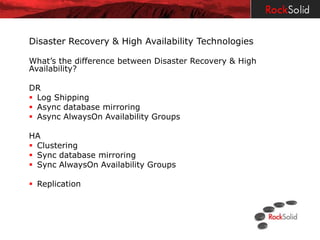
What’s the difference between Disaster Recovery & High
Availability?

DR
 Log Shipping
 Async database mirroring
 Async AlwaysOn Availability Groups

HA
 Clustering
 Sync database mirroring
 Sync AlwaysOn Availability Groups

 Replication
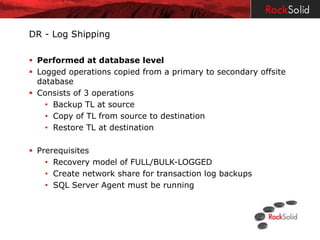
DR - Log Shipping

 Performed at database level
 Logged operations copied from a primary to secondary offsite
  database
 Consists of 3 operations
    • Backup TL at source
    • Copy of TL from source to destination
    • Restore TL at destination

 Prerequisites
    • Recovery model of FULL/BULK-LOGGED
    • Create network share for transaction log backups
    • SQL Server Agent must be running
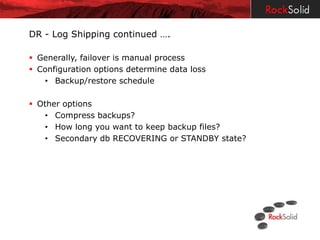
DR - Log Shipping continued ….

 Generally, failover is manual process
 Configuration options determine data loss
   • Backup/restore schedule

 Other options
    • Compress backups?
    • How long you want to keep backup files?
    • Secondary db RECOVERING or STANDBY state?
Demo: Log Shipping Configuration Review
Replication

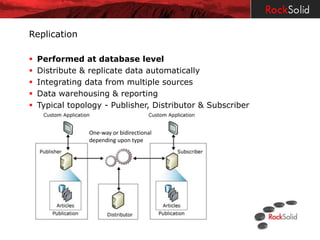
   Performed at database level
   Distribute & replicate data automatically
   Integrating data from multiple sources
   Data warehousing & reporting
   Typical topology - Publisher, Distributor & Subscriber


                 One-way or bidirectional
                 depending upon type
Replication continued ..

Options
 Publication type: Snapshot, Transactional & Merge

• Advantages of replication
   • Multiple sites have copies of data
   • Separate applications for read/write operations
   • Increased performance

• Disadvantages of replication
   • Can be complicated to manage changes
   • Multiple SQL licenses
HA - Clustering

 Performed at an instance level
 One virtual server name, multiple nodes
 Shared storage

Best Practices
• Server dedicated to SQL Server
• Identical servers
• Use static IP address
• Plan how to deal with risks - SAN failure & DR options
HA – Clustering continued …

Advantages
• Patching SQL Server is easier
• Eliminate downtime
• Logins, jobs, system db’s all failover
• Don’t license passive node

Disadvantages
• Is generally not a DR solution
• Single copy of db
• Shared storage issue
• Expensive – x 2 servers and shared storage
DR & HA - Database Mirroring

   Performed at a database level
   Principle, Mirror & optional Witness
   Cannot mirror master, msdb, tempdb or model
   Apply stream of database log records to db mirror
   Used for DR (async) & HA (sync)

 Prerequisites
    • FULL RECOVERY
    • Principal & Mirror require same edition of SQL Server

 Options
   • Supports automatic failover (witness)
   • Sync OR async
DR & HA - Database Mirroring continued …

 Witness Database
   • It’s role is to determine availability between Principal & Mirror
   • Used for HA not DR
   • Ideally, located in a third datacentre

 Advantages
   • Since SQL Server 2008 -
       • The principle compresses the transactions before sending
         to mirror.
       • Automatically detects & attempts to recover storage
         corruption

 Limitations
    • Can’t read mirror – unless using snapshot
    • Can only fail over one database at a time
    • Doesn’t copy SQL logins or jobs
Demo: Database Mirroring
Failover & Snapshot
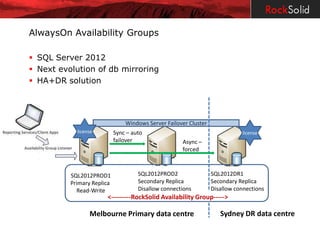
AlwaysOn Availability Groups

 SQL Server 2012
 Next evolution of db mirroring
 HA+DR solution


                                Windows Server Failover Cluster
            license         Sync – auto                                         license
                                                                  Sync – auto
                            failover                 Async –      failover
                                          Async –    forced
                                          forced

          SQL2012PROD1               SQL2012PROD2                 SQL2012DR1
          Primary Replica            Secondary Replica            Secondary Replica
            Read-Write               Disallow connections         Disallow connections
                       <---------RockSolid Availability Group----->

                 Melbourne Primary data centre                       Sydney DR data centre
AlwaysOn Availability Groups continued ..

 Prerequisites
    • Windows Server Failover Clustering (WSFC)
    • SQL Server 2012 Enterprise license
    • Same instance collation
    • Advise same drive letters

 Options
   • Failover groups contain multiple db’s
   • Supports up to 5 availability groups
   • Supports async & sync failover
AlwaysOn Availability Groups continued ..


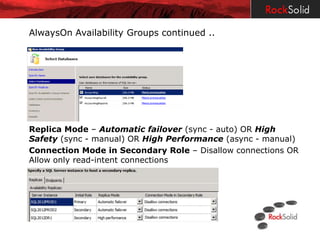
Replica Mode – Automatic failover (sync - auto) OR High
Safety (sync - manual) OR High Performance (async - manual)
Connection Mode in Secondary Role – Disallow connections OR
Allow only read-intent connections
AlwaysOn Availability Groups continued ..

Advantages
   • Recovery of corrupt pages are automatically attempted
   • HA & DR solution
   • Replicas can be used for reporting & backup operations

Disadvantages
    • Enterprise feature
    • No delay in applying transaction log updates if you want that
      control
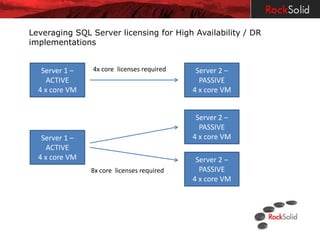
Leveraging SQL Server licensing for High Availability / DR
implementations

 SQL Server customers can run one supportive passive instance

   • The passive server must be truly passive
   • One secondary passive server is ONLY allowed
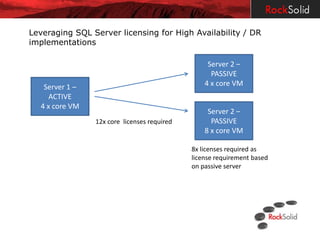
   • When licensing Per Core you must license the highest number
     of core licenses even if this is the passive node
Leveraging SQL Server licensing for High Availability / DR
implementations
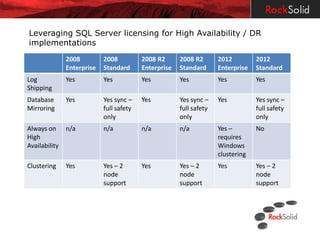
               2008         2008          2008 R2      2008 R2       2012         2012
               Enterprise   Standard      Enterprise   Standard      Enterprise   Standard
Log            Yes          Yes           Yes          Yes           Yes          Yes
Shipping
Database       Yes          Yes sync –    Yes          Yes sync –    Yes          Yes sync –
Mirroring                   full safety                full safety                full safety
                            only                       only                       only
Always on      n/a          n/a           n/a          n/a           Yes –        No
High                                                                 requires
Availability                                                         Windows
                                                                     clustering
Clustering     Yes          Yes – 2       Yes          Yes – 2       Yes          Yes – 2
                            node                       node                       node
                            support                    support                    support
Leveraging SQL Server licensing for High Availability / DR
implementations


   Server 1 –   4x core licenses required    Server 2 –
     ACTIVE                                   PASSIVE
  4 x core VM                               4 x core VM


                                             Server 2 –
                                              PASSIVE
   Server 1 –                               4 x core VM
     ACTIVE
  4 x core VM                                Server 2 –
                8x core licenses required     PASSIVE
                                            4 x core VM
Leveraging SQL Server licensing for High Availability / DR
implementations

                                                  Server 2 –
                                                   PASSIVE
   Server 1 –                                    4 x core VM
     ACTIVE
  4 x core VM
                                                  Server 2 –
                12x core licenses required         PASSIVE
                                                 8 x core VM

                                             8x licenses required as
                                             license requirement based
                                             on passive server
Final Q & A

Sql Server High Availability & DR Technologies

  • 1.
    RockSolid SQL Server Management
  • 2.
    Disclaimer We recommend thatyou seek further professional advice before deciding on the suitability of any recommendations in this presentation for you. While all care is taken to ensure information is accurate, we do not make any guarantees about the suitability of advice and advice given may contain technical inaccuracies or topographical errors. The answers provided are our own opinions and may differ from advice provided by Microsoft and/or other SQL Server professionals. In no event shall we be liable for any special, incidental, indirect, economic or consequential damages or for loss of profit, revenue or data howsoever caused, regardless of whether we could foresee or was advised of the possibility or likelihood of such loss or damage.
  • 3.
    Disaster Recovery &High Availability Technologies (SQL Server 2008, 2008 R2 & 2012 Standard & Enterprise) Contents  Log Shipping  Replication  Clustering  Database Mirroring  Always On High Availability groups  Leveraging SQL Server 2012 core licensing for High Availability / DR implementations
  • 4.
    Disaster Recovery &High Availability Technologies What’s the difference between Disaster Recovery & High Availability? DR  Log Shipping  Async database mirroring  Async AlwaysOn Availability Groups HA  Clustering  Sync database mirroring  Sync AlwaysOn Availability Groups  Replication
  • 5.
    DR - LogShipping  Performed at database level  Logged operations copied from a primary to secondary offsite database  Consists of 3 operations • Backup TL at source • Copy of TL from source to destination • Restore TL at destination  Prerequisites • Recovery model of FULL/BULK-LOGGED • Create network share for transaction log backups • SQL Server Agent must be running
  • 6.
    DR - LogShipping continued ….  Generally, failover is manual process  Configuration options determine data loss • Backup/restore schedule  Other options • Compress backups? • How long you want to keep backup files? • Secondary db RECOVERING or STANDBY state?
  • 7.
    Demo: Log ShippingConfiguration Review
  • 8.
    Replication  Performed at database level  Distribute & replicate data automatically  Integrating data from multiple sources  Data warehousing & reporting  Typical topology - Publisher, Distributor & Subscriber One-way or bidirectional depending upon type
  • 9.
    Replication continued .. Options Publication type: Snapshot, Transactional & Merge • Advantages of replication • Multiple sites have copies of data • Separate applications for read/write operations • Increased performance • Disadvantages of replication • Can be complicated to manage changes • Multiple SQL licenses
  • 10.
    HA - Clustering Performed at an instance level  One virtual server name, multiple nodes  Shared storage Best Practices • Server dedicated to SQL Server • Identical servers • Use static IP address • Plan how to deal with risks - SAN failure & DR options
  • 11.
    HA – Clusteringcontinued … Advantages • Patching SQL Server is easier • Eliminate downtime • Logins, jobs, system db’s all failover • Don’t license passive node Disadvantages • Is generally not a DR solution • Single copy of db • Shared storage issue • Expensive – x 2 servers and shared storage
  • 12.
    DR & HA- Database Mirroring  Performed at a database level  Principle, Mirror & optional Witness  Cannot mirror master, msdb, tempdb or model  Apply stream of database log records to db mirror  Used for DR (async) & HA (sync)  Prerequisites • FULL RECOVERY • Principal & Mirror require same edition of SQL Server  Options • Supports automatic failover (witness) • Sync OR async
  • 13.
    DR & HA- Database Mirroring continued …  Witness Database • It’s role is to determine availability between Principal & Mirror • Used for HA not DR • Ideally, located in a third datacentre  Advantages • Since SQL Server 2008 - • The principle compresses the transactions before sending to mirror. • Automatically detects & attempts to recover storage corruption  Limitations • Can’t read mirror – unless using snapshot • Can only fail over one database at a time • Doesn’t copy SQL logins or jobs
  • 14.
  • 15.
    AlwaysOn Availability Groups SQL Server 2012  Next evolution of db mirroring  HA+DR solution Windows Server Failover Cluster license Sync – auto license Sync – auto failover Async – failover Async – forced forced SQL2012PROD1 SQL2012PROD2 SQL2012DR1 Primary Replica Secondary Replica Secondary Replica Read-Write Disallow connections Disallow connections <---------RockSolid Availability Group-----> Melbourne Primary data centre Sydney DR data centre
  • 16.
    AlwaysOn Availability Groupscontinued ..  Prerequisites • Windows Server Failover Clustering (WSFC) • SQL Server 2012 Enterprise license • Same instance collation • Advise same drive letters  Options • Failover groups contain multiple db’s • Supports up to 5 availability groups • Supports async & sync failover
  • 17.
    AlwaysOn Availability Groupscontinued .. Replica Mode – Automatic failover (sync - auto) OR High Safety (sync - manual) OR High Performance (async - manual) Connection Mode in Secondary Role – Disallow connections OR Allow only read-intent connections
  • 18.
    AlwaysOn Availability Groupscontinued .. Advantages • Recovery of corrupt pages are automatically attempted • HA & DR solution • Replicas can be used for reporting & backup operations Disadvantages • Enterprise feature • No delay in applying transaction log updates if you want that control
  • 19.
    Leveraging SQL Serverlicensing for High Availability / DR implementations  SQL Server customers can run one supportive passive instance • The passive server must be truly passive • One secondary passive server is ONLY allowed • When licensing Per Core you must license the highest number of core licenses even if this is the passive node
  • 20.
    Leveraging SQL Serverlicensing for High Availability / DR implementations 2008 2008 2008 R2 2008 R2 2012 2012 Enterprise Standard Enterprise Standard Enterprise Standard Log Yes Yes Yes Yes Yes Yes Shipping Database Yes Yes sync – Yes Yes sync – Yes Yes sync – Mirroring full safety full safety full safety only only only Always on n/a n/a n/a n/a Yes – No High requires Availability Windows clustering Clustering Yes Yes – 2 Yes Yes – 2 Yes Yes – 2 node node node support support support
  • 21.
    Leveraging SQL Serverlicensing for High Availability / DR implementations Server 1 – 4x core licenses required Server 2 – ACTIVE PASSIVE 4 x core VM 4 x core VM Server 2 – PASSIVE Server 1 – 4 x core VM ACTIVE 4 x core VM Server 2 – 8x core licenses required PASSIVE 4 x core VM
  • 22.
    Leveraging SQL Serverlicensing for High Availability / DR implementations Server 2 – PASSIVE Server 1 – 4 x core VM ACTIVE 4 x core VM Server 2 – 12x core licenses required PASSIVE 8 x core VM 8x licenses required as license requirement based on passive server
  • 23.