
AlwaysOn
      Wydajność i bezpieczeństwo
           naszych danych


Łukasz Grala
Sesja powstała na podstawie sesji z MTS
                    2012


• Łukasz Grala               • Damian Widera
• Ekspert | SQLExpert.pl     • PM | LGBS
Kontakt z prelegentem

• Łukasz Grala
• Architekt - trener | SQLExpert.pl
• lukasz@sqlexpert.pl
• BLOGI: SQLResearch.com
  PowerPivot.info.pl
• @PowerPivotBlog
• Lider Polish SQL Server User Group
  (PLSSUG)
Kontakt z prelegentem

•   Damian Widera
•   Project Manager & Team Leader | LGBS
•   d.widera@lgbs.pl
•   Lider Polish SQL Server User Group
    (PLSSUG)
Plan prezentacji
•   Rozwiązania High Availability w SQL Server
•   Architektura i wymagania AlwaysOn
•   Realizacja High Availability przy użyciu AlwaysOn
•   Realizacja Disaster Recovery przy użyciu AlwaysOn
•   Wykorzystywanie Replik
•   Monitorowanie i zarządzanie AlwaysOn
•   Podsumowanie
•   Bibliografia (materiały)
Wysoka dostępnośd

High Availability w SQL Server
Wysoka dostępność

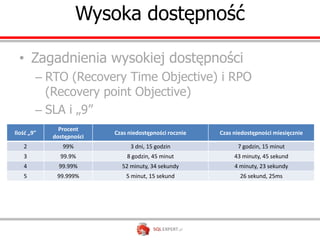
 • Zagadnienia wysokiej dostępności
        – RTO (Recovery Time Objective) i RPO
          (Recovery point Objective)
        – SLA i „9”
              Procent
Ilość „9”                 Czas niedostępności rocznie   Czas niedostępności miesięcznie
            dostępności
   2           99%              3 dni, 15 godzin              7 godzin, 15 minut
   3          99.9%           8 godzin, 45 minut             43 minuty, 45 sekund
   4          99.99%        52 minuty, 34 sekundy            4 minuty, 23 sekundy
   5         99.999%          5 minut, 15 sekund               26 sekund, 25ms
Rozwiązania High Availability w SQL Server

 •   Windows Failover Cluster
 •   Mirroring
 •   Log Shiping
 •   Replikacja
Rozwiązania High Avability w SQL Server
AlwaysOn

• Architektura i wymagania
  – AlwaysOn HighAvailability Groups
  – AlwaysOn Failover Cluster
Architektura i wymagania

• Windows Failover Cluster
• SQL Server 2012
Demo

Windows Failover Cluster
AlwaysOn

High Availability i Disaster Recovery
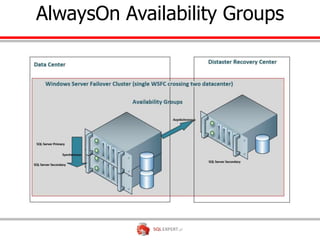
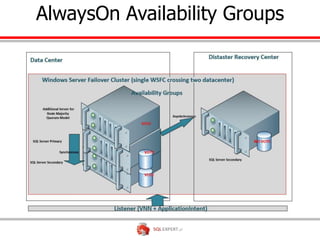
AlwaysOn Availability Groups
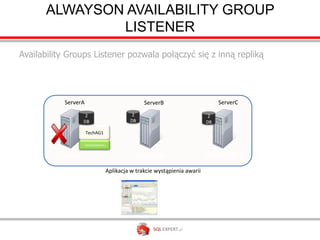
ALWAYSON AVAILABILITY GROUP
               LISTENER
Availability Groups Listener pozwala połączyć się z inną repliką


           ServerA                                  ServerB                        ServerC

                     2                         2                               2
                    DB                        DB                              DB

                     TechAG1

                     TechListener1


          Primary                                  Primary
                                                   Secondary                  Secondary
                                     Aplikacja w trakcie wystąpienia awarii
ACTIVE SECONDARY – READABLE
               SECONDARY

      SQLservr.exe                                           SQLservr.exe

                   Secondary
                    Primary                      Secondary
                                                 Primary


      CRASH
       InstanceA                                                       InstanceB
                                Database Log
                               Synchronization


DB1        DB2                                                   DB1        DB2


 Reports                                                           Reports
READABLE SECONDARY – DATA
                LATENCY
                     Primary                                  Secondary

                  Log Capture
                   Log Capture   Network        Log Receive
        DB1                                                         DB1


                   Log Pool                                                   Redo
  Commit
                                                                             Thread

      Log Cache                                  Log Cache                 Redo Pages

Log Flush                                            Log Hardened

                                  Acknowledge
       DB1 Log      DB1 Data                      DB1 Log                 DB1 Data
                                    Commit
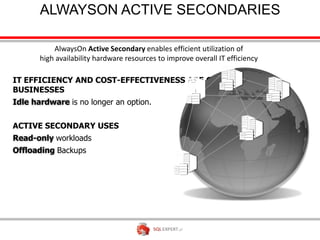
ALWAYSON ACTIVE SECONDARIES

           AlwaysOn Active Secondary enables efficient utilization of
       high availability hardware resources to improve overall IT efficiency

IT EFFICIENCY AND COST-EFFECTIVENESS ARE CRITICAL FOR
BUSINESSES
Idle hardware is no longer an option.

ACTIVE SECONDARY USES
Read-only workloads
Offloading Backups
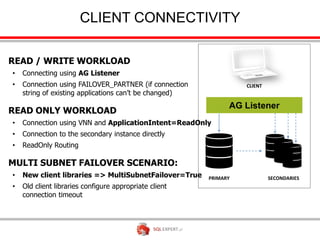
CLIENT CONNECTIVITY

READ / WRITE WORKLOAD
•   Connecting using AG Listener
•   Connection using FAILOVER_PARTNER (if connection              CLIENT
    string of existing applications can’t be changed)

READ ONLY WORKLOAD
•   Connection using VNN and ApplicationIntent=ReadOnly
•   Connection to the secondary instance directly
•   ReadOnly Routing

MULTI SUBNET FAILOVER SCENARIO:
•   New client libraries => MultiSubnetFailover=True    PRIMARY            SECONDARIES
•   Old client libraries configure appropriate client
    connection timeout
Demo

High Availability i Distaster recovery
AlwaysOn Group

Monitorowanie i zarządzanie
Monitorowanie i zarządzanie AlwaysOn

•   Dashboard AlwaysOn Avilability Groups
•   DMV
•   PowerShell
•   eXtended Events
Monitorowanie i zarządzanie AlwaysOn
Demo

Monitorowanie
AlwaysOn Failover Cluster
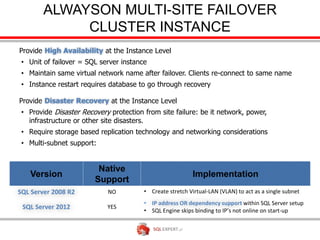
ALWAYSON MULTI-SITE FAILOVER
             CLUSTER INSTANCE
Provide High Availability at the Instance Level
 • Unit of failover = SQL server instance
 • Maintain same virtual network name after failover. Clients re-connect to same name
 • Instance restart requires database to go through recovery

Provide Disaster Recovery at the Instance Level
 • Provide Disaster Recovery protection from site failure: be it network, power,
   infrastructure or other site disasters.
 • Require storage based replication technology and networking considerations
 • Multi-subnet support:


SQL Server 2008 R2          NO          • Create stretch Virtual-LAN (VLAN) to act as a single subnet
                                        • IP address OR dependency support within SQL Server setup
 SQL Server 2012            YES
                                        • SQL Engine skips binding to IP’s not online on start-up
MULTI-SUBNET CLUSTERING


                                  Corpnet
                           Network Name: SqlClust


             IP1: 10.168.0.10
                                      OR            IP2: 192.168.0.10

                        subnet                                subnet
                             1                                     2


Local Site                       SAN Replication         Remote Site
TEMPDB ON LOCAL DISK

WHY WE ENABLE THIS?
• tempdb access occupies large % of     LOCAL TEMP DB       LOCAL TEMP DB
  SAN I/O                                (Fast disk, SSD)    (Fast disk, SSD)

• Fast local HDD/SSD becomes
  standard Server configuration

BENEFITS
• Better overall performance
• Cost saving                              PRIMARY           SECONDARIES

IMPORTANT NOTE!
• Ensure that tempdb local paths are
  available to SQL Service on all the
  nodes
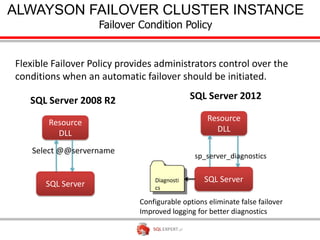
ALWAYSON FAILOVER CLUSTER INSTANCE
          Failover Condition Policy


                      Diagnosti
                      cs

                  Configurable options eliminate false failover
                  Improved logging for better diagnostics
AlwaysOn

Podsumowanie
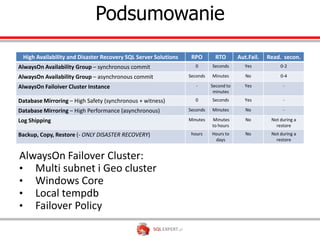
Podsumowanie
 High Availability and Disaster Recovery SQL Server Solutions    RPO        RTO       Aut.Fail.   Read. secon.
AlwaysOn Availability Group – synchronous commit                  0       Seconds        Yes           0-2

AlwaysOn Availability Group – asynchronous commit               Seconds   Minutes        No            0-4

AlwaysOn Failoiver Cluster Instance                                -      Second to      Yes            -
                                                                           minutes
Database Mirroring – High Safety (synchronous + witness)          0       Seconds        Yes            -

Database Mirroring – High Performance (asynchronous)            Seconds   Minutes        No             -

Log Shipping                                                    Minutes   Minutes        No        Not during a
                                                                          to hours                   restore
Backup, Copy, Restore (- ONLY DISASTER RECOVERY)                 hours    Hours to       No        Not during a
                                                                           days                      restore
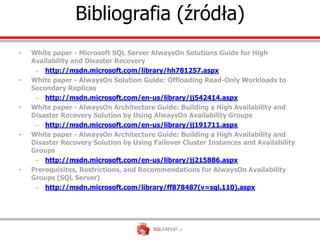
Bibliografia (źródła)
•   White paper - Microsoft SQL Server AlwaysOn Solutions Guide for High
    Availability and Disaster Recovery
     – http://msdn.microsoft.com/library/hh781257.aspx
•   White paper - AlwaysOn Solution Guide: Offloading Read-Only Workloads to
    Secondary Replicas
     – http://msdn.microsoft.com/en-us/library/jj542414.aspx
•   White paper - AlwaysOn Architecture Guide: Building a High Availability and
    Disaster Recovery Solution by Using AlwaysOn Availability Groups
     – http://msdn.microsoft.com/en-us/library/jj191711.aspx
•   White paper - AlwaysOn Architecture Guide: Building a High Availability and
    Disaster Recovery Solution by Using Failover Cluster Instances and Availability
    Groups
     – http://msdn.microsoft.com/en-us/library/jj215886.aspx
•   Prerequisites, Restrictions, and Recommendations for AlwaysOn Availability
    Groups (SQL Server)
     – http://msdn.microsoft.com/library/ff878487(v=sql.110).aspx

Always On - Wydajność i bezpieczeństwo naszych danych - High Availability SQL Server 2012

  • 1.
    AlwaysOn Wydajność i bezpieczeństwo naszych danych Łukasz Grala
  • 2.
    Sesja powstała napodstawie sesji z MTS 2012 • Łukasz Grala • Damian Widera • Ekspert | SQLExpert.pl • PM | LGBS
  • 3.
    Kontakt z prelegentem •Łukasz Grala • Architekt - trener | SQLExpert.pl • lukasz@sqlexpert.pl • BLOGI: SQLResearch.com PowerPivot.info.pl • @PowerPivotBlog • Lider Polish SQL Server User Group (PLSSUG)
  • 4.
    Kontakt z prelegentem • Damian Widera • Project Manager & Team Leader | LGBS • d.widera@lgbs.pl • Lider Polish SQL Server User Group (PLSSUG)
  • 5.
    Plan prezentacji • Rozwiązania High Availability w SQL Server • Architektura i wymagania AlwaysOn • Realizacja High Availability przy użyciu AlwaysOn • Realizacja Disaster Recovery przy użyciu AlwaysOn • Wykorzystywanie Replik • Monitorowanie i zarządzanie AlwaysOn • Podsumowanie • Bibliografia (materiały)
  • 6.
  • 7.
    Wysoka dostępność •Zagadnienia wysokiej dostępności – RTO (Recovery Time Objective) i RPO (Recovery point Objective) – SLA i „9” Procent Ilość „9” Czas niedostępności rocznie Czas niedostępności miesięcznie dostępności 2 99% 3 dni, 15 godzin 7 godzin, 15 minut 3 99.9% 8 godzin, 45 minut 43 minuty, 45 sekund 4 99.99% 52 minuty, 34 sekundy 4 minuty, 23 sekundy 5 99.999% 5 minut, 15 sekund 26 sekund, 25ms
  • 8.
    Rozwiązania High Availabilityw SQL Server • Windows Failover Cluster • Mirroring • Log Shiping • Replikacja
  • 9.
  • 10.
    AlwaysOn • Architektura iwymagania – AlwaysOn HighAvailability Groups – AlwaysOn Failover Cluster
  • 11.
    Architektura i wymagania •Windows Failover Cluster • SQL Server 2012
  • 12.
  • 13.
  • 14.
  • 15.
  • 16.
    ALWAYSON AVAILABILITY GROUP LISTENER Availability Groups Listener pozwala połączyć się z inną repliką ServerA ServerB ServerC 2 2 2 DB DB DB TechAG1 TechListener1 Primary Primary Secondary Secondary Aplikacja w trakcie wystąpienia awarii
  • 17.
    ACTIVE SECONDARY –READABLE SECONDARY SQLservr.exe SQLservr.exe Secondary Primary Secondary Primary CRASH InstanceA InstanceB Database Log Synchronization DB1 DB2 DB1 DB2 Reports Reports
  • 18.
    READABLE SECONDARY –DATA LATENCY Primary Secondary Log Capture Log Capture Network Log Receive DB1 DB1 Log Pool Redo Commit Thread Log Cache Log Cache Redo Pages Log Flush Log Hardened Acknowledge DB1 Log DB1 Data DB1 Log DB1 Data Commit
  • 19.
    ALWAYSON ACTIVE SECONDARIES AlwaysOn Active Secondary enables efficient utilization of high availability hardware resources to improve overall IT efficiency IT EFFICIENCY AND COST-EFFECTIVENESS ARE CRITICAL FOR BUSINESSES Idle hardware is no longer an option. ACTIVE SECONDARY USES Read-only workloads Offloading Backups
  • 20.
    CLIENT CONNECTIVITY READ /WRITE WORKLOAD • Connecting using AG Listener • Connection using FAILOVER_PARTNER (if connection CLIENT string of existing applications can’t be changed) READ ONLY WORKLOAD • Connection using VNN and ApplicationIntent=ReadOnly • Connection to the secondary instance directly • ReadOnly Routing MULTI SUBNET FAILOVER SCENARIO: • New client libraries => MultiSubnetFailover=True PRIMARY SECONDARIES • Old client libraries configure appropriate client connection timeout
  • 21.
    Demo High Availability iDistaster recovery
  • 22.
  • 23.
    Monitorowanie i zarządzanieAlwaysOn • Dashboard AlwaysOn Avilability Groups • DMV • PowerShell • eXtended Events
  • 24.
  • 25.
  • 26.
  • 27.
    ALWAYSON MULTI-SITE FAILOVER CLUSTER INSTANCE Provide High Availability at the Instance Level • Unit of failover = SQL server instance • Maintain same virtual network name after failover. Clients re-connect to same name • Instance restart requires database to go through recovery Provide Disaster Recovery at the Instance Level • Provide Disaster Recovery protection from site failure: be it network, power, infrastructure or other site disasters. • Require storage based replication technology and networking considerations • Multi-subnet support: SQL Server 2008 R2 NO • Create stretch Virtual-LAN (VLAN) to act as a single subnet • IP address OR dependency support within SQL Server setup SQL Server 2012 YES • SQL Engine skips binding to IP’s not online on start-up
  • 28.
    MULTI-SUBNET CLUSTERING Corpnet Network Name: SqlClust IP1: 10.168.0.10 OR IP2: 192.168.0.10 subnet subnet 1 2 Local Site SAN Replication Remote Site
  • 29.
    TEMPDB ON LOCALDISK WHY WE ENABLE THIS? • tempdb access occupies large % of LOCAL TEMP DB LOCAL TEMP DB SAN I/O (Fast disk, SSD) (Fast disk, SSD) • Fast local HDD/SSD becomes standard Server configuration BENEFITS • Better overall performance • Cost saving PRIMARY SECONDARIES IMPORTANT NOTE! • Ensure that tempdb local paths are available to SQL Service on all the nodes
  • 30.
    ALWAYSON FAILOVER CLUSTERINSTANCE Failover Condition Policy Diagnosti cs Configurable options eliminate false failover Improved logging for better diagnostics
  • 31.
  • 32.
    Podsumowanie High Availabilityand Disaster Recovery SQL Server Solutions RPO RTO Aut.Fail. Read. secon. AlwaysOn Availability Group – synchronous commit 0 Seconds Yes 0-2 AlwaysOn Availability Group – asynchronous commit Seconds Minutes No 0-4 AlwaysOn Failoiver Cluster Instance - Second to Yes - minutes Database Mirroring – High Safety (synchronous + witness) 0 Seconds Yes - Database Mirroring – High Performance (asynchronous) Seconds Minutes No - Log Shipping Minutes Minutes No Not during a to hours restore Backup, Copy, Restore (- ONLY DISASTER RECOVERY) hours Hours to No Not during a days restore
  • 33.
    Bibliografia (źródła) • White paper - Microsoft SQL Server AlwaysOn Solutions Guide for High Availability and Disaster Recovery – http://msdn.microsoft.com/library/hh781257.aspx • White paper - AlwaysOn Solution Guide: Offloading Read-Only Workloads to Secondary Replicas – http://msdn.microsoft.com/en-us/library/jj542414.aspx • White paper - AlwaysOn Architecture Guide: Building a High Availability and Disaster Recovery Solution by Using AlwaysOn Availability Groups – http://msdn.microsoft.com/en-us/library/jj191711.aspx • White paper - AlwaysOn Architecture Guide: Building a High Availability and Disaster Recovery Solution by Using Failover Cluster Instances and Availability Groups – http://msdn.microsoft.com/en-us/library/jj215886.aspx • Prerequisites, Restrictions, and Recommendations for AlwaysOn Availability Groups (SQL Server) – http://msdn.microsoft.com/library/ff878487(v=sql.110).aspx

Editor's Notes

  • #4 SLAJD DOMYŚLNIE UKRYTYMożna w nim podać namiary kontaktowe na prelegenta (nie jest to obowiązkowe).Mają one pozwolić (po pobraniu prezentacji) skontaktować się z prelegentem.Można również pokazać ten slajd na prezentacji.
  • #5 SLAJD DOMYŚLNIE UKRYTYMożna w nim podać namiary kontaktowe na prelegenta (nie jest to obowiązkowe).Mają one pozwolić (po pobraniu prezentacji) skontaktować się z prelegentem.Można również pokazać ten slajd na prezentacji.
  • #6 Tu wpisujemy AGENDĘ
  • #7 http://msdn.microsoft.com/en-us/library/hh213417(v=sql.110).aspx#Aglisteners
  • #18 http://msdn.microsoft.com/en-us/library/ff878253(v=sql.110).aspxExplains purpose and “close to real-time” nature of queries
  • #19  Explain that the log cache is flushed when either it is full or a transaction has committed.Sync implies no data lossExplain why it is only close to real time and never real time even when the mode is synchronousWhat happensOn Async Replica when network is slow (data loss)What happens if the REDO thread is slow to apply the log
  • #20 Read/Write WorkloadIf you already have FAILOVER_PARTNER in the connection string, and can’t change the connection string, it will continue to work, provided:There are only two replicas – primary and one secondary, andThe replicas have been set to NOT “Allow All Connections” in secondary roleIf using new client libraries, use MultiSubnetFailover=True in the connection stringRead Only WorkloadIf using legacy client libraries:Set the “Connection Mode in Secondary Role” for the AG replicas to “Allow All Connections”Connect directly to the secondary instanceIf using new client libraries:Set the “Connection Mode in Secondary Role” for the AG replicas to “Allow ReadOnly Connections”Define Routing List for the AG (to take advantage of ReadOnly Rerouting)Use the AG VNN (Listener) to connect to the Availability Group, ANDSpecify ApplicationIntent=ReadOnly in the connection stringIf using new client libraries, use MultiSubnetFailover=True in the connection string
  • #21 http://msdn.microsoft.com/en-us/library/hh270278(v=sql.110).aspxhttp://msdn.microsoft.com/en-us/library/ms189134(v=sql.110).aspx
  • #29 http://msdn.microsoft.com/en-us/library/ff878716(v=sql.110).aspx