An Inside Look at Microsoft SQL Server’s New
Business Intelligence Opportunities & Features


       Brian Larson      Dan English
       Vice President    Principal Business
       of Technology     Intelligence Consultant
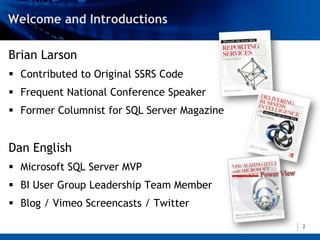
Brian Larson
 Contributed to Original SSRS Code
 Frequent National Conference Speaker
 Former Columnist for SQL Server Magazine


Dan English
 Microsoft SQL Server MVP
 BI User Group Leadership Team Member
 Blog / Vimeo Screencasts / Twitter

                                             2
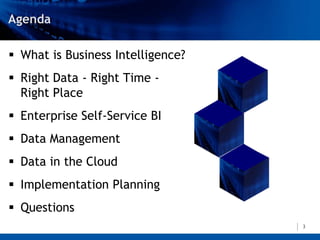
 What is Business Intelligence?
 Right Data - Right Time -
  Right Place
 Enterprise Self-Service BI
 Data Management
 Data in the Cloud
 Implementation Planning
 Questions
                                   3
Business intelligence is all about equipping your organization for
effective decision making.


“Effective decisions are choices that move an organization closer to
an agreed-on set of goals in a timely manner.”
              Delivering Business Intelligence with SQL Server 2012


“Business intelligence is the delivery of accurate, useful information
to the appropriate decision makers within the necessary timeframe
to support effective decision making
                               making.”
               Delivering Business Intelligence with SQL Server 2012
                                                                     4
RIGHT DATA

RIGHT TIME

    RIGHT PLACE


                  5
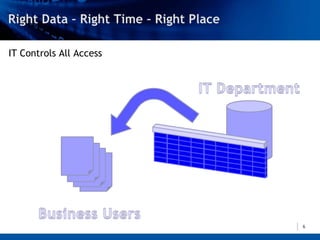
IT Controls All Access


                         6
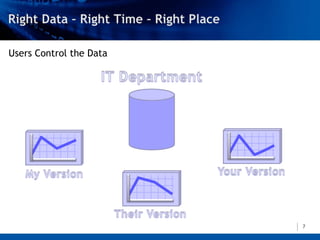
Users Control the Data


                         7
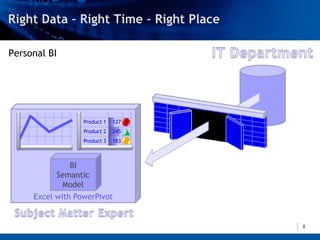
Personal BI


                  Product 1   127
                  Product 2   245
                  Product 3   183


              BI
           Semantic
            Model
     Excel with PowerPivot


                                    8
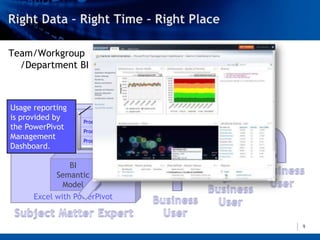
Team/Workgroup
                                     SharePoint Library
  /Department BI


Usage reporting
is provided by     Product 1   127
the PowerPivot     Product 2   245
Management         Product 3   183
Dashboard.

               BI
            Semantic
             Model
      Excel with PowerPivot


                                                          9
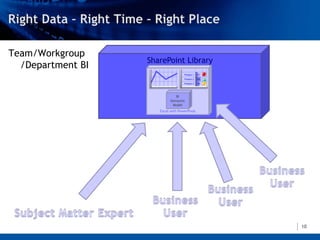
Team/Workgroup
                   SharePoint Library
  /Department BI
                                    Product 1   127
                                    Product 2   245
                                    Product 3   183


                               BI
                            Semantic
                             Model
                      Excel with PowerPivot


                                                      10
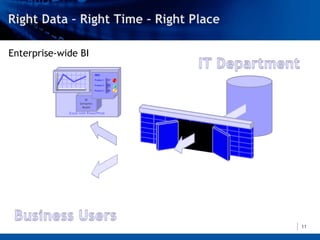
Enterprise-wide BI
                            Sales
                           Product 1 127
                            Product 1 127
                           Product 2 245
                           Product 32 183
                            Product    245

                              Product 3   183


                      BI
                      BI
                   Semantic
                   Semantic
                    Model
                    Model
             Excel with PowerPivot


                                                11
DATA MODEL
SCALABILITY DEMO


                   12
ENTERPRISE SELF-SERVICE BI


                             13
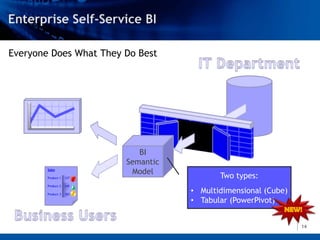
Everyone Does What They Do Best


                             BI
                          Semantic
        Sales
                           Model
        Product 1   127                     Two types:
        Product 2   245

        Product 3   183
                                     • Multidimensional (Cube)
                                     • Tabular (PowerPivot)


                                                                 14
Tools for the Business User
 Excel (PivotTable/PivotChart, PowerPivot)
 PerformancePoint Services
             in SharePoint 2010
 Reporting Services using Report Builder
 Power View


                                              15
POWER VIEW DEMO


                  16
DATA MANAGEMENT


                  17
Integration Services
 Now a full-fledged server product with its
  own database for storing deployed packages
 Streamlined package deployment
 Package parameters provide easier
  configuration
 Support for versioning, logging, and
  reporting
                                           18
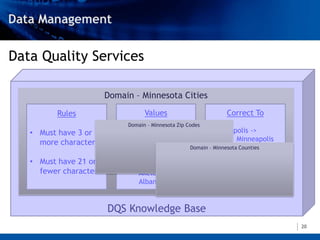
Data Quality Services
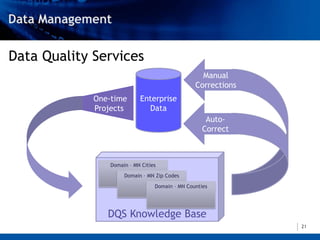
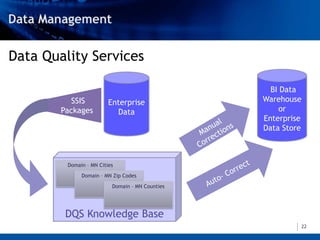
 Create a central repository of rules and lists
  of valid data for your organization.
 As data flows through your organization, it
  can be programmatically validated and
  corrected.


                                                19
Data Quality Services

                        Domain – Minnesota Cities
         Rules                     Values                          Correct To
                             Domain – Minnesota Zip Codes
   • Must have 3 or              Ada                          Mineapolis ->
                                 Adams                              Minneapolis
     more characters
                                 Adrian              Domain – Minnesota Counties
                                 Afton                        St. Paul -> St Paul
   • Must have 21 or             Aitkin
     fewer characters            Akeley                       Edyna -> Edina
                                 Albany


                        DQS Knowledge Base
                                                                                    20
Data Quality Services
                                                   Manual
                                                 Corrections
             One-time       Enterprise
             Projects         Data
                                                     Auto-
                                                    Correct


                 Domain – MN Cities
                      Domain – MN Zip Codes

                                  Domain – MN Counties


                DQS Knowledge Base
                                                               21
Data Quality Services

                                                   BI Data
           SSIS          Enterprise              Warehouse
        Packages           Data                       or
                                                 Enterprise
                                                 Data Store


         Domain – MN Cities
              Domain – MN Zip Codes

                          Domain – MN Counties


         DQS Knowledge Base
                                                              22
DATA QUALITY
  SERVICES DEMO


                  23
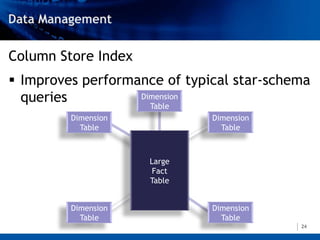
Column Store Index
 Improves performance of typical star-schema
  queries          Dimension
                     Table
         Dimension            Dimension
           Table                Table


                     Large
                      Fact
                     Table


         Dimension            Dimension
           Table                Table
                                           24
ColumnStore Index
 Stores the table data in a column-oriented
  rather than a row-oriented manner
 Utilizes highly-efficient data compression,
  which reduces data reads and increases the
  efficiency of in-memory caching
 Can improve performance when loading an
  OLAP cube
                                                25
ColumnStore Index Limitations
 A table cannot be updated while a column
  store index is in place
 Certain data types cannot be included in
  column store indexes
 Not all queries benefit from a column store
  index

                                                26
High Availability
 AlwaysOn Availability Groups provide
  enhanced database mirroring
 Automatic and manual failover of a group of
  databases
 Seamless application failover through a
  group listener
 Secondary instances can be used for
  reporting and backup operations
                                            27
High Availability
 AlwaysOn Failover Clusters provide cross-
  datacenter failover
 AlwaysOn supports rolling upgrade and
  patching to reduce downtime
 Easier management through System Center


                                              28
DATA IN THE CLOUD


                    29
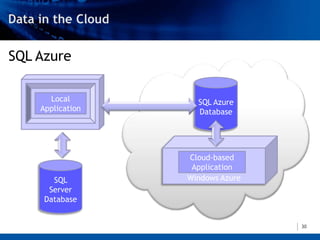
SQL Azure

      Local         SQL Azure
    Application     Database


                  Cloud-based
                   Application
       SQL        Windows Azure
      Server
     Database


                                  30
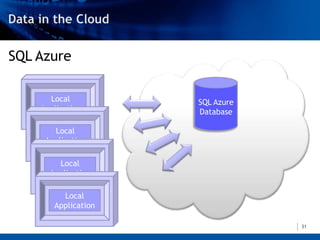
SQL Azure

      Local          SQL Azure
    Application      Database

       Local
     Application

        Local
      Application

         Local
       Application

                                 31
SQL Server 2012 and SQL Azure
 SQL Azure and SQL Server 2012 share a
  common architecture
 Increased ease of data movement between
  on-premise and the cloud
 Write once/run anywhere with SQL Server
  Data Tools

                                            32
IMPLEMENTATION PLANNING


                          33
Standard
 Edition   
             Business
           Intelligence 
              Edition
                        Enterprise
                         Edition 
                                     34
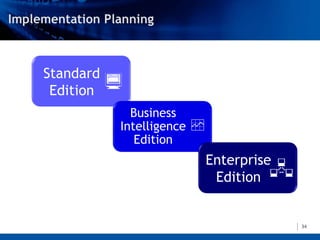
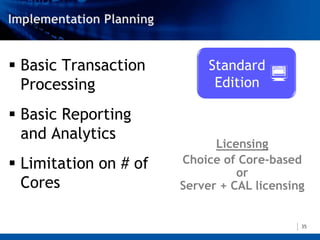
 Basic Transaction         Standard
  Processing                 Edition   
 Basic Reporting
  and Analytics
                             Licensing
 Limitation on # of   Choice of Core-based
                                 or
  Cores                Server + CAL licensing


                                            35
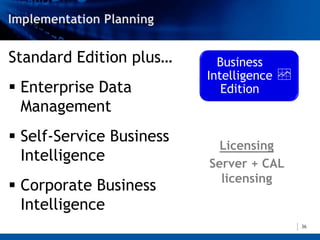
Standard Edition plus…      Business
                          Intelligence 
 Enterprise Data            Edition
  Management
 Self-Service Business
                            Licensing
  Intelligence            Server + CAL
                            licensing
 Corporate Business
  Intelligence
                                           36
BI Edition plus…
                      Enterprise
 Advanced Security    Edition 
 High Volume Data
  Warehousing
                       Licensing
 Advanced High       Core-based
  Availability

                                   37
Other Editions in Earlier SQL Server Versions
 Datacenter Edition is being retired.
 All features available in the Enterprise Edition

 Workgroup & Small Business Editions are
  being retired.
 Web Edition will be available only through a
  Services Provider Licensing Agreement
  (SPLA).
                                                    38
Tools from Microsoft
 Microsoft Assessment and Planning Toolkit
 Create an inventory of existing SQL Server instances

 Upgrade Advisor
 Identifies SQL Server issues to fix before or after you
 upgrade

 Distributed Replay Utility
 Use to compare performance under load before and after
 an upgrade in a test environment

                                                           39
Upgrade in Stages
 Not all SQL instances need to be upgraded
  at the same time
 Select a SQL Server 2012 feature that
  provides a significant ROI and put in a 2012
  instance to implement that feature
 Always test in a parallel environment before
  upgrading production
                                                 40
QUESTIONS


            41
Thank you for attending!

    Website                         Email
www.teamscs.com               SCS@teamscs.com

Sql server 2012 smart dive presentation 20120126

  • 1.
    An Inside Lookat Microsoft SQL Server’s New Business Intelligence Opportunities & Features Brian Larson Dan English Vice President Principal Business of Technology Intelligence Consultant
  • 2.
    Brian Larson  Contributedto Original SSRS Code  Frequent National Conference Speaker  Former Columnist for SQL Server Magazine Dan English  Microsoft SQL Server MVP  BI User Group Leadership Team Member  Blog / Vimeo Screencasts / Twitter 2
  • 3.
     What isBusiness Intelligence?  Right Data - Right Time - Right Place  Enterprise Self-Service BI  Data Management  Data in the Cloud  Implementation Planning  Questions 3
  • 4.
    Business intelligence isall about equipping your organization for effective decision making. “Effective decisions are choices that move an organization closer to an agreed-on set of goals in a timely manner.” Delivering Business Intelligence with SQL Server 2012 “Business intelligence is the delivery of accurate, useful information to the appropriate decision makers within the necessary timeframe to support effective decision making making.” Delivering Business Intelligence with SQL Server 2012 4
  • 5.
  • 6.
  • 7.
  • 8.
    Personal BI Product 1 127 Product 2 245 Product 3 183 BI Semantic Model Excel with PowerPivot 8
  • 9.
    Team/Workgroup SharePoint Library /Department BI Usage reporting is provided by Product 1 127 the PowerPivot Product 2 245 Management Product 3 183 Dashboard. BI Semantic Model Excel with PowerPivot 9
  • 10.
    Team/Workgroup SharePoint Library /Department BI Product 1 127 Product 2 245 Product 3 183 BI Semantic Model Excel with PowerPivot 10
  • 11.
    Enterprise-wide BI Sales Product 1 127 Product 1 127 Product 2 245 Product 32 183 Product 245 Product 3 183 BI BI Semantic Semantic Model Model Excel with PowerPivot 11
  • 12.
  • 13.
  • 14.
    Everyone Does WhatThey Do Best BI Semantic Sales Model Product 1 127 Two types: Product 2 245 Product 3 183 • Multidimensional (Cube) • Tabular (PowerPivot) 14
  • 15.
    Tools for theBusiness User  Excel (PivotTable/PivotChart, PowerPivot)  PerformancePoint Services in SharePoint 2010  Reporting Services using Report Builder  Power View 15
  • 16.
  • 17.
  • 18.
    Integration Services  Nowa full-fledged server product with its own database for storing deployed packages  Streamlined package deployment  Package parameters provide easier configuration  Support for versioning, logging, and reporting 18
  • 19.
    Data Quality Services Create a central repository of rules and lists of valid data for your organization.  As data flows through your organization, it can be programmatically validated and corrected. 19
  • 20.
    Data Quality Services Domain – Minnesota Cities Rules Values Correct To Domain – Minnesota Zip Codes • Must have 3 or Ada Mineapolis -> Adams Minneapolis more characters Adrian Domain – Minnesota Counties Afton St. Paul -> St Paul • Must have 21 or Aitkin fewer characters Akeley Edyna -> Edina Albany DQS Knowledge Base 20
  • 21.
    Data Quality Services Manual Corrections One-time Enterprise Projects Data Auto- Correct Domain – MN Cities Domain – MN Zip Codes Domain – MN Counties DQS Knowledge Base 21
  • 22.
    Data Quality Services BI Data SSIS Enterprise Warehouse Packages Data or Enterprise Data Store Domain – MN Cities Domain – MN Zip Codes Domain – MN Counties DQS Knowledge Base 22
  • 23.
    DATA QUALITY SERVICES DEMO 23
  • 24.
    Column Store Index Improves performance of typical star-schema queries Dimension Table Dimension Dimension Table Table Large Fact Table Dimension Dimension Table Table 24
  • 25.
    ColumnStore Index  Storesthe table data in a column-oriented rather than a row-oriented manner  Utilizes highly-efficient data compression, which reduces data reads and increases the efficiency of in-memory caching  Can improve performance when loading an OLAP cube 25
  • 26.
    ColumnStore Index Limitations A table cannot be updated while a column store index is in place  Certain data types cannot be included in column store indexes  Not all queries benefit from a column store index 26
  • 27.
    High Availability  AlwaysOnAvailability Groups provide enhanced database mirroring  Automatic and manual failover of a group of databases  Seamless application failover through a group listener  Secondary instances can be used for reporting and backup operations 27
  • 28.
    High Availability  AlwaysOnFailover Clusters provide cross- datacenter failover  AlwaysOn supports rolling upgrade and patching to reduce downtime  Easier management through System Center 28
  • 29.
    DATA IN THECLOUD 29
  • 30.
    SQL Azure Local SQL Azure Application Database Cloud-based Application SQL Windows Azure Server Database 30
  • 31.
    SQL Azure Local SQL Azure Application Database Local Application Local Application Local Application 31
  • 32.
    SQL Server 2012and SQL Azure  SQL Azure and SQL Server 2012 share a common architecture  Increased ease of data movement between on-premise and the cloud  Write once/run anywhere with SQL Server Data Tools 32
  • 33.
  • 34.
    Standard Edition  Business Intelligence  Edition Enterprise Edition  34
  • 35.
     Basic Transaction Standard Processing Edition   Basic Reporting and Analytics Licensing  Limitation on # of Choice of Core-based or Cores Server + CAL licensing 35
  • 36.
    Standard Edition plus… Business Intelligence   Enterprise Data Edition Management  Self-Service Business Licensing Intelligence Server + CAL licensing  Corporate Business Intelligence 36
  • 37.
    BI Edition plus… Enterprise  Advanced Security Edition   High Volume Data Warehousing Licensing  Advanced High Core-based Availability 37
  • 38.
    Other Editions inEarlier SQL Server Versions  Datacenter Edition is being retired. All features available in the Enterprise Edition  Workgroup & Small Business Editions are being retired.  Web Edition will be available only through a Services Provider Licensing Agreement (SPLA). 38
  • 39.
    Tools from Microsoft Microsoft Assessment and Planning Toolkit Create an inventory of existing SQL Server instances  Upgrade Advisor Identifies SQL Server issues to fix before or after you upgrade  Distributed Replay Utility Use to compare performance under load before and after an upgrade in a test environment 39
  • 40.
    Upgrade in Stages Not all SQL instances need to be upgraded at the same time  Select a SQL Server 2012 feature that provides a significant ROI and put in a 2012 instance to implement that feature  Always test in a parallel environment before upgrading production 40
  • 41.
  • 42.
    Thank you forattending! Website Email www.teamscs.com SCS@teamscs.com

Editor's Notes

  • #3 Book on the Airplane storyTry not to bore you, hope to excite you. Not by technology, but by possibilities and opportunities.Power View -> Crescent conceptual preview, not technology, but how will this benefit your clients.
  • #4 As we go, we’ll highlight business benefits and return on investment.
  • #5 This is where we are looking to get a return on BI investment.
  • #6 Start by talking about new features around delivering data.
  • #7 Went a long way to insure accuracy. Timeliness is a problem.
  • #8 Accuracy is questionable. Can be a major distraction to business users.Doesn’t play well with HIPAA and Sarbanes-Oxley.
  • #9 Escalate the data management by usage.IT opens a controlled gateway to verified data.SME’s can combine to form a BI Semantic Model.And analyze in Excel.
  • #10 Other business users access the spreadsheet.Controlled sharing with SharePoint.Reporting is now available to IT to see who is using and how often.Chose when to make this an Enterprise resource.
  • #11 When the time is right, move to IT-managed environment.
  • #12 IT now manages the BI Semantic Model.IT and Users are each able to analyze the model.
  • #13 After Demo –ROIBalance between “delivery of accurate, useful information” and availability to the “appropriate decision makers within the necessary timeframe”Focus everyone on their strengths – IT: data management and security. SME: analysis and decision-makingBetter compliance and auditability
  • #15 Everybody does what they do best <CLICK>IT manages the data model. <CLICK>Business Users are going to explore and analyze the data. What tools do we offer IT to streamline the process so they avoid being the bottleneck. IT must be responsive. <CLICK> Tabular BI Semantic Model.ROI/Benefits:Shorter time to a working modelLess IT training required. Easier to create. Easier to maintain.Promotes an iterative approach. Less complexity means it is easier to learn and adhere to best practices. “Dan should write the Horror Stories from the Trenches book.What tools do we offer the Business Users? <CLICK>
  • #16 Power View: 2 to 3 clicks to results. Focus the user on analysis and decision-making, not formatting. Efficiency.Immersive and Interactive. Data in motion. Your organization is dynamic – data analysis tool should be dynamic as well. Better to see trends, changes and correlations.Fun. Users will spend more with the tool and it will be productive time.
  • #17 After the Demo – Tool that is efficient - increased productivityImmersive and interactive – better-informed decisions, deeper insightsEngaging and fun – more productive time spent understanding the business
  • #18 Shift from delivery features to backend, data platform features
  • #19 ROI:Ease of management increases productivity and reduces mistakes
  • #21 Ada and OrrNorwood Young America
  • #24 Efficient means of Data Quality management:Accurate data leads to more accurate analysis and decisionsLess time spent by staff reviewing and cleansing dataCentralized and standardized across the enterpriseSeamless integration with ETL processPlug for the Mapping features in SSRS that were new in SQL 2008 R2Just as some trends are more easily recognized when data is put in motion, some trends are more easily recognized when data is represented geographically.
  • #27 ROI:More responsive reporting against the relational dataLess stress on source systems when loading Multidimensional BI Semantic ModelsProlong hardware lifetimeAllow for more frequent data loads and reduce latency
  • #31 Can easily move data we are hosting on-premise in SQL Server to the SQL Azure platform in the cloud.Local apps can access SQL Azure data with minimal modifications.Can create applications to run on the Windows Azure platform in the cloud.
  • #32 As demand for a given set of data increases, cloud resources can be added to meet the demand.
  • #33 ROI:Known cost of operation – in many cases, goes from a capital outlay to an expenseScalabilityManagement, backup, continuation of service updates are handled for you
  • #39 If you have a SQL Server Enterprise Agreement renewing soon, there are advantages for getting that renewal done and things locked in before SQL 2012 is released.