Getting SharePoint 2010
  Deployment Right
                         Veenus Maximiuk
             SharePoint Managing Architect
                                       ICC
*Agenda
Common Deployment Mistakes
Installation and Configuration Approaches
New Services Architecture
Virtualization Deployment Considerations
Avoid the Common Pitfalls
Questions
*Common Deployment
 Mistakes
Poor planning
Using the Farm Configuration Wizard for
production
Use one service account for everything
Provision all service applications
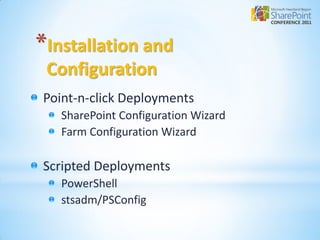
*Installation and
 Configuration
Point-n-click Deployments
   SharePoint Configuration Wizard
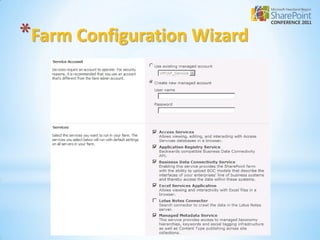
   Farm Configuration Wizard

Scripted Deployments
   PowerShell
   stsadm/PSConfig
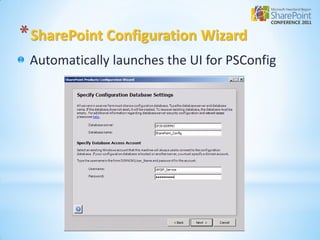
* SharePoint Configuration Wizard
 Automatically launches the UI for PSConfig
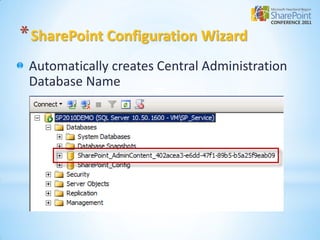
* SharePoint Configuration Wizard
 Automatically creates Central Administration
 Database Name
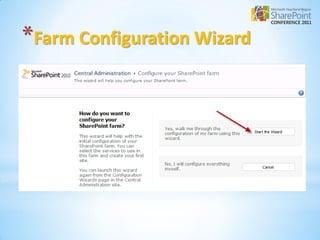
*Farm Configuration Wizard
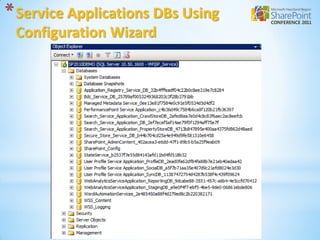
* Service Applications DBs Using
 Configuration Wizard
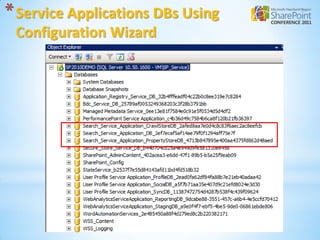
* Service Applications DBs Using
 Configuration Wizard
*Configuration Wizard
 Recommendations
 Recommend for
    Development
    Proof of Concept
 Not best for production
    Too many services
    Automatically creates database names for
    service applications
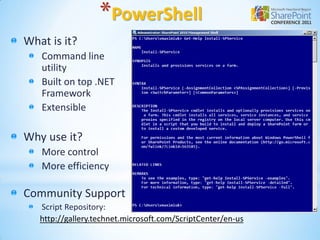
*PowerShell
What is it?
   Command line
   utility
   Built on top .NET
   Framework
   Extensible

Why use it?
   More control
   More efficiency

Community Support
   Script Repository:
   http://gallery.technet.microsoft.com/ScriptCenter/en-us
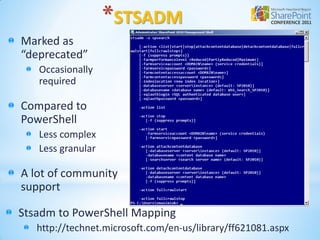
*STSADM
Marked as
“deprecated”
   Occasionally
   required

Compared to
PowerShell
   Less complex
   Less granular

A lot of community
support

Stsadm to PowerShell Mapping
   http://technet.microsoft.com/en-us/library/ff621081.aspx
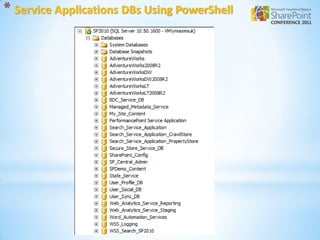
* Service Applications DBs Using PowerShell
*Using PowerShell


  DEMO
*Service Application
 Architecture
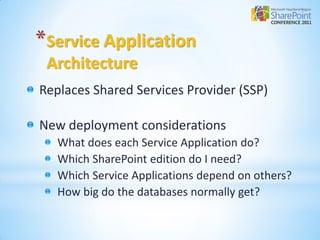
Replaces Shared Services Provider (SSP)

New deployment considerations
   What does each Service Application do?
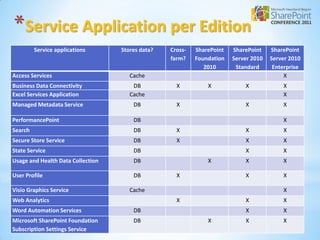
   Which SharePoint edition do I need?
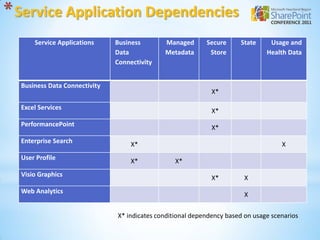
   Which Service Applications depend on others?
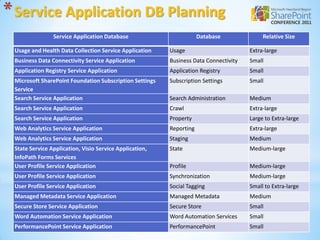
   How big do the databases normally get?
*Service Application per Edition
         Service applications      Stores data?   Cross-   SharePoint   SharePoint    SharePoint
                                                  farm?    Foundation   Server 2010   Server 2010
                                                              2010       Standard      Enterprise
Access Services                       Cache                                                X
Business Data Connectivity             DB           X          X            X             X
Excel Services Application            Cache                                               X
Managed Metadata Service               DB           X                       X             X

PerformancePoint                       DB                                                 X
Search                                 DB           X                       X             X
Secure Store Service                   DB           X                       X             X
State Service                          DB                                   X             X
Usage and Health Data Collection       DB                      X            X             X

User Profile                           DB           X                       X             X

Visio Graphics Service                Cache                                               X
Web Analytics                                       X                       X             X
Word Automation Services               DB                                   X             X
Microsoft SharePoint Foundation        DB                      X            X             X
Subscription Settings Service
* Service Application Dependencies
      Service Applications     Business       Managed       Secure     State     Usage and
                               Data           Metadata       Store              Health Data
                               Connectivity


  Business Data Connectivity
                                                              X*

  Excel Services                                              X*
  PerformancePoint                                            X*
  Enterprise Search                 X*                                               X
  User Profile                      X*            X*
  Visio Graphics                                              X*         X
  Web Analytics                                                          X

                               X* indicates conditional dependency based on usage scenarios
* Service Application DB Planning
                Service Application Database                         Database              Relative Size

 Usage and Health Data Collection Service Application    Usage                        Extra-large
 Business Data Connectivity Service Application          Business Data Connectivity   Small
 Application Registry Service Application                Application Registry         Small
 Microsoft SharePoint Foundation Subscription Settings   Subscription Settings        Small
 Service
 Search Service Application                              Search Administration        Medium
 Search Service Application                              Crawl                        Extra-large
 Search Service Application                              Property                     Large to Extra-large
 Web Analytics Service Application                       Reporting                    Extra-large
 Web Analytics Service Application                       Staging                      Medium
 State Service Application, Visio Service Application,   State                        Medium-large
 InfoPath Forms Services
 User Profile Service Application                        Profile                      Medium-large
 User Profile Service Application                        Synchronization              Medium-large
 User Profile Service Application                        Social Tagging               Small to Extra-large
 Managed Metadata Service Application                    Managed Metadata             Medium
 Secure Store Service Application                        Secure Store                 Small
 Word Automation Service Application                     Word Automation Services     Small
 PerformancePoint Service Application                    PerformancePoint             Small
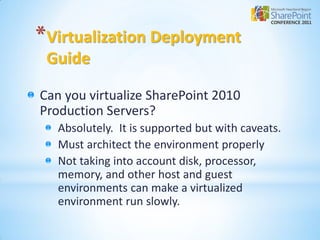
*Virtualization Deployment
 Guide

Can you virtualize SharePoint 2010
Production Servers?
   Absolutely. It is supported but with caveats.
   Must architect the environment properly
   Not taking into account disk, processor,
   memory, and other host and guest
   environments can make a virtualized
   environment run slowly.
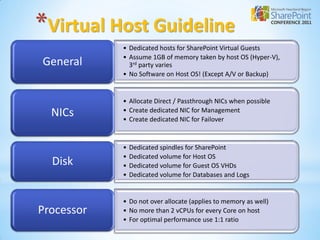
*Virtual Host Guideline
            • Dedicated hosts for SharePoint Virtual Guests
            • Assume 1GB of memory taken by host OS (Hyper-V),
General       3rd party varies
            • No Software on Host OS! (Except A/V or Backup)


            • Allocate Direct / Passthrough NICs when possible
  NICs      • Create dedicated NIC for Management
            • Create dedicated NIC for Failover


            •   Dedicated spindles for SharePoint
            •   Dedicated volume for Host OS
  Disk      •   Dedicated volume for Guest OS VHDs
            •   Dedicated volume for Databases and Logs


            • Do not over allocate (applies to memory as well)
Processor   • No more than 2 vCPUs for every Core on host
            • For optimal performance use 1:1 ratio
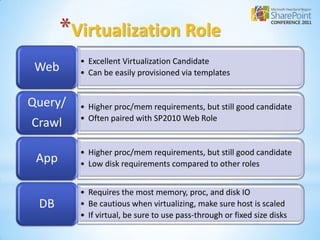
*Virtualization Role
         • Excellent Virtualization Candidate
 Web     • Can be easily provisioned via templates


Query/   • Higher proc/mem requirements, but still good candidate
         • Often paired with SP2010 Web Role
Crawl

         • Higher proc/mem requirements, but still good candidate
 App     • Low disk requirements compared to other roles


         • Requires the most memory, proc, and disk IO
 DB      • Be cautious when virtualizing, make sure host is scaled
         • If virtual, be sure to use pass-through or fixed size disks
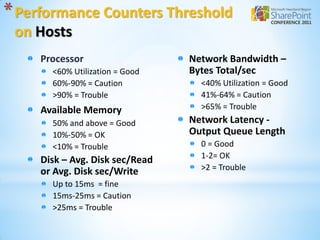
* Performance Counters Threshold
 on Hosts
     Processor                   Network Bandwidth –
       <60% Utilization = Good   Bytes Total/sec
       60%-90% = Caution           <40% Utilization = Good
       >90% = Trouble              41%-64% = Caution
     Available Memory              >65% = Trouble
       50% and above = Good      Network Latency -
       10%-50% = OK              Output Queue Length
       <10% = Trouble              0 = Good
                                   1-2= OK
     Disk – Avg. Disk sec/Read
     or Avg. Disk sec/Write        >2 = Trouble
       Up to 15ms = fine
       15ms-25ms = Caution
       >25ms = Trouble
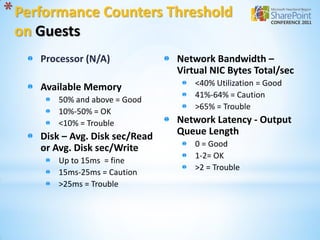
* Performance Counters Threshold
 on Guests
     Processor (N/A)             Network Bandwidth –
                                 Virtual NIC Bytes Total/sec
     Available Memory                <40% Utilization = Good
                                     41%-64% = Caution
         50% and above = Good
                                     >65% = Trouble
         10%-50% = OK
         <10% = Trouble          Network Latency - Output
     Disk – Avg. Disk sec/Read   Queue Length
     or Avg. Disk sec/Write          0 = Good
                                     1-2= OK
         Up to 15ms = fine
                                     >2 = Trouble
         15ms-25ms = Caution
         >25ms = Trouble
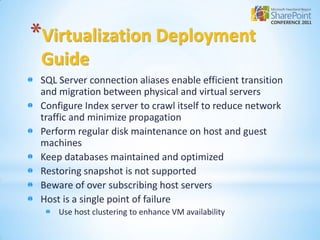
*Virtualization Deployment
 Guide
 SQL Server connection aliases enable efficient transition
 and migration between physical and virtual servers
 Configure Index server to crawl itself to reduce network
 traffic and minimize propagation
 Perform regular disk maintenance on host and guest
 machines
 Keep databases maintained and optimized
 Restoring snapshot is not supported
 Beware of over subscribing host servers
 Host is a single point of failure
     Use host clustering to enhance VM availability
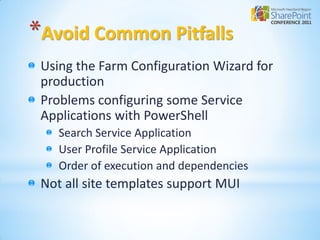
*Avoid Common Pitfalls
 Using the Farm Configuration Wizard for
 production
 Problems configuring some Service
 Applications with PowerShell
    Search Service Application
    User Profile Service Application
    Order of execution and dependencies
 Not all site templates support MUI
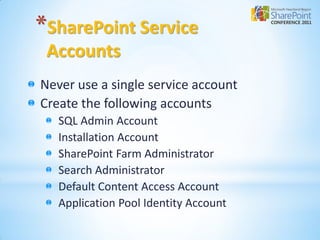
*SharePoint Service
 Accounts
Never use a single service account
Create the following accounts
   SQL Admin Account
   Installation Account
   SharePoint Farm Administrator
   Search Administrator
   Default Content Access Account
   Application Pool Identity Account
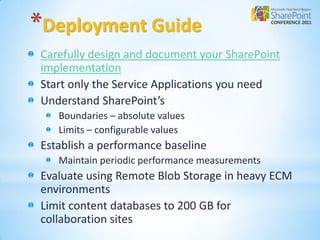
*Deployment Guide
 Carefully design and document your SharePoint
 implementation
 Start only the Service Applications you need
 Understand SharePoint’s
    Boundaries – absolute values
    Limits – configurable values
 Establish a performance baseline
    Maintain periodic performance measurements
 Evaluate using Remote Blob Storage in heavy ECM
 environments
 Limit content databases to 200 GB for
 collaboration sites
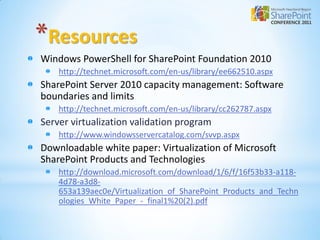
*Resources
Windows PowerShell for SharePoint Foundation 2010
    http://technet.microsoft.com/en-us/library/ee662510.aspx
SharePoint Server 2010 capacity management: Software
boundaries and limits
    http://technet.microsoft.com/en-us/library/cc262787.aspx
Server virtualization validation program
    http://www.windowsservercatalog.com/svvp.aspx
Downloadable white paper: Virtualization of Microsoft
SharePoint Products and Technologies
    http://download.microsoft.com/download/1/6/f/16f53b33-a118-
    4d78-a3d8-
    653a139aec0e/Virtualization_of_SharePoint_Products_and_Techn
    ologies_White_Paper_-_final1%20(2).pdf
Questions?
*Thank You
 Veenus Maximiuk
    www.iccblogs.com/blogs/vmaximiuk
    vmaximiuk@iccohio.com

 Joe Hartsel
    jhartsel@iccohio.com

Getting SharePoint 2010 Deployment Right final

  • 1.
    Getting SharePoint 2010 Deployment Right Veenus Maximiuk SharePoint Managing Architect ICC
  • 2.
    *Agenda Common Deployment Mistakes Installationand Configuration Approaches New Services Architecture Virtualization Deployment Considerations Avoid the Common Pitfalls Questions
  • 3.
    *Common Deployment Mistakes Poorplanning Using the Farm Configuration Wizard for production Use one service account for everything Provision all service applications
  • 4.
    *Installation and Configuration Point-n-clickDeployments SharePoint Configuration Wizard Farm Configuration Wizard Scripted Deployments PowerShell stsadm/PSConfig
  • 5.
    * SharePoint ConfigurationWizard Automatically launches the UI for PSConfig
  • 6.
    * SharePoint ConfigurationWizard Automatically creates Central Administration Database Name
  • 7.
  • 8.
  • 9.
    * Service ApplicationsDBs Using Configuration Wizard
  • 10.
    * Service ApplicationsDBs Using Configuration Wizard
  • 11.
    *Configuration Wizard Recommendations Recommend for Development Proof of Concept Not best for production Too many services Automatically creates database names for service applications
  • 12.
    *PowerShell What is it? Command line utility Built on top .NET Framework Extensible Why use it? More control More efficiency Community Support Script Repository: http://gallery.technet.microsoft.com/ScriptCenter/en-us
  • 13.
    *STSADM Marked as “deprecated” Occasionally required Compared to PowerShell Less complex Less granular A lot of community support Stsadm to PowerShell Mapping http://technet.microsoft.com/en-us/library/ff621081.aspx
  • 14.
    * Service ApplicationsDBs Using PowerShell
  • 15.
  • 16.
    *Service Application Architecture ReplacesShared Services Provider (SSP) New deployment considerations What does each Service Application do? Which SharePoint edition do I need? Which Service Applications depend on others? How big do the databases normally get?
  • 17.
    *Service Application perEdition Service applications Stores data? Cross- SharePoint SharePoint SharePoint farm? Foundation Server 2010 Server 2010 2010 Standard Enterprise Access Services Cache X Business Data Connectivity DB X X X X Excel Services Application Cache X Managed Metadata Service DB X X X PerformancePoint DB X Search DB X X X Secure Store Service DB X X X State Service DB X X Usage and Health Data Collection DB X X X User Profile DB X X X Visio Graphics Service Cache X Web Analytics X X X Word Automation Services DB X X Microsoft SharePoint Foundation DB X X X Subscription Settings Service
  • 18.
    * Service ApplicationDependencies Service Applications Business Managed Secure State Usage and Data Metadata Store Health Data Connectivity Business Data Connectivity X* Excel Services X* PerformancePoint X* Enterprise Search X* X User Profile X* X* Visio Graphics X* X Web Analytics X X* indicates conditional dependency based on usage scenarios
  • 19.
    * Service ApplicationDB Planning Service Application Database Database Relative Size Usage and Health Data Collection Service Application Usage Extra-large Business Data Connectivity Service Application Business Data Connectivity Small Application Registry Service Application Application Registry Small Microsoft SharePoint Foundation Subscription Settings Subscription Settings Small Service Search Service Application Search Administration Medium Search Service Application Crawl Extra-large Search Service Application Property Large to Extra-large Web Analytics Service Application Reporting Extra-large Web Analytics Service Application Staging Medium State Service Application, Visio Service Application, State Medium-large InfoPath Forms Services User Profile Service Application Profile Medium-large User Profile Service Application Synchronization Medium-large User Profile Service Application Social Tagging Small to Extra-large Managed Metadata Service Application Managed Metadata Medium Secure Store Service Application Secure Store Small Word Automation Service Application Word Automation Services Small PerformancePoint Service Application PerformancePoint Small
  • 20.
    *Virtualization Deployment Guide Canyou virtualize SharePoint 2010 Production Servers? Absolutely. It is supported but with caveats. Must architect the environment properly Not taking into account disk, processor, memory, and other host and guest environments can make a virtualized environment run slowly.
  • 21.
    *Virtual Host Guideline • Dedicated hosts for SharePoint Virtual Guests • Assume 1GB of memory taken by host OS (Hyper-V), General 3rd party varies • No Software on Host OS! (Except A/V or Backup) • Allocate Direct / Passthrough NICs when possible NICs • Create dedicated NIC for Management • Create dedicated NIC for Failover • Dedicated spindles for SharePoint • Dedicated volume for Host OS Disk • Dedicated volume for Guest OS VHDs • Dedicated volume for Databases and Logs • Do not over allocate (applies to memory as well) Processor • No more than 2 vCPUs for every Core on host • For optimal performance use 1:1 ratio
  • 22.
    *Virtualization Role • Excellent Virtualization Candidate Web • Can be easily provisioned via templates Query/ • Higher proc/mem requirements, but still good candidate • Often paired with SP2010 Web Role Crawl • Higher proc/mem requirements, but still good candidate App • Low disk requirements compared to other roles • Requires the most memory, proc, and disk IO DB • Be cautious when virtualizing, make sure host is scaled • If virtual, be sure to use pass-through or fixed size disks
  • 23.
    * Performance CountersThreshold on Hosts Processor Network Bandwidth – <60% Utilization = Good Bytes Total/sec 60%-90% = Caution <40% Utilization = Good >90% = Trouble 41%-64% = Caution Available Memory >65% = Trouble 50% and above = Good Network Latency - 10%-50% = OK Output Queue Length <10% = Trouble 0 = Good 1-2= OK Disk – Avg. Disk sec/Read or Avg. Disk sec/Write >2 = Trouble Up to 15ms = fine 15ms-25ms = Caution >25ms = Trouble
  • 24.
    * Performance CountersThreshold on Guests Processor (N/A) Network Bandwidth – Virtual NIC Bytes Total/sec Available Memory <40% Utilization = Good 41%-64% = Caution 50% and above = Good >65% = Trouble 10%-50% = OK <10% = Trouble Network Latency - Output Disk – Avg. Disk sec/Read Queue Length or Avg. Disk sec/Write 0 = Good 1-2= OK Up to 15ms = fine >2 = Trouble 15ms-25ms = Caution >25ms = Trouble
  • 25.
    *Virtualization Deployment Guide SQL Server connection aliases enable efficient transition and migration between physical and virtual servers Configure Index server to crawl itself to reduce network traffic and minimize propagation Perform regular disk maintenance on host and guest machines Keep databases maintained and optimized Restoring snapshot is not supported Beware of over subscribing host servers Host is a single point of failure Use host clustering to enhance VM availability
  • 26.
    *Avoid Common Pitfalls Using the Farm Configuration Wizard for production Problems configuring some Service Applications with PowerShell Search Service Application User Profile Service Application Order of execution and dependencies Not all site templates support MUI
  • 27.
    *SharePoint Service Accounts Neveruse a single service account Create the following accounts SQL Admin Account Installation Account SharePoint Farm Administrator Search Administrator Default Content Access Account Application Pool Identity Account
  • 28.
    *Deployment Guide Carefullydesign and document your SharePoint implementation Start only the Service Applications you need Understand SharePoint’s Boundaries – absolute values Limits – configurable values Establish a performance baseline Maintain periodic performance measurements Evaluate using Remote Blob Storage in heavy ECM environments Limit content databases to 200 GB for collaboration sites
  • 29.
    *Resources Windows PowerShell forSharePoint Foundation 2010 http://technet.microsoft.com/en-us/library/ee662510.aspx SharePoint Server 2010 capacity management: Software boundaries and limits http://technet.microsoft.com/en-us/library/cc262787.aspx Server virtualization validation program http://www.windowsservercatalog.com/svvp.aspx Downloadable white paper: Virtualization of Microsoft SharePoint Products and Technologies http://download.microsoft.com/download/1/6/f/16f53b33-a118- 4d78-a3d8- 653a139aec0e/Virtualization_of_SharePoint_Products_and_Techn ologies_White_Paper_-_final1%20(2).pdf
  • 30.
  • 31.
    *Thank You VeenusMaximiuk www.iccblogs.com/blogs/vmaximiuk vmaximiuk@iccohio.com Joe Hartsel jhartsel@iccohio.com