Improving Web Site Performance and Scalability While Saving MoneyRobert Boedigheimer
About MeWeb developer since 1995Columnist for aspalliance.comPluralsight AuthorWrox Author3rd Degree Black Belt, Tae Kwon DoASP.NET MVPhttp://aspadvice.com/blogs/robertb/robertb@aspalliance.com@boedie
Performance Rules“Performance is like air, no one cares about it until there isn’t any” - Richard CampbellFor most web sites, only 10-20% of response time is waiting for the HTML document to be generated and downloadedNot optimizing code!Make fewer HTTP requestsSend as little as possibleSend it as infrequently as possible
Saving and Making MoneyLess bandwidthLess serversIncreased sales and traffic (http://tinyurl.com/6293c4)“Every 100 ms increase in load time of Amazon.com decreased sales by 1%”“When the home page of Google Maps was reduced from 100KB to 70-80KB, traffic went up 10% in the first week, and an additional 25% in the following three weeks”Google and others using performance to determine ranking
HTTPHypertext Transfer ProtocolProtocol defined in RFC 2068 (Http 1.1), January 1997Request/response paradigmHeader and bodyhttp://www.ietf.org/rfc/rfc2068.txt
FiddlerTracing tool specifically for HTTPShows complete request and response (not packets)Can save archive of sessionTransfer Timelinehttp://tinyurl.com/3drk5t
MeasureIIS log filesTime takenlogParser3rd Party ServicesBenchmark against othersServers around US and worldAvailability and response times every X minutesKeynote, Gomez, WebSitePulse, AlertSite
HTTP CompressionServer evaluates the “Accept-Encoding” header for request, compresses resulting responseImplemented in February 2003 when about 3% of Fortune 1000 web sites utilizedUsed 53% less bandwidth, ~25% faster Keynote measurementsNow use IIS Compression (free)
HTTP Compression (cont)IIS 7Can control when to stop using if CPU usage is too highMinimum default file size is 256KOnly static compression is on by defaultDetailed article about enabling IIS 6 compression at http://tinyurl.com/yjdo7w
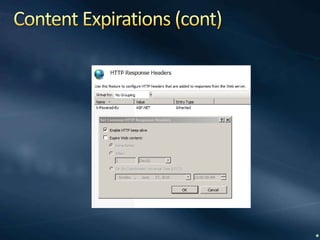
Content ExpirationsClient asks “if-modified-since”Small content files it is just as expensive to see if modified as to receive contentLeverage user’s browser cacheSetup expiration times for content foldersAvoid requests for files that seldom change (.js, .css, images, etc)Rename the file if need to override browser caching
Content Expirations (cont)
CSS and JavaScript External(Almost) always put CSS and JavaScript in external filesReduces page size(s)Allows reuseAble to use expirations
ETagsUsed for cache validationIIS sends the ETag header in response for static fileshash:changeNumberIIS 6	changeNumber – specific to serverSetup a custom response header “ETag” with no valueIIS 7changeNumber - 0 by defaultCompletely remove header with HttpModule
Minification and ConsolidationMinimize CSS and JavaScript filesRemove whitespace, comments, excessive semicolons, etcOften see files named with “.min”jQuery 1.6.2Original file size is 229 KBMinified file size is only 31 KB  (86% smaller)Minification toolsJSMinPackerYUI CompressorCSSMinMicrosoft Ajax Minifier(http://ajaxmin.codeplex.com/)JavaScript and CSSCommand line, .dll, and build tasks
Minification and Consolidation (2)ConsolidationCombine files to reduce the number of HTTP requests requiredMSBuildStrategyUse external files for JavaScript and CSSMinimize all JavaScript and CSS filesCombine all JavaScript files into a single file (jQuery, jQuery plugins, etc)Combine all CSS files into a single fileAdd a unique version number to combined files so we can set a “far future” expiration to utilize browser caches effectivelyAvoid runtime impact by minimizing and combining at build timeOnly for release builds to minimize impact on developersReference the new combined files
Minification and Consolidation (3)ImplementationVisual Studio Project File (.csproj)“Touch” a .cs file to ensure rebuildMSBuild Extension Pack (http://msbuildextensionpack.codeplex.com/)Retrieve the version number for the Web Form assembly in “bin” folderMSBuildAjaxMinifier task to minimize CSS and JavaScript filesMSBuild task to combine minimized filesInclude the combined files into project (so publish will move them)WARNING:  Watch the order of files, keep consistent with original order!Use DEBUG symbol value to determine if release mode, reference new combined files for release buildsResultsHome page was 46% faster!!
CSS SpritesCombine small images into a single imageUse CSS to “index” into the larger imageOften 70-95% of time taken for a user is time requesting components (images, .css, .js)Reduce the number of requestshttp://spritegen.website-performance.org/
ImagesJPEG (photos), PNG/GIF (rest)JPEG compressionTradeoff size vs. quality, often cut size by 50% without any impactImage optimizersJpegtran – removes unnecessary metadata, losslessPngcrush – PNG optimizerSmush.it, http://tinyurl.com/r4b36b
Favicon.ico CachingBy default, most browsers automatically look for this file in root folder of site (use for favorites, address bar, etc)Use <link> to point to a specific imageSetup to use an image with expirations
Content Delivery Network (CDN)Akamai, Limelight, Internap, AmazonGlobal network of serversGeographically closer to usersOffloads work for your serversTypically used for static files (images, CSS, JavaScript, etc)jQuery (jQuery.com, Microsoft, Google)Host jquery library files for free
CachingData caching (Cache), cut 50% of our SQL queries which was 72,080,000 less queries each month!SubstitutionScalability, Performance, and Reliability http://aspalliance.com/66
Server Side Viewstate (WebForms)Default hidden client field for viewstate can become very large on pagesCan specify to store in session on server to avoid downloading to the clientCreate a new Page Adapter to specify use of Session rather than client side hidden fieldsTwo PageStatePersister derived classesHiddenFieldStatePersister (default)SessionPageStatePersisterCreate .browser file in App_Browsers and configure new class<sessionPageStatehistorySize="5" />
AjaxMay be times when only need to update a portion of a pagejQuery.load( ) – call server and return HTML fragment.ajax( ) – call and get various types of data
ToolsPerformance analysis toolsReview a web page for how well it implements various performance techniques like compression, expirations, etcYSlowGoogle PageSpeedhttp://code.google.com/speed/page-speed/
Multiple Domains for Static ResourcesBrowsers will open a series of background connections to retrieve objects from web serversHTTP RFC specified using 2 connectionsRecent browsers have continued to increase the number usedRecent testing with CDN and using 3 domains for images was about 20% fasterTradeoff of time to lookup another DNS name and benefit of multiple connectionsWARNING:  Need to ensure that a given image is served from the same domain or this will override browser cache and nullify expirations!
Other IdeasPre-fetchRemove unused response headers from IISHost static pages on cookieless domainsImage width/height (faster rendering)Stylesheetsat top of pagesScripts at bottom of pages
Resources“High Performance Web Sites” by Steve SoudersPluralsight Course – Web Performance“Website Optimization” by Andrew King
Questionshttp://aspadvice.com/blogs/robertb/robertb@aspalliance.com@boedie

Improving web site performance and scalability while saving

  • 1.
    Improving Web SitePerformance and Scalability While Saving MoneyRobert Boedigheimer
  • 2.
    About MeWeb developersince 1995Columnist for aspalliance.comPluralsight AuthorWrox Author3rd Degree Black Belt, Tae Kwon DoASP.NET MVPhttp://aspadvice.com/blogs/robertb/robertb@aspalliance.com@boedie
  • 3.
    Performance Rules“Performance islike air, no one cares about it until there isn’t any” - Richard CampbellFor most web sites, only 10-20% of response time is waiting for the HTML document to be generated and downloadedNot optimizing code!Make fewer HTTP requestsSend as little as possibleSend it as infrequently as possible
  • 4.
    Saving and MakingMoneyLess bandwidthLess serversIncreased sales and traffic (http://tinyurl.com/6293c4)“Every 100 ms increase in load time of Amazon.com decreased sales by 1%”“When the home page of Google Maps was reduced from 100KB to 70-80KB, traffic went up 10% in the first week, and an additional 25% in the following three weeks”Google and others using performance to determine ranking
  • 5.
    HTTPHypertext Transfer ProtocolProtocoldefined in RFC 2068 (Http 1.1), January 1997Request/response paradigmHeader and bodyhttp://www.ietf.org/rfc/rfc2068.txt
  • 6.
    FiddlerTracing tool specificallyfor HTTPShows complete request and response (not packets)Can save archive of sessionTransfer Timelinehttp://tinyurl.com/3drk5t
  • 7.
    MeasureIIS log filesTimetakenlogParser3rd Party ServicesBenchmark against othersServers around US and worldAvailability and response times every X minutesKeynote, Gomez, WebSitePulse, AlertSite
  • 8.
    HTTP CompressionServer evaluatesthe “Accept-Encoding” header for request, compresses resulting responseImplemented in February 2003 when about 3% of Fortune 1000 web sites utilizedUsed 53% less bandwidth, ~25% faster Keynote measurementsNow use IIS Compression (free)
  • 9.
    HTTP Compression (cont)IIS7Can control when to stop using if CPU usage is too highMinimum default file size is 256KOnly static compression is on by defaultDetailed article about enabling IIS 6 compression at http://tinyurl.com/yjdo7w
  • 10.
    Content ExpirationsClient asks“if-modified-since”Small content files it is just as expensive to see if modified as to receive contentLeverage user’s browser cacheSetup expiration times for content foldersAvoid requests for files that seldom change (.js, .css, images, etc)Rename the file if need to override browser caching
  • 11.
  • 12.
    CSS and JavaScriptExternal(Almost) always put CSS and JavaScript in external filesReduces page size(s)Allows reuseAble to use expirations
  • 13.
    ETagsUsed for cachevalidationIIS sends the ETag header in response for static fileshash:changeNumberIIS 6 changeNumber – specific to serverSetup a custom response header “ETag” with no valueIIS 7changeNumber - 0 by defaultCompletely remove header with HttpModule
  • 14.
    Minification and ConsolidationMinimizeCSS and JavaScript filesRemove whitespace, comments, excessive semicolons, etcOften see files named with “.min”jQuery 1.6.2Original file size is 229 KBMinified file size is only 31 KB (86% smaller)Minification toolsJSMinPackerYUI CompressorCSSMinMicrosoft Ajax Minifier(http://ajaxmin.codeplex.com/)JavaScript and CSSCommand line, .dll, and build tasks
  • 15.
    Minification and Consolidation(2)ConsolidationCombine files to reduce the number of HTTP requests requiredMSBuildStrategyUse external files for JavaScript and CSSMinimize all JavaScript and CSS filesCombine all JavaScript files into a single file (jQuery, jQuery plugins, etc)Combine all CSS files into a single fileAdd a unique version number to combined files so we can set a “far future” expiration to utilize browser caches effectivelyAvoid runtime impact by minimizing and combining at build timeOnly for release builds to minimize impact on developersReference the new combined files
  • 16.
    Minification and Consolidation(3)ImplementationVisual Studio Project File (.csproj)“Touch” a .cs file to ensure rebuildMSBuild Extension Pack (http://msbuildextensionpack.codeplex.com/)Retrieve the version number for the Web Form assembly in “bin” folderMSBuildAjaxMinifier task to minimize CSS and JavaScript filesMSBuild task to combine minimized filesInclude the combined files into project (so publish will move them)WARNING: Watch the order of files, keep consistent with original order!Use DEBUG symbol value to determine if release mode, reference new combined files for release buildsResultsHome page was 46% faster!!
  • 17.
    CSS SpritesCombine smallimages into a single imageUse CSS to “index” into the larger imageOften 70-95% of time taken for a user is time requesting components (images, .css, .js)Reduce the number of requestshttp://spritegen.website-performance.org/
  • 18.
    ImagesJPEG (photos), PNG/GIF(rest)JPEG compressionTradeoff size vs. quality, often cut size by 50% without any impactImage optimizersJpegtran – removes unnecessary metadata, losslessPngcrush – PNG optimizerSmush.it, http://tinyurl.com/r4b36b
  • 19.
    Favicon.ico CachingBy default,most browsers automatically look for this file in root folder of site (use for favorites, address bar, etc)Use <link> to point to a specific imageSetup to use an image with expirations
  • 20.
    Content Delivery Network(CDN)Akamai, Limelight, Internap, AmazonGlobal network of serversGeographically closer to usersOffloads work for your serversTypically used for static files (images, CSS, JavaScript, etc)jQuery (jQuery.com, Microsoft, Google)Host jquery library files for free
  • 21.
    CachingData caching (Cache),cut 50% of our SQL queries which was 72,080,000 less queries each month!SubstitutionScalability, Performance, and Reliability http://aspalliance.com/66
  • 22.
    Server Side Viewstate(WebForms)Default hidden client field for viewstate can become very large on pagesCan specify to store in session on server to avoid downloading to the clientCreate a new Page Adapter to specify use of Session rather than client side hidden fieldsTwo PageStatePersister derived classesHiddenFieldStatePersister (default)SessionPageStatePersisterCreate .browser file in App_Browsers and configure new class<sessionPageStatehistorySize="5" />
  • 23.
    AjaxMay be timeswhen only need to update a portion of a pagejQuery.load( ) – call server and return HTML fragment.ajax( ) – call and get various types of data
  • 24.
    ToolsPerformance analysis toolsReviewa web page for how well it implements various performance techniques like compression, expirations, etcYSlowGoogle PageSpeedhttp://code.google.com/speed/page-speed/
  • 25.
    Multiple Domains forStatic ResourcesBrowsers will open a series of background connections to retrieve objects from web serversHTTP RFC specified using 2 connectionsRecent browsers have continued to increase the number usedRecent testing with CDN and using 3 domains for images was about 20% fasterTradeoff of time to lookup another DNS name and benefit of multiple connectionsWARNING: Need to ensure that a given image is served from the same domain or this will override browser cache and nullify expirations!
  • 26.
    Other IdeasPre-fetchRemove unusedresponse headers from IISHost static pages on cookieless domainsImage width/height (faster rendering)Stylesheetsat top of pagesScripts at bottom of pages
  • 27.
    Resources“High Performance WebSites” by Steve SoudersPluralsight Course – Web Performance“Website Optimization” by Andrew King
  • 28.

Editor's Notes

  • #4  Make fewer HTTP requests – images, CSS, JavaScript
  • #7  Tool developed by Eric Lawrence of Microsoft Troubleshoot problems(404, 3rd party issues) Useful to archive off before and after for historical purposes Can be used on own machine (ipv4.fiddler, ipv6.fiddler) (only needed on old versions!!)
  • #9  ~85-90% of current browsers support HTTP Compression
  • #10  port80software.com
  • #14  People suggested adding own header Etag with value “”, but this did not work on IIS 7
  • #15  C:\\Program Files (x86)\\Microsoft\\Microsoft Ajax Minifier 4&gt;ajaxmin c:\\inetpub\\wwwroot\\thingsToKnow\\js\\jquery-1.4.2.js -out jquery-1.4.2.ajaxMin.js 40% faster for our customers
  • #18  Most often the single image is smaller than the sizes added together Can use an Image Map as well if it is contiguous images on a screen (map, etc)