Speed Up
WordPress
A step by step guide
Hi, I’m Abul Khayer
Co-Founder & CTO, Search English Limited
Team Lead, Biggestech
Contributing as:
Deputy, WordPress Global Community Team
Organizer, Dhaka WordPress Meetup
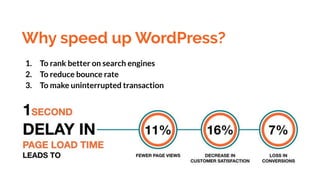
Why speed up WordPress?
1. To rank better on search engines
2. To reduce bounce rate
3. To make uninterrupted transaction
How to measure current speed?
1. GTmetrix (gtmetrix.com)
2. Pingdom Tools (tools.pingdom.com)
3. PageSpeed Insights
(developers.google.com/speed/pagespeed/ins
ights)
What Slows Down Your Website?
1. Web hosting
2. WordPress configuration
3. Page size
4. Unwanted/Poorly coded Plugins
5. External scripts
1. Choose a better hosting
provider
2. Use a lightweight theme
3. Optimize image size
Compress image from tinyjpg.com or
tinypng.com
4. Minify JS and CSS files
Minify manually or use plugins
5. Use advanced caching
mechanisms
Varnish could help you better the
loading speed of your website
6. Use a CDN
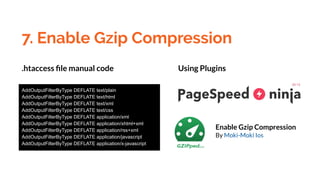
7. Enable Gzip Compression
AddOutputFilterByType DEFLATE text/plain
AddOutputFilterByType DEFLATE text/html
AddOutputFilterByType DEFLATE text/xml
AddOutputFilterByType DEFLATE text/css
AddOutputFilterByType DEFLATE application/xml
AddOutputFilterByType DEFLATE application/xhtml+xml
AddOutputFilterByType DEFLATE application/rss+xml
AddOutputFilterByType DEFLATE application/javascript
AddOutputFilterByType DEFLATE application/x-javascript
Enable Gzip Compression
By Moki-Moki Ios
.htaccess file manual code Using Plugins
8. Regular Database Maintenance
Advanced Database Cleaner
By Younes JFR.
WP-Sweep
By Lester 'GaMerZ' Chan
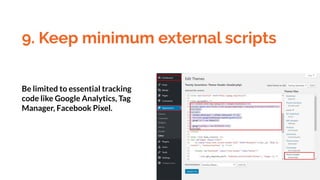
9. Keep minimum external scripts
Be limited to essential tracking
code like Google Analytics, Tag
Manager, Facebook Pixel.
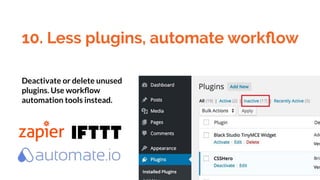
10. Less plugins, automate workflow
Deactivate or delete unused
plugins. Use workflow
automation tools instead.
Other best practices
1. Keep Your WordPress Site Updated
2. Disable pingbacks and trackbacks
3. Don’t Upload Audio/Video Files Directly to WordPress
4. Fix HTTPS/SSL Errors without Plugin
5. Use Latest PHP Version
Any Question?
Thank You!
Visit: abulkhayer.com
Find on: facebook.com/myselfkhayer
Follow: twitter.com/myselfkhayer
Say Hi: info@abulkhayer.com
You too can be a champion now.

Speed Up WordPress

  • 1.
  • 2.
    Hi, I’m AbulKhayer Co-Founder & CTO, Search English Limited Team Lead, Biggestech Contributing as: Deputy, WordPress Global Community Team Organizer, Dhaka WordPress Meetup
  • 4.
    Why speed upWordPress? 1. To rank better on search engines 2. To reduce bounce rate 3. To make uninterrupted transaction
  • 5.
    How to measurecurrent speed? 1. GTmetrix (gtmetrix.com) 2. Pingdom Tools (tools.pingdom.com) 3. PageSpeed Insights (developers.google.com/speed/pagespeed/ins ights)
  • 6.
    What Slows DownYour Website? 1. Web hosting 2. WordPress configuration 3. Page size 4. Unwanted/Poorly coded Plugins 5. External scripts
  • 8.
    1. Choose abetter hosting provider
  • 9.
    2. Use alightweight theme
  • 10.
    3. Optimize imagesize Compress image from tinyjpg.com or tinypng.com
  • 11.
    4. Minify JSand CSS files Minify manually or use plugins
  • 12.
    5. Use advancedcaching mechanisms Varnish could help you better the loading speed of your website
  • 13.
  • 14.
    7. Enable GzipCompression AddOutputFilterByType DEFLATE text/plain AddOutputFilterByType DEFLATE text/html AddOutputFilterByType DEFLATE text/xml AddOutputFilterByType DEFLATE text/css AddOutputFilterByType DEFLATE application/xml AddOutputFilterByType DEFLATE application/xhtml+xml AddOutputFilterByType DEFLATE application/rss+xml AddOutputFilterByType DEFLATE application/javascript AddOutputFilterByType DEFLATE application/x-javascript Enable Gzip Compression By Moki-Moki Ios .htaccess file manual code Using Plugins
  • 15.
    8. Regular DatabaseMaintenance Advanced Database Cleaner By Younes JFR. WP-Sweep By Lester 'GaMerZ' Chan
  • 16.
    9. Keep minimumexternal scripts Be limited to essential tracking code like Google Analytics, Tag Manager, Facebook Pixel.
  • 17.
    10. Less plugins,automate workflow Deactivate or delete unused plugins. Use workflow automation tools instead.
  • 18.
    Other best practices 1.Keep Your WordPress Site Updated 2. Disable pingbacks and trackbacks 3. Don’t Upload Audio/Video Files Directly to WordPress 4. Fix HTTPS/SSL Errors without Plugin 5. Use Latest PHP Version
  • 19.
  • 20.
    Thank You! Visit: abulkhayer.com Findon: facebook.com/myselfkhayer Follow: twitter.com/myselfkhayer Say Hi: info@abulkhayer.com You too can be a champion now.