Sophos UTM
Prepare your schools network for BYOD with Sophos UTM Wireless Protection
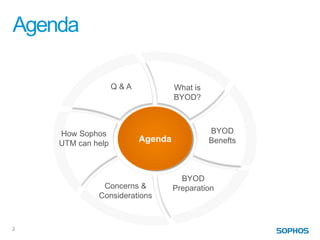
Agenda

                   Q&A            What is
                                  BYOD?


    How Sophos                              BYOD
    UTM can help
                         Agenda             Benefts


                                    BYOD
              Concerns &          Preparation
             Considerations


2
What is BYOD?

    • General term which may mean different things to
      different people
    • Big topic that covers more than just technology
    • Most people agree it means allowing personal devices to
      access business networks
    • Also used to describe programs where equipment is
      provided (1 – 1 initiatives)
    • BYOD concerns relate to both policy and infrastructure
    • This talk will focus mostly on infrastructure concerns


3
BYOD Benefits to Schools
Why the trend?

    • U.S. Department of Education suggested BYOD in 2010
      National Technology plan
     • http://www.ed.gov/technology/netp-2010/executive-summary
    • Technology may enhance:
     •   Creativity and Innovation
     •   Communication and Collaboration
     •   Critical thinking, Problem solving, Decision making
     •   Present concept of Digital Citizenship
    • Tech skills are essential for modern life and business
    • BYOD may save money
     • On equipment, app’s, and management


4
BYOD Preparations
What should you be thinking of if you’re planning a BYOD initiative?

    • BYOD Policy
     • What are we trying to accomplish?
     • What’s acceptable use for equipment and network?
    • Infrastructure
     • What do we need to support the policy?
     • Do we have the proper equipment or do we need to purchase?
    • Impact on community
     • Are teachers prepared to use and maybe support devices?
     • Privacy concerns, can all students afford devices, do parents
       support, etc…


5
BYOD Infrastructure Considerations
The Network

    • How many new users/devices are you adding onto your
      network? Twice as many? 3 times?
    • Will your current network handle that traffic?
    • What are the security risks? (How can we ensure that
      Guest and/or BYOD traffic is segregated?
    • Will current network and web security solutions be able
      to support BYOD policy?
    • How much extra work is this going to be for IT staff?


6
BYOD Infrastructure Considerations
The Network

    • Network & Web Security equipment should provide (at
      least):
     •   QOS functionality to shape bandwidth
     •   Content filtering to enforce CIPA
     •   Application Control (Next Generation Layer 7 Firewall)
     •   Ability to scale as demands increase
     •   Reporting


7
BYOD Infrastructure Considerations
Your Wireless solution and its capabilities


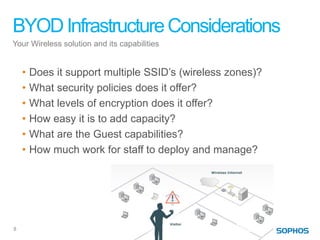
    •   Does it support multiple SSID’s (wireless zones)?
    •   What security policies does it offer?
    •   What levels of encryption does it offer?
    •   How easy it is to add capacity?
    •   What are the Guest capabilities?
    •   How much work for staff to deploy and manage?


8
BYOD Infrastructure Considerations
Your Wireless solution and its capabilities


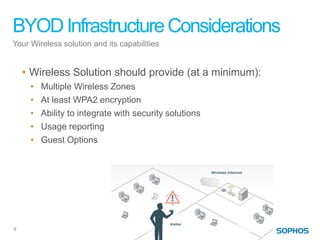
    • Wireless Solution should provide (at a minimum):
     •   Multiple Wireless Zones
     •   At least WPA2 encryption
     •   Ability to integrate with security solutions
     •   Usage reporting
     •   Guest Options


9
How can Sophos help with BYOD?

     • Sophos Mobile Device Management solution

     • Sophos Endpoint protection for Laptops

     • Sophos UTM Wireless Protection


10
Sophos Wireless Protection

     •   Easy deployment of Access Points
     •   Simple setup and management of zones
     •   Enterprise level encryption
     •   Configurable Guest options
     •   Integrated protection via UTM security suite
     •   Easily scales to meet increased demand


11
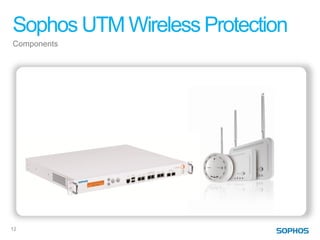
Sophos UTM Wireless Protection
Components


                            Now also
                            available
                          Sophos AP 50


12
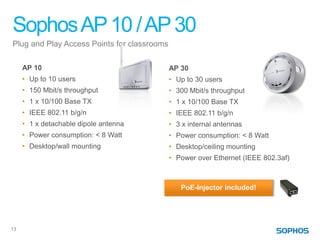
Sophos AP 10 / AP 30
Plug and Play Access Points for classrooms

     AP 10                                   AP 30
     • Up to 10 users                        • Up to 30 users
     • 150 Mbit/s throughput                 • 300 Mbit/s throughput
     • 1 x 10/100 Base TX                    • 1 x 10/100 Base TX
     • IEEE 802.11 b/g/n                     • IEEE 802.11 b/g/n
     • 1 x detachable dipole antenna         • 3 x internal antennas
     • Power consumption: < 8 Watt           • Power consumption: < 8 Watt
     • Desktop/wall mounting                 • Desktop/ceiling mounting
                                             • Power over Ethernet (IEEE 802.3af)


                                                PoE-Injector included!


13
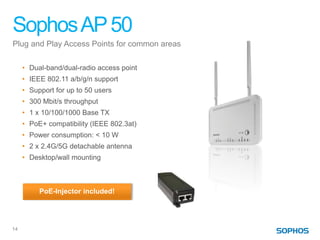
Sophos AP 50
Plug and Play Access Points for common areas

     • Dual-band/dual-radio access point
     • IEEE 802.11 a/b/g/n support
     • Support for up to 50 users
     • 300 Mbit/s throughput
     • 1 x 10/100/1000 Base TX
     • PoE+ compatibility (IEEE 802.3at)
     • Power consumption: < 10 W
     • 2 x 2.4G/5G detachable antenna
     • Desktop/wall mounting


          PoE-Injector included!


14
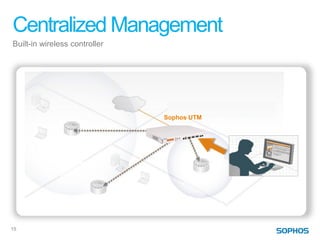
Centralized Management
Built-in wireless controller


                               Sophos UTM


15
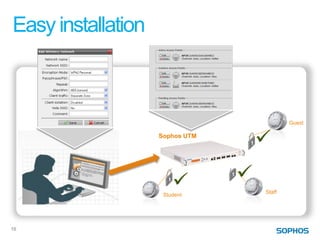
Easy installation


                                         Guest

                    Sophos UTM


                                 Staff
                     Student


16
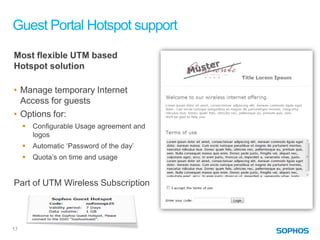
Guest Portal Hotspot support
Most flexible UTM based
Hotspot solution

• Manage temporary Internet
  Access for guests
• Options for:
        Configurable Usage agreement and
         logos
        Automatic ‘Password of the day’
        Quota’s on time and usage


Part of UTM Wireless Subscription


17
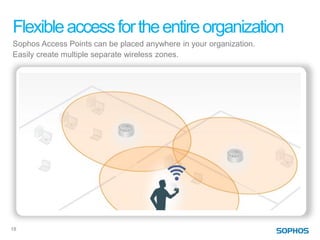
Flexible access for the entire organization
Sophos Access Points can be placed anywhere in your organization.
Easily create multiple separate wireless zones.


18
Advantages
Sophos UTM Wireless Protection
     Easy installation and management
      • Centralized configuration (all work done via UTM GUI)
      • Plug and Play Access Point simplify deployment


     Secure and reliable
      • Integrated UTM security for wireless devices
      • Best protection for wireless connections (separate zones, isolate client
        connections, configure quota’s)


     Flexible access
      • Easy Internet access options for guests
      • Multiple SSID support for varying levels of access


19
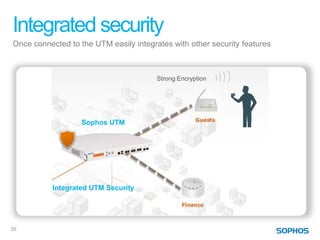
Integrated security
Once connected to the UTM easily integrates with other security features


                                        Strong Encryption


                   Sophos UTM


           Integrated UTM Security


20
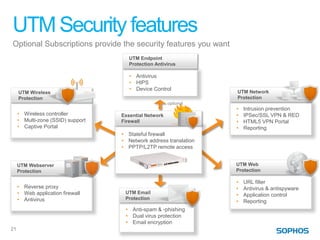
UTM Security features
Optional Subscriptions provide the security features you want
                                      UTM Endpoint
                                      Protection Antivirus

                                      • Antivirus
                                      • HIPS
                                      • Device Control
     UTM Wireless                                                  UTM Network
     Protection                                                    Protection
                                                       optional
                                                                   •   Intrusion prevention
     • Wireless controller         Essential Network               •   IPSec/SSL VPN & RED
     • Multi-zone (SSID) support   Firewall                        •   HTML5 VPN Portal
     • Captive Portal                                              •   Reporting
                                   • Stateful firewall
                                   • Network address translation
                                   • PPTP/L2TP remote access


     UTM Webserver                                                 UTM Web
     Protection                                                    Protection

                                                                   •   URL filter
     • Reverse proxy                                               •   Antivirus & antispyware
     • Web application firewall     UTM Email
                                                                   •   Application control
     • Antivirus                    Protection
                                                                   •   Reporting
                                    • Anti-spam & -phishing
                                    • Dual virus protection
                                    • Email encryption
21
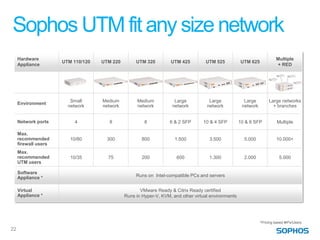
Sophos UTM fit any size network
     Hardware                                                                                                            Multiple
                      UTM 110/120   UTM 220        UTM 320         UTM 425         UTM 525           UTM 625
     Appliance                                                                                                           + RED


                         Small      Medium          Medium           Large           Large             Large         Large networks
     Environment
                        network     network         network         network         network           network          + branches


     Network ports         4           8               8           6 & 2 SFP      10 & 4 SFP         10 & 8 SFP           Multiple

     Max.
     recommended         10/80        300             800            1.500           3.500             5.000             10.000+
     firewall users
     Max.
     recommended         10/35        75              200             600            1.300             2.000               5.000
     UTM users

     Software
     Appliance *                                   Runs on Intel-compatible PCs and servers


     Virtual                                         VMware Ready & Citrix Ready certified
     Appliance *                              Runs in Hyper-V, KVM, and other virtual environments


                                                                                                                *Pricing based #IPs/Users
22
Resources
Questions?


     • National Educational Technology Standards
       •   http://www.iste.org/STANDARDS


       http://digitalcitizenship.net/

       http://www.zdnet.com/how-to-write-a-byod-policy-7000003502/

       http://www.fathomdelivers.com/the-benefits-and-risks-of-byod-in-
       schools/


23
Staying ahead of the curve
                                         US and Canada
      facebook.com/securitybysophos     1-866-866-2802
                                      NASales@sophos.com

      Sophos on Google+


                                       UK and Worldwide
      linkedin.com/company/sophos
                                        + 44 1235 55 9933
                                       Sales@sophos.com

      twitter.com/Sophos_News


      nakedsecurity.sophos.com


                                                    24

Preparing Your School for BYOD with Sophos UTM Wireless Protection

  • 1.
    Sophos UTM Prepare yourschools network for BYOD with Sophos UTM Wireless Protection
  • 2.
    Agenda Q&A What is BYOD? How Sophos BYOD UTM can help Agenda Benefts BYOD Concerns & Preparation Considerations 2
  • 3.
    What is BYOD? • General term which may mean different things to different people • Big topic that covers more than just technology • Most people agree it means allowing personal devices to access business networks • Also used to describe programs where equipment is provided (1 – 1 initiatives) • BYOD concerns relate to both policy and infrastructure • This talk will focus mostly on infrastructure concerns 3
  • 4.
    BYOD Benefits toSchools Why the trend? • U.S. Department of Education suggested BYOD in 2010 National Technology plan • http://www.ed.gov/technology/netp-2010/executive-summary • Technology may enhance: • Creativity and Innovation • Communication and Collaboration • Critical thinking, Problem solving, Decision making • Present concept of Digital Citizenship • Tech skills are essential for modern life and business • BYOD may save money • On equipment, app’s, and management 4
  • 5.
    BYOD Preparations What shouldyou be thinking of if you’re planning a BYOD initiative? • BYOD Policy • What are we trying to accomplish? • What’s acceptable use for equipment and network? • Infrastructure • What do we need to support the policy? • Do we have the proper equipment or do we need to purchase? • Impact on community • Are teachers prepared to use and maybe support devices? • Privacy concerns, can all students afford devices, do parents support, etc… 5
  • 6.
    BYOD Infrastructure Considerations TheNetwork • How many new users/devices are you adding onto your network? Twice as many? 3 times? • Will your current network handle that traffic? • What are the security risks? (How can we ensure that Guest and/or BYOD traffic is segregated? • Will current network and web security solutions be able to support BYOD policy? • How much extra work is this going to be for IT staff? 6
  • 7.
    BYOD Infrastructure Considerations TheNetwork • Network & Web Security equipment should provide (at least): • QOS functionality to shape bandwidth • Content filtering to enforce CIPA • Application Control (Next Generation Layer 7 Firewall) • Ability to scale as demands increase • Reporting 7
  • 8.
    BYOD Infrastructure Considerations YourWireless solution and its capabilities • Does it support multiple SSID’s (wireless zones)? • What security policies does it offer? • What levels of encryption does it offer? • How easy it is to add capacity? • What are the Guest capabilities? • How much work for staff to deploy and manage? 8
  • 9.
    BYOD Infrastructure Considerations YourWireless solution and its capabilities • Wireless Solution should provide (at a minimum): • Multiple Wireless Zones • At least WPA2 encryption • Ability to integrate with security solutions • Usage reporting • Guest Options 9
  • 10.
    How can Sophoshelp with BYOD? • Sophos Mobile Device Management solution • Sophos Endpoint protection for Laptops • Sophos UTM Wireless Protection 10
  • 11.
    Sophos Wireless Protection • Easy deployment of Access Points • Simple setup and management of zones • Enterprise level encryption • Configurable Guest options • Integrated protection via UTM security suite • Easily scales to meet increased demand 11
  • 12.
    Sophos UTM WirelessProtection Components Now also available Sophos AP 50 12
  • 13.
    Sophos AP 10/ AP 30 Plug and Play Access Points for classrooms AP 10 AP 30 • Up to 10 users • Up to 30 users • 150 Mbit/s throughput • 300 Mbit/s throughput • 1 x 10/100 Base TX • 1 x 10/100 Base TX • IEEE 802.11 b/g/n • IEEE 802.11 b/g/n • 1 x detachable dipole antenna • 3 x internal antennas • Power consumption: < 8 Watt • Power consumption: < 8 Watt • Desktop/wall mounting • Desktop/ceiling mounting • Power over Ethernet (IEEE 802.3af) PoE-Injector included! 13
  • 14.
    Sophos AP 50 Plugand Play Access Points for common areas • Dual-band/dual-radio access point • IEEE 802.11 a/b/g/n support • Support for up to 50 users • 300 Mbit/s throughput • 1 x 10/100/1000 Base TX • PoE+ compatibility (IEEE 802.3at) • Power consumption: < 10 W • 2 x 2.4G/5G detachable antenna • Desktop/wall mounting PoE-Injector included! 14
  • 15.
  • 16.
    Easy installation Guest Sophos UTM Staff Student 16
  • 17.
    Guest Portal Hotspotsupport Most flexible UTM based Hotspot solution • Manage temporary Internet Access for guests • Options for:  Configurable Usage agreement and logos  Automatic ‘Password of the day’  Quota’s on time and usage Part of UTM Wireless Subscription 17
  • 18.
    Flexible access forthe entire organization Sophos Access Points can be placed anywhere in your organization. Easily create multiple separate wireless zones. 18
  • 19.
    Advantages Sophos UTM WirelessProtection Easy installation and management • Centralized configuration (all work done via UTM GUI) • Plug and Play Access Point simplify deployment Secure and reliable • Integrated UTM security for wireless devices • Best protection for wireless connections (separate zones, isolate client connections, configure quota’s) Flexible access • Easy Internet access options for guests • Multiple SSID support for varying levels of access 19
  • 20.
    Integrated security Once connectedto the UTM easily integrates with other security features Strong Encryption Sophos UTM Integrated UTM Security 20
  • 21.
    UTM Security features OptionalSubscriptions provide the security features you want UTM Endpoint Protection Antivirus • Antivirus • HIPS • Device Control UTM Wireless UTM Network Protection Protection optional • Intrusion prevention • Wireless controller Essential Network • IPSec/SSL VPN & RED • Multi-zone (SSID) support Firewall • HTML5 VPN Portal • Captive Portal • Reporting • Stateful firewall • Network address translation • PPTP/L2TP remote access UTM Webserver UTM Web Protection Protection • URL filter • Reverse proxy • Antivirus & antispyware • Web application firewall UTM Email • Application control • Antivirus Protection • Reporting • Anti-spam & -phishing • Dual virus protection • Email encryption 21
  • 22.
    Sophos UTM fitany size network Hardware Multiple UTM 110/120 UTM 220 UTM 320 UTM 425 UTM 525 UTM 625 Appliance + RED Small Medium Medium Large Large Large Large networks Environment network network network network network network + branches Network ports 4 8 8 6 & 2 SFP 10 & 4 SFP 10 & 8 SFP Multiple Max. recommended 10/80 300 800 1.500 3.500 5.000 10.000+ firewall users Max. recommended 10/35 75 200 600 1.300 2.000 5.000 UTM users Software Appliance * Runs on Intel-compatible PCs and servers Virtual VMware Ready & Citrix Ready certified Appliance * Runs in Hyper-V, KVM, and other virtual environments *Pricing based #IPs/Users 22
  • 23.
    Resources Questions? • National Educational Technology Standards • http://www.iste.org/STANDARDS http://digitalcitizenship.net/ http://www.zdnet.com/how-to-write-a-byod-policy-7000003502/ http://www.fathomdelivers.com/the-benefits-and-risks-of-byod-in- schools/ 23
  • 24.
    Staying ahead ofthe curve Staying ahead of the curve US and Canada facebook.com/securitybysophos 1-866-866-2802 NASales@sophos.com Sophos on Google+ UK and Worldwide linkedin.com/company/sophos + 44 1235 55 9933 Sales@sophos.com twitter.com/Sophos_News nakedsecurity.sophos.com 24