Sophos Mobile Control
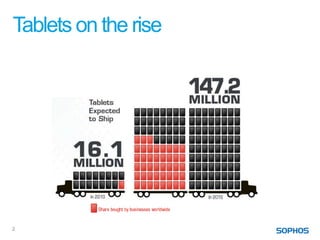
Tablets on the rise


2
Trends
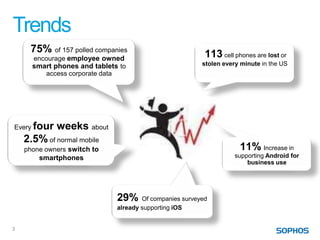
     75% of 157 polled companies                            113 cell phones are lost or
        encourage employee owned
        smart phones and tablets to                        stolen every minute in the US
           access corporate data


Every four weeks about
    2.5% of normal mobile
    phone owners switch to                                             11% Increase in
         smartphones                                                  supporting Android for
                                                                          business use


                                29%     Of companies surveyed
                                already supporting iOS


3
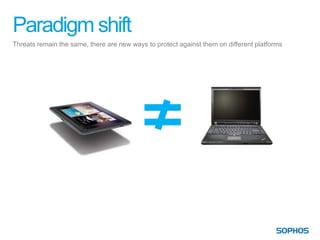
Paradigm shift
Threats remain the same, there are new ways to protect against them on different platforms
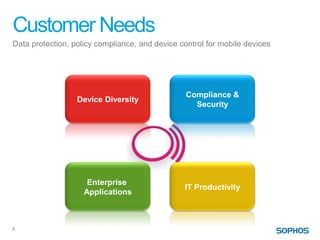
Customer Needs
Data protection, policy compliance, and device control for mobile devices


                                                 Compliance &
                  Device Diversity
                                                   Security


                     Enterprise
                                                IT Productivity
                    Applications


5
Sophos Mobile Control Features
                               Compliance         Enterprise
         Device Diversity                                          IT Productivity
                                &Security        Applications

    Broad Platform          • Loss/Theft      • Enterprise App   • Self Service
     Support –                Protection        Store              Portal
     •   iOS                • Compliance      • OTA App          • Inventory
     •   Android              Enforcement       Deployment         Management
     •   Windows Mobile
                            • Controlled E-   • App Visibility     and Reporting
     •   BackBerry
                              Mail Access                        • OTA Device
                                                                   Provisioning and
                                                                   Configuration
                                                                 • Dashboard
                                                                   Reporting


6
Device Diversity
Manage and control smartphones and tablets


                                             Compliance &
                Device Diversity
                                               Security


                   Enterprise
                                             IT Productivity
                  Applications


7
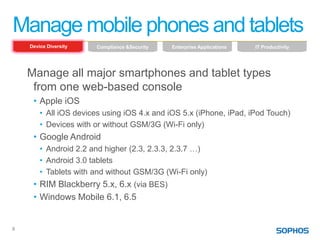
Manage mobile phones and tablets
    Device Diversity   Compliance &Security   Enterprise Applications   IT Productivity


    Manage all major smartphones and tablet types
     from one web-based console
     • Apple iOS
        • All iOS devices using iOS 4.x and iOS 5.x (iPhone, iPad, iPod Touch)
        • Devices with or without GSM/3G (Wi-Fi only)
     • Google Android
        • Android 2.2 and higher (2.3, 2.3.3, 2.3.7 …)
        • Android 3.0 tablets
        • Tablets with and without GSM/3G (Wi-Fi only)
     • RIM Blackberry 5.x, 6.x (via BES)
     • Windows Mobile 6.1, 6.5


8
Enable Compliance and Security
Comply with internal and external regulations


                                                Compliance &
                  Device Diversity
                                                  Security


                     Enterprise
                                                IT Productivity
                    Applications


9
Enable Compliance and Security
     Device Diversity   Compliance & Security   Enterprise Applications   IT Productivity


     1. Compliance enforcement

     2. Loss/Theft protection

     3. Protecting enterprise assets


10
1. Compliance enforcement
     Device Diversity      Compliance & Security   Enterprise Applications   IT Productivity


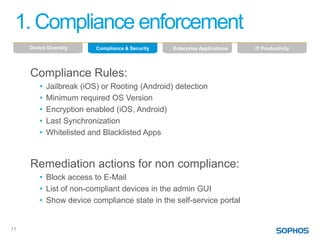
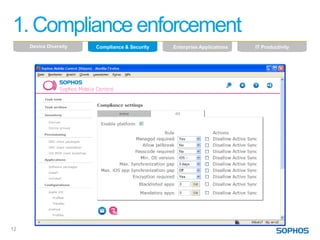
     Compliance Rules:
         •   Jailbreak (iOS) or Rooting (Android) detection
         •   Minimum required OS Version
         •   Encryption enabled (iOS, Android)
         •   Last Synchronization
         •   Whitelisted and Blacklisted Apps


     Remediation actions for non compliance:
         • Block access to E-Mail
         • List of non-compliant devices in the admin GUI
         • Show device compliance state in the self-service portal


11
1. Compliance enforcement
     Device Diversity   Compliance & Security   Enterprise Applications   IT Productivity


12
2. Loss/Theft protection
     Device Diversity   Compliance & Security   Enterprise Applications   IT Productivity


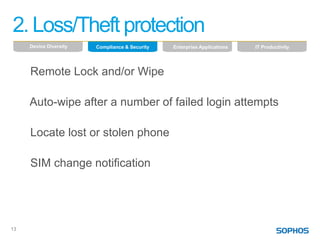
     Remote Lock and/or Wipe

     Auto-wipe after a number of failed login attempts

     Locate lost or stolen phone

     SIM change notification


13
3. Protecting enterprise assets
     Device Diversity   Compliance & Security   Enterprise Applications   IT Productivity


     Distribution of the Exchange or E-Mail server
      settings

     Mail access controlled via EAS Proxy


14
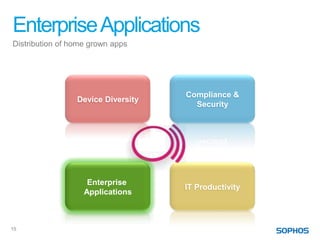
Enterprise Applications
Distribution of home grown apps


                                    Compliance &
                 Device Diversity
                                      Security


                    Enterprise
                                    IT Productivity
                   Applications


15
Enterprise Applications
     Device Diversity   Compliance & Security   Enterprise Applications   IT Productivity


     Enterprise App Store for homegrown apps
      • An iOS and Android App
      • Look & Feel similar to the App Store or Market
      • Admin defines required and recommended apps


     Enterprise App Store for recommended apps
      • IT recommends supported apps
      • Help for the agnostic user
      • Limit the risk of too many used apps


16
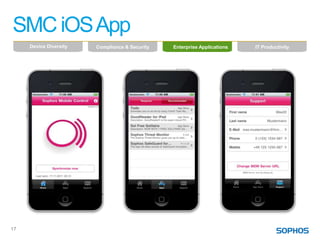
SMC iOS App
     Device Diversity   Compliance & Security   Enterprise Applications   IT Productivity


17
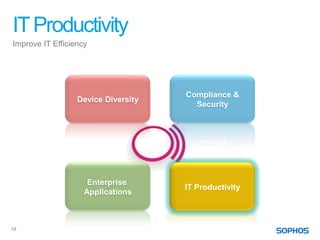
IT Productivity
Improve IT Efficiency


                                     Compliance &
                  Device Diversity
                                       Security


                     Enterprise
                                     IT Productivity
                    Applications


18
IT Productivity
     Device Diversity   Compliance & Security   Enterprise Applications   IT Productivity


     1. Remote and over-the-air device configuration

     2. Self service portal

     3. Inventory management

     4. Dashboard reporting


19
1. Remote and over-the-air device configuration
     Device Diversity   Compliance & Security   Enterprise Applications   IT Productivity


     Define password policy and lock period

     Control installation of apps

     Block use of camera, browser, YouTube, …

     Send text notification to client


20
2. Self service portal
     Device Diversity   Compliance & Security   Enterprise Applications   IT Productivity


     Users register their phones
     No administrator involvement required
     E-Mail access only enabled after self-enrollment
     User can lock and wipe their phones in case of
      loss or theft
     Passcode reset
     Customizable acceptable usage policy
     See device status


21
3. Inventory management
     Device Diversity   Compliance & Security   Enterprise Applications   IT Productivity


     Device status view in the Admin GUI
     Flexible grouping and filtering of the device list
     Export of device list into XLS
     Collection of device properties like memory
      usage, battery level, IMSI, roaming mode, OS
      version, …
     List of installed apps


22
4. Dashboard reporting
     Device Diversity   Compliance & Security   Enterprise Applications   IT Productivity


23
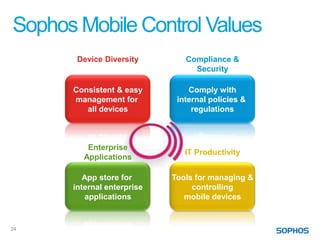
Sophos Mobile Control Values
       Device Diversity        Compliance &
                                 Security

      Consistent & easy         Comply with
      management for         internal policies &
         all devices             regulations


         Enterprise
                               IT Productivity
        Applications

         App store for      Tools for managing &
      internal enterprise        controlling
          applications         mobile devices


24

Sophos Mobile Control - Product Overview

  • 1.
  • 2.
  • 3.
    Trends 75% of 157 polled companies 113 cell phones are lost or encourage employee owned smart phones and tablets to stolen every minute in the US access corporate data Every four weeks about 2.5% of normal mobile phone owners switch to 11% Increase in smartphones supporting Android for business use 29% Of companies surveyed already supporting iOS 3
  • 4.
    Paradigm shift Threats remainthe same, there are new ways to protect against them on different platforms
  • 5.
    Customer Needs Data protection,policy compliance, and device control for mobile devices Compliance & Device Diversity Security Enterprise IT Productivity Applications 5
  • 6.
    Sophos Mobile ControlFeatures Compliance Enterprise Device Diversity IT Productivity &Security Applications Broad Platform • Loss/Theft • Enterprise App • Self Service Support – Protection Store Portal • iOS • Compliance • OTA App • Inventory • Android Enforcement Deployment Management • Windows Mobile • Controlled E- • App Visibility and Reporting • BackBerry Mail Access • OTA Device Provisioning and Configuration • Dashboard Reporting 6
  • 7.
    Device Diversity Manage andcontrol smartphones and tablets Compliance & Device Diversity Security Enterprise IT Productivity Applications 7
  • 8.
    Manage mobile phonesand tablets Device Diversity Compliance &Security Enterprise Applications IT Productivity Manage all major smartphones and tablet types from one web-based console • Apple iOS • All iOS devices using iOS 4.x and iOS 5.x (iPhone, iPad, iPod Touch) • Devices with or without GSM/3G (Wi-Fi only) • Google Android • Android 2.2 and higher (2.3, 2.3.3, 2.3.7 …) • Android 3.0 tablets • Tablets with and without GSM/3G (Wi-Fi only) • RIM Blackberry 5.x, 6.x (via BES) • Windows Mobile 6.1, 6.5 8
  • 9.
    Enable Compliance andSecurity Comply with internal and external regulations Compliance & Device Diversity Security Enterprise IT Productivity Applications 9
  • 10.
    Enable Compliance andSecurity Device Diversity Compliance & Security Enterprise Applications IT Productivity 1. Compliance enforcement 2. Loss/Theft protection 3. Protecting enterprise assets 10
  • 11.
    1. Compliance enforcement Device Diversity Compliance & Security Enterprise Applications IT Productivity Compliance Rules: • Jailbreak (iOS) or Rooting (Android) detection • Minimum required OS Version • Encryption enabled (iOS, Android) • Last Synchronization • Whitelisted and Blacklisted Apps Remediation actions for non compliance: • Block access to E-Mail • List of non-compliant devices in the admin GUI • Show device compliance state in the self-service portal 11
  • 12.
    1. Compliance enforcement Device Diversity Compliance & Security Enterprise Applications IT Productivity 12
  • 13.
    2. Loss/Theft protection Device Diversity Compliance & Security Enterprise Applications IT Productivity Remote Lock and/or Wipe Auto-wipe after a number of failed login attempts Locate lost or stolen phone SIM change notification 13
  • 14.
    3. Protecting enterpriseassets Device Diversity Compliance & Security Enterprise Applications IT Productivity Distribution of the Exchange or E-Mail server settings Mail access controlled via EAS Proxy 14
  • 15.
    Enterprise Applications Distribution ofhome grown apps Compliance & Device Diversity Security Enterprise IT Productivity Applications 15
  • 16.
    Enterprise Applications Device Diversity Compliance & Security Enterprise Applications IT Productivity Enterprise App Store for homegrown apps • An iOS and Android App • Look & Feel similar to the App Store or Market • Admin defines required and recommended apps Enterprise App Store for recommended apps • IT recommends supported apps • Help for the agnostic user • Limit the risk of too many used apps 16
  • 17.
    SMC iOS App Device Diversity Compliance & Security Enterprise Applications IT Productivity 17
  • 18.
    IT Productivity Improve ITEfficiency Compliance & Device Diversity Security Enterprise IT Productivity Applications 18
  • 19.
    IT Productivity Device Diversity Compliance & Security Enterprise Applications IT Productivity 1. Remote and over-the-air device configuration 2. Self service portal 3. Inventory management 4. Dashboard reporting 19
  • 20.
    1. Remote andover-the-air device configuration Device Diversity Compliance & Security Enterprise Applications IT Productivity Define password policy and lock period Control installation of apps Block use of camera, browser, YouTube, … Send text notification to client 20
  • 21.
    2. Self serviceportal Device Diversity Compliance & Security Enterprise Applications IT Productivity Users register their phones No administrator involvement required E-Mail access only enabled after self-enrollment User can lock and wipe their phones in case of loss or theft Passcode reset Customizable acceptable usage policy See device status 21
  • 22.
    3. Inventory management Device Diversity Compliance & Security Enterprise Applications IT Productivity Device status view in the Admin GUI Flexible grouping and filtering of the device list Export of device list into XLS Collection of device properties like memory usage, battery level, IMSI, roaming mode, OS version, … List of installed apps 22
  • 23.
    4. Dashboard reporting Device Diversity Compliance & Security Enterprise Applications IT Productivity 23
  • 24.
    Sophos Mobile ControlValues Device Diversity Compliance & Security Consistent & easy Comply with management for internal policies & all devices regulations Enterprise IT Productivity Applications App store for Tools for managing & internal enterprise controlling applications mobile devices 24

Editor's Notes

  • #3 http://www.creativelicencedigital.com/news/?p=730
  • #4 We are aligning our product features with the trends we see in the market. http://www.zdnet.com/blog/sybase/75-of-enterprises-have-bring-your-own-device-policies-what-that-means-charts/1025http://www.micro-trax.com/statistics/
  • #18 The SMC iOS App is very simple. It has 3 major sections, which can be accessed via the icon area at the bottom of the screen:The Home section shows the SMC logo, the last time of synchronization and offers the user the ability to sync immediately.With the info button in the headline, the user can see the “About” screen of the application.