appStrategySolution Engine
Solution EnginePresentationIntroductionSolution Engine OverviewappCompass OverviewappRadius Overview
IntroductionHistory – appStrategy, Inc.Incorporated in 2003 by software industry solution pioneersHistory of award-winning productsappStrategy is the Leader in Surround IntegrationProductsProduct suite leverages a common engine for composing, deploying and running next generation solutions in vertical and horizontal markets.appRadius EnterpriseappCompass EnterpriseWorkflow Solution ServerProduct Suite PositioningPlatform & SaaS Integrator: Front/Back-end platform integration (Salesforce, Microsoft CRM, SharePoint etc.) with on-premise and legacy apps. Solution Customization & Extension:  Compose “same-look-and-feel” extensions for intranets,  portals and disparate enterprise applications.Horizontal Integration:  Enterprise data integration/ migration for all popular platforms and databases.Process Orchestration:  Utilize powerful no-code workflows to drive business processes.
Major Features – Solution EngineIndustry’s First Workflow to SourceSource Studio generates source code in C# and VB for custom integrationQuickly execute code based workflows for Enterprise  Level Integration projects  (Process Millions of Records)EDI SupportappCompass provides a complete enterprise integration solution for EDIOver 30 module activities specifically designed to integrate with EDI technology. Multiple Deployment OptionsGenerate workflow as Executable (.exe), Assembly (.dll), or Self extracting  installer.Deploy solution to server environment or send via emailSchedule workflow to run at any time intervalReal Time deployment as database triggerWeb Based AdministrationComplete server logging and monitoring systemCustom web forms for workflow interactions, process approval, and custom extensionsCode-less EnvironmentEasily create solutions in an intuitive workflow environmentLeverage popular platforms such as Windows Workflow FoundationMap and Transform data with easy to use drop down selectionsCreate no-code Declarative Rule Conditions in workflow
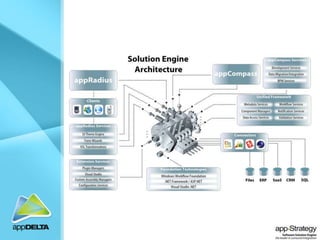
Solution Engine:  appCompass & appRadiusWhat is appCompass?Powerful next-generation solution  based on Windows Workflow FoundationData Migration and Application IntegrationBusiness Process Orchestration EngineIntegrates disparate sources including SQL, Dynamics CRM, AX, NAV, SharePoint, Salesforce,  etc.What is appRadius?Visual Studio based RAD framework for generating web solutions (portals, xRM…)Build solutions that customize and extend Microsoft Dynamics CRM  (v3 & v4),Build Portal applications for Dynamics AX2009 or NAV2009Build solutions that customize and extend Salesforce.com Build custom portal solutionsIntegrates disparate sources including SQL, Dynamics CRM, AX, NAV, CRM, SharePoint, Legacy Systems, etc.Why Do you need it?Utilize workflow-driven engine to quickly compose, deploy, deliver, and run solutions in record time.Leverage next-generation built-in workflow activities in IT projectsProvides  Surround Integration – Front-end and Back-end
Value PropositionUnmatched Productivity GainsBuild-Vs-Buy? Get Both!Enhance, extend and control using appRadius and appCompassSeamless IntegrationIntegrates with Visual StudioIntegrates CRM, ERP , SaaS and legacy and custom systemsCompetitive AdvantageOpen designNext Generation (able to keep pace with a moving target)Provides seamless front-end and back-end integration
Currently Supported Platforms & Data SourcesACT!dBase III, dBase IV, dBase 5dBase III, dBase IV, dBase 5Flat Files – Text, CSV, XMLIBM DB2, IBM DB2 400Microsoft Access, Microsoft Access 2007Microsoft Dynamics AX 2009Oracle DatabaseSAPSalesforce.comSalesLogixSQL ODBCSQL OledbSybase DatabaseWeb ServicesMicrosoft Dynamics CRM v3 Microsoft Dynamics CRM v4 Microsoft Dynamics NAV 2009Microsoft Excel, Microsoft Excel 2007Microsoft SharePoint MOSS 2007 WSS 3.0Microsoft SQL Server Database
appCompass ModulesappCompass  Workflow StudioBuild Workflows for Data Migration and Integration :  Built-in activities to integrate data from/to disparate data sources.Includes out-of-the-box connectors for main databases, flat files, Excel and Access, ACT!...Includes powerful workflow activities for document and email managementOptions: connectors for Dynamics CRM, AX, NAV, SAP, EDI,  SharePoint, salesforce, saleslogix…Option: Source to code Generator (ability to generate workflows in c# and VB.Net)All workflows generated by appCompass Workflow Studio can be deployed on  a server (no server part, no additional cost)appCompass Server Edition (optional)	Process orchestration and database loggingSchedulingWeb based administration
appRadius ModulesappRadius  Developer EditionDevelop customized no-code ASP.Net solutions using multiple data sources.Use pre-defined UI themes or build your own UIOver 50 built-in controls available in Visual Studio 2008Connectors for disparate platforms and data sourcesIncludes out-of-the-box connectors for main databases, Excel and AccessOptions: connectors for Dynamics CRM, AX, NAV, SharePoint, salesforce, saleslogix…All asp.net appRadius application can be deployed at no additional cost (no runtime)
Metadata Workbench  Integrates disparate data sources  Defines data source formats & visibility rules  Facilitates Localizations  Unified metadata framework
appCompass Workflow Studio  Out-of-the-box application  For business analysts and super users  No programming required  Provides no-code integration to other systems
appCompass - for Developers  Integrates with Visual Studio or   use appCompass Source Studio  Unlimited integration points  Exposes methods and properties  Easily extended using C# and VB.NET
Workflow Solution Server  Optional Server for workflow execution  Supports flexible workflow job scheduling  Processes Approval Workflows  Integration with IIS
appRadius Developer Suite  Includes over 50 ASP.NET Controls Unlimited integration points  Generate same-look-and-feel solutions with no code  Easily extended using C# and VB.NET
appRadius: Create Microsoft CRM 4.0 Web Forms  Same look and feel as MSCRM 4.0  Enterprise-class RAD properties  Over 50 powerful controls in Visual Studio
appRadius: Create Salesforce.com Web Forms  Same look and feel as Salesforce.com  Enterprise-class RAD properties  Over 50 powerful controls in Visual Studio
appRadius: Add Custom UI ThemesAdd custom user interface themes to match company look and feel. Custom UI themes inherit powerful  RAD propertiesUser Interface themes  utilize html, xml, JavaScript and other web technologies.
ContactHeadquarters appStrategy	100 Portage Street	Kalamazoo, Michigan 49007  USA	1-269.345.3111 sales@appstrategy.comEurope, Middle East, & Africa - EMEA (Paris Office) appStrategy	9-11 Allée de l'Arche	FRANCE	33 (0)170-365-389sales-emea@appstrategy.com

Solution engine presentation

  • 1.
  • 2.
    Solution EnginePresentationIntroductionSolution EngineOverviewappCompass OverviewappRadius Overview
  • 3.
    IntroductionHistory – appStrategy,Inc.Incorporated in 2003 by software industry solution pioneersHistory of award-winning productsappStrategy is the Leader in Surround IntegrationProductsProduct suite leverages a common engine for composing, deploying and running next generation solutions in vertical and horizontal markets.appRadius EnterpriseappCompass EnterpriseWorkflow Solution ServerProduct Suite PositioningPlatform & SaaS Integrator: Front/Back-end platform integration (Salesforce, Microsoft CRM, SharePoint etc.) with on-premise and legacy apps. Solution Customization & Extension: Compose “same-look-and-feel” extensions for intranets, portals and disparate enterprise applications.Horizontal Integration: Enterprise data integration/ migration for all popular platforms and databases.Process Orchestration: Utilize powerful no-code workflows to drive business processes.
  • 4.
    Major Features –Solution EngineIndustry’s First Workflow to SourceSource Studio generates source code in C# and VB for custom integrationQuickly execute code based workflows for Enterprise Level Integration projects (Process Millions of Records)EDI SupportappCompass provides a complete enterprise integration solution for EDIOver 30 module activities specifically designed to integrate with EDI technology. Multiple Deployment OptionsGenerate workflow as Executable (.exe), Assembly (.dll), or Self extracting installer.Deploy solution to server environment or send via emailSchedule workflow to run at any time intervalReal Time deployment as database triggerWeb Based AdministrationComplete server logging and monitoring systemCustom web forms for workflow interactions, process approval, and custom extensionsCode-less EnvironmentEasily create solutions in an intuitive workflow environmentLeverage popular platforms such as Windows Workflow FoundationMap and Transform data with easy to use drop down selectionsCreate no-code Declarative Rule Conditions in workflow
  • 5.
    Solution Engine: appCompass & appRadiusWhat is appCompass?Powerful next-generation solution based on Windows Workflow FoundationData Migration and Application IntegrationBusiness Process Orchestration EngineIntegrates disparate sources including SQL, Dynamics CRM, AX, NAV, SharePoint, Salesforce, etc.What is appRadius?Visual Studio based RAD framework for generating web solutions (portals, xRM…)Build solutions that customize and extend Microsoft Dynamics CRM (v3 & v4),Build Portal applications for Dynamics AX2009 or NAV2009Build solutions that customize and extend Salesforce.com Build custom portal solutionsIntegrates disparate sources including SQL, Dynamics CRM, AX, NAV, CRM, SharePoint, Legacy Systems, etc.Why Do you need it?Utilize workflow-driven engine to quickly compose, deploy, deliver, and run solutions in record time.Leverage next-generation built-in workflow activities in IT projectsProvides Surround Integration – Front-end and Back-end
  • 6.
    Value PropositionUnmatched ProductivityGainsBuild-Vs-Buy? Get Both!Enhance, extend and control using appRadius and appCompassSeamless IntegrationIntegrates with Visual StudioIntegrates CRM, ERP , SaaS and legacy and custom systemsCompetitive AdvantageOpen designNext Generation (able to keep pace with a moving target)Provides seamless front-end and back-end integration
  • 8.
    Currently Supported Platforms& Data SourcesACT!dBase III, dBase IV, dBase 5dBase III, dBase IV, dBase 5Flat Files – Text, CSV, XMLIBM DB2, IBM DB2 400Microsoft Access, Microsoft Access 2007Microsoft Dynamics AX 2009Oracle DatabaseSAPSalesforce.comSalesLogixSQL ODBCSQL OledbSybase DatabaseWeb ServicesMicrosoft Dynamics CRM v3 Microsoft Dynamics CRM v4 Microsoft Dynamics NAV 2009Microsoft Excel, Microsoft Excel 2007Microsoft SharePoint MOSS 2007 WSS 3.0Microsoft SQL Server Database
  • 9.
    appCompass ModulesappCompass Workflow StudioBuild Workflows for Data Migration and Integration : Built-in activities to integrate data from/to disparate data sources.Includes out-of-the-box connectors for main databases, flat files, Excel and Access, ACT!...Includes powerful workflow activities for document and email managementOptions: connectors for Dynamics CRM, AX, NAV, SAP, EDI, SharePoint, salesforce, saleslogix…Option: Source to code Generator (ability to generate workflows in c# and VB.Net)All workflows generated by appCompass Workflow Studio can be deployed on a server (no server part, no additional cost)appCompass Server Edition (optional) Process orchestration and database loggingSchedulingWeb based administration
  • 10.
    appRadius ModulesappRadius Developer EditionDevelop customized no-code ASP.Net solutions using multiple data sources.Use pre-defined UI themes or build your own UIOver 50 built-in controls available in Visual Studio 2008Connectors for disparate platforms and data sourcesIncludes out-of-the-box connectors for main databases, Excel and AccessOptions: connectors for Dynamics CRM, AX, NAV, SharePoint, salesforce, saleslogix…All asp.net appRadius application can be deployed at no additional cost (no runtime)
  • 11.
    Metadata Workbench Integrates disparate data sources Defines data source formats & visibility rules Facilitates Localizations Unified metadata framework
  • 12.
    appCompass Workflow Studio Out-of-the-box application For business analysts and super users No programming required Provides no-code integration to other systems
  • 13.
    appCompass - forDevelopers Integrates with Visual Studio or use appCompass Source Studio Unlimited integration points Exposes methods and properties Easily extended using C# and VB.NET
  • 14.
    Workflow Solution Server Optional Server for workflow execution Supports flexible workflow job scheduling Processes Approval Workflows Integration with IIS
  • 15.
    appRadius Developer Suite Includes over 50 ASP.NET Controls Unlimited integration points Generate same-look-and-feel solutions with no code Easily extended using C# and VB.NET
  • 16.
    appRadius: Create MicrosoftCRM 4.0 Web Forms Same look and feel as MSCRM 4.0 Enterprise-class RAD properties Over 50 powerful controls in Visual Studio
  • 17.
    appRadius: Create Salesforce.comWeb Forms Same look and feel as Salesforce.com Enterprise-class RAD properties Over 50 powerful controls in Visual Studio
  • 18.
    appRadius: Add CustomUI ThemesAdd custom user interface themes to match company look and feel. Custom UI themes inherit powerful RAD propertiesUser Interface themes utilize html, xml, JavaScript and other web technologies.
  • 19.
    ContactHeadquarters appStrategy 100 PortageStreet Kalamazoo, Michigan 49007 USA 1-269.345.3111 sales@appstrategy.comEurope, Middle East, & Africa - EMEA (Paris Office) appStrategy 9-11 Allée de l'Arche FRANCE 33 (0)170-365-389sales-emea@appstrategy.com