MariaDB@SUSE
Software-definierte Infrastrukturen,
DevOps, Digitale Transformation
Bo Jin
Sales Engineer
bo.jin@suse.com
Agenda
●
MariaDB@SUSE at a glance
●
Automate mariadb deployment and configuration
●
Mariadb in containers on Container as a service Platform (CaasP)
3
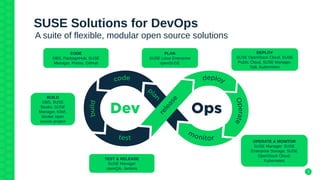
SUSE Solutions for DevOps
A suite of flexible, modular open source solutions
PLAN
SUSE Linux Enterprise
openSUSE
CODE
OBS, PackageHub, SUSE
Manager, Portus, GitHub
BUILD
OBS, SUSE
Studio, SUSE
Manager, KIWI,
docker open
source project
TEST & RELEASE
SUSE Manager
openQA, Jenkins
OPERATE & MONITOR
SUSE Manager, SUSE
Enterprise Storage, SUSE
OpenStack Cloud,
Kubernetes
DEPLOY
SUSE OpenStack Cloud, SUSE
Public Cloud, SUSE Manager,
Salt, Kubernetes
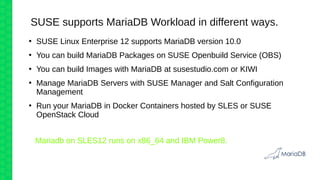
SUSE supports MariaDB Workload in different ways.
●
SUSE Linux Enterprise 12 supports MariaDB version 10.0
●
You can build MariaDB Packages on SUSE Openbuild Service (OBS)
●
You can build Images with MariaDB at susestudio.com or KIWI
●
Manage MariaDB Servers with SUSE Manager and Salt Configuration
Management
●
Run your MariaDB in Docker Containers hosted by SLES or SUSE
OpenStack Cloud
Mariadb on SLES12 runs on x86_64 and IBM Power8.
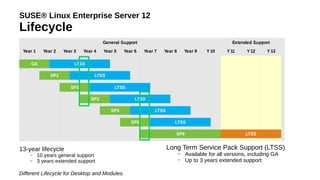
SUSE® Linux Enterprise Server 12
Lifecycle
General Support Extended Support
Year 1 Year 2 Year 3 Year 4 Year 5 Year 6 Year 7 Year 8 Year 9 Y 10 Y 11 Y12 Y 13
GA LTSS
SP1 LTSS
SP2 LTSS
SP3 LTSS
SP4 LTSS
SP5 LTSS
SP6 LTSS
13-year lifecycle
– 10 years general support
– 3 years extended support
Different Lifecycle for Desktop and Modules.
Long Term Service Pack Support (LTSS)
– Available for all versions, including GA
– Up to 3 years extended support
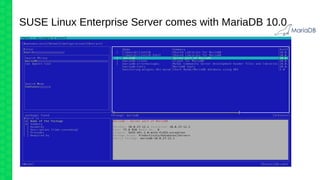
SUSE Linux Enterprise Server comes with MariaDB 10.0
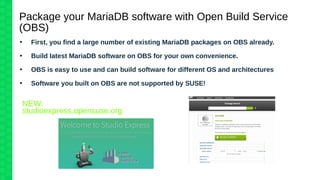
Package your MariaDB software with Open Build Service
(OBS)d
●
First, you find a large number of existing MariaDB packages on OBS already.
●
Build latest MariaDB software on OBS for your own convenience.
●
OBS is easy to use and can build software for different OS and architectures
●
Software you built on OBS are not supported by SUSE!
studioexpress.opensuse.org
NEW:
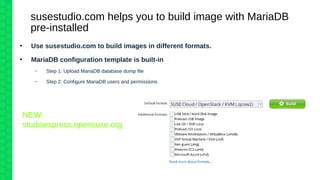
susestudio.com helps you to build image with MariaDB
pre-installed
●
Use susestudio.com to build images in different formats.
●
MariaDB configuration template is built-in
– Step 1: Upload MariaDB database dump file
– Step 2: Configure MariaDB users and permissions
NEW:
studioexpress.opensuse.org
Manage MariaDB servers with SUSE Manager & Salt
●
Provisioning new SLES with SUSE Manager autoyast
●
Manage staging channels to update MariaDB servers in different environments (dev,
test, prod)
●
Use salt to manage MariaDB configurations and monitor for configuration changes
(beacon)
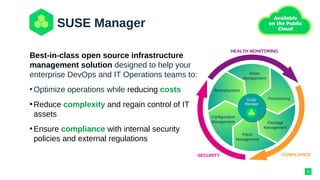
SUSE Manager
Asset
Management
Provisioning
Redeployment
Configuration
Management Package
Management
Patch
Management
SUSE
Manager
SUSE
Manager
HEALTH MONITORING
COMPLIANCESECURITY
Best-in-class open source infrastructure
management solution designed to help your
enterprise DevOps and IT Operations teams to:
•Optimize operations while reducing costs
•Reduce complexity and regain control of IT
assets
•Ensure compliance with internal security
policies and external regulations
10
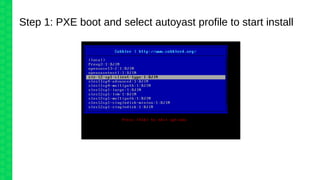
Step 1: PXE boot and select autoyast profile to start install
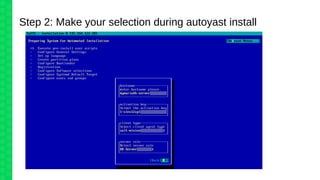
Step 2: Make your selection during autoyast install
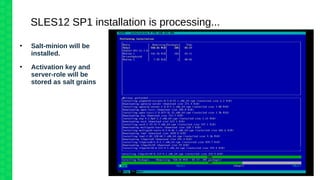
SLES12 SP1 installation is processing...
●
Salt-minion will be
installed.
●
Activation key and
server-role will be
stored as salt grains
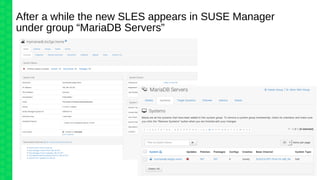
After a while the new SLES appears in SUSE Manager
under group “MariaDB Servers”
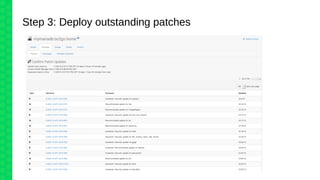
Step 3: Deploy outstanding patches
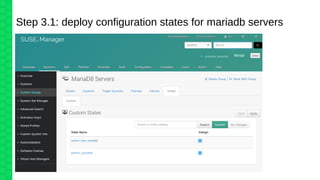
Step 3.1: deploy configuration states for mariadb servers
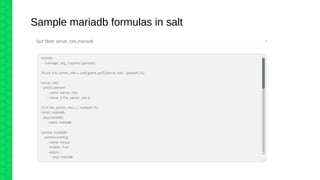
Sample mariadb formulas in salt
Monitor config file changes using salt beacons
salt/beacon/mymariadb.bo2go.home/inotify//etc/my.cnf {
"_stamp": "2016-11-28T19:37:15.317124",
"data": {
"change": "IN_IGNORED",
"id": "mymariadb.bo2go.home",
"path": "/etc/my.cnf"
},
"tag": "salt/beacon/mymariadb.bo2go.home/inotify//etc/my.cnf"
}
Change event received: Restore /etc/my.cnf:
salt/job/20161128203715445906/new {
"_stamp": "2016-11-28T19:37:15.446371",
"arg": [
"salt-call state.sls_id config_files_mycnf
manager_org_1.server_role_mariadb"
],
"fun": "cmd.run",
"jid": "20161128203715445906",
"minions": [
"mymariadb.bo2go.home"
],
"tgt": "mymariadb.bo2go.home",
"tgt_type": "glob",
"user": "salt"
}
19
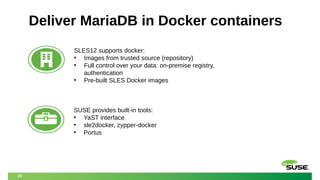
Deliver MariaDB in Docker containers
SLES12 supports docker:
• Images from trusted source (repository)
• Full control over your data: on-premise registry,
authentication
• Pre-built SLES Docker images
SUSE provides built-in tools:
• YaST interface
• sle2docker, zypper-docker
• Portus
20
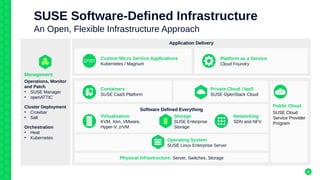
SUSE Software-Defined Infrastructure
An Open, Flexible Infrastructure Approach
Application Delivery
Management
Operations, Monitor
and Patch
• SUSE Manager
• openATTIC
Cluster Deployment
• Crowbar
• Salt
Orchestration
• Heat
• Kubernetes
Custom Micro Service Applications
Kubernetes / Magnum
Physical Infrastructure: Server, Switches, Storage
Public Cloud
SUSE Cloud
Service Provider
Program
Containers
SUSE CaaS Platform
Software Defined Everything
Storage
SUSE Enterprise
Storage
Networking
SDN and NFV
Virtualization
KVM, Xen, VMware,
Hyper-V, z/VM
Operating System
SUSE Linux Enterprise Server
Platform as a Service
Cloud Foundry
Private Cloud / IaaS
SUSE OpenStack Cloud
21
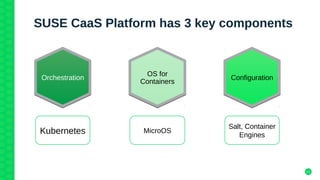
SUSE CaaS Platform has 3 key components
OS for
Containers
OS for
Containers
MicroOS
OrchestrationOrchestration
Kubernetes
ConfigurationConfiguration
Salt, Container
Engines
22
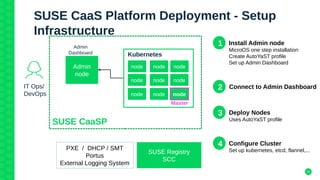
PXE / DHCP / SMT
Portus
External Logging System
Admin
node
IT Ops/
DevOps
Admin
Dashboard
node node node
node node node
node node node
Kubernetes
Master
SUSE CaaSP
SUSE Registry
SCC
SUSE CaaS Platform Deployment - Setup
Infrastructure
1 Install Admin node
MicroOS one step installation
Create AutoYaST profile
Set up Admin Dashboard
2 Connect to Admin Dashboard
3 Deploy Nodes
Uses AutoYaST profile
4 Configure Cluster
Set up kubernetes, etcd, flannel,...
23
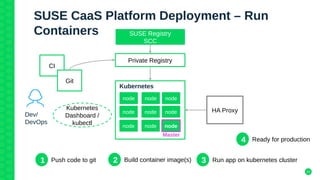
SUSE CaaS Platform Deployment – Run
Containers
Dev/
DevOps
node node node
node node node
node node node
Kubernetes
Master
Private Registry
CI
Git
Kubernetes
Dashboard /
kubectl
HA Proxy
1 Push code to git 2 Build container image(s) 3 Run app on kubernetes cluster
4 Ready for production
SUSE Registry
SCC
24
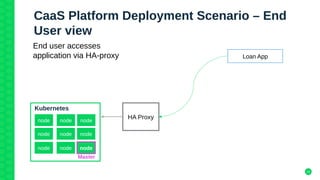
CaaS Platform Deployment Scenario – End
User view
Loan App
node node node
node node node
node node node
Kubernetes
Master
End user accesses
application via HA-proxy
HA Proxy
+49 911 740 53 0 (Worldwide)
www.suse.com
Corporate Headquarters
Maxfeldstrasse 5
90409 Nuremberg
Germany
Join us on:
opensuse.org
Unpublished Work of SUSE. All Rights Reserved.
This work is an unpublished work and contains confidential, proprietary, and trade secret information
of SUSE.
Access to this work is restricted to SUSE employees who have a need to know to perform tasks
within the scope of their assignments. No part of this work may be practiced, performed, copied,
distributed, revised, modified, translated, abridged, condensed, expanded, collected, or adapted
without the prior written consent of SUSE.
Any use or exploitation of this work without authorization could subject the perpetrator to criminal
and civil liability.
General Disclaimer
This document is not to be construed as a promise by any participating company to develop, deliver,
or market a product. It is not a commitment to deliver any material, code, or functionality, and
should not be relied upon in making purchasing decisions. SUSE makes no representations or
warranties with respect to the contents of this document, and specifically disclaims any express or
implied warranties of merchantability or fitness for any particular purpose. The development,
release, and timing of features or functionality described for SUSE products remains at the sole
discretion of SUSE. Further, SUSE reserves the right to revise this document and to make changes
to its content, at any time, without obligation to notify any person or entity of such revisions or
changes. All SUSE marks referenced in this presentation are trademarks or registered trademarks
of Novell, Inc. in the United States and other countries. All third-party trademarks are the property
of their respective owners.

Software-definierte Infrastrukturen, DevOps, Digitale Transformation

  • 1.
    MariaDB@SUSE Software-definierte Infrastrukturen, DevOps, DigitaleTransformation Bo Jin Sales Engineer bo.jin@suse.com
  • 2.
    Agenda ● MariaDB@SUSE at aglance ● Automate mariadb deployment and configuration ● Mariadb in containers on Container as a service Platform (CaasP)
  • 3.
    3 SUSE Solutions forDevOps A suite of flexible, modular open source solutions PLAN SUSE Linux Enterprise openSUSE CODE OBS, PackageHub, SUSE Manager, Portus, GitHub BUILD OBS, SUSE Studio, SUSE Manager, KIWI, docker open source project TEST & RELEASE SUSE Manager openQA, Jenkins OPERATE & MONITOR SUSE Manager, SUSE Enterprise Storage, SUSE OpenStack Cloud, Kubernetes DEPLOY SUSE OpenStack Cloud, SUSE Public Cloud, SUSE Manager, Salt, Kubernetes
  • 4.
    SUSE supports MariaDBWorkload in different ways. ● SUSE Linux Enterprise 12 supports MariaDB version 10.0 ● You can build MariaDB Packages on SUSE Openbuild Service (OBS) ● You can build Images with MariaDB at susestudio.com or KIWI ● Manage MariaDB Servers with SUSE Manager and Salt Configuration Management ● Run your MariaDB in Docker Containers hosted by SLES or SUSE OpenStack Cloud Mariadb on SLES12 runs on x86_64 and IBM Power8.
  • 5.
    SUSE® Linux EnterpriseServer 12 Lifecycle General Support Extended Support Year 1 Year 2 Year 3 Year 4 Year 5 Year 6 Year 7 Year 8 Year 9 Y 10 Y 11 Y12 Y 13 GA LTSS SP1 LTSS SP2 LTSS SP3 LTSS SP4 LTSS SP5 LTSS SP6 LTSS 13-year lifecycle – 10 years general support – 3 years extended support Different Lifecycle for Desktop and Modules. Long Term Service Pack Support (LTSS) – Available for all versions, including GA – Up to 3 years extended support
  • 6.
    SUSE Linux EnterpriseServer comes with MariaDB 10.0
  • 7.
    Package your MariaDBsoftware with Open Build Service (OBS)d ● First, you find a large number of existing MariaDB packages on OBS already. ● Build latest MariaDB software on OBS for your own convenience. ● OBS is easy to use and can build software for different OS and architectures ● Software you built on OBS are not supported by SUSE! studioexpress.opensuse.org NEW:
  • 8.
    susestudio.com helps youto build image with MariaDB pre-installed ● Use susestudio.com to build images in different formats. ● MariaDB configuration template is built-in – Step 1: Upload MariaDB database dump file – Step 2: Configure MariaDB users and permissions NEW: studioexpress.opensuse.org
  • 9.
    Manage MariaDB serverswith SUSE Manager & Salt ● Provisioning new SLES with SUSE Manager autoyast ● Manage staging channels to update MariaDB servers in different environments (dev, test, prod) ● Use salt to manage MariaDB configurations and monitor for configuration changes (beacon)
  • 10.
    SUSE Manager Asset Management Provisioning Redeployment Configuration Management Package Management Patch Management SUSE Manager SUSE Manager HEALTHMONITORING COMPLIANCESECURITY Best-in-class open source infrastructure management solution designed to help your enterprise DevOps and IT Operations teams to: •Optimize operations while reducing costs •Reduce complexity and regain control of IT assets •Ensure compliance with internal security policies and external regulations 10
  • 11.
    Step 1: PXEboot and select autoyast profile to start install
  • 12.
    Step 2: Makeyour selection during autoyast install
  • 13.
    SLES12 SP1 installationis processing... ● Salt-minion will be installed. ● Activation key and server-role will be stored as salt grains
  • 14.
    After a whilethe new SLES appears in SUSE Manager under group “MariaDB Servers”
  • 15.
    Step 3: Deployoutstanding patches
  • 16.
    Step 3.1: deployconfiguration states for mariadb servers
  • 17.
  • 18.
    Monitor config filechanges using salt beacons salt/beacon/mymariadb.bo2go.home/inotify//etc/my.cnf { "_stamp": "2016-11-28T19:37:15.317124", "data": { "change": "IN_IGNORED", "id": "mymariadb.bo2go.home", "path": "/etc/my.cnf" }, "tag": "salt/beacon/mymariadb.bo2go.home/inotify//etc/my.cnf" } Change event received: Restore /etc/my.cnf: salt/job/20161128203715445906/new { "_stamp": "2016-11-28T19:37:15.446371", "arg": [ "salt-call state.sls_id config_files_mycnf manager_org_1.server_role_mariadb" ], "fun": "cmd.run", "jid": "20161128203715445906", "minions": [ "mymariadb.bo2go.home" ], "tgt": "mymariadb.bo2go.home", "tgt_type": "glob", "user": "salt" }
  • 19.
    19 Deliver MariaDB inDocker containers SLES12 supports docker: • Images from trusted source (repository) • Full control over your data: on-premise registry, authentication • Pre-built SLES Docker images SUSE provides built-in tools: • YaST interface • sle2docker, zypper-docker • Portus
  • 20.
    20 SUSE Software-Defined Infrastructure AnOpen, Flexible Infrastructure Approach Application Delivery Management Operations, Monitor and Patch • SUSE Manager • openATTIC Cluster Deployment • Crowbar • Salt Orchestration • Heat • Kubernetes Custom Micro Service Applications Kubernetes / Magnum Physical Infrastructure: Server, Switches, Storage Public Cloud SUSE Cloud Service Provider Program Containers SUSE CaaS Platform Software Defined Everything Storage SUSE Enterprise Storage Networking SDN and NFV Virtualization KVM, Xen, VMware, Hyper-V, z/VM Operating System SUSE Linux Enterprise Server Platform as a Service Cloud Foundry Private Cloud / IaaS SUSE OpenStack Cloud
  • 21.
    21 SUSE CaaS Platformhas 3 key components OS for Containers OS for Containers MicroOS OrchestrationOrchestration Kubernetes ConfigurationConfiguration Salt, Container Engines
  • 22.
    22 PXE / DHCP/ SMT Portus External Logging System Admin node IT Ops/ DevOps Admin Dashboard node node node node node node node node node Kubernetes Master SUSE CaaSP SUSE Registry SCC SUSE CaaS Platform Deployment - Setup Infrastructure 1 Install Admin node MicroOS one step installation Create AutoYaST profile Set up Admin Dashboard 2 Connect to Admin Dashboard 3 Deploy Nodes Uses AutoYaST profile 4 Configure Cluster Set up kubernetes, etcd, flannel,...
  • 23.
    23 SUSE CaaS PlatformDeployment – Run Containers Dev/ DevOps node node node node node node node node node Kubernetes Master Private Registry CI Git Kubernetes Dashboard / kubectl HA Proxy 1 Push code to git 2 Build container image(s) 3 Run app on kubernetes cluster 4 Ready for production SUSE Registry SCC
  • 24.
    24 CaaS Platform DeploymentScenario – End User view Loan App node node node node node node node node node Kubernetes Master End user accesses application via HA-proxy HA Proxy
  • 25.
    +49 911 74053 0 (Worldwide) www.suse.com Corporate Headquarters Maxfeldstrasse 5 90409 Nuremberg Germany Join us on: opensuse.org
  • 26.
    Unpublished Work ofSUSE. All Rights Reserved. This work is an unpublished work and contains confidential, proprietary, and trade secret information of SUSE. Access to this work is restricted to SUSE employees who have a need to know to perform tasks within the scope of their assignments. No part of this work may be practiced, performed, copied, distributed, revised, modified, translated, abridged, condensed, expanded, collected, or adapted without the prior written consent of SUSE. Any use or exploitation of this work without authorization could subject the perpetrator to criminal and civil liability. General Disclaimer This document is not to be construed as a promise by any participating company to develop, deliver, or market a product. It is not a commitment to deliver any material, code, or functionality, and should not be relied upon in making purchasing decisions. SUSE makes no representations or warranties with respect to the contents of this document, and specifically disclaims any express or implied warranties of merchantability or fitness for any particular purpose. The development, release, and timing of features or functionality described for SUSE products remains at the sole discretion of SUSE. Further, SUSE reserves the right to revise this document and to make changes to its content, at any time, without obligation to notify any person or entity of such revisions or changes. All SUSE marks referenced in this presentation are trademarks or registered trademarks of Novell, Inc. in the United States and other countries. All third-party trademarks are the property of their respective owners.