SELECTION OF AN
APPROPRIATE PROJECT
APPROACH
Contents
• Introduction
• Build or Buy?
• Methodologies and technologies of analyzing various project
characteristics
• Software Process Models
• Selecting the most appropriate model.
Introduction
• This chapter is concerned with how the characteristics of a
project environment and the application to be delivered
influence the shape of the plan of a project.
• Introduction to most common process models and selection of
the most appropriate of them for a project is also a part of this
chapter.
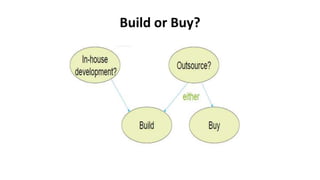
Build or Buy?
Build or Buy?
• In-house(only Build) means that the developers and the users
of the software are in the same organization.
– often the methods to be used dictated by organizational standards
• Outsourced: means that the developers and the users of the
software are in the different organization.
– need for tailoring as different customers have different needs
• Off-the-shelf: means a ready-made software product that is
purchased.(used in risk avoidance to replace system)
Build or Buy?
• Why Out Sourcing?(either build and buy)
• Advantages
– Time is needed to develop the software
– Would often require the recruitment of new technical staff to do the
job
– Usually, the new staff won’t be needed after the project is completed
– Sometimes due to new project there may be lack of executives to
lead the effort
Build or Buy?
• Why Buying?
– Whether in house or out sourced, software development is still
involved.
– The contracting company will not have technical and project
expertise readily available to the client.
– Considerable management effort is needed by the client to establish
and manage the contract.
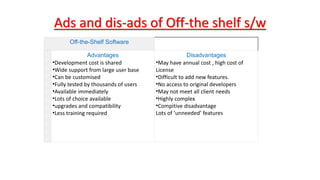
Ads and dis-ads of Off-the shelf s/w
Off-the-Shelf Software
Advantages
•Development cost is shared
•Wide support from large user base
•Can be customised
•Fully tested by thousands of users
•Available immediately
•Lots of choice available
•upgrades and compatibility
•Less training required
Disadvantages
•May have annual cost , high cost of
License
•Difficult to add new features.
•No access to original developers
•May not meet all client needs
•Highly complex
•Compitive disadvantage
Lots of ‘unneeded’ features
Build or Buy?
• Advantages of off-the-shelf (OTS) software
– Cheaper as supplier can spread development costs over a large
number of customers
– Software already exists
• Can be trialed by potential customer
• No delay while software being developed
– Where there have been existing users, bugs are likely to have been
found and eradicated
Build or Buy?
• Disadvantages of off-the-shelf software
– Customer will have same application as everyone else: no
competitive advantage, but competitive advantage may come from
the way application is used
– Customer may need to change the way they work in order to fit in
with OTS application
– Customer does not own the code and cannot change it
– Danger of over-reliance on a single supplier
Choosing Methodologies and Technologies
• 1-Identify project as either objective driven and product driven
• 2-Analyze other project characteristics
• 3-Identify high level project risks
• 4-Take into account user requirement concerning
implementation
Objective driven or product driven.
• Product-driven project:
– a project will be to create a product.
– The details of the product is provided by the client.
• Objective-driven project:
– A project is to meet an objective.
– Req bhi khud do…. Bnao s/w bhi khud…. Client ko kuch bhi pta nhi
hota…
– The Client may have a problem and asks a specialist to recommend
solutions.
Analyze other project characteristics
• Will we implement a data-oriented or a process oriented system?
• Will the software to be produced be a general tool or application
specific?
• Review overall resource estimates
• Are there specific tools available for implementing the particular
type of application?
– does it involve concurrent processing?
– Is the system knowledge-based?
– Will the system to be produced makes heavy use of computer graphics?
Analyze other project characteristics
• Is the system to be created safety critical?
• Is the system designed to carry out predefined services or to
be engaging and entertaining?
• What is the nature of the hardware/software environment in
which the system will operate?
• Development process models
Identify high-level project risks.
• The more uncertainty in the project the more the risk that the
project will be unsuccessful.
• Recognizing the area of uncertainty allows taking steps
towards reducing its uncertainty.
• Uncertainty can be associated with the products, processes, or
resources of a project.
Identify high-level project risks.
• Product uncertainty:
– How well are the requirements understood.
– The users themselves could be uncertain about what the system is to do.
• Process uncertainty:
– For the project under consideration, the organization will use an approach
or an application building-tool that it never used before.
• Resource uncertainty:
– The main area of resource uncertainty is the availability of the staff with
the right ability and experience.
Take into Account User requirements Concerning
Implementation
• Imposing uniform applications and technologies throughout
whole organization saves time and money at the end of
organization.
• A client organization often lays down standards that have to be
adopted by any contractor provided software for them.
Software Process Model
• A number of inter related activities have to be undertaken to
create a final product. These activities can be organized in
different ways and we call these process models.
• A process model of a software product is a graphical or textual
representation of its lifecycle. Additionally a process model
may describe the details of various types of activities carried
out during the different phases and the documents produced.
Software Process Model
Structure versus speed of delivery
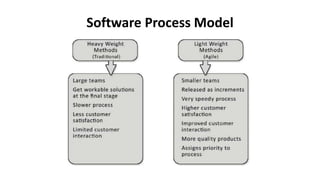
• Two competing pressures
1-Structured Approach(Also called ‘heavyweight’ approaches)
One is to make sure that the final product has a robust structure which
will be able to meet evolving needs.
2-Speed of Delivery: (Also called lightweight approaches)
Other is to get the job done as quickly and as cheaply as possible.
Software Process Model
• Structured Approach(Also called ‘heavyweight’ approaches)
– Also called ‘heavyweight’ approaches
– Step-by-step methods where each step and intermediate product is
carefully defined
– Highly documentation
– Emphasis on getting quality right first time
– More time consuming and expensive
– End result is expected to be a less error prone and more maintainable final
system.
Software Process Model
• Speed of Delivery: (Also called lightweight approaches)
– Also called lightweight approaches
– Emphasis is on speed of delivery rather than documentation
Software Process Model
• Some process models included in this chapter are:
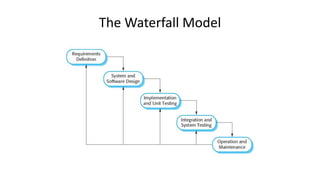
– The waterfall model
– The spiral model
– Software prototype
– Incremental delivery
– Agile methods
The Waterfall Model
The Waterfall Model
• Classical model of system development.
• Called one-shot or once-through model.
• limited scope of iteration. Is this a strength or a limitation??
– This is a strength for the WF-model.
– Because it is suitable for some projects especially for large projects, we
want to avoid reworking tasks that are thought to be completed.
– Reworking tasks could result in late delivery.
• Suitable for systems with well defined requirements.
• Not suitable for systems of high uncertainty
The Waterfall Model
• Strengths:
– Easy to manage due to the rigidity of the model, because each phase
is specific
– Reinforces good habits: define-before-design, design-before-code.
• Weakness:
– Unrealistic to expect accurate requirements so early in project.
– Software is delivered late in project, delays discovery of serious errors
The Spiral Model
The Spiral Model
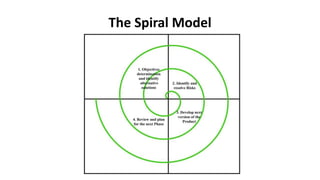
• Represented as a loop or a spiral where the system is
considered in more detail.
• The distinguishing characteristic features of the spiral model
are:
– Incremental style of development
– Ability to handle various types of risks
The Spiral Model
• Each loop of the spiral is called a phase of this software
process.
• In each phase, one or more features of the product are
implemented after resolving any associated risks through
prototyping.
• The exact number of loops of spiral are not fixed, and vary from project
to project providing higher flexibility.
The Spiral Model
• Each loop of the spiral is divided into four quadrants, indicating
four stages in each phase
– In first stage, one or more features of the project are analyzed.
– In 2nd stage, risks in implementing those features are identified and
resolved through prototyping.
– In 3rd stage, the identified features are implemented.
– In 4th stage, the developed feature is reviewed and the features to be
implemented in the next phase are identified.
The Spiral Model
• Strengths:
– High amount of risk analysis hence, avoidance of Risk is enhanced.
– Software is produced early in the software life cycle.
– The model makes use of techniques like reuse, prototyping.
• Weakness:
– The model is not suitable for small projects as cost of risk analysis
may exceed the actual cost of the project.
– Different persons involved in the project may find it complex to use
Software Prototyping
• Prototype is a working model of one or more aspects of the projected
system.
• The prototype is constructed and tested, quickly and inexpensively to test
assumptions.
• Goal
– Gain knowledge
– reduce risk and uncertainty
– verify a design or implementation approach
• Prototypes can be classified as
– Throwaway
– Evolutionary
Software Prototyping
• Strengths:
– Learning by doing.
– Improved communication.
– Improved user involvement.
– Clarification of partially-known requirements.
– Reduced need for documentation.
– Feature constraint.(ik hi tool ko use karo from start to end )
Software Prototyping
• Weakness:
– Users sometimes misunderstand the role of the prototype.
– Lack of project standards possible.
– Additional expense.
– Client’s high expectation from s/w that will so good….
– Close proximity of developers.
Incremental Model
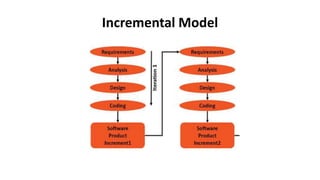
• Break the system into small components.
• Implement and deliver small components in sequence.
• Every delivered component provides extra functionality to the
user.
• Customer involment is larger.
• Feedback comes in earlier . Feedback of ist increment becomes
input of next increment and so on……
• Every increment has own planning and documentation
Incremental Model
• The nature and order of each increment to be delivered to the
users have to be planned at the outset.
• The elements of the incremental plan are
– System objectives
– Open technology plans
– Incremental plan
Incremental Model
Incremental Model
• Strengths:
– The feedback from early increments improves the later stages.
– Users get benefits earlier than with a conventional approach.
– Early delivery of some useful components improves cash flows(cash
comes earlier )
– Smaller sub projects are easy to control and manage.
– Less gold plating
Incremental Model
• Weakness:
– Total cost is higher.
– Requires heavy documentation.
– Software breakage
– Software developers may be more productive working on one large
system than on a series of smaller ones.
Agile Methods
• Why need Agile Methods?
– Difficult to accommodate change requests in heavyweight processes.
– Heavyweight processes are documentation driven.
– Heavyweight processes are too rigid.
Agile Methods
• Central principles of agile methods
– Incremental delivery after each time box
– Face to face communication
– Customer interactions
– Smaller teams
– Minimal documentation
– Pair programming
Agile Methods
• Some agile methods are:
– Crystal technologies
– Atern
– Feature driven development
– Scrum
– Extreme programming
– Lean
Scrum
• A project is divided into small work parts that can
incrementally be developed and delivered over time boxes that
are called sprints.
• Each sprint is typically 2 to 4 weeks long.
• During a sprint an incremental functionality is completed.
• At the end of each sprint, the stakeholders and the team
members met to assess the increment.
Scrum
• The software gets developed over a series of sprints.
• In each sprint, manageable increments to the software are
deployed at the client side and the client feedback is obtained
after each sprint.
• How scrum team works…..??
Scrum
• In the scrum model, the team members assume three basic roles:
– Product owner
– Scrum master
– Team member
• Three main Artifacts form an important part of scrum methodology
– Product backlog(a list of all functionalities of a complete product)
– Sprint backlog(inside one sprint , there are no of sub-sprints working, see
all about….)
– Sprint burndown chart(effort kitni rehti and kitni reamaing ha to complete
one sprint)
– Remening effort = inverse of time
3 types Scrum meeting
• Scrum ceremonies (meeting)is a term used to denote the
meetings that are mandatorily held during the duration of a
project.
– Sprint planning (product owner will do)
– Daily scrum (scrum master+product owner will do, 10-15 mint
session tell about aaj kitna kaam kerna and kal kiya kiya tha bs…)
– Sprint review meeting (demo to customer, to validate product, to tell
about features which are going to add in product backlog )
Selecting the most appropriate process model
• Whenever uncertainty is high, an evolutionary approach needs
to be favoured e.g. when user requirements are not clear.
• When requirements are relatively certain, but there are many
complexities, then an incremental approach is favored.
• Evolutionary and incremental approaches are favored in the
case of tight deadlines.
Selecting the most appropriate process model
• For development of simple and well-understood applications,
waterfall should be preferred.
• If the development team is entirely new, then even the
development of simple applications require an incremental
and prototyping approach.
Selecting the most appropriate process model
• The spiral model would be appropriate, if the project is large
and it is not possible to anticipate the project risks at the start
of the project. And for high risk….
• If the customer is unsure about some features of the software
to be developed, then an evolutionary or agile model would be
the best choice.
Reading
• [Chapter#4] Software Project Management by Bob Hughes and
Mike Cotterell, McGraw-Hill Education; 6th Edition (2009).
ISBN-10: 0077122798.
• “Heavyweight vs. Lightweight Methodologies: Key Strategies
for Development”, International Journal of Advance Research
in Science and Engineering, Volume 7, April 2018.
• https://www.coursehero.com/file/p74j8c/3-Objectives-versus-
products-Product-driven-project-a-project-will-be-to-create/

Software process models

  • 1.
  • 2.
    Contents • Introduction • Buildor Buy? • Methodologies and technologies of analyzing various project characteristics • Software Process Models • Selecting the most appropriate model.
  • 3.
    Introduction • This chapteris concerned with how the characteristics of a project environment and the application to be delivered influence the shape of the plan of a project. • Introduction to most common process models and selection of the most appropriate of them for a project is also a part of this chapter.
  • 4.
  • 5.
    Build or Buy? •In-house(only Build) means that the developers and the users of the software are in the same organization. – often the methods to be used dictated by organizational standards • Outsourced: means that the developers and the users of the software are in the different organization. – need for tailoring as different customers have different needs • Off-the-shelf: means a ready-made software product that is purchased.(used in risk avoidance to replace system)
  • 6.
    Build or Buy? •Why Out Sourcing?(either build and buy) • Advantages – Time is needed to develop the software – Would often require the recruitment of new technical staff to do the job – Usually, the new staff won’t be needed after the project is completed – Sometimes due to new project there may be lack of executives to lead the effort
  • 7.
    Build or Buy? •Why Buying? – Whether in house or out sourced, software development is still involved. – The contracting company will not have technical and project expertise readily available to the client. – Considerable management effort is needed by the client to establish and manage the contract.
  • 8.
    Ads and dis-adsof Off-the shelf s/w Off-the-Shelf Software Advantages •Development cost is shared •Wide support from large user base •Can be customised •Fully tested by thousands of users •Available immediately •Lots of choice available •upgrades and compatibility •Less training required Disadvantages •May have annual cost , high cost of License •Difficult to add new features. •No access to original developers •May not meet all client needs •Highly complex •Compitive disadvantage Lots of ‘unneeded’ features
  • 9.
    Build or Buy? •Advantages of off-the-shelf (OTS) software – Cheaper as supplier can spread development costs over a large number of customers – Software already exists • Can be trialed by potential customer • No delay while software being developed – Where there have been existing users, bugs are likely to have been found and eradicated
  • 10.
    Build or Buy? •Disadvantages of off-the-shelf software – Customer will have same application as everyone else: no competitive advantage, but competitive advantage may come from the way application is used – Customer may need to change the way they work in order to fit in with OTS application – Customer does not own the code and cannot change it – Danger of over-reliance on a single supplier
  • 11.
    Choosing Methodologies andTechnologies • 1-Identify project as either objective driven and product driven • 2-Analyze other project characteristics • 3-Identify high level project risks • 4-Take into account user requirement concerning implementation
  • 12.
    Objective driven orproduct driven. • Product-driven project: – a project will be to create a product. – The details of the product is provided by the client. • Objective-driven project: – A project is to meet an objective. – Req bhi khud do…. Bnao s/w bhi khud…. Client ko kuch bhi pta nhi hota… – The Client may have a problem and asks a specialist to recommend solutions.
  • 13.
    Analyze other projectcharacteristics • Will we implement a data-oriented or a process oriented system? • Will the software to be produced be a general tool or application specific? • Review overall resource estimates • Are there specific tools available for implementing the particular type of application? – does it involve concurrent processing? – Is the system knowledge-based? – Will the system to be produced makes heavy use of computer graphics?
  • 14.
    Analyze other projectcharacteristics • Is the system to be created safety critical? • Is the system designed to carry out predefined services or to be engaging and entertaining? • What is the nature of the hardware/software environment in which the system will operate? • Development process models
  • 15.
    Identify high-level projectrisks. • The more uncertainty in the project the more the risk that the project will be unsuccessful. • Recognizing the area of uncertainty allows taking steps towards reducing its uncertainty. • Uncertainty can be associated with the products, processes, or resources of a project.
  • 16.
    Identify high-level projectrisks. • Product uncertainty: – How well are the requirements understood. – The users themselves could be uncertain about what the system is to do. • Process uncertainty: – For the project under consideration, the organization will use an approach or an application building-tool that it never used before. • Resource uncertainty: – The main area of resource uncertainty is the availability of the staff with the right ability and experience.
  • 17.
    Take into AccountUser requirements Concerning Implementation • Imposing uniform applications and technologies throughout whole organization saves time and money at the end of organization. • A client organization often lays down standards that have to be adopted by any contractor provided software for them.
  • 18.
    Software Process Model •A number of inter related activities have to be undertaken to create a final product. These activities can be organized in different ways and we call these process models. • A process model of a software product is a graphical or textual representation of its lifecycle. Additionally a process model may describe the details of various types of activities carried out during the different phases and the documents produced.
  • 19.
    Software Process Model Structureversus speed of delivery • Two competing pressures 1-Structured Approach(Also called ‘heavyweight’ approaches) One is to make sure that the final product has a robust structure which will be able to meet evolving needs. 2-Speed of Delivery: (Also called lightweight approaches) Other is to get the job done as quickly and as cheaply as possible.
  • 20.
    Software Process Model •Structured Approach(Also called ‘heavyweight’ approaches) – Also called ‘heavyweight’ approaches – Step-by-step methods where each step and intermediate product is carefully defined – Highly documentation – Emphasis on getting quality right first time – More time consuming and expensive – End result is expected to be a less error prone and more maintainable final system.
  • 21.
    Software Process Model •Speed of Delivery: (Also called lightweight approaches) – Also called lightweight approaches – Emphasis is on speed of delivery rather than documentation
  • 22.
  • 23.
    Software Process Model •Some process models included in this chapter are: – The waterfall model – The spiral model – Software prototype – Incremental delivery – Agile methods
  • 24.
  • 25.
    The Waterfall Model •Classical model of system development. • Called one-shot or once-through model. • limited scope of iteration. Is this a strength or a limitation?? – This is a strength for the WF-model. – Because it is suitable for some projects especially for large projects, we want to avoid reworking tasks that are thought to be completed. – Reworking tasks could result in late delivery. • Suitable for systems with well defined requirements. • Not suitable for systems of high uncertainty
  • 26.
    The Waterfall Model •Strengths: – Easy to manage due to the rigidity of the model, because each phase is specific – Reinforces good habits: define-before-design, design-before-code. • Weakness: – Unrealistic to expect accurate requirements so early in project. – Software is delivered late in project, delays discovery of serious errors
  • 27.
  • 28.
    The Spiral Model •Represented as a loop or a spiral where the system is considered in more detail. • The distinguishing characteristic features of the spiral model are: – Incremental style of development – Ability to handle various types of risks
  • 29.
    The Spiral Model •Each loop of the spiral is called a phase of this software process. • In each phase, one or more features of the product are implemented after resolving any associated risks through prototyping. • The exact number of loops of spiral are not fixed, and vary from project to project providing higher flexibility.
  • 30.
    The Spiral Model •Each loop of the spiral is divided into four quadrants, indicating four stages in each phase – In first stage, one or more features of the project are analyzed. – In 2nd stage, risks in implementing those features are identified and resolved through prototyping. – In 3rd stage, the identified features are implemented. – In 4th stage, the developed feature is reviewed and the features to be implemented in the next phase are identified.
  • 31.
    The Spiral Model •Strengths: – High amount of risk analysis hence, avoidance of Risk is enhanced. – Software is produced early in the software life cycle. – The model makes use of techniques like reuse, prototyping. • Weakness: – The model is not suitable for small projects as cost of risk analysis may exceed the actual cost of the project. – Different persons involved in the project may find it complex to use
  • 32.
    Software Prototyping • Prototypeis a working model of one or more aspects of the projected system. • The prototype is constructed and tested, quickly and inexpensively to test assumptions. • Goal – Gain knowledge – reduce risk and uncertainty – verify a design or implementation approach • Prototypes can be classified as – Throwaway – Evolutionary
  • 33.
    Software Prototyping • Strengths: –Learning by doing. – Improved communication. – Improved user involvement. – Clarification of partially-known requirements. – Reduced need for documentation. – Feature constraint.(ik hi tool ko use karo from start to end )
  • 34.
    Software Prototyping • Weakness: –Users sometimes misunderstand the role of the prototype. – Lack of project standards possible. – Additional expense. – Client’s high expectation from s/w that will so good…. – Close proximity of developers.
  • 35.
    Incremental Model • Breakthe system into small components. • Implement and deliver small components in sequence. • Every delivered component provides extra functionality to the user. • Customer involment is larger. • Feedback comes in earlier . Feedback of ist increment becomes input of next increment and so on…… • Every increment has own planning and documentation
  • 36.
    Incremental Model • Thenature and order of each increment to be delivered to the users have to be planned at the outset. • The elements of the incremental plan are – System objectives – Open technology plans – Incremental plan
  • 37.
  • 38.
    Incremental Model • Strengths: –The feedback from early increments improves the later stages. – Users get benefits earlier than with a conventional approach. – Early delivery of some useful components improves cash flows(cash comes earlier ) – Smaller sub projects are easy to control and manage. – Less gold plating
  • 39.
    Incremental Model • Weakness: –Total cost is higher. – Requires heavy documentation. – Software breakage – Software developers may be more productive working on one large system than on a series of smaller ones.
  • 40.
    Agile Methods • Whyneed Agile Methods? – Difficult to accommodate change requests in heavyweight processes. – Heavyweight processes are documentation driven. – Heavyweight processes are too rigid.
  • 41.
    Agile Methods • Centralprinciples of agile methods – Incremental delivery after each time box – Face to face communication – Customer interactions – Smaller teams – Minimal documentation – Pair programming
  • 42.
    Agile Methods • Someagile methods are: – Crystal technologies – Atern – Feature driven development – Scrum – Extreme programming – Lean
  • 43.
    Scrum • A projectis divided into small work parts that can incrementally be developed and delivered over time boxes that are called sprints. • Each sprint is typically 2 to 4 weeks long. • During a sprint an incremental functionality is completed. • At the end of each sprint, the stakeholders and the team members met to assess the increment.
  • 44.
    Scrum • The softwaregets developed over a series of sprints. • In each sprint, manageable increments to the software are deployed at the client side and the client feedback is obtained after each sprint. • How scrum team works…..??
  • 45.
    Scrum • In thescrum model, the team members assume three basic roles: – Product owner – Scrum master – Team member • Three main Artifacts form an important part of scrum methodology – Product backlog(a list of all functionalities of a complete product) – Sprint backlog(inside one sprint , there are no of sub-sprints working, see all about….) – Sprint burndown chart(effort kitni rehti and kitni reamaing ha to complete one sprint) – Remening effort = inverse of time
  • 46.
    3 types Scrummeeting • Scrum ceremonies (meeting)is a term used to denote the meetings that are mandatorily held during the duration of a project. – Sprint planning (product owner will do) – Daily scrum (scrum master+product owner will do, 10-15 mint session tell about aaj kitna kaam kerna and kal kiya kiya tha bs…) – Sprint review meeting (demo to customer, to validate product, to tell about features which are going to add in product backlog )
  • 47.
    Selecting the mostappropriate process model • Whenever uncertainty is high, an evolutionary approach needs to be favoured e.g. when user requirements are not clear. • When requirements are relatively certain, but there are many complexities, then an incremental approach is favored. • Evolutionary and incremental approaches are favored in the case of tight deadlines.
  • 48.
    Selecting the mostappropriate process model • For development of simple and well-understood applications, waterfall should be preferred. • If the development team is entirely new, then even the development of simple applications require an incremental and prototyping approach.
  • 49.
    Selecting the mostappropriate process model • The spiral model would be appropriate, if the project is large and it is not possible to anticipate the project risks at the start of the project. And for high risk…. • If the customer is unsure about some features of the software to be developed, then an evolutionary or agile model would be the best choice.
  • 50.
    Reading • [Chapter#4] SoftwareProject Management by Bob Hughes and Mike Cotterell, McGraw-Hill Education; 6th Edition (2009). ISBN-10: 0077122798. • “Heavyweight vs. Lightweight Methodologies: Key Strategies for Development”, International Journal of Advance Research in Science and Engineering, Volume 7, April 2018. • https://www.coursehero.com/file/p74j8c/3-Objectives-versus- products-Product-driven-project-a-project-will-be-to-create/

Editor's Notes

  • #17 Two types of risk: uncertainty, complexity
  • #37 Portability is a characteristic attributed to a computer program if it can be used in an operating systems other than the one in which it was created without requiring major rework. maintainability measures the ease and speed with which a system can be restored to operational status after a failure occurs.