SOCIAL MEDIA - May 16, 2013
Social Media is ...
SOCIAL
and it is about ...
BUILDING
RELATIONSHIPS
ENGAGE
OFFER VALUE
SHARE
http://socialmediatoday.com/ninathewriter/1381091/how-use-social-media-build-high-quality-relationships-and-increase-sal
People do business
with people they:
Like, Know, Trust,
Respect and Relate to
Social Media can help you build the
relationship that makes your business
that business with those people
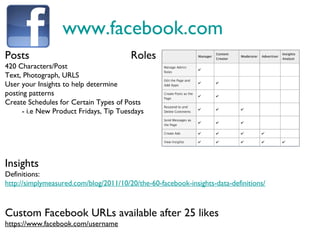
www.facebook.com
Posts
420 Characters/Post
Text, Photograph, URLS
User your Insights to help determine
posting patterns
Create Schedules for Certain Types of Posts
- i.e New Product Fridays, Tip Tuesdays
Insights
Definitions:
http://simplymeasured.com/blog/2011/10/20/the-60-facebook-insights-data-definitions/
Custom Facebook URLs available after 25 likes
https://www.facebook.com/username
Roles
www.twitter.com
Tweets
- 140 Characters/Tweet
- includes Handles (e.g.@LdnCC), Hashtags (e.g. #LdnCC), Content and occasionally links
(from twitter.com links don’t always count)
- use less than 140 characters if you’re hoping for RT’s (Retweets)
- Always aim to respond to tweets in less than 24 hours
Hashtag
- Starts with # and makes tweets searchable
- #LdnOnt - London’s Hashtag, #FF is Follow Friday
- You’ll see all tweets with this tag, not just tweets from people you follow
Responders
- If you have multiple people tweeting from your account, identify responders
- e.g. ^SC or ^PM or ^SW - You’ll see this with @Rogershelps @PillarNN and other
tweeters
Searches
- Keywords relating to you or competitors, could offer opportunities
- Keywords relating to your business (name, location, service) can also help you find people talking
about you, to build, strengthen or repair
www.linkedin.com
LinkedIn Status Updates
700 Characters/Update
Profile Tips
Professional Headline:
e.g. Social Media Specialist | Marketing | Communication | Graphic Design | Social Media Training
- Will help make your profile more searchable
Endorsements
Since the introduction of endorsements, people are endorsing people in the hopes
of being endorsed in return. To hide the endorsements with no value:
Edit Profile, Blue Pencil beside Skills & Expertise, Manage Endorsements
Connect with people you:
a) know b) can offer value to c)s hare a connection with (person or group)
- Include a message whenever possible (mobile doesn’t allow for this, web based does)
- Unless solicited, messages to contacts should NOT be sales pitches. Build relationships and sales
will come
www.hootsuite.com
www.tweetdeck.com
SOCIAL MEDIA DASHBOARDS
www.bufferapp.com
and many more ...
420
Characters
per post
140
Characters
per post
700
Characters
per post
Dashboards allow you to post to multiple platforms at the same
time but should you do it?
Facebook, Twitter and LinkedIn all have different character limits,
not writing for each individual can be problematic.
“there is this amazing, incredible new thing that you absolutely need
to check out, but dont ...”
Scheduling Messages
Many Social Media Dashboards will allow you to schedule posts.
This can be helpful to keep your content on schedule, but
scheduling too much can make your content disingenuous.
If you are going to schedule:
- Monitor content as it is posted, be available to respond
- Schedule at similar times but not exactly the same time
plus.google.com
Google+ for your business
http://www.google.ca/business/placesforbusiness/
Creating a Google+ Page for your business ensures no one else can claim your business
and post on your behalf.
It can help with your Google Search Traffic
If you haven’t already added your business to Google Maps, this will claim your location
Tip From Shawn: Google your business! Once a month put your business name in
quotations in a google search, e.g. “Superior Computers” and see what comes up
and what people are saying about you.
www.pinterest.com
Digital Bulletin Boards
Pin Your Products
Pin Tips and Tricks relating to your services
Pin Interesting finds that relate to your business
Pinterest is great for: Fashion,
Decoration, Do It Yourself, Recipes
Does your business fit with any of these?
Pinterest could be beneficial for you!
www.instagram.com
Stylized Images
Quick and Easy way to stylize photos with automatic filters.
Feeds to Facebook & Twitter
Unique Products or Services? Take a unique picture and share it
with your followers on Instagram and the other Social Media
sites you connect Instagram to.
www.foursquare.com
Geo-location Check-in App
- Users are able to become the “Mayor” of a location
(person with the most check-ins in 60 day period)
- The Title Mayor can provide privileges
- Free appetizer, 10% off, etc.
- When users check-in at a location tips are provided about that
location and also what is nearby
-Users can see where their friends go, it is word of mouth
through social sharing
-Foursquare Check-in’s can link to Facebook, Twitter, etc. and be
shared there.
www.flickr.com
Photogallery for your business
Share pictures of your products and services
Share pictures of events or projects your staff are involved with
Share pictures of your four legged office helper
Pictures as they say are worth a 1000 words.
They can share information about your business, your products
and services, about the people behind the business
www.youtube.com
• More than 1 billion unique users visit YouTube each month
• Over 4 billion hours of video are watched each month on YouTube
• 72 hours of video are uploaded to YouTube every minute
• “How To” Videos are extremely popular
• Videos that get shared are often informative, an awww or something to make people laugh
How Long?
• Top 10 - 4 minutes 11 seconds (2,513 total seconds - does not include “Kony 2012”)
• 11-20 - 2 minutes 30 seconds (1,501 total seconds)
• 21-30 - 3 minutes 5 seconds (1,849 total seconds)
• 31-40 - 2 minutes 57 seconds (1,770 total seconds)
• 41-50 - 1 minute 45 seconds (1,049 total seconds)
• Top 50 - 2 minutes 54 seconds (8,682 total seconds - does not include “Kony 2012”)
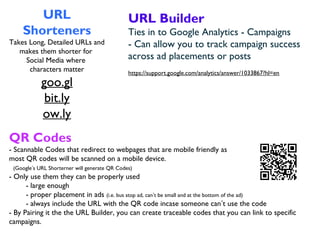
URL
Shorteners
Takes Long, Detailed URLs and
makes them shorter for
Social Media where
characters matter
goo.gl
bit.ly
ow.ly
URL Builder
Ties in to Google Analytics - Campaigns
- Can allow you to track campaign success
across ad placements or posts
https://support.google.com/analytics/answer/1033867?hl=en
QR Codes
- Scannable Codes that redirect to webpages that are mobile friendly as
most QR codes will be scanned on a mobile device.
(Google’s URL Shorterner will generate QR Codes)
- Only use them they can be properly used
- large enough
- proper placement in ads (i.e. bus stop ad, can’t be small and at the bottom of the ad)
- always include the URL with the QR code incase someone can’t use the code
- By Pairing it the the URL Builder, you can create traceable codes that you can link to specific
campaigns.
When to post?
General ideas of when to post can be found here:
http://goo.gl/7BBBl
That being said Social Media works different for different
people and different kinds of businesses.
Use your analytics and insights to help you determine
which posts get the most views, responses and shares.
This will help you tailor your posting schedule, as well as
your content, to suit your customers.
Handling Negativity
People often Social Media to complain ...
You can let that scare you,
or you can get excited by the opportunities that it could present.
If people complain, they are giving you the chance to correct the problem
and make things better. They are giving you the opportunity to showcase
your excellent customer service.
Turn the negative into a positive.
Deny that initial urge to DELETE the negative.
Social Media gives you the opportunity to be
transparent and accountable, use it to your advantage
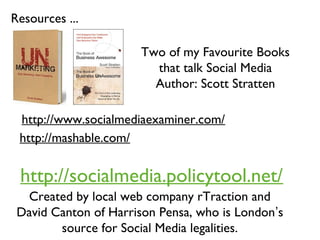
Resources ...
Two of my Favourite Books
that talk Social Media
Author: Scott Stratten
http://www.socialmediaexaminer.com/
http://mashable.com/
http://socialmedia.policytool.net/
Created by local web company rTraction and
David Canton of Harrison Pensa, who is London’s
source for Social Media legalities.
Presenters:
Shawn Wright – Superior Computers
Patti Muldoon – Capitol Technologies
Sarah Carruthers – London Convention Centre
Connect with me on LinkedIn:
ca.linkedin.com/in/sarahcarruthers/

Social media panel presentation

  • 1.
    SOCIAL MEDIA -May 16, 2013
  • 3.
    Social Media is... SOCIAL and it is about ... BUILDING RELATIONSHIPS
  • 4.
  • 5.
    People do business withpeople they: Like, Know, Trust, Respect and Relate to Social Media can help you build the relationship that makes your business that business with those people
  • 6.
    www.facebook.com Posts 420 Characters/Post Text, Photograph,URLS User your Insights to help determine posting patterns Create Schedules for Certain Types of Posts - i.e New Product Fridays, Tip Tuesdays Insights Definitions: http://simplymeasured.com/blog/2011/10/20/the-60-facebook-insights-data-definitions/ Custom Facebook URLs available after 25 likes https://www.facebook.com/username Roles
  • 7.
    www.twitter.com Tweets - 140 Characters/Tweet -includes Handles (e.g.@LdnCC), Hashtags (e.g. #LdnCC), Content and occasionally links (from twitter.com links don’t always count) - use less than 140 characters if you’re hoping for RT’s (Retweets) - Always aim to respond to tweets in less than 24 hours Hashtag - Starts with # and makes tweets searchable - #LdnOnt - London’s Hashtag, #FF is Follow Friday - You’ll see all tweets with this tag, not just tweets from people you follow Responders - If you have multiple people tweeting from your account, identify responders - e.g. ^SC or ^PM or ^SW - You’ll see this with @Rogershelps @PillarNN and other tweeters Searches - Keywords relating to you or competitors, could offer opportunities - Keywords relating to your business (name, location, service) can also help you find people talking about you, to build, strengthen or repair
  • 8.
    www.linkedin.com LinkedIn Status Updates 700Characters/Update Profile Tips Professional Headline: e.g. Social Media Specialist | Marketing | Communication | Graphic Design | Social Media Training - Will help make your profile more searchable Endorsements Since the introduction of endorsements, people are endorsing people in the hopes of being endorsed in return. To hide the endorsements with no value: Edit Profile, Blue Pencil beside Skills & Expertise, Manage Endorsements Connect with people you: a) know b) can offer value to c)s hare a connection with (person or group) - Include a message whenever possible (mobile doesn’t allow for this, web based does) - Unless solicited, messages to contacts should NOT be sales pitches. Build relationships and sales will come
  • 9.
  • 10.
    420 Characters per post 140 Characters per post 700 Characters perpost Dashboards allow you to post to multiple platforms at the same time but should you do it? Facebook, Twitter and LinkedIn all have different character limits, not writing for each individual can be problematic. “there is this amazing, incredible new thing that you absolutely need to check out, but dont ...”
  • 11.
    Scheduling Messages Many SocialMedia Dashboards will allow you to schedule posts. This can be helpful to keep your content on schedule, but scheduling too much can make your content disingenuous. If you are going to schedule: - Monitor content as it is posted, be available to respond - Schedule at similar times but not exactly the same time
  • 12.
    plus.google.com Google+ for yourbusiness http://www.google.ca/business/placesforbusiness/ Creating a Google+ Page for your business ensures no one else can claim your business and post on your behalf. It can help with your Google Search Traffic If you haven’t already added your business to Google Maps, this will claim your location Tip From Shawn: Google your business! Once a month put your business name in quotations in a google search, e.g. “Superior Computers” and see what comes up and what people are saying about you.
  • 13.
    www.pinterest.com Digital Bulletin Boards PinYour Products Pin Tips and Tricks relating to your services Pin Interesting finds that relate to your business Pinterest is great for: Fashion, Decoration, Do It Yourself, Recipes Does your business fit with any of these? Pinterest could be beneficial for you!
  • 14.
    www.instagram.com Stylized Images Quick andEasy way to stylize photos with automatic filters. Feeds to Facebook & Twitter Unique Products or Services? Take a unique picture and share it with your followers on Instagram and the other Social Media sites you connect Instagram to.
  • 15.
    www.foursquare.com Geo-location Check-in App -Users are able to become the “Mayor” of a location (person with the most check-ins in 60 day period) - The Title Mayor can provide privileges - Free appetizer, 10% off, etc. - When users check-in at a location tips are provided about that location and also what is nearby -Users can see where their friends go, it is word of mouth through social sharing -Foursquare Check-in’s can link to Facebook, Twitter, etc. and be shared there.
  • 16.
    www.flickr.com Photogallery for yourbusiness Share pictures of your products and services Share pictures of events or projects your staff are involved with Share pictures of your four legged office helper Pictures as they say are worth a 1000 words. They can share information about your business, your products and services, about the people behind the business
  • 17.
    www.youtube.com • More than1 billion unique users visit YouTube each month • Over 4 billion hours of video are watched each month on YouTube • 72 hours of video are uploaded to YouTube every minute • “How To” Videos are extremely popular • Videos that get shared are often informative, an awww or something to make people laugh How Long? • Top 10 - 4 minutes 11 seconds (2,513 total seconds - does not include “Kony 2012”) • 11-20 - 2 minutes 30 seconds (1,501 total seconds) • 21-30 - 3 minutes 5 seconds (1,849 total seconds) • 31-40 - 2 minutes 57 seconds (1,770 total seconds) • 41-50 - 1 minute 45 seconds (1,049 total seconds) • Top 50 - 2 minutes 54 seconds (8,682 total seconds - does not include “Kony 2012”)
  • 18.
    URL Shorteners Takes Long, DetailedURLs and makes them shorter for Social Media where characters matter goo.gl bit.ly ow.ly URL Builder Ties in to Google Analytics - Campaigns - Can allow you to track campaign success across ad placements or posts https://support.google.com/analytics/answer/1033867?hl=en QR Codes - Scannable Codes that redirect to webpages that are mobile friendly as most QR codes will be scanned on a mobile device. (Google’s URL Shorterner will generate QR Codes) - Only use them they can be properly used - large enough - proper placement in ads (i.e. bus stop ad, can’t be small and at the bottom of the ad) - always include the URL with the QR code incase someone can’t use the code - By Pairing it the the URL Builder, you can create traceable codes that you can link to specific campaigns.
  • 19.
    When to post? Generalideas of when to post can be found here: http://goo.gl/7BBBl That being said Social Media works different for different people and different kinds of businesses. Use your analytics and insights to help you determine which posts get the most views, responses and shares. This will help you tailor your posting schedule, as well as your content, to suit your customers.
  • 20.
    Handling Negativity People oftenSocial Media to complain ... You can let that scare you, or you can get excited by the opportunities that it could present. If people complain, they are giving you the chance to correct the problem and make things better. They are giving you the opportunity to showcase your excellent customer service. Turn the negative into a positive. Deny that initial urge to DELETE the negative. Social Media gives you the opportunity to be transparent and accountable, use it to your advantage
  • 21.
    Resources ... Two ofmy Favourite Books that talk Social Media Author: Scott Stratten http://www.socialmediaexaminer.com/ http://mashable.com/ http://socialmedia.policytool.net/ Created by local web company rTraction and David Canton of Harrison Pensa, who is London’s source for Social Media legalities.
  • 22.
    Presenters: Shawn Wright –Superior Computers Patti Muldoon – Capitol Technologies Sarah Carruthers – London Convention Centre Connect with me on LinkedIn: ca.linkedin.com/in/sarahcarruthers/