Technical Brief v1.0
Communication tools that broadcast visual content
           directly onto the screens of computers,
              using multiple channels and formats


                                                INFO FOR YOU….INFO FOR Y


  Easy to install. Easy and quick to use.
Measure delivery, click-throughs, responses.
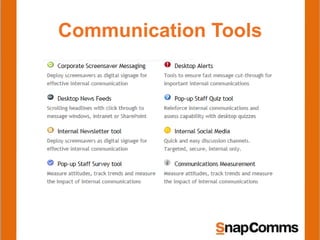
Communication Tools
In a nutshell SnapComms…
  •   is an HTTP based Client / Server pull technology.
  •   has Clients for Windows, MAC, iOS and Android.
  •   uses HTTP/HTTPS on customizable ports.
  •   supports WAN links, VPNs & Proxies.
  •   has SnapComms Hosted & local installation options.
  •   is constantly tested and monitored for intrusion prevention
  •   provides a high degree of data security
  •   has one point of contact for support
  •   is using brand able templates for content display
The SnapComms Server…
 •   is necessary for local installation only
 •   is built with ASP.NET.
 •   provides access to clients via a web service framework.
 •   is supported on Win 2003 or higher.
 •   works with SQL Server 2005 or higher.
 •   requires IIS6 or higher.
 •   comes with detailed installation documentation for
     applications and database.
 •   includes extensive logging capabilities.
 •   integrates Windows or Forms Authentication.
 •   has detailed but easy to manage access control.
The SnapComms Windows client…

 •   is simple to deploy with MSI enabled
     deployment tools.
 •   is supported on Windows XP / IE6 and higher.
 •   encrypts it’s data storage.
 •   integrates into Thin-Client environments like
     Citrix.
 •   integrates with Active Directory.
 •   has a minimal user Interface to minimize
     support.
The Smartphone clients…

 •   will be available Q2 2012
 •   work on iOS 3 / Android 2.1/ Blackberry 6 or
     higher
 •   use a web service based API to access the
     server
 •   support optional / additional push notifications
 •   provide a simple, fully touch enabled UI
 •   are fully brandable
 •   can be easily pre-configured
 •   install directly from the application market
     places
The Network Connectivity…
 •   is from ground up designed to be minimal.
 •   ensures message content (including
     screensavers) is only downloaded once and
     cached (encrypted) on the client.
 •   uses standard HTTP protocols.
 •   works through all standard compliant proxies.
 •   is secured through data encryption via HTTPS.
 •   is routed through a single, configurable port to
     make it easy to pass firewalls.
 •   works perfectly with VPN and WAN link setups.
Active Directory Integration…
 •   makes user, machine and group integration easy.
 •   works fully transparent.
 •   takes place on client side using standardized
     ADSI API.
 •   doesn’t need to access to AD from the server
 •   supports multiple domains/forests and nested
     groups.
 •   collects only clearly specified attributes.
 •   synchronizes the data periodically (6 hours
     default).
 •   is cached encrypted on the client.
 •   encrypts it’s data exchange with the server.
SnapComms Security…
•   is a key policy.
•   has strong authentication and authorization
    processes.
•   includes secure data storage and data transfer.
•   is ensured by constant on going testing.
•   is tested with industry standard tools.
•   includes extensive intrusion testing.
•   minimizes the points of attack.
•   has well defined processes for quick escalation
    and counter measures.
SnapComms Support & Monitoring…

 •   operates 24 x 7.
 •   provides one single point of contact for all enquiries.
 •   has call escalation policies.
 •   bases on clear and easy to understand SLA
     agreements.
 •   works with industry standard support management
     tools.
 •   has well defined issue escalation procedures and
     paths.
 •   guarantees service availability for the hosted solution.
 •   provides a guaranteed response time.
 •   makes your life easier.
References…
 •   Overview of the SnapComms Architecture
 •   SnapComms Client Deployment Overview
 •   Thin Client Implementation
 •   Integration with Active Directory
 •   Assessment & Implementation of the Hosted Solution
 •   Security Overview
 •   Template Guidelines
 •   Assessment & Implementation of a local installation
 •   System Requirements for the locally installed solution
 •   Implementation Tips

SnapComms Technical Overview

  • 1.
  • 2.
    Communication tools thatbroadcast visual content directly onto the screens of computers, using multiple channels and formats INFO FOR YOU….INFO FOR Y Easy to install. Easy and quick to use. Measure delivery, click-throughs, responses.
  • 3.
  • 4.
    In a nutshellSnapComms… • is an HTTP based Client / Server pull technology. • has Clients for Windows, MAC, iOS and Android. • uses HTTP/HTTPS on customizable ports. • supports WAN links, VPNs & Proxies. • has SnapComms Hosted & local installation options. • is constantly tested and monitored for intrusion prevention • provides a high degree of data security • has one point of contact for support • is using brand able templates for content display
  • 5.
    The SnapComms Server… • is necessary for local installation only • is built with ASP.NET. • provides access to clients via a web service framework. • is supported on Win 2003 or higher. • works with SQL Server 2005 or higher. • requires IIS6 or higher. • comes with detailed installation documentation for applications and database. • includes extensive logging capabilities. • integrates Windows or Forms Authentication. • has detailed but easy to manage access control.
  • 6.
    The SnapComms Windowsclient… • is simple to deploy with MSI enabled deployment tools. • is supported on Windows XP / IE6 and higher. • encrypts it’s data storage. • integrates into Thin-Client environments like Citrix. • integrates with Active Directory. • has a minimal user Interface to minimize support.
  • 7.
    The Smartphone clients… • will be available Q2 2012 • work on iOS 3 / Android 2.1/ Blackberry 6 or higher • use a web service based API to access the server • support optional / additional push notifications • provide a simple, fully touch enabled UI • are fully brandable • can be easily pre-configured • install directly from the application market places
  • 8.
    The Network Connectivity… • is from ground up designed to be minimal. • ensures message content (including screensavers) is only downloaded once and cached (encrypted) on the client. • uses standard HTTP protocols. • works through all standard compliant proxies. • is secured through data encryption via HTTPS. • is routed through a single, configurable port to make it easy to pass firewalls. • works perfectly with VPN and WAN link setups.
  • 9.
    Active Directory Integration… • makes user, machine and group integration easy. • works fully transparent. • takes place on client side using standardized ADSI API. • doesn’t need to access to AD from the server • supports multiple domains/forests and nested groups. • collects only clearly specified attributes. • synchronizes the data periodically (6 hours default). • is cached encrypted on the client. • encrypts it’s data exchange with the server.
  • 10.
    SnapComms Security… • is a key policy. • has strong authentication and authorization processes. • includes secure data storage and data transfer. • is ensured by constant on going testing. • is tested with industry standard tools. • includes extensive intrusion testing. • minimizes the points of attack. • has well defined processes for quick escalation and counter measures.
  • 11.
    SnapComms Support &Monitoring… • operates 24 x 7. • provides one single point of contact for all enquiries. • has call escalation policies. • bases on clear and easy to understand SLA agreements. • works with industry standard support management tools. • has well defined issue escalation procedures and paths. • guarantees service availability for the hosted solution. • provides a guaranteed response time. • makes your life easier.
  • 12.
    References… • Overview of the SnapComms Architecture • SnapComms Client Deployment Overview • Thin Client Implementation • Integration with Active Directory • Assessment & Implementation of the Hosted Solution • Security Overview • Template Guidelines • Assessment & Implementation of a local installation • System Requirements for the locally installed solution • Implementation Tips