SlidePad
We’re taking the best way to view
presentations on the web and creating
    a way to view them on-the-go.
Present
      Easily transfer a Keynote or
  PowerPoint presentation directly to
   SlidePad from DropBox or iTunes
documents. With Apple’s adaptors, the
iPad 2 can display your slideshows on
    a television, monitor or external
   projector. Present with preloaded
slides. Enjoy smooth, clean transitions
           between each slide.
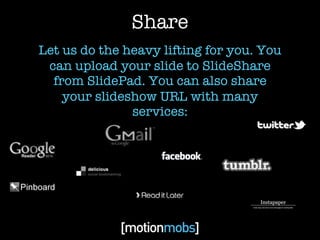
Share
Let us do the heavy lifting for you. You
 can upload your slide to SlideShare
  from SlidePad. You can also share
    your slideshow URL with many
               services:
Learn

SlideShare is the Youtube of slideshow
presentations. You can use SlidePad’s
 advanced search options to filter for
 specific results. You can find loads of
  information from experts in every
  field. It is a great resource. You can
    also add favorites to view later.
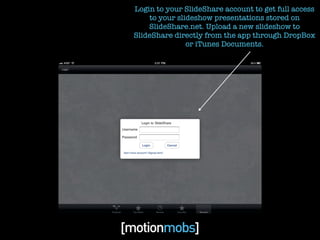
Login to your SlideShare account to get full access
    to your slideshow presentations stored on
    SlideShare.net. Upload a new slideshow to
SlideShare directly from the app through DropBox
               or iTunes Documents.
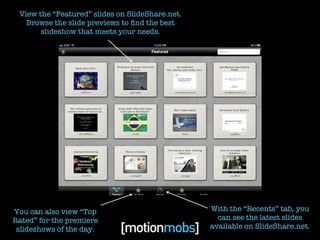
View the “Featured” slides on SlideShare.net.
   Browse the slide previews to find the best
       slideshow that meets your needs.


You can also view “Top                           With the “Recents” tab, you
Rated” for the premiere                            can see the latest slides
 slideshows of the day.                          available on SlideShare.net.
Narrow your search results by language, relevance, date,
 format, or file type. Find exactly what you need, faster.
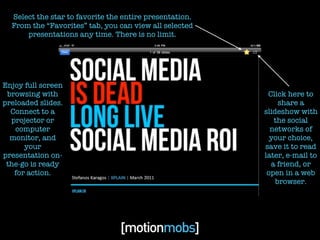
Select the star to favorite the entire presentation.
  From the “Favorites” tab, you can view all selected
      presentations any time. There is no limit.


Enjoy full screen
 browsing with                                            Click here to
preloaded slides.                                             share a
  Connect to a                                           slideshow with
  projector or                                              the social
   computer                                                networks of
  monitor, and                                             your choice,
      your                                               save it to read
presentation on-                                         later, e-mail to
 the-go is ready                                           a friend, or
   for action.                                            open in a web
                                                             browser.
Available on the iTunes Store
        in May 2011.
     Be the first to know by signing up on our website:
                     motionmobs.com
           *This e-mail list is solely for SlidePad and will not be distributed to any third parties.

SlidePad

  • 1.
  • 2.
    We’re taking thebest way to view presentations on the web and creating a way to view them on-the-go.
  • 3.
    Present Easily transfer a Keynote or PowerPoint presentation directly to SlidePad from DropBox or iTunes documents. With Apple’s adaptors, the iPad 2 can display your slideshows on a television, monitor or external projector. Present with preloaded slides. Enjoy smooth, clean transitions between each slide.
  • 4.
    Share Let us dothe heavy lifting for you. You can upload your slide to SlideShare from SlidePad. You can also share your slideshow URL with many services:
  • 5.
    Learn SlideShare is theYoutube of slideshow presentations. You can use SlidePad’s advanced search options to filter for specific results. You can find loads of information from experts in every field. It is a great resource. You can also add favorites to view later.
  • 6.
    Login to yourSlideShare account to get full access to your slideshow presentations stored on SlideShare.net. Upload a new slideshow to SlideShare directly from the app through DropBox or iTunes Documents.
  • 7.
    View the “Featured”slides on SlideShare.net. Browse the slide previews to find the best slideshow that meets your needs. You can also view “Top With the “Recents” tab, you Rated” for the premiere can see the latest slides slideshows of the day. available on SlideShare.net.
  • 8.
    Narrow your searchresults by language, relevance, date, format, or file type. Find exactly what you need, faster.
  • 9.
    Select the starto favorite the entire presentation. From the “Favorites” tab, you can view all selected presentations any time. There is no limit. Enjoy full screen browsing with Click here to preloaded slides. share a Connect to a slideshow with projector or the social computer networks of monitor, and your choice, your save it to read presentation on- later, e-mail to the-go is ready a friend, or for action. open in a web browser.
  • 10.
    Available on theiTunes Store in May 2011. Be the first to know by signing up on our website: motionmobs.com *This e-mail list is solely for SlidePad and will not be distributed to any third parties.

Editor's Notes