Jason Langridge Enterprise Mobility Solution Specialist Microsoft Email:  [email_address] Blog :  http://blogs.msdn.com/jasonlan
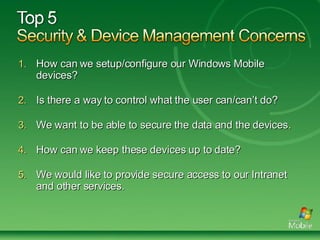
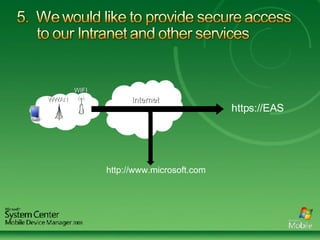
How can we setup/configure our Windows Mobile devices? Is there a way to control what the user can/can’t do? We want to be able to secure the data and the devices. How can we keep these devices up to date?  We would like to provide secure access to our Intranet and other services.
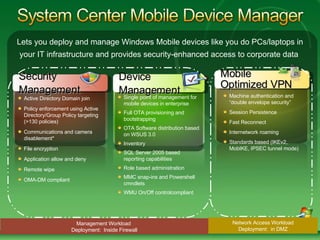
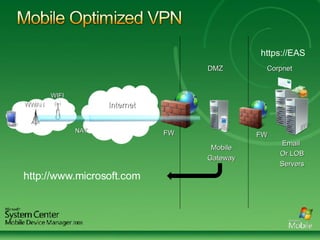
Lets you deploy and manage Windows Mobile devices like you do PCs/laptops in your IT infrastructure and provides security-enhanced access to corporate data  Management Workload  Deployment:  Inside Firewall Network Access Workload Deployment:  in DMZ Security  Management Active Directory Domain join  Policy enforcement using Active Directory/Group Policy targeting (>130 policies) Communications and camera disablement* File encryption  Application allow and deny Remote wipe  OMA-DM compliant Device  Management Single point of management for mobile devices in enterprise  Full OTA provisioning and bootstrapping  OTA Software distribution based on WSUS 3.0 Inventory  SQL Server 2005 based reporting capabilities  Role based administration  MMC snap-ins and Powershell cmndlets WMU On/Off controlcompliant Mobile Optimized VPN Machine authentication and “double envelope security” Session Persistence Fast Reconnect Internetwork roaming Standards based (IKEv2, MobIKE, IPSEC tunnel mode)
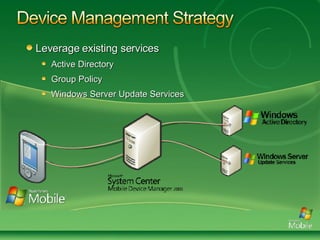
Leverage existing services Active Directory Group Policy Windows Server Update Services
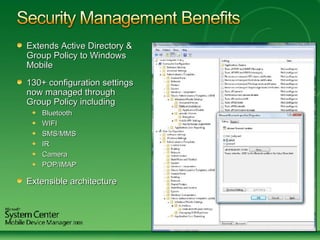
Extends Active Directory & Group Policy to Windows Mobile 130+ configuration settings now managed through Group Policy including Bluetooth WIFI SMS/MMS IR Camera POP/IMAP Extensible architecture
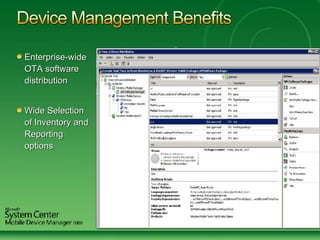
Enterprise-wide OTA software distribution  Wide Selection of Inventory and Reporting options
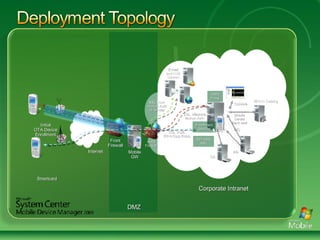
Smartcard Internet DMZ Corporate Intranet Front Firewall Initial OTA Device Enrollment Mobile GW Back Firewall SSL  Auth (PIN+Corp Root) SSL  Machine Mutual Auth E-mail and LOB Servers SSL User- mutual Auth or Similar Console Mobile Server Back-end R/O AD WSUS Catalog Self Help Site Enrollment Service OMA Proxy CA Mobile VPN
Different categories/differing terminology Front door vs Back Door devices Enterprise Managed vs Consumer  Corporate vs Employee Liable  Initial problem - getting the client on the device Zero touch deployment and setup
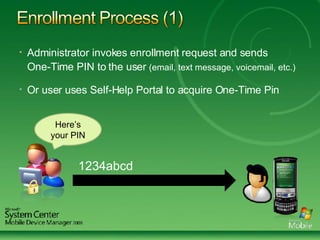
Administrator invokes enrollment request and sends  One-Time PIN to the user  (email, text message, voicemail, etc.) Or user uses Self-Help Portal to acquire One-Time Pin Here’s your PIN 1234abcd
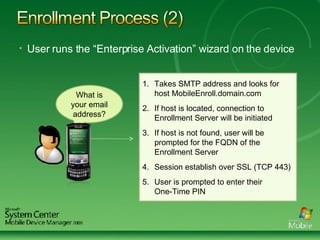
User runs the “Enterprise Activation” wizard on the device What is your email address? Takes SMTP address and looks for host MobileEnroll.domain.com If host is located, connection to Enrollment Server will be initiated If host is not found, user will be prompted for the FQDN of the Enrollment Server Session establish over SSL (TCP 443) User is prompted to enter their  One-Time PIN
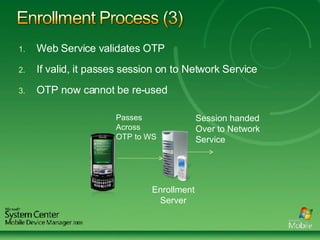
Web Service validates OTP If valid, it passes session on to Network Service OTP now cannot be re-used Enrollment Server Passes  Across OTP to WS Session handed Over to Network Service
Device is then “Domain Joined” SC MDM Client is configured to use Mobile Gateway for all future connectivity Enrollment is complete Device is then setup/configured using Group Policy
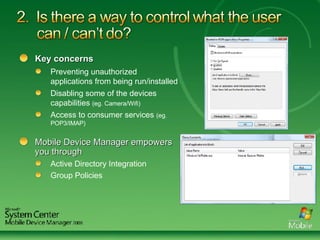
Key concerns Preventing unauthorized applications from being run/installed Disabling some of the devices capabilities  (eg. Camera/Wifi) Access to consumer services  (eg. POP3/IMAP) Mobile Device Manager empowers you through Active Directory Integration Group Policies
Data stored on both the physical device and storage card  Windows Mobile 6 provides ability to encrypt storage card  System Center Mobile Device Manager provides Enable Device Perimeter PIN password Ability to enforce encryption on storage card Allow/Disallow the use of removable storage Remotely Wipe devices
Important to separate update needs: Device OS  Applications, Configuration and Settings System Center Mobile Device Manager allows you to: Distribute software and applications through Windows Server Update Services (WSUS) Setup/configure/manage devices through Active Directory and Group Policy
WWAN Internet WIFI https://EAS http://www.microsoft.com
DMZ WWAN Corpnet Internet FW FW Email  Or LOB Servers Mobile Gateway WIFI NAT https://EAS http://www.microsoft.com
Addressed 5 key security and management concerns Showed how to improve and simplify mobile device management and security with  System Center Mobile Device Manager For more information:  www.windowsmobile.com/mobiledevicemanager/
Questions and Answers Submit text questions using the “Ask” button.  Don’t forget to fill out the survey. For upcoming and previously live webcasts:  www.microsoft.com/webcast   Got webcast content ideas? Contact us at:  http://go.microsoft.com/fwlink/?LinkId=41781  
 
© 2007 Microsoft Corporation. All rights reserved. Microsoft, Windows, Windows Vista and other product names are or may be registered trademarks and/or trademarks in the U.S. and/or other countries. The information herein is for informational purposes only and represents the current view of Microsoft Corporation as of the date of this presentation. Because Microsoft must respond to changing market conditions, it should not be interpreted to be a commitment on the part of Microsoft, and Microsoft cannot guarantee the accuracy of any information provided after the date of this presentation. MICROSOFT MAKES NO WARRANTIES, EXPRESS, IMPLIED OR STATUTORY, AS TO THE INFORMATION IN THIS PRESENTATION.

Simplify Security And Device Management Final Pres10 23final

  • 1.
  • 2.
    Jason Langridge EnterpriseMobility Solution Specialist Microsoft Email: [email_address] Blog : http://blogs.msdn.com/jasonlan
  • 3.
    How can wesetup/configure our Windows Mobile devices? Is there a way to control what the user can/can’t do? We want to be able to secure the data and the devices. How can we keep these devices up to date? We would like to provide secure access to our Intranet and other services.
  • 4.
    Lets you deployand manage Windows Mobile devices like you do PCs/laptops in your IT infrastructure and provides security-enhanced access to corporate data Management Workload Deployment: Inside Firewall Network Access Workload Deployment: in DMZ Security Management Active Directory Domain join Policy enforcement using Active Directory/Group Policy targeting (>130 policies) Communications and camera disablement* File encryption Application allow and deny Remote wipe OMA-DM compliant Device Management Single point of management for mobile devices in enterprise Full OTA provisioning and bootstrapping OTA Software distribution based on WSUS 3.0 Inventory SQL Server 2005 based reporting capabilities Role based administration MMC snap-ins and Powershell cmndlets WMU On/Off controlcompliant Mobile Optimized VPN Machine authentication and “double envelope security” Session Persistence Fast Reconnect Internetwork roaming Standards based (IKEv2, MobIKE, IPSEC tunnel mode)
  • 5.
    Leverage existing servicesActive Directory Group Policy Windows Server Update Services
  • 6.
    Extends Active Directory& Group Policy to Windows Mobile 130+ configuration settings now managed through Group Policy including Bluetooth WIFI SMS/MMS IR Camera POP/IMAP Extensible architecture
  • 7.
    Enterprise-wide OTA softwaredistribution Wide Selection of Inventory and Reporting options
  • 8.
    Smartcard Internet DMZCorporate Intranet Front Firewall Initial OTA Device Enrollment Mobile GW Back Firewall SSL Auth (PIN+Corp Root) SSL Machine Mutual Auth E-mail and LOB Servers SSL User- mutual Auth or Similar Console Mobile Server Back-end R/O AD WSUS Catalog Self Help Site Enrollment Service OMA Proxy CA Mobile VPN
  • 9.
    Different categories/differing terminologyFront door vs Back Door devices Enterprise Managed vs Consumer Corporate vs Employee Liable Initial problem - getting the client on the device Zero touch deployment and setup
  • 10.
    Administrator invokes enrollmentrequest and sends One-Time PIN to the user (email, text message, voicemail, etc.) Or user uses Self-Help Portal to acquire One-Time Pin Here’s your PIN 1234abcd
  • 11.
    User runs the“Enterprise Activation” wizard on the device What is your email address? Takes SMTP address and looks for host MobileEnroll.domain.com If host is located, connection to Enrollment Server will be initiated If host is not found, user will be prompted for the FQDN of the Enrollment Server Session establish over SSL (TCP 443) User is prompted to enter their One-Time PIN
  • 12.
    Web Service validatesOTP If valid, it passes session on to Network Service OTP now cannot be re-used Enrollment Server Passes Across OTP to WS Session handed Over to Network Service
  • 13.
    Device is then“Domain Joined” SC MDM Client is configured to use Mobile Gateway for all future connectivity Enrollment is complete Device is then setup/configured using Group Policy
  • 14.
    Key concerns Preventingunauthorized applications from being run/installed Disabling some of the devices capabilities (eg. Camera/Wifi) Access to consumer services (eg. POP3/IMAP) Mobile Device Manager empowers you through Active Directory Integration Group Policies
  • 15.
    Data stored onboth the physical device and storage card Windows Mobile 6 provides ability to encrypt storage card System Center Mobile Device Manager provides Enable Device Perimeter PIN password Ability to enforce encryption on storage card Allow/Disallow the use of removable storage Remotely Wipe devices
  • 16.
    Important to separateupdate needs: Device OS Applications, Configuration and Settings System Center Mobile Device Manager allows you to: Distribute software and applications through Windows Server Update Services (WSUS) Setup/configure/manage devices through Active Directory and Group Policy
  • 17.
    WWAN Internet WIFIhttps://EAS http://www.microsoft.com
  • 18.
    DMZ WWAN CorpnetInternet FW FW Email Or LOB Servers Mobile Gateway WIFI NAT https://EAS http://www.microsoft.com
  • 19.
    Addressed 5 keysecurity and management concerns Showed how to improve and simplify mobile device management and security with System Center Mobile Device Manager For more information: www.windowsmobile.com/mobiledevicemanager/
  • 20.
    Questions and AnswersSubmit text questions using the “Ask” button. Don’t forget to fill out the survey. For upcoming and previously live webcasts: www.microsoft.com/webcast Got webcast content ideas? Contact us at: http://go.microsoft.com/fwlink/?LinkId=41781  
  • 21.
  • 22.
    © 2007 MicrosoftCorporation. All rights reserved. Microsoft, Windows, Windows Vista and other product names are or may be registered trademarks and/or trademarks in the U.S. and/or other countries. The information herein is for informational purposes only and represents the current view of Microsoft Corporation as of the date of this presentation. Because Microsoft must respond to changing market conditions, it should not be interpreted to be a commitment on the part of Microsoft, and Microsoft cannot guarantee the accuracy of any information provided after the date of this presentation. MICROSOFT MAKES NO WARRANTIES, EXPRESS, IMPLIED OR STATUTORY, AS TO THE INFORMATION IN THIS PRESENTATION.

Editor's Notes

  • #2 Windows Mobile © 2006 Microsoft Corporation. All rights reserved. This presentation is for informational purposes only. Microsoft makes no warranties, express or implied, in this summary.