Your logo
here
Simplified Network Troubleshooting
through API Scripting
Cat Gurinsky
Senior Network Engineer
Does repeating
troubleshooting by hand
drive you crazy?
What we’ll cover
● Why automate our troubleshooting?
● Why API and not screen scraping?
● Examples of typical, repeatable,
troubleshooting
● Example outputs of grabbing the data via
API
● What skills do I need? Who has API’s?
● Examples of some actual code
● Q&A
Why Automate?
● “Your network is a crime scene, and you are the
detective. You need better ways to investigate
what happened, and prove guilt or innocence.”
-Jeremy Schulman
● Most failures have repeatable troubleshooting
steps to root cause.
● Repeatable means we can automate and code against
these expectations to find our culprit.
● Why waste time typing out the same sets of
commands every time you have a similar failure?
Why API versus SSH/screen scraping?
● API calls are significantly faster
○ A former colleague and I decided to both try our hands
at writing a script to install an extension for a
security hotfix we needed to install.
○ The colleague wrote theirs with netmiko/ssh calls, mine
was with pyeapi.
○ My script consistently ran about 3-5 times faster than
the colleagues did. We used mine to update the entire
fleet.
● Most API’s return all the data to you in JSON so
doing meaningful follow up is much easier as you
don’t have to reformat a screen scrape
Typical Troubleshooting Examples
● Link down / Errors on a link
● Switch rebooted unexpectedly
● Power supply failure alert
● Dump show tech and other common
outputs
● Many more possible!
Link Down / Link Errors
● Determine both sides of the bad link, if
not already known
● Validate light levels for both sides to
see if there is an obvious failure in Tx
versus Rx
● Validate rate of bouncing if applicable,
and if seen by both sides or not.
● Grab data on optics and serial numbers in
case a replacement is warranted
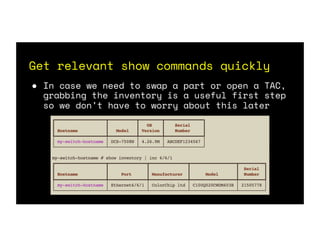
Get relevant show commands quickly
● In case we need to swap a part or open a TAC,
grabbing the inventory is a useful first step
so we don’t have to worry about this later
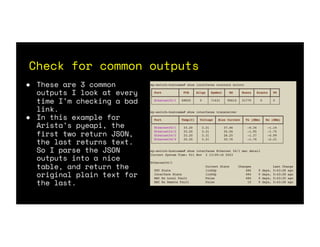
Check for common outputs
● These are 3 common
outputs I look at every
time I’m checking a bad
link.
● In this example for
Arista’s pyeapi, the
first two return JSON,
the last returns text.
So I parse the JSON
outputs into a nice
table, and return the
original plain text for
the last.
Rinse, Lather, Repeat!
● In the case of bad links, I want to validate the
other side, so I use LLDP or descriptions /
inventory database if down, to see what the far
end is and run the same command sets there.
Switch rebooted unexpectedly
● When a switch reboots there are 2 things I
always check
● Current uptime and code version of the
switch (show version)
● What the switch thinks the reload reason
was (show reload cause)
● Sure it doesn’t take long to login and do
this, but it’s just super fast with API
instead!
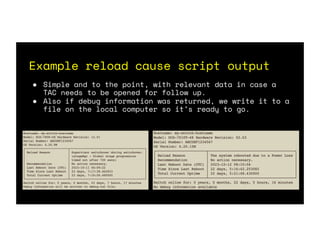
Example reload cause script output
● Simple and to the point, with relevant data in case a
TAC needs to be opened for follow up.
● Also if debug information was returned, we write it to a
file on the local computer so it’s ready to go.
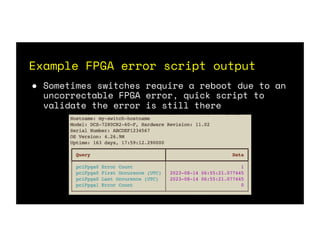
Example FPGA error script output
● Sometimes switches require a reboot due to an
uncorrectable FPGA error, quick script to
validate the error is still there
Power Supply Failure
● Show inventory and grab the power
supply section
● Show version in case TAC needed
● Show environment power details
Dump show tech & other common
requested data for TAC
● You may find that TAC regularly asks you for the
same set of files
● Most of these commands (at least in Arista world)
return plain text , you may need to strip the
“n”’s for the newlines when generating to a
proper text file
● Use “command | json” on Arista to see if you need
to request plain text or regular API json results.
How can I do this?
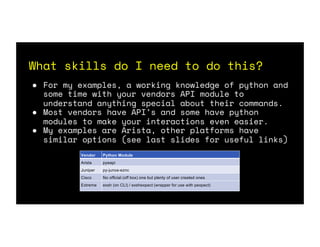
What skills do I need to do this?
● For my examples, a working knowledge of python and
some time with your vendors API module to
understand anything special about their commands.
● Most vendors have API’s and some have python
modules to make your interactions even easier.
● My examples are Arista, other platforms have
similar options (see last slides for useful links)
Vendor Python Module
Arista pyeapi
Juniper py-junos-eznc
Cisco No official (off box) one but plenty of user created ones
Extreme exsh (on CLI) / exshexpect (wrapper for use with pexpect)
Example code (pyeapi)
● Plan to re-use switch API bits in multiple
scripts?
○ Consider using a shared library file + class
● Create your “node” aka switch device w/ pyeapi
● Timeout is optional
○ For slow commands (like show tech) add this to reduce
timeout errors in the scripts
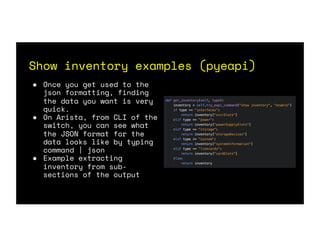
Show inventory examples (pyeapi)
● Once you get used to the
json formatting, finding
the data you want is very
quick.
● On Arista, from CLI of the
switch, you can see what
the JSON format for the
data looks like by typing
command | json
● Example extracting
inventory from sub-
sections of the output
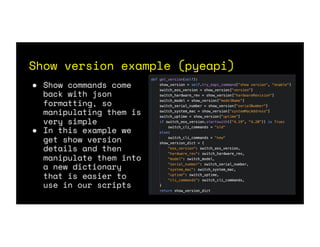
Show version example (pyeapi)
● Show commands come
back with json
formatting, so
manipulating them is
very simple
● In this example we
get show version
details and then
manipulate them into
a new dictionary
that is easier to
use in our scripts
Current uptime example (pyeapi)
● Once we have values, like time of a last reload,
it’s easy to use normal python to manipulate that
and get values like uptime in days.
Other use cases for API scripting
● We don’t have to limit ourselves to API
scripting for troubleshooting
efficiency!
● Tedious Tasks:
○ Update port descriptions based on LLDP, ARP
and IPv6 Neighbor data (remove human error,
and validate patch plans)
○ Pre-upgrade flight checks (LACP on MLAG’s,
lots of show commands)
Other use cases for API scripting
● Remediation:
○ Installing extensions, including Security
Hot Fixes with validation of if they are
already on the box or not
○ Pushing baseline and ACL config
remediations
● The possibilities are only limited by
your creativity!
No API? There’s always SNMP…
● Not all devices have API available
● Next best option is probably SNMP polling (at
least for errors, discards, link state)
● For links you’ll have to map out the OID’s
for your ifDescr -> Errors/Discards/Bits etc
● Once logic has been written, SNMP is still a
faster way to get this data compared to SSH
screen scraping
Optimization
● Try to run your tools scripts locally to the site for
the best return times on API, SNMP and other calls
● Cache data when possible to speed up script runs even
more (interface names for example)
○ Some companies have Network Source of Truth (NSoT) databases
with interfaces stored, query this first before polling the
device for actual counters and state based information
● Create outputs formatted in the way best suited for your
ticketing systems and tools
○ Example: in one ticket system I use, I can add the following
output around my outputs to keep it pre-formatted as a code
block:
○ [code]<pre> < /pre>[/code]
Security Best Practices
● Don’t save API/SSH passwords or SNMP
communities hard coded in your scripts
● Prompt with getpass or store in
environment variables
● Try not to write “current employer”
specific code
● Plan ahead for multi-vendor
environments
What troubleshooting do you
frequently repeat?
● I’m curious about everyone else’s use cases
● I love to talk and brainstorm on best
practices
● We don’t get better by isolating ourselves,
and now even more than before it is important
for us to stay connected and share ideas, use
cases, etc.
● I can be reached at cat@gurinsky.net and I
also sit on the #networktocode slack.
Questions?
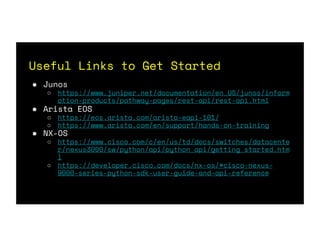
Useful Links to Get Started
● Junos
○ https://www.juniper.net/documentation/en_US/junos/inform
ation-products/pathway-pages/rest-api/rest-api.html
● Arista EOS
○ https://eos.arista.com/arista-eapi-101/
○ https://www.arista.com/en/support/hands-on-training
● NX-OS
○ https://www.cisco.com/c/en/us/td/docs/switches/datacente
r/nexus3000/sw/python/api/python_api/getting_started.htm
l
○ https://developer.cisco.com/docs/nx-os/#cisco-nexus-
9000-series-python-sdk-user-guide-and-api-reference
Useful Links to Get Started
● Extreme
○ https://documentation.extremenetworks.c
om/pdfs/exos/Python_Getting_Started_Gui
de.pdf?_ga=2.130088522.477422756.153901
5445-1617289114.1533937563
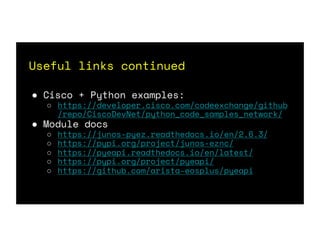
Useful links continued
● Cisco + Python examples:
○ https://developer.cisco.com/codeexchange/github
/repo/CiscoDevNet/python_code_samples_network/
● Module docs
○ https://junos-pyez.readthedocs.io/en/2.6.3/
○ https://pypi.org/project/junos-eznc/
○ https://pyeapi.readthedocs.io/en/latest/
○ https://pypi.org/project/pyeapi/
○ https://github.com/arista-eosplus/pyeapi
Thank you!
Cat Gurinsky
cat@gurinsky.net

Simplified Troubleshooting through API Scripting

  • 1.
    Your logo here Simplified NetworkTroubleshooting through API Scripting Cat Gurinsky Senior Network Engineer
  • 2.
    Does repeating troubleshooting byhand drive you crazy?
  • 3.
    What we’ll cover ●Why automate our troubleshooting? ● Why API and not screen scraping? ● Examples of typical, repeatable, troubleshooting ● Example outputs of grabbing the data via API ● What skills do I need? Who has API’s? ● Examples of some actual code ● Q&A
  • 4.
    Why Automate? ● “Yournetwork is a crime scene, and you are the detective. You need better ways to investigate what happened, and prove guilt or innocence.” -Jeremy Schulman ● Most failures have repeatable troubleshooting steps to root cause. ● Repeatable means we can automate and code against these expectations to find our culprit. ● Why waste time typing out the same sets of commands every time you have a similar failure?
  • 5.
    Why API versusSSH/screen scraping? ● API calls are significantly faster ○ A former colleague and I decided to both try our hands at writing a script to install an extension for a security hotfix we needed to install. ○ The colleague wrote theirs with netmiko/ssh calls, mine was with pyeapi. ○ My script consistently ran about 3-5 times faster than the colleagues did. We used mine to update the entire fleet. ● Most API’s return all the data to you in JSON so doing meaningful follow up is much easier as you don’t have to reformat a screen scrape
  • 6.
    Typical Troubleshooting Examples ●Link down / Errors on a link ● Switch rebooted unexpectedly ● Power supply failure alert ● Dump show tech and other common outputs ● Many more possible!
  • 7.
    Link Down /Link Errors ● Determine both sides of the bad link, if not already known ● Validate light levels for both sides to see if there is an obvious failure in Tx versus Rx ● Validate rate of bouncing if applicable, and if seen by both sides or not. ● Grab data on optics and serial numbers in case a replacement is warranted
  • 8.
    Get relevant showcommands quickly ● In case we need to swap a part or open a TAC, grabbing the inventory is a useful first step so we don’t have to worry about this later
  • 9.
    Check for commonoutputs ● These are 3 common outputs I look at every time I’m checking a bad link. ● In this example for Arista’s pyeapi, the first two return JSON, the last returns text. So I parse the JSON outputs into a nice table, and return the original plain text for the last.
  • 10.
    Rinse, Lather, Repeat! ●In the case of bad links, I want to validate the other side, so I use LLDP or descriptions / inventory database if down, to see what the far end is and run the same command sets there.
  • 11.
    Switch rebooted unexpectedly ●When a switch reboots there are 2 things I always check ● Current uptime and code version of the switch (show version) ● What the switch thinks the reload reason was (show reload cause) ● Sure it doesn’t take long to login and do this, but it’s just super fast with API instead!
  • 12.
    Example reload causescript output ● Simple and to the point, with relevant data in case a TAC needs to be opened for follow up. ● Also if debug information was returned, we write it to a file on the local computer so it’s ready to go.
  • 13.
    Example FPGA errorscript output ● Sometimes switches require a reboot due to an uncorrectable FPGA error, quick script to validate the error is still there
  • 14.
    Power Supply Failure ●Show inventory and grab the power supply section ● Show version in case TAC needed ● Show environment power details
  • 15.
    Dump show tech& other common requested data for TAC ● You may find that TAC regularly asks you for the same set of files ● Most of these commands (at least in Arista world) return plain text , you may need to strip the “n”’s for the newlines when generating to a proper text file ● Use “command | json” on Arista to see if you need to request plain text or regular API json results.
  • 16.
    How can Ido this?
  • 17.
    What skills doI need to do this? ● For my examples, a working knowledge of python and some time with your vendors API module to understand anything special about their commands. ● Most vendors have API’s and some have python modules to make your interactions even easier. ● My examples are Arista, other platforms have similar options (see last slides for useful links) Vendor Python Module Arista pyeapi Juniper py-junos-eznc Cisco No official (off box) one but plenty of user created ones Extreme exsh (on CLI) / exshexpect (wrapper for use with pexpect)
  • 18.
    Example code (pyeapi) ●Plan to re-use switch API bits in multiple scripts? ○ Consider using a shared library file + class ● Create your “node” aka switch device w/ pyeapi ● Timeout is optional ○ For slow commands (like show tech) add this to reduce timeout errors in the scripts
  • 19.
    Show inventory examples(pyeapi) ● Once you get used to the json formatting, finding the data you want is very quick. ● On Arista, from CLI of the switch, you can see what the JSON format for the data looks like by typing command | json ● Example extracting inventory from sub- sections of the output
  • 20.
    Show version example(pyeapi) ● Show commands come back with json formatting, so manipulating them is very simple ● In this example we get show version details and then manipulate them into a new dictionary that is easier to use in our scripts
  • 21.
    Current uptime example(pyeapi) ● Once we have values, like time of a last reload, it’s easy to use normal python to manipulate that and get values like uptime in days.
  • 22.
    Other use casesfor API scripting ● We don’t have to limit ourselves to API scripting for troubleshooting efficiency! ● Tedious Tasks: ○ Update port descriptions based on LLDP, ARP and IPv6 Neighbor data (remove human error, and validate patch plans) ○ Pre-upgrade flight checks (LACP on MLAG’s, lots of show commands)
  • 23.
    Other use casesfor API scripting ● Remediation: ○ Installing extensions, including Security Hot Fixes with validation of if they are already on the box or not ○ Pushing baseline and ACL config remediations ● The possibilities are only limited by your creativity!
  • 24.
    No API? There’salways SNMP… ● Not all devices have API available ● Next best option is probably SNMP polling (at least for errors, discards, link state) ● For links you’ll have to map out the OID’s for your ifDescr -> Errors/Discards/Bits etc ● Once logic has been written, SNMP is still a faster way to get this data compared to SSH screen scraping
  • 25.
    Optimization ● Try torun your tools scripts locally to the site for the best return times on API, SNMP and other calls ● Cache data when possible to speed up script runs even more (interface names for example) ○ Some companies have Network Source of Truth (NSoT) databases with interfaces stored, query this first before polling the device for actual counters and state based information ● Create outputs formatted in the way best suited for your ticketing systems and tools ○ Example: in one ticket system I use, I can add the following output around my outputs to keep it pre-formatted as a code block: ○ [code]<pre> < /pre>[/code]
  • 26.
    Security Best Practices ●Don’t save API/SSH passwords or SNMP communities hard coded in your scripts ● Prompt with getpass or store in environment variables ● Try not to write “current employer” specific code ● Plan ahead for multi-vendor environments
  • 27.
    What troubleshooting doyou frequently repeat? ● I’m curious about everyone else’s use cases ● I love to talk and brainstorm on best practices ● We don’t get better by isolating ourselves, and now even more than before it is important for us to stay connected and share ideas, use cases, etc. ● I can be reached at cat@gurinsky.net and I also sit on the #networktocode slack.
  • 28.
  • 29.
    Useful Links toGet Started ● Junos ○ https://www.juniper.net/documentation/en_US/junos/inform ation-products/pathway-pages/rest-api/rest-api.html ● Arista EOS ○ https://eos.arista.com/arista-eapi-101/ ○ https://www.arista.com/en/support/hands-on-training ● NX-OS ○ https://www.cisco.com/c/en/us/td/docs/switches/datacente r/nexus3000/sw/python/api/python_api/getting_started.htm l ○ https://developer.cisco.com/docs/nx-os/#cisco-nexus- 9000-series-python-sdk-user-guide-and-api-reference
  • 30.
    Useful Links toGet Started ● Extreme ○ https://documentation.extremenetworks.c om/pdfs/exos/Python_Getting_Started_Gui de.pdf?_ga=2.130088522.477422756.153901 5445-1617289114.1533937563
  • 31.
    Useful links continued ●Cisco + Python examples: ○ https://developer.cisco.com/codeexchange/github /repo/CiscoDevNet/python_code_samples_network/ ● Module docs ○ https://junos-pyez.readthedocs.io/en/2.6.3/ ○ https://pypi.org/project/junos-eznc/ ○ https://pyeapi.readthedocs.io/en/latest/ ○ https://pypi.org/project/pyeapi/ ○ https://github.com/arista-eosplus/pyeapi
  • 32.