




Moving Applications
Moving Applications               to the   Cloud, 3rd Edition
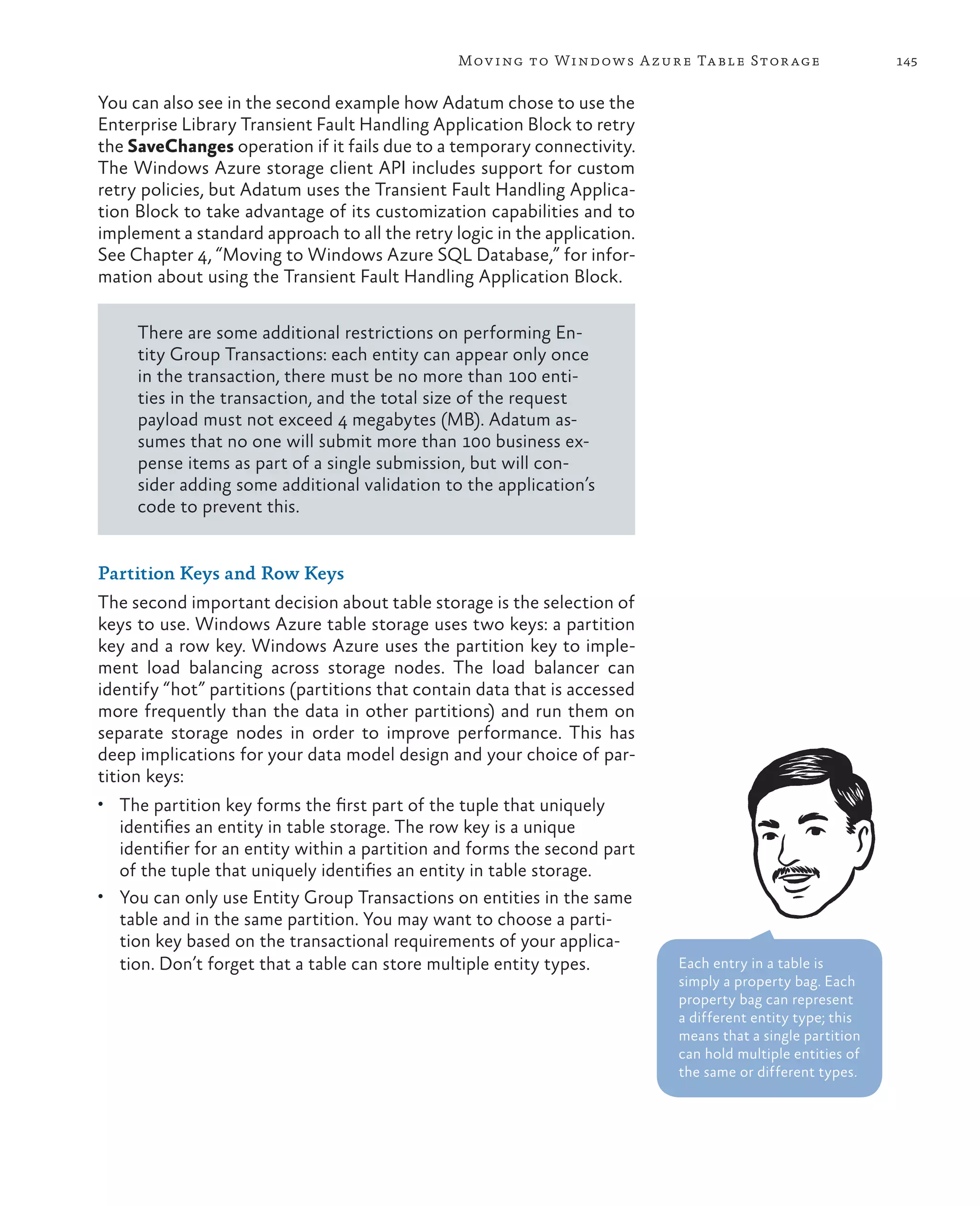
How do you build and deploy applications to be scalable and have high                   patterns & practices
availability? Along with developing the applications, you must also have                		 Proven practices for predictable results                                                        Third Edition
an infrastructure that can support them. You may need to scale up or add
servers, have redundant hardware, and add logic to the application to handle


                                                                                                                                                                 Moving
                                                                                        Save time and reduce risk on your 	
distributed computing and failovers—even if an application is in high demand            software development projects by 	
for only short periods of time.                                                         incorporating patterns & practices, 	
The cloud offers a solution. It is made up of interconnected servers located in         Microsoft’s applied engineering 	


                                                                                                                                                                 A p p l i c at i o n s
various data centers, but you see what appears to be a centralized location             guidance that includes both production
that someone else hosts and manages. By removing the responsibility for                 quality source code and documentation.
maintaining an infrastructure, you’re free to concentrate on what matters


                                                                                                                                       to the
most: the application.                                                                  The guidance is designed to help 	
                                                                                        software development teams:                                              to t h e
This guide is the third edition of the first volume in a series about Windows


                                                                                                                                                                 C lo u d
                                                                                        Make critical design and technology
Azure. It demonstrates how you can adapt an existing on-premises ASP         .NET


                                                                                                                                      Cloud
                                                                                        selection decisions by highlighting
application to one that operates in the cloud by introducing a fictitious company       the appropriate solution architectures,
named Adatum that modifies its expense tracking and reimbursement system,               technologies, and Microsoft products
aExpense, so that it can be deployed to Windows Azure.                                  for common scenarios


                                                                                                                                       on
                                                                                                                                                                     on Microsoft
                                                      The Adatum Scenario
                                                      Motivation, constraints, goals    Understand the most important 	


                                                                                                                                      Microsoft Windows Azure™
                                                                                        concepts needed for success by 	

                                            Getting to the Cloud
                                                                                        explaining the relevant patterns and
                                                                                        prescribing the important practices
                                                                                                                                                                     Windows Azure™
                                            IaaS, Virtual Machines, Hosted SQL Server
         Moving to Windows                                                              Get started with a proven code base
        Azure Cloud Services
           PaaS, deployment
                                                                                        by providing thoroughly tested
     management, monitoring                 Moving to Windows Azure SQL Database        software and source that embodies
                                            PaaS for data, deployment, management       Microsoft’s recommendations

   Executing Background Tasks                                                           The patterns & practices team consists 	
     Asynchronous processing,                        Evaluating Cloud Hosting Costs
                                                     Pricing and cost considerations
                                                                                        of experienced architects, developers,
blobs, shared access signatures
                                                                                        writers, and testers. We work openly 	
                                                                                        with the developer community and
                                            Moving to Windows Azure Table Storage       industry experts, on every project, to                                       Dominic Betts
                                            Data access, transactions, fine tuning      ensure that some of the best minds in
                                                                                        the industry have contributed to and
                                                                                                                                                                     Alex Homer
To illustrate the wide range of options and features in Windows Azure, this             reviewed the guidance as it is being                                         Alejandro Jezierski
guide and the code examples available for it show a step-by-step migration              developed.
                                                                                                                                                                     Masashi Narumoto


                                                                                                                                      Third Edition
process that includes using Windows Azure Web Sites, Virtual Machines, Cloud
Services, and SQL Database. Together with useful information on developing,             We also love our role as the bridge                                          Hanz Zhang
deploying, managing, and costing cloud-hosted applications, this guide                  between the real world needs of our
provides you with a comprehensive resource for moving your applications to              customers and the wide range of 	
Window Azure.                                                                           products and technologies that 	
                                                                                        Microsoft provides.


                                                                                             For more information explore:
                                                                                             msdn.microsoft.com/practices


Software Architecture and
Software Development
Moving Applications
to the Cloud
3rd Edition


  Dominic Betts
  Alex Homer
  Alejandro Jezierski
  Masashi Narumoto
  Hanz Zhang
978-1-62114-021-4
This document is provided "as-is." Information and views expressed in this
document, including URL and other Internet website references, may change
without notice. You bear the risk of using it. Some examples depicted herein
are provided for illustration only and are fictitious. No real association or
connection is intended or should be inferred.
© 2012 Microsoft. All rights reserved.
Microsoft, Active Directory, MSDN, SQL Server, Visual C#, Visual C++,
Visual Basic, Visual Studio, Windows, Windows Azure, Windows Azure SQL
Database, Windows Live, Windows PowerShell, Windows Server, and
Windows Vista are trademarks of the Microsoft group of companies.
All other trademarks are the property of their respective owners.
Contents


Foreword – Yousef Khalidi	                                        xi
   Foreword for the Third Edition	                                xi
   Who This Book Is For	                                         xiii

Preface	xiii
   Why This Book Is Pertinent Now	 xiv
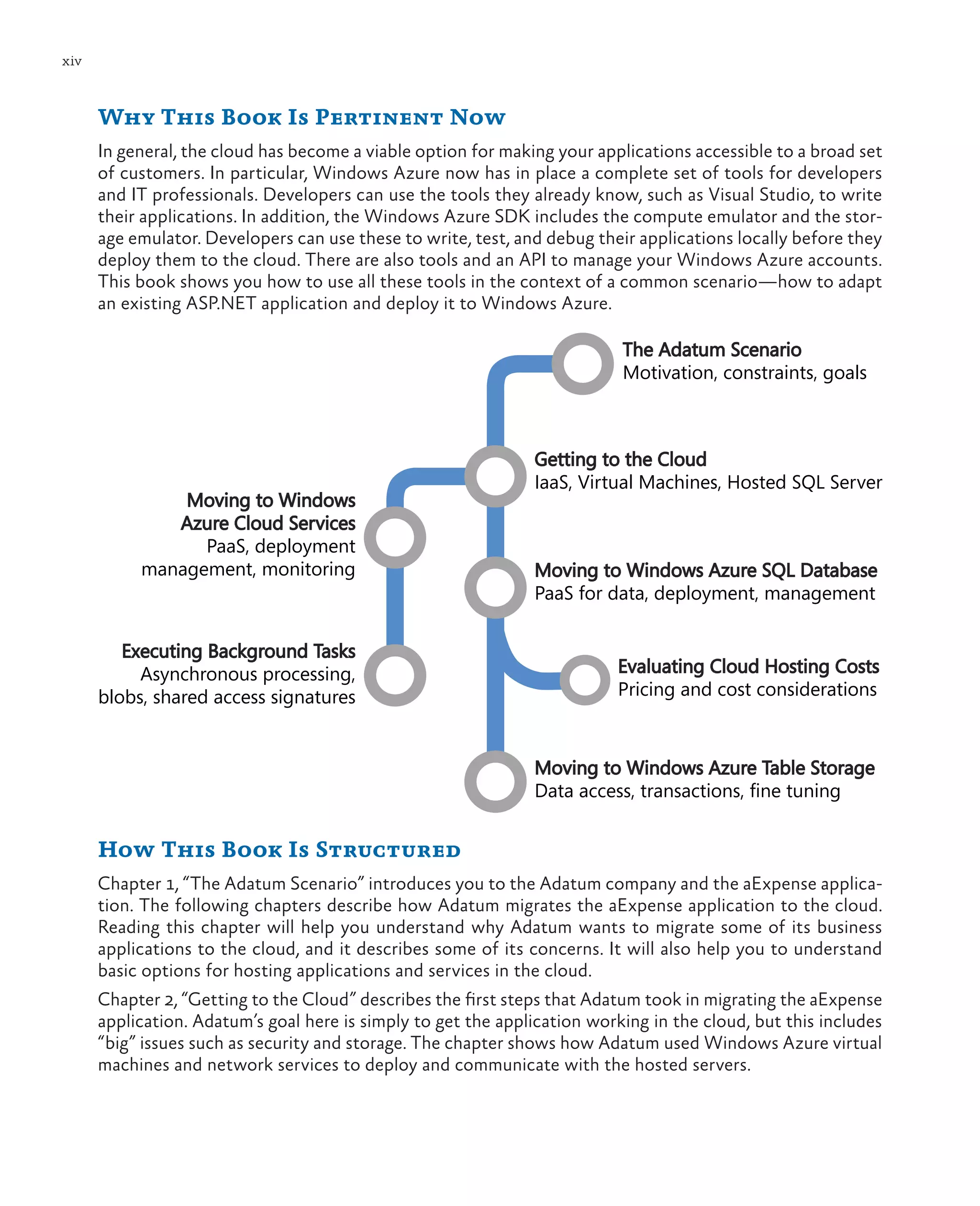
   How This Book Is Structured	    xiv
   What You Need to Use the Code	   xv
   Who’s Who	                      xvi

Acknowledgments	xvii
   Acknowledgements of Contributors to the Third Edition	 xix

1	 The Adatum Scenario	                                             1
   The Adatum Company	                                              1
      Adatum’s Challenges	                                          2
      Adatum’s Goals and Concerns	                                  2
      Adatum’s Strategy	                                            3
   The aExpense Application	                                        3
      The aExpense Architecture	                                    4
   Evaluating Cloud Hosting Opportunities	                          5
      Evaluating the Runtime Platform	                              6
          Infrastructure as a Service	                              6
          Platform as a Service	                                    7
          Software as a Service	                                    7
      Evaluating Data Storage Facilities	                           8
      Evaluating Security, Monitoring, and Management Capabilities	 8
      Evaluating Service Level Agreements	                          9
      Evaluating Additional Opportunities	                         10
   Adatum’s Migration Path for the aExpense Application	           10
      Choosing Your Own Migration Path	                            12
   More Information	                                               13


                                                                        v
vi


     2	 Getting to the Cloud	                                    15
        The Premise	                                             16
        Goals and Requirements	                                  17
        Overview of the Solution	                                18
            Options for Hosting the Application	                 18
                 Affinity Groups	                                19
                 Availability Sets	                              20
            Options for Hosting the Data 	                       20
            Connectivity for Authentication	                     22
            Session Support and Load Balancing	                  23
            Integrating with On-Premises Services	               24
        Inside the Implementation	                               25
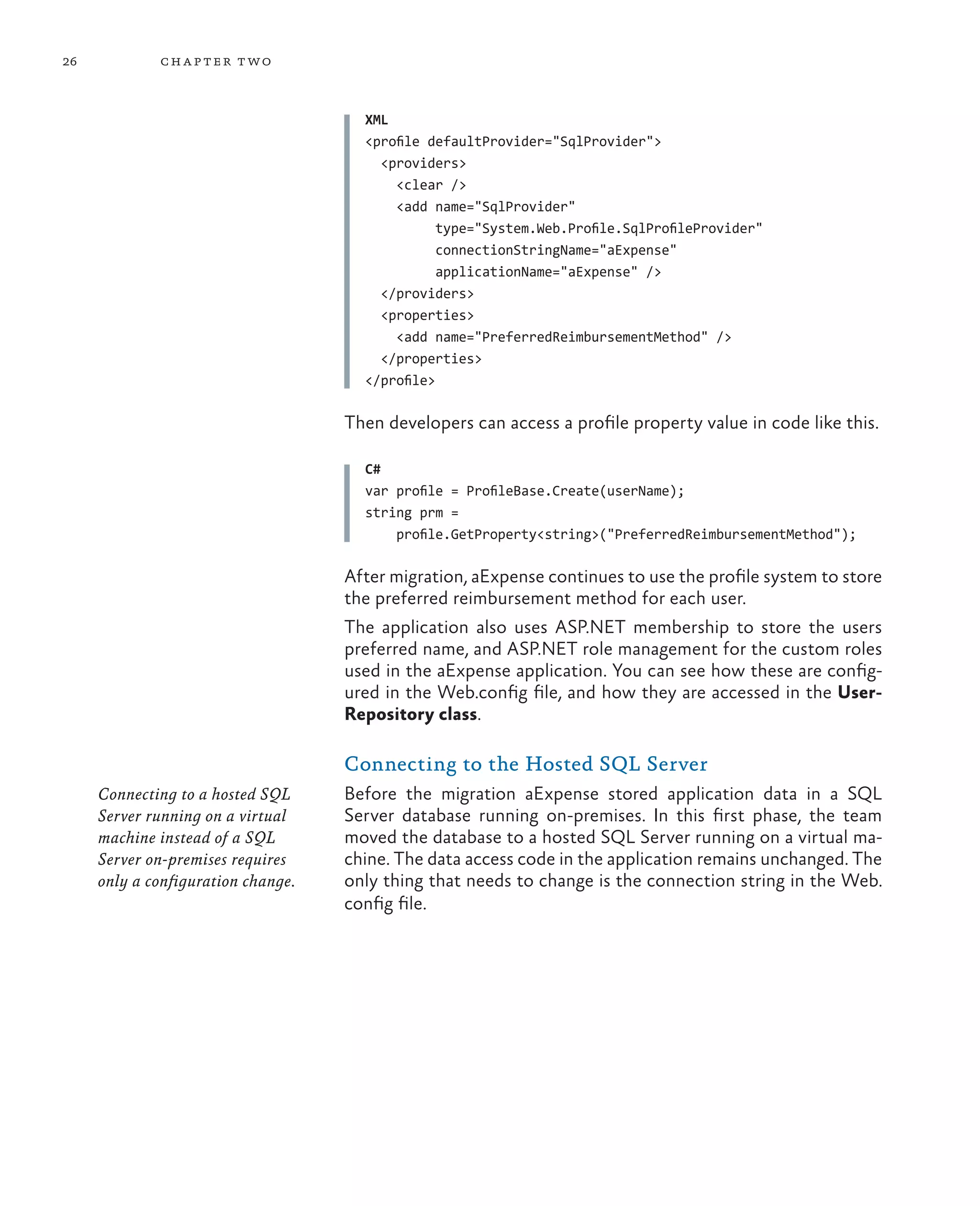
            Profile Data	                                        25
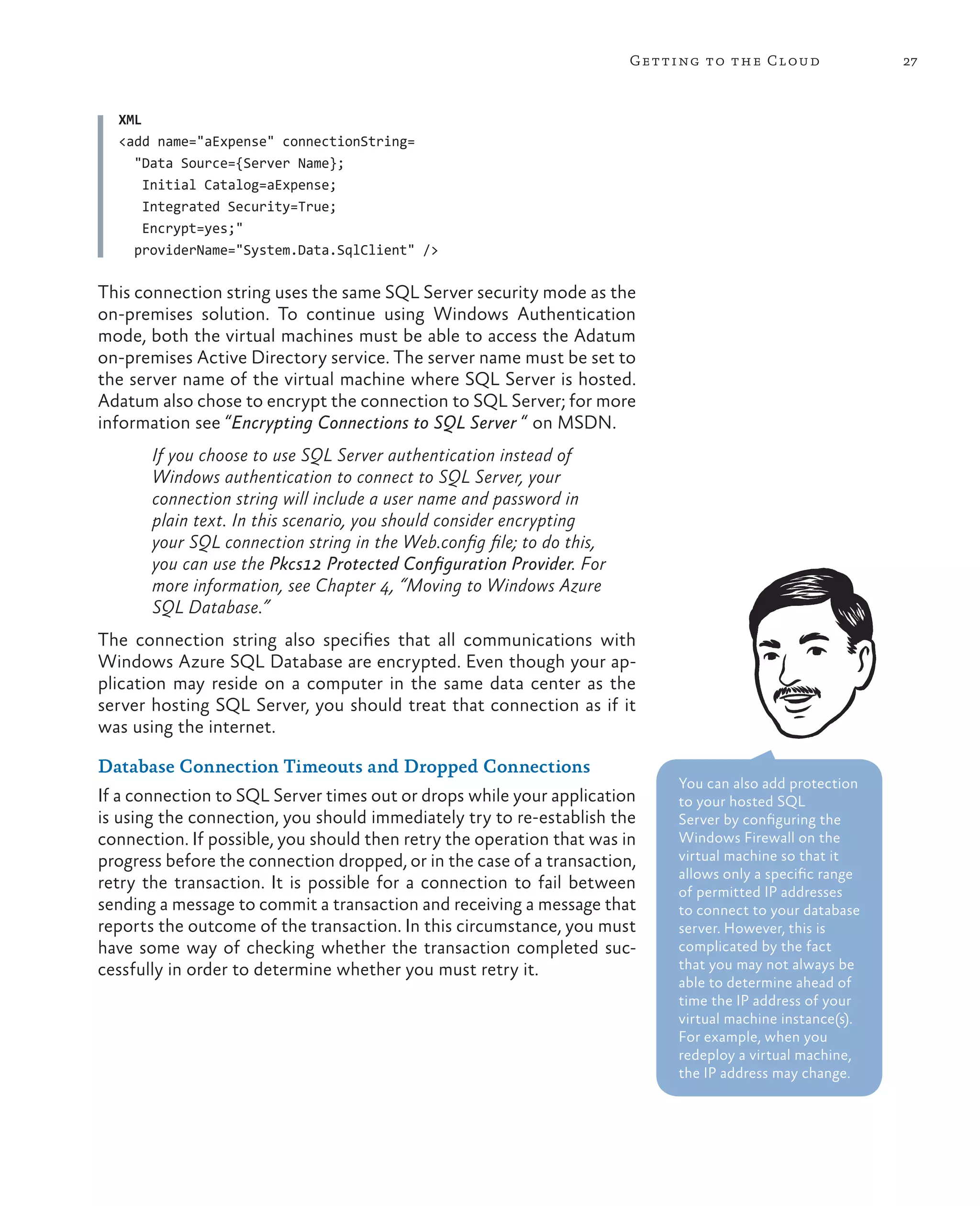
            Connecting to the Hosted SQL Server	                 26
                 Database Connection Timeouts and Dropped
                 Connections	27
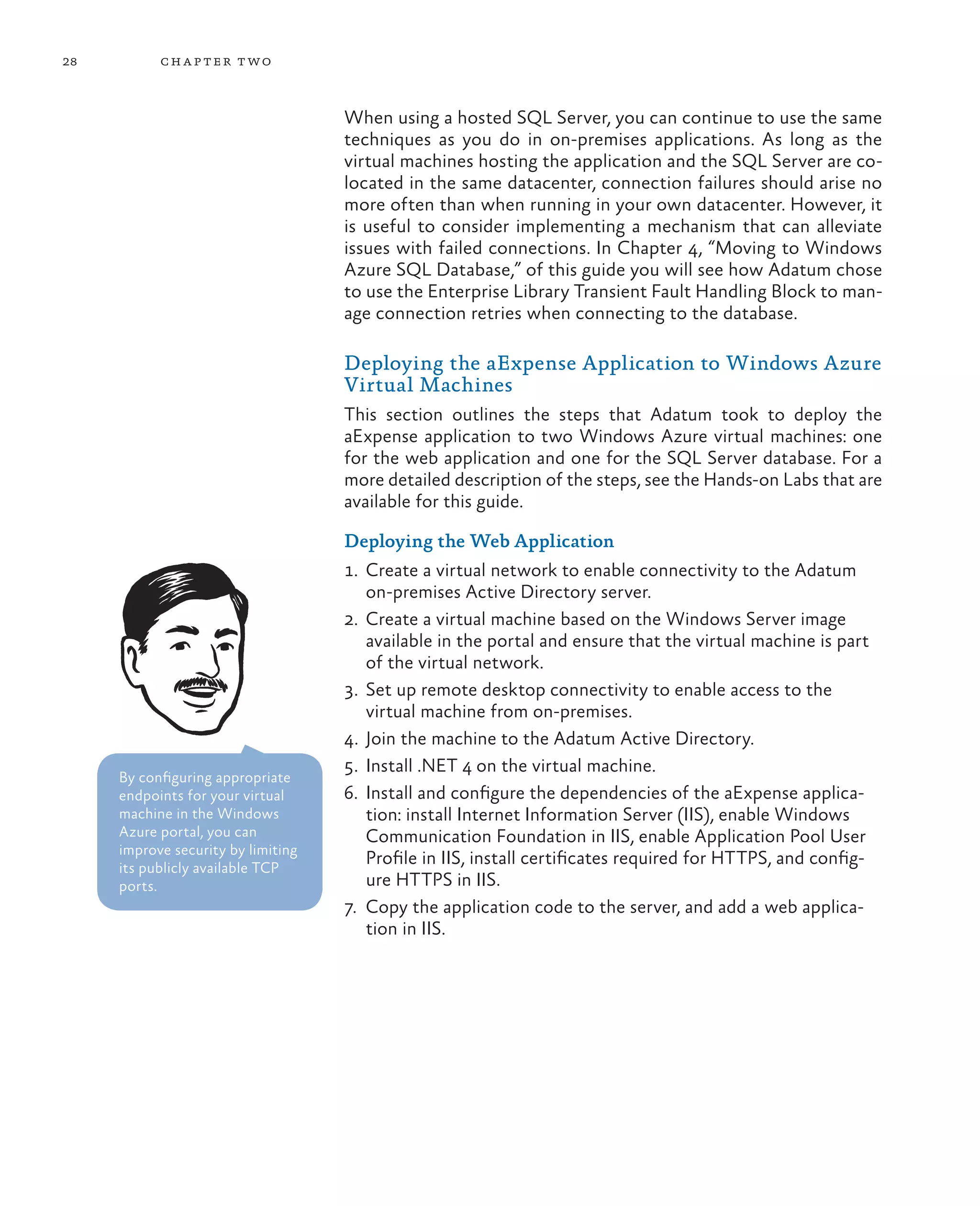
            Deploying the aExpense Application to Windows Azure
            Virtual Machines	                                    28
                 Deploying the Web Application	                  28
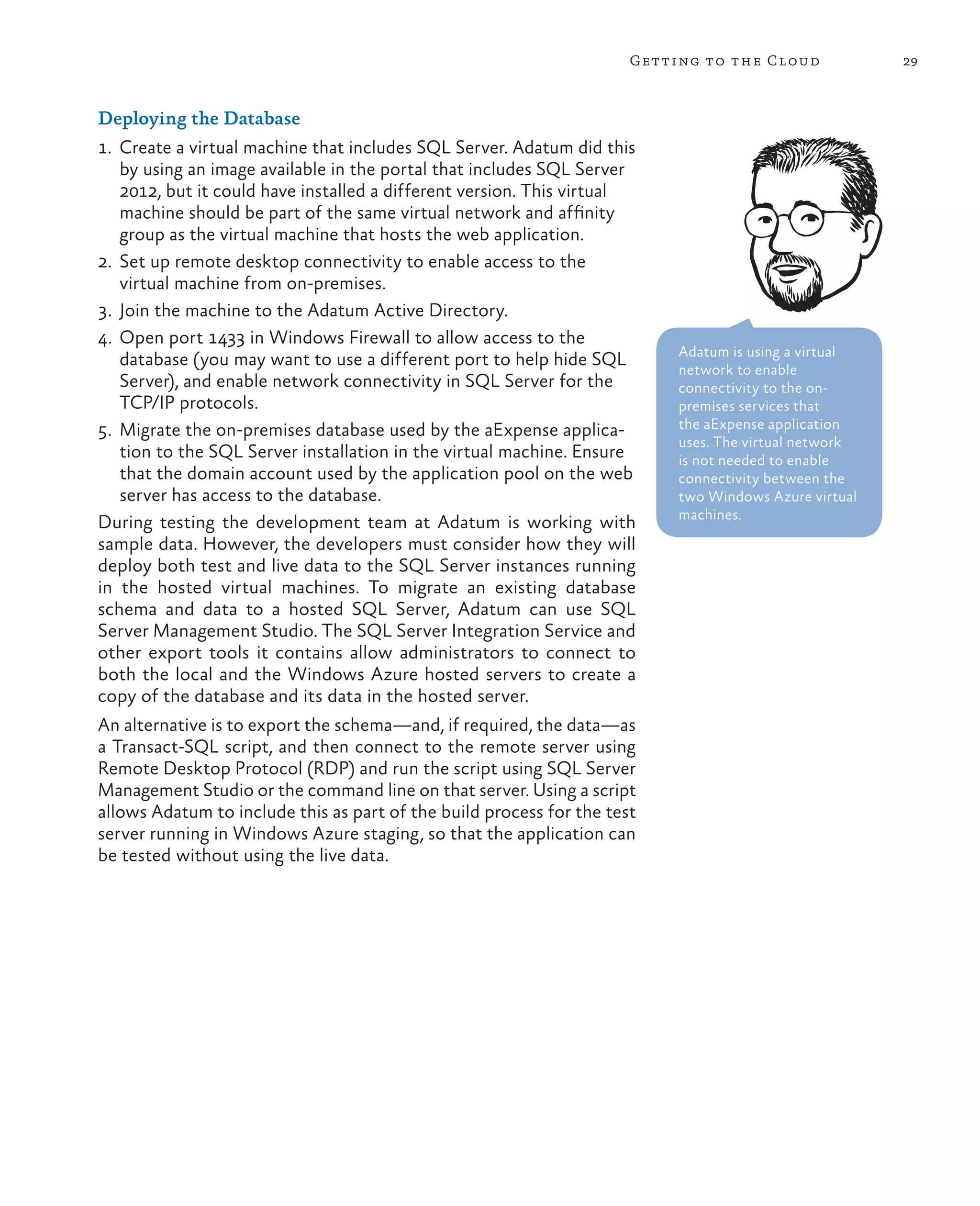
                 Deploying the Database	                         29
        Testing, Deployment, Management, and Monitoring	         30
            Testing Applications for Virtual Machine Deployment	 31
            Test and Production Environments	                    31
            Management and Monitoring	                           33
                 Storing and Backing Up Virtual Machines	        34
                 Managing Virtual Machine Instances	             34
                 Elasticity and Scaling 	                        35
            Isolating Active Directory	                          35
        More Information	                                        37

     3	 Moving to Windows Azure Cloud Services	                        39
        The Premise	                                                   39
        Goals and Requirements	                                        39
        Overview of the Solution	                                      41
           Evaluating the PaaS Approach for Hosting the Application	   41
           Options for Hosting the Application	                        42
               Choosing Between Web Sites and Cloud Services	          43
           Service Instances, Fault Domains, and Update Domains	       45
           Options for Authentication and Access Control	              46
           Profile Management	                                         48
           Session Data Management	                                    48
               Storing Session State Data in a Database	               49
               Storing Session State Data in Windows Azure Storage	    49
               Storing Session State Data in a Windows Azure Cache	    49
           Data Storage	                                               50
vii


       Application Configuration	                                     51
           Application Startup Processes	                             52
           Copying Configuration Values in a Startup Task	            53
       Solution Summary	                                              54
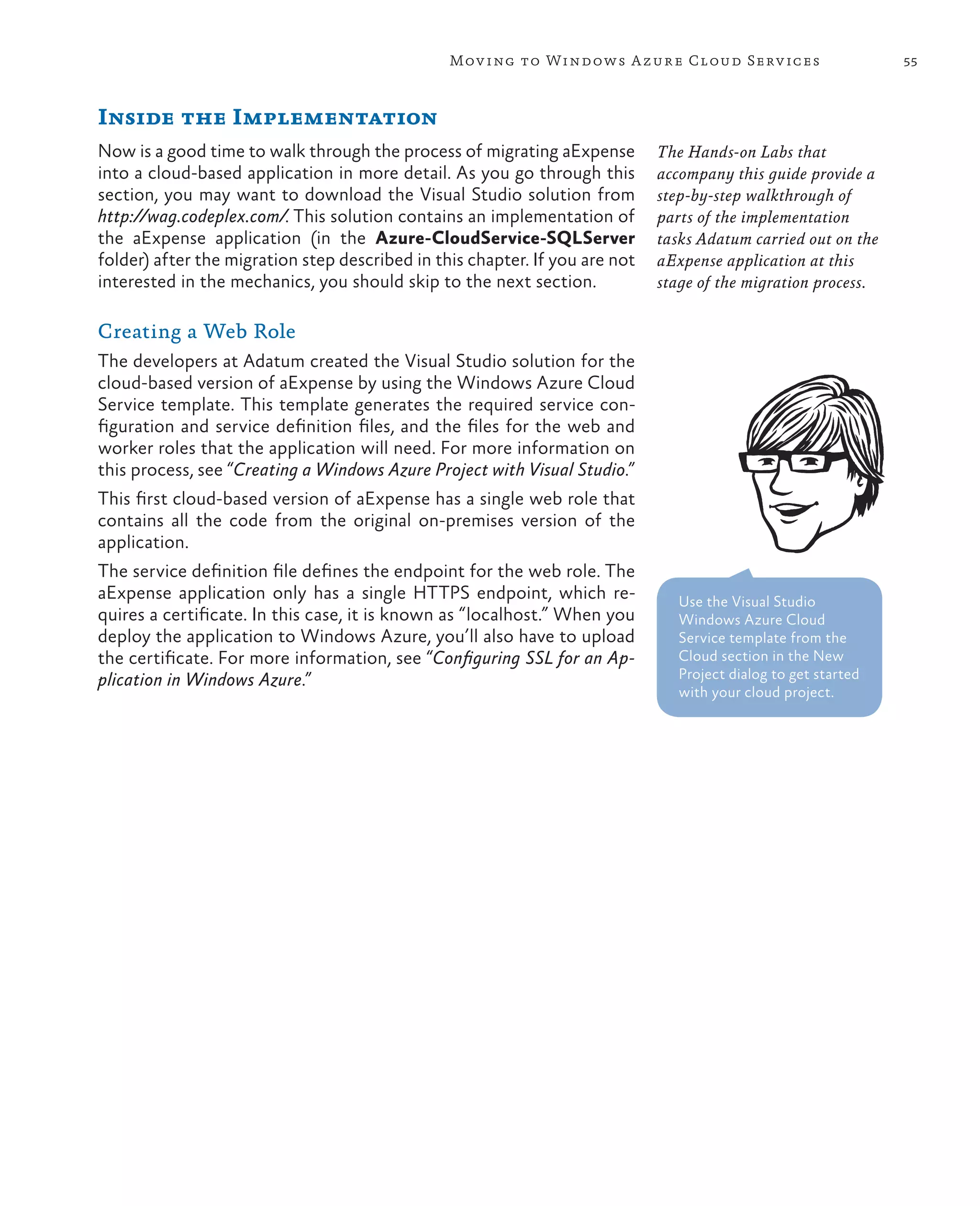
   Inside the Implementation	                                         55
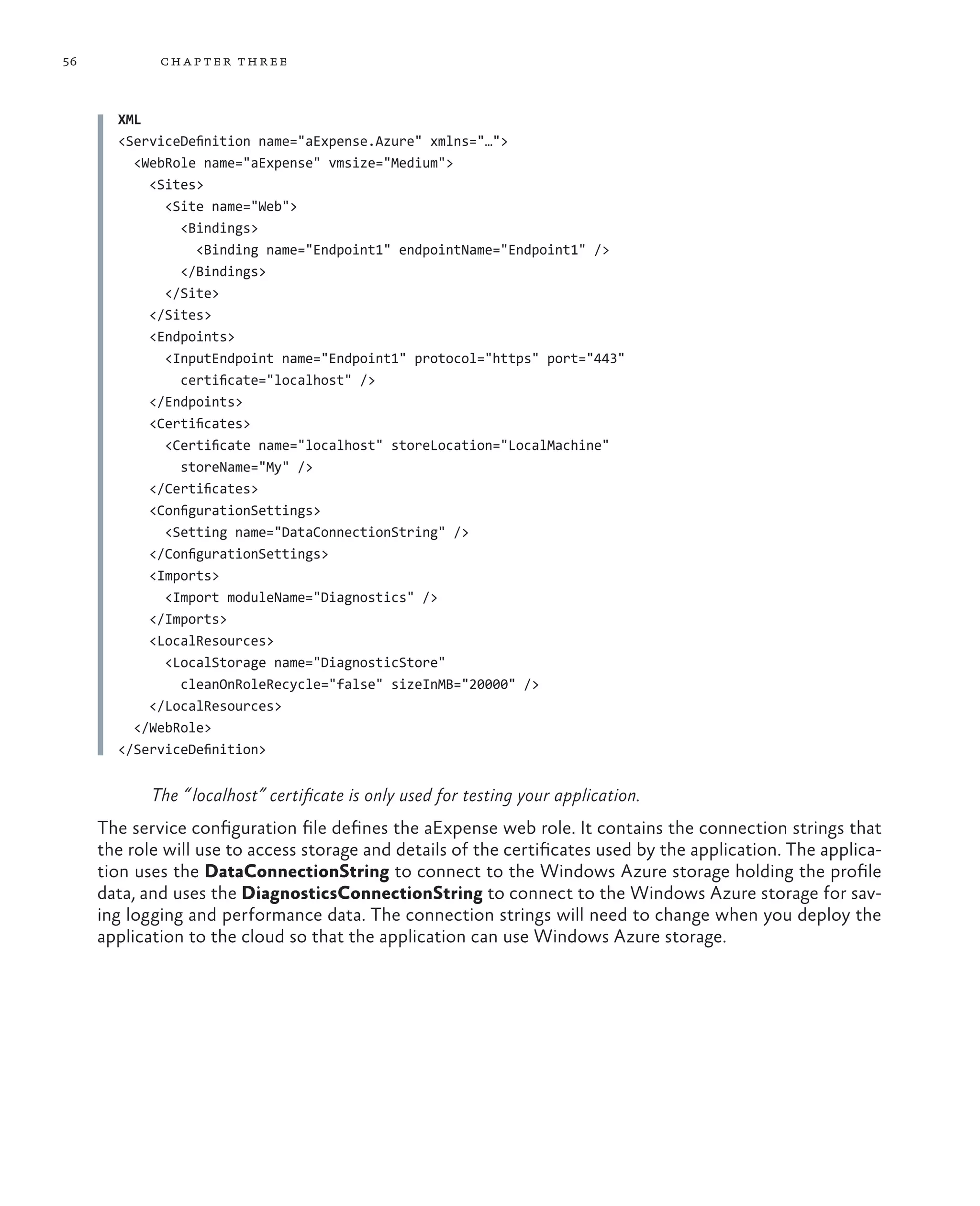
       Creating a Web Role	                                           55
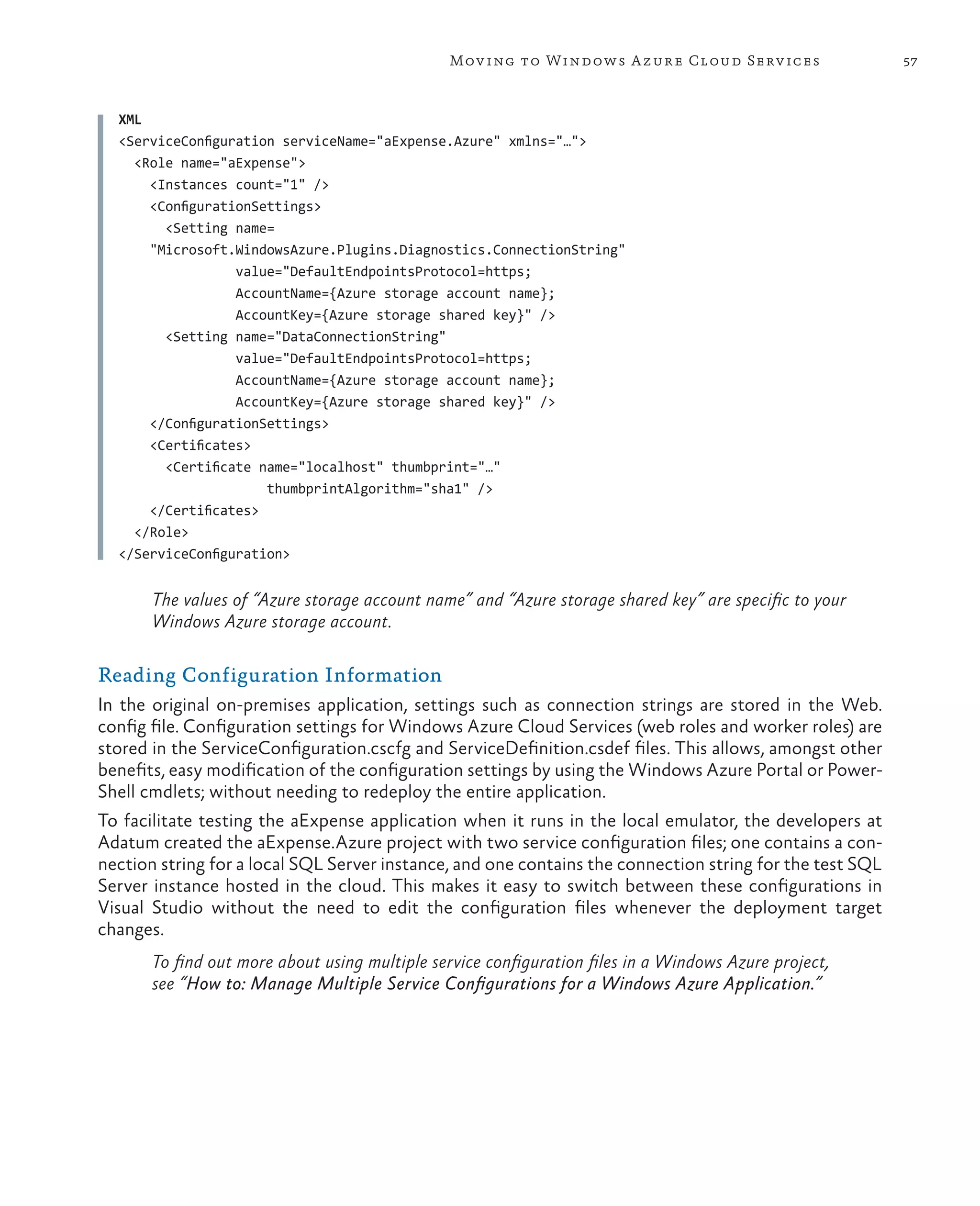
       Reading Configuration Information	                             57
           Using the Windows Azure CloudConfigurationManager
           Class 	                                                    58
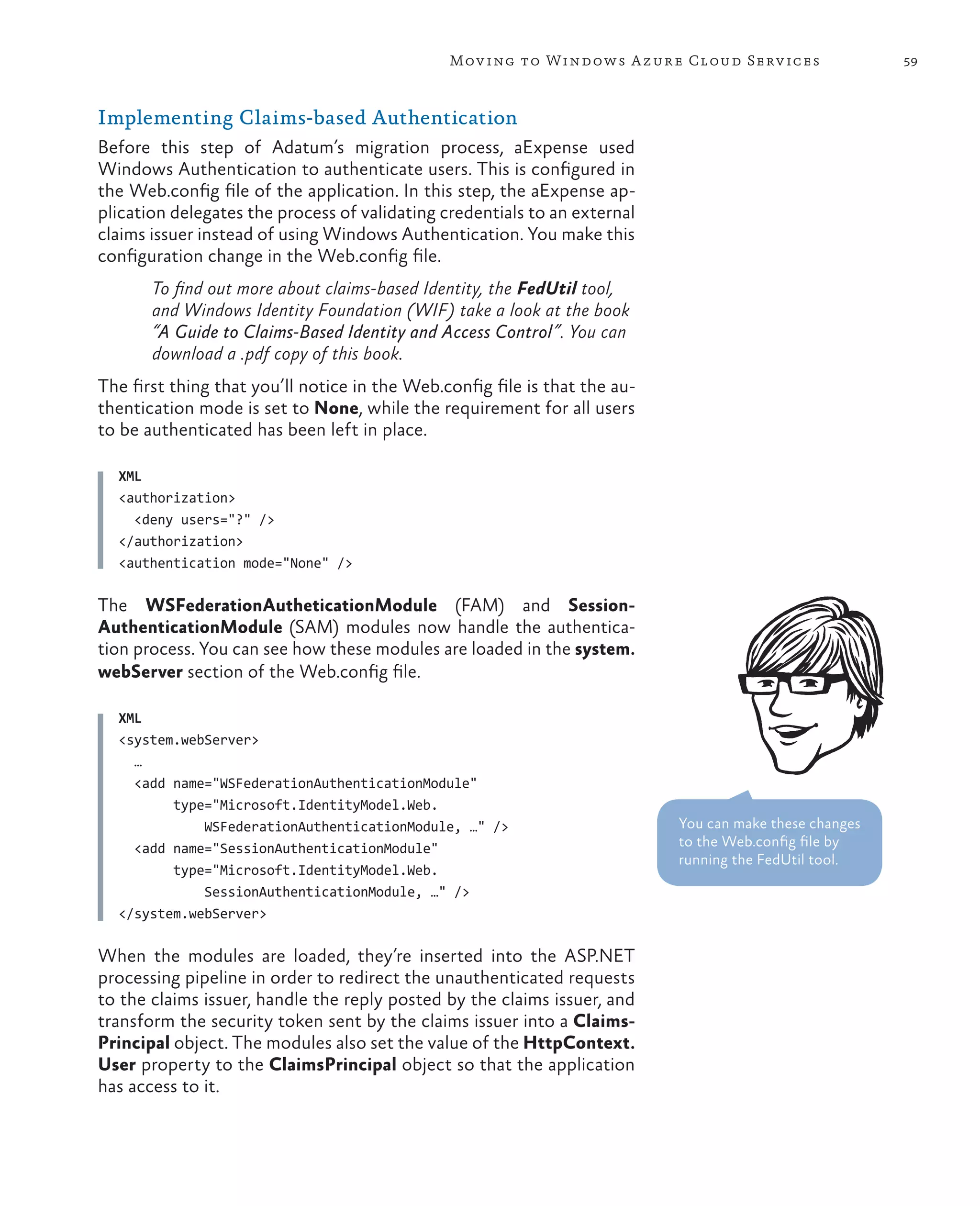
       Implementing Claims-based Authentication	                      59
       Managing User Data	                                            62
       Managing Session Data	                                         63
   Testing, Deployment, Management, and Monitoring	                   64
       Testing Cloud Services Applications	                           64
           Cloud Services Staging and Production Areas	               65
           Separate Test and Live Subscriptions	                      66
       Managing Windows Azure Services	                               68
       Setup and Deployment	                                          68
           Managing Different Local, Test, and Live Configurations	   68
           Preparing for Deployment to Windows Azure	                 72
           Deploying to Cloud Services in Windows Azure	              72
           Continuous Delivery	                                       79
       Using a Mock Issuer	                                           80
       Converting to a Production Issuer	                             80
       Accessing Diagnostics Log Files	                               81
   More Information	                                                  84

4	 Moving to Windows Azure SQL Database	                              85
   The Premise	                                                       85
   Goals and Requirements	                                            85
   Overview of the Solution	                                          86
       PaaS Options for Data Storage	                                 86
       Comparing SQL Server and Windows Azure SQL Database	           87
           Limitations of Windows Azure SQL Database	                 88
       Database Management and Data Backup	                           89
       Database Connection Reliability	                               90
           Implementing Retry Logic for Database Connections	         91
   Inside the Implementation	                                         92
       Connecting to Windows Azure SQL Database	                      92
       Handling Transient Connection Failures	                        93
   Setup, Deployment, Management, and Monitoring	                     95
       Data for Development and Testing	                              95
       Data Migration	                                                96
       Data Management	                                               96
       Database Monitoring	                                           97
   More Information	                                                  97
viii


       5	 Executing Background Tasks	                               99
          The Premise	                                              99
          Goals and Requirements	                                   99
          Overview of the Solution	                                100
              Storing Receipt Images	                              100
              Background Processing	                               101
                  Detecting an New Uploaded Image	                 102
                  Using Windows Azure Storage Queues	              103
                  Handling Transient Faults when Accessing Windows
                  Azure Storage	                                   104
                  Controlling Access to Receipt Images	            105
          Inside the Implementation	                               107
              Uploading and Saving Images	                         107
              Abstracting the Worker Role	                         108
                  User Code in the aExpense Application	           110
                  The Plumbing Code Classes	                       113
              Processing the Images	                               120
              Making the Images Available Using Shared Access
              Signatures	121
          More Information	                                        122

       6	 Evaluating Cloud Hosting Costs	                    123
          The Premise	                                       123
          Goals and Requirements	                            123
          Detailed Costing Estimates	                        124
             Bandwidth Cost Estimate for aExpense	           127
             Compute Estimate for aExpense	                  127
             Receipt Image Storage Estimate for aExpense	    127
             Windows Azure SQL Database Storage Requirements
             Estimate	128
             Total Cost Approximation	                       128
          Variations	128
             Costing the IaaS Hosting Approach	              128
                  Combined IaaS and PaaS Approach	           130
             Costing for Peak and Reduced Demand 	           131
             Costing for Windows Azure Table Storage	        132
          More Information	                                  132
ix


7	 Moving to Windows Azure Table Storage	                        133
   The Premise	                                                  133
   Goals and Requirements	                                       133
   Overview of the Solution	                                     135
       Why Use Windows Azure Table Storage?	                     135
       Profile Data	                                             136
       The Data Export Process	                                  137
            Initiating the Export Process	                       137
            Generating the Export Data	                          138
            Exporting the Report Data	                           139
   Inside the Implementation	                                    141
       Storing Business Expense Data in Windows Azure Table
       Storage	141
            How Many Tables?	                                    142
            Partition Keys and Row Keys	                         145
            Defining the Schemas	                                149
            Retrieving Records from a Multi-Entity Schema Table	 151
            Materializing Entities	                              153
            Query Performance	                                   154
            Working with Development Storage	                    155
       Storing Profile Data	                                     157
       Generating and Exporting the Expense Data	                158
            Generating the Expense Report Table	                 158
            Exporting the Expenses Data	                         161
   Performance Testing, Tuning, To-Do Items	                     166
       Initializing the Storage Tables, Blobs, and Queues	       166
       Implementing Paging with Windows Azure Table Storage	     167
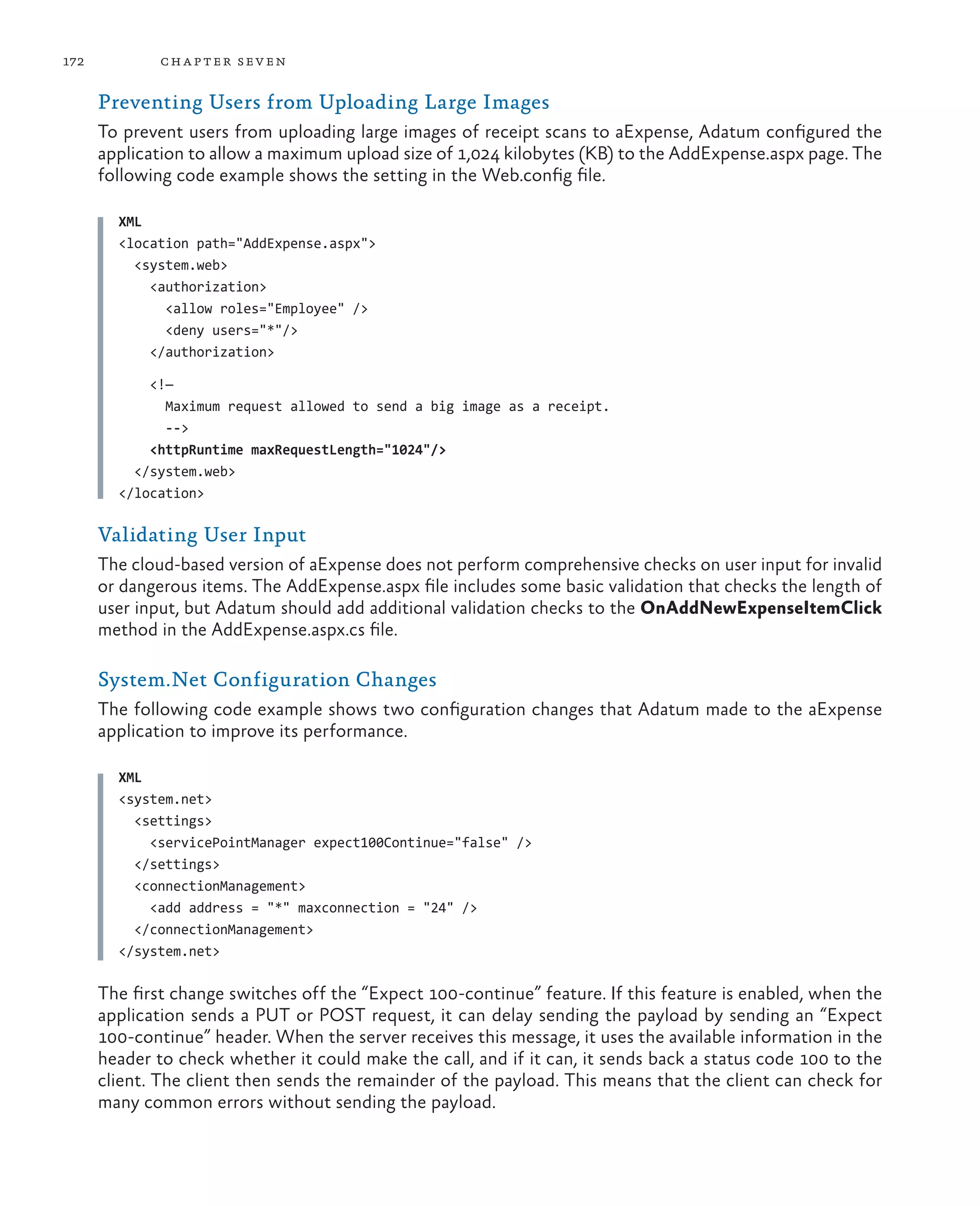
       Preventing Users from Uploading Large Images	             172
       Validating User Input	                                    172
       System.Net Configuration Changes	                         172
       WCF Data Service Optimizations	                           173
   More Information	                                             174

Glossary	175
Index	179
Foreword – Yousef Khalidi


Microsoft’s Windows Azure platform, an operating environment for developing, hosting, and manag-
ing cloud-based services, established a foundation that allows customers to easily move their applica-
tions from on-premises locations to the cloud. With Windows Azure, customers benefit from in-
creased agility, a very scalable platform, and reduced costs.
Microsoft’s cloud strategy has three broad tenets: to offer flexibility of choice for deploying services
based on business needs; to provide enterprise-level services with no compromises on availability,
reliability, or security; and to support consistent, connected experiences across devices and platforms.
Windows Azure is a key component of Microsoft’s cloud strategy.
Windows Azure builds on Microsoft’s many years of experience running online services for millions
of users, and on our long history of building platforms for developers. We focused on making the
transition from on-premises to the cloud easy for both programmers and IT professionals. Their exist-
ing skills and experience are exactly what they need to start using the Windows Azure platform.
Microsoft is committed to Windows Azure, and will continue to expand it as we learn how all our
customers around the globe, from the largest enterprises to the smallest ISVs, use it. One of the ad-
vantages of an online platform is that it allows us to introduce innovations quickly.
I’m excited to introduce this guide from the Microsoft patterns & practices team, proof of our com-
mitment to help customers be successful with the Windows Azure platform. Whether you’re new to
Windows Azure, or if you’re already using it, you’ll find guide a great source of things to consider. I
encourage you to get started exploring Microsoft’s public cloud and to stay tuned for further guidance
from the patterns & practices team.


Foreword for the Third Edition
Since its first beginnings, and since I reviewed the original edition of this guide from the patterns &
practices team, Windows Azure has continued to mature by offering exciting new services and capa-
bilities. Now that we have achieved general release, with a comprehensive SLA, we have seen a huge
uptake of the platform across all sectors of our industry.
In my original foreword I talked about our commitment to the enterprise. We have proved not only
that we can deliver on these commitments, but go beyond them to offer even more innovative fea-
tures; including many that make migration of existing on-premises applications to the cloud much
easier. The business case for Windows Azure continues to prove itself, and there is even more to come!
Sincerely,
Yousef Khalidi
Distinguished Engineer, Windows Azure
                                                                                                           xi
Preface


How can a company’s applications be scalable and have high availability? To achieve this, along with
developing the applications, you must also have an infrastructure that can support them. For example,
you may need to add servers or increase the capacities of existing ones, have redundant hardware, add
logic to the application to handle distributed computing, and add mechanisms to handle failover. You
have to do this even if an application is in high demand for only short periods of time. Life becomes
even more complicated (and expensive) when you start to consider issues such as network latency and
security boundaries.
The cloud offers a solution to this dilemma. The cloud is made up of interconnected servers located
in various data centers. However, you see what appears to be a centralized location that someone else
hosts and manages. By shifting the responsibility of maintaining an infrastructure to someone else,
you’re free to concentrate on what matters most: the application. If the cloud has data centers in
different geographical areas, you can move your content closer to the people who are using it most.
If an application is heavily used in Asia, have an instance running in a data center located there. This
kind of flexibility may not be available to you if you have to own all the hardware. Another advantage
to the cloud is that it’s a “pay as you go” proposition. If you don’t need it, you don’t have to pay for it.
When demand is high, you can scale up, and when demand is low, you can scale back.
Yes, by moving applications to the cloud, you’re giving up some control and autonomy, but you’re also
going to benefit from reduced costs, increased flexibility, and scalable computation and storage. This
guide shows you how to do this.


Who This Book Is For
This book is the first volume in a series about Windows Azure. It demonstrates how you can adapt an
existing, on-premises ASP.NET application to one that operates in the cloud. The book is intended for
any architect, developer, or information technology (IT) professional who designs, builds, or operates
applications and services that are appropriate for the cloud. Although applications do not need to be
based on the Microsoft Windows operating system to work in Windows Azure or written using a
.NET language, this book is written for people who work with Windows-based systems. You should
be familiar with the Microsoft .NET Framework, Microsoft Visual Studio, ASP.NET, and Microsoft
Visual C#.


                                                                                                               xiii
xiv


      Why This Book Is Pertinent Now
      In general, the cloud has become a viable option for making your applications accessible to a broad set
      of customers. In particular, Windows Azure now has in place a complete set of tools for developers
      and IT professionals. Developers can use the tools they already know, such as Visual Studio, to write
      their applications. In addition, the Windows Azure SDK includes the compute emulator and the stor-
      age emulator. Developers can use these to write, test, and debug their applications locally before they
      deploy them to the cloud. There are also tools and an API to manage your Windows Azure accounts.
      This book shows you how to use all these tools in the context of a common scenario—how to adapt
      an existing ASP.NET application and deploy it to Windows Azure.

                                                                           The Adatum Scenario
                                                                           Motivation, constraints, goals


                                                               Getting to the Cloud
                                                               IaaS, Virtual Machines, Hosted SQL Server
               Moving to Windows
              Azure Cloud Services
                 PaaS, deployment
           management, monitoring                              Moving to Windows Azure SQL Database
                                                               PaaS for data, deployment, management


         Executing Background Tasks
           Asynchronous processing,                                       Evaluating Cloud Hosting Costs
      blobs, shared access signatures                                     Pricing and cost considerations


                                                               Moving to Windows Azure Table Storage
                                                               Data access, transactions, fine tuning


      How This Book Is Structured
      Chapter 1, “The Adatum Scenario” introduces you to the Adatum company and the aExpense applica-
      tion. The following chapters describe how Adatum migrates the aExpense application to the cloud.
      Reading this chapter will help you understand why Adatum wants to migrate some of its business
      applications to the cloud, and it describes some of its concerns. It will also help you to understand
      basic options for hosting applications and services in the cloud.
      Chapter 2, “Getting to the Cloud” describes the first steps that Adatum took in migrating the aExpense
      application. Adatum’s goal here is simply to get the application working in the cloud, but this includes
      “big” issues such as security and storage. The chapter shows how Adatum used Windows Azure virtual
      machines and network services to deploy and communicate with the hosted servers.
pr eface           xv


Chapter 3, “Moving to Windows Azure Cloud Services” describes how Adatum adapted the aExpense
application to run as a hosted service in Windows Azure by using the Cloud Services feature. The
chapter describes how Adatum modified the solution, converted it to use claims authentication in-
stead of Active Directory, and took advantage of Windows Azure Caching for the session data.
Chapter 4, “Moving to Windows Azure SQL Database” describes how Adatum evaluated the use of
Windows Azure SQL Database instead of a hosted SQL Server by exploring the limitations this might
impose and the cost savings that it might provide. The chapter then goes in to show how Adatum
converted the aExpense application to use Windows Azure SQL Database.
Chapter 5, “Executing Background Tasks” describes adding a worker role to the aExpense applica-
tion to process scanned receipt images as a background task. It also shows how aExpense uses
Windows Azure blob storage for storing these images, and shared access signatures to provide se-
cure access to them.
Chapter 6, “Evaluating Cloud Hosting Costs” introduces a basic cost model for the aExpense applica-
tion running on Windows Azure and shows how Adatum calculated the estimated annual running
costs for the application.
Chapter 7, “Moving to Windows Azure Table Storage” describes how Adatum switched from using
a SQL database to using Windows Azure table storage in the aExpense application. It discusses the
differences between the two storage models, and shows how Adatum adapted the data access
code to work with Windows Azure table storage. This chapter also discusses how Adatum fine-
tuned the application after deployment, and the options it is considering for improving the applica-
tion in the future.


What You Need to Use the Code
These are the system requirements for running the scenarios:
•	 Microsoft Windows 7 with Service Pack 1, Microsoft Windows 8, Microsoft Windows Server
  2008 R2 with Service Pack 1, or Microsoft Windows Server 2012 (32 bit or 64 bit editions).
•	 Microsoft .NET Framework version 4.0.
•	 Microsoft Visual Studio 2010 Ultimate, Premium, or Professional edition with Service Pack 1
  installed, or Visual Studio 2012 Ultimate, Premium, or Professional edition.
•	 Windows Azure SDK for .NET (includes the Windows Azure Tools for Visual Studio). See the
  Release Notes for information on the specific version required.
•	 Microsoft SQL Server 2012, SQL Server Express 2012, SQL Server 2008, or SQL Server Express 2008.
  See the Release Notes for information on specific versions depending on your operating system.
•	 Windows Identity Foundation. This is required for claims-based authorization.
•	 WatiN 2.0. Open the Properties dialog and unblock the zip file after you download it and before
   you extract the contents. Place the contents in the LibWatin folder of the examples.
Other components and frameworks required by the examples are installed using NuGet when you run
the solutions. See the Release Notes included with the examples for instructions on installing and
configuring them.
xvi


      Who’s Who
      As mentioned earlier, this book uses a set of scenarios that demonstrates how to move applications to
      the cloud. A panel of experts comments on the development efforts. The panel includes a cloud spe-
      cialist, a software architect, a software developer, and an IT professional. The scenarios can be consid-
      ered from each of these points of view. The following table lists the experts for these scenarios.


                        Bharath is a cloud specialist. He checks that a cloud-based solution will work for a
                        company and provide tangible benefits. He is a cautious person, for good reasons.

                          “Moving a single application to the cloud is easy. Realizing the benefits
                          that a cloud-based solution can offer is not always so straight-forward”.


      Jana is a software architect. She plans the overall structure of an application. Her
      perspective is both practical and strategic. In other words, she considers not only
      what technical approaches are needed today, but also what direction a company
      needs to consider for the future.

                             “It’s not easy to balance the needs of the company, the users, the IT
                             organization, the developers, and the technical platforms we rely on.


                           Markus is a senior software developer. He is analytical, detail-oriented, and
                           methodical. He’s focused on the task at hand, which is building a great cloud-
                           based application. He knows that he’s the person who’s ultimately responsible
                           for the code.

                              “I don’t care what platform you want to
                              use for the application, I’ll make it work.”


      Poe is an IT professional who’s an expert in deploying and running in a corporate
      data center. Poe has a keen interest in practical solutions; after all, he’s the one
      who gets paged at 3:00 AM when there’s a problem.

              “Migrating to the cloud involves a big change in the way we manage our applications.
              I want to make sure our cloud apps are as reliable and secure as our on-premise apps.”


      If you have a particular area of interest, look for notes provided by the specialists whose interests align
      with yours.
Acknowledgments


On March 4th 2010 I saw an email from our CEO, Steve Ballmer, in my inbox. I don’t normally receive
much email from him, so I gave it my full attention. The subject line of the email was: “We are all in,”
and it summarized the commitment of Microsoft to cloud computing. If I needed another confirma-
tion of what I already knew, that Microsoft is serious about the cloud, there it was.
My first contact with what eventually became Windows Azure was about three years ago. I was in the
Developer & Platform Evangelism (DPE) team, and my job was to explore the world of software de-
livered as a service. Some of you might even remember a very early mockup I developed in late 2007,
called Northwind Hosting. It demonstrated many of the capabilities that the Windows Azure platform
offers today. (Watching an initiative I’ve been involved with since the early days become a reality
makes me very, very happy.)
In February 2009, I left DPE and joined the patterns & practices team. My mission was to lead the
“cloud program”: a collection of projects that examined the design challenges of building applications
for the cloud. When the Windows Azure platform was announced, demand for guidance about it
skyrocketed.
As we examined different application development scenarios, it became quite clear that identity man-
agement is something you must get right before you can consider anything else. It’s especially impor-
tant if you are a company with a large portfolio of on-premises investments, and you want to move
some of those assets to the cloud. This describes many of our customers. Therefore, patterns &
practices’s first deliverable, and an important milestone in our cloud program, was A Guide to Claims-
Based identity and Access Control.
The Windows Azure platform is special in many ways. One is the rate of innovation. The various teams
that deliver all of the platform’s systems proved that they could rapidly ship new functionality. To keep
up with them, I felt we had to develop content very quickly. We decided to run our projects in two-
months sprints, each one focused on a specific set of considerations.
This guide, now fully updated to cover the new capabilities of Windows Azure, mainly covers a migra-
tion scenario: how to move an existing application to the Windows Azure platform. As in the claims
guide, we’ve developed a fictitious case study that explains, step by step, the challenges our customers
are likely to encounter.


                                                                                                            xvii
xviii


        I want to start by thanking the following subject matter experts and contributors to this guide:
        Dominic Betts, Scott Densmore, Ryan Dunn, Steve Marx, and Matias Woloski. Dominic has the un-
        usual skill of knowing a subject in great detail and of finding a way to explain it to the rest of us that is
        precise, complete, and yet simple to understand. Scott brought us a wealth of knowledge about how
        to build scalable Windows Azure applications, which is what he did before he joined my team. He also
        brings years of experience about how to build frameworks and tools for developers. I’ve had the privi-
        lege of working with Ryan in previous projects, and I’ve always benefited from his acuity, insights, and
        experience. As a Windows Azure evangelist, he’s been able to show us what customers with very real
        requirements need. Steve is a technical strategist for Windows Azure. He’s been instrumental in shap-
        ing this guide. We rely on him to show us not just what the platform can do today but how it will
        evolve. This is important because we want to provide guidance today that is aligned with longer-term
        goals. Last but not least, Matias is a veteran of many projects with me. He’s been involved with
        Windows Azure since the very first day, and his efforts have been invaluable in creating this guide.
        As it happens with all our written content, we have sample code for most of the chapters. They
        demonstrate what we talk about in the guide. Many thanks to the project’s development and test
        teams for providing a good balance of technically sound, focused and simple-to-understand code:
        Masashi Narumoto (Microsoft Corporation), Scott Densmore (Microsoft Corporation), Federico
        Boerr (Southworks), Adrián Menegatti  (Southworks), Hanz Zhang (Microsoft Corporation), Ravindra
        Mahendravarman (Infosys Ltd.), Rathi Velusamy (Infosys Ltd.).
        Our guides must not only be technically accurate but also entertaining and interesting to read. This is
        no simple task, and I want to thank Dominic Betts, RoAnn Corbisier (Microsoft Corporation), Alex
        Homer (Microsoft Corporation), and Tina Burden from the writing and editing team for excelling at this.
        The visual design concept used for this guide was originally developed by Roberta Leibovitz and Colin
        Campbell (Modeled Computation LLC) for A Guide to Claims-Based Identity and Access Control.
        Based on the excellent responses we received, we decided to reuse it for this book. The book design
        was created by John Hubbard (eson). The cartoon faces were drawn by the award-winning Seattle-
        based cartoonist Ellen Forney. The technical illustrations were adapted from my Tablet PC mockups
        by Chris Burns.
        All of our guides are reviewed, commented upon, scrutinized, and criticized by a large number of
        customers, partners, and colleagues. We also received feedback from the larger community through
        our CodePlex website. The Windows Azure platform is broad and spans many disciplines. We were
        very fortunate to have the intellectual power of a very diverse and skillful group of readers available
        to us.
        I also want to thank all of these people who volunteered their time and expertise on our early content
        and drafts. Among those, we want to highlight the exceptional contributions of Jorge Rowies (South-
        works), Marcos Castany (Southworks), Federico Boerr (Southworks), Corey Sanders (Microsoft
        Corporation), Nir Mashkowski (Microsoft Corporation), Ganesh Srinivasan (Microsoft Corporation),
        Jane Sinyagina (Microsoft Corporation), Rick Byham (Microsoft Corporation), Boris Scholl (Microsoft
        Corporation), and Paul Yuknewicz (Microsoft Corporation).
        I hope you find this guide useful!
        Eugenio Pace
        Senior Program Manager – patterns & practices
        Microsoft Corporation
xix


Acknowledgements of Contributors to the Third Edition
Windows Azure is an evolving platform. We originally published the first edition of this guide in 2010,
demonstrating a basic set of Windows Azure features. I’m now pleased to release the third edition of
this guide, which incorporates the latest and greatest features of Windows Azure such as Virtual
Machines, Web Sites, Caching, and more. By taking advantage of these new features, you have a lot
more options to choose from when migrating your own applications from on-premises to the cloud.
As our scope increased, we also added new community members and industry experts who have
provided significant help throughout the development of this edition. I want to acknowledge the
exceptional contributions of the following people: Dominic Betts (Content Master), Alex Homer
(Microsoft Corporation), Alejandro Jezierski (Southworks), Mauro Krikorian (Southworks), Jorge
Rowies (Southworks), Marcos Castany (Southworks ), Hanz Zhang (Microsoft Corporation), Rathi
Velusamy, RoAnn Corbisier (Microsoft Corporation), Nelly Delgado (Microsoft Corporation), Eugenio
Pace (Microsoft Corporation), Carlos Farre (Microsoft Corporation), Trent Swanson (Full Scale 180
Inc.), Ercenk Keresteci (Full Scale 180 Inc.), Federico Boerr, Corey Sanders (Microsoft Corporation),
Nir Mashkowski (Microsoft Corporation), Ganesh Srinivasan (Microsoft Corporation), Jane Sinyagina
(Microsoft Corporation), Rick Byham (Microsoft Corporation), Boris Scholl (Microsoft Corporation),
and Paul Yuknewicz (Microsoft Corporation). I also want to thank everyone who participated in our
CodePlex community site.
Masashi Narumoto
Senior Program Manager – patterns & practices
Microsoft Corporation
September 2012
1                                           The Adatum Scenario


This chapter introduces a fictitious company named Adatum. It de-
scribes Adatum’s current infrastructure, its software portfolio, and
why Adatum wants to move some of its applications to Windows
Azure. As with any company considering this process, there are many
issues to take into account and challenges to be met, particularly be-
cause Adatum has not used the cloud before. At the end of this chap-
ter you will see how Adatum explored and evaluated the major re-
quirements for moving its applications to the cloud, and an overview
of the migration steps that Adatum followed. The chapters that follow
this one show in detail how Adatum modified its expense tracking and
reimbursement system, aExpense, at each stage for deployment to
Windows Azure.


The Adatum Company
Adatum is a manufacturing company of 15,000 employees that
mostly uses Microsoft technologies and tools. It also has some legacy
systems built on other platforms, such as AS400 and UNIX. As you
would expect, Adatum developers are knowledgeable about various
Microsoft products, including .NET Framework, ASP.NET, SQL Server,
Windows Server, and Visual Studio. Employees in Adatum’s IT depart-
ment are proficient at tasks such as setting up and maintaining Active
Directory and using System Center.
Adatum uses many different applications. Some are externally facing,
while others are used exclusively by its employees. The importance of     Adatum uses mainly
                                                                          Microsoft products,
these applications ranges from “peripheral” to “critical,” with many
                                                                          and its developers are
lying between the two extremes. A significant portion of Adatum’s IT      knowledgeable about most
budget is allocated to maintaining applications that are either of mid-   Microsoft technologies
level or peripheral importance.                                           such as Windows, SQL
                                                                          Server, and the .NET
                                                                          Framework.


                                                                                                     1
2           ch a pter one


    Adatum wants to change this allocation. Its aim is to spend more money on the services that differ-
    entiate it from its competitors and less on those that don’t. Adatum’s competitive edge results from
    assets, such as its efficient supply chain and excellent quality controls, and not from how effectively
    it handles its internal email. For example, Adatum wants efficient email but is looking for more eco-
    nomical ways to provide this so that it can spend most of its budget on the systems that directly affect
    its customers. Adatum believes that one way to achieve this optimization is to selectively deploy ap-
    plications to the cloud.

    Adatum’s Challenges
    Adatum faces several challenges. Currently, deploying new on-premises applications takes too long,
    considering how quickly its business changes and how efficient its competitors are. The timeframe for
    acquiring, provisioning, and deploying even a simple application can be at least several weeks. No
    matter the application’s complexity, requirements must be analyzed, procurement processes must be
    initiated, requests for proposals may need to be sent to vendors, networks must be configured, and
    so on. Adatum must be able to respond to its customers’ demands more rapidly than the current
    procedures allow.
    Another issue is that much of Adatum’s infrastructure is used inefficiently. The majority of its servers
    are underutilized, and it’s difficult to deploy new applications with the requisite service-level agree-
    ments (SLAs) to the existing hardware. Virtual machines are appropriate in some cases, but they are
    not appropriate in all cases. This inefficiency means that Adatum’s capital is committed to an under-
    utilized infrastructure when it could be better used elsewhere in the business.
    A final issue is that less critical applications typically get less attention from the IT staff. It is only when
    the application fails or cannot keep up with demand that anyone takes notice. By this time, the
    problem is expensive to fix, both in terms of IT time and in inefficient use of the users’ time.
    Adatum wants to focus on the applications, and not on the infrastructure. Adatum believes that by
    deploying some of its applications to a public cloud such as Windows Azure it can take advantage of
    economies of scale, promote standardization of its applications, and have automated processes for
    managing them. Most importantly, Adatum believes that this will make it more effective at addressing
    its customers’ needs, a more effective competitor in the market, and a better investment for its
    shareholders.

    Adatum’s Goals and Concerns
    One of Adatum’s goals is to improve the experience of all users of its applications. At a minimum,
    applications in the cloud should perform as well as their on-premises counterparts. The hope, though,
    is that they will perform better. Many of its applications are used more at some times than at others.
    For example, employees use the salary tool once every two weeks but rarely at other times. They
    would benefit if the applications had increased responsiveness during peak periods. This sensitivity to
    demand is known as dynamic scalability.
The A datum Scena rio                 3


However, on-premises applications that are associated with specific
servers don’t provide this flexibility. Adatum can’t afford to run as
many servers as are needed during peak times because this hardware
is dormant the rest of the time. If these applications were located in
the cloud, it would be easy to scale them depending on the demand.
Another goal is to expand the ways that users can access Adatum’s
applications. Currently, applications are only accessible from the in-
tranet. Applications that are located in the public cloud are, by defini-
tion, available over the Internet. However, the public cloud also raises
questions about authentication. Many of Adatum’s applications use            While Adatum intends that
Windows authentication so that users aren’t required to enter appli-         the aExpense application
                                                                             will perform at least as
cation-specific credentials. Adatum is concerned that its users would
                                                                             well in the cloud as it does
need special credentials for each application in the public cloud.           running in its own data
A third goal is that at least some of Adatum’s applications should be        center, the aim is to take
                                                                             advantage of the inherent
portable. Portability means that the application can be moved back
                                                                             scalability and reliability of
and forth between a hosted data center and an on-premises data               cloud hosting to achieve
center without any modifications to the application’s code or its op-        better overall performance
erations. If both options are available, the risks that Adatum incurs if     and availability than the
it does use the cloud are reduced.                                           current on-premises
                                                                             deployment.
In addition to its concerns about security, Adatum has two other is-
sues. First, it would like to avoid a massive retraining program for its
IT staff. Second, very few of Adatum’s applications are truly isolated
from other systems. Most have various dependencies. Adatum has put
a great of deal effort into integrating its systems, even if not all of
them operate on the same platform. It is unsure how these dependen-
cies affect operations if some systems are moved to the public cloud.

Adatum’s Strategy
Adatum is an innovative company and open to new technologies, but
it takes carefully considered steps when it implements them. Adatum’s
plan is to evaluate the viability of moving to the cloud by starting with
some of its simpler applications. It hopes to gain some initial experi-
ence, and then expand on what it has learned. This strategy can be
described as “try, learn, fail fast, and then optimize.” Adatum has de-
cided to start with its aExpense application.


The aExpense Application
The aExpense application allows Adatum’s employees to submit,
track, and process business expenses. Everyone in Adatum uses this
application to request reimbursements. Although aExpense is not a
critical application, it is important. Employees can tolerate occasional
hours of downtime, but prolonged unavailability isn’t acceptable.
4           ch a pter one


    Adatum’s policy is that employees must submit their expenses before the end of each month. The
    majority of employees don’t submit their expenses until the last two business days. This causes rela-
    tively high demands during a short time period. The infrastructure that supports the aExpense applica-
    tion is scaled for average use across the month instead of for this peak demand. As a result, when the
    majority of employees try to submit their expenses during the last two business days, the system is
    slow and the employees complain.
    The application is deployed in Adatum’s data center and is available to users on the intranet. While
    traveling, employees access it through a VPN. There have been requests for publishing aExpense di-
    rectly to the Internet, but it’s never happened. 
    The application stores a great deal of information because most expense receipts must be scanned
    and then stored for seven years. For this reason, the data stores used by aExpense are frequently
    backed up.
    The application is representative of many other applications in Adatum’s portfolio so it’s a good test
    case for using the cloud. Moving the aExpense application to Windows Azure will expose many of the
    challenges Adatum is likely to encounter as it expands the number of applications that it relocates to
    the cloud.

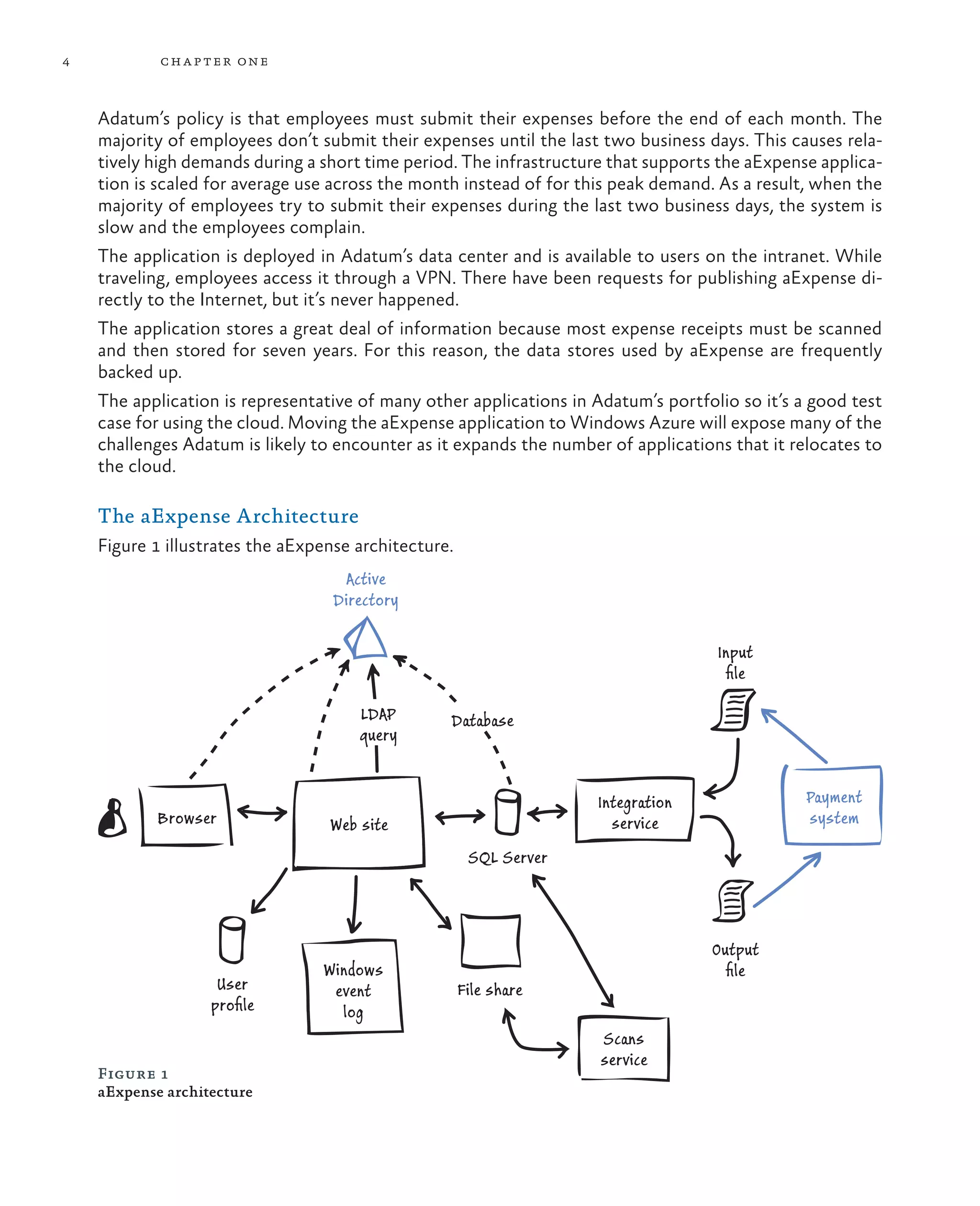
    The aExpense Architecture
    Figure 1 illustrates the aExpense architecture.
                                    Active
                                   Directory

                                                                                    Input
                                                                                     file

                                      LDAP        Database
                                      query


                                                                     Integration                Payment
            Browser               Web site                             service                  system

                                                       SQL Server


                                                                                   Output
                                 Windows                                             file
                    User          event               File share
                   profile          log
                                                                     Scans
                                                                     service
    Figure 1
    aExpense architecture
The A datum Scena rio              5


The architecture is straightforward and one that many other applica-
tions use. aExpense is an ASP.NET application and employees use a
browser to interact with it. The application uses Windows authenti-
cation for security. To store user preferences, it relies on ASP.NET
membership and profile providers. Exceptions and logs are imple-
mented with Enterprise Library’s Exception Handling Application
Block and Logging Application Block. The website uses Directory
Services APIs to query for employee data stored in Active Directory,
such as the employee’s manager. The manager is the person who can
approve the expenses.                                                       Adatum’s aExpense
                                                                            application uses a standard
The aExpense application implements the trusted subsystem to con-           website architecture based
nect to SQL Server. It authenticates with a Windows domain ac-              on ASP.NET with data stored
count. The SQL database uses SQL Server authentication mode. The            in SQL Server. However, it
aExpense application stores its information on SQL Server. Scans of         does integrate with other
                                                                            in-house systems.
receipts are stored on a file share.
There are two background services, both implemented as Windows
services. One periodically runs and generates thumbprints of the
scanned receipts. It also compresses large images for increased storage
efficiency. The other background service periodically queries the da-
tabase for expenses that need to be reimbursed. It then generates a
flat file that the payment system can process. This service also imports
the payment results and sends them back to aExpense after the pay-
ments are made.


Evaluating Cloud Hosting Opportunities
Before initiating a full technical case study for migration of the
aExpense application to Windows Azure, the designers and devel-
opers at Adatum evaluated the capabilities offered by cloud hosting
partner solutions such as Microsoft’s Windows Azure. For example,
they needed to:
•	 Identify which type of service offered by the hosting providers
  best suits Adatum’s requirements.
•	 Determine whether a cloud solution can provide the necessary
   secure and reliable runtime platform and storage facilities.
•	 Identify how Adatum can monitor and manage the application
•	 Determine whether the service level agreements (SLAs) are
   sufficient to meet Adatum’s business requirements.
6         ch a pter one


                                    Evaluating the Runtime Platform
                                    Currently, Adatum runs the aExpense application on its own in-house
                                    IT infrastructure. The servers, networks, internal and external con-
                                    nectivity, and associated systems such as power supply and cooling are
                                    all the responsibility of Adatum. Together they provide the underlying
                                    mechanisms for running applications such as aExpense. As part of the
                                    initial evaluation, Adatum investigated the ways that it could move the
                                    aExpense application to an external hosting partner.

                                    Infrastructure as a Service
                                    Adatum first considered whether it could simply move the application
                                    to an external partner by renting the required infrastructure, complete
                                    with all of the associated systems, and run the application unchanged.
                                    Renting infrastructure from an external partner is known as Infrastruc-
                                    ture as a Service (IaaS). Adatum would be responsible for providing and
                                    installing the operating system and software, and maintaining it (such
                                    as installing operating system and services updates, and upgrading to
                                    new versions). The partner company would provide the hardware (the
                                    server) and the associated infrastructure and connectivity.
                                    Cloud providers can typically offer very high levels of infrastructure
                                    reliability and availability that are beyond the capabilities of many or-
                                    ganizations’ own datacenters. For example, most incorporate robust
                                    disaster recovery processes, and offer the ability to deploy in more
                                    than one geographical location.
                                    Adopting an IaaS approach will provide some cost saving through a
                                    reduction in overall requirements for in-house infrastructure, but it is
                                    not easy (or, in some cases, possible) to quantify the in-house cost of
                                    running a specific application. In Adatum’s case, the cost of the on-
                                    premises infrastructure is effectively shared between all the applica-
                                    tions Adatum uses.
    IaaS allows you to              In addition, while this approach is attractive, Adatum must take into
    effectively pick up your        account the cost of management and maintenance required to keep
    server and move it to the       the hosted operating system running correctly, and the costs of oper-
    cloud with minimal changes
    required to the application.
                                    ating system licenses. However, IaaS is generally less expensive than
    It is especially useful if      other ways of hosting applications at remote locations. It can also
    you need to deploy on           reduce development cost because applications do not need to be
    servers that have non-          refactored to run in specific types of cloud service roles.
    standard configuration,
    where applications require      Infrastructure now becomes a running cost rather than a capital in-
    additional operating system     vestment.
    services, or for applications
    cannot be refactored into
    a structure suitable for
    Platform as a Service (PaaS)
    deployment.
The A datum Scena rio                 7


Platform as a Service
Secondly, Adatum considered adapting the aExpense application to
run as a hosted application on a platform and operating system pro-
vided by an external partner. As the application currently runs on
Windows Server and uses the .NET Framework, the external partner
would need to offer this platform to avoid the costs of porting the
application to a different operating system.
Renting a ready-to-use platform from an external partner is known as
Platform as a Service (PaaS). Adatum would be responsible only for
providing and installing its aExpense application, and maintaining it
(such as fixing bugs and upgrading to a new version). The partner com-
pany would provide the operating system pre-installed on appropriate
hardware, with the associated infrastructure and connectivity.
The PaaS approach is attractive to Adatum because it reduces the
cost of management and maintenance (the partner is responsible for
keeping the operating system running correctly and applying up-
dates), and there is no requirement to pay for operating system li-          PaaS is particularly useful
censes. In some cases PaaS hosting charges may be higher than for            when applications can be
IaaS, though this is not necessarily the case; and the cost savings in       refactored to run using the
licensing, management, and maintenance can often outweigh any                standard platform offered
                                                                             by cloud hosting providers.
difference. Adatum considered the amount of work involved in refac-          Responsibility for managing
toring the application to run in cloud-hosted roles and the corre-           and updating the operating
sponding development cost, and considered both to be acceptable.             system and services is
                                                                             delegated to the hosting
Software as a Service                                                        provider. Applications that
                                                                             use a multi-tier architecture,
The third option Adatum considered was to abandon their own                  require administrative
aExpense application and rent the use of an expenses application             access through a virtual
provided by another company. Renting use of third party applica-             network mechanism,
tions is an example of Software as a Service (SaaS). Many companies          or require elevated
                                                                             permissions can be usually
have applications specially designed to handle business expense              be hosted in the cloud using
collation and reporting tasks.                                               the PaaS model.
However, Adatum must ensure that the third party application can fully
meet its specific requirements; hosted third party applications must
typically offer a more generic features set to satisfy a wide range of
customers. As well as exploring the overall capabilities of the software,
Adatum will need to evaluate its security, configurability, performance,
and usability. Changing over may incur costs such as user education, as
well as the cost of migrating data and users; and perhaps maintaining the
old application for a period until changeover is complete.
8         ch a pter one


                                  Evaluating Data Storage Facilities
                                  Most business applications use data, and so before making any deci-
                                  sion about hosting the aExpense application externally Adatum
                                  needed to evaluate the data storage and retrieval facilities offered by
                                  external partners. On-premises and in-house applications typically
                                  use a relational database system based on Structured Query Lan-
                                  guage (SQL), and Adatum’s aExpense application is no exception.
                                  Therefore, the external partner must be able to offer the equivalent
                                  hosted capability.
                                  However, other storage formats are common. Some applications re-
    Most business applications    quire storage for disk files or for unstructured data. The aExpense
    rely on a relational          application stores unstructured data in the form of receipt images on
    database, even though it      a file share, and it also generates disk files for use by other in-house
    may be exposed through
    a custom repository or
                                  systems. Therefore, the chosen cloud hosting mechanism must be able
    data access layer. However,   to provide support for storing unstructured data; this may be in a
    many applications also have   format other than disk files so long as the application can be easily
    other storage requirements    adapted to use it.
    such as profile and session
    data, binary and formatted    Between them, these mechanisms should be able to provide the data
    data streams, and disk        storage and retrieval features that Adatum requires; albeit with some
    files. The target hosting     changes to the application code to use the available storage models.
    platform must either          By using an appropriate relational database system, or any other type
    offer equivalent services,
    or it must be reasonably
                                  of repository that can be installed on a hosted sever, Adatum can
                                  avoid changes to the application code.

                                  Evaluating Security, Monitoring, and Management
    easy and cost-efficient


                                  Capabilities
    to adapt the application
    to use available storage
    mechanisms.

                                  Moving applications to outside of the corporate network prompts
                                  several questions not directly related to the hosting platform mecha-
                                  nisms. Adatum must be convinced that the hosting providers’ network
                                  and infrastructure is secure, and that the hosted application will be
                                  protected from malicious attacks and from data exposure in case of
                                  systems failure. For example, the hosting network should be resilient
                                  to Denial of Service (DoS) and network flooding attacks, and the
                                  hosting platform should be able to reliably and safely reinitialize the
                                  application after a hardware failure.
                                  In addition, Adatum must evaluate whether hosting in a remote data-
                                  center will meet any legal or regulatory requirements, such as a limita-
                                  tion on the geographical location for data storage and processing.
                                  Many cloud hosting providers, including Windows Azure, have data-
                                  centers located around the world and allow users to specify the loca-
                                  tion of the servers and data storage facilities. Windows Azure allows
                                  users to specify whether storage replication for backup and resiliency
                                  will take place across multiple datacenters in order to satisfy regula-
                                  tory limitations.
The A datum Scena rio              9


In addition, Adatum must ensure that the chosen hosting provider and
deployment mechanism allows administrators to monitor and manage
the application and the data stores remotely. Windows Azure includes
a range of capabilities that closely match the remote access capabilities
for on-premises server, database, and application management. For
example, it supports a range of logging facilities, remote desktop ac-
cess to servers and hosted services, remote configuration, and manage-
ment of applications and data stores through a web-based portal and
APIs that supports REST calls and scripting.
Finally, Adatum must consider if the remote applications must be in-
tegrated with other services, both in the cloud and on-premises, to
access data, communicate messages, and for monitoring and manage-
ment. For example, Adatum uses Microsoft System Center Operation
Manager for monitoring applications, and it should therefore be also
to integrate the remote application and services with this. Addition-
ally, Adatum relies on domain-level authentication through Active
Directory and so it will be necessary to join the remote machines to
the on-premises domain or adopt an alternative solution that provides
equivalent functionality.

Evaluating Service Level Agreements
Adatum recognized that, although the aExpense application is used
only by company employees, it must be readily available (in other
words, only very rarely offline) and responsive to a reasonable degree.
There is no formal SLA for the application, but it should of necessity
be available to employees whenever they need to submit expense
claims. Of course, for other types of applications, especially publicly
visible or business-crucial applications, there will need to be a more
formal SLA defined.
SLAs should define not only availability of an application, but also
maximum response times. In addition, where other services are re-
quired (such as caching or access control), the SLAs should also cover
these services. Finally, SLAs should include any information required
to define security risks and to meet regulatory or legal requirements
(such as the geographical location for data storage).
Windows Azure provides formal SLAs for the IaaS, PaaS, and related
services that it offers. However, these do not and cannot cover the
customer’s hosted application, as this is outside of Microsoft’s control.
Instead, the SLAs are defined in terms of connectivity and role execu-       You can find details of the
tion; for example, the SLA for Cloud Services guarantees that a role         Windows Azure Service
                                                                             Level Agreements for all of
instance will expose full connectivity for 99.95% of the time and that       the services online.
failed role instances will be detected and restarted 99.9% of the time.
10          ch a pter one


                                       Evaluating Additional Opportunities
                                       In addition to the fundamental choices of the hosting model and the
                                       deployment approach, the designers and developers at Adatum con-
                                       sidered if they could benefit from using the many ancillary services
                                       and features available in Windows Azure.
                                       For example, they considered whether the application would benefit
                                       from the use of Windows Azure Caching to maximize performance
                                       when retrieving data; or for caching output, session state, and profile
                                       information.
                                       Other features that Adatum realized would be useful for the aExpense
     For a full list of the features
     and services available            application included Windows Azure Active Directory for authentica-
     in Windows Azure, see             tion and the Content Delivery Network (CDN) for delivering images
     “Introducing Windows              and other non-authenticated content. These features and Adatum’s
     Azure.”                           decisions regarding their use are explained in more detail in the fol-
                                       lowing chapters of this guide.
                                       Adatum also considered whether the application needed to commu-
                                       nicate with the on-premises applications using messaging, or access
                                       services exposed by on-premises applications. Windows Azure Ser-
                                       vice Bus provides many features that would be useful in this scenario,
                                       but Adatum decided that these were not required for the current
                                       version of aExpense.
                                              To learn more about Windows Azure Service Bus see “Service
                                              Bus.” The guide “Building Hybrid Applications in the Cloud”
                                              describes the scenarios for and usage of Service Bus in detail.


                                       Adatum’s Migration Path for the aExpense
                                       Application
                                       Every company will inevitably make different decisions on the migra-
                                       tion path they adopt for moving to the cloud. The range of contribut-
                                       ing factors is vast, and each company will have specific goals and limi-
                                       tations that affect the final choices. Typically, companies will begin, as
                                       Adatum did, by understanding the concepts of cloud hosting; and
                                       then exploring the platforms, services, and options available from
                                       cloud hosting providers. From that comes the decision on which cloud
                                       provider to use, and the hosting approach that will best match all the
                                       requirements.
The A datum Scena rio                    11


This guide shows how you can make the appropriate choices when using Windows Azure. However,
to help you make those choices, this guide shows several of the hosting approaches. As you will see,
the path that Adatum chose for migrating the aExpense application to the cloud included several
stages. Adatum began by choosing the option that required the least modification to the aExpense
application and then, at each subsequent stage, considered whether moving to another hosting ap-
proach would provide additional benefits.

     While the multi-step approach Adatum chose for migrating their application may not be
     realistic in every real-world scenario, it allows the guide to demonstrate several options
     that are available for hosting applications in Windows Azure. The discussion of the advan-
     tages and limitations at each stage will help you to better understand the options avail-
     able to you when migrating your own applications.

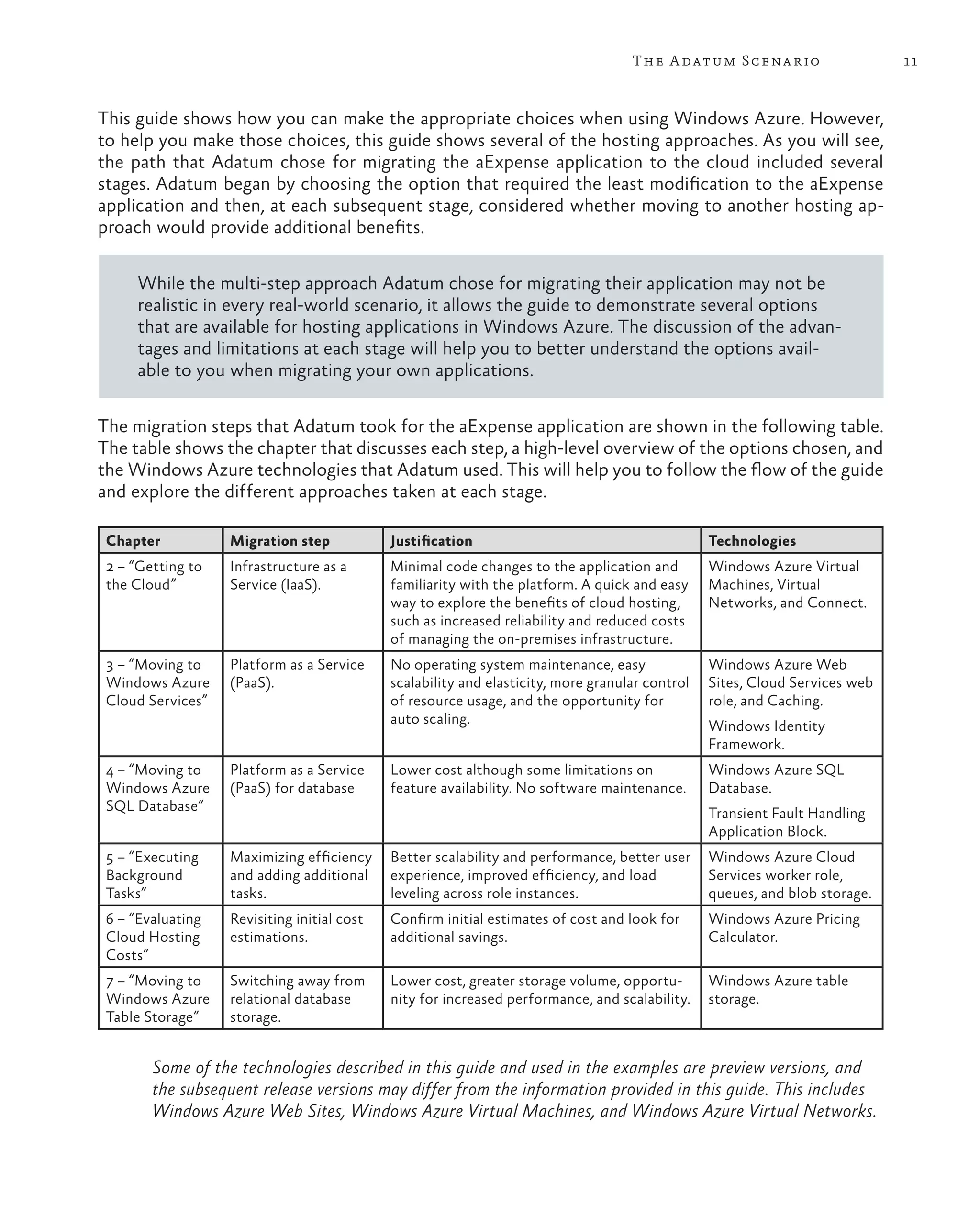
The migration steps that Adatum took for the aExpense application are shown in the following table.
The table shows the chapter that discusses each step, a high-level overview of the options chosen, and
the Windows Azure technologies that Adatum used. This will help you to follow the flow of the guide
and explore the different approaches taken at each stage.

 Chapter           Migration step            Justification                                       Technologies
 2 – “Getting to   Infrastructure as a       Minimal code changes to the application and         Windows Azure Virtual
 the Cloud”        Service (IaaS).           familiarity with the platform. A quick and easy     Machines, Virtual
                                             way to explore the benefits of cloud hosting,       Networks, and Connect.
                                             such as increased reliability and reduced costs
                                             of managing the on-premises infrastructure.
 3 – “Moving to    Platform as a Service     No operating system maintenance, easy               Windows Azure Web
 Windows Azure     (PaaS).                   scalability and elasticity, more granular control   Sites, Cloud Services web
 Cloud Services”                             of resource usage, and the opportunity for          role, and Caching.
                                             auto scaling.                                       Windows Identity
                                                                                                 Framework.
 4 – “Moving to    Platform as a Service     Lower cost although some limitations on             Windows Azure SQL
 Windows Azure     (PaaS) for database       feature availability. No software maintenance.      Database.
 SQL Database”                                                                                   Transient Fault Handling
                                                                                                 Application Block.
 5 – “Executing    Maximizing efficiency     Better scalability and performance, better user     Windows Azure Cloud
 Background        and adding additional     experience, improved efficiency, and load           Services worker role,
 Tasks”            tasks.                    leveling across role instances.                     queues, and blob storage.
 6 – “Evaluating   Revisiting initial cost   Confirm initial estimates of cost and look for      Windows Azure Pricing
 Cloud Hosting     estimations.              additional savings.                                 Calculator.
 Costs”
 7 – “Moving to    Switching away from       Lower cost, greater storage volume, opportu-        Windows Azure table
 Windows Azure     relational database       nity for increased performance, and scalability.    storage.
 Table Storage”    storage.


        Some of the technologies described in this guide and used in the examples are preview versions, and
        the subsequent release versions may differ from the information provided in this guide. This includes
        Windows Azure Web Sites, Windows Azure Virtual Machines, and Windows Azure Virtual Networks.
12           ch a pter one


     Choosing Your Own Migration Path
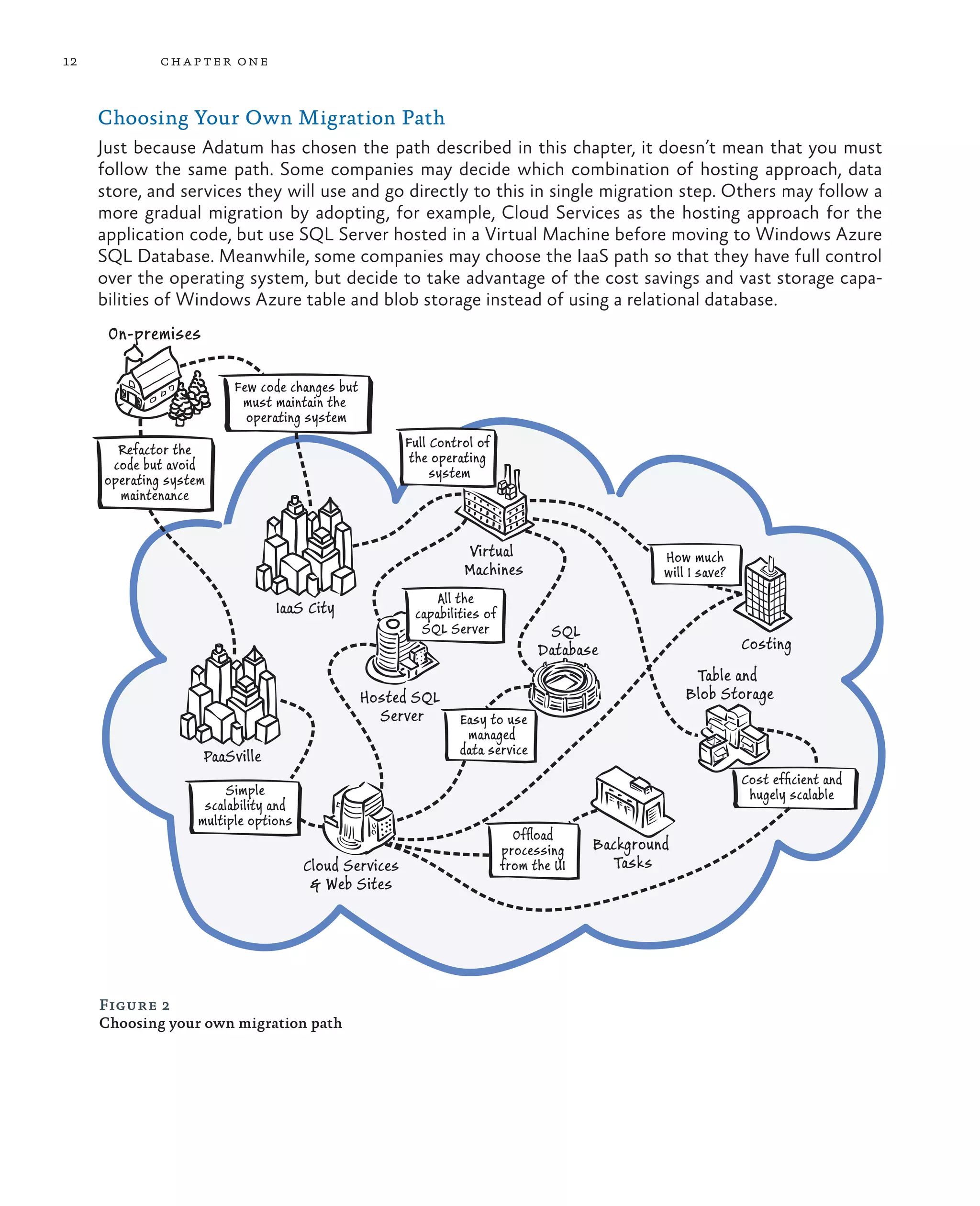
     Just because Adatum has chosen the path described in this chapter, it doesn’t mean that you must
     follow the same path. Some companies may decide which combination of hosting approach, data
     store, and services they will use and go directly to this in single migration step. Others may follow a
     more gradual migration by adopting, for example, Cloud Services as the hosting approach for the
     application code, but use SQL Server hosted in a Virtual Machine before moving to Windows Azure
     SQL Database. Meanwhile, some companies may choose the IaaS path so that they have full control
     over the operating system, but decide to take advantage of the cost savings and vast storage capa-
     bilities of Windows Azure table and blob storage instead of using a relational database.
      On-premises

                         Few code changes but
                          must maintain the
                           operating system

       Refactor the                                    Full Control of
      code but avoid                                    the operating
     operating system                                       system
       maintenance


                                                                 Virtual                         How much
                                                                 Machines                        will I save?
                                                            All the
                                IaaS City               capabilities of
                                                         SQL Server              SQL
                                                                                Database                        Costing
                                                                                                      Table and
                                                Hosted SQL                                           Blob Storage
                                                  Server        Easy to use
                                                                 managed
                    PaaSville                                   data service
                                                                                                                Cost efficient and
                        Simple                                                                                   hugely scalable
                    scalability and
                   multiple options
                                                                            Offload
                                                                          processing    Background
                                      Cloud Services                      from the UI     Tasks
                                       & Web Sites


     Figure 2
     Choosing your own migration path
The A datum Scena rio            13


This is one of the major advantages with Windows Azure – you choose which of the wide range of
services it offers are most suitable for your own scenario and requirements. No two applications are
the same. Throughout this guide you will see more details of the capabilities and limitations of each
hosting option, and how to make the right choice for your applications.


More Information
All links in this book are accessible from the book’s online bibliography available at:
http://msdn.microsoft.com/en-us/library/ff803373.aspx.
Overview of Windows Azure features.
For an overview of the data storage options available in Windows Azure, “Data Storage Offerings on
the Windows Azure Platform.”
Introducing Windows Azure includes a list of features.
Windows Azure Service Level Agreements.
“Windows Azure Websites, Cloud Services, and VMs: When to use which?”
Windows Azure Service Bus.
The guide “Developing Multi-tenant Applications for the Cloud” explores techniques for building new
applications specifically designed for run in Windows Azure.
The guide “Building Hybrid Applications in the Cloud ” describes the scenarios for and usage of many
Windows Azure features.
2                                             Getting to the Cloud


This chapter describes the first step the developers at Adatum took on their migration path to the
cloud. It discusses the contributing factors for the decision they made to use an IaaS approach for
hosting the aExpense application in Windows Azure, and explores the process they followed to
achieve this. The chapter also discusses issues related to application lifecycle management (ALM),
specifically for scenarios that use an IaaS hosting approach.
This first migration step is concerned only with getting the application to work in the cloud without
losing any functionality. However, it does address some “big” issues such as security and data storage
that are relevant to almost every cloud-based application.
This chapter doesn’t explore how to improve the application by exploiting the extended set of fea-
tures available in Windows Azure. In addition, the on-premises version of the application that you’ll
see is not complete; for example, it does not support uploading receipt images or interaction with
Adatum’s other on-premises systems. The following chapters discuss how to improve the application
by using other features available in Windows Azure, and you’ll see more functionality added to the
application. For now, you’ll discover how Adatum takes its first steps into the cloud.


                                                                                                         15
16        ch a pter t wo


                                   The Premise
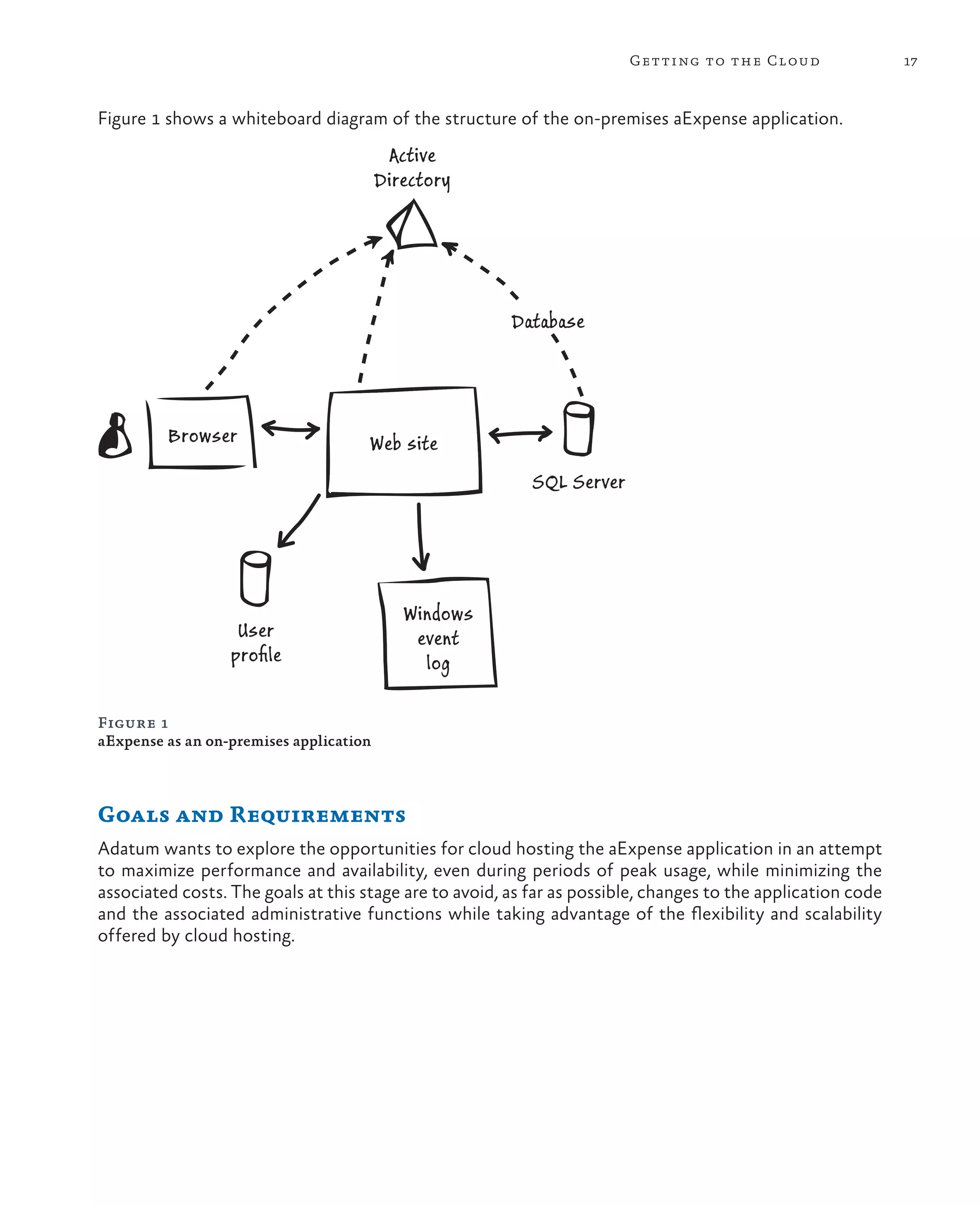
                                   The existing aExpense application is a business expense submission
                                   and reimbursement system used by Adatum employees. The applica-
                                   tion is built with ASP.NET 4.0, deployed in Adatum’s data center, and
                                   is accessible from the Adatum intranet. The application relies on Ac-
                                   tive Directory to authenticate employees. It also uses Active Direc-
                                   tory to access some of the user profile data that the application re-
                                   quires; for example, an employee’s cost center and manager. Other
                                   user profile data is accessed using the ASP.NET profile provider and
                                   membership provider. Because aExpense uses Windows authentica-
     Integration with Active
                                   tion, it recognizes the credentials used when employees log on to the
     Directory really simplifies   corporate network and doesn’t need to prompt them again for their
     the task of managing this     user names and passwords.
     application. The aExpense
     application leverages
                                   The aExpense access control rules use application-specific roles such
     Active Directory’s access     as “Employee” and “Manager” that are accessed through the ASP.
     management facilities, and    NET role management provider. Access control is intermixed with
     the cost center and manager   the application’s business logic. It uses a simple SQL Server database
     information that Adatum       for storing application data, and LINQ to SQL as its data access
     stores in Active Directory.
                                   mechanism. The application is configured to connect to SQL Server
                                   by using integrated security, and the website uses a service account
                                   to log on to the database. The aExpense application also uses the
                                   Enterprise Library Logging Application Block and the Exception
                                   Handling Application Block for logging diagnostic information from
                                   the application.
Getting to the Cloud                  17


Figure 1 shows a whiteboard diagram of the structure of the on-premises aExpense application.
                                          Active
                                         Directory


                                                        Database


         Browser                     Web site
                                                           SQL Server


                                            Windows
                   User                      event
                  profile                      log

Figure 1
aExpense as an on-premises application


Goals and Requirements
Adatum wants to explore the opportunities for cloud hosting the aExpense application in an attempt
to maximize performance and availability, even during periods of peak usage, while minimizing the
associated costs. The goals at this stage are to avoid, as far as possible, changes to the application code
and the associated administrative functions while taking advantage of the flexibility and scalability
offered by cloud hosting.
18         ch a pter t wo


                                Therefore, as the first step in the migration path, Adatum has decided
                                to deploy the aExpense application to the cloud using an IaaS ap-
                                proach. This will avoid any requirement to refactor the application or
                                to make significant changes to the code because it can continue to run
                                on a hosted server running Windows Server. However, the developers
                                and administrators must still consider what, if any, changes are re-
                                quired to the application; and the impact of moving it from their on-
                                premises datacenter to the cloud.
                                Adatum chose to use Windows Azure because of its wide range of
     Your decision to move an   capabilities for hosting both the application code and the data, and
     application to the cloud   the availability of additional Windows Azure services that are appro-
     should be based on clear
     goals and requirements.
                                priate to meet the application’s requirements. For example, Adatum
                                wants to continue to use Active Directory for authenticating users,
                                and be able to integrate the application with its existing on-premises
                                System Center Operations Manager.
                                Adatum also wants to be able to deploy the application in a secure
                                and repeatable way to a staging environment first, and then to a
                                production environment when testing is complete. After deploy-
                                ment, Adatum’s administrators want to be able to scale the applica-
                                tion to cope with varying usage patterns, monitor its execution, and
                                be able to adjust configuration settings to fine tune it.


                                Overview of the Solution
                                This section of the chapter explores the high-level options Adatum
                                had for migrating the aExpense application during this step. It shows
                                how Adatum chose an appropriate hosting mechanism for the applica-
                                tion and for the data it uses, and how Adatum can establish connectiv-
                                ity between the cloud-hosted servers and its on-premises corporate
                                network.

                                Options for Hosting the Application
                                Having decided on an IaaS approach for this initial step, Adatum must
                                consider the hosting options available. Windows Azure provides the
                                following features for IaaS deployment:
                                •	 Virtual Machine. This feature allows you to provision a virtual
                                  machine in the cloud with a choice of operating systems, and
                                  with a range of options for preinstalling a database server on the
                                  virtual machine. Alternatively, you can upload a prebuilt VM to
                                  the cloud. You can use it to run any software compatible with
                                  your chosen operating system, and configure the operating
                                  system and services as required. Virtual Machine instances
                                  maintain state between restarts, and so are suitable for use when
                                  software or services you install require state to be maintained.
Getting to the Cloud                 19


•	 VM Role. This feature allows you to host your own customized instance of the Windows Server
   2008 R2 Enterprise or Windows Server 2008 R2 Standard within a Windows Azure data center.
   However, the role does not save state when Windows Azure restarts or redeploys it as part of
   the operations executed automatically within the data center (such as when the role fails), and
   so it is not suitable for scenarios where the software or services you install require state to be
   maintained.
•	 A set of associated services that provide connectivity and additional functionality for IaaS
   applications. These services include Windows Azure Connect and Virtual Networks for providing
   connectivity to hosted servers, and functional services such as claims-based access control,
   Service Bus relay and messaging, database synchronization, and caching.
The major difference between Windows Azure Virtual Machines and the VM role is the behavior
when the machine or role is reinitialized. This can occur following a hardware failure, or auto-
matically as the Windows Azure internal systems manage allocation of resources by moving in-
stances to a different physical server.
Any changes to a virtual machine, such as installing applications or configuring the operating system,
are persisted when the instance is reinitialized – this is what is meant by the machine being able to
maintain its state. VM role instances do not persist these changes. Any changes such as installing ap-
plications or configuring the operating system are lost and the role will return to the originally de-
ployed configuration when reinitialized (although changes are persisted across restarts as long as the
VM role is not reinitialized).
This means that you must redeploy the complete VM role image each time you need to make changes
to it. When you use a virtual machine you do not need to do this. You can install and update applica-
tions on the virtual machine without needing to redeploy it every time, which makes it an attractive
option for both testing and production deployment.
       For more information about how Windows Azure manages maintaining state in virtual machines,
       see the section “Storing and Backing Up Virtual Machines” later in this chapter.
After considering the available application hosting options, Adatum chose to host the application in
a Windows Azure Virtual Machine at this stage of their migration process. Developers and testers will
be able to deploy to virtual machine instances in exactly the same way as when using an on-premises
server. Administrators and operators will be able to manage the live production server and deploy
applications to it just as they do with on-premises servers.

Affinity Groups
When you first create namespaces and instances of Windows Azure services, you must specify the
location or datacenter where they will be deployed. However, for some services you can specify only
a region rather than a specific datacenter. Therefore, to ensure that elements of your application (such
as the compute and storage services) are co-located in the same datacenter as close together as pos-
sible you specify an affinity group.
20         ch a pter t wo


                                     When you specify an affinity group, which must be done when creat-
                                     ing the services (you cannot move services into a different affinity
                                     group after they are created), Windows Azure will attempt to locate
                                     all of the services in the group in the same cluster in the same data-
                                     center. This will maximize performance, reduce latency, and eliminate
                                     unnecessary data transfer costs.
                                            For information about using affinity groups, see “Importance of
                                            Windows Azure Affinity Groups.”
     You don’t need a virtual        Adatum will define an affinity group when it creates the virtual net-
     network to use an               work that aExpense uses to access the on-premises Active Directory
     affinity group. You can         service. Adatum will also add all the virtual machines to the same af-
     create affinity groups
     independently of virtual
                                     finity group when it creates them.
     networks.
                                     Availability Sets
        You must decide what         In Windows Azure, fault domains are a physical unit of failure. Each
        level of reliability         virtual machine in an availability set is deployed to a different fault
        you need for your            domain in Windows Azure. This helps to ensure that your application
        application and how
        much you are willing
                                     stays available during network failures, local disk hardware failures,
        to pay.                      and other outages.
                                     However, improving the reliability and responsiveness of the aExpense
                                     application by deploying multiple copies of the virtual machines in an
                                     availability set will add to the running costs incurred by Adatum.

                                     Options for Hosting the Data
                                     The existing on-premises aExpense application stores its data in SQL
                                     Server. Therefore, Adatum also had to consider how to provide a
                                     comparable capability for the application when hosted in the cloud.
                                     Adatum has several options:
                                     •	 Keep the data on-premises. In theory this is a simple to imple-

     There may be specific
                                       ment option. The cloud-hosted application would communicate
     reasons why you want to           with the on-premises database over the Internet. However, it
     keep your data on-premises,       raises several issues, such as the security of the connection and
     such as physical security,        the requirement to expose the database server outside of Ada-
     regulatory requirements,          tum’s internal network. One approach to resolve this would be to
     specific management
     or analysis processes,
                                       use Windows Azure Connect or Virtual Networks to provide a
     and more. Hosting the             private secure connection. Even with this approach, there are
     application in the cloud          issues around the additional connection latency and the possibil-
     while using an on-premises        ity of intermittent connectivity failures, which would require
     database still allows you         extensive caching in the application and a connection retry
     to take advantage of the
     intrinsic capabilities of         mechanism.
     Windows Azure such as
     reliability, scalability, and
     elasticity.
Getting to the Cloud               21


•	 Deploy the data in a hosted SQL Server. This approach would
   require Adatum to deploy a separate virtual machine to run SQL
   Server, although this can be easily provisioned using the tem-
   plates available in the Windows Azure portal. Connection latency
   and intermittent connectivity would be minimized by deploying it
   in the same datacenter as the application.
•	 Deploy the data in Windows Azure SQL Database. This
   approach would require Adatum to subscribe to the managed
   data service offered by Windows Azure, and accept the few
   limitations that it imposes when compared to the full version
   of SQL Server. However, it is a viable and useful option that
   Adatum will consider in a future migration step. Chapter 4,
   “Moving to Windows Azure SQL Database,” of this guide looks
   in detail at the differences between SQL Server and Windows
   Azure SQL Database, and the factors that affect Adatum’s choice
   at that stage of the migration process.
                                                                          You do not have to use
•	 Deploy the data in Windows Azure table and blob storage.               Windows Server and SQL
   This approach would require Adatum to rewrite the data access          Server when you choose
   code in the application to accommodate the differences between         the IaaS approach for your
                                                                          database. You can install a
   the relational, SQL-based data access approach and the less            range of operating systems
   structured storage mechanisms used in Windows Azure storage.           and database servers in
   However, there are some specific advantages offered by Win-            a hosted virtual machine
   dows Azure storage such as lower cost and vast storage capabil-        using the templates
   ity, and Adatum will consider this in a future migration step. At      available in the Windows
                                                                          Azure portal. For example,
   this stage Adatum’s goal is to minimize the changes required to        you may decide to use
   the code. Chapter 7, “Moving to Windows Azure Table Storage,”          MySQL running on Linux
   of this guide looks in detail at the differences between relational    as an alternative to SQL
   databases and Windows Azure storage.                                   Server running on Windows
•	 Deploy the data in a custom store or repository. You can deploy        Server.

   a range of operating systems and software on a hosted Virtual
   Server, and so you can continue to use you existing data stores
   and repositories. For example, if Adatum used a custom or third
   party data storage mechanism based on a non-standard file
   format, or even just use a simple file server, it could be deployed
   on Windows Server or Linux on a virtual machine. However, as
   Adatum uses SQL Server running on Windows Server in its
   on-premises datacenter, this option is not applicable to its
   migration strategy.
       Chapter 4, “Moving to Windows Azure SQL Database,” describes
       the differences between using a hosted SQL Server and Windows
       Azure SQL Database, and how the developers at Adatum chose a
       data storage mechanism for the aExpense application in the
       subsequent steps of their migration path.
22            ch a pter t wo


                                         After considering the available data storage options, Adatum chose to
                                         host the data in SQL Server running on a separate virtual machine in
                                         the same datacenter as the application.

                                         Connectivity for Authentication
                                         Adatum’s aExpense application relies on connectivity to the Adatum
                                         corporate domain to authenticate users against Active Directory, and
                                         Adatum wants to maintain the existing mechanism when migrating
                                         the application to the cloud. This will avoid the need to make changes
                                         to the code while Adatum evaluates the results of the first step in its
                                         migration path. In future migration steps Adatum will consider chang-
                                         ing the authentication approach to use another mechanism, such as
                                         claims and federated identity.
     Adatum must establish               However, to continue to use Active Directory for authentication
     connectivity between its virtual    when the application resides in the cloud, Adatum must establish con-
     machines in the cloud and its       nectivity between the application and its on-premises corporate do-
     on-premises Active Directory        main network. One of the advantages of Windows Azure as a hosting
     server to continue to use           environment is that it includes services to enable connectivity that is
     Windows Authentication when         safe, secure, and easy to set up.
     it deploys to a virtual machine     Adatum has two options for establishing this connectivity between
     in the cloud. The current version   the cloud-hosted application and its corporate domain network:
     of aExpense also relies on
                                         •	 Windows Azure Connect. This technology allows administrators
     Windows Authentication to
     connect to SQL Server.                 to set up a direct connection between a cloud-hosted virtual
                                            machine (or a cloud services role) and an on-premises computer.
                                            It relies on endpoint software installed in the remote and on-
                                            premises computers, which establishes a secure connection across
                                            the Internet. Connect does not require ports to be opened in the
                                            corporate firewall, and will usually work when network address
                                            translation (NAT) routing is in use. It is easy to set up and man-
                                            age, and provides a secure connection.
                                         •	 Windows Azure Virtual Networks. This technology uses the
                                            virtual private network (VPN) approach to establish connectivity
                                            across computers and hosted services in Windows Azure and
                                            on-premises. Computers, cloud-hosted virtual machines, and
                                            cloud service roles are configured on the network in the same
                                            way as when running on premises, and a VPN router on the
                                            corporate network establishes connectivity between the network
                                            segments. Effectively, this extends the corporate network into
                                            the cloud, allowing existing services and applications to be used
                                            with no special software installation required on the on-premises
                                            computers. Virtual networks are ideally suited to more complex
                                            scenarios where scalability and additional control are required.
Getting to the Cloud               23


       Virtual networks are typically used where you need to connect
       virtual machines and cloud service roles together, for connecting
       between the cloud and on-premises, or when you need a virtual
       machine or a role to maintain the same IP address when
       redeployed. The video presentation “Migrating Applications to
       Windows Azure Virtual Machines” contains a wealth of
       information about setting up virtual machines and connecting
       then using Windows Azure Virtual Networks.
Both of these options will allow Adatum to continue to use Active
Directory for authentication. However, there are some limitations
when using Windows Azure Connect. The Active Directory server
must also host DNS for the domain (the Connect service cannot be
used where a separate DNS server is used), and administrators will
need to install the Connect service endpoint software on the Active
Directory computer. If this is not an acceptable scenario, Adatum can
configure the cloud-hosted virtual machine as part of a Windows
Azure Virtual Network. Although this is more complex to configure,
it removes the requirement for installing endpoint software.
An alternative approach Adatum could take would be to install Active
Directory on a virtual machine running in Windows Azure, and con-
nect it to their on-premises Active Directory. However, this means
that Adatum must pay for the additional Windows Azure resources it
uses. In future releases of Windows Azure, the Access Control service
it provides will be extended to allow integration with an on-premises
Active Directory.                                                               We could also use Windows
                                                                                Azure Connect to link the
                                                                                cloud-hosted application
Session Support and Load Balancing                                              to an on-premises database
                                                                                by installing the Connect
Applications that run in an on-premises datacenter often rely on in-            service endpoint software
trinsic features of the network that are not supported in the cloud,            on the database server
and this can affect the way that the application works when deployed            computer if we needed
to the cloud. A typical example related to the aExpense application is          to keep that database on-
the way that Adatum implements an on-premises web farm by using                 premises. Unlike opening
                                                                                a public endpoint in SQL
Windows Network Load Balancing (NLB), and the impact this has on                Server, the Connect service
the way that it stores users’ session data.                                     provides a secure channel
The on-premises aExpense web application uses the built-in ASP.NET              between the application
                                                                                and the database. However,
in-memory session mechanism to support sessions for each user. This             in many organizations
means that session data is only available on the server that initiates          installing this type of
the session, and so users must be routed to the same server on each             software on the database
request during a session. Adatum configured affinity for NLB in their           server may be frowned
datacenter so that this occurs automatically.                                   upon, and this may
                                                                                preclude you from using
       For more information about NLB see “Overview of Network Load             an on-premises database
       Balancing.”                                                              with your cloud-hosted
                                                                                applications.
24         ch a pter t wo


                                    However, affinity is not directly supported in Windows Azure (al-
                                    though it can be implemented with a plug-in or with custom code).
                                    If Adatum wants to run multiple instances of the virtual machine
                                    that hosts the eExpense application in Windows Azure, the develop-
                                    ers must change the way session data is stored so that it is available
                                    to all instances. For example, they could switch to using the ASP.
                                    NET SQL Server session store provider, Windows Azure storage, or
                                    use Windows Azure Caching. Chapter 3 of this guide, “Moving to
                                    Windows Azure Cloud Services,” explores these options and shows
                                    how Adatum’s developers implemented session storage during the
     When you move an               next stage of their migration strategy.
     application to the cloud
     you must consider the          At the moment Adatum is most concerned with getting the applica-
     impact of running multiple     tion running in the cloud to explore the possibilities, validate usability
     instances in an environment    and performance, and gauge user acceptance. Adatum wants to avoid
     that does not support some
     of the intrinsic features of   making changes to the code. Therefore, in this step of its migration
     your own network. Session      plan, Adatum will run only one instance of the virtual machine that
     management is a typical        hosts the aExpense application in the cloud.
     example.
                                           For information about how to enable load balancing between
                                           multiple instances of Virtual Machines in Windows Azure see the
                                           section “Load balancing virtual machines” in the topic “Virtual
                                           Machines.” The blog post “Setting up a webfarm using Windows
                                           Azure Virtual Machines” provides a walkthrough of the
                                           procedure.

                                    Integrating with On-Premises Services
                                    The existing on-premises aExpense application integrates with other
                                    applications within Adatum’s corporate network. For example, it reads
                                    and writes text files that are used to import and export expenses data
                                    for processing by Adatum’s other on-premises systems. Therefore
                                    Adatum must consider how it can establish the equivalent functional-
                                    ity when the application is hosted in the cloud.
                                           The Visual Studio solution BeforeAzure discussed in this chapter
                                           does not include this data import and export functionality.
                                           The Visual Studio solution Azure-TableStorage discussed in
                                           Chapter 7, “Moving to Windows Azure Table Storage,” shows
                                           how Adatum added the data export feature to the aExpense
                                           application.
                                    When using IaaS and virtual servers in the cloud, the application can
                                    write to the virtual disk in the same way as when running on a physical
                                    server. Administrators can enable direct connectivity with the ma-
                                    chine by using Windows Azure Connect or a Windows Azure Virtual
                                    Network to allow access to disk files stored on the drives of the re-
                                    mote server.
Getting to the Cloud                  25


Alternatively, Adatum’s developers could change the code so that it
serializes the files and stores them in either Windows Azure storage
or in the database. As the files will be read and generated remotely,
and streamed to and from the in-house application over the Internet,
this is not an issue because they will need to be serialized anyway and
can be reconstructed on the on-premises server.
Both of the connectivity options, Windows Azure Connect and
Windows Azure Virtual Network, allow Adatum to connect the
cloud-hosted virtual machines running the application and SQL
Server to their corporate domain. This means that existing tools and       A virtual machine or a
                                                                           VM role or can be used
practices will continue to work without changes being required. For        simply as a file server in the
example, administrators can browse the remote machines, use data-          cloud. When connected
base management tools, run existing scripts, and use the same              through Windows Azure
monitoring and management applications. For more details of how            Connect or Windows Azure
Adatum’s administrators will manage the remote servers and applica-        Virtual Networks it will be
                                                                           accessible from on-premises
tion, see the section “Management and Monitoring” later in this            computers and by other
chapter.                                                                   applications running in the
                                                                           cloud.

Inside the Implementation
Now is a good time to walk through the process of migrating aEx-
pense into a cloud-based application in more detail. As you go through
this section, you may want to download the Microsoft Visual Studio
development system solution from http://wag.codeplex.com/. This so-
lution contains an implementation of the aExpense application (in the
BeforeAzure folder) as it is when running on-premises. If you are not
interested in the mechanics, you should skip to the next section.

Profile Data
Before the migration, aExpense used the ASP.NET profile feature to
store application-specific user settings. Adatum tries to avoid custom-
izing the schema in Active Directory, so aExpense stores a user’s pre-
ferred reimbursement method by using the profile feature. The default
profile provider stores the profile properties in a database.
Using the profile feature makes it very easy for the application to
store small amounts of user data. Adatum enabled the profile feature
and specified the properties to store in the Web.config file.

                                                                           We don’t like to customize
                                                                           the Active Directory schema
                                                                           if we can possibly avoid it.
                                                                           Schema changes have far-
                                                                           reaching implications and
                                                                           are difficult to undo.
26           ch a pter t wo


                                      XML
                                      <profile defaultProvider="SqlProvider">
                                        <providers>
                                          <clear />
                                          <add name="SqlProvider"
                                                 type="System.Web.Profile.SqlProfileProvider"
                                                 connectionStringName="aExpense"
                                                 applicationName="aExpense" />
                                        </providers>
                                        <properties>
                                          <add name="PreferredReimbursementMethod" />
                                        </properties>
                                      </profile>

                                    Then developers can access a profile property value in code like this.

                                      C#
                                      var profile = ProfileBase.Create(userName);
                                      string prm =
                                          profile.GetProperty<string>("PreferredReimbursementMethod");

                                    After migration, aExpense continues to use the profile system to store
                                    the preferred reimbursement method for each user.
                                    The application also uses ASP.NET membership to store the users
                                    preferred name, and ASP.NET role management for the custom roles
                                    used in the aExpense application. You can see how these are config-
                                    ured in the Web.config file, and how they are accessed in the User-
                                    Repository class.

                                    Connecting to the Hosted SQL Server
     Connecting to a hosted SQL     Before the migration aExpense stored application data in a SQL
     Server running on a virtual    Server database running on-premises. In this first phase, the team
     machine instead of a SQL       moved the database to a hosted SQL Server running on a virtual ma-
     Server on-premises requires    chine. The data access code in the application remains unchanged. The
     only a configuration change.   only thing that needs to change is the connection string in the Web.
                                    config file.
Getting to the Cloud                27


  XML
  <add name="aExpense" connectionString=
    "Data Source={Server Name};
      Initial Catalog=aExpense;
      Integrated Security=True;
      Encrypt=yes;"
    providerName="System.Data.SqlClient" />

This connection string uses the same SQL Server security mode as the
on-premises solution. To continue using Windows Authentication
mode, both the virtual machines must be able to access the Adatum
on-premises Active Directory service. The server name must be set to
the server name of the virtual machine where SQL Server is hosted.
Adatum also chose to encrypt the connection to SQL Server; for more
information see “Encrypting Connections to SQL Server “ on MSDN.
       If you choose to use SQL Server authentication instead of
       Windows authentication to connect to SQL Server, your
       connection string will include a user name and password in
       plain text. In this scenario, you should consider encrypting
       your SQL connection string in the Web.config file; to do this,
       you can use the Pkcs12 Protected Configuration Provider. For
       more information, see Chapter 4, “Moving to Windows Azure
       SQL Database.”
The connection string also specifies that all communications with
Windows Azure SQL Database are encrypted. Even though your ap-
plication may reside on a computer in the same data center as the
server hosting SQL Server, you should treat that connection as if it
was using the internet.

Database Connection Timeouts and Dropped Connections
                                                                             You can also add protection
If a connection to SQL Server times out or drops while your application      to your hosted SQL
is using the connection, you should immediately try to re-establish the      Server by configuring the
connection. If possible, you should then retry the operation that was in     Windows Firewall on the
progress before the connection dropped, or in the case of a transaction,     virtual machine so that it
                                                                             allows only a specific range
retry the transaction. It is possible for a connection to fail between       of permitted IP addresses
sending a message to commit a transaction and receiving a message that       to connect to your database
reports the outcome of the transaction. In this circumstance, you must       server. However, this is
have some way of checking whether the transaction completed suc-             complicated by the fact
cessfully in order to determine whether you must retry it.                   that you may not always be
                                                                             able to determine ahead of
                                                                             time the IP address of your
                                                                             virtual machine instance(s).
                                                                             For example, when you
                                                                             redeploy a virtual machine,
                                                                             the IP address may change.
28         ch a pter t wo


                                    When using a hosted SQL Server, you can continue to use the same
                                    techniques as you do in on-premises applications. As long as the
                                    virtual machines hosting the application and the SQL Server are co-
                                    located in the same datacenter, connection failures should arise no
                                    more often than when running in your own datacenter. However, it
                                    is useful to consider implementing a mechanism that can alleviate
                                    issues with failed connections. In Chapter 4, “Moving to Windows
                                    Azure SQL Database,” of this guide you will see how Adatum chose
                                    to use the Enterprise Library Transient Fault Handling Block to man-
                                    age connection retries when connecting to the database.

                                    Deploying the aExpense Application to Windows Azure
                                    Virtual Machines
                                    This section outlines the steps that Adatum took to deploy the
                                    aExpense application to two Windows Azure virtual machines: one
                                    for the web application and one for the SQL Server database. For a
                                    more detailed description of the steps, see the Hands-on Labs that are
                                    available for this guide.

                                    Deploying the Web Application
                                    1.	 Create a virtual network to enable connectivity to the Adatum
                                        on-premises Active Directory server.
                                    2.	 Create a virtual machine based on the Windows Server image
                                        available in the portal and ensure that the virtual machine is part
                                        of the virtual network.
                                    3.	 Set up remote desktop connectivity to enable access to the
                                        virtual machine from on-premises.
                                    4.	 Join the machine to the Adatum Active Directory.
                                    5.	 Install .NET 4 on the virtual machine.
     By configuring appropriate
     endpoints for your virtual     6.	 Install and configure the dependencies of the aExpense applica-
     machine in the Windows             tion: install Internet Information Server (IIS), enable Windows
     Azure portal, you can              Communication Foundation in IIS, enable Application Pool User
     improve security by limiting
     its publicly available TCP
                                        Profile in IIS, install certificates required for HTTPS, and config-
     ports.                             ure HTTPS in IIS.
                                    7.	 Copy the application code to the server, and add a web applica-
                                        tion in IIS.
Getting to the Cloud             29


Deploying the Database
1.	 Create a virtual machine that includes SQL Server. Adatum did this
    by using an image available in the portal that includes SQL Server
    2012, but it could have installed a different version. This virtual
    machine should be part of the same virtual network and affinity
    group as the virtual machine that hosts the web application.
2.	 Set up remote desktop connectivity to enable access to the
    virtual machine from on-premises.
3.	 Join the machine to the Adatum Active Directory.
4.	 Open port 1433 in Windows Firewall to allow access to the
                                                                           Adatum is using a virtual
    database (you may want to use a different port to help hide SQL        network to enable
    Server), and enable network connectivity in SQL Server for the         connectivity to the on-
    TCP/IP protocols.                                                      premises services that
5.	 Migrate the on-premises database used by the aExpense applica-         the aExpense application
                                                                           uses. The virtual network
    tion to the SQL Server installation in the virtual machine. Ensure     is not needed to enable
    that the domain account used by the application pool on the web        connectivity between the
    server has access to the database.                                     two Windows Azure virtual
                                                                           machines.
During testing the development team at Adatum is working with
sample data. However, the developers must consider how they will
deploy both test and live data to the SQL Server instances running
in the hosted virtual machines. To migrate an existing database
schema and data to a hosted SQL Server, Adatum can use SQL
Server Management Studio. The SQL Server Integration Service and
other export tools it contains allow administrators to connect to
both the local and the Windows Azure hosted servers to create a
copy of the database and its data in the hosted server.
An alternative is to export the schema—and, if required, the data—as
a Transact-SQL script, and then connect to the remote server using
Remote Desktop Protocol (RDP) and run the script using SQL Server
Management Studio or the command line on that server. Using a script
allows Adatum to include this as part of the build process for the test
server running in Windows Azure staging, so that the application can
be tested without using the live data.
30        ch a pter t wo


                                 Testing, Deployment, Management, and
                                 Monitoring
                                 This section discusses application life cycle management topics for
                                 applications hosted in Windows Azure. Although specific require-
                                 ments will vary between applications and across organizations, every-
                                 one develops applications, then tests them, and finally deploys them.
                                 Typical factors that must be considered are where applications should
                                 be tested, and how the deployment process should be managed to
                                 make sure that only authorized personnel have access to the live pro-
                                 duction environment.

                                      In this chapter the focus is on the specific scenarios
                                      related to IaaS deployment using hosted virtual machines.
                                      In subsequent chapters you will find additional information
                                      related to the subsequent stages of the migration process
                                      Adatum followed. If you choose to use the Windows
                                      Azure VM role instead of virtual machines, you will need
                                      to establish a testing and deployment procedure that
                                      encompasses redeploying the server images each time
                                      you change the application or reconfigure the server.

                                 Adatum has a well-defined set of existing processes for deploying ap-
                                 plications to its on-premises servers. The development and testing
                                 teams use separate servers for testing, staging, and production. When
                                 the development team releases a new version of the application, its
                                 progression through the testing, staging, and production environ-
                                 ments is tightly controlled. Very rarely, though, small fixes, such as
                                 updating the text on an ASPX page, are applied directly to the produc-
                                 tion servers.
                                 Adatum has a number of goals for application life cycle management
     We want to have a clearly   for Windows Azure. Adatum wants to maintain its clearly defined
     defined process for         process for deploying applications to Windows Azure, with clearly
     deploying applications to   defined roles and responsibilities. More specifically, it wants to make
     Windows Azure that allows   sure that access to the live environment is only available to a few key
     us to control and trace     people, and that any changes to the live environment are traceable.
     operations carried out on
     our subscriptions.                 You can use the Windows Azure API to get a list of create,
                                        update, and delete operations that were performed on a
                                        subscription during the specified timeframe. For more
                                        information, see “List Subscription Operations.”
Getting to the Cloud                 31


In addition, Adatum wants to be able to roll back the live environment
to a previous version if things go wrong. In a worst-case scenario, they
would like to be able to pull the application back to be an on-premis-
es application.

Testing Applications for Virtual Machine Deployment
One of the major advantages of using virtual machines to test and
deploy applications is that the application lifecycle is identical to that
when using your own on-premises datacenter. Nothing needs to
change; all of your existing procedures and practices continue to work
in the same way. The only difference is that the servers are no longer
in your own datacenter, but located in a Windows Azure datacenter.
Other than the increase in network latency and throughput compared
to a local network, developers, testers, and operators should be un-
aware of any differences.
Developers can run unit tests and ad-hoc tests on their local comput-
ers. The on-premises build server also runs a suite of tests as a part of
the standard build process. The application can take its data from a
local server running a test copy of the SQL Server database for the
aExpense application. This is no different from the normal develop-
ment practices for on-premises applications.
For final testing to confirm correct operation, the application is de-
ployed to a test environment consisting of one or more Windows
Azure virtual machines. While the runtime environment in a virtual
machine is identical to a local Windows Server installation, testing in
Windows Azure ensures that the application works correctly in an
environment that uses the same network and infrastructure as the live
Windows Azure runtime environment. Testers can change the con-                You should try to
nection string in the application so that it uses data stored in a SQL        ensure that your local
Server running on a virtual machine in Windows Azure.                         Windows Server
                                                                              testing environment is
                                                                              configured identically
Test and Production Environments                                              to your Windows
                                                                              Server virtual machines
Adatum wants to continue to be able to deploy an application to ei-
                                                                              in Windows Azure, and
ther a staging or a production area. This is a typical scenario where         has the same patches
new versions of applications are deployed first to the staging area and       installed.
then, at the appropriate time, deployed to the production area.
When using virtual machines and a virtual network, Adatum can pro-                  Because development
                                                                                    and testing staff
vide test and production (live) environments simply by configuring
                                                                                    don’t have access
network subnets, segments, and permissions so that only specific                    to the production
people can access each environment; just as it does in the existing                 environment, there’s
on-premises test and production environments.                                       no risk of accidentally
                                                                                    deploying to the live
                                                                                    environment.
32            ch a pter t wo


                                              The test and production applications use Windows authentication to
                                              connect to SQL Server. The test application connects to a test data-
                                              base server, while the production version uses a different server name
                                              in the connection string to connect to the live database in the produc-
                                              tion environment. The application pool in IIS runs under a different
                                              identity for test and production areas.
                                              Figure 2 summarizes the application life cycle management approach
                                              at Adatum. It uses a single virtual machine for the test environment,
                                              which connects to a virtual machine hosted SQL Server containing
                                              the test database. The production environment also uses a single vir-
                                              tual machine, which connects to a virtual machine hosted SQL Server
                                              containing the live database.

        By configuring the endpoints in the testing subscription to use non-standard ports you
        can reduce the chances that casual users will access the test version of the application.


                                                                                           Windows Azure


                                                                                             Production
            Users
                                                        Publish
                                                                                 Web Application           SQL Server
                                                                                 Virtual Machine           Virtual Machine
                                       Administrator

                                      Build
                                    Package
                                                        Test
                                                        local
                                         Build
                                         Server                                                     Test
                                                       Publish
           Source
           Control
           Manager                                                               Web Application           SQL Server
                                                                                 Virtual Machine           Virtual Machine

                                                                Test live
                            Test
                            local
                                                          Test
                                                          local

        Development                            Test

     Figure 2
     Adatum’s application life cycle management environment
Getting to the Cloud                 33


Even though there is a separation between on-premises and cloud-hosted environments, indicated by
the dashed line in Figure 2, keep in mind that this is just a logical division. The Windows Azure virtual
network that connects all the computers hides the division so that the virtual machines appear to
users and to automated software processes running on-premises as though they are part of the on-
premises network.

     You can deploy an application to your Windows Azure test environment just while you run
     the tests, but don’t forget that any time you do something in Windows Azure–even if it’s
     only testing–you will be charged for the virtual machines and for data transferred out of
     the datacenter. You can minimize data transfer costs by locating all your test virtual server
     instances in the same datacenter. However, when you use Windows Azure Virtual Ma-
     chine, you are billed even if the virtual machine is shut down because Windows Azure re-
     serves the resource for you. You should use PowerShell scripts to import and export your
     virtual machine settings, and delete the test virtual machines when you are not using them.


Management and Monitoring
Administrators at Adatum can connect to the virtual machines running the application and the SQL
Server using RDP, and manage them in exactly the same way as when the application and database
were installed in their local server room. All of the built-in Windows Server monitoring and manage-
ment facilities are available, and operate in the same way as when on-premises. The only likely differ-
ence will be additional latency through the use of the public Internet as the connectivity transport.
The on-premises version of aExpense uses the Logging Application Block and the Exception Handling
Application Block to capture information from the application and write it to the Windows event log.
Administrators can view these logs to obtain information about the application and the operating
system. They can also use tools such as Windows Performance Counters and Task Manager.
In Adatum’s case, automated monitoring of on-premises applications takes place using System Center
Operations Manager. By establishing connectivity between the hosted virtual machines and the on-
premises Operations Manager server, Adatum’s administrators can continue to monitor the hosted
servers in exactly the same way as when they were running on-premises.
34         ch a pter t wo


                                   Storing and Backing Up Virtual Machines
                                   When you create a virtual machine, the virtual hard disk (VHD) image
                                   is held in blob storage and is used to initialize the virtual machine. You
                                   can create a virtual machine from one of the standard templates avail-
                                   able in the Windows Azure Management Portal, in which case a copy
                                   of that template image is placed in a blob in your Windows Azure
                                   storage account. Alternatively, you can create the virtual machine by
                                   uploading your own VHD into blob storage.
                                   Once the VHD is in blob storage, you can initialize one or more vir-
                                   tual machines from it. When the virtual machine is running, any
     You can think of your         changes are replicated in the blob so that they are persisted when the
     virtual machines as           machine restarts. Blobs are automatically replicated three times for
     rehydrated instances          durability, and you can copy the blob to another location in your stor-
     of the VHDs stored
                                   age account (or to another storage account) to create a backup. You
     in Windows Azure
     blob storage. It’s easy       can also capture an image of a virtual machine and place it in blob
     to initialize a virtual       storage.
     machine from the
     stored VHD or capture                For more information about how Windows Azure stores
     a virtual machine to a               and manages VHDs and virtual machines, see “Data Series:
     VHD in much the same                 Exploring Windows Azure Drives, Disks, and Images.”
     way as you would
     when using an on-
                                   Managing Virtual Machine Instances
     premises hypervisor
     such as Windows               Adatum will need to manage the virtual machine instances it uses to
     Hyper-V.                      perform tasks such as stopping, starting, adding, and deleting in-
                                   stances, and for managing blob storage that holds the VHD images.
         We use scripts because    For example, the instances used for testing the application are charged
         it means that we
                                   even when not running, and so Adatum will need to remove these
         can reliably repeat
         operations. We’re also    when not in use. They can easily be reinitialized from the VHD image
         planning to enhance       held in Windows Azure blob storage when required.
         some of our scripts to
                                   There are three ways to access a Windows Azure environment to per-
         record when they were
         run, by whom, and         form management tasks such as this. The first is through the Windows
         what parameters were      Azure Management Portal, where a single Microsoft account has ac-
         used. You will see more   cess to everything in the portal. The second is by using the Windows
         details of how we use     Azure Service Management API, where API certificates are used to
         scripts in Chapter 3,
                                   access to all the functionality exposed by the API. The third is to use
         “Moving to Windows
         Azure Cloud Services,”    the Windows Azure Management or Node.js PowerShell cmdlets.
         of this guide.            Within Adatum, almost all operations that affect the test or produc-
                                   tion environment are performed using scripts based on the PowerShell
                                   cmdlets instead of the Management Portal.
Getting to the Cloud                35


Elasticity and Scaling
In addition to managing and monitoring the application, Adatum
wants to be able to scale the application to meet the additional load
it typically encounters during the last few days of each month. At
present, Adatum has deployed only a single instance of the application
and the database server. However, during the busy period administra-
tors can use the Windows Azure Management Portal or scripts to
change the number of instances deployed.
       As described earlier in this chapter, the on-premises version of the
       aExpense application uses in-memory session state management.
       Adatum recognizes that this limits the ability of the application
       to scale out across multiple virtual machines until it replaces the
       session state management with a web farm friendly solution, such
       as storing session state in the SQL Server database, in Windows
       Azure table storage, or in the Windows Azure caching service. We
       discuss these options in more detail in Chapter 3, “Moving to
       Windows Azure Cloud Services.”
The options available to Adatum for scaling the aExpense application
are to use a larger virtual machine at times when demand is high; how-
ever, this would require Adatum to briefly shut down the application
as it moved the application from one virtual machine to another. Al-
ternatively, if Adatum modifies the session state management to be
web farm friendly, it can scale the application out by adding addi-
tional virtual machines when demand is high. For example, they may
decide from the results of monitoring the performance and response
times that an additional two instances of the virtual machine hosting
the application should be available for the last three days of the
month, and then scale back to a single instance on the first day of the
following month.
At the time this guide was written, the additional costs for running
two extra small virtual machine instances for three days is less than
$20.00, and so for a total cost of under $ 250.00 per year Adatum can
make the aExpense application much more responsive during the busy
month-end period.

Isolating Active Directory                                                     When you scale out
The aExpense application uses Windows Authentication. Because                  using virtual machines in
                                                                               Windows Azure, you must
developers do not control the identities in their company’s enterprise         be careful to delete the
directory, it is sometimes useful to swap out Active Directory with a          virtual machines when you
stub during the development of your application.                               scale in again. You will be
                                                                               charged for virtual machines
                                                                               even if they are shut down
                                                                               in Windows Azure.
36             ch a pter t wo


     The on-premises aExpense application (before the migration) shows an example of this. To use this
     technique, you need to make a small change to the Web.config file to swap Windows Authentication for
     Forms Authentication and then add a simulated LDAP profile store to the application. Swap Windows
     Authentication for Forms Authentication with the following change to the Web.config file.

       XML
       <authentication mode="Forms">
         <forms name=".ASPXAUTH"
             loginUrl="~/SimulatedWindowsAuthentication.aspx"
             defaultUrl="~/default.aspx" requireSSL="true">
         </forms>
       </authentication>

     You need to add a logon page to the application that enables you to select the user that you want to
     use for testing. In aExpense, this page is known as SimulatedWindowsAuthentication.aspx.
     You also need to add a class that simulates an LDAP lookup for the Active Directory attributes that
     your application needs. In this example, the GetAttributes method simulates the LDAP query
     “&(objectCategory=person)(objectClass=user);costCenter;manager;displayName”.

       C#
       public static class SimulatedLdapProfileStore
       {
           public static Dictionary<string, string> GetAttributesFor(
               string userName, string[] attributes)
           {
               Dictionary<string, string> results;

                 switch (userName)
                 {
                     case "ADATUMjohndoe":
                         results = new Dictionary<string, string>
                         {
                             { "costCenter", "31023" },
                             { "manager", "ADATUMmary" },
                             { "displayName", "John Doe" }
                         };
                         break;

                     …
                 }

                 return results;
           }
       }


           These code samples come from the BeforeAzure solution in the downloadable solutions.
Getting to the Cloud              37


More Information
All links in this book are accessible from the book’s online bibliography available at:
http://msdn.microsoft.com/en-us/library/ff803373.aspx.
MSDN is a good starting point to learn more about deploying applications to Windows Azure.
The Windows Azure Manage Center contains links to plenty of resources to help you learn about
managing applications in Windows Azure and about Windows Azure Virtual Machines.
You can find out more about networks and connecting cloud hosted resources to on-premises
resources in the Networks topic on MSDN.
For a detailed guide to creating a Windows Azure Virtual Machine, see “Create a Virtual Machine
Running Windows Server 2008 R2.”
For a detailed guide to installing SQL Server on a Virtual Machine, see “Provisioning a SQL Server
Virtual Machine on Windows Azure.”
The Hands-on Labs that are available for this guide include a step-by-step guide to setting up Virtual
Machines, SQL Server, and Windows Active Directory. For more details, see the “Windows Azure
Guidance” site on CodePlex.
3                            Moving to Windows Azure
                                            Cloud Services


This chapter walks you through the second step Adatum took in migrating their aExpense application
to Windows Azure. You’ll see an example of how to take an existing business application, developed
using ASP.NET, and adapt it to run in the cloud using Windows Azure Cloud Services.


The Premise
At the end of the first migration step, Adatum had a version of the aExpense application that ran in
the cloud using the IaaS approach. When the team at Adatum developed this version, they kept as
much of the original application as possible, changing just what was necessary to make it work in
Windows Azure.
During this step in the migration, Adatum wants to evaluate changing to use a PaaS approach instead
of using the IaaS approach with virtual machines. Adatum also wants to address some issues not
tackled in the previous deployment. For example, Adatum’s developers are investigating adapting the
aExpense application to use claims-based authentication instead of Active Directory, which will re-
move the requirement to connect back to the corporate domain through Windows Azure Connect or
Virtual Networks.
Adatum also needs to consider other issues such as how to handle session state when there may be
multiple instances of the application running, and how to deploy and use configuration settings re-
quired by the application.


Goals and Requirements
In this phase, Adatum has a number of goals for the migration of the aExpense application to use a
PaaS approach. Further optimization of the application for the cloud, and exploiting additional fea-
tures of Windows Azure, will come later.


                                                                                                       39
40         ch a pter thr ee


                                        Adatum identified some specific goals to focus on in this phase. The
                                        aExpense application in the cloud must be able to access all the same
                                        data as the IaaS hosted version of the application in the previous mi-
                                        gration step. This includes the business expense data that the applica-
                                        tion processes and the user profile data, such as a user’s cost center
                                        and manager, which it needs in order to enforce the business rules in
                                        the application. However, Adatum would also like to remove any re-
                                        quirement for the aExpense application to call back into its on-
                                        premises network from the cloud, such as to access the existing Active
     We want to avoid having            Directory service.
     to make any calls back             A second goal is to make sure that operators and administrators have
     into Adatum from the
     cloud application. This
                                        access to the same diagnostic information from the cloud-based ver-
     adds significantly to the          sion of aExpense as they have from the on-premises and IaaS hosted
     complexity of the solution.        versions of the application.
                                        The third goal is to continue to automate the deployment process to
                                        Windows Azure. As the project moves forward, Adatum wants to be
                                        able to deploy versions of aExpense to Windows Azure without
                                        needing to manually edit the configuration files, or use the Windows
                                        Azure Management Portal. This will make deploying to Windows
                                        Azure less error-prone, and easier to perform in an automated build
                                        environment.
                                        A significant concern that Adatum has about a cloud-based solution
                                        is security, so a fourth goal is to continue to control access to the
                                        aExpense application based on identities administered from within
                                        Adatum, and to enable users to access the application by using their
                                        existing credentials. Adatum does not want the overhead of managing
                                        additional security systems for its cloud-based applications.
                                        Adatum also wants to ensure that the aExpense application is scalable
                                        so that when demand for the application is high at the end of each
                                        month, it can easily scale out the application.
                                        Overall, the goals of this phase are to migrate aExpense to use a PaaS
                                        approach while preserving the user experience and the manageability
                                        of the application, and to make as few changes as possible to the ex-
                                        isting application.

     It would be great if we could continue to use tried and
     tested code in the cloud version of the application.
Mov ing to Windows A zure Cloud Serv ices                      41


Overview of the Solution
This section of the chapter explores the high-level options Adatum
had for migrating the aExpense application during this step. It shows
how Adatum evaluated moving from an IaaS to a PaaS hosting ap-
proach, and how it chose an appropriate mechanism for hosting the
application in Windows Azure.

Evaluating the PaaS Approach for Hosting the
Application
In the first migration step Adatum’s goal was to avoid having to make
any changes to the code so that it could quickly get the aExpense
application running in the cloud, evaluate performance and usability,
and gauge user acceptance. However, Adatum is also considering
whether the IaaS approach they had followed was the best choice for
their specific scenario, or whether a PaaS approach would be more
cost effective in the long run while still providing all of the capabilities
for performance, availability, manageability, and future development.
Adatum carried out some preliminary costing analysis to discover the
likely differences in runtime costs for the aExpense application de-           For a comparison of the
                                                                               options and features in
ployed using the IaaS model described in Chapter 2, “Getting to the
                                                                               Windows Azure for IaaS
Cloud,” and using the PaaS model described in this chapter.                    and PaaS, see the “Windows
•	 In both the IaaS and PaaS deployments, the costs of data storage            Azure Features Overview.”
   and data transfer will be the same: both use SQL Server, and both
   will transfer the same volumes of data into and out of Windows
   Azure.
•	 At the time of writing, the cost of running a medium sized virtual
   machine in Windows Azure is almost the same as the cost of
   running a Cloud Services role instance.
•	 The IaaS deployment uses a virtual network to provide connectiv-
   ity with the on-premises Active Directory. At the time of writing,
   this costs approximately $ 37.00 per month.
       Adatum used the Windows Azure pricing calculator, together
       with some calculations in an Excel spreadsheet. For more                The hourly compute costs
       information, see Chapter 6, “Evaluating Cloud Hosting Costs.”           for Virtual Machines,
                                                                               Cloud Services roles, and
       The Hands-on Labs associated with this guide include a cost             Windows Azure Web Sites
       calculation spreadsheet and describe how you can calculate              Reserved instances (when
       the approximate costs of running your applications in                   all are generally available at
       Windows Azure.                                                          the end of the discounted
                                                                               trial period) are almost the
                                                                               same, and so the decision
                                                                               on which to choose should
                                                                               be based on application
                                                                               requirements rather
                                                                               than focusing on just the
                                                                               compute cost.
42         ch a pter thr ee


                                    Although the PaaS and IaaS deployment models for the aExpense ap-
                                    plication are likely to incur similar running costs, Adatum also consid-
                                    ered the saving it can make in administrative and maintenance cost by
                                    adopting the PaaS approach. Using a PaaS hosting model is attractive
                                    because it delegates the responsibility for managing both the hard-
                                    ware and the operating system to the partner (Microsoft in this case),
                                    reducing the pressure on Adatum’s in-house administration staff and
                                    thereby lowering the related costs and enabling them to focus on
                                    business critical issues.
     The aExpense application
     has no special operating       Options for Hosting the Application
     system configuration
     or platform service            Having decided on a PaaS approach, Adatum must consider the host-
     requirements. If it did,       ing options available. Windows Azure provides the following features
     Adatum may be forced to        for PaaS deployment:
     stay with an IaaS approach
     where these special            •	 Web Sites. This feature provides the simplest and quickest model
     requirements could be             for deploying websites and web applications to Windows Azure.
     applied to the operating          The cost-effective Shared mode (and the Free mode available at
     system or the additional
     services could be installed.
                                       the time of writing) deploy multiple sites and applications for
                                       different Windows Azure customers to each instance of IIS,
                                       meaning that there can be some throttling of bandwidth and
                                       availability. Alternatively, at increased cost, sites and applications
                                       can be configured in Reserved mode to avoid sharing the IIS
                                       instance with other Windows Azure customers. A wide range of
                                       development languages and deployment methods can be used; and
                                       sites and applications can be progressively updated rather than
                                       requiring a full redeployment every time. Windows Azure Web
                                       Sites can also be automatically provisioned with a wide range of
                                       ecommerce, CMA, blog, and forum applications preinstalled.
                                    •	 Cloud Services. This feature is designed for applications consist-
                                       ing of one or more hosted roles running within the Windows
                                       Azure data centers. Typically there will be at least one web role
                                       that is exposed for access by users of the application. The applica-
                                       tion may contain additional roles, including worker roles that are
                                       typically used to perform background processing and support
                                       tasks for web roles. Cloud Services provides more control and
                                       improved access to service instances than the Windows Azure
                                       Web Sites feature, with a cost for each role approximately the
                                       same as when using Web Sites Reserved mode. Applications can
                                       be staged for final testing before release.
                                    •	 A set of associated services that provide additional functionality
                                       for PaaS applications. These services include access control,
                                       Service Bus relay and messaging, database synchronization,
                                       caching, and more.
Mov ing to Windows A zure Cloud Serv ices                      43


       The MSDN article “Windows Azure Websites, Cloud Services,
       and VMs: When to use which?” contains information about
       choosing a hosting option for your applications.

Choosing Between Web Sites and Cloud Services
Adatum considered the two Windows Azure PaaS approaches of us-
ing the Web Sites feature and the Cloud Services feature.
The Shared mode for Web Sites offers a hosting model that provides
a low cost solution for deploying web applications. However, in enter-
prise or commercial scenarios the bandwidth limitations due to the
shared nature of the deployment may mean that this approach is more
suited to proof of concept, development, trials, and testing rather than
for business-critical applications. Web Sites can be configured in Re-
served mode to remove the bandwidth limitation, although the run-
ning cost is then very similar to that of Cloud Services roles. However,
different sizes of Reserved mode instance are available and several
websites can be deployed to each instance to minimize running costs.
The developers at Adatum realized that Reserved mode Web Sites
would provide a useful platform for Adatum’s websites that are less
dependent on performing application-related functions. For example,
Adatum plans to deploy its corporate identity websites and portals to
the cloud in the future, as well as implementing additional gateways to
services for mobile devices and a wider spectrum of users. Windows
Azure Web Sites will be a good choice for these.
Windows Azure Web Sites can access a database for storing and re-          You can also adopt a mixed
trieving data; however, unlike Cloud Services, they do not support the     approach for background
use of dedicated separate background processing role instances. It is      processing by deploying the
possible to simulate this by using separate website instances or asyn-     website in Windows Azure Web
chronous tasks within a website instance but, as Adatum will require       Sites and one or more separate
aExpense to carry out quite a lot of background processing tasks, the      Cloud Services worker roles. The
Cloud Services model that offers individually scalable background          website and worker roles can
roles is a better match to its requirements.                               communicate using Windows
Cloud Services make it easy to deploy applications that run on the         Azure storage queues, or
.NET Framework, and it is possible (through not straightforward) to        another mechanism such as
use other languages. In contrast, Windows Azure Web Sites directly         Service Bus messaging.
supports a wide range of development languages such as node.js, PHP,
Python, as well as applications built using the .NET Framework. How-
ever, the aExpense application already runs on the .NET Framework
and so it will be easy to adapt it to run in a Windows Azure Cloud
Service web role. It will also be possible to add background tasks by
deploying one or more Cloud Service worker role instances as and
when required.
44           ch a pter thr ee


     Windows Azure Web Sites allows developers to use any tools to develop applications, and also sup-
     ports a wide range of simple deployment and continuous automated update options that includes using
     FTP, Codeplex, Git, and Microsoft Team Foundation Server (TFS) as well as directly from Microsoft
     Web Matrix and Visual Studio. This would be a useful capability, especially for fast initial deployment
     without requiring any refactoring of the code and for deploying minor code and UI updates.
     This wide choice of deployment and update capabilities are not available for Cloud Services where,
     other than changes to the configuration files, only a full deployment is possible. In addition, deploy-
     ment to Cloud Services roles means that developers at Adatum will typically need to use Visual Studio;
     though this is already their default working environment.
     The requirement of Cloud Services to deploy complete packages rather than individual files could be
     a disadvantage. However, Adatum wants to be able to deploy to a dedicated staging instance and
     complete a full application testing cycle before going live, and control the releases through versioning
     of each complete deployment rather than modifying it by using incremental updates. This means that
     the Cloud Services model is better suited to Adatum’s needs. Developers and administrators can use
     scripts or custom applications that interact with the Windows Azure Management API to deploy and
     manage the application and individual role instances when using Cloud Services.

          It is possible to configure Web Sites to provide a staging area by using a separate instance,
          and integrate this with automated deployment through Codeplex or GitHub by configur-
          ing separate branches for each site in your source code repository.

     Adatum would also like to introduce automatic scaling to the aExpense application running in the
     cloud, scaling out at the end of the month to handle increased demand and then scaling in again. The
     developers want to use the Autoscaling Application Block from the patterns & practices group at
     Microsoft, which can enable autoscaling for role instances under specified conditions or based on a
     predefined schedule, and it can be used only for Cloud Services roles.
     Finally, Cloud Services allows Adatum to configure the firewall and endpoints for each role deployed
     to Windows Azure, and to configure virtual network connections between roles and on-premises
     networks. The ability to configure the firewall makes it easier to control public access to the website
     and other roles by defining endpoints and opening ports. The ability to use virtual networks makes it
     easy to interact with the roles from on-premises management tools, and use other integration services.
Mov ing to Windows A zure Cloud Serv ices                   45


After initial investigation, and after considering the advantages and
limitations of each approach, Adatum chose to use Cloud Services
roles rather than Web Sites.
       The Hands-on Labs available for this guide include an exercise
       that shows in detail how we deployed the application to Windows
       Azure Web Sites during this spike so that you can explore the use
       of Web Sites yourself.

Service Instances, Fault Domains, and Update Domains
                                                                            Before making this decision,
Adatum plans to deploy multiple instances of the aExpense applica-          we did create a spike to test
tion as a way to scale the application out to meet increased demand.        the use of Windows Azure
It’s easy for Adatum to add or remove instances as and when it needs        Web Sites, and to evaluate
them, either through the Windows Azure Management Portal or by              the performance and
using PowerShell scripts, so it only pays for the number it actually        discover the capabilities.
                                                                            Note that, at the time of
need at any particular time. Adatum can also use multiple role in-          writing, Web Sites was
stances to enable fault tolerant behavior in the aExpense application.      still a preview release. The
                                                                            features of final version may
       Use multiple instances to scale out your application, and to add     differ from those described
       fault tolerance. You can also automate the deployment and            in this guide.
       removal of additional instances based on demand using a
       framework such as the Enterprise Library Autoscaling
       Application Block.
In Windows Azure, fault domains are a physical unit of failure. If you
have two or more instances, Windows Azure will allocate them to
multiple fault domains so that if one fault domain fails there will still
be running instances of your application. Windows Azure automati-
cally determines how many fault domains your application uses.
To handle updates to your application if you have two or more in-
stances of a role, Windows Azure organizes them into virtual group-
ings known as update domains. When you perform an in-place update
of your application, Windows Azure updates a single domain at a time;
this ensures that the application remains available throughout the
process. Windows Azure stops, updates, and restarts all the instances
in the update domain before moving on to the next one.
       You can also specify how many update domains your application
       should have in the service configuration file.
Windows Azure also ensures update domains and fault domains are
orthogonal, so that the instances in an update domain are spread
across different fault domains. For more information about updating
Windows Azure applications and using update domains, see “Overview
of Updating a Windows Azure Service.”
46           ch a pter thr ee


     Options for Authentication and Access Control
     Adatum wants to remove the requirement for the application to connect back to Adatum’s on-premises
     Active Directory for authentication. In the IaaS version of the aExpense application described in the
     previous chapter, Adatum experimented with Windows Azure Connect and Windows Azure Virtual
     Network to connect the cloud-hosted virtual machines to its on-premises servers.
     While this approach can still be implemented when hosting the application using Cloud Services,
     Adatum decided to investigate other options. These option include:
     •	 Run an Active Directory server in the cloud. Adatum could provision and deploy a virtual
        machine in the cloud that runs Active Directory, and connect this to their on-premises Active
        Directory. However, this adds hosting cost and complexity, and will require additional manage-
        ment and maintenance. It also means that Adatum must still establish connectivity between the
        cloud-hosted and on-premises Active Directory servers.
     •	 Use standard ASP.NET authentication. Adatum could convert the application to use ASP.NET
        authentication and deploy the ASPNETDB database containing user information to the hosted
        SQL Server instance that holds the application data. However, this means that users would need
        to have accounts in the ASP.NET authentication mechanism, and so it would not provide the
        same seamless sign-in as the existing application does through Windows Authentication against
        Active Directory.
     •	 Use a claims-based authentication mechanism. Claims-based authentication is a contemporary
        solution for applications that must support federated identity and single sign-on. Users are
        authenticated by an identity provider, which issues encrypted tokens containing claims about
        the user (such as the user identifier, email address, and perhaps additional information). The
        application uses these claims to identify each user and allow access to the application. The
        advantage of this option is that users will continue to enjoy a single sign-on experience using
        their active directory credentials.
            In a future release, Windows Azure Access Control will be renamed to Windows Azure Active
            Directory (WAAD), and will expose functionality to support Windows Authentication in cloud-
            hosted applications. This would simplify implementation of authentication for Adatum.
     The first alternative Adatum considered was to host Windows Active Directory in the cloud and
     continue to use the same authentication approach as in the on-premises version of the application.
     Active Directory can be hosted on a virtual machine and connected to an on-premises Active Direc-
     tory domain through Windows Azure Connect or by using Windows Azure Virtual Networks.
     Adatum will obviously still need to maintain an on-premises Active Directory domain for their internal
     applications, but the cloud-hosted domain controller will be able to replicate with the on-premises
     domain controllers. However, this means that Adatum would need to manage and pay for a virtual
     machine instance running all of the time just for authenticating users of the aExpense application. It
     would probably only make sense if Adatum planned to deploy a large number of applications to the
     cloud that use the cloud-hosted Active Directory server.
Mov ing to Windows A zure Cloud Serv ices                47


The second alternative Adatum considered was to use ASP.NET au-
thentication. The developers would need to modify the code and add
user information to the authentication database in the cloud-hosted
SQL Server. If the application already used this mechanism, then this
approach would remove any requirement to adapt the application
code other than changing the authentication database connection
string. However, as Adatum uses Windows Authentication in the ap-
plication, this option was not considered to be an ideal solution be-
cause users would need a separate set of credentials to access the
aExpense application.
The third alternative Adatum considered was to use claims-based au-
thentication, and it has several advantages over the other two ap-
proaches. Adatum will configure an on-premises Active Directory
Federation Services (ADFS) claims issuer in their data center. When a
user tries to access the aExpense application in the cloud, that user
will be redirected to this claims issuer. If the user has not already
logged on to the Adatum domain, the user will provide his or her
Windows credentials and the claims issuer will generate a token that
contains a set of claims obtained from Active Directory. These claims
will include the user’s role membership, cost center, and manager.

     By moving to claims-based authentication, Adatum also
     enables several future capabilities for user authentica-
     tion. For example, Adatum may decide in future to au-
     thenticate users for aExpense or other applications by
     accepting claims issued by a social identity provider such
     as a Microsoft account or Google. By using the Windows
     Azure Access Control service, and connecting it to their
     own on-premises ADFS, Adatum can provide a wide-
     ranging federated authentication mechanism that sup-
     ports single-sign-on (SSO) for users through many com-
     mon identity providers as well as through Adatum’s own
     Active Directory.

This will remove the direct dependency that the current version of
the application has on Active Directory because the application will
obtain the required user data from the claims issuer (the claims is-
suer still has to get the data from Active Directory on behalf of the
aExpense application). The external claims issuer can integrate with
Active Directory, so that application users will continue to have the
same single sign-on experience.                                         Using claims can simplify
                                                                        the application by
                                                                        delegating responsibilities
                                                                        to the claims issuer.
48         ch a pter thr ee


                                    Changing to use claims-based authentication will mean that the de-
                                    velopers must modify the application. However, as they will need to
                                    refactor it as a Cloud Services solution, the additional work required
                                    was considered to be acceptable in view of the ability to remove the
                                    reliance on a direct connection back to their on-premises Active
                                    Directory.
                                           The example application provided with this guide uses a mock
                                           issuer so that you can run the example on a single workstation
                                           without needing to set up Active Directory and ADFS. The mock
                                           issuer is also used by Adatum when testing the application. For
                                           more details see the section “Using a Mock Issuer” later in this
                                           chapter.

                                    Profile Management
                                    The on-premises aExpense application stores users’ preferred reim-
                                    bursement methods by using the ASP.NET profiles feature. When
                                    migrating the application to Windows Azure using virtual machines,
                                    Adatum chose to keep this mechanism by creating a suitable ASPNET-
                                    DB database in the SQL Server hosted in the cloud. This minimized
                                    the changes required to the application at that stage.
                                    At a later stage of the migration, the team will use a profile provider
                                    implementation that uses Windows Azure table storage. For more
                                    details, see Chapter 7, “Moving to Windows Azure Table Storage,” of
                                    this guide.

                                    Session Data Management
                                    The AddExpense.aspx page uses session state to maintain a list of
                                    expense items before the user saves the completed business expense
                                    submission.
     If we were building a new      The on-premises aExpense application stores session data in-memory
     application that required      using the standard ASP.NET session mechanism. This works well when
     profile storage, we would
     consider using the Universal
                                    there is only a single instance of the application because every request
     Providers, which are the       from a user will be handled by this single server. However, if Adatum
     recommended providers          decides to take advantage of the elasticity feature of Windows Azure
     in Visual Studio for many      to deploy additional instances of the application (a major goal for the
     types of data access. The      migration to Windows Azure), the developers must consider how this
     Universal Providers can also
     be used to store session
                                    will affect session data storage. If Adatum uses more than a single in-
     state.                         stance of the web application, the session state storage mechanism
                                    must be web farm friendly, so that the session state data is accessible
                                    from every instance.
                                    There are several options for managing shared session state in Windows
                                    Azure.
Mov ing to Windows A zure Cloud Serv ices                      49


Storing Session State Data in a Database
The Microsoft ASP.NET Universal Providers enable you to store your session state in either SQL Server
or SQL Database. At the time of writing, these providers are available through NuGet. After you have
installed the package, you can use the providers by modifying your configuration.
To use this option you must have a SQL Database subscription or have SQL Server installed on a Windows
Azure virtual machine. Therefore, it is most cost effective if you are already using either SQL Server or
SQL Database.
Adatum does have a SQL Server database available that could be used to store session state, but con-
sidered that in future it may wish to explore how it can move away from using a relational database
altogether. For this reason, Adatum chose not to adopt this option for storing session state because it
would add an additional dependency on SQL Server.

Storing Session State Data in Windows Azure Storage
The Windows Azure ASP.NET Providers enable you to store membership, profile, role, and session state
information in Windows Azure table and blob storage. These providers are published as sample code
on the Windows Azure developer samples site.
Adatum will have a suitable storage account available for these providers to use. However, Adatum is
concerned that the providers are samples, and are still under development. In addition, Adatum is
concerned that stored session state may not be removed automatically from blobs when sessions are
abandoned. Therefore Adatum chose not to use these providers for storing session state.

Storing Session State Data in a Windows Azure Cache
The third option is to use the ASP.NET 4 Caching Providers for Windows Azure. This option enables you
to use Windows Azure Caching to store your application session state. In most scenarios, this option
will provide the best performance, and at the time of writing this is the only officially supported option.
The ASP.NET 4 Caching Providers for Windows Azure work with two different types of cache in
Windows Azure:
•	 Windows Azure Caching. This is a high-performance, distributed, in-memory cache that uses
   memory from your Cloud Services roles. You configure this cache as part of the deployment of
   your application so that this cache is private to the deployment. You can specify whether to use
   dedicated caching roles, where role instances simply provide memory and resources for the
   cache, or you can allocate a proportion of each role instance that also run application code for
   caching. There is no separate charge for using this type of cache; you pay the standard rates for
   running the Cloud Services role instances that host the cache.
•	 Windows Azure Shared Caching. This is a high-performance, distributed, in-memory caching
   service that you provision separately from your other Windows Azure services, and that all of the
   services in your subscription can use. You pay for this shared caching on monthly based on the
   size of the cache (for example, at the time of writing, a 128 MB cache costs $ 45.00 per month).
   For current pricing information, see the Windows Azure Pricing Details.
       For more information about Caching in Windows Azure and the differences between Windows
       Azure Caching and Windows Azure Shared Caching see, “Caching in Windows Azure” on MSDN.
50         ch a pter thr ee


                                      Adatum decided that the ASP.NET 4 Caching Providers for Windows
                                      Azure provide the ideal solution for the aExpense application because
                                      they are easy to integrate into the application, they are supported in
                                      the compute emulator so that development and testing are simpler
                                      (developers can run and debug the application entirely within the
                                      emulator instead of setting up the cache in the cloud), and they will
                                      not hold extraneous session state data after the session expires.
                                      Adatum will modify the aExpense configuration to use these provid-
                                      ers for storing session state, and use a co-located cache in the web
                                      role instances of the application in order to minimize the running
                                      costs for the application. However, Adatum must ensure that it con-
                                      figures a sufficiently large cache so that session data is not evicted as
                                      the cache fills up.
                                      As an alternative to using session state to store the list of expense
                                      items before the user submits them, Adatum considered using ASP.
                                      NET view state so that the application maintains its state data on
                                      the client. This solution would work when the application has mul-
                                      tiple web role instances because the application does not store any
                                      state data on the server. Because later versions of the aExpense ap-
                                      plication store scanned images in the state before the application
                                      saves the whole expense submission, this means that the state can
                                      be quite large. Using view state would be a poor solution in this case
                                      because it would need to move the data in the view state over the
     Using ASP.NET view state         network, using up bandwidth and adversely affecting the applica-
     is an excellent solution as      tion’s performance.
     long as the amount of data
     involved is small. This is not
     the case with the aExpense       Data Storage
     application where the state
     data will include images.        Adatum also reviewed the choice made during the initial migration to
                                      use a hosted SQL Server running in a Windows Azure virtual machine
                                      as the data store for the aExpense application. There is no technical
                                      requirement to change this at the moment because code running in
                                      Cloud Services roles can connect to the database in exactly the same
                                      way as in the virtual machine hosted version of the application.
                                      This does not mean that Adatum will not reconsider the choice of
                                      database deployment in the future, but it is not mandatory for this
                                      step and so the migration risks are reduced by delaying this decision
                                      to a later phase.
                                             In Chapter 4, “Moving to Windows Azure SQL Database,” of this
                                             guide you will discover how Adatum revisited the decision to use a
                                             hosted SQL Server, and chose to move to the PaaS equivalent -
                                             Windows Azure SQL Database.
Mov ing to Windows A zure Cloud Serv ices                    51


However, the IaaS solution used Windows Authentication to connect to SQL Server and Adatum
plans to remove the requirement for a virtual network, so the application will now need to use SQL
authentication. This will require configuration changes in both the application and SQL Server.
Now that the connection string in the configuration file includes credentials in plain text, you should
consider encrypting this section of the file. This will add to the complexity of your application, but it
will enhance the security of your data. If your application is likely to run on multiple role instances,
you must use an encryption mechanism that uses keys shared by all the role instances.
       To encrypt your SQL connection string in the Web.config file, you can use the Pkcs12 Protected
       Configuration Provider.
       For additional background information about using this provider, see the sections “Best Practices
       on Writing Secure Connection Strings for SQL Database” and “Create and deploy an ASP.NET
       application with Security in mind” in the post “Windows Azure SQL Database Connection
       Security.”

Application Configuration
The on-premises version of the aExpense application uses the Web.config file to store configuration
settings, such as connection strings and authentication information for the application. When an
application is deployed to Windows Azure Cloud Services it’s not easy to edit the Web.config file.
You must redeploy the application when values need to be changed. However, it is possible to edit the
service configuration file through the portal or by using a PowerShell script to make configuration
changes on the fly. Therefore, Adatum would like to move some configuration settings from the Web.
config file to the service configuration file (ServiceConfiguration.csfg).
However, some components of an application may not be “cloud aware” in terms of reading configura-
tion settings from the Windows Azure service configuration files. For example, the ASP.NET Profile
Provider that Adatum uses to store each user’s preferred reimbursement method will only read the
connection string for its database from the Web.config file. The Windows Identity Foundation (WIF)
authentication mechanism also depends on settings that are located in the Web.config file.

     When using Windows Azure, the recommendation is to store all application settings in
     the service configuration file. You can edit this file at any time without redeploying the
     application, and changes do not force an application restart. However, at the time of writ-
     ing, the ASP.NET providers such as the membership, profile, role, and the Universal Pro-
     viders, will only recognize a database connection string stored in the Web.config file.

To resolve this, the developers at Adatum considered implementing code that runs when the applica-
tion starts to copy values from the ServiceConfiguration.csfg file to the active configuration loaded
from the Web.config file. To assess whether this was a viable option, the developers needed to explore
how startup tasks can be executed in a Windows Azure Cloud Services role.
52         ch a pter thr ee


                                     Application Startup Processes
                                     The developers at Adatum considered that they may want to execute
                                     some code that runs only as the application starts. This prompted
                                     them to investigate how to execute tasks when a Windows Azure
                                     application starts up. The processes that occur when a Windows
                                     Azure web or worker role is started are:
                                     1.	 The Windows Azure fabric controller creates and provisions the
                                         virtual machine that will run the application and loads the
                                         application code.
                                     2.	 The fabric controller looks for startup tasks defined in the
                                         ServiceConfiguration.cscfg file, and starts any it finds in the order
                                         they are defined in the file.
                                     3.	 The fabric controller fires the OnStart event in the RoleEntry-
                                         Point class when the role starts executing.
                                     4.	 The fabric controller fires the Run event in the RoleEntryPoint
                                         class when the role is ready to accept requests.
                                     5.	 Global application events such as Application_Start in Global.
                                         asax are fired in ASP.NET web roles.
                                     Startup tasks are command line executable programs that can be ex-
                                     ecuted either asynchronously or synchronously. Asynchronous execu-
                                     tion can be Foreground (the role cannot shut down until the task
                                     completes) or Background (“fire and forget”). Startup tasks can also
                                     be executed with a Limited permission level (the same as the role in-
                                     stance) or Elevated (with administrative permissions). Startup tasks
                                     are typically used for executing code that accesses features outside of
                                     the role, installing and configuring software and services, and for tasks
                                     that require administrative permission.
                                     The two events that can be handled in the RoleEntryPoint class of
     Use startup tasks to run
     executable programs when        web or worker role occur when the role has completed loading and is
     your role starts, and use the   about to start (OnStart), and when startup is complete and the role
     OnStart and Run events          is ready to accept requests (Run). The OnStart and Run events are
     to execute .NET code            typically used to execute .NET code that prepares the application for
     within a role after it loads
                                     use; for example, by loading data or preparing storage.
     and when it is ready to
     accept requests. In a web       If the code needs additional permissions, the role can be started in
     role, you can also use the      Elevated mode. The OnStart method will then run with administra-
     Application_Start method
                                     tive permissions, but the remainder of the role execution will revert
     in the Global.asax file
                                     to the more limited permission level.
Mov ing to Windows A zure Cloud Serv ices                   53


       You must be careful not to access the request context or call
       methods of the RoleManager class from the Application_
       Start method. For further details, see the RoleManager class
       documentation on MSDN.
Keep in mind that a role may be restarted after a failure or during an
update process, and so the OnStart and Run events may occur more
than once for a role instance. Also remember that asynchronous
startup tasks may still be executing when the OnStart and Run events
occur, which makes it important to ensure that they cannot cause a
race or deadlock condition. For more information about using startup
tasks see “Real World: Startup Lifecycle of a Windows Azure Role” and
“Running Startup Tasks in Windows Azure.”

Copying Configuration Values in a Startup Task
There are several workarounds you might consider implementing if            Windows Azure roles also
you decide to copy values from the service configuration file to the        support the OnStop event
                                                                            that fires when a role is
active Web.config configuration. Adatum’s developers carried out            about to stop running. You
tests to evaluate their capabilities.                                       can handle this event to
One approach is to run code in the OnStart event of a web role when         perform cleanup tasks for
                                                                            the role such as flushing
the role is started with elevated permissions. The post “Edit and Apply     queues, releasing resources,
New WIF’s Config Settings in Your Windows Azure Web Role Without            forcing completion of
Redeploying” describes this approach.                                       running tasks, or executing
                                                                            other processes. Your
Another is to execute code in a startup task that uses the AppCmd.exe       handler code, and all the
utility to modify the configuration before the role starts. The page        processes it executes,
“How to: Use AppCmd.exe to Configure IIS at Startup” describes how          must complete within five
this approach can be used to set values in configuration.                   minutes.

There is also an issue in the current release of Windows Azure regard-
ing the availability of the Identity Model assembly. See “Unable to Find
Assembly ‘Microsoft.IdentityModel’ When RoleEnvironmentAPIs are
Called” for more information.
After considering the options and the drawbacks, the developers at
Adatum decided to postpone implementing any of the workarounds
in the current version of the aExpense application. It is likely that fu-
ture releases of Windows Azure will resolve the issues and provide a
recommended approach for handling configuration values that would
normally reside in the Web.config file.
54           ch a pter thr ee


     Solution Summary
     Figure 1 shows the whiteboard drawing that the team used to explain the architecture of aExpense
     after this step of the migration to Windows Azure.


                                                     Trust
               Active          IP
              Directory      (ADFS)
                                                                     WIF     Web site


                                      1                                                      SQL Server
                                          GetToken
        Kerberos

                                                                        Profile           Windows
                                                                                           Azure
                          Browser            2 Get /a-Expense                           Diagnostics
                                               + Token:               SQL Server
                                                 -CostCenter
                                                 -Manager
                                                 -Employee
                      Adatum                                               Windows Azure
     Figure 1
     aExpense as an application hosted in Windows Azure


          Many of the changes you must make to the application before deploying it to Windows
          Azure apply to both deploying as a Windows Azure Web Site and deploying to a Cloud
          Service. For example, you must ensure that session state can be maintained correctly
          across all instances, and that profile information and authentication mechanisms are com-
          patible with the Windows Azure hosted services approach.
Mov ing to Windows A zure Cloud Serv ices                       55


Inside the Implementation
Now is a good time to walk through the process of migrating aExpense         The Hands-on Labs that
into a cloud-based application in more detail. As you go through this        accompany this guide provide a
section, you may want to download the Visual Studio solution from            step-by-step walkthrough of
http://wag.codeplex.com/. This solution contains an implementation of        parts of the implementation
the aExpense application (in the Azure-CloudService-SQLServer                tasks Adatum carried out on the
folder) after the migration step described in this chapter. If you are not   aExpense application at this
interested in the mechanics, you should skip to the next section.            stage of the migration process.

Creating a Web Role
The developers at Adatum created the Visual Studio solution for the
cloud-based version of aExpense by using the Windows Azure Cloud
Service template. This template generates the required service con-
figuration and service definition files, and the files for the web and
worker roles that the application will need. For more information on
this process, see “Creating a Windows Azure Project with Visual Studio.”
This first cloud-based version of aExpense has a single web role that
contains all the code from the original on-premises version of the
application.
The service definition file defines the endpoint for the web role. The
aExpense application only has a single HTTPS endpoint, which re-                Use the Visual Studio
quires a certificate. In this case, it is known as “localhost.” When you        Windows Azure Cloud
deploy the application to Windows Azure, you’ll also have to upload             Service template from the
the certificate. For more information, see “Configuring SSL for an Ap-          Cloud section in the New
plication in Windows Azure.”                                                    Project dialog to get started
                                                                                with your cloud project.
56           ch a pter thr ee


       XML
       <ServiceDefinition name="aExpense.Azure" xmlns="…">
         <WebRole name="aExpense" vmsize="Medium">
           <Sites>
             <Site name="Web">
               <Bindings>
                  <Binding name="Endpoint1" endpointName="Endpoint1" />
               </Bindings>
             </Site>
           </Sites>
           <Endpoints>
             <InputEndpoint name="Endpoint1" protocol="https" port="443"
               certificate="localhost" />
           </Endpoints>
           <Certificates>
             <Certificate name="localhost" storeLocation="LocalMachine"
               storeName="My" />
           </Certificates>
           <ConfigurationSettings>
             <Setting name="DataConnectionString" />
           </ConfigurationSettings>
           <Imports>
             <Import moduleName="Diagnostics" />
           </Imports>
           <LocalResources>
             <LocalStorage name="DiagnosticStore"
               cleanOnRoleRecycle="false" sizeInMB="20000" />
           </LocalResources>
         </WebRole>
       </ServiceDefinition>


            The “ localhost” certificate is only used for testing your application.
     The service configuration file defines the aExpense web role. It contains the connection strings that
     the role will use to access storage and details of the certificates used by the application. The applica-
     tion uses the DataConnectionString to connect to the Windows Azure storage holding the profile
     data, and uses the DiagnosticsConnectionString to connect to the Windows Azure storage for sav-
     ing logging and performance data. The connection strings will need to change when you deploy the
     application to the cloud so that the application can use Windows Azure storage.
Mov ing to Windows A zure Cloud Serv ices                  57


  XML
  <ServiceConfiguration serviceName="aExpense.Azure" xmlns="…">
    <Role name="aExpense">
      <Instances count="1" />
      <ConfigurationSettings>
        <Setting name=
      "Microsoft.WindowsAzure.Plugins.Diagnostics.ConnectionString"
                  value="DefaultEndpointsProtocol=https;
                  AccountName={Azure storage account name};
                  AccountKey={Azure storage shared key}" />
        <Setting name="DataConnectionString"
                  value="DefaultEndpointsProtocol=https;
                  AccountName={Azure storage account name};
                  AccountKey={Azure storage shared key}" />
      </ConfigurationSettings>
      <Certificates>
        <Certificate name="localhost" thumbprint="…"
                      thumbprintAlgorithm="sha1" />
      </Certificates>
    </Role>
  </ServiceConfiguration>


       The values of “Azure storage account name” and “Azure storage shared key” are specific to your
       Windows Azure storage account.

Reading Configuration Information
In the original on-premises application, settings such as connection strings are stored in the Web.
config file. Configuration settings for Windows Azure Cloud Services (web roles and worker roles) are
stored in the ServiceConfiguration.cscfg and ServiceDefinition.csdef files. This allows, amongst other
benefits, easy modification of the configuration settings by using the Windows Azure Portal or Power-
Shell cmdlets; without needing to redeploy the entire application.
To facilitate testing the aExpense application when it runs in the local emulator, the developers at
Adatum created the aExpense.Azure project with two service configuration files; one contains a con-
nection string for a local SQL Server instance, and one contains the connection string for the test SQL
Server instance hosted in the cloud. This makes it easy to switch between these configurations in
Visual Studio without the need to edit the configuration files whenever the deployment target
changes.
       To find out more about using multiple service configuration files in a Windows Azure project,
       see “How to: Manage Multiple Service Configurations for a Windows Azure Application.”
58           ch a pter thr ee


     The developers at Adatum wanted to include all of the application configuration settings, such as
     database connection strings and other values, in the service configuration files and not in the Web.
     config file. However, due to the issues that arise when attempting to achieve this (see the section
     “Application Configuration” earlier in this chapter) they decided not to implement it in the current
     version of the aExpense application. They will revisit this decision as new releases of the Windows
     Azure Cloud Services platform become available.
     This means that the application must read values from both the service configuration file and the Web.
     config file. By using the Windows Azure CloudConfigurationManager class to read configuration
     settings, the application will automatically look first in the ServiceConfiguration.cscfg file. This means
     that the application code will read connection strings that specify the location of the Expenses data,
     and other settings, from the ServiceConfiguration.cscfg file.

     Using the Windows Azure CloudConfigurationManager Class
     The CloudConfigurationManager class simplifies the process of reading configuration settings in a
     Windows Azure application because the methods automatically read settings from the appropriate
     location. If the application is running as a .NET web application they return the setting value from the
     Web.config or App.config file. If the application is running as Windows Azure Cloud Service or as a
     Windows Azure Web Site, the methods return the setting value from the ServiceConfiguration.cscfg
     or ServiceDefinition.csdef file. If the specified setting is not found in the service configuration file,
     the methods look for it in the Web.config or App.config file.
     However, the “fall through” process the CloudConfigurationManager class uses when it cannot find
     a setting in the ServiceConfiguration.cscfg or ServiceDefinition.csdef file only looks in the <app-
     Settings> section of the Web.config or App.config file. Connection strings, and many other settings,
     are not located in the <appSettings> section. To resolve this, Adatum created a custom class named
     CloudConfiguration that uses the CloudConfigurationManager class internally. For example, the
     following code shows the GetConnectionString method in the custom CloudConfiguration class.

       C#
       public static string GetConnectionString(string settingName)
       {
          // Get connection string from the service configuration file.
          var connString
               = CloudConfigurationManager.GetSetting(settingName);
          if (string.IsNullOrWhiteSpace(connString))
          {
            // Fall back to connectionStrings section in Web.config.
            return ConfigurationManager.ConnectionStrings[
                                         settingName].ConnectionString;
          }
          return connString;
       }


            The CloudConfiguration class is located in the SharedaExpense folder of the examples available
            for this guide.
Mov ing to Windows A zure Cloud Serv ices                 59


Implementing Claims-based Authentication
Before this step of Adatum’s migration process, aExpense used
Windows Authentication to authenticate users. This is configured in
the Web.config file of the application. In this step, the aExpense ap-
plication delegates the process of validating credentials to an external
claims issuer instead of using Windows Authentication. You make this
configuration change in the Web.config file.
       To find out more about claims-based Identity, the FedUtil tool,
       and Windows Identity Foundation (WIF) take a look at the book
       “A Guide to Claims-Based Identity and Access Control”. You can
       download a .pdf copy of this book.
The first thing that you’ll notice in the Web.config file is that the au-
thentication mode is set to None, while the requirement for all users
to be authenticated has been left in place.

  XML
  <authorization>
    <deny users="?" />
  </authorization>
  <authentication mode="None" />

The WSFederationAutheticationModule (FAM) and Session-
AuthenticationModule (SAM) modules now handle the authentica-
tion process. You can see how these modules are loaded in the system.
webServer section of the Web.config file.

  XML
  <system.webServer>
    …
    <add name="WSFederationAuthenticationModule"
         type="Microsoft.IdentityModel.Web.
             WSFederationAuthenticationModule, …" />                        You can make these changes
    <add name="SessionAuthenticationModule"                                 to the Web.config file by
                                                                            running the FedUtil tool.
         type="Microsoft.IdentityModel.Web.
             SessionAuthenticationModule, …" />
  </system.webServer>

When the modules are loaded, they’re inserted into the ASP.NET
processing pipeline in order to redirect the unauthenticated requests
to the claims issuer, handle the reply posted by the claims issuer, and
transform the security token sent by the claims issuer into a Claims-
Principal object. The modules also set the value of the HttpContext.
User property to the ClaimsPrincipal object so that the application
has access to it.
60          ch a pter thr ee


     More specifically, the WSFederationAuthenticationModule redirects the user to the issuer’s logon
     page. It also parses and validates the security token that is posted back. This module also writes an
     encrypted cookie to avoid repeating the logon process. The SessionAuthenticationModule detects
     the logon cookie, decrypts it, and repopulates the ClaimsPrincipal object. After the claim issuer au-
     thenticates the user, the aExpense application can access the authenticated user’s name.
     The Web.config file contains a new section for the Microsoft.IdentityModel that initializes the
     Windows Identity Foundation (WIF) environment.

       XML
       <microsoft.identityModel>
         <service>
           …
         </service>
       </microsoft.identityModel>

     You can also use a standard control to handle the user logout process from the application. The fol-
     lowing code example from the Site.Master file shows a part of the definition of the standard page
     header.

       HTML
       <div id="toolbar">
            Logged in as:
            <i>
              <%= Microsoft.Security.Application.Encoder.HtmlEncode
                   (this.Context.User.Identity.Name) %>
            </i> |
            <idfx:FederatedPassiveSignInStatus
                   ID="FederatedPassiveSignInStatus1"
                   runat="server"
                   OnSignedOut="FederatedPassiveSignInStatus1SignedOut"
                   SignOutText="Logout" FederatedPassiveSignOut="true"
                   SignOutAction="FederatedPassiveSignOut" />
       </div>

     You’ll also notice a small change in the way that aExpense handles authorization. Because the authen-
     tication mode is now set to None in the Web.config file, the authorization rules in the Web.config
     file now explicitly deny access to all users as well as allowing access for the designated role.
Mov ing to Windows A zure Cloud Serv ices                 61


  XML
  <location path="Approve.aspx">
    <system.web>
      <authorization>
        <allow roles="Manager" />
        <deny users="*"/>
      </authorization>
    </system.web>
  </location>

The claim issuer now replaces the ASP.NET role management feature
as the provider of role membership information to the application.
There is one further change to the application that potentially affects
the authentication process. If you were to run the aExpense applica-
tion on more than one web role instance in Windows Azure, the de-
fault cookie encryption mechanism (which uses DPAPI) is not appro-
priate because each instance has a different key. This would mean that
a cookie created by one web role instance would not be readable by
another web role instance. To solve this problem you should use a
cookie encryption mechanism that uses a key shared by all the web
role instances. The following code from the Global.asax file shows
how to replace the default SessionSecurityHandler object and con-
                                                                          Although the initial
figure it to use the RsaEncryptionCookieTransform class.
                                                                          deployment of aExpense
                                                                          to Windows Azure will
  C#                                                                      only use a single web role,
  private void OnServiceConfigurationCreated(object sender,               we need to make sure that
      ServiceConfigurationCreatedEventArgs e)                             it will continue to work
                                                                          correctly when we scale
  {
                                                                          up the application. That
      // Use the <serviceCertificate> to protect the cookies that         is why we use RSA with a
      // are sent to the client.                                          certificate to encrypt the
      List<CookieTransform> sessionTransforms =                           session cookie.
          new List<CookieTransform>(
              new CookieTransform[]
              {
                   new DeflateCookieTransform(),
                   new RsaEncryptionCookieTransform(
                       e.ServiceConfiguration.ServiceCertificate),
                   new RsaSignatureCookieTransform(
                       e.ServiceConfiguration.ServiceCertificate)
              });
     SessionSecurityTokenHandler sessionHandler =
      new
       SessionSecurityTokenHandler(sessionTransforms.AsReadOnly());

      e.ServiceConfiguration.SecurityTokenHandlers.AddOrReplace(
          sessionHandler);
  }
62            ch a pter thr ee


                                    Managing User Data
                                    Before the migration, aExpense used an LDAP query to retrieve Cost
                                    Center, Manager, and Display Name information from Active Directory.
                                    It used the ASP.NET Role provider to retrieve the role membership of
                                    the user, and the ASP.NET Profile Provider to retrieve the application
                                    specific data for the application—in this case, the preferred reimburse-
                                    ment method. The following table summarizes how aExpense accesses
                                    user data, and where the data is stored before the migration:
                                     User Data                 Access Mechanism              Storage
                                     Role Membership           ASP.NET Role Provider         SQL Server
                                     Cost Center               LDAP                          Active Directory
                                     Manager                   LDAP                          Active Directory
                                     Display Name              LDAP                          Active Directory
                                     User Name                 ASP.NET Membership Provider   SQL Server
                                     Preferred Reimbursement   ASP.NET Profile Provider      SQL Server
                                     Method

                                    After the migration, aExpense continues to use the same user data,
                                    but it accesses the data differently. The following table summarizes
                                    how aExpense accesses user data, and where the data is stored after
                                    the migration:
                                     User Data                 Access Mechanism              Storage
                                     Role Membership           ADFS                          Active Directory
                                     Cost Center               ADFS                          Active Directory
                                     Manager                   ADFS                          Active Directory
                                     Display Name              ADFS                          Active Directory
                                     User Name                 ADFS                          Active Directory
                                     Preferred Reimbursement   ASP.NET Profile Provider      SQL Server
                                     Method


     The external issuer delivers   The external issuer delivers the claim data to the aExpense application
     the claim data to the          after it authenticates the application user. The aExpense application
     aExpense application after     uses the claim data for the duration of the session and does not need
     it authenticates the           to store it.
     application user.              The application can read the values of individual claims whenever it
                                    needs to access claim data. You can see how to do this if you look in
                                    the ClaimHelper class.
Mov ing to Windows A zure Cloud Serv ices                 63


Managing Session Data
To switch from using the default, in-memory session provider to the
web farm friendly ASP.NET 4 Caching Providers for Windows Azure,
the developers made two configuration changes.
The first change is in the ServiceConfiguration.cscfg file to specify
the size and the location of the class. The following snippet shows
how Adatum allocates 15% of the memory of each role instance to
use as a distributed cache. The value for NamedCaches is the default
set by the SDK; it allows you to change the cache settings while the
application is running simply by editing the configuration file.

  XML
  <ConfigurationSettings>
    ...
    <Setting
      name="Microsoft.WindowsAzure.Plugins.Caching.NamedCaches"
      value="{&quot;caches&quot;:[{&quot;name&quot;:&quot;default
               &quot;,&quot;policy&quot;:{&quot;eviction&quot;
              :{&quot;type&quot;:0},&quot;expiration&quot;
              :{&quot;defaultTTL&quot;:10,&quot;isExpirable&quot;
              :true,&quot;type&quot;:1},&quot;
               serverNotification&quot;:{&quot;isEnabled&quot;
              :false}},&quot;secondaries&quot;:0}]}" />
    <Setting
      name="Microsoft.WindowsAzure.Plugins.Caching.DiagnosticLevel"
      value="1" />
    <Setting
      name="Microsoft.WindowsAzure.Plugins.Caching.Loglevel"
      value="" />
    <Setting name=
      "Microsoft.WindowsAzure.Plugins.Caching.CacheSizePercentage"
      value="15" />
                                                                         Remember that you can
    <Setting name=
                                                                         use the multiple service
      "Microsoft.WindowsAzure.Plugins.Caching                            configuration feature in
      .ConfigStoreConnectionString"                                      Visual Studio to maintain
      value="UseDevelopmentStorage=true" />                              multiple versions of your
  </ConfigurationSettings>                                               service configuration file.
                                                                         For example, you can
                                                                         have one configuration
In Visual Studio, you can use the property sheet for the role to set     for local testing and
these values using a GUI rather than editing the values directly. When   one configuration for
you deploy to Windows Azure you should replace the use of develop-       testing your application in
ment storage with your Windows Azure storage account. For more           Windows Azure.
information, see Configuration Model on MSDN.
64           ch a pter thr ee


                                      The second configuration change is in the Web.config file to enable
                                      the ASP.NET 4 Caching Providers for Windows Azure. The following
                                      snippet shows how Adatum configured the session provider for the
                                      aExpense application.

                                        XML
                                        <sessionState mode="Custom" customProvider="NamedCacheBProvider">
                                          <providers>
                                            <add cacheName="default" name="NamedCacheBProvider"
                                              dataCacheClientName="default" applicationName="aExpense"
                                              type="Microsoft.Web.DistributedCache
                                              .DistributedCacheSessionStateStoreProvider,
                                              Microsoft.Web.DistributedCache" />
                                          </providers>
                                        </sessionState>

                                      For more information, see ASP.NET Session State Provider Configura-
                                      tion Settings on MSDN.


                                      Testing, Deployment, Management, and
                                      Monitoring
                                      This section contains topics that describe the way that Adatum
                                      needed to review its testing, deployment, management, and monitor-
                                      ing techniques when the aExpense application was deployed to
                                      Windows Azure using the PaaS approach and Cloud Services.
       Moving to using Windows        The techniques that Adatum needed to review are how pre-deploy-
       Azure Cloud Services meant     ment testing is carried out, how the application is packaged and de-
       that we needed to review       ployed, and the ways that Adatum’s administrators can manage and
       our existing processes         monitor the application when it is hosted in Windows Azure Cloud
       for testing, deploying,
       managing, and monitoring
                                      Services.
       applications.
                                      Testing Cloud Services Applications
     Most testing can be performed    When you’re developing a Cloud Services application for Windows
     using the compute emulator and   Azure, it’s best to do as much development and testing as possible by
     storage emulator.                using the local compute emulator and storage emulator. At Adatum,
                                      developers run unit tests and ad-hoc tests in the compute emulator
                                      and storage emulator running on their local computers. Although the
                                      emulators are not identical to the cloud environment, they are suit-
                                      able for developers to run tests on their own code. The build server
                                      also runs a suite of tests as a part of the standard build process. This
                                      is no different from the normal development practices for on-premis-
                                      es applications.
Mov ing to Windows A zure Cloud Serv ices                 65


The testing team performs the majority of its tests using the local
compute emulator as well. They only deploy the application to the
Windows Azure test environment to check the final version of the
application before it is passed to the administration team for deploy-
ment to production. This way, they can minimize the costs associated
with the test environment by limiting the time that they have a test
application deployed in the cloud.
However, there are some differences between the compute and stor-
age emulators and the Windows Azure runtime environment, and so
local testing can only provide the platform for the first level of test-   You can deploy an
                                                                           application to your
ing. The final pre-production testing must be done in a real Windows       Windows Azure test
Azure environment. This is accomplished by using the separate test         environment just while
and production environments in the cloud.                                  you run the tests, but
                                                                           don’t forget that any
       For details of the differences between the local emulator           time you do something in
       environment and Windows Azure, see Differences Between              Windows Azure–even if
       the Compute Emulator and Windows Azure and Differences              it’s only testing–it costs
       Between the Storage Emulator and Windows Azure Storage              money. You should remove
                                                                           test instances when you
       Services on MSDN.                                                   are not using them.

Cloud Services Staging and Production Areas
Adatum wants to be able to deploy an application to either a staging
or a production area. Windows Azure Cloud Services provides both a
staging and a production area for roles you deploy; you can deploy an
application to either a staging or a production environment within the
same Cloud Service. A common scenario is to deploy first to the stag-
ing environment and then, at the appropriate time, move the new
version to the production environment. The only difference is in the
URL you use to access them.
In the staging environment the URL to access the aExpense web role
will be something obscure like http://aExpenseTestsjy6920asgd09.
cloudapp.net, while in the production environment you will have a
friendly URL such as http://aExpense.cloudapp.net. This allows you to
test new and updated applications in a private environment that oth-
ers don’t know about before deploying them to production. You can
also swap the contents of the production and staging areas, which
makes it easy to deploy or roll back the application to the previous
version without needing to redeploy the role.                              You can quickly deploy
                                                                           or roll back a change in
This feature is useful for Adatum to perform no downtime upgrades          production by using the
in the production environment. The operations staff can deploy a new       swap operation. The swap
version of the aExpense application to the staging deployment slot,        is almost instantaneous
                                                                           because it just involves
perform some final tests, and then swap the production and staging         Windows Azure changing
slots to make the new version of the application available to users.       the DNS entries for the two
                                                                           areas.
66         ch a pter thr ee


                                    However, Adatum wants to control access to the live production en-
                                    vironment so that only administrators can deploy applications there.
                                    To achieve this, Adatum uses separate Windows Azure subscriptions.

                                    Separate Test and Live Subscriptions
                                    To ensure that only administrators have access to the live production
                                    environment, Adatum has two Windows Azure subscriptions. One is
                                    used for testing, and one is the live production subscription. The two
                                    subscriptions are standard Windows Azure subscriptions, and so pro-
     All Windows Azure              vide identical environments. Adatum can be confident that the ap-
     environments in the cloud      plication will run in the same way in both of them. Adatum can also
     are the same; there’s
                                    be sure that deployment of the application will work in the same way
     nothing special about the
     staging area or a separate     in both environments because it can use the same package to deploy
     test subscription. You         to both test and production.
     can be sure that different
                                    The test application connects to a test database server running in the
     subscriptions have identical
     environments—this is           test subscription so that developers and testers can manage the data
     something that’s very          used for testing. The live application running in the production envi-
     difficult to guarantee         ronment uses a different server name in the connection string to con-
     in your on-premises            nect to the live database that also runs in the production environment.
     environments.
                                    Because each subscription has its own Microsoft account and its own
                                    set of API keys, Adatum can limit access to each environment to a
                                    particular set of personnel. Members of the testing team and key
                                    members of the development team have access to only the testing
                                    account. Only two key people in the Adatum operations department
                                    have access to the production account.
                                    Microsoft bills Adatum separately for the two environments, which
                                    makes it easy for Adatum to separate the running costs for the live
                                    environment from the costs associated with development and test.
                                    This allows Adatum to manage the product development budget
                                    separately from the operational budget, in a manner similar to the way
     Because development and        it manages budgets for on-premises applications.
     testing staff don’t have
     access to the production
     environment, there’s no risk
     of accidentally deploying to
     the live environment.


                                       Having separate Windows Azure subscriptions for production and test
                                       helps Adatum to track the costs of running the application in production
                                       separately from the costs associated with development and test.
Mov ing to Windows A zure Cloud Serv ices            67


Figure 2 summarizes the application life cycle management approach at Adatum.

                                                                             Windows Azure


                                                                                  Production
        Users
                                                 Publish
                                                                        Staging            Production
                                        Administrator

                                Build
                              Package
                                                 Test
                                                 local
                                   Build
                                   Server                                           Test
                                               Publish
       Source
       Control
       Manager                                                          Staging            Production


                                                         Test live
                      Test
                      local
                                                   Test
                                                   local

   Development                          Test


Figure 2
Adatum’s application life cycle management environment

Figure 2 shows the two separate Windows Azure subscriptions that Adatum uses for test and produc-
tion, as well as the on-premises environment that consists of development computers, test computers,
a build server, and a source code management tool.
68         ch a pter thr ee


                                      Managing Windows Azure Services
                                      There are three ways to access a Windows Azure environment to
                                      perform management tasks such as deploying and removing roles and
                                      managing other services. The first is through the Windows Azure
                                      Management Portal, where a single Microsoft account has access to
                                      everything in the portal. The second is by using the Windows Azure
                                      Service Management API, where API certificates are used to access
                                      to all the functionality exposed by the API. The third is to use the
                                      Windows Azure Management PowerShell cmdlets. In all three cases
                                      there is currently no way to restrict users to only be able to manage
                                      a subset of the available functionality. Within Adatum, almost all
          We use scripts because
          it means that we
                                      operations that affect the test or production environment are per-
          can reliably repeat         formed using scripts based on the PowerShell cmdlets instead of the
          operations. We’re also      management portal.
          planning to enhance
          some of our scripts to
          record when they were       Setup and Deployment
          run, by whom, and what      This section describes how Adatum configures, packages, and deploys
          parameters were used.
          See the section “Using
                                      the aExpense application. To deploy an application to Windows Azure
          Deployment Scripts”         Cloud Services you must upload two files: the service package file
          later in this chapter for   that contains all your application’s files, and the service configuration
          more details.               file (.cscfg) that contains your application’s configuration data. You
                                      can generate the service package file either by using the Cspack.exe
     After you have                   command-line utility or by using Visual Studio if you have installed the
     deployed your                    Windows Azure SDK.
     application to
     Windows Azure, it is             Managing Different Local, Test, and Live Configurations
     possible to edit the
     settings in the service          Adatum uses different configuration files when deploying to the local
     configuration file               Compute Emulator, test, and live (production) environments. For the
     while the application            aExpense application, the key difference between the contents of
     is running to make
     changes on the fly.              these configuration files is the storage connection strings. In Windows
     You should think                 Azure storage, this information is unique to each Windows Azure
     carefully about                  subscription and uses randomly generated access keys; for SQL Server
     what configuration               or SQL Database the connection string includes the user name and
     settings you put in              password to connect to the database.
     the .cscfg file for your
     application.                     The developers and testers at Adatum make use of the feature in
                                      Visual Studio that allows you to maintain multiple service configura-
                                      tion files. Adatum includes one service configuration for testing on
                                      the local Compute and Storage Emulators, and another configuration
                                      for deploying to the test subscription in Windows Azure, as shown
                                      in Figure 3.
Mov ing to Windows A zure Cloud Serv ices                  69


Figure 3
Using separate configuration files for local and cloud configurations

This is what the relevant section of the “Local” service configuration file looks like. It is used when the
application is running in the local Compute Emulator and using the local Storage Emulator.

   XML
   <ConfigurationSettings>
     <Setting name="DataConnectionString"
       value="UseDevelopmentStorage=true" />
     <Setting name="Microsoft.WindowsAzure.Plugins
                     .Diagnostics.ConnectionString"
       value="UseDevelopmentStorage=true" />
     <Setting name="Microsoft.WindowsAzure.Plugins
                     .Caching.NamedCaches"
       value="" />
     <Setting name="Microsoft.WindowsAzure.Plugins
                     .Caching.Loglevel"
       value="" />
     <Setting name="Microsoft.WindowsAzure.Plugins
                     .Caching.CacheSizePercentage"
       value="15" />
     <Setting name="Microsoft.WindowsAzure.Plugins
                     .Caching.ConfigStoreConnectionString"
       value="UseDevelopmentStorage=true" />
     <Setting name="aExpense"
       value="Data Source=LocalTestSQLServer;
               Initial Catalog=aExpense;
               Integrated Security=True" />
   </ConfigurationSettings>
70           ch a pter thr ee


     This is what the same section of the “CloudTest” service configuration file looks like. It specifies the
     resources within Adatum’s Windows Azure test subscription that the application will use when de-
     ployed there.
       XML
       <ConfigurationSettings>
         <Setting name="DataConnectionString"
             value="DefaultEndpointsProtocol=https;
                    AccountName={StorageAccountName};
                    AccountKey={StorageAccountKey}" />
         <Setting name="Microsoft.WindowsAzure.Plugins
                         .Diagnostics.ConnectionString"
             value="DefaultEndpointsProtocol=https;
                    AccountName={StorageAccountName};
                    AccountKey={StorageAccountKey}" />
         <Setting name="Microsoft.WindowsAzure.Plugins
                         .Caching.NamedCaches"
           value="" />
         <Setting name="Microsoft.WindowsAzure.Plugins
                         .Caching.Loglevel"
           value="" />
         <Setting name="Microsoft.WindowsAzure.Plugins
                         .Caching.CacheSizePercentage"
           value="15" />
         <Setting name="Microsoft.WindowsAzure.Plugins
                         .Caching.ConfigStoreConnectionString"
             value="DefaultEndpointsProtocol=https;
                    AccountName={StorageAccountName};
                    AccountKey={StorageAccountKey}" />
         <Setting name="aExpense"
             value="Data Source=CloudTestSQLServer;
                    Initial Catalog=aExpenseTest;
                    UId={UserName};Pwd={Password};" />
       </ConfigurationSettings>


          The values of the storage account name, storage account key, and database login creden-
          tials are specific to the Windows Azure storage account and the cloud-hosted database.
          The configuration values in the examples available for this guide differ from those shown
          above. If you want to edit these settings, you should use the tools in Visual Studio instead
          of directly editing the XML.

     Notice that the project does not contain a configuration for the live (production) environment. Only
     two key people in the operations department have access to the storage access keys and SQL creden-
     tials for the production environment, which makes it impossible for anyone else to use production
     storage accidentally during testing.
Mov ing to Windows A zure Cloud Serv ices                 71


Figure 4 summarizes the approach Adatum uses for managing configu-
ration and deployment.

                                                                             Local test database,
 Developers                                          Deploy                  cache, and Storage
 and testers                 Run                                             emulators
                                               Local
          Visual Studio                     configuration
             Project
                              Publish
                                                                          Test Subscription
                                                     Deploy                        Windows Azure
                                                                                   hosted test database,
Build server                                                                       cache, and storage
                                             Cloud Test
                              Build         configuration
                             scripts
          Create
     application
         package                                                          Live Subscription
                               Update
                             configuration            Deploy                        Live database,
Admins                                                                             cache, and Windows
                                                                                   Azure storage
                    Build                       Live
                   scripts                  configuration

Figure 4
Overview of the configuration and deployment approach Adatum uses

Developers and testers can run the application in the local compute
and storage emulators, and publish it directly to the test environment
using the Publish wizard in Visual Studio. They can also deploy it by
using a script that updates the test configuration file, creates the
package, and deploys the application to the test environment.
When testing is complete and the application is ready to go live, the
administrators who have permission to deploy to the live environment
run a series of scripts that automate updating the configuration, pack-      We use the command-line
age creation, and deployment. The scripts create the deployment              utility on the build server
package (which is the same for both the test and live environments)          to automate the generation
and then update the configuration so that it includes the storage ac-        of our deployment package
                                                                             and configuration file. For
count and SQL database settings that allow the application to use the        testing on the compute
live storage and database. The scripts then deploy the package and the       emulator or in the test
updated configuration to the live production environment.                    environment we use the
                                                                             Publish option in Visual
                                                                             Studio that packages and
                                                                             deploys the application in a
                                                                             single step.
72        ch a pter thr ee


                                   Preparing for Deployment to Windows Azure
                                   There are a number of steps that Adatum performed to prepare the
                                   environments in both the test and production subscriptions before
                                   deploying the aExpense application for the first time. Initially, Adatum
                                   performed these steps using the Windows Azure Management Portal.
                                   However, it plans to automate many of these steps, along with the
                                   deployment itself, using the Windows Azure PowerShell cmdlets.
                                   Before deploying the aExpense application to a subscription, Adatum
                                   created a Cloud Service to host the application. The Cloud Service
                                   determines the Windows Azure datacenter where Adatum will deploy
                                   the application and the URL where users will access the application.
                                   The aExpense application uses an HTTPS endpoint and therefore re-
                                   quires a certificate to use for SSL encryption. Adatum uploaded a
                                   certificate to the Cloud Service in the portal. For more information
                                   about how to use HTTPS in Cloud Services, see Configuring SSL for an
                                   Application in Windows Azure.
                                   Developers, testers, and operations staff can use the Windows Azure
                                   Management Portal to configure and deploy the aExpense applica-
                                   tion, and to access the portal to perform these steps they use
                                   Adatum’s Microsoft account credentials. However, Adatum scripts
                                   many of these operations using the Windows Azure PowerShell cmd-
                                   lets. For information about how to install and configure the Windows
                                   Azure PowerShell cmdlets to use with your subscription, see Getting
                                   Started with Windows Azure PowerShell.
                                          The Windows Azure PowerShell cmdlets use the Windows Azure
                                          Service Management REST API to communicate with Windows
                                          Azure. The communication is secured with a management
                                          certificate, which is downloaded and installed on the client
                                          machine as part of the Windows Azure PowerShell cmdlets
                                          installation. This means you are not prompted for credentials
                                          when you use these cmdlets.
                                          If you use the Publish Windows Azure Application wizard in
                                          Visual Studio to deploy directly to Windows Azure, it also uses
                                          a management certificate from Windows Azure. For more
                                          information, see Publishing Windows Azure Applications to
                                          Windows Azure from Visual Studio.

                                   Deploying to Cloud Services in Windows Azure
     To help troubleshoot          When you deploy a Cloud Services application to Windows Azure,
     deployments, you can enable
     Remote Desktop Access to      you upload the service package and configuration files to a Cloud
     the role when you perform     Service in your Windows Azure subscription, specifying whether you
     the deployment.               are deploying to the production or staging environment within that
                                   Cloud Service.
Mov ing to Windows A zure Cloud Serv ices                       73


You can deploy an application by uploading the files using the
Windows Azure Management Portal, by using the Publish Windows
Azure Application wizard in Visual Studio, or by using the Windows
Azure PowerShell cmdlets. Both the Visual Studio wizard and the
PowerShell cmdlets authenticate with your subscription by using a
management certificate instead of a Microsoft account.
For deploying the aExpense application to the test subscription, Adatum
sometimes uses the wizard in Visual Studio, but typically uses a Power-
Shell script. Adatum always deploys to the production subscription us-
ing a PowerShell script. Adatum also needs to update the Web.config
file for each deployment because some values cannot be placed in the
appropriate service configuration file (for more details see the section
“Application Configuration” earlier in this chapter).

Using Deployment Scripts
Manually modifying your application’s configuration files before you
deploy the application to Windows Azure is an error-prone exercise
that introduces unnecessary risk in a production environment. The
developers at Adatum have developed a set of deployment scripts                Automating the deployment
that automatically update the configuration files, package the applica-        of applications to Windows
tion files, and upload the application to Windows Azure.                       Azure using scripts will
                                                                               make it much easier to
The automated deployment of the aExpense application in produc-                manage applications
tion is handled in two stages. The first stage uses an MSBuild script          running in the cloud.
to compile and package the application for deployment to Windows
Azure. This build script uses a custom MSBuild task to edit the con-
figuration files for a cloud deployment, adding the production stor-
age connection details. The second stage uses a Windows PowerShell
script with some custom cmdlets to perform the deployment to
Windows Azure.
The MSBuild script for the aExpense application uses a custom build
task named RegexReplace to make the changes during the build. The
example shown here replaces the development storage connection
strings with the Windows Azure storage connection strings.

                                                           You should also have a target that resets the
                                                           development connection strings for local testing.
74        ch a pter thr ee


     XML
     <Target Name="SetConnectionStrings">
       <RegexReplace
         Pattern='Setting name="Microsoft.WindowsAzure.Plugins
                                 .Diagnostics.ConnectionString"
         value="UseDevelopmentStorage=true"'
         Replacement=’Setting name="Microsoft.WindowsAzure.Plugins
                                     .Diagnostics.ConnectionString"
         value="DefaultEndpointsProtocol=https;
                AccountName=$(StorageAccountName);
                AccountKey=$(StorageAccountKey)"'
         Files='$(AzureProjectPath)$(ServiceConfigName)'/>
       <RegexReplace
         Pattern='Setting name="DataConnectionString"
         value="UseDevelopmentStorage=true"'
         Replacement='Setting name="DataConnectionString"
         value="DefaultEndpointsProtocol=https;
                AccountName=$(StorageAccountName);
                AccountKey=$(StorageAccountKey)"'
         Files='$(AzureProjectPath)$(ServiceConfigName)'/>
       <RegexReplace
         Pattern='Setting name="Microsoft.WindowsAzure.Plugins
                            .Caching.ConfigStoreConnectionString"
         value="UseDevelopmentStorage=true"'
         Replacement='Setting name="Microsoft.WindowsAzure.Plugins
                            .Caching.ConfigStoreConnectionString"
         value="DefaultEndpointsProtocol=https;
                AccountName=$(StorageAccountName);
                AccountKey=$(StorageAccountKey)"'
         Files='$(AzureProjectPath)$(ServiceConfigName)'/>
       <RegexReplace
         Pattern='connectionString=”Data Source=LocalTestSQLServer;
                Initial Catalog=aExpense;Integrated Security=True"'
         Replacement='connectionString="Data Source=
                                 $(DatabaseServer);
                                 Initial Catalog=$(DatabaseName);
                                 UId=$(UserName);
                                 Pwd=$(Password);"'
         Files='$(WebProjectConfig)'/>
     </Target>
Mov ing to Windows A zure Cloud Serv ices                      75


         The source code for the RegexReplace custom build task is available in the download for this
         phase. Note that the values used in the example scripts do not exactly match those shown above.
The team at Adatum then developed a Windows PowerShell script (deploy.ps1) that will deploy the
packaged application to Windows Azure, and can invoke this script from an MSBuild task. The script
needs the following pieces of information to connect to Windows Azure. You must replace the values
for thumbprint and subscription ID with the values for your own Windows Azure account:
•	 Build path. This parameter identifies the folder where you build your deployment package. For
     example: C:AExpenseBuildPath.
•	 Package name. This parameter identifies the package to upload to Windows Azure. For example:
     aExpense.Azure.cspkg.
•	 Service config. This parameter identifies the service configuration file for your project. For
     example: ServiceConfiguration.cscfg.
•	 Service name. This parameter identifies the name of your Windows Azure hosted service. For
     example: aExpense.
•	   Thumbprint. This is the thumbprint of the service management certificate.
•	   Subscription ID (sub). This parameter must be set to the name of your Windows Azure subscrip-
     tion. You can find your Subscription ID in the properties pane of the Management Certificates
     page in the original Windows Azure Management Portal.
•	   Slot. This parameter identifies the environment were you will deploy (Production or Staging)
•	   Storage account key (storage). This parameter is the key for your storage account, which can be
     obtained from the Windows Azure Management Portal.
         The scripts described in this section use a Windows Azure Management Certificate to authenticate
         with the Windows Azure subscription. This certificate was installed from the publishing settings
         downloaded when the operator at Adatum installed Windows Azure PowerShell cmdlets. By default,
         this certificate is stored in the personal certificate store of the person who installed the cmdlets.
         You should ensure that only authorized users have access to this certificate because it grants full
         access to the Windows Azure subscription it came from. This is not the same certificate as the SSL
         certificate used by the HTTPS endpoint in the aExpense application.
76        ch a pter thr ee


     Script
     $buildPath = $args[0]
     $packagename = $args[1]
     $serviceconfig = $args[2]
     $servicename = $args[3]
     $mgmtcertthumbprint = $args[4]
     $cert = Get-Item cert:CurrentUserMy$mgmtcertthumbprint
     $sub = $args[5]
     $slot = $args[6]
     $storage = $args[7]
     $package = join-path $buildPath $packageName
     $config = join-path $buildPath $serviceconfig
     $a = Get-Date
     $buildLabel = $a.ToShortDateString() + "-" + $a.ToShortTimeString()

     #Important! When using file based packages (non-http paths),
     #the cmdlets will attempt to upload the package to blob storage
     #for you automatically. If you do not specify a
     #-StorageServiceName option, it will attempt to upload a
     #storage account with the same name as $servicename. If that
     #account does not exist, it will fail. This only applies to
     #file-based package paths.

     #Check for 32-bit or 64-bit operating system
     $env = Get-Item Env:ProgramFiles*x86*
     if ($env -ne $null) {
       $PFilesPath = $env.value
     } else {
       $env = Get-Item Env:ProgramFiles
       $PFilesPath = $env.value
     }

     $ImportModulePath = Join-Path $PFilesPath "Microsoft SDKsWindows AzurePowerShellMicrosoft.
     WindowsAzure.Management.psd1"
     Import-Module $ImportModulePath

     Set-AzureSubscription -SubscriptionName Adatum -Certificate $cert
                -SubscriptionId $sub -CurrentStorageAccount $storage

     $hostedService = Get-AzureService $servicename |
                      Get-AzureDeployment -Slot $slot

     if ($hostedService.Status -ne $null)
Mov ing to Windows A zure Cloud Serv ices                   77


  {
      $hostedService |
        Set-AzureDeployment –Status –NewStatus "Suspended"
      $hostedService |
        Remove-AzureDeployment -Force
  }
  Get-AzureService -ServiceName $servicename |
    New-AzureDeployment -Slot $slot -Package $package
          -Configuration $config -Label $buildLabel

  Get-AzureService -ServiceName $servicename |
      Get-AzureDeployment -Slot $slot |
      Set-AzureDeployment –Status –NewStatus "Running"

The script first verifies that the Windows Azure PowerShell cmdlets
are loaded. Then, if there is an existing service, the script suspends and
removes it. The script then deploys and starts the new version of the
service.
MSBuild can invoke the Windows PowerShell script in a task and pass
all the necessary parameter values:

  XML
  <Target Name="Deploy"
    DependsOnTargets="SetConnectionStrings;Build;DeplotCert">                The examples here deploy
    <MSBuild                                                                 aExpense to the staging
      Projects="$(AzureProjectPath)$(AzureProjectName)"                     environment. You can easily
                                                                             modify the scripts to deploy
      Targets="CorePublish"                                                  to production. You can also
      Properties="Configuration=$(BuildType)"/>                              script in-place upgrades
    <Exec WorkingDirectory="$(MSBuildProjectDirectory)"                      when you have multiple role
      Command=                                                               instances.
      "$(windir)system32WindowsPowerShellv1.0powershell.exe
      -NoProfile -f deploy.ps1 $(PackageLocation) $(PackageName)
      $(ServiceConfigName) $(HostedServiceName)
      $(ApiCertThumbprint) $(SubscriptionKey) $(HostSlot)
      $(StorageAccountName)" />
  </Target>


        See the release notes provided with the examples for information
        on using the Windows PowerShell scripts.
The aExpense application uses an HTTPS endpoint, so as part of the
automatic deployment, Adatum needed to upload the necessary cer-
tificate. The developers created a Windows PowerShell script named
deploycert.ps1 that performs this operation.
78           ch a pter thr ee


     This script needs the following pieces of information to connect to Windows Azure. You must spec-
     ify the values for thumbprint and subscription ID with the values for your own Windows Azure ac-
     count:
     •	 Service name. This parameter identifies the name of your Windows Azure hosted service. For
       example: aExpense.
     •	 Certificate to deploy: This parameter specifies the certificate you will deploy. It’s the one the
       application is using. Specify the full path to the .pfx file that contains the certificate
     •	 Certificate password: This parameter specifies password of the certificate you will deploy.
     •	 Thumbprint. This is the thumbprint of the service management certificate.
     •	 Subscription ID (sub). This parameter must be set to the name of your Windows Azure subscrip-
        tion. You can find your Subscription ID in the properties pane of the Management Certificates
        page in the original Windows Azure Management Portal.
     •	 Algorithm: This parameter specifies the algorithm used to create the certificate thumbprint
     •	 Certificate thumbprint: This parameter must be set to the value of the thumbprint for the
        certificate in the .pfx file that you will deploy.

       Script
       $servicename = $args[0]
       $certToDeploy = $args[1]
       $certPassword = $args[2]
       $mgmtcertthumbprint = $args[3]
       $cert = Get-Item cert:CurrentUserMy$mgmtcertthumbprint
       $sub = $args[4]
       $algo = $args[5]
       $certThumb = $args[6]

       $env = Get-Item Env:ProgramFiles*x86*
       if ($env -ne $null)
       {
         $PFilesPath = $env.value
       }
       else
       {
         $env = Get-Item Env:ProgramFiles
         $PFilesPath = $env.value
       }
Mov ing to Windows A zure Cloud Serv ices                   79


  $ImportModulePath = Join-Path $PFilesPath "Microsoft SDKsWindows AzurePowerShellMicrosoft.
  WindowsAzure.Management.psd1"
  Import-Module $ImportModulePath

  Set-AzureSubscription -SubscriptionName Adatum -Certificate $cert
                        -SubscriptionId $sub

  try
  {
    Remove-AzureCertificate -ServiceName $servicename
            -ThumbprintAlgorithm $algo -Thumbprint $certThumb
  }
  catch {}

  Add-AzureCertificate -ServiceName $servicename -CertToDeploy $certToDeploy -Password $certPassword

An MSBuild file can invoke this script and pass the necessary parameters. The following code is an
example target from an MSBuild file.

  XML
  <Target Name="DeployCert">
    <Exec WorkingDirectory="$(MSBuildProjectDirectory)"
      Command=
        "$(windir)system32WindowsPowerShellv1.0powershell.exe
        -f deploycert.ps1 $(HostedServiceName) $(CertLocation)
        $(CertPassword) $(ApiCertThumbprint) $(SubscriptionKey)
        $(DeployCertAlgorithm) $(DeployCertThumbprint)" />
  </Target>


Continuous Delivery
Adatum’s development team use Microsoft Team Foundation Server (TFS) to manage development
projects. Windows Azure can integrate with both an on-premises TFS installation and with the
Windows Azure hosted Team Foundation Services to automate deployment when each check-in
occurs. Adatum is considering using this feature to automate deployment to the test environment.
The integration provides a package build process that is equivalent to the Package command in Visual
Studio, and a publishing process that is equivalent to the Publish command in Visual Studio. This would
allow developers to automatically create packages and deploy them to Windows Azure after every
code check-in.
       For more information about implementing Continuous Delivery using TFS, see “Continuous Delivery
       for Cloud Applications in Windows Azure” and “Announcing Continuous Deployment to Azure
       with Team Foundation Service.”
80         ch a pter thr ee


                                     Using a Mock Issuer
                                     By default, the downloadable version of aExpense is set up to run on
                                     a standalone development workstation. This is similar to the way you
                                     might develop your own applications. It’s generally easier to start with
                                     a single development computer.
                                     To make this work, the developers of aExpense wrote a small stub
                                     implementation of an issuer. You can find this code in the download-
                                     able Visual Studio solution. The project is in the Dependencies folder
                                     and is named Adatum.SimulatedIssuer.
                                     When you first run the aExpense application, you’ll find that it com-
     Using a simple, developer-      municates with the stand-in issuer. The issuer issues predetermined
     created claims issuer is good   claims. It’s not very difficult to write this type of component, and you
     practice during development
     and unit testing.
                                     can reuse the downloadable sample, or you can start with the tem-
                                     plate included in the Windows Identity Foundation (WIF) SDK.
                                            You can download the WIF SDK from the Microsoft Download
                                            Center. The guide “A Guide to Claims-Based Identity and Access
                                            Control” describes several ways you can create a claims issuer.

                                     Converting to a Production Issuer
                                     When you are ready to deploy to a production environment, you’ll
                                     need to migrate from the simulated issuer that runs on your develop-
                                     ment workstation to a component such as ADFS 2.0.
                                     Making this change requires two steps. First, you need to configure
                                     the issuer so that it recognizes requests from your Web application
                                     and provides the appropriate claims. You need do this only once unless
                                     you change the claims required by the application.
                                     Then, each time you deploy the solution from test to production, you
                                     need to modify the Web application’s Web.config file using the
                                     FedUtil utility such that it points to the production issuer. You may
                                     be able to automate this change by using deployment scripts, or by
                                     adding code that copies values from your service configuration files
                                     to the live web.config file at runtime as described in the section “Ap-
                                     plication Configuration” earlier in this chapter.
                                            To learn more about FedUtil and configuring applications to issue
                                            claims, take a look at the guide “A Guide to Claims-Based
                                            Identity and Access Control.”
                                     You can refer to documentation provided by your production issuer
                                     for instructions about how to add a relying party and how to add
                                     claims rules.
Mov ing to Windows A zure Cloud Serv ices                      81


When you forward a request to a claim issuer, you must include a             Building the wreply parameter
wreply parameter that tells the claim issuer to return the claims. If you    dynamically simplifies testing
are testing your application locally and in the cloud, you don’t want        the application in different
to hard code this URL because it must reflect the real address of the        environments.
application. The following code shows how the aExpense application
generates the wreply value dynamically in the Global.asax.cs file.

  C#
  private void
     WSFederationAuthenticationModule_RedirectingToIdentityProvider
     (object sender, RedirectingToIdentityProviderEventArgs e)
  {
       // In the Windows Azure environment, build a wreply parameter
       // for the SignIn request that reflects the real
       // address of the application.
       HttpRequest request = HttpContext.Current.Request;
       Uri requestUrl = request.Url;
       StringBuilder wreply = new StringBuilder();

       wreply.Append(requestUrl.Scheme); // e.g. "http" or "https"
       wreply.Append("://");
       wreply.Append(request.Headers["Host"] ??
           requestUrl.Authority);
       wreply.Append(request.ApplicationPath);

       if (!request.ApplicationPath.EndsWith("/"))
       {
           wreply.Append("/");
       }

       e.SignInRequestMessage.Reply = wreply.ToString();
  }


Accessing Diagnostics Log Files
The aExpense application uses the Logging Application Block and the
Exception Handling Application Block to capture information from
the application and write it to the Windows event log. The Cloud
Services version of the application continues to use the same applica-
tion blocks, and through a configuration change, it is able to write log
data to the Windows Azure logging system.

                                                   The Logging Application Block and the Exception Handling
                                                   Application Block are part of the Enterprise Library. We
                                                   use them in a number of applications within Adatum.
82        ch a pter thr ee


                                  For aExpense to write logging information to Windows Azure logs,
                                  Adatum made a change to the Web.config file to make the Logging
                                  Application Block use the Windows Azure trace listener.

                                    XML
                                    <listeners>
                                    <add listenerDataType="Microsoft.Practices.EnterpriseLibrary.
                                         Logging.Configuration.SystemDiagnosticsTraceListenerData,
                                         Microsoft.Practices.EnterpriseLibrary.Logging,
     We want to have access to           Version=5.0.414.0, Culture=neutral,
     the same diagnostic data            PublicKeyToken=31bf3856ad364e35"
     when we move to the cloud.       type="Microsoft.WindowsAzure.Diagnostics
                                            .DiagnosticMonitorTraceListener,
                                            Microsoft.WindowsAzure.Diagnostics, Version=1.0.0.0,
                                            Culture=neutral,PublicKeyToken=31bf3856ad364e35”
                                      traceOutputOptions="Timestamp, ProcessId"
                                      name="System Diagnostics Trace Listener" />
                                    </listeners>

                                  If you create a new Windows Azure Project in Visual Studio, the Web.
                                  config file will contain the configuration for the Windows Azure trace
                                  listener. The following code example from the Web.config file shows
                                  the trace listener configuration you must add if you are migrating an
                                  existing ASP.NET web application.

                                    XML
                                    <system.diagnostics>
                                        <trace>
                                          <listeners>
                                            <add type="Microsoft.WindowsAzure.Diagnostics
                                                 .DiagnosticMonitorTraceListener,
                                                 Microsoft.WindowsAzure.Diagnostics, Version=1.0.0.0,
                                                 Culture=neutral, PublicKeyToken=31bf3856ad364e35"
                                                 name="AzureDiagnostics">
                                              <filter type="" />
                                            </add>
                                          </listeners>
                                        </trace>
                                      </system.diagnostics>

                                  By default in Windows Azure, diagnostic data is not automatically
                                  persisted to storage; instead, it is held in a memory buffer. In order to
                                  access the diagnostic data, you must either add some code to your
                                  application that transfers the data to Windows Azure storage, or add
                                  a diagnostics configuration file to your project. You can either sched-
                                  ule Windows Azure to transfer log data to storage at timed intervals,
                                  or perform this task on-demand.
Mov ing to Windows A zure Cloud Serv ices                     83


Adatum decided to use a diagnostics configuration file to control how the log data is transferred to
persistent storage; the advantage of using a configuration file is that it enables Adatum to collect trace
data from the Application_Start method where the aExpense application performs its initialization
routines. The following snippet shows the sample diagnostics.wadcfg file from the solution.

  XML
  <?xml version="1.0" encoding="utf-8" ?>
  <DiagnosticMonitorConfiguration
      xmlns="http://schemas.microsoft.com/ServiceHosting/
              2010/10/DiagnosticsConfiguration"
        configurationChangePollInterval="PT1M"
        overallQuotaInMB="5120">
    <DiagnosticInfrastructureLogs bufferQuotaInMB="1024"
       scheduledTransferLogLevelFilter="Verbose"
       scheduledTransferPeriod="PT1M" />
    <Logs bufferQuotaInMB="1024"
       scheduledTransferLogLevelFilter="Verbose"
       scheduledTransferPeriod="PT1M" />
    <Directories bufferQuotaInMB="1024"
       scheduledTransferPeriod="PT1M">

       <!-- These three elements specify the special directories
              that are set up for the log types -->
       <CrashDumps container="wad-crash-dumps"
                   directoryQuotaInMB="256" />
       <FailedRequestLogs container="wad-frq"
                   directoryQuotaInMB="256" />
       <IISLogs container="wad-iis" directoryQuotaInMB="256" />

    </Directories>
    <PerformanceCounters bufferQuotaInMB="512"
                          scheduledTransferPeriod="PT1M">
      <!-- The counter specifier is in the same format as the
           imperative diagnostics configuration API -->
      <PerformanceCounterConfiguration
         counterSpecifier="Processor(_Total)% Processor Time"
         sampleRate="PT5S" />
    </PerformanceCounters>
    <WindowsEventLog bufferQuotaInMB="512"
       scheduledTransferLogLevelFilter="Verbose"
       scheduledTransferPeriod="PT1M">
      <!-- The event log name is in the same format as the
           imperative diagnostics configuration API -->
      <DataSource name="System!*" />
    </WindowsEventLog>
  </DiagnosticMonitorConfiguration>
84         ch a pter thr ee


                                   The value of the overallQuotaInMB must be more than the sum of the
                                   bufferQuotaInMB values in the diagnostics.wadcfg file, and you must
                                   configure a local storage resource in the Web role named “Diagnostics-
                                   Store” that is at least the size of the overallQuotaInMB value in the di-
                                   agnostics configuration file. In this example, the log files are transferred
                                   to storage every minute and you can then view them with any storage
                                   browsing tool such as the Server Explorer window in Visual Studio.
                                          You must also configure the trace listener for the Windows
                                          Azure IISHost process separately in an App.config file. For more
                                          detailed information about using Windows Azure diagnostics, see
                                          Collecting Logging Data by Using Windows Azure Diagnostics
                                          on MSDN. The blog post “Configuring WAD via the diagnostics.
                                          wadcfg Config File” also contains some useful tips.
                                   As an alternative to using the diagnostics.wadcfg file Adatum could have
                                   used code in the OnStart event of the role. However, this means that
                                   changes to the configuration will require the application to be redeployed.


                                   More Information
                                   All links in this book are accessible from the book’s online
                                   bibliography available at:
                                   http://msdn.microsoft.com/en-us/library/ff803373.aspx.
     Because persisting            The Windows Azure Developer Center contains links to plenty of
     diagnostic data to Windows    resources to help you learn about developing applications for
     Azure storage costs money,
     we will need to plan how      Windows Azure.
     long to keep the diagnostic   MSDN is a good starting point for learning more about Windows
     data in Windows Azure         Azure and Windows Azure SQL Database.
     and how we are going to
     download it for offline       You can download the latest versions of Windows Azure tools for
     analysis.                     developing applications using .NET and other languages from the
                                   Windows Azure Developer Center Downloads page.
                                   “Managing Windows Azure SQL Database using SQL Server
                                   Management Studio” contains steps for connecting to and managing
                                   Windows Azure SQL Database by using an on-premises instance of
                                   SQL Server Management Studio.
                                   “About the Service Management API” contains an overview of
                                   managing Windows Azure services using scripts and code.
                                   You can download the Windows Azure PowerShell cmdlets and
                                   other management tools from the developer tools page.
                                   For more information about caching and the ASP.NET 4 Caching
                                   Providers for Windows Azure, see “Caching in Windows Azure.”
                                   For more information about the Universal providers for profile data,
                                   see “Microsoft ASP.NET Universal Providers” and the Hands-on Labs
                                   that accompany this guide.
4                              Moving to Windows Azure
                                              SQL Database


This chapter describes the third step in Adatum’s migration of the
aExpense application to Windows Azure. For the initial migration of the
aExpense application to the cloud, Adatum chose the IaaS model be-
cause it required the fewest modifications to the existing application. In
the previous chapter, you saw why and how Adatum decided to move
the aExpense web application to the PaaS deployment model by using
Windows Azure Cloud Services instead of Windows Azure Virtual
Machines. In this chapter you will see how Adatum reviewed its choice
of data store, and moved from using SQL Server hosted in a Windows
Azure virtual machine to using Windows Azure SQL Database.


The Premise
At present the aExpense application’s data store still uses the IaaS
model in the form of SQL Server installed in a Windows Azure virtual
machine. However, the Windows Azure platform also includes cloud
services that offer both relational database capabilities and less struc-
tured storage capabilities using the PaaS model. Adatum wants to
explore the capabilities and the consequent impact on their migration        When you evaluate the
strategy for these alternative data stores.                                  choice of data storage
                                                                             mechanism, remember that
                                                                             you are making a decision
Goals and Requirements                                                       that could affect more than
                                                                             just the application you are
In this step along its migration path Adatum wants to evaluate whether       currently migrating. If you
it can reduce operating and hosting costs for the data storage functions     plan to move additional
                                                                             on-premises applications
of the aExpense application. The goals are to reduce the direct hosting      to the cloud in the future,
costs if this is possible, as well as minimizing the amount of management    or create new applications
and maintenance required by Adatum’s operators and administrators.           that share the same data,
                                                                             you should consider how
Adatum must first ensure that the data store they choose at this stage       these will be affected by
is suitable for use with the aExpense application, and it does not have      your choice of data storage
limitations that may prevent the operation or future development of          mechanism.
this or other related applications.
                                                                                                            85
86           ch a pter four


     Adatum would like to be able to change just the connection strings that define how the application
     connects to the data store, and continue to use the same SQL Server tools to manage and interact
     with its data. However, Adatum must consider how management tasks such as backing up the data
     can be accomplished when it moves away from using a hosted instance of SQL Server.
     Finally, Adatum must ensure that the solution it chooses provides an acceptable level of performance,
     reliable connectivity, and sufficient data storage and throughput capabilities.


     Overview of the Solution
     This section of the chapter describes how Adatum evaluated the Windows Azure PaaS services for
     data storage, and then compares Windows Azure SQL Database to SQL Server. It also describes how
     Adatum explored the limitations of SQL Database in terms of its impact on the aExpense application.

     PaaS Options for Data Storage
     Windows Azure PaaS approach offers these two built-in mechanisms for storing data:
     •	 Windows Azure SQL Database. This is a highly available and scalable cloud database service
        built on SQL Server technologies, and it supports the familiar T-SQL based relational database
        model. It can be used with applications hosted in Windows Azure, and with other applications
        running on-premises or hosted elsewhere.
     •	 Windows Azure Storage. This provides the following core services for persistent and durable
        data storage in the cloud. The services support both managed and REST APIs that can be used
        from within Azure-hosted or on-premises applications.
         •	 Windows Azure tables provide a non-relational table-structured storage mechanism. Tables
            are collections of entities that do not have an enforced schema, which means a single table
            can contain entities that have different sets of properties. This mechanism is primarily aimed
            at scenarios where large volumes of data must be stored, while being easy to access and
            update.
         •	 Windows Azure blobs provide a series of containers aimed at storing text or binary data.
            Block blob containers are ideal for streaming data, while page blob containers can be used
            for random read/write operations.
         •	 Windows Azure queues provide a mechanism for reliable, persistent messaging between
            role instances, such as between a web role and a worker role. They can also be used be-
            tween roles and non-hosted applications and services, though Windows Azure Service Bus
            messaging is typically more suited to this scenario.
         •	 Windows Azure drives provide a mechanism for applications to mount a single volume
            NTFS VHD as a page blob, and access it as though it were a local hard drive. They are aimed
            at scenarios where applications rely on access to a physical file system.
Mov ing to Windows A zure SQL Data base                 87


Adatum previously discounted using Windows Azure storage during
the early steps of the migration due to the requirement to change the
data access mechanism to work with the table and blob storage APIs.
At this stage, Adatum wants to be able to continue using standard
SQL Server tools, and change only the database connection strings.
Therefore, the logical choice for this step is to use Windows Azure
SQL Database.
Windows Azure SQL Database is SQL Server for the cloud. Therefore,
Adatum should be able to move the aExpense data from SQL Server
running in a Windows Azure Virtual Machine to SQL Database with-          For the majority of
out requiring changes to the way that the application works.              applications, moving
                                                                          from SQL Server to SQL
Using Windows Azure SQL Database provides a compelling option             Database does not require
for storing data because it removes the requirement to manage the         any changes in either the
operating system and database software. Developers can simply mi-         database or the application
                                                                          code other than modifying
grate their application data to the Windows Azure SQL Database
                                                                          the connection strings.
hosted database service. They can use the Management Portal to            However, there are some
configure the database, create and manage the tables, run scripts, and    differences in the feature
monitor the database. In addition they can use SQL Server Manage-         set supported by SQL
ment Console, Visual Studio, scripts, or any other compatible tools to    Database as compared to
                                                                          SQL Server, which you must
migrate and interact with the database.
                                                                          evaluate before making
       The MSDN topic. “Migrating Databases to Windows Azure SQL          your decision.
       Database (formerly SQL Azure)” provides an overview of how to
       migrate a database to Windows Azure SQL Database. You can
       also use the Migration Wizard to help you to migrate your local
       SQL Server databases to Windows Azure SQL Database.

Comparing SQL Server and Windows Azure SQL
Database
Given the similarities between SQL Server and Windows Azure SQL
Database, why should Adatum choose one over the other? The key to
this choice is to understand the advantages and limitations of the IaaS
and PaaS models. In the cloud, SQL Server is available if you opt for
the IaaS model while and SQL Database is available if you opt for the
PaaS model.
If you choose to run SQL Server on a virtual machine in the cloud, you
are responsible for managing both the operating system and the SQL        While SQL Server and
Server installation; and ensuring that they are kept up to date with      Windows Azure SQL
patches, that they are securely configured, and so forth. Windows         Database are fundamentally
                                                                          similar, there are some
Azure keeps copies of VMs for resilience and you can choose to have       important differences that
the storage account that holds these copies geo-replicated across dif-    you must be aware of when
ferent datacenters, but you do pay for the blob storage that holds        making a decision on how
these copies.                                                             to store your applications’
                                                                          data.
88         ch a pter four


                                   If you choose SQL Database, Microsoft handles all of this manage-
                                   ment for you. However, taking the PaaS route does mean that you give
                                   up some level of control over your environment.
                                   In terms of cost, the situation is more complex because you have three
                                   basic choices for a SQL data store:
                                   •	 License SQL Server yourself, then install and run it in a
                                      Windows Azure Virtual Machine. In this scenario, you may be
                                      able to reuse an existing license, but the SQL Server costs are all
                                      upfront and you must try to ensure at the start of your project
                                      that you choose and license the best version of SQL Server for
                                      your application.
                                   •	 Use a Windows Azure virtual machine image with SQL Server
                                      pre-installed. In this scenario, you pay by the hour for using SQL
                                      Server; you can stop at any time, and move to a larger or smaller
                                      virtual machine at any time. This is still an IaaS solution because
                                      you are responsible for managing the operating system and the
                                      SQL Server installation.
                                   •	 Use Windows Azure SQL Database. In this scenario, you also
                                      have the flexibility of the pay-as-you-go pricing model, but you
                                      now have a PaaS model for deploying a SQL data store in
                                      Windows Azure. After you create a logical SQL Database server
                                      instance you can create multiple databases easily and quickly
                                      without needing to manage the server itself. Windows Azure
                                      automatically manages allocation of databases across all the
                                      physical servers.

                                   Limitations of Windows Azure SQL Database
     See Chapter 6, “Evaluating
     Cloud Hosting Costs” for      Windows Azure SQL Database does have some limitations compared
     more detailed information     to SQL Server. Developers will not be able to use free text search,
     about the relative costs of   some XML handling capabilities, procedures that require common
     these options.                language runtime (CLR) programmability, scheduled tasks, and distrib-
                                   uted queries that rely on the SQL Service Broker. In addition, some
                                   data types (including user-defined CLR types) are not supported.
                                   However, Windows Azure SQL Database does support stored proce-
                                   dures and the majority of Transact-SQL functions and operators, and
                                   you may also be able to implement workarounds for some of the
                                   limitations, such as using a separate mechanism such as the Quartz
                                   scheduler in a Cloud Service role to drive scheduled tasks.
Mov ing to Windows A zure SQL Data base                    89


SQL Server may also provide better performance under certain high load conditions and complex
query execution than Windows Azure SQL Database, which can be subject to throttling under very
high load conditions. However, SQL Database supports a mechanism called federations that allows
you to partition data by a specific key across multiple databases while still being able to interact with
the data using standard queries.
       See “Federations in Windows Azure SQL Database” for more information about using SQL
       Database federations.
One other major difference is that Windows Azure SQL Database automatically replicates the data
to multiple datacenters to provide resilience against failure. However, this is not a complete backup
solution because it does not provide access to previous versions of the database. A database backup
routine must be established for critical data when using both a hosted SQL Server and Windows
Azure SQL Database. The section “Data Management” later in this chapter provides an example of a
simple backup technique.
       For more details of these differences, see “Windows Azure SQL Database Overview” and
       “Guidelines and Limitations (Windows Azure SQL Database)”.
After considering all of the options available, and their impact on the migration of the aExpense and
other applications, the developers decided that the simplicity offered by Windows Azure SQL Data-
base was the most attractive. The few limitations it imposes will not prevent them from using it with
the existing data and procedures in the aExpense application, and in other applications that Adatum
intends to create in the future.

Database Management and Data Backup
Windows Azure SQL Database exposes remote management connectivity that is compatible with SQL
Server management tools and other third party tools. Administrators, operators, developers, and tes-
ters can use SQL Server Management Console, Visual Studio, scripts, or any other compatible tools to
connect to a SQL Database server instance in the cloud to migrate data, perform management tasks,
and to and interact with the database and the data it holds. This familiar approach makes changing
from SQL Server to SQL Database a relatively pain-free process.
Windows Azure SQL Database automatically maintains three replicas of database in different loca-
tions within the same datacenter to protect against hardware failure that may affect an individual node
within the datacenter. However, it’s important to recognize that this is not a backup solution in the
same sense that administrators and operators perform backup procedures for an on-premises or cloud-
hosted SQL Server database.
90         ch a pter four


                                    For example, Adatum’s operators cannot access a specific replica of
                                    the data stored in SQL Database. The platform automatically main-
                                    tains the replicas and uses the most current should a failure occur. If
                                    data is changed in error or lost in a database (for example, due to an
                                    operator error, code fault, or malicious action) that change to, or loss
                                    of data will also be applied to the database replicas.
                                    Therefore it is vital that Adatum adopts a backup strategy that works
                                    with SQL Database. For example, Adatum may choose to back up the
                                    data to an on-premises database or a separate cloud-hosted database
     Windows Azure SQL              by using replication or the Windows Azure database import and ex-
     Database automatically         port feature; by using the SQL Server Management Studio to create a
     maintains copies of your       SQL Server Backup for the data; or by using third party tools to copy
     database, but you cannot
     depend on this as a backup
                                    the data between Windows Azure SQL Database and blob storage.
     strategy. For example, if      These tools can also be used for initializing the data in a database
     you accidently delete data     from a backup copy.
     in your current database, it
     will be removed from all the          See “Windows Azure SQL Database Backup and Restore” and
     replica copies as well.               “Business Continuity in Windows Azure SQL Database” for
                                           information about how you can back up and restore Windows
                                           Azure SQL Databases.

                                    Database Connection Reliability
                                    Adatum has noticed that the application running in the cloud very oc-
                                    casionally suffers from a failed connection to the database. While the
                                    application was running on premises these kinds of events were very
                                    rare, mainly due to the high speed physical connection between the
                                    application servers and the database servers within Adatum’s datacen-
                                    ter. When the application was moved to cloud, the data was deployed
                                    in a hosted SQL Server running in a Windows Azure Virtual Machine,
                                    and so connectivity between the application and the database was no
                                    longer over a dedicated network managed by Adatum.
     In the cloud, the types of     While the connectivity within the Windows Azure datacenters is
     error that often disappear     much faster and more reliable than is available on the Internet, Adatum
     if you retry the operation     can no longer manage traffic allocation and so occasional connection
     are known as transient         failures may occur. In addition, when Adatum moves from using SQL
     faults. They can occur for
     many reasons, including
                                    Server to the shared data storage mechanism that is Windows Azure
     intermittent connectivity      SQL Database, there are additional factors to consider. For example,
     issues within the cloud or     Windows Azure SQL Database will attempt to connect for thirty
     throttling behavior in the     seconds, but may fail when the database encounters severe load condi-
     cloud service.                 tions, or if the server is automatically recycled following a failure.
Mov ing to Windows A zure SQL Data base                     91


Adatum must address the issue of how to handle these kinds of transient faults in its applications’ data
access code. If the timeout expires before establishing a connection, or if a connection to Windows
Azure SQL Database drops while an application is using the connection, an error occurs; which the
application must handle. How the application handles these errors depends on the specific circum-
stances, but possible strategies include immediately trying to re-establish the connection, keep retry-
ing the connection until it succeeds, report the error to the user, or log the error and move on to an-
other task.
If a database transaction was in progress at the time of the failure, the application should retry the
transaction. It is possible for a connection to fail between sending a message to commit a transaction
and receiving a message that reports the outcome of the transaction. In this circumstance, the applica-
tion must have some way of checking whether the transaction completed successfully in order to
determine whether to retry it.
Whereas Adatum wanted to avoid making unnecessary changes to the application code in previous
migration steps, the developers have realized that they must resolve these issues now that Adatum has
chosen to use Windows Azure SQL Database by implementing retry logic in the aExpense application.

Implementing Retry Logic for Database Connections
It is possible to create your own logic for retrying failed or dropped connections by writing a suitable
delegate. The blog post “SaveChangesWithRetries and Batch Option” describes how to use the Retry-
Policy delegate in the Microsoft.WindowsAzure.StorageClient namespace for this. The post de-
scribes using this delegate to retry saving changes to Windows Azure table storage, but you could
adapt this approach to work with a context object in LINQ to SQL or ADO.NET Entity Framework.
However, a simpler option is to use the Transient Fault Handing Application Block that is part of the
patterns & practices Enterprise Library. This application block exposes methods that allow you to
execute code that connects to a wide range of Windows Azure services including SQL Database,
Windows Azure Service Bus, Windows Azure Storage, and Windows Azure Caching Service.
You can configure a range of different retry policies, and write code to handle the success and failure
events for the connection. You can easily add the Transient Fault Handling Application Block to an
existing application; it requires very few code changes in your application, and you can customize its
behavior to meet your specific requirements through configuration. Customization options include
the choice of retry strategy to use in different circumstances; for example, you can choose between
fixed interval, incremental interval, and exponential interval retry strategies.
This is the solution that the developers at Adatum chose to adopt.
       For more information see “The Transient Fault Handling Application Block.” The block is extensible,
       which enables you to add support other for other cloud services. You can find guidance on how to
       extend the block in “Extending and Modifying the Transient Fault Handling Application Block.”
92           ch a pter four


                                       Inside the Implementation
     The Hands-on Labs that            Now is a good time to walk through this step in the process of migrat-
     accompany this guide provide      ing aExpense into a cloud-based application in more detail. As you go
     a step-by-step walkthrough        through this section, you may want to download the Visual Studio solu-
     of parts of the implementation    tion from http://wag.codeplex.com/. This solution contains an implemen-
     tasks Adatum carried out on the   tation of the aExpense application (in the Azure-CloudService-WADB
     aExpense application at this      folder) after the migration step described in this chapter. If you are not
     stage of the migration process.   interested in the mechanics, you should skip to the next section.

                                       Connecting to Windows Azure SQL Database
     Connecting to Windows Azure       In all of the previous migration steps, Adatum used a hosted SQL
     SQL Database instead of           Server database to store the data for the aExpense application. In this
     SQL Server requires only          phase, the team moved the database to Windows Azure SQL Data-
     a configuration change.           base and the data access code in the application remained unchanged.
                                       The only thing that needs to change is the connection string in the
                                       configuration file.

                                         XML
                                         <add name="aExpense" connectionString=
                                           "Data Source={Server Name};
                                             Initial Catalog=aExpense;
                                             UId={User Id};
                                             Pwd={User Password};
                                             Encrypt=True;
                                             TrustServerCertificate=False;
                                             Connection Timeout=30;"
                                           providerName="System.Data.SqlClient" />


                                              The values of Server Name, User Id, and User Password are
                                              specific to your Windows Azure SQL Database account.
                                       There are two things to notice about the connection string. First,
                                       notice that, because Windows Azure SQL Database does not support
                                       Windows Authentication, the credentials for your Windows Azure
                                       SQL Database account are stored in plain text. You should consider
                                       encrypting this section of the configuration file as described in Chap-
                                       ter 3, “Moving to Windows Azure Cloud Services.”
Mov ing to Windows A zure SQL Data base                    93


The second thing to notice about the connection string is that it           Any traffic within the data
specifies that all communications with Windows Azure SQL Database           center is considered to be
are encrypted. Even though your application may reside on a com-            “Internet” and should be
puter in the same data center as Windows Azure SQL Database, you            encrypted.
have to treat that connection as if it was using the internet.

Handling Transient Connection Failures
When you try to connect to Windows Azure SQL Database, you can
specify a connection timeout value in your data access connection
strings. Windows Azure SQL Database will attempt to connect for
thirty seconds, and so you should set the connection timeout in your
code to at least this value. Adatum set the connection timeout to
thirty seconds in the aExpense application.
       Windows Azure SQL Database removes idle connections after
       thirty minutes, and also imposes throttling to protect all users
       of the service from unnecessary delays. For a detailed explanation
       of how this works, and how you can optimize your data access            You can also add protection
       connections, see “Windows Azure SQL Database Connection                 to your Windows Azure
                                                                               SQL Database instance by
       Management.”                                                            configuring the firewall in
In addition, Adatum decided to use the Enterprise Library Transient            the Management Portal.
                                                                               You can use the firewall
Fault Handling Application Block to implement a consistent and                 to specify the IP addresses
configurable retry strategy in the aExpense application. The recom-            of the computers that are
mended retry interval for Windows Azure SQL Database is ten                    permitted to connect to
seconds.                                                                       your Windows Azure SQL
                                                                               Database server and control
Adatum added a configuration section for the Transient Fault Handling          if other Windows Azure
Application Block to the Web.config file for the aExpense.Azure                services can connect to
project. This configuration defines several retry strategies that the ap-      your SQL Database.
plication can use, and identifies the “Fixed Interval Retry Strategy” as
the default.
94         ch a pter four


                                            XML
                                            <configuration>
                                              <configSections>
                                                <section name="RetryPolicyConfiguration"
                                                   type="Microsoft....RetryPolicyConfigurationSettings,
                                                         Microsoft.Practices...TransientFaultHandling,
                                                         Version=5.0.1118.0, Culture=neutral,
                                                         PublicKeyToken=31bf3856ad364e35"
                                                         requirePermission="true"/>
                                                ...
                                              </configSections>
                                              <RetryPolicyConfiguration
                                                   defaultRetryStrategy="Fixed Interval Retry Strategy">
                                                <incremental name="Incremental Retry Strategy"/>
                                                <fixedInterval name="Fixed Interval Retry Strategy"/>
                                                <exponentialBackoff name="Exponential Backoff Retry Strategy"
                                                                     maxRetryCount="3"/>
                                              </RetryPolicyConfiguration>
                                              <typeRegistrationProvidersConfiguration>
                                                ...
                                                <add sectionName="RetryPolicyConfiguration"
                                                      name="RetryPolicyConfiguration"/>
                                              </typeRegistrationProvidersConfiguration>
                                              ...
                                            </configuration>

                                         For more information about how to configure these strategies, see
                                         “Specifying Retry Strategies in the Configuration” on MSDN.


     Adatum chose to define their retry strategies in a configuration file
     rather than in code to make it easier to modify them in the future.
Mov ing to Windows A zure SQL Data base                   95


The following code sample from the ExpenseRepository class shows how Adatum uses a retry strat-
egy when the application tries to save an expense item to the SQL Database database. The application
uses the default retry policy when it invokes the SubmitChanges method.

  C#
  using Microsoft.Practices.EnterpriseLibrary.WindowsAzure
                                      .TransientFaultHandling;
  using Microsoft.Practices.TransientFaultHandling;
  using Model;

  ...

  private readonly RetryPolicy sqlCommandRetryPolicy;

  ...

  public void SaveExpense(Model.Expense expense)
  {
      using (var db = new DataAccessLayer.ExpensesDataContext
          (this.expenseDatabaseConnectionString))
      {
          var entity = expense.ToEntity();
          db.Expenses.InsertOnSubmit(entity);

            foreach (var detail in expense.Details)
            {
                var detailEntity = detail.ToEntity(expense);
                db.ExpenseDetails.InsertOnSubmit(detailEntity);
            }

            this.sqlCommandRetryPolicy.ExecuteAction(
                () => db.SubmitChanges());
        }
  }


Setup, Deployment, Management, and Monitoring
This section discusses the way that Adatum manages the setup and deployment of the Windows
Azure SQL Database server and the databases it contains, and how administrators and operators at
Adatum manage and monitor the database.

Data for Development and Testing
It is possible to create separate databases within your SQL Database server instance for testing and
for use during development. Alternatively, as when using SQL Server hosted in a virtual machine, you
can use separate server instances to minimize the chances of corrupting live data. Adatum has a sepa-
rate Windows Azure subscription that is uses for development and testing, as described in Chapter 3
of this guide. The keys for accessing and deploying to the production subscription are not available to
testers and developers.
96         ch a pter four


                                    Data Migration
                                    To migrate an existing database schema to Windows Azure SQL
                                    Database, you can use SQL Server Management Studio to export the
                                    schema as a Transact-SQL script, and then run the script against
                                    Windows Azure SQL Database. To move data to Windows Azure
                                    SQL Database, you can use SQL Server Integration Service. The SQL
                                    Server Migration Wizard is also very useful for migrating both schema
                                    and data.
                                    One issue that Adatum faced is that the aspnet_regsql.exe tool used
                                    to create the tables for the ASP.NET profile provider will fail to run
                                    against a Windows Azure SQL Database. For information about this
                                    incompatibility and how to work around it, see “Updated ASP.net
                                    scripts for use with Microsoft SQL Azure.”
                                    When the team at Adatum migrated the live application they created
                                    scripts that create the required tables in SQL Database, and transfer
                                    data from the on-premises version of SQL Server to Windows Azure
                                    SQL Database.
     The ASP.NET providers                 For more information about data migration and the tools that are
     are not designed to retry             available to help, see “Data Migration to Windows Azure SQL
     operations when they
                                           Database Tools and Techniques” and “Choosing Tools to Migrate
     encounter a transient fault.
     Adatum is investigating               a Database to Windows Azure SQL Database.”
     alternative solutions to
     storing the profile data for
     the aExpense application.      Data Management
                                    To enable backup and restore functionality, Adatum plans to create a
                                    copy of the aExpense database daily using the following Transact-SQL
                                    command and maintain three rolling copies of the previous three days.

                                      T-SQL
                                      CREATE DATABASE aExpense_copy_[date] AS COPY OF [source_server_
                                      name].aExpense

                                    This technique creates a copy of the aExpense database that includes
                                    all of the transactions that committed up to the time when the copy
                                    operation completed. Adatum can restore to a previous version of the
                                    database by renaming the copy, such as aExpense_copy_080612 to
                                    aExpense. However, Adatum will be charged for the storage required
                                    to maintain multiple copies of the database
     This technique does not
     allow for point-in-time
                                    Adatum also plans to investigate using the SQL Database Import/
     restore operations as you      Export Service to create a backup of the aExpense database in a
     can do with SQL Server         different data center from the one where it hosts the aExpense ap-
     by running the RESTORE         plication. This will ensure that Adatum has a copy of the aExpense
     command.                       data in the event of a disaster that leads to the data center where the
                                    aExpense application is hosted becoming unavailable.
Mov ing to Windows A zure SQL Data base               97


Database Monitoring
SQL Database enables a subset of the dynamic management views that operators can use to diagnose
performance problems in the database. Adatum plans to use these views in the aExpense database.
For more information, see “Monitoring Windows Azure SQL Database Using Dynamic Management
Views” on MSDN.


More Information
All links in this book are accessible from the book’s online bibliography available at:
http://msdn.microsoft.com/en-us/library/ff803373.aspx.
For information about Windows Azure SQL Database, see “Windows Azure SQL Database Overview.”
TechNet describes the differences between SQL Server and Windows Azure SQL Database.
The MSDN topic “Migrating Databases to Windows Azure SQL Database (formerly SQL Azure)” provides
an overview of how to migrate a database to Windows Azure SQL Database. You can also use the
Migration Wizard at to help you to migrate your local SQL Server databases to Windows Azure SQL
Database.
See “Windows Azure SQL Database Backup and Restore” and “Business Continuity in Windows Azure SQL
Database” for information about how you can back up Windows Azure SQL Databases.
To encrypt your SQL connection string in the Web.config file, you can use the Pkcs12 Protected
Configuration Provider that you can download from. The sections “Best Practices on Writing Secure
Connection Strings for SQL Database” and “Create and deploy an ASP.NET application with Security
in mind” in the post “Windows Azure SQL Database Connection Security” discuss using this provider.
For more information about retrying database connections by using Enterprise Library, see “The Tran-
sient Fault Handling Application Block.”
“Overview of Options for Migrating Data and Schema to Windows Azure SQL Database” contains useful
information about migrating data to Windows Azure SQL Database.
5                          Executing Background Tasks


This chapter walks you through the changes in the cloud-based version of the aExpense application
that Adatum made when they added support for uploading, storing, and displaying scanned images
of receipts. You’ll see how the application uses Windows Azure blob storage to store the image data,
how the application uses a worker role in Windows Azure to perform background processing tasks
on the images, and how the application uses shared access signatures to control access to the im-
ages by users. The chapter also introduces a simple set of abstractions that wrap a worker role, in
the expectation that the aExpense application will need to perform additional background tasks in
the future.


The Premise
During this phase of the project, the team at Adatum turned their attention to the requirement for a
background process in the aExpense application that performs some processing on the scanned im-
ages of business expense receipts that users upload.
The original on-premises web application enables users to upload images of their business expense
receipts, and the application assigns a unique name to each image file before it saves the image to a
file share. It then stores the path to the image in the SQL Server database that holds the business
expenses data. The application can then retrieve the image related to an expense submission and
display it through the user interface (UI) later.
The completed on-premises application also has a background process that processes the images,
which is implemented as a Windows service. This process performs two tasks: it compresses the im-
ages to preserve disk space, and it generates a thumbnail image. By default, the application’s UI displays
the thumbnail, but if a user wants to see a more detailed image, it enables viewing the full-sized version
of the image.


Goals and Requirements
Adatum’s developers must implement the receipt image upload function into the migrated version of
the application running in Windows Azure. Adatum has a number of goals for the implementation of
the image processing component of the application.


                                                                                                             99
100            ch a pter fi v e

      Storage for scanned receipt       Firstly, Adatum wants to minimize the storage requirements for the im-
      images will be one of the         ages while maintaining the legibility of the information on the receipts.
      monthly costs for the             Adatum also wants to maintain the responsiveness of the application
      application.                      and minimize the bandwidth required by the UI. A user shouldn’t have
                                        to wait after uploading an image while any necessary processing takes
                                        place, and the application should display image thumbnails with an
                                        option to display a full-sized version.
                                        Finally, Adatum wants to maintain the privacy of its employees by
                                        making receipts visible only to the employee who submitted them and
                                        to the people responsible for approving the expense submission.


                                        Overview of the Solution
                                        The team at Adatum made several significant changes to the imple-
                                        mentation of the aExpense application for the Windows Azure based
                                        version in this phase.
         We need to protect the
         privacy of the users of this
         application.                   Storing Receipt Images
                                        The first decision was to select a storage mechanism for the scanned
                                        receipt images. Windows Azure storage provides the following core
                                        services for persistent and durable data storage in the cloud:
                                        •	 Windows Azure blobs provide a series of containers aimed at
                                           storing text or binary data. Block blob containers are ideal for
                                           streaming data, while page blob containers can be used for
                                           random read/write operations.
                                        •	 Windows Azure queues provide a mechanism for reliable,
                                           persistent messaging between role instances, such as between
                                           a web role and a worker role, and between roles and non-hosted
                                           applications and services.
                                        •	 Windows Azure tables provide a non-relational table-structured
                                           storage mechanism. Tables are collections of entities that do not
                                           have an enforced schema, which means a single table can contain
                                           entities that have different sets of properties. This mechanism is
                                           primarily aimed at scenarios where large volumes of data must be
                                           stored, while being easy to access and update.
                                        •	 Windows Azure drives provide a mechanism for applications
                                           to mount a single volume NTFS VHD as a page blob, and access
                                           it as though it were a local hard drive. They are aimed at scenarios
                                           where applications rely on access to a physical file system.
E x ecuting Background Tasks                    101


     The Windows Azure storage services support both a man-
     aged API and a REST API that can be used from within
     Windows Azure-hosted or on-premises (remote) applications.

A simple approach to the application’s storage requirements would be
to use the Windows Azure storage drive. This would require minimal
changes to the code used in the on-premises version because the
Windows Azure drive is a simple NTFS volume that you can access by
using the standard .NET I/O classes. The major drawback of this ap-
proach is that you can write to the Windows Azure drive from only
one role instance at a time. Adatum plans to deploy multiple instances
of the aExpense web role to ensure high availability and scalability for
the application.
While Windows Azure tables could be used to store the binary data
for an image, blob storage is better suited to this type of data. A single
entity in table storage is limited to 1 MB in size, whereas a block blob
could be up to 200 GB in size. Furthermore, it is easy to reference an
image file stored in blob storage with an HTTP or HTTPS address.
Therefore, the approach adopted by Adatum was to store the image
data in Windows Azure block blob storage. Although this approach
requires more changes to the code compared to using a Windows
Azure storage drive, it is compatible with using multiple role instances.

Background Processing
The second decision was how to implement background processing
for tasks in the aExpense application. Adatum could simply execute
the background tasks asynchronously within the application’s web
role. Carrying out tasks asynchronously in the background offloads
work from the application’s request handling code, which helps to
improve the responsiveness of the UI.
However, this does not allow for individual scaling of the background
processing code. If the background tasks require additional processing
capacity Adatum must increase the number of deployed instances to
accommodate this, even if additional UI processing capacity is not
required.
The alternative is to create a separate worker role and execute all of       A worker role is the natural way
the background tasks within this role. Unlike simply emulating a back-       to implement a background
ground role by using asynchronous code in the web role, using a              process in Windows Azure.
worker role allows for individual scaling of the roles. The developers       You can scale each role type
at Adatum realized that it would be better to implement the UI and           independently.
the background processing as separate roles that could be scaled in-
dividually. However, they also realized that running separate worker
role instances will increase the hosting costs of the application be-
cause each role instance is charged on an hourly basis.
102         ch a pter fi v e

                                 Therefore, Adatum decided to implement the image processing ser-
                                 vice by using a worker role in the cloud-based version of aExpense.
                                 Most of the code from the existing on-premises version of the ap-
                                 plication that compresses images and generates thumbnails was
                                 simply repackaged in the worker role. What did change was the way
                                 that the image processing service identified when it had a new image
                                 to process.

                                 Detecting an New Uploaded Image
      Adatum should review       Receipt images are uploaded to the aExpense application through the
      the cost estimates for     UI, which stores them ready for processing. In the original on-premis-
      the aExpense application   es version, a Windows service uses the FileSystemWatcher class to
      now that the application   generate an event whenever the application saves a new image to the
      includes a worker role.    file share. The aExpense application then invokes the image process-
                                 ing logic from the OnCreated event handler, as shown in Figure 1.
                                                                                         Windows Service

                                       SaveScan(image)                                   Image Processor

                                            Scans           write
                                                                                                         OnCreated
                                          repository
                                                                                           File System
                                                                                             Watcher
      We can use one or more
      Windows Azure storage                                      Filesystem
      queues to communicate
      between roles. In this     Figure 1
      example we use a single    On-premises image processing
      queue to communicate
      between the web and the
      worker role.               For the cloud-based version of the application using blob storage, this
                                 approach won’t work because there is no Windows Azure equivalent
                                 of the FileSystemWatcher class for blob storage. Instead, as Figure 2
                                 shows, Adatum decided to use a Windows Azure queue.
                                                                                                Worker

                                      SaveScan(image)
                                                                                             New image
                                                                    Queue
                                           Scans         write
                                         repository
                                                                                            Image Processor
                                                                            -Compress
                                                                            -Thumbnail
                                                                 Blob

                                 Figure 2
                                 Cloud-based image processing
E x ecuting Background Tasks                    103


     You might consider using Windows Azure Service Bus
     queues instead of Windows Azure storage queues. Service
     Bus queues have advantages such as automatic de-duplica-
     tion and long polling timescales, and can provide a level of
     indirection as well as being accessible through firewalls
     and network address translation (NAT) routers. However,
     for simple communication between Cloud Service roles,
     Windows Azure storage queues typically offer sufficient
     capabilities and may provide better scalability and perfor-
     mance due to their inherent simplicity when compared to
     Service Bus queues.

Whenever a user uploads a new image to aExpense as part of an ex-
pense submission, the application UI writes a message to the queue
and saves the image to blob storage. The worker role will pick up
messages from the queue, compress the image, and then generate a
thumbnail. The worker role saves the new image and thumbnail in
blob storage.
After the worker role completes the image processing, it updates the
expense item entity in Windows Azure table storage to include refer-
ences to the image and the thumbnail, and then deletes the original
image. When displaying the updated image in the UI, the application
locates the images in blob storage using the information maintained
in the expense item entity.
       It’s possible to implement background processes so that they run
       at a scheduled time, or so that they can run for a long time with
       the ability to restart part way through in the event of a failure,
       by using the features available in Windows Azure storage queues.
       For more information see “Windows Azure Queues Improved
       Leases, Progress Tracking, and Scheduling of Future Work.”

Using Windows Azure Storage Queues
When using a Windows Azure queue it is possible that a message could          With Windows Azure queues,
be read more than once. Different worker roles may try to read the            it is possible that a message
same message, or a single worker role may attempt to read it again. For       could be read twice by the same
example, in the aExpense application a duplicate message would cause          worker role, or by two different
the worker role to try to resize the original image and to generate the       worker roles.
thumbnail a second time, overwriting the saved compressed image and
thumbnail. In addition to the unnecessary processing, this will fail if the
previous process has already deleted the original uploaded image.
To prevent this, message processing tasks must be idempotent. Either
the task execution must not in any way affect the operation of the
application or the integrity of the application’s data; or the code must
prevent the task being executed more than once.
104            ch a pter fi v e


                                           If your message processing method is not inherently idempotent,
                                           there are several strategies that you can adopt to stop the message
                                           recipient processing a message multiple times:
                                           •	 When you read a message from a queue, you can use the visibility-
                                              Timeout parameter to set how long the messages should be
                                              hidden from other readers (the default value is 30 seconds). This
                                              gives you time to make sure that you can process and delete the
                                              message from the queue before another client reads it. Getting a
                                              message from a queue does not automatically delete it from the
                                              queue. It is still possible for the visibilityTimeout period to expire
                                              before you delete the message; for example, if the method process-
                                              ing the message fails.
                                           •	 Each message has a DequeueCount property that records how
                                              many times the message has been retrieved from the queue.
                                              However, if you rely on this property, and only process messages
                                              that have a DequeueCount value of 0, your application must
                                              guard against the possibility that a message has been dequeued
                                              but not processed.
                                           •	 You could also add a unique transaction identifier to the message
                                              and then save the identifier in the blob’s metadata properties. If,
                                              when you retrieve a message from a queue, the unique identifier
                                              in the message matches the unique identifier in the blob’s meta-
                                              data, you know that the message has already been processed
                                              once.

                                           Handling Transient Faults when Accessing Windows Azure
                                           Storage
                                           Access to Window Azure storage is by using a URL that specifies the
                                           storage account and the path to the data items. This request will pass
                                           over the datacenter network if the storage account you use is in the
                                           same datacenter as the code making the request, which should typi-
                                           cally be the case to achieve optimum performance. However, it is still
                                           possible that requests may fail to connect immediately due to tran-
                                           sient network loads. This is especially the case if you need to access
                                           the storage account from outside that datacenter.
      The Windows Azure storage            In Chapter 4, “Moving to Windows Azure SQL Database,” you saw
      client API includes support for      how Adatum uses the Enterprise Library Transient Fault Handling
      custom retry policies. However,      Block to provide a reliable retry mechanism to connecting to a data-
      using the Transient Fault            base. The application block can also be used to connect to Windows
      Handling Application Block           Azure storage (blobs, queues, and tables). Adatum uses the application
      enables you to take advantage of     block in the UI part of the aExpense application to connect to the
      the customization offered by the     blob and queue when writing the uploaded image and posting a mes-
      block, use configuration to define   sage to the worker role. It also uses the application block within the
      your retry policies, and adopt a     worker role for reading from and writing to blob storage.
      standard approach to all the
      retry logic in your application.
E x ecuting Background Tasks                 105

Controlling Access to Receipt Images
The application allows users to view only images of receipts that they
previously uploaded, or images that belong to business expense sub-
missions that they can approve. The application keeps other images
hidden to protect users’ privacy. Adatum evaluated a several ap-
proaches for achieving this.
In Windows Azure, all storage mechanisms can be configured to allow
data to be read from anywhere by using anonymous requests, which
makes the model shown in Figure 3 very easy to implement:

                                                           We evaluated three alternative approaches to
                                                           making business expense receipt images browsable
                                                           before deciding on shared access signatures.


                                                   age
                                           Get p

                                                                             Web
   ...
                                                                          application
   <img src=/blob


                                        Get                                           Blob
                                              image


                                                                        Windows Azure
Figure 3
Directly addressable storage

In this scenario, you can access blob content directly through a URL such
as     https://<application>.blob.core.windows.net/<containername>/
<blobname>. In the aExpense application, you could save the URLs as
part of the expense entities in Windows Azure table storage. The advan-
tages of this approach are its simplicity, the fact that data is cacheable,
that it offloads work from the web server, and that it could leverage the
Content Delivery Network (CDN) infrastructure in Windows Azure.
However, the disadvantage of using directly addressable blob storage
is the lack of any security. Therefore, this is not an appropriate ap-
proach for the aExpense application because it would make it easy for            CDN enables you to cache
someone to guess the address of a stored image, although this ap-                blob data at strategically
proach would work well for data that you did want to make publicly               placed locations for
available such as logos, branding, or downloadable brochures.                    delivering the content to
                                                                                 users with the maximum
                                                                                 available bandwidth.
106         ch a pter fi v e

                                            Using deliberately obscure and complex URLs is a possible option,
                                            but this approach offers only weak protection and is not
                                            recommended.
                                     The second approach considered by Adatum for accessing receipt im-
                                     ages in blob storage was to route the request through the web site in
                                     much the same way that a “traditional” tiered application routes re-
                                     quests for data through the middle tier. Figure 4 shows this model.

                                                      age
                                              Get p

                                                                                  Web
      ...
                                                                               application
      <img src=handler.ashx?image1
                                                  Get

                                                                                        Blob


                                                                           Windows Azure
                                     Figure 4
                                     Routing image requests through the web server

                                     In this scenario there is no public access to the blob container, and the
                                     web application holds the access keys for blob storage. This is how
                                     aExpense writes the image data to blob storage. A possible implemen-
                                     tation of this scenario would be to use an HTTP handler to intercept
                                     image requests, check the access rules, and return the data. Although
                                     this approach would enable Adatum to control access to the images,
                                     it would add to the complexity of the web application and increase
                                     the workload of the web server. In addition, you couldn’t use this
                                     approach if you wanted to use the Windows Azure CDN feature.
                                     The approach that Adatum decided on for the aExpense application
                                     was to use the Windows Azure Shared Access Signature (SAS) fea-
      SAS works well from a
      security perspective; the
                                     ture. SAS enables you to control access to individual blobs by generat-
      URL is only valid for a        ing blob access URLs that are valid for defined period of time (though
      limited period of time,        the valid time period can be unlimited if required). In the aExpense
      and would be difficult to      application, the web role generates these special URLs and embeds
      guess. However, beware         them in the page served to users. These special URLs then allow direct
      of exposing the blob data
      over the CDN because
                                     access to the blob for a limited period of time.
      it is cached there and so
      the SAS lifetimes may
      be extended due to this
      caching.
E x ecuting Background Tasks                  107

There is some additional work for the web server because it must
generate the SAS URLs, but Windows Azure blob storage handles
most of the work. The approach is reasonably secure because the SAS
URLs, in addition to having a limited lifetime, also contain a uniquely
generated signature, which makes it very difficult for anyone to guess
a URL before it expires.


Inside the Implementation
Now is a good time to walk through these changes in more detail. As          In addition to using SAS
you go through this section, you may want to download the Visual             tokens in URLs you can
Studio solution from http://wag.codeplex.com/. This solution (in the         use server-stored access
Azure-WorkerRole folder) contains the implementation of aExpense             policies with SAS. These
after the changes in this phase are made. If you are not interested in       policies allow for immediate
                                                                             revocation of access
the mechanics, you should skip to the next section.                          permission. See “Introducing
                                                                             Table SAS (Shared Access
Uploading and Saving Images                                                  Signature), Queue SAS and
                                                                             update to Blob SAS.” for
In the aExpense application, the web role is responsible for uploading       more information on using
the image from the user’s workstation and saving the initial, uncom-         SAS with tables, queues,
pressed version of the image. The following code in the SaveExpense          and blobs.
method in the ExpenseRepository class (located in the DataAccess-
Layer folder of the aExpense.Shared project) calls the AddReceipt         The Hands-on Labs that
method of the ExpenseReceiptStorage class for each expense item           accompany this guide provide a
that the user submits.                                                    step-by-step walkthrough of
                                                                          parts of the implementation
  C#                                                                      tasks Adatum carried out on the
  this.receiptStorage.AddReceipt(expenseItem.Id.ToString(),               aExpense application at this
         expenseItem.Receipt, string.Empty);                              stage of the migration process.

The following code from the ExpenseReceiptStorage class shows
how the AddReceipt method saves the original, uncompressed image
to blob storage. Notice how it uses the Transient Fault Handling Block
to retry all storage access operations.

  C#
  public string AddReceipt(string receiptId, byte[] receipt,
       string contentType)
  {
     CloudBlob blob = this.storageRetryPolicy.ExecuteAction(
               () => this.container.GetBlobReference(receiptId));
     blob.Properties.ContentType = contentType;
     this.storageRetryPolicy.ExecuteAction(
              () => blob.UploadByteArray(receipt));
     return blob.Uri.ToString();
  }
108        ch a pter fi v e

                                             The retry policy used in the AddReceipt method is initialized in
                                             the class constructor by calling the GetDefaultAzureStorage-
                                             RetryPolicy method of the Transient Fault Handling Block’s
                                             static RetryPolicyFactory class.

                                    Abstracting the Worker Role
                                    Figure 5 summarizes the common pattern for the interaction between
                                    web roles and worker roles in Windows Azure.


                                Web role                                                     Worker role


                                  Instance                                                       Instance


                                       Write messages                            Read messages


                                                            Windows Azure
                                                                queue

                                    Figure 5
                                    Web-to-worker role communication with a Windows Azure queue

                                    In this pattern, to communicate with the worker role, a web role in-
                                    stance places messages on to a queue. A worker role instance polls the
                                    queue for new messages, retrieves them, and processes them. There
                                    are a couple of important things to know about the way the queue
                                    service works in Windows Azure. First, you reference a queue by
                                    name, and multiple role instances can share a single queue. Second,
                                    there is no concept of a typed message; you construct a message from
                                    either a string or a byte array. An individual message can be no more
                                    than 64 kilobytes (KB) in size.
      Using a Windows Azure
      storage queue is a very
                                             If the size of your messages could be close to the maximum, be
      common pattern for                     aware that Windows Azure converts all messages to Base64
      communicating between                  before it adds them to the queue.
      the web role and the
      worker role.
E x ecuting Background Tasks                         109

In addition, Windows Azure implements an “at-least-once” delivery
mechanism; thus, it does not guarantee to deliver messages on a first-
in, first-out basis, or to deliver only a single copy of a message, so your
application should handle these possibilities.
In the current phase of the migration of aExpense to Windows Azure,
the worker role only performs a single task. However, Adatum expects
the worker role to take on additional responsibilities in later phases.
Therefore, the team at Adatum developed some simple “plumbing”
code to hide some of the complexities of Windows Azure worker roles
and Windows Azure queues and to make them easier to work with in                          Windows Azure does
the future. Figure 6 is a high-level description of these abstractions and                not guarantee to deliver
shows where to plug in your custom worker role functionality.                             messages on a first-in, first-
                                                                                          out basis, or to deliver only
                                                                                          a single copy of a message.


               “User code” in aExpense                                   “Plumbing code” that abstracts
                                                                                the Worker role


   WorkerRole                                                   JobWorkerRole
   Class                                 Extends                Abstract Class
      JobWorkerRole                                               RoleEntryPoint

                                                                  CreateJobProcessors


                                                                BaseJobProcessor<T>
   ReceiptThumbnailJob
                                                                Generic Abstract Class
   Class                                             Extends
                                                                  JobProcessor
      BaseJobProcessor<NewReceiptMessage>                                                      Processes messages of type
                                                                  ProcessMessage                     T (derived from
                                                                                                  BaseQueueMessage)
                                                                          Uses

   NewReceiptMessage
                                                                BaseQueueMessage
   Class                                   Extends
                                                                Abstract Class
      BaseQueueMessage


                                                               Uses
                                                                        IQueueContext
                                                                                                 Creates named queues
                                                                AzureQueueContext                based on the message
                                                                Class                                    type


Figure 6
Relationship of user code to plumbing code
110        ch a pter fi v e

                                    The “user code” classes are the ones that you will implement for each
                                    worker role and job type. The “plumbing code” classes are the re-usable
                                    elements. The plumbing code classes are packaged in the AExpense.
                                    Jobs, AExpense.Queues, and AExpense.QueueMessages namespaces
                                    (the queue and message classes are in the aExpense.Shared project).
                                    The following sections first discuss the user code and then the plumb-
                                    ing code.

                                    User Code in the aExpense Application
                                    The code you’ll see described in this section implements the job that
      For any new background
      task, you need to implement   will compress images and generate thumbnails in the worker role for
      only the “user code”          the aExpense application. What you should see in this section is how
      components.                   easy it is to define a new job type for the worker role to perform.
                                    This code uses the plumbing code that the following section de-
                                    scribes in detail.
                                    The following code in the WorkerRole class shows how the applica-
                                    tion initializes the worker role using the plumbing code. You create a
                                    new class that derives from the JobWorkerRole and override the
                                    CreateJobProcessors method. In this method, you instantiate your
                                    job processing objects that implement the IJobProcessor interface.
                                    As you can see, this approach makes it easy to plug in any additional
                                    job types that implement the IJobProcessor interface.

                                      C#
                                      public class WorkerRole : JobWorkerRole
                                      {
                                         protected override IEnumerable<IJobProcessor>
                                              CreateJobProcessors()
                                         {
                                           return new IJobProcessor[] { new ReceiptThumbnailJob() };
                                         }
                                      }
E x ecuting Background Tasks              111

The constructor for the ReceiptThumbnailJob class specifies the in-
terval the worker role uses to poll the queue. It instantiates an Azure-
QueueContext object, an ExpenseReceiptStorage object, and an
ExpenseRepository object for the worker role to use, as shown here.

  C#
  public ReceiptThumbnailJob()
       : base(2000, new AzureQueueContext())
  {
     this.receiptStorage = new ExpenseReceiptStorage();
     this.expenseRepository = new ExpenseRepository();
  }

The plumbing code passes a NewReceiptMessage object that con-
tains the details of the image to process to the ProcessMessage
method. This method then compresses the image referenced by the
message and generates a thumbnail. The following code shows the
ProcessMessage method in the ReceiptThumbnailJob class.

  C#
  public override bool ProcessMessage(NewReceiptMessage message)
  {
     …
  }                                                                        Worker roles must poll the
                                                                           queue for new messages.
In the aExpense application, to send a message containing details of a
new receipt image to the worker role, the web role creates a New-
ReceiptMessage object and calls the AddMessage method of the
AzureQueueContext class. The following code shows the definition
of the NewReceiptMessage class.

  C#
  [DataContract]
  public class NewReceiptMessage : BaseQueueMessage
  {
      [DataMember]
      public string ExpenseItemId { get; set; }
  }


       It’s important to use the DataContract and DataMember
       attributes in your message class because the AzureQueue-
       Context class serializes message instances to the JSON format.
112           ch a pter fi v e

      The last few lines of code in the SaveExpense method of the ExpenseRepository class show how the
      web role in aExpense posts a message onto the queue.

        C#
        public void SaveExpense(Expense expense)
        {
           using (var db = new ExpensesDataContext(
                               this.expenseDatabaseConnectionString))
           {
             var entity = expense.ToEntity();
             db.Expenses.InsertOnSubmit(entity);

            foreach (var detail in expense.Details)
            {
              var detailEntity = detail.ToEntity(expense);
              db.ExpenseDetails.InsertOnSubmit(detailEntity);
              if (detail.Receipt != null && detail.Receipt.Length > 0)
              {
                this.receiptStorage.AddReceipt(detail.Id.ToString(),
                                      detail.Receipt, string.Empty);
              }
            }
            this.sqlCommandRetryPolicy.ExecuteAction(
                    () => db.SubmitChanges());

            var queue = new AzureQueueContext(this.account);
            expense.Details.ToList().ForEach(i => queue.AddMessage(
                    new NewReceiptMessage
                           { ExpenseItemId = i.Id.ToString() })); }
        }

      Notice that the method does not place any messages on the queue to notify the worker role that new
      images are ready for processing until after all the records have been saved. This way, there is no chance
      that the worker role will try to process an image before the associated record has been saved and fail
      because it can’t find the record (remember that the worker role must update the URLs of the image
      and thumbnail in the detail record).
E x ecuting Background Tasks                   113

The Plumbing Code Classes
Adatum developed the worker role abstractions to simplify the way           The plumbing code classes
that it sends messages from a web role to a worker role, and to sim-        simplify the way that you send
plify the way that it codes a worker role. The idea is that code can put    messages from a web role to a
a typed message onto a queue, and when the worker role retrieves the        worker role and the way that
message, it routes it to the correct job processor for that message         you implement a worker role.
type. The previous section of this chapter described the job processor
in the aExpense application that processes scanned receipt images
using these abstractions. This section describes the abstractions in
more detail.
The following core elements make up these plumbing code classes:
•	 A wrapper for the standard Windows Azure worker role’s
   RoleEntryPoint class named JobWorkerRole that abstracts the
   worker role’s life cycle and threading behavior.
•	 A customizable processor class named JobProcessor that enables
   users of the plumbing code classes to define their own job types
   for the worker role.
•	 A wrapper for the standard Windows Azure CloudQueue class                   Adatum expects to
   named AzureQueueContext that implements typed messages to                   implement additional
   enable message routing within the JobWorkerRole class.                      background processes, so it
                                                                               makes sense to create this
Figure 7 summarizes how the plumbing code classes handle messages              plumbing code.
derived from the BaseQueueMessage class.

                                                                                       BaseJobProcessor
    TypeA     TypeA      TypeA
                                                                                           <TypeA>
                                                                           TypeA


                                                                           TypeB       BaseJobProcessor
              TypeB      TypeB                     JobWorkerRole
                                                                                           <TypeB>

                                                                           TypeC

                                                                                       BaseJobProcessor
    TypeC     TypeC      TypeC
                                                                                           <TypeC>

Figure 7
Worker role plumbing code elements
114            ch a pter fi v e

      The message types that the plumbing code classes handle (such as the NewReceiptMessage type in
      aExpense) are derived from the BaseQueueMessage class shown in the following code example.

        C#
        [DataContract]
        public abstract class BaseQueueMessage
        {
           private object context;

            public object GetContext()
            {
              return this.context;
            }

            public void SetContext(object value)
            {
              this.context = value;
            }
        }

      The plumbing code classes use the AzureQueueContext class to deliver messages to the worker role.
      The AzureQueueContext class creates named queues based on the message types, one queue for
      each message type that was registered with it. The following code shows the AddMessage method
      in the AzureQueueContext class that you use to add a new message to a queue, and the Resolve-
      QueueName method that figures out the name of the queue to use.

        C#
        public void AddMessage(BaseQueueMessage message)
        {
           var queueName = ResolveQueueName(message.GetType());

            var json = Serialize(message.GetType(), message);
            var cloudQueue = this.storageRetryPolicy.ExecuteAction(
               () => this.queue.GetQueueReference(queueName));
            this.storageRetryPolicy.ExecuteAction(
               () => cloudQueue.AddMessage(new CloudQueueMessage(json)));
        }

        public static string ResolveQueueName(MemberInfo messageType)
        {
          return messageType.Name.ToLowerInvariant();
        }
E x ecuting Background Tasks              115

Notice that the plumbing code serializes messages to the JSON for-
mat, which typically produces smaller message sizes than an XML
encoding (but possibly larger than a binary encoding).
The AzureQueueContext class uses a Windows Azure queue, and it’s
important that this queue has been created before performing any
operations against it. The public Purge method of the AzureQueue-
Context class calls a private method named EnsureQueueExists that
itself calls the CreateIfNotExist method of the Windows Azure
CloudQueue class. Calling the CreateIfNotExist method counts as a
storage transaction and will add to your application’s running costs.
To minimize the number of calls made to the CreateIfNotExist
method the AzureQueueContext class maintains a list of queue
names that it has already checked, as shown here.

  C#
  private readonly ICollection<string> ensuredQueues;
  …
  private void EnsureQueueExists(string queueName)
  {
     if (!this.ensuredQueues.Contains(queueName))
     {
       this.queue.GetQueueReference(queueName).CreateIfNotExist();
       this.ensuredQueues.Add(queueName);
     }
  }

In Chapter 7, “Moving to Windows Azure Table Storage,” the way that
the application calls the CreateIfNotExist is revaluated following the
results from performance testing.
The plumbing code classes deliver messages to job processor compo-
nents, where a job processor handles a specific message type. The
plumbing code classes include an interface named IJobProcessor that
defines two void methods named Run and Stop for starting and stop-
ping a processor. The abstract BaseJobProcessor and JobProcessor
classes implement this interface. In the aExpense application, the
ReceiptThumbnailJob class that you’ve already seen extends the           If you are concerned about
BaseJobProcessor class.                                                  the running costs of the
                                                                         application, you should
                                                                         be aware of which calls in
                                                                         your code are chargeable!
                                                                         If you have high volumes
                                                                         of messages, you should
                                                                         check how frequently your
                                                                         application calls methods
                                                                         such as CreateIfNotExist.
116         ch a pter fi v e

                                     The following code example shows how the JobProcessor class imple-
                                     ments the IJobProcessor interface.

                                       C#
                                       private bool keepRunning;

                                       public void Stop()
                                       {
                                         this.keepRunning = false;
                                       }

                                       public void Run()
                                       {
                                         this.keepRunning = true;
                                         while (this.keepRunning)
                                         {
                                           Thread.Sleep(this.SleepInterval);
                                           this.RunCore();
                                         }
                                       }

                                       protected abstract void RunCore();

                                     The following code example shows how the BaseJobProcessor class
                                     provides an implementation of the RunCore method.

                                       C#
                                       protected bool RetrieveMultiple { get; set; }
                                       protected int RetrieveMultipleMaxMessages { get; set; }

                                       protected override void RunCore()
                                       {
                                         if (this.RetrieveMultiple)
                                         {
                                           var messages = this.Queue.GetMultipleMessages<T>
                                                          (this.RetrieveMultipleMaxMessages);
      We don’t use the Transient           if (messages != null)
      Fault Handling Block when            {
      reading messages from a                foreach (var message in messages)
      queue because the worker               {
      role regularly polls the
                                               this.ProcessMessageCore(message);
      queue to receive messages,
      and so a failure during one            }
      polling cycle will leave the         }
      message in the queue ready
      to be received in the next
      one.
E x ecuting Background Tasks                117

        else
        {
          this.OnEmptyQueue();
        }
      }
      else
      {
        var message = this.Queue.GetMessage<T>();
        if (message != null)
        {
           this.ProcessMessageCore(message);
        }
        else
        {
           this.OnEmptyQueue();
        }
      }
  }

As you can see, the RunCore method can retrieve multiple messages
from the queue in one go. The advantage of this approach is that one
call to the GetMessages method of the Windows Azure CloudQueue
class only counts as a single storage transaction, regardless of the
number of messages it retrieves. The code example also shows how
the BaseJobProcessor class calls the generic GetMessage and Get-
MultipleMessages methods of the AzureQueueContext class,
specifying the message type by using a generic type parameter.
The following code example shows how the BaseJobProcessor con-
structor assigns the job’s polling interval and the AzureQueue-        It’s cheaper and more
Context reference.                                                     efficient to retrieve
                                                                       multiple messages in one go
                                                                       if you can. However, these
  C#
                                                                       benefits must be balanced
  protected BaseJobProcessor(int sleepInterval,                        against the fact that it
             IQueueContext queue) : base(sleepInterval)                will take longer to process
  {                                                                    multiple messages; this risks
     if (queue == null)                                                the messages becoming
                                                                       visible to other queue
     {
                                                                       readers before you delete
       throw new ArgumentNullException("queue");                       them.
     }
     this.Queue = queue;
  }
118          ch a pter fi v e

      The remaining significant methods in the BaseJobProcessor class are the ProcessMessageCore and
      the abstract ProcessMessage methods shown below.

        C#
        protected int MessagesProcessed { get; set; }

        private void ProcessMessageCore(T message)
        {
          var processed = this.ProcessMessage(message);
          if (processed)
          {
            this.Queue.DeleteMessage(message);
            this.MessagesProcessed++;
          }
        }

        public abstract bool ProcessMessage(T message);

      The RunCore method in the BaseJobProcessor class invokes the ProcessMessageCore method shown
      above when it finds new messages to process. The ProcessMessageCore method then calls the “user-
      supplied” implementation of the ProcessMessage method before it deletes the message from the
      queue. In the aExpense application, this implementation is in the ReceiptThumbnailJob class.
      The final component of the plumbing code is the abstract JobWorkerRole class that wraps the stan-
      dard Windows Azure RoleEntryPoint class for the worker role. The following code example shows
      the Run method in this class.

        C#
        protected IEnumerable<IJobProcessor> Processors { get; set; }

        protected abstract IEnumerable<IJobProcessor>
                                      CreateJobProcessors();

        public override void Run()
        {
          this.keepRunning = true;
          this.Processors = this.CreateJobProcessors();
          this.Tasks = new List<Task>();

          foreach (var processor in this.Processors)
          {
            var t = Task.Factory.StartNew(processor.Run);
            this.Tasks.Add(t);
          }
E x ecuting Background Tasks                      119

      // Control and restart a faulted job
      while (this.keepRunning)
      {
        for (int i = 0; i < this.Tasks.Count; i++)
        {
          var task = this.Tasks[i];
          if (task.IsFaulted)
          {
            // Observe unhandled exception
            if (task.Exception != null)
            {
              Trace.TraceError("Job threw an exception: "
                    + task.Exception.InnerException.Message);
            }
            else
            {
              Trace.TraceError("Job Failed no exception thrown.");
            }
            var jobToRestart = this.Processors.ElementAt(i);
            this.Tasks[i] = Task.Factory.StartNew(jobToRestart.Run);
          }
        }
        Thread.Sleep(TimeSpan.FromSeconds(30));
      }
  }

The Run method invokes the abstract CreateJobProcessors method
that is implemented in user code. In the aExpense application, you can
find the implementation of the CreateJobProcessors method in the
WorkerRole class. The Run method then creates a new task for each
job processor, monitors the state so that it can restart any that fail,
and then waits for all the tasks to finish.

                                                     You need to keep the tasks within the worker role alive!
120         ch a pter fi v e

                                     Processing the Images
                                     The following code example shows how the aExpense application
                                     implements the image processing functionality in the ProcessMessage
                                     method in the ReceiptThumbnailJob class.

                                       C#
                                       public override bool ProcessMessage(NewReceiptMessage message)
                                       {
                                          var expenseItemId = message.ExpenseItemId;
                                          var imageName = expenseItemId + ".jpg";

                                           byte[] originalReceipt
                                                   = this.receiptStorage.GetReceipt(expenseItemId);

                                           if (originalReceipt != null && originalReceipt.Length > 0)
                                           {
                                             var thumb = ResizeImage(originalReceipt, ThumbnailSize);
                                             var thumbUri = this.receiptStorage.AddReceipt(
                                                              Path.Combine("thumbnails", imageName),
                                                                            thumb, "image/jpeg");

                                               var receipt = ResizeImage(originalReceipt, PhotoSize);
                                               var receiptUri = this.receiptStorage.AddReceipt(
                                                                  imageName, receipt, "image/jpeg");

                                               this.expenseRepository.UpdateExpenseItemImages(
                                                                 expenseItemId, receiptUri, thumbUri);
                                               this.receiptStorage.DeleteReceipt(expenseItemId);

                                               return true;
                                           }

                                           return false;
                                       }

                                     This method retrieves the image name from the message sent to the
                                     worker role and creates two new versions of the image: one a thumb-
                                     nail, and one a fixed standard size. It then deletes the original image.
                                     The method can process images in any standard format, but it always
                                     saves images as JPEGs.

      Although we limit users to
                                               The ProcessMessage method should be idempotent, so there
      uploading images that are                are no unwanted side effects if a message is delivered multiple
      less than 1,024 KB in size,              times. The ProcessMessage method should also contain some
      we decided not to store the              logic to handle “poison” messages that cannot be processed for
      original images in order to              any reason.
      save space. We found that
      resizing to a standard size
      provided acceptable quality.
E x ecuting Background Tasks                      121

Making the Images Available Using Shared Access
Signatures
To make images of receipts viewable in the UI, the team at Adatum         The aExpense application uses
used Shared Access Signatures (SAS) to generate short-lived, secure       Shared Access Signatures (SAS)
URLs to address the images in blob storage. This approach avoids hav-     to provide limited access to blobs
ing to give public access to the blob container, and minimizes the        in private containers. As well
amount of work that the web server has to perform because the client      as controlling access to blobs
can access the image directly from blob storage.                          at container level you can
The following code example shows how the application generates            configure SAS for individual
the SAS URLs in the GetExpenseByID method in the Expense-                 blobs, queues, tables, and
Repository class by appending the SAS to the blob URL. The                partition or row key ranges
aExpense application uses an HTTPS endpoint, so the blob refer-           in a table.
ence and signature elements of the blob’s URL are protected by
SSL from “man-in-the-middle” attacks.

  C#
  CloudBlob receiptBlob = this.storageRetryPolicy.ExecuteAction(
     () => container.GetBlobReference(item.ReceiptUrl.ToString()));
  item.ReceiptUrl = new Uri(item.ReceiptUrl.AbsoluteUri +
       receiptBlob.GetSharedAccessSignature(policy));

The GetSharedAccessSignature method takes a SharedAccessPolicy
object as a parameter. This policy specifies the access permissions and
the lifetime of the generated URL. The following code shows the
policy that the aExpense application uses to grant read permission for
an image. The application generates a new SAS whenever a user tries          The Shared Access
to access an expense submission.                                             Signature is appended to
                                                                             the standard blob URL.
                                                                             Using SSL ensures that all
  C#                                                                         URL data except for the
  private readonly TimeSpan sharedSignatureValiditySpan;                     hostname is encrypted.

  var policy = new SharedAccessPolicy
  {
     Permissions = SharedAccessPermissions.Read,
     SharedAccessStartTime = DateTime.UtcNow.AddMinutes(-5),
     SharedAccessExpiryTime = DateTime.UtcNow +
                              this.sharedSignatureValiditySpan
  };
122           ch a pter fi v e

      The value of the Timespan variable named sharedSignatureValiditySpan is set in the constructor of
      the the ExpenseRepository class to the same value as the default ASP.NET session timeout. Notice that
      the code specifies a value five minutes before the current time on the server for the SharedAccessStart-
      Time property of the SharedAccessPolicy object. This is done to prevent any clock skew between the
      client and the server from preventing access if the user tries to access the blob immediately.
             The request will succeed as long as the Get request for a blob starts after the start time and before
             the expiry time, even if the response streaming continues past the expiry time. In the aExpense
             application, the user’s browser is the client that accesses the data stored in the blob. However, if
             your client application is using the StorageClient library to read the blob and chooses to retry on
             a Get failure as a part of the logical Get operation, which is the default StorageClient library
             policy, any retry request made after the expiration time will fail. The same will apply if you are using
             the Transient Fault Handling Application Block to handle retries. If you decide to have a short
             validity period for the URL, make sure that you issue a single Get request for the entire blob and
             use a custom retry policy so that if you retry the request, you get a new SAS for the URL.


      More Information
      All links in this book are accessible from the book’s online bibliography available at:
      http://msdn.microsoft.com/en-us/library/ff803373.aspx.
      MSDN is a good starting point to learn about Windows Azure Blob Storage. Start at “How to use the
      Windows Azure Blob Storage Service in .NET.”
      To find out more about controlling access to Azure storage, including shared access signatures, look
      at “Managing Access to Containers, Blobs, Tables, and Queues.”
      You can find a summary of the Windows Azure service architecture at “Overview of Creating a Hosted
      Service for Windows Azure.”
      All links in this book are accessible from the book’s online bibliography available at:
      http://msdn.microsoft.com/en-us/library/ff803373.aspx.
6                                                       Evaluating Cloud
                                                               Hosting Costs


This chapter presents a basic cost model for running the aExpense ap-
plication in the cloud. It makes some assumptions about the usage of
the application and uses the current pricing information for Windows
Azure services to estimate annual operational costs.


The Premise
The aExpense application is a typical business application. Adatum
selected this as a pilot cloud migration project because the applica-
tion has features that are common to many of Adatum’s other busi-
ness applications, and Adatum hopes that any lessons learned from
the project can be applied elsewhere.
The original on-premises version of the aExpense application is deployed
in Adatum’s data center, with components installed across several dif-
ferent servers. The web application is hosted on a Windows Server
computer that it shares with another application. aExpense also shares
a SQL Server database installation with several other applications, but
has its own dedicated drive array for storing scanned expense receipts.
The current cloud-based deployment of aExpense, using Cloud Ser-
vices web and worker roles, is sized for average use, not peak use, so
the application can be slow and unresponsive during the busy two
days at month-end when the majority of users submit their business
expense claims.


Goals and Requirements
It is difficult for Adatum to determine accurately how much it costs       It is very difficult to estimate the
to run the original on-premises version of aExpense. The application       operational costs of an existing
uses several different servers, shares an installation of SQL Server       on-premises application.
with several other business applications, and is backed up as part of
the overall backup strategy in the data center.

                                                                                                                  123
124        ch a pter si x

                                   Although Adatum cannot determine the existing running costs of the
                                   application, Adatum wants to estimate how much it will cost to run
                                   in the cloud now that the developers have completed the migration
                                   steps described in the previous chapters of this guide. One of the
                                   specific goals of the pilot project is to discover how accurately it can
                                   predict running costs for cloud based applications.
                                   A second goal is to estimate what cost savings might be possible by
                                   configuring the application in different ways, or by taking advantage
                                   of other Windows Azure services. Adatum will then be able to assign
                                   a cost to a particular configuration and level of service, which will
                                   make it much easier to perform a cost-benefit analysis on the applica-
                                   tion. A specific example of this in the aExpense application is to esti-
                                   mate how much it will cost to deploy additional instances to meet
                                   peak demand during the busy month-end period.
                                   Overall, Adatum would like to see greater transparency in managing
      You can manage the cost of   the costs of its suite of business applications.
      a cloud-based application
      by modifying its behavior
      through configuration        Detailed Costing Estimates
      changes.
                                   The first step Adatum took was to analyze what it will be billed ev-
                                   ery month for the cloud-based version of aExpense. Figure 1 shows
                                   the services that Microsoft will bill Adatum for each month for the
                                   aExpense application.
Eva luating Cloud Hosting Costs                        125


                                         2 Compute
                    1
                         Bandwidth
                                          Website                                 5
                                                                      Database


                                              4                            6
                                                                         Connectivity
                                           Transactions                                          On-premises
                                     3                                                          Active Directory
                        Windows Azure
                           Storage                           Windows
                                                               Azure
                                                            Diagnostics
                            Profile


Figure 1
Billable services


                                The simple cost model in this chapter does not include any cost estimates
                                for testing environments. Adatum should review its cost estimates when the
                                aExpense application design is complete and when Adatum completes stress-
                                testing the application. It also ignores the cost of connectivity to on-premises
                                Active Directory or a database through Windows Azure Connect or Virtual
                                Networks as this is only applicable to some of the original IaaS scenarios.
126              ch a pter si x

      The following table summarizes the current rates in U.S. dollars for these services. The prices listed
      here are accurate for the U.S. market as of July 2012. However, for up-to-date pricing information see
      the Windows Azure Pricing Details. You can find the pricing for other regions at the same address.

       Service                    Description                         Cost
       1. In/Out Bandwidth        This is the web traffic             Inbound: Free
                                  between the user’s browser          Outbound (North America and Europe): $0.12 per GB
                                  and the aExpense site.
       2. Compute                 Virtual machines, for the time      Small size virtual machine: $0.115 per hour
                                  each one is running.                Medium size virtual machine: $0.23 per hour
                                  Cloud Services roles, for the       Small size role: $0.12 per hour
                                  time each role is running.          Medium size role: $0.24 per hour
       3. Windows Azure           In aExpense this will be used       Up to 1 TB with geo-replication: $0.125 per GB
       Storage                    to store scanned receipt            Up to 1 TB without geo-replication: $0.09 per GB
                                  images. Later, it will also store
                                  profile data when Adatum
                                  removes the requirement for
                                  a relational database.
       4. Transactions            Each interaction with the           $0.01 per 100,000 transactions
                                  storage system is billed.
       5. Database                SQL Server hosted in a VM           Small or medium size VM: $0.55 per hour
                                  Windows Azure SQL                   Up to 100 MB: $4.995
                                  Database, cost per month.           Up to 1 GB: $9.99
                                                                      Up to 10 GB: First GB $9.99, each additional GB $3.996
                                                                      Up to 50 GB: First 10 GB $45.954, each additional GB $1.998
                                                                      Up to 150 GB: First 50 GB $125.874, each additional GB $0.999
       6. Connectivity            Virtual Networks and                $0.05 per hour per connection
                                  Connect


         After you have estimated your usage of the billable services
         by your application, you can use the Windows Azure
         pricing calculator to quickly estimate your monthly costs.
Eva luating Cloud Hosting Costs        127

Bandwidth Cost Estimate for aExpense
The aExpense application is not bandwidth intensive. Assuming that all scanned receipt images will be
transferred back and forth to the application twice, and taking into account the web traffic for the
application, Adatum estimated that 9.5 GB of data would move each way every month.

 Data transfer      GB/month           $/GB/month              Total/month
 Inbound            9.5 GB             Currently free          $ 0.00
 Outbound           9.5 GB             $ 0.12                  $ 1.14
                                       Total/year              $ 13.68


     The Hands-on Labs that are available for this guide include an exercise that demon-
     strates how Adatum estimated the bandwidth usage and other runtime parameters for
     the aExpense application.


Compute Estimate for aExpense
Adatum’s assumption here is that the application will run 24 hours a day, 365 days a year. The current
version of the application uses a single instance of the Cloud Services web role and worker role.

 Hours (one year)      $/hour     Number of role instances          Total/year
 8760                  $ 0.12     2                                 $ 2,102.40


Receipt Image Storage Estimate for aExpense
The aExpense application stores uploaded receipt images in Windows Azure blob storage. Based on
an analysis of existing usage, on average 65 percent of 15,000 Adatum employees submit ten business
expense items per month. Each scanned receipt averages 15 KB in size, and to meet regulatory require-
ments, the application must store seven years of history. This gives an estimated storage requirement
for the application of 120 GB.

 Storage and transactions         Amount        Cost per month     Total/month
 Total GB stored                  120 GB        $ 0.125/ GB        $ 15.14
 Storage transactions per month   700,000       $ 0.01/100 K       $ 0.07
                                                Total/year         $ 182.52
128            ch a pter si x

      Windows Azure SQL Database Storage Requirements Estimate
      The aExpense application stores expense data (other than the receipt images) in a Windows Azure
      SQL Database. Adatum estimates that each business expense record in the database will require 2 KB
      of storage. So based on the analysis of existing usage (on average 65 percent of 15,000 Adatum em-
      ployees submit ten business expense items per month) and the requirement to store data for seven
      years, this gives an estimated storage requirement of 16 GB. However, the actual measured database
      usage is likely to be greater than this due to the nature of the way that a database stores the data
      until it is compacted, and so Adatum will base the estimate on a 20 GB database.

       SQL storage size    $/month   Total/year
       20 GB               $ 65.93   $ 791.16


      Total Cost Approximation
      This means that the costs as an approximate proportion of the total cost of running the application
      (a total of $ 3,089.76 per year) will be as follows:
      •	 Compute (web and worker roles): $ 2,102.40 (~ 68 %)
      •	 Windows Azure SQL Database: $ 791.16 (~ 26 %)
      •	 Windows Azure storage: $ 182.52 (~ 6 %)
      •	 Bandwidth: $ 13.68 (~ 0.4 %)


      Variations
      Having established the approximate costs of running the aExpense application in its current form,
      Adatum wants to confirm that its choice of a PaaS approach was justified, and also consider some
      variations to discover the cost for better meeting peak demand and to see if additional cost savings
      were possible.

      Costing the IaaS Hosting Approach
      In the first step of the migration, Adatum hosted both the application and the SQL Server database
      in Windows Azure Virtual Machines. To accommodate the requirements of SQL Server, with a view
      to using it with other applications in the future, Adatum chose to use a medium sized virtual machine
      for the database, and a small sized virtual machine for the application.
      Adatum also chose to use the Standard edition of SQL Server rather than the Web edition in order to
      accommodate future requirements. The virtual machine that hosts SQL Server also needs a data disk
      to store the SQL Server database. The estimated costs of this configuration are shown in the follow-
      ing table.
Eva luating Cloud Hosting Costs                 129


 Service                  $/month     Total/year
 Small virtual machine    $ 83.90     $ 1,006.80
 Medium virtual machine   $ 167.81    $ 2,013.72
 Data Disk (20 GB)        $ 2.50      $ 30.00
 SQL Server               $ 401.28    $ 4,815.36
 Bandwidth usage          $ 13.68     $ 164.16
 Virtual network          $ 36.48     $ 437.76
 Total                                $ 8,467.80


From this it’s clear that the PaaS approach using Cloud Services and
Windows Azure SQL Database is considerably less expensive than
the original migration step that used the IaaS approach with virtual
machines. However, Adatum must consider that the IaaS approach
required only very minimal changes to the application code, and that
the use of a hosted SQL Server is not directly equivalent to using
Windows Azure SQL Database. For example, if Adatum deploys ad-
ditional applications in the future they can share the hosted SQL
Server without incurring additional cost, whereas additional costs
will be incurred when other applications that use Windows Azure
                                                                           Adatum chose to use the
SQL Database are deployed.                                                 preinstalled SQL Server
It’s also possible for Adatum to install SQL Server on the virtual ma-     Standard edition that is
                                                                           available in the Windows
chine using a licensed copy they own instead of paying to rent SQL
                                                                           Azure Management Portal
Server, which could considerably reduce the overall costs; but Adatum      with a view to sharing
must also consider the cost of maintaining and upgrading the operat-       the database with other
ing systems and database software for the IaaS approach.                   applications in the future.
                                                                           However, if it chose to
However, overall, the saving of almost $ 5,000.00 per year justifies the   use the Web edition, the
decision Adatum made to move from IaaS to PaaS for the aExpense            monthly cost for SQL
application, even when considering the development effort required         Server falls from $401.28 to
to refactor the application and adapt it to run in Cloud Services web      $32.83, and the annual cost
                                                                           falls to $ 393.98. The total
and worker roles. Adatum will review the situation when it decides to
                                                                           annual cost of this IaaS
move other applications to the cloud.                                      approach now becomes
                                                                           $4,046.42.
130         ch a pter si x

                                         Combined IaaS and PaaS Approach
                                         If Adatum actually requires a virtual machine because the application
                                         demands some special operating system configuration, access to non-
                                         standard installed services, or cannot be refactored into web and
                                         worker roles, the data could be still be stored in Windows Azure SQL
                                         Database to remove the requirement for a hosted SQL Server. In this
                                         case the running costs per instance would be similar to that for the
                                         PaaS approach using Cloud Services.

                                          Service                             $/month      Total/year
                                          Small virtual machine               $ 83.90      $ 1,006.80
                                          Windows Azure SQL Database          $ 65.93      $ 791.16
                                          Bandwidth usage                     $ 13.68      $ 164.16
                                                                              Total/year   $ 1,962.12

                                         This configuration is based on a single virtual machine, which would
                                         run the background tasks asynchronously within the application in-
                                         stead of using a separate worker role. Adatum could implement a
                                         virtual network in the cloud and load balance two virtual machine
                                         instances to provide additional capacity, in which case the overall
                                         cost would be almost the same as using a Cloud Services web and
                                         worker role.
                                         Adatum could also use a virtual machine with a separate Cloud
                                         Services worker role to perform the background processing tasks,
                                         and communicate with the worker role from the virtual machine
                                         using Windows Azure storage queues. This configuration will also
                                         cost almost the same as when using Cloud Services web and worker
                                         roles.


      The hourly compute costs for virtual machines, Cloud Services roles,
      and Windows Azure Web Sites Reserved instances (when all are
      generally available at the end of the discounted trial period) are almost
      the same, and so the decision on which to choose should be based on
      application requirements rather than focusing on just the compute cost.
Eva luating Cloud Hosting Costs               131

Costing for Peak and Reduced Demand
One of the issues raised by users of the existing aExpense application
is poor performance of the application during the two days at the end
of the month when the application is most heavily used. To address
this issue, Adatum then looked at the cost of doubling the compute
capacity of the application for two days a month by adding an extra
two web roles to handle the UI load.

 Additional        Additional    $/hour          Role              $/year
 hours/month       hours/year                    instances
 48                576           $ 0.12          2                 $ 138.24
                                                                                  A common complaint
                                                                                  about the existing version
This indicates that the additional cost to better meet peak demand is             of aExpense is its poor
low, and yet it will provide a huge benefit for users. Adatum can use             performance at the time
scripts executed by on-premises administrators to change the number               when most people want to
                                                                                  use it.
of running instances, perhaps through a scheduled task, or implement
an auto scaling solution such as the Enterprise Library Autoscaling
Application Block.
       The Autoscaling Application Block is part of Enterprise Library,
       developed by the p&p team at Microsoft. For more information
       see “The Autoscaling Application Block” and Chapter 6,
       “Maximizing Scalability, Availability, and Performance in the
       Orders Application,” in the p&p guide “Building Hybrid
       Applications in the Cloud on Windows Azure.”
Adatum also examined the cost implications of running the applica-
tion for only twelve hours each day for only six days each week, ex-
cept at the month end when the majority of users access it. The fol-
lowing table shows the compute costs for the web and worker roles.

 Compute       Number of    Hours/day     Days/year   $/hour         $/year
               role
               instances
 Standard      2            12            313         $ 0.12         $ 901.44
 Month End     2            12            24          $ 0.12         $ 69.12
                                                      Total/year     $ 970.56     It’s easy to redirect users
                                                                                  to an “Application is not
                                                                                  currently available” page by
This is less than half of the compute cost of running the application             using DNS.
24 hours a day for 365 days per year, giving a saving of around $ 1,100
per year. Adatum could use the same auto scaling approach described
earlier to achieve this pattern of availability.
132            ch a pter si x

      Costing for Windows Azure Table Storage
      Adatum is also interested in comparing the cost of storing the business expense data in Windows
      Azure table storage instead of in Windows Azure SQL Database. The previous calculations in this
      chapter show that the storage requirement for seven years of data (excluding receipt images, which
      are stored in Windows Azure blob storage) is around 16 GB. The following table also assumes that
      each new business expense item is accessed five times during the month.

       Storage and            Amount    Cost          Total/
       transactions                                   Month
       GB stored              16 GB     $ 0.125/ GB   $ 2.00
       Storage transactions   220,000   $ 0.01/10 K   $ 0.02
       per month
                                        Total/year    $ 24.30

      As you can see, this is a fraction of the cost of using Windows Azure SQL Database ($ 791.16 per year).
      The estimated total running cost for the year would be $ 2,322.90 using table storage, offering the
      possibility of reducing the overall running costs by almost a quarter.
      Adapting the application to use Windows Azure table storage instead of a relational database will
      require development and testing effort. However, as long as table storage can provide the perfor-
      mance and scalability required, the saving makes this worthwhile for Adatum’s scenario. In the follow-
      ing chapter you will see how Adatum explored adapting the aExpense application to use table storage,
      and then implemented the change.


      More Information
      All links in this book are accessible from the book’s online bibliography available at:
      http://msdn.microsoft.com/en-us/library/ff803373.aspx.
      Use the Windows Azure Pricing calculator to estimate runtime costs.
      You can find information that will help you to understand your Windows Azure bill at
      Pricing Details.
      For information about auto scaling Windows Azure application roles, see “The Autoscaling
      Application Block” and Chapter 6, “Maximizing Scalability, Availability, and Performance in the Orders
      Application,” in the p&p guide “Building Hybrid Applications in the Cloud on Windows Azure.”
      All links in this book are accessible from the book’s online bibliography available at:
      http://msdn.microsoft.com/en-us/library/ff803373.aspx.
133


    7                             Moving to Windows Azure
                                              Table Storage


This chapter describes Adatum’s final step in its migration process to the cloud for the aExpense ap-
plication. It discusses the advantages of using Windows Azure storage instead of a relational database
for expense items, the design of a suitable schema for storage, and how the developers at Adatum
adapted the data access functions of the application to use Windows Azure storage instead of a rela-
tional database. The chapter also walks through the data export feature that Adatum added to the
aExpense application, and some of the changes the developers at Adatum made following perfor-
mance testing.


The Premise
Adatum has now completed the migration of the aExpense application to the cloud, and added func-
tionality that was missing during the initial migration so that users can upload and view scanned re-
ceipt images. However, as Adatum discovered when revisiting the costs of running the application in
the cloud, there is one more opportunity to minimize these costs by switching to use Windows Azure
storage for expense items instead of a relational database.
Adatum also wants to add a final piece of functionality in the application. The aExpense application
must generate a file of data that summarizes the approved business expense submissions for a pe-
riod. Adatum’s on-premises payments system imports this data file and then makes the payments to
Adatum employees.
In addition to implementing these changes to the aExpense application, Adatum also needs to perform
final performance testing and tuning to ensure that the application provides an optimum user experi-
ence whilst minimizing its resource usage.


Goals and Requirements
In this phase, Adatum has several specific goals. A simple cost analysis of the existing solution has re-
vealed that Windows Azure SQL Database would account for about one quarter of the annual running
costs of the application (see Chapter 6, “Evaluating Cloud Hosting Costs,” for details of the cost cal-
culations). Because the cost of using Windows Azure storage is less than using Windows Azure SQL
Database, Adatum is keen to investigate whether it can use Windows Azure storage instead.


                                                                                                            133
134           ch a pter sev en


      You should evaluate whether     Adatum must evaluate whether the aExpense application can use
      Windows Azure storage can       Windows Azure storage. Data integrity is critical, so Adatum wants to
      replace relational database     use transactions when a user submits multiple business expense items
      storage in your application.    as a part of an expense submission.
                                      Also in this phase of the aExpense migration the project the team at
                                      Adatum will create the data export feature for integration with its
                                      on-premises systems. The on-premises version of aExpense uses a
                                      scheduled SQL Server Integration Services job to generate the output
                                      file and sets the status of an expense submission to “processing” after
                                      it is exported. The on-premises application also imports data from the
                                      payments processing system to update the status of the expense
                                      submissions after the payment processing system makes a payment.
                                      This import process is not included in the current phase of the migra-
                                      tion project.
                                      Figure 1 summarizes the export process in the original on-premises
                                      application.


                      GetApproved
                                           Integration         write                                  Other
                                             services                                                system
                      ChangeStatus
      Expenses
                                      Figure 1
                                      The aExpense export process

                                      The design of the export process for the cloud version of aExpense
                                      must meet a number of goals. First, the cost of the export process
                                      should be kept to a minimum while making sure that it does not have
                                      a negative impact on the performance of the application for users.
                                      The export process must also be robust and be able to recover from a
                                      failure without compromising the integrity of aExpense’s data or the
                                      accuracy of the exported data.
                                      The solution must also address the question of how to initiate the
                                      export by evaluating whether it should be a manually initiated opera-
                                      tion or run on a specific schedule. If it is the latter, the team at Adatum
         Approved business expense
         submissions could be         must design a mechanism for initiating the task, such as using a Timer
         anywhere in the table. We    instance to execute it at regular intervals or by using a third party
         want to try to avoid the     scheduler such as Quartz.
         performance impact that
         would result from scanning
         the entire table.
Mov ing to Windows A zure Ta ble Stor age                135


The final requirement is to include a mechanism for transferring the
data from the cloud-environment to the on-premises environment
where the payment processing application can access it.
Adatum has also evaluated the results from performance testing the
application, and needs to implement a number of changes based on
those results. For example, the developers discovered that constantly
checking for the existence of a queue or table before accessing it was
causing unnecessary processing overhead, and decided that the ap-
plication should initialize storage requirements only once during
startup, removing the need to check for the existence on each call          Adatum must automate the
that reads or writes data.                                                  process of downloading
                                                                            the expense submission
The developers at Adatum also explored whether they should imple-           report data for input into
ment a paging mechanism, for displaying expense items, and how they         the payments processing
could improve performance by fine tuning the configuration and the          system.
Windows Communication Foundation (WCF) Data Service code.


Overview of the Solution
In this section you will see how the developers at Adatum considered
the options available for meeting their goals in this stage of the migra-
tion process, and the decisions they made.

Why Use Windows Azure Table Storage?
As you saw in Chapter 5, “Executing Background Tasks,” Adatum al-
ready uses Windows Azure storage blobs for storing the scanned
receipt images and Windows Azure storage queues for transferring
data between the web and worker roles. This functionality was added
to the aExpense application during the migration step described in
Chapter 5.
However, for storing data that is fundamentally relational in nature,
such as the expense items currently stored in Windows Azure SQL
Database, the most appropriate Windows Azure storage mechanism
is tables. Windows Azure tables provide a non-relational table-struc-
tured storage mechanism. Tables are collections of entities that do not
have an enforced schema, which means a single table can contain enti-
ties that have different sets of properties.
Even though the underlying approach is different from a relational
database table, because each row is an entity that contains a collec-
tion of properties rather than a set of data rows containing columns
of predefined data types, Windows Azure tables can provide an
equivalent storage capability.
136         ch a pter sev en


                                      In Chapter 6, “Evaluating Cloud Hosting Costs,” of this guide you
                                      discovered that Windows Azure table storage is less expensive per
                                      gigabyte stored than using Windows Azure SQL Database. For ex-
                                      ample, in Adatum’s specific scenario, the running costs for the SQL
                                      Database are around $800.00 per year, which is 26% of the total cost.
                                      The calculated cost of the equivalent storage using Windows Azure
                                      table storage is only around $25.00 per year, which is less than 1% of
                                      the total running costs. Therefore, it makes sense financially to con-
                                      sider moving to table storage, as long as the development and testing
      Using Windows Azure             costs are not excessive and performance can be maintained.
      storage instead of a            In addition to the cost advantage, Windows Azure tables also offer
      relational database can
      considerably reduce costs,
                                      other useful capabilities. They can be used to store huge volumes of
      but you must take into          data (a single Windows Azure storage account can hold up to 100 TB
      account the development         of data), and can be accessed using a managed API or directly using
      effort required to modify       REST queries. You can use Shared Access Signatures to control access
      an existing application,        to tables, partitions, and rows.
      and evaluate whether
      it can provide the              In some circumstances table storage can also provide better scalabil-
      equivalent capabilities and     ity. The data is also protected through automatic geo-replication
      performance in your own         across multiple datacenters unless you disable this function (for ex-
      scenario.
                                      ample, if legal restrictions prevent data from being co-located in
                                      other regions).

                                      Profile Data
                                      By moving the expenses data from Windows Azure SQL Database to
                                      Windows Azure table storage, Adatum will be able to remove the
                                      dependency of the aExpense application on a relational database. The
                                      justification for using table storage assumes that Adatum will no lon-
                                      ger need to pay for a cloud hosted SQL Server or Windows Azure
                                      SQL Database.
                                      However, when reviewing this decision, Adatum realized that the
      You can have Windows
      Azure automatically             aExpense application still uses the ASP.NET profile provider, which
      replicate storage data across   stores user profile data in Windows Azure SQL Database. Therefore
      multiple data centers. SQL      Adatum must find an alternative method for storing profile data.
      Database creates replicas
      within a datacenter.            Adatum uses Windows Azure Caching to store session data for us-
                                      ers, but this is not suitable for storing profile data that must be
                                      persisted between user sessions. The developers at Adatum could
                                      write a custom profile provider that stores its data in Windows
                                      Azure storage. However, after investigation, they decided to use the
                                      Windows Azure ASP.NET Providers sample. This provider can be used
                                      to store membership, profile, roles, and session data in Windows
                                      Azure tables and blobs.
Mov ing to Windows A zure Ta ble Stor age                  137


The Data Export Process
There are three elements of the export process to consider: how to
initiate the process, how to generate the data, and how to download
the data from the cloud.

Initiating the Export Process
The simplest option for initiating the data export is to have a web page
that returns the data on request, but there are some potential disadvan-
tages to this approach. First, it adds to the web server’s load and poten-
tially affects the other users of the system. In the case of aExpense, this
will probably not be significant because the computational requirements
for producing the report are low. Second, if the process that generates
the data is complex and the data volumes are high, the web page must
be able to handle timeouts. Again, for aExpense, it is unlikely that this
will be a significant problem.
The most significant drawback to this solution in aExpense is that the
current storage architecture for expense submission data is optimized
for updating and retrieving individual expense submissions by using the
user ID. The export process will need to access expense submission data
by date and expense state. Unlike Windows Azure SQL Database where            Choosing the right Partition
you can define multiple indexes on a table, Windows Azure table stor-         Key and Row Key for
age only has a single index on each table.                                    your tables is crucial for
                                                                              the performance of your
Figure 2 illustrates the second option for initiating the data export. Each   application. Any process
task has a dedicated worker role, so the image compression and thumb-         that needs a “table scan”
nail generation would be handled by Task 1 in Worker 1, and the data          across all your partitions
                                                                              will be slow.
export would be performed by Task 2 in Worker 2. This would also be
simple to implement, but in the case of aExpense where the export
process will run twice a month, it’s not worth the overhead of having a
separate role instance. If your task ran more frequently and if it was
computationally intensive, you might consider an additional worker role.

Worker 1                                  Worker 2

   Run()                                     Run()
                                                                              You should try to use your
                                                                              compute nodes to the

             Task 1                                   Task 2
                                                                              fullest. Remember, you pay
                                                                              for a deployed role instance
                                                                              whether or not it’s doing
                                                                              any work. You can opt for a
                                                                              larger compute instance if
                                                                              you want to do more work
                                                                              in a single role instance.

Figure 2
Separate worker roles for each task
138            ch a pter sev en


                                         Figure 3 illustrates the third option where an additional task inside
                                         an existing worker role performs the data export process. This ap-
                                         proach makes use of existing compute resources and makes sense if
                                         the tasks are not too computationally intensive. At the present time,
                                         the Windows Azure SDK does not include any task abstractions, so
                                         you need to either develop or find a framework to handle task-based
                                         processing for you. The team at Adatum will use the plumbing code
                                         classes described in Chapter 5, “Executing Background Tasks,” to
                                         define the tasks in the aExpense application. Designing and building
                                         this type of framework is not very difficult, but you do need to in-
                                         clude all your own error handling and scheduling logic.

      Adatum already has some            Worker
      simple abstractions that enable
      them to run multiple tasks in a
      single worker role.                   Run( )
                                                                                  Task 1
                                              Thread.Start
                                              Thread.Start
                                              Wait( ) ;                           Task 2


                                         Figure 3
                                         Multiple tasks in a single worker role
         Windows Azure can only
         monitor at the level of
         a worker, and it tries to
         restart a failed worker if
                                         Generating the Export Data
         possible. If one of your task   The team at Adatum decided to split the expense report generation
         processing threads fails,       process into two steps. The first step “flattens” the data model and
         it’s up to you to handle the
         situation as described in
                                         puts the data for export into a Windows Azure table. This table uses
         Chapter 5.                      the expense submission’s approval date as the partition key, the ex-
                                         pense ID as the row key, and it stores the expense submission total.
                                         The second step reads this table and generates a Windows Azure blob
                                         that contains the data ready for export as a comma-separated values
                                         (CSV) file. Adatum implemented each of these two steps as a task by
                                         using the plumbing code described in Chapter 5, “Executing Back-
                                         ground Tasks.” Figure 4 illustrates how the task that adds data to the
                                         Windows Azure table works.
Mov ing to Windows A zure Ta ble Stor age                      139

                                   Table

    Expense repository                  Expense                  Task                   Table
                         2              Expense
         Approve
                                      ExpenseItem                                           Expense
                                      ExpenseItem                                            export
                                        Expense
                                      ExpenseItem                                  Date, Expense ID, Total, ...


                                                                        Partition key      Row key
                             1             Queue


                                   Expense approved
                                  Date, Expense ID, ...

Figure 4
Generating the Expense Report table

First, a manager approves a business expense submission. This places
a message that contains the expense submission’s ID and approval
date onto a queue (1), and updates the status of the submission in
table storage (2). The task retrieves the message from the queue, cal-
culates the total value of the expense submission from the expense
detail items, and stores this as a single line in the Expense Export table.
The task also updates the status of the expense submission to be “in
process” before it deletes the message from the queue.

Exporting the Report Data
                                                                                Windows Azure table
To export the data, Adatum considered two options. The first was to             storage does not have
have a web page that enables a user to download the expense report              all the features of a
data as a file. This page would query the expense report table by date          relational database, and so
                                                                                complex querying is more
and generate a CSV file that the payments processing system can
                                                                                challenging. You may need
import. Figure 5 illustrates this option.                                       multiple tables that present
                                                                                the same data in different
                                                                                ways based on the needs
                                                                                of the application. Table
                                                                                storage is cheap!
140         ch a pter sev en

                                                                      Web page                   Table
                                  /getexpenses.aspx?date
                                                                                                     Expense
                                                                                                      export

                                                                                            Date, Expense ID, Total, ...


                                                                                 Partition key     Row key

                                  Figure 5
                                  Downloading the expense report from a web page

                                  The second option, shown in Figure 6, was to create another job in the
                                  worker process that runs on a schedule to generate the file in blob
                                  storage ready for download. Adatum will modify the on-premises pay-
                                  ment processing system to download this file before importing it.
                                  Adatum selected this option because it enables them to schedule the
                                  job to run at a quiet time in order to avoid any impact on the perfor-
                                  mance of the application for users. The on-premises application can
                                  access the blob storage directly without involving either the Windows
                                  Azure web role or worker role.
      This approach makes it                      Table                      Task #2                Blob (YYYYMMDD)
      easier for us to automate
      the download and get
                                                      Expense
      the data in time for the
      payments processing run.
                                                       export

                                             Date, Expense ID, Total, ...


                                  Partition key     Row key

                                  Figure 6
                                  Generating the expense report in blob storage

                                  Adatum had to modify slightly the worker role plumbing code to sup-
                                  port this process. In the original version of the plumbing code, a mes-
                                  sage in a queue triggered a task to run, but the application now also
                                  requires the ability to schedule tasks.


      We had to modify our
      plumbing code classes
      slightly to accommodate
      scheduled tasks.
Mov ing to Windows A zure Ta ble Stor age                        141

Inside the Implementation
Now is a good time to walk through these changes in more detail. As           The Hands-on Labs that
you go through this section, you may want to download the Visual              accompany this guide provide a
Studio solution from http://wag.codeplex.com/. This solution (in the          step-by-step walkthrough of
Azure-TableStorage folder) contains the implementation of aEx-                parts of the implementation
pense after the changes made in this phase. If you are not interested         tasks Adatum carried out on the
in the mechanics, you should skip to the next section.                        aExpense application at this
                                                                              stage of the migration process.
Storing Business Expense Data in Windows Azure
Table Storage
Moving from Windows Azure SQL Database to Windows Azure table
storage meant that the developers at Adatum had to re-implement
the data access layer (DAL) in the application. The original version of
aExpense used LINQ to SQL as the technology in the data access
layer to communicate with Windows Azure SQL Database. The DAL
converted the data that it retrieved using LINQ to SQL to a set of
domain-model objects that it passed to the user interface (UI).
The new version of aExpense that uses Windows Azure table storage                Keeping all your data access
uses the managed Windows Azure storage client to interact with                   code in a data access layer
                                                                                 restricts the scope of the
Windows Azure table storage. Because Windows Azure table storage                 code changes required if
uses a fundamentally different approach to storage, this was not sim-            you need to change your
ply a case of replacing LINQ to SQL with the .NET Client Library.                storage solution (the code
                                                                                 changes take place only in
                                                                                 the DAL).


                                               Use the Windows Azure storage client in the Windows Azure
                                               Managed Library to access Windows Azure table storage.
                                               Note that the Windows Azure table service only supports a
                                               subset of the functionality defined by the .NET Client Library
                                               for WCF Data Services. You can find more details in the topic
                                               “Table Service Support for .NET Client Library Constructs.”
142         ch a pter sev en

                                    How Many Tables?
                                    The most important thing to understand when transitioning to
                                    Windows Azure table storage is that the storage model is different
                                    from what you may be used to. In the relational world, the obvious
                                    data model for aExpense would have two tables, one for expense
                                    header entities and one for expense detail entities, with a foreign-
                                    key constraint to enforce data integrity. This reflects the schema
                                    that Adatum used in SQL Server and Windows Azure SQL Database
                                    in previous steps of the migration process.
                                    However, the best data model to use is not so obvious with Windows
           You have to stop         Azure table storage for a number of reasons:
           thinking in relational   •	 You can store multiple entity types in a single table in Windows
           terms when you are
           dealing with Windows       Azure.
           Azure table storage.     •	 Entity Group Transactions are limited to a single partition in a
                                       single table (partitions are discussed in more detail later in this
      You can use an Entity            chapter).
      Group Transaction to          •	 Windows Azure table storage is relatively cheap, so you shouldn’t
      group multiple table
      data modification                be so concerned about normalizing your data and eliminating data
      operations on entities           redundancy.
      in the same table             Adatum could have used two Windows Azure storage tables to store
      and partition group
      into a single, atomic
                                    the expense header and expense detail entities. The advantage of this
      transaction.                  approach is simplicity because each table has its own, separate, sche-
                                    ma. However, because transactions cannot span tables in Windows
                                    Azure storage, there is a possibility that orphaned detail records could
                                    be left if there was a failure before the aExpense application saved the
                                    header record.
                                    For example, the developers would need to use two transactions to
                                    save an expense if Adatum had used two separate tables. The follow-
                                    ing code sample shows the outline of the SaveExpense method that
                                    would be required in the ExpenseRepository class — each call to the
                                    SaveChanges method is a separate transaction, one of which may fail
                                    leading to the risk of orphaned detail records.
Mov ing to Windows A zure Ta ble Stor age                 143

   C#
   // Example code when using two tables for expenses data.
   public void SaveExpense(Expense expense)
   {
      // create an expense row.
      var context = new ExpenseDataContext(this.account);
      ExpenseRow expenseRow = expense.ToTableEntity();
   
      foreach (var expenseItem in expense.Details)
      {
        // create an expense item row.
        var expenseItemRow = expenseItem.ToTableEntity();
        expenseItemRow.PartitionKey = expenseRow.PartitionKey;
        expenseItemRow.RowKey =
          string.Format(CultureInfo.InvariantCulture, "{0}_{1}",
                        expense.Id, expenseItemRow.Id);

          context.AddObject(ExpenseDataContext.ExpenseItemTable,
                             expenseItemRow);
          ...
      }
   
      // save the expense item rows.
      cont ext.SaveChanges(SaveChangesOptions.Batch);
   
      // save the expense row.
      context.AddObject(ExpenseDataContext.ExpenseTable,
          expenseRow);
      context.SaveChanges();
      ...
  }

To resolve this situation the developers would need to write code that implements a compensating
transaction mechanism so that a failure when saving a header or detail row does not affect the in-
tegrity of the data. This is possible, but adds to the complexity of the solution. For example, to re-
solve the potential issue of orphaned detail records after a failure, the developers could implement
an “orphan collector” process that will regularly scan the details table looking for, and deleting, or-
phaned records.
However, because the developers at Adatum chose to implement a multi-schema table for expense
data, they can use a single transaction for saving both header and detail records. This approach enables
them to use Entity Group Transactions to save an expense header entity and its related detail entities
to a single partition in a single, atomic transaction. The following code sample from the Expense-
Repository class shows how the application saves an expense to table storage.
144         ch a pter sev en

                                  C#
                                  // Actual code used to save expenses data from a single table.
                                  public void SaveExpense(Expense expense)
                                  {
                                     var context = new ExpenseDataContext(this.account);
                                     IExpenseRow expenseRow = expense.ToTableEntity();
                                     expenseRow.PartitionKey = ExpenseRepository
                                         .EncodePartitionAndRowKey(expenseRow.UserName);
                                     expenseRow.RowKey = expense.Id.ToString();

      Notice how the two              context.AddObject(ExpenseDataContext.ExpenseTable,
      overloaded versions                 expenseRow);
      of the ToTableEntity
      extension method return         foreach (var expenseItem in expense.Details)
      either an IExpenseRow           {
      or an IExpenseItemRow             // Create an expense item row.
      instance. The data access
      layer code is in the              var expenseItemRow = expenseItem.ToTableEntity();
      DataAccessLayer folder            expenseItemRow.PartitionKey = expenseRow.PartitionKey;
      of the aExpense.Shared            expenseItemRow.RowKey = string.Format(
      project in the example                CultureInfo.InvariantCulture, "{0}_{1}", expense.Id,
      solution.                             expenseItemRow.ItemId);
                                        context.AddObject(ExpenseDataContext.ExpenseTable,
                                            expenseItemRow);

                                          // save receipt image if any
                                          if (expenseItem.Receipt != null
                                          && expenseItem.Receipt.Length > 0)
                                          {
                                            this.receiptStorage.AddReceipt(
                                                 expenseItemRow.ItemId.ToString(),
                                                 expenseItem.Receipt, string.Empty);
                                          }
                                      }

                                      // Save expense and the expense items row in the same
                                      // batch transaction using a retry policy.
                                      this.storageRetryPolicy.ExecuteAction(
                                        () => context.SaveChanges(SaveChangesOptions.Batch);
                                      ...
                                  }
Mov ing to Windows A zure Ta ble Stor age                  145

You can also see in the second example how Adatum chose to use the
Enterprise Library Transient Fault Handling Application Block to retry
the SaveChanges operation if it fails due to a temporary connectivity.
The Windows Azure storage client API includes support for custom
retry policies, but Adatum uses the Transient Fault Handling Applica-
tion Block to take advantage of its customization capabilities and to
implement a standard approach to all the retry logic in the application.
See Chapter 4, “Moving to Windows Azure SQL Database,” for infor-
mation about using the Transient Fault Handling Application Block.

     There are some additional restrictions on performing En-
     tity Group Transactions: each entity can appear only once
     in the transaction, there must be no more than 100 enti-
     ties in the transaction, and the total size of the request
     payload must not exceed 4 megabytes (MB). Adatum as-
     sumes that no one will submit more than 100 business ex-
     pense items as part of a single submission, but will con-
     sider adding some additional validation to the application’s
     code to prevent this.


Partition Keys and Row Keys
The second important decision about table storage is the selection of
keys to use. Windows Azure table storage uses two keys: a partition
key and a row key. Windows Azure uses the partition key to imple-
ment load balancing across storage nodes. The load balancer can
identify “hot” partitions (partitions that contain data that is accessed
more frequently than the data in other partitions) and run them on
separate storage nodes in order to improve performance. This has
deep implications for your data model design and your choice of par-
tition keys:
•	 The partition key forms the first part of the tuple that uniquely
   identifies an entity in table storage. The row key is a unique
   identifier for an entity within a partition and forms the second part
   of the tuple that uniquely identifies an entity in table storage.
•	 You can only use Entity Group Transactions on entities in the same
   table and in the same partition. You may want to choose a parti-
   tion key based on the transactional requirements of your applica-
   tion. Don’t forget that a table can store multiple entity types.        Each entry in a table is
                                                                           simply a property bag. Each
                                                                           property bag can represent
                                                                           a different entity type; this
                                                                           means that a single partition
                                                                           can hold multiple entities of
                                                                           the same or different types.
146         ch a pter sev en

                                     •	 You can optimize queries based on your knowledge of partition
                                       keys. For example, if you know that all the entities you want to
                                       retrieve are located on the same partition, you can include the
                                       partition key in the where clause of the query. In a single query,
                                       accessing multiple entities from the same partition is much faster
                                       than accessing multiple entities on different partitions. If the enti-
                                       ties you want to retrieve span multiple partitions, you can split
                                       your query into multiple queries and execute them in parallel
                                       across the different partitions.
                                            If you want to create parallel queries, you should plan to use
                                            Parallel LINQ (PLINQ) instead of creating your own threads
                                            in the web role.
                                     Adatum determined that reverse chronological order is the most
                                     likely order in which the expense items will be accessed because users
                                     are typically interested in the most recent expenses. Therefore, it
                                     decided to use a row key that guarantees the expense items are stored
                                     in this order to avoid the need to sort them.
      Choosing the right partition   The following code sample from the ExpenseKey class shows how
      key is the most important      the static Now property generates an inverted tick count to use in its
      decision you make that         InvertedTicks property.
      affects the performance of
      your storage solution. The
      partition key and row key        C#
      together make up a tuple         public static ExpenseKey Now
      that uniquely identifies any     {
      entity in table storage.            get
                                          {
                                            return new ExpenseKey(string.Format("{0:D19}",
                                                DateTime.MaxValue.Ticks - DateTime.UtcNow.Ticks));
                                          }
                                       }

                                     For the partition key, Adatum decided to use the UserName property
                                     because the vast majority of queries will filter based on a user name.
                                     For example, the website displays the expense submissions that be-
                                     long to the logged on user.
                                     This also enables the application to filter expense item rows by
                                     ExpenseID as if there was a foreign key relationship. The following
                                     code in the SaveChanges method in the ExpenseRepository class
                                     shows how the application creates this row key value for an expense
                                     item entity from the Id property of the expense header entity and
                                     the Id property of the expense item entity.
Mov ing to Windows A zure Ta ble Stor age              147

  C#
  expenseItemRow.RowKey = string.Format(
                 CultureInfo.InvariantCulture,
                   "{0}_{1}", expense.Id, expenseItemRow.Id);

The following code example shows how you could query for Expense-
Item rows based on ExpenseID by including the partition key in the
query.

  C#
  char charAfterSeparator =
         Convert.ToChar((Convert.ToInt32('_') + 1));
  var nextId = expenseId.ToString() + charAfterSeparator;

  var expenseItemQuery =
    (from expenseItem in context.ExpensesAndExpenseItems
     where
       expenseItem.RowKey.CompareTo(expenseId.ToString()) >= 0 &&
       expenseItem.RowKey.CompareTo(nextId) < 0 &&
       expenseItem.PartitionKey.CompareTo(expenseRow.PartitionKey)
         == 0                                                              A more natural way of
                                                                           writing this query would
     select expenseItem).AsTableServiceQuery();
                                                                           be to use StartsWith
                                                                           instead of CompareTo.
Windows Azure places some restrictions on the characters that you          However, StartsWith is not
can use in partition and row keys. Generally speaking, the restricted      supported by the Windows
characters are ones that are meaningful in a URL. For more informa-        Azure table service. You
                                                                           also get performance
tion, see “Understanding the Table Service Data Model.” In the aExpense    benefits from this query
application, it’s possible that these illegal characters could appear in   because the where clause
the UserName used as the partition key value for the Expense table.        includes the partition key.

       If there is an illegal character in your partition key, Windows
       Azure will return a Bad Request (400) message.
To avoid this problem, the aExpense application encodes the User-
Name value using a base64 encoding scheme before using the User-
Name value as a row key. Implementing base64 encoding and decod-
ing is very easy.
148         ch a pter sev en


                                          C#
                                          public static string EncodePartitionAndRowKey(string key)
                                          {
                                             if (key == null)
                                             {
                                               return null;
                                             }
                                             return Convert.ToBase64String(
                                                 System.Text.Encoding.UTF8.GetBytes(key));
                                          }

                                          public static string DecodePartitionAndRowKey(string encodedKey)
                                          {
                                            if (encodedKey == null)
                                            {
                                              return null;
                                            }
                                            return System.Text.Encoding.UTF8.GetString(
                                                Convert.FromBase64String(encodedKey));
                                          }

                                       The team at Adatum first tried to use the UrlEncode method because
                                       it would have produced a more human readable encoding, but this ap-
                                       proach failed because it does not encode the percent sign (%) character.
                                               According to the documentation, the percent sign character is not
                                               an illegal character in a key, but Adatum’s testing showed that
                                               entities with a percent sign character in the key could not be
                                               deleted.
                                       Another approach would be to implement a custom escaping tech-
                                       nique.

      A custom method to transform the user name to a legal
      character sequence could leave the keys human-readable,
      which would be useful during debugging or troubleshooting.
Mov ing to Windows A zure Ta ble Stor age             149

Defining the Schemas
In the aExpense application, two types of entity are stored in the
Expense table: expense header entities (defined by the IExpenseRow
interface) and expense detail entities (defined by the IExpenseItem-
Row interface). The following code sample shows these two inter-
faces and the IRow interface that defines the entity key.

  C#
  public interface IExpenseRow : IRow
  {
     // NOTE: DateTime bool and Guid types must be Nullable
     // in order to run in the storage emulator.                       Both entity types share the
     string Id { get; set; }                                           same key structure defined
     string UserName { get; set; }                                     in the IRow interface.
     bool? Approved { get; set; }
     string ApproverName { get; set; }
     string CostCenter { get; set; }
     DateTime? Date { get; set; }
     string ReimbursementMethod { get; set; }
     string Title { get; set; }
  }

  public interface IExpenseItemRow : IRow
  {
    Guid? ItemId { get; set; }
    string Description { get; set; }
    double? Amount { get; set; }
    string ReceiptUrl { get; set; }
    string ReceiptThumbnailUrl { get; set; }
  }

  public interface IRow
  {
    string PartitionKey { get; set; }
    string RowKey { get; set; }
    DateTime Timestamp { get; set; }
    string Kind { get; set; }
  }


     Adatum had to make a change to the data type that the
     application uses to store the business expense amount. In
     Windows Azure SQL Database, this field was stored as a
     decimal. This data type is not supported in Windows
     Azure table storage and the amount is now stored as a
     double.
150            ch a pter sev en

      Adatum uses the ExpenseAndExpenseItemRow and Row classes to implement the IRow, IExpense-
      Row, and IExpenseItemRow interfaces, and to extend the TableServiceEntity class from the Storage-
      Client namespace. The following code sample shows the Row and ExpenseAndExpenseItemRow
      classes. The Row class defines a Kind property that is used to distinguish between the two types of
      entity stored in the table (see the TableRows enumeration in the DataAccessLayer folder of the
      aExpense.Shared project).

        C#
        public abstract class Row : TableServiceEntity, IRow
        {
           protected Row()
           { }

            protected Row(string kind) : this(null, null, kind)
            { }

            protected Row(
                string partitionKey, string rowKey, string kind)
                : base(partitionKey, rowKey)
            {
              this.Kind = kind;
            }

            public string Kind { get; set; }
        }

        public class ExpenseAndExpenseItemRow
            : Row, IExpenseRow, IExpenseItemRow
        {
          public ExpenseAndExpenseItemRow()
          { }

            public ExpenseAndExpenseItemRow(TableRows rowKind)
            {
              this.Kind = rowKind.ToString();
            }

            // Properties from ExpenseRow
            public string Id { get; set; }
            public string UserName { get; set; }
            public bool? Approved { get; set; }
            public string ApproverName { get; set; }
            public string CostCenter { get; set; }
            public DateTime? Date { get; set; }
            public string ReimbursementMethod { get; set; }
            public string Title { get; set; }
Mov ing to Windows A zure Ta ble Stor age            151


      // Properties from ExpenseItemRow
      public Guid? ItemId { get; set; }
      public string Description { get; set; }
      public double? Amount { get; set; }
      public string ReceiptUrl { get; set; }
      public string ReceiptThumbnailUrl { get; set; }
  }

The following code example shows how the ExpenseDataContext
class maps the ExpenseAndExpenseItemRow class to a Windows
Azure storage table named multientityschemaexpenses.

  C#
  public class ExpenseDataContext : TableServiceContext
  {
     public const string ExpenseTable = "multientityschemaexpenses";

      ...

      public IQueryable<ExpenseAndExpenseItemRow>
               ExpensesAndExpenseItems
      {
        get
        {
            return this.CreateQuery<ExpenseAndExpenseItemRow>(
                   ExpenseTable);
          }
      }

      ...
  }


Retrieving Records from a Multi-Entity Schema Table
Storing multiple entity types in the same table does add to the com-   Use the AsTableServiceQuery
plexity of the application. The aExpense application uses LINQ to      method to return data from
specify what data to retrieve from table storage. The following code   Windows Azure table storage.
example shows how the application retrieves expense submissions for
approval by approver name.

  C#
  var query = (from expense in context.ExpensesAndExpenseItems
        where expense.ApproverName.CompareTo(approverName) == 0
      select expense).AsTableServiceQuery();
  return this.storageRetryPolicy.ExecuteAction(
              () => query.Execute()).SingleOrDefault();
152         ch a pter sev en

                                    The AsTableServiceQuery method converts the standard IQueryable
                                    result to a CloudTableQuery result. Using a CloudTableQuery object
                                    offers the following benefits to the application:
                                    •	 Data can be retrieved from the table in multiple segments instead
                                       of getting it all in one go. This is useful when dealing with a large
                                       set of data.
                                    •	 You can specify a retry policy for cases when the query fails.
                                       However, as you saw earlier, Adatum chose to use the Transient
                                       Fault Handling Block instead.
                                    The query methods in the ExpenseRepository class use the Expense-
                                    AndExpenseItemRow entity class when they retrieve either header
                                    or detail entities from the expense table. The following code example
                                    from the GetExpensesByUser method in the ExpenseRespository
                                    class shows how to retrieve a header row (defined by the IExpense-
                                    Row interface).

                                      C#
                                      var context = new ExpenseDataContext(this.account)
                                                    { MergeOption = MergeOption.NoTracking };

                                      var query = (from expense in context.ExpensesAndExpenseItems
                                                   where
                                                     expense.UserName.CompareTo(userName) == 0 &&
                                                     expense.PartitionKey.CompareTo(
                                                       EncodePartitionAndRowKey(userName)) == 0
                                                   select expense).Take(10).AsTableServiceQuery();

      The use of the Take method      try
      is not intended as a paging     {
      mechanism. It is included         return this.storageRetryPolicy.ExecuteAction(
      in order to improve the
                                           () => query.Execute()).Select(e => e.ToModel()).ToList();
      performance of the code.
      Using the partition key in      }
      the query improves the          ...
      performance because the
      partition key is indexed.
      This example does not need
      to use the Kind property
      because only header
      entities have a UserName
      property.
Mov ing to Windows A zure Ta ble Stor age               153


The following code sample from the GetExpensesById method in the
ExpenseRepository class uses the Kind property to select only detail
entities.

  C#
  var expenseAndItemRows = query.Execute().ToList();
  ...
  expenseAndItemRows.
      Where(e => e.Kind == TableRows.ExpenseItem.ToString()).
      Select(e => (e as IExpenseItemRow).ToModel()).                    Try to handle all data access
      ToList().ForEach(e => expense.Details.Add(e));                    issues within your data
                                                                        access layer.

Materializing Entities
In the aExpense application, all the methods in the ExpenseRepository
class that return data from queries call the ToList method before re-
turning the results to the caller.

  C#
  public IEnumerable<Expense> GetExpensesForApproval(string
  approverName)
  {
     ExpenseDataContext context = new
           ExpenseDataContext(this.account);

      var query = (from expense in context.ExpensesAndExpenseItems
               where
                 expense.ApproverName.CompareTo(approverName) == 0
               select expense).AsTableServiceQuery();

      try
      {
        return this.storageRetryPolicy.ExecuteAction(() =>
               query.Execute()).Select(e => e.ToModel()).ToList();
      }
      catch (InvalidOperationException)
      {
        Log.Write(EventKind.Error,
          "By calling ToList(), this exception can be handled
           inside the repository.");
        throw;
      }
  }
154         ch a pter sev en

                                    The reason for this is that calling the Execute method does not mate-
                                    rialize the entities. Materialization does not happen until someone calls
                                    MoveNext on the IEnumerable collection. Without ToList, the first
                                    call to MoveNext happens outside the repository. The advantage of
                                    having the first call to the MoveNext method inside the Expense-
                                    Repository class is that you can handle any data access exceptions in-
                                    side the repository.

                                    Query Performance
                                    As mentioned earlier, the choice of partition key can have a big impact
                                    on the performance of the application. This is because Windows
                                    Azure tracks activity at the partition level, and can automatically mi-
                                    grate a busy partition to a separate storage node in order to improve
                                    data access performance for the application.
                                    Adatum uses partition keys in queries to improve the performance.
                                    For example, the following query to retrieve stored business expense
                                    submissions for a user by using this query would work, even though it
                                    does not specify a partition key.

                                      C#
                                      var query = (from expense in context.ExpensesAndExpenseItems
                                                   where
                                                     expense.UserName.CompareTo(userName) == 0
                                                   select expense).AsTableServiceQuery();

                                    However, this query must scan all the partitions of the table to search
                                    for matching records. This is inefficient if there are a large number of
                                    records to search, and its performance may be further affected if it
                                    has to scan data across multiple storage nodes sequentially.
                                    Adatum’s test team did performance testing on the application using
                                    queries that do not include the partition key, and then evaluated the
                                    improvement when the partition key is included in the where clause.
                                    The testers found that there was a significant performance improve-
                                    ment in the aExpense application using a query that includes the
      It’s important to             partition key, as shown here.
      understand the impact
      that partitions can have on
      query performance.
Mov ing to Windows A zure Ta ble Stor age                155

  C#
  var query = (from expense in context.ExpensesAndExpenseItems
               where
                 expense.UserName.CompareTo(userName) == 0
                 && expense.PartitionKey.CompareTo(
                     EncodePartitionAndRowKey(userName)) == 0
               select expense).Take(10).AsTableServiceQuery();


       If a table query does not include the partition key in its where
       clause, you should re-evaluate your choice of row key and
       partition key for the table to avoid the potential performance
       problems associated with scanning multiple partitions.

Working with Development Storage
There are some differences between development table storage and
Windows Azure table storage documented at “Differences Between the
Storage Emulator and Windows Azure Storage Services.” The team at
Adatum encountered the error “One of the request inputs is not valid”
that occurs when testing the application with empty tables in devel-
opment storage.
The solution that Adatum adopted was to insert, and then delete, a
dummy row into the Windows Azure tables if the application is using
the local storage emulator. During the initialization of the web role,
the application calls the CreateTableIfNotExist<T> extension method
in the TableStorageExtensionMethods class to check whether it is
running against local development storage. If this is the case it adds
and then deletes a dummy record in the application’s Windows Azure
tables.
The following code from the TableStorageExtensionMethods class
(defined in the SourceSharedaExpense folder) demonstrates how
the aExpense application determines whether it is using development       Don’t assume that local
                                                                          development storage
storage and how it adds and deletes a dummy record to the table.          will work in exactly the
                                                                          same way as Windows
                                                                          Azure storage. You should
                                                                          consider adding dummy
                                                                          records to all tables in local
                                                                          development storage.
156          ch a pter sev en

      C#
      public static bool CreateTableIfNotExist<T>(
           this CloudTableClient tableStorage, string entityName)
           where T : TableServiceEntity, new()
      {
         bool result = tableStorage.CreateTableIfNotExist(entityName);

          // Execute conditionally for development storage only
          if (tableStorage.BaseUri.IsLoopback)
          {
            InitializeTableSchemaFromEntity(tableStorage,
                  entityName, new T());
          }
          return result;
      }

      private static void InitializeTableSchemaFromEntity(
          CloudTableClient tableStorage, string entityName,
          TableServiceEntity entity)
      {
        TableServiceContext context =
               tableStorage.GetDataServiceContext();
        DateTime now = DateTime.UtcNow;
        entity.PartitionKey = Guid.NewGuid().ToString();
        entity.RowKey = Guid.NewGuid().ToString();
        Array.ForEach(
          entity.GetType().GetProperties(BindingFlags.Public |
          BindingFlags.Instance),
          p =>
          {
            if ((p.Name != "PartitionKey") &&
                 (p.Name != "RowKey") && (p.Name != "Timestamp"))
            {
               if (p.PropertyType == typeof(string))
               {
                 p.SetValue(entity, Guid.NewGuid().ToString(), null);
               }
               else if (p.PropertyType == typeof(DateTime))
               {
                 p.SetValue(entity, now, null);
               }
            }
          });

          context.AddObject(entityName, entity);
          context.SaveChangesWithRetries();
          context.DeleteObject(entity);
          context.SaveChangesWithRetries();
      }
Mov ing to Windows A zure Ta ble Stor age                157

Storing Profile Data
Until now Adatum has used the built-in ASP.NET profile mechanism
to store each user’s preferred reimbursement method. In Windows
Azure, the ASP.NET profile provider communicates with either SQL
Server or Windows Azure SQL Database (depending on the previous
migration stage) where the ASPNETDB database resides. However,
during this final migration step Adatum will move away from using a
relational database in favor of storing all of the application data in
Windows Azure table and blob storage. Therefore it makes no sense
to continue to use a relational database just for the profile data.
Instead, Adatum chose to use a sample provider that utilizes Windows
Azure table storage to store profile information. You can download
this provider from “Windows Azure ASP.NET Providers Sample.” The
only change required for the application to use a different profile
provider is in the Web.config file.

  XML
  <profile defaultProvider="TableStorageProfileProvider">
    <providers>
      <clear />
      <add name="TableStorageProfileProvider"                               Using a profile provider
            type="AExpense.Providers.TableStorageProfileProvider …"         to access profile data
            applicationName="aExpenseProfiles" />                           minimizes the code changes
    </providers>                                                            required in the application.

    <properties>
      <add name="PreferredReimbursementMethod" />
    </properties>
  </profile>

Using the TableStorageProfileProvider class does raise some issues
for the application:
•	 The table storage profile provider is unsupported sample code.
•	 You must migrate your existing profile data from SQL Server to
  Windows Azure table storage.
       In the example provided for this guide, the table is populated
       by the Initialize method of the ProfileInitializer class defined
       in the WebRole class, which is executed when the application
       starts. In a real application, users would have the ability to set
       their own preferences.
       Adatum should also migrate users existing preferences from the
       SQL Database tables to Windows Azure table storage.
•	 You need to consider whether, in the long run, Windows Azure
  table storage is suitable for storing profile data.
158         ch a pter sev en

                                    Even with these considerations to taken into account, using the table
                                    storage profile provider enabled Adatum to get rid of the need for a
                                    relational database; which helps to minimize the running costs of the
                                    application.
                                           Chapter 6, “Evaluating Cloud Hosting Costs,” describes the
                                           relative costs of using Windows Azure storage and Windows
                                           Azure SQL Database.

                                    Generating and Exporting the Expense Data
                                    The developers at Adatum added functionality to the aExpense ap-
                                    plication to export a summary of the approved expenses data to use
                                    with Adatum’s existing on-premises reimbursement system.

                                    Generating the Expense Report Table
                                    The task that performs this operation uses the worker role plumbing
                                    code described in Chapter 5, “Executing Background Tasks.” The dis-
                                    cussion here will focus on the task implementation and table design
                                    issues; it does not focus on the plumbing code.
                                    This task is the first of two tasks that generate the approved expense
                                    data for export. It is responsible for generating the “flattened” table
                                    of approved expense data in Windows Azure table storage. The fol-
                                    lowing code sample shows how the expense report export process
                                    begins in the ExpenseRepository class (in the DataAccessLayer
      For this task, we were able   folder of the aExpense.Shared project) where the UpdateApproved
      to use our worker role        method adds a message to a queue and updates the Approved prop-
      plumbing code without         erty of the expense header record.
      modification.
Mov ing to Windows A zure Ta ble Stor age     159

  C#
  public void UpdateApproved(Expense expense)
  {
     var context = new ExpenseDataContext(this.account);

      ExpenseRow expenseRow =
          GetExpenseRowById(context, expense.Id);
      expenseRow.Approved = expense.Approved;

      var queue = new AzureQueueContext(this.account);
      this.storageRetryPolicy.ExecuteAction(
        () => queue.AddMessage(new ApprovedExpenseMessage {
                      ExpenseId = expense.Id.ToString(),
                      ApproveDate = DateTime.UtcNow }));

      context.UpdateObject(expenseRow);
      this.storageRetryPolicy.ExecuteAction(
        () => context.SaveChanges());
  }

This code uses a new message type named ApprovedExpenseMessage that derives from the plumbing
code class named BaseQueueMessage. The following code sample shows the two properties of the
ApprovedExpenseMessage class.

  C#
  [DataContract]
  public class ApprovedExpenseMessage : BaseQueueMessage
  {
     [DataMember]
     public string ExpenseId { get; set; }

      [DataMember]
      public DateTime ApproveDate { get; set; }
  }
160        ch a pter sev en

                                  The following code shows how the ProcessMessage method in the
                                  ExpenseExportJob class (located in the Jobs folder of the aExpense.
                                  Workers project) retrieves the message from the queue and creates a
                                  new ExpenseExport entity to save to table storage.

                                    C#
                                    public override bool ProcessMessage(
                                         ApprovedExpenseMessage message)
                                    {
      We “flatten” the data and        try
      calculate the expense
                                       {
      submission total before
      saving the data into an            Expense expense = this.expenses.GetExpenseById(
      intermediate table. This                   new ExpenseKey(message.ExpenseId));
      table contains the data
      structured in exactly the         if (expense == null)
      format we need to export.
                                        {
                                          return false;
                                        }

                                        // If the expense was not updated but a message was
                                        // persisted, we need to delete it.
                                        if (!expense.Approved)
                                        {
                                          return true;
                                        }

                                        double totalToPay = expense.Details.Sum(x => x.Amount);
                                        var export = new ExpenseExport
                                          {
                                             ApproveDate = message.ApproveDate,
                                             ApproverName = expense.ApproverName,
                                             CostCenter = expense.CostCenter,
                                             ExpenseId = expense.Id,
                                             ReimbursementMethod = expense.ReimbursementMethod,
                                             TotalAmount = totalToPay,
                                             UserName = expense.User.UserName
                                          };
                                        this.expenseExports.Save(export);
                                      }
                                      catch (InvalidOperationException ex)
Mov ing to Windows A zure Ta ble Stor age                        161

      {
          var innerEx =
                ex.InnerException as DataServiceClientException;
          if (innerEx != null &&
              innerEx.StatusCode == (int)HttpStatusCode.Conflict)
          {
            // The data already exists, so we can return true
            // because we have processed this before.
            return true;
          }
          Log.Write(EventKind.Error, ex.TraceInformation());
          return false;
      }

      return true;
  }

If this method fails for any reason other than a conflict on the insert,
the plumbing code classes ensure that message is left on the queue.
When the ProcessMessage method tries to process the message
from the queue a second time, the insert to the expense report table
fails with a duplicate key error and the inner exception reports this as
a conflict in its StatusCode property. If this happens, the method can
safely return a true result.
If the Approved property of the Expense object is false, this indicates
                                                                                   We need to ensure that this
a failure during the UpdateApproved method after it added a mes-                   process is robust. We don’t
sage to the queue, but before it updated the table. In this circum-                want to lose any expense
stance, the ProcessMessage method removes the message from the                     submissions, or pay anyone
queue without processing it.                                                       twice.

The partition key of the Expense Export table is the expense ap-
proval date, and the row key is the expense ID. This optimizes access
to this data for queries that use the approval date in the where clause,
which is what the export process requires.

Exporting the Expenses Data
This task is the second of two tasks that generate the approved ex-
pense data for export. It is responsible for creating a Windows Azure
blob that contains a CSV file of approved expense submissions data.

                                                      Choose partition keys and rows keys to optimize your
                                                      queries against the data. Ideally, you should be able to
                                                      include the partition key in the where block of the query.
162            ch a pter sev en

      The worker role plumbing code     The task that generates the blob containing the expense report data
      classes now support scheduled     is slightly different from the two other tasks in the aExpense applica-
      tasks in addition to tasks that   tion. The other tasks poll a queue to see if there is any work for them
      are triggered by a message on     to do. The export task is triggered by a schedule, which sets the task
      a queue.                          to run at fixed times. The team at Adatum had to modify their worker
                                        role plumbing code classes to support scheduled tasks.
                                        You can use the abstract class JobProcessor, which implements the
                                        IJobProcessor interface, to define new scheduled tasks. The follow-
                                        ing code example shows the JobProcessor class.

                                          C#
                                          public abstract class JobProcessor : IJobProcessor
                                          {
                                             private bool keepRunning;

                                              protected JobProcessor(int sleepInterval)
                                              {
                                                if (sleepInterval <= 0)
                                                {
                                                  throw new ArgumentOutOfRangeException("sleepInterval");
                                                }
         We could extend the
         application to enable an                 this.SleepInterval = sleepInterval;
         on-premises application to           }
         generate an ad-hoc expense
         data report by allowing an           protected int SleepInterval { get; set; }
         on-premises application
         to place a message onto a            public void Run()
         Windows Azure queue. We              {
         could then have a task that            this.keepRunning = true;
         generated the report data
                                                while (this.keepRunning)
         when it received a message
         on the queue.                          {
                                                  Thread.Sleep(this.SleepInterval);
                                                  this.RunCore();
                                                }
                                              }

                                              public void Stop()
                                              {
                                                this.keepRunning = false;
                                              }

                                              protected abstract void RunCore();
                                          }
Mov ing to Windows A zure Ta ble Stor age                     163

This implementation does not make it easy to specify the exact time that scheduled tasks will run.
The time between tasks will be the value of the sleep interval, plus the time taken to run the task. If
you need the task to run at a fixed time, you should measure how long the task takes to run and
subtract that value from the sleep interval.
       The BaseJobProcessor class that defines tasks that read messages from queues extends the
       JobProcessor class.
In the aExpense application, the ExpenseExportBuilderJob class extends the JobProcessor class to
define a scheduled task. The ExpenseExportBuilderJob class, shown in the following code example,
defines the task that generates the expense report data and stores it as a blob. In this class, the expense-
Exports variable refers to the table of approved expense submissions, and the exportStorage variable
refers to the report data in blob storage that will be downloaded. The call to the base class constructor
specifies the interval at which the job runs.
       The following code sets the scheduled interval to a low number for testing and demonstration
       purposes. You should change this interval for a “real” schedule.

  C#
  public class ExpenseExportBuilderJob : JobProcessor
  {
     private readonly ExpenseExportRepository expenseExports;
     private readonly ExpenseExportStorage exportStorage;

     public ExpenseExportBuilderJob() : base(100000)
     {
       this.expenseExports = new ExpenseExportRepository();
       this.exportStorage = new ExpenseExportStorage();
     }
164              ch a pter sev en

      In the RunCore method, the code first retrieves all the approved expense submissions from the export
      table based on the job date. Next, the code appends a CSV record to the export data in blob storage
      for each approved expense submission. Finally, the code deletes from the table all the records it
      copied to blob storage.

        C#
            protected override void RunCore()
            {
              DateTime jobDate = DateTime.UtcNow;
              string name = jobDate.ToExpenseExportKey();

                IEnumerable<ExpenseExport> exports =
                       this.expenseExports.Retreive(jobDate);
                if (exports == null || exports.Count() == 0)
                {
                  return;
                }

                string text = this.exportStorage.GetExport(name);
                var exportText = new StringBuilder(text);
                foreach (ExpenseExport expenseExport in exports)
                {
                  exportText.AppendLine(expenseExport.ToCsvLine());
                }

                this.exportStorage.AddExport(name,
                     exportText.ToString(), "text/plain");

                // Delete the exports.
                foreach (ExpenseExport exportToDelete in exports)
                {
                  try
                  {
                    this.expenseExports.Delete(exportToDelete);
                  }
                  catch (InvalidOperationException ex)
                  {
                    Log.Write(EventKind.Error, ex.TraceInformation());
                  }
                }
            }
        }
Mov ing to Windows A zure Ta ble Stor age                 165

If the process fails before it deletes all the approved expense submissions from the export table, any
undeleted approved expense submissions will be exported a second time when the task next runs.
However, the exported CSV data includes the expense ID and the approval date of the expense sub-
mission, so the on-premises payment processing system will be able to identify duplicate items.
The following code shows the methods that the RunCore method invokes to retrieve approved ex-
pense submissions and delete them after it copies them to the export blob. These methods are defined
in the ExpenseExportRepoisitory class located in the DataAccessLayer folder of the aExpense.
Shared project. Because they use the job date to identify the partitions to search, these queries are
fast and efficient.

  C#
  public IEnumerable<ExpenseExport> Retreive(DateTime jobDate)
  {
     var context = new ExpenseDataContext(this.account);
     string compareDate = jobDate.ToExpenseExportKey();
     var query = (from export in context.ExpenseExport
              where export.PartitionKey.CompareTo(compareDate) <= 0
              select export).AsTableServiceQuery();

      var val = query.Execute();
      return val.Select(e => e.ToModel()).ToList();
  }

  public void Delete(ExpenseExport expenseExport)
  {
    var context = new ExpenseDataContext(this.account);
    var query = (from export in context.ExpenseExport
        where export.PartitionKey.CompareTo(
          expenseExport.ApproveDate.ToExpenseExportKey()) == 0 &&
          export.RowKey.CompareTo(
          expenseExport.ExpenseId.ToString()) == 0
        select export).AsTableServiceQuery();
    ExpenseExportRow row = query.Execute().SingleOrDefault();
    if (row == null)
    {
      return;
    }

      context.DeleteObject(row);
      context.SaveChanges();
  }
166           ch a pter sev en

                                       Performance Testing, Tuning, To-Do Items
      Adatum made changes to the       As part of the work for this phase, the team at Adatum evaluated the
      aExpense application following   results from performance testing the application and, as a result, made
      performance testing.             a number of changes to the aExpense application. They also docu-
                                       mented some of the key “missing pieces” in the application that Ada-
                                       tum should address in the next phase of the project.

                                       Initializing the Storage Tables, Blobs, and Queues
                                       During testing of the application, the team at Adatum discovered that
                                       the code that creates the expenses storage repository and the job that
                                       processes receipt images were affecting performance. They isolated
                                       this to the fact that the code calls the CreateIfNotExist method ev-
                                       ery time the repository is instantiated, which requires a round-trip to
                                       the storage server to check whether the receipt container exists. This
                                       also incurs an unnecessary storage transaction cost. To resolve this,
                                       the developers realized that they should create the receipt container
                                       only once when the application starts.
                                       Originally, the constructor for the ExpenseReceiptStorage class was
                                       responsible for checking that the expense receipt container existed,
                                       and creating it if necessary. This constructor is invoked whenever the
                                       application instantiates an ExpenseRepository object or a Receipt-
                                       ThumbnailJob object. The CreateIfNotExist method that checks
                                       whether a container exists requires a round-trip to the storage server
                                       and incurs a storage transaction cost.
                                       To avoid these unnecessary round-trips, Adatum moved this logic to
                                       the ApplicationStorageInitializer class defined in the WebRole
                                       class. This class prepares all of the tables, blobs, and queues required
                                       by the application when the role first starts.

                                         C#
                                         public static class ApplicationStorageInitializer
                                         {
                                            public static void Initialize()
                                            {
                                              CloudStorageAccount account =
                                                CloudConfiguration.GetStorageAccount(
                                                                          "DataConnectionString");
Mov ing to Windows A zure Ta ble Stor age                 167

          // Tables – create if they do not already exist.
          var cloudTableClient =
            new CloudTableClient(account.TableEndpoint.ToString(),
                                 account.Credentials);
            cloudTableClient.CreateTableIfNotExist<
                             ExpenseAndExpenseItemRow>(
                                  ExpenseDataContext.ExpenseTable);
            cloudTableClient.CreateTableIfNotExist<ExpenseExportRow>(
                             ExpenseDataContext.ExpenseExportTable);

          // Blobs – create if they do not already exist.
          var client = account.CreateCloudBlobClient();
          client.RetryPolicy = RetryPolicies.Retry(3,
                                    TimeSpan.FromSeconds(5));
          var container = client.GetContainerReference(
                          ExpenseReceiptStorage.ReceiptContainerName);
          container.CreateIfNotExist();
          container = client.GetContainerReference(
                    ExpenseExportStorage.ExpenseExportContainerName);
          container.CreateIfNotExist();

          // Queues – remove any existing stored messages
          var queueContext = new AzureQueueContext(account);
          queueContext.Purge<NewReceiptMessage>();
          queueContext.Purge<ApprovedExpenseMessage>();
      }
  }

The Application_Start method in the Global.asax.cs file and the OnStart method of the worker role
invoke the Initialize method in this class.
          You may find that you can improve performance when making small requests to Windows Azure
          storage queues, tables, and blobs by changing the service point settings. See “Nagle’s Algorithm
          is Not Friendly towards Small Requests” for more information.

Implementing Paging with Windows Azure Table Storage
During performance testing, the response times for Default.aspx degraded as the test script added
more and more expense submissions for a user. This happened because the current version of the
Default.aspx page does not include any paging mechanism, so it always displays all the expense submis-
sions for a user. As a temporary measure, Adatum modified the LINQ query that retrieves expense
submissions by user to include a Take(10) clause, so that the application only requests the first 10
expense submissions. In a future phase of the project, Adatum will add paging functionality to the
Default.aspx page.
168         ch a pter sev en

                                     Adatum has not implemented any paging functionality in the current
                                     phase of the project, but this section gives an outline of the approach
                                     it intends to take. The ResultSegment class in the Windows Azure
                                     StorageClient library provides an opaque ContinuationToken prop-
                                     erty that you can use to access the next set of results from a query if
                                     that query did not return the full set of results; for example, if the
                                     query used the Take operator to return a small number of results to
                                     display on a page. This ContinuationToken property will form the
                                     basis of any paging implementation.
      By implementing paging,        The ResultSegment class only returns a ContinuationToken object
      we can improve the             to access the next page of results, and not the previous page, so if
      performance of the             your application requires the ability to page backward, you must store
      application by returning       ContinuationToken objects that point to previous pages. A stack is a
      just the data the user needs
      to see.                        suitable data structure to use. Figure 7 shows the state of a stack after
                                     a user has browsed to the first page and then paged forward as far as
                                     the third page.
                                                     Web page


                                         Previous                    Next


                                          Previous     Current        Next                               Add

                                                                                                    Remove


                                                                             Continuation tokens stack
                                                                                 stored in session
                                     Figure 7
                                     Displaying page 3 of the data from a table
Mov ing to Windows A zure Ta ble Stor age                  169

If a user clicks the Next hyperlink to browse to page 4, the page peeks at the stack to get the con-
tinuation token for page 4. After the page executes the query with the continuation token from the
stack, it pushes a new continuation token for page 5 onto the stack.
If a user clicks the Previous hyperlink to browse to page 2, the page will pop two entries from the
stack, and then peek at the stack to get the continuation token for page 2. After the page executes
the query with the continuation token from the stack, it will push a new continuation token for page 3
onto the stack.
The following code examples show how Adatum could implement this behavior in an asynchronous
ASP.NET page.
       Using an asynchronous page frees up the pages thread from the thread pool while a potentially
       long-running I/O operation takes place. This improves throughput on the web server and increases
       the scalability of the application.
The following two code examples show how to create an asynchronous ASP.NET page. First, add an
Async=”true” attribute to the page directive in the .aspx file.

  HTML
  <%@ Page Language="C#" AutoEventWireup="true"
           CodeBehind="Default.aspx.cs"
           Inherits="ContinuationSpike._Default"
           Async="true"%>

Second, register begin and end methods for the asynchronous operation in the load event for the page.

  C#
  protected void Page_Load(object sender, EventArgs e)
  {
     AddOnPreRenderCompleteAsync(
         new BeginEventHandler(BeginAsyncOperation),
         new EndEventHandler(EndAsyncOperation)
     );
  }
170         ch a pter sev en

                                    The following code example shows the definition of the Continuation-
                                    Stack class that the application uses to store continuation tokens in the
                                    session state.

                                      C#
                                      public class ContinuationStack
                                      {
                                         private readonly Stack stack;

                                          public ContinuationStack()
      We need to store the stack          {
      containing the continuation           this.stack = new Stack();
      tokens as a part of the
                                          }
      session state.
                                          public bool CanMoveBack()
                                          {
                                            if (this.stack.Count >= 2) return true;
                                            return false;
                                          }

                                          public bool CanMoveForward()
                                          {
                                            return this.GetForwardToken() != null;
                                          }

                                          public ResultContinuation GetBackToken()
                                          {
                                            if (this.stack.Count == 0) return null;
                                            // We need to pop twice and then return the next token.
                                            this.stack.Pop();
                                            this.stack.Pop();
                                            if (this.stack.Count == 0) return null;
                                            return this.stack.Peek() as ResultContinuation;
                                          }

                                          public ResultContinuation GetForwardToken()
                                          {
                                            if (this.stack.Count == 0) return null;
                                            return this.stack.Peek() as ResultContinuation;
                                          }

                                          public void AddToken(ResultContinuation result)
                                          {
                                            this.stack.Push(result);
                                          }
                                      }
Mov ing to Windows A zure Ta ble Stor age            171

The following code example shows the BeginAsyncOperation method that starts the query execu-
tion for the next page of data. The ct value in the query string specifies the direction to move.

  C#
  private IAsyncResult BeginAsyncOperation(object sender, EventArgs
  e, AsyncCallback cb, object extradata)
  {
     var query =
       new MessageContext(CloudConfiguration.GetStorageAccount())
         .Messages.Take(3).AsTableServiceQuery();
     if (Request["ct"] == "forward")
     {
       var segment = this.ContinuationStack.GetForwardToken();
       return query.BeginExecuteSegmented(segment, cb, query);
     }

      if (Request["ct"] == "back")
      {
        var segment = this.ContinuationStack.GetBackToken();
        return query.BeginExecuteSegmented(segment, cb, query);
      }
      return query.BeginExecuteSegmented(cb, query);
  }

The EndAsyncOperation method puts the query results into the messages list and pushes the new
continuation token onto the stack.

  C#
  private List<MessageEntity> messages;

  private void EndAsyncOperation(IAsyncResult result)
  {
    var cloudTableQuery =
          result.AsyncState as CloudTableQuery<MessageEntity>;
    ResultSegment<MessageEntity> resultSegment =
          cloudTableQuery.EndExecuteSegmented(result);
    this.ContinuationStack.AddToken(
          resultSegment.ContinuationToken);
    this.messages = resultSegment.Results.ToList();
  }
172           ch a pter sev en

      Preventing Users from Uploading Large Images
      To prevent users from uploading large images of receipt scans to aExpense, Adatum configured the
      application to allow a maximum upload size of 1,024 kilobytes (KB) to the AddExpense.aspx page. The
      following code example shows the setting in the Web.config file.

        XML
        <location path="AddExpense.aspx">
          <system.web>
            <authorization>
              <allow roles="Employee" />
              <deny users="*"/>
            </authorization>

            <!—
              Maximum request allowed to send a big image as a receipt.
              -->
            <httpRuntime maxRequestLength="1024"/>
          </system.web>
        </location>

      Validating User Input
      The cloud-based version of aExpense does not perform comprehensive checks on user input for invalid
      or dangerous items. The AddExpense.aspx file includes some basic validation that checks the length of
      user input, but Adatum should add additional validation checks to the OnAddNewExpenseItemClick
      method in the AddExpense.aspx.cs file.

      System.Net Configuration Changes
      The following code example shows two configuration changes that Adatum made to the aExpense
      application to improve its performance.

        XML
        <system.net>
          <settings>
            <servicePointManager expect100Continue="false" />
          </settings>
          <connectionManagement>
            <add address = "*" maxconnection = "24" />
          </connectionManagement>
        </system.net>

      The first change switches off the “Expect 100-continue” feature. If this feature is enabled, when the
      application sends a PUT or POST request, it can delay sending the payload by sending an “Expect
      100-continue” header. When the server receives this message, it uses the available information in the
      header to check whether it could make the call, and if it can, it sends back a status code 100 to the
      client. The client then sends the remainder of the payload. This means that the client can check for
      many common errors without sending the payload.
Mov ing to Windows A zure Ta ble Stor age            173

If you have tested the client well enough to ensure that it is not send-
ing any bad requests, you can turn off the “Expect 100-continue”
feature and reduce the number of round trips to the server. This is
especially useful when the client sends many messages with small
payloads; for example, when the client is using the table or queue
service.
The second configuration change increases the maximum number of
connections that the web server will maintain from its default value
of two. If this value is set too low, the problem manifests itself
through “Underlying connection was closed” messages.
        The exact number to use for this setting depends on your
        application. The page “Contention, poor performance, and
        deadlocks when you make Web service requests from ASP.NET
        applications” has useful information about how to set this for
        server side applications. You can also set it for a particular URI
        by specifying the URI in place of “*”.

WCF Data Service Optimizations
Because of a known performance issue with WCF Data Services, Adatum
defined a ResolveType delegate on the ExpenseDataContext class in
the aExpense application. Without this delegate, query performance
degrades as the number of entities that the query returns increases. The
following code example shows the delegate definition.

  C#
  private static Type ResolveEntityType(string name)
  {
     var tableName = name.Split(new[] { '.' }).Last();
     switch (tableName)                                                      We made a number of
     {                                                                       changes to our WCF Data
                                                                             Services code to improve
       case ExpenseTable:
                                                                             performance.
         return typeof(ExpenseRow);
       case ExpenseItemTable:
         return typeof(ExpenseItemRow);
       case ExpenseExportTable:
         return typeof(ExpenseExportRow);
     }

      throw new ArgumentException(
          string.Format(
              CultureInfo.InvariantCulture,
              "Could not resolve the table name '{0}'
              to a known entity type.", name));
  }
174           ch a pter sev en

             Instead of using the ResolveType delegate, you can avoid the performance problem by ensuring
             that your entity class names exactly match the table names.
      Adatum added a further optimization to the WCF Data Services client code by setting the Merge-
      Option to NoTracking for the queries in the ExpenseRepository class. If you are not making any
      changes to the entities that WCF Data Services retrieve, there is no need for the DataContext object
      to initialize change tracking for entities.


      More Information
      All links in this book are accessible from the book’s online bibliography available at:
      http://msdn.microsoft.com/en-us/library/ff803373.aspx.
      “Blobs, Queues, and Tables” discusses the use of Windows Azure blobs, tables, and queues.
      “Data Management” explores the options for storing data in Windows Azure SQL Database and
      blob storage.
      The Windows Azure Managed Library includes detailed reference information for the Microsoft.
      WindowsAzure.StorageClient namespace.
      “Windows Azure Storage Services REST API Reference” explains how you can interact with Windows
      Azure storage using scripts and code.
Glossary


affinity group.  A named grouping that is in a single data center. It can include all the components
associated with an application, such as storage, Windows Azure SQL Database instances, and roles.
autoscaling.  Automatically scaling an application based on a schedule or on metrics collected from
the environment.
claim.  A statement about a subject; for example, a name, identity, key, group, permission, or
capability made by one subject about itself or another subject. Claims are given one or more values
and then packaged in security tokens that are distributed by the issuer.
cloud.  A set of interconnected servers located in one or more data centers.
code near.  When an application and its associated database(s) are both in the cloud.
code far.  When an application is on-premises and its associated database(s) are in the cloud.
compute emulator.  The Windows Azure compute emulator enables you to run, test, debug, and
fine-tune your application before you deploy it as a hosted service to Windows Azure. See also:
storage emulator.
Content Delivery Network (CDN).  A system composed of multiple servers that contain copies of
data. These servers are located in different geographical areas so that users can access the copy that
is closest to them.
Enterprise Library.  A collection of reusable software components (application blocks) designed to
assist software developers with common enterprise development cross-cutting concerns (such as
logging, validation, data access, exception handling, and many others).
horizontal scalability.  The ability to add more servers that are copies of existing servers.
hosted service.  Spaces where applications are deployed.
idempotent operation.  An operation that can be performed multiple times without changing the
result. An example is setting a variable.
Infrastructure as a Service (IaaS).  A collection of infrastructure services such as storage,
computing resources, and network that you can rent from an external partner.
lease.  An exclusive write lock on a blob that lasts until the lease expires.


                                                                                                         175
176           glossa ry


      optimistic concurrency.  A concurrency control method that assumes that multiple changes to data
      can complete without affecting each other; therefore, there is no need to lock the data resources.
      Optimistic concurrency assumes that concurrency violations occur infrequently and simply disallows
      any updates or deletions that cause a concurrency violation.
      Platform as a Service (Paas).  A collection of platform services that you can rent from an external
      partner that enable you to deploy and run your application without the need to manage any
      infrastructure.
      poison message.  A message that contains malformed data that causes the queue processor to
      throw an exception. The result is that the message isn’t processed, stays in the queue, and the next
      attempt to process it once again fails.
      Representational State Transfer (REST).  An architectural style for retrieving information from
      websites. A resource is the source of specific information. Each resource is identified by a global
      identifier, such as a Uniform Resource Identifier (URI) in HTTP. The representation is the actual
      document that conveys the information.
      service configuration file.  Sets values for the service that can be configured while the hosted
      service is running. The values you can specify in the service configuration file include the number of
      instances that you want to deploy for each role, the values for the configuration parameters that
      you established in the service definition file, and the thumbprints for any SSL certificates associated
      with the service.
      service definition file.  Defines the roles that comprise a service, optional local storage resources,
      configuration settings, and certificates for SSL endpoints.
      service package.  Packages the role binaries and service definition file for publication to the
      Windows Azure Cloud Services.
      snapshot.  A read-only copy of a blob.
      Storage Emulator.  The Windows Azure storage emulator provides local instances of the blob,
      queue, and table services that are available in Windows Azure. If you are building an application that
      uses storage services, you can test locally by using the storage emulator.
      transient faults.  Error conditions that can occur in a distributed environment and that often
      disappear when you retry the operation. These are often caused by transient problems with the
      network.
      vertical scalability.  The ability to increase a computer’s resources, such as memory or CPUs.
      web role.  An interactive application that runs in the cloud. A web role can be implemented with
      any technology that works with Internet Information Services (IIS) 7.
      Windows Azure.  Microsoft’s platform for cloud-based computing. It is provided as a service over
      the Internet using either the PaaS or IaaS approaches. It includes a computing environment, the
      ability to run virtual machines, Windows Azure storage, and management services.
      Windows Azure Cloud Services.  Web and worker roles in the Windows Azure environment that
      enable you to adopt the PaaS approach.
      Windows Azure Management Portal.  A web-based administrative console for creating and
      managing your Windows Azure hosted services, including Cloud Services, SQL Database, storage,
      Virtual Machines, Virtual Networks, and Web Sites.
glossa ry           177


Windows Azure SQL Database.  A relational database management system (RDBMS) in the cloud.
Windows Azure SQL Database is independent of the storage that is a part of Windows Azure. It is
based on SQL Server and can store structured, semi-structured, and unstructured data.
Windows Azure storage.  Consists of blobs, tables, and queues. It is accessible with HTTP/HTTPS
requests. It is distinct from Windows Azure SQL Database.
Windows Azure Virtual Machine.  Virtual machines in the Windows Azure environment that
enable you to adopt the IaaS approach.
Windows Azure Virtual Network.  Windows Azure service that enables you to create secure
site-to-site connectivity, as well as protected private virtual networks in the cloud.
Windows Azure Web Sites.  A Windows Azure service that enables you to quickly and easily
deploy web sites that use both client and server side scripting, and a database to the cloud.
Worker role.  Performs batch processes and background tasks. Worker roles can make outbound
calls and open endpoints for incoming calls. Worker roles typically use queues to communicate with
Web roles.
Index


A                                                      ApplicationStorageInitializer class, 166-167
access control options, 46-48                          ApprovedExpenseMessage class, 159
acknowledgments, xvii-xix                              architecture, 4-5
Active Directory                                       ASP.NET 4 Caching Providers for Windows Azure, 49
      See also Windows Azure Active Directory          audience, xiii
      isolating, 35-36                                 authentication
Adatum                                                        and access control options, 46-48
      application life cycle management environment,          connectivity for, 22-23
         32
                                                       availability sets, 20
      scenario, 1-13
                                                       AzureQueueContext class, 114
aExpense application
      architecture, 4-5
                                                       B
      estimate, 127                                    background processing, 101-102
      export process, 134                              background tasks, 99-132
      migration path, 10-13                                   access to receipt images, 105-107
      as an on-premises application, 17                       AzureQueueContext class, 114
      overview, 3-5                                           background processing, 101-102
      premise, 16-17                                          BaseJobProcessor class, 116-118
affinity groups, 19-20                                        BaseJobProcessor constructor, 117
applications                                                  BaseQueueMessage class, 113, 114
      See also aExpense application                           cloud-based image processing, 102
      configuration, 51-54                                    CreateIfNotExist method, 115
      deployment, 28                                          directly addressable storage, 105
      hosting options, 42-45                                  GetSharedAccessSignature method, 121
      lifecycle management (ALM), 15                          idempotent, 103
      startup processes, 52-53                                image processing, 120
                                                              image uploading and saving, 107-108

                                                                                                           179
180


              inside the implementation, 107-122                          Adatum’s application life cycle management
              JobProcessor class, 116                                        environment, 32

              JobWorkerRole class, 118-119                                affinity groups, 19-20

              new uploaded image, 102-103                                 application deployment, 28

              NewReceiptMessage class, 111                                availability sets, 20

              on-premises image processing, 102                           connectivity for authentication, 22-23

              plumbing code classes, 113-119                              data hosting options, 20-22

              ProcessMessage method, 111                                  database deployment, 29

              receipt images, 100-101                                     dropped connections, 27-28

              ReceiptThumbnailJob class, 111                              elasticity and scaling, 35

              relationship of user code to plumbing code, 109-110         getting to, 15-37

              routing image requests through the web server, 106          hosted SQL Server, 26-27

              SaveExpense method, 112                                     hosting opportunities, 5-10

              Shared Access Signatures (SAS), 121                         hosting options, 18-20

              solution overview, 100-107                                  image processing, 102

              transient faults when accessing Windows Azure               inside the implementation, 25-30
                 Storage, 104                                             management and monitoring, 33-35
              user code in the aExpense application, 110-112              on-premises integration, 24-25
              web-to-worker role communication with a                     profile data, 25-26
                Windows Azure queue, 108                                  session support and load balancing, 23-28
              Windows Azure storage queues, 103-104                       test and production environments, 31-33
              worker role abstracting, 108-119                            testing, deployment, management, and
              worker role plumbing code elements, 113                        monitoring, 30-36
              WorkerRole class, 110                                       timeouts, 27-28
      bandwidth cost estimate, 127                                        virtual machine, 18
      BaseJobProcessor class, 116-118                                         deployment, 31
      BaseQueueMessage class, 113, 114                                        instances, 34
      BeginAsyncOperation method, 171                                         storing and backing up, 34
      Bharath See cloud specialist role (Bharath)                         VM role, 19
      billable services, 125                                              Windows Azure Connect, 22
      business expense data, 141                                          Windows Azure Virtual Machines, 28-29
                                                                          Windows Azure Virtual Networks, 22-23
      C                                                             cloud hosting costs, 123-132
      claims-based authentication, 59-61
                                                                          bandwidth cost estimate for aExpense, 127
      cloud
                                                                          billable services, 125
              See also Windows Azure cloud services
                                                                          combined IaaS and PaaS approach, 130
              Active Directory isolating, 35-36
index   181


        compute estimate for aExpense, 127                        hosting options, 20-22
        detailed estimates, 124-125                               management, 96
        IaaS hosting approach, 128-129                            migration, 96
        peak and reduced demand, 131                              report data export, 139-140
        receipt image storage estimate for aExpense, 127          storage, 50-51
        service costs, 126                                        storage facilities, 8
        total cost approximation, 128                      databases
        Windows Azure SQL Database storage                        connection reliability, 90-91
          requirements estimate, 128                              deployment, 29
Cloud Services                                                    management and data backup, 89-90
        application testing, 64                                   monitoring, 97
        staging and production areas, 65-66                demand, 131
        vs. Web Sites, 42-45                               deployment, 68-79
        Windows Azure, 72-79                                      scripts, 73-79
cloud specialist role (Bharath), xvi                       development table storage, 155-156
CloudConfigurationManager class, 58                        diagnostics log files, 81-84
code requirements, xv                                      dropped connections, 27-28
configuration, 57-58                                       dynamic scalability, 2
        management, 68-71
connectivity for authentication, 22-23                     E
Content Delivery Network (CDN), 10                         elasticity and scaling, 35

ContinuationStack class, 170                               EndAsyncOperation method, 171

continuous delivery, 79                                    entities, 153-154

contributors and reviewers, xviii-xix                      Expense Report table, 139, 158

costs                                                      ExpenseExportBuilderJob class, 163

        See also cloud hosting costs                       ExpenseExportJob class, 160-161

        business expense data, 141                         ExpenseKey class, 146

        detailed estimates, 124-125                        ExpenseReceiptStorage class, 166

CreateIfNotExist method, 115                               ExpenseRepository class, 95, 146
                                                           expenses
D                                                                 data, 158-165
data                                                              submissions data, 161-165
        business expense data, 141                         export data generation, 138-139
        for development and testing, 95
        export data generation, 138-139                    F
        export process, 137                                forward, xi
182


      G                                                     K
      GetSharedAccessSignature method, 121                  keys, 145-148
      glossary, 175-177                                     Khalidi, Yousef, xi
      guide, xiv-xv
                                                            M
      H                                                     management
      hosting                                                      evaluating capabilities, 8-9
             See also cloud hosting costs                          and monitoring, 33-35
             costs                                          Markus See senior software developer role (Markus)
             options, 18-20                                 Microsoft ASP.NET Universal Providers, 49
             SQL Server, 26-27                              migration path, 10-13
      how many tables?, 142-145                             mock issuers, 80
      how to use this guide, xiv-xv                         monitoring, 8
                                                            multi-entity schema table, 151-153
      I                                                     multiple tasks in a single worker role, 138
      IaaS
             hosting approach, 128-129                      N
             vs. PaaS approach, 130                         NewReceiptMessage class, 111
      idempotent, 103
      images                                                O
                                                            on-premises
             new uploaded image, 102-103
                                                                   application, 17
             preventing users from uploading large, 172
                                                                   image processing, 102
             processing, 120
                                                                   integration, 24-25
             routing requests through the web server, 106
             uploading and saving, 107-108
                                                            P
      Infrastructure as a Service (IaaS), 6                 PaaS
      inside the implementation                                    approach evaluation, 41
             Windows Azure cloud services, 55-64                   options for data storage, 86-87
             Windows Azure SQL Database, 92-95              paging, 167-171
             Windows Azure table storage, 141-165           partition keys and row keys, 145-148
      issuers, 80-81                                        Platform as a Service (PaaS), 7
      IT professional role (Poe), xvi                       plumbing code
                                                                   classes, 113-119
      J
                                                                   vs. user code, 109-110
      Jana See software architect role (Jana)
                                                            Poe See IT professional role (Poe)
      JobProcessor class, 116, 162
                                                            preface, xiii-xvi
      JobWorkerRole class, 118-119
                                                            ProcessMessage method, 111
index   183


production issuers, 80-81                                 setup and deployment, 68-79
profile data, 136                                         Shared Access Signatures (SAS), 121
       cloud, 25-26                                       software architect role (Jana), xvi
       storing, 157                                       Software as a Service (SaaS), 7
profile management, 48                                    solution summary, 54
                                                          SQL See Windows Azure SQL Database
Q                                                         SQL Server vs. Windows Azure SQL Database, 87-89
query performance, 154-155
                                                          storage, 105
                                                          SubmitChanges method, 95
R
receipt images, 100-101, 105-107                          system requirements, xv

       storage estimate for aExpense, 127                 System.Net configuration changes, 172-173

ReceiptThumbnailJob class, 111
                                                          T
report data export, 139-140
                                                          tables See Windows Azure table storage
requirements, xv
                                                          TableStorageExtensionMethods class, 155-156
retry logic for database connections, 91
                                                          TableStorageProfileProvider class, 157-158
reviewers and contributors, xviii-xix
                                                          target audience, xiii
roles, xvi
                                                          tasks See background tasks
row keys, 145-148
                                                          team, xviii-xix
RunCore method, 164-165
                                                          tests
runtime platform, 6-7
                                                                  and live subscriptions, 66
                                                                  and production environments, 31-33
S
SaveExpense method, 112, 142-145                          timeouts, 27-28

scenarios See aExpense application; roles                 total cost approximation, 128

schemas, 149-151                                          transient connection failures, 93-95

security, 8-9                                             transient faults, 104

senior software developer role (Markus), xvi
                                                          U
service level agreements (SLAs), 9
                                                          UrlEncode method, 148
services
                                                          user code
       costs, 126
                                                                  in the aExpense application, 110-112
       instances, fault domains, and update domains, 45
                                                                  vs. plumbing code, 109-110
SessionAuthenticationModule (SAM) module, 59-61
                                                          users
sessions
                                                                  data, 62
       data, 63-64
                                                                  input validation, 172
       data management, 48-50
       support and load balancing, 23-28
184


      V                                                             data storage, 50-51
      virtual machines, 18                                          deployment scripts, 73-79
            deployment, 31                                          diagnostics log files, 81-84
            instances up, 34                                        inside the implementation, 55-64
            storing and backing up, 34                              Microsoft ASP.NET Universal Providers, 49
            Windows Azure Virtual Machines, 28-29                   mock issuers, 80
      VM role, 19                                                   PaaS approach evaluation, 41
                                                                    production issuers, 80-81
      W
                                                                    profile management, 48
      WCF Data Services, 173-174
                                                                    separate test and live subscriptions, 66
      web roles, 55-57
                                                                    service instances, fault domains, and update
      Web Sites vs. Cloud Services features, 42-45
                                                                       domains, 45
      web-to-worker role, 108
                                                                    session data, 63-64
      Windows Azure
                                                                    session data management, 48-50
            deployment, 72
                                                                    session testing, and monitoring, 64-84
            shared caching, 49-50
                                                                    SessionAuthenticationModule (SAM)
            storage queues, 103-104                                    module, 59-61
      Windows Azure Active Directory, 10                            setup and deployment, 68-79
      Windows Azure ASP.NET Providers, 49                           solution overview, 41-54
      Windows Azure cloud services, 39-84                           user data, 62
            Adatum’s application life cycle management              web roles, 55-57
               environment, 67
                                                                    Web Sites vs. Cloud Services features, 42-45
            applications
                                                                    Windows Azure ASP.NET Providers, 49
                configuration, 51-54
                                                                    Windows Azure deployment, 72
                hosting options, 42-45
                                                                    Windows Azure Services management, 68
                startup processes, 52-53
                                                                    Windows Azure shared caching, 49-50
            ASP.NET 4 Caching Providers for Windows
                                                                    WSFederationAutheticationModule (FAM)
              Azure, 49
                                                                      module, 59-61
            authentication and access control options, 46-48
                                                               Windows Azure Connect, 22
            claims-based authentication, 59-61
                                                               Windows Azure Services management, 68
            Cloud Services
                                                               Windows Azure SQL Database, 85-97
                application testing, 64
                                                                    connections, 92-93
                staging and production areas, 65-66
                                                                    data for development and testing, 95
                Windows Azure, 72-79
                                                                    data management, 96
            CloudConfigurationManager class, 58
                                                                    data migration, 96
            configuration information, 57-58
                                                                    database connection reliability, 90-91
            configuration management, 68-71
                                                                    database management and data backup, 89-90
            continuous delivery, 79
index        185


      database monitoring, 97                               ExpenseRepository class, 146
      ExpenseRepository class, 95                           expenses data, 158-165
      handling transient connection failures, 93-95         export data generation, 138-139
      inside the implementation, 92-95                      how many tables?, 142-145
      limitations, 88-89                                    inside the implementation, 141-165
      PaaS options, 86-87                                   JobProcessor class, 162
      retry logic for database connections, 91              multi-entity schema table, 151-153
      setup, deployment, management, and                    multiple tasks in a single worker role, 138
         monitoring, 95-97                                  paging, 167-171
      solution overview, 86-91                              partition keys and row keys, 145-148
      SQL Server vs. Windows Azure SQL                      performance testing, tuning, to-do items, 166-174
        Database, 87-89
                                                            preventing users from uploading large images, 172
      storage requirements estimate, 128
                                                            profile data, 136
      SubmitChanges method, 95
                                                            profile data storing, 157
      vs. SQL Server, 87-89
                                                            query performance, 154-155
      Windows Azure SQL Database connections, 92-93
                                                            report data export, 139-140
      Windows Azure SQL Database limitations, 88-89
                                                            RunCore method, 164-165
Windows Azure Storage, 86-87
                                                            SaveExpense method, 142-145
Windows Azure table storage, 133-174
                                                            schema defining, 149-151
      aExpense export process, 134
                                                            separate worker roles for each task, 138
      ApplicationStorageInitializer class, 166-167
                                                            System.Net configuration changes, 172-173
      ApprovedExpenseMessage class, 159
                                                            TableStorageExtensionMethods class, 155-156
      BeginAsyncOperation method, 171
                                                            TableStorageProfileProvider class, 157-158
      business expense data in Windows Azure table
         storage, 141                                       UrlEncode method, 148

      cloud hosting costs, 132                              user input validation, 172

      ContinuationStack class, 170                          WCF Data Services, 173-174

      data export process, 137                        Windows Azure Virtual Machines, 28-29

      development table storage, 155-156              Windows Azure Virtual Networks, 22-23

      EndAsyncOperation method, 171                   Windows Network Load Balancing (NLB), 23

      entities, 153-154                               worker roles

      Expense Report table, 139, 158                        abstracting, 108-119

      expense submissions data, 161-165                     for each task, 138

      ExpenseExportBuilderJob class, 163                    plumbing code elements, 113

      ExpenseExportJob class, 160-161                 WorkerRole class, 110

      ExpenseKey class, 146                           WSFederationAutheticationModule (FAM)
                                                        module, 59-61
      ExpenseReceiptStorage class, 166
Moving apps to the cloud 3rd edition

Moving apps to the cloud 3rd edition

  • 1.
    Moving Applications Moving Applications to the Cloud, 3rd Edition How do you build and deploy applications to be scalable and have high patterns & practices availability? Along with developing the applications, you must also have Proven practices for predictable results Third Edition an infrastructure that can support them. You may need to scale up or add servers, have redundant hardware, and add logic to the application to handle Moving Save time and reduce risk on your distributed computing and failovers—even if an application is in high demand software development projects by for only short periods of time. incorporating patterns & practices, The cloud offers a solution. It is made up of interconnected servers located in Microsoft’s applied engineering A p p l i c at i o n s various data centers, but you see what appears to be a centralized location guidance that includes both production that someone else hosts and manages. By removing the responsibility for quality source code and documentation. maintaining an infrastructure, you’re free to concentrate on what matters to the most: the application. The guidance is designed to help software development teams: to t h e This guide is the third edition of the first volume in a series about Windows C lo u d Make critical design and technology Azure. It demonstrates how you can adapt an existing on-premises ASP .NET Cloud selection decisions by highlighting application to one that operates in the cloud by introducing a fictitious company the appropriate solution architectures, named Adatum that modifies its expense tracking and reimbursement system, technologies, and Microsoft products aExpense, so that it can be deployed to Windows Azure. for common scenarios on on Microsoft The Adatum Scenario Motivation, constraints, goals Understand the most important Microsoft Windows Azure™ concepts needed for success by Getting to the Cloud explaining the relevant patterns and prescribing the important practices Windows Azure™ IaaS, Virtual Machines, Hosted SQL Server Moving to Windows Get started with a proven code base Azure Cloud Services PaaS, deployment by providing thoroughly tested management, monitoring Moving to Windows Azure SQL Database software and source that embodies PaaS for data, deployment, management Microsoft’s recommendations Executing Background Tasks The patterns & practices team consists Asynchronous processing, Evaluating Cloud Hosting Costs Pricing and cost considerations of experienced architects, developers, blobs, shared access signatures writers, and testers. We work openly with the developer community and Moving to Windows Azure Table Storage industry experts, on every project, to Dominic Betts Data access, transactions, fine tuning ensure that some of the best minds in the industry have contributed to and Alex Homer To illustrate the wide range of options and features in Windows Azure, this reviewed the guidance as it is being Alejandro Jezierski guide and the code examples available for it show a step-by-step migration developed. Masashi Narumoto Third Edition process that includes using Windows Azure Web Sites, Virtual Machines, Cloud Services, and SQL Database. Together with useful information on developing, We also love our role as the bridge Hanz Zhang deploying, managing, and costing cloud-hosted applications, this guide between the real world needs of our provides you with a comprehensive resource for moving your applications to customers and the wide range of Window Azure. products and technologies that Microsoft provides. For more information explore: msdn.microsoft.com/practices Software Architecture and Software Development
  • 3.
    Moving Applications to theCloud 3rd Edition Dominic Betts Alex Homer Alejandro Jezierski Masashi Narumoto Hanz Zhang
  • 4.
    978-1-62114-021-4 This document isprovided "as-is." Information and views expressed in this document, including URL and other Internet website references, may change without notice. You bear the risk of using it. Some examples depicted herein are provided for illustration only and are fictitious. No real association or connection is intended or should be inferred. © 2012 Microsoft. All rights reserved. Microsoft, Active Directory, MSDN, SQL Server, Visual C#, Visual C++, Visual Basic, Visual Studio, Windows, Windows Azure, Windows Azure SQL Database, Windows Live, Windows PowerShell, Windows Server, and Windows Vista are trademarks of the Microsoft group of companies. All other trademarks are the property of their respective owners.
  • 5.
    Contents Foreword – YousefKhalidi xi Foreword for the Third Edition xi Who This Book Is For xiii Preface xiii Why This Book Is Pertinent Now xiv How This Book Is Structured xiv What You Need to Use the Code xv Who’s Who xvi Acknowledgments xvii Acknowledgements of Contributors to the Third Edition xix 1 The Adatum Scenario 1 The Adatum Company 1 Adatum’s Challenges 2 Adatum’s Goals and Concerns 2 Adatum’s Strategy 3 The aExpense Application 3 The aExpense Architecture 4 Evaluating Cloud Hosting Opportunities 5 Evaluating the Runtime Platform 6 Infrastructure as a Service 6 Platform as a Service 7 Software as a Service 7 Evaluating Data Storage Facilities 8 Evaluating Security, Monitoring, and Management Capabilities 8 Evaluating Service Level Agreements 9 Evaluating Additional Opportunities 10 Adatum’s Migration Path for the aExpense Application 10 Choosing Your Own Migration Path 12 More Information 13 v
  • 6.
    vi 2 Getting to the Cloud 15 The Premise 16 Goals and Requirements 17 Overview of the Solution 18 Options for Hosting the Application 18 Affinity Groups 19 Availability Sets 20 Options for Hosting the Data 20 Connectivity for Authentication 22 Session Support and Load Balancing 23 Integrating with On-Premises Services 24 Inside the Implementation 25 Profile Data 25 Connecting to the Hosted SQL Server 26 Database Connection Timeouts and Dropped Connections 27 Deploying the aExpense Application to Windows Azure Virtual Machines 28 Deploying the Web Application 28 Deploying the Database 29 Testing, Deployment, Management, and Monitoring 30 Testing Applications for Virtual Machine Deployment 31 Test and Production Environments 31 Management and Monitoring 33 Storing and Backing Up Virtual Machines 34 Managing Virtual Machine Instances 34 Elasticity and Scaling 35 Isolating Active Directory 35 More Information 37 3 Moving to Windows Azure Cloud Services 39 The Premise 39 Goals and Requirements 39 Overview of the Solution 41 Evaluating the PaaS Approach for Hosting the Application 41 Options for Hosting the Application 42 Choosing Between Web Sites and Cloud Services 43 Service Instances, Fault Domains, and Update Domains 45 Options for Authentication and Access Control 46 Profile Management 48 Session Data Management 48 Storing Session State Data in a Database 49 Storing Session State Data in Windows Azure Storage 49 Storing Session State Data in a Windows Azure Cache 49 Data Storage 50
  • 7.
    vii Application Configuration 51 Application Startup Processes 52 Copying Configuration Values in a Startup Task 53 Solution Summary 54 Inside the Implementation 55 Creating a Web Role 55 Reading Configuration Information 57 Using the Windows Azure CloudConfigurationManager Class 58 Implementing Claims-based Authentication 59 Managing User Data 62 Managing Session Data 63 Testing, Deployment, Management, and Monitoring 64 Testing Cloud Services Applications 64 Cloud Services Staging and Production Areas 65 Separate Test and Live Subscriptions 66 Managing Windows Azure Services 68 Setup and Deployment 68 Managing Different Local, Test, and Live Configurations 68 Preparing for Deployment to Windows Azure 72 Deploying to Cloud Services in Windows Azure 72 Continuous Delivery 79 Using a Mock Issuer 80 Converting to a Production Issuer 80 Accessing Diagnostics Log Files 81 More Information 84 4 Moving to Windows Azure SQL Database 85 The Premise 85 Goals and Requirements 85 Overview of the Solution 86 PaaS Options for Data Storage 86 Comparing SQL Server and Windows Azure SQL Database 87 Limitations of Windows Azure SQL Database 88 Database Management and Data Backup 89 Database Connection Reliability 90 Implementing Retry Logic for Database Connections 91 Inside the Implementation 92 Connecting to Windows Azure SQL Database 92 Handling Transient Connection Failures 93 Setup, Deployment, Management, and Monitoring 95 Data for Development and Testing 95 Data Migration 96 Data Management 96 Database Monitoring 97 More Information 97
  • 8.
    viii 5 Executing Background Tasks 99 The Premise 99 Goals and Requirements 99 Overview of the Solution 100 Storing Receipt Images 100 Background Processing 101 Detecting an New Uploaded Image 102 Using Windows Azure Storage Queues 103 Handling Transient Faults when Accessing Windows Azure Storage 104 Controlling Access to Receipt Images 105 Inside the Implementation 107 Uploading and Saving Images 107 Abstracting the Worker Role 108 User Code in the aExpense Application 110 The Plumbing Code Classes 113 Processing the Images 120 Making the Images Available Using Shared Access Signatures 121 More Information 122 6 Evaluating Cloud Hosting Costs 123 The Premise 123 Goals and Requirements 123 Detailed Costing Estimates 124 Bandwidth Cost Estimate for aExpense 127 Compute Estimate for aExpense 127 Receipt Image Storage Estimate for aExpense 127 Windows Azure SQL Database Storage Requirements Estimate 128 Total Cost Approximation 128 Variations 128 Costing the IaaS Hosting Approach 128 Combined IaaS and PaaS Approach 130 Costing for Peak and Reduced Demand 131 Costing for Windows Azure Table Storage 132 More Information 132
  • 9.
    ix 7 Moving toWindows Azure Table Storage 133 The Premise 133 Goals and Requirements 133 Overview of the Solution 135 Why Use Windows Azure Table Storage? 135 Profile Data 136 The Data Export Process 137 Initiating the Export Process 137 Generating the Export Data 138 Exporting the Report Data 139 Inside the Implementation 141 Storing Business Expense Data in Windows Azure Table Storage 141 How Many Tables? 142 Partition Keys and Row Keys 145 Defining the Schemas 149 Retrieving Records from a Multi-Entity Schema Table 151 Materializing Entities 153 Query Performance 154 Working with Development Storage 155 Storing Profile Data 157 Generating and Exporting the Expense Data 158 Generating the Expense Report Table 158 Exporting the Expenses Data 161 Performance Testing, Tuning, To-Do Items 166 Initializing the Storage Tables, Blobs, and Queues 166 Implementing Paging with Windows Azure Table Storage 167 Preventing Users from Uploading Large Images 172 Validating User Input 172 System.Net Configuration Changes 172 WCF Data Service Optimizations 173 More Information 174 Glossary 175 Index 179
  • 11.
    Foreword – YousefKhalidi Microsoft’s Windows Azure platform, an operating environment for developing, hosting, and manag- ing cloud-based services, established a foundation that allows customers to easily move their applica- tions from on-premises locations to the cloud. With Windows Azure, customers benefit from in- creased agility, a very scalable platform, and reduced costs. Microsoft’s cloud strategy has three broad tenets: to offer flexibility of choice for deploying services based on business needs; to provide enterprise-level services with no compromises on availability, reliability, or security; and to support consistent, connected experiences across devices and platforms. Windows Azure is a key component of Microsoft’s cloud strategy. Windows Azure builds on Microsoft’s many years of experience running online services for millions of users, and on our long history of building platforms for developers. We focused on making the transition from on-premises to the cloud easy for both programmers and IT professionals. Their exist- ing skills and experience are exactly what they need to start using the Windows Azure platform. Microsoft is committed to Windows Azure, and will continue to expand it as we learn how all our customers around the globe, from the largest enterprises to the smallest ISVs, use it. One of the ad- vantages of an online platform is that it allows us to introduce innovations quickly. I’m excited to introduce this guide from the Microsoft patterns & practices team, proof of our com- mitment to help customers be successful with the Windows Azure platform. Whether you’re new to Windows Azure, or if you’re already using it, you’ll find guide a great source of things to consider. I encourage you to get started exploring Microsoft’s public cloud and to stay tuned for further guidance from the patterns & practices team. Foreword for the Third Edition Since its first beginnings, and since I reviewed the original edition of this guide from the patterns & practices team, Windows Azure has continued to mature by offering exciting new services and capa- bilities. Now that we have achieved general release, with a comprehensive SLA, we have seen a huge uptake of the platform across all sectors of our industry. In my original foreword I talked about our commitment to the enterprise. We have proved not only that we can deliver on these commitments, but go beyond them to offer even more innovative fea- tures; including many that make migration of existing on-premises applications to the cloud much easier. The business case for Windows Azure continues to prove itself, and there is even more to come! Sincerely, Yousef Khalidi Distinguished Engineer, Windows Azure xi
  • 13.
    Preface How can acompany’s applications be scalable and have high availability? To achieve this, along with developing the applications, you must also have an infrastructure that can support them. For example, you may need to add servers or increase the capacities of existing ones, have redundant hardware, add logic to the application to handle distributed computing, and add mechanisms to handle failover. You have to do this even if an application is in high demand for only short periods of time. Life becomes even more complicated (and expensive) when you start to consider issues such as network latency and security boundaries. The cloud offers a solution to this dilemma. The cloud is made up of interconnected servers located in various data centers. However, you see what appears to be a centralized location that someone else hosts and manages. By shifting the responsibility of maintaining an infrastructure to someone else, you’re free to concentrate on what matters most: the application. If the cloud has data centers in different geographical areas, you can move your content closer to the people who are using it most. If an application is heavily used in Asia, have an instance running in a data center located there. This kind of flexibility may not be available to you if you have to own all the hardware. Another advantage to the cloud is that it’s a “pay as you go” proposition. If you don’t need it, you don’t have to pay for it. When demand is high, you can scale up, and when demand is low, you can scale back. Yes, by moving applications to the cloud, you’re giving up some control and autonomy, but you’re also going to benefit from reduced costs, increased flexibility, and scalable computation and storage. This guide shows you how to do this. Who This Book Is For This book is the first volume in a series about Windows Azure. It demonstrates how you can adapt an existing, on-premises ASP.NET application to one that operates in the cloud. The book is intended for any architect, developer, or information technology (IT) professional who designs, builds, or operates applications and services that are appropriate for the cloud. Although applications do not need to be based on the Microsoft Windows operating system to work in Windows Azure or written using a .NET language, this book is written for people who work with Windows-based systems. You should be familiar with the Microsoft .NET Framework, Microsoft Visual Studio, ASP.NET, and Microsoft Visual C#. xiii
  • 14.
    xiv Why This Book Is Pertinent Now In general, the cloud has become a viable option for making your applications accessible to a broad set of customers. In particular, Windows Azure now has in place a complete set of tools for developers and IT professionals. Developers can use the tools they already know, such as Visual Studio, to write their applications. In addition, the Windows Azure SDK includes the compute emulator and the stor- age emulator. Developers can use these to write, test, and debug their applications locally before they deploy them to the cloud. There are also tools and an API to manage your Windows Azure accounts. This book shows you how to use all these tools in the context of a common scenario—how to adapt an existing ASP.NET application and deploy it to Windows Azure. The Adatum Scenario Motivation, constraints, goals Getting to the Cloud IaaS, Virtual Machines, Hosted SQL Server Moving to Windows Azure Cloud Services PaaS, deployment management, monitoring Moving to Windows Azure SQL Database PaaS for data, deployment, management Executing Background Tasks Asynchronous processing, Evaluating Cloud Hosting Costs blobs, shared access signatures Pricing and cost considerations Moving to Windows Azure Table Storage Data access, transactions, fine tuning How This Book Is Structured Chapter 1, “The Adatum Scenario” introduces you to the Adatum company and the aExpense applica- tion. The following chapters describe how Adatum migrates the aExpense application to the cloud. Reading this chapter will help you understand why Adatum wants to migrate some of its business applications to the cloud, and it describes some of its concerns. It will also help you to understand basic options for hosting applications and services in the cloud. Chapter 2, “Getting to the Cloud” describes the first steps that Adatum took in migrating the aExpense application. Adatum’s goal here is simply to get the application working in the cloud, but this includes “big” issues such as security and storage. The chapter shows how Adatum used Windows Azure virtual machines and network services to deploy and communicate with the hosted servers.
  • 15.
    pr eface xv Chapter 3, “Moving to Windows Azure Cloud Services” describes how Adatum adapted the aExpense application to run as a hosted service in Windows Azure by using the Cloud Services feature. The chapter describes how Adatum modified the solution, converted it to use claims authentication in- stead of Active Directory, and took advantage of Windows Azure Caching for the session data. Chapter 4, “Moving to Windows Azure SQL Database” describes how Adatum evaluated the use of Windows Azure SQL Database instead of a hosted SQL Server by exploring the limitations this might impose and the cost savings that it might provide. The chapter then goes in to show how Adatum converted the aExpense application to use Windows Azure SQL Database. Chapter 5, “Executing Background Tasks” describes adding a worker role to the aExpense applica- tion to process scanned receipt images as a background task. It also shows how aExpense uses Windows Azure blob storage for storing these images, and shared access signatures to provide se- cure access to them. Chapter 6, “Evaluating Cloud Hosting Costs” introduces a basic cost model for the aExpense applica- tion running on Windows Azure and shows how Adatum calculated the estimated annual running costs for the application. Chapter 7, “Moving to Windows Azure Table Storage” describes how Adatum switched from using a SQL database to using Windows Azure table storage in the aExpense application. It discusses the differences between the two storage models, and shows how Adatum adapted the data access code to work with Windows Azure table storage. This chapter also discusses how Adatum fine- tuned the application after deployment, and the options it is considering for improving the applica- tion in the future. What You Need to Use the Code These are the system requirements for running the scenarios: • Microsoft Windows 7 with Service Pack 1, Microsoft Windows 8, Microsoft Windows Server 2008 R2 with Service Pack 1, or Microsoft Windows Server 2012 (32 bit or 64 bit editions). • Microsoft .NET Framework version 4.0. • Microsoft Visual Studio 2010 Ultimate, Premium, or Professional edition with Service Pack 1 installed, or Visual Studio 2012 Ultimate, Premium, or Professional edition. • Windows Azure SDK for .NET (includes the Windows Azure Tools for Visual Studio). See the Release Notes for information on the specific version required. • Microsoft SQL Server 2012, SQL Server Express 2012, SQL Server 2008, or SQL Server Express 2008. See the Release Notes for information on specific versions depending on your operating system. • Windows Identity Foundation. This is required for claims-based authorization. • WatiN 2.0. Open the Properties dialog and unblock the zip file after you download it and before you extract the contents. Place the contents in the LibWatin folder of the examples. Other components and frameworks required by the examples are installed using NuGet when you run the solutions. See the Release Notes included with the examples for instructions on installing and configuring them.
  • 16.
    xvi Who’s Who As mentioned earlier, this book uses a set of scenarios that demonstrates how to move applications to the cloud. A panel of experts comments on the development efforts. The panel includes a cloud spe- cialist, a software architect, a software developer, and an IT professional. The scenarios can be consid- ered from each of these points of view. The following table lists the experts for these scenarios. Bharath is a cloud specialist. He checks that a cloud-based solution will work for a company and provide tangible benefits. He is a cautious person, for good reasons. “Moving a single application to the cloud is easy. Realizing the benefits that a cloud-based solution can offer is not always so straight-forward”. Jana is a software architect. She plans the overall structure of an application. Her perspective is both practical and strategic. In other words, she considers not only what technical approaches are needed today, but also what direction a company needs to consider for the future. “It’s not easy to balance the needs of the company, the users, the IT organization, the developers, and the technical platforms we rely on. Markus is a senior software developer. He is analytical, detail-oriented, and methodical. He’s focused on the task at hand, which is building a great cloud- based application. He knows that he’s the person who’s ultimately responsible for the code. “I don’t care what platform you want to use for the application, I’ll make it work.” Poe is an IT professional who’s an expert in deploying and running in a corporate data center. Poe has a keen interest in practical solutions; after all, he’s the one who gets paged at 3:00 AM when there’s a problem. “Migrating to the cloud involves a big change in the way we manage our applications. I want to make sure our cloud apps are as reliable and secure as our on-premise apps.” If you have a particular area of interest, look for notes provided by the specialists whose interests align with yours.
  • 17.
    Acknowledgments On March 4th2010 I saw an email from our CEO, Steve Ballmer, in my inbox. I don’t normally receive much email from him, so I gave it my full attention. The subject line of the email was: “We are all in,” and it summarized the commitment of Microsoft to cloud computing. If I needed another confirma- tion of what I already knew, that Microsoft is serious about the cloud, there it was. My first contact with what eventually became Windows Azure was about three years ago. I was in the Developer & Platform Evangelism (DPE) team, and my job was to explore the world of software de- livered as a service. Some of you might even remember a very early mockup I developed in late 2007, called Northwind Hosting. It demonstrated many of the capabilities that the Windows Azure platform offers today. (Watching an initiative I’ve been involved with since the early days become a reality makes me very, very happy.) In February 2009, I left DPE and joined the patterns & practices team. My mission was to lead the “cloud program”: a collection of projects that examined the design challenges of building applications for the cloud. When the Windows Azure platform was announced, demand for guidance about it skyrocketed. As we examined different application development scenarios, it became quite clear that identity man- agement is something you must get right before you can consider anything else. It’s especially impor- tant if you are a company with a large portfolio of on-premises investments, and you want to move some of those assets to the cloud. This describes many of our customers. Therefore, patterns & practices’s first deliverable, and an important milestone in our cloud program, was A Guide to Claims- Based identity and Access Control. The Windows Azure platform is special in many ways. One is the rate of innovation. The various teams that deliver all of the platform’s systems proved that they could rapidly ship new functionality. To keep up with them, I felt we had to develop content very quickly. We decided to run our projects in two- months sprints, each one focused on a specific set of considerations. This guide, now fully updated to cover the new capabilities of Windows Azure, mainly covers a migra- tion scenario: how to move an existing application to the Windows Azure platform. As in the claims guide, we’ve developed a fictitious case study that explains, step by step, the challenges our customers are likely to encounter. xvii
  • 18.
    xviii I want to start by thanking the following subject matter experts and contributors to this guide: Dominic Betts, Scott Densmore, Ryan Dunn, Steve Marx, and Matias Woloski. Dominic has the un- usual skill of knowing a subject in great detail and of finding a way to explain it to the rest of us that is precise, complete, and yet simple to understand. Scott brought us a wealth of knowledge about how to build scalable Windows Azure applications, which is what he did before he joined my team. He also brings years of experience about how to build frameworks and tools for developers. I’ve had the privi- lege of working with Ryan in previous projects, and I’ve always benefited from his acuity, insights, and experience. As a Windows Azure evangelist, he’s been able to show us what customers with very real requirements need. Steve is a technical strategist for Windows Azure. He’s been instrumental in shap- ing this guide. We rely on him to show us not just what the platform can do today but how it will evolve. This is important because we want to provide guidance today that is aligned with longer-term goals. Last but not least, Matias is a veteran of many projects with me. He’s been involved with Windows Azure since the very first day, and his efforts have been invaluable in creating this guide. As it happens with all our written content, we have sample code for most of the chapters. They demonstrate what we talk about in the guide. Many thanks to the project’s development and test teams for providing a good balance of technically sound, focused and simple-to-understand code: Masashi Narumoto (Microsoft Corporation), Scott Densmore (Microsoft Corporation), Federico Boerr (Southworks), Adrián Menegatti  (Southworks), Hanz Zhang (Microsoft Corporation), Ravindra Mahendravarman (Infosys Ltd.), Rathi Velusamy (Infosys Ltd.). Our guides must not only be technically accurate but also entertaining and interesting to read. This is no simple task, and I want to thank Dominic Betts, RoAnn Corbisier (Microsoft Corporation), Alex Homer (Microsoft Corporation), and Tina Burden from the writing and editing team for excelling at this. The visual design concept used for this guide was originally developed by Roberta Leibovitz and Colin Campbell (Modeled Computation LLC) for A Guide to Claims-Based Identity and Access Control. Based on the excellent responses we received, we decided to reuse it for this book. The book design was created by John Hubbard (eson). The cartoon faces were drawn by the award-winning Seattle- based cartoonist Ellen Forney. The technical illustrations were adapted from my Tablet PC mockups by Chris Burns. All of our guides are reviewed, commented upon, scrutinized, and criticized by a large number of customers, partners, and colleagues. We also received feedback from the larger community through our CodePlex website. The Windows Azure platform is broad and spans many disciplines. We were very fortunate to have the intellectual power of a very diverse and skillful group of readers available to us. I also want to thank all of these people who volunteered their time and expertise on our early content and drafts. Among those, we want to highlight the exceptional contributions of Jorge Rowies (South- works), Marcos Castany (Southworks), Federico Boerr (Southworks), Corey Sanders (Microsoft Corporation), Nir Mashkowski (Microsoft Corporation), Ganesh Srinivasan (Microsoft Corporation), Jane Sinyagina (Microsoft Corporation), Rick Byham (Microsoft Corporation), Boris Scholl (Microsoft Corporation), and Paul Yuknewicz (Microsoft Corporation). I hope you find this guide useful! Eugenio Pace Senior Program Manager – patterns & practices Microsoft Corporation
  • 19.
    xix Acknowledgements of Contributorsto the Third Edition Windows Azure is an evolving platform. We originally published the first edition of this guide in 2010, demonstrating a basic set of Windows Azure features. I’m now pleased to release the third edition of this guide, which incorporates the latest and greatest features of Windows Azure such as Virtual Machines, Web Sites, Caching, and more. By taking advantage of these new features, you have a lot more options to choose from when migrating your own applications from on-premises to the cloud. As our scope increased, we also added new community members and industry experts who have provided significant help throughout the development of this edition. I want to acknowledge the exceptional contributions of the following people: Dominic Betts (Content Master), Alex Homer (Microsoft Corporation), Alejandro Jezierski (Southworks), Mauro Krikorian (Southworks), Jorge Rowies (Southworks), Marcos Castany (Southworks ), Hanz Zhang (Microsoft Corporation), Rathi Velusamy, RoAnn Corbisier (Microsoft Corporation), Nelly Delgado (Microsoft Corporation), Eugenio Pace (Microsoft Corporation), Carlos Farre (Microsoft Corporation), Trent Swanson (Full Scale 180 Inc.), Ercenk Keresteci (Full Scale 180 Inc.), Federico Boerr, Corey Sanders (Microsoft Corporation), Nir Mashkowski (Microsoft Corporation), Ganesh Srinivasan (Microsoft Corporation), Jane Sinyagina (Microsoft Corporation), Rick Byham (Microsoft Corporation), Boris Scholl (Microsoft Corporation), and Paul Yuknewicz (Microsoft Corporation). I also want to thank everyone who participated in our CodePlex community site. Masashi Narumoto Senior Program Manager – patterns & practices Microsoft Corporation September 2012
  • 21.
    1 The Adatum Scenario This chapter introduces a fictitious company named Adatum. It de- scribes Adatum’s current infrastructure, its software portfolio, and why Adatum wants to move some of its applications to Windows Azure. As with any company considering this process, there are many issues to take into account and challenges to be met, particularly be- cause Adatum has not used the cloud before. At the end of this chap- ter you will see how Adatum explored and evaluated the major re- quirements for moving its applications to the cloud, and an overview of the migration steps that Adatum followed. The chapters that follow this one show in detail how Adatum modified its expense tracking and reimbursement system, aExpense, at each stage for deployment to Windows Azure. The Adatum Company Adatum is a manufacturing company of 15,000 employees that mostly uses Microsoft technologies and tools. It also has some legacy systems built on other platforms, such as AS400 and UNIX. As you would expect, Adatum developers are knowledgeable about various Microsoft products, including .NET Framework, ASP.NET, SQL Server, Windows Server, and Visual Studio. Employees in Adatum’s IT depart- ment are proficient at tasks such as setting up and maintaining Active Directory and using System Center. Adatum uses many different applications. Some are externally facing, while others are used exclusively by its employees. The importance of Adatum uses mainly Microsoft products, these applications ranges from “peripheral” to “critical,” with many and its developers are lying between the two extremes. A significant portion of Adatum’s IT knowledgeable about most budget is allocated to maintaining applications that are either of mid- Microsoft technologies level or peripheral importance. such as Windows, SQL Server, and the .NET Framework. 1
  • 22.
    2 ch a pter one Adatum wants to change this allocation. Its aim is to spend more money on the services that differ- entiate it from its competitors and less on those that don’t. Adatum’s competitive edge results from assets, such as its efficient supply chain and excellent quality controls, and not from how effectively it handles its internal email. For example, Adatum wants efficient email but is looking for more eco- nomical ways to provide this so that it can spend most of its budget on the systems that directly affect its customers. Adatum believes that one way to achieve this optimization is to selectively deploy ap- plications to the cloud. Adatum’s Challenges Adatum faces several challenges. Currently, deploying new on-premises applications takes too long, considering how quickly its business changes and how efficient its competitors are. The timeframe for acquiring, provisioning, and deploying even a simple application can be at least several weeks. No matter the application’s complexity, requirements must be analyzed, procurement processes must be initiated, requests for proposals may need to be sent to vendors, networks must be configured, and so on. Adatum must be able to respond to its customers’ demands more rapidly than the current procedures allow. Another issue is that much of Adatum’s infrastructure is used inefficiently. The majority of its servers are underutilized, and it’s difficult to deploy new applications with the requisite service-level agree- ments (SLAs) to the existing hardware. Virtual machines are appropriate in some cases, but they are not appropriate in all cases. This inefficiency means that Adatum’s capital is committed to an under- utilized infrastructure when it could be better used elsewhere in the business. A final issue is that less critical applications typically get less attention from the IT staff. It is only when the application fails or cannot keep up with demand that anyone takes notice. By this time, the problem is expensive to fix, both in terms of IT time and in inefficient use of the users’ time. Adatum wants to focus on the applications, and not on the infrastructure. Adatum believes that by deploying some of its applications to a public cloud such as Windows Azure it can take advantage of economies of scale, promote standardization of its applications, and have automated processes for managing them. Most importantly, Adatum believes that this will make it more effective at addressing its customers’ needs, a more effective competitor in the market, and a better investment for its shareholders. Adatum’s Goals and Concerns One of Adatum’s goals is to improve the experience of all users of its applications. At a minimum, applications in the cloud should perform as well as their on-premises counterparts. The hope, though, is that they will perform better. Many of its applications are used more at some times than at others. For example, employees use the salary tool once every two weeks but rarely at other times. They would benefit if the applications had increased responsiveness during peak periods. This sensitivity to demand is known as dynamic scalability.
  • 23.
    The A datumScena rio 3 However, on-premises applications that are associated with specific servers don’t provide this flexibility. Adatum can’t afford to run as many servers as are needed during peak times because this hardware is dormant the rest of the time. If these applications were located in the cloud, it would be easy to scale them depending on the demand. Another goal is to expand the ways that users can access Adatum’s applications. Currently, applications are only accessible from the in- tranet. Applications that are located in the public cloud are, by defini- tion, available over the Internet. However, the public cloud also raises questions about authentication. Many of Adatum’s applications use While Adatum intends that Windows authentication so that users aren’t required to enter appli- the aExpense application will perform at least as cation-specific credentials. Adatum is concerned that its users would well in the cloud as it does need special credentials for each application in the public cloud. running in its own data A third goal is that at least some of Adatum’s applications should be center, the aim is to take advantage of the inherent portable. Portability means that the application can be moved back scalability and reliability of and forth between a hosted data center and an on-premises data cloud hosting to achieve center without any modifications to the application’s code or its op- better overall performance erations. If both options are available, the risks that Adatum incurs if and availability than the it does use the cloud are reduced. current on-premises deployment. In addition to its concerns about security, Adatum has two other is- sues. First, it would like to avoid a massive retraining program for its IT staff. Second, very few of Adatum’s applications are truly isolated from other systems. Most have various dependencies. Adatum has put a great of deal effort into integrating its systems, even if not all of them operate on the same platform. It is unsure how these dependen- cies affect operations if some systems are moved to the public cloud. Adatum’s Strategy Adatum is an innovative company and open to new technologies, but it takes carefully considered steps when it implements them. Adatum’s plan is to evaluate the viability of moving to the cloud by starting with some of its simpler applications. It hopes to gain some initial experi- ence, and then expand on what it has learned. This strategy can be described as “try, learn, fail fast, and then optimize.” Adatum has de- cided to start with its aExpense application. The aExpense Application The aExpense application allows Adatum’s employees to submit, track, and process business expenses. Everyone in Adatum uses this application to request reimbursements. Although aExpense is not a critical application, it is important. Employees can tolerate occasional hours of downtime, but prolonged unavailability isn’t acceptable.
  • 24.
    4 ch a pter one Adatum’s policy is that employees must submit their expenses before the end of each month. The majority of employees don’t submit their expenses until the last two business days. This causes rela- tively high demands during a short time period. The infrastructure that supports the aExpense applica- tion is scaled for average use across the month instead of for this peak demand. As a result, when the majority of employees try to submit their expenses during the last two business days, the system is slow and the employees complain. The application is deployed in Adatum’s data center and is available to users on the intranet. While traveling, employees access it through a VPN. There have been requests for publishing aExpense di- rectly to the Internet, but it’s never happened.  The application stores a great deal of information because most expense receipts must be scanned and then stored for seven years. For this reason, the data stores used by aExpense are frequently backed up. The application is representative of many other applications in Adatum’s portfolio so it’s a good test case for using the cloud. Moving the aExpense application to Windows Azure will expose many of the challenges Adatum is likely to encounter as it expands the number of applications that it relocates to the cloud. The aExpense Architecture Figure 1 illustrates the aExpense architecture. Active Directory Input file LDAP Database query Integration Payment Browser Web site service system SQL Server Output Windows file User event File share profile log Scans service Figure 1 aExpense architecture
  • 25.
    The A datumScena rio 5 The architecture is straightforward and one that many other applica- tions use. aExpense is an ASP.NET application and employees use a browser to interact with it. The application uses Windows authenti- cation for security. To store user preferences, it relies on ASP.NET membership and profile providers. Exceptions and logs are imple- mented with Enterprise Library’s Exception Handling Application Block and Logging Application Block. The website uses Directory Services APIs to query for employee data stored in Active Directory, such as the employee’s manager. The manager is the person who can approve the expenses. Adatum’s aExpense application uses a standard The aExpense application implements the trusted subsystem to con- website architecture based nect to SQL Server. It authenticates with a Windows domain ac- on ASP.NET with data stored count. The SQL database uses SQL Server authentication mode. The in SQL Server. However, it aExpense application stores its information on SQL Server. Scans of does integrate with other in-house systems. receipts are stored on a file share. There are two background services, both implemented as Windows services. One periodically runs and generates thumbprints of the scanned receipts. It also compresses large images for increased storage efficiency. The other background service periodically queries the da- tabase for expenses that need to be reimbursed. It then generates a flat file that the payment system can process. This service also imports the payment results and sends them back to aExpense after the pay- ments are made. Evaluating Cloud Hosting Opportunities Before initiating a full technical case study for migration of the aExpense application to Windows Azure, the designers and devel- opers at Adatum evaluated the capabilities offered by cloud hosting partner solutions such as Microsoft’s Windows Azure. For example, they needed to: • Identify which type of service offered by the hosting providers best suits Adatum’s requirements. • Determine whether a cloud solution can provide the necessary secure and reliable runtime platform and storage facilities. • Identify how Adatum can monitor and manage the application • Determine whether the service level agreements (SLAs) are sufficient to meet Adatum’s business requirements.
  • 26.
    6 ch a pter one Evaluating the Runtime Platform Currently, Adatum runs the aExpense application on its own in-house IT infrastructure. The servers, networks, internal and external con- nectivity, and associated systems such as power supply and cooling are all the responsibility of Adatum. Together they provide the underlying mechanisms for running applications such as aExpense. As part of the initial evaluation, Adatum investigated the ways that it could move the aExpense application to an external hosting partner. Infrastructure as a Service Adatum first considered whether it could simply move the application to an external partner by renting the required infrastructure, complete with all of the associated systems, and run the application unchanged. Renting infrastructure from an external partner is known as Infrastruc- ture as a Service (IaaS). Adatum would be responsible for providing and installing the operating system and software, and maintaining it (such as installing operating system and services updates, and upgrading to new versions). The partner company would provide the hardware (the server) and the associated infrastructure and connectivity. Cloud providers can typically offer very high levels of infrastructure reliability and availability that are beyond the capabilities of many or- ganizations’ own datacenters. For example, most incorporate robust disaster recovery processes, and offer the ability to deploy in more than one geographical location. Adopting an IaaS approach will provide some cost saving through a reduction in overall requirements for in-house infrastructure, but it is not easy (or, in some cases, possible) to quantify the in-house cost of running a specific application. In Adatum’s case, the cost of the on- premises infrastructure is effectively shared between all the applica- tions Adatum uses. IaaS allows you to In addition, while this approach is attractive, Adatum must take into effectively pick up your account the cost of management and maintenance required to keep server and move it to the the hosted operating system running correctly, and the costs of oper- cloud with minimal changes required to the application. ating system licenses. However, IaaS is generally less expensive than It is especially useful if other ways of hosting applications at remote locations. It can also you need to deploy on reduce development cost because applications do not need to be servers that have non- refactored to run in specific types of cloud service roles. standard configuration, where applications require Infrastructure now becomes a running cost rather than a capital in- additional operating system vestment. services, or for applications cannot be refactored into a structure suitable for Platform as a Service (PaaS) deployment.
  • 27.
    The A datumScena rio 7 Platform as a Service Secondly, Adatum considered adapting the aExpense application to run as a hosted application on a platform and operating system pro- vided by an external partner. As the application currently runs on Windows Server and uses the .NET Framework, the external partner would need to offer this platform to avoid the costs of porting the application to a different operating system. Renting a ready-to-use platform from an external partner is known as Platform as a Service (PaaS). Adatum would be responsible only for providing and installing its aExpense application, and maintaining it (such as fixing bugs and upgrading to a new version). The partner com- pany would provide the operating system pre-installed on appropriate hardware, with the associated infrastructure and connectivity. The PaaS approach is attractive to Adatum because it reduces the cost of management and maintenance (the partner is responsible for keeping the operating system running correctly and applying up- dates), and there is no requirement to pay for operating system li- PaaS is particularly useful censes. In some cases PaaS hosting charges may be higher than for when applications can be IaaS, though this is not necessarily the case; and the cost savings in refactored to run using the licensing, management, and maintenance can often outweigh any standard platform offered by cloud hosting providers. difference. Adatum considered the amount of work involved in refac- Responsibility for managing toring the application to run in cloud-hosted roles and the corre- and updating the operating sponding development cost, and considered both to be acceptable. system and services is delegated to the hosting Software as a Service provider. Applications that use a multi-tier architecture, The third option Adatum considered was to abandon their own require administrative aExpense application and rent the use of an expenses application access through a virtual provided by another company. Renting use of third party applica- network mechanism, tions is an example of Software as a Service (SaaS). Many companies or require elevated permissions can be usually have applications specially designed to handle business expense be hosted in the cloud using collation and reporting tasks. the PaaS model. However, Adatum must ensure that the third party application can fully meet its specific requirements; hosted third party applications must typically offer a more generic features set to satisfy a wide range of customers. As well as exploring the overall capabilities of the software, Adatum will need to evaluate its security, configurability, performance, and usability. Changing over may incur costs such as user education, as well as the cost of migrating data and users; and perhaps maintaining the old application for a period until changeover is complete.
  • 28.
    8 ch a pter one Evaluating Data Storage Facilities Most business applications use data, and so before making any deci- sion about hosting the aExpense application externally Adatum needed to evaluate the data storage and retrieval facilities offered by external partners. On-premises and in-house applications typically use a relational database system based on Structured Query Lan- guage (SQL), and Adatum’s aExpense application is no exception. Therefore, the external partner must be able to offer the equivalent hosted capability. However, other storage formats are common. Some applications re- Most business applications quire storage for disk files or for unstructured data. The aExpense rely on a relational application stores unstructured data in the form of receipt images on database, even though it a file share, and it also generates disk files for use by other in-house may be exposed through a custom repository or systems. Therefore, the chosen cloud hosting mechanism must be able data access layer. However, to provide support for storing unstructured data; this may be in a many applications also have format other than disk files so long as the application can be easily other storage requirements adapted to use it. such as profile and session data, binary and formatted Between them, these mechanisms should be able to provide the data data streams, and disk storage and retrieval features that Adatum requires; albeit with some files. The target hosting changes to the application code to use the available storage models. platform must either By using an appropriate relational database system, or any other type offer equivalent services, or it must be reasonably of repository that can be installed on a hosted sever, Adatum can avoid changes to the application code. Evaluating Security, Monitoring, and Management easy and cost-efficient Capabilities to adapt the application to use available storage mechanisms. Moving applications to outside of the corporate network prompts several questions not directly related to the hosting platform mecha- nisms. Adatum must be convinced that the hosting providers’ network and infrastructure is secure, and that the hosted application will be protected from malicious attacks and from data exposure in case of systems failure. For example, the hosting network should be resilient to Denial of Service (DoS) and network flooding attacks, and the hosting platform should be able to reliably and safely reinitialize the application after a hardware failure. In addition, Adatum must evaluate whether hosting in a remote data- center will meet any legal or regulatory requirements, such as a limita- tion on the geographical location for data storage and processing. Many cloud hosting providers, including Windows Azure, have data- centers located around the world and allow users to specify the loca- tion of the servers and data storage facilities. Windows Azure allows users to specify whether storage replication for backup and resiliency will take place across multiple datacenters in order to satisfy regula- tory limitations.
  • 29.
    The A datumScena rio 9 In addition, Adatum must ensure that the chosen hosting provider and deployment mechanism allows administrators to monitor and manage the application and the data stores remotely. Windows Azure includes a range of capabilities that closely match the remote access capabilities for on-premises server, database, and application management. For example, it supports a range of logging facilities, remote desktop ac- cess to servers and hosted services, remote configuration, and manage- ment of applications and data stores through a web-based portal and APIs that supports REST calls and scripting. Finally, Adatum must consider if the remote applications must be in- tegrated with other services, both in the cloud and on-premises, to access data, communicate messages, and for monitoring and manage- ment. For example, Adatum uses Microsoft System Center Operation Manager for monitoring applications, and it should therefore be also to integrate the remote application and services with this. Addition- ally, Adatum relies on domain-level authentication through Active Directory and so it will be necessary to join the remote machines to the on-premises domain or adopt an alternative solution that provides equivalent functionality. Evaluating Service Level Agreements Adatum recognized that, although the aExpense application is used only by company employees, it must be readily available (in other words, only very rarely offline) and responsive to a reasonable degree. There is no formal SLA for the application, but it should of necessity be available to employees whenever they need to submit expense claims. Of course, for other types of applications, especially publicly visible or business-crucial applications, there will need to be a more formal SLA defined. SLAs should define not only availability of an application, but also maximum response times. In addition, where other services are re- quired (such as caching or access control), the SLAs should also cover these services. Finally, SLAs should include any information required to define security risks and to meet regulatory or legal requirements (such as the geographical location for data storage). Windows Azure provides formal SLAs for the IaaS, PaaS, and related services that it offers. However, these do not and cannot cover the customer’s hosted application, as this is outside of Microsoft’s control. Instead, the SLAs are defined in terms of connectivity and role execu- You can find details of the tion; for example, the SLA for Cloud Services guarantees that a role Windows Azure Service Level Agreements for all of instance will expose full connectivity for 99.95% of the time and that the services online. failed role instances will be detected and restarted 99.9% of the time.
  • 30.
    10 ch a pter one Evaluating Additional Opportunities In addition to the fundamental choices of the hosting model and the deployment approach, the designers and developers at Adatum con- sidered if they could benefit from using the many ancillary services and features available in Windows Azure. For example, they considered whether the application would benefit from the use of Windows Azure Caching to maximize performance when retrieving data; or for caching output, session state, and profile information. Other features that Adatum realized would be useful for the aExpense For a full list of the features and services available application included Windows Azure Active Directory for authentica- in Windows Azure, see tion and the Content Delivery Network (CDN) for delivering images “Introducing Windows and other non-authenticated content. These features and Adatum’s Azure.” decisions regarding their use are explained in more detail in the fol- lowing chapters of this guide. Adatum also considered whether the application needed to commu- nicate with the on-premises applications using messaging, or access services exposed by on-premises applications. Windows Azure Ser- vice Bus provides many features that would be useful in this scenario, but Adatum decided that these were not required for the current version of aExpense. To learn more about Windows Azure Service Bus see “Service Bus.” The guide “Building Hybrid Applications in the Cloud” describes the scenarios for and usage of Service Bus in detail. Adatum’s Migration Path for the aExpense Application Every company will inevitably make different decisions on the migra- tion path they adopt for moving to the cloud. The range of contribut- ing factors is vast, and each company will have specific goals and limi- tations that affect the final choices. Typically, companies will begin, as Adatum did, by understanding the concepts of cloud hosting; and then exploring the platforms, services, and options available from cloud hosting providers. From that comes the decision on which cloud provider to use, and the hosting approach that will best match all the requirements.
  • 31.
    The A datumScena rio 11 This guide shows how you can make the appropriate choices when using Windows Azure. However, to help you make those choices, this guide shows several of the hosting approaches. As you will see, the path that Adatum chose for migrating the aExpense application to the cloud included several stages. Adatum began by choosing the option that required the least modification to the aExpense application and then, at each subsequent stage, considered whether moving to another hosting ap- proach would provide additional benefits. While the multi-step approach Adatum chose for migrating their application may not be realistic in every real-world scenario, it allows the guide to demonstrate several options that are available for hosting applications in Windows Azure. The discussion of the advan- tages and limitations at each stage will help you to better understand the options avail- able to you when migrating your own applications. The migration steps that Adatum took for the aExpense application are shown in the following table. The table shows the chapter that discusses each step, a high-level overview of the options chosen, and the Windows Azure technologies that Adatum used. This will help you to follow the flow of the guide and explore the different approaches taken at each stage. Chapter Migration step Justification Technologies 2 – “Getting to Infrastructure as a Minimal code changes to the application and Windows Azure Virtual the Cloud” Service (IaaS). familiarity with the platform. A quick and easy Machines, Virtual way to explore the benefits of cloud hosting, Networks, and Connect. such as increased reliability and reduced costs of managing the on-premises infrastructure. 3 – “Moving to Platform as a Service No operating system maintenance, easy Windows Azure Web Windows Azure (PaaS). scalability and elasticity, more granular control Sites, Cloud Services web Cloud Services” of resource usage, and the opportunity for role, and Caching. auto scaling. Windows Identity Framework. 4 – “Moving to Platform as a Service Lower cost although some limitations on Windows Azure SQL Windows Azure (PaaS) for database feature availability. No software maintenance. Database. SQL Database” Transient Fault Handling Application Block. 5 – “Executing Maximizing efficiency Better scalability and performance, better user Windows Azure Cloud Background and adding additional experience, improved efficiency, and load Services worker role, Tasks” tasks. leveling across role instances. queues, and blob storage. 6 – “Evaluating Revisiting initial cost Confirm initial estimates of cost and look for Windows Azure Pricing Cloud Hosting estimations. additional savings. Calculator. Costs” 7 – “Moving to Switching away from Lower cost, greater storage volume, opportu- Windows Azure table Windows Azure relational database nity for increased performance, and scalability. storage. Table Storage” storage. Some of the technologies described in this guide and used in the examples are preview versions, and the subsequent release versions may differ from the information provided in this guide. This includes Windows Azure Web Sites, Windows Azure Virtual Machines, and Windows Azure Virtual Networks.
  • 32.
    12 ch a pter one Choosing Your Own Migration Path Just because Adatum has chosen the path described in this chapter, it doesn’t mean that you must follow the same path. Some companies may decide which combination of hosting approach, data store, and services they will use and go directly to this in single migration step. Others may follow a more gradual migration by adopting, for example, Cloud Services as the hosting approach for the application code, but use SQL Server hosted in a Virtual Machine before moving to Windows Azure SQL Database. Meanwhile, some companies may choose the IaaS path so that they have full control over the operating system, but decide to take advantage of the cost savings and vast storage capa- bilities of Windows Azure table and blob storage instead of using a relational database. On-premises Few code changes but must maintain the operating system Refactor the Full Control of code but avoid the operating operating system system maintenance Virtual How much Machines will I save? All the IaaS City capabilities of SQL Server SQL Database Costing Table and Hosted SQL Blob Storage Server Easy to use managed PaaSville data service Cost efficient and Simple hugely scalable scalability and multiple options Offload processing Background Cloud Services from the UI Tasks & Web Sites Figure 2 Choosing your own migration path
  • 33.
    The A datumScena rio 13 This is one of the major advantages with Windows Azure – you choose which of the wide range of services it offers are most suitable for your own scenario and requirements. No two applications are the same. Throughout this guide you will see more details of the capabilities and limitations of each hosting option, and how to make the right choice for your applications. More Information All links in this book are accessible from the book’s online bibliography available at: http://msdn.microsoft.com/en-us/library/ff803373.aspx. Overview of Windows Azure features. For an overview of the data storage options available in Windows Azure, “Data Storage Offerings on the Windows Azure Platform.” Introducing Windows Azure includes a list of features. Windows Azure Service Level Agreements. “Windows Azure Websites, Cloud Services, and VMs: When to use which?” Windows Azure Service Bus. The guide “Developing Multi-tenant Applications for the Cloud” explores techniques for building new applications specifically designed for run in Windows Azure. The guide “Building Hybrid Applications in the Cloud ” describes the scenarios for and usage of many Windows Azure features.
  • 35.
    2 Getting to the Cloud This chapter describes the first step the developers at Adatum took on their migration path to the cloud. It discusses the contributing factors for the decision they made to use an IaaS approach for hosting the aExpense application in Windows Azure, and explores the process they followed to achieve this. The chapter also discusses issues related to application lifecycle management (ALM), specifically for scenarios that use an IaaS hosting approach. This first migration step is concerned only with getting the application to work in the cloud without losing any functionality. However, it does address some “big” issues such as security and data storage that are relevant to almost every cloud-based application. This chapter doesn’t explore how to improve the application by exploiting the extended set of fea- tures available in Windows Azure. In addition, the on-premises version of the application that you’ll see is not complete; for example, it does not support uploading receipt images or interaction with Adatum’s other on-premises systems. The following chapters discuss how to improve the application by using other features available in Windows Azure, and you’ll see more functionality added to the application. For now, you’ll discover how Adatum takes its first steps into the cloud. 15
  • 36.
    16 ch a pter t wo The Premise The existing aExpense application is a business expense submission and reimbursement system used by Adatum employees. The applica- tion is built with ASP.NET 4.0, deployed in Adatum’s data center, and is accessible from the Adatum intranet. The application relies on Ac- tive Directory to authenticate employees. It also uses Active Direc- tory to access some of the user profile data that the application re- quires; for example, an employee’s cost center and manager. Other user profile data is accessed using the ASP.NET profile provider and membership provider. Because aExpense uses Windows authentica- Integration with Active tion, it recognizes the credentials used when employees log on to the Directory really simplifies corporate network and doesn’t need to prompt them again for their the task of managing this user names and passwords. application. The aExpense application leverages The aExpense access control rules use application-specific roles such Active Directory’s access as “Employee” and “Manager” that are accessed through the ASP. management facilities, and NET role management provider. Access control is intermixed with the cost center and manager the application’s business logic. It uses a simple SQL Server database information that Adatum for storing application data, and LINQ to SQL as its data access stores in Active Directory. mechanism. The application is configured to connect to SQL Server by using integrated security, and the website uses a service account to log on to the database. The aExpense application also uses the Enterprise Library Logging Application Block and the Exception Handling Application Block for logging diagnostic information from the application.
  • 37.
    Getting to theCloud 17 Figure 1 shows a whiteboard diagram of the structure of the on-premises aExpense application. Active Directory Database Browser Web site SQL Server Windows User event profile log Figure 1 aExpense as an on-premises application Goals and Requirements Adatum wants to explore the opportunities for cloud hosting the aExpense application in an attempt to maximize performance and availability, even during periods of peak usage, while minimizing the associated costs. The goals at this stage are to avoid, as far as possible, changes to the application code and the associated administrative functions while taking advantage of the flexibility and scalability offered by cloud hosting.
  • 38.
    18 ch a pter t wo Therefore, as the first step in the migration path, Adatum has decided to deploy the aExpense application to the cloud using an IaaS ap- proach. This will avoid any requirement to refactor the application or to make significant changes to the code because it can continue to run on a hosted server running Windows Server. However, the developers and administrators must still consider what, if any, changes are re- quired to the application; and the impact of moving it from their on- premises datacenter to the cloud. Adatum chose to use Windows Azure because of its wide range of Your decision to move an capabilities for hosting both the application code and the data, and application to the cloud the availability of additional Windows Azure services that are appro- should be based on clear goals and requirements. priate to meet the application’s requirements. For example, Adatum wants to continue to use Active Directory for authenticating users, and be able to integrate the application with its existing on-premises System Center Operations Manager. Adatum also wants to be able to deploy the application in a secure and repeatable way to a staging environment first, and then to a production environment when testing is complete. After deploy- ment, Adatum’s administrators want to be able to scale the applica- tion to cope with varying usage patterns, monitor its execution, and be able to adjust configuration settings to fine tune it. Overview of the Solution This section of the chapter explores the high-level options Adatum had for migrating the aExpense application during this step. It shows how Adatum chose an appropriate hosting mechanism for the applica- tion and for the data it uses, and how Adatum can establish connectiv- ity between the cloud-hosted servers and its on-premises corporate network. Options for Hosting the Application Having decided on an IaaS approach for this initial step, Adatum must consider the hosting options available. Windows Azure provides the following features for IaaS deployment: • Virtual Machine. This feature allows you to provision a virtual machine in the cloud with a choice of operating systems, and with a range of options for preinstalling a database server on the virtual machine. Alternatively, you can upload a prebuilt VM to the cloud. You can use it to run any software compatible with your chosen operating system, and configure the operating system and services as required. Virtual Machine instances maintain state between restarts, and so are suitable for use when software or services you install require state to be maintained.
  • 39.
    Getting to theCloud 19 • VM Role. This feature allows you to host your own customized instance of the Windows Server 2008 R2 Enterprise or Windows Server 2008 R2 Standard within a Windows Azure data center. However, the role does not save state when Windows Azure restarts or redeploys it as part of the operations executed automatically within the data center (such as when the role fails), and so it is not suitable for scenarios where the software or services you install require state to be maintained. • A set of associated services that provide connectivity and additional functionality for IaaS applications. These services include Windows Azure Connect and Virtual Networks for providing connectivity to hosted servers, and functional services such as claims-based access control, Service Bus relay and messaging, database synchronization, and caching. The major difference between Windows Azure Virtual Machines and the VM role is the behavior when the machine or role is reinitialized. This can occur following a hardware failure, or auto- matically as the Windows Azure internal systems manage allocation of resources by moving in- stances to a different physical server. Any changes to a virtual machine, such as installing applications or configuring the operating system, are persisted when the instance is reinitialized – this is what is meant by the machine being able to maintain its state. VM role instances do not persist these changes. Any changes such as installing ap- plications or configuring the operating system are lost and the role will return to the originally de- ployed configuration when reinitialized (although changes are persisted across restarts as long as the VM role is not reinitialized). This means that you must redeploy the complete VM role image each time you need to make changes to it. When you use a virtual machine you do not need to do this. You can install and update applica- tions on the virtual machine without needing to redeploy it every time, which makes it an attractive option for both testing and production deployment. For more information about how Windows Azure manages maintaining state in virtual machines, see the section “Storing and Backing Up Virtual Machines” later in this chapter. After considering the available application hosting options, Adatum chose to host the application in a Windows Azure Virtual Machine at this stage of their migration process. Developers and testers will be able to deploy to virtual machine instances in exactly the same way as when using an on-premises server. Administrators and operators will be able to manage the live production server and deploy applications to it just as they do with on-premises servers. Affinity Groups When you first create namespaces and instances of Windows Azure services, you must specify the location or datacenter where they will be deployed. However, for some services you can specify only a region rather than a specific datacenter. Therefore, to ensure that elements of your application (such as the compute and storage services) are co-located in the same datacenter as close together as pos- sible you specify an affinity group.
  • 40.
    20 ch a pter t wo When you specify an affinity group, which must be done when creat- ing the services (you cannot move services into a different affinity group after they are created), Windows Azure will attempt to locate all of the services in the group in the same cluster in the same data- center. This will maximize performance, reduce latency, and eliminate unnecessary data transfer costs. For information about using affinity groups, see “Importance of Windows Azure Affinity Groups.” You don’t need a virtual Adatum will define an affinity group when it creates the virtual net- network to use an work that aExpense uses to access the on-premises Active Directory affinity group. You can service. Adatum will also add all the virtual machines to the same af- create affinity groups independently of virtual finity group when it creates them. networks. Availability Sets You must decide what In Windows Azure, fault domains are a physical unit of failure. Each level of reliability virtual machine in an availability set is deployed to a different fault you need for your domain in Windows Azure. This helps to ensure that your application application and how much you are willing stays available during network failures, local disk hardware failures, to pay. and other outages. However, improving the reliability and responsiveness of the aExpense application by deploying multiple copies of the virtual machines in an availability set will add to the running costs incurred by Adatum. Options for Hosting the Data The existing on-premises aExpense application stores its data in SQL Server. Therefore, Adatum also had to consider how to provide a comparable capability for the application when hosted in the cloud. Adatum has several options: • Keep the data on-premises. In theory this is a simple to imple- There may be specific ment option. The cloud-hosted application would communicate reasons why you want to with the on-premises database over the Internet. However, it keep your data on-premises, raises several issues, such as the security of the connection and such as physical security, the requirement to expose the database server outside of Ada- regulatory requirements, tum’s internal network. One approach to resolve this would be to specific management or analysis processes, use Windows Azure Connect or Virtual Networks to provide a and more. Hosting the private secure connection. Even with this approach, there are application in the cloud issues around the additional connection latency and the possibil- while using an on-premises ity of intermittent connectivity failures, which would require database still allows you extensive caching in the application and a connection retry to take advantage of the intrinsic capabilities of mechanism. Windows Azure such as reliability, scalability, and elasticity.
  • 41.
    Getting to theCloud 21 • Deploy the data in a hosted SQL Server. This approach would require Adatum to deploy a separate virtual machine to run SQL Server, although this can be easily provisioned using the tem- plates available in the Windows Azure portal. Connection latency and intermittent connectivity would be minimized by deploying it in the same datacenter as the application. • Deploy the data in Windows Azure SQL Database. This approach would require Adatum to subscribe to the managed data service offered by Windows Azure, and accept the few limitations that it imposes when compared to the full version of SQL Server. However, it is a viable and useful option that Adatum will consider in a future migration step. Chapter 4, “Moving to Windows Azure SQL Database,” of this guide looks in detail at the differences between SQL Server and Windows Azure SQL Database, and the factors that affect Adatum’s choice at that stage of the migration process. You do not have to use • Deploy the data in Windows Azure table and blob storage. Windows Server and SQL This approach would require Adatum to rewrite the data access Server when you choose code in the application to accommodate the differences between the IaaS approach for your database. You can install a the relational, SQL-based data access approach and the less range of operating systems structured storage mechanisms used in Windows Azure storage. and database servers in However, there are some specific advantages offered by Win- a hosted virtual machine dows Azure storage such as lower cost and vast storage capabil- using the templates ity, and Adatum will consider this in a future migration step. At available in the Windows Azure portal. For example, this stage Adatum’s goal is to minimize the changes required to you may decide to use the code. Chapter 7, “Moving to Windows Azure Table Storage,” MySQL running on Linux of this guide looks in detail at the differences between relational as an alternative to SQL databases and Windows Azure storage. Server running on Windows • Deploy the data in a custom store or repository. You can deploy Server. a range of operating systems and software on a hosted Virtual Server, and so you can continue to use you existing data stores and repositories. For example, if Adatum used a custom or third party data storage mechanism based on a non-standard file format, or even just use a simple file server, it could be deployed on Windows Server or Linux on a virtual machine. However, as Adatum uses SQL Server running on Windows Server in its on-premises datacenter, this option is not applicable to its migration strategy. Chapter 4, “Moving to Windows Azure SQL Database,” describes the differences between using a hosted SQL Server and Windows Azure SQL Database, and how the developers at Adatum chose a data storage mechanism for the aExpense application in the subsequent steps of their migration path.
  • 42.
    22 ch a pter t wo After considering the available data storage options, Adatum chose to host the data in SQL Server running on a separate virtual machine in the same datacenter as the application. Connectivity for Authentication Adatum’s aExpense application relies on connectivity to the Adatum corporate domain to authenticate users against Active Directory, and Adatum wants to maintain the existing mechanism when migrating the application to the cloud. This will avoid the need to make changes to the code while Adatum evaluates the results of the first step in its migration path. In future migration steps Adatum will consider chang- ing the authentication approach to use another mechanism, such as claims and federated identity. Adatum must establish However, to continue to use Active Directory for authentication connectivity between its virtual when the application resides in the cloud, Adatum must establish con- machines in the cloud and its nectivity between the application and its on-premises corporate do- on-premises Active Directory main network. One of the advantages of Windows Azure as a hosting server to continue to use environment is that it includes services to enable connectivity that is Windows Authentication when safe, secure, and easy to set up. it deploys to a virtual machine Adatum has two options for establishing this connectivity between in the cloud. The current version the cloud-hosted application and its corporate domain network: of aExpense also relies on • Windows Azure Connect. This technology allows administrators Windows Authentication to connect to SQL Server. to set up a direct connection between a cloud-hosted virtual machine (or a cloud services role) and an on-premises computer. It relies on endpoint software installed in the remote and on- premises computers, which establishes a secure connection across the Internet. Connect does not require ports to be opened in the corporate firewall, and will usually work when network address translation (NAT) routing is in use. It is easy to set up and man- age, and provides a secure connection. • Windows Azure Virtual Networks. This technology uses the virtual private network (VPN) approach to establish connectivity across computers and hosted services in Windows Azure and on-premises. Computers, cloud-hosted virtual machines, and cloud service roles are configured on the network in the same way as when running on premises, and a VPN router on the corporate network establishes connectivity between the network segments. Effectively, this extends the corporate network into the cloud, allowing existing services and applications to be used with no special software installation required on the on-premises computers. Virtual networks are ideally suited to more complex scenarios where scalability and additional control are required.
  • 43.
    Getting to theCloud 23 Virtual networks are typically used where you need to connect virtual machines and cloud service roles together, for connecting between the cloud and on-premises, or when you need a virtual machine or a role to maintain the same IP address when redeployed. The video presentation “Migrating Applications to Windows Azure Virtual Machines” contains a wealth of information about setting up virtual machines and connecting then using Windows Azure Virtual Networks. Both of these options will allow Adatum to continue to use Active Directory for authentication. However, there are some limitations when using Windows Azure Connect. The Active Directory server must also host DNS for the domain (the Connect service cannot be used where a separate DNS server is used), and administrators will need to install the Connect service endpoint software on the Active Directory computer. If this is not an acceptable scenario, Adatum can configure the cloud-hosted virtual machine as part of a Windows Azure Virtual Network. Although this is more complex to configure, it removes the requirement for installing endpoint software. An alternative approach Adatum could take would be to install Active Directory on a virtual machine running in Windows Azure, and con- nect it to their on-premises Active Directory. However, this means that Adatum must pay for the additional Windows Azure resources it uses. In future releases of Windows Azure, the Access Control service it provides will be extended to allow integration with an on-premises Active Directory. We could also use Windows Azure Connect to link the cloud-hosted application Session Support and Load Balancing to an on-premises database by installing the Connect Applications that run in an on-premises datacenter often rely on in- service endpoint software trinsic features of the network that are not supported in the cloud, on the database server and this can affect the way that the application works when deployed computer if we needed to the cloud. A typical example related to the aExpense application is to keep that database on- the way that Adatum implements an on-premises web farm by using premises. Unlike opening a public endpoint in SQL Windows Network Load Balancing (NLB), and the impact this has on Server, the Connect service the way that it stores users’ session data. provides a secure channel The on-premises aExpense web application uses the built-in ASP.NET between the application and the database. However, in-memory session mechanism to support sessions for each user. This in many organizations means that session data is only available on the server that initiates installing this type of the session, and so users must be routed to the same server on each software on the database request during a session. Adatum configured affinity for NLB in their server may be frowned datacenter so that this occurs automatically. upon, and this may preclude you from using For more information about NLB see “Overview of Network Load an on-premises database Balancing.” with your cloud-hosted applications.
  • 44.
    24 ch a pter t wo However, affinity is not directly supported in Windows Azure (al- though it can be implemented with a plug-in or with custom code). If Adatum wants to run multiple instances of the virtual machine that hosts the eExpense application in Windows Azure, the develop- ers must change the way session data is stored so that it is available to all instances. For example, they could switch to using the ASP. NET SQL Server session store provider, Windows Azure storage, or use Windows Azure Caching. Chapter 3 of this guide, “Moving to Windows Azure Cloud Services,” explores these options and shows how Adatum’s developers implemented session storage during the When you move an next stage of their migration strategy. application to the cloud you must consider the At the moment Adatum is most concerned with getting the applica- impact of running multiple tion running in the cloud to explore the possibilities, validate usability instances in an environment and performance, and gauge user acceptance. Adatum wants to avoid that does not support some of the intrinsic features of making changes to the code. Therefore, in this step of its migration your own network. Session plan, Adatum will run only one instance of the virtual machine that management is a typical hosts the aExpense application in the cloud. example. For information about how to enable load balancing between multiple instances of Virtual Machines in Windows Azure see the section “Load balancing virtual machines” in the topic “Virtual Machines.” The blog post “Setting up a webfarm using Windows Azure Virtual Machines” provides a walkthrough of the procedure. Integrating with On-Premises Services The existing on-premises aExpense application integrates with other applications within Adatum’s corporate network. For example, it reads and writes text files that are used to import and export expenses data for processing by Adatum’s other on-premises systems. Therefore Adatum must consider how it can establish the equivalent functional- ity when the application is hosted in the cloud. The Visual Studio solution BeforeAzure discussed in this chapter does not include this data import and export functionality. The Visual Studio solution Azure-TableStorage discussed in Chapter 7, “Moving to Windows Azure Table Storage,” shows how Adatum added the data export feature to the aExpense application. When using IaaS and virtual servers in the cloud, the application can write to the virtual disk in the same way as when running on a physical server. Administrators can enable direct connectivity with the ma- chine by using Windows Azure Connect or a Windows Azure Virtual Network to allow access to disk files stored on the drives of the re- mote server.
  • 45.
    Getting to theCloud 25 Alternatively, Adatum’s developers could change the code so that it serializes the files and stores them in either Windows Azure storage or in the database. As the files will be read and generated remotely, and streamed to and from the in-house application over the Internet, this is not an issue because they will need to be serialized anyway and can be reconstructed on the on-premises server. Both of the connectivity options, Windows Azure Connect and Windows Azure Virtual Network, allow Adatum to connect the cloud-hosted virtual machines running the application and SQL Server to their corporate domain. This means that existing tools and A virtual machine or a VM role or can be used practices will continue to work without changes being required. For simply as a file server in the example, administrators can browse the remote machines, use data- cloud. When connected base management tools, run existing scripts, and use the same through Windows Azure monitoring and management applications. For more details of how Connect or Windows Azure Adatum’s administrators will manage the remote servers and applica- Virtual Networks it will be accessible from on-premises tion, see the section “Management and Monitoring” later in this computers and by other chapter. applications running in the cloud. Inside the Implementation Now is a good time to walk through the process of migrating aEx- pense into a cloud-based application in more detail. As you go through this section, you may want to download the Microsoft Visual Studio development system solution from http://wag.codeplex.com/. This so- lution contains an implementation of the aExpense application (in the BeforeAzure folder) as it is when running on-premises. If you are not interested in the mechanics, you should skip to the next section. Profile Data Before the migration, aExpense used the ASP.NET profile feature to store application-specific user settings. Adatum tries to avoid custom- izing the schema in Active Directory, so aExpense stores a user’s pre- ferred reimbursement method by using the profile feature. The default profile provider stores the profile properties in a database. Using the profile feature makes it very easy for the application to store small amounts of user data. Adatum enabled the profile feature and specified the properties to store in the Web.config file. We don’t like to customize the Active Directory schema if we can possibly avoid it. Schema changes have far- reaching implications and are difficult to undo.
  • 46.
    26 ch a pter t wo XML <profile defaultProvider="SqlProvider"> <providers> <clear /> <add name="SqlProvider" type="System.Web.Profile.SqlProfileProvider" connectionStringName="aExpense" applicationName="aExpense" /> </providers> <properties> <add name="PreferredReimbursementMethod" /> </properties> </profile> Then developers can access a profile property value in code like this. C# var profile = ProfileBase.Create(userName); string prm = profile.GetProperty<string>("PreferredReimbursementMethod"); After migration, aExpense continues to use the profile system to store the preferred reimbursement method for each user. The application also uses ASP.NET membership to store the users preferred name, and ASP.NET role management for the custom roles used in the aExpense application. You can see how these are config- ured in the Web.config file, and how they are accessed in the User- Repository class. Connecting to the Hosted SQL Server Connecting to a hosted SQL Before the migration aExpense stored application data in a SQL Server running on a virtual Server database running on-premises. In this first phase, the team machine instead of a SQL moved the database to a hosted SQL Server running on a virtual ma- Server on-premises requires chine. The data access code in the application remains unchanged. The only a configuration change. only thing that needs to change is the connection string in the Web. config file.
  • 47.
    Getting to theCloud 27 XML <add name="aExpense" connectionString= "Data Source={Server Name}; Initial Catalog=aExpense; Integrated Security=True; Encrypt=yes;" providerName="System.Data.SqlClient" /> This connection string uses the same SQL Server security mode as the on-premises solution. To continue using Windows Authentication mode, both the virtual machines must be able to access the Adatum on-premises Active Directory service. The server name must be set to the server name of the virtual machine where SQL Server is hosted. Adatum also chose to encrypt the connection to SQL Server; for more information see “Encrypting Connections to SQL Server “ on MSDN. If you choose to use SQL Server authentication instead of Windows authentication to connect to SQL Server, your connection string will include a user name and password in plain text. In this scenario, you should consider encrypting your SQL connection string in the Web.config file; to do this, you can use the Pkcs12 Protected Configuration Provider. For more information, see Chapter 4, “Moving to Windows Azure SQL Database.” The connection string also specifies that all communications with Windows Azure SQL Database are encrypted. Even though your ap- plication may reside on a computer in the same data center as the server hosting SQL Server, you should treat that connection as if it was using the internet. Database Connection Timeouts and Dropped Connections You can also add protection If a connection to SQL Server times out or drops while your application to your hosted SQL is using the connection, you should immediately try to re-establish the Server by configuring the connection. If possible, you should then retry the operation that was in Windows Firewall on the progress before the connection dropped, or in the case of a transaction, virtual machine so that it allows only a specific range retry the transaction. It is possible for a connection to fail between of permitted IP addresses sending a message to commit a transaction and receiving a message that to connect to your database reports the outcome of the transaction. In this circumstance, you must server. However, this is have some way of checking whether the transaction completed suc- complicated by the fact cessfully in order to determine whether you must retry it. that you may not always be able to determine ahead of time the IP address of your virtual machine instance(s). For example, when you redeploy a virtual machine, the IP address may change.
  • 48.
    28 ch a pter t wo When using a hosted SQL Server, you can continue to use the same techniques as you do in on-premises applications. As long as the virtual machines hosting the application and the SQL Server are co- located in the same datacenter, connection failures should arise no more often than when running in your own datacenter. However, it is useful to consider implementing a mechanism that can alleviate issues with failed connections. In Chapter 4, “Moving to Windows Azure SQL Database,” of this guide you will see how Adatum chose to use the Enterprise Library Transient Fault Handling Block to man- age connection retries when connecting to the database. Deploying the aExpense Application to Windows Azure Virtual Machines This section outlines the steps that Adatum took to deploy the aExpense application to two Windows Azure virtual machines: one for the web application and one for the SQL Server database. For a more detailed description of the steps, see the Hands-on Labs that are available for this guide. Deploying the Web Application 1. Create a virtual network to enable connectivity to the Adatum on-premises Active Directory server. 2. Create a virtual machine based on the Windows Server image available in the portal and ensure that the virtual machine is part of the virtual network. 3. Set up remote desktop connectivity to enable access to the virtual machine from on-premises. 4. Join the machine to the Adatum Active Directory. 5. Install .NET 4 on the virtual machine. By configuring appropriate endpoints for your virtual 6. Install and configure the dependencies of the aExpense applica- machine in the Windows tion: install Internet Information Server (IIS), enable Windows Azure portal, you can Communication Foundation in IIS, enable Application Pool User improve security by limiting its publicly available TCP Profile in IIS, install certificates required for HTTPS, and config- ports. ure HTTPS in IIS. 7. Copy the application code to the server, and add a web applica- tion in IIS.
  • 49.
    Getting to theCloud 29 Deploying the Database 1. Create a virtual machine that includes SQL Server. Adatum did this by using an image available in the portal that includes SQL Server 2012, but it could have installed a different version. This virtual machine should be part of the same virtual network and affinity group as the virtual machine that hosts the web application. 2. Set up remote desktop connectivity to enable access to the virtual machine from on-premises. 3. Join the machine to the Adatum Active Directory. 4. Open port 1433 in Windows Firewall to allow access to the Adatum is using a virtual database (you may want to use a different port to help hide SQL network to enable Server), and enable network connectivity in SQL Server for the connectivity to the on- TCP/IP protocols. premises services that 5. Migrate the on-premises database used by the aExpense applica- the aExpense application uses. The virtual network tion to the SQL Server installation in the virtual machine. Ensure is not needed to enable that the domain account used by the application pool on the web connectivity between the server has access to the database. two Windows Azure virtual machines. During testing the development team at Adatum is working with sample data. However, the developers must consider how they will deploy both test and live data to the SQL Server instances running in the hosted virtual machines. To migrate an existing database schema and data to a hosted SQL Server, Adatum can use SQL Server Management Studio. The SQL Server Integration Service and other export tools it contains allow administrators to connect to both the local and the Windows Azure hosted servers to create a copy of the database and its data in the hosted server. An alternative is to export the schema—and, if required, the data—as a Transact-SQL script, and then connect to the remote server using Remote Desktop Protocol (RDP) and run the script using SQL Server Management Studio or the command line on that server. Using a script allows Adatum to include this as part of the build process for the test server running in Windows Azure staging, so that the application can be tested without using the live data.
  • 50.
    30 ch a pter t wo Testing, Deployment, Management, and Monitoring This section discusses application life cycle management topics for applications hosted in Windows Azure. Although specific require- ments will vary between applications and across organizations, every- one develops applications, then tests them, and finally deploys them. Typical factors that must be considered are where applications should be tested, and how the deployment process should be managed to make sure that only authorized personnel have access to the live pro- duction environment. In this chapter the focus is on the specific scenarios related to IaaS deployment using hosted virtual machines. In subsequent chapters you will find additional information related to the subsequent stages of the migration process Adatum followed. If you choose to use the Windows Azure VM role instead of virtual machines, you will need to establish a testing and deployment procedure that encompasses redeploying the server images each time you change the application or reconfigure the server. Adatum has a well-defined set of existing processes for deploying ap- plications to its on-premises servers. The development and testing teams use separate servers for testing, staging, and production. When the development team releases a new version of the application, its progression through the testing, staging, and production environ- ments is tightly controlled. Very rarely, though, small fixes, such as updating the text on an ASPX page, are applied directly to the produc- tion servers. Adatum has a number of goals for application life cycle management We want to have a clearly for Windows Azure. Adatum wants to maintain its clearly defined defined process for process for deploying applications to Windows Azure, with clearly deploying applications to defined roles and responsibilities. More specifically, it wants to make Windows Azure that allows sure that access to the live environment is only available to a few key us to control and trace people, and that any changes to the live environment are traceable. operations carried out on our subscriptions. You can use the Windows Azure API to get a list of create, update, and delete operations that were performed on a subscription during the specified timeframe. For more information, see “List Subscription Operations.”
  • 51.
    Getting to theCloud 31 In addition, Adatum wants to be able to roll back the live environment to a previous version if things go wrong. In a worst-case scenario, they would like to be able to pull the application back to be an on-premis- es application. Testing Applications for Virtual Machine Deployment One of the major advantages of using virtual machines to test and deploy applications is that the application lifecycle is identical to that when using your own on-premises datacenter. Nothing needs to change; all of your existing procedures and practices continue to work in the same way. The only difference is that the servers are no longer in your own datacenter, but located in a Windows Azure datacenter. Other than the increase in network latency and throughput compared to a local network, developers, testers, and operators should be un- aware of any differences. Developers can run unit tests and ad-hoc tests on their local comput- ers. The on-premises build server also runs a suite of tests as a part of the standard build process. The application can take its data from a local server running a test copy of the SQL Server database for the aExpense application. This is no different from the normal develop- ment practices for on-premises applications. For final testing to confirm correct operation, the application is de- ployed to a test environment consisting of one or more Windows Azure virtual machines. While the runtime environment in a virtual machine is identical to a local Windows Server installation, testing in Windows Azure ensures that the application works correctly in an environment that uses the same network and infrastructure as the live Windows Azure runtime environment. Testers can change the con- You should try to nection string in the application so that it uses data stored in a SQL ensure that your local Server running on a virtual machine in Windows Azure. Windows Server testing environment is configured identically Test and Production Environments to your Windows Server virtual machines Adatum wants to continue to be able to deploy an application to ei- in Windows Azure, and ther a staging or a production area. This is a typical scenario where has the same patches new versions of applications are deployed first to the staging area and installed. then, at the appropriate time, deployed to the production area. When using virtual machines and a virtual network, Adatum can pro- Because development and testing staff vide test and production (live) environments simply by configuring don’t have access network subnets, segments, and permissions so that only specific to the production people can access each environment; just as it does in the existing environment, there’s on-premises test and production environments. no risk of accidentally deploying to the live environment.
  • 52.
    32 ch a pter t wo The test and production applications use Windows authentication to connect to SQL Server. The test application connects to a test data- base server, while the production version uses a different server name in the connection string to connect to the live database in the produc- tion environment. The application pool in IIS runs under a different identity for test and production areas. Figure 2 summarizes the application life cycle management approach at Adatum. It uses a single virtual machine for the test environment, which connects to a virtual machine hosted SQL Server containing the test database. The production environment also uses a single vir- tual machine, which connects to a virtual machine hosted SQL Server containing the live database. By configuring the endpoints in the testing subscription to use non-standard ports you can reduce the chances that casual users will access the test version of the application. Windows Azure Production Users Publish Web Application SQL Server Virtual Machine Virtual Machine Administrator Build Package Test local Build Server Test Publish Source Control Manager Web Application SQL Server Virtual Machine Virtual Machine Test live Test local Test local Development Test Figure 2 Adatum’s application life cycle management environment
  • 53.
    Getting to theCloud 33 Even though there is a separation between on-premises and cloud-hosted environments, indicated by the dashed line in Figure 2, keep in mind that this is just a logical division. The Windows Azure virtual network that connects all the computers hides the division so that the virtual machines appear to users and to automated software processes running on-premises as though they are part of the on- premises network. You can deploy an application to your Windows Azure test environment just while you run the tests, but don’t forget that any time you do something in Windows Azure–even if it’s only testing–you will be charged for the virtual machines and for data transferred out of the datacenter. You can minimize data transfer costs by locating all your test virtual server instances in the same datacenter. However, when you use Windows Azure Virtual Ma- chine, you are billed even if the virtual machine is shut down because Windows Azure re- serves the resource for you. You should use PowerShell scripts to import and export your virtual machine settings, and delete the test virtual machines when you are not using them. Management and Monitoring Administrators at Adatum can connect to the virtual machines running the application and the SQL Server using RDP, and manage them in exactly the same way as when the application and database were installed in their local server room. All of the built-in Windows Server monitoring and manage- ment facilities are available, and operate in the same way as when on-premises. The only likely differ- ence will be additional latency through the use of the public Internet as the connectivity transport. The on-premises version of aExpense uses the Logging Application Block and the Exception Handling Application Block to capture information from the application and write it to the Windows event log. Administrators can view these logs to obtain information about the application and the operating system. They can also use tools such as Windows Performance Counters and Task Manager. In Adatum’s case, automated monitoring of on-premises applications takes place using System Center Operations Manager. By establishing connectivity between the hosted virtual machines and the on- premises Operations Manager server, Adatum’s administrators can continue to monitor the hosted servers in exactly the same way as when they were running on-premises.
  • 54.
    34 ch a pter t wo Storing and Backing Up Virtual Machines When you create a virtual machine, the virtual hard disk (VHD) image is held in blob storage and is used to initialize the virtual machine. You can create a virtual machine from one of the standard templates avail- able in the Windows Azure Management Portal, in which case a copy of that template image is placed in a blob in your Windows Azure storage account. Alternatively, you can create the virtual machine by uploading your own VHD into blob storage. Once the VHD is in blob storage, you can initialize one or more vir- tual machines from it. When the virtual machine is running, any You can think of your changes are replicated in the blob so that they are persisted when the virtual machines as machine restarts. Blobs are automatically replicated three times for rehydrated instances durability, and you can copy the blob to another location in your stor- of the VHDs stored age account (or to another storage account) to create a backup. You in Windows Azure blob storage. It’s easy can also capture an image of a virtual machine and place it in blob to initialize a virtual storage. machine from the stored VHD or capture For more information about how Windows Azure stores a virtual machine to a and manages VHDs and virtual machines, see “Data Series: VHD in much the same Exploring Windows Azure Drives, Disks, and Images.” way as you would when using an on- Managing Virtual Machine Instances premises hypervisor such as Windows Adatum will need to manage the virtual machine instances it uses to Hyper-V. perform tasks such as stopping, starting, adding, and deleting in- stances, and for managing blob storage that holds the VHD images. We use scripts because For example, the instances used for testing the application are charged it means that we even when not running, and so Adatum will need to remove these can reliably repeat operations. We’re also when not in use. They can easily be reinitialized from the VHD image planning to enhance held in Windows Azure blob storage when required. some of our scripts to There are three ways to access a Windows Azure environment to per- record when they were run, by whom, and form management tasks such as this. The first is through the Windows what parameters were Azure Management Portal, where a single Microsoft account has ac- used. You will see more cess to everything in the portal. The second is by using the Windows details of how we use Azure Service Management API, where API certificates are used to scripts in Chapter 3, access to all the functionality exposed by the API. The third is to use “Moving to Windows Azure Cloud Services,” the Windows Azure Management or Node.js PowerShell cmdlets. of this guide. Within Adatum, almost all operations that affect the test or produc- tion environment are performed using scripts based on the PowerShell cmdlets instead of the Management Portal.
  • 55.
    Getting to theCloud 35 Elasticity and Scaling In addition to managing and monitoring the application, Adatum wants to be able to scale the application to meet the additional load it typically encounters during the last few days of each month. At present, Adatum has deployed only a single instance of the application and the database server. However, during the busy period administra- tors can use the Windows Azure Management Portal or scripts to change the number of instances deployed. As described earlier in this chapter, the on-premises version of the aExpense application uses in-memory session state management. Adatum recognizes that this limits the ability of the application to scale out across multiple virtual machines until it replaces the session state management with a web farm friendly solution, such as storing session state in the SQL Server database, in Windows Azure table storage, or in the Windows Azure caching service. We discuss these options in more detail in Chapter 3, “Moving to Windows Azure Cloud Services.” The options available to Adatum for scaling the aExpense application are to use a larger virtual machine at times when demand is high; how- ever, this would require Adatum to briefly shut down the application as it moved the application from one virtual machine to another. Al- ternatively, if Adatum modifies the session state management to be web farm friendly, it can scale the application out by adding addi- tional virtual machines when demand is high. For example, they may decide from the results of monitoring the performance and response times that an additional two instances of the virtual machine hosting the application should be available for the last three days of the month, and then scale back to a single instance on the first day of the following month. At the time this guide was written, the additional costs for running two extra small virtual machine instances for three days is less than $20.00, and so for a total cost of under $ 250.00 per year Adatum can make the aExpense application much more responsive during the busy month-end period. Isolating Active Directory When you scale out The aExpense application uses Windows Authentication. Because using virtual machines in Windows Azure, you must developers do not control the identities in their company’s enterprise be careful to delete the directory, it is sometimes useful to swap out Active Directory with a virtual machines when you stub during the development of your application. scale in again. You will be charged for virtual machines even if they are shut down in Windows Azure.
  • 56.
    36 ch a pter t wo The on-premises aExpense application (before the migration) shows an example of this. To use this technique, you need to make a small change to the Web.config file to swap Windows Authentication for Forms Authentication and then add a simulated LDAP profile store to the application. Swap Windows Authentication for Forms Authentication with the following change to the Web.config file. XML <authentication mode="Forms"> <forms name=".ASPXAUTH" loginUrl="~/SimulatedWindowsAuthentication.aspx" defaultUrl="~/default.aspx" requireSSL="true"> </forms> </authentication> You need to add a logon page to the application that enables you to select the user that you want to use for testing. In aExpense, this page is known as SimulatedWindowsAuthentication.aspx. You also need to add a class that simulates an LDAP lookup for the Active Directory attributes that your application needs. In this example, the GetAttributes method simulates the LDAP query “&(objectCategory=person)(objectClass=user);costCenter;manager;displayName”. C# public static class SimulatedLdapProfileStore { public static Dictionary<string, string> GetAttributesFor( string userName, string[] attributes) { Dictionary<string, string> results; switch (userName) { case "ADATUMjohndoe": results = new Dictionary<string, string> { { "costCenter", "31023" }, { "manager", "ADATUMmary" }, { "displayName", "John Doe" } }; break; … } return results; } } These code samples come from the BeforeAzure solution in the downloadable solutions.
  • 57.
    Getting to theCloud 37 More Information All links in this book are accessible from the book’s online bibliography available at: http://msdn.microsoft.com/en-us/library/ff803373.aspx. MSDN is a good starting point to learn more about deploying applications to Windows Azure. The Windows Azure Manage Center contains links to plenty of resources to help you learn about managing applications in Windows Azure and about Windows Azure Virtual Machines. You can find out more about networks and connecting cloud hosted resources to on-premises resources in the Networks topic on MSDN. For a detailed guide to creating a Windows Azure Virtual Machine, see “Create a Virtual Machine Running Windows Server 2008 R2.” For a detailed guide to installing SQL Server on a Virtual Machine, see “Provisioning a SQL Server Virtual Machine on Windows Azure.” The Hands-on Labs that are available for this guide include a step-by-step guide to setting up Virtual Machines, SQL Server, and Windows Active Directory. For more details, see the “Windows Azure Guidance” site on CodePlex.
  • 59.
    3 Moving to Windows Azure Cloud Services This chapter walks you through the second step Adatum took in migrating their aExpense application to Windows Azure. You’ll see an example of how to take an existing business application, developed using ASP.NET, and adapt it to run in the cloud using Windows Azure Cloud Services. The Premise At the end of the first migration step, Adatum had a version of the aExpense application that ran in the cloud using the IaaS approach. When the team at Adatum developed this version, they kept as much of the original application as possible, changing just what was necessary to make it work in Windows Azure. During this step in the migration, Adatum wants to evaluate changing to use a PaaS approach instead of using the IaaS approach with virtual machines. Adatum also wants to address some issues not tackled in the previous deployment. For example, Adatum’s developers are investigating adapting the aExpense application to use claims-based authentication instead of Active Directory, which will re- move the requirement to connect back to the corporate domain through Windows Azure Connect or Virtual Networks. Adatum also needs to consider other issues such as how to handle session state when there may be multiple instances of the application running, and how to deploy and use configuration settings re- quired by the application. Goals and Requirements In this phase, Adatum has a number of goals for the migration of the aExpense application to use a PaaS approach. Further optimization of the application for the cloud, and exploiting additional fea- tures of Windows Azure, will come later. 39
  • 60.
    40 ch a pter thr ee Adatum identified some specific goals to focus on in this phase. The aExpense application in the cloud must be able to access all the same data as the IaaS hosted version of the application in the previous mi- gration step. This includes the business expense data that the applica- tion processes and the user profile data, such as a user’s cost center and manager, which it needs in order to enforce the business rules in the application. However, Adatum would also like to remove any re- quirement for the aExpense application to call back into its on- premises network from the cloud, such as to access the existing Active We want to avoid having Directory service. to make any calls back A second goal is to make sure that operators and administrators have into Adatum from the cloud application. This access to the same diagnostic information from the cloud-based ver- adds significantly to the sion of aExpense as they have from the on-premises and IaaS hosted complexity of the solution. versions of the application. The third goal is to continue to automate the deployment process to Windows Azure. As the project moves forward, Adatum wants to be able to deploy versions of aExpense to Windows Azure without needing to manually edit the configuration files, or use the Windows Azure Management Portal. This will make deploying to Windows Azure less error-prone, and easier to perform in an automated build environment. A significant concern that Adatum has about a cloud-based solution is security, so a fourth goal is to continue to control access to the aExpense application based on identities administered from within Adatum, and to enable users to access the application by using their existing credentials. Adatum does not want the overhead of managing additional security systems for its cloud-based applications. Adatum also wants to ensure that the aExpense application is scalable so that when demand for the application is high at the end of each month, it can easily scale out the application. Overall, the goals of this phase are to migrate aExpense to use a PaaS approach while preserving the user experience and the manageability of the application, and to make as few changes as possible to the ex- isting application. It would be great if we could continue to use tried and tested code in the cloud version of the application.
  • 61.
    Mov ing toWindows A zure Cloud Serv ices 41 Overview of the Solution This section of the chapter explores the high-level options Adatum had for migrating the aExpense application during this step. It shows how Adatum evaluated moving from an IaaS to a PaaS hosting ap- proach, and how it chose an appropriate mechanism for hosting the application in Windows Azure. Evaluating the PaaS Approach for Hosting the Application In the first migration step Adatum’s goal was to avoid having to make any changes to the code so that it could quickly get the aExpense application running in the cloud, evaluate performance and usability, and gauge user acceptance. However, Adatum is also considering whether the IaaS approach they had followed was the best choice for their specific scenario, or whether a PaaS approach would be more cost effective in the long run while still providing all of the capabilities for performance, availability, manageability, and future development. Adatum carried out some preliminary costing analysis to discover the likely differences in runtime costs for the aExpense application de- For a comparison of the options and features in ployed using the IaaS model described in Chapter 2, “Getting to the Windows Azure for IaaS Cloud,” and using the PaaS model described in this chapter. and PaaS, see the “Windows • In both the IaaS and PaaS deployments, the costs of data storage Azure Features Overview.” and data transfer will be the same: both use SQL Server, and both will transfer the same volumes of data into and out of Windows Azure. • At the time of writing, the cost of running a medium sized virtual machine in Windows Azure is almost the same as the cost of running a Cloud Services role instance. • The IaaS deployment uses a virtual network to provide connectiv- ity with the on-premises Active Directory. At the time of writing, this costs approximately $ 37.00 per month. Adatum used the Windows Azure pricing calculator, together with some calculations in an Excel spreadsheet. For more The hourly compute costs information, see Chapter 6, “Evaluating Cloud Hosting Costs.” for Virtual Machines, Cloud Services roles, and The Hands-on Labs associated with this guide include a cost Windows Azure Web Sites calculation spreadsheet and describe how you can calculate Reserved instances (when the approximate costs of running your applications in all are generally available at Windows Azure. the end of the discounted trial period) are almost the same, and so the decision on which to choose should be based on application requirements rather than focusing on just the compute cost.
  • 62.
    42 ch a pter thr ee Although the PaaS and IaaS deployment models for the aExpense ap- plication are likely to incur similar running costs, Adatum also consid- ered the saving it can make in administrative and maintenance cost by adopting the PaaS approach. Using a PaaS hosting model is attractive because it delegates the responsibility for managing both the hard- ware and the operating system to the partner (Microsoft in this case), reducing the pressure on Adatum’s in-house administration staff and thereby lowering the related costs and enabling them to focus on business critical issues. The aExpense application has no special operating Options for Hosting the Application system configuration or platform service Having decided on a PaaS approach, Adatum must consider the host- requirements. If it did, ing options available. Windows Azure provides the following features Adatum may be forced to for PaaS deployment: stay with an IaaS approach where these special • Web Sites. This feature provides the simplest and quickest model requirements could be for deploying websites and web applications to Windows Azure. applied to the operating The cost-effective Shared mode (and the Free mode available at system or the additional services could be installed. the time of writing) deploy multiple sites and applications for different Windows Azure customers to each instance of IIS, meaning that there can be some throttling of bandwidth and availability. Alternatively, at increased cost, sites and applications can be configured in Reserved mode to avoid sharing the IIS instance with other Windows Azure customers. A wide range of development languages and deployment methods can be used; and sites and applications can be progressively updated rather than requiring a full redeployment every time. Windows Azure Web Sites can also be automatically provisioned with a wide range of ecommerce, CMA, blog, and forum applications preinstalled. • Cloud Services. This feature is designed for applications consist- ing of one or more hosted roles running within the Windows Azure data centers. Typically there will be at least one web role that is exposed for access by users of the application. The applica- tion may contain additional roles, including worker roles that are typically used to perform background processing and support tasks for web roles. Cloud Services provides more control and improved access to service instances than the Windows Azure Web Sites feature, with a cost for each role approximately the same as when using Web Sites Reserved mode. Applications can be staged for final testing before release. • A set of associated services that provide additional functionality for PaaS applications. These services include access control, Service Bus relay and messaging, database synchronization, caching, and more.
  • 63.
    Mov ing toWindows A zure Cloud Serv ices 43 The MSDN article “Windows Azure Websites, Cloud Services, and VMs: When to use which?” contains information about choosing a hosting option for your applications. Choosing Between Web Sites and Cloud Services Adatum considered the two Windows Azure PaaS approaches of us- ing the Web Sites feature and the Cloud Services feature. The Shared mode for Web Sites offers a hosting model that provides a low cost solution for deploying web applications. However, in enter- prise or commercial scenarios the bandwidth limitations due to the shared nature of the deployment may mean that this approach is more suited to proof of concept, development, trials, and testing rather than for business-critical applications. Web Sites can be configured in Re- served mode to remove the bandwidth limitation, although the run- ning cost is then very similar to that of Cloud Services roles. However, different sizes of Reserved mode instance are available and several websites can be deployed to each instance to minimize running costs. The developers at Adatum realized that Reserved mode Web Sites would provide a useful platform for Adatum’s websites that are less dependent on performing application-related functions. For example, Adatum plans to deploy its corporate identity websites and portals to the cloud in the future, as well as implementing additional gateways to services for mobile devices and a wider spectrum of users. Windows Azure Web Sites will be a good choice for these. Windows Azure Web Sites can access a database for storing and re- You can also adopt a mixed trieving data; however, unlike Cloud Services, they do not support the approach for background use of dedicated separate background processing role instances. It is processing by deploying the possible to simulate this by using separate website instances or asyn- website in Windows Azure Web chronous tasks within a website instance but, as Adatum will require Sites and one or more separate aExpense to carry out quite a lot of background processing tasks, the Cloud Services worker roles. The Cloud Services model that offers individually scalable background website and worker roles can roles is a better match to its requirements. communicate using Windows Cloud Services make it easy to deploy applications that run on the Azure storage queues, or .NET Framework, and it is possible (through not straightforward) to another mechanism such as use other languages. In contrast, Windows Azure Web Sites directly Service Bus messaging. supports a wide range of development languages such as node.js, PHP, Python, as well as applications built using the .NET Framework. How- ever, the aExpense application already runs on the .NET Framework and so it will be easy to adapt it to run in a Windows Azure Cloud Service web role. It will also be possible to add background tasks by deploying one or more Cloud Service worker role instances as and when required.
  • 64.
    44 ch a pter thr ee Windows Azure Web Sites allows developers to use any tools to develop applications, and also sup- ports a wide range of simple deployment and continuous automated update options that includes using FTP, Codeplex, Git, and Microsoft Team Foundation Server (TFS) as well as directly from Microsoft Web Matrix and Visual Studio. This would be a useful capability, especially for fast initial deployment without requiring any refactoring of the code and for deploying minor code and UI updates. This wide choice of deployment and update capabilities are not available for Cloud Services where, other than changes to the configuration files, only a full deployment is possible. In addition, deploy- ment to Cloud Services roles means that developers at Adatum will typically need to use Visual Studio; though this is already their default working environment. The requirement of Cloud Services to deploy complete packages rather than individual files could be a disadvantage. However, Adatum wants to be able to deploy to a dedicated staging instance and complete a full application testing cycle before going live, and control the releases through versioning of each complete deployment rather than modifying it by using incremental updates. This means that the Cloud Services model is better suited to Adatum’s needs. Developers and administrators can use scripts or custom applications that interact with the Windows Azure Management API to deploy and manage the application and individual role instances when using Cloud Services. It is possible to configure Web Sites to provide a staging area by using a separate instance, and integrate this with automated deployment through Codeplex or GitHub by configur- ing separate branches for each site in your source code repository. Adatum would also like to introduce automatic scaling to the aExpense application running in the cloud, scaling out at the end of the month to handle increased demand and then scaling in again. The developers want to use the Autoscaling Application Block from the patterns & practices group at Microsoft, which can enable autoscaling for role instances under specified conditions or based on a predefined schedule, and it can be used only for Cloud Services roles. Finally, Cloud Services allows Adatum to configure the firewall and endpoints for each role deployed to Windows Azure, and to configure virtual network connections between roles and on-premises networks. The ability to configure the firewall makes it easier to control public access to the website and other roles by defining endpoints and opening ports. The ability to use virtual networks makes it easy to interact with the roles from on-premises management tools, and use other integration services.
  • 65.
    Mov ing toWindows A zure Cloud Serv ices 45 After initial investigation, and after considering the advantages and limitations of each approach, Adatum chose to use Cloud Services roles rather than Web Sites. The Hands-on Labs available for this guide include an exercise that shows in detail how we deployed the application to Windows Azure Web Sites during this spike so that you can explore the use of Web Sites yourself. Service Instances, Fault Domains, and Update Domains Before making this decision, Adatum plans to deploy multiple instances of the aExpense applica- we did create a spike to test tion as a way to scale the application out to meet increased demand. the use of Windows Azure It’s easy for Adatum to add or remove instances as and when it needs Web Sites, and to evaluate them, either through the Windows Azure Management Portal or by the performance and using PowerShell scripts, so it only pays for the number it actually discover the capabilities. Note that, at the time of need at any particular time. Adatum can also use multiple role in- writing, Web Sites was stances to enable fault tolerant behavior in the aExpense application. still a preview release. The features of final version may Use multiple instances to scale out your application, and to add differ from those described fault tolerance. You can also automate the deployment and in this guide. removal of additional instances based on demand using a framework such as the Enterprise Library Autoscaling Application Block. In Windows Azure, fault domains are a physical unit of failure. If you have two or more instances, Windows Azure will allocate them to multiple fault domains so that if one fault domain fails there will still be running instances of your application. Windows Azure automati- cally determines how many fault domains your application uses. To handle updates to your application if you have two or more in- stances of a role, Windows Azure organizes them into virtual group- ings known as update domains. When you perform an in-place update of your application, Windows Azure updates a single domain at a time; this ensures that the application remains available throughout the process. Windows Azure stops, updates, and restarts all the instances in the update domain before moving on to the next one. You can also specify how many update domains your application should have in the service configuration file. Windows Azure also ensures update domains and fault domains are orthogonal, so that the instances in an update domain are spread across different fault domains. For more information about updating Windows Azure applications and using update domains, see “Overview of Updating a Windows Azure Service.”
  • 66.
    46 ch a pter thr ee Options for Authentication and Access Control Adatum wants to remove the requirement for the application to connect back to Adatum’s on-premises Active Directory for authentication. In the IaaS version of the aExpense application described in the previous chapter, Adatum experimented with Windows Azure Connect and Windows Azure Virtual Network to connect the cloud-hosted virtual machines to its on-premises servers. While this approach can still be implemented when hosting the application using Cloud Services, Adatum decided to investigate other options. These option include: • Run an Active Directory server in the cloud. Adatum could provision and deploy a virtual machine in the cloud that runs Active Directory, and connect this to their on-premises Active Directory. However, this adds hosting cost and complexity, and will require additional manage- ment and maintenance. It also means that Adatum must still establish connectivity between the cloud-hosted and on-premises Active Directory servers. • Use standard ASP.NET authentication. Adatum could convert the application to use ASP.NET authentication and deploy the ASPNETDB database containing user information to the hosted SQL Server instance that holds the application data. However, this means that users would need to have accounts in the ASP.NET authentication mechanism, and so it would not provide the same seamless sign-in as the existing application does through Windows Authentication against Active Directory. • Use a claims-based authentication mechanism. Claims-based authentication is a contemporary solution for applications that must support federated identity and single sign-on. Users are authenticated by an identity provider, which issues encrypted tokens containing claims about the user (such as the user identifier, email address, and perhaps additional information). The application uses these claims to identify each user and allow access to the application. The advantage of this option is that users will continue to enjoy a single sign-on experience using their active directory credentials. In a future release, Windows Azure Access Control will be renamed to Windows Azure Active Directory (WAAD), and will expose functionality to support Windows Authentication in cloud- hosted applications. This would simplify implementation of authentication for Adatum. The first alternative Adatum considered was to host Windows Active Directory in the cloud and continue to use the same authentication approach as in the on-premises version of the application. Active Directory can be hosted on a virtual machine and connected to an on-premises Active Direc- tory domain through Windows Azure Connect or by using Windows Azure Virtual Networks. Adatum will obviously still need to maintain an on-premises Active Directory domain for their internal applications, but the cloud-hosted domain controller will be able to replicate with the on-premises domain controllers. However, this means that Adatum would need to manage and pay for a virtual machine instance running all of the time just for authenticating users of the aExpense application. It would probably only make sense if Adatum planned to deploy a large number of applications to the cloud that use the cloud-hosted Active Directory server.
  • 67.
    Mov ing toWindows A zure Cloud Serv ices 47 The second alternative Adatum considered was to use ASP.NET au- thentication. The developers would need to modify the code and add user information to the authentication database in the cloud-hosted SQL Server. If the application already used this mechanism, then this approach would remove any requirement to adapt the application code other than changing the authentication database connection string. However, as Adatum uses Windows Authentication in the ap- plication, this option was not considered to be an ideal solution be- cause users would need a separate set of credentials to access the aExpense application. The third alternative Adatum considered was to use claims-based au- thentication, and it has several advantages over the other two ap- proaches. Adatum will configure an on-premises Active Directory Federation Services (ADFS) claims issuer in their data center. When a user tries to access the aExpense application in the cloud, that user will be redirected to this claims issuer. If the user has not already logged on to the Adatum domain, the user will provide his or her Windows credentials and the claims issuer will generate a token that contains a set of claims obtained from Active Directory. These claims will include the user’s role membership, cost center, and manager. By moving to claims-based authentication, Adatum also enables several future capabilities for user authentica- tion. For example, Adatum may decide in future to au- thenticate users for aExpense or other applications by accepting claims issued by a social identity provider such as a Microsoft account or Google. By using the Windows Azure Access Control service, and connecting it to their own on-premises ADFS, Adatum can provide a wide- ranging federated authentication mechanism that sup- ports single-sign-on (SSO) for users through many com- mon identity providers as well as through Adatum’s own Active Directory. This will remove the direct dependency that the current version of the application has on Active Directory because the application will obtain the required user data from the claims issuer (the claims is- suer still has to get the data from Active Directory on behalf of the aExpense application). The external claims issuer can integrate with Active Directory, so that application users will continue to have the same single sign-on experience. Using claims can simplify the application by delegating responsibilities to the claims issuer.
  • 68.
    48 ch a pter thr ee Changing to use claims-based authentication will mean that the de- velopers must modify the application. However, as they will need to refactor it as a Cloud Services solution, the additional work required was considered to be acceptable in view of the ability to remove the reliance on a direct connection back to their on-premises Active Directory. The example application provided with this guide uses a mock issuer so that you can run the example on a single workstation without needing to set up Active Directory and ADFS. The mock issuer is also used by Adatum when testing the application. For more details see the section “Using a Mock Issuer” later in this chapter. Profile Management The on-premises aExpense application stores users’ preferred reim- bursement methods by using the ASP.NET profiles feature. When migrating the application to Windows Azure using virtual machines, Adatum chose to keep this mechanism by creating a suitable ASPNET- DB database in the SQL Server hosted in the cloud. This minimized the changes required to the application at that stage. At a later stage of the migration, the team will use a profile provider implementation that uses Windows Azure table storage. For more details, see Chapter 7, “Moving to Windows Azure Table Storage,” of this guide. Session Data Management The AddExpense.aspx page uses session state to maintain a list of expense items before the user saves the completed business expense submission. If we were building a new The on-premises aExpense application stores session data in-memory application that required using the standard ASP.NET session mechanism. This works well when profile storage, we would consider using the Universal there is only a single instance of the application because every request Providers, which are the from a user will be handled by this single server. However, if Adatum recommended providers decides to take advantage of the elasticity feature of Windows Azure in Visual Studio for many to deploy additional instances of the application (a major goal for the types of data access. The migration to Windows Azure), the developers must consider how this Universal Providers can also be used to store session will affect session data storage. If Adatum uses more than a single in- state. stance of the web application, the session state storage mechanism must be web farm friendly, so that the session state data is accessible from every instance. There are several options for managing shared session state in Windows Azure.
  • 69.
    Mov ing toWindows A zure Cloud Serv ices 49 Storing Session State Data in a Database The Microsoft ASP.NET Universal Providers enable you to store your session state in either SQL Server or SQL Database. At the time of writing, these providers are available through NuGet. After you have installed the package, you can use the providers by modifying your configuration. To use this option you must have a SQL Database subscription or have SQL Server installed on a Windows Azure virtual machine. Therefore, it is most cost effective if you are already using either SQL Server or SQL Database. Adatum does have a SQL Server database available that could be used to store session state, but con- sidered that in future it may wish to explore how it can move away from using a relational database altogether. For this reason, Adatum chose not to adopt this option for storing session state because it would add an additional dependency on SQL Server. Storing Session State Data in Windows Azure Storage The Windows Azure ASP.NET Providers enable you to store membership, profile, role, and session state information in Windows Azure table and blob storage. These providers are published as sample code on the Windows Azure developer samples site. Adatum will have a suitable storage account available for these providers to use. However, Adatum is concerned that the providers are samples, and are still under development. In addition, Adatum is concerned that stored session state may not be removed automatically from blobs when sessions are abandoned. Therefore Adatum chose not to use these providers for storing session state. Storing Session State Data in a Windows Azure Cache The third option is to use the ASP.NET 4 Caching Providers for Windows Azure. This option enables you to use Windows Azure Caching to store your application session state. In most scenarios, this option will provide the best performance, and at the time of writing this is the only officially supported option. The ASP.NET 4 Caching Providers for Windows Azure work with two different types of cache in Windows Azure: • Windows Azure Caching. This is a high-performance, distributed, in-memory cache that uses memory from your Cloud Services roles. You configure this cache as part of the deployment of your application so that this cache is private to the deployment. You can specify whether to use dedicated caching roles, where role instances simply provide memory and resources for the cache, or you can allocate a proportion of each role instance that also run application code for caching. There is no separate charge for using this type of cache; you pay the standard rates for running the Cloud Services role instances that host the cache. • Windows Azure Shared Caching. This is a high-performance, distributed, in-memory caching service that you provision separately from your other Windows Azure services, and that all of the services in your subscription can use. You pay for this shared caching on monthly based on the size of the cache (for example, at the time of writing, a 128 MB cache costs $ 45.00 per month). For current pricing information, see the Windows Azure Pricing Details. For more information about Caching in Windows Azure and the differences between Windows Azure Caching and Windows Azure Shared Caching see, “Caching in Windows Azure” on MSDN.
  • 70.
    50 ch a pter thr ee Adatum decided that the ASP.NET 4 Caching Providers for Windows Azure provide the ideal solution for the aExpense application because they are easy to integrate into the application, they are supported in the compute emulator so that development and testing are simpler (developers can run and debug the application entirely within the emulator instead of setting up the cache in the cloud), and they will not hold extraneous session state data after the session expires. Adatum will modify the aExpense configuration to use these provid- ers for storing session state, and use a co-located cache in the web role instances of the application in order to minimize the running costs for the application. However, Adatum must ensure that it con- figures a sufficiently large cache so that session data is not evicted as the cache fills up. As an alternative to using session state to store the list of expense items before the user submits them, Adatum considered using ASP. NET view state so that the application maintains its state data on the client. This solution would work when the application has mul- tiple web role instances because the application does not store any state data on the server. Because later versions of the aExpense ap- plication store scanned images in the state before the application saves the whole expense submission, this means that the state can be quite large. Using view state would be a poor solution in this case because it would need to move the data in the view state over the Using ASP.NET view state network, using up bandwidth and adversely affecting the applica- is an excellent solution as tion’s performance. long as the amount of data involved is small. This is not the case with the aExpense Data Storage application where the state data will include images. Adatum also reviewed the choice made during the initial migration to use a hosted SQL Server running in a Windows Azure virtual machine as the data store for the aExpense application. There is no technical requirement to change this at the moment because code running in Cloud Services roles can connect to the database in exactly the same way as in the virtual machine hosted version of the application. This does not mean that Adatum will not reconsider the choice of database deployment in the future, but it is not mandatory for this step and so the migration risks are reduced by delaying this decision to a later phase. In Chapter 4, “Moving to Windows Azure SQL Database,” of this guide you will discover how Adatum revisited the decision to use a hosted SQL Server, and chose to move to the PaaS equivalent - Windows Azure SQL Database.
  • 71.
    Mov ing toWindows A zure Cloud Serv ices 51 However, the IaaS solution used Windows Authentication to connect to SQL Server and Adatum plans to remove the requirement for a virtual network, so the application will now need to use SQL authentication. This will require configuration changes in both the application and SQL Server. Now that the connection string in the configuration file includes credentials in plain text, you should consider encrypting this section of the file. This will add to the complexity of your application, but it will enhance the security of your data. If your application is likely to run on multiple role instances, you must use an encryption mechanism that uses keys shared by all the role instances. To encrypt your SQL connection string in the Web.config file, you can use the Pkcs12 Protected Configuration Provider. For additional background information about using this provider, see the sections “Best Practices on Writing Secure Connection Strings for SQL Database” and “Create and deploy an ASP.NET application with Security in mind” in the post “Windows Azure SQL Database Connection Security.” Application Configuration The on-premises version of the aExpense application uses the Web.config file to store configuration settings, such as connection strings and authentication information for the application. When an application is deployed to Windows Azure Cloud Services it’s not easy to edit the Web.config file. You must redeploy the application when values need to be changed. However, it is possible to edit the service configuration file through the portal or by using a PowerShell script to make configuration changes on the fly. Therefore, Adatum would like to move some configuration settings from the Web. config file to the service configuration file (ServiceConfiguration.csfg). However, some components of an application may not be “cloud aware” in terms of reading configura- tion settings from the Windows Azure service configuration files. For example, the ASP.NET Profile Provider that Adatum uses to store each user’s preferred reimbursement method will only read the connection string for its database from the Web.config file. The Windows Identity Foundation (WIF) authentication mechanism also depends on settings that are located in the Web.config file. When using Windows Azure, the recommendation is to store all application settings in the service configuration file. You can edit this file at any time without redeploying the application, and changes do not force an application restart. However, at the time of writ- ing, the ASP.NET providers such as the membership, profile, role, and the Universal Pro- viders, will only recognize a database connection string stored in the Web.config file. To resolve this, the developers at Adatum considered implementing code that runs when the applica- tion starts to copy values from the ServiceConfiguration.csfg file to the active configuration loaded from the Web.config file. To assess whether this was a viable option, the developers needed to explore how startup tasks can be executed in a Windows Azure Cloud Services role.
  • 72.
    52 ch a pter thr ee Application Startup Processes The developers at Adatum considered that they may want to execute some code that runs only as the application starts. This prompted them to investigate how to execute tasks when a Windows Azure application starts up. The processes that occur when a Windows Azure web or worker role is started are: 1. The Windows Azure fabric controller creates and provisions the virtual machine that will run the application and loads the application code. 2. The fabric controller looks for startup tasks defined in the ServiceConfiguration.cscfg file, and starts any it finds in the order they are defined in the file. 3. The fabric controller fires the OnStart event in the RoleEntry- Point class when the role starts executing. 4. The fabric controller fires the Run event in the RoleEntryPoint class when the role is ready to accept requests. 5. Global application events such as Application_Start in Global. asax are fired in ASP.NET web roles. Startup tasks are command line executable programs that can be ex- ecuted either asynchronously or synchronously. Asynchronous execu- tion can be Foreground (the role cannot shut down until the task completes) or Background (“fire and forget”). Startup tasks can also be executed with a Limited permission level (the same as the role in- stance) or Elevated (with administrative permissions). Startup tasks are typically used for executing code that accesses features outside of the role, installing and configuring software and services, and for tasks that require administrative permission. The two events that can be handled in the RoleEntryPoint class of Use startup tasks to run executable programs when web or worker role occur when the role has completed loading and is your role starts, and use the about to start (OnStart), and when startup is complete and the role OnStart and Run events is ready to accept requests (Run). The OnStart and Run events are to execute .NET code typically used to execute .NET code that prepares the application for within a role after it loads use; for example, by loading data or preparing storage. and when it is ready to accept requests. In a web If the code needs additional permissions, the role can be started in role, you can also use the Elevated mode. The OnStart method will then run with administra- Application_Start method tive permissions, but the remainder of the role execution will revert in the Global.asax file to the more limited permission level.
  • 73.
    Mov ing toWindows A zure Cloud Serv ices 53 You must be careful not to access the request context or call methods of the RoleManager class from the Application_ Start method. For further details, see the RoleManager class documentation on MSDN. Keep in mind that a role may be restarted after a failure or during an update process, and so the OnStart and Run events may occur more than once for a role instance. Also remember that asynchronous startup tasks may still be executing when the OnStart and Run events occur, which makes it important to ensure that they cannot cause a race or deadlock condition. For more information about using startup tasks see “Real World: Startup Lifecycle of a Windows Azure Role” and “Running Startup Tasks in Windows Azure.” Copying Configuration Values in a Startup Task There are several workarounds you might consider implementing if Windows Azure roles also you decide to copy values from the service configuration file to the support the OnStop event that fires when a role is active Web.config configuration. Adatum’s developers carried out about to stop running. You tests to evaluate their capabilities. can handle this event to One approach is to run code in the OnStart event of a web role when perform cleanup tasks for the role such as flushing the role is started with elevated permissions. The post “Edit and Apply queues, releasing resources, New WIF’s Config Settings in Your Windows Azure Web Role Without forcing completion of Redeploying” describes this approach. running tasks, or executing other processes. Your Another is to execute code in a startup task that uses the AppCmd.exe handler code, and all the utility to modify the configuration before the role starts. The page processes it executes, “How to: Use AppCmd.exe to Configure IIS at Startup” describes how must complete within five this approach can be used to set values in configuration. minutes. There is also an issue in the current release of Windows Azure regard- ing the availability of the Identity Model assembly. See “Unable to Find Assembly ‘Microsoft.IdentityModel’ When RoleEnvironmentAPIs are Called” for more information. After considering the options and the drawbacks, the developers at Adatum decided to postpone implementing any of the workarounds in the current version of the aExpense application. It is likely that fu- ture releases of Windows Azure will resolve the issues and provide a recommended approach for handling configuration values that would normally reside in the Web.config file.
  • 74.
    54 ch a pter thr ee Solution Summary Figure 1 shows the whiteboard drawing that the team used to explain the architecture of aExpense after this step of the migration to Windows Azure. Trust Active IP Directory (ADFS) WIF Web site 1 SQL Server GetToken Kerberos Profile Windows Azure Browser 2 Get /a-Expense Diagnostics + Token: SQL Server -CostCenter -Manager -Employee Adatum Windows Azure Figure 1 aExpense as an application hosted in Windows Azure Many of the changes you must make to the application before deploying it to Windows Azure apply to both deploying as a Windows Azure Web Site and deploying to a Cloud Service. For example, you must ensure that session state can be maintained correctly across all instances, and that profile information and authentication mechanisms are com- patible with the Windows Azure hosted services approach.
  • 75.
    Mov ing toWindows A zure Cloud Serv ices 55 Inside the Implementation Now is a good time to walk through the process of migrating aExpense The Hands-on Labs that into a cloud-based application in more detail. As you go through this accompany this guide provide a section, you may want to download the Visual Studio solution from step-by-step walkthrough of http://wag.codeplex.com/. This solution contains an implementation of parts of the implementation the aExpense application (in the Azure-CloudService-SQLServer tasks Adatum carried out on the folder) after the migration step described in this chapter. If you are not aExpense application at this interested in the mechanics, you should skip to the next section. stage of the migration process. Creating a Web Role The developers at Adatum created the Visual Studio solution for the cloud-based version of aExpense by using the Windows Azure Cloud Service template. This template generates the required service con- figuration and service definition files, and the files for the web and worker roles that the application will need. For more information on this process, see “Creating a Windows Azure Project with Visual Studio.” This first cloud-based version of aExpense has a single web role that contains all the code from the original on-premises version of the application. The service definition file defines the endpoint for the web role. The aExpense application only has a single HTTPS endpoint, which re- Use the Visual Studio quires a certificate. In this case, it is known as “localhost.” When you Windows Azure Cloud deploy the application to Windows Azure, you’ll also have to upload Service template from the the certificate. For more information, see “Configuring SSL for an Ap- Cloud section in the New plication in Windows Azure.” Project dialog to get started with your cloud project.
  • 76.
    56 ch a pter thr ee XML <ServiceDefinition name="aExpense.Azure" xmlns="…"> <WebRole name="aExpense" vmsize="Medium"> <Sites> <Site name="Web"> <Bindings> <Binding name="Endpoint1" endpointName="Endpoint1" /> </Bindings> </Site> </Sites> <Endpoints> <InputEndpoint name="Endpoint1" protocol="https" port="443" certificate="localhost" /> </Endpoints> <Certificates> <Certificate name="localhost" storeLocation="LocalMachine" storeName="My" /> </Certificates> <ConfigurationSettings> <Setting name="DataConnectionString" /> </ConfigurationSettings> <Imports> <Import moduleName="Diagnostics" /> </Imports> <LocalResources> <LocalStorage name="DiagnosticStore" cleanOnRoleRecycle="false" sizeInMB="20000" /> </LocalResources> </WebRole> </ServiceDefinition> The “ localhost” certificate is only used for testing your application. The service configuration file defines the aExpense web role. It contains the connection strings that the role will use to access storage and details of the certificates used by the application. The applica- tion uses the DataConnectionString to connect to the Windows Azure storage holding the profile data, and uses the DiagnosticsConnectionString to connect to the Windows Azure storage for sav- ing logging and performance data. The connection strings will need to change when you deploy the application to the cloud so that the application can use Windows Azure storage.
  • 77.
    Mov ing toWindows A zure Cloud Serv ices 57 XML <ServiceConfiguration serviceName="aExpense.Azure" xmlns="…"> <Role name="aExpense"> <Instances count="1" /> <ConfigurationSettings> <Setting name= "Microsoft.WindowsAzure.Plugins.Diagnostics.ConnectionString" value="DefaultEndpointsProtocol=https; AccountName={Azure storage account name}; AccountKey={Azure storage shared key}" /> <Setting name="DataConnectionString" value="DefaultEndpointsProtocol=https; AccountName={Azure storage account name}; AccountKey={Azure storage shared key}" /> </ConfigurationSettings> <Certificates> <Certificate name="localhost" thumbprint="…" thumbprintAlgorithm="sha1" /> </Certificates> </Role> </ServiceConfiguration> The values of “Azure storage account name” and “Azure storage shared key” are specific to your Windows Azure storage account. Reading Configuration Information In the original on-premises application, settings such as connection strings are stored in the Web. config file. Configuration settings for Windows Azure Cloud Services (web roles and worker roles) are stored in the ServiceConfiguration.cscfg and ServiceDefinition.csdef files. This allows, amongst other benefits, easy modification of the configuration settings by using the Windows Azure Portal or Power- Shell cmdlets; without needing to redeploy the entire application. To facilitate testing the aExpense application when it runs in the local emulator, the developers at Adatum created the aExpense.Azure project with two service configuration files; one contains a con- nection string for a local SQL Server instance, and one contains the connection string for the test SQL Server instance hosted in the cloud. This makes it easy to switch between these configurations in Visual Studio without the need to edit the configuration files whenever the deployment target changes. To find out more about using multiple service configuration files in a Windows Azure project, see “How to: Manage Multiple Service Configurations for a Windows Azure Application.”
  • 78.
    58 ch a pter thr ee The developers at Adatum wanted to include all of the application configuration settings, such as database connection strings and other values, in the service configuration files and not in the Web. config file. However, due to the issues that arise when attempting to achieve this (see the section “Application Configuration” earlier in this chapter) they decided not to implement it in the current version of the aExpense application. They will revisit this decision as new releases of the Windows Azure Cloud Services platform become available. This means that the application must read values from both the service configuration file and the Web. config file. By using the Windows Azure CloudConfigurationManager class to read configuration settings, the application will automatically look first in the ServiceConfiguration.cscfg file. This means that the application code will read connection strings that specify the location of the Expenses data, and other settings, from the ServiceConfiguration.cscfg file. Using the Windows Azure CloudConfigurationManager Class The CloudConfigurationManager class simplifies the process of reading configuration settings in a Windows Azure application because the methods automatically read settings from the appropriate location. If the application is running as a .NET web application they return the setting value from the Web.config or App.config file. If the application is running as Windows Azure Cloud Service or as a Windows Azure Web Site, the methods return the setting value from the ServiceConfiguration.cscfg or ServiceDefinition.csdef file. If the specified setting is not found in the service configuration file, the methods look for it in the Web.config or App.config file. However, the “fall through” process the CloudConfigurationManager class uses when it cannot find a setting in the ServiceConfiguration.cscfg or ServiceDefinition.csdef file only looks in the <app- Settings> section of the Web.config or App.config file. Connection strings, and many other settings, are not located in the <appSettings> section. To resolve this, Adatum created a custom class named CloudConfiguration that uses the CloudConfigurationManager class internally. For example, the following code shows the GetConnectionString method in the custom CloudConfiguration class. C# public static string GetConnectionString(string settingName) { // Get connection string from the service configuration file. var connString = CloudConfigurationManager.GetSetting(settingName); if (string.IsNullOrWhiteSpace(connString)) { // Fall back to connectionStrings section in Web.config. return ConfigurationManager.ConnectionStrings[ settingName].ConnectionString; } return connString; } The CloudConfiguration class is located in the SharedaExpense folder of the examples available for this guide.
  • 79.
    Mov ing toWindows A zure Cloud Serv ices 59 Implementing Claims-based Authentication Before this step of Adatum’s migration process, aExpense used Windows Authentication to authenticate users. This is configured in the Web.config file of the application. In this step, the aExpense ap- plication delegates the process of validating credentials to an external claims issuer instead of using Windows Authentication. You make this configuration change in the Web.config file. To find out more about claims-based Identity, the FedUtil tool, and Windows Identity Foundation (WIF) take a look at the book “A Guide to Claims-Based Identity and Access Control”. You can download a .pdf copy of this book. The first thing that you’ll notice in the Web.config file is that the au- thentication mode is set to None, while the requirement for all users to be authenticated has been left in place. XML <authorization> <deny users="?" /> </authorization> <authentication mode="None" /> The WSFederationAutheticationModule (FAM) and Session- AuthenticationModule (SAM) modules now handle the authentica- tion process. You can see how these modules are loaded in the system. webServer section of the Web.config file. XML <system.webServer> … <add name="WSFederationAuthenticationModule" type="Microsoft.IdentityModel.Web. WSFederationAuthenticationModule, …" /> You can make these changes <add name="SessionAuthenticationModule" to the Web.config file by running the FedUtil tool. type="Microsoft.IdentityModel.Web. SessionAuthenticationModule, …" /> </system.webServer> When the modules are loaded, they’re inserted into the ASP.NET processing pipeline in order to redirect the unauthenticated requests to the claims issuer, handle the reply posted by the claims issuer, and transform the security token sent by the claims issuer into a Claims- Principal object. The modules also set the value of the HttpContext. User property to the ClaimsPrincipal object so that the application has access to it.
  • 80.
    60 ch a pter thr ee More specifically, the WSFederationAuthenticationModule redirects the user to the issuer’s logon page. It also parses and validates the security token that is posted back. This module also writes an encrypted cookie to avoid repeating the logon process. The SessionAuthenticationModule detects the logon cookie, decrypts it, and repopulates the ClaimsPrincipal object. After the claim issuer au- thenticates the user, the aExpense application can access the authenticated user’s name. The Web.config file contains a new section for the Microsoft.IdentityModel that initializes the Windows Identity Foundation (WIF) environment. XML <microsoft.identityModel> <service> … </service> </microsoft.identityModel> You can also use a standard control to handle the user logout process from the application. The fol- lowing code example from the Site.Master file shows a part of the definition of the standard page header. HTML <div id="toolbar"> Logged in as: <i> <%= Microsoft.Security.Application.Encoder.HtmlEncode (this.Context.User.Identity.Name) %> </i> | <idfx:FederatedPassiveSignInStatus ID="FederatedPassiveSignInStatus1" runat="server" OnSignedOut="FederatedPassiveSignInStatus1SignedOut" SignOutText="Logout" FederatedPassiveSignOut="true" SignOutAction="FederatedPassiveSignOut" /> </div> You’ll also notice a small change in the way that aExpense handles authorization. Because the authen- tication mode is now set to None in the Web.config file, the authorization rules in the Web.config file now explicitly deny access to all users as well as allowing access for the designated role.
  • 81.
    Mov ing toWindows A zure Cloud Serv ices 61 XML <location path="Approve.aspx"> <system.web> <authorization> <allow roles="Manager" /> <deny users="*"/> </authorization> </system.web> </location> The claim issuer now replaces the ASP.NET role management feature as the provider of role membership information to the application. There is one further change to the application that potentially affects the authentication process. If you were to run the aExpense applica- tion on more than one web role instance in Windows Azure, the de- fault cookie encryption mechanism (which uses DPAPI) is not appro- priate because each instance has a different key. This would mean that a cookie created by one web role instance would not be readable by another web role instance. To solve this problem you should use a cookie encryption mechanism that uses a key shared by all the web role instances. The following code from the Global.asax file shows how to replace the default SessionSecurityHandler object and con- Although the initial figure it to use the RsaEncryptionCookieTransform class. deployment of aExpense to Windows Azure will C# only use a single web role, private void OnServiceConfigurationCreated(object sender, we need to make sure that ServiceConfigurationCreatedEventArgs e) it will continue to work correctly when we scale { up the application. That // Use the <serviceCertificate> to protect the cookies that is why we use RSA with a // are sent to the client. certificate to encrypt the List<CookieTransform> sessionTransforms = session cookie. new List<CookieTransform>( new CookieTransform[] { new DeflateCookieTransform(), new RsaEncryptionCookieTransform( e.ServiceConfiguration.ServiceCertificate), new RsaSignatureCookieTransform( e.ServiceConfiguration.ServiceCertificate) }); SessionSecurityTokenHandler sessionHandler = new SessionSecurityTokenHandler(sessionTransforms.AsReadOnly()); e.ServiceConfiguration.SecurityTokenHandlers.AddOrReplace( sessionHandler); }
  • 82.
    62 ch a pter thr ee Managing User Data Before the migration, aExpense used an LDAP query to retrieve Cost Center, Manager, and Display Name information from Active Directory. It used the ASP.NET Role provider to retrieve the role membership of the user, and the ASP.NET Profile Provider to retrieve the application specific data for the application—in this case, the preferred reimburse- ment method. The following table summarizes how aExpense accesses user data, and where the data is stored before the migration: User Data Access Mechanism Storage Role Membership ASP.NET Role Provider SQL Server Cost Center LDAP Active Directory Manager LDAP Active Directory Display Name LDAP Active Directory User Name ASP.NET Membership Provider SQL Server Preferred Reimbursement ASP.NET Profile Provider SQL Server Method After the migration, aExpense continues to use the same user data, but it accesses the data differently. The following table summarizes how aExpense accesses user data, and where the data is stored after the migration: User Data Access Mechanism Storage Role Membership ADFS Active Directory Cost Center ADFS Active Directory Manager ADFS Active Directory Display Name ADFS Active Directory User Name ADFS Active Directory Preferred Reimbursement ASP.NET Profile Provider SQL Server Method The external issuer delivers The external issuer delivers the claim data to the aExpense application the claim data to the after it authenticates the application user. The aExpense application aExpense application after uses the claim data for the duration of the session and does not need it authenticates the to store it. application user. The application can read the values of individual claims whenever it needs to access claim data. You can see how to do this if you look in the ClaimHelper class.
  • 83.
    Mov ing toWindows A zure Cloud Serv ices 63 Managing Session Data To switch from using the default, in-memory session provider to the web farm friendly ASP.NET 4 Caching Providers for Windows Azure, the developers made two configuration changes. The first change is in the ServiceConfiguration.cscfg file to specify the size and the location of the class. The following snippet shows how Adatum allocates 15% of the memory of each role instance to use as a distributed cache. The value for NamedCaches is the default set by the SDK; it allows you to change the cache settings while the application is running simply by editing the configuration file. XML <ConfigurationSettings> ... <Setting name="Microsoft.WindowsAzure.Plugins.Caching.NamedCaches" value="{&quot;caches&quot;:[{&quot;name&quot;:&quot;default &quot;,&quot;policy&quot;:{&quot;eviction&quot; :{&quot;type&quot;:0},&quot;expiration&quot; :{&quot;defaultTTL&quot;:10,&quot;isExpirable&quot; :true,&quot;type&quot;:1},&quot; serverNotification&quot;:{&quot;isEnabled&quot; :false}},&quot;secondaries&quot;:0}]}" /> <Setting name="Microsoft.WindowsAzure.Plugins.Caching.DiagnosticLevel" value="1" /> <Setting name="Microsoft.WindowsAzure.Plugins.Caching.Loglevel" value="" /> <Setting name= "Microsoft.WindowsAzure.Plugins.Caching.CacheSizePercentage" value="15" /> Remember that you can <Setting name= use the multiple service "Microsoft.WindowsAzure.Plugins.Caching configuration feature in .ConfigStoreConnectionString" Visual Studio to maintain value="UseDevelopmentStorage=true" /> multiple versions of your </ConfigurationSettings> service configuration file. For example, you can have one configuration In Visual Studio, you can use the property sheet for the role to set for local testing and these values using a GUI rather than editing the values directly. When one configuration for you deploy to Windows Azure you should replace the use of develop- testing your application in ment storage with your Windows Azure storage account. For more Windows Azure. information, see Configuration Model on MSDN.
  • 84.
    64 ch a pter thr ee The second configuration change is in the Web.config file to enable the ASP.NET 4 Caching Providers for Windows Azure. The following snippet shows how Adatum configured the session provider for the aExpense application. XML <sessionState mode="Custom" customProvider="NamedCacheBProvider"> <providers> <add cacheName="default" name="NamedCacheBProvider" dataCacheClientName="default" applicationName="aExpense" type="Microsoft.Web.DistributedCache .DistributedCacheSessionStateStoreProvider, Microsoft.Web.DistributedCache" /> </providers> </sessionState> For more information, see ASP.NET Session State Provider Configura- tion Settings on MSDN. Testing, Deployment, Management, and Monitoring This section contains topics that describe the way that Adatum needed to review its testing, deployment, management, and monitor- ing techniques when the aExpense application was deployed to Windows Azure using the PaaS approach and Cloud Services. Moving to using Windows The techniques that Adatum needed to review are how pre-deploy- Azure Cloud Services meant ment testing is carried out, how the application is packaged and de- that we needed to review ployed, and the ways that Adatum’s administrators can manage and our existing processes monitor the application when it is hosted in Windows Azure Cloud for testing, deploying, managing, and monitoring Services. applications. Testing Cloud Services Applications Most testing can be performed When you’re developing a Cloud Services application for Windows using the compute emulator and Azure, it’s best to do as much development and testing as possible by storage emulator. using the local compute emulator and storage emulator. At Adatum, developers run unit tests and ad-hoc tests in the compute emulator and storage emulator running on their local computers. Although the emulators are not identical to the cloud environment, they are suit- able for developers to run tests on their own code. The build server also runs a suite of tests as a part of the standard build process. This is no different from the normal development practices for on-premis- es applications.
  • 85.
    Mov ing toWindows A zure Cloud Serv ices 65 The testing team performs the majority of its tests using the local compute emulator as well. They only deploy the application to the Windows Azure test environment to check the final version of the application before it is passed to the administration team for deploy- ment to production. This way, they can minimize the costs associated with the test environment by limiting the time that they have a test application deployed in the cloud. However, there are some differences between the compute and stor- age emulators and the Windows Azure runtime environment, and so local testing can only provide the platform for the first level of test- You can deploy an application to your ing. The final pre-production testing must be done in a real Windows Windows Azure test Azure environment. This is accomplished by using the separate test environment just while and production environments in the cloud. you run the tests, but don’t forget that any For details of the differences between the local emulator time you do something in environment and Windows Azure, see Differences Between Windows Azure–even if the Compute Emulator and Windows Azure and Differences it’s only testing–it costs Between the Storage Emulator and Windows Azure Storage money. You should remove test instances when you Services on MSDN. are not using them. Cloud Services Staging and Production Areas Adatum wants to be able to deploy an application to either a staging or a production area. Windows Azure Cloud Services provides both a staging and a production area for roles you deploy; you can deploy an application to either a staging or a production environment within the same Cloud Service. A common scenario is to deploy first to the stag- ing environment and then, at the appropriate time, move the new version to the production environment. The only difference is in the URL you use to access them. In the staging environment the URL to access the aExpense web role will be something obscure like http://aExpenseTestsjy6920asgd09. cloudapp.net, while in the production environment you will have a friendly URL such as http://aExpense.cloudapp.net. This allows you to test new and updated applications in a private environment that oth- ers don’t know about before deploying them to production. You can also swap the contents of the production and staging areas, which makes it easy to deploy or roll back the application to the previous version without needing to redeploy the role. You can quickly deploy or roll back a change in This feature is useful for Adatum to perform no downtime upgrades production by using the in the production environment. The operations staff can deploy a new swap operation. The swap version of the aExpense application to the staging deployment slot, is almost instantaneous because it just involves perform some final tests, and then swap the production and staging Windows Azure changing slots to make the new version of the application available to users. the DNS entries for the two areas.
  • 86.
    66 ch a pter thr ee However, Adatum wants to control access to the live production en- vironment so that only administrators can deploy applications there. To achieve this, Adatum uses separate Windows Azure subscriptions. Separate Test and Live Subscriptions To ensure that only administrators have access to the live production environment, Adatum has two Windows Azure subscriptions. One is used for testing, and one is the live production subscription. The two subscriptions are standard Windows Azure subscriptions, and so pro- All Windows Azure vide identical environments. Adatum can be confident that the ap- environments in the cloud plication will run in the same way in both of them. Adatum can also are the same; there’s be sure that deployment of the application will work in the same way nothing special about the staging area or a separate in both environments because it can use the same package to deploy test subscription. You to both test and production. can be sure that different The test application connects to a test database server running in the subscriptions have identical environments—this is test subscription so that developers and testers can manage the data something that’s very used for testing. The live application running in the production envi- difficult to guarantee ronment uses a different server name in the connection string to con- in your on-premises nect to the live database that also runs in the production environment. environments. Because each subscription has its own Microsoft account and its own set of API keys, Adatum can limit access to each environment to a particular set of personnel. Members of the testing team and key members of the development team have access to only the testing account. Only two key people in the Adatum operations department have access to the production account. Microsoft bills Adatum separately for the two environments, which makes it easy for Adatum to separate the running costs for the live environment from the costs associated with development and test. This allows Adatum to manage the product development budget separately from the operational budget, in a manner similar to the way Because development and it manages budgets for on-premises applications. testing staff don’t have access to the production environment, there’s no risk of accidentally deploying to the live environment. Having separate Windows Azure subscriptions for production and test helps Adatum to track the costs of running the application in production separately from the costs associated with development and test.
  • 87.
    Mov ing toWindows A zure Cloud Serv ices 67 Figure 2 summarizes the application life cycle management approach at Adatum. Windows Azure Production Users Publish Staging Production Administrator Build Package Test local Build Server Test Publish Source Control Manager Staging Production Test live Test local Test local Development Test Figure 2 Adatum’s application life cycle management environment Figure 2 shows the two separate Windows Azure subscriptions that Adatum uses for test and produc- tion, as well as the on-premises environment that consists of development computers, test computers, a build server, and a source code management tool.
  • 88.
    68 ch a pter thr ee Managing Windows Azure Services There are three ways to access a Windows Azure environment to perform management tasks such as deploying and removing roles and managing other services. The first is through the Windows Azure Management Portal, where a single Microsoft account has access to everything in the portal. The second is by using the Windows Azure Service Management API, where API certificates are used to access to all the functionality exposed by the API. The third is to use the Windows Azure Management PowerShell cmdlets. In all three cases there is currently no way to restrict users to only be able to manage a subset of the available functionality. Within Adatum, almost all We use scripts because it means that we operations that affect the test or production environment are per- can reliably repeat formed using scripts based on the PowerShell cmdlets instead of the operations. We’re also management portal. planning to enhance some of our scripts to record when they were Setup and Deployment run, by whom, and what This section describes how Adatum configures, packages, and deploys parameters were used. See the section “Using the aExpense application. To deploy an application to Windows Azure Deployment Scripts” Cloud Services you must upload two files: the service package file later in this chapter for that contains all your application’s files, and the service configuration more details. file (.cscfg) that contains your application’s configuration data. You can generate the service package file either by using the Cspack.exe After you have command-line utility or by using Visual Studio if you have installed the deployed your Windows Azure SDK. application to Windows Azure, it is Managing Different Local, Test, and Live Configurations possible to edit the settings in the service Adatum uses different configuration files when deploying to the local configuration file Compute Emulator, test, and live (production) environments. For the while the application aExpense application, the key difference between the contents of is running to make changes on the fly. these configuration files is the storage connection strings. In Windows You should think Azure storage, this information is unique to each Windows Azure carefully about subscription and uses randomly generated access keys; for SQL Server what configuration or SQL Database the connection string includes the user name and settings you put in password to connect to the database. the .cscfg file for your application. The developers and testers at Adatum make use of the feature in Visual Studio that allows you to maintain multiple service configura- tion files. Adatum includes one service configuration for testing on the local Compute and Storage Emulators, and another configuration for deploying to the test subscription in Windows Azure, as shown in Figure 3.
  • 89.
    Mov ing toWindows A zure Cloud Serv ices 69 Figure 3 Using separate configuration files for local and cloud configurations This is what the relevant section of the “Local” service configuration file looks like. It is used when the application is running in the local Compute Emulator and using the local Storage Emulator. XML <ConfigurationSettings> <Setting name="DataConnectionString" value="UseDevelopmentStorage=true" /> <Setting name="Microsoft.WindowsAzure.Plugins .Diagnostics.ConnectionString" value="UseDevelopmentStorage=true" /> <Setting name="Microsoft.WindowsAzure.Plugins .Caching.NamedCaches" value="" /> <Setting name="Microsoft.WindowsAzure.Plugins .Caching.Loglevel" value="" /> <Setting name="Microsoft.WindowsAzure.Plugins .Caching.CacheSizePercentage" value="15" /> <Setting name="Microsoft.WindowsAzure.Plugins .Caching.ConfigStoreConnectionString" value="UseDevelopmentStorage=true" /> <Setting name="aExpense" value="Data Source=LocalTestSQLServer; Initial Catalog=aExpense; Integrated Security=True" /> </ConfigurationSettings>
  • 90.
    70 ch a pter thr ee This is what the same section of the “CloudTest” service configuration file looks like. It specifies the resources within Adatum’s Windows Azure test subscription that the application will use when de- ployed there. XML <ConfigurationSettings> <Setting name="DataConnectionString" value="DefaultEndpointsProtocol=https; AccountName={StorageAccountName}; AccountKey={StorageAccountKey}" /> <Setting name="Microsoft.WindowsAzure.Plugins .Diagnostics.ConnectionString" value="DefaultEndpointsProtocol=https; AccountName={StorageAccountName}; AccountKey={StorageAccountKey}" /> <Setting name="Microsoft.WindowsAzure.Plugins .Caching.NamedCaches" value="" /> <Setting name="Microsoft.WindowsAzure.Plugins .Caching.Loglevel" value="" /> <Setting name="Microsoft.WindowsAzure.Plugins .Caching.CacheSizePercentage" value="15" /> <Setting name="Microsoft.WindowsAzure.Plugins .Caching.ConfigStoreConnectionString" value="DefaultEndpointsProtocol=https; AccountName={StorageAccountName}; AccountKey={StorageAccountKey}" /> <Setting name="aExpense" value="Data Source=CloudTestSQLServer; Initial Catalog=aExpenseTest; UId={UserName};Pwd={Password};" /> </ConfigurationSettings> The values of the storage account name, storage account key, and database login creden- tials are specific to the Windows Azure storage account and the cloud-hosted database. The configuration values in the examples available for this guide differ from those shown above. If you want to edit these settings, you should use the tools in Visual Studio instead of directly editing the XML. Notice that the project does not contain a configuration for the live (production) environment. Only two key people in the operations department have access to the storage access keys and SQL creden- tials for the production environment, which makes it impossible for anyone else to use production storage accidentally during testing.
  • 91.
    Mov ing toWindows A zure Cloud Serv ices 71 Figure 4 summarizes the approach Adatum uses for managing configu- ration and deployment. Local test database, Developers Deploy cache, and Storage and testers Run emulators Local Visual Studio configuration Project Publish Test Subscription Deploy Windows Azure hosted test database, Build server cache, and storage Cloud Test Build configuration scripts Create application package Live Subscription Update configuration Deploy Live database, Admins cache, and Windows Azure storage Build Live scripts configuration Figure 4 Overview of the configuration and deployment approach Adatum uses Developers and testers can run the application in the local compute and storage emulators, and publish it directly to the test environment using the Publish wizard in Visual Studio. They can also deploy it by using a script that updates the test configuration file, creates the package, and deploys the application to the test environment. When testing is complete and the application is ready to go live, the administrators who have permission to deploy to the live environment run a series of scripts that automate updating the configuration, pack- We use the command-line age creation, and deployment. The scripts create the deployment utility on the build server package (which is the same for both the test and live environments) to automate the generation and then update the configuration so that it includes the storage ac- of our deployment package and configuration file. For count and SQL database settings that allow the application to use the testing on the compute live storage and database. The scripts then deploy the package and the emulator or in the test updated configuration to the live production environment. environment we use the Publish option in Visual Studio that packages and deploys the application in a single step.
  • 92.
    72 ch a pter thr ee Preparing for Deployment to Windows Azure There are a number of steps that Adatum performed to prepare the environments in both the test and production subscriptions before deploying the aExpense application for the first time. Initially, Adatum performed these steps using the Windows Azure Management Portal. However, it plans to automate many of these steps, along with the deployment itself, using the Windows Azure PowerShell cmdlets. Before deploying the aExpense application to a subscription, Adatum created a Cloud Service to host the application. The Cloud Service determines the Windows Azure datacenter where Adatum will deploy the application and the URL where users will access the application. The aExpense application uses an HTTPS endpoint and therefore re- quires a certificate to use for SSL encryption. Adatum uploaded a certificate to the Cloud Service in the portal. For more information about how to use HTTPS in Cloud Services, see Configuring SSL for an Application in Windows Azure. Developers, testers, and operations staff can use the Windows Azure Management Portal to configure and deploy the aExpense applica- tion, and to access the portal to perform these steps they use Adatum’s Microsoft account credentials. However, Adatum scripts many of these operations using the Windows Azure PowerShell cmd- lets. For information about how to install and configure the Windows Azure PowerShell cmdlets to use with your subscription, see Getting Started with Windows Azure PowerShell. The Windows Azure PowerShell cmdlets use the Windows Azure Service Management REST API to communicate with Windows Azure. The communication is secured with a management certificate, which is downloaded and installed on the client machine as part of the Windows Azure PowerShell cmdlets installation. This means you are not prompted for credentials when you use these cmdlets. If you use the Publish Windows Azure Application wizard in Visual Studio to deploy directly to Windows Azure, it also uses a management certificate from Windows Azure. For more information, see Publishing Windows Azure Applications to Windows Azure from Visual Studio. Deploying to Cloud Services in Windows Azure To help troubleshoot When you deploy a Cloud Services application to Windows Azure, deployments, you can enable Remote Desktop Access to you upload the service package and configuration files to a Cloud the role when you perform Service in your Windows Azure subscription, specifying whether you the deployment. are deploying to the production or staging environment within that Cloud Service.
  • 93.
    Mov ing toWindows A zure Cloud Serv ices 73 You can deploy an application by uploading the files using the Windows Azure Management Portal, by using the Publish Windows Azure Application wizard in Visual Studio, or by using the Windows Azure PowerShell cmdlets. Both the Visual Studio wizard and the PowerShell cmdlets authenticate with your subscription by using a management certificate instead of a Microsoft account. For deploying the aExpense application to the test subscription, Adatum sometimes uses the wizard in Visual Studio, but typically uses a Power- Shell script. Adatum always deploys to the production subscription us- ing a PowerShell script. Adatum also needs to update the Web.config file for each deployment because some values cannot be placed in the appropriate service configuration file (for more details see the section “Application Configuration” earlier in this chapter). Using Deployment Scripts Manually modifying your application’s configuration files before you deploy the application to Windows Azure is an error-prone exercise that introduces unnecessary risk in a production environment. The developers at Adatum have developed a set of deployment scripts Automating the deployment that automatically update the configuration files, package the applica- of applications to Windows tion files, and upload the application to Windows Azure. Azure using scripts will make it much easier to The automated deployment of the aExpense application in produc- manage applications tion is handled in two stages. The first stage uses an MSBuild script running in the cloud. to compile and package the application for deployment to Windows Azure. This build script uses a custom MSBuild task to edit the con- figuration files for a cloud deployment, adding the production stor- age connection details. The second stage uses a Windows PowerShell script with some custom cmdlets to perform the deployment to Windows Azure. The MSBuild script for the aExpense application uses a custom build task named RegexReplace to make the changes during the build. The example shown here replaces the development storage connection strings with the Windows Azure storage connection strings. You should also have a target that resets the development connection strings for local testing.
  • 94.
    74 ch a pter thr ee XML <Target Name="SetConnectionStrings"> <RegexReplace Pattern='Setting name="Microsoft.WindowsAzure.Plugins .Diagnostics.ConnectionString" value="UseDevelopmentStorage=true"' Replacement=’Setting name="Microsoft.WindowsAzure.Plugins .Diagnostics.ConnectionString" value="DefaultEndpointsProtocol=https; AccountName=$(StorageAccountName); AccountKey=$(StorageAccountKey)"' Files='$(AzureProjectPath)$(ServiceConfigName)'/> <RegexReplace Pattern='Setting name="DataConnectionString" value="UseDevelopmentStorage=true"' Replacement='Setting name="DataConnectionString" value="DefaultEndpointsProtocol=https; AccountName=$(StorageAccountName); AccountKey=$(StorageAccountKey)"' Files='$(AzureProjectPath)$(ServiceConfigName)'/> <RegexReplace Pattern='Setting name="Microsoft.WindowsAzure.Plugins .Caching.ConfigStoreConnectionString" value="UseDevelopmentStorage=true"' Replacement='Setting name="Microsoft.WindowsAzure.Plugins .Caching.ConfigStoreConnectionString" value="DefaultEndpointsProtocol=https; AccountName=$(StorageAccountName); AccountKey=$(StorageAccountKey)"' Files='$(AzureProjectPath)$(ServiceConfigName)'/> <RegexReplace Pattern='connectionString=”Data Source=LocalTestSQLServer; Initial Catalog=aExpense;Integrated Security=True"' Replacement='connectionString="Data Source= $(DatabaseServer); Initial Catalog=$(DatabaseName); UId=$(UserName); Pwd=$(Password);"' Files='$(WebProjectConfig)'/> </Target>
  • 95.
    Mov ing toWindows A zure Cloud Serv ices 75 The source code for the RegexReplace custom build task is available in the download for this phase. Note that the values used in the example scripts do not exactly match those shown above. The team at Adatum then developed a Windows PowerShell script (deploy.ps1) that will deploy the packaged application to Windows Azure, and can invoke this script from an MSBuild task. The script needs the following pieces of information to connect to Windows Azure. You must replace the values for thumbprint and subscription ID with the values for your own Windows Azure account: • Build path. This parameter identifies the folder where you build your deployment package. For example: C:AExpenseBuildPath. • Package name. This parameter identifies the package to upload to Windows Azure. For example: aExpense.Azure.cspkg. • Service config. This parameter identifies the service configuration file for your project. For example: ServiceConfiguration.cscfg. • Service name. This parameter identifies the name of your Windows Azure hosted service. For example: aExpense. • Thumbprint. This is the thumbprint of the service management certificate. • Subscription ID (sub). This parameter must be set to the name of your Windows Azure subscrip- tion. You can find your Subscription ID in the properties pane of the Management Certificates page in the original Windows Azure Management Portal. • Slot. This parameter identifies the environment were you will deploy (Production or Staging) • Storage account key (storage). This parameter is the key for your storage account, which can be obtained from the Windows Azure Management Portal. The scripts described in this section use a Windows Azure Management Certificate to authenticate with the Windows Azure subscription. This certificate was installed from the publishing settings downloaded when the operator at Adatum installed Windows Azure PowerShell cmdlets. By default, this certificate is stored in the personal certificate store of the person who installed the cmdlets. You should ensure that only authorized users have access to this certificate because it grants full access to the Windows Azure subscription it came from. This is not the same certificate as the SSL certificate used by the HTTPS endpoint in the aExpense application.
  • 96.
    76 ch a pter thr ee Script $buildPath = $args[0] $packagename = $args[1] $serviceconfig = $args[2] $servicename = $args[3] $mgmtcertthumbprint = $args[4] $cert = Get-Item cert:CurrentUserMy$mgmtcertthumbprint $sub = $args[5] $slot = $args[6] $storage = $args[7] $package = join-path $buildPath $packageName $config = join-path $buildPath $serviceconfig $a = Get-Date $buildLabel = $a.ToShortDateString() + "-" + $a.ToShortTimeString() #Important! When using file based packages (non-http paths), #the cmdlets will attempt to upload the package to blob storage #for you automatically. If you do not specify a #-StorageServiceName option, it will attempt to upload a #storage account with the same name as $servicename. If that #account does not exist, it will fail. This only applies to #file-based package paths. #Check for 32-bit or 64-bit operating system $env = Get-Item Env:ProgramFiles*x86* if ($env -ne $null) { $PFilesPath = $env.value } else { $env = Get-Item Env:ProgramFiles $PFilesPath = $env.value } $ImportModulePath = Join-Path $PFilesPath "Microsoft SDKsWindows AzurePowerShellMicrosoft. WindowsAzure.Management.psd1" Import-Module $ImportModulePath Set-AzureSubscription -SubscriptionName Adatum -Certificate $cert -SubscriptionId $sub -CurrentStorageAccount $storage $hostedService = Get-AzureService $servicename | Get-AzureDeployment -Slot $slot if ($hostedService.Status -ne $null)
  • 97.
    Mov ing toWindows A zure Cloud Serv ices 77 { $hostedService | Set-AzureDeployment –Status –NewStatus "Suspended" $hostedService | Remove-AzureDeployment -Force } Get-AzureService -ServiceName $servicename | New-AzureDeployment -Slot $slot -Package $package -Configuration $config -Label $buildLabel Get-AzureService -ServiceName $servicename | Get-AzureDeployment -Slot $slot | Set-AzureDeployment –Status –NewStatus "Running" The script first verifies that the Windows Azure PowerShell cmdlets are loaded. Then, if there is an existing service, the script suspends and removes it. The script then deploys and starts the new version of the service. MSBuild can invoke the Windows PowerShell script in a task and pass all the necessary parameter values: XML <Target Name="Deploy" DependsOnTargets="SetConnectionStrings;Build;DeplotCert"> The examples here deploy <MSBuild aExpense to the staging Projects="$(AzureProjectPath)$(AzureProjectName)" environment. You can easily modify the scripts to deploy Targets="CorePublish" to production. You can also Properties="Configuration=$(BuildType)"/> script in-place upgrades <Exec WorkingDirectory="$(MSBuildProjectDirectory)" when you have multiple role Command= instances. "$(windir)system32WindowsPowerShellv1.0powershell.exe -NoProfile -f deploy.ps1 $(PackageLocation) $(PackageName) $(ServiceConfigName) $(HostedServiceName) $(ApiCertThumbprint) $(SubscriptionKey) $(HostSlot) $(StorageAccountName)" /> </Target> See the release notes provided with the examples for information on using the Windows PowerShell scripts. The aExpense application uses an HTTPS endpoint, so as part of the automatic deployment, Adatum needed to upload the necessary cer- tificate. The developers created a Windows PowerShell script named deploycert.ps1 that performs this operation.
  • 98.
    78 ch a pter thr ee This script needs the following pieces of information to connect to Windows Azure. You must spec- ify the values for thumbprint and subscription ID with the values for your own Windows Azure ac- count: • Service name. This parameter identifies the name of your Windows Azure hosted service. For example: aExpense. • Certificate to deploy: This parameter specifies the certificate you will deploy. It’s the one the application is using. Specify the full path to the .pfx file that contains the certificate • Certificate password: This parameter specifies password of the certificate you will deploy. • Thumbprint. This is the thumbprint of the service management certificate. • Subscription ID (sub). This parameter must be set to the name of your Windows Azure subscrip- tion. You can find your Subscription ID in the properties pane of the Management Certificates page in the original Windows Azure Management Portal. • Algorithm: This parameter specifies the algorithm used to create the certificate thumbprint • Certificate thumbprint: This parameter must be set to the value of the thumbprint for the certificate in the .pfx file that you will deploy. Script $servicename = $args[0] $certToDeploy = $args[1] $certPassword = $args[2] $mgmtcertthumbprint = $args[3] $cert = Get-Item cert:CurrentUserMy$mgmtcertthumbprint $sub = $args[4] $algo = $args[5] $certThumb = $args[6] $env = Get-Item Env:ProgramFiles*x86* if ($env -ne $null) { $PFilesPath = $env.value } else { $env = Get-Item Env:ProgramFiles $PFilesPath = $env.value }
  • 99.
    Mov ing toWindows A zure Cloud Serv ices 79 $ImportModulePath = Join-Path $PFilesPath "Microsoft SDKsWindows AzurePowerShellMicrosoft. WindowsAzure.Management.psd1" Import-Module $ImportModulePath Set-AzureSubscription -SubscriptionName Adatum -Certificate $cert -SubscriptionId $sub try { Remove-AzureCertificate -ServiceName $servicename -ThumbprintAlgorithm $algo -Thumbprint $certThumb } catch {} Add-AzureCertificate -ServiceName $servicename -CertToDeploy $certToDeploy -Password $certPassword An MSBuild file can invoke this script and pass the necessary parameters. The following code is an example target from an MSBuild file. XML <Target Name="DeployCert"> <Exec WorkingDirectory="$(MSBuildProjectDirectory)" Command= "$(windir)system32WindowsPowerShellv1.0powershell.exe -f deploycert.ps1 $(HostedServiceName) $(CertLocation) $(CertPassword) $(ApiCertThumbprint) $(SubscriptionKey) $(DeployCertAlgorithm) $(DeployCertThumbprint)" /> </Target> Continuous Delivery Adatum’s development team use Microsoft Team Foundation Server (TFS) to manage development projects. Windows Azure can integrate with both an on-premises TFS installation and with the Windows Azure hosted Team Foundation Services to automate deployment when each check-in occurs. Adatum is considering using this feature to automate deployment to the test environment. The integration provides a package build process that is equivalent to the Package command in Visual Studio, and a publishing process that is equivalent to the Publish command in Visual Studio. This would allow developers to automatically create packages and deploy them to Windows Azure after every code check-in. For more information about implementing Continuous Delivery using TFS, see “Continuous Delivery for Cloud Applications in Windows Azure” and “Announcing Continuous Deployment to Azure with Team Foundation Service.”
  • 100.
    80 ch a pter thr ee Using a Mock Issuer By default, the downloadable version of aExpense is set up to run on a standalone development workstation. This is similar to the way you might develop your own applications. It’s generally easier to start with a single development computer. To make this work, the developers of aExpense wrote a small stub implementation of an issuer. You can find this code in the download- able Visual Studio solution. The project is in the Dependencies folder and is named Adatum.SimulatedIssuer. When you first run the aExpense application, you’ll find that it com- Using a simple, developer- municates with the stand-in issuer. The issuer issues predetermined created claims issuer is good claims. It’s not very difficult to write this type of component, and you practice during development and unit testing. can reuse the downloadable sample, or you can start with the tem- plate included in the Windows Identity Foundation (WIF) SDK. You can download the WIF SDK from the Microsoft Download Center. The guide “A Guide to Claims-Based Identity and Access Control” describes several ways you can create a claims issuer. Converting to a Production Issuer When you are ready to deploy to a production environment, you’ll need to migrate from the simulated issuer that runs on your develop- ment workstation to a component such as ADFS 2.0. Making this change requires two steps. First, you need to configure the issuer so that it recognizes requests from your Web application and provides the appropriate claims. You need do this only once unless you change the claims required by the application. Then, each time you deploy the solution from test to production, you need to modify the Web application’s Web.config file using the FedUtil utility such that it points to the production issuer. You may be able to automate this change by using deployment scripts, or by adding code that copies values from your service configuration files to the live web.config file at runtime as described in the section “Ap- plication Configuration” earlier in this chapter. To learn more about FedUtil and configuring applications to issue claims, take a look at the guide “A Guide to Claims-Based Identity and Access Control.” You can refer to documentation provided by your production issuer for instructions about how to add a relying party and how to add claims rules.
  • 101.
    Mov ing toWindows A zure Cloud Serv ices 81 When you forward a request to a claim issuer, you must include a Building the wreply parameter wreply parameter that tells the claim issuer to return the claims. If you dynamically simplifies testing are testing your application locally and in the cloud, you don’t want the application in different to hard code this URL because it must reflect the real address of the environments. application. The following code shows how the aExpense application generates the wreply value dynamically in the Global.asax.cs file. C# private void WSFederationAuthenticationModule_RedirectingToIdentityProvider (object sender, RedirectingToIdentityProviderEventArgs e) { // In the Windows Azure environment, build a wreply parameter // for the SignIn request that reflects the real // address of the application. HttpRequest request = HttpContext.Current.Request; Uri requestUrl = request.Url; StringBuilder wreply = new StringBuilder(); wreply.Append(requestUrl.Scheme); // e.g. "http" or "https" wreply.Append("://"); wreply.Append(request.Headers["Host"] ?? requestUrl.Authority); wreply.Append(request.ApplicationPath); if (!request.ApplicationPath.EndsWith("/")) { wreply.Append("/"); } e.SignInRequestMessage.Reply = wreply.ToString(); } Accessing Diagnostics Log Files The aExpense application uses the Logging Application Block and the Exception Handling Application Block to capture information from the application and write it to the Windows event log. The Cloud Services version of the application continues to use the same applica- tion blocks, and through a configuration change, it is able to write log data to the Windows Azure logging system. The Logging Application Block and the Exception Handling Application Block are part of the Enterprise Library. We use them in a number of applications within Adatum.
  • 102.
    82 ch a pter thr ee For aExpense to write logging information to Windows Azure logs, Adatum made a change to the Web.config file to make the Logging Application Block use the Windows Azure trace listener. XML <listeners> <add listenerDataType="Microsoft.Practices.EnterpriseLibrary. Logging.Configuration.SystemDiagnosticsTraceListenerData, Microsoft.Practices.EnterpriseLibrary.Logging, We want to have access to Version=5.0.414.0, Culture=neutral, the same diagnostic data PublicKeyToken=31bf3856ad364e35" when we move to the cloud. type="Microsoft.WindowsAzure.Diagnostics .DiagnosticMonitorTraceListener, Microsoft.WindowsAzure.Diagnostics, Version=1.0.0.0, Culture=neutral,PublicKeyToken=31bf3856ad364e35” traceOutputOptions="Timestamp, ProcessId" name="System Diagnostics Trace Listener" /> </listeners> If you create a new Windows Azure Project in Visual Studio, the Web. config file will contain the configuration for the Windows Azure trace listener. The following code example from the Web.config file shows the trace listener configuration you must add if you are migrating an existing ASP.NET web application. XML <system.diagnostics> <trace> <listeners> <add type="Microsoft.WindowsAzure.Diagnostics .DiagnosticMonitorTraceListener, Microsoft.WindowsAzure.Diagnostics, Version=1.0.0.0, Culture=neutral, PublicKeyToken=31bf3856ad364e35" name="AzureDiagnostics"> <filter type="" /> </add> </listeners> </trace> </system.diagnostics> By default in Windows Azure, diagnostic data is not automatically persisted to storage; instead, it is held in a memory buffer. In order to access the diagnostic data, you must either add some code to your application that transfers the data to Windows Azure storage, or add a diagnostics configuration file to your project. You can either sched- ule Windows Azure to transfer log data to storage at timed intervals, or perform this task on-demand.
  • 103.
    Mov ing toWindows A zure Cloud Serv ices 83 Adatum decided to use a diagnostics configuration file to control how the log data is transferred to persistent storage; the advantage of using a configuration file is that it enables Adatum to collect trace data from the Application_Start method where the aExpense application performs its initialization routines. The following snippet shows the sample diagnostics.wadcfg file from the solution. XML <?xml version="1.0" encoding="utf-8" ?> <DiagnosticMonitorConfiguration xmlns="http://schemas.microsoft.com/ServiceHosting/ 2010/10/DiagnosticsConfiguration" configurationChangePollInterval="PT1M" overallQuotaInMB="5120"> <DiagnosticInfrastructureLogs bufferQuotaInMB="1024" scheduledTransferLogLevelFilter="Verbose" scheduledTransferPeriod="PT1M" /> <Logs bufferQuotaInMB="1024" scheduledTransferLogLevelFilter="Verbose" scheduledTransferPeriod="PT1M" /> <Directories bufferQuotaInMB="1024" scheduledTransferPeriod="PT1M"> <!-- These three elements specify the special directories that are set up for the log types --> <CrashDumps container="wad-crash-dumps" directoryQuotaInMB="256" /> <FailedRequestLogs container="wad-frq" directoryQuotaInMB="256" /> <IISLogs container="wad-iis" directoryQuotaInMB="256" /> </Directories> <PerformanceCounters bufferQuotaInMB="512" scheduledTransferPeriod="PT1M"> <!-- The counter specifier is in the same format as the imperative diagnostics configuration API --> <PerformanceCounterConfiguration counterSpecifier="Processor(_Total)% Processor Time" sampleRate="PT5S" /> </PerformanceCounters> <WindowsEventLog bufferQuotaInMB="512" scheduledTransferLogLevelFilter="Verbose" scheduledTransferPeriod="PT1M"> <!-- The event log name is in the same format as the imperative diagnostics configuration API --> <DataSource name="System!*" /> </WindowsEventLog> </DiagnosticMonitorConfiguration>
  • 104.
    84 ch a pter thr ee The value of the overallQuotaInMB must be more than the sum of the bufferQuotaInMB values in the diagnostics.wadcfg file, and you must configure a local storage resource in the Web role named “Diagnostics- Store” that is at least the size of the overallQuotaInMB value in the di- agnostics configuration file. In this example, the log files are transferred to storage every minute and you can then view them with any storage browsing tool such as the Server Explorer window in Visual Studio. You must also configure the trace listener for the Windows Azure IISHost process separately in an App.config file. For more detailed information about using Windows Azure diagnostics, see Collecting Logging Data by Using Windows Azure Diagnostics on MSDN. The blog post “Configuring WAD via the diagnostics. wadcfg Config File” also contains some useful tips. As an alternative to using the diagnostics.wadcfg file Adatum could have used code in the OnStart event of the role. However, this means that changes to the configuration will require the application to be redeployed. More Information All links in this book are accessible from the book’s online bibliography available at: http://msdn.microsoft.com/en-us/library/ff803373.aspx. Because persisting The Windows Azure Developer Center contains links to plenty of diagnostic data to Windows resources to help you learn about developing applications for Azure storage costs money, we will need to plan how Windows Azure. long to keep the diagnostic MSDN is a good starting point for learning more about Windows data in Windows Azure Azure and Windows Azure SQL Database. and how we are going to download it for offline You can download the latest versions of Windows Azure tools for analysis. developing applications using .NET and other languages from the Windows Azure Developer Center Downloads page. “Managing Windows Azure SQL Database using SQL Server Management Studio” contains steps for connecting to and managing Windows Azure SQL Database by using an on-premises instance of SQL Server Management Studio. “About the Service Management API” contains an overview of managing Windows Azure services using scripts and code. You can download the Windows Azure PowerShell cmdlets and other management tools from the developer tools page. For more information about caching and the ASP.NET 4 Caching Providers for Windows Azure, see “Caching in Windows Azure.” For more information about the Universal providers for profile data, see “Microsoft ASP.NET Universal Providers” and the Hands-on Labs that accompany this guide.
  • 105.
    4 Moving to Windows Azure SQL Database This chapter describes the third step in Adatum’s migration of the aExpense application to Windows Azure. For the initial migration of the aExpense application to the cloud, Adatum chose the IaaS model be- cause it required the fewest modifications to the existing application. In the previous chapter, you saw why and how Adatum decided to move the aExpense web application to the PaaS deployment model by using Windows Azure Cloud Services instead of Windows Azure Virtual Machines. In this chapter you will see how Adatum reviewed its choice of data store, and moved from using SQL Server hosted in a Windows Azure virtual machine to using Windows Azure SQL Database. The Premise At present the aExpense application’s data store still uses the IaaS model in the form of SQL Server installed in a Windows Azure virtual machine. However, the Windows Azure platform also includes cloud services that offer both relational database capabilities and less struc- tured storage capabilities using the PaaS model. Adatum wants to explore the capabilities and the consequent impact on their migration When you evaluate the strategy for these alternative data stores. choice of data storage mechanism, remember that you are making a decision Goals and Requirements that could affect more than just the application you are In this step along its migration path Adatum wants to evaluate whether currently migrating. If you it can reduce operating and hosting costs for the data storage functions plan to move additional on-premises applications of the aExpense application. The goals are to reduce the direct hosting to the cloud in the future, costs if this is possible, as well as minimizing the amount of management or create new applications and maintenance required by Adatum’s operators and administrators. that share the same data, you should consider how Adatum must first ensure that the data store they choose at this stage these will be affected by is suitable for use with the aExpense application, and it does not have your choice of data storage limitations that may prevent the operation or future development of mechanism. this or other related applications. 85
  • 106.
    86 ch a pter four Adatum would like to be able to change just the connection strings that define how the application connects to the data store, and continue to use the same SQL Server tools to manage and interact with its data. However, Adatum must consider how management tasks such as backing up the data can be accomplished when it moves away from using a hosted instance of SQL Server. Finally, Adatum must ensure that the solution it chooses provides an acceptable level of performance, reliable connectivity, and sufficient data storage and throughput capabilities. Overview of the Solution This section of the chapter describes how Adatum evaluated the Windows Azure PaaS services for data storage, and then compares Windows Azure SQL Database to SQL Server. It also describes how Adatum explored the limitations of SQL Database in terms of its impact on the aExpense application. PaaS Options for Data Storage Windows Azure PaaS approach offers these two built-in mechanisms for storing data: • Windows Azure SQL Database. This is a highly available and scalable cloud database service built on SQL Server technologies, and it supports the familiar T-SQL based relational database model. It can be used with applications hosted in Windows Azure, and with other applications running on-premises or hosted elsewhere. • Windows Azure Storage. This provides the following core services for persistent and durable data storage in the cloud. The services support both managed and REST APIs that can be used from within Azure-hosted or on-premises applications. • Windows Azure tables provide a non-relational table-structured storage mechanism. Tables are collections of entities that do not have an enforced schema, which means a single table can contain entities that have different sets of properties. This mechanism is primarily aimed at scenarios where large volumes of data must be stored, while being easy to access and update. • Windows Azure blobs provide a series of containers aimed at storing text or binary data. Block blob containers are ideal for streaming data, while page blob containers can be used for random read/write operations. • Windows Azure queues provide a mechanism for reliable, persistent messaging between role instances, such as between a web role and a worker role. They can also be used be- tween roles and non-hosted applications and services, though Windows Azure Service Bus messaging is typically more suited to this scenario. • Windows Azure drives provide a mechanism for applications to mount a single volume NTFS VHD as a page blob, and access it as though it were a local hard drive. They are aimed at scenarios where applications rely on access to a physical file system.
  • 107.
    Mov ing toWindows A zure SQL Data base 87 Adatum previously discounted using Windows Azure storage during the early steps of the migration due to the requirement to change the data access mechanism to work with the table and blob storage APIs. At this stage, Adatum wants to be able to continue using standard SQL Server tools, and change only the database connection strings. Therefore, the logical choice for this step is to use Windows Azure SQL Database. Windows Azure SQL Database is SQL Server for the cloud. Therefore, Adatum should be able to move the aExpense data from SQL Server running in a Windows Azure Virtual Machine to SQL Database with- For the majority of out requiring changes to the way that the application works. applications, moving from SQL Server to SQL Using Windows Azure SQL Database provides a compelling option Database does not require for storing data because it removes the requirement to manage the any changes in either the operating system and database software. Developers can simply mi- database or the application code other than modifying grate their application data to the Windows Azure SQL Database the connection strings. hosted database service. They can use the Management Portal to However, there are some configure the database, create and manage the tables, run scripts, and differences in the feature monitor the database. In addition they can use SQL Server Manage- set supported by SQL ment Console, Visual Studio, scripts, or any other compatible tools to Database as compared to SQL Server, which you must migrate and interact with the database. evaluate before making The MSDN topic. “Migrating Databases to Windows Azure SQL your decision. Database (formerly SQL Azure)” provides an overview of how to migrate a database to Windows Azure SQL Database. You can also use the Migration Wizard to help you to migrate your local SQL Server databases to Windows Azure SQL Database. Comparing SQL Server and Windows Azure SQL Database Given the similarities between SQL Server and Windows Azure SQL Database, why should Adatum choose one over the other? The key to this choice is to understand the advantages and limitations of the IaaS and PaaS models. In the cloud, SQL Server is available if you opt for the IaaS model while and SQL Database is available if you opt for the PaaS model. If you choose to run SQL Server on a virtual machine in the cloud, you are responsible for managing both the operating system and the SQL While SQL Server and Server installation; and ensuring that they are kept up to date with Windows Azure SQL patches, that they are securely configured, and so forth. Windows Database are fundamentally similar, there are some Azure keeps copies of VMs for resilience and you can choose to have important differences that the storage account that holds these copies geo-replicated across dif- you must be aware of when ferent datacenters, but you do pay for the blob storage that holds making a decision on how these copies. to store your applications’ data.
  • 108.
    88 ch a pter four If you choose SQL Database, Microsoft handles all of this manage- ment for you. However, taking the PaaS route does mean that you give up some level of control over your environment. In terms of cost, the situation is more complex because you have three basic choices for a SQL data store: • License SQL Server yourself, then install and run it in a Windows Azure Virtual Machine. In this scenario, you may be able to reuse an existing license, but the SQL Server costs are all upfront and you must try to ensure at the start of your project that you choose and license the best version of SQL Server for your application. • Use a Windows Azure virtual machine image with SQL Server pre-installed. In this scenario, you pay by the hour for using SQL Server; you can stop at any time, and move to a larger or smaller virtual machine at any time. This is still an IaaS solution because you are responsible for managing the operating system and the SQL Server installation. • Use Windows Azure SQL Database. In this scenario, you also have the flexibility of the pay-as-you-go pricing model, but you now have a PaaS model for deploying a SQL data store in Windows Azure. After you create a logical SQL Database server instance you can create multiple databases easily and quickly without needing to manage the server itself. Windows Azure automatically manages allocation of databases across all the physical servers. Limitations of Windows Azure SQL Database See Chapter 6, “Evaluating Cloud Hosting Costs” for Windows Azure SQL Database does have some limitations compared more detailed information to SQL Server. Developers will not be able to use free text search, about the relative costs of some XML handling capabilities, procedures that require common these options. language runtime (CLR) programmability, scheduled tasks, and distrib- uted queries that rely on the SQL Service Broker. In addition, some data types (including user-defined CLR types) are not supported. However, Windows Azure SQL Database does support stored proce- dures and the majority of Transact-SQL functions and operators, and you may also be able to implement workarounds for some of the limitations, such as using a separate mechanism such as the Quartz scheduler in a Cloud Service role to drive scheduled tasks.
  • 109.
    Mov ing toWindows A zure SQL Data base 89 SQL Server may also provide better performance under certain high load conditions and complex query execution than Windows Azure SQL Database, which can be subject to throttling under very high load conditions. However, SQL Database supports a mechanism called federations that allows you to partition data by a specific key across multiple databases while still being able to interact with the data using standard queries. See “Federations in Windows Azure SQL Database” for more information about using SQL Database federations. One other major difference is that Windows Azure SQL Database automatically replicates the data to multiple datacenters to provide resilience against failure. However, this is not a complete backup solution because it does not provide access to previous versions of the database. A database backup routine must be established for critical data when using both a hosted SQL Server and Windows Azure SQL Database. The section “Data Management” later in this chapter provides an example of a simple backup technique. For more details of these differences, see “Windows Azure SQL Database Overview” and “Guidelines and Limitations (Windows Azure SQL Database)”. After considering all of the options available, and their impact on the migration of the aExpense and other applications, the developers decided that the simplicity offered by Windows Azure SQL Data- base was the most attractive. The few limitations it imposes will not prevent them from using it with the existing data and procedures in the aExpense application, and in other applications that Adatum intends to create in the future. Database Management and Data Backup Windows Azure SQL Database exposes remote management connectivity that is compatible with SQL Server management tools and other third party tools. Administrators, operators, developers, and tes- ters can use SQL Server Management Console, Visual Studio, scripts, or any other compatible tools to connect to a SQL Database server instance in the cloud to migrate data, perform management tasks, and to and interact with the database and the data it holds. This familiar approach makes changing from SQL Server to SQL Database a relatively pain-free process. Windows Azure SQL Database automatically maintains three replicas of database in different loca- tions within the same datacenter to protect against hardware failure that may affect an individual node within the datacenter. However, it’s important to recognize that this is not a backup solution in the same sense that administrators and operators perform backup procedures for an on-premises or cloud- hosted SQL Server database.
  • 110.
    90 ch a pter four For example, Adatum’s operators cannot access a specific replica of the data stored in SQL Database. The platform automatically main- tains the replicas and uses the most current should a failure occur. If data is changed in error or lost in a database (for example, due to an operator error, code fault, or malicious action) that change to, or loss of data will also be applied to the database replicas. Therefore it is vital that Adatum adopts a backup strategy that works with SQL Database. For example, Adatum may choose to back up the data to an on-premises database or a separate cloud-hosted database Windows Azure SQL by using replication or the Windows Azure database import and ex- Database automatically port feature; by using the SQL Server Management Studio to create a maintains copies of your SQL Server Backup for the data; or by using third party tools to copy database, but you cannot depend on this as a backup the data between Windows Azure SQL Database and blob storage. strategy. For example, if These tools can also be used for initializing the data in a database you accidently delete data from a backup copy. in your current database, it will be removed from all the See “Windows Azure SQL Database Backup and Restore” and replica copies as well. “Business Continuity in Windows Azure SQL Database” for information about how you can back up and restore Windows Azure SQL Databases. Database Connection Reliability Adatum has noticed that the application running in the cloud very oc- casionally suffers from a failed connection to the database. While the application was running on premises these kinds of events were very rare, mainly due to the high speed physical connection between the application servers and the database servers within Adatum’s datacen- ter. When the application was moved to cloud, the data was deployed in a hosted SQL Server running in a Windows Azure Virtual Machine, and so connectivity between the application and the database was no longer over a dedicated network managed by Adatum. In the cloud, the types of While the connectivity within the Windows Azure datacenters is error that often disappear much faster and more reliable than is available on the Internet, Adatum if you retry the operation can no longer manage traffic allocation and so occasional connection are known as transient failures may occur. In addition, when Adatum moves from using SQL faults. They can occur for many reasons, including Server to the shared data storage mechanism that is Windows Azure intermittent connectivity SQL Database, there are additional factors to consider. For example, issues within the cloud or Windows Azure SQL Database will attempt to connect for thirty throttling behavior in the seconds, but may fail when the database encounters severe load condi- cloud service. tions, or if the server is automatically recycled following a failure.
  • 111.
    Mov ing toWindows A zure SQL Data base 91 Adatum must address the issue of how to handle these kinds of transient faults in its applications’ data access code. If the timeout expires before establishing a connection, or if a connection to Windows Azure SQL Database drops while an application is using the connection, an error occurs; which the application must handle. How the application handles these errors depends on the specific circum- stances, but possible strategies include immediately trying to re-establish the connection, keep retry- ing the connection until it succeeds, report the error to the user, or log the error and move on to an- other task. If a database transaction was in progress at the time of the failure, the application should retry the transaction. It is possible for a connection to fail between sending a message to commit a transaction and receiving a message that reports the outcome of the transaction. In this circumstance, the applica- tion must have some way of checking whether the transaction completed successfully in order to determine whether to retry it. Whereas Adatum wanted to avoid making unnecessary changes to the application code in previous migration steps, the developers have realized that they must resolve these issues now that Adatum has chosen to use Windows Azure SQL Database by implementing retry logic in the aExpense application. Implementing Retry Logic for Database Connections It is possible to create your own logic for retrying failed or dropped connections by writing a suitable delegate. The blog post “SaveChangesWithRetries and Batch Option” describes how to use the Retry- Policy delegate in the Microsoft.WindowsAzure.StorageClient namespace for this. The post de- scribes using this delegate to retry saving changes to Windows Azure table storage, but you could adapt this approach to work with a context object in LINQ to SQL or ADO.NET Entity Framework. However, a simpler option is to use the Transient Fault Handing Application Block that is part of the patterns & practices Enterprise Library. This application block exposes methods that allow you to execute code that connects to a wide range of Windows Azure services including SQL Database, Windows Azure Service Bus, Windows Azure Storage, and Windows Azure Caching Service. You can configure a range of different retry policies, and write code to handle the success and failure events for the connection. You can easily add the Transient Fault Handling Application Block to an existing application; it requires very few code changes in your application, and you can customize its behavior to meet your specific requirements through configuration. Customization options include the choice of retry strategy to use in different circumstances; for example, you can choose between fixed interval, incremental interval, and exponential interval retry strategies. This is the solution that the developers at Adatum chose to adopt. For more information see “The Transient Fault Handling Application Block.” The block is extensible, which enables you to add support other for other cloud services. You can find guidance on how to extend the block in “Extending and Modifying the Transient Fault Handling Application Block.”
  • 112.
    92 ch a pter four Inside the Implementation The Hands-on Labs that Now is a good time to walk through this step in the process of migrat- accompany this guide provide ing aExpense into a cloud-based application in more detail. As you go a step-by-step walkthrough through this section, you may want to download the Visual Studio solu- of parts of the implementation tion from http://wag.codeplex.com/. This solution contains an implemen- tasks Adatum carried out on the tation of the aExpense application (in the Azure-CloudService-WADB aExpense application at this folder) after the migration step described in this chapter. If you are not stage of the migration process. interested in the mechanics, you should skip to the next section. Connecting to Windows Azure SQL Database Connecting to Windows Azure In all of the previous migration steps, Adatum used a hosted SQL SQL Database instead of Server database to store the data for the aExpense application. In this SQL Server requires only phase, the team moved the database to Windows Azure SQL Data- a configuration change. base and the data access code in the application remained unchanged. The only thing that needs to change is the connection string in the configuration file. XML <add name="aExpense" connectionString= "Data Source={Server Name}; Initial Catalog=aExpense; UId={User Id}; Pwd={User Password}; Encrypt=True; TrustServerCertificate=False; Connection Timeout=30;" providerName="System.Data.SqlClient" /> The values of Server Name, User Id, and User Password are specific to your Windows Azure SQL Database account. There are two things to notice about the connection string. First, notice that, because Windows Azure SQL Database does not support Windows Authentication, the credentials for your Windows Azure SQL Database account are stored in plain text. You should consider encrypting this section of the configuration file as described in Chap- ter 3, “Moving to Windows Azure Cloud Services.”
  • 113.
    Mov ing toWindows A zure SQL Data base 93 The second thing to notice about the connection string is that it Any traffic within the data specifies that all communications with Windows Azure SQL Database center is considered to be are encrypted. Even though your application may reside on a com- “Internet” and should be puter in the same data center as Windows Azure SQL Database, you encrypted. have to treat that connection as if it was using the internet. Handling Transient Connection Failures When you try to connect to Windows Azure SQL Database, you can specify a connection timeout value in your data access connection strings. Windows Azure SQL Database will attempt to connect for thirty seconds, and so you should set the connection timeout in your code to at least this value. Adatum set the connection timeout to thirty seconds in the aExpense application. Windows Azure SQL Database removes idle connections after thirty minutes, and also imposes throttling to protect all users of the service from unnecessary delays. For a detailed explanation of how this works, and how you can optimize your data access You can also add protection connections, see “Windows Azure SQL Database Connection to your Windows Azure SQL Database instance by Management.” configuring the firewall in In addition, Adatum decided to use the Enterprise Library Transient the Management Portal. You can use the firewall Fault Handling Application Block to implement a consistent and to specify the IP addresses configurable retry strategy in the aExpense application. The recom- of the computers that are mended retry interval for Windows Azure SQL Database is ten permitted to connect to seconds. your Windows Azure SQL Database server and control Adatum added a configuration section for the Transient Fault Handling if other Windows Azure Application Block to the Web.config file for the aExpense.Azure services can connect to project. This configuration defines several retry strategies that the ap- your SQL Database. plication can use, and identifies the “Fixed Interval Retry Strategy” as the default.
  • 114.
    94 ch a pter four XML <configuration> <configSections> <section name="RetryPolicyConfiguration" type="Microsoft....RetryPolicyConfigurationSettings, Microsoft.Practices...TransientFaultHandling, Version=5.0.1118.0, Culture=neutral, PublicKeyToken=31bf3856ad364e35" requirePermission="true"/> ... </configSections> <RetryPolicyConfiguration defaultRetryStrategy="Fixed Interval Retry Strategy"> <incremental name="Incremental Retry Strategy"/> <fixedInterval name="Fixed Interval Retry Strategy"/> <exponentialBackoff name="Exponential Backoff Retry Strategy" maxRetryCount="3"/> </RetryPolicyConfiguration> <typeRegistrationProvidersConfiguration> ... <add sectionName="RetryPolicyConfiguration" name="RetryPolicyConfiguration"/> </typeRegistrationProvidersConfiguration> ... </configuration> For more information about how to configure these strategies, see “Specifying Retry Strategies in the Configuration” on MSDN. Adatum chose to define their retry strategies in a configuration file rather than in code to make it easier to modify them in the future.
  • 115.
    Mov ing toWindows A zure SQL Data base 95 The following code sample from the ExpenseRepository class shows how Adatum uses a retry strat- egy when the application tries to save an expense item to the SQL Database database. The application uses the default retry policy when it invokes the SubmitChanges method. C# using Microsoft.Practices.EnterpriseLibrary.WindowsAzure .TransientFaultHandling; using Microsoft.Practices.TransientFaultHandling; using Model; ... private readonly RetryPolicy sqlCommandRetryPolicy; ... public void SaveExpense(Model.Expense expense) { using (var db = new DataAccessLayer.ExpensesDataContext (this.expenseDatabaseConnectionString)) { var entity = expense.ToEntity(); db.Expenses.InsertOnSubmit(entity); foreach (var detail in expense.Details) { var detailEntity = detail.ToEntity(expense); db.ExpenseDetails.InsertOnSubmit(detailEntity); } this.sqlCommandRetryPolicy.ExecuteAction( () => db.SubmitChanges()); } } Setup, Deployment, Management, and Monitoring This section discusses the way that Adatum manages the setup and deployment of the Windows Azure SQL Database server and the databases it contains, and how administrators and operators at Adatum manage and monitor the database. Data for Development and Testing It is possible to create separate databases within your SQL Database server instance for testing and for use during development. Alternatively, as when using SQL Server hosted in a virtual machine, you can use separate server instances to minimize the chances of corrupting live data. Adatum has a sepa- rate Windows Azure subscription that is uses for development and testing, as described in Chapter 3 of this guide. The keys for accessing and deploying to the production subscription are not available to testers and developers.
  • 116.
    96 ch a pter four Data Migration To migrate an existing database schema to Windows Azure SQL Database, you can use SQL Server Management Studio to export the schema as a Transact-SQL script, and then run the script against Windows Azure SQL Database. To move data to Windows Azure SQL Database, you can use SQL Server Integration Service. The SQL Server Migration Wizard is also very useful for migrating both schema and data. One issue that Adatum faced is that the aspnet_regsql.exe tool used to create the tables for the ASP.NET profile provider will fail to run against a Windows Azure SQL Database. For information about this incompatibility and how to work around it, see “Updated ASP.net scripts for use with Microsoft SQL Azure.” When the team at Adatum migrated the live application they created scripts that create the required tables in SQL Database, and transfer data from the on-premises version of SQL Server to Windows Azure SQL Database. The ASP.NET providers For more information about data migration and the tools that are are not designed to retry available to help, see “Data Migration to Windows Azure SQL operations when they Database Tools and Techniques” and “Choosing Tools to Migrate encounter a transient fault. Adatum is investigating a Database to Windows Azure SQL Database.” alternative solutions to storing the profile data for the aExpense application. Data Management To enable backup and restore functionality, Adatum plans to create a copy of the aExpense database daily using the following Transact-SQL command and maintain three rolling copies of the previous three days. T-SQL CREATE DATABASE aExpense_copy_[date] AS COPY OF [source_server_ name].aExpense This technique creates a copy of the aExpense database that includes all of the transactions that committed up to the time when the copy operation completed. Adatum can restore to a previous version of the database by renaming the copy, such as aExpense_copy_080612 to aExpense. However, Adatum will be charged for the storage required to maintain multiple copies of the database This technique does not allow for point-in-time Adatum also plans to investigate using the SQL Database Import/ restore operations as you Export Service to create a backup of the aExpense database in a can do with SQL Server different data center from the one where it hosts the aExpense ap- by running the RESTORE plication. This will ensure that Adatum has a copy of the aExpense command. data in the event of a disaster that leads to the data center where the aExpense application is hosted becoming unavailable.
  • 117.
    Mov ing toWindows A zure SQL Data base 97 Database Monitoring SQL Database enables a subset of the dynamic management views that operators can use to diagnose performance problems in the database. Adatum plans to use these views in the aExpense database. For more information, see “Monitoring Windows Azure SQL Database Using Dynamic Management Views” on MSDN. More Information All links in this book are accessible from the book’s online bibliography available at: http://msdn.microsoft.com/en-us/library/ff803373.aspx. For information about Windows Azure SQL Database, see “Windows Azure SQL Database Overview.” TechNet describes the differences between SQL Server and Windows Azure SQL Database. The MSDN topic “Migrating Databases to Windows Azure SQL Database (formerly SQL Azure)” provides an overview of how to migrate a database to Windows Azure SQL Database. You can also use the Migration Wizard at to help you to migrate your local SQL Server databases to Windows Azure SQL Database. See “Windows Azure SQL Database Backup and Restore” and “Business Continuity in Windows Azure SQL Database” for information about how you can back up Windows Azure SQL Databases. To encrypt your SQL connection string in the Web.config file, you can use the Pkcs12 Protected Configuration Provider that you can download from. The sections “Best Practices on Writing Secure Connection Strings for SQL Database” and “Create and deploy an ASP.NET application with Security in mind” in the post “Windows Azure SQL Database Connection Security” discuss using this provider. For more information about retrying database connections by using Enterprise Library, see “The Tran- sient Fault Handling Application Block.” “Overview of Options for Migrating Data and Schema to Windows Azure SQL Database” contains useful information about migrating data to Windows Azure SQL Database.
  • 119.
    5 Executing Background Tasks This chapter walks you through the changes in the cloud-based version of the aExpense application that Adatum made when they added support for uploading, storing, and displaying scanned images of receipts. You’ll see how the application uses Windows Azure blob storage to store the image data, how the application uses a worker role in Windows Azure to perform background processing tasks on the images, and how the application uses shared access signatures to control access to the im- ages by users. The chapter also introduces a simple set of abstractions that wrap a worker role, in the expectation that the aExpense application will need to perform additional background tasks in the future. The Premise During this phase of the project, the team at Adatum turned their attention to the requirement for a background process in the aExpense application that performs some processing on the scanned im- ages of business expense receipts that users upload. The original on-premises web application enables users to upload images of their business expense receipts, and the application assigns a unique name to each image file before it saves the image to a file share. It then stores the path to the image in the SQL Server database that holds the business expenses data. The application can then retrieve the image related to an expense submission and display it through the user interface (UI) later. The completed on-premises application also has a background process that processes the images, which is implemented as a Windows service. This process performs two tasks: it compresses the im- ages to preserve disk space, and it generates a thumbnail image. By default, the application’s UI displays the thumbnail, but if a user wants to see a more detailed image, it enables viewing the full-sized version of the image. Goals and Requirements Adatum’s developers must implement the receipt image upload function into the migrated version of the application running in Windows Azure. Adatum has a number of goals for the implementation of the image processing component of the application. 99
  • 120.
    100 ch a pter fi v e Storage for scanned receipt Firstly, Adatum wants to minimize the storage requirements for the im- images will be one of the ages while maintaining the legibility of the information on the receipts. monthly costs for the Adatum also wants to maintain the responsiveness of the application application. and minimize the bandwidth required by the UI. A user shouldn’t have to wait after uploading an image while any necessary processing takes place, and the application should display image thumbnails with an option to display a full-sized version. Finally, Adatum wants to maintain the privacy of its employees by making receipts visible only to the employee who submitted them and to the people responsible for approving the expense submission. Overview of the Solution The team at Adatum made several significant changes to the imple- mentation of the aExpense application for the Windows Azure based version in this phase. We need to protect the privacy of the users of this application. Storing Receipt Images The first decision was to select a storage mechanism for the scanned receipt images. Windows Azure storage provides the following core services for persistent and durable data storage in the cloud: • Windows Azure blobs provide a series of containers aimed at storing text or binary data. Block blob containers are ideal for streaming data, while page blob containers can be used for random read/write operations. • Windows Azure queues provide a mechanism for reliable, persistent messaging between role instances, such as between a web role and a worker role, and between roles and non-hosted applications and services. • Windows Azure tables provide a non-relational table-structured storage mechanism. Tables are collections of entities that do not have an enforced schema, which means a single table can contain entities that have different sets of properties. This mechanism is primarily aimed at scenarios where large volumes of data must be stored, while being easy to access and update. • Windows Azure drives provide a mechanism for applications to mount a single volume NTFS VHD as a page blob, and access it as though it were a local hard drive. They are aimed at scenarios where applications rely on access to a physical file system.
  • 121.
    E x ecutingBackground Tasks 101 The Windows Azure storage services support both a man- aged API and a REST API that can be used from within Windows Azure-hosted or on-premises (remote) applications. A simple approach to the application’s storage requirements would be to use the Windows Azure storage drive. This would require minimal changes to the code used in the on-premises version because the Windows Azure drive is a simple NTFS volume that you can access by using the standard .NET I/O classes. The major drawback of this ap- proach is that you can write to the Windows Azure drive from only one role instance at a time. Adatum plans to deploy multiple instances of the aExpense web role to ensure high availability and scalability for the application. While Windows Azure tables could be used to store the binary data for an image, blob storage is better suited to this type of data. A single entity in table storage is limited to 1 MB in size, whereas a block blob could be up to 200 GB in size. Furthermore, it is easy to reference an image file stored in blob storage with an HTTP or HTTPS address. Therefore, the approach adopted by Adatum was to store the image data in Windows Azure block blob storage. Although this approach requires more changes to the code compared to using a Windows Azure storage drive, it is compatible with using multiple role instances. Background Processing The second decision was how to implement background processing for tasks in the aExpense application. Adatum could simply execute the background tasks asynchronously within the application’s web role. Carrying out tasks asynchronously in the background offloads work from the application’s request handling code, which helps to improve the responsiveness of the UI. However, this does not allow for individual scaling of the background processing code. If the background tasks require additional processing capacity Adatum must increase the number of deployed instances to accommodate this, even if additional UI processing capacity is not required. The alternative is to create a separate worker role and execute all of A worker role is the natural way the background tasks within this role. Unlike simply emulating a back- to implement a background ground role by using asynchronous code in the web role, using a process in Windows Azure. worker role allows for individual scaling of the roles. The developers You can scale each role type at Adatum realized that it would be better to implement the UI and independently. the background processing as separate roles that could be scaled in- dividually. However, they also realized that running separate worker role instances will increase the hosting costs of the application be- cause each role instance is charged on an hourly basis.
  • 122.
    102 ch a pter fi v e Therefore, Adatum decided to implement the image processing ser- vice by using a worker role in the cloud-based version of aExpense. Most of the code from the existing on-premises version of the ap- plication that compresses images and generates thumbnails was simply repackaged in the worker role. What did change was the way that the image processing service identified when it had a new image to process. Detecting an New Uploaded Image Adatum should review Receipt images are uploaded to the aExpense application through the the cost estimates for UI, which stores them ready for processing. In the original on-premis- the aExpense application es version, a Windows service uses the FileSystemWatcher class to now that the application generate an event whenever the application saves a new image to the includes a worker role. file share. The aExpense application then invokes the image process- ing logic from the OnCreated event handler, as shown in Figure 1. Windows Service SaveScan(image) Image Processor Scans write OnCreated repository File System Watcher We can use one or more Windows Azure storage Filesystem queues to communicate between roles. In this Figure 1 example we use a single On-premises image processing queue to communicate between the web and the worker role. For the cloud-based version of the application using blob storage, this approach won’t work because there is no Windows Azure equivalent of the FileSystemWatcher class for blob storage. Instead, as Figure 2 shows, Adatum decided to use a Windows Azure queue. Worker SaveScan(image) New image Queue Scans write repository Image Processor -Compress -Thumbnail Blob Figure 2 Cloud-based image processing
  • 123.
    E x ecutingBackground Tasks 103 You might consider using Windows Azure Service Bus queues instead of Windows Azure storage queues. Service Bus queues have advantages such as automatic de-duplica- tion and long polling timescales, and can provide a level of indirection as well as being accessible through firewalls and network address translation (NAT) routers. However, for simple communication between Cloud Service roles, Windows Azure storage queues typically offer sufficient capabilities and may provide better scalability and perfor- mance due to their inherent simplicity when compared to Service Bus queues. Whenever a user uploads a new image to aExpense as part of an ex- pense submission, the application UI writes a message to the queue and saves the image to blob storage. The worker role will pick up messages from the queue, compress the image, and then generate a thumbnail. The worker role saves the new image and thumbnail in blob storage. After the worker role completes the image processing, it updates the expense item entity in Windows Azure table storage to include refer- ences to the image and the thumbnail, and then deletes the original image. When displaying the updated image in the UI, the application locates the images in blob storage using the information maintained in the expense item entity. It’s possible to implement background processes so that they run at a scheduled time, or so that they can run for a long time with the ability to restart part way through in the event of a failure, by using the features available in Windows Azure storage queues. For more information see “Windows Azure Queues Improved Leases, Progress Tracking, and Scheduling of Future Work.” Using Windows Azure Storage Queues When using a Windows Azure queue it is possible that a message could With Windows Azure queues, be read more than once. Different worker roles may try to read the it is possible that a message same message, or a single worker role may attempt to read it again. For could be read twice by the same example, in the aExpense application a duplicate message would cause worker role, or by two different the worker role to try to resize the original image and to generate the worker roles. thumbnail a second time, overwriting the saved compressed image and thumbnail. In addition to the unnecessary processing, this will fail if the previous process has already deleted the original uploaded image. To prevent this, message processing tasks must be idempotent. Either the task execution must not in any way affect the operation of the application or the integrity of the application’s data; or the code must prevent the task being executed more than once.
  • 124.
    104 ch a pter fi v e If your message processing method is not inherently idempotent, there are several strategies that you can adopt to stop the message recipient processing a message multiple times: • When you read a message from a queue, you can use the visibility- Timeout parameter to set how long the messages should be hidden from other readers (the default value is 30 seconds). This gives you time to make sure that you can process and delete the message from the queue before another client reads it. Getting a message from a queue does not automatically delete it from the queue. It is still possible for the visibilityTimeout period to expire before you delete the message; for example, if the method process- ing the message fails. • Each message has a DequeueCount property that records how many times the message has been retrieved from the queue. However, if you rely on this property, and only process messages that have a DequeueCount value of 0, your application must guard against the possibility that a message has been dequeued but not processed. • You could also add a unique transaction identifier to the message and then save the identifier in the blob’s metadata properties. If, when you retrieve a message from a queue, the unique identifier in the message matches the unique identifier in the blob’s meta- data, you know that the message has already been processed once. Handling Transient Faults when Accessing Windows Azure Storage Access to Window Azure storage is by using a URL that specifies the storage account and the path to the data items. This request will pass over the datacenter network if the storage account you use is in the same datacenter as the code making the request, which should typi- cally be the case to achieve optimum performance. However, it is still possible that requests may fail to connect immediately due to tran- sient network loads. This is especially the case if you need to access the storage account from outside that datacenter. The Windows Azure storage In Chapter 4, “Moving to Windows Azure SQL Database,” you saw client API includes support for how Adatum uses the Enterprise Library Transient Fault Handling custom retry policies. However, Block to provide a reliable retry mechanism to connecting to a data- using the Transient Fault base. The application block can also be used to connect to Windows Handling Application Block Azure storage (blobs, queues, and tables). Adatum uses the application enables you to take advantage of block in the UI part of the aExpense application to connect to the the customization offered by the blob and queue when writing the uploaded image and posting a mes- block, use configuration to define sage to the worker role. It also uses the application block within the your retry policies, and adopt a worker role for reading from and writing to blob storage. standard approach to all the retry logic in your application.
  • 125.
    E x ecutingBackground Tasks 105 Controlling Access to Receipt Images The application allows users to view only images of receipts that they previously uploaded, or images that belong to business expense sub- missions that they can approve. The application keeps other images hidden to protect users’ privacy. Adatum evaluated a several ap- proaches for achieving this. In Windows Azure, all storage mechanisms can be configured to allow data to be read from anywhere by using anonymous requests, which makes the model shown in Figure 3 very easy to implement: We evaluated three alternative approaches to making business expense receipt images browsable before deciding on shared access signatures. age Get p Web ... application <img src=/blob Get Blob image Windows Azure Figure 3 Directly addressable storage In this scenario, you can access blob content directly through a URL such as https://<application>.blob.core.windows.net/<containername>/ <blobname>. In the aExpense application, you could save the URLs as part of the expense entities in Windows Azure table storage. The advan- tages of this approach are its simplicity, the fact that data is cacheable, that it offloads work from the web server, and that it could leverage the Content Delivery Network (CDN) infrastructure in Windows Azure. However, the disadvantage of using directly addressable blob storage is the lack of any security. Therefore, this is not an appropriate ap- proach for the aExpense application because it would make it easy for CDN enables you to cache someone to guess the address of a stored image, although this ap- blob data at strategically proach would work well for data that you did want to make publicly placed locations for available such as logos, branding, or downloadable brochures. delivering the content to users with the maximum available bandwidth.
  • 126.
    106 ch a pter fi v e Using deliberately obscure and complex URLs is a possible option, but this approach offers only weak protection and is not recommended. The second approach considered by Adatum for accessing receipt im- ages in blob storage was to route the request through the web site in much the same way that a “traditional” tiered application routes re- quests for data through the middle tier. Figure 4 shows this model. age Get p Web ... application <img src=handler.ashx?image1 Get Blob Windows Azure Figure 4 Routing image requests through the web server In this scenario there is no public access to the blob container, and the web application holds the access keys for blob storage. This is how aExpense writes the image data to blob storage. A possible implemen- tation of this scenario would be to use an HTTP handler to intercept image requests, check the access rules, and return the data. Although this approach would enable Adatum to control access to the images, it would add to the complexity of the web application and increase the workload of the web server. In addition, you couldn’t use this approach if you wanted to use the Windows Azure CDN feature. The approach that Adatum decided on for the aExpense application was to use the Windows Azure Shared Access Signature (SAS) fea- SAS works well from a security perspective; the ture. SAS enables you to control access to individual blobs by generat- URL is only valid for a ing blob access URLs that are valid for defined period of time (though limited period of time, the valid time period can be unlimited if required). In the aExpense and would be difficult to application, the web role generates these special URLs and embeds guess. However, beware them in the page served to users. These special URLs then allow direct of exposing the blob data over the CDN because access to the blob for a limited period of time. it is cached there and so the SAS lifetimes may be extended due to this caching.
  • 127.
    E x ecutingBackground Tasks 107 There is some additional work for the web server because it must generate the SAS URLs, but Windows Azure blob storage handles most of the work. The approach is reasonably secure because the SAS URLs, in addition to having a limited lifetime, also contain a uniquely generated signature, which makes it very difficult for anyone to guess a URL before it expires. Inside the Implementation Now is a good time to walk through these changes in more detail. As In addition to using SAS you go through this section, you may want to download the Visual tokens in URLs you can Studio solution from http://wag.codeplex.com/. This solution (in the use server-stored access Azure-WorkerRole folder) contains the implementation of aExpense policies with SAS. These after the changes in this phase are made. If you are not interested in policies allow for immediate revocation of access the mechanics, you should skip to the next section. permission. See “Introducing Table SAS (Shared Access Uploading and Saving Images Signature), Queue SAS and update to Blob SAS.” for In the aExpense application, the web role is responsible for uploading more information on using the image from the user’s workstation and saving the initial, uncom- SAS with tables, queues, pressed version of the image. The following code in the SaveExpense and blobs. method in the ExpenseRepository class (located in the DataAccess- Layer folder of the aExpense.Shared project) calls the AddReceipt The Hands-on Labs that method of the ExpenseReceiptStorage class for each expense item accompany this guide provide a that the user submits. step-by-step walkthrough of parts of the implementation C# tasks Adatum carried out on the this.receiptStorage.AddReceipt(expenseItem.Id.ToString(), aExpense application at this expenseItem.Receipt, string.Empty); stage of the migration process. The following code from the ExpenseReceiptStorage class shows how the AddReceipt method saves the original, uncompressed image to blob storage. Notice how it uses the Transient Fault Handling Block to retry all storage access operations. C# public string AddReceipt(string receiptId, byte[] receipt, string contentType) { CloudBlob blob = this.storageRetryPolicy.ExecuteAction( () => this.container.GetBlobReference(receiptId)); blob.Properties.ContentType = contentType; this.storageRetryPolicy.ExecuteAction( () => blob.UploadByteArray(receipt)); return blob.Uri.ToString(); }
  • 128.
    108 ch a pter fi v e The retry policy used in the AddReceipt method is initialized in the class constructor by calling the GetDefaultAzureStorage- RetryPolicy method of the Transient Fault Handling Block’s static RetryPolicyFactory class. Abstracting the Worker Role Figure 5 summarizes the common pattern for the interaction between web roles and worker roles in Windows Azure. Web role Worker role Instance Instance Write messages Read messages Windows Azure queue Figure 5 Web-to-worker role communication with a Windows Azure queue In this pattern, to communicate with the worker role, a web role in- stance places messages on to a queue. A worker role instance polls the queue for new messages, retrieves them, and processes them. There are a couple of important things to know about the way the queue service works in Windows Azure. First, you reference a queue by name, and multiple role instances can share a single queue. Second, there is no concept of a typed message; you construct a message from either a string or a byte array. An individual message can be no more than 64 kilobytes (KB) in size. Using a Windows Azure storage queue is a very If the size of your messages could be close to the maximum, be common pattern for aware that Windows Azure converts all messages to Base64 communicating between before it adds them to the queue. the web role and the worker role.
  • 129.
    E x ecutingBackground Tasks 109 In addition, Windows Azure implements an “at-least-once” delivery mechanism; thus, it does not guarantee to deliver messages on a first- in, first-out basis, or to deliver only a single copy of a message, so your application should handle these possibilities. In the current phase of the migration of aExpense to Windows Azure, the worker role only performs a single task. However, Adatum expects the worker role to take on additional responsibilities in later phases. Therefore, the team at Adatum developed some simple “plumbing” code to hide some of the complexities of Windows Azure worker roles and Windows Azure queues and to make them easier to work with in Windows Azure does the future. Figure 6 is a high-level description of these abstractions and not guarantee to deliver shows where to plug in your custom worker role functionality. messages on a first-in, first- out basis, or to deliver only a single copy of a message. “User code” in aExpense “Plumbing code” that abstracts the Worker role WorkerRole JobWorkerRole Class Extends Abstract Class JobWorkerRole RoleEntryPoint CreateJobProcessors BaseJobProcessor<T> ReceiptThumbnailJob Generic Abstract Class Class Extends JobProcessor BaseJobProcessor<NewReceiptMessage> Processes messages of type ProcessMessage T (derived from BaseQueueMessage) Uses NewReceiptMessage BaseQueueMessage Class Extends Abstract Class BaseQueueMessage Uses IQueueContext Creates named queues AzureQueueContext based on the message Class type Figure 6 Relationship of user code to plumbing code
  • 130.
    110 ch a pter fi v e The “user code” classes are the ones that you will implement for each worker role and job type. The “plumbing code” classes are the re-usable elements. The plumbing code classes are packaged in the AExpense. Jobs, AExpense.Queues, and AExpense.QueueMessages namespaces (the queue and message classes are in the aExpense.Shared project). The following sections first discuss the user code and then the plumb- ing code. User Code in the aExpense Application The code you’ll see described in this section implements the job that For any new background task, you need to implement will compress images and generate thumbnails in the worker role for only the “user code” the aExpense application. What you should see in this section is how components. easy it is to define a new job type for the worker role to perform. This code uses the plumbing code that the following section de- scribes in detail. The following code in the WorkerRole class shows how the applica- tion initializes the worker role using the plumbing code. You create a new class that derives from the JobWorkerRole and override the CreateJobProcessors method. In this method, you instantiate your job processing objects that implement the IJobProcessor interface. As you can see, this approach makes it easy to plug in any additional job types that implement the IJobProcessor interface. C# public class WorkerRole : JobWorkerRole { protected override IEnumerable<IJobProcessor> CreateJobProcessors() { return new IJobProcessor[] { new ReceiptThumbnailJob() }; } }
  • 131.
    E x ecutingBackground Tasks 111 The constructor for the ReceiptThumbnailJob class specifies the in- terval the worker role uses to poll the queue. It instantiates an Azure- QueueContext object, an ExpenseReceiptStorage object, and an ExpenseRepository object for the worker role to use, as shown here. C# public ReceiptThumbnailJob() : base(2000, new AzureQueueContext()) { this.receiptStorage = new ExpenseReceiptStorage(); this.expenseRepository = new ExpenseRepository(); } The plumbing code passes a NewReceiptMessage object that con- tains the details of the image to process to the ProcessMessage method. This method then compresses the image referenced by the message and generates a thumbnail. The following code shows the ProcessMessage method in the ReceiptThumbnailJob class. C# public override bool ProcessMessage(NewReceiptMessage message) { … } Worker roles must poll the queue for new messages. In the aExpense application, to send a message containing details of a new receipt image to the worker role, the web role creates a New- ReceiptMessage object and calls the AddMessage method of the AzureQueueContext class. The following code shows the definition of the NewReceiptMessage class. C# [DataContract] public class NewReceiptMessage : BaseQueueMessage { [DataMember] public string ExpenseItemId { get; set; } } It’s important to use the DataContract and DataMember attributes in your message class because the AzureQueue- Context class serializes message instances to the JSON format.
  • 132.
    112 ch a pter fi v e The last few lines of code in the SaveExpense method of the ExpenseRepository class show how the web role in aExpense posts a message onto the queue. C# public void SaveExpense(Expense expense) { using (var db = new ExpensesDataContext( this.expenseDatabaseConnectionString)) { var entity = expense.ToEntity(); db.Expenses.InsertOnSubmit(entity); foreach (var detail in expense.Details) { var detailEntity = detail.ToEntity(expense); db.ExpenseDetails.InsertOnSubmit(detailEntity); if (detail.Receipt != null && detail.Receipt.Length > 0) { this.receiptStorage.AddReceipt(detail.Id.ToString(), detail.Receipt, string.Empty); } } this.sqlCommandRetryPolicy.ExecuteAction( () => db.SubmitChanges()); var queue = new AzureQueueContext(this.account); expense.Details.ToList().ForEach(i => queue.AddMessage( new NewReceiptMessage { ExpenseItemId = i.Id.ToString() })); } } Notice that the method does not place any messages on the queue to notify the worker role that new images are ready for processing until after all the records have been saved. This way, there is no chance that the worker role will try to process an image before the associated record has been saved and fail because it can’t find the record (remember that the worker role must update the URLs of the image and thumbnail in the detail record).
  • 133.
    E x ecutingBackground Tasks 113 The Plumbing Code Classes Adatum developed the worker role abstractions to simplify the way The plumbing code classes that it sends messages from a web role to a worker role, and to sim- simplify the way that you send plify the way that it codes a worker role. The idea is that code can put messages from a web role to a a typed message onto a queue, and when the worker role retrieves the worker role and the way that message, it routes it to the correct job processor for that message you implement a worker role. type. The previous section of this chapter described the job processor in the aExpense application that processes scanned receipt images using these abstractions. This section describes the abstractions in more detail. The following core elements make up these plumbing code classes: • A wrapper for the standard Windows Azure worker role’s RoleEntryPoint class named JobWorkerRole that abstracts the worker role’s life cycle and threading behavior. • A customizable processor class named JobProcessor that enables users of the plumbing code classes to define their own job types for the worker role. • A wrapper for the standard Windows Azure CloudQueue class Adatum expects to named AzureQueueContext that implements typed messages to implement additional enable message routing within the JobWorkerRole class. background processes, so it makes sense to create this Figure 7 summarizes how the plumbing code classes handle messages plumbing code. derived from the BaseQueueMessage class. BaseJobProcessor TypeA TypeA TypeA <TypeA> TypeA TypeB BaseJobProcessor TypeB TypeB JobWorkerRole <TypeB> TypeC BaseJobProcessor TypeC TypeC TypeC <TypeC> Figure 7 Worker role plumbing code elements
  • 134.
    114 ch a pter fi v e The message types that the plumbing code classes handle (such as the NewReceiptMessage type in aExpense) are derived from the BaseQueueMessage class shown in the following code example. C# [DataContract] public abstract class BaseQueueMessage { private object context; public object GetContext() { return this.context; } public void SetContext(object value) { this.context = value; } } The plumbing code classes use the AzureQueueContext class to deliver messages to the worker role. The AzureQueueContext class creates named queues based on the message types, one queue for each message type that was registered with it. The following code shows the AddMessage method in the AzureQueueContext class that you use to add a new message to a queue, and the Resolve- QueueName method that figures out the name of the queue to use. C# public void AddMessage(BaseQueueMessage message) { var queueName = ResolveQueueName(message.GetType()); var json = Serialize(message.GetType(), message); var cloudQueue = this.storageRetryPolicy.ExecuteAction( () => this.queue.GetQueueReference(queueName)); this.storageRetryPolicy.ExecuteAction( () => cloudQueue.AddMessage(new CloudQueueMessage(json))); } public static string ResolveQueueName(MemberInfo messageType) { return messageType.Name.ToLowerInvariant(); }
  • 135.
    E x ecutingBackground Tasks 115 Notice that the plumbing code serializes messages to the JSON for- mat, which typically produces smaller message sizes than an XML encoding (but possibly larger than a binary encoding). The AzureQueueContext class uses a Windows Azure queue, and it’s important that this queue has been created before performing any operations against it. The public Purge method of the AzureQueue- Context class calls a private method named EnsureQueueExists that itself calls the CreateIfNotExist method of the Windows Azure CloudQueue class. Calling the CreateIfNotExist method counts as a storage transaction and will add to your application’s running costs. To minimize the number of calls made to the CreateIfNotExist method the AzureQueueContext class maintains a list of queue names that it has already checked, as shown here. C# private readonly ICollection<string> ensuredQueues; … private void EnsureQueueExists(string queueName) { if (!this.ensuredQueues.Contains(queueName)) { this.queue.GetQueueReference(queueName).CreateIfNotExist(); this.ensuredQueues.Add(queueName); } } In Chapter 7, “Moving to Windows Azure Table Storage,” the way that the application calls the CreateIfNotExist is revaluated following the results from performance testing. The plumbing code classes deliver messages to job processor compo- nents, where a job processor handles a specific message type. The plumbing code classes include an interface named IJobProcessor that defines two void methods named Run and Stop for starting and stop- ping a processor. The abstract BaseJobProcessor and JobProcessor classes implement this interface. In the aExpense application, the ReceiptThumbnailJob class that you’ve already seen extends the If you are concerned about BaseJobProcessor class. the running costs of the application, you should be aware of which calls in your code are chargeable! If you have high volumes of messages, you should check how frequently your application calls methods such as CreateIfNotExist.
  • 136.
    116 ch a pter fi v e The following code example shows how the JobProcessor class imple- ments the IJobProcessor interface. C# private bool keepRunning; public void Stop() { this.keepRunning = false; } public void Run() { this.keepRunning = true; while (this.keepRunning) { Thread.Sleep(this.SleepInterval); this.RunCore(); } } protected abstract void RunCore(); The following code example shows how the BaseJobProcessor class provides an implementation of the RunCore method. C# protected bool RetrieveMultiple { get; set; } protected int RetrieveMultipleMaxMessages { get; set; } protected override void RunCore() { if (this.RetrieveMultiple) { var messages = this.Queue.GetMultipleMessages<T> (this.RetrieveMultipleMaxMessages); We don’t use the Transient if (messages != null) Fault Handling Block when { reading messages from a foreach (var message in messages) queue because the worker { role regularly polls the this.ProcessMessageCore(message); queue to receive messages, and so a failure during one } polling cycle will leave the } message in the queue ready to be received in the next one.
  • 137.
    E x ecutingBackground Tasks 117 else { this.OnEmptyQueue(); } } else { var message = this.Queue.GetMessage<T>(); if (message != null) { this.ProcessMessageCore(message); } else { this.OnEmptyQueue(); } } } As you can see, the RunCore method can retrieve multiple messages from the queue in one go. The advantage of this approach is that one call to the GetMessages method of the Windows Azure CloudQueue class only counts as a single storage transaction, regardless of the number of messages it retrieves. The code example also shows how the BaseJobProcessor class calls the generic GetMessage and Get- MultipleMessages methods of the AzureQueueContext class, specifying the message type by using a generic type parameter. The following code example shows how the BaseJobProcessor con- structor assigns the job’s polling interval and the AzureQueue- It’s cheaper and more Context reference. efficient to retrieve multiple messages in one go if you can. However, these C# benefits must be balanced protected BaseJobProcessor(int sleepInterval, against the fact that it IQueueContext queue) : base(sleepInterval) will take longer to process { multiple messages; this risks if (queue == null) the messages becoming visible to other queue { readers before you delete throw new ArgumentNullException("queue"); them. } this.Queue = queue; }
  • 138.
    118 ch a pter fi v e The remaining significant methods in the BaseJobProcessor class are the ProcessMessageCore and the abstract ProcessMessage methods shown below. C# protected int MessagesProcessed { get; set; } private void ProcessMessageCore(T message) { var processed = this.ProcessMessage(message); if (processed) { this.Queue.DeleteMessage(message); this.MessagesProcessed++; } } public abstract bool ProcessMessage(T message); The RunCore method in the BaseJobProcessor class invokes the ProcessMessageCore method shown above when it finds new messages to process. The ProcessMessageCore method then calls the “user- supplied” implementation of the ProcessMessage method before it deletes the message from the queue. In the aExpense application, this implementation is in the ReceiptThumbnailJob class. The final component of the plumbing code is the abstract JobWorkerRole class that wraps the stan- dard Windows Azure RoleEntryPoint class for the worker role. The following code example shows the Run method in this class. C# protected IEnumerable<IJobProcessor> Processors { get; set; } protected abstract IEnumerable<IJobProcessor> CreateJobProcessors(); public override void Run() { this.keepRunning = true; this.Processors = this.CreateJobProcessors(); this.Tasks = new List<Task>(); foreach (var processor in this.Processors) { var t = Task.Factory.StartNew(processor.Run); this.Tasks.Add(t); }
  • 139.
    E x ecutingBackground Tasks 119 // Control and restart a faulted job while (this.keepRunning) { for (int i = 0; i < this.Tasks.Count; i++) { var task = this.Tasks[i]; if (task.IsFaulted) { // Observe unhandled exception if (task.Exception != null) { Trace.TraceError("Job threw an exception: " + task.Exception.InnerException.Message); } else { Trace.TraceError("Job Failed no exception thrown."); } var jobToRestart = this.Processors.ElementAt(i); this.Tasks[i] = Task.Factory.StartNew(jobToRestart.Run); } } Thread.Sleep(TimeSpan.FromSeconds(30)); } } The Run method invokes the abstract CreateJobProcessors method that is implemented in user code. In the aExpense application, you can find the implementation of the CreateJobProcessors method in the WorkerRole class. The Run method then creates a new task for each job processor, monitors the state so that it can restart any that fail, and then waits for all the tasks to finish. You need to keep the tasks within the worker role alive!
  • 140.
    120 ch a pter fi v e Processing the Images The following code example shows how the aExpense application implements the image processing functionality in the ProcessMessage method in the ReceiptThumbnailJob class. C# public override bool ProcessMessage(NewReceiptMessage message) { var expenseItemId = message.ExpenseItemId; var imageName = expenseItemId + ".jpg"; byte[] originalReceipt = this.receiptStorage.GetReceipt(expenseItemId); if (originalReceipt != null && originalReceipt.Length > 0) { var thumb = ResizeImage(originalReceipt, ThumbnailSize); var thumbUri = this.receiptStorage.AddReceipt( Path.Combine("thumbnails", imageName), thumb, "image/jpeg"); var receipt = ResizeImage(originalReceipt, PhotoSize); var receiptUri = this.receiptStorage.AddReceipt( imageName, receipt, "image/jpeg"); this.expenseRepository.UpdateExpenseItemImages( expenseItemId, receiptUri, thumbUri); this.receiptStorage.DeleteReceipt(expenseItemId); return true; } return false; } This method retrieves the image name from the message sent to the worker role and creates two new versions of the image: one a thumb- nail, and one a fixed standard size. It then deletes the original image. The method can process images in any standard format, but it always saves images as JPEGs. Although we limit users to The ProcessMessage method should be idempotent, so there uploading images that are are no unwanted side effects if a message is delivered multiple less than 1,024 KB in size, times. The ProcessMessage method should also contain some we decided not to store the logic to handle “poison” messages that cannot be processed for original images in order to any reason. save space. We found that resizing to a standard size provided acceptable quality.
  • 141.
    E x ecutingBackground Tasks 121 Making the Images Available Using Shared Access Signatures To make images of receipts viewable in the UI, the team at Adatum The aExpense application uses used Shared Access Signatures (SAS) to generate short-lived, secure Shared Access Signatures (SAS) URLs to address the images in blob storage. This approach avoids hav- to provide limited access to blobs ing to give public access to the blob container, and minimizes the in private containers. As well amount of work that the web server has to perform because the client as controlling access to blobs can access the image directly from blob storage. at container level you can The following code example shows how the application generates configure SAS for individual the SAS URLs in the GetExpenseByID method in the Expense- blobs, queues, tables, and Repository class by appending the SAS to the blob URL. The partition or row key ranges aExpense application uses an HTTPS endpoint, so the blob refer- in a table. ence and signature elements of the blob’s URL are protected by SSL from “man-in-the-middle” attacks. C# CloudBlob receiptBlob = this.storageRetryPolicy.ExecuteAction( () => container.GetBlobReference(item.ReceiptUrl.ToString())); item.ReceiptUrl = new Uri(item.ReceiptUrl.AbsoluteUri + receiptBlob.GetSharedAccessSignature(policy)); The GetSharedAccessSignature method takes a SharedAccessPolicy object as a parameter. This policy specifies the access permissions and the lifetime of the generated URL. The following code shows the policy that the aExpense application uses to grant read permission for an image. The application generates a new SAS whenever a user tries The Shared Access to access an expense submission. Signature is appended to the standard blob URL. Using SSL ensures that all C# URL data except for the private readonly TimeSpan sharedSignatureValiditySpan; hostname is encrypted. var policy = new SharedAccessPolicy { Permissions = SharedAccessPermissions.Read, SharedAccessStartTime = DateTime.UtcNow.AddMinutes(-5), SharedAccessExpiryTime = DateTime.UtcNow + this.sharedSignatureValiditySpan };
  • 142.
    122 ch a pter fi v e The value of the Timespan variable named sharedSignatureValiditySpan is set in the constructor of the the ExpenseRepository class to the same value as the default ASP.NET session timeout. Notice that the code specifies a value five minutes before the current time on the server for the SharedAccessStart- Time property of the SharedAccessPolicy object. This is done to prevent any clock skew between the client and the server from preventing access if the user tries to access the blob immediately. The request will succeed as long as the Get request for a blob starts after the start time and before the expiry time, even if the response streaming continues past the expiry time. In the aExpense application, the user’s browser is the client that accesses the data stored in the blob. However, if your client application is using the StorageClient library to read the blob and chooses to retry on a Get failure as a part of the logical Get operation, which is the default StorageClient library policy, any retry request made after the expiration time will fail. The same will apply if you are using the Transient Fault Handling Application Block to handle retries. If you decide to have a short validity period for the URL, make sure that you issue a single Get request for the entire blob and use a custom retry policy so that if you retry the request, you get a new SAS for the URL. More Information All links in this book are accessible from the book’s online bibliography available at: http://msdn.microsoft.com/en-us/library/ff803373.aspx. MSDN is a good starting point to learn about Windows Azure Blob Storage. Start at “How to use the Windows Azure Blob Storage Service in .NET.” To find out more about controlling access to Azure storage, including shared access signatures, look at “Managing Access to Containers, Blobs, Tables, and Queues.” You can find a summary of the Windows Azure service architecture at “Overview of Creating a Hosted Service for Windows Azure.” All links in this book are accessible from the book’s online bibliography available at: http://msdn.microsoft.com/en-us/library/ff803373.aspx.
  • 143.
    6 Evaluating Cloud Hosting Costs This chapter presents a basic cost model for running the aExpense ap- plication in the cloud. It makes some assumptions about the usage of the application and uses the current pricing information for Windows Azure services to estimate annual operational costs. The Premise The aExpense application is a typical business application. Adatum selected this as a pilot cloud migration project because the applica- tion has features that are common to many of Adatum’s other busi- ness applications, and Adatum hopes that any lessons learned from the project can be applied elsewhere. The original on-premises version of the aExpense application is deployed in Adatum’s data center, with components installed across several dif- ferent servers. The web application is hosted on a Windows Server computer that it shares with another application. aExpense also shares a SQL Server database installation with several other applications, but has its own dedicated drive array for storing scanned expense receipts. The current cloud-based deployment of aExpense, using Cloud Ser- vices web and worker roles, is sized for average use, not peak use, so the application can be slow and unresponsive during the busy two days at month-end when the majority of users submit their business expense claims. Goals and Requirements It is difficult for Adatum to determine accurately how much it costs It is very difficult to estimate the to run the original on-premises version of aExpense. The application operational costs of an existing uses several different servers, shares an installation of SQL Server on-premises application. with several other business applications, and is backed up as part of the overall backup strategy in the data center. 123
  • 144.
    124 ch a pter si x Although Adatum cannot determine the existing running costs of the application, Adatum wants to estimate how much it will cost to run in the cloud now that the developers have completed the migration steps described in the previous chapters of this guide. One of the specific goals of the pilot project is to discover how accurately it can predict running costs for cloud based applications. A second goal is to estimate what cost savings might be possible by configuring the application in different ways, or by taking advantage of other Windows Azure services. Adatum will then be able to assign a cost to a particular configuration and level of service, which will make it much easier to perform a cost-benefit analysis on the applica- tion. A specific example of this in the aExpense application is to esti- mate how much it will cost to deploy additional instances to meet peak demand during the busy month-end period. Overall, Adatum would like to see greater transparency in managing You can manage the cost of the costs of its suite of business applications. a cloud-based application by modifying its behavior through configuration Detailed Costing Estimates changes. The first step Adatum took was to analyze what it will be billed ev- ery month for the cloud-based version of aExpense. Figure 1 shows the services that Microsoft will bill Adatum for each month for the aExpense application.
  • 145.
    Eva luating CloudHosting Costs 125 2 Compute 1 Bandwidth Website 5 Database 4 6 Connectivity Transactions On-premises 3 Active Directory Windows Azure Storage Windows Azure Diagnostics Profile Figure 1 Billable services The simple cost model in this chapter does not include any cost estimates for testing environments. Adatum should review its cost estimates when the aExpense application design is complete and when Adatum completes stress- testing the application. It also ignores the cost of connectivity to on-premises Active Directory or a database through Windows Azure Connect or Virtual Networks as this is only applicable to some of the original IaaS scenarios.
  • 146.
    126 ch a pter si x The following table summarizes the current rates in U.S. dollars for these services. The prices listed here are accurate for the U.S. market as of July 2012. However, for up-to-date pricing information see the Windows Azure Pricing Details. You can find the pricing for other regions at the same address. Service Description Cost 1. In/Out Bandwidth This is the web traffic Inbound: Free between the user’s browser Outbound (North America and Europe): $0.12 per GB and the aExpense site. 2. Compute Virtual machines, for the time Small size virtual machine: $0.115 per hour each one is running. Medium size virtual machine: $0.23 per hour Cloud Services roles, for the Small size role: $0.12 per hour time each role is running. Medium size role: $0.24 per hour 3. Windows Azure In aExpense this will be used Up to 1 TB with geo-replication: $0.125 per GB Storage to store scanned receipt Up to 1 TB without geo-replication: $0.09 per GB images. Later, it will also store profile data when Adatum removes the requirement for a relational database. 4. Transactions Each interaction with the $0.01 per 100,000 transactions storage system is billed. 5. Database SQL Server hosted in a VM Small or medium size VM: $0.55 per hour Windows Azure SQL Up to 100 MB: $4.995 Database, cost per month. Up to 1 GB: $9.99 Up to 10 GB: First GB $9.99, each additional GB $3.996 Up to 50 GB: First 10 GB $45.954, each additional GB $1.998 Up to 150 GB: First 50 GB $125.874, each additional GB $0.999 6. Connectivity Virtual Networks and $0.05 per hour per connection Connect After you have estimated your usage of the billable services by your application, you can use the Windows Azure pricing calculator to quickly estimate your monthly costs.
  • 147.
    Eva luating CloudHosting Costs 127 Bandwidth Cost Estimate for aExpense The aExpense application is not bandwidth intensive. Assuming that all scanned receipt images will be transferred back and forth to the application twice, and taking into account the web traffic for the application, Adatum estimated that 9.5 GB of data would move each way every month. Data transfer GB/month $/GB/month Total/month Inbound 9.5 GB Currently free $ 0.00 Outbound 9.5 GB $ 0.12 $ 1.14 Total/year $ 13.68 The Hands-on Labs that are available for this guide include an exercise that demon- strates how Adatum estimated the bandwidth usage and other runtime parameters for the aExpense application. Compute Estimate for aExpense Adatum’s assumption here is that the application will run 24 hours a day, 365 days a year. The current version of the application uses a single instance of the Cloud Services web role and worker role. Hours (one year) $/hour Number of role instances Total/year 8760 $ 0.12 2 $ 2,102.40 Receipt Image Storage Estimate for aExpense The aExpense application stores uploaded receipt images in Windows Azure blob storage. Based on an analysis of existing usage, on average 65 percent of 15,000 Adatum employees submit ten business expense items per month. Each scanned receipt averages 15 KB in size, and to meet regulatory require- ments, the application must store seven years of history. This gives an estimated storage requirement for the application of 120 GB. Storage and transactions Amount Cost per month Total/month Total GB stored 120 GB $ 0.125/ GB $ 15.14 Storage transactions per month 700,000 $ 0.01/100 K $ 0.07 Total/year $ 182.52
  • 148.
    128 ch a pter si x Windows Azure SQL Database Storage Requirements Estimate The aExpense application stores expense data (other than the receipt images) in a Windows Azure SQL Database. Adatum estimates that each business expense record in the database will require 2 KB of storage. So based on the analysis of existing usage (on average 65 percent of 15,000 Adatum em- ployees submit ten business expense items per month) and the requirement to store data for seven years, this gives an estimated storage requirement of 16 GB. However, the actual measured database usage is likely to be greater than this due to the nature of the way that a database stores the data until it is compacted, and so Adatum will base the estimate on a 20 GB database. SQL storage size $/month Total/year 20 GB $ 65.93 $ 791.16 Total Cost Approximation This means that the costs as an approximate proportion of the total cost of running the application (a total of $ 3,089.76 per year) will be as follows: • Compute (web and worker roles): $ 2,102.40 (~ 68 %) • Windows Azure SQL Database: $ 791.16 (~ 26 %) • Windows Azure storage: $ 182.52 (~ 6 %) • Bandwidth: $ 13.68 (~ 0.4 %) Variations Having established the approximate costs of running the aExpense application in its current form, Adatum wants to confirm that its choice of a PaaS approach was justified, and also consider some variations to discover the cost for better meeting peak demand and to see if additional cost savings were possible. Costing the IaaS Hosting Approach In the first step of the migration, Adatum hosted both the application and the SQL Server database in Windows Azure Virtual Machines. To accommodate the requirements of SQL Server, with a view to using it with other applications in the future, Adatum chose to use a medium sized virtual machine for the database, and a small sized virtual machine for the application. Adatum also chose to use the Standard edition of SQL Server rather than the Web edition in order to accommodate future requirements. The virtual machine that hosts SQL Server also needs a data disk to store the SQL Server database. The estimated costs of this configuration are shown in the follow- ing table.
  • 149.
    Eva luating CloudHosting Costs 129 Service $/month Total/year Small virtual machine $ 83.90 $ 1,006.80 Medium virtual machine $ 167.81 $ 2,013.72 Data Disk (20 GB) $ 2.50 $ 30.00 SQL Server $ 401.28 $ 4,815.36 Bandwidth usage $ 13.68 $ 164.16 Virtual network $ 36.48 $ 437.76 Total $ 8,467.80 From this it’s clear that the PaaS approach using Cloud Services and Windows Azure SQL Database is considerably less expensive than the original migration step that used the IaaS approach with virtual machines. However, Adatum must consider that the IaaS approach required only very minimal changes to the application code, and that the use of a hosted SQL Server is not directly equivalent to using Windows Azure SQL Database. For example, if Adatum deploys ad- ditional applications in the future they can share the hosted SQL Server without incurring additional cost, whereas additional costs will be incurred when other applications that use Windows Azure Adatum chose to use the SQL Database are deployed. preinstalled SQL Server It’s also possible for Adatum to install SQL Server on the virtual ma- Standard edition that is available in the Windows chine using a licensed copy they own instead of paying to rent SQL Azure Management Portal Server, which could considerably reduce the overall costs; but Adatum with a view to sharing must also consider the cost of maintaining and upgrading the operat- the database with other ing systems and database software for the IaaS approach. applications in the future. However, if it chose to However, overall, the saving of almost $ 5,000.00 per year justifies the use the Web edition, the decision Adatum made to move from IaaS to PaaS for the aExpense monthly cost for SQL application, even when considering the development effort required Server falls from $401.28 to to refactor the application and adapt it to run in Cloud Services web $32.83, and the annual cost falls to $ 393.98. The total and worker roles. Adatum will review the situation when it decides to annual cost of this IaaS move other applications to the cloud. approach now becomes $4,046.42.
  • 150.
    130 ch a pter si x Combined IaaS and PaaS Approach If Adatum actually requires a virtual machine because the application demands some special operating system configuration, access to non- standard installed services, or cannot be refactored into web and worker roles, the data could be still be stored in Windows Azure SQL Database to remove the requirement for a hosted SQL Server. In this case the running costs per instance would be similar to that for the PaaS approach using Cloud Services. Service $/month Total/year Small virtual machine $ 83.90 $ 1,006.80 Windows Azure SQL Database $ 65.93 $ 791.16 Bandwidth usage $ 13.68 $ 164.16 Total/year $ 1,962.12 This configuration is based on a single virtual machine, which would run the background tasks asynchronously within the application in- stead of using a separate worker role. Adatum could implement a virtual network in the cloud and load balance two virtual machine instances to provide additional capacity, in which case the overall cost would be almost the same as using a Cloud Services web and worker role. Adatum could also use a virtual machine with a separate Cloud Services worker role to perform the background processing tasks, and communicate with the worker role from the virtual machine using Windows Azure storage queues. This configuration will also cost almost the same as when using Cloud Services web and worker roles. The hourly compute costs for virtual machines, Cloud Services roles, and Windows Azure Web Sites Reserved instances (when all are generally available at the end of the discounted trial period) are almost the same, and so the decision on which to choose should be based on application requirements rather than focusing on just the compute cost.
  • 151.
    Eva luating CloudHosting Costs 131 Costing for Peak and Reduced Demand One of the issues raised by users of the existing aExpense application is poor performance of the application during the two days at the end of the month when the application is most heavily used. To address this issue, Adatum then looked at the cost of doubling the compute capacity of the application for two days a month by adding an extra two web roles to handle the UI load. Additional Additional $/hour Role $/year hours/month hours/year instances 48 576 $ 0.12 2 $ 138.24 A common complaint about the existing version This indicates that the additional cost to better meet peak demand is of aExpense is its poor low, and yet it will provide a huge benefit for users. Adatum can use performance at the time scripts executed by on-premises administrators to change the number when most people want to use it. of running instances, perhaps through a scheduled task, or implement an auto scaling solution such as the Enterprise Library Autoscaling Application Block. The Autoscaling Application Block is part of Enterprise Library, developed by the p&p team at Microsoft. For more information see “The Autoscaling Application Block” and Chapter 6, “Maximizing Scalability, Availability, and Performance in the Orders Application,” in the p&p guide “Building Hybrid Applications in the Cloud on Windows Azure.” Adatum also examined the cost implications of running the applica- tion for only twelve hours each day for only six days each week, ex- cept at the month end when the majority of users access it. The fol- lowing table shows the compute costs for the web and worker roles. Compute Number of Hours/day Days/year $/hour $/year role instances Standard 2 12 313 $ 0.12 $ 901.44 Month End 2 12 24 $ 0.12 $ 69.12 Total/year $ 970.56 It’s easy to redirect users to an “Application is not currently available” page by This is less than half of the compute cost of running the application using DNS. 24 hours a day for 365 days per year, giving a saving of around $ 1,100 per year. Adatum could use the same auto scaling approach described earlier to achieve this pattern of availability.
  • 152.
    132 ch a pter si x Costing for Windows Azure Table Storage Adatum is also interested in comparing the cost of storing the business expense data in Windows Azure table storage instead of in Windows Azure SQL Database. The previous calculations in this chapter show that the storage requirement for seven years of data (excluding receipt images, which are stored in Windows Azure blob storage) is around 16 GB. The following table also assumes that each new business expense item is accessed five times during the month. Storage and Amount Cost Total/ transactions Month GB stored 16 GB $ 0.125/ GB $ 2.00 Storage transactions 220,000 $ 0.01/10 K $ 0.02 per month Total/year $ 24.30 As you can see, this is a fraction of the cost of using Windows Azure SQL Database ($ 791.16 per year). The estimated total running cost for the year would be $ 2,322.90 using table storage, offering the possibility of reducing the overall running costs by almost a quarter. Adapting the application to use Windows Azure table storage instead of a relational database will require development and testing effort. However, as long as table storage can provide the perfor- mance and scalability required, the saving makes this worthwhile for Adatum’s scenario. In the follow- ing chapter you will see how Adatum explored adapting the aExpense application to use table storage, and then implemented the change. More Information All links in this book are accessible from the book’s online bibliography available at: http://msdn.microsoft.com/en-us/library/ff803373.aspx. Use the Windows Azure Pricing calculator to estimate runtime costs. You can find information that will help you to understand your Windows Azure bill at Pricing Details. For information about auto scaling Windows Azure application roles, see “The Autoscaling Application Block” and Chapter 6, “Maximizing Scalability, Availability, and Performance in the Orders Application,” in the p&p guide “Building Hybrid Applications in the Cloud on Windows Azure.” All links in this book are accessible from the book’s online bibliography available at: http://msdn.microsoft.com/en-us/library/ff803373.aspx.
  • 153.
    133 7 Moving to Windows Azure Table Storage This chapter describes Adatum’s final step in its migration process to the cloud for the aExpense ap- plication. It discusses the advantages of using Windows Azure storage instead of a relational database for expense items, the design of a suitable schema for storage, and how the developers at Adatum adapted the data access functions of the application to use Windows Azure storage instead of a rela- tional database. The chapter also walks through the data export feature that Adatum added to the aExpense application, and some of the changes the developers at Adatum made following perfor- mance testing. The Premise Adatum has now completed the migration of the aExpense application to the cloud, and added func- tionality that was missing during the initial migration so that users can upload and view scanned re- ceipt images. However, as Adatum discovered when revisiting the costs of running the application in the cloud, there is one more opportunity to minimize these costs by switching to use Windows Azure storage for expense items instead of a relational database. Adatum also wants to add a final piece of functionality in the application. The aExpense application must generate a file of data that summarizes the approved business expense submissions for a pe- riod. Adatum’s on-premises payments system imports this data file and then makes the payments to Adatum employees. In addition to implementing these changes to the aExpense application, Adatum also needs to perform final performance testing and tuning to ensure that the application provides an optimum user experi- ence whilst minimizing its resource usage. Goals and Requirements In this phase, Adatum has several specific goals. A simple cost analysis of the existing solution has re- vealed that Windows Azure SQL Database would account for about one quarter of the annual running costs of the application (see Chapter 6, “Evaluating Cloud Hosting Costs,” for details of the cost cal- culations). Because the cost of using Windows Azure storage is less than using Windows Azure SQL Database, Adatum is keen to investigate whether it can use Windows Azure storage instead. 133
  • 154.
    134 ch a pter sev en You should evaluate whether Adatum must evaluate whether the aExpense application can use Windows Azure storage can Windows Azure storage. Data integrity is critical, so Adatum wants to replace relational database use transactions when a user submits multiple business expense items storage in your application. as a part of an expense submission. Also in this phase of the aExpense migration the project the team at Adatum will create the data export feature for integration with its on-premises systems. The on-premises version of aExpense uses a scheduled SQL Server Integration Services job to generate the output file and sets the status of an expense submission to “processing” after it is exported. The on-premises application also imports data from the payments processing system to update the status of the expense submissions after the payment processing system makes a payment. This import process is not included in the current phase of the migra- tion project. Figure 1 summarizes the export process in the original on-premises application. GetApproved Integration write Other services system ChangeStatus Expenses Figure 1 The aExpense export process The design of the export process for the cloud version of aExpense must meet a number of goals. First, the cost of the export process should be kept to a minimum while making sure that it does not have a negative impact on the performance of the application for users. The export process must also be robust and be able to recover from a failure without compromising the integrity of aExpense’s data or the accuracy of the exported data. The solution must also address the question of how to initiate the export by evaluating whether it should be a manually initiated opera- tion or run on a specific schedule. If it is the latter, the team at Adatum Approved business expense submissions could be must design a mechanism for initiating the task, such as using a Timer anywhere in the table. We instance to execute it at regular intervals or by using a third party want to try to avoid the scheduler such as Quartz. performance impact that would result from scanning the entire table.
  • 155.
    Mov ing toWindows A zure Ta ble Stor age 135 The final requirement is to include a mechanism for transferring the data from the cloud-environment to the on-premises environment where the payment processing application can access it. Adatum has also evaluated the results from performance testing the application, and needs to implement a number of changes based on those results. For example, the developers discovered that constantly checking for the existence of a queue or table before accessing it was causing unnecessary processing overhead, and decided that the ap- plication should initialize storage requirements only once during startup, removing the need to check for the existence on each call Adatum must automate the that reads or writes data. process of downloading the expense submission The developers at Adatum also explored whether they should imple- report data for input into ment a paging mechanism, for displaying expense items, and how they the payments processing could improve performance by fine tuning the configuration and the system. Windows Communication Foundation (WCF) Data Service code. Overview of the Solution In this section you will see how the developers at Adatum considered the options available for meeting their goals in this stage of the migra- tion process, and the decisions they made. Why Use Windows Azure Table Storage? As you saw in Chapter 5, “Executing Background Tasks,” Adatum al- ready uses Windows Azure storage blobs for storing the scanned receipt images and Windows Azure storage queues for transferring data between the web and worker roles. This functionality was added to the aExpense application during the migration step described in Chapter 5. However, for storing data that is fundamentally relational in nature, such as the expense items currently stored in Windows Azure SQL Database, the most appropriate Windows Azure storage mechanism is tables. Windows Azure tables provide a non-relational table-struc- tured storage mechanism. Tables are collections of entities that do not have an enforced schema, which means a single table can contain enti- ties that have different sets of properties. Even though the underlying approach is different from a relational database table, because each row is an entity that contains a collec- tion of properties rather than a set of data rows containing columns of predefined data types, Windows Azure tables can provide an equivalent storage capability.
  • 156.
    136 ch a pter sev en In Chapter 6, “Evaluating Cloud Hosting Costs,” of this guide you discovered that Windows Azure table storage is less expensive per gigabyte stored than using Windows Azure SQL Database. For ex- ample, in Adatum’s specific scenario, the running costs for the SQL Database are around $800.00 per year, which is 26% of the total cost. The calculated cost of the equivalent storage using Windows Azure table storage is only around $25.00 per year, which is less than 1% of the total running costs. Therefore, it makes sense financially to con- sider moving to table storage, as long as the development and testing Using Windows Azure costs are not excessive and performance can be maintained. storage instead of a In addition to the cost advantage, Windows Azure tables also offer relational database can considerably reduce costs, other useful capabilities. They can be used to store huge volumes of but you must take into data (a single Windows Azure storage account can hold up to 100 TB account the development of data), and can be accessed using a managed API or directly using effort required to modify REST queries. You can use Shared Access Signatures to control access an existing application, to tables, partitions, and rows. and evaluate whether it can provide the In some circumstances table storage can also provide better scalabil- equivalent capabilities and ity. The data is also protected through automatic geo-replication performance in your own across multiple datacenters unless you disable this function (for ex- scenario. ample, if legal restrictions prevent data from being co-located in other regions). Profile Data By moving the expenses data from Windows Azure SQL Database to Windows Azure table storage, Adatum will be able to remove the dependency of the aExpense application on a relational database. The justification for using table storage assumes that Adatum will no lon- ger need to pay for a cloud hosted SQL Server or Windows Azure SQL Database. However, when reviewing this decision, Adatum realized that the You can have Windows Azure automatically aExpense application still uses the ASP.NET profile provider, which replicate storage data across stores user profile data in Windows Azure SQL Database. Therefore multiple data centers. SQL Adatum must find an alternative method for storing profile data. Database creates replicas within a datacenter. Adatum uses Windows Azure Caching to store session data for us- ers, but this is not suitable for storing profile data that must be persisted between user sessions. The developers at Adatum could write a custom profile provider that stores its data in Windows Azure storage. However, after investigation, they decided to use the Windows Azure ASP.NET Providers sample. This provider can be used to store membership, profile, roles, and session data in Windows Azure tables and blobs.
  • 157.
    Mov ing toWindows A zure Ta ble Stor age 137 The Data Export Process There are three elements of the export process to consider: how to initiate the process, how to generate the data, and how to download the data from the cloud. Initiating the Export Process The simplest option for initiating the data export is to have a web page that returns the data on request, but there are some potential disadvan- tages to this approach. First, it adds to the web server’s load and poten- tially affects the other users of the system. In the case of aExpense, this will probably not be significant because the computational requirements for producing the report are low. Second, if the process that generates the data is complex and the data volumes are high, the web page must be able to handle timeouts. Again, for aExpense, it is unlikely that this will be a significant problem. The most significant drawback to this solution in aExpense is that the current storage architecture for expense submission data is optimized for updating and retrieving individual expense submissions by using the user ID. The export process will need to access expense submission data by date and expense state. Unlike Windows Azure SQL Database where Choosing the right Partition you can define multiple indexes on a table, Windows Azure table stor- Key and Row Key for age only has a single index on each table. your tables is crucial for the performance of your Figure 2 illustrates the second option for initiating the data export. Each application. Any process task has a dedicated worker role, so the image compression and thumb- that needs a “table scan” nail generation would be handled by Task 1 in Worker 1, and the data across all your partitions will be slow. export would be performed by Task 2 in Worker 2. This would also be simple to implement, but in the case of aExpense where the export process will run twice a month, it’s not worth the overhead of having a separate role instance. If your task ran more frequently and if it was computationally intensive, you might consider an additional worker role. Worker 1 Worker 2 Run() Run() You should try to use your compute nodes to the Task 1 Task 2 fullest. Remember, you pay for a deployed role instance whether or not it’s doing any work. You can opt for a larger compute instance if you want to do more work in a single role instance. Figure 2 Separate worker roles for each task
  • 158.
    138 ch a pter sev en Figure 3 illustrates the third option where an additional task inside an existing worker role performs the data export process. This ap- proach makes use of existing compute resources and makes sense if the tasks are not too computationally intensive. At the present time, the Windows Azure SDK does not include any task abstractions, so you need to either develop or find a framework to handle task-based processing for you. The team at Adatum will use the plumbing code classes described in Chapter 5, “Executing Background Tasks,” to define the tasks in the aExpense application. Designing and building this type of framework is not very difficult, but you do need to in- clude all your own error handling and scheduling logic. Adatum already has some Worker simple abstractions that enable them to run multiple tasks in a single worker role. Run( ) Task 1 Thread.Start Thread.Start Wait( ) ; Task 2 Figure 3 Multiple tasks in a single worker role Windows Azure can only monitor at the level of a worker, and it tries to restart a failed worker if Generating the Export Data possible. If one of your task The team at Adatum decided to split the expense report generation processing threads fails, process into two steps. The first step “flattens” the data model and it’s up to you to handle the situation as described in puts the data for export into a Windows Azure table. This table uses Chapter 5. the expense submission’s approval date as the partition key, the ex- pense ID as the row key, and it stores the expense submission total. The second step reads this table and generates a Windows Azure blob that contains the data ready for export as a comma-separated values (CSV) file. Adatum implemented each of these two steps as a task by using the plumbing code described in Chapter 5, “Executing Back- ground Tasks.” Figure 4 illustrates how the task that adds data to the Windows Azure table works.
  • 159.
    Mov ing toWindows A zure Ta ble Stor age 139 Table Expense repository Expense Task Table 2 Expense Approve ExpenseItem Expense ExpenseItem export Expense ExpenseItem Date, Expense ID, Total, ... Partition key Row key 1 Queue Expense approved Date, Expense ID, ... Figure 4 Generating the Expense Report table First, a manager approves a business expense submission. This places a message that contains the expense submission’s ID and approval date onto a queue (1), and updates the status of the submission in table storage (2). The task retrieves the message from the queue, cal- culates the total value of the expense submission from the expense detail items, and stores this as a single line in the Expense Export table. The task also updates the status of the expense submission to be “in process” before it deletes the message from the queue. Exporting the Report Data Windows Azure table To export the data, Adatum considered two options. The first was to storage does not have have a web page that enables a user to download the expense report all the features of a data as a file. This page would query the expense report table by date relational database, and so complex querying is more and generate a CSV file that the payments processing system can challenging. You may need import. Figure 5 illustrates this option. multiple tables that present the same data in different ways based on the needs of the application. Table storage is cheap!
  • 160.
    140 ch a pter sev en Web page Table /getexpenses.aspx?date Expense export Date, Expense ID, Total, ... Partition key Row key Figure 5 Downloading the expense report from a web page The second option, shown in Figure 6, was to create another job in the worker process that runs on a schedule to generate the file in blob storage ready for download. Adatum will modify the on-premises pay- ment processing system to download this file before importing it. Adatum selected this option because it enables them to schedule the job to run at a quiet time in order to avoid any impact on the perfor- mance of the application for users. The on-premises application can access the blob storage directly without involving either the Windows Azure web role or worker role. This approach makes it Table Task #2 Blob (YYYYMMDD) easier for us to automate the download and get Expense the data in time for the payments processing run. export Date, Expense ID, Total, ... Partition key Row key Figure 6 Generating the expense report in blob storage Adatum had to modify slightly the worker role plumbing code to sup- port this process. In the original version of the plumbing code, a mes- sage in a queue triggered a task to run, but the application now also requires the ability to schedule tasks. We had to modify our plumbing code classes slightly to accommodate scheduled tasks.
  • 161.
    Mov ing toWindows A zure Ta ble Stor age 141 Inside the Implementation Now is a good time to walk through these changes in more detail. As The Hands-on Labs that you go through this section, you may want to download the Visual accompany this guide provide a Studio solution from http://wag.codeplex.com/. This solution (in the step-by-step walkthrough of Azure-TableStorage folder) contains the implementation of aEx- parts of the implementation pense after the changes made in this phase. If you are not interested tasks Adatum carried out on the in the mechanics, you should skip to the next section. aExpense application at this stage of the migration process. Storing Business Expense Data in Windows Azure Table Storage Moving from Windows Azure SQL Database to Windows Azure table storage meant that the developers at Adatum had to re-implement the data access layer (DAL) in the application. The original version of aExpense used LINQ to SQL as the technology in the data access layer to communicate with Windows Azure SQL Database. The DAL converted the data that it retrieved using LINQ to SQL to a set of domain-model objects that it passed to the user interface (UI). The new version of aExpense that uses Windows Azure table storage Keeping all your data access uses the managed Windows Azure storage client to interact with code in a data access layer restricts the scope of the Windows Azure table storage. Because Windows Azure table storage code changes required if uses a fundamentally different approach to storage, this was not sim- you need to change your ply a case of replacing LINQ to SQL with the .NET Client Library. storage solution (the code changes take place only in the DAL). Use the Windows Azure storage client in the Windows Azure Managed Library to access Windows Azure table storage. Note that the Windows Azure table service only supports a subset of the functionality defined by the .NET Client Library for WCF Data Services. You can find more details in the topic “Table Service Support for .NET Client Library Constructs.”
  • 162.
    142 ch a pter sev en How Many Tables? The most important thing to understand when transitioning to Windows Azure table storage is that the storage model is different from what you may be used to. In the relational world, the obvious data model for aExpense would have two tables, one for expense header entities and one for expense detail entities, with a foreign- key constraint to enforce data integrity. This reflects the schema that Adatum used in SQL Server and Windows Azure SQL Database in previous steps of the migration process. However, the best data model to use is not so obvious with Windows You have to stop Azure table storage for a number of reasons: thinking in relational • You can store multiple entity types in a single table in Windows terms when you are dealing with Windows Azure. Azure table storage. • Entity Group Transactions are limited to a single partition in a single table (partitions are discussed in more detail later in this You can use an Entity chapter). Group Transaction to • Windows Azure table storage is relatively cheap, so you shouldn’t group multiple table data modification be so concerned about normalizing your data and eliminating data operations on entities redundancy. in the same table Adatum could have used two Windows Azure storage tables to store and partition group into a single, atomic the expense header and expense detail entities. The advantage of this transaction. approach is simplicity because each table has its own, separate, sche- ma. However, because transactions cannot span tables in Windows Azure storage, there is a possibility that orphaned detail records could be left if there was a failure before the aExpense application saved the header record. For example, the developers would need to use two transactions to save an expense if Adatum had used two separate tables. The follow- ing code sample shows the outline of the SaveExpense method that would be required in the ExpenseRepository class — each call to the SaveChanges method is a separate transaction, one of which may fail leading to the risk of orphaned detail records.
  • 163.
    Mov ing toWindows A zure Ta ble Stor age 143 C# // Example code when using two tables for expenses data. public void SaveExpense(Expense expense) { // create an expense row. var context = new ExpenseDataContext(this.account); ExpenseRow expenseRow = expense.ToTableEntity();   foreach (var expenseItem in expense.Details) { // create an expense item row. var expenseItemRow = expenseItem.ToTableEntity(); expenseItemRow.PartitionKey = expenseRow.PartitionKey; expenseItemRow.RowKey = string.Format(CultureInfo.InvariantCulture, "{0}_{1}", expense.Id, expenseItemRow.Id); context.AddObject(ExpenseDataContext.ExpenseItemTable, expenseItemRow); ... }   // save the expense item rows. cont ext.SaveChanges(SaveChangesOptions.Batch);   // save the expense row. context.AddObject(ExpenseDataContext.ExpenseTable, expenseRow); context.SaveChanges(); ... } To resolve this situation the developers would need to write code that implements a compensating transaction mechanism so that a failure when saving a header or detail row does not affect the in- tegrity of the data. This is possible, but adds to the complexity of the solution. For example, to re- solve the potential issue of orphaned detail records after a failure, the developers could implement an “orphan collector” process that will regularly scan the details table looking for, and deleting, or- phaned records. However, because the developers at Adatum chose to implement a multi-schema table for expense data, they can use a single transaction for saving both header and detail records. This approach enables them to use Entity Group Transactions to save an expense header entity and its related detail entities to a single partition in a single, atomic transaction. The following code sample from the Expense- Repository class shows how the application saves an expense to table storage.
  • 164.
    144 ch a pter sev en C# // Actual code used to save expenses data from a single table. public void SaveExpense(Expense expense) { var context = new ExpenseDataContext(this.account); IExpenseRow expenseRow = expense.ToTableEntity(); expenseRow.PartitionKey = ExpenseRepository .EncodePartitionAndRowKey(expenseRow.UserName); expenseRow.RowKey = expense.Id.ToString(); Notice how the two context.AddObject(ExpenseDataContext.ExpenseTable, overloaded versions expenseRow); of the ToTableEntity extension method return foreach (var expenseItem in expense.Details) either an IExpenseRow { or an IExpenseItemRow // Create an expense item row. instance. The data access layer code is in the var expenseItemRow = expenseItem.ToTableEntity(); DataAccessLayer folder expenseItemRow.PartitionKey = expenseRow.PartitionKey; of the aExpense.Shared expenseItemRow.RowKey = string.Format( project in the example CultureInfo.InvariantCulture, "{0}_{1}", expense.Id, solution. expenseItemRow.ItemId); context.AddObject(ExpenseDataContext.ExpenseTable, expenseItemRow); // save receipt image if any if (expenseItem.Receipt != null && expenseItem.Receipt.Length > 0) { this.receiptStorage.AddReceipt( expenseItemRow.ItemId.ToString(), expenseItem.Receipt, string.Empty); } } // Save expense and the expense items row in the same // batch transaction using a retry policy. this.storageRetryPolicy.ExecuteAction( () => context.SaveChanges(SaveChangesOptions.Batch); ... }
  • 165.
    Mov ing toWindows A zure Ta ble Stor age 145 You can also see in the second example how Adatum chose to use the Enterprise Library Transient Fault Handling Application Block to retry the SaveChanges operation if it fails due to a temporary connectivity. The Windows Azure storage client API includes support for custom retry policies, but Adatum uses the Transient Fault Handling Applica- tion Block to take advantage of its customization capabilities and to implement a standard approach to all the retry logic in the application. See Chapter 4, “Moving to Windows Azure SQL Database,” for infor- mation about using the Transient Fault Handling Application Block. There are some additional restrictions on performing En- tity Group Transactions: each entity can appear only once in the transaction, there must be no more than 100 enti- ties in the transaction, and the total size of the request payload must not exceed 4 megabytes (MB). Adatum as- sumes that no one will submit more than 100 business ex- pense items as part of a single submission, but will con- sider adding some additional validation to the application’s code to prevent this. Partition Keys and Row Keys The second important decision about table storage is the selection of keys to use. Windows Azure table storage uses two keys: a partition key and a row key. Windows Azure uses the partition key to imple- ment load balancing across storage nodes. The load balancer can identify “hot” partitions (partitions that contain data that is accessed more frequently than the data in other partitions) and run them on separate storage nodes in order to improve performance. This has deep implications for your data model design and your choice of par- tition keys: • The partition key forms the first part of the tuple that uniquely identifies an entity in table storage. The row key is a unique identifier for an entity within a partition and forms the second part of the tuple that uniquely identifies an entity in table storage. • You can only use Entity Group Transactions on entities in the same table and in the same partition. You may want to choose a parti- tion key based on the transactional requirements of your applica- tion. Don’t forget that a table can store multiple entity types. Each entry in a table is simply a property bag. Each property bag can represent a different entity type; this means that a single partition can hold multiple entities of the same or different types.
  • 166.
    146 ch a pter sev en • You can optimize queries based on your knowledge of partition keys. For example, if you know that all the entities you want to retrieve are located on the same partition, you can include the partition key in the where clause of the query. In a single query, accessing multiple entities from the same partition is much faster than accessing multiple entities on different partitions. If the enti- ties you want to retrieve span multiple partitions, you can split your query into multiple queries and execute them in parallel across the different partitions. If you want to create parallel queries, you should plan to use Parallel LINQ (PLINQ) instead of creating your own threads in the web role. Adatum determined that reverse chronological order is the most likely order in which the expense items will be accessed because users are typically interested in the most recent expenses. Therefore, it decided to use a row key that guarantees the expense items are stored in this order to avoid the need to sort them. Choosing the right partition The following code sample from the ExpenseKey class shows how key is the most important the static Now property generates an inverted tick count to use in its decision you make that InvertedTicks property. affects the performance of your storage solution. The partition key and row key C# together make up a tuple public static ExpenseKey Now that uniquely identifies any { entity in table storage. get { return new ExpenseKey(string.Format("{0:D19}", DateTime.MaxValue.Ticks - DateTime.UtcNow.Ticks)); } } For the partition key, Adatum decided to use the UserName property because the vast majority of queries will filter based on a user name. For example, the website displays the expense submissions that be- long to the logged on user. This also enables the application to filter expense item rows by ExpenseID as if there was a foreign key relationship. The following code in the SaveChanges method in the ExpenseRepository class shows how the application creates this row key value for an expense item entity from the Id property of the expense header entity and the Id property of the expense item entity.
  • 167.
    Mov ing toWindows A zure Ta ble Stor age 147 C# expenseItemRow.RowKey = string.Format( CultureInfo.InvariantCulture, "{0}_{1}", expense.Id, expenseItemRow.Id); The following code example shows how you could query for Expense- Item rows based on ExpenseID by including the partition key in the query. C# char charAfterSeparator = Convert.ToChar((Convert.ToInt32('_') + 1)); var nextId = expenseId.ToString() + charAfterSeparator; var expenseItemQuery = (from expenseItem in context.ExpensesAndExpenseItems where expenseItem.RowKey.CompareTo(expenseId.ToString()) >= 0 && expenseItem.RowKey.CompareTo(nextId) < 0 && expenseItem.PartitionKey.CompareTo(expenseRow.PartitionKey) == 0 A more natural way of writing this query would select expenseItem).AsTableServiceQuery(); be to use StartsWith instead of CompareTo. Windows Azure places some restrictions on the characters that you However, StartsWith is not can use in partition and row keys. Generally speaking, the restricted supported by the Windows characters are ones that are meaningful in a URL. For more informa- Azure table service. You also get performance tion, see “Understanding the Table Service Data Model.” In the aExpense benefits from this query application, it’s possible that these illegal characters could appear in because the where clause the UserName used as the partition key value for the Expense table. includes the partition key. If there is an illegal character in your partition key, Windows Azure will return a Bad Request (400) message. To avoid this problem, the aExpense application encodes the User- Name value using a base64 encoding scheme before using the User- Name value as a row key. Implementing base64 encoding and decod- ing is very easy.
  • 168.
    148 ch a pter sev en C# public static string EncodePartitionAndRowKey(string key) { if (key == null) { return null; } return Convert.ToBase64String( System.Text.Encoding.UTF8.GetBytes(key)); } public static string DecodePartitionAndRowKey(string encodedKey) { if (encodedKey == null) { return null; } return System.Text.Encoding.UTF8.GetString( Convert.FromBase64String(encodedKey)); } The team at Adatum first tried to use the UrlEncode method because it would have produced a more human readable encoding, but this ap- proach failed because it does not encode the percent sign (%) character. According to the documentation, the percent sign character is not an illegal character in a key, but Adatum’s testing showed that entities with a percent sign character in the key could not be deleted. Another approach would be to implement a custom escaping tech- nique. A custom method to transform the user name to a legal character sequence could leave the keys human-readable, which would be useful during debugging or troubleshooting.
  • 169.
    Mov ing toWindows A zure Ta ble Stor age 149 Defining the Schemas In the aExpense application, two types of entity are stored in the Expense table: expense header entities (defined by the IExpenseRow interface) and expense detail entities (defined by the IExpenseItem- Row interface). The following code sample shows these two inter- faces and the IRow interface that defines the entity key. C# public interface IExpenseRow : IRow { // NOTE: DateTime bool and Guid types must be Nullable // in order to run in the storage emulator. Both entity types share the string Id { get; set; } same key structure defined string UserName { get; set; } in the IRow interface. bool? Approved { get; set; } string ApproverName { get; set; } string CostCenter { get; set; } DateTime? Date { get; set; } string ReimbursementMethod { get; set; } string Title { get; set; } } public interface IExpenseItemRow : IRow { Guid? ItemId { get; set; } string Description { get; set; } double? Amount { get; set; } string ReceiptUrl { get; set; } string ReceiptThumbnailUrl { get; set; } } public interface IRow { string PartitionKey { get; set; } string RowKey { get; set; } DateTime Timestamp { get; set; } string Kind { get; set; } } Adatum had to make a change to the data type that the application uses to store the business expense amount. In Windows Azure SQL Database, this field was stored as a decimal. This data type is not supported in Windows Azure table storage and the amount is now stored as a double.
  • 170.
    150 ch a pter sev en Adatum uses the ExpenseAndExpenseItemRow and Row classes to implement the IRow, IExpense- Row, and IExpenseItemRow interfaces, and to extend the TableServiceEntity class from the Storage- Client namespace. The following code sample shows the Row and ExpenseAndExpenseItemRow classes. The Row class defines a Kind property that is used to distinguish between the two types of entity stored in the table (see the TableRows enumeration in the DataAccessLayer folder of the aExpense.Shared project). C# public abstract class Row : TableServiceEntity, IRow { protected Row() { } protected Row(string kind) : this(null, null, kind) { } protected Row( string partitionKey, string rowKey, string kind) : base(partitionKey, rowKey) { this.Kind = kind; } public string Kind { get; set; } } public class ExpenseAndExpenseItemRow : Row, IExpenseRow, IExpenseItemRow { public ExpenseAndExpenseItemRow() { } public ExpenseAndExpenseItemRow(TableRows rowKind) { this.Kind = rowKind.ToString(); } // Properties from ExpenseRow public string Id { get; set; } public string UserName { get; set; } public bool? Approved { get; set; } public string ApproverName { get; set; } public string CostCenter { get; set; } public DateTime? Date { get; set; } public string ReimbursementMethod { get; set; } public string Title { get; set; }
  • 171.
    Mov ing toWindows A zure Ta ble Stor age 151 // Properties from ExpenseItemRow public Guid? ItemId { get; set; } public string Description { get; set; } public double? Amount { get; set; } public string ReceiptUrl { get; set; } public string ReceiptThumbnailUrl { get; set; } } The following code example shows how the ExpenseDataContext class maps the ExpenseAndExpenseItemRow class to a Windows Azure storage table named multientityschemaexpenses. C# public class ExpenseDataContext : TableServiceContext { public const string ExpenseTable = "multientityschemaexpenses"; ... public IQueryable<ExpenseAndExpenseItemRow> ExpensesAndExpenseItems { get { return this.CreateQuery<ExpenseAndExpenseItemRow>( ExpenseTable); } } ... } Retrieving Records from a Multi-Entity Schema Table Storing multiple entity types in the same table does add to the com- Use the AsTableServiceQuery plexity of the application. The aExpense application uses LINQ to method to return data from specify what data to retrieve from table storage. The following code Windows Azure table storage. example shows how the application retrieves expense submissions for approval by approver name. C# var query = (from expense in context.ExpensesAndExpenseItems where expense.ApproverName.CompareTo(approverName) == 0 select expense).AsTableServiceQuery(); return this.storageRetryPolicy.ExecuteAction( () => query.Execute()).SingleOrDefault();
  • 172.
    152 ch a pter sev en The AsTableServiceQuery method converts the standard IQueryable result to a CloudTableQuery result. Using a CloudTableQuery object offers the following benefits to the application: • Data can be retrieved from the table in multiple segments instead of getting it all in one go. This is useful when dealing with a large set of data. • You can specify a retry policy for cases when the query fails. However, as you saw earlier, Adatum chose to use the Transient Fault Handling Block instead. The query methods in the ExpenseRepository class use the Expense- AndExpenseItemRow entity class when they retrieve either header or detail entities from the expense table. The following code example from the GetExpensesByUser method in the ExpenseRespository class shows how to retrieve a header row (defined by the IExpense- Row interface). C# var context = new ExpenseDataContext(this.account) { MergeOption = MergeOption.NoTracking }; var query = (from expense in context.ExpensesAndExpenseItems where expense.UserName.CompareTo(userName) == 0 && expense.PartitionKey.CompareTo( EncodePartitionAndRowKey(userName)) == 0 select expense).Take(10).AsTableServiceQuery(); The use of the Take method try is not intended as a paging { mechanism. It is included return this.storageRetryPolicy.ExecuteAction( in order to improve the () => query.Execute()).Select(e => e.ToModel()).ToList(); performance of the code. Using the partition key in } the query improves the ... performance because the partition key is indexed. This example does not need to use the Kind property because only header entities have a UserName property.
  • 173.
    Mov ing toWindows A zure Ta ble Stor age 153 The following code sample from the GetExpensesById method in the ExpenseRepository class uses the Kind property to select only detail entities. C# var expenseAndItemRows = query.Execute().ToList(); ... expenseAndItemRows. Where(e => e.Kind == TableRows.ExpenseItem.ToString()). Select(e => (e as IExpenseItemRow).ToModel()). Try to handle all data access ToList().ForEach(e => expense.Details.Add(e)); issues within your data access layer. Materializing Entities In the aExpense application, all the methods in the ExpenseRepository class that return data from queries call the ToList method before re- turning the results to the caller. C# public IEnumerable<Expense> GetExpensesForApproval(string approverName) { ExpenseDataContext context = new ExpenseDataContext(this.account); var query = (from expense in context.ExpensesAndExpenseItems where expense.ApproverName.CompareTo(approverName) == 0 select expense).AsTableServiceQuery(); try { return this.storageRetryPolicy.ExecuteAction(() => query.Execute()).Select(e => e.ToModel()).ToList(); } catch (InvalidOperationException) { Log.Write(EventKind.Error, "By calling ToList(), this exception can be handled inside the repository."); throw; } }
  • 174.
    154 ch a pter sev en The reason for this is that calling the Execute method does not mate- rialize the entities. Materialization does not happen until someone calls MoveNext on the IEnumerable collection. Without ToList, the first call to MoveNext happens outside the repository. The advantage of having the first call to the MoveNext method inside the Expense- Repository class is that you can handle any data access exceptions in- side the repository. Query Performance As mentioned earlier, the choice of partition key can have a big impact on the performance of the application. This is because Windows Azure tracks activity at the partition level, and can automatically mi- grate a busy partition to a separate storage node in order to improve data access performance for the application. Adatum uses partition keys in queries to improve the performance. For example, the following query to retrieve stored business expense submissions for a user by using this query would work, even though it does not specify a partition key. C# var query = (from expense in context.ExpensesAndExpenseItems where expense.UserName.CompareTo(userName) == 0 select expense).AsTableServiceQuery(); However, this query must scan all the partitions of the table to search for matching records. This is inefficient if there are a large number of records to search, and its performance may be further affected if it has to scan data across multiple storage nodes sequentially. Adatum’s test team did performance testing on the application using queries that do not include the partition key, and then evaluated the improvement when the partition key is included in the where clause. The testers found that there was a significant performance improve- ment in the aExpense application using a query that includes the It’s important to partition key, as shown here. understand the impact that partitions can have on query performance.
  • 175.
    Mov ing toWindows A zure Ta ble Stor age 155 C# var query = (from expense in context.ExpensesAndExpenseItems where expense.UserName.CompareTo(userName) == 0 && expense.PartitionKey.CompareTo( EncodePartitionAndRowKey(userName)) == 0 select expense).Take(10).AsTableServiceQuery(); If a table query does not include the partition key in its where clause, you should re-evaluate your choice of row key and partition key for the table to avoid the potential performance problems associated with scanning multiple partitions. Working with Development Storage There are some differences between development table storage and Windows Azure table storage documented at “Differences Between the Storage Emulator and Windows Azure Storage Services.” The team at Adatum encountered the error “One of the request inputs is not valid” that occurs when testing the application with empty tables in devel- opment storage. The solution that Adatum adopted was to insert, and then delete, a dummy row into the Windows Azure tables if the application is using the local storage emulator. During the initialization of the web role, the application calls the CreateTableIfNotExist<T> extension method in the TableStorageExtensionMethods class to check whether it is running against local development storage. If this is the case it adds and then deletes a dummy record in the application’s Windows Azure tables. The following code from the TableStorageExtensionMethods class (defined in the SourceSharedaExpense folder) demonstrates how the aExpense application determines whether it is using development Don’t assume that local development storage storage and how it adds and deletes a dummy record to the table. will work in exactly the same way as Windows Azure storage. You should consider adding dummy records to all tables in local development storage.
  • 176.
    156 ch a pter sev en C# public static bool CreateTableIfNotExist<T>( this CloudTableClient tableStorage, string entityName) where T : TableServiceEntity, new() { bool result = tableStorage.CreateTableIfNotExist(entityName); // Execute conditionally for development storage only if (tableStorage.BaseUri.IsLoopback) { InitializeTableSchemaFromEntity(tableStorage, entityName, new T()); } return result; } private static void InitializeTableSchemaFromEntity( CloudTableClient tableStorage, string entityName, TableServiceEntity entity) { TableServiceContext context = tableStorage.GetDataServiceContext(); DateTime now = DateTime.UtcNow; entity.PartitionKey = Guid.NewGuid().ToString(); entity.RowKey = Guid.NewGuid().ToString(); Array.ForEach( entity.GetType().GetProperties(BindingFlags.Public | BindingFlags.Instance), p => { if ((p.Name != "PartitionKey") && (p.Name != "RowKey") && (p.Name != "Timestamp")) { if (p.PropertyType == typeof(string)) { p.SetValue(entity, Guid.NewGuid().ToString(), null); } else if (p.PropertyType == typeof(DateTime)) { p.SetValue(entity, now, null); } } }); context.AddObject(entityName, entity); context.SaveChangesWithRetries(); context.DeleteObject(entity); context.SaveChangesWithRetries(); }
  • 177.
    Mov ing toWindows A zure Ta ble Stor age 157 Storing Profile Data Until now Adatum has used the built-in ASP.NET profile mechanism to store each user’s preferred reimbursement method. In Windows Azure, the ASP.NET profile provider communicates with either SQL Server or Windows Azure SQL Database (depending on the previous migration stage) where the ASPNETDB database resides. However, during this final migration step Adatum will move away from using a relational database in favor of storing all of the application data in Windows Azure table and blob storage. Therefore it makes no sense to continue to use a relational database just for the profile data. Instead, Adatum chose to use a sample provider that utilizes Windows Azure table storage to store profile information. You can download this provider from “Windows Azure ASP.NET Providers Sample.” The only change required for the application to use a different profile provider is in the Web.config file. XML <profile defaultProvider="TableStorageProfileProvider"> <providers> <clear /> <add name="TableStorageProfileProvider" Using a profile provider type="AExpense.Providers.TableStorageProfileProvider …" to access profile data applicationName="aExpenseProfiles" /> minimizes the code changes </providers> required in the application. <properties> <add name="PreferredReimbursementMethod" /> </properties> </profile> Using the TableStorageProfileProvider class does raise some issues for the application: • The table storage profile provider is unsupported sample code. • You must migrate your existing profile data from SQL Server to Windows Azure table storage. In the example provided for this guide, the table is populated by the Initialize method of the ProfileInitializer class defined in the WebRole class, which is executed when the application starts. In a real application, users would have the ability to set their own preferences. Adatum should also migrate users existing preferences from the SQL Database tables to Windows Azure table storage. • You need to consider whether, in the long run, Windows Azure table storage is suitable for storing profile data.
  • 178.
    158 ch a pter sev en Even with these considerations to taken into account, using the table storage profile provider enabled Adatum to get rid of the need for a relational database; which helps to minimize the running costs of the application. Chapter 6, “Evaluating Cloud Hosting Costs,” describes the relative costs of using Windows Azure storage and Windows Azure SQL Database. Generating and Exporting the Expense Data The developers at Adatum added functionality to the aExpense ap- plication to export a summary of the approved expenses data to use with Adatum’s existing on-premises reimbursement system. Generating the Expense Report Table The task that performs this operation uses the worker role plumbing code described in Chapter 5, “Executing Background Tasks.” The dis- cussion here will focus on the task implementation and table design issues; it does not focus on the plumbing code. This task is the first of two tasks that generate the approved expense data for export. It is responsible for generating the “flattened” table of approved expense data in Windows Azure table storage. The fol- lowing code sample shows how the expense report export process begins in the ExpenseRepository class (in the DataAccessLayer For this task, we were able folder of the aExpense.Shared project) where the UpdateApproved to use our worker role method adds a message to a queue and updates the Approved prop- plumbing code without erty of the expense header record. modification.
  • 179.
    Mov ing toWindows A zure Ta ble Stor age 159 C# public void UpdateApproved(Expense expense) { var context = new ExpenseDataContext(this.account); ExpenseRow expenseRow = GetExpenseRowById(context, expense.Id); expenseRow.Approved = expense.Approved; var queue = new AzureQueueContext(this.account); this.storageRetryPolicy.ExecuteAction( () => queue.AddMessage(new ApprovedExpenseMessage { ExpenseId = expense.Id.ToString(), ApproveDate = DateTime.UtcNow })); context.UpdateObject(expenseRow); this.storageRetryPolicy.ExecuteAction( () => context.SaveChanges()); } This code uses a new message type named ApprovedExpenseMessage that derives from the plumbing code class named BaseQueueMessage. The following code sample shows the two properties of the ApprovedExpenseMessage class. C# [DataContract] public class ApprovedExpenseMessage : BaseQueueMessage { [DataMember] public string ExpenseId { get; set; } [DataMember] public DateTime ApproveDate { get; set; } }
  • 180.
    160 ch a pter sev en The following code shows how the ProcessMessage method in the ExpenseExportJob class (located in the Jobs folder of the aExpense. Workers project) retrieves the message from the queue and creates a new ExpenseExport entity to save to table storage. C# public override bool ProcessMessage( ApprovedExpenseMessage message) { We “flatten” the data and try calculate the expense { submission total before saving the data into an Expense expense = this.expenses.GetExpenseById( intermediate table. This new ExpenseKey(message.ExpenseId)); table contains the data structured in exactly the if (expense == null) format we need to export. { return false; } // If the expense was not updated but a message was // persisted, we need to delete it. if (!expense.Approved) { return true; } double totalToPay = expense.Details.Sum(x => x.Amount); var export = new ExpenseExport { ApproveDate = message.ApproveDate, ApproverName = expense.ApproverName, CostCenter = expense.CostCenter, ExpenseId = expense.Id, ReimbursementMethod = expense.ReimbursementMethod, TotalAmount = totalToPay, UserName = expense.User.UserName }; this.expenseExports.Save(export); } catch (InvalidOperationException ex)
  • 181.
    Mov ing toWindows A zure Ta ble Stor age 161 { var innerEx = ex.InnerException as DataServiceClientException; if (innerEx != null && innerEx.StatusCode == (int)HttpStatusCode.Conflict) { // The data already exists, so we can return true // because we have processed this before. return true; } Log.Write(EventKind.Error, ex.TraceInformation()); return false; } return true; } If this method fails for any reason other than a conflict on the insert, the plumbing code classes ensure that message is left on the queue. When the ProcessMessage method tries to process the message from the queue a second time, the insert to the expense report table fails with a duplicate key error and the inner exception reports this as a conflict in its StatusCode property. If this happens, the method can safely return a true result. If the Approved property of the Expense object is false, this indicates We need to ensure that this a failure during the UpdateApproved method after it added a mes- process is robust. We don’t sage to the queue, but before it updated the table. In this circum- want to lose any expense stance, the ProcessMessage method removes the message from the submissions, or pay anyone queue without processing it. twice. The partition key of the Expense Export table is the expense ap- proval date, and the row key is the expense ID. This optimizes access to this data for queries that use the approval date in the where clause, which is what the export process requires. Exporting the Expenses Data This task is the second of two tasks that generate the approved ex- pense data for export. It is responsible for creating a Windows Azure blob that contains a CSV file of approved expense submissions data. Choose partition keys and rows keys to optimize your queries against the data. Ideally, you should be able to include the partition key in the where block of the query.
  • 182.
    162 ch a pter sev en The worker role plumbing code The task that generates the blob containing the expense report data classes now support scheduled is slightly different from the two other tasks in the aExpense applica- tasks in addition to tasks that tion. The other tasks poll a queue to see if there is any work for them are triggered by a message on to do. The export task is triggered by a schedule, which sets the task a queue. to run at fixed times. The team at Adatum had to modify their worker role plumbing code classes to support scheduled tasks. You can use the abstract class JobProcessor, which implements the IJobProcessor interface, to define new scheduled tasks. The follow- ing code example shows the JobProcessor class. C# public abstract class JobProcessor : IJobProcessor { private bool keepRunning; protected JobProcessor(int sleepInterval) { if (sleepInterval <= 0) { throw new ArgumentOutOfRangeException("sleepInterval"); } We could extend the application to enable an this.SleepInterval = sleepInterval; on-premises application to } generate an ad-hoc expense data report by allowing an protected int SleepInterval { get; set; } on-premises application to place a message onto a public void Run() Windows Azure queue. We { could then have a task that this.keepRunning = true; generated the report data while (this.keepRunning) when it received a message on the queue. { Thread.Sleep(this.SleepInterval); this.RunCore(); } } public void Stop() { this.keepRunning = false; } protected abstract void RunCore(); }
  • 183.
    Mov ing toWindows A zure Ta ble Stor age 163 This implementation does not make it easy to specify the exact time that scheduled tasks will run. The time between tasks will be the value of the sleep interval, plus the time taken to run the task. If you need the task to run at a fixed time, you should measure how long the task takes to run and subtract that value from the sleep interval. The BaseJobProcessor class that defines tasks that read messages from queues extends the JobProcessor class. In the aExpense application, the ExpenseExportBuilderJob class extends the JobProcessor class to define a scheduled task. The ExpenseExportBuilderJob class, shown in the following code example, defines the task that generates the expense report data and stores it as a blob. In this class, the expense- Exports variable refers to the table of approved expense submissions, and the exportStorage variable refers to the report data in blob storage that will be downloaded. The call to the base class constructor specifies the interval at which the job runs. The following code sets the scheduled interval to a low number for testing and demonstration purposes. You should change this interval for a “real” schedule. C# public class ExpenseExportBuilderJob : JobProcessor { private readonly ExpenseExportRepository expenseExports; private readonly ExpenseExportStorage exportStorage; public ExpenseExportBuilderJob() : base(100000) { this.expenseExports = new ExpenseExportRepository(); this.exportStorage = new ExpenseExportStorage(); }
  • 184.
    164 ch a pter sev en In the RunCore method, the code first retrieves all the approved expense submissions from the export table based on the job date. Next, the code appends a CSV record to the export data in blob storage for each approved expense submission. Finally, the code deletes from the table all the records it copied to blob storage. C# protected override void RunCore() { DateTime jobDate = DateTime.UtcNow; string name = jobDate.ToExpenseExportKey(); IEnumerable<ExpenseExport> exports = this.expenseExports.Retreive(jobDate); if (exports == null || exports.Count() == 0) { return; } string text = this.exportStorage.GetExport(name); var exportText = new StringBuilder(text); foreach (ExpenseExport expenseExport in exports) { exportText.AppendLine(expenseExport.ToCsvLine()); } this.exportStorage.AddExport(name, exportText.ToString(), "text/plain"); // Delete the exports. foreach (ExpenseExport exportToDelete in exports) { try { this.expenseExports.Delete(exportToDelete); } catch (InvalidOperationException ex) { Log.Write(EventKind.Error, ex.TraceInformation()); } } } }
  • 185.
    Mov ing toWindows A zure Ta ble Stor age 165 If the process fails before it deletes all the approved expense submissions from the export table, any undeleted approved expense submissions will be exported a second time when the task next runs. However, the exported CSV data includes the expense ID and the approval date of the expense sub- mission, so the on-premises payment processing system will be able to identify duplicate items. The following code shows the methods that the RunCore method invokes to retrieve approved ex- pense submissions and delete them after it copies them to the export blob. These methods are defined in the ExpenseExportRepoisitory class located in the DataAccessLayer folder of the aExpense. Shared project. Because they use the job date to identify the partitions to search, these queries are fast and efficient. C# public IEnumerable<ExpenseExport> Retreive(DateTime jobDate) { var context = new ExpenseDataContext(this.account); string compareDate = jobDate.ToExpenseExportKey(); var query = (from export in context.ExpenseExport where export.PartitionKey.CompareTo(compareDate) <= 0 select export).AsTableServiceQuery(); var val = query.Execute(); return val.Select(e => e.ToModel()).ToList(); } public void Delete(ExpenseExport expenseExport) { var context = new ExpenseDataContext(this.account); var query = (from export in context.ExpenseExport where export.PartitionKey.CompareTo( expenseExport.ApproveDate.ToExpenseExportKey()) == 0 && export.RowKey.CompareTo( expenseExport.ExpenseId.ToString()) == 0 select export).AsTableServiceQuery(); ExpenseExportRow row = query.Execute().SingleOrDefault(); if (row == null) { return; } context.DeleteObject(row); context.SaveChanges(); }
  • 186.
    166 ch a pter sev en Performance Testing, Tuning, To-Do Items Adatum made changes to the As part of the work for this phase, the team at Adatum evaluated the aExpense application following results from performance testing the application and, as a result, made performance testing. a number of changes to the aExpense application. They also docu- mented some of the key “missing pieces” in the application that Ada- tum should address in the next phase of the project. Initializing the Storage Tables, Blobs, and Queues During testing of the application, the team at Adatum discovered that the code that creates the expenses storage repository and the job that processes receipt images were affecting performance. They isolated this to the fact that the code calls the CreateIfNotExist method ev- ery time the repository is instantiated, which requires a round-trip to the storage server to check whether the receipt container exists. This also incurs an unnecessary storage transaction cost. To resolve this, the developers realized that they should create the receipt container only once when the application starts. Originally, the constructor for the ExpenseReceiptStorage class was responsible for checking that the expense receipt container existed, and creating it if necessary. This constructor is invoked whenever the application instantiates an ExpenseRepository object or a Receipt- ThumbnailJob object. The CreateIfNotExist method that checks whether a container exists requires a round-trip to the storage server and incurs a storage transaction cost. To avoid these unnecessary round-trips, Adatum moved this logic to the ApplicationStorageInitializer class defined in the WebRole class. This class prepares all of the tables, blobs, and queues required by the application when the role first starts. C# public static class ApplicationStorageInitializer { public static void Initialize() { CloudStorageAccount account = CloudConfiguration.GetStorageAccount( "DataConnectionString");
  • 187.
    Mov ing toWindows A zure Ta ble Stor age 167 // Tables – create if they do not already exist. var cloudTableClient = new CloudTableClient(account.TableEndpoint.ToString(), account.Credentials); cloudTableClient.CreateTableIfNotExist< ExpenseAndExpenseItemRow>( ExpenseDataContext.ExpenseTable); cloudTableClient.CreateTableIfNotExist<ExpenseExportRow>( ExpenseDataContext.ExpenseExportTable); // Blobs – create if they do not already exist. var client = account.CreateCloudBlobClient(); client.RetryPolicy = RetryPolicies.Retry(3, TimeSpan.FromSeconds(5)); var container = client.GetContainerReference( ExpenseReceiptStorage.ReceiptContainerName); container.CreateIfNotExist(); container = client.GetContainerReference( ExpenseExportStorage.ExpenseExportContainerName); container.CreateIfNotExist(); // Queues – remove any existing stored messages var queueContext = new AzureQueueContext(account); queueContext.Purge<NewReceiptMessage>(); queueContext.Purge<ApprovedExpenseMessage>(); } } The Application_Start method in the Global.asax.cs file and the OnStart method of the worker role invoke the Initialize method in this class. You may find that you can improve performance when making small requests to Windows Azure storage queues, tables, and blobs by changing the service point settings. See “Nagle’s Algorithm is Not Friendly towards Small Requests” for more information. Implementing Paging with Windows Azure Table Storage During performance testing, the response times for Default.aspx degraded as the test script added more and more expense submissions for a user. This happened because the current version of the Default.aspx page does not include any paging mechanism, so it always displays all the expense submis- sions for a user. As a temporary measure, Adatum modified the LINQ query that retrieves expense submissions by user to include a Take(10) clause, so that the application only requests the first 10 expense submissions. In a future phase of the project, Adatum will add paging functionality to the Default.aspx page.
  • 188.
    168 ch a pter sev en Adatum has not implemented any paging functionality in the current phase of the project, but this section gives an outline of the approach it intends to take. The ResultSegment class in the Windows Azure StorageClient library provides an opaque ContinuationToken prop- erty that you can use to access the next set of results from a query if that query did not return the full set of results; for example, if the query used the Take operator to return a small number of results to display on a page. This ContinuationToken property will form the basis of any paging implementation. By implementing paging, The ResultSegment class only returns a ContinuationToken object we can improve the to access the next page of results, and not the previous page, so if performance of the your application requires the ability to page backward, you must store application by returning ContinuationToken objects that point to previous pages. A stack is a just the data the user needs to see. suitable data structure to use. Figure 7 shows the state of a stack after a user has browsed to the first page and then paged forward as far as the third page. Web page Previous Next Previous Current Next Add Remove Continuation tokens stack stored in session Figure 7 Displaying page 3 of the data from a table
  • 189.
    Mov ing toWindows A zure Ta ble Stor age 169 If a user clicks the Next hyperlink to browse to page 4, the page peeks at the stack to get the con- tinuation token for page 4. After the page executes the query with the continuation token from the stack, it pushes a new continuation token for page 5 onto the stack. If a user clicks the Previous hyperlink to browse to page 2, the page will pop two entries from the stack, and then peek at the stack to get the continuation token for page 2. After the page executes the query with the continuation token from the stack, it will push a new continuation token for page 3 onto the stack. The following code examples show how Adatum could implement this behavior in an asynchronous ASP.NET page. Using an asynchronous page frees up the pages thread from the thread pool while a potentially long-running I/O operation takes place. This improves throughput on the web server and increases the scalability of the application. The following two code examples show how to create an asynchronous ASP.NET page. First, add an Async=”true” attribute to the page directive in the .aspx file. HTML <%@ Page Language="C#" AutoEventWireup="true" CodeBehind="Default.aspx.cs" Inherits="ContinuationSpike._Default" Async="true"%> Second, register begin and end methods for the asynchronous operation in the load event for the page. C# protected void Page_Load(object sender, EventArgs e) { AddOnPreRenderCompleteAsync( new BeginEventHandler(BeginAsyncOperation), new EndEventHandler(EndAsyncOperation) ); }
  • 190.
    170 ch a pter sev en The following code example shows the definition of the Continuation- Stack class that the application uses to store continuation tokens in the session state. C# public class ContinuationStack { private readonly Stack stack; public ContinuationStack() We need to store the stack { containing the continuation this.stack = new Stack(); tokens as a part of the } session state. public bool CanMoveBack() { if (this.stack.Count >= 2) return true; return false; } public bool CanMoveForward() { return this.GetForwardToken() != null; } public ResultContinuation GetBackToken() { if (this.stack.Count == 0) return null; // We need to pop twice and then return the next token. this.stack.Pop(); this.stack.Pop(); if (this.stack.Count == 0) return null; return this.stack.Peek() as ResultContinuation; } public ResultContinuation GetForwardToken() { if (this.stack.Count == 0) return null; return this.stack.Peek() as ResultContinuation; } public void AddToken(ResultContinuation result) { this.stack.Push(result); } }
  • 191.
    Mov ing toWindows A zure Ta ble Stor age 171 The following code example shows the BeginAsyncOperation method that starts the query execu- tion for the next page of data. The ct value in the query string specifies the direction to move. C# private IAsyncResult BeginAsyncOperation(object sender, EventArgs e, AsyncCallback cb, object extradata) { var query = new MessageContext(CloudConfiguration.GetStorageAccount()) .Messages.Take(3).AsTableServiceQuery(); if (Request["ct"] == "forward") { var segment = this.ContinuationStack.GetForwardToken(); return query.BeginExecuteSegmented(segment, cb, query); } if (Request["ct"] == "back") { var segment = this.ContinuationStack.GetBackToken(); return query.BeginExecuteSegmented(segment, cb, query); } return query.BeginExecuteSegmented(cb, query); } The EndAsyncOperation method puts the query results into the messages list and pushes the new continuation token onto the stack. C# private List<MessageEntity> messages; private void EndAsyncOperation(IAsyncResult result) { var cloudTableQuery = result.AsyncState as CloudTableQuery<MessageEntity>; ResultSegment<MessageEntity> resultSegment = cloudTableQuery.EndExecuteSegmented(result); this.ContinuationStack.AddToken( resultSegment.ContinuationToken); this.messages = resultSegment.Results.ToList(); }
  • 192.
    172 ch a pter sev en Preventing Users from Uploading Large Images To prevent users from uploading large images of receipt scans to aExpense, Adatum configured the application to allow a maximum upload size of 1,024 kilobytes (KB) to the AddExpense.aspx page. The following code example shows the setting in the Web.config file. XML <location path="AddExpense.aspx"> <system.web> <authorization> <allow roles="Employee" /> <deny users="*"/> </authorization> <!— Maximum request allowed to send a big image as a receipt. --> <httpRuntime maxRequestLength="1024"/> </system.web> </location> Validating User Input The cloud-based version of aExpense does not perform comprehensive checks on user input for invalid or dangerous items. The AddExpense.aspx file includes some basic validation that checks the length of user input, but Adatum should add additional validation checks to the OnAddNewExpenseItemClick method in the AddExpense.aspx.cs file. System.Net Configuration Changes The following code example shows two configuration changes that Adatum made to the aExpense application to improve its performance. XML <system.net> <settings> <servicePointManager expect100Continue="false" /> </settings> <connectionManagement> <add address = "*" maxconnection = "24" /> </connectionManagement> </system.net> The first change switches off the “Expect 100-continue” feature. If this feature is enabled, when the application sends a PUT or POST request, it can delay sending the payload by sending an “Expect 100-continue” header. When the server receives this message, it uses the available information in the header to check whether it could make the call, and if it can, it sends back a status code 100 to the client. The client then sends the remainder of the payload. This means that the client can check for many common errors without sending the payload.
  • 193.
    Mov ing toWindows A zure Ta ble Stor age 173 If you have tested the client well enough to ensure that it is not send- ing any bad requests, you can turn off the “Expect 100-continue” feature and reduce the number of round trips to the server. This is especially useful when the client sends many messages with small payloads; for example, when the client is using the table or queue service. The second configuration change increases the maximum number of connections that the web server will maintain from its default value of two. If this value is set too low, the problem manifests itself through “Underlying connection was closed” messages. The exact number to use for this setting depends on your application. The page “Contention, poor performance, and deadlocks when you make Web service requests from ASP.NET applications” has useful information about how to set this for server side applications. You can also set it for a particular URI by specifying the URI in place of “*”. WCF Data Service Optimizations Because of a known performance issue with WCF Data Services, Adatum defined a ResolveType delegate on the ExpenseDataContext class in the aExpense application. Without this delegate, query performance degrades as the number of entities that the query returns increases. The following code example shows the delegate definition. C# private static Type ResolveEntityType(string name) { var tableName = name.Split(new[] { '.' }).Last(); switch (tableName) We made a number of { changes to our WCF Data Services code to improve case ExpenseTable: performance. return typeof(ExpenseRow); case ExpenseItemTable: return typeof(ExpenseItemRow); case ExpenseExportTable: return typeof(ExpenseExportRow); } throw new ArgumentException( string.Format( CultureInfo.InvariantCulture, "Could not resolve the table name '{0}' to a known entity type.", name)); }
  • 194.
    174 ch a pter sev en Instead of using the ResolveType delegate, you can avoid the performance problem by ensuring that your entity class names exactly match the table names. Adatum added a further optimization to the WCF Data Services client code by setting the Merge- Option to NoTracking for the queries in the ExpenseRepository class. If you are not making any changes to the entities that WCF Data Services retrieve, there is no need for the DataContext object to initialize change tracking for entities. More Information All links in this book are accessible from the book’s online bibliography available at: http://msdn.microsoft.com/en-us/library/ff803373.aspx. “Blobs, Queues, and Tables” discusses the use of Windows Azure blobs, tables, and queues. “Data Management” explores the options for storing data in Windows Azure SQL Database and blob storage. The Windows Azure Managed Library includes detailed reference information for the Microsoft. WindowsAzure.StorageClient namespace. “Windows Azure Storage Services REST API Reference” explains how you can interact with Windows Azure storage using scripts and code.
  • 195.
    Glossary affinity group.  Anamed grouping that is in a single data center. It can include all the components associated with an application, such as storage, Windows Azure SQL Database instances, and roles. autoscaling.  Automatically scaling an application based on a schedule or on metrics collected from the environment. claim.  A statement about a subject; for example, a name, identity, key, group, permission, or capability made by one subject about itself or another subject. Claims are given one or more values and then packaged in security tokens that are distributed by the issuer. cloud.  A set of interconnected servers located in one or more data centers. code near.  When an application and its associated database(s) are both in the cloud. code far.  When an application is on-premises and its associated database(s) are in the cloud. compute emulator.  The Windows Azure compute emulator enables you to run, test, debug, and fine-tune your application before you deploy it as a hosted service to Windows Azure. See also: storage emulator. Content Delivery Network (CDN).  A system composed of multiple servers that contain copies of data. These servers are located in different geographical areas so that users can access the copy that is closest to them. Enterprise Library.  A collection of reusable software components (application blocks) designed to assist software developers with common enterprise development cross-cutting concerns (such as logging, validation, data access, exception handling, and many others). horizontal scalability.  The ability to add more servers that are copies of existing servers. hosted service.  Spaces where applications are deployed. idempotent operation.  An operation that can be performed multiple times without changing the result. An example is setting a variable. Infrastructure as a Service (IaaS).  A collection of infrastructure services such as storage, computing resources, and network that you can rent from an external partner. lease.  An exclusive write lock on a blob that lasts until the lease expires. 175
  • 196.
    176 glossa ry optimistic concurrency.  A concurrency control method that assumes that multiple changes to data can complete without affecting each other; therefore, there is no need to lock the data resources. Optimistic concurrency assumes that concurrency violations occur infrequently and simply disallows any updates or deletions that cause a concurrency violation. Platform as a Service (Paas).  A collection of platform services that you can rent from an external partner that enable you to deploy and run your application without the need to manage any infrastructure. poison message.  A message that contains malformed data that causes the queue processor to throw an exception. The result is that the message isn’t processed, stays in the queue, and the next attempt to process it once again fails. Representational State Transfer (REST).  An architectural style for retrieving information from websites. A resource is the source of specific information. Each resource is identified by a global identifier, such as a Uniform Resource Identifier (URI) in HTTP. The representation is the actual document that conveys the information. service configuration file.  Sets values for the service that can be configured while the hosted service is running. The values you can specify in the service configuration file include the number of instances that you want to deploy for each role, the values for the configuration parameters that you established in the service definition file, and the thumbprints for any SSL certificates associated with the service. service definition file.  Defines the roles that comprise a service, optional local storage resources, configuration settings, and certificates for SSL endpoints. service package.  Packages the role binaries and service definition file for publication to the Windows Azure Cloud Services. snapshot.  A read-only copy of a blob. Storage Emulator.  The Windows Azure storage emulator provides local instances of the blob, queue, and table services that are available in Windows Azure. If you are building an application that uses storage services, you can test locally by using the storage emulator. transient faults.  Error conditions that can occur in a distributed environment and that often disappear when you retry the operation. These are often caused by transient problems with the network. vertical scalability.  The ability to increase a computer’s resources, such as memory or CPUs. web role.  An interactive application that runs in the cloud. A web role can be implemented with any technology that works with Internet Information Services (IIS) 7. Windows Azure.  Microsoft’s platform for cloud-based computing. It is provided as a service over the Internet using either the PaaS or IaaS approaches. It includes a computing environment, the ability to run virtual machines, Windows Azure storage, and management services. Windows Azure Cloud Services.  Web and worker roles in the Windows Azure environment that enable you to adopt the PaaS approach. Windows Azure Management Portal.  A web-based administrative console for creating and managing your Windows Azure hosted services, including Cloud Services, SQL Database, storage, Virtual Machines, Virtual Networks, and Web Sites.
  • 197.
    glossa ry 177 Windows Azure SQL Database.  A relational database management system (RDBMS) in the cloud. Windows Azure SQL Database is independent of the storage that is a part of Windows Azure. It is based on SQL Server and can store structured, semi-structured, and unstructured data. Windows Azure storage.  Consists of blobs, tables, and queues. It is accessible with HTTP/HTTPS requests. It is distinct from Windows Azure SQL Database. Windows Azure Virtual Machine.  Virtual machines in the Windows Azure environment that enable you to adopt the IaaS approach. Windows Azure Virtual Network.  Windows Azure service that enables you to create secure site-to-site connectivity, as well as protected private virtual networks in the cloud. Windows Azure Web Sites.  A Windows Azure service that enables you to quickly and easily deploy web sites that use both client and server side scripting, and a database to the cloud. Worker role.  Performs batch processes and background tasks. Worker roles can make outbound calls and open endpoints for incoming calls. Worker roles typically use queues to communicate with Web roles.
  • 199.
    Index A ApplicationStorageInitializer class, 166-167 access control options, 46-48 ApprovedExpenseMessage class, 159 acknowledgments, xvii-xix architecture, 4-5 Active Directory ASP.NET 4 Caching Providers for Windows Azure, 49 See also Windows Azure Active Directory audience, xiii isolating, 35-36 authentication Adatum and access control options, 46-48 application life cycle management environment, connectivity for, 22-23 32 availability sets, 20 scenario, 1-13 AzureQueueContext class, 114 aExpense application architecture, 4-5 B estimate, 127 background processing, 101-102 export process, 134 background tasks, 99-132 migration path, 10-13 access to receipt images, 105-107 as an on-premises application, 17 AzureQueueContext class, 114 overview, 3-5 background processing, 101-102 premise, 16-17 BaseJobProcessor class, 116-118 affinity groups, 19-20 BaseJobProcessor constructor, 117 applications BaseQueueMessage class, 113, 114 See also aExpense application cloud-based image processing, 102 configuration, 51-54 CreateIfNotExist method, 115 deployment, 28 directly addressable storage, 105 hosting options, 42-45 GetSharedAccessSignature method, 121 lifecycle management (ALM), 15 idempotent, 103 startup processes, 52-53 image processing, 120 image uploading and saving, 107-108 179
  • 200.
    180 inside the implementation, 107-122 Adatum’s application life cycle management JobProcessor class, 116 environment, 32 JobWorkerRole class, 118-119 affinity groups, 19-20 new uploaded image, 102-103 application deployment, 28 NewReceiptMessage class, 111 availability sets, 20 on-premises image processing, 102 connectivity for authentication, 22-23 plumbing code classes, 113-119 data hosting options, 20-22 ProcessMessage method, 111 database deployment, 29 receipt images, 100-101 dropped connections, 27-28 ReceiptThumbnailJob class, 111 elasticity and scaling, 35 relationship of user code to plumbing code, 109-110 getting to, 15-37 routing image requests through the web server, 106 hosted SQL Server, 26-27 SaveExpense method, 112 hosting opportunities, 5-10 Shared Access Signatures (SAS), 121 hosting options, 18-20 solution overview, 100-107 image processing, 102 transient faults when accessing Windows Azure inside the implementation, 25-30 Storage, 104 management and monitoring, 33-35 user code in the aExpense application, 110-112 on-premises integration, 24-25 web-to-worker role communication with a profile data, 25-26 Windows Azure queue, 108 session support and load balancing, 23-28 Windows Azure storage queues, 103-104 test and production environments, 31-33 worker role abstracting, 108-119 testing, deployment, management, and worker role plumbing code elements, 113 monitoring, 30-36 WorkerRole class, 110 timeouts, 27-28 bandwidth cost estimate, 127 virtual machine, 18 BaseJobProcessor class, 116-118 deployment, 31 BaseQueueMessage class, 113, 114 instances, 34 BeginAsyncOperation method, 171 storing and backing up, 34 Bharath See cloud specialist role (Bharath) VM role, 19 billable services, 125 Windows Azure Connect, 22 business expense data, 141 Windows Azure Virtual Machines, 28-29 Windows Azure Virtual Networks, 22-23 C cloud hosting costs, 123-132 claims-based authentication, 59-61 bandwidth cost estimate for aExpense, 127 cloud billable services, 125 See also Windows Azure cloud services combined IaaS and PaaS approach, 130 Active Directory isolating, 35-36
  • 201.
    index 181 compute estimate for aExpense, 127 hosting options, 20-22 detailed estimates, 124-125 management, 96 IaaS hosting approach, 128-129 migration, 96 peak and reduced demand, 131 report data export, 139-140 receipt image storage estimate for aExpense, 127 storage, 50-51 service costs, 126 storage facilities, 8 total cost approximation, 128 databases Windows Azure SQL Database storage connection reliability, 90-91 requirements estimate, 128 deployment, 29 Cloud Services management and data backup, 89-90 application testing, 64 monitoring, 97 staging and production areas, 65-66 demand, 131 vs. Web Sites, 42-45 deployment, 68-79 Windows Azure, 72-79 scripts, 73-79 cloud specialist role (Bharath), xvi development table storage, 155-156 CloudConfigurationManager class, 58 diagnostics log files, 81-84 code requirements, xv dropped connections, 27-28 configuration, 57-58 dynamic scalability, 2 management, 68-71 connectivity for authentication, 22-23 E Content Delivery Network (CDN), 10 elasticity and scaling, 35 ContinuationStack class, 170 EndAsyncOperation method, 171 continuous delivery, 79 entities, 153-154 contributors and reviewers, xviii-xix Expense Report table, 139, 158 costs ExpenseExportBuilderJob class, 163 See also cloud hosting costs ExpenseExportJob class, 160-161 business expense data, 141 ExpenseKey class, 146 detailed estimates, 124-125 ExpenseReceiptStorage class, 166 CreateIfNotExist method, 115 ExpenseRepository class, 95, 146 expenses D data, 158-165 data submissions data, 161-165 business expense data, 141 export data generation, 138-139 for development and testing, 95 export data generation, 138-139 F export process, 137 forward, xi
  • 202.
    182 G K GetSharedAccessSignature method, 121 keys, 145-148 glossary, 175-177 Khalidi, Yousef, xi guide, xiv-xv M H management hosting evaluating capabilities, 8-9 See also cloud hosting costs and monitoring, 33-35 costs Markus See senior software developer role (Markus) options, 18-20 Microsoft ASP.NET Universal Providers, 49 SQL Server, 26-27 migration path, 10-13 how many tables?, 142-145 mock issuers, 80 how to use this guide, xiv-xv monitoring, 8 multi-entity schema table, 151-153 I multiple tasks in a single worker role, 138 IaaS hosting approach, 128-129 N vs. PaaS approach, 130 NewReceiptMessage class, 111 idempotent, 103 images O on-premises new uploaded image, 102-103 application, 17 preventing users from uploading large, 172 image processing, 102 processing, 120 integration, 24-25 routing requests through the web server, 106 uploading and saving, 107-108 P Infrastructure as a Service (IaaS), 6 PaaS inside the implementation approach evaluation, 41 Windows Azure cloud services, 55-64 options for data storage, 86-87 Windows Azure SQL Database, 92-95 paging, 167-171 Windows Azure table storage, 141-165 partition keys and row keys, 145-148 issuers, 80-81 Platform as a Service (PaaS), 7 IT professional role (Poe), xvi plumbing code classes, 113-119 J vs. user code, 109-110 Jana See software architect role (Jana) Poe See IT professional role (Poe) JobProcessor class, 116, 162 preface, xiii-xvi JobWorkerRole class, 118-119 ProcessMessage method, 111
  • 203.
    index 183 production issuers, 80-81 setup and deployment, 68-79 profile data, 136 Shared Access Signatures (SAS), 121 cloud, 25-26 software architect role (Jana), xvi storing, 157 Software as a Service (SaaS), 7 profile management, 48 solution summary, 54 SQL See Windows Azure SQL Database Q SQL Server vs. Windows Azure SQL Database, 87-89 query performance, 154-155 storage, 105 SubmitChanges method, 95 R receipt images, 100-101, 105-107 system requirements, xv storage estimate for aExpense, 127 System.Net configuration changes, 172-173 ReceiptThumbnailJob class, 111 T report data export, 139-140 tables See Windows Azure table storage requirements, xv TableStorageExtensionMethods class, 155-156 retry logic for database connections, 91 TableStorageProfileProvider class, 157-158 reviewers and contributors, xviii-xix target audience, xiii roles, xvi tasks See background tasks row keys, 145-148 team, xviii-xix RunCore method, 164-165 tests runtime platform, 6-7 and live subscriptions, 66 and production environments, 31-33 S SaveExpense method, 112, 142-145 timeouts, 27-28 scenarios See aExpense application; roles total cost approximation, 128 schemas, 149-151 transient connection failures, 93-95 security, 8-9 transient faults, 104 senior software developer role (Markus), xvi U service level agreements (SLAs), 9 UrlEncode method, 148 services user code costs, 126 in the aExpense application, 110-112 instances, fault domains, and update domains, 45 vs. plumbing code, 109-110 SessionAuthenticationModule (SAM) module, 59-61 users sessions data, 62 data, 63-64 input validation, 172 data management, 48-50 support and load balancing, 23-28
  • 204.
    184 V data storage, 50-51 virtual machines, 18 deployment scripts, 73-79 deployment, 31 diagnostics log files, 81-84 instances up, 34 inside the implementation, 55-64 storing and backing up, 34 Microsoft ASP.NET Universal Providers, 49 Windows Azure Virtual Machines, 28-29 mock issuers, 80 VM role, 19 PaaS approach evaluation, 41 production issuers, 80-81 W profile management, 48 WCF Data Services, 173-174 separate test and live subscriptions, 66 web roles, 55-57 service instances, fault domains, and update Web Sites vs. Cloud Services features, 42-45 domains, 45 web-to-worker role, 108 session data, 63-64 Windows Azure session data management, 48-50 deployment, 72 session testing, and monitoring, 64-84 shared caching, 49-50 SessionAuthenticationModule (SAM) storage queues, 103-104 module, 59-61 Windows Azure Active Directory, 10 setup and deployment, 68-79 Windows Azure ASP.NET Providers, 49 solution overview, 41-54 Windows Azure cloud services, 39-84 user data, 62 Adatum’s application life cycle management web roles, 55-57 environment, 67 Web Sites vs. Cloud Services features, 42-45 applications Windows Azure ASP.NET Providers, 49 configuration, 51-54 Windows Azure deployment, 72 hosting options, 42-45 Windows Azure Services management, 68 startup processes, 52-53 Windows Azure shared caching, 49-50 ASP.NET 4 Caching Providers for Windows WSFederationAutheticationModule (FAM) Azure, 49 module, 59-61 authentication and access control options, 46-48 Windows Azure Connect, 22 claims-based authentication, 59-61 Windows Azure Services management, 68 Cloud Services Windows Azure SQL Database, 85-97 application testing, 64 connections, 92-93 staging and production areas, 65-66 data for development and testing, 95 Windows Azure, 72-79 data management, 96 CloudConfigurationManager class, 58 data migration, 96 configuration information, 57-58 database connection reliability, 90-91 configuration management, 68-71 database management and data backup, 89-90 continuous delivery, 79
  • 205.
    index 185 database monitoring, 97 ExpenseRepository class, 146 ExpenseRepository class, 95 expenses data, 158-165 handling transient connection failures, 93-95 export data generation, 138-139 inside the implementation, 92-95 how many tables?, 142-145 limitations, 88-89 inside the implementation, 141-165 PaaS options, 86-87 JobProcessor class, 162 retry logic for database connections, 91 multi-entity schema table, 151-153 setup, deployment, management, and multiple tasks in a single worker role, 138 monitoring, 95-97 paging, 167-171 solution overview, 86-91 partition keys and row keys, 145-148 SQL Server vs. Windows Azure SQL performance testing, tuning, to-do items, 166-174 Database, 87-89 preventing users from uploading large images, 172 storage requirements estimate, 128 profile data, 136 SubmitChanges method, 95 profile data storing, 157 vs. SQL Server, 87-89 query performance, 154-155 Windows Azure SQL Database connections, 92-93 report data export, 139-140 Windows Azure SQL Database limitations, 88-89 RunCore method, 164-165 Windows Azure Storage, 86-87 SaveExpense method, 142-145 Windows Azure table storage, 133-174 schema defining, 149-151 aExpense export process, 134 separate worker roles for each task, 138 ApplicationStorageInitializer class, 166-167 System.Net configuration changes, 172-173 ApprovedExpenseMessage class, 159 TableStorageExtensionMethods class, 155-156 BeginAsyncOperation method, 171 TableStorageProfileProvider class, 157-158 business expense data in Windows Azure table storage, 141 UrlEncode method, 148 cloud hosting costs, 132 user input validation, 172 ContinuationStack class, 170 WCF Data Services, 173-174 data export process, 137 Windows Azure Virtual Machines, 28-29 development table storage, 155-156 Windows Azure Virtual Networks, 22-23 EndAsyncOperation method, 171 Windows Network Load Balancing (NLB), 23 entities, 153-154 worker roles Expense Report table, 139, 158 abstracting, 108-119 expense submissions data, 161-165 for each task, 138 ExpenseExportBuilderJob class, 163 plumbing code elements, 113 ExpenseExportJob class, 160-161 WorkerRole class, 110 ExpenseKey class, 146 WSFederationAutheticationModule (FAM) module, 59-61 ExpenseReceiptStorage class, 166