……………………………………………………….………………………………..................................................................................................
RAJU
GOLLA
@sukumarraju
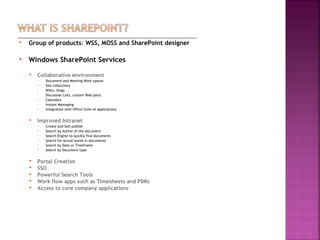
 Group of products: WSS, MOSS and SharePoint designer
 Windows SharePoint Services
 Collaborative environment
 Document and Meeting Work spaces
 Site collections
 Wikis, blogs
 Discussion Lists, custom Web parts
 Calendars
 Instant Messaging
 Integration with Office Suite of applications
 Improved Intranet
 Create and Self publish
 Search by Author of the document
 Search Engine to quickly find documents
 Search for actual words in documents
 Search by Date or Timeframe
 Search by Document type
 Portal Creation
 SSO
 Powerful Search Tools
 Work flow apps such as Timesheets and PDRs
 Access to core company applications
……………………………………………………….………………………………..................................................................................................
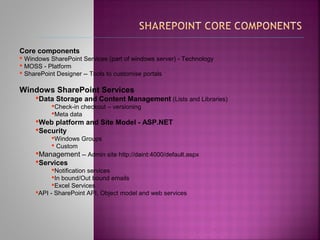
Core components
 Windows SharePoint Services (part of windows server) - Technology
 MOSS - Platform
 SharePoint Designer -- Tools to customise portals
Windows SharePoint Services
Data Storage and Content Management (Lists and Libraries)
Check-in checkout – versioning
Meta data
Web platform and Site Model - ASP.NET
Security
Windows Groups
 Custom
Management -- Admin site http://daint:4000/default.aspx
Services
Notification services
In bound/Out bound emails
Excel Services
API - SharePoint API, Object model and web services
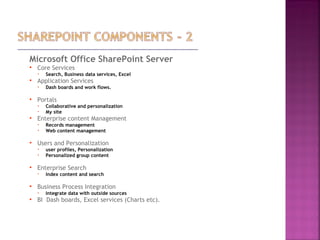
Microsoft Office SharePoint Server
 Core Services
 Search, Business data services, Excel
 Application Services
 Dash boards and work flows.
 Portals
 Collaborative and personalization
 My site
 Enterprise content Management
 Records management
 Web content management
 Users and Personalization
 user profiles, Personalization
 Personalized group content
 Enterprise Search
 Index content and search
 Business Process Integration
 Integrate data with outside sources
 BI Dash boards, Excel services (Charts etc).
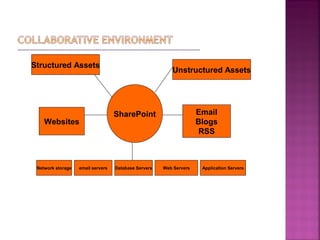
Structured Assets
Unstructured Assets
Websites
Email
Blogs
RSS
Network storage email servers Application ServersWeb ServersDatabase Servers
SharePoint
……………………………………………………….………………………………..................................................................................................
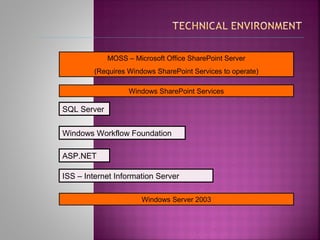
MOSS – Microsoft Office SharePoint Server
(Requires Windows SharePoint Services to operate)
Windows SharePoint Services
Windows Server 2003
SQL Server
Windows Workflow Foundation
ASP.NET
ISS – Internet Information Server
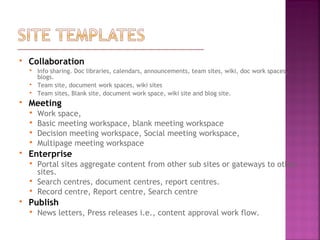
 Collaboration
 Info sharing. Doc libraries, calendars, announcements, team sites, wiki, doc work spaces,
blogs.
 Team site, document work spaces, wiki sites
 Team sites, Blank site, document work space, wiki site and blog site.
 Meeting
 Work space,
 Basic meeting workspace, blank meeting workspace
 Decision meeting workspace, Social meeting workspace,
 Multipage meeting workspace
 Enterprise
 Portal sites aggregate content from other sub sites or gateways to other
sites.
 Search centres, document centres, report centres.
 Record centre, Report centre, Search centre
 Publish
 News letters, Press releases i.e., content approval work flow.
 Log files
 C:Program FilesCommon Filesmicrosoft sharedWeb Server Extensions12LOGS
 Jobs to investigate
 Configuring site collection
 Various site templates and web parts implementation
 Security in detail [Windows Groups]
 InfoPath form based applications
 Work flow implementation
 What is SharePoint?
 WSS, MOSS and SharePoint designer
 What each technology or component consists of?
 Collaborative environment
 Technical environment
 Staging and live environment
 SharePoint configuration
 Site templates:- Collaboration, meeting, enterprise and Publish.
 Timesheets application data flow
 How to troubleshoot
 Configuring site collection
 Various site templates and web parts implementation
 Security in detail [Windows Groups]
 InfoPath form based applications
 Work flow implementation
 InfoPath form deployment
 Document libraries
 List, sites, workspaces
 Information management policy and auditing
 Workflow
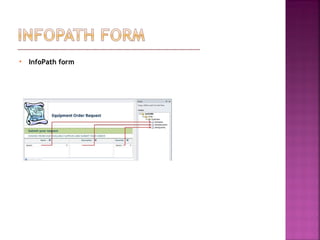
 InfoPath form
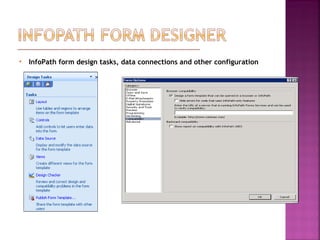
 InfoPath form design tasks, data connections and other configuration
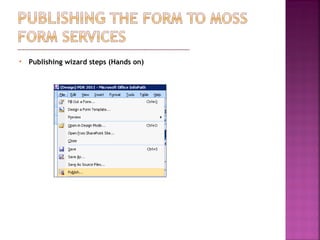
 Publishing wizard steps (Hands on)
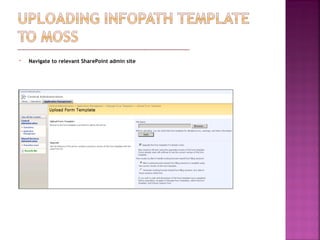
 Navigate to relevant SharePoint admin site
 Navigate to document library (Appraisal and Performance Development Scheme
2011) with in SharePoint portal, under settings choose advanced settings.
 Check ‘Yes’ radio button under Allow management of content types
 Choose radio box ‘Display as a web page’ under Opening browser- enabled
documents
 Choose ‘No’ radio box under Display ‘New Folder’ command on the New menu?
 Consists of activities that are executed in defined order by run time engine
 Sequential work flow
 Deploy on the server
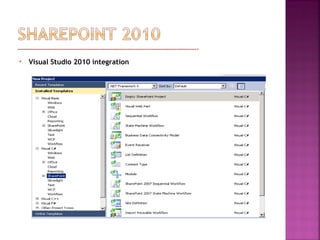
 Visual Studio 2010 integration

Share point 2007 for developers

  • 1.
  • 2.
     Group ofproducts: WSS, MOSS and SharePoint designer  Windows SharePoint Services  Collaborative environment  Document and Meeting Work spaces  Site collections  Wikis, blogs  Discussion Lists, custom Web parts  Calendars  Instant Messaging  Integration with Office Suite of applications  Improved Intranet  Create and Self publish  Search by Author of the document  Search Engine to quickly find documents  Search for actual words in documents  Search by Date or Timeframe  Search by Document type  Portal Creation  SSO  Powerful Search Tools  Work flow apps such as Timesheets and PDRs  Access to core company applications
  • 3.
    ……………………………………………………….……………………………….................................................................................................. Core components  WindowsSharePoint Services (part of windows server) - Technology  MOSS - Platform  SharePoint Designer -- Tools to customise portals Windows SharePoint Services Data Storage and Content Management (Lists and Libraries) Check-in checkout – versioning Meta data Web platform and Site Model - ASP.NET Security Windows Groups  Custom Management -- Admin site http://daint:4000/default.aspx Services Notification services In bound/Out bound emails Excel Services API - SharePoint API, Object model and web services
  • 4.
    Microsoft Office SharePointServer  Core Services  Search, Business data services, Excel  Application Services  Dash boards and work flows.  Portals  Collaborative and personalization  My site  Enterprise content Management  Records management  Web content management  Users and Personalization  user profiles, Personalization  Personalized group content  Enterprise Search  Index content and search  Business Process Integration  Integrate data with outside sources  BI Dash boards, Excel services (Charts etc).
  • 5.
    Structured Assets Unstructured Assets Websites Email Blogs RSS Networkstorage email servers Application ServersWeb ServersDatabase Servers SharePoint
  • 6.
    ……………………………………………………….……………………………….................................................................................................. MOSS – MicrosoftOffice SharePoint Server (Requires Windows SharePoint Services to operate) Windows SharePoint Services Windows Server 2003 SQL Server Windows Workflow Foundation ASP.NET ISS – Internet Information Server
  • 7.
     Collaboration  Infosharing. Doc libraries, calendars, announcements, team sites, wiki, doc work spaces, blogs.  Team site, document work spaces, wiki sites  Team sites, Blank site, document work space, wiki site and blog site.  Meeting  Work space,  Basic meeting workspace, blank meeting workspace  Decision meeting workspace, Social meeting workspace,  Multipage meeting workspace  Enterprise  Portal sites aggregate content from other sub sites or gateways to other sites.  Search centres, document centres, report centres.  Record centre, Report centre, Search centre  Publish  News letters, Press releases i.e., content approval work flow.
  • 8.
     Log files C:Program FilesCommon Filesmicrosoft sharedWeb Server Extensions12LOGS  Jobs to investigate
  • 9.
     Configuring sitecollection  Various site templates and web parts implementation  Security in detail [Windows Groups]  InfoPath form based applications  Work flow implementation
  • 10.
     What isSharePoint?  WSS, MOSS and SharePoint designer  What each technology or component consists of?  Collaborative environment  Technical environment  Staging and live environment  SharePoint configuration  Site templates:- Collaboration, meeting, enterprise and Publish.  Timesheets application data flow  How to troubleshoot
  • 11.
     Configuring sitecollection  Various site templates and web parts implementation  Security in detail [Windows Groups]  InfoPath form based applications  Work flow implementation  InfoPath form deployment
  • 12.
     Document libraries List, sites, workspaces  Information management policy and auditing  Workflow
  • 13.
  • 14.
     InfoPath formdesign tasks, data connections and other configuration
  • 15.
     Publishing wizardsteps (Hands on)
  • 16.
     Navigate torelevant SharePoint admin site
  • 17.
     Navigate todocument library (Appraisal and Performance Development Scheme 2011) with in SharePoint portal, under settings choose advanced settings.  Check ‘Yes’ radio button under Allow management of content types  Choose radio box ‘Display as a web page’ under Opening browser- enabled documents  Choose ‘No’ radio box under Display ‘New Folder’ command on the New menu?
  • 18.
     Consists ofactivities that are executed in defined order by run time engine  Sequential work flow  Deploy on the server
  • 19.
     Visual Studio2010 integration

Editor's Notes

  • #2 Timesheets Data flow UK Data Archive
  • #3 Timesheets Data flow UK Data Archive
  • #4 Timesheets Data flow UK Data Archive
  • #5 Timesheets Data flow UK Data Archive
  • #6 Timesheets Data flow UK Data Archive
  • #7 Timesheets Data flow UK Data Archive
  • #8 Timesheets Data flow UK Data Archive
  • #9 Timesheets Data flow UK Data Archive
  • #10 Timesheets Data flow UK Data Archive
  • #11 Timesheets Data flow UK Data Archive
  • #12 Timesheets Data flow UK Data Archive
  • #13 Timesheets Data flow UK Data Archive
  • #14 Timesheets Data flow UK Data Archive
  • #15 Timesheets Data flow UK Data Archive
  • #16 Timesheets Data flow UK Data Archive
  • #17 Timesheets Data flow UK Data Archive
  • #18 Timesheets Data flow UK Data Archive
  • #19 Timesheets Data flow UK Data Archive
  • #20 Timesheets Data flow UK Data Archive