ELG – Easy Programming

                      Ericsson LG

    Unified Communication for Advanced Business Needs

                         Visit:
                   www.ericssonlg.com
                  www.mecomdubai.com
Basic Techniques
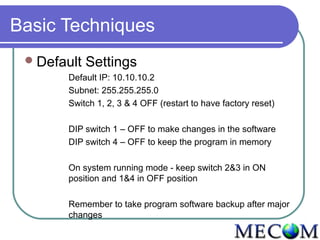
  Default   Settings
       Default IP: 10.10.10.2
       Subnet: 255.255.255.0
       Switch 1, 2, 3 & 4 OFF (restart to have factory reset)

       DIP switch 1 – OFF to make changes in the software
       DIP switch 4 – OFF to keep the program in memory

       On system running mode - keep switch 2&3 in ON
       position and 1&4 in OFF position

       Remember to take program software backup after major
       changes
Basic Techniques
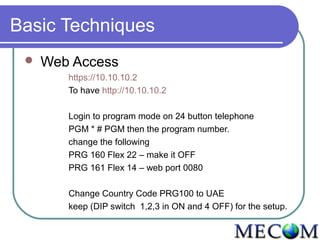
    Web Access
        https://10.10.10.2
        To have http://10.10.10.2

        Login to program mode on 24 button telephone
        PGM * # PGM then the program number.
        change the following
        PRG 160 Flex 22 – make it OFF
        PRG 161 Flex 14 – web port 0080

        Change Country Code PRG100 to UAE
        keep (DIP switch 1,2,3 in ON and 4 OFF) for the setup.
Basic Techniques
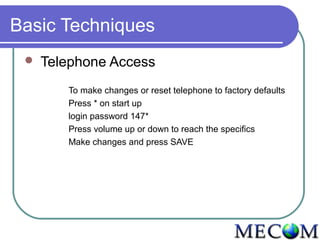
    Telephone Access
        To make changes or reset telephone to factory defaults
        Press * on start up
        login password 147*
        Press volume up or down to reach the specifics
        Make changes and press SAVE
Basic Techniques
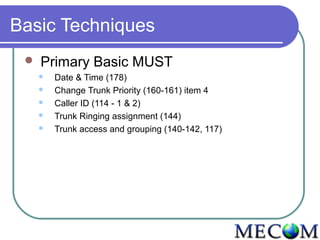
    Primary Basic MUST
        Date & Time (178)
        Change Trunk Priority (160-161) item 4
        Caller ID (114 - 1 & 2)
        Trunk Ringing assignment (144)
        Trunk access and grouping (140-142, 117)
Basic Techniques
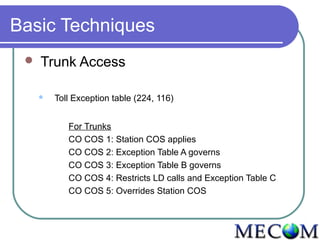
    Trunk Access

        Toll Exception table (224, 116)


            For Trunks
            CO COS 1: Station COS applies
            CO COS 2: Exception Table A governs
            CO COS 3: Exception Table B governs
            CO COS 4: Restricts LD calls and Exception Table C
            CO COS 5: Overrides Station COS
Basic Techniques
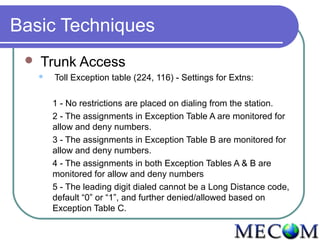
    Trunk Access
        Toll Exception table (224, 116) - Settings for Extns:

         1 - No restrictions are placed on dialing from the station.
         2 - The assignments in Exception Table A are monitored for
         allow and deny numbers.
         3 - The assignments in Exception Table B are monitored for
         allow and deny numbers.
         4 - The assignments in both Exception Tables A & B are
         monitored for allow and deny numbers
         5 - The leading digit dialed cannot be a Long Distance code,
         default “0” or “1”, and further denied/allowed based on
         Exception Table C.
Basic Techniques
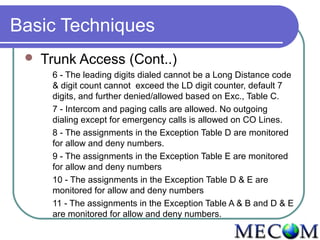
    Trunk Access (Cont..)
      6 - The leading digits dialed cannot be a Long Distance code
      & digit count cannot exceed the LD digit counter, default 7
      digits, and further denied/allowed based on Exc., Table C.
      7 - Intercom and paging calls are allowed. No outgoing
      dialing except for emergency calls is allowed on CO Lines.
      8 - The assignments in the Exception Table D are monitored
      for allow and deny numbers.
      9 - The assignments in the Exception Table E are monitored
      for allow and deny numbers
      10 - The assignments in the Exception Table D & E are
      monitored for allow and deny numbers
      11 - The assignments in the Exception Table A & B and D & E
      are monitored for allow and deny numbers.
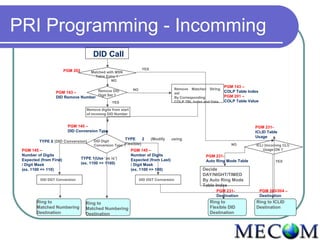
PRI Programming - Incomming
                                         DID Call
                         PGM 202                                        YES
                                        Matched with MSN
                                          Table Entry ?
                                                   NO
                                                                                                                      PGM 143 –
                                                                  NO                        Remove Matched String
                  PGM 143 –         Remove DID                                                                        COLP Table Index
                                                                                            set
                                    Digit Set ?                                                                       PGM 201 –
                  DID Remove Number                                                         By Corresponding
                                                    YES                                     COLP TBL Index and Data   COLP Table Value

                                      Remove digits from start
                                      of incomng DID Number


                          PGM 145 –                                                                                                 PGM 231-
                          DID Conversion Type                                                                                       ICLID Table
                                                                                                                                    Usage
                                                           TYPE         2     (Modify   using
          TYPE 0 (DID Conversion)         DID Digit
                                          Conversion Type ?Flexible)                                                     NO          ICLI (Incoming CLI)
 PGM 145 –                                                       PGM 145 –                                                               Usage ON ?
 Number of Digits                                                Number of Digits                          PGM 231-
 Expected (from First)             TYPE 1(Use ‘as is’)           Expected (from Last)                      Auto Ring Mode Table                 YES
 / Digit Mask                      (ex. 1100 => 1100)            / Digit Mask
 (ex. 1100 => 110)                                               (ex. 1100 => 100)                        Decide
                                                                                                          DAY/NIGHT/TIMED
          DID DGT Conversion                                           DID DGT Conversion                 By Auto Ring Mode
                                                                                                          Table Index
                                                                                                                 PGM 231-                PGM 203/204 –
                                                                                                                 Destination             Destination
        Ring to                      Ring to                                                                 Ring to                Ring to ICLID
        Matched Numbering            Matched Numbering                                                       Flexible DID           Destination
        Destination                  Destination                                                             Destination
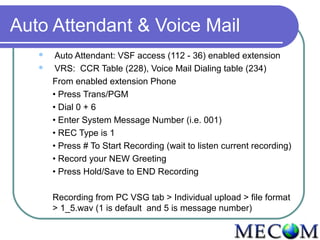
Auto Attendant & Voice Mail
       Auto Attendant: VSF access (112 - 36) enabled extension
       VRS: CCR Table (228), Voice Mail Dialing table (234)
       From enabled extension Phone
       • Press Trans/PGM
       • Dial 0 + 6
       • Enter System Message Number (i.e. 001)
       • REC Type is 1
       • Press # To Start Recording (wait to listen current recording)
       • Record your NEW Greeting
       • Press Hold/Save to END Recording

       Recording from PC VSG tab > Individual upload > file format
       > 1_5.wav (1 is default and 5 is message number)

Mecom ELG programming

  • 1.
    ELG – EasyProgramming Ericsson LG Unified Communication for Advanced Business Needs Visit: www.ericssonlg.com www.mecomdubai.com
  • 2.
    Basic Techniques Default Settings Default IP: 10.10.10.2 Subnet: 255.255.255.0 Switch 1, 2, 3 & 4 OFF (restart to have factory reset) DIP switch 1 – OFF to make changes in the software DIP switch 4 – OFF to keep the program in memory On system running mode - keep switch 2&3 in ON position and 1&4 in OFF position Remember to take program software backup after major changes
  • 3.
    Basic Techniques  Web Access https://10.10.10.2 To have http://10.10.10.2 Login to program mode on 24 button telephone PGM * # PGM then the program number. change the following PRG 160 Flex 22 – make it OFF PRG 161 Flex 14 – web port 0080 Change Country Code PRG100 to UAE keep (DIP switch 1,2,3 in ON and 4 OFF) for the setup.
  • 4.
    Basic Techniques  Telephone Access To make changes or reset telephone to factory defaults Press * on start up login password 147* Press volume up or down to reach the specifics Make changes and press SAVE
  • 5.
    Basic Techniques  Primary Basic MUST  Date & Time (178)  Change Trunk Priority (160-161) item 4  Caller ID (114 - 1 & 2)  Trunk Ringing assignment (144)  Trunk access and grouping (140-142, 117)
  • 6.
    Basic Techniques  Trunk Access  Toll Exception table (224, 116) For Trunks CO COS 1: Station COS applies CO COS 2: Exception Table A governs CO COS 3: Exception Table B governs CO COS 4: Restricts LD calls and Exception Table C CO COS 5: Overrides Station COS
  • 7.
    Basic Techniques  Trunk Access  Toll Exception table (224, 116) - Settings for Extns: 1 - No restrictions are placed on dialing from the station. 2 - The assignments in Exception Table A are monitored for allow and deny numbers. 3 - The assignments in Exception Table B are monitored for allow and deny numbers. 4 - The assignments in both Exception Tables A & B are monitored for allow and deny numbers 5 - The leading digit dialed cannot be a Long Distance code, default “0” or “1”, and further denied/allowed based on Exception Table C.
  • 8.
    Basic Techniques  Trunk Access (Cont..) 6 - The leading digits dialed cannot be a Long Distance code & digit count cannot exceed the LD digit counter, default 7 digits, and further denied/allowed based on Exc., Table C. 7 - Intercom and paging calls are allowed. No outgoing dialing except for emergency calls is allowed on CO Lines. 8 - The assignments in the Exception Table D are monitored for allow and deny numbers. 9 - The assignments in the Exception Table E are monitored for allow and deny numbers 10 - The assignments in the Exception Table D & E are monitored for allow and deny numbers 11 - The assignments in the Exception Table A & B and D & E are monitored for allow and deny numbers.
  • 9.
    PRI Programming -Incomming DID Call PGM 202 YES Matched with MSN Table Entry ? NO PGM 143 – NO Remove Matched String PGM 143 – Remove DID COLP Table Index set Digit Set ? PGM 201 – DID Remove Number By Corresponding YES COLP TBL Index and Data COLP Table Value Remove digits from start of incomng DID Number PGM 145 – PGM 231- DID Conversion Type ICLID Table Usage TYPE 2 (Modify using TYPE 0 (DID Conversion) DID Digit Conversion Type ?Flexible) NO ICLI (Incoming CLI) PGM 145 – PGM 145 – Usage ON ? Number of Digits Number of Digits PGM 231- Expected (from First) TYPE 1(Use ‘as is’) Expected (from Last) Auto Ring Mode Table YES / Digit Mask (ex. 1100 => 1100) / Digit Mask (ex. 1100 => 110) (ex. 1100 => 100) Decide DAY/NIGHT/TIMED DID DGT Conversion DID DGT Conversion By Auto Ring Mode Table Index PGM 231- PGM 203/204 – Destination Destination Ring to Ring to Ring to Ring to ICLID Matched Numbering Matched Numbering Flexible DID Destination Destination Destination Destination
  • 10.
    Auto Attendant &Voice Mail  Auto Attendant: VSF access (112 - 36) enabled extension  VRS: CCR Table (228), Voice Mail Dialing table (234) From enabled extension Phone • Press Trans/PGM • Dial 0 + 6 • Enter System Message Number (i.e. 001) • REC Type is 1 • Press # To Start Recording (wait to listen current recording) • Record your NEW Greeting • Press Hold/Save to END Recording Recording from PC VSG tab > Individual upload > file format > 1_5.wav (1 is default and 5 is message number)