



Collaboration in SharePoint: Bringing It All TogetherMichael Sampsonwww.michaelsampson.net
Michael SampsonImproving the Performance of Distributed TeamsBlogReports and ArticlesTwo books on SharePoint, “Seamless Teamwork” and “SharePoint Roadmap for Collaboration”Invited Conference SpeakerConsultant, Analyst, Workshop Leader
Agenda“Why did you write Seamless Teamwork?”“What are the key messages in your book?”“How can Seamless Teamwork help our firm?”“What do we need to do next?”
2Why I Wrote Seamless TeamworkGives business people a picture of how they could coherently use SharePoint in their workTalks about SharePoint in terms of business work, not technology features1
1Why I Wrote Seamless TeamworkGives business people a language for talking to IT about SharePoint and their workAddresses the questions and considerations that people will face in using SharePoint for work2
Key Messages in Seamless TeamworkPeople and process matter (hugely)SharePoint has technical capability to help in lots of areas (if it’s used well)Align SharePoint features to team stagesEg, wiki for “emerging” content / consensus AND THEN documents for finalizing content
Once upon a time … in a land far, far away …
Meet Roger Lengel
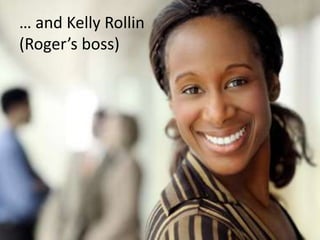
… and Kelly Rollin(Roger’s boss)
Dear Roger, You did great in yesterday’s meeting with Martin, Janet, Tommy, and Darren. This e-mail message is to confirm what was verbally discussed, that you are project lead on Project Delta. It is critical to the future of our company that you get this right, and we all have full confidence in you to do so. You wouldn’t have been tapped to do this otherwise. A couple of pointers: You will need to assemble a team of people from across the firm to be involved, and given the emphasis of Project Delta on international expansion, I don’t need to remind you to pull in some good people from our overseas offices. The implication, of course, is that you’ll be leading a virtual team — you won’t be able to work in person with all of the people on the team, but you’ll still need to ensure that all of the work that gets done is done effectively. Secondly, I think this is a great project for running through SharePoint. I have spoken to Gareth Chan in IT, and he will be setting up a new Project Delta site for you. Please make sure that you use SharePoint in the most effective way possible; it shouldn’t merely be a file repository. Let me know if there’s anything I can do to assist. Happy to run interference for you where and if necessary.
“How do we run projects around here?”
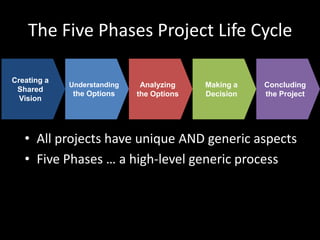
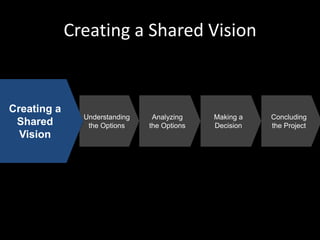
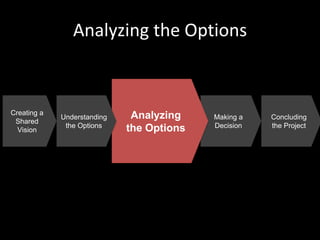
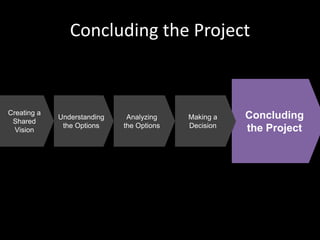
The Five Phases Project Life CycleUnderstandingthe OptionsCreating a SharedVisionAnalyzingthe OptionsMaking aDecisionConcludingthe ProjectAll projects have unique AND generic aspectsFive Phases … a high-level generic process
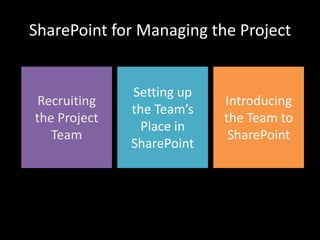
SharePoint for Managing the ProjectRecruitingthe ProjectTeamSetting upthe Team’s Place in SharePointIntroducing the Team to SharePoint
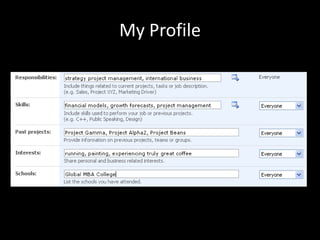
Recruiting the Project TeamRoger knows some people at Fourth Coffee“I wonder who would be the best for this team?”SharePoint My SiteMy Profile – public-facing profileMy Home – personal-facing home sitePeople SearchMy Site requires MOSS 2007
My Profile
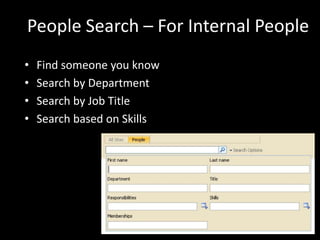
People Search – For Internal PeopleFind someone you knowSearch by DepartmentSearch by Job TitleSearch based on Skills
People Search – For External PeopleAsk people at your firm for referralsLook at their Web siteGoogle their nameFollow their blogLook who is speaking at conferencesAdvanced tip:Create a place in SharePoint for tracking external people (“dossier site”)
Pre-Conditions for My Site SuccessPeople have filled out their profile!Make your areas of expertise interesting, not genericBe exhaustive and list everythingView your profile as your online resumeBe professionalDon’t be all businessKeep your profile up-to-dateBecome a My Site champion!
Creating the Team’s PlaceThe three constituencies in any projectThe project teamThe project sponsors and stakeholdersEveryone else
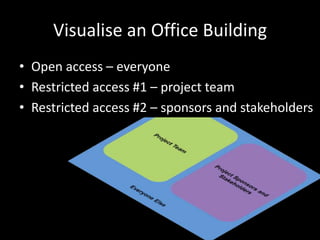
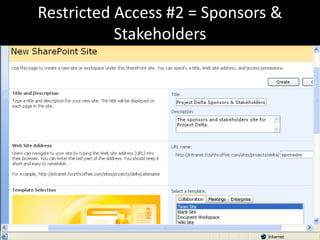
Open access – everyoneRestricted access #1 – project teamRestricted access #2 – sponsors and stakeholdersEveryone ElseProject TeamProject Sponsors and StakeholdersVisualise an Office Building
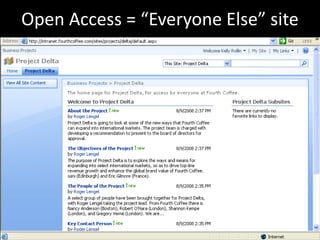
Open Access = “Everyone Else” site
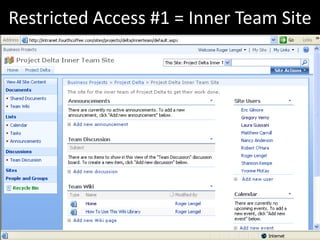
Restricted Access #1 = Inner Team Site
Restricted Access #2 = Sponsors & Stakeholders
Template Standardisation(governance theme)Minimize the number of diverging designsReduces cognitive load on usersForms habits about “our way of working”Encourages seamless useCreate a small set of templates for projectsSmall projects, Medium and Large
“Team, Meet SharePoint”Upfront questions when starting a project:“Who are these other people that I’m working with?”“How are we going to work together?”“How will I know when other people want me to do something?”
Key Idea: Announcements to Coordinate Team ActionCreate an announcement to say what the team needs to do nextTeam members are alertedThey individually decide how and when to respondTasks? For “one person” delegations
“What’s Changed?”
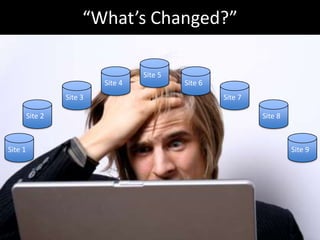
“What’s Changed?”Site 5Site 4Site 6Site 3Site 7Site 2Site 8Site 1Site 9
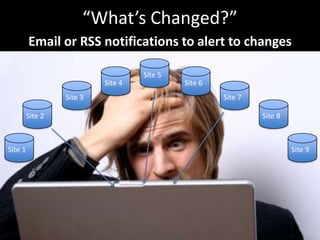
“What’s Changed?”Email or RSS notifications to alert to changesSite 5Site 4Site 6Site 3Site 7Site 2Site 8Site 1Site 9
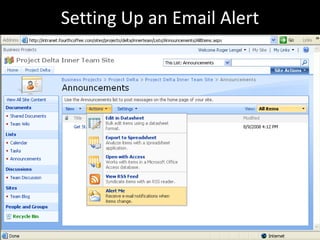
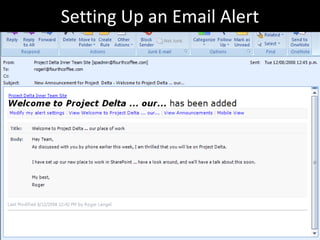
Setting Up an Email Alert
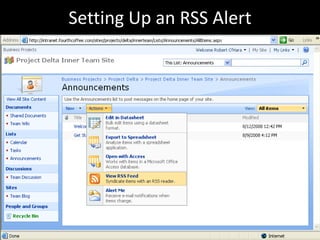
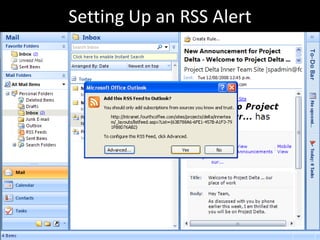
Setting Up an RSS Alert
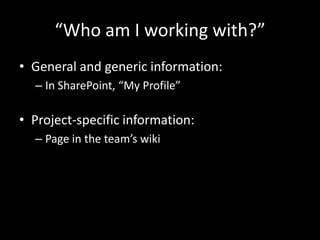
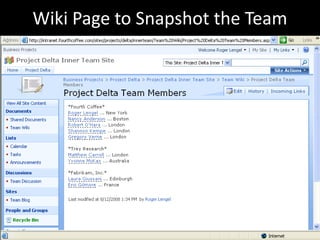
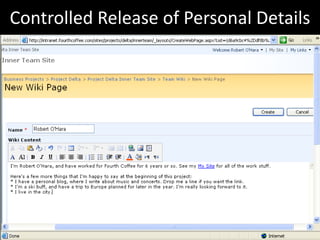
“Who am I working with?”General and generic information:In SharePoint, “My Profile”Project-specific information:Page in the team’s wiki
Wiki Page to Snapshot the Team
Controlled Release of Personal Details
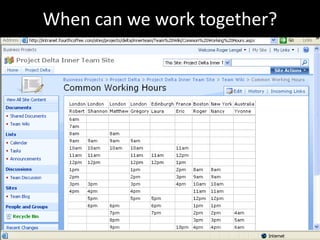
When can we work together?Multi-location, multi-time zone teamWhen can we expect others to be available?When can we expect others to be working?
When can we work together?
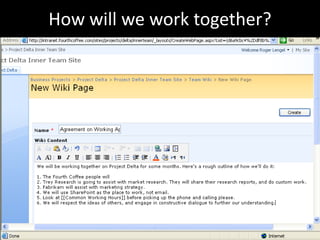
How will we work together?Shared mental picture of working togetherNot in the same placeEg,Frequency of interactionSpeed of responseDealing with disagreements
How will we work together?
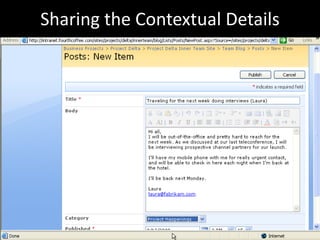
Sharing the Contextual DetailsOvercoming invisibility and inaudibility“What’s going on for Laura in Edinburgh?”The meetings she’s going toHer travel schedule for the weekWhat she’s readingIs there a good reason why she isn’t responding to my email today? (perhaps it’s a public holiday)
Sharing the Contextual Details
Creating a Shared VisionCreating a SharedVisionUnderstandingthe OptionsAnalyzingthe OptionsMaking aDecisionConcludingthe Project
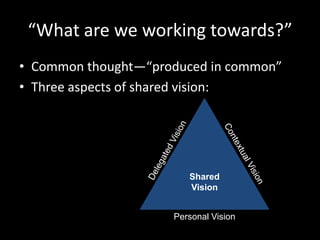
“What are we working towards?”Common thought—“produced in common”Three aspects of shared vision:SharedVisionDelegated VisionContextual VisionPersonal Vision
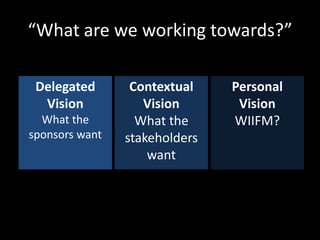
“What are we working towards?”Delegated VisionWhat the sponsors wantContextual VisionWhat the stakeholders wantPersonal VisionWIIFM?
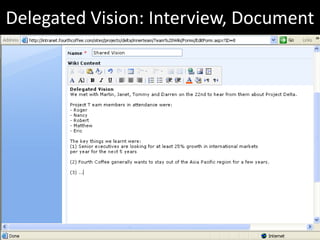
Delegated Vision: Interview, Document
Contextual and Personal VisionHow to comprehend the Contextual VisionHow to document the Personal Vision
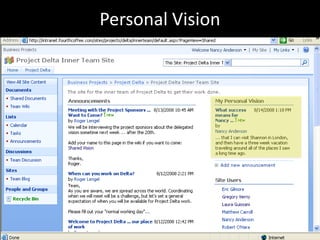
Personal Vision“Why is this project meaningful to me?”“What do I hope to get out of it?”In SharePoint:A personal place to note WIIFMCan see it whenever I visit the team’s site
Personal Vision
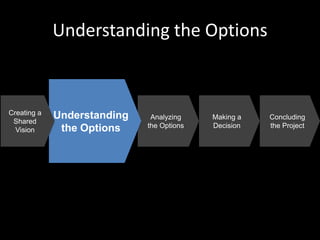
Understandingthe OptionsAnalyzingthe OptionsMaking aDecisionConcludingthe ProjectUnderstanding the OptionsCreating a SharedVision
Understanding the Options“What couldwe do?”Aim is to secure a range of optionsPrevents premature embrace of one optionStrategy: BrainstormingSeparates idea generation from idea evaluationCreates a time/space to have ideas and share them
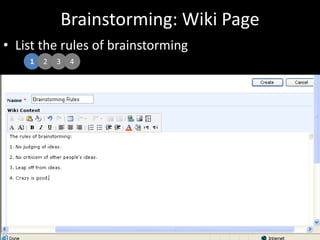
Brainstorming: Wiki PageList the rules of brainstorming1234
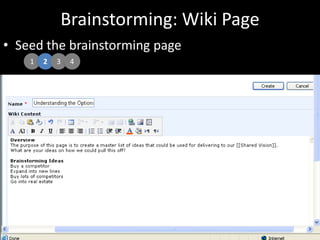
Brainstorming: Wiki PageSeed the brainstorming page1234
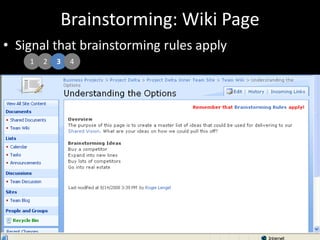
Brainstorming: Wiki PageSignal that brainstorming rules apply1234
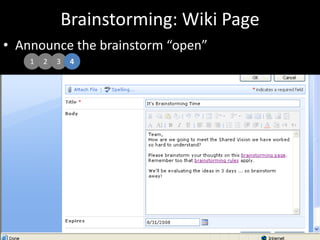
Brainstorming: Wiki PageAnnounce the brainstorm “open”1234
Other ApproachesBrainstorming:With OneNote 2007 (a shared notebook)Via a conference callReviewing and consolidating the ideas
Making aDecisionConcludingthe ProjectAnalyzing the OptionsAnalyzingthe OptionsCreating a SharedVisionUnderstandingthe Options
Analyzing the Options“What could we realistically do?”Explore the better ideas and optionsCull those that are too costly or risky… or where the timing is offExpand and analyze the good ideasAim is to get to a short list of 2-3 ideas
Create a Custom List to Track the IdeasUse a SharePoint Custom ListFor team coordinationCommunicates ownership and statusCustom lists:Huge range of flexibility to track things in a shared settingBetter than Excel 2007 or Access 2007
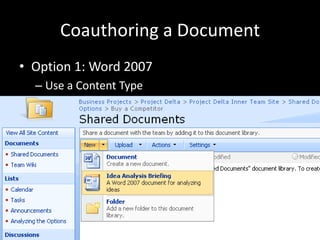
Coauthoring a DocumentOption 1: Word 2007Use a Content TypeStandardises the Word template
Coauthoring a DocumentOption 2: SharePoint WikiCreate a page for each ideaFollow a similar structure across ideas
Meetings When ApartFive general purposes for meetings:To transfer information … use other waysTo discuss and decide … conference callTo coordinate … use blogTo socialise … use blog or instant messagingTo get work done … use screen sharingTime zone coordination? See the wiki
Meetings When Apart: TechnologyMicrosoft SharedViewFree for up to 15 participants“Meet Now” only; can’t pre-scheduleNo conference call numberMicrosoft Live MeetingMonthly service feeMeet now and pre-scheduledBundles a conference call number
When should we meet in person?Two general rules:There is a lot of intensive work to do over a short time periodLots of interactive conversation is requiredGood times, for example:At the start of the project (getting to know others)Key decisions have to be made2-3 people have intensive co-work to do
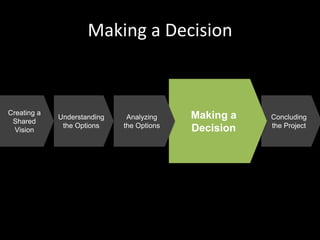
Making a DecisionMaking aDecisionUnderstandingthe OptionsCreating a SharedVisionConcludingthe ProjectAnalyzingthe Options
Making a Decision“What should we do?”Have to choose one option from the short-listApproach:Pre-work (read through the options)Evaluate the starting positions … how much agreement or disagreement is there?
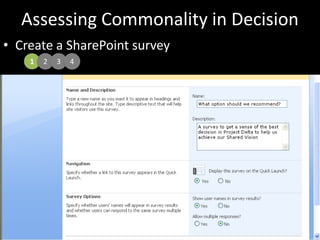
Assessing Commonality in DecisionCreate a SharePoint survey1234
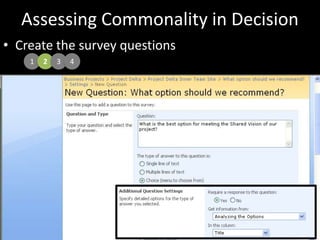
Assessing Commonality in DecisionCreate the survey questions1234
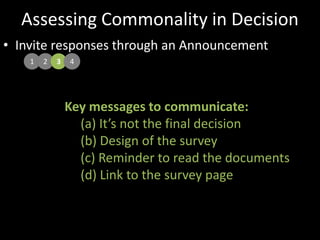
Assessing Commonality in DecisionInvite responses through an Announcement1234Key messages to communicate: It’s not the final decision Design of the survey Reminder to read the documents Link to the survey page
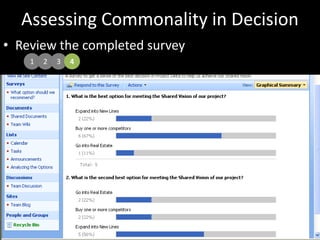
Assessing Commonality in DecisionReview the completed survey1234
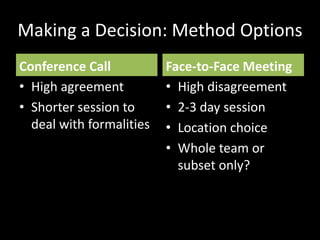
Making a Decision: Method OptionsConference CallHigh agreementShorter session to deal with formalitiesFace-to-Face MeetingHigh disagreement2-3 day sessionLocation choiceWhole team or subset only?
Draft the RecommendationThe team has determined the best way forwardNow need to document thatSocialise the recommendationSeek feedback on the recommendationRevise the recommendation (as appropriate)
Other Tools and CapabilitiesSharePoint Workflow … to gather feedback on a document in a standard wayNo duplication of documentsClear signaling of work to do
Concluding the ProjectConcludingthe ProjectUnderstandingthe OptionsCreating a SharedVisionAnalyzingthe OptionsMaking aDecision
Concluding the Project“We Did It!”Ending the formal work of the teamRecognition and celebrationTeam debriefingPersonal vision … “go for it”
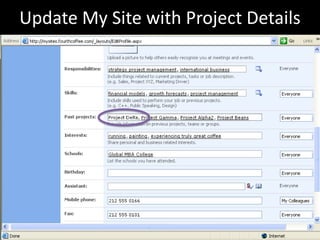
Update My Site with Project Details
Write a Blog Post about the ProjectWrite a blog post about the project in your My Site blogThe role you tookThe names of the other peopleThe key outcomesKey lessons about effective teamwork
Tidying Up the Inner Team SitePublish final materialsInto the document management systemTo the IntranetDelete the transitory materialGet the Inner Team site archivedDisconnect Outlook, Groove or Colligo from the siteUpdate the Everyone Else site
… and they all lived happily ever after.
Agenda“Why did you write Seamless Teamwork?”“What are the key messages in your book?”“How can Seamless Teamwork help our firm?”“What do we need to do next?”
How Seamless Teamwork Helps YouStrengthens user adoption of SharePointShows business people what’s possible and usefulShortens your training activities for SharePointGives examples of using SharePoint capabilitiesAddresses common business user questions
Next ActionsDevelop your internal user adoption strategyInhouse Seamless Teamwork workshopwww.seamlessteamwork.comOrder SharePoint Roadmap for Collaborationwww.sharepointroadmap.comInhouse SharePoint Roadmap workshop
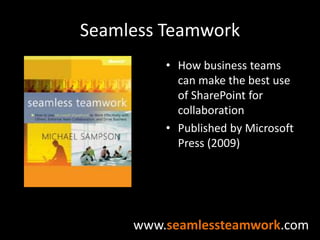
Seamless TeamworkHow business teams can make the best use of SharePoint for collaborationPublished by Microsoft Press (2009)www.seamlessteamwork.com
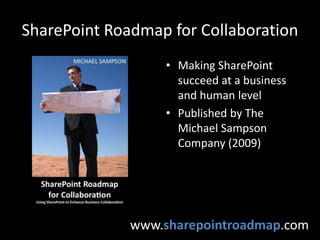
SharePoint Roadmap for CollaborationMaking SharePoint succeed at a business and human levelPublished by The Michael Sampson Company (2009)www.sharepointroadmap.com
The Michael Sampson CompanyImproving the performance of distributed teamsmichaelsampson.netmichael@michaelsampson.net
Discussion

Session8 Collaboration B08 Michael Sampson

  • 1.
    Collaboration in SharePoint:Bringing It All TogetherMichael Sampsonwww.michaelsampson.net
  • 2.
    Michael SampsonImproving thePerformance of Distributed TeamsBlogReports and ArticlesTwo books on SharePoint, “Seamless Teamwork” and “SharePoint Roadmap for Collaboration”Invited Conference SpeakerConsultant, Analyst, Workshop Leader
  • 3.
    Agenda“Why did youwrite Seamless Teamwork?”“What are the key messages in your book?”“How can Seamless Teamwork help our firm?”“What do we need to do next?”
  • 4.
    2Why I WroteSeamless TeamworkGives business people a picture of how they could coherently use SharePoint in their workTalks about SharePoint in terms of business work, not technology features1
  • 5.
    1Why I WroteSeamless TeamworkGives business people a language for talking to IT about SharePoint and their workAddresses the questions and considerations that people will face in using SharePoint for work2
  • 6.
    Key Messages inSeamless TeamworkPeople and process matter (hugely)SharePoint has technical capability to help in lots of areas (if it’s used well)Align SharePoint features to team stagesEg, wiki for “emerging” content / consensus AND THEN documents for finalizing content
  • 7.
    Once upon atime … in a land far, far away …
  • 8.
  • 9.
    … and KellyRollin(Roger’s boss)
  • 10.
    Dear Roger, Youdid great in yesterday’s meeting with Martin, Janet, Tommy, and Darren. This e-mail message is to confirm what was verbally discussed, that you are project lead on Project Delta. It is critical to the future of our company that you get this right, and we all have full confidence in you to do so. You wouldn’t have been tapped to do this otherwise. A couple of pointers: You will need to assemble a team of people from across the firm to be involved, and given the emphasis of Project Delta on international expansion, I don’t need to remind you to pull in some good people from our overseas offices. The implication, of course, is that you’ll be leading a virtual team — you won’t be able to work in person with all of the people on the team, but you’ll still need to ensure that all of the work that gets done is done effectively. Secondly, I think this is a great project for running through SharePoint. I have spoken to Gareth Chan in IT, and he will be setting up a new Project Delta site for you. Please make sure that you use SharePoint in the most effective way possible; it shouldn’t merely be a file repository. Let me know if there’s anything I can do to assist. Happy to run interference for you where and if necessary.
  • 11.
    “How do werun projects around here?”
  • 12.
    The Five PhasesProject Life CycleUnderstandingthe OptionsCreating a SharedVisionAnalyzingthe OptionsMaking aDecisionConcludingthe ProjectAll projects have unique AND generic aspectsFive Phases … a high-level generic process
  • 13.
    SharePoint for Managingthe ProjectRecruitingthe ProjectTeamSetting upthe Team’s Place in SharePointIntroducing the Team to SharePoint
  • 14.
    Recruiting the ProjectTeamRoger knows some people at Fourth Coffee“I wonder who would be the best for this team?”SharePoint My SiteMy Profile – public-facing profileMy Home – personal-facing home sitePeople SearchMy Site requires MOSS 2007
  • 15.
  • 16.
    People Search –For Internal PeopleFind someone you knowSearch by DepartmentSearch by Job TitleSearch based on Skills
  • 17.
    People Search –For External PeopleAsk people at your firm for referralsLook at their Web siteGoogle their nameFollow their blogLook who is speaking at conferencesAdvanced tip:Create a place in SharePoint for tracking external people (“dossier site”)
  • 18.
    Pre-Conditions for MySite SuccessPeople have filled out their profile!Make your areas of expertise interesting, not genericBe exhaustive and list everythingView your profile as your online resumeBe professionalDon’t be all businessKeep your profile up-to-dateBecome a My Site champion!
  • 19.
    Creating the Team’sPlaceThe three constituencies in any projectThe project teamThe project sponsors and stakeholdersEveryone else
  • 20.
    Open access –everyoneRestricted access #1 – project teamRestricted access #2 – sponsors and stakeholdersEveryone ElseProject TeamProject Sponsors and StakeholdersVisualise an Office Building
  • 21.
    Open Access =“Everyone Else” site
  • 22.
    Restricted Access #1= Inner Team Site
  • 23.
    Restricted Access #2= Sponsors & Stakeholders
  • 24.
    Template Standardisation(governance theme)Minimizethe number of diverging designsReduces cognitive load on usersForms habits about “our way of working”Encourages seamless useCreate a small set of templates for projectsSmall projects, Medium and Large
  • 25.
    “Team, Meet SharePoint”Upfrontquestions when starting a project:“Who are these other people that I’m working with?”“How are we going to work together?”“How will I know when other people want me to do something?”
  • 26.
    Key Idea: Announcementsto Coordinate Team ActionCreate an announcement to say what the team needs to do nextTeam members are alertedThey individually decide how and when to respondTasks? For “one person” delegations
  • 27.
  • 28.
    “What’s Changed?”Site 5Site4Site 6Site 3Site 7Site 2Site 8Site 1Site 9
  • 29.
    “What’s Changed?”Email orRSS notifications to alert to changesSite 5Site 4Site 6Site 3Site 7Site 2Site 8Site 1Site 9
  • 30.
    Setting Up anEmail Alert
  • 31.
    Setting Up anEmail Alert
  • 32.
    Setting Up anRSS Alert
  • 33.
    Setting Up anRSS Alert
  • 34.
    “Who am Iworking with?”General and generic information:In SharePoint, “My Profile”Project-specific information:Page in the team’s wiki
  • 35.
    Wiki Page toSnapshot the Team
  • 36.
    Controlled Release ofPersonal Details
  • 37.
    When can wework together?Multi-location, multi-time zone teamWhen can we expect others to be available?When can we expect others to be working?
  • 38.
    When can wework together?
  • 39.
    How will wework together?Shared mental picture of working togetherNot in the same placeEg,Frequency of interactionSpeed of responseDealing with disagreements
  • 40.
    How will wework together?
  • 41.
    Sharing the ContextualDetailsOvercoming invisibility and inaudibility“What’s going on for Laura in Edinburgh?”The meetings she’s going toHer travel schedule for the weekWhat she’s readingIs there a good reason why she isn’t responding to my email today? (perhaps it’s a public holiday)
  • 42.
  • 43.
    Creating a SharedVisionCreating a SharedVisionUnderstandingthe OptionsAnalyzingthe OptionsMaking aDecisionConcludingthe Project
  • 44.
    “What are weworking towards?”Common thought—“produced in common”Three aspects of shared vision:SharedVisionDelegated VisionContextual VisionPersonal Vision
  • 45.
    “What are weworking towards?”Delegated VisionWhat the sponsors wantContextual VisionWhat the stakeholders wantPersonal VisionWIIFM?
  • 46.
  • 47.
    Contextual and PersonalVisionHow to comprehend the Contextual VisionHow to document the Personal Vision
  • 48.
    Personal Vision“Why isthis project meaningful to me?”“What do I hope to get out of it?”In SharePoint:A personal place to note WIIFMCan see it whenever I visit the team’s site
  • 49.
  • 50.
    Understandingthe OptionsAnalyzingthe OptionsMakingaDecisionConcludingthe ProjectUnderstanding the OptionsCreating a SharedVision
  • 51.
    Understanding the Options“Whatcouldwe do?”Aim is to secure a range of optionsPrevents premature embrace of one optionStrategy: BrainstormingSeparates idea generation from idea evaluationCreates a time/space to have ideas and share them
  • 52.
    Brainstorming: Wiki PageListthe rules of brainstorming1234
  • 53.
    Brainstorming: Wiki PageSeedthe brainstorming page1234
  • 54.
    Brainstorming: Wiki PageSignalthat brainstorming rules apply1234
  • 55.
    Brainstorming: Wiki PageAnnouncethe brainstorm “open”1234
  • 56.
    Other ApproachesBrainstorming:With OneNote2007 (a shared notebook)Via a conference callReviewing and consolidating the ideas
  • 57.
    Making aDecisionConcludingthe ProjectAnalyzingthe OptionsAnalyzingthe OptionsCreating a SharedVisionUnderstandingthe Options
  • 58.
    Analyzing the Options“Whatcould we realistically do?”Explore the better ideas and optionsCull those that are too costly or risky… or where the timing is offExpand and analyze the good ideasAim is to get to a short list of 2-3 ideas
  • 59.
    Create a CustomList to Track the IdeasUse a SharePoint Custom ListFor team coordinationCommunicates ownership and statusCustom lists:Huge range of flexibility to track things in a shared settingBetter than Excel 2007 or Access 2007
  • 60.
    Coauthoring a DocumentOption1: Word 2007Use a Content TypeStandardises the Word template
  • 61.
    Coauthoring a DocumentOption2: SharePoint WikiCreate a page for each ideaFollow a similar structure across ideas
  • 62.
    Meetings When ApartFivegeneral purposes for meetings:To transfer information … use other waysTo discuss and decide … conference callTo coordinate … use blogTo socialise … use blog or instant messagingTo get work done … use screen sharingTime zone coordination? See the wiki
  • 63.
    Meetings When Apart:TechnologyMicrosoft SharedViewFree for up to 15 participants“Meet Now” only; can’t pre-scheduleNo conference call numberMicrosoft Live MeetingMonthly service feeMeet now and pre-scheduledBundles a conference call number
  • 64.
    When should wemeet in person?Two general rules:There is a lot of intensive work to do over a short time periodLots of interactive conversation is requiredGood times, for example:At the start of the project (getting to know others)Key decisions have to be made2-3 people have intensive co-work to do
  • 65.
    Making a DecisionMakingaDecisionUnderstandingthe OptionsCreating a SharedVisionConcludingthe ProjectAnalyzingthe Options
  • 66.
    Making a Decision“Whatshould we do?”Have to choose one option from the short-listApproach:Pre-work (read through the options)Evaluate the starting positions … how much agreement or disagreement is there?
  • 67.
    Assessing Commonality inDecisionCreate a SharePoint survey1234
  • 68.
    Assessing Commonality inDecisionCreate the survey questions1234
  • 69.
    Assessing Commonality inDecisionInvite responses through an Announcement1234Key messages to communicate: It’s not the final decision Design of the survey Reminder to read the documents Link to the survey page
  • 70.
    Assessing Commonality inDecisionReview the completed survey1234
  • 71.
    Making a Decision:Method OptionsConference CallHigh agreementShorter session to deal with formalitiesFace-to-Face MeetingHigh disagreement2-3 day sessionLocation choiceWhole team or subset only?
  • 72.
    Draft the RecommendationTheteam has determined the best way forwardNow need to document thatSocialise the recommendationSeek feedback on the recommendationRevise the recommendation (as appropriate)
  • 73.
    Other Tools andCapabilitiesSharePoint Workflow … to gather feedback on a document in a standard wayNo duplication of documentsClear signaling of work to do
  • 74.
    Concluding the ProjectConcludingtheProjectUnderstandingthe OptionsCreating a SharedVisionAnalyzingthe OptionsMaking aDecision
  • 75.
    Concluding the Project“WeDid It!”Ending the formal work of the teamRecognition and celebrationTeam debriefingPersonal vision … “go for it”
  • 76.
    Update My Sitewith Project Details
  • 77.
    Write a BlogPost about the ProjectWrite a blog post about the project in your My Site blogThe role you tookThe names of the other peopleThe key outcomesKey lessons about effective teamwork
  • 78.
    Tidying Up theInner Team SitePublish final materialsInto the document management systemTo the IntranetDelete the transitory materialGet the Inner Team site archivedDisconnect Outlook, Groove or Colligo from the siteUpdate the Everyone Else site
  • 79.
    … and theyall lived happily ever after.
  • 80.
    Agenda“Why did youwrite Seamless Teamwork?”“What are the key messages in your book?”“How can Seamless Teamwork help our firm?”“What do we need to do next?”
  • 81.
    How Seamless TeamworkHelps YouStrengthens user adoption of SharePointShows business people what’s possible and usefulShortens your training activities for SharePointGives examples of using SharePoint capabilitiesAddresses common business user questions
  • 82.
    Next ActionsDevelop yourinternal user adoption strategyInhouse Seamless Teamwork workshopwww.seamlessteamwork.comOrder SharePoint Roadmap for Collaborationwww.sharepointroadmap.comInhouse SharePoint Roadmap workshop
  • 83.
    Seamless TeamworkHow businessteams can make the best use of SharePoint for collaborationPublished by Microsoft Press (2009)www.seamlessteamwork.com
  • 84.
    SharePoint Roadmap forCollaborationMaking SharePoint succeed at a business and human levelPublished by The Michael Sampson Company (2009)www.sharepointroadmap.com
  • 85.
    The Michael SampsonCompanyImproving the performance of distributed teamsmichaelsampson.netmichael@michaelsampson.net
  • 86.