


Crawling the Web 
Fabrizio Celli 
Rome, 25th September 2014
Outline 
• Purpose of this Webinar 
• The Web Crawler 
• The AgroTagger 
• The AGRIS use case 
– What’s next? 
2
Purpose of this Webinar 
• SemaGrow is a project funded by the Seventh 
Framework Programme (FP7) of the European 
Commission 
• Algorithms, infrastructures and methodologies to 
cope with large data volumes and real time 
performance 
• http://www.semagrow.eu 
• One of SemaGrow demonstrators is the 
component “Web Crawler + AgroTagger”, 
objective of this Webinar 
3
The demonstrator 
• It is based on two command line applications 
(no user interface): 
– Web Crawler 
– AgroTagger 
• Goal: 
– discover resources on the Web 
– tag resources with AGROVOC URIs 
– filter only resources about agriculture and 
interlink to AGRIS 
4
What we expect from the Webinar 
• Comments, suggestions, opinions 
• Other real case scenarios for the 
demonstrator 
• You can send your feedback at agris@fao.org 
5
THE WEB-CRAWLER 
6
Apache Nutch 
• http://nutch.apache.org/ 
• Highly extensible and scalable open source 
Web crawler 
• Configurable 
• Input: a list of pre-selected URLs 
• Output: a list of discovered URLs 
7
How it works 
• The user defines a list of Web sites (URLs) 
• Each URL is a ROOT 
• The user defines the “depth”: the number of 
"hops" a discovered link is away from the 
ROOT 
– Links very "far away" from the ROOT are unlikely 
to hold much information 
• Start to crawl the Web! 
8
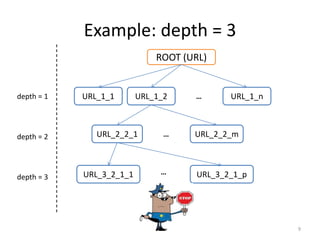
Example: depth = 3 
9 
ROOT (URL) 
depth = 1 URL_1_1 URL_1_2 URL_1_n 
depth = 2 
depth = 3 
… 
URL_2_2_1 … 
URL_2_2_m 
URL_3_2_1_1 … URL_3_2_1_p
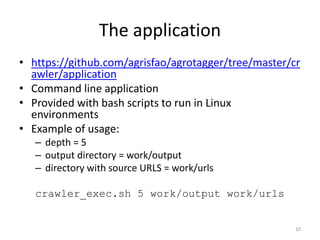
The application 
• https://github.com/agrisfao/agrotagger/tree/master/cr 
awler/application 
• Command line application 
• Provided with bash scripts to run in Linux 
environments 
• Example of usage: 
– depth = 5 
– output directory = work/output 
– directory with source URLS = work/urls 
crawler_exec.sh 5 work/output work/urls 
10
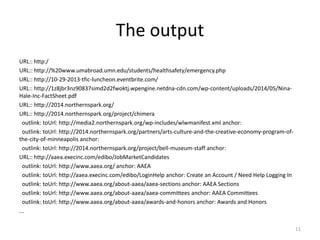
The output 
URL:: http:/ 
URL:: http://%20www.umabroad.umn.edu/students/healthsafety/emergency.php 
URL:: http://10-29-2013-tfic-luncheon.eventbrite.com/ 
URL:: http://1z8jbr3nz90837simd2d2fwoktj.wpengine.netdna-cdn.com/wp-content/uploads/2014/05/Nina- 
Hale-Inc-FactSheet.pdf 
URL:: http://2014.northernspark.org/ 
URL:: http://2014.northernspark.org/project/chimera 
outlink: toUrl: http://media2.northernspark.org/wp-includes/wlwmanifest.xml anchor: 
outlink: toUrl: http://2014.northernspark.org/partners/arts-culture-and-the-creative-economy-program-of-the- 
city-of-minneapolis anchor: 
outlink: toUrl: http://2014.northernspark.org/project/bell-museum-staff anchor: 
URL:: http://aaea.execinc.com/edibo/JobMarketCandidates 
outlink: toUrl: http://www.aaea.org/ anchor: AAEA 
outlink: toUrl: http://aaea.execinc.com/edibo/LoginHelp anchor: Create an Account / Need Help Logging In 
outlink: toUrl: http://www.aaea.org/about-aaea/aaea-sections anchor: AAEA Sections 
outlink: toUrl: http://www.aaea.org/about-aaea/aaea-committees anchor: AAEA Committees 
outlink: toUrl: http://www.aaea.org/about-aaea/awards-and-honors anchor: Awards and Honors 
... 
11
THE AGROTAGGER 
12
AGROVOC 
• FAO multilingual vocabulary 
• Over 32 000 concepts in up to 21 languages 
• Part of the LOD cloud 
• Extensively used by cataloguers for indexing 
data in agricultural information systems 
• http://202.45.139.84:10035/catalogs/fao/rep 
ositories/agrovoc 
13
The AgroTagger 
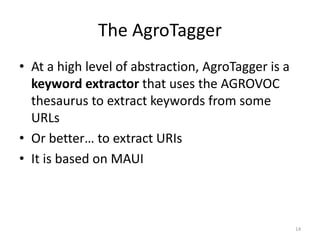
• At a high level of abstraction, AgroTagger is a 
keyword extractor that uses the AGROVOC 
thesaurus to extract keywords from some 
URLs 
• Or better… to extract URIs 
• It is based on MAUI 
14
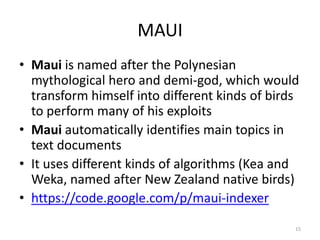
MAUI 
• Maui is named after the Polynesian 
mythological hero and demi-god, which would 
transform himself into different kinds of birds 
to perform many of his exploits 
• Maui automatically identifies main topics in 
text documents 
• It uses different kinds of algorithms (Kea and 
Weka, named after New Zealand native birds) 
• https://code.google.com/p/maui-indexer 
15
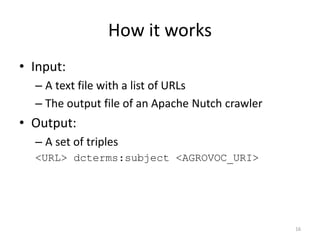
How it works 
• Input: 
– A text file with a list of URLs 
– The output file of an Apache Nutch crawler 
• Output: 
– A set of triples 
<URL> dcterms:subject <AGROVOC_URI> 
16
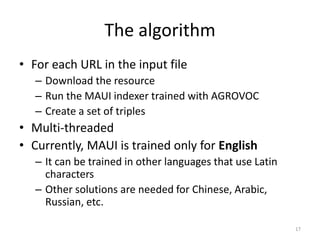
The algorithm 
• For each URL in the input file 
– Download the resource 
– Run the MAUI indexer trained with AGROVOC 
– Create a set of triples 
• Multi-threaded 
• Currently, MAUI is trained only for English 
– It can be trained in other languages that use Latin 
characters 
– Other solutions are needed for Chinese, Arabic, 
Russian, etc. 
17
The application 
• https://github.com/agrisfao/agrotagger 
• Command line application 
• Entirely based on JAVA 
• Provided with bash scripts 
• Example of usage: 
– directory with source files = work/source 
– output directory = work/output 
– type of source files = nutchOutput 
– output format = rdfnt 
taggerDir.sh /work/source /work/output nutchOutput rdfnt 
18
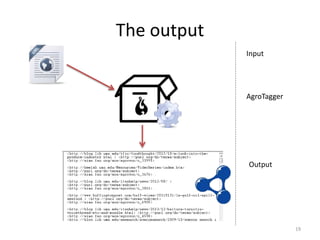
The output 
19 
Input 
AgroTagger 
Output
THE AGRIS USE CASE 
20
AGRIS 
• http://agris.fao.org 
• A collection of more than 7.8 million 
bibliographic references in agriculture 
• AGRIS records come with AGROVOC descriptors 
• An RDF-aware system 
– the AGRIS database is publicly exposed as RDF 
– AGROVOC is the backbone to interlink to external 
sources of information (statistics, distribution maps, 
country profiles, germplasm data…) 
21
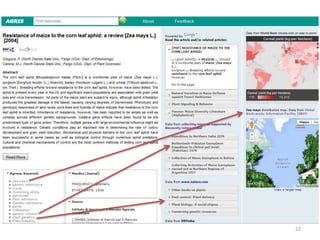
22
SemaGrow demonstrator 
• The core idea is to harvest the Web 
– Input: pre-selected sources of information about 
agriculture 
• Crawl and assign AGROVOC URIs 
– Store triples in the “crawler” database 
• Definition of combinations between the 
“crawler” database and the AGRIS database 
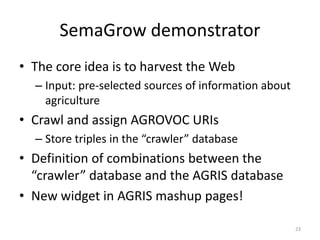
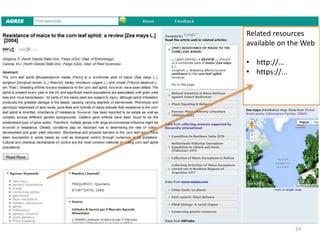
• New widget in AGRIS mashup pages! 
23
Related resources 
available on the Web 
24 
• http://... 
• https://...
Current status 
• The Web Crawler gathers data from the Web 
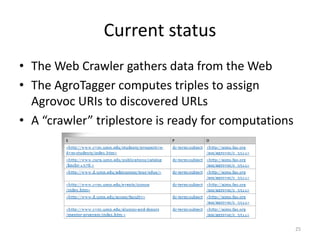
• The AgroTagger computes triples to assign 
Agrovoc URIs to discovered URLs 
• A “crawler” triplestore is ready for computations 
25
What’s next 
• Processing phase 
• Discover meaningful combinations between 
the AGRIS core database and “crawler” 
database 
• A triplestore of combinations will be set up 
and used by AGRIS to generate a widget in the 
mashup page 
• Evaluation of the quality of the widget 
• What does “meaningful combinations” mean? 
26
Naïve Algorithm 
• Just for testing purposes 
• Meaningful combinations = at least N 
common AGROVOC URIs 
27
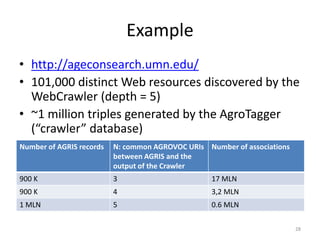
Example 
• http://ageconsearch.umn.edu/ 
• 101,000 distinct Web resources discovered by the 
WebCrawler (depth = 5) 
• ~1 million triples generated by the AgroTagger 
(“crawler” database) 
28 
Number of AGRIS records N: common AGROVOC URIs 
between AGRIS and the 
output of the Crawler 
Number of associations 
900 K 3 17 MLN 
900 K 4 3,2 MLN 
1 MLN 5 0.6 MLN
Your feedback 
• Comments, suggestions, other real case 
scenarios 
• Ideas about the meaning of “meaningful 
combinations” 
• If you will test the application, any comments 
to improve it 
• Can the demonstrator support to overcome 
data problems? 
• You can send your feedback at agris@fao.org 
29
30 
谢谢 
Gracias 
σας ευχαριστώ

SemaGrow demonstrator: “Web Crawler + AgroTagger”

  • 1.
    Crawling the Web Fabrizio Celli Rome, 25th September 2014
  • 2.
    Outline • Purposeof this Webinar • The Web Crawler • The AgroTagger • The AGRIS use case – What’s next? 2
  • 3.
    Purpose of thisWebinar • SemaGrow is a project funded by the Seventh Framework Programme (FP7) of the European Commission • Algorithms, infrastructures and methodologies to cope with large data volumes and real time performance • http://www.semagrow.eu • One of SemaGrow demonstrators is the component “Web Crawler + AgroTagger”, objective of this Webinar 3
  • 4.
    The demonstrator •It is based on two command line applications (no user interface): – Web Crawler – AgroTagger • Goal: – discover resources on the Web – tag resources with AGROVOC URIs – filter only resources about agriculture and interlink to AGRIS 4
  • 5.
    What we expectfrom the Webinar • Comments, suggestions, opinions • Other real case scenarios for the demonstrator • You can send your feedback at agris@fao.org 5
  • 6.
  • 7.
    Apache Nutch •http://nutch.apache.org/ • Highly extensible and scalable open source Web crawler • Configurable • Input: a list of pre-selected URLs • Output: a list of discovered URLs 7
  • 8.
    How it works • The user defines a list of Web sites (URLs) • Each URL is a ROOT • The user defines the “depth”: the number of "hops" a discovered link is away from the ROOT – Links very "far away" from the ROOT are unlikely to hold much information • Start to crawl the Web! 8
  • 9.
    Example: depth =3 9 ROOT (URL) depth = 1 URL_1_1 URL_1_2 URL_1_n depth = 2 depth = 3 … URL_2_2_1 … URL_2_2_m URL_3_2_1_1 … URL_3_2_1_p
  • 10.
    The application •https://github.com/agrisfao/agrotagger/tree/master/cr awler/application • Command line application • Provided with bash scripts to run in Linux environments • Example of usage: – depth = 5 – output directory = work/output – directory with source URLS = work/urls crawler_exec.sh 5 work/output work/urls 10
  • 11.
    The output URL::http:/ URL:: http://%20www.umabroad.umn.edu/students/healthsafety/emergency.php URL:: http://10-29-2013-tfic-luncheon.eventbrite.com/ URL:: http://1z8jbr3nz90837simd2d2fwoktj.wpengine.netdna-cdn.com/wp-content/uploads/2014/05/Nina- Hale-Inc-FactSheet.pdf URL:: http://2014.northernspark.org/ URL:: http://2014.northernspark.org/project/chimera outlink: toUrl: http://media2.northernspark.org/wp-includes/wlwmanifest.xml anchor: outlink: toUrl: http://2014.northernspark.org/partners/arts-culture-and-the-creative-economy-program-of-the- city-of-minneapolis anchor: outlink: toUrl: http://2014.northernspark.org/project/bell-museum-staff anchor: URL:: http://aaea.execinc.com/edibo/JobMarketCandidates outlink: toUrl: http://www.aaea.org/ anchor: AAEA outlink: toUrl: http://aaea.execinc.com/edibo/LoginHelp anchor: Create an Account / Need Help Logging In outlink: toUrl: http://www.aaea.org/about-aaea/aaea-sections anchor: AAEA Sections outlink: toUrl: http://www.aaea.org/about-aaea/aaea-committees anchor: AAEA Committees outlink: toUrl: http://www.aaea.org/about-aaea/awards-and-honors anchor: Awards and Honors ... 11
  • 12.
  • 13.
    AGROVOC • FAOmultilingual vocabulary • Over 32 000 concepts in up to 21 languages • Part of the LOD cloud • Extensively used by cataloguers for indexing data in agricultural information systems • http://202.45.139.84:10035/catalogs/fao/rep ositories/agrovoc 13
  • 14.
    The AgroTagger •At a high level of abstraction, AgroTagger is a keyword extractor that uses the AGROVOC thesaurus to extract keywords from some URLs • Or better… to extract URIs • It is based on MAUI 14
  • 15.
    MAUI • Mauiis named after the Polynesian mythological hero and demi-god, which would transform himself into different kinds of birds to perform many of his exploits • Maui automatically identifies main topics in text documents • It uses different kinds of algorithms (Kea and Weka, named after New Zealand native birds) • https://code.google.com/p/maui-indexer 15
  • 16.
    How it works • Input: – A text file with a list of URLs – The output file of an Apache Nutch crawler • Output: – A set of triples <URL> dcterms:subject <AGROVOC_URI> 16
  • 17.
    The algorithm •For each URL in the input file – Download the resource – Run the MAUI indexer trained with AGROVOC – Create a set of triples • Multi-threaded • Currently, MAUI is trained only for English – It can be trained in other languages that use Latin characters – Other solutions are needed for Chinese, Arabic, Russian, etc. 17
  • 18.
    The application •https://github.com/agrisfao/agrotagger • Command line application • Entirely based on JAVA • Provided with bash scripts • Example of usage: – directory with source files = work/source – output directory = work/output – type of source files = nutchOutput – output format = rdfnt taggerDir.sh /work/source /work/output nutchOutput rdfnt 18
  • 19.
    The output 19 Input AgroTagger Output
  • 20.
  • 21.
    AGRIS • http://agris.fao.org • A collection of more than 7.8 million bibliographic references in agriculture • AGRIS records come with AGROVOC descriptors • An RDF-aware system – the AGRIS database is publicly exposed as RDF – AGROVOC is the backbone to interlink to external sources of information (statistics, distribution maps, country profiles, germplasm data…) 21
  • 22.
  • 23.
    SemaGrow demonstrator •The core idea is to harvest the Web – Input: pre-selected sources of information about agriculture • Crawl and assign AGROVOC URIs – Store triples in the “crawler” database • Definition of combinations between the “crawler” database and the AGRIS database • New widget in AGRIS mashup pages! 23
  • 24.
    Related resources availableon the Web 24 • http://... • https://...
  • 25.
    Current status •The Web Crawler gathers data from the Web • The AgroTagger computes triples to assign Agrovoc URIs to discovered URLs • A “crawler” triplestore is ready for computations 25
  • 26.
    What’s next •Processing phase • Discover meaningful combinations between the AGRIS core database and “crawler” database • A triplestore of combinations will be set up and used by AGRIS to generate a widget in the mashup page • Evaluation of the quality of the widget • What does “meaningful combinations” mean? 26
  • 27.
    Naïve Algorithm •Just for testing purposes • Meaningful combinations = at least N common AGROVOC URIs 27
  • 28.
    Example • http://ageconsearch.umn.edu/ • 101,000 distinct Web resources discovered by the WebCrawler (depth = 5) • ~1 million triples generated by the AgroTagger (“crawler” database) 28 Number of AGRIS records N: common AGROVOC URIs between AGRIS and the output of the Crawler Number of associations 900 K 3 17 MLN 900 K 4 3,2 MLN 1 MLN 5 0.6 MLN
  • 29.
    Your feedback •Comments, suggestions, other real case scenarios • Ideas about the meaning of “meaningful combinations” • If you will test the application, any comments to improve it • Can the demonstrator support to overcome data problems? • You can send your feedback at agris@fao.org 29
  • 30.
    30 谢谢 Gracias σας ευχαριστώ

Editor's Notes

  • #16 keyphrase extraction algorithm Kea machine learning toolkit Weka