Self-Service Business Intelligence
How you could use it in your day-to-day life
Gogula Aryalingam
Senior Architect – Data Analytics
About Gogula
 Senior Architect – Data Analytics
 Heads the Business Intelligence practice at Brandix i3
 Microsoft MVP – Data Platform
 PASS Regional Mentor – South Asia
 Blog: http://dbantics.com
 Twitter: http://twitter.com/gogula
 LinkedIn: http://www.linkedin.com/in/gogula
Have you heard of Business Intelligence?Do you know what Business Intelligence is?Have you worked with Business Intelligence?
Business Intelligence (BI)
Raw data Meaningful &
useful information
Transform
Analyze
Make
effective decisions
Tools &
Techniques
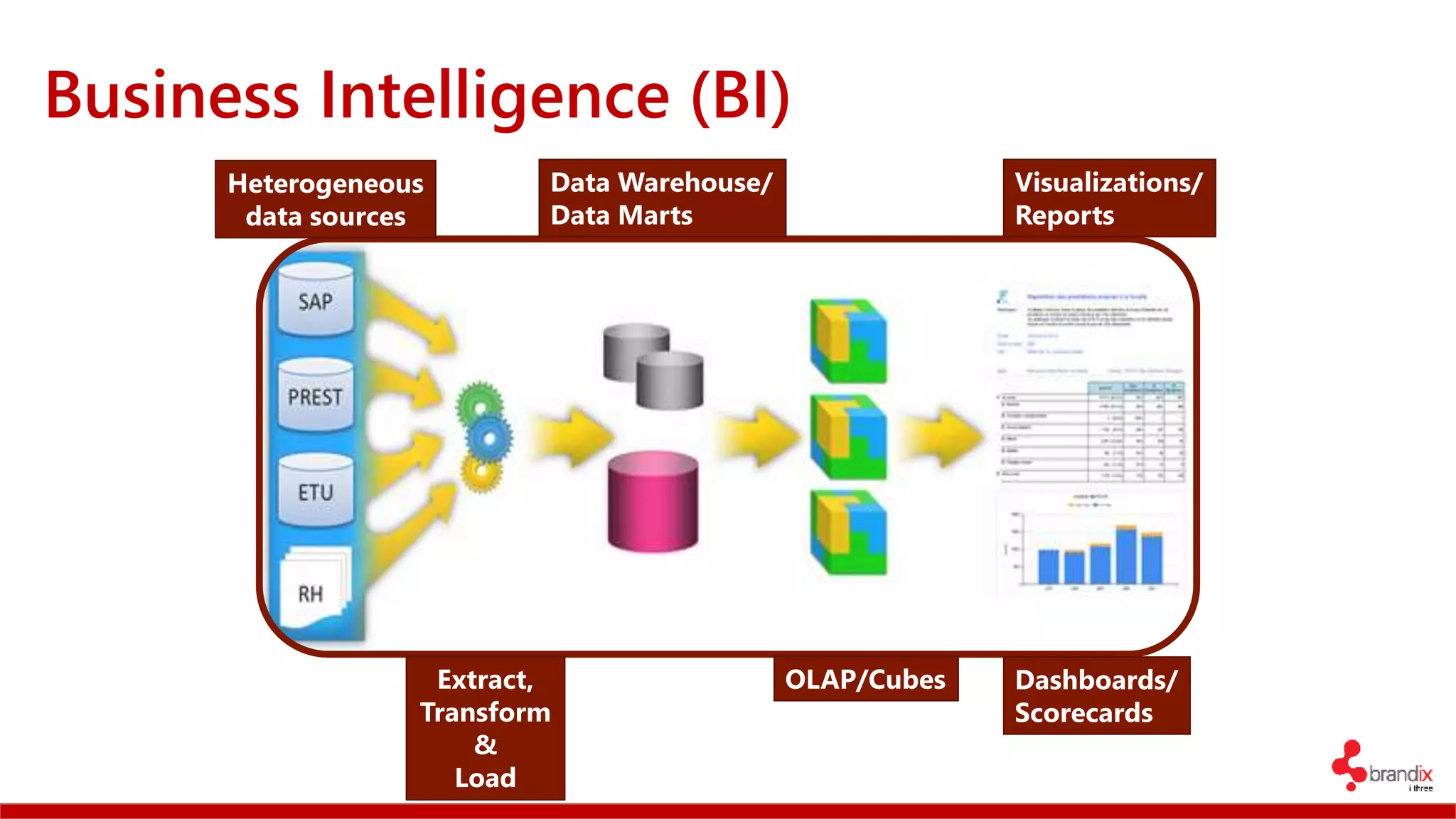
Business Intelligence (BI)
Heterogeneous
data sources
Extract,
Transform
&
Load
Data Warehouse/
Data Marts
OLAP/Cubes
Visualizations/
Reports
Dashboards/
Scorecards
Traditional BI (also: Corporate BI, Enterprise BI)
 Historical data (Various sources) → Data Warehouse
 Periodically updated
 Weekly (Weekend-ly)
 Nightly
 Hourly (In recent times)
 Provides
 Hindsight (via Reports, Dashboards, Scorecards)
 Sometimes Insight (via Data Mining) and Forecasting
Traditional BI (also: Corporate BI, Enterprise BI)
 Expensive (Hardware, Software)
 Specialist/IT built
 Used by:
 Top level management
 Certain business users
 In a lot of cases not used at all
Problems
 Building a BI solution takes ages (sometimes 2-3 years)
 Things change
 IT (or someone else) builds it for you
 Fixed/Pre-decided reports
 You want more?You wait
*Source: Gartner
More than 70% of BI projects fail*
Winds of Change
 A new breed of business user
 Technical/Non-Technical
 Wants:
 To gain insight through data discovery
 To mashup data from various sources (including public domain)
 To access data without going through IT
 The tools to do all this
Winds of Change
 Bosses with Gadgets
 Non-Technical
 Wants:
 Access to Data on the Go
 “I want to see it on my iPad!”
Self-Service Business Intelligence
Characteristics
 Users are self-reliant
 Allows access to data with minimum/no IT intervention
 Allows users to bring in their own sources
 Allows for data discovery
 Allows for sharing/collaboration
 Agile
 Not a replacement forTraditional BI
 Makes use of traditional BI (wherever feasible)
Scenario
 Sales history and product info in cubes (traditional BI)
 Month long ad campaign – data on new CRM system
 You need to
 Analyze sales against ads – for effectiveness
 Analyze sentiments expressed onTwitter and Facebook about ads
Self-Service Tools
DEMO
Livestock Slaughter Statistics in Sri Lanka
Aftermath
 Share findings with peers/boss
 Collaborate
 Make effective decisions
Using self-service BI in your day-to-day life
 Self-service BI tools allow you to connect virtually any type of data source
 Use it to:
 Get insights of your utility bills at home
 Get an idea of how your campaigns are faring
 Get an overall understanding of your project progress
 The uses are limitless
Thank you
 Further References:
 A definition of Self-Service Business Intelligence
 Q&A on Self-Service Business Intelligence
 Try Self-Service Business Intelligence using Power BI:
 Tutorial: Facebook analytics using Power BI Desktop
 Guided Learning
No animals were subject to harm in the making of this presentation

Self Service Buisness Intelligence - Tech Talk

  • 1.
    Self-Service Business Intelligence Howyou could use it in your day-to-day life Gogula Aryalingam Senior Architect – Data Analytics
  • 2.
    About Gogula  SeniorArchitect – Data Analytics  Heads the Business Intelligence practice at Brandix i3  Microsoft MVP – Data Platform  PASS Regional Mentor – South Asia  Blog: http://dbantics.com  Twitter: http://twitter.com/gogula  LinkedIn: http://www.linkedin.com/in/gogula
  • 3.
    Have you heardof Business Intelligence?Do you know what Business Intelligence is?Have you worked with Business Intelligence?
  • 4.
    Business Intelligence (BI) Rawdata Meaningful & useful information Transform Analyze Make effective decisions Tools & Techniques
  • 5.
    Business Intelligence (BI) Heterogeneous datasources Extract, Transform & Load Data Warehouse/ Data Marts OLAP/Cubes Visualizations/ Reports Dashboards/ Scorecards
  • 6.
    Traditional BI (also:Corporate BI, Enterprise BI)  Historical data (Various sources) → Data Warehouse  Periodically updated  Weekly (Weekend-ly)  Nightly  Hourly (In recent times)  Provides  Hindsight (via Reports, Dashboards, Scorecards)  Sometimes Insight (via Data Mining) and Forecasting
  • 7.
    Traditional BI (also:Corporate BI, Enterprise BI)  Expensive (Hardware, Software)  Specialist/IT built  Used by:  Top level management  Certain business users  In a lot of cases not used at all
  • 8.
    Problems  Building aBI solution takes ages (sometimes 2-3 years)  Things change  IT (or someone else) builds it for you  Fixed/Pre-decided reports  You want more?You wait *Source: Gartner More than 70% of BI projects fail*
  • 9.
    Winds of Change A new breed of business user  Technical/Non-Technical  Wants:  To gain insight through data discovery  To mashup data from various sources (including public domain)  To access data without going through IT  The tools to do all this
  • 10.
    Winds of Change Bosses with Gadgets  Non-Technical  Wants:  Access to Data on the Go  “I want to see it on my iPad!”
  • 11.
  • 12.
    Characteristics  Users areself-reliant  Allows access to data with minimum/no IT intervention  Allows users to bring in their own sources  Allows for data discovery  Allows for sharing/collaboration  Agile  Not a replacement forTraditional BI  Makes use of traditional BI (wherever feasible)
  • 13.
    Scenario  Sales historyand product info in cubes (traditional BI)  Month long ad campaign – data on new CRM system  You need to  Analyze sales against ads – for effectiveness  Analyze sentiments expressed onTwitter and Facebook about ads
  • 14.
  • 15.
  • 16.
    Aftermath  Share findingswith peers/boss  Collaborate  Make effective decisions
  • 17.
    Using self-service BIin your day-to-day life  Self-service BI tools allow you to connect virtually any type of data source  Use it to:  Get insights of your utility bills at home  Get an idea of how your campaigns are faring  Get an overall understanding of your project progress  The uses are limitless
  • 18.
    Thank you  FurtherReferences:  A definition of Self-Service Business Intelligence  Q&A on Self-Service Business Intelligence  Try Self-Service Business Intelligence using Power BI:  Tutorial: Facebook analytics using Power BI Desktop  Guided Learning No animals were subject to harm in the making of this presentation

Editor's Notes

  • #5 Business Intelligence, as I see, has various descriptions. Different people see it from different perspectives, depending on how it influences them and how it is used. For me, business intelligence is about making decisions that are effective, and having the information to make them. Hence, my definitions of BI, as depicted in slide is: A set of techniques and tools to transform raw data into meaningful and useful information, which is analyzed in order to arrive at decisions that are effective. Another great example is from the book Delivering Business Intelligence with SQL Server 2008 by Brian Larson: “Business intelligence is the delivery of accurate, useful information to the appropriate decision makers within the necessary timeframe to support effective decision making”
  • #6 Typically, a business intelligence solution looked like what is depicted in this slide. Raw data (i.e. data that is in its native structure, eg: transactional systems, spreadsheets etc.) are extracted from their source systems, brought together, transformed and loaded (a.k.a. ETL or Extract, Transform and Load) into a special type of database called data warehouses or data marts. These are essentially relational databases that are structured differently from a traditional OLTP structure. This structure which is usually designed using the dimensional modelling technique is optimal for reading. A data mart is essentially similar to a data warehouse, except that it contains data from a single department or silo of an organization, whereas a data warehouse contains information from across the organization. Data from the data warehouse/data mart is then pulled into a special type of database called OLAP databases, which have structures called cubes instead of tables. A cube has multiple dimensions, much unlike tables which have only two dimensions (rows and columns). A cube can have 2, 3, 4 or more dimensions; making it a very fast database for reading large amounts of data for reporting and analysis. Finally, the visualizations. From enterprise reports that are 10 pages long that no one would read to nifty dashboards that show the state of the business at-a-glance can be created from the data that is collected.
  • #7 Traditional BI (or the traditional way of doing BI, a.k.a. Corporate BI because business intelligence was usually used by corporates in a large scale) mostly stored data in a data warehouse. This data was periodically updated as new data came into the source systems. The updates were usually performed on a weekly, or nightly basis; and as time went by, and when technologies became better and cheaper, the updates were performed on an hourly and sometimes every minute. These systems usually provided hindsight into the data and in certain cases some insight as well.
  • #8 Still, traditional BI involved high costs for enterprise scale software and hardware. It was specialist-built or built by IT, and in a lot of cases did not exactly cater to what the business users wanted. These BI systems were usually used by top-level management who mostly looked at the very high level picture of the business (dashboards) and some business users who did some analysis on the data (reports, interactive reports, scorecards). And in most cases these systems were not used at all.
  • #9 Most BI projects take a quite a long time to complete. Some take as much as 2-3 years, whereas a few others take almost 5 years… A lot are abandoned part way through. Most of the time it is because of the ambitious nature of trying to build the system for the entire organization, and due to no proper understanding between the technical folk building the system and the business folk who are the stakeholders, and during this (long) time things happen: people move out, new ones come in, requirements change, technologies get better (and others go obsolete) – visions are lost. Changes take long to be incorporated etc. etc.
  • #10 A new breed of business user has arrived. They are sometimes technical, sometimes not… But they have this thing for exploring. They have the knack for doing things their way. These individuals want to gain insight into the business through data discovery. The information that they have from corporate BI systems is not enough, they want to bring other reliable data from within the organization and from the public space, mash them up and have more fine-grained insights. They do not want to wait for IT to serve the data to them – waiting a few days even, could be too late… and they need special tools for this.
  • #11 And then we have the bosses with access to the latest fancy gadgets, who want insights into data wherever they are…
  • #13 Self-Service BI (SSBI) allows users to be self-reliant. I.e., the do not need the intervention of IT to get the data that they want, while they could bring in data from their own data sources. It allows for data discovery and then sharing of that information for collaboration. SSBI allows BI to be performed in an agile way, and is also ideal as a prototyping tool for larger business intelligence solutions. One thing that has to be in mind is that SSBI is not a replacement for traditional BI, but is a complement and enhancer. Of course in certain cases all you need could be Self-Service BI itself!
  • #14 Imagine a scenario where you have a traditional BI system. It contains sales history and product information in OLAP cubes. You then run a month long advertising campaign on TV, and record all related information in a new CRM system that you purchased. You now need to analyze the effectiveness of the ads against the sales that was performed prior and subsequent to the campaign. You are also required to analyze the popularity of the ads against the sales by using social media feeds. Going to IT to get you this information is going to be a joke, in a lot of cases… Rather, you could get the sales/product info from the cubes, pull in the ad data yourself from the CRM system, get IT to quickly set up a Hadoop cluster on the cloud and some code to pull in social media feeds into it, and then use self-service BI tools to pull in, mash up these data and get insights yourself! SELF-SERVICE BUSINESS INTELLIGENCE!
  • #15 Some of the popular tools for SSBI are Tableau and QlikView. My favorite tool is Power BI; mainly because it is mostly free, and it keeps getting
  • #16 The demo example used here is not much of a business scenario, but it does show how data can be pulled off a website and analyzed for insight. Data is taken off official livestock slaughter statistics from Sri Lanka: http://www.statistics.gov.lk/agriculture/Livestock/slaughterstatistcs.html
  • #17 The aftermath of the demo… What can be done further…