eleks.comeleks.com
Integration testing
And UI testing (Selenium Web driver)
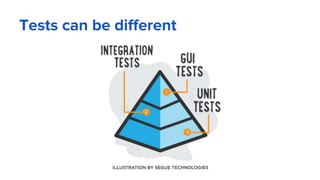
Tests can be different
Integration tests features
Test several components together
Use dependencies (DB, Services, API, FS, AD, ...)
Can have different behavior
Require configuration
Results can be different (depend on environment, order of
execution, multithreading, phase of Moon).
Integration tests features
Following code can often be seen in integration tests
File.Open(...)
Connection.Close(...)
Environment.MachineName
DateTime.Now
TearDown(...)
Integration tests “Pro’s”
Pro’s:
Make sure nuts and bolts fit together
Make sure software stack components interact smoothly
Test behavior and infrastructure (tested code)/test % is high
Reflect typical workflows
Integration tests “Con’s”
Con’s:
Large time investment
Hard to test all critical paths
Harder to localize source of errors
Harder to write and maintain
Project structure
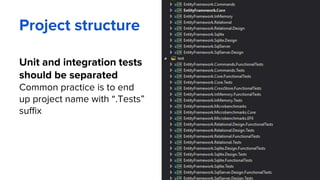
Unit and integration tests
should be separated
Common practice is to end
up project name with “.Tests”
suffix
eleks.comeleks.com
Show me the code!
[integration test examples]
eleks.comeleks.com
UI testing
Testing Web apps using Selenium
Wait, UI?
Web Apps are Heterogeneous systems at most
Different technology stacks for backend
Complex multi-layer and multi-tier systems
Should test all involved parts
Can’t directly test server code and SQL
Everything can go wrong...
Front end test features
Pros:
Hide the complexity of a backend
Tests can reproduce exactly what users do
Can detect errors not visible by other types of tests
UI tests can be utilized for any automation in general
Front end test features
Cons:
Execution time
Third party tools/environments
Hard to maintain
Complexity
Dynamic pages
What is it?
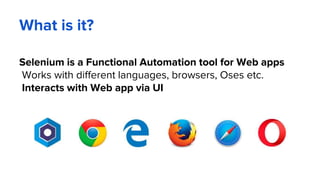
Selenium is a Functional Automation tool for Web apps
Works with different languages, browsers, Oses etc.
Interacts with Web app via UI
What is my options?
Selenium 2 (Selenium Web Driver)
Selenium 1 (Selenium RC)
Selenium IDE
Selenium-Grid
More details at: http://docs.seleniumhq.org/docs/01_introducing_selenium.jsp
Selenium Web Driver
Interactions via DRIVERs
Various drivers are supported:
Chrome driver, Opera driver, Android driver, IOS driver
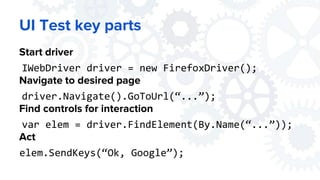
UI Test key parts
Start driver
IWebDriver driver = new FirefoxDriver();
Navigate to desired page
driver.Navigate().GoToUrl(“...”);
Find controls for interaction
var elem = driver.FindElement(By.Name(“...”));
Act
elem.SendKeys(“Ok, Google”);
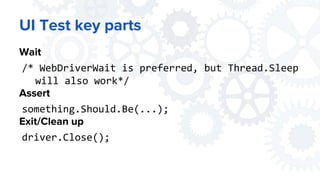
UI Test key parts
Wait
/* WebDriverWait is preferred, but Thread.Sleep
will also work*/
Assert
something.Should.Be(...);
Exit/Clean up
driver.Close();
Selenium API
Easy to find controls/tags
By name, id, css, xpath etc.
Easy to navigate
Select active window
Switch to url
Easy integrates with NUnit
No need for installers, manual process running etc
eleks.comeleks.com
UI automated tests example
[Asp.Net 5 + NUnit + Selenium WebDriver]
It’s time to practice

#2 integration + ui tests

  • 1.
    eleks.comeleks.com Integration testing And UItesting (Selenium Web driver)
  • 2.
    Tests can bedifferent
  • 3.
    Integration tests features Testseveral components together Use dependencies (DB, Services, API, FS, AD, ...) Can have different behavior Require configuration Results can be different (depend on environment, order of execution, multithreading, phase of Moon).
  • 4.
    Integration tests features Followingcode can often be seen in integration tests File.Open(...) Connection.Close(...) Environment.MachineName DateTime.Now TearDown(...)
  • 5.
    Integration tests “Pro’s” Pro’s: Makesure nuts and bolts fit together Make sure software stack components interact smoothly Test behavior and infrastructure (tested code)/test % is high Reflect typical workflows
  • 6.
    Integration tests “Con’s” Con’s: Largetime investment Hard to test all critical paths Harder to localize source of errors Harder to write and maintain
  • 7.
    Project structure Unit andintegration tests should be separated Common practice is to end up project name with “.Tests” suffix
  • 8.
    eleks.comeleks.com Show me thecode! [integration test examples]
  • 9.
  • 10.
    Wait, UI? Web Appsare Heterogeneous systems at most Different technology stacks for backend Complex multi-layer and multi-tier systems Should test all involved parts Can’t directly test server code and SQL Everything can go wrong...
  • 11.
    Front end testfeatures Pros: Hide the complexity of a backend Tests can reproduce exactly what users do Can detect errors not visible by other types of tests UI tests can be utilized for any automation in general
  • 12.
    Front end testfeatures Cons: Execution time Third party tools/environments Hard to maintain Complexity Dynamic pages
  • 13.
    What is it? Seleniumis a Functional Automation tool for Web apps Works with different languages, browsers, Oses etc. Interacts with Web app via UI
  • 14.
    What is myoptions? Selenium 2 (Selenium Web Driver) Selenium 1 (Selenium RC) Selenium IDE Selenium-Grid More details at: http://docs.seleniumhq.org/docs/01_introducing_selenium.jsp
  • 15.
    Selenium Web Driver Interactionsvia DRIVERs Various drivers are supported: Chrome driver, Opera driver, Android driver, IOS driver
  • 16.
    UI Test keyparts Start driver IWebDriver driver = new FirefoxDriver(); Navigate to desired page driver.Navigate().GoToUrl(“...”); Find controls for interaction var elem = driver.FindElement(By.Name(“...”)); Act elem.SendKeys(“Ok, Google”);
  • 17.
    UI Test keyparts Wait /* WebDriverWait is preferred, but Thread.Sleep will also work*/ Assert something.Should.Be(...); Exit/Clean up driver.Close();
  • 18.
    Selenium API Easy tofind controls/tags By name, id, css, xpath etc. Easy to navigate Select active window Switch to url Easy integrates with NUnit No need for installers, manual process running etc
  • 19.
    eleks.comeleks.com UI automated testsexample [Asp.Net 5 + NUnit + Selenium WebDriver]
  • 20.