Secure your Jenkins
Jenkins CI is a great tool, but, it does not mean that it can take care of
own security. Getting Jenkins up and running is one thing, and have it
properly and securely configured requires some thoughtful configuration.
Secure your Jenkins
Most people think that I have setup user authentication, and my Jenkins
is now secure, but, this is not the case. There are a lot of small and basic
things that you need to do to make Jenkins secure, most of these are very
fundamental, however, impact of these small steps can be massive.
Why you should take Jenkins security
seriously?
You should take security of your Jenkins seriously, because, Jenkins is an
application which is interacting with different components, services,
servers etc. To do this Jenkins needs credentials and/or access to those
services.
Say for example, your Jenkins is running on AWS, and it needs access to
ECR, ECS and EC2. To do this, you would create an IAM user for Jenkins
(although not the best option out there, but, still very widely used) and
give it EC2 admin access.
Now, think of a scenario when someone gets hold of your Jenkins
instance, where you stored your IAM credentials in Jenkins Environment
variables.
Now this person can wrack havoc for you, your organization and your
customers, not a pretty situation to be in.
You should work to avoid these kind of painful situations by taking
precautionary steps. As the saying goes, precaution is better than cure.
What can you do to keep your Jenkins
secure?
There are lot of small and basic things that you need to do to make
Jenkins secure, most of these are very basic, but, impact of these small
steps can be massive. First and foremost, never take security of your
Jenkins lightly.
Nothing that you need to do are massive or tedious, just a few thoughtful
configurations.
A few recommended steps for Secure Jenkins configurations:
Never, ever store ANY type of credentials in Jenkins Environment
variables, there should not be any exceptions to this rule. Period.
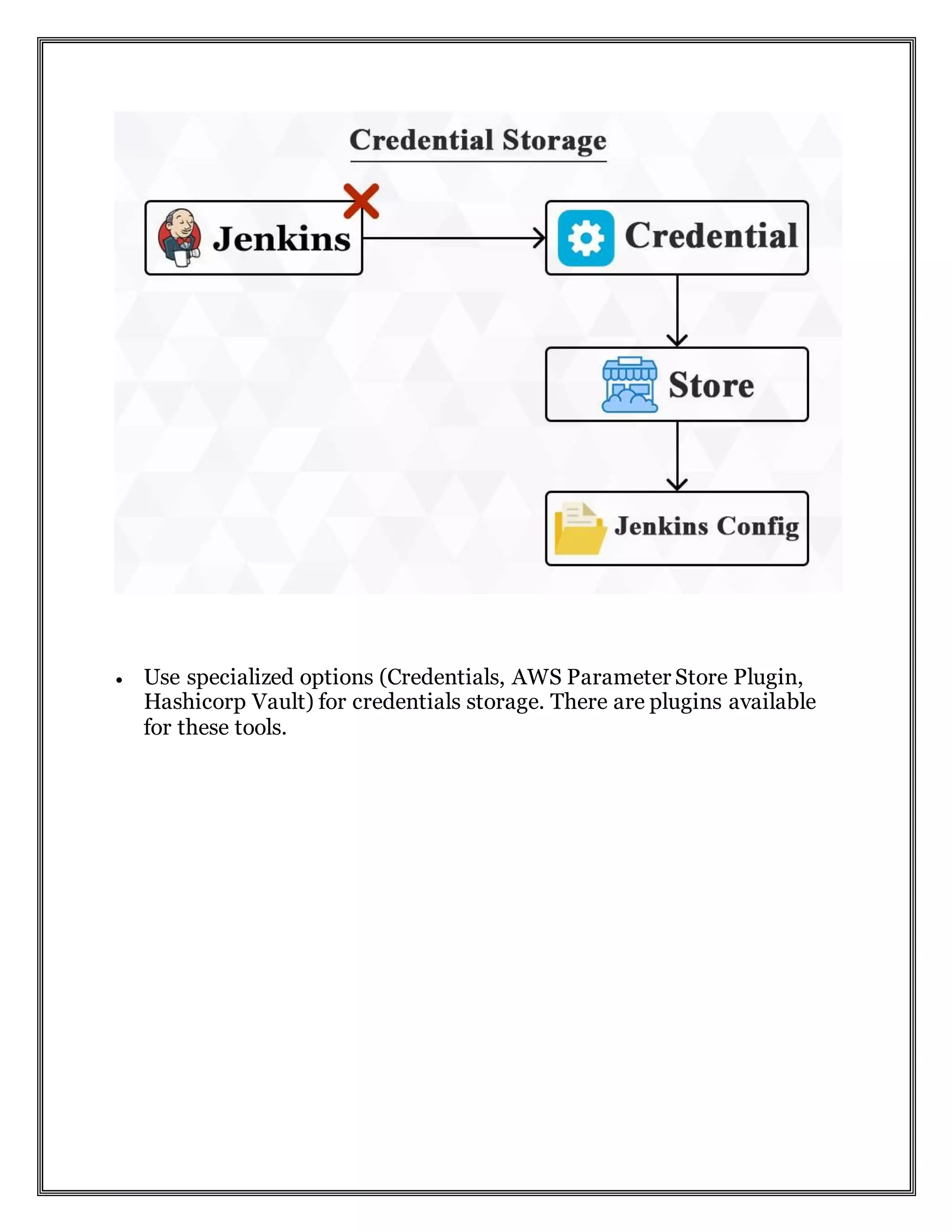
 Use specialized options (Credentials, AWS Parameter Store Plugin,
Hashicorp Vault) for credentials storage. There are plugins available
for these tools.
Always setup SSL with Jenkins (you can get a free SSL certificate
from https://letsencrypt.org/)
 Always, always inject credentials instead of hard coding them.
 Do not use your Github/Bitbucket/Gitlab credentials, instead,
wherever possible use either of following: API Tokens OR SSH Keys
etc for checkout. One of the best thing about the API access tokens is
that you can control how much access you want to give to token you
generate for your Jenkins.
 Never ever give unlimited access of your cloud account to
Jenkins instance, for example give it a restricted AWS role,
keeping “Principle of least privilege” in mind.
 When creating Jenkins users, give them access to what they
need only, not everybody needs to be admin.
 If your Jenkins is accessed via Internet and does not have SSL
enabled (RED FLAG), publicly, then, think about it again (use
disposable/temp/single use credentials for different services,
instead of configuring Jenkins with your user name
password.)
Jenkins best practices recommendation
 Send notifications when a job fails
 Use parameterized builds instead of hard coding paths
 Avoid installing dependencies on Jenkins build server
 In larger systems, don’t build on a master
 Backup Jenkins home regularly
 Integrate Jenkins with your issue tracking system
 Archive unused jobs before removing them
 Avoid scheduling all jobs to start at same time
Jenkins is a great tool, and probably one of most widely used CI solutions
in market. We need to make sure necessary security checks are in place. If
someone can use one of the exploits to gain access to your Jenkins, it’s
bad, however, if your credentials are stored in plain text, result of this
might be disastrous.
Please share your thoughts, reach out to me if you want to know more
about Security, DevOps, Digital Transformation, Containers, Cloud
Computing and related technologies. I am reachable
at ravish@loves.cloud.

Secure your jenkins

  • 1.
    Secure your Jenkins JenkinsCI is a great tool, but, it does not mean that it can take care of own security. Getting Jenkins up and running is one thing, and have it properly and securely configured requires some thoughtful configuration. Secure your Jenkins Most people think that I have setup user authentication, and my Jenkins is now secure, but, this is not the case. There are a lot of small and basic things that you need to do to make Jenkins secure, most of these are very fundamental, however, impact of these small steps can be massive. Why you should take Jenkins security seriously? You should take security of your Jenkins seriously, because, Jenkins is an application which is interacting with different components, services, servers etc. To do this Jenkins needs credentials and/or access to those services. Say for example, your Jenkins is running on AWS, and it needs access to ECR, ECS and EC2. To do this, you would create an IAM user for Jenkins (although not the best option out there, but, still very widely used) and give it EC2 admin access. Now, think of a scenario when someone gets hold of your Jenkins instance, where you stored your IAM credentials in Jenkins Environment variables. Now this person can wrack havoc for you, your organization and your customers, not a pretty situation to be in.
  • 2.
    You should workto avoid these kind of painful situations by taking precautionary steps. As the saying goes, precaution is better than cure. What can you do to keep your Jenkins secure? There are lot of small and basic things that you need to do to make Jenkins secure, most of these are very basic, but, impact of these small steps can be massive. First and foremost, never take security of your Jenkins lightly. Nothing that you need to do are massive or tedious, just a few thoughtful configurations. A few recommended steps for Secure Jenkins configurations: Never, ever store ANY type of credentials in Jenkins Environment variables, there should not be any exceptions to this rule. Period.
  • 3.
     Use specializedoptions (Credentials, AWS Parameter Store Plugin, Hashicorp Vault) for credentials storage. There are plugins available for these tools.
  • 4.
    Always setup SSLwith Jenkins (you can get a free SSL certificate from https://letsencrypt.org/)  Always, always inject credentials instead of hard coding them.
  • 5.
     Do notuse your Github/Bitbucket/Gitlab credentials, instead, wherever possible use either of following: API Tokens OR SSH Keys etc for checkout. One of the best thing about the API access tokens is that you can control how much access you want to give to token you generate for your Jenkins.  Never ever give unlimited access of your cloud account to Jenkins instance, for example give it a restricted AWS role, keeping “Principle of least privilege” in mind.  When creating Jenkins users, give them access to what they need only, not everybody needs to be admin.  If your Jenkins is accessed via Internet and does not have SSL enabled (RED FLAG), publicly, then, think about it again (use disposable/temp/single use credentials for different services, instead of configuring Jenkins with your user name password.) Jenkins best practices recommendation  Send notifications when a job fails  Use parameterized builds instead of hard coding paths  Avoid installing dependencies on Jenkins build server  In larger systems, don’t build on a master  Backup Jenkins home regularly  Integrate Jenkins with your issue tracking system  Archive unused jobs before removing them  Avoid scheduling all jobs to start at same time
  • 6.
    Jenkins is agreat tool, and probably one of most widely used CI solutions in market. We need to make sure necessary security checks are in place. If someone can use one of the exploits to gain access to your Jenkins, it’s bad, however, if your credentials are stored in plain text, result of this might be disastrous. Please share your thoughts, reach out to me if you want to know more about Security, DevOps, Digital Transformation, Containers, Cloud Computing and related technologies. I am reachable at ravish@loves.cloud.