sessions and cookies in PHP
Sessions in php
 Session variables used to storing user information to be used across multiple
pages
 e.g. username, password, ..etc
 By default, session variables last until the user closes the browser.
Example for Session
Php session_start() function
 A session is started with the session_start() function
 Session variables are set with the PHP global variable: $_SESSION
 PHP $_SESSION is an associative array that contains all session variables.
 session_start(); // for creating session
 $_SESSION["user"] = “abc"; //setting of session values
 echo $_SESSION["user"]; //get or printing session values
session_destroy() in php
 PHP session_destroy() function is used to destroy all session
variables completely.
//Example c.php
<?php
session_start();
session_destroy();
?>
Example for Session
// Abc.php
<?php
session_start(); //creation of session
?>
<html>
<body>
<?php
$_SESSION["user"] = “pavan"; //setting session
value
echo "Session information are set successfully.<br/>
";
?>
<a href=“cs.php">Visit next page</a>
</body>
</html>
// cs.php
<?php
session_start();
?>
<html>
<body>
<?php
echo "User is: ".$_SESSION["user"];
?>
</body>
</html>
Cookies in php
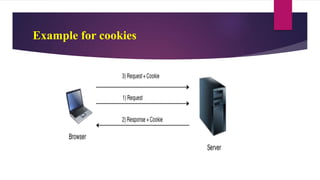
 PHP cookie is a small piece of information which is stored at client browser.
 It is used to recognize the user.
 Cookie is created at server side and saved to client browser.
 Each time when client sends request to the server, cookie is embedded with
request.
 In that way cookie can be received at the server side.
Example for cookies
setcookie() function
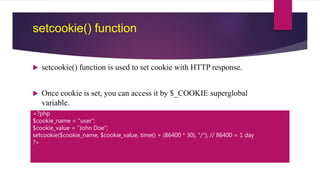
 setcookie() function is used to set cookie with HTTP response.
 Once cookie is set, you can access it by $_COOKIE superglobal
variable.
<?php
$cookie_name = "user";
$cookie_value = "John Doe";
setcookie($cookie_name, $cookie_value, time() + (86400 * 30), "/"); // 86400 = 1 day
?>
Example For COOKIES
<?php
setcookie("user", “aaa");
?>
<html>
<body>
<?php
if(!isset($_COOKIE["user"])) {
echo "Sorry, cookie is not found!";
} else {
echo "<br/>Cookie Value: " . $_COOKIE["user"];
}
?>
</body>
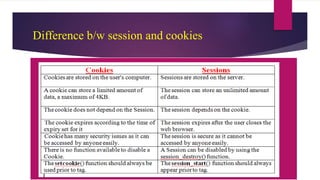
Difference b/w session and cookies

Sessions and cookies in php

  • 1.
  • 2.
    Sessions in php Session variables used to storing user information to be used across multiple pages  e.g. username, password, ..etc  By default, session variables last until the user closes the browser.
  • 3.
  • 4.
    Php session_start() function A session is started with the session_start() function  Session variables are set with the PHP global variable: $_SESSION  PHP $_SESSION is an associative array that contains all session variables.  session_start(); // for creating session  $_SESSION["user"] = “abc"; //setting of session values  echo $_SESSION["user"]; //get or printing session values
  • 5.
    session_destroy() in php PHP session_destroy() function is used to destroy all session variables completely. //Example c.php <?php session_start(); session_destroy(); ?>
  • 6.
    Example for Session //Abc.php <?php session_start(); //creation of session ?> <html> <body> <?php $_SESSION["user"] = “pavan"; //setting session value echo "Session information are set successfully.<br/> "; ?> <a href=“cs.php">Visit next page</a> </body> </html> // cs.php <?php session_start(); ?> <html> <body> <?php echo "User is: ".$_SESSION["user"]; ?> </body> </html>
  • 7.
    Cookies in php PHP cookie is a small piece of information which is stored at client browser.  It is used to recognize the user.  Cookie is created at server side and saved to client browser.  Each time when client sends request to the server, cookie is embedded with request.  In that way cookie can be received at the server side.
  • 8.
  • 9.
    setcookie() function  setcookie()function is used to set cookie with HTTP response.  Once cookie is set, you can access it by $_COOKIE superglobal variable. <?php $cookie_name = "user"; $cookie_value = "John Doe"; setcookie($cookie_name, $cookie_value, time() + (86400 * 30), "/"); // 86400 = 1 day ?>
  • 10.
    Example For COOKIES <?php setcookie("user",“aaa"); ?> <html> <body> <?php if(!isset($_COOKIE["user"])) { echo "Sorry, cookie is not found!"; } else { echo "<br/>Cookie Value: " . $_COOKIE["user"]; } ?> </body>
  • 11.