DEVELOPING A
DEVELOPING A
SEARCH
SEARCH
STRATEGY
STRATEGY
Prepared by Stephen Odera
Tuesday, September 24, 2024
What Is a Search?
What Is a Search?
 A search is the organized pursuit of
information. Somewhere in a collection of
documents, email messages, Web pages,
electronic books ,online journals and
other sources, there is information that
you want to find, but you have no idea
where it is.
Prepared by Stephen Odera
Tuesday, September 24, 2024
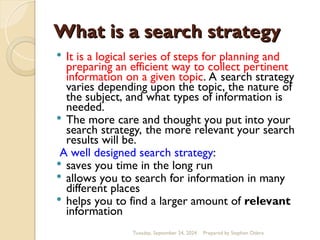
What is a search strategy
 It is a logical series of steps for planning and
preparing an efficient way to collect pertinent
information on a given topic. A search strategy
varies depending upon the topic, the nature of
the subject, and what types of information is
needed.
 The more care and thought you put into your
search strategy, the more relevant your search
results will be.
A well designed search strategy:
 saves you time in the long run
 allows you to search for information in many
different places
 helps you to find a larger amount of relevant
information
Prepared by Stephen Odera
Tuesday, September 24, 2024
The search technique/Steps
1.Read the query, understand the query
Question: Describe the side effects of drugs to the youth
2.Identify the major concepts / Key words in the query
Keywords; side effects, drugs, youth
3.Identify potential terms to correspond to those concepts.
To increase the likelihood of finding relevant material, you need to
think about alternative terms that can be used to describe the
same concepts
You should think about:
 synonyms (e.g. mobile telephones, cellular telephones)
 plural/singular forms (e.g. women, woman)
 spelling variations(e.g. behaviour, behavior)
 variations of a root word (e.g. feminism, feminist, feminine)
 acronyms (e.g. chief executive officer, CEO) etc
Prepared by Stephen Odera
Tuesday, September 24, 2024
The search technique/Steps
4.Select alternative( narrower, broader, or related) terms to use if
the original strategy needs help(thesaurus)
Sometimes using a thesaurus or specialized dictionary might
help, particularly if you aren't clear about some terminology
or concepts.
Alternative/potential terms
 Side effects- effects ,impact
 Drugs- specific drugs e.g. cocaine, cigarettes, alcohol etc
 Youth- young adults, teenagers, adolescents
Original query: Describe the side effects of drugs to the youth
New Queries
Describe the impact of alcohol to young adults
Describe the effects of cocaine to teenagers etc
Prepared by Stephen Odera
Tuesday, September 24, 2024
THESAURUS
THESAURUS
Tuesday, September 24, 2024 Prepared by Stephen Odera
The search technique/Steps
5.Determine logical (Boolean) relationship
between terms.
To improve your searching efficiency, you
should use Boolean Logic. Using the words
AND, OR, and NOT will help refine your
search
6.Begin the search.
Once you know what you are searching for
you need to know where to search. Think
about where you might look for the sort of
information that you need.
Prepared by Stephen Odera
Tuesday, September 24, 2024
The search technique/Steps
7.Have a look at some few documents
8.Evaluate the results.
9.Revise and refine the search based on those initial results.
Type of
information
Sources Where to look
Current or up to date
information
Print or online Journals,
websites, electronic books
Databases and Indexes,
Search engines and
gateways etc
Comprehensive
information
Print and electronic Books
Online Databases, Library
catalogue, browsing the
shelves
Background
information,
definitions etc
Books, encyclopedias,
dictionaries,
thesaurus
websites ,Library
catalogue, reference
Sources
Prepared by Stephen Odera
Tuesday, September 24, 2024
How to Search
How to Search
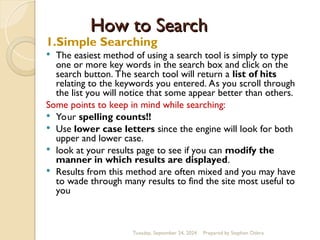
1.Simple Searching
 The easiest method of using a search tool is simply to type
one or more key words in the search box and click on the
search button. The search tool will return a list of hits
relating to the keywords you entered. As you scroll through
the list you will notice that some appear better than others.
Some points to keep in mind while searching:
 Your spelling counts!!
 Use lower case letters since the engine will look for both
upper and lower case.
 look at your results page to see if you can modify the
manner in which results are displayed.
 Results from this method are often mixed and you may have
to wade through many results to find the site most useful to
you
Prepared by Stephen Odera
Tuesday, September 24, 2024
How to Search
How to Search
2.Phrase Searching
 When you are searching for a phrase, you should
enclose it in “quotation marks”. The quotation
marks tell the search tool that the words
enclosed in quotes must be exactly as they were
typed, and in the same order. Most search
engines recognize this protocol.
Example
 “Early Childhood” “research methods”
Tells the search tool to look for the words as a
phrase. Both words must be present and appear
next to each other in the same order.
Prepared by Stephen Odera
Tuesday, September 24, 2024
“
“RESEARCH METHODS”
RESEARCH METHODS”
Tuesday, September 24, 2024 Prepared by Stephen Odera
3. Field searching
•Electronic record presented as a field
•Data fields for the title, author, affiliation,
journal or book title, abstract or language
• Field searching is focused eg author search
•Most Search tools allow user to limit search
according to fields such as year, language,
author, abstract
How to Search
FIELD SEARCHING
FIELD SEARCHING
Tuesday, September 24, 2024 Prepared by Stephen Odera
How to search
How to search
Tuesday,
September
24,
2024
Prepared by Stephen Odera
4.Controlled Vocabulary Searching
•Ensures consistency in presentation of
information for related topics.
•Standardises language used by authors.
Example
Cell phones
see cellular telephones
Disadvantage
Controlled term may be ‘distance education’
and articles with the term ‘distance learning’ (as
used in many articles by American authors) may
not be retrieved.
VOCABULARY
VOCABULARY
Tuesday, September 24, 2024 Prepared by Stephen Odera
How to search
How to search
Tuesday, September 24, 2024
5.Truncation and Wildcards
Use wildcards to pick up British and American
spelling of words.
Wildcards are used to substitute a symbol for
one or more letters in a word, e.g. colo*r to find
colour or color.
Truncation is the use of a symbol to find variant
word endings, e.g. comput* to find computers,
computer, computation etc.
Check the Database Help Screen for the symbol
to use. Most databases use * or ?
Recruit* will find :recruit,recruitment,recruitng
Entering wom?n will find both woman and women
Prepared by Stephen Odera
How to Search
How to Search
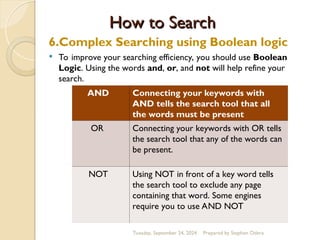
6.Complex Searching using Boolean logic
 To improve your searching efficiency, you should use Boolean
Logic. Using the words and, or, and not will help refine your
search.
AND Connecting your keywords with
AND tells the search tool that all
the words must be present
OR Connecting your keywords with OR tells
the search tool that any of the words can
be present.
NOT Using NOT in front of a key word tells
the search tool to exclude any page
containing that word. Some engines
require you to use AND NOT
Prepared by Stephen Odera
Tuesday, September 24, 2024
Boolean Logic
Boolean Logic
 Alternative Methods to Use
Boolean Logic
 + may be substituted for AND.
- may be substituted for NOT.
It is a good idea to put + (plus sign) in
front of any word you want to require
and a - (minus sign) in front of any word
you want to substitute.
Prepared by Stephen Odera
Tuesday, September 24, 2024
AND
AND LOGI
LOGIC
C
Question:What is the relationship between
poverty and crime.
-In this search, we retrieve records in which
BOTH of the search terms are present
-This is illustrated by the shaded area overlapping
the two circles representing all the records that
contain both the word "poverty" and the word
"crime"
-Notice how we do not retrieve any records with
only "poverty" or only "crime
Search term End results
Poverty 435,900
Crime 34,000
Poverty AND Crime 12,500
Prepared by Stephen Odera
Tuesday, September 24, 2024
OR
OR LOGIC
LOGIC
Question: I would like information about college.
-In this search, we will retrieve records in which AT LEAST ONE
of the search terms is present. We are searching on the terms
college and also university since documents containing either
of these words might be relevant.
This is illustrated by:
-the shaded circle with the word college representing all the
records that contain the word "college"
-the shaded circle with the word university representing all the
records that contain the word "university"
-the shaded overlap area representing all the records that contain
both "college" and "university"
Search Terms End Results
College 23,000
University 42,000
College OR
University
65,000
Prepared by Stephen Odera
Tuesday, September 24, 2024
NOT
NOT LOGIC
LOGIC
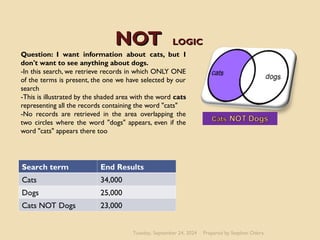
Question: I want information about cats, but I
don't want to see anything about dogs.
-In this search, we retrieve records in which ONLY ONE
of the terms is present, the one we have selected by our
search
-This is illustrated by the shaded area with the word cats
representing all the records containing the word "cats"
-No records are retrieved in the area overlapping the
two circles where the word "dogs" appears, even if the
word "cats" appears there too
Search term End Results
Cats 34,000
Dogs 25,000
Cats NOT Dogs 23,000
Prepared by Stephen Odera
Tuesday, September 24, 2024
BOOLEAN SEARCH
BOOLEAN SEARCH
Tuesday, September 24, 2024 Prepared by Stephen Odera
Broadening a Search
Broadening a Search
 If your search results in little, or too much
information? (review your search terms, and either
broaden or narrow your search)
To broaden your search (i.e. increase the amount you
find) you can:
 reduce the number of concepts you are using
 use an OR search
 look for alternative terms
 use more general search terms
 use subject headings as search terms
 make sure you have used any Boolean operators
correctly
 use truncation to get variations on your term, or use
alternative terms
Prepared by Stephen Odera
Tuesday, September 24, 2024
Narrowing a Search
Narrowing a Search
To narrow your search (i.e. reduce the
amount you find) you can:
 use an AND or NOT search
 look for more specific alternative terms
 use subject headings as search terms
 make sure you have used any Boolean
operators correctly
 use more precise terms
 remove any truncation
Prepared by Stephen Odera
Tuesday, September 24, 2024
References
References
Boolean Searching on the Internet
http://www.internettutorials.net/boolean.asp
Prepared by Stephen Odera
Tuesday, September 24, 2024

Search strategy.ppt k

  • 1.
    DEVELOPING A DEVELOPING A SEARCH SEARCH STRATEGY STRATEGY Preparedby Stephen Odera Tuesday, September 24, 2024
  • 2.
    What Is aSearch? What Is a Search?  A search is the organized pursuit of information. Somewhere in a collection of documents, email messages, Web pages, electronic books ,online journals and other sources, there is information that you want to find, but you have no idea where it is. Prepared by Stephen Odera Tuesday, September 24, 2024
  • 3.
    What is asearch strategy What is a search strategy  It is a logical series of steps for planning and preparing an efficient way to collect pertinent information on a given topic. A search strategy varies depending upon the topic, the nature of the subject, and what types of information is needed.  The more care and thought you put into your search strategy, the more relevant your search results will be. A well designed search strategy:  saves you time in the long run  allows you to search for information in many different places  helps you to find a larger amount of relevant information Prepared by Stephen Odera Tuesday, September 24, 2024
  • 4.
    The search technique/Steps Thesearch technique/Steps 1.Read the query, understand the query Question: Describe the side effects of drugs to the youth 2.Identify the major concepts / Key words in the query Keywords; side effects, drugs, youth 3.Identify potential terms to correspond to those concepts. To increase the likelihood of finding relevant material, you need to think about alternative terms that can be used to describe the same concepts You should think about:  synonyms (e.g. mobile telephones, cellular telephones)  plural/singular forms (e.g. women, woman)  spelling variations(e.g. behaviour, behavior)  variations of a root word (e.g. feminism, feminist, feminine)  acronyms (e.g. chief executive officer, CEO) etc Prepared by Stephen Odera Tuesday, September 24, 2024
  • 5.
    The search technique/Steps Thesearch technique/Steps 4.Select alternative( narrower, broader, or related) terms to use if the original strategy needs help(thesaurus) Sometimes using a thesaurus or specialized dictionary might help, particularly if you aren't clear about some terminology or concepts. Alternative/potential terms  Side effects- effects ,impact  Drugs- specific drugs e.g. cocaine, cigarettes, alcohol etc  Youth- young adults, teenagers, adolescents Original query: Describe the side effects of drugs to the youth New Queries Describe the impact of alcohol to young adults Describe the effects of cocaine to teenagers etc Prepared by Stephen Odera Tuesday, September 24, 2024
  • 6.
    THESAURUS THESAURUS Tuesday, September 24,2024 Prepared by Stephen Odera
  • 7.
    The search technique/Steps Thesearch technique/Steps 5.Determine logical (Boolean) relationship between terms. To improve your searching efficiency, you should use Boolean Logic. Using the words AND, OR, and NOT will help refine your search 6.Begin the search. Once you know what you are searching for you need to know where to search. Think about where you might look for the sort of information that you need. Prepared by Stephen Odera Tuesday, September 24, 2024
  • 8.
    The search technique/Steps Thesearch technique/Steps 7.Have a look at some few documents 8.Evaluate the results. 9.Revise and refine the search based on those initial results. Type of information Sources Where to look Current or up to date information Print or online Journals, websites, electronic books Databases and Indexes, Search engines and gateways etc Comprehensive information Print and electronic Books Online Databases, Library catalogue, browsing the shelves Background information, definitions etc Books, encyclopedias, dictionaries, thesaurus websites ,Library catalogue, reference Sources Prepared by Stephen Odera Tuesday, September 24, 2024
  • 9.
    How to Search Howto Search 1.Simple Searching  The easiest method of using a search tool is simply to type one or more key words in the search box and click on the search button. The search tool will return a list of hits relating to the keywords you entered. As you scroll through the list you will notice that some appear better than others. Some points to keep in mind while searching:  Your spelling counts!!  Use lower case letters since the engine will look for both upper and lower case.  look at your results page to see if you can modify the manner in which results are displayed.  Results from this method are often mixed and you may have to wade through many results to find the site most useful to you Prepared by Stephen Odera Tuesday, September 24, 2024
  • 10.
    How to Search Howto Search 2.Phrase Searching  When you are searching for a phrase, you should enclose it in “quotation marks”. The quotation marks tell the search tool that the words enclosed in quotes must be exactly as they were typed, and in the same order. Most search engines recognize this protocol. Example  “Early Childhood” “research methods” Tells the search tool to look for the words as a phrase. Both words must be present and appear next to each other in the same order. Prepared by Stephen Odera Tuesday, September 24, 2024
  • 11.
    “ “RESEARCH METHODS” RESEARCH METHODS” Tuesday,September 24, 2024 Prepared by Stephen Odera
  • 12.
    Tuesday, September 24,2024 Prepared by Stephen Odera 3. Field searching •Electronic record presented as a field •Data fields for the title, author, affiliation, journal or book title, abstract or language • Field searching is focused eg author search •Most Search tools allow user to limit search according to fields such as year, language, author, abstract How to Search
  • 13.
    FIELD SEARCHING FIELD SEARCHING Tuesday,September 24, 2024 Prepared by Stephen Odera
  • 14.
    How to search Howto search Tuesday, September 24, 2024 Prepared by Stephen Odera 4.Controlled Vocabulary Searching •Ensures consistency in presentation of information for related topics. •Standardises language used by authors. Example Cell phones see cellular telephones Disadvantage Controlled term may be ‘distance education’ and articles with the term ‘distance learning’ (as used in many articles by American authors) may not be retrieved.
  • 15.
    VOCABULARY VOCABULARY Tuesday, September 24,2024 Prepared by Stephen Odera
  • 16.
    How to search Howto search Tuesday, September 24, 2024 5.Truncation and Wildcards Use wildcards to pick up British and American spelling of words. Wildcards are used to substitute a symbol for one or more letters in a word, e.g. colo*r to find colour or color. Truncation is the use of a symbol to find variant word endings, e.g. comput* to find computers, computer, computation etc. Check the Database Help Screen for the symbol to use. Most databases use * or ? Recruit* will find :recruit,recruitment,recruitng Entering wom?n will find both woman and women Prepared by Stephen Odera
  • 17.
    How to Search Howto Search 6.Complex Searching using Boolean logic  To improve your searching efficiency, you should use Boolean Logic. Using the words and, or, and not will help refine your search. AND Connecting your keywords with AND tells the search tool that all the words must be present OR Connecting your keywords with OR tells the search tool that any of the words can be present. NOT Using NOT in front of a key word tells the search tool to exclude any page containing that word. Some engines require you to use AND NOT Prepared by Stephen Odera Tuesday, September 24, 2024
  • 18.
    Boolean Logic Boolean Logic Alternative Methods to Use Boolean Logic  + may be substituted for AND. - may be substituted for NOT. It is a good idea to put + (plus sign) in front of any word you want to require and a - (minus sign) in front of any word you want to substitute. Prepared by Stephen Odera Tuesday, September 24, 2024
  • 19.
    AND AND LOGI LOGIC C Question:What isthe relationship between poverty and crime. -In this search, we retrieve records in which BOTH of the search terms are present -This is illustrated by the shaded area overlapping the two circles representing all the records that contain both the word "poverty" and the word "crime" -Notice how we do not retrieve any records with only "poverty" or only "crime Search term End results Poverty 435,900 Crime 34,000 Poverty AND Crime 12,500 Prepared by Stephen Odera Tuesday, September 24, 2024
  • 20.
    OR OR LOGIC LOGIC Question: Iwould like information about college. -In this search, we will retrieve records in which AT LEAST ONE of the search terms is present. We are searching on the terms college and also university since documents containing either of these words might be relevant. This is illustrated by: -the shaded circle with the word college representing all the records that contain the word "college" -the shaded circle with the word university representing all the records that contain the word "university" -the shaded overlap area representing all the records that contain both "college" and "university" Search Terms End Results College 23,000 University 42,000 College OR University 65,000 Prepared by Stephen Odera Tuesday, September 24, 2024
  • 21.
    NOT NOT LOGIC LOGIC Question: Iwant information about cats, but I don't want to see anything about dogs. -In this search, we retrieve records in which ONLY ONE of the terms is present, the one we have selected by our search -This is illustrated by the shaded area with the word cats representing all the records containing the word "cats" -No records are retrieved in the area overlapping the two circles where the word "dogs" appears, even if the word "cats" appears there too Search term End Results Cats 34,000 Dogs 25,000 Cats NOT Dogs 23,000 Prepared by Stephen Odera Tuesday, September 24, 2024
  • 22.
    BOOLEAN SEARCH BOOLEAN SEARCH Tuesday,September 24, 2024 Prepared by Stephen Odera
  • 23.
    Broadening a Search Broadeninga Search  If your search results in little, or too much information? (review your search terms, and either broaden or narrow your search) To broaden your search (i.e. increase the amount you find) you can:  reduce the number of concepts you are using  use an OR search  look for alternative terms  use more general search terms  use subject headings as search terms  make sure you have used any Boolean operators correctly  use truncation to get variations on your term, or use alternative terms Prepared by Stephen Odera Tuesday, September 24, 2024
  • 24.
    Narrowing a Search Narrowinga Search To narrow your search (i.e. reduce the amount you find) you can:  use an AND or NOT search  look for more specific alternative terms  use subject headings as search terms  make sure you have used any Boolean operators correctly  use more precise terms  remove any truncation Prepared by Stephen Odera Tuesday, September 24, 2024
  • 25.
    References References Boolean Searching onthe Internet http://www.internettutorials.net/boolean.asp Prepared by Stephen Odera Tuesday, September 24, 2024