SOFTWARE ENGINEERING
Prof. K. Adisesha 1
LECTURE NOTES
ON
SOFTWARE ENGINEERING
For
BE/ MCA/M.Th./M.Sc. (CS/IT)
By.
Prof. K. Adisesha
SOFTWARE ENGINEERING
Prof. K. Adisesha 2
INTRODUCTION TO SOFTWARE ENGINEERING
The term software engineering is composed of two words, software and engineering.
Software is more than just a program code. A program is an executable code, which serves some
computational purpose. Software is considered to be a collection of executable programming code,
associated libraries and documentations. Software, when made for a specific requirement is called
software product.
we can define software engineering as an engineering branch associated with the development of
software product using well-defined scientific principles, methods and procedures. The outcome of
software engineering is an efficient and reliable software product.
IEEE defines software engineering as:
The application of a systematic, disciplined, quantifiable approach to the development, operation
and maintenance of software.
We can alternatively view it as a systematic collection of past experience. The experience is arranged
in the form of methodologies and guidelines. A small program can be written without using software
engineering principles. But if one wants to develop a large software product, then software
engineering principles are absolutely necessary to achieve a good quality software cost effectively.
NEED OF SOFTWARE ENGINEERING
The need of software engineering arises because of higher rate of change in user requirements and
environment on which the software is working.
• Large software - It is easier to build a wall than to a house or building, likewise, as the size
of software become large engineering has to step to give it a scientific process.
• Scalability- If the software process were not based on scientific and engineering concepts, it
would be easier to re-create new software than to scale an existing one.
• Cost- As hardware industry has shown its skills and huge manufacturing has lower down the
price of computer and electronic hardware. But the cost of software remains high if proper
process is not adapted.
• Dynamic Nature- The always growing and adapting nature of software hugely depends upon
the environment in which the user works. If the nature of software is always changing, new
enhancements need to be done in the existing one. This is where software engineering plays
a good role.
• Quality Management- Better process of software development provides better and quality
software product.
SOFTWARE ENGINEERING
Prof. K. Adisesha 3
CHARACTERESTICS OF GOOD SOFTWARE
A software product can be judged by what it offers and how well it can be used. This software must
satisfy on the following grounds:
• Operational
• Transitional
• Maintenance
Well-engineered and crafted software is expected to have the following characteristics:
Operational
This tells us how well software works in operations. It can be measured on:
• Budget
• Usability
• Efficiency
• Correctness
• Functionality
• Dependability
• Security
• Safety
Transitional
This aspect is important when the software is moved from one platform to another:
• Portability
• Interoperability
• Reusability
• Adaptability
Maintenance
This aspect briefs about how well a software has the capabilities to maintain itself in the ever
changing environment:
• Modularity
• Maintainability
• Flexibility
• Scalability
In short, Software engineering is a branch of computer science, which uses well-defined engineering
concepts required to produce efficient, durable, scalable, in-budget and on-time software products
SOFTWARE ENGINEERING
Prof. K. Adisesha 4
SOFTWARE DEVELOPMENT LIFE CYCLE
LIFE CYCLE MODEL
A software life cycle model (also called process model) is a descriptive and diagrammatic
representation of the software life cycle. A life cycle model represents all the activities required to
make a software product transit through its life cycle phases.
It also captures the order in which these activities are to be undertaken. In other words, a life cycle
model maps the different activities performed on a software product from its inception to retirement.
THE NEED FOR A SOFTWARE LIFE CYCLE MODEL
The development team must identify a suitable life cycle model for the particular project and then
adhere to it. Without using of a particular life cycle model the development of a software product
would not be in a systematic and disciplined manner. When a software product is being developed
by a team there must be a clear understanding among team members about when and what to do.
A software life cycle model defines entry and exit criteria for every phase. A phase can start only if
its phase-entry criteria have been satisfied.
Different software life cycle models
Many life cycle models have been proposed so far. Each of them has some advantages as well as
some disadvantages. A few important and commonly used life cycle models are as follows:
• Classical Waterfall Model
• Iterative Waterfall Model
• Prototyping Model
• Evolutionary Model
• Spiral Model
1. CLASSICAL WATERFALL MODEL
The classical waterfall model is intuitively the most obvious way to develop software. Though the
classical waterfall model is elegant and intuitively obvious, it is not a practical model in the sense
that it cannot be used in actual software development projects. Thus, this model can be considered
to be a theoretical way of developing software. But all other life cycle models are essentially derived
from the classical waterfall model. So, in order to be able to appreciate other life cycle models it is
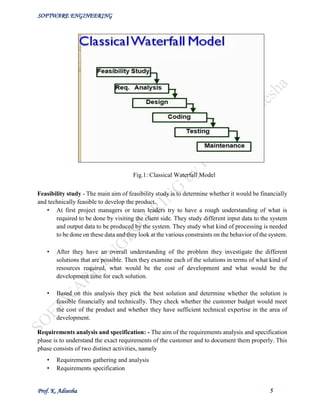
necessary to learn the classical waterfall model. Classical waterfall model divides the life cycle into
the following phases as shown in fig.1:
SOFTWARE ENGINEERING
Prof. K. Adisesha 5
Feasibility study - The main aim of feasibility study is to determine whether it would be financially
and technically feasible to develop the product.
• At first project managers or team leaders try to have a rough understanding of what is
required to be done by visiting the client side. They study different input data to the system
and output data to be produced by the system. They study what kind of processing is needed
to be done on these data and they look at the various constraints on the behavior of the system.
• After they have an overall understanding of the problem they investigate the different
solutions that are possible. Then they examine each of the solutions in terms of what kind of
resources required, what would be the cost of development and what would be the
development time for each solution.
• Based on this analysis they pick the best solution and determine whether the solution is
feasible financially and technically. They check whether the customer budget would meet
the cost of the product and whether they have sufficient technical expertise in the area of
development.
Requirements analysis and specification: - The aim of the requirements analysis and specification
phase is to understand the exact requirements of the customer and to document them properly. This
phase consists of two distinct activities, namely
• Requirements gathering and analysis
• Requirements specification
Fig.1: Classical Waterfall Model
SOFTWARE ENGINEERING
Prof. K. Adisesha 6
The goal of the requirements gathering activity is to collect all relevant information from the
customer regarding the product to be developed. This is done to clearly understand the customer
requirements so that incompleteness and inconsistencies are removed.
The requirements analysis activity is begun by collecting all relevant data regarding the product to
be developed from the users of the product and from the customer through interviews and
discussions.
During this activity, the user requirements are systematically organized into a Software
Requirements Specification (SRS) document. The customer requirements identified during the
requirements gathering and analysis activity are organized into a SRS document. The important
components of this document are functional requirements, the nonfunctional requirements, and the
goals of implementation.
Design: - The goal of the design phase is to transform the requirements specified in the SRS
document into a structure that is suitable for implementation in some programming language. In
technical terms, during the design phase the software architecture is derived from the SRS document.
Two distinctly different approaches are available: the traditional design approach and the object-
oriented design approach.
• Traditional design approach -Traditional design consists of two different activities; first a
structured analysis of the requirements specification is carried out where the detailed
structure of the problem is examined. This is followed by a structured design activity. During
structured design, the results of structured analysis are transformed into the software design.
• Object-oriented design approach -In this technique, various objects that occur in the
problem domain and the solution domain are first identified, and the different relationships
that exist among these objects are identified. The object structure is further refined to obtain
the detailed design.
Coding and unit testing: -The purpose of the coding phase (sometimes called the implementation
phase) of software development is to translate the software design into source code. Each component
of the design is implemented as a program module. The end-product of this phase is a set of program
modules that have been individually tested. During this phase, each module is unit tested to
determine the correct working of all the individual modules. It involves testing each module in
isolation as this is the most efficient way to debug the errors identified at this stage.
Integration and system testing: -Integration of different modules is undertaken once they have
been coded and unit tested. During the integration and system testing phase, the modules are
integrated in a planned manner. The different modules making up a software product are almost
never integrated in one shot. Integration is normally carried out incrementally over a number of
steps. During each integration step, the partially integrated system is tested and a set of previously
planned modules are added to it. Finally, when all the modules have been successfully integrated
and tested, system testing is carried out. The goal of system testing is to ensure that the developed
system conforms to its requirements laid out in the SRS document. System testing usually consists
of three different kinds of testing activities:
• α – testing: It is the system testing performed by the development team.
SOFTWARE ENGINEERING
Prof. K. Adisesha 7
• β –testing: It is the system testing performed by a friendly set of customers.
• Acceptance testing: It is the system testing performed by the customer himself after the
product delivery to determine whether to accept or reject the delivered product.
System testing is normally carried out in a planned manner according to the system test plan
document. The system test plan identifies all testing-related activities that must be performed,
specifies the schedule of testing, and allocates resources. It also lists all the test cases and the
expected outputs for each test case.
Maintenance: -Maintenance of a typical software product requires much more than the effort
necessary to develop the product itself. Many studies carried out in the past confirm this and indicate
that the relative effort of development of a typical software product to its maintenance effort is
roughly in the 40:60 ratios. Maintenance involves performing any one or more of the following three
kinds of activities:
• Correcting errors that were not discovered during the product development phase. This is
called corrective maintenance.
• Improving the implementation of the system, and enhancing the functionalities of the system
according to the customer’s requirements. This is called perfective maintenance.
• Porting the software to work in a new environment. For example, porting may be required to
get the software to work on a new computer platform or with a new operating system. This
is called adaptive maintenance.
Shortcomings of the classical waterfall model
The classical waterfall model is an idealistic one since it assumes that no development error is ever
committed by the engineers during any of the life cycle phases. However, in practical development
environments, the engineers do commit a large number of errors in almost every phase of the life
cycle. The source of the defects can be many: oversight, wrong assumptions, use of inappropriate
technology, communication gap among the project engineers, etc. These defects usually get detected
much later in the life cycle. Therefore, in any practical software development work, it is not possible
to strictly follow the classical waterfall model.
2. ITERATIVE WATERFALL MODEL
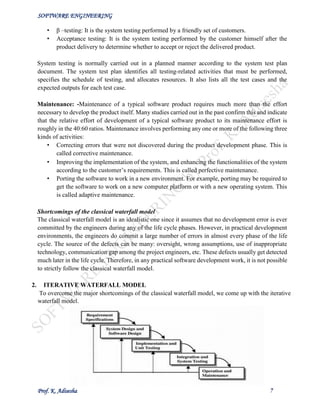
To overcome the major shortcomings of the classical waterfall model, we come up with the iterative
waterfall model.
SOFTWARE ENGINEERING
Prof. K. Adisesha 8
Here, we provide feedback paths for error correction as & when detected later in a phase. Though
errors are inevitable, but it is desirable to detect them in the same phase in which they occur. If
so, this can reduce the effort to correct the bug.
The advantage of this model is that there is a working model of the system at a very early stage
of development which makes it easier to find functional or design flaws. Finding issues at an
early stage of development enables to take corrective measures in a limited budget.
The disadvantage with this SDLC model is that it is applicable only to large and bulky software
development projects. This is because it is hard to break a small software system into further
small serviceable increments/modules.
3. PRTOTYPING MODEL
Prototype
A prototype is a toy implementation of the system. A prototype usually exhibits limited
functional capabilities, low reliability, and inefficient performance compared to the actual
software. A prototype is usually built using several shortcuts. The shortcuts might involve using
inefficient, inaccurate, or dummy functions. The shortcut implementation of a function, for
example, may produce the desired results by using a table look-up instead of performing the
actual computations. A prototype usually turns out to be a very crude version of the actual
system.
Need for a prototype in software development
There are several uses of a prototype. An important purpose is to illustrate the input data formats,
messages, reports, and the interactive dialogues to the customer. This is a valuable mechanism
for gaining better understanding of the customer’s needs:
• how the screens might look like
• how the user interface would behave
• how the system would produce outputs
Another reason for developing a prototype is that it is impossible to get the perfect product in
the first attempt. Many researchers and engineers advocate that if you want to develop a good
product you must plan to throw away the first version. The experience gained in developing the
prototype can be used to develop the final product.
A prototyping model can be used when technical solutions are unclear to the development team.
A developed prototype can help engineers to critically examine the technical issues associated
with the product development. Often, major design decisions depend on issues like the response
time of a hardware controller, or the efficiency of a sorting algorithm, etc. In such
circumstances, a prototype may be the best or the only way to resolve the technical issues.
SOFTWARE ENGINEERING
Prof. K. Adisesha 9
A prototype of the actual product is preferred in situations such as:
• User requirements are not complete
• Technical issues are not clear
4. EVOLUTIONARY MODEL
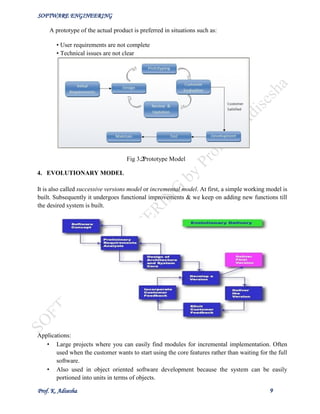
It is also called successive versions model or incremental model. At first, a simple working model is
built. Subsequently it undergoes functional improvements & we keep on adding new functions till
the desired system is built.
Applications:
• Large projects where you can easily find modules for incremental implementation. Often
used when the customer wants to start using the core features rather than waiting for the full
software.
• Also used in object oriented software development because the system can be easily
portioned into units in terms of objects.
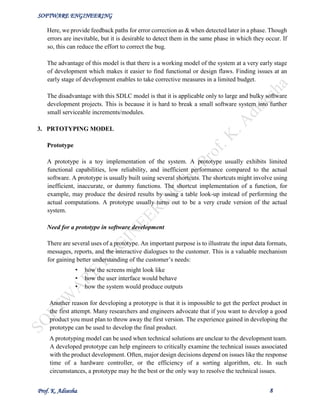
Fig 3.2: Prototype Model
SOFTWARE ENGINEERING
Prof. K. Adisesha 10
Advantages:
• User gets a chance to experiment partially developed system
• Reduce the error because the core modules get tested thoroughly.
Disadvantages:
• It is difficult to divide the problem into several versions that would be acceptable to the
customer which can be incrementally implemented & delivered.
5. SPIRAL MODEL
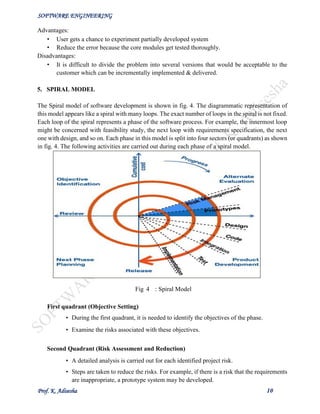
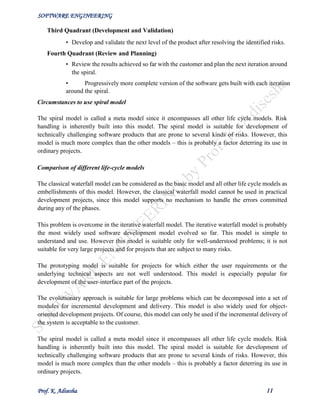
The Spiral model of software development is shown in fig. 4. The diagrammatic representation of
this model appears like a spiral with many loops. The exact number of loops in the spiral is not fixed.
Each loop of the spiral represents a phase of the software process. For example, the innermost loop
might be concerned with feasibility study, the next loop with requirements specification, the next
one with design, and so on. Each phase in this model is split into four sectors (or quadrants) as shown
in fig. 4. The following activities are carried out during each phase of a spiral model.
First quadrant (Objective Setting)
• During the first quadrant, it is needed to identify the objectives of the phase.
• Examine the risks associated with these objectives.
Second Quadrant (Risk Assessment and Reduction)
• A detailed analysis is carried out for each identified project risk.
• Steps are taken to reduce the risks. For example, if there is a risk that the requirements
are inappropriate, a prototype system may be developed.
Fig 4 : Spiral Model
SOFTWARE ENGINEERING
Prof. K. Adisesha 11
Third Quadrant (Development and Validation)
• Develop and validate the next level of the product after resolving the identified risks.
Fourth Quadrant (Review and Planning)
• Review the results achieved so far with the customer and plan the next iteration around
the spiral.
• Progressively more complete version of the software gets built with each iteration
around the spiral.
Circumstances to use spiral model
The spiral model is called a meta model since it encompasses all other life cycle models. Risk
handling is inherently built into this model. The spiral model is suitable for development of
technically challenging software products that are prone to several kinds of risks. However, this
model is much more complex than the other models – this is probably a factor deterring its use in
ordinary projects.
Comparison of different life-cycle models
The classical waterfall model can be considered as the basic model and all other life cycle models as
embellishments of this model. However, the classical waterfall model cannot be used in practical
development projects, since this model supports no mechanism to handle the errors committed
during any of the phases.
This problem is overcome in the iterative waterfall model. The iterative waterfall model is probably
the most widely used software development model evolved so far. This model is simple to
understand and use. However this model is suitable only for well-understood problems; it is not
suitable for very large projects and for projects that are subject to many risks.
The prototyping model is suitable for projects for which either the user requirements or the
underlying technical aspects are not well understood. This model is especially popular for
development of the user-interface part of the projects.
The evolutionary approach is suitable for large problems which can be decomposed into a set of
modules for incremental development and delivery. This model is also widely used for object-
oriented development projects. Of course, this model can only be used if the incremental delivery of
the system is acceptable to the customer.
The spiral model is called a meta model since it encompasses all other life cycle models. Risk
handling is inherently built into this model. The spiral model is suitable for development of
technically challenging software products that are prone to several kinds of risks. However, this
model is much more complex than the other models – this is probably a factor deterring its use in
ordinary projects.
SOFTWARE ENGINEERING
Prof. K. Adisesha 12
REQUIREMENTS ANALYSIS AND SPECIFICATION
Before we start to develop our software, it becomes quite essential for us to understand and document
the exact requirement of the customer. Experienced members of the development team carry out this
job. They are called as system analysts.
The analyst starts requirements gathering and analysis activity by collecting all information from
the customer which could be used to develop the requirements of the system. He then analyzes the
collected information to obtain a clear and thorough understanding of the product to be developed,
with a view to remove all ambiguities and inconsistencies from the initial customer perception of the
problem. The following basic questions pertaining to the project should be clearly understood by the
analyst in order to obtain a good grasp of the problem:
• What is the problem?
• Why is it important to solve the problem?
• What are the possible solutions to the problem?
• What exactly are the data input to the system and what exactly are the data output by the
system?
• What are the likely complexities that might arise while solving the problem?
• If there are external software or hardware with which the developed software has to interface,
then what exactly would the data interchange formats with the external system be?
After the analyst has understood the exact customer requirements, he proceeds to identify and resolve
the various requirements problems. The most important requirements problems that the analyst has
to identify and eliminate are the problems of anomalies, inconsistencies, and incompleteness. When
the analyst detects any inconsistencies, anomalies or incompleteness in the gathered requirements,
he resolves them by carrying out further discussions with the end-users and the customers.
Parts of a SRS document
• The important parts of SRS document are:
 Functional requirements of the system
 Non-functional requirements of the system, and
 Goals of implementation
Functional requirements:-
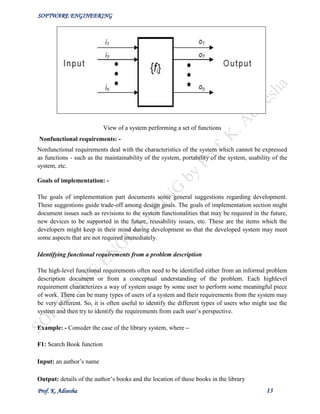
The functional requirements part discusses the functionalities required from the system. The system
is considered to perform a set of high-level functions {f }. The functional view of the i
system is shown in fig. below Each function f of the system can be considered as a transformation i
of a set of input data (ii) to the corresponding set of output data (o ). The user can get some i
meaningful piece of work done using a high-level function.
SOFTWARE ENGINEERING
Prof. K. Adisesha 13
View of a system performing a set of functions
Nonfunctional requirements: -
Nonfunctional requirements deal with the characteristics of the system which cannot be expressed
as functions - such as the maintainability of the system, portability of the system, usability of the
system, etc.
Goals of implementation: -
The goals of implementation part documents some general suggestions regarding development.
These suggestions guide trade-off among design goals. The goals of implementation section might
document issues such as revisions to the system functionalities that may be required in the future,
new devices to be supported in the future, reusability issues, etc. These are the items which the
developers might keep in their mind during development so that the developed system may meet
some aspects that are not required immediately.
Identifying functional requirements from a problem description
The high-level functional requirements often need to be identified either from an informal problem
description document or from a conceptual understanding of the problem. Each highlevel
requirement characterizes a way of system usage by some user to perform some meaningful piece
of work. There can be many types of users of a system and their requirements from the system may
be very different. So, it is often useful to identify the different types of users who might use the
system and then try to identify the requirements from each user’s perspective.
Example: - Consider the case of the library system, where –
F1: Search Book function
Input: an author’s name
Output: details of the author’s books and the location of these books in the library
SOFTWARE ENGINEERING
Prof. K. Adisesha 14
So the function Search Book (F1) takes the author's name and transforms it into book details.
Functional requirements actually describe a set of high-level requirements, where each high-level
requirement takes some data from the user and provides some data to the user as an output. Also
each high-level requirement might consist of several other functions.
Documenting functional requirements
For documenting the functional requirements, we need to specify the set of functionalities supported
by the system. A function can be specified by identifying the state at which the data is to be input to
the system, its input data domain, the output data domain, and the type of processing to be carried
on the input data to obtain the output data. Let us first try to document the withdraw-cash function
of an ATM (Automated Teller Machine) system. The withdraw-cash is a high-level requirement. It
has several sub-requirements corresponding to the different user interactions. These different
interaction sequences capture the different scenarios.
Example: - Withdraw Cash from ATM
R1: withdraw cash
Description: The withdraw cash function first determines the type of account that the user has and
the account number from which the user wishes to withdraw cash. It checks the balance to determine
whether the requested amount is available in the account. If enough balance is available, it outputs
the required cash; otherwise it generates an error message.
R1.1 select withdraw amount option
Input: “withdraw amount” option
Output: user prompted to enter the account type
R1.2: select account type
Input: user option
Output: prompt to enter amount
R1.3: get required amount
Input: amount to be withdrawn in integer values greater than 100 and less than 10,000 in
multiples of 100.
Output: The requested cash and printed transaction statement.
Processing: the amount is debited from the user’s account if sufficient balance is available,
otherwise an error message displayed
SOFTWARE ENGINEERING
Prof. K. Adisesha 15
Properties of a good SRS document
The important properties of a good SRS document are the following:
• Concise. The SRS document should be concise and at the same time unambiguous,
consistent, and complete. Verbose and irrelevant descriptions reduce readability and also
increase error possibilities.
• Structured. It should be well-structured. A well-structured document is easy to understand
and modify. In practice, the SRS document undergoes several revisions to cope up with the
customer requirements. Often, the customer requirements evolve over a period of time.
Therefore, in order to make the modifications to the SRS document easy, it is important to
make the document well-structured.
• Black-box view. It should only specify what the system should do and refrain from stating
how to do these. This means that the SRS document should specify the external behavior of
the system and not discuss the implementation issues. The SRS document should view the
system to be developed as black box, and should specify the externally visible behavior of
the system. For this reason, the SRS document is also called the black-box specification of a
system.
• Conceptual integrity. It should show conceptual integrity so that the reader can easily
understand it.
• Response to undesired events. It should characterize acceptable responses to undesired
events. These are called system response to exceptional conditions.
• Verifiable. All requirements of the system as documented in the SRS document should be
verifiable. This means that it should be possible to determine whether or not requirements
have been met in an implementation.
Problems without a SRS document
The important problems that an organization would face if it does not develop a SRS document are
as follows:
 Without developing the SRS document, the system would not be implemented according to
customer needs.
 Software developers would not know whether what they are developing is what exactly required
by the customer.
 Without SRS document, it will be very much difficult for the maintenance engineers to
understand the functionality of the system.
 It will be very much difficult for user document writers to write the users’ manuals properly
without understanding the SRS document.
Problems with an unstructured specification
 It would be very much difficult to understand that document.
 It would be very much difficult to modify that document.
 Conceptual integrity in that document would not be shown.
 The SRS document might be unambiguous and inconsistent.
SOFTWARE ENGINEERING
Prof. K. Adisesha 16
SOFTWARE DESIGN
Software design is a process to transform user requirements into some suitable form, which helps
the programmer in software coding and implementation.
For assessing user requirements, an SRS (Software Requirement Specification) document is created
whereas for coding and implementation, there is a need of more specific and detailed requirements
in software terms. The output of this process can directly be used into implementation in
programming languages.
Software design is the first step in SDLC (Software Design Life Cycle), which moves the
concentration from problem domain to solution domain. It tries to specify how to fulfill the
requirements mentioned in SRS.
Software Design Levels
Software design yields three levels of results:
• Architectural Design - The architectural design is the highest abstract version of the system.
It identifies the software as a system with many components interacting with each other. At
this level, the designers get the idea of proposed solution domain.
• High-level Design- The high-level design breaks the ‘single entity-multiple component’
concept of architectural design into less-abstracted view of sub-systems and modules and
depicts their interaction with each other. High-level design focuses on how the system along
with all of its components can be implemented in forms of modules. It recognizes modular
structure of each sub-system and their relation and interaction among each other.
• Detailed Design- Detailed design deals with the implementation part of what is seen as a
system and its sub-systems in the previous two designs. It is more detailed towards modules
and their implementations. It defines logical structure of each module and their interfaces to
communicate with other modules.
Modularization
Modularization is a technique to divide a software system into multiple discrete and independent
modules, which are expected to be capable of carrying out task(s) independently. Designers tend to
design modules such that they can be executed and/or compiled separately and independently.
Modular design unintentionally follows the rules of ‘divide and conquer’ problem-solving strategy
this is because there are many other benefits attached with the modular design of a software.
Advantage of modularization:
• Smaller components are easier to maintain
• Program can be divided based on functional aspects Desired level of abstraction ca n be
brought in the program Components with high cohesion can be re-used again.
• Concurrent execution can be made possible
• Desired from security aspect
SOFTWARE ENGINEERING
Prof. K. Adisesha 17
Concurrency
Back in time, all softwares were meant to be executed sequentially. By sequential execution we mean
that the coded instruction will be executed one after another implying only one portion of program
being activated at any given time. Say, a software has multiple modules, then only one of all the
modules can be found active at any time of execution.
In software design, concurrency is implemented by splitting the software into multiple independent
units of execution, like modules and executing them in parallel. In other words, concurrency provides
capability to the software to execute more than one part of code in parallel to each other.
It is necessary for the programmers and designers to recognize those modules, which can be made
parallel execution.
Coupling and Cohesion
When a software program is modularized, its tasks are divided into several modules based on some
characteristics. As we know, modules are set of instructions put together in order to achieve some
tasks. They are though, considered as single entity but may refer to each other to work together.
There are measures by which the quality of a design of modules and their interaction among them
can be measured. These measures are called coupling and cohesion.
Cohesion
Cohesion is a measure that defines the degree of intra-dependability within elements of a module.
The greater the cohesion, the better is the program design.
There are seven types of cohesion, namely –
• Co-incidental cohesion - It is unplanned and random cohesion, which might be the result of
breaking the program into smaller modules for the sake of modularization. Because it is
unplanned, it may serve confusion to the programmers and is generally not-accepted.
• Logical cohesion - When logically categorized elements are put together into a module, it is
called logical cohesion.
• Temporal Cohesion - When elements of module are organized such that they are processed
at a similar point in time, it is called temporal cohesion.
• Procedural cohesion - When elements of module are grouped together, which are executed
sequentially in order to perform a task, it is called procedural cohesion.
• Communicational cohesion - When elements of module are grouped together, which are
executed sequentially and work on same data (information), it is called communicational
cohesion.
• Sequential cohesion - When elements of module are grouped because the output of one
element serves as input to another and so on, it is called sequential cohesion.
• Functional cohesion - It is considered to be the highest degree of cohesion, and it is highly
expected. Elements of module in functional cohesion are grouped because they all contribute
to a single well-defined function. It can also be reused.
SOFTWARE ENGINEERING
Prof. K. Adisesha 18
Coupling
Coupling is a measure that defines the level of inter-dependability among modules of a program. It
tells at what level the modules interfere and interact with each other. The lower the coupling, the
better the program.
There are five levels of coupling, namely -
• Content coupling - When a module can directly access or modify or refer to the content of
another module, it is called content level coupling.
• Common coupling- When multiple modules have read and write access to some global data,
it is called common or global coupling.
• Control coupling- Two modules are called control-coupled if one of them decides the
function of the other module or changes its flow of execution.
• Stamp coupling- When multiple modules share common data structure and work on
different part of it, it is called stamp coupling.
• Data coupling- Data coupling is when two modules interact with each other by means of
passing data (as parameter). If a module passes data structure as parameter, then the receiving
module should use all its components.
Ideally, no coupling is considered to be the best.
Design Verification
The output of software design process is design documentation, pseudo codes, detailed logic
diagrams, process diagrams, and detailed description of all functional or non-functional
requirements.
The next phase, which is the implementation of software, depends on all outputs mentioned above.
It is then becomes necessary to verify the output before proceeding to the next phase. The early any
mistake is detected, the better it is or it might not be detected until testing of the product. If the
outputs of design phase are in formal notation form, then their associated tools for verification should
be used otherwise a thorough design review can be used for verification and validation.
By structured verification approach, reviewers can detect defects that might be caused by
overlooking some conditions. A good design review is important for good software design, accuracy
and quality.
SOFTWARE ENGINEERING
Prof. K. Adisesha 19
SOFTWARE DESIGN STRATEGIES
Software design is a process to conceptualize the software requirements into software
implementation. Software design takes the user requirements as challenges and tries to find optimum
solution. While the software is being conceptualized, a plan is chalked out to find the best possible
design for implementing the intended solution.
There are multiple variants of software design. Let us study them briefly:
Software design is a process to conceptualize the software requirements into software
implementation. Software design takes the user requirements as challenges and tries to find optimum
solution. While the software is being conceptualized, a plan is chalked out to find the best possible
design for implementing the intended solution.
There are multiple variants of software design. Let us study them briefly:
Structured Design
Structured design is a conceptualization of problem into several well-organized elements of solution.
It is basically concerned with the solution design. Benefit of structured design is, it gives better
understanding of how the problem is being solved. Structured design also makes it simpler for
designer to concentrate on the problem more accurately.
Structured design is mostly based on ‘divide and conquer’ strategy where a problem is broken into
several small problems and each small problem is individually solved until the whole problem is
solved.
The small pieces of problem are solved by means of solution modules. Structured design emphasis
that these modules be well organized in order to achieve precise solution.
These modules are arranged in hierarchy. They communicate with each other. A good structured
design always follows some rules for communication among multiple modules, namely -
Cohesion - grouping of all functionally related elements.
Coupling - communication between different modules.
A good structured design has high cohesion and low coupling arrangements.
Function Oriented Design
In function-oriented design, the system is comprised of many smaller sub-systems known as
functions. These functions are capable of performing significant task in the system. The system is
considered as top view of all functions.
Function oriented design inherits some properties of structured design where divide and conquer
methodology is used.
This design mechanism divides the whole system into smaller functions, which provides means of
abstraction by concealing the information and their operation. These functional modules can share
SOFTWARE ENGINEERING
Prof. K. Adisesha 20
information among themselves by means of information passing and using information available
globally.
Another characteristic of functions is that when a program calls a function, the function changes the
state of the program, which sometimes is not acceptable by other modules. Function oriented design
works well where the system state does not matter and program/functions work on input rather than
on a state.
Design Process
• The whole system is seen as how data flows in the system by means of data flow diagram.
• DFD depicts how functions change the data and state of entire system.
• The entire system is logically broken down into smaller units known as functions on the basis
of their operation in the system.
• Each function is then described at large.
Object Oriented Design
Object oriented design works around the entities and their characteristics instead of functions
involved in the software system. This design strategy focuses on entities and its characteristics. The
whole concept of software solution revolves around the engaged entities.
Design Process
Software design process can be perceived as series of well-defined steps. Though it varies according
to design approach (function oriented or object oriented, yet It may have the following steps
involved:
• A solution design is created from requirement or previous used system and/or system
sequence diagram.
• Objects are identified and grouped into classes on behalf of similarity in attribute
characteristics.
• Class hierarchy and relation among them are defined.
• Application framework is defined.
Software Design Approaches
There are two generic approaches for software designing:
Top down Design
We know that a system is composed of more than one sub-systems and it contains a number of
components. Further, these sub-systems and components may have their one set of sub-system and
components and creates hierarchical structure in the system.
SOFTWARE ENGINEERING
Prof. K. Adisesha 21
Top-down design takes the whole software system as one entity and then decomposes it to achieve
more than one sub-system or component based on some characteristics. Each subsystem or
component is then treated as a system and decomposed further. This process keeps on running until
the lowest level of system in the top-down hierarchy is achieved.
Top-down design starts with a generalized model of system and keeps on defining the more specific
part of it. When all components are composed the whole system comes into existence.
Top-down design is more suitable when the software solution needs to be designed from scratch and
specific details are unknown.
Bottom-up Design
The bottom up design model starts with most specific and basic components. It proceeds with
composing higher level of components by using basic or lower level components. It keeps creating
higher level components until the desired system is not evolved as one single component. With each
higher level, the amount of abstraction is increased.
Bottom-up strategy is more suitable when a system needs to be created from some existing system,
where the basic primitives can be used in the newer system.
Both, top-down and bottom-up approaches are not practical individually. Instead, a good
combination of both is used.
SOFTWARE ANALYSIS & DESIGN TOOLS
Software analysis and design includes all activities, which help the transformation of requirement
specification into implementation. Requirement specifications specify all functional and non-
functional expectations from the software. These requirement specifications come in the shape of
human readable and understandable documents, to which a computer has nothing to do.
Software analysis and design is the intermediate stage, which helps human-readable requirements to
be transformed into actual code.
Let us see few analysis and design tools used by software designers:
Data Flow Diagram
Data flow diagram is a graphical representation of data flow in an information system. It is capable
of depicting incoming data flow, outgoing data flow and stored data. The DFD does not mention
anything about how data flows through the system.
There is a prominent difference between DFD and Flowchart. The flowchart depicts flow of control
in program modules. DFDs depict flow of data in the system at various levels. DFD does not contain
any control or branch elements.
SOFTWARE ENGINEERING
Prof. K. Adisesha 22
Types of DFD
Data Flow Diagrams are either Logical or Physical.
• Logical DFD - This type of DFD concentrates on the system process and flow of data in the
system. For example in a Banking software system, how data is moved between different
entities.
• Physical DFD - This type of DFD shows how the data flow is actually implemented in the
system. It is more specific and close to the implementation.
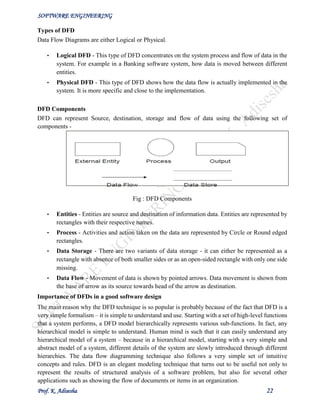
DFD Components
DFD can represent Source, destination, storage and flow of data using the following set of
components -
Fig : DFD Components
• Entities - Entities are source and destination of information data. Entities are represented by
rectangles with their respective names.
• Process - Activities and action taken on the data are represented by Circle or Round edged
rectangles.
• Data Storage - There are two variants of data storage - it can either be represented as a
rectangle with absence of both smaller sides or as an open-sided rectangle with only one side
missing.
• Data Flow - Movement of data is shown by pointed arrows. Data movement is shown from
the base of arrow as its source towards head of the arrow as destination.
Importance of DFDs in a good software design
The main reason why the DFD technique is so popular is probably because of the fact that DFD is a
very simple formalism – it is simple to understand and use. Starting with a set of high-level functions
that a system performs, a DFD model hierarchically represents various sub-functions. In fact, any
hierarchical model is simple to understand. Human mind is such that it can easily understand any
hierarchical model of a system – because in a hierarchical model, starting with a very simple and
abstract model of a system, different details of the system are slowly introduced through different
hierarchies. The data flow diagramming technique also follows a very simple set of intuitive
concepts and rules. DFD is an elegant modeling technique that turns out to be useful not only to
represent the results of structured analysis of a software problem, but also for several other
applications such as showing the flow of documents or items in an organization.
SOFTWARE ENGINEERING
Prof. K. Adisesha 23
Data Dictionary
A data dictionary lists all data items appearing in the DFD model of a system. The data items listed
include all data flows and the contents of all data stores appearing on the DFDs in the DFD model
of a system. A data dictionary lists the purpose of all data items and the definition of all composite
data items in terms of their component data items. For example, a data dictionary entry may represent
that the data grossPay consists of the components regularPay and overtimePay.
grossPay = regularPay + overtimePay
For the smallest units of data items, the data dictionary lists their name and their type. Composite
data items can be defined in terms of primitive data items using the following data definition
operators:
+: denotes composition of two data items, e.g. a+b represents data a and b.
[,,]: represents selection, i.e. any one of the data items listed in the brackets can occur. For
example, [a,b] represents either a occurs or b occurs.
(): the contents inside the bracket represent optional data which may or may not appear. e.g.
a+(b) represents either a occurs or a+b occurs.
{}: represents iterative data definition, e.g. {name}5 represents five name data. {name}*
represents zero or more instances of name data.
=: represents equivalence, e.g. a=b+c means that a represents b and c.
/* */: Anything appearing within /* and */ is considered as a comment.
Importance of Data Dictionary
A data dictionary plays a very important role in any software development process because of the
following reasons:
• A data dictionary provides a standard terminology for all relevant data for use by the engineers
working in a project. A consistent vocabulary for data items is very important, since in large
projects different engineers of the project have a tendency to use different terms to refer to the
same data, which unnecessary causes confusion.
• The data dictionary provides the analyst with a means to determine the definition of different
data structures in terms of their component elements.
STRUCTURED DESIGN
The aim of structured design is to transform the results of the structured analysis (i.e. a DFD
representation) into a structure chart. Structured design provides two strategies to guide transformation
of a DFD into a structure chart.
• Transform analysis
• Transaction analysis
SOFTWARE ENGINEERING
Prof. K. Adisesha 24
Normally, one starts with the level 1 DFD, transforms it into module representation using either the
transform or the transaction analysis and then proceeds towards the lower-level DFDs. At each level
of transformation, it is important to first determine whether the transform or the transaction analysis
is applicable to a particular DFD. These are discussed in the subsequent subsections.
Structure Chart
A structure chart represents the software architecture, i.e. the various modules making up the system,
the dependency (which module calls which other modules), and the parameters that are passed
among the different modules. Hence, the structure chart representation can be easily implemented
using some programming language. Since the main focus in a structure chart representation is on the
module structure of the software and the interactions among different modules, the procedural
aspects (e.g. how a particular functionality is achieved) are not represented.
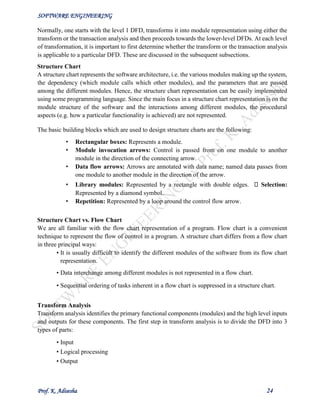
The basic building blocks which are used to design structure charts are the following:
• Rectangular boxes: Represents a module.
• Module invocation arrows: Control is passed from on one module to another
module in the direction of the connecting arrow.
• Data flow arrows: Arrows are annotated with data name; named data passes from
one module to another module in the direction of the arrow.
• Library modules: Represented by a rectangle with double edges. Selection:
Represented by a diamond symbol.
• Repetition: Represented by a loop around the control flow arrow.
Structure Chart vs. Flow Chart
We are all familiar with the flow chart representation of a program. Flow chart is a convenient
technique to represent the flow of control in a program. A structure chart differs from a flow chart
in three principal ways:
• It is usually difficult to identify the different modules of the software from its flow chart
representation.
• Data interchange among different modules is not represented in a flow chart.
• Sequential ordering of tasks inherent in a flow chart is suppressed in a structure chart.
Transform Analysis
Transform analysis identifies the primary functional components (modules) and the high level inputs
and outputs for these components. The first step in transform analysis is to divide the DFD into 3
types of parts:
• Input
• Logical processing
• Output
SOFTWARE ENGINEERING
Prof. K. Adisesha 25
The input portion of the DFD includes processes that transform input data from physical (e.g.
character from terminal) to logical forms (e.g. internal tables, lists, etc.). Each input portion is called
an afferent branch.
The output portion of a DFD transforms output data from logical to physical form. Each output
portion is called an efferent branch. The remaining portion of a DFD is called the central transform.
In the next step of transform analysis, the structure chart is derived by drawing one functional
component for the central transform, and the afferent and efferent branches.
Transaction Analysis
A transaction allows the user to perform some meaningful piece of work. Transaction analysis is
useful while designing transaction processing programs. In a transaction-driven system, one of
several possible paths through the DFD is traversed depending upon the input data item. This is in
contrast to a transform centered system which is characterized by similar processing steps for each
data item. Each different way in which input data is handled is a transaction. A simple way to identify
a transaction is to check the input data. The number of bubbles on which the input data to the DFD
are incident defines the number of transactions. However, some transaction may not require any
input data. These transactions can be identified from the experience of solving a large number of
examples.
Transaction analysis uses this tag to divide the system into transaction modules and a transaction-
center module.
OBJECT MODELLING USING UML
Model
A model captures aspects important for some application while omitting (or abstracting) the rest. A
model in the context of software development can be graphical, textual, mathematical, or program
code-based. Models are very useful in documenting the design and analysis results. Models also
facilitate the analysis and design procedures themselves. Graphical models are very popular because
they are easy to understand and construct. UML is primarily a graphical modeling tool. However, it
often requires text explanations to accompany the graphical models.
Need for a model
An important reason behind constructing a model is that it helps manage complexity. Once models
of a system have been constructed, these can be used for a variety of purposes during software
development, including the following:
• Analysis
• Specification
• Code generation
• Design
• Visualize and understand the problem and the working of a system
• Testing, etc.
SOFTWARE ENGINEERING
Prof. K. Adisesha 26
In all these applications, the UML models can not only be used to document the results but also to
arrive at the results themselves. Since a model can be used for a variety of purposes, it is reasonable
to expect that the model would vary depending on the purpose for which it is being constructed. For
example, a model developed for initial analysis and specification should be very different from the
one used for design. A model that is being used for analysis and specification would not show any of
the design decisions that would be made later on during the design stage. On the other hand, a model
used for design purposes should capture all the design decisions. Therefore, it is a good idea to
explicitly mention the purpose for which a model has been developed, along with the model.
Unified Modeling Language (UML)
UML, as the name implies, is a modeling language. It may be used to visualize, specify, construct,
and document the artifacts of a software system. It provides a set of notations (e.g. rectangles, lines,
ellipses, etc.) to create a visual model of the system. Like any other language, UML has its own
syntax (symbols and sentence formation rules) and semantics (meanings of symbols and sentences).
Also, we should clearly understand that UML is not a system design or development methodology,
but can be used to document object-oriented and analysis results obtained using some methodology.
Origin of UML
In the late 1980s and early 1990s, there was a proliferation of object-oriented design techniques and
notations. Different software development houses were using different notations to document their
object-oriented designs. These diverse notations used to give rise to a lot of confusion.
UML was developed to standardize the large number of object-oriented modeling notations that
existed and were used extensively in the early 1990s. The principles ones in use were:
• Object Management Technology [Rumbaugh 1991]
• Booch’s methodology [Booch 1991]
• Object-Oriented Software Engineering [Jacobson 1992]
• Odell’s methodology [Odell 1992]
• Shaler and Mellor methodology [Shaler 1992]
It is needless to say that UML has borrowed many concepts from these modeling techniques.
Especially, concepts from the first three methodologies have been heavily drawn upon. UML was
adopted by Object Management Group (OMG) as a de facto standard in 1997. OMG is an association
of industries which tries to facilitate early formation of standards.
We shall see that UML contains an extensive set of notations and suggests construction of many
types of diagrams. It has successfully been used to model both large and small problems. The
elegance of UML, its adoption by OMG, and a strong industry backing have helped UML find
widespread acceptance. UML is now being used in a large number of software development projects
worldwide.
UML Diagrams
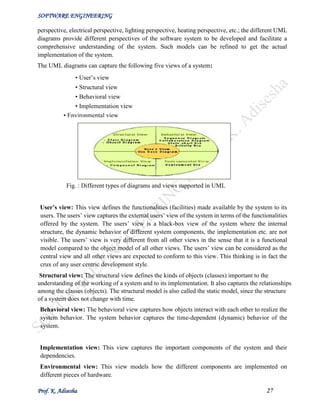
UML can be used to construct nine different types of diagrams to capture five different views of a
system. Just as a building can be modeled from several views (or perspectives) such as ventilation
SOFTWARE ENGINEERING
Prof. K. Adisesha 27
perspective, electrical perspective, lighting perspective, heating perspective, etc.; the different UML
diagrams provide different perspectives of the software system to be developed and facilitate a
comprehensive understanding of the system. Such models can be refined to get the actual
implementation of the system.
The UML diagrams can capture the following five views of a system:
• User’s view
• Structural view
• Behavioral view
• Implementation view
Fig. : Different types of diagrams and views supported in UML
User’s view: This view defines the functionalities (facilities) made available by the system to its
users. The users’ view captures the external users’ view of the system in terms of the functionalities
offered by the system. The users’ view is a black-box view of the system where the internal
structure, the dynamic behavior of different system components, the implementation etc. are not
visible. The users’ view is very different from all other views in the sense that it is a functional
model compared to the object model of all other views. The users’ view can be considered as the
central view and all other views are expected to conform to this view. This thinking is in fact the
crux of any user centric development style.
Structural view: The structural view defines the kinds of objects (classes) important to the
understanding of the working of a system and to its implementation. It also captures the relationships
among the classes (objects). The structural model is also called the static model, since the structure
of a system does not change with time.
Behavioral view: The behavioral view captures how objects interact with each other to realize the
system behavior. The system behavior captures the time-dependent (dynamic) behavior of the
system.
Implementation view: This view captures the important components of the system and their
dependencies.
Environmental view: This view models how the different components are implemented on
different pieces of hardware.
• Environmental view
SOFTWARE ENGINEERING
Prof. K. Adisesha 28
USE CASE DIAGRAM
Use Case Model
The use case model for any system consists of a set of “use cases”. Intuitively, use cases represent
the different ways in which a system can be used by the users. A simple way to find all the use cases
of a system is to ask the question: “What the users can do using the system?” Thus for the Library
Information System (LIS), the use cases could be:
• issue-book
• query-book
• return-book
• create-member
• add-book, etc
Use cases correspond to the high-level functional requirements. The use cases partition the system
behavior into transactions, such that each transaction performs some useful action from the user’s
point of view. To complete each transaction may involve either a single message or multiple message
exchanges between the user and the system to complete.
Representation of Use Cases
Use cases can be represented by drawing a use case diagram and writing an accompanying text
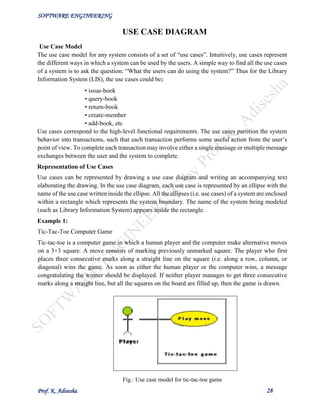
elaborating the drawing. In the use case diagram, each use case is represented by an ellipse with the
name of the use case written inside the ellipse. All the ellipses (i.e. use cases) of a system are enclosed
within a rectangle which represents the system boundary. The name of the system being modeled
(such as Library Information System) appears inside the rectangle.
Example 1:
Tic-Tac-Toe Computer Game
Tic-tac-toe is a computer game in which a human player and the computer make alternative moves
on a 3×3 square. A move consists of marking previously unmarked square. The player who first
places three consecutive marks along a straight line on the square (i.e. along a row, column, or
diagonal) wins the game. As soon as either the human player or the computer wins, a message
congratulating the winner should be displayed. If neither player manages to get three consecutive
marks along a straight line, but all the squares on the board are filled up, then the game is drawn.
Fig.: Use case model for tic-tac-toe game
SOFTWARE ENGINEERING
Prof. K. Adisesha 29
Text Description
Each ellipse on the use case diagram should be accompanied by a text description. The text
description should define the details of the interaction between the user and the computer and other
aspects of the use case. It should include all the behavior associated with the use case in terms of the
mainline sequence, different variations to the normal behavior, the system responses associated with
the use case, the exceptional conditions that may occur in the behavior, etc. The text description may
be informal, but some structuring is recommended. The following are some of the information which
may be included in a use case text description in addition to the mainline sequence, and the
alternative scenarios.
Contact persons: This section lists the personnel of the client organization with whom the use case
was discussed, date and time of the meeting, etc.
Actors: In addition to identifying the actors, some information about actors using this use case which
may help the implementation of the use case may be recorded.
Pre-condition: The preconditions would describe the state of the system before the use case
execution starts.
Post-condition: This captures the state of the system after the use case has successfully completed.
Non-functional requirements: This could contain the important constraints for the design and
implementation, such as platform and environment conditions, qualitative statements, response time
requirements, etc.
Exceptions, error situations: This contains only the domain-related errors such as lack of user’s
access rights, invalid entry in the input fields, etc. Obviously, errors that are not domain related, such
as software errors, need not be discussed here. Sample dialogs: These serve as examples illustrating
the use case.
Specific user interface requirements: These contain specific requirements for the user interface of
the use case. For example, it may contain forms to be used, screen shots, interaction style, etc.
Document references: This part contains references to specific domain-related documents which
may be useful to understand the system operation.
A supermarket needs to develop the following software to encourage regular customers. For this, the
customer needs to supply his/her residence address, telephone number, and the driving license
number.
Use case model for Supermarket Prize Scheme
SOFTWARE ENGINEERING
Prof. K. Adisesha 30
CODING
Coding- The objective of the coding phase is to transform the design of a system into code in a high
level language and then to unit test this code. The programmers adhere to standard and well defined
style of coding which they call their coding standard. The main advantages of adhering to a standard
style of coding are as follows:
• A coding standard gives uniform appearances to the code written by different engineers
• It facilitates code of understanding.
• Promotes good programming practices.
For implementing our design into a code, we require a good high level language. A programming
language should have the following features:
Characteristics of a Programming Language
• Readability: A good high-level language will allow programs to be written in some ways
that resemble a quite-English description of the underlying algorithms. If care is taken, the
coding may be done in a way that is essentially self-documenting.
• Portability: High-level languages, being essentially machine independent, should be able to
develop portable software.
• Generality: Most high-level languages allow the writing of a wide variety of programs, thus
relieving the programmer of the need to become expert in many diverse languages.
• Brevity: Language should have the ability to implement the algorithm with less amount of
code. Programs expressed in high-level languages are often considerably shorter than their
low-level equivalents.
• Error checking: Being human, a programmer is likely to make many mistakes in the
development of a computer program. Many high-level languages enforce a great deal of error
checking both at compile-time and at run-time.
• Cost: The ultimate cost of a programming language is a function of many of its
characteristics.
• Familiar notation: A language should have familiar notation, so it can be understood by
most of the programmers.
• Quick translation: It should admit quick translation.
• Efficiency: It should permit the generation of efficient object code.
SOFTWARE ENGINEERING
Prof. K. Adisesha 31
• Modularity: It is desirable that programs can be developed in the language as a collection
of separately compiled modules, with appropriate mechanisms for ensuring self-consistency
between these modules.
• Widely available: Language should be widely available and it should be possible to provide
translators for all the major machines and for all the major operating systems.
A coding standard lists several rules to be followed during coding, such as the way variables are to
be named, the way the code is to be laid out, error return conventions, etc.
Coding standards and guidelines
Good software development organizations usually develop their own coding standards and
guidelines depending on what best suits their organization and the type of products they develop.
The following are some representative coding standards.
1. Rules for limiting the use of global: These rules list what types of data can be declared
global and what cannot.
2. Contents of the headers preceding codes for different modules: The information
contained in the headers of different modules should be standard for an organization. The
exact format in which the header information is organized in the header can also be specified.
The following are some standard header data:
• Name of the module.
• Date on which the module was created.
• Author’s name.
• Modification history.
• Synopsis of the module.
• Different functions supported, along with their input/output parameters.
• Global variables accessed/modified by the module.
3. Naming conventions for global variables, local variables, and constant identifiers: A
possible naming convention can be that global variable names always start with a capital
letter, local variable names are made of small letters, and constant names are always capital
letters.
4. Error return conventions and exception handling mechanisms: The way error conditions
are reported by different functions in a program are handled should be standard within an
organization. For example, different functions while encountering an error condition should
either return a 0 or 1 consistently.
SOFTWARE ENGINEERING
Prof. K. Adisesha 32
The following are some representative coding guidelines recommended by many software
development organizations.
1. Do not use a coding style that is too clever or too difficult to understand: Code should
be easy to understand. Many inexperienced engineers actually take pride in writing cryptic
and incomprehensible code. Clever coding can obscure meaning of the code and hamper
understanding. It also makes maintenance difficult.
2. Avoid obscure side effects: The side effects of a function call include modification of
parameters passed by reference, modification of global variables, and I/O operations. An
obscure side effect is one that is not obvious from a casual examination of the code. Obscure
side effects make it difficult to understand a piece of code. For example, if a global variable
is changed obscurely in a called module or some file I/O is performed which is difficult to
infer from the function’s name and header information, it becomes difficult for anybody
trying to understand the code.
3. Do not use an identifier for multiple purposes: Programmers often use the same identifier
to denote several temporary entities. For example, some programmers use a temporary loop
variable for computing and a storing the final result. The rationale that is usually given by
these programmers for such multiple uses of variables is memory efficiency, e.g. three
variables use up three memory locations, whereas the same variable used in three different
ways uses just one memory location. However, there are several things wrong with this
approach and hence should be avoided. Some of the problems caused by use of variables for
multiple purposes as follows:
• Each variable should be given a descriptive name indicating its purpose. This is
not possible if an identifier is used for multiple purposes. Use of a variable for multiple
purposes can lead to confusion and make it difficult for somebody trying to read and
understand the code.
• Use of variables for multiple purposes usually makes future enhancements more
difficult.
4. The code should be well-documented: As a rule of thumb, there must be at least one
comment line on the average for every three-source line.
5. The length of any function should not exceed 10 source lines: A function that is very
lengthy is usually very difficult to understand as it probably carries out many different
functions. For the same reason, lengthy functions are likely to have disproportionately larger
number of bugs.
6. Do not use goto statements: Use of goto statements makes a program unstructured and very
difficult to understand.
SOFTWARE ENGINEERING
Prof. K. Adisesha 33
Code Review
Code review for a model is carried out after the module is successfully compiled and the all the
syntax errors have been eliminated. Code reviews are extremely cost-effective strategies for
reduction in coding errors and to produce high quality code. Normally, two types of reviews are
carried out on the code of a module. These two types code review techniques are code inspection
and code walk through.
Code Walk Through
Code walk through is an informal code analysis technique. In this technique, after a module has been
coded, successfully compiled and all syntax errors eliminated. A few members of the development
team are given the code few days before the walk through meeting to read and understand code.
Each member selects some test cases and simulates execution of the code by hand (i.e. trace
execution through each statement and function execution). The main objectives of the walk through
are to discover the algorithmic and logical errors in the code. The members note down their findings
to discuss these in a walk through meeting where the coder of the module is present. Even though a
code walk through is an informal analysis technique, several guidelines have evolved over the years
for making this naïve but useful analysis technique more effective. Of course, these guidelines are
based on personal experience, common sense, and several subjective factors. Therefore, these
guidelines should be considered as examples rather than accepted as rules to be applied dogmatically.
Some of these guidelines are the following:
• The team performing code walk through should not be either too big or too small. Ideally, it
should consist of between three to seven members.
• Discussion should focus on discovery of errors and not on how to fix the discovered errors.
• In order to foster cooperation and to avoid the feeling among engineers that they are being
evaluated in the code walk through meeting, managers should not attend the walk through
meetings.
Code Inspection
In contrast to code walk through, the aim of code inspection is to discover some common types of
errors caused due to oversight and improper programming. In other words, during code inspection
the code is examined for the presence of certain kinds of errors, in contrast to the hand simulation of
code execution done in code walk throughs. For instance, consider the classical error of writing a
procedure that modifies a formal parameter while the calling routine calls that procedure with a
constant actual parameter. It is more likely that such an error will be discovered by looking for these
kinds of mistakes in the code, rather than by simply hand simulating execution of the procedure. In
addition to the commonly made errors, adherence to coding standards is also checked during code
inspection. Good software development companies collect statistics regarding different types of
errors commonly committed by their engineers and identify the type of errors most frequently
committed. Such a list of commonly committed errors can be used during code inspection to look
out for possible errors.
Following is a list of some classical programming errors which can be checked during code
inspection:
SOFTWARE ENGINEERING
Prof. K. Adisesha 34
• Use of uninitialized variables.
• Jumps into loops.
• Nonterminating loops.
• Incompatible assignments.
• Array indices out of bounds.
• Improper storage allocation and deallocation.
• Mismatches between actual and formal parameter in procedure calls.
• Use of incorrect logical operators or incorrect precedence among operators.
• Improper modification of loop variables.
• Comparison of equally of floating point variables, etc.
Clean Room Testing
Clean room testing was pioneered by IBM. This type of testing relies heavily on walk throughs,
inspection, and formal verification. The programmers are not allowed to test any of their code by
executing the code other than doing some syntax testing using a compiler. The software development
philosophy is based on avoiding software defects by using a rigorous inspection process. The
objective of this software is zero-defect software. The name ‘clean room’ was derived from the
analogy with semi-conductor fabrication units. In these units (clean rooms), defects are avoided by
manufacturing in ultra-clean atmosphere. In this kind of development, inspections to check the
consistency of the components with their specifications has replaced unit-testing.
This technique reportedly produces documentation and code that is more reliable and maintainable
than other development methods relying heavily on code execution-based testing. The clean room
approach to software development is based on five characteristics:
• Formal specification: The software to be developed is formally specified. A state transition
model which shows system responses to stimuli is used to express the specification.
• Incremental development: The software is partitioned into increments which are developed
and validated separately using the clean room process. These increments are specified, with customer
input, at an early stage in the process.
• Structured programming: Only a limited number of control and data abstraction constructs are
used. The program development process is process of stepwise refinement of the specification.
• Static verification: The developed software is statically verified using rigorous software
inspections. There is no unit or module testing process for code components.
• Statistical testing of the system: The integrated software increment is tested statistically to
determine its reliability. These statistical tests are based on the operational profile which is developed
in parallel with the system specification. The main problem with this approach is that testing effort
is increased as walk throughs, inspection, and verification are time-consuming.
Software Documentation
When various kinds of software products are developed then not only the executable files and the
source code are developed but also various kinds of documents such as users’ manual, software
requirements specification (SRS) documents, design documents, test documents, installation
manual, etc are also developed as part of any software engineering process. All these documents are
a vital part of good software development practice. Good documents are very useful and server the
following purposes:
SOFTWARE ENGINEERING
Prof. K. Adisesha 35
• Good documents enhance understandability and maintainability of a software product. They
reduce the effort and time required for maintenance.
• Use documents help the users in effectively using the system.
• Good documents help in effectively handling the manpower turnover problem. Even when
an engineer leaves the organization, and a new engineer comes in, he can build up the
required knowledge easily.
• Production of good documents helps the manager in effectively tracking the progress of the
project. The project manager knows that measurable progress is achieved if a piece of work
is done and the required documents have been produced and reviewed.
Different types of software documents can broadly be classified into the following:
• Internal documentation
• External documentation
Internal documentation is the code comprehension features provided as part of the source code
itself. Internal documentation is provided through appropriate module headers and comments
embedded in the source code. Internal documentation is also provided through the useful variable
names, module and function headers, code indentation, code structuring, use of enumerated types
and constant identifiers, use of user-defined data types, etc. Careful experiments suggest that out of
all types of internal documentation meaningful variable names is most useful in understanding the
code. This is of course in contrast to the common expectation that code commenting would be the
most useful. The research finding is obviously true when comments are written without thought. For
example, the following style of code commenting does not in any way help in understanding the
code.
a = 10; /* a made 10 */
But even when code is carefully commented, meaningful variable names still are more helpful in
understanding a piece of code. Good software development organizations usually ensure good
internal documentation by appropriately formulating their coding standards and coding guidelines.
External documentation is provided through various types of supporting documents such as users’
manual, software requirements specification document, design document, test documents, etc. A
systematic software development style ensures that all these documents are produced in an orderly
fashion.
SOFTWARE ENGINEERING
Prof. K. Adisesha 36
TESTING
Program Testing
Testing a program consists of providing the program with a set of test inputs (or test cases) and
observing if the program behaves as expected. If the program fails to behave as expected, then the
conditions under which failure occurs are noted for later debugging and correction.
Some commonly used terms associated with testing are:
 Failure: This is a manifestation of an error (or defect or bug). But, the mere presence of an
error may not necessarily lead to a failure.
 Test case: This is the triplet [I,S,O], where I is the data input to the system, S is the state of
the system at which the data is input, and O is the expected output of the system.
 Test suite: This is the set of all test cases with which a given software product is to be tested.
Aim of Testing
The aim of the testing process is to identify all defects existing in a software product. However for
most practical systems, even after satisfactorily carrying out the testing phase, it is not possible to
guarantee that the software is error free. This is because of the fact that the input data domain of
most software products is very large. It is not practical to test the software exhaustively with respect
to each value that the input data may assume. Even with this practical limitation of the testing
process, the importance of testing should not be underestimated. It must be remembered that testing
does expose many defects existing in a software product. Thus testing provides a practical way of
reducing defects in a system and increasing the users’ confidence in a developed system.
Verification Vs Validation
Verification is the process of determining whether the output of one phase of software development
conforms to that of its previous phase, whereas validation is the process of determining whether a
fully developed system conforms to its requirements specification. Thus while verification is
concerned with phase containment of errors, the aim of validation is that the final product be error
free.
Design of Test Cases
Exhaustive testing of almost any non-trivial system is impractical due to the fact that the domain of
input data values to most practical software systems is either extremely large or infinite. Therefore,
we must design an optional test suite that is of reasonable size and can uncover as many errors
existing in the system as possible. Actually, if test cases are selected randomly, many of these
randomly selected test cases do not contribute to the significance of the test suite,
i.e. they do not detect any additional defects not already being detected by other test cases in the
suite. Thus, the number of random test cases in a test suite is, in general, not an indication of the
effectiveness of the testing. In other words, testing a system using a large collection of test cases
that are selected at random does not guarantee that all (or even most) of the errors in the system
will be uncovered. Consider the following example code segment which finds the greater of two
integer values x and y. This code segment has a simple programming error.
if (x>y)
SOFTWARE ENGINEERING
Prof. K. Adisesha 37
max = x;
else
max = x;
For the above code segment, the test suite, {(x=3,y=2);(x=2,y=3)} can detect the error, whereas a
larger test suite {(x=3,y=2);(x=4,y=3);(x=5,y=1)} does not detect the error. So, it would be incorrect
to say that a larger test suite would always detect more errors than a smaller one, unless of course
the larger test suite has also been carefully designed. This implies that the test suite should be
carefully designed than picked randomly. Therefore, systematic approaches should be followed to
design an optimal test suite. In an optimal test suite, each test case is designed to detect different
errors.
Functional Testing Vs. Structural Testing
In the black-box testing approach, test cases are designed using only the functional specification of
the software, i.e. without any knowledge of the internal structure of the software. For this reason,
black-box testing is known as functional testing. On the other hand, in the white-box testing
approach, designing test cases requires thorough knowledge about the internal structure of software,
and therefore the white-box testing is called structural testing.
BLACK-BOX TESTING
Testing in the large vs. testing in the small
Software products are normally tested first at the individual component (or unit) level. This is
referred to as testing in the small. After testing all the components individually, the components are
slowly integrated and tested at each level of integration (integration testing). Finally, the fully
integrated system is tested (called system testing). Integration and system testing are known as
testing in the large.
Unit Testing
Unit testing is undertaken after a module has been coded and successfully reviewed. Unit testing (or
module testing) is the testing of different units (or modules) of a system in isolation. In order to test
a single module, a complete environment is needed to provide all that is necessary for execution of
the module. That is, besides the module under test itself, the following steps are needed in order to
be able to test the module:
• The procedures belonging to other modules that the module under test calls.
• Nonlocal data structures that the module accesses.
• A procedure to call the functions of the module under test with appropriate parameters.
Modules are required to provide the necessary environment (which either call or are called by the
module under test) is usually not available until they too have been unit tested, stubs and drivers are
designed to provide the complete environment for a module. The role of stub and driver modules is
pictorially shown in fig. 19.1. A stub procedure is a dummy procedure that has the same I/O
parameters as the given procedure but has a highly simplified behavior. For example, a stub
SOFTWARE ENGINEERING
Prof. K. Adisesha 38
procedure may produce the expected behavior using a simple table lookup mechanism. A driver
module contain the nonlocal data structures accessed by the module under test, and would also have
the code to call the different functions of the module with appropriate parameter values.
Fig.: Unit testing with the help of driver and stub modules
Black Box Testing
In the black-box testing, test cases are designed from an examination of the input/output values only
and no knowledge of design or code is required. The following are the two main approaches to
designing black box test cases.
• Equivalence class portioning
• Boundary value analysis
Equivalence Class Partitioning
In this approach, the domain of input values to a program is partitioned into a set of equivalence
classes. This partitioning is done such that the behavior of the program is similar for every input data
belonging to the same equivalence class. The main idea behind defining the equivalence classes is
that testing the code with any one value belonging to an equivalence class is as good as testing the
software with any other value belonging to that equivalence class. Equivalence classes for a software
can be designed by examining the input data and output data. The following are some general
guidelines for designing the equivalence classes:
1.If the input data values to a system can be specified by a range of values, then one valid
and two invalid equivalence classes should be defined.
2.If the input data assumes values from a set of discrete members of some domain, then
one equivalence class for valid input values and another equivalence class for invalid
input values should be defined.
Example 1: For a software that computes the square root of an input integer which can assume
values in the range of 0 to 5000, there are three equivalence classes: The set of negative integers, the
set of integers in the range of 0 and 5000, and the integers larger than 5000. Therefore, the test cases
must include representatives for each of the three equivalence classes and a possible test set can be:
{-5,500,6000}.
SOFTWARE ENGINEERING
Prof. K. Adisesha 39
Boundary Value Analysis
A type of programming error frequently occurs at the boundaries of different equivalence classes of
inputs. The reason behind such errors might purely be due to psychological factors. Programmers
often fail to see the special processing required by the input values that lie at the boundary of the
different equivalence classes. For example, programmers may improperly use < instead of <=, or
conversely <= for <. Boundary value analysis leads to selection of test cases at the boundaries of the
different equivalence classes.
WHITE-BOX TESTING
One white-box testing strategy is said to be stronger than another strategy, if all types of errors
detected by the first testing strategy is also detected by the second testing strategy, and the second
testing strategy additionally detects some more types of errors. When two testing strategies detect
errors that are different at least with respect to some types of errors, then they are called
complementary. The concepts of stronger and complementary testing are schematically illustrated in
fig. 20.1.
Fig. 20.1: Stronger and complementary testing strategies
Statement Coverage
The statement coverage strategy aims to design test cases so that every statement in a program is
executed at least once. The principal idea governing the statement coverage strategy is that unless a
statement is executed, it is very hard to determine if an error exists in that statement. Unless a
statement is executed, it is very difficult to observe whether it causes failure due to some illegal
memory access, wrong result computation, etc. However, executing some statement once and
observing that it behaves properly for that input value is no guarantee that it will behave correctly
for all input values. In the following, designing of test cases using the statement coverage strategy
have been shown.
Example: Consider the Euclid’s GCD computation algorithm:
int compute_gcd(x, y) int x, y;
{
SOFTWARE ENGINEERING
Prof. K. Adisesha 40
1 while (x! = y)
{
2 if (x>y) then
3 x= x – y;
4 else y= y – x;
5 }
6 return x;
}
By choosing the test set {(x=3, y=3), (x=4, y=3), (x=3, y=4)}, we can exercise the program such that
all statements are executed at least once.
Branch Coverage
In the branch coverage-based testing strategy, test cases are designed to make each branch condition
to assume true and false values in turn. Branch testing is also known as edge testing as in this testing
scheme, each edge of a program’s control flow graph is traversed at least once. It is obvious that
branch testing guarantees statement coverage and thus is a stronger testing strategy compared to the
statement coverage-based testing. For Euclid’s GCD computation algorithm, the test cases for
branch coverage can be {(x=3, y=3), (x=3, y=2), (x=4, y=3), (x=3, y=4)}.
Condition Coverage
In this structural testing, test cases are designed to make each component of a composite conditional
expression to assume both true and false values. For example, in the conditional expression
((c1.and.c2).or.c3), the components c1, c2 and c3 are each made to assume both true and false values.
Branch testing is probably the simplest condition testing strategy where only the compound
conditions appearing in the different branch statements are made to assume the true and false values.
Thus, condition testing is a stronger testing strategy than branch testing and branch testing is stronger
testing strategy than the statement coverage-based testing. For a composite conditional expression
of n components, for condition coverage, 2ⁿ test cases are required. Thus, for condition coverage,
the number of test cases increases exponentially with the number of component conditions.
Therefore, a condition coverage-based testing technique is practical only if n (the number of
conditions) is small.
Path Coverage
The path coverage-based testing strategy requires us to design test cases such that all linearly
independent paths in the program are executed at least once. A linearly independent path can be
defined in terms of the control flow graph (CFG) of a program.
Control Flow Graph (CFG)
A control flow graph describes the sequence in which the different instructions of a program get
executed. In other words, a control flow graph describes how the control flows through the program.
In order to draw the control flow graph of a program, all the statements of a program must be
numbered first. The different numbered statements serve as nodes of the control flow graph. An edge
from one node to another node exists if the execution of the statement representing the first node can
result in the transfer of control to the other node.
SOFTWARE ENGINEERING
Prof. K. Adisesha 41
The CFG for any program can be easily drawn by knowing how to represent the sequence, selection,
and iteration type of statements in the CFG. After all, a program is made up from these types of
statements.
EUCLID’S GCD Computation Algorithm
Fig. 20.3: Control flow diagram
DEBUGGING, INTEGRATION AND SYSTEM TESTING
Need for Debugging
Once errors are identified in a program code, it is necessary to first identify the precise program
statements responsible for the errors and then to fix them. Identifying errors in a program code and
then fix them up are known as debugging.
Debugging Approaches
The following are some of the approaches popularly adopted by programmers for debugging.
Brute Force Method:
This is the most common method of debugging but is the least efficient method. In this
approach, the program is loaded with print statements to print the intermediate values with
the hope that some of the printed values will help to identify the statement in error. This
approach becomes more systematic with the use of a symbolic debugger (also called a source
code debugger), because values of different variables can be easily checked and break points
and watch points can be easily set to test the values of variables effortlessly.
Backtracking:
SOFTWARE ENGINEERING
Prof. K. Adisesha 42
This is also a fairly common approach. In this approach, beginning from the statement at
which an error symptom has been observed, the source code is traced backwards until the
error is discovered. Unfortunately, as the number of source lines to be traced back increases,
the number of potential backward paths increases and may become unmanageably large thus
limiting the use of this approach.
Cause Elimination Method:
In this approach, a list of causes which could possibly have contributed to the error symptom
is developed and tests are conducted to eliminate each. A related technique of identification
of the error from the error symptom is the software fault tree analysis.
Program Slicing:
This technique is similar to back tracking. Here the search space is reduced by defining slices.
A slice of a program for a particular variable at a particular statement is the set of source
lines preceding this statement that can influence the value of that variable.
Debugging Guidelines
Debugging is often carried out by programmers based on their ingenuity. The following are some
general guidelines for effective debugging:
• Many times debugging requires a thorough understanding of the program design. Trying to
debug based on a partial understanding of the system design and implementation may require
an inordinate amount of effort to be put into debugging even simple problems.
• Debugging may sometimes even require full redesign of the system. In such cases, a common
mistake that novice programmers often make is attempting not to fix the error but its
symptoms.
• One must be beware of the possibility that an error correction may introduce new errors.
Therefore after every round of error-fixing, regression testing must be carried out.
Program Analysis Tools
A program analysis tool means an automated tool that takes the source code or the executable code
of a program as input and produces reports regarding several important characteristics of the
program, such as its size, complexity, adequacy of commenting, adherence to programming
standards, etc. We can classify these into two broad categories of program analysis tools:
• Static Analysis tools
• Dynamic Analysis tools
• Static program analysis tools
Static Analysis Tool is also a program analysis tool. It assesses and computes various characteristics
of a software product without executing it. Typically, static analysis tools analyze some structural
representation of a program to arrive at certain analytical conclusions, e.g. that some structural
properties hold. The structural properties that are usually analyzed are:
• Whether the coding standards have been adhered to?
• Certain programming errors such as uninitialized variables and mismatch between actual and
formal parameters, variables that are declared but never used are also checked.
SOFTWARE ENGINEERING
Prof. K. Adisesha 43
Code walk throughs and code inspections might be considered as static analysis methods. But, the
term static program analysis is used to denote automated analysis tools. So, a compiler can be
considered to be a static program analysis tool.
Dynamic program analysis tools - Dynamic program analysis techniques require the program to be
executed and its actual behavior recorded. A dynamic analyzer usually instruments the code (i.e.
adds additional statements in the source code to collect program execution traces). The instrumented
code when executed allows us to record the behavior of the software for different test cases. After
the software has been tested with its full test suite and its behavior recorded, the dynamic analysis
tool caries out a post execution analysis and produces reports which describe the structural coverage
that has been achieved by the complete test suite for the program. For example, the post execution
dynamic analysis report might provide data on extent statement, branch and path coverage achieved.
Normally the dynamic analysis results are reported in the form of a histogram or a pie chart to
describe the structural coverage achieved for different modules of the program. The output of a
dynamic analysis tool can be stored and printed easily and provides evidence that thorough testing
has been done. The dynamic analysis results the extent of testing performed in white-box mode. If
the testing coverage is not satisfactory more test cases can be designed and added to the test suite.
Further, dynamic analysis results can help to eliminate redundant test cases from the test suite.
INTEGRATION TESTING
The primary objective of integration testing is to test the module interfaces, i.e. there are no errors
in the parameter passing, when one module invokes another module. During integration testing,
different modules of a system are integrated in a planned manner using an integration plan. The
integration plan specifies the steps and the order in which modules are combined to realize the full
system. After each integration step, the partially integrated system is tested. An important factor that
guides the integration plan is the module dependency graph. The structure chart (or module
dependency graph) denotes the order in which different modules call each other. By examining the
structure chart the integration plan can be developed.
Integration test approaches
There are four types of integration testing approaches. Any one (or a mixture) of the following
approaches can be used to develop the integration test plan. Those approaches are the following:
• Big bang approach
• Bottom- up approach
• Top-down approach
• Mixed-approach
Big-Bang Integration Testing
It is the simplest integration testing approach, where all the modules making up a system are
integrated in a single step. In simple words, all the modules of the system are simply put together
and tested. However, this technique is practicable only for very small systems. The main problem
with this approach is that once an error is found during the integration testing, it is very difficult to
localize the error as the error may potentially belong to any of the modules being integrated.
Therefore, debugging errors reported during big bang integration testing are very expensive to fix.
SOFTWARE ENGINEERING
Prof. K. Adisesha 44
Bottom-Up Integration Testing
In bottom-up testing, each subsystem is tested separately and then the full system is tested. A
subsystem might consist of many modules which communicate among each other through
welldefined interfaces. The primary purpose of testing each subsystem is to test the interfaces among
various modules making up the subsystem. Both control and data interfaces are tested. The test cases
must be carefully chosen to exercise the interfaces in all possible manners Large software systems
normally require several levels of subsystem testing; lower-level subsystems are successively
combined to form higher-level subsystems. A principal advantage of bottom-up integration testing
is that several disjoint subsystems can be tested simultaneously. In a pure bottom-up testing no stubs
are required, only test-drivers are required. A disadvantage of bottomup testing is the complexity
that occurs when the system is made up of a large number of small subsystems. The extreme case
corresponds to the big-bang approach.
Top-Down Integration Testing
Top-down integration testing starts with the main routine and one or two subordinate routines in the
system. After the top-level ‘skeleton’ has been tested, the immediately subroutines of the ‘skeleton’
are combined with it and tested. Top-down integration testing approach requires the use of program
stubs to simulate the effect of lower-level routines that are called by the routines under test. A pure
top-down integration does not require any driver routines. A disadvantage of the top-down
integration testing approach is that in the absence of lower-level routines, many times it may become
difficult to exercise the top-level routines in the desired manner since the lower-level routines
perform several low-level functions such as I/O.
Mixed Integration Testing
A mixed (also called sandwiched) integration testing follows a combination of top-down and bottom-
up testing approaches. In top-down approach, testing can start only after the top-level modules have
been coded and unit tested. Similarly, bottom-up testing can start only after the bottom level modules
are ready. The mixed approach overcomes this shortcoming of the topdown and bottom-up
approaches. In the mixed testing approaches, testing can start as and when modules become
available. Therefore, this is one of the most commonly used integration testing approaches.
Phased Vs. Incremental Testing
The different integration testing strategies are either phased or incremental. A comparison of these
two strategies is as follows: o In incremental integration testing, only one new module is added to
the partial system each time. o In phased integration, a group of related modules are added to the
partial system each time.
Phased integration requires less number of integration steps compared to the incremental integration
approach. However, when failures are detected, it is easier to debug the system in the incremental
testing approach since it is known that the error is caused by addition of a single module. In fact, big
bang testing is a degenerate case of the phased integration testing approach.
System testing
System tests are designed to validate a fully developed system to assure that it meets its requirements.
There are essentially three main kinds of system testing:
SOFTWARE ENGINEERING
Prof. K. Adisesha 45
• Alpha Testing. Alpha testing refers to the system testing carried out by the test team within
the developing organization.
• Beta testing. Beta testing is the system testing performed by a select group of friendly
customers.
• Acceptance Testing. Acceptance testing is the system testing performed by the customer to
determine whether he should accept the delivery of the system.
In each of the above types of tests, various kinds of test cases are designed by referring to the SRS
document. Broadly, these tests can be classified into functionality and performance tests. The
functionality test tests the functionality of the software to check whether it satisfies the functional
requirements as documented in the SRS document. The performance test tests the conformance of
the system with the nonfunctional requirements of the system.
Performance Testing
Performance testing is carried out to check whether the system needs the non-functional
requirements identified in the SRS document. There are several types of performance testing. Among
of them nine types are discussed below. The types of performance testing to be carried out on a
system depend on the different non-functional requirements of the system documented in the SRS
document. All performance tests can be considered as black-box tests.
• Stress testing
• Volume testing
• Configuration testing
• Compatibility testing
• Regression testing
• Recovery testing
• Maintenance testing
• Documentation testing
• Usability testing
o Stress Testing -Stress testing is also known as endurance testing. Stress testing evaluates system
performance when it is stressed for short periods of time. Stress tests are black box tests which are
designed to impose a range of abnormal and even illegal input conditions so as to stress the
capabilities of the software. Input data volume, input data rate, processing time, utilization of
memory, etc. are tested beyond the designed capacity. For example, suppose an operating system is
supposed to support 15 multi programmed jobs, the system is stressed by attempting to run 15 or
more jobs simultaneously. A realtime system might be tested to determine the effect of simultaneous
arrival of several high-priority interrupts.
o Volume Testing-It is especially important to check whether the data structures (arrays, queues,
stacks, etc.) have been designed to successfully extraordinary situations. For example, a compiler
might be tested to check whether the symbol table overflows when a very large program is compiled.
SOFTWARE ENGINEERING
Prof. K. Adisesha 46
o Configuration Testing - This is used to analyze system behavior in various hardware and software
configurations specified in the requirements. Sometimes systems are built in variable configurations
for different users. For instance, we might define a minimal system to serve a single user, and other
extension configurations to serve additional users. The system is configured in each of the required
configurations and it is checked if the system behaves correctly in all required configurations.
o Compatibility Testing -This type of testing is required when the system interfaces with other types
of systems. Compatibility aims to check whether the interface functions perform as required. For
instance, if the system needs to communicate with a large database system to retrieve information,
compatibility testing is required to test the speed and accuracy of data retrieval.
o Regression Testing -This type of testing is required when the system being tested is an upgradation
of an already existing system to fix some bugs or enhance functionality, performance, etc.
Regression testing is the practice of running an old test suite after each change to the system or after
each bug fix to ensure that no new bug has been introduced due to the change or the bug fix.
However, if only a few statements are changed, then the entire test suite need not be run - only those
test cases that test the functions that are likely to be affected by the change need to be run.
o Recovery Testing -Recovery testing tests the response of the system to the presence of faults, or
loss of power, devices, services, data, etc. The system is subjected to the loss of the mentioned
resources (as applicable and discussed in the SRS document) and it is checked if the system recovers
satisfactorily. For example, the printer can be disconnected to check if the system hangs. Or, the
power may be shut down to check the extent of data loss and corruption.
o Maintenance Testing- This testing addresses the diagnostic programs, and other procedures that
are required to be developed to help maintenance of the system. It is verified that the artifacts exist
and they perform properly.
o Documentation Testing- It is checked that the required user manual, maintenance manuals, and
technical manuals exist and are consistent. If the requirements specify the types of audience for
which a specific manual should be designed, then the manual is checked for compliance.
o Usability Testing- Usability testing concerns checking the user interface to see if it meets all user
requirements concerning the user interface. During usability testing, the display screens, report
formats, and other aspects relating to the user interface requirements are tested.
Regression Testing
Regression testing does not belong to either unit test, integration test, or system testing. Instead, it is
a separate dimension to these three forms of testing. The functionality of regression testing has been
discussed earlier.
SOFTWARE ENGINEERING
Prof. K. Adisesha 47
SOFTWARE MAINTENANCE
Necessity of Software Maintenance
Software maintenance is becoming an important activity of a large number of software organizations.
This is no surprise, given the rate of hardware obsolescence, the immortality of a software product
per se, and the demand of the user community to see the existing software products run on newer
platforms, run in newer environments, and/or with enhanced features. When the hardware platform
is changed, and a software product performs some low-level functions, maintenance is necessary.
Also, whenever the support environment of a software product changes, the software product
requires rework to cope up with the newer interface. For instance, a software product may need to
be maintained when the operating system changes. Thus, every software product continues to evolve
after its development through maintenance efforts. Therefore it can be stated that software
maintenance is needed to correct errors, enhance features, port the software to new platforms, etc.
Types of software maintenance
There are basically three types of software maintenance. These are:
• Corrective: Corrective maintenance of a software product is necessary to rectify the bugs
observed while the system is in use.
• Adaptive: A software product might need maintenance when the customers need the product
to run on new platforms, on new operating systems, or when they need the product to
interface with new hardware or software.
• Perfective: A software product needs maintenance to support the new features that users
want it to support, to change different functionalities of the system according to customer
demands, or to enhance the performance of the system.
Problems associated with software maintenance
Software maintenance work typically is much more expensive than what it should be and takes more
time than required. In software organizations, maintenance work is mostly carried out using ad hoc
techniques. The primary reason being that software maintenance is one of the most neglected areas
of software engineering. Even though software maintenance is fast becoming an important area of
work for many companies as the software products of yester years age, still software maintenance is
mostly being carried out as fire-fighting operations, rather than through systematic and planned
activities.
Even though maintenance suffers from a poor image, the work involved is often more challenging
than development work. During maintenance it is necessary to thoroughly understand someone
else’s work and then carry out the required modifications and extensions.
Another problem associated with maintenance work is that the majority of software products needing
maintenance are legacy products.
SOFTWARE ENGINEERING
Prof. K. Adisesha 48
Software Reverse Engineering
Software reverse engineering is the process of recovering the design and the requirements
specification of a product from an analysis of its code. The purpose of reverse engineering is to
facilitate maintenance work by improving the understandability of a system and to produce the
necessary documents for a legacy system. Reverse engineering is becoming important, since legacy
software products lack proper documentation, and are highly unstructured. Even welldesigned
products become legacy software as their structure degrades through a series of maintenance efforts.
The first stage of reverse engineering usually focuses on carrying out cosmetic changes to the code
to improve its readability, structure, and understandability, without changing of its functionalities.
Many legacy software products with complex control structure and unthoughtful variable names are
difficult to comprehend. Assigning meaningful variable names is important because meaningful
variable names are the most helpful thing in code documentation. All variables, data structures, and
functions should be assigned meaningful names wherever possible. Complex nested conditionals in
the program can be replaced by simpler conditional statements or whenever appropriate by case
statements.
Fig. 24.1: A process model for reverse engineering
SOFTWARE MAINTENANCE PROCESS MODELS
Two broad categories of process models for software maintenance can be proposed. The first model
is preferred for projects involving small reworks where the code is changed directly and the changes
are reflected in the relevant documents later. This maintenance process is graphically presented in
fig. 25.1. In this approach, the project starts by gathering the requirements for changes. The
requirements are next analyzed to formulate the strategies to be adopted for code change. At this
stage, the association of at least a few members of the original development team goes a long way
in reducing the cycle team, especially for projects involving unstructured and inadequately
documented code. The availability of a working old system to the maintenance engineers at the
maintenance site greatly facilitates the task of the maintenance team as they get a good insight into
the working of the old system and also can compare the working of their modified system with the
old system. Also, debugging of the reengineered system becomes easier as the program traces of
both the systems can be compared to localize the bugs.
SOFTWARE ENGINEERING
Prof. K. Adisesha 49
Software Reengineering
Software reengineering is a combination of two consecutive processes i.e. software reverse
engineering and software forward engineering.
Estimation of approximate maintenance cost
It is well known that maintenance efforts require about 60% of the total life cycle cost for a typical
software product. However, maintenance costs vary widely from one application domain to another.
For embedded systems, the maintenance cost can be as much as 2 to 4 times the development cost.
Boehm [1981] proposed a formula for estimating maintenance costs as part of his COCOMO cost
estimation model. Boehm’s maintenance cost estimation is made in terms of a quantity called the
Annual Change Traffic (ACT). Boehm defined ACT as the fraction of a software product’s source
instructions which undergo change during a typical year either through addition or deletion.
ACT = KLOC added + KLOC deleted
KLOCtotal
where, KLOCadded is the total kilo lines of source code added during maintenance.
KLOCdeleted is the total kilo lines of source code deleted during maintenance.
Thus, the code that is changed, should be counted in both the code added and the code deleted. The
annual change traffic (ACT) is multiplied with the total development cost to arrive at the
maintenance cost: maintenance cost = ACT × development cost.
Most maintenance cost estimation models, however, yield only approximate results because they do
not take into account several factors such as experience level of the engineers, and familiarity of the
engineers with the product, hardware requirements, software complexity, etc.
Fig. 25.1: Maintenance process model
SOFTWARE ENGINEERING
Prof. K. Adisesha 50
SOFTWARE RELIABILITY AND QUALITY MANAGEMENT
Repeatable vs. non-repeatable software development organization
A repeatable software development organization is one in which the software development process
is person-independent. In a non-repeatable software development organization, a software
development project becomes successful primarily due to the initiative, effort, brilliance, or
enthusiasm displayed by certain individuals. Thus, in a non-repeatable software development
organization, the chances of successful completion of a software project is to a great extent depends
on the team members.
Software Reliability
Reliability of a software product essentially denotes its trustworthiness or dependability.
Alternatively, reliability of a software product can also be defined as the probability of the product
working “correctly” over a given period of time.
It is obvious that a software product having a large number of defects is unreliable. It is also clear
that the reliability of a system improves, if the number of defects in it is reduced. However, there is
no simple relationship between the observed system reliability and the number of latent defects in
the system. For example, removing errors from parts of a software which are rarely executed makes
little difference to the perceived reliability of the product. It has been experimentally observed by
analyzing the behavior of a large number of programs that 90% of the execution time of a typical
program is spent in executing only 10% of the instructions in the program. These most used 10%
instructions are often called the core of the program. The rest 90% of the program statements are
called non-core and are executed only for 10% of the total execution time. It therefore may not be
very surprising to note that removing 60% product defects from the least used parts of a system
would typically lead to only 3% improvement to the product reliability. It is clear that the quantity
by which the overall reliability of a program improves due to the correction of a single error depends
on how frequently the corresponding instruction is executed.
Thus, reliability of a product depends not only on the number of latent errors but also on the exact
location of the errors. Apart from this, reliability also depends upon how the product is used, i.e. on
its execution profile. If it is selected input data to the system such that only the “correctly”
implemented functions are executed, none of the errors will be exposed and the perceived reliability
of the product will be high. On the other hand, if the input data is selected such that only those
functions which contain errors are invoked, the perceived reliability of the system will be very low.
Reasons for software reliability being difficult to measure
The reasons why software reliability is difficult to measure can be summarized as follows:
• The reliability improvement due to fixing a single bug depends on where the bug is located
in the code.
• The perceived reliability of a software product is highly observer-dependent.
• The reliability of a product keeps changing as errors are detected and fixed. Hardware
reliability vs. software reliability differs.
SOFTWARE ENGINEERING
Prof. K. Adisesha 51
Reliability behavior for hardware and software are very different. For example, hardware failures are
inherently different from software failures. Most hardware failures are due to component wear and
tear. A logic gate may be stuck at 1 or 0, or a resistor might short circuit. To fix hardware faults, one
has to either replace or repair the failed part. On the other hand, a software product would continue to
fail until the error is tracked down and either the design or the code is changed. For this reason, when
a hardware is repaired its reliability is maintained at the level that existed before the failure occurred;
whereas when a software failure is repaired, the reliability may either increase or decrease (reliability
may decrease if a bug introduces new errors). To put this fact in a different perspective, hardware
reliability study is concerned with stability (for example, inter-failure times remain constant). On the
other hand, software reliability study aims at reliability growth (i.e. inter-failure times increase). The
system then enters its useful life. After some time (called product life time) the components wear out,
and the failure rate increases. This gives the plot of hardware reliability over time its characteristics
“bath tub” shape. On the other hand, for software the failure rate is at its highest during integration
and test. As the system is tested, more and more errors are identified and removed resulting in reduced
failure rate. This error removal continues at a slower pace during the useful life of the product. As the
software becomes obsolete no error corrections occurs and the failure rate remains unchanged.
(b) Software product
Fig.: Change in failure rate of a product
(a) Hardware product
SOFTWARE ENGINEERING
Prof. K. Adisesha 52
Reliability Metrics
The reliability requirements for different categories of software products may be different. For this
reason, it is necessary that the level of reliability required for a software product should be specified
in the SRS (software requirements specification) document. In order to be able to do this, some
metrics are needed to quantitatively express the reliability of a software product. A good reliability
measure should be observer-dependent, so that different people can agree on the degree of reliability
a system has. For example, there are precise techniques for measuring performance, which would
result in obtaining the same performance value irrespective of who is carrying out the performance
measurement. However, in practice, it is very difficult to formulate a precise reliability measurement
technique. The next base case is to have measures that correlate with reliability. There are six
reliability metrics which can be used to quantify the reliability of software products.
• Rate of occurrence of failure (ROCOF)- ROCOF measures the frequency of occurrence of
unexpected behavior (i.e. failures). ROCOF measure of a software product can be obtained
by observing the behavior of a software product in operation over a specified time interval
and then recording the total number of failures occurring during the interval.
• Mean Time To Failure (MTTF) - MTTF is the average time between two successive
failures, observed over a large number of failures. To measure MTTF, we can record the
failure data for n failures. Let the failures occur at the time instants t , t , …, t . Then,
1 2 n
MTTF can be calculated as
It is important to note that only run time is considered in the time measurements, i.e. the time
for which the system is down to fix the error, the boot time, etc are not taken into account in
the time measurements and the clock is stopped at these times.
• Mean Time To Repair (MTTR) - Once failure occurs, sometime is required to fix the error.
MTTR measures the average time it takes to track the errors causing the failure and to fix
them.
• Mean Time Between Failure (MTBR) - MTTF and MTTR can be combined to get the
MTBR metric: MTBF = MTTF + MTTR. Thus, MTBF of 300 hours indicates that once a
failure occurs, the next failure is expected after 300 hours. In this case, time measurements
are real time and not the execution time as in MTTF.
• Probability of Failure on Demand (POFOD) - Unlike the other metrics discussed, this
metric does not explicitly involve time measurements. POFOD measures the likelihood of
the system failing when a service request is made. For example, a POFOD of 0.001 would
mean that 1 out of every 1000 service requests would result in a failure.
• Availability- Availability of a system is a measure of how likely shall the system be available
for use over a given period of time. This metric not only considers the number of failures
occurring during a time interval, but also takes into account the repair time (down time) of a
system when a failure occurs. This metric is important for systems such as
SOFTWARE ENGINEERING
Prof. K. Adisesha 53
telecommunication systems, and operating systems, which are supposed to be never down
and where repair and restart time are significant and loss of service during that time is
important.
Classification of software failures
A possible classification of failures of software products into five different types is as follows:
• Transient- Transient failures occur only for certain input values while invoking a function
of the system.
• Permanent- Permanent failures occur for all input values while invoking a function of the
system.
• Recoverable- When recoverable failures occur, the system recovers with or without operator
intervention.
• Unrecoverable- In unrecoverable failures, the system may need to be restarted.
• Cosmetic- These classes of failures cause only minor irritations, and do not lead to incorrect
results. An example of a cosmetic failure is the case where the mouse button has to be clicked
twice instead of once to invoke a given function through the graphical user interface.
SOFTWARE QUALITY
Traditionally, a quality product is defined in terms of its fitness of purpose. That is, a quality product
does exactly what the users want it to do. For software products, fitness of purpose is usually
interpreted in terms of satisfaction of the requirements laid down in the SRS document.
Although “fitness of purpose” is a satisfactory definition of quality for many products such as a car,
a table fan, a grinding machine, etc. – for software products, “fitness of purpose” is not a wholly
satisfactory definition of quality. To give an example, consider a software product that is functionally
correct. That is, it performs all functions as specified in the SRS document. But, has an almost
unusable user interface. Even though it may be functionally correct, we cannot consider it to be a
quality product. Another example may be that of a product which does everything that the users want
but has an almost incomprehensible and unmaintainable code. Therefore, the traditional concept of
quality as “fitness of purpose” for software products is not wholly satisfactory.
The modern view of a quality associates with a software product several quality factors such as the
following:
• Portability: A software product is said to be portable, if it can be easily made to work in
different operating system environments, in different machines, with other software
products, etc.
• Usability: A software product has good usability, if different categories of users (i.e. both
expert and novice users) can easily invoke the functions of the product.
• Reusability: A software product has good reusability, if different modules of the product
can easily be reused to develop new products.
• Correctness: A software product is correct, if different requirements as specified in the SRS
document have been correctly implemented.
• Maintainability: A software product is maintainable, if errors can be easily corrected as and
when they show up, new functions can be easily added to the product, and the functionalities
of the product can be easily modified, etc.
SOFTWARE ENGINEERING
Prof. K. Adisesha 54
Software Quality Management System
A quality management system (often referred to as quality system) is the principal methodology used
by organizations to ensure that the products they develop have the desired quality.
A quality system consists of the following:
Managerial Structure and Individual Responsibilities- A quality system is actually the
responsibility of the organization as a whole. However, every organization has a separate quality
department to perform several quality system activities. The quality system of an organization should
have support of the top management. Without support for the quality system at a high level in a
company, few members of staff will take the quality system seriously. Quality System Activities-
The quality system activities encompass the following:
- auditing of projects
- review of the quality system
- development of standards, procedures, and guidelines, etc.
- production of reports for the top management summarizing the effectiveness of the
quality system in the organization.
Evolution of Quality Management System
Quality systems have rapidly evolved over the last five decades. Prior to World War II, the usual
method to produce quality products was to inspect the finished products to eliminate defective
products. Since that time, quality systems of organizations have undergone through four stages of
evolution as shown in the fig. 28.1. The initial product inspection method gave way to quality control
(QC). Quality control focuses not only on detecting the defective products and eliminating them but
also on determining the causes behind the defects. Thus, quality control aims at correcting the causes
of errors and not just rejecting the products. The next breakthrough in quality systems was the
development of quality assurance principles.
The basic premise of modern quality assurance is that if an organization’s processes are good and
are followed rigorously, then the products are bound to be of good quality. The modern quality
paradigm includes guidance for recognizing, defining, analyzing, and improving the production
process. Total quality management (TQM) advocates that the process followed by an organization
must be continuously improved through process measurements. TQM goes a step further than quality
assurance and aims at continuous process improvement. TQM goes beyond documenting processes
to optimizing them through redesign. A term related to TQM is Business Process Reengineering
(BPR). BPR aims at reengineering the way business is carried out in an organization. From the above
discussion it can be stated that over the years the quality paradigm has shifted from product assurance
to process assurance (as shown in fig. 28.1).
SOFTWARE ENGINEERING
Prof. K. Adisesha 55
Fig.: Evolution of quality system and corresponding shift in the quality paradigm
ISO 9000 certification
ISO (International Standards Organization) is a consortium of 63 countries established to formulate
and foster standardization. ISO published its 9000 series of standards in 1987. ISO certification
serves as a reference for contract between independent parties. The ISO 9000 standard specifies the
guidelines for maintaining a quality system. We have already seen that the quality system of an
organization applies to all activities related to its product or service. The ISO standard mainly
addresses operational aspects and organizational aspects such as responsibilities, reporting, etc. In a
nutshell, ISO 9000 specifies a set of guidelines for repeatable and high quality product development.
It is important to realize that ISO 9000 standard is a set of guidelines for the production process and
is not directly concerned about the product itself.
Types of ISO 9000 quality standards
ISO 9000 is a series of three standards: ISO 9001, ISO 9002, and ISO 9003. The ISO 9000 series of
standards is based on the premise that if a proper process is followed for production, then good
quality products are bound to follow automatically. The types of industries to which the different
ISO standards apply are as follows.
ISO 9001 applies to the organizations engaged in design, development, production, and servicing of
goods. This is the standard that is applicable to most software development organizations.
ISO 9002 applies to those organizations which do not design products but are only involved in
production. Examples of these category industries include steel and car manufacturing industries that
buy the product and plant designs from external sources and are involved in only manufacturing
those products. Therefore, ISO 9002 is not applicable to software development organizations.
ISO 9003 applies to organizations that are involved only in installation and testing of the products.
Software products vs. other products
There are mainly two differences between software products and any other type of products.
SOFTWARE ENGINEERING
Prof. K. Adisesha 56
• Software is intangible in nature and therefore difficult to control. It is very difficult to control
and manage anything that is not seen. In contrast, any other industries such as car
manufacturing industries where one can see a product being developed through various
stages such as fitting engine, fitting doors, etc. Therefore, it is easy to accurately determine
how much work has been completed and to estimate how much more time will it take.
• During software development, the only raw material consumed is data. In contrast, large
quantities of raw materials are consumed during the development of any other product.
Need for obtaining ISO 9000 certification
There is a mad scramble among software development organizations for obtaining ISO certification
due to the benefits it offers. Some benefits that can be acquired to organizations by obtaining ISO
certification are as follows:
• Confidence of customers in an organization increases when organization qualifies for ISO
certification. This is especially true in the international market. In fact, many organizations
awarding international software development contracts insist that the development
organization have ISO 9000 certification. For this reason, it is vital for software organizations
involved in software export to obtain ISO 9000 certification.
• ISO 9000 requires a well-documented software production process to be in place. A
welldocumented software production process contributes to repeatable and higher quality of
the developed software.
• ISO 9000 makes the development process focused, efficient, and cost-effective.
• ISO 9000 certification points out the weak points of an organization and recommends
remedial action.
• ISO 9000 sets the basic framework for the development of an optimal process and Total
Quality Management (TQM).
SOFTWARE PROJECT PLANNING
Project Planning and Project Estimation Techniques
Responsibilities of a software project manager
Software project managers take the overall responsibility of steering a project to success. It is very
difficult to objectively describe the job responsibilities of a project manager. The job responsibility
of a project manager ranges from invisible activities like building up team morale to highly visible
customer presentations. Most managers take responsibility for project proposal writing, project cost
estimation, scheduling, project staffing, software process tailoring, project monitoring and control,
software configuration management, risk management, interfacing with clients, managerial report
writing and presentations, etc. These activities are certainly numerous, varied and difficult to
enumerate, but these activities can be broadly classified into project planning, and project monitoring
and control activities. The project planning activity is undertaken before the development starts to
plan the activities to be undertaken during development. The project monitoring and control
SOFTWARE ENGINEERING
Prof. K. Adisesha 57
activities are undertaken once the development activities start with the aim of ensuring that the
development proceeds as per plan and changing the plan whenever required to cope up with the
situation.
Skills necessary for software project management
A theoretical knowledge of different project management techniques is certainly necessary to
become a successful project manager. However, effective software project management frequently
calls for good qualitative judgment and decision taking capabilities. In addition to having a good
grasp of the latest software project management techniques such as cost estimation, risk
management, configuration management, project managers need good communication skills and the
ability get work done. However, some skills such as tracking and controlling the progress of the
project, customer interaction, managerial presentations, and team building are largely acquired
through experience. None the less, the importance of sound knowledge of the prevalent project
management techniques cannot be overemphasized.
Project Planning
Once a project is found to be feasible, software project managers undertake project planning. Project
planning is undertaken and completed even before any development activity starts.
Project planning consists of the following essential activities:
• Estimating the following attributes of the project:
• Project size: What will be problem complexity in terms of the effort and time required to
develop the product?
• Cost: How much is it going to cost to develop the project?
• Duration: How long is it going to take to complete development? Effort: How much
effort would be required?
The effectiveness of the subsequent planning activities is based on the accuracy of these
estimations.
• Scheduling manpower and other resources.
• Staff organization and staffing plans.
• Risk identification, analysis, and abatement planning
• Miscellaneous plans such as quality assurance plan, configuration management plan, etc.
Precedence ordering among project planning activities
Different project related estimates done by a project manager have already been discussed. Fig. 30.1
shows the order in which important project planning activities may be undertaken. From fig. 30.1 it
can be easily observed that size estimation is the first activity. It is also the most fundamental
parameter based on which all other planning activities are carried out. Other estimations such as
estimation of effort, cost, resource, and project duration are also very important components of
project planning.
SOFTWARE ENGINEERING
Prof. K. Adisesha 58
Fig. 30.1: Precedence ordering among planning activities
Sliding Window Planning
Project planning requires utmost care and attention since commitment to unrealistic time and
resource estimates result in schedule slippage. Schedule delays can cause customer dissatisfaction
and adversely affect team morale. It can even cause project failure. However, project planning is a
very challenging activity. Especially for large projects, it is very much difficult to make accurate
plans. A part of this difficulty is due to the fact that the proper parameters, scope of the project,
project staff, etc. may change during the span of the project. In order to overcome this problem,
sometimes project managers undertake project planning in stages. Planning a project over a number
of stages protects managers from making big commitments too early. This technique of staggered
planning is known as Sliding Window Planning. In the sliding window technique, starting with an
initial plan, the project is planned more accurately in successive development stages. At the start of
a project, project managers have incomplete knowledge about the details of the project.
Software Project Management Plan (SPMP)
Once project planning is complete, project managers document their plans in a Software Project
Management Plan (SPMP) document. The SPMP document should discuss a list of different items
that have been discussed below. This list can be used as a possible organization of the SPMP
document.
Organization of the Software Project Management Plan (SPMP) Document
1. Introduction
(a) Objectives
(b) Major Functions
(c) Performance Issues
(d) Management and Technical Constraints
2. Project Estimates
(a) Historical Data Used
(b) Estimation Techniques Used
(c) Effort, Resource, Cost, and Project Duration Estimates
SOFTWARE ENGINEERING
Prof. K. Adisesha 59
3. Schedule
(a) Work Breakdown Structure
(b) Task Network Representation
(c) Gantt Chart Representation
(d) PERT Chart Representation
4. Project Resources
(a) People
(b) Hardware and Software
(c) Special Resources
5. Staff Organization
(a) Team Structure
(b) Management Reporting
6. Risk Management Plan
(a) Risk Analysis
(b) Risk Identification
(c) Risk Estimation
(d) Risk Abatement Procedures
7. Project Tracking and Control Plan
8. Miscellaneous Plans
(a) Process Tailoring
(b) Quality Assurance Plan
(c) Configuration Management Plan
(d) Validation and Verification
(e) System Testing Plan
(f) Delivery, Installation, and Maintenance Plan
METRICS FOR SOFTWARE PROJECT SIZE ESTIMATION
Accurate estimation of the problem size is fundamental to satisfactory estimation of effort, time
duration and cost of a software project. In order to be able to accurately estimate the project size,
some important metrics should be defined in terms of which the project size can be expressed. The
size of a problem is obviously not the number of bytes that the source code occupies. It is neither the
byte size of the executable code. The project size is a measure of the problem complexity in terms
of the effort and time required to develop the product.
SOFTWARE ENGINEERING
Prof. K. Adisesha 60
Currently two metrics are popularly being used widely to estimate size: lines of code (LOC) and
function point (FP). The usage of each of these metrics in project size estimation has its own
advantages and disadvantages.
Lines of Code (LOC)
LOC is the simplest among all metrics available to estimate project size. This metric is very popular
because it is the simplest to use. Using this metric, the project size is estimated by counting the
number of source instructions in the developed program. Obviously, while counting the number of
source instructions, lines used for commenting the code and the header lines should be ignored.
Determining the LOC count at the end of a project is a very simple job. However, accurate estimation
of the LOC count at the beginning of a project is very difficult. In order to estimate the LOC count
at the beginning of a project, project managers usually divide the problem into modules, and each
module into submodules and so on, until the sizes of the different leaf-level modules can be
approximately predicted. To be able to do this, past experience in developing similar products is
helpful. By using the estimation of the lowest level modules, project managers arrive at the total size
estimation.
Function point (FP)
Function point metric was proposed by Albrecht [1983]. This metric overcomes many of the
shortcomings of the LOC metric. Since its inception in late 1970s, function point metric has been
slowly gaining popularity. One of the important advantages of using the function point metric is that
it can be used to easily estimate the size of a software product directly from the problem
specification. This is in contrast to the LOC metric, where the size can be accurately determined only
after the product has fully been developed. The conceptual idea behind the function point metric is
that the size of a software product is directly dependent on the number of different functions or
features it supports. A software product supporting many features would certainly be of larger size
than a product with less number of features. Each function when invoked reads some input data and
transforms it to the corresponding output data. For example, the issue book feature as shown in fig.
of a Library Automation Software takes the name of the book as input and displays its location and
the number of copies available. Thus, a computation of the number of input and the output data
values to a system gives some indication of the number of functions supported by the system.
Fig. 31.1: System function as a map of input data to output data
SOFTWARE ENGINEERING
Prof. K. Adisesha 61
Besides using the number of input and output data values, function point metric computes the size
of a software product (in units of functions points or FPs) using three other characteristics of the
product as shown in the following expression. The size of a product in function points (FP) can be
expressed as the weighted sum of these five problem characteristics. The weights associated with
the five characteristics were proposed empirically and validated by the observations over many
projects. Function point is computed in two steps. The first step is to compute the unadjusted function
point (UFP).
UFP = (Number of inputs)*4 + (Number of outputs)*5 + (Number of inquiries)*4 +
(Number of files)*10 + (Number of interfaces)*10
Number of inputs: Each data item input by the user is counted. Data inputs should be distinguished
from user inquiries. Inquiries are user commands such as print-account-balance.
Inquiries are counted separately. It must be noted that individual data items input by the user are not
considered in the calculation of the number of inputs, but a group of related inputs are considered as
a single input. For example, while entering the data concerning an employee to an employee pay roll
software; the data items name, age, sex, address, phone number, etc. are together considered as a
single input. All these data items can be considered to be related, since they pertain to a single
employee.
Number of outputs: The outputs considered refer to reports printed, screen outputs, error messages
produced, etc. While outputting the number of outputs the individual data items within a report are
not considered, but a set of related data items is counted as one input.
Number of inquiries: Number of inquiries is the number of distinct interactive queries which can
be made by the users. These inquiries are the user commands which require specific action by the
system.
Number of files: Each logical file is counted. A logical file means groups of logically related data.
Thus, logical files can be data structures or physical files.
Number of interfaces: Here the interfaces considered are the interfaces used to exchange
information with other systems. Examples of such interfaces are data files on tapes, disks,
communication links with other systems etc.
Once the unadjusted function point (UFP) is computed, the technical complexity factor (TCF) is
computed next. TCF refines the UFP measure by considering fourteen other factors such as high
transaction rates, throughput, and response time requirements, etc. Each of these 14 factors is
assigned from 0 (not present or no influence) to 6 (strong influence). The resulting numbers are
summed, yielding the total degree of influence (DI). Now, TCF is computed as (0.65+0.01*DI). As
DI can vary from 0 to 70, TCF can vary from 0.65 to 1.35. Finally, FP=UFP*TCF.
Shortcomings of function point (FP) metric
SOFTWARE ENGINEERING
Prof. K. Adisesha 62
LOC as a measure of problem size has several shortcomings:
• LOC gives a numerical value of problem size that can vary widely with individual coding style
– different programmers lay out their code in different ways. For example, one programmer
might write several source instructions on a single line whereas another might split a single
instruction across several lines. Of course, this problem can be easily overcome by counting the
language tokens in the program rather than the lines of code. However, a more intricate problem
arises because the length of a program depends on the choice of instructions used in writing the
program. Therefore, even for the same problem, different programmers might come up with
programs having different LOC counts. This situation does not improve even if language tokens
are counted instead of lines of code.
• A good problem size measure should consider the overall complexity of the problem and the
effort needed to solve it. That is, it should consider the local effort needed to specify, design,
code, test, etc. and not just the coding effort. LOC, however, focuses on the coding activity alone;
it merely computes the number of source lines in the final program. We have already seen that
coding is only a small part of the overall software development activities. It is also wrong to
argue that the overall product development effort is proportional to the effort required in writing
the program code. This is because even though the design might be very complex, the code might
be straightforward and vice versa. In such cases, code size is a grossly improper indicator of the
problem size.
• LOC measure correlates poorly with the quality and efficiency of the code. Larger code size does
not necessarily imply better quality or higher efficiency. Some programmers produce lengthy
and complicated code as they do not make effective use of the available instruction set. In fact,
it is very likely that a poor and sloppily written piece of code might have larger number of source
instructions than a piece that is neat and efficient.
• LOC metric penalizes use of higher-level programming languages, code reuse, etc. The paradox
is that if a programmer consciously uses several library routines, then the LOC count will be
lower. This would show up as smaller program size. Thus, if managers use the LOC count as a
measure of the effort put in the different engineers (that is, productivity), they would be
discouraging code reuse by engineers.
• LOC metric measures the lexical complexity of a program and does not address the more
important but subtle issues of logical or structural complexities. Between two programs with
equal LOC count, a program having complex logic would require much more effort to develop
than a program with very simple logic. To realize why this is so, consider the effort required to
develop a program having multiple nested loop and decision constructs with another program
having only sequential control flow.
• It is very difficult to accurately estimate LOC in the final product from the problem specification.
The LOC count can be accurately computed only after the code has been fully developed.
Therefore, the LOC metric is little use to the project managers during project planning, since
project planning is carried out even before any development activity has started. This possibly is
the biggest shortcoming of the LOC metric from the project manager’s perspective.
SOFTWARE ENGINEERING
Prof. K. Adisesha 63
Feature Point Metric
A major shortcoming of the function point measure is that it does not take into account the
algorithmic complexity of a software. That is, the function point metric implicitly assumes that the
effort required to design and develop any two functionalities of the system is the same. But, we know
that this is normally not true, the effort required to develop any two functionalities may vary widely.
It only takes the number of functions that the system supports into consideration without
distinguishing the difficulty level of developing the various functionalities. To overcome this
problem, an extension of the function point metric called feature point metric is proposed. Feature
point metric incorporates an extra parameter algorithm complexity. This parameter ensures that the
computed size using the feature point metric reflects the fact that the more is the complexity of a
function, the greater is the effort required to develop it and therefore its size should be larger
compared to simpler functions.
Project Estimation Techniques
Estimation of various project parameters is a basic project planning activity. The important project
parameters that are estimated include: project size, effort required to develop the software, project
duration, and cost. These estimates not only help in quoting the project cost to the customer, but are
also useful in resource planning and scheduling. There are three broad categories of estimation
techniques:
• Empirical estimation techniques
• Heuristic techniques
• Analytical estimation techniques
 Empirical Estimation Techniques
Empirical estimation techniques are based on making an educated guess of the project
parameters. While using this technique, prior experience with development of similar products
is helpful. Although empirical estimation techniques are based on common sense, different
activities involved in estimation have been formalized over the years. Two popular empirical
estimation techniques are:
o Expert judgment technique
o Delphi cost estimation.
 Heuristic Techniques
Heuristic techniques assume that the relationships among the different project parameters can be
modeled using suitable mathematical expressions. Once the basic (independent) parameters are
known, the other (dependent) parameters can be easily determined by substituting the value of the
basic parameters in the mathematical expression.
Different heuristic estimation models can be divided into the following two classes:
o Single variable model
o Multi variable model.
SOFTWARE ENGINEERING
Prof. K. Adisesha 64
Single variable estimation models provide a means to estimate the desired characteristics of a
problem, using some previously estimated basic (independent) characteristic of the software product
such as its size.
The basic COCOMO model is an example of single variable cost estimation model.
Multivariable estimation models are expected to give more accurate estimates compared to the single
variable models, since a project parameter is typically influenced by several independent parameters.
The intermediate COCOMO model can be considered to be an example of a multivariable estimation
model.
COCOMO MODEL
Organic, Semidetached and Embedded software projects
Boehm postulated that any software development project can be classified into one of the following
three categories based on the development complexity: organic, semidetached, and embedded. In
order to classify a product into the identified categories, Boehm not only considered the
characteristics of the product but also those of the development team and development environment.
Roughly speaking, these three product classes correspond to application, utility and system
programs, respectively. Normally, data processing programs are considered to be application
programs. Compilers, linkers, etc., are utility programs. Operating systems and real-time system
programs, etc. are system programs. System programs interact directly with the hardware and
typically involve meeting timing constraints and concurrent processing.
Boehm’s [1981] definition of organic, semidetached, and embedded systems are elaborated below.
Organic: A development project can be considered of organic type, if the project deals with
developing a well understood application program, the size of the development team is reasonably
small, and the team members are experienced in developing similar types of projects.
Semidetached: A development project can be considered of semidetached type, if the development
consists of a mixture of experienced and inexperienced staff. Team members may have limited
experience on related systems but may be unfamiliar with some aspects of the system being
developed.
Embedded: A development project is considered to be of embedded type, if the software being
developed is strongly coupled to complex hardware, or if the stringent regulations on the operational
procedures exist.
COCOMO
COCOMO (Constructive Cost Estimation Model) was proposed by Boehm [1981]. According to
Boehm, software cost estimation should be done through three stages: Basic COCOMO,
Intermediate COCOMO, and Complete COCOMO.
SOFTWARE ENGINEERING
Prof. K. Adisesha 65
Basic COCOMO Model
The basic COCOMO model gives an approximate estimate of the project parameters. The basic
COCOMO estimation model is given by the following expressions:
a
Effort = a х (KLOC) PM Tdev = b x (Effort) Months
1 2 b
1 2
Where
• KLOC is the estimated size of the software product expressed in Kilo Lines of Code,
• a , a , b , b are constants for each category of software products,
1 2 1 2
• Tdev is the estimated time to develop the software, expressed in months,
• Effort is the total effort required to develop the software product, expressed in person
months (PMs).
The effort estimation is expressed in units of person-months (PM). It is the area under the person-
month plot (as shown in fig. 33.1). It should be carefully noted that an effort of 100 PM does not
imply that 100 persons should work for 1 month nor does it imply that 1 person should be employed
for 100 months, but it denotes the area under the person-month curve (as shown in fig. 33.1).
Fig. 33.1: Person-month curve
According to Boehm, every line of source text should be calculated as one LOC irrespective of the
actual number of instructions on that line. Thus, if a single instruction spans several lines (say n
lines), it is considered to be nLOC. The values of a , a , b , b for different categories of
1 2 1 2
products (i.e. organic, semidetached, and embedded) as given by Boehm [1981] are summarized
below. He derived the above expressions by examining historical data collected from a large number
of actual projects.
Estimation of development effort
For the three classes of software products, the formulas for estimating the effort based on the code
size are shown below:
SOFTWARE ENGINEERING
Prof. K. Adisesha 66
1.05
Organic : Effort = 2.4(KLOC) PM Semi-detached : Effort = 3.0(KLOC) PM
Embedded : Effort = 3.6(KLOC)PM
1.12
1.20
Estimation of development time
For the three classes of software products, the formulas for estimating the development time based
on the effort are given below:
0.38
Organic : Tdev = 2.5(Effort) Months Semi-detached : Tdev = 2.5(Effort)
Months Embedded : Tdev = 2.5(Effort) Months
0.35
0.32
Some insight into the basic COCOMO model can be obtained by plotting the estimated
characteristics for different software sizes. Fig. 33.2 shows a plot of estimated effort versus product
size. From fig. 33.2, we can observe that the effort is somewhat super linear in the size of the software
product. Thus, the effort required to develop a product increases very rapidly with project size.
The development time versus the product size in KLOC is plotted in fig. 33.3. From fig. 33.3, it can
be observed that the development time is a sub linear function of the size of the product, i.e. when
the size of the product increases by two times, the time to develop the product does not double but
rises moderately. This can be explained by the fact that for larger products, a larger number of
activities which can be carried out concurrently can be identified. The parallel activities can be
carried out simultaneously by the engineers. This reduces the time to complete the project. Further,
from fig., it can be observed that the development time is roughly the same for all the three categories
of products. For example, a 60 KLOC program can be developed in approximately 18 months,
regardless of whether it is of organic, semidetached, or embedded type.
Fig.33.:Effort versus product
SOFTWARE ENGINEERING
Prof. K. Adisesha 67
From the effort estimation, the project cost can be obtained by multiplying the required effort by the
manpower cost per month. But, implicit in this project cost computation is the assumption that the
entire project cost is incurred on account of the manpower cost alone. In addition to manpower cost,
a project would incur costs due to hardware and software required for the project and the company
overheads for administration, office space, etc.
It is important to note that the effort and the duration estimations obtained using the COCOMO
model are called as nominal effort estimate and nominal duration estimate. The term nominal implies
that if anyone tries to complete the project in a time shorter than the estimated duration, then the cost
will increase drastically. But, if anyone completes the project over a longer period of time than the
estimated, then there is almost no decrease in the estimated cost value.
Example:
Assume that the size of an org organic type software product has been estimated to be 32,000 lines
of source code. Assume that the average salary of software engineers be Rs. 15,000/- per month.
Determine the effort required to develop the software product and the nominal development time.
From the basic COCOMO estimation formula for organic software:
1.05
Effort = 2.4 х (32) = 91 PM
0.38
Nominal development time = 2.5 х (91) = 14 months
Cost required to develop the product = 14 х 15,000
= Rs. 210,000/-
INTERMEDIATE COCOMO MODEL
The basic COCOMO model assumes that effort and development time are functions of the product
size alone. However, a host of other project parameters besides the product size affect the effort
required to develop the product as well as the development time. Therefore, in order to obtain an
accurate estimation of the effort and project duration, the effect of all relevant parameters must be
Fig.
33.3
:Development time versus
size
SOFTWARE ENGINEERING
Prof. K. Adisesha 68
taken into account. The intermediate COCOMO model recognizes this fact and refines the initial
estimate obtained using the basic COCOMO expressions by using a set of 15 cost drivers
(multipliers) based on various attributes of software development. For example, if modern
programming practices are used, the initial estimates are scaled downward by multiplication with a
cost driver having a value less than 1. If there are stringent reliability requirements on the software
product, this initial estimate is scaled upward. Boehm requires the project manager to rate these 15
different parameters for a particular project on a scale of one to three. Then, depending on these
ratings, he suggests appropriate cost driver values which should be multiplied with the initial
estimate obtained using the basic COCOMO. In general, the cost drivers can be classified as being
attributes of the following items:
Product: The characteristics of the product that are considered include the inherent complexity of
the product, reliability requirements of the product, etc.
Computer: Characteristics of the computer that are considered include the execution speed required,
storage space required etc.
Personnel: The attributes of development personnel that are considered include the experience level
of personnel, programming capability, analysis capability, etc.
Development Environment: Development environment attributes capture the development
facilities available to the developers. An important parameter that is considered is the sophistication
of the automation (CASE) tools used for software development.
Complete COCOMO model
A major shortcoming of both the basic and intermediate COCOMO models is that they consider a
software product as a single homogeneous entity. However, most large systems are made up several
smaller sub-systems. The complete COCOMO model considers these differences in characteristics
of the subsystems and estimates the effort and development time as the sum of the estimates for the
individual subsystems. The cost of each subsystem is estimated separately. This approach reduces
the margin of error in the final estimate.
The following development project can be considered as an example application of the complete
COCOMO model. A distributed Management Information System (MIS) product for an organization
having offices at several places across the country can have the following subcomponents:
• Database part
• Graphical User Interface (GUI) part
• Communication part
Of these, the communication part can be considered as embedded software. The database part could
be semi-detached software, and the GUI part organic software. The costs for these three components
can be estimated separately, and summed up to give the overall cost of the system.
SOFTWARE ENGINEERING
Prof. K. Adisesha 69
PROJECT SCHEDULING
Project-task scheduling is an important project planning activity. It involves deciding which tasks
would be taken up when. In order to schedule the project activities, a software project manager needs
to do the following:
1. Identify all the tasks needed to complete the project.
2. Break down large tasks into small activities.
3. Determine the dependency among different activities.
4. Establish the most likely estimates for the time durations necessary to complete the
activities.
5. Allocate resources to activities.
6. Plan the starting and ending dates for various activities.
7. Determine the critical path. A critical path is the chain of activities that determines the
duration of the project.
The first step in scheduling a software project involves identifying all the tasks necessary to complete
the project. A good knowledge of the intricacies of the project and the development process helps
the managers to effectively identify the important tasks of the project. Next, the large tasks are
broken down into a logical set of small activities which would be assigned to different engineers.
The work breakdown structure formalism helps the manager to breakdown the tasks systematically
after the project manager has broken down the tasks and created the work breakdown structure, he
has to find the dependency among the activities. Dependency among the different activities
determines the order in which the different activities would be carried out. If an activity A requires
the results of another activity B, then activity A must be scheduled after activity B. In general, the
task dependencies define a partial ordering among tasks, i.e. each tasks may precede a subset of other
tasks, but some tasks might not have any precedence ordering defined between them (called
concurrent task). The dependency among the activities is represented in the form of an activity
network.
Once the activity network representation has been worked out, resources are allocated to each
activity. Resource allocation is typically done using a Gantt chart. After resource allocation is done,
a PERT chart representation is developed. The PERT chart representation is suitable for program
monitoring and control. For task scheduling, the project manager needs to decompose the project
tasks into a set of activities. The time frame when each activity is to be performed is to be determined.
The end of each activity is called milestone. The project manager tracks the progress of a project by
monitoring the timely completion of the milestones. If he observes that the milestones start getting
delayed, then he has to carefully control the activities, so that the overall deadline can still be met.
Work Breakdown Structure
Work Breakdown Structure (WBS) is used to decompose a given task set recursively into small
activities. WBS provides a notation for representing the major tasks need to be carried out in order
to solve a problem. The root of the tree is labeled by the problem name. Each node of the tree is
SOFTWARE ENGINEERING
Prof. K. Adisesha 70
broken down into smaller activities that are made the children of the node. Each activity is
recursively decomposed into smaller sub-activities until at the leaf level, the activities requires
approximately two weeks to develop. Fig. 11 represents the WBS of a MIS (Management
Information System) software.
While breaking down a task into smaller tasks, the manager has to make some hard decisions. If a
task is broken down into large number of very small activities, these can be carried out
independently. Thus, it becomes possible to develop the product faster (with the help of additional
manpower). Therefore, to be able to complete a project in the least amount of time, the manager
needs to break large tasks into smaller ones, expecting to find more parallelism. However, it is not
useful to subdivide tasks into units which take less than a week or two to execute. Very fine
subdivision means that a disproportionate amount of time must be spent on preparing and revising
various charts.
Fig. 11: Work breakdown structure of an MIS problem
Activity networks and critical path method WBS representation of a project is transformed into an
activity network by representing activities identified in WBS along with their interdependencies. An
activity network shows the different activities making up a project, their estimated durations, and
interdependencies (as shown in fig. 36.2). Each activity is represented by a rectangular node and the
duration of the activity is shown alongside each task.
Managers can estimate the time durations for the different tasks in several ways. One possibility is
that they can empirically assign durations to different tasks. This however is not a good idea, because
software engineers often resent such unilateral decisions. A possible alternative is to let engineer
himself estimate the time for an activity he can assigned to. However, some managers prefer to
estimate the time for various activities themselves. Many managers believe that an aggressive
schedule motivates the engineers to do a better and faster job. However, careful experiments have
shown that unrealistically aggressive schedules not only cause engineers to compromise on
intangible quality aspects, but also are a cause for schedule delays. A good way to achieve accurately
SOFTWARE ENGINEERING
Prof. K. Adisesha 71
in estimation of the task durations without creating undue schedule pressures is to have people set
their own schedules.
Fig. 12: Activity network representation of the MIS problem
Critical Path Method (CPM)
From the activity network representation following analysis can be made. The minimum time
(MT) to complete the project is the maximum of all paths from start to finish. The earliest start (ES)
time of a task is the maximum of all paths from the start to the task. The latest start time is the
difference between MT and the maximum of all paths from this task to the finish. The earliest finish
time (EF) of a task is the sum of the earliest start time of the task and the duration of the task. The
latest finish (LF) time of a task can be obtained by subtracting maximum of all paths from this task
to finish from MT. The slack time (ST) is LS – EF and equivalently can be written as LF – EF. The
slack time (or float time) is the total time that a task may be delayed before it will affect the end time
of the project. The slack time indicates the “flexibility” in starting and completion of tasks. A critical
task is one with a zero slack time. A path from the start node to the finish node containing only
critical tasks is called a critical path. These parameters for different tasks for the MIS problem are
shown in the following table.
Task ES EF LS LF ST
Specification 0 15 0 15 0
Design database 15 60 15 60 0
Design GUI part 15 45 90 120 75
Code database 60 165 60 165 0
Code GUI part 45 90 120 165 75
Integrate and test 165 285 165 285 0
Write user manual 15 75 225 285 210
SOFTWARE ENGINEERING
Prof. K. Adisesha 72
The critical paths are all the paths whose duration equals MT. The critical path in fig. 12 is shown
with a blue arrow.
Gantt Chart
Gantt charts are mainly used to allocate resources to activities. The resources allocated to activities
include staff, hardware, and software. Gantt charts (named after its developer Henry Gantt) are useful
for resource planning. A Gantt chart is a special type of bar chart where each bar represents an
activity. The bars are drawn along a time line. The length of each bar is proportional to the duration
of time planned for the corresponding activity.
Gantt charts are used in software project management are actually an enhanced version of the
standard Gantt charts. In the Gantt charts used for software project management, each bar consists
of a white part and a shaded part. The shaded part of the bar shows the length of time each task is
estimated to take. The white part shows the slack time, that is, the latest time by which a task must
be finished. A Gantt chart representation for the MIS problem of fig. 13 is shown in the fig.
Fig.13: Gantt chart representation of the MIS problem
PERT Chart
PERT (Project Evaluation and Review Technique) charts consist of a network of boxes and arrows.
The boxes represent activities and the arrows represent task dependencies. PERT chart represents
the statistical variations in the project estimates assuming a normal distribution. Thus, in a PERT
chart instead of making a single estimate for each task, pessimistic, likely, and optimistic estimates
are made. The boxes of PERT charts are usually annotated with the pessimistic, likely, and optimistic
estimates for every task. Since all possible completion times between the minimum and maximum
duration for every task has to be considered, there are not one but many critical paths, depending on
the permutations of the estimates for each task. This makes critical path analysis in PERT charts
very complex. A critical path in a PERT chart is shown by using thicker arrows. The PERT chart
representation of the MIS problem of fig. is shown in fig. 14. PERT charts are a more sophisticated
form of activity chart. In activity diagrams only the estimated task durations are represented. Since,
the actual durations might vary from the estimated durations, the utility of the activity diagrams are
limited.
Gantt chart representation of a project schedule is helpful in planning the utilization of resources,
while PERT chart is useful for monitoring the timely progress of activities. Also, it is easier to
SOFTWARE ENGINEERING
Prof. K. Adisesha 73
identify parallel activities in a project using a PERT chart. Project managers need to identify the
parallel activities in a project for assignment to different engineers.
Fig.14: PERT chart representation of the MIS problem
Characteristics of a good software engineer
The attributes that good software engineers should possess are as follows:
• Exposure to systematic techniques, i.e. familiarity with software engineering principles.
• Good technical knowledge of the project areas (Domain knowledge).
• Good programming abilities.
• Good communication skills. These skills comprise of oral, written, and interpersonal skills.
• High motivation.
• Sound knowledge of fundamentals of computer science.
• Intelligence.
• Ability to work in a team , etc.
Studies show that these attributes vary as much as 1:30 for poor and bright candidates. An experiment
conducted by Sackman [1968] shows that the ratio of coding hour for the worst to the best
programmers is 25:1, and the ratio of debugging hours is 28:1. Also, the ability of a software engineer
to arrive at the design of the software from a problem description varies greatly with respect to the
parameters of quality and time.
Technical knowledge in the area of the project (domain knowledge) is an important factor
determining the productivity of an individual for a particular project, and the quality of the product
that he develops. A programmer having a thorough knowledge of database application (e.g. MIS)
may turn out to be a poor data communication engineer. Lack of familiarity with the application
areas can result in low productivity and poor quality of the product.
Since software development is a group activity, it is vital for a software engineer to possess three
main kinds of communication skills: Oral, Written, and Interpersonal. A software engineer not only
needs to effectively communicate with his teammates (e.g. reviews, walk throughs, and other team
communications) but may also have to communicate with the customer to gather product
requirements. Poor interpersonal skills hamper these vital activities and often show up as poor
SOFTWARE ENGINEERING
Prof. K. Adisesha 74
quality of the product and low productivity. Software engineers are also required at times to make
presentations to the managers and to the customers. This requires a different kind of communication
skill (oral communication skill). A software engineer is also expected to document his work (design,
code, test, etc.) as well as write the users’ manual, training manual, installation manual, maintenance
manual, etc.
RISK MANAGEMENT
A software project can be affected by a large variety of risks. In order to be able to systematically
identify the important risks which might affect a software project, it is necessary to categorize risks
into different classes. The project manager can then examine which risks from each class are relevant
to the project.
There are three main categories of risks which can affect a software project:
1. Project risks
Project risks concern varies forms of budgetary, schedule, personnel, resource, and customer-
related problems. An important project risk is schedule slippage. Since, software is
intangible, it is very difficult to monitor and control a software project. It is very difficult to
control something which cannot be seen. For any manufacturing project, such as
manufacturing of cars, the project manager can see the product taking shape. He can for
instance, see that the engine is fitted, after that the doors are fitted, the car is getting painted,
etc. Thus he can easily assess the progress of the work and control it. The invisibility of the
product being developed is an important reason why many software projects suffer from the
risk of schedule slippage.
2. Technical risks
Technical risks concern potential design, implementation, interfacing, testing, and
maintenance problems. Technical risks also include ambiguous specification, incomplete
specification, changing specification, technical uncertainty, and technical obsolescence.
Most technical risks occur due to the development team’s insufficient knowledge about the
project.
3. Business risks
This type of risks include risks of building an excellent product that no one wants, losing
budgetary or personnel commitments, etc.
Risk Assessment
The objective of risk assessment is to rank the risks in terms of their damage causing potential. For
risk assessment, first each risk should be rated in two ways:
• The likelihood of a risk coming true (denoted as r).
• The consequence of the problems associated with that risk (denoted as s).
Based on these two factors, the priority of each risk can be computed:
SOFTWARE ENGINEERING
Prof. K. Adisesha 75
p = r * s
Where, p is the priority with which the risk must be handled, r is the probability of the risk becoming
true, and s is the severity of damage caused due to the risk becoming true. If all identified risks are
prioritized, then the most likely and damaging risks can be handled first and more comprehensive
risk abatement procedures can be designed for these risks.
Risk Containment
After all the identified risks of a project are assessed, plans must be made to contain the most
damaging and the most likely risks. Different risks require different containment procedures. In fact,
most risks require ingenuity on the part of the project manager in tackling the risk.
There are three main strategies to plan for risk containment:
Avoid the risk- This may take several forms such as discussing with the customer to change the
requirements to reduce the scope of the work, giving incentives to the engineers to avoid the risk of
manpower turnover, etc.
Transfer the risk- This strategy involves getting the risky component developed by a third party,
buying insurance cover, etc.
Risk reduction- This involves planning ways to contain the damage due to a risk. For example, if
there is risk that some key personnel might leave, new recruitment may be planned.
Risk Leverage
To choose between the different strategies of handling a risk, the project manager must consider the
cost of handling the risk and the corresponding reduction of risk. For this the risk leverage of the
different risks can be computed.
Risk leverage is the difference in risk exposure divided by the cost of reducing the risk. More
formally, risk leverage = (risk exposure before reduction – risk exposure after reduction) / (cost
of reduction)
Risk related to schedule slippage
Even though there are three broad ways to handle any risk, but still risk handling requires a lot of
ingenuity on the part of a project manager. As an example, it can be considered the options available
to contain an important type of risk that occurs in many software projects – that of schedule slippage.
Risks relating to schedule slippage arise primarily due to the intangible nature of software. Therefore,
these can be dealt with by increasing the visibility of the software product. Visibility of a software
product can be increased by producing relevant documents during the development process wherever
meaningful and getting these documents reviewed by an appropriate team. Milestones should be
placed at regular intervals through a software engineering process to provide a manager with regular
indication of progress. Completion of a phase of the development process before followed need not
be the only milestones. Every phase can be broken down to reasonable-sized tasks and milestones
SOFTWARE ENGINEERING
Prof. K. Adisesha 76
can be scheduled for these tasks too. A milestone is reached, once documentation produced as part
of a software engineering task is produced and gets successfully reviewed. Milestones need not be
placed for every activity. An approximate rule of thumb is to set a milestone every 10 to 15 days.
Software Configuration Management
The results (also called as the deliverables) of a large software development effort typically consist
of a large number of objects, e.g. source code, design document, SRS document, test document,
user’s manual, etc. These objects are usually referred to and modified by a number of software
engineers through out the life cycle of the software. The state of all these objects at any point of time
is called the configuration of the software product. The state of each deliverable object changes as
development progresses and also as bugs are detected and fixed.
Release vs. Version vs. Revision
A new version of a software is created when there is a significant change in functionality, technology,
or the hardware it runs on, etc. On the other hand a new revision of a software refers to minor bug
fix in that software. A new release is created if there is only a bug fix, minor enhancements to the
functionality, usability, etc.
For example, one version of a mathematical computation package might run on Unix-based
machines, another on Microsoft Windows and so on. As a software is released and used by the
customer, errors are discovered that need correction. Enhancements to the functionalities of the
software may also be needed. A new release of software is an improved system intended to replace
an old one. Often systems are described as version m, release n; or simple m.n. Formally, a history
relation is version of can be defined between objects. This relation can be split into two sub relations
is revision of and is variant of.
Necessity of software configuration management
There are several reasons for putting an object under configuration management. But, possibly the
most important reason for configuration management is to control the access to the different
deliverable objects. Unless strict discipline is enforced regarding updation and storage of different
objects, several problems appear. The following are some of the important problems that appear if
configuration management is not used.
• Inconsistency problem when the objects are replicated. A scenario can be considered
where every software engineer has a personal copy of an object (e.g. source code). As each
engineer makes changes to his local copy, he is expected to intimate them to other engineers,
so that the changes in interfaces are uniformly changed across all modules. However, many
times an engineer makes changes to the interfaces in his local copies and forgets to intimate
other teammates about the changes. This makes the different copies of the object inconsistent.
Finally, when the product is integrated, it does not work. Therefore, when several team
members work on developing an object, it is necessary for them to work on a single copy of
the object, otherwise inconsistency may arise.
• Problems associated with concurrent access. Suppose there is a single copy of a problem
module, and several engineers are working on it. Two engineers may simultaneously carry
SOFTWARE ENGINEERING
Prof. K. Adisesha 77
out changes to different portions of the same module, and while saving overwrite each other.
Though the problem associated with concurrent access to program code has been explained,
similar problems occur for any other deliverable object.
• Providing a stable development environment. When a project is underway, the team
members need a stable environment to make progress. Suppose somebody is trying to
integrate module A, with the modules B and C, he cannot make progress if developer of
module C keeps changing C; this can be especially frustrating if a change to module C forces
him to recompile A. When an effective configuration management is in place, the manager
freezes the objects to form a base line. When anyone needs any of the objects under
configuration control, he is provided with a copy of the base line item. The requester makes
changes to his private copy. Only after the requester is through with all modifications to his
private copy, the configuration is updated and a new base line gets formed instantly. This
establishes a baseline for others to use and depend on. Also, configuration may be frozen
periodically. Freezing a configuration may involve archiving everything needed to rebuild it.
(Archiving means copying to a safe place such as a magnetic tape).
• System accounting and maintaining status information. System accounting keeps track
of who made a particular change and when the change was made.
• Handling variants. Existence of variants of a software product causes some peculiar
problems. Suppose somebody has several variants of the same module, and finds a bug in
one of them. Then, it has to be fixed in all versions and revisions. To do it efficiently, he
should not have to fix it in each and every version and revision of the software separately.
Software Configuration Management Activities
Normally, a project manager performs the configuration management activity by using an automated
configuration management tool. A configuration management tool provides automated support for
overcoming all the problems mentioned above. In addition, a configuration management tool helps
to keep track of various deliverable objects, so that the project manager can quickly and
unambiguously determine the current state of the project. The configuration management tool
enables the engineers to change the various components in a controlled manner.
Configuration management is carried out through two principal activities:
• Configuration identification involves deciding which parts of the system should be kept
track of.
• Configuration control ensures that changes to a system happen smoothly.
Configuration Identification
The project manager normally classifies the objects associated with a software development effort
into three main categories: controlled, pre controlled, and uncontrolled. Controlled objects are those
which are already put under configuration control. One must follow some formal procedures to
change them. Pre controlled objects are not yet under configuration control, but will eventually be
SOFTWARE ENGINEERING
Prof. K. Adisesha 78
under configuration control. Uncontrolled objects are not and will not be subjected to configuration
control. Controllable objects include both controlled and pre controlled objects. Typical controllable
objects include:
• Requirements specification document
• Design documents
Tools used to build the system, such as compilers, linkers, lexical analyzers, parsers, etc.
• Source code for each module
• Test cases
• Problem reports
The configuration management plan is written during the project planning phase and it lists all
controlled objects. The managers who develop the plan must strike a balance between controlling
too much, and controlling too little. If too much is controlled, overheads due to configuration
management increase to unreasonably high levels. On the other hand, controlling too little might
lead to confusion when something changes.
Configuration Control
Configuration control is the process of managing changes to controlled objects. Configuration
control is the part of a configuration management system that most directly affects the day-today
operations of developers. The configuration control system prevents unauthorized changes to any
controlled objects. In order to change a controlled object such as a module, a developer can get a
private copy of the module by a reserve operation as shown in fig. 38.1. Configuration management
tools allow only one person to reserve a module at a time. Once an object is reserved, it does not
allow anyone else to reserve this module until the reserved module is restored as shown in fig. 38.1.
Thus, by preventing more than one engineer to simultaneously reserve a module, the problems
associated with concurrent access are solved.
Fig.: Reserve and restore operation in configuration control
SOFTWARE ENGINEERING
Prof. K. Adisesha 79
It can be shown how the changes to any object that is under configuration control can be achieved.
The engineer needing to change a module first obtains a private copy of the module through a reserve
operation. Then, he carries out all necessary changes on this private copy. However, restoring the
changed module to the system configuration requires the permission of a change control board
(CCB). The CCB is usually constituted from among the development team members. For every
change that needs to be carried out, the CCB reviews the changes made to the controlled object and
certifies several things about the change:
1. Change is well-motivated.
2. Developer has considered and documented the effects of the change.
3. Changes interact well with the changes made by other developers.
4. Appropriate people (CCB) have validated the change, e.g. someone has tested the changed
code, and has verified that the change is consistent with the requirement.
The change control board (CCB) sounds like a group of people. However, except for very large
projects, the functions of the change control board are normally discharged by the project
manager himself or some senior member of the development team. Once the CCB reviews the
changes to the module, the project manager updates the old base line through a restore operation
(as shown in fig. 38.1). A configuration control tool does not allow a developer to replace an
object he has reserved with his local copy unless he gets an authorization from the CCB. By
constraining the developers’ ability to replace reserved objects, a stable environment is achieved.
Since a configuration management tool allows only one engineer to work on one module at any
one time, problem of accidental overwriting is eliminated. Also, since only the manager can
update the baseline after the CCB approval, unintentional changes are eliminated.
Configuration Management Tools
SCCS and RCS are two popular configuration management tools available on most UNIX systems.
SCCS or RCS can be used for controlling and managing different versions of text files. SCCS and
RCS do not handle binary files (i.e. executable files, documents, files containing diagrams, etc.)
SCCS and RCS provide an efficient way of storing versions that minimizes the amount of occupied
disk space. Suppose, a module MOD is present in three versions MOD1.1, MOD1.2, and MOD1.3.
Then, SCCS and RCS stores the original module MOD1.1 together with changes needed to transform
MOD1.1 into MOD1.2 and MOD1.2 to MOD1.3. The changes needed to transform each base lined
file to the next version are stored and are called deltas. The main reason behind storing the deltas
rather than storing the full version files is to save disk space. The change control facilities provided
by SCCS and RCS include the ability to incorporate restrictions on the set of individuals who can
create new versions, and facilities for checking components in and out (i.e. reserve and restore
operations). Individual developers check out components and modify them. After they have made
all necessary changes to a module and after the changes have been reviewed, they check in the
changed module into SCCS or RCS. Revisions are denoted by numbers in ascending order, e.g., 1.1,
1.2, 1.3 etc. It is also possible to create variants or revisions of a component by creating a fork in the
development history.
SOFTWARE ENGINEERING
Prof. K. Adisesha 80
COMPUTER AIDED SOFTWARE ENGINEERING
CASE tool and its scope
A CASE (Computer Aided Software Engineering) tool is a generic term used to denote any form of
automated support for software engineering. In a more restrictive sense, a CASE tool means any tool
used to automate some activity associated with software development. Many CASE tools are
available. Some of these CASE tools assist in phase related tasks such as specification, structured
analysis, design, coding, testing, etc.; and others to non-phase activities such as project management
and configuration management.
Reasons for using CASE tools
The primary reasons for using a CASE tool are:
• To increase productivity
• To help produce better quality software at lower cost
CASE environment
Although individual CASE tools are useful, the true power of a tool set can be realized only when
these set of tools are integrated into a common framework or environment. CASE tools are
characterized by the stage or stages of software development life cycle on which they focus. Since
different tools covering different stages share common information, it is required that they integrate
through some central repository to have a consistent view of information associated with the software
development artifacts. This central repository is usually a data dictionary containing the definition
of all composite and elementary data items. Through the central repository all the CASE tools in a
CASE environment share common information among themselves. Thus a CASE environment
facilities the automation of the step-by-step methodologies for software development. A schematic
representation of a CASE environment is shown in fig. 39.1.
Fig. 39.1:A CASE Environment
SOFTWARE ENGINEERING
Prof. K. Adisesha 81
CASE environment vs programming environment
A CASE environment facilitates the automation of the step-by-step methodologies for software
development. In contrast to a CASE environment, a programming environment is an integrated
collection of tools to support only the coding phase of software development.
Benefits of CASE
Several benefits accrue from the use of a CASE environment or even isolated CASE tools. Some of
those benefits are:
• A key benefit arising out of the use of a CASE environment is cost saving through all
development phases. Different studies carry out to measure the impact of CASE put the effort
reduction between 30% to 40%.
• Use of CASE tools leads to considerable improvements to quality. This is mainly due to the
facts that one can effortlessly iterate through the different phases of software development
and the chances of human error are considerably reduced.
• CASE tools help produce high quality and consistent documents. Since the important data
relating to a software product are maintained in a central repository, redundancy in the stored
data is reduced and therefore chances of inconsistent documentation is reduced to a great
extent.
• CASE tools take out most of the drudgery in a software engineer’s work. For example, they
need not check meticulously the balancing of the DFDs but can do it effortlessly through the
press of a button.
• CASE tools have led to revolutionary cost saving in software maintenance efforts. This arises
not only due to the tremendous value of a CASE environment in traceability and consistency
checks, but also due to the systematic information capture during the various phases of
software development as a result of adhering to a CASE environment.
• Introduction of a CASE environment has an impact on the style of working of a company,
and makes it oriented towards the structured and orderly approach.
Requirements of a prototyping CASE tool
Prototyping is useful to understand the requirements of complex software products, to demonstrate
a concept, to market new ideas, and so on. The important features of a prototyping CASE tool are as
follows:
• Define user interaction
• Define the system control flow
• Store and retrieve data required by the system
• Incorporate some processing logic
Features of a good prototyping CASE tool
There are several stand-alone prototyping tools. But a tool that integrates with the data dictionary
can make use of the entries in the data dictionary, help in populating the data dictionary and ensure
SOFTWARE ENGINEERING
Prof. K. Adisesha 82
the consistency between the design data and the prototype. A good prototyping tool should support
the following features:
• Since one of the main uses of a prototyping CASE tool is graphical user interface (GUI)
development, prototyping CASE tool should support the user to create a GUI using a graphics
editor. The user should be allowed to define all data entry forms, menus and controls.
• It should integrate with the data dictionary of a CASE environment.
• If possible, it should be able to integrate with external user defined modules written in C or
some popular high level programming languages.
• The user should be able to define the sequence of states through which a created prototype
can run. The user should also be allowed to control the running of the prototype.
• The run time system of prototype should support mock runs of the actual system and
management of the input and output data.
Structured analysis and design with CASE tools
Several diagramming techniques are used for structured analysis and structured design. The
following supports might be available from CASE tools.
• A CASE tool should support one or more of the structured analysis and design techniques.
• It should support effortlessly drawing analysis and design diagrams.
• It should support drawing for fairly complex diagrams, preferably through a hierarchy of
levels.
• The CASE tool should provide easy navigation through the different levels and through the
design and analysis.
• The tool must support completeness and consistency checking across the design and analysis
and through all levels of analysis hierarchy. Whenever it is possible, the system should
disallow any inconsistent operation, but it may be very difficult to implement such a feature.
Whenever there arises heavy computational load while consistency checking, it should be
possible to temporarily disable consistency checking.
Code generation and CASE tools
As far as code generation is concerned, the general expectation of a CASE tool is quite low. A
reasonable requirement is traceability from source file to design data. More pragmatic supports
expected from a CASE tool during code generation phase are the following:
• The CASE tool should support generation of module skeletons or templates in one or more
popular languages. It should be possible to include copyright message, brief description of
the module, author name and the date of creation in some selectable format.
• The tool should generate records, structures, class definition automatically from the contents
of the data dictionary in one or more popular languages.
• It should generate database tables for relational database management systems.
• The tool should generate code for user interface from prototype definition for X window and
MS window based applications.
Test case generation CASE tool
SOFTWARE ENGINEERING
Prof. K. Adisesha 83
The CASE tool for test case generation should have the following features:
• It should support both design and requirement testing.
• It should generate test set reports in ASCII format which can be directly imported into the
test plan document.
Hardware and environmental requirements
In most cases, it is the existing hardware that would place constraints upon the CASE tool selection.
Thus, instead of defining hardware requirements for a CASE tool, the task at hand becomes to fit in
an optimal configuration of CASE tool in the existing hardware capabilities. Therefore, it can be
emphasized on selecting the most optimal CASE tool configuration for a given hardware
configuration.
The CASE tool implementation in heterogeneous network makes use of client-server paradigm. The
multiple clients who run different modules access data dictionary through this server. The data
dictionary server may support one or more projects. Though it is possible to run many servers for
different projects but distributed implementation of data dictionary is not common.
The tool set is integrated through the data dictionary which supports multiple projects, multiple users
working simultaneously and allows sharing information between users and projects. The data
dictionary provides consistent view of all project entities, e.g. a data record definition and its entity-
relationship diagram be consistent. The server should depict the per-project logical view of the data
dictionary, such that it should allow backup/restore, copy, cleaning part of the data dictionary, etc.
The tool should work satisfactorily for maximum possible number of users working simultaneously.
The tool should support multi-windowing environment for the users. This is important to enable the
users to see more than one diagram at a time. It also facilitates navigation and switching from one
part to the other.
Documentation Support
The deliverable documents should be organized graphically and should be able to incorporate text
and diagrams from the central repository. This helps in producing up-to-date documentation. The
CASE tool should integrate with one or more of the commercially available desktop publishing
packages. It should be possible to export text, graphics, tables, data dictionary reports to the DTP
package in standard forms such as PostScript.
Project Management Support
The CASE tool should support collecting, storing, and analyzing information on the software
project’s progress such as the estimated task duration, scheduled and actual task start, completion
date, dates and results of the reviews, etc.
External Interface
The CASE tool should allow exchange of information for reusability of design. The information
which is to be exported by the CASE tool should be preferably in ASCII format and support open
architecture. Similarly, the data dictionary should provide a programming interface to access
information. It is required for integration of custom utilities, building new techniques, or populating
the data dictionary.
SOFTWARE ENGINEERING
Prof. K. Adisesha 84
Reverse Engineering
The CASE tool should support generation of structure charts and data dictionaries from the existing
source codes. It should populate the data dictionary from the source code. If the tool is used for re-
engineering information systems, it should contain conversion tool from indexed sequential file
structure, hierarchical and network database to relational database systems.
Data Dictionary Interface
The data dictionary interface should provide view and update access to the entities and relations
stored in it. It should have print facility to obtain hard copy of the viewed screens. It should provide
analysis reports like cross-referencing, impact analysis, etc. Ideally, it should support a query
language to view its contents.
Second-generation CASE tool
An important feature of the second-generation CASE tool is the direct support of any adapted
methodology. In addition, the second-generation CASE tools have following features:
• Intelligent diagramming support- The fact that diagramming techniques are useful for
system analysis and design is well established. The future CASE tools would provide help
to aesthetically and automatically lay out the diagrams.
• Integration with implementation environment- The CASE tools should provide
integration between design and implementation.
• Data dictionary standards- The user should be allowed to integrate many development
tools into one environment. It is highly unlikely that any one vendor will be able to deliver a
total solution. Moreover, a preferred tool would require tuning up for a particular system.
• Customization support- The user should be allowed to define new types of objects and
connections. This facility may be used to build some special methodologies. Ideally it should
be possible to specify the rules of a methodology to a rule engine for carrying out the
necessary consistency checks.
Architecture of a CASE environment
The architecture of a typical modern CASE environment is shown diagrammatically in fig. 39.2. The
important components of a modern CASE environment are user interface, tool set, object
management system (OMS), and a repository. Characteristics of a tool set have been discussed
earlier.
Fig.: Architecture of a Modern CASE Environment
SOFTWARE ENGINEERING
Prof. K. Adisesha 85
User Interface
The user interface provides a consistent framework for accessing the different tools thus making it
easier for the users to interact with the different tools and reducing the overhead of learning how the
different tools are used.
Object Management System (OMS) and Repository
Different case tools represent the software product as a set of entities such as specification, design,
text data, project plan, etc. The object management system maps these logical entities such into the
underlying storage management system (repository). The commercial relational database
management systems are geared towards supporting large volumes of information structured as
simple relatively short records. There are a few types of entities but large number of instances. By
contrast, CASE tools create a large number of entity and relation types with perhaps a few instances
of each. Thus the object management system takes care of appropriately mapping into the underlying
storage management system.
SOFTWARE REUSE
Advantages of software reuse
Software products are expensive. Software project managers are worried about the high cost of
software development and are desperately look for ways to cut development cost. A possible way to
reduce development cost is to reuse parts from previously developed software. In addition to reduced
development cost and time, reuse also leads to higher quality of the developed products since the
reusable components are ensured to have high quality. Artifacts that can be reused
It is important to know about the kinds of the artifacts associated with software development that
can be reused. Almost all artifacts associated with software development, including project plan and
test plan can be reused. However, the prominent items that can be effectively reused are:
• Requirements specification
• Design
• Code
• Test cases
• Knowledge
Pros and cons of knowledge reuse
Knowledge is the most abstract development artifact that can be reused. Out of all the reuse artifacts
i.e. requirements specification, design, code, test cases, reuse of knowledge occurs automatically
without any conscious effort in this direction. However, two major difficulties with unplanned reuse
of knowledge are that a developer experienced in one type of software product might be included in
a team developing a different type of software. Also, it is difficult to remember the details of the
potentially reusable development knowledge. A planned reuse of knowledge can increase the
SOFTWARE ENGINEERING
Prof. K. Adisesha 86
effectiveness of reuse. For this, the reusable knowledge should be systematically extracted and
documented. But, it is usually very difficult to extract and document reusable knowledge.
Easiness of reuse of mathematical functions
The routines of mathematical libraries are being reused very successfully by almost every
programmer. No one in his right mind would think of writing a routine to compute sine or cosine.
Reuse of commonly used mathematical functions is easy. Several interesting aspects emerge. Cosine
means the same to all. Everyone has clear ideas about what kind of argument should cosine take, the
type of processing to be carried out and the results returned. Secondly, mathematical libraries have
a small interface. For example, cosine requires only one parameter. Also, the data formats of the
parameters are standardized.
Basic issues in any reuse program
The following are some of the basic issues that must be clearly understood for starting any reuse
program.
• Component creation
• Component indexing and storing
• Component search
• Component understanding
• Component adaptation
• Repository maintenance
Component creation- For component creation, the reusable components have to be first
identified. Selection of the right kind of components having potential for reuse is important.
Domain analysis is a promising technique which can be used to create reusable components.
Component indexing and storing- Indexing requires classification of the reusable components
so that they can be easily searched when looking for a component for reuse. The components
need to be stored in a Relational Database Management System (RDBMS) or an Object-Oriented
Database System (ODBMS) for efficient access when the number of components becomes large.
Component searching- The programmers need to search for right components matching their
requirements in a database of components. To be able to search components efficiently, the
programmers require a proper method to describe the components that they are looking for.
Component understanding- The programmers need a precise and sufficiently complete
understanding of what the component does to be able to decide whether they can reuse the
component. To facilitate understanding, the components should be well documented and should
do something simple.
Component adaptation- Often, the components may need adaptation before they can be reused,
since a selected component may not exactly fit the problem at hand. However, tinkering with the
code is also not a satisfactory solution because this is very likely to be a source of bugs.
SOFTWARE ENGINEERING
Prof. K. Adisesha 87
Repository maintenance- A component repository once is created requires continuous
maintenance. New components, as and when created have to be entered into the repository.
The faulty components have to be tracked. Further, when new applications emerge, the older
applications become obsolete. In this case, the obsolete components might have to be removed
from the repository.
Domain Analysis
The aim of domain analysis is to identify the reusable components for a problem domain.
Reuse domain- A reuse domain is a technically related set of application areas. A body of
information is considered to be a problem domain for reuse, if a deep and comprehensive relationship
exists among the information items as categorized by patterns of similarity among the development
components of the software product. A reuse domain is shared understanding of some community,
characterized by concepts, techniques, and terminologies that show some coherence. Examples of
domains are accounting software domain, banking software domain, business software domain,
manufacturing automation software domain, telecommunication software domain, etc.
Just to become familiar with the vocabulary of a domain requires months of interaction with the
experts. Often, one needs to be familiar with a network of related domains for successfully carrying
out domain analysis. Domain analysis identifies the objects, operations, and the relationships among
them. For example, consider the airline reservation system, the reusable objects can be seats, flights,
airports, crew, meal orders, etc. The reusable operations can be scheduling a flight, reserving a seat,
assigning crew to flights, etc. The domain analysis generalizes the application domain. A domain
model transcends specific applications. The common characteristics or the similarities between
systems are generalized.
The actual construction of reusable components for a domain is called domain engineering.
Evolution of a reuse domain- The ultimate result of domain analysis is development of problem-
oriented languages. The problem-oriented languages are also known as application generators. These
application generators, once developed form application development standards. The domains
slowly develop. As a domain develops, it is distinguishable the various stages it undergoes:
Stage 1: There is no clear and consistent set of notations. Obviously, no reusable components are
available. All software is written from scratch.
Stage 2: Here, only experience from similar projects is used in a development effort. This means
that there is only knowledge reuse.
Stage 3: At this stage, the domain is ripe for reuse. The set of concepts are stabilized and the notations
standardized. Standard solutions to standard problems are available. There is both knowledge and
component reuse.
Stage 4: The domain has been fully explored. The software development for the domain can be
largely automated. Programs are not written in the traditional sense any more. Programs are written
using a domain specific language, which is also known as an application generator.
SOFTWARE ENGINEERING
Prof. K. Adisesha 88
REUSE APPROACH
Components Classification
Components need to be properly classified in order to develop an effective indexing and storage
scheme. Hardware reuse has been very successful. Hardware components are classified using a
multilevel hierarchy. At the lowest level, the components are described in several forms: natural
language description, logic schema, timing information, etc. The higher the level at which a
component is described, the more is the ambiguity. This has motivated the Prieto-Diaz’s
classification scheme.
Prieto-Diaz’s classification scheme: Each component is best described using a number of different
characteristics or facets. For example, objects can be classified using the following:
Searching- The domain repository may contain thousands of reuse items. A popular search
technique that has proved to be very effective is one that provides a web interface to the repository.
Using such a web interface, one would search an item using an approximate automated search using
key words, and then from these results do a browsing using the links provided to look up related
items. The approximate automated search locates products that appear to fulfill some of the specified
requirements. The items located through the approximate search serve as a starting point for
browsing the repository. These serve as the starting point for browsing the repository. The developer
may follow links to other products until a sufficiently good match is found. Browsing is done using
the keyword-to-keyword, keyword-to-product, and product-to-product links. These links help to
locate additional products and compare their detailed attributes. Finding a satisfactorily item from
the repository may require several locations of approximate search followed by browsing. With each
iteration, the developer would get a better understanding of the available products and their
differences. However, we must remember that the items to be searched may be components, designs,
models, requirements, and even knowledge.
Repository maintenance - Repository maintenance involves entering new items, retiring those
items which are no more necessary, and modifying the search attributes of items to improve the
effectiveness of search. The software industry is always trying to implement something that has not
been quite done before. As patterns requirements emerge, new reusable components are identified,
which may ultimately become more or less the standards. However, as technology advances, some
components which are still reusable, do not fully address the current requirements. On the other
hand, restricting reuse to highly mature components, sacrifices one of that creates potential reuse
opportunity. Making a product available before it has been thoroughly assessed can be counter
productive. Negative experiences tend to dissolve the trust in the entire reuse framework.
Application generator -The problem- oriented languages are known as application generators.
Application generators translate specifications into application programs. The specification is
usually written using 4GL. The specification might also in a visual form. Application generator can
be applied successfully to data processing application, user interface, and compiler development.
SOFTWARE ENGINEERING
Prof. K. Adisesha 89
Advantages of application generators
Application generators have significant advantages over simple parameterized programs. The
biggest of these is that the application generators can express the variant information in an
appropriate language rather than being restricted to function parameters, named constants, or tables.
The other advantages include fewer errors, easier to maintain, substantially reduced development
effort, and the fact that one need not bother about the implementation details.
Shortcomings of application generators
Application generators are handicapped when it is necessary to support some new concepts or
features. Application generators are less successful with the development of applications with close
interaction with hardware such as real-time systems.
Re-use at organization level
Achieving organization-level reuse requires adoption of the following steps:
• Assessing a product’s potential for reuse
• Refining products for greater reusability
• Entering the product in the reuse repository
Assessing a product’s potential for reuse. Assessment of components reuse potential can be obtained
from an analysis of a questionnaire circulated among the developers. The questionnaire can be devised
to access a component’s reusability. The programmers working in similar application domain can be
used to answer the questionnaire about the product’s reusability. Depending on the answers given by
the programmers, either the component be taken up for reuse as it is, it is modified and refined before it
is entered into the reuse repository, or it is ignored. A sample questionnaire to assess a component’s
reusability is the following.
• Is the component’s functionality required for implementation of systems in the future?
• How common is the component’s function within its domain?
• Would there be a duplication of functions within the domain if the component is taken up?
• Is the component hardware dependent?
• Is the design of the component optimized enough?
• If the component is non-reusable, then can it be decomposed to yield some reusable components?
Can we parameterize a non-reusable component so that it becomes reusable?
Refining products for greater reusability. For a product to be reusable, it must be relatively easy
to adapt it to different contexts. Machine dependency must be abstracted out or localized using
data encapsulation techniques. The following refinements may be carried out:
• Name generalization: The names should be general, rather than being directly related to a specific
application.
• Operation generalization: Operations should be added to make the component more general. Also,
operations that are too specific to an application can be removed.
• Exception generalization: This involves checking each component to see which exceptions it
might generate. For a general component, several types of exceptions might have to be handled.
SOFTWARE ENGINEERING
Prof. K. Adisesha 90
• Handling portability problems: Programs typically make some assumption regarding the
representation of information in the underlying machine. These assumptions are in general not true
for all machines. The programs also often need to call some operating system functionality and these
calls may not be same on all machines. Also, programs use some function libraries, which may not
be available on all host machines. A portability solution to overcome these problems is shown in
fig.16. The portability solution suggests that rather than call the operating system and I/O procedures
directly, abstract versions of these should be called by the application program. Also, all platform-
related calls should be routed through the portability interface. One problem with this solution is the
significant overhead incurred, which makes it inapplicable to many real-time systems and
applications requiring very fast response.
Fig.16: Improving reusability of a component by using a portability interface
Factors that inhibit an effective reuse program
In spite of all the shortcomings of the state-of-the-art reuse techniques, it is the experience of several
organizations that most of the factors inhibiting an effective reuse program are nontechnical. Some
of these factors are the following.
• Need for commitment from the top management.
• Adequate documentation to support reuse.
• Adequate incentive to reward those who reuse. Both the people contributing new reusable
components and those reusing the existing components should be rewarded to start a reuse
program and keep it going.
• Providing access to and information about reusable components. Organizations are often
hesitant to provide an open access to the reuse repository for the fear of the reuse components
finding a way to their competitors.
SOFTWARE ENGINEERING
Prof. K. Adisesha 91
REFERENCES
BIBLIOGRAPHY
1. “Fundamentals of Software Engineering”, Rajib Mall, Prentice-Hall of India.
2. Software Engineering, ©Ian Sommerville 2004 7th edition
WEBLIOGRAPGY
3. http://www.tutorialspoint.com/

SE notes by k. adisesha

  • 1.
    SOFTWARE ENGINEERING Prof. K.Adisesha 1 LECTURE NOTES ON SOFTWARE ENGINEERING For BE/ MCA/M.Th./M.Sc. (CS/IT) By. Prof. K. Adisesha
  • 2.
    SOFTWARE ENGINEERING Prof. K.Adisesha 2 INTRODUCTION TO SOFTWARE ENGINEERING The term software engineering is composed of two words, software and engineering. Software is more than just a program code. A program is an executable code, which serves some computational purpose. Software is considered to be a collection of executable programming code, associated libraries and documentations. Software, when made for a specific requirement is called software product. we can define software engineering as an engineering branch associated with the development of software product using well-defined scientific principles, methods and procedures. The outcome of software engineering is an efficient and reliable software product. IEEE defines software engineering as: The application of a systematic, disciplined, quantifiable approach to the development, operation and maintenance of software. We can alternatively view it as a systematic collection of past experience. The experience is arranged in the form of methodologies and guidelines. A small program can be written without using software engineering principles. But if one wants to develop a large software product, then software engineering principles are absolutely necessary to achieve a good quality software cost effectively. NEED OF SOFTWARE ENGINEERING The need of software engineering arises because of higher rate of change in user requirements and environment on which the software is working. • Large software - It is easier to build a wall than to a house or building, likewise, as the size of software become large engineering has to step to give it a scientific process. • Scalability- If the software process were not based on scientific and engineering concepts, it would be easier to re-create new software than to scale an existing one. • Cost- As hardware industry has shown its skills and huge manufacturing has lower down the price of computer and electronic hardware. But the cost of software remains high if proper process is not adapted. • Dynamic Nature- The always growing and adapting nature of software hugely depends upon the environment in which the user works. If the nature of software is always changing, new enhancements need to be done in the existing one. This is where software engineering plays a good role. • Quality Management- Better process of software development provides better and quality software product.
  • 3.
    SOFTWARE ENGINEERING Prof. K.Adisesha 3 CHARACTERESTICS OF GOOD SOFTWARE A software product can be judged by what it offers and how well it can be used. This software must satisfy on the following grounds: • Operational • Transitional • Maintenance Well-engineered and crafted software is expected to have the following characteristics: Operational This tells us how well software works in operations. It can be measured on: • Budget • Usability • Efficiency • Correctness • Functionality • Dependability • Security • Safety Transitional This aspect is important when the software is moved from one platform to another: • Portability • Interoperability • Reusability • Adaptability Maintenance This aspect briefs about how well a software has the capabilities to maintain itself in the ever changing environment: • Modularity • Maintainability • Flexibility • Scalability In short, Software engineering is a branch of computer science, which uses well-defined engineering concepts required to produce efficient, durable, scalable, in-budget and on-time software products
  • 4.
    SOFTWARE ENGINEERING Prof. K.Adisesha 4 SOFTWARE DEVELOPMENT LIFE CYCLE LIFE CYCLE MODEL A software life cycle model (also called process model) is a descriptive and diagrammatic representation of the software life cycle. A life cycle model represents all the activities required to make a software product transit through its life cycle phases. It also captures the order in which these activities are to be undertaken. In other words, a life cycle model maps the different activities performed on a software product from its inception to retirement. THE NEED FOR A SOFTWARE LIFE CYCLE MODEL The development team must identify a suitable life cycle model for the particular project and then adhere to it. Without using of a particular life cycle model the development of a software product would not be in a systematic and disciplined manner. When a software product is being developed by a team there must be a clear understanding among team members about when and what to do. A software life cycle model defines entry and exit criteria for every phase. A phase can start only if its phase-entry criteria have been satisfied. Different software life cycle models Many life cycle models have been proposed so far. Each of them has some advantages as well as some disadvantages. A few important and commonly used life cycle models are as follows: • Classical Waterfall Model • Iterative Waterfall Model • Prototyping Model • Evolutionary Model • Spiral Model 1. CLASSICAL WATERFALL MODEL The classical waterfall model is intuitively the most obvious way to develop software. Though the classical waterfall model is elegant and intuitively obvious, it is not a practical model in the sense that it cannot be used in actual software development projects. Thus, this model can be considered to be a theoretical way of developing software. But all other life cycle models are essentially derived from the classical waterfall model. So, in order to be able to appreciate other life cycle models it is necessary to learn the classical waterfall model. Classical waterfall model divides the life cycle into the following phases as shown in fig.1:
  • 5.
    SOFTWARE ENGINEERING Prof. K.Adisesha 5 Feasibility study - The main aim of feasibility study is to determine whether it would be financially and technically feasible to develop the product. • At first project managers or team leaders try to have a rough understanding of what is required to be done by visiting the client side. They study different input data to the system and output data to be produced by the system. They study what kind of processing is needed to be done on these data and they look at the various constraints on the behavior of the system. • After they have an overall understanding of the problem they investigate the different solutions that are possible. Then they examine each of the solutions in terms of what kind of resources required, what would be the cost of development and what would be the development time for each solution. • Based on this analysis they pick the best solution and determine whether the solution is feasible financially and technically. They check whether the customer budget would meet the cost of the product and whether they have sufficient technical expertise in the area of development. Requirements analysis and specification: - The aim of the requirements analysis and specification phase is to understand the exact requirements of the customer and to document them properly. This phase consists of two distinct activities, namely • Requirements gathering and analysis • Requirements specification Fig.1: Classical Waterfall Model
  • 6.
    SOFTWARE ENGINEERING Prof. K.Adisesha 6 The goal of the requirements gathering activity is to collect all relevant information from the customer regarding the product to be developed. This is done to clearly understand the customer requirements so that incompleteness and inconsistencies are removed. The requirements analysis activity is begun by collecting all relevant data regarding the product to be developed from the users of the product and from the customer through interviews and discussions. During this activity, the user requirements are systematically organized into a Software Requirements Specification (SRS) document. The customer requirements identified during the requirements gathering and analysis activity are organized into a SRS document. The important components of this document are functional requirements, the nonfunctional requirements, and the goals of implementation. Design: - The goal of the design phase is to transform the requirements specified in the SRS document into a structure that is suitable for implementation in some programming language. In technical terms, during the design phase the software architecture is derived from the SRS document. Two distinctly different approaches are available: the traditional design approach and the object- oriented design approach. • Traditional design approach -Traditional design consists of two different activities; first a structured analysis of the requirements specification is carried out where the detailed structure of the problem is examined. This is followed by a structured design activity. During structured design, the results of structured analysis are transformed into the software design. • Object-oriented design approach -In this technique, various objects that occur in the problem domain and the solution domain are first identified, and the different relationships that exist among these objects are identified. The object structure is further refined to obtain the detailed design. Coding and unit testing: -The purpose of the coding phase (sometimes called the implementation phase) of software development is to translate the software design into source code. Each component of the design is implemented as a program module. The end-product of this phase is a set of program modules that have been individually tested. During this phase, each module is unit tested to determine the correct working of all the individual modules. It involves testing each module in isolation as this is the most efficient way to debug the errors identified at this stage. Integration and system testing: -Integration of different modules is undertaken once they have been coded and unit tested. During the integration and system testing phase, the modules are integrated in a planned manner. The different modules making up a software product are almost never integrated in one shot. Integration is normally carried out incrementally over a number of steps. During each integration step, the partially integrated system is tested and a set of previously planned modules are added to it. Finally, when all the modules have been successfully integrated and tested, system testing is carried out. The goal of system testing is to ensure that the developed system conforms to its requirements laid out in the SRS document. System testing usually consists of three different kinds of testing activities: • α – testing: It is the system testing performed by the development team.
  • 7.
    SOFTWARE ENGINEERING Prof. K.Adisesha 7 • β –testing: It is the system testing performed by a friendly set of customers. • Acceptance testing: It is the system testing performed by the customer himself after the product delivery to determine whether to accept or reject the delivered product. System testing is normally carried out in a planned manner according to the system test plan document. The system test plan identifies all testing-related activities that must be performed, specifies the schedule of testing, and allocates resources. It also lists all the test cases and the expected outputs for each test case. Maintenance: -Maintenance of a typical software product requires much more than the effort necessary to develop the product itself. Many studies carried out in the past confirm this and indicate that the relative effort of development of a typical software product to its maintenance effort is roughly in the 40:60 ratios. Maintenance involves performing any one or more of the following three kinds of activities: • Correcting errors that were not discovered during the product development phase. This is called corrective maintenance. • Improving the implementation of the system, and enhancing the functionalities of the system according to the customer’s requirements. This is called perfective maintenance. • Porting the software to work in a new environment. For example, porting may be required to get the software to work on a new computer platform or with a new operating system. This is called adaptive maintenance. Shortcomings of the classical waterfall model The classical waterfall model is an idealistic one since it assumes that no development error is ever committed by the engineers during any of the life cycle phases. However, in practical development environments, the engineers do commit a large number of errors in almost every phase of the life cycle. The source of the defects can be many: oversight, wrong assumptions, use of inappropriate technology, communication gap among the project engineers, etc. These defects usually get detected much later in the life cycle. Therefore, in any practical software development work, it is not possible to strictly follow the classical waterfall model. 2. ITERATIVE WATERFALL MODEL To overcome the major shortcomings of the classical waterfall model, we come up with the iterative waterfall model.
  • 8.
    SOFTWARE ENGINEERING Prof. K.Adisesha 8 Here, we provide feedback paths for error correction as & when detected later in a phase. Though errors are inevitable, but it is desirable to detect them in the same phase in which they occur. If so, this can reduce the effort to correct the bug. The advantage of this model is that there is a working model of the system at a very early stage of development which makes it easier to find functional or design flaws. Finding issues at an early stage of development enables to take corrective measures in a limited budget. The disadvantage with this SDLC model is that it is applicable only to large and bulky software development projects. This is because it is hard to break a small software system into further small serviceable increments/modules. 3. PRTOTYPING MODEL Prototype A prototype is a toy implementation of the system. A prototype usually exhibits limited functional capabilities, low reliability, and inefficient performance compared to the actual software. A prototype is usually built using several shortcuts. The shortcuts might involve using inefficient, inaccurate, or dummy functions. The shortcut implementation of a function, for example, may produce the desired results by using a table look-up instead of performing the actual computations. A prototype usually turns out to be a very crude version of the actual system. Need for a prototype in software development There are several uses of a prototype. An important purpose is to illustrate the input data formats, messages, reports, and the interactive dialogues to the customer. This is a valuable mechanism for gaining better understanding of the customer’s needs: • how the screens might look like • how the user interface would behave • how the system would produce outputs Another reason for developing a prototype is that it is impossible to get the perfect product in the first attempt. Many researchers and engineers advocate that if you want to develop a good product you must plan to throw away the first version. The experience gained in developing the prototype can be used to develop the final product. A prototyping model can be used when technical solutions are unclear to the development team. A developed prototype can help engineers to critically examine the technical issues associated with the product development. Often, major design decisions depend on issues like the response time of a hardware controller, or the efficiency of a sorting algorithm, etc. In such circumstances, a prototype may be the best or the only way to resolve the technical issues.
  • 9.
    SOFTWARE ENGINEERING Prof. K.Adisesha 9 A prototype of the actual product is preferred in situations such as: • User requirements are not complete • Technical issues are not clear 4. EVOLUTIONARY MODEL It is also called successive versions model or incremental model. At first, a simple working model is built. Subsequently it undergoes functional improvements & we keep on adding new functions till the desired system is built. Applications: • Large projects where you can easily find modules for incremental implementation. Often used when the customer wants to start using the core features rather than waiting for the full software. • Also used in object oriented software development because the system can be easily portioned into units in terms of objects. Fig 3.2: Prototype Model
  • 10.
    SOFTWARE ENGINEERING Prof. K.Adisesha 10 Advantages: • User gets a chance to experiment partially developed system • Reduce the error because the core modules get tested thoroughly. Disadvantages: • It is difficult to divide the problem into several versions that would be acceptable to the customer which can be incrementally implemented & delivered. 5. SPIRAL MODEL The Spiral model of software development is shown in fig. 4. The diagrammatic representation of this model appears like a spiral with many loops. The exact number of loops in the spiral is not fixed. Each loop of the spiral represents a phase of the software process. For example, the innermost loop might be concerned with feasibility study, the next loop with requirements specification, the next one with design, and so on. Each phase in this model is split into four sectors (or quadrants) as shown in fig. 4. The following activities are carried out during each phase of a spiral model. First quadrant (Objective Setting) • During the first quadrant, it is needed to identify the objectives of the phase. • Examine the risks associated with these objectives. Second Quadrant (Risk Assessment and Reduction) • A detailed analysis is carried out for each identified project risk. • Steps are taken to reduce the risks. For example, if there is a risk that the requirements are inappropriate, a prototype system may be developed. Fig 4 : Spiral Model
  • 11.
    SOFTWARE ENGINEERING Prof. K.Adisesha 11 Third Quadrant (Development and Validation) • Develop and validate the next level of the product after resolving the identified risks. Fourth Quadrant (Review and Planning) • Review the results achieved so far with the customer and plan the next iteration around the spiral. • Progressively more complete version of the software gets built with each iteration around the spiral. Circumstances to use spiral model The spiral model is called a meta model since it encompasses all other life cycle models. Risk handling is inherently built into this model. The spiral model is suitable for development of technically challenging software products that are prone to several kinds of risks. However, this model is much more complex than the other models – this is probably a factor deterring its use in ordinary projects. Comparison of different life-cycle models The classical waterfall model can be considered as the basic model and all other life cycle models as embellishments of this model. However, the classical waterfall model cannot be used in practical development projects, since this model supports no mechanism to handle the errors committed during any of the phases. This problem is overcome in the iterative waterfall model. The iterative waterfall model is probably the most widely used software development model evolved so far. This model is simple to understand and use. However this model is suitable only for well-understood problems; it is not suitable for very large projects and for projects that are subject to many risks. The prototyping model is suitable for projects for which either the user requirements or the underlying technical aspects are not well understood. This model is especially popular for development of the user-interface part of the projects. The evolutionary approach is suitable for large problems which can be decomposed into a set of modules for incremental development and delivery. This model is also widely used for object- oriented development projects. Of course, this model can only be used if the incremental delivery of the system is acceptable to the customer. The spiral model is called a meta model since it encompasses all other life cycle models. Risk handling is inherently built into this model. The spiral model is suitable for development of technically challenging software products that are prone to several kinds of risks. However, this model is much more complex than the other models – this is probably a factor deterring its use in ordinary projects.
  • 12.
    SOFTWARE ENGINEERING Prof. K.Adisesha 12 REQUIREMENTS ANALYSIS AND SPECIFICATION Before we start to develop our software, it becomes quite essential for us to understand and document the exact requirement of the customer. Experienced members of the development team carry out this job. They are called as system analysts. The analyst starts requirements gathering and analysis activity by collecting all information from the customer which could be used to develop the requirements of the system. He then analyzes the collected information to obtain a clear and thorough understanding of the product to be developed, with a view to remove all ambiguities and inconsistencies from the initial customer perception of the problem. The following basic questions pertaining to the project should be clearly understood by the analyst in order to obtain a good grasp of the problem: • What is the problem? • Why is it important to solve the problem? • What are the possible solutions to the problem? • What exactly are the data input to the system and what exactly are the data output by the system? • What are the likely complexities that might arise while solving the problem? • If there are external software or hardware with which the developed software has to interface, then what exactly would the data interchange formats with the external system be? After the analyst has understood the exact customer requirements, he proceeds to identify and resolve the various requirements problems. The most important requirements problems that the analyst has to identify and eliminate are the problems of anomalies, inconsistencies, and incompleteness. When the analyst detects any inconsistencies, anomalies or incompleteness in the gathered requirements, he resolves them by carrying out further discussions with the end-users and the customers. Parts of a SRS document • The important parts of SRS document are:  Functional requirements of the system  Non-functional requirements of the system, and  Goals of implementation Functional requirements:- The functional requirements part discusses the functionalities required from the system. The system is considered to perform a set of high-level functions {f }. The functional view of the i system is shown in fig. below Each function f of the system can be considered as a transformation i of a set of input data (ii) to the corresponding set of output data (o ). The user can get some i meaningful piece of work done using a high-level function.
  • 13.
    SOFTWARE ENGINEERING Prof. K.Adisesha 13 View of a system performing a set of functions Nonfunctional requirements: - Nonfunctional requirements deal with the characteristics of the system which cannot be expressed as functions - such as the maintainability of the system, portability of the system, usability of the system, etc. Goals of implementation: - The goals of implementation part documents some general suggestions regarding development. These suggestions guide trade-off among design goals. The goals of implementation section might document issues such as revisions to the system functionalities that may be required in the future, new devices to be supported in the future, reusability issues, etc. These are the items which the developers might keep in their mind during development so that the developed system may meet some aspects that are not required immediately. Identifying functional requirements from a problem description The high-level functional requirements often need to be identified either from an informal problem description document or from a conceptual understanding of the problem. Each highlevel requirement characterizes a way of system usage by some user to perform some meaningful piece of work. There can be many types of users of a system and their requirements from the system may be very different. So, it is often useful to identify the different types of users who might use the system and then try to identify the requirements from each user’s perspective. Example: - Consider the case of the library system, where – F1: Search Book function Input: an author’s name Output: details of the author’s books and the location of these books in the library
  • 14.
    SOFTWARE ENGINEERING Prof. K.Adisesha 14 So the function Search Book (F1) takes the author's name and transforms it into book details. Functional requirements actually describe a set of high-level requirements, where each high-level requirement takes some data from the user and provides some data to the user as an output. Also each high-level requirement might consist of several other functions. Documenting functional requirements For documenting the functional requirements, we need to specify the set of functionalities supported by the system. A function can be specified by identifying the state at which the data is to be input to the system, its input data domain, the output data domain, and the type of processing to be carried on the input data to obtain the output data. Let us first try to document the withdraw-cash function of an ATM (Automated Teller Machine) system. The withdraw-cash is a high-level requirement. It has several sub-requirements corresponding to the different user interactions. These different interaction sequences capture the different scenarios. Example: - Withdraw Cash from ATM R1: withdraw cash Description: The withdraw cash function first determines the type of account that the user has and the account number from which the user wishes to withdraw cash. It checks the balance to determine whether the requested amount is available in the account. If enough balance is available, it outputs the required cash; otherwise it generates an error message. R1.1 select withdraw amount option Input: “withdraw amount” option Output: user prompted to enter the account type R1.2: select account type Input: user option Output: prompt to enter amount R1.3: get required amount Input: amount to be withdrawn in integer values greater than 100 and less than 10,000 in multiples of 100. Output: The requested cash and printed transaction statement. Processing: the amount is debited from the user’s account if sufficient balance is available, otherwise an error message displayed
  • 15.
    SOFTWARE ENGINEERING Prof. K.Adisesha 15 Properties of a good SRS document The important properties of a good SRS document are the following: • Concise. The SRS document should be concise and at the same time unambiguous, consistent, and complete. Verbose and irrelevant descriptions reduce readability and also increase error possibilities. • Structured. It should be well-structured. A well-structured document is easy to understand and modify. In practice, the SRS document undergoes several revisions to cope up with the customer requirements. Often, the customer requirements evolve over a period of time. Therefore, in order to make the modifications to the SRS document easy, it is important to make the document well-structured. • Black-box view. It should only specify what the system should do and refrain from stating how to do these. This means that the SRS document should specify the external behavior of the system and not discuss the implementation issues. The SRS document should view the system to be developed as black box, and should specify the externally visible behavior of the system. For this reason, the SRS document is also called the black-box specification of a system. • Conceptual integrity. It should show conceptual integrity so that the reader can easily understand it. • Response to undesired events. It should characterize acceptable responses to undesired events. These are called system response to exceptional conditions. • Verifiable. All requirements of the system as documented in the SRS document should be verifiable. This means that it should be possible to determine whether or not requirements have been met in an implementation. Problems without a SRS document The important problems that an organization would face if it does not develop a SRS document are as follows:  Without developing the SRS document, the system would not be implemented according to customer needs.  Software developers would not know whether what they are developing is what exactly required by the customer.  Without SRS document, it will be very much difficult for the maintenance engineers to understand the functionality of the system.  It will be very much difficult for user document writers to write the users’ manuals properly without understanding the SRS document. Problems with an unstructured specification  It would be very much difficult to understand that document.  It would be very much difficult to modify that document.  Conceptual integrity in that document would not be shown.  The SRS document might be unambiguous and inconsistent.
  • 16.
    SOFTWARE ENGINEERING Prof. K.Adisesha 16 SOFTWARE DESIGN Software design is a process to transform user requirements into some suitable form, which helps the programmer in software coding and implementation. For assessing user requirements, an SRS (Software Requirement Specification) document is created whereas for coding and implementation, there is a need of more specific and detailed requirements in software terms. The output of this process can directly be used into implementation in programming languages. Software design is the first step in SDLC (Software Design Life Cycle), which moves the concentration from problem domain to solution domain. It tries to specify how to fulfill the requirements mentioned in SRS. Software Design Levels Software design yields three levels of results: • Architectural Design - The architectural design is the highest abstract version of the system. It identifies the software as a system with many components interacting with each other. At this level, the designers get the idea of proposed solution domain. • High-level Design- The high-level design breaks the ‘single entity-multiple component’ concept of architectural design into less-abstracted view of sub-systems and modules and depicts their interaction with each other. High-level design focuses on how the system along with all of its components can be implemented in forms of modules. It recognizes modular structure of each sub-system and their relation and interaction among each other. • Detailed Design- Detailed design deals with the implementation part of what is seen as a system and its sub-systems in the previous two designs. It is more detailed towards modules and their implementations. It defines logical structure of each module and their interfaces to communicate with other modules. Modularization Modularization is a technique to divide a software system into multiple discrete and independent modules, which are expected to be capable of carrying out task(s) independently. Designers tend to design modules such that they can be executed and/or compiled separately and independently. Modular design unintentionally follows the rules of ‘divide and conquer’ problem-solving strategy this is because there are many other benefits attached with the modular design of a software. Advantage of modularization: • Smaller components are easier to maintain • Program can be divided based on functional aspects Desired level of abstraction ca n be brought in the program Components with high cohesion can be re-used again. • Concurrent execution can be made possible • Desired from security aspect
  • 17.
    SOFTWARE ENGINEERING Prof. K.Adisesha 17 Concurrency Back in time, all softwares were meant to be executed sequentially. By sequential execution we mean that the coded instruction will be executed one after another implying only one portion of program being activated at any given time. Say, a software has multiple modules, then only one of all the modules can be found active at any time of execution. In software design, concurrency is implemented by splitting the software into multiple independent units of execution, like modules and executing them in parallel. In other words, concurrency provides capability to the software to execute more than one part of code in parallel to each other. It is necessary for the programmers and designers to recognize those modules, which can be made parallel execution. Coupling and Cohesion When a software program is modularized, its tasks are divided into several modules based on some characteristics. As we know, modules are set of instructions put together in order to achieve some tasks. They are though, considered as single entity but may refer to each other to work together. There are measures by which the quality of a design of modules and their interaction among them can be measured. These measures are called coupling and cohesion. Cohesion Cohesion is a measure that defines the degree of intra-dependability within elements of a module. The greater the cohesion, the better is the program design. There are seven types of cohesion, namely – • Co-incidental cohesion - It is unplanned and random cohesion, which might be the result of breaking the program into smaller modules for the sake of modularization. Because it is unplanned, it may serve confusion to the programmers and is generally not-accepted. • Logical cohesion - When logically categorized elements are put together into a module, it is called logical cohesion. • Temporal Cohesion - When elements of module are organized such that they are processed at a similar point in time, it is called temporal cohesion. • Procedural cohesion - When elements of module are grouped together, which are executed sequentially in order to perform a task, it is called procedural cohesion. • Communicational cohesion - When elements of module are grouped together, which are executed sequentially and work on same data (information), it is called communicational cohesion. • Sequential cohesion - When elements of module are grouped because the output of one element serves as input to another and so on, it is called sequential cohesion. • Functional cohesion - It is considered to be the highest degree of cohesion, and it is highly expected. Elements of module in functional cohesion are grouped because they all contribute to a single well-defined function. It can also be reused.
  • 18.
    SOFTWARE ENGINEERING Prof. K.Adisesha 18 Coupling Coupling is a measure that defines the level of inter-dependability among modules of a program. It tells at what level the modules interfere and interact with each other. The lower the coupling, the better the program. There are five levels of coupling, namely - • Content coupling - When a module can directly access or modify or refer to the content of another module, it is called content level coupling. • Common coupling- When multiple modules have read and write access to some global data, it is called common or global coupling. • Control coupling- Two modules are called control-coupled if one of them decides the function of the other module or changes its flow of execution. • Stamp coupling- When multiple modules share common data structure and work on different part of it, it is called stamp coupling. • Data coupling- Data coupling is when two modules interact with each other by means of passing data (as parameter). If a module passes data structure as parameter, then the receiving module should use all its components. Ideally, no coupling is considered to be the best. Design Verification The output of software design process is design documentation, pseudo codes, detailed logic diagrams, process diagrams, and detailed description of all functional or non-functional requirements. The next phase, which is the implementation of software, depends on all outputs mentioned above. It is then becomes necessary to verify the output before proceeding to the next phase. The early any mistake is detected, the better it is or it might not be detected until testing of the product. If the outputs of design phase are in formal notation form, then their associated tools for verification should be used otherwise a thorough design review can be used for verification and validation. By structured verification approach, reviewers can detect defects that might be caused by overlooking some conditions. A good design review is important for good software design, accuracy and quality.
  • 19.
    SOFTWARE ENGINEERING Prof. K.Adisesha 19 SOFTWARE DESIGN STRATEGIES Software design is a process to conceptualize the software requirements into software implementation. Software design takes the user requirements as challenges and tries to find optimum solution. While the software is being conceptualized, a plan is chalked out to find the best possible design for implementing the intended solution. There are multiple variants of software design. Let us study them briefly: Software design is a process to conceptualize the software requirements into software implementation. Software design takes the user requirements as challenges and tries to find optimum solution. While the software is being conceptualized, a plan is chalked out to find the best possible design for implementing the intended solution. There are multiple variants of software design. Let us study them briefly: Structured Design Structured design is a conceptualization of problem into several well-organized elements of solution. It is basically concerned with the solution design. Benefit of structured design is, it gives better understanding of how the problem is being solved. Structured design also makes it simpler for designer to concentrate on the problem more accurately. Structured design is mostly based on ‘divide and conquer’ strategy where a problem is broken into several small problems and each small problem is individually solved until the whole problem is solved. The small pieces of problem are solved by means of solution modules. Structured design emphasis that these modules be well organized in order to achieve precise solution. These modules are arranged in hierarchy. They communicate with each other. A good structured design always follows some rules for communication among multiple modules, namely - Cohesion - grouping of all functionally related elements. Coupling - communication between different modules. A good structured design has high cohesion and low coupling arrangements. Function Oriented Design In function-oriented design, the system is comprised of many smaller sub-systems known as functions. These functions are capable of performing significant task in the system. The system is considered as top view of all functions. Function oriented design inherits some properties of structured design where divide and conquer methodology is used. This design mechanism divides the whole system into smaller functions, which provides means of abstraction by concealing the information and their operation. These functional modules can share
  • 20.
    SOFTWARE ENGINEERING Prof. K.Adisesha 20 information among themselves by means of information passing and using information available globally. Another characteristic of functions is that when a program calls a function, the function changes the state of the program, which sometimes is not acceptable by other modules. Function oriented design works well where the system state does not matter and program/functions work on input rather than on a state. Design Process • The whole system is seen as how data flows in the system by means of data flow diagram. • DFD depicts how functions change the data and state of entire system. • The entire system is logically broken down into smaller units known as functions on the basis of their operation in the system. • Each function is then described at large. Object Oriented Design Object oriented design works around the entities and their characteristics instead of functions involved in the software system. This design strategy focuses on entities and its characteristics. The whole concept of software solution revolves around the engaged entities. Design Process Software design process can be perceived as series of well-defined steps. Though it varies according to design approach (function oriented or object oriented, yet It may have the following steps involved: • A solution design is created from requirement or previous used system and/or system sequence diagram. • Objects are identified and grouped into classes on behalf of similarity in attribute characteristics. • Class hierarchy and relation among them are defined. • Application framework is defined. Software Design Approaches There are two generic approaches for software designing: Top down Design We know that a system is composed of more than one sub-systems and it contains a number of components. Further, these sub-systems and components may have their one set of sub-system and components and creates hierarchical structure in the system.
  • 21.
    SOFTWARE ENGINEERING Prof. K.Adisesha 21 Top-down design takes the whole software system as one entity and then decomposes it to achieve more than one sub-system or component based on some characteristics. Each subsystem or component is then treated as a system and decomposed further. This process keeps on running until the lowest level of system in the top-down hierarchy is achieved. Top-down design starts with a generalized model of system and keeps on defining the more specific part of it. When all components are composed the whole system comes into existence. Top-down design is more suitable when the software solution needs to be designed from scratch and specific details are unknown. Bottom-up Design The bottom up design model starts with most specific and basic components. It proceeds with composing higher level of components by using basic or lower level components. It keeps creating higher level components until the desired system is not evolved as one single component. With each higher level, the amount of abstraction is increased. Bottom-up strategy is more suitable when a system needs to be created from some existing system, where the basic primitives can be used in the newer system. Both, top-down and bottom-up approaches are not practical individually. Instead, a good combination of both is used. SOFTWARE ANALYSIS & DESIGN TOOLS Software analysis and design includes all activities, which help the transformation of requirement specification into implementation. Requirement specifications specify all functional and non- functional expectations from the software. These requirement specifications come in the shape of human readable and understandable documents, to which a computer has nothing to do. Software analysis and design is the intermediate stage, which helps human-readable requirements to be transformed into actual code. Let us see few analysis and design tools used by software designers: Data Flow Diagram Data flow diagram is a graphical representation of data flow in an information system. It is capable of depicting incoming data flow, outgoing data flow and stored data. The DFD does not mention anything about how data flows through the system. There is a prominent difference between DFD and Flowchart. The flowchart depicts flow of control in program modules. DFDs depict flow of data in the system at various levels. DFD does not contain any control or branch elements.
  • 22.
    SOFTWARE ENGINEERING Prof. K.Adisesha 22 Types of DFD Data Flow Diagrams are either Logical or Physical. • Logical DFD - This type of DFD concentrates on the system process and flow of data in the system. For example in a Banking software system, how data is moved between different entities. • Physical DFD - This type of DFD shows how the data flow is actually implemented in the system. It is more specific and close to the implementation. DFD Components DFD can represent Source, destination, storage and flow of data using the following set of components - Fig : DFD Components • Entities - Entities are source and destination of information data. Entities are represented by rectangles with their respective names. • Process - Activities and action taken on the data are represented by Circle or Round edged rectangles. • Data Storage - There are two variants of data storage - it can either be represented as a rectangle with absence of both smaller sides or as an open-sided rectangle with only one side missing. • Data Flow - Movement of data is shown by pointed arrows. Data movement is shown from the base of arrow as its source towards head of the arrow as destination. Importance of DFDs in a good software design The main reason why the DFD technique is so popular is probably because of the fact that DFD is a very simple formalism – it is simple to understand and use. Starting with a set of high-level functions that a system performs, a DFD model hierarchically represents various sub-functions. In fact, any hierarchical model is simple to understand. Human mind is such that it can easily understand any hierarchical model of a system – because in a hierarchical model, starting with a very simple and abstract model of a system, different details of the system are slowly introduced through different hierarchies. The data flow diagramming technique also follows a very simple set of intuitive concepts and rules. DFD is an elegant modeling technique that turns out to be useful not only to represent the results of structured analysis of a software problem, but also for several other applications such as showing the flow of documents or items in an organization.
  • 23.
    SOFTWARE ENGINEERING Prof. K.Adisesha 23 Data Dictionary A data dictionary lists all data items appearing in the DFD model of a system. The data items listed include all data flows and the contents of all data stores appearing on the DFDs in the DFD model of a system. A data dictionary lists the purpose of all data items and the definition of all composite data items in terms of their component data items. For example, a data dictionary entry may represent that the data grossPay consists of the components regularPay and overtimePay. grossPay = regularPay + overtimePay For the smallest units of data items, the data dictionary lists their name and their type. Composite data items can be defined in terms of primitive data items using the following data definition operators: +: denotes composition of two data items, e.g. a+b represents data a and b. [,,]: represents selection, i.e. any one of the data items listed in the brackets can occur. For example, [a,b] represents either a occurs or b occurs. (): the contents inside the bracket represent optional data which may or may not appear. e.g. a+(b) represents either a occurs or a+b occurs. {}: represents iterative data definition, e.g. {name}5 represents five name data. {name}* represents zero or more instances of name data. =: represents equivalence, e.g. a=b+c means that a represents b and c. /* */: Anything appearing within /* and */ is considered as a comment. Importance of Data Dictionary A data dictionary plays a very important role in any software development process because of the following reasons: • A data dictionary provides a standard terminology for all relevant data for use by the engineers working in a project. A consistent vocabulary for data items is very important, since in large projects different engineers of the project have a tendency to use different terms to refer to the same data, which unnecessary causes confusion. • The data dictionary provides the analyst with a means to determine the definition of different data structures in terms of their component elements. STRUCTURED DESIGN The aim of structured design is to transform the results of the structured analysis (i.e. a DFD representation) into a structure chart. Structured design provides two strategies to guide transformation of a DFD into a structure chart. • Transform analysis • Transaction analysis
  • 24.
    SOFTWARE ENGINEERING Prof. K.Adisesha 24 Normally, one starts with the level 1 DFD, transforms it into module representation using either the transform or the transaction analysis and then proceeds towards the lower-level DFDs. At each level of transformation, it is important to first determine whether the transform or the transaction analysis is applicable to a particular DFD. These are discussed in the subsequent subsections. Structure Chart A structure chart represents the software architecture, i.e. the various modules making up the system, the dependency (which module calls which other modules), and the parameters that are passed among the different modules. Hence, the structure chart representation can be easily implemented using some programming language. Since the main focus in a structure chart representation is on the module structure of the software and the interactions among different modules, the procedural aspects (e.g. how a particular functionality is achieved) are not represented. The basic building blocks which are used to design structure charts are the following: • Rectangular boxes: Represents a module. • Module invocation arrows: Control is passed from on one module to another module in the direction of the connecting arrow. • Data flow arrows: Arrows are annotated with data name; named data passes from one module to another module in the direction of the arrow. • Library modules: Represented by a rectangle with double edges. Selection: Represented by a diamond symbol. • Repetition: Represented by a loop around the control flow arrow. Structure Chart vs. Flow Chart We are all familiar with the flow chart representation of a program. Flow chart is a convenient technique to represent the flow of control in a program. A structure chart differs from a flow chart in three principal ways: • It is usually difficult to identify the different modules of the software from its flow chart representation. • Data interchange among different modules is not represented in a flow chart. • Sequential ordering of tasks inherent in a flow chart is suppressed in a structure chart. Transform Analysis Transform analysis identifies the primary functional components (modules) and the high level inputs and outputs for these components. The first step in transform analysis is to divide the DFD into 3 types of parts: • Input • Logical processing • Output
  • 25.
    SOFTWARE ENGINEERING Prof. K.Adisesha 25 The input portion of the DFD includes processes that transform input data from physical (e.g. character from terminal) to logical forms (e.g. internal tables, lists, etc.). Each input portion is called an afferent branch. The output portion of a DFD transforms output data from logical to physical form. Each output portion is called an efferent branch. The remaining portion of a DFD is called the central transform. In the next step of transform analysis, the structure chart is derived by drawing one functional component for the central transform, and the afferent and efferent branches. Transaction Analysis A transaction allows the user to perform some meaningful piece of work. Transaction analysis is useful while designing transaction processing programs. In a transaction-driven system, one of several possible paths through the DFD is traversed depending upon the input data item. This is in contrast to a transform centered system which is characterized by similar processing steps for each data item. Each different way in which input data is handled is a transaction. A simple way to identify a transaction is to check the input data. The number of bubbles on which the input data to the DFD are incident defines the number of transactions. However, some transaction may not require any input data. These transactions can be identified from the experience of solving a large number of examples. Transaction analysis uses this tag to divide the system into transaction modules and a transaction- center module. OBJECT MODELLING USING UML Model A model captures aspects important for some application while omitting (or abstracting) the rest. A model in the context of software development can be graphical, textual, mathematical, or program code-based. Models are very useful in documenting the design and analysis results. Models also facilitate the analysis and design procedures themselves. Graphical models are very popular because they are easy to understand and construct. UML is primarily a graphical modeling tool. However, it often requires text explanations to accompany the graphical models. Need for a model An important reason behind constructing a model is that it helps manage complexity. Once models of a system have been constructed, these can be used for a variety of purposes during software development, including the following: • Analysis • Specification • Code generation • Design • Visualize and understand the problem and the working of a system • Testing, etc.
  • 26.
    SOFTWARE ENGINEERING Prof. K.Adisesha 26 In all these applications, the UML models can not only be used to document the results but also to arrive at the results themselves. Since a model can be used for a variety of purposes, it is reasonable to expect that the model would vary depending on the purpose for which it is being constructed. For example, a model developed for initial analysis and specification should be very different from the one used for design. A model that is being used for analysis and specification would not show any of the design decisions that would be made later on during the design stage. On the other hand, a model used for design purposes should capture all the design decisions. Therefore, it is a good idea to explicitly mention the purpose for which a model has been developed, along with the model. Unified Modeling Language (UML) UML, as the name implies, is a modeling language. It may be used to visualize, specify, construct, and document the artifacts of a software system. It provides a set of notations (e.g. rectangles, lines, ellipses, etc.) to create a visual model of the system. Like any other language, UML has its own syntax (symbols and sentence formation rules) and semantics (meanings of symbols and sentences). Also, we should clearly understand that UML is not a system design or development methodology, but can be used to document object-oriented and analysis results obtained using some methodology. Origin of UML In the late 1980s and early 1990s, there was a proliferation of object-oriented design techniques and notations. Different software development houses were using different notations to document their object-oriented designs. These diverse notations used to give rise to a lot of confusion. UML was developed to standardize the large number of object-oriented modeling notations that existed and were used extensively in the early 1990s. The principles ones in use were: • Object Management Technology [Rumbaugh 1991] • Booch’s methodology [Booch 1991] • Object-Oriented Software Engineering [Jacobson 1992] • Odell’s methodology [Odell 1992] • Shaler and Mellor methodology [Shaler 1992] It is needless to say that UML has borrowed many concepts from these modeling techniques. Especially, concepts from the first three methodologies have been heavily drawn upon. UML was adopted by Object Management Group (OMG) as a de facto standard in 1997. OMG is an association of industries which tries to facilitate early formation of standards. We shall see that UML contains an extensive set of notations and suggests construction of many types of diagrams. It has successfully been used to model both large and small problems. The elegance of UML, its adoption by OMG, and a strong industry backing have helped UML find widespread acceptance. UML is now being used in a large number of software development projects worldwide. UML Diagrams UML can be used to construct nine different types of diagrams to capture five different views of a system. Just as a building can be modeled from several views (or perspectives) such as ventilation
  • 27.
    SOFTWARE ENGINEERING Prof. K.Adisesha 27 perspective, electrical perspective, lighting perspective, heating perspective, etc.; the different UML diagrams provide different perspectives of the software system to be developed and facilitate a comprehensive understanding of the system. Such models can be refined to get the actual implementation of the system. The UML diagrams can capture the following five views of a system: • User’s view • Structural view • Behavioral view • Implementation view Fig. : Different types of diagrams and views supported in UML User’s view: This view defines the functionalities (facilities) made available by the system to its users. The users’ view captures the external users’ view of the system in terms of the functionalities offered by the system. The users’ view is a black-box view of the system where the internal structure, the dynamic behavior of different system components, the implementation etc. are not visible. The users’ view is very different from all other views in the sense that it is a functional model compared to the object model of all other views. The users’ view can be considered as the central view and all other views are expected to conform to this view. This thinking is in fact the crux of any user centric development style. Structural view: The structural view defines the kinds of objects (classes) important to the understanding of the working of a system and to its implementation. It also captures the relationships among the classes (objects). The structural model is also called the static model, since the structure of a system does not change with time. Behavioral view: The behavioral view captures how objects interact with each other to realize the system behavior. The system behavior captures the time-dependent (dynamic) behavior of the system. Implementation view: This view captures the important components of the system and their dependencies. Environmental view: This view models how the different components are implemented on different pieces of hardware. • Environmental view
  • 28.
    SOFTWARE ENGINEERING Prof. K.Adisesha 28 USE CASE DIAGRAM Use Case Model The use case model for any system consists of a set of “use cases”. Intuitively, use cases represent the different ways in which a system can be used by the users. A simple way to find all the use cases of a system is to ask the question: “What the users can do using the system?” Thus for the Library Information System (LIS), the use cases could be: • issue-book • query-book • return-book • create-member • add-book, etc Use cases correspond to the high-level functional requirements. The use cases partition the system behavior into transactions, such that each transaction performs some useful action from the user’s point of view. To complete each transaction may involve either a single message or multiple message exchanges between the user and the system to complete. Representation of Use Cases Use cases can be represented by drawing a use case diagram and writing an accompanying text elaborating the drawing. In the use case diagram, each use case is represented by an ellipse with the name of the use case written inside the ellipse. All the ellipses (i.e. use cases) of a system are enclosed within a rectangle which represents the system boundary. The name of the system being modeled (such as Library Information System) appears inside the rectangle. Example 1: Tic-Tac-Toe Computer Game Tic-tac-toe is a computer game in which a human player and the computer make alternative moves on a 3×3 square. A move consists of marking previously unmarked square. The player who first places three consecutive marks along a straight line on the square (i.e. along a row, column, or diagonal) wins the game. As soon as either the human player or the computer wins, a message congratulating the winner should be displayed. If neither player manages to get three consecutive marks along a straight line, but all the squares on the board are filled up, then the game is drawn. Fig.: Use case model for tic-tac-toe game
  • 29.
    SOFTWARE ENGINEERING Prof. K.Adisesha 29 Text Description Each ellipse on the use case diagram should be accompanied by a text description. The text description should define the details of the interaction between the user and the computer and other aspects of the use case. It should include all the behavior associated with the use case in terms of the mainline sequence, different variations to the normal behavior, the system responses associated with the use case, the exceptional conditions that may occur in the behavior, etc. The text description may be informal, but some structuring is recommended. The following are some of the information which may be included in a use case text description in addition to the mainline sequence, and the alternative scenarios. Contact persons: This section lists the personnel of the client organization with whom the use case was discussed, date and time of the meeting, etc. Actors: In addition to identifying the actors, some information about actors using this use case which may help the implementation of the use case may be recorded. Pre-condition: The preconditions would describe the state of the system before the use case execution starts. Post-condition: This captures the state of the system after the use case has successfully completed. Non-functional requirements: This could contain the important constraints for the design and implementation, such as platform and environment conditions, qualitative statements, response time requirements, etc. Exceptions, error situations: This contains only the domain-related errors such as lack of user’s access rights, invalid entry in the input fields, etc. Obviously, errors that are not domain related, such as software errors, need not be discussed here. Sample dialogs: These serve as examples illustrating the use case. Specific user interface requirements: These contain specific requirements for the user interface of the use case. For example, it may contain forms to be used, screen shots, interaction style, etc. Document references: This part contains references to specific domain-related documents which may be useful to understand the system operation. A supermarket needs to develop the following software to encourage regular customers. For this, the customer needs to supply his/her residence address, telephone number, and the driving license number. Use case model for Supermarket Prize Scheme
  • 30.
    SOFTWARE ENGINEERING Prof. K.Adisesha 30 CODING Coding- The objective of the coding phase is to transform the design of a system into code in a high level language and then to unit test this code. The programmers adhere to standard and well defined style of coding which they call their coding standard. The main advantages of adhering to a standard style of coding are as follows: • A coding standard gives uniform appearances to the code written by different engineers • It facilitates code of understanding. • Promotes good programming practices. For implementing our design into a code, we require a good high level language. A programming language should have the following features: Characteristics of a Programming Language • Readability: A good high-level language will allow programs to be written in some ways that resemble a quite-English description of the underlying algorithms. If care is taken, the coding may be done in a way that is essentially self-documenting. • Portability: High-level languages, being essentially machine independent, should be able to develop portable software. • Generality: Most high-level languages allow the writing of a wide variety of programs, thus relieving the programmer of the need to become expert in many diverse languages. • Brevity: Language should have the ability to implement the algorithm with less amount of code. Programs expressed in high-level languages are often considerably shorter than their low-level equivalents. • Error checking: Being human, a programmer is likely to make many mistakes in the development of a computer program. Many high-level languages enforce a great deal of error checking both at compile-time and at run-time. • Cost: The ultimate cost of a programming language is a function of many of its characteristics. • Familiar notation: A language should have familiar notation, so it can be understood by most of the programmers. • Quick translation: It should admit quick translation. • Efficiency: It should permit the generation of efficient object code.
  • 31.
    SOFTWARE ENGINEERING Prof. K.Adisesha 31 • Modularity: It is desirable that programs can be developed in the language as a collection of separately compiled modules, with appropriate mechanisms for ensuring self-consistency between these modules. • Widely available: Language should be widely available and it should be possible to provide translators for all the major machines and for all the major operating systems. A coding standard lists several rules to be followed during coding, such as the way variables are to be named, the way the code is to be laid out, error return conventions, etc. Coding standards and guidelines Good software development organizations usually develop their own coding standards and guidelines depending on what best suits their organization and the type of products they develop. The following are some representative coding standards. 1. Rules for limiting the use of global: These rules list what types of data can be declared global and what cannot. 2. Contents of the headers preceding codes for different modules: The information contained in the headers of different modules should be standard for an organization. The exact format in which the header information is organized in the header can also be specified. The following are some standard header data: • Name of the module. • Date on which the module was created. • Author’s name. • Modification history. • Synopsis of the module. • Different functions supported, along with their input/output parameters. • Global variables accessed/modified by the module. 3. Naming conventions for global variables, local variables, and constant identifiers: A possible naming convention can be that global variable names always start with a capital letter, local variable names are made of small letters, and constant names are always capital letters. 4. Error return conventions and exception handling mechanisms: The way error conditions are reported by different functions in a program are handled should be standard within an organization. For example, different functions while encountering an error condition should either return a 0 or 1 consistently.
  • 32.
    SOFTWARE ENGINEERING Prof. K.Adisesha 32 The following are some representative coding guidelines recommended by many software development organizations. 1. Do not use a coding style that is too clever or too difficult to understand: Code should be easy to understand. Many inexperienced engineers actually take pride in writing cryptic and incomprehensible code. Clever coding can obscure meaning of the code and hamper understanding. It also makes maintenance difficult. 2. Avoid obscure side effects: The side effects of a function call include modification of parameters passed by reference, modification of global variables, and I/O operations. An obscure side effect is one that is not obvious from a casual examination of the code. Obscure side effects make it difficult to understand a piece of code. For example, if a global variable is changed obscurely in a called module or some file I/O is performed which is difficult to infer from the function’s name and header information, it becomes difficult for anybody trying to understand the code. 3. Do not use an identifier for multiple purposes: Programmers often use the same identifier to denote several temporary entities. For example, some programmers use a temporary loop variable for computing and a storing the final result. The rationale that is usually given by these programmers for such multiple uses of variables is memory efficiency, e.g. three variables use up three memory locations, whereas the same variable used in three different ways uses just one memory location. However, there are several things wrong with this approach and hence should be avoided. Some of the problems caused by use of variables for multiple purposes as follows: • Each variable should be given a descriptive name indicating its purpose. This is not possible if an identifier is used for multiple purposes. Use of a variable for multiple purposes can lead to confusion and make it difficult for somebody trying to read and understand the code. • Use of variables for multiple purposes usually makes future enhancements more difficult. 4. The code should be well-documented: As a rule of thumb, there must be at least one comment line on the average for every three-source line. 5. The length of any function should not exceed 10 source lines: A function that is very lengthy is usually very difficult to understand as it probably carries out many different functions. For the same reason, lengthy functions are likely to have disproportionately larger number of bugs. 6. Do not use goto statements: Use of goto statements makes a program unstructured and very difficult to understand.
  • 33.
    SOFTWARE ENGINEERING Prof. K.Adisesha 33 Code Review Code review for a model is carried out after the module is successfully compiled and the all the syntax errors have been eliminated. Code reviews are extremely cost-effective strategies for reduction in coding errors and to produce high quality code. Normally, two types of reviews are carried out on the code of a module. These two types code review techniques are code inspection and code walk through. Code Walk Through Code walk through is an informal code analysis technique. In this technique, after a module has been coded, successfully compiled and all syntax errors eliminated. A few members of the development team are given the code few days before the walk through meeting to read and understand code. Each member selects some test cases and simulates execution of the code by hand (i.e. trace execution through each statement and function execution). The main objectives of the walk through are to discover the algorithmic and logical errors in the code. The members note down their findings to discuss these in a walk through meeting where the coder of the module is present. Even though a code walk through is an informal analysis technique, several guidelines have evolved over the years for making this naïve but useful analysis technique more effective. Of course, these guidelines are based on personal experience, common sense, and several subjective factors. Therefore, these guidelines should be considered as examples rather than accepted as rules to be applied dogmatically. Some of these guidelines are the following: • The team performing code walk through should not be either too big or too small. Ideally, it should consist of between three to seven members. • Discussion should focus on discovery of errors and not on how to fix the discovered errors. • In order to foster cooperation and to avoid the feeling among engineers that they are being evaluated in the code walk through meeting, managers should not attend the walk through meetings. Code Inspection In contrast to code walk through, the aim of code inspection is to discover some common types of errors caused due to oversight and improper programming. In other words, during code inspection the code is examined for the presence of certain kinds of errors, in contrast to the hand simulation of code execution done in code walk throughs. For instance, consider the classical error of writing a procedure that modifies a formal parameter while the calling routine calls that procedure with a constant actual parameter. It is more likely that such an error will be discovered by looking for these kinds of mistakes in the code, rather than by simply hand simulating execution of the procedure. In addition to the commonly made errors, adherence to coding standards is also checked during code inspection. Good software development companies collect statistics regarding different types of errors commonly committed by their engineers and identify the type of errors most frequently committed. Such a list of commonly committed errors can be used during code inspection to look out for possible errors. Following is a list of some classical programming errors which can be checked during code inspection:
  • 34.
    SOFTWARE ENGINEERING Prof. K.Adisesha 34 • Use of uninitialized variables. • Jumps into loops. • Nonterminating loops. • Incompatible assignments. • Array indices out of bounds. • Improper storage allocation and deallocation. • Mismatches between actual and formal parameter in procedure calls. • Use of incorrect logical operators or incorrect precedence among operators. • Improper modification of loop variables. • Comparison of equally of floating point variables, etc. Clean Room Testing Clean room testing was pioneered by IBM. This type of testing relies heavily on walk throughs, inspection, and formal verification. The programmers are not allowed to test any of their code by executing the code other than doing some syntax testing using a compiler. The software development philosophy is based on avoiding software defects by using a rigorous inspection process. The objective of this software is zero-defect software. The name ‘clean room’ was derived from the analogy with semi-conductor fabrication units. In these units (clean rooms), defects are avoided by manufacturing in ultra-clean atmosphere. In this kind of development, inspections to check the consistency of the components with their specifications has replaced unit-testing. This technique reportedly produces documentation and code that is more reliable and maintainable than other development methods relying heavily on code execution-based testing. The clean room approach to software development is based on five characteristics: • Formal specification: The software to be developed is formally specified. A state transition model which shows system responses to stimuli is used to express the specification. • Incremental development: The software is partitioned into increments which are developed and validated separately using the clean room process. These increments are specified, with customer input, at an early stage in the process. • Structured programming: Only a limited number of control and data abstraction constructs are used. The program development process is process of stepwise refinement of the specification. • Static verification: The developed software is statically verified using rigorous software inspections. There is no unit or module testing process for code components. • Statistical testing of the system: The integrated software increment is tested statistically to determine its reliability. These statistical tests are based on the operational profile which is developed in parallel with the system specification. The main problem with this approach is that testing effort is increased as walk throughs, inspection, and verification are time-consuming. Software Documentation When various kinds of software products are developed then not only the executable files and the source code are developed but also various kinds of documents such as users’ manual, software requirements specification (SRS) documents, design documents, test documents, installation manual, etc are also developed as part of any software engineering process. All these documents are a vital part of good software development practice. Good documents are very useful and server the following purposes:
  • 35.
    SOFTWARE ENGINEERING Prof. K.Adisesha 35 • Good documents enhance understandability and maintainability of a software product. They reduce the effort and time required for maintenance. • Use documents help the users in effectively using the system. • Good documents help in effectively handling the manpower turnover problem. Even when an engineer leaves the organization, and a new engineer comes in, he can build up the required knowledge easily. • Production of good documents helps the manager in effectively tracking the progress of the project. The project manager knows that measurable progress is achieved if a piece of work is done and the required documents have been produced and reviewed. Different types of software documents can broadly be classified into the following: • Internal documentation • External documentation Internal documentation is the code comprehension features provided as part of the source code itself. Internal documentation is provided through appropriate module headers and comments embedded in the source code. Internal documentation is also provided through the useful variable names, module and function headers, code indentation, code structuring, use of enumerated types and constant identifiers, use of user-defined data types, etc. Careful experiments suggest that out of all types of internal documentation meaningful variable names is most useful in understanding the code. This is of course in contrast to the common expectation that code commenting would be the most useful. The research finding is obviously true when comments are written without thought. For example, the following style of code commenting does not in any way help in understanding the code. a = 10; /* a made 10 */ But even when code is carefully commented, meaningful variable names still are more helpful in understanding a piece of code. Good software development organizations usually ensure good internal documentation by appropriately formulating their coding standards and coding guidelines. External documentation is provided through various types of supporting documents such as users’ manual, software requirements specification document, design document, test documents, etc. A systematic software development style ensures that all these documents are produced in an orderly fashion.
  • 36.
    SOFTWARE ENGINEERING Prof. K.Adisesha 36 TESTING Program Testing Testing a program consists of providing the program with a set of test inputs (or test cases) and observing if the program behaves as expected. If the program fails to behave as expected, then the conditions under which failure occurs are noted for later debugging and correction. Some commonly used terms associated with testing are:  Failure: This is a manifestation of an error (or defect or bug). But, the mere presence of an error may not necessarily lead to a failure.  Test case: This is the triplet [I,S,O], where I is the data input to the system, S is the state of the system at which the data is input, and O is the expected output of the system.  Test suite: This is the set of all test cases with which a given software product is to be tested. Aim of Testing The aim of the testing process is to identify all defects existing in a software product. However for most practical systems, even after satisfactorily carrying out the testing phase, it is not possible to guarantee that the software is error free. This is because of the fact that the input data domain of most software products is very large. It is not practical to test the software exhaustively with respect to each value that the input data may assume. Even with this practical limitation of the testing process, the importance of testing should not be underestimated. It must be remembered that testing does expose many defects existing in a software product. Thus testing provides a practical way of reducing defects in a system and increasing the users’ confidence in a developed system. Verification Vs Validation Verification is the process of determining whether the output of one phase of software development conforms to that of its previous phase, whereas validation is the process of determining whether a fully developed system conforms to its requirements specification. Thus while verification is concerned with phase containment of errors, the aim of validation is that the final product be error free. Design of Test Cases Exhaustive testing of almost any non-trivial system is impractical due to the fact that the domain of input data values to most practical software systems is either extremely large or infinite. Therefore, we must design an optional test suite that is of reasonable size and can uncover as many errors existing in the system as possible. Actually, if test cases are selected randomly, many of these randomly selected test cases do not contribute to the significance of the test suite, i.e. they do not detect any additional defects not already being detected by other test cases in the suite. Thus, the number of random test cases in a test suite is, in general, not an indication of the effectiveness of the testing. In other words, testing a system using a large collection of test cases that are selected at random does not guarantee that all (or even most) of the errors in the system will be uncovered. Consider the following example code segment which finds the greater of two integer values x and y. This code segment has a simple programming error. if (x>y)
  • 37.
    SOFTWARE ENGINEERING Prof. K.Adisesha 37 max = x; else max = x; For the above code segment, the test suite, {(x=3,y=2);(x=2,y=3)} can detect the error, whereas a larger test suite {(x=3,y=2);(x=4,y=3);(x=5,y=1)} does not detect the error. So, it would be incorrect to say that a larger test suite would always detect more errors than a smaller one, unless of course the larger test suite has also been carefully designed. This implies that the test suite should be carefully designed than picked randomly. Therefore, systematic approaches should be followed to design an optimal test suite. In an optimal test suite, each test case is designed to detect different errors. Functional Testing Vs. Structural Testing In the black-box testing approach, test cases are designed using only the functional specification of the software, i.e. without any knowledge of the internal structure of the software. For this reason, black-box testing is known as functional testing. On the other hand, in the white-box testing approach, designing test cases requires thorough knowledge about the internal structure of software, and therefore the white-box testing is called structural testing. BLACK-BOX TESTING Testing in the large vs. testing in the small Software products are normally tested first at the individual component (or unit) level. This is referred to as testing in the small. After testing all the components individually, the components are slowly integrated and tested at each level of integration (integration testing). Finally, the fully integrated system is tested (called system testing). Integration and system testing are known as testing in the large. Unit Testing Unit testing is undertaken after a module has been coded and successfully reviewed. Unit testing (or module testing) is the testing of different units (or modules) of a system in isolation. In order to test a single module, a complete environment is needed to provide all that is necessary for execution of the module. That is, besides the module under test itself, the following steps are needed in order to be able to test the module: • The procedures belonging to other modules that the module under test calls. • Nonlocal data structures that the module accesses. • A procedure to call the functions of the module under test with appropriate parameters. Modules are required to provide the necessary environment (which either call or are called by the module under test) is usually not available until they too have been unit tested, stubs and drivers are designed to provide the complete environment for a module. The role of stub and driver modules is pictorially shown in fig. 19.1. A stub procedure is a dummy procedure that has the same I/O parameters as the given procedure but has a highly simplified behavior. For example, a stub
  • 38.
    SOFTWARE ENGINEERING Prof. K.Adisesha 38 procedure may produce the expected behavior using a simple table lookup mechanism. A driver module contain the nonlocal data structures accessed by the module under test, and would also have the code to call the different functions of the module with appropriate parameter values. Fig.: Unit testing with the help of driver and stub modules Black Box Testing In the black-box testing, test cases are designed from an examination of the input/output values only and no knowledge of design or code is required. The following are the two main approaches to designing black box test cases. • Equivalence class portioning • Boundary value analysis Equivalence Class Partitioning In this approach, the domain of input values to a program is partitioned into a set of equivalence classes. This partitioning is done such that the behavior of the program is similar for every input data belonging to the same equivalence class. The main idea behind defining the equivalence classes is that testing the code with any one value belonging to an equivalence class is as good as testing the software with any other value belonging to that equivalence class. Equivalence classes for a software can be designed by examining the input data and output data. The following are some general guidelines for designing the equivalence classes: 1.If the input data values to a system can be specified by a range of values, then one valid and two invalid equivalence classes should be defined. 2.If the input data assumes values from a set of discrete members of some domain, then one equivalence class for valid input values and another equivalence class for invalid input values should be defined. Example 1: For a software that computes the square root of an input integer which can assume values in the range of 0 to 5000, there are three equivalence classes: The set of negative integers, the set of integers in the range of 0 and 5000, and the integers larger than 5000. Therefore, the test cases must include representatives for each of the three equivalence classes and a possible test set can be: {-5,500,6000}.
  • 39.
    SOFTWARE ENGINEERING Prof. K.Adisesha 39 Boundary Value Analysis A type of programming error frequently occurs at the boundaries of different equivalence classes of inputs. The reason behind such errors might purely be due to psychological factors. Programmers often fail to see the special processing required by the input values that lie at the boundary of the different equivalence classes. For example, programmers may improperly use < instead of <=, or conversely <= for <. Boundary value analysis leads to selection of test cases at the boundaries of the different equivalence classes. WHITE-BOX TESTING One white-box testing strategy is said to be stronger than another strategy, if all types of errors detected by the first testing strategy is also detected by the second testing strategy, and the second testing strategy additionally detects some more types of errors. When two testing strategies detect errors that are different at least with respect to some types of errors, then they are called complementary. The concepts of stronger and complementary testing are schematically illustrated in fig. 20.1. Fig. 20.1: Stronger and complementary testing strategies Statement Coverage The statement coverage strategy aims to design test cases so that every statement in a program is executed at least once. The principal idea governing the statement coverage strategy is that unless a statement is executed, it is very hard to determine if an error exists in that statement. Unless a statement is executed, it is very difficult to observe whether it causes failure due to some illegal memory access, wrong result computation, etc. However, executing some statement once and observing that it behaves properly for that input value is no guarantee that it will behave correctly for all input values. In the following, designing of test cases using the statement coverage strategy have been shown. Example: Consider the Euclid’s GCD computation algorithm: int compute_gcd(x, y) int x, y; {
  • 40.
    SOFTWARE ENGINEERING Prof. K.Adisesha 40 1 while (x! = y) { 2 if (x>y) then 3 x= x – y; 4 else y= y – x; 5 } 6 return x; } By choosing the test set {(x=3, y=3), (x=4, y=3), (x=3, y=4)}, we can exercise the program such that all statements are executed at least once. Branch Coverage In the branch coverage-based testing strategy, test cases are designed to make each branch condition to assume true and false values in turn. Branch testing is also known as edge testing as in this testing scheme, each edge of a program’s control flow graph is traversed at least once. It is obvious that branch testing guarantees statement coverage and thus is a stronger testing strategy compared to the statement coverage-based testing. For Euclid’s GCD computation algorithm, the test cases for branch coverage can be {(x=3, y=3), (x=3, y=2), (x=4, y=3), (x=3, y=4)}. Condition Coverage In this structural testing, test cases are designed to make each component of a composite conditional expression to assume both true and false values. For example, in the conditional expression ((c1.and.c2).or.c3), the components c1, c2 and c3 are each made to assume both true and false values. Branch testing is probably the simplest condition testing strategy where only the compound conditions appearing in the different branch statements are made to assume the true and false values. Thus, condition testing is a stronger testing strategy than branch testing and branch testing is stronger testing strategy than the statement coverage-based testing. For a composite conditional expression of n components, for condition coverage, 2ⁿ test cases are required. Thus, for condition coverage, the number of test cases increases exponentially with the number of component conditions. Therefore, a condition coverage-based testing technique is practical only if n (the number of conditions) is small. Path Coverage The path coverage-based testing strategy requires us to design test cases such that all linearly independent paths in the program are executed at least once. A linearly independent path can be defined in terms of the control flow graph (CFG) of a program. Control Flow Graph (CFG) A control flow graph describes the sequence in which the different instructions of a program get executed. In other words, a control flow graph describes how the control flows through the program. In order to draw the control flow graph of a program, all the statements of a program must be numbered first. The different numbered statements serve as nodes of the control flow graph. An edge from one node to another node exists if the execution of the statement representing the first node can result in the transfer of control to the other node.
  • 41.
    SOFTWARE ENGINEERING Prof. K.Adisesha 41 The CFG for any program can be easily drawn by knowing how to represent the sequence, selection, and iteration type of statements in the CFG. After all, a program is made up from these types of statements. EUCLID’S GCD Computation Algorithm Fig. 20.3: Control flow diagram DEBUGGING, INTEGRATION AND SYSTEM TESTING Need for Debugging Once errors are identified in a program code, it is necessary to first identify the precise program statements responsible for the errors and then to fix them. Identifying errors in a program code and then fix them up are known as debugging. Debugging Approaches The following are some of the approaches popularly adopted by programmers for debugging. Brute Force Method: This is the most common method of debugging but is the least efficient method. In this approach, the program is loaded with print statements to print the intermediate values with the hope that some of the printed values will help to identify the statement in error. This approach becomes more systematic with the use of a symbolic debugger (also called a source code debugger), because values of different variables can be easily checked and break points and watch points can be easily set to test the values of variables effortlessly. Backtracking:
  • 42.
    SOFTWARE ENGINEERING Prof. K.Adisesha 42 This is also a fairly common approach. In this approach, beginning from the statement at which an error symptom has been observed, the source code is traced backwards until the error is discovered. Unfortunately, as the number of source lines to be traced back increases, the number of potential backward paths increases and may become unmanageably large thus limiting the use of this approach. Cause Elimination Method: In this approach, a list of causes which could possibly have contributed to the error symptom is developed and tests are conducted to eliminate each. A related technique of identification of the error from the error symptom is the software fault tree analysis. Program Slicing: This technique is similar to back tracking. Here the search space is reduced by defining slices. A slice of a program for a particular variable at a particular statement is the set of source lines preceding this statement that can influence the value of that variable. Debugging Guidelines Debugging is often carried out by programmers based on their ingenuity. The following are some general guidelines for effective debugging: • Many times debugging requires a thorough understanding of the program design. Trying to debug based on a partial understanding of the system design and implementation may require an inordinate amount of effort to be put into debugging even simple problems. • Debugging may sometimes even require full redesign of the system. In such cases, a common mistake that novice programmers often make is attempting not to fix the error but its symptoms. • One must be beware of the possibility that an error correction may introduce new errors. Therefore after every round of error-fixing, regression testing must be carried out. Program Analysis Tools A program analysis tool means an automated tool that takes the source code or the executable code of a program as input and produces reports regarding several important characteristics of the program, such as its size, complexity, adequacy of commenting, adherence to programming standards, etc. We can classify these into two broad categories of program analysis tools: • Static Analysis tools • Dynamic Analysis tools • Static program analysis tools Static Analysis Tool is also a program analysis tool. It assesses and computes various characteristics of a software product without executing it. Typically, static analysis tools analyze some structural representation of a program to arrive at certain analytical conclusions, e.g. that some structural properties hold. The structural properties that are usually analyzed are: • Whether the coding standards have been adhered to? • Certain programming errors such as uninitialized variables and mismatch between actual and formal parameters, variables that are declared but never used are also checked.
  • 43.
    SOFTWARE ENGINEERING Prof. K.Adisesha 43 Code walk throughs and code inspections might be considered as static analysis methods. But, the term static program analysis is used to denote automated analysis tools. So, a compiler can be considered to be a static program analysis tool. Dynamic program analysis tools - Dynamic program analysis techniques require the program to be executed and its actual behavior recorded. A dynamic analyzer usually instruments the code (i.e. adds additional statements in the source code to collect program execution traces). The instrumented code when executed allows us to record the behavior of the software for different test cases. After the software has been tested with its full test suite and its behavior recorded, the dynamic analysis tool caries out a post execution analysis and produces reports which describe the structural coverage that has been achieved by the complete test suite for the program. For example, the post execution dynamic analysis report might provide data on extent statement, branch and path coverage achieved. Normally the dynamic analysis results are reported in the form of a histogram or a pie chart to describe the structural coverage achieved for different modules of the program. The output of a dynamic analysis tool can be stored and printed easily and provides evidence that thorough testing has been done. The dynamic analysis results the extent of testing performed in white-box mode. If the testing coverage is not satisfactory more test cases can be designed and added to the test suite. Further, dynamic analysis results can help to eliminate redundant test cases from the test suite. INTEGRATION TESTING The primary objective of integration testing is to test the module interfaces, i.e. there are no errors in the parameter passing, when one module invokes another module. During integration testing, different modules of a system are integrated in a planned manner using an integration plan. The integration plan specifies the steps and the order in which modules are combined to realize the full system. After each integration step, the partially integrated system is tested. An important factor that guides the integration plan is the module dependency graph. The structure chart (or module dependency graph) denotes the order in which different modules call each other. By examining the structure chart the integration plan can be developed. Integration test approaches There are four types of integration testing approaches. Any one (or a mixture) of the following approaches can be used to develop the integration test plan. Those approaches are the following: • Big bang approach • Bottom- up approach • Top-down approach • Mixed-approach Big-Bang Integration Testing It is the simplest integration testing approach, where all the modules making up a system are integrated in a single step. In simple words, all the modules of the system are simply put together and tested. However, this technique is practicable only for very small systems. The main problem with this approach is that once an error is found during the integration testing, it is very difficult to localize the error as the error may potentially belong to any of the modules being integrated. Therefore, debugging errors reported during big bang integration testing are very expensive to fix.
  • 44.
    SOFTWARE ENGINEERING Prof. K.Adisesha 44 Bottom-Up Integration Testing In bottom-up testing, each subsystem is tested separately and then the full system is tested. A subsystem might consist of many modules which communicate among each other through welldefined interfaces. The primary purpose of testing each subsystem is to test the interfaces among various modules making up the subsystem. Both control and data interfaces are tested. The test cases must be carefully chosen to exercise the interfaces in all possible manners Large software systems normally require several levels of subsystem testing; lower-level subsystems are successively combined to form higher-level subsystems. A principal advantage of bottom-up integration testing is that several disjoint subsystems can be tested simultaneously. In a pure bottom-up testing no stubs are required, only test-drivers are required. A disadvantage of bottomup testing is the complexity that occurs when the system is made up of a large number of small subsystems. The extreme case corresponds to the big-bang approach. Top-Down Integration Testing Top-down integration testing starts with the main routine and one or two subordinate routines in the system. After the top-level ‘skeleton’ has been tested, the immediately subroutines of the ‘skeleton’ are combined with it and tested. Top-down integration testing approach requires the use of program stubs to simulate the effect of lower-level routines that are called by the routines under test. A pure top-down integration does not require any driver routines. A disadvantage of the top-down integration testing approach is that in the absence of lower-level routines, many times it may become difficult to exercise the top-level routines in the desired manner since the lower-level routines perform several low-level functions such as I/O. Mixed Integration Testing A mixed (also called sandwiched) integration testing follows a combination of top-down and bottom- up testing approaches. In top-down approach, testing can start only after the top-level modules have been coded and unit tested. Similarly, bottom-up testing can start only after the bottom level modules are ready. The mixed approach overcomes this shortcoming of the topdown and bottom-up approaches. In the mixed testing approaches, testing can start as and when modules become available. Therefore, this is one of the most commonly used integration testing approaches. Phased Vs. Incremental Testing The different integration testing strategies are either phased or incremental. A comparison of these two strategies is as follows: o In incremental integration testing, only one new module is added to the partial system each time. o In phased integration, a group of related modules are added to the partial system each time. Phased integration requires less number of integration steps compared to the incremental integration approach. However, when failures are detected, it is easier to debug the system in the incremental testing approach since it is known that the error is caused by addition of a single module. In fact, big bang testing is a degenerate case of the phased integration testing approach. System testing System tests are designed to validate a fully developed system to assure that it meets its requirements. There are essentially three main kinds of system testing:
  • 45.
    SOFTWARE ENGINEERING Prof. K.Adisesha 45 • Alpha Testing. Alpha testing refers to the system testing carried out by the test team within the developing organization. • Beta testing. Beta testing is the system testing performed by a select group of friendly customers. • Acceptance Testing. Acceptance testing is the system testing performed by the customer to determine whether he should accept the delivery of the system. In each of the above types of tests, various kinds of test cases are designed by referring to the SRS document. Broadly, these tests can be classified into functionality and performance tests. The functionality test tests the functionality of the software to check whether it satisfies the functional requirements as documented in the SRS document. The performance test tests the conformance of the system with the nonfunctional requirements of the system. Performance Testing Performance testing is carried out to check whether the system needs the non-functional requirements identified in the SRS document. There are several types of performance testing. Among of them nine types are discussed below. The types of performance testing to be carried out on a system depend on the different non-functional requirements of the system documented in the SRS document. All performance tests can be considered as black-box tests. • Stress testing • Volume testing • Configuration testing • Compatibility testing • Regression testing • Recovery testing • Maintenance testing • Documentation testing • Usability testing o Stress Testing -Stress testing is also known as endurance testing. Stress testing evaluates system performance when it is stressed for short periods of time. Stress tests are black box tests which are designed to impose a range of abnormal and even illegal input conditions so as to stress the capabilities of the software. Input data volume, input data rate, processing time, utilization of memory, etc. are tested beyond the designed capacity. For example, suppose an operating system is supposed to support 15 multi programmed jobs, the system is stressed by attempting to run 15 or more jobs simultaneously. A realtime system might be tested to determine the effect of simultaneous arrival of several high-priority interrupts. o Volume Testing-It is especially important to check whether the data structures (arrays, queues, stacks, etc.) have been designed to successfully extraordinary situations. For example, a compiler might be tested to check whether the symbol table overflows when a very large program is compiled.
  • 46.
    SOFTWARE ENGINEERING Prof. K.Adisesha 46 o Configuration Testing - This is used to analyze system behavior in various hardware and software configurations specified in the requirements. Sometimes systems are built in variable configurations for different users. For instance, we might define a minimal system to serve a single user, and other extension configurations to serve additional users. The system is configured in each of the required configurations and it is checked if the system behaves correctly in all required configurations. o Compatibility Testing -This type of testing is required when the system interfaces with other types of systems. Compatibility aims to check whether the interface functions perform as required. For instance, if the system needs to communicate with a large database system to retrieve information, compatibility testing is required to test the speed and accuracy of data retrieval. o Regression Testing -This type of testing is required when the system being tested is an upgradation of an already existing system to fix some bugs or enhance functionality, performance, etc. Regression testing is the practice of running an old test suite after each change to the system or after each bug fix to ensure that no new bug has been introduced due to the change or the bug fix. However, if only a few statements are changed, then the entire test suite need not be run - only those test cases that test the functions that are likely to be affected by the change need to be run. o Recovery Testing -Recovery testing tests the response of the system to the presence of faults, or loss of power, devices, services, data, etc. The system is subjected to the loss of the mentioned resources (as applicable and discussed in the SRS document) and it is checked if the system recovers satisfactorily. For example, the printer can be disconnected to check if the system hangs. Or, the power may be shut down to check the extent of data loss and corruption. o Maintenance Testing- This testing addresses the diagnostic programs, and other procedures that are required to be developed to help maintenance of the system. It is verified that the artifacts exist and they perform properly. o Documentation Testing- It is checked that the required user manual, maintenance manuals, and technical manuals exist and are consistent. If the requirements specify the types of audience for which a specific manual should be designed, then the manual is checked for compliance. o Usability Testing- Usability testing concerns checking the user interface to see if it meets all user requirements concerning the user interface. During usability testing, the display screens, report formats, and other aspects relating to the user interface requirements are tested. Regression Testing Regression testing does not belong to either unit test, integration test, or system testing. Instead, it is a separate dimension to these three forms of testing. The functionality of regression testing has been discussed earlier.
  • 47.
    SOFTWARE ENGINEERING Prof. K.Adisesha 47 SOFTWARE MAINTENANCE Necessity of Software Maintenance Software maintenance is becoming an important activity of a large number of software organizations. This is no surprise, given the rate of hardware obsolescence, the immortality of a software product per se, and the demand of the user community to see the existing software products run on newer platforms, run in newer environments, and/or with enhanced features. When the hardware platform is changed, and a software product performs some low-level functions, maintenance is necessary. Also, whenever the support environment of a software product changes, the software product requires rework to cope up with the newer interface. For instance, a software product may need to be maintained when the operating system changes. Thus, every software product continues to evolve after its development through maintenance efforts. Therefore it can be stated that software maintenance is needed to correct errors, enhance features, port the software to new platforms, etc. Types of software maintenance There are basically three types of software maintenance. These are: • Corrective: Corrective maintenance of a software product is necessary to rectify the bugs observed while the system is in use. • Adaptive: A software product might need maintenance when the customers need the product to run on new platforms, on new operating systems, or when they need the product to interface with new hardware or software. • Perfective: A software product needs maintenance to support the new features that users want it to support, to change different functionalities of the system according to customer demands, or to enhance the performance of the system. Problems associated with software maintenance Software maintenance work typically is much more expensive than what it should be and takes more time than required. In software organizations, maintenance work is mostly carried out using ad hoc techniques. The primary reason being that software maintenance is one of the most neglected areas of software engineering. Even though software maintenance is fast becoming an important area of work for many companies as the software products of yester years age, still software maintenance is mostly being carried out as fire-fighting operations, rather than through systematic and planned activities. Even though maintenance suffers from a poor image, the work involved is often more challenging than development work. During maintenance it is necessary to thoroughly understand someone else’s work and then carry out the required modifications and extensions. Another problem associated with maintenance work is that the majority of software products needing maintenance are legacy products.
  • 48.
    SOFTWARE ENGINEERING Prof. K.Adisesha 48 Software Reverse Engineering Software reverse engineering is the process of recovering the design and the requirements specification of a product from an analysis of its code. The purpose of reverse engineering is to facilitate maintenance work by improving the understandability of a system and to produce the necessary documents for a legacy system. Reverse engineering is becoming important, since legacy software products lack proper documentation, and are highly unstructured. Even welldesigned products become legacy software as their structure degrades through a series of maintenance efforts. The first stage of reverse engineering usually focuses on carrying out cosmetic changes to the code to improve its readability, structure, and understandability, without changing of its functionalities. Many legacy software products with complex control structure and unthoughtful variable names are difficult to comprehend. Assigning meaningful variable names is important because meaningful variable names are the most helpful thing in code documentation. All variables, data structures, and functions should be assigned meaningful names wherever possible. Complex nested conditionals in the program can be replaced by simpler conditional statements or whenever appropriate by case statements. Fig. 24.1: A process model for reverse engineering SOFTWARE MAINTENANCE PROCESS MODELS Two broad categories of process models for software maintenance can be proposed. The first model is preferred for projects involving small reworks where the code is changed directly and the changes are reflected in the relevant documents later. This maintenance process is graphically presented in fig. 25.1. In this approach, the project starts by gathering the requirements for changes. The requirements are next analyzed to formulate the strategies to be adopted for code change. At this stage, the association of at least a few members of the original development team goes a long way in reducing the cycle team, especially for projects involving unstructured and inadequately documented code. The availability of a working old system to the maintenance engineers at the maintenance site greatly facilitates the task of the maintenance team as they get a good insight into the working of the old system and also can compare the working of their modified system with the old system. Also, debugging of the reengineered system becomes easier as the program traces of both the systems can be compared to localize the bugs.
  • 49.
    SOFTWARE ENGINEERING Prof. K.Adisesha 49 Software Reengineering Software reengineering is a combination of two consecutive processes i.e. software reverse engineering and software forward engineering. Estimation of approximate maintenance cost It is well known that maintenance efforts require about 60% of the total life cycle cost for a typical software product. However, maintenance costs vary widely from one application domain to another. For embedded systems, the maintenance cost can be as much as 2 to 4 times the development cost. Boehm [1981] proposed a formula for estimating maintenance costs as part of his COCOMO cost estimation model. Boehm’s maintenance cost estimation is made in terms of a quantity called the Annual Change Traffic (ACT). Boehm defined ACT as the fraction of a software product’s source instructions which undergo change during a typical year either through addition or deletion. ACT = KLOC added + KLOC deleted KLOCtotal where, KLOCadded is the total kilo lines of source code added during maintenance. KLOCdeleted is the total kilo lines of source code deleted during maintenance. Thus, the code that is changed, should be counted in both the code added and the code deleted. The annual change traffic (ACT) is multiplied with the total development cost to arrive at the maintenance cost: maintenance cost = ACT × development cost. Most maintenance cost estimation models, however, yield only approximate results because they do not take into account several factors such as experience level of the engineers, and familiarity of the engineers with the product, hardware requirements, software complexity, etc. Fig. 25.1: Maintenance process model
  • 50.
    SOFTWARE ENGINEERING Prof. K.Adisesha 50 SOFTWARE RELIABILITY AND QUALITY MANAGEMENT Repeatable vs. non-repeatable software development organization A repeatable software development organization is one in which the software development process is person-independent. In a non-repeatable software development organization, a software development project becomes successful primarily due to the initiative, effort, brilliance, or enthusiasm displayed by certain individuals. Thus, in a non-repeatable software development organization, the chances of successful completion of a software project is to a great extent depends on the team members. Software Reliability Reliability of a software product essentially denotes its trustworthiness or dependability. Alternatively, reliability of a software product can also be defined as the probability of the product working “correctly” over a given period of time. It is obvious that a software product having a large number of defects is unreliable. It is also clear that the reliability of a system improves, if the number of defects in it is reduced. However, there is no simple relationship between the observed system reliability and the number of latent defects in the system. For example, removing errors from parts of a software which are rarely executed makes little difference to the perceived reliability of the product. It has been experimentally observed by analyzing the behavior of a large number of programs that 90% of the execution time of a typical program is spent in executing only 10% of the instructions in the program. These most used 10% instructions are often called the core of the program. The rest 90% of the program statements are called non-core and are executed only for 10% of the total execution time. It therefore may not be very surprising to note that removing 60% product defects from the least used parts of a system would typically lead to only 3% improvement to the product reliability. It is clear that the quantity by which the overall reliability of a program improves due to the correction of a single error depends on how frequently the corresponding instruction is executed. Thus, reliability of a product depends not only on the number of latent errors but also on the exact location of the errors. Apart from this, reliability also depends upon how the product is used, i.e. on its execution profile. If it is selected input data to the system such that only the “correctly” implemented functions are executed, none of the errors will be exposed and the perceived reliability of the product will be high. On the other hand, if the input data is selected such that only those functions which contain errors are invoked, the perceived reliability of the system will be very low. Reasons for software reliability being difficult to measure The reasons why software reliability is difficult to measure can be summarized as follows: • The reliability improvement due to fixing a single bug depends on where the bug is located in the code. • The perceived reliability of a software product is highly observer-dependent. • The reliability of a product keeps changing as errors are detected and fixed. Hardware reliability vs. software reliability differs.
  • 51.
    SOFTWARE ENGINEERING Prof. K.Adisesha 51 Reliability behavior for hardware and software are very different. For example, hardware failures are inherently different from software failures. Most hardware failures are due to component wear and tear. A logic gate may be stuck at 1 or 0, or a resistor might short circuit. To fix hardware faults, one has to either replace or repair the failed part. On the other hand, a software product would continue to fail until the error is tracked down and either the design or the code is changed. For this reason, when a hardware is repaired its reliability is maintained at the level that existed before the failure occurred; whereas when a software failure is repaired, the reliability may either increase or decrease (reliability may decrease if a bug introduces new errors). To put this fact in a different perspective, hardware reliability study is concerned with stability (for example, inter-failure times remain constant). On the other hand, software reliability study aims at reliability growth (i.e. inter-failure times increase). The system then enters its useful life. After some time (called product life time) the components wear out, and the failure rate increases. This gives the plot of hardware reliability over time its characteristics “bath tub” shape. On the other hand, for software the failure rate is at its highest during integration and test. As the system is tested, more and more errors are identified and removed resulting in reduced failure rate. This error removal continues at a slower pace during the useful life of the product. As the software becomes obsolete no error corrections occurs and the failure rate remains unchanged. (b) Software product Fig.: Change in failure rate of a product (a) Hardware product
  • 52.
    SOFTWARE ENGINEERING Prof. K.Adisesha 52 Reliability Metrics The reliability requirements for different categories of software products may be different. For this reason, it is necessary that the level of reliability required for a software product should be specified in the SRS (software requirements specification) document. In order to be able to do this, some metrics are needed to quantitatively express the reliability of a software product. A good reliability measure should be observer-dependent, so that different people can agree on the degree of reliability a system has. For example, there are precise techniques for measuring performance, which would result in obtaining the same performance value irrespective of who is carrying out the performance measurement. However, in practice, it is very difficult to formulate a precise reliability measurement technique. The next base case is to have measures that correlate with reliability. There are six reliability metrics which can be used to quantify the reliability of software products. • Rate of occurrence of failure (ROCOF)- ROCOF measures the frequency of occurrence of unexpected behavior (i.e. failures). ROCOF measure of a software product can be obtained by observing the behavior of a software product in operation over a specified time interval and then recording the total number of failures occurring during the interval. • Mean Time To Failure (MTTF) - MTTF is the average time between two successive failures, observed over a large number of failures. To measure MTTF, we can record the failure data for n failures. Let the failures occur at the time instants t , t , …, t . Then, 1 2 n MTTF can be calculated as It is important to note that only run time is considered in the time measurements, i.e. the time for which the system is down to fix the error, the boot time, etc are not taken into account in the time measurements and the clock is stopped at these times. • Mean Time To Repair (MTTR) - Once failure occurs, sometime is required to fix the error. MTTR measures the average time it takes to track the errors causing the failure and to fix them. • Mean Time Between Failure (MTBR) - MTTF and MTTR can be combined to get the MTBR metric: MTBF = MTTF + MTTR. Thus, MTBF of 300 hours indicates that once a failure occurs, the next failure is expected after 300 hours. In this case, time measurements are real time and not the execution time as in MTTF. • Probability of Failure on Demand (POFOD) - Unlike the other metrics discussed, this metric does not explicitly involve time measurements. POFOD measures the likelihood of the system failing when a service request is made. For example, a POFOD of 0.001 would mean that 1 out of every 1000 service requests would result in a failure. • Availability- Availability of a system is a measure of how likely shall the system be available for use over a given period of time. This metric not only considers the number of failures occurring during a time interval, but also takes into account the repair time (down time) of a system when a failure occurs. This metric is important for systems such as
  • 53.
    SOFTWARE ENGINEERING Prof. K.Adisesha 53 telecommunication systems, and operating systems, which are supposed to be never down and where repair and restart time are significant and loss of service during that time is important. Classification of software failures A possible classification of failures of software products into five different types is as follows: • Transient- Transient failures occur only for certain input values while invoking a function of the system. • Permanent- Permanent failures occur for all input values while invoking a function of the system. • Recoverable- When recoverable failures occur, the system recovers with or without operator intervention. • Unrecoverable- In unrecoverable failures, the system may need to be restarted. • Cosmetic- These classes of failures cause only minor irritations, and do not lead to incorrect results. An example of a cosmetic failure is the case where the mouse button has to be clicked twice instead of once to invoke a given function through the graphical user interface. SOFTWARE QUALITY Traditionally, a quality product is defined in terms of its fitness of purpose. That is, a quality product does exactly what the users want it to do. For software products, fitness of purpose is usually interpreted in terms of satisfaction of the requirements laid down in the SRS document. Although “fitness of purpose” is a satisfactory definition of quality for many products such as a car, a table fan, a grinding machine, etc. – for software products, “fitness of purpose” is not a wholly satisfactory definition of quality. To give an example, consider a software product that is functionally correct. That is, it performs all functions as specified in the SRS document. But, has an almost unusable user interface. Even though it may be functionally correct, we cannot consider it to be a quality product. Another example may be that of a product which does everything that the users want but has an almost incomprehensible and unmaintainable code. Therefore, the traditional concept of quality as “fitness of purpose” for software products is not wholly satisfactory. The modern view of a quality associates with a software product several quality factors such as the following: • Portability: A software product is said to be portable, if it can be easily made to work in different operating system environments, in different machines, with other software products, etc. • Usability: A software product has good usability, if different categories of users (i.e. both expert and novice users) can easily invoke the functions of the product. • Reusability: A software product has good reusability, if different modules of the product can easily be reused to develop new products. • Correctness: A software product is correct, if different requirements as specified in the SRS document have been correctly implemented. • Maintainability: A software product is maintainable, if errors can be easily corrected as and when they show up, new functions can be easily added to the product, and the functionalities of the product can be easily modified, etc.
  • 54.
    SOFTWARE ENGINEERING Prof. K.Adisesha 54 Software Quality Management System A quality management system (often referred to as quality system) is the principal methodology used by organizations to ensure that the products they develop have the desired quality. A quality system consists of the following: Managerial Structure and Individual Responsibilities- A quality system is actually the responsibility of the organization as a whole. However, every organization has a separate quality department to perform several quality system activities. The quality system of an organization should have support of the top management. Without support for the quality system at a high level in a company, few members of staff will take the quality system seriously. Quality System Activities- The quality system activities encompass the following: - auditing of projects - review of the quality system - development of standards, procedures, and guidelines, etc. - production of reports for the top management summarizing the effectiveness of the quality system in the organization. Evolution of Quality Management System Quality systems have rapidly evolved over the last five decades. Prior to World War II, the usual method to produce quality products was to inspect the finished products to eliminate defective products. Since that time, quality systems of organizations have undergone through four stages of evolution as shown in the fig. 28.1. The initial product inspection method gave way to quality control (QC). Quality control focuses not only on detecting the defective products and eliminating them but also on determining the causes behind the defects. Thus, quality control aims at correcting the causes of errors and not just rejecting the products. The next breakthrough in quality systems was the development of quality assurance principles. The basic premise of modern quality assurance is that if an organization’s processes are good and are followed rigorously, then the products are bound to be of good quality. The modern quality paradigm includes guidance for recognizing, defining, analyzing, and improving the production process. Total quality management (TQM) advocates that the process followed by an organization must be continuously improved through process measurements. TQM goes a step further than quality assurance and aims at continuous process improvement. TQM goes beyond documenting processes to optimizing them through redesign. A term related to TQM is Business Process Reengineering (BPR). BPR aims at reengineering the way business is carried out in an organization. From the above discussion it can be stated that over the years the quality paradigm has shifted from product assurance to process assurance (as shown in fig. 28.1).
  • 55.
    SOFTWARE ENGINEERING Prof. K.Adisesha 55 Fig.: Evolution of quality system and corresponding shift in the quality paradigm ISO 9000 certification ISO (International Standards Organization) is a consortium of 63 countries established to formulate and foster standardization. ISO published its 9000 series of standards in 1987. ISO certification serves as a reference for contract between independent parties. The ISO 9000 standard specifies the guidelines for maintaining a quality system. We have already seen that the quality system of an organization applies to all activities related to its product or service. The ISO standard mainly addresses operational aspects and organizational aspects such as responsibilities, reporting, etc. In a nutshell, ISO 9000 specifies a set of guidelines for repeatable and high quality product development. It is important to realize that ISO 9000 standard is a set of guidelines for the production process and is not directly concerned about the product itself. Types of ISO 9000 quality standards ISO 9000 is a series of three standards: ISO 9001, ISO 9002, and ISO 9003. The ISO 9000 series of standards is based on the premise that if a proper process is followed for production, then good quality products are bound to follow automatically. The types of industries to which the different ISO standards apply are as follows. ISO 9001 applies to the organizations engaged in design, development, production, and servicing of goods. This is the standard that is applicable to most software development organizations. ISO 9002 applies to those organizations which do not design products but are only involved in production. Examples of these category industries include steel and car manufacturing industries that buy the product and plant designs from external sources and are involved in only manufacturing those products. Therefore, ISO 9002 is not applicable to software development organizations. ISO 9003 applies to organizations that are involved only in installation and testing of the products. Software products vs. other products There are mainly two differences between software products and any other type of products.
  • 56.
    SOFTWARE ENGINEERING Prof. K.Adisesha 56 • Software is intangible in nature and therefore difficult to control. It is very difficult to control and manage anything that is not seen. In contrast, any other industries such as car manufacturing industries where one can see a product being developed through various stages such as fitting engine, fitting doors, etc. Therefore, it is easy to accurately determine how much work has been completed and to estimate how much more time will it take. • During software development, the only raw material consumed is data. In contrast, large quantities of raw materials are consumed during the development of any other product. Need for obtaining ISO 9000 certification There is a mad scramble among software development organizations for obtaining ISO certification due to the benefits it offers. Some benefits that can be acquired to organizations by obtaining ISO certification are as follows: • Confidence of customers in an organization increases when organization qualifies for ISO certification. This is especially true in the international market. In fact, many organizations awarding international software development contracts insist that the development organization have ISO 9000 certification. For this reason, it is vital for software organizations involved in software export to obtain ISO 9000 certification. • ISO 9000 requires a well-documented software production process to be in place. A welldocumented software production process contributes to repeatable and higher quality of the developed software. • ISO 9000 makes the development process focused, efficient, and cost-effective. • ISO 9000 certification points out the weak points of an organization and recommends remedial action. • ISO 9000 sets the basic framework for the development of an optimal process and Total Quality Management (TQM). SOFTWARE PROJECT PLANNING Project Planning and Project Estimation Techniques Responsibilities of a software project manager Software project managers take the overall responsibility of steering a project to success. It is very difficult to objectively describe the job responsibilities of a project manager. The job responsibility of a project manager ranges from invisible activities like building up team morale to highly visible customer presentations. Most managers take responsibility for project proposal writing, project cost estimation, scheduling, project staffing, software process tailoring, project monitoring and control, software configuration management, risk management, interfacing with clients, managerial report writing and presentations, etc. These activities are certainly numerous, varied and difficult to enumerate, but these activities can be broadly classified into project planning, and project monitoring and control activities. The project planning activity is undertaken before the development starts to plan the activities to be undertaken during development. The project monitoring and control
  • 57.
    SOFTWARE ENGINEERING Prof. K.Adisesha 57 activities are undertaken once the development activities start with the aim of ensuring that the development proceeds as per plan and changing the plan whenever required to cope up with the situation. Skills necessary for software project management A theoretical knowledge of different project management techniques is certainly necessary to become a successful project manager. However, effective software project management frequently calls for good qualitative judgment and decision taking capabilities. In addition to having a good grasp of the latest software project management techniques such as cost estimation, risk management, configuration management, project managers need good communication skills and the ability get work done. However, some skills such as tracking and controlling the progress of the project, customer interaction, managerial presentations, and team building are largely acquired through experience. None the less, the importance of sound knowledge of the prevalent project management techniques cannot be overemphasized. Project Planning Once a project is found to be feasible, software project managers undertake project planning. Project planning is undertaken and completed even before any development activity starts. Project planning consists of the following essential activities: • Estimating the following attributes of the project: • Project size: What will be problem complexity in terms of the effort and time required to develop the product? • Cost: How much is it going to cost to develop the project? • Duration: How long is it going to take to complete development? Effort: How much effort would be required? The effectiveness of the subsequent planning activities is based on the accuracy of these estimations. • Scheduling manpower and other resources. • Staff organization and staffing plans. • Risk identification, analysis, and abatement planning • Miscellaneous plans such as quality assurance plan, configuration management plan, etc. Precedence ordering among project planning activities Different project related estimates done by a project manager have already been discussed. Fig. 30.1 shows the order in which important project planning activities may be undertaken. From fig. 30.1 it can be easily observed that size estimation is the first activity. It is also the most fundamental parameter based on which all other planning activities are carried out. Other estimations such as estimation of effort, cost, resource, and project duration are also very important components of project planning.
  • 58.
    SOFTWARE ENGINEERING Prof. K.Adisesha 58 Fig. 30.1: Precedence ordering among planning activities Sliding Window Planning Project planning requires utmost care and attention since commitment to unrealistic time and resource estimates result in schedule slippage. Schedule delays can cause customer dissatisfaction and adversely affect team morale. It can even cause project failure. However, project planning is a very challenging activity. Especially for large projects, it is very much difficult to make accurate plans. A part of this difficulty is due to the fact that the proper parameters, scope of the project, project staff, etc. may change during the span of the project. In order to overcome this problem, sometimes project managers undertake project planning in stages. Planning a project over a number of stages protects managers from making big commitments too early. This technique of staggered planning is known as Sliding Window Planning. In the sliding window technique, starting with an initial plan, the project is planned more accurately in successive development stages. At the start of a project, project managers have incomplete knowledge about the details of the project. Software Project Management Plan (SPMP) Once project planning is complete, project managers document their plans in a Software Project Management Plan (SPMP) document. The SPMP document should discuss a list of different items that have been discussed below. This list can be used as a possible organization of the SPMP document. Organization of the Software Project Management Plan (SPMP) Document 1. Introduction (a) Objectives (b) Major Functions (c) Performance Issues (d) Management and Technical Constraints 2. Project Estimates (a) Historical Data Used (b) Estimation Techniques Used (c) Effort, Resource, Cost, and Project Duration Estimates
  • 59.
    SOFTWARE ENGINEERING Prof. K.Adisesha 59 3. Schedule (a) Work Breakdown Structure (b) Task Network Representation (c) Gantt Chart Representation (d) PERT Chart Representation 4. Project Resources (a) People (b) Hardware and Software (c) Special Resources 5. Staff Organization (a) Team Structure (b) Management Reporting 6. Risk Management Plan (a) Risk Analysis (b) Risk Identification (c) Risk Estimation (d) Risk Abatement Procedures 7. Project Tracking and Control Plan 8. Miscellaneous Plans (a) Process Tailoring (b) Quality Assurance Plan (c) Configuration Management Plan (d) Validation and Verification (e) System Testing Plan (f) Delivery, Installation, and Maintenance Plan METRICS FOR SOFTWARE PROJECT SIZE ESTIMATION Accurate estimation of the problem size is fundamental to satisfactory estimation of effort, time duration and cost of a software project. In order to be able to accurately estimate the project size, some important metrics should be defined in terms of which the project size can be expressed. The size of a problem is obviously not the number of bytes that the source code occupies. It is neither the byte size of the executable code. The project size is a measure of the problem complexity in terms of the effort and time required to develop the product.
  • 60.
    SOFTWARE ENGINEERING Prof. K.Adisesha 60 Currently two metrics are popularly being used widely to estimate size: lines of code (LOC) and function point (FP). The usage of each of these metrics in project size estimation has its own advantages and disadvantages. Lines of Code (LOC) LOC is the simplest among all metrics available to estimate project size. This metric is very popular because it is the simplest to use. Using this metric, the project size is estimated by counting the number of source instructions in the developed program. Obviously, while counting the number of source instructions, lines used for commenting the code and the header lines should be ignored. Determining the LOC count at the end of a project is a very simple job. However, accurate estimation of the LOC count at the beginning of a project is very difficult. In order to estimate the LOC count at the beginning of a project, project managers usually divide the problem into modules, and each module into submodules and so on, until the sizes of the different leaf-level modules can be approximately predicted. To be able to do this, past experience in developing similar products is helpful. By using the estimation of the lowest level modules, project managers arrive at the total size estimation. Function point (FP) Function point metric was proposed by Albrecht [1983]. This metric overcomes many of the shortcomings of the LOC metric. Since its inception in late 1970s, function point metric has been slowly gaining popularity. One of the important advantages of using the function point metric is that it can be used to easily estimate the size of a software product directly from the problem specification. This is in contrast to the LOC metric, where the size can be accurately determined only after the product has fully been developed. The conceptual idea behind the function point metric is that the size of a software product is directly dependent on the number of different functions or features it supports. A software product supporting many features would certainly be of larger size than a product with less number of features. Each function when invoked reads some input data and transforms it to the corresponding output data. For example, the issue book feature as shown in fig. of a Library Automation Software takes the name of the book as input and displays its location and the number of copies available. Thus, a computation of the number of input and the output data values to a system gives some indication of the number of functions supported by the system. Fig. 31.1: System function as a map of input data to output data
  • 61.
    SOFTWARE ENGINEERING Prof. K.Adisesha 61 Besides using the number of input and output data values, function point metric computes the size of a software product (in units of functions points or FPs) using three other characteristics of the product as shown in the following expression. The size of a product in function points (FP) can be expressed as the weighted sum of these five problem characteristics. The weights associated with the five characteristics were proposed empirically and validated by the observations over many projects. Function point is computed in two steps. The first step is to compute the unadjusted function point (UFP). UFP = (Number of inputs)*4 + (Number of outputs)*5 + (Number of inquiries)*4 + (Number of files)*10 + (Number of interfaces)*10 Number of inputs: Each data item input by the user is counted. Data inputs should be distinguished from user inquiries. Inquiries are user commands such as print-account-balance. Inquiries are counted separately. It must be noted that individual data items input by the user are not considered in the calculation of the number of inputs, but a group of related inputs are considered as a single input. For example, while entering the data concerning an employee to an employee pay roll software; the data items name, age, sex, address, phone number, etc. are together considered as a single input. All these data items can be considered to be related, since they pertain to a single employee. Number of outputs: The outputs considered refer to reports printed, screen outputs, error messages produced, etc. While outputting the number of outputs the individual data items within a report are not considered, but a set of related data items is counted as one input. Number of inquiries: Number of inquiries is the number of distinct interactive queries which can be made by the users. These inquiries are the user commands which require specific action by the system. Number of files: Each logical file is counted. A logical file means groups of logically related data. Thus, logical files can be data structures or physical files. Number of interfaces: Here the interfaces considered are the interfaces used to exchange information with other systems. Examples of such interfaces are data files on tapes, disks, communication links with other systems etc. Once the unadjusted function point (UFP) is computed, the technical complexity factor (TCF) is computed next. TCF refines the UFP measure by considering fourteen other factors such as high transaction rates, throughput, and response time requirements, etc. Each of these 14 factors is assigned from 0 (not present or no influence) to 6 (strong influence). The resulting numbers are summed, yielding the total degree of influence (DI). Now, TCF is computed as (0.65+0.01*DI). As DI can vary from 0 to 70, TCF can vary from 0.65 to 1.35. Finally, FP=UFP*TCF. Shortcomings of function point (FP) metric
  • 62.
    SOFTWARE ENGINEERING Prof. K.Adisesha 62 LOC as a measure of problem size has several shortcomings: • LOC gives a numerical value of problem size that can vary widely with individual coding style – different programmers lay out their code in different ways. For example, one programmer might write several source instructions on a single line whereas another might split a single instruction across several lines. Of course, this problem can be easily overcome by counting the language tokens in the program rather than the lines of code. However, a more intricate problem arises because the length of a program depends on the choice of instructions used in writing the program. Therefore, even for the same problem, different programmers might come up with programs having different LOC counts. This situation does not improve even if language tokens are counted instead of lines of code. • A good problem size measure should consider the overall complexity of the problem and the effort needed to solve it. That is, it should consider the local effort needed to specify, design, code, test, etc. and not just the coding effort. LOC, however, focuses on the coding activity alone; it merely computes the number of source lines in the final program. We have already seen that coding is only a small part of the overall software development activities. It is also wrong to argue that the overall product development effort is proportional to the effort required in writing the program code. This is because even though the design might be very complex, the code might be straightforward and vice versa. In such cases, code size is a grossly improper indicator of the problem size. • LOC measure correlates poorly with the quality and efficiency of the code. Larger code size does not necessarily imply better quality or higher efficiency. Some programmers produce lengthy and complicated code as they do not make effective use of the available instruction set. In fact, it is very likely that a poor and sloppily written piece of code might have larger number of source instructions than a piece that is neat and efficient. • LOC metric penalizes use of higher-level programming languages, code reuse, etc. The paradox is that if a programmer consciously uses several library routines, then the LOC count will be lower. This would show up as smaller program size. Thus, if managers use the LOC count as a measure of the effort put in the different engineers (that is, productivity), they would be discouraging code reuse by engineers. • LOC metric measures the lexical complexity of a program and does not address the more important but subtle issues of logical or structural complexities. Between two programs with equal LOC count, a program having complex logic would require much more effort to develop than a program with very simple logic. To realize why this is so, consider the effort required to develop a program having multiple nested loop and decision constructs with another program having only sequential control flow. • It is very difficult to accurately estimate LOC in the final product from the problem specification. The LOC count can be accurately computed only after the code has been fully developed. Therefore, the LOC metric is little use to the project managers during project planning, since project planning is carried out even before any development activity has started. This possibly is the biggest shortcoming of the LOC metric from the project manager’s perspective.
  • 63.
    SOFTWARE ENGINEERING Prof. K.Adisesha 63 Feature Point Metric A major shortcoming of the function point measure is that it does not take into account the algorithmic complexity of a software. That is, the function point metric implicitly assumes that the effort required to design and develop any two functionalities of the system is the same. But, we know that this is normally not true, the effort required to develop any two functionalities may vary widely. It only takes the number of functions that the system supports into consideration without distinguishing the difficulty level of developing the various functionalities. To overcome this problem, an extension of the function point metric called feature point metric is proposed. Feature point metric incorporates an extra parameter algorithm complexity. This parameter ensures that the computed size using the feature point metric reflects the fact that the more is the complexity of a function, the greater is the effort required to develop it and therefore its size should be larger compared to simpler functions. Project Estimation Techniques Estimation of various project parameters is a basic project planning activity. The important project parameters that are estimated include: project size, effort required to develop the software, project duration, and cost. These estimates not only help in quoting the project cost to the customer, but are also useful in resource planning and scheduling. There are three broad categories of estimation techniques: • Empirical estimation techniques • Heuristic techniques • Analytical estimation techniques  Empirical Estimation Techniques Empirical estimation techniques are based on making an educated guess of the project parameters. While using this technique, prior experience with development of similar products is helpful. Although empirical estimation techniques are based on common sense, different activities involved in estimation have been formalized over the years. Two popular empirical estimation techniques are: o Expert judgment technique o Delphi cost estimation.  Heuristic Techniques Heuristic techniques assume that the relationships among the different project parameters can be modeled using suitable mathematical expressions. Once the basic (independent) parameters are known, the other (dependent) parameters can be easily determined by substituting the value of the basic parameters in the mathematical expression. Different heuristic estimation models can be divided into the following two classes: o Single variable model o Multi variable model.
  • 64.
    SOFTWARE ENGINEERING Prof. K.Adisesha 64 Single variable estimation models provide a means to estimate the desired characteristics of a problem, using some previously estimated basic (independent) characteristic of the software product such as its size. The basic COCOMO model is an example of single variable cost estimation model. Multivariable estimation models are expected to give more accurate estimates compared to the single variable models, since a project parameter is typically influenced by several independent parameters. The intermediate COCOMO model can be considered to be an example of a multivariable estimation model. COCOMO MODEL Organic, Semidetached and Embedded software projects Boehm postulated that any software development project can be classified into one of the following three categories based on the development complexity: organic, semidetached, and embedded. In order to classify a product into the identified categories, Boehm not only considered the characteristics of the product but also those of the development team and development environment. Roughly speaking, these three product classes correspond to application, utility and system programs, respectively. Normally, data processing programs are considered to be application programs. Compilers, linkers, etc., are utility programs. Operating systems and real-time system programs, etc. are system programs. System programs interact directly with the hardware and typically involve meeting timing constraints and concurrent processing. Boehm’s [1981] definition of organic, semidetached, and embedded systems are elaborated below. Organic: A development project can be considered of organic type, if the project deals with developing a well understood application program, the size of the development team is reasonably small, and the team members are experienced in developing similar types of projects. Semidetached: A development project can be considered of semidetached type, if the development consists of a mixture of experienced and inexperienced staff. Team members may have limited experience on related systems but may be unfamiliar with some aspects of the system being developed. Embedded: A development project is considered to be of embedded type, if the software being developed is strongly coupled to complex hardware, or if the stringent regulations on the operational procedures exist. COCOMO COCOMO (Constructive Cost Estimation Model) was proposed by Boehm [1981]. According to Boehm, software cost estimation should be done through three stages: Basic COCOMO, Intermediate COCOMO, and Complete COCOMO.
  • 65.
    SOFTWARE ENGINEERING Prof. K.Adisesha 65 Basic COCOMO Model The basic COCOMO model gives an approximate estimate of the project parameters. The basic COCOMO estimation model is given by the following expressions: a Effort = a х (KLOC) PM Tdev = b x (Effort) Months 1 2 b 1 2 Where • KLOC is the estimated size of the software product expressed in Kilo Lines of Code, • a , a , b , b are constants for each category of software products, 1 2 1 2 • Tdev is the estimated time to develop the software, expressed in months, • Effort is the total effort required to develop the software product, expressed in person months (PMs). The effort estimation is expressed in units of person-months (PM). It is the area under the person- month plot (as shown in fig. 33.1). It should be carefully noted that an effort of 100 PM does not imply that 100 persons should work for 1 month nor does it imply that 1 person should be employed for 100 months, but it denotes the area under the person-month curve (as shown in fig. 33.1). Fig. 33.1: Person-month curve According to Boehm, every line of source text should be calculated as one LOC irrespective of the actual number of instructions on that line. Thus, if a single instruction spans several lines (say n lines), it is considered to be nLOC. The values of a , a , b , b for different categories of 1 2 1 2 products (i.e. organic, semidetached, and embedded) as given by Boehm [1981] are summarized below. He derived the above expressions by examining historical data collected from a large number of actual projects. Estimation of development effort For the three classes of software products, the formulas for estimating the effort based on the code size are shown below:
  • 66.
    SOFTWARE ENGINEERING Prof. K.Adisesha 66 1.05 Organic : Effort = 2.4(KLOC) PM Semi-detached : Effort = 3.0(KLOC) PM Embedded : Effort = 3.6(KLOC)PM 1.12 1.20 Estimation of development time For the three classes of software products, the formulas for estimating the development time based on the effort are given below: 0.38 Organic : Tdev = 2.5(Effort) Months Semi-detached : Tdev = 2.5(Effort) Months Embedded : Tdev = 2.5(Effort) Months 0.35 0.32 Some insight into the basic COCOMO model can be obtained by plotting the estimated characteristics for different software sizes. Fig. 33.2 shows a plot of estimated effort versus product size. From fig. 33.2, we can observe that the effort is somewhat super linear in the size of the software product. Thus, the effort required to develop a product increases very rapidly with project size. The development time versus the product size in KLOC is plotted in fig. 33.3. From fig. 33.3, it can be observed that the development time is a sub linear function of the size of the product, i.e. when the size of the product increases by two times, the time to develop the product does not double but rises moderately. This can be explained by the fact that for larger products, a larger number of activities which can be carried out concurrently can be identified. The parallel activities can be carried out simultaneously by the engineers. This reduces the time to complete the project. Further, from fig., it can be observed that the development time is roughly the same for all the three categories of products. For example, a 60 KLOC program can be developed in approximately 18 months, regardless of whether it is of organic, semidetached, or embedded type. Fig.33.:Effort versus product
  • 67.
    SOFTWARE ENGINEERING Prof. K.Adisesha 67 From the effort estimation, the project cost can be obtained by multiplying the required effort by the manpower cost per month. But, implicit in this project cost computation is the assumption that the entire project cost is incurred on account of the manpower cost alone. In addition to manpower cost, a project would incur costs due to hardware and software required for the project and the company overheads for administration, office space, etc. It is important to note that the effort and the duration estimations obtained using the COCOMO model are called as nominal effort estimate and nominal duration estimate. The term nominal implies that if anyone tries to complete the project in a time shorter than the estimated duration, then the cost will increase drastically. But, if anyone completes the project over a longer period of time than the estimated, then there is almost no decrease in the estimated cost value. Example: Assume that the size of an org organic type software product has been estimated to be 32,000 lines of source code. Assume that the average salary of software engineers be Rs. 15,000/- per month. Determine the effort required to develop the software product and the nominal development time. From the basic COCOMO estimation formula for organic software: 1.05 Effort = 2.4 х (32) = 91 PM 0.38 Nominal development time = 2.5 х (91) = 14 months Cost required to develop the product = 14 х 15,000 = Rs. 210,000/- INTERMEDIATE COCOMO MODEL The basic COCOMO model assumes that effort and development time are functions of the product size alone. However, a host of other project parameters besides the product size affect the effort required to develop the product as well as the development time. Therefore, in order to obtain an accurate estimation of the effort and project duration, the effect of all relevant parameters must be Fig. 33.3 :Development time versus size
  • 68.
    SOFTWARE ENGINEERING Prof. K.Adisesha 68 taken into account. The intermediate COCOMO model recognizes this fact and refines the initial estimate obtained using the basic COCOMO expressions by using a set of 15 cost drivers (multipliers) based on various attributes of software development. For example, if modern programming practices are used, the initial estimates are scaled downward by multiplication with a cost driver having a value less than 1. If there are stringent reliability requirements on the software product, this initial estimate is scaled upward. Boehm requires the project manager to rate these 15 different parameters for a particular project on a scale of one to three. Then, depending on these ratings, he suggests appropriate cost driver values which should be multiplied with the initial estimate obtained using the basic COCOMO. In general, the cost drivers can be classified as being attributes of the following items: Product: The characteristics of the product that are considered include the inherent complexity of the product, reliability requirements of the product, etc. Computer: Characteristics of the computer that are considered include the execution speed required, storage space required etc. Personnel: The attributes of development personnel that are considered include the experience level of personnel, programming capability, analysis capability, etc. Development Environment: Development environment attributes capture the development facilities available to the developers. An important parameter that is considered is the sophistication of the automation (CASE) tools used for software development. Complete COCOMO model A major shortcoming of both the basic and intermediate COCOMO models is that they consider a software product as a single homogeneous entity. However, most large systems are made up several smaller sub-systems. The complete COCOMO model considers these differences in characteristics of the subsystems and estimates the effort and development time as the sum of the estimates for the individual subsystems. The cost of each subsystem is estimated separately. This approach reduces the margin of error in the final estimate. The following development project can be considered as an example application of the complete COCOMO model. A distributed Management Information System (MIS) product for an organization having offices at several places across the country can have the following subcomponents: • Database part • Graphical User Interface (GUI) part • Communication part Of these, the communication part can be considered as embedded software. The database part could be semi-detached software, and the GUI part organic software. The costs for these three components can be estimated separately, and summed up to give the overall cost of the system.
  • 69.
    SOFTWARE ENGINEERING Prof. K.Adisesha 69 PROJECT SCHEDULING Project-task scheduling is an important project planning activity. It involves deciding which tasks would be taken up when. In order to schedule the project activities, a software project manager needs to do the following: 1. Identify all the tasks needed to complete the project. 2. Break down large tasks into small activities. 3. Determine the dependency among different activities. 4. Establish the most likely estimates for the time durations necessary to complete the activities. 5. Allocate resources to activities. 6. Plan the starting and ending dates for various activities. 7. Determine the critical path. A critical path is the chain of activities that determines the duration of the project. The first step in scheduling a software project involves identifying all the tasks necessary to complete the project. A good knowledge of the intricacies of the project and the development process helps the managers to effectively identify the important tasks of the project. Next, the large tasks are broken down into a logical set of small activities which would be assigned to different engineers. The work breakdown structure formalism helps the manager to breakdown the tasks systematically after the project manager has broken down the tasks and created the work breakdown structure, he has to find the dependency among the activities. Dependency among the different activities determines the order in which the different activities would be carried out. If an activity A requires the results of another activity B, then activity A must be scheduled after activity B. In general, the task dependencies define a partial ordering among tasks, i.e. each tasks may precede a subset of other tasks, but some tasks might not have any precedence ordering defined between them (called concurrent task). The dependency among the activities is represented in the form of an activity network. Once the activity network representation has been worked out, resources are allocated to each activity. Resource allocation is typically done using a Gantt chart. After resource allocation is done, a PERT chart representation is developed. The PERT chart representation is suitable for program monitoring and control. For task scheduling, the project manager needs to decompose the project tasks into a set of activities. The time frame when each activity is to be performed is to be determined. The end of each activity is called milestone. The project manager tracks the progress of a project by monitoring the timely completion of the milestones. If he observes that the milestones start getting delayed, then he has to carefully control the activities, so that the overall deadline can still be met. Work Breakdown Structure Work Breakdown Structure (WBS) is used to decompose a given task set recursively into small activities. WBS provides a notation for representing the major tasks need to be carried out in order to solve a problem. The root of the tree is labeled by the problem name. Each node of the tree is
  • 70.
    SOFTWARE ENGINEERING Prof. K.Adisesha 70 broken down into smaller activities that are made the children of the node. Each activity is recursively decomposed into smaller sub-activities until at the leaf level, the activities requires approximately two weeks to develop. Fig. 11 represents the WBS of a MIS (Management Information System) software. While breaking down a task into smaller tasks, the manager has to make some hard decisions. If a task is broken down into large number of very small activities, these can be carried out independently. Thus, it becomes possible to develop the product faster (with the help of additional manpower). Therefore, to be able to complete a project in the least amount of time, the manager needs to break large tasks into smaller ones, expecting to find more parallelism. However, it is not useful to subdivide tasks into units which take less than a week or two to execute. Very fine subdivision means that a disproportionate amount of time must be spent on preparing and revising various charts. Fig. 11: Work breakdown structure of an MIS problem Activity networks and critical path method WBS representation of a project is transformed into an activity network by representing activities identified in WBS along with their interdependencies. An activity network shows the different activities making up a project, their estimated durations, and interdependencies (as shown in fig. 36.2). Each activity is represented by a rectangular node and the duration of the activity is shown alongside each task. Managers can estimate the time durations for the different tasks in several ways. One possibility is that they can empirically assign durations to different tasks. This however is not a good idea, because software engineers often resent such unilateral decisions. A possible alternative is to let engineer himself estimate the time for an activity he can assigned to. However, some managers prefer to estimate the time for various activities themselves. Many managers believe that an aggressive schedule motivates the engineers to do a better and faster job. However, careful experiments have shown that unrealistically aggressive schedules not only cause engineers to compromise on intangible quality aspects, but also are a cause for schedule delays. A good way to achieve accurately
  • 71.
    SOFTWARE ENGINEERING Prof. K.Adisesha 71 in estimation of the task durations without creating undue schedule pressures is to have people set their own schedules. Fig. 12: Activity network representation of the MIS problem Critical Path Method (CPM) From the activity network representation following analysis can be made. The minimum time (MT) to complete the project is the maximum of all paths from start to finish. The earliest start (ES) time of a task is the maximum of all paths from the start to the task. The latest start time is the difference between MT and the maximum of all paths from this task to the finish. The earliest finish time (EF) of a task is the sum of the earliest start time of the task and the duration of the task. The latest finish (LF) time of a task can be obtained by subtracting maximum of all paths from this task to finish from MT. The slack time (ST) is LS – EF and equivalently can be written as LF – EF. The slack time (or float time) is the total time that a task may be delayed before it will affect the end time of the project. The slack time indicates the “flexibility” in starting and completion of tasks. A critical task is one with a zero slack time. A path from the start node to the finish node containing only critical tasks is called a critical path. These parameters for different tasks for the MIS problem are shown in the following table. Task ES EF LS LF ST Specification 0 15 0 15 0 Design database 15 60 15 60 0 Design GUI part 15 45 90 120 75 Code database 60 165 60 165 0 Code GUI part 45 90 120 165 75 Integrate and test 165 285 165 285 0 Write user manual 15 75 225 285 210
  • 72.
    SOFTWARE ENGINEERING Prof. K.Adisesha 72 The critical paths are all the paths whose duration equals MT. The critical path in fig. 12 is shown with a blue arrow. Gantt Chart Gantt charts are mainly used to allocate resources to activities. The resources allocated to activities include staff, hardware, and software. Gantt charts (named after its developer Henry Gantt) are useful for resource planning. A Gantt chart is a special type of bar chart where each bar represents an activity. The bars are drawn along a time line. The length of each bar is proportional to the duration of time planned for the corresponding activity. Gantt charts are used in software project management are actually an enhanced version of the standard Gantt charts. In the Gantt charts used for software project management, each bar consists of a white part and a shaded part. The shaded part of the bar shows the length of time each task is estimated to take. The white part shows the slack time, that is, the latest time by which a task must be finished. A Gantt chart representation for the MIS problem of fig. 13 is shown in the fig. Fig.13: Gantt chart representation of the MIS problem PERT Chart PERT (Project Evaluation and Review Technique) charts consist of a network of boxes and arrows. The boxes represent activities and the arrows represent task dependencies. PERT chart represents the statistical variations in the project estimates assuming a normal distribution. Thus, in a PERT chart instead of making a single estimate for each task, pessimistic, likely, and optimistic estimates are made. The boxes of PERT charts are usually annotated with the pessimistic, likely, and optimistic estimates for every task. Since all possible completion times between the minimum and maximum duration for every task has to be considered, there are not one but many critical paths, depending on the permutations of the estimates for each task. This makes critical path analysis in PERT charts very complex. A critical path in a PERT chart is shown by using thicker arrows. The PERT chart representation of the MIS problem of fig. is shown in fig. 14. PERT charts are a more sophisticated form of activity chart. In activity diagrams only the estimated task durations are represented. Since, the actual durations might vary from the estimated durations, the utility of the activity diagrams are limited. Gantt chart representation of a project schedule is helpful in planning the utilization of resources, while PERT chart is useful for monitoring the timely progress of activities. Also, it is easier to
  • 73.
    SOFTWARE ENGINEERING Prof. K.Adisesha 73 identify parallel activities in a project using a PERT chart. Project managers need to identify the parallel activities in a project for assignment to different engineers. Fig.14: PERT chart representation of the MIS problem Characteristics of a good software engineer The attributes that good software engineers should possess are as follows: • Exposure to systematic techniques, i.e. familiarity with software engineering principles. • Good technical knowledge of the project areas (Domain knowledge). • Good programming abilities. • Good communication skills. These skills comprise of oral, written, and interpersonal skills. • High motivation. • Sound knowledge of fundamentals of computer science. • Intelligence. • Ability to work in a team , etc. Studies show that these attributes vary as much as 1:30 for poor and bright candidates. An experiment conducted by Sackman [1968] shows that the ratio of coding hour for the worst to the best programmers is 25:1, and the ratio of debugging hours is 28:1. Also, the ability of a software engineer to arrive at the design of the software from a problem description varies greatly with respect to the parameters of quality and time. Technical knowledge in the area of the project (domain knowledge) is an important factor determining the productivity of an individual for a particular project, and the quality of the product that he develops. A programmer having a thorough knowledge of database application (e.g. MIS) may turn out to be a poor data communication engineer. Lack of familiarity with the application areas can result in low productivity and poor quality of the product. Since software development is a group activity, it is vital for a software engineer to possess three main kinds of communication skills: Oral, Written, and Interpersonal. A software engineer not only needs to effectively communicate with his teammates (e.g. reviews, walk throughs, and other team communications) but may also have to communicate with the customer to gather product requirements. Poor interpersonal skills hamper these vital activities and often show up as poor
  • 74.
    SOFTWARE ENGINEERING Prof. K.Adisesha 74 quality of the product and low productivity. Software engineers are also required at times to make presentations to the managers and to the customers. This requires a different kind of communication skill (oral communication skill). A software engineer is also expected to document his work (design, code, test, etc.) as well as write the users’ manual, training manual, installation manual, maintenance manual, etc. RISK MANAGEMENT A software project can be affected by a large variety of risks. In order to be able to systematically identify the important risks which might affect a software project, it is necessary to categorize risks into different classes. The project manager can then examine which risks from each class are relevant to the project. There are three main categories of risks which can affect a software project: 1. Project risks Project risks concern varies forms of budgetary, schedule, personnel, resource, and customer- related problems. An important project risk is schedule slippage. Since, software is intangible, it is very difficult to monitor and control a software project. It is very difficult to control something which cannot be seen. For any manufacturing project, such as manufacturing of cars, the project manager can see the product taking shape. He can for instance, see that the engine is fitted, after that the doors are fitted, the car is getting painted, etc. Thus he can easily assess the progress of the work and control it. The invisibility of the product being developed is an important reason why many software projects suffer from the risk of schedule slippage. 2. Technical risks Technical risks concern potential design, implementation, interfacing, testing, and maintenance problems. Technical risks also include ambiguous specification, incomplete specification, changing specification, technical uncertainty, and technical obsolescence. Most technical risks occur due to the development team’s insufficient knowledge about the project. 3. Business risks This type of risks include risks of building an excellent product that no one wants, losing budgetary or personnel commitments, etc. Risk Assessment The objective of risk assessment is to rank the risks in terms of their damage causing potential. For risk assessment, first each risk should be rated in two ways: • The likelihood of a risk coming true (denoted as r). • The consequence of the problems associated with that risk (denoted as s). Based on these two factors, the priority of each risk can be computed:
  • 75.
    SOFTWARE ENGINEERING Prof. K.Adisesha 75 p = r * s Where, p is the priority with which the risk must be handled, r is the probability of the risk becoming true, and s is the severity of damage caused due to the risk becoming true. If all identified risks are prioritized, then the most likely and damaging risks can be handled first and more comprehensive risk abatement procedures can be designed for these risks. Risk Containment After all the identified risks of a project are assessed, plans must be made to contain the most damaging and the most likely risks. Different risks require different containment procedures. In fact, most risks require ingenuity on the part of the project manager in tackling the risk. There are three main strategies to plan for risk containment: Avoid the risk- This may take several forms such as discussing with the customer to change the requirements to reduce the scope of the work, giving incentives to the engineers to avoid the risk of manpower turnover, etc. Transfer the risk- This strategy involves getting the risky component developed by a third party, buying insurance cover, etc. Risk reduction- This involves planning ways to contain the damage due to a risk. For example, if there is risk that some key personnel might leave, new recruitment may be planned. Risk Leverage To choose between the different strategies of handling a risk, the project manager must consider the cost of handling the risk and the corresponding reduction of risk. For this the risk leverage of the different risks can be computed. Risk leverage is the difference in risk exposure divided by the cost of reducing the risk. More formally, risk leverage = (risk exposure before reduction – risk exposure after reduction) / (cost of reduction) Risk related to schedule slippage Even though there are three broad ways to handle any risk, but still risk handling requires a lot of ingenuity on the part of a project manager. As an example, it can be considered the options available to contain an important type of risk that occurs in many software projects – that of schedule slippage. Risks relating to schedule slippage arise primarily due to the intangible nature of software. Therefore, these can be dealt with by increasing the visibility of the software product. Visibility of a software product can be increased by producing relevant documents during the development process wherever meaningful and getting these documents reviewed by an appropriate team. Milestones should be placed at regular intervals through a software engineering process to provide a manager with regular indication of progress. Completion of a phase of the development process before followed need not be the only milestones. Every phase can be broken down to reasonable-sized tasks and milestones
  • 76.
    SOFTWARE ENGINEERING Prof. K.Adisesha 76 can be scheduled for these tasks too. A milestone is reached, once documentation produced as part of a software engineering task is produced and gets successfully reviewed. Milestones need not be placed for every activity. An approximate rule of thumb is to set a milestone every 10 to 15 days. Software Configuration Management The results (also called as the deliverables) of a large software development effort typically consist of a large number of objects, e.g. source code, design document, SRS document, test document, user’s manual, etc. These objects are usually referred to and modified by a number of software engineers through out the life cycle of the software. The state of all these objects at any point of time is called the configuration of the software product. The state of each deliverable object changes as development progresses and also as bugs are detected and fixed. Release vs. Version vs. Revision A new version of a software is created when there is a significant change in functionality, technology, or the hardware it runs on, etc. On the other hand a new revision of a software refers to minor bug fix in that software. A new release is created if there is only a bug fix, minor enhancements to the functionality, usability, etc. For example, one version of a mathematical computation package might run on Unix-based machines, another on Microsoft Windows and so on. As a software is released and used by the customer, errors are discovered that need correction. Enhancements to the functionalities of the software may also be needed. A new release of software is an improved system intended to replace an old one. Often systems are described as version m, release n; or simple m.n. Formally, a history relation is version of can be defined between objects. This relation can be split into two sub relations is revision of and is variant of. Necessity of software configuration management There are several reasons for putting an object under configuration management. But, possibly the most important reason for configuration management is to control the access to the different deliverable objects. Unless strict discipline is enforced regarding updation and storage of different objects, several problems appear. The following are some of the important problems that appear if configuration management is not used. • Inconsistency problem when the objects are replicated. A scenario can be considered where every software engineer has a personal copy of an object (e.g. source code). As each engineer makes changes to his local copy, he is expected to intimate them to other engineers, so that the changes in interfaces are uniformly changed across all modules. However, many times an engineer makes changes to the interfaces in his local copies and forgets to intimate other teammates about the changes. This makes the different copies of the object inconsistent. Finally, when the product is integrated, it does not work. Therefore, when several team members work on developing an object, it is necessary for them to work on a single copy of the object, otherwise inconsistency may arise. • Problems associated with concurrent access. Suppose there is a single copy of a problem module, and several engineers are working on it. Two engineers may simultaneously carry
  • 77.
    SOFTWARE ENGINEERING Prof. K.Adisesha 77 out changes to different portions of the same module, and while saving overwrite each other. Though the problem associated with concurrent access to program code has been explained, similar problems occur for any other deliverable object. • Providing a stable development environment. When a project is underway, the team members need a stable environment to make progress. Suppose somebody is trying to integrate module A, with the modules B and C, he cannot make progress if developer of module C keeps changing C; this can be especially frustrating if a change to module C forces him to recompile A. When an effective configuration management is in place, the manager freezes the objects to form a base line. When anyone needs any of the objects under configuration control, he is provided with a copy of the base line item. The requester makes changes to his private copy. Only after the requester is through with all modifications to his private copy, the configuration is updated and a new base line gets formed instantly. This establishes a baseline for others to use and depend on. Also, configuration may be frozen periodically. Freezing a configuration may involve archiving everything needed to rebuild it. (Archiving means copying to a safe place such as a magnetic tape). • System accounting and maintaining status information. System accounting keeps track of who made a particular change and when the change was made. • Handling variants. Existence of variants of a software product causes some peculiar problems. Suppose somebody has several variants of the same module, and finds a bug in one of them. Then, it has to be fixed in all versions and revisions. To do it efficiently, he should not have to fix it in each and every version and revision of the software separately. Software Configuration Management Activities Normally, a project manager performs the configuration management activity by using an automated configuration management tool. A configuration management tool provides automated support for overcoming all the problems mentioned above. In addition, a configuration management tool helps to keep track of various deliverable objects, so that the project manager can quickly and unambiguously determine the current state of the project. The configuration management tool enables the engineers to change the various components in a controlled manner. Configuration management is carried out through two principal activities: • Configuration identification involves deciding which parts of the system should be kept track of. • Configuration control ensures that changes to a system happen smoothly. Configuration Identification The project manager normally classifies the objects associated with a software development effort into three main categories: controlled, pre controlled, and uncontrolled. Controlled objects are those which are already put under configuration control. One must follow some formal procedures to change them. Pre controlled objects are not yet under configuration control, but will eventually be
  • 78.
    SOFTWARE ENGINEERING Prof. K.Adisesha 78 under configuration control. Uncontrolled objects are not and will not be subjected to configuration control. Controllable objects include both controlled and pre controlled objects. Typical controllable objects include: • Requirements specification document • Design documents Tools used to build the system, such as compilers, linkers, lexical analyzers, parsers, etc. • Source code for each module • Test cases • Problem reports The configuration management plan is written during the project planning phase and it lists all controlled objects. The managers who develop the plan must strike a balance between controlling too much, and controlling too little. If too much is controlled, overheads due to configuration management increase to unreasonably high levels. On the other hand, controlling too little might lead to confusion when something changes. Configuration Control Configuration control is the process of managing changes to controlled objects. Configuration control is the part of a configuration management system that most directly affects the day-today operations of developers. The configuration control system prevents unauthorized changes to any controlled objects. In order to change a controlled object such as a module, a developer can get a private copy of the module by a reserve operation as shown in fig. 38.1. Configuration management tools allow only one person to reserve a module at a time. Once an object is reserved, it does not allow anyone else to reserve this module until the reserved module is restored as shown in fig. 38.1. Thus, by preventing more than one engineer to simultaneously reserve a module, the problems associated with concurrent access are solved. Fig.: Reserve and restore operation in configuration control
  • 79.
    SOFTWARE ENGINEERING Prof. K.Adisesha 79 It can be shown how the changes to any object that is under configuration control can be achieved. The engineer needing to change a module first obtains a private copy of the module through a reserve operation. Then, he carries out all necessary changes on this private copy. However, restoring the changed module to the system configuration requires the permission of a change control board (CCB). The CCB is usually constituted from among the development team members. For every change that needs to be carried out, the CCB reviews the changes made to the controlled object and certifies several things about the change: 1. Change is well-motivated. 2. Developer has considered and documented the effects of the change. 3. Changes interact well with the changes made by other developers. 4. Appropriate people (CCB) have validated the change, e.g. someone has tested the changed code, and has verified that the change is consistent with the requirement. The change control board (CCB) sounds like a group of people. However, except for very large projects, the functions of the change control board are normally discharged by the project manager himself or some senior member of the development team. Once the CCB reviews the changes to the module, the project manager updates the old base line through a restore operation (as shown in fig. 38.1). A configuration control tool does not allow a developer to replace an object he has reserved with his local copy unless he gets an authorization from the CCB. By constraining the developers’ ability to replace reserved objects, a stable environment is achieved. Since a configuration management tool allows only one engineer to work on one module at any one time, problem of accidental overwriting is eliminated. Also, since only the manager can update the baseline after the CCB approval, unintentional changes are eliminated. Configuration Management Tools SCCS and RCS are two popular configuration management tools available on most UNIX systems. SCCS or RCS can be used for controlling and managing different versions of text files. SCCS and RCS do not handle binary files (i.e. executable files, documents, files containing diagrams, etc.) SCCS and RCS provide an efficient way of storing versions that minimizes the amount of occupied disk space. Suppose, a module MOD is present in three versions MOD1.1, MOD1.2, and MOD1.3. Then, SCCS and RCS stores the original module MOD1.1 together with changes needed to transform MOD1.1 into MOD1.2 and MOD1.2 to MOD1.3. The changes needed to transform each base lined file to the next version are stored and are called deltas. The main reason behind storing the deltas rather than storing the full version files is to save disk space. The change control facilities provided by SCCS and RCS include the ability to incorporate restrictions on the set of individuals who can create new versions, and facilities for checking components in and out (i.e. reserve and restore operations). Individual developers check out components and modify them. After they have made all necessary changes to a module and after the changes have been reviewed, they check in the changed module into SCCS or RCS. Revisions are denoted by numbers in ascending order, e.g., 1.1, 1.2, 1.3 etc. It is also possible to create variants or revisions of a component by creating a fork in the development history.
  • 80.
    SOFTWARE ENGINEERING Prof. K.Adisesha 80 COMPUTER AIDED SOFTWARE ENGINEERING CASE tool and its scope A CASE (Computer Aided Software Engineering) tool is a generic term used to denote any form of automated support for software engineering. In a more restrictive sense, a CASE tool means any tool used to automate some activity associated with software development. Many CASE tools are available. Some of these CASE tools assist in phase related tasks such as specification, structured analysis, design, coding, testing, etc.; and others to non-phase activities such as project management and configuration management. Reasons for using CASE tools The primary reasons for using a CASE tool are: • To increase productivity • To help produce better quality software at lower cost CASE environment Although individual CASE tools are useful, the true power of a tool set can be realized only when these set of tools are integrated into a common framework or environment. CASE tools are characterized by the stage or stages of software development life cycle on which they focus. Since different tools covering different stages share common information, it is required that they integrate through some central repository to have a consistent view of information associated with the software development artifacts. This central repository is usually a data dictionary containing the definition of all composite and elementary data items. Through the central repository all the CASE tools in a CASE environment share common information among themselves. Thus a CASE environment facilities the automation of the step-by-step methodologies for software development. A schematic representation of a CASE environment is shown in fig. 39.1. Fig. 39.1:A CASE Environment
  • 81.
    SOFTWARE ENGINEERING Prof. K.Adisesha 81 CASE environment vs programming environment A CASE environment facilitates the automation of the step-by-step methodologies for software development. In contrast to a CASE environment, a programming environment is an integrated collection of tools to support only the coding phase of software development. Benefits of CASE Several benefits accrue from the use of a CASE environment or even isolated CASE tools. Some of those benefits are: • A key benefit arising out of the use of a CASE environment is cost saving through all development phases. Different studies carry out to measure the impact of CASE put the effort reduction between 30% to 40%. • Use of CASE tools leads to considerable improvements to quality. This is mainly due to the facts that one can effortlessly iterate through the different phases of software development and the chances of human error are considerably reduced. • CASE tools help produce high quality and consistent documents. Since the important data relating to a software product are maintained in a central repository, redundancy in the stored data is reduced and therefore chances of inconsistent documentation is reduced to a great extent. • CASE tools take out most of the drudgery in a software engineer’s work. For example, they need not check meticulously the balancing of the DFDs but can do it effortlessly through the press of a button. • CASE tools have led to revolutionary cost saving in software maintenance efforts. This arises not only due to the tremendous value of a CASE environment in traceability and consistency checks, but also due to the systematic information capture during the various phases of software development as a result of adhering to a CASE environment. • Introduction of a CASE environment has an impact on the style of working of a company, and makes it oriented towards the structured and orderly approach. Requirements of a prototyping CASE tool Prototyping is useful to understand the requirements of complex software products, to demonstrate a concept, to market new ideas, and so on. The important features of a prototyping CASE tool are as follows: • Define user interaction • Define the system control flow • Store and retrieve data required by the system • Incorporate some processing logic Features of a good prototyping CASE tool There are several stand-alone prototyping tools. But a tool that integrates with the data dictionary can make use of the entries in the data dictionary, help in populating the data dictionary and ensure
  • 82.
    SOFTWARE ENGINEERING Prof. K.Adisesha 82 the consistency between the design data and the prototype. A good prototyping tool should support the following features: • Since one of the main uses of a prototyping CASE tool is graphical user interface (GUI) development, prototyping CASE tool should support the user to create a GUI using a graphics editor. The user should be allowed to define all data entry forms, menus and controls. • It should integrate with the data dictionary of a CASE environment. • If possible, it should be able to integrate with external user defined modules written in C or some popular high level programming languages. • The user should be able to define the sequence of states through which a created prototype can run. The user should also be allowed to control the running of the prototype. • The run time system of prototype should support mock runs of the actual system and management of the input and output data. Structured analysis and design with CASE tools Several diagramming techniques are used for structured analysis and structured design. The following supports might be available from CASE tools. • A CASE tool should support one or more of the structured analysis and design techniques. • It should support effortlessly drawing analysis and design diagrams. • It should support drawing for fairly complex diagrams, preferably through a hierarchy of levels. • The CASE tool should provide easy navigation through the different levels and through the design and analysis. • The tool must support completeness and consistency checking across the design and analysis and through all levels of analysis hierarchy. Whenever it is possible, the system should disallow any inconsistent operation, but it may be very difficult to implement such a feature. Whenever there arises heavy computational load while consistency checking, it should be possible to temporarily disable consistency checking. Code generation and CASE tools As far as code generation is concerned, the general expectation of a CASE tool is quite low. A reasonable requirement is traceability from source file to design data. More pragmatic supports expected from a CASE tool during code generation phase are the following: • The CASE tool should support generation of module skeletons or templates in one or more popular languages. It should be possible to include copyright message, brief description of the module, author name and the date of creation in some selectable format. • The tool should generate records, structures, class definition automatically from the contents of the data dictionary in one or more popular languages. • It should generate database tables for relational database management systems. • The tool should generate code for user interface from prototype definition for X window and MS window based applications. Test case generation CASE tool
  • 83.
    SOFTWARE ENGINEERING Prof. K.Adisesha 83 The CASE tool for test case generation should have the following features: • It should support both design and requirement testing. • It should generate test set reports in ASCII format which can be directly imported into the test plan document. Hardware and environmental requirements In most cases, it is the existing hardware that would place constraints upon the CASE tool selection. Thus, instead of defining hardware requirements for a CASE tool, the task at hand becomes to fit in an optimal configuration of CASE tool in the existing hardware capabilities. Therefore, it can be emphasized on selecting the most optimal CASE tool configuration for a given hardware configuration. The CASE tool implementation in heterogeneous network makes use of client-server paradigm. The multiple clients who run different modules access data dictionary through this server. The data dictionary server may support one or more projects. Though it is possible to run many servers for different projects but distributed implementation of data dictionary is not common. The tool set is integrated through the data dictionary which supports multiple projects, multiple users working simultaneously and allows sharing information between users and projects. The data dictionary provides consistent view of all project entities, e.g. a data record definition and its entity- relationship diagram be consistent. The server should depict the per-project logical view of the data dictionary, such that it should allow backup/restore, copy, cleaning part of the data dictionary, etc. The tool should work satisfactorily for maximum possible number of users working simultaneously. The tool should support multi-windowing environment for the users. This is important to enable the users to see more than one diagram at a time. It also facilitates navigation and switching from one part to the other. Documentation Support The deliverable documents should be organized graphically and should be able to incorporate text and diagrams from the central repository. This helps in producing up-to-date documentation. The CASE tool should integrate with one or more of the commercially available desktop publishing packages. It should be possible to export text, graphics, tables, data dictionary reports to the DTP package in standard forms such as PostScript. Project Management Support The CASE tool should support collecting, storing, and analyzing information on the software project’s progress such as the estimated task duration, scheduled and actual task start, completion date, dates and results of the reviews, etc. External Interface The CASE tool should allow exchange of information for reusability of design. The information which is to be exported by the CASE tool should be preferably in ASCII format and support open architecture. Similarly, the data dictionary should provide a programming interface to access information. It is required for integration of custom utilities, building new techniques, or populating the data dictionary.
  • 84.
    SOFTWARE ENGINEERING Prof. K.Adisesha 84 Reverse Engineering The CASE tool should support generation of structure charts and data dictionaries from the existing source codes. It should populate the data dictionary from the source code. If the tool is used for re- engineering information systems, it should contain conversion tool from indexed sequential file structure, hierarchical and network database to relational database systems. Data Dictionary Interface The data dictionary interface should provide view and update access to the entities and relations stored in it. It should have print facility to obtain hard copy of the viewed screens. It should provide analysis reports like cross-referencing, impact analysis, etc. Ideally, it should support a query language to view its contents. Second-generation CASE tool An important feature of the second-generation CASE tool is the direct support of any adapted methodology. In addition, the second-generation CASE tools have following features: • Intelligent diagramming support- The fact that diagramming techniques are useful for system analysis and design is well established. The future CASE tools would provide help to aesthetically and automatically lay out the diagrams. • Integration with implementation environment- The CASE tools should provide integration between design and implementation. • Data dictionary standards- The user should be allowed to integrate many development tools into one environment. It is highly unlikely that any one vendor will be able to deliver a total solution. Moreover, a preferred tool would require tuning up for a particular system. • Customization support- The user should be allowed to define new types of objects and connections. This facility may be used to build some special methodologies. Ideally it should be possible to specify the rules of a methodology to a rule engine for carrying out the necessary consistency checks. Architecture of a CASE environment The architecture of a typical modern CASE environment is shown diagrammatically in fig. 39.2. The important components of a modern CASE environment are user interface, tool set, object management system (OMS), and a repository. Characteristics of a tool set have been discussed earlier. Fig.: Architecture of a Modern CASE Environment
  • 85.
    SOFTWARE ENGINEERING Prof. K.Adisesha 85 User Interface The user interface provides a consistent framework for accessing the different tools thus making it easier for the users to interact with the different tools and reducing the overhead of learning how the different tools are used. Object Management System (OMS) and Repository Different case tools represent the software product as a set of entities such as specification, design, text data, project plan, etc. The object management system maps these logical entities such into the underlying storage management system (repository). The commercial relational database management systems are geared towards supporting large volumes of information structured as simple relatively short records. There are a few types of entities but large number of instances. By contrast, CASE tools create a large number of entity and relation types with perhaps a few instances of each. Thus the object management system takes care of appropriately mapping into the underlying storage management system. SOFTWARE REUSE Advantages of software reuse Software products are expensive. Software project managers are worried about the high cost of software development and are desperately look for ways to cut development cost. A possible way to reduce development cost is to reuse parts from previously developed software. In addition to reduced development cost and time, reuse also leads to higher quality of the developed products since the reusable components are ensured to have high quality. Artifacts that can be reused It is important to know about the kinds of the artifacts associated with software development that can be reused. Almost all artifacts associated with software development, including project plan and test plan can be reused. However, the prominent items that can be effectively reused are: • Requirements specification • Design • Code • Test cases • Knowledge Pros and cons of knowledge reuse Knowledge is the most abstract development artifact that can be reused. Out of all the reuse artifacts i.e. requirements specification, design, code, test cases, reuse of knowledge occurs automatically without any conscious effort in this direction. However, two major difficulties with unplanned reuse of knowledge are that a developer experienced in one type of software product might be included in a team developing a different type of software. Also, it is difficult to remember the details of the potentially reusable development knowledge. A planned reuse of knowledge can increase the
  • 86.
    SOFTWARE ENGINEERING Prof. K.Adisesha 86 effectiveness of reuse. For this, the reusable knowledge should be systematically extracted and documented. But, it is usually very difficult to extract and document reusable knowledge. Easiness of reuse of mathematical functions The routines of mathematical libraries are being reused very successfully by almost every programmer. No one in his right mind would think of writing a routine to compute sine or cosine. Reuse of commonly used mathematical functions is easy. Several interesting aspects emerge. Cosine means the same to all. Everyone has clear ideas about what kind of argument should cosine take, the type of processing to be carried out and the results returned. Secondly, mathematical libraries have a small interface. For example, cosine requires only one parameter. Also, the data formats of the parameters are standardized. Basic issues in any reuse program The following are some of the basic issues that must be clearly understood for starting any reuse program. • Component creation • Component indexing and storing • Component search • Component understanding • Component adaptation • Repository maintenance Component creation- For component creation, the reusable components have to be first identified. Selection of the right kind of components having potential for reuse is important. Domain analysis is a promising technique which can be used to create reusable components. Component indexing and storing- Indexing requires classification of the reusable components so that they can be easily searched when looking for a component for reuse. The components need to be stored in a Relational Database Management System (RDBMS) or an Object-Oriented Database System (ODBMS) for efficient access when the number of components becomes large. Component searching- The programmers need to search for right components matching their requirements in a database of components. To be able to search components efficiently, the programmers require a proper method to describe the components that they are looking for. Component understanding- The programmers need a precise and sufficiently complete understanding of what the component does to be able to decide whether they can reuse the component. To facilitate understanding, the components should be well documented and should do something simple. Component adaptation- Often, the components may need adaptation before they can be reused, since a selected component may not exactly fit the problem at hand. However, tinkering with the code is also not a satisfactory solution because this is very likely to be a source of bugs.
  • 87.
    SOFTWARE ENGINEERING Prof. K.Adisesha 87 Repository maintenance- A component repository once is created requires continuous maintenance. New components, as and when created have to be entered into the repository. The faulty components have to be tracked. Further, when new applications emerge, the older applications become obsolete. In this case, the obsolete components might have to be removed from the repository. Domain Analysis The aim of domain analysis is to identify the reusable components for a problem domain. Reuse domain- A reuse domain is a technically related set of application areas. A body of information is considered to be a problem domain for reuse, if a deep and comprehensive relationship exists among the information items as categorized by patterns of similarity among the development components of the software product. A reuse domain is shared understanding of some community, characterized by concepts, techniques, and terminologies that show some coherence. Examples of domains are accounting software domain, banking software domain, business software domain, manufacturing automation software domain, telecommunication software domain, etc. Just to become familiar with the vocabulary of a domain requires months of interaction with the experts. Often, one needs to be familiar with a network of related domains for successfully carrying out domain analysis. Domain analysis identifies the objects, operations, and the relationships among them. For example, consider the airline reservation system, the reusable objects can be seats, flights, airports, crew, meal orders, etc. The reusable operations can be scheduling a flight, reserving a seat, assigning crew to flights, etc. The domain analysis generalizes the application domain. A domain model transcends specific applications. The common characteristics or the similarities between systems are generalized. The actual construction of reusable components for a domain is called domain engineering. Evolution of a reuse domain- The ultimate result of domain analysis is development of problem- oriented languages. The problem-oriented languages are also known as application generators. These application generators, once developed form application development standards. The domains slowly develop. As a domain develops, it is distinguishable the various stages it undergoes: Stage 1: There is no clear and consistent set of notations. Obviously, no reusable components are available. All software is written from scratch. Stage 2: Here, only experience from similar projects is used in a development effort. This means that there is only knowledge reuse. Stage 3: At this stage, the domain is ripe for reuse. The set of concepts are stabilized and the notations standardized. Standard solutions to standard problems are available. There is both knowledge and component reuse. Stage 4: The domain has been fully explored. The software development for the domain can be largely automated. Programs are not written in the traditional sense any more. Programs are written using a domain specific language, which is also known as an application generator.
  • 88.
    SOFTWARE ENGINEERING Prof. K.Adisesha 88 REUSE APPROACH Components Classification Components need to be properly classified in order to develop an effective indexing and storage scheme. Hardware reuse has been very successful. Hardware components are classified using a multilevel hierarchy. At the lowest level, the components are described in several forms: natural language description, logic schema, timing information, etc. The higher the level at which a component is described, the more is the ambiguity. This has motivated the Prieto-Diaz’s classification scheme. Prieto-Diaz’s classification scheme: Each component is best described using a number of different characteristics or facets. For example, objects can be classified using the following: Searching- The domain repository may contain thousands of reuse items. A popular search technique that has proved to be very effective is one that provides a web interface to the repository. Using such a web interface, one would search an item using an approximate automated search using key words, and then from these results do a browsing using the links provided to look up related items. The approximate automated search locates products that appear to fulfill some of the specified requirements. The items located through the approximate search serve as a starting point for browsing the repository. These serve as the starting point for browsing the repository. The developer may follow links to other products until a sufficiently good match is found. Browsing is done using the keyword-to-keyword, keyword-to-product, and product-to-product links. These links help to locate additional products and compare their detailed attributes. Finding a satisfactorily item from the repository may require several locations of approximate search followed by browsing. With each iteration, the developer would get a better understanding of the available products and their differences. However, we must remember that the items to be searched may be components, designs, models, requirements, and even knowledge. Repository maintenance - Repository maintenance involves entering new items, retiring those items which are no more necessary, and modifying the search attributes of items to improve the effectiveness of search. The software industry is always trying to implement something that has not been quite done before. As patterns requirements emerge, new reusable components are identified, which may ultimately become more or less the standards. However, as technology advances, some components which are still reusable, do not fully address the current requirements. On the other hand, restricting reuse to highly mature components, sacrifices one of that creates potential reuse opportunity. Making a product available before it has been thoroughly assessed can be counter productive. Negative experiences tend to dissolve the trust in the entire reuse framework. Application generator -The problem- oriented languages are known as application generators. Application generators translate specifications into application programs. The specification is usually written using 4GL. The specification might also in a visual form. Application generator can be applied successfully to data processing application, user interface, and compiler development.
  • 89.
    SOFTWARE ENGINEERING Prof. K.Adisesha 89 Advantages of application generators Application generators have significant advantages over simple parameterized programs. The biggest of these is that the application generators can express the variant information in an appropriate language rather than being restricted to function parameters, named constants, or tables. The other advantages include fewer errors, easier to maintain, substantially reduced development effort, and the fact that one need not bother about the implementation details. Shortcomings of application generators Application generators are handicapped when it is necessary to support some new concepts or features. Application generators are less successful with the development of applications with close interaction with hardware such as real-time systems. Re-use at organization level Achieving organization-level reuse requires adoption of the following steps: • Assessing a product’s potential for reuse • Refining products for greater reusability • Entering the product in the reuse repository Assessing a product’s potential for reuse. Assessment of components reuse potential can be obtained from an analysis of a questionnaire circulated among the developers. The questionnaire can be devised to access a component’s reusability. The programmers working in similar application domain can be used to answer the questionnaire about the product’s reusability. Depending on the answers given by the programmers, either the component be taken up for reuse as it is, it is modified and refined before it is entered into the reuse repository, or it is ignored. A sample questionnaire to assess a component’s reusability is the following. • Is the component’s functionality required for implementation of systems in the future? • How common is the component’s function within its domain? • Would there be a duplication of functions within the domain if the component is taken up? • Is the component hardware dependent? • Is the design of the component optimized enough? • If the component is non-reusable, then can it be decomposed to yield some reusable components? Can we parameterize a non-reusable component so that it becomes reusable? Refining products for greater reusability. For a product to be reusable, it must be relatively easy to adapt it to different contexts. Machine dependency must be abstracted out or localized using data encapsulation techniques. The following refinements may be carried out: • Name generalization: The names should be general, rather than being directly related to a specific application. • Operation generalization: Operations should be added to make the component more general. Also, operations that are too specific to an application can be removed. • Exception generalization: This involves checking each component to see which exceptions it might generate. For a general component, several types of exceptions might have to be handled.
  • 90.
    SOFTWARE ENGINEERING Prof. K.Adisesha 90 • Handling portability problems: Programs typically make some assumption regarding the representation of information in the underlying machine. These assumptions are in general not true for all machines. The programs also often need to call some operating system functionality and these calls may not be same on all machines. Also, programs use some function libraries, which may not be available on all host machines. A portability solution to overcome these problems is shown in fig.16. The portability solution suggests that rather than call the operating system and I/O procedures directly, abstract versions of these should be called by the application program. Also, all platform- related calls should be routed through the portability interface. One problem with this solution is the significant overhead incurred, which makes it inapplicable to many real-time systems and applications requiring very fast response. Fig.16: Improving reusability of a component by using a portability interface Factors that inhibit an effective reuse program In spite of all the shortcomings of the state-of-the-art reuse techniques, it is the experience of several organizations that most of the factors inhibiting an effective reuse program are nontechnical. Some of these factors are the following. • Need for commitment from the top management. • Adequate documentation to support reuse. • Adequate incentive to reward those who reuse. Both the people contributing new reusable components and those reusing the existing components should be rewarded to start a reuse program and keep it going. • Providing access to and information about reusable components. Organizations are often hesitant to provide an open access to the reuse repository for the fear of the reuse components finding a way to their competitors.
  • 91.
    SOFTWARE ENGINEERING Prof. K.Adisesha 91 REFERENCES BIBLIOGRAPHY 1. “Fundamentals of Software Engineering”, Rajib Mall, Prentice-Hall of India. 2. Software Engineering, ©Ian Sommerville 2004 7th edition WEBLIOGRAPGY 3. http://www.tutorialspoint.com/