By Marcel Caraciolo http://mobideia.blogspot.com Chapter 05 –  MIDP:  User Interface SCMAD Certification  45mm 61mm
Agenda MIDP User interface - Form Form Item Types Classes Other topics about High level UI
MIDP : High User Interface - Form Screen containing a list of components Components extend  javax.microedition.lcdui.item Every Item instance may only be added to ONE  Form at a time. Set the same item on more than  one form or setting it twice on the same form  throws an  IllegalStateException Every item has a label and an input/output field
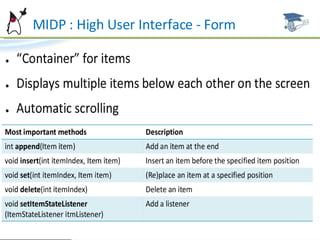
MIDP : High User Interface - Form The form has a label (title) and a collection of items You add/remove items with: append(item) append(string):  Creates a StringItem (shows a  string, no label) append(image):  Creates an ImageItem (shows a image, no label) insert(itemNum,item) delete(itemNum) deletAll() set(itemNum,item) Scrolling is always managed by the device. Focus on an item set with:  Display.setCurrentItem(item)
MIDP : High User Interface - Form
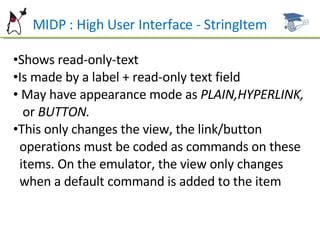
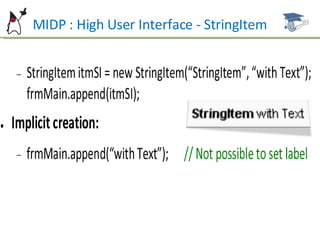
MIDP : High User Interface - StringItem Shows read-only-text Is made by a label + read-only text field May have appearance mode as  PLAIN,HYPERLINK,  or  BUTTON. This only changes the view, the link/button  operations must be coded as commands on these  items. On the emulator, the view only changes  when a default command is added to the item
MIDP : High User Interface - StringItem
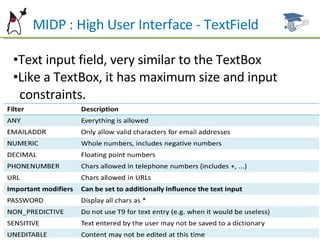
MIDP : High User Interface - TextField Text input field, very similar to the TextBox Like a TextBox, it has maximum size and input  constraints.
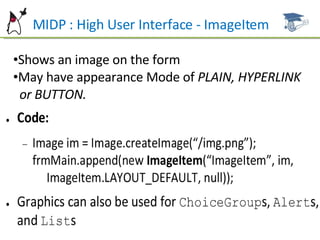
MIDP : High User Interface - ImageItem Shows an image on the form  May have appearance Mode of  PLAIN, HYPERLINK  or BUTTON.
MIDP : High User Interface - Spacer Adds spacer between items Constructor has minWidth and minHeight  parameters Has no labels or commands. The addCommand and  setLabel methods throw exception Is not “navigable”
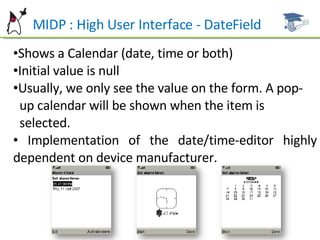
MIDP : High User Interface - DateField Shows a Calendar (date, time or both) Initial value is null Usually, we only see the value on the form. A pop- up calendar will be shown when the item is  selected. Implementation of the date/time-editor highly dependent on device manufacturer.
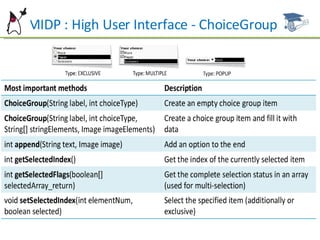
MIDP : High User Interface - ChoiceGroup Item selection list Similar to List (Screen), but Implicit is not supported ChoiceGroup types: EXCLUSIVE, MULTIPLE OR POPUP  (exclusive, drop-down combo box) Has all List operations (append,delete,setFont,etc).
MIDP : High User Interface - ChoiceGroup
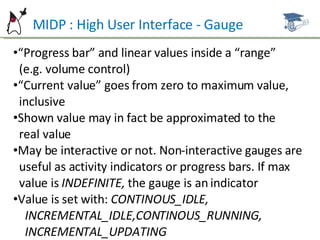
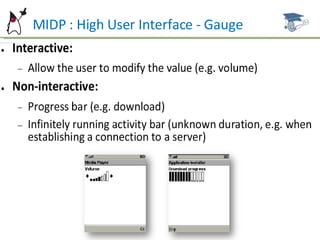
MIDP : High User Interface - Gauge “ Progress bar” and linear values inside a “range”  (e.g. volume control) “ Current value” goes from zero to maximum value,  inclusive Shown value may in fact be approximated to the  real value May be interactive or not. Non-interactive gauges are  useful as activity indicators or progress bars. If max  value is  INDEFINITE,  the gauge is an indicator Value is set with:  CONTINOUS_IDLE,  INCREMENTAL_IDLE,CONTINOUS_RUNNING,  INCREMENTAL_UPDATING
MIDP : High User Interface - Gauge
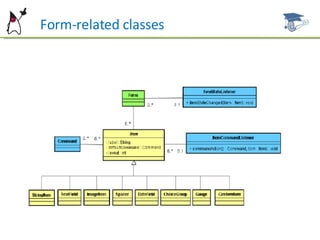
Form-related classes
Alert with a Gauge A gauge may be set on an Alert to indicate progress Set with Alert.setIndicator() The gauge must not have label, must not have  commands and must not be interactive
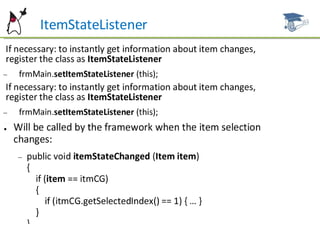
ItemStateListener Listener instance is set on a FORM and it is notified when changes happen on one of its items. It’s up to the device to decide when notify. Notifications are not expected to be delivered after every change (like at every key stroke), but they must be delivered before a command is triggered or when the focus is lost. It is not triggered when an application itself changes the value of an item
ItemStateListener
Item Commands Commands may be added to an item These commands will only be available when the item  has focus Commands are added to Items the same way they are  added to Screens One of the commands may be the “default” command Events are sent to ItemCommandListener and not to  CommandListener
Item Layout By MIDP 2.0 spec,  the items are place on screen like  “ left-aligned text” (by 1.0 the items are placed one at  each line) You may change the layout by calling item.setLayout Changing the layout of an item changes the layout of  all subsequent setPreferredSize(x,y):  “Locks” the width or the height  of an item. The floating parameter must be -1
Item Layout Item.layout may be: MIDP 2.0 style (more than one item by line): LAYOUT_2 Horizontal layout: LAYOUT_LEFT LAYOUT_RIGHT LAYOUT_CENTER Vertical layout on the same line  (ignored if all items  have the same size): LAYOUT_TOP LAYOUT_BOTTOM LAYOUT_VCENTER
Item Layout Item.layout may be: Force line breaks (ignored if the line break already  exists): LAYOUT_NEWLINE_BEFORE LAYOUT_NEWLINE_AFTER Expands or shrinks an item: LAYOUT_SHRINK LAYOUT_EXPAND LAYOUT_VSHRINK LAYOUT_VEXPAND
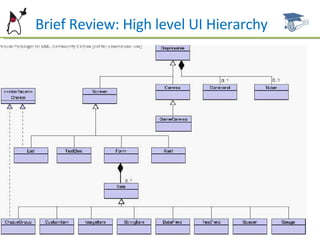
`B  Brief Review: High level UI Hierarchy
Example Codes Some examples and MIDlets samples are available for reference and studying  at this link: http://www.dsc.upe.br/~mpc/chapter5.rar The source codes include: GaugesMIDlet LayoutMIDlet ItemsMIDlet
Future Work Next Chapter: MIDP – Low level - UI Low level interface Canvas Graphics CustomItem
References ALVES F. Eduardo. SCMAD Study Guide,  27/04/2008.  JAKL Andreas, Java Platform, Micro Edition Part  01 slides, 12/2007. Sun Certification Mobile Application Developer  Website:  [http://www.sun.com/training/certification/java/scmad.xml].

Scmad Chapter05

  • 1.
    By Marcel Caraciolohttp://mobideia.blogspot.com Chapter 05 – MIDP: User Interface SCMAD Certification 45mm 61mm
  • 2.
    Agenda MIDP Userinterface - Form Form Item Types Classes Other topics about High level UI
  • 3.
    MIDP : HighUser Interface - Form Screen containing a list of components Components extend javax.microedition.lcdui.item Every Item instance may only be added to ONE Form at a time. Set the same item on more than one form or setting it twice on the same form throws an IllegalStateException Every item has a label and an input/output field
  • 4.
    MIDP : HighUser Interface - Form The form has a label (title) and a collection of items You add/remove items with: append(item) append(string): Creates a StringItem (shows a string, no label) append(image): Creates an ImageItem (shows a image, no label) insert(itemNum,item) delete(itemNum) deletAll() set(itemNum,item) Scrolling is always managed by the device. Focus on an item set with: Display.setCurrentItem(item)
  • 5.
    MIDP : HighUser Interface - Form
  • 6.
    MIDP : HighUser Interface - StringItem Shows read-only-text Is made by a label + read-only text field May have appearance mode as PLAIN,HYPERLINK, or BUTTON. This only changes the view, the link/button operations must be coded as commands on these items. On the emulator, the view only changes when a default command is added to the item
  • 7.
    MIDP : HighUser Interface - StringItem
  • 8.
    MIDP : HighUser Interface - TextField Text input field, very similar to the TextBox Like a TextBox, it has maximum size and input constraints.
  • 9.
    MIDP : HighUser Interface - ImageItem Shows an image on the form May have appearance Mode of PLAIN, HYPERLINK or BUTTON.
  • 10.
    MIDP : HighUser Interface - Spacer Adds spacer between items Constructor has minWidth and minHeight parameters Has no labels or commands. The addCommand and setLabel methods throw exception Is not “navigable”
  • 11.
    MIDP : HighUser Interface - DateField Shows a Calendar (date, time or both) Initial value is null Usually, we only see the value on the form. A pop- up calendar will be shown when the item is selected. Implementation of the date/time-editor highly dependent on device manufacturer.
  • 12.
    MIDP : HighUser Interface - ChoiceGroup Item selection list Similar to List (Screen), but Implicit is not supported ChoiceGroup types: EXCLUSIVE, MULTIPLE OR POPUP (exclusive, drop-down combo box) Has all List operations (append,delete,setFont,etc).
  • 13.
    MIDP : HighUser Interface - ChoiceGroup
  • 14.
    MIDP : HighUser Interface - Gauge “ Progress bar” and linear values inside a “range” (e.g. volume control) “ Current value” goes from zero to maximum value, inclusive Shown value may in fact be approximated to the real value May be interactive or not. Non-interactive gauges are useful as activity indicators or progress bars. If max value is INDEFINITE, the gauge is an indicator Value is set with: CONTINOUS_IDLE, INCREMENTAL_IDLE,CONTINOUS_RUNNING, INCREMENTAL_UPDATING
  • 15.
    MIDP : HighUser Interface - Gauge
  • 16.
  • 17.
    Alert with aGauge A gauge may be set on an Alert to indicate progress Set with Alert.setIndicator() The gauge must not have label, must not have commands and must not be interactive
  • 18.
    ItemStateListener Listener instanceis set on a FORM and it is notified when changes happen on one of its items. It’s up to the device to decide when notify. Notifications are not expected to be delivered after every change (like at every key stroke), but they must be delivered before a command is triggered or when the focus is lost. It is not triggered when an application itself changes the value of an item
  • 19.
  • 20.
    Item Commands Commandsmay be added to an item These commands will only be available when the item has focus Commands are added to Items the same way they are added to Screens One of the commands may be the “default” command Events are sent to ItemCommandListener and not to CommandListener
  • 21.
    Item Layout ByMIDP 2.0 spec, the items are place on screen like “ left-aligned text” (by 1.0 the items are placed one at each line) You may change the layout by calling item.setLayout Changing the layout of an item changes the layout of all subsequent setPreferredSize(x,y): “Locks” the width or the height of an item. The floating parameter must be -1
  • 22.
    Item Layout Item.layoutmay be: MIDP 2.0 style (more than one item by line): LAYOUT_2 Horizontal layout: LAYOUT_LEFT LAYOUT_RIGHT LAYOUT_CENTER Vertical layout on the same line (ignored if all items have the same size): LAYOUT_TOP LAYOUT_BOTTOM LAYOUT_VCENTER
  • 23.
    Item Layout Item.layoutmay be: Force line breaks (ignored if the line break already exists): LAYOUT_NEWLINE_BEFORE LAYOUT_NEWLINE_AFTER Expands or shrinks an item: LAYOUT_SHRINK LAYOUT_EXPAND LAYOUT_VSHRINK LAYOUT_VEXPAND
  • 24.
    `B BriefReview: High level UI Hierarchy
  • 25.
    Example Codes Someexamples and MIDlets samples are available for reference and studying at this link: http://www.dsc.upe.br/~mpc/chapter5.rar The source codes include: GaugesMIDlet LayoutMIDlet ItemsMIDlet
  • 26.
    Future Work NextChapter: MIDP – Low level - UI Low level interface Canvas Graphics CustomItem
  • 27.
    References ALVES F.Eduardo. SCMAD Study Guide, 27/04/2008. JAKL Andreas, Java Platform, Micro Edition Part 01 slides, 12/2007. Sun Certification Mobile Application Developer Website: [http://www.sun.com/training/certification/java/scmad.xml].