

By Marcel Caraciolo http://mobideia.blogspot.com Chapter 03 –  MIDP and MIDlets SCMAD Certification  45mm 61mm
Agenda Introduction to MIDP MIDP – API’s MIDlets and MIDlets Suites
MIDP: Mobile Information Device Profile Depends on CLDC Designed for mobile phones Devices must have: Screen (either mono, gray scale or color) Keyboard or touchscreen Network (limited) Sound (rudimentary)
MIDP – API’S Provides API’s for: Application life cycle and installation management User interface 2D games Multimedia Persistence Networking (HTTP 1.1 and HTTPS required) Notifications via alarm and network Security: Permissions and application signing Timers
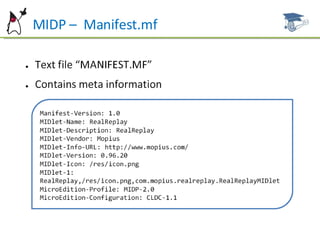
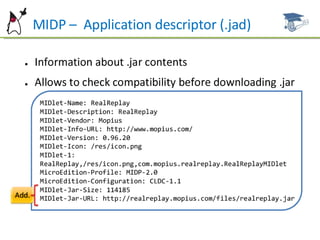
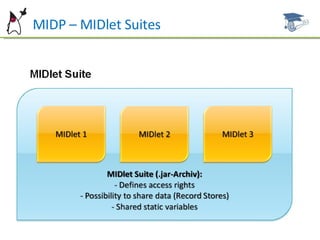
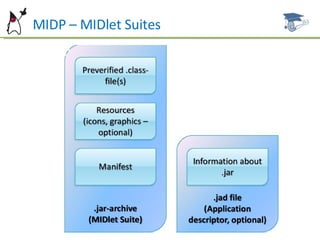
MIDP – MIDlet Suites MIDP applications are packaged as MIDlet Suites. A  suite is composed of:  JAR file with one or more MIDlets. ALL the classes that the  application  depends on (the application can not depend on  classes from other JAR) and a Manifest.mf with this Suite’s  metadata. JAD descriptor file (not required) with Suite’s metadata (JAD is  not packaged inside the JAR). Samples:  /etc/HelloWorld.jad, /etc/Manifest.mf
MIDP –  Manifest.mf
MIDP –  Application descriptor (.jad)
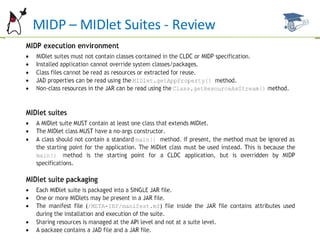
MIDP – MIDlet Suites The application life cycle is controlled by the device. You  will not write a “publicstaticvoidmain” method on a  MIDlet, and calls to System.exit() throw a SecurityException . All the classes  from a Suite are executed on the same VM  and share resources (e.g. a static getInstance() singleton is  shared between all the objects in the suite).
MIDP – MIDlet Suites
MIDP – MIDlet Suites - Review
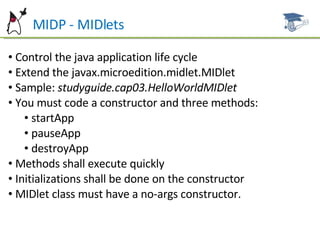
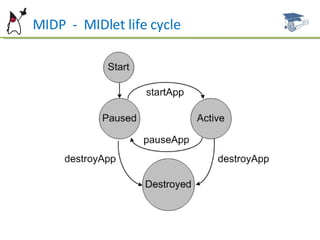
MIDP - MIDlets Control the java application life cycle Extend the javax.microedition.midlet.MIDlet Sample:  studyguide.cap03.HelloWorldMIDlet You must code a constructor and three methods: startApp pauseApp destroyApp Methods shall execute quickly Initializations shall be done on the constructor MIDlet class must have a no-args constructor.
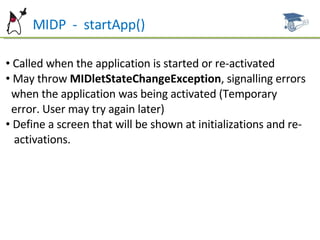
MIDP  -  startApp() Called when the application is started or re-activated  May throw  MIDletStateChangeException , signalling errors  when the application was being activated (Temporary  error. User may try again later)  Define a screen that will be shown at initializations and re- activations.
MIDP  -  pauseApp() Called by the device to signal the application will be put on  hold  (e.g. when the device receives an incoming call). Applications  shall release all the resources that will not be  in use while the application is paused.
MIDP  -  destroyApp(unconditional) Notifies that the application is going to be finished. This  MIDlet’s instance will not be reused. If the application is  started again, a new object will be created.  If “unconditional “is  false , the method may throw  a  MIDletStateChangeException , so the application remains  running. This can be used, for instance, when the  application  wants to confirm that the modified data may  be lost.  If it’s  true , the exception shall not be thrown  and the application will be finished. May be called by the MIDlet itself before asking it’s  termination.
MIDP  -  MIDlet life cycle
MIDP  -  Graphic user interface model javax.microedition.lcdui.Display setCurrent : Defines the  “javax.microedition.lcdui.Displayable”  to  be  shown. Instance is found by calling  Display.getDisplay( midlet )  and it is  valid through all the MIDlet’s life.
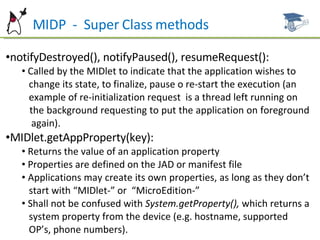
MIDP  -  Super Class methods notifyDestroyed(), notifyPaused(), resumeRequest(): Called by the MIDlet to indicate that the application wishes to  change its state, to finalize, pause o re-start the execution (an  example of re-initialization request  is a thread left running on  the background requesting to put the application on foreground  again). MIDlet.getAppProperty(key): Returns the value of an application property Properties are defined on the JAD or manifest file Applications may create its own properties, as long as they don’t  start with “MIDlet-” or  “MicroEdition-” Shall not be confused with  System.getProperty(),  which returns a  system property from the device (e.g. hostname, supported  OP’s, phone numbers).
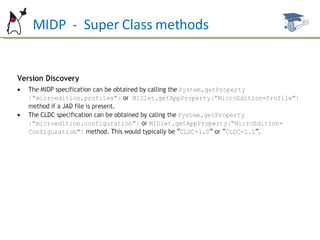
MIDP  -  Super Class methods
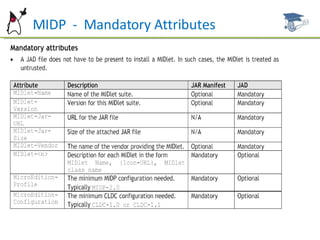
MIDP  -  Mandatory Attributes
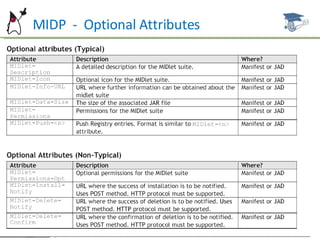
MIDP  -  Optional Attributes
Future Work Next Chapter: MIDP -User Interface  API’s : High level, Low level, game Displayable Command CommandListener Ticker Classes
References ALVES F. Eduardo. SCMAD Study Guide,  27/04/2008.  JAKL Andreas, Java Platform, Micro Edition Part  01 slides, 12/2007. Sun Certification Mobile Application Developer  Website:  [http://www.sun.com/training/certification/java/scmad.xml].

Scmad Chapter03

  • 1.
    By Marcel Caraciolohttp://mobideia.blogspot.com Chapter 03 – MIDP and MIDlets SCMAD Certification 45mm 61mm
  • 2.
    Agenda Introduction toMIDP MIDP – API’s MIDlets and MIDlets Suites
  • 3.
    MIDP: Mobile InformationDevice Profile Depends on CLDC Designed for mobile phones Devices must have: Screen (either mono, gray scale or color) Keyboard or touchscreen Network (limited) Sound (rudimentary)
  • 4.
    MIDP – API’SProvides API’s for: Application life cycle and installation management User interface 2D games Multimedia Persistence Networking (HTTP 1.1 and HTTPS required) Notifications via alarm and network Security: Permissions and application signing Timers
  • 5.
    MIDP – MIDletSuites MIDP applications are packaged as MIDlet Suites. A suite is composed of: JAR file with one or more MIDlets. ALL the classes that the application depends on (the application can not depend on classes from other JAR) and a Manifest.mf with this Suite’s metadata. JAD descriptor file (not required) with Suite’s metadata (JAD is not packaged inside the JAR). Samples: /etc/HelloWorld.jad, /etc/Manifest.mf
  • 6.
    MIDP – Manifest.mf
  • 7.
    MIDP – Application descriptor (.jad)
  • 8.
    MIDP – MIDletSuites The application life cycle is controlled by the device. You will not write a “publicstaticvoidmain” method on a MIDlet, and calls to System.exit() throw a SecurityException . All the classes from a Suite are executed on the same VM and share resources (e.g. a static getInstance() singleton is shared between all the objects in the suite).
  • 9.
  • 10.
  • 11.
    MIDP – MIDletSuites - Review
  • 12.
    MIDP - MIDletsControl the java application life cycle Extend the javax.microedition.midlet.MIDlet Sample: studyguide.cap03.HelloWorldMIDlet You must code a constructor and three methods: startApp pauseApp destroyApp Methods shall execute quickly Initializations shall be done on the constructor MIDlet class must have a no-args constructor.
  • 13.
    MIDP - startApp() Called when the application is started or re-activated May throw MIDletStateChangeException , signalling errors when the application was being activated (Temporary error. User may try again later) Define a screen that will be shown at initializations and re- activations.
  • 14.
    MIDP - pauseApp() Called by the device to signal the application will be put on hold (e.g. when the device receives an incoming call). Applications shall release all the resources that will not be in use while the application is paused.
  • 15.
    MIDP - destroyApp(unconditional) Notifies that the application is going to be finished. This MIDlet’s instance will not be reused. If the application is started again, a new object will be created. If “unconditional “is false , the method may throw a MIDletStateChangeException , so the application remains running. This can be used, for instance, when the application wants to confirm that the modified data may be lost. If it’s true , the exception shall not be thrown and the application will be finished. May be called by the MIDlet itself before asking it’s termination.
  • 16.
    MIDP - MIDlet life cycle
  • 17.
    MIDP - Graphic user interface model javax.microedition.lcdui.Display setCurrent : Defines the “javax.microedition.lcdui.Displayable” to be shown. Instance is found by calling Display.getDisplay( midlet ) and it is valid through all the MIDlet’s life.
  • 18.
    MIDP - Super Class methods notifyDestroyed(), notifyPaused(), resumeRequest(): Called by the MIDlet to indicate that the application wishes to change its state, to finalize, pause o re-start the execution (an example of re-initialization request is a thread left running on the background requesting to put the application on foreground again). MIDlet.getAppProperty(key): Returns the value of an application property Properties are defined on the JAD or manifest file Applications may create its own properties, as long as they don’t start with “MIDlet-” or “MicroEdition-” Shall not be confused with System.getProperty(), which returns a system property from the device (e.g. hostname, supported OP’s, phone numbers).
  • 19.
    MIDP - Super Class methods
  • 20.
    MIDP - Mandatory Attributes
  • 21.
    MIDP - Optional Attributes
  • 22.
    Future Work NextChapter: MIDP -User Interface API’s : High level, Low level, game Displayable Command CommandListener Ticker Classes
  • 23.
    References ALVES F.Eduardo. SCMAD Study Guide, 27/04/2008. JAKL Andreas, Java Platform, Micro Edition Part 01 slides, 12/2007. Sun Certification Mobile Application Developer Website: [http://www.sun.com/training/certification/java/scmad.xml].