1
SCILAB
AN INTRODUCTION
Arun Umrao
www.sites.google.com/view/arunumrao
DRAFT COPY - GPL LICENSING
2
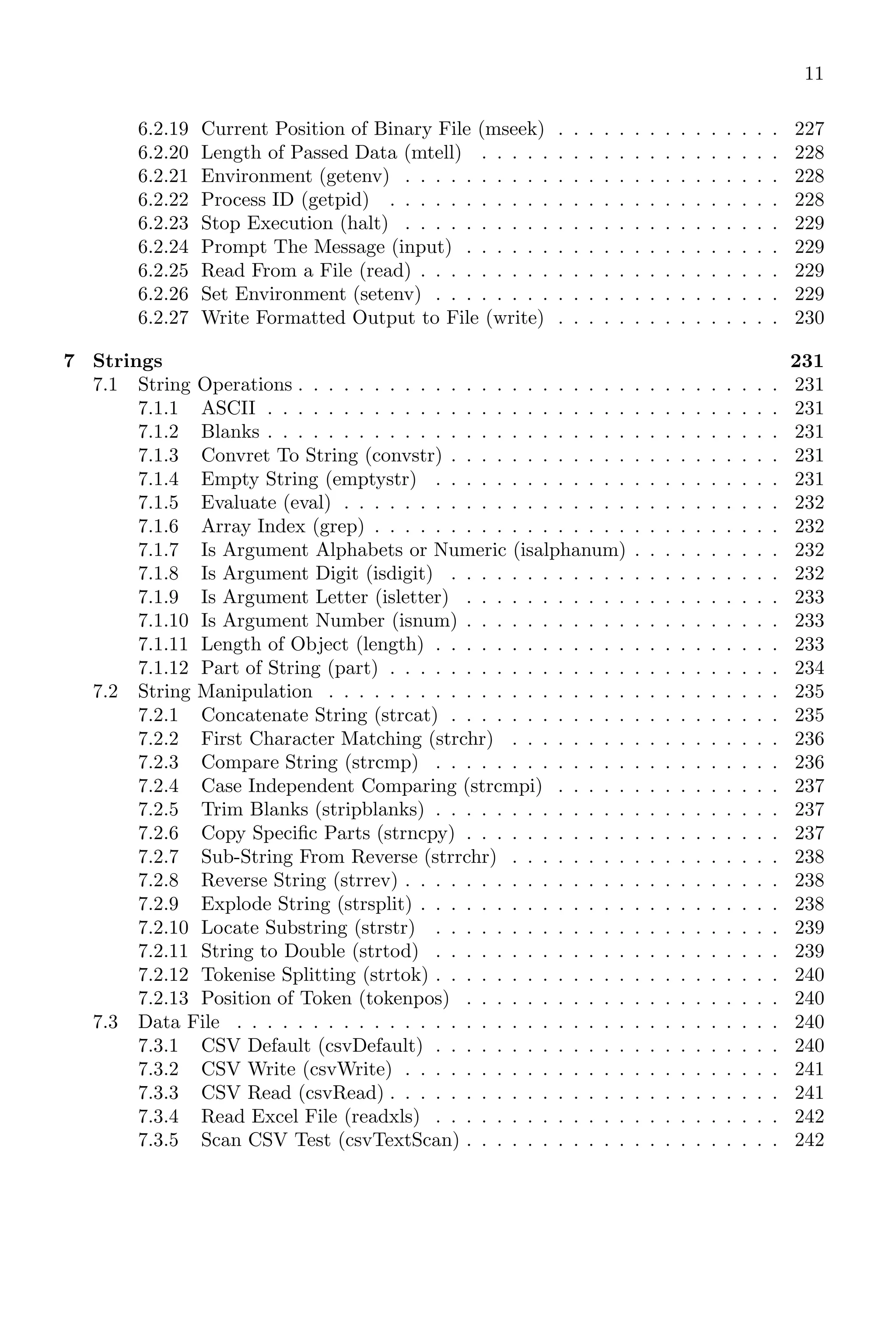
Contents
I Scilab 7
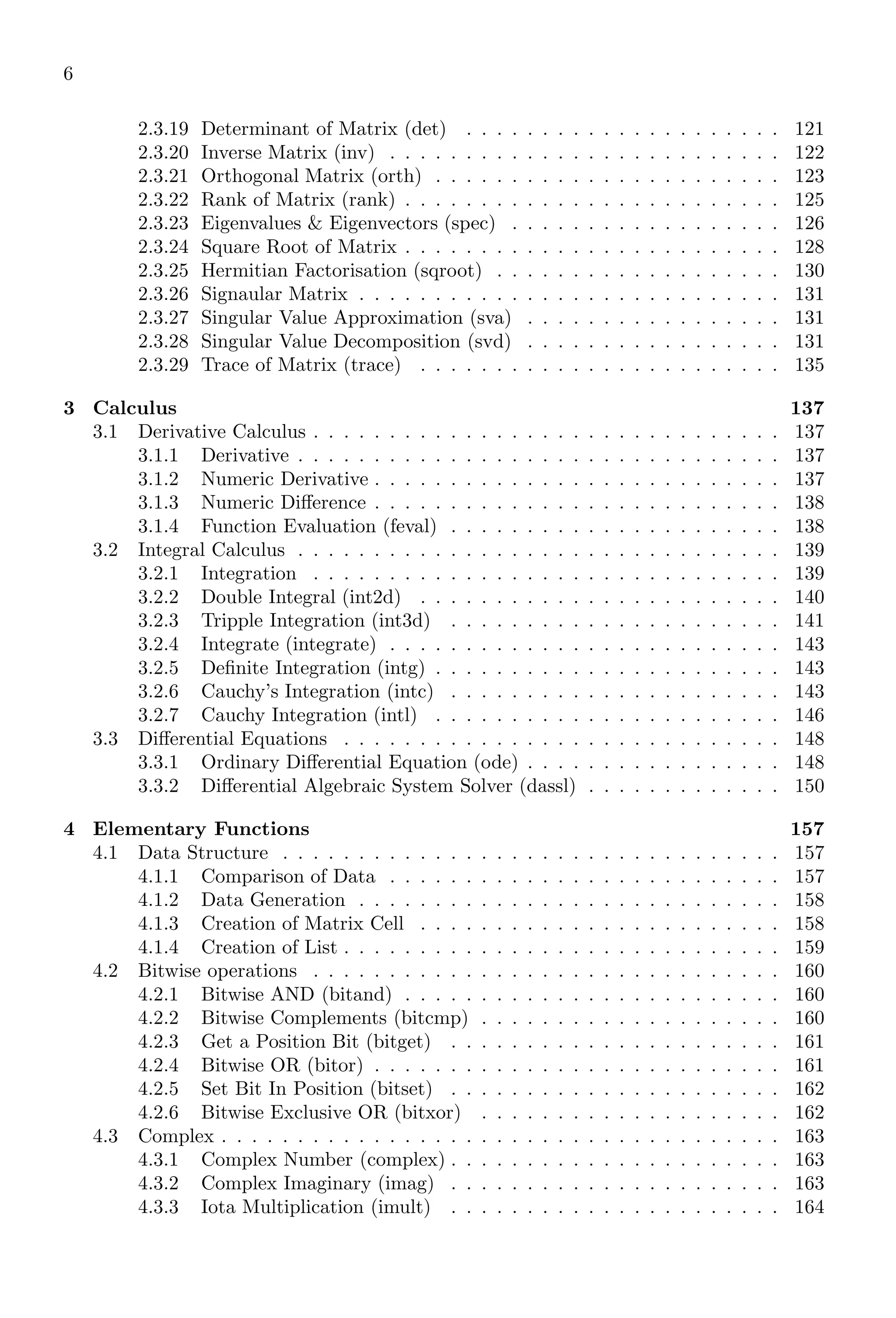
1 Scilab Core 9
1.1 Introduction . . . . . . . . . . . . . . . . . . . . . . . . . . . . . . . . . . . 9
1.1.1 Everything As Matrix . . . . . . . . . . . . . . . . . . . . . . . . . 10
1.1.2 Approximate Zero . . . . . . . . . . . . . . . . . . . . . . . . . . . 11
1.1.3 Computational Error . . . . . . . . . . . . . . . . . . . . . . . . . . 11
1.2 Simple Arithmetic . . . . . . . . . . . . . . . . . . . . . . . . . . . . . . . 12
1.2.1 Addition . . . . . . . . . . . . . . . . . . . . . . . . . . . . . . . . . 13
1.2.2 Subtraction . . . . . . . . . . . . . . . . . . . . . . . . . . . . . . . 14
1.2.3 Multiplication . . . . . . . . . . . . . . . . . . . . . . . . . . . . . . 14
1.2.4 Division . . . . . . . . . . . . . . . . . . . . . . . . . . . . . . . . . 15
1.2.5 Scoping . . . . . . . . . . . . . . . . . . . . . . . . . . . . . . . . . 15
1.2.6 Square Root (sqrt) . . . . . . . . . . . . . . . . . . . . . . . . . . . 16
1.2.7 Exponent (ˆ Operator) . . . . . . . . . . . . . . . . . . . . . . . . 17
1.2.8 Algebraic Equations . . . . . . . . . . . . . . . . . . . . . . . . . . 20
1.2.9 Logarithm . . . . . . . . . . . . . . . . . . . . . . . . . . . . . . . . 21
1.2.10 Index Expression . . . . . . . . . . . . . . . . . . . . . . . . . . . . 22
1.3 Arithmetical Keywords . . . . . . . . . . . . . . . . . . . . . . . . . . . . . 25
1.3.1 Result Variable (ans) . . . . . . . . . . . . . . . . . . . . . . . . . . 25
1.3.2 Left Matrix Division () . . . . . . . . . . . . . . . . . . . . . . . . 25
1.3.3 Square Brackets ([...]) . . . . . . . . . . . . . . . . . . . . . . . . . 26
1.3.4 Element-Wise Operation . . . . . . . . . . . . . . . . . . . . . . . . 27
1.3.5 Matrix-Wise Operation . . . . . . . . . . . . . . . . . . . . . . . . 27
1.3.6 Colon (Range Operator) . . . . . . . . . . . . . . . . . . . . . . . . 27
1.3.7 Comma . . . . . . . . . . . . . . . . . . . . . . . . . . . . . . . . . 31
1.3.8 Comments . . . . . . . . . . . . . . . . . . . . . . . . . . . . . . . . 32
1.3.9 Dot . . . . . . . . . . . . . . . . . . . . . . . . . . . . . . . . . . . 32
1.3.10 Empty . . . . . . . . . . . . . . . . . . . . . . . . . . . . . . . . . . 32
1.3.11 Equal Sign . . . . . . . . . . . . . . . . . . . . . . . . . . . . . . . 33
1.3.12 global . . . . . . . . . . . . . . . . . . . . . . . . . . . . . . . . . . 33
1.3.13 Hat Symbol . . . . . . . . . . . . . . . . . . . . . . . . . . . . . . . 33
1.3.14 Less Than . . . . . . . . . . . . . . . . . . . . . . . . . . . . . . . . 34
1.3.15 Minus . . . . . . . . . . . . . . . . . . . . . . . . . . . . . . . . . . 34
1.3.16 Not . . . . . . . . . . . . . . . . . . . . . . . . . . . . . . . . . . . 34
1.3.17 Parenthesis . . . . . . . . . . . . . . . . . . . . . . . . . . . . . . . 35
1.3.18 Percent . . . . . . . . . . . . . . . . . . . . . . . . . . . . . . . . . 35
1.3.19 Plus . . . . . . . . . . . . . . . . . . . . . . . . . . . . . . . . . . . 35
1.3.20 Quote . . . . . . . . . . . . . . . . . . . . . . . . . . . . . . . . . . 35
1.3.21 Return . . . . . . . . . . . . . . . . . . . . . . . . . . . . . . . . . . 37
1.3.22 Semicolon . . . . . . . . . . . . . . . . . . . . . . . . . . . . . . . . 38
1.3.23 Forward Slash . . . . . . . . . . . . . . . . . . . . . . . . . . . . . . 39
1.3.24 Space . . . . . . . . . . . . . . . . . . . . . . . . . . . . . . . . . . 39
1.3.25 Asterisk . . . . . . . . . . . . . . . . . . . . . . . . . . . . . . . . . 39
3
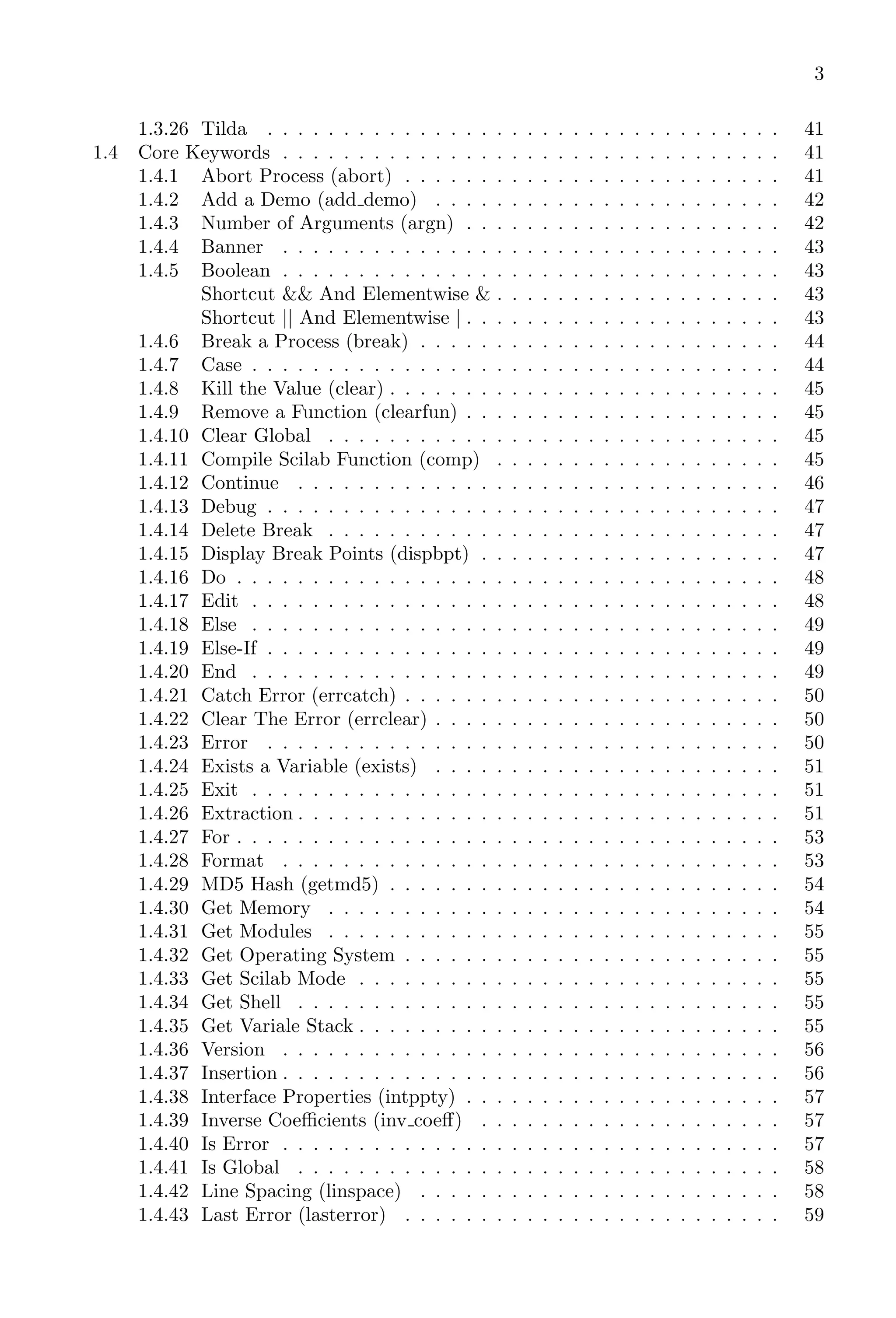
1.3.26 Tilda . . . . . . . . . . . . . . . . . . . . . . . . . . . . . . . . . . 41
1.4 Core Keywords . . . . . . . . . . . . . . . . . . . . . . . . . . . . . . . . . 41
1.4.1 Abort Process (abort) . . . . . . . . . . . . . . . . . . . . . . . . . 41
1.4.2 Add a Demo (add demo) . . . . . . . . . . . . . . . . . . . . . . . 42
1.4.3 Number of Arguments (argn) . . . . . . . . . . . . . . . . . . . . . 42
1.4.4 Banner . . . . . . . . . . . . . . . . . . . . . . . . . . . . . . . . . 43
1.4.5 Boolean . . . . . . . . . . . . . . . . . . . . . . . . . . . . . . . . . 43
Shortcut && And Elementwise & . . . . . . . . . . . . . . . . . . . 43
Shortcut || And Elementwise | . . . . . . . . . . . . . . . . . . . . . 43
1.4.6 Break a Process (break) . . . . . . . . . . . . . . . . . . . . . . . . 44
1.4.7 Case . . . . . . . . . . . . . . . . . . . . . . . . . . . . . . . . . . . 44
1.4.8 Kill the Value (clear) . . . . . . . . . . . . . . . . . . . . . . . . . . 45
1.4.9 Remove a Function (clearfun) . . . . . . . . . . . . . . . . . . . . . 45
1.4.10 Clear Global . . . . . . . . . . . . . . . . . . . . . . . . . . . . . . 45
1.4.11 Compile Scilab Function (comp) . . . . . . . . . . . . . . . . . . . 45
1.4.12 Continue . . . . . . . . . . . . . . . . . . . . . . . . . . . . . . . . 46
1.4.13 Debug . . . . . . . . . . . . . . . . . . . . . . . . . . . . . . . . . . 47
1.4.14 Delete Break . . . . . . . . . . . . . . . . . . . . . . . . . . . . . . 47
1.4.15 Display Break Points (dispbpt) . . . . . . . . . . . . . . . . . . . . 47
1.4.16 Do . . . . . . . . . . . . . . . . . . . . . . . . . . . . . . . . . . . . 48
1.4.17 Edit . . . . . . . . . . . . . . . . . . . . . . . . . . . . . . . . . . . 48
1.4.18 Else . . . . . . . . . . . . . . . . . . . . . . . . . . . . . . . . . . . 49
1.4.19 Else-If . . . . . . . . . . . . . . . . . . . . . . . . . . . . . . . . . . 49
1.4.20 End . . . . . . . . . . . . . . . . . . . . . . . . . . . . . . . . . . . 49
1.4.21 Catch Error (errcatch) . . . . . . . . . . . . . . . . . . . . . . . . . 50
1.4.22 Clear The Error (errclear) . . . . . . . . . . . . . . . . . . . . . . . 50
1.4.23 Error . . . . . . . . . . . . . . . . . . . . . . . . . . . . . . . . . . 50
1.4.24 Exists a Variable (exists) . . . . . . . . . . . . . . . . . . . . . . . 51
1.4.25 Exit . . . . . . . . . . . . . . . . . . . . . . . . . . . . . . . . . . . 51
1.4.26 Extraction . . . . . . . . . . . . . . . . . . . . . . . . . . . . . . . . 51
1.4.27 For . . . . . . . . . . . . . . . . . . . . . . . . . . . . . . . . . . . . 53
1.4.28 Format . . . . . . . . . . . . . . . . . . . . . . . . . . . . . . . . . 53
1.4.29 MD5 Hash (getmd5) . . . . . . . . . . . . . . . . . . . . . . . . . . 54
1.4.30 Get Memory . . . . . . . . . . . . . . . . . . . . . . . . . . . . . . 54
1.4.31 Get Modules . . . . . . . . . . . . . . . . . . . . . . . . . . . . . . 55
1.4.32 Get Operating System . . . . . . . . . . . . . . . . . . . . . . . . . 55
1.4.33 Get Scilab Mode . . . . . . . . . . . . . . . . . . . . . . . . . . . . 55
1.4.34 Get Shell . . . . . . . . . . . . . . . . . . . . . . . . . . . . . . . . 55
1.4.35 Get Variale Stack . . . . . . . . . . . . . . . . . . . . . . . . . . . . 55
1.4.36 Version . . . . . . . . . . . . . . . . . . . . . . . . . . . . . . . . . 56
1.4.37 Insertion . . . . . . . . . . . . . . . . . . . . . . . . . . . . . . . . . 56
1.4.38 Interface Properties (intppty) . . . . . . . . . . . . . . . . . . . . . 57
1.4.39 Inverse Coefficients (inv coeff) . . . . . . . . . . . . . . . . . . . . 57
1.4.40 Is Error . . . . . . . . . . . . . . . . . . . . . . . . . . . . . . . . . 57
1.4.41 Is Global . . . . . . . . . . . . . . . . . . . . . . . . . . . . . . . . 58
1.4.42 Line Spacing (linspace) . . . . . . . . . . . . . . . . . . . . . . . . 58
1.4.43 Last Error (lasterror) . . . . . . . . . . . . . . . . . . . . . . . . . 59
4
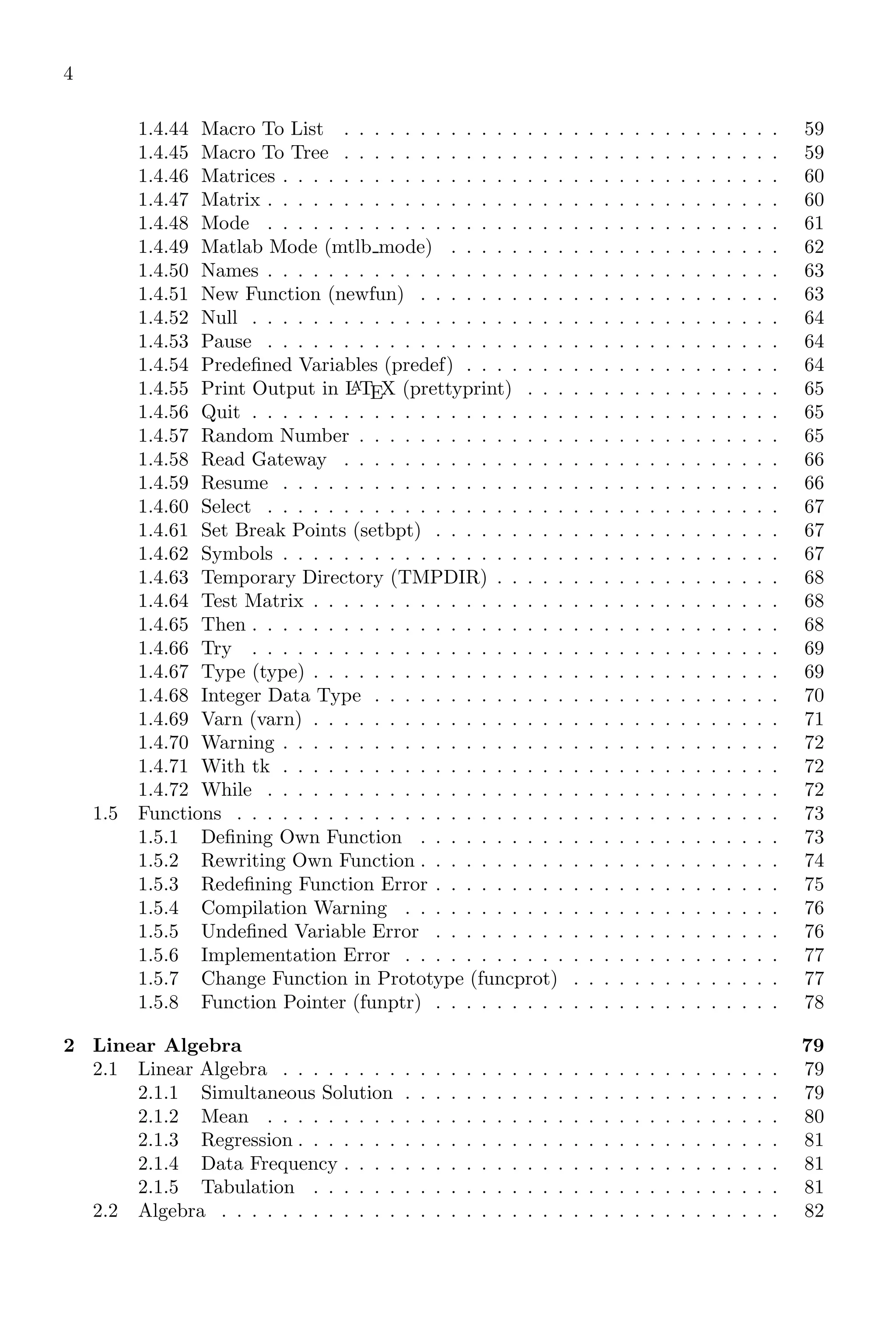
1.4.44 Macro To List . . . . . . . . . . . . . . . . . . . . . . . . . . . . . 59
1.4.45 Macro To Tree . . . . . . . . . . . . . . . . . . . . . . . . . . . . . 59
1.4.46 Matrices . . . . . . . . . . . . . . . . . . . . . . . . . . . . . . . . . 60
1.4.47 Matrix . . . . . . . . . . . . . . . . . . . . . . . . . . . . . . . . . . 60
1.4.48 Mode . . . . . . . . . . . . . . . . . . . . . . . . . . . . . . . . . . 61
1.4.49 Matlab Mode (mtlb mode) . . . . . . . . . . . . . . . . . . . . . . 62
1.4.50 Names . . . . . . . . . . . . . . . . . . . . . . . . . . . . . . . . . . 63
1.4.51 New Function (newfun) . . . . . . . . . . . . . . . . . . . . . . . . 63
1.4.52 Null . . . . . . . . . . . . . . . . . . . . . . . . . . . . . . . . . . . 64
1.4.53 Pause . . . . . . . . . . . . . . . . . . . . . . . . . . . . . . . . . . 64
1.4.54 Predefined Variables (predef) . . . . . . . . . . . . . . . . . . . . . 64
1.4.55 Print Output in L
A
TEX (prettyprint) . . . . . . . . . . . . . . . . . 65
1.4.56 Quit . . . . . . . . . . . . . . . . . . . . . . . . . . . . . . . . . . . 65
1.4.57 Random Number . . . . . . . . . . . . . . . . . . . . . . . . . . . . 65
1.4.58 Read Gateway . . . . . . . . . . . . . . . . . . . . . . . . . . . . . 66
1.4.59 Resume . . . . . . . . . . . . . . . . . . . . . . . . . . . . . . . . . 66
1.4.60 Select . . . . . . . . . . . . . . . . . . . . . . . . . . . . . . . . . . 67
1.4.61 Set Break Points (setbpt) . . . . . . . . . . . . . . . . . . . . . . . 67
1.4.62 Symbols . . . . . . . . . . . . . . . . . . . . . . . . . . . . . . . . . 67
1.4.63 Temporary Directory (TMPDIR) . . . . . . . . . . . . . . . . . . . 68
1.4.64 Test Matrix . . . . . . . . . . . . . . . . . . . . . . . . . . . . . . . 68
1.4.65 Then . . . . . . . . . . . . . . . . . . . . . . . . . . . . . . . . . . . 68
1.4.66 Try . . . . . . . . . . . . . . . . . . . . . . . . . . . . . . . . . . . 69
1.4.67 Type (type) . . . . . . . . . . . . . . . . . . . . . . . . . . . . . . . 69
1.4.68 Integer Data Type . . . . . . . . . . . . . . . . . . . . . . . . . . . 70
1.4.69 Varn (varn) . . . . . . . . . . . . . . . . . . . . . . . . . . . . . . . 71
1.4.70 Warning . . . . . . . . . . . . . . . . . . . . . . . . . . . . . . . . . 72
1.4.71 With tk . . . . . . . . . . . . . . . . . . . . . . . . . . . . . . . . . 72
1.4.72 While . . . . . . . . . . . . . . . . . . . . . . . . . . . . . . . . . . 72
1.5 Functions . . . . . . . . . . . . . . . . . . . . . . . . . . . . . . . . . . . . 73
1.5.1 Defining Own Function . . . . . . . . . . . . . . . . . . . . . . . . 73
1.5.2 Rewriting Own Function . . . . . . . . . . . . . . . . . . . . . . . . 74
1.5.3 Redefining Function Error . . . . . . . . . . . . . . . . . . . . . . . 75
1.5.4 Compilation Warning . . . . . . . . . . . . . . . . . . . . . . . . . 76
1.5.5 Undefined Variable Error . . . . . . . . . . . . . . . . . . . . . . . 76
1.5.6 Implementation Error . . . . . . . . . . . . . . . . . . . . . . . . . 77
1.5.7 Change Function in Prototype (funcprot) . . . . . . . . . . . . . . 77
1.5.8 Function Pointer (funptr) . . . . . . . . . . . . . . . . . . . . . . . 78
2 Linear Algebra 79
2.1 Linear Algebra . . . . . . . . . . . . . . . . . . . . . . . . . . . . . . . . . 79
2.1.1 Simultaneous Solution . . . . . . . . . . . . . . . . . . . . . . . . . 79
2.1.2 Mean . . . . . . . . . . . . . . . . . . . . . . . . . . . . . . . . . . 80
2.1.3 Regression . . . . . . . . . . . . . . . . . . . . . . . . . . . . . . . . 81
2.1.4 Data Frequency . . . . . . . . . . . . . . . . . . . . . . . . . . . . . 81
2.1.5 Tabulation . . . . . . . . . . . . . . . . . . . . . . . . . . . . . . . 81
2.2 Algebra . . . . . . . . . . . . . . . . . . . . . . . . . . . . . . . . . . . . . 82
5
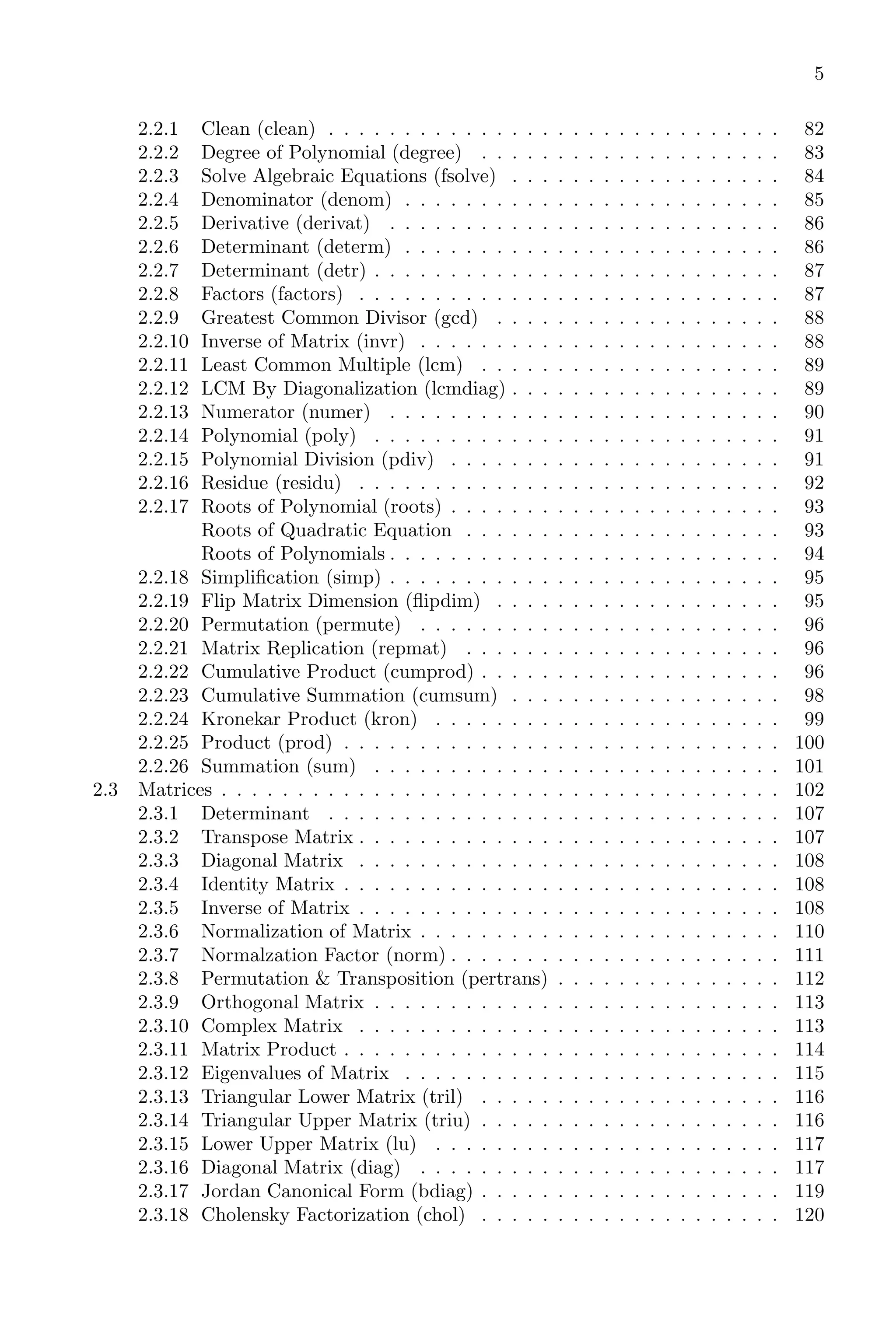
2.2.1 Clean (clean) . . . . . . . . . . . . . . . . . . . . . . . . . . . . . . 82
2.2.2 Degree of Polynomial (degree) . . . . . . . . . . . . . . . . . . . . 83
2.2.3 Solve Algebraic Equations (fsolve) . . . . . . . . . . . . . . . . . . 84
2.2.4 Denominator (denom) . . . . . . . . . . . . . . . . . . . . . . . . . 85
2.2.5 Derivative (derivat) . . . . . . . . . . . . . . . . . . . . . . . . . . 86
2.2.6 Determinant (determ) . . . . . . . . . . . . . . . . . . . . . . . . . 86
2.2.7 Determinant (detr) . . . . . . . . . . . . . . . . . . . . . . . . . . . 87
2.2.8 Factors (factors) . . . . . . . . . . . . . . . . . . . . . . . . . . . . 87
2.2.9 Greatest Common Divisor (gcd) . . . . . . . . . . . . . . . . . . . 88
2.2.10 Inverse of Matrix (invr) . . . . . . . . . . . . . . . . . . . . . . . . 88
2.2.11 Least Common Multiple (lcm) . . . . . . . . . . . . . . . . . . . . 89
2.2.12 LCM By Diagonalization (lcmdiag) . . . . . . . . . . . . . . . . . . 89
2.2.13 Numerator (numer) . . . . . . . . . . . . . . . . . . . . . . . . . . 90
2.2.14 Polynomial (poly) . . . . . . . . . . . . . . . . . . . . . . . . . . . 91
2.2.15 Polynomial Division (pdiv) . . . . . . . . . . . . . . . . . . . . . . 91
2.2.16 Residue (residu) . . . . . . . . . . . . . . . . . . . . . . . . . . . . 92
2.2.17 Roots of Polynomial (roots) . . . . . . . . . . . . . . . . . . . . . . 93
Roots of Quadratic Equation . . . . . . . . . . . . . . . . . . . . . 93
Roots of Polynomials . . . . . . . . . . . . . . . . . . . . . . . . . . 94
2.2.18 Simplification (simp) . . . . . . . . . . . . . . . . . . . . . . . . . . 95
2.2.19 Flip Matrix Dimension (flipdim) . . . . . . . . . . . . . . . . . . . 95
2.2.20 Permutation (permute) . . . . . . . . . . . . . . . . . . . . . . . . 96
2.2.21 Matrix Replication (repmat) . . . . . . . . . . . . . . . . . . . . . 96
2.2.22 Cumulative Product (cumprod) . . . . . . . . . . . . . . . . . . . . 96
2.2.23 Cumulative Summation (cumsum) . . . . . . . . . . . . . . . . . . 98
2.2.24 Kronekar Product (kron) . . . . . . . . . . . . . . . . . . . . . . . 99
2.2.25 Product (prod) . . . . . . . . . . . . . . . . . . . . . . . . . . . . . 100
2.2.26 Summation (sum) . . . . . . . . . . . . . . . . . . . . . . . . . . . 101
2.3 Matrices . . . . . . . . . . . . . . . . . . . . . . . . . . . . . . . . . . . . . 102
2.3.1 Determinant . . . . . . . . . . . . . . . . . . . . . . . . . . . . . . 107
2.3.2 Transpose Matrix . . . . . . . . . . . . . . . . . . . . . . . . . . . . 107
2.3.3 Diagonal Matrix . . . . . . . . . . . . . . . . . . . . . . . . . . . . 108
2.3.4 Identity Matrix . . . . . . . . . . . . . . . . . . . . . . . . . . . . . 108
2.3.5 Inverse of Matrix . . . . . . . . . . . . . . . . . . . . . . . . . . . . 108
2.3.6 Normalization of Matrix . . . . . . . . . . . . . . . . . . . . . . . . 110
2.3.7 Normalzation Factor (norm) . . . . . . . . . . . . . . . . . . . . . . 111
2.3.8 Permutation & Transposition (pertrans) . . . . . . . . . . . . . . . 112
2.3.9 Orthogonal Matrix . . . . . . . . . . . . . . . . . . . . . . . . . . . 113
2.3.10 Complex Matrix . . . . . . . . . . . . . . . . . . . . . . . . . . . . 113
2.3.11 Matrix Product . . . . . . . . . . . . . . . . . . . . . . . . . . . . . 114
2.3.12 Eigenvalues of Matrix . . . . . . . . . . . . . . . . . . . . . . . . . 115
2.3.13 Triangular Lower Matrix (tril) . . . . . . . . . . . . . . . . . . . . 116
2.3.14 Triangular Upper Matrix (triu) . . . . . . . . . . . . . . . . . . . . 116
2.3.15 Lower Upper Matrix (lu) . . . . . . . . . . . . . . . . . . . . . . . 117
2.3.16 Diagonal Matrix (diag) . . . . . . . . . . . . . . . . . . . . . . . . 117
2.3.17 Jordan Canonical Form (bdiag) . . . . . . . . . . . . . . . . . . . . 119
2.3.18 Cholensky Factorization (chol) . . . . . . . . . . . . . . . . . . . . 120
6
2.3.19 Determinant of Matrix (det) . . . . . . . . . . . . . . . . . . . . . 121
2.3.20 Inverse Matrix (inv) . . . . . . . . . . . . . . . . . . . . . . . . . . 122
2.3.21 Orthogonal Matrix (orth) . . . . . . . . . . . . . . . . . . . . . . . 123
2.3.22 Rank of Matrix (rank) . . . . . . . . . . . . . . . . . . . . . . . . . 125
2.3.23 Eigenvalues & Eigenvectors (spec) . . . . . . . . . . . . . . . . . . 126
2.3.24 Square Root of Matrix . . . . . . . . . . . . . . . . . . . . . . . . . 128
2.3.25 Hermitian Factorisation (sqroot) . . . . . . . . . . . . . . . . . . . 130
2.3.26 Signaular Matrix . . . . . . . . . . . . . . . . . . . . . . . . . . . . 131
2.3.27 Singular Value Approximation (sva) . . . . . . . . . . . . . . . . . 131
2.3.28 Singular Value Decomposition (svd) . . . . . . . . . . . . . . . . . 131
2.3.29 Trace of Matrix (trace) . . . . . . . . . . . . . . . . . . . . . . . . 135
3 Calculus 137
3.1 Derivative Calculus . . . . . . . . . . . . . . . . . . . . . . . . . . . . . . . 137
3.1.1 Derivative . . . . . . . . . . . . . . . . . . . . . . . . . . . . . . . . 137
3.1.2 Numeric Derivative . . . . . . . . . . . . . . . . . . . . . . . . . . . 137
3.1.3 Numeric Difference . . . . . . . . . . . . . . . . . . . . . . . . . . . 138
3.1.4 Function Evaluation (feval) . . . . . . . . . . . . . . . . . . . . . . 138
3.2 Integral Calculus . . . . . . . . . . . . . . . . . . . . . . . . . . . . . . . . 139
3.2.1 Integration . . . . . . . . . . . . . . . . . . . . . . . . . . . . . . . 139
3.2.2 Double Integral (int2d) . . . . . . . . . . . . . . . . . . . . . . . . 140
3.2.3 Tripple Integration (int3d) . . . . . . . . . . . . . . . . . . . . . . 141
3.2.4 Integrate (integrate) . . . . . . . . . . . . . . . . . . . . . . . . . . 143
3.2.5 Definite Integration (intg) . . . . . . . . . . . . . . . . . . . . . . . 143
3.2.6 Cauchy’s Integration (intc) . . . . . . . . . . . . . . . . . . . . . . 143
3.2.7 Cauchy Integration (intl) . . . . . . . . . . . . . . . . . . . . . . . 146
3.3 Differential Equations . . . . . . . . . . . . . . . . . . . . . . . . . . . . . 148
3.3.1 Ordinary Differential Equation (ode) . . . . . . . . . . . . . . . . . 148
3.3.2 Differential Algebraic System Solver (dassl) . . . . . . . . . . . . . 150
4 Elementary Functions 157
4.1 Data Structure . . . . . . . . . . . . . . . . . . . . . . . . . . . . . . . . . 157
4.1.1 Comparison of Data . . . . . . . . . . . . . . . . . . . . . . . . . . 157
4.1.2 Data Generation . . . . . . . . . . . . . . . . . . . . . . . . . . . . 158
4.1.3 Creation of Matrix Cell . . . . . . . . . . . . . . . . . . . . . . . . 158
4.1.4 Creation of List . . . . . . . . . . . . . . . . . . . . . . . . . . . . . 159
4.2 Bitwise operations . . . . . . . . . . . . . . . . . . . . . . . . . . . . . . . 160
4.2.1 Bitwise AND (bitand) . . . . . . . . . . . . . . . . . . . . . . . . . 160
4.2.2 Bitwise Complements (bitcmp) . . . . . . . . . . . . . . . . . . . . 160
4.2.3 Get a Position Bit (bitget) . . . . . . . . . . . . . . . . . . . . . . 161
4.2.4 Bitwise OR (bitor) . . . . . . . . . . . . . . . . . . . . . . . . . . . 161
4.2.5 Set Bit In Position (bitset) . . . . . . . . . . . . . . . . . . . . . . 162
4.2.6 Bitwise Exclusive OR (bitxor) . . . . . . . . . . . . . . . . . . . . 162
4.3 Complex . . . . . . . . . . . . . . . . . . . . . . . . . . . . . . . . . . . . . 163
4.3.1 Complex Number (complex) . . . . . . . . . . . . . . . . . . . . . . 163
4.3.2 Complex Imaginary (imag) . . . . . . . . . . . . . . . . . . . . . . 163
4.3.3 Iota Multiplication (imult) . . . . . . . . . . . . . . . . . . . . . . 164
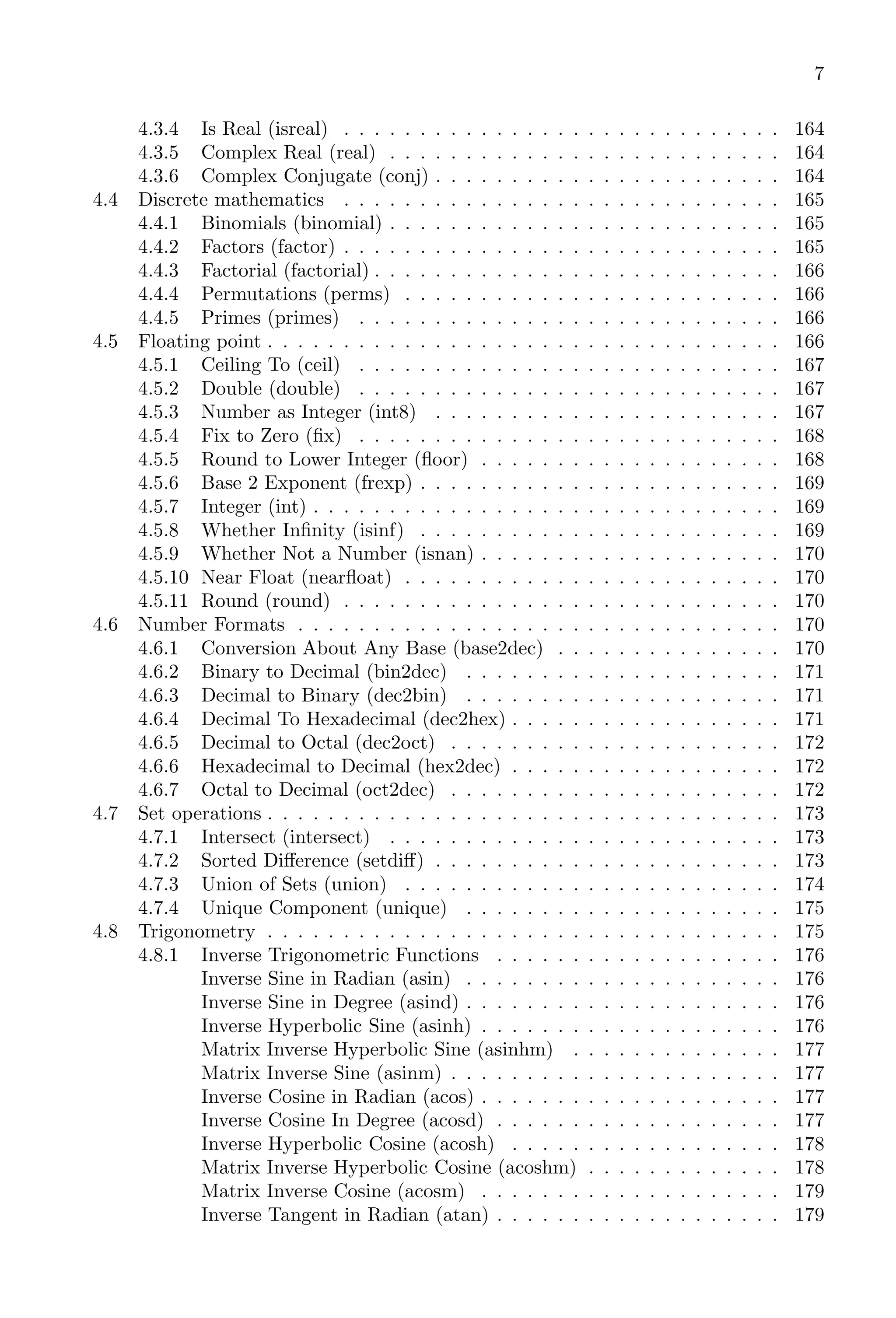
7
4.3.4 Is Real (isreal) . . . . . . . . . . . . . . . . . . . . . . . . . . . . . 164
4.3.5 Complex Real (real) . . . . . . . . . . . . . . . . . . . . . . . . . . 164
4.3.6 Complex Conjugate (conj) . . . . . . . . . . . . . . . . . . . . . . . 164
4.4 Discrete mathematics . . . . . . . . . . . . . . . . . . . . . . . . . . . . . 165
4.4.1 Binomials (binomial) . . . . . . . . . . . . . . . . . . . . . . . . . . 165
4.4.2 Factors (factor) . . . . . . . . . . . . . . . . . . . . . . . . . . . . . 165
4.4.3 Factorial (factorial) . . . . . . . . . . . . . . . . . . . . . . . . . . . 166
4.4.4 Permutations (perms) . . . . . . . . . . . . . . . . . . . . . . . . . 166
4.4.5 Primes (primes) . . . . . . . . . . . . . . . . . . . . . . . . . . . . 166
4.5 Floating point . . . . . . . . . . . . . . . . . . . . . . . . . . . . . . . . . . 166
4.5.1 Ceiling To (ceil) . . . . . . . . . . . . . . . . . . . . . . . . . . . . 167
4.5.2 Double (double) . . . . . . . . . . . . . . . . . . . . . . . . . . . . 167
4.5.3 Number as Integer (int8) . . . . . . . . . . . . . . . . . . . . . . . 167
4.5.4 Fix to Zero (fix) . . . . . . . . . . . . . . . . . . . . . . . . . . . . 168
4.5.5 Round to Lower Integer (floor) . . . . . . . . . . . . . . . . . . . . 168
4.5.6 Base 2 Exponent (frexp) . . . . . . . . . . . . . . . . . . . . . . . . 169
4.5.7 Integer (int) . . . . . . . . . . . . . . . . . . . . . . . . . . . . . . . 169
4.5.8 Whether Infinity (isinf) . . . . . . . . . . . . . . . . . . . . . . . . 169
4.5.9 Whether Not a Number (isnan) . . . . . . . . . . . . . . . . . . . . 170
4.5.10 Near Float (nearfloat) . . . . . . . . . . . . . . . . . . . . . . . . . 170
4.5.11 Round (round) . . . . . . . . . . . . . . . . . . . . . . . . . . . . . 170
4.6 Number Formats . . . . . . . . . . . . . . . . . . . . . . . . . . . . . . . . 170
4.6.1 Conversion About Any Base (base2dec) . . . . . . . . . . . . . . . 170
4.6.2 Binary to Decimal (bin2dec) . . . . . . . . . . . . . . . . . . . . . 171
4.6.3 Decimal to Binary (dec2bin) . . . . . . . . . . . . . . . . . . . . . 171
4.6.4 Decimal To Hexadecimal (dec2hex) . . . . . . . . . . . . . . . . . . 171
4.6.5 Decimal to Octal (dec2oct) . . . . . . . . . . . . . . . . . . . . . . 172
4.6.6 Hexadecimal to Decimal (hex2dec) . . . . . . . . . . . . . . . . . . 172
4.6.7 Octal to Decimal (oct2dec) . . . . . . . . . . . . . . . . . . . . . . 172
4.7 Set operations . . . . . . . . . . . . . . . . . . . . . . . . . . . . . . . . . . 173
4.7.1 Intersect (intersect) . . . . . . . . . . . . . . . . . . . . . . . . . . 173
4.7.2 Sorted Difference (setdiff) . . . . . . . . . . . . . . . . . . . . . . . 173
4.7.3 Union of Sets (union) . . . . . . . . . . . . . . . . . . . . . . . . . 174
4.7.4 Unique Component (unique) . . . . . . . . . . . . . . . . . . . . . 175
4.8 Trigonometry . . . . . . . . . . . . . . . . . . . . . . . . . . . . . . . . . . 175
4.8.1 Inverse Trigonometric Functions . . . . . . . . . . . . . . . . . . . 176
Inverse Sine in Radian (asin) . . . . . . . . . . . . . . . . . . . . . 176
Inverse Sine in Degree (asind) . . . . . . . . . . . . . . . . . . . . . 176
Inverse Hyperbolic Sine (asinh) . . . . . . . . . . . . . . . . . . . . 176
Matrix Inverse Hyperbolic Sine (asinhm) . . . . . . . . . . . . . . 177
Matrix Inverse Sine (asinm) . . . . . . . . . . . . . . . . . . . . . . 177
Inverse Cosine in Radian (acos) . . . . . . . . . . . . . . . . . . . . 177
Inverse Cosine In Degree (acosd) . . . . . . . . . . . . . . . . . . . 177
Inverse Hyperbolic Cosine (acosh) . . . . . . . . . . . . . . . . . . 178
Matrix Inverse Hyperbolic Cosine (acoshm) . . . . . . . . . . . . . 178
Matrix Inverse Cosine (acosm) . . . . . . . . . . . . . . . . . . . . 179
Inverse Tangent in Radian (atan) . . . . . . . . . . . . . . . . . . . 179
8
Inverse Tangent in Degree (atand) . . . . . . . . . . . . . . . . . . 179
Inverse Hyperbolic Tangent (atanh) . . . . . . . . . . . . . . . . . 179
Matrix Inverse Hyperbolic Tangent (atanhm) . . . . . . . . . . . . 180
Matrix Inverse Tangent (atanm) . . . . . . . . . . . . . . . . . . . 180
Inverse Cotangent in Radian(acot) . . . . . . . . . . . . . . . . . . 180
Inverse Cotangent in Degree (acotd) . . . . . . . . . . . . . . . . . 181
Inverse Hyperbolic Cotangent (acoth) . . . . . . . . . . . . . . . . 181
Inverse Secant in Radian (asec) . . . . . . . . . . . . . . . . . . . . 181
Inverse Secant in Degree (asecd) . . . . . . . . . . . . . . . . . . . 182
Inverse Hyperbolic Secant (asech) . . . . . . . . . . . . . . . . . . 182
Inverse Cosecant in Radian (acsc) . . . . . . . . . . . . . . . . . . 182
Inverse Cosecant in Degree (acscd) . . . . . . . . . . . . . . . . . . 183
Inverse Hyperbolic Cosecant (acsch) . . . . . . . . . . . . . . . . . 183
4.8.2 Trigonometric Functions . . . . . . . . . . . . . . . . . . . . . . . . 183
Sine - Argument in Radian (sin) . . . . . . . . . . . . . . . . . . . 183
Cardinal Sine (sinc) . . . . . . . . . . . . . . . . . . . . . . . . . . 184
Sine - Argument in Degree (sind) . . . . . . . . . . . . . . . . . . . 184
Hyperbolic Sine (sinh) . . . . . . . . . . . . . . . . . . . . . . . . . 185
Matrix Hyperbolic Sine (sinhm) . . . . . . . . . . . . . . . . . . . 185
Matrix Sine (sinm) . . . . . . . . . . . . . . . . . . . . . . . . . . . 185
Cosine - Argument In Radian (cos) . . . . . . . . . . . . . . . . . . 186
Cosine - Argument In Degree (cosd) . . . . . . . . . . . . . . . . . 186
Hyperbolic Cosine (cosh) . . . . . . . . . . . . . . . . . . . . . . . 186
Matrix Hyperbolic Cosine (coshm) . . . . . . . . . . . . . . . . . . 186
Matrix Cosine (cosm) . . . . . . . . . . . . . . . . . . . . . . . . . 187
Tangent - Argument in Radian (tan) . . . . . . . . . . . . . . . . . 187
Tangent - Argument in Degree (tand) . . . . . . . . . . . . . . . . 187
Hyperbolic Tangent (tanh) . . . . . . . . . . . . . . . . . . . . . . 187
Matrix Hyperbolic Tangent (tanhm) . . . . . . . . . . . . . . . . . 188
Matrix Tangent (tanm) . . . . . . . . . . . . . . . . . . . . . . . . 188
Cotangent - Argument in Degree (cotd) . . . . . . . . . . . . . . . 188
Hyperbolic Cotangent (coth) . . . . . . . . . . . . . . . . . . . . . 188
Matrix Hyperbolic Cotangent (cothm) . . . . . . . . . . . . . . . . 189
Secant - Argument in Radian (sec) . . . . . . . . . . . . . . . . . . 189
Secant - Argument in Degree (secd) . . . . . . . . . . . . . . . . . 189
Hyperbolic Secant (sech) . . . . . . . . . . . . . . . . . . . . . . . 189
Cosecant - Input in Radian (csc) . . . . . . . . . . . . . . . . . . . 190
Cosecant - Input in Degree (cscd) . . . . . . . . . . . . . . . . . . 190
Hyperbolic Cosecant (csch) . . . . . . . . . . . . . . . . . . . . . . 190
4.9 Arithmetic . . . . . . . . . . . . . . . . . . . . . . . . . . . . . . . . . . . . 190
4.9.1 Absolute (abs) . . . . . . . . . . . . . . . . . . . . . . . . . . . . . 190
4.9.2 Concatenate (cat) . . . . . . . . . . . . . . . . . . . . . . . . . . . 191
4.9.3 Cell Array to Matrix (cell2mat) . . . . . . . . . . . . . . . . . . . . 191
4.9.4 Cell String (cellstr) . . . . . . . . . . . . . . . . . . . . . . . . . . . 192
4.9.5 Integer to Char (char) . . . . . . . . . . . . . . . . . . . . . . . . . 192
4.9.6 Elliptical Integral (delip) . . . . . . . . . . . . . . . . . . . . . . . 192
4.9.7 Differentiation (diff) . . . . . . . . . . . . . . . . . . . . . . . . . . 193
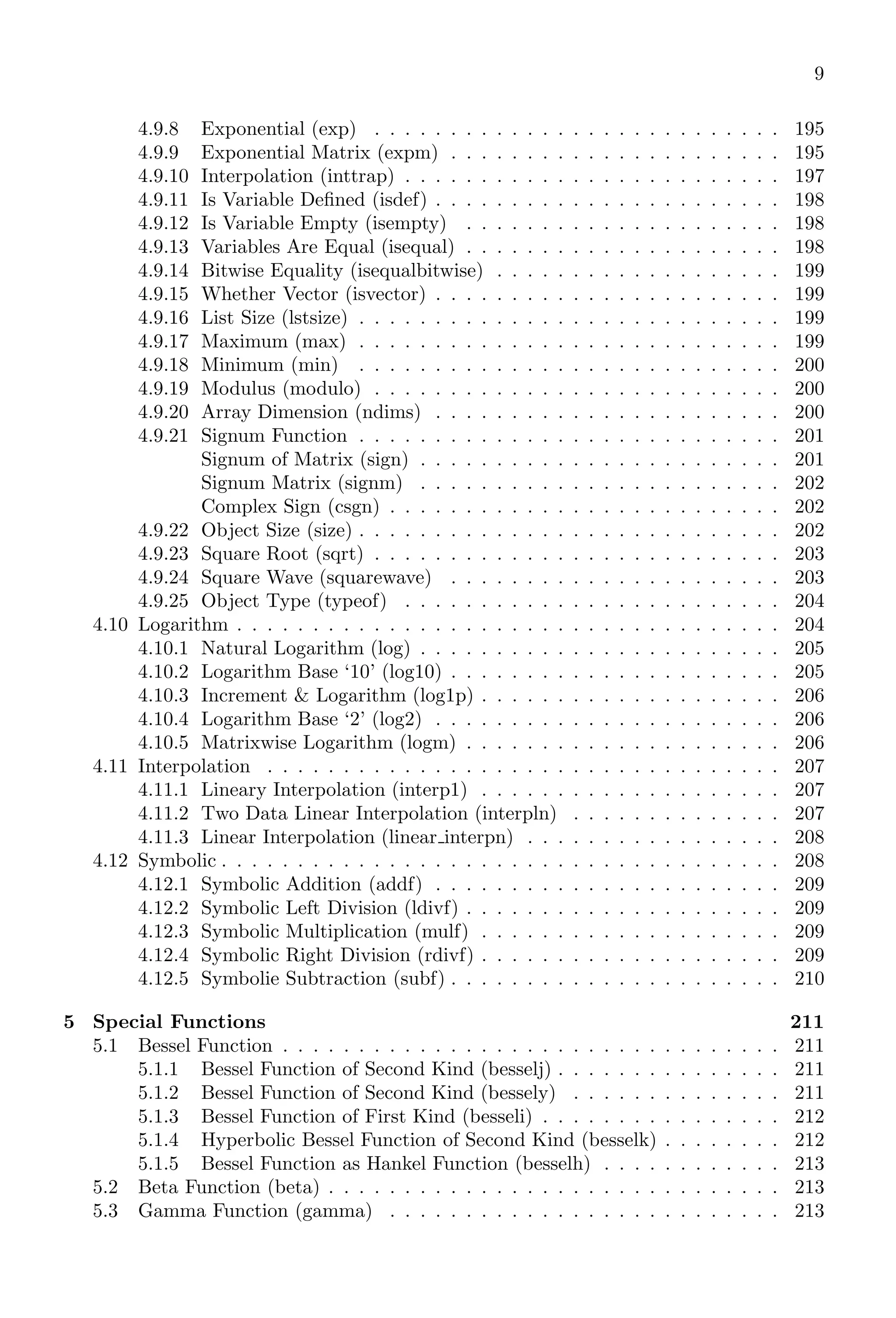
9
4.9.8 Exponential (exp) . . . . . . . . . . . . . . . . . . . . . . . . . . . 195
4.9.9 Exponential Matrix (expm) . . . . . . . . . . . . . . . . . . . . . . 195
4.9.10 Interpolation (inttrap) . . . . . . . . . . . . . . . . . . . . . . . . . 197
4.9.11 Is Variable Defined (isdef) . . . . . . . . . . . . . . . . . . . . . . . 198
4.9.12 Is Variable Empty (isempty) . . . . . . . . . . . . . . . . . . . . . 198
4.9.13 Variables Are Equal (isequal) . . . . . . . . . . . . . . . . . . . . . 198
4.9.14 Bitwise Equality (isequalbitwise) . . . . . . . . . . . . . . . . . . . 199
4.9.15 Whether Vector (isvector) . . . . . . . . . . . . . . . . . . . . . . . 199
4.9.16 List Size (lstsize) . . . . . . . . . . . . . . . . . . . . . . . . . . . . 199
4.9.17 Maximum (max) . . . . . . . . . . . . . . . . . . . . . . . . . . . . 199
4.9.18 Minimum (min) . . . . . . . . . . . . . . . . . . . . . . . . . . . . 200
4.9.19 Modulus (modulo) . . . . . . . . . . . . . . . . . . . . . . . . . . . 200
4.9.20 Array Dimension (ndims) . . . . . . . . . . . . . . . . . . . . . . . 200
4.9.21 Signum Function . . . . . . . . . . . . . . . . . . . . . . . . . . . . 201
Signum of Matrix (sign) . . . . . . . . . . . . . . . . . . . . . . . . 201
Signum Matrix (signm) . . . . . . . . . . . . . . . . . . . . . . . . 202
Complex Sign (csgn) . . . . . . . . . . . . . . . . . . . . . . . . . . 202
4.9.22 Object Size (size) . . . . . . . . . . . . . . . . . . . . . . . . . . . . 202
4.9.23 Square Root (sqrt) . . . . . . . . . . . . . . . . . . . . . . . . . . . 203
4.9.24 Square Wave (squarewave) . . . . . . . . . . . . . . . . . . . . . . 203
4.9.25 Object Type (typeof) . . . . . . . . . . . . . . . . . . . . . . . . . 204
4.10 Logarithm . . . . . . . . . . . . . . . . . . . . . . . . . . . . . . . . . . . . 204
4.10.1 Natural Logarithm (log) . . . . . . . . . . . . . . . . . . . . . . . . 205
4.10.2 Logarithm Base ‘10’ (log10) . . . . . . . . . . . . . . . . . . . . . . 205
4.10.3 Increment & Logarithm (log1p) . . . . . . . . . . . . . . . . . . . . 206
4.10.4 Logarithm Base ‘2’ (log2) . . . . . . . . . . . . . . . . . . . . . . . 206
4.10.5 Matrixwise Logarithm (logm) . . . . . . . . . . . . . . . . . . . . . 206
4.11 Interpolation . . . . . . . . . . . . . . . . . . . . . . . . . . . . . . . . . . 207
4.11.1 Lineary Interpolation (interp1) . . . . . . . . . . . . . . . . . . . . 207
4.11.2 Two Data Linear Interpolation (interpln) . . . . . . . . . . . . . . 207
4.11.3 Linear Interpolation (linear interpn) . . . . . . . . . . . . . . . . . 208
4.12 Symbolic . . . . . . . . . . . . . . . . . . . . . . . . . . . . . . . . . . . . . 208
4.12.1 Symbolic Addition (addf) . . . . . . . . . . . . . . . . . . . . . . . 209
4.12.2 Symbolic Left Division (ldivf) . . . . . . . . . . . . . . . . . . . . . 209
4.12.3 Symbolic Multiplication (mulf) . . . . . . . . . . . . . . . . . . . . 209
4.12.4 Symbolic Right Division (rdivf) . . . . . . . . . . . . . . . . . . . . 209
4.12.5 Symbolie Subtraction (subf) . . . . . . . . . . . . . . . . . . . . . . 210
5 Special Functions 211
5.1 Bessel Function . . . . . . . . . . . . . . . . . . . . . . . . . . . . . . . . . 211
5.1.1 Bessel Function of Second Kind (besselj) . . . . . . . . . . . . . . . 211
5.1.2 Bessel Function of Second Kind (bessely) . . . . . . . . . . . . . . 211
5.1.3 Bessel Function of First Kind (besseli) . . . . . . . . . . . . . . . . 212
5.1.4 Hyperbolic Bessel Function of Second Kind (besselk) . . . . . . . . 212
5.1.5 Bessel Function as Hankel Function (besselh) . . . . . . . . . . . . 213
5.2 Beta Function (beta) . . . . . . . . . . . . . . . . . . . . . . . . . . . . . . 213
5.3 Gamma Function (gamma) . . . . . . . . . . . . . . . . . . . . . . . . . . 213
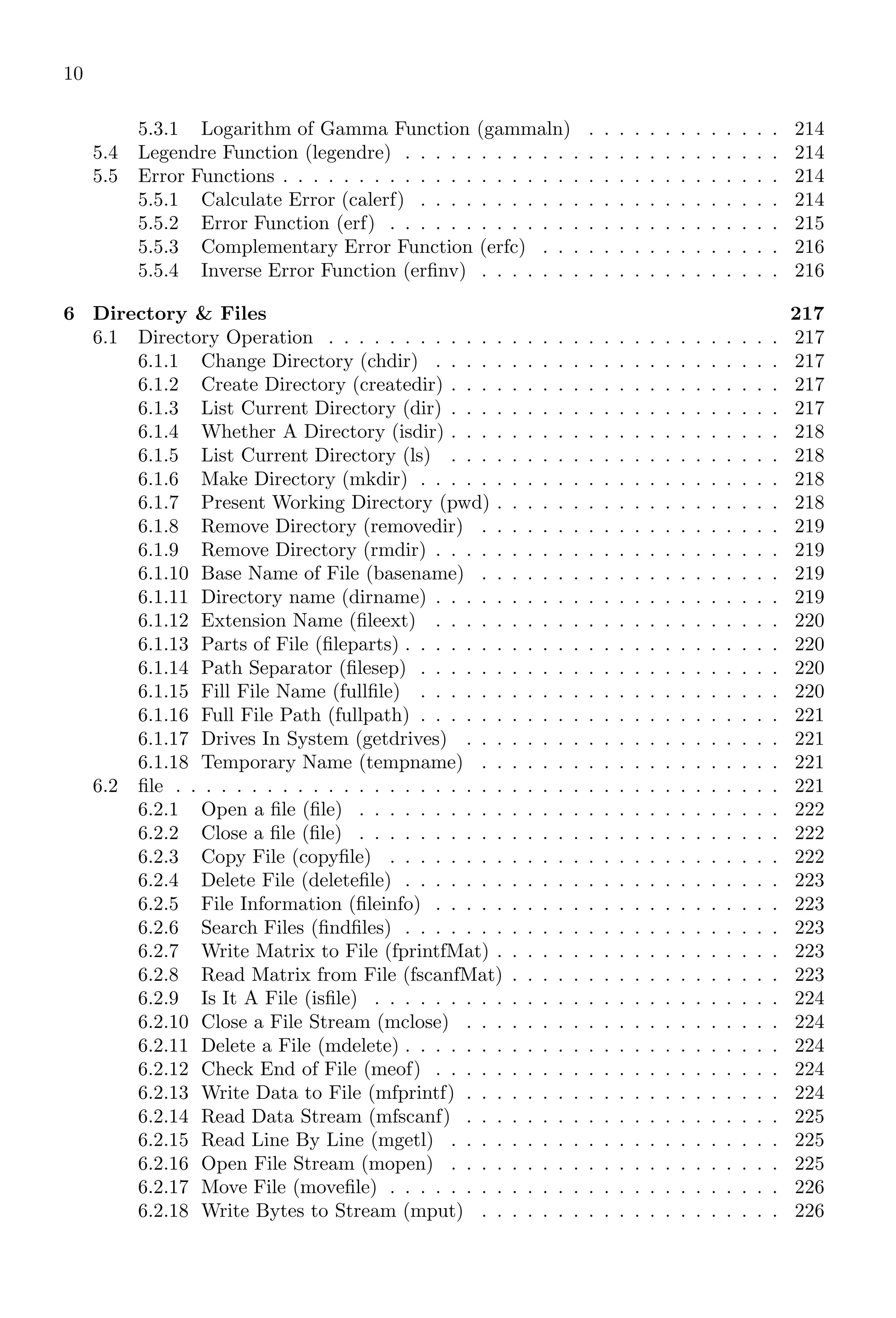
10
5.3.1 Logarithm of Gamma Function (gammaln) . . . . . . . . . . . . . 214
5.4 Legendre Function (legendre) . . . . . . . . . . . . . . . . . . . . . . . . . 214
5.5 Error Functions . . . . . . . . . . . . . . . . . . . . . . . . . . . . . . . . . 214
5.5.1 Calculate Error (calerf) . . . . . . . . . . . . . . . . . . . . . . . . 214
5.5.2 Error Function (erf) . . . . . . . . . . . . . . . . . . . . . . . . . . 215
5.5.3 Complementary Error Function (erfc) . . . . . . . . . . . . . . . . 216
5.5.4 Inverse Error Function (erfinv) . . . . . . . . . . . . . . . . . . . . 216
6 Directory & Files 217
6.1 Directory Operation . . . . . . . . . . . . . . . . . . . . . . . . . . . . . . 217
6.1.1 Change Directory (chdir) . . . . . . . . . . . . . . . . . . . . . . . 217
6.1.2 Create Directory (createdir) . . . . . . . . . . . . . . . . . . . . . . 217
6.1.3 List Current Directory (dir) . . . . . . . . . . . . . . . . . . . . . . 217
6.1.4 Whether A Directory (isdir) . . . . . . . . . . . . . . . . . . . . . . 218
6.1.5 List Current Directory (ls) . . . . . . . . . . . . . . . . . . . . . . 218
6.1.6 Make Directory (mkdir) . . . . . . . . . . . . . . . . . . . . . . . . 218
6.1.7 Present Working Directory (pwd) . . . . . . . . . . . . . . . . . . . 218
6.1.8 Remove Directory (removedir) . . . . . . . . . . . . . . . . . . . . 219
6.1.9 Remove Directory (rmdir) . . . . . . . . . . . . . . . . . . . . . . . 219
6.1.10 Base Name of File (basename) . . . . . . . . . . . . . . . . . . . . 219
6.1.11 Directory name (dirname) . . . . . . . . . . . . . . . . . . . . . . . 219
6.1.12 Extension Name (fileext) . . . . . . . . . . . . . . . . . . . . . . . 220
6.1.13 Parts of File (fileparts) . . . . . . . . . . . . . . . . . . . . . . . . . 220
6.1.14 Path Separator (filesep) . . . . . . . . . . . . . . . . . . . . . . . . 220
6.1.15 Fill File Name (fullfile) . . . . . . . . . . . . . . . . . . . . . . . . 220
6.1.16 Full File Path (fullpath) . . . . . . . . . . . . . . . . . . . . . . . . 221
6.1.17 Drives In System (getdrives) . . . . . . . . . . . . . . . . . . . . . 221
6.1.18 Temporary Name (tempname) . . . . . . . . . . . . . . . . . . . . 221
6.2 file . . . . . . . . . . . . . . . . . . . . . . . . . . . . . . . . . . . . . . . . 221
6.2.1 Open a file (file) . . . . . . . . . . . . . . . . . . . . . . . . . . . . 222
6.2.2 Close a file (file) . . . . . . . . . . . . . . . . . . . . . . . . . . . . 222
6.2.3 Copy File (copyfile) . . . . . . . . . . . . . . . . . . . . . . . . . . 222
6.2.4 Delete File (deletefile) . . . . . . . . . . . . . . . . . . . . . . . . . 223
6.2.5 File Information (fileinfo) . . . . . . . . . . . . . . . . . . . . . . . 223
6.2.6 Search Files (findfiles) . . . . . . . . . . . . . . . . . . . . . . . . . 223
6.2.7 Write Matrix to File (fprintfMat) . . . . . . . . . . . . . . . . . . . 223
6.2.8 Read Matrix from File (fscanfMat) . . . . . . . . . . . . . . . . . . 223
6.2.9 Is It A File (isfile) . . . . . . . . . . . . . . . . . . . . . . . . . . . 224
6.2.10 Close a File Stream (mclose) . . . . . . . . . . . . . . . . . . . . . 224
6.2.11 Delete a File (mdelete) . . . . . . . . . . . . . . . . . . . . . . . . . 224
6.2.12 Check End of File (meof) . . . . . . . . . . . . . . . . . . . . . . . 224
6.2.13 Write Data to File (mfprintf) . . . . . . . . . . . . . . . . . . . . . 224
6.2.14 Read Data Stream (mfscanf) . . . . . . . . . . . . . . . . . . . . . 225
6.2.15 Read Line By Line (mgetl) . . . . . . . . . . . . . . . . . . . . . . 225
6.2.16 Open File Stream (mopen) . . . . . . . . . . . . . . . . . . . . . . 225
6.2.17 Move File (movefile) . . . . . . . . . . . . . . . . . . . . . . . . . . 226
6.2.18 Write Bytes to Stream (mput) . . . . . . . . . . . . . . . . . . . . 226
11
6.2.19 Current Position of Binary File (mseek) . . . . . . . . . . . . . . . 227
6.2.20 Length of Passed Data (mtell) . . . . . . . . . . . . . . . . . . . . 228
6.2.21 Environment (getenv) . . . . . . . . . . . . . . . . . . . . . . . . . 228
6.2.22 Process ID (getpid) . . . . . . . . . . . . . . . . . . . . . . . . . . 228
6.2.23 Stop Execution (halt) . . . . . . . . . . . . . . . . . . . . . . . . . 229
6.2.24 Prompt The Message (input) . . . . . . . . . . . . . . . . . . . . . 229
6.2.25 Read From a File (read) . . . . . . . . . . . . . . . . . . . . . . . . 229
6.2.26 Set Environment (setenv) . . . . . . . . . . . . . . . . . . . . . . . 229
6.2.27 Write Formatted Output to File (write) . . . . . . . . . . . . . . . 230
7 Strings 231
7.1 String Operations . . . . . . . . . . . . . . . . . . . . . . . . . . . . . . . . 231
7.1.1 ASCII . . . . . . . . . . . . . . . . . . . . . . . . . . . . . . . . . . 231
7.1.2 Blanks . . . . . . . . . . . . . . . . . . . . . . . . . . . . . . . . . . 231
7.1.3 Convret To String (convstr) . . . . . . . . . . . . . . . . . . . . . . 231
7.1.4 Empty String (emptystr) . . . . . . . . . . . . . . . . . . . . . . . 231
7.1.5 Evaluate (eval) . . . . . . . . . . . . . . . . . . . . . . . . . . . . . 232
7.1.6 Array Index (grep) . . . . . . . . . . . . . . . . . . . . . . . . . . . 232
7.1.7 Is Argument Alphabets or Numeric (isalphanum) . . . . . . . . . . 232
7.1.8 Is Argument Digit (isdigit) . . . . . . . . . . . . . . . . . . . . . . 232
7.1.9 Is Argument Letter (isletter) . . . . . . . . . . . . . . . . . . . . . 233
7.1.10 Is Argument Number (isnum) . . . . . . . . . . . . . . . . . . . . . 233
7.1.11 Length of Object (length) . . . . . . . . . . . . . . . . . . . . . . . 233
7.1.12 Part of String (part) . . . . . . . . . . . . . . . . . . . . . . . . . . 234
7.2 String Manipulation . . . . . . . . . . . . . . . . . . . . . . . . . . . . . . 235
7.2.1 Concatenate String (strcat) . . . . . . . . . . . . . . . . . . . . . . 235
7.2.2 First Character Matching (strchr) . . . . . . . . . . . . . . . . . . 236
7.2.3 Compare String (strcmp) . . . . . . . . . . . . . . . . . . . . . . . 236
7.2.4 Case Independent Comparing (strcmpi) . . . . . . . . . . . . . . . 237
7.2.5 Trim Blanks (stripblanks) . . . . . . . . . . . . . . . . . . . . . . . 237
7.2.6 Copy Specific Parts (strncpy) . . . . . . . . . . . . . . . . . . . . . 237
7.2.7 Sub-String From Reverse (strrchr) . . . . . . . . . . . . . . . . . . 238
7.2.8 Reverse String (strrev) . . . . . . . . . . . . . . . . . . . . . . . . . 238
7.2.9 Explode String (strsplit) . . . . . . . . . . . . . . . . . . . . . . . . 238
7.2.10 Locate Substring (strstr) . . . . . . . . . . . . . . . . . . . . . . . 239
7.2.11 String to Double (strtod) . . . . . . . . . . . . . . . . . . . . . . . 239
7.2.12 Tokenise Splitting (strtok) . . . . . . . . . . . . . . . . . . . . . . . 240
7.2.13 Position of Token (tokenpos) . . . . . . . . . . . . . . . . . . . . . 240
7.3 Data File . . . . . . . . . . . . . . . . . . . . . . . . . . . . . . . . . . . . 240
7.3.1 CSV Default (csvDefault) . . . . . . . . . . . . . . . . . . . . . . . 240
7.3.2 CSV Write (csvWrite) . . . . . . . . . . . . . . . . . . . . . . . . . 241
7.3.3 CSV Read (csvRead) . . . . . . . . . . . . . . . . . . . . . . . . . . 241
7.3.4 Read Excel File (readxls) . . . . . . . . . . . . . . . . . . . . . . . 242
7.3.5 Scan CSV Test (csvTextScan) . . . . . . . . . . . . . . . . . . . . . 242
12
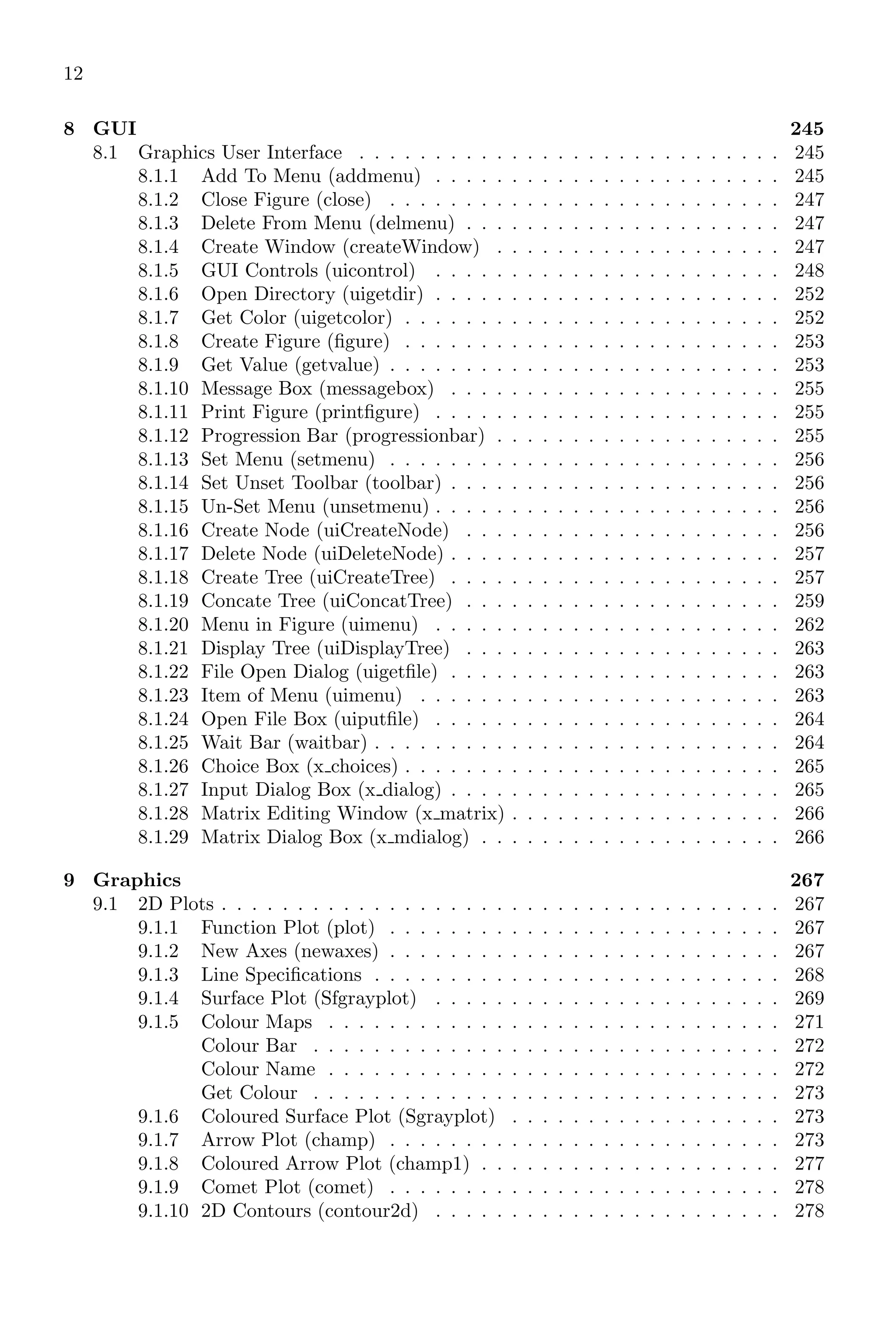
8 GUI 245
8.1 Graphics User Interface . . . . . . . . . . . . . . . . . . . . . . . . . . . . 245
8.1.1 Add To Menu (addmenu) . . . . . . . . . . . . . . . . . . . . . . . 245
8.1.2 Close Figure (close) . . . . . . . . . . . . . . . . . . . . . . . . . . 247
8.1.3 Delete From Menu (delmenu) . . . . . . . . . . . . . . . . . . . . . 247
8.1.4 Create Window (createWindow) . . . . . . . . . . . . . . . . . . . 247
8.1.5 GUI Controls (uicontrol) . . . . . . . . . . . . . . . . . . . . . . . 248
8.1.6 Open Directory (uigetdir) . . . . . . . . . . . . . . . . . . . . . . . 252
8.1.7 Get Color (uigetcolor) . . . . . . . . . . . . . . . . . . . . . . . . . 252
8.1.8 Create Figure (figure) . . . . . . . . . . . . . . . . . . . . . . . . . 253
8.1.9 Get Value (getvalue) . . . . . . . . . . . . . . . . . . . . . . . . . . 253
8.1.10 Message Box (messagebox) . . . . . . . . . . . . . . . . . . . . . . 255
8.1.11 Print Figure (printfigure) . . . . . . . . . . . . . . . . . . . . . . . 255
8.1.12 Progression Bar (progressionbar) . . . . . . . . . . . . . . . . . . . 255
8.1.13 Set Menu (setmenu) . . . . . . . . . . . . . . . . . . . . . . . . . . 256
8.1.14 Set Unset Toolbar (toolbar) . . . . . . . . . . . . . . . . . . . . . . 256
8.1.15 Un-Set Menu (unsetmenu) . . . . . . . . . . . . . . . . . . . . . . . 256
8.1.16 Create Node (uiCreateNode) . . . . . . . . . . . . . . . . . . . . . 256
8.1.17 Delete Node (uiDeleteNode) . . . . . . . . . . . . . . . . . . . . . . 257
8.1.18 Create Tree (uiCreateTree) . . . . . . . . . . . . . . . . . . . . . . 257
8.1.19 Concate Tree (uiConcatTree) . . . . . . . . . . . . . . . . . . . . . 259
8.1.20 Menu in Figure (uimenu) . . . . . . . . . . . . . . . . . . . . . . . 262
8.1.21 Display Tree (uiDisplayTree) . . . . . . . . . . . . . . . . . . . . . 263
8.1.22 File Open Dialog (uigetfile) . . . . . . . . . . . . . . . . . . . . . . 263
8.1.23 Item of Menu (uimenu) . . . . . . . . . . . . . . . . . . . . . . . . 263
8.1.24 Open File Box (uiputfile) . . . . . . . . . . . . . . . . . . . . . . . 264
8.1.25 Wait Bar (waitbar) . . . . . . . . . . . . . . . . . . . . . . . . . . . 264
8.1.26 Choice Box (x choices) . . . . . . . . . . . . . . . . . . . . . . . . . 265
8.1.27 Input Dialog Box (x dialog) . . . . . . . . . . . . . . . . . . . . . . 265
8.1.28 Matrix Editing Window (x matrix) . . . . . . . . . . . . . . . . . . 266
8.1.29 Matrix Dialog Box (x mdialog) . . . . . . . . . . . . . . . . . . . . 266
9 Graphics 267
9.1 2D Plots . . . . . . . . . . . . . . . . . . . . . . . . . . . . . . . . . . . . . 267
9.1.1 Function Plot (plot) . . . . . . . . . . . . . . . . . . . . . . . . . . 267
9.1.2 New Axes (newaxes) . . . . . . . . . . . . . . . . . . . . . . . . . . 267
9.1.3 Line Specifications . . . . . . . . . . . . . . . . . . . . . . . . . . . 268
9.1.4 Surface Plot (Sfgrayplot) . . . . . . . . . . . . . . . . . . . . . . . 269
9.1.5 Colour Maps . . . . . . . . . . . . . . . . . . . . . . . . . . . . . . 271
Colour Bar . . . . . . . . . . . . . . . . . . . . . . . . . . . . . . . 272
Colour Name . . . . . . . . . . . . . . . . . . . . . . . . . . . . . . 272
Get Colour . . . . . . . . . . . . . . . . . . . . . . . . . . . . . . . 273
9.1.6 Coloured Surface Plot (Sgrayplot) . . . . . . . . . . . . . . . . . . 273
9.1.7 Arrow Plot (champ) . . . . . . . . . . . . . . . . . . . . . . . . . . 273
9.1.8 Coloured Arrow Plot (champ1) . . . . . . . . . . . . . . . . . . . . 277
9.1.9 Comet Plot (comet) . . . . . . . . . . . . . . . . . . . . . . . . . . 278
9.1.10 2D Contours (contour2d) . . . . . . . . . . . . . . . . . . . . . . . 278
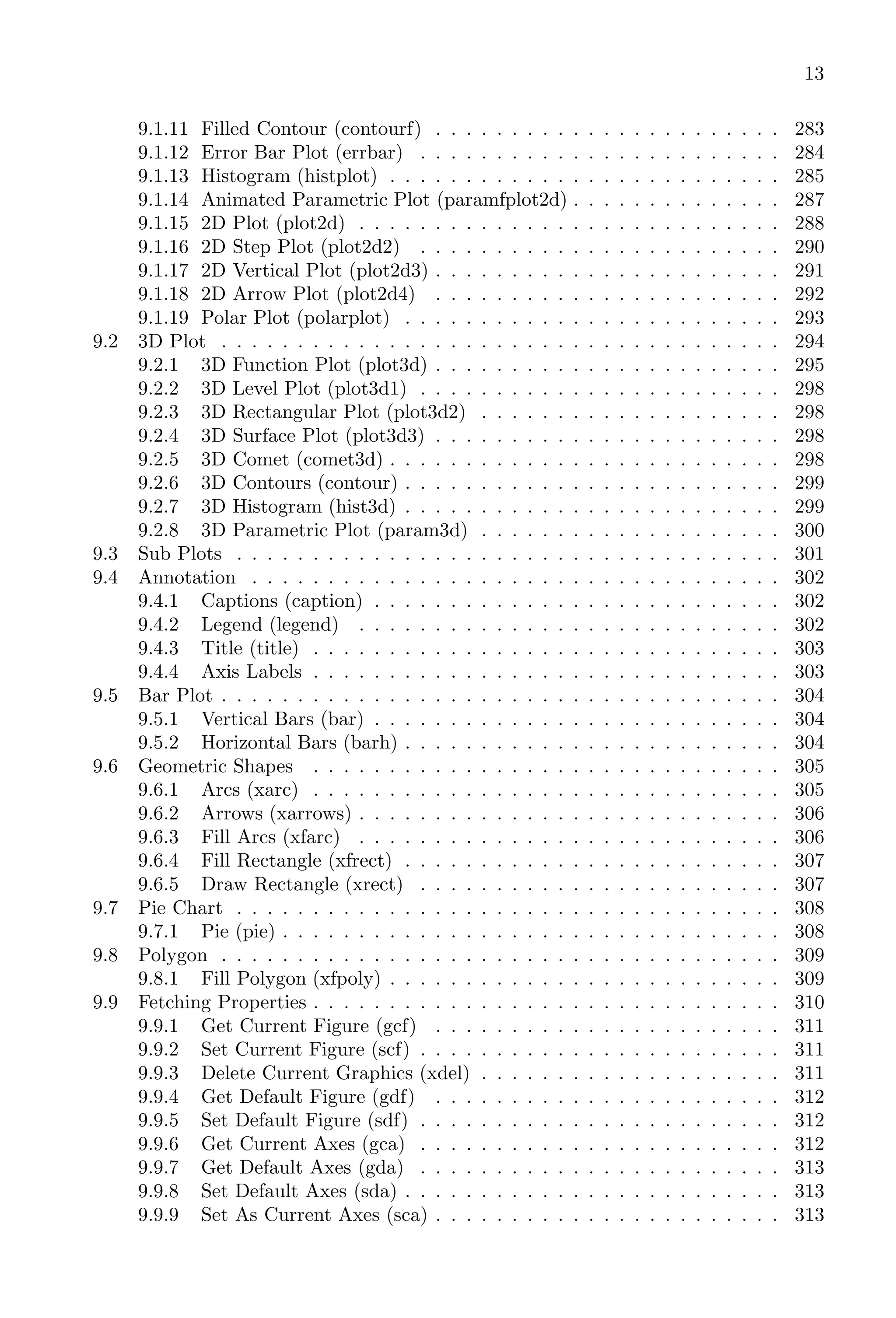
13
9.1.11 Filled Contour (contourf) . . . . . . . . . . . . . . . . . . . . . . . 283
9.1.12 Error Bar Plot (errbar) . . . . . . . . . . . . . . . . . . . . . . . . 284
9.1.13 Histogram (histplot) . . . . . . . . . . . . . . . . . . . . . . . . . . 285
9.1.14 Animated Parametric Plot (paramfplot2d) . . . . . . . . . . . . . . 287
9.1.15 2D Plot (plot2d) . . . . . . . . . . . . . . . . . . . . . . . . . . . . 288
9.1.16 2D Step Plot (plot2d2) . . . . . . . . . . . . . . . . . . . . . . . . 290
9.1.17 2D Vertical Plot (plot2d3) . . . . . . . . . . . . . . . . . . . . . . . 291
9.1.18 2D Arrow Plot (plot2d4) . . . . . . . . . . . . . . . . . . . . . . . 292
9.1.19 Polar Plot (polarplot) . . . . . . . . . . . . . . . . . . . . . . . . . 293
9.2 3D Plot . . . . . . . . . . . . . . . . . . . . . . . . . . . . . . . . . . . . . 294
9.2.1 3D Function Plot (plot3d) . . . . . . . . . . . . . . . . . . . . . . . 295
9.2.2 3D Level Plot (plot3d1) . . . . . . . . . . . . . . . . . . . . . . . . 298
9.2.3 3D Rectangular Plot (plot3d2) . . . . . . . . . . . . . . . . . . . . 298
9.2.4 3D Surface Plot (plot3d3) . . . . . . . . . . . . . . . . . . . . . . . 298
9.2.5 3D Comet (comet3d) . . . . . . . . . . . . . . . . . . . . . . . . . . 298
9.2.6 3D Contours (contour) . . . . . . . . . . . . . . . . . . . . . . . . . 299
9.2.7 3D Histogram (hist3d) . . . . . . . . . . . . . . . . . . . . . . . . . 299
9.2.8 3D Parametric Plot (param3d) . . . . . . . . . . . . . . . . . . . . 300
9.3 Sub Plots . . . . . . . . . . . . . . . . . . . . . . . . . . . . . . . . . . . . 301
9.4 Annotation . . . . . . . . . . . . . . . . . . . . . . . . . . . . . . . . . . . 302
9.4.1 Captions (caption) . . . . . . . . . . . . . . . . . . . . . . . . . . . 302
9.4.2 Legend (legend) . . . . . . . . . . . . . . . . . . . . . . . . . . . . 302
9.4.3 Title (title) . . . . . . . . . . . . . . . . . . . . . . . . . . . . . . . 303
9.4.4 Axis Labels . . . . . . . . . . . . . . . . . . . . . . . . . . . . . . . 303
9.5 Bar Plot . . . . . . . . . . . . . . . . . . . . . . . . . . . . . . . . . . . . . 304
9.5.1 Vertical Bars (bar) . . . . . . . . . . . . . . . . . . . . . . . . . . . 304
9.5.2 Horizontal Bars (barh) . . . . . . . . . . . . . . . . . . . . . . . . . 304
9.6 Geometric Shapes . . . . . . . . . . . . . . . . . . . . . . . . . . . . . . . 305
9.6.1 Arcs (xarc) . . . . . . . . . . . . . . . . . . . . . . . . . . . . . . . 305
9.6.2 Arrows (xarrows) . . . . . . . . . . . . . . . . . . . . . . . . . . . . 306
9.6.3 Fill Arcs (xfarc) . . . . . . . . . . . . . . . . . . . . . . . . . . . . 306
9.6.4 Fill Rectangle (xfrect) . . . . . . . . . . . . . . . . . . . . . . . . . 307
9.6.5 Draw Rectangle (xrect) . . . . . . . . . . . . . . . . . . . . . . . . 307
9.7 Pie Chart . . . . . . . . . . . . . . . . . . . . . . . . . . . . . . . . . . . . 308
9.7.1 Pie (pie) . . . . . . . . . . . . . . . . . . . . . . . . . . . . . . . . . 308
9.8 Polygon . . . . . . . . . . . . . . . . . . . . . . . . . . . . . . . . . . . . . 309
9.8.1 Fill Polygon (xfpoly) . . . . . . . . . . . . . . . . . . . . . . . . . . 309
9.9 Fetching Properties . . . . . . . . . . . . . . . . . . . . . . . . . . . . . . . 310
9.9.1 Get Current Figure (gcf) . . . . . . . . . . . . . . . . . . . . . . . 311
9.9.2 Set Current Figure (scf) . . . . . . . . . . . . . . . . . . . . . . . . 311
9.9.3 Delete Current Graphics (xdel) . . . . . . . . . . . . . . . . . . . . 311
9.9.4 Get Default Figure (gdf) . . . . . . . . . . . . . . . . . . . . . . . 312
9.9.5 Set Default Figure (sdf) . . . . . . . . . . . . . . . . . . . . . . . . 312
9.9.6 Get Current Axes (gca) . . . . . . . . . . . . . . . . . . . . . . . . 312
9.9.7 Get Default Axes (gda) . . . . . . . . . . . . . . . . . . . . . . . . 313
9.9.8 Set Default Axes (sda) . . . . . . . . . . . . . . . . . . . . . . . . . 313
9.9.9 Set As Current Axes (sca) . . . . . . . . . . . . . . . . . . . . . . . 313
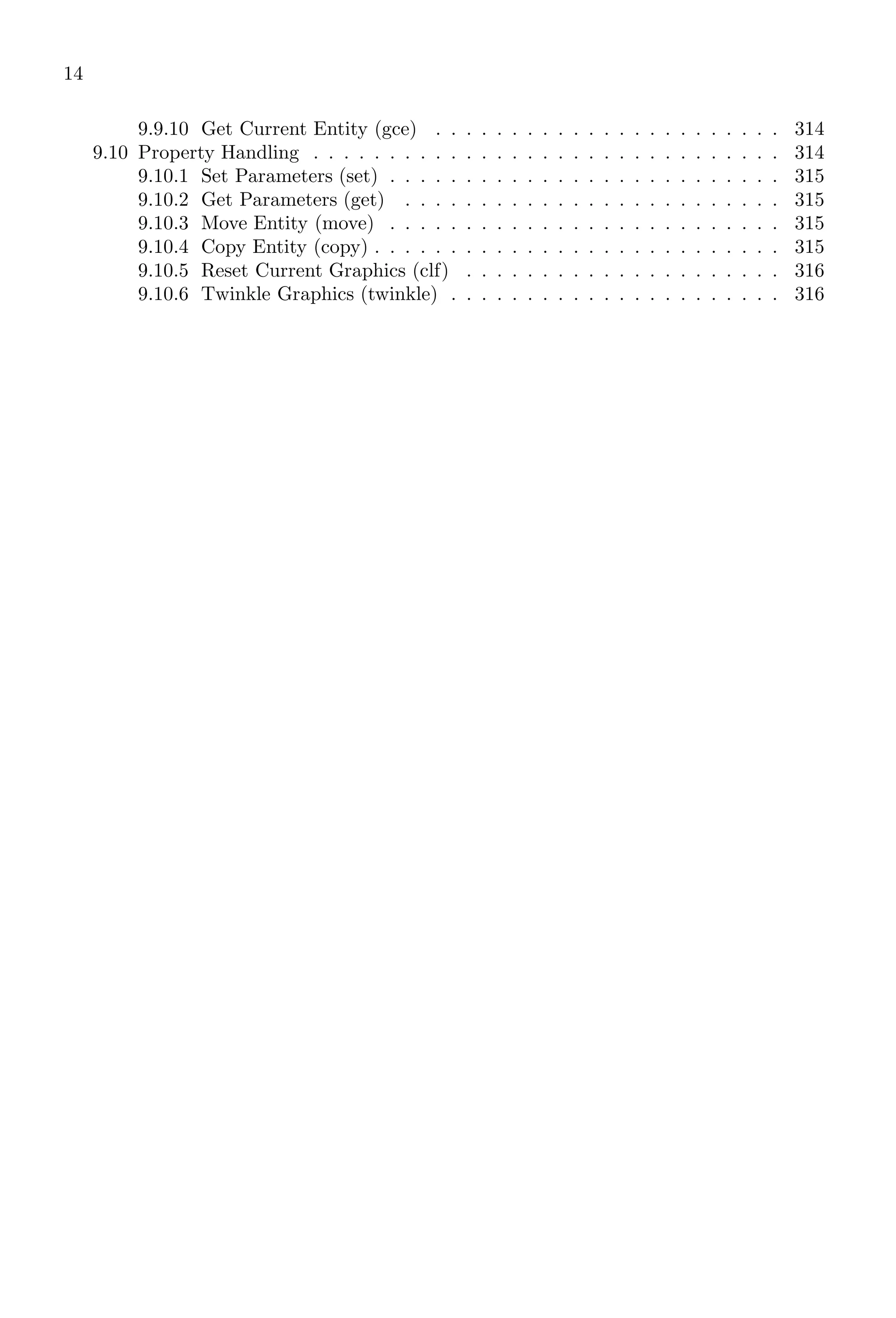
14
9.9.10 Get Current Entity (gce) . . . . . . . . . . . . . . . . . . . . . . . 314
9.10 Property Handling . . . . . . . . . . . . . . . . . . . . . . . . . . . . . . . 314
9.10.1 Set Parameters (set) . . . . . . . . . . . . . . . . . . . . . . . . . . 315
9.10.2 Get Parameters (get) . . . . . . . . . . . . . . . . . . . . . . . . . 315
9.10.3 Move Entity (move) . . . . . . . . . . . . . . . . . . . . . . . . . . 315
9.10.4 Copy Entity (copy) . . . . . . . . . . . . . . . . . . . . . . . . . . . 315
9.10.5 Reset Current Graphics (clf) . . . . . . . . . . . . . . . . . . . . . 316
9.10.6 Twinkle Graphics (twinkle) . . . . . . . . . . . . . . . . . . . . . . 316
Part I
Scilab
15
1.1. INTRODUCTION 17
1Scilab Core
In Scilab there are thousands of the ready-made keywords and functions. We will
discuss these keywords and function with suitable example(s).
1.1 Introduction
Scilab is a strong numerical programming software used for instructions to junior high
school students to graduate students. Scilab is written in ‘C’, ‘C++’ and ‘Java’ and its
applications are similar to the application of other languages. Unlike ‘C’ Scilab does not
required pre-definition of variable. Variables are automatically converted into integer,
character etc forms according to the values assigned to them, i.e. a value is assigned to a
variable by juggling. If a variable ‘a’ is being added with ‘2’ then the variable ‘a’ would be
considered as an integer type variable. But if it is to be added with ‘2.00202201220215’
then variable ‘a’ will be considered as an long type variable i.e. type of a variable is
considered as the use of it. Each statement performed internally should be terminated
by ‘;’. The statement whose result would be display in output window should not end
with ‘;’. Statements, strings and variables are grouped inside a parenthesis brackets, i.e.
‘(’ ... ‘)’. A syntax of a function can be spanned in multiple lines. When a part of syntax
is terminated by ‘..’, Scilab waits for remaining part of the syntax passed to it in second
line until syntax completion is not encountered.
✞
1 --> a=(
--> 1
3 --> 2
--> )
✌
✆
Execution of a function in multiline mode as shown above will produce errors while when
above function is modified as
✞
--> a=( ..
2 --> 1 ..
--> 2 ..
4 --> )
✌
✆
will be executed successfully and result will be
✞
ans =
12
✌
✆
Since Scilab 6, declaration of a number in two line is not supported as shown in above
example. According to the Code Conventions for the Scilab Programming Language it is
recommended:
1. Start each statement on a new line.
18 Scilab Core
2. Write no more than one simple statement per line.
3. Break compound statements over multiple lines.
Following example uses two integers 2, 3 & ‘;’ and prints their result at output window.
✞
--> a=2; // Without pre -identification of
2 --> // variable and terminated by ’;’
--> b=3; // Without pre -identification of
4 --> // variable and terminated by ’;’
--> a+b // Sum of two variables is called
6 --> // and line does not terminated by ’;’
✌
✆
✞
ans =
5.
✌
✆
If result of an operation is not assigned to a variable, then result is automatically assigned
to ‘ans’ variable.
1.1.1 Everything As Matrix
Numerical programming by Scilab is vector or matrix based computation, therefore each
variable has a vector or matrix values. Each element of a variable is identified by its
indices. For example,
✞
--> a = 2 // one dimensional vector
2 --> a = [1,2]
--> a(1) // first element of vector
✌
✆
✞
ans =
1
✌
✆
The indices parameters inside the parentheses of variable ‘a’ may be one dimensional, two
dimensional or three dimensional.
✞
--> a(1) // One dimensional
2 --> a(1, 2) // Two dimensional
--> a(1, 2, 1)// Three dimensional
✌
✆
In the first line of above codes, first element of vector a is returned. In second line of
above codes, element at 1st
row (x) and 2nd
column (y) is returned. In the third line of
above codes, elements at 1st
row (x), 2nd
column (y) and 1st
layer (z) is returned.
✞
1 --> a = [1,2,3;5,8,4]
--> a(2,2)
3 --> b = 56;
--> b(1) // First element
5 --> b(2) // Second element . Error!!!
✌
✆
1.1. INTRODUCTION 19
✞
a =
1. 2. 3.
5. 8. 4.
ans =
8.
ans =
56.
!--error 21
Invalid index.
✌
✆
1.1.2 Approximate Zero
Numerical programming languages use double datatype floating point arithmetic. There-
fore each number is denoted as a float value, i.e. 1 as 1.000000, 0.5 as 0.500000 etc.
Sometime, even zero is represented as 2.5 × 10⁻¹⁸
or as 13.2 × 10⁻¹⁹
etc. These values
are very very small and are close to zero. In floating point arithmetic, zero is taken as
comparative value rather than absolute value. For example, in numerical calculations,
identity matrix is represented as
1 3.5 × 10⁻¹²
35 × 10−12
1
where 1 is very large value in comparison to 3.5 × 10⁻¹²
or 35 × 10−12
.
1.1.3 Computational Error
Numerical software uses iteration to find the numeric solutions. For example, every one
knew that sin 90◦
is equal to one. But Numerical Software does not use fixed type values.
They uses series solutions, i.e. for sin θ, they uses sine series:
sin α = α −
α3
3!
+
α5
5!
− . . .
Here, α is in radian. This series is valid if infinite number of steps are taken for computa-
tion purpose. Computer does not take infinite terms of this series. It limits the number
of terms for computation. But, how many terms? If number of terms is less, result shall
be other than actual one but computational performance shall be good. And if number of
steps is large then result shall be near accurate value but performance shall be compro-
mised. Now, the question is that, how many steps shall be taken in this series. It depends
on the required significant digits in the result. At the optimal result, the deviation of
computed value from the actual one is called computational error. For the above series,
we shall compute value for three terms and four terms, and corresponding results shall
be compared.
For Three Terms
sin
π
2

=
22
14
−
22
14
3
3!
+
22
14
5
5!
20 Scilab Core
Or
sin
π
2

= 1.5714286 − 0.6467444 + 0.0798531
It gives sin 90◦
= 1.0045373.
For Four Terms
sin
π
2

=
22
14
−
22
14
3
3!
+
22
14
5
5!
−
22
14
7
7!
Or
sin
π
2

= 1.5714286 − 0.6467444 + 0.0798531 − 0.0046950
It gives sin 90◦
= 0.9998423. It is seen here, the value oscillates about one as the number
of terms increases and tends to one when number of terms are infinite. Numerical Software
use sufficient long steps so that result is near to accurate result or upto desired significant
digits. Now, computational error is difference between exact value of sin 90◦
and computed
value. In first case computational error is 1 − 1.0045373, i.e. −0.0045373 and in second
case, computational error is 1 − 0.9998423, i.e. 0.0001577.
Error In Calculus In calculus, definite integration of a function is carried out by two
ways. (i) By using first principle method and (ii) By using direct method. For example,
I =
Z 1
0
x dx
may be solved by two ways. In first method, take dx = 0.1. It gives,
n =
b − a
dx
= 10
and x are computed by a + n × dx where a is lower limit of integration.
I = 0 × 0.1 + 0.1 × 0.1 + . . . + 0.8 × 0.1 + 0.9 × 0.1
On solving it, we have
I = 0 + 0.01 + 0.02 + 0.03 + 0.04 + 0.05 + 0.06 + 0.07 + 0.08 + 0.09 = 0.45
From direct method,
I =
Z 1
0
x dx =
x2
2
1
0
= 0.5
Now, the computational error by two methods is 0.50 − 0.45 = 0.05. So, computational
errors, not only occur due to selection of number of steps but they also occur when we
select different types of solution methods.
1.2 Simple Arithmetic
Before we start the expertise application of Scilab in numerical programming, we first be
hands out with simple mathematical applications like addition, subtraction, multiplica-
tion, division, scoping and application of inbuilt functions.
1.2. SIMPLE ARITHMETIC 21
1.2.1 Addition
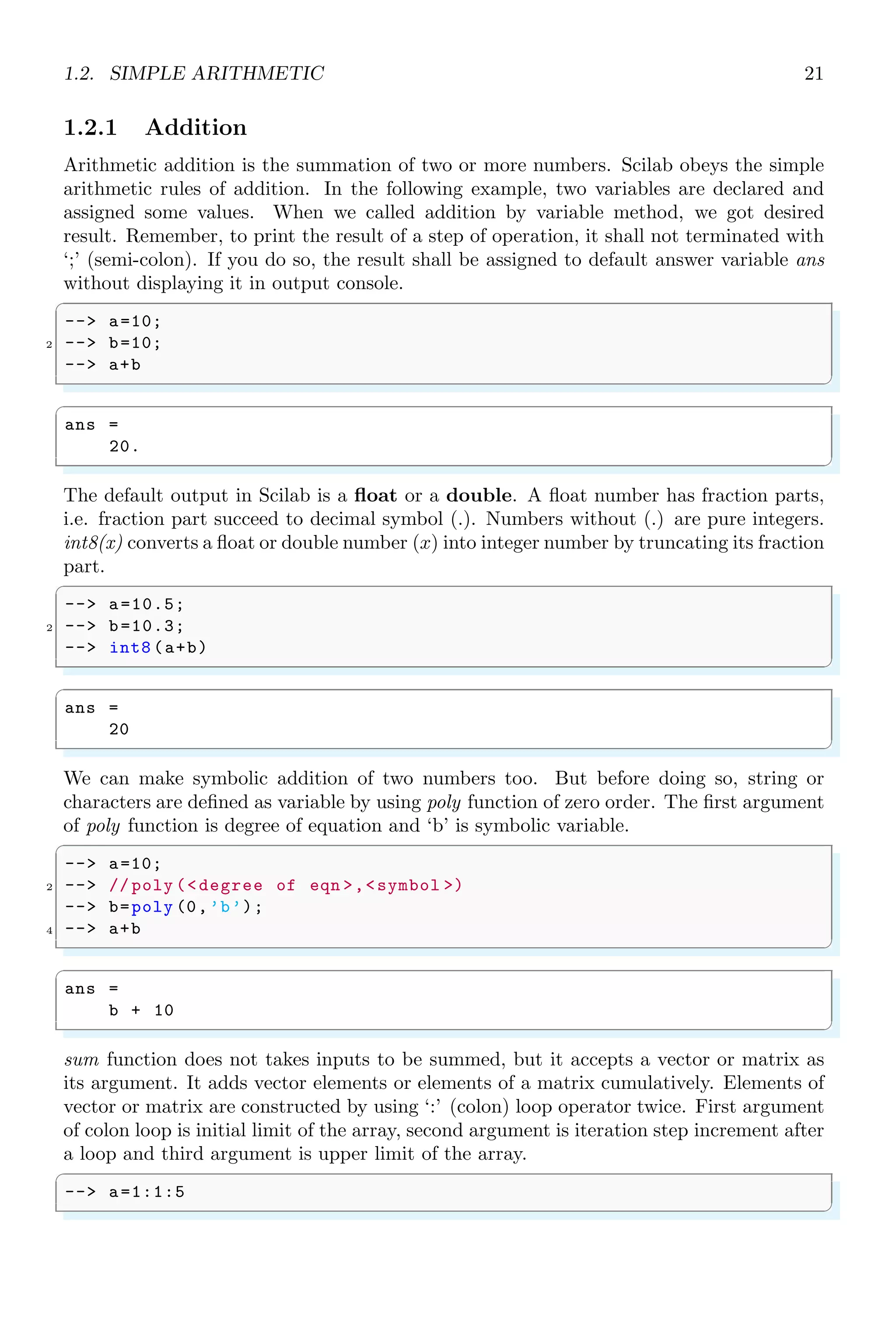
Arithmetic addition is the summation of two or more numbers. Scilab obeys the simple
arithmetic rules of addition. In the following example, two variables are declared and
assigned some values. When we called addition by variable method, we got desired
result. Remember, to print the result of a step of operation, it shall not terminated with
‘;’ (semi-colon). If you do so, the result shall be assigned to default answer variable ans
without displaying it in output console.
✞
-- a=10;
2 -- b=10;
-- a+b
✌
✆
✞
ans =
20.
✌
✆
The default output in Scilab is a float or a double. A float number has fraction parts,
i.e. fraction part succeed to decimal symbol (.). Numbers without (.) are pure integers.
int8(x) converts a float or double number (x) into integer number by truncating its fraction
part.
✞
-- a=10.5;
2 -- b=10.3;
-- int8 (a+b)
✌
✆
✞
ans =
20
✌
✆
We can make symbolic addition of two numbers too. But before doing so, string or
characters are defined as variable by using poly function of zero order. The first argument
of poly function is degree of equation and ‘b’ is symbolic variable.
✞
-- a=10;
2 -- // poly (degree of eqn ,symbol )
-- b=poly (0,’b’);
4 -- a+b
✌
✆
✞
ans =
b + 10
✌
✆
sum function does not takes inputs to be summed, but it accepts a vector or matrix as
its argument. It adds vector elements or elements of a matrix cumulatively. Elements of
vector or matrix are constructed by using ‘:’ (colon) loop operator twice. First argument
of colon loop is initial limit of the array, second argument is iteration step increment after
a loop and third argument is upper limit of the array.
✞
-- a=1:1:5
✌
✆
22 Scilab Core
✞
ans =
1. 2. 3. 4. 5.
✌
✆
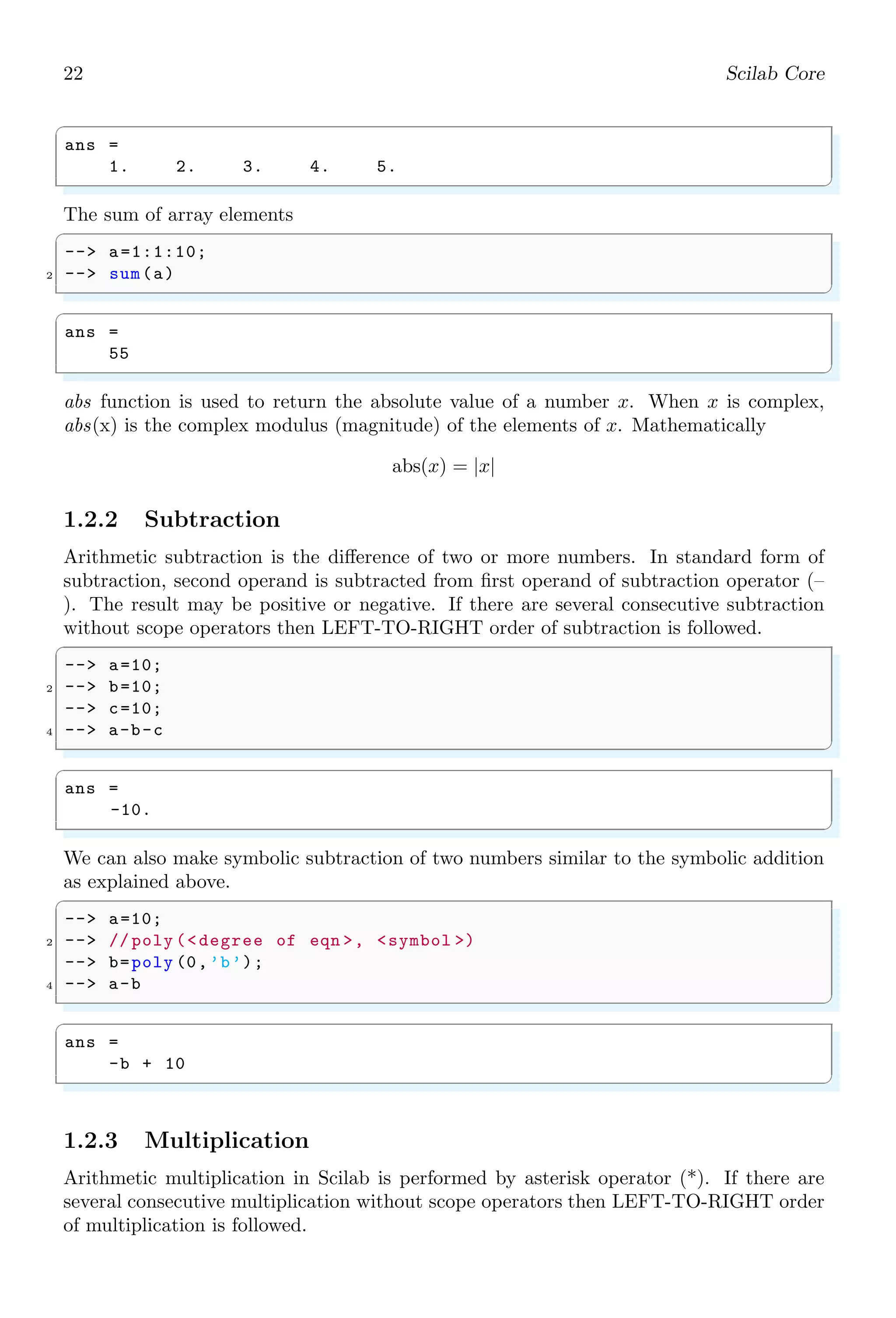
The sum of array elements
✞
-- a=1:1:10;
2 -- sum(a)
✌
✆
✞
ans =
55
✌
✆
abs function is used to return the absolute value of a number x. When x is complex,
abs(x) is the complex modulus (magnitude) of the elements of x. Mathematically
abs(x) = |x|
1.2.2 Subtraction
Arithmetic subtraction is the difference of two or more numbers. In standard form of
subtraction, second operand is subtracted from first operand of subtraction operator (–
). The result may be positive or negative. If there are several consecutive subtraction
without scope operators then LEFT-TO-RIGHT order of subtraction is followed.
✞
-- a=10;
2 -- b=10;
-- c=10;
4 -- a-b-c
✌
✆
✞
ans =
-10.
✌
✆
We can also make symbolic subtraction of two numbers similar to the symbolic addition
as explained above.
✞
-- a=10;
2 -- // poly (degree of eqn , symbol )
-- b=poly (0,’b’);
4 -- a-b
✌
✆
✞
ans =
-b + 10
✌
✆
1.2.3 Multiplication
Arithmetic multiplication in Scilab is performed by asterisk operator (*). If there are
several consecutive multiplication without scope operators then LEFT-TO-RIGHT order
of multiplication is followed.
1.2. SIMPLE ARITHMETIC 23
✞
-- 2*3*4*5
✌
✆
✞
ans =
120.
✌
✆
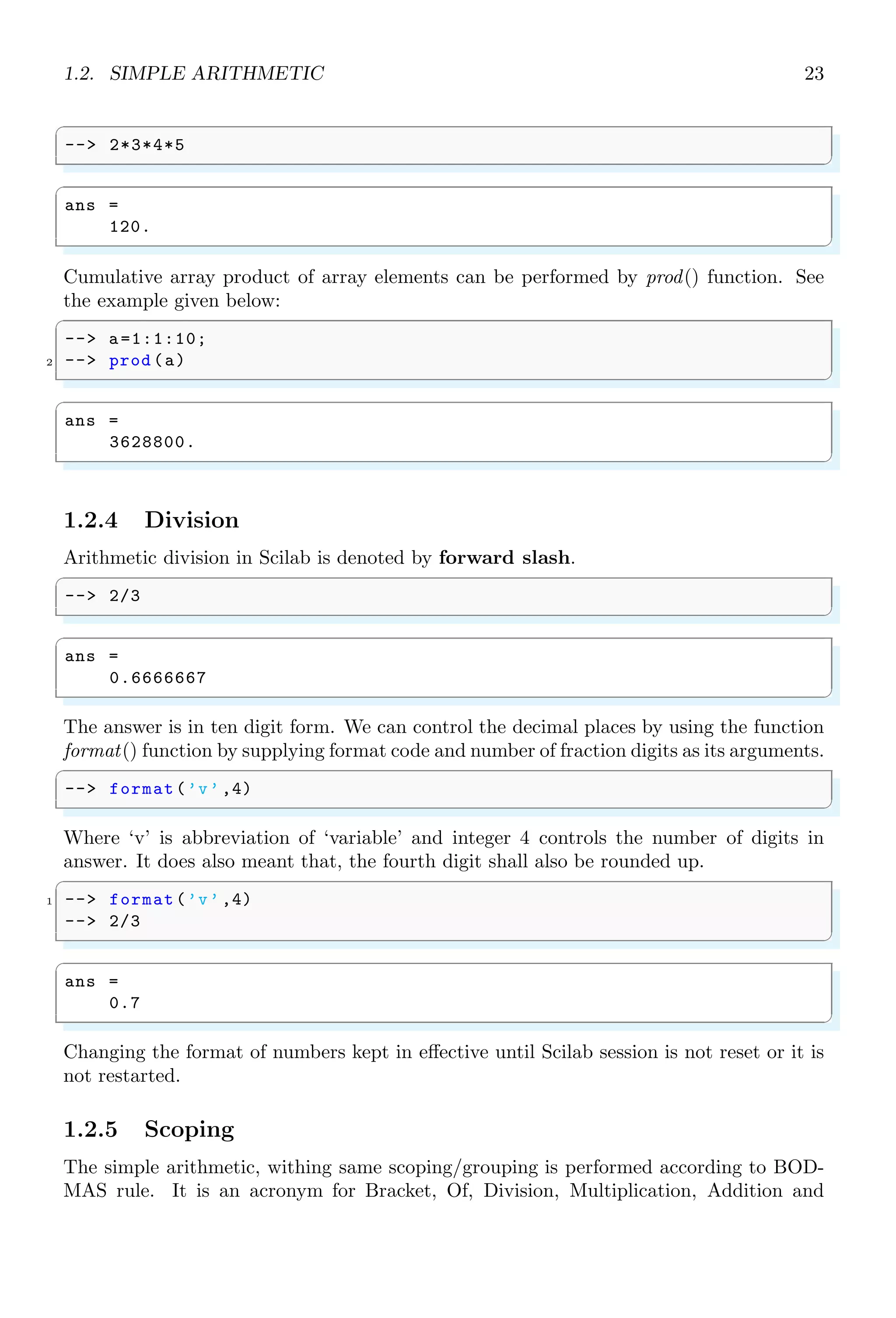
Cumulative array product of array elements can be performed by prod() function. See
the example given below:
✞
-- a=1:1:10;
2 -- prod (a)
✌
✆
✞
ans =
3628800.
✌
✆
1.2.4 Division
Arithmetic division in Scilab is denoted by forward slash.
✞
-- 2/3
✌
✆
✞
ans =
0.6666667
✌
✆
The answer is in ten digit form. We can control the decimal places by using the function
format() function by supplying format code and number of fraction digits as its arguments.
✞
-- format(’v’ ,4)
✌
✆
Where ‘v’ is abbreviation of ‘variable’ and integer 4 controls the number of digits in
answer. It does also meant that, the fourth digit shall also be rounded up.
✞
1 -- format(’v’ ,4)
-- 2/3
✌
✆
✞
ans =
0.7
✌
✆
Changing the format of numbers kept in effective until Scilab session is not reset or it is
not restarted.
1.2.5 Scoping
The simple arithmetic, withing same scoping/grouping is performed according to BOD-
MAS rule. It is an acronym for Bracket, Of, Division, Multiplication, Addition and
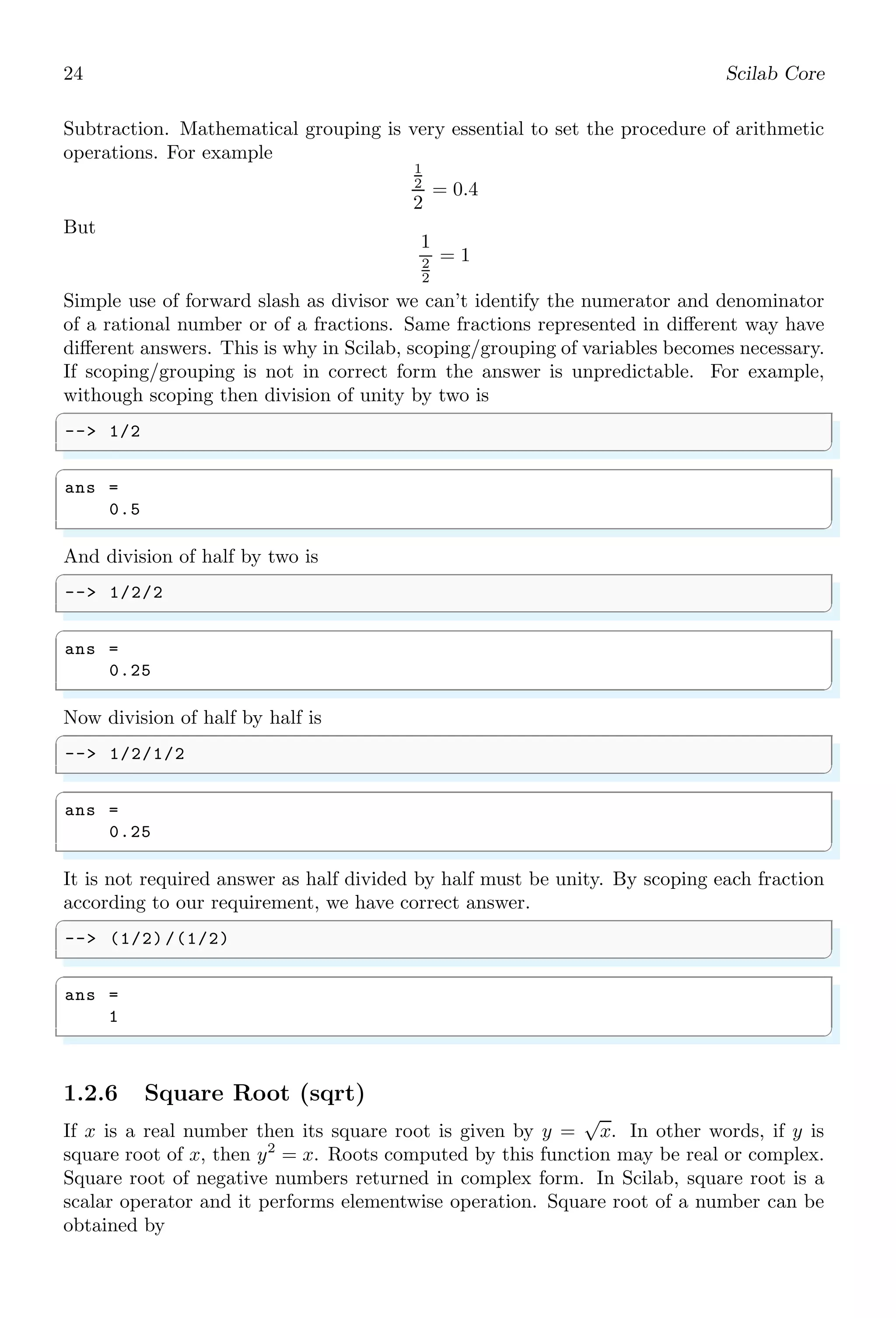
24 Scilab Core
Subtraction. Mathematical grouping is very essential to set the procedure of arithmetic
operations. For example
1
2
2
= 0.4
But
1
2
2
= 1
Simple use of forward slash as divisor we can’t identify the numerator and denominator
of a rational number or of a fractions. Same fractions represented in different way have
different answers. This is why in Scilab, scoping/grouping of variables becomes necessary.
If scoping/grouping is not in correct form the answer is unpredictable. For example,
withough scoping then division of unity by two is
✞
-- 1/2
✌
✆
✞
ans =
0.5
✌
✆
And division of half by two is
✞
-- 1/2/2
✌
✆
✞
ans =
0.25
✌
✆
Now division of half by half is
✞
-- 1/2/1/2
✌
✆
✞
ans =
0.25
✌
✆
It is not required answer as half divided by half must be unity. By scoping each fraction
according to our requirement, we have correct answer.
✞
-- (1/2) /(1/2)
✌
✆
✞
ans =
1
✌
✆
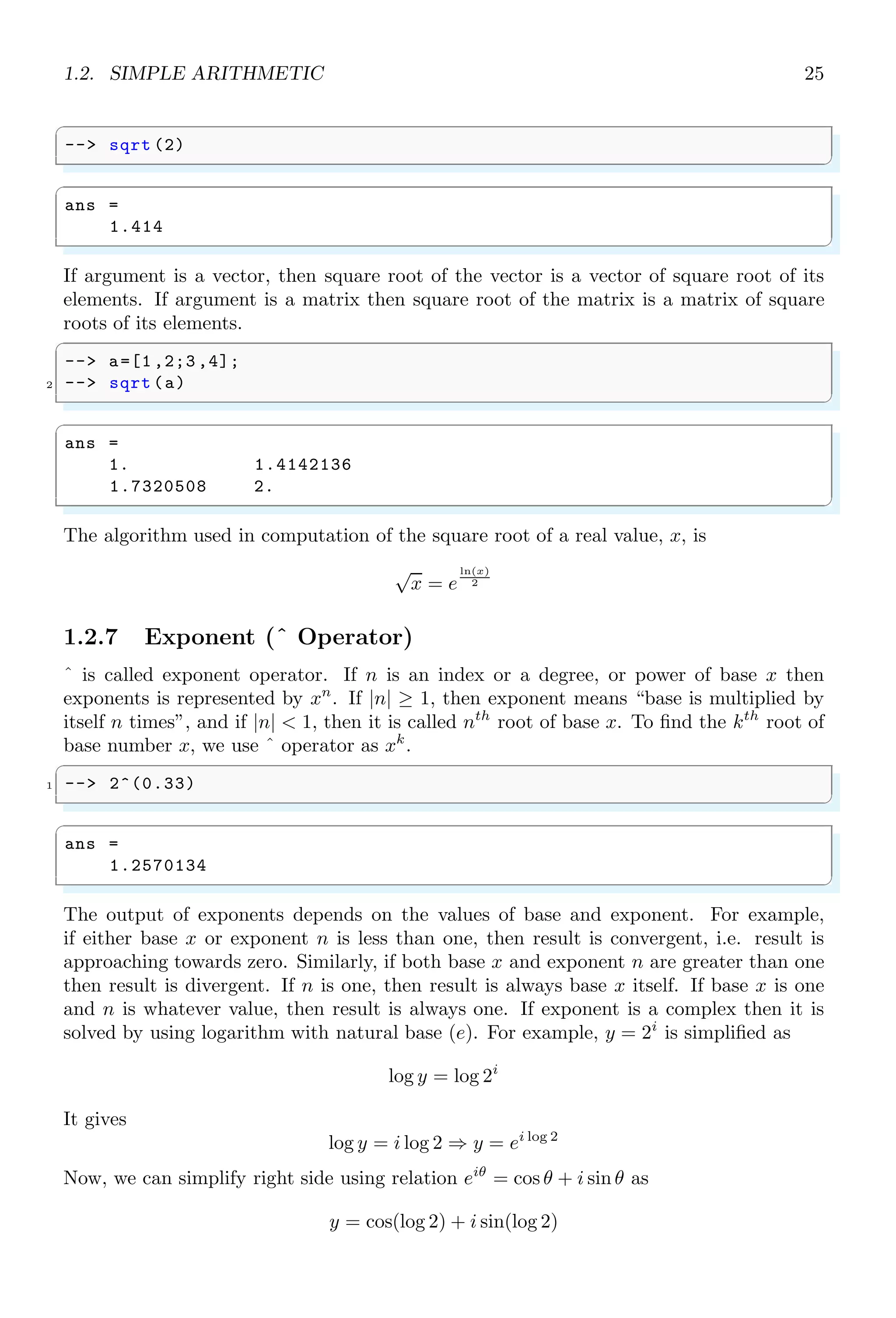
1.2.6 Square Root (sqrt)
If x is a real number then its square root is given by y =
√
x. In other words, if y is
square root of x, then y2
= x. Roots computed by this function may be real or complex.
Square root of negative numbers returned in complex form. In Scilab, square root is a
scalar operator and it performs elementwise operation. Square root of a number can be
obtained by
1.2. SIMPLE ARITHMETIC 25
✞
-- sqrt (2)
✌
✆
✞
ans =
1.414
✌
✆
If argument is a vector, then square root of the vector is a vector of square root of its
elements. If argument is a matrix then square root of the matrix is a matrix of square
roots of its elements.
✞
-- a=[1 ,2;3 ,4];
2 -- sqrt (a)
✌
✆
✞
ans =
1. 1.4142136
1.7320508 2.
✌
✆
The algorithm used in computation of the square root of a real value, x, is
√
x = e
ln(x)
2
1.2.7 Exponent (ˆ Operator)
ˆ is called exponent operator. If n is an index or a degree, or power of base x then
exponents is represented by xn
. If |n| ≥ 1, then exponent means “base is multiplied by
itself n times”, and if |n|  1, then it is called nth
root of base x. To find the kth
root of
base number x, we use ˆ operator as xk
.
✞
1 -- 2^(0.33)
✌
✆
✞
ans =
1.2570134
✌
✆
The output of exponents depends on the values of base and exponent. For example,
if either base x or exponent n is less than one, then result is convergent, i.e. result is
approaching towards zero. Similarly, if both base x and exponent n are greater than one
then result is divergent. If n is one, then result is always base x itself. If base x is one
and n is whatever value, then result is always one. If exponent is a complex then it is
solved by using logarithm with natural base (e). For example, y = 2i
is simplified as
log y = log 2i
It gives
log y = i log 2 ⇒ y = ei log 2
Now, we can simplify right side using relation eiθ
= cos θ + i sin θ as
y = cos(log 2) + i sin(log 2)
26 Scilab Core
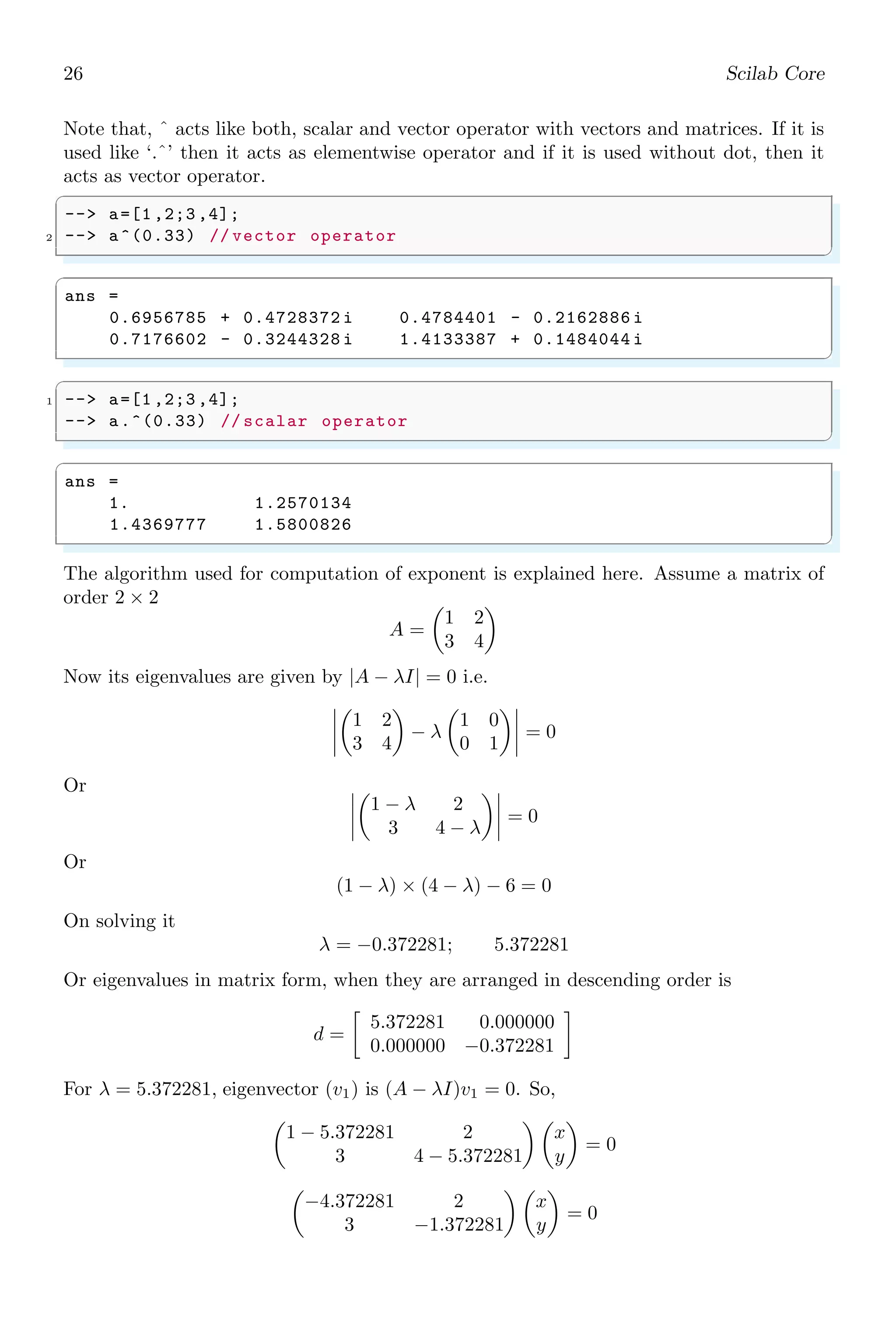
Note that, ˆ acts like both, scalar and vector operator with vectors and matrices. If it is
used like ‘.ˆ’ then it acts as elementwise operator and if it is used without dot, then it
acts as vector operator.
✞
-- a=[1 ,2;3 ,4];
2 -- a^(0.33) // vector operator
✌
✆
✞
ans =
0.6956785 + 0.4728372 i 0.4784401 - 0.2162886 i
0.7176602 - 0.3244328 i 1.4133387 + 0.1484044 i
✌
✆
✞
1 -- a=[1 ,2;3 ,4];
-- a.^(0.33) // scalar operator
✌
✆
✞
ans =
1. 1.2570134
1.4369777 1.5800826
✌
✆
The algorithm used for computation of exponent is explained here. Assume a matrix of
order 2 × 2
A =

1 2
3 4

Now its eigenvalues are given by |A − λI| = 0 i.e.
1 2
3 4

− λ

1 0
0 1
= 0
Or
1 − λ 2
3 4 − λ
= 0
Or
(1 − λ) × (4 − λ) − 6 = 0
On solving it
λ = −0.372281; 5.372281
Or eigenvalues in matrix form, when they are arranged in descending order is
d =

5.372281 0.000000
0.000000 −0.372281

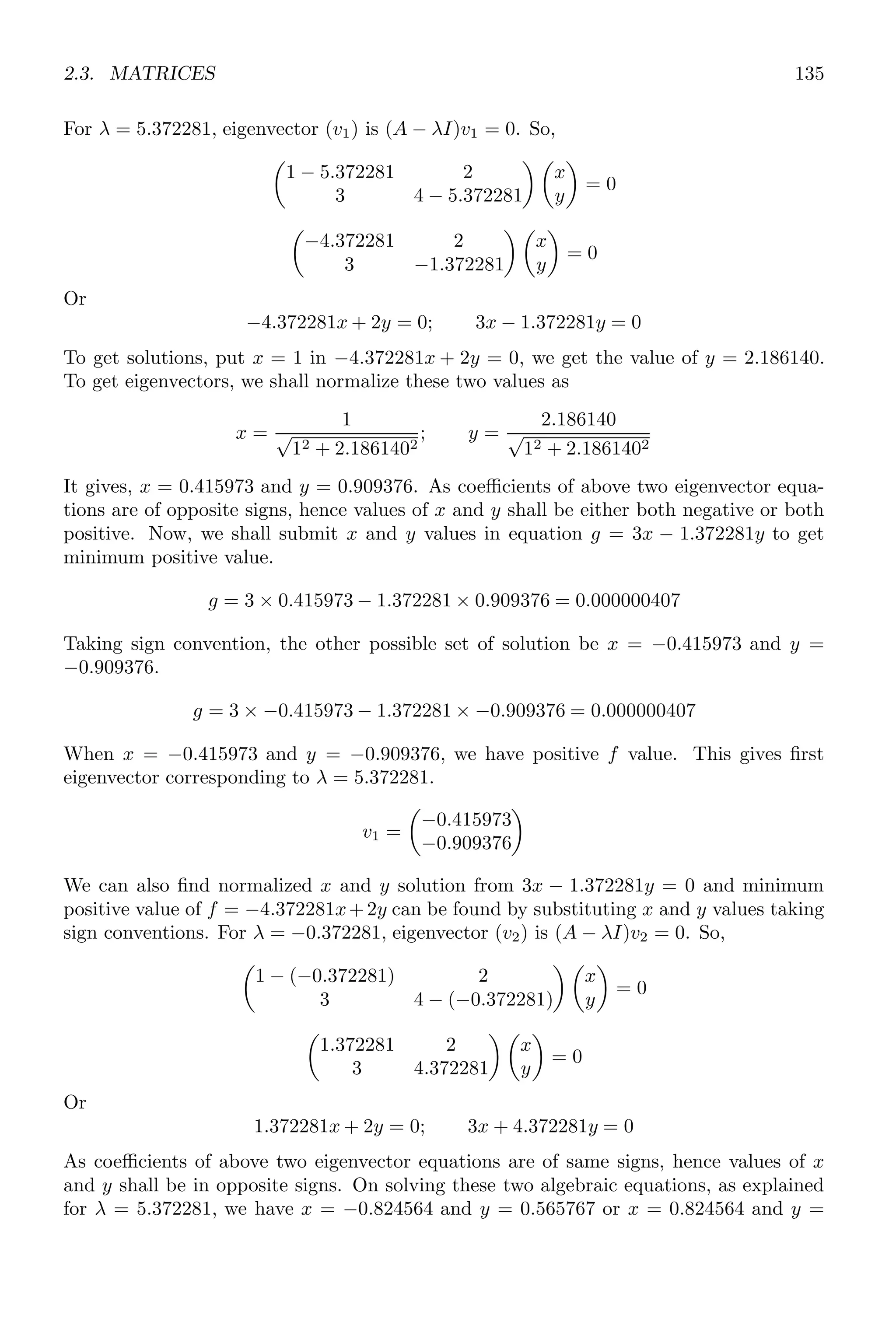
For λ = 5.372281, eigenvector (v1) is (A − λI)v1 = 0. So,

1 − 5.372281 2
3 4 − 5.372281
 
x
y

= 0

−4.372281 2
3 −1.372281
 
x
y

= 0
1.2. SIMPLE ARITHMETIC 27
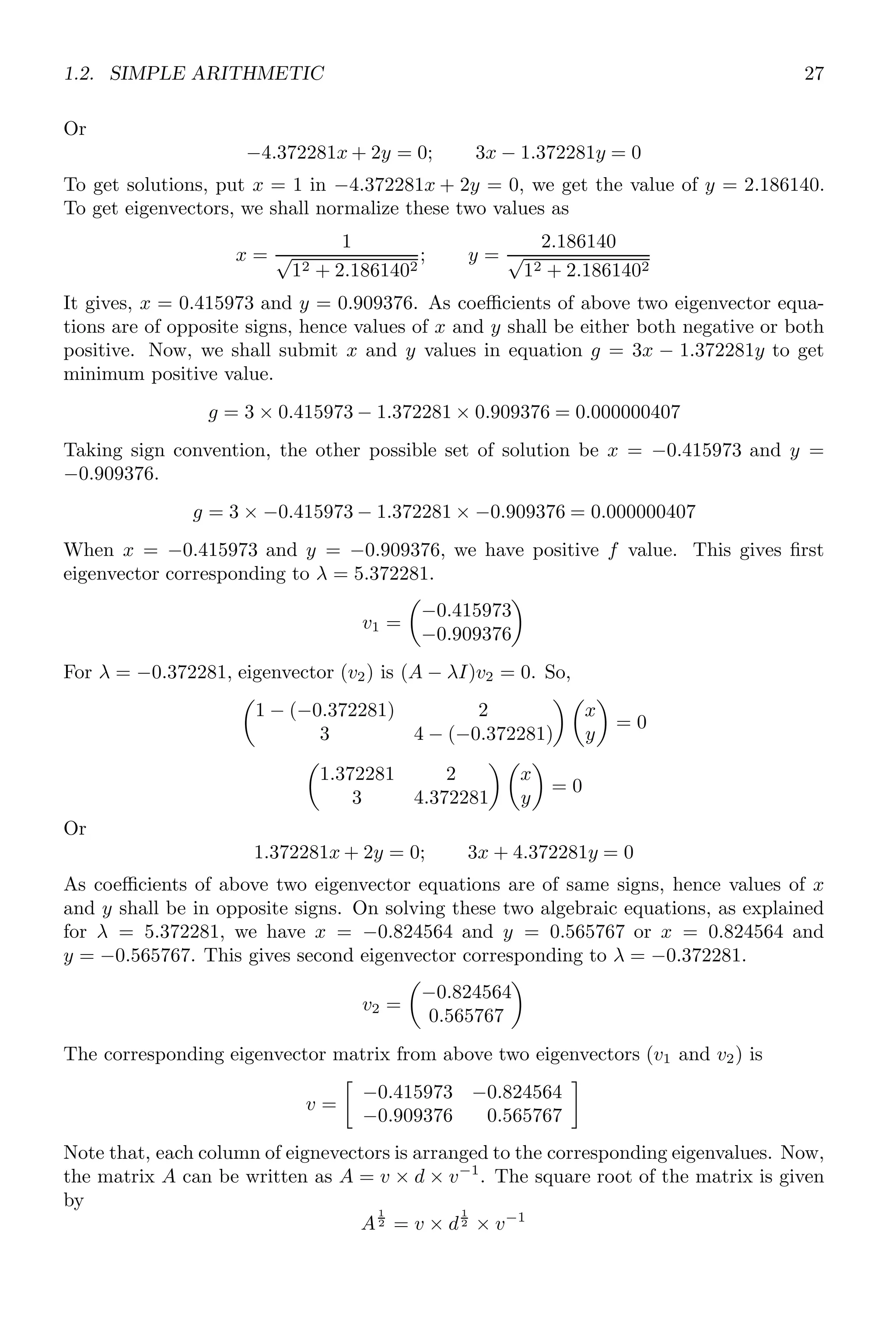
Or
−4.372281x + 2y = 0; 3x − 1.372281y = 0
To get solutions, put x = 1 in −4.372281x + 2y = 0, we get the value of y = 2.186140.
To get eigenvectors, we shall normalize these two values as
x =
1
√
12 + 2.1861402
; y =
2.186140
√
12 + 2.1861402
It gives, x = 0.415973 and y = 0.909376. As coefficients of above two eigenvector equa-
tions are of opposite signs, hence values of x and y shall be either both negative or both
positive. Now, we shall submit x and y values in equation g = 3x − 1.372281y to get
minimum positive value.
g = 3 × 0.415973 − 1.372281 × 0.909376 = 0.000000407
Taking sign convention, the other possible set of solution be x = −0.415973 and y =
−0.909376.
g = 3 × −0.415973 − 1.372281 × −0.909376 = 0.000000407
When x = −0.415973 and y = −0.909376, we have positive f value. This gives first
eigenvector corresponding to λ = 5.372281.
v1 =

−0.415973
−0.909376

For λ = −0.372281, eigenvector (v2) is (A − λI)v2 = 0. So,

1 − (−0.372281) 2
3 4 − (−0.372281)
 
x
y

= 0

1.372281 2
3 4.372281
 
x
y

= 0
Or
1.372281x + 2y = 0; 3x + 4.372281y = 0
As coefficients of above two eigenvector equations are of same signs, hence values of x
and y shall be in opposite signs. On solving these two algebraic equations, as explained
for λ = 5.372281, we have x = −0.824564 and y = 0.565767 or x = 0.824564 and
y = −0.565767. This gives second eigenvector corresponding to λ = −0.372281.
v2 =

−0.824564
0.565767

The corresponding eigenvector matrix from above two eigenvectors (v1 and v2) is
v =

−0.415973 −0.824564
−0.909376 0.565767

Note that, each column of eignevectors is arranged to the corresponding eigenvalues. Now,
the matrix A can be written as A = v × d × v−1
. The square root of the matrix is given
by
A
1
2 = v × d
1
2 × v−1
28 Scilab Core
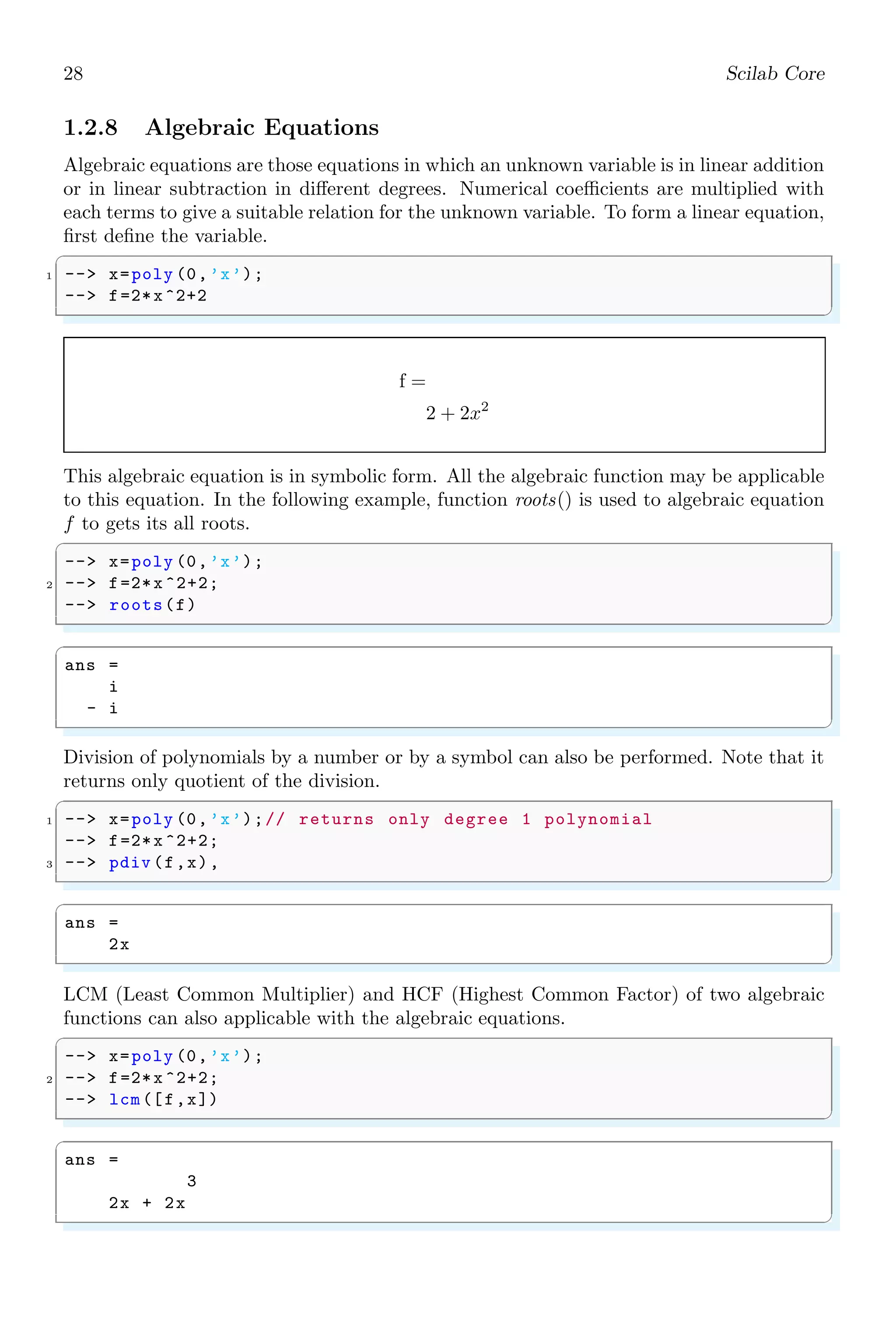
1.2.8 Algebraic Equations
Algebraic equations are those equations in which an unknown variable is in linear addition
or in linear subtraction in different degrees. Numerical coefficients are multiplied with
each terms to give a suitable relation for the unknown variable. To form a linear equation,
first define the variable.
✞
1 -- x=poly (0,’x’);
-- f=2*x^2+2
✌
✆
f =
2 + 2x2
This algebraic equation is in symbolic form. All the algebraic function may be applicable
to this equation. In the following example, function roots() is used to algebraic equation
f to gets its all roots.
✞
-- x=poly (0,’x’);
2 -- f=2*x ^2+2;
-- roots(f)
✌
✆
✞
ans =
i
- i
✌
✆
Division of polynomials by a number or by a symbol can also be performed. Note that it
returns only quotient of the division.
✞
1 -- x=poly (0,’x’);// returns only degree 1 polynomial
-- f=2*x ^2+2;
3 -- pdiv (f,x),
✌
✆
✞
ans =
2x
✌
✆
LCM (Least Common Multiplier) and HCF (Highest Common Factor) of two algebraic
functions can also applicable with the algebraic equations.
✞
-- x=poly (0,’x’);
2 -- f=2*x ^2+2;
-- lcm([f,x])
✌
✆
✞
ans =
3
2x + 2x
✌
✆
1.2. SIMPLE ARITHMETIC 29
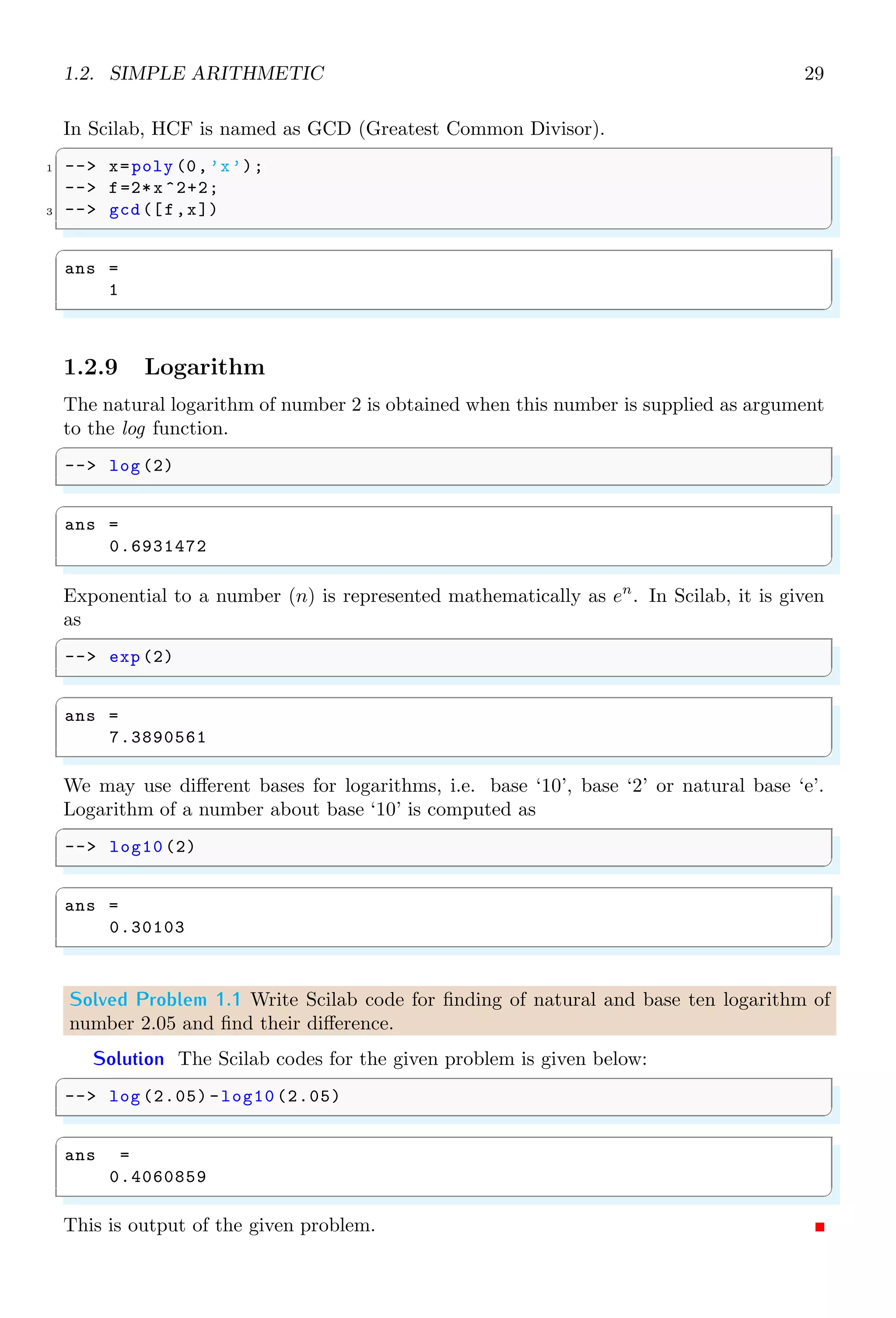
In Scilab, HCF is named as GCD (Greatest Common Divisor).
✞
1 -- x=poly (0,’x’);
-- f=2*x ^2+2;
3 -- gcd([f,x])
✌
✆
✞
ans =
1
✌
✆
1.2.9 Logarithm
The natural logarithm of number 2 is obtained when this number is supplied as argument
to the log function.
✞
-- log (2)
✌
✆
✞
ans =
0.6931472
✌
✆
Exponential to a number (n) is represented mathematically as en
. In Scilab, it is given
as
✞
-- exp (2)
✌
✆
✞
ans =
7.3890561
✌
✆
We may use different bases for logarithms, i.e. base ‘10’, base ‘2’ or natural base ‘e’.
Logarithm of a number about base ‘10’ is computed as
✞
-- log10 (2)
✌
✆
✞
ans =
0.30103
✌
✆
Solved Problem 1.1 Write Scilab code for finding of natural and base ten logarithm of
number 2.05 and find their difference.
Solution The Scilab codes for the given problem is given below:
✞
-- log (2.05) -log10 (2.05)
✌
✆
✞
ans =
0.4060859
✌
✆
This is output of the given problem.
30 Scilab Core
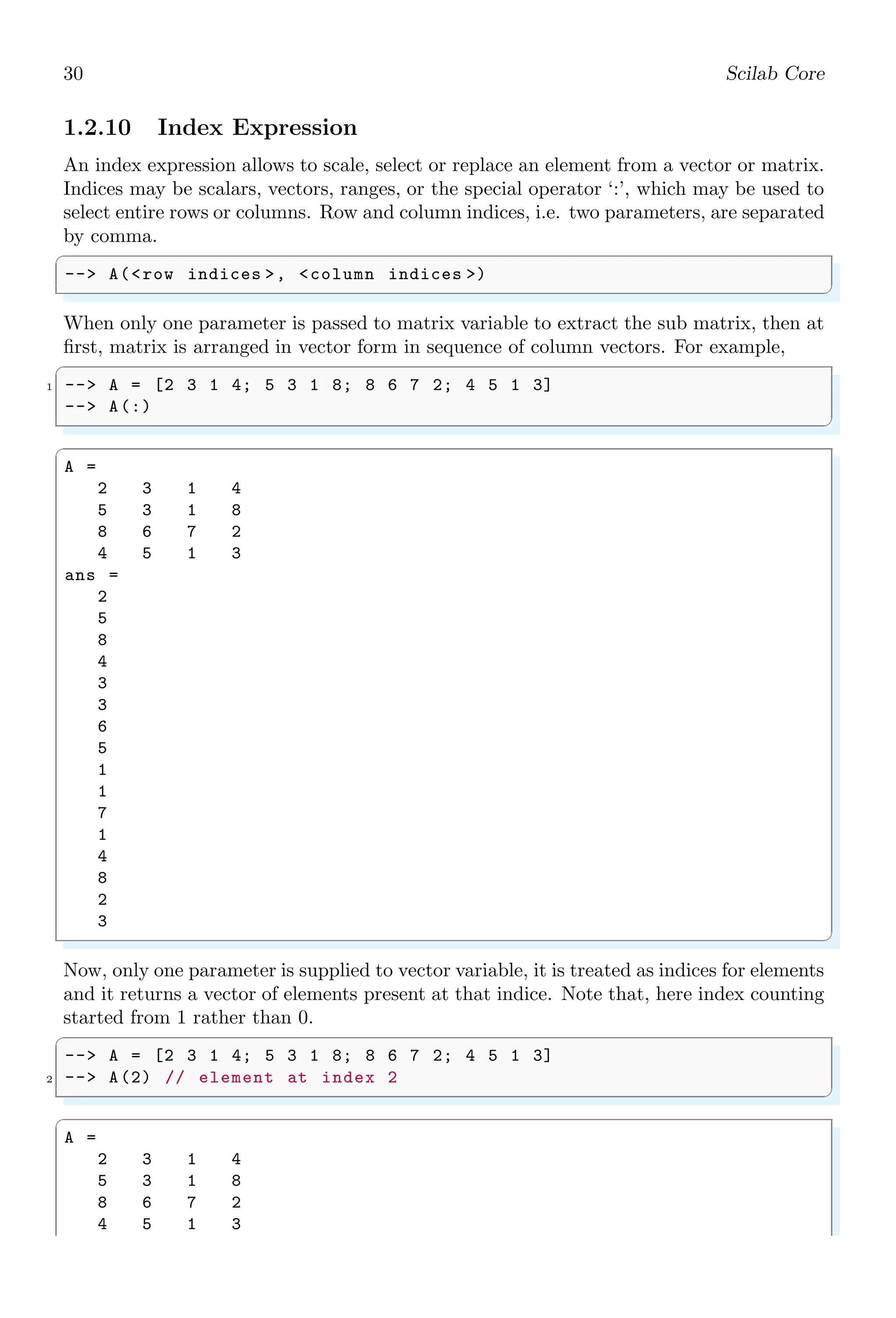
1.2.10 Index Expression
An index expression allows to scale, select or replace an element from a vector or matrix.
Indices may be scalars, vectors, ranges, or the special operator ‘:’, which may be used to
select entire rows or columns. Row and column indices, i.e. two parameters, are separated
by comma.
✞
-- A(row indices , column indices )
✌
✆
When only one parameter is passed to matrix variable to extract the sub matrix, then at
first, matrix is arranged in vector form in sequence of column vectors. For example,
✞
1 -- A = [2 3 1 4; 5 3 1 8; 8 6 7 2; 4 5 1 3]
-- A(:)
✌
✆
✞
A =
2 3 1 4
5 3 1 8
8 6 7 2
4 5 1 3
ans =
2
5
8
4
3
3
6
5
1
1
7
1
4
8
2
3
✌
✆
Now, only one parameter is supplied to vector variable, it is treated as indices for elements
and it returns a vector of elements present at that indice. Note that, here index counting
started from 1 rather than 0.
✞
-- A = [2 3 1 4; 5 3 1 8; 8 6 7 2; 4 5 1 3]
2 -- A(2) // element at index 2
✌
✆
✞
A =
2 3 1 4
5 3 1 8
8 6 7 2
4 5 1 3
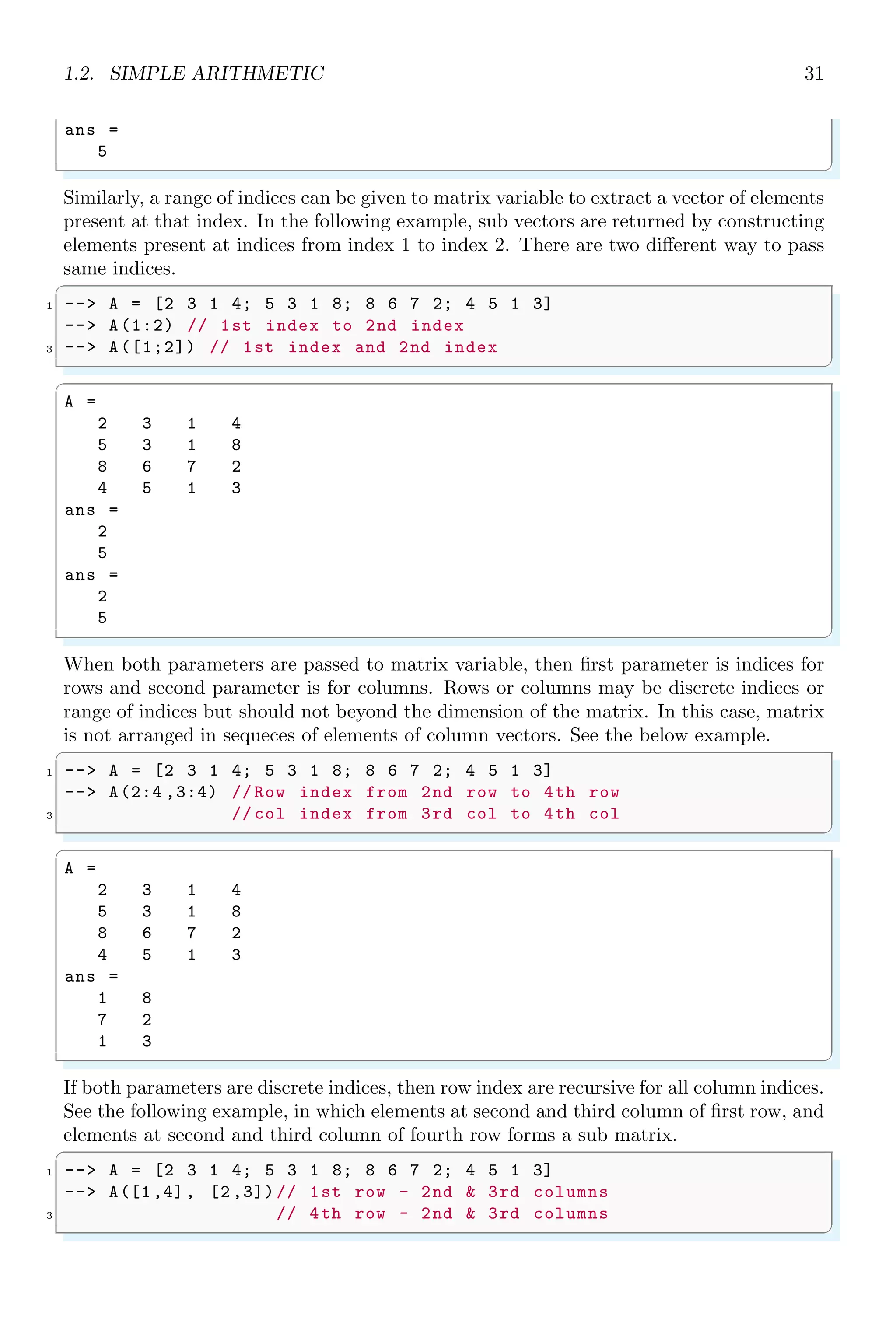
1.2. SIMPLE ARITHMETIC 31
ans =
5
✌
✆
Similarly, a range of indices can be given to matrix variable to extract a vector of elements
present at that index. In the following example, sub vectors are returned by constructing
elements present at indices from index 1 to index 2. There are two different way to pass
same indices.
✞
1 -- A = [2 3 1 4; 5 3 1 8; 8 6 7 2; 4 5 1 3]
-- A(1:2) // 1st index to 2nd index
3 -- A([1;2]) // 1st index and 2nd index
✌
✆
✞
A =
2 3 1 4
5 3 1 8
8 6 7 2
4 5 1 3
ans =
2
5
ans =
2
5
✌
✆
When both parameters are passed to matrix variable, then first parameter is indices for
rows and second parameter is for columns. Rows or columns may be discrete indices or
range of indices but should not beyond the dimension of the matrix. In this case, matrix
is not arranged in sequeces of elements of column vectors. See the below example.
✞
1 -- A = [2 3 1 4; 5 3 1 8; 8 6 7 2; 4 5 1 3]
-- A(2:4 ,3:4) // Row index from 2nd row to 4th row
3 // col index from 3rd col to 4th col
✌
✆
✞
A =
2 3 1 4
5 3 1 8
8 6 7 2
4 5 1 3
ans =
1 8
7 2
1 3
✌
✆
If both parameters are discrete indices, then row index are recursive for all column indices.
See the following example, in which elements at second and third column of first row, and
elements at second and third column of fourth row forms a sub matrix.
✞
1 -- A = [2 3 1 4; 5 3 1 8; 8 6 7 2; 4 5 1 3]
-- A([1,4], [2 ,3])// 1st row - 2nd  3rd columns
3 // 4th row - 2nd  3rd columns
✌
✆
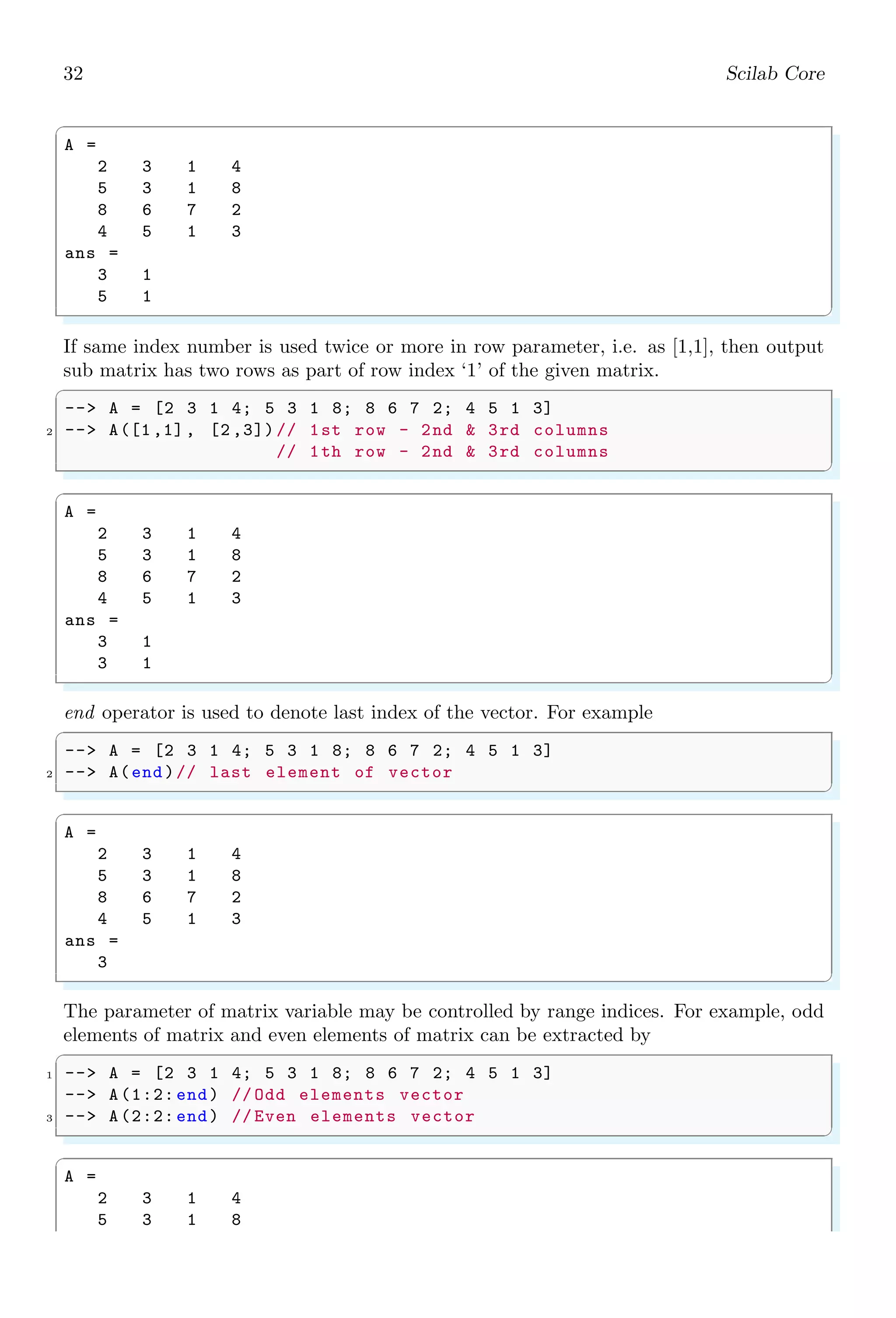
32 Scilab Core
✞
A =
2 3 1 4
5 3 1 8
8 6 7 2
4 5 1 3
ans =
3 1
5 1
✌
✆
If same index number is used twice or more in row parameter, i.e. as [1,1], then output
sub matrix has two rows as part of row index ‘1’ of the given matrix.
✞
-- A = [2 3 1 4; 5 3 1 8; 8 6 7 2; 4 5 1 3]
2 -- A([1,1], [2 ,3])// 1st row - 2nd  3rd columns
// 1th row - 2nd  3rd columns
✌
✆
✞
A =
2 3 1 4
5 3 1 8
8 6 7 2
4 5 1 3
ans =
3 1
3 1
✌
✆
end operator is used to denote last index of the vector. For example
✞
-- A = [2 3 1 4; 5 3 1 8; 8 6 7 2; 4 5 1 3]
2 -- A(end)// last element of vector
✌
✆
✞
A =
2 3 1 4
5 3 1 8
8 6 7 2
4 5 1 3
ans =
3
✌
✆
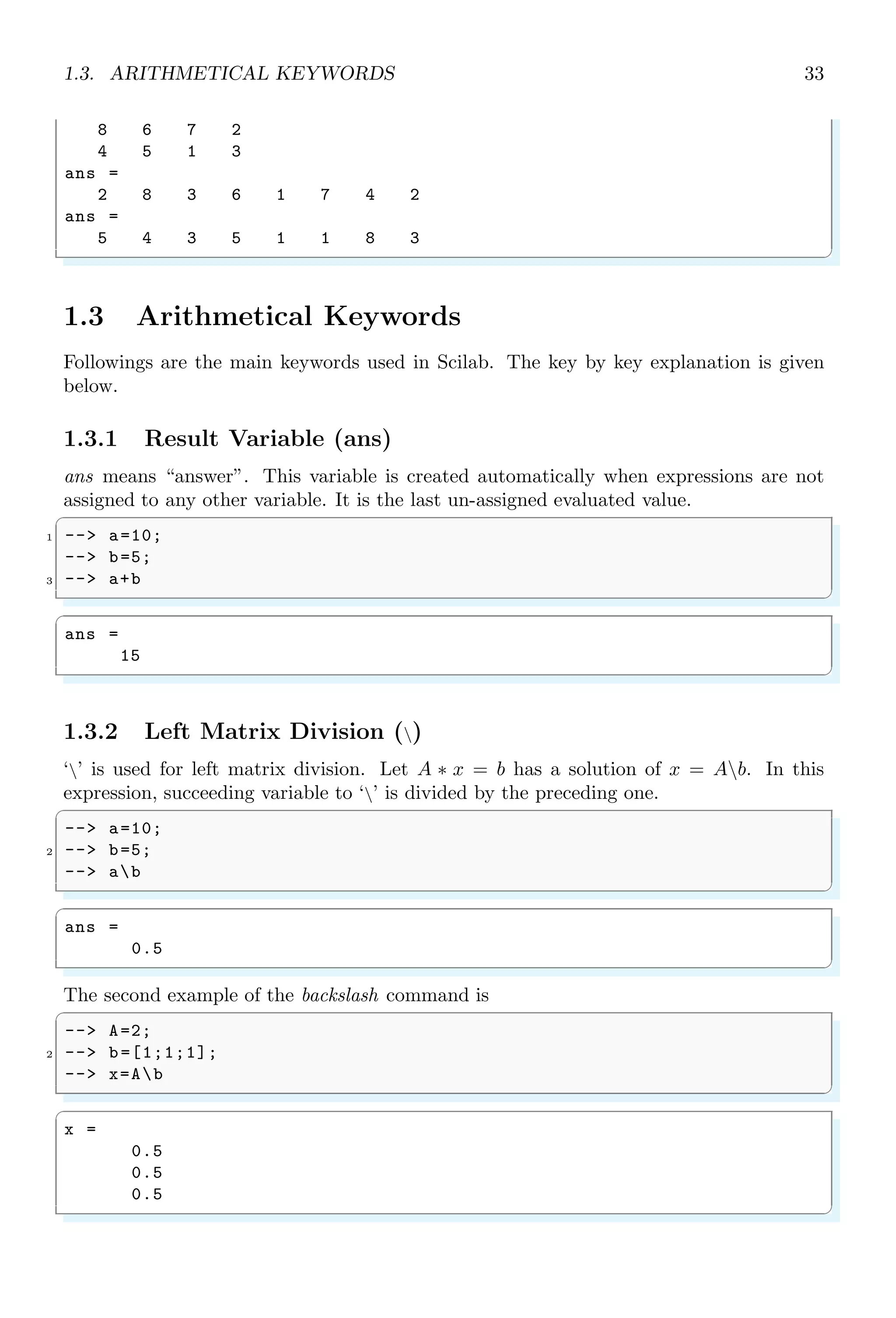
The parameter of matrix variable may be controlled by range indices. For example, odd
elements of matrix and even elements of matrix can be extracted by
✞
1 -- A = [2 3 1 4; 5 3 1 8; 8 6 7 2; 4 5 1 3]
-- A(1:2: end) // Odd elements vector
3 -- A(2:2: end) // Even elements vector
✌
✆
✞
A =
2 3 1 4
5 3 1 8
1.3. ARITHMETICAL KEYWORDS 33
8 6 7 2
4 5 1 3
ans =
2 8 3 6 1 7 4 2
ans =
5 4 3 5 1 1 8 3
✌
✆
1.3 Arithmetical Keywords
Followings are the main keywords used in Scilab. The key by key explanation is given
below.
1.3.1 Result Variable (ans)
ans means “answer”. This variable is created automatically when expressions are not
assigned to any other variable. It is the last un-assigned evaluated value.
✞
1 -- a=10;
-- b=5;
3 -- a+b
✌
✆
✞
ans =
15
✌
✆
1.3.2 Left Matrix Division ()
‘’ is used for left matrix division. Let A ∗ x = b has a solution of x = Ab. In this
expression, succeeding variable to ‘’ is divided by the preceding one.
✞
-- a=10;
2 -- b=5;
-- ab
✌
✆
✞
ans =
0.5
✌
✆
The second example of the backslash command is
✞
-- A=2;
2 -- b=[1;1;1];
-- x=Ab
✌
✆
✞
x =
0.5
0.5
0.5
✌
✆
34 Scilab Core
1.3.3 Square Brackets ([...])
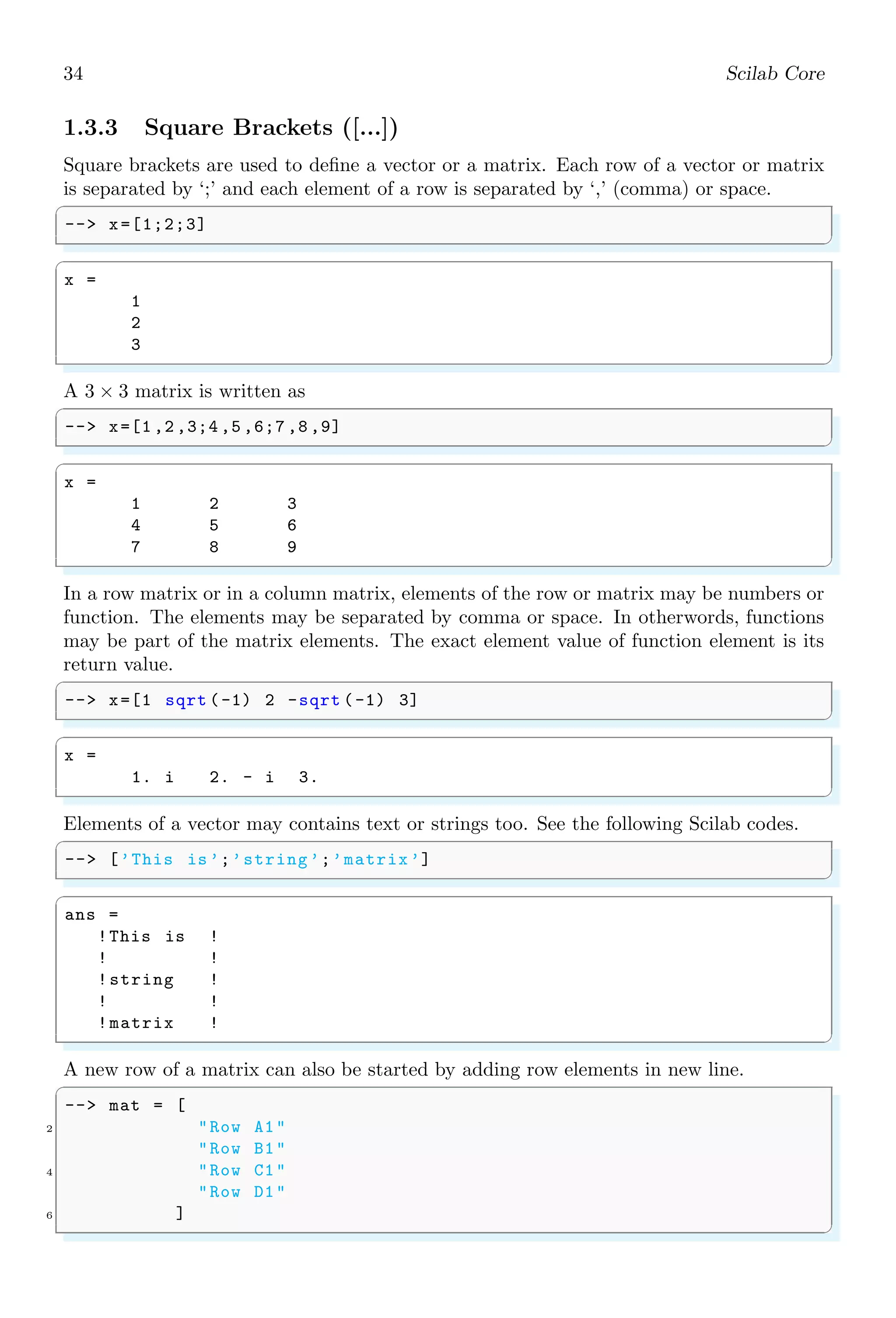
Square brackets are used to define a vector or a matrix. Each row of a vector or matrix
is separated by ‘;’ and each element of a row is separated by ‘,’ (comma) or space.
✞
-- x=[1;2;3]
✌
✆
✞
x =
1
2
3
✌
✆
A 3 × 3 matrix is written as
✞
-- x=[1 ,2 ,3;4 ,5 ,6;7 ,8 ,9]
✌
✆
✞
x =
1 2 3
4 5 6
7 8 9
✌
✆
In a row matrix or in a column matrix, elements of the row or matrix may be numbers or
function. The elements may be separated by comma or space. In otherwords, functions
may be part of the matrix elements. The exact element value of function element is its
return value.
✞
-- x=[1 sqrt (-1) 2 -sqrt (-1) 3]
✌
✆
✞
x =
1. i 2. - i 3.
✌
✆
Elements of a vector may contains text or strings too. See the following Scilab codes.
✞
-- [’This is’;’string’;’matrix’]
✌
✆
✞
ans =
!This is !
! !
!string !
! !
!matrix !
✌
✆
A new row of a matrix can also be started by adding row elements in new line.
✞
-- mat = [
2 Row A1
Row B1
4 Row C1
Row D1
6 ]
✌
✆
1.3. ARITHMETICAL KEYWORDS 35
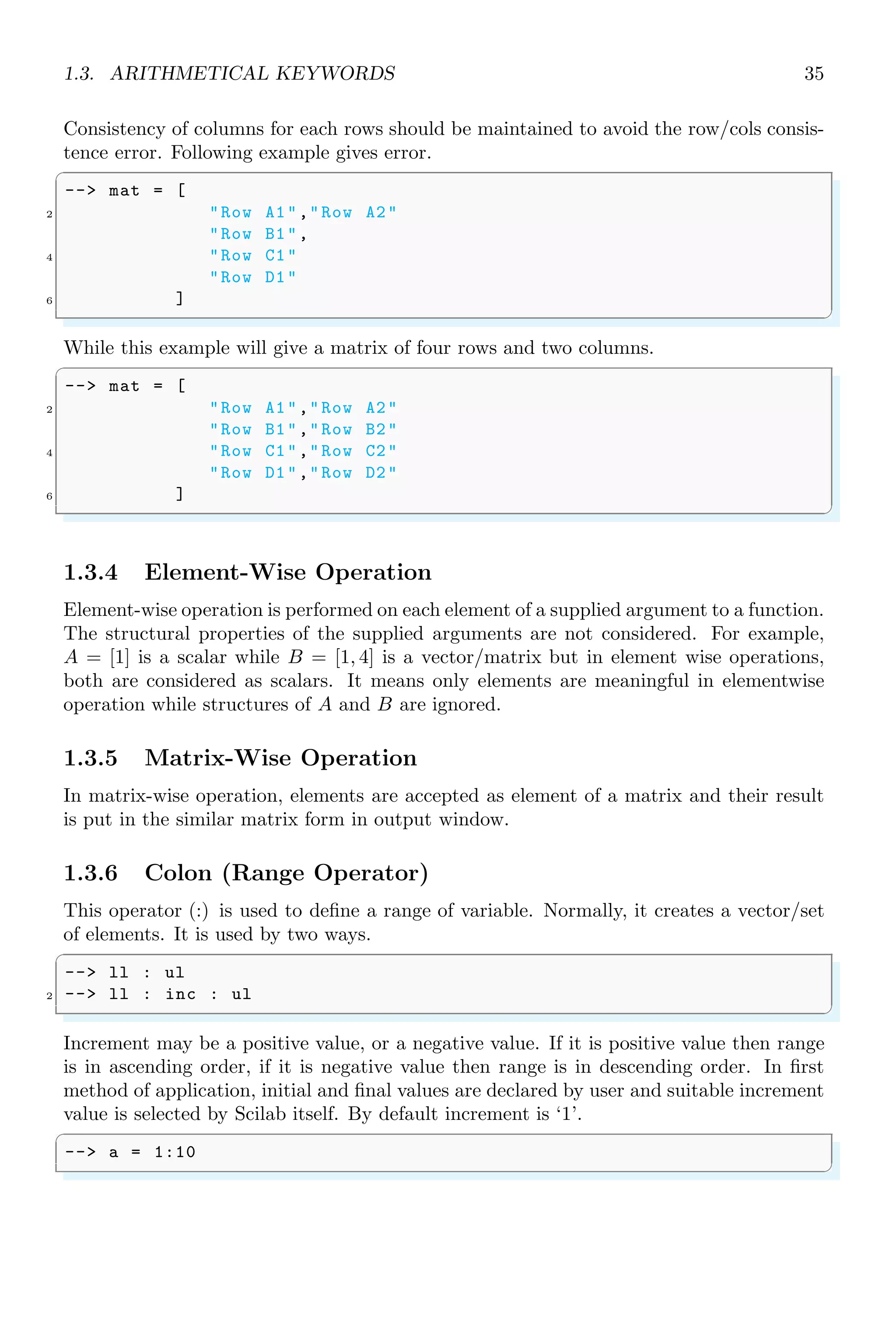
Consistency of columns for each rows should be maintained to avoid the row/cols consis-
tence error. Following example gives error.
✞
-- mat = [
2 Row A1,Row A2
Row B1,
4 Row C1
Row D1
6 ]
✌
✆
While this example will give a matrix of four rows and two columns.
✞
-- mat = [
2 Row A1,Row A2
Row B1,Row B2
4 Row C1,Row C2
Row D1,Row D2
6 ]
✌
✆
1.3.4 Element-Wise Operation
Element-wise operation is performed on each element of a supplied argument to a function.
The structural properties of the supplied arguments are not considered. For example,
A = [1] is a scalar while B = [1, 4] is a vector/matrix but in element wise operations,
both are considered as scalars. It means only elements are meaningful in elementwise
operation while structures of A and B are ignored.
1.3.5 Matrix-Wise Operation
In matrix-wise operation, elements are accepted as element of a matrix and their result
is put in the similar matrix form in output window.
1.3.6 Colon (Range Operator)
This operator (:) is used to define a range of variable. Normally, it creates a vector/set
of elements. It is used by two ways.
✞
-- ll : ul
2 -- ll : inc : ul
✌
✆
Increment may be a positive value, or a negative value. If it is positive value then range
is in ascending order, if it is negative value then range is in descending order. In first
method of application, initial and final values are declared by user and suitable increment
value is selected by Scilab itself. By default increment is ‘1’.
✞
-- a = 1:10
✌
✆
36 Scilab Core
✞
a =
1. 2. 3. 4. 5. 6. 7. 8. 9. 10.
✌
✆
✞
-- a = 1:-10
✌
✆
✞
a =
[]
✌
✆
In second method of application (i.e. more than one colons (:) are used) first element
is initial value, second element is increment and third element is the upper level limit of
range. The last value of range does not exceed to the upper limit. After each increment,
initial value becomes equal to the sum of initial value and increment. This iteration is
followed until it becomes equal or more than the finale range of iteration.
✞
-- a = 1:2:10
✌
✆
✞
a =
1. 3. 5. 7. 9.
✌
✆
✞
-- a = 1:-2:-10
✌
✆
✞
a =
1. - 1. - 3. - 5. - 7. - 9.
✌
✆
The colon can be used for defining a rang into a matrix form. Each argument of this
function is comma separated. First argument is matrix range, second argument is number
of rows and third argument is the number of columns.
✞
-- a = matrix (1:12 ,6 ,2)
2 -- a
✌
✆
✞
a =
1. 7.
2. 8.
3. 9.
4. 10.
5. 11.
6. 12.
✌
✆
Elements of a matrix are retrieved by calling the matrix object as shown below:
✞
1 -- a(:)
✌
✆
1.3. ARITHMETICAL KEYWORDS 37
✞
ans =
1.
2.
3.
4.
5.
6.
7.
8.
9.
10.
11.
12.
✌
✆
The specific columns of matrices can be accessed by using first argument as colon symbol
and second argument as column index. See the example below:
✞
1 -- a = matrix (1:12 ,6 ,2)
-- b=a(:,1) //1 = first column
3 -- c=a(:,2) //2 = second column
✌
✆
✞
a =
1. 7.
2. 8.
3. 9.
4. 10.
5. 11.
6. 12.
b =
1.
2.
3.
4.
5.
6.
c =
7.
8.
9.
10.
11.
12.
✌
✆
We can use row or column index vectors for accessing multiple rows or columns.
✞
1 -- m=[1 ,2 ,3;4 ,5 ,6;7 ,8 ,9]
-- m(: ,[1 ,2]) // for multiple column indices
✌
✆
✞
m =
38 Scilab Core
1. 2. 3.
4. 5. 6.
7. 8. 9.
ans =
1. 2.
4. 5.
7. 8.
✌
✆
Specific rows can be retrieved if argument location of range operator and index number
is interchanged as given in following code snippets.
✞
-- a = matrix (1:12 ,6 ,2)
2 -- b=a(1,:) //1 = first row
-- c=a(5,:) //2 = fifth row
✌
✆
✞
a =
1. 7.
2. 8.
3. 9.
4. 10.
5. 11.
6. 12.
b =
1. 7.
c =
5. 11.
✌
✆
A single colon as argument to matrix handle means full range of the matrix elements.
We can limit the range operator (:) for specific indices if colon is used as incremental
operator.
✞
1 -- (initial limit  : increments /decrements  : final limit )
✌
✆
There is an increment or decrement, it is depends on the sign of increment/decrement
(second element in the range operator). Increments is always a positive integer and
decrements is always a negative integer. For example
✞
1 -- a(12: -3:1)
✌
✆
✞
a =
12.
9.
6.
3.
✌
✆
✞
1 -- a(1:2:10)
✌
✆
1.3. ARITHMETICAL KEYWORDS 39
✞
a =
1.
3.
5.
7.
9.
✌
✆
We can extract a part of matrix by using colon operator within parentheses as shown in
below example.
✞
-- A = [2 3 1 4; 5 3 1 8; 8 6 7 2; 4 5 1 3]
2 -- A(2:4 ,3:4) //A(row range , col range )
✌
✆
✞
A =
2 3 1 4
5 3 1 8
8 6 7 2
ans =
1 8
7 2
1 3
✌
✆
We can use the colon operator to print integer numbers from 0 to n with special purposes.
In the following example, n is restricted to 5, i.e. integers from 0 to 5 are printed in output.
✞
-- %i : 5
✌
✆
✞
ans =
0. 1. 2. 3. 4. 5.
✌
✆
This method of implementation is removed since Scilab 6.0 version.
1.3.7 Comma
Comma operator (,) is used as the identifier for column, instruction and used as argument
separator. A 3 × 3 matrix is represented in vector form as
✞
-- [1,2,3;4,5,6;7,8,9]
✌
✆
✞
x =
1 2 3
4 5 6
7 8 9
✌
✆
Space operator “ ” is also used as separator of the elements in a row of the matrix.
40 Scilab Core
1.3.8 Comments
Comments are the statements which explains to mathematical operations, numerical cal-
culations and special functions. Comments are embedded within the program codes. The
comments are never executed by the Scilab and they are simply skipped by the Scilab.
Symbol ‘//’ is used for the commenting of a line.
✞
-- a=5;
2 -- b=10;
-- a+b // summation of two variable .
✌
✆
✞
ans =
15
✌
✆
1.3.9 Dot
Dot symbol is used to represent the end of a sentence or the decimal fraction. It is also
used for element-wise dot product (.*) of two vectors or matrices. If A = aij and B = bij
are two matrices of n × n size then
[A · ∗B]ij = aij × bij
It is always true that [A ∗ B] = [B ∗ A]. If, A and B are 2 × 2 matrices as given by
A =

1 2
3 2

; B =

2 1
3 4

Then
C = A · ∗B =

1 × 2 2 × 1
3 × 3 2 × 4

=

2 2
9 8

✞
-- a=[1 ,2;3 ,2];
2 -- b=[2 ,1;3 ,4];
-- a.*b
✌
✆
✞
ans =
2. 2.
9. 8.
✌
✆
1.3.10 Empty
An empty vector or an empty matrix is represented by ‘[]’. Empty square brackets
represent to the empty set of matrix. White spaces inside the square brackets do not
affect the meaning of empty matrix.
✞
1 -- []
-- [ ]
✌
✆
1.3. ARITHMETICAL KEYWORDS 41
✞
ans =
[]
ans =
[]
✌
✆
1.3.11 Equal Sign
Equal operator (==) compares two values numerically and returns the ‘true’ if both
values are equal otherwise returns ‘false’. Remember that symbol ‘=’ is not same as to
‘==’. Symbol ‘=’ assigns a value to a variable while ‘==’ compares two values.
✞
-- i = 5;
2 -- j = 10;
-- if(i==j)
4 -- disp (E);
-- elseif(ij)
6 -- disp (N);
-- end
✌
✆
✞
N
✌
✆
1.3.12 global
It declares a variable as a global variable. The variable defined global can be called from
everywhere.
1.3.13 Hat Symbol
It (ˆ) represents to the exponent, i.e. bn
. It raises base (number at the left side to the
hat) to the power of n (number at the right side to the hat). It is also sometime refers as
power.
✞
1 -- 2^4
✌
✆
✞
ans =
16
✌
✆
Hat symbol (ˆ) can be also used to find the nth
root of a number.
✞
-- x^(1/ n)
✌
✆
✞
1 -- 2^(1/4)
✌
✆
✞
ans =
1.1892071
✌
✆
42 Scilab Core
1.3.14 Less Than
() is a comparative operator. It tells that the left hand value is lesser than the right
hand value. If left hand side value is less than the right hand side, then comparison is
true otherwise false. It returns “yes” on true state and “no” in false state.
✞
-- if (12)
2 -- disp (yes);
-- end
✌
✆
✞
ans =
yes
✌
✆
1.3.15 Minus
(–) sign is used to subtract right hand value from the left hand value. Subtraction is
algebraic. If right hand value is larger than left hand value then result is negative.
✞
-- 2-3
✌
✆
✞
ans =
-1
✌
✆
The two variables using minus may be a vector or a matrix. In case of vectors, subraction
takes place element-wise. Subtraction of vectors is a vector of similar size.
✞
-- [1 ,2] -[3 ,4]
✌
✆
✞
ans =
-2. -2.
✌
✆
In vector subtraction, size of two vectors must be equal.
1.3.16 Not
Symbol, ∼, is a logical NOT operator. It compares the two values and access them
according “value a is not equal to value b”. If the comparison is true according to this
statement, then it returns true otherwise it returns false.
✞
-- 2 ~= 3 //2 is not equal to 3.
✌
✆
✞
ans =
T
✌
✆
1.3. ARITHMETICAL KEYWORDS 43
1.3.17 Parenthesis
Parenthesis, i.e. ‘(...)’ brackets are used to group the statements, operations  executions.
A variable or function initiated inside the parenthesis has local scope.
1.3.18 Percent
(%) is a special character. When it is prepend to string, literals are considered as with
special meaning as shown in the following table.
Symbol Meaning
%pi π
%i:n Integer from 0 to n
%i
√
−1
The functions whose names begin with % character are special functions. They are
used as primitives and used in operator’s overloading.
1.3.19 Plus
(+) is an addition operator. It returns sum of two or more values. It also concatenates
two or more strings. Its operands may be vectors, scalars or strings.
✞
-- 2+3
2 -- This is my + country .
✌
✆
✞
ans =
5
ans =
This is mycountry .
✌
✆
The two variables may be a vector or a matrices. In case of vector operands, addition
takes place element-by-element wise.
✞
--[1,2]+[3,4]
✌
✆
✞
ans =
4. 6.
✌
✆
In vector subtraction, size of two vectors must be equal.
1.3.20 Quote
There are two types of quotes, called single quotes (’) and double quotes (”). In Scilab,
single quotes and double quotes have different meaning. The contents written between
single quotes or double quotes are considered as strings. See the following example:
44 Scilab Core
✞
-- x = ‘The Good Boy ’
2 -- y = The Good Boy
✌
✆
✞
x =
The Good Boy
y =
The Good Boy
✌
✆
Single quote is also used as string delimiter (”), i.e. string within string. As string
delimiter, the single quote is used in a group of twice.
✞
-- x = ‘disp (‘‘Boy ’’)’
2 -- y = disp (‘‘Boy ’’)
-- z = disp (‘‘disp (‘‘disp (‘‘Boy ’’) ’’) ’’)
✌
✆
✞
x =
disp (‘Boy ’)
y =
disp (‘Boy ’)
z =
disp (‘disp (‘disp (‘Boy ’) ’) ’)
✌
✆
Single quote is also used in mathematics, specially in matrix. If a matrix is real matrix
then single quotes converts row vector into column vector and vice-versa. See the example
given below:
✞
-- a=[1 ,2]
2 -- a’
✌
✆
✞
a =
1. 2.
ans =
1.
2.
✌
✆
If matrix is a complex matrix then (’) is a complex conjugate transpose operator. It is
used in a matrix for conjugate transpose of the matrix. It is also used as string delimiter.
Assume a complex matrix of order 2 × 2 as
A =

1 + i 2
3 2 + i

Conjugate transpose of this matrix (A) will be
A =

1 − i 3
2 2 − i
1.3. ARITHMETICAL KEYWORDS 45
✞
1 -- [1+%i , 2; 3, 2+%i]’
✌
✆
✞
ans =
1. - i 3.
2. 2. - i
✌
✆
If a dot (.) is applied before (’), then the matrix transpose is called non-conjugate
transpose of matrix. Assume a complex matrix of order 2 × 2 as
A =

3 + i 2
1 2 + i

Then non-conjugate transpose of the matrix will be
A =

3 + i 1
2 2 + i

✞
1 -- [1+%i ,2; 3,2+ %i].’
✌
✆
✞
ans =
1. + i 3
2. 2. + i
✌
✆
1.3.21 Return
return assigns local variables to the calling variable.
✞
1 -- [a,b]= return (1,2)
✌
✆
✞
b =
2.
a =
1.
✌
✆
It is also used to return a value from inside of a function. A function is terminated in
execution, when keyword return is encountered.
✞
-- function [y]= myFunc(i, j)
2 -- y=i+j;
-- return 0;
4 -- y=i^j; // Not executed
-- endfunction
6 -- myFunc (2, 3)
✌
✆
✞
ans =
5.
✌
✆
46 Scilab Core
✞
-- function [y]= myFunc(i, j)
2 -- y=i+j;
-- // return 0;
4 -- y=i^j; // Executed and overloaded
-- // to previous result
6 -- endfunction
-- myFunc (2, 3)
✌
✆
✞
ans =
8.
✌
✆
1.3.22 Semicolon
Semicolon ‘;’ is used as a row separator in a matrix. It is also used to end a statement
line. Application of semicolon as a row separator is shown below:
✞
-- [1,2,3;4,5,6;7,8,9]
✌
✆
✞
x =
1 2 3
4 5 6
7 8 9
✌
✆
Application of semicolon as a end of line is shown in the following example.
✞
-- i = 5; // end of first line
2 -- j = 10; // end of second line
-- if(ij)
4 -- disp (L);
-- elseif(ij)
6 -- disp (G);
-- elseif(i==j)
8 -- disp (E);
-- end
✌
✆
✞
L
✌
✆
End-of-line application of semicolon (;) does not mean the skip of contents by the Scilab
or commenting of the rest of contents in the line. It only separates the two statements
written in a single line. Again, when a statement is terminated with semicolon, then the
output or result is stored in memory and it is not visible in the output console. The
output is obtained only when the object is called without terminating by semicolon.
✞
1 -- a=5+5; b=6+5;
-- a
3 -- b
✌
✆
1.3. ARITHMETICAL KEYWORDS 47
✞
a =
10.
b =
11.
✌
✆
1.3.23 Forward Slash
Slash (/) is used in division. The left side value to the forward slash is divided by its
right side value. When forward slash is used in pair, it acts as a commenting symbol. In
Scilab, line commenting symbol is ‘//’.
✞
-- i = 5; // end of first line
2 -- j = 10; // end of second line
-- i/j
✌
✆
✞
ans =
0.5
✌
✆
1.3.24 Space
Space operator (“ ”) is used as the identifier for columns in a matrix or in a vector. A
3 × 3 matrix is represented in vector form as
✞
-- [1 2 3;4 5 6;7 8 9]
✌
✆
✞
x =
1 2 3
4 5 6
7 8 9
✌
✆
Comma operator (,) is also used as separator of the elements in a row.
1.3.25 Asterisk
Star (*), i.e. asterisk is used as multiplier between two variables from left to right.
Multiplication of two vectors are allowed if number of rows in first vector is equals to the
number of columns in second vector. If A = aij and B = bij are two matrices of size
n × n then
[A ∗ B]kj =
n
X
i,k=0
aki × bik
It is not always true that [A ∗ B] = [B ∗ A]. If two inputs are integers then it performs
simple arithmetic.
48 Scilab Core
✞
-- i = 5; // end of first line
2 -- j = 10; // end of second line
-- i*j
✌
✆
✞
ans =
50
✌
✆
Multiplication of vector and scalar:
✞
-- [1 ,2]*4
✌
✆
✞
ans =
4. 8.
✌
✆
Asterisk performs multiplication of matrices. A matrix multiplication is performed if the
matrix product conditions are satisfied. For two vectors or matrices, if number of columns
of first matrix is equal to the number of rows of second matrix then matrix multiplication
is carried out. See the following example.
✞
-- [1 ,2]*[4;3] // 1x2 matrix by 2x1 matrix
✌
✆
✞
ans =
10.
✌
✆
If, A and B are 2 × 2 matrices as given by
A =

1 2
3 2

; B =

2 1
3 4

Then
C = A ∗ B =

1 × 2 + 2 × 3 1 × 1 + 2 × 4
3 × 2 + 2 × 3 3 × 1 + 2 × 4

=

8 9
12 11

✞
-- a=[1 ,2;3 ,2];
2 -- b=[2 ,1;3 ,4];
-- a*b
✌
✆
✞
ans =
8. 9.
12. 11.
✌
✆
If two matrices are not equal in size then they are taken as vectors and vector multiplica-
tion is performed. It happens when second matrix is 1 × 1 type matrix. Second operand
may be a scalar too as seen above in the product of vector and scalar. See the following
example.
✞
1 -- [1 ,2]*[4]
✌
✆
1.4. CORE KEYWORDS 49
✞
ans =
4. 8.
✌
✆
Consistency shall be maintained while performing vector or matrix multiplication. For
example, if second operand is a multicolumn vector then it must satisfy the condition
of matrix multiplication. See the following example, in which Scilab failed to give desire
result due to inconsistent multiplication.
✞
-- [1 ,2]*[3 ,4]
✌
✆
✞
!--error 10
Inconsistent multiplication .
✌
✆
1.3.26 Tilda
Tilda, (!) is a logical NOT. It is also used like (∼=) i.e. not equals to. It is an boolean
expression for NOT Gate.
✞
-- 2 != 3 //2 is not equal to 3.
✌
✆
✞
ans =
T
✌
✆
1.4 Core Keywords
1.4.1 Abort Process (abort)
abort interrupts current evaluation and gives the prompt. Within a pause level abort
return to level 0 prompt.
✞
-- i = 0;
2 -- while i10 do
-- disp (i);
4 -- i = i + 1;
-- if(i5)
6 -- abort;// abort key word
-- end
8 -- end
✌
✆
✞
0.
1.
2.
3.
4.
5.
✌
✆
50 Scilab Core
1.4.2 Add a Demo (add demo)
This function, add demo, is used to add user define file or codes into Scilab demos.
✞
-- // Create a simple demo script
2 -- path = TMPDIR+’/foo.sce ’;
-- mputl(’disp Hello’,path )
4 -- add_demo (’My first demo ’,path )
-- // Demo can be run using Demos menu .
✌
✆
We can find ‘My first demo’ in Demos options of ’Scilab Demonstrations’.
1.4.3 Number of Arguments (argn)
argn is similar to the argc command in ‘C’. It returns the number of input/output argu-
ments in a function call. Scilab uses ‘lhs’ and ‘rhs’ for identification of inputs arguments
and output arguments. For example, in the following function
y = f(x)
left hand side (lhs) argument is y while right hand side (rhs) argument is x. Actually for
this relation, x is input argument and y is output argument. argn has three arguments.
‘0’ for both lhs (output arguments) and rhs (input arguments) strings. ‘1’ for lhs (output
arguments) only and ‘2’ for rhs (input arguments) only. Its syntax are
✞
1 -- [lhs , rhs] = argn () // for both input/output arguments
-- lhs=argn (1) // for output arguments only
3 -- rhs=argn (2) // for input arguments only
✌
✆
The given example is
✞
1 -- funcprot (0);
-- function [t] = myf(a,b,c)
3 -- [lhs , rhs] = argn (0);
-- mprintf (Nos of outputs : %dn,lhs);
5 -- mprintf (Nos of inputs : %dn,rhs);
-- outs = argn (1);
7 -- ins = argn (2);
-- mprintf (Nos of outputs : %dn,outs );
9 -- mprintf (Nos of inputs : %dn,ins);
-- endfunction
11 -- x=myf (2,2,3)
✌
✆
✞
Nos of outputs : 1
Nos of inputs : 3
Nos of outputs : 1
Nos of inputs : 3
✌
✆
1.4. CORE KEYWORDS 51
1.4.4 Banner
It shows the default banner of Scilab.
✞
-- banner ()
✌
✆
1.4.5 Boolean
Boolean operators , | and ∼ are used to express the boolean relation between two
variables. These operators are used as logical AND, logical OR and logical NOT as short
cuts and as element-wise.
Shortcut  And Elementwise 
Before, Scilab 6.0, shortcut and elementwise boolean AND operators were same and both
were represented by . Since Scilab 6.0, shortcut and element-wise boolean operators are
now distinct.  is shortcut boolean AND, while  is element-wise AND operations.
Both shortcut and element-wise operators are evaluated from left to right.
✞
1 -- [1,3]  [5,2] //  is not defined before scilab 6.0
-- // Error shows in Scilab  v 6.0
✌
✆
✞
[1,3]  [5,2]
!-- error 2
Invalid factor.
✌
✆
✞
1 --[1,3]  [5,2] // Works in all version of scilab
✌
✆
✞
ans =
T T
✌
✆
Shortcut || And Elementwise |
Before, Scilab 6.0, shortcut and elementwise boolean OR operators were same and both
were represented by . Since Scilab 6.0, shortcut and element-wise boolean operators
are now distinct. || is shortcut boolean OR, while | is element-wise OR operations. Both
shortcut and element-wise operators are evaluated from left to right.
✞
-- [1,3] || [5,2] //  is not defined before scilab 6.0
2 -- // Error in scilab  v 6.0
✌
✆
✞
[1,3] || [5,2]
!-- error 2
Invalid factor.
✌
✆
52 Scilab Core
✞
1 --[1,3] | [5,2] // Works in all version of scilab
✌
✆
✞
ans =
T T
✌
✆
1.4.6 Break a Process (break)
break keyword interrupt a current loop. It is always used inside the loop functions or
switch functions.
✞
-- i = 0;
2 -- while i10 do
-- disp (i);
4 -- i = i + 1;
-- if(i5)
6 -- break;// break the loop
-- end
8 -- end
✌
✆
✞
0.
1.
2.
3.
4.
5.
✌
✆
1.4.7 Case
case is used to compare a select value with arbitrary chosen value. If select value is equal
to case value, statement inside the case is executed.
✞
-- A = 2
2 -- select A
-- case 1 then
4 -- disp (1)
-- case 2 then
6 -- disp (2)
-- else
8 -- disp (3)
-- end
✌
✆
✞
2
✌
✆
1.4. CORE KEYWORDS 53
1.4.8 Kill the Value (clear)
clear kills the value of a variable. If a variable is cleared inside the loop, an error is
displayed as undefined variable.
✞
1 --i = 0;
--while i5 do
3 -- disp (i);
-- i = i + 1;
5 -- if(i2)
-- // Clear variable i. Now , in next loop variable
7 -- // i shall not be identified inside while loop .
-- clear i;
9 -- end
--end
✌
✆
✞
0.
1.
2.
while i5 do
!--error 4
Undefined variable : i
✌
✆
1.4.9 Remove a Function (clearfun)
clearfun is used to remove a function name in the table of Scilab functions.
✞
-- // Get the func ptr associated with the abs function
2 -- absptr=funptr(abs);
-- // Create an alias of the abs function
4 -- newfun(abs_bis,absptr);
-- clearfun (abs)
✌
✆
✞
ans =
T
✌
✆
1.4.10 Clear Global
clearglobal clears the global variable defined previously.
1.4.11 Compile Scilab Function (comp)
comp compiles a function in Scilab. If a function is already compiled then it gives warning.
✞
-- comp (abs ,0)
✌
✆
✞
Warning : Function is already compiled .
✌
✆
54 Scilab Core
There are three options of compilation of function. Default is ‘0’ and others are ‘1’ and
‘2’.
Options Meaning
0 Default compilation value.
1 Obsolete, similar to option ‘0’.
2 Function to be compiled “for profiling”.
1.4.12 Continue
continue pass the control to the next iteration of loop. To understand the working of
continue keyword, we use same example in three different methods. In following example
two for loops are used.
✞
1 -- for j =1:1:3
-- for k=3: -1:1
3 -- if jk then
-- disp (j*k);
5 -- end
-- end
7 -- end
✌
✆
✞
2.
6.
3.
✌
✆
Now we put the continue command after disp(j*k) as
✞
1 -- for j =1:1:3
-- for k=3: -1:1
3 -- if jk then
-- disp (j*k);
5 -- continue ;
-- end
7 -- end
-- end
✌
✆
✞
2.
6.
3.
✌
✆
There is no change in output as disp put the result before continue encountered. Again
if we put the continue command before disp(j*k) as
✞
1 -- for j =1:1:3
-- for k=3: -1:1
3 -- if jk then
-- continue ;
1.4. CORE KEYWORDS 55
5 -- disp (j*k);
-- end
7 -- end
-- end
✌
✆
There is no output as continue pushes to the next iterator before disp put the result in
output window.
1.4.13 Debug
debug is used to find the errors and bad scripting in a code script. There are five levels
of debugging, ranged from -1 to 4. This range defines the level of debugging.
✞
-- debug(-1)
✌
✆
✞
ans =
1
✌
✆
1.4.14 Delete Break
delbpt is used to delete a break point from the function. To set a breakpoint for function
‘foo’, we use setbpt. The setbpt sets break point one over other as stack in setbpt list. On
call of delbpt the top most breakpoint is deleted from the stack.
✞
-- setbpt(’foo’ ,1); // set first break point at 1
2 -- setbpt(’foo’ ,10);// set second break point at 10
-- delbpt(’foo’ ,10);// deleted second break point at 10
4 -- dispbpt () // show first break point at 1
✌
✆
✞
Breakpoints of function : foo
1
✌
✆
1.4.15 Display Break Points (dispbpt)
dispbpt is used to show a break point of a function from the setbpt list.
✞
-- setbpt(’foo’ ,1); // set first break point at 1
2 -- setbpt(’foo’ ,10);// set second break point at 10
-- delbpt(’foo’ ,10);// deleted second break point at 10
4 -- dispbpt () // show first break point at 1
✌
✆
✞
Breakpoints of function : foo
1
✌
✆
56 Scilab Core
1.4.16 Do
do keyword is used to execute a group of statements or programming script until unless
a condition is being satisfied. do keyword is always used with while function. The scope
of do keyword is from the next line of statement to the corresponding end keyword.
✞
-- i = 0
2 -- while i5 do
-- disp (i);
4 -- i = i + 1;
-- end
✌
✆
✞
ans =
0
1
2
3
4
✌
✆
1.4.17 Edit
Function edit is used to open a existing file or existing function in the Scilab editor or
open editor for definition of new function.
✞
-- // open editor with text of existing function
2 -- edit (’edit ’)
-- // open editor for a new function
4 -- edit (’myF’)
✌
✆
The argument of this function is either a function name or a file name as absolute path.
✞
-- // open the file bar.sci in TMPDIR directory
2 -- edit ( fullfile (TMPDIR+’bar.sci’))
✌
✆
An existing file may be open in the Scilab editor with reaching to specific line of the
script. The script line is specified by the second argument. Second argument is a pure
integer value.
✞
-- edit (’test_run ’, 123)
✌
✆
User defined function can also be open in default Scilab editor with the function scripts.
✞
1 -- function a=b(c)
-- c=1;
3 -- endfunction
-- edit (’b’)
✌
✆
This will open function ’b’ in Scilab editor.
1.4. CORE KEYWORDS 57
1.4.18 Else
else is the false case of if condition. If a condition is not satisfied, statement in else
section are executed. Another if-else loop can be initiated in the statement section of
else as a nested loop.
✞
-- i = 5;
2 -- j = 10;
-- if(i==j)
4 -- disp (T);
-- else
6 -- disp (F);
-- end
✌
✆
✞
T
✌
✆
1.4.19 Else-If
elseif is used as false case of if with new if conditions. It is also used as chain conditional
case. A nested loop can also be used within the elseif statement portion.
✞
1 -- i = 5;
-- j = 10;
3 -- if(ij)
-- disp (L);
5 -- elseif(ij)
-- disp (G);
7 -- elseif(i==j)
-- disp (E);
9 -- end
✌
✆
✞
L
✌
✆
1.4.20 End
end keyword is used to terminate a conditional statement. end is used for the following
purposes
1. To finish a condition.
2. To finish a function definition by using endfunction for Scilab version 5.5 and prior
or using end only since Scilab 6.0 and later.
3. To finish a statement.
✞
1 -- i = 5;
-- j = 10;
3 -- if(ij)
58 Scilab Core
-- disp (L);
5 -- elseif(ij)
-- disp (G);
7 -- elseif(i==j)
-- disp (E);
9 -- end
✌
✆
✞
L
✌
✆
1.4.21 Catch Error (errcatch)
errcatch is used to trap an error. This function is removed since Scilab 6.
✞
1 -- errcatch (1,’pause’);
✌
✆
The first variable in errcatch is number that is used to trap an error. If it is less than 0
then all errors are catch and if it is grater than 0 then errcatch traps that specific error
assigned to this number. Second variable is action in string form that is to be performed
if error catches. The actions are either ‘pause’, ‘continue’, ‘kill’ or ‘stop’.
1.4.22 Clear The Error (errclear)
In scilab, error table contains the list of all errors being rose during the operation. errclear
is used to clear a specific or all errors from the error list. It is used like
✞
1 -- errclear (n);
✌
✆
Where ‘n’ is the error number. If ‘n’ is positive (n  0), it is the number of the cleared
error. If (n ≤ 0) then all errors are cleared (default case).
1.4.23 Error
error function is standard way of printing errors during the process by Scilab. A cus-
tomised error may also be constructed by using this function. It accepts two arguments,
in which first argument is message and second argument is error number associated with
message. It is used like
✞
1 -- error(message )
-- error(message , n)
3 -- error(n)
-- error(n, message )
5 -- error(n, pos )
✌
✆
Here ‘message’ is the error message. ‘n’ is error number and ‘pos’ is a parameter of error
message. By default ‘n’ is ‘10000’.
✞
1 -- error(! This value must be an integer !, 10)
✌
✆
1.4. CORE KEYWORDS 59
✞
!--error 10
! This value must be an integer!
✌
✆
An error number as argument is deprecated since Scilab 6.0 onward.
1.4.24 Exists a Variable (exists)
exists is used to check the availability of a variable.
✞
-- i=2;
2 -- if(exists(’i’,’a’))
-- disp (Variable i exists..);
4 -- else
-- disp (Variable i is not exist.);
6 -- end
✌
✆
✞
Variable i exists..
✌
✆
exists contains two parameters, first one is variable and second one is scope of variable.
Both variables and scope are supplied in the function as string values. Scope variable
‘a’ stands for ‘all’ variables, ‘l’ stands for ‘local’ variables and ‘n’ stands for ‘non-local’
variables.
1.4.25 Exit
exit is used to end the Scilab session and close the console.
1.4.26 Extraction
Extraction is a method of retrieving values from a matrix by supplying indices. The
indices counting for this function is started from 1 instead of 0. Though arguments in
extraction are indices of base matrix, yet their structure determines the order of the new
matrix. Number of elements in first argument in the extraction represents to the number
of rows and number of elements in the second argument in extraction represents to then
number of columns in the new matrix.
✞
1 -- // generate a matrix of 2x3 order
-- a=[1 2 3;4 5 6]
3 -- // extract first row second column element
-- //of the matrix and form a new matrix
5 -- a(1,2)
✌
✆
✞
a =
1. 2. 3.
4. 5. 6.
ans =
2.
✌
✆
60 Scilab Core
Argument in the extraction may be a scalar or a vector as and when required. If the
structure of first argument is a vector then number of elements in this vector represents
to the number of rows. Similarly, number of elements in second argument represents to
the number of columns in new matrix. In the following example, there are two rows and
one column.
✞
-- // generate a matrix of 2x3 order
2 -- a=[1 2 3;4 5 6]
-- // Extract first row second column ,
4 -- // first row second column , and construct
-- // new matrix of two rows and one column.
6 -- a([1 1],2)
✌
✆
✞
a =
1. 2. 3.
4. 5. 6.
ans =
2.
2.
✌
✆
Range operator (:) may also be used as arguments in the extraction. In the following
example, range operator selects all elements at the first column and forms new column
matrix having rows equal to the base matrix.
✞
1 -- // generate a matrix of 2x3 order
-- a=[1 2 3;4 5 6]
3 -- // Get elements of first column and
-- // construct new matrix
5 -- a(:,1)
✌
✆
✞
a =
1. 2. 3.
4. 5. 6.
ans =
1.
4.
✌
✆
Another example implementing the range operator (:).
✞
1 -- // generate a matrix of 2x3 order
-- a=[1 2 3;4 5 6]
3 -- // get reverse order of columns
-- a(: ,3: -1:1)
✌
✆
✞
a =
1. 2. 3.
4. 5. 6.
1.4. CORE KEYWORDS 61
ans =
3. 2. 1.
6. 5. 4.
✌
✆
1.4.27 For
for keyword is used to start a loop to perform an operation multiple times. Each for loop
must be closed by keyword end. Here noted that, the for loop accepts range operator.
If there are three elements then first element is lower limit of for loop, second element
is used for increment and third element is upper limit of for loop. If there are only two
elements in the range operator then its first and second elements are used as lower and
upper limits of the for loop and default increment value, i.e. 1 is used as increments.
✞
1 -- for i=1:5
-- disp (i);
3 -- end
✌
✆
✞
1.
2.
3.
4.
5.
✌
✆
1.4.28 Format
format is used to toggle the output of number format (i.e. wrapping of decimal places of a
decimal number in scientific notation or rounding up of digits etc). There are two formats
or number outputs. (i) variable format (‘v’) and exponential format (‘e’). Followings are
the method of use of format command.
✞
1 -- x=rand (1,5); // Five random numbers
-- format(’v’ ,10);// set random number 10 digits
3 -- // long to variable v
-- format (20) ; // set random number 20 digits
5 -- // long to variable v
-- format(’e’ ,10);// set random number 10 digits
7 -- // long and variable as exponential
-- format (20) ; // set random number 20 digits
9 -- // long and variable as exponential
✌
✆
Following is the example of getting numbers in required formats. In variable format
✞
1 -- x=rand (1,2); // Two random numbers
-- format(’v’ ,10);
3 -- x
✌
✆
62 Scilab Core
✞
0.2164633 0.8833888
✌
✆
In exponential format
✞
1 -- x=rand (1,2); // Two random numbers
-- format(’e’ ,10);
3 -- x
✌
✆
✞
6.525D-01 3.076D -01
✌
✆
If you change the format of numbers into exponential then after finishing the calculations,
reset the format of numbers into variable format.
1.4.29 MD5 Hash (getmd5)
getmd5 returns the md5 checksum value of a string or file name.
✞
1 -- getmd5 ([’hello’ ; ’world’],’string ’)
✌
✆
✞
ans =
!5d41402 abc4b2a76b9719 d911017c592 !
!7d793037a0760186574 b0282 f2f435e7 !
✌
✆
For a file name
✞
1 -- getmd5( SCI+’/modules /core /etc/’+[’core .start’ ’core .quit ’])
✌
✆
✞
ans =
! ac68ad2e1905 ed5ec 12331ab91a25864
aba88d66950049 bd 1130 a7d9674 dc5a8 !
✌
✆
1.4.30 Get Memory
getmemory returns free and total system memory.
✞
1 -- [free , total]= getmemory ()
✌
✆
✞
total =
2.066D+06
free =
1.167D+06
✌
✆
1.4. CORE KEYWORDS 63
1.4.31 Get Modules
getmodules returns list of modules installed in Scilab.
✞
-- res=getmodules ()
✌
✆
1.4.32 Get Operating System
getos returns Operating System name and version.
✞
1 -- [OS , version] = getos()
✌
✆
✞
version =
XP
OS =
Windows
✌
✆
1.4.33 Get Scilab Mode
getscilabmode returns the mode of Scilab.
✞
-- getscilabmode ()
✌
✆
✞
ans =
STD
✌
✆
1.4.34 Get Shell
getshell returns current command interpreter.
✞
-- getshell ()
✌
✆
✞
ans =
cmd
✌
✆
1.4.35 Get Variale Stack
getvariablesonstack returns variable names on stack of Scilab.
✞
-- getvariablesonstack ();
2 -- getvariablesonstack (’local’);
-- getvariablesonstack (’global’);
✌
✆
64 Scilab Core
1.4.36 Version
getversion returns scilab and modules version information.
✞
1 -- version = getversion (’Scilab’)
✌
✆
✞
version =
5.000D+00 4.000D+00 0.000D+00 1.349D+09
✌
✆
1.4.37 Insertion
It is a process of adding an element in a matrix. It is reverse process of Extraction. Let
a matrix ‘a’ of order 2 × 3
✞
-- a=[1 2 3;4 5 6]
✌
✆
✞
a =
1. 2. 3.
4. 5. 6.
✌
✆
We can add an element ‘10’ at (1,1) position by indexing the element and assigning value
to that index of the array.
✞
1 -- a(1,2)=10
✌
✆
✞
a =
1. 10. 3.
4. 5. 6.
✌
✆
It is a keyword that executes a statement conditionally.
✞
1 -- i = 5;
-- j = 10;
3 -- if(i==j)//If both i  j are equal
-- disp (E);// print ’E’ in output console.
5 -- elseif(ij)
-- disp (N);
7 -- end
✌
✆
✞
N
✌
✆
Each if started should be closed by using end command
1.4. CORE KEYWORDS 65
1.4.38 Interface Properties (intppty)
intppty sets interface argument passing properties.
✞
1 -- funs = intppty ()
✌
✆
✞
funs =
6. 13. 16. 19. 21. 23. 41. 42. 71.
✌
✆
1.4.39 Inverse Coefficients (inv coeff)
inv coeff is used to build a polynomial matrix by using coefficients.
✞
-- A=int (10* rand (2,6));
2 -- P=inv_coeff (A,1)// second argument is the
-- // order of polynomial .
✌
✆
✞
P =
8 + 3x 3 + 7x 9 + 4x
5 + 3x 3 + 2x 9 + 2x
✌
✆
The same coefficients are used for second order polynomial matrix.
✞
1 -- A=int (10* rand (2,6));
-- P=inv_coeff (A,2)// second argument is the
3 -- // order of polynomial .
✌
✆
P =
2 + 6x + 8x2
8x + 5x2
7 + 6x 3 + 6x + 6x2
1.4.40 Is Error
iserror returns ‘true’ or ‘false’ if there is error or not. This function is removed since
Scilab 6.
✞
1 -- iserror ([n])
✌
✆
If ‘n  0’, all errors are tested other wise only error numbered ‘n’ is tested.
66 Scilab Core
1.4.41 Is Global
isglobal checks the scope of a variable that whether it has global scope or local scope.
This function is useful in checking of scope of a variable. Variables may be updated,
modified according to the scope of the variable as and when required.
✞
1 -- global a;
-- isglobal (a)
✌
✆
✞
ans =
T
✌
✆
If variable is global then isglobal returns ‘true’ other wise returns ‘false’.
1.4.42 Line Spacing (linspace)
The function linspace generates a vector of 1 × n size along the number line.
-5 -4 -3 -2 -1 0 1 2 3 4 5
This function accepts three inputs, initial point, final point and number of parts
(elements). In the created vector, initial and final values are included in the generated
vector. The width between two consecutive values is
d =
b − a
n − 1
Where, a and b are initial and final limits of the vector. The syntax of this function is
✞
-- x = linspace (initial limit , ..
2 -- final limit , ..
-- n ..
4 -- )
✌
✆
For example,
✞
-- x = linspace (0, 1, 5)
✌
✆
creates a vector of 1 × 5 size having five elements, including initial value 0 and final value
5.
d =
1 − 0
5 − 1
= 0.25
Thus the vector x is
✞
x =
0. 0.25 0.5 0.75 1.
✌
✆
0 1
0.0 0.25 0.5 0.75 1.0
1.4. CORE KEYWORDS 67
1.4.43 Last Error (lasterror)
lasterror returns the number of error occurs recently.
✞
-- ierr = execstr(’a=zzzzzzz ’,’errcatch ’);
2 -- if ierr 0 then
-- disp (lasterror ())
4 -- end
✌
✆
✞
Undefined variable : zzzzzzz
✌
✆
1.4.44 Macro To List
macr2lst primitive converts a compiled Scilab function name into a list which codes the
internal representation of the function (Reverse Polish Notation). This function will not
available since Scilab 6 and above.
✞
1 -- function y=myF(x, flag )
-- if flag then
3 -- y=sin(x)
-- else
5 -- y=cos(x)
-- end
7 -- endfunction
-- L=macr2lst (myF)
9 -- fun2string (L) // This function is removed in scilab 6.0
✌
✆
✞
ans =
!function y=myF(x,flag ) !
! if flag then !
! y = sin(x) !
! else !
! y = cos(x) !
! end , !
!endfunction !
✌
✆
1.4.45 Macro To Tree
macro2tree primitive converts a compiled Scilab function name into a tree.
✞
-- tree = macr2tree (cosh );
2 -- txt=tree2code (tree ,%T);
-- write(%io (2),txt ,’(a)’);
✌
✆
✞
function [t] = cosh (z)
//
// PURPOSE
68 Scilab Core
// element wise hyperbolic cosine
//
// METHOD
// 1/ in the real case use
//
// cosh (z) = 0.5 (exp(|z|) + exp(-|z|))
// = 0.5 ( y + 1/y ) with y = exp(|z|)
//
// The absolute value avoids the problem of a
// division by zero arising with the formula
// cosh (z) = 0.5 ( y + 1/y ), y=exp(z)
// when ieee = 0 for z such that exp(z) equal 0 in
// floating point arithmetic (approximately z  -745)
//
// 2/ in the complex case use : cosh (z) = cos(i z)
//
rhs = argn (2);
if rhs$ sim $=1 then
error(msprintf (gettext (%s: Wrong number of input ..
argument (s): %d expected .n) ,cosh ,1));
end;
if type (z)$ sim $=1 then
error(msprintf (gettext (%s: Wrong type for input ..
argument #%d: Real or complex ..
matrix expected .n) ,cosh ,1));
end;
if isreal(z) then
y = exp(abs(z));
t = 0.5*(y+1 ./y)
else
t = cos(imult(z))
end;
endfunction
✌
✆
1.4.46 Matrices
Matrices are the arrangement of integers or variables into rows and columns. These
integers and variables are called elements of the vector of matrix.
✞
-- A=[1 ,2 ,3;4 ,5 ,6]
✌
✆
✞
A =
1. 2. 3.
4. 5. 6.
✌
✆
1.4.47 Matrix
matrix function is used to arrange elements in desired format of rows and columns. This
function is useful in rearranging of elements in desired order of matrix. matrix arranges
1.4. CORE KEYWORDS 69
elements in column wise. For example, 1, 2, 3, 4 elements if arranged in a matrix of 2 × 2
order, then elements will be arranged as shown below:

1 3
2 4

See the example given below:
✞
1 -- A=1:1:6;
-- // matrix command converts element of
3 -- // A into two rows and three columns .
-- matrix(A,2,3)
✌
✆
✞
A =
1. 3. 5.
2. 4. 6.
✌
✆
‘n’ algebraic equations having ‘n’ unknowns can also be arranged in matrix form which
is called determinant of the given matrix. For example, consider these three algebraic
equations of three unknown variables
a1x + b1y + c1z = l
a2x − b2y + c2z = m
a3x + b3y − c3z = n
The matrix arrangement of coefficients of unknown variables, unknown variables and
constants of these three equations can be written in the matrix form AX = B as given
below:


a1 b1 c1
a2 −b2 c2
a3 b3 −c3




x
y
z

 =


l
m
n


1.4.48 Mode
mode is used to select the execution mode of Scilab. By default Scilab execution mode is
‘-1’. The execution mode are
k = 0 The new variable values are displayed if required.
k = -1 The exec-file or Scilab function executes silently. It is default mode of the
scilab execution. Each code line is prompted with . Variable outputs are not returned.
Output can only be found via disp() function.
k = 2 It is the default value on Scilab prompt. This mode of execution is not used
from prompt but it is used only in an exec-file or a Scilab function. All variable returns
and output via disp() are shown in Scilab console output.
k = 1 or k = 3 Each line of instructions is echoed preceded of the prompt (if possible).
The new variable values are displayed if required. This is the default for exec-files.
70 Scilab Core
k = 4 or k = 7 The new variable values are displayed if required, each line of
instructions is echoed (if possible) and a prompt () is issued after each line waiting for
a carriage return. If the carriage return follows character “p” the execution is paused.
k 7 7 User mode. If you define your own mode, it is recommended to use a value 
100.
✞
1 -- function example_mode (level_mode )
-- mode (level_mode )
3 -- a = 3
-- disp (mode ());
5 -- endfunction
-- example_mode (0)
✌
✆
✞
a =
3.
0.
2.
✌
✆
Mode ‘-1’ execution :
✞
-- function example_mode (level_mode )
2 -- mode (level_mode )
-- a = 3
4 -- disp (mode ());
-- endfunction
6 -- example_mode (-1)
✌
✆
✞
-1.
✌
✆
Mode ‘4’ execution:
✞
1 -- function example_mode (level_mode )
-- mode (level_mode )
3 -- a = 3
-- disp (mode ());
5 -- endfunction
-- example_mode (4)
✌
✆
✞
Pause mode : enter empty lines to continue .

a =
3.
✌
✆
1.4.49 Matlab Mode (mtlb mode)
mtlb mode switches Scilab to Matlab evaluation mode for additions and substractions and
vice versa.
1.4. CORE KEYWORDS 71
✞
-- mtlb_mode (%t)// switch to matlab mode
2 -- mtlb_mode (%f)// switch to Scilab mode
✌
✆
1.4.50 Names
In scilab, variables, functions and pointers are identified by their name. A valid name of
a variable or function is name that is accepted by Scilab. A scilab variable or function
name is alphanumeric entity/literals. % symbol is acceptable with internal variables of
scilab.
✞
-- // Valid names
2 -- %eps
✌
✆
✞
%eps =
2.220D-16
✌
✆
% is not acceptable as variable literal digit.
✞
-- eps% // Not acceptable .
✌
✆
Special character # and are valid. Numeric digits are not allowed at prefix to the
variable name.
✞
1 -- A1 = 123
-- #Color = 8
✌
✆
✞
A1 =
123.
#Color =
8.
✌
✆
Scilab accepts long variables but not too long.
1.4.51 New Function (newfun)
newfun is used to add a function name in the table of Scilab functions. If new function is
already present in function list the Scilab shows an error of ‘Redefining function’. A new
function name should not be a keyword or a reserved function name.
✞
-- // get the func ptr associated with the abs function
2 -- absptr=funptr(abs);
-- // create an alias of the abs function
4 -- newfun(abs_bis,absptr);
-- abs_bis (-1+ %i)
✌
✆
✞
ans =
1.4142136
✌
✆
72 Scilab Core
1.4.52 Null
null is used to delete an element from a list. Actually null does not delete and element
from the list but it replace the element identified by index with a null value.
✞
--l=list (1,2,3) ;
2 --l(2)=null ()
✌
✆
✞
l =
1.
3.
✌
✆
1.4.53 Pause
pause keyword interrupt the loop and hold for user’s response. Scilab prompt for resume
or abort after each pause interrupt.
✞
1 -- i = 0;
-- while i10 do
3 -- disp (i);
-- i = i + 1;
5 -- if(i5)
-- pause;// pause the loop
7 -- end
-- end
✌
✆
✞
0.
1.
2.
3.
4.
5.
Type ’resume ’ or ’abort ’ to return to standard level prompt.
✌
✆
If user’s response is ‘resume’ loop iterate once again for next value of i and again ask for
user’s response as value of i is larger than ‘5’. If user’s response is ‘abort’ then loop is
terminated.
1.4.54 Predefined Variables (predef)
predef is used to protect a variable being modified or redefined.
✞
1 -- // Gets the number of protected variables .
-- n = predef ();
3 -- // sets the max(n, 7) last defined variables as
-- // protected , it also return the old and new
5 -- // value of protected variables number.
-- oldnew = predef(n);
7 -- // Sets all variables protected , it also returns
1.4. CORE KEYWORDS 73
-- // old and new values of protected variables
9 -- oldnew = predef(’all ’);
-- // Unprotect all but the last 7 variables , it also
11 -- // returns old and new value of protected variables
-- oldnew = predef(’clear’);
13 -- // Returns a vector of strings with the name of
-- // protected variables .
15 -- variables_name = predef(’names’);
✌
✆
1.4.55 Print Output in L
A
TEX (prettyprint)
It returns the output text in L
A
TEX format.
✞
1 -- n = prettyprint (a)
✌
✆
✞
n =
$a$
✌
✆
1.4.56 Quit
quit terminates the current function inside which it is declared and decreases the pause
level.
✞
-- function foo(x)
2 -- if x then
-- quit
4 -- end
-- endfunction
6 -- foo(%t)
✌
✆
1.4.57 Random Number
The function rand generates random numbers using the linear congruential generator of
the form :
x = (ax + c) mod M
where the constants are a = 843314861, c = 453816693 and m = 231
as given in Scilab
manual. We can also choose other prime values of constants. x is seeded either by using
user’s pass phrase or secret number or by taking time stamp internally. For variable
random number, x is time stamp and for fixed random numbers, x is user’s pass phrase
or secret number. The syntax of function is
✞
-- r = rand (m1 ,m2 ,..., key)
✌
✆
Here, m1, m2, . . . are the dimensions of the matrix of random number r. ‘key’ is a string
which controls distribution of random numbers and these are “uniform” (by default) and
“normal”.
74 Scilab Core
✞
1 --r=rand (10,1, uniform ) //10 rows 1 columns
✌
✆
✞
r =
0.7560439
0.0002211
0.3303271
0.6653811
0.6283918
0.8497452
0.6857310
0.8782165
0.0683740
0.5608486
✌
✆
1.4.58 Read Gateway
Each module is assigned a gateway id and this id can be assessed by using readgateway
command.
✞
1 -- [primitives ,primitivesID ,gatewayID ] = readgateway (’core ’);
-- primitives (1); // ’debug ’ primitive
3 -- primitivesID (1); // 1 is ID of ’debug ’ in ’core ’ gateway
-- gatewayID (1) // 13 is ID of ’core ’ gateway in Scilab
✌
✆
✞
ans =
13
✌
✆
1.4.59 Resume
resume invokes Scilab to return to the current execution or resume the current execution
and copy some local variables. Scilab asks for resume or abort keywords when a loop is
paused by pause command. If resume is entered, then loop is started again and if abort is
entered then loop is exits. pause, resume and abort are treated as inter process interrupts.
✞
-- i = 0;
2 -- while i10 do
-- disp (i);
4 -- i = i + 1;
-- if(i5)
6 -- pause; // pause the loop
-- end
8 -- end
✌
✆
✞
0.
1.
2.
1.4. CORE KEYWORDS 75
3.
4.
5.
Type ’resume ’ or ’abort ’ to return to standard level prompt.
✌
✆
1.4.60 Select
select keyword is used to choose a variable for the further use. It is used mostly in
switch-case like statements. select keyword enables Scilab to choose the value of vari-
able identified in select command and the value of the selected variable shall be used in
comparison in case statements. In select key, two or more same case identifiers are not
permitted.
✞
1 -- A = 2
-- select A
3 -- case 1 then
-- disp (1)
5 -- case 2 then
-- disp (2)
7 -- else
-- disp (3)
9 -- end
✌
✆
✞
2
✌
✆
1.4.61 Set Break Points (setbpt)
setbpt is used to set a break point to the function. To set a breakpoint for function ‘foo’,
we use
✞
1 -- setbpt(’foo’ ,1); // set first break point at 1
-- setbpt(’foo’ ,10);// set second break point at 10
3 -- dispbpt () // show first break point at 1
✌
✆
✞
Breakpoints of function : foo
1
10
✌
✆
1.4.62 Symbols
Scilab uses symbols, i.e. ‘+’, ‘–’, ‘*’ and ‘$’ etc for specific operations. Arithmatic symbols
are used in the arithmetic operations.
76 Scilab Core
1.4.63 Temporary Directory (TMPDIR)
‘TMPDIR’ is a token that points to the path of the temporary directory being used by
Scilab as its scratch directory, or it is being used for storing temprary data, files etc. For
my windows system the Scilab temporary directory path is
✞
1 -- path = TMPDIR;
-- disp (path )
✌
✆
✞
C: DOCUME ~1 ADMINI ~1 LOCALS ~1 Temp SCI_TMP _3104_
✌
✆
1.4.64 Test Matrix
testmatrix is used to generate special matrices, like Magic, Frank and Hilbert matrices.
The type of matrix being generated is identified by the first argument of this function.
For magic matrix, keyword is ‘magi’, for Frank matrix, keyword is ‘frk’ and for Hilbert
matrix, keyword is ‘hilb’. See the following examples, for magic matrix.
✞
1 -- [y]= testmatrix (’magi ’ ,2)
✌
✆
✞
[]
✌
✆
Frank matrix can be generated by
✞
1 -- [y]= testmatrix (’frk ’ ,2)
✌
✆
✞
y =
2. 1.
1. 1.
✌
✆
Hilbert matrix by
✞
1 -- [y]= testmatrix (’hilb ’ ,2)
✌
✆
✞
y =
4. - 6.
- 6. 12.
✌
✆
1.4.65 Then
then keyword is used along-with if keyword in the sequence of if-then-else structure. If if
condition is ‘true’ then statement inside the then block are executed otherwise statement
in else block are executed.
1.4. CORE KEYWORDS 77
✞
1 -- if rand (1,1)  0.5 then
-- disp (T);
3 -- else
-- disp (F);
5 -- end
✌
✆
✞
ans =
F
✌
✆
1.4.66 Try
try is the beginning of catch block in try-catch control instruction. If try statement is
true then it executes the catch statements other wise shows error. This method is used
to prevent the assigning a string like an integer value or vice versa.
✞
-- function nestedtry (a, b)
2 -- disp (START);
-- try
4 -- z=a+b; // err when either ’a’ or ’b’
-- // is string , jump to catch
6 -- disp (z); // don ’t executed
-- catch // execute on err in try
8 -- disp (Can not sum two values .....);
-- end
10 -- disp (THE END);
-- endfunction
12 -- nestedtry (1,1) // second variable as integer
-- nestedtry (1,’1’)// second variable as string
✌
✆
✞
START
2.
THE END
START
Can not sum two values .....
THE END
✌
✆
1.4.67 Type (type)
It returns the type of a variable. The data type in Scilab are listed in the table given
below:
78 Scilab Core
Code Variable Type
1 sci matrix: a matrix of doubles
2 sci poly: a polynomials matrix
4 sci boolean: a boolean matrix
5 sci sparse: a sparse matrix
6 sci boolean sparse: a sparse boolean matrix
7 sci matlab sparse: a sparse matlab matrix
8 sci ints: a matrix of integers
9 sci handles: a graphical handle
10 sci strings: a matrix of strings
11 sci u function: an uncompiled Scilab function
13 sci c function: a compiled Scilab function
14 sci lib: a library of Scilab functions
15 sci list: a Scilab list
16 sci tlist: a Scilab tlist
17 sci mlist: a Scilab mlist
18 sci struct: a Scilab struct
19 sci cell: a Scilab cell
128 sci pointer : a pointer
✞
1 -- x = 2;
-- [i]= type (x)
✌
✆
✞
i =
1
✌
✆
1.4.68 Integer Data Type
Scilab supports, 8, 16, 32 and 64 signed and unsigned integer data type. Each integer
data type is defined as function
✞
-- int size (input )
2 -- uint size (input )
✌
✆
Where, ‘size’ is any value from 8, 16, 32 and 64. We can convert an integer into any type
among the defined size.
✞
-- int8 ([10 ,12 ,500 ,4000])
2 -- uint8 ([10 ,12 ,500 ,4000])
✌
✆
1.4. CORE KEYWORDS 79
✞
ans =
10 12 -12 -96
ans =
10 12 244 160
✌
✆
Other method is by application of function iconvert as
✞
-- iconvert (input , type )
✌
✆
Here, type is any code of the following table.
Type Function Range
0 (reals)
1 int8 [-128, 127]
2 int16 [-32768, 32767]
4 int32 [-2147483648, 2147483647]
8 int64 [-9223372036854775808, 9223372036854775807]
11 uint8 [0, 255]
12 uint16 [0, 65535]
14 uint32 [0, 4294967295]
18 uint64 [0, 18446744073709551615]
During the data conversion, values stored in the memory are not altered. Only method
and length of reading of memory bytes manipulated. For example, an integer is stored in
the memory as shown below. The shown data in each byte is in binary form.
iPtr
11000111 11010111 11001111 11100111
The decimal value of integer is 335280944710. For integer data type, all four bytes are
converted from binary value into decimal value at once. If this integer is converted into
8 bits data type (char type), then data from last byte having binary data 111001112 is
taken and converted. In the above case, output is −25 signed and 231 unsigned.
1.4.69 Varn (varn)
varn returns a polynomial matrix with same coefficients as x but with ‘s’ as symbolic
variable.
✞
1 -- s=poly (0,’s’);
-- p=[s^2+1,s];
3 -- varn (p);
-- varn (p,’x’)
✌
✆
80 Scilab Core
ans = 1 + x2
x

1.4.70 Warning
warning command is used to show the warning. It is useful function to inform user about
mistakes and errors being done by him.
✞
-- warning (’on’);// enable the warning
2 -- warning (’this is a warning ’)
✌
✆
✞
WARNING: this is a warning
✌
✆
✞
1 -- warning (’off’);// disable the warning
-- warning (’this is a warning ’)
✌
✆
✞
✌
✆
To see the state of warning use the warning function with sting intput ‘query’ as shown
in the following syntax:
✞
1 -- warning (’off’); // disable the warning
-- warning (’query’);// show the state of warning
✌
✆
✞
ans =
off
✌
✆
1.4.71 With tk
Checks if Scilab has been built with TCL/TK. If tcl/tk is installed then it returns ‘true’
otherwise returns ‘false’.
✞
-- r=with_tk ();
✌
✆
✞
ans =
1
✌
✆
1.4.72 While
while keyword is used in the loop structure do-while. The do statements are executed until
the while condition is ‘true’. When while condition becomes ‘false’, do loop is terminated.
1.5. FUNCTIONS 81
✞
-- i = 0
2 -- while i5 do
-- disp (i);
4 -- i = i + 1;
-- end
✌
✆
✞
ans =
0
1
2
3
4
✌
✆
1.5 Functions
Function, in computer science is a set of instructions. This set of instruction is collectively
called a script or code. Codes inside the function are not executed until unless function
is not called. Some times more than one functions or commands are successively used
for a specific purpose. The re-usability of these sets of functions or commands is very
problematic. Hence these set of functions or commands are put inside a new function
defined by user. Now this new defined function can be used as and when required
1.5.1 Defining Own Function
In Scilab, user can define their own functions. The syntax is
✞
-- // begin of function
2 -- function [outputs ]= myF(argumets )
-- /* Function Statements */
4 -- endfunction
-- // end the function
✌
✆
Any number of input arguments and output variables may be used in a function. Each
input and output variable shall be separated by a comma. Scilab function is initialize
by using the function keyword. This keyword is followed by output variables, either in
vector form or in matrix form, to which result is assigned by the function. Then, ‘=’
sign is followed by the valid name of function with or without function parameters. Each
function that is initiated should be terminated by using keyword endfunction keyword.
See the following example:
✞
1 -- // begin of function
-- function [x, y]= myF(a, b)
3 -- x=a+b // expressions
-- y=a-b // expressions
5 -- endfunction
-- // end the function
✌
✆
82 Scilab Core
When function is called like
✞
-- [x,y]= myF (5,2);
✌
✆
output on the screen is visible like
✞
x =
7.
y =
3.
✌
✆
If an output variable is not declared inside the function body, either as a returned
value or as a declared value, then when function is called with full decoration, will show
errors.
✞
-- function [x, y]= myF(a, b)
2 -- x=a+b; // expressions
-- endfunction
✌
✆
Since Scilab 6.0 version, a function may also be finished by using only ‘end’ keyword. deff
function may be used for inline definition of a function. Its syntax is
✞
1 -- deff (’[out var ]= func name (var 1, var 2)’ ,..
’function statements ’)
✌
✆
To define function z = x + y as inline function, method is
✞
-- deff (’[z]=f(x,y)’,’z=x+y’)
✌
✆
Here f is function name that would be called later. Since Scilab 6.0, function without
output argument cannot be called in assignment expression anymore. For example,
✞
1 -- function myFunc(i, j)
-- return i+j;
3 -- endfunction
-- r=myFunc (2, 3)// returns error in Scilab = 6.0
✌
✆
1.5.2 Rewriting Own Function
Scilab allow function rewriting with or without same signature. When new function is
written with same name as the existing function has, then new function hides to the
existing function with same name. Now, new function needs the parameter to be passed
to it in accordance with new signature of the function.
✞
-- function myF(a, b)// User defined function .
2 -- z=a+b;
-- disp (z);
4 -- endfunction
-- function myF(a, b)// rewritten function .
6 -- z=a*b;
1.5. FUNCTIONS 83
-- disp (z);
8 -- endfunction
-- myF (1,2) // call the function
✌
✆
✞
ans =
2
✌
✆
Function rewriting, with same nabe but with new signature, hides the existing function,
and during the function call, parameters should be in accordance to the signature of new
function. In the following example, function ‘myF’, which was previously written with
two input parameters is now rewritten with three input parameters. When function is
called with two input parameters, it shows error while it gives desire output when function
is called with three input parameters.
✞
-- function myF(a, b)// User defined function .
2 -- z=a+b;
-- disp (z);
4 -- endfunction
-- function myF(a, b, c)// rewritten function .
6 -- z=a*b+c;
-- disp (z);
8 -- endfunction
-- myF (1,2) // call the function , shows error
10 -- myF(1,2,3) // call the function
✌
✆
✞
!--error 4
Undefined variable : c
.....
ans =
5
✌
✆
1.5.3 Redefining Function Error
This error is shown by Scilab when same function is called several times.
✞
-- function nestedtry (a, b)// User defined function .
2 -- disp (START)
-- try
4 -- z=a+b; // err when string show catch
-- disp (z);// show output
6 -- catch
-- disp (Can not sum two values .....)
8 -- end
-- disp (THE END)
10 -- endfunction
-- nestedtry (1,1) // First time call
12 -- nestedtry (1,’1’)// Second time call
✌
✆
84 Scilab Core
✞
Warning : redefining function : nestedtry
Use funcprot (0) to avoid this message .
START
2.
THE END
START
Can not sum two values .....
THE END
✌
✆
This warning can be avoided by using funcprot(0); before defining own function.
✞
1 -- funcprot (0);
-- function nestedtry (a, b)// User defined function .
3 -- disp (START)
-- try
5 -- z=a+b; // err when string show catch
-- disp (z);// show output
7 -- catch
-- disp (Can not sum two values .....)
9 -- end
-- disp (THE END)
11 -- endfunction
-- nestedtry (1,1) // First time call
13 -- nestedtry (1,’1’)// Second time call
✌
✆
✞
START
2.
THE END
START
Can not sum two values .....
THE END
✌
✆
1.5.4 Compilation Warning
If a function is compiled with Scilab and function is already compiled then a warning is
displayed by scilab about that function is already compiled.
✞
1 -- comp (abs ,0)
✌
✆
✞
Warning : Function is already compiled .
✌
✆
1.5.5 Undefined Variable Error
This error is shown by Scilab when it encounters to a variable that is undefined. In the
following example, keyword clear clears the variable ‘i’ and ultimately, ‘i’ is eloped. For
1.5. FUNCTIONS 85
next iteration, while shall not identify the variable ‘i’ and hence Scilab will show error of
undefined variable.
✞
1 -- i = 0;
-- while i5 do
3 -- disp (i);
-- i = i + 1;
5 -- if(i2)
-- clear i;
7 -- end
-- end
✌
✆
✞
0.
1.
2.
while i5 do
!-- error 4
Undefined variable : i
✌
✆
1.5.6 Implementation Error
If a function is called in Scilab and the function is not implemented in Scilab yet, then
this error is shown by the Scilab.
✞
-- sqrtm (2)
✌
✆
✞
!--error 43
Not implemented in Scilab ...
✌
✆
1.5.7 Change Function in Prototype (funcprot)
funcprot is used to change a function in prototype mode. It is also used to avoid ‘Re-
defining function’ warning.
✞
-- function nestedtry (a, b)// User defined function .
2 -- disp (START)
-- try
4 -- z=a+b; // error when string show catch
-- disp (z);//don ’t show output , show catch body
6 -- catch
-- disp (Can not sum two values .....)
8 -- end
-- disp (THE END)
10 -- endfunction
-- nestedtry (1,1) // First time call
12 -- nestedtry (1,’1’)// Second time call
✌
✆
86 Linear Algebra
✞
Warning : redefining function : nestedtry
Use funcprot (0) to avoid this message .
START
2.
THE END
START
Can not sum two values .....
THE END
✌
✆
This warning can be avoided by using funcprot(0); before defining own function.
✞
1 -- funcprot (0);
-- function nestedtry (a, b)// User defined function .
3 -- disp (START)
-- try
5 -- z=a+b; // error when string show catch
-- disp (z);// don ’t show output , show catch body
7 -- catch
-- disp (Can not sum two values .....)
9 -- end
-- disp (THE END)
11 -- endfunction
-- nestedtry (1,1) // First time call
13 -- nestedtry (1,’1’)// Second time call
✌
✆
✞
START
2.
THE END
START
Can not sum two values .....
THE END
✌
✆
1.5.8 Function Pointer (funptr)
funptr is used to get the function pointer (ptr) associated with a specific function.
✞
1 -- // get the func ptr associated with the abs function
-- absptr=funptr(abs);
3 -- disp ( absptr)
✌
✆
✞
ans =
0
✌
✆
2.1. LINEAR ALGEBRA 87
2Linear Algebra
2.1 Linear Algebra
Linear algebra is the branch of mathematics motivated by a system of linear equations
containing several unknowns.
2.1.1 Simultaneous Solution
Simultaneous solution of a group of equations is performed to find the roots of group
of equations. The solution of group of equations must be unique. Number of unknown
variables should be less than or equal to the number of equations. Take three algebraic
equations with variables x1, x2 and x3 as given,
x1 + x2 + x3 = 6
x1 − x2 + x3 = 2
x1 − x2 − x3 = −4
An algebraic equation in standard form contains only zero in right side of equal sine.
Therefore, each algebraic equation given above is rewrite as
x1 + x2 + x3 − 6 = 0
x1 − x2 + x3 − 2 = 0
x1 − x2 − x3 − 4 = 0
Before solving these equations, and finding the values of x1, x2 and x3, equations are
assigned to function names as given below:
f1 = x1 + x2 + x3 − 6
f2 = x1 − x2 + x3 − 2
f3 = x1 − x2 − x3 + 4
Scilab uses indexed based variables. For example, three variables x1, x2 and x3 are
represented by x(1), x(2) and x(3) respectively. The Scilab equivalent function of the
above algebraic functions is given below:
✞
-- function [f] = F(x)
2 -- f(1) = x(1) + x(2) + x(3) - 6;
-- f(2) = x(1) - x(2) + x(3) - 2;
4 -- f(3) = x(1) - x(2) - x(3) + 4;
-- endfunction
✌
✆
Now initiate initial values of variable x1, x2 and x3 as given in following syntax.
88 Linear Algebra
✞
1 -- x = [1 1 1];
✌
✆
Actually, x(1) represents to the value of x at index of ‘1’ from the array list of ‘x’. This is
why, first element of list of x is assigned to x(1) and second element of list of x is assigned
to x(2) and so on. Now solve the function F for variable ‘x’ by using fsolve() function.
Parameter ‘x’ represents to all variables x1, x2 and x3 and ‘F’ represents to all equations
f1, f2 and f3.
✞
1 -- y = fsolve(x, F);
✌
✆
The values of x1, x2 and x3 are assigned to parameter y and these values can be display
by calling disp() function.
✞
1 -- disp (y);
✌
✆
✞
3. 2. 1.
✌
✆
Solved Problem 2.1 Solve simultaneous equations 2x + y = 3 and 3x + 3y = 2.
Solution Let x = x(1) and y = x(2). The modified form of given equations are
2 × x(1) + x(2) = 3; 3 × x(1) + 3 × x(2) = 2
The two equations in function forms are
f(1) = 2 × x(1) + x(2) − 3; f(2) = 3 × x(1) + 3 × x(2) − 2
On solving these two function assuming x(1) = 0 and x(2) = 0, we get the values of x
and y as 7/3 and 5/3 respectively. The Scilab codes for the given equations is
✞
1 -- function [f] = F(x)
-- f(1) = 2*x(1) + x(2) - 3;
3 -- f(2) = 3*x(1) + 3*x(2) - 2;
-- endfunction
5 -- x = [0 0];
-- y = fsolve(x, F);
7 -- disp (y)
✌
✆
✞
x=2.3333333 , y= -1.6666667
✌
✆
These are solutions of the given equations.
2.1.2 Mean
Mean or average in mathematics is defined as the output found after division of algebraic
sum of all elements by the number of elements. Mathematically, it is represented as
m =
n
P
i=1
xi
n
2.1. LINEAR ALGEBRA 89
✞
1 -- x=[1,2,3,4,5,6,7,8,9]
-- m=mean (x)
✌
✆
✞
m =
5.
✌
✆
2.1.3 Regression
Regression is a process in which two data are fitted in a linear equation form y = a + bx
where x and y are data variables and ‘a’  ‘b’ are the regression coefficients. The data
size of both variables x, y must be same. The function regress() computes the regress
coefficients ‘a’  ‘b’.
✞
-- x=[1,2,3,4,5,6,7,8,9]
2 -- y=[0.5 ,1.5 ,2.5 ,3.5 ,4.5 ,5.5 ,6.5 ,7.5 ,8.5]
-- coefs=regress(x,y)
✌
✆
✞
coefs =
- 0.5
1.
✌
✆
2.1.4 Data Frequency
nfreq returns the frequencies of elements in a data array. This function rearranges data
in two columns. First column represents to data items and second column represents the
frequency of occurrence of that element in the data set. This is obsolete function.
✞
1 -- x=[1,1,3,8,5,6,5,8,5];
-- nfreq(x)
✌
✆
✞
ans =
1. 2.
3. 1.
8. 2.
5. 3.
6. 1.
✌
✆
2.1.5 Tabulation
nfreq arranges data into distinct items and their corresponding frequency of occurrence
of that elements in the data. The tabulated data items are not arranged in any order but
data is in order first occurrence of distinct elements. To arranged this tabulated data in
ascending or descending order, tabul() function is used to arrange the data in ascending
or descending order.
90 Linear Algebra
✞
-- x=[1,1,3,8,5,6,5,8,5];
2 -- t=tabul(x,’i’)
✌
✆
✞
t =
1. 2.
3. 1.
5. 3.
6. 1.
8. 2.
✌
✆
Second argument to tabul function is either ‘i’ or ‘d’. ‘i’ stands for increment, i.e. data
would be arranged in ascending order. Second is descending order, that is initialized by
‘d’. If order is not defined in tabul function, then data is arranged in the order of first
occurrence of distinct elements. t is a two column matrix who contains distinct values of
x in the first column the and number of occurrences in the second column. If x numeric
matrix or vector, then t is matrix and if x is string matrix or vector, then t is a list. First
column values can be accessed by using t(:, 1) and second column values can be accesses
by using t(:, 2).
✞
-- x=[1,1,3,8,5,6,5,8,5];
2 -- t=tabul(x,’i’)
-- t(:,2)
✌
✆
✞
t =
2.
1.
3.
1.
2.
✌
✆
2.2 Algebra
2.2.1 Clean (clean)
This function eliminates all the coefficients with absolute value or relative value in a
polynomial.
✞
-- x=poly (0,’x’);
2 -- w=[x,1,2+x;3+x,2-x,x^2;1 ,2 ,3+x]/3;
-- w*inv(w)
4 -- clean(w*inv(w))
✌
✆
2.2. ALGEBRA 91
ans =
1
1
0
1
0
1
0
1
1
1
0
1
0
1
0
1
1
1
ans =
1
1
0
1
0
1
0
1
1
1
0
1
0
1
0
1
1
1
2.2.2 Degree of Polynomial (degree)
Degree of a polynomial is its highest power of independent variable. For example, the
degree of following example
y = x3
− 4x + 2
is ‘3’. To get the degree of a polynomial, function degree is used. This function accepts a
function argument or a matrix as its argument. If argument supplied to this function is
a matrix then it returns the degree of each polynomial elements of the matrix.
✞
-- x=poly (0,’x’);
2 -- A=[2* x,3;2 ,4];
-- degree(A)
✌
✆
✞
ans =
1. 0.
0. 0.
✌
✆
degree also returns the degree of a linear polynomial.
✞
1 -- x=poly ([1,2,3], ’x’);
-- degree(x)
✌
✆
✞
ans =
3.
✌
✆
92 Linear Algebra
2.2.3 Solve Algebraic Equations (fsolve)
This function is used to solve algebraic equations. Take three algebraic equations with
variables x1, x2 and x3 as given,
x1 + x2 + x3 = 6
x1 − x2 + x3 = 2
x1 − x2 − x3 = −4
An algebraic equation in standard form contains only zero in right side. Therefore, each
algebraic equation given above is rewrite as
x1 + x2 + x3 − 6 = 0
x1 − x2 + x3 − 2 = 0
x1 − x2 − x3 + 4 = 0
Before solving these equations, and finding the values of x1, x2 and x3, equations are
assigned to function names as given below:
f1 = x1 + x2 + x3 − 6
f2 = x1 − x2 + x3 − 2
f3 = x1 − x2 − x3 + 4
In Scilab, unknown variables x1, x2 and x3 are represented by x(1), x(2) and x(3) re-
spectively. The Scilab equivalent functions of the above algebraic functions are given
below:
✞
-- function [f] = F(x)
2 -- f(1) = x(1) + x(2) + x(3) - 6;
-- f(2) = x(1) - x(2) + x(3) - 2;
4 -- f(3) = x(1) - x(2) - x(3) + 4;
-- endfunction
✌
✆
Now initiate initial values of variable x1, x2 and x3 as given in following syntex.
✞
1 -- x = [1 1 1];
✌
✆
Actually, x(1) represents to the value of x at index of ‘1’ from the array list of ‘x’. This is
why, first element of list of x is assigned to x(1) and second element of list of x is assigned
to x(2) and so on. Now solve the function F for variable ‘x’ by using fsolve() function.
Parameter ‘x’ represents to all variables x1, x2 and x3 and ‘F’ represents to all equations
f1, f2 and f3.
✞
1 -- y = fsolve(x, F);
✌
✆
The values of x1, x2 and x3 are assigned to parameter y and these values can be display
by calling disp() function.
✞
1 -- disp (y);
✌
✆
2.2. ALGEBRA 93
✞
3. 2. 1.
✌
✆
Solved Problem 2.2 Solve simultaneous equations x + y = 4 and 3x + 3y = 2.
Solution Let x = x(1) and y = x(2). The modified form of given equations are
x(1) + x(2) = 4; 3 × x(1) + 3 × x(2) = 2
The Scilab codes for the given equations is
✞
1 -- function [f] = F(x)
-- f(1) = x(1) + x(2) - 4;
3 -- f(2) = 3*x(1) + 3*x(2) - 2;
-- endfunction
5 -- x = [0 0];
-- y = fsolve(x, F);
7 -- disp (y)
✌
✆
✞
x=71.20891, y= -70.20891
✌
✆
These are solutions of the given equations.
2.2.4 Denominator (denom)
A polynomial fraction is given by
y =
x2
+ 3
x3 − 8
A polynomial fraction is acceptable if its degree of numerator is less than or equals to the
degree of its polynomial. If degree of numerator is larger than its degree of denominator,
then numerator is divide by denominator to convert it into whole and fraction parts.
y =
x4
+ 5x
x3 − 8
= x +
13x
x3 − 8
To get the denominator of a polynomial fraction, function denom is used. The argument
of this function may be either a fraction or a matrix of fractions.
✞
1 -- x=poly (0,’x’);
-- A=[2* x,3;2 ,4];
3 -- denom(A)
✌
✆
✞
ans =
1. 1.
1. 1.
✌
✆
If an element or polynomial term is a fraction number then denom returns the denomi-
nator the fraction.
94 Linear Algebra
✞
1 -- s=poly (0,’s’);
-- denom (2/s)
✌
✆
✞
D =
s
✌
✆
2.2.5 Derivative (derivat)
derivat computes the derivative of a polynomial function. If f(x) is a function of x then
its derivative is given by
d
dx
f(x) = f′
(x)
In form of first principle method of derivatives
f′
(x) = lim
h→0
f(x + h) − f(x)
h
✞
-- s=poly (0,’s’);
2 -- derivat (1/s)
✌
✆
✞
ans =
- 1
-
2
s
✌
✆
To print the output nicely, use prettyprint function to generate L
A
TEX output of the result.
✞
1 -- s=poly (0,’s’);
-- t=derivat (1/s);
3 -- prettyprint (t)
✌
✆
ans =
−
1
s2
2.2.6 Determinant (determ)
determ returns the determinant of a real polynomial matrix based on Fast Fourier Trans-
form (FFT). The determinant of a real polynomial matrix is given by |A|. If a matrix A
is given by
A =

1 2
3 4
2.2. ALGEBRA 95
then its determinant is given by
|A| = 1 × 4 − 3 × 2 = 4 − 6 = −2
The Scilab code for determination of determinant is given below.
✞
1 -- s=poly (0,’s’);
-- w=s*rand (10 ,10) ;
3 -- determ(w)
✌
✆
✞
ans =
10
- 0.0042723* s
✌
✆
2.2.7 Determinant (detr)
This is similar to function determ but uses different algorithm and type of matrix. Read
carefully its description along-with description of determ. The prototype of determinant
function is detr
✞
1 -- d=detr (h)
✌
✆
It returns the determinant ‘d’ of the polynomial or rational function matrix ‘h’. The
determinant computation of this function is based on Leverrier’s algorithm.
✞
1 -- s=poly (0,’s’);
-- w=s*rand (2,2);
3 -- detr (w)
✌
✆
✞
ans =
2
- 0.0984453* s
✌
✆
Leverrier’s Algorithm A square matrix, A of order n × n can has eigenvalues equals
to the roots of the equation det(A − λI) = 0. This relation can also be written as
det(A − λI) = c0λn
+ c1λn−1
+ . . . + cnλ0
= 0
Here, I is n × n identical matrix and c1, c2, . . ., cn are the coefficients of λ. The roots of
this polynomial equations are the characteristics values of the matrix. This algorithm is
used to find the coefficients of the characteristic polynomial.
2.2.8 Factors (factors)
factors returns the factor of a polynomial.
96 Linear Algebra
✞
1 --n=poly ([1,2,3], ’z’);
--d=poly ([5,6,7], ’z’);
3 --R=syslin(’d’,n,d);
--R1=factors (R,’d’)
5 -- prettyprint (R1)
✌
✆
R1 =
−0.0047619 + 0.0285714z − 0.0523810z2
+ 0.0285714z3
−0.0047619 + 0.0857143z − 0.5095238z2 + z3
2.2.9 Greatest Common Divisor (gcd)
gcd is acronym of greatest common divisor. It is a polynomial or number that can divide
other polynomials without remainders. For example, the gcd of numbers 12 and 18 is
6. The same principle is applicable to the algebraic relations. For example, the greatest
common divisor of algebraic equations (x − 2)(x + 3) and (x − 2)(x + 4) is (x − 2).
✞
1 -- s=poly (0,’s’);
-- p=[s, s*(s+1)^2, 2*s^2+s^3];
3 -- gcd(p)
✌
✆
✞
ans =
s
✌
✆
2.2.10 Inverse of Matrix (invr)
invr returns the inverse matrix. Inverse of a matrix can be obtained if it is convertible.
All square matrices are not convertible. The square matrix which has an inverse is called
convertible or non-singular matrix. A square matrix is convertible when its determinant
is not zero, i.e. det(A) 6= 0. Inverse of a square matrix is given by
A−1
=
Adj(A)
Det(A)
Adj(A) of the matrix A is transpose matrix of the co-factor matrix of matrix A. Co-factor
of a matrix of m × n order in respect of ith
row and jth
column is given by Aij that is
equal to the product of (−1)i×j
and determinant of remaining matrix after eliminating
ith
row and jth
column. Let a matrix is given like
A =

1 2
3 4

The co-factors of the matrix are
a11 = (−1)1+1
× 4; a11 = (−1)1+2
× 3;
a21 = (−1)2+1
× 2; a22 = (−1)2+2
× 1;
2.2. ALGEBRA 97
Now co-factors matrix of matrix A is
Acf =

4 −3
−2 1

Now Adj(A) of matrix A is
Adj(A) =

4 −2
−3 1

Now the determinant of the matrix A is
Det(A) = −2
Finally, inverse of matrix A is
A−1
=
Adj(A)
Det(A)
=

−2. 1.
1.5 −0.5

✞
-- a=[1 ,2;3 ,4]
2 -- invr (a)
✌
✆
✞
ans =
- 2. 1.
1.5 - 0.5
✌
✆
2.2.11 Least Common Multiple (lcm)
lcm is acronym of least common multiple. It is the smallest number or polynomial that
can be divided by more than one polynomials. For example 30 is lcm of numbers 5 and
6. Similarly (x − 2)(x + 3) is least common multiple of the factors (x − 2) and (x − 3).
✞
1 -- s=poly (0,’s’);
-- p=[s,s*(s+1) ^2,2*s^2+s^3];
3 -- lcm(p)
✌
✆
ans =
2s2
+ 5s3
+ 4s4
+ s5
2.2.12 LCM By Diagonalization (lcmdiag)
lcmdiag returns the least common multiple of a matrix using diagonal factorization
method.
✞
1 -- s=poly (0,’s’);
-- H=[1/ s,s;1/s^2,2/s];
3 -- [N,D]= lcmdiag(H)
✌
✆
98 Linear Algebra
D =
s2
0
0 s
N =
s s2
1 2
2.2.13 Numerator (numer)
numer returns the numerator value of a fraction. A polynomial fraction is given by
y =
x2
+ 3
x3 − 8
A polynomial fraction is acceptable if its degree of numerator is less than or equals to the
degree of its polynomial. If degree of numerator is larger than its degree of denominator,
then numerator is divide by denominator to convert it into whole and fraction parts.
y =
x4
+ 5x
x3 − 8
= x +
13x
x3 − 8
To get the numerator of a polynomial fraction, function numer is used.
✞
1 -- s=poly (0,’s’);
-- numer (2/s)
✌
✆
✞
ans =
2
✌
✆
✞
-- s=poly (0,’s’);
2 -- H=[1/ s,s;1/s^2,2/s];
-- numer(H)
✌
✆
ans =
1 s
1 2
2.2. ALGEBRA 99
2.2.14 Polynomial (poly)
Any linear relation of a unknown variable having degree more than ‘2’ is known as poly-
nomials. For example, x3
+ 2x − 3 = 0 is a polynomial of variable x. Degree of the
polynomial is ‘3’. If [1, 2, 3] are the roots of a polynomial then degree of the polynomial
is ‘3’ (No of roots). Each root represents the factor of ‘x’. If x = rn are roots of a
polynomial then
n
Y
i=1
(x − rk) is polynomial of these roots. For given roots [1, 2, 3], factors
of the polynomial are
Roots x = 1 x = 2 x = 3
Factors (x-1) (x-2) (x-3)
Polynomial having these roots is
(x − 1) × (x − 2) × (x − 3) = 0
✞
1 -- x=poly ([1,2,3], ’x’)
✌
✆
ans =
− 6 + 11x − 6x2
+ x3
degree() returns the degree of the polynomial supplied as its argument.
✞
1 -- x=poly ([1,2,3], ’x’);
-- degree(x)
✌
✆
✞
ans =
3.
✌
✆
2.2.15 Polynomial Division (pdiv)
pdiv returns the euclidean division of polynomials. By default, it returns only quotient
value.
✞
-- s=poly (0,’s’);
2 -- pdiv (s^2-1, s^2)
✌
✆
✞
ans =
1
✌
✆
If quotient  remainder both are to be found as returned values then this function is used
with return argument as shown in the following example.
100 Linear Algebra
✞
-- [r,q]= pdiv (p1 , p2 )
✌
✆
✞
1 -- s=poly (0,’s’);
-- [r,q]= pdiv (s^2-1, s -1)
✌
✆
✞
q =
1 + s
r =
0.
✌
✆
2.2.16 Residue (residu)
residu is the limit about a point of a function when it approach to that point. Residue
is measured for those points where function limit is not acceptable. Residue of a fraction
f(s), given in the form of
f(s) =
P(s)
Q1(s) ∗ Q2(s)
can be obtained by using Scilab function
✞
-- residu(P, Q1 , Q2)
✌
✆
Here, Q1 and Q2 must have not any common root. For example, consider a function
f(s) =
1
s3 − s4
Here P(s) = 1. To get the s3
− s4
in form of Q1(s) ∗ Q2(s), take common s3
which gives
s3
(1 − s). Now Q1(s) is s3
and Q2(s) is 1 − s. The fraction for residue function is
f(s) =
1
s3 ∗ (1 − s)
Expanding the relation
f(s) =
1
s3
+
1
s2
+
1
s
+ 1 + s + . . .
The coefficient b1, i.e. the numeric coefficient of 1/s is called the residue of the function.
Here, it is 1. In Scilab, supplying the three parameters P, Q1 and Q2 to residu() function
we get the residue of the function.
✞
1 -- s=poly (0,’s’);
-- P=1;
3 -- Q1=s^3;
-- Q2=(1- s);
5 -- residu(p, Q1 , Q2)
✌
✆
2.2. ALGEBRA 101
✞
ans =
1
✌
✆
Again, changing the function Q2 = 2 − 3s, we have
f(s) =
1
s3 ∗ (2 − 3s)
Expanding the relation
f(s) =
1
2s3
+
3
4s2
+
9
8s
+
27
16
+
81
32
s + . . .
The coefficient b1, i.e. the numeric coefficient of 1/s is called the residue of the function.
Here, it is 1.125.
✞
-- s=poly (0,’s’);
2 -- P=1;
-- Q1=s^3;
4 -- Q2 =(2 -3*s);
-- residu(p, Q1 , Q2)
✌
✆
✞
ans =
1.125
✌
✆
2.2.17 Roots of Polynomial (roots)
Roots of a polynomial are those values which on substituted in place of variable gives
polynomial value zero. A polynomial having degree of ‘n’ has n roots. Root values may
be real numbers (either integers or fractions) or complex numbers.
Roots of Quadratic Equation
An equation of variable ‘x’ having degree ‘2’ is known as quadratic equation. Roots of
the quadratic equation (Eg ax2
+ bx + c = 0) can be obtained by using Shridharacharys
Formula
x =
−b ±
√
b2 − 4ac
2a
Scilab example is given below
✞
-- x=poly (0,’x’)
2 -- roots(x^2 -3 * x + 2)
✌
✆
✞
ans =
2.
1.
✌
✆
All the roots are real in integers. If equation is modified then roots becomes
102 Linear Algebra
✞
1 -- x=poly (0,’x’)
-- roots(x^2 -3 * x + 3)
✌
✆
✞
ans =
1.5 + 0.8660254 i
1.5 - 0.8660254 i
✌
✆
Roots of Polynomials
Roots of higher degree polynomials can be obtained as
✞
1 -- x=poly (0,’x’)
-- roots(x^3 - 6 * x^2 + 11 * x -6)
✌
✆
✞
ans =
3.
2.
1.
✌
✆
All are the real roots. roots function also calculates the complex roots.
✞
-- x=poly (0,’x’)
2 -- roots(x^3 - 6 * x^2 + 11 * x + 1)
✌
✆
✞
ans =
3.04 + 1.50 i
3.04 - 1.50 i
- 0.08
✌
✆
roots returns all the roots of a polynomial function. Roots of a polynomial function
are those possible values which satisfy to the given polynomial to zero. For example,
x2
− 2x + 1 = 0 is a polynomial of degree ‘2’ and is known as quadratic equation. The
roots of this polynomial are x = +1 and x = +1. When in place of ‘x’, 1 is put then
polynomial value is zero.
p(1) = 12
− 2 × 1 + 1 = 0
Roots of a polynomial is obtained either by fraction method or by substitution and re-
duction method.
✞
-- p=poly ([1,2,3], ’s’)
2 -- roots(p)
✌
✆
✞
ans =
3.
2.
1.
✌
✆
2.2. ALGEBRA 103
2.2.18 Simplification (simp)
simp simplifies rational function. It returns numerator  denominator as result. This
functions takes two inputs as its arguments. First argument is numerator of algebraic
function and second argument is denominator of the algebraic function. For example,
assume a polynomial rational fraction
f =
(s + 1) ∗ (s + 2)
(s + 1) ∗ (s − 2)
On simplification of it, the result is
f =
s + 2
s − 2
Scilab code for this function is given below:
✞
-- s=poly (0,’s’);
2 -- [n,d]= simp ((s+1) *(s+2) ,(s+1)*(s-2))
✌
✆
✞
d =
- 2 + s
n =
2 + s
✌
✆
2.2.19 Flip Matrix Dimension (flipdim)
flipdim function flips the matrix with respect to the dimension as specified in the function.
It is similar to the row or column interchange in the matrix during solving of a problem.
Consider a matrix A as given below:
A =
1 2
3 4
When this matrix is flipped about first row, then flipped matrix becomes B as:
B =
3 4
1 2

Scilab help book 1 of 2

  • 1.
  • 2.
    2 Contents I Scilab 7 1Scilab Core 9 1.1 Introduction . . . . . . . . . . . . . . . . . . . . . . . . . . . . . . . . . . . 9 1.1.1 Everything As Matrix . . . . . . . . . . . . . . . . . . . . . . . . . 10 1.1.2 Approximate Zero . . . . . . . . . . . . . . . . . . . . . . . . . . . 11 1.1.3 Computational Error . . . . . . . . . . . . . . . . . . . . . . . . . . 11 1.2 Simple Arithmetic . . . . . . . . . . . . . . . . . . . . . . . . . . . . . . . 12 1.2.1 Addition . . . . . . . . . . . . . . . . . . . . . . . . . . . . . . . . . 13 1.2.2 Subtraction . . . . . . . . . . . . . . . . . . . . . . . . . . . . . . . 14 1.2.3 Multiplication . . . . . . . . . . . . . . . . . . . . . . . . . . . . . . 14 1.2.4 Division . . . . . . . . . . . . . . . . . . . . . . . . . . . . . . . . . 15 1.2.5 Scoping . . . . . . . . . . . . . . . . . . . . . . . . . . . . . . . . . 15 1.2.6 Square Root (sqrt) . . . . . . . . . . . . . . . . . . . . . . . . . . . 16 1.2.7 Exponent (ˆ Operator) . . . . . . . . . . . . . . . . . . . . . . . . 17 1.2.8 Algebraic Equations . . . . . . . . . . . . . . . . . . . . . . . . . . 20 1.2.9 Logarithm . . . . . . . . . . . . . . . . . . . . . . . . . . . . . . . . 21 1.2.10 Index Expression . . . . . . . . . . . . . . . . . . . . . . . . . . . . 22 1.3 Arithmetical Keywords . . . . . . . . . . . . . . . . . . . . . . . . . . . . . 25 1.3.1 Result Variable (ans) . . . . . . . . . . . . . . . . . . . . . . . . . . 25 1.3.2 Left Matrix Division () . . . . . . . . . . . . . . . . . . . . . . . . 25 1.3.3 Square Brackets ([...]) . . . . . . . . . . . . . . . . . . . . . . . . . 26 1.3.4 Element-Wise Operation . . . . . . . . . . . . . . . . . . . . . . . . 27 1.3.5 Matrix-Wise Operation . . . . . . . . . . . . . . . . . . . . . . . . 27 1.3.6 Colon (Range Operator) . . . . . . . . . . . . . . . . . . . . . . . . 27 1.3.7 Comma . . . . . . . . . . . . . . . . . . . . . . . . . . . . . . . . . 31 1.3.8 Comments . . . . . . . . . . . . . . . . . . . . . . . . . . . . . . . . 32 1.3.9 Dot . . . . . . . . . . . . . . . . . . . . . . . . . . . . . . . . . . . 32 1.3.10 Empty . . . . . . . . . . . . . . . . . . . . . . . . . . . . . . . . . . 32 1.3.11 Equal Sign . . . . . . . . . . . . . . . . . . . . . . . . . . . . . . . 33 1.3.12 global . . . . . . . . . . . . . . . . . . . . . . . . . . . . . . . . . . 33 1.3.13 Hat Symbol . . . . . . . . . . . . . . . . . . . . . . . . . . . . . . . 33 1.3.14 Less Than . . . . . . . . . . . . . . . . . . . . . . . . . . . . . . . . 34 1.3.15 Minus . . . . . . . . . . . . . . . . . . . . . . . . . . . . . . . . . . 34 1.3.16 Not . . . . . . . . . . . . . . . . . . . . . . . . . . . . . . . . . . . 34 1.3.17 Parenthesis . . . . . . . . . . . . . . . . . . . . . . . . . . . . . . . 35 1.3.18 Percent . . . . . . . . . . . . . . . . . . . . . . . . . . . . . . . . . 35 1.3.19 Plus . . . . . . . . . . . . . . . . . . . . . . . . . . . . . . . . . . . 35 1.3.20 Quote . . . . . . . . . . . . . . . . . . . . . . . . . . . . . . . . . . 35 1.3.21 Return . . . . . . . . . . . . . . . . . . . . . . . . . . . . . . . . . . 37 1.3.22 Semicolon . . . . . . . . . . . . . . . . . . . . . . . . . . . . . . . . 38 1.3.23 Forward Slash . . . . . . . . . . . . . . . . . . . . . . . . . . . . . . 39 1.3.24 Space . . . . . . . . . . . . . . . . . . . . . . . . . . . . . . . . . . 39 1.3.25 Asterisk . . . . . . . . . . . . . . . . . . . . . . . . . . . . . . . . . 39
  • 3.
    3 1.3.26 Tilda .. . . . . . . . . . . . . . . . . . . . . . . . . . . . . . . . . 41 1.4 Core Keywords . . . . . . . . . . . . . . . . . . . . . . . . . . . . . . . . . 41 1.4.1 Abort Process (abort) . . . . . . . . . . . . . . . . . . . . . . . . . 41 1.4.2 Add a Demo (add demo) . . . . . . . . . . . . . . . . . . . . . . . 42 1.4.3 Number of Arguments (argn) . . . . . . . . . . . . . . . . . . . . . 42 1.4.4 Banner . . . . . . . . . . . . . . . . . . . . . . . . . . . . . . . . . 43 1.4.5 Boolean . . . . . . . . . . . . . . . . . . . . . . . . . . . . . . . . . 43 Shortcut && And Elementwise & . . . . . . . . . . . . . . . . . . . 43 Shortcut || And Elementwise | . . . . . . . . . . . . . . . . . . . . . 43 1.4.6 Break a Process (break) . . . . . . . . . . . . . . . . . . . . . . . . 44 1.4.7 Case . . . . . . . . . . . . . . . . . . . . . . . . . . . . . . . . . . . 44 1.4.8 Kill the Value (clear) . . . . . . . . . . . . . . . . . . . . . . . . . . 45 1.4.9 Remove a Function (clearfun) . . . . . . . . . . . . . . . . . . . . . 45 1.4.10 Clear Global . . . . . . . . . . . . . . . . . . . . . . . . . . . . . . 45 1.4.11 Compile Scilab Function (comp) . . . . . . . . . . . . . . . . . . . 45 1.4.12 Continue . . . . . . . . . . . . . . . . . . . . . . . . . . . . . . . . 46 1.4.13 Debug . . . . . . . . . . . . . . . . . . . . . . . . . . . . . . . . . . 47 1.4.14 Delete Break . . . . . . . . . . . . . . . . . . . . . . . . . . . . . . 47 1.4.15 Display Break Points (dispbpt) . . . . . . . . . . . . . . . . . . . . 47 1.4.16 Do . . . . . . . . . . . . . . . . . . . . . . . . . . . . . . . . . . . . 48 1.4.17 Edit . . . . . . . . . . . . . . . . . . . . . . . . . . . . . . . . . . . 48 1.4.18 Else . . . . . . . . . . . . . . . . . . . . . . . . . . . . . . . . . . . 49 1.4.19 Else-If . . . . . . . . . . . . . . . . . . . . . . . . . . . . . . . . . . 49 1.4.20 End . . . . . . . . . . . . . . . . . . . . . . . . . . . . . . . . . . . 49 1.4.21 Catch Error (errcatch) . . . . . . . . . . . . . . . . . . . . . . . . . 50 1.4.22 Clear The Error (errclear) . . . . . . . . . . . . . . . . . . . . . . . 50 1.4.23 Error . . . . . . . . . . . . . . . . . . . . . . . . . . . . . . . . . . 50 1.4.24 Exists a Variable (exists) . . . . . . . . . . . . . . . . . . . . . . . 51 1.4.25 Exit . . . . . . . . . . . . . . . . . . . . . . . . . . . . . . . . . . . 51 1.4.26 Extraction . . . . . . . . . . . . . . . . . . . . . . . . . . . . . . . . 51 1.4.27 For . . . . . . . . . . . . . . . . . . . . . . . . . . . . . . . . . . . . 53 1.4.28 Format . . . . . . . . . . . . . . . . . . . . . . . . . . . . . . . . . 53 1.4.29 MD5 Hash (getmd5) . . . . . . . . . . . . . . . . . . . . . . . . . . 54 1.4.30 Get Memory . . . . . . . . . . . . . . . . . . . . . . . . . . . . . . 54 1.4.31 Get Modules . . . . . . . . . . . . . . . . . . . . . . . . . . . . . . 55 1.4.32 Get Operating System . . . . . . . . . . . . . . . . . . . . . . . . . 55 1.4.33 Get Scilab Mode . . . . . . . . . . . . . . . . . . . . . . . . . . . . 55 1.4.34 Get Shell . . . . . . . . . . . . . . . . . . . . . . . . . . . . . . . . 55 1.4.35 Get Variale Stack . . . . . . . . . . . . . . . . . . . . . . . . . . . . 55 1.4.36 Version . . . . . . . . . . . . . . . . . . . . . . . . . . . . . . . . . 56 1.4.37 Insertion . . . . . . . . . . . . . . . . . . . . . . . . . . . . . . . . . 56 1.4.38 Interface Properties (intppty) . . . . . . . . . . . . . . . . . . . . . 57 1.4.39 Inverse Coefficients (inv coeff) . . . . . . . . . . . . . . . . . . . . 57 1.4.40 Is Error . . . . . . . . . . . . . . . . . . . . . . . . . . . . . . . . . 57 1.4.41 Is Global . . . . . . . . . . . . . . . . . . . . . . . . . . . . . . . . 58 1.4.42 Line Spacing (linspace) . . . . . . . . . . . . . . . . . . . . . . . . 58 1.4.43 Last Error (lasterror) . . . . . . . . . . . . . . . . . . . . . . . . . 59
  • 4.
    4 1.4.44 Macro ToList . . . . . . . . . . . . . . . . . . . . . . . . . . . . . 59 1.4.45 Macro To Tree . . . . . . . . . . . . . . . . . . . . . . . . . . . . . 59 1.4.46 Matrices . . . . . . . . . . . . . . . . . . . . . . . . . . . . . . . . . 60 1.4.47 Matrix . . . . . . . . . . . . . . . . . . . . . . . . . . . . . . . . . . 60 1.4.48 Mode . . . . . . . . . . . . . . . . . . . . . . . . . . . . . . . . . . 61 1.4.49 Matlab Mode (mtlb mode) . . . . . . . . . . . . . . . . . . . . . . 62 1.4.50 Names . . . . . . . . . . . . . . . . . . . . . . . . . . . . . . . . . . 63 1.4.51 New Function (newfun) . . . . . . . . . . . . . . . . . . . . . . . . 63 1.4.52 Null . . . . . . . . . . . . . . . . . . . . . . . . . . . . . . . . . . . 64 1.4.53 Pause . . . . . . . . . . . . . . . . . . . . . . . . . . . . . . . . . . 64 1.4.54 Predefined Variables (predef) . . . . . . . . . . . . . . . . . . . . . 64 1.4.55 Print Output in L A TEX (prettyprint) . . . . . . . . . . . . . . . . . 65 1.4.56 Quit . . . . . . . . . . . . . . . . . . . . . . . . . . . . . . . . . . . 65 1.4.57 Random Number . . . . . . . . . . . . . . . . . . . . . . . . . . . . 65 1.4.58 Read Gateway . . . . . . . . . . . . . . . . . . . . . . . . . . . . . 66 1.4.59 Resume . . . . . . . . . . . . . . . . . . . . . . . . . . . . . . . . . 66 1.4.60 Select . . . . . . . . . . . . . . . . . . . . . . . . . . . . . . . . . . 67 1.4.61 Set Break Points (setbpt) . . . . . . . . . . . . . . . . . . . . . . . 67 1.4.62 Symbols . . . . . . . . . . . . . . . . . . . . . . . . . . . . . . . . . 67 1.4.63 Temporary Directory (TMPDIR) . . . . . . . . . . . . . . . . . . . 68 1.4.64 Test Matrix . . . . . . . . . . . . . . . . . . . . . . . . . . . . . . . 68 1.4.65 Then . . . . . . . . . . . . . . . . . . . . . . . . . . . . . . . . . . . 68 1.4.66 Try . . . . . . . . . . . . . . . . . . . . . . . . . . . . . . . . . . . 69 1.4.67 Type (type) . . . . . . . . . . . . . . . . . . . . . . . . . . . . . . . 69 1.4.68 Integer Data Type . . . . . . . . . . . . . . . . . . . . . . . . . . . 70 1.4.69 Varn (varn) . . . . . . . . . . . . . . . . . . . . . . . . . . . . . . . 71 1.4.70 Warning . . . . . . . . . . . . . . . . . . . . . . . . . . . . . . . . . 72 1.4.71 With tk . . . . . . . . . . . . . . . . . . . . . . . . . . . . . . . . . 72 1.4.72 While . . . . . . . . . . . . . . . . . . . . . . . . . . . . . . . . . . 72 1.5 Functions . . . . . . . . . . . . . . . . . . . . . . . . . . . . . . . . . . . . 73 1.5.1 Defining Own Function . . . . . . . . . . . . . . . . . . . . . . . . 73 1.5.2 Rewriting Own Function . . . . . . . . . . . . . . . . . . . . . . . . 74 1.5.3 Redefining Function Error . . . . . . . . . . . . . . . . . . . . . . . 75 1.5.4 Compilation Warning . . . . . . . . . . . . . . . . . . . . . . . . . 76 1.5.5 Undefined Variable Error . . . . . . . . . . . . . . . . . . . . . . . 76 1.5.6 Implementation Error . . . . . . . . . . . . . . . . . . . . . . . . . 77 1.5.7 Change Function in Prototype (funcprot) . . . . . . . . . . . . . . 77 1.5.8 Function Pointer (funptr) . . . . . . . . . . . . . . . . . . . . . . . 78 2 Linear Algebra 79 2.1 Linear Algebra . . . . . . . . . . . . . . . . . . . . . . . . . . . . . . . . . 79 2.1.1 Simultaneous Solution . . . . . . . . . . . . . . . . . . . . . . . . . 79 2.1.2 Mean . . . . . . . . . . . . . . . . . . . . . . . . . . . . . . . . . . 80 2.1.3 Regression . . . . . . . . . . . . . . . . . . . . . . . . . . . . . . . . 81 2.1.4 Data Frequency . . . . . . . . . . . . . . . . . . . . . . . . . . . . . 81 2.1.5 Tabulation . . . . . . . . . . . . . . . . . . . . . . . . . . . . . . . 81 2.2 Algebra . . . . . . . . . . . . . . . . . . . . . . . . . . . . . . . . . . . . . 82
  • 5.
    5 2.2.1 Clean (clean). . . . . . . . . . . . . . . . . . . . . . . . . . . . . . 82 2.2.2 Degree of Polynomial (degree) . . . . . . . . . . . . . . . . . . . . 83 2.2.3 Solve Algebraic Equations (fsolve) . . . . . . . . . . . . . . . . . . 84 2.2.4 Denominator (denom) . . . . . . . . . . . . . . . . . . . . . . . . . 85 2.2.5 Derivative (derivat) . . . . . . . . . . . . . . . . . . . . . . . . . . 86 2.2.6 Determinant (determ) . . . . . . . . . . . . . . . . . . . . . . . . . 86 2.2.7 Determinant (detr) . . . . . . . . . . . . . . . . . . . . . . . . . . . 87 2.2.8 Factors (factors) . . . . . . . . . . . . . . . . . . . . . . . . . . . . 87 2.2.9 Greatest Common Divisor (gcd) . . . . . . . . . . . . . . . . . . . 88 2.2.10 Inverse of Matrix (invr) . . . . . . . . . . . . . . . . . . . . . . . . 88 2.2.11 Least Common Multiple (lcm) . . . . . . . . . . . . . . . . . . . . 89 2.2.12 LCM By Diagonalization (lcmdiag) . . . . . . . . . . . . . . . . . . 89 2.2.13 Numerator (numer) . . . . . . . . . . . . . . . . . . . . . . . . . . 90 2.2.14 Polynomial (poly) . . . . . . . . . . . . . . . . . . . . . . . . . . . 91 2.2.15 Polynomial Division (pdiv) . . . . . . . . . . . . . . . . . . . . . . 91 2.2.16 Residue (residu) . . . . . . . . . . . . . . . . . . . . . . . . . . . . 92 2.2.17 Roots of Polynomial (roots) . . . . . . . . . . . . . . . . . . . . . . 93 Roots of Quadratic Equation . . . . . . . . . . . . . . . . . . . . . 93 Roots of Polynomials . . . . . . . . . . . . . . . . . . . . . . . . . . 94 2.2.18 Simplification (simp) . . . . . . . . . . . . . . . . . . . . . . . . . . 95 2.2.19 Flip Matrix Dimension (flipdim) . . . . . . . . . . . . . . . . . . . 95 2.2.20 Permutation (permute) . . . . . . . . . . . . . . . . . . . . . . . . 96 2.2.21 Matrix Replication (repmat) . . . . . . . . . . . . . . . . . . . . . 96 2.2.22 Cumulative Product (cumprod) . . . . . . . . . . . . . . . . . . . . 96 2.2.23 Cumulative Summation (cumsum) . . . . . . . . . . . . . . . . . . 98 2.2.24 Kronekar Product (kron) . . . . . . . . . . . . . . . . . . . . . . . 99 2.2.25 Product (prod) . . . . . . . . . . . . . . . . . . . . . . . . . . . . . 100 2.2.26 Summation (sum) . . . . . . . . . . . . . . . . . . . . . . . . . . . 101 2.3 Matrices . . . . . . . . . . . . . . . . . . . . . . . . . . . . . . . . . . . . . 102 2.3.1 Determinant . . . . . . . . . . . . . . . . . . . . . . . . . . . . . . 107 2.3.2 Transpose Matrix . . . . . . . . . . . . . . . . . . . . . . . . . . . . 107 2.3.3 Diagonal Matrix . . . . . . . . . . . . . . . . . . . . . . . . . . . . 108 2.3.4 Identity Matrix . . . . . . . . . . . . . . . . . . . . . . . . . . . . . 108 2.3.5 Inverse of Matrix . . . . . . . . . . . . . . . . . . . . . . . . . . . . 108 2.3.6 Normalization of Matrix . . . . . . . . . . . . . . . . . . . . . . . . 110 2.3.7 Normalzation Factor (norm) . . . . . . . . . . . . . . . . . . . . . . 111 2.3.8 Permutation & Transposition (pertrans) . . . . . . . . . . . . . . . 112 2.3.9 Orthogonal Matrix . . . . . . . . . . . . . . . . . . . . . . . . . . . 113 2.3.10 Complex Matrix . . . . . . . . . . . . . . . . . . . . . . . . . . . . 113 2.3.11 Matrix Product . . . . . . . . . . . . . . . . . . . . . . . . . . . . . 114 2.3.12 Eigenvalues of Matrix . . . . . . . . . . . . . . . . . . . . . . . . . 115 2.3.13 Triangular Lower Matrix (tril) . . . . . . . . . . . . . . . . . . . . 116 2.3.14 Triangular Upper Matrix (triu) . . . . . . . . . . . . . . . . . . . . 116 2.3.15 Lower Upper Matrix (lu) . . . . . . . . . . . . . . . . . . . . . . . 117 2.3.16 Diagonal Matrix (diag) . . . . . . . . . . . . . . . . . . . . . . . . 117 2.3.17 Jordan Canonical Form (bdiag) . . . . . . . . . . . . . . . . . . . . 119 2.3.18 Cholensky Factorization (chol) . . . . . . . . . . . . . . . . . . . . 120
  • 6.
    6 2.3.19 Determinant ofMatrix (det) . . . . . . . . . . . . . . . . . . . . . 121 2.3.20 Inverse Matrix (inv) . . . . . . . . . . . . . . . . . . . . . . . . . . 122 2.3.21 Orthogonal Matrix (orth) . . . . . . . . . . . . . . . . . . . . . . . 123 2.3.22 Rank of Matrix (rank) . . . . . . . . . . . . . . . . . . . . . . . . . 125 2.3.23 Eigenvalues & Eigenvectors (spec) . . . . . . . . . . . . . . . . . . 126 2.3.24 Square Root of Matrix . . . . . . . . . . . . . . . . . . . . . . . . . 128 2.3.25 Hermitian Factorisation (sqroot) . . . . . . . . . . . . . . . . . . . 130 2.3.26 Signaular Matrix . . . . . . . . . . . . . . . . . . . . . . . . . . . . 131 2.3.27 Singular Value Approximation (sva) . . . . . . . . . . . . . . . . . 131 2.3.28 Singular Value Decomposition (svd) . . . . . . . . . . . . . . . . . 131 2.3.29 Trace of Matrix (trace) . . . . . . . . . . . . . . . . . . . . . . . . 135 3 Calculus 137 3.1 Derivative Calculus . . . . . . . . . . . . . . . . . . . . . . . . . . . . . . . 137 3.1.1 Derivative . . . . . . . . . . . . . . . . . . . . . . . . . . . . . . . . 137 3.1.2 Numeric Derivative . . . . . . . . . . . . . . . . . . . . . . . . . . . 137 3.1.3 Numeric Difference . . . . . . . . . . . . . . . . . . . . . . . . . . . 138 3.1.4 Function Evaluation (feval) . . . . . . . . . . . . . . . . . . . . . . 138 3.2 Integral Calculus . . . . . . . . . . . . . . . . . . . . . . . . . . . . . . . . 139 3.2.1 Integration . . . . . . . . . . . . . . . . . . . . . . . . . . . . . . . 139 3.2.2 Double Integral (int2d) . . . . . . . . . . . . . . . . . . . . . . . . 140 3.2.3 Tripple Integration (int3d) . . . . . . . . . . . . . . . . . . . . . . 141 3.2.4 Integrate (integrate) . . . . . . . . . . . . . . . . . . . . . . . . . . 143 3.2.5 Definite Integration (intg) . . . . . . . . . . . . . . . . . . . . . . . 143 3.2.6 Cauchy’s Integration (intc) . . . . . . . . . . . . . . . . . . . . . . 143 3.2.7 Cauchy Integration (intl) . . . . . . . . . . . . . . . . . . . . . . . 146 3.3 Differential Equations . . . . . . . . . . . . . . . . . . . . . . . . . . . . . 148 3.3.1 Ordinary Differential Equation (ode) . . . . . . . . . . . . . . . . . 148 3.3.2 Differential Algebraic System Solver (dassl) . . . . . . . . . . . . . 150 4 Elementary Functions 157 4.1 Data Structure . . . . . . . . . . . . . . . . . . . . . . . . . . . . . . . . . 157 4.1.1 Comparison of Data . . . . . . . . . . . . . . . . . . . . . . . . . . 157 4.1.2 Data Generation . . . . . . . . . . . . . . . . . . . . . . . . . . . . 158 4.1.3 Creation of Matrix Cell . . . . . . . . . . . . . . . . . . . . . . . . 158 4.1.4 Creation of List . . . . . . . . . . . . . . . . . . . . . . . . . . . . . 159 4.2 Bitwise operations . . . . . . . . . . . . . . . . . . . . . . . . . . . . . . . 160 4.2.1 Bitwise AND (bitand) . . . . . . . . . . . . . . . . . . . . . . . . . 160 4.2.2 Bitwise Complements (bitcmp) . . . . . . . . . . . . . . . . . . . . 160 4.2.3 Get a Position Bit (bitget) . . . . . . . . . . . . . . . . . . . . . . 161 4.2.4 Bitwise OR (bitor) . . . . . . . . . . . . . . . . . . . . . . . . . . . 161 4.2.5 Set Bit In Position (bitset) . . . . . . . . . . . . . . . . . . . . . . 162 4.2.6 Bitwise Exclusive OR (bitxor) . . . . . . . . . . . . . . . . . . . . 162 4.3 Complex . . . . . . . . . . . . . . . . . . . . . . . . . . . . . . . . . . . . . 163 4.3.1 Complex Number (complex) . . . . . . . . . . . . . . . . . . . . . . 163 4.3.2 Complex Imaginary (imag) . . . . . . . . . . . . . . . . . . . . . . 163 4.3.3 Iota Multiplication (imult) . . . . . . . . . . . . . . . . . . . . . . 164
  • 7.
    7 4.3.4 Is Real(isreal) . . . . . . . . . . . . . . . . . . . . . . . . . . . . . 164 4.3.5 Complex Real (real) . . . . . . . . . . . . . . . . . . . . . . . . . . 164 4.3.6 Complex Conjugate (conj) . . . . . . . . . . . . . . . . . . . . . . . 164 4.4 Discrete mathematics . . . . . . . . . . . . . . . . . . . . . . . . . . . . . 165 4.4.1 Binomials (binomial) . . . . . . . . . . . . . . . . . . . . . . . . . . 165 4.4.2 Factors (factor) . . . . . . . . . . . . . . . . . . . . . . . . . . . . . 165 4.4.3 Factorial (factorial) . . . . . . . . . . . . . . . . . . . . . . . . . . . 166 4.4.4 Permutations (perms) . . . . . . . . . . . . . . . . . . . . . . . . . 166 4.4.5 Primes (primes) . . . . . . . . . . . . . . . . . . . . . . . . . . . . 166 4.5 Floating point . . . . . . . . . . . . . . . . . . . . . . . . . . . . . . . . . . 166 4.5.1 Ceiling To (ceil) . . . . . . . . . . . . . . . . . . . . . . . . . . . . 167 4.5.2 Double (double) . . . . . . . . . . . . . . . . . . . . . . . . . . . . 167 4.5.3 Number as Integer (int8) . . . . . . . . . . . . . . . . . . . . . . . 167 4.5.4 Fix to Zero (fix) . . . . . . . . . . . . . . . . . . . . . . . . . . . . 168 4.5.5 Round to Lower Integer (floor) . . . . . . . . . . . . . . . . . . . . 168 4.5.6 Base 2 Exponent (frexp) . . . . . . . . . . . . . . . . . . . . . . . . 169 4.5.7 Integer (int) . . . . . . . . . . . . . . . . . . . . . . . . . . . . . . . 169 4.5.8 Whether Infinity (isinf) . . . . . . . . . . . . . . . . . . . . . . . . 169 4.5.9 Whether Not a Number (isnan) . . . . . . . . . . . . . . . . . . . . 170 4.5.10 Near Float (nearfloat) . . . . . . . . . . . . . . . . . . . . . . . . . 170 4.5.11 Round (round) . . . . . . . . . . . . . . . . . . . . . . . . . . . . . 170 4.6 Number Formats . . . . . . . . . . . . . . . . . . . . . . . . . . . . . . . . 170 4.6.1 Conversion About Any Base (base2dec) . . . . . . . . . . . . . . . 170 4.6.2 Binary to Decimal (bin2dec) . . . . . . . . . . . . . . . . . . . . . 171 4.6.3 Decimal to Binary (dec2bin) . . . . . . . . . . . . . . . . . . . . . 171 4.6.4 Decimal To Hexadecimal (dec2hex) . . . . . . . . . . . . . . . . . . 171 4.6.5 Decimal to Octal (dec2oct) . . . . . . . . . . . . . . . . . . . . . . 172 4.6.6 Hexadecimal to Decimal (hex2dec) . . . . . . . . . . . . . . . . . . 172 4.6.7 Octal to Decimal (oct2dec) . . . . . . . . . . . . . . . . . . . . . . 172 4.7 Set operations . . . . . . . . . . . . . . . . . . . . . . . . . . . . . . . . . . 173 4.7.1 Intersect (intersect) . . . . . . . . . . . . . . . . . . . . . . . . . . 173 4.7.2 Sorted Difference (setdiff) . . . . . . . . . . . . . . . . . . . . . . . 173 4.7.3 Union of Sets (union) . . . . . . . . . . . . . . . . . . . . . . . . . 174 4.7.4 Unique Component (unique) . . . . . . . . . . . . . . . . . . . . . 175 4.8 Trigonometry . . . . . . . . . . . . . . . . . . . . . . . . . . . . . . . . . . 175 4.8.1 Inverse Trigonometric Functions . . . . . . . . . . . . . . . . . . . 176 Inverse Sine in Radian (asin) . . . . . . . . . . . . . . . . . . . . . 176 Inverse Sine in Degree (asind) . . . . . . . . . . . . . . . . . . . . . 176 Inverse Hyperbolic Sine (asinh) . . . . . . . . . . . . . . . . . . . . 176 Matrix Inverse Hyperbolic Sine (asinhm) . . . . . . . . . . . . . . 177 Matrix Inverse Sine (asinm) . . . . . . . . . . . . . . . . . . . . . . 177 Inverse Cosine in Radian (acos) . . . . . . . . . . . . . . . . . . . . 177 Inverse Cosine In Degree (acosd) . . . . . . . . . . . . . . . . . . . 177 Inverse Hyperbolic Cosine (acosh) . . . . . . . . . . . . . . . . . . 178 Matrix Inverse Hyperbolic Cosine (acoshm) . . . . . . . . . . . . . 178 Matrix Inverse Cosine (acosm) . . . . . . . . . . . . . . . . . . . . 179 Inverse Tangent in Radian (atan) . . . . . . . . . . . . . . . . . . . 179
  • 8.
    8 Inverse Tangent inDegree (atand) . . . . . . . . . . . . . . . . . . 179 Inverse Hyperbolic Tangent (atanh) . . . . . . . . . . . . . . . . . 179 Matrix Inverse Hyperbolic Tangent (atanhm) . . . . . . . . . . . . 180 Matrix Inverse Tangent (atanm) . . . . . . . . . . . . . . . . . . . 180 Inverse Cotangent in Radian(acot) . . . . . . . . . . . . . . . . . . 180 Inverse Cotangent in Degree (acotd) . . . . . . . . . . . . . . . . . 181 Inverse Hyperbolic Cotangent (acoth) . . . . . . . . . . . . . . . . 181 Inverse Secant in Radian (asec) . . . . . . . . . . . . . . . . . . . . 181 Inverse Secant in Degree (asecd) . . . . . . . . . . . . . . . . . . . 182 Inverse Hyperbolic Secant (asech) . . . . . . . . . . . . . . . . . . 182 Inverse Cosecant in Radian (acsc) . . . . . . . . . . . . . . . . . . 182 Inverse Cosecant in Degree (acscd) . . . . . . . . . . . . . . . . . . 183 Inverse Hyperbolic Cosecant (acsch) . . . . . . . . . . . . . . . . . 183 4.8.2 Trigonometric Functions . . . . . . . . . . . . . . . . . . . . . . . . 183 Sine - Argument in Radian (sin) . . . . . . . . . . . . . . . . . . . 183 Cardinal Sine (sinc) . . . . . . . . . . . . . . . . . . . . . . . . . . 184 Sine - Argument in Degree (sind) . . . . . . . . . . . . . . . . . . . 184 Hyperbolic Sine (sinh) . . . . . . . . . . . . . . . . . . . . . . . . . 185 Matrix Hyperbolic Sine (sinhm) . . . . . . . . . . . . . . . . . . . 185 Matrix Sine (sinm) . . . . . . . . . . . . . . . . . . . . . . . . . . . 185 Cosine - Argument In Radian (cos) . . . . . . . . . . . . . . . . . . 186 Cosine - Argument In Degree (cosd) . . . . . . . . . . . . . . . . . 186 Hyperbolic Cosine (cosh) . . . . . . . . . . . . . . . . . . . . . . . 186 Matrix Hyperbolic Cosine (coshm) . . . . . . . . . . . . . . . . . . 186 Matrix Cosine (cosm) . . . . . . . . . . . . . . . . . . . . . . . . . 187 Tangent - Argument in Radian (tan) . . . . . . . . . . . . . . . . . 187 Tangent - Argument in Degree (tand) . . . . . . . . . . . . . . . . 187 Hyperbolic Tangent (tanh) . . . . . . . . . . . . . . . . . . . . . . 187 Matrix Hyperbolic Tangent (tanhm) . . . . . . . . . . . . . . . . . 188 Matrix Tangent (tanm) . . . . . . . . . . . . . . . . . . . . . . . . 188 Cotangent - Argument in Degree (cotd) . . . . . . . . . . . . . . . 188 Hyperbolic Cotangent (coth) . . . . . . . . . . . . . . . . . . . . . 188 Matrix Hyperbolic Cotangent (cothm) . . . . . . . . . . . . . . . . 189 Secant - Argument in Radian (sec) . . . . . . . . . . . . . . . . . . 189 Secant - Argument in Degree (secd) . . . . . . . . . . . . . . . . . 189 Hyperbolic Secant (sech) . . . . . . . . . . . . . . . . . . . . . . . 189 Cosecant - Input in Radian (csc) . . . . . . . . . . . . . . . . . . . 190 Cosecant - Input in Degree (cscd) . . . . . . . . . . . . . . . . . . 190 Hyperbolic Cosecant (csch) . . . . . . . . . . . . . . . . . . . . . . 190 4.9 Arithmetic . . . . . . . . . . . . . . . . . . . . . . . . . . . . . . . . . . . . 190 4.9.1 Absolute (abs) . . . . . . . . . . . . . . . . . . . . . . . . . . . . . 190 4.9.2 Concatenate (cat) . . . . . . . . . . . . . . . . . . . . . . . . . . . 191 4.9.3 Cell Array to Matrix (cell2mat) . . . . . . . . . . . . . . . . . . . . 191 4.9.4 Cell String (cellstr) . . . . . . . . . . . . . . . . . . . . . . . . . . . 192 4.9.5 Integer to Char (char) . . . . . . . . . . . . . . . . . . . . . . . . . 192 4.9.6 Elliptical Integral (delip) . . . . . . . . . . . . . . . . . . . . . . . 192 4.9.7 Differentiation (diff) . . . . . . . . . . . . . . . . . . . . . . . . . . 193
  • 9.
    9 4.9.8 Exponential (exp). . . . . . . . . . . . . . . . . . . . . . . . . . . 195 4.9.9 Exponential Matrix (expm) . . . . . . . . . . . . . . . . . . . . . . 195 4.9.10 Interpolation (inttrap) . . . . . . . . . . . . . . . . . . . . . . . . . 197 4.9.11 Is Variable Defined (isdef) . . . . . . . . . . . . . . . . . . . . . . . 198 4.9.12 Is Variable Empty (isempty) . . . . . . . . . . . . . . . . . . . . . 198 4.9.13 Variables Are Equal (isequal) . . . . . . . . . . . . . . . . . . . . . 198 4.9.14 Bitwise Equality (isequalbitwise) . . . . . . . . . . . . . . . . . . . 199 4.9.15 Whether Vector (isvector) . . . . . . . . . . . . . . . . . . . . . . . 199 4.9.16 List Size (lstsize) . . . . . . . . . . . . . . . . . . . . . . . . . . . . 199 4.9.17 Maximum (max) . . . . . . . . . . . . . . . . . . . . . . . . . . . . 199 4.9.18 Minimum (min) . . . . . . . . . . . . . . . . . . . . . . . . . . . . 200 4.9.19 Modulus (modulo) . . . . . . . . . . . . . . . . . . . . . . . . . . . 200 4.9.20 Array Dimension (ndims) . . . . . . . . . . . . . . . . . . . . . . . 200 4.9.21 Signum Function . . . . . . . . . . . . . . . . . . . . . . . . . . . . 201 Signum of Matrix (sign) . . . . . . . . . . . . . . . . . . . . . . . . 201 Signum Matrix (signm) . . . . . . . . . . . . . . . . . . . . . . . . 202 Complex Sign (csgn) . . . . . . . . . . . . . . . . . . . . . . . . . . 202 4.9.22 Object Size (size) . . . . . . . . . . . . . . . . . . . . . . . . . . . . 202 4.9.23 Square Root (sqrt) . . . . . . . . . . . . . . . . . . . . . . . . . . . 203 4.9.24 Square Wave (squarewave) . . . . . . . . . . . . . . . . . . . . . . 203 4.9.25 Object Type (typeof) . . . . . . . . . . . . . . . . . . . . . . . . . 204 4.10 Logarithm . . . . . . . . . . . . . . . . . . . . . . . . . . . . . . . . . . . . 204 4.10.1 Natural Logarithm (log) . . . . . . . . . . . . . . . . . . . . . . . . 205 4.10.2 Logarithm Base ‘10’ (log10) . . . . . . . . . . . . . . . . . . . . . . 205 4.10.3 Increment & Logarithm (log1p) . . . . . . . . . . . . . . . . . . . . 206 4.10.4 Logarithm Base ‘2’ (log2) . . . . . . . . . . . . . . . . . . . . . . . 206 4.10.5 Matrixwise Logarithm (logm) . . . . . . . . . . . . . . . . . . . . . 206 4.11 Interpolation . . . . . . . . . . . . . . . . . . . . . . . . . . . . . . . . . . 207 4.11.1 Lineary Interpolation (interp1) . . . . . . . . . . . . . . . . . . . . 207 4.11.2 Two Data Linear Interpolation (interpln) . . . . . . . . . . . . . . 207 4.11.3 Linear Interpolation (linear interpn) . . . . . . . . . . . . . . . . . 208 4.12 Symbolic . . . . . . . . . . . . . . . . . . . . . . . . . . . . . . . . . . . . . 208 4.12.1 Symbolic Addition (addf) . . . . . . . . . . . . . . . . . . . . . . . 209 4.12.2 Symbolic Left Division (ldivf) . . . . . . . . . . . . . . . . . . . . . 209 4.12.3 Symbolic Multiplication (mulf) . . . . . . . . . . . . . . . . . . . . 209 4.12.4 Symbolic Right Division (rdivf) . . . . . . . . . . . . . . . . . . . . 209 4.12.5 Symbolie Subtraction (subf) . . . . . . . . . . . . . . . . . . . . . . 210 5 Special Functions 211 5.1 Bessel Function . . . . . . . . . . . . . . . . . . . . . . . . . . . . . . . . . 211 5.1.1 Bessel Function of Second Kind (besselj) . . . . . . . . . . . . . . . 211 5.1.2 Bessel Function of Second Kind (bessely) . . . . . . . . . . . . . . 211 5.1.3 Bessel Function of First Kind (besseli) . . . . . . . . . . . . . . . . 212 5.1.4 Hyperbolic Bessel Function of Second Kind (besselk) . . . . . . . . 212 5.1.5 Bessel Function as Hankel Function (besselh) . . . . . . . . . . . . 213 5.2 Beta Function (beta) . . . . . . . . . . . . . . . . . . . . . . . . . . . . . . 213 5.3 Gamma Function (gamma) . . . . . . . . . . . . . . . . . . . . . . . . . . 213
  • 10.
    10 5.3.1 Logarithm ofGamma Function (gammaln) . . . . . . . . . . . . . 214 5.4 Legendre Function (legendre) . . . . . . . . . . . . . . . . . . . . . . . . . 214 5.5 Error Functions . . . . . . . . . . . . . . . . . . . . . . . . . . . . . . . . . 214 5.5.1 Calculate Error (calerf) . . . . . . . . . . . . . . . . . . . . . . . . 214 5.5.2 Error Function (erf) . . . . . . . . . . . . . . . . . . . . . . . . . . 215 5.5.3 Complementary Error Function (erfc) . . . . . . . . . . . . . . . . 216 5.5.4 Inverse Error Function (erfinv) . . . . . . . . . . . . . . . . . . . . 216 6 Directory & Files 217 6.1 Directory Operation . . . . . . . . . . . . . . . . . . . . . . . . . . . . . . 217 6.1.1 Change Directory (chdir) . . . . . . . . . . . . . . . . . . . . . . . 217 6.1.2 Create Directory (createdir) . . . . . . . . . . . . . . . . . . . . . . 217 6.1.3 List Current Directory (dir) . . . . . . . . . . . . . . . . . . . . . . 217 6.1.4 Whether A Directory (isdir) . . . . . . . . . . . . . . . . . . . . . . 218 6.1.5 List Current Directory (ls) . . . . . . . . . . . . . . . . . . . . . . 218 6.1.6 Make Directory (mkdir) . . . . . . . . . . . . . . . . . . . . . . . . 218 6.1.7 Present Working Directory (pwd) . . . . . . . . . . . . . . . . . . . 218 6.1.8 Remove Directory (removedir) . . . . . . . . . . . . . . . . . . . . 219 6.1.9 Remove Directory (rmdir) . . . . . . . . . . . . . . . . . . . . . . . 219 6.1.10 Base Name of File (basename) . . . . . . . . . . . . . . . . . . . . 219 6.1.11 Directory name (dirname) . . . . . . . . . . . . . . . . . . . . . . . 219 6.1.12 Extension Name (fileext) . . . . . . . . . . . . . . . . . . . . . . . 220 6.1.13 Parts of File (fileparts) . . . . . . . . . . . . . . . . . . . . . . . . . 220 6.1.14 Path Separator (filesep) . . . . . . . . . . . . . . . . . . . . . . . . 220 6.1.15 Fill File Name (fullfile) . . . . . . . . . . . . . . . . . . . . . . . . 220 6.1.16 Full File Path (fullpath) . . . . . . . . . . . . . . . . . . . . . . . . 221 6.1.17 Drives In System (getdrives) . . . . . . . . . . . . . . . . . . . . . 221 6.1.18 Temporary Name (tempname) . . . . . . . . . . . . . . . . . . . . 221 6.2 file . . . . . . . . . . . . . . . . . . . . . . . . . . . . . . . . . . . . . . . . 221 6.2.1 Open a file (file) . . . . . . . . . . . . . . . . . . . . . . . . . . . . 222 6.2.2 Close a file (file) . . . . . . . . . . . . . . . . . . . . . . . . . . . . 222 6.2.3 Copy File (copyfile) . . . . . . . . . . . . . . . . . . . . . . . . . . 222 6.2.4 Delete File (deletefile) . . . . . . . . . . . . . . . . . . . . . . . . . 223 6.2.5 File Information (fileinfo) . . . . . . . . . . . . . . . . . . . . . . . 223 6.2.6 Search Files (findfiles) . . . . . . . . . . . . . . . . . . . . . . . . . 223 6.2.7 Write Matrix to File (fprintfMat) . . . . . . . . . . . . . . . . . . . 223 6.2.8 Read Matrix from File (fscanfMat) . . . . . . . . . . . . . . . . . . 223 6.2.9 Is It A File (isfile) . . . . . . . . . . . . . . . . . . . . . . . . . . . 224 6.2.10 Close a File Stream (mclose) . . . . . . . . . . . . . . . . . . . . . 224 6.2.11 Delete a File (mdelete) . . . . . . . . . . . . . . . . . . . . . . . . . 224 6.2.12 Check End of File (meof) . . . . . . . . . . . . . . . . . . . . . . . 224 6.2.13 Write Data to File (mfprintf) . . . . . . . . . . . . . . . . . . . . . 224 6.2.14 Read Data Stream (mfscanf) . . . . . . . . . . . . . . . . . . . . . 225 6.2.15 Read Line By Line (mgetl) . . . . . . . . . . . . . . . . . . . . . . 225 6.2.16 Open File Stream (mopen) . . . . . . . . . . . . . . . . . . . . . . 225 6.2.17 Move File (movefile) . . . . . . . . . . . . . . . . . . . . . . . . . . 226 6.2.18 Write Bytes to Stream (mput) . . . . . . . . . . . . . . . . . . . . 226
  • 11.
    11 6.2.19 Current Positionof Binary File (mseek) . . . . . . . . . . . . . . . 227 6.2.20 Length of Passed Data (mtell) . . . . . . . . . . . . . . . . . . . . 228 6.2.21 Environment (getenv) . . . . . . . . . . . . . . . . . . . . . . . . . 228 6.2.22 Process ID (getpid) . . . . . . . . . . . . . . . . . . . . . . . . . . 228 6.2.23 Stop Execution (halt) . . . . . . . . . . . . . . . . . . . . . . . . . 229 6.2.24 Prompt The Message (input) . . . . . . . . . . . . . . . . . . . . . 229 6.2.25 Read From a File (read) . . . . . . . . . . . . . . . . . . . . . . . . 229 6.2.26 Set Environment (setenv) . . . . . . . . . . . . . . . . . . . . . . . 229 6.2.27 Write Formatted Output to File (write) . . . . . . . . . . . . . . . 230 7 Strings 231 7.1 String Operations . . . . . . . . . . . . . . . . . . . . . . . . . . . . . . . . 231 7.1.1 ASCII . . . . . . . . . . . . . . . . . . . . . . . . . . . . . . . . . . 231 7.1.2 Blanks . . . . . . . . . . . . . . . . . . . . . . . . . . . . . . . . . . 231 7.1.3 Convret To String (convstr) . . . . . . . . . . . . . . . . . . . . . . 231 7.1.4 Empty String (emptystr) . . . . . . . . . . . . . . . . . . . . . . . 231 7.1.5 Evaluate (eval) . . . . . . . . . . . . . . . . . . . . . . . . . . . . . 232 7.1.6 Array Index (grep) . . . . . . . . . . . . . . . . . . . . . . . . . . . 232 7.1.7 Is Argument Alphabets or Numeric (isalphanum) . . . . . . . . . . 232 7.1.8 Is Argument Digit (isdigit) . . . . . . . . . . . . . . . . . . . . . . 232 7.1.9 Is Argument Letter (isletter) . . . . . . . . . . . . . . . . . . . . . 233 7.1.10 Is Argument Number (isnum) . . . . . . . . . . . . . . . . . . . . . 233 7.1.11 Length of Object (length) . . . . . . . . . . . . . . . . . . . . . . . 233 7.1.12 Part of String (part) . . . . . . . . . . . . . . . . . . . . . . . . . . 234 7.2 String Manipulation . . . . . . . . . . . . . . . . . . . . . . . . . . . . . . 235 7.2.1 Concatenate String (strcat) . . . . . . . . . . . . . . . . . . . . . . 235 7.2.2 First Character Matching (strchr) . . . . . . . . . . . . . . . . . . 236 7.2.3 Compare String (strcmp) . . . . . . . . . . . . . . . . . . . . . . . 236 7.2.4 Case Independent Comparing (strcmpi) . . . . . . . . . . . . . . . 237 7.2.5 Trim Blanks (stripblanks) . . . . . . . . . . . . . . . . . . . . . . . 237 7.2.6 Copy Specific Parts (strncpy) . . . . . . . . . . . . . . . . . . . . . 237 7.2.7 Sub-String From Reverse (strrchr) . . . . . . . . . . . . . . . . . . 238 7.2.8 Reverse String (strrev) . . . . . . . . . . . . . . . . . . . . . . . . . 238 7.2.9 Explode String (strsplit) . . . . . . . . . . . . . . . . . . . . . . . . 238 7.2.10 Locate Substring (strstr) . . . . . . . . . . . . . . . . . . . . . . . 239 7.2.11 String to Double (strtod) . . . . . . . . . . . . . . . . . . . . . . . 239 7.2.12 Tokenise Splitting (strtok) . . . . . . . . . . . . . . . . . . . . . . . 240 7.2.13 Position of Token (tokenpos) . . . . . . . . . . . . . . . . . . . . . 240 7.3 Data File . . . . . . . . . . . . . . . . . . . . . . . . . . . . . . . . . . . . 240 7.3.1 CSV Default (csvDefault) . . . . . . . . . . . . . . . . . . . . . . . 240 7.3.2 CSV Write (csvWrite) . . . . . . . . . . . . . . . . . . . . . . . . . 241 7.3.3 CSV Read (csvRead) . . . . . . . . . . . . . . . . . . . . . . . . . . 241 7.3.4 Read Excel File (readxls) . . . . . . . . . . . . . . . . . . . . . . . 242 7.3.5 Scan CSV Test (csvTextScan) . . . . . . . . . . . . . . . . . . . . . 242
  • 12.
    12 8 GUI 245 8.1Graphics User Interface . . . . . . . . . . . . . . . . . . . . . . . . . . . . 245 8.1.1 Add To Menu (addmenu) . . . . . . . . . . . . . . . . . . . . . . . 245 8.1.2 Close Figure (close) . . . . . . . . . . . . . . . . . . . . . . . . . . 247 8.1.3 Delete From Menu (delmenu) . . . . . . . . . . . . . . . . . . . . . 247 8.1.4 Create Window (createWindow) . . . . . . . . . . . . . . . . . . . 247 8.1.5 GUI Controls (uicontrol) . . . . . . . . . . . . . . . . . . . . . . . 248 8.1.6 Open Directory (uigetdir) . . . . . . . . . . . . . . . . . . . . . . . 252 8.1.7 Get Color (uigetcolor) . . . . . . . . . . . . . . . . . . . . . . . . . 252 8.1.8 Create Figure (figure) . . . . . . . . . . . . . . . . . . . . . . . . . 253 8.1.9 Get Value (getvalue) . . . . . . . . . . . . . . . . . . . . . . . . . . 253 8.1.10 Message Box (messagebox) . . . . . . . . . . . . . . . . . . . . . . 255 8.1.11 Print Figure (printfigure) . . . . . . . . . . . . . . . . . . . . . . . 255 8.1.12 Progression Bar (progressionbar) . . . . . . . . . . . . . . . . . . . 255 8.1.13 Set Menu (setmenu) . . . . . . . . . . . . . . . . . . . . . . . . . . 256 8.1.14 Set Unset Toolbar (toolbar) . . . . . . . . . . . . . . . . . . . . . . 256 8.1.15 Un-Set Menu (unsetmenu) . . . . . . . . . . . . . . . . . . . . . . . 256 8.1.16 Create Node (uiCreateNode) . . . . . . . . . . . . . . . . . . . . . 256 8.1.17 Delete Node (uiDeleteNode) . . . . . . . . . . . . . . . . . . . . . . 257 8.1.18 Create Tree (uiCreateTree) . . . . . . . . . . . . . . . . . . . . . . 257 8.1.19 Concate Tree (uiConcatTree) . . . . . . . . . . . . . . . . . . . . . 259 8.1.20 Menu in Figure (uimenu) . . . . . . . . . . . . . . . . . . . . . . . 262 8.1.21 Display Tree (uiDisplayTree) . . . . . . . . . . . . . . . . . . . . . 263 8.1.22 File Open Dialog (uigetfile) . . . . . . . . . . . . . . . . . . . . . . 263 8.1.23 Item of Menu (uimenu) . . . . . . . . . . . . . . . . . . . . . . . . 263 8.1.24 Open File Box (uiputfile) . . . . . . . . . . . . . . . . . . . . . . . 264 8.1.25 Wait Bar (waitbar) . . . . . . . . . . . . . . . . . . . . . . . . . . . 264 8.1.26 Choice Box (x choices) . . . . . . . . . . . . . . . . . . . . . . . . . 265 8.1.27 Input Dialog Box (x dialog) . . . . . . . . . . . . . . . . . . . . . . 265 8.1.28 Matrix Editing Window (x matrix) . . . . . . . . . . . . . . . . . . 266 8.1.29 Matrix Dialog Box (x mdialog) . . . . . . . . . . . . . . . . . . . . 266 9 Graphics 267 9.1 2D Plots . . . . . . . . . . . . . . . . . . . . . . . . . . . . . . . . . . . . . 267 9.1.1 Function Plot (plot) . . . . . . . . . . . . . . . . . . . . . . . . . . 267 9.1.2 New Axes (newaxes) . . . . . . . . . . . . . . . . . . . . . . . . . . 267 9.1.3 Line Specifications . . . . . . . . . . . . . . . . . . . . . . . . . . . 268 9.1.4 Surface Plot (Sfgrayplot) . . . . . . . . . . . . . . . . . . . . . . . 269 9.1.5 Colour Maps . . . . . . . . . . . . . . . . . . . . . . . . . . . . . . 271 Colour Bar . . . . . . . . . . . . . . . . . . . . . . . . . . . . . . . 272 Colour Name . . . . . . . . . . . . . . . . . . . . . . . . . . . . . . 272 Get Colour . . . . . . . . . . . . . . . . . . . . . . . . . . . . . . . 273 9.1.6 Coloured Surface Plot (Sgrayplot) . . . . . . . . . . . . . . . . . . 273 9.1.7 Arrow Plot (champ) . . . . . . . . . . . . . . . . . . . . . . . . . . 273 9.1.8 Coloured Arrow Plot (champ1) . . . . . . . . . . . . . . . . . . . . 277 9.1.9 Comet Plot (comet) . . . . . . . . . . . . . . . . . . . . . . . . . . 278 9.1.10 2D Contours (contour2d) . . . . . . . . . . . . . . . . . . . . . . . 278
  • 13.
    13 9.1.11 Filled Contour(contourf) . . . . . . . . . . . . . . . . . . . . . . . 283 9.1.12 Error Bar Plot (errbar) . . . . . . . . . . . . . . . . . . . . . . . . 284 9.1.13 Histogram (histplot) . . . . . . . . . . . . . . . . . . . . . . . . . . 285 9.1.14 Animated Parametric Plot (paramfplot2d) . . . . . . . . . . . . . . 287 9.1.15 2D Plot (plot2d) . . . . . . . . . . . . . . . . . . . . . . . . . . . . 288 9.1.16 2D Step Plot (plot2d2) . . . . . . . . . . . . . . . . . . . . . . . . 290 9.1.17 2D Vertical Plot (plot2d3) . . . . . . . . . . . . . . . . . . . . . . . 291 9.1.18 2D Arrow Plot (plot2d4) . . . . . . . . . . . . . . . . . . . . . . . 292 9.1.19 Polar Plot (polarplot) . . . . . . . . . . . . . . . . . . . . . . . . . 293 9.2 3D Plot . . . . . . . . . . . . . . . . . . . . . . . . . . . . . . . . . . . . . 294 9.2.1 3D Function Plot (plot3d) . . . . . . . . . . . . . . . . . . . . . . . 295 9.2.2 3D Level Plot (plot3d1) . . . . . . . . . . . . . . . . . . . . . . . . 298 9.2.3 3D Rectangular Plot (plot3d2) . . . . . . . . . . . . . . . . . . . . 298 9.2.4 3D Surface Plot (plot3d3) . . . . . . . . . . . . . . . . . . . . . . . 298 9.2.5 3D Comet (comet3d) . . . . . . . . . . . . . . . . . . . . . . . . . . 298 9.2.6 3D Contours (contour) . . . . . . . . . . . . . . . . . . . . . . . . . 299 9.2.7 3D Histogram (hist3d) . . . . . . . . . . . . . . . . . . . . . . . . . 299 9.2.8 3D Parametric Plot (param3d) . . . . . . . . . . . . . . . . . . . . 300 9.3 Sub Plots . . . . . . . . . . . . . . . . . . . . . . . . . . . . . . . . . . . . 301 9.4 Annotation . . . . . . . . . . . . . . . . . . . . . . . . . . . . . . . . . . . 302 9.4.1 Captions (caption) . . . . . . . . . . . . . . . . . . . . . . . . . . . 302 9.4.2 Legend (legend) . . . . . . . . . . . . . . . . . . . . . . . . . . . . 302 9.4.3 Title (title) . . . . . . . . . . . . . . . . . . . . . . . . . . . . . . . 303 9.4.4 Axis Labels . . . . . . . . . . . . . . . . . . . . . . . . . . . . . . . 303 9.5 Bar Plot . . . . . . . . . . . . . . . . . . . . . . . . . . . . . . . . . . . . . 304 9.5.1 Vertical Bars (bar) . . . . . . . . . . . . . . . . . . . . . . . . . . . 304 9.5.2 Horizontal Bars (barh) . . . . . . . . . . . . . . . . . . . . . . . . . 304 9.6 Geometric Shapes . . . . . . . . . . . . . . . . . . . . . . . . . . . . . . . 305 9.6.1 Arcs (xarc) . . . . . . . . . . . . . . . . . . . . . . . . . . . . . . . 305 9.6.2 Arrows (xarrows) . . . . . . . . . . . . . . . . . . . . . . . . . . . . 306 9.6.3 Fill Arcs (xfarc) . . . . . . . . . . . . . . . . . . . . . . . . . . . . 306 9.6.4 Fill Rectangle (xfrect) . . . . . . . . . . . . . . . . . . . . . . . . . 307 9.6.5 Draw Rectangle (xrect) . . . . . . . . . . . . . . . . . . . . . . . . 307 9.7 Pie Chart . . . . . . . . . . . . . . . . . . . . . . . . . . . . . . . . . . . . 308 9.7.1 Pie (pie) . . . . . . . . . . . . . . . . . . . . . . . . . . . . . . . . . 308 9.8 Polygon . . . . . . . . . . . . . . . . . . . . . . . . . . . . . . . . . . . . . 309 9.8.1 Fill Polygon (xfpoly) . . . . . . . . . . . . . . . . . . . . . . . . . . 309 9.9 Fetching Properties . . . . . . . . . . . . . . . . . . . . . . . . . . . . . . . 310 9.9.1 Get Current Figure (gcf) . . . . . . . . . . . . . . . . . . . . . . . 311 9.9.2 Set Current Figure (scf) . . . . . . . . . . . . . . . . . . . . . . . . 311 9.9.3 Delete Current Graphics (xdel) . . . . . . . . . . . . . . . . . . . . 311 9.9.4 Get Default Figure (gdf) . . . . . . . . . . . . . . . . . . . . . . . 312 9.9.5 Set Default Figure (sdf) . . . . . . . . . . . . . . . . . . . . . . . . 312 9.9.6 Get Current Axes (gca) . . . . . . . . . . . . . . . . . . . . . . . . 312 9.9.7 Get Default Axes (gda) . . . . . . . . . . . . . . . . . . . . . . . . 313 9.9.8 Set Default Axes (sda) . . . . . . . . . . . . . . . . . . . . . . . . . 313 9.9.9 Set As Current Axes (sca) . . . . . . . . . . . . . . . . . . . . . . . 313
  • 14.
    14 9.9.10 Get CurrentEntity (gce) . . . . . . . . . . . . . . . . . . . . . . . 314 9.10 Property Handling . . . . . . . . . . . . . . . . . . . . . . . . . . . . . . . 314 9.10.1 Set Parameters (set) . . . . . . . . . . . . . . . . . . . . . . . . . . 315 9.10.2 Get Parameters (get) . . . . . . . . . . . . . . . . . . . . . . . . . 315 9.10.3 Move Entity (move) . . . . . . . . . . . . . . . . . . . . . . . . . . 315 9.10.4 Copy Entity (copy) . . . . . . . . . . . . . . . . . . . . . . . . . . . 315 9.10.5 Reset Current Graphics (clf) . . . . . . . . . . . . . . . . . . . . . 316 9.10.6 Twinkle Graphics (twinkle) . . . . . . . . . . . . . . . . . . . . . . 316
  • 15.
  • 17.
    1.1. INTRODUCTION 17 1ScilabCore In Scilab there are thousands of the ready-made keywords and functions. We will discuss these keywords and function with suitable example(s). 1.1 Introduction Scilab is a strong numerical programming software used for instructions to junior high school students to graduate students. Scilab is written in ‘C’, ‘C++’ and ‘Java’ and its applications are similar to the application of other languages. Unlike ‘C’ Scilab does not required pre-definition of variable. Variables are automatically converted into integer, character etc forms according to the values assigned to them, i.e. a value is assigned to a variable by juggling. If a variable ‘a’ is being added with ‘2’ then the variable ‘a’ would be considered as an integer type variable. But if it is to be added with ‘2.00202201220215’ then variable ‘a’ will be considered as an long type variable i.e. type of a variable is considered as the use of it. Each statement performed internally should be terminated by ‘;’. The statement whose result would be display in output window should not end with ‘;’. Statements, strings and variables are grouped inside a parenthesis brackets, i.e. ‘(’ ... ‘)’. A syntax of a function can be spanned in multiple lines. When a part of syntax is terminated by ‘..’, Scilab waits for remaining part of the syntax passed to it in second line until syntax completion is not encountered. ✞ 1 --> a=( --> 1 3 --> 2 --> ) ✌ ✆ Execution of a function in multiline mode as shown above will produce errors while when above function is modified as ✞ --> a=( .. 2 --> 1 .. --> 2 .. 4 --> ) ✌ ✆ will be executed successfully and result will be ✞ ans = 12 ✌ ✆ Since Scilab 6, declaration of a number in two line is not supported as shown in above example. According to the Code Conventions for the Scilab Programming Language it is recommended: 1. Start each statement on a new line.
  • 18.
    18 Scilab Core 2.Write no more than one simple statement per line. 3. Break compound statements over multiple lines. Following example uses two integers 2, 3 & ‘;’ and prints their result at output window. ✞ --> a=2; // Without pre -identification of 2 --> // variable and terminated by ’;’ --> b=3; // Without pre -identification of 4 --> // variable and terminated by ’;’ --> a+b // Sum of two variables is called 6 --> // and line does not terminated by ’;’ ✌ ✆ ✞ ans = 5. ✌ ✆ If result of an operation is not assigned to a variable, then result is automatically assigned to ‘ans’ variable. 1.1.1 Everything As Matrix Numerical programming by Scilab is vector or matrix based computation, therefore each variable has a vector or matrix values. Each element of a variable is identified by its indices. For example, ✞ --> a = 2 // one dimensional vector 2 --> a = [1,2] --> a(1) // first element of vector ✌ ✆ ✞ ans = 1 ✌ ✆ The indices parameters inside the parentheses of variable ‘a’ may be one dimensional, two dimensional or three dimensional. ✞ --> a(1) // One dimensional 2 --> a(1, 2) // Two dimensional --> a(1, 2, 1)// Three dimensional ✌ ✆ In the first line of above codes, first element of vector a is returned. In second line of above codes, element at 1st row (x) and 2nd column (y) is returned. In the third line of above codes, elements at 1st row (x), 2nd column (y) and 1st layer (z) is returned. ✞ 1 --> a = [1,2,3;5,8,4] --> a(2,2) 3 --> b = 56; --> b(1) // First element 5 --> b(2) // Second element . Error!!! ✌ ✆
  • 19.
    1.1. INTRODUCTION 19 ✞ a= 1. 2. 3. 5. 8. 4. ans = 8. ans = 56. !--error 21 Invalid index. ✌ ✆ 1.1.2 Approximate Zero Numerical programming languages use double datatype floating point arithmetic. There- fore each number is denoted as a float value, i.e. 1 as 1.000000, 0.5 as 0.500000 etc. Sometime, even zero is represented as 2.5 × 10⁻¹⁸ or as 13.2 × 10⁻¹⁹ etc. These values are very very small and are close to zero. In floating point arithmetic, zero is taken as comparative value rather than absolute value. For example, in numerical calculations, identity matrix is represented as
  • 26.
    1 3.5 ×10⁻¹² 35 × 10−12 1
  • 33.
    where 1 isvery large value in comparison to 3.5 × 10⁻¹² or 35 × 10−12 . 1.1.3 Computational Error Numerical software uses iteration to find the numeric solutions. For example, every one knew that sin 90◦ is equal to one. But Numerical Software does not use fixed type values. They uses series solutions, i.e. for sin θ, they uses sine series: sin α = α − α3 3! + α5 5! − . . . Here, α is in radian. This series is valid if infinite number of steps are taken for computa- tion purpose. Computer does not take infinite terms of this series. It limits the number of terms for computation. But, how many terms? If number of terms is less, result shall be other than actual one but computational performance shall be good. And if number of steps is large then result shall be near accurate value but performance shall be compro- mised. Now, the question is that, how many steps shall be taken in this series. It depends on the required significant digits in the result. At the optimal result, the deviation of computed value from the actual one is called computational error. For the above series, we shall compute value for three terms and four terms, and corresponding results shall be compared. For Three Terms sin π 2 = 22 14 − 22 14 3 3! + 22 14 5 5!
  • 34.
    20 Scilab Core Or sin π 2 =1.5714286 − 0.6467444 + 0.0798531 It gives sin 90◦ = 1.0045373. For Four Terms sin π 2 = 22 14 − 22 14 3 3! + 22 14 5 5! − 22 14 7 7! Or sin π 2 = 1.5714286 − 0.6467444 + 0.0798531 − 0.0046950 It gives sin 90◦ = 0.9998423. It is seen here, the value oscillates about one as the number of terms increases and tends to one when number of terms are infinite. Numerical Software use sufficient long steps so that result is near to accurate result or upto desired significant digits. Now, computational error is difference between exact value of sin 90◦ and computed value. In first case computational error is 1 − 1.0045373, i.e. −0.0045373 and in second case, computational error is 1 − 0.9998423, i.e. 0.0001577. Error In Calculus In calculus, definite integration of a function is carried out by two ways. (i) By using first principle method and (ii) By using direct method. For example, I = Z 1 0 x dx may be solved by two ways. In first method, take dx = 0.1. It gives, n = b − a dx = 10 and x are computed by a + n × dx where a is lower limit of integration. I = 0 × 0.1 + 0.1 × 0.1 + . . . + 0.8 × 0.1 + 0.9 × 0.1 On solving it, we have I = 0 + 0.01 + 0.02 + 0.03 + 0.04 + 0.05 + 0.06 + 0.07 + 0.08 + 0.09 = 0.45 From direct method, I = Z 1 0 x dx = x2 2
  • 38.
    1 0 = 0.5 Now, thecomputational error by two methods is 0.50 − 0.45 = 0.05. So, computational errors, not only occur due to selection of number of steps but they also occur when we select different types of solution methods. 1.2 Simple Arithmetic Before we start the expertise application of Scilab in numerical programming, we first be hands out with simple mathematical applications like addition, subtraction, multiplica- tion, division, scoping and application of inbuilt functions.
  • 39.
    1.2. SIMPLE ARITHMETIC21 1.2.1 Addition Arithmetic addition is the summation of two or more numbers. Scilab obeys the simple arithmetic rules of addition. In the following example, two variables are declared and assigned some values. When we called addition by variable method, we got desired result. Remember, to print the result of a step of operation, it shall not terminated with ‘;’ (semi-colon). If you do so, the result shall be assigned to default answer variable ans without displaying it in output console. ✞ -- a=10; 2 -- b=10; -- a+b ✌ ✆ ✞ ans = 20. ✌ ✆ The default output in Scilab is a float or a double. A float number has fraction parts, i.e. fraction part succeed to decimal symbol (.). Numbers without (.) are pure integers. int8(x) converts a float or double number (x) into integer number by truncating its fraction part. ✞ -- a=10.5; 2 -- b=10.3; -- int8 (a+b) ✌ ✆ ✞ ans = 20 ✌ ✆ We can make symbolic addition of two numbers too. But before doing so, string or characters are defined as variable by using poly function of zero order. The first argument of poly function is degree of equation and ‘b’ is symbolic variable. ✞ -- a=10; 2 -- // poly (degree of eqn ,symbol ) -- b=poly (0,’b’); 4 -- a+b ✌ ✆ ✞ ans = b + 10 ✌ ✆ sum function does not takes inputs to be summed, but it accepts a vector or matrix as its argument. It adds vector elements or elements of a matrix cumulatively. Elements of vector or matrix are constructed by using ‘:’ (colon) loop operator twice. First argument of colon loop is initial limit of the array, second argument is iteration step increment after a loop and third argument is upper limit of the array. ✞ -- a=1:1:5 ✌ ✆
  • 40.
    22 Scilab Core ✞ ans= 1. 2. 3. 4. 5. ✌ ✆ The sum of array elements ✞ -- a=1:1:10; 2 -- sum(a) ✌ ✆ ✞ ans = 55 ✌ ✆ abs function is used to return the absolute value of a number x. When x is complex, abs(x) is the complex modulus (magnitude) of the elements of x. Mathematically abs(x) = |x| 1.2.2 Subtraction Arithmetic subtraction is the difference of two or more numbers. In standard form of subtraction, second operand is subtracted from first operand of subtraction operator (– ). The result may be positive or negative. If there are several consecutive subtraction without scope operators then LEFT-TO-RIGHT order of subtraction is followed. ✞ -- a=10; 2 -- b=10; -- c=10; 4 -- a-b-c ✌ ✆ ✞ ans = -10. ✌ ✆ We can also make symbolic subtraction of two numbers similar to the symbolic addition as explained above. ✞ -- a=10; 2 -- // poly (degree of eqn , symbol ) -- b=poly (0,’b’); 4 -- a-b ✌ ✆ ✞ ans = -b + 10 ✌ ✆ 1.2.3 Multiplication Arithmetic multiplication in Scilab is performed by asterisk operator (*). If there are several consecutive multiplication without scope operators then LEFT-TO-RIGHT order of multiplication is followed.
  • 41.
    1.2. SIMPLE ARITHMETIC23 ✞ -- 2*3*4*5 ✌ ✆ ✞ ans = 120. ✌ ✆ Cumulative array product of array elements can be performed by prod() function. See the example given below: ✞ -- a=1:1:10; 2 -- prod (a) ✌ ✆ ✞ ans = 3628800. ✌ ✆ 1.2.4 Division Arithmetic division in Scilab is denoted by forward slash. ✞ -- 2/3 ✌ ✆ ✞ ans = 0.6666667 ✌ ✆ The answer is in ten digit form. We can control the decimal places by using the function format() function by supplying format code and number of fraction digits as its arguments. ✞ -- format(’v’ ,4) ✌ ✆ Where ‘v’ is abbreviation of ‘variable’ and integer 4 controls the number of digits in answer. It does also meant that, the fourth digit shall also be rounded up. ✞ 1 -- format(’v’ ,4) -- 2/3 ✌ ✆ ✞ ans = 0.7 ✌ ✆ Changing the format of numbers kept in effective until Scilab session is not reset or it is not restarted. 1.2.5 Scoping The simple arithmetic, withing same scoping/grouping is performed according to BOD- MAS rule. It is an acronym for Bracket, Of, Division, Multiplication, Addition and
  • 42.
    24 Scilab Core Subtraction.Mathematical grouping is very essential to set the procedure of arithmetic operations. For example 1 2 2 = 0.4 But 1 2 2 = 1 Simple use of forward slash as divisor we can’t identify the numerator and denominator of a rational number or of a fractions. Same fractions represented in different way have different answers. This is why in Scilab, scoping/grouping of variables becomes necessary. If scoping/grouping is not in correct form the answer is unpredictable. For example, withough scoping then division of unity by two is ✞ -- 1/2 ✌ ✆ ✞ ans = 0.5 ✌ ✆ And division of half by two is ✞ -- 1/2/2 ✌ ✆ ✞ ans = 0.25 ✌ ✆ Now division of half by half is ✞ -- 1/2/1/2 ✌ ✆ ✞ ans = 0.25 ✌ ✆ It is not required answer as half divided by half must be unity. By scoping each fraction according to our requirement, we have correct answer. ✞ -- (1/2) /(1/2) ✌ ✆ ✞ ans = 1 ✌ ✆ 1.2.6 Square Root (sqrt) If x is a real number then its square root is given by y = √ x. In other words, if y is square root of x, then y2 = x. Roots computed by this function may be real or complex. Square root of negative numbers returned in complex form. In Scilab, square root is a scalar operator and it performs elementwise operation. Square root of a number can be obtained by
  • 43.
    1.2. SIMPLE ARITHMETIC25 ✞ -- sqrt (2) ✌ ✆ ✞ ans = 1.414 ✌ ✆ If argument is a vector, then square root of the vector is a vector of square root of its elements. If argument is a matrix then square root of the matrix is a matrix of square roots of its elements. ✞ -- a=[1 ,2;3 ,4]; 2 -- sqrt (a) ✌ ✆ ✞ ans = 1. 1.4142136 1.7320508 2. ✌ ✆ The algorithm used in computation of the square root of a real value, x, is √ x = e ln(x) 2 1.2.7 Exponent (ˆ Operator) ˆ is called exponent operator. If n is an index or a degree, or power of base x then exponents is represented by xn . If |n| ≥ 1, then exponent means “base is multiplied by itself n times”, and if |n| 1, then it is called nth root of base x. To find the kth root of base number x, we use ˆ operator as xk . ✞ 1 -- 2^(0.33) ✌ ✆ ✞ ans = 1.2570134 ✌ ✆ The output of exponents depends on the values of base and exponent. For example, if either base x or exponent n is less than one, then result is convergent, i.e. result is approaching towards zero. Similarly, if both base x and exponent n are greater than one then result is divergent. If n is one, then result is always base x itself. If base x is one and n is whatever value, then result is always one. If exponent is a complex then it is solved by using logarithm with natural base (e). For example, y = 2i is simplified as log y = log 2i It gives log y = i log 2 ⇒ y = ei log 2 Now, we can simplify right side using relation eiθ = cos θ + i sin θ as y = cos(log 2) + i sin(log 2)
  • 44.
    26 Scilab Core Notethat, ˆ acts like both, scalar and vector operator with vectors and matrices. If it is used like ‘.ˆ’ then it acts as elementwise operator and if it is used without dot, then it acts as vector operator. ✞ -- a=[1 ,2;3 ,4]; 2 -- a^(0.33) // vector operator ✌ ✆ ✞ ans = 0.6956785 + 0.4728372 i 0.4784401 - 0.2162886 i 0.7176602 - 0.3244328 i 1.4133387 + 0.1484044 i ✌ ✆ ✞ 1 -- a=[1 ,2;3 ,4]; -- a.^(0.33) // scalar operator ✌ ✆ ✞ ans = 1. 1.2570134 1.4369777 1.5800826 ✌ ✆ The algorithm used for computation of exponent is explained here. Assume a matrix of order 2 × 2 A = 1 2 3 4 Now its eigenvalues are given by |A − λI| = 0 i.e.
  • 48.
    1 2 3 4 −λ 1 0 0 1
  • 52.
  • 56.
    1 − λ2 3 4 − λ
  • 60.
    = 0 Or (1 −λ) × (4 − λ) − 6 = 0 On solving it λ = −0.372281; 5.372281 Or eigenvalues in matrix form, when they are arranged in descending order is d = 5.372281 0.000000 0.000000 −0.372281 For λ = 5.372281, eigenvector (v1) is (A − λI)v1 = 0. So, 1 − 5.372281 2 3 4 − 5.372281 x y = 0 −4.372281 2 3 −1.372281 x y = 0
  • 61.
    1.2. SIMPLE ARITHMETIC27 Or −4.372281x + 2y = 0; 3x − 1.372281y = 0 To get solutions, put x = 1 in −4.372281x + 2y = 0, we get the value of y = 2.186140. To get eigenvectors, we shall normalize these two values as x = 1 √ 12 + 2.1861402 ; y = 2.186140 √ 12 + 2.1861402 It gives, x = 0.415973 and y = 0.909376. As coefficients of above two eigenvector equa- tions are of opposite signs, hence values of x and y shall be either both negative or both positive. Now, we shall submit x and y values in equation g = 3x − 1.372281y to get minimum positive value. g = 3 × 0.415973 − 1.372281 × 0.909376 = 0.000000407 Taking sign convention, the other possible set of solution be x = −0.415973 and y = −0.909376. g = 3 × −0.415973 − 1.372281 × −0.909376 = 0.000000407 When x = −0.415973 and y = −0.909376, we have positive f value. This gives first eigenvector corresponding to λ = 5.372281. v1 = −0.415973 −0.909376 For λ = −0.372281, eigenvector (v2) is (A − λI)v2 = 0. So, 1 − (−0.372281) 2 3 4 − (−0.372281) x y = 0 1.372281 2 3 4.372281 x y = 0 Or 1.372281x + 2y = 0; 3x + 4.372281y = 0 As coefficients of above two eigenvector equations are of same signs, hence values of x and y shall be in opposite signs. On solving these two algebraic equations, as explained for λ = 5.372281, we have x = −0.824564 and y = 0.565767 or x = 0.824564 and y = −0.565767. This gives second eigenvector corresponding to λ = −0.372281. v2 = −0.824564 0.565767 The corresponding eigenvector matrix from above two eigenvectors (v1 and v2) is v = −0.415973 −0.824564 −0.909376 0.565767 Note that, each column of eignevectors is arranged to the corresponding eigenvalues. Now, the matrix A can be written as A = v × d × v−1 . The square root of the matrix is given by A 1 2 = v × d 1 2 × v−1
  • 62.
    28 Scilab Core 1.2.8Algebraic Equations Algebraic equations are those equations in which an unknown variable is in linear addition or in linear subtraction in different degrees. Numerical coefficients are multiplied with each terms to give a suitable relation for the unknown variable. To form a linear equation, first define the variable. ✞ 1 -- x=poly (0,’x’); -- f=2*x^2+2 ✌ ✆ f = 2 + 2x2 This algebraic equation is in symbolic form. All the algebraic function may be applicable to this equation. In the following example, function roots() is used to algebraic equation f to gets its all roots. ✞ -- x=poly (0,’x’); 2 -- f=2*x ^2+2; -- roots(f) ✌ ✆ ✞ ans = i - i ✌ ✆ Division of polynomials by a number or by a symbol can also be performed. Note that it returns only quotient of the division. ✞ 1 -- x=poly (0,’x’);// returns only degree 1 polynomial -- f=2*x ^2+2; 3 -- pdiv (f,x), ✌ ✆ ✞ ans = 2x ✌ ✆ LCM (Least Common Multiplier) and HCF (Highest Common Factor) of two algebraic functions can also applicable with the algebraic equations. ✞ -- x=poly (0,’x’); 2 -- f=2*x ^2+2; -- lcm([f,x]) ✌ ✆ ✞ ans = 3 2x + 2x ✌ ✆
  • 63.
    1.2. SIMPLE ARITHMETIC29 In Scilab, HCF is named as GCD (Greatest Common Divisor). ✞ 1 -- x=poly (0,’x’); -- f=2*x ^2+2; 3 -- gcd([f,x]) ✌ ✆ ✞ ans = 1 ✌ ✆ 1.2.9 Logarithm The natural logarithm of number 2 is obtained when this number is supplied as argument to the log function. ✞ -- log (2) ✌ ✆ ✞ ans = 0.6931472 ✌ ✆ Exponential to a number (n) is represented mathematically as en . In Scilab, it is given as ✞ -- exp (2) ✌ ✆ ✞ ans = 7.3890561 ✌ ✆ We may use different bases for logarithms, i.e. base ‘10’, base ‘2’ or natural base ‘e’. Logarithm of a number about base ‘10’ is computed as ✞ -- log10 (2) ✌ ✆ ✞ ans = 0.30103 ✌ ✆ Solved Problem 1.1 Write Scilab code for finding of natural and base ten logarithm of number 2.05 and find their difference. Solution The Scilab codes for the given problem is given below: ✞ -- log (2.05) -log10 (2.05) ✌ ✆ ✞ ans = 0.4060859 ✌ ✆ This is output of the given problem.
  • 64.
    30 Scilab Core 1.2.10Index Expression An index expression allows to scale, select or replace an element from a vector or matrix. Indices may be scalars, vectors, ranges, or the special operator ‘:’, which may be used to select entire rows or columns. Row and column indices, i.e. two parameters, are separated by comma. ✞ -- A(row indices , column indices ) ✌ ✆ When only one parameter is passed to matrix variable to extract the sub matrix, then at first, matrix is arranged in vector form in sequence of column vectors. For example, ✞ 1 -- A = [2 3 1 4; 5 3 1 8; 8 6 7 2; 4 5 1 3] -- A(:) ✌ ✆ ✞ A = 2 3 1 4 5 3 1 8 8 6 7 2 4 5 1 3 ans = 2 5 8 4 3 3 6 5 1 1 7 1 4 8 2 3 ✌ ✆ Now, only one parameter is supplied to vector variable, it is treated as indices for elements and it returns a vector of elements present at that indice. Note that, here index counting started from 1 rather than 0. ✞ -- A = [2 3 1 4; 5 3 1 8; 8 6 7 2; 4 5 1 3] 2 -- A(2) // element at index 2 ✌ ✆ ✞ A = 2 3 1 4 5 3 1 8 8 6 7 2 4 5 1 3
  • 65.
    1.2. SIMPLE ARITHMETIC31 ans = 5 ✌ ✆ Similarly, a range of indices can be given to matrix variable to extract a vector of elements present at that index. In the following example, sub vectors are returned by constructing elements present at indices from index 1 to index 2. There are two different way to pass same indices. ✞ 1 -- A = [2 3 1 4; 5 3 1 8; 8 6 7 2; 4 5 1 3] -- A(1:2) // 1st index to 2nd index 3 -- A([1;2]) // 1st index and 2nd index ✌ ✆ ✞ A = 2 3 1 4 5 3 1 8 8 6 7 2 4 5 1 3 ans = 2 5 ans = 2 5 ✌ ✆ When both parameters are passed to matrix variable, then first parameter is indices for rows and second parameter is for columns. Rows or columns may be discrete indices or range of indices but should not beyond the dimension of the matrix. In this case, matrix is not arranged in sequeces of elements of column vectors. See the below example. ✞ 1 -- A = [2 3 1 4; 5 3 1 8; 8 6 7 2; 4 5 1 3] -- A(2:4 ,3:4) // Row index from 2nd row to 4th row 3 // col index from 3rd col to 4th col ✌ ✆ ✞ A = 2 3 1 4 5 3 1 8 8 6 7 2 4 5 1 3 ans = 1 8 7 2 1 3 ✌ ✆ If both parameters are discrete indices, then row index are recursive for all column indices. See the following example, in which elements at second and third column of first row, and elements at second and third column of fourth row forms a sub matrix. ✞ 1 -- A = [2 3 1 4; 5 3 1 8; 8 6 7 2; 4 5 1 3] -- A([1,4], [2 ,3])// 1st row - 2nd 3rd columns 3 // 4th row - 2nd 3rd columns ✌ ✆
  • 66.
    32 Scilab Core ✞ A= 2 3 1 4 5 3 1 8 8 6 7 2 4 5 1 3 ans = 3 1 5 1 ✌ ✆ If same index number is used twice or more in row parameter, i.e. as [1,1], then output sub matrix has two rows as part of row index ‘1’ of the given matrix. ✞ -- A = [2 3 1 4; 5 3 1 8; 8 6 7 2; 4 5 1 3] 2 -- A([1,1], [2 ,3])// 1st row - 2nd 3rd columns // 1th row - 2nd 3rd columns ✌ ✆ ✞ A = 2 3 1 4 5 3 1 8 8 6 7 2 4 5 1 3 ans = 3 1 3 1 ✌ ✆ end operator is used to denote last index of the vector. For example ✞ -- A = [2 3 1 4; 5 3 1 8; 8 6 7 2; 4 5 1 3] 2 -- A(end)// last element of vector ✌ ✆ ✞ A = 2 3 1 4 5 3 1 8 8 6 7 2 4 5 1 3 ans = 3 ✌ ✆ The parameter of matrix variable may be controlled by range indices. For example, odd elements of matrix and even elements of matrix can be extracted by ✞ 1 -- A = [2 3 1 4; 5 3 1 8; 8 6 7 2; 4 5 1 3] -- A(1:2: end) // Odd elements vector 3 -- A(2:2: end) // Even elements vector ✌ ✆ ✞ A = 2 3 1 4 5 3 1 8
  • 67.
    1.3. ARITHMETICAL KEYWORDS33 8 6 7 2 4 5 1 3 ans = 2 8 3 6 1 7 4 2 ans = 5 4 3 5 1 1 8 3 ✌ ✆ 1.3 Arithmetical Keywords Followings are the main keywords used in Scilab. The key by key explanation is given below. 1.3.1 Result Variable (ans) ans means “answer”. This variable is created automatically when expressions are not assigned to any other variable. It is the last un-assigned evaluated value. ✞ 1 -- a=10; -- b=5; 3 -- a+b ✌ ✆ ✞ ans = 15 ✌ ✆ 1.3.2 Left Matrix Division () ‘’ is used for left matrix division. Let A ∗ x = b has a solution of x = Ab. In this expression, succeeding variable to ‘’ is divided by the preceding one. ✞ -- a=10; 2 -- b=5; -- ab ✌ ✆ ✞ ans = 0.5 ✌ ✆ The second example of the backslash command is ✞ -- A=2; 2 -- b=[1;1;1]; -- x=Ab ✌ ✆ ✞ x = 0.5 0.5 0.5 ✌ ✆
  • 68.
    34 Scilab Core 1.3.3Square Brackets ([...]) Square brackets are used to define a vector or a matrix. Each row of a vector or matrix is separated by ‘;’ and each element of a row is separated by ‘,’ (comma) or space. ✞ -- x=[1;2;3] ✌ ✆ ✞ x = 1 2 3 ✌ ✆ A 3 × 3 matrix is written as ✞ -- x=[1 ,2 ,3;4 ,5 ,6;7 ,8 ,9] ✌ ✆ ✞ x = 1 2 3 4 5 6 7 8 9 ✌ ✆ In a row matrix or in a column matrix, elements of the row or matrix may be numbers or function. The elements may be separated by comma or space. In otherwords, functions may be part of the matrix elements. The exact element value of function element is its return value. ✞ -- x=[1 sqrt (-1) 2 -sqrt (-1) 3] ✌ ✆ ✞ x = 1. i 2. - i 3. ✌ ✆ Elements of a vector may contains text or strings too. See the following Scilab codes. ✞ -- [’This is’;’string’;’matrix’] ✌ ✆ ✞ ans = !This is ! ! ! !string ! ! ! !matrix ! ✌ ✆ A new row of a matrix can also be started by adding row elements in new line. ✞ -- mat = [ 2 Row A1 Row B1 4 Row C1 Row D1 6 ] ✌ ✆
  • 69.
    1.3. ARITHMETICAL KEYWORDS35 Consistency of columns for each rows should be maintained to avoid the row/cols consis- tence error. Following example gives error. ✞ -- mat = [ 2 Row A1,Row A2 Row B1, 4 Row C1 Row D1 6 ] ✌ ✆ While this example will give a matrix of four rows and two columns. ✞ -- mat = [ 2 Row A1,Row A2 Row B1,Row B2 4 Row C1,Row C2 Row D1,Row D2 6 ] ✌ ✆ 1.3.4 Element-Wise Operation Element-wise operation is performed on each element of a supplied argument to a function. The structural properties of the supplied arguments are not considered. For example, A = [1] is a scalar while B = [1, 4] is a vector/matrix but in element wise operations, both are considered as scalars. It means only elements are meaningful in elementwise operation while structures of A and B are ignored. 1.3.5 Matrix-Wise Operation In matrix-wise operation, elements are accepted as element of a matrix and their result is put in the similar matrix form in output window. 1.3.6 Colon (Range Operator) This operator (:) is used to define a range of variable. Normally, it creates a vector/set of elements. It is used by two ways. ✞ -- ll : ul 2 -- ll : inc : ul ✌ ✆ Increment may be a positive value, or a negative value. If it is positive value then range is in ascending order, if it is negative value then range is in descending order. In first method of application, initial and final values are declared by user and suitable increment value is selected by Scilab itself. By default increment is ‘1’. ✞ -- a = 1:10 ✌ ✆
  • 70.
    36 Scilab Core ✞ a= 1. 2. 3. 4. 5. 6. 7. 8. 9. 10. ✌ ✆ ✞ -- a = 1:-10 ✌ ✆ ✞ a = [] ✌ ✆ In second method of application (i.e. more than one colons (:) are used) first element is initial value, second element is increment and third element is the upper level limit of range. The last value of range does not exceed to the upper limit. After each increment, initial value becomes equal to the sum of initial value and increment. This iteration is followed until it becomes equal or more than the finale range of iteration. ✞ -- a = 1:2:10 ✌ ✆ ✞ a = 1. 3. 5. 7. 9. ✌ ✆ ✞ -- a = 1:-2:-10 ✌ ✆ ✞ a = 1. - 1. - 3. - 5. - 7. - 9. ✌ ✆ The colon can be used for defining a rang into a matrix form. Each argument of this function is comma separated. First argument is matrix range, second argument is number of rows and third argument is the number of columns. ✞ -- a = matrix (1:12 ,6 ,2) 2 -- a ✌ ✆ ✞ a = 1. 7. 2. 8. 3. 9. 4. 10. 5. 11. 6. 12. ✌ ✆ Elements of a matrix are retrieved by calling the matrix object as shown below: ✞ 1 -- a(:) ✌ ✆
  • 71.
    1.3. ARITHMETICAL KEYWORDS37 ✞ ans = 1. 2. 3. 4. 5. 6. 7. 8. 9. 10. 11. 12. ✌ ✆ The specific columns of matrices can be accessed by using first argument as colon symbol and second argument as column index. See the example below: ✞ 1 -- a = matrix (1:12 ,6 ,2) -- b=a(:,1) //1 = first column 3 -- c=a(:,2) //2 = second column ✌ ✆ ✞ a = 1. 7. 2. 8. 3. 9. 4. 10. 5. 11. 6. 12. b = 1. 2. 3. 4. 5. 6. c = 7. 8. 9. 10. 11. 12. ✌ ✆ We can use row or column index vectors for accessing multiple rows or columns. ✞ 1 -- m=[1 ,2 ,3;4 ,5 ,6;7 ,8 ,9] -- m(: ,[1 ,2]) // for multiple column indices ✌ ✆ ✞ m =
  • 72.
    38 Scilab Core 1.2. 3. 4. 5. 6. 7. 8. 9. ans = 1. 2. 4. 5. 7. 8. ✌ ✆ Specific rows can be retrieved if argument location of range operator and index number is interchanged as given in following code snippets. ✞ -- a = matrix (1:12 ,6 ,2) 2 -- b=a(1,:) //1 = first row -- c=a(5,:) //2 = fifth row ✌ ✆ ✞ a = 1. 7. 2. 8. 3. 9. 4. 10. 5. 11. 6. 12. b = 1. 7. c = 5. 11. ✌ ✆ A single colon as argument to matrix handle means full range of the matrix elements. We can limit the range operator (:) for specific indices if colon is used as incremental operator. ✞ 1 -- (initial limit : increments /decrements : final limit ) ✌ ✆ There is an increment or decrement, it is depends on the sign of increment/decrement (second element in the range operator). Increments is always a positive integer and decrements is always a negative integer. For example ✞ 1 -- a(12: -3:1) ✌ ✆ ✞ a = 12. 9. 6. 3. ✌ ✆ ✞ 1 -- a(1:2:10) ✌ ✆
  • 73.
    1.3. ARITHMETICAL KEYWORDS39 ✞ a = 1. 3. 5. 7. 9. ✌ ✆ We can extract a part of matrix by using colon operator within parentheses as shown in below example. ✞ -- A = [2 3 1 4; 5 3 1 8; 8 6 7 2; 4 5 1 3] 2 -- A(2:4 ,3:4) //A(row range , col range ) ✌ ✆ ✞ A = 2 3 1 4 5 3 1 8 8 6 7 2 ans = 1 8 7 2 1 3 ✌ ✆ We can use the colon operator to print integer numbers from 0 to n with special purposes. In the following example, n is restricted to 5, i.e. integers from 0 to 5 are printed in output. ✞ -- %i : 5 ✌ ✆ ✞ ans = 0. 1. 2. 3. 4. 5. ✌ ✆ This method of implementation is removed since Scilab 6.0 version. 1.3.7 Comma Comma operator (,) is used as the identifier for column, instruction and used as argument separator. A 3 × 3 matrix is represented in vector form as ✞ -- [1,2,3;4,5,6;7,8,9] ✌ ✆ ✞ x = 1 2 3 4 5 6 7 8 9 ✌ ✆ Space operator “ ” is also used as separator of the elements in a row of the matrix.
  • 74.
    40 Scilab Core 1.3.8Comments Comments are the statements which explains to mathematical operations, numerical cal- culations and special functions. Comments are embedded within the program codes. The comments are never executed by the Scilab and they are simply skipped by the Scilab. Symbol ‘//’ is used for the commenting of a line. ✞ -- a=5; 2 -- b=10; -- a+b // summation of two variable . ✌ ✆ ✞ ans = 15 ✌ ✆ 1.3.9 Dot Dot symbol is used to represent the end of a sentence or the decimal fraction. It is also used for element-wise dot product (.*) of two vectors or matrices. If A = aij and B = bij are two matrices of n × n size then [A · ∗B]ij = aij × bij It is always true that [A ∗ B] = [B ∗ A]. If, A and B are 2 × 2 matrices as given by A = 1 2 3 2 ; B = 2 1 3 4 Then C = A · ∗B = 1 × 2 2 × 1 3 × 3 2 × 4 = 2 2 9 8 ✞ -- a=[1 ,2;3 ,2]; 2 -- b=[2 ,1;3 ,4]; -- a.*b ✌ ✆ ✞ ans = 2. 2. 9. 8. ✌ ✆ 1.3.10 Empty An empty vector or an empty matrix is represented by ‘[]’. Empty square brackets represent to the empty set of matrix. White spaces inside the square brackets do not affect the meaning of empty matrix. ✞ 1 -- [] -- [ ] ✌ ✆
  • 75.
    1.3. ARITHMETICAL KEYWORDS41 ✞ ans = [] ans = [] ✌ ✆ 1.3.11 Equal Sign Equal operator (==) compares two values numerically and returns the ‘true’ if both values are equal otherwise returns ‘false’. Remember that symbol ‘=’ is not same as to ‘==’. Symbol ‘=’ assigns a value to a variable while ‘==’ compares two values. ✞ -- i = 5; 2 -- j = 10; -- if(i==j) 4 -- disp (E); -- elseif(ij) 6 -- disp (N); -- end ✌ ✆ ✞ N ✌ ✆ 1.3.12 global It declares a variable as a global variable. The variable defined global can be called from everywhere. 1.3.13 Hat Symbol It (ˆ) represents to the exponent, i.e. bn . It raises base (number at the left side to the hat) to the power of n (number at the right side to the hat). It is also sometime refers as power. ✞ 1 -- 2^4 ✌ ✆ ✞ ans = 16 ✌ ✆ Hat symbol (ˆ) can be also used to find the nth root of a number. ✞ -- x^(1/ n) ✌ ✆ ✞ 1 -- 2^(1/4) ✌ ✆ ✞ ans = 1.1892071 ✌ ✆
  • 76.
    42 Scilab Core 1.3.14Less Than () is a comparative operator. It tells that the left hand value is lesser than the right hand value. If left hand side value is less than the right hand side, then comparison is true otherwise false. It returns “yes” on true state and “no” in false state. ✞ -- if (12) 2 -- disp (yes); -- end ✌ ✆ ✞ ans = yes ✌ ✆ 1.3.15 Minus (–) sign is used to subtract right hand value from the left hand value. Subtraction is algebraic. If right hand value is larger than left hand value then result is negative. ✞ -- 2-3 ✌ ✆ ✞ ans = -1 ✌ ✆ The two variables using minus may be a vector or a matrix. In case of vectors, subraction takes place element-wise. Subtraction of vectors is a vector of similar size. ✞ -- [1 ,2] -[3 ,4] ✌ ✆ ✞ ans = -2. -2. ✌ ✆ In vector subtraction, size of two vectors must be equal. 1.3.16 Not Symbol, ∼, is a logical NOT operator. It compares the two values and access them according “value a is not equal to value b”. If the comparison is true according to this statement, then it returns true otherwise it returns false. ✞ -- 2 ~= 3 //2 is not equal to 3. ✌ ✆ ✞ ans = T ✌ ✆
  • 77.
    1.3. ARITHMETICAL KEYWORDS43 1.3.17 Parenthesis Parenthesis, i.e. ‘(...)’ brackets are used to group the statements, operations executions. A variable or function initiated inside the parenthesis has local scope. 1.3.18 Percent (%) is a special character. When it is prepend to string, literals are considered as with special meaning as shown in the following table. Symbol Meaning %pi π %i:n Integer from 0 to n %i √ −1 The functions whose names begin with % character are special functions. They are used as primitives and used in operator’s overloading. 1.3.19 Plus (+) is an addition operator. It returns sum of two or more values. It also concatenates two or more strings. Its operands may be vectors, scalars or strings. ✞ -- 2+3 2 -- This is my + country . ✌ ✆ ✞ ans = 5 ans = This is mycountry . ✌ ✆ The two variables may be a vector or a matrices. In case of vector operands, addition takes place element-by-element wise. ✞ --[1,2]+[3,4] ✌ ✆ ✞ ans = 4. 6. ✌ ✆ In vector subtraction, size of two vectors must be equal. 1.3.20 Quote There are two types of quotes, called single quotes (’) and double quotes (”). In Scilab, single quotes and double quotes have different meaning. The contents written between single quotes or double quotes are considered as strings. See the following example:
  • 78.
    44 Scilab Core ✞ --x = ‘The Good Boy ’ 2 -- y = The Good Boy ✌ ✆ ✞ x = The Good Boy y = The Good Boy ✌ ✆ Single quote is also used as string delimiter (”), i.e. string within string. As string delimiter, the single quote is used in a group of twice. ✞ -- x = ‘disp (‘‘Boy ’’)’ 2 -- y = disp (‘‘Boy ’’) -- z = disp (‘‘disp (‘‘disp (‘‘Boy ’’) ’’) ’’) ✌ ✆ ✞ x = disp (‘Boy ’) y = disp (‘Boy ’) z = disp (‘disp (‘disp (‘Boy ’) ’) ’) ✌ ✆ Single quote is also used in mathematics, specially in matrix. If a matrix is real matrix then single quotes converts row vector into column vector and vice-versa. See the example given below: ✞ -- a=[1 ,2] 2 -- a’ ✌ ✆ ✞ a = 1. 2. ans = 1. 2. ✌ ✆ If matrix is a complex matrix then (’) is a complex conjugate transpose operator. It is used in a matrix for conjugate transpose of the matrix. It is also used as string delimiter. Assume a complex matrix of order 2 × 2 as A = 1 + i 2 3 2 + i Conjugate transpose of this matrix (A) will be A = 1 − i 3 2 2 − i
  • 79.
    1.3. ARITHMETICAL KEYWORDS45 ✞ 1 -- [1+%i , 2; 3, 2+%i]’ ✌ ✆ ✞ ans = 1. - i 3. 2. 2. - i ✌ ✆ If a dot (.) is applied before (’), then the matrix transpose is called non-conjugate transpose of matrix. Assume a complex matrix of order 2 × 2 as A = 3 + i 2 1 2 + i Then non-conjugate transpose of the matrix will be A = 3 + i 1 2 2 + i ✞ 1 -- [1+%i ,2; 3,2+ %i].’ ✌ ✆ ✞ ans = 1. + i 3 2. 2. + i ✌ ✆ 1.3.21 Return return assigns local variables to the calling variable. ✞ 1 -- [a,b]= return (1,2) ✌ ✆ ✞ b = 2. a = 1. ✌ ✆ It is also used to return a value from inside of a function. A function is terminated in execution, when keyword return is encountered. ✞ -- function [y]= myFunc(i, j) 2 -- y=i+j; -- return 0; 4 -- y=i^j; // Not executed -- endfunction 6 -- myFunc (2, 3) ✌ ✆ ✞ ans = 5. ✌ ✆
  • 80.
    46 Scilab Core ✞ --function [y]= myFunc(i, j) 2 -- y=i+j; -- // return 0; 4 -- y=i^j; // Executed and overloaded -- // to previous result 6 -- endfunction -- myFunc (2, 3) ✌ ✆ ✞ ans = 8. ✌ ✆ 1.3.22 Semicolon Semicolon ‘;’ is used as a row separator in a matrix. It is also used to end a statement line. Application of semicolon as a row separator is shown below: ✞ -- [1,2,3;4,5,6;7,8,9] ✌ ✆ ✞ x = 1 2 3 4 5 6 7 8 9 ✌ ✆ Application of semicolon as a end of line is shown in the following example. ✞ -- i = 5; // end of first line 2 -- j = 10; // end of second line -- if(ij) 4 -- disp (L); -- elseif(ij) 6 -- disp (G); -- elseif(i==j) 8 -- disp (E); -- end ✌ ✆ ✞ L ✌ ✆ End-of-line application of semicolon (;) does not mean the skip of contents by the Scilab or commenting of the rest of contents in the line. It only separates the two statements written in a single line. Again, when a statement is terminated with semicolon, then the output or result is stored in memory and it is not visible in the output console. The output is obtained only when the object is called without terminating by semicolon. ✞ 1 -- a=5+5; b=6+5; -- a 3 -- b ✌ ✆
  • 81.
    1.3. ARITHMETICAL KEYWORDS47 ✞ a = 10. b = 11. ✌ ✆ 1.3.23 Forward Slash Slash (/) is used in division. The left side value to the forward slash is divided by its right side value. When forward slash is used in pair, it acts as a commenting symbol. In Scilab, line commenting symbol is ‘//’. ✞ -- i = 5; // end of first line 2 -- j = 10; // end of second line -- i/j ✌ ✆ ✞ ans = 0.5 ✌ ✆ 1.3.24 Space Space operator (“ ”) is used as the identifier for columns in a matrix or in a vector. A 3 × 3 matrix is represented in vector form as ✞ -- [1 2 3;4 5 6;7 8 9] ✌ ✆ ✞ x = 1 2 3 4 5 6 7 8 9 ✌ ✆ Comma operator (,) is also used as separator of the elements in a row. 1.3.25 Asterisk Star (*), i.e. asterisk is used as multiplier between two variables from left to right. Multiplication of two vectors are allowed if number of rows in first vector is equals to the number of columns in second vector. If A = aij and B = bij are two matrices of size n × n then [A ∗ B]kj = n X i,k=0 aki × bik It is not always true that [A ∗ B] = [B ∗ A]. If two inputs are integers then it performs simple arithmetic.
  • 82.
    48 Scilab Core ✞ --i = 5; // end of first line 2 -- j = 10; // end of second line -- i*j ✌ ✆ ✞ ans = 50 ✌ ✆ Multiplication of vector and scalar: ✞ -- [1 ,2]*4 ✌ ✆ ✞ ans = 4. 8. ✌ ✆ Asterisk performs multiplication of matrices. A matrix multiplication is performed if the matrix product conditions are satisfied. For two vectors or matrices, if number of columns of first matrix is equal to the number of rows of second matrix then matrix multiplication is carried out. See the following example. ✞ -- [1 ,2]*[4;3] // 1x2 matrix by 2x1 matrix ✌ ✆ ✞ ans = 10. ✌ ✆ If, A and B are 2 × 2 matrices as given by A = 1 2 3 2 ; B = 2 1 3 4 Then C = A ∗ B = 1 × 2 + 2 × 3 1 × 1 + 2 × 4 3 × 2 + 2 × 3 3 × 1 + 2 × 4 = 8 9 12 11 ✞ -- a=[1 ,2;3 ,2]; 2 -- b=[2 ,1;3 ,4]; -- a*b ✌ ✆ ✞ ans = 8. 9. 12. 11. ✌ ✆ If two matrices are not equal in size then they are taken as vectors and vector multiplica- tion is performed. It happens when second matrix is 1 × 1 type matrix. Second operand may be a scalar too as seen above in the product of vector and scalar. See the following example. ✞ 1 -- [1 ,2]*[4] ✌ ✆
  • 83.
    1.4. CORE KEYWORDS49 ✞ ans = 4. 8. ✌ ✆ Consistency shall be maintained while performing vector or matrix multiplication. For example, if second operand is a multicolumn vector then it must satisfy the condition of matrix multiplication. See the following example, in which Scilab failed to give desire result due to inconsistent multiplication. ✞ -- [1 ,2]*[3 ,4] ✌ ✆ ✞ !--error 10 Inconsistent multiplication . ✌ ✆ 1.3.26 Tilda Tilda, (!) is a logical NOT. It is also used like (∼=) i.e. not equals to. It is an boolean expression for NOT Gate. ✞ -- 2 != 3 //2 is not equal to 3. ✌ ✆ ✞ ans = T ✌ ✆ 1.4 Core Keywords 1.4.1 Abort Process (abort) abort interrupts current evaluation and gives the prompt. Within a pause level abort return to level 0 prompt. ✞ -- i = 0; 2 -- while i10 do -- disp (i); 4 -- i = i + 1; -- if(i5) 6 -- abort;// abort key word -- end 8 -- end ✌ ✆ ✞ 0. 1. 2. 3. 4. 5. ✌ ✆
  • 84.
    50 Scilab Core 1.4.2Add a Demo (add demo) This function, add demo, is used to add user define file or codes into Scilab demos. ✞ -- // Create a simple demo script 2 -- path = TMPDIR+’/foo.sce ’; -- mputl(’disp Hello’,path ) 4 -- add_demo (’My first demo ’,path ) -- // Demo can be run using Demos menu . ✌ ✆ We can find ‘My first demo’ in Demos options of ’Scilab Demonstrations’. 1.4.3 Number of Arguments (argn) argn is similar to the argc command in ‘C’. It returns the number of input/output argu- ments in a function call. Scilab uses ‘lhs’ and ‘rhs’ for identification of inputs arguments and output arguments. For example, in the following function y = f(x) left hand side (lhs) argument is y while right hand side (rhs) argument is x. Actually for this relation, x is input argument and y is output argument. argn has three arguments. ‘0’ for both lhs (output arguments) and rhs (input arguments) strings. ‘1’ for lhs (output arguments) only and ‘2’ for rhs (input arguments) only. Its syntax are ✞ 1 -- [lhs , rhs] = argn () // for both input/output arguments -- lhs=argn (1) // for output arguments only 3 -- rhs=argn (2) // for input arguments only ✌ ✆ The given example is ✞ 1 -- funcprot (0); -- function [t] = myf(a,b,c) 3 -- [lhs , rhs] = argn (0); -- mprintf (Nos of outputs : %dn,lhs); 5 -- mprintf (Nos of inputs : %dn,rhs); -- outs = argn (1); 7 -- ins = argn (2); -- mprintf (Nos of outputs : %dn,outs ); 9 -- mprintf (Nos of inputs : %dn,ins); -- endfunction 11 -- x=myf (2,2,3) ✌ ✆ ✞ Nos of outputs : 1 Nos of inputs : 3 Nos of outputs : 1 Nos of inputs : 3 ✌ ✆
  • 85.
    1.4. CORE KEYWORDS51 1.4.4 Banner It shows the default banner of Scilab. ✞ -- banner () ✌ ✆ 1.4.5 Boolean Boolean operators , | and ∼ are used to express the boolean relation between two variables. These operators are used as logical AND, logical OR and logical NOT as short cuts and as element-wise. Shortcut And Elementwise Before, Scilab 6.0, shortcut and elementwise boolean AND operators were same and both were represented by . Since Scilab 6.0, shortcut and element-wise boolean operators are now distinct. is shortcut boolean AND, while is element-wise AND operations. Both shortcut and element-wise operators are evaluated from left to right. ✞ 1 -- [1,3] [5,2] // is not defined before scilab 6.0 -- // Error shows in Scilab v 6.0 ✌ ✆ ✞ [1,3] [5,2] !-- error 2 Invalid factor. ✌ ✆ ✞ 1 --[1,3] [5,2] // Works in all version of scilab ✌ ✆ ✞ ans = T T ✌ ✆ Shortcut || And Elementwise | Before, Scilab 6.0, shortcut and elementwise boolean OR operators were same and both were represented by . Since Scilab 6.0, shortcut and element-wise boolean operators are now distinct. || is shortcut boolean OR, while | is element-wise OR operations. Both shortcut and element-wise operators are evaluated from left to right. ✞ -- [1,3] || [5,2] // is not defined before scilab 6.0 2 -- // Error in scilab v 6.0 ✌ ✆ ✞ [1,3] || [5,2] !-- error 2 Invalid factor. ✌ ✆
  • 86.
    52 Scilab Core ✞ 1--[1,3] | [5,2] // Works in all version of scilab ✌ ✆ ✞ ans = T T ✌ ✆ 1.4.6 Break a Process (break) break keyword interrupt a current loop. It is always used inside the loop functions or switch functions. ✞ -- i = 0; 2 -- while i10 do -- disp (i); 4 -- i = i + 1; -- if(i5) 6 -- break;// break the loop -- end 8 -- end ✌ ✆ ✞ 0. 1. 2. 3. 4. 5. ✌ ✆ 1.4.7 Case case is used to compare a select value with arbitrary chosen value. If select value is equal to case value, statement inside the case is executed. ✞ -- A = 2 2 -- select A -- case 1 then 4 -- disp (1) -- case 2 then 6 -- disp (2) -- else 8 -- disp (3) -- end ✌ ✆ ✞ 2 ✌ ✆
  • 87.
    1.4. CORE KEYWORDS53 1.4.8 Kill the Value (clear) clear kills the value of a variable. If a variable is cleared inside the loop, an error is displayed as undefined variable. ✞ 1 --i = 0; --while i5 do 3 -- disp (i); -- i = i + 1; 5 -- if(i2) -- // Clear variable i. Now , in next loop variable 7 -- // i shall not be identified inside while loop . -- clear i; 9 -- end --end ✌ ✆ ✞ 0. 1. 2. while i5 do !--error 4 Undefined variable : i ✌ ✆ 1.4.9 Remove a Function (clearfun) clearfun is used to remove a function name in the table of Scilab functions. ✞ -- // Get the func ptr associated with the abs function 2 -- absptr=funptr(abs); -- // Create an alias of the abs function 4 -- newfun(abs_bis,absptr); -- clearfun (abs) ✌ ✆ ✞ ans = T ✌ ✆ 1.4.10 Clear Global clearglobal clears the global variable defined previously. 1.4.11 Compile Scilab Function (comp) comp compiles a function in Scilab. If a function is already compiled then it gives warning. ✞ -- comp (abs ,0) ✌ ✆ ✞ Warning : Function is already compiled . ✌ ✆
  • 88.
    54 Scilab Core Thereare three options of compilation of function. Default is ‘0’ and others are ‘1’ and ‘2’. Options Meaning 0 Default compilation value. 1 Obsolete, similar to option ‘0’. 2 Function to be compiled “for profiling”. 1.4.12 Continue continue pass the control to the next iteration of loop. To understand the working of continue keyword, we use same example in three different methods. In following example two for loops are used. ✞ 1 -- for j =1:1:3 -- for k=3: -1:1 3 -- if jk then -- disp (j*k); 5 -- end -- end 7 -- end ✌ ✆ ✞ 2. 6. 3. ✌ ✆ Now we put the continue command after disp(j*k) as ✞ 1 -- for j =1:1:3 -- for k=3: -1:1 3 -- if jk then -- disp (j*k); 5 -- continue ; -- end 7 -- end -- end ✌ ✆ ✞ 2. 6. 3. ✌ ✆ There is no change in output as disp put the result before continue encountered. Again if we put the continue command before disp(j*k) as ✞ 1 -- for j =1:1:3 -- for k=3: -1:1 3 -- if jk then -- continue ;
  • 89.
    1.4. CORE KEYWORDS55 5 -- disp (j*k); -- end 7 -- end -- end ✌ ✆ There is no output as continue pushes to the next iterator before disp put the result in output window. 1.4.13 Debug debug is used to find the errors and bad scripting in a code script. There are five levels of debugging, ranged from -1 to 4. This range defines the level of debugging. ✞ -- debug(-1) ✌ ✆ ✞ ans = 1 ✌ ✆ 1.4.14 Delete Break delbpt is used to delete a break point from the function. To set a breakpoint for function ‘foo’, we use setbpt. The setbpt sets break point one over other as stack in setbpt list. On call of delbpt the top most breakpoint is deleted from the stack. ✞ -- setbpt(’foo’ ,1); // set first break point at 1 2 -- setbpt(’foo’ ,10);// set second break point at 10 -- delbpt(’foo’ ,10);// deleted second break point at 10 4 -- dispbpt () // show first break point at 1 ✌ ✆ ✞ Breakpoints of function : foo 1 ✌ ✆ 1.4.15 Display Break Points (dispbpt) dispbpt is used to show a break point of a function from the setbpt list. ✞ -- setbpt(’foo’ ,1); // set first break point at 1 2 -- setbpt(’foo’ ,10);// set second break point at 10 -- delbpt(’foo’ ,10);// deleted second break point at 10 4 -- dispbpt () // show first break point at 1 ✌ ✆ ✞ Breakpoints of function : foo 1 ✌ ✆
  • 90.
    56 Scilab Core 1.4.16Do do keyword is used to execute a group of statements or programming script until unless a condition is being satisfied. do keyword is always used with while function. The scope of do keyword is from the next line of statement to the corresponding end keyword. ✞ -- i = 0 2 -- while i5 do -- disp (i); 4 -- i = i + 1; -- end ✌ ✆ ✞ ans = 0 1 2 3 4 ✌ ✆ 1.4.17 Edit Function edit is used to open a existing file or existing function in the Scilab editor or open editor for definition of new function. ✞ -- // open editor with text of existing function 2 -- edit (’edit ’) -- // open editor for a new function 4 -- edit (’myF’) ✌ ✆ The argument of this function is either a function name or a file name as absolute path. ✞ -- // open the file bar.sci in TMPDIR directory 2 -- edit ( fullfile (TMPDIR+’bar.sci’)) ✌ ✆ An existing file may be open in the Scilab editor with reaching to specific line of the script. The script line is specified by the second argument. Second argument is a pure integer value. ✞ -- edit (’test_run ’, 123) ✌ ✆ User defined function can also be open in default Scilab editor with the function scripts. ✞ 1 -- function a=b(c) -- c=1; 3 -- endfunction -- edit (’b’) ✌ ✆ This will open function ’b’ in Scilab editor.
  • 91.
    1.4. CORE KEYWORDS57 1.4.18 Else else is the false case of if condition. If a condition is not satisfied, statement in else section are executed. Another if-else loop can be initiated in the statement section of else as a nested loop. ✞ -- i = 5; 2 -- j = 10; -- if(i==j) 4 -- disp (T); -- else 6 -- disp (F); -- end ✌ ✆ ✞ T ✌ ✆ 1.4.19 Else-If elseif is used as false case of if with new if conditions. It is also used as chain conditional case. A nested loop can also be used within the elseif statement portion. ✞ 1 -- i = 5; -- j = 10; 3 -- if(ij) -- disp (L); 5 -- elseif(ij) -- disp (G); 7 -- elseif(i==j) -- disp (E); 9 -- end ✌ ✆ ✞ L ✌ ✆ 1.4.20 End end keyword is used to terminate a conditional statement. end is used for the following purposes 1. To finish a condition. 2. To finish a function definition by using endfunction for Scilab version 5.5 and prior or using end only since Scilab 6.0 and later. 3. To finish a statement. ✞ 1 -- i = 5; -- j = 10; 3 -- if(ij)
  • 92.
    58 Scilab Core --disp (L); 5 -- elseif(ij) -- disp (G); 7 -- elseif(i==j) -- disp (E); 9 -- end ✌ ✆ ✞ L ✌ ✆ 1.4.21 Catch Error (errcatch) errcatch is used to trap an error. This function is removed since Scilab 6. ✞ 1 -- errcatch (1,’pause’); ✌ ✆ The first variable in errcatch is number that is used to trap an error. If it is less than 0 then all errors are catch and if it is grater than 0 then errcatch traps that specific error assigned to this number. Second variable is action in string form that is to be performed if error catches. The actions are either ‘pause’, ‘continue’, ‘kill’ or ‘stop’. 1.4.22 Clear The Error (errclear) In scilab, error table contains the list of all errors being rose during the operation. errclear is used to clear a specific or all errors from the error list. It is used like ✞ 1 -- errclear (n); ✌ ✆ Where ‘n’ is the error number. If ‘n’ is positive (n 0), it is the number of the cleared error. If (n ≤ 0) then all errors are cleared (default case). 1.4.23 Error error function is standard way of printing errors during the process by Scilab. A cus- tomised error may also be constructed by using this function. It accepts two arguments, in which first argument is message and second argument is error number associated with message. It is used like ✞ 1 -- error(message ) -- error(message , n) 3 -- error(n) -- error(n, message ) 5 -- error(n, pos ) ✌ ✆ Here ‘message’ is the error message. ‘n’ is error number and ‘pos’ is a parameter of error message. By default ‘n’ is ‘10000’. ✞ 1 -- error(! This value must be an integer !, 10) ✌ ✆
  • 93.
    1.4. CORE KEYWORDS59 ✞ !--error 10 ! This value must be an integer! ✌ ✆ An error number as argument is deprecated since Scilab 6.0 onward. 1.4.24 Exists a Variable (exists) exists is used to check the availability of a variable. ✞ -- i=2; 2 -- if(exists(’i’,’a’)) -- disp (Variable i exists..); 4 -- else -- disp (Variable i is not exist.); 6 -- end ✌ ✆ ✞ Variable i exists.. ✌ ✆ exists contains two parameters, first one is variable and second one is scope of variable. Both variables and scope are supplied in the function as string values. Scope variable ‘a’ stands for ‘all’ variables, ‘l’ stands for ‘local’ variables and ‘n’ stands for ‘non-local’ variables. 1.4.25 Exit exit is used to end the Scilab session and close the console. 1.4.26 Extraction Extraction is a method of retrieving values from a matrix by supplying indices. The indices counting for this function is started from 1 instead of 0. Though arguments in extraction are indices of base matrix, yet their structure determines the order of the new matrix. Number of elements in first argument in the extraction represents to the number of rows and number of elements in the second argument in extraction represents to then number of columns in the new matrix. ✞ 1 -- // generate a matrix of 2x3 order -- a=[1 2 3;4 5 6] 3 -- // extract first row second column element -- //of the matrix and form a new matrix 5 -- a(1,2) ✌ ✆ ✞ a = 1. 2. 3. 4. 5. 6. ans = 2. ✌ ✆
  • 94.
    60 Scilab Core Argumentin the extraction may be a scalar or a vector as and when required. If the structure of first argument is a vector then number of elements in this vector represents to the number of rows. Similarly, number of elements in second argument represents to the number of columns in new matrix. In the following example, there are two rows and one column. ✞ -- // generate a matrix of 2x3 order 2 -- a=[1 2 3;4 5 6] -- // Extract first row second column , 4 -- // first row second column , and construct -- // new matrix of two rows and one column. 6 -- a([1 1],2) ✌ ✆ ✞ a = 1. 2. 3. 4. 5. 6. ans = 2. 2. ✌ ✆ Range operator (:) may also be used as arguments in the extraction. In the following example, range operator selects all elements at the first column and forms new column matrix having rows equal to the base matrix. ✞ 1 -- // generate a matrix of 2x3 order -- a=[1 2 3;4 5 6] 3 -- // Get elements of first column and -- // construct new matrix 5 -- a(:,1) ✌ ✆ ✞ a = 1. 2. 3. 4. 5. 6. ans = 1. 4. ✌ ✆ Another example implementing the range operator (:). ✞ 1 -- // generate a matrix of 2x3 order -- a=[1 2 3;4 5 6] 3 -- // get reverse order of columns -- a(: ,3: -1:1) ✌ ✆ ✞ a = 1. 2. 3. 4. 5. 6.
  • 95.
    1.4. CORE KEYWORDS61 ans = 3. 2. 1. 6. 5. 4. ✌ ✆ 1.4.27 For for keyword is used to start a loop to perform an operation multiple times. Each for loop must be closed by keyword end. Here noted that, the for loop accepts range operator. If there are three elements then first element is lower limit of for loop, second element is used for increment and third element is upper limit of for loop. If there are only two elements in the range operator then its first and second elements are used as lower and upper limits of the for loop and default increment value, i.e. 1 is used as increments. ✞ 1 -- for i=1:5 -- disp (i); 3 -- end ✌ ✆ ✞ 1. 2. 3. 4. 5. ✌ ✆ 1.4.28 Format format is used to toggle the output of number format (i.e. wrapping of decimal places of a decimal number in scientific notation or rounding up of digits etc). There are two formats or number outputs. (i) variable format (‘v’) and exponential format (‘e’). Followings are the method of use of format command. ✞ 1 -- x=rand (1,5); // Five random numbers -- format(’v’ ,10);// set random number 10 digits 3 -- // long to variable v -- format (20) ; // set random number 20 digits 5 -- // long to variable v -- format(’e’ ,10);// set random number 10 digits 7 -- // long and variable as exponential -- format (20) ; // set random number 20 digits 9 -- // long and variable as exponential ✌ ✆ Following is the example of getting numbers in required formats. In variable format ✞ 1 -- x=rand (1,2); // Two random numbers -- format(’v’ ,10); 3 -- x ✌ ✆
  • 96.
    62 Scilab Core ✞ 0.21646330.8833888 ✌ ✆ In exponential format ✞ 1 -- x=rand (1,2); // Two random numbers -- format(’e’ ,10); 3 -- x ✌ ✆ ✞ 6.525D-01 3.076D -01 ✌ ✆ If you change the format of numbers into exponential then after finishing the calculations, reset the format of numbers into variable format. 1.4.29 MD5 Hash (getmd5) getmd5 returns the md5 checksum value of a string or file name. ✞ 1 -- getmd5 ([’hello’ ; ’world’],’string ’) ✌ ✆ ✞ ans = !5d41402 abc4b2a76b9719 d911017c592 ! !7d793037a0760186574 b0282 f2f435e7 ! ✌ ✆ For a file name ✞ 1 -- getmd5( SCI+’/modules /core /etc/’+[’core .start’ ’core .quit ’]) ✌ ✆ ✞ ans = ! ac68ad2e1905 ed5ec 12331ab91a25864 aba88d66950049 bd 1130 a7d9674 dc5a8 ! ✌ ✆ 1.4.30 Get Memory getmemory returns free and total system memory. ✞ 1 -- [free , total]= getmemory () ✌ ✆ ✞ total = 2.066D+06 free = 1.167D+06 ✌ ✆
  • 97.
    1.4. CORE KEYWORDS63 1.4.31 Get Modules getmodules returns list of modules installed in Scilab. ✞ -- res=getmodules () ✌ ✆ 1.4.32 Get Operating System getos returns Operating System name and version. ✞ 1 -- [OS , version] = getos() ✌ ✆ ✞ version = XP OS = Windows ✌ ✆ 1.4.33 Get Scilab Mode getscilabmode returns the mode of Scilab. ✞ -- getscilabmode () ✌ ✆ ✞ ans = STD ✌ ✆ 1.4.34 Get Shell getshell returns current command interpreter. ✞ -- getshell () ✌ ✆ ✞ ans = cmd ✌ ✆ 1.4.35 Get Variale Stack getvariablesonstack returns variable names on stack of Scilab. ✞ -- getvariablesonstack (); 2 -- getvariablesonstack (’local’); -- getvariablesonstack (’global’); ✌ ✆
  • 98.
    64 Scilab Core 1.4.36Version getversion returns scilab and modules version information. ✞ 1 -- version = getversion (’Scilab’) ✌ ✆ ✞ version = 5.000D+00 4.000D+00 0.000D+00 1.349D+09 ✌ ✆ 1.4.37 Insertion It is a process of adding an element in a matrix. It is reverse process of Extraction. Let a matrix ‘a’ of order 2 × 3 ✞ -- a=[1 2 3;4 5 6] ✌ ✆ ✞ a = 1. 2. 3. 4. 5. 6. ✌ ✆ We can add an element ‘10’ at (1,1) position by indexing the element and assigning value to that index of the array. ✞ 1 -- a(1,2)=10 ✌ ✆ ✞ a = 1. 10. 3. 4. 5. 6. ✌ ✆ It is a keyword that executes a statement conditionally. ✞ 1 -- i = 5; -- j = 10; 3 -- if(i==j)//If both i j are equal -- disp (E);// print ’E’ in output console. 5 -- elseif(ij) -- disp (N); 7 -- end ✌ ✆ ✞ N ✌ ✆ Each if started should be closed by using end command
  • 99.
    1.4. CORE KEYWORDS65 1.4.38 Interface Properties (intppty) intppty sets interface argument passing properties. ✞ 1 -- funs = intppty () ✌ ✆ ✞ funs = 6. 13. 16. 19. 21. 23. 41. 42. 71. ✌ ✆ 1.4.39 Inverse Coefficients (inv coeff) inv coeff is used to build a polynomial matrix by using coefficients. ✞ -- A=int (10* rand (2,6)); 2 -- P=inv_coeff (A,1)// second argument is the -- // order of polynomial . ✌ ✆ ✞ P = 8 + 3x 3 + 7x 9 + 4x 5 + 3x 3 + 2x 9 + 2x ✌ ✆ The same coefficients are used for second order polynomial matrix. ✞ 1 -- A=int (10* rand (2,6)); -- P=inv_coeff (A,2)// second argument is the 3 -- // order of polynomial . ✌ ✆ P = 2 + 6x + 8x2 8x + 5x2 7 + 6x 3 + 6x + 6x2 1.4.40 Is Error iserror returns ‘true’ or ‘false’ if there is error or not. This function is removed since Scilab 6. ✞ 1 -- iserror ([n]) ✌ ✆ If ‘n 0’, all errors are tested other wise only error numbered ‘n’ is tested.
  • 100.
    66 Scilab Core 1.4.41Is Global isglobal checks the scope of a variable that whether it has global scope or local scope. This function is useful in checking of scope of a variable. Variables may be updated, modified according to the scope of the variable as and when required. ✞ 1 -- global a; -- isglobal (a) ✌ ✆ ✞ ans = T ✌ ✆ If variable is global then isglobal returns ‘true’ other wise returns ‘false’. 1.4.42 Line Spacing (linspace) The function linspace generates a vector of 1 × n size along the number line. -5 -4 -3 -2 -1 0 1 2 3 4 5 This function accepts three inputs, initial point, final point and number of parts (elements). In the created vector, initial and final values are included in the generated vector. The width between two consecutive values is d = b − a n − 1 Where, a and b are initial and final limits of the vector. The syntax of this function is ✞ -- x = linspace (initial limit , .. 2 -- final limit , .. -- n .. 4 -- ) ✌ ✆ For example, ✞ -- x = linspace (0, 1, 5) ✌ ✆ creates a vector of 1 × 5 size having five elements, including initial value 0 and final value 5. d = 1 − 0 5 − 1 = 0.25 Thus the vector x is ✞ x = 0. 0.25 0.5 0.75 1. ✌ ✆ 0 1 0.0 0.25 0.5 0.75 1.0
  • 101.
    1.4. CORE KEYWORDS67 1.4.43 Last Error (lasterror) lasterror returns the number of error occurs recently. ✞ -- ierr = execstr(’a=zzzzzzz ’,’errcatch ’); 2 -- if ierr 0 then -- disp (lasterror ()) 4 -- end ✌ ✆ ✞ Undefined variable : zzzzzzz ✌ ✆ 1.4.44 Macro To List macr2lst primitive converts a compiled Scilab function name into a list which codes the internal representation of the function (Reverse Polish Notation). This function will not available since Scilab 6 and above. ✞ 1 -- function y=myF(x, flag ) -- if flag then 3 -- y=sin(x) -- else 5 -- y=cos(x) -- end 7 -- endfunction -- L=macr2lst (myF) 9 -- fun2string (L) // This function is removed in scilab 6.0 ✌ ✆ ✞ ans = !function y=myF(x,flag ) ! ! if flag then ! ! y = sin(x) ! ! else ! ! y = cos(x) ! ! end , ! !endfunction ! ✌ ✆ 1.4.45 Macro To Tree macro2tree primitive converts a compiled Scilab function name into a tree. ✞ -- tree = macr2tree (cosh ); 2 -- txt=tree2code (tree ,%T); -- write(%io (2),txt ,’(a)’); ✌ ✆ ✞ function [t] = cosh (z) // // PURPOSE
  • 102.
    68 Scilab Core //element wise hyperbolic cosine // // METHOD // 1/ in the real case use // // cosh (z) = 0.5 (exp(|z|) + exp(-|z|)) // = 0.5 ( y + 1/y ) with y = exp(|z|) // // The absolute value avoids the problem of a // division by zero arising with the formula // cosh (z) = 0.5 ( y + 1/y ), y=exp(z) // when ieee = 0 for z such that exp(z) equal 0 in // floating point arithmetic (approximately z -745) // // 2/ in the complex case use : cosh (z) = cos(i z) // rhs = argn (2); if rhs$ sim $=1 then error(msprintf (gettext (%s: Wrong number of input .. argument (s): %d expected .n) ,cosh ,1)); end; if type (z)$ sim $=1 then error(msprintf (gettext (%s: Wrong type for input .. argument #%d: Real or complex .. matrix expected .n) ,cosh ,1)); end; if isreal(z) then y = exp(abs(z)); t = 0.5*(y+1 ./y) else t = cos(imult(z)) end; endfunction ✌ ✆ 1.4.46 Matrices Matrices are the arrangement of integers or variables into rows and columns. These integers and variables are called elements of the vector of matrix. ✞ -- A=[1 ,2 ,3;4 ,5 ,6] ✌ ✆ ✞ A = 1. 2. 3. 4. 5. 6. ✌ ✆ 1.4.47 Matrix matrix function is used to arrange elements in desired format of rows and columns. This function is useful in rearranging of elements in desired order of matrix. matrix arranges
  • 103.
    1.4. CORE KEYWORDS69 elements in column wise. For example, 1, 2, 3, 4 elements if arranged in a matrix of 2 × 2 order, then elements will be arranged as shown below: 1 3 2 4 See the example given below: ✞ 1 -- A=1:1:6; -- // matrix command converts element of 3 -- // A into two rows and three columns . -- matrix(A,2,3) ✌ ✆ ✞ A = 1. 3. 5. 2. 4. 6. ✌ ✆ ‘n’ algebraic equations having ‘n’ unknowns can also be arranged in matrix form which is called determinant of the given matrix. For example, consider these three algebraic equations of three unknown variables a1x + b1y + c1z = l a2x − b2y + c2z = m a3x + b3y − c3z = n The matrix arrangement of coefficients of unknown variables, unknown variables and constants of these three equations can be written in the matrix form AX = B as given below:   a1 b1 c1 a2 −b2 c2 a3 b3 −c3     x y z   =   l m n   1.4.48 Mode mode is used to select the execution mode of Scilab. By default Scilab execution mode is ‘-1’. The execution mode are k = 0 The new variable values are displayed if required. k = -1 The exec-file or Scilab function executes silently. It is default mode of the scilab execution. Each code line is prompted with . Variable outputs are not returned. Output can only be found via disp() function. k = 2 It is the default value on Scilab prompt. This mode of execution is not used from prompt but it is used only in an exec-file or a Scilab function. All variable returns and output via disp() are shown in Scilab console output. k = 1 or k = 3 Each line of instructions is echoed preceded of the prompt (if possible). The new variable values are displayed if required. This is the default for exec-files.
  • 104.
    70 Scilab Core k= 4 or k = 7 The new variable values are displayed if required, each line of instructions is echoed (if possible) and a prompt () is issued after each line waiting for a carriage return. If the carriage return follows character “p” the execution is paused. k 7 7 User mode. If you define your own mode, it is recommended to use a value 100. ✞ 1 -- function example_mode (level_mode ) -- mode (level_mode ) 3 -- a = 3 -- disp (mode ()); 5 -- endfunction -- example_mode (0) ✌ ✆ ✞ a = 3. 0. 2. ✌ ✆ Mode ‘-1’ execution : ✞ -- function example_mode (level_mode ) 2 -- mode (level_mode ) -- a = 3 4 -- disp (mode ()); -- endfunction 6 -- example_mode (-1) ✌ ✆ ✞ -1. ✌ ✆ Mode ‘4’ execution: ✞ 1 -- function example_mode (level_mode ) -- mode (level_mode ) 3 -- a = 3 -- disp (mode ()); 5 -- endfunction -- example_mode (4) ✌ ✆ ✞ Pause mode : enter empty lines to continue . a = 3. ✌ ✆ 1.4.49 Matlab Mode (mtlb mode) mtlb mode switches Scilab to Matlab evaluation mode for additions and substractions and vice versa.
  • 105.
    1.4. CORE KEYWORDS71 ✞ -- mtlb_mode (%t)// switch to matlab mode 2 -- mtlb_mode (%f)// switch to Scilab mode ✌ ✆ 1.4.50 Names In scilab, variables, functions and pointers are identified by their name. A valid name of a variable or function is name that is accepted by Scilab. A scilab variable or function name is alphanumeric entity/literals. % symbol is acceptable with internal variables of scilab. ✞ -- // Valid names 2 -- %eps ✌ ✆ ✞ %eps = 2.220D-16 ✌ ✆ % is not acceptable as variable literal digit. ✞ -- eps% // Not acceptable . ✌ ✆ Special character # and are valid. Numeric digits are not allowed at prefix to the variable name. ✞ 1 -- A1 = 123 -- #Color = 8 ✌ ✆ ✞ A1 = 123. #Color = 8. ✌ ✆ Scilab accepts long variables but not too long. 1.4.51 New Function (newfun) newfun is used to add a function name in the table of Scilab functions. If new function is already present in function list the Scilab shows an error of ‘Redefining function’. A new function name should not be a keyword or a reserved function name. ✞ -- // get the func ptr associated with the abs function 2 -- absptr=funptr(abs); -- // create an alias of the abs function 4 -- newfun(abs_bis,absptr); -- abs_bis (-1+ %i) ✌ ✆ ✞ ans = 1.4142136 ✌ ✆
  • 106.
    72 Scilab Core 1.4.52Null null is used to delete an element from a list. Actually null does not delete and element from the list but it replace the element identified by index with a null value. ✞ --l=list (1,2,3) ; 2 --l(2)=null () ✌ ✆ ✞ l = 1. 3. ✌ ✆ 1.4.53 Pause pause keyword interrupt the loop and hold for user’s response. Scilab prompt for resume or abort after each pause interrupt. ✞ 1 -- i = 0; -- while i10 do 3 -- disp (i); -- i = i + 1; 5 -- if(i5) -- pause;// pause the loop 7 -- end -- end ✌ ✆ ✞ 0. 1. 2. 3. 4. 5. Type ’resume ’ or ’abort ’ to return to standard level prompt. ✌ ✆ If user’s response is ‘resume’ loop iterate once again for next value of i and again ask for user’s response as value of i is larger than ‘5’. If user’s response is ‘abort’ then loop is terminated. 1.4.54 Predefined Variables (predef) predef is used to protect a variable being modified or redefined. ✞ 1 -- // Gets the number of protected variables . -- n = predef (); 3 -- // sets the max(n, 7) last defined variables as -- // protected , it also return the old and new 5 -- // value of protected variables number. -- oldnew = predef(n); 7 -- // Sets all variables protected , it also returns
  • 107.
    1.4. CORE KEYWORDS73 -- // old and new values of protected variables 9 -- oldnew = predef(’all ’); -- // Unprotect all but the last 7 variables , it also 11 -- // returns old and new value of protected variables -- oldnew = predef(’clear’); 13 -- // Returns a vector of strings with the name of -- // protected variables . 15 -- variables_name = predef(’names’); ✌ ✆ 1.4.55 Print Output in L A TEX (prettyprint) It returns the output text in L A TEX format. ✞ 1 -- n = prettyprint (a) ✌ ✆ ✞ n = $a$ ✌ ✆ 1.4.56 Quit quit terminates the current function inside which it is declared and decreases the pause level. ✞ -- function foo(x) 2 -- if x then -- quit 4 -- end -- endfunction 6 -- foo(%t) ✌ ✆ 1.4.57 Random Number The function rand generates random numbers using the linear congruential generator of the form : x = (ax + c) mod M where the constants are a = 843314861, c = 453816693 and m = 231 as given in Scilab manual. We can also choose other prime values of constants. x is seeded either by using user’s pass phrase or secret number or by taking time stamp internally. For variable random number, x is time stamp and for fixed random numbers, x is user’s pass phrase or secret number. The syntax of function is ✞ -- r = rand (m1 ,m2 ,..., key) ✌ ✆ Here, m1, m2, . . . are the dimensions of the matrix of random number r. ‘key’ is a string which controls distribution of random numbers and these are “uniform” (by default) and “normal”.
  • 108.
    74 Scilab Core ✞ 1--r=rand (10,1, uniform ) //10 rows 1 columns ✌ ✆ ✞ r = 0.7560439 0.0002211 0.3303271 0.6653811 0.6283918 0.8497452 0.6857310 0.8782165 0.0683740 0.5608486 ✌ ✆ 1.4.58 Read Gateway Each module is assigned a gateway id and this id can be assessed by using readgateway command. ✞ 1 -- [primitives ,primitivesID ,gatewayID ] = readgateway (’core ’); -- primitives (1); // ’debug ’ primitive 3 -- primitivesID (1); // 1 is ID of ’debug ’ in ’core ’ gateway -- gatewayID (1) // 13 is ID of ’core ’ gateway in Scilab ✌ ✆ ✞ ans = 13 ✌ ✆ 1.4.59 Resume resume invokes Scilab to return to the current execution or resume the current execution and copy some local variables. Scilab asks for resume or abort keywords when a loop is paused by pause command. If resume is entered, then loop is started again and if abort is entered then loop is exits. pause, resume and abort are treated as inter process interrupts. ✞ -- i = 0; 2 -- while i10 do -- disp (i); 4 -- i = i + 1; -- if(i5) 6 -- pause; // pause the loop -- end 8 -- end ✌ ✆ ✞ 0. 1. 2.
  • 109.
    1.4. CORE KEYWORDS75 3. 4. 5. Type ’resume ’ or ’abort ’ to return to standard level prompt. ✌ ✆ 1.4.60 Select select keyword is used to choose a variable for the further use. It is used mostly in switch-case like statements. select keyword enables Scilab to choose the value of vari- able identified in select command and the value of the selected variable shall be used in comparison in case statements. In select key, two or more same case identifiers are not permitted. ✞ 1 -- A = 2 -- select A 3 -- case 1 then -- disp (1) 5 -- case 2 then -- disp (2) 7 -- else -- disp (3) 9 -- end ✌ ✆ ✞ 2 ✌ ✆ 1.4.61 Set Break Points (setbpt) setbpt is used to set a break point to the function. To set a breakpoint for function ‘foo’, we use ✞ 1 -- setbpt(’foo’ ,1); // set first break point at 1 -- setbpt(’foo’ ,10);// set second break point at 10 3 -- dispbpt () // show first break point at 1 ✌ ✆ ✞ Breakpoints of function : foo 1 10 ✌ ✆ 1.4.62 Symbols Scilab uses symbols, i.e. ‘+’, ‘–’, ‘*’ and ‘$’ etc for specific operations. Arithmatic symbols are used in the arithmetic operations.
  • 110.
    76 Scilab Core 1.4.63Temporary Directory (TMPDIR) ‘TMPDIR’ is a token that points to the path of the temporary directory being used by Scilab as its scratch directory, or it is being used for storing temprary data, files etc. For my windows system the Scilab temporary directory path is ✞ 1 -- path = TMPDIR; -- disp (path ) ✌ ✆ ✞ C: DOCUME ~1 ADMINI ~1 LOCALS ~1 Temp SCI_TMP _3104_ ✌ ✆ 1.4.64 Test Matrix testmatrix is used to generate special matrices, like Magic, Frank and Hilbert matrices. The type of matrix being generated is identified by the first argument of this function. For magic matrix, keyword is ‘magi’, for Frank matrix, keyword is ‘frk’ and for Hilbert matrix, keyword is ‘hilb’. See the following examples, for magic matrix. ✞ 1 -- [y]= testmatrix (’magi ’ ,2) ✌ ✆ ✞ [] ✌ ✆ Frank matrix can be generated by ✞ 1 -- [y]= testmatrix (’frk ’ ,2) ✌ ✆ ✞ y = 2. 1. 1. 1. ✌ ✆ Hilbert matrix by ✞ 1 -- [y]= testmatrix (’hilb ’ ,2) ✌ ✆ ✞ y = 4. - 6. - 6. 12. ✌ ✆ 1.4.65 Then then keyword is used along-with if keyword in the sequence of if-then-else structure. If if condition is ‘true’ then statement inside the then block are executed otherwise statement in else block are executed.
  • 111.
    1.4. CORE KEYWORDS77 ✞ 1 -- if rand (1,1) 0.5 then -- disp (T); 3 -- else -- disp (F); 5 -- end ✌ ✆ ✞ ans = F ✌ ✆ 1.4.66 Try try is the beginning of catch block in try-catch control instruction. If try statement is true then it executes the catch statements other wise shows error. This method is used to prevent the assigning a string like an integer value or vice versa. ✞ -- function nestedtry (a, b) 2 -- disp (START); -- try 4 -- z=a+b; // err when either ’a’ or ’b’ -- // is string , jump to catch 6 -- disp (z); // don ’t executed -- catch // execute on err in try 8 -- disp (Can not sum two values .....); -- end 10 -- disp (THE END); -- endfunction 12 -- nestedtry (1,1) // second variable as integer -- nestedtry (1,’1’)// second variable as string ✌ ✆ ✞ START 2. THE END START Can not sum two values ..... THE END ✌ ✆ 1.4.67 Type (type) It returns the type of a variable. The data type in Scilab are listed in the table given below:
  • 112.
    78 Scilab Core CodeVariable Type 1 sci matrix: a matrix of doubles 2 sci poly: a polynomials matrix 4 sci boolean: a boolean matrix 5 sci sparse: a sparse matrix 6 sci boolean sparse: a sparse boolean matrix 7 sci matlab sparse: a sparse matlab matrix 8 sci ints: a matrix of integers 9 sci handles: a graphical handle 10 sci strings: a matrix of strings 11 sci u function: an uncompiled Scilab function 13 sci c function: a compiled Scilab function 14 sci lib: a library of Scilab functions 15 sci list: a Scilab list 16 sci tlist: a Scilab tlist 17 sci mlist: a Scilab mlist 18 sci struct: a Scilab struct 19 sci cell: a Scilab cell 128 sci pointer : a pointer ✞ 1 -- x = 2; -- [i]= type (x) ✌ ✆ ✞ i = 1 ✌ ✆ 1.4.68 Integer Data Type Scilab supports, 8, 16, 32 and 64 signed and unsigned integer data type. Each integer data type is defined as function ✞ -- int size (input ) 2 -- uint size (input ) ✌ ✆ Where, ‘size’ is any value from 8, 16, 32 and 64. We can convert an integer into any type among the defined size. ✞ -- int8 ([10 ,12 ,500 ,4000]) 2 -- uint8 ([10 ,12 ,500 ,4000]) ✌ ✆
  • 113.
    1.4. CORE KEYWORDS79 ✞ ans = 10 12 -12 -96 ans = 10 12 244 160 ✌ ✆ Other method is by application of function iconvert as ✞ -- iconvert (input , type ) ✌ ✆ Here, type is any code of the following table. Type Function Range 0 (reals) 1 int8 [-128, 127] 2 int16 [-32768, 32767] 4 int32 [-2147483648, 2147483647] 8 int64 [-9223372036854775808, 9223372036854775807] 11 uint8 [0, 255] 12 uint16 [0, 65535] 14 uint32 [0, 4294967295] 18 uint64 [0, 18446744073709551615] During the data conversion, values stored in the memory are not altered. Only method and length of reading of memory bytes manipulated. For example, an integer is stored in the memory as shown below. The shown data in each byte is in binary form. iPtr 11000111 11010111 11001111 11100111 The decimal value of integer is 335280944710. For integer data type, all four bytes are converted from binary value into decimal value at once. If this integer is converted into 8 bits data type (char type), then data from last byte having binary data 111001112 is taken and converted. In the above case, output is −25 signed and 231 unsigned. 1.4.69 Varn (varn) varn returns a polynomial matrix with same coefficients as x but with ‘s’ as symbolic variable. ✞ 1 -- s=poly (0,’s’); -- p=[s^2+1,s]; 3 -- varn (p); -- varn (p,’x’) ✌ ✆
  • 114.
    80 Scilab Core ans= 1 + x2 x 1.4.70 Warning warning command is used to show the warning. It is useful function to inform user about mistakes and errors being done by him. ✞ -- warning (’on’);// enable the warning 2 -- warning (’this is a warning ’) ✌ ✆ ✞ WARNING: this is a warning ✌ ✆ ✞ 1 -- warning (’off’);// disable the warning -- warning (’this is a warning ’) ✌ ✆ ✞ ✌ ✆ To see the state of warning use the warning function with sting intput ‘query’ as shown in the following syntax: ✞ 1 -- warning (’off’); // disable the warning -- warning (’query’);// show the state of warning ✌ ✆ ✞ ans = off ✌ ✆ 1.4.71 With tk Checks if Scilab has been built with TCL/TK. If tcl/tk is installed then it returns ‘true’ otherwise returns ‘false’. ✞ -- r=with_tk (); ✌ ✆ ✞ ans = 1 ✌ ✆ 1.4.72 While while keyword is used in the loop structure do-while. The do statements are executed until the while condition is ‘true’. When while condition becomes ‘false’, do loop is terminated.
  • 115.
    1.5. FUNCTIONS 81 ✞ --i = 0 2 -- while i5 do -- disp (i); 4 -- i = i + 1; -- end ✌ ✆ ✞ ans = 0 1 2 3 4 ✌ ✆ 1.5 Functions Function, in computer science is a set of instructions. This set of instruction is collectively called a script or code. Codes inside the function are not executed until unless function is not called. Some times more than one functions or commands are successively used for a specific purpose. The re-usability of these sets of functions or commands is very problematic. Hence these set of functions or commands are put inside a new function defined by user. Now this new defined function can be used as and when required 1.5.1 Defining Own Function In Scilab, user can define their own functions. The syntax is ✞ -- // begin of function 2 -- function [outputs ]= myF(argumets ) -- /* Function Statements */ 4 -- endfunction -- // end the function ✌ ✆ Any number of input arguments and output variables may be used in a function. Each input and output variable shall be separated by a comma. Scilab function is initialize by using the function keyword. This keyword is followed by output variables, either in vector form or in matrix form, to which result is assigned by the function. Then, ‘=’ sign is followed by the valid name of function with or without function parameters. Each function that is initiated should be terminated by using keyword endfunction keyword. See the following example: ✞ 1 -- // begin of function -- function [x, y]= myF(a, b) 3 -- x=a+b // expressions -- y=a-b // expressions 5 -- endfunction -- // end the function ✌ ✆
  • 116.
    82 Scilab Core Whenfunction is called like ✞ -- [x,y]= myF (5,2); ✌ ✆ output on the screen is visible like ✞ x = 7. y = 3. ✌ ✆ If an output variable is not declared inside the function body, either as a returned value or as a declared value, then when function is called with full decoration, will show errors. ✞ -- function [x, y]= myF(a, b) 2 -- x=a+b; // expressions -- endfunction ✌ ✆ Since Scilab 6.0 version, a function may also be finished by using only ‘end’ keyword. deff function may be used for inline definition of a function. Its syntax is ✞ 1 -- deff (’[out var ]= func name (var 1, var 2)’ ,.. ’function statements ’) ✌ ✆ To define function z = x + y as inline function, method is ✞ -- deff (’[z]=f(x,y)’,’z=x+y’) ✌ ✆ Here f is function name that would be called later. Since Scilab 6.0, function without output argument cannot be called in assignment expression anymore. For example, ✞ 1 -- function myFunc(i, j) -- return i+j; 3 -- endfunction -- r=myFunc (2, 3)// returns error in Scilab = 6.0 ✌ ✆ 1.5.2 Rewriting Own Function Scilab allow function rewriting with or without same signature. When new function is written with same name as the existing function has, then new function hides to the existing function with same name. Now, new function needs the parameter to be passed to it in accordance with new signature of the function. ✞ -- function myF(a, b)// User defined function . 2 -- z=a+b; -- disp (z); 4 -- endfunction -- function myF(a, b)// rewritten function . 6 -- z=a*b;
  • 117.
    1.5. FUNCTIONS 83 --disp (z); 8 -- endfunction -- myF (1,2) // call the function ✌ ✆ ✞ ans = 2 ✌ ✆ Function rewriting, with same nabe but with new signature, hides the existing function, and during the function call, parameters should be in accordance to the signature of new function. In the following example, function ‘myF’, which was previously written with two input parameters is now rewritten with three input parameters. When function is called with two input parameters, it shows error while it gives desire output when function is called with three input parameters. ✞ -- function myF(a, b)// User defined function . 2 -- z=a+b; -- disp (z); 4 -- endfunction -- function myF(a, b, c)// rewritten function . 6 -- z=a*b+c; -- disp (z); 8 -- endfunction -- myF (1,2) // call the function , shows error 10 -- myF(1,2,3) // call the function ✌ ✆ ✞ !--error 4 Undefined variable : c ..... ans = 5 ✌ ✆ 1.5.3 Redefining Function Error This error is shown by Scilab when same function is called several times. ✞ -- function nestedtry (a, b)// User defined function . 2 -- disp (START) -- try 4 -- z=a+b; // err when string show catch -- disp (z);// show output 6 -- catch -- disp (Can not sum two values .....) 8 -- end -- disp (THE END) 10 -- endfunction -- nestedtry (1,1) // First time call 12 -- nestedtry (1,’1’)// Second time call ✌ ✆
  • 118.
    84 Scilab Core ✞ Warning: redefining function : nestedtry Use funcprot (0) to avoid this message . START 2. THE END START Can not sum two values ..... THE END ✌ ✆ This warning can be avoided by using funcprot(0); before defining own function. ✞ 1 -- funcprot (0); -- function nestedtry (a, b)// User defined function . 3 -- disp (START) -- try 5 -- z=a+b; // err when string show catch -- disp (z);// show output 7 -- catch -- disp (Can not sum two values .....) 9 -- end -- disp (THE END) 11 -- endfunction -- nestedtry (1,1) // First time call 13 -- nestedtry (1,’1’)// Second time call ✌ ✆ ✞ START 2. THE END START Can not sum two values ..... THE END ✌ ✆ 1.5.4 Compilation Warning If a function is compiled with Scilab and function is already compiled then a warning is displayed by scilab about that function is already compiled. ✞ 1 -- comp (abs ,0) ✌ ✆ ✞ Warning : Function is already compiled . ✌ ✆ 1.5.5 Undefined Variable Error This error is shown by Scilab when it encounters to a variable that is undefined. In the following example, keyword clear clears the variable ‘i’ and ultimately, ‘i’ is eloped. For
  • 119.
    1.5. FUNCTIONS 85 nextiteration, while shall not identify the variable ‘i’ and hence Scilab will show error of undefined variable. ✞ 1 -- i = 0; -- while i5 do 3 -- disp (i); -- i = i + 1; 5 -- if(i2) -- clear i; 7 -- end -- end ✌ ✆ ✞ 0. 1. 2. while i5 do !-- error 4 Undefined variable : i ✌ ✆ 1.5.6 Implementation Error If a function is called in Scilab and the function is not implemented in Scilab yet, then this error is shown by the Scilab. ✞ -- sqrtm (2) ✌ ✆ ✞ !--error 43 Not implemented in Scilab ... ✌ ✆ 1.5.7 Change Function in Prototype (funcprot) funcprot is used to change a function in prototype mode. It is also used to avoid ‘Re- defining function’ warning. ✞ -- function nestedtry (a, b)// User defined function . 2 -- disp (START) -- try 4 -- z=a+b; // error when string show catch -- disp (z);//don ’t show output , show catch body 6 -- catch -- disp (Can not sum two values .....) 8 -- end -- disp (THE END) 10 -- endfunction -- nestedtry (1,1) // First time call 12 -- nestedtry (1,’1’)// Second time call ✌ ✆
  • 120.
    86 Linear Algebra ✞ Warning: redefining function : nestedtry Use funcprot (0) to avoid this message . START 2. THE END START Can not sum two values ..... THE END ✌ ✆ This warning can be avoided by using funcprot(0); before defining own function. ✞ 1 -- funcprot (0); -- function nestedtry (a, b)// User defined function . 3 -- disp (START) -- try 5 -- z=a+b; // error when string show catch -- disp (z);// don ’t show output , show catch body 7 -- catch -- disp (Can not sum two values .....) 9 -- end -- disp (THE END) 11 -- endfunction -- nestedtry (1,1) // First time call 13 -- nestedtry (1,’1’)// Second time call ✌ ✆ ✞ START 2. THE END START Can not sum two values ..... THE END ✌ ✆ 1.5.8 Function Pointer (funptr) funptr is used to get the function pointer (ptr) associated with a specific function. ✞ 1 -- // get the func ptr associated with the abs function -- absptr=funptr(abs); 3 -- disp ( absptr) ✌ ✆ ✞ ans = 0 ✌ ✆
  • 121.
    2.1. LINEAR ALGEBRA87 2Linear Algebra 2.1 Linear Algebra Linear algebra is the branch of mathematics motivated by a system of linear equations containing several unknowns. 2.1.1 Simultaneous Solution Simultaneous solution of a group of equations is performed to find the roots of group of equations. The solution of group of equations must be unique. Number of unknown variables should be less than or equal to the number of equations. Take three algebraic equations with variables x1, x2 and x3 as given, x1 + x2 + x3 = 6 x1 − x2 + x3 = 2 x1 − x2 − x3 = −4 An algebraic equation in standard form contains only zero in right side of equal sine. Therefore, each algebraic equation given above is rewrite as x1 + x2 + x3 − 6 = 0 x1 − x2 + x3 − 2 = 0 x1 − x2 − x3 − 4 = 0 Before solving these equations, and finding the values of x1, x2 and x3, equations are assigned to function names as given below: f1 = x1 + x2 + x3 − 6 f2 = x1 − x2 + x3 − 2 f3 = x1 − x2 − x3 + 4 Scilab uses indexed based variables. For example, three variables x1, x2 and x3 are represented by x(1), x(2) and x(3) respectively. The Scilab equivalent function of the above algebraic functions is given below: ✞ -- function [f] = F(x) 2 -- f(1) = x(1) + x(2) + x(3) - 6; -- f(2) = x(1) - x(2) + x(3) - 2; 4 -- f(3) = x(1) - x(2) - x(3) + 4; -- endfunction ✌ ✆ Now initiate initial values of variable x1, x2 and x3 as given in following syntax.
  • 122.
    88 Linear Algebra ✞ 1-- x = [1 1 1]; ✌ ✆ Actually, x(1) represents to the value of x at index of ‘1’ from the array list of ‘x’. This is why, first element of list of x is assigned to x(1) and second element of list of x is assigned to x(2) and so on. Now solve the function F for variable ‘x’ by using fsolve() function. Parameter ‘x’ represents to all variables x1, x2 and x3 and ‘F’ represents to all equations f1, f2 and f3. ✞ 1 -- y = fsolve(x, F); ✌ ✆ The values of x1, x2 and x3 are assigned to parameter y and these values can be display by calling disp() function. ✞ 1 -- disp (y); ✌ ✆ ✞ 3. 2. 1. ✌ ✆ Solved Problem 2.1 Solve simultaneous equations 2x + y = 3 and 3x + 3y = 2. Solution Let x = x(1) and y = x(2). The modified form of given equations are 2 × x(1) + x(2) = 3; 3 × x(1) + 3 × x(2) = 2 The two equations in function forms are f(1) = 2 × x(1) + x(2) − 3; f(2) = 3 × x(1) + 3 × x(2) − 2 On solving these two function assuming x(1) = 0 and x(2) = 0, we get the values of x and y as 7/3 and 5/3 respectively. The Scilab codes for the given equations is ✞ 1 -- function [f] = F(x) -- f(1) = 2*x(1) + x(2) - 3; 3 -- f(2) = 3*x(1) + 3*x(2) - 2; -- endfunction 5 -- x = [0 0]; -- y = fsolve(x, F); 7 -- disp (y) ✌ ✆ ✞ x=2.3333333 , y= -1.6666667 ✌ ✆ These are solutions of the given equations. 2.1.2 Mean Mean or average in mathematics is defined as the output found after division of algebraic sum of all elements by the number of elements. Mathematically, it is represented as m = n P i=1 xi n
  • 123.
    2.1. LINEAR ALGEBRA89 ✞ 1 -- x=[1,2,3,4,5,6,7,8,9] -- m=mean (x) ✌ ✆ ✞ m = 5. ✌ ✆ 2.1.3 Regression Regression is a process in which two data are fitted in a linear equation form y = a + bx where x and y are data variables and ‘a’ ‘b’ are the regression coefficients. The data size of both variables x, y must be same. The function regress() computes the regress coefficients ‘a’ ‘b’. ✞ -- x=[1,2,3,4,5,6,7,8,9] 2 -- y=[0.5 ,1.5 ,2.5 ,3.5 ,4.5 ,5.5 ,6.5 ,7.5 ,8.5] -- coefs=regress(x,y) ✌ ✆ ✞ coefs = - 0.5 1. ✌ ✆ 2.1.4 Data Frequency nfreq returns the frequencies of elements in a data array. This function rearranges data in two columns. First column represents to data items and second column represents the frequency of occurrence of that element in the data set. This is obsolete function. ✞ 1 -- x=[1,1,3,8,5,6,5,8,5]; -- nfreq(x) ✌ ✆ ✞ ans = 1. 2. 3. 1. 8. 2. 5. 3. 6. 1. ✌ ✆ 2.1.5 Tabulation nfreq arranges data into distinct items and their corresponding frequency of occurrence of that elements in the data. The tabulated data items are not arranged in any order but data is in order first occurrence of distinct elements. To arranged this tabulated data in ascending or descending order, tabul() function is used to arrange the data in ascending or descending order.
  • 124.
    90 Linear Algebra ✞ --x=[1,1,3,8,5,6,5,8,5]; 2 -- t=tabul(x,’i’) ✌ ✆ ✞ t = 1. 2. 3. 1. 5. 3. 6. 1. 8. 2. ✌ ✆ Second argument to tabul function is either ‘i’ or ‘d’. ‘i’ stands for increment, i.e. data would be arranged in ascending order. Second is descending order, that is initialized by ‘d’. If order is not defined in tabul function, then data is arranged in the order of first occurrence of distinct elements. t is a two column matrix who contains distinct values of x in the first column the and number of occurrences in the second column. If x numeric matrix or vector, then t is matrix and if x is string matrix or vector, then t is a list. First column values can be accessed by using t(:, 1) and second column values can be accesses by using t(:, 2). ✞ -- x=[1,1,3,8,5,6,5,8,5]; 2 -- t=tabul(x,’i’) -- t(:,2) ✌ ✆ ✞ t = 2. 1. 3. 1. 2. ✌ ✆ 2.2 Algebra 2.2.1 Clean (clean) This function eliminates all the coefficients with absolute value or relative value in a polynomial. ✞ -- x=poly (0,’x’); 2 -- w=[x,1,2+x;3+x,2-x,x^2;1 ,2 ,3+x]/3; -- w*inv(w) 4 -- clean(w*inv(w)) ✌ ✆
  • 125.
    2.2. ALGEBRA 91 ans= 1 1 0 1 0 1 0 1 1 1 0 1 0 1 0 1 1 1 ans = 1 1 0 1 0 1 0 1 1 1 0 1 0 1 0 1 1 1 2.2.2 Degree of Polynomial (degree) Degree of a polynomial is its highest power of independent variable. For example, the degree of following example y = x3 − 4x + 2 is ‘3’. To get the degree of a polynomial, function degree is used. This function accepts a function argument or a matrix as its argument. If argument supplied to this function is a matrix then it returns the degree of each polynomial elements of the matrix. ✞ -- x=poly (0,’x’); 2 -- A=[2* x,3;2 ,4]; -- degree(A) ✌ ✆ ✞ ans = 1. 0. 0. 0. ✌ ✆ degree also returns the degree of a linear polynomial. ✞ 1 -- x=poly ([1,2,3], ’x’); -- degree(x) ✌ ✆ ✞ ans = 3. ✌ ✆
  • 126.
    92 Linear Algebra 2.2.3Solve Algebraic Equations (fsolve) This function is used to solve algebraic equations. Take three algebraic equations with variables x1, x2 and x3 as given, x1 + x2 + x3 = 6 x1 − x2 + x3 = 2 x1 − x2 − x3 = −4 An algebraic equation in standard form contains only zero in right side. Therefore, each algebraic equation given above is rewrite as x1 + x2 + x3 − 6 = 0 x1 − x2 + x3 − 2 = 0 x1 − x2 − x3 + 4 = 0 Before solving these equations, and finding the values of x1, x2 and x3, equations are assigned to function names as given below: f1 = x1 + x2 + x3 − 6 f2 = x1 − x2 + x3 − 2 f3 = x1 − x2 − x3 + 4 In Scilab, unknown variables x1, x2 and x3 are represented by x(1), x(2) and x(3) re- spectively. The Scilab equivalent functions of the above algebraic functions are given below: ✞ -- function [f] = F(x) 2 -- f(1) = x(1) + x(2) + x(3) - 6; -- f(2) = x(1) - x(2) + x(3) - 2; 4 -- f(3) = x(1) - x(2) - x(3) + 4; -- endfunction ✌ ✆ Now initiate initial values of variable x1, x2 and x3 as given in following syntex. ✞ 1 -- x = [1 1 1]; ✌ ✆ Actually, x(1) represents to the value of x at index of ‘1’ from the array list of ‘x’. This is why, first element of list of x is assigned to x(1) and second element of list of x is assigned to x(2) and so on. Now solve the function F for variable ‘x’ by using fsolve() function. Parameter ‘x’ represents to all variables x1, x2 and x3 and ‘F’ represents to all equations f1, f2 and f3. ✞ 1 -- y = fsolve(x, F); ✌ ✆ The values of x1, x2 and x3 are assigned to parameter y and these values can be display by calling disp() function. ✞ 1 -- disp (y); ✌ ✆
  • 127.
    2.2. ALGEBRA 93 ✞ 3.2. 1. ✌ ✆ Solved Problem 2.2 Solve simultaneous equations x + y = 4 and 3x + 3y = 2. Solution Let x = x(1) and y = x(2). The modified form of given equations are x(1) + x(2) = 4; 3 × x(1) + 3 × x(2) = 2 The Scilab codes for the given equations is ✞ 1 -- function [f] = F(x) -- f(1) = x(1) + x(2) - 4; 3 -- f(2) = 3*x(1) + 3*x(2) - 2; -- endfunction 5 -- x = [0 0]; -- y = fsolve(x, F); 7 -- disp (y) ✌ ✆ ✞ x=71.20891, y= -70.20891 ✌ ✆ These are solutions of the given equations. 2.2.4 Denominator (denom) A polynomial fraction is given by y = x2 + 3 x3 − 8 A polynomial fraction is acceptable if its degree of numerator is less than or equals to the degree of its polynomial. If degree of numerator is larger than its degree of denominator, then numerator is divide by denominator to convert it into whole and fraction parts. y = x4 + 5x x3 − 8 = x + 13x x3 − 8 To get the denominator of a polynomial fraction, function denom is used. The argument of this function may be either a fraction or a matrix of fractions. ✞ 1 -- x=poly (0,’x’); -- A=[2* x,3;2 ,4]; 3 -- denom(A) ✌ ✆ ✞ ans = 1. 1. 1. 1. ✌ ✆ If an element or polynomial term is a fraction number then denom returns the denomi- nator the fraction.
  • 128.
    94 Linear Algebra ✞ 1-- s=poly (0,’s’); -- denom (2/s) ✌ ✆ ✞ D = s ✌ ✆ 2.2.5 Derivative (derivat) derivat computes the derivative of a polynomial function. If f(x) is a function of x then its derivative is given by d dx f(x) = f′ (x) In form of first principle method of derivatives f′ (x) = lim h→0 f(x + h) − f(x) h ✞ -- s=poly (0,’s’); 2 -- derivat (1/s) ✌ ✆ ✞ ans = - 1 - 2 s ✌ ✆ To print the output nicely, use prettyprint function to generate L A TEX output of the result. ✞ 1 -- s=poly (0,’s’); -- t=derivat (1/s); 3 -- prettyprint (t) ✌ ✆ ans = − 1 s2 2.2.6 Determinant (determ) determ returns the determinant of a real polynomial matrix based on Fast Fourier Trans- form (FFT). The determinant of a real polynomial matrix is given by |A|. If a matrix A is given by A = 1 2 3 4
  • 129.
    2.2. ALGEBRA 95 thenits determinant is given by |A| = 1 × 4 − 3 × 2 = 4 − 6 = −2 The Scilab code for determination of determinant is given below. ✞ 1 -- s=poly (0,’s’); -- w=s*rand (10 ,10) ; 3 -- determ(w) ✌ ✆ ✞ ans = 10 - 0.0042723* s ✌ ✆ 2.2.7 Determinant (detr) This is similar to function determ but uses different algorithm and type of matrix. Read carefully its description along-with description of determ. The prototype of determinant function is detr ✞ 1 -- d=detr (h) ✌ ✆ It returns the determinant ‘d’ of the polynomial or rational function matrix ‘h’. The determinant computation of this function is based on Leverrier’s algorithm. ✞ 1 -- s=poly (0,’s’); -- w=s*rand (2,2); 3 -- detr (w) ✌ ✆ ✞ ans = 2 - 0.0984453* s ✌ ✆ Leverrier’s Algorithm A square matrix, A of order n × n can has eigenvalues equals to the roots of the equation det(A − λI) = 0. This relation can also be written as det(A − λI) = c0λn + c1λn−1 + . . . + cnλ0 = 0 Here, I is n × n identical matrix and c1, c2, . . ., cn are the coefficients of λ. The roots of this polynomial equations are the characteristics values of the matrix. This algorithm is used to find the coefficients of the characteristic polynomial. 2.2.8 Factors (factors) factors returns the factor of a polynomial.
  • 130.
    96 Linear Algebra ✞ 1--n=poly ([1,2,3], ’z’); --d=poly ([5,6,7], ’z’); 3 --R=syslin(’d’,n,d); --R1=factors (R,’d’) 5 -- prettyprint (R1) ✌ ✆ R1 = −0.0047619 + 0.0285714z − 0.0523810z2 + 0.0285714z3 −0.0047619 + 0.0857143z − 0.5095238z2 + z3 2.2.9 Greatest Common Divisor (gcd) gcd is acronym of greatest common divisor. It is a polynomial or number that can divide other polynomials without remainders. For example, the gcd of numbers 12 and 18 is 6. The same principle is applicable to the algebraic relations. For example, the greatest common divisor of algebraic equations (x − 2)(x + 3) and (x − 2)(x + 4) is (x − 2). ✞ 1 -- s=poly (0,’s’); -- p=[s, s*(s+1)^2, 2*s^2+s^3]; 3 -- gcd(p) ✌ ✆ ✞ ans = s ✌ ✆ 2.2.10 Inverse of Matrix (invr) invr returns the inverse matrix. Inverse of a matrix can be obtained if it is convertible. All square matrices are not convertible. The square matrix which has an inverse is called convertible or non-singular matrix. A square matrix is convertible when its determinant is not zero, i.e. det(A) 6= 0. Inverse of a square matrix is given by A−1 = Adj(A) Det(A) Adj(A) of the matrix A is transpose matrix of the co-factor matrix of matrix A. Co-factor of a matrix of m × n order in respect of ith row and jth column is given by Aij that is equal to the product of (−1)i×j and determinant of remaining matrix after eliminating ith row and jth column. Let a matrix is given like A = 1 2 3 4 The co-factors of the matrix are a11 = (−1)1+1 × 4; a11 = (−1)1+2 × 3; a21 = (−1)2+1 × 2; a22 = (−1)2+2 × 1;
  • 131.
    2.2. ALGEBRA 97 Nowco-factors matrix of matrix A is Acf = 4 −3 −2 1 Now Adj(A) of matrix A is Adj(A) = 4 −2 −3 1 Now the determinant of the matrix A is Det(A) = −2 Finally, inverse of matrix A is A−1 = Adj(A) Det(A) = −2. 1. 1.5 −0.5 ✞ -- a=[1 ,2;3 ,4] 2 -- invr (a) ✌ ✆ ✞ ans = - 2. 1. 1.5 - 0.5 ✌ ✆ 2.2.11 Least Common Multiple (lcm) lcm is acronym of least common multiple. It is the smallest number or polynomial that can be divided by more than one polynomials. For example 30 is lcm of numbers 5 and 6. Similarly (x − 2)(x + 3) is least common multiple of the factors (x − 2) and (x − 3). ✞ 1 -- s=poly (0,’s’); -- p=[s,s*(s+1) ^2,2*s^2+s^3]; 3 -- lcm(p) ✌ ✆ ans = 2s2 + 5s3 + 4s4 + s5 2.2.12 LCM By Diagonalization (lcmdiag) lcmdiag returns the least common multiple of a matrix using diagonal factorization method. ✞ 1 -- s=poly (0,’s’); -- H=[1/ s,s;1/s^2,2/s]; 3 -- [N,D]= lcmdiag(H) ✌ ✆
  • 132.
    98 Linear Algebra D= s2 0 0 s N = s s2 1 2 2.2.13 Numerator (numer) numer returns the numerator value of a fraction. A polynomial fraction is given by y = x2 + 3 x3 − 8 A polynomial fraction is acceptable if its degree of numerator is less than or equals to the degree of its polynomial. If degree of numerator is larger than its degree of denominator, then numerator is divide by denominator to convert it into whole and fraction parts. y = x4 + 5x x3 − 8 = x + 13x x3 − 8 To get the numerator of a polynomial fraction, function numer is used. ✞ 1 -- s=poly (0,’s’); -- numer (2/s) ✌ ✆ ✞ ans = 2 ✌ ✆ ✞ -- s=poly (0,’s’); 2 -- H=[1/ s,s;1/s^2,2/s]; -- numer(H) ✌ ✆ ans = 1 s 1 2
  • 133.
    2.2. ALGEBRA 99 2.2.14Polynomial (poly) Any linear relation of a unknown variable having degree more than ‘2’ is known as poly- nomials. For example, x3 + 2x − 3 = 0 is a polynomial of variable x. Degree of the polynomial is ‘3’. If [1, 2, 3] are the roots of a polynomial then degree of the polynomial is ‘3’ (No of roots). Each root represents the factor of ‘x’. If x = rn are roots of a polynomial then n Y i=1 (x − rk) is polynomial of these roots. For given roots [1, 2, 3], factors of the polynomial are Roots x = 1 x = 2 x = 3 Factors (x-1) (x-2) (x-3) Polynomial having these roots is (x − 1) × (x − 2) × (x − 3) = 0 ✞ 1 -- x=poly ([1,2,3], ’x’) ✌ ✆ ans = − 6 + 11x − 6x2 + x3 degree() returns the degree of the polynomial supplied as its argument. ✞ 1 -- x=poly ([1,2,3], ’x’); -- degree(x) ✌ ✆ ✞ ans = 3. ✌ ✆ 2.2.15 Polynomial Division (pdiv) pdiv returns the euclidean division of polynomials. By default, it returns only quotient value. ✞ -- s=poly (0,’s’); 2 -- pdiv (s^2-1, s^2) ✌ ✆ ✞ ans = 1 ✌ ✆ If quotient remainder both are to be found as returned values then this function is used with return argument as shown in the following example.
  • 134.
    100 Linear Algebra ✞ --[r,q]= pdiv (p1 , p2 ) ✌ ✆ ✞ 1 -- s=poly (0,’s’); -- [r,q]= pdiv (s^2-1, s -1) ✌ ✆ ✞ q = 1 + s r = 0. ✌ ✆ 2.2.16 Residue (residu) residu is the limit about a point of a function when it approach to that point. Residue is measured for those points where function limit is not acceptable. Residue of a fraction f(s), given in the form of f(s) = P(s) Q1(s) ∗ Q2(s) can be obtained by using Scilab function ✞ -- residu(P, Q1 , Q2) ✌ ✆ Here, Q1 and Q2 must have not any common root. For example, consider a function f(s) = 1 s3 − s4 Here P(s) = 1. To get the s3 − s4 in form of Q1(s) ∗ Q2(s), take common s3 which gives s3 (1 − s). Now Q1(s) is s3 and Q2(s) is 1 − s. The fraction for residue function is f(s) = 1 s3 ∗ (1 − s) Expanding the relation f(s) = 1 s3 + 1 s2 + 1 s + 1 + s + . . . The coefficient b1, i.e. the numeric coefficient of 1/s is called the residue of the function. Here, it is 1. In Scilab, supplying the three parameters P, Q1 and Q2 to residu() function we get the residue of the function. ✞ 1 -- s=poly (0,’s’); -- P=1; 3 -- Q1=s^3; -- Q2=(1- s); 5 -- residu(p, Q1 , Q2) ✌ ✆
  • 135.
    2.2. ALGEBRA 101 ✞ ans= 1 ✌ ✆ Again, changing the function Q2 = 2 − 3s, we have f(s) = 1 s3 ∗ (2 − 3s) Expanding the relation f(s) = 1 2s3 + 3 4s2 + 9 8s + 27 16 + 81 32 s + . . . The coefficient b1, i.e. the numeric coefficient of 1/s is called the residue of the function. Here, it is 1.125. ✞ -- s=poly (0,’s’); 2 -- P=1; -- Q1=s^3; 4 -- Q2 =(2 -3*s); -- residu(p, Q1 , Q2) ✌ ✆ ✞ ans = 1.125 ✌ ✆ 2.2.17 Roots of Polynomial (roots) Roots of a polynomial are those values which on substituted in place of variable gives polynomial value zero. A polynomial having degree of ‘n’ has n roots. Root values may be real numbers (either integers or fractions) or complex numbers. Roots of Quadratic Equation An equation of variable ‘x’ having degree ‘2’ is known as quadratic equation. Roots of the quadratic equation (Eg ax2 + bx + c = 0) can be obtained by using Shridharacharys Formula x = −b ± √ b2 − 4ac 2a Scilab example is given below ✞ -- x=poly (0,’x’) 2 -- roots(x^2 -3 * x + 2) ✌ ✆ ✞ ans = 2. 1. ✌ ✆ All the roots are real in integers. If equation is modified then roots becomes
  • 136.
    102 Linear Algebra ✞ 1-- x=poly (0,’x’) -- roots(x^2 -3 * x + 3) ✌ ✆ ✞ ans = 1.5 + 0.8660254 i 1.5 - 0.8660254 i ✌ ✆ Roots of Polynomials Roots of higher degree polynomials can be obtained as ✞ 1 -- x=poly (0,’x’) -- roots(x^3 - 6 * x^2 + 11 * x -6) ✌ ✆ ✞ ans = 3. 2. 1. ✌ ✆ All are the real roots. roots function also calculates the complex roots. ✞ -- x=poly (0,’x’) 2 -- roots(x^3 - 6 * x^2 + 11 * x + 1) ✌ ✆ ✞ ans = 3.04 + 1.50 i 3.04 - 1.50 i - 0.08 ✌ ✆ roots returns all the roots of a polynomial function. Roots of a polynomial function are those possible values which satisfy to the given polynomial to zero. For example, x2 − 2x + 1 = 0 is a polynomial of degree ‘2’ and is known as quadratic equation. The roots of this polynomial are x = +1 and x = +1. When in place of ‘x’, 1 is put then polynomial value is zero. p(1) = 12 − 2 × 1 + 1 = 0 Roots of a polynomial is obtained either by fraction method or by substitution and re- duction method. ✞ -- p=poly ([1,2,3], ’s’) 2 -- roots(p) ✌ ✆ ✞ ans = 3. 2. 1. ✌ ✆
  • 137.
    2.2. ALGEBRA 103 2.2.18Simplification (simp) simp simplifies rational function. It returns numerator denominator as result. This functions takes two inputs as its arguments. First argument is numerator of algebraic function and second argument is denominator of the algebraic function. For example, assume a polynomial rational fraction f = (s + 1) ∗ (s + 2) (s + 1) ∗ (s − 2) On simplification of it, the result is f = s + 2 s − 2 Scilab code for this function is given below: ✞ -- s=poly (0,’s’); 2 -- [n,d]= simp ((s+1) *(s+2) ,(s+1)*(s-2)) ✌ ✆ ✞ d = - 2 + s n = 2 + s ✌ ✆ 2.2.19 Flip Matrix Dimension (flipdim) flipdim function flips the matrix with respect to the dimension as specified in the function. It is similar to the row or column interchange in the matrix during solving of a problem. Consider a matrix A as given below: A =
  • 141.
  • 145.
    When this matrixis flipped about first row, then flipped matrix becomes B as: B =
  • 149.
  • 153.
    See the exampleas given below: ✞ -- x=[1 2 3 4; 5 6 7 8] 2 -- dim =1; -- y=flipdim (x,dim) ✌ ✆ ✞ x = 1. 2. 3. 4. 5. 6. 7. 8. y = 5. 6. 7. 8. 1. 2. 3. 4. ✌ ✆
  • 154.
    104 Linear Algebra 2.2.20Permutation (permute) In mathematics, the notion of permutation relates to the act of arranging all the mem- bers of a set into some sequence or order, or if the set is already ordered, rearranging (reordering) its elements, a process called permuting. permute permutes matrix elements or array elements into new dimensions of an array. ✞ -- x=[1 2 3;4 5 6]; 2 -- y=permute (x,[2 1]) ✌ ✆ ✞ y = 1. 4. 2. 5. 3. 6. ✌ ✆ 2.2.21 Matrix Replication (repmat) repmat replicates the given matrix and makes new matrix. This function has three argu- ments. First is the elements, second and third are the rows and columns of the matrix to be arranged respectively. First argument should be a list, array or vector. ✞ -- repmat (1:3 ,2 ,2) ✌ ✆ ✞ ans = 1. 2. 3. 1. 2. 3. 1. 2. 3. 1. 2. 3. ✌ ✆ 2.2.22 Cumulative Product (cumprod) It returns the cumulative product of array elements of a matrix. It takes two arguments, first, a matrix reference and second, cumulative sum orientation. Cumulative product orientation has three values. ‘*’ For the direction of cumulative product along-the-column-then-row by default. ‘1’ For the direction of cumulative product along-the-column. ‘2’ For the direction of cumulative product along-the-row. Assume a matrix which is given below and orientation argument in the cumprod function is omitted, then the cumulative product is performed along-the-column-then-row. A =
  • 158.
  • 162.
  • 166.
    a11 a11 ∗a21 ∗ a12 a11 ∗ a21 a11 ∗ a21 ∗ a12 ∗ a22
  • 170.
    For a givenmatrix of size m × n, the cumulative product for an element aij is given by
  • 171.
    2.2. ALGEBRA 105 ✞ 1/* Perform cumulative product columnwise for an element */ for (l = 0; l n; l++) {// columns 3 if (l j) { /* All row elements of previous columns */ 5 for (k = 0; k m; k++) { r *= a[k][l]; 7 } } else if (l == j) { 9 /* Row element of current col at and before this row*/ for (k = 0; k = i; k++) { 11 r *= a[k][l]; } 13 } } ✌ ✆ The example for cumulative product is given below: ✞ -- A=[1 ,2;3 ,4]; 2 -- a=cumprod (A) ✌ ✆ ✞ a = 1. 6. 4. 10. ✌ ✆ The same matrix which is given above is supplied to the cumprod function along with second argument ‘1’, then the cumulative product is performed along-the-column. A =
  • 175.
  • 179.
  • 183.
    a11 a12 a11 ∗a21 a12 ∗ a22
  • 187.
    The example forcumulative product is given below: ✞ 1 -- A=[1 ,2;3 ,4]; -- b=cumprod (A,1) ✌ ✆ ✞ b = 1. 2. 4. 6. ✌ ✆ Second argument in the function cumprod is orientation of cumulative product. The possible values are ‘1’ for right orientation and ‘2’ for center orientation. Similarly, the same matrix is supplied to the cumprod function along with second argument ‘2’, then the cumulative product is performed along-the-rows. A =
  • 191.
  • 196.
    106 Linear Algebra givescumulative product B as B =
  • 200.
    a11 a11 ∗a12 a21 a21 ∗ a22
  • 204.
    2.2.23 Cumulative Summation(cumsum) It returns the cumulative sum of array elements of a matrix. It takes two arguments, first, a matrix reference and second, cumulative summation orientation. Cumulative summation orientation has three values. ‘*’ For the direction of cumulative sum along-the-column-then-row by default. ‘1’ For the direction of cumulative sum along-the-column. ‘2’ For the direction of cumulative sum along-the-row. Assume a matrix which is given below, and orientation argument in the cumsum function is omitted, then the cumulative sum is performed along-the-column-then-row. A =
  • 208.
  • 212.
  • 216.
    a11 a11 +a21 + a12 a11 + a21 a11 + a21 + a12 + a22
  • 220.
    For a givenmatrix of size m × n, the cumulative sum for an element aij is given by ✞ 1 /* Perform cumulative sum columnwise for an element */ for (l = 0; l n; l++) {// columns 3 if (l j) { /* All row elements of previous columns */ 5 for (k = 0; k m; k++) { r += a[k][l]; 7 } } else if (l == j) { 9 /* Row elementd of current col at and before this row*/ for (k = 0; k = i; k++) { 11 r += a[k][l]; } 13 } } ✌ ✆ The example for cumulative product is given below: ✞ -- A=[1 ,2;3 ,4]; 2 -- a=cumsum(A) ✌ ✆ ✞ a = 1. 6. 4. 10. ✌ ✆
  • 221.
    2.2. ALGEBRA 107 Thesame matrix which is given above is supplied to the cumsum function along with second argument ‘1’, then the cumulative sum is performed along-the-column. A =
  • 225.
  • 229.
  • 233.
    a11 a12 a11 +a21 a12 + a22
  • 237.
    The example forcumulative product is given below: ✞ 1 -- A=[1 ,2;3 ,4]; -- b=cumsum(A,1) ✌ ✆ ✞ b = 1. 2. 4. 6. ✌ ✆ Second argument in the function is orientation of cumulative sum. The possible values are ‘1’ for right orientation and ‘2’ for center orientation. Similarly, the same matrix is supplied to the cumsum function along with second argument ‘2’, then the cumulative sum is performed along-the-rows. A =
  • 241.
  • 245.
  • 249.
    a11 a11 +a12 a21 a21 + a22
  • 253.
    2.2.24 Kronekar Product(kron) kron is a Kronekar product of a matrix. A matrix A of order 2 × 2 is A =
  • 257.
  • 261.
    kron of thismatrix is given by δ =
  • 265.
  • 269.
    ✞ 1 -- A=[1,2;3 ,4]; -- kron (A,A) ✌ ✆ ✞ ans = 1. 2. 2. 4. 3. 4. 6. 8. 3. 6. 4. 8. 9. 12. 12. 16. ✌ ✆
  • 270.
    108 Linear Algebra 2.2.25Product (prod) prod returns the product of an array of elements of a matrix. Second argument to this function is the orientation of the product. If orientation argument is not provided then prod returns the product of all elements mutually. If product orientation argument is ‘1’ then product is performed along the column and if product orientation argument is ‘2’ then product is performed along the row. Product of a matrix, without orientation argument, is performed is shown below: A =
  • 274.
  • 278.
    gives cumulative productas a = a11 ∗ a21 ∗ a12 ∗ a22 Product of a matrix, with orientation argument ‘1’, is performed is shown below: A =
  • 282.
  • 286.
  • 288.
    a11 ∗ a21a12 ∗ a22
  • 290.
    Product of amatrix, with orientation argument ‘2’, is performed is shown below: A =
  • 294.
  • 298.
  • 302.
  • 306.
    A Scilab exampleis given below: ✞ 1 -- A=[1 ,2;3 ,4]; -- a=prod (A) 3 -- b=prod (A,1) -- c=prod (A,2) ✌ ✆ ✞ a = 24. b = 3. 8. c = 2. 12. ✌ ✆
  • 307.
    2.2. ALGEBRA 109 2.2.26Summation (sum) sum returns the sum of elements of a given matrix. Second argument to this function is the orientation of the summation. If summation orientation argument is ‘1’ then summation is performed along the column and if summation orientation argument is ‘2’ then summation is performed along the row. Summation of a matrix, without orientation argument, is performed is shown below: A =
  • 311.
  • 315.
    gives cumulative summationas a = a11 + a21 + a12 + a22 Summation of a matrix, with orientation argument ‘1’, is performed is shown below: A =
  • 319.
  • 323.
  • 325.
    a11 + a21a12 + a22
  • 327.
    Summation of amatrix, with orientation argument ‘2’, is performed is shown below: A =
  • 331.
  • 335.
  • 339.
  • 343.
    A Scilab exampleis given below: ✞ 1 -- A=[1 ,2;3 ,4]; -- a=sum(A) 3 -- b=sum(A,1) -- c=sum(A,2) ✌ ✆ ✞ a = 10. b = 4. 6. c = 3. 7. ✌ ✆
  • 344.
    110 Linear Algebra 2.3Matrices A matrix is arrangement of coefficients of a set of algebraic equations in rows and columns. Each row represents to a distinct algebraic equation while each column represents to the coefficients of same variable of each equation. For example, take a set of algebraic equations ax + by = p; cx + dy = q The coefficients of this set of algebraic equation shall be arranged in matrix form as a b c d x y = q q The word “matrix” refers only to the arrangement of coefficients of x and y variables only. So, matrix is a b c d First row has coefficients of equation ax + by = p and second row has coefficients of equation cx + dy = q. First column has coefficients of variable x and second column has coefficients of variable y. The number of rows is equal to the number of algebraic equation in the given set and number of columns is equal to the number of distinct variables. Numerical computational software have deep rooted application of matrices or matrix structure. Thus we must have familiarity with matrices, their operations and reading/writing matrix elements. Before, explaining the matrix operations, we will discuss here about the reading/writing of matrix elements. For this purpose we take experimental matrix A =   1 2 3 4 5 6 7 8 9   ✞ 1 -- A=[1 2 3; 4 5 6; 7 8 9] ✌ ✆ ✞ A = 1. 2. 3. 4. 5. 6. 7. 8. 9. ✌ ✆ Elements of matrix can be accessed by supplying indices in two ways. (i) have only one argument, i.e. element-wise and (ii) have two arguments for row and column indices each separated by comma. First argument is for rows and second argument is for columns. In Scilab, indices starts from ‘1’ not from ‘0’. For example, if only one argument is supplied as ✞ -- A(1:4) ✌ ✆ Then it will return elements column-wise, i.e. from top to bottom in first column and then second column and so on.
  • 345.
    2.3. MATRICES 111 ✞ ans= 1. 4. 7. 2. 5. ✌ ✆ If two arguments are supplied as ✞ -- A(1:1 ,2:2) ✌ ✆ Then it will return elements from row one to row one and from column two to column two. Thus it will only return element ‘2’. ✞ ans = 2. ✌ ✆ If column range is changed from column two to column three, then output will be changed. ✞ -- A(1:1 ,2:3) // First row and 2nd and 3rd columns ✌ ✆ ✞ ans = 2. 3. ✌ ✆ For row or column access, respective row or column index is provided and other argument is supplied as range operator ‘:’. ✞ -- A(1,:) // First row and all columns ✌ ✆ ✞ ans = 1. 2. 3. ✌ ✆ ✞ -- A(:,2) // All rows and second columns ✌ ✆ ✞ ans = 2. 5. 8. ✌ ✆ There are several types of matrices. The most common type of matrix is square matrix. In square matrix, rows and columns are of equal size. ✞ -- x=1:1:9; 2 -- matrix(x,3,3) ✌ ✆
  • 346.
    112 Linear Algebra ✞ ans= 1. 4. 7. 2. 5. 8. 3. 6. 9. ✌ ✆ Two or more matrices can be added, subtracted, multiplied and divided if matrices follow respective rules. If A, B and C are three matrices of order n × n then sum of all the matrices is Sij = Aij + Bij + Cij ✞ -- A=[1 ,2 ,3;4 ,5 ,6;7 ,8 ,9] 2 -- B=[5 ,6 ,7;8 ,9 ,10;11 ,12 ,13] -- C=[10 ,11 ,12;13 ,14 ,15;16 ,17 ,18] 4 -- S=A+B+C ✌ ✆ ✞ A = 1. 2. 3. 4. 5. 6. 7. 8. 9. B = 5. 6. 7. 8. 9. 10. 11. 12. 13. C = 10. 11. 12. 13. 14. 15. 16. 17. 18. S = 16. 19. 22. 25. 28. 31. 34. 37. 40. ✌ ✆ Similarly subtraction of the two matrices can be obtained. Dij = Aij − Bij ✞ -- A=[1 ,2 ,3;4 ,5 ,6;7 ,8 ,9] 2 -- B=[5 ,6 ,7;8 ,9 ,10;11 ,12 ,13] -- D=A-B ✌ ✆ ✞ A = 1. 2. 3. 4. 5. 6. 7. 8. 9. B = 5. 6. 7. 8. 9. 10. 11. 12. 13.
  • 347.
    2.3. MATRICES 113 D= - 4. - 4. - 4. - 4. - 4. - 4. - 4. - 4. - 4. ✌ ✆ Sum and difference of the matrices are elementwise operations, hence matrices undergoing addition and subtraction must be of same order. Product of the matrices is of two type. (i) Dot (scalar) product and (ii) Cross (vector) product. Dot product or scalar product is elementwise operation. It gives resultant matrix by multiplying elements by elements. Due to elementwise operation, matrix addition, dot product are commutative. Subtraction of matrices is not commutative as 2−3 6= 3−2. The dot product of matrices symbol is group of dot and asterisk symbol (.*). Pij = Aij. ∗ Bij Example of dot product is given below: ✞ -- A=[1 ,2 ,3;4 ,5 ,6;7 ,8 ,9] 2 -- B=[5 ,6 ,7;8 ,9 ,10;11 ,12 ,13] -- P=A.*B ✌ ✆ ✞ A = 1. 2. 3. 4. 5. 6. 7. 8. 9. B = 5. 6. 7. 8. 9. 10. 11. 12. 13. P = 5. 12. 21. 32. 45. 60. 77. 96. 117. ✌ ✆ Cross product is special operation of the product of matrix. For cross product, number of rows of one matrix must be equal to the number of columns of the other matrix. A = [1, 2]; B = 3 4 The product A × B is possible. Using cross product rules, the result is C = [1, 2] × 3 4 = [11] ✞ -- A=[1 ,2] 2 -- B=[3;4] -- C=A*B ✌ ✆
  • 348.
    114 Linear Algebra ✞ A= 1. 2. B = 3. 4. C = 11. ✌ ✆ If this rule is not followed then Scilab shows error of inconsistent multiplication. Let we have two matrices A and B as A = [1, 2]; B = [3, 4] ✞ 1 -- A=[1 ,2] -- B=[3 ,4] 3 -- C=A*B ✌ ✆ ✞ A = 1. 2. B = 3. 4. C=AB !--error 10 Inconsistent multiplication . ✌ ✆ Cross product may or may not commutative. Most of matrices gives A× B 6= B × A. Let two matrices are A and B of order n × n then A B = A B × B−1 B−1 = A × B−1 I = A × B−1 Here, cross product of matrix and its inverse matrix is identity matrix. Note that dot product of a matrix and its inverse matrix is not equal to identity matrix. See the following Scilab codes for the division of the matrices. ✞ 1 -- A=[1 ,2;3 ,4] //a 2x2 matrix -- B=[5 ,6;7 ,8] //a 2x2 matrix 3 -- r=A/B // division of matrix p by matrix q -- s=inv(B) // inverse of matrix q 5 -- t=A*s // cross product of p and inverse of q ✌ ✆ ✞ A = 1. 2. 3. 4. B = 5. 6. 7. 8. r =
  • 349.
    2.3. MATRICES 115 3.- 2. 2. - 1. s = - 4. 3. 3.5 - 2.5 t = 3. - 2. 2. - 1. ✌ ✆ 2.3.1 Determinant The determinant det(A) or |A| of a square matrix A is a number encoding certain prop- erties of the matrix. A matrix is invertible if and only if its determinant is nonzero. Determinant of the matrix A =
  • 355.
    a b c de f g h i
  • 361.
    is given by |A|= a(e × i − h × f) − b(d × i − g × f) + c(d × h − g × e) It is a numerical value and crucial for the solution of the given algebraic equations or matrix. Scilab example is ✞ 1 -- det ([2 ,3 ,5;8 ,1 ,5;9 ,7 ,2]) ✌ ✆ ✞ ans = 256. ✌ ✆ 2.3.2 Transpose Matrix Transpose matrix is the change of rows into columns and vice versa of a square matrix. ✞ -- x=1:1:9; 2 -- y=matrix(x,3,3),y’ ✌ ✆ ✞ y = 1. 4. 7. 2. 5. 8. 3. 6. 9. ans = 1. 2. 3. 4. 5. 6. 7. 8. 9. ✌ ✆
  • 362.
    116 Linear Algebra 2.3.3Diagonal Matrix A matrix which has only non-zero diagonal elements and other elements are zero, is called diagonal matrix. Mathematically A = aij when i = j 0 when i 6= j In Scilab diagonal matrix is ✞ -- diag ([1 ,2 ,3]) // elements in [] are diagonal elements . ✌ ✆ ✞ ans = 1. 0. 0. 0. 2. 0. 0. 0. 3. ✌ ✆ 2.3.4 Identity Matrix Identity matrix has only unity diagonal elements and other elements are zeros. Mathe- matically I = aij = 1 when i = j = 0 when i 6= j In Scilab identity matrix is ✞ -- eye (2,3)// eye(row , columns) ✌ ✆ ✞ ans = 1. 0. 0. 0. 1. 0. ✌ ✆ The product of a matrix and identity matrix is that matrix, i.e. A × I = I × A = A 2.3.5 Inverse of Matrix From the definition of inverse, if x is a number and y is its inverse then x × y = 1. Similarly, if P is a invertible square matrix and P−1 is its inverse then PP−1 = I Where I is unit identity matrix having same order as the matrix P has. A matrix should be square matrix for being invertible. All square matrices are not invertible. The square matrix which has an inverse is called invertible or non-singular matrix. A square matrix is invertible when its determinant is not zero, i.e. det(A) 6= 0. Inverse of a square matrix is given by A−1 = Adj(A) Det(A)
  • 363.
    2.3. MATRICES 117 Adj(A)of the matrix A is transpose matrix of the co-factor matrix of matrix A. Co-factor of a matrix of m × n order in respect of ith row and jth column is given by Aij that is equal to the product of (−1)i×j and determinant of remaining matrix after eliminating ith row and jth column. Let a matrix is given like A = 1 2 3 4 The co-factors of the matrix are a11 = (−1)1×1 × 4 a11 = (−1)1×2 × 3 a21 = (−1)2×1 × 2 a22 = (−1)2×2 × 1 Now co-factors matrix of matrix A is Acf = 4 −3 −2 1 Now Adj(A) of matrix A is Adj(A) = 4 −2 −3 1 Now the determinant of the matrix A is Det(A) = −2 Finally, inverse of matrix A is A−1 = Adj(A) Det(A) = −2 1 1.5 −0.5 Inverse of a 3 × 3 square matrix P =    1 3 5 4 8 9 2 1 6    is find by using Scilab as ✞ 1 -- P=[1 ,3 ,5;4 ,8 ,9;2 ,1 ,6] -- inv(P) ✌ ✆ ✞ ans = - 1. 0.3333333 0.3333333 0.1538462 0.1025641 - 0.2820513 0.3076923 - 0.1282051 0.1025641 ✌ ✆
  • 364.
    118 Linear Algebra 2.3.6Normalization of Matrix A matrix T is said to be normalized if T 2 = I where, I is identity matrix. Take a matrix A as A =
  • 368.
  • 372.
    Let k isfactor that must be multiply to matrix A such that, T = kA and kA × kA = I. Now, kA × kA shall be transform in such manner that A2 = KI. Now the new form of the matrix is k2 A2 = I. It give k2 KI = I Or k = 1 √ K Now, the normalized matrix is T = kA, which gives T 2 = I. Take a matrix A =
  • 376.
  • 380.
  • 384.
  • 388.
    This matrix canbe transformed in form of KI as shown below: A × A = 5 ×
  • 392.
  • 396.
    Now, the valueof k is 0.4472136. Now the transform matrix is T + kA T = kA =
  • 400.
  • 404.
    See the Scilabexample as given below: ✞ -- A = [3,2;-2,-3] 2 -- k = 1/5^0.5 -- N = k*A 4 -- N*N ✌ ✆ ✞ A = 3. 2. - 2. - 3. k = 0.4472136 N = 1.3416408 0.8944272 - 0.8944272 - 1.3416408
  • 405.
    2.3. MATRICES 119 ans= 1. 0. 0. 1. ✌ ✆ A matrix may or may not be normalized. 2.3.7 Normalzation Factor (norm) norm returns the normalized form of a matrix. A matrix T is said to be normalized if T 2 = I where, I is identity matrix. Take a matrix A as A =
  • 409.
  • 413.
    Let k isfactor that must be multiply to matrix A such that, T = kA and kA × kA = I. Now, kA × kA shall be transform in such manner that A2 = KI. Now the new form of the matrix is k2 A2 = I. It give k2 KI = I The norm function returns the value of K associated with a matrix, i.e. ✞ -- K=norm (A) ✌ ✆ Further proceeding successive steps for finding of the normalized matrix. k = 1 √ K Now, the normalized matrix is T = kA which givens T 2 = I. Take a matrix A =
  • 417.
  • 421.
  • 425.
  • 429.
    This matrix canbe transformed in form of KI as shown below: A × A = 5 ×
  • 433.
  • 437.
    Now, the valueof k is 0.4472136. Now the transform matrix is T + kA T = kA =
  • 441.
  • 445.
    See the Scilabexample as given below: ✞ 1 -- A=[3,2;-2,-3]; -- k=1/ norm (A)^0.5 3 -- N=k*A -- N*N ✌ ✆
  • 446.
    120 Linear Algebra ✞ A= 3. 2. - 2. - 3. k = 0.4472136 N = 1.3416408 0.8944272 - 0.8944272 - 1.3416408 ans = 1. 0. 0. 1. ✌ ✆ There are following types of normalization of a matrix. Norm Type Description norm(x,2) Largest singular value of x. It is com- puted like (max(svd(x))) norm(x,1) The l 1 norm x. It is sum of largest column. Its value is max(sum(abs(x), ‘r′ )). norm(x,‘inf’) The infinity norm of x. It is computed by max(sum(abs(x), ‘c′ )). norm(x,‘fro’) Frobenius norm. Computed by sqrt(sum(diag(x′ ∗ x))) for a vector. norm(v,p) The l p norm. It is computed from re- lation (sum(v(i)p ))(1/p) . 2.3.8 Permutation Transposition (pertrans) pertrans is the permutation and transposition of the elements of a matrix simultaneously. Take a matrix A =
  • 450.
  • 454.
    Its permutation andtransposition, rows are transform into columns and then columns are arranged from right to left in matrix form. For example, the permutation and trans- position of matrix, A is B (say) B =
  • 460.
  • 466.
    ✞ -- A =[1 ,2 ,3;3 ,4 ,4]; 2 -- pertrans (A) ✌ ✆
  • 467.
    2.3. MATRICES 121 ✞ ans= 4. 3. 4. 2. 3. 1. ✌ ✆ Similarly, the permutation and transposition of matrix A =
  • 475.
    1 2 3 34 4 7 6 8 0 9 8
  • 483.
  • 489.
    8 8 43 9 6 4 2 0 7 3 1
  • 495.
    ✞ -- A =[1 ,2 ,3;3 ,4 ,4;7 ,6 ,8;0 ,9 ,8]; 2 -- pertrans (A) ✌ ✆ ✞ ans = 8. 8. 4. 3. 9. 6. 4. 2. 0. 7. 3. 1. ✌ ✆ 2.3.9 Orthogonal Matrix An orthogonal matrix is a square matrix with real entries whose columns and rows are orthogonal unit vectors. Equivalently, a matrix A is orthogonal if its transpose is equal to its inverse: AT = A−1 We can find the orthogonal matrix of a given matrix by decomposing it as explained in function svd. It is equal to the Matrix U of the svd decomposition. ✞ -- orth ([1 ,2;3 ,4]) ✌ ✆ ✞ ans = - 0.4045536 - 0.9145143 - 0.9145143 0.4045536 ✌ ✆ 2.3.10 Complex Matrix Complex matrix is a matrix whose at least one element is a complex number. A complex numbers are written in form of z = a + ib. A real number is also a complex number with zero imaginary part, i.e. z = 2 + i0. The function complex accepts two matrices of equal shape and size as its argument. First matrix represents real part of the complex number, while second matrix represents to the imaginary part of the complex numbers.
  • 496.
    122 Linear Algebra ✞ 1-- // First part is real , second part is imaginary -- complex ([1 2;3 4],[3 4;5 8]) ✌ ✆ ✞ ans = 1. + 3.i 2. + 4.i 3. + 5.i 4. + 8.i ✌ ✆ 2.3.11 Matrix Product Vector product of two matrices (different from elementwise product) is performed by special mathematical operations. Matrix product is possible, if number of rows in left matrix is equal to the number of columns in right matrix. Let we have two matrices of equal size 2 × 2 as given below: A =
  • 500.
  • 504.
  • 508.
  • 512.
    The vector productof the matrices is given by C = A × B as Cij = mn X ij AijBji Here corresponding elements of columns of right matrix are multiplied by respective elements of rows of left matrix and their respective products are added with each other. The vector product of matrices A and B is A × B =
  • 516.
    ae + bgaf + bh ce + dg cf + dh
  • 520.
    ✞ 1 -- a=[1,3 ,5;4 ,8 ,9;2 ,1 ,6]; -- b=[1 ,3 ,5;4 ,8 ,9;2 ,1 ,6]; 3 -- a*b ✌ ✆ ✞ ans = 23. 32. 62. 54. 85. 146. 18. 20. 55. ✌ ✆ Scalar matrix product (element-wise matrix product) is performed by multiplying corre- sponding elements of the two matrices. Scalar product is possible if both matrices are of equal size. The scalar matrix product of two matrices is given by C = A · B as Cij = Aij · Bij Assume two matrices A =
  • 524.
  • 528.
  • 532.
  • 537.
    2.3. MATRICES 123 Theelement-wise matrix product of these two matrices is A · B =
  • 541.
  • 545.
    ✞ -- a=[1 ,3,5;4 ,8 ,9;2 ,1 ,6]; 2 -- b=[1 ,3 ,5;4 ,8 ,9;2 ,1 ,6]; -- a.*b ✌ ✆ ✞ ans = 1. 9. 25. 16. 64. 81. 4. 1. 36. ✌ ✆ 2.3.12 Eigenvalues of Matrix An eigenvector of a square matrix A is a non-zero vector v that, when the matrix is multiplied by v, yields a constant multiple of v, the multiplier being commonly denoted by λ. That is: Av = λv The number λ is called the eigenvalue of A corresponding to Av. To find the eigenvalues, we solve above relations as Av − λv = 0 ⇒ (A − λI)v = 0 To get the values of λ we will solve the relation A − λI. Note that, v can not be equal to zero. So, A − λI must be zero. Matrix equation will be found if determinant of A − λI is equal to zero. |A − λI| = 0 Expand the determinants and find all the values of λ. Values of λ are eigenvalues of the given matrix. Assume a matrix A as A = 1 2 3 4 For its eigenvalues, we have
  • 549.
    1 2 3 4 −λ 1 0 0 1
  • 553.
  • 557.
    1 − λ2 3 4 − λ
  • 561.
    = 0 It gives λ2 −5λ − 2 = 0 On solving it, we have λ = −0.37 and λ = 5.37. The Scilab codes are
  • 562.
    124 Linear Algebra ✞ --spec ([1 ,2;3 ,4]) // eigenvectors ✌ ✆ ✞ ans = - 0.3722813 5.3722813 ✌ ✆ 2.3.13 Triangular Lower Matrix (tril) tril returns the lower triangular matrix. If a matrix is given like A =   a f g f b h g h c   Now the lower triangular matrix of matrix A is A =   a 0 0 f b 0 g h c   ✞ 1 -- s=poly (0,’s’); -- tril ([s,s;s,1]) ✌ ✆ ✞ ans = s 0 s 1 ✌ ✆ 2.3.14 Triangular Upper Matrix (triu) tril returns the upper triangular matrix. If a matrix is given like A =   a f g f b h g h c   Now the lower triangular matrix of matrix A is A =   a f g 0 b h 0 0 c   ✞ -- s=poly (0,’s’); 2 -- triu ([s,s;s,1]) ✌ ✆
  • 563.
    2.3. MATRICES 125 ✞ ans= s s 0 1 ✌ ✆ 2.3.15 Lower Upper Matrix (lu) This function factorize a given matrix in lower triangular and upper triangular matrices. It is used as ✞ -- [L,U,E]=lu(matrix name ); ✌ ✆ Where input matrix is m×n real or complex matrix. L is lower triangular real or complex matrix of size m × min(m, n) and U is upper triangular real or complex matrix of size min(m, n) × n. E is a n × n permutation matrix. ✞ 1 -- A=[1 ,3;2 ,1] -- [L,U,E]=lu(A) ✌ ✆ ✞ E = 0. 1. 1. 0. U = 2. 1. 0. 2.5 L = 1. 0. 0.5 1 ✌ ✆ 2.3.16 Diagonal Matrix (diag) For a matrix A =
  • 569.
    a b c de f g h i
  • 575.
    The diagonal elementsare given as d = [a, e, i]. This function returns the diagonals of a matrix or diagonal matrix. Diagonal elements are taken along the main diagonal of the matrix. Its syntax is ✞ 1 -- diag ( matrix name ) ✌ ✆ Take a matrix A of size 3 × 3 A =
  • 581.
    1. 2. 3. 4.1. 5. 8. 8. 9.
  • 588.
    126 Linear Algebra Thediagonals of the matrix ‘A’ is d =
  • 594.
  • 600.
    If matrix namesupplied to this function is of m × 1 size then it convert it into the matrix of m×m size with all the input elements at the diagonals of the output matrix. Elements other than diagonal are sets to zero. Take input matrix of type d =
  • 606.
  • 612.
  • 618.
    1. 0. 0. 0.1. 0. 0. 0. 9.
  • 624.
    Scilab example is ✞ 1-- A=[1, 2, 3; 4, 1, 5; 8, 8, 9] -- d=diag (A) ✌ ✆ ✞ A = 1. 2. 3. 4. 1. 5. 8. 8. 9. d = 1. 1. 9. ✌ ✆ The diagonal matrix is constructed from the diagonals of the given matrix ‘A’ by using the diag() function. ✞ 1 -- D=diag (d) ✌ ✆ ✞ D = 1. 0. 0. 0. 1. 0. 0. 0. 9. ✌ ✆ If a matrix is not a square matrix, then rows and columns from the top-left position are chosen, which ultimately form a perfect square matrix. For example, if a non-square matrix is A =
  • 632.
    1. 2. 3. 4.1. 5. 8. 8. 9. 4. 8. 5.
  • 641.
    2.3. MATRICES 127 thendiag() function assumes the given matrix as A =
  • 650.
    1. 2. 3. 4.1. 5. 8. 8. 9. . . . ... . . ..
  • 659.
    for extraction ofdiagonal from the given matrix. The diagonal of the matrix ‘A’ is obtained by using diag() function as d =
  • 665.
  • 671.
    Here elements aretaken along the main diagonal of the matrix. 2.3.17 Jordan Canonical Form (bdiag) It is also called diagonalization of a matrix. A matrix is said to be diagonalizable if it can be transform into Jordan canonical (normal) form as given below: A = P · D · P−1 Where D is diagonal matrix. Matrix function can be used with diagonalized matrix as f(A) = P · f(D) · P−1 Here, matrix function is operated only with diagonal matrix not with P or P−1 . For example, suppose a matrix A as A = 1 3 2 1 It can be transformed into P · D · P−1 form as A = P 0.344 0 0 −1.449 # P−1 Where P = 0.774 −0.790 0.632 0.645 Now, the matrix function operation, for example inverse of matrix A is given as A−1 = P · D−1 · P−1 And solving above relation by substituting the values of P, D we get A−1 and it is A−1 = −0.2 0.6 0.4 −0.2
  • 672.
    128 Linear Algebra ✞ --A=[1 ,3;2 ,1]; 2 -- [D,P,d]= bdiag(A) ✌ ✆ ✞ d = 1. 1. P = 0.7745967 - 0.7905694 0.6324555 0.6454972 D = 3.4494897 0. 0. - 1.4494897 ✌ ✆ Here, d is diagonals of the matrix A. On computation of P · D · P−1 ), we get the matrix A. ✞ 1 -- P*D*inv(P) ✌ ✆ ✞ ans = 1. 3. 2. 1. ✌ ✆ Applying the inverse matrix operation, we get the same result by P ·D−1 ·P−1 ) and A−1 . ✞ 1 -- I=P*inv(D)*inv(P) -- i=inv(A) ✌ ✆ ✞ I = - 0.2 0.6 0.4 - 0.2 i = - 0.2 0.6 0.4 - 0.2 ✌ ✆ 2.3.18 Cholensky Factorization (chol) The Cholesky decomposition of a Hermitian positive-definite matrix A, is a decomposition of the form A = LL ′ where L is a lower triangular matrix with real and positive diagonal entries, and L∗ denotes the conjugate transpose of L. A positive-definite matrix has positive determinant.
  • 673.
    2.3. MATRICES 129 Scilabfunction chol is used for the cholensky factorization of a matrix. Let we have a matrix 3 2 3 4 Its determinant is |A| = 12 − 6 = 6 0. So, it is positive-definite matrix. Now, The A = LL ′ decomposition is 3 2 3 4 = 1.7320508 0. 1.1547005 1.6329932 1.7320508 1.1547005 0. 1.6329932 ✞ 1 --A=[3 ,2;3 ,4] --chol (A) ✌ ✆ ✞ A = 3. 2. 3. 4. ans = 1.7320508 1.1547005 0. 1.6329932 ✌ ✆ Every Hermitian positive-definite matrix has a unique Cholesky decomposition. Let we have a Hermitian matrix A = 4 2 + 2i 2 − 2i 3 Its determinant |A| 0, hence it has Cholesky decomposition. Scilab codes for this matrix are given below: ✞ 1 -- A=[4 ,2+2* %i ;2-2*%i ,3] -- R=chol (x) ✌ ✆ ✞ A = 4. 2. + 2.i 2. - 2.i 3. R = 2. 1. + i 0. 1. ✌ ✆ 2.3.19 Determinant of Matrix (det) det returns the determinant of a square vector matrix. If a matrix is given like A =   1 2 3 4 5 6 7 8 9  
  • 674.
    130 Linear Algebra Then,determinant of this matrix A is |A| = 1(45 − 48) − 2(36 − 42) + 3(32 − 35) = 0 Hence determinant of the matrix A is zero. Scilab call of determinant of the matrix is ✞ 1 -- det ([1 ,2 ,3;4 ,5 ,6;7 ,8 ,9]) ✌ ✆ ✞ ans = 6.661D-16 ✌ ✆ 2.3.20 Inverse Matrix (inv) inv returns the inverse of a square matrix. Inverse of a matrix can be obtained if it is convertible. All square matrices are not convertible. The square matrix which has an inverse is called convertible or non-singular matrix. A square matrix is convertible when its determinant is not zero, i.e. det(A) 6= 0. If A is a matrix then A × A−1 = I i.e. vector product of matrix and its inverse matrix is unitary matrix. Dot product of matrix and its inverse matrix is not unitary matrix. ✞ -- A=[1 ,2;3 ,4] // Matrix of 2x2 order 2 -- B=A*inv(A) // Cross product of matrix and its inverse -- C=A.* inv(A) // Dot product of matrix and its inverse ✌ ✆ ✞ A = 1. 2. 3. 4. B = 1. 0. 8.882D-16 1. C = - 2. 2. 4.5 - 2. ✌ ✆ Inverse of a square matrix is given by A−1 = Adj(A) Det(A) Adj(A) of the matrix A is transpose matrix of the co-factor matrix of matrix A. Co-factor of a matrix of m × n order in respect of ith row and jth column is given by Aij that is
  • 675.
    2.3. MATRICES 131 equalto the product of (−1)i×j and determinant of remaining matrix after eliminating ith row and jth column. Let a matrix is given like A = 1 2 3 4 The co-factors of the matrix are a11 = (−1)1×1 × 4; a11 = (−1)1×2 × 3; a21 = (−1)2×1 × 2; a22 = (−1)2×2 × 1; Now co-factors matrix of matrix A is Acf = 4 −3 −2 1 Now Adj(A) of matrix A is Adj(A) = 4 −2 −3 1 Now the determinant of the matrix A is Det(A) = −2 Finally, inverse of matrix A is A−1 = Adj(A) Det(A) = −2 1 1.5 −0.5 This result can be obtained by calling Scilab function inv like ✞ -- inv ([1 ,2;3 ,4]) ✌ ✆ ✞ ans = - 2. 1. 1.5 - 0.5 ✌ ✆ 2.3.21 Orthogonal Matrix (orth) In linear algebra, an orthogonal matrix is a square matrix whose columns and rows are orthogonal unit vectors (orthonormal vectors). Orthogotal matrix is represented as AT A = AAT = I Where, AT is transpose of the matrix A. I is identity matrix. From the relation A−1 A = AA−1 = I we can say that a matrix A is orthogonal if its transpose is equal to its inverse, i.e. AT = A−1 . For example, 1 0 0 1 0.96 −0.28 0.28 0.96
  • 676.
    132 Linear Algebra Anorthogonal basis for an inner product space V is a basis for V whose vectors are mutually orthogonal. If the vectors of an orthogonal basis are normalized, the resulting basis is an orthonormal basis. In Scilab, orth returns the orthogonal basis of a given matrix. To illustrate method of orth function, consider a matrix A = a b c d where, u = a c v = b d The orthogonal basis for first column shall be found by dividing all column elements by column normalisation value as shown in below matrix. c1 =     a √ a2 + c2 c √ a2 + c2     Second column is calculated by using relation c2 = v − u · v u · u × u Or c2 = b d − ab + cd a2 + b2 × a c Now, divide all elements of second columns by column normalisation value. The orthog- onal basis shall be matrix constructed with columns c1 and c2. ✞ 1 B=orth (A) ✌ ✆ returns an orthonormal basis for the range of A. The columns of B span the same space as the columns of A, and the columns of B are orthogonal, so that BT ∗ B = eye(rank(A)). The number of columns of B is the rank of A. Take matrix A = 3 2 1 2 where, u = 3 1 v = 2 2 The orthogonal basis for first column shall be found by dividing all column elements by column normalisation value as shown in below matrix. c1 =      3 √ 32 + 12 = 0.948683298 1 √ 32 + 12 = 0.316227766      Second column is calculated by using relation c2 = 2 2 − 3 × 2 + 1 × 2 32 + 12 × 3 1 This gives c2 = −0.4 1.2
  • 677.
    2.3. MATRICES 133 Dividingit with normalised column value, we get c2 =      −0.4 p (−0.4)2 + 1.22 = −0.316227766 1.2 p (−0.4)2 + 1.22 = 0.948683298      The orthogonal basis shall be matrix constructed with columns c1 and c2. c2 = 0.948683298 −0.316227766 0.316227766 0.948683298 ✞ 1 -- A= [3 2;1 2] -- orth (A) ✌ ✆ ✞ ans = - 0.8649101 - 0.5019268 - 0.5019268 0.8649101 ✌ ✆ This result is different from what we have calculated. This is due to different way of Gram-Schmidt Orthonormal Method implementation. Orthogonal basis implementation of above illustrated method in scilab script is shown below: ✞ 1 -- function A = myOrth(A) -- k=size (A,2); 3 -- function w = proj (u,v) -- w = (sum(v.*u)/sum(u.*u)) * u; 5 -- endfunction -- for r = 1:1: k 7 -- A(:,r) = A(:,r) / norm (A(:,r)) -- for c = r+1:1:k 9 -- ; u v -- A(:,c) = A(:,c) - proj (A(:,r),A(:,c)) 11 -- end -- end 13 -- endfunction -- A = [3 ,2;1 ,2] 15 -- myOrth(A) ✌ ✆ 2.3.22 Rank of Matrix (rank) rank determines the minimum non-zero rows of a matrix when reduces to echelon form. Suppose a matrix A is in echelon form as A = 1 0 0 1
  • 678.
    134 Linear Algebra andit has two non zero rows. Now the rank of matrix is 2. Similarly, rank of following matrix B =   1 2 0 0 0 1 0 0 0   is also two. Rank of a matrix can be obtained by Scilab by using function rank function like ✞ 1 -- rank ([1, 0; 0, 1]) ✌ ✆ ✞ ans = 2. ✌ ✆ Example with other matrix of 3 × 3 order: ✞ -- rank ([1 ,3 ,5;4 ,8 ,9;2 ,1 ,6]) ✌ ✆ ✞ ans = 3. ✌ ✆ 2.3.23 Eigenvalues Eigenvectors (spec) spec evaluates eigenvalues and eigenvectors of a square matrix. The eigenvalues of a matrix is given by |A − λI| = 0 Assume a matrix of order 2 × 2 A = 1 2 3 4 Now its eigenvalues are given by |A − λI| = 0 ie
  • 682.
    1 2 3 4 −λ 1 0 0 1
  • 686.
  • 690.
    1 − λ2 3 4 − λ
  • 694.
    = 0 Or (1 −λ) × (4 − λ) − 6 = 0 On solving it λ = −0.372281; 5.372281 Or eigenvalues in matrix form, when they are arranged in descending order is d = 5.372281 0.000000 0.000000 −0.372281
  • 695.
    2.3. MATRICES 135 Forλ = 5.372281, eigenvector (v1) is (A − λI)v1 = 0. So, 1 − 5.372281 2 3 4 − 5.372281 x y = 0 −4.372281 2 3 −1.372281 x y = 0 Or −4.372281x + 2y = 0; 3x − 1.372281y = 0 To get solutions, put x = 1 in −4.372281x + 2y = 0, we get the value of y = 2.186140. To get eigenvectors, we shall normalize these two values as x = 1 √ 12 + 2.1861402 ; y = 2.186140 √ 12 + 2.1861402 It gives, x = 0.415973 and y = 0.909376. As coefficients of above two eigenvector equa- tions are of opposite signs, hence values of x and y shall be either both negative or both positive. Now, we shall submit x and y values in equation g = 3x − 1.372281y to get minimum positive value. g = 3 × 0.415973 − 1.372281 × 0.909376 = 0.000000407 Taking sign convention, the other possible set of solution be x = −0.415973 and y = −0.909376. g = 3 × −0.415973 − 1.372281 × −0.909376 = 0.000000407 When x = −0.415973 and y = −0.909376, we have positive f value. This gives first eigenvector corresponding to λ = 5.372281. v1 = −0.415973 −0.909376 We can also find normalized x and y solution from 3x − 1.372281y = 0 and minimum positive value of f = −4.372281x+2y can be found by substituting x and y values taking sign conventions. For λ = −0.372281, eigenvector (v2) is (A − λI)v2 = 0. So, 1 − (−0.372281) 2 3 4 − (−0.372281) x y = 0 1.372281 2 3 4.372281 x y = 0 Or 1.372281x + 2y = 0; 3x + 4.372281y = 0 As coefficients of above two eigenvector equations are of same signs, hence values of x and y shall be in opposite signs. On solving these two algebraic equations, as explained for λ = 5.372281, we have x = −0.824564 and y = 0.565767 or x = 0.824564 and y =
  • 696.
    136 Linear Algebra −0.565767.From the numberline, acceptable values are x = −0.824564 and y = 0.565767. This gives second eigenvector corresponding to λ = −0.372281. v2 = −0.824564 0.565767 The corresponding eigenvector matrix from above two eigenvectors (v1 and v2) is v = −0.415973 −0.824564 −0.909376 0.565767 From Scilab, eigenvalues and eigenvectors are obtained by using function spec like ✞ -- [vec , val]= spec ([1 ,2; 3,4]) ✌ ✆ ✞ val = - 0.3722813 0 0 5.3722813 vec = - 0.8245648 - 0.4159736 0.5657675 - 0.9093767 ✌ ✆ 2.3.24 Square Root of Matrix Assume a matrix of order 2 × 2 A = 1 2 3 4 Now its eigenvalues are given by |A − λI| = 0 i.e.
  • 700.
    1 2 3 4 −λ 1 0 0 1
  • 704.
  • 708.
    1 − λ2 3 4 − λ
  • 712.
    = 0 Or (1 −λ) × (4 − λ) − 6 = 0 On solving it λ = −0.372281; 5.372281 Or eigenvalues in matrix form, when they are arranged in descending order is d = 5.372281 0.000000 0.000000 −0.372281 For λ = 5.372281, eigenvector (v1) is (A − λI)v1 = 0. So, 1 − 5.372281 2 3 4 − 5.372281 x y = 0
  • 713.
    2.3. MATRICES 137 −4.3722812 3 −1.372281 x y = 0 Or −4.372281x + 2y = 0; 3x − 1.372281y = 0 To get solutions, put x = 1 in −4.372281x + 2y = 0, we get the value of y = 2.186140. To get eigenvectors, we shall normalize these two values as x = 1 √ 12 + 2.1861402 ; y = 2.186140 √ 12 + 2.1861402 It gives, x = 0.415973 and y = 0.909376. As coefficients of above two eigenvector equa- tions are of opposite signs, hence values of x and y shall be either both negative or both positive. Now, we shall submit x and y values in equation g = 3x − 1.372281y to get minimum positive value. g = 3 × 0.415973 − 1.372281 × 0.909376 = 0.000000407 Taking sign convention, the other possible set of solution be x = −0.415973 and y = −0.909376. g = 3 × −0.415973 − 1.372281 × −0.909376 = 0.000000407 When x = −0.415973 and y = −0.909376, we have positive f value. This gives first eigenvector corresponding to λ = 5.372281. v1 = −0.415973 −0.909376 For λ = −0.372281, eigenvector (v2) is (A − λI)v2 = 0. So, 1 − (−0.372281) 2 3 4 − (−0.372281) x y = 0 1.372281 2 3 4.372281 x y = 0 Or 1.372281x + 2y = 0; 3x + 4.372281y = 0 As coefficients of above two eigenvector equations are of same signs, hence values of x and y shall be in opposite signs. On solving these two algebraic equations, as explained for λ = 5.372281, we have x = −0.824564 and y = 0.565767 or x = 0.824564 and y = −0.565767. This gives second eigenvector corresponding to λ = −0.372281. v2 = −0.824564 0.565767 The corresponding eigenvector matrix from above two eigenvectors (v1 and v2) is v = −0.415973 −0.824564 −0.909376 0.565767
  • 714.
    138 Linear Algebra Notethat, each column of eignevectors is arranged to the corresponding eigenvalues. Now, the matrix A can be written as A = v × d × v−1 . The square root of the matrix is given by A 1 2 = v × d 1 2 × v−1 ✞ -- A=[1 ,2; 3,4] 2 -- [vec , val]= spec (A) -- B=vec*sqrt (val)*inv(vec) 4 -- M=B*B ✌ ✆ ✞ A = 1. 2. 3. 4. val = - 0.372281 0 0 5.372281 vec = - 0.824564 - 0.415973 0.565767 - 0.909376 B = 0.553688 + 0.464394 i 0.806960 - 0.212426 i 1.210441 - 0.318639 i 1.764129 + 0.145754 i M = 1. + 1.110D-16i 2. + 4.163D-17i 3. + 8.327D-17i 4. ✌ ✆ Here, matrix M is same as matrix A. 2.3.25 Hermitian Factorisation (sqroot) A Hermitian matrix (A) (or self-adjoint matrix) is a complex square matrix that is equal to its own conjugate transpose (AT ). In other words, the ijth element of Hermitian matrix is equal to the complex conjugate of the jith element of Hermitian matrix for all indices i and j. Elements of a Hermitian matrix are satisfy aij = aji. If A is a Hermitian matrix then sqroot of matrix A returns a matrix B such that A = BBT .In Scilab, sqroot function is used to find the square root of the Hermitian matrix. ✞ -- A=[1 ,2;2 ,1] 2 -- B=sqroot(A) -- B*B’ ✌ ✆ ✞ A = 1. 2. 2. 1. B = - 1.2247449 0.7071068 - 1.2247449 - 0.7071068 ans =
  • 715.
    2.3. MATRICES 139 1.2. 2. 1. ✌ ✆ 2.3.26 Signaular Matrix A matrix is said to be singular whose determinant is zero. A two dimensional singular matrix is A =
  • 719.
  • 723.
    Its determinant is|A| = 1 − 1 = 0. Inverse of a singular matrix is not possible as its determinant is zero. 2.3.27 Singular Value Approximation (sva) sva is acronym of Singular Value Approximation of a matrix. ✞ 1 -- sva ([1 ,2;3 ,4]) ✌ ✆ ✞ ans = -0.4045536 -0.9145143 -0.9145143 0.4045536 ✌ ✆ This returns left singular vectors of the given matrix. Mathematically, sva is matrix U of the Singular Value Decomposition (see svd). 2.3.28 Singular Value Decomposition (svd) svd acronym of Singular Value Decomposition of a matrix. Singular Value Decomposition (SVD) is a factorization of a real or complex matrix. Singular value decomposition of a rectangular matrix Am×n where m is rows represents genes and n is column represents the experimental conditions. The SVD theorem states than Am×n = Um×m Sm×n V T n×n Where U and V are orthogonal, i.e. UT U = Im×m and V T V = In×n. Here, the columns of U are the left singular vectors; S has singular values and is diagonal; and V T has rows that are the right singular vectors. SVD calculation consists 1. Eigenvalues and Eigenvectors of AAT and AT A. 2. Eigenvectors of AAT make up the columns of U. 3. The Eigenvectors of AT A make up the columns of V . 4. The singular values in S are square roots of eigenvalues from AAT or AT A.
  • 724.
    140 Linear Algebra Thesingular values are the diagonal entries of the S matrix and are arranged in descending order. The singular values are always real numbers. If the matrix A is a real matrix, then U and V are also real. Let a matrix A and its transpose matrix AT are respectively A = 1 2 3 4 AT = 1 3 2 4 Now, AAT is 1 2 3 4 1 3 2 4 = 5 11 11 25 Eigenvalues of this matrix is found when |AAT − λI| = 0. So,
  • 728.
    5 − λ11 11 25 − λ
  • 732.
    = (5 −λ)(25 − λ) − 121 = 0 This gives eigenvalues of the matrix AAT and eigenvalues are arranged in descending order. val = 29.866069 0.000000 0.000000 0.133931 and find the corresponding eigenvectors as
  • 736.
    5 − 29.86606911 11 25 − 29.866069
  • 740.
    x y = 0 It gives, −24.866069x+ 11y = 0; 11x − 4.866069y = 0 The eigenvector (v1) corresponding to λ = 29.866069 is found by solving these two equa- tions. Recall the solutions of algebraic equations, these equations have only one solution, that is x = 0 and y = 0. This is true if we take x, y ∈ I. If x, y ∈ R, then we can approximate the values of x and y so that above algebraic equations are satisfied approxi- mately to zero, i.e. left hand side solution tends to zero. As x and y have “opposite sign” coefficients, therefore, values of x and y may be either both positive or both negative. To solve the relation, put x = 1 in −24.866069x + 11y = 0, we have −24.866069 × 1 + 11y = 0 This gives y = 2.260551. Normalizing these values we have, x = 1 √ 12 + 2.2605512 ; y = 2.260551 √ 12 + 2.2605512 Or x = 0.40455369; y = 0.914514249 Substituting these values in equation g = 11x − 4.866069y, we have g+ 1 = 11 × 0.40455369 − 4.866069 × 0.914514249 = −0.000001153 g− 1 = 11 × −0.404552907 − 4.866069 × −0.914514595 = 0.000001153
  • 741.
    2.3. MATRICES 141 Notethat there are two equations for λ = 29.866069 therefore approximate values of x and y may be found either of the two equations. But here, we shall find x and y from each equation separately and their values will be put in other equation to check which solution set is more close to zero. Take x = 1, in 11x − 4.866069y = 0, we get the value of y 11 × 1 − 4.866069y = 0 This gives y = 2.260551587. Normalizing these values we have, x = 1 √ 2.2605515872 + 12 ; y = 2.260551587 √ 2.2605515872 + 12 Or x = 0.404553602; y = 0.914514288 Substituting values of x and y in equation f = −24.866069x + 11y, we have f+ 1 = −24.866069 × 0.404553602 + 11 × 0.914514288 = −0.000000614 f− 2 = −24.866069 × −0.404553602 + 11 × −0.914514288 = 0.000000614 Here, x = −0.40455369, y = −0.914514249, give minimum positive value. Why we consider minimum positive value? To understand it, consider modulo function f(x) = −x when x 0 x when x ≥ 0 It means 0 is positive side. That’s why, 0.000000614 is considered more closure to zero than −0.000000614. Hence acceptable eignevector is v1 = −0.404553 −0.914514 Now, we shall find the corresponding eigenvectors for eigenvalue λ = 0.133931.
  • 745.
    5 − 0.13393111 11 25 − 0.133931
  • 749.
    x y = 0 It gives, 4.866068x+ 11y = 0; 11x + 24.866068y = 0 The eigenvector (v2) corresponding to λ = 0.133931 is found by solving these two equa- tions. Recall the solutions of algebraic equations, these equations have only one solution, that is x = 0 and y = 0. This is true if we take x, y ∈ I. If x, y ∈ R, then we can approximate the values of x and y so that above algebraic equations are satisfied approx- imately to zero, i.e. left hand side solution tends to zero. As x and y have “same sign” coefficients, therefore, values of x and y shall have opposite signs. We know that any number when multiplied by a constant |k| 1, i.e. −1 k +1, result approaches to zero as k → 0. So, that the solutions of these two equations shall be within (−1, +1). To solve the relation, take x = 1 in 4.866068x + 11y = 0, we have 4.866068 × 1 + 11y = 0
  • 750.
    142 Linear Algebra Thisgives y = −0.442369818. Normalizing these values we have, x = 1 p (−0.442369818)2 + 12 ; y = −0.442369818 p (−0.442369818)2 + 12 Or x = 0.914514319; y = −0.404553533 Substituting these values in equation g = 11x + 24.866068y, we have g+ 1 = 11 × 0.914514319 + 24.866068 × −0.404553533 = 0.000001848 g− 1 = 11 × −0.914514319 + 24.866068 × 0.404553533 = −0.000001848 To solve the second relation 11x + 24.866068y = 0, take x = 1, we have 11 × 1 + 24.866068y = 0 This gives y = −0.442369899. Normalizing these values we have, x = 1 p (−0.442369899)2 + 12 ; y = −0.442369899 p (−0.442369899)2 + 12 Or x = 0.914514291; y = −0.404553595 Substituting these values in equation f = 4.866068x + 11y, we have f+ 1 = 4.866068 × 0.914514291 + 11 × −0.404553595 = −0.000000818 f− 1 = 4.866068 × −0.914514291 + 11 × 0.404553595 = 0.000000818 The minimum positive value is obtained when x = −0.914514291 and y = 0.404553595. So, the eignevector is v2 = −0.914514 0.404553 Eigenvector of the matrix AAT is column arrangement of v1 and v2. vec = −0.404553 −0.914514 −0.914514 0.404553 Here, U = −0.404553 −0.914514 −0.914514 0.404553 Similarly, eigenvalues and eigenvectors of AT A shall be computed as computed for AAT above. The matrix relation AT A is 1 3 2 4 1 2 3 4 = 10 14 14 20 Eigenvalues of this matrix is found when |AT A − λI| = 0. So,
  • 754.
    10 − λ14 14 20 − λ
  • 758.
    = (10 −λ)(20 − λ) − 196 = 0
  • 759.
    2.3. MATRICES 143 Thisgives eigenvalues and corresponding eigenvectors as val = 29.866069 0.000000 0.000000 0.133931 ; vec = −0.576048 0.817415 −0.817415 −0.576048 Here, V = −0.576048 0.817415 −0.817415 −0.576048 S is the square root of the eigenvalues from AAT or AT A. So, S = √ 29.866069 0.000000 0.000000 √ 0.133931 = 5.464985 0.000000 0.000000 0.365966 Here, each column of val matrix represents the eignevalues of AAT or AT A matrices and corresponding columns of U or V are eigenvectors corresponding to the eigenvalues respectively. Relation between U, S and V with A as A = USV T Now, from the above explained example, the modified values of U, S and V are U = −0.404553 −0.914514 −0.914514 0.404553 V = −0.576048 0.817415 −0.817415 −0.576048 S = 5.464985 0.000000 0.000000 0.365966 In Scilab, svd of given matrix is given by ✞ 1 -- [U,S,V]= svd ([1 ,2;3 ,4]) ✌ ✆ This function has three outputs as given below: ✞ V = - 0.5760484 0.8174156 - 0.8174156 - 0.5760484 S = 5.4649857 0. 0. 0.3659662 U = - 0.4045536 - 0.9145143 - 0.9145143 0.4045536 ✌ ✆ 2.3.29 Trace of Matrix (trace) Tracing of a square matrix is sum of its diagonal elements. If A is a square matrix of order n × n then T r(A) = n X i=1 aii
  • 760.
    144 Calculus If λiare the eigenvalues of a matrix A, then tracing of the matrix is T r(A) = X i λi In Scilab, trace returns the tracing of a matrix. ✞ 1 -- A=rand (3,3) -- trace(A) ✌ ✆ ✞ A = 0.3312931 0.7221236 0.3707945 0.0518477 0.0774625 0.2116117 0.4149242 0.5855878 0.1903269 ans = 0.5990825 ✌ ✆
  • 761.
    3.1. DERIVATIVE CALCULUS145 3Calculus 3.1 Derivative Calculus 3.1.1 Derivative Derivative of a function f(x) is given by f′ (x) = lim h→0 f(x + h) − f(x) h where, h is approximately zero but not zero. Symbolic derivative of a function in Scilab is calculated by derivat function. ✞ -- s=poly (0,’s’); 2 -- derivat (1/s) ✌ ✆ ans = −1 s2 derivative function calculates the numerical derivative of a function. ✞ -- function y=myF(x) 2 -- y = x*x; -- endfunction 4 -- x = 1; -- fp = derivative (myF ,x) ✌ ✆ ✞ fp = 2. ✌ ✆ 3.1.2 Numeric Derivative Second method of finding the derivative of a function is numdiff that is more accurate than the derivative function. Mathematically, it is given by numdiff (f)|x=c = df dx
  • 765.
    x=c It always returnsnumeric value rather than symbolic output.
  • 766.
    146 Calculus ✞ -- functiony=myF(x) 2 -- y = x*x; -- endfunction 4 -- x = 1; -- fp = numdiff(myF ,x) ✌ ✆ ✞ fp = 2. ✌ ✆ 3.1.3 Numeric Difference diff function is used to find the difference between two consecutive elements continuously. This function is used with a vector having only numeric values. In mathematics, first order discrete difference is given by ∆f = fn+1 − fn A function table and its first order difference is given in the following table. f = 1 8 27 64 125 216 ∆f = 7 19 37 61 91 The diff function does the same work. Numerically, it is reqpresented like diff(f) = fn+1 − fn ✞ -- v=(1:8) ^3; 2 -- diff (v) ✌ ✆ ✞ ans = 7. 19. 37. 61. 91. 127. 169. ✌ ✆ 3.1.4 Function Evaluation (feval) Multiple evaluation of a function for one or two arguments of vector type. The syntax is ✞ -- feval(var 1, var 2, ...., var n, n var func ) ✌ ✆ Example is ✞ 1 -- function [z]=f(x,y) -- z=x+y; 3 -- endfunction -- a=1:3; 5 -- b=1:3; -- feval(a,b,f) ✌ ✆
  • 767.
    3.2. INTEGRAL CALCULUS147 ✞ ans = 2. 3. 4. 3. 4. 5. 4. 5. 6. ✌ ✆ 3.2 Integral Calculus 3.2.1 Integration Integration is also called anti-derivative. It is a method of finding reverse of differentiation. x y f(x) dx b x = a b x = b The symbolic representation of integral of a function is given by I = Z f(x)dx Where symbol Z represent to the integration. f(x) is function on which integration is to be performed and dx is the base in which d represents the small element of function and x the base variable against which integration is to be performed. Variables other than x are considered as constants. Indefinite integral has global scope while definite integral is computed within the given limits of independent variable. I = Z b a f(x)dx Scilab does not support symbolic integration but it has one of the most precisive calcu- lations in numerical integration i.e. definite integration. Integration of a simple function f(x) = x is ✞ --I=integrate (’x’,’x’ ,0,1) ✌ ✆ ✞ I = 0.5 ✌ ✆ In this integration command, first term is integrand function, second term is base variable, third is lower limit and fourth term is upper limit. Applying these observations, the integration of t2 is
  • 768.
    148 Calculus ✞ --I=integrate (’t*t’,’t’,0,1) ✌ ✆ ✞ I = 0.3333333 ✌ ✆ Similarly integration of a sine function is ✞ -- I=integrate (’sin(t)’,’t’ ,0,1) ✌ ✆ ✞ I = 0.4596977 ✌ ✆ Remember that lower limit and upper limit in trigonometric integration are taken by trigonometric functions in radian unit of angle. Definite integration of trigonometric function is computed by using intg function. ✞ -- function y=f(x) 2 -- y=sin(x)/x -- endfunction 4 -- I=intg (0,2*%pi ,f) ✌ ✆ ✞ I = 1.4181516 ✌ ✆ There are several method of finding the integration by interpolation method. One of them is Trapezoidal method. ✞ -- t=0:0.1: %pi; 2 -- inttrap (t,sin(t)) ✌ ✆ ✞ ans = 1.9974689 ✌ ✆ The quadrature method of integration is given by 3.2.2 Double Integral (int2d) Double integral is used to integrate a function along two dimensions. For example, double integral is given by A = Z Z f(x, y)dx dy where dx and dy are length and width of element in x-axis and y-axis. Double integral gives volume of region bounded between two axes and f(x, y).
  • 769.
    3.2. INTEGRAL CALCULUS149 x y z f(x, y) dx dy int2d is used to integrate two dimensional functions. The syntax is ✞ -- [I,e]= int2d( .. 2 -- a three dimensional N array for abscissa , .. -- a three dimensional N array for ordinate , .. 4 -- external function .. -- ) ✌ ✆ Here I is integrated value and e is estimated error. Example is ✞ 1 -- function [z]=f(x,y) -- z=x+y; 3 -- endfunction -- X=[0 ,0;1 ,1;1 ,0]; 5 -- Y=[0 ,0;0 ,1;1 ,1]; -- int2d(X,Y,f) ✌ ✆ ✞ ans = 1. ✌ ✆ 3.2.3 Tripple Integration (int3d) int3d is used to integrate three dimensional functions. The syntax is ✞ -- [I,e]= int3d( .. 2 -- a four dimensional array for abscissae , .. -- a four dimensional array for ordinate , .. 4 -- a four dimensional array for z-axis , .. -- external function .. 6 -- ) ✌ ✆ Here I is integrated value and e is estimated error. ‘external function’ is a function or list or string which defines the integrand f(xyz, nf), where xyz is the vector of a point coordinates and nf is the number function. By default nf is 1. Example is ✞ -- function v=f(xyz , numfun) 2 -- v=xyz ’* xyz; -- endfunction 4 -- // Tetrahedron coordinates
  • 770.
    150 Calculus -- //(0,0,0),(1,0,0) ,(0,1,0) ,(0,0,1) 6 -- X=[0;1;0;0]; -- Y=[0;0;1;0]; 8 -- Z=[0;0;0;1]; -- [I,e]= int3d(X,Y,Z,f ,1) ✌ ✆ ✞ e = 5.551D-16 I = 0.05 ✌ ✆ Another example is ✞ -- function v=f(F, numfun) 2 -- //x+y+z=1 -- v=1; 4 -- endfunction -- // Tetrahedron coordinates 6 -- //(0,0,0) ,(1,0,0) ,(0,1,0) ,(0,0,1) -- X=[0;1;0;0]; // Vector of abscissa values 8 -- Y=[0;0;1;0]; // Vector of ordinate values -- Z=[0;0;0;1]; // Vector of z values 10 -- [I,e]= int3d(X,Y,Z,f ,1) ✌ ✆ ✞ e = 1.850D-15 I = 0.1666667 ✌ ✆ Another example is ✞ -- function v=f(F, numfun) 2 -- //x+y+z=6 -- v=6; 4 -- endfunction -- // tetrahedron coordinates 6 -- //(0,0,0) ,(2,0,0) ,(0,3,0) ,(0,0,1) -- X=[0;2;0;0]; // Vector of abscissa values 8 -- Y=[0;0;3;0]; // Vector of ordinate values -- Z=[0;0;0;1]; // Vector of z values 10 -- [I,e]= int3d(X,Y,Z,f ,1) ✌ ✆ ✞ e = 6.661D-14 I = 6. ✌ ✆