scikit-learn user guide
Release 0.16.0
scikit-learn developers
March 28, 2015
CONTENTS
1 An introduction to machine learning with scikit-learn 3
1.1 Machine learning: the problem setting . . . . . . . . . . . . . . . . . . . . . . . . . . . . . . . . . . 3
1.2 Loading an example dataset . . . . . . . . . . . . . . . . . . . . . . . . . . . . . . . . . . . . . . . 4
1.3 Learning and predicting . . . . . . . . . . . . . . . . . . . . . . . . . . . . . . . . . . . . . . . . . 5
1.4 Model persistence . . . . . . . . . . . . . . . . . . . . . . . . . . . . . . . . . . . . . . . . . . . . 5
2 A tutorial on statistical-learning for scientific data processing 7
2.1 Statistical learning: the setting and the estimator object in scikit-learn . . . . . . . . . . . . . . . . . 7
2.2 Supervised learning: predicting an output variable from high-dimensional observations . . . . . . . . 8
2.3 Model selection: choosing estimators and their parameters . . . . . . . . . . . . . . . . . . . . . . . 17
2.4 Unsupervised learning: seeking representations of the data . . . . . . . . . . . . . . . . . . . . . . . 21
2.5 Putting it all together . . . . . . . . . . . . . . . . . . . . . . . . . . . . . . . . . . . . . . . . . . . 26
2.6 Finding help . . . . . . . . . . . . . . . . . . . . . . . . . . . . . . . . . . . . . . . . . . . . . . . 30
3 Working With Text Data 33
3.1 Tutorial setup . . . . . . . . . . . . . . . . . . . . . . . . . . . . . . . . . . . . . . . . . . . . . . . 33
3.2 Loading the 20 newsgroups dataset . . . . . . . . . . . . . . . . . . . . . . . . . . . . . . . . . . . 34
3.3 Extracting features from text files . . . . . . . . . . . . . . . . . . . . . . . . . . . . . . . . . . . . 35
3.4 Training a classifier . . . . . . . . . . . . . . . . . . . . . . . . . . . . . . . . . . . . . . . . . . . 36
3.5 Building a pipeline . . . . . . . . . . . . . . . . . . . . . . . . . . . . . . . . . . . . . . . . . . . . 37
3.6 Evaluation of the performance on the test set . . . . . . . . . . . . . . . . . . . . . . . . . . . . . . 37
3.7 Parameter tuning using grid search . . . . . . . . . . . . . . . . . . . . . . . . . . . . . . . . . . . 38
3.8 Exercise 1: Language identification . . . . . . . . . . . . . . . . . . . . . . . . . . . . . . . . . . . 39
3.9 Exercise 2: Sentiment Analysis on movie reviews . . . . . . . . . . . . . . . . . . . . . . . . . . . . 39
3.10 Exercise 3: CLI text classification utility . . . . . . . . . . . . . . . . . . . . . . . . . . . . . . . . 40
3.11 Where to from here . . . . . . . . . . . . . . . . . . . . . . . . . . . . . . . . . . . . . . . . . . . . 40
4 Supervised learning 41
4.1 Generalized Linear Models . . . . . . . . . . . . . . . . . . . . . . . . . . . . . . . . . . . . . . . 41
4.2 Linear and quadratic discriminant analysis . . . . . . . . . . . . . . . . . . . . . . . . . . . . . . . 59
4.3 Kernel ridge regression . . . . . . . . . . . . . . . . . . . . . . . . . . . . . . . . . . . . . . . . . . 62
4.4 Support Vector Machines . . . . . . . . . . . . . . . . . . . . . . . . . . . . . . . . . . . . . . . . 62
4.5 Stochastic Gradient Descent . . . . . . . . . . . . . . . . . . . . . . . . . . . . . . . . . . . . . . . 75
4.6 Nearest Neighbors . . . . . . . . . . . . . . . . . . . . . . . . . . . . . . . . . . . . . . . . . . . . 82
4.7 Gaussian Processes . . . . . . . . . . . . . . . . . . . . . . . . . . . . . . . . . . . . . . . . . . . . 95
4.8 Cross decomposition . . . . . . . . . . . . . . . . . . . . . . . . . . . . . . . . . . . . . . . . . . . 101
4.9 Naive Bayes . . . . . . . . . . . . . . . . . . . . . . . . . . . . . . . . . . . . . . . . . . . . . . . 101
4.10 Decision Trees . . . . . . . . . . . . . . . . . . . . . . . . . . . . . . . . . . . . . . . . . . . . . . 104
4.11 Ensemble methods . . . . . . . . . . . . . . . . . . . . . . . . . . . . . . . . . . . . . . . . . . . . 113
4.12 Multiclass and multilabel algorithms . . . . . . . . . . . . . . . . . . . . . . . . . . . . . . . . . . 127
4.13 Feature selection . . . . . . . . . . . . . . . . . . . . . . . . . . . . . . . . . . . . . . . . . . . . . 131
i
4.14 Semi-Supervised . . . . . . . . . . . . . . . . . . . . . . . . . . . . . . . . . . . . . . . . . . . . . 135
4.15 Isotonic regression . . . . . . . . . . . . . . . . . . . . . . . . . . . . . . . . . . . . . . . . . . . . 136
4.16 Probability calibration . . . . . . . . . . . . . . . . . . . . . . . . . . . . . . . . . . . . . . . . . . 138
5 Unsupervised learning 147
5.1 Gaussian mixture models . . . . . . . . . . . . . . . . . . . . . . . . . . . . . . . . . . . . . . . . 147
5.2 Manifold learning . . . . . . . . . . . . . . . . . . . . . . . . . . . . . . . . . . . . . . . . . . . . 157
5.3 Clustering . . . . . . . . . . . . . . . . . . . . . . . . . . . . . . . . . . . . . . . . . . . . . . . . 168
5.4 Biclustering . . . . . . . . . . . . . . . . . . . . . . . . . . . . . . . . . . . . . . . . . . . . . . . . 189
5.5 Decomposing signals in components (matrix factorization problems) . . . . . . . . . . . . . . . . . 193
5.6 Covariance estimation . . . . . . . . . . . . . . . . . . . . . . . . . . . . . . . . . . . . . . . . . . 210
5.7 Novelty and Outlier Detection . . . . . . . . . . . . . . . . . . . . . . . . . . . . . . . . . . . . . . 215
5.8 Density Estimation . . . . . . . . . . . . . . . . . . . . . . . . . . . . . . . . . . . . . . . . . . . . 218
5.9 Neural network models (unsupervised) . . . . . . . . . . . . . . . . . . . . . . . . . . . . . . . . . 223
6 Model selection and evaluation 227
6.1 Cross-validation: evaluating estimator performance . . . . . . . . . . . . . . . . . . . . . . . . . . . 227
6.2 Grid Search: Searching for estimator parameters . . . . . . . . . . . . . . . . . . . . . . . . . . . . 234
6.3 Model evaluation: quantifying the quality of predictions . . . . . . . . . . . . . . . . . . . . . . . . 237
6.4 Model persistence . . . . . . . . . . . . . . . . . . . . . . . . . . . . . . . . . . . . . . . . . . . . 255
6.5 Validation curves: plotting scores to evaluate models . . . . . . . . . . . . . . . . . . . . . . . . . . 257
7 Dataset transformations 261
7.1 Pipeline and FeatureUnion: combining estimators . . . . . . . . . . . . . . . . . . . . . . . . . . . 261
7.2 Feature extraction . . . . . . . . . . . . . . . . . . . . . . . . . . . . . . . . . . . . . . . . . . . . 263
7.3 Preprocessing data . . . . . . . . . . . . . . . . . . . . . . . . . . . . . . . . . . . . . . . . . . . . 276
7.4 Unsupervised dimensionality reduction . . . . . . . . . . . . . . . . . . . . . . . . . . . . . . . . . 282
7.5 Random Projection . . . . . . . . . . . . . . . . . . . . . . . . . . . . . . . . . . . . . . . . . . . . 283
7.6 Kernel Approximation . . . . . . . . . . . . . . . . . . . . . . . . . . . . . . . . . . . . . . . . . . 286
7.7 Pairwise metrics, Affinities and Kernels . . . . . . . . . . . . . . . . . . . . . . . . . . . . . . . . . 288
7.8 Transforming the prediction target (y) . . . . . . . . . . . . . . . . . . . . . . . . . . . . . . . . . . 291
8 Dataset loading utilities 293
8.1 General dataset API . . . . . . . . . . . . . . . . . . . . . . . . . . . . . . . . . . . . . . . . . . . 293
8.2 Toy datasets . . . . . . . . . . . . . . . . . . . . . . . . . . . . . . . . . . . . . . . . . . . . . . . 293
8.3 Sample images . . . . . . . . . . . . . . . . . . . . . . . . . . . . . . . . . . . . . . . . . . . . . . 294
8.4 Sample generators . . . . . . . . . . . . . . . . . . . . . . . . . . . . . . . . . . . . . . . . . . . . 294
8.5 Datasets in svmlight / libsvm format . . . . . . . . . . . . . . . . . . . . . . . . . . . . . . . . . . . 296
8.6 The Olivetti faces dataset . . . . . . . . . . . . . . . . . . . . . . . . . . . . . . . . . . . . . . . . . 297
8.7 The 20 newsgroups text dataset . . . . . . . . . . . . . . . . . . . . . . . . . . . . . . . . . . . . . 297
8.8 Downloading datasets from the mldata.org repository . . . . . . . . . . . . . . . . . . . . . . . . . . 300
8.9 The Labeled Faces in the Wild face recognition dataset . . . . . . . . . . . . . . . . . . . . . . . . . 301
8.10 Forest covertypes . . . . . . . . . . . . . . . . . . . . . . . . . . . . . . . . . . . . . . . . . . . . . 303
9 Strategies to scale computationally: bigger data 305
9.1 Scaling with instances using out-of-core learning . . . . . . . . . . . . . . . . . . . . . . . . . . . . 305
10 Computational Performance 309
10.1 Prediction Latency . . . . . . . . . . . . . . . . . . . . . . . . . . . . . . . . . . . . . . . . . . . . 309
10.2 Prediction Throughput . . . . . . . . . . . . . . . . . . . . . . . . . . . . . . . . . . . . . . . . . . 313
10.3 Tips and Tricks . . . . . . . . . . . . . . . . . . . . . . . . . . . . . . . . . . . . . . . . . . . . . . 314
11 Examples 317
11.1 General examples . . . . . . . . . . . . . . . . . . . . . . . . . . . . . . . . . . . . . . . . . . . . 317
11.2 Examples based on real world datasets . . . . . . . . . . . . . . . . . . . . . . . . . . . . . . . . . 350
ii
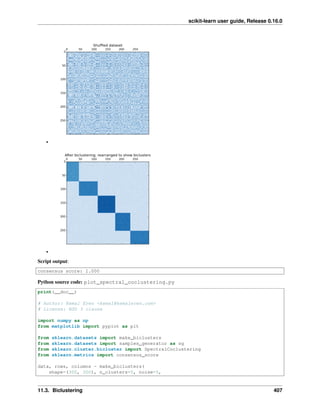
11.3 Biclustering . . . . . . . . . . . . . . . . . . . . . . . . . . . . . . . . . . . . . . . . . . . . . . . . 401
11.4 Calibration . . . . . . . . . . . . . . . . . . . . . . . . . . . . . . . . . . . . . . . . . . . . . . . . 410
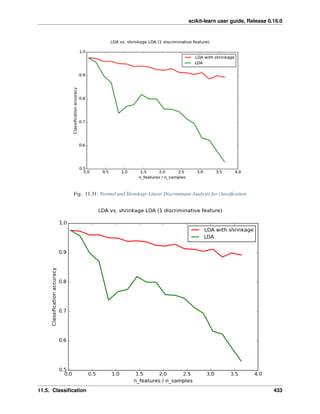
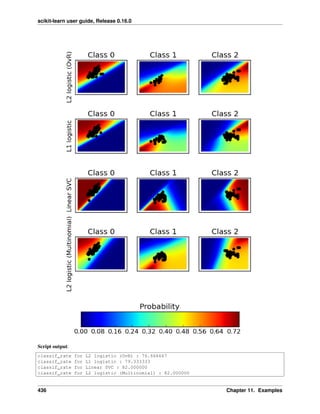
11.5 Classification . . . . . . . . . . . . . . . . . . . . . . . . . . . . . . . . . . . . . . . . . . . . . . . 425
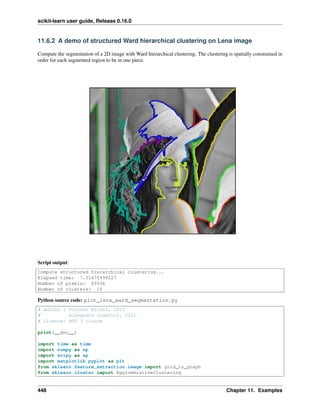
11.6 Clustering . . . . . . . . . . . . . . . . . . . . . . . . . . . . . . . . . . . . . . . . . . . . . . . . 441
11.7 Covariance estimation . . . . . . . . . . . . . . . . . . . . . . . . . . . . . . . . . . . . . . . . . . 507
11.8 Cross decomposition . . . . . . . . . . . . . . . . . . . . . . . . . . . . . . . . . . . . . . . . . . . 527
11.9 Dataset examples . . . . . . . . . . . . . . . . . . . . . . . . . . . . . . . . . . . . . . . . . . . . . 531
11.10 Decomposition . . . . . . . . . . . . . . . . . . . . . . . . . . . . . . . . . . . . . . . . . . . . . . 539
11.11 Ensemble methods . . . . . . . . . . . . . . . . . . . . . . . . . . . . . . . . . . . . . . . . . . . . 571
11.12 Tutorial exercises . . . . . . . . . . . . . . . . . . . . . . . . . . . . . . . . . . . . . . . . . . . . . 611
11.13 Feature Selection . . . . . . . . . . . . . . . . . . . . . . . . . . . . . . . . . . . . . . . . . . . . . 619
11.14 Gaussian Process for Machine Learning . . . . . . . . . . . . . . . . . . . . . . . . . . . . . . . . . 629
11.15 Generalized Linear Models . . . . . . . . . . . . . . . . . . . . . . . . . . . . . . . . . . . . . . . 636
11.16 Manifold learning . . . . . . . . . . . . . . . . . . . . . . . . . . . . . . . . . . . . . . . . . . . . 705
11.17 Gaussian Mixture Models . . . . . . . . . . . . . . . . . . . . . . . . . . . . . . . . . . . . . . . . 724
11.18 Model Selection . . . . . . . . . . . . . . . . . . . . . . . . . . . . . . . . . . . . . . . . . . . . . 737
11.19 Nearest Neighbors . . . . . . . . . . . . . . . . . . . . . . . . . . . . . . . . . . . . . . . . . . . . 764
11.20 Neural Networks . . . . . . . . . . . . . . . . . . . . . . . . . . . . . . . . . . . . . . . . . . . . . 787
11.21 Semi Supervised Classification . . . . . . . . . . . . . . . . . . . . . . . . . . . . . . . . . . . . . 791
11.22 Support Vector Machines . . . . . . . . . . . . . . . . . . . . . . . . . . . . . . . . . . . . . . . . 804
11.23 Working with text documents . . . . . . . . . . . . . . . . . . . . . . . . . . . . . . . . . . . . . . 837
11.24 Decision Trees . . . . . . . . . . . . . . . . . . . . . . . . . . . . . . . . . . . . . . . . . . . . . . 851
12 Frequently Asked Questions 859
12.1 What is the project name (a lot of people get it wrong)? . . . . . . . . . . . . . . . . . . . . . . . . 859
12.2 How do you pronounce the project name? . . . . . . . . . . . . . . . . . . . . . . . . . . . . . . . . 859
12.3 Why scikit? . . . . . . . . . . . . . . . . . . . . . . . . . . . . . . . . . . . . . . . . . . . . . . . . 859
12.4 How can I contribute to scikit-learn? . . . . . . . . . . . . . . . . . . . . . . . . . . . . . . . . . . . 859
12.5 Can I add this new algorithm that I (or someone else) just published? . . . . . . . . . . . . . . . . . 859
12.6 Can I add this classical algorithm from the 80s? . . . . . . . . . . . . . . . . . . . . . . . . . . . . . 860
12.7 Why are you so selective on what algorithms you include in scikit-learn? . . . . . . . . . . . . . . . 860
12.8 Why did you remove HMMs from scikit-learn? . . . . . . . . . . . . . . . . . . . . . . . . . . . . . 860
12.9 Will you add graphical models or sequence prediction to scikit-learn? . . . . . . . . . . . . . . . . . 860
12.10 Will you add GPU support? . . . . . . . . . . . . . . . . . . . . . . . . . . . . . . . . . . . . . . . 860
12.11 Do you support PyPy? . . . . . . . . . . . . . . . . . . . . . . . . . . . . . . . . . . . . . . . . . . 861
12.12 How do I deal with string data (or trees, graphs...)? . . . . . . . . . . . . . . . . . . . . . . . . . . . 861
13 Support 863
13.1 Mailing List . . . . . . . . . . . . . . . . . . . . . . . . . . . . . . . . . . . . . . . . . . . . . . . 863
13.2 User questions . . . . . . . . . . . . . . . . . . . . . . . . . . . . . . . . . . . . . . . . . . . . . . 863
13.3 Bug tracker . . . . . . . . . . . . . . . . . . . . . . . . . . . . . . . . . . . . . . . . . . . . . . . . 863
13.4 IRC . . . . . . . . . . . . . . . . . . . . . . . . . . . . . . . . . . . . . . . . . . . . . . . . . . . . 864
13.5 Documentation resources . . . . . . . . . . . . . . . . . . . . . . . . . . . . . . . . . . . . . . . . 864
14 0.17 865
14.1 Changelog . . . . . . . . . . . . . . . . . . . . . . . . . . . . . . . . . . . . . . . . . . . . . . . . 865
14.2 API changes summary . . . . . . . . . . . . . . . . . . . . . . . . . . . . . . . . . . . . . . . . . . 865
15 0.16 867
15.1 Highlights . . . . . . . . . . . . . . . . . . . . . . . . . . . . . . . . . . . . . . . . . . . . . . . . 867
15.2 Changelog . . . . . . . . . . . . . . . . . . . . . . . . . . . . . . . . . . . . . . . . . . . . . . . . 867
15.3 API changes summary . . . . . . . . . . . . . . . . . . . . . . . . . . . . . . . . . . . . . . . . . . 871
16 0.15.2 873
16.1 Bug fixes . . . . . . . . . . . . . . . . . . . . . . . . . . . . . . . . . . . . . . . . . . . . . . . . . 873
iii
17 0.15.1 875
17.1 Bug fixes . . . . . . . . . . . . . . . . . . . . . . . . . . . . . . . . . . . . . . . . . . . . . . . . . 875
18 0.15 877
18.1 Highlights . . . . . . . . . . . . . . . . . . . . . . . . . . . . . . . . . . . . . . . . . . . . . . . . 877
18.2 Changelog . . . . . . . . . . . . . . . . . . . . . . . . . . . . . . . . . . . . . . . . . . . . . . . . 877
18.3 API changes summary . . . . . . . . . . . . . . . . . . . . . . . . . . . . . . . . . . . . . . . . . . 880
18.4 People . . . . . . . . . . . . . . . . . . . . . . . . . . . . . . . . . . . . . . . . . . . . . . . . . . 881
19 0.14 887
19.1 Changelog . . . . . . . . . . . . . . . . . . . . . . . . . . . . . . . . . . . . . . . . . . . . . . . . 887
19.2 API changes summary . . . . . . . . . . . . . . . . . . . . . . . . . . . . . . . . . . . . . . . . . . 889
19.3 People . . . . . . . . . . . . . . . . . . . . . . . . . . . . . . . . . . . . . . . . . . . . . . . . . . 890
20 0.13.1 895
20.1 Changelog . . . . . . . . . . . . . . . . . . . . . . . . . . . . . . . . . . . . . . . . . . . . . . . . 895
20.2 People . . . . . . . . . . . . . . . . . . . . . . . . . . . . . . . . . . . . . . . . . . . . . . . . . . 895
21 0.13 897
21.1 New Estimator Classes . . . . . . . . . . . . . . . . . . . . . . . . . . . . . . . . . . . . . . . . . . 897
21.2 Changelog . . . . . . . . . . . . . . . . . . . . . . . . . . . . . . . . . . . . . . . . . . . . . . . . 898
21.3 API changes summary . . . . . . . . . . . . . . . . . . . . . . . . . . . . . . . . . . . . . . . . . . 899
21.4 People . . . . . . . . . . . . . . . . . . . . . . . . . . . . . . . . . . . . . . . . . . . . . . . . . . 900
22 0.12.1 903
22.1 Changelog . . . . . . . . . . . . . . . . . . . . . . . . . . . . . . . . . . . . . . . . . . . . . . . . 903
22.2 People . . . . . . . . . . . . . . . . . . . . . . . . . . . . . . . . . . . . . . . . . . . . . . . . . . 903
23 0.12 905
23.1 Changelog . . . . . . . . . . . . . . . . . . . . . . . . . . . . . . . . . . . . . . . . . . . . . . . . 905
23.2 API changes summary . . . . . . . . . . . . . . . . . . . . . . . . . . . . . . . . . . . . . . . . . . 906
23.3 People . . . . . . . . . . . . . . . . . . . . . . . . . . . . . . . . . . . . . . . . . . . . . . . . . . 906
24 0.11 909
24.1 Changelog . . . . . . . . . . . . . . . . . . . . . . . . . . . . . . . . . . . . . . . . . . . . . . . . 909
24.2 API changes summary . . . . . . . . . . . . . . . . . . . . . . . . . . . . . . . . . . . . . . . . . . 910
24.3 People . . . . . . . . . . . . . . . . . . . . . . . . . . . . . . . . . . . . . . . . . . . . . . . . . . 911
25 0.10 913
25.1 Changelog . . . . . . . . . . . . . . . . . . . . . . . . . . . . . . . . . . . . . . . . . . . . . . . . 913
25.2 API changes summary . . . . . . . . . . . . . . . . . . . . . . . . . . . . . . . . . . . . . . . . . . 914
25.3 People . . . . . . . . . . . . . . . . . . . . . . . . . . . . . . . . . . . . . . . . . . . . . . . . . . 915
26 0.9 917
26.1 Changelog . . . . . . . . . . . . . . . . . . . . . . . . . . . . . . . . . . . . . . . . . . . . . . . . 918
26.2 API changes summary . . . . . . . . . . . . . . . . . . . . . . . . . . . . . . . . . . . . . . . . . . 919
26.3 People . . . . . . . . . . . . . . . . . . . . . . . . . . . . . . . . . . . . . . . . . . . . . . . . . . 920
27 0.8 923
27.1 Changelog . . . . . . . . . . . . . . . . . . . . . . . . . . . . . . . . . . . . . . . . . . . . . . . . 923
27.2 People . . . . . . . . . . . . . . . . . . . . . . . . . . . . . . . . . . . . . . . . . . . . . . . . . . 924
28 0.7 925
28.1 Changelog . . . . . . . . . . . . . . . . . . . . . . . . . . . . . . . . . . . . . . . . . . . . . . . . 925
28.2 People . . . . . . . . . . . . . . . . . . . . . . . . . . . . . . . . . . . . . . . . . . . . . . . . . . 926
iv
29 0.6 927
29.1 Changelog . . . . . . . . . . . . . . . . . . . . . . . . . . . . . . . . . . . . . . . . . . . . . . . . 927
29.2 People . . . . . . . . . . . . . . . . . . . . . . . . . . . . . . . . . . . . . . . . . . . . . . . . . . 927
30 0.5 929
30.1 Changelog . . . . . . . . . . . . . . . . . . . . . . . . . . . . . . . . . . . . . . . . . . . . . . . . 929
30.2 New classes . . . . . . . . . . . . . . . . . . . . . . . . . . . . . . . . . . . . . . . . . . . . . . . . 929
30.3 Documentation . . . . . . . . . . . . . . . . . . . . . . . . . . . . . . . . . . . . . . . . . . . . . . 929
30.4 Fixes . . . . . . . . . . . . . . . . . . . . . . . . . . . . . . . . . . . . . . . . . . . . . . . . . . . 929
30.5 Examples . . . . . . . . . . . . . . . . . . . . . . . . . . . . . . . . . . . . . . . . . . . . . . . . . 930
30.6 External dependencies . . . . . . . . . . . . . . . . . . . . . . . . . . . . . . . . . . . . . . . . . . 930
30.7 Removed modules . . . . . . . . . . . . . . . . . . . . . . . . . . . . . . . . . . . . . . . . . . . . 930
30.8 Misc . . . . . . . . . . . . . . . . . . . . . . . . . . . . . . . . . . . . . . . . . . . . . . . . . . . 930
30.9 Authors . . . . . . . . . . . . . . . . . . . . . . . . . . . . . . . . . . . . . . . . . . . . . . . . . . 930
31 0.4 931
31.1 Changelog . . . . . . . . . . . . . . . . . . . . . . . . . . . . . . . . . . . . . . . . . . . . . . . . 931
31.2 Authors . . . . . . . . . . . . . . . . . . . . . . . . . . . . . . . . . . . . . . . . . . . . . . . . . . 931
32 Earlier versions 933
33 External Resources, Videos and Talks 935
33.1 New to Scientific Python? . . . . . . . . . . . . . . . . . . . . . . . . . . . . . . . . . . . . . . . . 935
33.2 External Tutorials . . . . . . . . . . . . . . . . . . . . . . . . . . . . . . . . . . . . . . . . . . . . 935
33.3 Videos . . . . . . . . . . . . . . . . . . . . . . . . . . . . . . . . . . . . . . . . . . . . . . . . . . 935
34 About us 937
34.1 History . . . . . . . . . . . . . . . . . . . . . . . . . . . . . . . . . . . . . . . . . . . . . . . . . . 937
34.2 People . . . . . . . . . . . . . . . . . . . . . . . . . . . . . . . . . . . . . . . . . . . . . . . . . . 937
34.3 Citing scikit-learn . . . . . . . . . . . . . . . . . . . . . . . . . . . . . . . . . . . . . . . . . . . . 938
34.4 Artwork . . . . . . . . . . . . . . . . . . . . . . . . . . . . . . . . . . . . . . . . . . . . . . . . . . 938
34.5 Funding . . . . . . . . . . . . . . . . . . . . . . . . . . . . . . . . . . . . . . . . . . . . . . . . . . 938
34.6 Infrastructure support . . . . . . . . . . . . . . . . . . . . . . . . . . . . . . . . . . . . . . . . . . 940
35 Documentation of scikit-learn 0.17.dev0 941
36 Dataset loading utilities 943
36.1 General dataset API . . . . . . . . . . . . . . . . . . . . . . . . . . . . . . . . . . . . . . . . . . . 943
36.2 Toy datasets . . . . . . . . . . . . . . . . . . . . . . . . . . . . . . . . . . . . . . . . . . . . . . . 943
36.3 Sample images . . . . . . . . . . . . . . . . . . . . . . . . . . . . . . . . . . . . . . . . . . . . . . 944
36.4 Sample generators . . . . . . . . . . . . . . . . . . . . . . . . . . . . . . . . . . . . . . . . . . . . 944
36.5 Datasets in svmlight / libsvm format . . . . . . . . . . . . . . . . . . . . . . . . . . . . . . . . . . . 946
36.6 The Olivetti faces dataset . . . . . . . . . . . . . . . . . . . . . . . . . . . . . . . . . . . . . . . . . 947
36.7 The 20 newsgroups text dataset . . . . . . . . . . . . . . . . . . . . . . . . . . . . . . . . . . . . . 947
36.8 Downloading datasets from the mldata.org repository . . . . . . . . . . . . . . . . . . . . . . . . . . 950
36.9 The Labeled Faces in the Wild face recognition dataset . . . . . . . . . . . . . . . . . . . . . . . . . 951
36.10 Forest covertypes . . . . . . . . . . . . . . . . . . . . . . . . . . . . . . . . . . . . . . . . . . . . . 953
37 Forest covertypes 955
38 The Labeled Faces in the Wild face recognition dataset 957
38.1 Usage . . . . . . . . . . . . . . . . . . . . . . . . . . . . . . . . . . . . . . . . . . . . . . . . . . . 957
38.2 Examples . . . . . . . . . . . . . . . . . . . . . . . . . . . . . . . . . . . . . . . . . . . . . . . . . 958
39 Downloading datasets from the mldata.org repository 959
v
40 The Olivetti faces dataset 961
41 The 20 newsgroups text dataset 963
41.1 Usage . . . . . . . . . . . . . . . . . . . . . . . . . . . . . . . . . . . . . . . . . . . . . . . . . . . 963
41.2 Converting text to vectors . . . . . . . . . . . . . . . . . . . . . . . . . . . . . . . . . . . . . . . . 964
41.3 Filtering text for more realistic training . . . . . . . . . . . . . . . . . . . . . . . . . . . . . . . . . 964
42 Reference 967
42.1 sklearn.base: Base classes and utility functions . . . . . . . . . . . . . . . . . . . . . . . . . . 967
42.2 sklearn.cluster: Clustering . . . . . . . . . . . . . . . . . . . . . . . . . . . . . . . . . . . . 971
42.3 sklearn.cluster.bicluster: Biclustering . . . . . . . . . . . . . . . . . . . . . . . . . . . 971
42.4 sklearn.covariance: Covariance Estimators . . . . . . . . . . . . . . . . . . . . . . . . . . . 976
42.5 sklearn.cross_validation: Cross Validation . . . . . . . . . . . . . . . . . . . . . . . . . 977
42.6 sklearn.datasets: Datasets . . . . . . . . . . . . . . . . . . . . . . . . . . . . . . . . . . . . 1005
42.7 sklearn.decomposition: Matrix Decomposition . . . . . . . . . . . . . . . . . . . . . . . . 1005
42.8 sklearn.dummy: Dummy estimators . . . . . . . . . . . . . . . . . . . . . . . . . . . . . . . . . 1005
42.9 sklearn.ensemble: Ensemble Methods . . . . . . . . . . . . . . . . . . . . . . . . . . . . . . 1010
42.10 sklearn.feature_extraction: Feature Extraction . . . . . . . . . . . . . . . . . . . . . . . 1013
42.11 sklearn.feature_selection: Feature Selection . . . . . . . . . . . . . . . . . . . . . . . . 1035
42.12 sklearn.gaussian_process: Gaussian Processes . . . . . . . . . . . . . . . . . . . . . . . . 1038
42.13 sklearn.grid_search: Grid Search . . . . . . . . . . . . . . . . . . . . . . . . . . . . . . . . 1041
42.14 sklearn.isotonic: Isotonic regression . . . . . . . . . . . . . . . . . . . . . . . . . . . . . . 1058
42.15 sklearn.kernel_approximation Kernel Approximation . . . . . . . . . . . . . . . . . . . 1063
42.16 sklearn.kernel_ridge Kernel Ridge Regression . . . . . . . . . . . . . . . . . . . . . . . . 1071
42.17 sklearn.lda: Linear Discriminant Analysis . . . . . . . . . . . . . . . . . . . . . . . . . . . . . 1074
42.18 sklearn.learning_curve Learning curve evaluation . . . . . . . . . . . . . . . . . . . . . . 1079
42.19 sklearn.linear_model: Generalized Linear Models . . . . . . . . . . . . . . . . . . . . . . . 1084
42.20 sklearn.manifold: Manifold Learning . . . . . . . . . . . . . . . . . . . . . . . . . . . . . . 1085
42.21 sklearn.metrics: Metrics . . . . . . . . . . . . . . . . . . . . . . . . . . . . . . . . . . . . . 1085
42.22 sklearn.mixture: Gaussian Mixture Models . . . . . . . . . . . . . . . . . . . . . . . . . . . 1093
42.23 sklearn.multiclass: Multiclass and multilabel classification . . . . . . . . . . . . . . . . . . 1093
42.24 sklearn.naive_bayes: Naive Bayes . . . . . . . . . . . . . . . . . . . . . . . . . . . . . . . 1101
42.25 sklearn.neighbors: Nearest Neighbors . . . . . . . . . . . . . . . . . . . . . . . . . . . . . . 1116
42.26 sklearn.neural_network: Neural network models . . . . . . . . . . . . . . . . . . . . . . . 1116
42.27 sklearn.calibration: Probability Calibration . . . . . . . . . . . . . . . . . . . . . . . . . . 1116
42.28 sklearn.cross_decomposition: Cross decomposition . . . . . . . . . . . . . . . . . . . . 1120
42.29 sklearn.pipeline: Pipeline . . . . . . . . . . . . . . . . . . . . . . . . . . . . . . . . . . . . 1122
42.30 sklearn.preprocessing: Preprocessing and Normalization . . . . . . . . . . . . . . . . . . . 1134
42.31 sklearn.qda: Quadratic Discriminant Analysis . . . . . . . . . . . . . . . . . . . . . . . . . . . 1134
42.32 sklearn.random_projection: Random projection . . . . . . . . . . . . . . . . . . . . . . . 1137
42.33 sklearn.semi_supervised Semi-Supervised Learning . . . . . . . . . . . . . . . . . . . . . 1145
42.34 sklearn.svm: Support Vector Machines . . . . . . . . . . . . . . . . . . . . . . . . . . . . . . . 1146
42.35 sklearn.tree: Decision Trees . . . . . . . . . . . . . . . . . . . . . . . . . . . . . . . . . . . . 1149
42.36 sklearn.utils: Utilities . . . . . . . . . . . . . . . . . . . . . . . . . . . . . . . . . . . . . . . 1149
43 Who is using scikit-learn? 1155
43.1 Spotify . . . . . . . . . . . . . . . . . . . . . . . . . . . . . . . . . . . . . . . . . . . . . . . . . . 1155
43.2 Inria . . . . . . . . . . . . . . . . . . . . . . . . . . . . . . . . . . . . . . . . . . . . . . . . . . . . 1155
43.3 Evernote . . . . . . . . . . . . . . . . . . . . . . . . . . . . . . . . . . . . . . . . . . . . . . . . . 1156
43.4 Télécom ParisTech . . . . . . . . . . . . . . . . . . . . . . . . . . . . . . . . . . . . . . . . . . . . 1156
43.5 AWeber . . . . . . . . . . . . . . . . . . . . . . . . . . . . . . . . . . . . . . . . . . . . . . . . . . 1157
43.6 Yhat . . . . . . . . . . . . . . . . . . . . . . . . . . . . . . . . . . . . . . . . . . . . . . . . . . . 1157
43.7 Rangespan . . . . . . . . . . . . . . . . . . . . . . . . . . . . . . . . . . . . . . . . . . . . . . . . 1157
43.8 Birchbox . . . . . . . . . . . . . . . . . . . . . . . . . . . . . . . . . . . . . . . . . . . . . . . . . 1158
vi
43.9 Bestofmedia Group . . . . . . . . . . . . . . . . . . . . . . . . . . . . . . . . . . . . . . . . . . . . 1158
43.10 Change.org . . . . . . . . . . . . . . . . . . . . . . . . . . . . . . . . . . . . . . . . . . . . . . . . 1159
43.11 PHIMECA Engineering . . . . . . . . . . . . . . . . . . . . . . . . . . . . . . . . . . . . . . . . . 1159
43.12 HowAboutWe . . . . . . . . . . . . . . . . . . . . . . . . . . . . . . . . . . . . . . . . . . . . . . 1160
43.13 PeerIndex . . . . . . . . . . . . . . . . . . . . . . . . . . . . . . . . . . . . . . . . . . . . . . . . . 1160
43.14 DataRobot . . . . . . . . . . . . . . . . . . . . . . . . . . . . . . . . . . . . . . . . . . . . . . . . 1161
43.15 OkCupid . . . . . . . . . . . . . . . . . . . . . . . . . . . . . . . . . . . . . . . . . . . . . . . . . 1161
43.16 Lovely . . . . . . . . . . . . . . . . . . . . . . . . . . . . . . . . . . . . . . . . . . . . . . . . . . 1162
43.17 Data Publica . . . . . . . . . . . . . . . . . . . . . . . . . . . . . . . . . . . . . . . . . . . . . . . 1162
43.18 Machinalis . . . . . . . . . . . . . . . . . . . . . . . . . . . . . . . . . . . . . . . . . . . . . . . . 1163
43.19 solido . . . . . . . . . . . . . . . . . . . . . . . . . . . . . . . . . . . . . . . . . . . . . . . . . . . 1163
44 Contributing 1165
44.1 Submitting a bug report . . . . . . . . . . . . . . . . . . . . . . . . . . . . . . . . . . . . . . . . . 1165
44.2 Retrieving the latest code . . . . . . . . . . . . . . . . . . . . . . . . . . . . . . . . . . . . . . . . 1165
44.3 Contributing code . . . . . . . . . . . . . . . . . . . . . . . . . . . . . . . . . . . . . . . . . . . . 1166
44.4 Other ways to contribute . . . . . . . . . . . . . . . . . . . . . . . . . . . . . . . . . . . . . . . . . 1169
44.5 Coding guidelines . . . . . . . . . . . . . . . . . . . . . . . . . . . . . . . . . . . . . . . . . . . . 1169
44.6 APIs of scikit-learn objects . . . . . . . . . . . . . . . . . . . . . . . . . . . . . . . . . . . . . . . 1172
44.7 Rolling your own estimator . . . . . . . . . . . . . . . . . . . . . . . . . . . . . . . . . . . . . . . 1175
45 Developers’ Tips for Debugging 1179
45.1 Memory errors: debugging Cython with valgrind . . . . . . . . . . . . . . . . . . . . . . . . . . . . 1179
46 Maintainer / core-developer information 1181
46.1 Making a release . . . . . . . . . . . . . . . . . . . . . . . . . . . . . . . . . . . . . . . . . . . . . 1181
47 How to optimize for speed 1183
47.1 Python, Cython or C/C++? . . . . . . . . . . . . . . . . . . . . . . . . . . . . . . . . . . . . . . . . 1183
47.2 Fast matrix multiplications . . . . . . . . . . . . . . . . . . . . . . . . . . . . . . . . . . . . . . . . 1184
47.3 Profiling Python code . . . . . . . . . . . . . . . . . . . . . . . . . . . . . . . . . . . . . . . . . . 1184
47.4 Memory usage profiling . . . . . . . . . . . . . . . . . . . . . . . . . . . . . . . . . . . . . . . . . 1187
47.5 Performance tips for the Cython developer . . . . . . . . . . . . . . . . . . . . . . . . . . . . . . . 1188
47.6 Profiling compiled extensions . . . . . . . . . . . . . . . . . . . . . . . . . . . . . . . . . . . . . . 1189
47.7 Multi-core parallelism using joblib.Parallel . . . . . . . . . . . . . . . . . . . . . . . . . . . 1189
47.8 A sample algorithmic trick: warm restarts for cross validation . . . . . . . . . . . . . . . . . . . . . 1189
48 Utilities for Developers 1191
48.1 Validation Tools . . . . . . . . . . . . . . . . . . . . . . . . . . . . . . . . . . . . . . . . . . . . . 1191
48.2 Efficient Linear Algebra & Array Operations . . . . . . . . . . . . . . . . . . . . . . . . . . . . . . 1192
48.3 Efficient Random Sampling . . . . . . . . . . . . . . . . . . . . . . . . . . . . . . . . . . . . . . . 1192
48.4 Efficient Routines for Sparse Matrices . . . . . . . . . . . . . . . . . . . . . . . . . . . . . . . . . . 1192
48.5 Graph Routines . . . . . . . . . . . . . . . . . . . . . . . . . . . . . . . . . . . . . . . . . . . . . . 1193
48.6 Backports . . . . . . . . . . . . . . . . . . . . . . . . . . . . . . . . . . . . . . . . . . . . . . . . . 1193
48.7 Testing Functions . . . . . . . . . . . . . . . . . . . . . . . . . . . . . . . . . . . . . . . . . . . . . 1194
48.8 Multiclass and multilabel utility function . . . . . . . . . . . . . . . . . . . . . . . . . . . . . . . . 1194
48.9 Helper Functions . . . . . . . . . . . . . . . . . . . . . . . . . . . . . . . . . . . . . . . . . . . . . 1194
48.10 Hash Functions . . . . . . . . . . . . . . . . . . . . . . . . . . . . . . . . . . . . . . . . . . . . . . 1194
48.11 Warnings and Exceptions . . . . . . . . . . . . . . . . . . . . . . . . . . . . . . . . . . . . . . . . 1195
49 Installing scikit-learn 1197
49.1 Installing an official release . . . . . . . . . . . . . . . . . . . . . . . . . . . . . . . . . . . . . . . 1197
49.2 Third party distributions of scikit-learn . . . . . . . . . . . . . . . . . . . . . . . . . . . . . . . . . 1199
49.3 Building on windows . . . . . . . . . . . . . . . . . . . . . . . . . . . . . . . . . . . . . . . . . . . 1200
49.4 Bleeding Edge . . . . . . . . . . . . . . . . . . . . . . . . . . . . . . . . . . . . . . . . . . . . . . 1202
vii
49.5 Testing . . . . . . . . . . . . . . . . . . . . . . . . . . . . . . . . . . . . . . . . . . . . . . . . . . 1202
50 An introduction to machine learning with scikit-learn 1205
50.1 Machine learning: the problem setting . . . . . . . . . . . . . . . . . . . . . . . . . . . . . . . . . . 1205
50.2 Loading an example dataset . . . . . . . . . . . . . . . . . . . . . . . . . . . . . . . . . . . . . . . 1206
50.3 Learning and predicting . . . . . . . . . . . . . . . . . . . . . . . . . . . . . . . . . . . . . . . . . 1207
50.4 Model persistence . . . . . . . . . . . . . . . . . . . . . . . . . . . . . . . . . . . . . . . . . . . . 1207
51 Choosing the right estimator 1209
Bibliography 1211
Python Module Index 1213
Python Module Index 1215
viii
scikit-learn user guide, Release 0.16.0
CONTENTS 1
scikit-learn user guide, Release 0.16.0
2 CONTENTS
CHAPTER
ONE
AN INTRODUCTION TO MACHINE LEARNING WITH SCIKIT-LEARN
Section contents
In this section, we introduce the machine learning vocabulary that we use throughout scikit-learn and give a
simple learning example.
1.1 Machine learning: the problem setting
In general, a learning problem considers a set of n samples of data and then tries to predict properties of unknown data.
If each sample is more than a single number and, for instance, a multi-dimensional entry (aka multivariate data), is it
said to have several attributes or features.
We can separate learning problems in a few large categories:
• supervised learning, in which the data comes with additional attributes that we want to predict (Click here to go
to the scikit-learn supervised learning page).This problem can be either:
– classification: samples belong to two or more classes and we want to learn from already labeled data how
to predict the class of unlabeled data. An example of classification problem would be the handwritten digit
recognition example, in which the aim is to assign each input vector to one of a finite number of discrete
categories. Another way to think of classification is as a discrete (as opposed to continuous) form of
supervised learning where one has a limited number of categories and for each of the n samples provided,
one is to try to label them with the correct category or class.
– regression: if the desired output consists of one or more continuous variables, then the task is called
regression. An example of a regression problem would be the prediction of the length of a salmon as a
function of its age and weight.
• unsupervised learning, in which the training data consists of a set of input vectors x without any corresponding
target values. The goal in such problems may be to discover groups of similar examples within the data, where
it is called clustering, or to determine the distribution of data within the input space, known as density estima-
tion, or to project the data from a high-dimensional space down to two or three dimensions for the purpose of
visualization (Click here to go to the Scikit-Learn unsupervised learning page).
Training set and testing set
Machine learning is about learning some properties of a data set and applying them to new data. This is why a
common practice in machine learning to evaluate an algorithm is to split the data at hand into two sets, one that
we call the training set on which we learn data properties and one that we call the testing set on which we test
these properties.
3
scikit-learn user guide, Release 0.16.0
1.2 Loading an example dataset
scikit-learn comes with a few standard datasets, for instance the iris and digits datasets for classification and the boston
house prices dataset for regression.
In the following, we start a Python interpreter from our shell and then load the iris and digits datasets. Our
notational convention is that $ denotes the shell prompt while >>> denotes the Python interpreter prompt:
$ python
>>> from sklearn import datasets
>>> iris = datasets.load_iris()
>>> digits = datasets.load_digits()
A dataset is a dictionary-like object that holds all the data and some metadata about the data. This data is stored in
the .data member, which is a n_samples, n_features array. In the case of supervised problem, one or more
response variables are stored in the .target member. More details on the different datasets can be found in the
dedicated section.
For instance, in the case of the digits dataset, digits.data gives access to the features that can be used to classify
the digits samples:
>>> print(digits.data)
[[ 0. 0. 5. ..., 0. 0. 0.]
[ 0. 0. 0. ..., 10. 0. 0.]
[ 0. 0. 0. ..., 16. 9. 0.]
...,
[ 0. 0. 1. ..., 6. 0. 0.]
[ 0. 0. 2. ..., 12. 0. 0.]
[ 0. 0. 10. ..., 12. 1. 0.]]
and digits.target gives the ground truth for the digit dataset, that is the number corresponding to each digit
image that we are trying to learn:
>>> digits.target
array([0, 1, 2, ..., 8, 9, 8])
Shape of the data arrays
The data is always a 2D array, shape (n_samples, n_features), although the original data may have
had a different shape. In the case of the digits, each original sample is an image of shape (8, 8) and can be
accessed using:
>>> digits.images[0]
array([[ 0., 0., 5., 13., 9., 1., 0., 0.],
[ 0., 0., 13., 15., 10., 15., 5., 0.],
[ 0., 3., 15., 2., 0., 11., 8., 0.],
[ 0., 4., 12., 0., 0., 8., 8., 0.],
[ 0., 5., 8., 0., 0., 9., 8., 0.],
[ 0., 4., 11., 0., 1., 12., 7., 0.],
[ 0., 2., 14., 5., 10., 12., 0., 0.],
[ 0., 0., 6., 13., 10., 0., 0., 0.]])
The simple example on this dataset illustrates how starting from the original problem one can shape the data for
consumption in scikit-learn.
4 Chapter 1. An introduction to machine learning with scikit-learn
scikit-learn user guide, Release 0.16.0
1.3 Learning and predicting
In the case of the digits dataset, the task is to predict, given an image, which digit it represents. We are given samples
of each of the 10 possible classes (the digits zero through nine) on which we fit an estimator to be able to predict the
classes to which unseen samples belong.
In scikit-learn, an estimator for classification is a Python object that implements the methods fit(X, y) and
predict(T).
An example of an estimator is the class sklearn.svm.SVC that implements support vector classification. The
constructor of an estimator takes as arguments the parameters of the model, but for the time being, we will consider
the estimator as a black box:
>>> from sklearn import svm
>>> clf = svm.SVC(gamma=0.001, C=100.)
Choosing the parameters of the model
In this example we set the value of gamma manually. It is possible to automatically find good values for the
parameters by using tools such as grid search and cross validation.
We call our estimator instance clf, as it is a classifier. It now must be fitted to the model, that is, it must learn from
the model. This is done by passing our training set to the fit method. As a training set, let us use all the images of
our dataset apart from the last one. We select this training set with the [:-1] Python syntax, which produces a new
array that contains all but the last entry of digits.data:
>>> clf.fit(digits.data[:-1], digits.target[:-1])
SVC(C=100.0, cache_size=200, class_weight=None, coef0=0.0, degree=3,
gamma=0.001, kernel='rbf', max_iter=-1, probability=False,
random_state=None, shrinking=True, tol=0.001, verbose=False)
Now you can predict new values, in particular, we can ask to the classifier what is the digit of our last image in the
digits dataset, which we have not used to train the classifier:
>>> clf.predict(digits.data[-1])
array([8])
The corresponding image is the following: As you can see, it is a challenging task: the
images are of poor resolution. Do you agree with the classifier?
A complete example of this classification problem is available as an example that you can run and study: Recognizing
hand-written digits.
1.4 Model persistence
It is possible to save a model in the scikit by using Python’s built-in persistence model, namely pickle:
1.3. Learning and predicting 5
scikit-learn user guide, Release 0.16.0
>>> from sklearn import svm
>>> from sklearn import datasets
>>> clf = svm.SVC()
>>> iris = datasets.load_iris()
>>> X, y = iris.data, iris.target
>>> clf.fit(X, y)
SVC(C=1.0, cache_size=200, class_weight=None, coef0=0.0, degree=3, gamma=0.0,
kernel='rbf', max_iter=-1, probability=False, random_state=None,
shrinking=True, tol=0.001, verbose=False)
>>> import pickle
>>> s = pickle.dumps(clf)
>>> clf2 = pickle.loads(s)
>>> clf2.predict(X[0])
array([0])
>>> y[0]
0
In the specific case of the scikit, it may be more interesting to use joblib’s replacement of pickle (joblib.dump &
joblib.load), which is more efficient on big data, but can only pickle to the disk and not to a string:
>>> from sklearn.externals import joblib
>>> joblib.dump(clf, 'filename.pkl')
Later you can load back the pickled model (possibly in another Python process) with:
>>> clf = joblib.load('filename.pkl')
Note: joblib.dump returns a list of filenames. Each individual numpy array contained in the clf object is serialized
as a separate file on the filesystem. All files are required in the same folder when reloading the model with joblib.load.
Note that pickle has some security and maintainability issues. Please refer to section Model persistence for more
detailed information about model persistence with scikit-learn.
6 Chapter 1. An introduction to machine learning with scikit-learn
CHAPTER
TWO
A TUTORIAL ON STATISTICAL-LEARNING FOR SCIENTIFIC DATA
PROCESSING
Statistical learning
Machine learning is a technique with a growing importance, as the size of the datasets experimental sciences
are facing is rapidly growing. Problems it tackles range from building a prediction function linking different
observations, to classifying observations, or learning the structure in an unlabeled dataset.
This tutorial will explore statistical learning, the use of machine learning techniques with the goal of statistical
inference: drawing conclusions on the data at hand.
Scikit-learn is a Python module integrating classic machine learning algorithms in the tightly-knit world of
scientific Python packages (NumPy, SciPy, matplotlib).
2.1 Statistical learning: the setting and the estimator object in scikit-
learn
2.1.1 Datasets
Scikit-learn deals with learning information from one or more datasets that are represented as 2D arrays. They can be
understood as a list of multi-dimensional observations. We say that the first axis of these arrays is the samples axis,
while the second is the features axis.
A simple example shipped with the scikit: iris dataset
>>> from sklearn import datasets
>>> iris = datasets.load_iris()
>>> data = iris.data
>>> data.shape
(150, 4)
It is made of 150 observations of irises, each described by 4 features: their sepal and petal length and width, as
detailed in iris.DESCR.
When the data is not initially in the (n_samples, n_features) shape, it needs to be preprocessed in order to
be used by scikit-learn.
7
scikit-learn user guide, Release 0.16.0
An example of reshaping data would be the digits dataset
The digits dataset is made of 1797 8x8 images of hand-written digits
>>> digits = datasets.load_digits()
>>> digits.images.shape
(1797, 8, 8)
>>> import pylab as pl
>>> pl.imshow(digits.images[-1], cmap=pl.cm.gray_r)
<matplotlib.image.AxesImage object at ...>
To use this dataset with the scikit, we transform each 8x8 image into a feature vector of length 64
>>> data = digits.images.reshape((digits.images.shape[0], -1))
2.1.2 Estimators objects
Fitting data: the main API implemented by scikit-learn is that of the estimator. An estimator is any object that learns
from data; it may be a classification, regression or clustering algorithm or a transformer that extracts/filters useful
features from raw data.
All estimator objects expose a fit method that takes a dataset (usually a 2-d array):
>>> estimator.fit(data)
Estimator parameters: All the parameters of an estimator can be set when it is instantiated or by modifying the
corresponding attribute:
>>> estimator = Estimator(param1=1, param2=2)
>>> estimator.param1
1
Estimated parameters: When data is fitted with an estimator, parameters are estimated from the data at hand. All the
estimated parameters are attributes of the estimator object ending by an underscore:
>>> estimator.estimated_param_
2.2 Supervised learning: predicting an output variable from high-
dimensional observations
8 Chapter 2. A tutorial on statistical-learning for scientific data processing
scikit-learn user guide, Release 0.16.0
The problem solved in supervised learning
Supervised learning consists in learning the link between two datasets: the observed data X and an external
variable y that we are trying to predict, usually called “target” or “labels”. Most often, y is a 1D array of length
n_samples.
All supervised estimators in scikit-learn implement a fit(X, y) method to fit the model and a predict(X)
method that, given unlabeled observations X, returns the predicted labels y.
Vocabulary: classification and regression
If the prediction task is to classify the observations in a set of finite labels, in other words to “name” the objects
observed, the task is said to be a classification task. On the other hand, if the goal is to predict a continuous
target variable, it is said to be a regression task.
When doing classification in scikit-learn, y is a vector of integers or strings.
Note: See the Introduction to machine learning with scikit-learn Tutorial for a quick run-through on the basic
machine learning vocabulary used within scikit-learn.
2.2.1 Nearest neighbor and the curse of dimensionality
Classifying irises:
The iris dataset is a classification task
consisting in identifying 3 different types of irises (Setosa, Versicolour, and Virginica) from their petal and sepal
length and width:
>>> import numpy as np
>>> from sklearn import datasets
>>> iris = datasets.load_iris()
>>> iris_X = iris.data
>>> iris_y = iris.target
>>> np.unique(iris_y)
array([0, 1, 2])
2.2. Supervised learning: predicting an output variable from high-dimensional observations 9
scikit-learn user guide, Release 0.16.0
k-Nearest neighbors classifier
The simplest possible classifier is the nearest neighbor: given a new observation X_test, find in the training set (i.e.
the data used to train the estimator) the observation with the closest feature vector. (Please see the Nearest Neighbors
section of the online Scikit-learn documentation for more information about this type of classifier.)
Training set and testing set
While experimenting with any learning algorithm, it is important not to test the prediction of an estimator on the
data used to fit the estimator as this would not be evaluating the performance of the estimator on new data. This
is why datasets are often split into train and test data.
KNN (k nearest neighbors) classification example:
>>> # Split iris data in train and test data
>>> # A random permutation, to split the data randomly
>>> np.random.seed(0)
>>> indices = np.random.permutation(len(iris_X))
>>> iris_X_train = iris_X[indices[:-10]]
>>> iris_y_train = iris_y[indices[:-10]]
>>> iris_X_test = iris_X[indices[-10:]]
>>> iris_y_test = iris_y[indices[-10:]]
>>> # Create and fit a nearest-neighbor classifier
>>> from sklearn.neighbors import KNeighborsClassifier
>>> knn = KNeighborsClassifier()
>>> knn.fit(iris_X_train, iris_y_train)
KNeighborsClassifier(algorithm='auto', leaf_size=30, metric='minkowski',
metric_params=None, n_neighbors=5, p=2, weights='uniform')
>>> knn.predict(iris_X_test)
array([1, 2, 1, 0, 0, 0, 2, 1, 2, 0])
>>> iris_y_test
array([1, 1, 1, 0, 0, 0, 2, 1, 2, 0])
10 Chapter 2. A tutorial on statistical-learning for scientific data processing
scikit-learn user guide, Release 0.16.0
The curse of dimensionality
For an estimator to be effective, you need the distance between neighboring points to be less than some value 𝑑, which
depends on the problem. In one dimension, this requires on average 𝑛 1/𝑑 points. In the context of the above 𝑘-NN
example, if the data is described by just one feature with values ranging from 0 to 1 and with 𝑛 training observations,
then new data will be no further away than 1/𝑛. Therefore, the nearest neighbor decision rule will be efficient as soon
as 1/𝑛 is small compared to the scale of between-class feature variations.
If the number of features is 𝑝, you now require 𝑛 1/𝑑 𝑝
points. Let’s say that we require 10 points in one dimension:
now 10 𝑝
points are required in 𝑝 dimensions to pave the [0, 1] space. As 𝑝 becomes large, the number of training points
required for a good estimator grows exponentially.
For example, if each point is just a single number (8 bytes), then an effective 𝑘-NN estimator in a paltry 𝑝 20 di-
mensions would require more training data than the current estimated size of the entire internet (±1000 Exabytes or
so).
This is called the curse of dimensionality and is a core problem that machine learning addresses.
2.2.2 Linear model: from regression to sparsity
Diabetes dataset
The diabetes dataset consists of 10 physiological variables (age, sex, weight, blood pressure) measure on 442
patients, and an indication of disease progression after one year:
>>> diabetes = datasets.load_diabetes()
>>> diabetes_X_train = diabetes.data[:-20]
>>> diabetes_X_test = diabetes.data[-20:]
>>> diabetes_y_train = diabetes.target[:-20]
>>> diabetes_y_test = diabetes.target[-20:]
The task at hand is to predict disease progression from physiological variables.
Linear regression
LinearRegression, in it’s simplest form, fits a linear model to the data set by adjusting a set
of parameters in order to make the sum of the squared residuals of the model as small as possible.
Linear models: 𝑦 = 𝑋𝛽 + 𝜖
• 𝑋: data
• 𝑦: target variable
• 𝛽: Coefficients
2.2. Supervised learning: predicting an output variable from high-dimensional observations 11
scikit-learn user guide, Release 0.16.0
• 𝜖: Observation noise
>>> from sklearn import linear_model
>>> regr = linear_model.LinearRegression()
>>> regr.fit(diabetes_X_train, diabetes_y_train)
LinearRegression(copy_X=True, fit_intercept=True, n_jobs=1, normalize=False)
>>> print(regr.coef_)
[ 0.30349955 -237.63931533 510.53060544 327.73698041 -814.13170937
492.81458798 102.84845219 184.60648906 743.51961675 76.09517222]
>>> # The mean square error
>>> np.mean((regr.predict(diabetes_X_test)-diabetes_y_test)**2)
2004.56760268...
>>> # Explained variance score: 1 is perfect prediction
>>> # and 0 means that there is no linear relationship
>>> # between X and Y.
>>> regr.score(diabetes_X_test, diabetes_y_test)
0.5850753022690...
Shrinkage
If there are few data points per dimension, noise in the observations induces high variance:
>>> X = np.c_[ .5, 1].T
>>> y = [.5, 1]
>>> test = np.c_[ 0, 2].T
>>> regr = linear_model.LinearRegression()
>>> import pylab as pl
>>> pl.figure()
>>> np.random.seed(0)
>>> for _ in range(6):
... this_X = .1*np.random.normal(size=(2, 1)) + X
... regr.fit(this_X, y)
... pl.plot(test, regr.predict(test))
... pl.scatter(this_X, y, s=3)
A solution in high-dimensional statistical learning is to shrink the regression coefficients to zero: any
two randomly chosen set of observations are likely to be uncorrelated. This is called Ridge regression:
12 Chapter 2. A tutorial on statistical-learning for scientific data processing
scikit-learn user guide, Release 0.16.0
>>> regr = linear_model.Ridge(alpha=.1)
>>> pl.figure()
>>> np.random.seed(0)
>>> for _ in range(6):
... this_X = .1*np.random.normal(size=(2, 1)) + X
... regr.fit(this_X, y)
... pl.plot(test, regr.predict(test))
... pl.scatter(this_X, y, s=3)
This is an example of bias/variance tradeoff: the larger the ridge alpha parameter, the higher the bias and the lower
the variance.
We can choose alpha to minimize left out error, this time using the diabetes dataset rather than our synthetic data:
>>> alphas = np.logspace(-4, -1, 6)
>>> from __future__ import print_function
>>> print([regr.set_params(alpha=alpha
... ).fit(diabetes_X_train, diabetes_y_train,
... ).score(diabetes_X_test, diabetes_y_test) for alpha in alphas])
[0.5851110683883..., 0.5852073015444..., 0.5854677540698..., 0.5855512036503..., 0.5830717085554...,
Note: Capturing in the fitted parameters noise that prevents the model to generalize to new data is called overfitting.
The bias introduced by the ridge regression is called a regularization.
Sparsity
Fitting only features 1 and 2
2.2. Supervised learning: predicting an output variable from high-dimensional observations 13
scikit-learn user guide, Release 0.16.0
Note: A representation of the full diabetes dataset would involve 11 dimensions (10 feature dimensions and one of
the target variable). It is hard to develop an intuition on such representation, but it may be useful to keep in mind that
it would be a fairly empty space.
We can see that, although feature 2 has a strong coefficient on the full model, it conveys little information on y when
considered with feature 1.
To improve the conditioning of the problem (i.e. mitigating the The curse of dimensionality), it would be interesting
to select only the informative features and set non-informative ones, like feature 2 to 0. Ridge regression will decrease
their contribution, but not set them to zero. Another penalization approach, called Lasso (least absolute shrinkage and
selection operator), can set some coefficients to zero. Such methods are called sparse method and sparsity can be
seen as an application of Occam’s razor: prefer simpler models.
>>> regr = linear_model.Lasso()
>>> scores = [regr.set_params(alpha=alpha
... ).fit(diabetes_X_train, diabetes_y_train
... ).score(diabetes_X_test, diabetes_y_test)
... for alpha in alphas]
>>> best_alpha = alphas[scores.index(max(scores))]
>>> regr.alpha = best_alpha
>>> regr.fit(diabetes_X_train, diabetes_y_train)
Lasso(alpha=0.025118864315095794, copy_X=True, fit_intercept=True,
max_iter=1000, normalize=False, positive=False, precompute=False,
random_state=None, selection='cyclic', tol=0.0001, warm_start=False)
>>> print(regr.coef_)
[ 0. -212.43764548 517.19478111 313.77959962 -160.8303982 -0.
-187.19554705 69.38229038 508.66011217 71.84239008]
Different algorithms for the same problem
Different algorithms can be used to solve the same mathematical problem. For instance the Lasso object
in scikit-learn solves the lasso regression problem using a coordinate decent method, that is efficient on large
datasets. However, scikit-learn also provides the LassoLars object using the LARS algorthm, which is very
efficient for problems in which the weight vector estimated is very sparse (i.e. problems with very few observa-
tions).
14 Chapter 2. A tutorial on statistical-learning for scientific data processing
scikit-learn user guide, Release 0.16.0
Classification
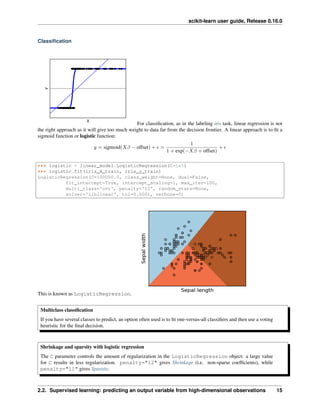
For classification, as in the labeling iris task, linear regression is not
the right approach as it will give too much weight to data far from the decision frontier. A linear approach is to fit a
sigmoid function or logistic function:
𝑦 = sigmoid(𝑋𝛽 − offset) + 𝜖 =
1
1 + exp(−𝑋𝛽 + offset)
+ 𝜖
>>> logistic = linear_model.LogisticRegression(C=1e5)
>>> logistic.fit(iris_X_train, iris_y_train)
LogisticRegression(C=100000.0, class_weight=None, dual=False,
fit_intercept=True, intercept_scaling=1, max_iter=100,
multi_class='ovr', penalty='l2', random_state=None,
solver='liblinear', tol=0.0001, verbose=0)
This is known as LogisticRegression.
Multiclass classification
If you have several classes to predict, an option often used is to fit one-versus-all classifiers and then use a voting
heuristic for the final decision.
Shrinkage and sparsity with logistic regression
The C parameter controls the amount of regularization in the LogisticRegression object: a large value
for C results in less regularization. penalty="l2" gives Shrinkage (i.e. non-sparse coefficients), while
penalty="l1" gives Sparsity.
2.2. Supervised learning: predicting an output variable from high-dimensional observations 15
scikit-learn user guide, Release 0.16.0
Exercise
Try classifying the digits dataset with nearest neighbors and a linear model. Leave out the last 10% and test
prediction performance on these observations.
from sklearn import datasets, neighbors, linear_model
digits = datasets.load_digits()
X_digits = digits.data
y_digits = digits.target
Solution: ../../auto_examples/exercises/digits_classification_exercise.py
2.2.3 Support vector machines (SVMs)
Linear SVMs
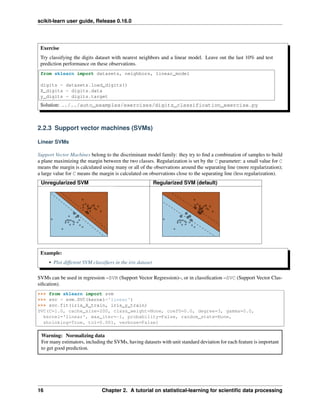
Support Vector Machines belong to the discriminant model family: they try to find a combination of samples to build
a plane maximizing the margin between the two classes. Regularization is set by the C parameter: a small value for C
means the margin is calculated using many or all of the observations around the separating line (more regularization);
a large value for C means the margin is calculated on observations close to the separating line (less regularization).
Unregularized SVM Regularized SVM (default)
Example:
• Plot different SVM classifiers in the iris dataset
SVMs can be used in regression –SVR (Support Vector Regression)–, or in classification –SVC (Support Vector Clas-
sification).
>>> from sklearn import svm
>>> svc = svm.SVC(kernel='linear')
>>> svc.fit(iris_X_train, iris_y_train)
SVC(C=1.0, cache_size=200, class_weight=None, coef0=0.0, degree=3, gamma=0.0,
kernel='linear', max_iter=-1, probability=False, random_state=None,
shrinking=True, tol=0.001, verbose=False)
Warning: Normalizing data
For many estimators, including the SVMs, having datasets with unit standard deviation for each feature is important
to get good prediction.
16 Chapter 2. A tutorial on statistical-learning for scientific data processing
scikit-learn user guide, Release 0.16.0
Using kernels
Classes are not always linearly separable in feature space. The solution is to build a decision function that is not linear
but may be polynomial instead. This is done using the kernel trick that can be seen as creating a decision energy by
positioning kernels on observations:
Linear kernel Polynomial kernel
>>> svc = svm.SVC(kernel='linear') >>> svc = svm.SVC(kernel='poly',
... degree=3)
>>> # degree: polynomial degree
RBF kernel (Radial Basis Function)
>>> svc = svm.SVC(kernel='rbf')
>>> # gamma: inverse of size of
>>> # radial kernel
Interactive example
See the SVM GUI to download svm_gui.py; add data points of both classes with right and left button, fit the
model and change parameters and data.
2.2. Supervised learning: predicting an output variable from high-dimensional observations 17
scikit-learn user guide, Release 0.16.0
Exercise
Try classifying classes 1 and 2 from the iris dataset with SVMs, with the 2 first features. Leave out 10% of each
class and test prediction performance on these observations.
Warning: the classes are ordered, do not leave out the last 10%, you would be testing on only one class.
Hint: You can use the decision_function method on a grid to get intuitions.
iris = datasets.load_iris()
X = iris.data
y = iris.target
X = X[y != 0, :2]
y = y[y != 0]
Solution: ../../auto_examples/exercises/plot_iris_exercise.py
2.3 Model selection: choosing estimators and their parameters
2.3.1 Score, and cross-validated scores
As we have seen, every estimator exposes a score method that can judge the quality of the fit (or the prediction) on
new data. Bigger is better.
>>> from sklearn import datasets, svm
>>> digits = datasets.load_digits()
>>> X_digits = digits.data
>>> y_digits = digits.target
>>> svc = svm.SVC(C=1, kernel='linear')
>>> svc.fit(X_digits[:-100], y_digits[:-100]).score(X_digits[-100:], y_digits[-100:])
0.97999999999999998
18 Chapter 2. A tutorial on statistical-learning for scientific data processing
scikit-learn user guide, Release 0.16.0
To get a better measure of prediction accuracy (which we can use as a proxy for goodness of fit of the model), we can
successively split the data in folds that we use for training and testing:
>>> import numpy as np
>>> X_folds = np.array_split(X_digits, 3)
>>> y_folds = np.array_split(y_digits, 3)
>>> scores = list()
>>> for k in range(3):
... # We use 'list' to copy, in order to 'pop' later on
... X_train = list(X_folds)
... X_test = X_train.pop(k)
... X_train = np.concatenate(X_train)
... y_train = list(y_folds)
... y_test = y_train.pop(k)
... y_train = np.concatenate(y_train)
... scores.append(svc.fit(X_train, y_train).score(X_test, y_test))
>>> print(scores)
[0.93489148580968284, 0.95659432387312182, 0.93989983305509184]
This is called a KFold cross validation
2.3.2 Cross-validation generators
The code above to split data in train and test sets is tedious to write. Scikit-learn exposes cross-validation generators
to generate list of indices for this purpose:
>>> from sklearn import cross_validation
>>> k_fold = cross_validation.KFold(n=6, n_folds=3)
>>> for train_indices, test_indices in k_fold:
... print('Train: %s | test: %s' % (train_indices, test_indices))
Train: [2 3 4 5] | test: [0 1]
Train: [0 1 4 5] | test: [2 3]
Train: [0 1 2 3] | test: [4 5]
The cross-validation can then be implemented easily:
>>> kfold = cross_validation.KFold(len(X_digits), n_folds=3)
>>> [svc.fit(X_digits[train], y_digits[train]).score(X_digits[test], y_digits[test])
... for train, test in kfold]
[0.93489148580968284, 0.95659432387312182, 0.93989983305509184]
To compute the score method of an estimator, the sklearn exposes a helper function:
>>> cross_validation.cross_val_score(svc, X_digits, y_digits, cv=kfold, n_jobs=-1)
array([ 0.93489149, 0.95659432, 0.93989983])
n_jobs=-1 means that the computation will be dispatched on all the CPUs of the computer.
Cross-validation generators
KFold (n, k) StratifiedKFold (y, k) LeaveOneOut
(n)
LeaveOneLabelOut
(labels)
Split it K folds, train on K-1
and then test on left-out
It preserves the class ratios / label
distribution within each fold.
Leave one
observation
out
Takes a label array to
group observations
2.3. Model selection: choosing estimators and their parameters 19
scikit-learn user guide, Release 0.16.0
Exercise
On the digits dataset, plot the cross-validation
score of a SVC estimator with an linear kernel as a function of parameter C (use a logarithmic grid of points,
from 1 to 10).
import numpy as np
from sklearn import cross_validation, datasets, svm
digits = datasets.load_digits()
X = digits.data
y = digits.target
svc = svm.SVC(kernel='linear')
C_s = np.logspace(-10, 0, 10)
Solution: Cross-validation on Digits Dataset Exercise
2.3.3 Grid-search and cross-validated estimators
Grid-search
The sklearn provides an object that, given data, computes the score during the fit of an estimator on a parameter
grid and chooses the parameters to maximize the cross-validation score. This object takes an estimator during the
construction and exposes an estimator API:
>>> from sklearn.grid_search import GridSearchCV
>>> Cs = np.logspace(-6, -1, 10)
>>> clf = GridSearchCV(estimator=svc, param_grid=dict(C=Cs),
... n_jobs=-1)
>>> clf.fit(X_digits[:1000], y_digits[:1000])
GridSearchCV(cv=None,...
>>> clf.best_score_
0.925...
>>> clf.best_estimator_.C
0.0077...
>>> # Prediction performance on test set is not as good as on train set
>>> clf.score(X_digits[1000:], y_digits[1000:])
0.943...
20 Chapter 2. A tutorial on statistical-learning for scientific data processing
scikit-learn user guide, Release 0.16.0
By default, the GridSearchCV uses a 3-fold cross-validation. However, if it detects that a classifier is passed, rather
than a regressor, it uses a stratified 3-fold.
Nested cross-validation
>>> cross_validation.cross_val_score(clf, X_digits, y_digits)
...
array([ 0.938..., 0.963..., 0.944...])
Two cross-validation loops are performed in parallel: one by the GridSearchCV estimator to set gamma and
the other one by cross_val_score to measure the prediction performance of the estimator. The resulting
scores are unbiased estimates of the prediction score on new data.
Warning: You cannot nest objects with parallel computing (n_jobs different than 1).
Cross-validated estimators
Cross-validation to set a parameter can be done more efficiently on an algorithm-by-algorithm basis. This is why for
certain estimators the sklearn exposes Cross-validation: evaluating estimator performance estimators that set their
parameter automatically by cross-validation:
>>> from sklearn import linear_model, datasets
>>> lasso = linear_model.LassoCV()
>>> diabetes = datasets.load_diabetes()
>>> X_diabetes = diabetes.data
>>> y_diabetes = diabetes.target
>>> lasso.fit(X_diabetes, y_diabetes)
LassoCV(alphas=None, copy_X=True, cv=None, eps=0.001, fit_intercept=True,
max_iter=1000, n_alphas=100, n_jobs=1, normalize=False, positive=False,
precompute='auto', random_state=None, selection='cyclic', tol=0.0001,
verbose=False)
>>> # The estimator chose automatically its lambda:
>>> lasso.alpha_
0.01229...
These estimators are called similarly to their counterparts, with ‘CV’ appended to their name.
Exercise
On the diabetes dataset, find the optimal regularization parameter alpha.
Bonus: How much can you trust the selection of alpha?
from sklearn import cross_validation, datasets, linear_model
diabetes = datasets.load_diabetes()
X = diabetes.data[:150]
y = diabetes.target[:150]
lasso = linear_model.Lasso()
alphas = np.logspace(-4, -.5, 30)
Solution: Cross-validation on diabetes Dataset Exercise
2.3. Model selection: choosing estimators and their parameters 21
scikit-learn user guide, Release 0.16.0
2.4 Unsupervised learning: seeking representations of the data
2.4.1 Clustering: grouping observations together
The problem solved in clustering
Given the iris dataset, if we knew that there were 3 types of iris, but did not have access to a taxonomist to label
them: we could try a clustering task: split the observations into well-separated group called clusters.
K-means clustering
Note that there exist a lot of different clustering criteria and associated algorithms. The simplest clustering algorithm
is K-means.
>>> from sklearn import cluster, datasets
>>> iris = datasets.load_iris()
>>> X_iris = iris.data
>>> y_iris = iris.target
>>> k_means = cluster.KMeans(n_clusters=3)
>>> k_means.fit(X_iris)
KMeans(copy_x=True, init='k-means++', ...
>>> print(k_means.labels_[::10])
[1 1 1 1 1 0 0 0 0 0 2 2 2 2 2]
>>> print(y_iris[::10])
[0 0 0 0 0 1 1 1 1 1 2 2 2 2 2]
Warning: There is absolutely no guarantee of recovering a ground truth. First, choosing the right number of
clusters is hard. Second, the algorithm is sensitive to initialization, and can fall into local minima, although scikit-
learn employs several tricks to mitigate this issue.
Bad initialization 8 clusters Ground truth
Don’t over-interpret clustering results
22 Chapter 2. A tutorial on statistical-learning for scientific data processing
scikit-learn user guide, Release 0.16.0
Application example: vector quantization
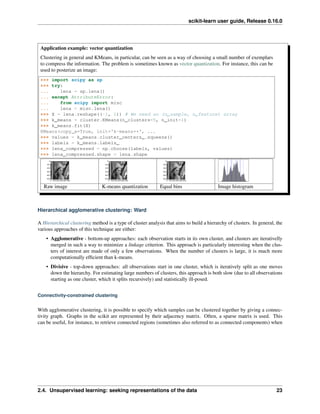
Clustering in general and KMeans, in particular, can be seen as a way of choosing a small number of exemplars
to compress the information. The problem is sometimes known as vector quantization. For instance, this can be
used to posterize an image:
>>> import scipy as sp
>>> try:
... lena = sp.lena()
... except AttributeError:
... from scipy import misc
... lena = misc.lena()
>>> X = lena.reshape((-1, 1)) # We need an (n_sample, n_feature) array
>>> k_means = cluster.KMeans(n_clusters=5, n_init=1)
>>> k_means.fit(X)
KMeans(copy_x=True, init='k-means++', ...
>>> values = k_means.cluster_centers_.squeeze()
>>> labels = k_means.labels_
>>> lena_compressed = np.choose(labels, values)
>>> lena_compressed.shape = lena.shape
Raw image K-means quantization Equal bins Image histogram
Hierarchical agglomerative clustering: Ward
A Hierarchical clustering method is a type of cluster analysis that aims to build a hierarchy of clusters. In general, the
various approaches of this technique are either:
• Agglomerative - bottom-up approaches: each observation starts in its own cluster, and clusters are iterativelly
merged in such a way to minimize a linkage criterion. This approach is particularly interesting when the clus-
ters of interest are made of only a few observations. When the number of clusters is large, it is much more
computationally efficient than k-means.
• Divisive - top-down approaches: all observations start in one cluster, which is iteratively split as one moves
down the hierarchy. For estimating large numbers of clusters, this approach is both slow (due to all observations
starting as one cluster, which it splits recursively) and statistically ill-posed.
Connectivity-constrained clustering
With agglomerative clustering, it is possible to specify which samples can be clustered together by giving a connec-
tivity graph. Graphs in the scikit are represented by their adjacency matrix. Often, a sparse matrix is used. This
can be useful, for instance, to retrieve connected regions (sometimes also referred to as connected components) when
2.4. Unsupervised learning: seeking representations of the data 23
scikit-learn user guide, Release 0.16.0
clustering an image:
from sklearn.feature_extraction.image import grid_to_graph
from sklearn.cluster import AgglomerativeClustering
###############################################################################
# Generate data
lena = sp.misc.lena()
# Downsample the image by a factor of 4
lena = lena[::2, ::2] + lena[1::2, ::2] + lena[::2, 1::2] + lena[1::2, 1::2]
X = np.reshape(lena, (-1, 1))
###############################################################################
# Define the structure A of the data. Pixels connected to their neighbors.
connectivity = grid_to_graph(*lena.shape)
###############################################################################
# Compute clustering
print("Compute structured hierarchical clustering...")
st = time.time()
n_clusters = 15 # number of regions
ward = AgglomerativeClustering(n_clusters=n_clusters,
linkage='ward', connectivity=connectivity).fit(X)
label = np.reshape(ward.labels_, lena.shape)
print("Elapsed time: ", time.time() - st)
print("Number of pixels: ", label.size)
print("Number of clusters: ", np.unique(label).size)
Feature agglomeration
We have seen that sparsity could be used to mitigate the curse of dimensionality, i.e an insufficient amount of ob-
servations compared to the number of features. Another approach is to merge together similar features: feature
agglomeration. This approach can be implemented by clustering in the feature direction, in other words clustering
24 Chapter 2. A tutorial on statistical-learning for scientific data processing
scikit-learn user guide, Release 0.16.0
the transposed data.
>>> digits = datasets.load_digits()
>>> images = digits.images
>>> X = np.reshape(images, (len(images), -1))
>>> connectivity = grid_to_graph(*images[0].shape)
>>> agglo = cluster.FeatureAgglomeration(connectivity=connectivity,
... n_clusters=32)
>>> agglo.fit(X)
FeatureAgglomeration(affinity='euclidean', compute_full_tree='auto',...
>>> X_reduced = agglo.transform(X)
>>> X_approx = agglo.inverse_transform(X_reduced)
>>> images_approx = np.reshape(X_approx, images.shape)
transform and inverse_transform methods
Some estimators expose a transform method, for instance to reduce the dimensionality of the dataset.
2.4.2 Decompositions: from a signal to components and loadings
Components and loadings
If X is our multivariate data, then the problem that we are trying to solve is to rewrite it on a different observa-
tional basis: we want to learn loadings L and a set of components C such that X = L C. Different criteria exist to
choose the components
Principal component analysis: PCA
Principal component analysis (PCA) selects the successive components that explain the maximum variance in the
signal.
2.4. Unsupervised learning: seeking representations of the data 25
scikit-learn user guide, Release 0.16.0
The point cloud spanned by the observations above is very flat in one direction: one of the three univariate features
can almost be exactly computed using the other two. PCA finds the directions in which the data is not flat
When used to transform data, PCA can reduce the dimensionality of the data by projecting on a principal subspace.
>>> # Create a signal with only 2 useful dimensions
>>> x1 = np.random.normal(size=100)
>>> x2 = np.random.normal(size=100)
>>> x3 = x1 + x2
>>> X = np.c_[x1, x2, x3]
>>> from sklearn import decomposition
>>> pca = decomposition.PCA()
>>> pca.fit(X)
PCA(copy=True, n_components=None, whiten=False)
>>> print(pca.explained_variance_)
[ 2.18565811e+00 1.19346747e+00 8.43026679e-32]
>>> # As we can see, only the 2 first components are useful
>>> pca.n_components = 2
>>> X_reduced = pca.fit_transform(X)
>>> X_reduced.shape
(100, 2)
Independent Component Analysis: ICA
Independent component analysis (ICA) selects components so that the distribution of their loadings carries
a maximum amount of independent information. It is able to recover non-Gaussian independent signals:
26 Chapter 2. A tutorial on statistical-learning for scientific data processing
scikit-learn user guide, Release 0.16.0
>>> # Generate sample data
>>> time = np.linspace(0, 10, 2000)
>>> s1 = np.sin(2 * time) # Signal 1 : sinusoidal signal
>>> s2 = np.sign(np.sin(3 * time)) # Signal 2 : square signal
>>> S = np.c_[s1, s2]
>>> S += 0.2 * np.random.normal(size=S.shape) # Add noise
>>> S /= S.std(axis=0) # Standardize data
>>> # Mix data
>>> A = np.array([[1, 1], [0.5, 2]]) # Mixing matrix
>>> X = np.dot(S, A.T) # Generate observations
>>> # Compute ICA
>>> ica = decomposition.FastICA()
>>> S_ = ica.fit_transform(X) # Get the estimated sources
>>> A_ = ica.mixing_.T
>>> np.allclose(X, np.dot(S_, A_) + ica.mean_)
True
2.4. Unsupervised learning: seeking representations of the data 27
scikit-learn user guide, Release 0.16.0
2.5 Putting it all together
2.5.1 Pipelining
We have seen that some estimators can transform data and that some estimators can predict variables. We can also
create combined estimators:
from sklearn import linear_model, decomposition, datasets
from sklearn.pipeline import Pipeline
from sklearn.grid_search import GridSearchCV
logistic = linear_model.LogisticRegression()
pca = decomposition.PCA()
pipe = Pipeline(steps=[('pca', pca), ('logistic', logistic)])
digits = datasets.load_digits()
X_digits = digits.data
y_digits = digits.target
###############################################################################
# Plot the PCA spectrum
pca.fit(X_digits)
plt.figure(1, figsize=(4, 3))
plt.clf()
plt.axes([.2, .2, .7, .7])
plt.plot(pca.explained_variance_, linewidth=2)
plt.axis('tight')
plt.xlabel('n_components')
plt.ylabel('explained_variance_')
###############################################################################
# Prediction
n_components = [20, 40, 64]
Cs = np.logspace(-4, 4, 3)
#Parameters of pipelines can be set using ‘__’ separated parameter names:
estimator = GridSearchCV(pipe,
dict(pca__n_components=n_components,
logistic__C=Cs))
estimator.fit(X_digits, y_digits)
28 Chapter 2. A tutorial on statistical-learning for scientific data processing
scikit-learn user guide, Release 0.16.0
plt.axvline(estimator.best_estimator_.named_steps['pca'].n_components,
linestyle=':', label='n_components chosen')
plt.legend(prop=dict(size=12))
2.5.2 Face recognition with eigenfaces
The dataset used in this example is a preprocessed excerpt of the “Labeled Faces in the Wild”, also known as LFW:
http://vis-www.cs.umass.edu/lfw/lfw-funneled.tgz (233MB)
"""
===================================================
Faces recognition example using eigenfaces and SVMs
===================================================
The dataset used in this example is a preprocessed excerpt of the
"Labeled Faces in the Wild", aka LFW_:
http://vis-www.cs.umass.edu/lfw/lfw-funneled.tgz (233MB)
.. _LFW: http://vis-www.cs.umass.edu/lfw/
Expected results for the top 5 most represented people in the dataset::
precision recall f1-score support
Gerhard_Schroeder 0.91 0.75 0.82 28
Donald_Rumsfeld 0.84 0.82 0.83 33
Tony_Blair 0.65 0.82 0.73 34
Colin_Powell 0.78 0.88 0.83 58
George_W_Bush 0.93 0.86 0.90 129
avg / total 0.86 0.84 0.85 282
"""
from __future__ import print_function
from time import time
import logging
import matplotlib.pyplot as plt
from sklearn.cross_validation import train_test_split
from sklearn.datasets import fetch_lfw_people
from sklearn.grid_search import GridSearchCV
from sklearn.metrics import classification_report
from sklearn.metrics import confusion_matrix
from sklearn.decomposition import RandomizedPCA
from sklearn.svm import SVC
print(__doc__)
# Display progress logs on stdout
logging.basicConfig(level=logging.INFO, format='%(asctime)s %(message)s')
2.5. Putting it all together 29
scikit-learn user guide, Release 0.16.0
###############################################################################
# Download the data, if not already on disk and load it as numpy arrays
lfw_people = fetch_lfw_people(min_faces_per_person=70, resize=0.4)
# introspect the images arrays to find the shapes (for plotting)
n_samples, h, w = lfw_people.images.shape
# for machine learning we use the 2 data directly (as relative pixel
# positions info is ignored by this model)
X = lfw_people.data
n_features = X.shape[1]
# the label to predict is the id of the person
y = lfw_people.target
target_names = lfw_people.target_names
n_classes = target_names.shape[0]
print("Total dataset size:")
print("n_samples: %d" % n_samples)
print("n_features: %d" % n_features)
print("n_classes: %d" % n_classes)
###############################################################################
# Split into a training set and a test set using a stratified k fold
# split into a training and testing set
X_train, X_test, y_train, y_test = train_test_split(
X, y, test_size=0.25)
###############################################################################
# Compute a PCA (eigenfaces) on the face dataset (treated as unlabeled
# dataset): unsupervised feature extraction / dimensionality reduction
n_components = 150
print("Extracting the top %d eigenfaces from %d faces"
% (n_components, X_train.shape[0]))
t0 = time()
pca = RandomizedPCA(n_components=n_components, whiten=True).fit(X_train)
print("done in %0.3fs" % (time() - t0))
eigenfaces = pca.components_.reshape((n_components, h, w))
print("Projecting the input data on the eigenfaces orthonormal basis")
t0 = time()
X_train_pca = pca.transform(X_train)
X_test_pca = pca.transform(X_test)
print("done in %0.3fs" % (time() - t0))
###############################################################################
# Train a SVM classification model
print("Fitting the classifier to the training set")
t0 = time()
param_grid = {'C': [1e3, 5e3, 1e4, 5e4, 1e5],
30 Chapter 2. A tutorial on statistical-learning for scientific data processing
scikit-learn user guide, Release 0.16.0
'gamma': [0.0001, 0.0005, 0.001, 0.005, 0.01, 0.1], }
clf = GridSearchCV(SVC(kernel='rbf', class_weight='auto'), param_grid)
clf = clf.fit(X_train_pca, y_train)
print("done in %0.3fs" % (time() - t0))
print("Best estimator found by grid search:")
print(clf.best_estimator_)
###############################################################################
# Quantitative evaluation of the model quality on the test set
print("Predicting people's names on the test set")
t0 = time()
y_pred = clf.predict(X_test_pca)
print("done in %0.3fs" % (time() - t0))
print(classification_report(y_test, y_pred, target_names=target_names))
print(confusion_matrix(y_test, y_pred, labels=range(n_classes)))
###############################################################################
# Qualitative evaluation of the predictions using matplotlib
def plot_gallery(images, titles, h, w, n_row=3, n_col=4):
"""Helper function to plot a gallery of portraits"""
plt.figure(figsize=(1.8 * n_col, 2.4 * n_row))
plt.subplots_adjust(bottom=0, left=.01, right=.99, top=.90, hspace=.35)
for i in range(n_row * n_col):
plt.subplot(n_row, n_col, i + 1)
plt.imshow(images[i].reshape((h, w)), cmap=plt.cm.gray)
plt.title(titles[i], size=12)
plt.xticks(())
plt.yticks(())
# plot the result of the prediction on a portion of the test set
def title(y_pred, y_test, target_names, i):
pred_name = target_names[y_pred[i]].rsplit(' ', 1)[-1]
true_name = target_names[y_test[i]].rsplit(' ', 1)[-1]
return 'predicted: %sntrue: %s' % (pred_name, true_name)
prediction_titles = [title(y_pred, y_test, target_names, i)
for i in range(y_pred.shape[0])]
plot_gallery(X_test, prediction_titles, h, w)
# plot the gallery of the most significative eigenfaces
eigenface_titles = ["eigenface %d" % i for i in range(eigenfaces.shape[0])]
plot_gallery(eigenfaces, eigenface_titles, h, w)
plt.show()
2.5. Putting it all together 31
scikit-learn user guide, Release 0.16.0
Prediction Eigenfaces
Expected results for the top 5 most represented people in the dataset:
precision recall f1-score support
Gerhard_Schroeder 0.91 0.75 0.82 28
Donald_Rumsfeld 0.84 0.82 0.83 33
Tony_Blair 0.65 0.82 0.73 34
Colin_Powell 0.78 0.88 0.83 58
George_W_Bush 0.93 0.86 0.90 129
avg / total 0.86 0.84 0.85 282
2.5.3 Open problem: Stock Market Structure
Can we predict the variation in stock prices for Google over a given time frame?
Learning a graph structure
2.6 Finding help
2.6.1 The project mailing list
If you encounter a bug with scikit-learn or something that needs clarification in the docstring or the online
documentation, please feel free to ask on the Mailing List
2.6.2 Q&A communities with Machine Learning practitioners
Metaoptimize/QA A forum for Machine Learning, Natural Language Processing and
other Data Analytics discussions (similar to what Stackoverflow is for developers):
http://metaoptimize.com/qa
A good starting point is the discussion on good freely available textbooks on machine
learning
Quora.com Quora has a topic for Machine Learning related questions that also features some
interesting discussions: http://quora.com/Machine-Learning
Have a look at the best questions section, eg: What are some good resources for learning
about machine learning.
– _’An excellent free online course for Machine Learning taught by Professor Andrew Ng of Stanford’:
https://www.coursera.org/course/ml
32 Chapter 2. A tutorial on statistical-learning for scientific data processing
scikit-learn user guide, Release 0.16.0
– _’Another excellent free online course that takes a more general approach to Artificial Intelli-
gence’:http://www.udacity.com/overview/Course/cs271/CourseRev/1
2.6. Finding help 33
scikit-learn user guide, Release 0.16.0
34 Chapter 2. A tutorial on statistical-learning for scientific data processing
CHAPTER
THREE
WORKING WITH TEXT DATA
The goal of this guide is to explore some of the main scikit-learn tools on a single practical task: analysing a
collection of text documents (newsgroups posts) on twenty different topics.
In this section we will see how to:
• load the file contents and the categories
• extract feature vectors suitable for machine learning
• train a linear model to perform categorization
• use a grid search strategy to find a good configuration of both the feature extraction components and the classifier
3.1 Tutorial setup
To get started with this tutorial, you firstly must have the scikit-learn and all of its required dependencies installed.
Please refer to the installation instructions page for more information and for per-system instructions.
The source of this tutorial can be found within your scikit-learn folder:
scikit-learn/doc/tutorial/text_analytics/
The tutorial folder, should contain the following folders:
• *.rst files - the source of the tutorial document written with sphinx
• data - folder to put the datasets used during the tutorial
• skeletons - sample incomplete scripts for the exercises
• solutions - solutions of the exercises
You can already copy the skeletons into a new folder somewhere on your hard-drive named
sklearn_tut_workspace where you will edit your own files for the exercises while keeping the original
skeletons intact:
% cp -r skeletons work_directory/sklearn_tut_workspace
Machine Learning algorithms need data. Go to each $TUTORIAL_HOME/data sub-folder and run the
fetch_data.py script from there (after having read them first).
For instance:
% cd $TUTORIAL_HOME/data/languages
% less fetch_data.py
% python fetch_data.py
35
scikit-learn user guide, Release 0.16.0
3.2 Loading the 20 newsgroups dataset
The dataset is called “Twenty Newsgroups”. Here is the official description, quoted from the website:
The 20 Newsgroups data set is a collection of approximately 20,000 newsgroup documents, partitioned
(nearly) evenly across 20 different newsgroups. To the best of our knowledge, it was originally collected
by Ken Lang, probably for his paper “Newsweeder: Learning to filter netnews,” though he does not explic-
itly mention this collection. The 20 newsgroups collection has become a popular data set for experiments
in text applications of machine learning techniques, such as text classification and text clustering.
In the following we will use the built-in dataset loader for 20 newsgroups from scikit-learn. Alternatively, it is possible
to download the dataset manually from the web-site and use the sklearn.datasets.load_files function by
pointing it to the 20news-bydate-train subfolder of the uncompressed archive folder.
In order to get faster execution times for this first example we will work on a partial dataset with only 4 categories out
of the 20 available in the dataset:
>>> categories = ['alt.atheism', 'soc.religion.christian',
... 'comp.graphics', 'sci.med']
We can now load the list of files matching those categories as follows:
>>> from sklearn.datasets import fetch_20newsgroups
>>> twenty_train = fetch_20newsgroups(subset='train',
... categories=categories, shuffle=True, random_state=42)
The returned dataset is a scikit-learn “bunch”: a simple holder object with fields that can be both accessed
as python dict keys or object attributes for convenience, for instance the target_names holds the list of the
requested category names:
>>> twenty_train.target_names
['alt.atheism', 'comp.graphics', 'sci.med', 'soc.religion.christian']
The files themselves are loaded in memory in the data attribute. For reference the filenames are also available:
>>> len(twenty_train.data)
2257
>>> len(twenty_train.filenames)
2257
Let’s print the first lines of the first loaded file:
>>> print("n".join(twenty_train.data[0].split("n")[:3]))
From: sd345@city.ac.uk (Michael Collier)
Subject: Converting images to HP LaserJet III?
Nntp-Posting-Host: hampton
>>> print(twenty_train.target_names[twenty_train.target[0]])
comp.graphics
Supervised learning algorithms will require a category label for each document in the training set. In this case the cat-
egory is the name of the newsgroup which also happens to be the name of the folder holding the individual documents.
For speed and space efficiency reasons scikit-learn loads the target attribute as an array of integers that corre-
sponds to the index of the category name in the target_names list. The category integer id of each sample is stored
in the target attribute:
>>> twenty_train.target[:10]
array([1, 1, 3, 3, 3, 3, 3, 2, 2, 2])
36 Chapter 3. Working With Text Data
scikit-learn user guide, Release 0.16.0
It is possible to get back the category names as follows:
>>> for t in twenty_train.target[:10]:
... print(twenty_train.target_names[t])
...
comp.graphics
comp.graphics
soc.religion.christian
sci.med
sci.med
sci.med
You can notice that the samples have been shuffled randomly (with a fixed RNG seed): this is useful if you select only
the first samples to quickly train a model and get a first idea of the results before re-training on the complete dataset
later.
3.3 Extracting features from text files
In order to perform machine learning on text documents, we first need to turn the text content into numerical feature
vectors.
3.3.1 Bags of words
The most intuitive way to do so is the bags of words representation:
1. assign a fixed integer id to each word occurring in any document of the training set (for instance by building a
dictionary from words to integer indices).
2. for each document #i, count the number of occurrences of each word w and store it in X[i, j] as the value
of feature #j where j is the index of word w in the dictionary
The bags of words representation implies that n_features is the number of distinct words in the corpus: this
number is typically larger that 100,000.
If n_samples == 10000, storing X as a numpy array of type float32 would require 10000 x 100000 x 4 bytes =
4GB in RAM which is barely manageable on today’s computers.
Fortunately, most values in X will be zeros since for a given document less than a couple thousands of distinct words
will be used. For this reason we say that bags of words are typically high-dimensional sparse datasets. We can save
a lot of memory by only storing the non-zero parts of the feature vectors in memory.
scipy.sparse matrices are data structures that do exactly this, and scikit-learn has built-in support for these
structures.
3.3.2 Tokenizing text with scikit-learn
Text preprocessing, tokenizing and filtering of stopwords are included in a high level component that is able to build a
dictionary of features and transform documents to feature vectors:
3.3. Extracting features from text files 37
scikit-learn user guide, Release 0.16.0
>>> from sklearn.feature_extraction.text import CountVectorizer
>>> count_vect = CountVectorizer()
>>> X_train_counts = count_vect.fit_transform(twenty_train.data)
>>> X_train_counts.shape
(2257, 35788)
CountVectorizer supports counts of N-grams of words or consequective characters. Once fitted, the vectorizer
has built a dictionary of feature indices:
>>> count_vect.vocabulary_.get(u'algorithm')
4690
The index value of a word in the vocabulary is linked to its frequency in the whole training corpus.
3.3.3 From occurrences to frequencies
Occurrence count is a good start but there is an issue: longer documents will have higher average count values than
shorter documents, even though they might talk about the same topics.
To avoid these potential discrepancies it suffices to divide the number of occurrences of each word in a document by
the total number of words in the document: these new features are called tf for Term Frequencies.
Another refinement on top of tf is to downscale weights for words that occur in many documents in the corpus and are
therefore less informative than those that occur only in a smaller portion of the corpus.
This downscaling is called tf–idf for “Term Frequency times Inverse Document Frequency”.
Both tf and tf–idf can be computed as follows:
>>> from sklearn.feature_extraction.text import TfidfTransformer
>>> tf_transformer = TfidfTransformer(use_idf=False).fit(X_train_counts)
>>> X_train_tf = tf_transformer.transform(X_train_counts)
>>> X_train_tf.shape
(2257, 35788)
In the above example-code, we firstly use the fit(..) method to fit our estimator to the data and secondly
the transform(..) method to transform our count-matrix to a tf-idf representation. These two steps can be
combined to achieve the same end result faster by skipping redundant processing. This is done through using the
fit_transform(..) method as shown below, and as mentioned in the note in the previous section:
>>> tfidf_transformer = TfidfTransformer()
>>> X_train_tfidf = tfidf_transformer.fit_transform(X_train_counts)
>>> X_train_tfidf.shape
(2257, 35788)
3.4 Training a classifier
Now that we have our features, we can train a classifier to try to predict the category of a post. Let’s start with a
naïve Bayes classifier, which provides a nice baseline for this task. scikit-learn includes several variants of this
classifier; the one most suitable for word counts is the multinomial variant:
>>> from sklearn.naive_bayes import MultinomialNB
>>> clf = MultinomialNB().fit(X_train_tfidf, twenty_train.target)
To try to predict the outcome on a new document we need to extract the features using almost the same feature extract-
ing chain as before. The difference is that we call transform instead of fit_transform on the transformers,
since they have already been fit to the training set:
38 Chapter 3. Working With Text Data
scikit-learn user guide, Release 0.16.0
>>> docs_new = ['God is love', 'OpenGL on the GPU is fast']
>>> X_new_counts = count_vect.transform(docs_new)
>>> X_new_tfidf = tfidf_transformer.transform(X_new_counts)
>>> predicted = clf.predict(X_new_tfidf)
>>> for doc, category in zip(docs_new, predicted):
... print('%r => %s' % (doc, twenty_train.target_names[category]))
...
'God is love' => soc.religion.christian
'OpenGL on the GPU is fast' => comp.graphics
3.5 Building a pipeline
In order to make the vectorizer => transformer => classifier easier to work with, scikit-learn provides a
Pipeline class that behaves like a compound classifier:
>>> from sklearn.pipeline import Pipeline
>>> text_clf = Pipeline([('vect', CountVectorizer()),
... ('tfidf', TfidfTransformer()),
... ('clf', MultinomialNB()),
... ])
The names vect, tfidf and clf (classifier) are arbitrary. We shall see their use in the section on grid search, below.
We can now train the model with a single command:
>>> text_clf = text_clf.fit(twenty_train.data, twenty_train.target)
3.6 Evaluation of the performance on the test set
Evaluating the predictive accuracy of the model is equally easy:
>>> import numpy as np
>>> twenty_test = fetch_20newsgroups(subset='test',
... categories=categories, shuffle=True, random_state=42)
>>> docs_test = twenty_test.data
>>> predicted = text_clf.predict(docs_test)
>>> np.mean(predicted == twenty_test.target)
0.834...
I.e., we achieved 83.4% accuracy. Let’s see if we can do better with a linear support vector machine (SVM), which is
widely regarded as one of the best text classification algorithms (although it’s also a bit slower than naïve Bayes). We
can change the learner by just plugging a different classifier object into our pipeline:
>>> from sklearn.linear_model import SGDClassifier
>>> text_clf = Pipeline([('vect', CountVectorizer()),
... ('tfidf', TfidfTransformer()),
... ('clf', SGDClassifier(loss='hinge', penalty='l2',
... alpha=1e-3, n_iter=5, random_state=42)),
... ])
>>> _ = text_clf.fit(twenty_train.data, twenty_train.target)
>>> predicted = text_clf.predict(docs_test)
>>> np.mean(predicted == twenty_test.target)
0.912...
3.5. Building a pipeline 39
scikit-learn user guide, Release 0.16.0
scikit-learn further provides utilities for more detailed performance analysis of the results:
>>> from sklearn import metrics
>>> print(metrics.classification_report(twenty_test.target, predicted,
... target_names=twenty_test.target_names))
...
precision recall f1-score support
alt.atheism 0.95 0.81 0.87 319
comp.graphics 0.88 0.97 0.92 389
sci.med 0.94 0.90 0.92 396
soc.religion.christian 0.90 0.95 0.93 398
avg / total 0.92 0.91 0.91 1502
>>> metrics.confusion_matrix(twenty_test.target, predicted)
array([[258, 11, 15, 35],
[ 4, 379, 3, 3],
[ 5, 33, 355, 3],
[ 5, 10, 4, 379]])
As expected the confusion matrix shows that posts from the newsgroups on atheism and christian are more often
confused for one another than with computer graphics.
3.7 Parameter tuning using grid search
We’ve already encountered some parameters such as use_idf in the TfidfTransformer. Classifiers tend to have
many parameters as well; e.g., MultinomialNB includes a smoothing parameter alpha and SGDClassifier
has a penalty parameter alpha and configurable loss and penalty terms in the objective function (see the module
documentation, or use the Python help function, to get a description of these).
Instead of tweaking the parameters of the various components of the chain, it is possible to run an exhaustive search of
the best parameters on a grid of possible values. We try out all classifiers on either words or bigrams, with or without
idf, and with a penalty parameter of either 0.01 or 0.001 for the linear SVM:
>>> from sklearn.grid_search import GridSearchCV
>>> parameters = {'vect__ngram_range': [(1, 1), (1, 2)],
... 'tfidf__use_idf': (True, False),
... 'clf__alpha': (1e-2, 1e-3),
... }
Obviously, such an exhaustive search can be expensive. If we have multiple CPU cores at our disposal, we can tell
the grid searcher to try these eight parameter combinations in parallel with the n_jobs parameter. If we give this
parameter a value of -1, grid search will detect how many cores are installed and uses them all:
>>> gs_clf = GridSearchCV(text_clf, parameters, n_jobs=-1)
The grid search instance behaves like a normal scikit-learn model. Let’s perform the search on a smaller subset
of the training data to speed up the computation:
>>> gs_clf = gs_clf.fit(twenty_train.data[:400], twenty_train.target[:400])
The result of calling fit on a GridSearchCV object is a classifier that we can use to predict:
>>> twenty_train.target_names[gs_clf.predict(['God is love'])]
'soc.religion.christian'
40 Chapter 3. Working With Text Data
scikit-learn user guide, Release 0.16.0
but otherwise, it’s a pretty large and clumsy object. We can, however, get the optimal parameters out by inspecting the
object’s grid_scores_ attribute, which is a list of parameters/score pairs. To get the best scoring attributes, we can
do:
>>> best_parameters, score, _ = max(gs_clf.grid_scores_, key=lambda x: x[1])
>>> for param_name in sorted(parameters.keys()):
... print("%s: %r" % (param_name, best_parameters[param_name]))
...
clf__alpha: 0.001
tfidf__use_idf: True
vect__ngram_range: (1, 1)
>>> score
0.900...
3.7.1 Exercises
To do the exercises, copy the content of the ‘skeletons’ folder as a new folder named ‘workspace’:
% cp -r skeletons workspace
You can then edit the content of the workspace without fear of loosing the original exercise instructions.
Then fire an ipython shell and run the work-in-progress script with:
[1] %run workspace/exercise_XX_script.py arg1 arg2 arg3
If an exception is triggered, use %debug to fire-up a post mortem ipdb session.
Refine the implementation and iterate until the exercise is solved.
For each exercise, the skeleton file provides all the necessary import statements, boilerplate code to load the
data and sample code to evaluate the predictive accurracy of the model.
3.8 Exercise 1: Language identification
• Write a text classification pipeline using a custom preprocessor and CharNGramAnalyzer using data from
Wikipedia articles as training set.
• Evaluate the performance on some held out test set.
ipython command line:
%run workspace/exercise_01_language_train_model.py data/languages/paragraphs/
3.9 Exercise 2: Sentiment Analysis on movie reviews
• Write a text classification pipeline to classify movie reviews as either positive or negative.
• Find a good set of parameters using grid search.
• Evaluate the performance on a held out test set.
ipython command line:
3.8. Exercise 1: Language identification 41
scikit-learn user guide, Release 0.16.0
%run workspace/exercise_02_sentiment.py data/movie_reviews/txt_sentoken/
3.10 Exercise 3: CLI text classification utility
Using the results of the previous exercises and the cPickle module of the standard library, write a command line
utility that detects the language of some text provided on stdin and estimate the polarity (positive or negative) if the
text is written in English.
Bonus point if the utility is able to give a confidence level for its predictions.
3.11 Where to from here
Here are a few suggestions to help further your scikit-learn intuition upon the completion of this tutorial:
• Try playing around with the analyzer and token normalisation under CountVectorizer
• If you don’t have labels, try using Clustering on your problem.
• If you have multiple labels per document, e.g categories, have a look at the Multiclass and multilabel section
• Try using Truncated SVD for latent semantic analysis.
• Have a look at using Out-of-core Classification to learn from data that would not fit into the computer main
memory.
• Have a look at the Hashing Vectorizer as a memory efficient alternative to CountVectorizer.
Note: Doctest Mode
The code-examples in the above tutorials are written in a python-console format. If you wish to easily execute these
examples in IPython, use:
%doctest_mode
in the IPython-console. You can then simply copy and paste the examples directly into IPython without having to
worry about removing the >>> manually.
42 Chapter 3. Working With Text Data
CHAPTER
FOUR
SUPERVISED LEARNING
4.1 Generalized Linear Models
The following are a set of methods intended for regression in which the target value is expected to be a linear combi-
nation of the input variables. In mathematical notion, if ˆ𝑦 is the predicted value.
ˆ𝑦(𝑤, 𝑥) = 𝑤0 + 𝑤1 𝑥1 + ... + 𝑤 𝑝 𝑥 𝑝
Across the module, we designate the vector 𝑤 = (𝑤1, ..., 𝑤 𝑝) as coef_ and 𝑤0 as intercept_.
To perform classification with generalized linear models, see Logistic regression.
4.1.1 Ordinary Least Squares
LinearRegression fits a linear model with coefficients 𝑤 = (𝑤1, ..., 𝑤 𝑝) to minimize the residual sum of squares
between the observed responses in the dataset, and the responses predicted by the linear approximation. Mathemati-
cally it solves a problem of the form:
𝑚𝑖𝑛
𝑤
||𝑋𝑤 − 𝑦||2
2
LinearRegression will take in its fit method arrays X, y and will store the coefficients 𝑤 of the linear model
in its coef_ member:
43
scikit-learn user guide, Release 0.16.0
>>> from sklearn import linear_model
>>> clf = linear_model.LinearRegression()
>>> clf.fit ([[0, 0], [1, 1], [2, 2]], [0, 1, 2])
LinearRegression(copy_X=True, fit_intercept=True, n_jobs=1, normalize=False)
>>> clf.coef_
array([ 0.5, 0.5])
However, coefficient estimates for Ordinary Least Squares rely on the independence of the model terms. When terms
are correlated and the columns of the design matrix 𝑋 have an approximate linear dependence, the design matrix
becomes close to singular and as a result, the least-squares estimate becomes highly sensitive to random errors in the
observed response, producing a large variance. This situation of multicollinearity can arise, for example, when data
are collected without an experimental design.
Examples:
• Linear Regression Example
Ordinary Least Squares Complexity
This method computes the least squares solution using a singular value decomposition of X. If X is a matrix of size (n,
p) this method has a cost of 𝑂(𝑛𝑝2
), assuming that 𝑛 ≥ 𝑝.
4.1.2 Ridge Regression
Ridge regression addresses some of the problems of Ordinary Least Squares by imposing a penalty on the size of
coefficients. The ridge coefficients minimize a penalized residual sum of squares,
𝑚𝑖𝑛
𝑤
||𝑋𝑤 − 𝑦||2
2
+ 𝛼||𝑤||2
2
Here, 𝛼 ≥ 0 is a complexity parameter that controls the amount of shrinkage: the larger the value of 𝛼, the greater the
amount of shrinkage and thus the coefficients become more robust to collinearity.
As with other linear models, Ridge will take in its fit method arrays X, y and will store the coefficients 𝑤 of the
linear model in its coef_ member:
44 Chapter 4. Supervised learning
scikit-learn user guide, Release 0.16.0
>>> from sklearn import linear_model
>>> clf = linear_model.Ridge (alpha = .5)
>>> clf.fit ([[0, 0], [0, 0], [1, 1]], [0, .1, 1])
Ridge(alpha=0.5, copy_X=True, fit_intercept=True, max_iter=None,
normalize=False, solver='auto', tol=0.001)
>>> clf.coef_
array([ 0.34545455, 0.34545455])
>>> clf.intercept_
0.13636...
Examples:
• Plot Ridge coefficients as a function of the regularization
• Classification of text documents using sparse features
Ridge Complexity
This method has the same order of complexity than an Ordinary Least Squares.
Setting the regularization parameter: generalized Cross-Validation
RidgeCV implements ridge regression with built-in cross-validation of the alpha parameter. The object works in
the same way as GridSearchCV except that it defaults to Generalized Cross-Validation (GCV), an efficient form of
leave-one-out cross-validation:
>>> from sklearn import linear_model
>>> clf = linear_model.RidgeCV(alphas=[0.1, 1.0, 10.0])
>>> clf.fit([[0, 0], [0, 0], [1, 1]], [0, .1, 1])
RidgeCV(alphas=[0.1, 1.0, 10.0], cv=None, fit_intercept=True, scoring=None,
normalize=False)
>>> clf.alpha_
0.1
References
• “Notes on Regularized Least Squares”, Rifkin & Lippert (technical report, course slides).
4.1.3 Lasso
The Lasso is a linear model that estimates sparse coefficients. It is useful in some contexts due to its tendency
to prefer solutions with fewer parameter values, effectively reducing the number of variables upon which the given
solution is dependent. For this reason, the Lasso and its variants are fundamental to the field of compressed sensing.
Under certain conditions, it can recover the exact set of non-zero weights (see Compressive sensing: tomography
reconstruction with L1 prior (Lasso)).
Mathematically, it consists of a linear model trained with ℓ1 prior as regularizer. The objective function to minimize
is:
𝑚𝑖𝑛
𝑤
1
2𝑛 𝑠𝑎𝑚𝑝𝑙𝑒𝑠
||𝑋𝑤 − 𝑦||2
2 + 𝛼||𝑤||1
4.1. Generalized Linear Models 45
scikit-learn user guide, Release 0.16.0
The lasso estimate thus solves the minimization of the least-squares penalty with 𝛼||𝑤||1 added, where 𝛼 is a constant
and ||𝑤||1 is the ℓ1-norm of the parameter vector.
The implementation in the class Lasso uses coordinate descent as the algorithm to fit the coefficients. See Least
Angle Regression for another implementation:
>>> clf = linear_model.Lasso(alpha = 0.1)
>>> clf.fit([[0, 0], [1, 1]], [0, 1])
Lasso(alpha=0.1, copy_X=True, fit_intercept=True, max_iter=1000,
normalize=False, positive=False, precompute=False, random_state=None,
selection='cyclic', tol=0.0001, warm_start=False)
>>> clf.predict([[1, 1]])
array([ 0.8])
Also useful for lower-level tasks is the function lasso_path that computes the coefficients along the full path of
possible values.
Examples:
• Lasso and Elastic Net for Sparse Signals
• Compressive sensing: tomography reconstruction with L1 prior (Lasso)
Note: Feature selection with Lasso
As the Lasso regression yields sparse models, it can thus be used to perform feature selection, as detailed in L1-based
feature selection.
Note: Randomized sparsity
For feature selection or sparse recovery, it may be interesting to use Randomized sparse models.
Setting regularization parameter
The alpha parameter controls the degree of sparsity of the coefficients estimated.
Using cross-validation
scikit-learn exposes objects that set the Lasso alpha parameter by cross-validation: LassoCV and LassoLarsCV.
LassoLarsCV is based on the Least Angle Regression algorithm explained below.
For high-dimensional datasets with many collinear regressors, LassoCV is most often preferable. However,
LassoLarsCV has the advantage of exploring more relevant values of alpha parameter, and if the number of samples
is very small compared to the number of observations, it is often faster than LassoCV.
46 Chapter 4. Supervised learning
scikit-learn user guide, Release 0.16.0
Information-criteria based model selection
Alternatively, the estimator LassoLarsIC proposes to use the Akaike information criterion (AIC) and the Bayes
Information criterion (BIC). It is a computationally cheaper alternative to find the optimal value of alpha as the regu-
larization path is computed only once instead of k+1 times when using k-fold cross-validation. However, such criteria
needs a proper estimation of the degrees of freedom of the solution, are derived for large samples (asymptotic results)
and assume the model is correct, i.e. that the data are actually generated by this model. They also tend to break when
the problem is badly conditioned (more features than samples).
Examples:
• Lasso model selection: Cross-Validation / AIC / BIC
4.1.4 Elastic Net
ElasticNet is a linear regression model trained with L1 and L2 prior as regularizer. This combination allows for
learning a sparse model where few of the weights are non-zero like Lasso, while still maintaining the regularization
properties of Ridge. We control the convex combination of L1 and L2 using the l1_ratio parameter.
4.1. Generalized Linear Models 47
scikit-learn user guide, Release 0.16.0
Elastic-net is useful when there are multiple features which are correlated with one another. Lasso is likely to pick one
of these at random, while elastic-net is likely to pick both.
A practical advantage of trading-off between Lasso and Ridge is it allows Elastic-Net to inherit some of Ridge’s
stability under rotation.
The objective function to minimize is in this case
𝑚𝑖𝑛
𝑤
1
2𝑛 𝑠𝑎𝑚𝑝𝑙𝑒𝑠
||𝑋𝑤 − 𝑦||2
2 + 𝛼𝜌||𝑤||1 +
𝛼(1 − 𝜌)
2
||𝑤||2
2
The class ElasticNetCV can be used to set the parameters alpha (𝛼) and l1_ratio (𝜌) by cross-validation.
Examples:
• Lasso and Elastic Net for Sparse Signals
• Lasso and Elastic Net
4.1.5 Multi-task Lasso
The MultiTaskLasso is a linear model that estimates sparse coefficients for multiple regression problems jointly:
y is a 2D array, of shape (n_samples, n_tasks). The constraint is that the selected features are the same for all the
regression problems, also called tasks.
The following figure compares the location of the non-zeros in W obtained with a simple Lasso or a MultiTaskLasso.
The Lasso estimates yields scattered non-zeros while the non-zeros of the MultiTaskLasso are full columns.
48 Chapter 4. Supervised learning
scikit-learn user guide, Release 0.16.0
Fitting a time-series model, imposing that any active feature be active at all times.
Examples:
• Joint feature selection with multi-task Lasso
Mathematically, it consists of a linear model trained with a mixed ℓ1 ℓ2 prior as regularizer. The objective function to
minimize is:
𝑚𝑖𝑛
𝑤
1
2𝑛 𝑠𝑎𝑚𝑝𝑙𝑒𝑠
||𝑋𝑊 − 𝑌 ||2
2 + 𝛼||𝑊||21
where;
||𝑊||21 =
∑︁
𝑖
√︃∑︁
𝑗
𝑤2
𝑖𝑗
The implementation in the class MultiTaskLasso uses coordinate descent as the algorithm to fit the coefficients.
4.1.6 Least Angle Regression
Least-angle regression (LARS) is a regression algorithm for high-dimensional data, developed by Bradley Efron,
Trevor Hastie, Iain Johnstone and Robert Tibshirani.
The advantages of LARS are:
• It is numerically efficient in contexts where p >> n (i.e., when the number of dimensions is significantly greater
than the number of points)
• It is computationally just as fast as forward selection and has the same order of complexity as an ordinary least
squares.
• It produces a full piecewise linear solution path, which is useful in cross-validation or similar attempts to tune
the model.
• If two variables are almost equally correlated with the response, then their coefficients should increase at ap-
proximately the same rate. The algorithm thus behaves as intuition would expect, and also is more stable.
• It is easily modified to produce solutions for other estimators, like the Lasso.
The disadvantages of the LARS method include:
4.1. Generalized Linear Models 49
scikit-learn user guide, Release 0.16.0
• Because LARS is based upon an iterative refitting of the residuals, it would appear to be especially sensitive to
the effects of noise. This problem is discussed in detail by Weisberg in the discussion section of the Efron et al.
(2004) Annals of Statistics article.
The LARS model can be used using estimator Lars, or its low-level implementation lars_path.
4.1.7 LARS Lasso
LassoLars is a lasso model implemented using the LARS algorithm, and unlike the implementation based on
coordinate_descent, this yields the exact solution, which is piecewise linear as a function of the norm of its coefficients.
>>> from sklearn import linear_model
>>> clf = linear_model.LassoLars(alpha=.1)
>>> clf.fit([[0, 0], [1, 1]], [0, 1])
LassoLars(alpha=0.1, copy_X=True, eps=..., fit_intercept=True,
fit_path=True, max_iter=500, normalize=True, precompute='auto',
verbose=False)
>>> clf.coef_
array([ 0.717157..., 0. ])
Examples:
• Lasso path using LARS
The Lars algorithm provides the full path of the coefficients along the regularization parameter almost for free, thus a
common operation consist of retrieving the path with function lars_path
Mathematical formulation
The algorithm is similar to forward stepwise regression, but instead of including variables at each step, the estimated
parameters are increased in a direction equiangular to each one’s correlations with the residual.
Instead of giving a vector result, the LARS solution consists of a curve denoting the solution for each value of the
L1 norm of the parameter vector. The full coefficients path is stored in the array coef_path_, which has size
(n_features, max_features+1). The first column is always zero.
50 Chapter 4. Supervised learning
scikit-learn user guide, Release 0.16.0
References:
• Original Algorithm is detailed in the paper Least Angle Regression by Hastie et al.
4.1.8 Orthogonal Matching Pursuit (OMP)
OrthogonalMatchingPursuit and orthogonal_mp implements the OMP algorithm for approximating the
fit of a linear model with constraints imposed on the number of non-zero coefficients (ie. the L 0 pseudo-norm).
Being a forward feature selection method like Least Angle Regression, orthogonal matching pursuit can approximate
the optimum solution vector with a fixed number of non-zero elements:
arg min ||𝑦 − 𝑋𝛾||2
2 subject to ||𝛾||0 ≤ 𝑛 𝑛𝑜𝑛𝑧𝑒𝑟𝑜_𝑐𝑜𝑒𝑓 𝑠
Alternatively, orthogonal matching pursuit can target a specific error instead of a specific number of non-zero coeffi-
cients. This can be expressed as:
arg min ||𝛾||0 subject to ||𝑦 − 𝑋𝛾||2
2 ≤ tol
OMP is based on a greedy algorithm that includes at each step the atom most highly correlated with the current
residual. It is similar to the simpler matching pursuit (MP) method, but better in that at each iteration, the residual is
recomputed using an orthogonal projection on the space of the previously chosen dictionary elements.
Examples:
• Orthogonal Matching Pursuit
References:
• http://www.cs.technion.ac.il/~ronrubin/Publications/KSVD-OMP-v2.pdf
• Matching pursuits with time-frequency dictionaries, S. G. Mallat, Z. Zhang,
4.1.9 Bayesian Regression
Bayesian regression techniques can be used to include regularization parameters in the estimation procedure: the
regularization parameter is not set in a hard sense but tuned to the data at hand.
This can be done by introducing uninformative priors over the hyper parameters of the model. The ℓ2 regularization
used in Ridge Regression is equivalent to finding a maximum a-postiori solution under a Gaussian prior over the
parameters 𝑤 with precision 𝜆−
1. Instead of setting lambda manually, it is possible to treat it as a random variable to
be estimated from the data.
To obtain a fully probabilistic model, the output 𝑦 is assumed to be Gaussian distributed around 𝑋𝑤:
𝑝(𝑦|𝑋, 𝑤, 𝛼) = 𝒩(𝑦|𝑋𝑤, 𝛼)
Alpha is again treated as a random variable that is to be estimated from the data.
The advantages of Bayesian Regression are:
• It adapts to the data at hand.
• It can be used to include regularization parameters in the estimation procedure.
4.1. Generalized Linear Models 51
scikit-learn user guide, Release 0.16.0
The disadvantages of Bayesian regression include:
• Inference of the model can be time consuming.
References
• A good introduction to Bayesian methods is given in C. Bishop: Pattern Recognition and Machine learning
• Original Algorithm is detailed in the book Bayesian learning for neural networks by Radford M. Neal
Bayesian Ridge Regression
BayesianRidge estimates a probabilistic model of the regression problem as described above. The prior for the
parameter 𝑤 is given by a spherical Gaussian:
𝑝(𝑤|𝜆) = 𝒩(𝑤|0, 𝜆−1
Ip)
The priors over 𝛼 and 𝜆 are chosen to be gamma distributions, the conjugate prior for the precision of the Gaussian.
The resulting model is called Bayesian Ridge Regression, and is similar to the classical Ridge. The parameters
𝑤, 𝛼 and 𝜆 are estimated jointly during the fit of the model. The remaining hyperparameters are the parameters of
the gamma priors over 𝛼 and 𝜆. These are usually chosen to be non-informative. The parameters are estimated by
maximizing the marginal log likelihood.
By default 𝛼1 = 𝛼2 = 𝜆1 = 𝜆2 = 1.𝑒−6
.
Bayesian Ridge Regression is used for regression:
>>> from sklearn import linear_model
>>> X = [[0., 0.], [1., 1.], [2., 2.], [3., 3.]]
>>> Y = [0., 1., 2., 3.]
>>> clf = linear_model.BayesianRidge()
>>> clf.fit(X, Y)
BayesianRidge(alpha_1=1e-06, alpha_2=1e-06, compute_score=False, copy_X=True,
fit_intercept=True, lambda_1=1e-06, lambda_2=1e-06, n_iter=300,
normalize=False, tol=0.001, verbose=False)
After being fitted, the model can then be used to predict new values:
52 Chapter 4. Supervised learning
scikit-learn user guide, Release 0.16.0
>>> clf.predict ([[1, 0.]])
array([ 0.50000013])
The weights 𝑤 of the model can be access:
>>> clf.coef_
array([ 0.49999993, 0.49999993])
Due to the Bayesian framework, the weights found are slightly different to the ones found by Ordinary Least Squares.
However, Bayesian Ridge Regression is more robust to ill-posed problem.
Examples:
• Bayesian Ridge Regression
References
• More details can be found in the article Bayesian Interpolation by MacKay, David J. C.
Automatic Relevance Determination - ARD
ARDRegression is very similar to Bayesian Ridge Regression, but can lead to sparser weights 𝑤 1 2
.
ARDRegression poses a different prior over 𝑤, by dropping the assumption of the Gaussian being spherical.
Instead, the distribution over 𝑤 is assumed to be an axis-parallel, elliptical Gaussian distribution.
This means each weight 𝑤𝑖 is drawn from a Gaussian distribution, centered on zero and with a precision 𝜆𝑖:
𝑝(𝑤|𝜆) = 𝒩(𝑤|0, 𝐴−1
)
with 𝑑𝑖𝑎𝑔 (𝐴) = 𝜆 = {𝜆1, ..., 𝜆 𝑝}.
In contrast to Bayesian Ridge Regression, each coordinate of 𝑤𝑖 has its own standard deviation 𝜆𝑖. The prior over all
𝜆𝑖 is chosen to be the same gamma distribution given by hyperparameters 𝜆1 and 𝜆2.
1 Christopher M. Bishop: Pattern Recognition and Machine Learning, Chapter 7.2.1
2 David Wipf and Srikantan Nagarajan: A new view of automatic relevance determination.
4.1. Generalized Linear Models 53
scikit-learn user guide, Release 0.16.0
Examples:
• Automatic Relevance Determination Regression (ARD)
References:
4.1.10 Logistic regression
Logistic regression, despite its name, is a linear model for classification rather than regression. Logistic regression is
also known in the literature as logit regression, maximum-entropy classification (MaxEnt) or the log-linear classifier.
In this model, the probabilities describing the possible outcomes of a single trial are modeled using a logistic function.
The implementation of logistic regression in scikit-learn can be accessed from class LogisticRegression. This
implementation can fit a multiclass (one-vs-rest) logistic regression with optional L2 or L1 regularization.
As an optimization problem, binary class L2 penalized logistic regression minimizes the following cost function:
𝑚𝑖𝑛
𝑤,𝑐
1
2
𝑤 𝑇
𝑤 + 𝐶
𝑛∑︁
𝑖=1
log(exp(−𝑦𝑖(𝑋 𝑇
𝑖 𝑤 + 𝑐)) + 1).
Similarly, L1 regularized logistic regression solves the following optimization problem
𝑚𝑖𝑛
𝑤,𝑐
‖𝑤‖1 + 𝐶
𝑛∑︁
𝑖=1
log(exp(−𝑦𝑖(𝑋 𝑇
𝑖 𝑤 + 𝑐)) + 1).
The solvers implemented in the class LogisticRegression are “liblinear” (which is a wrapper around the C++
library, LIBLINEAR), “newton-cg” and “lbfgs”.
The lbfgs and newton-cg solvers only support L2 penalization and are found to converge faster for some high dimen-
sional data. L1 penalization yields sparse predicting weights.
Several estimators are available for logistic regression.
LogisticRegression has an option of using three solvers, “liblinear”, “lbfgs” and “newton-cg”.
The solver “liblinear” uses a coordinate descent (CD) algorithm based on Liblinear. For L1 penalization
sklearn.svm.l1_min_c allows to calculate the lower bound for C in order to get a non “null” (all feature weights
to zero) model. This relies on the excellent LIBLINEAR library, which is shipped with scikit-learn. However, the CD
algorithm implemented in liblinear cannot learn a true multinomial (multiclass) model; instead, the optimization prob-
lem is decomposed in a “one-vs-rest” fashion so separate binary classifiers are trained for all classes. This happens
under the hood, so LogisticRegression instances using this solver behave as multiclass classifiers.
Setting multi_class to “multinomial” with the “lbfgs” or “newton-cg” solver in LogisticRegression learns a
true multinomial logistic regression model, which means that its probability estimates should be better calibrated
than the default “one-vs-rest” setting. L-BFGS and newton-cg cannot optimize L1-penalized models, though, so the
“multinomial” setting does not learn sparse models.
Examples:
• L1 Penalty and Sparsity in Logistic Regression
• Path with L1- Logistic Regression
54 Chapter 4. Supervised learning
scikit-learn user guide, Release 0.16.0
Differences from liblinear:
There might be a difference in the scores obtained between LogisticRegression with
solver=liblinear or LinearSVC and the external liblinear library directly, when
fit_intercept=False and the fit coef_ (or) the data to be predicted are zeroes. This is because
for the sample(s) with decision_function zero, LogisticRegression and LinearSVC predict the
negative class, while liblinear predicts the positive class. Note that a model with fit_intercept=False
and having many samples with decision_function zero, is likely to be a underfit, bad model and you are
advised to set fit_intercept=True and increase the intercept_scaling.
Note: Feature selection with sparse logistic regression
A logistic regression with L1 penalty yields sparse models, and can thus be used to perform feature selection, as
detailed in L1-based feature selection.
LogisticRegressionCV implements Logistic Regression with builtin cross-validation to find out the optimal
C parameter. In general the “newton-cg” and “lbfgs” solvers are found to be faster due to warm-starting. For the
multiclass case, if multi_class option is set to “ovr”, an optimal C is obtained for each class and if the multi_class
option is set to “multinomial”, an optimal C is obtained that minimizes the cross-entropy loss.
4.1.11 Stochastic Gradient Descent - SGD
Stochastic gradient descent is a simple yet very efficient approach to fit linear models. It is particularly useful when the
number of samples (and the number of features) is very large. The partial_fit method allows only/out-of-core
learning.
The classes SGDClassifier and SGDRegressor provide functionality to fit linear models for classifica-
tion and regression using different (convex) loss functions and different penalties. E.g., with loss="log",
SGDClassifier fits a logistic regression model, while with loss="hinge" it fits a linear support vector ma-
chine (SVM).
References
• Stochastic Gradient Descent
4.1.12 Perceptron
The Perceptron is another simple algorithm suitable for large scale learning. By default:
• It does not require a learning rate.
• It is not regularized (penalized).
• It updates its model only on mistakes.
The last characteristic implies that the Perceptron is slightly faster to train than SGD with the hinge loss and that the
resulting models are sparser.
4.1.13 Passive Aggressive Algorithms
The passive-aggressive algorithms are a family of algorithms for large-scale learning. They are similar to the Per-
ceptron in that they do not require a learning rate. However, contrary to the Perceptron, they include a regularization
4.1. Generalized Linear Models 55
scikit-learn user guide, Release 0.16.0
parameter C.
For classification, PassiveAggressiveClassifier can be used with loss=’hinge’ (PA-I) or
loss=’squared_hinge’ (PA-II). For regression, PassiveAggressiveRegressor can be used with
loss=’epsilon_insensitive’ (PA-I) or loss=’squared_epsilon_insensitive’ (PA-II).
References:
• “Online Passive-Aggressive Algorithms” K. Crammer, O. Dekel, J. Keshat, S. Shalev-Shwartz, Y. Singer
- JMLR 7 (2006)
4.1.14 Robustness regression: outliers and modeling errors
Robust regression is interested in fitting a regression model in the presence of corrupt data: either outliers, or error in
the model.
Different scenario and useful concepts
There are different things to keep in mind when dealing with data corrupted by outliers:
• Outliers in X or in y?
Outliers in the y direction Outliers in the X direction
• Fraction of outliers versus amplitude of error
The number of outlying points matters, but also how much they are outliers.
56 Chapter 4. Supervised learning
scikit-learn user guide, Release 0.16.0
Small outliers Large outliers
An important notion of robust fitting is that of breakdown point: the fraction of data that can be outlying for the fit to
start missing the inlying data.
Note that in general, robust fitting in high-dimensional setting (large n_features) is very hard. The robust models here
will probably not work in these settings.
Trade-offs: which estimator?
Scikit-learn provides 2 robust regression estimators: RANSAC and Theil Sen
• RANSAC is faster, and scales much better with the number of samples
• RANSAC will deal better with large outliers in the y direction (most common situa-
tion)
• Theil Sen will cope better with medium-size outliers in the X direction, but this property will
disappear in large dimensional settings.
When in doubt, use RANSAC
RANSAC: RANdom SAmple Consensus
RANSAC (RANdom SAmple Consensus) fits a model from random subsets of inliers from the complete data set.
RANSAC is a non-deterministic algorithm producing only a reasonable result with a certain probability, which is de-
pendent on the number of iterations (see max_trials parameter). It is typically used for linear and non-linear regression
problems and is especially popular in the fields of photogrammetric computer vision.
The algorithm splits the complete input sample data into a set of inliers, which may be subject to noise, and outliers,
which are e.g. caused by erroneous measurements or invalid hypotheses about the data. The resulting model is then
estimated only from the determined inliers.
4.1. Generalized Linear Models 57
scikit-learn user guide, Release 0.16.0
Details of the algorithm
Each iteration performs the following steps:
1. Select min_samples random samples from the original data and check whether the set of data is valid (see
is_data_valid).
2. Fit a model to the random subset (base_estimator.fit) and check whether the estimated model is valid
(see is_model_valid).
3. Classify all data as inliers or outliers by calculating the residuals to the estimated model
(base_estimator.predict(X) - y) - all data samples with absolute residuals smaller than the
residual_threshold are considered as inliers.
4. Save fitted model as best model if number of inlier samples is maximal. In case the current estimated model has
the same number of inliers, it is only considered as the best model if it has better score.
These steps are performed either a maximum number of times (max_trials) or until one of the special stop criteria
are met (see stop_n_inliers and stop_score). The final model is estimated using all inlier samples (consensus
set) of the previously determined best model.
The is_data_valid and is_model_valid functions allow to identify and reject degenerate combinations of
random sub-samples. If the estimated model is not needed for identifying degenerate cases, is_data_valid should
be used as it is called prior to fitting the model and thus leading to better computational performance.
Examples:
• Robust linear model estimation using RANSAC
• Robust linear estimator fitting
References:
• http://en.wikipedia.org/wiki/RANSAC
• “Random Sample Consensus: A Paradigm for Model Fitting with Applications to Image Analysis and
Automated Cartography” Martin A. Fischler and Robert C. Bolles - SRI International (1981)
• “Performance Evaluation of RANSAC Family” Sunglok Choi, Taemin Kim and Wonpil Yu - BMVC
(2009)
Theil-Sen estimator: generalized-median-based estimator
The TheilSenRegressor estimator uses a generalization of the median in multiple dimensions. It is thus robust to
multivariate outliers. Note however that the robustness of the estimator decreases quickly with the dimensionality of
the problem. It looses its robustness properties and becomes no better than an ordinary least squares in high dimension.
Examples:
• Theil-Sen Regression
• Robust linear estimator fitting
References:
• http://en.wikipedia.org/wiki/Theil%E2%80%93Sen_estimator
58 Chapter 4. Supervised learning
scikit-learn user guide, Release 0.16.0
Theoretical considerations
TheilSenRegressor is comparable to the Ordinary Least Squares (OLS) in terms of asymptotic efficiency and as
an unbiased estimator. In contrast to OLS, Theil-Sen is a non-parametric method which means it makes no assumption
about the underlying distribution of the data. Since Theil-Sen is a median-based estimator, it is more robust against
corrupted data aka outliers. In univariate setting, Theil-Sen has a breakdown point of about 29.3% in case of a simple
linear regression which means that it can tolerate arbitrary corrupted data of up to 29.3%.
The implementation of TheilSenRegressor in scikit-learn follows a generalization to a multivariate linear re-
gression model 3
using the spatial median which is a generalization of the median to multiple dimensions 4
.
In terms of time and space complexity, Theil-Sen scales according to
(︂
𝑛 𝑠𝑎𝑚𝑝𝑙𝑒𝑠
𝑛 𝑠𝑢𝑏𝑠𝑎𝑚𝑝𝑙𝑒𝑠
)︂
which makes it infeasible to be applied exhaustively to problems with a large number of samples and features. There-
fore, the magnitude of a subpopulation can be chosen to limit the time and space complexity by considering only a
random subset of all possible combinations.
Examples:
• Theil-Sen Regression
References:
4.1.15 Polynomial regression: extending linear models with basis functions
One common pattern within machine learning is to use linear models trained on nonlinear functions of the data. This
approach maintains the generally fast performance of linear methods, while allowing them to fit a much wider range
of data.
3 Xin Dang, Hanxiang Peng, Xueqin Wang and Heping Zhang: Theil-Sen Estimators in a Multiple Linear Regression Model.
4
20. Kärkkäinen and S. Äyrämö: On Computation of Spatial Median for Robust Data Mining.
4.1. Generalized Linear Models 59
scikit-learn user guide, Release 0.16.0
For example, a simple linear regression can be extended by constructing polynomial features from the coefficients.
In the standard linear regression case, you might have a model that looks like this for two-dimensional data:
ˆ𝑦(𝑤, 𝑥) = 𝑤0 + 𝑤1 𝑥1 + 𝑤2 𝑥2
If we want to fit a paraboloid to the data instead of a plane, we can combine the features in second-order polynomials,
so that the model looks like this:
ˆ𝑦(𝑤, 𝑥) = 𝑤0 + 𝑤1 𝑥1 + 𝑤2 𝑥2 + 𝑤3 𝑥1 𝑥2 + 𝑤4 𝑥2
1 + 𝑤5 𝑥2
2
The (sometimes surprising) observation is that this is still a linear model: to see this, imagine creating a new variable
𝑧 = [𝑥1, 𝑥2, 𝑥1 𝑥2, 𝑥2
1, 𝑥2
2]
With this re-labeling of the data, our problem can be written
ˆ𝑦(𝑤, 𝑥) = 𝑤0 + 𝑤1 𝑧1 + 𝑤2 𝑧2 + 𝑤3 𝑧3 + 𝑤4 𝑧4 + 𝑤5 𝑧5
We see that the resulting polynomial regression is in the same class of linear models we’d considered above (i.e. the
model is linear in 𝑤) and can be solved by the same techniques. By considering linear fits within a higher-dimensional
space built with these basis functions, the model has the flexibility to fit a much broader range of data.
Here is an example of applying this idea to one-dimensional data, using polynomial features of varying degrees:
This figure is created using the PolynomialFeatures preprocessor. This preprocessor transforms an input data
matrix into a new data matrix of a given degree. It can be used as follows:
>>> from sklearn.preprocessing import PolynomialFeatures
>>> import numpy as np
>>> X = np.arange(6).reshape(3, 2)
>>> X
array([[0, 1],
[2, 3],
[4, 5]])
>>> poly = PolynomialFeatures(degree=2)
>>> poly.fit_transform(X)
array([[ 1, 0, 1, 0, 0, 1],
[ 1, 2, 3, 4, 6, 9],
[ 1, 4, 5, 16, 20, 25]])
The features of X have been transformed from [𝑥1, 𝑥2] to [1, 𝑥1, 𝑥2, 𝑥2
1, 𝑥1 𝑥2, 𝑥2
2], and can now be used within any
linear model.
60 Chapter 4. Supervised learning
scikit-learn user guide, Release 0.16.0
This sort of preprocessing can be streamlined with the Pipeline tools. A single object representing a simple polynomial
regression can be created and used as follows:
>>> from sklearn.preprocessing import PolynomialFeatures
>>> from sklearn.linear_model import LinearRegression
>>> from sklearn.pipeline import Pipeline
>>> model = Pipeline([('poly', PolynomialFeatures(degree=3)),
... ('linear', LinearRegression(fit_intercept=False))])
>>> # fit to an order-3 polynomial data
>>> x = np.arange(5)
>>> y = 3 - 2 * x + x ** 2 - x ** 3
>>> model = model.fit(x[:, np.newaxis], y)
>>> model.named_steps['linear'].coef_
array([ 3., -2., 1., -1.])
The linear model trained on polynomial features is able to exactly recover the input polynomial coefficients.
In some cases it’s not necessary to include higher powers of any single feature, but only the so-called interaction
features that multiply together at most 𝑑 distinct features. These can be gotten from PolynomialFeatures with
the setting interaction_only=True.
For example, when dealing with boolean features, 𝑥 𝑛
𝑖 = 𝑥𝑖 for all 𝑛 and is therefore useless; but 𝑥𝑖 𝑥 𝑗 represents the
conjunction of two booleans. This way, we can solve the XOR problem with a linear classifier:
>>> from sklearn.linear_model import Perceptron
>>> from sklearn.preprocessing import PolynomialFeatures
>>> X = np.array([[0, 0], [0, 1], [1, 0], [1, 1]])
>>> y = X[:, 0] ^ X[:, 1]
>>> X = PolynomialFeatures(interaction_only=True).fit_transform(X)
>>> X
array([[1, 0, 0, 0],
[1, 0, 1, 0],
[1, 1, 0, 0],
[1, 1, 1, 1]])
>>> clf = Perceptron(fit_intercept=False, n_iter=10, shuffle=False).fit(X, y)
>>> clf.score(X, y)
1.0
4.2 Linear and quadratic discriminant analysis
Linear discriminant analysis (lda.LDA) and quadratic discriminant analysis (qda.QDA) are two classic classifiers,
with, as their names suggest, a linear and a quadratic decision surface, respectively.
These classifiers are attractive because they have closed-form solutions that can be easily computed, are inherently
multiclass, and have proven to work well in practice. Also there are no parameters to tune for these algorithms.
4.2. Linear and quadratic discriminant analysis 61
scikit-learn user guide, Release 0.16.0
The plot shows decision boundaries for LDA and QDA. The bottom row demonstrates that LDA can only learn linear
boundaries, while QDA can learn quadratic boundaries and is therefore more flexible.
Examples:
Linear and Quadratic Discriminant Analysis with confidence ellipsoid: Comparison of LDA and QDA on syn-
thetic data.
4.2.1 Dimensionality reduction using LDA
lda.LDA can be used to perform supervised dimensionality reduction by projecting the input data to a subspace con-
sisting of the most discriminant directions. This is implemented in lda.LDA.transform. The desired dimension-
ality can be set using the n_components constructor parameter. This parameter has no influence on lda.LDA.fit
or lda.LDA.predict.
4.2.2 Mathematical Idea
Both methods work by modeling the class conditional distribution of the data 𝑃(𝑋|𝑦 = 𝑘) for each class 𝑘. Predictions
can be obtained by using Bayes’ rule:
𝑃(𝑦|𝑋) = 𝑃(𝑋|𝑦) · 𝑃(𝑦)/𝑃(𝑋) = 𝑃(𝑋|𝑦) · 𝑃(𝑌 )/(
∑︁
𝑦′
𝑃(𝑋|𝑦′
) · 𝑝(𝑦′
))
In linear and quadratic discriminant analysis, 𝑃(𝑋|𝑦) is modelled as a Gaussian distribution. In the case of LDA, the
Gaussians for each class are assumed to share the same covariance matrix. This leads to a linear decision surface, as
can be seen by comparing the the log-probability rations 𝑙𝑜𝑔[𝑃(𝑦 = 𝑘|𝑋)/𝑃(𝑦 = 𝑙|𝑋)].
In the case of QDA, there are no assumptions on the covariance matrices of the Gaussians, leading to a quadratic
decision surface.
62 Chapter 4. Supervised learning
scikit-learn user guide, Release 0.16.0
4.2.3 Shrinkage
Shrinkage is a tool to improve estimation of covariance matrices in situations where the number of training samples
is small compared to the number of features. In this scenario, the empirical sample covariance is a poor estimator.
Shrinkage LDA can be used by setting the shrinkage parameter of the lda.LDA class to ‘auto’. This automatically
determines the optimal shrinkage parameter in an analytic way following the lemma introduced by Ledoit and Wolf.
Note that currently shrinkage only works when setting the solver parameter to ‘lsqr’ or ‘eigen’.
The shrinkage parameter can also be manually set between 0 and 1. In particular, a value of 0 corresponds to
no shrinkage (which means the empirical covariance matrix will be used) and a value of 1 corresponds to complete
shrinkage (which means that the diagonal matrix of variances will be used as an estimate for the covariance matrix).
Setting this parameter to a value between these two extrema will estimate a shrunk version of the covariance matrix.
4.2.4 Estimation algorithms
The default solver is ‘svd’. It can perform both classification and transform, and it does not rely on the calculation
of the covariance matrix. This can be an advantage in situations where the number of features is large. However, the
‘svd’ solver cannot be used with shrinkage.
The ‘lsqr’ solver is an efficient algorithm that only works for classification. It supports shrinkage.
The ‘eigen’ solver is based on the optimization of the between class scatter to within class scatter ratio. It can be used
for both classification and transform, and it supports shrinkage. However, the ‘eigen’ solver needs to compute the
covariance matrix, so it might not be suitable for situations with a high number of features.
Examples:
Normal and Shrinkage Linear Discriminant Analysis for classification: Comparison of LDA classifiers with and
without shrinkage.
4.2. Linear and quadratic discriminant analysis 63
scikit-learn user guide, Release 0.16.0
References:
Hastie T, Tibshirani R, Friedman J. The Elements of Statistical Learning. Springer, 2009.
Ledoit O, Wolf M. Honey, I Shrunk the Sample Covariance Matrix. The Journal of Portfolio Management 30(4),
110-119, 2004.
4.3 Kernel ridge regression
Kernel ridge regression (KRR) [M2012] combines Ridge Regression (linear least squares with l2-norm regularization)
with the kernel trick. It thus learns a linear function in the space induced by the respective kernel and the data. For
non-linear kernels, this corresponds to a non-linear function in the original space.
The form of the model learned by KernelRidge is identical to support vector regression (SVR). However, different
loss functions are used: KRR uses squared error loss while support vector regression uses 𝜖-insensitive loss, both
combined with l2 regularization. In contrast to SVR, fitting KernelRidge can be done in closed-form and is typically
faster for medium-sized datasets. On the other hand, the learned model is non-sparse and thus slower than SVR, which
learns a sparse model for 𝜖 > 0, at prediction-time.
The following figure compares KernelRidge and SVR on an artificial dataset, which consists of a sinusoidal target
function and strong noise added to every fifth datapoint. The learned model of KernelRidge and SVR is plotted,
where both complexity/regularization and bandwidth of the RBF kernel have been optimized using grid-search. The
learned functions are very similar; however, fitting KernelRidge is approx. seven times faster than fitting SVR
(both with grid-search). However, prediction of 100000 target values is more than three times faster with SVR since it
has learned a sparse model using only approx. 1/3 of the 100 training datapoints as support vectors.
The next figure compares the time for fitting and prediction of KernelRidge and SVR for different sizes of the
training set. Fitting KernelRidge is faster than SVR for medium-sized training sets (less than 1000 samples);
however, for larger training sets SVR scales better. With regard to prediction time, SVR is faster than KernelRidge
for all sizes of the training set because of the learned sparse solution. Note that the degree of sparsity and thus the
prediction time depends on the parameters 𝜖 and 𝐶 of the SVR; 𝜖 = 0 would correspond to a dense model.
References:
4.4 Support Vector Machines
Support vector machines (SVMs) are a set of supervised learning methods used for classification, regression and
outliers detection.
The advantages of support vector machines are:
• Effective in high dimensional spaces.
• Still effective in cases where number of dimensions is greater than the number of samples.
• Uses a subset of training points in the decision function (called support vectors), so it is also memory efficient.
• Versatile: different Kernel functions can be specified for the decision function. Common kernels are provided,
but it is also possible to specify custom kernels.
The disadvantages of support vector machines include:
64 Chapter 4. Supervised learning
scikit-learn user guide, Release 0.16.0
4.4. Support Vector Machines 65
scikit-learn user guide, Release 0.16.0
66 Chapter 4. Supervised learning
scikit-learn user guide, Release 0.16.0
• If the number of features is much greater than the number of samples, the method is likely to give poor perfor-
mances.
• SVMs do not directly provide probability estimates, these are calculated using an expensive five-fold cross-
validation (see Scores and probabilities, below).
The support vector machines in scikit-learn support both dense (numpy.ndarray and convertible to that by
numpy.asarray) and sparse (any scipy.sparse) sample vectors as input. However, to use an SVM to make pre-
dictions for sparse data, it must have been fit on such data. For optimal performance, use C-ordered numpy.ndarray
(dense) or scipy.sparse.csr_matrix (sparse) with dtype=float64.
4.4.1 Classification
SVC, NuSVC and LinearSVC are classes capable of performing multi-class classification on a dataset.
SVC and NuSVC are similar methods, but accept slightly different sets of parameters and have different mathematical
formulations (see section Mathematical formulation). On the other hand, LinearSVC is another implementation of
Support Vector Classification for the case of a linear kernel. Note that LinearSVC does not accept keyword kernel,
as this is assumed to be linear. It also lacks some of the members of SVC and NuSVC, like support_.
As other classifiers, SVC, NuSVC and LinearSVC take as input two arrays: an array X of size [n_samples,
n_features] holding the training samples, and an array y of class labels (strings or integers), size [n_samples]:
4.4. Support Vector Machines 67
scikit-learn user guide, Release 0.16.0
>>> from sklearn import svm
>>> X = [[0, 0], [1, 1]]
>>> y = [0, 1]
>>> clf = svm.SVC()
>>> clf.fit(X, y)
SVC(C=1.0, cache_size=200, class_weight=None, coef0=0.0, degree=3,
gamma=0.0, kernel='rbf', max_iter=-1, probability=False, random_state=None,
shrinking=True, tol=0.001, verbose=False)
After being fitted, the model can then be used to predict new values:
>>> clf.predict([[2., 2.]])
array([1])
SVMs decision function depends on some subset of the training data, called the support vectors. Some properties of
these support vectors can be found in members support_vectors_, support_ and n_support:
>>> # get support vectors
>>> clf.support_vectors_
array([[ 0., 0.],
[ 1., 1.]])
>>> # get indices of support vectors
>>> clf.support_
array([0, 1]...)
>>> # get number of support vectors for each class
>>> clf.n_support_
array([1, 1]...)
Multi-class classification
SVC and NuSVC implement the “one-against-one” approach (Knerr et al., 1990) for multi- class classification. If
n_class is the number of classes, then n_class * (n_class - 1) / 2 classifiers are constructed and each
one trains data from two classes:
>>> X = [[0], [1], [2], [3]]
>>> Y = [0, 1, 2, 3]
>>> clf = svm.SVC()
>>> clf.fit(X, Y)
SVC(C=1.0, cache_size=200, class_weight=None, coef0=0.0, degree=3,
gamma=0.0, kernel='rbf', max_iter=-1, probability=False, random_state=None,
shrinking=True, tol=0.001, verbose=False)
>>> dec = clf.decision_function([[1]])
>>> dec.shape[1] # 4 classes: 4*3/2 = 6
6
On the other hand, LinearSVC implements “one-vs-the-rest” multi-class strategy, thus training n_class models. If
there are only two classes, only one model is trained:
>>> lin_clf = svm.LinearSVC()
>>> lin_clf.fit(X, Y)
LinearSVC(C=1.0, class_weight=None, dual=True, fit_intercept=True,
intercept_scaling=1, loss='squared_hinge', max_iter=1000,
multi_class='ovr', penalty='l2', random_state=None, tol=0.0001,
verbose=0)
>>> dec = lin_clf.decision_function([[1]])
>>> dec.shape[1]
4
68 Chapter 4. Supervised learning
scikit-learn user guide, Release 0.16.0
See Mathematical formulation for a complete description of the decision function.
Note that the LinearSVC also implements an alternative multi-class strategy, the so-called multi-class SVM formu-
lated by Crammer and Singer, by using the option multi_class=’crammer_singer’. This method is consis-
tent, which is not true for one-vs-rest classification. In practice, one-vs-rest classification is usually preferred, since
the results are mostly similar, but the runtime is significantly less.
For “one-vs-rest” LinearSVC the attributes coef_ and intercept_ have the shape [n_class,
n_features] and [n_class] respectively. Each row of the coefficients corresponds to one of the n_class
many “one-vs-rest” classifiers and similar for the intercepts, in the order of the “one” class.
In the case of “one-vs-one” SVC, the layout of the attributes is a little more involved. In the case of having a linear
kernel, The layout of coef_ and intercept_ is similar to the one described for LinearSVC described above,
except that the shape of coef_ is [n_class * (n_class - 1) / 2, n_features], corresponding to as
many binary classifiers. The order for classes 0 to n is “0 vs 1”, “0 vs 2” , ... “0 vs n”, “1 vs 2”, “1 vs 3”, “1 vs n”, . . .
“n-1 vs n”.
The shape of dual_coef_ is [n_class-1, n_SV] with a somewhat hard to grasp layout. The columns corre-
spond to the support vectors involved in any of the n_class * (n_class - 1) / 2 “one-vs-one” classifiers.
Each of the support vectors is used in n_class - 1 classifiers. The n_class - 1 entries in each row correspond
to the dual coefficients for these classifiers.
This might be made more clear by an example:
Consider a three class problem with with class 0 having three support vectors 𝑣0
0, 𝑣1
0, 𝑣2
0 and class 1 and 2 having two
support vectors 𝑣0
1, 𝑣1
1 and 𝑣0
2, 𝑣1
2 respectively. For each support vector 𝑣 𝑗
𝑖 , there are two dual coefficients. Let’s call
the coefficient of support vector 𝑣 𝑗
𝑖 in the classifier between classes 𝑖 and 𝑘 𝛼 𝑗
𝑖,𝑘. Then dual_coef_ looks like this:
𝛼0
0,1 𝛼0
0,2
Coefficients for SVs of class 0𝛼1
0,1 𝛼1
0,2
𝛼2
0,1 𝛼2
0,2
𝛼0
1,0 𝛼0
1,2
Coefficients for SVs of class 1
𝛼1
1,0 𝛼1
1,2
𝛼0
2,0 𝛼0
2,1
Coefficients for SVs of class 2
𝛼1
2,0 𝛼1
2,1
Scores and probabilities
The SVC method decision_function gives per-class scores for each sample (or a single score per sample in the
binary case). When the constructor option probability is set to True, class membership probability estimates
(from the methods predict_proba and predict_log_proba) are enabled. In the binary case, the probabilities
are calibrated using Platt scaling: logistic regression on the SVM’s scores, fit by an additional cross-validation on the
training data. In the multiclass case, this is extended as per Wu et al. (2004).
Needless to say, the cross-validation involved in Platt scaling is an expensive operation for large datasets. In addition,
the probability estimates may be inconsistent with the scores, in the sense that the “argmax” of the scores may not be
the argmax of the probabilities. (E.g., in binary classification, a sample may be labeled by predict as belonging
to a class that has probability <½ according to predict_proba.) Platt’s method is also known to have theoret-
ical issues. If confidence scores are required, but these do not have to be probabilities, then it is advisable to set
probability=False and use decision_function instead of predict_proba.
References:
• Wu, Lin and Weng, “Probability estimates for multi-class classification by pairwise coupling”. JMLR
5:975-1005, 2004.
4.4. Support Vector Machines 69
scikit-learn user guide, Release 0.16.0
Unbalanced problems
In problems where it is desired to give more importance to certain classes or certain individual samples keywords
class_weight and sample_weight can be used.
SVC (but not NuSVC) implement a keyword class_weight in the fit method. It’s a dictionary of the form
{class_label : value}, where value is a floating point number > 0 that sets the parameter C of class
class_label to C * value.
SVC, NuSVC, SVR, NuSVR and OneClassSVM implement also weights for individual samples in method fit
through keyword sample_weight. Similar to class_weight, these set the parameter C for the i-th example to
C * sample_weight[i].
70 Chapter 4. Supervised learning
scikit-learn user guide, Release 0.16.0
Examples:
• Plot different SVM classifiers in the iris dataset,
• SVM: Maximum margin separating hyperplane,
• SVM: Separating hyperplane for unbalanced classes
• SVM-Anova: SVM with univariate feature selection,
• Non-linear SVM
• SVM: Weighted samples,
4.4.2 Regression
The method of Support Vector Classification can be extended to solve regression problems. This method is called
Support Vector Regression.
The model produced by support vector classification (as described above) depends only on a subset of the training
data, because the cost function for building the model does not care about training points that lie beyond the margin.
Analogously, the model produced by Support Vector Regression depends only on a subset of the training data, because
the cost function for building the model ignores any training data close to the model prediction.
There are three different implementations of Support Vector Regression: SVR, NuSVR and LinearSVR.
LinearSVR provides a faster implementation than SVR but only considers linear kernels, while NuSVR implements
a slightly different formulation than SVR and LinearSVR. See Implementation details for further details.
As with classification classes, the fit method will take as argument vectors X, y, only that in this case y is expected to
have floating point values instead of integer values:
>>> from sklearn import svm
>>> X = [[0, 0], [2, 2]]
>>> y = [0.5, 2.5]
>>> clf = svm.SVR()
>>> clf.fit(X, y)
SVR(C=1.0, cache_size=200, coef0=0.0, degree=3, epsilon=0.1, gamma=0.0,
kernel='rbf', max_iter=-1, shrinking=True, tol=0.001, verbose=False)
>>> clf.predict([[1, 1]])
array([ 1.5])
Examples:
• Support Vector Regression (SVR) using linear and non-linear kernels
4.4.3 Density estimation, novelty detection
One-class SVM is used for novelty detection, that is, given a set of samples, it will detect the soft boundary of that set
so as to classify new points as belonging to that set or not. The class that implements this is called OneClassSVM.
In this case, as it is a type of unsupervised learning, the fit method will only take as input an array X, as there are no
class labels.
See, section Novelty and Outlier Detection for more details on this usage.
4.4. Support Vector Machines 71
scikit-learn user guide, Release 0.16.0
Examples:
• One-class SVM with non-linear kernel (RBF)
• Species distribution modeling
4.4.4 Complexity
Support Vector Machines are powerful tools, but their compute and storage requirements increase rapidly with the
number of training vectors. The core of an SVM is a quadratic programming problem (QP), separating support
vectors from the rest of the training data. The QP solver used by this libsvm-based implementation scales between
𝑂(𝑛 𝑓 𝑒𝑎𝑡𝑢𝑟𝑒𝑠 × 𝑛2
𝑠𝑎𝑚𝑝𝑙𝑒𝑠) and 𝑂(𝑛 𝑓 𝑒𝑎𝑡𝑢𝑟𝑒𝑠 × 𝑛3
𝑠𝑎𝑚𝑝𝑙𝑒𝑠) depending on how efficiently the libsvm cache is used in
practice (dataset dependent). If the data is very sparse 𝑛 𝑓 𝑒𝑎𝑡𝑢𝑟𝑒𝑠 should be replaced by the average number of non-
zero features in a sample vector.
Also note that for the linear case, the algorithm used in LinearSVC by the liblinear implementation is much more
efficient than its libsvm-based SVC counterpart and can scale almost linearly to millions of samples and/or features.
4.4.5 Tips on Practical Use
• Avoiding data copy: For SVC, SVR, NuSVC and NuSVR, if the data passed to certain methods is not C-ordered
contiguous, and double precision, it will be copied before calling the underlying C implementation. You can
check whether a give numpy array is C-contiguous by inspecting its flags attribute.
For LinearSVC (and LogisticRegression) any input passed as a numpy array will be copied and con-
verted to the liblinear internal sparse data representation (double precision floats and int32 indices of non-zero
components). If you want to fit a large-scale linear classifier without copying a dense numpy C-contiguous
double precision array as input we suggest to use the SGDClassifier class instead. The objective function
can be configured to be almost the same as the LinearSVC model.
72 Chapter 4. Supervised learning
scikit-learn user guide, Release 0.16.0
• Kernel cache size: For SVC, SVR, nuSVC and NuSVR, the size of the kernel cache has a strong impact on run
times for larger problems. If you have enough RAM available, it is recommended to set cache_size to a
higher value than the default of 200(MB), such as 500(MB) or 1000(MB).
• Setting C: C is 1 by default and it’s a reasonable default choice. If you have a lot of noisy observations you
should decrease it. It corresponds to regularize more the estimation.
• Support Vector Machine algorithms are not scale invariant, so it is highly recommended to scale your data.
For example, scale each attribute on the input vector X to [0,1] or [-1,+1], or standardize it to have mean 0
and variance 1. Note that the same scaling must be applied to the test vector to obtain meaningful results. See
section Preprocessing data for more details on scaling and normalization.
• Parameter nu in NuSVC/OneClassSVM/NuSVR approximates the fraction of training errors and support vec-
tors.
• In SVC, if data for classification are unbalanced (e.g. many positive and few negative), set
class_weight=’auto’ and/or try different penalty parameters C.
• The underlying LinearSVC implementation uses a random number generator to select features when fitting
the model. It is thus not uncommon, to have slightly different results for the same input data. If that happens,
try with a smaller tol parameter.
• Using L1 penalization as provided by LinearSVC(loss=’l2’, penalty=’l1’, dual=False)
yields a sparse solution, i.e. only a subset of feature weights is different from zero and contribute to the de-
cision function. Increasing C yields a more complex model (more feature are selected). The C value that yields
a “null” model (all weights equal to zero) can be calculated using l1_min_c.
4.4.6 Kernel functions
The kernel function can be any of the following:
• linear: ⟨𝑥, 𝑥′
⟩.
• polynomial: (𝛾⟨𝑥, 𝑥′
⟩ + 𝑟) 𝑑
. 𝑑 is specified by keyword degree, 𝑟 by coef0.
• rbf: exp(−𝛾|𝑥 − 𝑥′
|2
). 𝛾 is specified by keyword gamma, must be greater than 0.
• sigmoid (tanh(𝛾⟨𝑥, 𝑥′
⟩ + 𝑟)), where 𝑟 is specified by coef0.
Different kernels are specified by keyword kernel at initialization:
>>> linear_svc = svm.SVC(kernel='linear')
>>> linear_svc.kernel
'linear'
>>> rbf_svc = svm.SVC(kernel='rbf')
>>> rbf_svc.kernel
'rbf'
Custom Kernels
You can define your own kernels by either giving the kernel as a python function or by precomputing the Gram matrix.
Classifiers with custom kernels behave the same way as any other classifiers, except that:
• Field support_vectors_ is now empty, only indices of support vectors are stored in support_
• A reference (and not a copy) of the first argument in the fit() method is stored for future reference. If that
array changes between the use of fit() and predict() you will have unexpected results.
4.4. Support Vector Machines 73
scikit-learn user guide, Release 0.16.0
Using Python functions as kernels
You can also use your own defined kernels by passing a function to the keyword kernel in the constructor.
Your kernel must take as arguments two matrices and return a third matrix.
The following code defines a linear kernel and creates a classifier instance that will use that kernel:
>>> import numpy as np
>>> from sklearn import svm
>>> def my_kernel(x, y):
... return np.dot(x, y.T)
...
>>> clf = svm.SVC(kernel=my_kernel)
Examples:
• SVM with custom kernel.
Using the Gram matrix
Set kernel=’precomputed’ and pass the Gram matrix instead of X in the fit method. At the moment, the kernel
values between all training vectors and the test vectors must be provided.
>>> import numpy as np
>>> from sklearn import svm
>>> X = np.array([[0, 0], [1, 1]])
>>> y = [0, 1]
>>> clf = svm.SVC(kernel='precomputed')
>>> # linear kernel computation
>>> gram = np.dot(X, X.T)
>>> clf.fit(gram, y)
SVC(C=1.0, cache_size=200, class_weight=None, coef0=0.0, degree=3,
gamma=0.0, kernel='precomputed', max_iter=-1, probability=False,
random_state=None, shrinking=True, tol=0.001, verbose=False)
>>> # predict on training examples
>>> clf.predict(gram)
array([0, 1])
Parameters of the RBF Kernel
When training an SVM with the Radial Basis Function (RBF) kernel, two parameters must be considered: C and
gamma. The parameter C, common to all SVM kernels, trades off misclassification of training examples against
simplicity of the decision surface. A low C makes the decision surface smooth, while a high C aims at classifying all
training examples correctly. gamma defines how much influence a single training example has. The larger gamma is,
the closer other examples must be to be affected.
Proper choice of C and gamma is critical to the SVM’s performance. One is advised to use
sklearn.grid_search.GridSearchCV with C and gamma spaced exponentially far apart to choose good
values.
74 Chapter 4. Supervised learning
scikit-learn user guide, Release 0.16.0
Examples:
• RBF SVM parameters
4.4.7 Mathematical formulation
A support vector machine constructs a hyper-plane or set of hyper-planes in a high or infinite dimensional space, which
can be used for classification, regression or other tasks. Intuitively, a good separation is achieved by the hyper-plane
that has the largest distance to the nearest training data points of any class (so-called functional margin), since in
general the larger the margin the lower the generalization error of the classifier.
SVC
Given training vectors 𝑥𝑖 ∈ R 𝑝
, i=1,..., n, in two classes, and a vector 𝑦 ∈ {1, −1} 𝑛
, SVC solves the following primal
problem:
min
𝑤,𝑏,𝜁
1
2
𝑤 𝑇
𝑤 + 𝐶
𝑛∑︁
𝑖=1
𝜁𝑖
subject to 𝑦𝑖(𝑤 𝑇
𝜑(𝑥𝑖) + 𝑏) ≥ 1 − 𝜁𝑖,
𝜁𝑖 ≥ 0, 𝑖 = 1, ..., 𝑛
Its dual is
min
𝛼
1
2
𝛼 𝑇
𝑄𝛼 − 𝑒 𝑇
𝛼
subject to 𝑦 𝑇
𝛼 = 0
0 ≤ 𝛼𝑖 ≤ 𝐶, 𝑖 = 1, ..., 𝑛
4.4. Support Vector Machines 75
scikit-learn user guide, Release 0.16.0
where 𝑒 is the vector of all ones, 𝐶 > 0 is the upper bound, 𝑄 is an 𝑛 by 𝑛 positive semidefinite matrix, 𝑄𝑖𝑗 ≡
𝐾(𝑥𝑖, 𝑥 𝑗) = 𝜑(𝑥𝑖) 𝑇
𝜑(𝑥 𝑗) is the kernel. Here training vectors are implicitly mapped into a higher (maybe infinite)
dimensional space by the function 𝜑.
The decision function is:
sgn(
𝑛∑︁
𝑖=1
𝑦𝑖 𝛼𝑖 𝐾(𝑥𝑖, 𝑥) + 𝜌)
Note: While SVM models derived from libsvm and liblinear use C as regularization parameter, most other estimators
use alpha. The relation between both is 𝐶 = 𝑛_𝑠𝑎𝑚𝑝𝑙𝑒𝑠
𝑎𝑙𝑝ℎ𝑎 .
This parameters can be accessed through the members dual_coef_ which holds the product 𝑦𝑖 𝛼𝑖,
support_vectors_ which holds the support vectors, and intercept_ which holds the independent term 𝜌
:
References:
• “Automatic Capacity Tuning of Very Large VC-dimension Classifiers” I Guyon, B Boser, V Vapnik -
Advances in neural information processing 1993,
• “Support-vector networks” C. Cortes, V. Vapnik, Machine Leaming, 20, 273-297 (1995)
NuSVC
We introduce a new parameter 𝜈 which controls the number of support vectors and training errors. The parameter
𝜈 ∈ (0, 1] is an upper bound on the fraction of training errors and a lower bound of the fraction of support vectors.
It can be shown that the 𝜈-SVC formulation is a reparametrization of the 𝐶-SVC and therefore mathematically equiv-
alent.
SVR
Given training vectors 𝑥𝑖 ∈ R 𝑝
, i=1,..., n, and a vector 𝑦 ∈ R 𝑛
𝜀-SVR solves the following primal problem:
min
𝑤,𝑏,𝜁,𝜁*
1
2
𝑤 𝑇
𝑤 + 𝐶
𝑛∑︁
𝑖=1
(𝜁𝑖 + 𝜁*
𝑖 )
subject to 𝑦𝑖 − 𝑤 𝑇
𝜑(𝑥𝑖) − 𝑏 ≤ 𝜀 + 𝜁𝑖,
𝑤 𝑇
𝜑(𝑥𝑖) + 𝑏 − 𝑦𝑖 ≤ 𝜀 + 𝜁*
𝑖 ,
𝜁𝑖, 𝜁*
𝑖 ≥ 0, 𝑖 = 1, ..., 𝑛
Its dual is
min
𝛼,𝛼*
1
2
(𝛼 − 𝛼*
) 𝑇
𝑄(𝛼 − 𝛼*
) + 𝜀𝑒 𝑇
(𝛼 + 𝛼*
) − 𝑦 𝑇
(𝛼 − 𝛼*
)
subject to 𝑒 𝑇
(𝛼 − 𝛼*
) = 0
0 ≤ 𝛼𝑖, 𝛼*
𝑖 ≤ 𝐶, 𝑖 = 1, ..., 𝑛
where 𝑒 is the vector of all ones, 𝐶 > 0 is the upper bound, 𝑄 is an 𝑛 by 𝑛 positive semidefinite matrix, 𝑄𝑖𝑗 ≡
𝐾(𝑥𝑖, 𝑥 𝑗) = 𝜑(𝑥𝑖) 𝑇
𝜑(𝑥 𝑗) is the kernel. Here training vectors are implicitly mapped into a higher (maybe infinite)
dimensional space by the function 𝜑.
76 Chapter 4. Supervised learning
scikit-learn user guide, Release 0.16.0
The decision function is:
𝑛∑︁
𝑖=1
(𝛼𝑖 − 𝛼*
𝑖 )𝐾(𝑥𝑖, 𝑥) + 𝜌
These parameters can be accessed through the members dual_coef_ which holds the difference 𝛼𝑖 − 𝛼*
𝑖 ,
support_vectors_ which holds the support vectors, and intercept_ which holds the independent term 𝜌
References:
• “A Tutorial on Support Vector Regression” Alex J. Smola, Bernhard Schölkopf -Statistics and Computing
archive Volume 14 Issue 3, August 2004, p. 199-222
4.4.8 Implementation details
Internally, we use libsvm and liblinear to handle all computations. These libraries are wrapped using C and Cython.
References:
For a description of the implementation and details of the algorithms used, please refer to
• LIBSVM: a library for Support Vector Machines
• LIBLINEAR – A Library for Large Linear Classification
4.5 Stochastic Gradient Descent
Stochastic Gradient Descent (SGD) is a simple yet very efficient approach to discriminative learning of linear clas-
sifiers under convex loss functions such as (linear) Support Vector Machines and Logistic Regression. Even though
SGD has been around in the machine learning community for a long time, it has received a considerable amount of
attention just recently in the context of large-scale learning.
SGD has been successfully applied to large-scale and sparse machine learning problems often encountered in text
classification and natural language processing. Given that the data is sparse, the classifiers in this module easily scale
to problems with more than 10^5 training examples and more than 10^5 features.
The advantages of Stochastic Gradient Descent are:
• Efficiency.
• Ease of implementation (lots of opportunities for code tuning).
The disadvantages of Stochastic Gradient Descent include:
• SGD requires a number of hyperparameters such as the regularization parameter and the number of iterations.
• SGD is sensitive to feature scaling.
4.5.1 Classification
Warning: Make sure you permute (shuffle) your training data before fitting the model or use shuffle=True
to shuffle after each iterations.
4.5. Stochastic Gradient Descent 77
scikit-learn user guide, Release 0.16.0
The class SGDClassifier implements a plain stochastic gradient descent learning routine which supports different
loss functions and penalties for classification.
As other classifiers, SGD has to be fitted with two arrays: an array X of size [n_samples, n_features] holding the
training samples, and an array Y of size [n_samples] holding the target values (class labels) for the training samples:
>>> from sklearn.linear_model import SGDClassifier
>>> X = [[0., 0.], [1., 1.]]
>>> y = [0, 1]
>>> clf = SGDClassifier(loss="hinge", penalty="l2")
>>> clf.fit(X, y)
SGDClassifier(alpha=0.0001, average=False, class_weight=None, epsilon=0.1,
eta0=0.0, fit_intercept=True, l1_ratio=0.15,
learning_rate='optimal', loss='hinge', n_iter=5, n_jobs=1,
penalty='l2', power_t=0.5, random_state=None, shuffle=True,
verbose=0, warm_start=False)
After being fitted, the model can then be used to predict new values:
>>> clf.predict([[2., 2.]])
array([1])
SGD fits a linear model to the training data. The member coef_ holds the model parameters:
>>> clf.coef_
array([[ 9.9..., 9.9...]])
Member intercept_ holds the intercept (aka offset or bias):
>>> clf.intercept_
array([-9.9...])
Whether or not the model should use an intercept, i.e. a biased hyperplane, is controlled by the parameter
fit_intercept.
78 Chapter 4. Supervised learning
scikit-learn user guide, Release 0.16.0
To get the signed distance to the hyperplane use SGDClassifier.decision_function:
>>> clf.decision_function([[2., 2.]])
array([ 29.6...])
The concrete loss function can be set via the loss parameter. SGDClassifier supports the following loss func-
tions:
• loss="hinge": (soft-margin) linear Support Vector Machine,
• loss="modified_huber": smoothed hinge loss,
• loss="log": logistic regression,
• and all regression losses below.
The first two loss functions are lazy, they only update the model parameters if an example violates the margin con-
straint, which makes training very efficient and may result in sparser models, even when L2 penalty is used.
Using loss="log" or loss="modified_huber" enables the predict_proba method, which gives a vector
of probability estimates 𝑃(𝑦|𝑥) per sample 𝑥:
>>> clf = SGDClassifier(loss="log").fit(X, y)
>>> clf.predict_proba([[1., 1.]])
array([[ 0.00..., 0.99...]])
The concrete penalty can be set via the penalty parameter. SGD supports the following penalties:
• penalty="l2": L2 norm penalty on coef_.
• penalty="l1": L1 norm penalty on coef_.
• penalty="elasticnet": Convex combination of L2 and L1; (1 - l1_ratio) * L2 +
l1_ratio * L1.
The default setting is penalty="l2". The L1 penalty leads to sparse solutions, driving most coefficients to zero.
The Elastic Net solves some deficiencies of the L1 penalty in the presence of highly correlated attributes. The param-
eter l1_ratio controls the convex combination of L1 and L2 penalty.
SGDClassifier supports multi-class classification by combining multiple binary classifiers in a “one versus all”
(OVA) scheme. For each of the 𝐾 classes, a binary classifier is learned that discriminates between that and all other
𝐾 − 1 classes. At testing time, we compute the confidence score (i.e. the signed distances to the hyperplane) for each
classifier and choose the class with the highest confidence. The Figure below illustrates the OVA approach on the iris
dataset. The dashed lines represent the three OVA classifiers; the background colors show the decision surface induced
by the three classifiers.
In the case of multi-class classification coef_ is a two-dimensionally array of shape=[n_classes,
n_features] and intercept_ is a one dimensional array of shape=[n_classes]. The i-th row of coef_
holds the weight vector of the OVA classifier for the i-th class; classes are indexed in ascending order (see at-
tribute classes_). Note that, in principle, since they allow to create a probability model, loss="log" and
loss="modified_huber" are more suitable for one-vs-all classification.
SGDClassifier supports both weighted classes and weighted instances via the fit parameters class_weight and
sample_weight. See the examples below and the doc string of SGDClassifier.fit for further information.
Examples:
• SGD: Maximum margin separating hyperplane,
• Plot multi-class SGD on the iris dataset
• SGD: Weighted samples
• SVM: Separating hyperplane for unbalanced classes (See the Note)
4.5. Stochastic Gradient Descent 79
scikit-learn user guide, Release 0.16.0
SGDClassifier supports averaged SGD (ASGD). Averaging can be enabled by setting ‘average=True‘.
ASGD works by averaging the coefficients of the plain SGD over each iteration over a sample. When using ASGD
the learning rate can be larger and even constant leading on some datasets to a speed up in training time.
4.5.2 Regression
The class SGDRegressor implements a plain stochastic gradient descent learning routine which supports different
loss functions and penalties to fit linear regression models. SGDRegressor is well suited for regression prob-
lems with a large number of training samples (> 10.000), for other problems we recommend Ridge, Lasso, or
ElasticNet.
The concrete loss function can be set via the loss parameter. SGDRegressor supports the following loss functions:
• loss="squared_loss": Ordinary least squares,
• loss="huber": Huber loss for robust regression,
• loss="epsilon_insensitive": linear Support Vector Regression.
The Huber and epsilon-insensitive loss functions can be used for robust regression. The width of the insensitive region
has to be specified via the parameter epsilon. This parameter depends on the scale of the target variables.
SGDRegressor supports averaged SGD as SGDClassifier. Averaging can be enabled by setting
‘average=True‘
4.5.3 Stochastic Gradient Descent for sparse data
Note: The sparse implementation produces slightly different results than the dense implementation due to a shrunk
learning rate for the intercept.
80 Chapter 4. Supervised learning
scikit-learn user guide, Release 0.16.0
There is built-in support for sparse data given in any matrix in a format supported by scipy.sparse. For maximum
efficiency, however, use the CSR matrix format as defined in scipy.sparse.csr_matrix.
Examples:
• Classification of text documents using sparse features
4.5.4 Complexity
The major advantage of SGD is its efficiency, which is basically linear in the number of training examples. If X is a
matrix of size (n, p) training has a cost of 𝑂(𝑘𝑛¯𝑝), where k is the number of iterations (epochs) and ¯𝑝 is the average
number of non-zero attributes per sample.
Recent theoretical results, however, show that the runtime to get some desired optimization accuracy does not increase
as the training set size increases.
4.5.5 Tips on Practical Use
• Stochastic Gradient Descent is sensitive to feature scaling, so it is highly recommended to scale your data. For
example, scale each attribute on the input vector X to [0,1] or [-1,+1], or standardize it to have mean 0 and
variance 1. Note that the same scaling must be applied to the test vector to obtain meaningful results. This can
be easily done using StandardScaler:
from sklearn.preprocessing import StandardScaler
scaler = StandardScaler()
scaler.fit(X_train) # Don't cheat - fit only on training data
X_train = scaler.transform(X_train)
X_test = scaler.transform(X_test) # apply same transformation to test data
If your attributes have an intrinsic scale (e.g. word frequencies or indicator features) scaling is not needed.
• Finding a reasonable regularization term 𝛼 is best done using GridSearchCV, usually in the range
10.0**-np.arange(1,7).
• Empirically, we found that SGD converges after observing approx. 10^6 training samples. Thus, a reasonable
first guess for the number of iterations is n_iter = np.ceil(10**6 / n), where n is the size of the
training set.
• If you apply SGD to features extracted using PCA we found that it is often wise to scale the feature values by
some constant c such that the average L2 norm of the training data equals one.
• We found that Averaged SGD works best with a larger number of features and a higher eta0
References:
• “Efficient BackProp” Y. LeCun, L. Bottou, G. Orr, K. Müller - In Neural Networks: Tricks of the Trade
1998.
4.5.6 Mathematical formulation
Given a set of training examples (𝑥1, 𝑦1), . . . , (𝑥 𝑛, 𝑦 𝑛) where 𝑥𝑖 ∈ R 𝑛
and 𝑦𝑖 ∈ {−1, 1}, our goal is to learn a linear
scoring function 𝑓(𝑥) = 𝑤 𝑇
𝑥 + 𝑏 with model parameters 𝑤 ∈ R 𝑚
and intercept 𝑏 ∈ R. In order to make predictions,
4.5. Stochastic Gradient Descent 81
scikit-learn user guide, Release 0.16.0
we simply look at the sign of 𝑓(𝑥). A common choice to find the model parameters is by minimizing the regularized
training error given by
𝐸(𝑤, 𝑏) =
1
𝑛
𝑛∑︁
𝑖=1
𝐿(𝑦𝑖, 𝑓(𝑥𝑖)) + 𝛼𝑅(𝑤)
where 𝐿 is a loss function that measures model (mis)fit and 𝑅 is a regularization term (aka penalty) that penalizes
model complexity; 𝛼 > 0 is a non-negative hyperparameter.
Different choices for 𝐿 entail different classifiers such as
• Hinge: (soft-margin) Support Vector Machines.
• Log: Logistic Regression.
• Least-Squares: Ridge Regression.
• Epsilon-Insensitive: (soft-margin) Support Vector Regression.
All of the above loss functions can be regarded as an upper bound on the misclassification error (Zero-one loss) as
shown in the Figure below.
Popular choices for the regularization term 𝑅 include:
• L2 norm: 𝑅(𝑤) := 1
2
∑︀ 𝑛
𝑖=1 𝑤2
𝑖 ,
• L1 norm: 𝑅(𝑤) :=
∑︀ 𝑛
𝑖=1 |𝑤𝑖|, which leads to sparse solutions.
• Elastic Net: 𝑅(𝑤) := 𝜌
2
∑︀ 𝑛
𝑖=1 𝑤2
𝑖 + (1 − 𝜌)
∑︀ 𝑛
𝑖=1 |𝑤𝑖|, a convex combination of L2 and L1, where 𝜌 is given
by 1 - l1_ratio.
The Figure below shows the contours of the different regularization terms in the parameter space when 𝑅(𝑤) = 1.
82 Chapter 4. Supervised learning
scikit-learn user guide, Release 0.16.0
SGD
Stochastic gradient descent is an optimization method for unconstrained optimization problems. In contrast to (batch)
gradient descent, SGD approximates the true gradient of 𝐸(𝑤, 𝑏) by considering a single training example at a time.
The class SGDClassifier implements a first-order SGD learning routine. The algorithm iterates over the training
examples and for each example updates the model parameters according to the update rule given by
𝑤 ← 𝑤 − 𝜂(𝛼
𝜕𝑅(𝑤)
𝜕𝑤
+
𝜕𝐿(𝑤 𝑇
𝑥𝑖 + 𝑏, 𝑦𝑖)
𝜕𝑤
)
where 𝜂 is the learning rate which controls the step-size in the parameter space. The intercept 𝑏 is updated similarly
but without regularization.
The learning rate 𝜂 can be either constant or gradually decaying. For classification, the default learning rate schedule
(learning_rate=’optimal’) is given by
𝜂(𝑡)
=
1
𝛼(𝑡0 + 𝑡)
where 𝑡 is the time step (there are a total of n_samples * n_iter time steps), 𝑡0 is determined based on a heuristic
proposed by Léon Bottou such that the expected initial updates are comparable with the expected size of the weights
(this assuming that the norm of the training samples is approx. 1). The exact definition can be found in _init_t in
BaseSGD.
For regression the default learning rate schedule is inverse scaling (learning_rate=’invscaling’), given by
𝜂(𝑡)
=
𝑒𝑡𝑎0
𝑡 𝑝𝑜𝑤𝑒𝑟_𝑡
where 𝑒𝑡𝑎0 and 𝑝𝑜𝑤𝑒𝑟_𝑡 are hyperparameters chosen by the user via eta0 and power_t, resp.
For a constant learning rate use learning_rate=’constant’ and use eta0 to specify the learning rate.
The model parameters can be accessed through the members coef_ and intercept_:
4.5. Stochastic Gradient Descent 83
scikit-learn user guide, Release 0.16.0
• Member coef_ holds the weights 𝑤
• Member intercept_ holds 𝑏
References:
• “Solving large scale linear prediction problems using stochastic gradient descent algorithms” T. Zhang -
In Proceedings of ICML ‘04.
• “Regularization and variable selection via the elastic net” H. Zou, T. Hastie - Journal of the Royal Statis-
tical Society Series B, 67 (2), 301-320.
• “Towards Optimal One Pass Large Scale Learning with Averaged Stochastic Gradient Descent” Xu, Wei
4.5.7 Implementation details
The implementation of SGD is influenced by the Stochastic Gradient SVM of Léon Bottou. Similar to SvmSGD,
the weight vector is represented as the product of a scalar and a vector which allows an efficient weight update in
the case of L2 regularization. In the case of sparse feature vectors, the intercept is updated with a smaller learning
rate (multiplied by 0.01) to account for the fact that it is updated more frequently. Training examples are picked up
sequentially and the learning rate is lowered after each observed example. We adopted the learning rate schedule from
Shalev-Shwartz et al. 2007. For multi-class classification, a “one versus all” approach is used. We use the truncated
gradient algorithm proposed by Tsuruoka et al. 2009 for L1 regularization (and the Elastic Net). The code is written
in Cython.
References:
• “Stochastic Gradient Descent” L. Bottou - Website, 2010.
• “The Tradeoffs of Large Scale Machine Learning” L. Bottou - Website, 2011.
• “Pegasos: Primal estimated sub-gradient solver for svm” S. Shalev-Shwartz, Y. Singer, N. Srebro - In
Proceedings of ICML ‘07.
• “Stochastic gradient descent training for l1-regularized log-linear models with cumulative penalty” Y.
Tsuruoka, J. Tsujii, S. Ananiadou - In Proceedings of the AFNLP/ACL ‘09.
4.6 Nearest Neighbors
sklearn.neighbors provides functionality for unsupervised and supervised neighbors-based learning methods.
Unsupervised nearest neighbors is the foundation of many other learning methods, notably manifold learning and
spectral clustering. Supervised neighbors-based learning comes in two flavors: classification for data with discrete
labels, and regression for data with continuous labels.
The principle behind nearest neighbor methods is to find a predefined number of training samples closest in distance
to the new point, and predict the label from these. The number of samples can be a user-defined constant (k-nearest
neighbor learning), or vary based on the local density of points (radius-based neighbor learning). The distance can,
in general, be any metric measure: standard Euclidean distance is the most common choice. Neighbors-based meth-
ods are known as non-generalizing machine learning methods, since they simply “remember” all of its training data
(possibly transformed into a fast indexing structure such as a Ball Tree or KD Tree.).
Despite its simplicity, nearest neighbors has been successful in a large number of classification and regression prob-
lems, including handwritten digits or satellite image scenes. Being a non-parametric method, it is often successful in
classification situations where the decision boundary is very irregular.
84 Chapter 4. Supervised learning
scikit-learn user guide, Release 0.16.0
The classes in sklearn.neighbors can handle either Numpy arrays or scipy.sparse matrices as input. For dense
matrices, a large number of possible distance metrics are supported. For sparse matrices, arbitrary Minkowski metrics
are supported for searches.
There are many learning routines which rely on nearest neighbors at their core. One example is kernel density estima-
tion, discussed in the density estimation section.
4.6.1 Unsupervised Nearest Neighbors
NearestNeighbors implements unsupervised nearest neighbors learning. It acts as a uniform interface to three
different nearest neighbors algorithms: BallTree, KDTree, and a brute-force algorithm based on routines in
sklearn.metrics.pairwise. The choice of neighbors search algorithm is controlled through the keyword
’algorithm’, which must be one of [’auto’, ’ball_tree’, ’kd_tree’, ’brute’]. When the de-
fault value ’auto’ is passed, the algorithm attempts to determine the best approach from the training data. For a
discussion of the strengths and weaknesses of each option, see Nearest Neighbor Algorithms.
Warning: Regarding the Nearest Neighbors algorithms, if two neighbors, neighbor 𝑘 +1 and 𝑘, have
identical distances but different labels, the results will depend on the ordering of the training data.
Finding the Nearest Neighbors
For the simple task of finding the nearest neighbors between two sets of data, the unsupervised algorithms within
sklearn.neighbors can be used:
>>> from sklearn.neighbors import NearestNeighbors
>>> import numpy as np
>>> X = np.array([[-1, -1], [-2, -1], [-3, -2], [1, 1], [2, 1], [3, 2]])
>>> nbrs = NearestNeighbors(n_neighbors=2, algorithm='ball_tree').fit(X)
>>> distances, indices = nbrs.kneighbors(X)
>>> indices
array([[0, 1],
[1, 0],
[2, 1],
[3, 4],
[4, 3],
[5, 4]]...)
>>> distances
array([[ 0. , 1. ],
[ 0. , 1. ],
[ 0. , 1.41421356],
[ 0. , 1. ],
[ 0. , 1. ],
[ 0. , 1.41421356]])
Because the query set matches the training set, the nearest neighbor of each point is the point itself, at a distance of
zero.
It is also possible to efficiently produce a sparse graph showing the connections between neighboring points:
>>> nbrs.kneighbors_graph(X).toarray()
array([[ 1., 1., 0., 0., 0., 0.],
[ 1., 1., 0., 0., 0., 0.],
[ 0., 1., 1., 0., 0., 0.],
[ 0., 0., 0., 1., 1., 0.],
[ 0., 0., 0., 1., 1., 0.],
[ 0., 0., 0., 0., 1., 1.]])
4.6. Nearest Neighbors 85
scikit-learn user guide, Release 0.16.0
Our dataset is structured such that points nearby in index order are nearby in parameter space, leading to
an approximately block-diagonal matrix of K-nearest neighbors. Such a sparse graph is useful in a vari-
ety of circumstances which make use of spatial relationships between points for unsupervised learning: in
particular, see sklearn.manifold.Isomap, sklearn.manifold.LocallyLinearEmbedding, and
sklearn.cluster.SpectralClustering.
KDTree and BallTree Classes
Alternatively, one can use the KDTree or BallTree classes directly to find nearest neighbors. This is the function-
ality wrapped by the NearestNeighbors class used above. The Ball Tree and KD Tree have the same interface;
we’ll show an example of using the KD Tree here:
>>> from sklearn.neighbors import KDTree
>>> import numpy as np
>>> X = np.array([[-1, -1], [-2, -1], [-3, -2], [1, 1], [2, 1], [3, 2]])
>>> kdt = KDTree(X, leaf_size=30, metric='euclidean')
>>> kdt.query(X, k=2, return_distance=False)
array([[0, 1],
[1, 0],
[2, 1],
[3, 4],
[4, 3],
[5, 4]]...)
Refer to the KDTree and BallTree class documentation for more information on the options available for neighbors
searches, including specification of query strategies, of various distance metrics, etc. For a list of available metrics,
see the documentation of the DistanceMetric class.
4.6.2 Nearest Neighbors Classification
Neighbors-based classification is a type of instance-based learning or non-generalizing learning: it does not attempt
to construct a general internal model, but simply stores instances of the training data. Classification is computed from
a simple majority vote of the nearest neighbors of each point: a query point is assigned the data class which has the
most representatives within the nearest neighbors of the point.
scikit-learn implements two different nearest neighbors classifiers: KNeighborsClassifier implements learn-
ing based on the 𝑘 nearest neighbors of each query point, where 𝑘 is an integer value specified by the user.
RadiusNeighborsClassifier implements learning based on the number of neighbors within a fixed radius
𝑟 of each training point, where 𝑟 is a floating-point value specified by the user.
The 𝑘-neighbors classification in KNeighborsClassifier is the more commonly used of the two techniques.
The optimal choice of the value 𝑘 is highly data-dependent: in general a larger 𝑘 suppresses the effects of noise, but
makes the classification boundaries less distinct.
In cases where the data is not uniformly sampled, radius-based neighbors classification in
RadiusNeighborsClassifier can be a better choice. The user specifies a fixed radius 𝑟, such that
points in sparser neighborhoods use fewer nearest neighbors for the classification. For high-dimensional parameter
spaces, this method becomes less effective due to the so-called “curse of dimensionality”.
The basic nearest neighbors classification uses uniform weights: that is, the value assigned to a query point is computed
from a simple majority vote of the nearest neighbors. Under some circumstances, it is better to weight the neighbors
such that nearer neighbors contribute more to the fit. This can be accomplished through the weights keyword. The
default value, weights = ’uniform’, assigns uniform weights to each neighbor. weights = ’distance’
assigns weights proportional to the inverse of the distance from the query point. Alternatively, a user-defined function
of the distance can be supplied which is used to compute the weights.
86 Chapter 4. Supervised learning
scikit-learn user guide, Release 0.16.0
Examples:
• Nearest Neighbors Classification: an example of classification using nearest neighbors.
4.6.3 Nearest Neighbors Regression
Neighbors-based regression can be used in cases where the data labels are continuous rather than discrete variables.
The label assigned to a query point is computed based the mean of the labels of its nearest neighbors.
scikit-learn implements two different neighbors regressors: KNeighborsRegressor implements learning
based on the 𝑘 nearest neighbors of each query point, where 𝑘 is an integer value specified by the user.
RadiusNeighborsRegressor implements learning based on the neighbors within a fixed radius 𝑟 of the query
point, where 𝑟 is a floating-point value specified by the user.
The basic nearest neighbors regression uses uniform weights: that is, each point in the local neighborhood contributes
uniformly to the classification of a query point. Under some circumstances, it can be advantageous to weight points
such that nearby points contribute more to the regression than faraway points. This can be accomplished through the
weights keyword. The default value, weights = ’uniform’, assigns equal weights to all points. weights
= ’distance’ assigns weights proportional to the inverse of the distance from the query point. Alternatively, a
user-defined function of the distance can be supplied, which will be used to compute the weights.
The use of multi-output nearest neighbors for regression is demonstrated in Face completion with a multi-output
estimators. In this example, the inputs X are the pixels of the upper half of faces and the outputs Y are the pixels of
4.6. Nearest Neighbors 87
scikit-learn user guide, Release 0.16.0
the lower half of those faces.
Examples:
• Nearest Neighbors regression: an example of regression using nearest neighbors.
• Face completion with a multi-output estimators: an example of multi-output regression using nearest
neighbors.
4.6.4 Nearest Neighbor Algorithms
Brute Force
Fast computation of nearest neighbors is an active area of research in machine learning. The most naive neighbor
search implementation involves the brute-force computation of distances between all pairs of points in the dataset:
for 𝑁 samples in 𝐷 dimensions, this approach scales as 𝑂[𝐷𝑁2
]. Efficient brute-force neighbors searches can
be very competitive for small data samples. However, as the number of samples 𝑁 grows, the brute-force ap-
proach quickly becomes infeasible. In the classes within sklearn.neighbors, brute-force neighbors searches
are specified using the keyword algorithm = ’brute’, and are computed using the routines available in
sklearn.metrics.pairwise.
K-D Tree
To address the computational inefficiencies of the brute-force approach, a variety of tree-based data structures have
been invented. In general, these structures attempt to reduce the required number of distance calculations by efficiently
encoding aggregate distance information for the sample. The basic idea is that if point 𝐴 is very distant from point
𝐵, and point 𝐵 is very close to point 𝐶, then we know that points 𝐴 and 𝐶 are very distant, without having to
explicitly calculate their distance. In this way, the computational cost of a nearest neighbors search can be reduced to
𝑂[𝐷𝑁 log(𝑁)] or better. This is a significant improvement over brute-force for large 𝑁.
88 Chapter 4. Supervised learning
scikit-learn user guide, Release 0.16.0
4.6. Nearest Neighbors 89
scikit-learn user guide, Release 0.16.0
An early approach to taking advantage of this aggregate information was the KD tree data structure (short for K-
dimensional tree), which generalizes two-dimensional Quad-trees and 3-dimensional Oct-trees to an arbitrary number
of dimensions. The KD tree is a binary tree structure which recursively partitions the parameter space along the data
axes, dividing it into nested orthotopic regions into which data points are filed. The construction of a KD tree is very
fast: because partitioning is performed only along the data axes, no 𝐷-dimensional distances need to be computed.
Once constructed, the nearest neighbor of a query point can be determined with only 𝑂[log(𝑁)] distance computations.
Though the KD tree approach is very fast for low-dimensional (𝐷 < 20) neighbors searches, it becomes inefficient
as 𝐷 grows very large: this is one manifestation of the so-called “curse of dimensionality”. In scikit-learn, KD tree
neighbors searches are specified using the keyword algorithm = ’kd_tree’, and are computed using the class
KDTree.
References:
• “Multidimensional binary search trees used for associative searching”, Bentley, J.L., Communications of
the ACM (1975)
Ball Tree
To address the inefficiencies of KD Trees in higher dimensions, the ball tree data structure was developed. Where
KD trees partition data along Cartesian axes, ball trees partition data in a series of nesting hyper-spheres. This makes
tree construction more costly than that of the KD tree, but results in a data structure which can be very efficient on
highly-structured data, even in very high dimensions.
A ball tree recursively divides the data into nodes defined by a centroid 𝐶 and radius 𝑟, such that each point in the
node lies within the hyper-sphere defined by 𝑟 and 𝐶. The number of candidate points for a neighbor search is reduced
through use of the triangle inequality:
|𝑥 + 𝑦| ≤ |𝑥| + |𝑦|
With this setup, a single distance calculation between a test point and the centroid is sufficient to determine a lower
and upper bound on the distance to all points within the node. Because of the spherical geometry of the ball tree nodes,
it can out-perform a KD-tree in high dimensions, though the actual performance is highly dependent on the structure
of the training data. In scikit-learn, ball-tree-based neighbors searches are specified using the keyword algorithm
= ’ball_tree’, and are computed using the class sklearn.neighbors.BallTree. Alternatively, the user
can work with the BallTree class directly.
References:
• “Five balltree construction algorithms”, Omohundro, S.M., International Computer Science Institute Tech-
nical Report (1989)
Choice of Nearest Neighbors Algorithm
The optimal algorithm for a given dataset is a complicated choice, and depends on a number of factors:
• number of samples 𝑁 (i.e. n_samples) and dimensionality 𝐷 (i.e. n_features).
– Brute force query time grows as 𝑂[𝐷𝑁]
– Ball tree query time grows as approximately 𝑂[𝐷 log(𝑁)]
– KD tree query time changes with 𝐷 in a way that is difficult to precisely characterise. For small 𝐷 (less
than 20 or so) the cost is approximately 𝑂[𝐷 log(𝑁)], and the KD tree query can be very efficient. For
90 Chapter 4. Supervised learning
scikit-learn user guide, Release 0.16.0
larger 𝐷, the cost increases to nearly 𝑂[𝐷𝑁], and the overhead due to the tree structure can lead to queries
which are slower than brute force.
For small data sets (𝑁 less than 30 or so), log(𝑁) is comparable to 𝑁, and brute force algorithms can be more
efficient than a tree-based approach. Both KDTree and BallTree address this through providing a leaf size
parameter: this controls the number of samples at which a query switches to brute-force. This allows both
algorithms to approach the efficiency of a brute-force computation for small 𝑁.
• data structure: intrinsic dimensionality of the data and/or sparsity of the data. Intrinsic dimensionality refers
to the dimension 𝑑 ≤ 𝐷 of a manifold on which the data lies, which can be linearly or non-linearly embedded
in the parameter space. Sparsity refers to the degree to which the data fills the parameter space (this is to be
distinguished from the concept as used in “sparse” matrices. The data matrix may have no zero entries, but the
structure can still be “sparse” in this sense).
– Brute force query time is unchanged by data structure.
– Ball tree and KD tree query times can be greatly influenced by data structure. In general, sparser data with a
smaller intrinsic dimensionality leads to faster query times. Because the KD tree internal representation is
aligned with the parameter axes, it will not generally show as much improvement as ball tree for arbitrarily
structured data.
Datasets used in machine learning tend to be very structured, and are very well-suited for tree-based queries.
• number of neighbors 𝑘 requested for a query point.
– Brute force query time is largely unaffected by the value of 𝑘
– Ball tree and KD tree query time will become slower as 𝑘 increases. This is due to two effects: first, a
larger 𝑘 leads to the necessity to search a larger portion of the parameter space. Second, using 𝑘 > 1
requires internal queueing of results as the tree is traversed.
As 𝑘 becomes large compared to 𝑁, the ability to prune branches in a tree-based query is reduced. In this
situation, Brute force queries can be more efficient.
• number of query points. Both the ball tree and the KD Tree require a construction phase. The cost of this
construction becomes negligible when amortized over many queries. If only a small number of queries will
be performed, however, the construction can make up a significant fraction of the total cost. If very few query
points will be required, brute force is better than a tree-based method.
Currently, algorithm = ’auto’ selects ’kd_tree’ if 𝑘 < 𝑁/2 and the ’effective_metric_’
is in the ’VALID_METRICS’ list of ’kd_tree’. It selects ’ball_tree’ if 𝑘 < 𝑁/2 and the
’effective_metric_’ is not in the ’VALID_METRICS’ list of ’kd_tree’. It selects ’brute’ if 𝑘 >=
𝑁/2. This choice is based on the assumption that the number of query points is at least the same order as the number
of training points, and that leaf_size is close to its default value of 30.
Effect of leaf_size
As noted above, for small sample sizes a brute force search can be more efficient than a tree-based query. This fact is
accounted for in the ball tree and KD tree by internally switching to brute force searches within leaf nodes. The level
of this switch can be specified with the parameter leaf_size. This parameter choice has many effects:
construction time A larger leaf_size leads to a faster tree construction time, because fewer nodes need to be
created
query time Both a large or small leaf_size can lead to suboptimal query cost. For leaf_size approaching
1, the overhead involved in traversing nodes can significantly slow query times. For leaf_size approach-
ing the size of the training set, queries become essentially brute force. A good compromise between these is
leaf_size = 30, the default value of the parameter.
4.6. Nearest Neighbors 91
scikit-learn user guide, Release 0.16.0
memory As leaf_size increases, the memory required to store a tree structure decreases. This is especially
important in the case of ball tree, which stores a 𝐷-dimensional centroid for each node. The required storage
space for BallTree is approximately 1 / leaf_size times the size of the training set.
leaf_size is not referenced for brute force queries.
4.6.5 Nearest Centroid Classifier
The NearestCentroid classifier is a simple algorithm that represents each class by the centroid of its members. In
effect, this makes it similar to the label updating phase of the sklearn.KMeans algorithm. It also has no parameters
to choose, making it a good baseline classifier. It does, however, suffer on non-convex classes, as well as when classes
have drastically different variances, as equal variance in all dimensions is assumed. See Linear Discriminant Analysis
(sklearn.lda.LDA) and Quadratic Discriminant Analysis (sklearn.qda.QDA) for more complex methods that
do not make this assumption. Usage of the default NearestCentroid is simple:
>>> from sklearn.neighbors.nearest_centroid import NearestCentroid
>>> import numpy as np
>>> X = np.array([[-1, -1], [-2, -1], [-3, -2], [1, 1], [2, 1], [3, 2]])
>>> y = np.array([1, 1, 1, 2, 2, 2])
>>> clf = NearestCentroid()
>>> clf.fit(X, y)
NearestCentroid(metric='euclidean', shrink_threshold=None)
>>> print(clf.predict([[-0.8, -1]]))
[1]
Nearest Shrunken Centroid
The NearestCentroid classifier has a shrink_threshold parameter, which implements the nearest shrunken
centroid classifier. In effect, the value of each feature for each centroid is divided by the within-class variance of that
feature. The feature values are then reduced by shrink_threshold. Most notably, if a particular feature value
crosses zero, it is set to zero. In effect, this removes the feature from affecting the classification. This is useful, for
example, for removing noisy features.
In the example below, using a small shrink threshold increases the accuracy of the model from 0.81 to 0.82.
92 Chapter 4. Supervised learning
scikit-learn user guide, Release 0.16.0
Examples:
• Nearest Centroid Classification: an example of classification using nearest centroid with different shrink
thresholds.
4.6.6 Approximate Nearest Neighbors
There are many efficient exact nearest neighbor search algorithms for low dimensions 𝑑 (approximately 50). However
these algorithms perform poorly with respect to space and query time when 𝑑 increases. These algorithms are not any
better than comparing query point to each point from the database in a high dimension (see Brute Force). This is a
well-known consequence of the phenomenon called “The Curse of Dimensionality”.
There are certain applications where we do not need the exact nearest neighbors but having a “good guess” would
suffice. When answers do not have to be exact, the LSHForest class implements an approximate nearest neigh-
bor search. Approximate nearest neighbor search methods have been designed to try to speedup query time with
high dimensional data. These techniques are useful when the aim is to characterize the neighborhood rather than
identifying the exact neighbors themselves (eg: k-nearest neighbors classification and regression). Some of the most
popular approximate nearest neighbor search techniques are locality sensitive hashing, best bin fit and balanced box-
decomposition tree based search.
Locality Sensitive Hashing Forest
The vanilla implementation of locality sensitive hashing has a hyper-parameter that is hard to tune in practice, therefore
scikit-learn implements a variant called LSHForest that has more reasonable hyperparameters. Both methods use
internally random hyperplanes to index the samples into buckets and actual cosine similarities are only computed
for samples that collide with the query hence achieving sublinear scaling. (see Mathematical description of Locality
Sensitive Hashing).
LSHForest has two main hyper-parameters: n_estimators and n_candidates. The accuracy of queries can
be controlled using these parameters as demonstrated in the following plots:
As a rule of thumb, a user can set n_estimators to a large enough value (e.g. between 10 and 50) and then adjust
n_candidates to trade off accuracy for query time.
For small data sets, the brute force method for exact nearest neighbor search can be faster than LSH Forest. However
LSH Forest has a sub-linear query time scalability with the index size. The exact break even point where LSH
Forest queries become faster than brute force depends on the dimensionality, structure of the dataset, required level
4.6. Nearest Neighbors 93
scikit-learn user guide, Release 0.16.0
94 Chapter 4. Supervised learning
scikit-learn user guide, Release 0.16.0
of precision, characteristics of the runtime environment such as availability of BLAS optimizations, number of CPU
cores and size of the CPU caches. Following graphs depict scalability of LSHForest queries with index size.
For fixed LSHForest parameters, the accuracy of queries tends to slowly decrease with larger datasets. The error
bars on the previous plots represent standard deviation across different queries.
Examples:
• Hyper-parameters of Approximate Nearest Neighbors: an example of the behavior of hyperparameters of
approximate nearest neighbor search using LSH Forest.
• Scalability of Approximate Nearest Neighbors: an example of scalability of approximate nearest neighbor
search using LSH Forest.
Mathematical description of Locality Sensitive Hashing
Locality sensitive hashing (LSH) techniques have been used in many areas where nearest neighbor search is performed
in high dimensions. The main concept behind LSH is to hash each data point in the database using multiple (often
simple) hash functions to form a digest (also called a hash). At this point the probability of collision - where two
objects have similar digests - is much higher for the points which are close to each other than that of the distant points.
We describe the requirements for a hash function family to be locality sensitive as follows.
4.6. Nearest Neighbors 95
scikit-learn user guide, Release 0.16.0
A family 𝐻 of functions from a domain 𝑆 to a range 𝑈 is called (𝑟, 𝑒, 𝑝1, 𝑝2)-sensitive, with 𝑟, 𝑒 > 0, 𝑝1 > 𝑝2 > 0, if
for any 𝑝, 𝑞 ∈ 𝑆, the following conditions hold (𝐷 is the distance function):
• If 𝐷(𝑝, 𝑞) <= 𝑟 then 𝑃 𝐻[ℎ(𝑝) = ℎ(𝑞)] >= 𝑝1,
• If 𝐷(𝑝, 𝑞) > 𝑟(1 + 𝑒) then 𝑃 𝐻[ℎ(𝑝) = ℎ(𝑞)] <= 𝑝2.
As defined, nearby points within a distance of 𝑟 to each other are likely to collide with probability 𝑝1. In contrast,
distant points which are located with the distance more than 𝑟(1 + 𝑒) have a small probability of 𝑝2 of collision.
Suppose there is a family of LSH function 𝐻. An LSH index is built as follows:
1. Choose 𝑘 functions ℎ1, ℎ2, ...ℎ 𝑘 uniformly at random (with replacement) from 𝐻. For any 𝑝 ∈ 𝑆, place 𝑝 in
the bucket with label 𝑔(𝑝) = (ℎ1(𝑝), ℎ2(𝑝), ...ℎ 𝑘(𝑝)). Observe that if each ℎ𝑖 outputs one “digit”, each bucket
has a k-digit label.
2. Independently perform step 1 𝑙 times to construct 𝑙 separate estimators, with hash functions 𝑔1, 𝑔2, ... 𝑔𝑙.
The reason to concatenate hash functions in the step 1 is to decrease the probability of the collision of distant points
as much as possible. The probability drops from 𝑝2 to 𝑝 𝑘
2 which is negligibly small for large 𝑘. The choice of 𝑘 is
strongly dependent on the data set size and structure and is therefore hard to tune in practice. There is a side effect of
having a large 𝑘; it has the potential of decreasing the chance of nearby points getting collided. To address this issue,
multiple estimators are constructed in step 2.
The requirement to tune 𝑘 for a given dataset makes classical LSH cumbersome to use in practice. The LSH Forest
variant has benn designed to alleviate this requirement by automatically adjusting the number of digits used to hash
the samples.
LSH Forest is formulated with prefix trees with each leaf of a tree corresponding to an actual data point in the database.
There are 𝑙 such trees which compose the forest and they are constructed using independently drawn random sequence
of hash functions from 𝐻. In this implementation, “Random Projections” is being used as the LSH technique which is
an approximation for the cosine distance. The length of the sequence of hash functions is kept fixed at 32. Moreover,
a prefix tree is implemented using sorted arrays and binary search.
There are two phases of tree traversals used in order to answer a query to find the 𝑚 nearest neighbors of a point
𝑞. First, a top-down traversal is performed using a binary search to identify the leaf having the longest prefix match
(maximum depth) with 𝑞‘s label after subjecting 𝑞 to the same hash functions. 𝑀 >> 𝑚 points (total candidates)
are extracted from the forest, moving up from the previously found maximum depth towards the root synchronously
across all trees in the bottom-up traversal. M is set to 𝑐𝑙 where 𝑐, the number of candidates extracted from each tree,
is a constant. Finally, the similarity of each of these 𝑀 points against point 𝑞 is calculated and the top 𝑚 points are
returned as the nearest neighbors of 𝑞. Since most of the time in these queries is spent calculating the distances to
candidates, the speedup compared to brute force search is approximately 𝑁/𝑀, where 𝑁 is the number of points in
database.
96 Chapter 4. Supervised learning
scikit-learn user guide, Release 0.16.0
References:
• “Near-Optimal Hashing Algorithms for Approximate Nearest Neighbor in High Dimensions”, Alexandr,
A., Indyk, P., Foundations of Computer Science, 2006. FOCS ‘06. 47th Annual IEEE Symposium
• “LSH Forest: Self-Tuning Indexes for Similarity Search”, Bawa, M., Condie, T., Ganesan, P., WWW ‘05
Proceedings of the 14th international conference on World Wide Web Pages 651-660
4.7 Gaussian Processes
Gaussian Processes for Machine Learning (GPML) is a generic supervised learning method primarily designed to
solve regression problems. It has also been extended to probabilistic classification, but in the present implementation,
this is only a post-processing of the regression exercise.
The advantages of Gaussian Processes for Machine Learning are:
• The prediction interpolates the observations (at least for regular correlation models).
• The prediction is probabilistic (Gaussian) so that one can compute empirical confidence intervals and ex-
ceedance probabilities that might be used to refit (online fitting, adaptive fitting) the prediction in some region
of interest.
• Versatile: different linear regression models and correlation models can be specified. Common models are
provided, but it is also possible to specify custom models provided they are stationary.
The disadvantages of Gaussian Processes for Machine Learning include:
• It is not sparse. It uses the whole samples/features information to perform the prediction.
• It loses efficiency in high dimensional spaces – namely when the number of features exceeds a few dozens. It
might indeed give poor performance and it loses computational efficiency.
• Classification is only a post-processing, meaning that one first need to solve a regression problem by providing
the complete scalar float precision output 𝑦 of the experiment one attempt to model.
Thanks to the Gaussian property of the prediction, it has been given varied applications: e.g. for global optimization,
probabilistic classification.
4.7.1 Examples
An introductory regression example
Say we want to surrogate the function 𝑔(𝑥) = 𝑥 sin(𝑥). To do so, the function is evaluated onto a design of experi-
ments. Then, we define a GaussianProcess model whose regression and correlation models might be specified using
additional kwargs, and ask for the model to be fitted to the data. Depending on the number of parameters provided at
instantiation, the fitting procedure may recourse to maximum likelihood estimation for the parameters or alternatively
it uses the given parameters.
>>> import numpy as np
>>> from sklearn import gaussian_process
>>> def f(x):
... return x * np.sin(x)
>>> X = np.atleast_2d([1., 3., 5., 6., 7., 8.]).T
>>> y = f(X).ravel()
>>> x = np.atleast_2d(np.linspace(0, 10, 1000)).T
>>> gp = gaussian_process.GaussianProcess(theta0=1e-2, thetaL=1e-4, thetaU=1e-1)
4.7. Gaussian Processes 97
scikit-learn user guide, Release 0.16.0
98 Chapter 4. Supervised learning
scikit-learn user guide, Release 0.16.0
>>> gp.fit(X, y)
GaussianProcess(beta0=None, corr=<function squared_exponential at 0x...>,
normalize=True, nugget=array(2.22...-15),
optimizer='fmin_cobyla', random_start=1, random_state=...
regr=<function constant at 0x...>, storage_mode='full',
theta0=array([[ 0.01]]), thetaL=array([[ 0.0001]]),
thetaU=array([[ 0.1]]), verbose=False)
>>> y_pred, sigma2_pred = gp.predict(x, eval_MSE=True)
Fitting Noisy Data
When the data to be fit includes noise, the Gaussian process model can be used by specifying the variance of the noise
for each point. GaussianProcess takes a parameter nugget which is added to the diagonal of the correlation
matrix between training points: in general this is a type of Tikhonov regularization. In the special case of a squared-
exponential correlation function, this normalization is equivalent to specifying a fractional variance in the input. That
is
nugget𝑖 =
[︂
𝜎𝑖
𝑦𝑖
]︂2
With nugget and corr properly set, Gaussian Processes can be used to robustly recover an underlying function
from noisy data:
4.7. Gaussian Processes 99
scikit-learn user guide, Release 0.16.0
Other examples
• Gaussian Processes classification example: exploiting the probabilistic output
4.7.2 Mathematical formulation
The initial assumption
Suppose one wants to model the output of a computer experiment, say a mathematical function:
𝑔 :R 𝑛features
→ R
𝑋 ↦→ 𝑦 = 𝑔(𝑋)
GPML starts with the assumption that this function is a conditional sample path of a Gaussian process 𝐺 which is
additionally assumed to read as follows:
𝐺(𝑋) = 𝑓(𝑋) 𝑇
𝛽 + 𝑍(𝑋)
where 𝑓(𝑋) 𝑇
𝛽 is a linear regression model and 𝑍(𝑋) is a zero-mean Gaussian process with a fully stationary covari-
ance function:
𝐶(𝑋, 𝑋′
) = 𝜎2
𝑅(|𝑋 − 𝑋′
|)
𝜎2
being its variance and 𝑅 being the correlation function which solely depends on the absolute relative distance
between each sample, possibly featurewise (this is the stationarity assumption).
From this basic formulation, note that GPML is nothing but an extension of a basic least squares linear regression
problem:
𝑔(𝑋) ≈ 𝑓(𝑋) 𝑇
𝛽
Except we additionally assume some spatial coherence (correlation) between the samples dictated by the correlation
function. Indeed, ordinary least squares assumes the correlation model 𝑅(|𝑋 − 𝑋′
|) is one when 𝑋 = 𝑋′
and zero
otherwise : a dirac correlation model – sometimes referred to as a nugget correlation model in the kriging literature.
The best linear unbiased prediction (BLUP)
We now derive the best linear unbiased prediction of the sample path 𝑔 conditioned on the observations:
ˆ𝐺(𝑋) = 𝐺(𝑋|𝑦1 = 𝑔(𝑋1), ..., 𝑦 𝑛samples
= 𝑔(𝑋 𝑛samples
))
It is derived from its given properties:
• It is linear (a linear combination of the observations)
ˆ𝐺(𝑋) ≡ 𝑎(𝑋) 𝑇
𝑦
• It is unbiased
E[𝐺(𝑋) − ˆ𝐺(𝑋)] = 0
• It is the best (in the Mean Squared Error sense)
100 Chapter 4. Supervised learning
scikit-learn user guide, Release 0.16.0
ˆ𝐺(𝑋)*
= arg min
^𝐺(𝑋)
E[(𝐺(𝑋) − ˆ𝐺(𝑋))2
]
So that the optimal weight vector 𝑎(𝑋) is solution of the following equality constrained optimization problem:
𝑎(𝑋)*
= arg min
𝑎(𝑋)
E[(𝐺(𝑋) − 𝑎(𝑋) 𝑇
𝑦)2
]
s.t. E[𝐺(𝑋) − 𝑎(𝑋) 𝑇
𝑦] = 0
Rewriting this constrained optimization problem in the form of a Lagrangian and looking further for the first order
optimality conditions to be satisfied, one ends up with a closed form expression for the sought predictor – see references
for the complete proof.
In the end, the BLUP is shown to be a Gaussian random variate with mean:
𝜇^𝑌 (𝑋) = 𝑓(𝑋) 𝑇 ˆ𝛽 + 𝑟(𝑋) 𝑇
𝛾
and variance:
𝜎2
^𝑌
(𝑋) = 𝜎2
𝑌 (1 − 𝑟(𝑋) 𝑇
𝑅−1
𝑟(𝑋) + 𝑢(𝑋) 𝑇
(𝐹 𝑇
𝑅−1
𝐹)−1
𝑢(𝑋))
where we have introduced:
• the correlation matrix whose terms are defined wrt the autocorrelation function and its built-in parameters 𝜃:
𝑅𝑖 𝑗 = 𝑅(|𝑋𝑖 − 𝑋 𝑗|, 𝜃), 𝑖, 𝑗 = 1, ..., 𝑚
• the vector of cross-correlations between the point where the prediction is made and the points in the DOE:
𝑟𝑖 = 𝑅(|𝑋 − 𝑋𝑖|, 𝜃), 𝑖 = 1, ..., 𝑚
• the regression matrix (eg the Vandermonde matrix if 𝑓 is a polynomial basis):
𝐹𝑖 𝑗 = 𝑓𝑖(𝑋 𝑗), 𝑖 = 1, ..., 𝑝, 𝑗 = 1, ..., 𝑚
• the generalized least square regression weights:
ˆ𝛽 = (𝐹 𝑇
𝑅−1
𝐹)−1
𝐹 𝑇
𝑅−1
𝑌
• and the vectors:
𝛾 = 𝑅−1
(𝑌 − 𝐹 ˆ𝛽)
𝑢(𝑋) = 𝐹 𝑇
𝑅−1
𝑟(𝑋) − 𝑓(𝑋)
It is important to notice that the probabilistic response of a Gaussian Process predictor is fully analytic and mostly relies
on basic linear algebra operations. More precisely the mean prediction is the sum of two simple linear combinations
(dot products), and the variance requires two matrix inversions, but the correlation matrix can be decomposed only
once using a Cholesky decomposition algorithm.
The empirical best linear unbiased predictor (EBLUP)
Until now, both the autocorrelation and regression models were assumed given. In practice however they are never
known in advance so that one has to make (motivated) empirical choices for these models Correlation Models.
Provided these choices are made, one should estimate the remaining unknown parameters involved in the BLUP. To
do so, one uses the set of provided observations in conjunction with some inference technique. The present implemen-
tation, which is based on the DACE’s Matlab toolbox uses the maximum likelihood estimation technique – see DACE
4.7. Gaussian Processes 101
scikit-learn user guide, Release 0.16.0
manual in references for the complete equations. This maximum likelihood estimation problem is turned into a global
optimization problem onto the autocorrelation parameters. In the present implementation, this global optimization is
solved by means of the fmin_cobyla optimization function from scipy.optimize. In the case of anisotropy however, we
provide an implementation of Welch’s componentwise optimization algorithm – see references.
For a more comprehensive description of the theoretical aspects of Gaussian Processes for Machine Learning, please
refer to the references below:
References:
• DACE, A Matlab Kriging Toolbox S Lophaven, HB Nielsen, J Sondergaard 2002
• Screening, predicting, and computer experiments WJ Welch, RJ Buck, J Sacks, HP Wynn, TJ Mitchell,
and MD Morris Technometrics 34(1) 15–25, 1992
• Gaussian Processes for Machine Learning CE Rasmussen, CKI Williams MIT Press, 2006 (Ed. T Diet-
trich)
• The design and analysis of computer experiments TJ Santner, BJ Williams, W Notz Springer, 2003
4.7.3 Correlation Models
Common correlation models matches some famous SVM’s kernels because they are mostly built on equivalent as-
sumptions. They must fulfill Mercer’s conditions and should additionally remain stationary. Note however, that the
choice of the correlation model should be made in agreement with the known properties of the original experiment
from which the observations come. For instance:
• If the original experiment is known to be infinitely differentiable (smooth), then one should use the squared-
exponential correlation model.
• If it’s not, then one should rather use the exponential correlation model.
• Note also that there exists a correlation model that takes the degree of derivability as input: this is the Matern
correlation model, but it’s not implemented here (TODO).
For a more detailed discussion on the selection of appropriate correlation models, see the book by Rasmussen &
Williams in references.
4.7.4 Regression Models
Common linear regression models involve zero- (constant), first- and second-order polynomials. But one may specify
its own in the form of a Python function that takes the features X as input and that returns a vector containing the
values of the functional set. The only constraint is that the number of functions must not exceed the number of
available observations so that the underlying regression problem is not underdetermined.
4.7.5 Implementation details
The present implementation is based on a translation of the DACE Matlab toolbox.
References:
• DACE, A Matlab Kriging Toolbox S Lophaven, HB Nielsen, J Sondergaard 2002,
• W.J. Welch, R.J. Buck, J. Sacks, H.P. Wynn, T.J. Mitchell, and M.D. Morris (1992). Screening, predicting,
and computer experiments. Technometrics, 34(1) 15–25.
102 Chapter 4. Supervised learning
scikit-learn user guide, Release 0.16.0
4.8 Cross decomposition
The cross decomposition module contains two main families of algorithms: the partial least squares (PLS) and the
canonical correlation analysis (CCA).
These families of algorithms are useful to find linear relations between two multivariate datasets: the X and Y argu-
ments of the fit method are 2D arrays.
Cross decomposition algorithms find the fundamental relations between two matrices (X and Y). They are latent
variable approaches to modeling the covariance structures in these two spaces. They will try to find the multidi-
mensional direction in the X space that explains the maximum multidimensional variance direction in the Y space.
PLS-regression is particularly suited when the matrix of predictors has more variables than observations, and when
there is multicollinearity among X values. By contrast, standard regression will fail in these cases.
Classes included in this module are PLSRegression PLSCanonical, CCA and PLSSVD
Reference:
• JA Wegelin A survey of Partial Least Squares (PLS) methods, with emphasis on the two-block case
Examples:
• Compare cross decomposition methods
4.9 Naive Bayes
Naive Bayes methods are a set of supervised learning algorithms based on applying Bayes’ theorem with the “naive”
assumption of independence between every pair of features. Given a class variable 𝑦 and a dependent feature vector
4.8. Cross decomposition 103
scikit-learn user guide, Release 0.16.0
𝑥1 through 𝑥 𝑛, Bayes’ theorem states the following relationship:
𝑃(𝑦 | 𝑥1, . . . , 𝑥 𝑛) =
𝑃(𝑦)𝑃(𝑥1, . . . 𝑥 𝑛 | 𝑦)
𝑃(𝑥1, . . . , 𝑥 𝑛)
Using the naive independence assumption that
𝑃(𝑥𝑖|𝑦, 𝑥1, . . . , 𝑥𝑖−1, 𝑥𝑖+1, . . . , 𝑥 𝑛) = 𝑃(𝑥𝑖|𝑦),
for all 𝑖, this relationship is simplified to
𝑃(𝑦 | 𝑥1, . . . , 𝑥 𝑛) =
𝑃(𝑦)
∏︀ 𝑛
𝑖=1 𝑃(𝑥𝑖 | 𝑦)
𝑃(𝑥1, . . . , 𝑥 𝑛)
Since 𝑃(𝑥1, . . . , 𝑥 𝑛) is constant given the input, we can use the following classification rule:
𝑃(𝑦 | 𝑥1, . . . , 𝑥 𝑛) ∝ 𝑃(𝑦)
𝑛∏︁
𝑖=1
𝑃(𝑥𝑖 | 𝑦)
⇓
ˆ𝑦 = arg max
𝑦
𝑃(𝑦)
𝑛∏︁
𝑖=1
𝑃(𝑥𝑖 | 𝑦),
and we can use Maximum A Posteriori (MAP) estimation to estimate 𝑃(𝑦) and 𝑃(𝑥𝑖 | 𝑦); the former is then the
relative frequency of class 𝑦 in the training set.
The different naive Bayes classifiers differ mainly by the assumptions they make regarding the distribution of 𝑃(𝑥𝑖 |
𝑦).
In spite of their apparently over-simplified assumptions, naive Bayes classifiers have worked quite well in many real-
world situations, famously document classification and spam filtering. They require a small amount of training data to
estimate the necessary parameters. (For theoretical reasons why naive Bayes works well, and on which types of data
it does, see the references below.)
Naive Bayes learners and classifiers can be extremely fast compared to more sophisticated methods. The decoupling
of the class conditional feature distributions means that each distribution can be independently estimated as a one
dimensional distribution. This in turn helps to alleviate problems stemming from the curse of dimensionality.
On the flip side, although naive Bayes is known as a decent classifier, it is known to be a bad estimator, so the
probability outputs from predict_proba are not to be taken too seriously.
References:
• H. Zhang (2004). The optimality of Naive Bayes. Proc. FLAIRS.
4.9.1 Gaussian Naive Bayes
GaussianNB implements the Gaussian Naive Bayes algorithm for classification. The likelihood of the features is
assumed to be Gaussian:
𝑃(𝑥𝑖 | 𝑦) =
1
√︁
2𝜋𝜎2
𝑦
exp
(︂
−
(𝑥𝑖 − 𝜇 𝑦)2
2𝜎2
𝑦
)︂
The parameters 𝜎 𝑦 and 𝜇 𝑦 are estimated using maximum likelihood.
104 Chapter 4. Supervised learning
scikit-learn user guide, Release 0.16.0
>>> from sklearn import datasets
>>> iris = datasets.load_iris()
>>> from sklearn.naive_bayes import GaussianNB
>>> gnb = GaussianNB()
>>> y_pred = gnb.fit(iris.data, iris.target).predict(iris.data)
>>> print("Number of mislabeled points out of a total %d points : %d"
... % (iris.data.shape[0],(iris.target != y_pred).sum()))
Number of mislabeled points out of a total 150 points : 6
4.9.2 Multinomial Naive Bayes
MultinomialNB implements the naive Bayes algorithm for multinomially distributed data, and is one of the two
classic naive Bayes variants used in text classification (where the data are typically represented as word vector counts,
although tf-idf vectors are also known to work well in practice). The distribution is parametrized by vectors 𝜃 𝑦 =
(𝜃 𝑦1, . . . , 𝜃 𝑦𝑛) for each class 𝑦, where 𝑛 is the number of features (in text classification, the size of the vocabulary)
and 𝜃 𝑦𝑖 is the probability 𝑃(𝑥𝑖 | 𝑦) of feature 𝑖 appearing in a sample belonging to class 𝑦.
The parameters 𝜃 𝑦 is estimated by a smoothed version of maximum likelihood, i.e. relative frequency counting:
ˆ𝜃 𝑦𝑖 =
𝑁 𝑦𝑖 + 𝛼
𝑁 𝑦 + 𝛼𝑛
where 𝑁 𝑦𝑖 =
∑︀
𝑥∈𝑇 𝑥𝑖 is the number of times feature 𝑖 appears in a sample of class 𝑦 in the training set 𝑇, and
𝑁 𝑦 =
∑︀|𝑇 |
𝑖=1 𝑁 𝑦𝑖 is the total count of all features for class 𝑦.
The smoothing priors 𝛼 ≥ 0 accounts for features not present in the learning samples and prevents zero probabilities
in further computations. Setting 𝛼 = 1 is called Laplace smoothing, while 𝛼 < 1 is called Lidstone smoothing.
4.9.3 Bernoulli Naive Bayes
BernoulliNB implements the naive Bayes training and classification algorithms for data that is distributed ac-
cording to multivariate Bernoulli distributions; i.e., there may be multiple features but each one is assumed to be a
binary-valued (Bernoulli, boolean) variable. Therefore, this class requires samples to be represented as binary-valued
feature vectors; if handed any other kind of data, a BernoulliNB instance may binarize its input (depending on the
binarize parameter).
The decision rule for Bernoulli naive Bayes is based on
𝑃(𝑥𝑖 | 𝑦) = 𝑃(𝑖 | 𝑦)𝑥𝑖 + (1 − 𝑃(𝑖 | 𝑦))(1 − 𝑥𝑖)
which differs from multinomial NB’s rule in that it explicitly penalizes the non-occurrence of a feature 𝑖 that is an
indicator for class 𝑦, where the multinomial variant would simply ignore a non-occurring feature.
In the case of text classification, word occurrence vectors (rather than word count vectors) may be used to train and
use this classifier. BernoulliNB might perform better on some datasets, especially those with shorter documents.
It is advisable to evaluate both models, if time permits.
References:
• C.D. Manning, P. Raghavan and H. Schütze (2008). Introduction to Information Retrieval. Cambridge
University Press, pp. 234-265.
• A. McCallum and K. Nigam (1998). A comparison of event models for Naive Bayes text classification.
Proc. AAAI/ICML-98 Workshop on Learning for Text Categorization, pp. 41-48.
• V. Metsis, I. Androutsopoulos and G. Paliouras (2006). Spam filtering with Naive Bayes – Which Naive
Bayes? 3rd Conf. on Email and Anti-Spam (CEAS).
4.9. Naive Bayes 105
scikit-learn user guide, Release 0.16.0
4.9.4 Out-of-core naive Bayes model fitting
Naive Bayes models can be used to tackle large scale classification problems for which the full training set might not fit
in memory. To handle this case, MultinomialNB, BernoulliNB, and GaussianNB expose a partial_fit
method that can be used incrementally as done with other classifiers as demonstrated in Out-of-core classification of
text documents. Both discrete classifiers support sample weighting; GaussianNB does not.
Contrary to the fit method, the first call to partial_fit needs to be passed the list of all the expected class labels.
For an overview of available strategies in scikit-learn, see also the out-of-core learning documentation.
note:
The ``partial_fit`` method call of naive Bayes models introduces some
computational overhead. It is recommended to use data chunk sizes that are as
large as possible, that is as the available RAM allows.
4.10 Decision Trees
Decision Trees (DTs) are a non-parametric supervised learning method used for classification and regression. The
goal is to create a model that predicts the value of a target variable by learning simple decision rules inferred from the
data features.
For instance, in the example below, decision trees learn from data to approximate a sine curve with a set of if-then-else
decision rules. The deeper the tree, the more complex the decision rules and the fitter the model.
Some advantages of decision trees are:
• Simple to understand and to interpret. Trees can be visualised.
• Requires little data preparation. Other techniques often require data normalisation, dummy variables need to be
created and blank values to be removed. Note however that this module does not support missing values.
106 Chapter 4. Supervised learning
scikit-learn user guide, Release 0.16.0
• The cost of using the tree (i.e., predicting data) is logarithmic in the number of data points used to train the tree.
• Able to handle both numerical and categorical data. Other techniques are usually specialised in analysing
datasets that have only one type of variable. See algorithms for more information.
• Able to handle multi-output problems.
• Uses a white box model. If a given situation is observable in a model, the explanation for the condition is easily
explained by boolean logic. By contrast, in a black box model (e.g., in an artificial neural network), results may
be more difficult to interpret.
• Possible to validate a model using statistical tests. That makes it possible to account for the reliability of the
model.
• Performs well even if its assumptions are somewhat violated by the true model from which the data were
generated.
The disadvantages of decision trees include:
• Decision-tree learners can create over-complex trees that do not generalise the data well. This is called overfit-
ting. Mechanisms such as pruning (not currently supported), setting the minimum number of samples required
at a leaf node or setting the maximum depth of the tree are necessary to avoid this problem.
• Decision trees can be unstable because small variations in the data might result in a completely different tree
being generated. This problem is mitigated by using decision trees within an ensemble.
• The problem of learning an optimal decision tree is known to be NP-complete under several aspects of optimality
and even for simple concepts. Consequently, practical decision-tree learning algorithms are based on heuristic
algorithms such as the greedy algorithm where locally optimal decisions are made at each node. Such algorithms
cannot guarantee to return the globally optimal decision tree. This can be mitigated by training multiple trees in
an ensemble learner, where the features and samples are randomly sampled with replacement.
• There are concepts that are hard to learn because decision trees do not express them easily, such as XOR, parity
or multiplexer problems.
• Decision tree learners create biased trees if some classes dominate. It is therefore recommended to balance the
dataset prior to fitting with the decision tree.
4.10.1 Classification
DecisionTreeClassifier is a class capable of performing multi-class classification on a dataset.
As other classifiers, DecisionTreeClassifier take as input two arrays: an array X, sparse or dense,
of size [n_samples, n_features] holding the training samples, and an array Y of integer values, size
[n_samples], holding the class labels for the training samples:
>>> from sklearn import tree
>>> X = [[0, 0], [1, 1]]
>>> Y = [0, 1]
>>> clf = tree.DecisionTreeClassifier()
>>> clf = clf.fit(X, Y)
After being fitted, the model can then be used to predict the class of samples:
>>> clf.predict([[2., 2.]])
array([1])
Alternatively, the probability of each class can be predicted, which is the fraction of training samples of the same class
in a leaf:
4.10. Decision Trees 107
scikit-learn user guide, Release 0.16.0
>>> clf.predict_proba([[2., 2.]])
array([[ 0., 1.]])
DecisionTreeClassifier is capable of both binary (where the labels are [-1, 1]) classification and multiclass
(where the labels are [0, ..., K-1]) classification.
Using the Iris dataset, we can construct a tree as follows:
>>> from sklearn.datasets import load_iris
>>> from sklearn import tree
>>> iris = load_iris()
>>> clf = tree.DecisionTreeClassifier()
>>> clf = clf.fit(iris.data, iris.target)
Once trained, we can export the tree in Graphviz format using the export_graphviz exporter. Below is an example
export of a tree trained on the entire iris dataset:
>>> from sklearn.externals.six import StringIO
>>> with open("iris.dot", 'w') as f:
... f = tree.export_graphviz(clf, out_file=f)
Then we can use Graphviz’s dot tool to create a PDF file (or any other supported file type): dot -Tpdf iris.dot
-o iris.pdf.
>>> import os
>>> os.unlink('iris.dot')
Alternatively, if we have Python module pydot installed, we can generate a PDF file (or any other supported file
type) directly in Python:
>>> from sklearn.externals.six import StringIO
>>> import pydot
>>> dot_data = StringIO()
>>> tree.export_graphviz(clf, out_file=dot_data)
>>> graph = pydot.graph_from_dot_data(dot_data.getvalue())
>>> graph.write_pdf("iris.pdf")
petal length (cm) <= 2.45000004768
error = 0.666666686535
samples = 150
value = [ 50. 50. 50.]
error = 0.0
samples = 50
value = [ 50. 0. 0.]
petal width (cm) <= 1.75
error = 0.5
samples = 100
value = [ 0. 50. 50.]
petal length (cm) <= 4.94999980927
error = 0.168038412929
samples = 54
value = [ 0. 49. 5.]
petal length (cm) <= 4.85000038147
error = 0.0425330810249
samples = 46
value = [ 0. 1. 45.]
petal width (cm) <= 1.65000009537
error = 0.040798611939
samples = 48
value = [ 0. 47. 1.]
petal width (cm) <= 1.54999995232
error = 0.444444447756
samples = 6
value = [ 0. 2. 4.]
sepal length (cm) <= 5.94999980927
error = 0.444444447756
samples = 3
value = [ 0. 1. 2.]
error = 0.0
samples = 43
value = [ 0. 0. 43.]
error = 0.0
samples = 47
value = [ 0. 47. 0.]
error = 0.0
samples = 1
value = [ 0. 0. 1.]
error = 0.0
samples = 3
value = [ 0. 0. 3.]
sepal length (cm) <= 6.94999980927
error = 0.444444447756
samples = 3
value = [ 0. 2. 1.]
error = 0.0
samples = 2
value = [ 0. 2. 0.]
error = 0.0
samples = 1
value = [ 0. 0. 1.]
error = 0.0
samples = 1
value = [ 0. 1. 0.]
error = 0.0
samples = 2
value = [ 0. 0. 2.]
After being fitted, the model can then be used to predict the class of samples:
108 Chapter 4. Supervised learning
scikit-learn user guide, Release 0.16.0
>>> clf.predict(iris.data[:1, :])
array([0])
Alternatively, the probability of each class can be predicted, which is the fraction of training samples of the same class
in a leaf:
>>> clf.predict_proba(iris.data[:1, :])
array([[ 1., 0., 0.]])
Examples:
• Plot the decision surface of a decision tree on the iris dataset
4.10.2 Regression
Decision trees can also be applied to regression problems, using the DecisionTreeRegressor class.
As in the classification setting, the fit method will take as argument arrays X and y, only that in this case y is expected
to have floating point values instead of integer values:
>>> from sklearn import tree
>>> X = [[0, 0], [2, 2]]
>>> y = [0.5, 2.5]
>>> clf = tree.DecisionTreeRegressor()
>>> clf = clf.fit(X, y)
>>> clf.predict([[1, 1]])
array([ 0.5])
4.10. Decision Trees 109
scikit-learn user guide, Release 0.16.0
Examples:
• Decision Tree Regression
4.10.3 Multi-output problems
A multi-output problem is a supervised learning problem with several outputs to predict, that is when Y is a 2d array
of size [n_samples, n_outputs].
When there is no correlation between the outputs, a very simple way to solve this kind of problem is to build n
independent models, i.e. one for each output, and then to use those models to independently predict each one of the
n outputs. However, because it is likely that the output values related to the same input are themselves correlated, an
often better way is to build a single model capable of predicting simultaneously all n outputs. First, it requires lower
training time since only a single estimator is built. Second, the generalization accuracy of the resulting estimator may
often be increased.
With regard to decision trees, this strategy can readily be used to support multi-output problems. This requires the
following changes:
• Store n output values in leaves, instead of 1;
• Use splitting criteria that compute the average reduction across all n outputs.
This module offers support for multi-output problems by implementing this strategy in both
DecisionTreeClassifier and DecisionTreeRegressor. If a decision tree is fit on an output ar-
ray Y of size [n_samples, n_outputs] then the resulting estimator will:
• Output n_output values upon predict;
• Output a list of n_output arrays of class probabilities upon predict_proba.
The use of multi-output trees for regression is demonstrated in Multi-output Decision Tree Regression. In this example,
the input X is a single real value and the outputs Y are the sine and cosine of X.
110 Chapter 4. Supervised learning
scikit-learn user guide, Release 0.16.0
The use of multi-output trees for classification is demonstrated in Face completion with a multi-output estimators. In
this example, the inputs X are the pixels of the upper half of faces and the outputs Y are the pixels of the lower half of
those faces.
Examples:
• Multi-output Decision Tree Regression
• Face completion with a multi-output estimators
References:
• M. Dumont et al, Fast multi-class image annotation with random subwindows and multiple output ran-
domized trees, International Conference on Computer Vision Theory and Applications 2009
4.10.4 Complexity
In general, the run time cost to construct a balanced binary tree is 𝑂(𝑛 𝑠𝑎𝑚𝑝𝑙𝑒𝑠 𝑛 𝑓 𝑒𝑎𝑡𝑢𝑟𝑒𝑠 log(𝑛 𝑠𝑎𝑚𝑝𝑙𝑒𝑠)) and query
time 𝑂(log(𝑛 𝑠𝑎𝑚𝑝𝑙𝑒𝑠)). Although the tree construction algorithm attempts to generate balanced trees, they will not
always be balanced. Assuming that the subtrees remain approximately balanced, the cost at each node consists of
searching through 𝑂(𝑛 𝑓 𝑒𝑎𝑡𝑢𝑟𝑒𝑠) to find the feature that offers the largest reduction in entropy. This has a cost of
𝑂(𝑛 𝑓 𝑒𝑎𝑡𝑢𝑟𝑒𝑠 𝑛 𝑠𝑎𝑚𝑝𝑙𝑒𝑠 log(𝑛 𝑠𝑎𝑚𝑝𝑙𝑒𝑠)) at each node, leading to a total cost over the entire trees (by summing the cost at
each node) of 𝑂(𝑛 𝑓 𝑒𝑎𝑡𝑢𝑟𝑒𝑠 𝑛2
𝑠𝑎𝑚𝑝𝑙𝑒𝑠 log(𝑛 𝑠𝑎𝑚𝑝𝑙𝑒𝑠)).
Scikit-learn offers a more efficient implementation for the construction of decision trees. A naive implementation
(as above) would recompute the class label histograms (for classification) or the means (for regression) at for each
new split point along a given feature. By presorting the feature over all relevant samples, and retaining a running
label count, we reduce the complexity at each node to 𝑂(𝑛 𝑓 𝑒𝑎𝑡𝑢𝑟𝑒𝑠 log(𝑛 𝑠𝑎𝑚𝑝𝑙𝑒𝑠)), which results in a total cost of
𝑂(𝑛 𝑓 𝑒𝑎𝑡𝑢𝑟𝑒𝑠 𝑛 𝑠𝑎𝑚𝑝𝑙𝑒𝑠 log(𝑛 𝑠𝑎𝑚𝑝𝑙𝑒𝑠)).
4.10. Decision Trees 111
scikit-learn user guide, Release 0.16.0
112 Chapter 4. Supervised learning
scikit-learn user guide, Release 0.16.0
4.10.5 Tips on practical use
• Decision trees tend to overfit on data with a large number of features. Getting the right ratio of samples to
number of features is important, since a tree with few samples in high dimensional space is very likely to
overfit.
• Consider performing dimensionality reduction (PCA, ICA, or Feature selection) beforehand to give your tree a
better chance of finding features that are discriminative.
• Visualise your tree as you are training by using the export function. Use max_depth=3 as an initial tree
depth to get a feel for how the tree is fitting to your data, and then increase the depth.
• Remember that the number of samples required to populate the tree doubles for each additional level the tree
grows to. Use max_depth to control the size of the tree to prevent overfitting.
• Use min_samples_split or min_samples_leaf to control the number of samples at a leaf node. A
very small number will usually mean the tree will overfit, whereas a large number will prevent the tree from
learning the data. Try min_samples_leaf=5 as an initial value. The main difference between the two is that
min_samples_leaf guarantees a minimum number of samples in a leaf, while min_samples_split can
create arbitrary small leaves, though min_samples_split is more common in the literature.
• Balance your dataset before training to prevent the tree from being biased toward the classes that are dominant.
Class balancing can be done by sampling an equal number of samples from each class, or preferably by nor-
malizing the sum of the sample weights (sample_weight) for each class to the same value. Also note that
weight-based pre-pruning criteria, such as min_weight_fraction_leaf, will then be less biased toward
dominant classes than criteria that are not aware of the sample weights, like min_samples_leaf.
• If the samples are weighted, it will be easier to optimize the tree structure using weight-based pre-pruning
criterion such as min_weight_fraction_leaf, which ensure that leaf nodes contain at least a fraction of
the overall sum of the sample weights.
• All decision trees use np.float32 arrays internally. If training data is not in this format, a copy of the dataset
will be made.
• If the input matrix X is very sparse, it is recommended to convert to sparse csc_matrix‘ before
calling fit and sparse ‘‘csr_matrix before calling predict. Training time can be orders of mag-
nitude faster for a sparse matrix input compared to a dense matrix when features have zero values in most of the
samples.
4.10.6 Tree algorithms: ID3, C4.5, C5.0 and CART
What are all the various decision tree algorithms and how do they differ from each other? Which one is implemented
in scikit-learn?
ID3 (Iterative Dichotomiser 3) was developed in 1986 by Ross Quinlan. The algorithm creates a multiway tree, finding
for each node (i.e. in a greedy manner) the categorical feature that will yield the largest information gain for categorical
targets. Trees are grown to their maximum size and then a pruning step is usually applied to improve the ability of the
tree to generalise to unseen data.
C4.5 is the successor to ID3 and removed the restriction that features must be categorical by dynamically defining
a discrete attribute (based on numerical variables) that partitions the continuous attribute value into a discrete set of
intervals. C4.5 converts the trained trees (i.e. the output of the ID3 algorithm) into sets of if-then rules. These accuracy
of each rule is then evaluated to determine the order in which they should be applied. Pruning is done by removing a
rule’s precondition if the accuracy of the rule improves without it.
C5.0 is Quinlan’s latest version release under a proprietary license. It uses less memory and builds smaller rulesets
than C4.5 while being more accurate.
4.10. Decision Trees 113
scikit-learn user guide, Release 0.16.0
CART (Classification and Regression Trees) is very similar to C4.5, but it differs in that it supports numerical target
variables (regression) and does not compute rule sets. CART constructs binary trees using the feature and threshold
that yield the largest information gain at each node.
scikit-learn uses an optimised version of the CART algorithm.
4.10.7 Mathematical formulation
Given training vectors 𝑥𝑖 ∈ 𝑅 𝑛
, i=1,..., l and a label vector 𝑦 ∈ 𝑅𝑙
, a decision tree recursively partitions the space
such that the samples with the same labels are grouped together.
Let the data at node 𝑚 be represented by 𝑄. For each candidate split 𝜃 = (𝑗, 𝑡 𝑚) consisting of a feature 𝑗 and threshold
𝑡 𝑚, partition the data into 𝑄𝑙𝑒𝑓 𝑡(𝜃) and 𝑄 𝑟𝑖𝑔ℎ𝑡(𝜃) subsets
𝑄𝑙𝑒𝑓 𝑡(𝜃) = (𝑥, 𝑦)|𝑥 𝑗 <= 𝑡 𝑚
𝑄 𝑟𝑖𝑔ℎ𝑡(𝜃) = 𝑄 ∖ 𝑄𝑙𝑒𝑓 𝑡(𝜃)
The impurity at 𝑚 is computed using an impurity function 𝐻(), the choice of which depends on the task being solved
(classification or regression)
𝐺(𝑄, 𝜃) =
𝑛𝑙𝑒𝑓 𝑡
𝑁 𝑚
𝐻(𝑄𝑙𝑒𝑓 𝑡(𝜃)) +
𝑛 𝑟𝑖𝑔ℎ𝑡
𝑁 𝑚
𝐻(𝑄 𝑟𝑖𝑔ℎ𝑡(𝜃))
Select the parameters that minimises the impurity
𝜃*
= argmin 𝜃 𝐺(𝑄, 𝜃)
Recurse for subsets 𝑄𝑙𝑒𝑓 𝑡(𝜃*
) and 𝑄 𝑟𝑖𝑔ℎ𝑡(𝜃*
) until the maximum allowable depth is reached, 𝑁 𝑚 < min 𝑠𝑎𝑚𝑝𝑙𝑒𝑠 or
𝑁 𝑚 = 1.
Classification criteria
If a target is a classification outcome taking on values 0,1,...,K-1, for node 𝑚, representing a region 𝑅 𝑚 with 𝑁 𝑚
observations, let
𝑝 𝑚𝑘 = 1/𝑁 𝑚
∑︁
𝑥 𝑖∈𝑅 𝑚
𝐼(𝑦𝑖 = 𝑘)
be the proportion of class k observations in node 𝑚
Common measures of impurity are Gini
𝐻(𝑋 𝑚) =
∑︁
𝑘
𝑝 𝑚𝑘(1 − 𝑝 𝑚𝑘)
Cross-Entropy
𝐻(𝑋 𝑚) =
∑︁
𝑘
𝑝 𝑚𝑘 log(𝑝 𝑚𝑘)
and Misclassification
𝐻(𝑋 𝑚) = 1 − max(𝑝 𝑚𝑘)
114 Chapter 4. Supervised learning
scikit-learn user guide, Release 0.16.0
Regression criteria
If the target is a continuous value, then for node 𝑚, representing a region 𝑅 𝑚 with 𝑁 𝑚 observations, a common
criterion to minimise is the Mean Squared Error
𝑐 𝑚 =
1
𝑁 𝑚
∑︁
𝑖∈𝑁 𝑚
𝑦𝑖
𝐻(𝑋 𝑚) =
1
𝑁 𝑚
∑︁
𝑖∈𝑁 𝑚
(𝑦𝑖 − 𝑐 𝑚)2
References:
• http://en.wikipedia.org/wiki/Decision_tree_learning
• http://en.wikipedia.org/wiki/Predictive_analytics
• L. Breiman, J. Friedman, R. Olshen, and C. Stone. Classification and Regression Trees. Wadsworth,
Belmont, CA, 1984.
• J.R. Quinlan. C4. 5: programs for machine learning. Morgan Kaufmann, 1993.
• T. Hastie, R. Tibshirani and J. Friedman. Elements of Statistical Learning, Springer, 2009.
4.11 Ensemble methods
The goal of ensemble methods is to combine the predictions of several base estimators built with a given learning
algorithm in order to improve generalizability / robustness over a single estimator.
Two families of ensemble methods are usually distinguished:
• In averaging methods, the driving principle is to build several estimators independently and then to average
their predictions. On average, the combined estimator is usually better than any of the single base estimator
because its variance is reduced.
Examples: Bagging methods, Forests of randomized trees, ...
• By contrast, in boosting methods, base estimators are built sequentially and one tries to reduce the bias of the
combined estimator. The motivation is to combine several weak models to produce a powerful ensemble.
Examples: AdaBoost, Gradient Tree Boosting, ...
4.11.1 Bagging meta-estimator
In ensemble algorithms, bagging methods form a class of algorithms which build several instances of a black-box
estimator on random subsets of the original training set and then aggregate their individual predictions to form a final
prediction. These methods are used as a way to reduce the variance of a base estimator (e.g., a decision tree), by
introducing randomization into its construction procedure and then making an ensemble out of it. In many cases,
bagging methods constitute a very simple way to improve with respect to a single model, without making it necessary
to adapt the underlying base algorithm. As they provide a way to reduce overfitting, bagging methods work best with
strong and complex models (e.g., fully developed decision trees), in contrast with boosting methods which usually
work best with weak models (e.g., shallow decision trees).
Bagging methods come in many flavours but mostly differ from each other by the way they draw random subsets of
the training set:
• When random subsets of the dataset are drawn as random subsets of the samples, then this algorithm is known
as Pasting [B1999].
4.11. Ensemble methods 115
scikit-learn user guide, Release 0.16.0
• When samples are drawn with replacement, then the method is known as Bagging [B1996].
• When random subsets of the dataset are drawn as random subsets of the features, then the method is known as
Random Subspaces [H1998].
• Finally, when base estimators are built on subsets of both samples and features, then the method is known as
Random Patches [LG2012].
In scikit-learn, bagging methods are offered as a unified BaggingClassifier meta-estimator (resp.
BaggingRegressor), taking as input a user-specified base estimator along with parameters specifying the strategy
to draw random subsets. In particular, max_samples and max_features control the size of the subsets (in terms
of samples and features), while bootstrap and bootstrap_features control whether samples and features
are drawn with or without replacement. As an example, the snippet below illustrates how to instantiate a bagging
ensemble of KNeighborsClassifier base estimators, each built on random subsets of 50% of the samples and
50% of the features.
>>> from sklearn.ensemble import BaggingClassifier
>>> from sklearn.neighbors import KNeighborsClassifier
>>> bagging = BaggingClassifier(KNeighborsClassifier(),
... max_samples=0.5, max_features=0.5)
Examples:
• Single estimator versus bagging: bias-variance decomposition
References
4.11.2 Forests of randomized trees
The sklearn.ensemble module includes two averaging algorithms based on randomized decision trees: the Ran-
domForest algorithm and the Extra-Trees method. Both algorithms are perturb-and-combine techniques [B1998]
specifically designed for trees. This means a diverse set of classifiers is created by introducing randomness in the
classifier construction. The prediction of the ensemble is given as the averaged prediction of the individual classifiers.
As other classifiers, forest classifiers have to be fitted with two arrays: a sparse or dense array X of size [n_samples,
n_features] holding the training samples, and an array Y of size [n_samples] holding the target values (class
labels) for the training samples:
>>> from sklearn.ensemble import RandomForestClassifier
>>> X = [[0, 0], [1, 1]]
>>> Y = [0, 1]
>>> clf = RandomForestClassifier(n_estimators=10)
>>> clf = clf.fit(X, Y)
Like decision trees, forests of trees also extend to multi-output problems (if Y is an array of size [n_samples,
n_outputs]).
Random Forests
In random forests (see RandomForestClassifier and RandomForestRegressor classes), each tree in the
ensemble is built from a sample drawn with replacement (i.e., a bootstrap sample) from the training set. In addition,
when splitting a node during the construction of the tree, the split that is chosen is no longer the best split among all
features. Instead, the split that is picked is the best split among a random subset of the features. As a result of this
116 Chapter 4. Supervised learning
scikit-learn user guide, Release 0.16.0
randomness, the bias of the forest usually slightly increases (with respect to the bias of a single non-random tree) but,
due to averaging, its variance also decreases, usually more than compensating for the increase in bias, hence yielding
an overall better model.
In contrast to the original publication [B2001], the scikit-learn implementation combines classifiers by averaging their
probabilistic prediction, instead of letting each classifier vote for a single class.
Extremely Randomized Trees
In extremely randomized trees (see ExtraTreesClassifier and ExtraTreesRegressor classes), random-
ness goes one step further in the way splits are computed. As in random forests, a random subset of candidate features
is used, but instead of looking for the most discriminative thresholds, thresholds are drawn at random for each candi-
date feature and the best of these randomly-generated thresholds is picked as the splitting rule. This usually allows to
reduce the variance of the model a bit more, at the expense of a slightly greater increase in bias:
>>> from sklearn.cross_validation import cross_val_score
>>> from sklearn.datasets import make_blobs
>>> from sklearn.ensemble import RandomForestClassifier
>>> from sklearn.ensemble import ExtraTreesClassifier
>>> from sklearn.tree import DecisionTreeClassifier
>>> X, y = make_blobs(n_samples=10000, n_features=10, centers=100,
... random_state=0)
>>> clf = DecisionTreeClassifier(max_depth=None, min_samples_split=1,
... random_state=0)
>>> scores = cross_val_score(clf, X, y)
>>> scores.mean()
0.97...
>>> clf = RandomForestClassifier(n_estimators=10, max_depth=None,
... min_samples_split=1, random_state=0)
>>> scores = cross_val_score(clf, X, y)
>>> scores.mean()
0.999...
>>> clf = ExtraTreesClassifier(n_estimators=10, max_depth=None,
... min_samples_split=1, random_state=0)
>>> scores = cross_val_score(clf, X, y)
>>> scores.mean() > 0.999
True
Parameters
The main parameters to adjust when using these methods is n_estimators and max_features. The former
is the number of trees in the forest. The larger the better, but also the longer it will take to compute. In addition,
note that results will stop getting significantly better beyond a critical number of trees. The latter is the size of
the random subsets of features to consider when splitting a node. The lower the greater the reduction of variance,
but also the greater the increase in bias. Empirical good default values are max_features=n_features for
regression problems, and max_features=sqrt(n_features) for classification tasks (where n_features is
the number of features in the data). Good results are often achieved when setting max_depth=None in combination
with min_samples_split=1 (i.e., when fully developing the trees). Bear in mind though that these values are
usually not optimal, and might result in models that consume a lot of ram. The best parameter values should always be
cross-validated. In addition, note that in random forests, bootstrap samples are used by default (bootstrap=True)
while the default strategy for extra-trees is to use the whole dataset (bootstrap=False).
4.11. Ensemble methods 117
scikit-learn user guide, Release 0.16.0
Parallelization
Finally, this module also features the parallel construction of the trees and the parallel computation of the predictions
through the n_jobs parameter. If n_jobs=k then computations are partitioned into k jobs, and run on k cores of
the machine. If n_jobs=-1 then all cores available on the machine are used. Note that because of inter-process
communication overhead, the speedup might not be linear (i.e., using k jobs will unfortunately not be k times as fast).
Significant speedup can still be achieved though when building a large number of trees, or when building a single tree
requires a fair amount of time (e.g., on large datasets).
Examples:
• Plot the decision surfaces of ensembles of trees on the iris dataset
• Pixel importances with a parallel forest of trees
• Face completion with a multi-output estimators
References
Feature importance evaluation
The relative rank (i.e. depth) of a feature used as a decision node in a tree can be used to assess the relative importance
of that feature with respect to the predictability of the target variable. Features used at the top of the tree are used
contribute to the final prediction decision of a larger fraction of the input samples. The expected fraction of the
samples they contribute to can thus be used as an estimate of the relative importance of the features.
By averaging those expected activity rates over several randomized trees one can reduce the variance of such an
estimate and use it for feature selection.
118 Chapter 4. Supervised learning
scikit-learn user guide, Release 0.16.0
The following example shows a color-coded representation of the relative importances of each individual pixel for a
face recognition task using a ExtraTreesClassifier model.
In practice those estimates are stored as an attribute named feature_importances_ on the fitted model. This
is an array with shape (n_features,) whose values are positive and sum to 1.0. The higher the value, the more
important is the contribution of the matching feature to the prediction function.
Examples:
• Pixel importances with a parallel forest of trees
• Feature importances with forests of trees
Totally Random Trees Embedding
RandomTreesEmbedding implements an unsupervised transformation of the data. Using a forest of completely
random trees, RandomTreesEmbedding encodes the data by the indices of the leaves a data point ends up in. This
index is then encoded in a one-of-K manner, leading to a high dimensional, sparse binary coding. This coding can be
computed very efficiently and can then be used as a basis for other learning tasks. The size and sparsity of the code
can be influenced by choosing the number of trees and the maximum depth per tree. For each tree in the ensemble, the
coding contains one entry of one. The size of the coding is at most n_estimators * 2 ** max_depth, the
maximum number of leaves in the forest.
As neighboring data points are more likely to lie within the same leaf of a tree, the transformation performs an implicit,
non-parametric density estimation.
4.11. Ensemble methods 119
scikit-learn user guide, Release 0.16.0
Examples:
• Hashing feature transformation using Totally Random Trees
• Manifold learning on handwritten digits: Locally Linear Embedding, Isomap... compares non-linear
dimensionality reduction techniques on handwritten digits.
See also:
Manifold learning techniques can also be useful to derive non-linear representations of feature space, also these ap-
proaches focus also on dimensionality reduction.
4.11.3 AdaBoost
The module sklearn.ensemble includes the popular boosting algorithm AdaBoost, introduced in 1995 by Freund
and Schapire [FS1995].
The core principle of AdaBoost is to fit a sequence of weak learners (i.e., models that are only slightly better than
random guessing, such as small decision trees) on repeatedly modified versions of the data. The predictions from
all of them are then combined through a weighted majority vote (or sum) to produce the final prediction. The data
modifications at each so-called boosting iteration consist of applying weights 𝑤1, 𝑤2, ..., 𝑤 𝑁 to each of the training
samples. Initially, those weights are all set to 𝑤𝑖 = 1/𝑁, so that the first step simply trains a weak learner on the
original data. For each successive iteration, the sample weights are individually modified and the learning algorithm is
reapplied to the reweighted data. At a given step, those training examples that were incorrectly predicted by the boosted
model induced at the previous step have their weights increased, whereas the weights are decreased for those that were
predicted correctly. As iterations proceed, examples that are difficult to predict receive ever-increasing influence. Each
subsequent weak learner is thereby forced to concentrate on the examples that are missed by the previous ones in the
sequence [HTF].
AdaBoost can be used both for classification and regression problems:
120 Chapter 4. Supervised learning
scikit-learn user guide, Release 0.16.0
• For multi-class classification, AdaBoostClassifier implements AdaBoost-SAMME and AdaBoost-
SAMME.R [ZZRH2009].
• For regression, AdaBoostRegressor implements AdaBoost.R2 [D1997].
Usage
The following example shows how to fit an AdaBoost classifier with 100 weak learners:
>>> from sklearn.cross_validation import cross_val_score
>>> from sklearn.datasets import load_iris
>>> from sklearn.ensemble import AdaBoostClassifier
>>> iris = load_iris()
>>> clf = AdaBoostClassifier(n_estimators=100)
>>> scores = cross_val_score(clf, iris.data, iris.target)
>>> scores.mean()
0.9...
The number of weak learners is controlled by the parameter n_estimators. The learning_rate parameter
controls the contribution of the weak learners in the final combination. By default, weak learners are decision stumps.
Different weak learners can be specified through the base_estimator parameter. The main parameters to tune to
obtain good results are n_estimators and the complexity of the base estimators (e.g., its depth max_depth or
minimum required number of samples at a leaf min_samples_leaf in case of decision trees).
Examples:
• Discrete versus Real AdaBoost compares the classification error of a decision stump, decision tree, and a
boosted decision stump using AdaBoost-SAMME and AdaBoost-SAMME.R.
• Multi-class AdaBoosted Decision Trees shows the performance of AdaBoost-SAMME and AdaBoost-
SAMME.R on a multi-class problem.
• Two-class AdaBoost shows the decision boundary and decision function values for a non-linearly separable
two-class problem using AdaBoost-SAMME.
• Decision Tree Regression with AdaBoost demonstrates regression with the AdaBoost.R2 algorithm.
References
4.11.4 Gradient Tree Boosting
Gradient Tree Boosting or Gradient Boosted Regression Trees (GBRT) is a generalization of boosting to arbitrary
differentiable loss functions. GBRT is an accurate and effective off-the-shelf procedure that can be used for both
regression and classification problems. Gradient Tree Boosting models are used in a variety of areas including Web
search ranking and ecology.
The advantages of GBRT are:
• Natural handling of data of mixed type (= heterogeneous features)
• Predictive power
• Robustness to outliers in output space (via robust loss functions)
The disadvantages of GBRT are:
4.11. Ensemble methods 121
scikit-learn user guide, Release 0.16.0
• Scalability, due to the sequential nature of boosting it can hardly be parallelized.
The module sklearn.ensemble provides methods for both classification and regression via gradient boosted
regression trees.
Classification
GradientBoostingClassifier supports both binary and multi-class classification. The following example
shows how to fit a gradient boosting classifier with 100 decision stumps as weak learners:
>>> from sklearn.datasets import make_hastie_10_2
>>> from sklearn.ensemble import GradientBoostingClassifier
>>> X, y = make_hastie_10_2(random_state=0)
>>> X_train, X_test = X[:2000], X[2000:]
>>> y_train, y_test = y[:2000], y[2000:]
>>> clf = GradientBoostingClassifier(n_estimators=100, learning_rate=1.0,
... max_depth=1, random_state=0).fit(X_train, y_train)
>>> clf.score(X_test, y_test)
0.913...
The number of weak learners (i.e. regression trees) is controlled by the parameter n_estimators; The size of each
tree can be controlled either by setting the tree depth via max_depth or by setting the number of leaf nodes via
max_leaf_nodes. The learning_rate is a hyper-parameter in the range (0.0, 1.0] that controls overfitting via
shrinkage .
Note: Classification with more than 2 classes requires the induction of n_classes regression trees at each
at each iteration, thus, the total number of induced trees equals n_classes * n_estimators. For datasets
with a large number of classes we strongly recommend to use RandomForestClassifier as an alternative to
GradientBoostingClassifier .
Regression
GradientBoostingRegressor supports a number of different loss functions for regression which can be speci-
fied via the argument loss; the default loss function for regression is least squares (’ls’).
>>> import numpy as np
>>> from sklearn.metrics import mean_squared_error
>>> from sklearn.datasets import make_friedman1
>>> from sklearn.ensemble import GradientBoostingRegressor
>>> X, y = make_friedman1(n_samples=1200, random_state=0, noise=1.0)
>>> X_train, X_test = X[:200], X[200:]
>>> y_train, y_test = y[:200], y[200:]
>>> est = GradientBoostingRegressor(n_estimators=100, learning_rate=0.1,
... max_depth=1, random_state=0, loss='ls').fit(X_train, y_train)
>>> mean_squared_error(y_test, est.predict(X_test))
5.00...
The figure below shows the results of applying GradientBoostingRegressor with least squares loss and 500
base learners to the Boston house price dataset (sklearn.datasets.load_boston). The plot on the left shows
the train and test error at each iteration. The train error at each iteration is stored in the train_score_ attribute
of the gradient boosting model. The test error at each iterations can be obtained via the staged_predict method
which returns a generator that yields the predictions at each stage. Plots like these can be used to determine the optimal
122 Chapter 4. Supervised learning
scikit-learn user guide, Release 0.16.0
number of trees (i.e. n_estimators) by early stopping. The plot on the right shows the feature importances which
can be obtained via the feature_importances_ property.
Examples:
• Gradient Boosting regression
• Gradient Boosting Out-of-Bag estimates
Fitting additional weak-learners
Both GradientBoostingRegressor and GradientBoostingClassifier support warm_start=True
which allows you to add more estimators to an already fitted model.
>>> _ = est.set_params(n_estimators=200, warm_start=True) # set warm_start and new nr of trees
>>> _ = est.fit(X_train, y_train) # fit additional 100 trees to est
>>> mean_squared_error(y_test, est.predict(X_test))
3.84...
Controlling the tree size
The size of the regression tree base learners defines the level of variable interactions that can be captured by the
gradient boosting model. In general, a tree of depth h can capture interactions of order h . There are two ways in
which the size of the individual regression trees can be controlled.
If you specify max_depth=h then complete binary trees of depth h will be grown. Such trees will have (at most)
2**h leaf nodes and 2**h - 1 split nodes.
Alternatively, you can control the tree size by specifying the number of leaf nodes via the parameter
max_leaf_nodes. In this case, trees will be grown using best-first search where nodes with the highest improve-
ment in impurity will be expanded first. A tree with max_leaf_nodes=k has k - 1 split nodes and thus can
model interactions of up to order max_leaf_nodes - 1 .
We found that max_leaf_nodes=k gives comparable results to max_depth=k-1 but is significantly faster to
train at the expense of a slightly higher training error. The parameter max_leaf_nodes corresponds to the variable
J in the chapter on gradient boosting in [F2001] and is related to the parameter interaction.depth in R’s gbm
package where max_leaf_nodes == interaction.depth + 1 .
4.11. Ensemble methods 123
scikit-learn user guide, Release 0.16.0
Mathematical formulation
GBRT considers additive models of the following form:
𝐹(𝑥) =
𝑀∑︁
𝑚=1
𝛾 𝑚ℎ 𝑚(𝑥)
where ℎ 𝑚(𝑥) are the basis functions which are usually called weak learners in the context of boosting. Gradient Tree
Boosting uses decision trees of fixed size as weak learners. Decision trees have a number of abilities that make them
valuable for boosting, namely the ability to handle data of mixed type and the ability to model complex functions.
Similar to other boosting algorithms GBRT builds the additive model in a forward stagewise fashion:
𝐹 𝑚(𝑥) = 𝐹 𝑚−1(𝑥) + 𝛾 𝑚ℎ 𝑚(𝑥)
At each stage the decision tree ℎ 𝑚(𝑥) is chosen to minimize the loss function 𝐿 given the current model 𝐹 𝑚−1 and its
fit 𝐹 𝑚−1(𝑥𝑖)
𝐹 𝑚(𝑥) = 𝐹 𝑚−1(𝑥) + arg min
ℎ
𝑛∑︁
𝑖=1
𝐿(𝑦𝑖, 𝐹 𝑚−1(𝑥𝑖) − ℎ(𝑥))
The initial model 𝐹0 is problem specific, for least-squares regression one usually chooses the mean of the target values.
Note: The initial model can also be specified via the init argument. The passed object has to implement fit and
predict.
Gradient Boosting attempts to solve this minimization problem numerically via steepest descent: The steepest descent
direction is the negative gradient of the loss function evaluated at the current model 𝐹 𝑚−1 which can be calculated for
any differentiable loss function:
𝐹 𝑚(𝑥) = 𝐹 𝑚−1(𝑥) + 𝛾 𝑚
𝑛∑︁
𝑖=1
∇ 𝐹 𝐿(𝑦𝑖, 𝐹 𝑚−1(𝑥𝑖))
Where the step length 𝛾 𝑚 is chosen using line search:
𝛾 𝑚 = arg min
𝛾
𝑛∑︁
𝑖=1
𝐿(𝑦𝑖, 𝐹 𝑚−1(𝑥𝑖) − 𝛾
𝜕𝐿(𝑦𝑖, 𝐹 𝑚−1(𝑥𝑖))
𝜕𝐹 𝑚−1(𝑥𝑖)
)
The algorithms for regression and classification only differ in the concrete loss function used.
Loss Functions
The following loss functions are supported and can be specified using the parameter loss:
• Regression
124 Chapter 4. Supervised learning
scikit-learn user guide, Release 0.16.0
– Least squares (’ls’): The natural choice for regression due to its superior computational properties. The
initial model is given by the mean of the target values.
– Least absolute deviation (’lad’): A robust loss function for regression. The initial model is given by the
median of the target values.
– Huber (’huber’): Another robust loss function that combines least squares and least absolute deviation;
use alpha to control the sensitivity with regards to outliers (see [F2001] for more details).
– Quantile (’quantile’): A loss function for quantile regression. Use 0 < alpha < 1 to specify the
quantile. This loss function can be used to create prediction intervals (see Prediction Intervals for Gradient
Boosting Regression).
• Classification
– Binomial deviance (’deviance’): The negative binomial log-likelihood loss function for binary classi-
fication (provides probability estimates). The initial model is given by the log odds-ratio.
– Multinomial deviance (’deviance’): The negative multinomial log-likelihood loss function for multi-
class classification with n_classes mutually exclusive classes. It provides probability estimates. The
initial model is given by the prior probability of each class. At each iteration n_classes regression trees
have to be constructed which makes GBRT rather inefficient for data sets with a large number of classes.
– Exponential loss (’exponential’): The same loss function as AdaBoostClassifier. Less robust
to mislabeled examples than ’deviance’; can only be used for binary classification.
Regularization
Shrinkage
[F2001] proposed a simple regularization strategy that scales the contribution of each weak learner by a factor 𝜈:
𝐹 𝑚(𝑥) = 𝐹 𝑚−1(𝑥) + 𝜈𝛾 𝑚ℎ 𝑚(𝑥)
The parameter 𝜈 is also called the learning rate because it scales the step length the the gradient descent procedure; it
can be set via the learning_rate parameter.
The parameter learning_rate strongly interacts with the parameter n_estimators, the number of weak learn-
ers to fit. Smaller values of learning_rate require larger numbers of weak learners to maintain a constant training
error. Empirical evidence suggests that small values of learning_rate favor better test error. [HTF2009] recom-
mend to set the learning rate to a small constant (e.g. learning_rate <= 0.1) and choose n_estimators by
early stopping. For a more detailed discussion of the interaction between learning_rate and n_estimators
see [R2007].
Subsampling
[F1999] proposed stochastic gradient boosting, which combines gradient boosting with bootstrap averaging (bagging).
At each iteration the base classifier is trained on a fraction subsample of the available training data. The subsample
is drawn without replacement. A typical value of subsample is 0.5.
The figure below illustrates the effect of shrinkage and subsampling on the goodness-of-fit of the model. We can
clearly see that shrinkage outperforms no-shrinkage. Subsampling with shrinkage can further increase the accuracy of
the model. Subsampling without shrinkage, on the other hand, does poorly.
Another strategy to reduce the variance is by subsampling the features analogous to the random splits in
RandomForestClassifier . The number of subsampled features can be controlled via the max_features
parameter.
4.11. Ensemble methods 125
scikit-learn user guide, Release 0.16.0
Note: Using a small max_features value can significantly decrease the runtime.
Stochastic gradient boosting allows to compute out-of-bag estimates of the test deviance by computing the improve-
ment in deviance on the examples that are not included in the bootstrap sample (i.e. the out-of-bag examples). The
improvements are stored in the attribute oob_improvement_. oob_improvement_[i] holds the improvement
in terms of the loss on the OOB samples if you add the i-th stage to the current predictions. Out-of-bag estimates can
be used for model selection, for example to determine the optimal number of iterations. OOB estimates are usually
very pessimistic thus we recommend to use cross-validation instead and only use OOB if cross-validation is too time
consuming.
Examples:
• Gradient Boosting regularization
• Gradient Boosting Out-of-Bag estimates
Interpretation
Individual decision trees can be interpreted easily by simply visualizing the tree structure. Gradient boosting models,
however, comprise hundreds of regression trees thus they cannot be easily interpreted by visual inspection of the
individual trees. Fortunately, a number of techniques have been proposed to summarize and interpret gradient boosting
models.
Feature importance
Often features do not contribute equally to predict the target response; in many situations the majority of the features
are in fact irrelevant. When interpreting a model, the first question usually is: what are those important features and
how do they contributing in predicting the target response?
126 Chapter 4. Supervised learning
scikit-learn user guide, Release 0.16.0
Individual decision trees intrinsically perform feature selection by selecting appropriate split points. This information
can be used to measure the importance of each feature; the basic idea is: the more often a feature is used in the split
points of a tree the more important that feature is. This notion of importance can be extended to decision tree ensembles
by simply averaging the feature importance of each tree (see Feature importance evaluation for more details).
The feature importance scores of a fit gradient boosting model can be accessed via the feature_importances_
property:
>>> from sklearn.datasets import make_hastie_10_2
>>> from sklearn.ensemble import GradientBoostingClassifier
>>> X, y = make_hastie_10_2(random_state=0)
>>> clf = GradientBoostingClassifier(n_estimators=100, learning_rate=1.0,
... max_depth=1, random_state=0).fit(X, y)
>>> clf.feature_importances_
array([ 0.11, 0.1 , 0.11, ...
Examples:
• Gradient Boosting regression
Partial dependence
Partial dependence plots (PDP) show the dependence between the target response and a set of ‘target’ features,
marginalizing over the values of all other features (the ‘complement’ features). Intuitively, we can interpret the partial
dependence as the expected target response 5
as a function of the ‘target’ features 6
.
Due to the limits of human perception the size of the target feature set must be small (usually, one or two) thus the
target features are usually chosen among the most important features.
The Figure below shows four one-way and one two-way partial dependence plots for the California housing dataset:
One-way PDPs tell us about the interaction between the target response and the target feature (e.g. linear, non-linear).
The upper left plot in the above Figure shows the effect of the median income in a district on the median house price;
we can clearly see a linear relationship among them.
PDPs with two target features show the interactions among the two features. For example, the two-variable PDP in
the above Figure shows the dependence of median house price on joint values of house age and avg. occupants per
household. We can clearly see an interaction between the two features: For an avg. occupancy greater than two, the
house price is nearly independent of the house age, whereas for values less than two there is a strong dependence on
age.
The module partial_dependence provides a convenience function plot_partial_dependence to cre-
ate one-way and two-way partial dependence plots. In the below example we show how to create a grid of partial
dependence plots: two one-way PDPs for the features 0 and 1 and a two-way PDP between the two features:
>>> from sklearn.datasets import make_hastie_10_2
>>> from sklearn.ensemble import GradientBoostingClassifier
>>> from sklearn.ensemble.partial_dependence import plot_partial_dependence
>>> X, y = make_hastie_10_2(random_state=0)
>>> clf = GradientBoostingClassifier(n_estimators=100, learning_rate=1.0,
... max_depth=1, random_state=0).fit(X, y)
5 For classification with loss=’deviance’ the target response is logit(p).
6 More precisely its the expectation of the target response after accounting for the initial model; partial dependence plots do not include the
init model.
4.11. Ensemble methods 127
scikit-learn user guide, Release 0.16.0
>>> features = [0, 1, (0, 1)]
>>> fig, axs = plot_partial_dependence(clf, X, features)
For multi-class models, you need to set the class label for which the PDPs should be created via the label argument:
>>> from sklearn.datasets import load_iris
>>> iris = load_iris()
>>> mc_clf = GradientBoostingClassifier(n_estimators=10,
... max_depth=1).fit(iris.data, iris.target)
>>> features = [3, 2, (3, 2)]
>>> fig, axs = plot_partial_dependence(mc_clf, X, features, label=0)
If you need the raw values of the partial dependence function rather than the plots you can use the
partial_dependence function:
>>> from sklearn.ensemble.partial_dependence import partial_dependence
>>> pdp, axes = partial_dependence(clf, [0], X=X)
>>> pdp
array([[ 2.46643157, 2.46643157, ...
>>> axes
[array([-1.62497054, -1.59201391, ...
The function requires either the argument grid which specifies the values of the target features on which the partial
dependence function should be evaluated or the argument X which is a convenience mode for automatically creating
grid from the training data. If X is given, the axes value returned by the function gives the axis for each target
feature.
For each value of the ‘target’ features in the grid the partial dependence function need to marginalize the predictions
of a tree over all possible values of the ‘complement’ features. In decision trees this function can be evaluated effi-
ciently without reference to the training data. For each grid point a weighted tree traversal is performed: if a split node
involves a ‘target’ feature, the corresponding left or right branch is followed, otherwise both branches are followed,
each branch is weighted by the fraction of training samples that entered that branch. Finally, the partial dependence
is given by a weighted average of all visited leaves. For tree ensembles the results of each individual tree are again
128 Chapter 4. Supervised learning
scikit-learn user guide, Release 0.16.0
averaged.
Examples:
• Partial Dependence Plots
References
4.12 Multiclass and multilabel algorithms
Warning: All classifiers in scikit-learn do multiclass classification out-of-the-box. You don’t need to use the
sklearn.multiclass module unless you want to experiment with different multiclass strategies.
The sklearn.multiclass module implements meta-estimators to solve multiclass and multilabel clas-
sification problems by decomposing such problems into binary classification problems.
• Multiclass classification means a classification task with more than two classes; e.g., classify a set of images of
fruits which may be oranges, apples, or pears. Multiclass classification makes the assumption that each sample
is assigned to one and only one label: a fruit can be either an apple or a pear but not both at the same time.
• Multilabel classification assigns to each sample a set of target labels. This can be thought as predicting proper-
ties of a data-point that are not mutually exclusive, such as topics that are relevant for a document. A text might
be about any of religion, politics, finance or education at the same time or none of these.
• Multioutput-multiclass classification and multi-task classification means that a single estimator has to handle
several joint classification tasks. This is a generalization of the multi-label classification task, where the set of
classification problem is restricted to binary classification, and of the multi-class classification task. The output
format is a 2d numpy array or sparse matrix.
The set of labels can be different for each output variable. For instance a sample could be assigned “pear” for an
output variable that takes possible values in a finite set of species such as “pear”, “apple”, “orange” and “green”
for a second output variable that takes possible values in a finite set of colors such as “green”, “red”, “orange”,
“yellow”...
This means that any classifiers handling multi-output multiclass or multi-task classification task supports the
multi-label classification task as a special case. Multi-task classification is similar to the multi-output classifica-
tion task with different model formulations. For more information, see the relevant estimator documentation.
All scikit-learn classifiers are capable of multiclass classification, but the meta-estimators offered by
sklearn.multiclass permit changing the way they handle more than two classes because this may have an
effect on classifier performance (either in terms of generalization error or required computational resources).
Below is a summary of the classifiers supported by scikit-learn grouped by strategy; you don’t need the meta-estimators
in this class if you’re using one of these unless you want custom multiclass behavior:
• Inherently multiclass: Naive Bayes, sklearn.lda.LDA, Decision Trees, Random Forests, Nearest Neigh-
bors, setting “multi_class=multinomial” in sklearn.linear_model.LogisticRegression.
• One-Vs-One: sklearn.svm.SVC.
• One-Vs-All: all linear models except sklearn.svm.SVC.
Some estimators also support multioutput-multiclass classification tasks Decision Trees, Random Forests, Nearest
Neighbors.
4.12. Multiclass and multilabel algorithms 129
scikit-learn user guide, Release 0.16.0
Warning: At present, no metric in sklearn.metrics supports the multioutput-multiclass classification task.
4.12.1 Multilabel classification format
In multilabel learning, the joint set of binary classification tasks is expressed with label binary indicator array: each
sample is one row of a 2d array of shape (n_samples, n_classes) with binary values: the one, i.e. the non zero elements,
corresponds to the subset of labels. An array such as np.array([[1, 0, 0], [0, 1, 1], [0, 0, 0]])
represents label 0 in the first sample, labels 1 and 2 in the second sample, and no labels in the third sample.
Producing multilabel data as a list of sets of labels may be more intuitive. The transformer MultiLabelBinarizer
will convert between a collection of collections of labels and the indicator format.
>>> from sklearn.datasets import make_multilabel_classification
>>> from sklearn.preprocessing import MultiLabelBinarizer
>>> X, Y = make_multilabel_classification(n_samples=5, random_state=0,
... return_indicator=False)
>>> Y
[[2, 3, 4], [2], [0, 1, 3], [0, 1, 2, 3, 4], [0, 1, 2]]
>>> MultiLabelBinarizer().fit_transform(Y)
array([[0, 0, 1, 1, 1],
[0, 0, 1, 0, 0],
[1, 1, 0, 1, 0],
[1, 1, 1, 1, 1],
[1, 1, 1, 0, 0]])
4.12.2 One-Vs-The-Rest
This strategy, also known as one-vs-all, is implemented in OneVsRestClassifier. The strategy consists in
fitting one classifier per class. For each classifier, the class is fitted against all the other classes. In addition to its
computational efficiency (only n_classes classifiers are needed), one advantage of this approach is its interpretability.
Since each class is represented by one and one classifier only, it is possible to gain knowledge about the class by
inspecting its corresponding classifier. This is the most commonly used strategy and is a fair default choice.
Multiclass learning
Below is an example of multiclass learning using OvR:
>>> from sklearn import datasets
>>> from sklearn.multiclass import OneVsRestClassifier
>>> from sklearn.svm import LinearSVC
>>> iris = datasets.load_iris()
>>> X, y = iris.data, iris.target
>>> OneVsRestClassifier(LinearSVC(random_state=0)).fit(X, y).predict(X)
array([0, 0, 0, 0, 0, 0, 0, 0, 0, 0, 0, 0, 0, 0, 0, 0, 0, 0, 0, 0, 0, 0, 0,
0, 0, 0, 0, 0, 0, 0, 0, 0, 0, 0, 0, 0, 0, 0, 0, 0, 0, 0, 0, 0, 0, 0,
0, 0, 0, 0, 1, 1, 1, 1, 1, 1, 1, 1, 1, 1, 1, 1, 1, 1, 1, 1, 1, 1, 1,
1, 2, 1, 1, 1, 1, 1, 1, 1, 1, 1, 1, 1, 1, 2, 2, 1, 1, 1, 1, 1, 1, 1,
1, 1, 1, 1, 1, 1, 1, 1, 2, 2, 2, 2, 2, 2, 2, 2, 2, 2, 2, 2, 2, 2, 2,
2, 2, 2, 2, 2, 2, 2, 2, 2, 2, 2, 2, 2, 2, 1, 2, 2, 2, 1, 2, 2, 2, 2,
2, 2, 2, 2, 2, 2, 2, 2, 2, 2, 2, 2])
130 Chapter 4. Supervised learning
scikit-learn user guide, Release 0.16.0
Multilabel learning
OneVsRestClassifier also supports multilabel classification. To use this feature, feed the classifier an indicator
matrix, in which cell [i, j] indicates the presence of label j in sample i.
Examples:
• Multilabel classification
4.12.3 One-Vs-One
OneVsOneClassifier constructs one classifier per pair of classes. At prediction time, the class which received
the most votes is selected. In the event of a tie (among two classes with an equal number of votes), it selects the class
with the highest aggregate classification confidence by summing over the pair-wise classification confidence levels
computed by the underlying binary classifiers.
Since it requires to fit n_classes * (n_classes - 1) / 2 classifiers, this method is usually slower than
one-vs-the-rest, due to its O(n_classes^2) complexity. However, this method may be advantageous for algorithms
such as kernel algorithms which don’t scale well with n_samples. This is because each individual learning problem
only involves a small subset of the data whereas, with one-vs-the-rest, the complete dataset is used n_classes times.
Multiclass learning
Below is an example of multiclass learning using OvO:
>>> from sklearn import datasets
>>> from sklearn.multiclass import OneVsOneClassifier
>>> from sklearn.svm import LinearSVC
4.12. Multiclass and multilabel algorithms 131
scikit-learn user guide, Release 0.16.0
>>> iris = datasets.load_iris()
>>> X, y = iris.data, iris.target
>>> OneVsOneClassifier(LinearSVC(random_state=0)).fit(X, y).predict(X)
array([0, 0, 0, 0, 0, 0, 0, 0, 0, 0, 0, 0, 0, 0, 0, 0, 0, 0, 0, 0, 0, 0, 0,
0, 0, 0, 0, 0, 0, 0, 0, 0, 0, 0, 0, 0, 0, 0, 0, 0, 0, 0, 0, 0, 0, 0,
0, 0, 0, 0, 1, 1, 1, 1, 1, 1, 1, 1, 1, 1, 1, 1, 1, 1, 1, 1, 1, 1, 1,
1, 2, 1, 2, 1, 1, 1, 1, 1, 1, 1, 1, 1, 1, 2, 1, 1, 1, 1, 1, 1, 1, 1,
1, 1, 1, 1, 1, 1, 1, 1, 2, 2, 2, 2, 2, 2, 2, 2, 2, 2, 2, 2, 2, 2, 2,
2, 2, 2, 2, 2, 2, 2, 2, 2, 2, 2, 2, 2, 2, 2, 2, 2, 2, 2, 2, 2, 2, 2,
2, 2, 2, 2, 2, 2, 2, 2, 2, 2, 2, 2])
References:
4.12.4 Error-Correcting Output-Codes
Output-code based strategies are fairly different from one-vs-the-rest and one-vs-one. With these strategies, each class
is represented in a euclidean space, where each dimension can only be 0 or 1. Another way to put it is that each class
is represented by a binary code (an array of 0 and 1). The matrix which keeps track of the location/code of each class
is called the code book. The code size is the dimensionality of the aforementioned space. Intuitively, each class should
be represented by a code as unique as possible and a good code book should be designed to optimize classification
accuracy. In this implementation, we simply use a randomly-generated code book as advocated in 7
although more
elaborate methods may be added in the future.
At fitting time, one binary classifier per bit in the code book is fitted. At prediction time, the classifiers are used to
project new points in the class space and the class closest to the points is chosen.
In OutputCodeClassifier, the code_size attribute allows the user to control the number of classifiers which
will be used. It is a percentage of the total number of classes.
A number between 0 and 1 will require fewer classifiers than one-vs-the-rest. In theory, log2(n_classes) /
n_classes is sufficient to represent each class unambiguously. However, in practice, it may not lead to good
accuracy since log2(n_classes) is much smaller than n_classes.
A number greater than than 1 will require more classifiers than one-vs-the-rest. In this case, some classifiers will in
theory correct for the mistakes made by other classifiers, hence the name “error-correcting”. In practice, however, this
may not happen as classifier mistakes will typically be correlated. The error-correcting output codes have a similar
effect to bagging.
Multiclass learning
Below is an example of multiclass learning using Output-Codes:
>>> from sklearn import datasets
>>> from sklearn.multiclass import OutputCodeClassifier
>>> from sklearn.svm import LinearSVC
>>> iris = datasets.load_iris()
>>> X, y = iris.data, iris.target
>>> clf = OutputCodeClassifier(LinearSVC(random_state=0),
... code_size=2, random_state=0)
>>> clf.fit(X, y).predict(X)
array([0, 0, 0, 0, 0, 0, 0, 0, 0, 0, 0, 0, 0, 0, 0, 0, 0, 0, 0, 0, 0, 0, 0,
0, 0, 0, 0, 0, 0, 0, 0, 0, 0, 0, 0, 0, 0, 0, 0, 0, 0, 0, 0, 0, 0, 0,
7 “The error coding method and PICTs”, James G., Hastie T., Journal of Computational and Graphical statistics 7, 1998.
132 Chapter 4. Supervised learning
scikit-learn user guide, Release 0.16.0
0, 0, 0, 0, 1, 1, 1, 1, 1, 1, 2, 1, 1, 1, 1, 1, 1, 1, 1, 1, 2, 1, 1,
1, 2, 1, 1, 1, 1, 1, 1, 2, 1, 1, 1, 1, 1, 2, 2, 2, 1, 1, 1, 1, 1, 1,
1, 1, 1, 1, 1, 1, 1, 1, 2, 2, 2, 2, 2, 2, 2, 2, 2, 2, 2, 2, 2, 2, 2,
2, 2, 2, 2, 1, 2, 2, 2, 2, 2, 2, 2, 2, 2, 1, 2, 2, 2, 1, 1, 2, 2, 2,
2, 2, 2, 2, 2, 2, 2, 2, 2, 2, 2, 2])
References:
4.13 Feature selection
The classes in the sklearn.feature_selection module can be used for feature selection/dimensionality re-
duction on sample sets, either to improve estimators’ accuracy scores or to boost their performance on very high-
dimensional datasets.
4.13.1 Removing features with low variance
VarianceThreshold is a simple baseline approach to feature selection. It removes all features whose variance
doesn’t meet some threshold. By default, it removes all zero-variance features, i.e. features that have the same value
in all samples.
As an example, suppose that we have a dataset with boolean features, and we want to remove all features that are
either one or zero (on or off) in more than 80% of the samples. Boolean features are Bernoulli random variables, and
the variance of such variables is given by
Var[𝑋] = 𝑝(1 − 𝑝)
so we can select using the threshold .8 * (1 - .8):
>>> from sklearn.feature_selection import VarianceThreshold
>>> X = [[0, 0, 1], [0, 1, 0], [1, 0, 0], [0, 1, 1], [0, 1, 0], [0, 1, 1]]
>>> sel = VarianceThreshold(threshold=(.8 * (1 - .8)))
>>> sel.fit_transform(X)
array([[0, 1],
[1, 0],
[0, 0],
[1, 1],
[1, 0],
[1, 1]])
As expected, VarianceThreshold has removed the first column, which has a probability 𝑝 = 5/6 > .8 of
containing a zero.
4.13.2 Univariate feature selection
Univariate feature selection works by selecting the best features based on univariate statistical tests. It can be seen
as a preprocessing step to an estimator. Scikit-learn exposes feature selection routines as objects that implement the
transform method:
• SelectKBest removes all but the 𝑘 highest scoring features
• SelectPercentile removes all but a user-specified highest scoring percentage of features
4.13. Feature selection 133
scikit-learn user guide, Release 0.16.0
• using common univariate statistical tests for each feature: false positive rate SelectFpr, false discovery rate
SelectFdr, or family wise error SelectFwe.
• GenericUnivariateSelect allows to perform univariate feature selection with a configurable strat-
egy. This allows to select the best univariate selection strategy with hyper-parameter search estimator.
For instance, we can perform a 𝜒2
test to the samples to retrieve only the two best features as follows:
>>> from sklearn.datasets import load_iris
>>> from sklearn.feature_selection import SelectKBest
>>> from sklearn.feature_selection import chi2
>>> iris = load_iris()
>>> X, y = iris.data, iris.target
>>> X.shape
(150, 4)
>>> X_new = SelectKBest(chi2, k=2).fit_transform(X, y)
>>> X_new.shape
(150, 2)
These objects take as input a scoring function that returns univariate p-values:
• For regression: f_regression
• For classification: chi2 or f_classif
Feature selection with sparse data
If you use sparse data (i.e. data represented as sparse matrices), only chi2 will deal with the data without
making it dense.
Warning: Beware not to use a regression scoring function with a classification problem, you will get useless
results.
Examples:
Univariate Feature Selection
4.13.3 Recursive feature elimination
Given an external estimator that assigns weights to features (e.g., the coefficients of a linear model), recursive feature
elimination (RFE) is to select features by recursively considering smaller and smaller sets of features. First, the
estimator is trained on the initial set of features and weights are assigned to each one of them. Then, features whose
absolute weights are the smallest are pruned from the current set features. That procedure is recursively repeated on
the pruned set until the desired number of features to select is eventually reached.
RFECV performs RFE in a cross-validation loop to find the optimal number of features.
Examples:
• Recursive feature elimination: A recursive feature elimination example showing the relevance of pixels in
a digit classification task.
• Recursive feature elimination with cross-validation: A recursive feature elimination example with auto-
matic tuning of the number of features selected with cross-validation.
134 Chapter 4. Supervised learning
scikit-learn user guide, Release 0.16.0
4.13.4 L1-based feature selection
Selecting non-zero coefficients
Linear models penalized with the L1 norm have sparse solutions: many of their estimated coefficients are
zero. When the goal is to reduce the dimensionality of the data to use with another classifier, they expose
a transform method to select the non-zero coefficient. In particular, sparse estimators useful for this pur-
pose are the linear_model.Lasso for regression, and of linear_model.LogisticRegression and
svm.LinearSVC for classification:
>>> from sklearn.svm import LinearSVC
>>> from sklearn.datasets import load_iris
>>> iris = load_iris()
>>> X, y = iris.data, iris.target
>>> X.shape
(150, 4)
>>> X_new = LinearSVC(C=0.01, penalty="l1", dual=False).fit_transform(X, y)
>>> X_new.shape
(150, 3)
With SVMs and logistic-regression, the parameter C controls the sparsity: the smaller C the fewer features selected.
With Lasso, the higher the alpha parameter, the fewer features selected.
Examples:
• Classification of text documents using sparse features: Comparison of different algorithms for document
classification including L1-based feature selection.
L1-recovery and compressive sensing
For a good choice of alpha, the Lasso can fully recover the exact set of non-zero variables using only few obser-
vations, provided certain specific conditions are met. In particular, the number of samples should be “sufficiently
large”, or L1 models will perform at random, where “sufficiently large” depends on the number of non-zero co-
efficients, the logarithm of the number of features, the amount of noise, the smallest absolute value of non-zero
coefficients, and the structure of the design matrix X. In addition, the design matrix must display certain specific
properties, such as not being too correlated.
There is no general rule to select an alpha parameter for recovery of non-zero coefficients. It can by set by
cross-validation (LassoCV or LassoLarsCV), though this may lead to under-penalized models: including a
small number of non-relevant variables is not detrimental to prediction score. BIC (LassoLarsIC) tends, on
the opposite, to set high values of alpha.
Reference Richard G. Baraniuk “Compressive Sensing”, IEEE Signal Processing Magazine [120] July 2007
http://dsp.rice.edu/files/cs/baraniukCSlecture07.pdf
Randomized sparse models
The limitation of L1-based sparse models is that faced with a group of very correlated features, they will select only
one. To mitigate this problem, it is possible to use randomization techniques, reestimating the sparse model many
times perturbing the design matrix or sub-sampling data and counting how many times a given regressor is selected.
RandomizedLasso implements this strategy for regression settings, using the Lasso, while
RandomizedLogisticRegression uses the logistic regression and is suitable for classification tasks. To
get a full path of stability scores you can use lasso_stability_path.
4.13. Feature selection 135
scikit-learn user guide, Release 0.16.0
Note that for randomized sparse models to be more powerful than standard F statistics at detecting non-zero features,
the ground truth model should be sparse, in other words, there should be only a small fraction of features non zero.
Examples:
• Sparse recovery: feature selection for sparse linear models: An example comparing different feature
selection approaches and discussing in which situation each approach is to be favored.
References:
• N. Meinshausen, P. Buhlmann, “Stability selection”, Journal of the Royal Statistical Society, 72 (2010)
http://arxiv.org/pdf/0809.2932
• F. Bach, “Model-Consistent Sparse Estimation through the Bootstrap” http://hal.inria.fr/hal-00354771/
4.13.5 Tree-based feature selection
Tree-based estimators (see the sklearn.tree module and forest of trees in the sklearn.ensemble module)
can be used to compute feature importances, which in turn can be used to discard irrelevant features:
>>> from sklearn.ensemble import ExtraTreesClassifier
>>> from sklearn.datasets import load_iris
>>> iris = load_iris()
>>> X, y = iris.data, iris.target
>>> X.shape
(150, 4)
>>> clf = ExtraTreesClassifier()
>>> X_new = clf.fit(X, y).transform(X)
>>> clf.feature_importances_
array([ 0.04..., 0.05..., 0.4..., 0.4...])
>>> X_new.shape
(150, 2)
136 Chapter 4. Supervised learning
scikit-learn user guide, Release 0.16.0
Examples:
• Feature importances with forests of trees: example on synthetic data showing the recovery of the actually
meaningful features.
• Pixel importances with a parallel forest of trees: example on face recognition data.
4.13.6 Feature selection as part of a pipeline
Feature selection is usually used as a pre-processing step before doing the actual learning. The recommended way to
do this in scikit-learn is to use a sklearn.pipeline.Pipeline:
clf = Pipeline([
('feature_selection', LinearSVC(penalty="l1")),
('classification', RandomForestClassifier())
])
clf.fit(X, y)
In this snippet we make use of a sklearn.svm.LinearSVC to evaluate feature importances and select the
most relevant features. Then, a sklearn.ensemble.RandomForestClassifier is trained on the trans-
formed output, i.e. using only relevant features. You can perform similar operations with the other feature
selection methods and also classifiers that provide a way to evaluate feature importances of course. See the
sklearn.pipeline.Pipeline examples for more details.
4.14 Semi-Supervised
Semi-supervised learning is a situation in which in your training data some of the samples are not labeled. The semi-
supervised estimators in sklearn.semi_supervised are able to make use of this additional unlabeled data to
better capture the shape of the underlying data distribution and generalize better to new samples. These algorithms
can perform well when we have a very small amount of labeled points and a large amount of unlabeled points.
Unlabeled entries in y
It is important to assign an identifier to unlabeled points along with the labeled data when training the model
with the fit method. The identifier that this implementation uses is the integer value −1.
4.14.1 Label Propagation
Label propagation denotes a few variations of semi-supervised graph inference algorithms.
A few features available in this model:
• Can be used for classification and regression tasks
• Kernel methods to project data into alternate dimensional spaces
scikit-learn provides two label propagation models: LabelPropagation and LabelSpreading. Both work by
constructing a similarity graph over all items in the input dataset.
LabelPropagation and LabelSpreading differ in modifications to the similarity matrix that graph and the
clamping effect on the label distributions. Clamping allows the algorithm to change the weight of the true ground
labeled data to some degree. The LabelPropagation algorithm performs hard clamping of input labels, which
4.14. Semi-Supervised 137
scikit-learn user guide, Release 0.16.0
Fig. 4.1: An illustration of label-propagation: the structure of unlabeled observations is consistent with the class
structure, and thus the class label can be propagated to the unlabeled observations of the training set.
means 𝛼 = 1. This clamping factor can be relaxed, to say 𝛼 = 0.8, which means that we will always retain 80 percent
of our original label distribution, but the algorithm gets to change it’s confidence of the distribution within 20 percent.
LabelPropagation uses the raw similarity matrix constructed from the data with no modifications. In contrast,
LabelSpreading minimizes a loss function that has regularization properties, as such it is often more robust to
noise. The algorithm iterates on a modified version of the original graph and normalizes the edge weights by computing
the normalized graph Laplacian matrix. This procedure is also used in Spectral clustering.
Label propagation models have two built-in kernel methods. Choice of kernel effects both scalability and performance
of the algorithms. The following are available:
• rbf (exp(−𝛾|𝑥 − 𝑦|2
), 𝛾 > 0). 𝛾 is specified by keyword gamma.
• knn (1[𝑥′
∈ 𝑘𝑁 𝑁(𝑥)]). 𝑘 is specified by keyword n_neighbors.
The RBF kernel will produce a fully connected graph which is represented in memory by a dense matrix. This matrix
may be very large and combined with the cost of performing a full matrix multiplication calculation for each iteration
of the algorithm can lead to prohibitively long running times. On the other hand, the KNN kernel will produce a much
more memory-friendly sparse matrix which can drastically reduce running times.
Examples
• Decision boundary of label propagation versus SVM on the Iris dataset
• Label Propagation learning a complex structure
• Label Propagation digits active learning
References
[1] Yoshua Bengio, Olivier Delalleau, Nicolas Le Roux. In Semi-Supervised Learning (2006), pp. 193-216
[2] Olivier Delalleau, Yoshua Bengio, Nicolas Le Roux. Efficient Non-Parametric Function Induction in Semi-
Supervised Learning. AISTAT 2005 http://research.microsoft.com/en-us/people/nicolasl/efficient_ssl.pdf
4.15 Isotonic regression
The class IsotonicRegression fits a non-decreasing function to data. It solves the following problem:
minimize
∑︀
𝑖 𝑤𝑖(𝑦𝑖 − ˆ𝑦𝑖)2
138 Chapter 4. Supervised learning
scikit-learn user guide, Release 0.16.0
subject to ˆ𝑦 𝑚𝑖𝑛 = ˆ𝑦1 ≤ ˆ𝑦2... ≤ ˆ𝑦 𝑛 = ˆ𝑦 𝑚𝑎𝑥
where each 𝑤𝑖 is strictly positive and each 𝑦𝑖 is an arbitrary real number. It yields the vector which is composed of
non-decreasing elements the closest in terms of mean squared error. In practice this list of elements forms a function
that is piecewise linear.
4.16 Probability calibration
When performing classification you often want not only to predict the class label, but also obtain a probability of the
respective label. This probability gives you some kind of confidence on the prediction. Some models can give you
poor estimates of the class probabilities and some even do not not support probability prediction. The calibration
module allows you to better calibrate the probabilities of a given model, or to add support for probability prediction.
Well calibrated classifiers are probabilistic classifiers for which the output of the predict_proba method can be directly
interpreted as a confidence level. For instance, a well calibrated (binary) classifier should classify the samples such
that among the samples to which it gave a predict_proba value close to 0.8, approximately 80% actually belong to the
positive class. The following plot compares how well the probabilistic predictions of different classifiers are calibrated:
LogisticRegression returns well calibrated predictions by default as it directly optimizes log-loss. In contrast,
the other methods return biased probabilities; with different biases per method:
4.16. Probability calibration 139
scikit-learn user guide, Release 0.16.0
140 Chapter 4. Supervised learning
scikit-learn user guide, Release 0.16.0
• GaussianNB tends to push probabilties to 0 or 1 (note the counts in the histograms). This is mainly because
it makes the assumption that features are conditionally independent given the class, which is not the case in this
dataset which contains 2 redundant features.
• RandomForestClassifier shows the opposite behavior: the histograms show peaks at approximately
0.2 and 0.9 probability, while probabilities close to 0 or 1 are very rare. An explanation for this is given by
Niculescu-Mizil and Caruana [4]: “Methods such as bagging and random forests that average predictions from
a base set of models can have difficulty making predictions near 0 and 1 because variance in the underlying base
models will bias predictions that should be near zero or one away from these values. Because predictions are
restricted to the interval [0,1], errors caused by variance tend to be one-sided near zero and one. For example,
if a model should predict p = 0 for a case, the only way bagging can achieve this is if all bagged trees predict
zero. If we add noise to the trees that bagging is averaging over, this noise will cause some trees to predict
values larger than 0 for this case, thus moving the average prediction of the bagged ensemble away from 0. We
observe this effect most strongly with random forests because the base-level trees trained with random forests
have relatively high variance due to feature subseting.” As a result, the calibration curve shows a characteristic
sigmoid shape, indicating that the classifier could trust its “intuition” more and return probabilties closer to 0 or
1 typically.
• Linear Support Vector Classification (LinearSVC) shows an even more sigmoid curve as the RandomForest-
Classifier, which is typical for maximum-margin methods (compare Niculescu-Mizil and Caruana [4]), which
focus on hard samples that are close to the decision boundary (the support vectors).
Two approaches for performing calibration of probabilistic predictions are provided: a parametric approach based on
Platt’s sigmoid model and a non-parametric approach based on isotonic regression (sklearn.isotonic). Proba-
bility calibration should be done on new data not used for model fitting. The class CalibratedClassifierCV
uses a cross-validation generator and estimates for each split the model parameter on the train samples and the cali-
bration of the test samples. The probabilities predicted for the folds are then averaged. Already fitted classifiers can
be calibrated by CalibratedClassifierCV via the paramter cv=”prefit”. In this case, the user has to take care
manually that data for model fitting and calibration are disjoint.
The following images demonstrate the benefit of probability calibration. The first image present a dataset with 2
classes and 3 blobs of data. The blob in the middle contains random samples of each class. The probability for the
samples in this blob should be 0.5.
The following image shows on the data above the estimated probability using a Gaussian naive Bayes classifier without
calibration, with a sigmoid calibration and with a non-parametric isotonic calibration. One can observe that the non-
parametric model provides the most accurate probability estimates for samples in the middle, i.e., 0.5.
The following experiment is performed on an artificial dataset for binary classification with 100.000 samples (1.000
of them are used for model fitting) with 20 features. Of the 20 features, only 2 are informative and 10 are redundant.
The figure shows the estimated probabilities obtained with logistic regression, a linear support-vector classifier (SVC),
and linear SVC with both isotonic calibration and sigmoid calibration. The calibration performance is evaluated with
Brier score brier_score_loss, reported in the legend (the smaller the better).
One can observe here that logistic regression is well calibrated as its curve is nearly diagonal. Linear SVC’s calibration
curve has a sigmoid curve, which is typical for an under-confident classifier. In the case of LinearSVC, this is caused
by the margin property of the hinge loss, which lets the model focus on hard samples that are close to the decision
boundary (the support vectors). Both kinds of calibration can fix this issue and yield nearly identical results. The next
figure shows the calibration curve of Gaussian naive Bayes on the same data, with both kinds of calibration and also
without calibration.
One can see that Gaussian naive Bayes performs very badly but does so in an other way than linear SVC: While linear
SVC exhibited a sigmoid calibration curve, Gaussian naive Bayes’ calibration curve has a transposed-sigmoid shape.
This is typical for an over-confident classifier. In this case, the classifier’s overconfidence is caused by the redundant
features which violate the naive Bayes assumption of feature-independence.
Calibration of the probabilities of Gaussian naive Bayes with isotonic regression can fix this issue as can be seen from
the nearly diagonal calibration curve. Sigmoid calibration also improves the brier score slightly, albeit not as strongly
4.16. Probability calibration 141
scikit-learn user guide, Release 0.16.0
142 Chapter 4. Supervised learning
scikit-learn user guide, Release 0.16.0
4.16. Probability calibration 143
scikit-learn user guide, Release 0.16.0
144 Chapter 4. Supervised learning
scikit-learn user guide, Release 0.16.0
4.16. Probability calibration 145
scikit-learn user guide, Release 0.16.0
as the non-parametric isotonic calibration. This is an intrinsic limitation of sigmoid calibration, whose parametric form
assumes a sigmoid rather than a transposed-sigmoid curve. The non-parametric isotonic calibration model, however,
makes no such strong assumptions and can deal with either shape, provided that there is sufficient calibration data.
In general, sigmoid calibration is preferable if the calibration curve is sigmoid and when there is few calibration data
while isotonic calibration is preferable for non- sigmoid calibration curves and in situations where many additional
data can be used for calibration.
CalibratedClassifierCV can also deal with classification tasks that involve more than two classes if the base
estimator can do so. In this case, the classifier is calibrated first for each class separately in an one-vs-rest fashion.
When predicting probabilities for unseen data, the calibrated probabilities for each class are predicted separately. As
those probabilities do not necessarily sum to one, a postprocessing is performed to normalize them.
The next image illustrates how sigmoid calibration changes predicted probabilities for a 3-class classification problem.
Illustrated is the standard 2-simplex, where the three corners correspond to the three classes. Arrows point from the
probability vectors predicted by an uncalibrated classifier to the probability vectors predicted by the same classifier
after sigmoid calibration on a hold-out validation set. Colors indicate the true class of an instance (red: class 1, green:
class 2, blue: class 3).
The base classifier is a random forest classifier with 25 base estimators (trees). If this classifier is trained on all 800
training datapoints, it is overly confident in its predictions and thus incurs a large log-loss. Calibrating an identical
classifier, which was trained on 600 datapoints, with method=’sigmoid’ on the remaining 200 datapoints reduces the
confidence of the predictions, i.e., moves the probability vectors from the edges of the simplex towards the center:
This calibration results in a lower log-loss. Note that an alternative would have been to increase the number of base
estimators which would have resulted in a similar decrease in log-loss.
146 Chapter 4. Supervised learning
scikit-learn user guide, Release 0.16.0
4.16. Probability calibration 147
scikit-learn user guide, Release 0.16.0
References:
148 Chapter 4. Supervised learning
CHAPTER
FIVE
UNSUPERVISED LEARNING
5.1 Gaussian mixture models
sklearn.mixture is a package which enables one to learn Gaussian Mixture Models (diagonal, spherical, tied and full
covariance matrices supported), sample them, and estimate them from data. Facilities to help determine the appropriate
number of components are also provided.
Fig. 5.1: Two-component Gaussian mixture model: data points, and equi-probability surfaces of the model.
A Gaussian mixture model is a probabilistic model that assumes all the data points are generated from a mixture of a
finite number of Gaussian distributions with unknown parameters. One can think of mixture models as generalizing
k-means clustering to incorporate information about the covariance structure of the data as well as the centers of the
latent Gaussians.
Scikit-learn implements different classes to estimate Gaussian mixture models, that correspond to different estimation
strategies, detailed below.
5.1.1 GMM classifier
The GMM object implements the expectation-maximization (EM) algorithm for fitting mixture-of-Gaussian models. It
can also draw confidence ellipsoids for multivariate models, and compute the Bayesian Information Criterion to assess
the number of clusters in the data. A GMM.fit method is provided that learns a Gaussian Mixture Model from train
data. Given test data, it can assign to each sample the class of the Gaussian it mostly probably belong to using the
GMM.predict method.
149
scikit-learn user guide, Release 0.16.0
The GMM comes with different options to constrain the covariance of the difference classes estimated: spherical,
diagonal, tied or full covariance.
Examples:
• See GMM classification for an example of using a GMM as a classifier on the iris dataset.
• See Density Estimation for a mixture of Gaussians for an example on plotting the density estimation.
Pros and cons of class GMM: expectation-maximization inference
Pros
Speed it is the fastest algorithm for learning mixture models
Agnostic as this algorithm maximizes only the likelihood, it will not bias the means towards zero, or bias
the cluster sizes to have specific structures that might or might not apply.
Cons
Singularities when one has insufficiently many points per mixture, estimating the covariance matrices
becomes difficult, and the algorithm is known to diverge and find solutions with infinite likelihood
unless one regularizes the covariances artificially.
150 Chapter 5. Unsupervised learning
scikit-learn user guide, Release 0.16.0
Number of components this algorithm will always use all the components it has access to, needing held-
out data or information theoretical criteria to decide how many components to use in the absence of
external cues.
Selecting the number of components in a classical GMM
The BIC criterion can be used to select the number of components in a GMM in an efficient way. In theory, it recovers
the true number of components only in the asymptotic regime (i.e. if much data is available). Note that using a
DPGMM avoids the specification of the number of components for a Gaussian mixture model.
Examples:
• See Gaussian Mixture Model Selection for an example of model selection performed with classical GMM.
Estimation algorithm Expectation-maximization
The main difficulty in learning Gaussian mixture models from unlabeled data is that it is one usually doesn’t know
which points came from which latent component (if one has access to this information it gets very easy to fit a separate
Gaussian distribution to each set of points). Expectation-maximization is a well-founded statistical algorithm to get
around this problem by an iterative process. First one assumes random components (randomly centered on data points,
learned from k-means, or even just normally distributed around the origin) and computes for each point a probability
of being generated by each component of the model. Then, one tweaks the parameters to maximize the likelihood of
the data given those assignments. Repeating this process is guaranteed to always converge to a local optimum.
5.1.2 VBGMM classifier: variational Gaussian mixtures
The VBGMM object implements a variant of the Gaussian mixture model with variational inference algorithms. The
API is identical to GMM. It is essentially a middle-ground between GMM and DPGMM, as it has some of the properties of
the Dirichlet process.
5.1. Gaussian mixture models 151
scikit-learn user guide, Release 0.16.0
Pros and cons of class VBGMM: variational inference
Pros
Regularization due to the incorporation of prior information, variational solutions have less pathological
special cases than expectation-maximization solutions. One can then use full covariance matrices
in high dimensions or in cases where some components might be centered around a single point
without risking divergence.
Cons
Bias to regularize a model one has to add biases. The variational algorithm will bias all the means
towards the origin (part of the prior information adds a “ghost point” in the origin to every mixture
component) and it will bias the covariances to be more spherical. It will also, depending on the
concentration parameter, bias the cluster structure either towards uniformity or towards a rich-get-
richer scenario.
Hyperparameters this algorithm needs an extra hyperparameter that might need experimental tuning via
cross-validation.
Estimation algorithm: variational inference
Variational inference is an extension of expectation-maximization that maximizes a lower bound on model evidence
(including priors) instead of data likelihood. The principle behind variational methods is the same as expectation-
maximization (that is both are iterative algorithms that alternate between finding the probabilities for each point to
be generated by each mixture and fitting the mixtures to these assigned points), but variational methods add regular-
ization by integrating information from prior distributions. This avoids the singularities often found in expectation-
maximization solutions but introduces some subtle biases to the model. Inference is often notably slower, but not
usually as much so as to render usage unpractical.
Due to its Bayesian nature, the variational algorithm needs more hyper-parameters than expectation-maximization,
the most important of these being the concentration parameter alpha. Specifying a high value of alpha leads more
often to uniformly-sized mixture components, while specifying small (between 0 and 1) values will lead to some
mixture components getting almost all the points while most mixture components will be centered on just a few of the
remaining points.
5.1.3 DPGMM classifier: Infinite Gaussian mixtures
The DPGMM object implements a variant of the Gaussian mixture model with a variable (but bounded) number of
components using the Dirichlet Process. The API is identical to GMM. This class doesn’t require the user to choose the
number of components, and at the expense of extra computational time the user only needs to specify a loose upper
bound on this number and a concentration parameter.
152 Chapter 5. Unsupervised learning
scikit-learn user guide, Release 0.16.0
The examples above compare Gaussian mixture models with fixed number of components, to DPGMM models. On
the left the GMM is fitted with 5 components on a dataset composed of 2 clusters. We can see that the DPGMM
is able to limit itself to only 2 components whereas the GMM fits the data fit too many components. Note that with
very little observations, the DPGMM can take a conservative stand, and fit only one component. On the right we are
fitting a dataset not well-depicted by a mixture of Gaussian. Adjusting the alpha parameter of the DPGMM controls
the number of components used to fit this data.
Examples:
• See Gaussian Mixture Model Ellipsoids for an example on plotting the confidence ellipsoids for both GMM
and DPGMM.
• Gaussian Mixture Model Sine Curve shows using GMM and DPGMM to fit a sine wave
Pros and cons of class DPGMM: Dirichlet process mixture model
Pros
Less sensitivity to the number of parameters unlike finite models, which will almost always use all
components as much as they can, and hence will produce wildly different solutions for different
numbers of components, the Dirichlet process solution won’t change much with changes to the
parameters, leading to more stability and less tuning.
No need to specify the number of components only an upper bound of this number needs to be pro-
vided. Note however that the DPMM is not a formal model selection procedure, and thus provides
no guarantee on the result.
Cons
Speed the extra parametrization necessary for variational inference and for the structure of the Dirichlet
process can and will make inference slower, although not by much.
Bias as in variational techniques, but only more so, there are many implicit biases in the Dirichlet process
and the inference algorithms, and whenever there is a mismatch between these biases and the data it
might be possible to fit better models using a finite mixture.
5.1. Gaussian mixture models 153
scikit-learn user guide, Release 0.16.0
The Dirichlet Process
Here we describe variational inference algorithms on Dirichlet process mixtures. The Dirichlet process is a prior
probability distribution on clusterings with an infinite, unbounded, number of partitions. Variational techniques let us
incorporate this prior structure on Gaussian mixture models at almost no penalty in inference time, comparing with a
finite Gaussian mixture model.
An important question is how can the Dirichlet process use an infinite, unbounded number of clusters and still be
consistent. While a full explanation doesn’t fit this manual, one can think of its chinese restaurant process analogy to
help understanding it. The chinese restaurant process is a generative story for the Dirichlet process. Imagine a chinese
restaurant with an infinite number of tables, at first all empty. When the first customer of the day arrives, he sits at
the first table. Every following customer will then either sit on an occupied table with probability proportional to the
number of customers in that table or sit in an entirely new table with probability proportional to the concentration
parameter alpha. After a finite number of customers has sat, it is easy to see that only finitely many of the infinite
tables will ever be used, and the higher the value of alpha the more total tables will be used. So the Dirichlet process
does clustering with an unbounded number of mixture components by assuming a very asymmetrical prior structure
over the assignments of points to components that is very concentrated (this property is known as rich-get-richer, as
the full tables in the Chinese restaurant process only tend to get fuller as the simulation progresses).
Variational inference techniques for the Dirichlet process still work with a finite approximation to this infinite mixture
model, but instead of having to specify a priori how many components one wants to use, one just specifies the concen-
tration parameter and an upper bound on the number of mixture components (this upper bound, assuming it is higher
than the “true” number of components, affects only algorithmic complexity, not the actual number of components
used).
Derivation:
• See here the full derivation of this algorithm.
Variational Gaussian Mixture Models
The API is identical to that of the GMM class, the main difference being that it offers access to precision matrices as
well as covariance matrices.
The inference algorithm is the one from the following paper:
• Variational Inference for Dirichlet Process Mixtures David Blei, Michael Jordan. Bayesian Analysis, 2006
While this paper presents the parts of the inference algorithm that are concerned with the structure of the dirichlet pro-
cess, it does not go into detail in the mixture modeling part, which can be just as complex, or even more. For this reason
we present here a full derivation of the inference algorithm and all the update and lower-bound equations. If you’re
not interested in learning how to derive similar algorithms yourself and you’re not interested in changing/debugging
the implementation in the scikit this document is not for you.
The complexity of this implementation is linear in the number of mixture components and data points. With regards
to the dimensionality, it is linear when using spherical or diag and quadratic/cubic when using tied or full.
For spherical or diag it is O(n_states * n_points * dimension) and for tied or full it is O(n_states * n_points
* dimension^2 + n_states * dimension^3) (it is necessary to invert the covariance/precision matrices and compute its
determinant, hence the cubic term).
This implementation is expected to scale at least as well as EM for the mixture of Gaussians.
154 Chapter 5. Unsupervised learning
scikit-learn user guide, Release 0.16.0
Update rules for VB inference
Here the full mathematical derivation of the Variational Bayes update rules for Gaussian Mixture Models is given. The
main parameters of the model, defined for any class 𝑘 ∈ [1..𝐾] are the class proportion 𝜑 𝑘, the mean parameters 𝜇 𝑘,
the covariance parameters Σ 𝑘, which is characterized by variational Wishart density, 𝑊 𝑖𝑠ℎ𝑎𝑟𝑡(𝑎 𝑘, Bk), where 𝑎 is
the degrees of freedom, and 𝐵 is the scale matrix. Depending on the covariance parametrization, 𝐵 𝑘 can be a positive
scalar, a positive vector or a Symmetric Positive Definite matrix.
The spherical model The model then is
𝜑 𝑘 ∼ 𝐵𝑒𝑡𝑎(1, 𝛼1)
𝜇 𝑘 ∼ 𝑁 𝑜𝑟𝑚𝑎𝑙(0, I)
𝜎 𝑘 ∼ 𝐺𝑎𝑚𝑚𝑎(1, 1)
𝑧𝑖 ∼ 𝑆𝐵𝑃(𝜑)
𝑋 𝑡 ∼ 𝑁 𝑜𝑟𝑚𝑎𝑙(𝜇 𝑧 𝑖
, 1
𝜎 𝑧 𝑖
I)
The variational distribution we’ll use is
𝜑 𝑘 ∼ 𝐵𝑒𝑡𝑎(𝛾 𝑘,1, 𝛾 𝑘,2)
𝜇 𝑘 ∼ 𝑁 𝑜𝑟𝑚𝑎𝑙(𝜈 𝜇 𝑘
, I)
𝜎 𝑘 ∼ 𝐺𝑎𝑚𝑚𝑎(𝑎 𝑘, 𝑏 𝑘)
𝑧𝑖 ∼ 𝐷𝑖𝑠𝑐𝑟𝑒𝑡𝑒(𝜈 𝑧 𝑖
)
The bound The variational bound is
log 𝑃(𝑋) ≥
∑︀
𝑘(𝐸 𝑞[log 𝑃(𝜑 𝑘)] − 𝐸 𝑞[log 𝑄(𝜑 𝑘)])
+
∑︀
𝑘 (𝐸 𝑞[log 𝑃(𝜇 𝑘)] − 𝐸 𝑞[log 𝑄(𝜇 𝑘)])
+
∑︀
𝑘 (𝐸 𝑞[log 𝑃(𝜎 𝑘)] − 𝐸 𝑞[log 𝑄(𝜎 𝑘)])
+
∑︀
𝑖 (𝐸 𝑞[log 𝑃(𝑧𝑖)] − 𝐸 𝑞[log 𝑄(𝑧𝑖)])
+
∑︀
𝑖 𝐸 𝑞[log 𝑃(𝑋 𝑡)]
The bound for 𝜑 𝑘
𝐸 𝑞[log 𝐵𝑒𝑡𝑎(1, 𝛼)] − 𝐸[log 𝐵𝑒𝑡𝑎(𝛾 𝑘,1, 𝛾 𝑘,2)] = log Γ(1 + 𝛼) − log Γ(𝛼)
+(𝛼 − 1)(Ψ(𝛾 𝑘,2) − Ψ(𝛾 𝑘,1 + 𝛾 𝑘,2))
− log Γ(𝛾 𝑘,1 + 𝛾 𝑘,2) + log Γ(𝛾 𝑘,1) + log Γ(𝛾 𝑘,2)
−(𝛾 𝑘,1 − 1)(Ψ(𝛾 𝑘,1) − Ψ(𝛾 𝑘,1 + 𝛾 𝑘,2))
−(𝛾 𝑘,2 − 1)(Ψ(𝛾 𝑘,2) − Ψ(𝛾 𝑘,1 + 𝛾 𝑘,2))
The bound for 𝜇 𝑘
𝐸 𝑞[log 𝑃(𝜇 𝑘)] − 𝐸 𝑞[log 𝑄(𝜇 𝑘)]
=
∫︀
𝑑𝜇 𝑓 𝑞(𝜇 𝑓 ) log 𝑃(𝜇 𝑓 ) −
∫︀
𝑑𝜇 𝑓 𝑞(𝜇 𝑓 ) log 𝑄(𝜇 𝑓 )
= − 𝐷
2 log 2𝜋 − 1
2 ||𝜈 𝜇 𝑘
||2
− 𝐷
2 + 𝐷
2 log 2𝜋𝑒
The bound for 𝜎 𝑘
Here I’ll use the inverse scale parametrization of the gamma distribution.
𝐸 𝑞[log 𝑃(𝜎 𝑘)] − 𝐸 𝑞[log 𝑄(𝜎 𝑘)]
= log Γ(𝑎 𝑘) − (𝑎 𝑘 − 1)Ψ(𝑎 𝑘) − log 𝑏 𝑘 + 𝑎 𝑘 − 𝑎 𝑘
𝑏 𝑘
The bound for z
𝐸 𝑞[log 𝑃(𝑧)] − 𝐸 𝑞[log 𝑄(𝑧)]
=
∑︀
𝑘
(︁(︁∑︀ 𝐾
𝑗=𝑘+1 𝜈 𝑧 𝑖,𝑗
)︁
(Ψ(𝛾 𝑘,2) − Ψ(𝛾 𝑘,1 + 𝛾 𝑘,2)) + 𝜈 𝑧 𝑖,𝑘
(Ψ(𝛾 𝑘,1) − Ψ(𝛾 𝑘,1 + 𝛾 𝑘,2)) − log 𝜈 𝑧 𝑖,𝑘
)︁
5.1. Gaussian mixture models 155
scikit-learn user guide, Release 0.16.0
The bound for 𝑋
Recall that there is no need for a 𝑄(𝑋) so this bound is just
𝐸 𝑞[log 𝑃(𝑋𝑖)] =
∑︀
𝑘 𝜈 𝑧 𝑘
(︁
− 𝐷
2 log 2𝜋 + 𝐷
2 (Ψ(𝑎 𝑘) − log(𝑏 𝑘)) − 𝑎 𝑘
2𝑏 𝑘
(||𝑋𝑖 − 𝜈 𝜇 𝑘
||2
+ 𝐷) − log 2𝜋𝑒
)︁
For simplicity I’ll later call the term inside the parenthesis 𝐸 𝑞[log 𝑃(𝑋𝑖|𝑧𝑖 = 𝑘)]
The updates Updating 𝛾
𝛾 𝑘,1 = 1 +
∑︀
𝑖 𝜈 𝑧 𝑖,𝑘
𝛾 𝑘,2 = 𝛼 +
∑︀
𝑖
∑︀
𝑗>𝑘 𝜈 𝑧 𝑖,𝑗
.
Updating 𝜇
The updates for mu essentially are just weighted expectations of 𝑋 regularized by the prior. We can see this by taking
the gradient of the bound with regards to 𝜈 𝜇 and setting it to zero. The gradient is
∇𝐿 = −𝜈 𝜇 𝑘
+
∑︁
𝑖
𝜈 𝑧 𝑖,𝑘
𝑏 𝑘
𝑎 𝑘
(𝑋𝑖 + −𝜈 𝜇)
so the update is
𝜈 𝜇 𝑘
=
∑︀
𝑖
𝜈 𝑧 𝑖,𝑘
𝑏 𝑘
𝑎 𝑘
𝑋𝑖
1 +
∑︀
𝑖
𝜈 𝑧 𝑖,𝑘
𝑏 𝑘
𝑎 𝑘
Updating 𝑎 and 𝑏
For some odd reason it doesn’t really work when you derive the updates for a and b using the gradients of the lower
bound (terms involving the Ψ′
function show up and 𝑎 is hard to isolate). However, we can use the other formula,
log 𝑄(𝜎 𝑘) = 𝐸 𝑣̸= 𝜎 𝑘
[log 𝑃] + 𝑐𝑜𝑛𝑠𝑡
All the terms not involving 𝜎 𝑘 get folded over into the constant and we get two terms: the prior and the probability of
𝑋. This gives us
log 𝑄(𝜎 𝑘) = −𝜎 𝑘 +
𝐷
2
∑︁
𝑖
𝜈 𝑧 𝑖,𝑘
log 𝜎 𝑘 −
𝜎 𝑘
2
∑︁
𝑖
𝜈 𝑧 𝑖,𝑘
(||𝑋𝑖 − 𝜇 𝑘||2
+ 𝐷)
This is the log of a gamma distribution, with 𝑎 𝑘 = 1 + 𝐷
2
∑︀
𝑖 𝜈 𝑧 𝑖,𝑘
and
𝑏 𝑘 = 1 +
1
2
∑︁
𝑖
𝜈 𝑧 𝑖,𝑘
(||𝑋𝑖 − 𝜇 𝑘||2
+ 𝐷).
You can verify this by normalizing the previous term.
Updating 𝑧
log 𝜈 𝑧 𝑖,𝑘
∝ Ψ(𝛾 𝑘,1) − Ψ(𝛾 𝑘,1 + 𝛾 𝑘,2) + 𝐸 𝑄[log 𝑃(𝑋𝑖|𝑧𝑖 = 𝑘)] +
∑︁
𝑗<𝑘
(Ψ(𝛾 𝑗,2) − Ψ(𝛾 𝑗,1 + 𝛾 𝑗,2)) .
The diagonal model The model then is
𝜑 𝑘 ∼ 𝐵𝑒𝑡𝑎(1, 𝛼1)
𝜇 𝑘 ∼ 𝑁 𝑜𝑟𝑚𝑎𝑙(0, I)
𝜎 𝑘,𝑑 ∼ 𝐺𝑎𝑚𝑚𝑎(1, 1)
𝑧𝑖 ∼ 𝑆𝐵𝑃(𝜑)
𝑋 𝑡 ∼ 𝑁 𝑜𝑟𝑚𝑎𝑙(𝜇 𝑧 𝑖
, 𝜎−1
𝑧 𝑖
)
156 Chapter 5. Unsupervised learning
scikit-learn user guide, Release 0.16.0
Tha variational distribution we’ll use is
𝜑 𝑘 ∼ 𝐵𝑒𝑡𝑎(𝛾 𝑘,1, 𝛾 𝑘,2)
𝜇 𝑘 ∼ 𝑁 𝑜𝑟𝑚𝑎𝑙(𝜈 𝜇 𝑘
, I)
𝜎 𝑘,𝑑 ∼ 𝐺𝑎𝑚𝑚𝑎(𝑎 𝑘,𝑑, 𝑏 𝑘,𝑑)
𝑧𝑖 ∼ 𝐷𝑖𝑠𝑐𝑟𝑒𝑡𝑒(𝜈 𝑧 𝑖
)
The lower bound The changes in this lower bound from the previous model are in the distributions of 𝜎 (as there
are a lot more 𝜎 s now) and 𝑋.
The bound for 𝜎 𝑘,𝑑 is the same bound for 𝜎 𝑘 and can be safely omitted.
The bound for 𝑋 :
The main difference here is that the precision matrix 𝜎 𝑘 scales the norm, so we have an extra term after computing the
expectation of 𝜇 𝑇
𝑘 𝜎 𝑘 𝜇 𝑘, which is 𝜈 𝑇
𝜇 𝑘
𝜎 𝑘 𝜈 𝜇 𝑘
+
∑︀
𝑑 𝜎 𝑘,𝑑. We then have
𝐸 𝑞[log 𝑃(𝑋𝑖)] =
∑︀
𝑘 𝜈 𝑧 𝑘
(︁
− 𝐷
2 log 2𝜋 + 1
2
∑︀
𝑑(Ψ(𝑎 𝑘,𝑑) − log(𝑏 𝑘,𝑑))
−1
2 ((𝑋𝑖 − 𝜈 𝜇 𝑘
) 𝑇 𝑎 𝑘
𝑏 𝑘
(𝑋𝑖 − 𝜈 𝜇 𝑘
) +
∑︀
𝑑 𝜎 𝑘,𝑑) − log 2𝜋𝑒
)︁
The updates The updates only chance for 𝜇 (to weight them with the new 𝜎), 𝑧 (but the change is all folded into the
𝐸 𝑞[𝑃(𝑋𝑖|𝑧𝑖 = 𝑘)] term), and the 𝑎 and 𝑏 variables themselves.
The update for 𝜇
𝜈 𝜇 𝑘
=
(︃
I +
∑︁
𝑖
𝜈 𝑧 𝑖,𝑘
bk
ak
)︃−1 (︃
∑︁
𝑖
𝜈 𝑧 𝑖,𝑘
𝑏 𝑘
𝑎 𝑘
𝑋𝑖
)︃
The updates for a and b
Here we’ll do something very similar to the spheric model. The main difference is that now each 𝜎 𝑘,𝑑 controls only
one dimension of the bound:
log 𝑄(𝜎 𝑘,𝑑) = −𝜎 𝑘,𝑑 +
∑︁
𝑖
𝜈 𝑧 𝑖,𝑘
1
2
log 𝜎 𝑘,𝑑 −
𝜎 𝑘,𝑑
2
∑︁
𝑖
𝜈 𝑧 𝑖,𝑘
((𝑋𝑖,𝑑 − 𝜇 𝑘,𝑑)2
+ 1)
Hence
𝑎 𝑘,𝑑 = 1 +
1
2
∑︁
𝑖
𝜈 𝑧 𝑖,𝑘
𝑏 𝑘,𝑑 = 1 +
1
2
∑︁
𝑖
𝜈 𝑧 𝑖,𝑘
((𝑋𝑖,𝑑 − 𝜇 𝑘,𝑑)2
+ 1)
The tied model The model then is
𝜑 𝑘 ∼ 𝐵𝑒𝑡𝑎(1, 𝛼1)
𝜇 𝑘 ∼ 𝑁 𝑜𝑟𝑚𝑎𝑙(0, I)
Σ ∼ 𝑊 𝑖𝑠ℎ𝑎𝑟𝑡(𝐷, I)
𝑧𝑖 ∼ 𝑆𝐵𝑃(𝜑)
𝑋 𝑡 ∼ 𝑁 𝑜𝑟𝑚𝑎𝑙(𝜇 𝑧 𝑖
, Σ−1
)
Tha variational distribution we’ll use is
𝜑 𝑘 ∼ 𝐵𝑒𝑡𝑎(𝛾 𝑘,1, 𝛾 𝑘,2)
𝜇 𝑘 ∼ 𝑁 𝑜𝑟𝑚𝑎𝑙(𝜈 𝜇 𝑘
, I)
Σ ∼ 𝑊 𝑖𝑠ℎ𝑎𝑟𝑡(𝑎, B)
𝑧𝑖 ∼ 𝐷𝑖𝑠𝑐𝑟𝑒𝑡𝑒(𝜈 𝑧 𝑖
)
5.1. Gaussian mixture models 157
scikit-learn user guide, Release 0.16.0
The lower bound There are two changes in the lower-bound: for Σ and for 𝑋.
The bound for Σ
𝐷2
2 log 2 +
∑︀
𝑑 log Γ( 𝐷+1−𝑑
2 )
− 𝑎𝐷
2 log 2 + 𝑎
2 log |B| +
∑︀
𝑑 log Γ( 𝑎+1−𝑑
2 )
+ 𝑎−𝐷
2
(︀∑︀
𝑑 Ψ
(︀ 𝑎+1−𝑑
2
)︀
+ 𝐷 log 2 + log |B|
)︀
+1
2 𝑎tr[B − I]
The bound for X
𝐸 𝑞[log 𝑃(𝑋𝑖)] =
∑︀
𝑘 𝜈 𝑧 𝑘
(︁
− 𝐷
2 log 2𝜋 + 1
2
(︀∑︀
𝑑 Ψ
(︀ 𝑎+1−𝑑
2
)︀
+ 𝐷 log 2 + log |B|
)︀
−1
2 ((𝑋𝑖 − 𝜈 𝜇 𝑘
)𝑎B(𝑋𝑖 − 𝜈 𝜇 𝑘
) + 𝑎tr(B)) − log 2𝜋𝑒
)︁
The updates As in the last setting, what changes are the trivial update for 𝑧, the update for 𝜇 and the update for 𝑎
and B.
The update for 𝜇
𝜈 𝜇 𝑘
=
(︃
I + 𝑎B
∑︁
𝑖
𝜈 𝑧 𝑖,𝑘
)︃−1 (︃
𝑎B
∑︁
𝑖
𝜈 𝑧 𝑖,𝑘
𝑋𝑖
)︃
The update for 𝑎 and 𝐵
As this distribution is far too complicated I’m not even going to try going at it the gradient way.
log 𝑄(Σ) = +
1
2
log |Σ| −
1
2
tr[Σ] +
∑︁
𝑖
∑︁
𝑘
𝜈 𝑧 𝑖,𝑘
(︂
+
1
2
log |Σ| −
1
2
((𝑋𝑖 − 𝜈 𝜇 𝑘
) 𝑇
Σ(𝑋𝑖 − 𝜈 𝜇 𝑘
) + tr[Σ])
)︂
which non-trivially (seeing that the quadratic form with Σ in the middle can be expressed as the trace of something)
reduces to
log 𝑄(Σ) = +
1
2
log |Σ| −
1
2
tr[Σ] +
∑︁
𝑖
∑︁
𝑘
𝜈 𝑧 𝑖,𝑘
(︂
+
1
2
log |Σ| −
1
2
(tr[(𝑋𝑖 − 𝜈 𝜇 𝑘
)(𝑋𝑖 − 𝜈 𝜇 𝑘
) 𝑇
Σ] + tr[𝐼Σ])
)︂
hence this (with a bit of squinting) looks like a wishart with parameters
𝑎 = 2 + 𝐷 + 𝑇
and
B =
(︃
I +
∑︁
𝑖
∑︁
𝑘
𝜈 𝑧 𝑖,𝑘
(𝑋𝑖 − 𝜈 𝜇 𝑘
)(𝑋𝑖 − 𝜈 𝜇 𝑘
) 𝑇
)︃−1
The full model
The model then is
𝜑 𝑘 ∼ 𝐵𝑒𝑡𝑎(1, 𝛼1)
𝜇 𝑘 ∼ 𝑁 𝑜𝑟𝑚𝑎𝑙(0, I)
Σ 𝑘 ∼ 𝑊 𝑖𝑠ℎ𝑎𝑟𝑡(𝐷, I)
𝑧𝑖 ∼ 𝑆𝐵𝑃(𝜑)
𝑋 𝑡 ∼ 𝑁 𝑜𝑟𝑚𝑎𝑙(𝜇 𝑧 𝑖
, Σ−1
𝑧,𝑖 )
The variational distribution we’ll use is
𝜑 𝑘 ∼ 𝐵𝑒𝑡𝑎(𝛾 𝑘,1, 𝛾 𝑘,2)
𝜇 𝑘 ∼ 𝑁 𝑜𝑟𝑚𝑎𝑙(𝜈 𝜇 𝑘
, I)
Σ 𝑘 ∼ 𝑊 𝑖𝑠ℎ𝑎𝑟𝑡(𝑎 𝑘, Bk)
𝑧𝑖 ∼ 𝐷𝑖𝑠𝑐𝑟𝑒𝑡𝑒(𝜈 𝑧 𝑖
)
158 Chapter 5. Unsupervised learning
scikit-learn user guide, Release 0.16.0
The lower bound All that changes in this lower bound in comparison to the previous one is that there are K priors
on different Σ precision matrices and there are the correct indices on the bound for X.
The updates All that changes in the updates is that the update for mu uses only the proper sigma and the updates
for a and B don’t have a sum over K, so
𝜈 𝜇 𝑘
=
(︃
I + 𝑎 𝑘Bk
∑︁
𝑖
𝜈 𝑧 𝑖,𝑘
)︃−1 (︃
𝑎 𝑘Bk
∑︁
𝑖
𝜈 𝑧 𝑖,𝑘
𝑋𝑖
)︃
𝑎 𝑘 = 2 + 𝐷 +
∑︁
𝑖
𝜈 𝑧 𝑖,𝑘
and
B =
(︃(︃
∑︁
𝑖
𝜈 𝑧 𝑖,𝑘
+ 1
)︃
I +
∑︁
𝑖
𝜈 𝑧 𝑖,𝑘
(𝑋𝑖 − 𝜈 𝜇 𝑘
)(𝑋𝑖 − 𝜈 𝜇 𝑘
) 𝑇
)︃−1
5.2 Manifold learning
Look for the bare necessities
The simple bare necessities
Forget about your worries and your strife
I mean the bare necessities
Old Mother Nature’s recipes
That bring the bare necessities of life
– Baloo’s song [The Jungle Book]
Manifold learning is an approach to non-linear dimensionality reduction. Algorithms for this task are based on the
idea that the dimensionality of many data sets is only artificially high.
5.2.1 Introduction
High-dimensional datasets can be very difficult to visualize. While data in two or three dimensions can be plotted to
show the inherent structure of the data, equivalent high-dimensional plots are much less intuitive. To aid visualization
of the structure of a dataset, the dimension must be reduced in some way.
5.2. Manifold learning 159
scikit-learn user guide, Release 0.16.0
The simplest way to accomplish this dimensionality reduction is by taking a random projection of the data. Though
this allows some degree of visualization of the data structure, the randomness of the choice leaves much to be desired.
In a random projection, it is likely that the more interesting structure within the data will be lost.
To address this concern, a number of supervised and unsupervised linear dimensionality reduction frameworks have
been designed, such as Principal Component Analysis (PCA), Independent Component Analysis, Linear Discriminant
Analysis, and others. These algorithms define specific rubrics to choose an “interesting” linear projection of the data.
These methods can be powerful, but often miss important non-linear structure in the data.
160 Chapter 5. Unsupervised learning
scikit-learn user guide, Release 0.16.0
Manifold Learning can be thought of as an attempt to generalize linear frameworks like PCA to be sensitive to non-
linear structure in data. Though supervised variants exist, the typical manifold learning problem is unsupervised: it
learns the high-dimensional structure of the data from the data itself, without the use of predetermined classifications.
Examples:
• See Manifold learning on handwritten digits: Locally Linear Embedding, Isomap... for an example of
dimensionality reduction on handwritten digits.
• See Comparison of Manifold Learning methods for an example of dimensionality reduction on a toy “S-
curve” dataset.
The manifold learning implementations available in sklearn are summarized below
5.2.2 Isomap
One of the earliest approaches to manifold learning is the Isomap algorithm, short for Isometric Mapping. Isomap can
be viewed as an extension of Multi-dimensional Scaling (MDS) or Kernel PCA. Isomap seeks a lower-dimensional
embedding which maintains geodesic distances between all points. Isomap can be performed with the object Isomap.
5.2. Manifold learning 161
scikit-learn user guide, Release 0.16.0
Complexity
The Isomap algorithm comprises three stages:
1. Nearest neighbor search. Isomap uses sklearn.neighbors.BallTree for efficient neighbor search.
The cost is approximately 𝑂[𝐷 log(𝑘)𝑁 log(𝑁)], for 𝑘 nearest neighbors of 𝑁 points in 𝐷 dimensions.
2. Shortest-path graph search. The most efficient known algorithms for this are Dijkstra’s Algorithm, which is
approximately 𝑂[𝑁2
(𝑘 + log(𝑁))], or the Floyd-Warshall algorithm, which is 𝑂[𝑁3
]. The algorithm can be
selected by the user with the path_method keyword of Isomap. If unspecified, the code attempts to choose
the best algorithm for the input data.
3. Partial eigenvalue decomposition. The embedding is encoded in the eigenvectors corresponding to the 𝑑
largest eigenvalues of the 𝑁 × 𝑁 isomap kernel. For a dense solver, the cost is approximately 𝑂[𝑑𝑁2
]. This
cost can often be improved using the ARPACK solver. The eigensolver can be specified by the user with the
path_method keyword of Isomap. If unspecified, the code attempts to choose the best algorithm for the
input data.
The overall complexity of Isomap is 𝑂[𝐷 log(𝑘)𝑁 log(𝑁)] + 𝑂[𝑁2
(𝑘 + log(𝑁))] + 𝑂[𝑑𝑁2
].
• 𝑁 : number of training data points
• 𝐷 : input dimension
• 𝑘 : number of nearest neighbors
• 𝑑 : output dimension
References:
• “A global geometric framework for nonlinear dimensionality reduction” Tenenbaum, J.B.; De Silva, V.; &
Langford, J.C. Science 290 (5500)
5.2.3 Locally Linear Embedding
Locally linear embedding (LLE) seeks a lower-dimensional projection of the data which preserves distances within
local neighborhoods. It can be thought of as a series of local Principal Component Analyses which are globally
compared to find the best non-linear embedding.
Locally linear embedding can be performed with function locally_linear_embedding or its object-oriented
counterpart LocallyLinearEmbedding.
162 Chapter 5. Unsupervised learning
scikit-learn user guide, Release 0.16.0
Complexity
The standard LLE algorithm comprises three stages:
1. Nearest Neighbors Search. See discussion under Isomap above.
2. Weight Matrix Construction. 𝑂[𝐷𝑁 𝑘3
]. The construction of the LLE weight matrix involves the solution of
a 𝑘 × 𝑘 linear equation for each of the 𝑁 local neighborhoods
3. Partial Eigenvalue Decomposition. See discussion under Isomap above.
The overall complexity of standard LLE is 𝑂[𝐷 log(𝑘)𝑁 log(𝑁)] + 𝑂[𝐷𝑁 𝑘3
] + 𝑂[𝑑𝑁2
].
• 𝑁 : number of training data points
• 𝐷 : input dimension
• 𝑘 : number of nearest neighbors
• 𝑑 : output dimension
References:
• “Nonlinear dimensionality reduction by locally linear embedding” Roweis, S. & Saul, L. Science
290:2323 (2000)
5.2.4 Modified Locally Linear Embedding
One well-known issue with LLE is the regularization problem. When the number of neighbors is greater than the
number of input dimensions, the matrix defining each local neighborhood is rank-deficient. To address this, standard
LLE applies an arbitrary regularization parameter 𝑟, which is chosen relative to the trace of the local weight matrix.
Though it can be shown formally that as 𝑟 → 0, the solution converges to the desired embedding, there is no guarantee
that the optimal solution will be found for 𝑟 > 0. This problem manifests itself in embeddings which distort the
underlying geometry of the manifold.
One method to address the regularization problem is to use multiple weight vectors in each neighborhood.
This is the essence of modified locally linear embedding (MLLE). MLLE can be performed with function
locally_linear_embedding or its object-oriented counterpart LocallyLinearEmbedding, with the key-
word method = ’modified’. It requires n_neighbors > n_components.
5.2. Manifold learning 163
scikit-learn user guide, Release 0.16.0
Complexity
The MLLE algorithm comprises three stages:
1. Nearest Neighbors Search. Same as standard LLE
2. Weight Matrix Construction. Approximately 𝑂[𝐷𝑁 𝑘3
]+𝑂[𝑁(𝑘−𝐷)𝑘2
]. The first term is exactly equivalent
to that of standard LLE. The second term has to do with constructing the weight matrix from multiple weights.
In practice, the added cost of constructing the MLLE weight matrix is relatively small compared to the cost of
steps 1 and 3.
3. Partial Eigenvalue Decomposition. Same as standard LLE
The overall complexity of MLLE is 𝑂[𝐷 log(𝑘)𝑁 log(𝑁)] + 𝑂[𝐷𝑁 𝑘3
] + 𝑂[𝑁(𝑘 − 𝐷)𝑘2
] + 𝑂[𝑑𝑁2
].
• 𝑁 : number of training data points
• 𝐷 : input dimension
• 𝑘 : number of nearest neighbors
• 𝑑 : output dimension
References:
• “MLLE: Modified Locally Linear Embedding Using Multiple Weights” Zhang, Z. & Wang, J.
5.2.5 Hessian Eigenmapping
Hessian Eigenmapping (also known as Hessian-based LLE: HLLE) is another method of solving the regularization
problem of LLE. It revolves around a hessian-based quadratic form at each neighborhood which is used to recover
the locally linear structure. Though other implementations note its poor scaling with data size, sklearn imple-
ments some algorithmic improvements which make its cost comparable to that of other LLE variants for small output
dimension. HLLE can be performed with function locally_linear_embedding or its object-oriented counter-
part LocallyLinearEmbedding, with the keyword method = ’hessian’. It requires n_neighbors >
n_components * (n_components + 3) / 2.
164 Chapter 5. Unsupervised learning
scikit-learn user guide, Release 0.16.0
Complexity
The HLLE algorithm comprises three stages:
1. Nearest Neighbors Search. Same as standard LLE
2. Weight Matrix Construction. Approximately 𝑂[𝐷𝑁 𝑘3
] + 𝑂[𝑁 𝑑6
]. The first term reflects a similar cost to
that of standard LLE. The second term comes from a QR decomposition of the local hessian estimator.
3. Partial Eigenvalue Decomposition. Same as standard LLE
The overall complexity of standard HLLE is 𝑂[𝐷 log(𝑘)𝑁 log(𝑁)] + 𝑂[𝐷𝑁 𝑘3
] + 𝑂[𝑁 𝑑6
] + 𝑂[𝑑𝑁2
].
• 𝑁 : number of training data points
• 𝐷 : input dimension
• 𝑘 : number of nearest neighbors
• 𝑑 : output dimension
References:
• “Hessian Eigenmaps: Locally linear embedding techniques for high-dimensional data” Donoho, D. &
Grimes, C. Proc Natl Acad Sci USA. 100:5591 (2003)
5.2.6 Spectral Embedding
Spectral Embedding (also known as Laplacian Eigenmaps) is one method to calculate non-linear embedding. It finds
a low dimensional representation of the data using a spectral decomposition of the graph Laplacian. The graph gen-
erated can be considered as a discrete approximation of the low dimensional manifold in the high dimensional space.
Minimization of a cost function based on the graph ensures that points close to each other on the manifold are mapped
close to each other in the low dimensional space, preserving local distances. Spectral embedding can be performed
with the function spectral_embedding or its object-oriented counterpart SpectralEmbedding.
Complexity
The Spectral Embedding algorithm comprises three stages:
1. Weighted Graph Construction. Transform the raw input data into graph representation using affinity (adja-
cency) matrix representation.
2. Graph Laplacian Construction. unnormalized Graph Laplacian is constructed as 𝐿 = 𝐷 − 𝐴 for and normal-
ized one as 𝐿 = 𝐷− 1
2 (𝐷 − 𝐴)𝐷− 1
2 .
3. Partial Eigenvalue Decomposition. Eigenvalue decomposition is done on graph Laplacian
The overall complexity of spectral embedding is 𝑂[𝐷 log(𝑘)𝑁 log(𝑁)] + 𝑂[𝐷𝑁 𝑘3
] + 𝑂[𝑑𝑁2
].
• 𝑁 : number of training data points
• 𝐷 : input dimension
• 𝑘 : number of nearest neighbors
• 𝑑 : output dimension
5.2. Manifold learning 165
scikit-learn user guide, Release 0.16.0
References:
• “Laplacian Eigenmaps for Dimensionality Reduction and Data Representation” M. Belkin, P. Niyogi,
Neural Computation, June 2003; 15 (6):1373-1396
5.2.7 Local Tangent Space Alignment
Though not technically a variant of LLE, Local tangent space alignment (LTSA) is algorithmically similar enough
to LLE that it can be put in this category. Rather than focusing on preserving neighborhood distances as in LLE,
LTSA seeks to characterize the local geometry at each neighborhood via its tangent space, and performs a global
optimization to align these local tangent spaces to learn the embedding. LTSA can be performed with function
locally_linear_embedding or its object-oriented counterpart LocallyLinearEmbedding, with the key-
word method = ’ltsa’.
Complexity
The LTSA algorithm comprises three stages:
1. Nearest Neighbors Search. Same as standard LLE
2. Weight Matrix Construction. Approximately 𝑂[𝐷𝑁 𝑘3
] + 𝑂[𝑘2
𝑑]. The first term reflects a similar cost to that
of standard LLE.
3. Partial Eigenvalue Decomposition. Same as standard LLE
The overall complexity of standard LTSA is 𝑂[𝐷 log(𝑘)𝑁 log(𝑁)] + 𝑂[𝐷𝑁 𝑘3
] + 𝑂[𝑘2
𝑑] + 𝑂[𝑑𝑁2
].
• 𝑁 : number of training data points
• 𝐷 : input dimension
• 𝑘 : number of nearest neighbors
• 𝑑 : output dimension
166 Chapter 5. Unsupervised learning
scikit-learn user guide, Release 0.16.0
References:
• “Principal manifolds and nonlinear dimensionality reduction via tangent space alignment” Zhang, Z. &
Zha, H. Journal of Shanghai Univ. 8:406 (2004)
5.2.8 Multi-dimensional Scaling (MDS)
Multidimensional scaling (MDS) seeks a low-dimensional representation of the data in which the distances respect well
the distances in the original high-dimensional space.
In general, is a technique used for analyzing similarity or dissimilarity data. MDS attempts to model similarity or
dissimilarity data as distances in a geometric spaces. The data can be ratings of similarity between objects, interaction
frequencies of molecules, or trade indices between countries.
There exists two types of MDS algorithm: metric and non metric. In the scikit-learn, the class MDS implements
both. In Metric MDS, the input similarity matrix arises from a metric (and thus respects the triangular inequality), the
distances between output two points are then set to be as close as possible to the similarity or dissimilarity data. In
the non-metric version, the algorithms will try to preserve the order of the distances, and hence seek for a monotonic
relationship between the distances in the embedded space and the similarities/dissimilarities.
Let 𝑆 be the similarity matrix, and 𝑋 the coordinates of the 𝑛 input points. Disparities ˆ𝑑𝑖𝑗 are transformation of the
similarities chosen in some optimal ways. The objective, called the stress, is then defined by 𝑠𝑢𝑚𝑖<𝑗 𝑑𝑖𝑗(𝑋)− ˆ𝑑𝑖𝑗(𝑋)
Metric MDS
The simplest metric MDS model, called absolute MDS, disparities are defined by ˆ𝑑𝑖𝑗 = 𝑆𝑖𝑗. With absolute MDS, the
value 𝑆𝑖𝑗 should then correspond exactly to the distance between point 𝑖 and 𝑗 in the embedding point.
Most commonly, disparities are set to ˆ𝑑𝑖𝑗 = 𝑏𝑆𝑖𝑗.
Nonmetric MDS
Non metric MDS focuses on the ordination of the data. If 𝑆𝑖𝑗 < 𝑆 𝑘𝑙, then the embedding should enforce 𝑑𝑖𝑗 < 𝑑 𝑗𝑘.
A simple algorithm to enforce that is to use a monotonic regression of 𝑑𝑖𝑗 on 𝑆𝑖𝑗, yielding disparities ˆ𝑑𝑖𝑗 in the same
order as 𝑆𝑖𝑗.
5.2. Manifold learning 167
scikit-learn user guide, Release 0.16.0
A trivial solution to this problem is to set all the points on the origin. In order to avoid that, the disparities ˆ𝑑𝑖𝑗 are
normalized.
References:
• “Modern Multidimensional Scaling - Theory and Applications” Borg, I.; Groenen P. Springer Series in
Statistics (1997)
• “Nonmetric multidimensional scaling: a numerical method” Kruskal, J. Psychometrika, 29 (1964)
• “Multidimensional scaling by optimizing goodness of fit to a nonmetric hypothesis” Kruskal, J. Psychome-
trika, 29, (1964)
5.2.9 t-distributed Stochastic Neighbor Embedding (t-SNE)
t-SNE (TSNE) converts affinities of data points to probabilities. The affinities in the original space are represented
by Gaussian joint probabilities and the affinities in the embedded space are represented by Student’s t-distributions.
The Kullback-Leibler (KL) divergence of the joint probabilities in the original space and the embedded space will
be minimized by gradient descent. Note that the KL divergence is not convex, i.e. multiple restarts with different
initializations will end up in local minima of the KL divergence. Hence, it is sometimes useful to try different seeds
and select the embedding with the lowest KL divergence.
The main purpose of t-SNE is visualization of high-dimensional data. Hence, it works best when the data will be
embedded on two or three dimensions.
Optimizing the KL divergence can be a little bit tricky sometimes. There are three parameters that control the opti-
mization of t-SNE:
• early exaggeration factor
• learning rate
• maximum number of iterations
The maximum number of iterations is usually high enough and does not need any tuning. The optimization consists of
two phases: the early exaggeration phase and the final optimization. During early exaggeration the joint probabilities
in the original space will be artificially increased by multiplication with a given factor. Larger factors result in larger
168 Chapter 5. Unsupervised learning
scikit-learn user guide, Release 0.16.0
gaps between natural clusters in the data. If the factor is too high, the KL divergence could increase during this phase.
Usually it does not have to be tuned. A critical parameter is the learning rate. If it is too low gradient descent will get
stuck in a bad local minimum. If it is too high the KL divergence will increase during optimization. More tips can be
found in Laurens van der Maaten’s FAQ (see references).
Standard t-SNE that has been implemented here is usually much slower than other manifold learning algorithms. The
optimization is quite difficult and the computation of the gradient is on 𝑂[𝑑𝑁2
], where 𝑑 is the number of output
dimensions and 𝑁 is the number of samples.
While Isomap, LLE and variants are best suited to unfold a single continuous low dimensional manifold, t-SNE will
focus on the local structure of the data and will tend to extract clustered local groups of samples as highlighted on the
S-curve example. This ability to group samples based on the local structure might be beneficial to visually disentangle
a dataset that comprises several manifolds at once as is the case in the digits dataset.
Also note that the digits labels roughly match the natural grouping found by t-SNE while the linear 2D projection of
the PCA model yields a representation where label regions largely overlap. This is a strong clue that this data can be
well separated by non linear methods that focus on the local structure (e.g. an SVM with a Gaussian RBF kernel).
However, failing to visualize well separated homogeneously labeled groups with t-SNE in 2D does not necessarily
implie that the data cannot be correctly classified by a supervised model. It might be the case that 2 dimensions are
not enough low to accurately represents the internal structure of the data.
References:
• “Visualizing High-Dimensional Data Using t-SNE” van der Maaten, L.J.P.; Hinton, G. Journal of Machine
Learning Research (2008)
• “t-Distributed Stochastic Neighbor Embedding” van der Maaten, L.J.P.
5.2.10 Tips on practical use
• Make sure the same scale is used over all features. Because manifold learning methods are based on a nearest-
neighbor search, the algorithm may perform poorly otherwise. See StandardScaler for convenient ways of
scaling heterogeneous data.
• The reconstruction error computed by each routine can be used to choose the optimal output dimension. For a
𝑑-dimensional manifold embedded in a 𝐷-dimensional parameter space, the reconstruction error will decrease
as n_components is increased until n_components == d.
• Note that noisy data can “short-circuit” the manifold, in essence acting as a bridge between parts of the manifold
5.2. Manifold learning 169
scikit-learn user guide, Release 0.16.0
that would otherwise be well-separated. Manifold learning on noisy and/or incomplete data is an active area of
research.
• Certain input configurations can lead to singular weight matrices, for example when more than two points in the
dataset are identical, or when the data is split into disjointed groups. In this case, solver=’arpack’ will
fail to find the null space. The easiest way to address this is to use solver=’dense’ which will work on a
singular matrix, though it may be very slow depending on the number of input points. Alternatively, one can
attempt to understand the source of the singularity: if it is due to disjoint sets, increasing n_neighbors may
help. If it is due to identical points in the dataset, removing these points may help.
See also:
Totally Random Trees Embedding can also be useful to derive non-linear representations of feature space, also it does
not perform dimensionality reduction.
5.3 Clustering
Clustering of unlabeled data can be performed with the module sklearn.cluster.
Each clustering algorithm comes in two variants: a class, that implements the fit method to learn the clusters on train
data, and a function, that, given train data, returns an array of integer labels corresponding to the different clusters. For
the class, the labels over the training data can be found in the labels_ attribute.
Input data
One important thing to note is that the algorithms implemented in this module take different kinds of ma-
trix as input. On one hand, MeanShift and KMeans take data matrices of shape [n_samples, n_features].
These can be obtained from the classes in the sklearn.feature_extraction module. On the
other hand, AffinityPropagation and SpectralClustering take similarity matrices of shape
[n_samples, n_samples]. These can be obtained from the functions in the sklearn.metrics.pairwise
module. In other words, MeanShift and KMeans work with points in a vector space, whereas
AffinityPropagation and SpectralClustering can work with arbitrary objects, as long as a simi-
larity measure exists for such objects.
5.3.1 Overview of clustering methods
Fig. 5.2: A comparison of the clustering algorithms in scikit-learn
170 Chapter 5. Unsupervised learning
scikit-learn user guide, Release 0.16.0
Method
name
Parameters Scalability Usecase Geometry
(metric used)
K-Means number of clusters Very large n_samples,
medium n_clusters
with MiniBatch code
General-purpose, even
cluster size, flat geometry,
not too many clusters
Distances
between points
Affinity
propaga-
tion
damping, sample
preference
Not scalable with
n_samples
Many clusters, uneven
cluster size, non-flat
geometry
Graph distance
(e.g.
nearest-neighbor
graph)
Mean-
shift
bandwidth Not scalable with
n_samples
Many clusters, uneven
cluster size, non-flat
geometry
Distances
between points
Spectral
clustering
number of clusters Medium n_samples,
small n_clusters
Few clusters, even cluster
size, non-flat geometry
Graph distance
(e.g.
nearest-neighbor
graph)
Ward hier-
archical
clustering
number of clusters Large n_samples and
n_clusters
Many clusters, possibly
connectivity constraints
Distances
between points
Agglomer-
ative
clustering
number of clusters,
linkage type,
distance
Large n_samples and
n_clusters
Many clusters, possibly
connectivity constraints,
non Euclidean distances
Any pairwise
distance
DBSCAN neighborhood size Very large n_samples,
medium n_clusters
Non-flat geometry, uneven
cluster sizes
Distances
between nearest
points
Gaussian
mixtures
many Not scalable Flat geometry, good for
density estimation
Mahalanobis
distances to
centers
Birch branching factor,
threshold, optional
global clusterer.
Large n_clusters and
n_samples
Large dataset, outlier
removal, data reduction.
Euclidean
distance
between points
Non-flat geometry clustering is useful when the clusters have a specific shape, i.e. a non-flat manifold, and the standard
euclidean distance is not the right metric. This case arises in the two top rows of the figure above.
Gaussian mixture models, useful for clustering, are described in another chapter of the documentation dedicated
to mixture models. KMeans can be seen as a special case of Gaussian mixture model with equal covariance per
component.
5.3.2 K-means
The KMeans algorithm clusters data by trying to separate samples in n groups of equal variance, minimizing a criterion
known as the inertia <inertia> or within-cluster sum-of-squares. This algorithm requires the number of clusters to
be specified. It scales well to large number of samples and has been used across a large range of application areas in
many different fields.
The k-means algorithm divides a set of 𝑁 samples 𝑋 into 𝐾 disjoint clusters 𝐶, each described by the mean 𝜇 𝑗 of
the samples in the cluster. The means are commonly called the cluster “centroids”; note that they are not, in general,
points from 𝑋, although they live in the same space. The K-means algorithm aims to choose centroids that minimise
the inertia, or within-cluster sum of squared criterion:
𝑛∑︁
𝑖=0
min
𝜇 𝑗 ∈𝐶
(||𝑥 𝑗 − 𝜇𝑖||2
)
5.3. Clustering 171
scikit-learn user guide, Release 0.16.0
Inertia, or the within-cluster sum of squares criterion, can be recognized as a measure of how internally coherent
clusters are. It suffers from various drawbacks:
• Inertia makes the assumption that clusters are convex and isotropic, which is not always the case. It responds
poorly to elongated clusters, or manifolds with irregular shapes.
• Inertia is not a normalized metric: we just know that lower values are better and zero is optimal. But in very
high-dimensional spaces, Euclidean distances tend to become inflated (this is an instance of the so-called “curse
of dimensionality”). Running a dimensionality reduction algorithm such as PCA <PCA> prior to k-means
clustering can alleviate this problem and speed up the computations.
K-means is often referred to as Lloyd’s algorithm. In basic terms, the algorithm has three steps. The first step
chooses the initial centroids, with the most basic method being to choose 𝑘 samples from the dataset 𝑋. After
initialization, K-means consists of looping between the two other steps. The first step assigns each sample to its
nearest centroid. The second step creates new centroids by taking the mean value of all of the samples assigned
to each previous centroid. The difference between the old and the new centroids are computed and the algorithm
repeats these last two steps until this value is less than a threshold. In other words, it repeats until the centroids do not
move significantly. K-means is equivalent to the expectation-maximization
algorithm with a small, all-equal, diagonal covariance matrix.
The algorithm can also be understood through the concept of Voronoi diagrams. First the Voronoi diagram of the points
is calculated using the current centroids. Each segment in the Voronoi diagram becomes a separate cluster. Secondly,
the centroids are updated to the mean of each segment. The algorithm then repeats this until a stopping criterion is
fulfilled. Usually, the algorithm stops when the relative decrease in the objective function between iterations is less
than the given tolerance value. This is not the case in this implementation: iteration stops when centroids move less
than the tolerance.
Given enough time, K-means will always converge, however this may be to a local minimum. This is highly dependent
on the initialization of the centroids. As a result, the computation is often done several times, with different initializa-
tions of the centroids. One method to help address this issue is the k-means++ initialization scheme, which has been
implemented in scikit-learn (use the init=’kmeans++’ parameter). This initializes the centroids to be (generally)
distant from each other, leading to provably better results than random initialization, as shown in the reference.
A parameter can be given to allow K-means to be run in parallel, called n_jobs. Giving this parameter a positive
value uses that many processors (default: 1). A value of -1 uses all available processors, with -2 using one less, and so
on. Parallelization generally speeds up computation at the cost of memory (in this case, multiple copies of centroids
need to be stored, one for each job).
Warning: The parallel version of K-Means is broken on OS X when numpy uses the Accelerate Framework. This
is expected behavior: Accelerate can be called after a fork but you need to execv the subprocess with the Python
binary (which multiprocessing does not do under posix).
K-means can be used for vector quantization. This is achieved using the transform method of a trained model of
KMeans.
172 Chapter 5. Unsupervised learning
scikit-learn user guide, Release 0.16.0
Examples:
• A demo of K-Means clustering on the handwritten digits data: Clustering handwritten digits
References:
• “k-means++: The advantages of careful seeding” Arthur, David, and Sergei Vassilvitskii, Proceedings of
the eighteenth annual ACM-SIAM symposium on Discrete algorithms, Society for Industrial and Applied
Mathematics (2007)
Mini Batch K-Means
The MiniBatchKMeans is a variant of the KMeans algorithm which uses mini-batches to reduce the computation
time, while still attempting to optimise the same objective function. Mini-batches are subsets of the input data, ran-
domly sampled in each training iteration. These mini-batches drastically reduce the amount of computation required
to converge to a local solution. In contrast to other algorithms that reduce the convergence time of k-means, mini-batch
k-means produces results that are generally only slightly worse than the standard algorithm.
The algorithm iterates between two major steps, similar to vanilla k-means. In the first step, 𝑏 samples are drawn
randomly from the dataset, to form a mini-batch. These are then assigned to the nearest centroid. In the second step,
the centroids are updated. In contrast to k-means, this is done on a per-sample basis. For each sample in the mini-batch,
the assigned centroid is updated by taking the streaming average of the sample and all previous samples assigned to
that centroid. This has the effect of decreasing the rate of change for a centroid over time. These steps are performed
until convergence or a predetermined number of iterations is reached.
MiniBatchKMeans converges faster than KMeans, but the quality of the results is reduced. In practice this differ-
ence in quality can be quite small, as shown in the example and cited reference.
Examples:
• Comparison of the K-Means and MiniBatchKMeans clustering algorithms: Comparison of KMeans and
MiniBatchKMeans
• Clustering text documents using k-means: Document clustering using sparse MiniBatchKMeans
• Online learning of a dictionary of parts of faces
5.3. Clustering 173
scikit-learn user guide, Release 0.16.0
References:
• “Web Scale K-Means clustering” D. Sculley, Proceedings of the 19th international conference on World
wide web (2010)
5.3.3 Affinity Propagation
AffinityPropagation creates clusters by sending messages between pairs of samples until convergence. A
dataset is then described using a small number of exemplars, which are identified as those most representative of other
samples. The messages sent between pairs represent the suitability for one sample to be the exemplar of the other,
which is updated in response to the values from other pairs. This updating happens iteratively until convergence, at
which point the final exemplars are chosen, and hence the final clustering is given.
Affinity Propagation can be interesting as it chooses the number of clusters based on the data provided. For this
purpose, the two important parameters are the preference, which controls how many exemplars are used, and the
damping factor.
The main drawback of Affinity Propagation is its complexity. The algorithm has a time complexity of the order
𝑂(𝑁2
𝑇), where 𝑁 is the number of samples and 𝑇 is the number of iterations until convergence. Further, the memory
complexity is of the order 𝑂(𝑁2
) if a dense similarity matrix is used, but reducible if a sparse similarity matrix is
used. This makes Affinity Propagation most appropriate for small to medium sized datasets.
Examples:
• Demo of affinity propagation clustering algorithm: Affinity Propagation on a synthetic 2D datasets with 3
classes.
• Visualizing the stock market structure Affinity Propagation on Financial time series to find groups of
companies
Algorithm description: The messages sent between points belong to one of two categories. The first is the responsi-
bility 𝑟(𝑖, 𝑘), which is the accumulated evidence that sample 𝑘 should be the exemplar for sample 𝑖. The second is the
availability 𝑎(𝑖, 𝑘) which is the accumulated evidence that sample 𝑖 should choose sample 𝑘 to be its exemplar, and
considers the values for all other samples that 𝑘 should be an exemplar. In this way, exemplars are chosen by samples
if they are (1) similar enough to many samples and (2) chosen by many samples to be representative of themselves.
174 Chapter 5. Unsupervised learning
scikit-learn user guide, Release 0.16.0
More formally, the responsibility of a sample 𝑘 to be the exemplar of sample 𝑖 is given by:
𝑟(𝑖, 𝑘) ← 𝑠(𝑖, 𝑘) − 𝑚𝑎𝑥[𝑎(𝑖, ´𝑘) + 𝑠(𝑖, ´𝑘)∀´𝑘 ̸= 𝑘]
Where 𝑠(𝑖, 𝑘) is the similarity between samples 𝑖 and 𝑘. The availability of sample 𝑘 to be the exemplar of sample 𝑖 is
given by:
𝑎(𝑖, 𝑘) ← 𝑚𝑖𝑛[0, 𝑟(𝑘, 𝑘) +
∑︁
´𝑖 𝑠.𝑡. ´𝑖/∈{𝑖,𝑘}
𝑟(´𝑖, 𝑘)]
To begin with, all values for 𝑟 and 𝑎 are set to zero, and the calculation of each iterates until convergence.
5.3.4 Mean Shift
MeanShift clustering aims to discover blobs in a smooth density of samples. It is a centroid based algorithm, which
works by updating candidates for centroids to be the mean of the points within a given region. These candidates are
then filtered in a post-processing stage to eliminate near-duplicates to form the final set of centroids.
Given a candidate centroid 𝑥𝑖 for iteration 𝑡, the candidate is updated according to the following equation:
𝑥 𝑡+1
𝑖 = 𝑥 𝑡
𝑖 + 𝑚(𝑥 𝑡
𝑖)
Where 𝑁(𝑥𝑖) is the neighborhood of samples within a given distance around 𝑥𝑖 and 𝑚 is the mean shift vector that
is computed for each centroid that points towards a region of the maximum increase in the density of points. This
is computed using the following equation, effectively updating a centroid to be the mean of the samples within its
neighborhood:
𝑚(𝑥𝑖) =
∑︀
𝑥 𝑗 ∈𝑁(𝑥 𝑖) 𝐾(𝑥 𝑗 − 𝑥𝑖)𝑥 𝑗
∑︀
𝑥 𝑗 ∈𝑁(𝑥 𝑖) 𝐾(𝑥 𝑗 − 𝑥𝑖)
The algorithm automatically sets the number of clusters, instead of relying on a parameter bandwidth, which dictates
the size of the region to search through. This parameter can be set manually, but can be estimated using the provided
estimate_bandwidth function, which is called if the bandwidth is not set.
The algorithm is not highly scalable, as it requires multiple nearest neighbor searches during the execution of the
algorithm. The algorithm is guaranteed to converge, however the algorithm will stop iterating when the change in
centroids is small.
Labelling a new sample is performed by finding the nearest centroid for a given sample.
5.3. Clustering 175
scikit-learn user guide, Release 0.16.0
Examples:
• A demo of the mean-shift clustering algorithm: Mean Shift clustering on a synthetic 2D datasets with 3
classes.
References:
• “Mean shift: A robust approach toward feature space analysis.” D. Comaniciu, & P. Meer IEEE Transac-
tions on Pattern Analysis and Machine Intelligence (2002)
5.3.5 Spectral clustering
SpectralClustering does a low-dimension embedding of the affinity matrix between samples, followed by a
KMeans in the low dimensional space. It is especially efficient if the affinity matrix is sparse and the pyamg module
is installed. SpectralClustering requires the number of clusters to be specified. It works well for a small number of
clusters but is not advised when using many clusters.
For two clusters, it solves a convex relaxation of the normalised cuts problem on the similarity graph: cutting the
graph in two so that the weight of the edges cut is small compared to the weights of the edges inside each cluster. This
criteria is especially interesting when working on images: graph vertices are pixels, and edges of the similarity graph
are a function of the gradient of the image.
Warning: Transforming distance to well-behaved similarities
Note that if the values of your similarity matrix are not well distributed, e.g. with negative values or with a distance
matrix rather than a similarity, the spectral problem will be singular and the problem not solvable. In which case
it is advised to apply a transformation to the entries of the matrix. For instance, in the case of a signed distance
matrix, is common to apply a heat kernel:
similarity = np.exp(-beta * distance / distance.std())
See the examples for such an application.
176 Chapter 5. Unsupervised learning
scikit-learn user guide, Release 0.16.0
Examples:
• Spectral clustering for image segmentation: Segmenting objects from a noisy background using spectral
clustering.
• Segmenting the picture of Lena in regions: Spectral clustering to split the image of lena in regions.
Different label assignment strategies
Different label assignment strategies can be used, corresponding to the assign_labels parameter of
SpectralClustering. The "kmeans" strategy can match finer details of the data, but it can be more unsta-
ble. In particular, unless you control the random_state, it may not be reproducible from run-to-run, as it depends
on a random initialization. On the other hand, the "discretize" strategy is 100% reproducible, but it tends to
create parcels of fairly even and geometrical shape.
assign_labels="kmeans" assign_labels="discretize"
References:
• “A Tutorial on Spectral Clustering” Ulrike von Luxburg, 2007
• “Normalized cuts and image segmentation” Jianbo Shi, Jitendra Malik, 2000
• “A Random Walks View of Spectral Segmentation” Marina Meila, Jianbo Shi, 2001
• “On Spectral Clustering: Analysis and an algorithm” Andrew Y. Ng, Michael I. Jordan, Yair Weiss, 2001
5.3.6 Hierarchical clustering
Hierarchical clustering is a general family of clustering algorithms that build nested clusters by merging or splitting
them successively. This hierarchy of clusters is represented as a tree (or dendrogram). The root of the tree is the unique
cluster that gathers all the samples, the leaves being the clusters with only one sample. See the Wikipedia page for
more details.
The AgglomerativeClustering object performs a hierarchical clustering using a bottom up approach: each
observation starts in its own cluster, and clusters are successively merged together. The linkage criteria determines the
metric used for the merge strategy:
• Ward minimizes the sum of squared differences within all clusters. It is a variance-minimizing approach and in
this sense is similar to the k-means objective function but tackled with an agglomerative hierarchical approach.
• Maximum or complete linkage minimizes the maximum distance between observations of pairs of clusters.
• Average linkage minimizes the average of the distances between all observations of pairs of clusters.
5.3. Clustering 177
scikit-learn user guide, Release 0.16.0
AgglomerativeClustering can also scale to large number of samples when it is used jointly with a connectivity
matrix, but is computationally expensive when no connectivity constraints are added between samples: it considers at
each step all the possible merges.
FeatureAgglomeration
The FeatureAgglomeration uses agglomerative clustering to group together features that look very simi-
lar, thus decreasing the number of features. It is a dimensionality reduction tool, see Unsupervised dimensionality
reduction.
Different linkage type: Ward, complete and average linkage
AgglomerativeClustering supports Ward, average, and complete linkage strategies.
Agglomerative cluster has a “rich get richer” behavior that leads to uneven cluster sizes. In this regard, complete
linkage is the worst strategy, and Ward gives the most regular sizes. However, the affinity (or distance used in
clustering) cannot be varied with Ward, thus for non Euclidean metrics, average linkage is a good alternative.
Examples:
• Various Agglomerative Clustering on a 2D embedding of digits: exploration of the different linkage strate-
gies in a real dataset.
Adding connectivity constraints
An interesting aspect of AgglomerativeClustering is that connectivity constraints can be added to this al-
gorithm (only adjacent clusters can be merged together), through a connectivity matrix that defines for each sample
the neighboring samples following a given structure of the data. For instance, in the swiss-roll example below, the
connectivity constraints forbid the merging of points that are not adjacent on the swiss roll, and thus avoid forming
clusters that extend across overlapping folds of the roll.
178 Chapter 5. Unsupervised learning
scikit-learn user guide, Release 0.16.0
These constraint are useful to impose a certain local structure, but they also make the algorithm faster, especially when
the number of the samples is high.
The connectivity constraints are imposed via an connectivity matrix: a scipy sparse matrix that has elements only
at the intersection of a row and a column with indices of the dataset that should be connected. This matrix
can be constructed from a-priori information: for instance, you may wish to cluster web pages by only merg-
ing pages with a link pointing from one to another. It can also be learned from the data, for instance using
sklearn.neighbors.kneighbors_graph to restrict merging to nearest neighbors as in this example, or using
sklearn.feature_extraction.image.grid_to_graph to enable only merging of neighboring pixels on
an image, as in the Lena example.
Examples:
• A demo of structured Ward hierarchical clustering on Lena image: Ward clustering to split the image of
lena in regions.
• Hierarchical clustering: structured vs unstructured ward: Example of Ward algorithm on a swiss-roll,
comparison of structured approaches versus unstructured approaches.
• Feature agglomeration vs. univariate selection: Example of dimensionality reduction with feature ag-
glomeration based on Ward hierarchical clustering.
• Agglomerative clustering with and without structure
Warning: Connectivity constraints with average and complete linkage
Connectivity constraints and complete or average linkage can enhance the ‘rich getting richer’ aspect of agglom-
erative clustering, particularly so if they are built with sklearn.neighbors.kneighbors_graph. In the
limit of a small number of clusters, they tend to give a few macroscopically occupied clusters and almost empty
ones. (see the discussion in Agglomerative clustering with and without structure).
Varying the metric
Average and complete linkage can be used with a variety of distances (or affinities), in particular Euclidean distance
(l2), Manhattan distance (or Cityblock, or l1), cosine distance, or any precomputed affinity matrix.
5.3. Clustering 179
scikit-learn user guide, Release 0.16.0
• l1 distance is often good for sparse features, or sparse noise: ie many of the features are zero, as in text mining
using occurences of rare words.
• cosine distance is interesting because it is invariant to global scalings of the signal.
The guidelines for choosing a metric is to use one that maximizes the dis-
tance between samples in different classes, and minimizes that within each class.
Examples:
• Agglomerative clustering with different metrics
5.3.7 DBSCAN
The DBSCAN algorithm views clusters as areas of high density separated by areas of low density. Due to this rather
generic view, clusters found by DBSCAN can be any shape, as opposed to k-means which assumes that clusters are
convex shaped. The central component to the DBSCAN is the concept of core samples, which are samples that are in
areas of high density. A cluster is therefore a set of core samples, each close to each other (measured by some distance
measure) and a set of non-core samples that are close to a core sample (but are not themselves core samples). There
are two parameters to the algorithm, min_samples and eps, which define formally what we mean when we say
dense. Higher min_samples or lower eps indicate higher density necessary to form a cluster.
More formally, we define a core sample as being a sample in the dataset such that there exist min_samples other
samples within a distance of eps, which are defined as neighbors of the core sample. This tells us that the core sample
is in a dense area of the vector space. A cluster is a set of core samples, that can be built by recursively by taking
a core sample, finding all of its neighbors that are core samples, finding all of their neighbors that are core samples,
and so on. A cluster also has a set of non-core samples, which are samples that are neighbors of a core sample in the
cluster but are not themselves core samples. Intuitively, these samples are on the fringes of a cluster.
Any core sample is part of a cluster, by definition. Further, any cluster has at least min_samples points in it,
following the definition of a core sample. For any sample that is not a core sample, and does have a distance higher
than eps to any core sample, it is considered an outlier by the algorithm.
In the figure below, the color indicates cluster membership, with large circles indicating core samples found by the
algorithm. Smaller circles are non-core samples that are still part of a cluster. Moreover, the outliers are indicated by
black points below.
180 Chapter 5. Unsupervised learning
scikit-learn user guide, Release 0.16.0
Examples:
• Demo of DBSCAN clustering algorithm
Implementation
The algorithm is non-deterministic, but the core samples will always belong to the same clusters (although
the labels may be different). The non-determinism comes from deciding to which cluster a non-core sample
belongs. A non-core sample can have a distance lower than eps to two core samples in different clusters. By
the triangular inequality, those two core samples must be more distant than eps from each other, or they would
be in the same cluster. The non-core sample is assigned to whichever cluster is generated first, where the order
is determined randomly. Other than the ordering of the dataset, the algorithm is deterministic, making the results
relatively stable between runs on the same data.
The current implementation uses ball trees and kd-trees to determine the neighborhood of points, which avoids
calculating the full distance matrix (as was done in scikit-learn versions before 0.14). The possibility to use
custom metrics is retained; for details, see NearestNeighbors.
References:
• “A Density-Based Algorithm for Discovering Clusters in Large Spatial Databases with Noise” Ester, M.,
H. P. Kriegel, J. Sander, and X. Xu, In Proceedings of the 2nd International Conference on Knowledge
Discovery and Data Mining, Portland, OR, AAAI Press, pp. 226–231. 1996
5.3.8 Birch
The Birch builds a tree called the Characteristic Feature Tree (CFT) for the given data. The data is essentially lossy
compressed to a set of Characteristic Feature nodes (CF Nodes). The CF Nodes have a number of subclusters called
Characteristic Feature subclusters (CF Subclusters) and these CF Subclusters located in the non-terminal CF Nodes
can have CF Nodes as children.
The CF Subclusters hold the necessary information for clustering which prevents the need to hold the entire input data
in memory. This information includes:
• Number of samples in a subcluster.
• Linear Sum - A n-dimensional vector holding the sum of all samples
5.3. Clustering 181
scikit-learn user guide, Release 0.16.0
• Squared Sum - Sum of the squared L2 norm of all samples.
• Centroids - To avoid recalculation linear sum / n_samples.
• Squared norm of the centroids.
The Birch algorithm has two parameters, the threshold and the branching factor. The branching factor limits the
number of subclusters in a node and the threshold limits the distance between the entering sample and the existing
subclusters.
This algorithm can be viewed as an instance or data reduction method, since it reduces the input data to a set of
subclusters which are obtained directly from the leaves of the CFT. This reduced data can be further processed by
feeding it into a global clusterer. This global clusterer can be set by n_clusters. If n_clusters is set to None,
the subclusters from the leaves are directly read off, otherwise a global clustering step labels these subclusters into
global clusters (labels) and the samples are mapped to the global label of the nearest subcluster.
Algorithm description:
• A new sample is inserted into the root of the CF Tree which is a CF Node. It is then merged with the subcluster of
the root, that has the smallest radius after merging, constrained by the threshold and branching factor conditions.
If the subcluster has any child node, then this is done repeatedly till it reaches a leaf. After finding the nearest
subcluster in the leaf, the properties of this subcluster and the parent subclusters are recursively updated.
• If the radius of the subcluster obtained by merging the new sample and the nearest subcluster is greater than
the square of the threshold and if the number of subclusters is greater than the branching factor, then a space is
temporarily allocated to this new sample. The two farthest subclusters are taken and the subclusters are divided
into two groups on the basis of the distance between these subclusters.
• If this split node has a parent subcluster and there is room for a new subcluster, then the parent is split into two.
If there is no room, then this node is again split into two and the process is continued recursively, till it reaches
the root.
Birch or MiniBatchKMeans?
• Birch does not scale very well to high dimensional data. As a rule of thumb if n_features is greater than
twenty, it is generally better to use MiniBatchKMeans.
• If the number of instances of data needs to be reduced, or if one wants a large number of subclusters either as a
preprocessing step or otherwise, Birch is more useful than MiniBatchKMeans.
How to use partial_fit?
To avoid the computation of global clustering, for every call of partial_fit the user is advised
1. To set n_clusters=None initially
2. Train all data by multiple calls to partial_fit.
3. Set n_clusters to a required value using brc.set_params(n_clusters=n_clusters).
4. Call partial_fit finally with no arguments, i.e brc.partial_fit() which performs the global clus-
tering.
182 Chapter 5. Unsupervised learning
scikit-learn user guide, Release 0.16.0
References:
• Tian Zhang, Raghu Ramakrishnan, Maron Livny BIRCH: An efficient data clustering method for large
databases. http://www.cs.sfu.ca/CourseCentral/459/han/papers/zhang96.pdf
• Roberto Perdisci JBirch - Java implementation of BIRCH clustering algorithm
https://code.google.com/p/jbirch/
5.3.9 Clustering performance evaluation
Evaluating the performance of a clustering algorithm is not as trivial as counting the number of errors or the precision
and recall of a supervised classification algorithm. In particular any evaluation metric should not take the absolute
values of the cluster labels into account but rather if this clustering define separations of the data similar to some
ground truth set of classes or satisfying some assumption such that members belong to the same class are more similar
that members of different classes according to some similarity metric.
Adjusted Rand index
Presentation and usage
Given the knowledge of the ground truth class assignments labels_true and our clustering algorithm assignments
of the same samples labels_pred, the adjusted Rand index is a function that measures the similarity of the two
assignments, ignoring permutations and with chance normalization:
>>> from sklearn import metrics
>>> labels_true = [0, 0, 0, 1, 1, 1]
>>> labels_pred = [0, 0, 1, 1, 2, 2]
>>> metrics.adjusted_rand_score(labels_true, labels_pred)
0.24...
One can permute 0 and 1 in the predicted labels, rename 2 to 3, and get the same score:
>>> labels_pred = [1, 1, 0, 0, 3, 3]
>>> metrics.adjusted_rand_score(labels_true, labels_pred)
0.24...
Furthermore, adjusted_rand_score is symmetric: swapping the argument does not change the score. It can
thus be used as a consensus measure:
5.3. Clustering 183
scikit-learn user guide, Release 0.16.0
>>> metrics.adjusted_rand_score(labels_pred, labels_true)
0.24...
Perfect labeling is scored 1.0:
>>> labels_pred = labels_true[:]
>>> metrics.adjusted_rand_score(labels_true, labels_pred)
1.0
Bad (e.g. independent labelings) have negative or close to 0.0 scores:
>>> labels_true = [0, 1, 2, 0, 3, 4, 5, 1]
>>> labels_pred = [1, 1, 0, 0, 2, 2, 2, 2]
>>> metrics.adjusted_rand_score(labels_true, labels_pred)
-0.12...
Advantages
• Random (uniform) label assignments have a ARI score close to 0.0 for any value of n_clusters and
n_samples (which is not the case for raw Rand index or the V-measure for instance).
• Bounded range [-1, 1]: negative values are bad (independent labelings), similar clusterings have a positive ARI,
1.0 is the perfect match score.
• No assumption is made on the cluster structure: can be used to compare clustering algorithms such as k-
means which assumes isotropic blob shapes with results of spectral clustering algorithms which can find cluster
with “folded” shapes.
Drawbacks
• Contrary to inertia, ARI requires knowledge of the ground truth classes while is almost never available in
practice or requires manual assignment by human annotators (as in the supervised learning setting).
However ARI can also be useful in a purely unsupervised setting as a building block for a Consensus Index that
can be used for clustering model selection (TODO).
Examples:
• Adjustment for chance in clustering performance evaluation: Analysis of the impact of the dataset size on
the value of clustering measures for random assignments.
Mathematical formulation
If C is a ground truth class assignment and K the clustering, let us define 𝑎 and 𝑏 as:
• 𝑎, the number of pairs of elements that are in the same set in C and in the same set in K
• 𝑏, the number of pairs of elements that are in different sets in C and in different sets in K
The raw (unadjusted) Rand index is then given by:
RI =
𝑎 + 𝑏
𝐶
𝑛 𝑠𝑎𝑚𝑝𝑙𝑒𝑠
2
Where 𝐶
𝑛 𝑠𝑎𝑚𝑝𝑙𝑒𝑠
2 is the total number of possible pairs in the dataset (without ordering).
184 Chapter 5. Unsupervised learning
scikit-learn user guide, Release 0.16.0
However the RI score does not guarantee that random label assignments will get a value close to zero (esp. if the
number of clusters is in the same order of magnitude as the number of samples).
To counter this effect we can discount the expected RI 𝐸[RI] of random labelings by defining the adjusted Rand index
as follows:
ARI =
RI − 𝐸[RI]
max(RI) − 𝐸[RI]
References
• Comparing Partitions L. Hubert and P. Arabie, Journal of Classification 1985
• Wikipedia entry for the adjusted Rand index
Mutual Information based scores
Presentation and usage
Given the knowledge of the ground truth class assignments labels_true and our clustering algorithm assignments
of the same samples labels_pred, the Mutual Information is a function that measures the agreement of the two
assignments, ignoring permutations. Two different normalized versions of this measure are available, Normalized
Mutual Information(NMI) and Adjusted Mutual Information(AMI). NMI is often used in the literature while
AMI was proposed more recently and is normalized against chance:
>>> from sklearn import metrics
>>> labels_true = [0, 0, 0, 1, 1, 1]
>>> labels_pred = [0, 0, 1, 1, 2, 2]
>>> metrics.adjusted_mutual_info_score(labels_true, labels_pred)
0.22504...
One can permute 0 and 1 in the predicted labels, rename 2 to 3 and get the same score:
>>> labels_pred = [1, 1, 0, 0, 3, 3]
>>> metrics.adjusted_mutual_info_score(labels_true, labels_pred)
0.22504...
All, mutual_info_score, adjusted_mutual_info_score and normalized_mutual_info_score
are symmetric: swapping the argument does not change the score. Thus they can be used as a consensus measure:
>>> metrics.adjusted_mutual_info_score(labels_pred, labels_true)
0.22504...
Perfect labeling is scored 1.0:
>>> labels_pred = labels_true[:]
>>> metrics.adjusted_mutual_info_score(labels_true, labels_pred)
1.0
>>> metrics.normalized_mutual_info_score(labels_true, labels_pred)
1.0
This is not true for mutual_info_score, which is therefore harder to judge:
>>> metrics.mutual_info_score(labels_true, labels_pred)
0.69...
Bad (e.g. independent labelings) have non-positive scores:
5.3. Clustering 185
scikit-learn user guide, Release 0.16.0
>>> labels_true = [0, 1, 2, 0, 3, 4, 5, 1]
>>> labels_pred = [1, 1, 0, 0, 2, 2, 2, 2]
>>> metrics.adjusted_mutual_info_score(labels_true, labels_pred)
-0.10526...
Advantages
• Random (uniform) label assignments have a AMI score close to 0.0 for any value of n_clusters and
n_samples (which is not the case for raw Mutual Information or the V-measure for instance).
• Bounded range [0, 1]: Values close to zero indicate two label assignments that are largely independent, while
values close to one indicate significant agreement. Further, values of exactly 0 indicate purely independent
label assignments and a AMI of exactly 1 indicates that the two label assignments are equal (with or without
permutation).
• No assumption is made on the cluster structure: can be used to compare clustering algorithms such as k-
means which assumes isotropic blob shapes with results of spectral clustering algorithms which can find cluster
with “folded” shapes.
Drawbacks
• Contrary to inertia, MI-based measures require the knowledge of the ground truth classes while almost
never available in practice or requires manual assignment by human annotators (as in the supervised learning
setting).
However MI-based measures can also be useful in purely unsupervised setting as a building block for a Consen-
sus Index that can be used for clustering model selection.
• NMI and MI are not adjusted against chance.
Examples:
• Adjustment for chance in clustering performance evaluation: Analysis of the impact of the dataset size on
the value of clustering measures for random assignments. This example also includes the Adjusted Rand
Index.
Mathematical formulation
Assume two label assignments (of the same N objects), 𝑈 and 𝑉 . Their entropy is the amount of uncertainty for a
partition set, defined by:
𝐻(𝑈) =
|𝑈|
∑︁
𝑖=1
𝑃(𝑖) log(𝑃(𝑖))
where 𝑃(𝑖) = |𝑈𝑖|/𝑁 is the probability that an object picked at random from 𝑈 falls into class 𝑈𝑖. Likewise for 𝑉 :
𝐻(𝑉 ) =
|𝑉 |
∑︁
𝑗=1
𝑃′
(𝑗) log(𝑃′
(𝑗))
186 Chapter 5. Unsupervised learning
scikit-learn user guide, Release 0.16.0
With 𝑃′
(𝑗) = |𝑉 𝑗|/𝑁. The mutual information (MI) between 𝑈 and 𝑉 is calculated by:
MI(𝑈, 𝑉 ) =
|𝑈|
∑︁
𝑖=1
|𝑉 |
∑︁
𝑗=1
𝑃(𝑖, 𝑗) log
(︂
𝑃(𝑖, 𝑗)
𝑃(𝑖)𝑃′(𝑗)
)︂
where 𝑃(𝑖, 𝑗) = |𝑈𝑖 ∩ 𝑉 𝑗|/𝑁 is the probability that an object picked at random falls into both classes 𝑈𝑖 and 𝑉 𝑗.
The normalized mutual information is defined as
NMI(𝑈, 𝑉 ) =
MI(𝑈, 𝑉 )
√︀
𝐻(𝑈)𝐻(𝑉 )
This value of the mutual information and also the normalized variant is not adjusted for chance and will tend to increase
as the number of different labels (clusters) increases, regardless of the actual amount of “mutual information” between
the label assignments.
The expected value for the mutual information can be calculated using the following equation, from Vinh, Epps, and
Bailey, (2009). In this equation, 𝑎𝑖 = |𝑈𝑖| (the number of elements in 𝑈𝑖) and 𝑏 𝑗 = |𝑉 𝑗| (the number of elements in
𝑉 𝑗).
𝐸[MI(𝑈, 𝑉 )] =
|
∑︁
𝑖=1
𝑈|
|
∑︁
𝑗=1
𝑉 |
min(𝑎 𝑖,𝑏 𝑗 )
∑︁
𝑛 𝑖𝑗 =(𝑎 𝑖+𝑏 𝑗 −𝑁)+
𝑛𝑖𝑗
𝑁
log
(︂
𝑁.𝑛𝑖𝑗
𝑎𝑖 𝑏 𝑗
)︂
𝑎𝑖!𝑏 𝑗!(𝑁 − 𝑎𝑖)!(𝑁 − 𝑏 𝑗)!
𝑁!𝑛𝑖𝑗!(𝑎𝑖 − 𝑛𝑖𝑗)!(𝑏 𝑗 − 𝑛𝑖𝑗)!(𝑁 − 𝑎𝑖 − 𝑏 𝑗 + 𝑛𝑖𝑗)!
Using the expected value, the adjusted mutual information can then be calculated using a similar form to that of the
adjusted Rand index:
AMI =
MI − 𝐸[MI]
max(𝐻(𝑈), 𝐻(𝑉 )) − 𝐸[MI]
References
• Strehl, Alexander, and Joydeep Ghosh (2002). “Cluster ensembles – a knowledge reuse frame-
work for combining multiple partitions”. Journal of Machine Learning Research 3: 583–617.
doi:10.1162/153244303321897735
• Vinh, Epps, and Bailey, (2009). “Information theoretic measures for clusterings comparison”.
Proceedings of the 26th Annual International Conference on Machine Learning - ICML ‘09.
doi:10.1145/1553374.1553511. ISBN 9781605585161.
• Vinh, Epps, and Bailey, (2010). Information Theoretic Measures for Clusterings
Comparison: Variants, Properties, Normalization and Correction for Chance}, JMLR
http://jmlr.csail.mit.edu/papers/volume11/vinh10a/vinh10a.pdf
• Wikipedia entry for the (normalized) Mutual Information
• Wikipedia entry for the Adjusted Mutual Information
Homogeneity, completeness and V-measure
Presentation and usage
Given the knowledge of the ground truth class assignments of the samples, it is possible to define some intuitive metric
using conditional entropy analysis.
In particular Rosenberg and Hirschberg (2007) define the following two desirable objectives for any cluster assign-
ment:
• homogeneity: each cluster contains only members of a single class.
5.3. Clustering 187
scikit-learn user guide, Release 0.16.0
• completeness: all members of a given class are assigned to the same cluster.
We can turn those concept as scores homogeneity_score and completeness_score. Both are bounded
below by 0.0 and above by 1.0 (higher is better):
>>> from sklearn import metrics
>>> labels_true = [0, 0, 0, 1, 1, 1]
>>> labels_pred = [0, 0, 1, 1, 2, 2]
>>> metrics.homogeneity_score(labels_true, labels_pred)
0.66...
>>> metrics.completeness_score(labels_true, labels_pred)
0.42...
Their harmonic mean called V-measure is computed by v_measure_score:
>>> metrics.v_measure_score(labels_true, labels_pred)
0.51...
The V-measure is actually equivalent to the mutual information (NMI) discussed above normalized by the sum of the
label entropies [B2011].
Homogeneity, completeness and V-measure can be computed at once using
homogeneity_completeness_v_measure as follows:
>>> metrics.homogeneity_completeness_v_measure(labels_true, labels_pred)
...
(0.66..., 0.42..., 0.51...)
The following clustering assignment is slightly better, since it is homogeneous but not complete:
>>> labels_pred = [0, 0, 0, 1, 2, 2]
>>> metrics.homogeneity_completeness_v_measure(labels_true, labels_pred)
...
(1.0, 0.68..., 0.81...)
Note: v_measure_score is symmetric: it can be used to evaluate the agreement of two independent assignments
on the same dataset.
This is not the case for completeness_score and homogeneity_score: both are bound by the relationship:
homogeneity_score(a, b) == completeness_score(b, a)
Advantages
• Bounded scores: 0.0 is as bad as it can be, 1.0 is a perfect score
• Intuitive interpretation: clustering with bad V-measure can be qualitatively analyzed in terms of homogeneity
and completeness to better feel what ‘kind’ of mistakes is done by the assignment.
• No assumption is made on the cluster structure: can be used to compare clustering algorithms such as k-
means which assumes isotropic blob shapes with results of spectral clustering algorithms which can find cluster
with “folded” shapes.
188 Chapter 5. Unsupervised learning
scikit-learn user guide, Release 0.16.0
Drawbacks
• The previously introduced metrics are not normalized with regards to random labeling: this means that
depending on the number of samples, clusters and ground truth classes, a completely random labeling will
not always yield the same values for homogeneity, completeness and hence v-measure. In particular random
labeling won’t yield zero scores especially when the number of clusters is large.
This problem can safely be ignored when the number of samples is more than a thousand and the number of
clusters is less than 10. For smaller sample sizes or larger number of clusters it is safer to use an adjusted
index such as the Adjusted Rand Index (ARI).
• These metrics require the knowledge of the ground truth classes while almost never available in practice or
requires manual assignment by human annotators (as in the supervised learning setting).
Examples:
• Adjustment for chance in clustering performance evaluation: Analysis of the impact of the dataset size on
the value of clustering measures for random assignments.
5.3. Clustering 189
scikit-learn user guide, Release 0.16.0
Mathematical formulation
Homogeneity and completeness scores are formally given by:
ℎ = 1 −
𝐻(𝐶|𝐾)
𝐻(𝐶)
𝑐 = 1 −
𝐻(𝐾|𝐶)
𝐻(𝐾)
where 𝐻(𝐶|𝐾) is the conditional entropy of the classes given the cluster assignments and is given by:
𝐻(𝐶|𝐾) = −
|𝐶|
∑︁
𝑐=1
|𝐾|
∑︁
𝑘=1
𝑛 𝑐,𝑘
𝑛
· log
(︂
𝑛 𝑐,𝑘
𝑛 𝑘
)︂
and 𝐻(𝐶) is the entropy of the classes and is given by:
𝐻(𝐶) = −
|𝐶|
∑︁
𝑐=1
𝑛 𝑐
𝑛
· log
(︁ 𝑛 𝑐
𝑛
)︁
with 𝑛 the total number of samples, 𝑛 𝑐 and 𝑛 𝑘 the number of samples respectively belonging to class 𝑐 and cluster 𝑘,
and finally 𝑛 𝑐,𝑘 the number of samples from class 𝑐 assigned to cluster 𝑘.
The conditional entropy of clusters given class 𝐻(𝐾|𝐶) and the entropy of clusters 𝐻(𝐾) are defined in a sym-
metric manner.
Rosenberg and Hirschberg further define V-measure as the harmonic mean of homogeneity and completeness:
𝑣 = 2 ·
ℎ · 𝑐
ℎ + 𝑐
References
Silhouette Coefficient
Presentation and usage
If the ground truth labels are not known, evaluation must be performed using the model itself. The Silhouette Coeffi-
cient (sklearn.metrics.silhouette_score) is an example of such an evaluation, where a higher Silhouette
Coefficient score relates to a model with better defined clusters. The Silhouette Coefficient is defined for each sample
and is composed of two scores:
• a: The mean distance between a sample and all other points in the same class.
• b: The mean distance between a sample and all other points in the next nearest cluster.
The Silhouette Coefficient s for a single sample is then given as:
𝑠 =
𝑏 − 𝑎
𝑚𝑎𝑥(𝑎, 𝑏)
The Silhouette Coefficient for a set of samples is given as the mean of the Silhouette Coefficient for each sample.
190 Chapter 5. Unsupervised learning
scikit-learn user guide, Release 0.16.0
>>> from sklearn import metrics
>>> from sklearn.metrics import pairwise_distances
>>> from sklearn import datasets
>>> dataset = datasets.load_iris()
>>> X = dataset.data
>>> y = dataset.target
In normal usage, the Silhouette Coefficient is applied to the results of a cluster analysis.
>>> import numpy as np
>>> from sklearn.cluster import KMeans
>>> kmeans_model = KMeans(n_clusters=3, random_state=1).fit(X)
>>> labels = kmeans_model.labels_
>>> metrics.silhouette_score(X, labels, metric='euclidean')
...
0.55...
References
• Peter J. Rousseeuw (1987). “Silhouettes: a Graphical Aid to the Interpretation and Validation of Cluster
Analysis”. Computational and Applied Mathematics 20: 53–65. doi:10.1016/0377-0427(87)90125-7.
Advantages
• The score is bounded between -1 for incorrect clustering and +1 for highly dense clustering. Scores around zero
indicate overlapping clusters.
• The score is higher when clusters are dense and well separated, which relates to a standard concept of a cluster.
Drawbacks
• The Silhouette Coefficient is generally higher for convex clusters than other concepts of clusters, such as density
based clusters like those obtained through DBSCAN.
5.4 Biclustering
Biclustering can be performed with the module sklearn.cluster.bicluster. Biclustering algorithms simul-
taneously cluster rows and columns of a data matrix. These clusters of rows and columns are known as biclusters.
Each determines a submatrix of the original data matrix with some desired properties.
For instance, given a matrix of shape (10, 10), one possible bicluster with three rows and two columns induces a
submatrix of shape (3, 2):
>>> import numpy as np
>>> data = np.arange(100).reshape(10, 10)
>>> rows = np.array([0, 2, 3])[:, np.newaxis]
>>> columns = np.array([1, 2])
>>> data[rows, columns]
array([[ 1, 2],
[21, 22],
[31, 32]])
5.4. Biclustering 191
scikit-learn user guide, Release 0.16.0
For visualization purposes, given a bicluster, the rows and columns of the data matrix may be rearranged to make the
bicluster contiguous.
Algorithms differ in how they define biclusters. Some of the common types include:
• constant values, constant rows, or constant columns
• unusually high or low values
• submatrices with low variance
• correlated rows or columns
Algorithms also differ in how rows and columns may be assigned to biclusters, which leads to different bicluster
structures. Block diagonal or checkerboard structures occur when rows and columns are divided into partitions.
If each row and each column belongs to exactly one bicluster, then rearranging the rows and columns of the data matrix
reveals the biclusters on the diagonal. Here is an example of this structure where biclusters have higher average values
than the other rows and columns:
Fig. 5.3: An example of biclusters formed by partitioning rows and columns.
In the checkerboard case, each row belongs to all column clusters, and each column belongs to all row clusters. Here
is an example of this structure where the variance of the values within each bicluster is small:
After fitting a model, row and column cluster membership can be found in the rows_ and columns_ attributes.
rows_[i] is a binary vector with nonzero entries corresponding to rows that belong to bicluster i. Similarly,
columns_[i] indicates which columns belong to bicluster i.
Some models also have row_labels_ and column_labels_ attributes. These models partition the rows and
columns, such as in the block diagonal and checkerboard bicluster structures.
Note: Biclustering has many other names in different fields including co-clustering, two-mode clustering, two-way
clustering, block clustering, coupled two-way clustering, etc. The names of some algorithms, such as the Spectral
Co-Clustering algorithm, reflect these alternate names.
192 Chapter 5. Unsupervised learning
scikit-learn user guide, Release 0.16.0
Fig. 5.4: An example of checkerboard biclusters.
5.4.1 Spectral Co-Clustering
The SpectralCoclustering algorithm finds biclusters with values higher than those in the corresponding other
rows and columns. Each row and each column belongs to exactly one bicluster, so rearranging the rows and columns
to make partitions contiguous reveals these high values along the diagonal:
Note: The algorithm treats the input data matrix as a bipartite graph: the rows and columns of the matrix correspond
to the two sets of vertices, and each entry corresponds to an edge between a row and a column. The algorithm
approximates the normalized cut of this graph to find heavy subgraphs.
Mathematical formulation
An approximate solution to the optimal normalized cut may be found via the generalized eigenvalue decomposition of
the Laplacian of the graph. Usually this would mean working directly with the Laplacian matrix. If the original data
matrix 𝐴 has shape 𝑚 × 𝑛, the Laplacian matrix for the corresponding bipartite graph has shape (𝑚 + 𝑛) × (𝑚 + 𝑛).
However, in this case it is possible to work directly with 𝐴, which is smaller and more efficient.
The input matrix 𝐴 is preprocessed as follows:
𝐴 𝑛 = 𝑅−1/2
𝐴𝐶−1/2
Where 𝑅 is the diagonal matrix with entry 𝑖 equal to
∑︀
𝑗 𝐴𝑖𝑗 and 𝐶 is the diagonal matrix with entry 𝑗 equal to∑︀
𝑖 𝐴𝑖𝑗.
The singular value decomposition, 𝐴 𝑛 = 𝑈Σ𝑉 ⊤
, provides the partitions of the rows and columns of 𝐴. A subset of
the left singular vectors gives the row partitions, and a subset of the right singular vectors gives the column partitions.
The ℓ = ⌈log2 𝑘⌉ singular vectors, starting from the second, provide the desired partitioning information. They are
used to form the matrix 𝑍:
𝑍 =
⎡
⎣
𝑅−1/2
𝑈
𝐶−1/2
𝑉
⎤
⎦
5.4. Biclustering 193
scikit-learn user guide, Release 0.16.0
where the the columns of 𝑈 are 𝑢2, . . . , 𝑢ℓ+1, and similarly for 𝑉 .
Then the rows of 𝑍 are clustered using k-means. The first n_rows labels provide the row partitioning, and the
remaining n_columns labels provide the column partitioning.
Examples:
• A demo of the Spectral Co-Clustering algorithm: A simple example showing how to generate a data matrix
with biclusters and apply this method to it.
• Biclustering documents with the Spectral Co-clustering algorithm: An example of finding biclusters in
the twenty newsgroup dataset.
References:
• Dhillon, Inderjit S, 2001. Co-clustering documents and words using bipartite spectral graph partitioning.
5.4.2 Spectral Biclustering
The SpectralBiclustering algorithm assumes that the input data matrix has a hidden checkerboard structure.
The rows and columns of a matrix with this structure may be partitioned so that the entries of any bicluster in the
Cartesian product of row clusters and column clusters is are approximately constant. For instance, if there are two row
partitions and three column partitions, each row will belong to three biclusters, and each column will belong to two
biclusters.
The algorithm partitions the rows and columns of a matrix so that a corresponding blockwise-constant checkerboard
matrix provides a good approximation to the original matrix.
Mathematical formulation
The input matrix 𝐴 is first normalized to make the checkerboard pattern more obvious. There are three possible
methods:
1. Independent row and column normalization, as in Spectral Co-Clustering. This method makes the rows sum to
a constant and the columns sum to a different constant.
2. Bistochastization: repeated row and column normalization until convergence. This method makes both rows
and columns sum to the same constant.
3. Log normalization: the log of the data matrix is computed: 𝐿 = log 𝐴. Then the column mean 𝐿𝑖·, row mean
𝐿·𝑗, and overall mean 𝐿·· of 𝐿 are computed. The final matrix is computed according to the formula
𝐾𝑖𝑗 = 𝐿𝑖𝑗 − 𝐿𝑖· − 𝐿·𝑗 + 𝐿··
After normalizing, the first few singular vectors are computed, just as in the Spectral Co-Clustering algorithm.
If log normalization was used, all the singular vectors are meaningful. However, if independent normalization or
bistochastization were used, the first singular vectors, 𝑢1 and 𝑣1. are discarded. From now on, the “first” singular
vectors refers to 𝑢2 . . . 𝑢 𝑝+1 and 𝑣2 . . . 𝑣 𝑝+1 except in the case of log normalization.
Given these singular vectors, they are ranked according to which can be best approximated by a piecewise-constant
vector. The approximations for each vector are found using one-dimensional k-means and scored using the Euclidean
distance. Some subset of the best left and right singular vector are selected. Next, the data is projected to this best
subset of singular vectors and clustered.
194 Chapter 5. Unsupervised learning
scikit-learn user guide, Release 0.16.0
For instance, if 𝑝 singular vectors were calculated, the 𝑞 best are found as described, where 𝑞 < 𝑝. Let 𝑈 be the matrix
with columns the 𝑞 best left singular vectors, and similarly 𝑉 for the right. To partition the rows, the rows of 𝐴 are
projected to a 𝑞 dimensional space: 𝐴 * 𝑉 . Treating the 𝑚 rows of this 𝑚 × 𝑞 matrix as samples and clustering using
k-means yields the row labels. Similarly, projecting the columns to 𝐴⊤
* 𝑈 and clustering this 𝑛 × 𝑞 matrix yields the
column labels.
Examples:
• A demo of the Spectral Biclustering algorithm: a simple example showing how to generate a checkerboard
matrix and bicluster it.
References:
• Kluger, Yuval, et. al., 2003. Spectral biclustering of microarray data: coclustering genes and conditions.
5.4.3 Biclustering evaluation
There are two ways of evaluating a biclustering result: internal and external. Internal measures, such as cluster
stability, rely only on the data and the result themselves. Currently there are no internal bicluster measures in scikit-
learn. External measures refer to an external source of information, such as the true solution. When working with
real data the true solution is usually unknown, but biclustering artificial data may be useful for evaluating algorithms
precisely because the true solution is known.
To compare a set of found biclusters to the set of true biclusters, two similarity measures are needed: a similarity
measure for individual biclusters, and a way to combine these individual similarities into an overall score.
To compare individual biclusters, several measures have been used. For now, only the Jaccard index is implemented:
𝐽(𝐴, 𝐵) =
|𝐴 ∩ 𝐵|
|𝐴| + |𝐵| − |𝐴 ∩ 𝐵|
where 𝐴 and 𝐵 are biclusters, |𝐴 ∩ 𝐵| is the number of elements in their intersection. The Jaccard index achieves its
minimum of 0 when the biclusters to not overlap at all and its maximum of 1 when they are identical.
Several methods have been developed to compare two sets of biclusters. For now, only consensus_score (Hochre-
iter et. al., 2010) is available:
1. Compute bicluster similarities for pairs of biclusters, one in each set, using the Jaccard index or a similar
measure.
2. Assign biclusters from one set to another in a one-to-one fashion to maximize the sum of their similarities. This
step is performed using the Hungarian algorithm.
3. The final sum of similarities is divided by the size of the larger set.
The minimum consensus score, 0, occurs when all pairs of biclusters are totally dissimilar. The maximum score, 1,
occurs when both sets are identical.
References:
• Hochreiter, Bodenhofer, et. al., 2010. FABIA: factor analysis for bicluster acquisition.
5.4. Biclustering 195
scikit-learn user guide, Release 0.16.0
5.5 Decomposing signals in components (matrix factorization prob-
lems)
5.5.1 Principal component analysis (PCA)
Exact PCA and probabilistic interpretation
PCA is used to decompose a multivariate dataset in a set of successive orthogonal components that explain a maximum
amount of the variance. In scikit-learn, PCA is implemented as a transformer object that learns 𝑛 components in its
fit method, and can be used on new data to project it on these components.
The optional parameter whiten=True parameter make it possible to project the data onto the singular space while
scaling each component to unit variance. This is often useful if the models down-stream make strong assumptions
on the isotropy of the signal: this is for example the case for Support Vector Machines with the RBF kernel and the
K-Means clustering algorithm.
Below is an example of the iris dataset, which is comprised of 4 features, projected on the 2 dimensions that explain
most variance:
The PCA object also provides a probabilistic interpretation of the PCA that can give a likelihood of data based on the
amount of variance it explains. As such it implements a score method that can be used in cross-validation:
Examples:
• Comparison of LDA and PCA 2D projection of Iris dataset
• Model selection with Probabilistic (PCA) and Factor Analysis (FA)
196 Chapter 5. Unsupervised learning
scikit-learn user guide, Release 0.16.0
Incremental PCA
The PCA object is very useful, but has certain limitations for large datasets. The biggest limitation is that PCA only sup-
ports batch processing, which means all of the data to be processed must fit in main memory. The IncrementalPCA
object uses a different form of processing and allows for partial computations which almost exactly match the results
of PCA while processing the data in a minibatch fashion. IncrementalPCA makes it possible to implement out-of-
core Principal Component Analysis either by:
• Using its partial_fit method on chunks of data fetched sequentially from the local hard drive or a network
database.
• Calling its fit method on a memory mapped file using numpy.memmap.
IncrementalPCA only stores estimates of component and noise variances, in order update
explained_variance_ratio_ incrementally. This is why memory usage depends on the number of
samples per batch, rather than the number of samples to be processed in the dataset.
Examples:
• Incremental PCA
Approximate PCA
It is often interesting to project data to a lower-dimensional space that preserves most of the variance, by dropping the
singular vector of components associated with lower singular values.
For instance, if we work with 64x64 pixel gray-level pictures for face recognition, the dimensionality of the data is
4096 and it is slow to train an RBF support vector machine on such wide data. Furthermore we know that the intrinsic
dimensionality of the data is much lower than 4096 since all pictures of human faces look somewhat alike. The
samples lie on a manifold of much lower dimension (say around 200 for instance). The PCA algorithm can be used to
5.5. Decomposing signals in components (matrix factorization problems) 197
scikit-learn user guide, Release 0.16.0
198 Chapter 5. Unsupervised learning
scikit-learn user guide, Release 0.16.0
5.5. Decomposing signals in components (matrix factorization problems) 199
scikit-learn user guide, Release 0.16.0
linearly transform the data while both reducing the dimensionality and preserve most of the explained variance at the
same time.
The class RandomizedPCA is very useful in that case: since we are going to drop most of the singular vectors it
is much more efficient to limit the computation to an approximated estimate of the singular vectors we will keep to
actually perform the transform.
For instance, the following shows 16 sample portraits (centered around 0.0) from the Olivetti dataset. On the right
hand side are the first 16 singular vectors reshaped as portraits. Since we only require the top 16 singular vectors of a
dataset with size 𝑛 𝑠𝑎𝑚𝑝𝑙𝑒𝑠 = 400 and 𝑛 𝑓 𝑒𝑎𝑡𝑢𝑟𝑒𝑠 = 64 × 64 = 4096, the computation time it less than 1s:
RandomizedPCA can hence be used as a drop in replacement for PCA with the exception that we need to give it the
size of the lower-dimensional space n_components as a mandatory input parameter.
If we note 𝑛 𝑚𝑎𝑥 = 𝑚𝑎𝑥(𝑛 𝑠𝑎𝑚𝑝𝑙𝑒𝑠, 𝑛 𝑓 𝑒𝑎𝑡𝑢𝑟𝑒𝑠) and 𝑛 𝑚𝑖𝑛 = 𝑚𝑖𝑛(𝑛 𝑠𝑎𝑚𝑝𝑙𝑒𝑠, 𝑛 𝑓 𝑒𝑎𝑡𝑢𝑟𝑒𝑠), the time complexity of
RandomizedPCA is 𝑂(𝑛2
𝑚𝑎𝑥 · 𝑛 𝑐𝑜𝑚𝑝𝑜𝑛𝑒𝑛𝑡𝑠) instead of 𝑂(𝑛2
𝑚𝑎𝑥 · 𝑛 𝑚𝑖𝑛) for the exact method implemented in PCA.
The memory footprint of RandomizedPCA is also proportional to 2 · 𝑛 𝑚𝑎𝑥 · 𝑛 𝑐𝑜𝑚𝑝𝑜𝑛𝑒𝑛𝑡𝑠 instead of 𝑛 𝑚𝑎𝑥 · 𝑛 𝑚𝑖𝑛 for
the exact method.
Note: the implementation of inverse_transform in RandomizedPCA is not the exact inverse transform of
transform even when whiten=False (default).
200 Chapter 5. Unsupervised learning
scikit-learn user guide, Release 0.16.0
Examples:
• Faces recognition example using eigenfaces and SVMs
• Faces dataset decompositions
References:
• “Finding structure with randomness: Stochastic algorithms for constructing approximate matrix decom-
positions” Halko, et al., 2009
Kernel PCA
KernelPCA is an extension of PCA which achieves non-linear dimensionality reduction through the use of
kernels (see Pairwise metrics, Affinities and Kernels). It has many applications including denoising, compres-
sion and structured prediction (kernel dependency estimation). KernelPCA supports both transform and
inverse_transform.
Examples:
• Kernel PCA
Sparse principal components analysis (SparsePCA and MiniBatchSparsePCA)
SparsePCA is a variant of PCA, with the goal of extracting the set of sparse components that best reconstruct the
data.
5.5. Decomposing signals in components (matrix factorization problems) 201
scikit-learn user guide, Release 0.16.0
Mini-batch sparse PCA (MiniBatchSparsePCA) is a variant of SparsePCA that is faster but less accurate. The
increased speed is reached by iterating over small chunks of the set of features, for a given number of iterations.
Principal component analysis (PCA) has the disadvantage that the components extracted by this method have exclu-
sively dense expressions, i.e. they have non-zero coefficients when expressed as linear combinations of the original
variables. This can make interpretation difficult. In many cases, the real underlying components can be more naturally
imagined as sparse vectors; for example in face recognition, components might naturally map to parts of faces.
Sparse principal components yields a more parsimonious, interpretable representation, clearly emphasizing which of
the original features contribute to the differences between samples.
The following example illustrates 16 components extracted using sparse PCA from the Olivetti faces dataset. It can
be seen how the regularization term induces many zeros. Furthermore, the natural structure of the data causes the
non-zero coefficients to be vertically adjacent. The model does not enforce this mathematically: each component is
a vector ℎ ∈ R4096
, and there is no notion of vertical adjacency except during the human-friendly visualization as
64x64 pixel images. The fact that the components shown below appear local is the effect of the inherent structure of
the data, which makes such local patterns minimize reconstruction error. There exist sparsity-inducing norms that take
into account adjacency and different kinds of structure; see [Jen09] for a review of such methods. For more details on
how to use Sparse PCA, see the Examples section, below.
Note that there are many different formulations for the Sparse PCA problem. The one implemented here is based
on [Mrl09] . The optimization problem solved is a PCA problem (dictionary learning) with an ℓ1 penalty on the
202 Chapter 5. Unsupervised learning
scikit-learn user guide, Release 0.16.0
components:
(𝑈*
, 𝑉 *
) = arg min
𝑈,𝑉
1
2
||𝑋 − 𝑈 𝑉 ||2
2 + 𝛼||𝑉 ||1
subject to ||𝑈 𝑘||2 = 1 for all 0 ≤ 𝑘 < 𝑛 𝑐𝑜𝑚𝑝𝑜𝑛𝑒𝑛𝑡𝑠
The sparsity-inducing ℓ1 norm also prevents learning components from noise when few training samples are available.
The degree of penalization (and thus sparsity) can be adjusted through the hyperparameter alpha. Small values lead
to a gently regularized factorization, while larger values shrink many coefficients to zero.
Note: While in the spirit of an online algorithm, the class MiniBatchSparsePCA does not implement
partial_fit because the algorithm is online along the features direction, not the samples direction.
Examples:
• Faces dataset decompositions
References:
5.5.2 Truncated singular value decomposition and latent semantic analysis
TruncatedSVD implements a variant of singular value decomposition (SVD) that only computes the 𝑘 largest sin-
gular values, where 𝑘 is a user-specified parameter.
When truncated SVD is applied to term-document matrices (as returned by CountVectorizer or
TfidfVectorizer), this transformation is known as latent semantic analysis (LSA), because it transforms such
matrices to a “semantic” space of low dimensionality. In particular, LSA is known to combat the effects of synonymy
and polysemy (both of which roughly mean there are multiple meanings per word), which cause term-document ma-
trices to be overly sparse and exhibit poor similarity under measures such as cosine similarity.
Note: LSA is also known as latent semantic indexing, LSI, though strictly that refers to its use in persistent indexes
for information retrieval purposes.
Mathematically, truncated SVD applied to training samples 𝑋 produces a low-rank approximation 𝑋:
𝑋 ≈ 𝑋 𝑘 = 𝑈 𝑘Σ 𝑘 𝑉 ⊤
𝑘
After this operation, 𝑈 𝑘Σ⊤
𝑘 is the transformed training set with 𝑘 features (called n_components in the API).
To also transform a test set 𝑋, we multiply it with 𝑉 𝑘:
𝑋′
= 𝑋𝑉 ⊤
𝑘
Note: Most treatments of LSA in the natural language processing (NLP) and information retrieval (IR) literature
swap the axis of the matrix 𝑋 so that it has shape n_features × n_samples. We present LSA in a different way
that matches the scikit-learn API better, but the singular values found are the same.
TruncatedSVD is very similar to PCA, but differs in that it works on sample matrices 𝑋 directly instead of their
covariance matrices. When the columnwise (per-feature) means of 𝑋 are subtracted from the feature values, truncated
5.5. Decomposing signals in components (matrix factorization problems) 203
scikit-learn user guide, Release 0.16.0
SVD on the resulting matrix is equivalent to PCA. In practical terms, this means that the TruncatedSVD transformer
accepts scipy.sparse matrices without the need to densify them, as densifying may fill up memory even for
medium-sized document collections.
While the TruncatedSVD transformer works with any (sparse) feature matrix, using it on tf–idf matrices is recom-
mended over raw frequency counts in an LSA/document processing setting. In particular, sublinear scaling and inverse
document frequency should be turned on (sublinear_tf=True, use_idf=True) to bring the feature values
closer to a Gaussian distribution, compensating for LSA’s erroneous assumptions about textual data.
Examples:
• Clustering text documents using k-means
References:
• Christopher D. Manning, Prabhakar Raghavan and Hinrich Schütze (2008), Introduction to Information
Retrieval, Cambridge University Press, chapter 18: Matrix decompositions & latent semantic indexing
5.5.3 Dictionary Learning
Sparse coding with a precomputed dictionary
The SparseCoder object is an estimator that can be used to transform signals into sparse linear combination of
atoms from a fixed, precomputed dictionary such as a discrete wavelet basis. This object therefore does not implement
a fit method. The transformation amounts to a sparse coding problem: finding a representation of the data as a linear
combination of as few dictionary atoms as possible. All variations of dictionary learning implement the following
transform methods, controllable via the transform_method initialization parameter:
• Orthogonal matching pursuit (Orthogonal Matching Pursuit (OMP))
• Least-angle regression (Least Angle Regression)
• Lasso computed by least-angle regression
• Lasso using coordinate descent (Lasso)
• Thresholding
Thresholding is very fast but it does not yield accurate reconstructions. They have been shown useful in literature for
classification tasks. For image reconstruction tasks, orthogonal matching pursuit yields the most accurate, unbiased
reconstruction.
The dictionary learning objects offer, via the split_code parameter, the possibility to separate the positive and
negative values in the results of sparse coding. This is useful when dictionary learning is used for extracting features
that will be used for supervised learning, because it allows the learning algorithm to assign different weights to negative
loadings of a particular atom, from to the corresponding positive loading.
The split code for a single sample has length 2 * n_components and is constructed using the following rule:
First, the regular code of length n_components is computed. Then, the first n_components entries of the
split_code are filled with the positive part of the regular code vector. The second half of the split code is filled
with the negative part of the code vector, only with a positive sign. Therefore, the split_code is non-negative.
204 Chapter 5. Unsupervised learning
scikit-learn user guide, Release 0.16.0
Examples:
• Sparse coding with a precomputed dictionary
Generic dictionary learning
Dictionary learning (DictionaryLearning) is a matrix factorization problem that amounts to finding a (usually
overcomplete) dictionary that will perform good at sparsely encoding the fitted data.
Representing data as sparse combinations of atoms from an overcomplete dictionary is suggested to be the way the
mammal primary visual cortex works. Consequently, dictionary learning applied on image patches has been shown
to give good results in image processing tasks such as image completion, inpainting and denoising, as well as for
supervised recognition tasks.
Dictionary learning is an optimization problem solved by alternatively updating the sparse code, as a solution to
multiple Lasso problems, considering the dictionary fixed, and then updating the dictionary to best fit the sparse code.
(𝑈*
, 𝑉 *
) = arg min
𝑈,𝑉
1
2
||𝑋 − 𝑈 𝑉 ||2
2 + 𝛼||𝑈||1
subject to ||𝑉 𝑘||2 = 1 for all 0 ≤ 𝑘 < 𝑛 𝑎𝑡𝑜𝑚𝑠
5.5. Decomposing signals in components (matrix factorization problems) 205
scikit-learn user guide, Release 0.16.0
After using such a procedure to fit the dictionary, the transform is simply a sparse coding step that shares the same
implementation with all dictionary learning objects (see Sparse coding with a precomputed dictionary).
The following image shows how a dictionary learned from 4x4 pixel image patches extracted from part of the image
of Lena looks like.
Examples:
• Image denoising using dictionary learning
References:
• “Online dictionary learning for sparse coding” J. Mairal, F. Bach, J. Ponce, G. Sapiro, 2009
Mini-batch dictionary learning
MiniBatchDictionaryLearning implements a faster, but less accurate version of the dictionary learning algo-
rithm that is better suited for large datasets.
By default, MiniBatchDictionaryLearning divides the data into mini-batches and optimizes in an online
manner by cycling over the mini-batches for the specified number of iterations. However, at the moment it does not
206 Chapter 5. Unsupervised learning
scikit-learn user guide, Release 0.16.0
implement a stopping condition.
The estimator also implements partial_fit, which updates the dictionary by iterating only once over a mini-batch.
This can be used for online learning when the data is not readily available from the start, or for when the data does not
fit into the memory.
Clustering for dictionary learning
Note that when using dictionary learning to extract a representation (e.g. for sparse coding) clustering can be a
good proxy to learn the dictionary. For instance the MiniBatchKMeans estimator is computationally efficient
and implements on-line learning with a partial_fit method.
Example: Online learning of a dictionary of parts of faces
5.5.4 Factor Analysis
In unsupervised learning we only have a dataset 𝑋 = {𝑥1, 𝑥2, . . . , 𝑥 𝑛}. How can this dataset be described mathemat-
ically? A very simple continuous latent variabel model for 𝑋 is
𝑥𝑖 = 𝑊ℎ𝑖 + 𝜇 + 𝜖
The vector ℎ𝑖 is called “latent” because it is unobserved. 𝜖 is considered a noise term distributed according to a
Gaussian with mean 0 and covariance Ψ (i.e. 𝜖 ∼ 𝒩(0, Ψ)), 𝜇 is some arbitrary offset vector. Such a model is called
“generative” as it describes how 𝑥𝑖 is generated from ℎ𝑖. If we use all the 𝑥𝑖‘s as columns to form a matrix X and all
the ℎ𝑖‘s as columns of a matrix H then we can write (with suitably defined M and E):
X = 𝑊H + M + E
In other words, we decomposed matrix X.
If ℎ𝑖 is given, the above equation automatically implies the following probabilistic interpretation:
𝑝(𝑥𝑖|ℎ𝑖) = 𝒩(𝑊ℎ𝑖 + 𝜇, Ψ)
For a complete probabilistic model we also need a prior distribution for the latent variable ℎ. The most straightforward
assumption (based on the nice properties of the Gaussian distribution) is ℎ ∼ 𝒩(0, I). This yields a Gaussian as the
marginal distribution of 𝑥:
𝑝(𝑥) = 𝒩(𝜇, 𝑊 𝑊 𝑇
+ Ψ)
Now, without any further assumptions the idea of having a latent variable ℎ would be superfluous – 𝑥 can be com-
pletely modelled with a mean and a covariance. We need to impose some more specific structure on one of these two
parameters. A simple additional assumption regards the structure of the error covariance Ψ:
• Ψ = 𝜎2
I: This assumption leads to the probabilistic model of PCA.
5.5. Decomposing signals in components (matrix factorization problems) 207
scikit-learn user guide, Release 0.16.0
• Ψ = 𝑑𝑖𝑎𝑔(𝜓1, 𝜓2, . . . , 𝜓 𝑛): This model is called Factor Analysis, a classical statistical model. The matrix W is
sometimes called the “factor loading matrix”.
Both model essentially estimate a Gaussian with a low-rank covariance matrix. Because both models are probabilistic
they can be integrated in more complex models, e.g. Mixture of Factor Analysers. One gets very different models (e.g.
FastICA) if non-Gaussian priors on the latent variables are assumed.
Factor analysis can produce similar components (the columns of its loading matrix) to PCA. However, one can not
make any general statements about these components (e.g. whether they are orthogonal):
The main advantage for Factor Analysis (over PCA is that it can model the variance in every direction of the input
space independently (heteroscedastic noise):
This allows better model selection than probabilistic PCA in the presence of heteroscedastic noise:
Examples:
• Model selection with Probabilistic (PCA) and Factor Analysis (FA)
208 Chapter 5. Unsupervised learning
scikit-learn user guide, Release 0.16.0
5.5. Decomposing signals in components (matrix factorization problems) 209
scikit-learn user guide, Release 0.16.0
5.5.5 Independent component analysis (ICA)
Independent component analysis separates a multivariate signal into additive subcomponents that are maximally in-
dependent. It is implemented in scikit-learn using the Fast ICA algorithm. Typically, ICA is not used for reducing
dimensionality but for separating superimposed signals. Since the ICA model does not include a noise term, for the
model to be correct, whitening must be applied. This can be done internally using the whiten argument or manually
using one of the PCA variants.
It is classically used to separate mixed signals (a problem known as blind source separation), as in the example below:
ICA can also be used as yet another non linear decomposition that finds components with some sparsity:
210 Chapter 5. Unsupervised learning
scikit-learn user guide, Release 0.16.0
Examples:
• Blind source separation using FastICA
• FastICA on 2D point clouds
• Faces dataset decompositions
5.5.6 Non-negative matrix factorization (NMF or NNMF)
NMF is an alternative approach to decomposition that assumes that the data and the components are non-negative. NMF
can be plugged in instead of PCA or its variants, in the cases where the data matrix does not contain negative values.
It finds a decomposition of samples 𝑋 into two matrices 𝑊 and 𝐻 of non-negative elements, by optimizing for the
squared Frobenius norm:
arg min
𝑊,𝐻
||𝑋 − 𝑊 𝐻||2
=
∑︁
𝑖,𝑗
𝑋𝑖𝑗 − 𝑊 𝐻 𝑖𝑗
This norm is an obvious extension of the Euclidean norm to matrices. (Other optimization objectives have been
suggested in the NMF literature, in particular Kullback-Leibler divergence, but these are not currently implemented.)
Unlike PCA, the representation of a vector is obtained in an additive fashion, by superimposing the components,
without subtracting. Such additive models are efficient for representing images and text.
It has been observed in [Hoyer, 04] that, when carefully constrained, NMF can produce a parts-based representation of
the dataset, resulting in interpretable models. The following example displays 16 sparse components found by NMF
from the images in the Olivetti faces dataset, in comparison with the PCA eigenfaces.
5.5. Decomposing signals in components (matrix factorization problems) 211
scikit-learn user guide, Release 0.16.0
The init attribute determines the initialization method applied, which has a great impact on the performance of the
method. NMF implements the method Nonnegative Double Singular Value Decomposition. NNDSVD is based on two
SVD processes, one approximating the data matrix, the other approximating positive sections of the resulting partial
SVD factors utilizing an algebraic property of unit rank matrices. The basic NNDSVD algorithm is better fit for sparse
factorization. Its variants NNDSVDa (in which all zeros are set equal to the mean of all elements of the data), and
NNDSVDar (in which the zeros are set to random perturbations less than the mean of the data divided by 100) are
recommended in the dense case.
NMF can also be initialized with random non-negative matrices, by passing an integer seed or a RandomState to
init.
In NMF, sparseness can be enforced by setting the attribute sparseness to "data" or "components". Sparse
components lead to localized features, and sparse data leads to a more efficient representation of the data.
Examples:
• Faces dataset decompositions
• Topics extraction with Non-Negative Matrix Factorization
212 Chapter 5. Unsupervised learning
scikit-learn user guide, Release 0.16.0
References:
• “Learning the parts of objects by non-negative matrix factorization” D. Lee, S. Seung, 1999
• “Non-negative Matrix Factorization with Sparseness Constraints” P. Hoyer, 2004
• “Projected gradient methods for non-negative matrix factorization” C.-J. Lin, 2007
• “SVD based initialization: A head start for nonnegative matrix factorization” C. Boutsidis, E. Gallopoulos,
2008
5.6 Covariance estimation
Many statistical problems require at some point the estimation of a population’s covariance matrix, which can be seen
as an estimation of data set scatter plot shape. Most of the time, such an estimation has to be done on a sample whose
properties (size, structure, homogeneity) has a large influence on the estimation’s quality. The sklearn.covariance
package aims at providing tools affording an accurate estimation of a population’s covariance matrix under various
settings.
We assume that the observations are independent and identically distributed (i.i.d.).
5.6.1 Empirical covariance
The covariance matrix of a data set is known to be well approximated with the classical maximum likelihood estimator
(or “empirical covariance”), provided the number of observations is large enough compared to the number of features
(the variables describing the observations). More precisely, the Maximum Likelihood Estimator of a sample is an
unbiased estimator of the corresponding population covariance matrix.
The empirical covariance matrix of a sample can be computed using the empirical_covariance func-
tion of the package, or by fitting an EmpiricalCovariance object to the data sample with the
EmpiricalCovariance.fit method. Be careful that depending whether the data are centered or not, the re-
sult will be different, so one may want to use the assume_centered parameter accurately. More precisely if one
uses assume_centered=False, then the test set is supposed to have the same mean vector as the training set. If
not so, both should be centered by the user, and assume_centered=True should be used.
Examples:
• See Shrinkage covariance estimation: LedoitWolf vs OAS and max-likelihood for an example on how to
fit an EmpiricalCovariance object to data.
5.6.2 Shrunk Covariance
Basic shrinkage
Despite being an unbiased estimator of the covariance matrix, the Maximum Likelihood Estimator is not a good esti-
mator of the eigenvalues of the covariance matrix, so the precision matrix obtained from its inversion is not accurate.
Sometimes, it even occurs that the empirical covariance matrix cannot be inverted for numerical reasons. To avoid
such an inversion problem, a transformation of the empirical covariance matrix has been introduced: the shrinkage.
In the scikit-learn, this transformation (with a user-defined shrinkage coefficient) can be directly applied to a pre-
computed covariance with the shrunk_covariance method. Also, a shrunk estimator of the covariance can be
fitted to data with a ShrunkCovariance object and its ShrunkCovariance.fit method. Again, depending
5.6. Covariance estimation 213
scikit-learn user guide, Release 0.16.0
whether the data are centered or not, the result will be different, so one may want to use the assume_centered
parameter accurately.
Mathematically, this shrinkage consists in reducing the ratio between the smallest and the largest eigenvalue of the
empirical covariance matrix. It can be done by simply shifting every eigenvalue according to a given offset, which is
equivalent of finding the l2-penalized Maximum Likelihood Estimator of the covariance matrix. In practice, shrinkage
boils down to a simple a convex transformation : Σshrunk = (1 − 𝛼)ˆΣ + 𝛼Tr^Σ
𝑝 Id.
Choosing the amount of shrinkage, 𝛼 amounts to setting a bias/variance trade-off, and is discussed below.
Examples:
• See Shrinkage covariance estimation: LedoitWolf vs OAS and max-likelihood for an example on how to
fit a ShrunkCovariance object to data.
Ledoit-Wolf shrinkage
In their 2004 paper [1], O. Ledoit and M. Wolf propose a formula so as to compute the optimal shrinkage coefficient
𝛼 that minimizes the Mean Squared Error between the estimated and the real covariance matrix.
The Ledoit-Wolf estimator of the covariance matrix can be computed on a sample with the ledoit_wolf function of
the sklearn.covariance package, or it can be otherwise obtained by fitting a LedoitWolf object to the same sample.
Examples:
• See Shrinkage covariance estimation: LedoitWolf vs OAS and max-likelihood for an example on how to fit
a LedoitWolf object to data and for visualizing the performances of the Ledoit-Wolf estimator in terms
of likelihood.
[1] O. Ledoit and M. Wolf, “A Well-Conditioned Estimator for Large-Dimensional Covariance Matrices”, Jour-
nal of Multivariate Analysis, Volume 88, Issue 2, February 2004, pages 365-411.
Oracle Approximating Shrinkage
Under the assumption that the data are Gaussian distributed, Chen et al. [2] derived a formula aimed at choosing a
shrinkage coefficient that yields a smaller Mean Squared Error than the one given by Ledoit and Wolf’s formula. The
resulting estimator is known as the Oracle Shrinkage Approximating estimator of the covariance.
The OAS estimator of the covariance matrix can be computed on a sample with the oas function of the
sklearn.covariance package, or it can be otherwise obtained by fitting an OAS object to the same sample.
[2] Chen et al., “Shrinkage Algorithms for MMSE Covariance Estimation”, IEEE Trans. on Sign. Proc., Volume
58, Issue 10, October 2010.
Examples:
• See Shrinkage covariance estimation: LedoitWolf vs OAS and max-likelihood for an example on how to
fit an OAS object to data.
• See Ledoit-Wolf vs OAS estimation to visualize the Mean Squared Error difference between a
LedoitWolf and an OAS estimator of the covariance.
214 Chapter 5. Unsupervised learning
scikit-learn user guide, Release 0.16.0
Fig. 5.5: Bias-variance trade-off when setting the shrinkage: comparing the choices of Ledoit-Wolf and OAS estima-
tors
5.6. Covariance estimation 215
scikit-learn user guide, Release 0.16.0
5.6.3 Sparse inverse covariance
The matrix inverse of the covariance matrix, often called the precision matrix, is proportional to the partial correlation
matrix. It gives the partial independence relationship. In other words, if two features are independent conditionally on
the others, the corresponding coefficient in the precision matrix will be zero. This is why it makes sense to estimate a
sparse precision matrix: by learning independence relations from the data, the estimation of the covariance matrix is
better conditioned. This is known as covariance selection.
In the small-samples situation, in which n_samples is on the order of n_features or smaller, sparse inverse
covariance estimators tend to work better than shrunk covariance estimators. However, in the opposite situation, or for
very correlated data, they can be numerically unstable. In addition, unlike shrinkage estimators, sparse estimators are
able to recover off-diagonal structure.
The GraphLasso estimator uses an l1 penalty to enforce sparsity on the precision matrix: the higher its alpha
parameter, the more sparse the precision matrix. The corresponding GraphLassoCV object uses cross-validation to
automatically set the alpha parameter.
Fig. 5.6: A comparison of maximum likelihood, shrinkage and sparse estimates of the covariance and precision
matrix in the very small samples settings.
Note: Structure recovery
Recovering a graphical structure from correlations in the data is a challenging thing. If you are interested in such
recovery keep in mind that:
• Recovery is easier from a correlation matrix than a covariance matrix: standardize your observations before
running GraphLasso
• If the underlying graph has nodes with much more connections than the average node, the algorithm will miss
some of these connections.
• If your number of observations is not large compared to the number of edges in your underlying graph, you will
not recover it.
• Even if you are in favorable recovery conditions, the alpha parameter chosen by cross-validation (e.g. using the
GraphLassoCV object) will lead to selecting too many edges. However, the relevant edges will have heavier
weights than the irrelevant ones.
The mathematical formulation is the following:
ˆ𝐾 = argmin 𝐾
(︀
tr𝑆𝐾 − logdet𝐾 + 𝛼‖𝐾‖1
)︀
216 Chapter 5. Unsupervised learning
scikit-learn user guide, Release 0.16.0
Where 𝐾 is the precision matrix to be estimated, and 𝑆 is the sample covariance matrix. ‖𝐾‖1 is the sum of the abso-
lute values of off-diagonal coefficients of 𝐾. The algorithm employed to solve this problem is the GLasso algorithm,
from the Friedman 2008 Biostatistics paper. It is the same algorithm as in the R glasso package.
Examples:
• Sparse inverse covariance estimation: example on synthetic data showing some recovery of a structure,
and comparing to other covariance estimators.
• Visualizing the stock market structure: example on real stock market data, finding which symbols are most
linked.
References:
• Friedman et al, “Sparse inverse covariance estimation with the graphical lasso”, Biostatistics 9, pp 432,
2008
5.6.4 Robust Covariance Estimation
Real data set are often subjects to measurement or recording errors. Regular but uncommon observations may also
appear for a variety of reason. Every observation which is very uncommon is called an outlier. The empirical covari-
ance estimator and the shrunk covariance estimators presented above are very sensitive to the presence of outlying
observations in the data. Therefore, one should use robust covariance estimators to estimate the covariance of its real
data sets. Alternatively, robust covariance estimators can be used to perform outlier detection and discard/downweight
some observations according to further processing of the data.
The sklearn.covariance package implements a robust estimator of covariance, the Minimum Covariance De-
terminant [3].
Minimum Covariance Determinant
The Minimum Covariance Determinant estimator is a robust estimator of a data set’s covariance introduced by P.J.
Rousseeuw in [3]. The idea is to find a given proportion (h) of “good” observations which are not outliers and
compute their empirical covariance matrix. This empirical covariance matrix is then rescaled to compensate the
performed selection of observations (“consistency step”). Having computed the Minimum Covariance Determinant
estimator, one can give weights to observations according to their Mahalanobis distance, leading the a reweighted
estimate of the covariance matrix of the data set (“reweighting step”).
Rousseeuw and Van Driessen [4] developed the FastMCD algorithm in order to compute the Minimum Covariance
Determinant. This algorithm is used in scikit-learn when fitting an MCD object to data. The FastMCD algorithm also
computes a robust estimate of the data set location at the same time.
Raw estimates can be accessed as raw_location_ and raw_covariance_ attributes of a MinCovDet robust
covariance estimator object.
[3] P. J. Rousseeuw. Least median of squares regression.
10. Am Stat Ass, 79:871, 1984.
[4] A Fast Algorithm for the Minimum Covariance Determinant Estimator, 1999, American Statistical Associa-
tion and the American Society for Quality, TECHNOMETRICS.
5.6. Covariance estimation 217
scikit-learn user guide, Release 0.16.0
Examples:
• See Robust vs Empirical covariance estimate for an example on how to fit a MinCovDet object to data
and see how the estimate remains accurate despite the presence of outliers.
• See Robust covariance estimation and Mahalanobis distances relevance to visualize the difference be-
tween EmpiricalCovariance and MinCovDet covariance estimators in terms of Mahalanobis dis-
tance (so we get a better estimate of the precision matrix too).
Influence of outliers on location and covariance
estimates
Separating inliers from outliers using a
Mahalanobis distance
5.7 Novelty and Outlier Detection
Many applications require being able to decide whether a new observation belongs to the same distribution as existing
observations (it is an inlier), or should be considered as different (it is an outlier). Often, this ability is used to clean
real data sets. Two important distinction must be made:
novelty detection The training data is not polluted by outliers, and we are interested in detecting anoma-
lies in new observations.
outlier detection The training data contains outliers, and we need to fit the central mode of the training
data, ignoring the deviant observations.
The scikit-learn project provides a set of machine learning tools that can be used both for novelty or outliers detection.
This strategy is implemented with objects learning in an unsupervised way from the data:
estimator.fit(X_train)
new observations can then be sorted as inliers or outliers with a predict method:
estimator.predict(X_test)
Inliers are labeled 1, while outliers are labeled -1.
5.7.1 Novelty Detection
Consider a data set of 𝑛 observations from the same distribution described by 𝑝 features. Consider now that we add one
more observation to that data set. Is the new observation so different from the others that we can doubt it is regular?
(i.e. does it come from the same distribution?) Or on the contrary, is it so similar to the other that we cannot distinguish
it from the original observations? This is the question addressed by the novelty detection tools and methods.
In general, it is about to learn a rough, close frontier delimiting the contour of the initial observations distribution,
plotted in embedding 𝑝-dimensional space. Then, if further observations lay within the frontier-delimited subspace,
they are considered as coming from the same population than the initial observations. Otherwise, if they lay outside
the frontier, we can say that they are abnormal with a given confidence in our assessment.
218 Chapter 5. Unsupervised learning
scikit-learn user guide, Release 0.16.0
The One-Class SVM has been introduced by Schölkopf et al. for that purpose and implemented in the Support Vector
Machines module in the svm.OneClassSVM object. It requires the choice of a kernel and a scalar parameter to
define a frontier. The RBF kernel is usually chosen although there exists no exact formula or algorithm to set its
bandwidth parameter. This is the default in the scikit-learn implementation. The 𝜈 parameter, also known as the
margin of the One-Class SVM, corresponds to the probability of finding a new, but regular, observation outside the
frontier.
References:
• Estimating the support of a high-dimensional distribution Schölkopf, Bernhard, et al. Neural computation
13.7 (2001): 1443-1471.
Examples:
• See One-class SVM with non-linear kernel (RBF) for visualizing the frontier learned around some data by
a svm.OneClassSVM object.
5.7.2 Outlier Detection
Outlier detection is similar to novelty detection in the sense that the goal is to separate a core of regular observations
from some polluting ones, called “outliers”. Yet, in the case of outlier detection, we don’t have a clean data set
representing the population of regular observations that can be used to train any tool.
Fitting an elliptic envelope
One common way of performing outlier detection is to assume that the regular data come from a known distribution
(e.g. data are Gaussian distributed). From this assumption, we generally try to define the “shape” of the data, and can
5.7. Novelty and Outlier Detection 219
scikit-learn user guide, Release 0.16.0
define outlying observations as observations which stand far enough from the fit shape.
The scikit-learn provides an object covariance.EllipticEnvelope that fits a robust covariance estimate to
the data, and thus fits an ellipse to the central data points, ignoring points outside the central mode.
For instance, assuming that the inlier data are Gaussian distributed, it will estimate the inlier location and covariance
in a robust way (i.e. whithout being influenced by outliers). The Mahalanobis distances obtained from this estimate is
used to derive a measure of outlyingness. This strategy is illustrated below.
Examples:
• See Robust covariance estimation and Mahalanobis distances relevance for an illustration of the dif-
ference between using a standard (covariance.EmpiricalCovariance) or a robust estimate
(covariance.MinCovDet) of location and covariance to assess the degree of outlyingness of an ob-
servation.
References:
One-class SVM versus elliptic envelope
Strictly-speaking, the One-class SVM is not an outlier-detection method, but a novelty-detection method: its training
set should not be contaminated by outliers as it may fit them. That said, outlier detection in high-dimension, or without
any assumptions on the distribution of the inlying data is very challenging, and a One-class SVM gives useful results
in these situations.
The examples below illustrate how the performance of the covariance.EllipticEnvelope degrades as the
data is less and less unimodal. svm.OneClassSVM works better on data with multiple modes.
220 Chapter 5. Unsupervised learning
scikit-learn user guide, Release 0.16.0
Table 5.1: Comparing One-class SVM approach, and elliptic envelope
For a inlier mode well-centered and elliptic, the svm.OneClassSVM is not able
to benefit from the rotational symmetry of the inlier population. In addition, it fits
a bit the outliers present in the training set. On the opposite, the decision rule
based on fitting an covariance.EllipticEnvelope learns an ellipse,
which fits well the inlier distribution.
As the inlier distribution becomes bimodal, the
covariance.EllipticEnvelope does not fit well the inliers. However, we
can see that the svm.OneClassSVM tends to overfit: because it has not model of
inliers, it interprets a region where, by chance some outliers are clustered, as
inliers.
If the inlier distribution is strongly non Gaussian, the svm.OneClassSVM is
able to recover a reasonable approximation, whereas the
covariance.EllipticEnvelope completely fails.
Examples:
• See Outlier detection with several methods. for a comparison of the svm.OneClassSVM
(tuned to perform like an outlier detection method) and a covariance-based outlier detection with
covariance.MinCovDet.
5.8 Density Estimation
Density estimation walks the line between unsupervised learning, feature engineering, and data modeling.
Some of the most popular and useful density estimation techniques are mixture models such as Gaussian
Mixtures (sklearn.mixture.GMM), and neighbor-based approaches such as the kernel density estimate
(sklearn.neighbors.KernelDensity). Gaussian Mixtures are discussed more fully in the context of clus-
tering, because the technique is also useful as an unsupervised clustering scheme.
Density estimation is a very simple concept, and most people are already familiar with one common density estimation
technique: the histogram.
5.8.1 Density Estimation: Histograms
A histogram is a simple visualization of data where bins are defined, and the number of data points within each bin is
tallied. An example of a histogram can be seen in the upper-left panel of the following figure:
5.8. Density Estimation 221
scikit-learn user guide, Release 0.16.0
A major problem with histograms, however, is that the choice of binning can have a disproportionate effect on the
resulting visualization. Consider the upper-right panel of the above figure. It shows a histogram over the same data,
with the bins shifted right. The results of the two visualizations look entirely different, and might lead to different
interpretations of the data.
Intuitively, one can also think of a histogram as a stack of blocks, one block per point. By stacking the blocks in the
appropriate grid space, we recover the histogram. But what if, instead of stacking the blocks on a regular grid, we
center each block on the point it represents, and sum the total height at each location? This idea leads to the lower-left
visualization. It is perhaps not as clean as a histogram, but the fact that the data drive the block locations mean that it
is a much better representation of the underlying data.
This visualization is an example of a kernel density estimation, in this case with a top-hat kernel (i.e. a square block
at each point). We can recover a smoother distribution by using a smoother kernel. The bottom-right plot shows a
Gaussian kernel density estimate, in which each point contributes a Gaussian curve to the total. The result is a smooth
density estimate which is derived from the data, and functions as a powerful non-parametric model of the distribution
of points.
5.8.2 Kernel Density Estimation
Kernel density estimation in scikit-learn is implemented in the sklearn.neighbors.KernelDensity esti-
mator, which uses the Ball Tree or KD Tree for efficient queries (see Nearest Neighbors for a discussion of these).
Though the above example uses a 1D data set for simplicity, kernel density estimation can be performed in any number
of dimensions, though in practice the curse of dimensionality causes its performance to degrade in high dimensions.
In the following figure, 100 points are drawn from a bimodal distribution, and the kernel density estimates are shown
for three choices of kernels:
222 Chapter 5. Unsupervised learning
scikit-learn user guide, Release 0.16.0
It’s clear how the kernel shape affects the smoothness of the resulting distribution. The scikit-learn kernel density
estimator can be used as follows:
>>> from sklearn.neighbors.kde import KernelDensity
>>> import numpy as np
>>> X = np.array([[-1, -1], [-2, -1], [-3, -2], [1, 1], [2, 1], [3, 2]])
>>> kde = KernelDensity(kernel='gaussian', bandwidth=0.2).fit(X)
>>> kde.score_samples(X)
array([-0.41075698, -0.41075698, -0.41076071, -0.41075698, -0.41075698,
-0.41076071])
Here we have used kernel=’gaussian’, as seen above. Mathematically, a kernel is a positive function 𝐾(𝑥; ℎ)
which is controlled by the bandwidth parameter ℎ. Given this kernel form, the density estimate at a point 𝑦 within a
group of points 𝑥𝑖; 𝑖 = 1 · · · 𝑁 is given by:
𝜌 𝐾(𝑦) =
𝑁∑︁
𝑖=1
𝐾((𝑦 − 𝑥𝑖)/ℎ)
The bandwidth here acts as a smoothing parameter, controlling the tradeoff between bias and variance in the result. A
large bandwidth leads to a very smooth (i.e. high-bias) density distribution. A small bandwidth leads to an unsmooth
(i.e. high-variance) density distribution.
sklearn.neighbors.KernelDensity implements several common kernel forms, which are shown in the fol-
lowing figure:
5.8. Density Estimation 223
scikit-learn user guide, Release 0.16.0
The form of these kernels is as follows:
• Gaussian kernel (kernel = ’gaussian’)
𝐾(𝑥; ℎ) ∝ exp(− 𝑥2
2ℎ2 )
• Tophat kernel (kernel = ’tophat’)
𝐾(𝑥; ℎ) ∝ 1 if 𝑥 < ℎ
• Epanechnikov kernel (kernel = ’epanechnikov’)
𝐾(𝑥; ℎ) ∝ 1 − 𝑥2
ℎ2
• Exponential kernel (kernel = ’exponential’)
𝐾(𝑥; ℎ) ∝ exp(−𝑥/ℎ)
• Linear kernel (kernel = ’linear’)
𝐾(𝑥; ℎ) ∝ 1 − 𝑥/ℎ if 𝑥 < ℎ
• Cosine kernel (kernel = ’cosine’)
𝐾(𝑥; ℎ) ∝ cos( 𝜋𝑥
2ℎ ) if 𝑥 < ℎ
The kernel density estimator can be used with any of the valid distance metrics (see
sklearn.neighbors.DistanceMetric for a list of available metrics), though the results are properly
normalized only for the Euclidean metric. One particularly useful metric is the Haversine distance which measures the
angular distance between points on a sphere. Here is an example of using a kernel density estimate for a visualization
of geospatial data, in this case the distribution of observations of two different species on the South American
continent:
224 Chapter 5. Unsupervised learning
scikit-learn user guide, Release 0.16.0
One other useful application of kernel density estimation is to learn a non-parametric generative model of a dataset in
order to efficiently draw new samples from this generative model. Here is an example of using this process to create a
new set of hand-written digits, using a Gaussian kernel learned on a PCA projection of the data:
The “new” data consists of linear combinations of the input data, with weights probabilistically drawn given the KDE
model.
5.8. Density Estimation 225
scikit-learn user guide, Release 0.16.0
Examples:
• Simple 1D Kernel Density Estimation: computation of simple kernel density estimates in one dimension.
• Kernel Density Estimation: an example of using Kernel Density estimation to learn a generative model of
the hand-written digits data, and drawing new samples from this model.
• Kernel Density Estimate of Species Distributions: an example of Kernel Density estimation using the
Haversine distance metric to visualize geospatial data
5.9 Neural network models (unsupervised)
5.9.1 Restricted Boltzmann machines
Restricted Boltzmann machines (RBM) are unsupervised nonlinear feature learners based on a probabilistic model.
The features extracted by an RBM or a hierarchy of RBMs often give good results when fed into a linear classifier
such as a linear SVM or a perceptron.
The model makes assumptions regarding the distribution of inputs. At the moment, scikit-learn only provides
BernoulliRBM, which assumes the inputs are either binary values or values between 0 and 1, each encoding the
probability that the specific feature would be turned on.
The RBM tries to maximize the likelihood of the data using a particular graphical model. The parameter learning
algorithm used (Stochastic Maximum Likelihood) prevents the representations from straying far from the input data,
which makes them capture interesting regularities, but makes the model less useful for small datasets, and usually not
useful for density estimation.
The method gained popularity for initializing deep neural networks with the weights of independent RBMs. This
method is known as unsupervised pre-training.
226 Chapter 5. Unsupervised learning
scikit-learn user guide, Release 0.16.0
Examples:
• Restricted Boltzmann Machine features for digit classification
Graphical model and parametrization
The graphical model of an RBM is a fully-connected bipartite graph.
The nodes are random variables whose states depend on the state of the other nodes they are connected to. The model
is therefore parameterized by the weights of the connections, as well as one intercept (bias) term for each visible and
hidden unit, ommited from the image for simplicity.
The energy function measures the quality of a joint assignment:
𝐸(v, h) =
∑︁
𝑖
∑︁
𝑗
𝑤𝑖𝑗 𝑣𝑖ℎ 𝑗 +
∑︁
𝑖
𝑏𝑖 𝑣𝑖 +
∑︁
𝑗
𝑐 𝑗ℎ 𝑗
In the formula above, b and c are the intercept vectors for the visible and hidden layers, respectively. The joint
probability of the model is defined in terms of the energy:
𝑃(v, h) =
𝑒−𝐸(v,h)
𝑍
The word restricted refers to the bipartite structure of the model, which prohibits direct interaction between hidden
units, or between visible units. This means that the following conditional independencies are assumed:
ℎ𝑖⊥ℎ 𝑗|v
𝑣𝑖⊥𝑣 𝑗|h
The bipartite structure allows for the use of efficient block Gibbs sampling for inference.
Bernoulli Restricted Boltzmann machines
In the BernoulliRBM, all units are binary stochastic units. This means that the input data should either be binary, or
real-valued between 0 and 1 signifying the probability that the visible unit would turn on or off. This is a good model
5.9. Neural network models (unsupervised) 227
scikit-learn user guide, Release 0.16.0
for character recognition, where the interest is on which pixels are active and which aren’t. For images of natural
scenes it no longer fits because of background, depth and the tendency of neighbouring pixels to take the same values.
The conditional probability distribution of each unit is given by the logistic sigmoid activation function of the input it
receives:
𝑃(𝑣𝑖 = 1|h) = 𝜎(
∑︁
𝑗
𝑤𝑖𝑗ℎ 𝑗 + 𝑏𝑖)
𝑃(ℎ𝑖 = 1|v) = 𝜎(
∑︁
𝑖
𝑤𝑖𝑗 𝑣𝑖 + 𝑐 𝑗)
where 𝜎 is the logistic sigmoid function:
𝜎(𝑥) =
1
1 + 𝑒−𝑥
Stochastic Maximum Likelihood learning
The training algorithm implemented in BernoulliRBM is known as Stochastic Maximum Likelihood (SML) or
Persistent Contrastive Divergence (PCD). Optimizing maximum likelihood directly is infeasible because of the form
of the data likelihood:
log 𝑃(𝑣) = log
∑︁
ℎ
𝑒−𝐸(𝑣,ℎ)
− log
∑︁
𝑥,𝑦
𝑒−𝐸(𝑥,𝑦)
For simplicity the equation above is written for a single training example. The gradient with respect to the weights is
formed of two terms corresponding to the ones above. They are usually known as the positive gradient and the negative
gradient, because of their respective signs. In this implementation, the gradients are estimated over mini-batches of
samples.
In maximizing the log-likelihood, the positive gradient makes the model prefer hidden states that are compatible with
the observed training data. Because of the bipartite structure of RBMs, it can be computed efficiently. The negative
gradient, however, is intractable. Its goal is to lower the energy of joint states that the model prefers, therefore making
it stay true to the data. It can be approximated by Markov chain Monte Carlo using block Gibbs sampling by iteratively
sampling each of 𝑣 and ℎ given the other, until the chain mixes. Samples generated in this way are sometimes refered
as fantasy particles. This is inefficient and it is difficult to determine whether the Markov chain mixes.
The Contrastive Divergence method suggests to stop the chain after a small number of iterations, 𝑘, usually even 1.
This method is fast and has low variance, but the samples are far from the model distribution.
Persistent Contrastive Divergence addresses this. Instead of starting a new chain each time the gradient is needed, and
performing only one Gibbs sampling step, in PCD we keep a number of chains (fantasy particles) that are updated 𝑘
Gibbs steps after each weight update. This allows the particles to explore the space more thoroughly.
References:
• “A fast learning algorithm for deep belief nets” G. Hinton, S. Osindero, Y.-W. Teh, 2006
• “Training Restricted Boltzmann Machines using Approximations to the Likelihood Gradient” T. Tieleman,
2008
228 Chapter 5. Unsupervised learning
CHAPTER
SIX
MODEL SELECTION AND EVALUATION
6.1 Cross-validation: evaluating estimator performance
Learning the parameters of a prediction function and testing it on the same data is a methodological mistake: a model
that would just repeat the labels of the samples that it has just seen would have a perfect score but would fail to predict
anything useful on yet-unseen data. This situation is called overfitting. To avoid it, it is common practice when
performing a (supervised) machine learning experiment to hold out part of the available data as a test set X_test,
y_test. Note that the word “experiment” is not intended to denote academic use only, because even in commercial
settings machine learning usually starts out experimentally.
In scikit-learn a random split into training and test sets can be quickly computed with the train_test_split
helper function. Let’s load the iris data set to fit a linear support vector machine on it:
>>> import numpy as np
>>> from sklearn import cross_validation
>>> from sklearn import datasets
>>> from sklearn import svm
>>> iris = datasets.load_iris()
>>> iris.data.shape, iris.target.shape
((150, 4), (150,))
We can now quickly sample a training set while holding out 40% of the data for testing (evaluating) our classifier:
>>> X_train, X_test, y_train, y_test = cross_validation.train_test_split(
... iris.data, iris.target, test_size=0.4, random_state=0)
>>> X_train.shape, y_train.shape
((90, 4), (90,))
>>> X_test.shape, y_test.shape
((60, 4), (60,))
>>> clf = svm.SVC(kernel='linear', C=1).fit(X_train, y_train)
>>> clf.score(X_test, y_test)
0.96...
When evaluating different settings (“hyperparameters”) for estimators, such as the C setting that must be manually set
for an SVM, there is still a risk of overfitting on the test set because the parameters can be tweaked until the estimator
performs optimally. This way, knowledge about the test set can “leak” into the model and evaluation metrics no longer
report on generalization performance. To solve this problem, yet another part of the dataset can be held out as a so-
called “validation set”: training proceeds on the training set, after which evaluation is done on the validation set, and
when the experiment seems to be successful, final evaluation can be done on the test set.
However, by partitioning the available data into three sets, we drastically reduce the number of samples which can be
used for learning the model, and the results can depend on a particular random choice for the pair of (train, validation)
229
scikit-learn user guide, Release 0.16.0
sets.
A solution to this problem is a procedure called cross-validation (CV for short). A test set should still be held out for
final evaluation, but the validation set is no longer needed when doing CV. In the basic approach, called k-fold CV, the
training set is split into k smaller sets (other approaches are described below, but generally follow the same principles).
The following procedure is followed for each of the k “folds”:
• A model is trained using 𝑘 − 1 of the folds as training data;
• the resulting model is validated on the remaining part of the data (i.e., it is used as a test set to compute a
performance measure such as accuracy).
The performance measure reported by k-fold cross-validation is then the average of the values computed in the loop.
This approach can be computationally expensive, but does not waste too much data (as it is the case when fixing an
arbitrary test set), which is a major advantage in problem such as inverse inference where the number of samples is
very small.
6.1.1 Computing cross-validated metrics
The simplest way to use cross-validation is to call the cross_val_score helper function on the estimator and the
dataset.
The following example demonstrates how to estimate the accuracy of a linear kernel support vector machine on the
iris dataset by splitting the data, fitting a model and computing the score 5 consecutive times (with different splits each
time):
>>> clf = svm.SVC(kernel='linear', C=1)
>>> scores = cross_validation.cross_val_score(
... clf, iris.data, iris.target, cv=5)
...
>>> scores
array([ 0.96..., 1. ..., 0.96..., 0.96..., 1. ])
The mean score and the 95% confidence interval of the score estimate are hence given by:
>>> print("Accuracy: %0.2f (+/- %0.2f)" % (scores.mean(), scores.std() * 2))
Accuracy: 0.98 (+/- 0.03)
By default, the score computed at each CV iteration is the score method of the estimator. It is possible to change
this by using the scoring parameter:
>>> from sklearn import metrics
>>> scores = cross_validation.cross_val_score(clf, iris.data, iris.target,
... cv=5, scoring='f1_weighted')
>>> scores
array([ 0.96..., 1. ..., 0.96..., 0.96..., 1. ])
See The scoring parameter: defining model evaluation rules for details. In the case of the Iris dataset, the samples are
balanced across target classes hence the accuracy and the F1-score are almost equal.
When the cv argument is an integer, cross_val_score uses the KFold or StratifiedKFold strategies by
default, the latter being used if the estimator derives from ClassifierMixin.
It is also possible to use other cross validation strategies by passing a cross validation iterator instead, for instance:
>>> n_samples = iris.data.shape[0]
>>> cv = cross_validation.ShuffleSplit(n_samples, n_iter=3,
... test_size=0.3, random_state=0)
>>> cross_validation.cross_val_score(clf, iris.data, iris.target, cv=cv)
230 Chapter 6. Model selection and evaluation
scikit-learn user guide, Release 0.16.0
...
array([ 0.97..., 0.97..., 1. ])
Data transformation with held out data
Just as it is important to test a predictor on data held-out from training, preprocessing (such as standardization,
feature selection, etc.) and similar data transformations similarly should be learnt from a training set and applied
to held-out data for prediction:
>>> from sklearn import preprocessing
>>> X_train, X_test, y_train, y_test = cross_validation.train_test_split(
... iris.data, iris.target, test_size=0.4, random_state=0)
>>> scaler = preprocessing.StandardScaler().fit(X_train)
>>> X_train_transformed = scaler.transform(X_train)
>>> clf = svm.SVC(C=1).fit(X_train_transformed, y_train)
>>> X_test_transformed = scaler.transform(X_test)
>>> clf.score(X_test_transformed, y_test)
0.9333...
A Pipeline makes it easier to compose estimators, providing this behavior under cross-validation:
>>> from sklearn.pipeline import make_pipeline
>>> clf = make_pipeline(preprocessing.StandardScaler(), svm.SVC(C=1))
>>> cross_validation.cross_val_score(clf, iris.data, iris.target, cv=cv)
...
array([ 0.97..., 0.93..., 0.95...])
See Pipeline and FeatureUnion: combining estimators.
Obtaining predictions by cross-validation
The function cross_val_predict has a similar interface to cross_val_score, but returns, for each element
in the input, the prediction that was obtained for that element when it was in the test set. Only cross-validation
strategies that assign all elements to a test set exactly once can be used (otherwise, an exception is raised).
These prediction can then be used to evaluate the classifier:
>>> predicted = cross_validation.cross_val_predict(clf, iris.data,
... iris.target, cv=10)
>>> metrics.accuracy_score(iris.target, predicted)
0.966...
Note that the result of this computation may be slightly different from those obtained using cross_val_score as
the elements are grouped in different ways.
The available cross validation iterators are introduced in the following section.
Examples
• Receiver Operating Characteristic (ROC) with cross validation,
• Recursive feature elimination with cross-validation,
• Parameter estimation using grid search with cross-validation,
• Sample pipeline for text feature extraction and evaluation,
• Plotting Cross-Validated Predictions,
6.1. Cross-validation: evaluating estimator performance 231
scikit-learn user guide, Release 0.16.0
6.1.2 Cross validation iterators
The following sections list utilities to generate indices that can be used to generate dataset splits according to different
cross validation strategies.
K-fold
KFold divides all the samples in 𝑘 groups of samples, called folds (if 𝑘 = 𝑛, this is equivalent to the Leave One Out
strategy), of equal sizes (if possible). The prediction function is learned using 𝑘 − 1 folds, and the fold left out is used
for test.
Example of 2-fold cross-validation on a dataset with 4 samples:
>>> import numpy as np
>>> from sklearn.cross_validation import KFold
>>> kf = KFold(4, n_folds=2)
>>> for train, test in kf:
... print("%s %s" % (train, test))
[2 3] [0 1]
[0 1] [2 3]
Each fold is constituted by two arrays: the first one is related to the training set, and the second one to the test set.
Thus, one can create the training/test sets using numpy indexing:
>>> X = np.array([[0., 0.], [1., 1.], [-1., -1.], [2., 2.]])
>>> y = np.array([0, 1, 0, 1])
>>> X_train, X_test, y_train, y_test = X[train], X[test], y[train], y[test]
Stratified k-fold
StratifiedKFold is a variation of k-fold which returns stratified folds: each set contains approximately the same
percentage of samples of each target class as the complete set.
Example of stratified 2-fold cross-validation on a dataset with 10 samples from two slightly unbalanced classes:
>>> from sklearn.cross_validation import StratifiedKFold
>>> labels = [0, 0, 0, 0, 1, 1, 1, 1, 1, 1]
>>> skf = StratifiedKFold(labels, 3)
>>> for train, test in skf:
... print("%s %s" % (train, test))
[2 3 6 7 8 9] [0 1 4 5]
[0 1 3 4 5 8 9] [2 6 7]
[0 1 2 4 5 6 7] [3 8 9]
Leave-One-Out - LOO
LeaveOneOut (or LOO) is a simple cross-validation. Each learning set is created by taking all the samples except
one, the test set being the sample left out. Thus, for 𝑛 samples, we have 𝑛 different training sets and 𝑛 different tests
set. This cross-validation procedure does not waste much data as only one sample is removed from the training set:
>>> from sklearn.cross_validation import LeaveOneOut
>>> loo = LeaveOneOut(4)
232 Chapter 6. Model selection and evaluation
scikit-learn user guide, Release 0.16.0
>>> for train, test in loo:
... print("%s %s" % (train, test))
[1 2 3] [0]
[0 2 3] [1]
[0 1 3] [2]
[0 1 2] [3]
Potential users of LOO for model selection should weigh a few known caveats. When compared with 𝑘-fold cross
validation, one builds 𝑛 models from 𝑛 samples instead of 𝑘 models, where 𝑛 > 𝑘. Moreover, each is trained on 𝑛 − 1
samples rather than (𝑘 − 1)𝑛/𝑘. In both ways, assuming 𝑘 is not too large and 𝑘 < 𝑛, LOO is more computationally
expensive than 𝑘-fold cross validation.
In terms of accuracy, LOO often results in high variance as an estimator for the test error. Intuitively, since 𝑛 − 1 of
the 𝑛 samples are used to build each model, models constructed from folds are virtually identical to each other and to
the model built from the entire training set.
However, if the learning curve is steep for the training size in question, then 5- or 10- fold cross validation can
overestimate the generalization error.
As a general rule, most authors, and empirical evidence, suggest that 5- or 10- fold cross validation should be preferred
to LOO.
References:
• http://www.faqs.org/faqs/ai-faq/neural-nets/part3/section-12.html
• T. Hastie, R. Tibshirani, J. Friedman, The Elements of Statistical Learning, Springer 2009
• L. Breiman, P. Spector Submodel selection and evaluation in regression: The X-random case, International
Statistical Review 1992
• R. Kohavi, A Study of Cross-Validation and Bootstrap for Accuracy Estimation and Model Selection, Intl.
Jnt. Conf. AI
• R. Bharat Rao, G. Fung, R. Rosales, On the Dangers of Cross-Validation. An Experimental Evaluation,
SIAM 2008
• G. James, D. Witten, T. Hastie, R Tibshirani, An Introduction to Statistical Learning, Springer 2013
Leave-P-Out - LPO
LeavePOut is very similar to LeaveOneOut as it creates all the possible training/test sets by removing 𝑝 samples
from the complete set. For 𝑛 samples, this produces
(︀ 𝑛
𝑝
)︀
train-test pairs. Unlike LeaveOneOut and KFold, the test
sets will overlap for 𝑝 > 1.
Example of Leave-2-Out on a dataset with 4 samples:
>>> from sklearn.cross_validation import LeavePOut
>>> lpo = LeavePOut(4, p=2)
>>> for train, test in lpo:
... print("%s %s" % (train, test))
[2 3] [0 1]
[1 3] [0 2]
[1 2] [0 3]
[0 3] [1 2]
[0 2] [1 3]
[0 1] [2 3]
6.1. Cross-validation: evaluating estimator performance 233
scikit-learn user guide, Release 0.16.0
Leave-One-Label-Out - LOLO
LeaveOneLabelOut (LOLO) is a cross-validation scheme which holds out the samples according to a third-party
provided array of integer labels. This label information can be used to encode arbitrary domain specific pre-defined
cross-validation folds.
Each training set is thus constituted by all the samples except the ones related to a specific label.
For example, in the cases of multiple experiments, LOLO can be used to create a cross-validation based on the different
experiments: we create a training set using the samples of all the experiments except one:
>>> from sklearn.cross_validation import LeaveOneLabelOut
>>> labels = [1, 1, 2, 2]
>>> lolo = LeaveOneLabelOut(labels)
>>> for train, test in lolo:
... print("%s %s" % (train, test))
[2 3] [0 1]
[0 1] [2 3]
Another common application is to use time information: for instance the labels could be the year of collection of the
samples and thus allow for cross-validation against time-based splits.
Warning: Contrary to StratifiedKFold, the ‘‘labels‘‘ of :class:‘LeaveOneLabelOut‘ should not encode
the target class to predict: the goal of StratifiedKFold is to rebalance dataset classes across the train / test
split to ensure that the train and test folds have approximately the same percentage of samples of each class while
LeaveOneLabelOut will do the opposite by ensuring that the samples of the train and test fold will not share
the same label value.
Leave-P-Label-Out
LeavePLabelOut is similar as Leave-One-Label-Out, but removes samples related to 𝑃 labels for each training/test
set.
Example of Leave-2-Label Out:
>>> from sklearn.cross_validation import LeavePLabelOut
>>> labels = [1, 1, 2, 2, 3, 3]
>>> lplo = LeavePLabelOut(labels, p=2)
>>> for train, test in lplo:
... print("%s %s" % (train, test))
[4 5] [0 1 2 3]
[2 3] [0 1 4 5]
[0 1] [2 3 4 5]
Random permutations cross-validation a.k.a. Shuffle & Split
ShuffleSplit
The ShuffleSplit iterator will generate a user defined number of independent train / test dataset splits. Samples
are first shuffled and then split into a pair of train and test sets.
It is possible to control the randomness for reproducibility of the results by explicitly seeding the random_state
pseudo random number generator.
Here is a usage example:
234 Chapter 6. Model selection and evaluation
scikit-learn user guide, Release 0.16.0
>>> ss = cross_validation.ShuffleSplit(5, n_iter=3, test_size=0.25,
... random_state=0)
>>> for train_index, test_index in ss:
... print("%s %s" % (train_index, test_index))
...
[1 3 4] [2 0]
[1 4 3] [0 2]
[4 0 2] [1 3]
ShuffleSplit is thus a good alternative to KFold cross validation that allows a finer control on the number of
iterations and the proportion of samples in on each side of the train / test split.
Predefined Fold-Splits / Validation-Sets
For some datasets, a pre-defined split of the data into training- and validation fold or into several cross-validation folds
already exists. Using PredefinedSplit it is possible to use these folds e.g. when searching for hyperparameters.
For example, when using a validation set, set the test_fold to 0 for all samples that are part of the validation set,
and to -1 for all other samples.
See also
StratifiedShuffleSplit is a variation of ShuffleSplit, which returns stratified splits, i.e which creates splits
by preserving the same percentage for each target class as in the complete set.
6.1.3 A note on shuffling
If the data ordering is not arbitrary (e.g. samples with the same label are contiguous), shuffling it first may be essential
to get a meaningful cross- validation result. However, the opposite may be true if the samples are not independently
and identically distributed. For example, if samples correspond to news articles, and are ordered by their time of
publication, then shuffling the data will likely lead to a model that is overfit and an inflated validation score: it will be
tested on samples that are artificially similar (close in time) to training samples.
Some cross validation iterators, such as KFold, have an inbuilt option to shuffle the data indices before splitting them.
Note that:
• This consumes less memory than shuffling the data directly.
• By default no shuffling occurs, including for the (stratified) K fold cross- validation performed by specifying
cv=some_integer to cross_val_score, grid search, etc. Keep in mind that train_test_split
still returns a random split.
• The random_state parameter defaults to None, meaning that the shuffling will be different every time
KFold(..., shuffle=True) is iterated. However, GridSearchCV will use the same shuffling for
each set of parameters validated by a single call to its fit method.
• To ensure results are repeatable (on the same platform), use a fixed value for random_state.
6.1.4 Cross validation and model selection
Cross validation iterators can also be used to directly perform model selection using Grid Search for the optimal
hyperparameters of the model. This is the topic if the next section: Grid Search: Searching for estimator parameters.
6.1. Cross-validation: evaluating estimator performance 235
scikit-learn user guide, Release 0.16.0
6.2 Grid Search: Searching for estimator parameters
Parameters that are not directly learnt within estimators can be set by searching a parameter space for the best Cross-
validation: evaluating estimator performance score. Typical examples include C, kernel and gamma for Support
Vector Classifier, alpha for Lasso, etc.
Any parameter provided when constructing an estimator may be optimized in this manner. Specifically, to find the
names and current values for all parameters for a given estimator, use:
estimator.get_params()
Such parameters are often referred to as hyperparameters (particularly in Bayesian learning), distinguishing them from
the parameters optimised in a machine learning procedure.
A search consists of:
• an estimator (regressor or classifier such as sklearn.svm.SVC());
• a parameter space;
• a method for searching or sampling candidates;
• a cross-validation scheme; and
• a score function.
Some models allow for specialized, efficient parameter search strategies, outlined below. Two generic approaches to
sampling search candidates are provided in scikit-learn: for given values, GridSearchCV exhaustively considers all
parameter combinations, while RandomizedSearchCV can sample a given number of candidates from a parameter
space with a specified distribution. After describing these tools we detail best practice applicable to both approaches.
6.2.1 Exhaustive Grid Search
The grid search provided by GridSearchCV exhaustively generates candidates from a grid of parameter values
specified with the param_grid parameter. For instance, the following param_grid:
param_grid = [
{'C': [1, 10, 100, 1000], 'kernel': ['linear']},
{'C': [1, 10, 100, 1000], 'gamma': [0.001, 0.0001], 'kernel': ['rbf']},
]
specifies that two grids should be explored: one with a linear kernel and C values in [1, 10, 100, 1000], and the second
one with an RBF kernel, and the cross-product of C values ranging in [1, 10, 100, 1000] and gamma values in [0.001,
0.0001].
The GridSearchCV instance implements the usual estimator API: when “fitting” it on a dataset all the possible
combinations of parameter values are evaluated and the best combination is retained.
Examples:
• See Parameter estimation using grid search with cross-validation for an example of Grid Search compu-
tation on the digits dataset.
• See Sample pipeline for text feature extraction and evaluation for an example of Grid Search coupling
parameters from a text documents feature extractor (n-gram count vectorizer and TF-IDF transformer)
with a classifier (here a linear SVM trained with SGD with either elastic net or L2 penalty) using a
pipeline.Pipeline instance.
236 Chapter 6. Model selection and evaluation
scikit-learn user guide, Release 0.16.0
6.2.2 Randomized Parameter Optimization
While using a grid of parameter settings is currently the most widely used method for parameter optimization, other
search methods have more favourable properties. RandomizedSearchCV implements a randomized search over
parameters, where each setting is sampled from a distribution over possible parameter values. This has two main
benefits over an exhaustive search:
• A budget can be chosen independent of the number of parameters and possible values.
• Adding parameters that do not influence the performance does not decrease efficiency.
Specifying how parameters should be sampled is done using a dictionary, very similar to specifying parameters for
GridSearchCV. Additionally, a computation budget, being the number of sampled candidates or sampling itera-
tions, is specified using the n_iter parameter. For each parameter, either a distribution over possible values or a list
of discrete choices (which will be sampled uniformly) can be specified:
[{'C': scipy.stats.expon(scale=100), 'gamma': scipy.stats.expon(scale=.1),
'kernel': ['rbf'], 'class_weight':['auto', None]}]
This example uses the scipy.stats module, which contains many useful distributions for sampling parameters,
such as expon, gamma, uniform or randint. In principle, any function can be passed that provides a rvs
(random variate sample) method to sample a value. A call to the rvs function should provide independent random
samples from possible parameter values on consecutive calls.
Warning: The distributions in scipy.stats do not allow specifying a random state. Instead,
they use the global numpy random state, that can be seeded via np.random.seed or set using
np.random.set_state.
For continuous parameters, such as C above, it is important to specify a continuous distribution to take full advantage
of the randomization. This way, increasing n_iter will always lead to a finer search.
Examples:
• Comparing randomized search and grid search for hyperparameter estimation compares the usage and
efficiency of randomized search and grid search.
References:
• Bergstra, J. and Bengio, Y., Random search for hyper-parameter optimization, The Journal of Machine
Learning Research (2012)
6.2.3 Tips for parameter search
Specifying an objective metric
By default, parameter search uses the score function of the estimator to evaluate a parameter setting. These are
the sklearn.metrics.accuracy_score for classification and sklearn.metrics.r2_score for regres-
sion. For some applications, other scoring functions are better suited (for example in unbalanced classification, the
accuracy score is often uninformative). An alternative scoring function can be specified via the scoring parameter
to GridSearchCV, RandomizedSearchCV and many of the specialized cross-validation tools described below.
See The scoring parameter: defining model evaluation rules for more details.
6.2. Grid Search: Searching for estimator parameters 237
scikit-learn user guide, Release 0.16.0
Composite estimators and parameter spaces
Pipeline: chaining estimators describes building composite estimators whose parameter space can be searched with
these tools.
Model selection: development and evaluation
Model selection by evaluating various parameter settings can be seen as a way to use the labeled data to “train” the
parameters of the grid.
When evaluating the resulting model it is important to do it on held-out samples that were not seen during the grid
search process: it is recommended to split the data into a development set (to be fed to the GridSearchCV instance)
and an evaluation set to compute performance metrics.
This can be done by using the cross_validation.train_test_split utility function.
Parallelism
GridSearchCV and RandomizedSearchCV evaluate each parameter setting independently. Computations can
be run in parallel if your OS supports it, by using the keyword n_jobs=-1. See function signature for more details.
Robustness to failure
Some parameter settings may result in a failure to fit one or more folds of the data. By default, this will cause
the entire search to fail, even if some parameter settings could be fully evaluated. Setting error_score=0 (or
=np.NaN) will make the procedure robust to such failure, issuing a warning and setting the score for that fold to 0 (or
NaN), but completing the search.
6.2.4 Alternatives to brute force parameter search
Model specific cross-validation
Some models can fit data for a range of value of some parameter almost as efficiently as fitting the estimator for a
single value of the parameter. This feature can be leveraged to perform a more efficient cross-validation used for
model selection of this parameter.
The most common parameter amenable to this strategy is the parameter encoding the strength of the regularizer. In
this case we say that we compute the regularization path of the estimator.
Here is the list of such models:
Information Criterion
Some models can offer an information-theoretic closed-form formula of the optimal estimate of the regularization
parameter by computing a single regularization path (instead of several when using cross-validation).
Here is the list of models benefitting from the Aikike Information Criterion (AIC) or the Bayesian Information Crite-
rion (BIC) for automated model selection:
238 Chapter 6. Model selection and evaluation
scikit-learn user guide, Release 0.16.0
Out of Bag Estimates
When using ensemble methods base upon bagging, i.e. generating new training sets using sampling with replacement,
part of the training set remains unused. For each classifier in the ensemble, a different part of the training set is left
out.
This left out portion can be used to estimate the generalization error without having to rely on a separate validation
set. This estimate comes “for free” as no additional data is needed and can be used for model selection.
This is currently implemented in the following classes:
6.3 Model evaluation: quantifying the quality of predictions
There are 3 different approaches to evaluate the quality of predictions of a model:
• Estimator score method: Estimators have a score method providing a default evaluation criterion for the
problem they are designed to solve. This is not discussed on this page, but in each estimator’s documentation.
• Scoring parameter: Model-evaluation tools using cross-validation (such as
cross_validation.cross_val_score and grid_search.GridSearchCV) rely on an in-
ternal scoring strategy. This is discussed in the section The scoring parameter: defining model evaluation
rules.
• Metric functions: The metrics module implements functions assessing prediction error for specific purposes.
These metrics are detailed in sections on Classification metrics, Multilabel ranking metrics, Regression metrics
and Clustering metrics.
Finally, Dummy estimators are useful to get a baseline value of those metrics for random predictions.
See also:
For “pairwise” metrics, between samples and not estimators or predictions, see the Pairwise metrics, Affinities and
Kernels section.
6.3.1 The scoring parameter: defining model evaluation rules
Model selection and evaluation using tools, such as grid_search.GridSearchCV and
cross_validation.cross_val_score, take a scoring parameter that controls what metric they
apply to the estimators evaluated.
Common cases: predefined values
For the most common use cases, you can designate a scorer object with the scoring parameter; the table below
shows all possible values. All scorer ojects follow the convention that higher return values are better than lower return
values. Thus the returns from mean_absolute_error and mean_squared_error, which measure the distance between the
model and the data, are negated.
6.3. Model evaluation: quantifying the quality of predictions 239
scikit-learn user guide, Release 0.16.0
Scoring Function Comment
Classification
‘accuracy’ metrics.accuracy_score
‘average_precision’ metrics.average_precision_score
‘f1’ metrics.f1_score for binary targets
‘f1_micro’ metrics.f1_score micro-averaged
‘f1_macro’ metrics.f1_score macro-averaged
‘f1_weighted’ metrics.f1_score weighted average
‘f1_samples’ metrics.f1_score by multilabel sample
‘log_loss’ metrics.log_loss requires predict_proba support
‘precision’ etc. metrics.precision_score suffixes apply as with ‘f1’
‘recall’ etc. metrics.recall_score suffixes apply as with ‘f1’
‘roc_auc’ metrics.roc_auc_score
Clustering
‘adjusted_rand_score’ metrics.adjusted_rand_score
Regression
‘mean_absolute_error’ metrics.mean_absolute_error
‘mean_squared_error’ metrics.mean_squared_error
‘median_absolute_error’ metrics.median_absolute_error
‘r2’ metrics.r2_score
Usage examples:
>>> from sklearn import svm, cross_validation, datasets
>>> iris = datasets.load_iris()
>>> X, y = iris.data, iris.target
>>> model = svm.SVC()
>>> cross_validation.cross_val_score(model, X, y, scoring='wrong_choice')
Traceback (most recent call last):
ValueError: 'wrong_choice' is not a valid scoring value. Valid options are ['accuracy', 'adjusted_ran
>>> clf = svm.SVC(probability=True, random_state=0)
>>> cross_validation.cross_val_score(clf, X, y, scoring='log_loss')
array([-0.07..., -0.16..., -0.06...])
Note: The values listed by the ValueError exception correspond to the functions measuring prediction accu-
racy described in the following sections. The scorer objects for those functions are stored in the dictionary
sklearn.metrics.SCORERS.
Defining your scoring strategy from metric functions
The module sklearn.metric also exposes a set of simple functions measuring a prediction error given ground
truth and prediction:
• functions ending with _score return a value to maximize, the higher the better.
• functions ending with _error or _loss return a value to minimize, the lower the better. When converting into
a scorer object using make_scorer, set the greater_is_better parameter to False (True by default; see
the parameter description below).
Metrics available for various machine learning tasks are detailed in sections below.
Many metrics are not given names to be used as scoring values, sometimes because they require additional param-
eters, such as fbeta_score. In such cases, you need to generate an appropriate scoring object. The simplest way
to generate a callable object for scoring is by using make_scorer. That function converts metrics into callables that
can be used for model evaluation.
240 Chapter 6. Model selection and evaluation
scikit-learn user guide, Release 0.16.0
One typical use case is to wrap an existing metric function from the library with non-default values for its parameters,
such as the beta parameter for the fbeta_score function:
>>> from sklearn.metrics import fbeta_score, make_scorer
>>> ftwo_scorer = make_scorer(fbeta_score, beta=2)
>>> from sklearn.grid_search import GridSearchCV
>>> from sklearn.svm import LinearSVC
>>> grid = GridSearchCV(LinearSVC(), param_grid={'C': [1, 10]}, scoring=ftwo_scorer)
The second use case is to build a completely custom scorer object from a simple python function using
make_scorer, which can take several parameters:
• the python function you want to use (my_custom_loss_func in the example below)
• whether the python function returns a score (greater_is_better=True, the default) or a loss
(greater_is_better=False). If a loss, the output of the python function is negated by the scorer ob-
ject, conforming to the cross validation convention that scorers return higher values for better models.
• for classification metrics only: whether the python function you provided requires continuous decision certain-
ties (needs_threshold=True). The default value is False.
• any additional parameters, such as beta in an f1_score.
Here is an example of building custom scorers, and of using the greater_is_better parameter:
>>> import numpy as np
>>> def my_custom_loss_func(ground_truth, predictions):
... diff = np.abs(ground_truth - predictions).max()
... return np.log(1 + diff)
...
>>> # loss_func will negate the return value of my_custom_loss_func,
>>> # which will be np.log(2), 0.693, given the values for ground_truth
>>> # and predictions defined below.
>>> loss = make_scorer(my_custom_loss_func, greater_is_better=False)
>>> score = make_scorer(my_custom_loss_func, greater_is_better=True)
>>> ground_truth = [1, 1]
>>> predictions = [0, 1]
>>> from sklearn.dummy import DummyClassifier
>>> clf = DummyClassifier(strategy='most_frequent', random_state=0)
>>> clf = clf.fit(ground_truth, predictions)
>>> loss(clf,ground_truth, predictions)
-0.69...
>>> score(clf,ground_truth, predictions)
0.69...
Implementing your own scoring object
You can generate even more flexible model scorers by constructing your own scoring object from scratch, without using
the make_scorer factory. For a callable to be a scorer, it needs to meet the protocol specified by the following two
rules:
• It can be called with parameters (estimator, X, y), where estimator is the model that should be
evaluated, X is validation data, and y is the ground truth target for X (in the supervised case) or None (in the
unsupervised case).
• It returns a floating point number that quantifies the estimator prediction quality on X, with reference to y.
Again, by convention higher numbers are better, so if your scorer returns loss, that value should be negated.
6.3. Model evaluation: quantifying the quality of predictions 241
scikit-learn user guide, Release 0.16.0
6.3.2 Classification metrics
The sklearn.metrics module implements several loss, score, and utility functions to measure classification per-
formance. Some metrics might require probability estimates of the positive class, confidence values, or binary deci-
sions values. Most implementations allow each sample to provide a weighted contribution to the overall score, through
the sample_weight parameter.
Some of these are restricted to the binary classification case:
Others also work in the multiclass case:
Some also work in the multilabel case:
And some work with binary and multilabel (but not multiclass) problems:
In the following sub-sections, we will describe each of those functions, preceded by some notes on common API and
metric definition.
From binary to multiclass and multilabel
Some metrics are essentially defined for binary classification tasks (e.g. f1_score, roc_auc_score). In these
cases, by default only the positive label is evaluated, assuming by default that the positive class is labelled 1 (though
this may be configurable through the pos_label parameter). In extending a binary metric to multiclass or multilabel
problems, the data is treated as a collection of binary problems, one for each class. There are then a number of ways
to average binary metric calculations across the set of classes, each of which may be useful in some scenario. Where
available, you should select among these using the average parameter.
• "macro" simply calculates the mean of the binary metrics, giving equal weight to each class. In problems
where infrequent classes are nonetheless important, macro-averaging may be a means of highlighting their
performance. On the other hand, the assumption that all classes are equally important is often untrue, such that
macro-averaging will over-emphasize the typically low performance on an infrequent class.
• "weighted" accounts for class imbalance by computing the average of binary metrics in which each class’s
score is weighted by its presence in the true data sample.
• "micro" gives each sample-class pair an equal contribution to the overall metric (except as a result of sample-
weight). Rather than summing the metric per class, this sums the dividends and divisors that make up the
the per-class metrics to calculate an overall quotient. Micro-averaging may be preferred in multilabel settings,
including multiclass classification where a majority class is to be ignored.
• "samples" applies only to multilabel problems. It does not calculate a per-class measure, instead calculat-
ing the metric over the true and predicted classes for each sample in the evaluation data, and returning their
(sample_weight-weighted) average.
• Selecting average=None will return an array with the score for each class.
While multiclass data is provided to the metric, like binary targets, as an array of class labels, multilabel data is
specified as an indicator matrix, in which cell [i, j] has value 1 if sample i has label j and value 0 otherwise.
242 Chapter 6. Model selection and evaluation
scikit-learn user guide, Release 0.16.0
Accuracy score
The accuracy_score function computes the accuracy, either the fraction (default) or the count (normalize=False)
of correct predictions.
In multilabel classification, the function returns the subset accuracy. If the entire set of predicted labels for a sample
strictly match with the true set of labels, then the subset accuracy is 1.0; otherwise it is 0.0.
If ˆ𝑦𝑖 is the predicted value of the 𝑖-th sample and 𝑦𝑖 is the corresponding true value, then the fraction of correct
predictions over 𝑛samples is defined as
accuracy(𝑦, ˆ𝑦) =
1
𝑛samples
𝑛samples−1
∑︁
𝑖=0
1(ˆ𝑦𝑖 = 𝑦𝑖)
where 1(𝑥) is the indicator function.
>>> import numpy as np
>>> from sklearn.metrics import accuracy_score
>>> y_pred = [0, 2, 1, 3]
>>> y_true = [0, 1, 2, 3]
>>> accuracy_score(y_true, y_pred)
0.5
>>> accuracy_score(y_true, y_pred, normalize=False)
2
In the multilabel case with binary label indicators:
>>> accuracy_score(np.array([[0, 1], [1, 1]]), np.ones((2, 2)))
0.5
Example:
• See Test with permutations the significance of a classification score for an example of accuracy score
usage using permutations of the dataset.
Confusion matrix
The confusion_matrix function evaluates classification accuracy by computing the confusion matrix.
By definition, entry 𝑖, 𝑗 in a confusion matrix is the number of observations actually in group 𝑖, but predicted to be in
group 𝑗. Here is an example:
>>> from sklearn.metrics import confusion_matrix
>>> y_true = [2, 0, 2, 2, 0, 1]
>>> y_pred = [0, 0, 2, 2, 0, 2]
>>> confusion_matrix(y_true, y_pred)
array([[2, 0, 0],
[0, 0, 1],
[1, 0, 2]])
Here is a visual representation of such a confusion matrix (this figure comes from the Confusion matrix example):
6.3. Model evaluation: quantifying the quality of predictions 243
scikit-learn user guide, Release 0.16.0
Example:
• See Confusion matrix for an example of using a confusion matrix to evaluate classifier output quality.
• See Recognizing hand-written digits for an example of using a confusion matrix to classify hand-written
digits.
• See Classification of text documents using sparse features for an example of using a confusion matrix to
classify text documents.
Classification report
The classification_report function builds a text report showing the main classification metrics. Here is a
small example with custom target_names and inferred labels:
>>> from sklearn.metrics import classification_report
>>> y_true = [0, 1, 2, 2, 0]
>>> y_pred = [0, 0, 2, 2, 0]
>>> target_names = ['class 0', 'class 1', 'class 2']
>>> print(classification_report(y_true, y_pred, target_names=target_names))
precision recall f1-score support
class 0 0.67 1.00 0.80 2
class 1 0.00 0.00 0.00 1
class 2 1.00 1.00 1.00 2
avg / total 0.67 0.80 0.72 5
244 Chapter 6. Model selection and evaluation
scikit-learn user guide, Release 0.16.0
Example:
• See Recognizing hand-written digits for an example of classification report usage for hand-written digits.
• See Classification of text documents using sparse features for an example of classification report usage for
text documents.
• See Parameter estimation using grid search with cross-validation for an example of classification report
usage for grid search with nested cross-validation.
Hamming loss
The hamming_loss computes the average Hamming loss or Hamming distance between two sets of samples.
If ˆ𝑦 𝑗 is the predicted value for the 𝑗-th label of a given sample, 𝑦 𝑗 is the corresponding true value, and 𝑛labels is the
number of classes or labels, then the Hamming loss 𝐿 𝐻𝑎𝑚𝑚𝑖𝑛𝑔 between two samples is defined as:
𝐿 𝐻𝑎𝑚𝑚𝑖𝑛𝑔(𝑦, ˆ𝑦) =
1
𝑛labels
𝑛labels−1∑︁
𝑗=0
1(ˆ𝑦 𝑗 ̸= 𝑦 𝑗)
where 1(𝑥) is the indicator function.
>>> from sklearn.metrics import hamming_loss
>>> y_pred = [1, 2, 3, 4]
>>> y_true = [2, 2, 3, 4]
>>> hamming_loss(y_true, y_pred)
0.25
In the multilabel case with binary label indicators:
>>> hamming_loss(np.array([[0, 1], [1, 1]]), np.zeros((2, 2)))
0.75
Note: In multiclass classification, the Hamming loss corresponds to the Hamming distance between y_true and
y_pred which is similar to the Zero one loss function. However, while zero-one loss penalizes prediction sets that
do not strictly match true sets, the Hamming loss penalizes individual labels. Thus the Hamming loss, upper bounded
by the zero-one loss, is always between zero and one, inclusive; and predicting a proper subset or superset of the true
labels will give a Hamming loss between zero and one, exclusive.
Jaccard similarity coefficient score
The jaccard_similarity_score function computes the average (default) or sum of Jaccard similarity coeffi-
cients, also called the Jaccard index, between pairs of label sets.
The Jaccard similarity coefficient of the 𝑖-th samples, with a ground truth label set 𝑦𝑖 and predicted label set ˆ𝑦𝑖, is
defined as
𝐽(𝑦𝑖, ˆ𝑦𝑖) =
|𝑦𝑖 ∩ ˆ𝑦𝑖|
|𝑦𝑖 ∪ ˆ𝑦𝑖|
.
In binary and multiclass classification, the Jaccard similarity coefficient score is equal to the classification accuracy.
>>> import numpy as np
>>> from sklearn.metrics import jaccard_similarity_score
>>> y_pred = [0, 2, 1, 3]
>>> y_true = [0, 1, 2, 3]
>>> jaccard_similarity_score(y_true, y_pred)
6.3. Model evaluation: quantifying the quality of predictions 245
scikit-learn user guide, Release 0.16.0
0.5
>>> jaccard_similarity_score(y_true, y_pred, normalize=False)
2
In the multilabel case with binary label indicators:
>>> jaccard_similarity_score(np.array([[0, 1], [1, 1]]), np.ones((2, 2)))
0.75
Precision, recall and F-measures
Intuitively, precision is the ability of the classifier not to label as positive a sample that is negative, and recall is the
ability of the classifier to find all the positive samples.
The F-measure (𝐹 𝛽 and 𝐹1 measures) can be interpreted as a weighted harmonic mean of the precision and recall. A
𝐹 𝛽 measure reaches its best value at 1 and its worst score at 0. With 𝛽 = 1, 𝐹 𝛽 and 𝐹1 are equivalent, and the recall
and the precision are equally important.
The precision_recall_curve computes a precision-recall curve from the ground truth label and a score given
by the classifier by varying a decision threshold.
The average_precision_score function computes the average precision (AP) from prediction scores. This
score corresponds to the area under the precision-recall curve.
Several functions allow you to analyze the precision, recall and F-measures score:
Note that the precision_recall_curve function is restricted to the binary case. The
average_precision_score function works only in binary classification and multilabel indicator format.
Examples:
• See Classification of text documents using sparse features for an example of f1_score usage to classify
text documents.
• See Parameter estimation using grid search with cross-validation for an example of precision_score
and recall_score usage to estimate parameters using grid search with nested cross-validation.
• See Precision-Recall for an example of precision_recall_curve usage to evaluate classifier out-
put quality.
• See Sparse recovery: feature selection for sparse linear models for an example of
precision_recall_curve usage to select features for sparse linear models.
Binary classification
In a binary classification task, the terms ‘’positive” and ‘’negative” refer to the classifier’s prediction, and the terms
‘’true” and ‘’false” refer to whether that prediction corresponds to the external judgment (sometimes known as the
‘’observation’‘). Given these definitions, we can formulate the following table:
Actual class (observation)
Predicted class (expectation)
tp (true positive) Correct result fp (false positive) Unexpected result
fn (false negative) Missing result tn (true negative) Correct absence of result
In this context, we can define the notions of precision, recall and F-measure:
precision =
𝑡𝑝
𝑡𝑝 + 𝑓 𝑝
,
246 Chapter 6. Model selection and evaluation
scikit-learn user guide, Release 0.16.0
recall =
𝑡𝑝
𝑡𝑝 + 𝑓 𝑛
,
𝐹 𝛽 = (1 + 𝛽2
)
precision × recall
𝛽2precision + recall
.
Here are some small examples in binary classification:
>>> from sklearn import metrics
>>> y_pred = [0, 1, 0, 0]
>>> y_true = [0, 1, 0, 1]
>>> metrics.precision_score(y_true, y_pred)
1.0
>>> metrics.recall_score(y_true, y_pred)
0.5
>>> metrics.f1_score(y_true, y_pred)
0.66...
>>> metrics.fbeta_score(y_true, y_pred, beta=0.5)
0.83...
>>> metrics.fbeta_score(y_true, y_pred, beta=1)
0.66...
>>> metrics.fbeta_score(y_true, y_pred, beta=2)
0.55...
>>> metrics.precision_recall_fscore_support(y_true, y_pred, beta=0.5)
(array([ 0.66..., 1. ]), array([ 1. , 0.5]), array([ 0.71..., 0.83...]), array([2, 2]...))
>>> import numpy as np
>>> from sklearn.metrics import precision_recall_curve
>>> from sklearn.metrics import average_precision_score
>>> y_true = np.array([0, 0, 1, 1])
>>> y_scores = np.array([0.1, 0.4, 0.35, 0.8])
>>> precision, recall, threshold = precision_recall_curve(y_true, y_scores)
>>> precision
array([ 0.66..., 0.5 , 1. , 1. ])
>>> recall
array([ 1. , 0.5, 0.5, 0. ])
>>> threshold
array([ 0.35, 0.4 , 0.8 ])
>>> average_precision_score(y_true, y_scores)
0.79...
Multiclass and multilabel classification
In multiclass and multilabel classification task, the notions of precision, recall, and F-measures can be ap-
plied to each label independently. There are a few ways to combine results across labels, specified by the
average argument to the average_precision_score (multilabel only), f1_score, fbeta_score,
precision_recall_fscore_support, precision_score and recall_score functions, as described
above. Note that for “micro”-averaging in a multiclass setting will produce equal precision, recall and 𝐹, while
“weighted” averaging may produce an F-score that is not between precision and recall.
To make this more explicit, consider the following notation:
• 𝑦 the set of predicted (𝑠𝑎𝑚𝑝𝑙𝑒, 𝑙𝑎𝑏𝑒𝑙) pairs
• ˆ𝑦 the set of true (𝑠𝑎𝑚𝑝𝑙𝑒, 𝑙𝑎𝑏𝑒𝑙) pairs
• 𝐿 the set of labels
6.3. Model evaluation: quantifying the quality of predictions 247
scikit-learn user guide, Release 0.16.0
• 𝑆 the set of samples
• 𝑦 𝑠 the subset of 𝑦 with sample 𝑠, i.e. 𝑦 𝑠 := {(𝑠′
, 𝑙) ∈ 𝑦|𝑠′
= 𝑠}
• 𝑦𝑙 the subset of 𝑦 with label 𝑙
• similarly, ˆ𝑦 𝑠 and ˆ𝑦𝑙 are subsets of ˆ𝑦
• 𝑃(𝐴, 𝐵) := |𝐴∩𝐵|
|𝐴|
• 𝑅(𝐴, 𝐵) := |𝐴∩𝐵|
|𝐵| (Conventions vary on handling 𝐵 = ∅; this implementation uses 𝑅(𝐴, 𝐵) := 0, and similar
for 𝑃.)
• 𝐹 𝛽(𝐴, 𝐵) :=
(︀
1 + 𝛽2
)︀ 𝑃 (𝐴,𝐵)×𝑅(𝐴,𝐵)
𝛽2 𝑃 (𝐴,𝐵)+𝑅(𝐴,𝐵)
Then the metrics are defined as:
average Precision Recall F_beta
"micro" 𝑃(𝑦, ˆ𝑦) 𝑅(𝑦, ˆ𝑦) 𝐹 𝛽(𝑦, ˆ𝑦)
"samples" 1
|𝑆|
∑︀
𝑠∈𝑆 𝑃(𝑦 𝑠, ˆ𝑦 𝑠) 1
|𝑆|
∑︀
𝑠∈𝑆 𝑅(𝑦 𝑠, ˆ𝑦 𝑠) 1
|𝑆|
∑︀
𝑠∈𝑆 𝐹 𝛽(𝑦 𝑠, ˆ𝑦 𝑠)
"macro" 1
|𝐿|
∑︀
𝑙∈𝐿 𝑃(𝑦𝑙, ˆ𝑦𝑙) 1
|𝐿|
∑︀
𝑙∈𝐿 𝑅(𝑦𝑙, ˆ𝑦𝑙) 1
|𝐿|
∑︀
𝑙∈𝐿 𝐹 𝛽(𝑦𝑙, ˆ𝑦𝑙)
"weighted" 1∑︀
𝑙∈𝐿|^𝑦 𝑙|
∑︀
𝑙∈𝐿 |ˆ𝑦𝑙| 𝑃(𝑦𝑙, ˆ𝑦𝑙) 1∑︀
𝑙∈𝐿|^𝑦 𝑙|
∑︀
𝑙∈𝐿 |ˆ𝑦𝑙| 𝑅(𝑦𝑙, ˆ𝑦𝑙) 1∑︀
𝑙∈𝐿|^𝑦 𝑙|
∑︀
𝑙∈𝐿 |ˆ𝑦𝑙| 𝐹 𝛽(𝑦𝑙, ˆ𝑦𝑙)
None ⟨𝑃(𝑦𝑙, ˆ𝑦𝑙)|𝑙 ∈ 𝐿⟩ ⟨𝑅(𝑦𝑙, ˆ𝑦𝑙)|𝑙 ∈ 𝐿⟩ ⟨𝐹 𝛽(𝑦𝑙, ˆ𝑦𝑙)|𝑙 ∈ 𝐿⟩
>>> from sklearn import metrics
>>> y_true = [0, 1, 2, 0, 1, 2]
>>> y_pred = [0, 2, 1, 0, 0, 1]
>>> metrics.precision_score(y_true, y_pred, average='macro')
0.22...
>>> metrics.recall_score(y_true, y_pred, average='micro')
...
0.33...
>>> metrics.f1_score(y_true, y_pred, average='weighted')
0.26...
>>> metrics.fbeta_score(y_true, y_pred, average='macro', beta=0.5)
0.23...
>>> metrics.precision_recall_fscore_support(y_true, y_pred, beta=0.5, average=None)
...
(array([ 0.66..., 0. , 0. ]), array([ 1., 0., 0.]), array([ 0.71..., 0. ,
Hinge loss
The hinge_loss function computes the average distance between the model and the data using hinge loss, a one-
sided metric that considers only prediction errors. (Hinge loss is used in maximal margin classifiers such as support
vector machines.)
If the labels are encoded with +1 and -1, 𝑦: is the true value, and 𝑤 is the predicted decisions as output by
decision_function, then the hinge loss is defined as:
𝐿Hinge(𝑦, 𝑤) = max {1 − 𝑤𝑦, 0} = |1 − 𝑤𝑦|+
If there are more than two labels, hinge_loss uses a multiclass variant due to Crammer & Singer. Here is the paper
describing it.
If 𝑦 𝑤 is the predicted decision for true label and 𝑦 𝑡 is the maximum of the predicted decisions for all other labels,
where predicted decisions are output by decision function, then multiclass hinge loss is defined by:
𝐿Hinge(𝑦 𝑤, 𝑦 𝑡) = max {1 + 𝑦 𝑡 − 𝑦 𝑤, 0}
248 Chapter 6. Model selection and evaluation
scikit-learn user guide, Release 0.16.0
Here a small example demonstrating the use of the hinge_loss function with a svm classifier in a binary class
problem:
>>> from sklearn import svm
>>> from sklearn.metrics import hinge_loss
>>> X = [[0], [1]]
>>> y = [-1, 1]
>>> est = svm.LinearSVC(random_state=0)
>>> est.fit(X, y)
LinearSVC(C=1.0, class_weight=None, dual=True, fit_intercept=True,
intercept_scaling=1, loss='squared_hinge', max_iter=1000,
multi_class='ovr', penalty='l2', random_state=0, tol=0.0001,
verbose=0)
>>> pred_decision = est.decision_function([[-2], [3], [0.5]])
>>> pred_decision
array([-2.18..., 2.36..., 0.09...])
>>> hinge_loss([-1, 1, 1], pred_decision)
0.3...
Here is an example demonstrating the use of the hinge_loss function with a svm classifier in a multiclass problem:
>>> X = np.array([[0], [1], [2], [3]])
>>> Y = np.array([0, 1, 2, 3])
>>> labels = np.array([0, 1, 2, 3])
>>> est = svm.LinearSVC()
>>> est.fit(X, Y)
LinearSVC(C=1.0, class_weight=None, dual=True, fit_intercept=True,
intercept_scaling=1, loss='squared_hinge', max_iter=1000,
multi_class='ovr', penalty='l2', random_state=None, tol=0.0001,
verbose=0)
>>> pred_decision = est.decision_function([[-1], [2], [3]])
>>> y_true = [0, 2, 3]
>>> hinge_loss(y_true, pred_decision, labels)
0.56...
Log loss
Log loss, also called logistic regression loss or cross-entropy loss, is defined on probability estimates. It is commonly
used in (multinomial) logistic regression and neural networks, as well as in some variants of expectation-maximization,
and can be used to evaluate the probability outputs (predict_proba) of a classifier instead of its discrete predic-
tions.
For binary classification with a true label 𝑦 ∈ {0, 1} and a probability estimate 𝑝 = Pr(𝑦 = 1), the log loss per sample
is the negative log-likelihood of the classifier given the true label:
𝐿log(𝑦, 𝑝) = − log Pr(𝑦|𝑝) = −(𝑦 log 𝑝) + (1 − 𝑦) log(1 − 𝑝))
This extends to the multiclass case as follows. Let the true labels for a set of samples be encoded as a 1-of-K binary
indicator matrix 𝑌 , i.e., 𝑦𝑖,𝑘 = 1 if sample 𝑖 has label 𝑘 taken from a set of 𝐾 labels. Let 𝑃 be a matrix of probability
estimates, with 𝑝𝑖,𝑘 = Pr(𝑡𝑖,𝑘 = 1). Then the log loss of the whole set is
𝐿log(𝑌, 𝑃) = − log Pr(𝑌 |𝑃) = −
1
𝑁
𝑁−1∑︁
𝑖=0
𝐾−1∑︁
𝑘=0
𝑦𝑖,𝑘 log 𝑝𝑖,𝑘
To see how this generalizes the binary log loss given above, note that in the binary case, 𝑝𝑖,0 = 1 − 𝑝𝑖,1 and 𝑦𝑖,0 =
1 − 𝑦𝑖,1, so expanding the inner sum over 𝑦𝑖,𝑘 ∈ {0, 1} gives the binary log loss.
The log_loss function computes log loss given a list of ground-truth labels and a probability matrix, as returned by
an estimator’s predict_proba method.
6.3. Model evaluation: quantifying the quality of predictions 249
scikit-learn user guide, Release 0.16.0
>>> from sklearn.metrics import log_loss
>>> y_true = [0, 0, 1, 1]
>>> y_pred = [[.9, .1], [.8, .2], [.3, .7], [.01, .99]]
>>> log_loss(y_true, y_pred)
0.1738...
The first [.9, .1] in y_pred denotes 90% probability that the first sample has label 0. The log loss is non-negative.
Matthews correlation coefficient
The matthews_corrcoef function computes the Matthew’s correlation coefficient (MCC) for binary classes.
Quoting Wikipedia:
“The Matthews correlation coefficient is used in machine learning as a measure of the quality of binary
(two-class) classifications. It takes into account true and false positives and negatives and is generally
regarded as a balanced measure which can be used even if the classes are of very different sizes. The
MCC is in essence a correlation coefficient value between -1 and +1. A coefficient of +1 represents
a perfect prediction, 0 an average random prediction and -1 an inverse prediction. The statistic is also
known as the phi coefficient.”
If 𝑡𝑝, 𝑡𝑛, 𝑓 𝑝 and 𝑓 𝑛 are respectively the number of true positives, true negatives, false positives and false negatives,
the MCC coefficient is defined as
𝑀 𝐶𝐶 =
𝑡𝑝 × 𝑡𝑛 − 𝑓 𝑝 × 𝑓 𝑛
√︀
(𝑡𝑝 + 𝑓 𝑝)(𝑡𝑝 + 𝑓 𝑛)(𝑡𝑛 + 𝑓 𝑝)(𝑡𝑛 + 𝑓 𝑛)
.
Here is a small example illustrating the usage of the matthews_corrcoef function:
>>> from sklearn.metrics import matthews_corrcoef
>>> y_true = [+1, +1, +1, -1]
>>> y_pred = [+1, -1, +1, +1]
>>> matthews_corrcoef(y_true, y_pred)
-0.33...
Receiver operating characteristic (ROC)
The function roc_curve computes the receiver operating characteristic curve, or ROC curve. Quoting Wikipedia :
“A receiver operating characteristic (ROC), or simply ROC curve, is a graphical plot which illustrates
the performance of a binary classifier system as its discrimination threshold is varied. It is created by
plotting the fraction of true positives out of the positives (TPR = true positive rate) vs. the fraction of false
positives out of the negatives (FPR = false positive rate), at various threshold settings. TPR is also known
as sensitivity, and FPR is one minus the specificity or true negative rate.”
This function requires the true binary value and the target scores, which can either be probability estimates of the
positive class, confidence values, or binary decisions. Here is a small example of how to use the roc_curve function:
>>> import numpy as np
>>> from sklearn.metrics import roc_curve
>>> y = np.array([1, 1, 2, 2])
>>> scores = np.array([0.1, 0.4, 0.35, 0.8])
>>> fpr, tpr, thresholds = roc_curve(y, scores, pos_label=2)
>>> fpr
array([ 0. , 0.5, 0.5, 1. ])
>>> tpr
array([ 0.5, 0.5, 1. , 1. ])
>>> thresholds
array([ 0.8 , 0.4 , 0.35, 0.1 ])
250 Chapter 6. Model selection and evaluation
scikit-learn user guide, Release 0.16.0
This figure shows an example of such an ROC curve:
The roc_auc_score function computes the area under the receiver operating characteristic (ROC) curve, which is
also denoted by AUC or AUROC. By computing the area under the roc curve, the curve information is summarized in
one number. For more information see the Wikipedia article on AUC.
>>> import numpy as np
>>> from sklearn.metrics import roc_auc_score
>>> y_true = np.array([0, 0, 1, 1])
>>> y_scores = np.array([0.1, 0.4, 0.35, 0.8])
>>> roc_auc_score(y_true, y_scores)
0.75
In multi-label classification, the roc_auc_score function is extended by averaging over the labels as above.
Compared to metrics such as the subset accuracy, the Hamming loss, or the F1 score, ROC doesn’t require optimizing a
threshold for each label. The roc_auc_score function can also be used in multi-class classification, if the predicted
6.3. Model evaluation: quantifying the quality of predictions 251
scikit-learn user guide, Release 0.16.0
outputs have been binarized.
Examples:
• See Receiver Operating Characteristic (ROC) for an example of using ROC to evaluate the quality of the
output of a classifier.
• See Receiver Operating Characteristic (ROC) with cross validation for an example of using ROC to
evaluate classifier output quality, using cross-validation.
• See Species distribution modeling for an example of using ROC to model species distribution.
Zero one loss
The zero_one_loss function computes the sum or the average of the 0-1 classification loss (𝐿0−1) over 𝑛samples.
By default, the function normalizes over the sample. To get the sum of the 𝐿0−1, set normalize to False.
In multilabel classification, the zero_one_loss scores a subset as one if its labels strictly match the predictions,
and as a zero if there are any errors. By default, the function returns the percentage of imperfectly predicted subsets.
To get the count of such subsets instead, set normalize to False
If ˆ𝑦𝑖 is the predicted value of the 𝑖-th sample and 𝑦𝑖 is the corresponding true value, then the 0-1 loss 𝐿0−1 is defined
as:
𝐿0−1(𝑦𝑖, ˆ𝑦𝑖) = 1(ˆ𝑦𝑖 ̸= 𝑦𝑖)
where 1(𝑥) is the indicator function.
>>> from sklearn.metrics import zero_one_loss
>>> y_pred = [1, 2, 3, 4]
>>> y_true = [2, 2, 3, 4]
>>> zero_one_loss(y_true, y_pred)
0.25
>>> zero_one_loss(y_true, y_pred, normalize=False)
1
252 Chapter 6. Model selection and evaluation
scikit-learn user guide, Release 0.16.0
In the multilabel case with binary label indicators, where the first label set [0,1] has an error:
>>> zero_one_loss(np.array([[0, 1], [1, 1]]), np.ones((2, 2)))
0.5
>>> zero_one_loss(np.array([[0, 1], [1, 1]]), np.ones((2, 2)), normalize=False)
1
Example:
• See Recursive feature elimination with cross-validation for an example of zero one loss usage to perform
recursive feature elimination with cross-validation.
6.3.3 Multilabel ranking metrics
In multilabel learning, each sample can have any number of ground truth labels associated with it. The goal is to give
high scores and better rank to the ground truth labels.
Coverage error
The coverage_error function computes the average number of labels that have to be included in the final predic-
tion such that all true labels are predicted. This is useful if you want to know how many top-scored-labels you have
to predict in average without missing any true one. The best value of this metrics is thus the average number of true
labels.
Formally, given a binary indicator matrix of the ground truth labels 𝑦 ∈ {0, 1}
𝑛samples×𝑛labels
and the score associated
with each label ˆ𝑓 ∈ R 𝑛samples×𝑛labels
, the coverage is defined as
𝑐𝑜𝑣𝑒𝑟𝑎𝑔𝑒(𝑦, ˆ𝑓) =
1
𝑛samples
𝑛samples−1
∑︁
𝑖=0
max
𝑗:𝑦 𝑖𝑗 =1
rank𝑖𝑗
with rank𝑖𝑗 =
⃒
⃒
⃒
{︁
𝑘 : ˆ𝑓𝑖𝑘 ≥ ˆ𝑓𝑖𝑗
}︁⃒
⃒
⃒. Given the rank definition, ties in y_scores are broken by giving the maximal rank
that would have been assigned to all tied values.
Here is a small example of usage of this function:
>>> import numpy as np
>>> from sklearn.metrics import coverage_error
>>> y_true = np.array([[1, 0, 0], [0, 0, 1]])
>>> y_score = np.array([[0.75, 0.5, 1], [1, 0.2, 0.1]])
>>> coverage_error(y_true, y_score)
2.5
Label ranking average precision
The label_ranking_average_precision_score function implements label ranking average precision
(LRAP). This metric is linked to the average_precision_score function, but is based on the notion of la-
bel ranking instead of precision and recall.
Label ranking average precision (LRAP) is the average over each ground truth label assigned to each sample, of the
ratio of true vs. total labels with lower score. This metric will yield better scores if you are able to give better rank to
the labels associated with each sample. The obtained score is always strictly greater than 0, and the best value is 1.
6.3. Model evaluation: quantifying the quality of predictions 253
scikit-learn user guide, Release 0.16.0
If there is exactly one relevant label per sample, label ranking average precision is equivalent to the mean reciprocal
rank.
Formally, given a binary indicator matrix of the ground truth labels 𝑦 ∈ ℛ 𝑛samples×𝑛labels
and the score associated with
each label ˆ𝑓 ∈ ℛ 𝑛samples×𝑛labels
, the average precision is defined as
𝐿𝑅𝐴𝑃(𝑦, ˆ𝑓) =
1
𝑛samples
𝑛samples−1
∑︁
𝑖=0
1
|𝑦𝑖|
∑︁
𝑗:𝑦 𝑖𝑗 =1
|ℒ𝑖𝑗|
rank𝑖𝑗
with ℒ𝑖𝑗 =
{︁
𝑘 : 𝑦𝑖𝑘 = 1, ˆ𝑓𝑖𝑘 ≥ ˆ𝑓𝑖𝑗
}︁
, rank𝑖𝑗 =
⃒
⃒
⃒
{︁
𝑘 : ˆ𝑓𝑖𝑘 ≥ ˆ𝑓𝑖𝑗
}︁⃒
⃒
⃒ and | · | is the l0 norm or the cardinality of the set.
Here is a small example of usage of this function:
>>> import numpy as np
>>> from sklearn.metrics import label_ranking_average_precision_score
>>> y_true = np.array([[1, 0, 0], [0, 0, 1]])
>>> y_score = np.array([[0.75, 0.5, 1], [1, 0.2, 0.1]])
>>> label_ranking_average_precision_score(y_true, y_score)
0.416...
6.3.4 Regression metrics
The sklearn.metrics module implements several loss, score, and utility functions to measure regression
performance. Some of those have been enhanced to handle the multioutput case: mean_absolute_error,
mean_squared_error, median_absolute_error and r2_score.
Explained variance score
The explained_variance_score computes the explained variance regression score.
If ˆ𝑦 is the estimated target output, 𝑦 the corresponding (correct) target output, and 𝑉 𝑎𝑟 is Variance, the square of the
standard deviation, then the explained variance is estimated as follow:
explained_variance(𝑦, ˆ𝑦) = 1 −
𝑉 𝑎𝑟{𝑦 − ˆ𝑦}
𝑉 𝑎𝑟{𝑦}
The best possible score is 1.0, lower values are worse.
Here is a small example of usage of the explained_variance_score function:
>>> from sklearn.metrics import explained_variance_score
>>> y_true = [3, -0.5, 2, 7]
>>> y_pred = [2.5, 0.0, 2, 8]
>>> explained_variance_score(y_true, y_pred)
0.957...
Mean absolute error
The mean_absolute_error function computes mean absolute error, a risk metric corresponding to the expected
value of the absolute error loss or 𝑙1-norm loss.
If ˆ𝑦𝑖 is the predicted value of the 𝑖-th sample, and 𝑦𝑖 is the corresponding true value, then the mean absolute error
(MAE) estimated over 𝑛samples is defined as
MAE(𝑦, ˆ𝑦) =
1
𝑛samples
𝑛samples−1
∑︁
𝑖=0
|𝑦𝑖 − ˆ𝑦𝑖| .
254 Chapter 6. Model selection and evaluation
scikit-learn user guide, Release 0.16.0
Here is a small example of usage of the mean_absolute_error function:
>>> from sklearn.metrics import mean_absolute_error
>>> y_true = [3, -0.5, 2, 7]
>>> y_pred = [2.5, 0.0, 2, 8]
>>> mean_absolute_error(y_true, y_pred)
0.5
>>> y_true = [[0.5, 1], [-1, 1], [7, -6]]
>>> y_pred = [[0, 2], [-1, 2], [8, -5]]
>>> mean_absolute_error(y_true, y_pred)
0.75
Mean squared error
The mean_squared_error function computes mean square error, a risk metric corresponding to the expected
value of the squared (quadratic) error loss or loss.
If ˆ𝑦𝑖 is the predicted value of the 𝑖-th sample, and 𝑦𝑖 is the corresponding true value, then the mean squared error
(MSE) estimated over 𝑛samples is defined as
MSE(𝑦, ˆ𝑦) =
1
𝑛samples
𝑛samples−1
∑︁
𝑖=0
(𝑦𝑖 − ˆ𝑦𝑖)2
.
Here is a small example of usage of the mean_squared_error function:
>>> from sklearn.metrics import mean_squared_error
>>> y_true = [3, -0.5, 2, 7]
>>> y_pred = [2.5, 0.0, 2, 8]
>>> mean_squared_error(y_true, y_pred)
0.375
>>> y_true = [[0.5, 1], [-1, 1], [7, -6]]
>>> y_pred = [[0, 2], [-1, 2], [8, -5]]
>>> mean_squared_error(y_true, y_pred)
0.7083...
Examples:
• See Gradient Boosting regression for an example of mean squared error usage to evaluate gradient boost-
ing regression.
Median absolute error
The median_absolute_error is particularly interesting because it is robust to outliers. The loss is calculated by
taking the median of all absolute differences between the target and the prediction.
If ˆ𝑦𝑖 is the predicted value of the 𝑖-th sample and 𝑦𝑖 is the corresponding true value, then the median absolute error
(MedAE) estimated over 𝑛samples is defined as
MedAE(𝑦, ˆ𝑦) = median(| 𝑦1 − ˆ𝑦1 |, . . . , | 𝑦 𝑛 − ˆ𝑦 𝑛 |).
The median_absolute_error does not support multioutput.
Here is a small example of usage of the median_absolute_error function:
6.3. Model evaluation: quantifying the quality of predictions 255
scikit-learn user guide, Release 0.16.0
>>> from sklearn.metrics import median_absolute_error
>>> y_true = [3, -0.5, 2, 7]
>>> y_pred = [2.5, 0.0, 2, 8]
>>> median_absolute_error(y_true, y_pred)
0.5
R² score, the coefficient of determination
The r2_score function computes R², the coefficient of determination. It provides a measure of how well future
samples are likely to be predicted by the model.
If ˆ𝑦𝑖 is the predicted value of the 𝑖-th sample and 𝑦𝑖 is the corresponding true value, then the score R² estimated over
𝑛samples is defined as
𝑅2
(𝑦, ˆ𝑦) = 1 −
∑︀ 𝑛samples−1
𝑖=0 (𝑦𝑖 − ˆ𝑦𝑖)2
∑︀ 𝑛samples−1
𝑖=0 (𝑦𝑖 − ¯𝑦)2
where ¯𝑦 = 1
𝑛samples
∑︀ 𝑛samples−1
𝑖=0 𝑦𝑖.
Here is a small example of usage of the r2_score function:
>>> from sklearn.metrics import r2_score
>>> y_true = [3, -0.5, 2, 7]
>>> y_pred = [2.5, 0.0, 2, 8]
>>> r2_score(y_true, y_pred)
0.948...
>>> y_true = [[0.5, 1], [-1, 1], [7, -6]]
>>> y_pred = [[0, 2], [-1, 2], [8, -5]]
>>> r2_score(y_true, y_pred)
0.938...
Example:
• See Lasso and Elastic Net for Sparse Signals for an example of R² score usage to evaluate Lasso and
Elastic Net on sparse signals.
6.3.5 Clustering metrics
The sklearn.metrics module implements several loss, score, and utility functions. For more information see the
Clustering performance evaluation section for instance clustering, and Biclustering evaluation for biclustering.
6.3.6 Dummy estimators
When doing supervised learning, a simple sanity check consists of comparing one’s estimator against simple rules of
thumb. DummyClassifier implements three such simple strategies for classification:
• stratified generates random predictions by respecting the training set class distribution.
• most_frequent always predicts the most frequent label in the training set.
• uniform generates predictions uniformly at random.
• constant always predicts a constant label that is provided by the user. A major motivation of this
method is F1-scoring, when the positive class is in the minority.
256 Chapter 6. Model selection and evaluation
scikit-learn user guide, Release 0.16.0
Note that with all these strategies, the predict method completely ignores the input data!
To illustrate DummyClassifier, first let’s create an imbalanced dataset:
>>> from sklearn.datasets import load_iris
>>> from sklearn.cross_validation import train_test_split
>>> iris = load_iris()
>>> X, y = iris.data, iris.target
>>> y[y != 1] = -1
>>> X_train, X_test, y_train, y_test = train_test_split(X, y, random_state=0)
Next, let’s compare the accuracy of SVC and most_frequent:
>>> from sklearn.dummy import DummyClassifier
>>> from sklearn.svm import SVC
>>> clf = SVC(kernel='linear', C=1).fit(X_train, y_train)
>>> clf.score(X_test, y_test)
0.63...
>>> clf = DummyClassifier(strategy='most_frequent',random_state=0)
>>> clf.fit(X_train, y_train)
DummyClassifier(constant=None, random_state=0, strategy='most_frequent')
>>> clf.score(X_test, y_test)
0.57...
We see that SVC doesn’t do much better than a dummy classifier. Now, let’s change the kernel:
>>> clf = SVC(kernel='rbf', C=1).fit(X_train, y_train)
>>> clf.score(X_test, y_test)
0.97...
We see that the accuracy was boosted to almost 100%. A cross validation strategy is recommended for a better
estimate of the accuracy, if it is not too CPU costly. For more information see the Cross-validation: evaluating
estimator performance section. Moreover if you want to optimize over the parameter space, it is highly recommended
to use an appropriate methodology; see the Grid Search: Searching for estimator parameters section for details.
More generally, when the accuracy of a classifier is too close to random, it probably means that something went wrong:
features are not helpful, a hyperparameter is not correctly tuned, the classifier is suffering from class imbalance, etc...
DummyRegressor also implements four simple rules of thumb for regression:
• mean always predicts the mean of the training targets.
• median always predicts the median of the training targets.
• quantile always predicts a user provided quantile of the training targets.
• constant always predicts a constant value that is provided by the user.
In all these strategies, the predict method completely ignores the input data.
6.4 Model persistence
After training a scikit-learn model, it is desirable to have a way to persist the model for future use without having to
retrain. The following section gives you an example of how to persist a model with pickle. We’ll also review a few
security and maintainability issues when working with pickle serialization.
6.4.1 Persistence example
It is possible to save a model in the scikit by using Python’s built-in persistence model, namely pickle:
6.4. Model persistence 257
scikit-learn user guide, Release 0.16.0
>>> from sklearn import svm
>>> from sklearn import datasets
>>> clf = svm.SVC()
>>> iris = datasets.load_iris()
>>> X, y = iris.data, iris.target
>>> clf.fit(X, y)
SVC(C=1.0, cache_size=200, class_weight=None, coef0=0.0, degree=3, gamma=0.0,
kernel='rbf', max_iter=-1, probability=False, random_state=None,
shrinking=True, tol=0.001, verbose=False)
>>> import pickle
>>> s = pickle.dumps(clf)
>>> clf2 = pickle.loads(s)
>>> clf2.predict(X[0])
array([0])
>>> y[0]
0
In the specific case of the scikit, it may be more interesting to use joblib’s replacement of pickle (joblib.dump &
joblib.load), which is more efficient on objects that carry large numpy arrays internally as is often the case for
fitted scikit-learn estimators, but can only pickle to the disk and not to a string:
>>> from sklearn.externals import joblib
>>> joblib.dump(clf, 'filename.pkl')
Later you can load back the pickled model (possibly in another Python process) with:
>>> clf = joblib.load('filename.pkl')
Note: joblib.dump returns a list of filenames. Each individual numpy array contained in the clf object is serialized
as a separate file on the filesystem. All files are required in the same folder when reloading the model with joblib.load.
6.4.2 Security & maintainability limitations
pickle (and joblib by extension), has some issues regarding maintainability and security. Because of this,
• Never unpickle untrusted data
• Models saved in one version of scikit-learn might not load in another version.
In order to rebuild a similar model with future versions of scikit-learn, additional metadata should be saved along the
pickled model:
• The training data, e.g. a reference to a immutable snapshot
• The python source code used to generate the model
• The versions of scikit-learn and its dependencies
• The cross validation score obtained on the training data
This should make it possible to check that the cross-validation score is in the same range as before.
If you want to know more about these issues and explore other possible serialization methods, please refer to this talk
by Alex Gaynor.
258 Chapter 6. Model selection and evaluation
scikit-learn user guide, Release 0.16.0
6.5 Validation curves: plotting scores to evaluate models
Every estimator has its advantages and drawbacks. Its generalization error can be decomposed in terms of bias,
variance and noise. The bias of an estimator is its average error for different training sets. The variance of an
estimator indicates how sensitive it is to varying training sets. Noise is a property of the data.
In the following plot, we see a function 𝑓(𝑥) = cos(3
2 𝜋𝑥) and some noisy samples from that function. We use three
different estimators to fit the function: linear regression with polynomial features of degree 1, 4 and 15. We see that
the first estimator can at best provide only a poor fit to the samples and the true function because it is too simple
(high bias), the second estimator approximates it almost perfectly and the last estimator approximates the training data
perfectly but does not fit the true function very well, i.e. it is very sensitive to varying training data (high variance).
Bias and variance are inherent properties of estimators and we usually have to select learning algorithms and hyper-
parameters so that both bias and variance are as low as possible (see Bias-variance dilemma). Another way to reduce
the variance of a model is to use more training data. However, you should only collect more training data if the true
function is too complex to be approximated by an estimator with a lower variance.
In the simple one-dimensional problem that we have seen in the example it is easy to see whether the estimator suffers
from bias or variance. However, in high-dimensional spaces, models can become very difficult to visualize. For this
reason, it is often helpful to use the tools described below.
Examples:
• Underfitting vs. Overfitting
• Plotting Validation Curves
• Plotting Learning Curves
6.5.1 Validation curve
To validate a model we need a scoring function (see Model evaluation: quantifying the quality of predictions), for
example accuracy for classifiers. The proper way of choosing multiple hyperparameters of an estimator are of course
grid search or similar methods (see Grid Search: Searching for estimator parameters) that select the hyperparameter
with the maximum score on a validation set or multiple validation sets. Note that if we optimized the hyperparameters
based on a validation score the validation score is biased and not a good estimate of the generalization any longer. To
get a proper estimate of the generalization we have to compute the score on another test set.
However, it is sometimes helpful to plot the influence of a single hyperparameter on the training score and the valida-
tion score to find out whether the estimator is overfitting or underfitting for some hyperparameter values.
The function validation_curve can help in this case:
>>> import numpy as np
>>> from sklearn.learning_curve import validation_curve
>>> from sklearn.datasets import load_iris
>>> from sklearn.linear_model import Ridge
6.5. Validation curves: plotting scores to evaluate models 259
scikit-learn user guide, Release 0.16.0
>>> np.random.seed(0)
>>> iris = load_iris()
>>> X, y = iris.data, iris.target
>>> indices = np.arange(y.shape[0])
>>> np.random.shuffle(indices)
>>> X, y = X[indices], y[indices]
>>> train_scores, valid_scores = validation_curve(Ridge(), X, y, "alpha",
... np.logspace(-7, 3, 3))
>>> train_scores
array([[ 0.94..., 0.92..., 0.92...],
[ 0.94..., 0.92..., 0.92...],
[ 0.47..., 0.45..., 0.42...]])
>>> valid_scores
array([[ 0.90..., 0.92..., 0.94...],
[ 0.90..., 0.92..., 0.94...],
[ 0.44..., 0.39..., 0.45...]])
If the training score and the validation score are both low, the estimator will be underfitting. If the training score is
high and the validation score is low, the estimator is overfitting and otherwise it is working very well. A low training
score and a high validation score is usually not possible. All three cases can be found in the plot below where we vary
the parameter 𝛾 of an SVM on the digits dataset.
6.5.2 Learning curve
A learning curve shows the validation and training score of an estimator for varying numbers of training samples. It
is a tool to find out how much we benefit from adding more training data and whether the estimator suffers more from
a variance error or a bias error. If both the validation score and the training score converge to a value that is too low
with increasing size of the training set, we will not benefit much from more training data. In the following plot you
can see an example: naive Bayes roughly converges to a low score.
We will probably have to use an estimator or a parametrization of the current estimator that can learn more complex
concepts (i.e. has a lower bias). If the training score is much greater than the validation score for the maximum number
of training samples, adding more training samples will most likely increase generalization. In the following plot you
can see that the SVM could benefit from more training examples.
We can use the function learning_curve to generate the values that are required to plot such a learning curve
(number of samples that have been used, the average scores on the training sets and the average scores on the validation
260 Chapter 6. Model selection and evaluation
scikit-learn user guide, Release 0.16.0
6.5. Validation curves: plotting scores to evaluate models 261
scikit-learn user guide, Release 0.16.0
sets):
>>> from sklearn.learning_curve import learning_curve
>>> from sklearn.svm import SVC
>>> train_sizes, train_scores, valid_scores = learning_curve(
... SVC(kernel='linear'), X, y, train_sizes=[50, 80, 110], cv=5)
>>> train_sizes
array([ 50, 80, 110])
>>> train_scores
array([[ 0.98..., 0.98 , 0.98..., 0.98..., 0.98...],
[ 0.98..., 1. , 0.98..., 0.98..., 0.98...],
[ 0.98..., 1. , 0.98..., 0.98..., 0.99...]])
>>> valid_scores
array([[ 1. , 0.93..., 1. , 1. , 0.96...],
[ 1. , 0.96..., 1. , 1. , 0.96...],
[ 1. , 0.96..., 1. , 1. , 0.96...]])
262 Chapter 6. Model selection and evaluation
CHAPTER
SEVEN
DATASET TRANSFORMATIONS
scikit-learn provides a library of transformers, which may clean (see Preprocessing data), reduce (see Unsupervised
dimensionality reduction), expand (see Kernel Approximation) or generate (see Feature extraction) feature representa-
tions.
Like other estimators, these are represented by classes with fit method, which learns model parameters (e.g. mean
and standard deviation for normalization) from a training set, and a transform method which applies this transfor-
mation model to unseen data. fit_transform may be more convenient and efficient for modelling and transform-
ing the training data simultaneously.
Combining such transformers, either in parallel or series is covered in Pipeline and FeatureUnion: combining es-
timators. Pairwise metrics, Affinities and Kernels covers transforming feature spaces into affinity matrices, while
Transforming the prediction target (y) considers transformations of the target space (e.g. categorical labels) for use in
scikit-learn.
7.1 Pipeline and FeatureUnion: combining estimators
7.1.1 Pipeline: chaining estimators
Pipeline can be used to chain multiple estimators into one. This is useful as there is often a fixed sequence of
steps in processing the data, for example feature selection, normalization and classification. Pipeline serves two
purposes here:
Convenience: You only have to call fit and predict once on your data to fit a whole sequence of
estimators.
Joint parameter selection: You can grid search over parameters of all estimators in the pipeline at once.
All estimators in a pipeline, except the last one, must be transformers (i.e. must have a transform method). The
last estimator may be any type (transformer, classifier, etc.).
Usage
The Pipeline is build using a list of (key, value) pairs, where the key a string containing the name you want
to give this step and value is an estimator object:
>>> from sklearn.pipeline import Pipeline
>>> from sklearn.svm import SVC
>>> from sklearn.decomposition import PCA
>>> estimators = [('reduce_dim', PCA()), ('svm', SVC())]
>>> clf = Pipeline(estimators)
>>> clf
Pipeline(steps=[('reduce_dim', PCA(copy=True, n_components=None,
263
scikit-learn user guide, Release 0.16.0
whiten=False)), ('svm', SVC(C=1.0, cache_size=200, class_weight=None,
coef0=0.0, degree=3, gamma=0.0, kernel='rbf', max_iter=-1,
probability=False, random_state=None, shrinking=True, tol=0.001,
verbose=False))])
The utility function make_pipeline is a shorthand for constructing pipelines; it takes a variable number of estima-
tors and returns a pipeline, filling in the names automatically:
>>> from sklearn.pipeline import make_pipeline
>>> from sklearn.naive_bayes import MultinomialNB
>>> from sklearn.preprocessing import Binarizer
>>> make_pipeline(Binarizer(), MultinomialNB())
Pipeline(steps=[('binarizer', Binarizer(copy=True, threshold=0.0)),
('multinomialnb', MultinomialNB(alpha=1.0,
class_prior=None,
fit_prior=True))])
The estimators of a pipeline are stored as a list in the steps attribute:
>>> clf.steps[0]
('reduce_dim', PCA(copy=True, n_components=None, whiten=False))
and as a dict in named_steps:
>>> clf.named_steps['reduce_dim']
PCA(copy=True, n_components=None, whiten=False)
Parameters of the estimators in the pipeline can be accessed using the <estimator>__<parameter> syntax:
>>> clf.set_params(svm__C=10)
Pipeline(steps=[('reduce_dim', PCA(copy=True, n_components=None,
whiten=False)), ('svm', SVC(C=10, cache_size=200, class_weight=None,
coef0=0.0, degree=3, gamma=0.0, kernel='rbf', max_iter=-1,
probability=False, random_state=None, shrinking=True, tol=0.001,
verbose=False))])
This is particularly important for doing grid searches:
>>> from sklearn.grid_search import GridSearchCV
>>> params = dict(reduce_dim__n_components=[2, 5, 10],
... svm__C=[0.1, 10, 100])
>>> grid_search = GridSearchCV(clf, param_grid=params)
Examples:
• Pipeline Anova SVM
• Sample pipeline for text feature extraction and evaluation
• Pipelining: chaining a PCA and a logistic regression
• Explicit feature map approximation for RBF kernels
• SVM-Anova: SVM with univariate feature selection
See also:
• Grid Search: Searching for estimator parameters
264 Chapter 7. Dataset transformations
scikit-learn user guide, Release 0.16.0
Notes
Calling fit on the pipeline is the same as calling fit on each estimator in turn, transform the input and pass it
on to the next step. The pipeline has all the methods that the last estimator in the pipeline has, i.e. if the last estimator
is a classifier, the Pipeline can be used as a classifier. If the last estimator is a transformer, again, so is the pipeline.
7.1.2 FeatureUnion: composite feature spaces
FeatureUnion combines several transformer objects into a new transformer that combines their output. A
FeatureUnion takes a list of transformer objects. During fitting, each of these is fit to the data independently.
For transforming data, the transformers are applied in parallel, and the sample vectors they output are concatenated
end-to-end into larger vectors.
FeatureUnion serves the same purposes as Pipeline - convenience and joint parameter estimation and valida-
tion.
FeatureUnion and Pipeline can be combined to create complex models.
(A FeatureUnion has no way of checking whether two transformers might produce identical features. It only
produces a union when the feature sets are disjoint, and making sure they are is the caller’s responsibility.)
Usage
A FeatureUnion is built using a list of (key, value) pairs, where the key is the name you want to give to a
given transformation (an arbitrary string; it only serves as an identifier) and value is an estimator object:
>>> from sklearn.pipeline import FeatureUnion
>>> from sklearn.decomposition import PCA
>>> from sklearn.decomposition import KernelPCA
>>> estimators = [('linear_pca', PCA()), ('kernel_pca', KernelPCA())]
>>> combined = FeatureUnion(estimators)
>>> combined
FeatureUnion(n_jobs=1, transformer_list=[('linear_pca', PCA(copy=True,
n_components=None, whiten=False)), ('kernel_pca', KernelPCA(alpha=1.0,
coef0=1, degree=3, eigen_solver='auto', fit_inverse_transform=False,
gamma=None, kernel='linear', kernel_params=None, max_iter=None,
n_components=None, remove_zero_eig=False, tol=0))],
transformer_weights=None)
Like pipelines, feature unions have a shorthand constructor called make_union that does require manual naming of
the components.
Examples:
• Concatenating multiple feature extraction methods
• Feature Union with Heterogeneous Data Sources
7.2 Feature extraction
The sklearn.feature_extraction module can be used to extract features in a format supported by machine
learning algorithms from datasets consisting of formats such as text and image.
Note: Feature extraction is very different from Feature selection: the former consists in transforming arbitrary data,
7.2. Feature extraction 265
scikit-learn user guide, Release 0.16.0
such as text or images, into numerical features usable for machine learning. The latter is a machine learning technique
applied on these features.
7.2.1 Loading features from dicts
The class DictVectorizer can be used to convert feature arrays represented as lists of standard Python dict
objects to the NumPy/SciPy representation used by scikit-learn estimators.
While not particularly fast to process, Python’s dict has the advantages of being convenient to use, being sparse
(absent features need not be stored) and storing feature names in addition to values.
DictVectorizer implements what is called one-of-K or “one-hot” coding for categorical (aka nominal, discrete)
features. Categorical features are “attribute-value” pairs where the value is restricted to a list of discrete of possibilities
without ordering (e.g. topic identifiers, types of objects, tags, names...).
In the following, “city” is a categorical attribute while “temperature” is a traditional numerical feature:
>>> measurements = [
... {'city': 'Dubai', 'temperature': 33.},
... {'city': 'London', 'temperature': 12.},
... {'city': 'San Fransisco', 'temperature': 18.},
... ]
>>> from sklearn.feature_extraction import DictVectorizer
>>> vec = DictVectorizer()
>>> vec.fit_transform(measurements).toarray()
array([[ 1., 0., 0., 33.],
[ 0., 1., 0., 12.],
[ 0., 0., 1., 18.]])
>>> vec.get_feature_names()
['city=Dubai', 'city=London', 'city=San Fransisco', 'temperature']
DictVectorizer is also a useful representation transformation for training sequence classifiers in Natural Lan-
guage Processing models that typically work by extracting feature windows around a particular word of interest.
For example, suppose that we have a first algorithm that extracts Part of Speech (PoS) tags that we want to use as
complementary tags for training a sequence classifier (e.g. a chunker). The following dict could be such a window of
features extracted around the word ‘sat’ in the sentence ‘The cat sat on the mat.’:
>>> pos_window = [
... {
... 'word-2': 'the',
... 'pos-2': 'DT',
... 'word-1': 'cat',
... 'pos-1': 'NN',
... 'word+1': 'on',
... 'pos+1': 'PP',
... },
... # in a real application one would extract many such dictionaries
... ]
This description can be vectorized into a sparse two-dimensional matrix suitable for feeding into a classifier (maybe
after being piped into a text.TfidfTransformer for normalization):
>>> vec = DictVectorizer()
>>> pos_vectorized = vec.fit_transform(pos_window)
266 Chapter 7. Dataset transformations
scikit-learn user guide, Release 0.16.0
>>> pos_vectorized
<1x6 sparse matrix of type '<... 'numpy.float64'>'
with 6 stored elements in Compressed Sparse ... format>
>>> pos_vectorized.toarray()
array([[ 1., 1., 1., 1., 1., 1.]])
>>> vec.get_feature_names()
['pos+1=PP', 'pos-1=NN', 'pos-2=DT', 'word+1=on', 'word-1=cat', 'word-2=the']
As you can imagine, if one extracts such a context around each individual word of a corpus of documents the resulting
matrix will be very wide (many one-hot-features) with most of them being valued to zero most of the time. So as to
make the resulting data structure able to fit in memory the DictVectorizer class uses a scipy.sparse matrix
by default instead of a numpy.ndarray.
7.2.2 Feature hashing
The class FeatureHasher is a high-speed, low-memory vectorizer that uses a technique known as feature hashing,
or the “hashing trick”. Instead of building a hash table of the features encountered in training, as the vectorizers
do, instances of FeatureHasher apply a hash function to the features to determine their column index in sample
matrices directly. The result is increased speed and reduced memory usage, at the expense of inspectability; the hasher
does not remember what the input features looked like and has no inverse_transform method.
Since the hash function might cause collisions between (unrelated) features, a signed hash function is used and the
sign of the hash value determines the sign of the value stored in the output matrix for a feature. This way, collisions
are likely to cancel out rather than accumulate error, and the expected mean of any output feature’s value is zero.
If non_negative=True is passed to the constructor, the absolute value is taken. This undoes some of the collision
handling, but allows the output to be passed to estimators like sklearn.naive_bayes.MultinomialNB or
sklearn.feature_selection.chi2 feature selectors that expect non-negative inputs.
FeatureHasher accepts either mappings (like Python’s dict and its variants in the collections module),
(feature, value) pairs, or strings, depending on the constructor parameter input_type. Mapping are treated
as lists of (feature, value) pairs, while single strings have an implicit value of 1, so [’feat1’, ’feat2’,
’feat3’] is interpreted as [(’feat1’, 1), (’feat2’, 1), (’feat3’, 1)]. If a single feature occurs
multiple times in a sample, the associated values will be summed (so (’feat’, 2) and (’feat’, 3.5) become
(’feat’, 5.5)). The output from FeatureHasher is always a scipy.sparse matrix in the CSR format.
Feature hashing can be employed in document classification, but unlike text.CountVectorizer,
FeatureHasher does not do word splitting or any other preprocessing except Unicode-to-UTF-8 encoding; see
Vectorizing a large text corpus with the hashing trick, below, for a combined tokenizer/hasher.
As an example, consider a word-level natural language processing task that needs features extracted from (token,
part_of_speech) pairs. One could use a Python generator function to extract features:
def token_features(token, part_of_speech):
if token.isdigit():
yield "numeric"
else:
yield "token={}".format(token.lower())
yield "token,pos={},{}".format(token, part_of_speech)
if token[0].isupper():
yield "uppercase_initial"
if token.isupper():
yield "all_uppercase"
yield "pos={}".format(part_of_speech)
Then, the raw_X to be fed to FeatureHasher.transform can be constructed using:
7.2. Feature extraction 267
scikit-learn user guide, Release 0.16.0
raw_X = (token_features(tok, pos_tagger(tok)) for tok in corpus)
and fed to a hasher with:
hasher = FeatureHasher(input_type='string')
X = hasher.transform(raw_X)
to get a scipy.sparse matrix X.
Note the use of a generator comprehension, which introduces laziness into the feature extraction: tokens are only
processed on demand from the hasher.
Implementation details
FeatureHasher uses the signed 32-bit variant of MurmurHash3. As a result (and because of limitations in
scipy.sparse), the maximum number of features supported is currently 231
− 1.
The original formulation of the hashing trick by Weinberger et al. used two separate hash functions ℎ and 𝜉 to deter-
mine the column index and sign of a feature, respectively. The present implementation works under the assumption
that the sign bit of MurmurHash3 is independent of its other bits.
Since a simple modulo is used to transform the hash function to a column index, it is advisable to use a power of two
as the n_features parameter; otherwise the features will not be mapped evenly to the columns.
References:
• Kilian Weinberger, Anirban Dasgupta, John Langford, Alex Smola and Josh Attenberg (2009). Feature
hashing for large scale multitask learning. Proc. ICML.
• MurmurHash3.
7.2.3 Text feature extraction
The Bag of Words representation
Text Analysis is a major application field for machine learning algorithms. However the raw data, a sequence of
symbols cannot be fed directly to the algorithms themselves as most of them expect numerical feature vectors with a
fixed size rather than the raw text documents with variable length.
In order to address this, scikit-learn provides utilities for the most common ways to extract numerical features from
text content, namely:
• tokenizing strings and giving an integer id for each possible token, for instance by using white-spaces and
punctuation as token separators.
• counting the occurrences of tokens in each document.
• normalizing and weighting with diminishing importance tokens that occur in the majority of samples / docu-
ments.
In this scheme, features and samples are defined as follows:
• each individual token occurrence frequency (normalized or not) is treated as a feature.
• the vector of all the token frequencies for a given document is considered a multivariate sample.
268 Chapter 7. Dataset transformations
scikit-learn user guide, Release 0.16.0
A corpus of documents can thus be represented by a matrix with one row per document and one column per token
(e.g. word) occurring in the corpus.
We call vectorization the general process of turning a collection of text documents into numerical feature vectors. This
specific strategy (tokenization, counting and normalization) is called the Bag of Words or “Bag of n-grams” represen-
tation. Documents are described by word occurrences while completely ignoring the relative position information of
the words in the document.
Sparsity
As most documents will typically use a very small subset of the words used in the corpus, the resulting matrix will
have many feature values that are zeros (typically more than 99% of them).
For instance a collection of 10,000 short text documents (such as emails) will use a vocabulary with a size in the order
of 100,000 unique words in total while each document will use 100 to 1000 unique words individually.
In order to be able to store such a matrix in memory but also to speed up algebraic operations matrix / vector, imple-
mentations will typically use a sparse representation such as the implementations available in the scipy.sparse
package.
Common Vectorizer usage
CountVectorizer implements both tokenization and occurrence counting in a single class:
>>> from sklearn.feature_extraction.text import CountVectorizer
This model has many parameters, however the default values are quite reasonable (please see the reference documen-
tation for the details):
>>> vectorizer = CountVectorizer(min_df=1)
>>> vectorizer
CountVectorizer(analyzer=...'word', binary=False, decode_error=...'strict',
dtype=<... 'numpy.int64'>, encoding=...'utf-8', input=...'content',
lowercase=True, max_df=1.0, max_features=None, min_df=1,
ngram_range=(1, 1), preprocessor=None, stop_words=None,
strip_accents=None, token_pattern=...'(?u)bww+b',
tokenizer=None, vocabulary=None)
Let’s use it to tokenize and count the word occurrences of a minimalistic corpus of text documents:
>>> corpus = [
... 'This is the first document.',
... 'This is the second second document.',
... 'And the third one.',
... 'Is this the first document?',
... ]
>>> X = vectorizer.fit_transform(corpus)
>>> X
<4x9 sparse matrix of type '<... 'numpy.int64'>'
with 19 stored elements in Compressed Sparse ... format>
The default configuration tokenizes the string by extracting words of at least 2 letters. The specific function that does
this step can be requested explicitly:
>>> analyze = vectorizer.build_analyzer()
>>> analyze("This is a text document to analyze.") == (
... ['this', 'is', 'text', 'document', 'to', 'analyze'])
True
7.2. Feature extraction 269
scikit-learn user guide, Release 0.16.0
Each term found by the analyzer during the fit is assigned a unique integer index corresponding to a column in the
resulting matrix. This interpretation of the columns can be retrieved as follows:
>>> vectorizer.get_feature_names() == (
... ['and', 'document', 'first', 'is', 'one',
... 'second', 'the', 'third', 'this'])
True
>>> X.toarray()
array([[0, 1, 1, 1, 0, 0, 1, 0, 1],
[0, 1, 0, 1, 0, 2, 1, 0, 1],
[1, 0, 0, 0, 1, 0, 1, 1, 0],
[0, 1, 1, 1, 0, 0, 1, 0, 1]]...)
The converse mapping from feature name to column index is stored in the vocabulary_ attribute of the vectorizer:
>>> vectorizer.vocabulary_.get('document')
1
Hence words that were not seen in the training corpus will be completely ignored in future calls to the transform
method:
>>> vectorizer.transform(['Something completely new.']).toarray()
...
array([[0, 0, 0, 0, 0, 0, 0, 0, 0]]...)
Note that in the previous corpus, the first and the last documents have exactly the same words hence are encoded in
equal vectors. In particular we lose the information that the last document is an interrogative form. To preserve some
of the local ordering information we can extract 2-grams of words in addition to the 1-grams (individual words):
>>> bigram_vectorizer = CountVectorizer(ngram_range=(1, 2),
... token_pattern=r'bw+b', min_df=1)
>>> analyze = bigram_vectorizer.build_analyzer()
>>> analyze('Bi-grams are cool!') == (
... ['bi', 'grams', 'are', 'cool', 'bi grams', 'grams are', 'are cool'])
True
The vocabulary extracted by this vectorizer is hence much bigger and can now resolve ambiguities encoded in local
positioning patterns:
>>> X_2 = bigram_vectorizer.fit_transform(corpus).toarray()
>>> X_2
...
array([[0, 0, 1, 1, 1, 1, 1, 0, 0, 0, 0, 0, 1, 1, 0, 0, 0, 0, 1, 1, 0],
[0, 0, 1, 0, 0, 1, 1, 0, 0, 2, 1, 1, 1, 0, 1, 0, 0, 0, 1, 1, 0],
[1, 1, 0, 0, 0, 0, 0, 0, 1, 0, 0, 0, 1, 0, 0, 1, 1, 1, 0, 0, 0],
[0, 0, 1, 1, 1, 1, 0, 1, 0, 0, 0, 0, 1, 1, 0, 0, 0, 0, 1, 0, 1]]...)
In particular the interrogative form “Is this” is only present in the last document:
>>> feature_index = bigram_vectorizer.vocabulary_.get('is this')
>>> X_2[:, feature_index]
array([0, 0, 0, 1]...)
Tf–idf term weighting
In a large text corpus, some words will be very present (e.g. “the”, “a”, “is” in English) hence carrying very little
meaningful information about the actual contents of the document. If we were to feed the direct count data directly to
a classifier those very frequent terms would shadow the frequencies of rarer yet more interesting terms.
270 Chapter 7. Dataset transformations
scikit-learn user guide, Release 0.16.0
In order to re-weight the count features into floating point values suitable for usage by a classifier it is very common
to use the tf–idf transform.
Tf means term-frequency while tf–idf means term-frequency times inverse document-frequency. This is a originally
a term weighting scheme developed for information retrieval (as a ranking function for search engines results), that
has also found good use in document classification and clustering.
This normalization is implemented by the text.TfidfTransformer class:
>>> from sklearn.feature_extraction.text import TfidfTransformer
>>> transformer = TfidfTransformer()
>>> transformer
TfidfTransformer(norm=...'l2', smooth_idf=True, sublinear_tf=False,
use_idf=True)
Again please see the reference documentation for the details on all the parameters.
Let’s take an example with the following counts. The first term is present 100% of the time hence not very interesting.
The two other features only in less than 50% of the time hence probably more representative of the content of the
documents:
>>> counts = [[3, 0, 1],
... [2, 0, 0],
... [3, 0, 0],
... [4, 0, 0],
... [3, 2, 0],
... [3, 0, 2]]
...
>>> tfidf = transformer.fit_transform(counts)
>>> tfidf
<6x3 sparse matrix of type '<... 'numpy.float64'>'
with 9 stored elements in Compressed Sparse ... format>
>>> tfidf.toarray()
array([[ 0.85..., 0. ..., 0.52...],
[ 1. ..., 0. ..., 0. ...],
[ 1. ..., 0. ..., 0. ...],
[ 1. ..., 0. ..., 0. ...],
[ 0.55..., 0.83..., 0. ...],
[ 0.63..., 0. ..., 0.77...]])
Each row is normalized to have unit euclidean norm. The weights of each feature computed by the fit method call
are stored in a model attribute:
>>> transformer.idf_
array([ 1. ..., 2.25..., 1.84...])
As tf–idf is very often used for text features, there is also another class called TfidfVectorizer that combines all
the options of CountVectorizer and TfidfTransformer in a single model:
>>> from sklearn.feature_extraction.text import TfidfVectorizer
>>> vectorizer = TfidfVectorizer(min_df=1)
>>> vectorizer.fit_transform(corpus)
...
<4x9 sparse matrix of type '<... 'numpy.float64'>'
with 19 stored elements in Compressed Sparse ... format>
While the tf–idf normalization is often very useful, there might be cases where the binary occurrence markers might
offer better features. This can be achieved by using the binary parameter of CountVectorizer. In particular,
7.2. Feature extraction 271
scikit-learn user guide, Release 0.16.0
some estimators such as Bernoulli Naive Bayes explicitly model discrete boolean random variables. Also, very short
texts are likely to have noisy tf–idf values while the binary occurrence info is more stable.
As usual the best way to adjust the feature extraction parameters is to use a cross-validated grid search, for instance by
pipelining the feature extractor with a classifier:
• Sample pipeline for text feature extraction and evaluation
Decoding text files
Text is made of characters, but files are made of bytes. These bytes represent characters according to some encoding.
To work with text files in Python, their bytes must be decoded to a character set called Unicode. Common encodings
are ASCII, Latin-1 (Western Europe), KOI8-R (Russian) and the universal encodings UTF-8 and UTF-16. Many
others exist.
Note: An encoding can also be called a ‘character set’, but this term is less accurate: several encodings can exist for
a single character set.
The text feature extractors in scikit-learn know how to decode text files, but only if you tell them what encoding the
files are in. The CountVectorizer takes an encoding parameter for this purpose. For modern text files, the
correct encoding is probably UTF-8, which is therefore the default (encoding="utf-8").
If the text you are loading is not actually encoded with UTF-8, however, you will get a UnicodeDecodeError.
The vectorizers can be told to be silent about decoding errors by setting the decode_error parameter to either
"ignore" or "replace". See the documentation for the Python function bytes.decode for more details (type
help(bytes.decode) at the Python prompt).
If you are having trouble decoding text, here are some things to try:
• Find out what the actual encoding of the text is. The file might come with a header or README that tells you
the encoding, or there might be some standard encoding you can assume based on where the text comes from.
• You may be able to find out what kind of encoding it is in general using the UNIX command file. The Python
chardet module comes with a script called chardetect.py that will guess the specific encoding, though
you cannot rely on its guess being correct.
• You could try UTF-8 and disregard the errors. You can decode byte strings with
bytes.decode(errors=’replace’) to replace all decoding errors with a meaningless character,
or set decode_error=’replace’ in the vectorizer. This may damage the usefulness of your features.
• Real text may come from a variety of sources that may have used different encodings, or even be sloppily
decoded in a different encoding than the one it was encoded with. This is common in text retrieved from the
Web. The Python package ftfy can automatically sort out some classes of decoding errors, so you could try
decoding the unknown text as latin-1 and then using ftfy to fix errors.
• If the text is in a mish-mash of encodings that is simply too hard to sort out (which is the case for the 20
Newsgroups dataset), you can fall back on a simple single-byte encoding such as latin-1. Some text may
display incorrectly, but at least the same sequence of bytes will always represent the same feature.
For example, the following snippet uses chardet (not shipped with scikit-learn, must be installed separately) to
figure out the encoding of three texts. It then vectorizes the texts and prints the learned vocabulary. The output is not
shown here.
>>> import chardet
>>> text1 = b"Sei mir gegrxc3xbcxc3x9ft mein Sauerkraut"
>>> text2 = b"holdselig sind deine Gerxfcche"
>>> text3 = b"xffxfeAx00ux00fx00 x00Fx00lx00xfcx00gx00ex00lx00nx00 x00dx00ex00sx00
>>> decoded = [x.decode(chardet.detect(x)['encoding'])
... for x in (text1, text2, text3)]
272 Chapter 7. Dataset transformations
scikit-learn user guide, Release 0.16.0
>>> v = CountVectorizer().fit(decoded).vocabulary_
>>> for term in v: print(v)
(Depending on the version of chardet, it might get the first one wrong.)
For an introduction to Unicode and character encodings in general, see Joel Spolsky’s Absolute Minimum Every
Software Developer Must Know About Unicode.
Applications and examples
The bag of words representation is quite simplistic but surprisingly useful in practice.
In particular in a supervised setting it can be successfully combined with fast and scalable linear models to train
document classifiers, for instance:
• Classification of text documents using sparse features
In an unsupervised setting it can be used to group similar documents together by applying clustering algorithms such
as K-means:
• Clustering text documents using k-means
Finally it is possible to discover the main topics of a corpus by relaxing the hard assignment constraint of clustering,
for instance by using Non-negative matrix factorization (NMF or NNMF):
• Topics extraction with Non-Negative Matrix Factorization
Limitations of the Bag of Words representation
A collection of unigrams (what bag of words is) cannot capture phrases and multi-word expressions, effectively disre-
garding any word order dependence. Additionally, the bag of words model doesn’t account for potential misspellings
or word derivations.
N-grams to the rescue! Instead of building a simple collection of unigrams (n=1), one might prefer a collection of
bigrams (n=2), where occurrences of pairs of consecutive words are counted.
One might alternatively consider a collection of character n-grams, a representation resilient against misspellings and
derivations.
For example, let’s say we’re dealing with a corpus of two documents: [’words’, ’wprds’]. The second docu-
ment contains a misspelling of the word ‘words’. A simple bag of words representation would consider these two as
very distinct documents, differing in both of the two possible features. A character 2-gram representation, however,
would find the documents matching in 4 out of 8 features, which may help the preferred classifier decide better:
>>> ngram_vectorizer = CountVectorizer(analyzer='char_wb', ngram_range=(2, 2), min_df=1)
>>> counts = ngram_vectorizer.fit_transform(['words', 'wprds'])
>>> ngram_vectorizer.get_feature_names() == (
... [' w', 'ds', 'or', 'pr', 'rd', 's ', 'wo', 'wp'])
True
>>> counts.toarray().astype(int)
array([[1, 1, 1, 0, 1, 1, 1, 0],
[1, 1, 0, 1, 1, 1, 0, 1]])
In the above example, ’char_wb analyzer is used, which creates n-grams only from characters inside word bound-
aries (padded with space on each side). The ’char’ analyzer, alternatively, creates n-grams that span across words:
>>> ngram_vectorizer = CountVectorizer(analyzer='char_wb', ngram_range=(5, 5), min_df=1)
>>> ngram_vectorizer.fit_transform(['jumpy fox'])
...
7.2. Feature extraction 273
scikit-learn user guide, Release 0.16.0
<1x4 sparse matrix of type '<... 'numpy.int64'>'
with 4 stored elements in Compressed Sparse ... format>
>>> ngram_vectorizer.get_feature_names() == (
... [' fox ', ' jump', 'jumpy', 'umpy '])
True
>>> ngram_vectorizer = CountVectorizer(analyzer='char', ngram_range=(5, 5), min_df=1)
>>> ngram_vectorizer.fit_transform(['jumpy fox'])
...
<1x5 sparse matrix of type '<... 'numpy.int64'>'
with 5 stored elements in Compressed Sparse ... format>
>>> ngram_vectorizer.get_feature_names() == (
... ['jumpy', 'mpy f', 'py fo', 'umpy ', 'y fox'])
True
The word boundaries-aware variant char_wb is especially interesting for languages that use white-spaces for word
separation as it generates significantly less noisy features than the raw char variant in that case. For such languages
it can increase both the predictive accuracy and convergence speed of classifiers trained using such features while
retaining the robustness with regards to misspellings and word derivations.
While some local positioning information can be preserved by extracting n-grams instead of individual words, bag of
words and bag of n-grams destroy most of the inner structure of the document and hence most of the meaning carried
by that internal structure.
In order to address the wider task of Natural Language Understanding, the local structure of sentences and paragraphs
should thus be taken into account. Many such models will thus be casted as “Structured output” problems which are
currently outside of the scope of scikit-learn.
Vectorizing a large text corpus with the hashing trick
The above vectorization scheme is simple but the fact that it holds an in- memory mapping from the string tokens
to the integer feature indices (the vocabulary_ attribute) causes several problems when dealing with large
datasets:
• the larger the corpus, the larger the vocabulary will grow and hence the memory use too,
• fitting requires the allocation of intermediate data structures of size proportional to that of the original dataset.
• building the word-mapping requires a full pass over the dataset hence it is not possible to fit text classifiers in a
strictly online manner.
• pickling and un-pickling vectorizers with a large vocabulary_ can be very slow (typically much slower than
pickling / un-pickling flat data structures such as a NumPy array of the same size),
• it is not easily possible to split the vectorization work into concurrent sub tasks as the vocabulary_ attribute
would have to be a shared state with a fine grained synchronization barrier: the mapping from token string
to feature index is dependent on ordering of the first occurrence of each token hence would have to be shared,
potentially harming the concurrent workers’ performance to the point of making them slower than the sequential
variant.
It is possible to overcome those limitations by combining the “hashing trick” (Feature hashing) implemented by the
sklearn.feature_extraction.FeatureHasher class and the text preprocessing and tokenization features
of the CountVectorizer.
This combination is implementing in HashingVectorizer, a transformer class that is mostly API compatible with
CountVectorizer. HashingVectorizer is stateless, meaning that you don’t have to call fit on it:
>>> from sklearn.feature_extraction.text import HashingVectorizer
>>> hv = HashingVectorizer(n_features=10)
274 Chapter 7. Dataset transformations
scikit-learn user guide, Release 0.16.0
>>> hv.transform(corpus)
...
<4x10 sparse matrix of type '<... 'numpy.float64'>'
with 16 stored elements in Compressed Sparse ... format>
You can see that 16 non-zero feature tokens were extracted in the vector output: this is less than the 19 non-zeros
extracted previously by the CountVectorizer on the same toy corpus. The discrepancy comes from hash function
collisions because of the low value of the n_features parameter.
In a real world setting, the n_features parameter can be left to its default value of 2 ** 20 (roughly one million
possible features). If memory or downstream models size is an issue selecting a lower value such as 2 ** 18 might
help without introducing too many additional collisions on typical text classification tasks.
Note that the dimensionality does not affect the CPU training time of algorithms which operate on CSR matrices
(LinearSVC(dual=True), Perceptron, SGDClassifier, PassiveAggressive) but it does for algo-
rithms that work with CSC matrices (LinearSVC(dual=False), Lasso(), etc).
Let’s try again with the default setting:
>>> hv = HashingVectorizer()
>>> hv.transform(corpus)
...
<4x1048576 sparse matrix of type '<... 'numpy.float64'>'
with 19 stored elements in Compressed Sparse ... format>
We no longer get the collisions, but this comes at the expense of a much larger dimensionality of the output space. Of
course, other terms than the 19 used here might still collide with each other.
The HashingVectorizer also comes with the following limitations:
• it is not possible to invert the model (no inverse_transform method), nor to access the original string
representation of the features, because of the one-way nature of the hash function that performs the mapping.
• it does not provide IDF weighting as that would introduce statefulness in the model. A TfidfTransformer
can be appended to it in a pipeline if required.
Performing out-of-core scaling with HashingVectorizer
An interesting development of using a HashingVectorizer is the ability to perform out-of-core scaling. This
means that we can learn from data that does not fit into the computer’s main memory.
A strategy to implement out-of-core scaling is to stream data to the estimator in mini-batches. Each mini-batch is
vectorized using HashingVectorizer so as to guarantee that the input space of the estimator has always the same
dimensionality. The amount of memory used at any time is thus bounded by the size of a mini-batch. Although there is
no limit to the amount of data that can be ingested using such an approach, from a practical point of view the learning
time is often limited by the CPU time one wants to spend on the task.
For a full-fledged example of out-of-core scaling in a text classification task see Out-of-core classification of text
documents.
Customizing the vectorizer classes
It is possible to customize the behavior by passing a callable to the vectorizer constructor:
>>> def my_tokenizer(s):
... return s.split()
...
>>> vectorizer = CountVectorizer(tokenizer=my_tokenizer)
7.2. Feature extraction 275
scikit-learn user guide, Release 0.16.0
>>> vectorizer.build_analyzer()(u"Some... punctuation!") == (
... ['some...', 'punctuation!'])
True
In particular we name:
• preprocessor: a callable that takes an entire document as input (as a single string), and returns a possibly
transformed version of the document, still as an entire string. This can be used to remove HTML tags, lowercase
the entire document, etc.
• tokenizer: a callable that takes the output from the preprocessor and splits it into tokens, then returns a list
of these.
• analyzer: a callable that replaces the preprocessor and tokenizer. The default analyzers all call the prepro-
cessor and tokenizer, but custom analyzers will skip this. N-gram extraction and stop word filtering take place
at the analyzer level, so a custom analyzer may have to reproduce these steps.
(Lucene users might recognize these names, but be aware that scikit-learn concepts may not map one-to-one onto
Lucene concepts.)
To make the preprocessor, tokenizer and analyzers aware of the model parameters it is possible to derive from the
class and override the build_preprocessor, build_tokenizer‘ and build_analyzer factory methods
instead of passing custom functions.
Some tips and tricks:
• If documents are pre-tokenized by an external package, then store them in files (or strings) with the tokens
separated by whitespace and pass analyzer=str.split
• Fancy token-level analysis such as stemming, lemmatizing, compound splitting, filtering based on part-of-
speech, etc. are not included in the scikit-learn codebase, but can be added by customizing either the tokenizer
or the analyzer. Here’s a CountVectorizer with a tokenizer and lemmatizer using NLTK:
>>> from nltk import word_tokenize
>>> from nltk.stem import WordNetLemmatizer
>>> class LemmaTokenizer(object):
... def __init__(self):
... self.wnl = WordNetLemmatizer()
... def __call__(self, doc):
... return [self.wnl.lemmatize(t) for t in word_tokenize(doc)]
...
>>> vect = CountVectorizer(tokenizer=LemmaTokenizer())
(Note that this will not filter out punctuation.)
Customizing the vectorizer can also be useful when handling Asian languages that do not use an explicit word separator
such as whitespace.
7.2.4 Image feature extraction
Patch extraction
The extract_patches_2d function extracts patches from an image stored as a two-dimensional array, or
three-dimensional with color information along the third axis. For rebuilding an image from all its patches, use
reconstruct_from_patches_2d. For example let use generate a 4x4 pixel picture with 3 color channels (e.g.
in RGB format):
276 Chapter 7. Dataset transformations
scikit-learn user guide, Release 0.16.0
>>> import numpy as np
>>> from sklearn.feature_extraction import image
>>> one_image = np.arange(4 * 4 * 3).reshape((4, 4, 3))
>>> one_image[:, :, 0] # R channel of a fake RGB picture
array([[ 0, 3, 6, 9],
[12, 15, 18, 21],
[24, 27, 30, 33],
[36, 39, 42, 45]])
>>> patches = image.extract_patches_2d(one_image, (2, 2), max_patches=2,
... random_state=0)
>>> patches.shape
(2, 2, 2, 3)
>>> patches[:, :, :, 0]
array([[[ 0, 3],
[12, 15]],
[[15, 18],
[27, 30]]])
>>> patches = image.extract_patches_2d(one_image, (2, 2))
>>> patches.shape
(9, 2, 2, 3)
>>> patches[4, :, :, 0]
array([[15, 18],
[27, 30]])
Let us now try to reconstruct the original image from the patches by averaging on overlapping areas:
>>> reconstructed = image.reconstruct_from_patches_2d(patches, (4, 4, 3))
>>> np.testing.assert_array_equal(one_image, reconstructed)
The PatchExtractor class works in the same way as extract_patches_2d, only it supports multiple images
as input. It is implemented as an estimator, so it can be used in pipelines. See:
>>> five_images = np.arange(5 * 4 * 4 * 3).reshape(5, 4, 4, 3)
>>> patches = image.PatchExtractor((2, 2)).transform(five_images)
>>> patches.shape
(45, 2, 2, 3)
Connectivity graph of an image
Several estimators in the scikit-learn can use connectivity information between features or samples. For instance Ward
clustering (Hierarchical clustering) can cluster together only neighboring pixels of an image, thus forming contiguous
patches:
For this purpose, the estimators use a ‘connectivity’ matrix, giving which samples are connected.
The function img_to_graph returns such a matrix from a 2D or 3D image. Similarly, grid_to_graph build a
connectivity matrix for images given the shape of these image.
These matrices can be used to impose connectivity in estimators that use connectivity information, such as Ward
clustering (Hierarchical clustering), but also to build precomputed kernels, or similarity matrices.
Note: Examples
• A demo of structured Ward hierarchical clustering on Lena image
• Spectral clustering for image segmentation
7.2. Feature extraction 277
scikit-learn user guide, Release 0.16.0
• Feature agglomeration vs. univariate selection
7.3 Preprocessing data
The sklearn.preprocessing package provides several common utility functions and transformer classes to
change raw feature vectors into a representation that is more suitable for the downstream estimators.
7.3.1 Standardization, or mean removal and variance scaling
Standardization of datasets is a common requirement for many machine learning estimators implemented in the
scikit: they might behave badly if the individual feature do not more or less look like standard normally distributed
data: Gaussian with zero mean and unit variance.
In practice we often ignore the shape of the distribution and just transform the data to center it by removing the mean
value of each feature, then scale it by dividing non-constant features by their standard deviation.
For instance, many elements used in the objective function of a learning algorithm (such as the RBF kernel of Support
Vector Machines or the l1 and l2 regularizers of linear models) assume that all features are centered around zero and
have variance in the same order. If a feature has a variance that is orders of magnitude larger that others, it might
dominate the objective function and make the estimator unable to learn from other features correctly as expected.
The function scale provides a quick and easy way to perform this operation on a single array-like dataset:
>>> from sklearn import preprocessing
>>> import numpy as np
>>> X = np.array([[ 1., -1., 2.],
... [ 2., 0., 0.],
... [ 0., 1., -1.]])
>>> X_scaled = preprocessing.scale(X)
>>> X_scaled
array([[ 0. ..., -1.22..., 1.33...],
[ 1.22..., 0. ..., -0.26...],
[-1.22..., 1.22..., -1.06...]])
Scaled data has zero mean and unit variance:
>>> X_scaled.mean(axis=0)
array([ 0., 0., 0.])
278 Chapter 7. Dataset transformations
scikit-learn user guide, Release 0.16.0
>>> X_scaled.std(axis=0)
array([ 1., 1., 1.])
The preprocessing module further provides a utility class StandardScaler that implements the
Transformer API to compute the mean and standard deviation on a training set so as to be able to later
reapply the same transformation on the testing set. This class is hence suitable for use in the early steps of a
sklearn.pipeline.Pipeline:
>>> scaler = preprocessing.StandardScaler().fit(X)
>>> scaler
StandardScaler(copy=True, with_mean=True, with_std=True)
>>> scaler.mean_
array([ 1. ..., 0. ..., 0.33...])
>>> scaler.std_
array([ 0.81..., 0.81..., 1.24...])
>>> scaler.transform(X)
array([[ 0. ..., -1.22..., 1.33...],
[ 1.22..., 0. ..., -0.26...],
[-1.22..., 1.22..., -1.06...]])
The scaler instance can then be used on new data to transform it the same way it did on the training set:
>>> scaler.transform([[-1., 1., 0.]])
array([[-2.44..., 1.22..., -0.26...]])
It is possible to disable either centering or scaling by either passing with_mean=False or with_std=False to
the constructor of StandardScaler.
Scaling features to a range
An alternative standardization is scaling features to lie between a given minimum and maximum value, often between
zero and one. This can be achieved using MinMaxScaler.
The motivation to use this scaling include robustness to very small standard deviations of features and preserving zero
entries in sparse data.
Here is an example to scale a toy data matrix to the [0, 1] range:
>>> X_train = np.array([[ 1., -1., 2.],
... [ 2., 0., 0.],
... [ 0., 1., -1.]])
...
>>> min_max_scaler = preprocessing.MinMaxScaler()
>>> X_train_minmax = min_max_scaler.fit_transform(X_train)
>>> X_train_minmax
array([[ 0.5 , 0. , 1. ],
[ 1. , 0.5 , 0.33333333],
[ 0. , 1. , 0. ]])
The same instance of the transformer can then be applied to some new test data unseen during the fit call: the same
scaling and shifting operations will be applied to be consistent with the transformation performed on the train data:
>>> X_test = np.array([[ -3., -1., 4.]])
>>> X_test_minmax = min_max_scaler.transform(X_test)
>>> X_test_minmax
array([[-1.5 , 0. , 1.66666667]])
7.3. Preprocessing data 279
scikit-learn user guide, Release 0.16.0
It is possible to introspect the scaler attributes to find about the exact nature of the transformation learned on the
training data:
>>> min_max_scaler.scale_
array([ 0.5 , 0.5 , 0.33...])
>>> min_max_scaler.min_
array([ 0. , 0.5 , 0.33...])
If MinMaxScaler is given an explicit feature_range=(min, max) the full formula is:
X_std = (X - X.min(axis=0)) / (X.max(axis=0) - X.min(axis=0))
X_scaled = X_std / (max - min) + min
References:
Further discussion on the importance of centering and scaling data is available on this FAQ: Should I normal-
ize/standardize/rescale the data?
Scaling vs Whitening
It is sometimes not enough to center and scale the features independently, since a downstream model can further
make some assumption on the linear independence of the features.
To address this issue you can use sklearn.decomposition.PCA or
sklearn.decomposition.RandomizedPCA with whiten=True to further remove the linear
correlation across features.
Sparse input
scale and StandardScaler accept scipy.sparse matrices as input only when with_mean=False is
explicitly passed to the constructor. Otherwise a ValueError will be raised as silently centering would
break the sparsity and would often crash the execution by allocating excessive amounts of memory unintention-
ally.
If the centered data is expected to be small enough, explicitly convert the input to an array using the toarray
method of sparse matrices instead.
For sparse input the data is converted to the Compressed Sparse Rows representation (see
scipy.sparse.csr_matrix). To avoid unnecessary memory copies, it is recommended to choose the
CSR representation upstream.
Scaling target variables in regression
scale and StandardScaler work out-of-the-box with 1d arrays. This is very useful for scaling the target /
response variables used for regression.
Centering kernel matrices
If you have a kernel matrix of a kernel 𝐾 that computes a dot product in a feature space defined by function 𝑝ℎ𝑖, a
KernelCenterer can transform the kernel matrix so that it contains inner products in the feature space defined by
280 Chapter 7. Dataset transformations
scikit-learn user guide, Release 0.16.0
𝑝ℎ𝑖 followed by removal of the mean in that space.
7.3.2 Normalization
Normalization is the process of scaling individual samples to have unit norm. This process can be useful if you plan
to use a quadratic form such as the dot-product or any other kernel to quantify the similarity of any pair of samples.
This assumption is the base of the Vector Space Model often used in text classification and clustering contexts.
The function normalize provides a quick and easy way to perform this operation on a single array-like dataset,
either using the l1 or l2 norms:
>>> X = [[ 1., -1., 2.],
... [ 2., 0., 0.],
... [ 0., 1., -1.]]
>>> X_normalized = preprocessing.normalize(X, norm='l2')
>>> X_normalized
array([[ 0.40..., -0.40..., 0.81...],
[ 1. ..., 0. ..., 0. ...],
[ 0. ..., 0.70..., -0.70...]])
The preprocessing module further provides a utility class Normalizer that implements the same operation
using the Transformer API (even though the fit method is useless in this case: the class is stateless as this
operation treats samples independently).
This class is hence suitable for use in the early steps of a sklearn.pipeline.Pipeline:
>>> normalizer = preprocessing.Normalizer().fit(X) # fit does nothing
>>> normalizer
Normalizer(copy=True, norm='l2')
The normalizer instance can then be used on sample vectors as any transformer:
>>> normalizer.transform(X)
array([[ 0.40..., -0.40..., 0.81...],
[ 1. ..., 0. ..., 0. ...],
[ 0. ..., 0.70..., -0.70...]])
>>> normalizer.transform([[-1., 1., 0.]])
array([[-0.70..., 0.70..., 0. ...]])
Sparse input
normalize and Normalizer accept both dense array-like and sparse matrices from scipy.sparse as
input.
For sparse input the data is converted to the Compressed Sparse Rows representation (see
scipy.sparse.csr_matrix) before being fed to efficient Cython routines. To avoid unnecessary memory
copies, it is recommended to choose the CSR representation upstream.
7.3. Preprocessing data 281
scikit-learn user guide, Release 0.16.0
7.3.3 Binarization
Feature binarization
Feature binarization is the process of thresholding numerical features to get boolean values. This can be useful for
downstream probabilistic estimators that make assumption that the input data is distributed according to a multi-variate
Bernoulli distribution. For instance, this is the case for the sklearn.neural_network.BernoulliRBM.
It is also common among the text processing community to use binary feature values (probably to simplify the proba-
bilistic reasoning) even if normalized counts (a.k.a. term frequencies) or TF-IDF valued features often perform slightly
better in practice.
As for the Normalizer, the utility class Binarizer is meant to be used in the early stages of
sklearn.pipeline.Pipeline. The fit method does nothing as each sample is treated independently of
others:
>>> X = [[ 1., -1., 2.],
... [ 2., 0., 0.],
... [ 0., 1., -1.]]
>>> binarizer = preprocessing.Binarizer().fit(X) # fit does nothing
>>> binarizer
Binarizer(copy=True, threshold=0.0)
>>> binarizer.transform(X)
array([[ 1., 0., 1.],
[ 1., 0., 0.],
[ 0., 1., 0.]])
It is possible to adjust the threshold of the binarizer:
>>> binarizer = preprocessing.Binarizer(threshold=1.1)
>>> binarizer.transform(X)
array([[ 0., 0., 1.],
[ 1., 0., 0.],
[ 0., 0., 0.]])
As for the StandardScaler and Normalizer classes, the preprocessing module provides a companion function
binarize to be used when the transformer API is not necessary.
Sparse input
binarize and Binarizer accept both dense array-like and sparse matrices from scipy.sparse as input.
For sparse input the data is converted to the Compressed Sparse Rows representation (see
scipy.sparse.csr_matrix). To avoid unnecessary memory copies, it is recommended to choose the
CSR representation upstream.
7.3.4 Encoding categorical features
Often features are not given as continuous values but categorical. For example a person could have fea-
tures ["male", "female"], ["from Europe", "from US", "from Asia"], ["uses Firefox",
"uses Chrome", "uses Safari", "uses Internet Explorer"]. Such features can be efficiently
coded as integers, for instance ["male", "from US", "uses Internet Explorer"] could be expressed
as [0, 1, 3] while ["female", "from Asia", "uses Chrome"] would be [1, 2, 1].
282 Chapter 7. Dataset transformations
scikit-learn user guide, Release 0.16.0
Such integer representation can not be used directly with scikit-learn estimators, as these expect continuous input,
and would interpret the categories as being ordered, which is often not desired (i.e. the set of browsers was ordered
arbitrarily).
One possibility to convert categorical features to features that can be used with scikit-learn estimators is to use a one-
of-K or one-hot encoding, which is implemented in OneHotEncoder. This estimator transforms each categorical
feature with m possible values into m binary features, with only one active.
Continuing the example above:
>>> enc = preprocessing.OneHotEncoder()
>>> enc.fit([[0, 0, 3], [1, 1, 0], [0, 2, 1], [1, 0, 2]])
OneHotEncoder(categorical_features='all', dtype=<... 'float'>,
handle_unknown='error', n_values='auto', sparse=True)
>>> enc.transform([[0, 1, 3]]).toarray()
array([[ 1., 0., 0., 1., 0., 0., 0., 0., 1.]])
By default, how many values each feature can take is inferred automatically from the dataset. It is possible to specify
this explicitly using the parameter n_values. There are two genders, three possible continents and four web browsers
in our dataset. Then we fit the estimator, and transform a data point. In the result, the first two numbers encode the
gender, the next set of three numbers the continent and the last four the web browser.
See Loading features from dicts for categorical features that are represented as a dict, not as integers.
7.3.5 Imputation of missing values
For various reasons, many real world datasets contain missing values, often encoded as blanks, NaNs or other place-
holders. Such datasets however are incompatible with scikit-learn estimators which assume that all values in an array
are numerical, and that all have and hold meaning. A basic strategy to use incomplete datasets is to discard entire rows
and/or columns containing missing values. However, this comes at the price of losing data which may be valuable
(even though incomplete). A better strategy is to impute the missing values, i.e., to infer them from the known part of
the data.
The Imputer class provides basic strategies for imputing missing values, either using the mean, the median or the
most frequent value of the row or column in which the missing values are located. This class also allows for different
missing values encodings.
The following snippet demonstrates how to replace missing values, encoded as np.nan, using the mean value of the
columns (axis 0) that contain the missing values:
>>> import numpy as np
>>> from sklearn.preprocessing import Imputer
>>> imp = Imputer(missing_values='NaN', strategy='mean', axis=0)
>>> imp.fit([[1, 2], [np.nan, 3], [7, 6]])
Imputer(axis=0, copy=True, missing_values='NaN', strategy='mean', verbose=0)
>>> X = [[np.nan, 2], [6, np.nan], [7, 6]]
>>> print(imp.transform(X))
[[ 4. 2. ]
[ 6. 3.666...]
[ 7. 6. ]]
The Imputer class also supports sparse matrices:
>>> import scipy.sparse as sp
>>> X = sp.csc_matrix([[1, 2], [0, 3], [7, 6]])
>>> imp = Imputer(missing_values=0, strategy='mean', axis=0)
>>> imp.fit(X)
Imputer(axis=0, copy=True, missing_values=0, strategy='mean', verbose=0)
>>> X_test = sp.csc_matrix([[0, 2], [6, 0], [7, 6]])
7.3. Preprocessing data 283
scikit-learn user guide, Release 0.16.0
>>> print(imp.transform(X_test))
[[ 4. 2. ]
[ 6. 3.666...]
[ 7. 6. ]]
Note that, here, missing values are encoded by 0 and are thus implicitly stored in the matrix. This format is thus
suitable when there are many more missing values than observed values.
Imputer can be used in a Pipeline as a way to build a composite estimator that supports imputation. See Imputing
missing values before building an estimator
7.4 Unsupervised dimensionality reduction
If your number of features is high, it may be useful to reduce it with an unsupervised step prior to supervised steps.
Many of the Unsupervised learning methods implement a transform method that can be used to reduce the dimen-
sionality. Below we discuss two specific example of this pattern that are heavily used.
Pipelining
The unsupervised data reduction and the supervised estimator can be chained in one step. See Pipeline: chaining
estimators.
7.4.1 PCA: principal component analysis
decomposition.PCA looks for a combination of features that capture well the variance of the original features.
See Decomposing signals in components (matrix factorization problems).
Examples
• Faces recognition example using eigenfaces and SVMs
7.4.2 Random projections
The module: random_projection provides several tools for data reduction by random projections. See the
relevant section of the documentation: Random Projection.
Examples
• The Johnson-Lindenstrauss bound for embedding with random projections
7.4.3 Feature agglomeration
cluster.FeatureAgglomeration applies Hierarchical clustering to group together features that behave sim-
ilarly.
284 Chapter 7. Dataset transformations
scikit-learn user guide, Release 0.16.0
Examples
• Feature agglomeration vs. univariate selection
• Feature agglomeration
Feature scaling
Note that if features have very different scaling or statistical properties,
cluster.FeatureAgglomeration may not be able to capture the links between related features.
Using a preprocessing.StandardScaler can be useful in these settings.
7.5 Random Projection
The sklearn.random_projection module implements a simple and computationally efficient way to reduce
the dimensionality of the data by trading a controlled amount of accuracy (as additional variance) for faster processing
times and smaller model sizes. This module implements two types of unstructured random matrix: Gaussian random
matrix and sparse random matrix.
The dimensions and distribution of random projections matrices are controlled so as to preserve the pairwise distances
between any two samples of the dataset. Thus random projection is a suitable approximation technique for distance
based method.
References:
• Sanjoy Dasgupta. 2000. Experiments with random projection. In Proceedings of the Sixteenth conference
on Uncertainty in artificial intelligence (UAI‘00), Craig Boutilier and Moisés Goldszmidt (Eds.). Morgan
Kaufmann Publishers Inc., San Francisco, CA, USA, 143-151.
• Ella Bingham and Heikki Mannila. 2001. Random projection in dimensionality reduction: applications to
image and text data. In Proceedings of the seventh ACM SIGKDD international conference on Knowledge
discovery and data mining (KDD ‘01). ACM, New York, NY, USA, 245-250.
7.5.1 The Johnson-Lindenstrauss lemma
The main theoretical result behind the efficiency of random projection is the Johnson-Lindenstrauss lemma (quoting
Wikipedia):
In mathematics, the Johnson-Lindenstrauss lemma is a result concerning low-distortion embeddings of
points from high-dimensional into low-dimensional Euclidean space. The lemma states that a small set
of points in a high-dimensional space can be embedded into a space of much lower dimension in such a
way that distances between the points are nearly preserved. The map used for the embedding is at least
Lipschitz, and can even be taken to be an orthogonal projection.
Knowing only the number of samples, the sklearn.random_projection.johnson_lindenstrauss_min_dim
estimates conservatively the minimal size of the random subspace to guarantee a bounded distortion introduced by the
random projection:
>>> from sklearn.random_projection import johnson_lindenstrauss_min_dim
>>> johnson_lindenstrauss_min_dim(n_samples=1e6, eps=0.5)
663
>>> johnson_lindenstrauss_min_dim(n_samples=1e6, eps=[0.5, 0.1, 0.01])
7.5. Random Projection 285
scikit-learn user guide, Release 0.16.0
array([ 663, 11841, 1112658])
>>> johnson_lindenstrauss_min_dim(n_samples=[1e4, 1e5, 1e6], eps=0.1)
array([ 7894, 9868, 11841])
Example:
• See The Johnson-Lindenstrauss bound for embedding with random projections for a theoretical explication
on the Johnson-Lindenstrauss lemma and an empirical validation using sparse random matrices.
References:
• Sanjoy Dasgupta and Anupam Gupta, 1999. An elementary proof of the Johnson-Lindenstrauss Lemma.
7.5.2 Gaussian random projection
The sklearn.random_projection.GaussianRandomProjection reduces the dimensionality by pro-
jecting the original input space on a randomly generated matrix where components are drawn from the following
distribution 𝑁(0, 1
𝑛 𝑐𝑜𝑚𝑝𝑜𝑛𝑒𝑛𝑡𝑠
).
Here a small excerpt which illustrates how to use the Gaussian random projection transformer:
>>> import numpy as np
>>> from sklearn import random_projection
>>> X = np.random.rand(100, 10000)
>>> transformer = random_projection.GaussianRandomProjection()
>>> X_new = transformer.fit_transform(X)
>>> X_new.shape
(100, 3947)
286 Chapter 7. Dataset transformations
scikit-learn user guide, Release 0.16.0
7.5.3 Sparse random projection
The sklearn.random_projection.SparseRandomProjection reduces the dimensionality by projecting
the original input space using a sparse random matrix.
Sparse random matrices are an alternative to dense Gaussian random projection matrix that guarantees similar embed-
ding quality while being much more memory efficient and allowing faster computation of the projected data.
If we define s = 1 / density, the elements of the random matrix are drawn from
⎧
⎪⎪⎨
⎪⎪⎩
−
√︁
𝑠
𝑛components
1/2𝑠
0 with probability 1 − 1/𝑠
+
√︁
𝑠
𝑛components
1/2𝑠
where 𝑛components is the size of the projected subspace. By default the density of non zero elements is set to the
minimum density as recommended by Ping Li et al.: 1/
√
𝑛features.
Here a small excerpt which illustrates how to use the sparse random projection transformer:
>>> import numpy as np
>>> from sklearn import random_projection
>>> X = np.random.rand(100,10000)
>>> transformer = random_projection.SparseRandomProjection()
>>> X_new = transformer.fit_transform(X)
>>> X_new.shape
(100, 3947)
7.5. Random Projection 287
scikit-learn user guide, Release 0.16.0
References:
• D. Achlioptas. 2003. Database-friendly random projections: Johnson-Lindenstrauss with binary coins.
Journal of Computer and System Sciences 66 (2003) 671–687
• Ping Li, Trevor J. Hastie, and Kenneth W. Church. 2006. Very sparse random projections. In Proceedings
of the 12th ACM SIGKDD international conference on Knowledge discovery and data mining (KDD ‘06).
ACM, New York, NY, USA, 287-296.
7.6 Kernel Approximation
This submodule contains functions that approximate the feature mappings that correspond to certain kernels, as they
are used for example in support vector machines (see Support Vector Machines). The following feature functions
perform non-linear transformations of the input, which can serve as a basis for linear classification or other algorithms.
The advantage of using approximate explicit feature maps compared to the kernel trick, which makes use of feature
maps implicitly, is that explicit mappings can be better suited for online learning and can significantly reduce the
cost of learning with very large datasets. Standard kernelized SVMs do not scale well to large datasets, but using an
approximate kernel map it is possible to use much more efficient linear SVMs. In particular, the combination of kernel
map approximations with SGDClassifier can make non-linear learning on large datasets possible.
Since there has not been much empirical work using approximate embeddings, it is advisable to compare results
against exact kernel methods when possible.
See also:
Polynomial regression: extending linear models with basis functions for an exact polynomial transformation.
7.6.1 Nystroem Method for Kernel Approximation
The Nystroem method, as implemented in Nystroem is a general method for low-rank approximations of kernels.
It achieves this by essentially subsampling the data on which the kernel is evaluated. By default Nystroem uses the
rbf kernel, but it can use any kernel function or a precomputed kernel matrix. The number of samples used - which
is also the dimensionality of the features computed - is given by the parameter n_components.
7.6.2 Radial Basis Function Kernel
The RBFSampler constructs an approximate mapping for the radial basis function kernel, also known as Random
Kitchen Sinks [RR2007]. This transformation can be used to explicitly model a kernel map, prior to applying a linear
algorithm, for example a linear SVM:
>>> from sklearn.kernel_approximation import RBFSampler
>>> from sklearn.linear_model import SGDClassifier
>>> X = [[0, 0], [1, 1], [1, 0], [0, 1]]
>>> y = [0, 0, 1, 1]
>>> rbf_feature = RBFSampler(gamma=1, random_state=1)
>>> X_features = rbf_feature.fit_transform(X)
>>> clf = SGDClassifier()
>>> clf.fit(X_features, y)
SGDClassifier(alpha=0.0001, average=False, class_weight=None, epsilon=0.1,
eta0=0.0, fit_intercept=True, l1_ratio=0.15,
learning_rate='optimal', loss='hinge', n_iter=5, n_jobs=1,
penalty='l2', power_t=0.5, random_state=None, shuffle=True,
verbose=0, warm_start=False)
288 Chapter 7. Dataset transformations
scikit-learn user guide, Release 0.16.0
>>> clf.score(X_features, y)
1.0
The mapping relies on a Monte Carlo approximation to the kernel values. The fit function performs the Monte Carlo
sampling, whereas the transform method performs the mapping of the data. Because of the inherent randomness
of the process, results may vary between different calls to the fit function.
The fit function takes two arguments: n_components, which is the target dimensionality of the feature transform,
and gamma, the parameter of the RBF-kernel. A higher n_components will result in a better approximation of the
kernel and will yield results more similar to those produced by a kernel SVM. Note that “fitting” the feature function
does not actually depend on the data given to the fit function. Only the dimensionality of the data is used. Details
on the method can be found in [RR2007].
For a given value of n_components RBFSampler is often less accurate as Nystroem. RBFSampler is cheaper
to compute, though, making use of larger feature spaces more efficient.
Fig. 7.1: Comparing an exact RBF kernel (left) with the approximation (right)
Examples:
• Explicit feature map approximation for RBF kernels
7.6.3 Additive Chi Squared Kernel
The additive chi squared kernel is a kernel on histograms, often used in computer vision.
The additive chi squared kernel as used here is given by
𝑘(𝑥, 𝑦) =
∑︁
𝑖
2𝑥𝑖 𝑦𝑖
𝑥𝑖 + 𝑦𝑖
This is not exactly the same as sklearn.metrics.additive_chi2_kernel. The authors of [VZ2010] prefer
the version above as it is always positive definite. Since the kernel is additive, it is possible to treat all components
𝑥𝑖 separately for embedding. This makes it possible to sample the Fourier transform in regular intervals, instead of
approximating using Monte Carlo sampling.
The class AdditiveChi2Sampler implements this component wise deterministic sampling. Each component
is sampled 𝑛 times, yielding 2𝑛 + 1 dimensions per input dimension (the multiple of two stems from the real and
complex part of the Fourier transform). In the literature, 𝑛 is usually chosen to be 1 or 2, transforming the dataset to
size n_samples * 5 * n_features (in the case of 𝑛 = 2).
The approximate feature map provided by AdditiveChi2Sampler can be combined with the approximate feature
map provided by RBFSampler to yield an approximate feature map for the exponentiated chi squared kernel. See
the [VZ2010] for details and [VVZ2010] for combination with the RBFSampler.
7.6. Kernel Approximation 289
scikit-learn user guide, Release 0.16.0
7.6.4 Skewed Chi Squared Kernel
The skewed chi squared kernel is given by:
𝑘(𝑥, 𝑦) =
∏︁
𝑖
2
√
𝑥𝑖 + 𝑐
√
𝑦𝑖 + 𝑐
𝑥𝑖 + 𝑦𝑖 + 2𝑐
It has properties that are similar to the exponentiated chi squared kernel often used in computer vision, but allows for
a simple Monte Carlo approximation of the feature map.
The usage of the SkewedChi2Sampler is the same as the usage described above for the RBFSampler. The only
difference is in the free parameter, that is called 𝑐. For a motivation for this mapping and the mathematical details see
[LS2010].
7.6.5 Mathematical Details
Kernel methods like support vector machines or kernelized PCA rely on a property of reproducing kernel Hilbert
spaces. For any positive definite kernel function 𝑘 (a so called Mercer kernel), it is guaranteed that there exists a
mapping 𝜑 into a Hilbert space ℋ, such that
𝑘(𝑥, 𝑦) = ⟨𝜑(𝑥), 𝜑(𝑦)⟩
Where ⟨·, ·⟩ denotes the inner product in the Hilbert space.
If an algorithm, such as a linear support vector machine or PCA, relies only on the scalar product of data points 𝑥𝑖,
one may use the value of 𝑘(𝑥𝑖, 𝑥 𝑗), which corresponds to applying the algorithm to the mapped data points 𝜑(𝑥𝑖). The
advantage of using 𝑘 is that the mapping 𝜑 never has to be calculated explicitly, allowing for arbitrary large features
(even infinite).
One drawback of kernel methods is, that it might be necessary to store many kernel values 𝑘(𝑥𝑖, 𝑥 𝑗) during optimiza-
tion. If a kernelized classifier is applied to new data 𝑦 𝑗, 𝑘(𝑥𝑖, 𝑦 𝑗) needs to be computed to make predictions, possibly
for many different 𝑥𝑖 in the training set.
The classes in this submodule allow to approximate the embedding 𝜑, thereby working explicitly with the representa-
tions 𝜑(𝑥𝑖), which obviates the need to apply the kernel or store training examples.
References:
7.7 Pairwise metrics, Affinities and Kernels
The sklearn.metrics.pairwise submodule implements utilities to evaluate pairwise distances or affinity of
sets of samples.
This module contains both distance metrics and kernels. A brief summary is given on the two here.
Distance metrics are functions d(a, b) such that d(a, b) < d(a, c) if objects a and b are considered “more
similar” than objects a and c. Two objects exactly alike would have a distance of zero. One of the most popular
examples is Euclidean distance. To be a ‘true’ metric, it must obey the following four conditions:
1. d(a, b) >= 0, for all a and b
2. d(a, b) == 0, if and only if a = b, positive definiteness
3. d(a, b) == d(b, a), symmetry
4. d(a, c) <= d(a, b) + d(b, c), the triangle inequality
290 Chapter 7. Dataset transformations
scikit-learn user guide, Release 0.16.0
Kernels are measures of similarity, i.e. s(a, b) > s(a, c) if objects a and b are considered “more similar” than
objects a and c. A kernel must also be positive semi-definite.
There are a number of ways to convert between a distance metric and a similarity measure, such as a kernel. Let D be
the distance, and S be the kernel:
1. S = np.exp(-D * gamma), where one heuristic for choosing gamma is 1 / num_features
2. S = 1. / (D / np.max(D))
7.7.1 Cosine similarity
cosine_similarity computes the L2-normalized dot product of vectors. That is, if 𝑥 and 𝑦 are row vectors, their
cosine similarity 𝑘 is defined as:
𝑘(𝑥, 𝑦) =
𝑥𝑦⊤
‖𝑥‖‖𝑦‖
This is called cosine similarity, because Euclidean (L2) normalization projects the vectors onto the unit sphere, and
their dot product is then the cosine of the angle between the points denoted by the vectors.
This kernel is a popular choice for computing the similarity of documents represented as tf-idf vec-
tors. cosine_similarity accepts scipy.sparse matrices. (Note that the tf-idf functional-
ity in sklearn.feature_extraction.text can produce normalized vectors, in which case
cosine_similarity is equivalent to linear_kernel, only slower.)
References:
• C.D. Manning, P. Raghavan and H. Schütze (2008). Introduction to Information Retrieval. Cambridge
University Press. http://nlp.stanford.edu/IR-book/html/htmledition/the-vector-space-model-for-scoring-
1.html
7.7.2 Linear kernel
The function linear_kernel computes the linear kernel, that is, a special case of polynomial_kernel with
degree=1 and coef0=0 (homogeneous). If x and y are column vectors, their linear kernel is:
𝑘(𝑥, 𝑦) = 𝑥⊤
𝑦
7.7.3 Polynomial kernel
The function polynomial_kernel computes the degree-d polynomial kernel between two vectors. The polyno-
mial kernel represents the similarity between two vectors. Conceptually, the polynomial kernels considers not only
the similarity between vectors under the same dimension, but also across dimensions. When used in machine learning
algorithms, this allows to account for feature interaction.
The polynomial kernel is defined as:
𝑘(𝑥, 𝑦) = (𝛾𝑥⊤
𝑦 + 𝑐0) 𝑑
where:
• x, y are the input vectors
• d is the kernel degree
If 𝑐0 = 0 the kernel is said to be homogeneous.
7.7. Pairwise metrics, Affinities and Kernels 291
scikit-learn user guide, Release 0.16.0
7.7.4 Sigmoid kernel
The function sigmoid_kernel computes the sigmoid kernel between two vectors. The sigmoid kernel is also
known as hyperbolic tangent, or Multilayer Perceptron (because, in the neural network field, it is often used as neuron
activation function). It is defined as:
𝑘(𝑥, 𝑦) = tanh(𝛾𝑥⊤
𝑦 + 𝑐0)
where:
• x, y are the input vectors
• 𝛾 is known as slope
• 𝑐0 is known as intercept
7.7.5 RBF kernel
The function rbf_kernel computes the radial basis function (RBF) kernel between two vectors. This kernel is
defined as:
𝑘(𝑥, 𝑦) = exp(−𝛾‖𝑥 − 𝑦‖2
)
where x and y are the input vectors. If 𝛾 = 𝜎−2
the kernel is known as the Gaussian kernel of variance 𝜎2
.
7.7.6 Chi-squared kernel
The chi-squared kernel is a very popular choice for training non-linear SVMs in computer vision applications. It can
be computed using chi2_kernel and then passed to an sklearn.svm.SVC with kernel="precomputed":
>>> from sklearn.svm import SVC
>>> from sklearn.metrics.pairwise import chi2_kernel
>>> X = [[0, 1], [1, 0], [.2, .8], [.7, .3]]
>>> y = [0, 1, 0, 1]
>>> K = chi2_kernel(X, gamma=.5)
>>> K
array([[ 1. , 0.36..., 0.89..., 0.58...],
[ 0.36..., 1. , 0.51..., 0.83...],
[ 0.89..., 0.51..., 1. , 0.77... ],
[ 0.58..., 0.83..., 0.77... , 1. ]])
>>> svm = SVC(kernel='precomputed').fit(K, y)
>>> svm.predict(K)
array([0, 1, 0, 1])
It can also be directly used as the kernel argument:
>>> svm = SVC(kernel=chi2_kernel).fit(X, y)
>>> svm.predict(X)
array([0, 1, 0, 1])
The chi squared kernel is given by
𝑘(𝑥, 𝑦) = exp
(︃
−𝛾
∑︁
𝑖
(𝑥[𝑖] − 𝑦[𝑖])2
𝑥[𝑖] + 𝑦[𝑖]
)︃
292 Chapter 7. Dataset transformations
scikit-learn user guide, Release 0.16.0
The data is assumed to be non-negative, and is often normalized to have an L1-norm of one. The normalization is
rationalized with the connection to the chi squared distance, which is a distance between discrete probability distribu-
tions.
The chi squared kernel is most commonly used on histograms (bags) of visual words.
References:
• Zhang, J. and Marszalek, M. and Lazebnik, S. and Schmid, C. Local features and kernels for classification
of texture and object categories: A comprehensive study International Journal of Computer Vision 2007
http://eprints.pascal-network.org/archive/00002309/01/Zhang06-IJCV.pdf
7.8 Transforming the prediction target (y)
7.8.1 Label binarization
LabelBinarizer is a utility class to help create a label indicator matrix from a list of multi-class labels:
>>> from sklearn import preprocessing
>>> lb = preprocessing.LabelBinarizer()
>>> lb.fit([1, 2, 6, 4, 2])
LabelBinarizer(neg_label=0, pos_label=1, sparse_output=False)
>>> lb.classes_
array([1, 2, 4, 6])
>>> lb.transform([1, 6])
array([[1, 0, 0, 0],
[0, 0, 0, 1]])
For multiple labels per instance, use MultiLabelBinarizer:
>>> lb = preprocessing.MultiLabelBinarizer()
>>> lb.fit_transform([(1, 2), (3,)])
array([[1, 1, 0],
[0, 0, 1]])
>>> lb.classes_
array([1, 2, 3])
7.8.2 Label encoding
LabelEncoder is a utility class to help normalize labels such that they contain only values between 0 and n_classes-
1. This is sometimes useful for writing efficient Cython routines. LabelEncoder can be used as follows:
>>> from sklearn import preprocessing
>>> le = preprocessing.LabelEncoder()
>>> le.fit([1, 2, 2, 6])
LabelEncoder()
>>> le.classes_
array([1, 2, 6])
>>> le.transform([1, 1, 2, 6])
array([0, 0, 1, 2])
>>> le.inverse_transform([0, 0, 1, 2])
array([1, 1, 2, 6])
7.8. Transforming the prediction target (y) 293
scikit-learn user guide, Release 0.16.0
It can also be used to transform non-numerical labels (as long as they are hashable and comparable) to numerical
labels:
>>> le = preprocessing.LabelEncoder()
>>> le.fit(["paris", "paris", "tokyo", "amsterdam"])
LabelEncoder()
>>> list(le.classes_)
['amsterdam', 'paris', 'tokyo']
>>> le.transform(["tokyo", "tokyo", "paris"])
array([2, 2, 1])
>>> list(le.inverse_transform([2, 2, 1]))
['tokyo', 'tokyo', 'paris']
294 Chapter 7. Dataset transformations
CHAPTER
EIGHT
DATASET LOADING UTILITIES
The sklearn.datasets package embeds some small toy datasets as introduced in the Getting Started section.
To evaluate the impact of the scale of the dataset (n_samples and n_features) while controlling the statistical
properties of the data (typically the correlation and informativeness of the features), it is also possible to generate
synthetic data.
This package also features helpers to fetch larger datasets commonly used by the machine learning community to
benchmark algorithm on data that comes from the ‘real world’.
8.1 General dataset API
There are three distinct kinds of dataset interfaces for different types of datasets. The simplest one is the interface for
sample images, which is described below in the Sample images section.
The dataset generation functions and the svmlight loader share a simplistic interface, returning a tuple (X, y) con-
sisting of a n_samples * n_features numpy array X and an array of length n_samples containing the targets
y.
The toy datasets as well as the ‘real world’ datasets and the datasets fetched from mldata.org have more sophisticated
structure. These functions return a dictionary-like object holding at least two items: an array of shape n_samples *
n_features with key data (except for 20newsgroups) and a numpy array of length n_samples, containing the
target values, with key target.
The datasets also contain a description in DESCR and some contain feature_names and target_names. See
the dataset descriptions below for details.
8.2 Toy datasets
scikit-learn comes with a few small standard datasets that do not require to download any file from some external
website.
These datasets are useful to quickly illustrate the behavior of the various algorithms implemented in the scikit. They
are however often too small to be representative of real world machine learning tasks.
295
scikit-learn user guide, Release 0.16.0
8.3 Sample images
The scikit also embed a couple of sample JPEG images published under Creative Commons license by their authors.
Those image can be useful to test algorithms and pipeline on 2D data.
Warning: The default coding of images is based on the uint8 dtype to spare memory. Ofte
algorithms work best if the input is converted to a floating point representation first. Also,
pylab.imshow don’t forget to scale to the range 0 - 1 as done in the following example.
Examples:
• Color Quantization using K-Means
8.4 Sample generators
In addition, scikit-learn includes various random sample generators that can be used to build artificial datasets of
controlled size and complexity.
8.4.1 Generators for classification and clustering
These generators produce a matrix of features and corresponding discrete targets.
Single label
Both make_blobs and make_classification create multiclass datasets by allocating each class one or more
normally-distributed clusters of points. make_blobs provides greater control regarding the centers and standard de-
viations of each cluster, and is used to demonstrate clustering. make_classification specialises in introducing
noise by way of: correlated, redundant and uninformative features; multiple Gaussian clusters per class; and linear
transformations of the feature space.
make_gaussian_quantiles divides a single Gaussian cluster into near-equal-size classes separated
by concentric hyperspheres. make_hastie_10_2 generates a similar binary, 10-dimensional problem.
296 Chapter 8. Dataset loading utilities
scikit-learn user guide, Release 0.16.0
make_circles and make_moons generate 2d binary
classification datasets that are challenging to certain algorithms (e.g. centroid-based clustering or linear classification),
including optional Gaussian noise. They are useful for visualisation. produces Gaussian data with a spherical decision
boundary for binary classification.
Multilabel
make_multilabel_classification generates random samples with multiple labels, reflecting a bag of words
drawn from a mixture of topics. The number of topics for each document is drawn from a Poisson distribution, and the
topics themselves are drawn from a fixed random distribution. Similarly, the number of words is drawn from Poisson,
with words drawn from a multinomial, where each topic defines a probability distribution over words. Simplifications
with respect to true bag-of-words mixtures include:
• Per-topic word distributions are independently drawn, where in reality all would be affected by a sparse base
distribution, and would be correlated.
• For a document generated from multiple topics, all topics are weighted equally in generating its bag of words.
• Documents without labels words at random, rather than from a base distribution.
Biclustering
8.4. Sample generators 297
scikit-learn user guide, Release 0.16.0
8.4.2 Generators for regression
make_regression produces regression targets as an optionally-sparse random linear combination of random fea-
tures, with noise. Its informative features may be uncorrelated, or low rank (few features account for most of the
variance).
Other regression generators generate functions deterministically from randomized features.
make_sparse_uncorrelated produces a target as a linear combination of four features with fixed coef-
ficients. Others encode explicitly non-linear relations: make_friedman1 is related by polynomial and sine
transforms; make_friedman2 includes feature multiplication and reciprocation; and make_friedman3 is
similar with an arctan transformation on the target.
8.4.3 Generators for manifold learning
8.4.4 Generators for decomposition
8.5 Datasets in svmlight / libsvm format
scikit-learn includes utility functions for loading datasets in the svmlight / libsvm format. In this format, each
line takes the form <label> <feature-id>:<feature-value> <feature-id>:<feature-value>
.... This format is especially suitable for sparse datasets. In this module, scipy sparse CSR matrices are used for X
and numpy arrays are used for y.
You may load a dataset like as follows:
>>> from sklearn.datasets import load_svmlight_file
>>> X_train, y_train = load_svmlight_file("/path/to/train_dataset.txt")
...
You may also load two (or more) datasets at once:
>>> X_train, y_train, X_test, y_test = load_svmlight_files(
... ("/path/to/train_dataset.txt", "/path/to/test_dataset.txt"))
...
In this case, X_train and X_test are guaranteed to have the same number of features. Another way to achieve the
same result is to fix the number of features:
>>> X_test, y_test = load_svmlight_file(
... "/path/to/test_dataset.txt", n_features=X_train.shape[1])
...
Related links:
Public datasets in svmlight / libsvm format: http://www.csie.ntu.edu.tw/~cjlin/libsvmtools/datasets/
Faster API-compatible implementation: https://github.com/mblondel/svmlight-loader
298 Chapter 8. Dataset loading utilities
scikit-learn user guide, Release 0.16.0
8.6 The Olivetti faces dataset
This dataset contains a set of face images taken between April 1992 and April 1994 at AT&T Laboratories Cam-
bridge. The website describing the original dataset is now defunct, but archived copies can be accessed through the
Internet Archive’s Wayback Machine. The sklearn.datasets.fetch_olivetti_faces function is the data
fetching / caching function that downloads the data archive from AT&T.
As described on the original website:
There are ten different images of each of 40 distinct subjects. For some subjects, the images were taken
at different times, varying the lighting, facial expressions (open / closed eyes, smiling / not smiling) and
facial details (glasses / no glasses). All the images were taken against a dark homogeneous background
with the subjects in an upright, frontal position (with tolerance for some side movement).
The image is quantized to 256 grey levels and stored as unsigned 8-bit integers; the loader will convert these to floating
point values on the interval [0, 1], which are easier to work with for many algorithms.
The “target” for this database is an integer from 0 to 39 indicating the identity of the person pictured; however, with
only 10 examples per class, this relatively small dataset is more interesting from an unsupervised or semi-supervised
perspective.
The original dataset consisted of 92 x 112, while the version available here consists of 64x64 images.
When using these images, please give credit to AT&T Laboratories Cambridge.
8.7 The 20 newsgroups text dataset
The 20 newsgroups dataset comprises around 18000 newsgroups posts on 20 topics split in two subsets: one for
training (or development) and the other one for testing (or for performance evaluation). The split between the train
and test set is based upon a messages posted before and after a specific date.
This module contains two loaders. The first one, sklearn.datasets.fetch_20newsgroups,
returns a list of the raw texts that can be fed to text feature extractors such as
sklearn.feature_extraction.text.CountVectorizer with custom parameters so as to extract
feature vectors. The second one, sklearn.datasets.fetch_20newsgroups_vectorized, returns
ready-to-use features, i.e., it is not necessary to use a feature extractor.
8.7.1 Usage
The sklearn.datasets.fetch_20newsgroups function is a data fetching / caching functions that
downloads the data archive from the original 20 newsgroups website, extracts the archive contents in the
~/scikit_learn_data/20news_home folder and calls the sklearn.datasets.load_files on either
the training or testing set folder, or both of them:
>>> from sklearn.datasets import fetch_20newsgroups
>>> newsgroups_train = fetch_20newsgroups(subset='train')
>>> from pprint import pprint
>>> pprint(list(newsgroups_train.target_names))
['alt.atheism',
'comp.graphics',
'comp.os.ms-windows.misc',
'comp.sys.ibm.pc.hardware',
'comp.sys.mac.hardware',
'comp.windows.x',
8.6. The Olivetti faces dataset 299
scikit-learn user guide, Release 0.16.0
'misc.forsale',
'rec.autos',
'rec.motorcycles',
'rec.sport.baseball',
'rec.sport.hockey',
'sci.crypt',
'sci.electronics',
'sci.med',
'sci.space',
'soc.religion.christian',
'talk.politics.guns',
'talk.politics.mideast',
'talk.politics.misc',
'talk.religion.misc']
The real data lies in the filenames and target attributes. The target attribute is the integer index of the category:
>>> newsgroups_train.filenames.shape
(11314,)
>>> newsgroups_train.target.shape
(11314,)
>>> newsgroups_train.target[:10]
array([12, 6, 9, 8, 6, 7, 9, 2, 13, 19])
It is possible to load only a sub-selection of the categories by passing the list of the categories to load to the
sklearn.datasets.fetch_20newsgroups function:
>>> cats = ['alt.atheism', 'sci.space']
>>> newsgroups_train = fetch_20newsgroups(subset='train', categories=cats)
>>> list(newsgroups_train.target_names)
['alt.atheism', 'sci.space']
>>> newsgroups_train.filenames.shape
(1073,)
>>> newsgroups_train.target.shape
(1073,)
>>> newsgroups_train.target[:10]
array([1, 1, 1, 0, 1, 0, 0, 1, 1, 1])
8.7.2 Converting text to vectors
In order to feed predictive or clustering models with the text data, one first need to turn the text into vec-
tors of numerical values suitable for statistical analysis. This can be achieved with the utilities of the
sklearn.feature_extraction.text as demonstrated in the following example that extract TF-IDF vectors
of unigram tokens from a subset of 20news:
>>> from sklearn.feature_extraction.text import TfidfVectorizer
>>> categories = ['alt.atheism', 'talk.religion.misc',
... 'comp.graphics', 'sci.space']
>>> newsgroups_train = fetch_20newsgroups(subset='train',
... categories=categories)
>>> vectorizer = TfidfVectorizer()
>>> vectors = vectorizer.fit_transform(newsgroups_train.data)
>>> vectors.shape
(2034, 34118)
The extracted TF-IDF vectors are very sparse, with an average of 159 non-zero components by sample in a more than
300 Chapter 8. Dataset loading utilities
scikit-learn user guide, Release 0.16.0
30000-dimensional space (less than .5% non-zero features):
>>> vectors.nnz / float(vectors.shape[0])
159.01327433628319
sklearn.datasets.fetch_20newsgroups_vectorized is a function which returns ready-to-use tfidf
features instead of file names.
8.7.3 Filtering text for more realistic training
It is easy for a classifier to overfit on particular things that appear in the 20 Newsgroups data, such as newsgroup
headers. Many classifiers achieve very high F-scores, but their results would not generalize to other documents that
aren’t from this window of time.
For example, let’s look at the results of a multinomial Naive Bayes classifier, which is fast to train and achieves a
decent F-score:
>>> from sklearn.naive_bayes import MultinomialNB
>>> from sklearn import metrics
>>> newsgroups_test = fetch_20newsgroups(subset='test',
... categories=categories)
>>> vectors_test = vectorizer.transform(newsgroups_test.data)
>>> clf = MultinomialNB(alpha=.01)
>>> clf.fit(vectors, newsgroups_train.target)
>>> pred = clf.predict(vectors_test)
>>> metrics.f1_score(newsgroups_test.target, pred, average='weighted')
0.88251152461278892
(The example Classification of text documents using sparse features shuffles the training and test data, instead of
segmenting by time, and in that case multinomial Naive Bayes gets a much higher F-score of 0.88. Are you suspicious
yet of what’s going on inside this classifier?)
Let’s take a look at what the most informative features are:
>>> import numpy as np
>>> def show_top10(classifier, vectorizer, categories):
... feature_names = np.asarray(vectorizer.get_feature_names())
... for i, category in enumerate(categories):
... top10 = np.argsort(classifier.coef_[i])[-10:]
... print("%s: %s" % (category, " ".join(feature_names[top10])))
...
>>> show_top10(clf, vectorizer, newsgroups_train.target_names)
alt.atheism: sgi livesey atheists writes people caltech com god keith edu
comp.graphics: organization thanks files subject com image lines university edu graphics
sci.space: toronto moon gov com alaska access henry nasa edu space
talk.religion.misc: article writes kent people christian jesus sandvik edu com god
You can now see many things that these features have overfit to:
• Almost every group is distinguished by whether headers such as NNTP-Posting-Host: and
Distribution: appear more or less often.
• Another significant feature involves whether the sender is affiliated with a university, as indicated either by their
headers or their signature.
• The word “article” is a significant feature, based on how often people quote previous posts like this: “In article
[article ID], [name] <[e-mail address]> wrote:”
• Other features match the names and e-mail addresses of particular people who were posting at the time.
8.7. The 20 newsgroups text dataset 301
scikit-learn user guide, Release 0.16.0
With such an abundance of clues that distinguish newsgroups, the classifiers barely have to identify topics from text at
all, and they all perform at the same high level.
For this reason, the functions that load 20 Newsgroups data provide a parameter called remove, telling it what
kinds of information to strip out of each file. remove should be a tuple containing any subset of (’headers’,
’footers’, ’quotes’), telling it to remove headers, signature blocks, and quotation blocks respectively.
>>> newsgroups_test = fetch_20newsgroups(subset='test',
... remove=('headers', 'footers', 'quotes'),
... categories=categories)
>>> vectors_test = vectorizer.transform(newsgroups_test.data)
>>> pred = clf.predict(vectors_test)
>>> metrics.f1_score(pred, newsgroups_test.target, average='weighted')
0.78409163025839435
This classifier lost over a lot of its F-score, just because we removed metadata that has little to do with topic classifi-
cation. It loses even more if we also strip this metadata from the training data:
>>> newsgroups_train = fetch_20newsgroups(subset='train',
... remove=('headers', 'footers', 'quotes'),
... categories=categories)
>>> vectors = vectorizer.fit_transform(newsgroups_train.data)
>>> clf = BernoulliNB(alpha=.01)
>>> clf.fit(vectors, newsgroups_train.target)
>>> vectors_test = vectorizer.transform(newsgroups_test.data)
>>> pred = clf.predict(vectors_test)
>>> metrics.f1_score(newsgroups_test.target, pred, average='weighted')
0.73160869205141166
Some other classifiers cope better with this harder version of the task. Try running Sample pipeline for text feature
extraction and evaluation with and without the --filter option to compare the results.
Recommendation
When evaluating text classifiers on the 20 Newsgroups data, you should strip newsgroup-related metadata. In
scikit-learn, you can do this by setting remove=(’headers’, ’footers’, ’quotes’). The F-score
will be lower because it is more realistic.
Examples
• Sample pipeline for text feature extraction and evaluation
• Classification of text documents using sparse features
8.8 Downloading datasets from the mldata.org repository
mldata.org is a public repository for machine learning data, supported by the PASCAL network .
The sklearn.datasets package is able to directly download data sets from the repository using the function
sklearn.datasets.fetch_mldata.
For example, to download the MNIST digit recognition database:
>>> from sklearn.datasets import fetch_mldata
>>> mnist = fetch_mldata('MNIST original', data_home=custom_data_home)
302 Chapter 8. Dataset loading utilities
scikit-learn user guide, Release 0.16.0
The MNIST database contains a total of 70000 examples of handwritten digits of size 28x28 pixels, labeled from 0 to
9:
>>> mnist.data.shape
(70000, 784)
>>> mnist.target.shape
(70000,)
>>> np.unique(mnist.target)
array([ 0., 1., 2., 3., 4., 5., 6., 7., 8., 9.])
After the first download, the dataset is cached locally in the path specified by the data_home keyword argument,
which defaults to ~/scikit_learn_data/:
>>> os.listdir(os.path.join(custom_data_home, 'mldata'))
['mnist-original.mat']
Data sets in mldata.org do not adhere to a strict naming or formatting convention.
sklearn.datasets.fetch_mldata is able to make sense of the most common cases, but allows to
tailor the defaults to individual datasets:
• The data arrays in mldata.org are most often shaped as (n_features, n_samples). This is the opposite
of the scikit-learn convention, so sklearn.datasets.fetch_mldata transposes the matrix by
default. The transpose_data keyword controls this behavior:
>>> iris = fetch_mldata('iris', data_home=custom_data_home)
>>> iris.data.shape
(150, 4)
>>> iris = fetch_mldata('iris', transpose_data=False,
... data_home=custom_data_home)
>>> iris.data.shape
(4, 150)
• For datasets with multiple columns, sklearn.datasets.fetch_mldata tries to identify the target and
data columns and rename them to target and data. This is done by looking for arrays named label and
data in the dataset, and failing that by choosing the first array to be target and the second to be data. This
behavior can be changed with the target_name and data_name keywords, setting them to a specific name
or index number (the name and order of the columns in the datasets can be found at its mldata.org under the tab
“Data”:
>>> iris2 = fetch_mldata('datasets-UCI iris', target_name=1, data_name=0,
... data_home=custom_data_home)
>>> iris3 = fetch_mldata('datasets-UCI iris', target_name='class',
... data_name='double0', data_home=custom_data_home)
8.9 The Labeled Faces in the Wild face recognition dataset
This dataset is a collection of JPEG pictures of famous people collected over the internet, all details are available on
the official website:
http://vis-www.cs.umass.edu/lfw/
Each picture is centered on a single face. The typical task is called Face Verification: given a pair of two pictures, a
binary classifier must predict whether the two images are from the same person.
An alternative task, Face Recognition or Face Identification is: given the picture of the face of an unknown person,
identify the name of the person by referring to a gallery of previously seen pictures of identified persons.
8.9. The Labeled Faces in the Wild face recognition dataset 303
scikit-learn user guide, Release 0.16.0
Both Face Verification and Face Recognition are tasks that are typically performed on the output of a model trained to
perform Face Detection. The most popular model for Face Detection is called Viola-Jones and is implemented in the
OpenCV library. The LFW faces were extracted by this face detector from various online websites.
8.9.1 Usage
scikit-learn provides two loaders that will automatically download, cache, parse the metadata files, decode
the jpeg and convert the interesting slices into memmaped numpy arrays. This dataset size is more than 200 MB.
The first load typically takes more than a couple of minutes to fully decode the relevant part of the JPEG files into
numpy arrays. If the dataset has been loaded once, the following times the loading times less than 200ms by using a
memmaped version memoized on the disk in the ~/scikit_learn_data/lfw_home/ folder using joblib.
The first loader is used for the Face Identification task: a multi-class classification task (hence supervised learning):
>>> from sklearn.datasets import fetch_lfw_people
>>> lfw_people = fetch_lfw_people(min_faces_per_person=70, resize=0.4)
>>> for name in lfw_people.target_names:
... print(name)
...
Ariel Sharon
Colin Powell
Donald Rumsfeld
George W Bush
Gerhard Schroeder
Hugo Chavez
Tony Blair
The default slice is a rectangular shape around the face, removing most of the background:
>>> lfw_people.data.dtype
dtype('float32')
>>> lfw_people.data.shape
(1288, 1850)
>>> lfw_people.images.shape
(1288, 50, 37)
Each of the 1140 faces is assigned to a single person id in the target array:
>>> lfw_people.target.shape
(1288,)
>>> list(lfw_people.target[:10])
[5, 6, 3, 1, 0, 1, 3, 4, 3, 0]
The second loader is typically used for the face verification task: each sample is a pair of two picture belonging or not
to the same person:
>>> from sklearn.datasets import fetch_lfw_pairs
>>> lfw_pairs_train = fetch_lfw_pairs(subset='train')
>>> list(lfw_pairs_train.target_names)
['Different persons', 'Same person']
>>> lfw_pairs_train.pairs.shape
(2200, 2, 62, 47)
304 Chapter 8. Dataset loading utilities
scikit-learn user guide, Release 0.16.0
>>> lfw_pairs_train.data.shape
(2200, 5828)
>>> lfw_pairs_train.target.shape
(2200,)
Both for the sklearn.datasets.fetch_lfw_people and sklearn.datasets.fetch_lfw_pairs
function it is possible to get an additional dimension with the RGB color channels by passing color=True, in
that case the shape will be (2200, 2, 62, 47, 3).
The sklearn.datasets.fetch_lfw_pairs datasets is subdivided into 3 subsets: the development train
set, the development test set and an evaluation 10_folds set meant to compute performance metrics using a
10-folds cross validation scheme.
References:
• Labeled Faces in the Wild: A Database for Studying Face Recognition in Unconstrained Environments.
Gary B. Huang, Manu Ramesh, Tamara Berg, and Erik Learned-Miller. University of Massachusetts,
Amherst, Technical Report 07-49, October, 2007.
8.9.2 Examples
Faces recognition example using eigenfaces and SVMs
8.10 Forest covertypes
The samples in this dataset correspond to 30×30m patches of forest in the US, collected for the task of predicting
each patch’s cover type, i.e. the dominant species of tree. There are seven covertypes, making this a multiclass
classification problem. Each sample has 54 features, described on the dataset’s homepage. Some of the features are
boolean indicators, while others are discrete or continuous measurements.
sklearn.datasets.fetch_covtype will load the covertype dataset; it returns a dictionary-like object with
the feature matrix in the data member and the target values in target. The dataset will be downloaded from the
web if necessary.
8.10. Forest covertypes 305
scikit-learn user guide, Release 0.16.0
306 Chapter 8. Dataset loading utilities
CHAPTER
NINE
STRATEGIES TO SCALE COMPUTATIONALLY: BIGGER DATA
For some applications the amount of examples, features (or both) and/or the speed at which they need to be processed
are challenging for traditional approaches. In these cases scikit-learn has a number of options you can consider to
make your system scale.
9.1 Scaling with instances using out-of-core learning
Out-of-core (or “external memory”) learning is a technique used to learn from data that cannot fit in a computer’s main
memory (RAM).
Here is sketch of a system designed to achieve this goal:
1. a way to stream instances
2. a way to extract features from instances
3. an incremental algorithm
9.1.1 Streaming instances
Basically, 1. may be a reader that yields instances from files on a hard drive, a database, from a network stream etc.
However, details on how to achieve this are beyond the scope of this documentation.
9.1.2 Extracting features
2. could be any relevant way to extract features among the different feature extraction methods supported by scikit-
learn. However, when working with data that needs vectorization and where the set of features or values is not
known in advance one should take explicit care. A good example is text classification where unknown terms are
likely to be found during training. It is possible to use a statefull vectorizer if making multiple passes over the
data is reasonable from an application point of view. Otherwise, one can turn up the difficulty by using a stateless
feature extractor. Currently the preferred way to do this is to use the so-called hashing trick as implemented by
sklearn.feature_extraction.FeatureHasher for datasets with categorical variables represented as list
of Python dicts or sklearn.feature_extraction.text.HashingVectorizer for text documents.
9.1.3 Incremental learning
Finally, for 3. we have a number of options inside scikit-learn. Although all algorithms cannot learn incrementally
(i.e. without seeing all the instances at once), all estimators implementing the partial_fit API are candidates.
Actually, the ability to learn incrementally from a mini-batch of instances (sometimes called “online learning”) is key
to out-of-core learning as it guarantees that at any given time there will be only a small amount of instances in the
307
scikit-learn user guide, Release 0.16.0
main memory. Choosing a good size for the mini-batch that balances relevancy and memory footprint could involve
some tuning 1
.
Here is a list of incremental estimators for different tasks:
• Classification
– sklearn.naive_bayes.MultinomialNB
– sklearn.naive_bayes.BernoulliNB
– sklearn.linear_model.Perceptron
– sklearn.linear_model.SGDClassifier
– sklearn.linear_model.PassiveAggressiveClassifier
• Regression
– sklearn.linear_model.SGDRegressor
– sklearn.linear_model.PassiveAggressiveRegressor
• Clustering
– sklearn.cluster.MiniBatchKMeans
• Decomposition / feature Extraction
– sklearn.decomposition.MiniBatchDictionaryLearning
– sklearn.decomposition.IncrementalPCA
– sklearn.cluster.MiniBatchKMeans
For classification, a somewhat important thing to note is that although a stateless feature extraction routine may be
able to cope with new/unseen attributes, the incremental learner itself may be unable to cope with new/unseen targets
classes. In this case you have to pass all the possible classes to the first partial_fit call using the classes=
parameter.
Another aspect to consider when choosing a proper algorithm is that all of them don’t put the same importance on each
example over time. Namely, the Perceptron is still sensitive to badly labeled examples even after many examples
whereas the SGD* and PassiveAggressive* families are more robust to this kind of artifacts. Conversely, the
later also tend to give less importance to remarkably different, yet properly labeled examples when they come late in
the stream as their learning rate decreases over time.
9.1.4 Examples
Finally, we have a full-fledged example of Out-of-core classification of text documents. It is aimed at providing a
starting point for people wanting to build out-of-core learning systems and demonstrates most of the notions discussed
above.
Furthermore, it also shows the evolution of the performance of different algorithms with the number of processed
examples.
1 Depending on the algorithm the mini-batch size can influence results or not. SGD*, PassiveAggressive*, and discrete NaiveBayes are truly
online and are not affected by batch size. Conversely, MiniBatchKMeans convergence rate is affected by the batch size. Also, its memory footprint
can vary dramatically with batch size.
308 Chapter 9. Strategies to scale computationally: bigger data
scikit-learn user guide, Release 0.16.0
Now looking at the computation time of the different parts, we see that the vectorization is much more expensive
than learning itself. From the different algorithms, MultinomialNB is the most expensive, but its overhead can be
mitigated by increasing the size of the mini-batches (exercise: change minibatch_size to 100 and 10000 in the
program and compare).
9.1. Scaling with instances using out-of-core learning 309
scikit-learn user guide, Release 0.16.0
9.1.5 Notes
310 Chapter 9. Strategies to scale computationally: bigger data
CHAPTER
TEN
COMPUTATIONAL PERFORMANCE
For some applications the performance (mainly latency and throughput at prediction time) of estimators is crucial. It
may also be of interest to consider the training throughput but this is often less important in a production setup (where
it often takes place offline).
We will review here the orders of magnitude you can expect from a number of scikit-learn estimators in different
contexts and provide some tips and tricks for overcoming performance bottlenecks.
Prediction latency is measured as the elapsed time necessary to make a prediction (e.g. in micro-seconds). Latency
is often viewed as a distribution and operations engineers often focus on the latency at a given percentile of this
distribution (e.g. the 90 percentile).
Prediction throughput is defined as the number of predictions the software can deliver in a given amount of time (e.g.
in predictions per second).
An important aspect of performance optimization is also that it can hurt prediction accuracy. Indeed, simpler models
(e.g. linear instead of non-linear, or with fewer parameters) often run faster but are not always able to take into account
the same exact properties of the data as more complex ones.
10.1 Prediction Latency
One of the most straight-forward concerns one may have when using/choosing a machine learning toolkit is the latency
at which predictions can be made in a production environment.
The main factors that influence the prediction latency are
1. Number of features
2. Input data representation and sparsity
3. Model complexity
4. Feature extraction
A last major parameter is also the possibility to do predictions in bulk or one-at-a-time mode.
10.1.1 Bulk versus Atomic mode
In general doing predictions in bulk (many instances at the same time) is more efficient for a number of reasons
(branching predictability, CPU cache, linear algebra libraries optimizations etc.). Here we see on a setting with few
features that independently of estimator choice the bulk mode is always faster, and for some of them by 1 to 2 orders
of magnitude:
311
scikit-learn user guide, Release 0.16.0
To benchmark different estimators for your case you can simply change the n_features parameter in this example:
Prediction Latency. This should give you an estimate of the order of magnitude of the prediction latency.
10.1.2 Influence of the Number of Features
Obviously when the number of features increases so does the memory consumption of each example. Indeed, for a
matrix of 𝑀 instances with 𝑁 features, the space complexity is in 𝑂(𝑁 𝑀). From a computing perspective it also
means that the number of basic operations (e.g., multiplications for vector-matrix products in linear models) increases
too. Here is a graph of the evolution of the prediction latency with the number of features:
312 Chapter 10. Computational Performance
scikit-learn user guide, Release 0.16.0
Overall you can expect the prediction time to increase at least linearly with the number of features (non-linear cases
can happen depending on the global memory footprint and estimator).
10.1.3 Influence of the Input Data Representation
Scipy provides sparse matrix datastructures which are optimized for storing sparse data. The main feature of sparse
formats is that you don’t store zeros so if your data is sparse then you use much less memory. A non-zero value in
a sparse (CSR or CSC) representation will only take on average one 32bit integer position + the 64 bit floating point
value + an additional 32bit per row or column in the matrix. Using sparse input on a dense (or sparse) linear model
can speedup prediction by quite a bit as only the non zero valued features impact the dot product and thus the model
predictions. Hence if you have 100 non zeros in 1e6 dimensional space, you only need 100 multiply and add operation
instead of 1e6.
Calculation over a dense representation, however, may leverage highly optimised vector operations and multithreading
in BLAS, and tends to result in fewer CPU cache misses. So the sparsity should typically be quite high (10% non-zeros
max, to be checked depending on the hardware) for the sparse input representation to be faster than the dense input
representation on a machine with many CPUs and an optimized BLAS implementation.
Here is sample code to test the sparsity of your input:
def sparsity_ratio(X):
return 1.0 - np.count_nonzero(X) / float(X.shape[0] * X.shape[1])
print("input sparsity ratio:", sparsity_ratio(X))
As a rule of thumb you can consider that if the sparsity ratio is greater than 90% you can probably benefit from sparse
formats. Check Scipy’s sparse matrix formats documentation for more information on how to build (or convert your
data to) sparse matrix formats. Most of the time the CSR and CSC formats work best.
10.1.4 Influence of the Model Complexity
Generally speaking, when model complexity increases, predictive power and latency are supposed to increase. In-
creasing predictive power is usually interesting, but for many applications we would better not increase prediction
latency too much. We will now review this idea for different families of supervised models.
10.1. Prediction Latency 313
scikit-learn user guide, Release 0.16.0
For sklearn.linear_model (e.g. Lasso, ElasticNet, SGDClassifier/Regressor, Ridge & RidgeClassifier, Pas-
siveAgressiveClassifier/Regressor, LinearSVC, LogisticRegression...) the decision function that is applied at predic-
tion time is the same (a dot product) , so latency should be equivalent.
Here is an example using sklearn.linear_model.stochastic_gradient.SGDClassifier with the
elasticnet penalty. The regularization strength is globally controlled by the alpha parameter. With a sufficiently
high alpha, one can then increase the l1_ratio parameter of elasticnet to enforce various levels of sparsity
in the model coefficients. Higher sparsity here is interpreted as less model complexity as we need fewer coefficients to
describe it fully. Of course sparsity influences in turn the prediction time as the sparse dot-product takes time roughly
proportional to the number of non-zero coefficients.
For the sklearn.svm family of algorithms with a non-linear kernel, the latency is tied to the number of support vec-
tors (the fewer the faster). Latency and throughput should (asymptotically) grow linearly with the number of support
vectors in a SVC or SVR model. The kernel will also influence the latency as it is used to compute the projection of the
input vector once per support vector. In the following graph the nu parameter of sklearn.svm.classes.NuSVR
was used to influence the number of support vectors.
For sklearn.ensemble of trees (e.g. RandomForest, GBT, ExtraTrees etc) the number of
trees and their depth play the most important role. Latency and throughput should scale lin-
early with the number of trees. In this case we used directly the n_estimators parameter of
sklearn.ensemble.gradient_boosting.GradientBoostingRegressor.
314 Chapter 10. Computational Performance
scikit-learn user guide, Release 0.16.0
In any case be warned that decreasing model complexity can hurt accuracy as mentioned above. For instance a non-
linearly separable problem can be handled with a speedy linear model but prediction power will very likely suffer in
the process.
10.1.5 Feature Extraction Latency
Most scikit-learn models are usually pretty fast as they are implemented either with compiled Cython extensions or
optimized computing libraries. On the other hand, in many real world applications the feature extraction process (i.e.
turning raw data like database rows or network packets into numpy arrays) governs the overall prediction time. For
example on the Reuters text classification task the whole preparation (reading and parsing SGML files, tokenizing the
text and hashing it into a common vector space) is taking 100 to 500 times more time than the actual prediction code,
depending on the chosen model.
10.1. Prediction Latency 315
scikit-learn user guide, Release 0.16.0
In many cases it is thus recommended to carefully time and profile your feature extraction code as it may be a good
place to start optimizing when your overall latency is too slow for your application.
10.2 Prediction Throughput
Another important metric to care about when sizing production systems is the throughput i.e. the number of predictions
you can make in a given amount of time. Here is a benchmark from the Prediction Latency example that measures this
quantity for a number of estimators on synthetic data:
316 Chapter 10. Computational Performance
scikit-learn user guide, Release 0.16.0
These throughputs are achieved on a single process. An obvious way to increase the throughput of your application
is to spawn additional instances (usually processes in Python because of the GIL) that share the same model. One
might also add machines to spread the load. A detailed explanation on how to achieve this is beyond the scope of this
documentation though.
10.3 Tips and Tricks
10.3.1 Linear algebra libraries
As scikit-learn relies heavily on Numpy/Scipy and linear algebra in general it makes sense to take explicit care of the
versions of these libraries. Basically, you ought to make sure that Numpy is built using an optimized BLAS / LAPACK
library.
Not all models benefit from optimized BLAS and Lapack implementations. For instance models based on (random-
ized) decision trees typically do not rely on BLAS calls in their inner loops, nor do kernel SVMs (SVC, SVR, NuSVC,
NuSVR). On the other hand a linear model implemented with a BLAS DGEMM call (via numpy.dot) will typically
benefit hugely from a tuned BLAS implementation and lead to orders of magnitude speedup over a non-optimized
BLAS.
You can display the BLAS / LAPACK implementation used by your NumPy / SciPy / scikit-learn install with the
following commands:
from numpy.distutils.system_info import get_info
print(get_info('blas_opt'))
print(get_info('lapack_opt'))
Optimized BLAS / LAPACK implementations include:
• Atlas (need hardware specific tuning by rebuilding on the target machine)
• OpenBLAS
• MKL
• Apple Accelerate and vecLib frameworks (OSX only)
More information can be found on the Scipy install page and in this blog post from Daniel Nouri which has some nice
step by step install instructions for Debian / Ubuntu.
Warning: Multithreaded BLAS libraries sometimes conflict with Python’s multiprocessing module, which
is used by e.g. GridSearchCV and most other estimators that take an n_jobs argument (with the exception of
SGDClassifier, SGDRegressor, Perceptron, PassiveAggressiveClassifier and tree-based
methods such as random forests). This is true of Apple’s Accelerate and OpenBLAS when built with OpenMP
support.
Besides scikit-learn, NumPy and SciPy also use BLAS internally, as explained earlier.
If you experience hanging subprocesses with n_jobs>1 or n_jobs=-1, make sure you have a single-threaded
BLAS library, or set n_jobs=1, or upgrade to Python 3.4 which has a new version of multiprocessing that
should be immune to this problem.
10.3.2 Model Compression
Model compression in scikit-learn only concerns linear models for the moment. In this context it means that we want
to control the model sparsity (i.e. the number of non-zero coordinates in the model vectors). It is generally a good
idea to combine model sparsity with sparse input data representation.
10.3. Tips and Tricks 317
scikit-learn user guide, Release 0.16.0
Here is sample code that illustrates the use of the sparsify() method:
clf = SGDRegressor(penalty='elasticnet', l1_ratio=0.25)
clf.fit(X_train, y_train).sparsify()
clf.predict(X_test)
In this example we prefer the elasticnet penalty as it is often a good compromise between model compactness
and prediction power. One can also further tune the l1_ratio parameter (in combination with the regularization
strength alpha) to control this tradeoff.
A typical benchmark on synthetic data yields a >30% decrease in latency when both the model and input are sparse
(with 0.000024 and 0.027400 non-zero coefficients ratio respectively). Your mileage may vary depending on the
sparsity and size of your data and model. Furthermore, sparsifying can be very useful to reduce the memory usage of
predictive models deployed on production servers.
10.3.3 Model Reshaping
Model reshaping consists in selecting only a portion of the available features to fit a model. In other words, if a
model discards features during the learning phase we can then strip those from the input. This has several benefits.
Firstly it reduces memory (and therefore time) overhead of the model itself. It also allows to discard explicit feature
selection components in a pipeline once we know which features to keep from a previous run. Finally, it can help
reduce processing time and I/O usage upstream in the data access and feature extraction layers by not collecting and
building features that are discarded by the model. For instance if the raw data come from a database, it can make it
possible to write simpler and faster queries or reduce I/O usage by making the queries return lighter records. At the
moment, reshaping needs to be performed manually in scikit-learn. In the case of sparse input (particularly in CSR
format), it is generally sufficient to not generate the relevant features, leaving their columns empty.
10.3.4 Links
• scikit-learn developer performance documentation
• Scipy sparse matrix formats documentation
318 Chapter 10. Computational Performance
CHAPTER
ELEVEN
EXAMPLES
11.1 General examples
General-purpose and introductory examples for the scikit.
Fig. 11.1: Plotting Cross-Validated Predictions
11.1.1 Plotting Cross-Validated Predictions
This example shows how to use cross_val_predict to visualize prediction errors.
319
scikit-learn user guide, Release 0.16.0
Python source code: plot_cv_predict.py
from sklearn import datasets
from sklearn.cross_validation import cross_val_predict
from sklearn import linear_model
import matplotlib.pyplot as plt
lr = linear_model.LinearRegression()
boston = datasets.load_boston()
y = boston.target
# cross_val_predict returns an array of the same size as `y` where each entry
# is a prediction obtained by cross validated:
predicted = cross_val_predict(lr, boston.data, y, cv=10)
fig,ax = plt.subplots()
ax.scatter(y, predicted)
ax.plot([y.min(), y.max()], [y.min(), y.max()], 'k--', lw=4)
ax.set_xlabel('Measured')
ax.set_ylabel('Predicted')
fig.show()
Total running time of the example: 2.95 seconds ( 0 minutes 2.95 seconds)
320 Chapter 11. Examples
scikit-learn user guide, Release 0.16.0
Fig. 11.2: Concatenating multiple feature extraction methods
11.1.2 Concatenating multiple feature extraction methods
In many real-world examples, there are many ways to extract features from a dataset. Often it is beneficial to combine
several methods to obtain good performance. This example shows how to use FeatureUnion to combine features
obtained by PCA and univariate selection.
Combining features using this transformer has the benefit that it allows cross validation and grid searches over the
whole process.
The combination used in this example is not particularly helpful on this dataset and is only used to illustrate the usage
of FeatureUnion.
Python source code: feature_stacker.py
# Author: Andreas Mueller <amueller@ais.uni-bonn.de>
#
# License: BSD 3 clause
from sklearn.pipeline import Pipeline, FeatureUnion
from sklearn.grid_search import GridSearchCV
from sklearn.svm import SVC
from sklearn.datasets import load_iris
from sklearn.decomposition import PCA
from sklearn.feature_selection import SelectKBest
iris = load_iris()
X, y = iris.data, iris.target
# This dataset is way to high-dimensional. Better do PCA:
pca = PCA(n_components=2)
# Maybe some original features where good, too?
selection = SelectKBest(k=1)
# Build estimator from PCA and Univariate selection:
combined_features = FeatureUnion([("pca", pca), ("univ_select", selection)])
# Use combined features to transform dataset:
X_features = combined_features.fit(X, y).transform(X)
svm = SVC(kernel="linear")
11.1. General examples 321
scikit-learn user guide, Release 0.16.0
# Do grid search over k, n_components and C:
pipeline = Pipeline([("features", combined_features), ("svm", svm)])
param_grid = dict(features__pca__n_components=[1, 2, 3],
features__univ_select__k=[1, 2],
svm__C=[0.1, 1, 10])
grid_search = GridSearchCV(pipeline, param_grid=param_grid, verbose=10)
grid_search.fit(X, y)
print(grid_search.best_estimator_)
Fig. 11.3: Isotonic Regression
11.1.3 Isotonic Regression
An illustration of the isotonic regression on generated data. The isotonic regression finds a non-decreasing approx-
imation of a function while minimizing the mean squared error on the training data. The benefit of such a model is
that it does not assume any form for the target function such as linearity. For comparison a linear regression is also
presented.
322 Chapter 11. Examples
scikit-learn user guide, Release 0.16.0
Python source code: plot_isotonic_regression.py
print(__doc__)
# Author: Nelle Varoquaux <nelle.varoquaux@gmail.com>
# Alexandre Gramfort <alexandre.gramfort@inria.fr>
# Licence: BSD
import numpy as np
import matplotlib.pyplot as plt
from matplotlib.collections import LineCollection
from sklearn.linear_model import LinearRegression
from sklearn.isotonic import IsotonicRegression
from sklearn.utils import check_random_state
n = 100
x = np.arange(n)
rs = check_random_state(0)
y = rs.randint(-50, 50, size=(n,)) + 50. * np.log(1 + np.arange(n))
###############################################################################
# Fit IsotonicRegression and LinearRegression models
ir = IsotonicRegression()
11.1. General examples 323
scikit-learn user guide, Release 0.16.0
y_ = ir.fit_transform(x, y)
lr = LinearRegression()
lr.fit(x[:, np.newaxis], y) # x needs to be 2d for LinearRegression
###############################################################################
# plot result
segments = [[[i, y[i]], [i, y_[i]]] for i in range(n)]
lc = LineCollection(segments, zorder=0)
lc.set_array(np.ones(len(y)))
lc.set_linewidths(0.5 * np.ones(n))
fig = plt.figure()
plt.plot(x, y, 'r.', markersize=12)
plt.plot(x, y_, 'g.-', markersize=12)
plt.plot(x, lr.predict(x[:, np.newaxis]), 'b-')
plt.gca().add_collection(lc)
plt.legend(('Data', 'Isotonic Fit', 'Linear Fit'), loc='lower right')
plt.title('Isotonic regression')
plt.show()
Total running time of the example: 0.05 seconds ( 0 minutes 0.05 seconds)
Fig. 11.4: Imputing missing values before building an estimator
11.1.4 Imputing missing values before building an estimator
This example shows that imputing the missing values can give better results than discarding the samples containing
any missing value. Imputing does not always improve the predictions, so please check via cross-validation. Sometimes
dropping rows or using marker values is more effective.
Missing values can be replaced by the mean, the median or the most frequent value using the strategy hyper-
parameter. The median is a more robust estimator for data with high magnitude variables which could dominate
results (otherwise known as a ‘long tail’).
Script output:
Score with the entire dataset = 0.56
Score without the samples containing missing values = 0.48
Score after imputation of the missing values = 0.55
In this case, imputing helps the classifier get close to the original score.
324 Chapter 11. Examples
scikit-learn user guide, Release 0.16.0
Python source code: missing_values.py
import numpy as np
from sklearn.datasets import load_boston
from sklearn.ensemble import RandomForestRegressor
from sklearn.pipeline import Pipeline
from sklearn.preprocessing import Imputer
from sklearn.cross_validation import cross_val_score
rng = np.random.RandomState(0)
dataset = load_boston()
X_full, y_full = dataset.data, dataset.target
n_samples = X_full.shape[0]
n_features = X_full.shape[1]
# Estimate the score on the entire dataset, with no missing values
estimator = RandomForestRegressor(random_state=0, n_estimators=100)
score = cross_val_score(estimator, X_full, y_full).mean()
print("Score with the entire dataset = %.2f" % score)
# Add missing values in 75% of the lines
missing_rate = 0.75
n_missing_samples = np.floor(n_samples * missing_rate)
missing_samples = np.hstack((np.zeros(n_samples - n_missing_samples,
dtype=np.bool),
np.ones(n_missing_samples,
dtype=np.bool)))
rng.shuffle(missing_samples)
missing_features = rng.randint(0, n_features, n_missing_samples)
# Estimate the score without the lines containing missing values
X_filtered = X_full[~missing_samples, :]
y_filtered = y_full[~missing_samples]
estimator = RandomForestRegressor(random_state=0, n_estimators=100)
score = cross_val_score(estimator, X_filtered, y_filtered).mean()
print("Score without the samples containing missing values = %.2f" % score)
# Estimate the score after imputation of the missing values
X_missing = X_full.copy()
X_missing[np.where(missing_samples)[0], missing_features] = 0
y_missing = y_full.copy()
estimator = Pipeline([("imputer", Imputer(missing_values=0,
strategy="mean",
axis=0)),
("forest", RandomForestRegressor(random_state=0,
n_estimators=100))])
score = cross_val_score(estimator, X_missing, y_missing).mean()
print("Score after imputation of the missing values = %.2f" % score)
11.1.5 Pipelining: chaining a PCA and a logistic regression
The PCA does an unsupervised dimensionality reduction, while the logistic regression does the prediction.
We use a GridSearchCV to set the dimensionality of the PCA
11.1. General examples 325
scikit-learn user guide, Release 0.16.0
Fig. 11.5: Pipelining: chaining a PCA and a logistic regression
Python source code: plot_digits_pipe.py
print(__doc__)
# Code source: Gaël Varoquaux
# Modified for documentation by Jaques Grobler
# License: BSD 3 clause
326 Chapter 11. Examples
scikit-learn user guide, Release 0.16.0
import numpy as np
import matplotlib.pyplot as plt
from sklearn import linear_model, decomposition, datasets
from sklearn.pipeline import Pipeline
from sklearn.grid_search import GridSearchCV
logistic = linear_model.LogisticRegression()
pca = decomposition.PCA()
pipe = Pipeline(steps=[('pca', pca), ('logistic', logistic)])
digits = datasets.load_digits()
X_digits = digits.data
y_digits = digits.target
###############################################################################
# Plot the PCA spectrum
pca.fit(X_digits)
plt.figure(1, figsize=(4, 3))
plt.clf()
plt.axes([.2, .2, .7, .7])
plt.plot(pca.explained_variance_, linewidth=2)
plt.axis('tight')
plt.xlabel('n_components')
plt.ylabel('explained_variance_')
###############################################################################
# Prediction
n_components = [20, 40, 64]
Cs = np.logspace(-4, 4, 3)
#Parameters of pipelines can be set using ‘__’ separated parameter names:
estimator = GridSearchCV(pipe,
dict(pca__n_components=n_components,
logistic__C=Cs))
estimator.fit(X_digits, y_digits)
plt.axvline(estimator.best_estimator_.named_steps['pca'].n_components,
linestyle=':', label='n_components chosen')
plt.legend(prop=dict(size=12))
plt.show()
Total running time of the example: 6.49 seconds ( 0 minutes 6.49 seconds)
11.1.6 Multilabel classification
This example simulates a multi-label document classification problem. The dataset is generated randomly based on
the following process:
• pick the number of labels: n ~ Poisson(n_labels)
• n times, choose a class c: c ~ Multinomial(theta)
• pick the document length: k ~ Poisson(length)
11.1. General examples 327
scikit-learn user guide, Release 0.16.0
Fig. 11.6: Multilabel classification
• k times, choose a word: w ~ Multinomial(theta_c)
In the above process, rejection sampling is used to make sure that n is more than 2, and that the document length is
never zero. Likewise, we reject classes which have already been chosen. The documents that are assigned to both
classes are plotted surrounded by two colored circles.
The classification is performed by projecting to the first two principal components found by PCA and CCA for visual-
isation purposes, followed by using the sklearn.multiclass.OneVsRestClassifier metaclassifier using
two SVCs with linear kernels to learn a discriminative model for each class. Note that PCA is used to perform an
unsupervised dimensionality reduction, while CCA is used to perform a supervised one.
Note: in the plot, “unlabeled samples” does not mean that we don’t know the labels (as in semi-supervised learning)
but that the samples simply do not have a label.
328 Chapter 11. Examples
scikit-learn user guide, Release 0.16.0
Python source code: plot_multilabel.py
print(__doc__)
import numpy as np
import matplotlib.pyplot as plt
from sklearn.datasets import make_multilabel_classification
from sklearn.multiclass import OneVsRestClassifier
from sklearn.svm import SVC
from sklearn.preprocessing import LabelBinarizer
from sklearn.decomposition import PCA
from sklearn.cross_decomposition import CCA
def plot_hyperplane(clf, min_x, max_x, linestyle, label):
# get the separating hyperplane
w = clf.coef_[0]
a = -w[0] / w[1]
xx = np.linspace(min_x - 5, max_x + 5) # make sure the line is long enough
yy = a * xx - (clf.intercept_[0]) / w[1]
plt.plot(xx, yy, linestyle, label=label)
def plot_subfigure(X, Y, subplot, title, transform):
if transform == "pca":
11.1. General examples 329
scikit-learn user guide, Release 0.16.0
X = PCA(n_components=2).fit_transform(X)
elif transform == "cca":
X = CCA(n_components=2).fit(X, Y).transform(X)
else:
raise ValueError
min_x = np.min(X[:, 0])
max_x = np.max(X[:, 0])
min_y = np.min(X[:, 1])
max_y = np.max(X[:, 1])
classif = OneVsRestClassifier(SVC(kernel='linear'))
classif.fit(X, Y)
plt.subplot(2, 2, subplot)
plt.title(title)
zero_class = np.where(Y[:, 0])
one_class = np.where(Y[:, 1])
plt.scatter(X[:, 0], X[:, 1], s=40, c='gray')
plt.scatter(X[zero_class, 0], X[zero_class, 1], s=160, edgecolors='b',
facecolors='none', linewidths=2, label='Class 1')
plt.scatter(X[one_class, 0], X[one_class, 1], s=80, edgecolors='orange',
facecolors='none', linewidths=2, label='Class 2')
plot_hyperplane(classif.estimators_[0], min_x, max_x, 'k--',
'Boundarynfor class 1')
plot_hyperplane(classif.estimators_[1], min_x, max_x, 'k-.',
'Boundarynfor class 2')
plt.xticks(())
plt.yticks(())
plt.xlim(min_x - .5 * max_x, max_x + .5 * max_x)
plt.ylim(min_y - .5 * max_y, max_y + .5 * max_y)
if subplot == 2:
plt.xlabel('First principal component')
plt.ylabel('Second principal component')
plt.legend(loc="upper left")
plt.figure(figsize=(8, 6))
X, Y = make_multilabel_classification(n_classes=2, n_labels=1,
allow_unlabeled=True,
return_indicator=True,
random_state=1)
plot_subfigure(X, Y, 1, "With unlabeled samples + CCA", "cca")
plot_subfigure(X, Y, 2, "With unlabeled samples + PCA", "pca")
X, Y = make_multilabel_classification(n_classes=2, n_labels=1,
allow_unlabeled=False,
return_indicator=True,
random_state=1)
plot_subfigure(X, Y, 3, "Without unlabeled samples + CCA", "cca")
plot_subfigure(X, Y, 4, "Without unlabeled samples + PCA", "pca")
330 Chapter 11. Examples
scikit-learn user guide, Release 0.16.0
plt.subplots_adjust(.04, .02, .97, .94, .09, .2)
plt.show()
Total running time of the example: 0.28 seconds ( 0 minutes 0.28 seconds)
Fig. 11.7: Face completion with a multi-output estimators
11.1.7 Face completion with a multi-output estimators
This example shows the use of multi-output estimator to complete images. The goal is to predict the lower half of a
face given its upper half.
The first column of images shows true faces. The next columns illustrate how extremely randomized trees, k nearest
neighbors, linear regression and ridge regression complete the lower half of those faces.
11.1. General examples 331
scikit-learn user guide, Release 0.16.0
Python source code: plot_multioutput_face_completion.py
print(__doc__)
import numpy as np
import matplotlib.pyplot as plt
from sklearn.datasets import fetch_olivetti_faces
from sklearn.utils.validation import check_random_state
332 Chapter 11. Examples
scikit-learn user guide, Release 0.16.0
from sklearn.ensemble import ExtraTreesRegressor
from sklearn.neighbors import KNeighborsRegressor
from sklearn.linear_model import LinearRegression
from sklearn.linear_model import RidgeCV
# Load the faces datasets
data = fetch_olivetti_faces()
targets = data.target
data = data.images.reshape((len(data.images), -1))
train = data[targets < 30]
test = data[targets >= 30] # Test on independent people
# Test on a subset of people
n_faces = 5
rng = check_random_state(4)
face_ids = rng.randint(test.shape[0], size=(n_faces, ))
test = test[face_ids, :]
n_pixels = data.shape[1]
X_train = train[:, :np.ceil(0.5 * n_pixels)] # Upper half of the faces
y_train = train[:, np.floor(0.5 * n_pixels):] # Lower half of the faces
X_test = test[:, :np.ceil(0.5 * n_pixels)]
y_test = test[:, np.floor(0.5 * n_pixels):]
# Fit estimators
ESTIMATORS = {
"Extra trees": ExtraTreesRegressor(n_estimators=10, max_features=32,
random_state=0),
"K-nn": KNeighborsRegressor(),
"Linear regression": LinearRegression(),
"Ridge": RidgeCV(),
}
y_test_predict = dict()
for name, estimator in ESTIMATORS.items():
estimator.fit(X_train, y_train)
y_test_predict[name] = estimator.predict(X_test)
# Plot the completed faces
image_shape = (64, 64)
n_cols = 1 + len(ESTIMATORS)
plt.figure(figsize=(2. * n_cols, 2.26 * n_faces))
plt.suptitle("Face completion with multi-output estimators", size=16)
for i in range(n_faces):
true_face = np.hstack((X_test[i], y_test[i]))
if i:
sub = plt.subplot(n_faces, n_cols, i * n_cols + 1)
else:
sub = plt.subplot(n_faces, n_cols, i * n_cols + 1,
title="true faces")
sub.axis("off")
sub.imshow(true_face.reshape(image_shape),
11.1. General examples 333
scikit-learn user guide, Release 0.16.0
cmap=plt.cm.gray,
interpolation="nearest")
for j, est in enumerate(sorted(ESTIMATORS)):
completed_face = np.hstack((X_test[i], y_test_predict[est][i]))
if i:
sub = plt.subplot(n_faces, n_cols, i * n_cols + 2 + j)
else:
sub = plt.subplot(n_faces, n_cols, i * n_cols + 2 + j,
title=est)
sub.axis("off")
sub.imshow(completed_face.reshape(image_shape),
cmap=plt.cm.gray,
interpolation="nearest")
plt.show()
Total running time of the example: 58.20 seconds ( 0 minutes 58.20 seconds)
Fig. 11.8: The Johnson-Lindenstrauss bound for embedding with random projections
11.1.8 The Johnson-Lindenstrauss bound for embedding with random projections
The Johnson-Lindenstrauss lemma states that any high dimensional dataset can be randomly projected into a lower
dimensional Euclidean space while controlling the distortion in the pairwise distances.
334 Chapter 11. Examples
scikit-learn user guide, Release 0.16.0
Theoretical bounds
The distortion introduced by a random projection p is asserted by the fact that p is defining an eps-embedding with
good probability as defined by:
(1 - eps) ||u - v||^2 < ||p(u) - p(v)||^2 < (1 + eps) ||u - v||^2
Where u and v are any rows taken from a dataset of shape [n_samples, n_features] and p is a projection by a random
Gaussian N(0, 1) matrix with shape [n_components, n_features] (or a sparse Achlioptas matrix).
The minimum number of components to guarantees the eps-embedding is given by:
n_components >= 4 log(n_samples) / (eps^2 / 2 - eps^3 / 3)
The first plot shows that with an increasing number of samples n_samples, the minimal number of dimensions
n_components increased logarithmically in order to guarantee an eps-embedding.
The second plot shows that an increase of the admissible distortion eps allows to reduce drastically the minimal
number of dimensions n_components for a given number of samples n_samples
Empirical validation
We validate the above bounds on the the digits dataset or on the 20 newsgroups text document (TF-IDF word frequen-
cies) dataset:
• for the digits dataset, some 8x8 gray level pixels data for 500 handwritten digits pictures are randomly projected
to spaces for various larger number of dimensions n_components.
• for the 20 newsgroups dataset some 500 documents with 100k features in total are projected using a
sparse random matrix to smaller euclidean spaces with various values for the target number of dimensions
n_components.
The default dataset is the digits dataset. To run the example on the twenty newsgroups dataset, pass the –twenty-
newsgroups command line argument to this script.
For each value of n_components, we plot:
• 2D distribution of sample pairs with pairwise distances in original and projected spaces as x and y axis respec-
tively.
• 1D histogram of the ratio of those distances (projected / original).
We can see that for low values of n_components the distribution is wide with many distorted pairs and a skewed
distribution (due to the hard limit of zero ratio on the left as distances are always positives) while for larger values of
n_components the distortion is controlled and the distances are well preserved by the random projection.
Remarks
According to the JL lemma, projecting 500 samples without too much distortion will require at least several thousands
dimensions, irrespective of the number of features of the original dataset.
Hence using random projections on the digits dataset which only has 64 features in the input space does not make
sense: it does not allow for dimensionality reduction in this case.
On the twenty newsgroups on the other hand the dimensionality can be decreased from 56436 down to 10000 while
reasonably preserving pairwise distances.
11.1. General examples 335
scikit-learn user guide, Release 0.16.0
•
•
•
•
336 Chapter 11. Examples
scikit-learn user guide, Release 0.16.0
•
•
•
•
11.1. General examples 337
scikit-learn user guide, Release 0.16.0
Script output:
Embedding 500 samples with dim 64 using various random projections
Projected 500 samples from 64 to 300 in 0.007s
Random matrix with size: 0.028MB
Mean distances rate: 0.96 (0.08)
Projected 500 samples from 64 to 1000 in 0.018s
Random matrix with size: 0.095MB
Mean distances rate: 0.99 (0.05)
Projected 500 samples from 64 to 10000 in 0.274s
Random matrix with size: 0.961MB
Mean distances rate: 1.01 (0.01)
Python source code: plot_johnson_lindenstrauss_bound.py
print(__doc__)
import sys
from time import time
import numpy as np
import matplotlib.pyplot as plt
from sklearn.random_projection import johnson_lindenstrauss_min_dim
from sklearn.random_projection import SparseRandomProjection
from sklearn.datasets import fetch_20newsgroups_vectorized
from sklearn.datasets import load_digits
from sklearn.metrics.pairwise import euclidean_distances
# Part 1: plot the theoretical dependency between n_components_min and
# n_samples
# range of admissible distortions
eps_range = np.linspace(0.1, 0.99, 5)
colors = plt.cm.Blues(np.linspace(0.3, 1.0, len(eps_range)))
# range of number of samples (observation) to embed
n_samples_range = np.logspace(1, 9, 9)
plt.figure()
for eps, color in zip(eps_range, colors):
min_n_components = johnson_lindenstrauss_min_dim(n_samples_range, eps=eps)
plt.loglog(n_samples_range, min_n_components, color=color)
plt.legend(["eps = %0.1f" % eps for eps in eps_range], loc="lower right")
plt.xlabel("Number of observations to eps-embed")
plt.ylabel("Minimum number of dimensions")
plt.title("Johnson-Lindenstrauss bounds:nn_samples vs n_components")
# range of admissible distortions
eps_range = np.linspace(0.01, 0.99, 100)
# range of number of samples (observation) to embed
n_samples_range = np.logspace(2, 6, 5)
colors = plt.cm.Blues(np.linspace(0.3, 1.0, len(n_samples_range)))
plt.figure()
for n_samples, color in zip(n_samples_range, colors):
min_n_components = johnson_lindenstrauss_min_dim(n_samples, eps=eps_range)
plt.semilogy(eps_range, min_n_components, color=color)
338 Chapter 11. Examples
scikit-learn user guide, Release 0.16.0
plt.legend(["n_samples = %d" % n for n in n_samples_range], loc="upper right")
plt.xlabel("Distortion eps")
plt.ylabel("Minimum number of dimensions")
plt.title("Johnson-Lindenstrauss bounds:nn_components vs eps")
# Part 2: perform sparse random projection of some digits images which are
# quite low dimensional and dense or documents of the 20 newsgroups dataset
# which is both high dimensional and sparse
if '--twenty-newsgroups' in sys.argv:
# Need an internet connection hence not enabled by default
data = fetch_20newsgroups_vectorized().data[:500]
else:
data = load_digits().data[:500]
n_samples, n_features = data.shape
print("Embedding %d samples with dim %d using various random projections"
% (n_samples, n_features))
n_components_range = np.array([300, 1000, 10000])
dists = euclidean_distances(data, squared=True).ravel()
# select only non-identical samples pairs
nonzero = dists != 0
dists = dists[nonzero]
for n_components in n_components_range:
t0 = time()
rp = SparseRandomProjection(n_components=n_components)
projected_data = rp.fit_transform(data)
print("Projected %d samples from %d to %d in %0.3fs"
% (n_samples, n_features, n_components, time() - t0))
if hasattr(rp, 'components_'):
n_bytes = rp.components_.data.nbytes
n_bytes += rp.components_.indices.nbytes
print("Random matrix with size: %0.3fMB" % (n_bytes / 1e6))
projected_dists = euclidean_distances(
projected_data, squared=True).ravel()[nonzero]
plt.figure()
plt.hexbin(dists, projected_dists, gridsize=100, cmap=plt.cm.PuBu)
plt.xlabel("Pairwise squared distances in original space")
plt.ylabel("Pairwise squared distances in projected space")
plt.title("Pairwise distances distribution for n_components=%d" %
n_components)
cb = plt.colorbar()
cb.set_label('Sample pairs counts')
rates = projected_dists / dists
print("Mean distances rate: %0.2f (%0.2f)"
% (np.mean(rates), np.std(rates)))
plt.figure()
plt.hist(rates, bins=50, normed=True, range=(0., 2.))
plt.xlabel("Squared distances rate: projected / original")
plt.ylabel("Distribution of samples pairs")
plt.title("Histogram of pairwise distance rates for n_components=%d" %
11.1. General examples 339
scikit-learn user guide, Release 0.16.0
n_components)
# TODO: compute the expected value of eps and add them to the previous plot
# as vertical lines / region
plt.show()
Total running time of the example: 43.73 seconds ( 0 minutes 43.73 seconds)
Fig. 11.9: Comparison of kernel ridge regression and SVR
11.1.9 Comparison of kernel ridge regression and SVR
Both kernel ridge regression (KRR) and SVR learn a non-linear function by employing the kernel trick, i.e., they
learn a linear function in the space induced by the respective kernel which corresponds to a non-linear function in the
original space. They differ in the loss functions (ridge versus epsilon-insensitive loss). In contrast to SVR, fitting a
KRR can be done in closed-form and is typically faster for medium-sized datasets. On the other hand, the learned
model is non-sparse and thus slower than SVR at prediction-time.
This example illustrates both methods on an artificial dataset, which consists of a sinusoidal target function and strong
noise added to every fifth datapoint. The first figure compares the learned model of KRR and SVR when both com-
plexity/regularization and bandwidth of the RBF kernel are optimized using grid-search. The learned functions are
very similar; however, fitting KRR is approx. seven times faster than fitting SVR (both with grid-search). However,
prediction of 100000 target values is more than tree times faster with SVR since it has learned a sparse model using
only approx. 1/3 of the 100 training datapoints as support vectors.
The next figure compares the time for fitting and prediction of KRR and SVR for different sizes of the training set.
Fitting KRR is faster than SVR for medium- sized training sets (less than 1000 samples); however, for larger training
sets SVR scales better. With regard to prediction time, SVR is faster than KRR for all sizes of the training set because
340 Chapter 11. Examples
scikit-learn user guide, Release 0.16.0
of the learned sparse solution. Note that the degree of sparsity and thus the prediction time depends on the parameters
epsilon and C of the SVR.
•
•
•
Script output:
SVR complexity and bandwidth selected and model fitted in 0.529 s
KRR complexity and bandwidth selected and model fitted in 0.123 s
Support vector ratio: 0.320
SVR prediction for 100000 inputs in 0.089 s
KRR prediction for 100000 inputs in 0.327 s
Python source code: plot_kernel_ridge_regression.py
11.1. General examples 341
scikit-learn user guide, Release 0.16.0
# Authors: Jan Hendrik Metzen <jhm@informatik.uni-bremen.de>
# License: BSD 3 clause
from __future__ import division
import time
import numpy as np
from sklearn.svm import SVR
from sklearn.grid_search import GridSearchCV
from sklearn.learning_curve import learning_curve
from sklearn.kernel_ridge import KernelRidge
import matplotlib.pyplot as plt
rng = np.random.RandomState(0)
#############################################################################
# Generate sample data
X = 5 * rng.rand(10000, 1)
y = np.sin(X).ravel()
# Add noise to targets
y[::5] += 3 * (0.5 - rng.rand(X.shape[0]/5))
X_plot = np.linspace(0, 5, 100000)[:, None]
#############################################################################
# Fit regression model
train_size = 100
svr = GridSearchCV(SVR(kernel='rbf', gamma=0.1), cv=5,
param_grid={"C": [1e0, 1e1, 1e2, 1e3],
"gamma": np.logspace(-2, 2, 5)})
kr = GridSearchCV(KernelRidge(kernel='rbf', gamma=0.1), cv=5,
param_grid={"alpha": [1e0, 0.1, 1e-2, 1e-3],
"gamma": np.logspace(-2, 2, 5)})
t0 = time.time()
svr.fit(X[:train_size], y[:train_size])
svr_fit = time.time() - t0
print("SVR complexity and bandwidth selected and model fitted in %.3f s"
% svr_fit)
t0 = time.time()
kr.fit(X[:train_size], y[:train_size])
kr_fit = time.time() - t0
print("KRR complexity and bandwidth selected and model fitted in %.3f s"
% kr_fit)
sv_ratio = svr.best_estimator_.support_.shape[0] / train_size
print("Support vector ratio: %.3f" % sv_ratio)
t0 = time.time()
y_svr = svr.predict(X_plot)
svr_predict = time.time() - t0
print("SVR prediction for %d inputs in %.3f s"
% (X_plot.shape[0], svr_predict))
342 Chapter 11. Examples
scikit-learn user guide, Release 0.16.0
t0 = time.time()
y_kr = kr.predict(X_plot)
kr_predict = time.time() - t0
print("KRR prediction for %d inputs in %.3f s"
% (X_plot.shape[0], kr_predict))
#############################################################################
# look at the results
sv_ind = svr.best_estimator_.support_
plt.scatter(X[sv_ind], y[sv_ind], c='r', s=50, label='SVR support vectors')
plt.scatter(X[:100], y[:100], c='k', label='data')
plt.hold('on')
plt.plot(X_plot, y_svr, c='r',
label='SVR (fit: %.3fs, predict: %.3fs)' % (svr_fit, svr_predict))
plt.plot(X_plot, y_kr, c='g',
label='KRR (fit: %.3fs, predict: %.3fs)' % (kr_fit, kr_predict))
plt.xlabel('data')
plt.ylabel('target')
plt.title('SVR versus Kernel Ridge')
plt.legend()
# Visualize training and prediction time
plt.figure()
# Generate sample data
X = 5 * rng.rand(10000, 1)
y = np.sin(X).ravel()
y[::5] += 3 * (0.5 - rng.rand(X.shape[0]/5))
sizes = np.logspace(1, 4, 7)
for name, estimator in {"KRR": KernelRidge(kernel='rbf', alpha=0.1,
gamma=10),
"SVR": SVR(kernel='rbf', C=1e1, gamma=10)}.items():
train_time = []
test_time = []
for train_test_size in sizes:
t0 = time.time()
estimator.fit(X[:train_test_size], y[:train_test_size])
train_time.append(time.time() - t0)
t0 = time.time()
estimator.predict(X_plot[:1000])
test_time.append(time.time() - t0)
plt.plot(sizes, train_time, 'o-', color="r" if name == "SVR" else "g",
label="%s (train)" % name)
plt.plot(sizes, test_time, 'o--', color="r" if name == "SVR" else "g",
label="%s (test)" % name)
plt.xscale("log")
plt.yscale("log")
plt.xlabel("Train size")
plt.ylabel("Time (seconds)")
plt.title('Execution Time')
plt.legend(loc="best")
# Visualize learning curves
plt.figure()
11.1. General examples 343
scikit-learn user guide, Release 0.16.0
svr = SVR(kernel='rbf', C=1e1, gamma=0.1)
kr = KernelRidge(kernel='rbf', alpha=0.1, gamma=0.1)
train_sizes, train_scores_svr, test_scores_svr = 
learning_curve(svr, X[:100], y[:100], train_sizes=np.linspace(0.1, 1, 10),
scoring="mean_squared_error", cv=10)
train_sizes_abs, train_scores_kr, test_scores_kr = 
learning_curve(kr, X[:100], y[:100], train_sizes=np.linspace(0.1, 1, 10),
scoring="mean_squared_error", cv=10)
plt.plot(train_sizes, test_scores_svr.mean(1), 'o-', color="r",
label="SVR")
plt.plot(train_sizes, test_scores_kr.mean(1), 'o-', color="g",
label="KRR")
plt.xlabel("Train size")
plt.ylabel("Mean Squared Error")
plt.title('Learning curves')
plt.legend(loc="best")
plt.show()
Total running time of the example: 49.29 seconds ( 0 minutes 49.29 seconds)
Fig. 11.10: Feature Union with Heterogeneous Data Sources
11.1.10 Feature Union with Heterogeneous Data Sources
Datasets can often contain components of that require different feature extraction and processing pipelines. This
scenario might occur when:
1. Your dataset consists of heterogeneous data types (e.g. raster images and text captions)
2. Your dataset is stored in a Pandas DataFrame and different columns require different processing pipelines.
This example demonstrates how to use sklearn.feature_extraction.FeatureUnion on a dataset con-
taining different types of features. We use the 20-newsgroups dataset and compute standard bag-of-words features for
the subject line and body in separate pipelines as well as ad hoc features on the body. We combine them (with weights)
using a FeatureUnion and finally train a classifier on the combined set of features.
The choice of features is not particularly helpful, but serves to illustrate the technique.
Python source code: hetero_feature_union.py
344 Chapter 11. Examples
scikit-learn user guide, Release 0.16.0
# Author: Matt Terry <matt.terry@gmail.com>
#
# License: BSD 3 clause
from __future__ import print_function
import numpy as np
from sklearn.base import BaseEstimator, TransformerMixin
from sklearn.datasets import fetch_20newsgroups
from sklearn.datasets.twenty_newsgroups import strip_newsgroup_footer
from sklearn.datasets.twenty_newsgroups import strip_newsgroup_quoting
from sklearn.decomposition import TruncatedSVD
from sklearn.feature_extraction import DictVectorizer
from sklearn.feature_extraction.text import TfidfVectorizer
from sklearn.metrics import classification_report
from sklearn.pipeline import FeatureUnion
from sklearn.pipeline import Pipeline
from sklearn.svm import SVC
class ItemSelector(BaseEstimator, TransformerMixin):
"""For data grouped by feature, select subset of data at a provided key.
The data is expected to be stored in a 2D data structure, where the first
index is over features and the second is over samples. i.e.
>> len(data[key]) == n_samples
Please note that this is the opposite convention to sklearn feature
matrixes (where the first index corresponds to sample).
ItemSelector only requires that the collection implement getitem
(data[key]). Examples include: a dict of lists, 2D numpy array, Pandas
DataFrame, numpy record array, etc.
>> data = {'a': [1, 5, 2, 5, 2, 8],
'b': [9, 4, 1, 4, 1, 3]}
>> ds = ItemSelector(key='a')
>> data['a'] == ds.transform(data)
ItemSelector is not designed to handle data grouped by sample. (e.g. a
list of dicts). If your data is structured this way, consider a
transformer along the lines of `sklearn.feature_extraction.DictVectorizer`.
Parameters
----------
key : hashable, required
The key corresponding to the desired value in a mappable.
"""
def __init__(self, key):
self.key = key
def fit(self, x, y=None):
return self
def transform(self, data_dict):
return data_dict[self.key]
11.1. General examples 345
scikit-learn user guide, Release 0.16.0
class TextStats(BaseEstimator, TransformerMixin):
"""Extract features from each document for DictVectorizer"""
def fit(self, x, y=None):
return self
def transform(self, posts):
return [{'length': len(text),
'num_sentences': text.count('.')}
for text in posts]
class SubjectBodyExtractor(BaseEstimator, TransformerMixin):
"""Extract the subject & body from a usenet post in a single pass.
Takes a sequence of strings and produces a dict of sequences. Keys are
`subject` and `body`.
"""
def fit(self, x, y=None):
return self
def transform(self, posts):
features = np.recarray(shape=(len(posts),),
dtype=[('subject', object), ('body', object)])
for i, text in enumerate(posts):
headers, _, bod = text.partition('nn')
bod = strip_newsgroup_footer(bod)
bod = strip_newsgroup_quoting(bod)
features['body'][i] = bod
prefix = 'Subject:'
sub = ''
for line in headers.split('n'):
if line.startswith(prefix):
sub = line[len(prefix):]
break
features['subject'][i] = sub
return features
pipeline = Pipeline([
# Extract the subject & body
('subjectbody', SubjectBodyExtractor()),
# Use FeatureUnion to combine the features from subject and body
('union', FeatureUnion(
transformer_list=[
# Pipeline for pulling features from the post's subject line
('subject', Pipeline([
('selector', ItemSelector(key='subject')),
('tfidf', TfidfVectorizer(min_df=50)),
])),
# Pipeline for standard bag-of-words model for body
('body_bow', Pipeline([
('selector', ItemSelector(key='body')),
346 Chapter 11. Examples
scikit-learn user guide, Release 0.16.0
('tfidf', TfidfVectorizer()),
('best', TruncatedSVD(n_components=50)),
])),
# Pipeline for pulling ad hoc features from post's body
('body_stats', Pipeline([
('selector', ItemSelector(key='body')),
('stats', TextStats()), # returns a list of dicts
('vect', DictVectorizer()), # list of dicts -> feature matrix
])),
],
# weight components in FeatureUnion
transformer_weights={
'subject': 0.8,
'body_bow': 0.5,
'body_stats': 1.0,
},
)),
# Use a SVC classifier on the combined features
('svc', SVC(kernel='linear')),
])
# limit the list of categories to make running this exmaple faster.
categories = ['alt.atheism', 'talk.religion.misc']
train = fetch_20newsgroups(random_state=1,
subset='train',
categories=categories,
)
test = fetch_20newsgroups(random_state=1,
subset='test',
categories=categories,
)
pipeline.fit(train.data, train.target)
y = pipeline.predict(test.data)
print(classification_report(y, test.target))
11.1.11 Explicit feature map approximation for RBF kernels
An example illustrating the approximation of the feature map of an RBF kernel.
It shows how to use RBFSampler and Nystroem to approximate the feature map of an RBF kernel for classification
with an SVM on the digits dataset. Results using a linear SVM in the original space, a linear SVM using the approx-
imate mappings and using a kernelized SVM are compared. Timings and accuracy for varying amounts of Monte
Carlo samplings (in the case of RBFSampler, which uses random Fourier features) and different sized subsets of the
training set (for Nystroem) for the approximate mapping are shown.
Please note that the dataset here is not large enough to show the benefits of kernel approximation, as the exact SVM is
still reasonably fast.
Sampling more dimensions clearly leads to better classification results, but comes at a greater cost. This means there
is a tradeoff between runtime and accuracy, given by the parameter n_components. Note that solving the Linear
SVM and also the approximate kernel SVM could be greatly accelerated by using stochastic gradient descent via
sklearn.linear_model.SGDClassifier. This is not easily possible for the case of the kernelized SVM.
11.1. General examples 347
scikit-learn user guide, Release 0.16.0
Fig. 11.11: Explicit feature map approximation for RBF kernels
The second plot visualized the decision surfaces of the RBF kernel SVM and the linear SVM with approximate kernel
maps. The plot shows decision surfaces of the classifiers projected onto the first two principal components of the data.
This visualization should be taken with a grain of salt since it is just an interesting slice through the decision surface
in 64 dimensions. In particular note that a datapoint (represented as a dot) does not necessarily be classified into the
region it is lying in, since it will not lie on the plane that the first two principal components span.
The usage of RBFSampler and Nystroem is described in detail in Kernel Approximation.
•
348 Chapter 11. Examples
scikit-learn user guide, Release 0.16.0
•
Python source code: plot_kernel_approximation.py
print(__doc__)
# Author: Gael Varoquaux <gael dot varoquaux at normalesup dot org>
# Andreas Mueller <amueller@ais.uni-bonn.de>
# License: BSD 3 clause
# Standard scientific Python imports
import matplotlib.pyplot as plt
import numpy as np
from time import time
# Import datasets, classifiers and performance metrics
from sklearn import datasets, svm, pipeline
from sklearn.kernel_approximation import (RBFSampler,
Nystroem)
from sklearn.decomposition import PCA
# The digits dataset
digits = datasets.load_digits(n_class=9)
# To apply an classifier on this data, we need to flatten the image, to
# turn the data in a (samples, feature) matrix:
n_samples = len(digits.data)
data = digits.data / 16.
data -= data.mean(axis=0)
# We learn the digits on the first half of the digits
data_train, targets_train = data[:n_samples / 2], digits.target[:n_samples / 2]
# Now predict the value of the digit on the second half:
data_test, targets_test = data[n_samples / 2:], digits.target[n_samples / 2:]
#data_test = scaler.transform(data_test)
# Create a classifier: a support vector classifier
kernel_svm = svm.SVC(gamma=.2)
linear_svm = svm.LinearSVC()
# create pipeline from kernel approximation
# and linear svm
feature_map_fourier = RBFSampler(gamma=.2, random_state=1)
feature_map_nystroem = Nystroem(gamma=.2, random_state=1)
fourier_approx_svm = pipeline.Pipeline([("feature_map", feature_map_fourier),
("svm", svm.LinearSVC())])
nystroem_approx_svm = pipeline.Pipeline([("feature_map", feature_map_nystroem),
("svm", svm.LinearSVC())])
11.1. General examples 349
scikit-learn user guide, Release 0.16.0
# fit and predict using linear and kernel svm:
kernel_svm_time = time()
kernel_svm.fit(data_train, targets_train)
kernel_svm_score = kernel_svm.score(data_test, targets_test)
kernel_svm_time = time() - kernel_svm_time
linear_svm_time = time()
linear_svm.fit(data_train, targets_train)
linear_svm_score = linear_svm.score(data_test, targets_test)
linear_svm_time = time() - linear_svm_time
sample_sizes = 30 * np.arange(1, 10)
fourier_scores = []
nystroem_scores = []
fourier_times = []
nystroem_times = []
for D in sample_sizes:
fourier_approx_svm.set_params(feature_map__n_components=D)
nystroem_approx_svm.set_params(feature_map__n_components=D)
start = time()
nystroem_approx_svm.fit(data_train, targets_train)
nystroem_times.append(time() - start)
start = time()
fourier_approx_svm.fit(data_train, targets_train)
fourier_times.append(time() - start)
fourier_score = fourier_approx_svm.score(data_test, targets_test)
nystroem_score = nystroem_approx_svm.score(data_test, targets_test)
nystroem_scores.append(nystroem_score)
fourier_scores.append(fourier_score)
# plot the results:
plt.figure(figsize=(8, 8))
accuracy = plt.subplot(211)
# second y axis for timeings
timescale = plt.subplot(212)
accuracy.plot(sample_sizes, nystroem_scores, label="Nystroem approx. kernel")
timescale.plot(sample_sizes, nystroem_times, '--',
label='Nystroem approx. kernel')
accuracy.plot(sample_sizes, fourier_scores, label="Fourier approx. kernel")
timescale.plot(sample_sizes, fourier_times, '--',
label='Fourier approx. kernel')
# horizontal lines for exact rbf and linear kernels:
accuracy.plot([sample_sizes[0], sample_sizes[-1]],
[linear_svm_score, linear_svm_score], label="linear svm")
timescale.plot([sample_sizes[0], sample_sizes[-1]],
[linear_svm_time, linear_svm_time], '--', label='linear svm')
accuracy.plot([sample_sizes[0], sample_sizes[-1]],
[kernel_svm_score, kernel_svm_score], label="rbf svm")
timescale.plot([sample_sizes[0], sample_sizes[-1]],
[kernel_svm_time, kernel_svm_time], '--', label='rbf svm')
350 Chapter 11. Examples
scikit-learn user guide, Release 0.16.0
# vertical line for dataset dimensionality = 64
accuracy.plot([64, 64], [0.7, 1], label="n_features")
# legends and labels
accuracy.set_title("Classification accuracy")
timescale.set_title("Training times")
accuracy.set_xlim(sample_sizes[0], sample_sizes[-1])
accuracy.set_xticks(())
accuracy.set_ylim(np.min(fourier_scores), 1)
timescale.set_xlabel("Sampling steps = transformed feature dimension")
accuracy.set_ylabel("Classification accuracy")
timescale.set_ylabel("Training time in seconds")
accuracy.legend(loc='best')
timescale.legend(loc='best')
# visualize the decision surface, projected down to the first
# two principal components of the dataset
pca = PCA(n_components=8).fit(data_train)
X = pca.transform(data_train)
# Gemerate grid along first two principal components
multiples = np.arange(-2, 2, 0.1)
# steps along first component
first = multiples[:, np.newaxis] * pca.components_[0, :]
# steps along second component
second = multiples[:, np.newaxis] * pca.components_[1, :]
# combine
grid = first[np.newaxis, :, :] + second[:, np.newaxis, :]
flat_grid = grid.reshape(-1, data.shape[1])
# title for the plots
titles = ['SVC with rbf kernel',
'SVC (linear kernel)n with Fourier rbf feature mapn'
'n_components=100',
'SVC (linear kernel)n with Nystroem rbf feature mapn'
'n_components=100']
plt.tight_layout()
plt.figure(figsize=(12, 5))
# predict and plot
for i, clf in enumerate((kernel_svm, nystroem_approx_svm,
fourier_approx_svm)):
# Plot the decision boundary. For that, we will assign a color to each
# point in the mesh [x_min, m_max]x[y_min, y_max].
plt.subplot(1, 3, i + 1)
Z = clf.predict(flat_grid)
# Put the result into a color plot
Z = Z.reshape(grid.shape[:-1])
plt.contourf(multiples, multiples, Z, cmap=plt.cm.Paired)
plt.axis('off')
# Plot also the training points
plt.scatter(X[:, 0], X[:, 1], c=targets_train, cmap=plt.cm.Paired)
plt.title(titles[i])
11.1. General examples 351
scikit-learn user guide, Release 0.16.0
plt.tight_layout()
plt.show()
Total running time of the example: 3.15 seconds ( 0 minutes 3.15 seconds)
11.2 Examples based on real world datasets
Applications to real world problems with some medium sized datasets or interactive user interface.
Fig. 11.12: Topics extraction with Non-Negative Matrix Factorization
11.2.1 Topics extraction with Non-Negative Matrix Factorization
This is a proof of concept application of Non Negative Matrix Factorization of the term frequency matrix of a corpus
of documents so as to extract an additive model of the topic structure of the corpus. The output is a list of topics, each
represented as a list of terms (weights are not shown).
The default parameters (n_samples / n_features / n_topics) should make the example runnable in a couple of tens of
seconds. You can try to increase the dimensions of the problem, but be aware than the time complexity is polynomial.
Python source code: topics_extraction_with_nmf.py
# Author: Olivier Grisel <olivier.grisel@ensta.org>
# Lars Buitinck <L.J.Buitinck@uva.nl>
# License: BSD 3 clause
from __future__ import print_function
from time import time
from sklearn.feature_extraction.text import TfidfVectorizer
from sklearn.decomposition import NMF
from sklearn.datasets import fetch_20newsgroups
n_samples = 2000
n_features = 1000
n_topics = 10
n_top_words = 20
# Load the 20 newsgroups dataset and vectorize it. We use a few heuristics
# to filter out useless terms early on: the posts are stripped of headers,
352 Chapter 11. Examples
scikit-learn user guide, Release 0.16.0
# footers and quoted replies, and common English words, words occurring in
# only one document or in at least 95% of the documents are removed.
t0 = time()
print("Loading dataset and extracting TF-IDF features...")
dataset = fetch_20newsgroups(shuffle=True, random_state=1,
remove=('headers', 'footers', 'quotes'))
vectorizer = TfidfVectorizer(max_df=0.95, min_df=2, max_features=n_features,
stop_words='english')
tfidf = vectorizer.fit_transform(dataset.data[:n_samples])
print("done in %0.3fs." % (time() - t0))
# Fit the NMF model
print("Fitting the NMF model with n_samples=%d and n_features=%d..."
% (n_samples, n_features))
nmf = NMF(n_components=n_topics, random_state=1).fit(tfidf)
print("done in %0.3fs." % (time() - t0))
feature_names = vectorizer.get_feature_names()
for topic_idx, topic in enumerate(nmf.components_):
print("Topic #%d:" % topic_idx)
print(" ".join([feature_names[i]
for i in topic.argsort()[:-n_top_words - 1:-1]]))
print()
Fig. 11.13: Outlier detection on a real data set
11.2. Examples based on real world datasets 353
scikit-learn user guide, Release 0.16.0
11.2.2 Outlier detection on a real data set
This example illustrates the need for robust covariance estimation on a real data set. It is useful both for outlier
detection and for a better understanding of the data structure.
We selected two sets of two variables from the Boston housing data set as an illustration of what kind of analysis can
be done with several outlier detection tools. For the purpose of visualization, we are working with two-dimensional
examples, but one should be aware that things are not so trivial in high-dimension, as it will be pointed out.
In both examples below, the main result is that the empirical covariance estimate, as a non-robust one, is highly
influenced by the heterogeneous structure of the observations. Although the robust covariance estimate is able to
focus on the main mode of the data distribution, it sticks to the assumption that the data should be Gaussian distributed,
yielding some biased estimation of the data structure, but yet accurate to some extent. The One-Class SVM algorithm
First example
The first example illustrates how robust covariance estimation can help concentrating on a relevant cluster when an-
other one exists. Here, many observations are confounded into one and break down the empirical covariance estima-
tion. Of course, some screening tools would have pointed out the presence of two clusters (Support Vector Machines,
Gaussian Mixture Models, univariate outlier detection, ...). But had it been a high-dimensional example, none of these
could be applied that easily.
Second example
The second example shows the ability of the Minimum Covariance Determinant robust estimator of covariance to
concentrate on the main mode of the data distribution: the location seems to be well estimated, although the covariance
is hard to estimate due to the banana-shaped distribution. Anyway, we can get rid of some outlying observations. The
One-Class SVM is able to capture the real data structure, but the difficulty is to adjust its kernel bandwidth parameter
so as to obtain a good compromise between the shape of the data scatter matrix and the risk of over-fitting the data.
•
354 Chapter 11. Examples
scikit-learn user guide, Release 0.16.0
•
Python source code: plot_outlier_detection_housing.py
print(__doc__)
# Author: Virgile Fritsch <virgile.fritsch@inria.fr>
# License: BSD 3 clause
import numpy as np
from sklearn.covariance import EllipticEnvelope
from sklearn.svm import OneClassSVM
import matplotlib.pyplot as plt
import matplotlib.font_manager
from sklearn.datasets import load_boston
# Get data
X1 = load_boston()['data'][:, [8, 10]] # two clusters
X2 = load_boston()['data'][:, [5, 12]] # "banana"-shaped
# Define "classifiers" to be used
classifiers = {
"Empirical Covariance": EllipticEnvelope(support_fraction=1.,
contamination=0.261),
"Robust Covariance (Minimum Covariance Determinant)":
EllipticEnvelope(contamination=0.261),
"OCSVM": OneClassSVM(nu=0.261, gamma=0.05)}
colors = ['m', 'g', 'b']
legend1 = {}
legend2 = {}
# Learn a frontier for outlier detection with several classifiers
xx1, yy1 = np.meshgrid(np.linspace(-8, 28, 500), np.linspace(3, 40, 500))
xx2, yy2 = np.meshgrid(np.linspace(3, 10, 500), np.linspace(-5, 45, 500))
for i, (clf_name, clf) in enumerate(classifiers.items()):
plt.figure(1)
clf.fit(X1)
Z1 = clf.decision_function(np.c_[xx1.ravel(), yy1.ravel()])
Z1 = Z1.reshape(xx1.shape)
legend1[clf_name] = plt.contour(
xx1, yy1, Z1, levels=[0], linewidths=2, colors=colors[i])
plt.figure(2)
clf.fit(X2)
Z2 = clf.decision_function(np.c_[xx2.ravel(), yy2.ravel()])
Z2 = Z2.reshape(xx2.shape)
legend2[clf_name] = plt.contour(
11.2. Examples based on real world datasets 355
scikit-learn user guide, Release 0.16.0
xx2, yy2, Z2, levels=[0], linewidths=2, colors=colors[i])
legend1_values_list = list( legend1.values() )
legend1_keys_list = list( legend1.keys() )
# Plot the results (= shape of the data points cloud)
plt.figure(1) # two clusters
plt.title("Outlier detection on a real data set (boston housing)")
plt.scatter(X1[:, 0], X1[:, 1], color='black')
bbox_args = dict(boxstyle="round", fc="0.8")
arrow_args = dict(arrowstyle="->")
plt.annotate("several confounded points", xy=(24, 19),
xycoords="data", textcoords="data",
xytext=(13, 10), bbox=bbox_args, arrowprops=arrow_args)
plt.xlim((xx1.min(), xx1.max()))
plt.ylim((yy1.min(), yy1.max()))
plt.legend((legend1_values_list[0].collections[0],
legend1_values_list[1].collections[0],
legend1_values_list[2].collections[0]),
(legend1_keys_list[0], legend1_keys_list[1], legend1_keys_list[2]),
loc="upper center",
prop=matplotlib.font_manager.FontProperties(size=12))
plt.ylabel("accessibility to radial highways")
plt.xlabel("pupil-teacher ratio by town")
legend2_values_list = list( legend2.values() )
legend2_keys_list = list( legend2.keys() )
plt.figure(2) # "banana" shape
plt.title("Outlier detection on a real data set (boston housing)")
plt.scatter(X2[:, 0], X2[:, 1], color='black')
plt.xlim((xx2.min(), xx2.max()))
plt.ylim((yy2.min(), yy2.max()))
plt.legend((legend2_values_list[0].collections[0],
legend2_values_list[1].collections[0],
legend2_values_list[2].collections[0]),
(legend2_values_list[0], legend2_values_list[1], legend2_values_list[2]),
loc="upper center",
prop=matplotlib.font_manager.FontProperties(size=12))
plt.ylabel("% lower status of the population")
plt.xlabel("average number of rooms per dwelling")
plt.show()
Total running time of the example: 4.39 seconds ( 0 minutes 4.39 seconds)
11.2.3 Compressive sensing: tomography reconstruction with L1 prior (Lasso)
This example shows the reconstruction of an image from a set of parallel projections, acquired along different angles.
Such a dataset is acquired in computed tomography (CT).
Without any prior information on the sample, the number of projections required to reconstruct the image is of the
order of the linear size l of the image (in pixels). For simplicity we consider here a sparse image, where only pixels
on the boundary of objects have a non-zero value. Such data could correspond for example to a cellular material.
Note however that most images are sparse in a different basis, such as the Haar wavelets. Only l/7 projections are
acquired, therefore it is necessary to use prior information available on the sample (its sparsity): this is an example of
compressive sensing.
356 Chapter 11. Examples
scikit-learn user guide, Release 0.16.0
Fig. 11.14: Compressive sensing: tomography reconstruction with L1 prior (Lasso)
The tomography projection operation is a linear transformation. In addition to the data-fidelity term corresponding
to a linear regression, we penalize the L1 norm of the image to account for its sparsity. The resulting optimization
problem is called the Lasso. We use the class sklearn.linear_model.Lasso, that uses the coordinate descent
algorithm. Importantly, this implementation is more computationally efficient on a sparse matrix, than the projection
operator used here.
The reconstruction with L1 penalization gives a result with zero error (all pixels are successfully labeled with 0 or 1),
even if noise was added to the projections. In comparison, an L2 penalization (sklearn.linear_model.Ridge)
produces a large number of labeling errors for the pixels. Important artifacts are observed on the reconstructed image,
contrary to the L1 penalization. Note in particular the circular artifact separating the pixels in the corners, that have
contributed to fewer projections than the central disk.
11.2. Examples based on real world datasets 357
scikit-learn user guide, Release 0.16.0
Python source code: plot_tomography_l1_reconstruction.py
print(__doc__)
# Author: Emmanuelle Gouillart <emmanuelle.gouillart@nsup.org>
# License: BSD 3 clause
import numpy as np
from scipy import sparse
from scipy import ndimage
from sklearn.linear_model import Lasso
from sklearn.linear_model import Ridge
import matplotlib.pyplot as plt
def _weights(x, dx=1, orig=0):
x = np.ravel(x)
floor_x = np.floor((x - orig) / dx)
alpha = (x - orig - floor_x * dx) / dx
return np.hstack((floor_x, floor_x + 1)), np.hstack((1 - alpha, alpha))
def _generate_center_coordinates(l_x):
l_x = float(l_x)
X, Y = np.mgrid[:l_x, :l_x]
center = l_x / 2.
X += 0.5 - center
Y += 0.5 - center
return X, Y
def build_projection_operator(l_x, n_dir):
""" Compute the tomography design matrix.
Parameters
----------
l_x : int
linear size of image array
358 Chapter 11. Examples
scikit-learn user guide, Release 0.16.0
n_dir : int
number of angles at which projections are acquired.
Returns
-------
p : sparse matrix of shape (n_dir l_x, l_x**2)
"""
X, Y = _generate_center_coordinates(l_x)
angles = np.linspace(0, np.pi, n_dir, endpoint=False)
data_inds, weights, camera_inds = [], [], []
data_unravel_indices = np.arange(l_x ** 2)
data_unravel_indices = np.hstack((data_unravel_indices,
data_unravel_indices))
for i, angle in enumerate(angles):
Xrot = np.cos(angle) * X - np.sin(angle) * Y
inds, w = _weights(Xrot, dx=1, orig=X.min())
mask = np.logical_and(inds >= 0, inds < l_x)
weights += list(w[mask])
camera_inds += list(inds[mask] + i * l_x)
data_inds += list(data_unravel_indices[mask])
proj_operator = sparse.coo_matrix((weights, (camera_inds, data_inds)))
return proj_operator
def generate_synthetic_data():
""" Synthetic binary data """
rs = np.random.RandomState(0)
n_pts = 36.
x, y = np.ogrid[0:l, 0:l]
mask_outer = (x - l / 2) ** 2 + (y - l / 2) ** 2 < (l / 2) ** 2
mask = np.zeros((l, l))
points = l * rs.rand(2, n_pts)
mask[(points[0]).astype(np.int), (points[1]).astype(np.int)] = 1
mask = ndimage.gaussian_filter(mask, sigma=l / n_pts)
res = np.logical_and(mask > mask.mean(), mask_outer)
return res - ndimage.binary_erosion(res)
# Generate synthetic images, and projections
l = 128
proj_operator = build_projection_operator(l, l / 7.)
data = generate_synthetic_data()
proj = proj_operator * data.ravel()[:, np.newaxis]
proj += 0.15 * np.random.randn(*proj.shape)
# Reconstruction with L2 (Ridge) penalization
rgr_ridge = Ridge(alpha=0.2)
rgr_ridge.fit(proj_operator, proj.ravel())
rec_l2 = rgr_ridge.coef_.reshape(l, l)
# Reconstruction with L1 (Lasso) penalization
# the best value of alpha was determined using cross validation
# with LassoCV
rgr_lasso = Lasso(alpha=0.001)
rgr_lasso.fit(proj_operator, proj.ravel())
rec_l1 = rgr_lasso.coef_.reshape(l, l)
plt.figure(figsize=(8, 3.3))
11.2. Examples based on real world datasets 359
scikit-learn user guide, Release 0.16.0
plt.subplot(131)
plt.imshow(data, cmap=plt.cm.gray, interpolation='nearest')
plt.axis('off')
plt.title('original image')
plt.subplot(132)
plt.imshow(rec_l2, cmap=plt.cm.gray, interpolation='nearest')
plt.title('L2 penalization')
plt.axis('off')
plt.subplot(133)
plt.imshow(rec_l1, cmap=plt.cm.gray, interpolation='nearest')
plt.title('L1 penalization')
plt.axis('off')
plt.subplots_adjust(hspace=0.01, wspace=0.01, top=1, bottom=0, left=0,
right=1)
plt.show()
Total running time of the example: 6.94 seconds ( 0 minutes 6.94 seconds)
Fig. 11.15: Faces recognition example using eigenfaces and SVMs
11.2.4 Faces recognition example using eigenfaces and SVMs
The dataset used in this example is a preprocessed excerpt of the “Labeled Faces in the Wild”, aka LFW:
http://vis-www.cs.umass.edu/lfw/lfw-funneled.tgz (233MB)
Expected results for the top 5 most represented people in the dataset:
precision recall f1-score support
Gerhard_Schroeder 0.91 0.75 0.82 28
Donald_Rumsfeld 0.84 0.82 0.83 33
Tony_Blair 0.65 0.82 0.73 34
Colin_Powell 0.78 0.88 0.83 58
George_W_Bush 0.93 0.86 0.90 129
avg / total 0.86 0.84 0.85 282
Python source code: face_recognition.py
360 Chapter 11. Examples
scikit-learn user guide, Release 0.16.0
from __future__ import print_function
from time import time
import logging
import matplotlib.pyplot as plt
from sklearn.cross_validation import train_test_split
from sklearn.datasets import fetch_lfw_people
from sklearn.grid_search import GridSearchCV
from sklearn.metrics import classification_report
from sklearn.metrics import confusion_matrix
from sklearn.decomposition import RandomizedPCA
from sklearn.svm import SVC
print(__doc__)
# Display progress logs on stdout
logging.basicConfig(level=logging.INFO, format='%(asctime)s %(message)s')
###############################################################################
# Download the data, if not already on disk and load it as numpy arrays
lfw_people = fetch_lfw_people(min_faces_per_person=70, resize=0.4)
# introspect the images arrays to find the shapes (for plotting)
n_samples, h, w = lfw_people.images.shape
# for machine learning we use the 2 data directly (as relative pixel
# positions info is ignored by this model)
X = lfw_people.data
n_features = X.shape[1]
# the label to predict is the id of the person
y = lfw_people.target
target_names = lfw_people.target_names
n_classes = target_names.shape[0]
print("Total dataset size:")
print("n_samples: %d" % n_samples)
print("n_features: %d" % n_features)
print("n_classes: %d" % n_classes)
###############################################################################
# Split into a training set and a test set using a stratified k fold
# split into a training and testing set
X_train, X_test, y_train, y_test = train_test_split(
X, y, test_size=0.25)
###############################################################################
# Compute a PCA (eigenfaces) on the face dataset (treated as unlabeled
# dataset): unsupervised feature extraction / dimensionality reduction
n_components = 150
11.2. Examples based on real world datasets 361
scikit-learn user guide, Release 0.16.0
print("Extracting the top %d eigenfaces from %d faces"
% (n_components, X_train.shape[0]))
t0 = time()
pca = RandomizedPCA(n_components=n_components, whiten=True).fit(X_train)
print("done in %0.3fs" % (time() - t0))
eigenfaces = pca.components_.reshape((n_components, h, w))
print("Projecting the input data on the eigenfaces orthonormal basis")
t0 = time()
X_train_pca = pca.transform(X_train)
X_test_pca = pca.transform(X_test)
print("done in %0.3fs" % (time() - t0))
###############################################################################
# Train a SVM classification model
print("Fitting the classifier to the training set")
t0 = time()
param_grid = {'C': [1e3, 5e3, 1e4, 5e4, 1e5],
'gamma': [0.0001, 0.0005, 0.001, 0.005, 0.01, 0.1], }
clf = GridSearchCV(SVC(kernel='rbf', class_weight='auto'), param_grid)
clf = clf.fit(X_train_pca, y_train)
print("done in %0.3fs" % (time() - t0))
print("Best estimator found by grid search:")
print(clf.best_estimator_)
###############################################################################
# Quantitative evaluation of the model quality on the test set
print("Predicting people's names on the test set")
t0 = time()
y_pred = clf.predict(X_test_pca)
print("done in %0.3fs" % (time() - t0))
print(classification_report(y_test, y_pred, target_names=target_names))
print(confusion_matrix(y_test, y_pred, labels=range(n_classes)))
###############################################################################
# Qualitative evaluation of the predictions using matplotlib
def plot_gallery(images, titles, h, w, n_row=3, n_col=4):
"""Helper function to plot a gallery of portraits"""
plt.figure(figsize=(1.8 * n_col, 2.4 * n_row))
plt.subplots_adjust(bottom=0, left=.01, right=.99, top=.90, hspace=.35)
for i in range(n_row * n_col):
plt.subplot(n_row, n_col, i + 1)
plt.imshow(images[i].reshape((h, w)), cmap=plt.cm.gray)
plt.title(titles[i], size=12)
plt.xticks(())
plt.yticks(())
# plot the result of the prediction on a portion of the test set
362 Chapter 11. Examples
scikit-learn user guide, Release 0.16.0
def title(y_pred, y_test, target_names, i):
pred_name = target_names[y_pred[i]].rsplit(' ', 1)[-1]
true_name = target_names[y_test[i]].rsplit(' ', 1)[-1]
return 'predicted: %sntrue: %s' % (pred_name, true_name)
prediction_titles = [title(y_pred, y_test, target_names, i)
for i in range(y_pred.shape[0])]
plot_gallery(X_test, prediction_titles, h, w)
# plot the gallery of the most significative eigenfaces
eigenface_titles = ["eigenface %d" % i for i in range(eigenfaces.shape[0])]
plot_gallery(eigenfaces, eigenface_titles, h, w)
plt.show()
Fig. 11.16: Model Complexity Influence
11.2.5 Model Complexity Influence
Demonstrate how model complexity influences both prediction accuracy and computational performance.
The dataset is the Boston Housing dataset (resp. 20 Newsgroups) for regression (resp. classification).
For each class of models we make the model complexity vary through the choice of relevant model parameters and
measure the influence on both computational performance (latency) and predictive power (MSE or Hamming Loss).
11.2. Examples based on real world datasets 363
scikit-learn user guide, Release 0.16.0
•
•
•
Script output:
Benchmarking SGDClassifier(alpha=0.001, average=False, class_weight=None, epsilon=0.1,
eta0=0.0, fit_intercept=True, l1_ratio=0.25,
learning_rate='optimal', loss='modified_huber', n_iter=5, n_jobs=1,
penalty='elasticnet', power_t=0.5, random_state=None, shuffle=True,
verbose=0, warm_start=False)
Complexity: 4495 | Hamming Loss (Misclassification Ratio): 0.2602 | Pred. Time: 0.030785s
Benchmarking SGDClassifier(alpha=0.001, average=False, class_weight=None, epsilon=0.1,
eta0=0.0, fit_intercept=True, l1_ratio=0.5, learning_rate='optimal',
loss='modified_huber', n_iter=5, n_jobs=1, penalty='elasticnet',
power_t=0.5, random_state=None, shuffle=True, verbose=0,
warm_start=False)
Complexity: 1644 | Hamming Loss (Misclassification Ratio): 0.2889 | Pred. Time: 0.016140s
Benchmarking SGDClassifier(alpha=0.001, average=False, class_weight=None, epsilon=0.1,
eta0=0.0, fit_intercept=True, l1_ratio=0.75,
learning_rate='optimal', loss='modified_huber', n_iter=5, n_jobs=1,
penalty='elasticnet', power_t=0.5, random_state=None, shuffle=True,
verbose=0, warm_start=False)
Complexity: 879 | Hamming Loss (Misclassification Ratio): 0.3292 | Pred. Time: 0.013243s
Benchmarking SGDClassifier(alpha=0.001, average=False, class_weight=None, epsilon=0.1,
eta0=0.0, fit_intercept=True, l1_ratio=0.9, learning_rate='optimal',
loss='modified_huber', n_iter=5, n_jobs=1, penalty='elasticnet',
power_t=0.5, random_state=None, shuffle=True, verbose=0,
warm_start=False)
364 Chapter 11. Examples
scikit-learn user guide, Release 0.16.0
Complexity: 654 | Hamming Loss (Misclassification Ratio): 0.3305 | Pred. Time: 0.011910s
Benchmarking NuSVR(C=1000.0, cache_size=200, coef0=0.0, degree=3, gamma=3.0517578125e-05,
kernel='rbf', max_iter=-1, nu=0.1, shrinking=True, tol=0.001,
verbose=False)
Complexity: 69 | MSE: 31.8133 | Pred. Time: 0.000326s
Benchmarking NuSVR(C=1000.0, cache_size=200, coef0=0.0, degree=3, gamma=3.0517578125e-05,
kernel='rbf', max_iter=-1, nu=0.25, shrinking=True, tol=0.001,
verbose=False)
Complexity: 136 | MSE: 25.6140 | Pred. Time: 0.000595s
Benchmarking NuSVR(C=1000.0, cache_size=200, coef0=0.0, degree=3, gamma=3.0517578125e-05,
kernel='rbf', max_iter=-1, nu=0.5, shrinking=True, tol=0.001,
verbose=False)
Complexity: 243 | MSE: 22.3315 | Pred. Time: 0.001079s
Benchmarking NuSVR(C=1000.0, cache_size=200, coef0=0.0, degree=3, gamma=3.0517578125e-05,
kernel='rbf', max_iter=-1, nu=0.75, shrinking=True, tol=0.001,
verbose=False)
Complexity: 350 | MSE: 21.3679 | Pred. Time: 0.001377s
Benchmarking NuSVR(C=1000.0, cache_size=200, coef0=0.0, degree=3, gamma=3.0517578125e-05,
kernel='rbf', max_iter=-1, nu=0.9, shrinking=True, tol=0.001,
verbose=False)
Complexity: 404 | MSE: 21.0915 | Pred. Time: 0.001659s
Benchmarking GradientBoostingRegressor(alpha=0.9, init=None, learning_rate=0.1, loss='ls',
max_depth=3, max_features=None, max_leaf_nodes=None,
min_samples_leaf=1, min_samples_split=2,
min_weight_fraction_leaf=0.0, n_estimators=10,
random_state=None, subsample=1.0, verbose=0, warm_start=False)
Complexity: 10 | MSE: 27.9672 | Pred. Time: 0.000060s
Benchmarking GradientBoostingRegressor(alpha=0.9, init=None, learning_rate=0.1, loss='ls',
max_depth=3, max_features=None, max_leaf_nodes=None,
min_samples_leaf=1, min_samples_split=2,
min_weight_fraction_leaf=0.0, n_estimators=50,
random_state=None, subsample=1.0, verbose=0, warm_start=False)
Complexity: 50 | MSE: 8.0288 | Pred. Time: 0.000160s
Benchmarking GradientBoostingRegressor(alpha=0.9, init=None, learning_rate=0.1, loss='ls',
max_depth=3, max_features=None, max_leaf_nodes=None,
min_samples_leaf=1, min_samples_split=2,
min_weight_fraction_leaf=0.0, n_estimators=100,
random_state=None, subsample=1.0, verbose=0, warm_start=False)
Complexity: 100 | MSE: 6.7578 | Pred. Time: 0.000210s
Benchmarking GradientBoostingRegressor(alpha=0.9, init=None, learning_rate=0.1, loss='ls',
max_depth=3, max_features=None, max_leaf_nodes=None,
min_samples_leaf=1, min_samples_split=2,
min_weight_fraction_leaf=0.0, n_estimators=200,
random_state=None, subsample=1.0, verbose=0, warm_start=False)
Complexity: 200 | MSE: 5.8592 | Pred. Time: 0.000354s
Benchmarking GradientBoostingRegressor(alpha=0.9, init=None, learning_rate=0.1, loss='ls',
max_depth=3, max_features=None, max_leaf_nodes=None,
min_samples_leaf=1, min_samples_split=2,
11.2. Examples based on real world datasets 365
scikit-learn user guide, Release 0.16.0
min_weight_fraction_leaf=0.0, n_estimators=500,
random_state=None, subsample=1.0, verbose=0, warm_start=False)
Complexity: 500 | MSE: 6.0492 | Pred. Time: 0.000778s
Python source code: plot_model_complexity_influence.py
print(__doc__)
# Author: Eustache Diemert <eustache@diemert.fr>
# License: BSD 3 clause
import time
import numpy as np
import matplotlib.pyplot as plt
from mpl_toolkits.axes_grid1.parasite_axes import host_subplot
from mpl_toolkits.axisartist.axislines import Axes
from scipy.sparse.csr import csr_matrix
from sklearn import datasets
from sklearn.utils import shuffle
from sklearn.metrics import mean_squared_error
from sklearn.svm.classes import NuSVR
from sklearn.ensemble.gradient_boosting import GradientBoostingRegressor
from sklearn.linear_model.stochastic_gradient import SGDClassifier
from sklearn.metrics import hamming_loss
###############################################################################
# Routines
# initialize random generator
np.random.seed(0)
def generate_data(case, sparse=False):
"""Generate regression/classification data."""
bunch = None
if case == 'regression':
bunch = datasets.load_boston()
elif case == 'classification':
bunch = datasets.fetch_20newsgroups_vectorized(subset='all')
X, y = shuffle(bunch.data, bunch.target)
offset = int(X.shape[0] * 0.8)
X_train, y_train = X[:offset], y[:offset]
X_test, y_test = X[offset:], y[offset:]
if sparse:
X_train = csr_matrix(X_train)
X_test = csr_matrix(X_test)
else:
X_train = np.array(X_train)
X_test = np.array(X_test)
y_test = np.array(y_test)
y_train = np.array(y_train)
data = {'X_train': X_train, 'X_test': X_test, 'y_train': y_train,
'y_test': y_test}
return data
366 Chapter 11. Examples
scikit-learn user guide, Release 0.16.0
def benchmark_influence(conf):
"""
Benchmark influence of :changing_param: on both MSE and latency.
"""
prediction_times = []
prediction_powers = []
complexities = []
for param_value in conf['changing_param_values']:
conf['tuned_params'][conf['changing_param']] = param_value
estimator = conf['estimator'](**conf['tuned_params'])
print("Benchmarking %s" % estimator)
estimator.fit(conf['data']['X_train'], conf['data']['y_train'])
conf['postfit_hook'](estimator)
complexity = conf['complexity_computer'](estimator)
complexities.append(complexity)
start_time = time.time()
for _ in range(conf['n_samples']):
y_pred = estimator.predict(conf['data']['X_test'])
elapsed_time = (time.time() - start_time) / float(conf['n_samples'])
prediction_times.append(elapsed_time)
pred_score = conf['prediction_performance_computer'](
conf['data']['y_test'], y_pred)
prediction_powers.append(pred_score)
print("Complexity: %d | %s: %.4f | Pred. Time: %fsn" % (
complexity, conf['prediction_performance_label'], pred_score,
elapsed_time))
return prediction_powers, prediction_times, complexities
def plot_influence(conf, mse_values, prediction_times, complexities):
"""
Plot influence of model complexity on both accuracy and latency.
"""
plt.figure(figsize=(12, 6))
host = host_subplot(111, axes_class=Axes)
plt.subplots_adjust(right=0.75)
par1 = host.twinx()
host.set_xlabel('Model Complexity (%s)' % conf['complexity_label'])
y1_label = conf['prediction_performance_label']
y2_label = "Time (s)"
host.set_ylabel(y1_label)
par1.set_ylabel(y2_label)
p1, = host.plot(complexities, mse_values, 'b-', label="prediction error")
p2, = par1.plot(complexities, prediction_times, 'r-',
label="latency")
host.legend(loc='upper right')
host.axis["left"].label.set_color(p1.get_color())
par1.axis["right"].label.set_color(p2.get_color())
plt.title('Influence of Model Complexity - %s' % conf['estimator'].__name__)
plt.show()
def _count_nonzero_coefficients(estimator):
a = estimator.coef_.toarray()
return np.count_nonzero(a)
###############################################################################
# main code
11.2. Examples based on real world datasets 367
scikit-learn user guide, Release 0.16.0
regression_data = generate_data('regression')
classification_data = generate_data('classification', sparse=True)
configurations = [
{'estimator': SGDClassifier,
'tuned_params': {'penalty': 'elasticnet', 'alpha': 0.001, 'loss':
'modified_huber', 'fit_intercept': True},
'changing_param': 'l1_ratio',
'changing_param_values': [0.25, 0.5, 0.75, 0.9],
'complexity_label': 'non_zero coefficients',
'complexity_computer': _count_nonzero_coefficients,
'prediction_performance_computer': hamming_loss,
'prediction_performance_label': 'Hamming Loss (Misclassification Ratio)',
'postfit_hook': lambda x: x.sparsify(),
'data': classification_data,
'n_samples': 30},
{'estimator': NuSVR,
'tuned_params': {'C': 1e3, 'gamma': 2 ** -15},
'changing_param': 'nu',
'changing_param_values': [0.1, 0.25, 0.5, 0.75, 0.9],
'complexity_label': 'n_support_vectors',
'complexity_computer': lambda x: len(x.support_vectors_),
'data': regression_data,
'postfit_hook': lambda x: x,
'prediction_performance_computer': mean_squared_error,
'prediction_performance_label': 'MSE',
'n_samples': 30},
{'estimator': GradientBoostingRegressor,
'tuned_params': {'loss': 'ls'},
'changing_param': 'n_estimators',
'changing_param_values': [10, 50, 100, 200, 500],
'complexity_label': 'n_trees',
'complexity_computer': lambda x: x.n_estimators,
'data': regression_data,
'postfit_hook': lambda x: x,
'prediction_performance_computer': mean_squared_error,
'prediction_performance_label': 'MSE',
'n_samples': 30},
]
for conf in configurations:
prediction_performances, prediction_times, complexities = 
benchmark_influence(conf)
plot_influence(conf, prediction_performances, prediction_times,
complexities)
Total running time of the example: 19.86 seconds ( 0 minutes 19.86 seconds)
11.2.6 Species distribution modeling
Modeling species’ geographic distributions is an important problem in conservation biology. In this example we model
the geographic distribution of two south american mammals given past observations and 14 environmental variables.
Since we have only positive examples (there are no unsuccessful observations), we cast this problem as a density
estimation problem and use the OneClassSVM provided by the package sklearn.svm as our modeling tool. The dataset
is provided by Phillips et. al. (2006). If available, the example uses basemap to plot the coast lines and national
boundaries of South America.
The two species are:
368 Chapter 11. Examples
scikit-learn user guide, Release 0.16.0
Fig. 11.17: Species distribution modeling
• “Bradypus variegatus” , the Brown-throated Sloth.
• “Microryzomys minutus” , also known as the Forest Small Rice Rat, a rodent that lives in Peru, Colombia,
Ecuador, Peru, and Venezuela.
References
• “Maximum entropy modeling of species geographic distributions” S. J. Phillips, R. P. Anderson, R. E. Schapire
- Ecological Modelling, 190:231-259, 2006.
11.2. Examples based on real world datasets 369
scikit-learn user guide, Release 0.16.0
Script output:
________________________________________________________________________________
Modeling distribution of species 'bradypus variegatus'
- fit OneClassSVM ... done.
- plot coastlines from coverage
- predict species distribution
Area under the ROC curve : 0.868380
________________________________________________________________________________
Modeling distribution of species 'microryzomys minutus'
- fit OneClassSVM ... done.
- plot coastlines from coverage
- predict species distribution
Area under the ROC curve : 0.993919
time elapsed: 5.43s
Python source code: plot_species_distribution_modeling.py
# Authors: Peter Prettenhofer <peter.prettenhofer@gmail.com>
# Jake Vanderplas <vanderplas@astro.washington.edu>
#
# License: BSD 3 clause
from __future__ import print_function
370 Chapter 11. Examples
scikit-learn user guide, Release 0.16.0
from time import time
import numpy as np
import matplotlib.pyplot as plt
from sklearn.datasets.base import Bunch
from sklearn.datasets import fetch_species_distributions
from sklearn.datasets.species_distributions import construct_grids
from sklearn import svm, metrics
# if basemap is available, we'll use it.
# otherwise, we'll improvise later...
try:
from mpl_toolkits.basemap import Basemap
basemap = True
except ImportError:
basemap = False
print(__doc__)
def create_species_bunch(species_name, train, test, coverages, xgrid, ygrid):
"""Create a bunch with information about a particular organism
This will use the test/train record arrays to extract the
data specific to the given species name.
"""
bunch = Bunch(name=' '.join(species_name.split("_")[:2]))
species_name = species_name.encode('ascii')
points = dict(test=test, train=train)
for label, pts in points.items():
# choose points associated with the desired species
pts = pts[pts['species'] == species_name]
bunch['pts_%s' % label] = pts
# determine coverage values for each of the training & testing points
ix = np.searchsorted(xgrid, pts['dd long'])
iy = np.searchsorted(ygrid, pts['dd lat'])
bunch['cov_%s' % label] = coverages[:, -iy, ix].T
return bunch
def plot_species_distribution(species=("bradypus_variegatus_0",
"microryzomys_minutus_0")):
"""
Plot the species distribution.
"""
if len(species) > 2:
print("Note: when more than two species are provided,"
" only the first two will be used")
t0 = time()
# Load the compressed data
data = fetch_species_distributions()
11.2. Examples based on real world datasets 371
scikit-learn user guide, Release 0.16.0
# Set up the data grid
xgrid, ygrid = construct_grids(data)
# The grid in x,y coordinates
X, Y = np.meshgrid(xgrid, ygrid[::-1])
# create a bunch for each species
BV_bunch = create_species_bunch(species[0],
data.train, data.test,
data.coverages, xgrid, ygrid)
MM_bunch = create_species_bunch(species[1],
data.train, data.test,
data.coverages, xgrid, ygrid)
# background points (grid coordinates) for evaluation
np.random.seed(13)
background_points = np.c_[np.random.randint(low=0, high=data.Ny,
size=10000),
np.random.randint(low=0, high=data.Nx,
size=10000)].T
# We'll make use of the fact that coverages[6] has measurements at all
# land points. This will help us decide between land and water.
land_reference = data.coverages[6]
# Fit, predict, and plot for each species.
for i, species in enumerate([BV_bunch, MM_bunch]):
print("_" * 80)
print("Modeling distribution of species '%s'" % species.name)
# Standardize features
mean = species.cov_train.mean(axis=0)
std = species.cov_train.std(axis=0)
train_cover_std = (species.cov_train - mean) / std
# Fit OneClassSVM
print(" - fit OneClassSVM ... ", end='')
clf = svm.OneClassSVM(nu=0.1, kernel="rbf", gamma=0.5)
clf.fit(train_cover_std)
print("done.")
# Plot map of South America
plt.subplot(1, 2, i + 1)
if basemap:
print(" - plot coastlines using basemap")
m = Basemap(projection='cyl', llcrnrlat=Y.min(),
urcrnrlat=Y.max(), llcrnrlon=X.min(),
urcrnrlon=X.max(), resolution='c')
m.drawcoastlines()
m.drawcountries()
else:
print(" - plot coastlines from coverage")
plt.contour(X, Y, land_reference,
levels=[-9999], colors="k",
linestyles="solid")
plt.xticks([])
plt.yticks([])
372 Chapter 11. Examples
scikit-learn user guide, Release 0.16.0
print(" - predict species distribution")
# Predict species distribution using the training data
Z = np.ones((data.Ny, data.Nx), dtype=np.float64)
# We'll predict only for the land points.
idx = np.where(land_reference > -9999)
coverages_land = data.coverages[:, idx[0], idx[1]].T
pred = clf.decision_function((coverages_land - mean) / std)[:, 0]
Z *= pred.min()
Z[idx[0], idx[1]] = pred
levels = np.linspace(Z.min(), Z.max(), 25)
Z[land_reference == -9999] = -9999
# plot contours of the prediction
plt.contourf(X, Y, Z, levels=levels, cmap=plt.cm.Reds)
plt.colorbar(format='%.2f')
# scatter training/testing points
plt.scatter(species.pts_train['dd long'], species.pts_train['dd lat'],
s=2 ** 2, c='black',
marker='^', label='train')
plt.scatter(species.pts_test['dd long'], species.pts_test['dd lat'],
s=2 ** 2, c='black',
marker='x', label='test')
plt.legend()
plt.title(species.name)
plt.axis('equal')
# Compute AUC with regards to background points
pred_background = Z[background_points[0], background_points[1]]
pred_test = clf.decision_function((species.cov_test - mean)
/ std)[:, 0]
scores = np.r_[pred_test, pred_background]
y = np.r_[np.ones(pred_test.shape), np.zeros(pred_background.shape)]
fpr, tpr, thresholds = metrics.roc_curve(y, scores)
roc_auc = metrics.auc(fpr, tpr)
plt.text(-35, -70, "AUC: %.3f" % roc_auc, ha="right")
print("n Area under the ROC curve : %f" % roc_auc)
print("ntime elapsed: %.2fs" % (time() - t0))
plot_species_distribution()
plt.show()
Total running time of the example: 5.44 seconds ( 0 minutes 5.44 seconds)
11.2.7 Visualizing the stock market structure
This example employs several unsupervised learning techniques to extract the stock market structure from variations
in historical quotes.
The quantity that we use is the daily variation in quote price: quotes that are linked tend to cofluctuate during a day.
11.2. Examples based on real world datasets 373
scikit-learn user guide, Release 0.16.0
Fig. 11.18: Visualizing the stock market structure
Learning a graph structure
We use sparse inverse covariance estimation to find which quotes are correlated conditionally on the others. Specifi-
cally, sparse inverse covariance gives us a graph, that is a list of connection. For each symbol, the symbols that it is
connected too are those useful to explain its fluctuations.
Clustering
We use clustering to group together quotes that behave similarly. Here, amongst the various clustering techniques
available in the scikit-learn, we use Affinity Propagation as it does not enforce equal-size clusters, and it can choose
automatically the number of clusters from the data.
Note that this gives us a different indication than the graph, as the graph reflects conditional relations between variables,
while the clustering reflects marginal properties: variables clustered together can be considered as having a similar
impact at the level of the full stock market.
Embedding in 2D space
For visualization purposes, we need to lay out the different symbols on a 2D canvas. For this we use Manifold learning
techniques to retrieve 2D embedding.
Visualization
The output of the 3 models are combined in a 2D graph where nodes represents the stocks and edges the:
• cluster labels are used to define the color of the nodes
374 Chapter 11. Examples
scikit-learn user guide, Release 0.16.0
• the sparse covariance model is used to display the strength of the edges
• the 2D embedding is used to position the nodes in the plan
This example has a fair amount of visualization-related code, as visualization is crucial here to display the graph. One
of the challenge is to position the labels minimizing overlap. For this we use an heuristic based on the direction of the
nearest neighbor along each axis.
Script output:
Cluster 1: Pepsi, Coca Cola, Kellogg
Cluster 2: Apple, Amazon, Yahoo
Cluster 3: GlaxoSmithKline, Novartis, Sanofi-Aventis
Cluster 4: Comcast, Time Warner, Cablevision
Cluster 5: ConocoPhillips, Chevron, Total, Valero Energy, Exxon
Cluster 6: CVS, Walgreen
Cluster 7: Navistar, Sony, Marriott, Caterpillar, Canon, Toyota, Honda, Mitsubishi, Xerox, Unilever
Cluster 8: Kimberly-Clark, Colgate-Palmolive, Procter Gamble
Cluster 9: American express, Ryder, Goldman Sachs, Wal-Mart, General Electrics, Pfizer, Wells Fargo,
Cluster 10: Microsoft, SAP, 3M, IBM, Texas instruments, HP, Dell, Cisco
Cluster 11: Raytheon, Boeing, Lookheed Martin, General Dynamics, Northrop Grumman
Cluster 12: Kraft Foods
Python source code: plot_stock_market.py
11.2. Examples based on real world datasets 375
scikit-learn user guide, Release 0.16.0
print(__doc__)
# Author: Gael Varoquaux gael.varoquaux@normalesup.org
# License: BSD 3 clause
import datetime
import numpy as np
import matplotlib.pyplot as plt
from matplotlib import finance
from matplotlib.collections import LineCollection
from sklearn import cluster, covariance, manifold
###############################################################################
# Retrieve the data from Internet
# Choose a time period reasonnably calm (not too long ago so that we get
# high-tech firms, and before the 2008 crash)
d1 = datetime.datetime(2003, 1, 1)
d2 = datetime.datetime(2008, 1, 1)
# kraft symbol has now changed from KFT to MDLZ in yahoo
symbol_dict = {
'TOT': 'Total',
'XOM': 'Exxon',
'CVX': 'Chevron',
'COP': 'ConocoPhillips',
'VLO': 'Valero Energy',
'MSFT': 'Microsoft',
'IBM': 'IBM',
'TWX': 'Time Warner',
'CMCSA': 'Comcast',
'CVC': 'Cablevision',
'YHOO': 'Yahoo',
'DELL': 'Dell',
'HPQ': 'HP',
'AMZN': 'Amazon',
'TM': 'Toyota',
'CAJ': 'Canon',
'MTU': 'Mitsubishi',
'SNE': 'Sony',
'F': 'Ford',
'HMC': 'Honda',
'NAV': 'Navistar',
'NOC': 'Northrop Grumman',
'BA': 'Boeing',
'KO': 'Coca Cola',
'MMM': '3M',
'MCD': 'Mc Donalds',
'PEP': 'Pepsi',
'MDLZ': 'Kraft Foods',
'K': 'Kellogg',
'UN': 'Unilever',
'MAR': 'Marriott',
'PG': 'Procter Gamble',
'CL': 'Colgate-Palmolive',
'GE': 'General Electrics',
376 Chapter 11. Examples
scikit-learn user guide, Release 0.16.0
'WFC': 'Wells Fargo',
'JPM': 'JPMorgan Chase',
'AIG': 'AIG',
'AXP': 'American express',
'BAC': 'Bank of America',
'GS': 'Goldman Sachs',
'AAPL': 'Apple',
'SAP': 'SAP',
'CSCO': 'Cisco',
'TXN': 'Texas instruments',
'XRX': 'Xerox',
'LMT': 'Lookheed Martin',
'WMT': 'Wal-Mart',
'WBA': 'Walgreen',
'HD': 'Home Depot',
'GSK': 'GlaxoSmithKline',
'PFE': 'Pfizer',
'SNY': 'Sanofi-Aventis',
'NVS': 'Novartis',
'KMB': 'Kimberly-Clark',
'R': 'Ryder',
'GD': 'General Dynamics',
'RTN': 'Raytheon',
'CVS': 'CVS',
'CAT': 'Caterpillar',
'DD': 'DuPont de Nemours'}
symbols, names = np.array(list(symbol_dict.items())).T
quotes = [finance.quotes_historical_yahoo(symbol, d1, d2, asobject=True)
for symbol in symbols]
open = np.array([q.open for q in quotes]).astype(np.float)
close = np.array([q.close for q in quotes]).astype(np.float)
# The daily variations of the quotes are what carry most information
variation = close - open
###############################################################################
# Learn a graphical structure from the correlations
edge_model = covariance.GraphLassoCV()
# standardize the time series: using correlations rather than covariance
# is more efficient for structure recovery
X = variation.copy().T
X /= X.std(axis=0)
edge_model.fit(X)
###############################################################################
# Cluster using affinity propagation
_, labels = cluster.affinity_propagation(edge_model.covariance_)
n_labels = labels.max()
for i in range(n_labels + 1):
print('Cluster %i: %s' % ((i + 1), ', '.join(names[labels == i])))
###############################################################################
11.2. Examples based on real world datasets 377
scikit-learn user guide, Release 0.16.0
# Find a low-dimension embedding for visualization: find the best position of
# the nodes (the stocks) on a 2D plane
# We use a dense eigen_solver to achieve reproducibility (arpack is
# initiated with random vectors that we don't control). In addition, we
# use a large number of neighbors to capture the large-scale structure.
node_position_model = manifold.LocallyLinearEmbedding(
n_components=2, eigen_solver='dense', n_neighbors=6)
embedding = node_position_model.fit_transform(X.T).T
###############################################################################
# Visualization
plt.figure(1, facecolor='w', figsize=(10, 8))
plt.clf()
ax = plt.axes([0., 0., 1., 1.])
plt.axis('off')
# Display a graph of the partial correlations
partial_correlations = edge_model.precision_.copy()
d = 1 / np.sqrt(np.diag(partial_correlations))
partial_correlations *= d
partial_correlations *= d[:, np.newaxis]
non_zero = (np.abs(np.triu(partial_correlations, k=1)) > 0.02)
# Plot the nodes using the coordinates of our embedding
plt.scatter(embedding[0], embedding[1], s=100 * d ** 2, c=labels,
cmap=plt.cm.spectral)
# Plot the edges
start_idx, end_idx = np.where(non_zero)
#a sequence of (*line0*, *line1*, *line2*), where::
# linen = (x0, y0), (x1, y1), ... (xm, ym)
segments = [[embedding[:, start], embedding[:, stop]]
for start, stop in zip(start_idx, end_idx)]
values = np.abs(partial_correlations[non_zero])
lc = LineCollection(segments,
zorder=0, cmap=plt.cm.hot_r,
norm=plt.Normalize(0, .7 * values.max()))
lc.set_array(values)
lc.set_linewidths(15 * values)
ax.add_collection(lc)
# Add a label to each node. The challenge here is that we want to
# position the labels to avoid overlap with other labels
for index, (name, label, (x, y)) in enumerate(
zip(names, labels, embedding.T)):
dx = x - embedding[0]
dx[index] = 1
dy = y - embedding[1]
dy[index] = 1
this_dx = dx[np.argmin(np.abs(dy))]
this_dy = dy[np.argmin(np.abs(dx))]
if this_dx > 0:
horizontalalignment = 'left'
x = x + .002
else:
378 Chapter 11. Examples
scikit-learn user guide, Release 0.16.0
horizontalalignment = 'right'
x = x - .002
if this_dy > 0:
verticalalignment = 'bottom'
y = y + .002
else:
verticalalignment = 'top'
y = y - .002
plt.text(x, y, name, size=10,
horizontalalignment=horizontalalignment,
verticalalignment=verticalalignment,
bbox=dict(facecolor='w',
edgecolor=plt.cm.spectral(label / float(n_labels)),
alpha=.6))
plt.xlim(embedding[0].min() - .15 * embedding[0].ptp(),
embedding[0].max() + .10 * embedding[0].ptp(),)
plt.ylim(embedding[1].min() - .03 * embedding[1].ptp(),
embedding[1].max() + .03 * embedding[1].ptp())
plt.show()
Total running time of the example: 4.14 seconds ( 0 minutes 4.14 seconds)
Fig. 11.19: Wikipedia principal eigenvector
11.2.8 Wikipedia principal eigenvector
A classical way to assert the relative importance of vertices in a graph is to compute the principal eigenvector of the
adjacency matrix so as to assign to each vertex the values of the components of the first eigenvector as a centrality
score:
http://en.wikipedia.org/wiki/Eigenvector_centrality
On the graph of webpages and links those values are called the PageRank scores by Google.
The goal of this example is to analyze the graph of links inside wikipedia articles to rank articles by relative importance
according to this eigenvector centrality.
The traditional way to compute the principal eigenvector is to use the power iteration method:
http://en.wikipedia.org/wiki/Power_iteration
Here the computation is achieved thanks to Martinsson’s Randomized SVD algorithm implemented in the scikit.
11.2. Examples based on real world datasets 379
scikit-learn user guide, Release 0.16.0
The graph data is fetched from the DBpedia dumps. DBpedia is an extraction of the latent structured data of the
Wikipedia content.
Python source code: wikipedia_principal_eigenvector.py
# Author: Olivier Grisel <olivier.grisel@ensta.org>
# License: BSD 3 clause
from __future__ import print_function
from bz2 import BZ2File
import os
from datetime import datetime
from pprint import pprint
from time import time
import numpy as np
from scipy import sparse
from sklearn.decomposition import randomized_svd
from sklearn.externals.joblib import Memory
print(__doc__)
###############################################################################
# Where to download the data, if not already on disk
redirects_url = "http://downloads.dbpedia.org/3.5.1/en/redirects_en.nt.bz2"
redirects_filename = redirects_url.rsplit("/", 1)[1]
page_links_url = "http://downloads.dbpedia.org/3.5.1/en/page_links_en.nt.bz2"
page_links_filename = page_links_url.rsplit("/", 1)[1]
resources = [
(redirects_url, redirects_filename),
(page_links_url, page_links_filename),
]
for url, filename in resources:
if not os.path.exists(filename):
import urllib
print("Downloading data from '%s', please wait..." % url)
opener = urllib.urlopen(url)
open(filename, 'wb').write(opener.read())
print()
###############################################################################
# Loading the redirect files
memory = Memory(cachedir=".")
def index(redirects, index_map, k):
"""Find the index of an article name after redirect resolution"""
k = redirects.get(k, k)
return index_map.setdefault(k, len(index_map))
380 Chapter 11. Examples
scikit-learn user guide, Release 0.16.0
DBPEDIA_RESOURCE_PREFIX_LEN = len("http://dbpedia.org/resource/")
SHORTNAME_SLICE = slice(DBPEDIA_RESOURCE_PREFIX_LEN + 1, -1)
def short_name(nt_uri):
"""Remove the < and > URI markers and the common URI prefix"""
return nt_uri[SHORTNAME_SLICE]
def get_redirects(redirects_filename):
"""Parse the redirections and build a transitively closed map out of it"""
redirects = {}
print("Parsing the NT redirect file")
for l, line in enumerate(BZ2File(redirects_filename)):
split = line.split()
if len(split) != 4:
print("ignoring malformed line: " + line)
continue
redirects[short_name(split[0])] = short_name(split[2])
if l % 1000000 == 0:
print("[%s] line: %08d" % (datetime.now().isoformat(), l))
# compute the transitive closure
print("Computing the transitive closure of the redirect relation")
for l, source in enumerate(redirects.keys()):
transitive_target = None
target = redirects[source]
seen = set([source])
while True:
transitive_target = target
target = redirects.get(target)
if target is None or target in seen:
break
seen.add(target)
redirects[source] = transitive_target
if l % 1000000 == 0:
print("[%s] line: %08d" % (datetime.now().isoformat(), l))
return redirects
# disabling joblib as the pickling of large dicts seems much too slow
#@memory.cache
def get_adjacency_matrix(redirects_filename, page_links_filename, limit=None):
"""Extract the adjacency graph as a scipy sparse matrix
Redirects are resolved first.
Returns X, the scipy sparse adjacency matrix, redirects as python
dict from article names to article names and index_map a python dict
from article names to python int (article indexes).
"""
print("Computing the redirect map")
redirects = get_redirects(redirects_filename)
print("Computing the integer index map")
index_map = dict()
11.2. Examples based on real world datasets 381
scikit-learn user guide, Release 0.16.0
links = list()
for l, line in enumerate(BZ2File(page_links_filename)):
split = line.split()
if len(split) != 4:
print("ignoring malformed line: " + line)
continue
i = index(redirects, index_map, short_name(split[0]))
j = index(redirects, index_map, short_name(split[2]))
links.append((i, j))
if l % 1000000 == 0:
print("[%s] line: %08d" % (datetime.now().isoformat(), l))
if limit is not None and l >= limit - 1:
break
print("Computing the adjacency matrix")
X = sparse.lil_matrix((len(index_map), len(index_map)), dtype=np.float32)
for i, j in links:
X[i, j] = 1.0
del links
print("Converting to CSR representation")
X = X.tocsr()
print("CSR conversion done")
return X, redirects, index_map
# stop after 5M links to make it possible to work in RAM
X, redirects, index_map = get_adjacency_matrix(
redirects_filename, page_links_filename, limit=5000000)
names = dict((i, name) for name, i in index_map.iteritems())
print("Computing the principal singular vectors using randomized_svd")
t0 = time()
U, s, V = randomized_svd(X, 5, n_iter=3)
print("done in %0.3fs" % (time() - t0))
# print the names of the wikipedia related strongest compenents of the the
# principal singular vector which should be similar to the highest eigenvector
print("Top wikipedia pages according to principal singular vectors")
pprint([names[i] for i in np.abs(U.T[0]).argsort()[-10:]])
pprint([names[i] for i in np.abs(V[0]).argsort()[-10:]])
def centrality_scores(X, alpha=0.85, max_iter=100, tol=1e-10):
"""Power iteration computation of the principal eigenvector
This method is also known as Google PageRank and the implementation
is based on the one from the NetworkX project (BSD licensed too)
with copyrights by:
Aric Hagberg <hagberg@lanl.gov>
Dan Schult <dschult@colgate.edu>
Pieter Swart <swart@lanl.gov>
"""
n = X.shape[0]
X = X.copy()
incoming_counts = np.asarray(X.sum(axis=1)).ravel()
382 Chapter 11. Examples
scikit-learn user guide, Release 0.16.0
print("Normalizing the graph")
for i in incoming_counts.nonzero()[0]:
X.data[X.indptr[i]:X.indptr[i + 1]] *= 1.0 / incoming_counts[i]
dangle = np.asarray(np.where(X.sum(axis=1) == 0, 1.0 / n, 0)).ravel()
scores = np.ones(n, dtype=np.float32) / n # initial guess
for i in range(max_iter):
print("power iteration #%d" % i)
prev_scores = scores
scores = (alpha * (scores * X + np.dot(dangle, prev_scores))
+ (1 - alpha) * prev_scores.sum() / n)
# check convergence: normalized l_inf norm
scores_max = np.abs(scores).max()
if scores_max == 0.0:
scores_max = 1.0
err = np.abs(scores - prev_scores).max() / scores_max
print("error: %0.6f" % err)
if err < n * tol:
return scores
return scores
print("Computing principal eigenvector score using a power iteration method")
t0 = time()
scores = centrality_scores(X, max_iter=100, tol=1e-10)
print("done in %0.3fs" % (time() - t0))
pprint([names[i] for i in np.abs(scores).argsort()[-10:]])
Fig. 11.20: Prediction Latency
11.2. Examples based on real world datasets 383
scikit-learn user guide, Release 0.16.0
11.2.9 Prediction Latency
This is an example showing the prediction latency of various scikit-learn estimators.
The goal is to measure the latency one can expect when doing predictions either in bulk or atomic (i.e. one by one)
mode.
The plots represent the distribution of the prediction latency as a boxplot.
•
•
•
•
Script output:
384 Chapter 11. Examples
scikit-learn user guide, Release 0.16.0
Benchmarking SGDRegressor(alpha=0.01, average=False, epsilon=0.1, eta0=0.01,
fit_intercept=True, l1_ratio=0.25, learning_rate='invscaling',
loss='squared_loss', n_iter=5, penalty='elasticnet', power_t=0.25,
random_state=None, shuffle=True, verbose=0, warm_start=False)
Benchmarking RandomForestRegressor(bootstrap=True, criterion='mse', max_depth=None,
max_features='auto', max_leaf_nodes=None, min_samples_leaf=1,
min_samples_split=2, min_weight_fraction_leaf=0.0,
n_estimators=10, n_jobs=1, oob_score=False, random_state=None,
verbose=0, warm_start=False)
Benchmarking SVR(C=1.0, cache_size=200, coef0=0.0, degree=3, epsilon=0.1, gamma=0.0,
kernel='rbf', max_iter=-1, shrinking=True, tol=0.001, verbose=False)
benchmarking with 100 features
benchmarking with 250 features
benchmarking with 500 features
example run in 6.37s
Python source code: plot_prediction_latency.py
# Authors: Eustache Diemert <eustache@diemert.fr>
# License: BSD 3 clause
from __future__ import print_function
from collections import defaultdict
import time
import gc
import numpy as np
import matplotlib.pyplot as plt
from scipy.stats import scoreatpercentile
from sklearn.datasets.samples_generator import make_regression
from sklearn.ensemble.forest import RandomForestRegressor
from sklearn.linear_model.ridge import Ridge
from sklearn.linear_model.stochastic_gradient import SGDRegressor
from sklearn.svm.classes import SVR
def _not_in_sphinx():
# Hack to detect whether we are running by the sphinx builder
return '__file__' in globals()
def atomic_benchmark_estimator(estimator, X_test, verbose=False):
"""Measure runtime prediction of each instance."""
n_instances = X_test.shape[0]
runtimes = np.zeros(n_instances, dtype=np.float)
for i in range(n_instances):
instance = X_test[i, :]
start = time.time()
estimator.predict(instance)
runtimes[i] = time.time() - start
if verbose:
print("atomic_benchmark runtimes:", min(runtimes), scoreatpercentile(
runtimes, 50), max(runtimes))
return runtimes
def bulk_benchmark_estimator(estimator, X_test, n_bulk_repeats, verbose):
11.2. Examples based on real world datasets 385
scikit-learn user guide, Release 0.16.0
"""Measure runtime prediction of the whole input."""
n_instances = X_test.shape[0]
runtimes = np.zeros(n_bulk_repeats, dtype=np.float)
for i in range(n_bulk_repeats):
start = time.time()
estimator.predict(X_test)
runtimes[i] = time.time() - start
runtimes = np.array(list(map(lambda x: x / float(n_instances), runtimes)))
if verbose:
print("bulk_benchmark runtimes:", min(runtimes), scoreatpercentile(
runtimes, 50), max(runtimes))
return runtimes
def benchmark_estimator(estimator, X_test, n_bulk_repeats=30, verbose=False):
"""
Measure runtimes of prediction in both atomic and bulk mode.
Parameters
----------
estimator : already trained estimator supporting `predict()`
X_test : test input
n_bulk_repeats : how many times to repeat when evaluating bulk mode
Returns
-------
atomic_runtimes, bulk_runtimes : a pair of `np.array` which contain the
runtimes in seconds.
"""
atomic_runtimes = atomic_benchmark_estimator(estimator, X_test, verbose)
bulk_runtimes = bulk_benchmark_estimator(estimator, X_test, n_bulk_repeats,
verbose)
return atomic_runtimes, bulk_runtimes
def generate_dataset(n_train, n_test, n_features, noise=0.1, verbose=False):
"""Generate a regression dataset with the given parameters."""
if verbose:
print("generating dataset...")
X, y, coef = make_regression(n_samples=n_train + n_test,
n_features=n_features, noise=noise, coef=True)
X_train = X[:n_train]
y_train = y[:n_train]
X_test = X[n_train:]
y_test = y[n_train:]
idx = np.arange(n_train)
np.random.seed(13)
np.random.shuffle(idx)
X_train = X_train[idx]
y_train = y_train[idx]
std = X_train.std(axis=0)
mean = X_train.mean(axis=0)
X_train = (X_train - mean) / std
X_test = (X_test - mean) / std
std = y_train.std(axis=0)
386 Chapter 11. Examples
scikit-learn user guide, Release 0.16.0
mean = y_train.mean(axis=0)
y_train = (y_train - mean) / std
y_test = (y_test - mean) / std
gc.collect()
if verbose:
print("ok")
return X_train, y_train, X_test, y_test
def boxplot_runtimes(runtimes, pred_type, configuration):
"""
Plot a new `Figure` with boxplots of prediction runtimes.
Parameters
----------
runtimes : list of `np.array` of latencies in micro-seconds
cls_names : list of estimator class names that generated the runtimes
pred_type : 'bulk' or 'atomic'
"""
fig, ax1 = plt.subplots(figsize=(10, 6))
bp = plt.boxplot(runtimes, )
cls_infos = ['%sn(%d %s)' % (estimator_conf['name'],
estimator_conf['complexity_computer'](
estimator_conf['instance']),
estimator_conf['complexity_label']) for
estimator_conf in configuration['estimators']]
plt.setp(ax1, xticklabels=cls_infos)
plt.setp(bp['boxes'], color='black')
plt.setp(bp['whiskers'], color='black')
plt.setp(bp['fliers'], color='red', marker='+')
ax1.yaxis.grid(True, linestyle='-', which='major', color='lightgrey',
alpha=0.5)
ax1.set_axisbelow(True)
ax1.set_title('Prediction Time per Instance - %s, %d feats.' % (
pred_type.capitalize(),
configuration['n_features']))
ax1.set_ylabel('Prediction Time (us)')
plt.show()
def benchmark(configuration):
"""Run the whole benchmark."""
X_train, y_train, X_test, y_test = generate_dataset(
configuration['n_train'], configuration['n_test'],
configuration['n_features'])
stats = {}
for estimator_conf in configuration['estimators']:
print("Benchmarking", estimator_conf['instance'])
estimator_conf['instance'].fit(X_train, y_train)
gc.collect()
11.2. Examples based on real world datasets 387
scikit-learn user guide, Release 0.16.0
a, b = benchmark_estimator(estimator_conf['instance'], X_test)
stats[estimator_conf['name']] = {'atomic': a, 'bulk': b}
cls_names = [estimator_conf['name'] for estimator_conf in configuration[
'estimators']]
runtimes = [1e6 * stats[clf_name]['atomic'] for clf_name in cls_names]
boxplot_runtimes(runtimes, 'atomic', configuration)
runtimes = [1e6 * stats[clf_name]['bulk'] for clf_name in cls_names]
boxplot_runtimes(runtimes, 'bulk (%d)' % configuration['n_test'],
configuration)
def n_feature_influence(estimators, n_train, n_test, n_features, percentile):
"""
Estimate influence of the number of features on prediction time.
Parameters
----------
estimators : dict of (name (str), estimator) to benchmark
n_train : nber of training instances (int)
n_test : nber of testing instances (int)
n_features : list of feature-space dimensionality to test (int)
percentile : percentile at which to measure the speed (int [0-100])
Returns:
--------
percentiles : dict(estimator_name,
dict(n_features, percentile_perf_in_us))
"""
percentiles = defaultdict(defaultdict)
for n in n_features:
print("benchmarking with %d features" % n)
X_train, y_train, X_test, y_test = generate_dataset(n_train, n_test, n)
for cls_name, estimator in estimators.items():
estimator.fit(X_train, y_train)
gc.collect()
runtimes = bulk_benchmark_estimator(estimator, X_test, 30, False)
percentiles[cls_name][n] = 1e6 * scoreatpercentile(runtimes,
percentile)
return percentiles
def plot_n_features_influence(percentiles, percentile):
fig, ax1 = plt.subplots(figsize=(10, 6))
colors = ['r', 'g', 'b']
for i, cls_name in enumerate(percentiles.keys()):
x = np.array(sorted([n for n in percentiles[cls_name].keys()]))
y = np.array([percentiles[cls_name][n] for n in x])
plt.plot(x, y, color=colors[i], )
ax1.yaxis.grid(True, linestyle='-', which='major', color='lightgrey',
alpha=0.5)
ax1.set_axisbelow(True)
ax1.set_title('Evolution of Prediction Time with #Features')
ax1.set_xlabel('#Features')
ax1.set_ylabel('Prediction Time at %d%%-ile (us)' % percentile)
388 Chapter 11. Examples
scikit-learn user guide, Release 0.16.0
plt.show()
def benchmark_throughputs(configuration, duration_secs=0.1):
"""benchmark throughput for different estimators."""
X_train, y_train, X_test, y_test = generate_dataset(
configuration['n_train'], configuration['n_test'],
configuration['n_features'])
throughputs = dict()
for estimator_config in configuration['estimators']:
estimator_config['instance'].fit(X_train, y_train)
start_time = time.time()
n_predictions = 0
while (time.time() - start_time) < duration_secs:
estimator_config['instance'].predict(X_test[0])
n_predictions += 1
throughputs[estimator_config['name']] = n_predictions / duration_secs
return throughputs
def plot_benchmark_throughput(throughputs, configuration):
fig, ax = plt.subplots(figsize=(10, 6))
colors = ['r', 'g', 'b']
cls_infos = ['%sn(%d %s)' % (estimator_conf['name'],
estimator_conf['complexity_computer'](
estimator_conf['instance']),
estimator_conf['complexity_label']) for
estimator_conf in configuration['estimators']]
cls_values = [throughputs[estimator_conf['name']] for estimator_conf in
configuration['estimators']]
plt.bar(range(len(throughputs)), cls_values, width=0.5, color=colors)
ax.set_xticks(np.linspace(0.25, len(throughputs) - 0.75, len(throughputs)))
ax.set_xticklabels(cls_infos, fontsize=10)
ymax = max(cls_values) * 1.2
ax.set_ylim((0, ymax))
ax.set_ylabel('Throughput (predictions/sec)')
ax.set_title('Prediction Throughput for different estimators (%d '
'features)' % configuration['n_features'])
plt.show()
###############################################################################
# main code
start_time = time.time()
# benchmark bulk/atomic prediction speed for various regressors
configuration = {
'n_train': int(1e3),
'n_test': int(1e2),
'n_features': int(1e2),
'estimators': [
{'name': 'Linear Model',
'instance': SGDRegressor(penalty='elasticnet', alpha=0.01,
l1_ratio=0.25, fit_intercept=True),
'complexity_label': 'non-zero coefficients',
'complexity_computer': lambda clf: np.count_nonzero(clf.coef_)},
{'name': 'RandomForest',
11.2. Examples based on real world datasets 389
scikit-learn user guide, Release 0.16.0
'instance': RandomForestRegressor(),
'complexity_label': 'estimators',
'complexity_computer': lambda clf: clf.n_estimators},
{'name': 'SVR',
'instance': SVR(kernel='rbf'),
'complexity_label': 'support vectors',
'complexity_computer': lambda clf: len(clf.support_vectors_)},
]
}
benchmark(configuration)
# benchmark n_features influence on prediction speed
percentile = 90
percentiles = n_feature_influence({'ridge': Ridge()},
configuration['n_train'],
configuration['n_test'],
[100, 250, 500], percentile)
plot_n_features_influence(percentiles, percentile)
# benchmark throughput
throughputs = benchmark_throughputs(configuration)
plot_benchmark_throughput(throughputs, configuration)
stop_time = time.time()
print("example run in %.2fs" % (stop_time - start_time))
Total running time of the example: 6.37 seconds ( 0 minutes 6.37 seconds)
Fig. 11.21: Libsvm GUI
11.2.10 Libsvm GUI
A simple graphical frontend for Libsvm mainly intended for didactic purposes. You can create data points by point
and click and visualize the decision region induced by different kernels and parameter settings.
To create positive examples click the left mouse button; to create negative examples click the right button.
If all examples are from the same class, it uses a one-class SVM.
Python source code: svm_gui.py
from __future__ import division, print_function
390 Chapter 11. Examples
scikit-learn user guide, Release 0.16.0
print(__doc__)
# Author: Peter Prettenhoer <peter.prettenhofer@gmail.com>
#
# License: BSD 3 clause
import matplotlib
matplotlib.use('TkAgg')
from matplotlib.backends.backend_tkagg import FigureCanvasTkAgg
from matplotlib.backends.backend_tkagg import NavigationToolbar2TkAgg
from matplotlib.figure import Figure
from matplotlib.contour import ContourSet
import Tkinter as Tk
import sys
import numpy as np
from sklearn import svm
from sklearn.datasets import dump_svmlight_file
from sklearn.externals.six.moves import xrange
y_min, y_max = -50, 50
x_min, x_max = -50, 50
class Model(object):
"""The Model which hold the data. It implements the
observable in the observer pattern and notifies the
registered observers on change event.
"""
def __init__(self):
self.observers = []
self.surface = None
self.data = []
self.cls = None
self.surface_type = 0
def changed(self, event):
"""Notify the observers. """
for observer in self.observers:
observer.update(event, self)
def add_observer(self, observer):
"""Register an observer. """
self.observers.append(observer)
def set_surface(self, surface):
self.surface = surface
def dump_svmlight_file(self, file):
data = np.array(self.data)
X = data[:, 0:2]
y = data[:, 2]
dump_svmlight_file(X, y, file)
11.2. Examples based on real world datasets 391
scikit-learn user guide, Release 0.16.0
class Controller(object):
def __init__(self, model):
self.model = model
self.kernel = Tk.IntVar()
self.surface_type = Tk.IntVar()
# Whether or not a model has been fitted
self.fitted = False
def fit(self):
print("fit the model")
train = np.array(self.model.data)
X = train[:, 0:2]
y = train[:, 2]
C = float(self.complexity.get())
gamma = float(self.gamma.get())
coef0 = float(self.coef0.get())
degree = int(self.degree.get())
kernel_map = {0: "linear", 1: "rbf", 2: "poly"}
if len(np.unique(y)) == 1:
clf = svm.OneClassSVM(kernel=kernel_map[self.kernel.get()],
gamma=gamma, coef0=coef0, degree=degree)
clf.fit(X)
else:
clf = svm.SVC(kernel=kernel_map[self.kernel.get()], C=C,
gamma=gamma, coef0=coef0, degree=degree)
clf.fit(X, y)
if hasattr(clf, 'score'):
print("Accuracy:", clf.score(X, y) * 100)
X1, X2, Z = self.decision_surface(clf)
self.model.clf = clf
self.model.set_surface((X1, X2, Z))
self.model.surface_type = self.surface_type.get()
self.fitted = True
self.model.changed("surface")
def decision_surface(self, cls):
delta = 1
x = np.arange(x_min, x_max + delta, delta)
y = np.arange(y_min, y_max + delta, delta)
X1, X2 = np.meshgrid(x, y)
Z = cls.decision_function(np.c_[X1.ravel(), X2.ravel()])
Z = Z.reshape(X1.shape)
return X1, X2, Z
def clear_data(self):
self.model.data = []
self.fitted = False
self.model.changed("clear")
def add_example(self, x, y, label):
self.model.data.append((x, y, label))
self.model.changed("example_added")
# update decision surface if already fitted.
self.refit()
def refit(self):
392 Chapter 11. Examples
scikit-learn user guide, Release 0.16.0
"""Refit the model if already fitted. """
if self.fitted:
self.fit()
class View(object):
"""Test docstring. """
def __init__(self, root, controller):
f = Figure()
ax = f.add_subplot(111)
ax.set_xticks([])
ax.set_yticks([])
ax.set_xlim((x_min, x_max))
ax.set_ylim((y_min, y_max))
canvas = FigureCanvasTkAgg(f, master=root)
canvas.show()
canvas.get_tk_widget().pack(side=Tk.TOP, fill=Tk.BOTH, expand=1)
canvas._tkcanvas.pack(side=Tk.TOP, fill=Tk.BOTH, expand=1)
canvas.mpl_connect('button_press_event', self.onclick)
toolbar = NavigationToolbar2TkAgg(canvas, root)
toolbar.update()
self.controllbar = ControllBar(root, controller)
self.f = f
self.ax = ax
self.canvas = canvas
self.controller = controller
self.contours = []
self.c_labels = None
self.plot_kernels()
def plot_kernels(self):
self.ax.text(-50, -60, "Linear: $u^T v$")
self.ax.text(-20, -60, "RBF: $exp (-gamma | u-v |^2)$")
self.ax.text(10, -60, "Poly: $(gamma , u^T v + r)^d$")
def onclick(self, event):
if event.xdata and event.ydata:
if event.button == 1:
self.controller.add_example(event.xdata, event.ydata, 1)
elif event.button == 3:
self.controller.add_example(event.xdata, event.ydata, -1)
def update_example(self, model, idx):
x, y, l = model.data[idx]
if l == 1:
color = 'w'
elif l == -1:
color = 'k'
self.ax.plot([x], [y], "%so" % color, scalex=0.0, scaley=0.0)
def update(self, event, model):
if event == "examples_loaded":
for i in xrange(len(model.data)):
self.update_example(model, i)
if event == "example_added":
self.update_example(model, -1)
11.2. Examples based on real world datasets 393
scikit-learn user guide, Release 0.16.0
if event == "clear":
self.ax.clear()
self.ax.set_xticks([])
self.ax.set_yticks([])
self.contours = []
self.c_labels = None
self.plot_kernels()
if event == "surface":
self.remove_surface()
self.plot_support_vectors(model.clf.support_vectors_)
self.plot_decision_surface(model.surface, model.surface_type)
self.canvas.draw()
def remove_surface(self):
"""Remove old decision surface."""
if len(self.contours) > 0:
for contour in self.contours:
if isinstance(contour, ContourSet):
for lineset in contour.collections:
lineset.remove()
else:
contour.remove()
self.contours = []
def plot_support_vectors(self, support_vectors):
"""Plot the support vectors by placing circles over the
corresponding data points and adds the circle collection
to the contours list."""
cs = self.ax.scatter(support_vectors[:, 0], support_vectors[:, 1],
s=80, edgecolors="k", facecolors="none")
self.contours.append(cs)
def plot_decision_surface(self, surface, type):
X1, X2, Z = surface
if type == 0:
levels = [-1.0, 0.0, 1.0]
linestyles = ['dashed', 'solid', 'dashed']
colors = 'k'
self.contours.append(self.ax.contour(X1, X2, Z, levels,
colors=colors,
linestyles=linestyles))
elif type == 1:
self.contours.append(self.ax.contourf(X1, X2, Z, 10,
cmap=matplotlib.cm.bone,
origin='lower', alpha=0.85))
self.contours.append(self.ax.contour(X1, X2, Z, [0.0], colors='k',
linestyles=['solid']))
else:
raise ValueError("surface type unknown")
class ControllBar(object):
def __init__(self, root, controller):
fm = Tk.Frame(root)
kernel_group = Tk.Frame(fm)
Tk.Radiobutton(kernel_group, text="Linear", variable=controller.kernel,
394 Chapter 11. Examples
scikit-learn user guide, Release 0.16.0
value=0, command=controller.refit).pack(anchor=Tk.W)
Tk.Radiobutton(kernel_group, text="RBF", variable=controller.kernel,
value=1, command=controller.refit).pack(anchor=Tk.W)
Tk.Radiobutton(kernel_group, text="Poly", variable=controller.kernel,
value=2, command=controller.refit).pack(anchor=Tk.W)
kernel_group.pack(side=Tk.LEFT)
valbox = Tk.Frame(fm)
controller.complexity = Tk.StringVar()
controller.complexity.set("1.0")
c = Tk.Frame(valbox)
Tk.Label(c, text="C:", anchor="e", width=7).pack(side=Tk.LEFT)
Tk.Entry(c, width=6, textvariable=controller.complexity).pack(
side=Tk.LEFT)
c.pack()
controller.gamma = Tk.StringVar()
controller.gamma.set("0.01")
g = Tk.Frame(valbox)
Tk.Label(g, text="gamma:", anchor="e", width=7).pack(side=Tk.LEFT)
Tk.Entry(g, width=6, textvariable=controller.gamma).pack(side=Tk.LEFT)
g.pack()
controller.degree = Tk.StringVar()
controller.degree.set("3")
d = Tk.Frame(valbox)
Tk.Label(d, text="degree:", anchor="e", width=7).pack(side=Tk.LEFT)
Tk.Entry(d, width=6, textvariable=controller.degree).pack(side=Tk.LEFT)
d.pack()
controller.coef0 = Tk.StringVar()
controller.coef0.set("0")
r = Tk.Frame(valbox)
Tk.Label(r, text="coef0:", anchor="e", width=7).pack(side=Tk.LEFT)
Tk.Entry(r, width=6, textvariable=controller.coef0).pack(side=Tk.LEFT)
r.pack()
valbox.pack(side=Tk.LEFT)
cmap_group = Tk.Frame(fm)
Tk.Radiobutton(cmap_group, text="Hyperplanes",
variable=controller.surface_type, value=0,
command=controller.refit).pack(anchor=Tk.W)
Tk.Radiobutton(cmap_group, text="Surface",
variable=controller.surface_type, value=1,
command=controller.refit).pack(anchor=Tk.W)
cmap_group.pack(side=Tk.LEFT)
train_button = Tk.Button(fm, text='Fit', width=5,
command=controller.fit)
train_button.pack()
fm.pack(side=Tk.LEFT)
Tk.Button(fm, text='Clear', width=5,
command=controller.clear_data).pack(side=Tk.LEFT)
def get_parser():
from optparse import OptionParser
11.2. Examples based on real world datasets 395
scikit-learn user guide, Release 0.16.0
op = OptionParser()
op.add_option("--output",
action="store", type="str", dest="output",
help="Path where to dump data.")
return op
def main(argv):
op = get_parser()
opts, args = op.parse_args(argv[1:])
root = Tk.Tk()
model = Model()
controller = Controller(model)
root.wm_title("Scikit-learn Libsvm GUI")
view = View(root, controller)
model.add_observer(view)
Tk.mainloop()
if opts.output:
model.dump_svmlight_file(opts.output)
if __name__ == "__main__":
main(sys.argv)
Fig. 11.22: Out-of-core classification of text documents
11.2.11 Out-of-core classification of text documents
This is an example showing how scikit-learn can be used for classification using an out-of-core approach: learning
from data that doesn’t fit into main memory. We make use of an online classifier, i.e., one that supports the partial_fit
396 Chapter 11. Examples
scikit-learn user guide, Release 0.16.0
method, that will be fed with batches of examples. To guarantee that the features space remains the same over time
we leverage a HashingVectorizer that will project each example into the same feature space. This is especially useful
in the case of text classification where new features (words) may appear in each batch.
The dataset used in this example is Reuters-21578 as provided by the UCI ML repository. It will be automatically
downloaded and uncompressed on first run.
The plot represents the learning curve of the classifier: the evolution of classification accuracy over the course of the
mini-batches. Accuracy is measured on the first 1000 samples, held out as a validation set.
To limit the memory consumption, we queue examples up to a fixed amount before feeding them to the learner.
•
•
•
11.2. Examples based on real world datasets 397
scikit-learn user guide, Release 0.16.0
•
Script output:
Test set is 975 documents (104 positive)
Passive-Aggressive classifier : 985 train docs ( 132 positive) 975 test docs ( 104
Perceptron classifier : 985 train docs ( 132 positive) 975 test docs ( 104
SGD classifier : 985 train docs ( 132 positive) 975 test docs ( 104
NB Multinomial classifier : 985 train docs ( 132 positive) 975 test docs ( 104
Passive-Aggressive classifier : 3424 train docs ( 393 positive) 975 test docs ( 104
Perceptron classifier : 3424 train docs ( 393 positive) 975 test docs ( 104
SGD classifier : 3424 train docs ( 393 positive) 975 test docs ( 104
NB Multinomial classifier : 3424 train docs ( 393 positive) 975 test docs ( 104
Passive-Aggressive classifier : 6325 train docs ( 738 positive) 975 test docs ( 104
Perceptron classifier : 6325 train docs ( 738 positive) 975 test docs ( 104
SGD classifier : 6325 train docs ( 738 positive) 975 test docs ( 104
NB Multinomial classifier : 6325 train docs ( 738 positive) 975 test docs ( 104
Passive-Aggressive classifier : 9042 train docs ( 1059 positive) 975 test docs ( 104
Perceptron classifier : 9042 train docs ( 1059 positive) 975 test docs ( 104
SGD classifier : 9042 train docs ( 1059 positive) 975 test docs ( 104
NB Multinomial classifier : 9042 train docs ( 1059 positive) 975 test docs ( 104
Passive-Aggressive classifier : 11919 train docs ( 1466 positive) 975 test docs ( 104
Perceptron classifier : 11919 train docs ( 1466 positive) 975 test docs ( 104
SGD classifier : 11919 train docs ( 1466 positive) 975 test docs ( 104
NB Multinomial classifier : 11919 train docs ( 1466 positive) 975 test docs ( 104
Passive-Aggressive classifier : 14498 train docs ( 1820 positive) 975 test docs ( 104
Perceptron classifier : 14498 train docs ( 1820 positive) 975 test docs ( 104
SGD classifier : 14498 train docs ( 1820 positive) 975 test docs ( 104
NB Multinomial classifier : 14498 train docs ( 1820 positive) 975 test docs ( 104
Passive-Aggressive classifier : 17200 train docs ( 2136 positive) 975 test docs ( 104
Perceptron classifier : 17200 train docs ( 2136 positive) 975 test docs ( 104
SGD classifier : 17200 train docs ( 2136 positive) 975 test docs ( 104
NB Multinomial classifier : 17200 train docs ( 2136 positive) 975 test docs ( 104
398 Chapter 11. Examples
scikit-learn user guide, Release 0.16.0
Python source code: plot_out_of_core_classification.py
# Authors: Eustache Diemert <eustache@diemert.fr>
# @FedericoV <https://github.com/FedericoV/>
# License: BSD 3 clause
from __future__ import print_function
from glob import glob
import itertools
import os.path
import re
import tarfile
import time
import numpy as np
import matplotlib.pyplot as plt
from matplotlib import rcParams
from sklearn.externals.six.moves import html_parser
from sklearn.externals.six.moves import urllib
from sklearn.datasets import get_data_home
from sklearn.feature_extraction.text import HashingVectorizer
from sklearn.linear_model import SGDClassifier
from sklearn.linear_model import PassiveAggressiveClassifier
from sklearn.linear_model import Perceptron
from sklearn.naive_bayes import MultinomialNB
def _not_in_sphinx():
# Hack to detect whether we are running by the sphinx builder
return '__file__' in globals()
###############################################################################
# Reuters Dataset related routines
###############################################################################
class ReutersParser(html_parser.HTMLParser):
"""Utility class to parse a SGML file and yield documents one at a time."""
def __init__(self, encoding='latin-1'):
html_parser.HTMLParser.__init__(self)
self._reset()
self.encoding = encoding
def handle_starttag(self, tag, attrs):
method = 'start_' + tag
getattr(self, method, lambda x: None)(attrs)
def handle_endtag(self, tag):
method = 'end_' + tag
getattr(self, method, lambda: None)()
def _reset(self):
self.in_title = 0
self.in_body = 0
self.in_topics = 0
11.2. Examples based on real world datasets 399
scikit-learn user guide, Release 0.16.0
self.in_topic_d = 0
self.title = ""
self.body = ""
self.topics = []
self.topic_d = ""
def parse(self, fd):
self.docs = []
for chunk in fd:
self.feed(chunk.decode(self.encoding))
for doc in self.docs:
yield doc
self.docs = []
self.close()
def handle_data(self, data):
if self.in_body:
self.body += data
elif self.in_title:
self.title += data
elif self.in_topic_d:
self.topic_d += data
def start_reuters(self, attributes):
pass
def end_reuters(self):
self.body = re.sub(r's+', r' ', self.body)
self.docs.append({'title': self.title,
'body': self.body,
'topics': self.topics})
self._reset()
def start_title(self, attributes):
self.in_title = 1
def end_title(self):
self.in_title = 0
def start_body(self, attributes):
self.in_body = 1
def end_body(self):
self.in_body = 0
def start_topics(self, attributes):
self.in_topics = 1
def end_topics(self):
self.in_topics = 0
def start_d(self, attributes):
self.in_topic_d = 1
def end_d(self):
self.in_topic_d = 0
self.topics.append(self.topic_d)
self.topic_d = ""
400 Chapter 11. Examples
scikit-learn user guide, Release 0.16.0
def stream_reuters_documents(data_path=None):
"""Iterate over documents of the Reuters dataset.
The Reuters archive will automatically be downloaded and uncompressed if
the `data_path` directory does not exist.
Documents are represented as dictionaries with 'body' (str),
'title' (str), 'topics' (list(str)) keys.
"""
DOWNLOAD_URL = ('http://archive.ics.uci.edu/ml/machine-learning-databases/'
'reuters21578-mld/reuters21578.tar.gz')
ARCHIVE_FILENAME = 'reuters21578.tar.gz'
if data_path is None:
data_path = os.path.join(get_data_home(), "reuters")
if not os.path.exists(data_path):
"""Download the dataset."""
print("downloading dataset (once and for all) into %s" %
data_path)
os.mkdir(data_path)
def progress(blocknum, bs, size):
total_sz_mb = '%.2f MB' % (size / 1e6)
current_sz_mb = '%.2f MB' % ((blocknum * bs) / 1e6)
if _not_in_sphinx():
print('rdownloaded %s / %s' % (current_sz_mb, total_sz_mb),
end='')
archive_path = os.path.join(data_path, ARCHIVE_FILENAME)
urllib.request.urlretrieve(DOWNLOAD_URL, filename=archive_path,
reporthook=progress)
if _not_in_sphinx():
print('r', end='')
print("untarring Reuters dataset...")
tarfile.open(archive_path, 'r:gz').extractall(data_path)
print("done.")
parser = ReutersParser()
for filename in glob(os.path.join(data_path, "*.sgm")):
for doc in parser.parse(open(filename, 'rb')):
yield doc
###############################################################################
# Main
###############################################################################
# Create the vectorizer and limit the number of features to a reasonable
# maximum
vectorizer = HashingVectorizer(decode_error='ignore', n_features=2 ** 18,
non_negative=True)
# Iterator over parsed Reuters SGML files.
data_stream = stream_reuters_documents()
11.2. Examples based on real world datasets 401
scikit-learn user guide, Release 0.16.0
# We learn a binary classification between the "acq" class and all the others.
# "acq" was chosen as it is more or less evenly distributed in the Reuters
# files. For other datasets, one should take care of creating a test set with
# a realistic portion of positive instances.
all_classes = np.array([0, 1])
positive_class = 'acq'
# Here are some classifiers that support the `partial_fit` method
partial_fit_classifiers = {
'SGD': SGDClassifier(),
'Perceptron': Perceptron(),
'NB Multinomial': MultinomialNB(alpha=0.01),
'Passive-Aggressive': PassiveAggressiveClassifier(),
}
def get_minibatch(doc_iter, size, pos_class=positive_class):
"""Extract a minibatch of examples, return a tuple X_text, y.
Note: size is before excluding invalid docs with no topics assigned.
"""
data = [(u'{title}nn{body}'.format(**doc), pos_class in doc['topics'])
for doc in itertools.islice(doc_iter, size)
if doc['topics']]
if not len(data):
return np.asarray([], dtype=int), np.asarray([], dtype=int)
X_text, y = zip(*data)
return X_text, np.asarray(y, dtype=int)
def iter_minibatches(doc_iter, minibatch_size):
"""Generator of minibatches."""
X_text, y = get_minibatch(doc_iter, minibatch_size)
while len(X_text):
yield X_text, y
X_text, y = get_minibatch(doc_iter, minibatch_size)
# test data statistics
test_stats = {'n_test': 0, 'n_test_pos': 0}
# First we hold out a number of examples to estimate accuracy
n_test_documents = 1000
tick = time.time()
X_test_text, y_test = get_minibatch(data_stream, 1000)
parsing_time = time.time() - tick
tick = time.time()
X_test = vectorizer.transform(X_test_text)
vectorizing_time = time.time() - tick
test_stats['n_test'] += len(y_test)
test_stats['n_test_pos'] += sum(y_test)
print("Test set is %d documents (%d positive)" % (len(y_test), sum(y_test)))
def progress(cls_name, stats):
"""Report progress information, return a string."""
duration = time.time() - stats['t0']
402 Chapter 11. Examples
scikit-learn user guide, Release 0.16.0
s = "%20s classifier : t" % cls_name
s += "%(n_train)6d train docs (%(n_train_pos)6d positive) " % stats
s += "%(n_test)6d test docs (%(n_test_pos)6d positive) " % test_stats
s += "accuracy: %(accuracy).3f " % stats
s += "in %.2fs (%5d docs/s)" % (duration, stats['n_train'] / duration)
return s
cls_stats = {}
for cls_name in partial_fit_classifiers:
stats = {'n_train': 0, 'n_train_pos': 0,
'accuracy': 0.0, 'accuracy_history': [(0, 0)], 't0': time.time(),
'runtime_history': [(0, 0)], 'total_fit_time': 0.0}
cls_stats[cls_name] = stats
get_minibatch(data_stream, n_test_documents)
# Discard test set
# We will feed the classifier with mini-batches of 1000 documents; this means
# we have at most 1000 docs in memory at any time. The smaller the document
# batch, the bigger the relative overhead of the partial fit methods.
minibatch_size = 1000
# Create the data_stream that parses Reuters SGML files and iterates on
# documents as a stream.
minibatch_iterators = iter_minibatches(data_stream, minibatch_size)
total_vect_time = 0.0
# Main loop : iterate on mini-batchs of examples
for i, (X_train_text, y_train) in enumerate(minibatch_iterators):
tick = time.time()
X_train = vectorizer.transform(X_train_text)
total_vect_time += time.time() - tick
for cls_name, cls in partial_fit_classifiers.items():
tick = time.time()
# update estimator with examples in the current mini-batch
cls.partial_fit(X_train, y_train, classes=all_classes)
# accumulate test accuracy stats
cls_stats[cls_name]['total_fit_time'] += time.time() - tick
cls_stats[cls_name]['n_train'] += X_train.shape[0]
cls_stats[cls_name]['n_train_pos'] += sum(y_train)
tick = time.time()
cls_stats[cls_name]['accuracy'] = cls.score(X_test, y_test)
cls_stats[cls_name]['prediction_time'] = time.time() - tick
acc_history = (cls_stats[cls_name]['accuracy'],
cls_stats[cls_name]['n_train'])
cls_stats[cls_name]['accuracy_history'].append(acc_history)
run_history = (cls_stats[cls_name]['accuracy'],
total_vect_time + cls_stats[cls_name]['total_fit_time'])
cls_stats[cls_name]['runtime_history'].append(run_history)
if i % 3 == 0:
print(progress(cls_name, cls_stats[cls_name]))
if i % 3 == 0:
11.2. Examples based on real world datasets 403
scikit-learn user guide, Release 0.16.0
print('n')
###############################################################################
# Plot results
###############################################################################
def plot_accuracy(x, y, x_legend):
"""Plot accuracy as a function of x."""
x = np.array(x)
y = np.array(y)
plt.title('Classification accuracy as a function of %s' % x_legend)
plt.xlabel('%s' % x_legend)
plt.ylabel('Accuracy')
plt.grid(True)
plt.plot(x, y)
rcParams['legend.fontsize'] = 10
cls_names = list(sorted(cls_stats.keys()))
# Plot accuracy evolution
plt.figure()
for _, stats in sorted(cls_stats.items()):
# Plot accuracy evolution with #examples
accuracy, n_examples = zip(*stats['accuracy_history'])
plot_accuracy(n_examples, accuracy, "training examples (#)")
ax = plt.gca()
ax.set_ylim((0.8, 1))
plt.legend(cls_names, loc='best')
plt.figure()
for _, stats in sorted(cls_stats.items()):
# Plot accuracy evolution with runtime
accuracy, runtime = zip(*stats['runtime_history'])
plot_accuracy(runtime, accuracy, 'runtime (s)')
ax = plt.gca()
ax.set_ylim((0.8, 1))
plt.legend(cls_names, loc='best')
# Plot fitting times
plt.figure()
fig = plt.gcf()
cls_runtime = []
for cls_name, stats in sorted(cls_stats.items()):
cls_runtime.append(stats['total_fit_time'])
cls_runtime.append(total_vect_time)
cls_names.append('Vectorization')
bar_colors = rcParams['axes.color_cycle'][:len(cls_names)]
ax = plt.subplot(111)
rectangles = plt.bar(range(len(cls_names)), cls_runtime, width=0.5,
color=bar_colors)
ax.set_xticks(np.linspace(0.25, len(cls_names) - 0.75, len(cls_names)))
ax.set_xticklabels(cls_names, fontsize=10)
ymax = max(cls_runtime) * 1.2
404 Chapter 11. Examples
scikit-learn user guide, Release 0.16.0
ax.set_ylim((0, ymax))
ax.set_ylabel('runtime (s)')
ax.set_title('Training Times')
def autolabel(rectangles):
"""attach some text vi autolabel on rectangles."""
for rect in rectangles:
height = rect.get_height()
ax.text(rect.get_x() + rect.get_width() / 2.,
1.05 * height, '%.4f' % height,
ha='center', va='bottom')
autolabel(rectangles)
plt.show()
# Plot prediction times
plt.figure()
#fig = plt.gcf()
cls_runtime = []
cls_names = list(sorted(cls_stats.keys()))
for cls_name, stats in sorted(cls_stats.items()):
cls_runtime.append(stats['prediction_time'])
cls_runtime.append(parsing_time)
cls_names.append('Read/Parsen+Feat.Extr.')
cls_runtime.append(vectorizing_time)
cls_names.append('Hashingn+Vect.')
bar_colors = rcParams['axes.color_cycle'][:len(cls_names)]
ax = plt.subplot(111)
rectangles = plt.bar(range(len(cls_names)), cls_runtime, width=0.5,
color=bar_colors)
ax.set_xticks(np.linspace(0.25, len(cls_names) - 0.75, len(cls_names)))
ax.set_xticklabels(cls_names, fontsize=8)
plt.setp(plt.xticks()[1], rotation=30)
ymax = max(cls_runtime) * 1.2
ax.set_ylim((0, ymax))
ax.set_ylabel('runtime (s)')
ax.set_title('Prediction Times (%d instances)' % n_test_documents)
autolabel(rectangles)
plt.show()
Total running time of the example: 20.08 seconds ( 0 minutes 20.08 seconds)
11.3 Biclustering
Examples concerning the sklearn.cluster.bicluster module.
11.3.1 A demo of the Spectral Co-Clustering algorithm
This example demonstrates how to generate a dataset and bicluster it using the the Spectral Co-Clustering algorithm.
The dataset is generated using the make_biclusters function, which creates a matrix of small values and im-
plants bicluster with large values. The rows and columns are then shuffled and passed to the Spectral Co-Clustering
11.3. Biclustering 405
scikit-learn user guide, Release 0.16.0
Fig. 11.23: A demo of the Spectral Co-Clustering algorithm
algorithm. Rearranging the shuffled matrix to make biclusters contiguous shows how accurately the algorithm found
the biclusters.
•
406 Chapter 11. Examples
scikit-learn user guide, Release 0.16.0
•
•
Script output:
consensus score: 1.000
Python source code: plot_spectral_coclustering.py
print(__doc__)
# Author: Kemal Eren <kemal@kemaleren.com>
# License: BSD 3 clause
import numpy as np
from matplotlib import pyplot as plt
from sklearn.datasets import make_biclusters
from sklearn.datasets import samples_generator as sg
from sklearn.cluster.bicluster import SpectralCoclustering
from sklearn.metrics import consensus_score
data, rows, columns = make_biclusters(
shape=(300, 300), n_clusters=5, noise=5,
11.3. Biclustering 407
scikit-learn user guide, Release 0.16.0
shuffle=False, random_state=0)
plt.matshow(data, cmap=plt.cm.Blues)
plt.title("Original dataset")
data, row_idx, col_idx = sg._shuffle(data, random_state=0)
plt.matshow(data, cmap=plt.cm.Blues)
plt.title("Shuffled dataset")
model = SpectralCoclustering(n_clusters=5, random_state=0)
model.fit(data)
score = consensus_score(model.biclusters_,
(rows[:, row_idx], columns[:, col_idx]))
print("consensus score: {:.3f}".format(score))
fit_data = data[np.argsort(model.row_labels_)]
fit_data = fit_data[:, np.argsort(model.column_labels_)]
plt.matshow(fit_data, cmap=plt.cm.Blues)
plt.title("After biclustering; rearranged to show biclusters")
plt.show()
Total running time of the example: 0.15 seconds ( 0 minutes 0.15 seconds)
Fig. 11.24: A demo of the Spectral Biclustering algorithm
408 Chapter 11. Examples
scikit-learn user guide, Release 0.16.0
11.3.2 A demo of the Spectral Biclustering algorithm
This example demonstrates how to generate a checkerboard dataset and bicluster it using the Spectral Biclustering
algorithm.
The data is generated with the make_checkerboard function, then shuffled and passed to the Spectral Biclustering
algorithm. The rows and columns of the shuffled matrix are rearranged to show the biclusters found by the algorithm.
The outer product of the row and column label vectors shows a representation of the checkerboard structure.
•
•
11.3. Biclustering 409
scikit-learn user guide, Release 0.16.0
•
•
Script output:
consensus score: 1.0
Python source code: plot_spectral_biclustering.py
print(__doc__)
# Author: Kemal Eren <kemal@kemaleren.com>
# License: BSD 3 clause
import numpy as np
from matplotlib import pyplot as plt
from sklearn.datasets import make_checkerboard
from sklearn.datasets import samples_generator as sg
from sklearn.cluster.bicluster import SpectralBiclustering
from sklearn.metrics import consensus_score
n_clusters = (4, 3)
data, rows, columns = make_checkerboard(
410 Chapter 11. Examples
scikit-learn user guide, Release 0.16.0
shape=(300, 300), n_clusters=n_clusters, noise=10,
shuffle=False, random_state=0)
plt.matshow(data, cmap=plt.cm.Blues)
plt.title("Original dataset")
data, row_idx, col_idx = sg._shuffle(data, random_state=0)
plt.matshow(data, cmap=plt.cm.Blues)
plt.title("Shuffled dataset")
model = SpectralBiclustering(n_clusters=n_clusters, method='log',
random_state=0)
model.fit(data)
score = consensus_score(model.biclusters_,
(rows[:, row_idx], columns[:, col_idx]))
print("consensus score: {:.1f}".format(score))
fit_data = data[np.argsort(model.row_labels_)]
fit_data = fit_data[:, np.argsort(model.column_labels_)]
plt.matshow(fit_data, cmap=plt.cm.Blues)
plt.title("After biclustering; rearranged to show biclusters")
plt.matshow(np.outer(np.sort(model.row_labels_) + 1,
np.sort(model.column_labels_) + 1),
cmap=plt.cm.Blues)
plt.title("Checkerboard structure of rearranged data")
plt.show()
Total running time of the example: 0.54 seconds ( 0 minutes 0.54 seconds)
Fig. 11.25: Biclustering documents with the Spectral Co-clustering algorithm
11.3.3 Biclustering documents with the Spectral Co-clustering algorithm
This example demonstrates the Spectral Co-clustering algorithm on the twenty newsgroups dataset. The ‘comp.os.ms-
windows.misc’ category is excluded because it contains many posts containing nothing but data.
The TF-IDF vectorized posts form a word frequency matrix, which is then biclustered using Dhillon’s Spectral Co-
Clustering algorithm. The resulting document-word biclusters indicate subsets words used more often in those subsets
11.3. Biclustering 411
scikit-learn user guide, Release 0.16.0
documents.
For a few of the best biclusters, its most common document categories and its ten most important words get printed.
The best biclusters are determined by their normalized cut. The best words are determined by comparing their sums
inside and outside the bicluster.
For comparison, the documents are also clustered using MiniBatchKMeans. The document clusters derived from the
biclusters achieve a better V-measure than clusters found by MiniBatchKMeans.
Output:
Vectorizing...
Coclustering...
Done in 9.53s. V-measure: 0.4455
MiniBatchKMeans...
Done in 12.00s. V-measure: 0.3309
Best biclusters:
----------------
bicluster 0 : 1951 documents, 4373 words
categories : 23% talk.politics.guns, 19% talk.politics.misc, 14% sci.med
words : gun, guns, geb, banks, firearms, drugs, gordon, clinton, cdt, amendment
bicluster 1 : 1165 documents, 3304 words
categories : 29% talk.politics.mideast, 26% soc.religion.christian, 25% alt.atheism
words : god, jesus, christians, atheists, kent, sin, morality, belief, resurrection, marriage
bicluster 2 : 2219 documents, 2830 words
categories : 18% comp.sys.mac.hardware, 16% comp.sys.ibm.pc.hardware, 16% comp.graphics
words : voltage, dsp, board, receiver, circuit, shipping, packages, stereo, compression, packa
bicluster 3 : 1860 documents, 2745 words
categories : 26% rec.motorcycles, 23% rec.autos, 13% misc.forsale
words : bike, car, dod, engine, motorcycle, ride, honda, cars, bmw, bikes
bicluster 4 : 12 documents, 155 words
categories : 100% rec.sport.hockey
words : scorer, unassisted, reichel, semak, sweeney, kovalenko, ricci, audette, momesso, nedve
Python source code: bicluster_newsgroups.py
from __future__ import print_function
print(__doc__)
from collections import defaultdict
import operator
import re
from time import time
import numpy as np
from sklearn.cluster.bicluster import SpectralCoclustering
from sklearn.cluster import MiniBatchKMeans
from sklearn.externals import six
from sklearn.datasets.twenty_newsgroups import fetch_20newsgroups
from sklearn.feature_extraction.text import TfidfVectorizer
from sklearn.metrics.cluster import v_measure_score
412 Chapter 11. Examples
scikit-learn user guide, Release 0.16.0
def number_aware_tokenizer(doc):
""" Tokenizer that maps all numeric tokens to a placeholder.
For many applications, tokens that begin with a number are not directly
useful, but the fact that such a token exists can be relevant. By applying
this form of dimensionality reduction, some methods may perform better.
"""
token_pattern = re.compile(u'(?u)bww+b')
tokens = token_pattern.findall(doc)
tokens = ["#NUMBER" if token[0] in "0123456789_" else token
for token in tokens]
return tokens
# exclude 'comp.os.ms-windows.misc'
categories = ['alt.atheism', 'comp.graphics',
'comp.sys.ibm.pc.hardware', 'comp.sys.mac.hardware',
'comp.windows.x', 'misc.forsale', 'rec.autos',
'rec.motorcycles', 'rec.sport.baseball',
'rec.sport.hockey', 'sci.crypt', 'sci.electronics',
'sci.med', 'sci.space', 'soc.religion.christian',
'talk.politics.guns', 'talk.politics.mideast',
'talk.politics.misc', 'talk.religion.misc']
newsgroups = fetch_20newsgroups(categories=categories)
y_true = newsgroups.target
vectorizer = TfidfVectorizer(stop_words='english', min_df=5,
tokenizer=number_aware_tokenizer)
cocluster = SpectralCoclustering(n_clusters=len(categories),
svd_method='arpack', random_state=0)
kmeans = MiniBatchKMeans(n_clusters=len(categories), batch_size=20000,
random_state=0)
print("Vectorizing...")
X = vectorizer.fit_transform(newsgroups.data)
print("Coclustering...")
start_time = time()
cocluster.fit(X)
y_cocluster = cocluster.row_labels_
print("Done in {:.2f}s. V-measure: {:.4f}".format(
time() - start_time,
v_measure_score(y_cocluster, y_true)))
print("MiniBatchKMeans...")
start_time = time()
y_kmeans = kmeans.fit_predict(X)
print("Done in {:.2f}s. V-measure: {:.4f}".format(
time() - start_time,
v_measure_score(y_kmeans, y_true)))
feature_names = vectorizer.get_feature_names()
document_names = list(newsgroups.target_names[i] for i in newsgroups.target)
def bicluster_ncut(i):
rows, cols = cocluster.get_indices(i)
if not (np.any(rows) and np.any(cols)):
import sys
11.3. Biclustering 413
scikit-learn user guide, Release 0.16.0
return sys.float_info.max
row_complement = np.nonzero(np.logical_not(cocluster.rows_[i]))[0]
col_complement = np.nonzero(np.logical_not(cocluster.columns_[i]))[0]
weight = X[rows[:, np.newaxis], cols].sum()
cut = (X[row_complement[:, np.newaxis], cols].sum() +
X[rows[:, np.newaxis], col_complement].sum())
return cut / weight
def most_common(d):
"""Items of a defaultdict(int) with the highest values.
Like Counter.most_common in Python >=2.7.
"""
return sorted(six.iteritems(d), key=operator.itemgetter(1), reverse=True)
bicluster_ncuts = list(bicluster_ncut(i)
for i in xrange(len(newsgroups.target_names)))
best_idx = np.argsort(bicluster_ncuts)[:5]
print()
print("Best biclusters:")
print("----------------")
for idx, cluster in enumerate(best_idx):
n_rows, n_cols = cocluster.get_shape(cluster)
cluster_docs, cluster_words = cocluster.get_indices(cluster)
if not len(cluster_docs) or not len(cluster_words):
continue
# categories
counter = defaultdict(int)
for i in cluster_docs:
counter[document_names[i]] += 1
cat_string = ", ".join("{:.0f}% {}".format(float(c) / n_rows * 100, name)
for name, c in most_common(counter)[:3])
# words
out_of_cluster_docs = cocluster.row_labels_ != cluster
out_of_cluster_docs = np.where(out_of_cluster_docs)[0]
word_col = X[:, cluster_words]
word_scores = np.array(word_col[cluster_docs, :].sum(axis=0) -
word_col[out_of_cluster_docs, :].sum(axis=0))
word_scores = word_scores.ravel()
important_words = list(feature_names[cluster_words[i]]
for i in word_scores.argsort()[:-11:-1])
print("bicluster {} : {} documents, {} words".format(
idx, n_rows, n_cols))
print("categories : {}".format(cat_string))
print("words : {}n".format(', '.join(important_words)))
11.4 Calibration
Examples illustrating the calibration of predicted probabilities of classifiers.
414 Chapter 11. Examples
scikit-learn user guide, Release 0.16.0
Fig. 11.26: Comparison of Calibration of Classifiers
11.4.1 Comparison of Calibration of Classifiers
Well calibrated classifiers are probabilistic classifiers for which the output of the predict_proba method can be directly
interpreted as a confidence level. For instance a well calibrated (binary) classifier should classify the samples such that
among the samples to which it gave a predict_proba value close to 0.8, approx. 80% actually belong to the positive
class.
LogisticRegression returns well calibrated predictions as it directly optimizes log-loss. In contrast, the other methods
return biased probilities, with different biases per method:
• GaussianNaiveBayes tends to push probabilties to 0 or 1 (note the counts in the histograms). This is mainly
because it makes the assumption that features are conditionally independent given the class, which is not the
case in this dataset which contains 2 redundant features.
• RandomForestClassifier shows the opposite behavior: the histograms show peaks at approx. 0.2 and 0.9 prob-
ability, while probabilities close to 0 or 1 are very rare. An explanation for this is given by Niculescu-Mizil
and Caruana [1]: “Methods such as bagging and random forests that average predictions from a base set of
models can have difficulty making predictions near 0 and 1 because variance in the underlying base models will
bias predictions that should be near zero or one away from these values. Because predictions are restricted to
the interval [0,1], errors caused by variance tend to be one- sided near zero and one. For example, if a model
should predict p = 0 for a case, the only way bagging can achieve this is if all bagged trees predict zero. If we
add noise to the trees that bagging is averaging over, this noise will cause some trees to predict values larger
than 0 for this case, thus moving the average prediction of the bagged ensemble away from 0. We observe this
effect most strongly with random forests because the base-level trees trained with random forests have relatively
high variance due to feature subseting.” As a result, the calibration curve shows a characteristic sigmoid shape,
indicating that the classifier could trust its “intuition” more and return probabilties closer to 0 or 1 typically.
• Support Vector Classification (SVC) shows an even more sigmoid curve as the RandomForestClassifier, which is
typical for maximum-margin methods (compare Niculescu-Mizil and Caruana [1]), which focus on hard samples
11.4. Calibration 415
scikit-learn user guide, Release 0.16.0
that are close to the decision boundary (the support vectors).
References:
Python source code: plot_compare_calibration.py
print(__doc__)
# Author: Jan Hendrik Metzen <jhm@informatik.uni-bremen.de>
# License: BSD Style.
import numpy as np
np.random.seed(0)
416 Chapter 11. Examples
scikit-learn user guide, Release 0.16.0
import matplotlib.pyplot as plt
from sklearn import datasets
from sklearn.naive_bayes import GaussianNB
from sklearn.linear_model import LogisticRegression
from sklearn.ensemble import RandomForestClassifier
from sklearn.svm import LinearSVC
from sklearn.calibration import calibration_curve
X, y = datasets.make_classification(n_samples=100000, n_features=20,
n_informative=2, n_redundant=2)
train_samples = 100 # Samples used for training the models
X_train = X[:train_samples]
X_test = X[train_samples:]
y_train = y[:train_samples]
y_test = y[train_samples:]
# Create classifiers
lr = LogisticRegression()
gnb = GaussianNB()
svc = LinearSVC(C=1.0)
rfc = RandomForestClassifier(n_estimators=100)
###############################################################################
# Plot calibration plots
plt.figure(figsize=(10, 10))
ax1 = plt.subplot2grid((3, 1), (0, 0), rowspan=2)
ax2 = plt.subplot2grid((3, 1), (2, 0))
ax1.plot([0, 1], [0, 1], "k:", label="Perfectly calibrated")
for clf, name in [(lr, 'Logistic'),
(gnb, 'Naive Bayes'),
(svc, 'Support Vector Classification'),
(rfc, 'Random Forest')]:
clf.fit(X_train, y_train)
if hasattr(clf, "predict_proba"):
prob_pos = clf.predict_proba(X_test)[:, 1]
else: # use decision function
prob_pos = clf.decision_function(X_test)
prob_pos = 
(prob_pos - prob_pos.min()) / (prob_pos.max() - prob_pos.min())
fraction_of_positives, mean_predicted_value = 
calibration_curve(y_test, prob_pos, n_bins=10)
ax1.plot(mean_predicted_value, fraction_of_positives, "s-",
label="%s" % (name, ))
ax2.hist(prob_pos, range=(0, 1), bins=10, label=name,
histtype="step", lw=2)
ax1.set_ylabel("Fraction of positives")
ax1.set_ylim([-0.05, 1.05])
ax1.legend(loc="lower right")
ax1.set_title('Calibration plots (reliability curve)')
11.4. Calibration 417
scikit-learn user guide, Release 0.16.0
ax2.set_xlabel("Mean predicted value")
ax2.set_ylabel("Count")
ax2.legend(loc="upper center", ncol=2)
plt.tight_layout()
plt.show()
Total running time of the example: 1.91 seconds ( 0 minutes 1.91 seconds)
Fig. 11.27: Probability Calibration curves
11.4.2 Probability Calibration curves
When performing classification one often wants to predict not only the class label, but also the associated probability.
This probability gives some kind of confidence on the prediction. This example demonstrates how to display how well
calibrated the predicted probabilities are and how to calibrate an uncalibrated classifier.
The experiment is performed on an artificial dataset for binary classification with 100.000 samples (1.000 of them are
used for model fitting) with 20 features. Of the 20 features, only 2 are informative and 10 are redundant. The first
figure shows the estimated probabilities obtained with logistic regression, Gaussian naive Bayes, and Gaussian naive
Bayes with both isotonic calibration and sigmoid calibration. The calibration performance is evaluated with Brier
score, reported in the legend (the smaller the better). One can observe here that logistic regression is well calibrated
while raw Gaussian naive Bayes performs very badly. This is because of the redundant features which violate the
assumption of feature-independence and result in an overly confident classifier, which is indicated by the typical
transposed-sigmoid curve.
Calibration of the probabilities of Gaussian naive Bayes with isotonic regression can fix this issue as can be seen from
the nearly diagonal calibration curve. Sigmoid calibration also improves the brier score slightly, albeit not as strongly
418 Chapter 11. Examples
scikit-learn user guide, Release 0.16.0
as the non-parametric isotonic regression. This can be attributed to the fact that we have plenty of calibration data such
that the greater flexibility of the non-parametric model can be exploited.
The second figure shows the calibration curve of a linear support-vector classifier (LinearSVC). LinearSVC shows
the opposite behavior as Gaussian naive Bayes: the calibration curve has a sigmoid curve, which is typical for an
under-confident classifier. In the case of LinearSVC, this is caused by the margin property of the hinge loss, which
lets the model focus on hard samples that are close to the decision boundary (the support vectors).
Both kinds of calibration can fix this issue and yield nearly identical results. This shows that sigmoid calibration can
deal with situations where the calibration curve of the base classifier is sigmoid (e.g., for LinearSVC) but not where it
is transposed-sigmoid (e.g., Gaussian naive Bayes).
•
•
Script output:
Logistic:
Brier: 0.099
Precision: 0.872
Recall: 0.851
F1: 0.862
11.4. Calibration 419
scikit-learn user guide, Release 0.16.0
Naive Bayes:
Brier: 0.118
Precision: 0.857
Recall: 0.876
F1: 0.867
Naive Bayes + Isotonic:
Brier: 0.099
Precision: 0.882
Recall: 0.836
F1: 0.859
Naive Bayes + Sigmoid:
Brier: 0.109
Precision: 0.861
Recall: 0.871
F1: 0.866
Logistic:
Brier: 0.099
Precision: 0.872
Recall: 0.851
F1: 0.862
SVC:
Brier: 0.163
Precision: 0.872
Recall: 0.852
F1: 0.862
SVC + Isotonic:
Brier: 0.100
Precision: 0.853
Recall: 0.878
F1: 0.865
SVC + Sigmoid:
Brier: 0.099
Precision: 0.874
Recall: 0.849
F1: 0.861
Python source code: plot_calibration_curve.py
print(__doc__)
# Author: Alexandre Gramfort <alexandre.gramfort@telecom-paristech.fr>
# Jan Hendrik Metzen <jhm@informatik.uni-bremen.de>
# License: BSD Style.
import matplotlib.pyplot as plt
from sklearn import datasets
from sklearn.naive_bayes import GaussianNB
from sklearn.svm import LinearSVC
from sklearn.linear_model import LogisticRegression
from sklearn.metrics import (brier_score_loss, precision_score, recall_score,
f1_score)
from sklearn.calibration import CalibratedClassifierCV, calibration_curve
420 Chapter 11. Examples
scikit-learn user guide, Release 0.16.0
from sklearn.cross_validation import train_test_split
# Create dataset of classification task with many redundant and few
# informative features
X, y = datasets.make_classification(n_samples=100000, n_features=20,
n_informative=2, n_redundant=10,
random_state=42)
X_train, X_test, y_train, y_test = train_test_split(X, y, test_size=0.99,
random_state=42)
def plot_calibration_curve(est, name, fig_index):
"""Plot calibration curve for est w/o and with calibration. """
# Calibrated with isotonic calibration
isotonic = CalibratedClassifierCV(est, cv=2, method='isotonic')
# Calibrated with sigmoid calibration
sigmoid = CalibratedClassifierCV(est, cv=2, method='sigmoid')
# Logistic regression with no calibration as baseline
lr = LogisticRegression(C=1., solver='lbfgs')
fig = plt.figure(fig_index, figsize=(10, 10))
ax1 = plt.subplot2grid((3, 1), (0, 0), rowspan=2)
ax2 = plt.subplot2grid((3, 1), (2, 0))
ax1.plot([0, 1], [0, 1], "k:", label="Perfectly calibrated")
for clf, name in [(lr, 'Logistic'),
(est, name),
(isotonic, name + ' + Isotonic'),
(sigmoid, name + ' + Sigmoid')]:
clf.fit(X_train, y_train)
y_pred = clf.predict(X_test)
if hasattr(clf, "predict_proba"):
prob_pos = clf.predict_proba(X_test)[:, 1]
else: # use decision function
prob_pos = clf.decision_function(X_test)
prob_pos = 
(prob_pos - prob_pos.min()) / (prob_pos.max() - prob_pos.min())
clf_score = brier_score_loss(y_test, prob_pos, pos_label=y.max())
print("%s:" % name)
print("tBrier: %1.3f" % (clf_score))
print("tPrecision: %1.3f" % precision_score(y_test, y_pred))
print("tRecall: %1.3f" % recall_score(y_test, y_pred))
print("tF1: %1.3fn" % f1_score(y_test, y_pred))
fraction_of_positives, mean_predicted_value = 
calibration_curve(y_test, prob_pos, n_bins=10)
ax1.plot(mean_predicted_value, fraction_of_positives, "s-",
label="%s (%1.3f)" % (name, clf_score))
ax2.hist(prob_pos, range=(0, 1), bins=10, label=name,
histtype="step", lw=2)
11.4. Calibration 421
scikit-learn user guide, Release 0.16.0
ax1.set_ylabel("Fraction of positives")
ax1.set_ylim([-0.05, 1.05])
ax1.legend(loc="lower right")
ax1.set_title('Calibration plots (reliability curve)')
ax2.set_xlabel("Mean predicted value")
ax2.set_ylabel("Count")
ax2.legend(loc="upper center", ncol=2)
plt.tight_layout()
# Plot calibration cuve for Gaussian Naive Bayes
plot_calibration_curve(GaussianNB(), "Naive Bayes", 1)
# Plot calibration cuve for Linear SVC
plot_calibration_curve(LinearSVC(), "SVC", 2)
plt.show()
Total running time of the example: 1.93 seconds ( 0 minutes 1.93 seconds)
Fig. 11.28: Probability calibration of classifiers
11.4.3 Probability calibration of classifiers
When performing classification you often want to predict not only the class label, but also the associated proba-
bility. This probability gives you some kind of confidence on the prediction. However, not all classifiers pro-
vide well-calibrated probabilities, some being over-confident while others being under-confident. Thus, a sepa-
rate calibration of predicted probabilities is often desirable as a postprocessing. This example illustrates two dif-
422 Chapter 11. Examples
scikit-learn user guide, Release 0.16.0
ferent methods for this calibration and evaluates the quality of the returned probabilities using Brier’s score (see
http://en.wikipedia.org/wiki/Brier_score).
Compared are the estimated probability using a Gaussian naive Bayes classifier without calibration, with a sigmoid
calibration, and with a non-parametric isotonic calibration. One can observe that only the non-parametric model is
able to provide a probability calibration that returns probabilities close to the expected 0.5 for most of the samples
belonging to the middle cluster with heterogeneous labels. This results in a significantly improved Brier score.
•
•
Script output:
Brier scores: (the smaller the better)
No calibration: 0.104
With isotonic calibration: 0.085
With sigmoid calibration: 0.109
Python source code: plot_calibration.py
print(__doc__)
# Author: Mathieu Blondel <mathieu@mblondel.org>
# Alexandre Gramfort <alexandre.gramfort@telecom-paristech.fr>
# Balazs Kegl <balazs.kegl@gmail.com>
# Jan Hendrik Metzen <jhm@informatik.uni-bremen.de>
# License: BSD Style.
import numpy as np
import matplotlib.pyplot as plt
from matplotlib import cm
from sklearn.datasets import make_blobs
11.4. Calibration 423
scikit-learn user guide, Release 0.16.0
from sklearn.naive_bayes import GaussianNB
from sklearn.metrics import brier_score_loss
from sklearn.calibration import CalibratedClassifierCV
from sklearn.cross_validation import train_test_split
n_samples = 50000
n_bins = 3 # use 3 bins for calibration_curve as we have 3 clusters here
# Generate 3 blobs with 2 classes where the second blob contains
# half positive samples and half negative samples. Probability in this
# blob is therefore 0.5.
centers = [(-5, -5), (0, 0), (5, 5)]
X, y = make_blobs(n_samples=n_samples, n_features=2, cluster_std=1.0,
centers=centers, shuffle=False, random_state=42)
y[:n_samples // 2] = 0
y[n_samples // 2:] = 1
sample_weight = np.random.RandomState(42).rand(y.shape[0])
# split train, test for calibration
X_train, X_test, y_train, y_test, sw_train, sw_test = 
train_test_split(X, y, sample_weight, test_size=0.9, random_state=42)
# Gaussian Naive-Bayes with no calibration
clf = GaussianNB()
clf.fit(X_train, y_train) # GaussianNB itself does not support sample-weights
prob_pos_clf = clf.predict_proba(X_test)[:, 1]
# Gaussian Naive-Bayes with isotonic calibration
clf_isotonic = CalibratedClassifierCV(clf, cv=2, method='isotonic')
clf_isotonic.fit(X_train, y_train, sw_train)
prob_pos_isotonic = clf_isotonic.predict_proba(X_test)[:, 1]
# Gaussian Naive-Bayes with sigmoid calibration
clf_sigmoid = CalibratedClassifierCV(clf, cv=2, method='sigmoid')
clf_sigmoid.fit(X_train, y_train, sw_train)
prob_pos_sigmoid = clf_sigmoid.predict_proba(X_test)[:, 1]
print("Brier scores: (the smaller the better)")
clf_score = brier_score_loss(y_test, prob_pos_clf, sw_test)
print("No calibration: %1.3f" % clf_score)
clf_isotonic_score = brier_score_loss(y_test, prob_pos_isotonic, sw_test)
print("With isotonic calibration: %1.3f" % clf_isotonic_score)
clf_sigmoid_score = brier_score_loss(y_test, prob_pos_sigmoid, sw_test)
print("With sigmoid calibration: %1.3f" % clf_sigmoid_score)
###############################################################################
# Plot the data and the predicted probabilities
plt.figure()
y_unique = np.unique(y)
colors = cm.rainbow(np.linspace(0.0, 1.0, y_unique.size))
for this_y, color in zip(y_unique, colors):
this_X = X_train[y_train == this_y]
this_sw = sw_train[y_train == this_y]
424 Chapter 11. Examples
scikit-learn user guide, Release 0.16.0
plt.scatter(this_X[:, 0], this_X[:, 1], s=this_sw * 50, c=color, alpha=0.5,
label="Class %s" % this_y)
plt.legend(loc="best")
plt.title("Data")
plt.figure()
order = np.lexsort((prob_pos_clf, ))
plt.plot(prob_pos_clf[order], 'r', label='No calibration (%1.3f)' % clf_score)
plt.plot(prob_pos_isotonic[order], 'g', linewidth=3,
label='Isotonic calibration (%1.3f)' % clf_isotonic_score)
plt.plot(prob_pos_sigmoid[order], 'b', linewidth=3,
label='Sigmoid calibration (%1.3f)' % clf_sigmoid_score)
plt.plot(np.linspace(0, y_test.size, 51)[1::2],
y_test[order].reshape(25, -1).mean(1),
'k', linewidth=3, label=r'Empirical')
plt.ylim([-0.05, 1.05])
plt.xlabel("Instances sorted according to predicted probability "
"(uncalibrated GNB)")
plt.ylabel("P(y=1)")
plt.legend(loc="upper left")
plt.title("Gaussian naive Bayes probabilities")
plt.show()
Total running time of the example: 0.33 seconds ( 0 minutes 0.33 seconds)
Fig. 11.29: Probability Calibration for 3-class classification
11.4. Calibration 425
scikit-learn user guide, Release 0.16.0
11.4.4 Probability Calibration for 3-class classification
This example illustrates how sigmoid calibration changes predicted probabilities for a 3-class classification problem.
Illustrated is the standard 2-simplex, where the three corners correspond to the three classes. Arrows point from the
probability vectors predicted by an uncalibrated classifier to the probability vectors predicted by the same classifier
after sigmoid calibration on a hold-out validation set. Colors indicate the true class of an instance (red: class 1, green:
class 2, blue: class 3).
The base classifier is a random forest classifier with 25 base estimators (trees). If this classifier is trained on all 800
training datapoints, it is overly confident in its predictions and thus incurs a large log-loss. Calibrating an identical
classifier, which was trained on 600 datapoints, with method=’sigmoid’ on the remaining 200 datapoints reduces the
confidence of the predictions, i.e., moves the probability vectors from the edges of the simplex towards the center.
This calibration results in a lower log-loss. Note that an alternative would have been to increase the number of base
estimators which would have resulted in a similar decrease in log-loss.
•
•
Script output:
Log-loss of
* uncalibrated classifier trained on 800 datapoints: 1.280
* classifier trained on 600 datapoints and calibrated on 200 datapoint: 0.536
Python source code: plot_calibration_multiclass.py
print(__doc__)
# Author: Jan Hendrik Metzen <jhm@informatik.uni-bremen.de>
# License: BSD Style.
426 Chapter 11. Examples
scikit-learn user guide, Release 0.16.0
import matplotlib.pyplot as plt
import numpy as np
from sklearn.datasets import make_blobs
from sklearn.ensemble import RandomForestClassifier
from sklearn.calibration import CalibratedClassifierCV
from sklearn.metrics import log_loss
np.random.seed(0)
# Generate data
X, y = make_blobs(n_samples=1000, n_features=2, random_state=42,
cluster_std=5.0)
X_train, y_train = X[:600], y[:600]
X_valid, y_valid = X[600:800], y[600:800]
X_train_valid, y_train_valid = X[:800], y[:800]
X_test, y_test = X[800:], y[800:]
# Train uncalibrated random forest classifier on whole train and validation
# data and evaluate on test data
clf = RandomForestClassifier(n_estimators=25)
clf.fit(X_train_valid, y_train_valid)
clf_probs = clf.predict_proba(X_test)
score = log_loss(y_test, clf_probs)
# Train random forest classifier, calibrate on validation data and evaluate
# on test data
clf = RandomForestClassifier(n_estimators=25)
clf.fit(X_train, y_train)
clf_probs = clf.predict_proba(X_test)
sig_clf = CalibratedClassifierCV(clf, method="sigmoid", cv="prefit")
sig_clf.fit(X_valid, y_valid)
sig_clf_probs = sig_clf.predict_proba(X_test)
sig_score = log_loss(y_test, sig_clf_probs)
# Plot changes in predicted probabilities via arrows
plt.figure(0)
colors = ["r", "g", "b"]
for i in range(clf_probs.shape[0]):
plt.arrow(clf_probs[i, 0], clf_probs[i, 1],
sig_clf_probs[i, 0] - clf_probs[i, 0],
sig_clf_probs[i, 1] - clf_probs[i, 1],
color=colors[y_test[i]], head_width=1e-2)
# Plot perfect predictions
plt.plot([1.0], [0.0], 'ro', ms=20, label="Class 1")
plt.plot([0.0], [1.0], 'go', ms=20, label="Class 2")
plt.plot([0.0], [0.0], 'bo', ms=20, label="Class 3")
# Plot boundaries of unit simplex
plt.plot([0.0, 1.0, 0.0, 0.0], [0.0, 0.0, 1.0, 0.0], 'k', label="Simplex")
# Annotate points on the simplex
plt.annotate(r'($frac{1}{3}$, $frac{1}{3}$, $frac{1}{3}$)',
xy=(1.0/3, 1.0/3), xytext=(1.0/3, .23), xycoords='data',
arrowprops=dict(facecolor='black', shrink=0.05),
horizontalalignment='center', verticalalignment='center')
11.4. Calibration 427
scikit-learn user guide, Release 0.16.0
plt.plot([1.0/3], [1.0/3], 'ko', ms=5)
plt.annotate(r'($frac{1}{2}$, $0$, $frac{1}{2}$)',
xy=(.5, .0), xytext=(.5, .1), xycoords='data',
arrowprops=dict(facecolor='black', shrink=0.05),
horizontalalignment='center', verticalalignment='center')
plt.annotate(r'($0$, $frac{1}{2}$, $frac{1}{2}$)',
xy=(.0, .5), xytext=(.1, .5), xycoords='data',
arrowprops=dict(facecolor='black', shrink=0.05),
horizontalalignment='center', verticalalignment='center')
plt.annotate(r'($frac{1}{2}$, $frac{1}{2}$, $0$)',
xy=(.5, .5), xytext=(.6, .6), xycoords='data',
arrowprops=dict(facecolor='black', shrink=0.05),
horizontalalignment='center', verticalalignment='center')
plt.annotate(r'($0$, $0$, $1$)',
xy=(0, 0), xytext=(.1, .1), xycoords='data',
arrowprops=dict(facecolor='black', shrink=0.05),
horizontalalignment='center', verticalalignment='center')
plt.annotate(r'($1$, $0$, $0$)',
xy=(1, 0), xytext=(1, .1), xycoords='data',
arrowprops=dict(facecolor='black', shrink=0.05),
horizontalalignment='center', verticalalignment='center')
plt.annotate(r'($0$, $1$, $0$)',
xy=(0, 1), xytext=(.1, 1), xycoords='data',
arrowprops=dict(facecolor='black', shrink=0.05),
horizontalalignment='center', verticalalignment='center')
# Add grid
plt.grid("off")
for x in [0.0, 0.1, 0.2, 0.3, 0.4, 0.5, 0.6, 0.7, 0.8, 0.9, 1.0]:
plt.plot([0, x], [x, 0], 'k', alpha=0.2)
plt.plot([0, 0 + (1-x)/2], [x, x + (1-x)/2], 'k', alpha=0.2)
plt.plot([x, x + (1-x)/2], [0, 0 + (1-x)/2], 'k', alpha=0.2)
plt.title("Change of predicted probabilities after sigmoid calibration")
plt.xlabel("Probability class 1")
plt.ylabel("Probability class 2")
plt.xlim(-0.05, 1.05)
plt.ylim(-0.05, 1.05)
plt.legend(loc="best")
print("Log-loss of")
print(" * uncalibrated classifier trained on 800 datapoints: %.3f "
% score)
print(" * classifier trained on 600 datapoints and calibrated on "
"200 datapoint: %.3f" % sig_score)
# Illustrate calibrator
plt.figure(1)
# generate grid over 2-simplex
p1d = np.linspace(0, 1, 20)
p0, p1 = np.meshgrid(p1d, p1d)
p2 = 1 - p0 - p1
p = np.c_[p0.ravel(), p1.ravel(), p2.ravel()]
p = p[p[:, 2] >= 0]
calibrated_classifier = sig_clf.calibrated_classifiers_[0]
prediction = np.vstack([calibrator.predict(this_p)
for calibrator, this_p in
zip(calibrated_classifier.calibrators_, p.T)]).T
428 Chapter 11. Examples
scikit-learn user guide, Release 0.16.0
prediction /= prediction.sum(axis=1)[:, None]
# Ploit modifications of calibrator
for i in range(prediction.shape[0]):
plt.arrow(p[i, 0], p[i, 1],
prediction[i, 0] - p[i, 0], prediction[i, 1] - p[i, 1],
head_width=1e-2, color=colors[np.argmax(p[i])])
# Plot boundaries of unit simplex
plt.plot([0.0, 1.0, 0.0, 0.0], [0.0, 0.0, 1.0, 0.0], 'k', label="Simplex")
plt.grid("off")
for x in [0.0, 0.1, 0.2, 0.3, 0.4, 0.5, 0.6, 0.7, 0.8, 0.9, 1.0]:
plt.plot([0, x], [x, 0], 'k', alpha=0.2)
plt.plot([0, 0 + (1-x)/2], [x, x + (1-x)/2], 'k', alpha=0.2)
plt.plot([x, x + (1-x)/2], [0, 0 + (1-x)/2], 'k', alpha=0.2)
plt.title("Illustration of sigmoid calibrator")
plt.xlabel("Probability class 1")
plt.ylabel("Probability class 2")
plt.xlim(-0.05, 1.05)
plt.ylim(-0.05, 1.05)
plt.show()
Total running time of the example: 0.52 seconds ( 0 minutes 0.52 seconds)
11.5 Classification
General examples about classification algorithms.
11.5.1 Recognizing hand-written digits
An example showing how the scikit-learn can be used to recognize images of hand-written digits.
This example is commented in the tutorial section of the user manual.
11.5. Classification 429
scikit-learn user guide, Release 0.16.0
Fig. 11.30: Recognizing hand-written digits
430 Chapter 11. Examples
scikit-learn user guide, Release 0.16.0
Script output:
Classification report for classifier SVC(C=1.0, cache_size=200, class_weight=None, coef0=0.0, degree=
gamma=0.001, kernel='rbf', max_iter=-1, probability=False,
random_state=None, shrinking=True, tol=0.001, verbose=False):
precision recall f1-score support
0 1.00 0.99 0.99 88
1 0.99 0.97 0.98 91
2 0.99 0.99 0.99 86
3 0.98 0.87 0.92 91
4 0.99 0.96 0.97 92
5 0.95 0.97 0.96 91
6 0.99 0.99 0.99 91
7 0.96 0.99 0.97 89
8 0.94 1.00 0.97 88
9 0.93 0.98 0.95 92
avg / total 0.97 0.97 0.97 899
Confusion matrix:
[[87 0 0 0 1 0 0 0 0 0]
[ 0 88 1 0 0 0 0 0 1 1]
[ 0 0 85 1 0 0 0 0 0 0]
[ 0 0 0 79 0 3 0 4 5 0]
[ 0 0 0 0 88 0 0 0 0 4]
[ 0 0 0 0 0 88 1 0 0 2]
[ 0 1 0 0 0 0 90 0 0 0]
[ 0 0 0 0 0 1 0 88 0 0]
[ 0 0 0 0 0 0 0 0 88 0]
[ 0 0 0 1 0 1 0 0 0 90]]
Python source code: plot_digits_classification.py
print(__doc__)
# Author: Gael Varoquaux <gael dot varoquaux at normalesup dot org>
# License: BSD 3 clause
# Standard scientific Python imports
import matplotlib.pyplot as plt
# Import datasets, classifiers and performance metrics
from sklearn import datasets, svm, metrics
# The digits dataset
digits = datasets.load_digits()
# The data that we are interested in is made of 8x8 images of digits, let's
# have a look at the first 3 images, stored in the `images` attribute of the
# dataset. If we were working from image files, we could load them using
# pylab.imread. Note that each image must have the same size. For these
# images, we know which digit they represent: it is given in the 'target' of
# the dataset.
images_and_labels = list(zip(digits.images, digits.target))
for index, (image, label) in enumerate(images_and_labels[:4]):
plt.subplot(2, 4, index + 1)
plt.axis('off')
11.5. Classification 431
scikit-learn user guide, Release 0.16.0
plt.imshow(image, cmap=plt.cm.gray_r, interpolation='nearest')
plt.title('Training: %i' % label)
# To apply a classifier on this data, we need to flatten the image, to
# turn the data in a (samples, feature) matrix:
n_samples = len(digits.images)
data = digits.images.reshape((n_samples, -1))
# Create a classifier: a support vector classifier
classifier = svm.SVC(gamma=0.001)
# We learn the digits on the first half of the digits
classifier.fit(data[:n_samples / 2], digits.target[:n_samples / 2])
# Now predict the value of the digit on the second half:
expected = digits.target[n_samples / 2:]
predicted = classifier.predict(data[n_samples / 2:])
print("Classification report for classifier %s:n%sn"
% (classifier, metrics.classification_report(expected, predicted)))
print("Confusion matrix:n%s" % metrics.confusion_matrix(expected, predicted))
images_and_predictions = list(zip(digits.images[n_samples / 2:], predicted))
for index, (image, prediction) in enumerate(images_and_predictions[:4]):
plt.subplot(2, 4, index + 5)
plt.axis('off')
plt.imshow(image, cmap=plt.cm.gray_r, interpolation='nearest')
plt.title('Prediction: %i' % prediction)
plt.show()
Total running time of the example: 0.50 seconds ( 0 minutes 0.50 seconds)
11.5.2 Normal and Shrinkage Linear Discriminant Analysis for classification
Shows how shrinkage improves classification.
432 Chapter 11. Examples
scikit-learn user guide, Release 0.16.0
Fig. 11.31: Normal and Shrinkage Linear Discriminant Analysis for classification
11.5. Classification 433
scikit-learn user guide, Release 0.16.0
Python source code: plot_lda.py
from __future__ import division
import numpy as np
import matplotlib.pyplot as plt
from sklearn.datasets import make_blobs
from sklearn.lda import LDA
n_train = 20 # samples for training
n_test = 200 # samples for testing
n_averages = 50 # how often to repeat classification
n_features_max = 75 # maximum number of features
step = 4 # step size for the calculation
def generate_data(n_samples, n_features):
"""Generate random blob-ish data with noisy features.
This returns an array of input data with shape `(n_samples, n_features)`
and an array of `n_samples` target labels.
Only one feature contains discriminative information, the other features
contain only noise.
"""
X, y = make_blobs(n_samples=n_samples, n_features=1, centers=[[-2], [2]])
# add non-discriminative features
if n_features > 1:
X = np.hstack([X, np.random.randn(n_samples, n_features - 1)])
return X, y
acc_clf1, acc_clf2 = [], []
n_features_range = range(1, n_features_max + 1, step)
for n_features in n_features_range:
score_clf1, score_clf2 = 0, 0
for _ in range(n_averages):
X, y = generate_data(n_train, n_features)
clf1 = LDA(solver='lsqr', shrinkage='auto').fit(X, y)
clf2 = LDA(solver='lsqr', shrinkage=None).fit(X, y)
X, y = generate_data(n_test, n_features)
score_clf1 += clf1.score(X, y)
score_clf2 += clf2.score(X, y)
acc_clf1.append(score_clf1 / n_averages)
acc_clf2.append(score_clf2 / n_averages)
features_samples_ratio = np.array(n_features_range) / n_train
plt.plot(features_samples_ratio, acc_clf1, linewidth=2,
label="LDA with shrinkage", color='r')
plt.plot(features_samples_ratio, acc_clf2, linewidth=2,
label="LDA", color='g')
plt.xlabel('n_features / n_samples')
434 Chapter 11. Examples
scikit-learn user guide, Release 0.16.0
plt.ylabel('Classification accuracy')
plt.legend(loc=1, prop={'size': 12})
plt.suptitle('LDA vs. shrinkage LDA (1 discriminative feature)')
plt.show()
Total running time of the example: 4.53 seconds ( 0 minutes 4.53 seconds)
Fig. 11.32: Plot classification probability
11.5.3 Plot classification probability
Plot the classification probability for different classifiers. We use a 3 class dataset, and we classify it with a Support
Vector classifier, L1 and L2 penalized logistic regression with either a One-Vs-Rest or multinomial setting.
The logistic regression is not a multiclass classifier out of the box. As a result it can identify only the first class.
11.5. Classification 435
scikit-learn user guide, Release 0.16.0
Script output:
classif_rate for L2 logistic (OvR) : 76.666667
classif_rate for L1 logistic : 79.333333
classif_rate for Linear SVC : 82.000000
classif_rate for L2 logistic (Multinomial) : 82.000000
436 Chapter 11. Examples
scikit-learn user guide, Release 0.16.0
Python source code: plot_classification_probability.py
print(__doc__)
# Author: Alexandre Gramfort <alexandre.gramfort@inria.fr>
# License: BSD 3 clause
import matplotlib.pyplot as plt
import numpy as np
from sklearn.linear_model import LogisticRegression
from sklearn.svm import SVC
from sklearn import datasets
iris = datasets.load_iris()
X = iris.data[:, 0:2] # we only take the first two features for visualization
y = iris.target
n_features = X.shape[1]
C = 1.0
# Create different classifiers. The logistic regression cannot do
# multiclass out of the box.
classifiers = {'L1 logistic': LogisticRegression(C=C, penalty='l1'),
'L2 logistic (OvR)': LogisticRegression(C=C, penalty='l2'),
'Linear SVC': SVC(kernel='linear', C=C, probability=True,
random_state=0),
'L2 logistic (Multinomial)': LogisticRegression(
C=C, solver='lbfgs', multi_class='multinomial'
)}
n_classifiers = len(classifiers)
plt.figure(figsize=(3 * 2, n_classifiers * 2))
plt.subplots_adjust(bottom=.2, top=.95)
xx = np.linspace(3, 9, 100)
yy = np.linspace(1, 5, 100).T
xx, yy = np.meshgrid(xx, yy)
Xfull = np.c_[xx.ravel(), yy.ravel()]
for index, (name, classifier) in enumerate(classifiers.items()):
classifier.fit(X, y)
y_pred = classifier.predict(X)
classif_rate = np.mean(y_pred.ravel() == y.ravel()) * 100
print("classif_rate for %s : %f " % (name, classif_rate))
# View probabilities=
probas = classifier.predict_proba(Xfull)
n_classes = np.unique(y_pred).size
for k in range(n_classes):
plt.subplot(n_classifiers, n_classes, index * n_classes + k + 1)
plt.title("Class %d" % k)
if k == 0:
plt.ylabel(name)
11.5. Classification 437
scikit-learn user guide, Release 0.16.0
imshow_handle = plt.imshow(probas[:, k].reshape((100, 100)),
extent=(3, 9, 1, 5), origin='lower')
plt.xticks(())
plt.yticks(())
idx = (y_pred == k)
if idx.any():
plt.scatter(X[idx, 0], X[idx, 1], marker='o', c='k')
ax = plt.axes([0.15, 0.04, 0.7, 0.05])
plt.title("Probability")
plt.colorbar(imshow_handle, cax=ax, orientation='horizontal')
plt.show()
Total running time of the example: 0.71 seconds ( 0 minutes 0.71 seconds)
Fig. 11.33: Classifier comparison
11.5.4 Classifier comparison
A comparison of a several classifiers in scikit-learn on synthetic datasets. The point of this example is to illustrate
the nature of decision boundaries of different classifiers. This should be taken with a grain of salt, as the intuition
conveyed by these examples does not necessarily carry over to real datasets.
Particularly in high-dimensional spaces, data can more easily be separated linearly and the simplicity of classifiers
such as naive Bayes and linear SVMs might lead to better generalization than is achieved by other classifiers.
The plots show training points in solid colors and testing points semi-transparent. The lower right shows the classifi-
cation accuracy on the test set.
438 Chapter 11. Examples
scikit-learn user guide, Release 0.16.0
Python source code: plot_classifier_comparison.py
print(__doc__)
# Code source: Gaël Varoquaux
# Andreas Müller
# Modified for documentation by Jaques Grobler
# License: BSD 3 clause
import numpy as np
import matplotlib.pyplot as plt
from matplotlib.colors import ListedColormap
from sklearn.cross_validation import train_test_split
from sklearn.preprocessing import StandardScaler
from sklearn.datasets import make_moons, make_circles, make_classification
from sklearn.neighbors import KNeighborsClassifier
from sklearn.svm import SVC
from sklearn.tree import DecisionTreeClassifier
from sklearn.ensemble import RandomForestClassifier, AdaBoostClassifier
from sklearn.naive_bayes import GaussianNB
from sklearn.lda import LDA
from sklearn.qda import QDA
h = .02 # step size in the mesh
names = ["Nearest Neighbors", "Linear SVM", "RBF SVM", "Decision Tree",
"Random Forest", "AdaBoost", "Naive Bayes", "LDA", "QDA"]
classifiers = [
KNeighborsClassifier(3),
SVC(kernel="linear", C=0.025),
SVC(gamma=2, C=1),
DecisionTreeClassifier(max_depth=5),
RandomForestClassifier(max_depth=5, n_estimators=10, max_features=1),
AdaBoostClassifier(),
GaussianNB(),
LDA(),
QDA()]
X, y = make_classification(n_features=2, n_redundant=0, n_informative=2,
random_state=1, n_clusters_per_class=1)
rng = np.random.RandomState(2)
X += 2 * rng.uniform(size=X.shape)
linearly_separable = (X, y)
11.5. Classification 439
scikit-learn user guide, Release 0.16.0
datasets = [make_moons(noise=0.3, random_state=0),
make_circles(noise=0.2, factor=0.5, random_state=1),
linearly_separable
]
figure = plt.figure(figsize=(27, 9))
i = 1
# iterate over datasets
for ds in datasets:
# preprocess dataset, split into training and test part
X, y = ds
X = StandardScaler().fit_transform(X)
X_train, X_test, y_train, y_test = train_test_split(X, y, test_size=.4)
x_min, x_max = X[:, 0].min() - .5, X[:, 0].max() + .5
y_min, y_max = X[:, 1].min() - .5, X[:, 1].max() + .5
xx, yy = np.meshgrid(np.arange(x_min, x_max, h),
np.arange(y_min, y_max, h))
# just plot the dataset first
cm = plt.cm.RdBu
cm_bright = ListedColormap(['#FF0000', '#0000FF'])
ax = plt.subplot(len(datasets), len(classifiers) + 1, i)
# Plot the training points
ax.scatter(X_train[:, 0], X_train[:, 1], c=y_train, cmap=cm_bright)
# and testing points
ax.scatter(X_test[:, 0], X_test[:, 1], c=y_test, cmap=cm_bright, alpha=0.6)
ax.set_xlim(xx.min(), xx.max())
ax.set_ylim(yy.min(), yy.max())
ax.set_xticks(())
ax.set_yticks(())
i += 1
# iterate over classifiers
for name, clf in zip(names, classifiers):
ax = plt.subplot(len(datasets), len(classifiers) + 1, i)
clf.fit(X_train, y_train)
score = clf.score(X_test, y_test)
# Plot the decision boundary. For that, we will assign a color to each
# point in the mesh [x_min, m_max]x[y_min, y_max].
if hasattr(clf, "decision_function"):
Z = clf.decision_function(np.c_[xx.ravel(), yy.ravel()])
else:
Z = clf.predict_proba(np.c_[xx.ravel(), yy.ravel()])[:, 1]
# Put the result into a color plot
Z = Z.reshape(xx.shape)
ax.contourf(xx, yy, Z, cmap=cm, alpha=.8)
# Plot also the training points
ax.scatter(X_train[:, 0], X_train[:, 1], c=y_train, cmap=cm_bright)
# and testing points
ax.scatter(X_test[:, 0], X_test[:, 1], c=y_test, cmap=cm_bright,
alpha=0.6)
ax.set_xlim(xx.min(), xx.max())
ax.set_ylim(yy.min(), yy.max())
440 Chapter 11. Examples
scikit-learn user guide, Release 0.16.0
ax.set_xticks(())
ax.set_yticks(())
ax.set_title(name)
ax.text(xx.max() - .3, yy.min() + .3, ('%.2f' % score).lstrip('0'),
size=15, horizontalalignment='right')
i += 1
figure.subplots_adjust(left=.02, right=.98)
plt.show()
Total running time of the example: 3.97 seconds ( 0 minutes 3.97 seconds)
Fig. 11.34: Linear and Quadratic Discriminant Analysis with confidence ellipsoid
11.5.5 Linear and Quadratic Discriminant Analysis with confidence ellipsoid
Plot the confidence ellipsoids of each class and decision boundary
11.5. Classification 441
scikit-learn user guide, Release 0.16.0
Python source code: plot_lda_qda.py
print(__doc__)
from scipy import linalg
import numpy as np
import matplotlib.pyplot as plt
import matplotlib as mpl
from matplotlib import colors
from sklearn.lda import LDA
from sklearn.qda import QDA
###############################################################################
# colormap
cmap = colors.LinearSegmentedColormap(
'red_blue_classes',
{'red': [(0, 1, 1), (1, 0.7, 0.7)],
'green': [(0, 0.7, 0.7), (1, 0.7, 0.7)],
'blue': [(0, 0.7, 0.7), (1, 1, 1)]})
plt.cm.register_cmap(cmap=cmap)
###############################################################################
# generate datasets
def dataset_fixed_cov():
442 Chapter 11. Examples
scikit-learn user guide, Release 0.16.0
'''Generate 2 Gaussians samples with the same covariance matrix'''
n, dim = 300, 2
np.random.seed(0)
C = np.array([[0., -0.23], [0.83, .23]])
X = np.r_[np.dot(np.random.randn(n, dim), C),
np.dot(np.random.randn(n, dim), C) + np.array([1, 1])]
y = np.hstack((np.zeros(n), np.ones(n)))
return X, y
def dataset_cov():
'''Generate 2 Gaussians samples with different covariance matrices'''
n, dim = 300, 2
np.random.seed(0)
C = np.array([[0., -1.], [2.5, .7]]) * 2.
X = np.r_[np.dot(np.random.randn(n, dim), C),
np.dot(np.random.randn(n, dim), C.T) + np.array([1, 4])]
y = np.hstack((np.zeros(n), np.ones(n)))
return X, y
###############################################################################
# plot functions
def plot_data(lda, X, y, y_pred, fig_index):
splot = plt.subplot(2, 2, fig_index)
if fig_index == 1:
plt.title('Linear Discriminant Analysis')
plt.ylabel('Data with fixed covariance')
elif fig_index == 2:
plt.title('Quadratic Discriminant Analysis')
elif fig_index == 3:
plt.ylabel('Data with varying covariances')
tp = (y == y_pred) # True Positive
tp0, tp1 = tp[y == 0], tp[y == 1]
X0, X1 = X[y == 0], X[y == 1]
X0_tp, X0_fp = X0[tp0], X0[~tp0]
X1_tp, X1_fp = X1[tp1], X1[~tp1]
xmin, xmax = X[:, 0].min(), X[:, 0].max()
ymin, ymax = X[:, 1].min(), X[:, 1].max()
# class 0: dots
plt.plot(X0_tp[:, 0], X0_tp[:, 1], 'o', color='red')
plt.plot(X0_fp[:, 0], X0_fp[:, 1], '.', color='#990000') # dark red
# class 1: dots
plt.plot(X1_tp[:, 0], X1_tp[:, 1], 'o', color='blue')
plt.plot(X1_fp[:, 0], X1_fp[:, 1], '.', color='#000099') # dark blue
# class 0 and 1 : areas
nx, ny = 200, 100
x_min, x_max = plt.xlim()
y_min, y_max = plt.ylim()
xx, yy = np.meshgrid(np.linspace(x_min, x_max, nx),
np.linspace(y_min, y_max, ny))
Z = lda.predict_proba(np.c_[xx.ravel(), yy.ravel()])
Z = Z[:, 1].reshape(xx.shape)
plt.pcolormesh(xx, yy, Z, cmap='red_blue_classes',
11.5. Classification 443
scikit-learn user guide, Release 0.16.0
norm=colors.Normalize(0., 1.))
plt.contour(xx, yy, Z, [0.5], linewidths=2., colors='k')
# means
plt.plot(lda.means_[0][0], lda.means_[0][1],
'o', color='black', markersize=10)
plt.plot(lda.means_[1][0], lda.means_[1][1],
'o', color='black', markersize=10)
return splot
def plot_ellipse(splot, mean, cov, color):
v, w = linalg.eigh(cov)
u = w[0] / linalg.norm(w[0])
angle = np.arctan(u[1] / u[0])
angle = 180 * angle / np.pi # convert to degrees
# filled Gaussian at 2 standard deviation
ell = mpl.patches.Ellipse(mean, 2 * v[0] ** 0.5, 2 * v[1] ** 0.5,
180 + angle, color=color)
ell.set_clip_box(splot.bbox)
ell.set_alpha(0.5)
splot.add_artist(ell)
splot.set_xticks(())
splot.set_yticks(())
def plot_lda_cov(lda, splot):
plot_ellipse(splot, lda.means_[0], lda.covariance_, 'red')
plot_ellipse(splot, lda.means_[1], lda.covariance_, 'blue')
def plot_qda_cov(qda, splot):
plot_ellipse(splot, qda.means_[0], qda.covariances_[0], 'red')
plot_ellipse(splot, qda.means_[1], qda.covariances_[1], 'blue')
###############################################################################
for i, (X, y) in enumerate([dataset_fixed_cov(), dataset_cov()]):
# LDA
lda = LDA(solver="svd", store_covariance=True)
y_pred = lda.fit(X, y).predict(X)
splot = plot_data(lda, X, y, y_pred, fig_index=2 * i + 1)
plot_lda_cov(lda, splot)
plt.axis('tight')
# QDA
qda = QDA()
y_pred = qda.fit(X, y, store_covariances=True).predict(X)
splot = plot_data(qda, X, y, y_pred, fig_index=2 * i + 2)
plot_qda_cov(qda, splot)
plt.axis('tight')
plt.suptitle('LDA vs QDA')
plt.show()
Total running time of the example: 0.32 seconds ( 0 minutes 0.32 seconds)
444 Chapter 11. Examples
scikit-learn user guide, Release 0.16.0
11.6 Clustering
Examples concerning the sklearn.cluster module.
Fig. 11.35: A demo of the mean-shift clustering algorithm
11.6.1 A demo of the mean-shift clustering algorithm
Reference:
Dorin Comaniciu and Peter Meer, “Mean Shift: A robust approach toward feature space analysis”. IEEE Transactions
on Pattern Analysis and Machine Intelligence. 2002. pp. 603-619.
11.6. Clustering 445
scikit-learn user guide, Release 0.16.0
Script output:
number of estimated clusters : 3
Python source code: plot_mean_shift.py
print(__doc__)
import numpy as np
from sklearn.cluster import MeanShift, estimate_bandwidth
from sklearn.datasets.samples_generator import make_blobs
###############################################################################
# Generate sample data
centers = [[1, 1], [-1, -1], [1, -1]]
X, _ = make_blobs(n_samples=10000, centers=centers, cluster_std=0.6)
###############################################################################
# Compute clustering with MeanShift
# The following bandwidth can be automatically detected using
bandwidth = estimate_bandwidth(X, quantile=0.2, n_samples=500)
ms = MeanShift(bandwidth=bandwidth, bin_seeding=True)
ms.fit(X)
labels = ms.labels_
cluster_centers = ms.cluster_centers_
446 Chapter 11. Examples
scikit-learn user guide, Release 0.16.0
labels_unique = np.unique(labels)
n_clusters_ = len(labels_unique)
print("number of estimated clusters : %d" % n_clusters_)
###############################################################################
# Plot result
import matplotlib.pyplot as plt
from itertools import cycle
plt.figure(1)
plt.clf()
colors = cycle('bgrcmykbgrcmykbgrcmykbgrcmyk')
for k, col in zip(range(n_clusters_), colors):
my_members = labels == k
cluster_center = cluster_centers[k]
plt.plot(X[my_members, 0], X[my_members, 1], col + '.')
plt.plot(cluster_center[0], cluster_center[1], 'o', markerfacecolor=col,
markeredgecolor='k', markersize=14)
plt.title('Estimated number of clusters: %d' % n_clusters_)
plt.show()
Total running time of the example: 0.32 seconds ( 0 minutes 0.32 seconds)
Fig. 11.36: A demo of structured Ward hierarchical clustering on Lena image
11.6. Clustering 447
scikit-learn user guide, Release 0.16.0
11.6.2 A demo of structured Ward hierarchical clustering on Lena image
Compute the segmentation of a 2D image with Ward hierarchical clustering. The clustering is spatially constrained in
order for each segmented region to be in one piece.
Script output:
Compute structured hierarchical clustering...
Elapsed time: 7.31670999527
Number of pixels: 65536
Number of clusters: 15
Python source code: plot_lena_ward_segmentation.py
# Author : Vincent Michel, 2010
# Alexandre Gramfort, 2011
# License: BSD 3 clause
print(__doc__)
import time as time
import numpy as np
import scipy as sp
import matplotlib.pyplot as plt
from sklearn.feature_extraction.image import grid_to_graph
from sklearn.cluster import AgglomerativeClustering
448 Chapter 11. Examples
scikit-learn user guide, Release 0.16.0
###############################################################################
# Generate data
lena = sp.misc.lena()
# Downsample the image by a factor of 4
lena = lena[::2, ::2] + lena[1::2, ::2] + lena[::2, 1::2] + lena[1::2, 1::2]
X = np.reshape(lena, (-1, 1))
###############################################################################
# Define the structure A of the data. Pixels connected to their neighbors.
connectivity = grid_to_graph(*lena.shape)
###############################################################################
# Compute clustering
print("Compute structured hierarchical clustering...")
st = time.time()
n_clusters = 15 # number of regions
ward = AgglomerativeClustering(n_clusters=n_clusters,
linkage='ward', connectivity=connectivity).fit(X)
label = np.reshape(ward.labels_, lena.shape)
print("Elapsed time: ", time.time() - st)
print("Number of pixels: ", label.size)
print("Number of clusters: ", np.unique(label).size)
###############################################################################
# Plot the results on an image
plt.figure(figsize=(5, 5))
plt.imshow(lena, cmap=plt.cm.gray)
for l in range(n_clusters):
plt.contour(label == l, contours=1,
colors=[plt.cm.spectral(l / float(n_clusters)), ])
plt.xticks(())
plt.yticks(())
plt.show()
Total running time of the example: 7.75 seconds ( 0 minutes 7.75 seconds)
11.6.3 Feature agglomeration
These images how similar features are merged together using feature agglomeration.
11.6. Clustering 449
scikit-learn user guide, Release 0.16.0
Fig. 11.37: Feature agglomeration
Python source code: plot_digits_agglomeration.py
print(__doc__)
# Code source: Gaël Varoquaux
# Modified for documentation by Jaques Grobler
450 Chapter 11. Examples
scikit-learn user guide, Release 0.16.0
# License: BSD 3 clause
import numpy as np
import matplotlib.pyplot as plt
from sklearn import datasets, cluster
from sklearn.feature_extraction.image import grid_to_graph
digits = datasets.load_digits()
images = digits.images
X = np.reshape(images, (len(images), -1))
connectivity = grid_to_graph(*images[0].shape)
agglo = cluster.FeatureAgglomeration(connectivity=connectivity,
n_clusters=32)
agglo.fit(X)
X_reduced = agglo.transform(X)
X_restored = agglo.inverse_transform(X_reduced)
images_restored = np.reshape(X_restored, images.shape)
plt.figure(1, figsize=(4, 3.5))
plt.clf()
plt.subplots_adjust(left=.01, right=.99, bottom=.01, top=.91)
for i in range(4):
plt.subplot(3, 4, i + 1)
plt.imshow(images[i], cmap=plt.cm.gray, vmax=16, interpolation='nearest')
plt.xticks(())
plt.yticks(())
if i == 1:
plt.title('Original data')
plt.subplot(3, 4, 4 + i + 1)
plt.imshow(images_restored[i], cmap=plt.cm.gray, vmax=16,
interpolation='nearest')
if i == 1:
plt.title('Agglomerated data')
plt.xticks(())
plt.yticks(())
plt.subplot(3, 4, 10)
plt.imshow(np.reshape(agglo.labels_, images[0].shape),
interpolation='nearest', cmap=plt.cm.spectral)
plt.xticks(())
plt.yticks(())
plt.title('Labels')
plt.show()
Total running time of the example: 0.55 seconds ( 0 minutes 0.55 seconds)
11.6.4 Demo of affinity propagation clustering algorithm
Reference: Brendan J. Frey and Delbert Dueck, “Clustering by Passing Messages Between Data Points”, Science Feb.
2007
11.6. Clustering 451
scikit-learn user guide, Release 0.16.0
Fig. 11.38: Demo of affinity propagation clustering algorithm
452 Chapter 11. Examples
scikit-learn user guide, Release 0.16.0
Script output:
Estimated number of clusters: 3
Homogeneity: 0.872
Completeness: 0.872
V-measure: 0.872
Adjusted Rand Index: 0.912
Adjusted Mutual Information: 0.871
Silhouette Coefficient: 0.753
Python source code: plot_affinity_propagation.py
print(__doc__)
from sklearn.cluster import AffinityPropagation
from sklearn import metrics
from sklearn.datasets.samples_generator import make_blobs
##############################################################################
# Generate sample data
centers = [[1, 1], [-1, -1], [1, -1]]
X, labels_true = make_blobs(n_samples=300, centers=centers, cluster_std=0.5,
random_state=0)
##############################################################################
# Compute Affinity Propagation
af = AffinityPropagation(preference=-50).fit(X)
cluster_centers_indices = af.cluster_centers_indices_
labels = af.labels_
n_clusters_ = len(cluster_centers_indices)
print('Estimated number of clusters: %d' % n_clusters_)
print("Homogeneity: %0.3f" % metrics.homogeneity_score(labels_true, labels))
print("Completeness: %0.3f" % metrics.completeness_score(labels_true, labels))
print("V-measure: %0.3f" % metrics.v_measure_score(labels_true, labels))
print("Adjusted Rand Index: %0.3f"
% metrics.adjusted_rand_score(labels_true, labels))
print("Adjusted Mutual Information: %0.3f"
% metrics.adjusted_mutual_info_score(labels_true, labels))
print("Silhouette Coefficient: %0.3f"
% metrics.silhouette_score(X, labels, metric='sqeuclidean'))
##############################################################################
# Plot result
import matplotlib.pyplot as plt
from itertools import cycle
plt.close('all')
plt.figure(1)
plt.clf()
colors = cycle('bgrcmykbgrcmykbgrcmykbgrcmyk')
for k, col in zip(range(n_clusters_), colors):
class_members = labels == k
cluster_center = X[cluster_centers_indices[k]]
plt.plot(X[class_members, 0], X[class_members, 1], col + '.')
plt.plot(cluster_center[0], cluster_center[1], 'o', markerfacecolor=col,
markeredgecolor='k', markersize=14)
11.6. Clustering 453
scikit-learn user guide, Release 0.16.0
for x in X[class_members]:
plt.plot([cluster_center[0], x[0]], [cluster_center[1], x[1]], col)
plt.title('Estimated number of clusters: %d' % n_clusters_)
plt.show()
Total running time of the example: 0.77 seconds ( 0 minutes 0.77 seconds)
Fig. 11.39: Agglomerative clustering with and without structure
11.6.5 Agglomerative clustering with and without structure
This example shows the effect of imposing a connectivity graph to capture local structure in the data. The graph is
simply the graph of 20 nearest neighbors.
Two consequences of imposing a connectivity can be seen. First clustering with a connectivity matrix is much faster.
Second, when using a connectivity matrix, average and complete linkage are unstable and tend to create a few clusters
that grow very quickly. Indeed, average and complete linkage fight this percolation behavior by considering all the
distances between two clusters when merging them. The connectivity graph breaks this mechanism. This effect is more
pronounced for very sparse graphs (try decreasing the number of neighbors in kneighbors_graph) and with complete
linkage. In particular, having a very small number of neighbors in the graph, imposes a geometry that is close to that
of single linkage, which is well known to have this percolation instability.
454 Chapter 11. Examples
scikit-learn user guide, Release 0.16.0
•
•
•
•
Python source code: plot_agglomerative_clustering.py
# Authors: Gael Varoquaux, Nelle Varoquaux
# License: BSD 3 clause
import time
import matplotlib.pyplot as plt
import numpy as np
from sklearn.cluster import AgglomerativeClustering
from sklearn.neighbors import kneighbors_graph
# Generate sample data
n_samples = 1500
np.random.seed(0)
t = 1.5 * np.pi * (1 + 3 * np.random.rand(1, n_samples))
x = t * np.cos(t)
y = t * np.sin(t)
X = np.concatenate((x, y))
X += .7 * np.random.randn(2, n_samples)
X = X.T
# Create a graph capturing local connectivity. Larger number of neighbors
# will give more homogeneous clusters to the cost of computation
11.6. Clustering 455
scikit-learn user guide, Release 0.16.0
# time. A very large number of neighbors gives more evenly distributed
# cluster sizes, but may not impose the local manifold structure of
# the data
knn_graph = kneighbors_graph(X, 30, include_self=False)
for connectivity in (None, knn_graph):
for n_clusters in (30, 3):
plt.figure(figsize=(10, 4))
for index, linkage in enumerate(('average', 'complete', 'ward')):
plt.subplot(1, 3, index + 1)
model = AgglomerativeClustering(linkage=linkage,
connectivity=connectivity,
n_clusters=n_clusters)
t0 = time.time()
model.fit(X)
elapsed_time = time.time() - t0
plt.scatter(X[:, 0], X[:, 1], c=model.labels_,
cmap=plt.cm.spectral)
plt.title('linkage=%s (time %.2fs)' % (linkage, elapsed_time),
fontdict=dict(verticalalignment='top'))
plt.axis('equal')
plt.axis('off')
plt.subplots_adjust(bottom=0, top=.89, wspace=0,
left=0, right=1)
plt.suptitle('n_cluster=%i, connectivity=%r' %
(n_clusters, connectivity is not None), size=17)
plt.show()
Total running time of the example: 8.85 seconds ( 0 minutes 8.85 seconds)
11.6.6 Segmenting the picture of Lena in regions
This example uses Spectral clustering on a graph created from voxel-to-voxel difference on an image to break this
image into multiple partly-homogeneous regions.
This procedure (spectral clustering on an image) is an efficient approximate solution for finding normalized graph cuts.
There are two options to assign labels:
• with ‘kmeans’ spectral clustering will cluster samples in the embedding space using a kmeans algorithm
• whereas ‘discrete’ will iteratively search for the closest partition space to the embedding space.
456 Chapter 11. Examples
scikit-learn user guide, Release 0.16.0
Fig. 11.40: Segmenting the picture of Lena in regions
•
11.6. Clustering 457
scikit-learn user guide, Release 0.16.0
•
Python source code: plot_lena_segmentation.py
print(__doc__)
# Author: Gael Varoquaux <gael.varoquaux@normalesup.org>, Brian Cheung
# License: BSD 3 clause
import time
import numpy as np
import scipy as sp
import matplotlib.pyplot as plt
from sklearn.feature_extraction import image
from sklearn.cluster import spectral_clustering
lena = sp.misc.lena()
# Downsample the image by a factor of 4
lena = lena[::2, ::2] + lena[1::2, ::2] + lena[::2, 1::2] + lena[1::2, 1::2]
# Convert the image into a graph with the value of the gradient on the
# edges.
graph = image.img_to_graph(lena)
# Take a decreasing function of the gradient: an exponential
# The smaller beta is, the more independent the segmentation is of the
# actual image. For beta=1, the segmentation is close to a voronoi
beta = 5
eps = 1e-6
graph.data = np.exp(-beta * graph.data / lena.std()) + eps
# Apply spectral clustering (this step goes much faster if you have pyamg
# installed)
N_REGIONS = 11
###############################################################################
# Visualize the resulting regions
for assign_labels in ('kmeans', 'discretize'):
t0 = time.time()
labels = spectral_clustering(graph, n_clusters=N_REGIONS,
assign_labels=assign_labels,
458 Chapter 11. Examples
scikit-learn user guide, Release 0.16.0
random_state=1)
t1 = time.time()
labels = labels.reshape(lena.shape)
plt.figure(figsize=(5, 5))
plt.imshow(lena, cmap=plt.cm.gray)
for l in range(N_REGIONS):
plt.contour(labels == l, contours=1,
colors=[plt.cm.spectral(l / float(N_REGIONS)), ])
plt.xticks(())
plt.yticks(())
plt.title('Spectral clustering: %s, %.2fs' % (assign_labels, (t1 - t0)))
plt.show()
Total running time of the example: 61.87 seconds ( 1 minutes 1.87 seconds)
Fig. 11.41: Demo of DBSCAN clustering algorithm
11.6.7 Demo of DBSCAN clustering algorithm
Finds core samples of high density and expands clusters from them.
11.6. Clustering 459
scikit-learn user guide, Release 0.16.0
Script output:
Estimated number of clusters: 3
Homogeneity: 0.953
Completeness: 0.883
V-measure: 0.917
Adjusted Rand Index: 0.952
Adjusted Mutual Information: 0.883
Silhouette Coefficient: 0.626
Python source code: plot_dbscan.py
print(__doc__)
import numpy as np
from sklearn.cluster import DBSCAN
from sklearn import metrics
from sklearn.datasets.samples_generator import make_blobs
from sklearn.preprocessing import StandardScaler
##############################################################################
# Generate sample data
centers = [[1, 1], [-1, -1], [1, -1]]
X, labels_true = make_blobs(n_samples=750, centers=centers, cluster_std=0.4,
random_state=0)
460 Chapter 11. Examples
scikit-learn user guide, Release 0.16.0
X = StandardScaler().fit_transform(X)
##############################################################################
# Compute DBSCAN
db = DBSCAN(eps=0.3, min_samples=10).fit(X)
core_samples_mask = np.zeros_like(db.labels_, dtype=bool)
core_samples_mask[db.core_sample_indices_] = True
labels = db.labels_
# Number of clusters in labels, ignoring noise if present.
n_clusters_ = len(set(labels)) - (1 if -1 in labels else 0)
print('Estimated number of clusters: %d' % n_clusters_)
print("Homogeneity: %0.3f" % metrics.homogeneity_score(labels_true, labels))
print("Completeness: %0.3f" % metrics.completeness_score(labels_true, labels))
print("V-measure: %0.3f" % metrics.v_measure_score(labels_true, labels))
print("Adjusted Rand Index: %0.3f"
% metrics.adjusted_rand_score(labels_true, labels))
print("Adjusted Mutual Information: %0.3f"
% metrics.adjusted_mutual_info_score(labels_true, labels))
print("Silhouette Coefficient: %0.3f"
% metrics.silhouette_score(X, labels))
##############################################################################
# Plot result
import matplotlib.pyplot as plt
# Black removed and is used for noise instead.
unique_labels = set(labels)
colors = plt.cm.Spectral(np.linspace(0, 1, len(unique_labels)))
for k, col in zip(unique_labels, colors):
if k == -1:
# Black used for noise.
col = 'k'
class_member_mask = (labels == k)
xy = X[class_member_mask & core_samples_mask]
plt.plot(xy[:, 0], xy[:, 1], 'o', markerfacecolor=col,
markeredgecolor='k', markersize=14)
xy = X[class_member_mask & ~core_samples_mask]
plt.plot(xy[:, 0], xy[:, 1], 'o', markerfacecolor=col,
markeredgecolor='k', markersize=6)
plt.title('Estimated number of clusters: %d' % n_clusters_)
plt.show()
Total running time of the example: 0.24 seconds ( 0 minutes 0.24 seconds)
11.6.8 Online learning of a dictionary of parts of faces
This example uses a large dataset of faces to learn a set of 20 x 20 images patches that constitute faces.
From the programming standpoint, it is interesting because it shows how to use the online API of the scikit-learn to
process a very large dataset by chunks. The way we proceed is that we load an image at a time and extract randomly
11.6. Clustering 461
scikit-learn user guide, Release 0.16.0
Fig. 11.42: Online learning of a dictionary of parts of faces
50 patches from this image. Once we have accumulated 500 of these patches (using 10 images), we run the partial_fit
method of the online KMeans object, MiniBatchKMeans.
The verbose setting on the MiniBatchKMeans enables us to see that some clusters are reassigned during the successive
calls to partial-fit. This is because the number of patches that they represent has become too low, and it is better to
choose a random new cluster.
462 Chapter 11. Examples
scikit-learn user guide, Release 0.16.0
Script output:
Learning the dictionary...
Partial fit of 100 out of 2400
Partial fit of 200 out of 2400
[MiniBatchKMeans] Reassigning 16 cluster centers.
Partial fit of 300 out of 2400
Partial fit of 400 out of 2400
Partial fit of 500 out of 2400
Partial fit of 600 out of 2400
Partial fit of 700 out of 2400
Partial fit of 800 out of 2400
Partial fit of 900 out of 2400
Partial fit of 1000 out of 2400
Partial fit of 1100 out of 2400
Partial fit of 1200 out of 2400
Partial fit of 1300 out of 2400
Partial fit of 1400 out of 2400
Partial fit of 1500 out of 2400
Partial fit of 1600 out of 2400
Partial fit of 1700 out of 2400
Partial fit of 1800 out of 2400
Partial fit of 1900 out of 2400
Partial fit of 2000 out of 2400
Partial fit of 2100 out of 2400
Partial fit of 2200 out of 2400
Partial fit of 2300 out of 2400
Partial fit of 2400 out of 2400
done in 13.50s.
Python source code: plot_dict_face_patches.py
11.6. Clustering 463
scikit-learn user guide, Release 0.16.0
print(__doc__)
import time
import matplotlib.pyplot as plt
import numpy as np
from sklearn import datasets
from sklearn.cluster import MiniBatchKMeans
from sklearn.feature_extraction.image import extract_patches_2d
faces = datasets.fetch_olivetti_faces()
###############################################################################
# Learn the dictionary of images
print('Learning the dictionary... ')
rng = np.random.RandomState(0)
kmeans = MiniBatchKMeans(n_clusters=81, random_state=rng, verbose=True)
patch_size = (20, 20)
buffer = []
index = 1
t0 = time.time()
# The online learning part: cycle over the whole dataset 6 times
index = 0
for _ in range(6):
for img in faces.images:
data = extract_patches_2d(img, patch_size, max_patches=50,
random_state=rng)
data = np.reshape(data, (len(data), -1))
buffer.append(data)
index += 1
if index % 10 == 0:
data = np.concatenate(buffer, axis=0)
data -= np.mean(data, axis=0)
data /= np.std(data, axis=0)
kmeans.partial_fit(data)
buffer = []
if index % 100 == 0:
print('Partial fit of %4i out of %i'
% (index, 6 * len(faces.images)))
dt = time.time() - t0
print('done in %.2fs.' % dt)
###############################################################################
# Plot the results
plt.figure(figsize=(4.2, 4))
for i, patch in enumerate(kmeans.cluster_centers_):
plt.subplot(9, 9, i + 1)
plt.imshow(patch.reshape(patch_size), cmap=plt.cm.gray,
interpolation='nearest')
plt.xticks(())
plt.yticks(())
464 Chapter 11. Examples
scikit-learn user guide, Release 0.16.0
plt.suptitle('Patches of facesnTrain time %.1fs on %d patches' %
(dt, 8 * len(faces.images)), fontsize=16)
plt.subplots_adjust(0.08, 0.02, 0.92, 0.85, 0.08, 0.23)
plt.show()
Total running time of the example: 16.97 seconds ( 0 minutes 16.97 seconds)
Fig. 11.43: Vector Quantization Example
11.6.9 Vector Quantization Example
The classic image processing example, Lena, an 8-bit grayscale bit-depth, 512 x 512 sized image, is used here to
illustrate how k-means is used for vector quantization.
•
•
11.6. Clustering 465
scikit-learn user guide, Release 0.16.0
•
•
Python source code: plot_lena_compress.py
print(__doc__)
# Code source: Gaël Varoquaux
# Modified for documentation by Jaques Grobler
# License: BSD 3 clause
import numpy as np
import scipy as sp
import matplotlib.pyplot as plt
from sklearn import cluster
n_clusters = 5
np.random.seed(0)
try:
lena = sp.lena()
except AttributeError:
# Newer versions of scipy have lena in misc
from scipy import misc
lena = misc.lena()
X = lena.reshape((-1, 1)) # We need an (n_sample, n_feature) array
k_means = cluster.KMeans(n_clusters=n_clusters, n_init=4)
k_means.fit(X)
values = k_means.cluster_centers_.squeeze()
labels = k_means.labels_
# create an array from labels and values
lena_compressed = np.choose(labels, values)
lena_compressed.shape = lena.shape
vmin = lena.min()
vmax = lena.max()
# original lena
plt.figure(1, figsize=(3, 2.2))
plt.imshow(lena, cmap=plt.cm.gray, vmin=vmin, vmax=256)
# compressed lena
plt.figure(2, figsize=(3, 2.2))
plt.imshow(lena_compressed, cmap=plt.cm.gray, vmin=vmin, vmax=vmax)
466 Chapter 11. Examples
scikit-learn user guide, Release 0.16.0
# equal bins lena
regular_values = np.linspace(0, 256, n_clusters + 1)
regular_labels = np.searchsorted(regular_values, lena) - 1
regular_values = .5 * (regular_values[1:] + regular_values[:-1]) # mean
regular_lena = np.choose(regular_labels.ravel(), regular_values)
regular_lena.shape = lena.shape
plt.figure(3, figsize=(3, 2.2))
plt.imshow(regular_lena, cmap=plt.cm.gray, vmin=vmin, vmax=vmax)
# histogram
plt.figure(4, figsize=(3, 2.2))
plt.clf()
plt.axes([.01, .01, .98, .98])
plt.hist(X, bins=256, color='.5', edgecolor='.5')
plt.yticks(())
plt.xticks(regular_values)
values = np.sort(values)
for center_1, center_2 in zip(values[:-1], values[1:]):
plt.axvline(.5 * (center_1 + center_2), color='b')
for center_1, center_2 in zip(regular_values[:-1], regular_values[1:]):
plt.axvline(.5 * (center_1 + center_2), color='b', linestyle='--')
plt.show()
Total running time of the example: 1.62 seconds ( 0 minutes 1.62 seconds)
Fig. 11.44: Hierarchical clustering: structured vs unstructured ward
11.6. Clustering 467
scikit-learn user guide, Release 0.16.0
11.6.10 Hierarchical clustering: structured vs unstructured ward
Example builds a swiss roll dataset and runs hierarchical clustering on their position.
For more information, see Hierarchical clustering.
In a first step, the hierarchical clustering is performed without connectivity constraints on the structure and is solely
based on distance, whereas in a second step the clustering is restricted to the k-Nearest Neighbors graph: it’s a
hierarchical clustering with structure prior.
Some of the clusters learned without connectivity constraints do not respect the structure of the swiss roll and extend
across different folds of the manifolds. On the opposite, when opposing connectivity constraints, the clusters form a
nice parcellation of the swiss roll.
•
•
Script output:
Compute unstructured hierarchical clustering...
Elapsed time: 0.70s
Number of points: 1500
Compute structured hierarchical clustering...
Elapsed time: 0.12s
Number of points: 1500
Python source code: plot_ward_structured_vs_unstructured.py
# Authors : Vincent Michel, 2010
# Alexandre Gramfort, 2010
# Gael Varoquaux, 2010
# License: BSD 3 clause
468 Chapter 11. Examples
scikit-learn user guide, Release 0.16.0
print(__doc__)
import time as time
import numpy as np
import matplotlib.pyplot as plt
import mpl_toolkits.mplot3d.axes3d as p3
from sklearn.cluster import AgglomerativeClustering
from sklearn.datasets.samples_generator import make_swiss_roll
###############################################################################
# Generate data (swiss roll dataset)
n_samples = 1500
noise = 0.05
X, _ = make_swiss_roll(n_samples, noise)
# Make it thinner
X[:, 1] *= .5
###############################################################################
# Compute clustering
print("Compute unstructured hierarchical clustering...")
st = time.time()
ward = AgglomerativeClustering(n_clusters=6, linkage='ward').fit(X)
elapsed_time = time.time() - st
label = ward.labels_
print("Elapsed time: %.2fs" % elapsed_time)
print("Number of points: %i" % label.size)
###############################################################################
# Plot result
fig = plt.figure()
ax = p3.Axes3D(fig)
ax.view_init(7, -80)
for l in np.unique(label):
ax.plot3D(X[label == l, 0], X[label == l, 1], X[label == l, 2],
'o', color=plt.cm.jet(np.float(l) / np.max(label + 1)))
plt.title('Without connectivity constraints (time %.2fs)' % elapsed_time)
###############################################################################
# Define the structure A of the data. Here a 10 nearest neighbors
from sklearn.neighbors import kneighbors_graph
connectivity = kneighbors_graph(X, n_neighbors=10, include_self=False)
###############################################################################
# Compute clustering
print("Compute structured hierarchical clustering...")
st = time.time()
ward = AgglomerativeClustering(n_clusters=6, connectivity=connectivity,
linkage='ward').fit(X)
elapsed_time = time.time() - st
label = ward.labels_
print("Elapsed time: %.2fs" % elapsed_time)
print("Number of points: %i" % label.size)
###############################################################################
# Plot result
fig = plt.figure()
ax = p3.Axes3D(fig)
11.6. Clustering 469
scikit-learn user guide, Release 0.16.0
ax.view_init(7, -80)
for l in np.unique(label):
ax.plot3D(X[label == l, 0], X[label == l, 1], X[label == l, 2],
'o', color=plt.cm.jet(float(l) / np.max(label + 1)))
plt.title('With connectivity constraints (time %.2fs)' % elapsed_time)
plt.show()
Total running time of the example: 0.90 seconds ( 0 minutes 0.90 seconds)
Fig. 11.45: Spectral clustering for image segmentation
11.6.11 Spectral clustering for image segmentation
In this example, an image with connected circles is generated and spectral clustering is used to separate the circles.
In these settings, the Spectral clustering approach solves the problem know as ‘normalized graph cuts’: the image is
seen as a graph of connected voxels, and the spectral clustering algorithm amounts to choosing graph cuts defining
regions while minimizing the ratio of the gradient along the cut, and the volume of the region.
As the algorithm tries to balance the volume (ie balance the region sizes), if we take circles with different sizes, the
segmentation fails.
In addition, as there is no useful information in the intensity of the image, or its gradient, we choose to perform the
spectral clustering on a graph that is only weakly informed by the gradient. This is close to performing a Voronoi
partition of the graph.
In addition, we use the mask of the objects to restrict the graph to the outline of the objects. In this example, we are
interested in separating the objects one from the other, and not from the background.
470 Chapter 11. Examples
scikit-learn user guide, Release 0.16.0
•
•
•
11.6. Clustering 471
scikit-learn user guide, Release 0.16.0
•
Python source code: plot_segmentation_toy.py
print(__doc__)
# Authors: Emmanuelle Gouillart <emmanuelle.gouillart@normalesup.org>
# Gael Varoquaux <gael.varoquaux@normalesup.org>
# License: BSD 3 clause
import numpy as np
import matplotlib.pyplot as plt
from sklearn.feature_extraction import image
from sklearn.cluster import spectral_clustering
###############################################################################
l = 100
x, y = np.indices((l, l))
center1 = (28, 24)
center2 = (40, 50)
center3 = (67, 58)
center4 = (24, 70)
radius1, radius2, radius3, radius4 = 16, 14, 15, 14
circle1 = (x - center1[0]) ** 2 + (y - center1[1]) ** 2 < radius1 ** 2
circle2 = (x - center2[0]) ** 2 + (y - center2[1]) ** 2 < radius2 ** 2
circle3 = (x - center3[0]) ** 2 + (y - center3[1]) ** 2 < radius3 ** 2
circle4 = (x - center4[0]) ** 2 + (y - center4[1]) ** 2 < radius4 ** 2
###############################################################################
# 4 circles
img = circle1 + circle2 + circle3 + circle4
mask = img.astype(bool)
img = img.astype(float)
img += 1 + 0.2 * np.random.randn(*img.shape)
# Convert the image into a graph with the value of the gradient on the
# edges.
472 Chapter 11. Examples
scikit-learn user guide, Release 0.16.0
graph = image.img_to_graph(img, mask=mask)
# Take a decreasing function of the gradient: we take it weakly
# dependent from the gradient the segmentation is close to a voronoi
graph.data = np.exp(-graph.data / graph.data.std())
# Force the solver to be arpack, since amg is numerically
# unstable on this example
labels = spectral_clustering(graph, n_clusters=4, eigen_solver='arpack')
label_im = -np.ones(mask.shape)
label_im[mask] = labels
plt.matshow(img)
plt.matshow(label_im)
###############################################################################
# 2 circles
img = circle1 + circle2
mask = img.astype(bool)
img = img.astype(float)
img += 1 + 0.2 * np.random.randn(*img.shape)
graph = image.img_to_graph(img, mask=mask)
graph.data = np.exp(-graph.data / graph.data.std())
labels = spectral_clustering(graph, n_clusters=2, eigen_solver='arpack')
label_im = -np.ones(mask.shape)
label_im[mask] = labels
plt.matshow(img)
plt.matshow(label_im)
plt.show()
Total running time of the example: 0.81 seconds ( 0 minutes 0.81 seconds)
11.6.12 K-means Clustering
The plots display firstly what a K-means algorithm would yield using three clusters. It is then shown what the effect
of a bad initialization is on the classification process: By setting n_init to only 1 (default is 10), the amount of times
that the algorithm will be run with different centroid seeds is reduced. The next plot displays what using eight clusters
would deliver and finally the ground truth.
•
11.6. Clustering 473
scikit-learn user guide, Release 0.16.0
Fig. 11.46: K-means Clustering
•
•
•
474 Chapter 11. Examples
scikit-learn user guide, Release 0.16.0
Python source code: plot_cluster_iris.py
print(__doc__)
# Code source: Gaël Varoquaux
# Modified for documentation by Jaques Grobler
# License: BSD 3 clause
import numpy as np
import matplotlib.pyplot as plt
from mpl_toolkits.mplot3d import Axes3D
from sklearn.cluster import KMeans
from sklearn import datasets
np.random.seed(5)
centers = [[1, 1], [-1, -1], [1, -1]]
iris = datasets.load_iris()
X = iris.data
y = iris.target
estimators = {'k_means_iris_3': KMeans(n_clusters=3),
'k_means_iris_8': KMeans(n_clusters=8),
'k_means_iris_bad_init': KMeans(n_clusters=3, n_init=1,
init='random')}
fignum = 1
for name, est in estimators.items():
fig = plt.figure(fignum, figsize=(4, 3))
plt.clf()
ax = Axes3D(fig, rect=[0, 0, .95, 1], elev=48, azim=134)
plt.cla()
est.fit(X)
labels = est.labels_
ax.scatter(X[:, 3], X[:, 0], X[:, 2], c=labels.astype(np.float))
ax.w_xaxis.set_ticklabels([])
ax.w_yaxis.set_ticklabels([])
ax.w_zaxis.set_ticklabels([])
ax.set_xlabel('Petal width')
ax.set_ylabel('Sepal length')
ax.set_zlabel('Petal length')
fignum = fignum + 1
# Plot the ground truth
fig = plt.figure(fignum, figsize=(4, 3))
plt.clf()
ax = Axes3D(fig, rect=[0, 0, .95, 1], elev=48, azim=134)
plt.cla()
for name, label in [('Setosa', 0),
('Versicolour', 1),
11.6. Clustering 475
scikit-learn user guide, Release 0.16.0
('Virginica', 2)]:
ax.text3D(X[y == label, 3].mean(),
X[y == label, 0].mean() + 1.5,
X[y == label, 2].mean(), name,
horizontalalignment='center',
bbox=dict(alpha=.5, edgecolor='w', facecolor='w'))
# Reorder the labels to have colors matching the cluster results
y = np.choose(y, [1, 2, 0]).astype(np.float)
ax.scatter(X[:, 3], X[:, 0], X[:, 2], c=y)
ax.w_xaxis.set_ticklabels([])
ax.w_yaxis.set_ticklabels([])
ax.w_zaxis.set_ticklabels([])
ax.set_xlabel('Petal width')
ax.set_ylabel('Sepal length')
ax.set_zlabel('Petal length')
plt.show()
Total running time of the example: 0.39 seconds ( 0 minutes 0.39 seconds)
Fig. 11.47: Various Agglomerative Clustering on a 2D embedding of digits
11.6.13 Various Agglomerative Clustering on a 2D embedding of digits
An illustration of various linkage option for agglomerative clustering on a 2D embedding of the digits dataset.
The goal of this example is to show intuitively how the metrics behave, and not to find good clusters for the digits.
This is why the example works on a 2D embedding.
What this example shows us is the behavior “rich getting richer” of agglomerative clustering that tends to create uneven
476 Chapter 11. Examples
scikit-learn user guide, Release 0.16.0
cluster sizes. This behavior is especially pronounced for the average linkage strategy, that ends up with a couple of
singleton clusters.
•
•
•
Script output:
Computing embedding
Done.
ward : 9.20s
average : 12.78s
complete : 12.58s
Python source code: plot_digits_linkage.py
# Authors: Gael Varoquaux
# License: BSD 3 clause (C) INRIA 2014
print(__doc__)
from time import time
import numpy as np
11.6. Clustering 477
scikit-learn user guide, Release 0.16.0
from scipy import ndimage
from matplotlib import pyplot as plt
from sklearn import manifold, datasets
digits = datasets.load_digits(n_class=10)
X = digits.data
y = digits.target
n_samples, n_features = X.shape
np.random.seed(0)
def nudge_images(X, y):
# Having a larger dataset shows more clearly the behavior of the
# methods, but we multiply the size of the dataset only by 2, as the
# cost of the hierarchical clustering methods are strongly
# super-linear in n_samples
shift = lambda x: ndimage.shift(x.reshape((8, 8)),
.3 * np.random.normal(size=2),
mode='constant',
).ravel()
X = np.concatenate([X, np.apply_along_axis(shift, 1, X)])
Y = np.concatenate([y, y], axis=0)
return X, Y
X, y = nudge_images(X, y)
#----------------------------------------------------------------------
# Visualize the clustering
def plot_clustering(X_red, X, labels, title=None):
x_min, x_max = np.min(X_red, axis=0), np.max(X_red, axis=0)
X_red = (X_red - x_min) / (x_max - x_min)
plt.figure(figsize=(6, 4))
for i in range(X_red.shape[0]):
plt.text(X_red[i, 0], X_red[i, 1], str(y[i]),
color=plt.cm.spectral(labels[i] / 10.),
fontdict={'weight': 'bold', 'size': 9})
plt.xticks([])
plt.yticks([])
if title is not None:
plt.title(title, size=17)
plt.axis('off')
plt.tight_layout()
#----------------------------------------------------------------------
# 2D embedding of the digits dataset
print("Computing embedding")
X_red = manifold.SpectralEmbedding(n_components=2).fit_transform(X)
print("Done.")
from sklearn.cluster import AgglomerativeClustering
for linkage in ('ward', 'average', 'complete'):
clustering = AgglomerativeClustering(linkage=linkage, n_clusters=10)
478 Chapter 11. Examples
scikit-learn user guide, Release 0.16.0
t0 = time()
clustering.fit(X_red)
print("%s : %.2fs" % (linkage, time() - t0))
plot_clustering(X_red, X, clustering.labels_, "%s linkage" % linkage)
plt.show()
Total running time of the example: 52.69 seconds ( 0 minutes 52.69 seconds)
Fig. 11.48: Color Quantization using K-Means
11.6.14 Color Quantization using K-Means
Performs a pixel-wise Vector Quantization (VQ) of an image of the summer palace (China), reducing the number of
colors required to show the image from 96,615 unique colors to 64, while preserving the overall appearance quality.
In this example, pixels are represented in a 3D-space and K-means is used to find 64 color clusters. In the image
processing literature, the codebook obtained from K-means (the cluster centers) is called the color palette. Using a
single byte, up to 256 colors can be addressed, whereas an RGB encoding requires 3 bytes per pixel. The GIF file
format, for example, uses such a palette.
For comparison, a quantized image using a random codebook (colors picked up randomly) is also shown.
11.6. Clustering 479
scikit-learn user guide, Release 0.16.0
•
•
•
Script output:
Fitting model on a small sub-sample of the data
done in 0.348s.
Predicting color indices on the full image (k-means)
done in 0.266s.
Predicting color indices on the full image (random)
done in 0.253s.
Python source code: plot_color_quantization.py
# Authors: Robert Layton <robertlayton@gmail.com>
# Olivier Grisel <olivier.grisel@ensta.org>
# Mathieu Blondel <mathieu@mblondel.org>
#
480 Chapter 11. Examples
scikit-learn user guide, Release 0.16.0
# License: BSD 3 clause
print(__doc__)
import numpy as np
import matplotlib.pyplot as plt
from sklearn.cluster import KMeans
from sklearn.metrics import pairwise_distances_argmin
from sklearn.datasets import load_sample_image
from sklearn.utils import shuffle
from time import time
n_colors = 64
# Load the Summer Palace photo
china = load_sample_image("china.jpg")
# Convert to floats instead of the default 8 bits integer coding. Dividing by
# 255 is important so that plt.imshow behaves works well on float data (need to
# be in the range [0-1]
china = np.array(china, dtype=np.float64) / 255
# Load Image and transform to a 2D numpy array.
w, h, d = original_shape = tuple(china.shape)
assert d == 3
image_array = np.reshape(china, (w * h, d))
print("Fitting model on a small sub-sample of the data")
t0 = time()
image_array_sample = shuffle(image_array, random_state=0)[:1000]
kmeans = KMeans(n_clusters=n_colors, random_state=0).fit(image_array_sample)
print("done in %0.3fs." % (time() - t0))
# Get labels for all points
print("Predicting color indices on the full image (k-means)")
t0 = time()
labels = kmeans.predict(image_array)
print("done in %0.3fs." % (time() - t0))
codebook_random = shuffle(image_array, random_state=0)[:n_colors + 1]
print("Predicting color indices on the full image (random)")
t0 = time()
labels_random = pairwise_distances_argmin(codebook_random,
image_array,
axis=0)
print("done in %0.3fs." % (time() - t0))
def recreate_image(codebook, labels, w, h):
"""Recreate the (compressed) image from the code book & labels"""
d = codebook.shape[1]
image = np.zeros((w, h, d))
label_idx = 0
for i in range(w):
for j in range(h):
image[i][j] = codebook[labels[label_idx]]
label_idx += 1
return image
11.6. Clustering 481
scikit-learn user guide, Release 0.16.0
# Display all results, alongside original image
plt.figure(1)
plt.clf()
ax = plt.axes([0, 0, 1, 1])
plt.axis('off')
plt.title('Original image (96,615 colors)')
plt.imshow(china)
plt.figure(2)
plt.clf()
ax = plt.axes([0, 0, 1, 1])
plt.axis('off')
plt.title('Quantized image (64 colors, K-Means)')
plt.imshow(recreate_image(kmeans.cluster_centers_, labels, w, h))
plt.figure(3)
plt.clf()
ax = plt.axes([0, 0, 1, 1])
plt.axis('off')
plt.title('Quantized image (64 colors, Random)')
plt.imshow(recreate_image(codebook_random, labels_random, w, h))
plt.show()
Total running time of the example: 1.51 seconds ( 0 minutes 1.51 seconds)
Fig. 11.49: Compare BIRCH and MiniBatchKMeans
482 Chapter 11. Examples
scikit-learn user guide, Release 0.16.0
11.6.15 Compare BIRCH and MiniBatchKMeans
This example compares the timing of Birch (with and without the global clustering step) and MiniBatchKMeans on a
synthetic dataset having 100,000 samples and 2 features generated using make_blobs.
If n_clusters is set to None, the data is reduced from 100,000 samples to a set of 158 clusters. This can be viewed
as a preprocessing step before the final (global) clustering step that further reduces these 158 clusters to 100 clusters.
Script output:
Birch without global clustering as the final step took 3.68 seconds
n_clusters : 158
Birch with global clustering as the final step took 3.65 seconds
n_clusters : 100
Time taken to run MiniBatchKMeans 4.84 seconds
Python source code: plot_birch_vs_minibatchkmeans.py
# Authors: Manoj Kumar <manojkumarsivaraj334@gmail.com
# Alexandre Gramfort <alexandre.gramfort@telecom-paristech.fr>
# License: BSD 3 clause
print(__doc__)
from itertools import cycle
from time import time
import numpy as np
import matplotlib.pyplot as plt
import matplotlib.colors as colors
from sklearn.preprocessing import StandardScaler
from sklearn.cluster import Birch, MiniBatchKMeans
from sklearn.datasets.samples_generator import make_blobs
# Generate centers for the blobs so that it forms a 10 X 10 grid.
xx = np.linspace(-22, 22, 10)
yy = np.linspace(-22, 22, 10)
xx, yy = np.meshgrid(xx, yy)
n_centres = np.hstack((np.ravel(xx)[:, np.newaxis],
np.ravel(yy)[:, np.newaxis]))
# Generate blobs to do a comparison between MiniBatchKMeans and Birch.
X, y = make_blobs(n_samples=100000, centers=n_centres, random_state=0)
11.6. Clustering 483
scikit-learn user guide, Release 0.16.0
# Use all colors that matplotlib provides by default.
colors_ = cycle(colors.cnames.keys())
fig = plt.figure(figsize=(12, 4))
fig.subplots_adjust(left=0.04, right=0.98, bottom=0.1, top=0.9)
# Compute clustering with Birch with and without the final clustering step
# and plot.
birch_models = [Birch(threshold=1.7, n_clusters=None),
Birch(threshold=1.7, n_clusters=100)]
final_step = ['without global clustering', 'with global clustering']
for ind, (birch_model, info) in enumerate(zip(birch_models, final_step)):
t = time()
birch_model.fit(X)
time_ = time() - t
print("Birch %s as the final step took %0.2f seconds" % (
info, (time() - t)))
# Plot result
labels = birch_model.labels_
centroids = birch_model.subcluster_centers_
n_clusters = np.unique(labels).size
print("n_clusters : %d" % n_clusters)
ax = fig.add_subplot(1, 3, ind + 1)
for this_centroid, k, col in zip(centroids, range(n_clusters), colors_):
mask = labels == k
ax.plot(X[mask, 0], X[mask, 1], 'w',
markerfacecolor=col, marker='.')
if birch_model.n_clusters is None:
ax.plot(this_centroid[0], this_centroid[1], '+', markerfacecolor=col,
markeredgecolor='k', markersize=5)
ax.set_ylim([-25, 25])
ax.set_xlim([-25, 25])
ax.set_autoscaley_on(False)
ax.set_title('Birch %s' % info)
# Compute clustering with MiniBatchKMeans.
mbk = MiniBatchKMeans(init='k-means++', n_clusters=100, batch_size=100,
n_init=10, max_no_improvement=10, verbose=0,
random_state=0)
t0 = time()
mbk.fit(X)
t_mini_batch = time() - t0
print("Time taken to run MiniBatchKMeans %0.2f seconds" % t_mini_batch)
mbk_means_labels_unique = np.unique(mbk.labels_)
ax = fig.add_subplot(1, 3, 3)
for this_centroid, k, col in zip(mbk.cluster_centers_,
range(n_clusters), colors_):
mask = mbk.labels_ == k
ax.plot(X[mask, 0], X[mask, 1], 'w', markerfacecolor=col, marker='.')
ax.plot(this_centroid[0], this_centroid[1], '+', markeredgecolor='k',
markersize=5)
ax.set_xlim([-25, 25])
ax.set_ylim([-25, 25])
ax.set_title("MiniBatchKMeans")
484 Chapter 11. Examples
scikit-learn user guide, Release 0.16.0
ax.set_autoscaley_on(False)
plt.show()
Total running time of the example: 13.19 seconds ( 0 minutes 13.19 seconds)
Fig. 11.50: Feature agglomeration vs. univariate selection
11.6.16 Feature agglomeration vs. univariate selection
This example compares 2 dimensionality reduction strategies:
• univariate feature selection with Anova
• feature agglomeration with Ward hierarchical clustering
Both methods are compared in a regression problem using a BayesianRidge as supervised estimator.
11.6. Clustering 485
scikit-learn user guide, Release 0.16.0
Script output:
________________________________________________________________________________
[Memory] Calling sklearn.cluster.hierarchical.ward_tree...
ward_tree(array([[-0.451933, ..., -0.675318],
...,
[ 0.275706, ..., -1.085711]]),
<1600x1600 sparse matrix of type '<type 'numpy.int64'>'
with 7840 stored elements in COOrdinate format>, n_components=None, n_clusters=None)
________________________________________________________ward_tree - 0.1s, 0.0min
________________________________________________________________________________
[Memory] Calling sklearn.cluster.hierarchical.ward_tree...
ward_tree(array([[ 0.905206, ..., 0.161245],
...,
[-0.849835, ..., -1.091621]]),
<1600x1600 sparse matrix of type '<type 'numpy.int64'>'
with 7840 stored elements in COOrdinate format>, n_components=None, n_clusters=None)
________________________________________________________ward_tree - 0.1s, 0.0min
________________________________________________________________________________
[Memory] Calling sklearn.cluster.hierarchical.ward_tree...
ward_tree(array([[ 0.905206, ..., -0.675318],
...,
[-0.849835, ..., -1.085711]]),
<1600x1600 sparse matrix of type '<type 'numpy.int64'>'
with 7840 stored elements in COOrdinate format>, n_components=None, n_clusters=None)
________________________________________________________ward_tree - 0.1s, 0.0min
________________________________________________________________________________
[Memory] Calling sklearn.feature_selection.univariate_selection.f_regression...
f_regression(array([[-0.451933, ..., 0.275706],
...,
[-0.675318, ..., -1.085711]]),
array([ 25.267703, ..., -25.026711]))
_____________________________________________________f_regression - 0.0s, 0.0min
________________________________________________________________________________
[Memory] Calling sklearn.feature_selection.univariate_selection.f_regression...
f_regression(array([[ 0.905206, ..., -0.849835],
...,
[ 0.161245, ..., -1.091621]]),
array([ -27.447268, ..., -112.638768]))
_____________________________________________________f_regression - 0.0s, 0.0min
________________________________________________________________________________
[Memory] Calling sklearn.feature_selection.univariate_selection.f_regression...
f_regression(array([[ 0.905206, ..., -0.849835],
486 Chapter 11. Examples
scikit-learn user guide, Release 0.16.0
...,
[-0.675318, ..., -1.085711]]),
array([-27.447268, ..., -25.026711]))
_____________________________________________________f_regression - 0.0s, 0.0min
Python source code: plot_feature_agglomeration_vs_univariate_selection.py
# Author: Alexandre Gramfort <alexandre.gramfort@inria.fr>
# License: BSD 3 clause
print(__doc__)
import shutil
import tempfile
import numpy as np
import matplotlib.pyplot as plt
from scipy import linalg, ndimage
from sklearn.feature_extraction.image import grid_to_graph
from sklearn import feature_selection
from sklearn.cluster import FeatureAgglomeration
from sklearn.linear_model import BayesianRidge
from sklearn.pipeline import Pipeline
from sklearn.grid_search import GridSearchCV
from sklearn.externals.joblib import Memory
from sklearn.cross_validation import KFold
###############################################################################
# Generate data
n_samples = 200
size = 40 # image size
roi_size = 15
snr = 5.
np.random.seed(0)
mask = np.ones([size, size], dtype=np.bool)
coef = np.zeros((size, size))
coef[0:roi_size, 0:roi_size] = -1.
coef[-roi_size:, -roi_size:] = 1.
X = np.random.randn(n_samples, size ** 2)
for x in X: # smooth data
x[:] = ndimage.gaussian_filter(x.reshape(size, size), sigma=1.0).ravel()
X -= X.mean(axis=0)
X /= X.std(axis=0)
y = np.dot(X, coef.ravel())
noise = np.random.randn(y.shape[0])
noise_coef = (linalg.norm(y, 2) / np.exp(snr / 20.)) / linalg.norm(noise, 2)
y += noise_coef * noise # add noise
###############################################################################
# Compute the coefs of a Bayesian Ridge with GridSearch
cv = KFold(len(y), 2) # cross-validation generator for model selection
ridge = BayesianRidge()
cachedir = tempfile.mkdtemp()
mem = Memory(cachedir=cachedir, verbose=1)
11.6. Clustering 487
scikit-learn user guide, Release 0.16.0
# Ward agglomeration followed by BayesianRidge
connectivity = grid_to_graph(n_x=size, n_y=size)
ward = FeatureAgglomeration(n_clusters=10, connectivity=connectivity,
memory=mem)
clf = Pipeline([('ward', ward), ('ridge', ridge)])
# Select the optimal number of parcels with grid search
clf = GridSearchCV(clf, {'ward__n_clusters': [10, 20, 30]}, n_jobs=1, cv=cv)
clf.fit(X, y) # set the best parameters
coef_ = clf.best_estimator_.steps[-1][1].coef_
coef_ = clf.best_estimator_.steps[0][1].inverse_transform(coef_)
coef_agglomeration_ = coef_.reshape(size, size)
# Anova univariate feature selection followed by BayesianRidge
f_regression = mem.cache(feature_selection.f_regression) # caching function
anova = feature_selection.SelectPercentile(f_regression)
clf = Pipeline([('anova', anova), ('ridge', ridge)])
# Select the optimal percentage of features with grid search
clf = GridSearchCV(clf, {'anova__percentile': [5, 10, 20]}, cv=cv)
clf.fit(X, y) # set the best parameters
coef_ = clf.best_estimator_.steps[-1][1].coef_
coef_ = clf.best_estimator_.steps[0][1].inverse_transform(coef_)
coef_selection_ = coef_.reshape(size, size)
###############################################################################
# Inverse the transformation to plot the results on an image
plt.close('all')
plt.figure(figsize=(7.3, 2.7))
plt.subplot(1, 3, 1)
plt.imshow(coef, interpolation="nearest", cmap=plt.cm.RdBu_r)
plt.title("True weights")
plt.subplot(1, 3, 2)
plt.imshow(coef_selection_, interpolation="nearest", cmap=plt.cm.RdBu_r)
plt.title("Feature Selection")
plt.subplot(1, 3, 3)
plt.imshow(coef_agglomeration_, interpolation="nearest", cmap=plt.cm.RdBu_r)
plt.title("Feature Agglomeration")
plt.subplots_adjust(0.04, 0.0, 0.98, 0.94, 0.16, 0.26)
plt.show()
# Attempt to remove the temporary cachedir, but don't worry if it fails
shutil.rmtree(cachedir, ignore_errors=True)
Total running time of the example: 1.61 seconds ( 0 minutes 1.61 seconds)
11.6.17 Agglomerative clustering with different metrics
Demonstrates the effect of different metrics on the hierarchical clustering.
The example is engineered to show the effect of the choice of different metrics. It is applied to waveforms, which
can be seen as high-dimensional vector. Indeed, the difference between metrics is usually more pronounced in high
dimension (in particular for euclidean and cityblock).
We generate data from three groups of waveforms. Two of the waveforms (waveform 1 and waveform 2) are propor-
tional one to the other. The cosine distance is invariant to a scaling of the data, as a result, it cannot distinguish these
two waveforms. Thus even with no noise, clustering using this distance will not separate out waveform 1 and 2.
We add observation noise to these waveforms. We generate very sparse noise: only 6% of the time points contain
noise. As a result, the l1 norm of this noise (ie “cityblock” distance) is much smaller than it’s l2 norm (“euclidean”
488 Chapter 11. Examples
scikit-learn user guide, Release 0.16.0
Fig. 11.51: Agglomerative clustering with different metrics
distance). This can be seen on the inter-class distance matrices: the values on the diagonal, that characterize the spread
of the class, are much bigger for the Euclidean distance than for the cityblock distance.
When we apply clustering to the data, we find that the clustering reflects what was in the distance matrices. Indeed,
for the Euclidean distance, the classes are ill-separated because of the noise, and thus the clustering does not separate
the waveforms. For the cityblock distance, the separation is good and the waveform classes are recovered. Finally, the
cosine distance does not separate at all waveform 1 and 2, thus the clustering puts them in the same cluster.
•
11.6. Clustering 489
scikit-learn user guide, Release 0.16.0
•
•
•
•
490 Chapter 11. Examples
scikit-learn user guide, Release 0.16.0
•
•
Python source code: plot_agglomerative_clustering_metrics.py
# Author: Gael Varoquaux
# License: BSD 3-Clause or CC-0
import matplotlib.pyplot as plt
import numpy as np
from sklearn.cluster import AgglomerativeClustering
from sklearn.metrics import pairwise_distances
np.random.seed(0)
# Generate waveform data
n_features = 2000
t = np.pi * np.linspace(0, 1, n_features)
def sqr(x):
return np.sign(np.cos(x))
X = list()
y = list()
for i, (phi, a) in enumerate([(.5, .15), (.5, .6), (.3, .2)]):
for _ in range(30):
phase_noise = .01 * np.random.normal()
amplitude_noise = .04 * np.random.normal()
additional_noise = 1 - 2 * np.random.rand(n_features)
# Make the noise sparse
11.6. Clustering 491
scikit-learn user guide, Release 0.16.0
additional_noise[np.abs(additional_noise) < .997] = 0
X.append(12 * ((a + amplitude_noise)
* (sqr(6 * (t + phi + phase_noise)))
+ additional_noise))
y.append(i)
X = np.array(X)
y = np.array(y)
n_clusters = 3
labels = ('Waveform 1', 'Waveform 2', 'Waveform 3')
# Plot the ground-truth labelling
plt.figure()
plt.axes([0, 0, 1, 1])
for l, c, n in zip(range(n_clusters), 'rgb',
labels):
lines = plt.plot(X[y == l].T, c=c, alpha=.5)
lines[0].set_label(n)
plt.legend(loc='best')
plt.axis('tight')
plt.axis('off')
plt.suptitle("Ground truth", size=20)
# Plot the distances
for index, metric in enumerate(["cosine", "euclidean", "cityblock"]):
avg_dist = np.zeros((n_clusters, n_clusters))
plt.figure(figsize=(5, 4.5))
for i in range(n_clusters):
for j in range(n_clusters):
avg_dist[i, j] = pairwise_distances(X[y == i], X[y == j],
metric=metric).mean()
avg_dist /= avg_dist.max()
for i in range(n_clusters):
for j in range(n_clusters):
plt.text(i, j, '%5.3f' % avg_dist[i, j],
verticalalignment='center',
horizontalalignment='center')
plt.imshow(avg_dist, interpolation='nearest', cmap=plt.cm.gnuplot2,
vmin=0)
plt.xticks(range(n_clusters), labels, rotation=45)
plt.yticks(range(n_clusters), labels)
plt.colorbar()
plt.suptitle("Interclass %s distances" % metric, size=18)
plt.tight_layout()
# Plot clustering results
for index, metric in enumerate(["cosine", "euclidean", "cityblock"]):
model = AgglomerativeClustering(n_clusters=n_clusters,
linkage="average", affinity=metric)
model.fit(X)
492 Chapter 11. Examples
scikit-learn user guide, Release 0.16.0
plt.figure()
plt.axes([0, 0, 1, 1])
for l, c in zip(np.arange(model.n_clusters), 'rgbk'):
plt.plot(X[model.labels_ == l].T, c=c, alpha=.5)
plt.axis('tight')
plt.axis('off')
plt.suptitle("AgglomerativeClustering(affinity=%s)" % metric, size=20)
plt.show()
Total running time of the example: 1.44 seconds ( 0 minutes 1.44 seconds)
Fig. 11.52: Empirical evaluation of the impact of k-means initialization
11.6.18 Empirical evaluation of the impact of k-means initialization
Evaluate the ability of k-means initializations strategies to make the algorithm convergence robust as measured by the
relative standard deviation of the inertia of the clustering (i.e. the sum of distances to the nearest cluster center).
The first plot shows the best inertia reached for each combination of the model (KMeans or MiniBatchKMeans)
and the init method (init="random" or init="kmeans++") for increasing values of the n_init parameter
that controls the number of initializations.
The second plot demonstrate one single run of the MiniBatchKMeans estimator using a init="random" and
n_init=1. This run leads to a bad convergence (local optimum) with estimated centers stuck between ground truth
clusters.
The dataset used for evaluation is a 2D grid of isotropic Gaussian clusters widely spaced.
11.6. Clustering 493
scikit-learn user guide, Release 0.16.0
•
•
Script output:
Evaluation of KMeans with k-means++ init
Evaluation of KMeans with random init
Evaluation of MiniBatchKMeans with k-means++ init
Evaluation of MiniBatchKMeans with random init
Python source code: plot_kmeans_stability_low_dim_dense.py
print(__doc__)
# Author: Olivier Grisel <olivier.grisel@ensta.org>
# License: BSD 3 clause
import numpy as np
import matplotlib.pyplot as plt
import matplotlib.cm as cm
from sklearn.utils import shuffle
from sklearn.utils import check_random_state
from sklearn.cluster import MiniBatchKMeans
from sklearn.cluster import KMeans
random_state = np.random.RandomState(0)
# Number of run (with randomly generated dataset) for each strategy so as
# to be able to compute an estimate of the standard deviation
n_runs = 5
494 Chapter 11. Examples
scikit-learn user guide, Release 0.16.0
# k-means models can do several random inits so as to be able to trade
# CPU time for convergence robustness
n_init_range = np.array([1, 5, 10, 15, 20])
# Datasets generation parameters
n_samples_per_center = 100
grid_size = 3
scale = 0.1
n_clusters = grid_size ** 2
def make_data(random_state, n_samples_per_center, grid_size, scale):
random_state = check_random_state(random_state)
centers = np.array([[i, j]
for i in range(grid_size)
for j in range(grid_size)])
n_clusters_true, n_features = centers.shape
noise = random_state.normal(
scale=scale, size=(n_samples_per_center, centers.shape[1]))
X = np.concatenate([c + noise for c in centers])
y = np.concatenate([[i] * n_samples_per_center
for i in range(n_clusters_true)])
return shuffle(X, y, random_state=random_state)
# Part 1: Quantitative evaluation of various init methods
fig = plt.figure()
plots = []
legends = []
cases = [
(KMeans, 'k-means++', {}),
(KMeans, 'random', {}),
(MiniBatchKMeans, 'k-means++', {'max_no_improvement': 3}),
(MiniBatchKMeans, 'random', {'max_no_improvement': 3, 'init_size': 500}),
]
for factory, init, params in cases:
print("Evaluation of %s with %s init" % (factory.__name__, init))
inertia = np.empty((len(n_init_range), n_runs))
for run_id in range(n_runs):
X, y = make_data(run_id, n_samples_per_center, grid_size, scale)
for i, n_init in enumerate(n_init_range):
km = factory(n_clusters=n_clusters, init=init, random_state=run_id,
n_init=n_init, **params).fit(X)
inertia[i, run_id] = km.inertia_
p = plt.errorbar(n_init_range, inertia.mean(axis=1), inertia.std(axis=1))
plots.append(p[0])
legends.append("%s with %s init" % (factory.__name__, init))
plt.xlabel('n_init')
plt.ylabel('inertia')
plt.legend(plots, legends)
plt.title("Mean inertia for various k-means init across %d runs" % n_runs)
11.6. Clustering 495
scikit-learn user guide, Release 0.16.0
# Part 2: Qualitative visual inspection of the convergence
X, y = make_data(random_state, n_samples_per_center, grid_size, scale)
km = MiniBatchKMeans(n_clusters=n_clusters, init='random', n_init=1,
random_state=random_state).fit(X)
fig = plt.figure()
for k in range(n_clusters):
my_members = km.labels_ == k
color = cm.spectral(float(k) / n_clusters, 1)
plt.plot(X[my_members, 0], X[my_members, 1], 'o', marker='.', c=color)
cluster_center = km.cluster_centers_[k]
plt.plot(cluster_center[0], cluster_center[1], 'o',
markerfacecolor=color, markeredgecolor='k', markersize=6)
plt.title("Example cluster allocation with a single random initn"
"with MiniBatchKMeans")
plt.show()
Total running time of the example: 3.16 seconds ( 0 minutes 3.16 seconds)
Fig. 11.53: A demo of K-Means clustering on the handwritten digits data
11.6.19 A demo of K-Means clustering on the handwritten digits data
In this example we compare the various initialization strategies for K-means in terms of runtime and quality of the
results.
As the ground truth is known here, we also apply different cluster quality metrics to judge the goodness of fit of the
cluster labels to the ground truth.
496 Chapter 11. Examples
scikit-learn user guide, Release 0.16.0
Cluster quality metrics evaluated (see Clustering performance evaluation for definitions and discussions of the met-
rics):
Shorthand full name
homo homogeneity score
compl completeness score
v-meas V measure
ARI adjusted Rand index
AMI adjusted mutual information
silhouette silhouette coefficient
Script output:
n_digits: 10, n_samples 1797, n_features 64
_______________________________________________________________________________
init time inertia homo compl v-meas ARI AMI silhouette
k-means++ 0.74s 69432 0.602 0.650 0.625 0.465 0.598 0.146
random 0.68s 69694 0.669 0.710 0.689 0.553 0.666 0.147
PCA-based 0.06s 71820 0.673 0.715 0.693 0.567 0.670 0.150
_______________________________________________________________________________
Python source code: plot_kmeans_digits.py
print(__doc__)
from time import time
11.6. Clustering 497
scikit-learn user guide, Release 0.16.0
import numpy as np
import matplotlib.pyplot as plt
from sklearn import metrics
from sklearn.cluster import KMeans
from sklearn.datasets import load_digits
from sklearn.decomposition import PCA
from sklearn.preprocessing import scale
np.random.seed(42)
digits = load_digits()
data = scale(digits.data)
n_samples, n_features = data.shape
n_digits = len(np.unique(digits.target))
labels = digits.target
sample_size = 300
print("n_digits: %d, t n_samples %d, t n_features %d"
% (n_digits, n_samples, n_features))
print(79 * '_')
print('% 9s' % 'init'
' time inertia homo compl v-meas ARI AMI silhouette')
def bench_k_means(estimator, name, data):
t0 = time()
estimator.fit(data)
print('% 9s %.2fs %i %.3f %.3f %.3f %.3f %.3f %.3f'
% (name, (time() - t0), estimator.inertia_,
metrics.homogeneity_score(labels, estimator.labels_),
metrics.completeness_score(labels, estimator.labels_),
metrics.v_measure_score(labels, estimator.labels_),
metrics.adjusted_rand_score(labels, estimator.labels_),
metrics.adjusted_mutual_info_score(labels, estimator.labels_),
metrics.silhouette_score(data, estimator.labels_,
metric='euclidean',
sample_size=sample_size)))
bench_k_means(KMeans(init='k-means++', n_clusters=n_digits, n_init=10),
name="k-means++", data=data)
bench_k_means(KMeans(init='random', n_clusters=n_digits, n_init=10),
name="random", data=data)
# in this case the seeding of the centers is deterministic, hence we run the
# kmeans algorithm only once with n_init=1
pca = PCA(n_components=n_digits).fit(data)
bench_k_means(KMeans(init=pca.components_, n_clusters=n_digits, n_init=1),
name="PCA-based",
data=data)
print(79 * '_')
###############################################################################
498 Chapter 11. Examples
scikit-learn user guide, Release 0.16.0
# Visualize the results on PCA-reduced data
reduced_data = PCA(n_components=2).fit_transform(data)
kmeans = KMeans(init='k-means++', n_clusters=n_digits, n_init=10)
kmeans.fit(reduced_data)
# Step size of the mesh. Decrease to increase the quality of the VQ.
h = .02 # point in the mesh [x_min, m_max]x[y_min, y_max].
# Plot the decision boundary. For that, we will assign a color to each
x_min, x_max = reduced_data[:, 0].min() + 1, reduced_data[:, 0].max() - 1
y_min, y_max = reduced_data[:, 1].min() + 1, reduced_data[:, 1].max() - 1
xx, yy = np.meshgrid(np.arange(x_min, x_max, h), np.arange(y_min, y_max, h))
# Obtain labels for each point in mesh. Use last trained model.
Z = kmeans.predict(np.c_[xx.ravel(), yy.ravel()])
# Put the result into a color plot
Z = Z.reshape(xx.shape)
plt.figure(1)
plt.clf()
plt.imshow(Z, interpolation='nearest',
extent=(xx.min(), xx.max(), yy.min(), yy.max()),
cmap=plt.cm.Paired,
aspect='auto', origin='lower')
plt.plot(reduced_data[:, 0], reduced_data[:, 1], 'k.', markersize=2)
# Plot the centroids as a white X
centroids = kmeans.cluster_centers_
plt.scatter(centroids[:, 0], centroids[:, 1],
marker='x', s=169, linewidths=3,
color='w', zorder=10)
plt.title('K-means clustering on the digits dataset (PCA-reduced data)n'
'Centroids are marked with white cross')
plt.xlim(x_min, x_max)
plt.ylim(y_min, y_max)
plt.xticks(())
plt.yticks(())
plt.show()
Total running time of the example: 2.35 seconds ( 0 minutes 2.35 seconds)
11.6.20 Adjustment for chance in clustering performance evaluation
The following plots demonstrate the impact of the number of clusters and number of samples on various clustering
performance evaluation metrics.
Non-adjusted measures such as the V-Measure show a dependency between the number of clusters and the number of
samples: the mean V-Measure of random labeling increases significantly as the number of clusters is closer to the total
number of samples used to compute the measure.
Adjusted for chance measure such as ARI display some random variations centered around a mean score of 0.0 for
any number of samples and clusters.
Only adjusted measures can hence safely be used as a consensus index to evaluate the average stability of clustering
algorithms for a given value of k on various overlapping sub-samples of the dataset.
11.6. Clustering 499
scikit-learn user guide, Release 0.16.0
Fig. 11.54: Adjustment for chance in clustering performance evaluation
•
•
500 Chapter 11. Examples
scikit-learn user guide, Release 0.16.0
Script output:
Computing adjusted_rand_score for 10 values of n_clusters and n_samples=100
done in 0.101s
Computing v_measure_score for 10 values of n_clusters and n_samples=100
done in 0.028s
Computing adjusted_mutual_info_score for 10 values of n_clusters and n_samples=100
done in 0.559s
Computing mutual_info_score for 10 values of n_clusters and n_samples=100
done in 0.023s
Computing adjusted_rand_score for 10 values of n_clusters and n_samples=1000
done in 0.072s
Computing v_measure_score for 10 values of n_clusters and n_samples=1000
done in 0.063s
Computing adjusted_mutual_info_score for 10 values of n_clusters and n_samples=1000
done in 0.343s
Computing mutual_info_score for 10 values of n_clusters and n_samples=1000
done in 0.040s
Python source code: plot_adjusted_for_chance_measures.py
print(__doc__)
# Author: Olivier Grisel <olivier.grisel@ensta.org>
# License: BSD 3 clause
import numpy as np
import matplotlib.pyplot as plt
from time import time
from sklearn import metrics
def uniform_labelings_scores(score_func, n_samples, n_clusters_range,
fixed_n_classes=None, n_runs=5, seed=42):
"""Compute score for 2 random uniform cluster labelings.
Both random labelings have the same number of clusters for each value
possible value in ``n_clusters_range``.
When fixed_n_classes is not None the first labeling is considered a ground
truth class assignment with fixed number of classes.
"""
random_labels = np.random.RandomState(seed).random_integers
scores = np.zeros((len(n_clusters_range), n_runs))
if fixed_n_classes is not None:
labels_a = random_labels(low=0, high=fixed_n_classes - 1,
size=n_samples)
for i, k in enumerate(n_clusters_range):
for j in range(n_runs):
if fixed_n_classes is None:
labels_a = random_labels(low=0, high=k - 1, size=n_samples)
labels_b = random_labels(low=0, high=k - 1, size=n_samples)
scores[i, j] = score_func(labels_a, labels_b)
return scores
score_funcs = [
metrics.adjusted_rand_score,
11.6. Clustering 501
scikit-learn user guide, Release 0.16.0
metrics.v_measure_score,
metrics.adjusted_mutual_info_score,
metrics.mutual_info_score,
]
# 2 independent random clusterings with equal cluster number
n_samples = 100
n_clusters_range = np.linspace(2, n_samples, 10).astype(np.int)
plt.figure(1)
plots = []
names = []
for score_func in score_funcs:
print("Computing %s for %d values of n_clusters and n_samples=%d"
% (score_func.__name__, len(n_clusters_range), n_samples))
t0 = time()
scores = uniform_labelings_scores(score_func, n_samples, n_clusters_range)
print("done in %0.3fs" % (time() - t0))
plots.append(plt.errorbar(
n_clusters_range, np.median(scores, axis=1), scores.std(axis=1))[0])
names.append(score_func.__name__)
plt.title("Clustering measures for 2 random uniform labelingsn"
"with equal number of clusters")
plt.xlabel('Number of clusters (Number of samples is fixed to %d)' % n_samples)
plt.ylabel('Score value')
plt.legend(plots, names)
plt.ylim(ymin=-0.05, ymax=1.05)
# Random labeling with varying n_clusters against ground class labels
# with fixed number of clusters
n_samples = 1000
n_clusters_range = np.linspace(2, 100, 10).astype(np.int)
n_classes = 10
plt.figure(2)
plots = []
names = []
for score_func in score_funcs:
print("Computing %s for %d values of n_clusters and n_samples=%d"
% (score_func.__name__, len(n_clusters_range), n_samples))
t0 = time()
scores = uniform_labelings_scores(score_func, n_samples, n_clusters_range,
fixed_n_classes=n_classes)
print("done in %0.3fs" % (time() - t0))
plots.append(plt.errorbar(
n_clusters_range, scores.mean(axis=1), scores.std(axis=1))[0])
names.append(score_func.__name__)
plt.title("Clustering measures for random uniform labelingn"
"against reference assignment with %d classes" % n_classes)
502 Chapter 11. Examples
scikit-learn user guide, Release 0.16.0
plt.xlabel('Number of clusters (Number of samples is fixed to %d)' % n_samples)
plt.ylabel('Score value')
plt.ylim(ymin=-0.05, ymax=1.05)
plt.legend(plots, names)
plt.show()
Total running time of the example: 1.42 seconds ( 0 minutes 1.42 seconds)
Fig. 11.55: Comparing different clustering algorithms on toy datasets
11.6.21 Comparing different clustering algorithms on toy datasets
This example aims at showing characteristics of different clustering algorithms on datasets that are “interesting” but
still in 2D. The last dataset is an example of a ‘null’ situation for clustering: the data is homogeneous, and there is no
good clustering.
While these examples give some intuition about the algorithms, this intuition might not apply to very high dimensional
data.
The results could be improved by tweaking the parameters for each clustering strategy, for instance setting the number
of clusters for the methods that needs this parameter specified. Note that affinity propagation has a tendency to create
many clusters. Thus in this example its two parameters (damping and per-point preference) were set to to mitigate this
behavior.
11.6. Clustering 503
scikit-learn user guide, Release 0.16.0
Python source code: plot_cluster_comparison.py
print(__doc__)
import time
import numpy as np
import matplotlib.pyplot as plt
from sklearn import cluster, datasets
from sklearn.neighbors import kneighbors_graph
from sklearn.preprocessing import StandardScaler
np.random.seed(0)
# Generate datasets. We choose the size big enough to see the scalability
# of the algorithms, but not too big to avoid too long running times
n_samples = 1500
noisy_circles = datasets.make_circles(n_samples=n_samples, factor=.5,
noise=.05)
noisy_moons = datasets.make_moons(n_samples=n_samples, noise=.05)
blobs = datasets.make_blobs(n_samples=n_samples, random_state=8)
no_structure = np.random.rand(n_samples, 2), None
colors = np.array([x for x in 'bgrcmykbgrcmykbgrcmykbgrcmyk'])
colors = np.hstack([colors] * 20)
clustering_names = [
'MiniBatchKMeans', 'AffinityPropagation', 'MeanShift',
'SpectralClustering', 'Ward', 'AgglomerativeClustering',
'DBSCAN', 'Birch']
plt.figure(figsize=(len(clustering_names) * 2 + 3, 9.5))
plt.subplots_adjust(left=.02, right=.98, bottom=.001, top=.96, wspace=.05,
hspace=.01)
plot_num = 1
504 Chapter 11. Examples
scikit-learn user guide, Release 0.16.0
datasets = [noisy_circles, noisy_moons, blobs, no_structure]
for i_dataset, dataset in enumerate(datasets):
X, y = dataset
# normalize dataset for easier parameter selection
X = StandardScaler().fit_transform(X)
# estimate bandwidth for mean shift
bandwidth = cluster.estimate_bandwidth(X, quantile=0.3)
# connectivity matrix for structured Ward
connectivity = kneighbors_graph(X, n_neighbors=10, include_self=False)
# make connectivity symmetric
connectivity = 0.5 * (connectivity + connectivity.T)
# create clustering estimators
ms = cluster.MeanShift(bandwidth=bandwidth, bin_seeding=True)
two_means = cluster.MiniBatchKMeans(n_clusters=2)
ward = cluster.AgglomerativeClustering(n_clusters=2, linkage='ward',
connectivity=connectivity)
spectral = cluster.SpectralClustering(n_clusters=2,
eigen_solver='arpack',
affinity="nearest_neighbors")
dbscan = cluster.DBSCAN(eps=.2)
affinity_propagation = cluster.AffinityPropagation(damping=.9,
preference=-200)
average_linkage = cluster.AgglomerativeClustering(
linkage="average", affinity="cityblock", n_clusters=2,
connectivity=connectivity)
birch = cluster.Birch(n_clusters=2)
clustering_algorithms = [
two_means, affinity_propagation, ms, spectral, ward, average_linkage,
dbscan, birch]
for name, algorithm in zip(clustering_names, clustering_algorithms):
# predict cluster memberships
t0 = time.time()
algorithm.fit(X)
t1 = time.time()
if hasattr(algorithm, 'labels_'):
y_pred = algorithm.labels_.astype(np.int)
else:
y_pred = algorithm.predict(X)
# plot
plt.subplot(4, len(clustering_algorithms), plot_num)
if i_dataset == 0:
plt.title(name, size=18)
plt.scatter(X[:, 0], X[:, 1], color=colors[y_pred].tolist(), s=10)
if hasattr(algorithm, 'cluster_centers_'):
centers = algorithm.cluster_centers_
center_colors = colors[:len(centers)]
plt.scatter(centers[:, 0], centers[:, 1], s=100, c=center_colors)
plt.xlim(-2, 2)
plt.ylim(-2, 2)
plt.xticks(())
11.6. Clustering 505
scikit-learn user guide, Release 0.16.0
plt.yticks(())
plt.text(.99, .01, ('%.2fs' % (t1 - t0)).lstrip('0'),
transform=plt.gca().transAxes, size=15,
horizontalalignment='right')
plot_num += 1
plt.show()
Total running time of the example: 27.40 seconds ( 0 minutes 27.40 seconds)
Fig. 11.56: Comparison of the K-Means and MiniBatchKMeans clustering algorithms
11.6.22 Comparison of the K-Means and MiniBatchKMeans clustering algorithms
We want to compare the performance of the MiniBatchKMeans and KMeans: the MiniBatchKMeans is faster, but
gives slightly different results (see Mini Batch K-Means).
We will cluster a set of data, first with KMeans and then with MiniBatchKMeans, and plot the results. We will also
plot the points that are labelled differently between the two algorithms.
506 Chapter 11. Examples
scikit-learn user guide, Release 0.16.0
Python source code: plot_mini_batch_kmeans.py
print(__doc__)
import time
import numpy as np
import matplotlib.pyplot as plt
from sklearn.cluster import MiniBatchKMeans, KMeans
from sklearn.metrics.pairwise import pairwise_distances_argmin
from sklearn.datasets.samples_generator import make_blobs
##############################################################################
# Generate sample data
np.random.seed(0)
batch_size = 45
centers = [[1, 1], [-1, -1], [1, -1]]
n_clusters = len(centers)
X, labels_true = make_blobs(n_samples=3000, centers=centers, cluster_std=0.7)
##############################################################################
# Compute clustering with Means
k_means = KMeans(init='k-means++', n_clusters=3, n_init=10)
t0 = time.time()
k_means.fit(X)
t_batch = time.time() - t0
k_means_labels = k_means.labels_
k_means_cluster_centers = k_means.cluster_centers_
k_means_labels_unique = np.unique(k_means_labels)
##############################################################################
# Compute clustering with MiniBatchKMeans
mbk = MiniBatchKMeans(init='k-means++', n_clusters=3, batch_size=batch_size,
n_init=10, max_no_improvement=10, verbose=0)
t0 = time.time()
mbk.fit(X)
t_mini_batch = time.time() - t0
mbk_means_labels = mbk.labels_
11.6. Clustering 507
scikit-learn user guide, Release 0.16.0
mbk_means_cluster_centers = mbk.cluster_centers_
mbk_means_labels_unique = np.unique(mbk_means_labels)
##############################################################################
# Plot result
fig = plt.figure(figsize=(8, 3))
fig.subplots_adjust(left=0.02, right=0.98, bottom=0.05, top=0.9)
colors = ['#4EACC5', '#FF9C34', '#4E9A06']
# We want to have the same colors for the same cluster from the
# MiniBatchKMeans and the KMeans algorithm. Let's pair the cluster centers per
# closest one.
order = pairwise_distances_argmin(k_means_cluster_centers,
mbk_means_cluster_centers)
# KMeans
ax = fig.add_subplot(1, 3, 1)
for k, col in zip(range(n_clusters), colors):
my_members = k_means_labels == k
cluster_center = k_means_cluster_centers[k]
ax.plot(X[my_members, 0], X[my_members, 1], 'w',
markerfacecolor=col, marker='.')
ax.plot(cluster_center[0], cluster_center[1], 'o', markerfacecolor=col,
markeredgecolor='k', markersize=6)
ax.set_title('KMeans')
ax.set_xticks(())
ax.set_yticks(())
plt.text(-3.5, 1.8, 'train time: %.2fsninertia: %f' % (
t_batch, k_means.inertia_))
# MiniBatchKMeans
ax = fig.add_subplot(1, 3, 2)
for k, col in zip(range(n_clusters), colors):
my_members = mbk_means_labels == order[k]
cluster_center = mbk_means_cluster_centers[order[k]]
ax.plot(X[my_members, 0], X[my_members, 1], 'w',
markerfacecolor=col, marker='.')
ax.plot(cluster_center[0], cluster_center[1], 'o', markerfacecolor=col,
markeredgecolor='k', markersize=6)
ax.set_title('MiniBatchKMeans')
ax.set_xticks(())
ax.set_yticks(())
plt.text(-3.5, 1.8, 'train time: %.2fsninertia: %f' %
(t_mini_batch, mbk.inertia_))
# Initialise the different array to all False
different = (mbk_means_labels == 4)
ax = fig.add_subplot(1, 3, 3)
for l in range(n_clusters):
different += ((k_means_labels == k) != (mbk_means_labels == order[k]))
identic = np.logical_not(different)
ax.plot(X[identic, 0], X[identic, 1], 'w',
markerfacecolor='#bbbbbb', marker='.')
ax.plot(X[different, 0], X[different, 1], 'w',
508 Chapter 11. Examples
scikit-learn user guide, Release 0.16.0
markerfacecolor='m', marker='.')
ax.set_title('Difference')
ax.set_xticks(())
ax.set_yticks(())
plt.show()
Total running time of the example: 0.20 seconds ( 0 minutes 0.20 seconds)
Fig. 11.57: Selecting the number of clusters with silhouette analysis on KMeans clustering
11.6.23 Selecting the number of clusters with silhouette analysis on KMeans clus-
tering
Silhouette analysis can be used to study the separation distance between the resulting clusters. The silhouette plot
displays a measure of how close each point in one cluster is to points in the neighboring clusters and thus provides a
way to assess parameters like number of clusters visually. This measure has a range of [-1, 1].
Silhoette coefficients (as these values are referred to as) near +1 indicate that the sample is far away from the neigh-
boring clusters. A value of 0 indicates that the sample is on or very close to the decision boundary between two
neighboring clusters and negative values indicate that those samples might have been assigned to the wrong cluster.
In this example the silhouette analysis is used to choose an optimal value for n_clusters. The silhouette plot shows
that the n_clusters value of 3, 5 and 6 are a bad pick for the given data due to the presence of clusters with below
average silhouette scores and also due to wide fluctuations in the size of the silhouette plots. Silhouette analysis is
more ambivalent in deciding between 2 and 4.
Also from the thickness of the silhouette plot the cluster size can be visualized. The silhouette plot for cluster 0 when
n_clusters is equal to 2, is bigger in size owing to the grouping of the 3 sub clusters into one big cluster. However
11.6. Clustering 509
scikit-learn user guide, Release 0.16.0
when the n_clusters is equal to 4, all the plots are more or less of similar thickness and hence are of similar sizes
as can be also verified from the labelled scatter plot on the right.
•
•
•
•
•
Script output:
For n_clusters = 2 The average silhouette_score is : 0.704978749608
For n_clusters = 3 The average silhouette_score is : 0.588200401213
For n_clusters = 4 The average silhouette_score is : 0.650518663273
For n_clusters = 5 The average silhouette_score is : 0.563764690262
For n_clusters = 6 The average silhouette_score is : 0.450301208266
Python source code: plot_kmeans_silhouette_analysis.py
from __future__ import print_function
from sklearn.datasets import make_blobs
from sklearn.cluster import KMeans
from sklearn.metrics import silhouette_samples, silhouette_score
510 Chapter 11. Examples
scikit-learn user guide, Release 0.16.0
import matplotlib.pyplot as plt
import matplotlib.cm as cm
import numpy as np
print(__doc__)
# Generating the sample data from make_blobs
# This particular setting has one distict cluster and 3 clusters placed close
# together.
X, y = make_blobs(n_samples=500,
n_features=2,
centers=4,
cluster_std=1,
center_box=(-10.0, 10.0),
shuffle=True,
random_state=1) # For reproducibility
range_n_clusters = [2, 3, 4, 5, 6]
for n_clusters in range_n_clusters:
# Create a subplot with 1 row and 2 columns
fig, (ax1, ax2) = plt.subplots(1, 2)
fig.set_size_inches(18, 7)
# The 1st subplot is the silhouette plot
# The silhouette coefficient can range from -1, 1 but in this example all
# lie within [-0.1, 1]
ax1.set_xlim([-0.1, 1])
# The (n_clusters+1)*10 is for inserting blank space between silhouette
# plots of individual clusters, to demarcate them clearly.
ax1.set_ylim([0, len(X) + (n_clusters + 1) * 10])
# Initialize the clusterer with n_clusters value and a random generator
# seed of 10 for reproducibility.
clusterer = KMeans(n_clusters=n_clusters, random_state=10)
cluster_labels = clusterer.fit_predict(X)
# The silhouette_score gives the average value for all the samples.
# This gives a perspective into the density and separation of the formed
# clusters
silhouette_avg = silhouette_score(X, cluster_labels)
print("For n_clusters =", n_clusters,
"The average silhouette_score is :", silhouette_avg)
# Compute the silhouette scores for each sample
sample_silhouette_values = silhouette_samples(X, cluster_labels)
y_lower = 10
for i in range(n_clusters):
# Aggregate the silhouette scores for samples belonging to
# cluster i, and sort them
ith_cluster_silhouette_values = 
sample_silhouette_values[cluster_labels == i]
ith_cluster_silhouette_values.sort()
size_cluster_i = ith_cluster_silhouette_values.shape[0]
y_upper = y_lower + size_cluster_i
11.6. Clustering 511
scikit-learn user guide, Release 0.16.0
color = cm.spectral(float(i) / n_clusters)
ax1.fill_betweenx(np.arange(y_lower, y_upper),
0, ith_cluster_silhouette_values,
facecolor=color, edgecolor=color, alpha=0.7)
# Label the silhouette plots with their cluster numbers at the middle
ax1.text(-0.05, y_lower + 0.5 * size_cluster_i, str(i))
# Compute the new y_lower for next plot
y_lower = y_upper + 10 # 10 for the 0 samples
ax1.set_title("The silhouette plot for the various clusters.")
ax1.set_xlabel("The silhouette coefficient values")
ax1.set_ylabel("Cluster label")
# The vertical line for average silhoutte score of all the values
ax1.axvline(x=silhouette_avg, color="red", linestyle="--")
ax1.set_yticks([]) # Clear the yaxis labels / ticks
ax1.set_xticks([-0.1, 0, 0.2, 0.4, 0.6, 0.8, 1])
# 2nd Plot showing the actual clusters formed
colors = cm.spectral(cluster_labels.astype(float) / n_clusters)
ax2.scatter(X[:, 0], X[:, 1], marker='.', s=30, lw=0, alpha=0.7,
c=colors)
# Labeling the clusters
centers = clusterer.cluster_centers_
# Draw white circles at cluster centers
ax2.scatter(centers[:, 0], centers[:, 1],
marker='o', c="white", alpha=1, s=200)
for i, c in enumerate(centers):
ax2.scatter(c[0], c[1], marker='$%d$' % i, alpha=1, s=50)
ax2.set_title("The visualization of the clustered data.")
ax2.set_xlabel("Feature space for the 1st feature")
ax2.set_ylabel("Feature space for the 2nd feature")
plt.suptitle(("Silhouette analysis for KMeans clustering on sample data "
"with n_clusters = %d" % n_clusters),
fontsize=14, fontweight='bold')
plt.show()
Total running time of the example: 1.51 seconds ( 0 minutes 1.51 seconds)
11.7 Covariance estimation
Examples concerning the sklearn.covariance module.
512 Chapter 11. Examples
scikit-learn user guide, Release 0.16.0
Fig. 11.58: Ledoit-Wolf vs OAS estimation
11.7.1 Ledoit-Wolf vs OAS estimation
The usual covariance maximum likelihood estimate can be regularized using shrinkage. Ledoit and Wolf proposed a
close formula to compute the asymptotically optimal shrinkage parameter (minimizing a MSE criterion), yielding the
Ledoit-Wolf covariance estimate.
Chen et al. proposed an improvement of the Ledoit-Wolf shrinkage parameter, the OAS coefficient, whose convergence
is significantly better under the assumption that the data are Gaussian.
This example, inspired from Chen’s publication [1], shows a comparison of the estimated MSE of the LW and OAS
methods, using Gaussian distributed data.
[1] “Shrinkage Algorithms for MMSE Covariance Estimation” Chen et al., IEEE Trans. on Sign. Proc., Volume 58,
Issue 10, October 2010.
11.7. Covariance estimation 513
scikit-learn user guide, Release 0.16.0
Python source code: plot_lw_vs_oas.py
print(__doc__)
import numpy as np
import matplotlib.pyplot as plt
from scipy.linalg import toeplitz, cholesky
from sklearn.covariance import LedoitWolf, OAS
np.random.seed(0)
###############################################################################
n_features = 100
# simulation covariance matrix (AR(1) process)
r = 0.1
real_cov = toeplitz(r ** np.arange(n_features))
coloring_matrix = cholesky(real_cov)
n_samples_range = np.arange(6, 31, 1)
repeat = 100
lw_mse = np.zeros((n_samples_range.size, repeat))
oa_mse = np.zeros((n_samples_range.size, repeat))
lw_shrinkage = np.zeros((n_samples_range.size, repeat))
oa_shrinkage = np.zeros((n_samples_range.size, repeat))
for i, n_samples in enumerate(n_samples_range):
for j in range(repeat):
514 Chapter 11. Examples
scikit-learn user guide, Release 0.16.0
X = np.dot(
np.random.normal(size=(n_samples, n_features)), coloring_matrix.T)
lw = LedoitWolf(store_precision=False, assume_centered=True)
lw.fit(X)
lw_mse[i, j] = lw.error_norm(real_cov, scaling=False)
lw_shrinkage[i, j] = lw.shrinkage_
oa = OAS(store_precision=False, assume_centered=True)
oa.fit(X)
oa_mse[i, j] = oa.error_norm(real_cov, scaling=False)
oa_shrinkage[i, j] = oa.shrinkage_
# plot MSE
plt.subplot(2, 1, 1)
plt.errorbar(n_samples_range, lw_mse.mean(1), yerr=lw_mse.std(1),
label='Ledoit-Wolf', color='g')
plt.errorbar(n_samples_range, oa_mse.mean(1), yerr=oa_mse.std(1),
label='OAS', color='r')
plt.ylabel("Squared error")
plt.legend(loc="upper right")
plt.title("Comparison of covariance estimators")
plt.xlim(5, 31)
# plot shrinkage coefficient
plt.subplot(2, 1, 2)
plt.errorbar(n_samples_range, lw_shrinkage.mean(1), yerr=lw_shrinkage.std(1),
label='Ledoit-Wolf', color='g')
plt.errorbar(n_samples_range, oa_shrinkage.mean(1), yerr=oa_shrinkage.std(1),
label='OAS', color='r')
plt.xlabel("n_samples")
plt.ylabel("Shrinkage")
plt.legend(loc="lower right")
plt.ylim(plt.ylim()[0], 1. + (plt.ylim()[1] - plt.ylim()[0]) / 10.)
plt.xlim(5, 31)
plt.show()
Total running time of the example: 4.21 seconds ( 0 minutes 4.21 seconds)
11.7.2 Outlier detection with several methods.
When the amount of contamination is known, this example illustrates two different ways of performing Novelty and
Outlier Detection:
• based on a robust estimator of covariance, which is assuming that the data are Gaussian distributed and performs
better than the One-Class SVM in that case.
• using the One-Class SVM and its ability to capture the shape of the data set, hence performing better when the
data is strongly non-Gaussian, i.e. with two well-separated clusters;
The ground truth about inliers and outliers is given by the points colors while the orange-filled area indicates which
points are reported as inliers by each method.
Here, we assume that we know the fraction of outliers in the datasets. Thus rather than using the ‘predict’ method of
the objects, we set the threshold on the decision_function to separate out the corresponding fraction.
11.7. Covariance estimation 515
scikit-learn user guide, Release 0.16.0
Fig. 11.59: Outlier detection with several methods.
•
•
516 Chapter 11. Examples
scikit-learn user guide, Release 0.16.0
•
Python source code: plot_outlier_detection.py
print(__doc__)
import numpy as np
import matplotlib.pyplot as plt
import matplotlib.font_manager
from scipy import stats
from sklearn import svm
from sklearn.covariance import EllipticEnvelope
# Example settings
n_samples = 200
outliers_fraction = 0.25
clusters_separation = [0, 1, 2]
# define two outlier detection tools to be compared
classifiers = {
"One-Class SVM": svm.OneClassSVM(nu=0.95 * outliers_fraction + 0.05,
kernel="rbf", gamma=0.1),
"robust covariance estimator": EllipticEnvelope(contamination=.1)}
# Compare given classifiers under given settings
xx, yy = np.meshgrid(np.linspace(-7, 7, 500), np.linspace(-7, 7, 500))
n_inliers = int((1. - outliers_fraction) * n_samples)
n_outliers = int(outliers_fraction * n_samples)
ground_truth = np.ones(n_samples, dtype=int)
ground_truth[-n_outliers:] = 0
# Fit the problem with varying cluster separation
for i, offset in enumerate(clusters_separation):
np.random.seed(42)
# Data generation
X1 = 0.3 * np.random.randn(0.5 * n_inliers, 2) - offset
X2 = 0.3 * np.random.randn(0.5 * n_inliers, 2) + offset
X = np.r_[X1, X2]
# Add outliers
X = np.r_[X, np.random.uniform(low=-6, high=6, size=(n_outliers, 2))]
# Fit the model with the One-Class SVM
plt.figure(figsize=(10, 5))
for i, (clf_name, clf) in enumerate(classifiers.items()):
# fit the data and tag outliers
clf.fit(X)
y_pred = clf.decision_function(X).ravel()
threshold = stats.scoreatpercentile(y_pred,
100 * outliers_fraction)
y_pred = y_pred > threshold
11.7. Covariance estimation 517
scikit-learn user guide, Release 0.16.0
n_errors = (y_pred != ground_truth).sum()
# plot the levels lines and the points
Z = clf.decision_function(np.c_[xx.ravel(), yy.ravel()])
Z = Z.reshape(xx.shape)
subplot = plt.subplot(1, 2, i + 1)
subplot.set_title("Outlier detection")
subplot.contourf(xx, yy, Z, levels=np.linspace(Z.min(), threshold, 7),
cmap=plt.cm.Blues_r)
a = subplot.contour(xx, yy, Z, levels=[threshold],
linewidths=2, colors='red')
subplot.contourf(xx, yy, Z, levels=[threshold, Z.max()],
colors='orange')
b = subplot.scatter(X[:-n_outliers, 0], X[:-n_outliers, 1], c='white')
c = subplot.scatter(X[-n_outliers:, 0], X[-n_outliers:, 1], c='black')
subplot.axis('tight')
subplot.legend(
[a.collections[0], b, c],
['learned decision function', 'true inliers', 'true outliers'],
prop=matplotlib.font_manager.FontProperties(size=11))
subplot.set_xlabel("%d. %s (errors: %d)" % (i + 1, clf_name, n_errors))
subplot.set_xlim((-7, 7))
subplot.set_ylim((-7, 7))
plt.subplots_adjust(0.04, 0.1, 0.96, 0.94, 0.1, 0.26)
plt.show()
Total running time of the example: 1.87 seconds ( 0 minutes 1.87 seconds)
Fig. 11.60: Sparse inverse covariance estimation
518 Chapter 11. Examples
scikit-learn user guide, Release 0.16.0
11.7.3 Sparse inverse covariance estimation
Using the GraphLasso estimator to learn a covariance and sparse precision from a small number of samples.
To estimate a probabilistic model (e.g. a Gaussian model), estimating the precision matrix, that is the inverse covari-
ance matrix, is as important as estimating the covariance matrix. Indeed a Gaussian model is parametrized by the
precision matrix.
To be in favorable recovery conditions, we sample the data from a model with a sparse inverse covariance matrix. In
addition, we ensure that the data is not too much correlated (limiting the largest coefficient of the precision matrix) and
that there a no small coefficients in the precision matrix that cannot be recovered. In addition, with a small number of
observations, it is easier to recover a correlation matrix rather than a covariance, thus we scale the time series.
Here, the number of samples is slightly larger than the number of dimensions, thus the empirical covariance is still
invertible. However, as the observations are strongly correlated, the empirical covariance matrix is ill-conditioned and
as a result its inverse –the empirical precision matrix– is very far from the ground truth.
If we use l2 shrinkage, as with the Ledoit-Wolf estimator, as the number of samples is small, we need to shrink a lot.
As a result, the Ledoit-Wolf precision is fairly close to the ground truth precision, that is not far from being diagonal,
but the off-diagonal structure is lost.
The l1-penalized estimator can recover part of this off-diagonal structure. It learns a sparse precision. It is not
able to recover the exact sparsity pattern: it detects too many non-zero coefficients. However, the highest non-zero
coefficients of the l1 estimated correspond to the non-zero coefficients in the ground truth. Finally, the coefficients of
the l1 precision estimate are biased toward zero: because of the penalty, they are all smaller than the corresponding
ground truth value, as can be seen on the figure.
Note that, the color range of the precision matrices is tweaked to improve readability of the figure. The full range of
values of the empirical precision is not displayed.
The alpha parameter of the GraphLasso setting the sparsity of the model is set by internal cross-validation in the
GraphLassoCV. As can be seen on figure 2, the grid to compute the cross-validation score is iteratively refined in the
neighborhood of the maximum.
•
•
Python source code: plot_sparse_cov.py
print(__doc__)
# author: Gael Varoquaux <gael.varoquaux@inria.fr>
11.7. Covariance estimation 519
scikit-learn user guide, Release 0.16.0
# License: BSD 3 clause
# Copyright: INRIA
import numpy as np
from scipy import linalg
from sklearn.datasets import make_sparse_spd_matrix
from sklearn.covariance import GraphLassoCV, ledoit_wolf
import matplotlib.pyplot as plt
##############################################################################
# Generate the data
n_samples = 60
n_features = 20
prng = np.random.RandomState(1)
prec = make_sparse_spd_matrix(n_features, alpha=.98,
smallest_coef=.4,
largest_coef=.7,
random_state=prng)
cov = linalg.inv(prec)
d = np.sqrt(np.diag(cov))
cov /= d
cov /= d[:, np.newaxis]
prec *= d
prec *= d[:, np.newaxis]
X = prng.multivariate_normal(np.zeros(n_features), cov, size=n_samples)
X -= X.mean(axis=0)
X /= X.std(axis=0)
##############################################################################
# Estimate the covariance
emp_cov = np.dot(X.T, X) / n_samples
model = GraphLassoCV()
model.fit(X)
cov_ = model.covariance_
prec_ = model.precision_
lw_cov_, _ = ledoit_wolf(X)
lw_prec_ = linalg.inv(lw_cov_)
##############################################################################
# Plot the results
plt.figure(figsize=(10, 6))
plt.subplots_adjust(left=0.02, right=0.98)
# plot the covariances
covs = [('Empirical', emp_cov), ('Ledoit-Wolf', lw_cov_),
('GraphLasso', cov_), ('True', cov)]
vmax = cov_.max()
for i, (name, this_cov) in enumerate(covs):
plt.subplot(2, 4, i + 1)
plt.imshow(this_cov, interpolation='nearest', vmin=-vmax, vmax=vmax,
cmap=plt.cm.RdBu_r)
plt.xticks(())
plt.yticks(())
plt.title('%s covariance' % name)
520 Chapter 11. Examples
scikit-learn user guide, Release 0.16.0
# plot the precisions
precs = [('Empirical', linalg.inv(emp_cov)), ('Ledoit-Wolf', lw_prec_),
('GraphLasso', prec_), ('True', prec)]
vmax = .9 * prec_.max()
for i, (name, this_prec) in enumerate(precs):
ax = plt.subplot(2, 4, i + 5)
plt.imshow(np.ma.masked_equal(this_prec, 0),
interpolation='nearest', vmin=-vmax, vmax=vmax,
cmap=plt.cm.RdBu_r)
plt.xticks(())
plt.yticks(())
plt.title('%s precision' % name)
ax.set_axis_bgcolor('.7')
# plot the model selection metric
plt.figure(figsize=(4, 3))
plt.axes([.2, .15, .75, .7])
plt.plot(model.cv_alphas_, np.mean(model.grid_scores, axis=1), 'o-')
plt.axvline(model.alpha_, color='.5')
plt.title('Model selection')
plt.ylabel('Cross-validation score')
plt.xlabel('alpha')
plt.show()
Total running time of the example: 0.64 seconds ( 0 minutes 0.64 seconds)
Fig. 11.61: Shrinkage covariance estimation: LedoitWolf vs OAS and max-likelihood
11.7. Covariance estimation 521
scikit-learn user guide, Release 0.16.0
11.7.4 Shrinkage covariance estimation: LedoitWolf vs OAS and max-likelihood
When working with covariance estimation, the usual approach is to use a maximum likelihood estimator, such as
the sklearn.covariance.EmpiricalCovariance. It is unbiased, i.e. it converges to the true (population)
covariance when given many observations. However, it can also be beneficial to regularize it, in order to reduce
its variance; this, in turn, introduces some bias. This example illustrates the simple regularization used in Shrunk
Covariance estimators. In particular, it focuses on how to set the amount of regularization, i.e. how to choose the
bias-variance trade-off.
Here we compare 3 approaches:
• Setting the parameter by cross-validating the likelihood on three folds according to a grid of potential shrinkage
parameters.
• A close formula proposed by Ledoit and Wolf to compute the asymptotically optimal regularization parameter
(minimizing a MSE criterion), yielding the sklearn.covariance.LedoitWolf covariance estimate.
• An improvement of the Ledoit-Wolf shrinkage, the sklearn.covariance.OAS, proposed by Chen et al.
Its convergence is significantly better under the assumption that the data are Gaussian, in particular for small
samples.
To quantify estimation error, we plot the likelihood of unseen data for different values of the shrinkage parameter. We
also show the choices by cross-validation, or with the LedoitWolf and OAS estimates.
Note that the maximum likelihood estimate corresponds to no shrinkage, and thus performs poorly. The Ledoit-Wolf
estimate performs really well, as it is close to the optimal and is computational not costly. In this example, the OAS
estimate is a bit further away. Interestingly, both approaches outperform cross-validation, which is significantly most
computationally costly.
522 Chapter 11. Examples
scikit-learn user guide, Release 0.16.0
Python source code: plot_covariance_estimation.py
print(__doc__)
import numpy as np
import matplotlib.pyplot as plt
from scipy import linalg
from sklearn.covariance import LedoitWolf, OAS, ShrunkCovariance, 
log_likelihood, empirical_covariance
from sklearn.grid_search import GridSearchCV
###############################################################################
# Generate sample data
n_features, n_samples = 40, 20
np.random.seed(42)
base_X_train = np.random.normal(size=(n_samples, n_features))
base_X_test = np.random.normal(size=(n_samples, n_features))
# Color samples
coloring_matrix = np.random.normal(size=(n_features, n_features))
X_train = np.dot(base_X_train, coloring_matrix)
X_test = np.dot(base_X_test, coloring_matrix)
###############################################################################
11.7. Covariance estimation 523
scikit-learn user guide, Release 0.16.0
# Compute the likelihood on test data
# spanning a range of possible shrinkage coefficient values
shrinkages = np.logspace(-2, 0, 30)
negative_logliks = [-ShrunkCovariance(shrinkage=s).fit(X_train).score(X_test)
for s in shrinkages]
# under the ground-truth model, which we would not have access to in real
# settings
real_cov = np.dot(coloring_matrix.T, coloring_matrix)
emp_cov = empirical_covariance(X_train)
loglik_real = -log_likelihood(emp_cov, linalg.inv(real_cov))
###############################################################################
# Compare different approaches to setting the parameter
# GridSearch for an optimal shrinkage coefficient
tuned_parameters = [{'shrinkage': shrinkages}]
cv = GridSearchCV(ShrunkCovariance(), tuned_parameters)
cv.fit(X_train)
# Ledoit-Wolf optimal shrinkage coefficient estimate
lw = LedoitWolf()
loglik_lw = lw.fit(X_train).score(X_test)
# OAS coefficient estimate
oa = OAS()
loglik_oa = oa.fit(X_train).score(X_test)
###############################################################################
# Plot results
fig = plt.figure()
plt.title("Regularized covariance: likelihood and shrinkage coefficient")
plt.xlabel('Regularizaton parameter: shrinkage coefficient')
plt.ylabel('Error: negative log-likelihood on test data')
# range shrinkage curve
plt.loglog(shrinkages, negative_logliks, label="Negative log-likelihood")
plt.plot(plt.xlim(), 2 * [loglik_real], '--r',
label="Real covariance likelihood")
# adjust view
lik_max = np.amax(negative_logliks)
lik_min = np.amin(negative_logliks)
ymin = lik_min - 6. * np.log((plt.ylim()[1] - plt.ylim()[0]))
ymax = lik_max + 10. * np.log(lik_max - lik_min)
xmin = shrinkages[0]
xmax = shrinkages[-1]
# LW likelihood
plt.vlines(lw.shrinkage_, ymin, -loglik_lw, color='magenta',
linewidth=3, label='Ledoit-Wolf estimate')
# OAS likelihood
plt.vlines(oa.shrinkage_, ymin, -loglik_oa, color='purple',
linewidth=3, label='OAS estimate')
# best CV estimator likelihood
plt.vlines(cv.best_estimator_.shrinkage, ymin,
-cv.best_estimator_.score(X_test), color='cyan',
linewidth=3, label='Cross-validation best estimate')
524 Chapter 11. Examples
scikit-learn user guide, Release 0.16.0
plt.ylim(ymin, ymax)
plt.xlim(xmin, xmax)
plt.legend()
plt.show()
Total running time of the example: 0.16 seconds ( 0 minutes 0.16 seconds)
Fig. 11.62: Robust covariance estimation and Mahalanobis distances relevance
11.7.5 Robust covariance estimation and Mahalanobis distances relevance
An example to show covariance estimation with the Mahalanobis distances on Gaussian distributed data.
For Gaussian distributed data, the distance of an observation 𝑥𝑖 to the mode of the distribution can be computed using
its Mahalanobis distance: 𝑑(𝜇,Σ)(𝑥𝑖)2
= (𝑥𝑖 − 𝜇)′
Σ−1
(𝑥𝑖 − 𝜇) where 𝜇 and Σ are the location and the covariance of
the underlying Gaussian distribution.
In practice, 𝜇 and Σ are replaced by some estimates. The usual covariance maximum likelihood estimate is very
sensitive to the presence of outliers in the data set and therefor, the corresponding Mahalanobis distances are. One
would better have to use a robust estimator of covariance to guarantee that the estimation is resistant to “erroneous”
observations in the data set and that the associated Mahalanobis distances accurately reflect the true organisation of
the observations.
The Minimum Covariance Determinant estimator is a robust, high-breakdown point (i.e. it can be used to estimate the
covariance matrix of highly contaminated datasets, up to
𝑛samples−𝑛features−1
2 outliers) estimator of covariance. The idea is
to find
𝑛samples+𝑛features+1
2 observations whose empirical covariance has the smallest determinant, yielding a “pure” subset
of observations from which to compute standards estimates of location and covariance.
11.7. Covariance estimation 525
scikit-learn user guide, Release 0.16.0
The Minimum Covariance Determinant estimator (MCD) has been introduced by P.J.Rousseuw in [1].
This example illustrates how the Mahalanobis distances are affected by outlying data: observations drawn from a con-
taminating distribution are not distinguishable from the observations coming from the real, Gaussian distribution that
one may want to work with. Using MCD-based Mahalanobis distances, the two populations become distinguishable.
Associated applications are outliers detection, observations ranking, clustering, ... For visualization purpose, the cubic
root of the Mahalanobis distances are represented in the boxplot, as Wilson and Hilferty suggest [2]
[1] P. J. Rousseeuw. Least median of squares regression. J. Am Stat Ass, 79:871, 1984.
[2] Wilson, E. B., & Hilferty, M. M. (1931). The distribution of chi-square. Proceedings of the National
Academy of Sciences of the United States of America, 17, 684-688.
Python source code: plot_mahalanobis_distances.py
print(__doc__)
import numpy as np
import matplotlib.pyplot as plt
from sklearn.covariance import EmpiricalCovariance, MinCovDet
n_samples = 125
n_outliers = 25
n_features = 2
# generate data
526 Chapter 11. Examples
scikit-learn user guide, Release 0.16.0
gen_cov = np.eye(n_features)
gen_cov[0, 0] = 2.
X = np.dot(np.random.randn(n_samples, n_features), gen_cov)
# add some outliers
outliers_cov = np.eye(n_features)
outliers_cov[np.arange(1, n_features), np.arange(1, n_features)] = 7.
X[-n_outliers:] = np.dot(np.random.randn(n_outliers, n_features), outliers_cov)
# fit a Minimum Covariance Determinant (MCD) robust estimator to data
robust_cov = MinCovDet().fit(X)
# compare estimators learnt from the full data set with true parameters
emp_cov = EmpiricalCovariance().fit(X)
###############################################################################
# Display results
fig = plt.figure()
plt.subplots_adjust(hspace=-.1, wspace=.4, top=.95, bottom=.05)
# Show data set
subfig1 = plt.subplot(3, 1, 1)
inlier_plot = subfig1.scatter(X[:, 0], X[:, 1],
color='black', label='inliers')
outlier_plot = subfig1.scatter(X[:, 0][-n_outliers:], X[:, 1][-n_outliers:],
color='red', label='outliers')
subfig1.set_xlim(subfig1.get_xlim()[0], 11.)
subfig1.set_title("Mahalanobis distances of a contaminated data set:")
# Show contours of the distance functions
xx, yy = np.meshgrid(np.linspace(plt.xlim()[0], plt.xlim()[1], 100),
np.linspace(plt.ylim()[0], plt.ylim()[1], 100))
zz = np.c_[xx.ravel(), yy.ravel()]
mahal_emp_cov = emp_cov.mahalanobis(zz)
mahal_emp_cov = mahal_emp_cov.reshape(xx.shape)
emp_cov_contour = subfig1.contour(xx, yy, np.sqrt(mahal_emp_cov),
cmap=plt.cm.PuBu_r,
linestyles='dashed')
mahal_robust_cov = robust_cov.mahalanobis(zz)
mahal_robust_cov = mahal_robust_cov.reshape(xx.shape)
robust_contour = subfig1.contour(xx, yy, np.sqrt(mahal_robust_cov),
cmap=plt.cm.YlOrBr_r, linestyles='dotted')
subfig1.legend([emp_cov_contour.collections[1], robust_contour.collections[1],
inlier_plot, outlier_plot],
['MLE dist', 'robust dist', 'inliers', 'outliers'],
loc="upper right", borderaxespad=0)
plt.xticks(())
plt.yticks(())
# Plot the scores for each point
emp_mahal = emp_cov.mahalanobis(X - np.mean(X, 0)) ** (0.33)
subfig2 = plt.subplot(2, 2, 3)
subfig2.boxplot([emp_mahal[:-n_outliers], emp_mahal[-n_outliers:]], widths=.25)
subfig2.plot(1.26 * np.ones(n_samples - n_outliers),
emp_mahal[:-n_outliers], '+k', markeredgewidth=1)
subfig2.plot(2.26 * np.ones(n_outliers),
11.7. Covariance estimation 527
scikit-learn user guide, Release 0.16.0
emp_mahal[-n_outliers:], '+k', markeredgewidth=1)
subfig2.axes.set_xticklabels(('inliers', 'outliers'), size=15)
subfig2.set_ylabel(r"$sqrt[3]{rm{(Mahal. dist.)}}$", size=16)
subfig2.set_title("1. from non-robust estimatesn(Maximum Likelihood)")
plt.yticks(())
robust_mahal = robust_cov.mahalanobis(X - robust_cov.location_) ** (0.33)
subfig3 = plt.subplot(2, 2, 4)
subfig3.boxplot([robust_mahal[:-n_outliers], robust_mahal[-n_outliers:]],
widths=.25)
subfig3.plot(1.26 * np.ones(n_samples - n_outliers),
robust_mahal[:-n_outliers], '+k', markeredgewidth=1)
subfig3.plot(2.26 * np.ones(n_outliers),
robust_mahal[-n_outliers:], '+k', markeredgewidth=1)
subfig3.axes.set_xticklabels(('inliers', 'outliers'), size=15)
subfig3.set_ylabel(r"$sqrt[3]{rm{(Mahal. dist.)}}$", size=16)
subfig3.set_title("2. from robust estimatesn(Minimum Covariance Determinant)")
plt.yticks(())
plt.show()
Total running time of the example: 0.21 seconds ( 0 minutes 0.21 seconds)
Fig. 11.63: Robust vs Empirical covariance estimate
11.7.6 Robust vs Empirical covariance estimate
The usual covariance maximum likelihood estimate is very sensitive to the presence of outliers in the data set. In
such a case, it would be better to use a robust estimator of covariance to guarantee that the estimation is resistant to
528 Chapter 11. Examples
scikit-learn user guide, Release 0.16.0
“erroneous” observations in the data set.
Minimum Covariance Determinant Estimator
The Minimum Covariance Determinant estimator is a robust, high-breakdown point (i.e. it can be used to estimate the
covariance matrix of highly contaminated datasets, up to
𝑛samples−𝑛features−1
2 outliers) estimator of covariance. The idea is
to find
𝑛samples+𝑛features+1
2 observations whose empirical covariance has the smallest determinant, yielding a “pure” subset
of observations from which to compute standards estimates of location and covariance. After a correction step aiming
at compensating the fact that the estimates were learned from only a portion of the initial data, we end up with robust
estimates of the data set location and covariance.
The Minimum Covariance Determinant estimator (MCD) has been introduced by P.J.Rousseuw in 1
.
Evaluation
In this example, we compare the estimation errors that are made when using various types of location and covariance
estimates on contaminated Gaussian distributed data sets:
• The mean and the empirical covariance of the full dataset, which break down as soon as there are outliers in the
data set
• The robust MCD, that has a low error provided 𝑛samples > 5𝑛features
• The mean and the empirical covariance of the observations that are known to be good ones. This can be consid-
ered as a “perfect” MCD estimation, so one can trust our implementation by comparing to this case.
1 P. J. Rousseeuw. Least median of squares regression. J. Am Stat Ass, 79:871, 1984.
11.7. Covariance estimation 529
scikit-learn user guide, Release 0.16.0
References
Python source code: plot_robust_vs_empirical_covariance.py
print(__doc__)
import numpy as np
import matplotlib.pyplot as plt
import matplotlib.font_manager
from sklearn.covariance import EmpiricalCovariance, MinCovDet
# example settings
n_samples = 80
n_features = 5
repeat = 10
range_n_outliers = np.concatenate(
(np.linspace(0, n_samples / 8, 5),
np.linspace(n_samples / 8, n_samples / 2, 5)[1:-1]))
# definition of arrays to store results
err_loc_mcd = np.zeros((range_n_outliers.size, repeat))
err_cov_mcd = np.zeros((range_n_outliers.size, repeat))
err_loc_emp_full = np.zeros((range_n_outliers.size, repeat))
err_cov_emp_full = np.zeros((range_n_outliers.size, repeat))
530 Chapter 11. Examples
scikit-learn user guide, Release 0.16.0
err_loc_emp_pure = np.zeros((range_n_outliers.size, repeat))
err_cov_emp_pure = np.zeros((range_n_outliers.size, repeat))
# computation
for i, n_outliers in enumerate(range_n_outliers):
for j in range(repeat):
rng = np.random.RandomState(i * j)
# generate data
X = rng.randn(n_samples, n_features)
# add some outliers
outliers_index = rng.permutation(n_samples)[:n_outliers]
outliers_offset = 10. * 
(np.random.randint(2, size=(n_outliers, n_features)) - 0.5)
X[outliers_index] += outliers_offset
inliers_mask = np.ones(n_samples).astype(bool)
inliers_mask[outliers_index] = False
# fit a Minimum Covariance Determinant (MCD) robust estimator to data
mcd = MinCovDet().fit(X)
# compare raw robust estimates with the true location and covariance
err_loc_mcd[i, j] = np.sum(mcd.location_ ** 2)
err_cov_mcd[i, j] = mcd.error_norm(np.eye(n_features))
# compare estimators learned from the full data set with true
# parameters
err_loc_emp_full[i, j] = np.sum(X.mean(0) ** 2)
err_cov_emp_full[i, j] = EmpiricalCovariance().fit(X).error_norm(
np.eye(n_features))
# compare with an empirical covariance learned from a pure data set
# (i.e. "perfect" mcd)
pure_X = X[inliers_mask]
pure_location = pure_X.mean(0)
pure_emp_cov = EmpiricalCovariance().fit(pure_X)
err_loc_emp_pure[i, j] = np.sum(pure_location ** 2)
err_cov_emp_pure[i, j] = pure_emp_cov.error_norm(np.eye(n_features))
# Display results
font_prop = matplotlib.font_manager.FontProperties(size=11)
plt.subplot(2, 1, 1)
plt.errorbar(range_n_outliers, err_loc_mcd.mean(1),
yerr=err_loc_mcd.std(1) / np.sqrt(repeat),
label="Robust location", color='m')
plt.errorbar(range_n_outliers, err_loc_emp_full.mean(1),
yerr=err_loc_emp_full.std(1) / np.sqrt(repeat),
label="Full data set mean", color='green')
plt.errorbar(range_n_outliers, err_loc_emp_pure.mean(1),
yerr=err_loc_emp_pure.std(1) / np.sqrt(repeat),
label="Pure data set mean", color='black')
plt.title("Influence of outliers on the location estimation")
plt.ylabel(r"Error ($||mu - hat{mu}||_2^2$)")
plt.legend(loc="upper left", prop=font_prop)
plt.subplot(2, 1, 2)
x_size = range_n_outliers.size
plt.errorbar(range_n_outliers, err_cov_mcd.mean(1),
11.7. Covariance estimation 531
scikit-learn user guide, Release 0.16.0
yerr=err_cov_mcd.std(1),
label="Robust covariance (mcd)", color='m')
plt.errorbar(range_n_outliers[:(x_size / 5 + 1)],
err_cov_emp_full.mean(1)[:(x_size / 5 + 1)],
yerr=err_cov_emp_full.std(1)[:(x_size / 5 + 1)],
label="Full data set empirical covariance", color='green')
plt.plot(range_n_outliers[(x_size / 5):(x_size / 2 - 1)],
err_cov_emp_full.mean(1)[(x_size / 5):(x_size / 2 - 1)], color='green',
ls='--')
plt.errorbar(range_n_outliers, err_cov_emp_pure.mean(1),
yerr=err_cov_emp_pure.std(1),
label="Pure data set empirical covariance", color='black')
plt.title("Influence of outliers on the covariance estimation")
plt.xlabel("Amount of contamination (%)")
plt.ylabel("RMSE")
plt.legend(loc="upper center", prop=font_prop)
plt.show()
Total running time of the example: 2.51 seconds ( 0 minutes 2.51 seconds)
11.8 Cross decomposition
Examples concerning the sklearn.cross_decomposition module.
Fig. 11.64: Compare cross decomposition methods
532 Chapter 11. Examples
scikit-learn user guide, Release 0.16.0
11.8.1 Compare cross decomposition methods
Simple usage of various cross decomposition algorithms: - PLSCanonical - PLSRegression, with multivariate re-
sponse, a.k.a. PLS2 - PLSRegression, with univariate response, a.k.a. PLS1 - CCA
Given 2 multivariate covarying two-dimensional datasets, X, and Y, PLS extracts the ‘directions of covariance’, i.e.
the components of each datasets that explain the most shared variance between both datasets. This is apparent on the
scatterplot matrix display: components 1 in dataset X and dataset Y are maximally correlated (points lie around the
first diagonal). This is also true for components 2 in both dataset, however, the correlation across datasets for different
components is weak: the point cloud is very spherical.
Script output:
Corr(X)
[[ 1. 0.51 0.07 -0.05]
[ 0.51 1. 0.11 -0.01]
[ 0.07 0.11 1. 0.49]
[-0.05 -0.01 0.49 1. ]]
Corr(Y)
[[ 1. 0.48 0.05 0.03]
[ 0.48 1. 0.04 0.12]
[ 0.05 0.04 1. 0.51]
[ 0.03 0.12 0.51 1. ]]
True B (such that: Y = XB + Err)
[[1 1 1]
[2 2 2]
[0 0 0]
[0 0 0]
[0 0 0]
[0 0 0]
11.8. Cross decomposition 533
scikit-learn user guide, Release 0.16.0
[0 0 0]
[0 0 0]
[0 0 0]
[0 0 0]]
Estimated B
[[ 1. 1. 1. ]
[ 1.9 2. 2. ]
[-0. -0. 0. ]
[ 0. 0. 0. ]
[ 0. 0. 0. ]
[ 0. 0. -0. ]
[-0. -0. -0.1]
[-0. -0. 0. ]
[ 0. 0. 0.1]
[ 0. 0. -0. ]]
Estimated betas
[[ 1.]
[ 2.]
[ 0.]
[ 0.]
[ 0.]
[-0.]
[-0.]
[ 0.]
[-0.]
[-0.]]
Python source code: plot_compare_cross_decomposition.py
print(__doc__)
import numpy as np
import matplotlib.pyplot as plt
from sklearn.cross_decomposition import PLSCanonical, PLSRegression, CCA
###############################################################################
# Dataset based latent variables model
n = 500
# 2 latents vars:
l1 = np.random.normal(size=n)
l2 = np.random.normal(size=n)
latents = np.array([l1, l1, l2, l2]).T
X = latents + np.random.normal(size=4 * n).reshape((n, 4))
Y = latents + np.random.normal(size=4 * n).reshape((n, 4))
X_train = X[:n / 2]
Y_train = Y[:n / 2]
X_test = X[n / 2:]
Y_test = Y[n / 2:]
print("Corr(X)")
print(np.round(np.corrcoef(X.T), 2))
print("Corr(Y)")
print(np.round(np.corrcoef(Y.T), 2))
###############################################################################
534 Chapter 11. Examples
scikit-learn user guide, Release 0.16.0
# Canonical (symmetric) PLS
# Transform data
# ~~~~~~~~~~~~~~
plsca = PLSCanonical(n_components=2)
plsca.fit(X_train, Y_train)
X_train_r, Y_train_r = plsca.transform(X_train, Y_train)
X_test_r, Y_test_r = plsca.transform(X_test, Y_test)
# Scatter plot of scores
# ~~~~~~~~~~~~~~~~~~~~~~
# 1) On diagonal plot X vs Y scores on each components
plt.figure(figsize=(12, 8))
plt.subplot(221)
plt.plot(X_train_r[:, 0], Y_train_r[:, 0], "ob", label="train")
plt.plot(X_test_r[:, 0], Y_test_r[:, 0], "or", label="test")
plt.xlabel("x scores")
plt.ylabel("y scores")
plt.title('Comp. 1: X vs Y (test corr = %.2f)' %
np.corrcoef(X_test_r[:, 0], Y_test_r[:, 0])[0, 1])
plt.xticks(())
plt.yticks(())
plt.legend(loc="best")
plt.subplot(224)
plt.plot(X_train_r[:, 1], Y_train_r[:, 1], "ob", label="train")
plt.plot(X_test_r[:, 1], Y_test_r[:, 1], "or", label="test")
plt.xlabel("x scores")
plt.ylabel("y scores")
plt.title('Comp. 2: X vs Y (test corr = %.2f)' %
np.corrcoef(X_test_r[:, 1], Y_test_r[:, 1])[0, 1])
plt.xticks(())
plt.yticks(())
plt.legend(loc="best")
# 2) Off diagonal plot components 1 vs 2 for X and Y
plt.subplot(222)
plt.plot(X_train_r[:, 0], X_train_r[:, 1], "*b", label="train")
plt.plot(X_test_r[:, 0], X_test_r[:, 1], "*r", label="test")
plt.xlabel("X comp. 1")
plt.ylabel("X comp. 2")
plt.title('X comp. 1 vs X comp. 2 (test corr = %.2f)'
% np.corrcoef(X_test_r[:, 0], X_test_r[:, 1])[0, 1])
plt.legend(loc="best")
plt.xticks(())
plt.yticks(())
plt.subplot(223)
plt.plot(Y_train_r[:, 0], Y_train_r[:, 1], "*b", label="train")
plt.plot(Y_test_r[:, 0], Y_test_r[:, 1], "*r", label="test")
plt.xlabel("Y comp. 1")
plt.ylabel("Y comp. 2")
plt.title('Y comp. 1 vs Y comp. 2 , (test corr = %.2f)'
% np.corrcoef(Y_test_r[:, 0], Y_test_r[:, 1])[0, 1])
plt.legend(loc="best")
plt.xticks(())
plt.yticks(())
plt.show()
11.8. Cross decomposition 535
scikit-learn user guide, Release 0.16.0
###############################################################################
# PLS regression, with multivariate response, a.k.a. PLS2
n = 1000
q = 3
p = 10
X = np.random.normal(size=n * p).reshape((n, p))
B = np.array([[1, 2] + [0] * (p - 2)] * q).T
# each Yj = 1*X1 + 2*X2 + noize
Y = np.dot(X, B) + np.random.normal(size=n * q).reshape((n, q)) + 5
pls2 = PLSRegression(n_components=3)
pls2.fit(X, Y)
print("True B (such that: Y = XB + Err)")
print(B)
# compare pls2.coefs with B
print("Estimated B")
print(np.round(pls2.coefs, 1))
pls2.predict(X)
###############################################################################
# PLS regression, with univariate response, a.k.a. PLS1
n = 1000
p = 10
X = np.random.normal(size=n * p).reshape((n, p))
y = X[:, 0] + 2 * X[:, 1] + np.random.normal(size=n * 1) + 5
pls1 = PLSRegression(n_components=3)
pls1.fit(X, y)
# note that the number of compements exceeds 1 (the dimension of y)
print("Estimated betas")
print(np.round(pls1.coefs, 1))
###############################################################################
# CCA (PLS mode B with symmetric deflation)
cca = CCA(n_components=2)
cca.fit(X_train, Y_train)
X_train_r, Y_train_r = plsca.transform(X_train, Y_train)
X_test_r, Y_test_r = plsca.transform(X_test, Y_test)
Total running time of the example: 0.26 seconds ( 0 minutes 0.26 seconds)
11.9 Dataset examples
Examples concerning the sklearn.datasets module.
11.9.1 The Digit Dataset
This dataset is made up of 1797 8x8 images. Each image, like the one shown below, is of a hand-written digit. In order
to utilize an 8x8 figure like this, we’d have to first transform it into a feature vector with length 64.
See here for more information about this dataset.
536 Chapter 11. Examples
scikit-learn user guide, Release 0.16.0
Fig. 11.65: The Digit Dataset
Python source code: plot_digits_last_image.py
print(__doc__)
# Code source: Gaël Varoquaux
# Modified for documentation by Jaques Grobler
# License: BSD 3 clause
11.9. Dataset examples 537
scikit-learn user guide, Release 0.16.0
from sklearn import datasets
import matplotlib.pyplot as plt
#Load the digits dataset
digits = datasets.load_digits()
#Display the first digit
plt.figure(1, figsize=(3, 3))
plt.imshow(digits.images[-1], cmap=plt.cm.gray_r, interpolation='nearest')
plt.show()
Total running time of the example: 0.08 seconds ( 0 minutes 0.08 seconds)
Fig. 11.66: Plot randomly generated classification dataset
11.9.2 Plot randomly generated classification dataset
Plot several randomly generated 2D classification datasets. This example il-
lustrates the datasets.make_classification datasets.make_blobs and
datasets.make_gaussian_quantiles functions.
For make_classification, three binary and two multi-class classification datasets are generated, with different
numbers of informative features and clusters per class.
538 Chapter 11. Examples
scikit-learn user guide, Release 0.16.0
Python source code: plot_random_dataset.py
print(__doc__)
import matplotlib.pyplot as plt
from sklearn.datasets import make_classification
from sklearn.datasets import make_blobs
from sklearn.datasets import make_gaussian_quantiles
plt.figure(figsize=(8, 8))
plt.subplots_adjust(bottom=.05, top=.9, left=.05, right=.95)
plt.subplot(321)
plt.title("One informative feature, one cluster per class", fontsize='small')
11.9. Dataset examples 539
scikit-learn user guide, Release 0.16.0
X1, Y1 = make_classification(n_features=2, n_redundant=0, n_informative=1,
n_clusters_per_class=1)
plt.scatter(X1[:, 0], X1[:, 1], marker='o', c=Y1)
plt.subplot(322)
plt.title("Two informative features, one cluster per class", fontsize='small')
X1, Y1 = make_classification(n_features=2, n_redundant=0, n_informative=2,
n_clusters_per_class=1)
plt.scatter(X1[:, 0], X1[:, 1], marker='o', c=Y1)
plt.subplot(323)
plt.title("Two informative features, two clusters per class", fontsize='small')
X2, Y2 = make_classification(n_features=2, n_redundant=0, n_informative=2)
plt.scatter(X2[:, 0], X2[:, 1], marker='o', c=Y2)
plt.subplot(324)
plt.title("Multi-class, two informative features, one cluster",
fontsize='small')
X1, Y1 = make_classification(n_features=2, n_redundant=0, n_informative=2,
n_clusters_per_class=1, n_classes=3)
plt.scatter(X1[:, 0], X1[:, 1], marker='o', c=Y1)
plt.subplot(325)
plt.title("Three blobs", fontsize='small')
X1, Y1 = make_blobs(n_features=2, centers=3)
plt.scatter(X1[:, 0], X1[:, 1], marker='o', c=Y1)
plt.subplot(326)
plt.title("Gaussian divided into three quantiles", fontsize='small')
X1, Y1 = make_gaussian_quantiles(n_features=2, n_classes=3)
plt.scatter(X1[:, 0], X1[:, 1], marker='o', c=Y1)
plt.show()
Total running time of the example: 0.23 seconds ( 0 minutes 0.23 seconds)
11.9.3 The Iris Dataset
This data sets consists of 3 different types of irises’ (Setosa, Versicolour, and Virginica) petal and sepal length, stored
in a 150x4 numpy.ndarray
The rows being the samples and the columns being: Sepal Length, Sepal Width, Petal Length and Petal Width.
The below plot uses the first two features. See here for more information on this dataset.
540 Chapter 11. Examples
scikit-learn user guide, Release 0.16.0
Fig. 11.67: The Iris Dataset
•
•
11.9. Dataset examples 541
scikit-learn user guide, Release 0.16.0
Python source code: plot_iris_dataset.py
print(__doc__)
# Code source: Gaël Varoquaux
# Modified for documentation by Jaques Grobler
# License: BSD 3 clause
import matplotlib.pyplot as plt
from mpl_toolkits.mplot3d import Axes3D
from sklearn import datasets
from sklearn.decomposition import PCA
# import some data to play with
iris = datasets.load_iris()
X = iris.data[:, :2] # we only take the first two features.
Y = iris.target
x_min, x_max = X[:, 0].min() - .5, X[:, 0].max() + .5
y_min, y_max = X[:, 1].min() - .5, X[:, 1].max() + .5
plt.figure(2, figsize=(8, 6))
plt.clf()
# Plot the training points
plt.scatter(X[:, 0], X[:, 1], c=Y, cmap=plt.cm.Paired)
plt.xlabel('Sepal length')
plt.ylabel('Sepal width')
plt.xlim(x_min, x_max)
plt.ylim(y_min, y_max)
plt.xticks(())
plt.yticks(())
# To getter a better understanding of interaction of the dimensions
# plot the first three PCA dimensions
fig = plt.figure(1, figsize=(8, 6))
ax = Axes3D(fig, elev=-150, azim=110)
X_reduced = PCA(n_components=3).fit_transform(iris.data)
ax.scatter(X_reduced[:, 0], X_reduced[:, 1], X_reduced[:, 2], c=Y,
cmap=plt.cm.Paired)
ax.set_title("First three PCA directions")
ax.set_xlabel("1st eigenvector")
ax.w_xaxis.set_ticklabels([])
ax.set_ylabel("2nd eigenvector")
ax.w_yaxis.set_ticklabels([])
ax.set_zlabel("3rd eigenvector")
ax.w_zaxis.set_ticklabels([])
plt.show()
Total running time of the example: 0.10 seconds ( 0 minutes 0.10 seconds)
11.9.4 Plot randomly generated multilabel dataset
This illustrates the datasets.make_multilabel_classification dataset generator. Each sample consists of counts of two
features (up to 50 in total), which are differently distributed in each of two classes.
542 Chapter 11. Examples
scikit-learn user guide, Release 0.16.0
Fig. 11.68: Plot randomly generated multilabel dataset
Points are labeled as follows, where Y means the class is present:
1 2 3 Color
Y N N Red
N Y N Blue
N N Y Yellow
Y Y N Purple
Y N Y Orange
Y Y N Green
Y Y Y Brown
A star marks the expected sample for each class; its size reflects the probability of selecting that class label.
The left and right examples highlight the n_labels parameter: more of the samples in the right plot have 2 or 3
labels.
Note that this two-dimensional example is very degenerate: generally the number of features would be much greater
than the “document length”, while here we have much larger documents than vocabulary. Similarly, with n_classes
> n_features, it is much less likely that a feature distinguishes a particular class.
11.9. Dataset examples 543
scikit-learn user guide, Release 0.16.0
Script output:
The data was generated from (random_state=268):
Class P(C) P(w0|C) P(w1|C)
red 0.08 0.93 0.07
blue 0.38 0.99 0.01
yellow 0.54 0.47 0.53
Python source code: plot_random_multilabel_dataset.py
from __future__ import print_function
import numpy as np
import matplotlib.pyplot as plt
from sklearn.datasets import make_multilabel_classification as make_ml_clf
print(__doc__)
COLORS = np.array(['!',
'#FF3333', # red
'#0198E1', # blue
'#BF5FFF', # purple
'#FCD116', # yellow
'#FF7216', # orange
'#4DBD33', # green
'#87421F' # brown
])
# Use same random seed for multiple calls to make_multilabel_classification to
# ensure same distributions
RANDOM_SEED = np.random.randint(2 ** 10)
def plot_2d(ax, n_labels=1, n_classes=3, length=50):
X, Y, p_c, p_w_c = make_ml_clf(n_samples=150, n_features=2,
n_classes=n_classes, n_labels=n_labels,
length=length, allow_unlabeled=False,
544 Chapter 11. Examples
scikit-learn user guide, Release 0.16.0
return_indicator=True,
return_distributions=True,
random_state=RANDOM_SEED)
ax.scatter(X[:, 0], X[:, 1], color=COLORS.take((Y * [1, 2, 4]
).sum(axis=1)),
marker='.')
ax.scatter(p_w_c[0] * length, p_w_c[1] * length,
marker='*', linewidth=.5, edgecolor='black',
s=20 + 1500 * p_c ** 2,
color=COLORS.take([1, 2, 4]))
ax.set_xlabel('Feature 0 count')
return p_c, p_w_c
_, (ax1, ax2) = plt.subplots(1, 2, sharex='row', sharey='row', figsize=(8, 4))
plt.subplots_adjust(bottom=.15)
p_c, p_w_c = plot_2d(ax1, n_labels=1)
ax1.set_title('n_labels=1, length=50')
ax1.set_ylabel('Feature 1 count')
plot_2d(ax2, n_labels=3)
ax2.set_title('n_labels=3, length=50')
ax2.set_xlim(left=0, auto=True)
ax2.set_ylim(bottom=0, auto=True)
plt.show()
print('The data was generated from (random_state=%d):' % RANDOM_SEED)
print('Class', 'P(C)', 'P(w0|C)', 'P(w1|C)', sep='t')
for k, p, p_w in zip(['red', 'blue', 'yellow'], p_c, p_w_c.T):
print('%st%0.2ft%0.2ft%0.2f' % (k, p, p_w[0], p_w[1]))
Total running time of the example: 0.13 seconds ( 0 minutes 0.13 seconds)
11.10 Decomposition
Examples concerning the sklearn.decomposition module.
11.10.1 Comparison of LDA and PCA 2D projection of Iris dataset
The Iris dataset represents 3 kind of Iris flowers (Setosa, Versicolour and Virginica) with 4 attributes: sepal length,
sepal width, petal length and petal width.
Principal Component Analysis (PCA) applied to this data identifies the combination of attributes (principal compo-
nents, or directions in the feature space) that account for the most variance in the data. Here we plot the different
samples on the 2 first principal components.
Linear Discriminant Analysis (LDA) tries to identify attributes that account for the most variance between classes. In
particular, LDA, in contrast to PCA, is a supervised method, using known class labels.
11.10. Decomposition 545
scikit-learn user guide, Release 0.16.0
Fig. 11.69: Comparison of LDA and PCA 2D projection of Iris dataset
•
•
546 Chapter 11. Examples
scikit-learn user guide, Release 0.16.0
Script output:
explained variance ratio (first two components): [ 0.92461621 0.05301557]
Python source code: plot_pca_vs_lda.py
print(__doc__)
import matplotlib.pyplot as plt
from sklearn import datasets
from sklearn.decomposition import PCA
from sklearn.lda import LDA
iris = datasets.load_iris()
X = iris.data
y = iris.target
target_names = iris.target_names
pca = PCA(n_components=2)
X_r = pca.fit(X).transform(X)
lda = LDA(n_components=2)
X_r2 = lda.fit(X, y).transform(X)
# Percentage of variance explained for each components
print('explained variance ratio (first two components): %s'
% str(pca.explained_variance_ratio_))
plt.figure()
for c, i, target_name in zip("rgb", [0, 1, 2], target_names):
plt.scatter(X_r[y == i, 0], X_r[y == i, 1], c=c, label=target_name)
plt.legend()
plt.title('PCA of IRIS dataset')
plt.figure()
for c, i, target_name in zip("rgb", [0, 1, 2], target_names):
plt.scatter(X_r2[y == i, 0], X_r2[y == i, 1], c=c, label=target_name)
plt.legend()
plt.title('LDA of IRIS dataset')
plt.show()
Total running time of the example: 0.16 seconds ( 0 minutes 0.16 seconds)
11.10.2 Incremental PCA
Incremental principal component analysis (IPCA) is typically used as a replacement for principal component analysis
(PCA) when the dataset to be decomposed is too large to fit in memory. IPCA builds a low-rank approximation for the
input data using an amount of memory which is independent of the number of input data samples. It is still dependent
on the input data features, but changing the batch size allows for control of memory usage.
This example serves as a visual check that IPCA is able to find a similar projection of the data to PCA (to a sign flip),
while only processing a few samples at a time. This can be considered a “toy example”, as IPCA is intended for large
datasets which do not fit in main memory, requiring incremental approaches.
11.10. Decomposition 547
scikit-learn user guide, Release 0.16.0
Fig. 11.70: Incremental PCA
•
548 Chapter 11. Examples
scikit-learn user guide, Release 0.16.0
•
Python source code: plot_incremental_pca.py
print(__doc__)
# Authors: Kyle Kastner
# License: BSD 3 clause
import numpy as np
import matplotlib.pyplot as plt
from sklearn.datasets import load_iris
from sklearn.decomposition import PCA, IncrementalPCA
iris = load_iris()
X = iris.data
y = iris.target
n_components = 2
ipca = IncrementalPCA(n_components=n_components, batch_size=10)
X_ipca = ipca.fit_transform(X)
pca = PCA(n_components=n_components)
X_pca = pca.fit_transform(X)
for X_transformed, title in [(X_ipca, "Incremental PCA"), (X_pca, "PCA")]:
plt.figure(figsize=(8, 8))
for c, i, target_name in zip("rgb", [0, 1, 2], iris.target_names):
plt.scatter(X_transformed[y == i, 0], X_transformed[y == i, 1],
c=c, label=target_name)
if "Incremental" in title:
err = np.abs(np.abs(X_pca) - np.abs(X_ipca)).mean()
plt.title(title + " of iris datasetnMean absolute unsigned error "
"%.6f" % err)
else:
plt.title(title + " of iris dataset")
plt.legend(loc="best")
plt.axis([-4, 4, -1.5, 1.5])
11.10. Decomposition 549
scikit-learn user guide, Release 0.16.0
plt.show()
Total running time of the example: 0.11 seconds ( 0 minutes 0.11 seconds)
Fig. 11.71: PCA example with Iris Data-set
11.10.3 PCA example with Iris Data-set
Principal Component Analysis applied to the Iris dataset.
See here for more information on this dataset.
550 Chapter 11. Examples
scikit-learn user guide, Release 0.16.0
Python source code: plot_pca_iris.py
print(__doc__)
# Code source: Gaël Varoquaux
# License: BSD 3 clause
import numpy as np
import matplotlib.pyplot as plt
from mpl_toolkits.mplot3d import Axes3D
from sklearn import decomposition
from sklearn import datasets
np.random.seed(5)
centers = [[1, 1], [-1, -1], [1, -1]]
iris = datasets.load_iris()
X = iris.data
y = iris.target
fig = plt.figure(1, figsize=(4, 3))
plt.clf()
ax = Axes3D(fig, rect=[0, 0, .95, 1], elev=48, azim=134)
plt.cla()
pca = decomposition.PCA(n_components=3)
pca.fit(X)
X = pca.transform(X)
for name, label in [('Setosa', 0), ('Versicolour', 1), ('Virginica', 2)]:
ax.text3D(X[y == label, 0].mean(),
X[y == label, 1].mean() + 1.5,
X[y == label, 2].mean(), name,
horizontalalignment='center',
bbox=dict(alpha=.5, edgecolor='w', facecolor='w'))
11.10. Decomposition 551
scikit-learn user guide, Release 0.16.0
# Reorder the labels to have colors matching the cluster results
y = np.choose(y, [1, 2, 0]).astype(np.float)
ax.scatter(X[:, 0], X[:, 1], X[:, 2], c=y, cmap=plt.cm.spectral)
x_surf = [X[:, 0].min(), X[:, 0].max(),
X[:, 0].min(), X[:, 0].max()]
y_surf = [X[:, 0].max(), X[:, 0].max(),
X[:, 0].min(), X[:, 0].min()]
x_surf = np.array(x_surf)
y_surf = np.array(y_surf)
v0 = pca.transform(pca.components_[0])
v0 /= v0[-1]
v1 = pca.transform(pca.components_[1])
v1 /= v1[-1]
ax.w_xaxis.set_ticklabels([])
ax.w_yaxis.set_ticklabels([])
ax.w_zaxis.set_ticklabels([])
plt.show()
Total running time of the example: 0.08 seconds ( 0 minutes 0.08 seconds)
Fig. 11.72: Blind source separation using FastICA
11.10.4 Blind source separation using FastICA
An example of estimating sources from noisy data.
552 Chapter 11. Examples
scikit-learn user guide, Release 0.16.0
Independent component analysis (ICA) is used to estimate sources given noisy measurements. Imagine 3 instruments
playing simultaneously and 3 microphones recording the mixed signals. ICA is used to recover the sources ie. what
is played by each instrument. Importantly, PCA fails at recovering our instruments since the related signals reflect
non-Gaussian processes.
Python source code: plot_ica_blind_source_separation.py
print(__doc__)
import numpy as np
import matplotlib.pyplot as plt
from scipy import signal
from sklearn.decomposition import FastICA, PCA
###############################################################################
# Generate sample data
np.random.seed(0)
n_samples = 2000
time = np.linspace(0, 8, n_samples)
s1 = np.sin(2 * time) # Signal 1 : sinusoidal signal
s2 = np.sign(np.sin(3 * time)) # Signal 2 : square signal
s3 = signal.sawtooth(2 * np.pi * time) # Signal 3: saw tooth signal
S = np.c_[s1, s2, s3]
11.10. Decomposition 553
scikit-learn user guide, Release 0.16.0
S += 0.2 * np.random.normal(size=S.shape) # Add noise
S /= S.std(axis=0) # Standardize data
# Mix data
A = np.array([[1, 1, 1], [0.5, 2, 1.0], [1.5, 1.0, 2.0]]) # Mixing matrix
X = np.dot(S, A.T) # Generate observations
# Compute ICA
ica = FastICA(n_components=3)
S_ = ica.fit_transform(X) # Reconstruct signals
A_ = ica.mixing_ # Get estimated mixing matrix
# We can `prove` that the ICA model applies by reverting the unmixing.
assert np.allclose(X, np.dot(S_, A_.T) + ica.mean_)
# For comparison, compute PCA
pca = PCA(n_components=3)
H = pca.fit_transform(X) # Reconstruct signals based on orthogonal components
###############################################################################
# Plot results
plt.figure()
models = [X, S, S_, H]
names = ['Observations (mixed signal)',
'True Sources',
'ICA recovered signals',
'PCA recovered signals']
colors = ['red', 'steelblue', 'orange']
for ii, (model, name) in enumerate(zip(models, names), 1):
plt.subplot(4, 1, ii)
plt.title(name)
for sig, color in zip(model.T, colors):
plt.plot(sig, color=color)
plt.subplots_adjust(0.09, 0.04, 0.94, 0.94, 0.26, 0.46)
plt.show()
Total running time of the example: 0.17 seconds ( 0 minutes 0.17 seconds)
11.10.5 Kernel PCA
This example shows that Kernel PCA is able to find a projection of the data that makes data linearly separable.
554 Chapter 11. Examples
scikit-learn user guide, Release 0.16.0
Fig. 11.73: Kernel PCA
11.10. Decomposition 555
scikit-learn user guide, Release 0.16.0
Python source code: plot_kernel_pca.py
print(__doc__)
# Authors: Mathieu Blondel
# Andreas Mueller
# License: BSD 3 clause
import numpy as np
import matplotlib.pyplot as plt
from sklearn.decomposition import PCA, KernelPCA
from sklearn.datasets import make_circles
np.random.seed(0)
X, y = make_circles(n_samples=400, factor=.3, noise=.05)
kpca = KernelPCA(kernel="rbf", fit_inverse_transform=True, gamma=10)
X_kpca = kpca.fit_transform(X)
X_back = kpca.inverse_transform(X_kpca)
pca = PCA()
X_pca = pca.fit_transform(X)
# Plot results
plt.figure()
plt.subplot(2, 2, 1, aspect='equal')
plt.title("Original space")
reds = y == 0
blues = y == 1
plt.plot(X[reds, 0], X[reds, 1], "ro")
plt.plot(X[blues, 0], X[blues, 1], "bo")
plt.xlabel("$x_1$")
plt.ylabel("$x_2$")
X1, X2 = np.meshgrid(np.linspace(-1.5, 1.5, 50), np.linspace(-1.5, 1.5, 50))
X_grid = np.array([np.ravel(X1), np.ravel(X2)]).T
# projection on the first principal component (in the phi space)
Z_grid = kpca.transform(X_grid)[:, 0].reshape(X1.shape)
plt.contour(X1, X2, Z_grid, colors='grey', linewidths=1, origin='lower')
plt.subplot(2, 2, 2, aspect='equal')
plt.plot(X_pca[reds, 0], X_pca[reds, 1], "ro")
plt.plot(X_pca[blues, 0], X_pca[blues, 1], "bo")
plt.title("Projection by PCA")
plt.xlabel("1st principal component")
plt.ylabel("2nd component")
plt.subplot(2, 2, 3, aspect='equal')
plt.plot(X_kpca[reds, 0], X_kpca[reds, 1], "ro")
plt.plot(X_kpca[blues, 0], X_kpca[blues, 1], "bo")
plt.title("Projection by KPCA")
plt.xlabel("1st principal component in space induced by $phi$")
plt.ylabel("2nd component")
plt.subplot(2, 2, 4, aspect='equal')
plt.plot(X_back[reds, 0], X_back[reds, 1], "ro")
556 Chapter 11. Examples
scikit-learn user guide, Release 0.16.0
plt.plot(X_back[blues, 0], X_back[blues, 1], "bo")
plt.title("Original space after inverse transform")
plt.xlabel("$x_1$")
plt.ylabel("$x_2$")
plt.subplots_adjust(0.02, 0.10, 0.98, 0.94, 0.04, 0.35)
plt.show()
Total running time of the example: 2.45 seconds ( 0 minutes 2.45 seconds)
Fig. 11.74: FastICA on 2D point clouds
11.10.6 FastICA on 2D point clouds
This example illustrates visually in the feature space a comparison by results using two different component analysis
techniques.
Independent component analysis (ICA) vs Principal component analysis (PCA).
Representing ICA in the feature space gives the view of ‘geometric ICA’: ICA is an algorithm that finds directions in
the feature space corresponding to projections with high non-Gaussianity. These directions need not be orthogonal in
the original feature space, but they are orthogonal in the whitened feature space, in which all directions correspond to
the same variance.
PCA, on the other hand, finds orthogonal directions in the raw feature space that correspond to directions accounting
for maximum variance.
Here we simulate independent sources using a highly non-Gaussian process, 2 student T with a low number of degrees
of freedom (top left figure). We mix them to create observations (top right figure). In this raw observation space,
11.10. Decomposition 557
scikit-learn user guide, Release 0.16.0
directions identified by PCA are represented by orange vectors. We represent the signal in the PCA space, after
whitening by the variance corresponding to the PCA vectors (lower left). Running ICA corresponds to finding a
rotation in this space to identify the directions of largest non-Gaussianity (lower right).
Python source code: plot_ica_vs_pca.py
print(__doc__)
# Authors: Alexandre Gramfort, Gael Varoquaux
# License: BSD 3 clause
import numpy as np
import matplotlib.pyplot as plt
from sklearn.decomposition import PCA, FastICA
###############################################################################
# Generate sample data
rng = np.random.RandomState(42)
S = rng.standard_t(1.5, size=(20000, 2))
S[:, 0] *= 2.
# Mix data
A = np.array([[1, 1], [0, 2]]) # Mixing matrix
X = np.dot(S, A.T) # Generate observations
558 Chapter 11. Examples
scikit-learn user guide, Release 0.16.0
pca = PCA()
S_pca_ = pca.fit(X).transform(X)
ica = FastICA(random_state=rng)
S_ica_ = ica.fit(X).transform(X) # Estimate the sources
S_ica_ /= S_ica_.std(axis=0)
###############################################################################
# Plot results
def plot_samples(S, axis_list=None):
plt.scatter(S[:, 0], S[:, 1], s=2, marker='o', linewidths=0, zorder=10,
color='steelblue', alpha=0.5)
if axis_list is not None:
colors = ['orange', 'red']
for color, axis in zip(colors, axis_list):
axis /= axis.std()
x_axis, y_axis = axis
# Trick to get legend to work
plt.plot(0.1 * x_axis, 0.1 * y_axis, linewidth=2, color=color)
plt.quiver(0, 0, x_axis, y_axis, zorder=11, width=0.01, scale=6,
color=color)
plt.hlines(0, -3, 3)
plt.vlines(0, -3, 3)
plt.xlim(-3, 3)
plt.ylim(-3, 3)
plt.xlabel('x')
plt.ylabel('y')
plt.figure()
plt.subplot(2, 2, 1)
plot_samples(S / S.std())
plt.title('True Independent Sources')
axis_list = [pca.components_.T, ica.mixing_]
plt.subplot(2, 2, 2)
plot_samples(X / np.std(X), axis_list=axis_list)
legend = plt.legend(['PCA', 'ICA'], loc='upper right')
legend.set_zorder(100)
plt.title('Observations')
plt.subplot(2, 2, 3)
plot_samples(S_pca_ / np.std(S_pca_, axis=0))
plt.title('PCA recovered signals')
plt.subplot(2, 2, 4)
plot_samples(S_ica_ / np.std(S_ica_))
plt.title('ICA recovered signals')
plt.subplots_adjust(0.09, 0.04, 0.94, 0.94, 0.26, 0.36)
plt.show()
Total running time of the example: 0.21 seconds ( 0 minutes 0.21 seconds)
11.10. Decomposition 559
scikit-learn user guide, Release 0.16.0
Fig. 11.75: Sparse coding with a precomputed dictionary
11.10.7 Sparse coding with a precomputed dictionary
Transform a signal as a sparse combination of Ricker wavelets. This example visually compares different sparse coding
methods using the sklearn.decomposition.SparseCoder estimator. The Ricker (also known as Mexican
hat or the second derivative of a Gaussian) is not a particularly good kernel to represent piecewise constant signals
like this one. It can therefore be seen how much adding different widths of atoms matters and it therefore motivates
learning the dictionary to best fit your type of signals.
The richer dictionary on the right is not larger in size, heavier subsampling is performed in order to stay on the same
order of magnitude.
560 Chapter 11. Examples
scikit-learn user guide, Release 0.16.0
Python source code: plot_sparse_coding.py
print(__doc__)
import numpy as np
import matplotlib.pylab as pl
from sklearn.decomposition import SparseCoder
def ricker_function(resolution, center, width):
"""Discrete sub-sampled Ricker (Mexican hat) wavelet"""
x = np.linspace(0, resolution - 1, resolution)
x = ((2 / ((np.sqrt(3 * width) * np.pi ** 1 / 4)))
* (1 - ((x - center) ** 2 / width ** 2))
* np.exp((-(x - center) ** 2) / (2 * width ** 2)))
return x
def ricker_matrix(width, resolution, n_components):
"""Dictionary of Ricker (Mexican hat) wavelets"""
centers = np.linspace(0, resolution - 1, n_components)
D = np.empty((n_components, resolution))
for i, center in enumerate(centers):
D[i] = ricker_function(resolution, center, width)
D /= np.sqrt(np.sum(D ** 2, axis=1))[:, np.newaxis]
return D
resolution = 1024
subsampling = 3 # subsampling factor
width = 100
n_components = resolution / subsampling
# Compute a wavelet dictionary
D_fixed = ricker_matrix(width=width, resolution=resolution,
n_components=n_components)
D_multi = np.r_[tuple(ricker_matrix(width=w, resolution=resolution,
11.10. Decomposition 561
scikit-learn user guide, Release 0.16.0
n_components=np.floor(n_components / 5))
for w in (10, 50, 100, 500, 1000))]
# Generate a signal
y = np.linspace(0, resolution - 1, resolution)
first_quarter = y < resolution / 4
y[first_quarter] = 3.
y[np.logical_not(first_quarter)] = -1.
# List the different sparse coding methods in the following format:
# (title, transform_algorithm, transform_alpha, transform_n_nozero_coefs)
estimators = [('OMP', 'omp', None, 15), ('Lasso', 'lasso_cd', 2, None), ]
pl.figure(figsize=(13, 6))
for subplot, (D, title) in enumerate(zip((D_fixed, D_multi),
('fixed width', 'multiple widths'))):
pl.subplot(1, 2, subplot + 1)
pl.title('Sparse coding against %s dictionary' % title)
pl.plot(y, ls='dotted', label='Original signal')
# Do a wavelet approximation
for title, algo, alpha, n_nonzero in estimators:
coder = SparseCoder(dictionary=D, transform_n_nonzero_coefs=n_nonzero,
transform_alpha=alpha, transform_algorithm=algo)
x = coder.transform(y)
density = len(np.flatnonzero(x))
x = np.ravel(np.dot(x, D))
squared_error = np.sum((y - x) ** 2)
pl.plot(x, label='%s: %s nonzero coefs,n%.2f error'
% (title, density, squared_error))
# Soft thresholding debiasing
coder = SparseCoder(dictionary=D, transform_algorithm='threshold',
transform_alpha=20)
x = coder.transform(y)
_, idx = np.where(x != 0)
x[0, idx], _, _, _ = np.linalg.lstsq(D[idx, :].T, y)
x = np.ravel(np.dot(x, D))
squared_error = np.sum((y - x) ** 2)
pl.plot(x,
label='Thresholding w/ debiasing:n%d nonzero coefs, %.2f error' %
(len(idx), squared_error))
pl.axis('tight')
pl.legend()
pl.subplots_adjust(.04, .07, .97, .90, .09, .2)
pl.show()
Total running time of the example: 0.77 seconds ( 0 minutes 0.77 seconds)
11.10.8 Principal components analysis (PCA)
These figures aid in illustrating how a point cloud can be very flat in one direction–which is where PCA comes in to
choose a direction that is not flat.
562 Chapter 11. Examples
scikit-learn user guide, Release 0.16.0
Fig. 11.76: Principal components analysis (PCA)
•
•
Python source code: plot_pca_3d.py
print(__doc__)
# Authors: Gael Varoquaux
# Jaques Grobler
# Kevin Hughes
# License: BSD 3 clause
11.10. Decomposition 563
scikit-learn user guide, Release 0.16.0
from sklearn.decomposition import PCA
from mpl_toolkits.mplot3d import Axes3D
import numpy as np
import matplotlib.pyplot as plt
from scipy import stats
###############################################################################
# Create the data
e = np.exp(1)
np.random.seed(4)
def pdf(x):
return 0.5 * (stats.norm(scale=0.25 / e).pdf(x)
+ stats.norm(scale=4 / e).pdf(x))
y = np.random.normal(scale=0.5, size=(30000))
x = np.random.normal(scale=0.5, size=(30000))
z = np.random.normal(scale=0.1, size=len(x))
density = pdf(x) * pdf(y)
pdf_z = pdf(5 * z)
density *= pdf_z
a = x + y
b = 2 * y
c = a - b + z
norm = np.sqrt(a.var() + b.var())
a /= norm
b /= norm
###############################################################################
# Plot the figures
def plot_figs(fig_num, elev, azim):
fig = plt.figure(fig_num, figsize=(4, 3))
plt.clf()
ax = Axes3D(fig, rect=[0, 0, .95, 1], elev=elev, azim=azim)
ax.scatter(a[::10], b[::10], c[::10], c=density[::10], marker='+', alpha=.4)
Y = np.c_[a, b, c]
# Using SciPy's SVD, this would be:
# _, pca_score, V = scipy.linalg.svd(Y, full_matrices=False)
pca = PCA(n_components=3)
pca.fit(Y)
pca_score = pca.explained_variance_ratio_
V = pca.components_
x_pca_axis, y_pca_axis, z_pca_axis = V.T * pca_score / pca_score.min()
x_pca_axis, y_pca_axis, z_pca_axis = 3 * V.T
564 Chapter 11. Examples
scikit-learn user guide, Release 0.16.0
x_pca_plane = np.r_[x_pca_axis[:2], - x_pca_axis[1::-1]]
y_pca_plane = np.r_[y_pca_axis[:2], - y_pca_axis[1::-1]]
z_pca_plane = np.r_[z_pca_axis[:2], - z_pca_axis[1::-1]]
x_pca_plane.shape = (2, 2)
y_pca_plane.shape = (2, 2)
z_pca_plane.shape = (2, 2)
ax.plot_surface(x_pca_plane, y_pca_plane, z_pca_plane)
ax.w_xaxis.set_ticklabels([])
ax.w_yaxis.set_ticklabels([])
ax.w_zaxis.set_ticklabels([])
elev = -40
azim = -80
plot_figs(1, elev, azim)
elev = 30
azim = 20
plot_figs(2, elev, azim)
plt.show()
Total running time of the example: 0.13 seconds ( 0 minutes 0.13 seconds)
Fig. 11.77: Model selection with Probabilistic (PCA) and Factor Analysis (FA)
11.10. Decomposition 565
scikit-learn user guide, Release 0.16.0
11.10.9 Model selection with Probabilistic (PCA) and Factor Analysis (FA)
Probabilistic PCA and Factor Analysis are probabilistic models. The consequence is that the likelihood of new data
can be used for model selection and covariance estimation. Here we compare PCA and FA with cross-validation on
low rank data corrupted with homoscedastic noise (noise variance is the same for each feature) or heteroscedastic noise
(noise variance is the different for each feature). In a second step we compare the model likelihood to the likelihoods
obtained from shrinkage covariance estimators.
One can observe that with homoscedastic noise both FA and PCA succeed in recovering the size of the low rank
subspace. The likelihood with PCA is higher than FA in this case. However PCA fails and overestimates the rank
when heteroscedastic noise is present. Under appropriate circumstances the low rank models are more likely than
shrinkage models.
The automatic estimation from Automatic Choice of Dimensionality for PCA. NIPS 2000: 598-604 by Thomas P.
Minka is also compared.
•
•
Script output:
best n_components by PCA CV = 10
best n_components by FactorAnalysis CV = 10
best n_components by PCA MLE = 10
best n_components by PCA CV = 40
best n_components by FactorAnalysis CV = 10
best n_components by PCA MLE = 38
Python source code: plot_pca_vs_fa_model_selection.py
print(__doc__)
566 Chapter 11. Examples
scikit-learn user guide, Release 0.16.0
# Authors: Alexandre Gramfort
# Denis A. Engemann
# License: BSD 3 clause
import numpy as np
import matplotlib.pyplot as plt
from scipy import linalg
from sklearn.decomposition import PCA, FactorAnalysis
from sklearn.covariance import ShrunkCovariance, LedoitWolf
from sklearn.cross_validation import cross_val_score
from sklearn.grid_search import GridSearchCV
###############################################################################
# Create the data
n_samples, n_features, rank = 1000, 50, 10
sigma = 1.
rng = np.random.RandomState(42)
U, _, _ = linalg.svd(rng.randn(n_features, n_features))
X = np.dot(rng.randn(n_samples, rank), U[:, :rank].T)
# Adding homoscedastic noise
X_homo = X + sigma * rng.randn(n_samples, n_features)
# Adding heteroscedastic noise
sigmas = sigma * rng.rand(n_features) + sigma / 2.
X_hetero = X + rng.randn(n_samples, n_features) * sigmas
###############################################################################
# Fit the models
n_components = np.arange(0, n_features, 5) # options for n_components
def compute_scores(X):
pca = PCA()
fa = FactorAnalysis()
pca_scores, fa_scores = [], []
for n in n_components:
pca.n_components = n
fa.n_components = n
pca_scores.append(np.mean(cross_val_score(pca, X)))
fa_scores.append(np.mean(cross_val_score(fa, X)))
return pca_scores, fa_scores
def shrunk_cov_score(X):
shrinkages = np.logspace(-2, 0, 30)
cv = GridSearchCV(ShrunkCovariance(), {'shrinkage': shrinkages})
return np.mean(cross_val_score(cv.fit(X).best_estimator_, X))
def lw_score(X):
return np.mean(cross_val_score(LedoitWolf(), X))
11.10. Decomposition 567
scikit-learn user guide, Release 0.16.0
for X, title in [(X_homo, 'Homoscedastic Noise'),
(X_hetero, 'Heteroscedastic Noise')]:
pca_scores, fa_scores = compute_scores(X)
n_components_pca = n_components[np.argmax(pca_scores)]
n_components_fa = n_components[np.argmax(fa_scores)]
pca = PCA(n_components='mle')
pca.fit(X)
n_components_pca_mle = pca.n_components_
print("best n_components by PCA CV = %d" % n_components_pca)
print("best n_components by FactorAnalysis CV = %d" % n_components_fa)
print("best n_components by PCA MLE = %d" % n_components_pca_mle)
plt.figure()
plt.plot(n_components, pca_scores, 'b', label='PCA scores')
plt.plot(n_components, fa_scores, 'r', label='FA scores')
plt.axvline(rank, color='g', label='TRUTH: %d' % rank, linestyle='-')
plt.axvline(n_components_pca, color='b',
label='PCA CV: %d' % n_components_pca, linestyle='--')
plt.axvline(n_components_fa, color='r',
label='FactorAnalysis CV: %d' % n_components_fa, linestyle='--')
plt.axvline(n_components_pca_mle, color='k',
label='PCA MLE: %d' % n_components_pca_mle, linestyle='--')
# compare with other covariance estimators
plt.axhline(shrunk_cov_score(X), color='violet',
label='Shrunk Covariance MLE', linestyle='-.')
plt.axhline(lw_score(X), color='orange',
label='LedoitWolf MLE' % n_components_pca_mle, linestyle='-.')
plt.xlabel('nb of components')
plt.ylabel('CV scores')
plt.legend(loc='lower right')
plt.title(title)
plt.show()
Total running time of the example: 44.29 seconds ( 0 minutes 44.29 seconds)
11.10.10 Faces dataset decompositions
This example applies to The Olivetti faces dataset different unsupervised matrix decomposition (dimension reduction)
methods from the module sklearn.decomposition (see the documentation chapter Decomposing signals in
components (matrix factorization problems)) .
568 Chapter 11. Examples
scikit-learn user guide, Release 0.16.0
Fig. 11.78: Faces dataset decompositions
•
•
11.10. Decomposition 569
scikit-learn user guide, Release 0.16.0
•
•
•
•
570 Chapter 11. Examples
scikit-learn user guide, Release 0.16.0
•
•
•
Script output:
Dataset consists of 400 faces
Extracting the top 6 Eigenfaces - RandomizedPCA...
done in 1.290s
Extracting the top 6 Non-negative components - NMF...
done in 4.038s
Extracting the top 6 Independent components - FastICA...
done in 0.421s
Extracting the top 6 Sparse comp. - MiniBatchSparsePCA...
done in 1.255s
Extracting the top 6 MiniBatchDictionaryLearning...
done in 1.540s
Extracting the top 6 Cluster centers - MiniBatchKMeans...
done in 0.073s
Extracting the top 6 Factor Analysis components - FA...
done in 3.661s
Python source code: plot_faces_decomposition.py
print(__doc__)
11.10. Decomposition 571
scikit-learn user guide, Release 0.16.0
# Authors: Vlad Niculae, Alexandre Gramfort
# License: BSD 3 clause
import logging
from time import time
from numpy.random import RandomState
import matplotlib.pyplot as plt
from sklearn.datasets import fetch_olivetti_faces
from sklearn.cluster import MiniBatchKMeans
from sklearn import decomposition
# Display progress logs on stdout
logging.basicConfig(level=logging.INFO,
format='%(asctime)s %(levelname)s %(message)s')
n_row, n_col = 2, 3
n_components = n_row * n_col
image_shape = (64, 64)
rng = RandomState(0)
###############################################################################
# Load faces data
dataset = fetch_olivetti_faces(shuffle=True, random_state=rng)
faces = dataset.data
n_samples, n_features = faces.shape
# global centering
faces_centered = faces - faces.mean(axis=0)
# local centering
faces_centered -= faces_centered.mean(axis=1).reshape(n_samples, -1)
print("Dataset consists of %d faces" % n_samples)
###############################################################################
def plot_gallery(title, images, n_col=n_col, n_row=n_row):
plt.figure(figsize=(2. * n_col, 2.26 * n_row))
plt.suptitle(title, size=16)
for i, comp in enumerate(images):
plt.subplot(n_row, n_col, i + 1)
vmax = max(comp.max(), -comp.min())
plt.imshow(comp.reshape(image_shape), cmap=plt.cm.gray,
interpolation='nearest',
vmin=-vmax, vmax=vmax)
plt.xticks(())
plt.yticks(())
plt.subplots_adjust(0.01, 0.05, 0.99, 0.93, 0.04, 0.)
###############################################################################
# List of the different estimators, whether to center and transpose the
# problem, and whether the transformer uses the clustering API.
estimators = [
('Eigenfaces - RandomizedPCA',
decomposition.RandomizedPCA(n_components=n_components, whiten=True),
True),
572 Chapter 11. Examples
scikit-learn user guide, Release 0.16.0
('Non-negative components - NMF',
decomposition.NMF(n_components=n_components, init='nndsvda', beta=5.0,
tol=5e-3, sparseness='components'),
False),
('Independent components - FastICA',
decomposition.FastICA(n_components=n_components, whiten=True),
True),
('Sparse comp. - MiniBatchSparsePCA',
decomposition.MiniBatchSparsePCA(n_components=n_components, alpha=0.8,
n_iter=100, batch_size=3,
random_state=rng),
True),
('MiniBatchDictionaryLearning',
decomposition.MiniBatchDictionaryLearning(n_components=15, alpha=0.1,
n_iter=50, batch_size=3,
random_state=rng),
True),
('Cluster centers - MiniBatchKMeans',
MiniBatchKMeans(n_clusters=n_components, tol=1e-3, batch_size=20,
max_iter=50, random_state=rng),
True),
('Factor Analysis components - FA',
decomposition.FactorAnalysis(n_components=n_components, max_iter=2),
True),
]
###############################################################################
# Plot a sample of the input data
plot_gallery("First centered Olivetti faces", faces_centered[:n_components])
###############################################################################
# Do the estimation and plot it
for name, estimator, center in estimators:
print("Extracting the top %d %s..." % (n_components, name))
t0 = time()
data = faces
if center:
data = faces_centered
estimator.fit(data)
train_time = (time() - t0)
print("done in %0.3fs" % train_time)
if hasattr(estimator, 'cluster_centers_'):
components_ = estimator.cluster_centers_
else:
components_ = estimator.components_
if hasattr(estimator, 'noise_variance_'):
plot_gallery("Pixelwise variance",
estimator.noise_variance_.reshape(1, -1), n_col=1,
n_row=1)
plot_gallery('%s - Train time %.1fs' % (name, train_time),
11.10. Decomposition 573
scikit-learn user guide, Release 0.16.0
components_[:n_components])
plt.show()
Total running time of the example: 14.30 seconds ( 0 minutes 14.30 seconds)
Fig. 11.79: Image denoising using dictionary learning
11.10.11 Image denoising using dictionary learning
An example comparing the effect of reconstructing noisy fragments of the Lena image using firstly online Dictionary
Learning and various transform methods.
The dictionary is fitted on the distorted left half of the image, and subsequently used to reconstruct the right half. Note
that even better performance could be achieved by fitting to an undistorted (i.e. noiseless) image, but here we start
from the assumption that it is not available.
A common practice for evaluating the results of image denoising is by looking at the difference between the recon-
struction and the original image. If the reconstruction is perfect this will look like Gaussian noise.
It can be seen from the plots that the results of Orthogonal Matching Pursuit (OMP) with two non-zero coefficients is
a bit less biased than when keeping only one (the edges look less prominent). It is in addition closer from the ground
truth in Frobenius norm.
The result of Least Angle Regression is much more strongly biased: the difference is reminiscent of the local intensity
value of the original image.
Thresholding is clearly not useful for denoising, but it is here to show that it can produce a suggestive output with
very high speed, and thus be useful for other tasks such as object classification, where performance is not necessarily
related to visualisation.
574 Chapter 11. Examples
scikit-learn user guide, Release 0.16.0
•
•
•
•
•
11.10. Decomposition 575
scikit-learn user guide, Release 0.16.0
•
Script output:
Distorting image...
Extracting reference patches...
done in 0.02s.
Learning the dictionary...
done in 6.00s.
Extracting noisy patches...
done in 0.01s.
Orthogonal Matching Pursuit
1 atom...
done in 5.40s.
Orthogonal Matching Pursuit
2 atoms...
done in 8.64s.
Least-angle regression
5 atoms...
done in 27.42s.
Thresholding
alpha=0.1...
done in 1.75s.
Python source code: plot_image_denoising.py
print(__doc__)
from time import time
import matplotlib.pyplot as plt
import numpy as np
from scipy.misc import lena
from sklearn.decomposition import MiniBatchDictionaryLearning
from sklearn.feature_extraction.image import extract_patches_2d
from sklearn.feature_extraction.image import reconstruct_from_patches_2d
###############################################################################
# Load Lena image and extract patches
lena = lena() / 256.0
# downsample for higher speed
lena = lena[::2, ::2] + lena[1::2, ::2] + lena[::2, 1::2] + lena[1::2, 1::2]
lena /= 4.0
height, width = lena.shape
# Distort the right half of the image
576 Chapter 11. Examples
scikit-learn user guide, Release 0.16.0
print('Distorting image...')
distorted = lena.copy()
distorted[:, height // 2:] += 0.075 * np.random.randn(width, height // 2)
# Extract all reference patches from the left half of the image
print('Extracting reference patches...')
t0 = time()
patch_size = (7, 7)
data = extract_patches_2d(distorted[:, :height // 2], patch_size)
data = data.reshape(data.shape[0], -1)
data -= np.mean(data, axis=0)
data /= np.std(data, axis=0)
print('done in %.2fs.' % (time() - t0))
###############################################################################
# Learn the dictionary from reference patches
print('Learning the dictionary...')
t0 = time()
dico = MiniBatchDictionaryLearning(n_components=100, alpha=1, n_iter=500)
V = dico.fit(data).components_
dt = time() - t0
print('done in %.2fs.' % dt)
plt.figure(figsize=(4.2, 4))
for i, comp in enumerate(V[:100]):
plt.subplot(10, 10, i + 1)
plt.imshow(comp.reshape(patch_size), cmap=plt.cm.gray_r,
interpolation='nearest')
plt.xticks(())
plt.yticks(())
plt.suptitle('Dictionary learned from Lena patchesn' +
'Train time %.1fs on %d patches' % (dt, len(data)),
fontsize=16)
plt.subplots_adjust(0.08, 0.02, 0.92, 0.85, 0.08, 0.23)
###############################################################################
# Display the distorted image
def show_with_diff(image, reference, title):
"""Helper function to display denoising"""
plt.figure(figsize=(5, 3.3))
plt.subplot(1, 2, 1)
plt.title('Image')
plt.imshow(image, vmin=0, vmax=1, cmap=plt.cm.gray, interpolation='nearest')
plt.xticks(())
plt.yticks(())
plt.subplot(1, 2, 2)
difference = image - reference
plt.title('Difference (norm: %.2f)' % np.sqrt(np.sum(difference ** 2)))
plt.imshow(difference, vmin=-0.5, vmax=0.5, cmap=plt.cm.PuOr,
interpolation='nearest')
plt.xticks(())
plt.yticks(())
plt.suptitle(title, size=16)
plt.subplots_adjust(0.02, 0.02, 0.98, 0.79, 0.02, 0.2)
11.10. Decomposition 577
scikit-learn user guide, Release 0.16.0
show_with_diff(distorted, lena, 'Distorted image')
###############################################################################
# Extract noisy patches and reconstruct them using the dictionary
print('Extracting noisy patches... ')
t0 = time()
data = extract_patches_2d(distorted[:, height // 2:], patch_size)
data = data.reshape(data.shape[0], -1)
intercept = np.mean(data, axis=0)
data -= intercept
print('done in %.2fs.' % (time() - t0))
transform_algorithms = [
('Orthogonal Matching Pursuitn1 atom', 'omp',
{'transform_n_nonzero_coefs': 1}),
('Orthogonal Matching Pursuitn2 atoms', 'omp',
{'transform_n_nonzero_coefs': 2}),
('Least-angle regressionn5 atoms', 'lars',
{'transform_n_nonzero_coefs': 5}),
('Thresholdingn alpha=0.1', 'threshold', {'transform_alpha': .1})]
reconstructions = {}
for title, transform_algorithm, kwargs in transform_algorithms:
print(title + '...')
reconstructions[title] = lena.copy()
t0 = time()
dico.set_params(transform_algorithm=transform_algorithm, **kwargs)
code = dico.transform(data)
patches = np.dot(code, V)
if transform_algorithm == 'threshold':
patches -= patches.min()
patches /= patches.max()
patches += intercept
patches = patches.reshape(len(data), *patch_size)
if transform_algorithm == 'threshold':
patches -= patches.min()
patches /= patches.max()
reconstructions[title][:, height // 2:] = reconstruct_from_patches_2d(
patches, (width, height // 2))
dt = time() - t0
print('done in %.2fs.' % dt)
show_with_diff(reconstructions[title], lena,
title + ' (time: %.1fs)' % dt)
plt.show()
Total running time of the example: 56.48 seconds ( 0 minutes 56.48 seconds)
11.11 Ensemble methods
Examples concerning the sklearn.ensemble module.
578 Chapter 11. Examples
scikit-learn user guide, Release 0.16.0
Fig. 11.80: Pixel importances with a parallel forest of trees
11.11.1 Pixel importances with a parallel forest of trees
This example shows the use of forests of trees to evaluate the importance of the pixels in an image classification task
(faces). The hotter the pixel, the more important.
The code below also illustrates how the construction and the computation of the predictions can be parallelized within
multiple jobs.
11.11. Ensemble methods 579
scikit-learn user guide, Release 0.16.0
Script output:
Fitting ExtraTreesClassifier on faces data with 1 cores...
done in 0.762s
Python source code: plot_forest_importances_faces.py
print(__doc__)
from time import time
import matplotlib.pyplot as plt
from sklearn.datasets import fetch_olivetti_faces
from sklearn.ensemble import ExtraTreesClassifier
# Number of cores to use to perform parallel fitting of the forest model
n_jobs = 1
# Load the faces dataset
580 Chapter 11. Examples
scikit-learn user guide, Release 0.16.0
data = fetch_olivetti_faces()
X = data.images.reshape((len(data.images), -1))
y = data.target
mask = y < 5 # Limit to 5 classes
X = X[mask]
y = y[mask]
# Build a forest and compute the pixel importances
print("Fitting ExtraTreesClassifier on faces data with %d cores..." % n_jobs)
t0 = time()
forest = ExtraTreesClassifier(n_estimators=1000,
max_features=128,
n_jobs=n_jobs,
random_state=0)
forest.fit(X, y)
print("done in %0.3fs" % (time() - t0))
importances = forest.feature_importances_
importances = importances.reshape(data.images[0].shape)
# Plot pixel importances
plt.matshow(importances, cmap=plt.cm.hot)
plt.title("Pixel importances with forests of trees")
plt.show()
Total running time of the example: 0.88 seconds ( 0 minutes 0.88 seconds)
Fig. 11.81: Decision Tree Regression with AdaBoost
11.11. Ensemble methods 581
scikit-learn user guide, Release 0.16.0
11.11.2 Decision Tree Regression with AdaBoost
A decision tree is boosted using the AdaBoost.R2 [1] algorithm on a 1D sinusoidal dataset with a small amount of
Gaussian noise. 299 boosts (300 decision trees) is compared with a single decision tree regressor. As the number of
boosts is increased the regressor can fit more detail.
Python source code: plot_adaboost_regression.py
print(__doc__)
# Author: Noel Dawe <noel.dawe@gmail.com>
#
# License: BSD 3 clause
# importing necessary libraries
import numpy as np
import matplotlib.pyplot as plt
from sklearn.tree import DecisionTreeRegressor
from sklearn.ensemble import AdaBoostRegressor
# Create the dataset
rng = np.random.RandomState(1)
X = np.linspace(0, 6, 100)[:, np.newaxis]
y = np.sin(X).ravel() + np.sin(6 * X).ravel() + rng.normal(0, 0.1, X.shape[0])
# Fit regression model
582 Chapter 11. Examples
scikit-learn user guide, Release 0.16.0
clf_1 = DecisionTreeRegressor(max_depth=4)
clf_2 = AdaBoostRegressor(DecisionTreeRegressor(max_depth=4),
n_estimators=300, random_state=rng)
clf_1.fit(X, y)
clf_2.fit(X, y)
# Predict
y_1 = clf_1.predict(X)
y_2 = clf_2.predict(X)
# Plot the results
plt.figure()
plt.scatter(X, y, c="k", label="training samples")
plt.plot(X, y_1, c="g", label="n_estimators=1", linewidth=2)
plt.plot(X, y_2, c="r", label="n_estimators=300", linewidth=2)
plt.xlabel("data")
plt.ylabel("target")
plt.title("Boosted Decision Tree Regression")
plt.legend()
plt.show()
Total running time of the example: 0.21 seconds ( 0 minutes 0.21 seconds)
Fig. 11.82: Feature importances with forests of trees
11.11. Ensemble methods 583
scikit-learn user guide, Release 0.16.0
11.11.3 Feature importances with forests of trees
This examples shows the use of forests of trees to evaluate the importance of features on an artificial classification
task. The red bars are the feature importances of the forest, along with their inter-trees variability.
As expected, the plot suggests that 3 features are informative, while the remaining are not.
Script output:
Feature ranking:
1. feature 0 (0.250398)
2. feature 1 (0.232397)
3. feature 2 (0.148898)
4. feature 3 (0.055363)
5. feature 8 (0.054010)
6. feature 5 (0.053878)
7. feature 6 (0.052583)
8. feature 9 (0.051020)
9. feature 7 (0.050963)
10. feature 4 (0.050489)
Python source code: plot_forest_importances.py
print(__doc__)
import numpy as np
import matplotlib.pyplot as plt
584 Chapter 11. Examples
scikit-learn user guide, Release 0.16.0
from sklearn.datasets import make_classification
from sklearn.ensemble import ExtraTreesClassifier
# Build a classification task using 3 informative features
X, y = make_classification(n_samples=1000,
n_features=10,
n_informative=3,
n_redundant=0,
n_repeated=0,
n_classes=2,
random_state=0,
shuffle=False)
# Build a forest and compute the feature importances
forest = ExtraTreesClassifier(n_estimators=250,
random_state=0)
forest.fit(X, y)
importances = forest.feature_importances_
std = np.std([tree.feature_importances_ for tree in forest.estimators_],
axis=0)
indices = np.argsort(importances)[::-1]
# Print the feature ranking
print("Feature ranking:")
for f in range(10):
print("%d. feature %d (%f)" % (f + 1, indices[f], importances[indices[f]]))
# Plot the feature importances of the forest
plt.figure()
plt.title("Feature importances")
plt.bar(range(10), importances[indices],
color="r", yerr=std[indices], align="center")
plt.xticks(range(10), indices)
plt.xlim([-1, 10])
plt.show()
Total running time of the example: 0.34 seconds ( 0 minutes 0.34 seconds)
11.11.4 Gradient Boosting regularization
Illustration of the effect of different regularization strategies for Gradient Boosting. The example is taken from Hastie
et al 2009.
The loss function used is binomial deviance. Regularization via shrinkage (learning_rate < 1.0) improves
performance considerably. In combination with shrinkage, stochastic gradient boosting (subsample < 1.0) can
produce more accurate models by reducing the variance via bagging. Subsampling without shrinkage usually does
poorly. Another strategy to reduce the variance is by subsampling the features analogous to the random splits in
Random Forests (via the max_features parameter).
11.11. Ensemble methods 585
scikit-learn user guide, Release 0.16.0
Fig. 11.83: Gradient Boosting regularization
586 Chapter 11. Examples
scikit-learn user guide, Release 0.16.0
Python source code: plot_gradient_boosting_regularization.py
print(__doc__)
# Author: Peter Prettenhofer <peter.prettenhofer@gmail.com>
#
# License: BSD 3 clause
import numpy as np
import matplotlib.pyplot as plt
from sklearn import ensemble
from sklearn import datasets
X, y = datasets.make_hastie_10_2(n_samples=12000, random_state=1)
X = X.astype(np.float32)
# map labels from {-1, 1} to {0, 1}
labels, y = np.unique(y, return_inverse=True)
X_train, X_test = X[:2000], X[2000:]
y_train, y_test = y[:2000], y[2000:]
original_params = {'n_estimators': 1000, 'max_leaf_nodes': 4, 'max_depth': None, 'random_state': 2,
'min_samples_split': 5}
plt.figure()
for label, color, setting in [('No shrinkage', 'orange',
{'learning_rate': 1.0, 'subsample': 1.0}),
('learning_rate=0.1', 'turquoise',
{'learning_rate': 0.1, 'subsample': 1.0}),
('subsample=0.5', 'blue',
{'learning_rate': 1.0, 'subsample': 0.5}),
('learning_rate=0.1, subsample=0.5', 'gray',
{'learning_rate': 0.1, 'subsample': 0.5}),
('learning_rate=0.1, max_features=2', 'magenta',
{'learning_rate': 0.1, 'max_features': 2})]:
params = dict(original_params)
params.update(setting)
clf = ensemble.GradientBoostingClassifier(**params)
clf.fit(X_train, y_train)
# compute test set deviance
test_deviance = np.zeros((params['n_estimators'],), dtype=np.float64)
for i, y_pred in enumerate(clf.staged_decision_function(X_test)):
# clf.loss_ assumes that y_test[i] in {0, 1}
test_deviance[i] = clf.loss_(y_test, y_pred)
plt.plot((np.arange(test_deviance.shape[0]) + 1)[::5], test_deviance[::5],
'-', color=color, label=label)
plt.legend(loc='upper left')
plt.xlabel('Boosting Iterations')
plt.ylabel('Test Set Deviance')
11.11. Ensemble methods 587
scikit-learn user guide, Release 0.16.0
plt.show()
Total running time of the example: 23.68 seconds ( 0 minutes 23.68 seconds)
Fig. 11.84: Partial Dependence Plots
11.11.5 Partial Dependence Plots
Partial dependence plots show the dependence between the target function 2
and a set of ‘target’ features, marginalizing
over the values of all other features (the complement features). Due to the limits of human perception the size of the
target feature set must be small (usually, one or two) thus the target features are usually chosen among the most
important features (see feature_importances_).
This example shows how to obtain partial dependence plots from a GradientBoostingRegressor trained on
the California housing dataset. The example is taken from [HTF2009].
The plot shows four one-way and one two-way partial dependence plots. The target variables for the one-way PDP
are: median income (MedInc), avg. occupants per household (AvgOccup), median house age (HouseAge), and avg.
rooms per household (AveRooms).
We can clearly see that the median house price shows a linear relationship with the median income (top left) and that
the house price drops when the avg. occupants per household increases (top middle). The top right plot shows that the
house age in a district does not have a strong influence on the (median) house price; so does the average rooms per
household. The tick marks on the x-axis represent the deciles of the feature values in the training data.
Partial dependence plots with two target features enable us to visualize interactions among them. The two-way partial
dependence plot shows the dependence of median house price on joint values of house age and avg. occupants per
household. We can clearly see an interaction between the two features: For an avg. occupancy greater than two, the
2 For classification you can think of it as the regression score before the link function.
588 Chapter 11. Examples
scikit-learn user guide, Release 0.16.0
house price is nearly independent of the house age, whereas for values less than two there is a strong dependence on
age.
•
•
Script output:
________________________________________________________________________________
Training GBRT...
done.
________________________________________________________________________________
Convenience plot with ``partial_dependence_plots``
________________________________________________________________________________
Custom 3d plot via ``partial_dependence``
Python source code: plot_partial_dependence.py
print(__doc__)
import numpy as np
import matplotlib.pyplot as plt
from mpl_toolkits.mplot3d import Axes3D
from sklearn.cross_validation import train_test_split
from sklearn.ensemble import GradientBoostingRegressor
from sklearn.ensemble.partial_dependence import plot_partial_dependence
from sklearn.ensemble.partial_dependence import partial_dependence
from sklearn.datasets.california_housing import fetch_california_housing
# fetch California housing dataset
cal_housing = fetch_california_housing()
11.11. Ensemble methods 589
scikit-learn user guide, Release 0.16.0
# split 80/20 train-test
X_train, X_test, y_train, y_test = train_test_split(cal_housing.data,
cal_housing.target,
test_size=0.2,
random_state=1)
names = cal_housing.feature_names
print('_' * 80)
print("Training GBRT...")
clf = GradientBoostingRegressor(n_estimators=100, max_depth=4,
learning_rate=0.1, loss='huber',
random_state=1)
clf.fit(X_train, y_train)
print("done.")
print('_' * 80)
print('Convenience plot with ``partial_dependence_plots``')
print
features = [0, 5, 1, 2, (5, 1)]
fig, axs = plot_partial_dependence(clf, X_train, features, feature_names=names,
n_jobs=3, grid_resolution=50)
fig.suptitle('Partial dependence of house value on nonlocation featuresn'
'for the California housing dataset')
plt.subplots_adjust(top=0.9) # tight_layout causes overlap with suptitle
print('_' * 80)
print('Custom 3d plot via ``partial_dependence``')
print
fig = plt.figure()
target_feature = (1, 5)
pdp, (x_axis, y_axis) = partial_dependence(clf, target_feature,
X=X_train, grid_resolution=50)
XX, YY = np.meshgrid(x_axis, y_axis)
Z = pdp.T.reshape(XX.shape).T
ax = Axes3D(fig)
surf = ax.plot_surface(XX, YY, Z, rstride=1, cstride=1, cmap=plt.cm.BuPu)
ax.set_xlabel(names[target_feature[0]])
ax.set_ylabel(names[target_feature[1]])
ax.set_zlabel('Partial dependence')
# pretty init view
ax.view_init(elev=22, azim=122)
plt.colorbar(surf)
plt.suptitle('Partial dependence of house value on median age and '
'average occupancy')
plt.subplots_adjust(top=0.9)
plt.show()
Total running time of the example: 4.03 seconds ( 0 minutes 4.03 seconds)
11.11.6 Gradient Boosting regression
Demonstrate Gradient Boosting on the Boston housing dataset.
This example fits a Gradient Boosting model with least squares loss and 500 regression trees of depth 4.
590 Chapter 11. Examples
scikit-learn user guide, Release 0.16.0
Fig. 11.85: Gradient Boosting regression
Script output:
MSE: 6.4852
Python source code: plot_gradient_boosting_regression.py
11.11. Ensemble methods 591
scikit-learn user guide, Release 0.16.0
print(__doc__)
# Author: Peter Prettenhofer <peter.prettenhofer@gmail.com>
#
# License: BSD 3 clause
import numpy as np
import matplotlib.pyplot as plt
from sklearn import ensemble
from sklearn import datasets
from sklearn.utils import shuffle
from sklearn.metrics import mean_squared_error
###############################################################################
# Load data
boston = datasets.load_boston()
X, y = shuffle(boston.data, boston.target, random_state=13)
X = X.astype(np.float32)
offset = int(X.shape[0] * 0.9)
X_train, y_train = X[:offset], y[:offset]
X_test, y_test = X[offset:], y[offset:]
###############################################################################
# Fit regression model
params = {'n_estimators': 500, 'max_depth': 4, 'min_samples_split': 1,
'learning_rate': 0.01, 'loss': 'ls'}
clf = ensemble.GradientBoostingRegressor(**params)
clf.fit(X_train, y_train)
mse = mean_squared_error(y_test, clf.predict(X_test))
print("MSE: %.4f" % mse)
###############################################################################
# Plot training deviance
# compute test set deviance
test_score = np.zeros((params['n_estimators'],), dtype=np.float64)
for i, y_pred in enumerate(clf.staged_decision_function(X_test)):
test_score[i] = clf.loss_(y_test, y_pred)
plt.figure(figsize=(12, 6))
plt.subplot(1, 2, 1)
plt.title('Deviance')
plt.plot(np.arange(params['n_estimators']) + 1, clf.train_score_, 'b-',
label='Training Set Deviance')
plt.plot(np.arange(params['n_estimators']) + 1, test_score, 'r-',
label='Test Set Deviance')
plt.legend(loc='upper right')
plt.xlabel('Boosting Iterations')
plt.ylabel('Deviance')
###############################################################################
# Plot feature importance
feature_importance = clf.feature_importances_
# make importances relative to max importance
feature_importance = 100.0 * (feature_importance / feature_importance.max())
592 Chapter 11. Examples
scikit-learn user guide, Release 0.16.0
sorted_idx = np.argsort(feature_importance)
pos = np.arange(sorted_idx.shape[0]) + .5
plt.subplot(1, 2, 2)
plt.barh(pos, feature_importance[sorted_idx], align='center')
plt.yticks(pos, boston.feature_names[sorted_idx])
plt.xlabel('Relative Importance')
plt.title('Variable Importance')
plt.show()
Total running time of the example: 1.13 seconds ( 0 minutes 1.13 seconds)
Fig. 11.86: Prediction Intervals for Gradient Boosting Regression
11.11.7 Prediction Intervals for Gradient Boosting Regression
This example shows how quantile regression can be used to create prediction intervals.
11.11. Ensemble methods 593
scikit-learn user guide, Release 0.16.0
Python source code: plot_gradient_boosting_quantile.py
import numpy as np
import matplotlib.pyplot as plt
from sklearn.ensemble import GradientBoostingRegressor
np.random.seed(1)
def f(x):
"""The function to predict."""
return x * np.sin(x)
#----------------------------------------------------------------------
# First the noiseless case
X = np.atleast_2d(np.random.uniform(0, 10.0, size=100)).T
X = X.astype(np.float32)
# Observations
y = f(X).ravel()
dy = 1.5 + 1.0 * np.random.random(y.shape)
noise = np.random.normal(0, dy)
y += noise
y = y.astype(np.float32)
594 Chapter 11. Examples
scikit-learn user guide, Release 0.16.0
# Mesh the input space for evaluations of the real function, the prediction and
# its MSE
xx = np.atleast_2d(np.linspace(0, 10, 1000)).T
xx = xx.astype(np.float32)
alpha = 0.95
clf = GradientBoostingRegressor(loss='quantile', alpha=alpha,
n_estimators=250, max_depth=3,
learning_rate=.1, min_samples_leaf=9,
min_samples_split=9)
clf.fit(X, y)
# Make the prediction on the meshed x-axis
y_upper = clf.predict(xx)
clf.set_params(alpha=1.0 - alpha)
clf.fit(X, y)
# Make the prediction on the meshed x-axis
y_lower = clf.predict(xx)
clf.set_params(loss='ls')
clf.fit(X, y)
# Make the prediction on the meshed x-axis
y_pred = clf.predict(xx)
# Plot the function, the prediction and the 90% confidence interval based on
# the MSE
fig = plt.figure()
plt.plot(xx, f(xx), 'g:', label=u'$f(x) = x,sin(x)$')
plt.plot(X, y, 'b.', markersize=10, label=u'Observations')
plt.plot(xx, y_pred, 'r-', label=u'Prediction')
plt.plot(xx, y_upper, 'k-')
plt.plot(xx, y_lower, 'k-')
plt.fill(np.concatenate([xx, xx[::-1]]),
np.concatenate([y_upper, y_lower[::-1]]),
alpha=.5, fc='b', ec='None', label='90% prediction interval')
plt.xlabel('$x$')
plt.ylabel('$f(x)$')
plt.ylim(-10, 20)
plt.legend(loc='upper left')
plt.show()
Total running time of the example: 0.39 seconds ( 0 minutes 0.39 seconds)
11.11.8 Hashing feature transformation using Totally Random Trees
RandomTreesEmbedding provides a way to map data to a very high-dimensional, sparse representation, which might
be beneficial for classification. The mapping is completely unsupervised and very efficient.
This example visualizes the partitions given by several trees and shows how the transformation can also be used for
non-linear dimensionality reduction or non-linear classification.
Points that are neighboring often share the same leaf of a tree and therefore share large parts of their hashed repre-
11.11. Ensemble methods 595
scikit-learn user guide, Release 0.16.0
Fig. 11.87: Hashing feature transformation using Totally Random Trees
sentation. This allows to separate two concentric circles simply based on the principal components of the transformed
data.
In high-dimensional spaces, linear classifiers often achieve excellent accuracy. For sparse binary data, BernoulliNB is
particularly well-suited. The bottom row compares the decision boundary obtained by BernoulliNB in the transformed
space with an ExtraTreesClassifier forests learned on the original data.
596 Chapter 11. Examples
scikit-learn user guide, Release 0.16.0
Python source code: plot_random_forest_embedding.py
import numpy as np
import matplotlib.pyplot as plt
from sklearn.datasets import make_circles
from sklearn.ensemble import RandomTreesEmbedding, ExtraTreesClassifier
from sklearn.decomposition import TruncatedSVD
from sklearn.naive_bayes import BernoulliNB
# make a synthetic dataset
X, y = make_circles(factor=0.5, random_state=0, noise=0.05)
# use RandomTreesEmbedding to transform data
hasher = RandomTreesEmbedding(n_estimators=10, random_state=0, max_depth=3)
X_transformed = hasher.fit_transform(X)
# Visualize result using PCA
pca = TruncatedSVD(n_components=2)
X_reduced = pca.fit_transform(X_transformed)
11.11. Ensemble methods 597
scikit-learn user guide, Release 0.16.0
# Learn a Naive Bayes classifier on the transformed data
nb = BernoulliNB()
nb.fit(X_transformed, y)
# Learn an ExtraTreesClassifier for comparison
trees = ExtraTreesClassifier(max_depth=3, n_estimators=10, random_state=0)
trees.fit(X, y)
# scatter plot of original and reduced data
fig = plt.figure(figsize=(9, 8))
ax = plt.subplot(221)
ax.scatter(X[:, 0], X[:, 1], c=y, s=50)
ax.set_title("Original Data (2d)")
ax.set_xticks(())
ax.set_yticks(())
ax = plt.subplot(222)
ax.scatter(X_reduced[:, 0], X_reduced[:, 1], c=y, s=50)
ax.set_title("PCA reduction (2d) of transformed data (%dd)" %
X_transformed.shape[1])
ax.set_xticks(())
ax.set_yticks(())
# Plot the decision in original space. For that, we will assign a color to each
# point in the mesh [x_min, m_max] x [y_min, y_max].
h = .01
x_min, x_max = X[:, 0].min() - .5, X[:, 0].max() + .5
y_min, y_max = X[:, 1].min() - .5, X[:, 1].max() + .5
xx, yy = np.meshgrid(np.arange(x_min, x_max, h), np.arange(y_min, y_max, h))
# transform grid using RandomTreesEmbedding
transformed_grid = hasher.transform(np.c_[xx.ravel(), yy.ravel()])
y_grid_pred = nb.predict_proba(transformed_grid)[:, 1]
ax = plt.subplot(223)
ax.set_title("Naive Bayes on Transformed data")
ax.pcolormesh(xx, yy, y_grid_pred.reshape(xx.shape))
ax.scatter(X[:, 0], X[:, 1], c=y, s=50)
ax.set_ylim(-1.4, 1.4)
ax.set_xlim(-1.4, 1.4)
ax.set_xticks(())
ax.set_yticks(())
# transform grid using ExtraTreesClassifier
y_grid_pred = trees.predict_proba(np.c_[xx.ravel(), yy.ravel()])[:, 1]
ax = plt.subplot(224)
ax.set_title("ExtraTrees predictions")
ax.pcolormesh(xx, yy, y_grid_pred.reshape(xx.shape))
ax.scatter(X[:, 0], X[:, 1], c=y, s=50)
ax.set_ylim(-1.4, 1.4)
ax.set_xlim(-1.4, 1.4)
ax.set_xticks(())
ax.set_yticks(())
598 Chapter 11. Examples
scikit-learn user guide, Release 0.16.0
plt.tight_layout()
plt.show()
Total running time of the example: 0.57 seconds ( 0 minutes 0.57 seconds)
Fig. 11.88: Two-class AdaBoost
11.11.9 Two-class AdaBoost
This example fits an AdaBoosted decision stump on a non-linearly separable classification dataset composed of two
“Gaussian quantiles” clusters (see sklearn.datasets.make_gaussian_quantiles) and plots the decision
boundary and decision scores. The distributions of decision scores are shown separately for samples of class A and B.
The predicted class label for each sample is determined by the sign of the decision score. Samples with decision scores
greater than zero are classified as B, and are otherwise classified as A. The magnitude of a decision score determines
the degree of likeness with the predicted class label. Additionally, a new dataset could be constructed containing a
desired purity of class B, for example, by only selecting samples with a decision score above some value.
11.11. Ensemble methods 599
scikit-learn user guide, Release 0.16.0
Python source code: plot_adaboost_twoclass.py
print(__doc__)
# Author: Noel Dawe <noel.dawe@gmail.com>
#
# License: BSD 3 clause
import numpy as np
import matplotlib.pyplot as plt
from sklearn.ensemble import AdaBoostClassifier
from sklearn.tree import DecisionTreeClassifier
from sklearn.datasets import make_gaussian_quantiles
# Construct dataset
X1, y1 = make_gaussian_quantiles(cov=2.,
n_samples=200, n_features=2,
n_classes=2, random_state=1)
X2, y2 = make_gaussian_quantiles(mean=(3, 3), cov=1.5,
n_samples=300, n_features=2,
n_classes=2, random_state=1)
X = np.concatenate((X1, X2))
y = np.concatenate((y1, - y2 + 1))
# Create and fit an AdaBoosted decision tree
bdt = AdaBoostClassifier(DecisionTreeClassifier(max_depth=1),
algorithm="SAMME",
n_estimators=200)
bdt.fit(X, y)
plot_colors = "br"
plot_step = 0.02
class_names = "AB"
600 Chapter 11. Examples
scikit-learn user guide, Release 0.16.0
plt.figure(figsize=(10, 5))
# Plot the decision boundaries
plt.subplot(121)
x_min, x_max = X[:, 0].min() - 1, X[:, 0].max() + 1
y_min, y_max = X[:, 1].min() - 1, X[:, 1].max() + 1
xx, yy = np.meshgrid(np.arange(x_min, x_max, plot_step),
np.arange(y_min, y_max, plot_step))
Z = bdt.predict(np.c_[xx.ravel(), yy.ravel()])
Z = Z.reshape(xx.shape)
cs = plt.contourf(xx, yy, Z, cmap=plt.cm.Paired)
plt.axis("tight")
# Plot the training points
for i, n, c in zip(range(2), class_names, plot_colors):
idx = np.where(y == i)
plt.scatter(X[idx, 0], X[idx, 1],
c=c, cmap=plt.cm.Paired,
label="Class %s" % n)
plt.xlim(x_min, x_max)
plt.ylim(y_min, y_max)
plt.legend(loc='upper right')
plt.xlabel('x')
plt.ylabel('y')
plt.title('Decision Boundary')
# Plot the two-class decision scores
twoclass_output = bdt.decision_function(X)
plot_range = (twoclass_output.min(), twoclass_output.max())
plt.subplot(122)
for i, n, c in zip(range(2), class_names, plot_colors):
plt.hist(twoclass_output[y == i],
bins=10,
range=plot_range,
facecolor=c,
label='Class %s' % n,
alpha=.5)
x1, x2, y1, y2 = plt.axis()
plt.axis((x1, x2, y1, y2 * 1.2))
plt.legend(loc='upper right')
plt.ylabel('Samples')
plt.xlabel('Score')
plt.title('Decision Scores')
plt.tight_layout()
plt.subplots_adjust(wspace=0.35)
plt.show()
Total running time of the example: 4.94 seconds ( 0 minutes 4.94 seconds)
11.11.10 Discrete versus Real AdaBoost
This example is based on Figure 10.2 from Hastie et al 2009 [1] and illustrates the difference in performance between
the discrete SAMME [2] boosting algorithm and real SAMME.R boosting algorithm. Both algorithms are evaluated
on a binary classification task where the target Y is a non-linear function of 10 input features.
11.11. Ensemble methods 601
scikit-learn user guide, Release 0.16.0
Fig. 11.89: Discrete versus Real AdaBoost
Discrete SAMME AdaBoost adapts based on errors in predicted class labels whereas real SAMME.R uses the pre-
dicted class probabilities.
602 Chapter 11. Examples
scikit-learn user guide, Release 0.16.0
Python source code: plot_adaboost_hastie_10_2.py
print(__doc__)
# Author: Peter Prettenhofer <peter.prettenhofer@gmail.com>,
# Noel Dawe <noel.dawe@gmail.com>
#
# License: BSD 3 clause
import numpy as np
import matplotlib.pyplot as plt
from sklearn import datasets
from sklearn.tree import DecisionTreeClassifier
from sklearn.metrics import zero_one_loss
from sklearn.ensemble import AdaBoostClassifier
n_estimators = 400
# A learning rate of 1. may not be optimal for both SAMME and SAMME.R
learning_rate = 1.
X, y = datasets.make_hastie_10_2(n_samples=12000, random_state=1)
X_test, y_test = X[2000:], y[2000:]
X_train, y_train = X[:2000], y[:2000]
11.11. Ensemble methods 603
scikit-learn user guide, Release 0.16.0
dt_stump = DecisionTreeClassifier(max_depth=1, min_samples_leaf=1)
dt_stump.fit(X_train, y_train)
dt_stump_err = 1.0 - dt_stump.score(X_test, y_test)
dt = DecisionTreeClassifier(max_depth=9, min_samples_leaf=1)
dt.fit(X_train, y_train)
dt_err = 1.0 - dt.score(X_test, y_test)
ada_discrete = AdaBoostClassifier(
base_estimator=dt_stump,
learning_rate=learning_rate,
n_estimators=n_estimators,
algorithm="SAMME")
ada_discrete.fit(X_train, y_train)
ada_real = AdaBoostClassifier(
base_estimator=dt_stump,
learning_rate=learning_rate,
n_estimators=n_estimators,
algorithm="SAMME.R")
ada_real.fit(X_train, y_train)
fig = plt.figure()
ax = fig.add_subplot(111)
ax.plot([1, n_estimators], [dt_stump_err] * 2, 'k-',
label='Decision Stump Error')
ax.plot([1, n_estimators], [dt_err] * 2, 'k--',
label='Decision Tree Error')
ada_discrete_err = np.zeros((n_estimators,))
for i, y_pred in enumerate(ada_discrete.staged_predict(X_test)):
ada_discrete_err[i] = zero_one_loss(y_pred, y_test)
ada_discrete_err_train = np.zeros((n_estimators,))
for i, y_pred in enumerate(ada_discrete.staged_predict(X_train)):
ada_discrete_err_train[i] = zero_one_loss(y_pred, y_train)
ada_real_err = np.zeros((n_estimators,))
for i, y_pred in enumerate(ada_real.staged_predict(X_test)):
ada_real_err[i] = zero_one_loss(y_pred, y_test)
ada_real_err_train = np.zeros((n_estimators,))
for i, y_pred in enumerate(ada_real.staged_predict(X_train)):
ada_real_err_train[i] = zero_one_loss(y_pred, y_train)
ax.plot(np.arange(n_estimators) + 1, ada_discrete_err,
label='Discrete AdaBoost Test Error',
color='red')
ax.plot(np.arange(n_estimators) + 1, ada_discrete_err_train,
label='Discrete AdaBoost Train Error',
color='blue')
ax.plot(np.arange(n_estimators) + 1, ada_real_err,
label='Real AdaBoost Test Error',
color='orange')
ax.plot(np.arange(n_estimators) + 1, ada_real_err_train,
label='Real AdaBoost Train Error',
color='green')
604 Chapter 11. Examples
scikit-learn user guide, Release 0.16.0
ax.set_ylim((0.0, 0.5))
ax.set_xlabel('n_estimators')
ax.set_ylabel('error rate')
leg = ax.legend(loc='upper right', fancybox=True)
leg.get_frame().set_alpha(0.7)
plt.show()
Total running time of the example: 4.60 seconds ( 0 minutes 4.60 seconds)
Fig. 11.90: Multi-class AdaBoosted Decision T
Scikit learn 0.16.0 user guide

Scikit learn 0.16.0 user guide

  • 1.
    scikit-learn user guide Release0.16.0 scikit-learn developers March 28, 2015
  • 3.
    CONTENTS 1 An introductionto machine learning with scikit-learn 3 1.1 Machine learning: the problem setting . . . . . . . . . . . . . . . . . . . . . . . . . . . . . . . . . . 3 1.2 Loading an example dataset . . . . . . . . . . . . . . . . . . . . . . . . . . . . . . . . . . . . . . . 4 1.3 Learning and predicting . . . . . . . . . . . . . . . . . . . . . . . . . . . . . . . . . . . . . . . . . 5 1.4 Model persistence . . . . . . . . . . . . . . . . . . . . . . . . . . . . . . . . . . . . . . . . . . . . 5 2 A tutorial on statistical-learning for scientific data processing 7 2.1 Statistical learning: the setting and the estimator object in scikit-learn . . . . . . . . . . . . . . . . . 7 2.2 Supervised learning: predicting an output variable from high-dimensional observations . . . . . . . . 8 2.3 Model selection: choosing estimators and their parameters . . . . . . . . . . . . . . . . . . . . . . . 17 2.4 Unsupervised learning: seeking representations of the data . . . . . . . . . . . . . . . . . . . . . . . 21 2.5 Putting it all together . . . . . . . . . . . . . . . . . . . . . . . . . . . . . . . . . . . . . . . . . . . 26 2.6 Finding help . . . . . . . . . . . . . . . . . . . . . . . . . . . . . . . . . . . . . . . . . . . . . . . 30 3 Working With Text Data 33 3.1 Tutorial setup . . . . . . . . . . . . . . . . . . . . . . . . . . . . . . . . . . . . . . . . . . . . . . . 33 3.2 Loading the 20 newsgroups dataset . . . . . . . . . . . . . . . . . . . . . . . . . . . . . . . . . . . 34 3.3 Extracting features from text files . . . . . . . . . . . . . . . . . . . . . . . . . . . . . . . . . . . . 35 3.4 Training a classifier . . . . . . . . . . . . . . . . . . . . . . . . . . . . . . . . . . . . . . . . . . . 36 3.5 Building a pipeline . . . . . . . . . . . . . . . . . . . . . . . . . . . . . . . . . . . . . . . . . . . . 37 3.6 Evaluation of the performance on the test set . . . . . . . . . . . . . . . . . . . . . . . . . . . . . . 37 3.7 Parameter tuning using grid search . . . . . . . . . . . . . . . . . . . . . . . . . . . . . . . . . . . 38 3.8 Exercise 1: Language identification . . . . . . . . . . . . . . . . . . . . . . . . . . . . . . . . . . . 39 3.9 Exercise 2: Sentiment Analysis on movie reviews . . . . . . . . . . . . . . . . . . . . . . . . . . . . 39 3.10 Exercise 3: CLI text classification utility . . . . . . . . . . . . . . . . . . . . . . . . . . . . . . . . 40 3.11 Where to from here . . . . . . . . . . . . . . . . . . . . . . . . . . . . . . . . . . . . . . . . . . . . 40 4 Supervised learning 41 4.1 Generalized Linear Models . . . . . . . . . . . . . . . . . . . . . . . . . . . . . . . . . . . . . . . 41 4.2 Linear and quadratic discriminant analysis . . . . . . . . . . . . . . . . . . . . . . . . . . . . . . . 59 4.3 Kernel ridge regression . . . . . . . . . . . . . . . . . . . . . . . . . . . . . . . . . . . . . . . . . . 62 4.4 Support Vector Machines . . . . . . . . . . . . . . . . . . . . . . . . . . . . . . . . . . . . . . . . 62 4.5 Stochastic Gradient Descent . . . . . . . . . . . . . . . . . . . . . . . . . . . . . . . . . . . . . . . 75 4.6 Nearest Neighbors . . . . . . . . . . . . . . . . . . . . . . . . . . . . . . . . . . . . . . . . . . . . 82 4.7 Gaussian Processes . . . . . . . . . . . . . . . . . . . . . . . . . . . . . . . . . . . . . . . . . . . . 95 4.8 Cross decomposition . . . . . . . . . . . . . . . . . . . . . . . . . . . . . . . . . . . . . . . . . . . 101 4.9 Naive Bayes . . . . . . . . . . . . . . . . . . . . . . . . . . . . . . . . . . . . . . . . . . . . . . . 101 4.10 Decision Trees . . . . . . . . . . . . . . . . . . . . . . . . . . . . . . . . . . . . . . . . . . . . . . 104 4.11 Ensemble methods . . . . . . . . . . . . . . . . . . . . . . . . . . . . . . . . . . . . . . . . . . . . 113 4.12 Multiclass and multilabel algorithms . . . . . . . . . . . . . . . . . . . . . . . . . . . . . . . . . . 127 4.13 Feature selection . . . . . . . . . . . . . . . . . . . . . . . . . . . . . . . . . . . . . . . . . . . . . 131 i
  • 4.
    4.14 Semi-Supervised .. . . . . . . . . . . . . . . . . . . . . . . . . . . . . . . . . . . . . . . . . . . . 135 4.15 Isotonic regression . . . . . . . . . . . . . . . . . . . . . . . . . . . . . . . . . . . . . . . . . . . . 136 4.16 Probability calibration . . . . . . . . . . . . . . . . . . . . . . . . . . . . . . . . . . . . . . . . . . 138 5 Unsupervised learning 147 5.1 Gaussian mixture models . . . . . . . . . . . . . . . . . . . . . . . . . . . . . . . . . . . . . . . . 147 5.2 Manifold learning . . . . . . . . . . . . . . . . . . . . . . . . . . . . . . . . . . . . . . . . . . . . 157 5.3 Clustering . . . . . . . . . . . . . . . . . . . . . . . . . . . . . . . . . . . . . . . . . . . . . . . . 168 5.4 Biclustering . . . . . . . . . . . . . . . . . . . . . . . . . . . . . . . . . . . . . . . . . . . . . . . . 189 5.5 Decomposing signals in components (matrix factorization problems) . . . . . . . . . . . . . . . . . 193 5.6 Covariance estimation . . . . . . . . . . . . . . . . . . . . . . . . . . . . . . . . . . . . . . . . . . 210 5.7 Novelty and Outlier Detection . . . . . . . . . . . . . . . . . . . . . . . . . . . . . . . . . . . . . . 215 5.8 Density Estimation . . . . . . . . . . . . . . . . . . . . . . . . . . . . . . . . . . . . . . . . . . . . 218 5.9 Neural network models (unsupervised) . . . . . . . . . . . . . . . . . . . . . . . . . . . . . . . . . 223 6 Model selection and evaluation 227 6.1 Cross-validation: evaluating estimator performance . . . . . . . . . . . . . . . . . . . . . . . . . . . 227 6.2 Grid Search: Searching for estimator parameters . . . . . . . . . . . . . . . . . . . . . . . . . . . . 234 6.3 Model evaluation: quantifying the quality of predictions . . . . . . . . . . . . . . . . . . . . . . . . 237 6.4 Model persistence . . . . . . . . . . . . . . . . . . . . . . . . . . . . . . . . . . . . . . . . . . . . 255 6.5 Validation curves: plotting scores to evaluate models . . . . . . . . . . . . . . . . . . . . . . . . . . 257 7 Dataset transformations 261 7.1 Pipeline and FeatureUnion: combining estimators . . . . . . . . . . . . . . . . . . . . . . . . . . . 261 7.2 Feature extraction . . . . . . . . . . . . . . . . . . . . . . . . . . . . . . . . . . . . . . . . . . . . 263 7.3 Preprocessing data . . . . . . . . . . . . . . . . . . . . . . . . . . . . . . . . . . . . . . . . . . . . 276 7.4 Unsupervised dimensionality reduction . . . . . . . . . . . . . . . . . . . . . . . . . . . . . . . . . 282 7.5 Random Projection . . . . . . . . . . . . . . . . . . . . . . . . . . . . . . . . . . . . . . . . . . . . 283 7.6 Kernel Approximation . . . . . . . . . . . . . . . . . . . . . . . . . . . . . . . . . . . . . . . . . . 286 7.7 Pairwise metrics, Affinities and Kernels . . . . . . . . . . . . . . . . . . . . . . . . . . . . . . . . . 288 7.8 Transforming the prediction target (y) . . . . . . . . . . . . . . . . . . . . . . . . . . . . . . . . . . 291 8 Dataset loading utilities 293 8.1 General dataset API . . . . . . . . . . . . . . . . . . . . . . . . . . . . . . . . . . . . . . . . . . . 293 8.2 Toy datasets . . . . . . . . . . . . . . . . . . . . . . . . . . . . . . . . . . . . . . . . . . . . . . . 293 8.3 Sample images . . . . . . . . . . . . . . . . . . . . . . . . . . . . . . . . . . . . . . . . . . . . . . 294 8.4 Sample generators . . . . . . . . . . . . . . . . . . . . . . . . . . . . . . . . . . . . . . . . . . . . 294 8.5 Datasets in svmlight / libsvm format . . . . . . . . . . . . . . . . . . . . . . . . . . . . . . . . . . . 296 8.6 The Olivetti faces dataset . . . . . . . . . . . . . . . . . . . . . . . . . . . . . . . . . . . . . . . . . 297 8.7 The 20 newsgroups text dataset . . . . . . . . . . . . . . . . . . . . . . . . . . . . . . . . . . . . . 297 8.8 Downloading datasets from the mldata.org repository . . . . . . . . . . . . . . . . . . . . . . . . . . 300 8.9 The Labeled Faces in the Wild face recognition dataset . . . . . . . . . . . . . . . . . . . . . . . . . 301 8.10 Forest covertypes . . . . . . . . . . . . . . . . . . . . . . . . . . . . . . . . . . . . . . . . . . . . . 303 9 Strategies to scale computationally: bigger data 305 9.1 Scaling with instances using out-of-core learning . . . . . . . . . . . . . . . . . . . . . . . . . . . . 305 10 Computational Performance 309 10.1 Prediction Latency . . . . . . . . . . . . . . . . . . . . . . . . . . . . . . . . . . . . . . . . . . . . 309 10.2 Prediction Throughput . . . . . . . . . . . . . . . . . . . . . . . . . . . . . . . . . . . . . . . . . . 313 10.3 Tips and Tricks . . . . . . . . . . . . . . . . . . . . . . . . . . . . . . . . . . . . . . . . . . . . . . 314 11 Examples 317 11.1 General examples . . . . . . . . . . . . . . . . . . . . . . . . . . . . . . . . . . . . . . . . . . . . 317 11.2 Examples based on real world datasets . . . . . . . . . . . . . . . . . . . . . . . . . . . . . . . . . 350 ii
  • 5.
    11.3 Biclustering .. . . . . . . . . . . . . . . . . . . . . . . . . . . . . . . . . . . . . . . . . . . . . . . 401 11.4 Calibration . . . . . . . . . . . . . . . . . . . . . . . . . . . . . . . . . . . . . . . . . . . . . . . . 410 11.5 Classification . . . . . . . . . . . . . . . . . . . . . . . . . . . . . . . . . . . . . . . . . . . . . . . 425 11.6 Clustering . . . . . . . . . . . . . . . . . . . . . . . . . . . . . . . . . . . . . . . . . . . . . . . . 441 11.7 Covariance estimation . . . . . . . . . . . . . . . . . . . . . . . . . . . . . . . . . . . . . . . . . . 507 11.8 Cross decomposition . . . . . . . . . . . . . . . . . . . . . . . . . . . . . . . . . . . . . . . . . . . 527 11.9 Dataset examples . . . . . . . . . . . . . . . . . . . . . . . . . . . . . . . . . . . . . . . . . . . . . 531 11.10 Decomposition . . . . . . . . . . . . . . . . . . . . . . . . . . . . . . . . . . . . . . . . . . . . . . 539 11.11 Ensemble methods . . . . . . . . . . . . . . . . . . . . . . . . . . . . . . . . . . . . . . . . . . . . 571 11.12 Tutorial exercises . . . . . . . . . . . . . . . . . . . . . . . . . . . . . . . . . . . . . . . . . . . . . 611 11.13 Feature Selection . . . . . . . . . . . . . . . . . . . . . . . . . . . . . . . . . . . . . . . . . . . . . 619 11.14 Gaussian Process for Machine Learning . . . . . . . . . . . . . . . . . . . . . . . . . . . . . . . . . 629 11.15 Generalized Linear Models . . . . . . . . . . . . . . . . . . . . . . . . . . . . . . . . . . . . . . . 636 11.16 Manifold learning . . . . . . . . . . . . . . . . . . . . . . . . . . . . . . . . . . . . . . . . . . . . 705 11.17 Gaussian Mixture Models . . . . . . . . . . . . . . . . . . . . . . . . . . . . . . . . . . . . . . . . 724 11.18 Model Selection . . . . . . . . . . . . . . . . . . . . . . . . . . . . . . . . . . . . . . . . . . . . . 737 11.19 Nearest Neighbors . . . . . . . . . . . . . . . . . . . . . . . . . . . . . . . . . . . . . . . . . . . . 764 11.20 Neural Networks . . . . . . . . . . . . . . . . . . . . . . . . . . . . . . . . . . . . . . . . . . . . . 787 11.21 Semi Supervised Classification . . . . . . . . . . . . . . . . . . . . . . . . . . . . . . . . . . . . . 791 11.22 Support Vector Machines . . . . . . . . . . . . . . . . . . . . . . . . . . . . . . . . . . . . . . . . 804 11.23 Working with text documents . . . . . . . . . . . . . . . . . . . . . . . . . . . . . . . . . . . . . . 837 11.24 Decision Trees . . . . . . . . . . . . . . . . . . . . . . . . . . . . . . . . . . . . . . . . . . . . . . 851 12 Frequently Asked Questions 859 12.1 What is the project name (a lot of people get it wrong)? . . . . . . . . . . . . . . . . . . . . . . . . 859 12.2 How do you pronounce the project name? . . . . . . . . . . . . . . . . . . . . . . . . . . . . . . . . 859 12.3 Why scikit? . . . . . . . . . . . . . . . . . . . . . . . . . . . . . . . . . . . . . . . . . . . . . . . . 859 12.4 How can I contribute to scikit-learn? . . . . . . . . . . . . . . . . . . . . . . . . . . . . . . . . . . . 859 12.5 Can I add this new algorithm that I (or someone else) just published? . . . . . . . . . . . . . . . . . 859 12.6 Can I add this classical algorithm from the 80s? . . . . . . . . . . . . . . . . . . . . . . . . . . . . . 860 12.7 Why are you so selective on what algorithms you include in scikit-learn? . . . . . . . . . . . . . . . 860 12.8 Why did you remove HMMs from scikit-learn? . . . . . . . . . . . . . . . . . . . . . . . . . . . . . 860 12.9 Will you add graphical models or sequence prediction to scikit-learn? . . . . . . . . . . . . . . . . . 860 12.10 Will you add GPU support? . . . . . . . . . . . . . . . . . . . . . . . . . . . . . . . . . . . . . . . 860 12.11 Do you support PyPy? . . . . . . . . . . . . . . . . . . . . . . . . . . . . . . . . . . . . . . . . . . 861 12.12 How do I deal with string data (or trees, graphs...)? . . . . . . . . . . . . . . . . . . . . . . . . . . . 861 13 Support 863 13.1 Mailing List . . . . . . . . . . . . . . . . . . . . . . . . . . . . . . . . . . . . . . . . . . . . . . . 863 13.2 User questions . . . . . . . . . . . . . . . . . . . . . . . . . . . . . . . . . . . . . . . . . . . . . . 863 13.3 Bug tracker . . . . . . . . . . . . . . . . . . . . . . . . . . . . . . . . . . . . . . . . . . . . . . . . 863 13.4 IRC . . . . . . . . . . . . . . . . . . . . . . . . . . . . . . . . . . . . . . . . . . . . . . . . . . . . 864 13.5 Documentation resources . . . . . . . . . . . . . . . . . . . . . . . . . . . . . . . . . . . . . . . . 864 14 0.17 865 14.1 Changelog . . . . . . . . . . . . . . . . . . . . . . . . . . . . . . . . . . . . . . . . . . . . . . . . 865 14.2 API changes summary . . . . . . . . . . . . . . . . . . . . . . . . . . . . . . . . . . . . . . . . . . 865 15 0.16 867 15.1 Highlights . . . . . . . . . . . . . . . . . . . . . . . . . . . . . . . . . . . . . . . . . . . . . . . . 867 15.2 Changelog . . . . . . . . . . . . . . . . . . . . . . . . . . . . . . . . . . . . . . . . . . . . . . . . 867 15.3 API changes summary . . . . . . . . . . . . . . . . . . . . . . . . . . . . . . . . . . . . . . . . . . 871 16 0.15.2 873 16.1 Bug fixes . . . . . . . . . . . . . . . . . . . . . . . . . . . . . . . . . . . . . . . . . . . . . . . . . 873 iii
  • 6.
    17 0.15.1 875 17.1Bug fixes . . . . . . . . . . . . . . . . . . . . . . . . . . . . . . . . . . . . . . . . . . . . . . . . . 875 18 0.15 877 18.1 Highlights . . . . . . . . . . . . . . . . . . . . . . . . . . . . . . . . . . . . . . . . . . . . . . . . 877 18.2 Changelog . . . . . . . . . . . . . . . . . . . . . . . . . . . . . . . . . . . . . . . . . . . . . . . . 877 18.3 API changes summary . . . . . . . . . . . . . . . . . . . . . . . . . . . . . . . . . . . . . . . . . . 880 18.4 People . . . . . . . . . . . . . . . . . . . . . . . . . . . . . . . . . . . . . . . . . . . . . . . . . . 881 19 0.14 887 19.1 Changelog . . . . . . . . . . . . . . . . . . . . . . . . . . . . . . . . . . . . . . . . . . . . . . . . 887 19.2 API changes summary . . . . . . . . . . . . . . . . . . . . . . . . . . . . . . . . . . . . . . . . . . 889 19.3 People . . . . . . . . . . . . . . . . . . . . . . . . . . . . . . . . . . . . . . . . . . . . . . . . . . 890 20 0.13.1 895 20.1 Changelog . . . . . . . . . . . . . . . . . . . . . . . . . . . . . . . . . . . . . . . . . . . . . . . . 895 20.2 People . . . . . . . . . . . . . . . . . . . . . . . . . . . . . . . . . . . . . . . . . . . . . . . . . . 895 21 0.13 897 21.1 New Estimator Classes . . . . . . . . . . . . . . . . . . . . . . . . . . . . . . . . . . . . . . . . . . 897 21.2 Changelog . . . . . . . . . . . . . . . . . . . . . . . . . . . . . . . . . . . . . . . . . . . . . . . . 898 21.3 API changes summary . . . . . . . . . . . . . . . . . . . . . . . . . . . . . . . . . . . . . . . . . . 899 21.4 People . . . . . . . . . . . . . . . . . . . . . . . . . . . . . . . . . . . . . . . . . . . . . . . . . . 900 22 0.12.1 903 22.1 Changelog . . . . . . . . . . . . . . . . . . . . . . . . . . . . . . . . . . . . . . . . . . . . . . . . 903 22.2 People . . . . . . . . . . . . . . . . . . . . . . . . . . . . . . . . . . . . . . . . . . . . . . . . . . 903 23 0.12 905 23.1 Changelog . . . . . . . . . . . . . . . . . . . . . . . . . . . . . . . . . . . . . . . . . . . . . . . . 905 23.2 API changes summary . . . . . . . . . . . . . . . . . . . . . . . . . . . . . . . . . . . . . . . . . . 906 23.3 People . . . . . . . . . . . . . . . . . . . . . . . . . . . . . . . . . . . . . . . . . . . . . . . . . . 906 24 0.11 909 24.1 Changelog . . . . . . . . . . . . . . . . . . . . . . . . . . . . . . . . . . . . . . . . . . . . . . . . 909 24.2 API changes summary . . . . . . . . . . . . . . . . . . . . . . . . . . . . . . . . . . . . . . . . . . 910 24.3 People . . . . . . . . . . . . . . . . . . . . . . . . . . . . . . . . . . . . . . . . . . . . . . . . . . 911 25 0.10 913 25.1 Changelog . . . . . . . . . . . . . . . . . . . . . . . . . . . . . . . . . . . . . . . . . . . . . . . . 913 25.2 API changes summary . . . . . . . . . . . . . . . . . . . . . . . . . . . . . . . . . . . . . . . . . . 914 25.3 People . . . . . . . . . . . . . . . . . . . . . . . . . . . . . . . . . . . . . . . . . . . . . . . . . . 915 26 0.9 917 26.1 Changelog . . . . . . . . . . . . . . . . . . . . . . . . . . . . . . . . . . . . . . . . . . . . . . . . 918 26.2 API changes summary . . . . . . . . . . . . . . . . . . . . . . . . . . . . . . . . . . . . . . . . . . 919 26.3 People . . . . . . . . . . . . . . . . . . . . . . . . . . . . . . . . . . . . . . . . . . . . . . . . . . 920 27 0.8 923 27.1 Changelog . . . . . . . . . . . . . . . . . . . . . . . . . . . . . . . . . . . . . . . . . . . . . . . . 923 27.2 People . . . . . . . . . . . . . . . . . . . . . . . . . . . . . . . . . . . . . . . . . . . . . . . . . . 924 28 0.7 925 28.1 Changelog . . . . . . . . . . . . . . . . . . . . . . . . . . . . . . . . . . . . . . . . . . . . . . . . 925 28.2 People . . . . . . . . . . . . . . . . . . . . . . . . . . . . . . . . . . . . . . . . . . . . . . . . . . 926 iv
  • 7.
    29 0.6 927 29.1Changelog . . . . . . . . . . . . . . . . . . . . . . . . . . . . . . . . . . . . . . . . . . . . . . . . 927 29.2 People . . . . . . . . . . . . . . . . . . . . . . . . . . . . . . . . . . . . . . . . . . . . . . . . . . 927 30 0.5 929 30.1 Changelog . . . . . . . . . . . . . . . . . . . . . . . . . . . . . . . . . . . . . . . . . . . . . . . . 929 30.2 New classes . . . . . . . . . . . . . . . . . . . . . . . . . . . . . . . . . . . . . . . . . . . . . . . . 929 30.3 Documentation . . . . . . . . . . . . . . . . . . . . . . . . . . . . . . . . . . . . . . . . . . . . . . 929 30.4 Fixes . . . . . . . . . . . . . . . . . . . . . . . . . . . . . . . . . . . . . . . . . . . . . . . . . . . 929 30.5 Examples . . . . . . . . . . . . . . . . . . . . . . . . . . . . . . . . . . . . . . . . . . . . . . . . . 930 30.6 External dependencies . . . . . . . . . . . . . . . . . . . . . . . . . . . . . . . . . . . . . . . . . . 930 30.7 Removed modules . . . . . . . . . . . . . . . . . . . . . . . . . . . . . . . . . . . . . . . . . . . . 930 30.8 Misc . . . . . . . . . . . . . . . . . . . . . . . . . . . . . . . . . . . . . . . . . . . . . . . . . . . 930 30.9 Authors . . . . . . . . . . . . . . . . . . . . . . . . . . . . . . . . . . . . . . . . . . . . . . . . . . 930 31 0.4 931 31.1 Changelog . . . . . . . . . . . . . . . . . . . . . . . . . . . . . . . . . . . . . . . . . . . . . . . . 931 31.2 Authors . . . . . . . . . . . . . . . . . . . . . . . . . . . . . . . . . . . . . . . . . . . . . . . . . . 931 32 Earlier versions 933 33 External Resources, Videos and Talks 935 33.1 New to Scientific Python? . . . . . . . . . . . . . . . . . . . . . . . . . . . . . . . . . . . . . . . . 935 33.2 External Tutorials . . . . . . . . . . . . . . . . . . . . . . . . . . . . . . . . . . . . . . . . . . . . 935 33.3 Videos . . . . . . . . . . . . . . . . . . . . . . . . . . . . . . . . . . . . . . . . . . . . . . . . . . 935 34 About us 937 34.1 History . . . . . . . . . . . . . . . . . . . . . . . . . . . . . . . . . . . . . . . . . . . . . . . . . . 937 34.2 People . . . . . . . . . . . . . . . . . . . . . . . . . . . . . . . . . . . . . . . . . . . . . . . . . . 937 34.3 Citing scikit-learn . . . . . . . . . . . . . . . . . . . . . . . . . . . . . . . . . . . . . . . . . . . . 938 34.4 Artwork . . . . . . . . . . . . . . . . . . . . . . . . . . . . . . . . . . . . . . . . . . . . . . . . . . 938 34.5 Funding . . . . . . . . . . . . . . . . . . . . . . . . . . . . . . . . . . . . . . . . . . . . . . . . . . 938 34.6 Infrastructure support . . . . . . . . . . . . . . . . . . . . . . . . . . . . . . . . . . . . . . . . . . 940 35 Documentation of scikit-learn 0.17.dev0 941 36 Dataset loading utilities 943 36.1 General dataset API . . . . . . . . . . . . . . . . . . . . . . . . . . . . . . . . . . . . . . . . . . . 943 36.2 Toy datasets . . . . . . . . . . . . . . . . . . . . . . . . . . . . . . . . . . . . . . . . . . . . . . . 943 36.3 Sample images . . . . . . . . . . . . . . . . . . . . . . . . . . . . . . . . . . . . . . . . . . . . . . 944 36.4 Sample generators . . . . . . . . . . . . . . . . . . . . . . . . . . . . . . . . . . . . . . . . . . . . 944 36.5 Datasets in svmlight / libsvm format . . . . . . . . . . . . . . . . . . . . . . . . . . . . . . . . . . . 946 36.6 The Olivetti faces dataset . . . . . . . . . . . . . . . . . . . . . . . . . . . . . . . . . . . . . . . . . 947 36.7 The 20 newsgroups text dataset . . . . . . . . . . . . . . . . . . . . . . . . . . . . . . . . . . . . . 947 36.8 Downloading datasets from the mldata.org repository . . . . . . . . . . . . . . . . . . . . . . . . . . 950 36.9 The Labeled Faces in the Wild face recognition dataset . . . . . . . . . . . . . . . . . . . . . . . . . 951 36.10 Forest covertypes . . . . . . . . . . . . . . . . . . . . . . . . . . . . . . . . . . . . . . . . . . . . . 953 37 Forest covertypes 955 38 The Labeled Faces in the Wild face recognition dataset 957 38.1 Usage . . . . . . . . . . . . . . . . . . . . . . . . . . . . . . . . . . . . . . . . . . . . . . . . . . . 957 38.2 Examples . . . . . . . . . . . . . . . . . . . . . . . . . . . . . . . . . . . . . . . . . . . . . . . . . 958 39 Downloading datasets from the mldata.org repository 959 v
  • 8.
    40 The Olivettifaces dataset 961 41 The 20 newsgroups text dataset 963 41.1 Usage . . . . . . . . . . . . . . . . . . . . . . . . . . . . . . . . . . . . . . . . . . . . . . . . . . . 963 41.2 Converting text to vectors . . . . . . . . . . . . . . . . . . . . . . . . . . . . . . . . . . . . . . . . 964 41.3 Filtering text for more realistic training . . . . . . . . . . . . . . . . . . . . . . . . . . . . . . . . . 964 42 Reference 967 42.1 sklearn.base: Base classes and utility functions . . . . . . . . . . . . . . . . . . . . . . . . . . 967 42.2 sklearn.cluster: Clustering . . . . . . . . . . . . . . . . . . . . . . . . . . . . . . . . . . . . 971 42.3 sklearn.cluster.bicluster: Biclustering . . . . . . . . . . . . . . . . . . . . . . . . . . . 971 42.4 sklearn.covariance: Covariance Estimators . . . . . . . . . . . . . . . . . . . . . . . . . . . 976 42.5 sklearn.cross_validation: Cross Validation . . . . . . . . . . . . . . . . . . . . . . . . . 977 42.6 sklearn.datasets: Datasets . . . . . . . . . . . . . . . . . . . . . . . . . . . . . . . . . . . . 1005 42.7 sklearn.decomposition: Matrix Decomposition . . . . . . . . . . . . . . . . . . . . . . . . 1005 42.8 sklearn.dummy: Dummy estimators . . . . . . . . . . . . . . . . . . . . . . . . . . . . . . . . . 1005 42.9 sklearn.ensemble: Ensemble Methods . . . . . . . . . . . . . . . . . . . . . . . . . . . . . . 1010 42.10 sklearn.feature_extraction: Feature Extraction . . . . . . . . . . . . . . . . . . . . . . . 1013 42.11 sklearn.feature_selection: Feature Selection . . . . . . . . . . . . . . . . . . . . . . . . 1035 42.12 sklearn.gaussian_process: Gaussian Processes . . . . . . . . . . . . . . . . . . . . . . . . 1038 42.13 sklearn.grid_search: Grid Search . . . . . . . . . . . . . . . . . . . . . . . . . . . . . . . . 1041 42.14 sklearn.isotonic: Isotonic regression . . . . . . . . . . . . . . . . . . . . . . . . . . . . . . 1058 42.15 sklearn.kernel_approximation Kernel Approximation . . . . . . . . . . . . . . . . . . . 1063 42.16 sklearn.kernel_ridge Kernel Ridge Regression . . . . . . . . . . . . . . . . . . . . . . . . 1071 42.17 sklearn.lda: Linear Discriminant Analysis . . . . . . . . . . . . . . . . . . . . . . . . . . . . . 1074 42.18 sklearn.learning_curve Learning curve evaluation . . . . . . . . . . . . . . . . . . . . . . 1079 42.19 sklearn.linear_model: Generalized Linear Models . . . . . . . . . . . . . . . . . . . . . . . 1084 42.20 sklearn.manifold: Manifold Learning . . . . . . . . . . . . . . . . . . . . . . . . . . . . . . 1085 42.21 sklearn.metrics: Metrics . . . . . . . . . . . . . . . . . . . . . . . . . . . . . . . . . . . . . 1085 42.22 sklearn.mixture: Gaussian Mixture Models . . . . . . . . . . . . . . . . . . . . . . . . . . . 1093 42.23 sklearn.multiclass: Multiclass and multilabel classification . . . . . . . . . . . . . . . . . . 1093 42.24 sklearn.naive_bayes: Naive Bayes . . . . . . . . . . . . . . . . . . . . . . . . . . . . . . . 1101 42.25 sklearn.neighbors: Nearest Neighbors . . . . . . . . . . . . . . . . . . . . . . . . . . . . . . 1116 42.26 sklearn.neural_network: Neural network models . . . . . . . . . . . . . . . . . . . . . . . 1116 42.27 sklearn.calibration: Probability Calibration . . . . . . . . . . . . . . . . . . . . . . . . . . 1116 42.28 sklearn.cross_decomposition: Cross decomposition . . . . . . . . . . . . . . . . . . . . 1120 42.29 sklearn.pipeline: Pipeline . . . . . . . . . . . . . . . . . . . . . . . . . . . . . . . . . . . . 1122 42.30 sklearn.preprocessing: Preprocessing and Normalization . . . . . . . . . . . . . . . . . . . 1134 42.31 sklearn.qda: Quadratic Discriminant Analysis . . . . . . . . . . . . . . . . . . . . . . . . . . . 1134 42.32 sklearn.random_projection: Random projection . . . . . . . . . . . . . . . . . . . . . . . 1137 42.33 sklearn.semi_supervised Semi-Supervised Learning . . . . . . . . . . . . . . . . . . . . . 1145 42.34 sklearn.svm: Support Vector Machines . . . . . . . . . . . . . . . . . . . . . . . . . . . . . . . 1146 42.35 sklearn.tree: Decision Trees . . . . . . . . . . . . . . . . . . . . . . . . . . . . . . . . . . . . 1149 42.36 sklearn.utils: Utilities . . . . . . . . . . . . . . . . . . . . . . . . . . . . . . . . . . . . . . . 1149 43 Who is using scikit-learn? 1155 43.1 Spotify . . . . . . . . . . . . . . . . . . . . . . . . . . . . . . . . . . . . . . . . . . . . . . . . . . 1155 43.2 Inria . . . . . . . . . . . . . . . . . . . . . . . . . . . . . . . . . . . . . . . . . . . . . . . . . . . . 1155 43.3 Evernote . . . . . . . . . . . . . . . . . . . . . . . . . . . . . . . . . . . . . . . . . . . . . . . . . 1156 43.4 Télécom ParisTech . . . . . . . . . . . . . . . . . . . . . . . . . . . . . . . . . . . . . . . . . . . . 1156 43.5 AWeber . . . . . . . . . . . . . . . . . . . . . . . . . . . . . . . . . . . . . . . . . . . . . . . . . . 1157 43.6 Yhat . . . . . . . . . . . . . . . . . . . . . . . . . . . . . . . . . . . . . . . . . . . . . . . . . . . 1157 43.7 Rangespan . . . . . . . . . . . . . . . . . . . . . . . . . . . . . . . . . . . . . . . . . . . . . . . . 1157 43.8 Birchbox . . . . . . . . . . . . . . . . . . . . . . . . . . . . . . . . . . . . . . . . . . . . . . . . . 1158 vi
  • 9.
    43.9 Bestofmedia Group. . . . . . . . . . . . . . . . . . . . . . . . . . . . . . . . . . . . . . . . . . . . 1158 43.10 Change.org . . . . . . . . . . . . . . . . . . . . . . . . . . . . . . . . . . . . . . . . . . . . . . . . 1159 43.11 PHIMECA Engineering . . . . . . . . . . . . . . . . . . . . . . . . . . . . . . . . . . . . . . . . . 1159 43.12 HowAboutWe . . . . . . . . . . . . . . . . . . . . . . . . . . . . . . . . . . . . . . . . . . . . . . 1160 43.13 PeerIndex . . . . . . . . . . . . . . . . . . . . . . . . . . . . . . . . . . . . . . . . . . . . . . . . . 1160 43.14 DataRobot . . . . . . . . . . . . . . . . . . . . . . . . . . . . . . . . . . . . . . . . . . . . . . . . 1161 43.15 OkCupid . . . . . . . . . . . . . . . . . . . . . . . . . . . . . . . . . . . . . . . . . . . . . . . . . 1161 43.16 Lovely . . . . . . . . . . . . . . . . . . . . . . . . . . . . . . . . . . . . . . . . . . . . . . . . . . 1162 43.17 Data Publica . . . . . . . . . . . . . . . . . . . . . . . . . . . . . . . . . . . . . . . . . . . . . . . 1162 43.18 Machinalis . . . . . . . . . . . . . . . . . . . . . . . . . . . . . . . . . . . . . . . . . . . . . . . . 1163 43.19 solido . . . . . . . . . . . . . . . . . . . . . . . . . . . . . . . . . . . . . . . . . . . . . . . . . . . 1163 44 Contributing 1165 44.1 Submitting a bug report . . . . . . . . . . . . . . . . . . . . . . . . . . . . . . . . . . . . . . . . . 1165 44.2 Retrieving the latest code . . . . . . . . . . . . . . . . . . . . . . . . . . . . . . . . . . . . . . . . 1165 44.3 Contributing code . . . . . . . . . . . . . . . . . . . . . . . . . . . . . . . . . . . . . . . . . . . . 1166 44.4 Other ways to contribute . . . . . . . . . . . . . . . . . . . . . . . . . . . . . . . . . . . . . . . . . 1169 44.5 Coding guidelines . . . . . . . . . . . . . . . . . . . . . . . . . . . . . . . . . . . . . . . . . . . . 1169 44.6 APIs of scikit-learn objects . . . . . . . . . . . . . . . . . . . . . . . . . . . . . . . . . . . . . . . 1172 44.7 Rolling your own estimator . . . . . . . . . . . . . . . . . . . . . . . . . . . . . . . . . . . . . . . 1175 45 Developers’ Tips for Debugging 1179 45.1 Memory errors: debugging Cython with valgrind . . . . . . . . . . . . . . . . . . . . . . . . . . . . 1179 46 Maintainer / core-developer information 1181 46.1 Making a release . . . . . . . . . . . . . . . . . . . . . . . . . . . . . . . . . . . . . . . . . . . . . 1181 47 How to optimize for speed 1183 47.1 Python, Cython or C/C++? . . . . . . . . . . . . . . . . . . . . . . . . . . . . . . . . . . . . . . . . 1183 47.2 Fast matrix multiplications . . . . . . . . . . . . . . . . . . . . . . . . . . . . . . . . . . . . . . . . 1184 47.3 Profiling Python code . . . . . . . . . . . . . . . . . . . . . . . . . . . . . . . . . . . . . . . . . . 1184 47.4 Memory usage profiling . . . . . . . . . . . . . . . . . . . . . . . . . . . . . . . . . . . . . . . . . 1187 47.5 Performance tips for the Cython developer . . . . . . . . . . . . . . . . . . . . . . . . . . . . . . . 1188 47.6 Profiling compiled extensions . . . . . . . . . . . . . . . . . . . . . . . . . . . . . . . . . . . . . . 1189 47.7 Multi-core parallelism using joblib.Parallel . . . . . . . . . . . . . . . . . . . . . . . . . . . 1189 47.8 A sample algorithmic trick: warm restarts for cross validation . . . . . . . . . . . . . . . . . . . . . 1189 48 Utilities for Developers 1191 48.1 Validation Tools . . . . . . . . . . . . . . . . . . . . . . . . . . . . . . . . . . . . . . . . . . . . . 1191 48.2 Efficient Linear Algebra & Array Operations . . . . . . . . . . . . . . . . . . . . . . . . . . . . . . 1192 48.3 Efficient Random Sampling . . . . . . . . . . . . . . . . . . . . . . . . . . . . . . . . . . . . . . . 1192 48.4 Efficient Routines for Sparse Matrices . . . . . . . . . . . . . . . . . . . . . . . . . . . . . . . . . . 1192 48.5 Graph Routines . . . . . . . . . . . . . . . . . . . . . . . . . . . . . . . . . . . . . . . . . . . . . . 1193 48.6 Backports . . . . . . . . . . . . . . . . . . . . . . . . . . . . . . . . . . . . . . . . . . . . . . . . . 1193 48.7 Testing Functions . . . . . . . . . . . . . . . . . . . . . . . . . . . . . . . . . . . . . . . . . . . . . 1194 48.8 Multiclass and multilabel utility function . . . . . . . . . . . . . . . . . . . . . . . . . . . . . . . . 1194 48.9 Helper Functions . . . . . . . . . . . . . . . . . . . . . . . . . . . . . . . . . . . . . . . . . . . . . 1194 48.10 Hash Functions . . . . . . . . . . . . . . . . . . . . . . . . . . . . . . . . . . . . . . . . . . . . . . 1194 48.11 Warnings and Exceptions . . . . . . . . . . . . . . . . . . . . . . . . . . . . . . . . . . . . . . . . 1195 49 Installing scikit-learn 1197 49.1 Installing an official release . . . . . . . . . . . . . . . . . . . . . . . . . . . . . . . . . . . . . . . 1197 49.2 Third party distributions of scikit-learn . . . . . . . . . . . . . . . . . . . . . . . . . . . . . . . . . 1199 49.3 Building on windows . . . . . . . . . . . . . . . . . . . . . . . . . . . . . . . . . . . . . . . . . . . 1200 49.4 Bleeding Edge . . . . . . . . . . . . . . . . . . . . . . . . . . . . . . . . . . . . . . . . . . . . . . 1202 vii
  • 10.
    49.5 Testing .. . . . . . . . . . . . . . . . . . . . . . . . . . . . . . . . . . . . . . . . . . . . . . . . . 1202 50 An introduction to machine learning with scikit-learn 1205 50.1 Machine learning: the problem setting . . . . . . . . . . . . . . . . . . . . . . . . . . . . . . . . . . 1205 50.2 Loading an example dataset . . . . . . . . . . . . . . . . . . . . . . . . . . . . . . . . . . . . . . . 1206 50.3 Learning and predicting . . . . . . . . . . . . . . . . . . . . . . . . . . . . . . . . . . . . . . . . . 1207 50.4 Model persistence . . . . . . . . . . . . . . . . . . . . . . . . . . . . . . . . . . . . . . . . . . . . 1207 51 Choosing the right estimator 1209 Bibliography 1211 Python Module Index 1213 Python Module Index 1215 viii
  • 11.
    scikit-learn user guide,Release 0.16.0 CONTENTS 1
  • 12.
    scikit-learn user guide,Release 0.16.0 2 CONTENTS
  • 13.
    CHAPTER ONE AN INTRODUCTION TOMACHINE LEARNING WITH SCIKIT-LEARN Section contents In this section, we introduce the machine learning vocabulary that we use throughout scikit-learn and give a simple learning example. 1.1 Machine learning: the problem setting In general, a learning problem considers a set of n samples of data and then tries to predict properties of unknown data. If each sample is more than a single number and, for instance, a multi-dimensional entry (aka multivariate data), is it said to have several attributes or features. We can separate learning problems in a few large categories: • supervised learning, in which the data comes with additional attributes that we want to predict (Click here to go to the scikit-learn supervised learning page).This problem can be either: – classification: samples belong to two or more classes and we want to learn from already labeled data how to predict the class of unlabeled data. An example of classification problem would be the handwritten digit recognition example, in which the aim is to assign each input vector to one of a finite number of discrete categories. Another way to think of classification is as a discrete (as opposed to continuous) form of supervised learning where one has a limited number of categories and for each of the n samples provided, one is to try to label them with the correct category or class. – regression: if the desired output consists of one or more continuous variables, then the task is called regression. An example of a regression problem would be the prediction of the length of a salmon as a function of its age and weight. • unsupervised learning, in which the training data consists of a set of input vectors x without any corresponding target values. The goal in such problems may be to discover groups of similar examples within the data, where it is called clustering, or to determine the distribution of data within the input space, known as density estima- tion, or to project the data from a high-dimensional space down to two or three dimensions for the purpose of visualization (Click here to go to the Scikit-Learn unsupervised learning page). Training set and testing set Machine learning is about learning some properties of a data set and applying them to new data. This is why a common practice in machine learning to evaluate an algorithm is to split the data at hand into two sets, one that we call the training set on which we learn data properties and one that we call the testing set on which we test these properties. 3
  • 14.
    scikit-learn user guide,Release 0.16.0 1.2 Loading an example dataset scikit-learn comes with a few standard datasets, for instance the iris and digits datasets for classification and the boston house prices dataset for regression. In the following, we start a Python interpreter from our shell and then load the iris and digits datasets. Our notational convention is that $ denotes the shell prompt while >>> denotes the Python interpreter prompt: $ python >>> from sklearn import datasets >>> iris = datasets.load_iris() >>> digits = datasets.load_digits() A dataset is a dictionary-like object that holds all the data and some metadata about the data. This data is stored in the .data member, which is a n_samples, n_features array. In the case of supervised problem, one or more response variables are stored in the .target member. More details on the different datasets can be found in the dedicated section. For instance, in the case of the digits dataset, digits.data gives access to the features that can be used to classify the digits samples: >>> print(digits.data) [[ 0. 0. 5. ..., 0. 0. 0.] [ 0. 0. 0. ..., 10. 0. 0.] [ 0. 0. 0. ..., 16. 9. 0.] ..., [ 0. 0. 1. ..., 6. 0. 0.] [ 0. 0. 2. ..., 12. 0. 0.] [ 0. 0. 10. ..., 12. 1. 0.]] and digits.target gives the ground truth for the digit dataset, that is the number corresponding to each digit image that we are trying to learn: >>> digits.target array([0, 1, 2, ..., 8, 9, 8]) Shape of the data arrays The data is always a 2D array, shape (n_samples, n_features), although the original data may have had a different shape. In the case of the digits, each original sample is an image of shape (8, 8) and can be accessed using: >>> digits.images[0] array([[ 0., 0., 5., 13., 9., 1., 0., 0.], [ 0., 0., 13., 15., 10., 15., 5., 0.], [ 0., 3., 15., 2., 0., 11., 8., 0.], [ 0., 4., 12., 0., 0., 8., 8., 0.], [ 0., 5., 8., 0., 0., 9., 8., 0.], [ 0., 4., 11., 0., 1., 12., 7., 0.], [ 0., 2., 14., 5., 10., 12., 0., 0.], [ 0., 0., 6., 13., 10., 0., 0., 0.]]) The simple example on this dataset illustrates how starting from the original problem one can shape the data for consumption in scikit-learn. 4 Chapter 1. An introduction to machine learning with scikit-learn
  • 15.
    scikit-learn user guide,Release 0.16.0 1.3 Learning and predicting In the case of the digits dataset, the task is to predict, given an image, which digit it represents. We are given samples of each of the 10 possible classes (the digits zero through nine) on which we fit an estimator to be able to predict the classes to which unseen samples belong. In scikit-learn, an estimator for classification is a Python object that implements the methods fit(X, y) and predict(T). An example of an estimator is the class sklearn.svm.SVC that implements support vector classification. The constructor of an estimator takes as arguments the parameters of the model, but for the time being, we will consider the estimator as a black box: >>> from sklearn import svm >>> clf = svm.SVC(gamma=0.001, C=100.) Choosing the parameters of the model In this example we set the value of gamma manually. It is possible to automatically find good values for the parameters by using tools such as grid search and cross validation. We call our estimator instance clf, as it is a classifier. It now must be fitted to the model, that is, it must learn from the model. This is done by passing our training set to the fit method. As a training set, let us use all the images of our dataset apart from the last one. We select this training set with the [:-1] Python syntax, which produces a new array that contains all but the last entry of digits.data: >>> clf.fit(digits.data[:-1], digits.target[:-1]) SVC(C=100.0, cache_size=200, class_weight=None, coef0=0.0, degree=3, gamma=0.001, kernel='rbf', max_iter=-1, probability=False, random_state=None, shrinking=True, tol=0.001, verbose=False) Now you can predict new values, in particular, we can ask to the classifier what is the digit of our last image in the digits dataset, which we have not used to train the classifier: >>> clf.predict(digits.data[-1]) array([8]) The corresponding image is the following: As you can see, it is a challenging task: the images are of poor resolution. Do you agree with the classifier? A complete example of this classification problem is available as an example that you can run and study: Recognizing hand-written digits. 1.4 Model persistence It is possible to save a model in the scikit by using Python’s built-in persistence model, namely pickle: 1.3. Learning and predicting 5
  • 16.
    scikit-learn user guide,Release 0.16.0 >>> from sklearn import svm >>> from sklearn import datasets >>> clf = svm.SVC() >>> iris = datasets.load_iris() >>> X, y = iris.data, iris.target >>> clf.fit(X, y) SVC(C=1.0, cache_size=200, class_weight=None, coef0=0.0, degree=3, gamma=0.0, kernel='rbf', max_iter=-1, probability=False, random_state=None, shrinking=True, tol=0.001, verbose=False) >>> import pickle >>> s = pickle.dumps(clf) >>> clf2 = pickle.loads(s) >>> clf2.predict(X[0]) array([0]) >>> y[0] 0 In the specific case of the scikit, it may be more interesting to use joblib’s replacement of pickle (joblib.dump & joblib.load), which is more efficient on big data, but can only pickle to the disk and not to a string: >>> from sklearn.externals import joblib >>> joblib.dump(clf, 'filename.pkl') Later you can load back the pickled model (possibly in another Python process) with: >>> clf = joblib.load('filename.pkl') Note: joblib.dump returns a list of filenames. Each individual numpy array contained in the clf object is serialized as a separate file on the filesystem. All files are required in the same folder when reloading the model with joblib.load. Note that pickle has some security and maintainability issues. Please refer to section Model persistence for more detailed information about model persistence with scikit-learn. 6 Chapter 1. An introduction to machine learning with scikit-learn
  • 17.
    CHAPTER TWO A TUTORIAL ONSTATISTICAL-LEARNING FOR SCIENTIFIC DATA PROCESSING Statistical learning Machine learning is a technique with a growing importance, as the size of the datasets experimental sciences are facing is rapidly growing. Problems it tackles range from building a prediction function linking different observations, to classifying observations, or learning the structure in an unlabeled dataset. This tutorial will explore statistical learning, the use of machine learning techniques with the goal of statistical inference: drawing conclusions on the data at hand. Scikit-learn is a Python module integrating classic machine learning algorithms in the tightly-knit world of scientific Python packages (NumPy, SciPy, matplotlib). 2.1 Statistical learning: the setting and the estimator object in scikit- learn 2.1.1 Datasets Scikit-learn deals with learning information from one or more datasets that are represented as 2D arrays. They can be understood as a list of multi-dimensional observations. We say that the first axis of these arrays is the samples axis, while the second is the features axis. A simple example shipped with the scikit: iris dataset >>> from sklearn import datasets >>> iris = datasets.load_iris() >>> data = iris.data >>> data.shape (150, 4) It is made of 150 observations of irises, each described by 4 features: their sepal and petal length and width, as detailed in iris.DESCR. When the data is not initially in the (n_samples, n_features) shape, it needs to be preprocessed in order to be used by scikit-learn. 7
  • 18.
    scikit-learn user guide,Release 0.16.0 An example of reshaping data would be the digits dataset The digits dataset is made of 1797 8x8 images of hand-written digits >>> digits = datasets.load_digits() >>> digits.images.shape (1797, 8, 8) >>> import pylab as pl >>> pl.imshow(digits.images[-1], cmap=pl.cm.gray_r) <matplotlib.image.AxesImage object at ...> To use this dataset with the scikit, we transform each 8x8 image into a feature vector of length 64 >>> data = digits.images.reshape((digits.images.shape[0], -1)) 2.1.2 Estimators objects Fitting data: the main API implemented by scikit-learn is that of the estimator. An estimator is any object that learns from data; it may be a classification, regression or clustering algorithm or a transformer that extracts/filters useful features from raw data. All estimator objects expose a fit method that takes a dataset (usually a 2-d array): >>> estimator.fit(data) Estimator parameters: All the parameters of an estimator can be set when it is instantiated or by modifying the corresponding attribute: >>> estimator = Estimator(param1=1, param2=2) >>> estimator.param1 1 Estimated parameters: When data is fitted with an estimator, parameters are estimated from the data at hand. All the estimated parameters are attributes of the estimator object ending by an underscore: >>> estimator.estimated_param_ 2.2 Supervised learning: predicting an output variable from high- dimensional observations 8 Chapter 2. A tutorial on statistical-learning for scientific data processing
  • 19.
    scikit-learn user guide,Release 0.16.0 The problem solved in supervised learning Supervised learning consists in learning the link between two datasets: the observed data X and an external variable y that we are trying to predict, usually called “target” or “labels”. Most often, y is a 1D array of length n_samples. All supervised estimators in scikit-learn implement a fit(X, y) method to fit the model and a predict(X) method that, given unlabeled observations X, returns the predicted labels y. Vocabulary: classification and regression If the prediction task is to classify the observations in a set of finite labels, in other words to “name” the objects observed, the task is said to be a classification task. On the other hand, if the goal is to predict a continuous target variable, it is said to be a regression task. When doing classification in scikit-learn, y is a vector of integers or strings. Note: See the Introduction to machine learning with scikit-learn Tutorial for a quick run-through on the basic machine learning vocabulary used within scikit-learn. 2.2.1 Nearest neighbor and the curse of dimensionality Classifying irises: The iris dataset is a classification task consisting in identifying 3 different types of irises (Setosa, Versicolour, and Virginica) from their petal and sepal length and width: >>> import numpy as np >>> from sklearn import datasets >>> iris = datasets.load_iris() >>> iris_X = iris.data >>> iris_y = iris.target >>> np.unique(iris_y) array([0, 1, 2]) 2.2. Supervised learning: predicting an output variable from high-dimensional observations 9
  • 20.
    scikit-learn user guide,Release 0.16.0 k-Nearest neighbors classifier The simplest possible classifier is the nearest neighbor: given a new observation X_test, find in the training set (i.e. the data used to train the estimator) the observation with the closest feature vector. (Please see the Nearest Neighbors section of the online Scikit-learn documentation for more information about this type of classifier.) Training set and testing set While experimenting with any learning algorithm, it is important not to test the prediction of an estimator on the data used to fit the estimator as this would not be evaluating the performance of the estimator on new data. This is why datasets are often split into train and test data. KNN (k nearest neighbors) classification example: >>> # Split iris data in train and test data >>> # A random permutation, to split the data randomly >>> np.random.seed(0) >>> indices = np.random.permutation(len(iris_X)) >>> iris_X_train = iris_X[indices[:-10]] >>> iris_y_train = iris_y[indices[:-10]] >>> iris_X_test = iris_X[indices[-10:]] >>> iris_y_test = iris_y[indices[-10:]] >>> # Create and fit a nearest-neighbor classifier >>> from sklearn.neighbors import KNeighborsClassifier >>> knn = KNeighborsClassifier() >>> knn.fit(iris_X_train, iris_y_train) KNeighborsClassifier(algorithm='auto', leaf_size=30, metric='minkowski', metric_params=None, n_neighbors=5, p=2, weights='uniform') >>> knn.predict(iris_X_test) array([1, 2, 1, 0, 0, 0, 2, 1, 2, 0]) >>> iris_y_test array([1, 1, 1, 0, 0, 0, 2, 1, 2, 0]) 10 Chapter 2. A tutorial on statistical-learning for scientific data processing
  • 21.
    scikit-learn user guide,Release 0.16.0 The curse of dimensionality For an estimator to be effective, you need the distance between neighboring points to be less than some value 𝑑, which depends on the problem. In one dimension, this requires on average 𝑛 1/𝑑 points. In the context of the above 𝑘-NN example, if the data is described by just one feature with values ranging from 0 to 1 and with 𝑛 training observations, then new data will be no further away than 1/𝑛. Therefore, the nearest neighbor decision rule will be efficient as soon as 1/𝑛 is small compared to the scale of between-class feature variations. If the number of features is 𝑝, you now require 𝑛 1/𝑑 𝑝 points. Let’s say that we require 10 points in one dimension: now 10 𝑝 points are required in 𝑝 dimensions to pave the [0, 1] space. As 𝑝 becomes large, the number of training points required for a good estimator grows exponentially. For example, if each point is just a single number (8 bytes), then an effective 𝑘-NN estimator in a paltry 𝑝 20 di- mensions would require more training data than the current estimated size of the entire internet (±1000 Exabytes or so). This is called the curse of dimensionality and is a core problem that machine learning addresses. 2.2.2 Linear model: from regression to sparsity Diabetes dataset The diabetes dataset consists of 10 physiological variables (age, sex, weight, blood pressure) measure on 442 patients, and an indication of disease progression after one year: >>> diabetes = datasets.load_diabetes() >>> diabetes_X_train = diabetes.data[:-20] >>> diabetes_X_test = diabetes.data[-20:] >>> diabetes_y_train = diabetes.target[:-20] >>> diabetes_y_test = diabetes.target[-20:] The task at hand is to predict disease progression from physiological variables. Linear regression LinearRegression, in it’s simplest form, fits a linear model to the data set by adjusting a set of parameters in order to make the sum of the squared residuals of the model as small as possible. Linear models: 𝑦 = 𝑋𝛽 + 𝜖 • 𝑋: data • 𝑦: target variable • 𝛽: Coefficients 2.2. Supervised learning: predicting an output variable from high-dimensional observations 11
  • 22.
    scikit-learn user guide,Release 0.16.0 • 𝜖: Observation noise >>> from sklearn import linear_model >>> regr = linear_model.LinearRegression() >>> regr.fit(diabetes_X_train, diabetes_y_train) LinearRegression(copy_X=True, fit_intercept=True, n_jobs=1, normalize=False) >>> print(regr.coef_) [ 0.30349955 -237.63931533 510.53060544 327.73698041 -814.13170937 492.81458798 102.84845219 184.60648906 743.51961675 76.09517222] >>> # The mean square error >>> np.mean((regr.predict(diabetes_X_test)-diabetes_y_test)**2) 2004.56760268... >>> # Explained variance score: 1 is perfect prediction >>> # and 0 means that there is no linear relationship >>> # between X and Y. >>> regr.score(diabetes_X_test, diabetes_y_test) 0.5850753022690... Shrinkage If there are few data points per dimension, noise in the observations induces high variance: >>> X = np.c_[ .5, 1].T >>> y = [.5, 1] >>> test = np.c_[ 0, 2].T >>> regr = linear_model.LinearRegression() >>> import pylab as pl >>> pl.figure() >>> np.random.seed(0) >>> for _ in range(6): ... this_X = .1*np.random.normal(size=(2, 1)) + X ... regr.fit(this_X, y) ... pl.plot(test, regr.predict(test)) ... pl.scatter(this_X, y, s=3) A solution in high-dimensional statistical learning is to shrink the regression coefficients to zero: any two randomly chosen set of observations are likely to be uncorrelated. This is called Ridge regression: 12 Chapter 2. A tutorial on statistical-learning for scientific data processing
  • 23.
    scikit-learn user guide,Release 0.16.0 >>> regr = linear_model.Ridge(alpha=.1) >>> pl.figure() >>> np.random.seed(0) >>> for _ in range(6): ... this_X = .1*np.random.normal(size=(2, 1)) + X ... regr.fit(this_X, y) ... pl.plot(test, regr.predict(test)) ... pl.scatter(this_X, y, s=3) This is an example of bias/variance tradeoff: the larger the ridge alpha parameter, the higher the bias and the lower the variance. We can choose alpha to minimize left out error, this time using the diabetes dataset rather than our synthetic data: >>> alphas = np.logspace(-4, -1, 6) >>> from __future__ import print_function >>> print([regr.set_params(alpha=alpha ... ).fit(diabetes_X_train, diabetes_y_train, ... ).score(diabetes_X_test, diabetes_y_test) for alpha in alphas]) [0.5851110683883..., 0.5852073015444..., 0.5854677540698..., 0.5855512036503..., 0.5830717085554..., Note: Capturing in the fitted parameters noise that prevents the model to generalize to new data is called overfitting. The bias introduced by the ridge regression is called a regularization. Sparsity Fitting only features 1 and 2 2.2. Supervised learning: predicting an output variable from high-dimensional observations 13
  • 24.
    scikit-learn user guide,Release 0.16.0 Note: A representation of the full diabetes dataset would involve 11 dimensions (10 feature dimensions and one of the target variable). It is hard to develop an intuition on such representation, but it may be useful to keep in mind that it would be a fairly empty space. We can see that, although feature 2 has a strong coefficient on the full model, it conveys little information on y when considered with feature 1. To improve the conditioning of the problem (i.e. mitigating the The curse of dimensionality), it would be interesting to select only the informative features and set non-informative ones, like feature 2 to 0. Ridge regression will decrease their contribution, but not set them to zero. Another penalization approach, called Lasso (least absolute shrinkage and selection operator), can set some coefficients to zero. Such methods are called sparse method and sparsity can be seen as an application of Occam’s razor: prefer simpler models. >>> regr = linear_model.Lasso() >>> scores = [regr.set_params(alpha=alpha ... ).fit(diabetes_X_train, diabetes_y_train ... ).score(diabetes_X_test, diabetes_y_test) ... for alpha in alphas] >>> best_alpha = alphas[scores.index(max(scores))] >>> regr.alpha = best_alpha >>> regr.fit(diabetes_X_train, diabetes_y_train) Lasso(alpha=0.025118864315095794, copy_X=True, fit_intercept=True, max_iter=1000, normalize=False, positive=False, precompute=False, random_state=None, selection='cyclic', tol=0.0001, warm_start=False) >>> print(regr.coef_) [ 0. -212.43764548 517.19478111 313.77959962 -160.8303982 -0. -187.19554705 69.38229038 508.66011217 71.84239008] Different algorithms for the same problem Different algorithms can be used to solve the same mathematical problem. For instance the Lasso object in scikit-learn solves the lasso regression problem using a coordinate decent method, that is efficient on large datasets. However, scikit-learn also provides the LassoLars object using the LARS algorthm, which is very efficient for problems in which the weight vector estimated is very sparse (i.e. problems with very few observa- tions). 14 Chapter 2. A tutorial on statistical-learning for scientific data processing
  • 25.
    scikit-learn user guide,Release 0.16.0 Classification For classification, as in the labeling iris task, linear regression is not the right approach as it will give too much weight to data far from the decision frontier. A linear approach is to fit a sigmoid function or logistic function: 𝑦 = sigmoid(𝑋𝛽 − offset) + 𝜖 = 1 1 + exp(−𝑋𝛽 + offset) + 𝜖 >>> logistic = linear_model.LogisticRegression(C=1e5) >>> logistic.fit(iris_X_train, iris_y_train) LogisticRegression(C=100000.0, class_weight=None, dual=False, fit_intercept=True, intercept_scaling=1, max_iter=100, multi_class='ovr', penalty='l2', random_state=None, solver='liblinear', tol=0.0001, verbose=0) This is known as LogisticRegression. Multiclass classification If you have several classes to predict, an option often used is to fit one-versus-all classifiers and then use a voting heuristic for the final decision. Shrinkage and sparsity with logistic regression The C parameter controls the amount of regularization in the LogisticRegression object: a large value for C results in less regularization. penalty="l2" gives Shrinkage (i.e. non-sparse coefficients), while penalty="l1" gives Sparsity. 2.2. Supervised learning: predicting an output variable from high-dimensional observations 15
  • 26.
    scikit-learn user guide,Release 0.16.0 Exercise Try classifying the digits dataset with nearest neighbors and a linear model. Leave out the last 10% and test prediction performance on these observations. from sklearn import datasets, neighbors, linear_model digits = datasets.load_digits() X_digits = digits.data y_digits = digits.target Solution: ../../auto_examples/exercises/digits_classification_exercise.py 2.2.3 Support vector machines (SVMs) Linear SVMs Support Vector Machines belong to the discriminant model family: they try to find a combination of samples to build a plane maximizing the margin between the two classes. Regularization is set by the C parameter: a small value for C means the margin is calculated using many or all of the observations around the separating line (more regularization); a large value for C means the margin is calculated on observations close to the separating line (less regularization). Unregularized SVM Regularized SVM (default) Example: • Plot different SVM classifiers in the iris dataset SVMs can be used in regression –SVR (Support Vector Regression)–, or in classification –SVC (Support Vector Clas- sification). >>> from sklearn import svm >>> svc = svm.SVC(kernel='linear') >>> svc.fit(iris_X_train, iris_y_train) SVC(C=1.0, cache_size=200, class_weight=None, coef0=0.0, degree=3, gamma=0.0, kernel='linear', max_iter=-1, probability=False, random_state=None, shrinking=True, tol=0.001, verbose=False) Warning: Normalizing data For many estimators, including the SVMs, having datasets with unit standard deviation for each feature is important to get good prediction. 16 Chapter 2. A tutorial on statistical-learning for scientific data processing
  • 27.
    scikit-learn user guide,Release 0.16.0 Using kernels Classes are not always linearly separable in feature space. The solution is to build a decision function that is not linear but may be polynomial instead. This is done using the kernel trick that can be seen as creating a decision energy by positioning kernels on observations: Linear kernel Polynomial kernel >>> svc = svm.SVC(kernel='linear') >>> svc = svm.SVC(kernel='poly', ... degree=3) >>> # degree: polynomial degree RBF kernel (Radial Basis Function) >>> svc = svm.SVC(kernel='rbf') >>> # gamma: inverse of size of >>> # radial kernel Interactive example See the SVM GUI to download svm_gui.py; add data points of both classes with right and left button, fit the model and change parameters and data. 2.2. Supervised learning: predicting an output variable from high-dimensional observations 17
  • 28.
    scikit-learn user guide,Release 0.16.0 Exercise Try classifying classes 1 and 2 from the iris dataset with SVMs, with the 2 first features. Leave out 10% of each class and test prediction performance on these observations. Warning: the classes are ordered, do not leave out the last 10%, you would be testing on only one class. Hint: You can use the decision_function method on a grid to get intuitions. iris = datasets.load_iris() X = iris.data y = iris.target X = X[y != 0, :2] y = y[y != 0] Solution: ../../auto_examples/exercises/plot_iris_exercise.py 2.3 Model selection: choosing estimators and their parameters 2.3.1 Score, and cross-validated scores As we have seen, every estimator exposes a score method that can judge the quality of the fit (or the prediction) on new data. Bigger is better. >>> from sklearn import datasets, svm >>> digits = datasets.load_digits() >>> X_digits = digits.data >>> y_digits = digits.target >>> svc = svm.SVC(C=1, kernel='linear') >>> svc.fit(X_digits[:-100], y_digits[:-100]).score(X_digits[-100:], y_digits[-100:]) 0.97999999999999998 18 Chapter 2. A tutorial on statistical-learning for scientific data processing
  • 29.
    scikit-learn user guide,Release 0.16.0 To get a better measure of prediction accuracy (which we can use as a proxy for goodness of fit of the model), we can successively split the data in folds that we use for training and testing: >>> import numpy as np >>> X_folds = np.array_split(X_digits, 3) >>> y_folds = np.array_split(y_digits, 3) >>> scores = list() >>> for k in range(3): ... # We use 'list' to copy, in order to 'pop' later on ... X_train = list(X_folds) ... X_test = X_train.pop(k) ... X_train = np.concatenate(X_train) ... y_train = list(y_folds) ... y_test = y_train.pop(k) ... y_train = np.concatenate(y_train) ... scores.append(svc.fit(X_train, y_train).score(X_test, y_test)) >>> print(scores) [0.93489148580968284, 0.95659432387312182, 0.93989983305509184] This is called a KFold cross validation 2.3.2 Cross-validation generators The code above to split data in train and test sets is tedious to write. Scikit-learn exposes cross-validation generators to generate list of indices for this purpose: >>> from sklearn import cross_validation >>> k_fold = cross_validation.KFold(n=6, n_folds=3) >>> for train_indices, test_indices in k_fold: ... print('Train: %s | test: %s' % (train_indices, test_indices)) Train: [2 3 4 5] | test: [0 1] Train: [0 1 4 5] | test: [2 3] Train: [0 1 2 3] | test: [4 5] The cross-validation can then be implemented easily: >>> kfold = cross_validation.KFold(len(X_digits), n_folds=3) >>> [svc.fit(X_digits[train], y_digits[train]).score(X_digits[test], y_digits[test]) ... for train, test in kfold] [0.93489148580968284, 0.95659432387312182, 0.93989983305509184] To compute the score method of an estimator, the sklearn exposes a helper function: >>> cross_validation.cross_val_score(svc, X_digits, y_digits, cv=kfold, n_jobs=-1) array([ 0.93489149, 0.95659432, 0.93989983]) n_jobs=-1 means that the computation will be dispatched on all the CPUs of the computer. Cross-validation generators KFold (n, k) StratifiedKFold (y, k) LeaveOneOut (n) LeaveOneLabelOut (labels) Split it K folds, train on K-1 and then test on left-out It preserves the class ratios / label distribution within each fold. Leave one observation out Takes a label array to group observations 2.3. Model selection: choosing estimators and their parameters 19
  • 30.
    scikit-learn user guide,Release 0.16.0 Exercise On the digits dataset, plot the cross-validation score of a SVC estimator with an linear kernel as a function of parameter C (use a logarithmic grid of points, from 1 to 10). import numpy as np from sklearn import cross_validation, datasets, svm digits = datasets.load_digits() X = digits.data y = digits.target svc = svm.SVC(kernel='linear') C_s = np.logspace(-10, 0, 10) Solution: Cross-validation on Digits Dataset Exercise 2.3.3 Grid-search and cross-validated estimators Grid-search The sklearn provides an object that, given data, computes the score during the fit of an estimator on a parameter grid and chooses the parameters to maximize the cross-validation score. This object takes an estimator during the construction and exposes an estimator API: >>> from sklearn.grid_search import GridSearchCV >>> Cs = np.logspace(-6, -1, 10) >>> clf = GridSearchCV(estimator=svc, param_grid=dict(C=Cs), ... n_jobs=-1) >>> clf.fit(X_digits[:1000], y_digits[:1000]) GridSearchCV(cv=None,... >>> clf.best_score_ 0.925... >>> clf.best_estimator_.C 0.0077... >>> # Prediction performance on test set is not as good as on train set >>> clf.score(X_digits[1000:], y_digits[1000:]) 0.943... 20 Chapter 2. A tutorial on statistical-learning for scientific data processing
  • 31.
    scikit-learn user guide,Release 0.16.0 By default, the GridSearchCV uses a 3-fold cross-validation. However, if it detects that a classifier is passed, rather than a regressor, it uses a stratified 3-fold. Nested cross-validation >>> cross_validation.cross_val_score(clf, X_digits, y_digits) ... array([ 0.938..., 0.963..., 0.944...]) Two cross-validation loops are performed in parallel: one by the GridSearchCV estimator to set gamma and the other one by cross_val_score to measure the prediction performance of the estimator. The resulting scores are unbiased estimates of the prediction score on new data. Warning: You cannot nest objects with parallel computing (n_jobs different than 1). Cross-validated estimators Cross-validation to set a parameter can be done more efficiently on an algorithm-by-algorithm basis. This is why for certain estimators the sklearn exposes Cross-validation: evaluating estimator performance estimators that set their parameter automatically by cross-validation: >>> from sklearn import linear_model, datasets >>> lasso = linear_model.LassoCV() >>> diabetes = datasets.load_diabetes() >>> X_diabetes = diabetes.data >>> y_diabetes = diabetes.target >>> lasso.fit(X_diabetes, y_diabetes) LassoCV(alphas=None, copy_X=True, cv=None, eps=0.001, fit_intercept=True, max_iter=1000, n_alphas=100, n_jobs=1, normalize=False, positive=False, precompute='auto', random_state=None, selection='cyclic', tol=0.0001, verbose=False) >>> # The estimator chose automatically its lambda: >>> lasso.alpha_ 0.01229... These estimators are called similarly to their counterparts, with ‘CV’ appended to their name. Exercise On the diabetes dataset, find the optimal regularization parameter alpha. Bonus: How much can you trust the selection of alpha? from sklearn import cross_validation, datasets, linear_model diabetes = datasets.load_diabetes() X = diabetes.data[:150] y = diabetes.target[:150] lasso = linear_model.Lasso() alphas = np.logspace(-4, -.5, 30) Solution: Cross-validation on diabetes Dataset Exercise 2.3. Model selection: choosing estimators and their parameters 21
  • 32.
    scikit-learn user guide,Release 0.16.0 2.4 Unsupervised learning: seeking representations of the data 2.4.1 Clustering: grouping observations together The problem solved in clustering Given the iris dataset, if we knew that there were 3 types of iris, but did not have access to a taxonomist to label them: we could try a clustering task: split the observations into well-separated group called clusters. K-means clustering Note that there exist a lot of different clustering criteria and associated algorithms. The simplest clustering algorithm is K-means. >>> from sklearn import cluster, datasets >>> iris = datasets.load_iris() >>> X_iris = iris.data >>> y_iris = iris.target >>> k_means = cluster.KMeans(n_clusters=3) >>> k_means.fit(X_iris) KMeans(copy_x=True, init='k-means++', ... >>> print(k_means.labels_[::10]) [1 1 1 1 1 0 0 0 0 0 2 2 2 2 2] >>> print(y_iris[::10]) [0 0 0 0 0 1 1 1 1 1 2 2 2 2 2] Warning: There is absolutely no guarantee of recovering a ground truth. First, choosing the right number of clusters is hard. Second, the algorithm is sensitive to initialization, and can fall into local minima, although scikit- learn employs several tricks to mitigate this issue. Bad initialization 8 clusters Ground truth Don’t over-interpret clustering results 22 Chapter 2. A tutorial on statistical-learning for scientific data processing
  • 33.
    scikit-learn user guide,Release 0.16.0 Application example: vector quantization Clustering in general and KMeans, in particular, can be seen as a way of choosing a small number of exemplars to compress the information. The problem is sometimes known as vector quantization. For instance, this can be used to posterize an image: >>> import scipy as sp >>> try: ... lena = sp.lena() ... except AttributeError: ... from scipy import misc ... lena = misc.lena() >>> X = lena.reshape((-1, 1)) # We need an (n_sample, n_feature) array >>> k_means = cluster.KMeans(n_clusters=5, n_init=1) >>> k_means.fit(X) KMeans(copy_x=True, init='k-means++', ... >>> values = k_means.cluster_centers_.squeeze() >>> labels = k_means.labels_ >>> lena_compressed = np.choose(labels, values) >>> lena_compressed.shape = lena.shape Raw image K-means quantization Equal bins Image histogram Hierarchical agglomerative clustering: Ward A Hierarchical clustering method is a type of cluster analysis that aims to build a hierarchy of clusters. In general, the various approaches of this technique are either: • Agglomerative - bottom-up approaches: each observation starts in its own cluster, and clusters are iterativelly merged in such a way to minimize a linkage criterion. This approach is particularly interesting when the clus- ters of interest are made of only a few observations. When the number of clusters is large, it is much more computationally efficient than k-means. • Divisive - top-down approaches: all observations start in one cluster, which is iteratively split as one moves down the hierarchy. For estimating large numbers of clusters, this approach is both slow (due to all observations starting as one cluster, which it splits recursively) and statistically ill-posed. Connectivity-constrained clustering With agglomerative clustering, it is possible to specify which samples can be clustered together by giving a connec- tivity graph. Graphs in the scikit are represented by their adjacency matrix. Often, a sparse matrix is used. This can be useful, for instance, to retrieve connected regions (sometimes also referred to as connected components) when 2.4. Unsupervised learning: seeking representations of the data 23
  • 34.
    scikit-learn user guide,Release 0.16.0 clustering an image: from sklearn.feature_extraction.image import grid_to_graph from sklearn.cluster import AgglomerativeClustering ############################################################################### # Generate data lena = sp.misc.lena() # Downsample the image by a factor of 4 lena = lena[::2, ::2] + lena[1::2, ::2] + lena[::2, 1::2] + lena[1::2, 1::2] X = np.reshape(lena, (-1, 1)) ############################################################################### # Define the structure A of the data. Pixels connected to their neighbors. connectivity = grid_to_graph(*lena.shape) ############################################################################### # Compute clustering print("Compute structured hierarchical clustering...") st = time.time() n_clusters = 15 # number of regions ward = AgglomerativeClustering(n_clusters=n_clusters, linkage='ward', connectivity=connectivity).fit(X) label = np.reshape(ward.labels_, lena.shape) print("Elapsed time: ", time.time() - st) print("Number of pixels: ", label.size) print("Number of clusters: ", np.unique(label).size) Feature agglomeration We have seen that sparsity could be used to mitigate the curse of dimensionality, i.e an insufficient amount of ob- servations compared to the number of features. Another approach is to merge together similar features: feature agglomeration. This approach can be implemented by clustering in the feature direction, in other words clustering 24 Chapter 2. A tutorial on statistical-learning for scientific data processing
  • 35.
    scikit-learn user guide,Release 0.16.0 the transposed data. >>> digits = datasets.load_digits() >>> images = digits.images >>> X = np.reshape(images, (len(images), -1)) >>> connectivity = grid_to_graph(*images[0].shape) >>> agglo = cluster.FeatureAgglomeration(connectivity=connectivity, ... n_clusters=32) >>> agglo.fit(X) FeatureAgglomeration(affinity='euclidean', compute_full_tree='auto',... >>> X_reduced = agglo.transform(X) >>> X_approx = agglo.inverse_transform(X_reduced) >>> images_approx = np.reshape(X_approx, images.shape) transform and inverse_transform methods Some estimators expose a transform method, for instance to reduce the dimensionality of the dataset. 2.4.2 Decompositions: from a signal to components and loadings Components and loadings If X is our multivariate data, then the problem that we are trying to solve is to rewrite it on a different observa- tional basis: we want to learn loadings L and a set of components C such that X = L C. Different criteria exist to choose the components Principal component analysis: PCA Principal component analysis (PCA) selects the successive components that explain the maximum variance in the signal. 2.4. Unsupervised learning: seeking representations of the data 25
  • 36.
    scikit-learn user guide,Release 0.16.0 The point cloud spanned by the observations above is very flat in one direction: one of the three univariate features can almost be exactly computed using the other two. PCA finds the directions in which the data is not flat When used to transform data, PCA can reduce the dimensionality of the data by projecting on a principal subspace. >>> # Create a signal with only 2 useful dimensions >>> x1 = np.random.normal(size=100) >>> x2 = np.random.normal(size=100) >>> x3 = x1 + x2 >>> X = np.c_[x1, x2, x3] >>> from sklearn import decomposition >>> pca = decomposition.PCA() >>> pca.fit(X) PCA(copy=True, n_components=None, whiten=False) >>> print(pca.explained_variance_) [ 2.18565811e+00 1.19346747e+00 8.43026679e-32] >>> # As we can see, only the 2 first components are useful >>> pca.n_components = 2 >>> X_reduced = pca.fit_transform(X) >>> X_reduced.shape (100, 2) Independent Component Analysis: ICA Independent component analysis (ICA) selects components so that the distribution of their loadings carries a maximum amount of independent information. It is able to recover non-Gaussian independent signals: 26 Chapter 2. A tutorial on statistical-learning for scientific data processing
  • 37.
    scikit-learn user guide,Release 0.16.0 >>> # Generate sample data >>> time = np.linspace(0, 10, 2000) >>> s1 = np.sin(2 * time) # Signal 1 : sinusoidal signal >>> s2 = np.sign(np.sin(3 * time)) # Signal 2 : square signal >>> S = np.c_[s1, s2] >>> S += 0.2 * np.random.normal(size=S.shape) # Add noise >>> S /= S.std(axis=0) # Standardize data >>> # Mix data >>> A = np.array([[1, 1], [0.5, 2]]) # Mixing matrix >>> X = np.dot(S, A.T) # Generate observations >>> # Compute ICA >>> ica = decomposition.FastICA() >>> S_ = ica.fit_transform(X) # Get the estimated sources >>> A_ = ica.mixing_.T >>> np.allclose(X, np.dot(S_, A_) + ica.mean_) True 2.4. Unsupervised learning: seeking representations of the data 27
  • 38.
    scikit-learn user guide,Release 0.16.0 2.5 Putting it all together 2.5.1 Pipelining We have seen that some estimators can transform data and that some estimators can predict variables. We can also create combined estimators: from sklearn import linear_model, decomposition, datasets from sklearn.pipeline import Pipeline from sklearn.grid_search import GridSearchCV logistic = linear_model.LogisticRegression() pca = decomposition.PCA() pipe = Pipeline(steps=[('pca', pca), ('logistic', logistic)]) digits = datasets.load_digits() X_digits = digits.data y_digits = digits.target ############################################################################### # Plot the PCA spectrum pca.fit(X_digits) plt.figure(1, figsize=(4, 3)) plt.clf() plt.axes([.2, .2, .7, .7]) plt.plot(pca.explained_variance_, linewidth=2) plt.axis('tight') plt.xlabel('n_components') plt.ylabel('explained_variance_') ############################################################################### # Prediction n_components = [20, 40, 64] Cs = np.logspace(-4, 4, 3) #Parameters of pipelines can be set using ‘__’ separated parameter names: estimator = GridSearchCV(pipe, dict(pca__n_components=n_components, logistic__C=Cs)) estimator.fit(X_digits, y_digits) 28 Chapter 2. A tutorial on statistical-learning for scientific data processing
  • 39.
    scikit-learn user guide,Release 0.16.0 plt.axvline(estimator.best_estimator_.named_steps['pca'].n_components, linestyle=':', label='n_components chosen') plt.legend(prop=dict(size=12)) 2.5.2 Face recognition with eigenfaces The dataset used in this example is a preprocessed excerpt of the “Labeled Faces in the Wild”, also known as LFW: http://vis-www.cs.umass.edu/lfw/lfw-funneled.tgz (233MB) """ =================================================== Faces recognition example using eigenfaces and SVMs =================================================== The dataset used in this example is a preprocessed excerpt of the "Labeled Faces in the Wild", aka LFW_: http://vis-www.cs.umass.edu/lfw/lfw-funneled.tgz (233MB) .. _LFW: http://vis-www.cs.umass.edu/lfw/ Expected results for the top 5 most represented people in the dataset:: precision recall f1-score support Gerhard_Schroeder 0.91 0.75 0.82 28 Donald_Rumsfeld 0.84 0.82 0.83 33 Tony_Blair 0.65 0.82 0.73 34 Colin_Powell 0.78 0.88 0.83 58 George_W_Bush 0.93 0.86 0.90 129 avg / total 0.86 0.84 0.85 282 """ from __future__ import print_function from time import time import logging import matplotlib.pyplot as plt from sklearn.cross_validation import train_test_split from sklearn.datasets import fetch_lfw_people from sklearn.grid_search import GridSearchCV from sklearn.metrics import classification_report from sklearn.metrics import confusion_matrix from sklearn.decomposition import RandomizedPCA from sklearn.svm import SVC print(__doc__) # Display progress logs on stdout logging.basicConfig(level=logging.INFO, format='%(asctime)s %(message)s') 2.5. Putting it all together 29
  • 40.
    scikit-learn user guide,Release 0.16.0 ############################################################################### # Download the data, if not already on disk and load it as numpy arrays lfw_people = fetch_lfw_people(min_faces_per_person=70, resize=0.4) # introspect the images arrays to find the shapes (for plotting) n_samples, h, w = lfw_people.images.shape # for machine learning we use the 2 data directly (as relative pixel # positions info is ignored by this model) X = lfw_people.data n_features = X.shape[1] # the label to predict is the id of the person y = lfw_people.target target_names = lfw_people.target_names n_classes = target_names.shape[0] print("Total dataset size:") print("n_samples: %d" % n_samples) print("n_features: %d" % n_features) print("n_classes: %d" % n_classes) ############################################################################### # Split into a training set and a test set using a stratified k fold # split into a training and testing set X_train, X_test, y_train, y_test = train_test_split( X, y, test_size=0.25) ############################################################################### # Compute a PCA (eigenfaces) on the face dataset (treated as unlabeled # dataset): unsupervised feature extraction / dimensionality reduction n_components = 150 print("Extracting the top %d eigenfaces from %d faces" % (n_components, X_train.shape[0])) t0 = time() pca = RandomizedPCA(n_components=n_components, whiten=True).fit(X_train) print("done in %0.3fs" % (time() - t0)) eigenfaces = pca.components_.reshape((n_components, h, w)) print("Projecting the input data on the eigenfaces orthonormal basis") t0 = time() X_train_pca = pca.transform(X_train) X_test_pca = pca.transform(X_test) print("done in %0.3fs" % (time() - t0)) ############################################################################### # Train a SVM classification model print("Fitting the classifier to the training set") t0 = time() param_grid = {'C': [1e3, 5e3, 1e4, 5e4, 1e5], 30 Chapter 2. A tutorial on statistical-learning for scientific data processing
  • 41.
    scikit-learn user guide,Release 0.16.0 'gamma': [0.0001, 0.0005, 0.001, 0.005, 0.01, 0.1], } clf = GridSearchCV(SVC(kernel='rbf', class_weight='auto'), param_grid) clf = clf.fit(X_train_pca, y_train) print("done in %0.3fs" % (time() - t0)) print("Best estimator found by grid search:") print(clf.best_estimator_) ############################################################################### # Quantitative evaluation of the model quality on the test set print("Predicting people's names on the test set") t0 = time() y_pred = clf.predict(X_test_pca) print("done in %0.3fs" % (time() - t0)) print(classification_report(y_test, y_pred, target_names=target_names)) print(confusion_matrix(y_test, y_pred, labels=range(n_classes))) ############################################################################### # Qualitative evaluation of the predictions using matplotlib def plot_gallery(images, titles, h, w, n_row=3, n_col=4): """Helper function to plot a gallery of portraits""" plt.figure(figsize=(1.8 * n_col, 2.4 * n_row)) plt.subplots_adjust(bottom=0, left=.01, right=.99, top=.90, hspace=.35) for i in range(n_row * n_col): plt.subplot(n_row, n_col, i + 1) plt.imshow(images[i].reshape((h, w)), cmap=plt.cm.gray) plt.title(titles[i], size=12) plt.xticks(()) plt.yticks(()) # plot the result of the prediction on a portion of the test set def title(y_pred, y_test, target_names, i): pred_name = target_names[y_pred[i]].rsplit(' ', 1)[-1] true_name = target_names[y_test[i]].rsplit(' ', 1)[-1] return 'predicted: %sntrue: %s' % (pred_name, true_name) prediction_titles = [title(y_pred, y_test, target_names, i) for i in range(y_pred.shape[0])] plot_gallery(X_test, prediction_titles, h, w) # plot the gallery of the most significative eigenfaces eigenface_titles = ["eigenface %d" % i for i in range(eigenfaces.shape[0])] plot_gallery(eigenfaces, eigenface_titles, h, w) plt.show() 2.5. Putting it all together 31
  • 42.
    scikit-learn user guide,Release 0.16.0 Prediction Eigenfaces Expected results for the top 5 most represented people in the dataset: precision recall f1-score support Gerhard_Schroeder 0.91 0.75 0.82 28 Donald_Rumsfeld 0.84 0.82 0.83 33 Tony_Blair 0.65 0.82 0.73 34 Colin_Powell 0.78 0.88 0.83 58 George_W_Bush 0.93 0.86 0.90 129 avg / total 0.86 0.84 0.85 282 2.5.3 Open problem: Stock Market Structure Can we predict the variation in stock prices for Google over a given time frame? Learning a graph structure 2.6 Finding help 2.6.1 The project mailing list If you encounter a bug with scikit-learn or something that needs clarification in the docstring or the online documentation, please feel free to ask on the Mailing List 2.6.2 Q&A communities with Machine Learning practitioners Metaoptimize/QA A forum for Machine Learning, Natural Language Processing and other Data Analytics discussions (similar to what Stackoverflow is for developers): http://metaoptimize.com/qa A good starting point is the discussion on good freely available textbooks on machine learning Quora.com Quora has a topic for Machine Learning related questions that also features some interesting discussions: http://quora.com/Machine-Learning Have a look at the best questions section, eg: What are some good resources for learning about machine learning. – _’An excellent free online course for Machine Learning taught by Professor Andrew Ng of Stanford’: https://www.coursera.org/course/ml 32 Chapter 2. A tutorial on statistical-learning for scientific data processing
  • 43.
    scikit-learn user guide,Release 0.16.0 – _’Another excellent free online course that takes a more general approach to Artificial Intelli- gence’:http://www.udacity.com/overview/Course/cs271/CourseRev/1 2.6. Finding help 33
  • 44.
    scikit-learn user guide,Release 0.16.0 34 Chapter 2. A tutorial on statistical-learning for scientific data processing
  • 45.
    CHAPTER THREE WORKING WITH TEXTDATA The goal of this guide is to explore some of the main scikit-learn tools on a single practical task: analysing a collection of text documents (newsgroups posts) on twenty different topics. In this section we will see how to: • load the file contents and the categories • extract feature vectors suitable for machine learning • train a linear model to perform categorization • use a grid search strategy to find a good configuration of both the feature extraction components and the classifier 3.1 Tutorial setup To get started with this tutorial, you firstly must have the scikit-learn and all of its required dependencies installed. Please refer to the installation instructions page for more information and for per-system instructions. The source of this tutorial can be found within your scikit-learn folder: scikit-learn/doc/tutorial/text_analytics/ The tutorial folder, should contain the following folders: • *.rst files - the source of the tutorial document written with sphinx • data - folder to put the datasets used during the tutorial • skeletons - sample incomplete scripts for the exercises • solutions - solutions of the exercises You can already copy the skeletons into a new folder somewhere on your hard-drive named sklearn_tut_workspace where you will edit your own files for the exercises while keeping the original skeletons intact: % cp -r skeletons work_directory/sklearn_tut_workspace Machine Learning algorithms need data. Go to each $TUTORIAL_HOME/data sub-folder and run the fetch_data.py script from there (after having read them first). For instance: % cd $TUTORIAL_HOME/data/languages % less fetch_data.py % python fetch_data.py 35
  • 46.
    scikit-learn user guide,Release 0.16.0 3.2 Loading the 20 newsgroups dataset The dataset is called “Twenty Newsgroups”. Here is the official description, quoted from the website: The 20 Newsgroups data set is a collection of approximately 20,000 newsgroup documents, partitioned (nearly) evenly across 20 different newsgroups. To the best of our knowledge, it was originally collected by Ken Lang, probably for his paper “Newsweeder: Learning to filter netnews,” though he does not explic- itly mention this collection. The 20 newsgroups collection has become a popular data set for experiments in text applications of machine learning techniques, such as text classification and text clustering. In the following we will use the built-in dataset loader for 20 newsgroups from scikit-learn. Alternatively, it is possible to download the dataset manually from the web-site and use the sklearn.datasets.load_files function by pointing it to the 20news-bydate-train subfolder of the uncompressed archive folder. In order to get faster execution times for this first example we will work on a partial dataset with only 4 categories out of the 20 available in the dataset: >>> categories = ['alt.atheism', 'soc.religion.christian', ... 'comp.graphics', 'sci.med'] We can now load the list of files matching those categories as follows: >>> from sklearn.datasets import fetch_20newsgroups >>> twenty_train = fetch_20newsgroups(subset='train', ... categories=categories, shuffle=True, random_state=42) The returned dataset is a scikit-learn “bunch”: a simple holder object with fields that can be both accessed as python dict keys or object attributes for convenience, for instance the target_names holds the list of the requested category names: >>> twenty_train.target_names ['alt.atheism', 'comp.graphics', 'sci.med', 'soc.religion.christian'] The files themselves are loaded in memory in the data attribute. For reference the filenames are also available: >>> len(twenty_train.data) 2257 >>> len(twenty_train.filenames) 2257 Let’s print the first lines of the first loaded file: >>> print("n".join(twenty_train.data[0].split("n")[:3])) From: sd345@city.ac.uk (Michael Collier) Subject: Converting images to HP LaserJet III? Nntp-Posting-Host: hampton >>> print(twenty_train.target_names[twenty_train.target[0]]) comp.graphics Supervised learning algorithms will require a category label for each document in the training set. In this case the cat- egory is the name of the newsgroup which also happens to be the name of the folder holding the individual documents. For speed and space efficiency reasons scikit-learn loads the target attribute as an array of integers that corre- sponds to the index of the category name in the target_names list. The category integer id of each sample is stored in the target attribute: >>> twenty_train.target[:10] array([1, 1, 3, 3, 3, 3, 3, 2, 2, 2]) 36 Chapter 3. Working With Text Data
  • 47.
    scikit-learn user guide,Release 0.16.0 It is possible to get back the category names as follows: >>> for t in twenty_train.target[:10]: ... print(twenty_train.target_names[t]) ... comp.graphics comp.graphics soc.religion.christian soc.religion.christian soc.religion.christian soc.religion.christian soc.religion.christian sci.med sci.med sci.med You can notice that the samples have been shuffled randomly (with a fixed RNG seed): this is useful if you select only the first samples to quickly train a model and get a first idea of the results before re-training on the complete dataset later. 3.3 Extracting features from text files In order to perform machine learning on text documents, we first need to turn the text content into numerical feature vectors. 3.3.1 Bags of words The most intuitive way to do so is the bags of words representation: 1. assign a fixed integer id to each word occurring in any document of the training set (for instance by building a dictionary from words to integer indices). 2. for each document #i, count the number of occurrences of each word w and store it in X[i, j] as the value of feature #j where j is the index of word w in the dictionary The bags of words representation implies that n_features is the number of distinct words in the corpus: this number is typically larger that 100,000. If n_samples == 10000, storing X as a numpy array of type float32 would require 10000 x 100000 x 4 bytes = 4GB in RAM which is barely manageable on today’s computers. Fortunately, most values in X will be zeros since for a given document less than a couple thousands of distinct words will be used. For this reason we say that bags of words are typically high-dimensional sparse datasets. We can save a lot of memory by only storing the non-zero parts of the feature vectors in memory. scipy.sparse matrices are data structures that do exactly this, and scikit-learn has built-in support for these structures. 3.3.2 Tokenizing text with scikit-learn Text preprocessing, tokenizing and filtering of stopwords are included in a high level component that is able to build a dictionary of features and transform documents to feature vectors: 3.3. Extracting features from text files 37
  • 48.
    scikit-learn user guide,Release 0.16.0 >>> from sklearn.feature_extraction.text import CountVectorizer >>> count_vect = CountVectorizer() >>> X_train_counts = count_vect.fit_transform(twenty_train.data) >>> X_train_counts.shape (2257, 35788) CountVectorizer supports counts of N-grams of words or consequective characters. Once fitted, the vectorizer has built a dictionary of feature indices: >>> count_vect.vocabulary_.get(u'algorithm') 4690 The index value of a word in the vocabulary is linked to its frequency in the whole training corpus. 3.3.3 From occurrences to frequencies Occurrence count is a good start but there is an issue: longer documents will have higher average count values than shorter documents, even though they might talk about the same topics. To avoid these potential discrepancies it suffices to divide the number of occurrences of each word in a document by the total number of words in the document: these new features are called tf for Term Frequencies. Another refinement on top of tf is to downscale weights for words that occur in many documents in the corpus and are therefore less informative than those that occur only in a smaller portion of the corpus. This downscaling is called tf–idf for “Term Frequency times Inverse Document Frequency”. Both tf and tf–idf can be computed as follows: >>> from sklearn.feature_extraction.text import TfidfTransformer >>> tf_transformer = TfidfTransformer(use_idf=False).fit(X_train_counts) >>> X_train_tf = tf_transformer.transform(X_train_counts) >>> X_train_tf.shape (2257, 35788) In the above example-code, we firstly use the fit(..) method to fit our estimator to the data and secondly the transform(..) method to transform our count-matrix to a tf-idf representation. These two steps can be combined to achieve the same end result faster by skipping redundant processing. This is done through using the fit_transform(..) method as shown below, and as mentioned in the note in the previous section: >>> tfidf_transformer = TfidfTransformer() >>> X_train_tfidf = tfidf_transformer.fit_transform(X_train_counts) >>> X_train_tfidf.shape (2257, 35788) 3.4 Training a classifier Now that we have our features, we can train a classifier to try to predict the category of a post. Let’s start with a naïve Bayes classifier, which provides a nice baseline for this task. scikit-learn includes several variants of this classifier; the one most suitable for word counts is the multinomial variant: >>> from sklearn.naive_bayes import MultinomialNB >>> clf = MultinomialNB().fit(X_train_tfidf, twenty_train.target) To try to predict the outcome on a new document we need to extract the features using almost the same feature extract- ing chain as before. The difference is that we call transform instead of fit_transform on the transformers, since they have already been fit to the training set: 38 Chapter 3. Working With Text Data
  • 49.
    scikit-learn user guide,Release 0.16.0 >>> docs_new = ['God is love', 'OpenGL on the GPU is fast'] >>> X_new_counts = count_vect.transform(docs_new) >>> X_new_tfidf = tfidf_transformer.transform(X_new_counts) >>> predicted = clf.predict(X_new_tfidf) >>> for doc, category in zip(docs_new, predicted): ... print('%r => %s' % (doc, twenty_train.target_names[category])) ... 'God is love' => soc.religion.christian 'OpenGL on the GPU is fast' => comp.graphics 3.5 Building a pipeline In order to make the vectorizer => transformer => classifier easier to work with, scikit-learn provides a Pipeline class that behaves like a compound classifier: >>> from sklearn.pipeline import Pipeline >>> text_clf = Pipeline([('vect', CountVectorizer()), ... ('tfidf', TfidfTransformer()), ... ('clf', MultinomialNB()), ... ]) The names vect, tfidf and clf (classifier) are arbitrary. We shall see their use in the section on grid search, below. We can now train the model with a single command: >>> text_clf = text_clf.fit(twenty_train.data, twenty_train.target) 3.6 Evaluation of the performance on the test set Evaluating the predictive accuracy of the model is equally easy: >>> import numpy as np >>> twenty_test = fetch_20newsgroups(subset='test', ... categories=categories, shuffle=True, random_state=42) >>> docs_test = twenty_test.data >>> predicted = text_clf.predict(docs_test) >>> np.mean(predicted == twenty_test.target) 0.834... I.e., we achieved 83.4% accuracy. Let’s see if we can do better with a linear support vector machine (SVM), which is widely regarded as one of the best text classification algorithms (although it’s also a bit slower than naïve Bayes). We can change the learner by just plugging a different classifier object into our pipeline: >>> from sklearn.linear_model import SGDClassifier >>> text_clf = Pipeline([('vect', CountVectorizer()), ... ('tfidf', TfidfTransformer()), ... ('clf', SGDClassifier(loss='hinge', penalty='l2', ... alpha=1e-3, n_iter=5, random_state=42)), ... ]) >>> _ = text_clf.fit(twenty_train.data, twenty_train.target) >>> predicted = text_clf.predict(docs_test) >>> np.mean(predicted == twenty_test.target) 0.912... 3.5. Building a pipeline 39
  • 50.
    scikit-learn user guide,Release 0.16.0 scikit-learn further provides utilities for more detailed performance analysis of the results: >>> from sklearn import metrics >>> print(metrics.classification_report(twenty_test.target, predicted, ... target_names=twenty_test.target_names)) ... precision recall f1-score support alt.atheism 0.95 0.81 0.87 319 comp.graphics 0.88 0.97 0.92 389 sci.med 0.94 0.90 0.92 396 soc.religion.christian 0.90 0.95 0.93 398 avg / total 0.92 0.91 0.91 1502 >>> metrics.confusion_matrix(twenty_test.target, predicted) array([[258, 11, 15, 35], [ 4, 379, 3, 3], [ 5, 33, 355, 3], [ 5, 10, 4, 379]]) As expected the confusion matrix shows that posts from the newsgroups on atheism and christian are more often confused for one another than with computer graphics. 3.7 Parameter tuning using grid search We’ve already encountered some parameters such as use_idf in the TfidfTransformer. Classifiers tend to have many parameters as well; e.g., MultinomialNB includes a smoothing parameter alpha and SGDClassifier has a penalty parameter alpha and configurable loss and penalty terms in the objective function (see the module documentation, or use the Python help function, to get a description of these). Instead of tweaking the parameters of the various components of the chain, it is possible to run an exhaustive search of the best parameters on a grid of possible values. We try out all classifiers on either words or bigrams, with or without idf, and with a penalty parameter of either 0.01 or 0.001 for the linear SVM: >>> from sklearn.grid_search import GridSearchCV >>> parameters = {'vect__ngram_range': [(1, 1), (1, 2)], ... 'tfidf__use_idf': (True, False), ... 'clf__alpha': (1e-2, 1e-3), ... } Obviously, such an exhaustive search can be expensive. If we have multiple CPU cores at our disposal, we can tell the grid searcher to try these eight parameter combinations in parallel with the n_jobs parameter. If we give this parameter a value of -1, grid search will detect how many cores are installed and uses them all: >>> gs_clf = GridSearchCV(text_clf, parameters, n_jobs=-1) The grid search instance behaves like a normal scikit-learn model. Let’s perform the search on a smaller subset of the training data to speed up the computation: >>> gs_clf = gs_clf.fit(twenty_train.data[:400], twenty_train.target[:400]) The result of calling fit on a GridSearchCV object is a classifier that we can use to predict: >>> twenty_train.target_names[gs_clf.predict(['God is love'])] 'soc.religion.christian' 40 Chapter 3. Working With Text Data
  • 51.
    scikit-learn user guide,Release 0.16.0 but otherwise, it’s a pretty large and clumsy object. We can, however, get the optimal parameters out by inspecting the object’s grid_scores_ attribute, which is a list of parameters/score pairs. To get the best scoring attributes, we can do: >>> best_parameters, score, _ = max(gs_clf.grid_scores_, key=lambda x: x[1]) >>> for param_name in sorted(parameters.keys()): ... print("%s: %r" % (param_name, best_parameters[param_name])) ... clf__alpha: 0.001 tfidf__use_idf: True vect__ngram_range: (1, 1) >>> score 0.900... 3.7.1 Exercises To do the exercises, copy the content of the ‘skeletons’ folder as a new folder named ‘workspace’: % cp -r skeletons workspace You can then edit the content of the workspace without fear of loosing the original exercise instructions. Then fire an ipython shell and run the work-in-progress script with: [1] %run workspace/exercise_XX_script.py arg1 arg2 arg3 If an exception is triggered, use %debug to fire-up a post mortem ipdb session. Refine the implementation and iterate until the exercise is solved. For each exercise, the skeleton file provides all the necessary import statements, boilerplate code to load the data and sample code to evaluate the predictive accurracy of the model. 3.8 Exercise 1: Language identification • Write a text classification pipeline using a custom preprocessor and CharNGramAnalyzer using data from Wikipedia articles as training set. • Evaluate the performance on some held out test set. ipython command line: %run workspace/exercise_01_language_train_model.py data/languages/paragraphs/ 3.9 Exercise 2: Sentiment Analysis on movie reviews • Write a text classification pipeline to classify movie reviews as either positive or negative. • Find a good set of parameters using grid search. • Evaluate the performance on a held out test set. ipython command line: 3.8. Exercise 1: Language identification 41
  • 52.
    scikit-learn user guide,Release 0.16.0 %run workspace/exercise_02_sentiment.py data/movie_reviews/txt_sentoken/ 3.10 Exercise 3: CLI text classification utility Using the results of the previous exercises and the cPickle module of the standard library, write a command line utility that detects the language of some text provided on stdin and estimate the polarity (positive or negative) if the text is written in English. Bonus point if the utility is able to give a confidence level for its predictions. 3.11 Where to from here Here are a few suggestions to help further your scikit-learn intuition upon the completion of this tutorial: • Try playing around with the analyzer and token normalisation under CountVectorizer • If you don’t have labels, try using Clustering on your problem. • If you have multiple labels per document, e.g categories, have a look at the Multiclass and multilabel section • Try using Truncated SVD for latent semantic analysis. • Have a look at using Out-of-core Classification to learn from data that would not fit into the computer main memory. • Have a look at the Hashing Vectorizer as a memory efficient alternative to CountVectorizer. Note: Doctest Mode The code-examples in the above tutorials are written in a python-console format. If you wish to easily execute these examples in IPython, use: %doctest_mode in the IPython-console. You can then simply copy and paste the examples directly into IPython without having to worry about removing the >>> manually. 42 Chapter 3. Working With Text Data
  • 53.
    CHAPTER FOUR SUPERVISED LEARNING 4.1 GeneralizedLinear Models The following are a set of methods intended for regression in which the target value is expected to be a linear combi- nation of the input variables. In mathematical notion, if ˆ𝑦 is the predicted value. ˆ𝑦(𝑤, 𝑥) = 𝑤0 + 𝑤1 𝑥1 + ... + 𝑤 𝑝 𝑥 𝑝 Across the module, we designate the vector 𝑤 = (𝑤1, ..., 𝑤 𝑝) as coef_ and 𝑤0 as intercept_. To perform classification with generalized linear models, see Logistic regression. 4.1.1 Ordinary Least Squares LinearRegression fits a linear model with coefficients 𝑤 = (𝑤1, ..., 𝑤 𝑝) to minimize the residual sum of squares between the observed responses in the dataset, and the responses predicted by the linear approximation. Mathemati- cally it solves a problem of the form: 𝑚𝑖𝑛 𝑤 ||𝑋𝑤 − 𝑦||2 2 LinearRegression will take in its fit method arrays X, y and will store the coefficients 𝑤 of the linear model in its coef_ member: 43
  • 54.
    scikit-learn user guide,Release 0.16.0 >>> from sklearn import linear_model >>> clf = linear_model.LinearRegression() >>> clf.fit ([[0, 0], [1, 1], [2, 2]], [0, 1, 2]) LinearRegression(copy_X=True, fit_intercept=True, n_jobs=1, normalize=False) >>> clf.coef_ array([ 0.5, 0.5]) However, coefficient estimates for Ordinary Least Squares rely on the independence of the model terms. When terms are correlated and the columns of the design matrix 𝑋 have an approximate linear dependence, the design matrix becomes close to singular and as a result, the least-squares estimate becomes highly sensitive to random errors in the observed response, producing a large variance. This situation of multicollinearity can arise, for example, when data are collected without an experimental design. Examples: • Linear Regression Example Ordinary Least Squares Complexity This method computes the least squares solution using a singular value decomposition of X. If X is a matrix of size (n, p) this method has a cost of 𝑂(𝑛𝑝2 ), assuming that 𝑛 ≥ 𝑝. 4.1.2 Ridge Regression Ridge regression addresses some of the problems of Ordinary Least Squares by imposing a penalty on the size of coefficients. The ridge coefficients minimize a penalized residual sum of squares, 𝑚𝑖𝑛 𝑤 ||𝑋𝑤 − 𝑦||2 2 + 𝛼||𝑤||2 2 Here, 𝛼 ≥ 0 is a complexity parameter that controls the amount of shrinkage: the larger the value of 𝛼, the greater the amount of shrinkage and thus the coefficients become more robust to collinearity. As with other linear models, Ridge will take in its fit method arrays X, y and will store the coefficients 𝑤 of the linear model in its coef_ member: 44 Chapter 4. Supervised learning
  • 55.
    scikit-learn user guide,Release 0.16.0 >>> from sklearn import linear_model >>> clf = linear_model.Ridge (alpha = .5) >>> clf.fit ([[0, 0], [0, 0], [1, 1]], [0, .1, 1]) Ridge(alpha=0.5, copy_X=True, fit_intercept=True, max_iter=None, normalize=False, solver='auto', tol=0.001) >>> clf.coef_ array([ 0.34545455, 0.34545455]) >>> clf.intercept_ 0.13636... Examples: • Plot Ridge coefficients as a function of the regularization • Classification of text documents using sparse features Ridge Complexity This method has the same order of complexity than an Ordinary Least Squares. Setting the regularization parameter: generalized Cross-Validation RidgeCV implements ridge regression with built-in cross-validation of the alpha parameter. The object works in the same way as GridSearchCV except that it defaults to Generalized Cross-Validation (GCV), an efficient form of leave-one-out cross-validation: >>> from sklearn import linear_model >>> clf = linear_model.RidgeCV(alphas=[0.1, 1.0, 10.0]) >>> clf.fit([[0, 0], [0, 0], [1, 1]], [0, .1, 1]) RidgeCV(alphas=[0.1, 1.0, 10.0], cv=None, fit_intercept=True, scoring=None, normalize=False) >>> clf.alpha_ 0.1 References • “Notes on Regularized Least Squares”, Rifkin & Lippert (technical report, course slides). 4.1.3 Lasso The Lasso is a linear model that estimates sparse coefficients. It is useful in some contexts due to its tendency to prefer solutions with fewer parameter values, effectively reducing the number of variables upon which the given solution is dependent. For this reason, the Lasso and its variants are fundamental to the field of compressed sensing. Under certain conditions, it can recover the exact set of non-zero weights (see Compressive sensing: tomography reconstruction with L1 prior (Lasso)). Mathematically, it consists of a linear model trained with ℓ1 prior as regularizer. The objective function to minimize is: 𝑚𝑖𝑛 𝑤 1 2𝑛 𝑠𝑎𝑚𝑝𝑙𝑒𝑠 ||𝑋𝑤 − 𝑦||2 2 + 𝛼||𝑤||1 4.1. Generalized Linear Models 45
  • 56.
    scikit-learn user guide,Release 0.16.0 The lasso estimate thus solves the minimization of the least-squares penalty with 𝛼||𝑤||1 added, where 𝛼 is a constant and ||𝑤||1 is the ℓ1-norm of the parameter vector. The implementation in the class Lasso uses coordinate descent as the algorithm to fit the coefficients. See Least Angle Regression for another implementation: >>> clf = linear_model.Lasso(alpha = 0.1) >>> clf.fit([[0, 0], [1, 1]], [0, 1]) Lasso(alpha=0.1, copy_X=True, fit_intercept=True, max_iter=1000, normalize=False, positive=False, precompute=False, random_state=None, selection='cyclic', tol=0.0001, warm_start=False) >>> clf.predict([[1, 1]]) array([ 0.8]) Also useful for lower-level tasks is the function lasso_path that computes the coefficients along the full path of possible values. Examples: • Lasso and Elastic Net for Sparse Signals • Compressive sensing: tomography reconstruction with L1 prior (Lasso) Note: Feature selection with Lasso As the Lasso regression yields sparse models, it can thus be used to perform feature selection, as detailed in L1-based feature selection. Note: Randomized sparsity For feature selection or sparse recovery, it may be interesting to use Randomized sparse models. Setting regularization parameter The alpha parameter controls the degree of sparsity of the coefficients estimated. Using cross-validation scikit-learn exposes objects that set the Lasso alpha parameter by cross-validation: LassoCV and LassoLarsCV. LassoLarsCV is based on the Least Angle Regression algorithm explained below. For high-dimensional datasets with many collinear regressors, LassoCV is most often preferable. However, LassoLarsCV has the advantage of exploring more relevant values of alpha parameter, and if the number of samples is very small compared to the number of observations, it is often faster than LassoCV. 46 Chapter 4. Supervised learning
  • 57.
    scikit-learn user guide,Release 0.16.0 Information-criteria based model selection Alternatively, the estimator LassoLarsIC proposes to use the Akaike information criterion (AIC) and the Bayes Information criterion (BIC). It is a computationally cheaper alternative to find the optimal value of alpha as the regu- larization path is computed only once instead of k+1 times when using k-fold cross-validation. However, such criteria needs a proper estimation of the degrees of freedom of the solution, are derived for large samples (asymptotic results) and assume the model is correct, i.e. that the data are actually generated by this model. They also tend to break when the problem is badly conditioned (more features than samples). Examples: • Lasso model selection: Cross-Validation / AIC / BIC 4.1.4 Elastic Net ElasticNet is a linear regression model trained with L1 and L2 prior as regularizer. This combination allows for learning a sparse model where few of the weights are non-zero like Lasso, while still maintaining the regularization properties of Ridge. We control the convex combination of L1 and L2 using the l1_ratio parameter. 4.1. Generalized Linear Models 47
  • 58.
    scikit-learn user guide,Release 0.16.0 Elastic-net is useful when there are multiple features which are correlated with one another. Lasso is likely to pick one of these at random, while elastic-net is likely to pick both. A practical advantage of trading-off between Lasso and Ridge is it allows Elastic-Net to inherit some of Ridge’s stability under rotation. The objective function to minimize is in this case 𝑚𝑖𝑛 𝑤 1 2𝑛 𝑠𝑎𝑚𝑝𝑙𝑒𝑠 ||𝑋𝑤 − 𝑦||2 2 + 𝛼𝜌||𝑤||1 + 𝛼(1 − 𝜌) 2 ||𝑤||2 2 The class ElasticNetCV can be used to set the parameters alpha (𝛼) and l1_ratio (𝜌) by cross-validation. Examples: • Lasso and Elastic Net for Sparse Signals • Lasso and Elastic Net 4.1.5 Multi-task Lasso The MultiTaskLasso is a linear model that estimates sparse coefficients for multiple regression problems jointly: y is a 2D array, of shape (n_samples, n_tasks). The constraint is that the selected features are the same for all the regression problems, also called tasks. The following figure compares the location of the non-zeros in W obtained with a simple Lasso or a MultiTaskLasso. The Lasso estimates yields scattered non-zeros while the non-zeros of the MultiTaskLasso are full columns. 48 Chapter 4. Supervised learning
  • 59.
    scikit-learn user guide,Release 0.16.0 Fitting a time-series model, imposing that any active feature be active at all times. Examples: • Joint feature selection with multi-task Lasso Mathematically, it consists of a linear model trained with a mixed ℓ1 ℓ2 prior as regularizer. The objective function to minimize is: 𝑚𝑖𝑛 𝑤 1 2𝑛 𝑠𝑎𝑚𝑝𝑙𝑒𝑠 ||𝑋𝑊 − 𝑌 ||2 2 + 𝛼||𝑊||21 where; ||𝑊||21 = ∑︁ 𝑖 √︃∑︁ 𝑗 𝑤2 𝑖𝑗 The implementation in the class MultiTaskLasso uses coordinate descent as the algorithm to fit the coefficients. 4.1.6 Least Angle Regression Least-angle regression (LARS) is a regression algorithm for high-dimensional data, developed by Bradley Efron, Trevor Hastie, Iain Johnstone and Robert Tibshirani. The advantages of LARS are: • It is numerically efficient in contexts where p >> n (i.e., when the number of dimensions is significantly greater than the number of points) • It is computationally just as fast as forward selection and has the same order of complexity as an ordinary least squares. • It produces a full piecewise linear solution path, which is useful in cross-validation or similar attempts to tune the model. • If two variables are almost equally correlated with the response, then their coefficients should increase at ap- proximately the same rate. The algorithm thus behaves as intuition would expect, and also is more stable. • It is easily modified to produce solutions for other estimators, like the Lasso. The disadvantages of the LARS method include: 4.1. Generalized Linear Models 49
  • 60.
    scikit-learn user guide,Release 0.16.0 • Because LARS is based upon an iterative refitting of the residuals, it would appear to be especially sensitive to the effects of noise. This problem is discussed in detail by Weisberg in the discussion section of the Efron et al. (2004) Annals of Statistics article. The LARS model can be used using estimator Lars, or its low-level implementation lars_path. 4.1.7 LARS Lasso LassoLars is a lasso model implemented using the LARS algorithm, and unlike the implementation based on coordinate_descent, this yields the exact solution, which is piecewise linear as a function of the norm of its coefficients. >>> from sklearn import linear_model >>> clf = linear_model.LassoLars(alpha=.1) >>> clf.fit([[0, 0], [1, 1]], [0, 1]) LassoLars(alpha=0.1, copy_X=True, eps=..., fit_intercept=True, fit_path=True, max_iter=500, normalize=True, precompute='auto', verbose=False) >>> clf.coef_ array([ 0.717157..., 0. ]) Examples: • Lasso path using LARS The Lars algorithm provides the full path of the coefficients along the regularization parameter almost for free, thus a common operation consist of retrieving the path with function lars_path Mathematical formulation The algorithm is similar to forward stepwise regression, but instead of including variables at each step, the estimated parameters are increased in a direction equiangular to each one’s correlations with the residual. Instead of giving a vector result, the LARS solution consists of a curve denoting the solution for each value of the L1 norm of the parameter vector. The full coefficients path is stored in the array coef_path_, which has size (n_features, max_features+1). The first column is always zero. 50 Chapter 4. Supervised learning
  • 61.
    scikit-learn user guide,Release 0.16.0 References: • Original Algorithm is detailed in the paper Least Angle Regression by Hastie et al. 4.1.8 Orthogonal Matching Pursuit (OMP) OrthogonalMatchingPursuit and orthogonal_mp implements the OMP algorithm for approximating the fit of a linear model with constraints imposed on the number of non-zero coefficients (ie. the L 0 pseudo-norm). Being a forward feature selection method like Least Angle Regression, orthogonal matching pursuit can approximate the optimum solution vector with a fixed number of non-zero elements: arg min ||𝑦 − 𝑋𝛾||2 2 subject to ||𝛾||0 ≤ 𝑛 𝑛𝑜𝑛𝑧𝑒𝑟𝑜_𝑐𝑜𝑒𝑓 𝑠 Alternatively, orthogonal matching pursuit can target a specific error instead of a specific number of non-zero coeffi- cients. This can be expressed as: arg min ||𝛾||0 subject to ||𝑦 − 𝑋𝛾||2 2 ≤ tol OMP is based on a greedy algorithm that includes at each step the atom most highly correlated with the current residual. It is similar to the simpler matching pursuit (MP) method, but better in that at each iteration, the residual is recomputed using an orthogonal projection on the space of the previously chosen dictionary elements. Examples: • Orthogonal Matching Pursuit References: • http://www.cs.technion.ac.il/~ronrubin/Publications/KSVD-OMP-v2.pdf • Matching pursuits with time-frequency dictionaries, S. G. Mallat, Z. Zhang, 4.1.9 Bayesian Regression Bayesian regression techniques can be used to include regularization parameters in the estimation procedure: the regularization parameter is not set in a hard sense but tuned to the data at hand. This can be done by introducing uninformative priors over the hyper parameters of the model. The ℓ2 regularization used in Ridge Regression is equivalent to finding a maximum a-postiori solution under a Gaussian prior over the parameters 𝑤 with precision 𝜆− 1. Instead of setting lambda manually, it is possible to treat it as a random variable to be estimated from the data. To obtain a fully probabilistic model, the output 𝑦 is assumed to be Gaussian distributed around 𝑋𝑤: 𝑝(𝑦|𝑋, 𝑤, 𝛼) = 𝒩(𝑦|𝑋𝑤, 𝛼) Alpha is again treated as a random variable that is to be estimated from the data. The advantages of Bayesian Regression are: • It adapts to the data at hand. • It can be used to include regularization parameters in the estimation procedure. 4.1. Generalized Linear Models 51
  • 62.
    scikit-learn user guide,Release 0.16.0 The disadvantages of Bayesian regression include: • Inference of the model can be time consuming. References • A good introduction to Bayesian methods is given in C. Bishop: Pattern Recognition and Machine learning • Original Algorithm is detailed in the book Bayesian learning for neural networks by Radford M. Neal Bayesian Ridge Regression BayesianRidge estimates a probabilistic model of the regression problem as described above. The prior for the parameter 𝑤 is given by a spherical Gaussian: 𝑝(𝑤|𝜆) = 𝒩(𝑤|0, 𝜆−1 Ip) The priors over 𝛼 and 𝜆 are chosen to be gamma distributions, the conjugate prior for the precision of the Gaussian. The resulting model is called Bayesian Ridge Regression, and is similar to the classical Ridge. The parameters 𝑤, 𝛼 and 𝜆 are estimated jointly during the fit of the model. The remaining hyperparameters are the parameters of the gamma priors over 𝛼 and 𝜆. These are usually chosen to be non-informative. The parameters are estimated by maximizing the marginal log likelihood. By default 𝛼1 = 𝛼2 = 𝜆1 = 𝜆2 = 1.𝑒−6 . Bayesian Ridge Regression is used for regression: >>> from sklearn import linear_model >>> X = [[0., 0.], [1., 1.], [2., 2.], [3., 3.]] >>> Y = [0., 1., 2., 3.] >>> clf = linear_model.BayesianRidge() >>> clf.fit(X, Y) BayesianRidge(alpha_1=1e-06, alpha_2=1e-06, compute_score=False, copy_X=True, fit_intercept=True, lambda_1=1e-06, lambda_2=1e-06, n_iter=300, normalize=False, tol=0.001, verbose=False) After being fitted, the model can then be used to predict new values: 52 Chapter 4. Supervised learning
  • 63.
    scikit-learn user guide,Release 0.16.0 >>> clf.predict ([[1, 0.]]) array([ 0.50000013]) The weights 𝑤 of the model can be access: >>> clf.coef_ array([ 0.49999993, 0.49999993]) Due to the Bayesian framework, the weights found are slightly different to the ones found by Ordinary Least Squares. However, Bayesian Ridge Regression is more robust to ill-posed problem. Examples: • Bayesian Ridge Regression References • More details can be found in the article Bayesian Interpolation by MacKay, David J. C. Automatic Relevance Determination - ARD ARDRegression is very similar to Bayesian Ridge Regression, but can lead to sparser weights 𝑤 1 2 . ARDRegression poses a different prior over 𝑤, by dropping the assumption of the Gaussian being spherical. Instead, the distribution over 𝑤 is assumed to be an axis-parallel, elliptical Gaussian distribution. This means each weight 𝑤𝑖 is drawn from a Gaussian distribution, centered on zero and with a precision 𝜆𝑖: 𝑝(𝑤|𝜆) = 𝒩(𝑤|0, 𝐴−1 ) with 𝑑𝑖𝑎𝑔 (𝐴) = 𝜆 = {𝜆1, ..., 𝜆 𝑝}. In contrast to Bayesian Ridge Regression, each coordinate of 𝑤𝑖 has its own standard deviation 𝜆𝑖. The prior over all 𝜆𝑖 is chosen to be the same gamma distribution given by hyperparameters 𝜆1 and 𝜆2. 1 Christopher M. Bishop: Pattern Recognition and Machine Learning, Chapter 7.2.1 2 David Wipf and Srikantan Nagarajan: A new view of automatic relevance determination. 4.1. Generalized Linear Models 53
  • 64.
    scikit-learn user guide,Release 0.16.0 Examples: • Automatic Relevance Determination Regression (ARD) References: 4.1.10 Logistic regression Logistic regression, despite its name, is a linear model for classification rather than regression. Logistic regression is also known in the literature as logit regression, maximum-entropy classification (MaxEnt) or the log-linear classifier. In this model, the probabilities describing the possible outcomes of a single trial are modeled using a logistic function. The implementation of logistic regression in scikit-learn can be accessed from class LogisticRegression. This implementation can fit a multiclass (one-vs-rest) logistic regression with optional L2 or L1 regularization. As an optimization problem, binary class L2 penalized logistic regression minimizes the following cost function: 𝑚𝑖𝑛 𝑤,𝑐 1 2 𝑤 𝑇 𝑤 + 𝐶 𝑛∑︁ 𝑖=1 log(exp(−𝑦𝑖(𝑋 𝑇 𝑖 𝑤 + 𝑐)) + 1). Similarly, L1 regularized logistic regression solves the following optimization problem 𝑚𝑖𝑛 𝑤,𝑐 ‖𝑤‖1 + 𝐶 𝑛∑︁ 𝑖=1 log(exp(−𝑦𝑖(𝑋 𝑇 𝑖 𝑤 + 𝑐)) + 1). The solvers implemented in the class LogisticRegression are “liblinear” (which is a wrapper around the C++ library, LIBLINEAR), “newton-cg” and “lbfgs”. The lbfgs and newton-cg solvers only support L2 penalization and are found to converge faster for some high dimen- sional data. L1 penalization yields sparse predicting weights. Several estimators are available for logistic regression. LogisticRegression has an option of using three solvers, “liblinear”, “lbfgs” and “newton-cg”. The solver “liblinear” uses a coordinate descent (CD) algorithm based on Liblinear. For L1 penalization sklearn.svm.l1_min_c allows to calculate the lower bound for C in order to get a non “null” (all feature weights to zero) model. This relies on the excellent LIBLINEAR library, which is shipped with scikit-learn. However, the CD algorithm implemented in liblinear cannot learn a true multinomial (multiclass) model; instead, the optimization prob- lem is decomposed in a “one-vs-rest” fashion so separate binary classifiers are trained for all classes. This happens under the hood, so LogisticRegression instances using this solver behave as multiclass classifiers. Setting multi_class to “multinomial” with the “lbfgs” or “newton-cg” solver in LogisticRegression learns a true multinomial logistic regression model, which means that its probability estimates should be better calibrated than the default “one-vs-rest” setting. L-BFGS and newton-cg cannot optimize L1-penalized models, though, so the “multinomial” setting does not learn sparse models. Examples: • L1 Penalty and Sparsity in Logistic Regression • Path with L1- Logistic Regression 54 Chapter 4. Supervised learning
  • 65.
    scikit-learn user guide,Release 0.16.0 Differences from liblinear: There might be a difference in the scores obtained between LogisticRegression with solver=liblinear or LinearSVC and the external liblinear library directly, when fit_intercept=False and the fit coef_ (or) the data to be predicted are zeroes. This is because for the sample(s) with decision_function zero, LogisticRegression and LinearSVC predict the negative class, while liblinear predicts the positive class. Note that a model with fit_intercept=False and having many samples with decision_function zero, is likely to be a underfit, bad model and you are advised to set fit_intercept=True and increase the intercept_scaling. Note: Feature selection with sparse logistic regression A logistic regression with L1 penalty yields sparse models, and can thus be used to perform feature selection, as detailed in L1-based feature selection. LogisticRegressionCV implements Logistic Regression with builtin cross-validation to find out the optimal C parameter. In general the “newton-cg” and “lbfgs” solvers are found to be faster due to warm-starting. For the multiclass case, if multi_class option is set to “ovr”, an optimal C is obtained for each class and if the multi_class option is set to “multinomial”, an optimal C is obtained that minimizes the cross-entropy loss. 4.1.11 Stochastic Gradient Descent - SGD Stochastic gradient descent is a simple yet very efficient approach to fit linear models. It is particularly useful when the number of samples (and the number of features) is very large. The partial_fit method allows only/out-of-core learning. The classes SGDClassifier and SGDRegressor provide functionality to fit linear models for classifica- tion and regression using different (convex) loss functions and different penalties. E.g., with loss="log", SGDClassifier fits a logistic regression model, while with loss="hinge" it fits a linear support vector ma- chine (SVM). References • Stochastic Gradient Descent 4.1.12 Perceptron The Perceptron is another simple algorithm suitable for large scale learning. By default: • It does not require a learning rate. • It is not regularized (penalized). • It updates its model only on mistakes. The last characteristic implies that the Perceptron is slightly faster to train than SGD with the hinge loss and that the resulting models are sparser. 4.1.13 Passive Aggressive Algorithms The passive-aggressive algorithms are a family of algorithms for large-scale learning. They are similar to the Per- ceptron in that they do not require a learning rate. However, contrary to the Perceptron, they include a regularization 4.1. Generalized Linear Models 55
  • 66.
    scikit-learn user guide,Release 0.16.0 parameter C. For classification, PassiveAggressiveClassifier can be used with loss=’hinge’ (PA-I) or loss=’squared_hinge’ (PA-II). For regression, PassiveAggressiveRegressor can be used with loss=’epsilon_insensitive’ (PA-I) or loss=’squared_epsilon_insensitive’ (PA-II). References: • “Online Passive-Aggressive Algorithms” K. Crammer, O. Dekel, J. Keshat, S. Shalev-Shwartz, Y. Singer - JMLR 7 (2006) 4.1.14 Robustness regression: outliers and modeling errors Robust regression is interested in fitting a regression model in the presence of corrupt data: either outliers, or error in the model. Different scenario and useful concepts There are different things to keep in mind when dealing with data corrupted by outliers: • Outliers in X or in y? Outliers in the y direction Outliers in the X direction • Fraction of outliers versus amplitude of error The number of outlying points matters, but also how much they are outliers. 56 Chapter 4. Supervised learning
  • 67.
    scikit-learn user guide,Release 0.16.0 Small outliers Large outliers An important notion of robust fitting is that of breakdown point: the fraction of data that can be outlying for the fit to start missing the inlying data. Note that in general, robust fitting in high-dimensional setting (large n_features) is very hard. The robust models here will probably not work in these settings. Trade-offs: which estimator? Scikit-learn provides 2 robust regression estimators: RANSAC and Theil Sen • RANSAC is faster, and scales much better with the number of samples • RANSAC will deal better with large outliers in the y direction (most common situa- tion) • Theil Sen will cope better with medium-size outliers in the X direction, but this property will disappear in large dimensional settings. When in doubt, use RANSAC RANSAC: RANdom SAmple Consensus RANSAC (RANdom SAmple Consensus) fits a model from random subsets of inliers from the complete data set. RANSAC is a non-deterministic algorithm producing only a reasonable result with a certain probability, which is de- pendent on the number of iterations (see max_trials parameter). It is typically used for linear and non-linear regression problems and is especially popular in the fields of photogrammetric computer vision. The algorithm splits the complete input sample data into a set of inliers, which may be subject to noise, and outliers, which are e.g. caused by erroneous measurements or invalid hypotheses about the data. The resulting model is then estimated only from the determined inliers. 4.1. Generalized Linear Models 57
  • 68.
    scikit-learn user guide,Release 0.16.0 Details of the algorithm Each iteration performs the following steps: 1. Select min_samples random samples from the original data and check whether the set of data is valid (see is_data_valid). 2. Fit a model to the random subset (base_estimator.fit) and check whether the estimated model is valid (see is_model_valid). 3. Classify all data as inliers or outliers by calculating the residuals to the estimated model (base_estimator.predict(X) - y) - all data samples with absolute residuals smaller than the residual_threshold are considered as inliers. 4. Save fitted model as best model if number of inlier samples is maximal. In case the current estimated model has the same number of inliers, it is only considered as the best model if it has better score. These steps are performed either a maximum number of times (max_trials) or until one of the special stop criteria are met (see stop_n_inliers and stop_score). The final model is estimated using all inlier samples (consensus set) of the previously determined best model. The is_data_valid and is_model_valid functions allow to identify and reject degenerate combinations of random sub-samples. If the estimated model is not needed for identifying degenerate cases, is_data_valid should be used as it is called prior to fitting the model and thus leading to better computational performance. Examples: • Robust linear model estimation using RANSAC • Robust linear estimator fitting References: • http://en.wikipedia.org/wiki/RANSAC • “Random Sample Consensus: A Paradigm for Model Fitting with Applications to Image Analysis and Automated Cartography” Martin A. Fischler and Robert C. Bolles - SRI International (1981) • “Performance Evaluation of RANSAC Family” Sunglok Choi, Taemin Kim and Wonpil Yu - BMVC (2009) Theil-Sen estimator: generalized-median-based estimator The TheilSenRegressor estimator uses a generalization of the median in multiple dimensions. It is thus robust to multivariate outliers. Note however that the robustness of the estimator decreases quickly with the dimensionality of the problem. It looses its robustness properties and becomes no better than an ordinary least squares in high dimension. Examples: • Theil-Sen Regression • Robust linear estimator fitting References: • http://en.wikipedia.org/wiki/Theil%E2%80%93Sen_estimator 58 Chapter 4. Supervised learning
  • 69.
    scikit-learn user guide,Release 0.16.0 Theoretical considerations TheilSenRegressor is comparable to the Ordinary Least Squares (OLS) in terms of asymptotic efficiency and as an unbiased estimator. In contrast to OLS, Theil-Sen is a non-parametric method which means it makes no assumption about the underlying distribution of the data. Since Theil-Sen is a median-based estimator, it is more robust against corrupted data aka outliers. In univariate setting, Theil-Sen has a breakdown point of about 29.3% in case of a simple linear regression which means that it can tolerate arbitrary corrupted data of up to 29.3%. The implementation of TheilSenRegressor in scikit-learn follows a generalization to a multivariate linear re- gression model 3 using the spatial median which is a generalization of the median to multiple dimensions 4 . In terms of time and space complexity, Theil-Sen scales according to (︂ 𝑛 𝑠𝑎𝑚𝑝𝑙𝑒𝑠 𝑛 𝑠𝑢𝑏𝑠𝑎𝑚𝑝𝑙𝑒𝑠 )︂ which makes it infeasible to be applied exhaustively to problems with a large number of samples and features. There- fore, the magnitude of a subpopulation can be chosen to limit the time and space complexity by considering only a random subset of all possible combinations. Examples: • Theil-Sen Regression References: 4.1.15 Polynomial regression: extending linear models with basis functions One common pattern within machine learning is to use linear models trained on nonlinear functions of the data. This approach maintains the generally fast performance of linear methods, while allowing them to fit a much wider range of data. 3 Xin Dang, Hanxiang Peng, Xueqin Wang and Heping Zhang: Theil-Sen Estimators in a Multiple Linear Regression Model. 4 20. Kärkkäinen and S. Äyrämö: On Computation of Spatial Median for Robust Data Mining. 4.1. Generalized Linear Models 59
  • 70.
    scikit-learn user guide,Release 0.16.0 For example, a simple linear regression can be extended by constructing polynomial features from the coefficients. In the standard linear regression case, you might have a model that looks like this for two-dimensional data: ˆ𝑦(𝑤, 𝑥) = 𝑤0 + 𝑤1 𝑥1 + 𝑤2 𝑥2 If we want to fit a paraboloid to the data instead of a plane, we can combine the features in second-order polynomials, so that the model looks like this: ˆ𝑦(𝑤, 𝑥) = 𝑤0 + 𝑤1 𝑥1 + 𝑤2 𝑥2 + 𝑤3 𝑥1 𝑥2 + 𝑤4 𝑥2 1 + 𝑤5 𝑥2 2 The (sometimes surprising) observation is that this is still a linear model: to see this, imagine creating a new variable 𝑧 = [𝑥1, 𝑥2, 𝑥1 𝑥2, 𝑥2 1, 𝑥2 2] With this re-labeling of the data, our problem can be written ˆ𝑦(𝑤, 𝑥) = 𝑤0 + 𝑤1 𝑧1 + 𝑤2 𝑧2 + 𝑤3 𝑧3 + 𝑤4 𝑧4 + 𝑤5 𝑧5 We see that the resulting polynomial regression is in the same class of linear models we’d considered above (i.e. the model is linear in 𝑤) and can be solved by the same techniques. By considering linear fits within a higher-dimensional space built with these basis functions, the model has the flexibility to fit a much broader range of data. Here is an example of applying this idea to one-dimensional data, using polynomial features of varying degrees: This figure is created using the PolynomialFeatures preprocessor. This preprocessor transforms an input data matrix into a new data matrix of a given degree. It can be used as follows: >>> from sklearn.preprocessing import PolynomialFeatures >>> import numpy as np >>> X = np.arange(6).reshape(3, 2) >>> X array([[0, 1], [2, 3], [4, 5]]) >>> poly = PolynomialFeatures(degree=2) >>> poly.fit_transform(X) array([[ 1, 0, 1, 0, 0, 1], [ 1, 2, 3, 4, 6, 9], [ 1, 4, 5, 16, 20, 25]]) The features of X have been transformed from [𝑥1, 𝑥2] to [1, 𝑥1, 𝑥2, 𝑥2 1, 𝑥1 𝑥2, 𝑥2 2], and can now be used within any linear model. 60 Chapter 4. Supervised learning
  • 71.
    scikit-learn user guide,Release 0.16.0 This sort of preprocessing can be streamlined with the Pipeline tools. A single object representing a simple polynomial regression can be created and used as follows: >>> from sklearn.preprocessing import PolynomialFeatures >>> from sklearn.linear_model import LinearRegression >>> from sklearn.pipeline import Pipeline >>> model = Pipeline([('poly', PolynomialFeatures(degree=3)), ... ('linear', LinearRegression(fit_intercept=False))]) >>> # fit to an order-3 polynomial data >>> x = np.arange(5) >>> y = 3 - 2 * x + x ** 2 - x ** 3 >>> model = model.fit(x[:, np.newaxis], y) >>> model.named_steps['linear'].coef_ array([ 3., -2., 1., -1.]) The linear model trained on polynomial features is able to exactly recover the input polynomial coefficients. In some cases it’s not necessary to include higher powers of any single feature, but only the so-called interaction features that multiply together at most 𝑑 distinct features. These can be gotten from PolynomialFeatures with the setting interaction_only=True. For example, when dealing with boolean features, 𝑥 𝑛 𝑖 = 𝑥𝑖 for all 𝑛 and is therefore useless; but 𝑥𝑖 𝑥 𝑗 represents the conjunction of two booleans. This way, we can solve the XOR problem with a linear classifier: >>> from sklearn.linear_model import Perceptron >>> from sklearn.preprocessing import PolynomialFeatures >>> X = np.array([[0, 0], [0, 1], [1, 0], [1, 1]]) >>> y = X[:, 0] ^ X[:, 1] >>> X = PolynomialFeatures(interaction_only=True).fit_transform(X) >>> X array([[1, 0, 0, 0], [1, 0, 1, 0], [1, 1, 0, 0], [1, 1, 1, 1]]) >>> clf = Perceptron(fit_intercept=False, n_iter=10, shuffle=False).fit(X, y) >>> clf.score(X, y) 1.0 4.2 Linear and quadratic discriminant analysis Linear discriminant analysis (lda.LDA) and quadratic discriminant analysis (qda.QDA) are two classic classifiers, with, as their names suggest, a linear and a quadratic decision surface, respectively. These classifiers are attractive because they have closed-form solutions that can be easily computed, are inherently multiclass, and have proven to work well in practice. Also there are no parameters to tune for these algorithms. 4.2. Linear and quadratic discriminant analysis 61
  • 72.
    scikit-learn user guide,Release 0.16.0 The plot shows decision boundaries for LDA and QDA. The bottom row demonstrates that LDA can only learn linear boundaries, while QDA can learn quadratic boundaries and is therefore more flexible. Examples: Linear and Quadratic Discriminant Analysis with confidence ellipsoid: Comparison of LDA and QDA on syn- thetic data. 4.2.1 Dimensionality reduction using LDA lda.LDA can be used to perform supervised dimensionality reduction by projecting the input data to a subspace con- sisting of the most discriminant directions. This is implemented in lda.LDA.transform. The desired dimension- ality can be set using the n_components constructor parameter. This parameter has no influence on lda.LDA.fit or lda.LDA.predict. 4.2.2 Mathematical Idea Both methods work by modeling the class conditional distribution of the data 𝑃(𝑋|𝑦 = 𝑘) for each class 𝑘. Predictions can be obtained by using Bayes’ rule: 𝑃(𝑦|𝑋) = 𝑃(𝑋|𝑦) · 𝑃(𝑦)/𝑃(𝑋) = 𝑃(𝑋|𝑦) · 𝑃(𝑌 )/( ∑︁ 𝑦′ 𝑃(𝑋|𝑦′ ) · 𝑝(𝑦′ )) In linear and quadratic discriminant analysis, 𝑃(𝑋|𝑦) is modelled as a Gaussian distribution. In the case of LDA, the Gaussians for each class are assumed to share the same covariance matrix. This leads to a linear decision surface, as can be seen by comparing the the log-probability rations 𝑙𝑜𝑔[𝑃(𝑦 = 𝑘|𝑋)/𝑃(𝑦 = 𝑙|𝑋)]. In the case of QDA, there are no assumptions on the covariance matrices of the Gaussians, leading to a quadratic decision surface. 62 Chapter 4. Supervised learning
  • 73.
    scikit-learn user guide,Release 0.16.0 4.2.3 Shrinkage Shrinkage is a tool to improve estimation of covariance matrices in situations where the number of training samples is small compared to the number of features. In this scenario, the empirical sample covariance is a poor estimator. Shrinkage LDA can be used by setting the shrinkage parameter of the lda.LDA class to ‘auto’. This automatically determines the optimal shrinkage parameter in an analytic way following the lemma introduced by Ledoit and Wolf. Note that currently shrinkage only works when setting the solver parameter to ‘lsqr’ or ‘eigen’. The shrinkage parameter can also be manually set between 0 and 1. In particular, a value of 0 corresponds to no shrinkage (which means the empirical covariance matrix will be used) and a value of 1 corresponds to complete shrinkage (which means that the diagonal matrix of variances will be used as an estimate for the covariance matrix). Setting this parameter to a value between these two extrema will estimate a shrunk version of the covariance matrix. 4.2.4 Estimation algorithms The default solver is ‘svd’. It can perform both classification and transform, and it does not rely on the calculation of the covariance matrix. This can be an advantage in situations where the number of features is large. However, the ‘svd’ solver cannot be used with shrinkage. The ‘lsqr’ solver is an efficient algorithm that only works for classification. It supports shrinkage. The ‘eigen’ solver is based on the optimization of the between class scatter to within class scatter ratio. It can be used for both classification and transform, and it supports shrinkage. However, the ‘eigen’ solver needs to compute the covariance matrix, so it might not be suitable for situations with a high number of features. Examples: Normal and Shrinkage Linear Discriminant Analysis for classification: Comparison of LDA classifiers with and without shrinkage. 4.2. Linear and quadratic discriminant analysis 63
  • 74.
    scikit-learn user guide,Release 0.16.0 References: Hastie T, Tibshirani R, Friedman J. The Elements of Statistical Learning. Springer, 2009. Ledoit O, Wolf M. Honey, I Shrunk the Sample Covariance Matrix. The Journal of Portfolio Management 30(4), 110-119, 2004. 4.3 Kernel ridge regression Kernel ridge regression (KRR) [M2012] combines Ridge Regression (linear least squares with l2-norm regularization) with the kernel trick. It thus learns a linear function in the space induced by the respective kernel and the data. For non-linear kernels, this corresponds to a non-linear function in the original space. The form of the model learned by KernelRidge is identical to support vector regression (SVR). However, different loss functions are used: KRR uses squared error loss while support vector regression uses 𝜖-insensitive loss, both combined with l2 regularization. In contrast to SVR, fitting KernelRidge can be done in closed-form and is typically faster for medium-sized datasets. On the other hand, the learned model is non-sparse and thus slower than SVR, which learns a sparse model for 𝜖 > 0, at prediction-time. The following figure compares KernelRidge and SVR on an artificial dataset, which consists of a sinusoidal target function and strong noise added to every fifth datapoint. The learned model of KernelRidge and SVR is plotted, where both complexity/regularization and bandwidth of the RBF kernel have been optimized using grid-search. The learned functions are very similar; however, fitting KernelRidge is approx. seven times faster than fitting SVR (both with grid-search). However, prediction of 100000 target values is more than three times faster with SVR since it has learned a sparse model using only approx. 1/3 of the 100 training datapoints as support vectors. The next figure compares the time for fitting and prediction of KernelRidge and SVR for different sizes of the training set. Fitting KernelRidge is faster than SVR for medium-sized training sets (less than 1000 samples); however, for larger training sets SVR scales better. With regard to prediction time, SVR is faster than KernelRidge for all sizes of the training set because of the learned sparse solution. Note that the degree of sparsity and thus the prediction time depends on the parameters 𝜖 and 𝐶 of the SVR; 𝜖 = 0 would correspond to a dense model. References: 4.4 Support Vector Machines Support vector machines (SVMs) are a set of supervised learning methods used for classification, regression and outliers detection. The advantages of support vector machines are: • Effective in high dimensional spaces. • Still effective in cases where number of dimensions is greater than the number of samples. • Uses a subset of training points in the decision function (called support vectors), so it is also memory efficient. • Versatile: different Kernel functions can be specified for the decision function. Common kernels are provided, but it is also possible to specify custom kernels. The disadvantages of support vector machines include: 64 Chapter 4. Supervised learning
  • 75.
    scikit-learn user guide,Release 0.16.0 4.4. Support Vector Machines 65
  • 76.
    scikit-learn user guide,Release 0.16.0 66 Chapter 4. Supervised learning
  • 77.
    scikit-learn user guide,Release 0.16.0 • If the number of features is much greater than the number of samples, the method is likely to give poor perfor- mances. • SVMs do not directly provide probability estimates, these are calculated using an expensive five-fold cross- validation (see Scores and probabilities, below). The support vector machines in scikit-learn support both dense (numpy.ndarray and convertible to that by numpy.asarray) and sparse (any scipy.sparse) sample vectors as input. However, to use an SVM to make pre- dictions for sparse data, it must have been fit on such data. For optimal performance, use C-ordered numpy.ndarray (dense) or scipy.sparse.csr_matrix (sparse) with dtype=float64. 4.4.1 Classification SVC, NuSVC and LinearSVC are classes capable of performing multi-class classification on a dataset. SVC and NuSVC are similar methods, but accept slightly different sets of parameters and have different mathematical formulations (see section Mathematical formulation). On the other hand, LinearSVC is another implementation of Support Vector Classification for the case of a linear kernel. Note that LinearSVC does not accept keyword kernel, as this is assumed to be linear. It also lacks some of the members of SVC and NuSVC, like support_. As other classifiers, SVC, NuSVC and LinearSVC take as input two arrays: an array X of size [n_samples, n_features] holding the training samples, and an array y of class labels (strings or integers), size [n_samples]: 4.4. Support Vector Machines 67
  • 78.
    scikit-learn user guide,Release 0.16.0 >>> from sklearn import svm >>> X = [[0, 0], [1, 1]] >>> y = [0, 1] >>> clf = svm.SVC() >>> clf.fit(X, y) SVC(C=1.0, cache_size=200, class_weight=None, coef0=0.0, degree=3, gamma=0.0, kernel='rbf', max_iter=-1, probability=False, random_state=None, shrinking=True, tol=0.001, verbose=False) After being fitted, the model can then be used to predict new values: >>> clf.predict([[2., 2.]]) array([1]) SVMs decision function depends on some subset of the training data, called the support vectors. Some properties of these support vectors can be found in members support_vectors_, support_ and n_support: >>> # get support vectors >>> clf.support_vectors_ array([[ 0., 0.], [ 1., 1.]]) >>> # get indices of support vectors >>> clf.support_ array([0, 1]...) >>> # get number of support vectors for each class >>> clf.n_support_ array([1, 1]...) Multi-class classification SVC and NuSVC implement the “one-against-one” approach (Knerr et al., 1990) for multi- class classification. If n_class is the number of classes, then n_class * (n_class - 1) / 2 classifiers are constructed and each one trains data from two classes: >>> X = [[0], [1], [2], [3]] >>> Y = [0, 1, 2, 3] >>> clf = svm.SVC() >>> clf.fit(X, Y) SVC(C=1.0, cache_size=200, class_weight=None, coef0=0.0, degree=3, gamma=0.0, kernel='rbf', max_iter=-1, probability=False, random_state=None, shrinking=True, tol=0.001, verbose=False) >>> dec = clf.decision_function([[1]]) >>> dec.shape[1] # 4 classes: 4*3/2 = 6 6 On the other hand, LinearSVC implements “one-vs-the-rest” multi-class strategy, thus training n_class models. If there are only two classes, only one model is trained: >>> lin_clf = svm.LinearSVC() >>> lin_clf.fit(X, Y) LinearSVC(C=1.0, class_weight=None, dual=True, fit_intercept=True, intercept_scaling=1, loss='squared_hinge', max_iter=1000, multi_class='ovr', penalty='l2', random_state=None, tol=0.0001, verbose=0) >>> dec = lin_clf.decision_function([[1]]) >>> dec.shape[1] 4 68 Chapter 4. Supervised learning
  • 79.
    scikit-learn user guide,Release 0.16.0 See Mathematical formulation for a complete description of the decision function. Note that the LinearSVC also implements an alternative multi-class strategy, the so-called multi-class SVM formu- lated by Crammer and Singer, by using the option multi_class=’crammer_singer’. This method is consis- tent, which is not true for one-vs-rest classification. In practice, one-vs-rest classification is usually preferred, since the results are mostly similar, but the runtime is significantly less. For “one-vs-rest” LinearSVC the attributes coef_ and intercept_ have the shape [n_class, n_features] and [n_class] respectively. Each row of the coefficients corresponds to one of the n_class many “one-vs-rest” classifiers and similar for the intercepts, in the order of the “one” class. In the case of “one-vs-one” SVC, the layout of the attributes is a little more involved. In the case of having a linear kernel, The layout of coef_ and intercept_ is similar to the one described for LinearSVC described above, except that the shape of coef_ is [n_class * (n_class - 1) / 2, n_features], corresponding to as many binary classifiers. The order for classes 0 to n is “0 vs 1”, “0 vs 2” , ... “0 vs n”, “1 vs 2”, “1 vs 3”, “1 vs n”, . . . “n-1 vs n”. The shape of dual_coef_ is [n_class-1, n_SV] with a somewhat hard to grasp layout. The columns corre- spond to the support vectors involved in any of the n_class * (n_class - 1) / 2 “one-vs-one” classifiers. Each of the support vectors is used in n_class - 1 classifiers. The n_class - 1 entries in each row correspond to the dual coefficients for these classifiers. This might be made more clear by an example: Consider a three class problem with with class 0 having three support vectors 𝑣0 0, 𝑣1 0, 𝑣2 0 and class 1 and 2 having two support vectors 𝑣0 1, 𝑣1 1 and 𝑣0 2, 𝑣1 2 respectively. For each support vector 𝑣 𝑗 𝑖 , there are two dual coefficients. Let’s call the coefficient of support vector 𝑣 𝑗 𝑖 in the classifier between classes 𝑖 and 𝑘 𝛼 𝑗 𝑖,𝑘. Then dual_coef_ looks like this: 𝛼0 0,1 𝛼0 0,2 Coefficients for SVs of class 0𝛼1 0,1 𝛼1 0,2 𝛼2 0,1 𝛼2 0,2 𝛼0 1,0 𝛼0 1,2 Coefficients for SVs of class 1 𝛼1 1,0 𝛼1 1,2 𝛼0 2,0 𝛼0 2,1 Coefficients for SVs of class 2 𝛼1 2,0 𝛼1 2,1 Scores and probabilities The SVC method decision_function gives per-class scores for each sample (or a single score per sample in the binary case). When the constructor option probability is set to True, class membership probability estimates (from the methods predict_proba and predict_log_proba) are enabled. In the binary case, the probabilities are calibrated using Platt scaling: logistic regression on the SVM’s scores, fit by an additional cross-validation on the training data. In the multiclass case, this is extended as per Wu et al. (2004). Needless to say, the cross-validation involved in Platt scaling is an expensive operation for large datasets. In addition, the probability estimates may be inconsistent with the scores, in the sense that the “argmax” of the scores may not be the argmax of the probabilities. (E.g., in binary classification, a sample may be labeled by predict as belonging to a class that has probability <½ according to predict_proba.) Platt’s method is also known to have theoret- ical issues. If confidence scores are required, but these do not have to be probabilities, then it is advisable to set probability=False and use decision_function instead of predict_proba. References: • Wu, Lin and Weng, “Probability estimates for multi-class classification by pairwise coupling”. JMLR 5:975-1005, 2004. 4.4. Support Vector Machines 69
  • 80.
    scikit-learn user guide,Release 0.16.0 Unbalanced problems In problems where it is desired to give more importance to certain classes or certain individual samples keywords class_weight and sample_weight can be used. SVC (but not NuSVC) implement a keyword class_weight in the fit method. It’s a dictionary of the form {class_label : value}, where value is a floating point number > 0 that sets the parameter C of class class_label to C * value. SVC, NuSVC, SVR, NuSVR and OneClassSVM implement also weights for individual samples in method fit through keyword sample_weight. Similar to class_weight, these set the parameter C for the i-th example to C * sample_weight[i]. 70 Chapter 4. Supervised learning
  • 81.
    scikit-learn user guide,Release 0.16.0 Examples: • Plot different SVM classifiers in the iris dataset, • SVM: Maximum margin separating hyperplane, • SVM: Separating hyperplane for unbalanced classes • SVM-Anova: SVM with univariate feature selection, • Non-linear SVM • SVM: Weighted samples, 4.4.2 Regression The method of Support Vector Classification can be extended to solve regression problems. This method is called Support Vector Regression. The model produced by support vector classification (as described above) depends only on a subset of the training data, because the cost function for building the model does not care about training points that lie beyond the margin. Analogously, the model produced by Support Vector Regression depends only on a subset of the training data, because the cost function for building the model ignores any training data close to the model prediction. There are three different implementations of Support Vector Regression: SVR, NuSVR and LinearSVR. LinearSVR provides a faster implementation than SVR but only considers linear kernels, while NuSVR implements a slightly different formulation than SVR and LinearSVR. See Implementation details for further details. As with classification classes, the fit method will take as argument vectors X, y, only that in this case y is expected to have floating point values instead of integer values: >>> from sklearn import svm >>> X = [[0, 0], [2, 2]] >>> y = [0.5, 2.5] >>> clf = svm.SVR() >>> clf.fit(X, y) SVR(C=1.0, cache_size=200, coef0=0.0, degree=3, epsilon=0.1, gamma=0.0, kernel='rbf', max_iter=-1, shrinking=True, tol=0.001, verbose=False) >>> clf.predict([[1, 1]]) array([ 1.5]) Examples: • Support Vector Regression (SVR) using linear and non-linear kernels 4.4.3 Density estimation, novelty detection One-class SVM is used for novelty detection, that is, given a set of samples, it will detect the soft boundary of that set so as to classify new points as belonging to that set or not. The class that implements this is called OneClassSVM. In this case, as it is a type of unsupervised learning, the fit method will only take as input an array X, as there are no class labels. See, section Novelty and Outlier Detection for more details on this usage. 4.4. Support Vector Machines 71
  • 82.
    scikit-learn user guide,Release 0.16.0 Examples: • One-class SVM with non-linear kernel (RBF) • Species distribution modeling 4.4.4 Complexity Support Vector Machines are powerful tools, but their compute and storage requirements increase rapidly with the number of training vectors. The core of an SVM is a quadratic programming problem (QP), separating support vectors from the rest of the training data. The QP solver used by this libsvm-based implementation scales between 𝑂(𝑛 𝑓 𝑒𝑎𝑡𝑢𝑟𝑒𝑠 × 𝑛2 𝑠𝑎𝑚𝑝𝑙𝑒𝑠) and 𝑂(𝑛 𝑓 𝑒𝑎𝑡𝑢𝑟𝑒𝑠 × 𝑛3 𝑠𝑎𝑚𝑝𝑙𝑒𝑠) depending on how efficiently the libsvm cache is used in practice (dataset dependent). If the data is very sparse 𝑛 𝑓 𝑒𝑎𝑡𝑢𝑟𝑒𝑠 should be replaced by the average number of non- zero features in a sample vector. Also note that for the linear case, the algorithm used in LinearSVC by the liblinear implementation is much more efficient than its libsvm-based SVC counterpart and can scale almost linearly to millions of samples and/or features. 4.4.5 Tips on Practical Use • Avoiding data copy: For SVC, SVR, NuSVC and NuSVR, if the data passed to certain methods is not C-ordered contiguous, and double precision, it will be copied before calling the underlying C implementation. You can check whether a give numpy array is C-contiguous by inspecting its flags attribute. For LinearSVC (and LogisticRegression) any input passed as a numpy array will be copied and con- verted to the liblinear internal sparse data representation (double precision floats and int32 indices of non-zero components). If you want to fit a large-scale linear classifier without copying a dense numpy C-contiguous double precision array as input we suggest to use the SGDClassifier class instead. The objective function can be configured to be almost the same as the LinearSVC model. 72 Chapter 4. Supervised learning
  • 83.
    scikit-learn user guide,Release 0.16.0 • Kernel cache size: For SVC, SVR, nuSVC and NuSVR, the size of the kernel cache has a strong impact on run times for larger problems. If you have enough RAM available, it is recommended to set cache_size to a higher value than the default of 200(MB), such as 500(MB) or 1000(MB). • Setting C: C is 1 by default and it’s a reasonable default choice. If you have a lot of noisy observations you should decrease it. It corresponds to regularize more the estimation. • Support Vector Machine algorithms are not scale invariant, so it is highly recommended to scale your data. For example, scale each attribute on the input vector X to [0,1] or [-1,+1], or standardize it to have mean 0 and variance 1. Note that the same scaling must be applied to the test vector to obtain meaningful results. See section Preprocessing data for more details on scaling and normalization. • Parameter nu in NuSVC/OneClassSVM/NuSVR approximates the fraction of training errors and support vec- tors. • In SVC, if data for classification are unbalanced (e.g. many positive and few negative), set class_weight=’auto’ and/or try different penalty parameters C. • The underlying LinearSVC implementation uses a random number generator to select features when fitting the model. It is thus not uncommon, to have slightly different results for the same input data. If that happens, try with a smaller tol parameter. • Using L1 penalization as provided by LinearSVC(loss=’l2’, penalty=’l1’, dual=False) yields a sparse solution, i.e. only a subset of feature weights is different from zero and contribute to the de- cision function. Increasing C yields a more complex model (more feature are selected). The C value that yields a “null” model (all weights equal to zero) can be calculated using l1_min_c. 4.4.6 Kernel functions The kernel function can be any of the following: • linear: ⟨𝑥, 𝑥′ ⟩. • polynomial: (𝛾⟨𝑥, 𝑥′ ⟩ + 𝑟) 𝑑 . 𝑑 is specified by keyword degree, 𝑟 by coef0. • rbf: exp(−𝛾|𝑥 − 𝑥′ |2 ). 𝛾 is specified by keyword gamma, must be greater than 0. • sigmoid (tanh(𝛾⟨𝑥, 𝑥′ ⟩ + 𝑟)), where 𝑟 is specified by coef0. Different kernels are specified by keyword kernel at initialization: >>> linear_svc = svm.SVC(kernel='linear') >>> linear_svc.kernel 'linear' >>> rbf_svc = svm.SVC(kernel='rbf') >>> rbf_svc.kernel 'rbf' Custom Kernels You can define your own kernels by either giving the kernel as a python function or by precomputing the Gram matrix. Classifiers with custom kernels behave the same way as any other classifiers, except that: • Field support_vectors_ is now empty, only indices of support vectors are stored in support_ • A reference (and not a copy) of the first argument in the fit() method is stored for future reference. If that array changes between the use of fit() and predict() you will have unexpected results. 4.4. Support Vector Machines 73
  • 84.
    scikit-learn user guide,Release 0.16.0 Using Python functions as kernels You can also use your own defined kernels by passing a function to the keyword kernel in the constructor. Your kernel must take as arguments two matrices and return a third matrix. The following code defines a linear kernel and creates a classifier instance that will use that kernel: >>> import numpy as np >>> from sklearn import svm >>> def my_kernel(x, y): ... return np.dot(x, y.T) ... >>> clf = svm.SVC(kernel=my_kernel) Examples: • SVM with custom kernel. Using the Gram matrix Set kernel=’precomputed’ and pass the Gram matrix instead of X in the fit method. At the moment, the kernel values between all training vectors and the test vectors must be provided. >>> import numpy as np >>> from sklearn import svm >>> X = np.array([[0, 0], [1, 1]]) >>> y = [0, 1] >>> clf = svm.SVC(kernel='precomputed') >>> # linear kernel computation >>> gram = np.dot(X, X.T) >>> clf.fit(gram, y) SVC(C=1.0, cache_size=200, class_weight=None, coef0=0.0, degree=3, gamma=0.0, kernel='precomputed', max_iter=-1, probability=False, random_state=None, shrinking=True, tol=0.001, verbose=False) >>> # predict on training examples >>> clf.predict(gram) array([0, 1]) Parameters of the RBF Kernel When training an SVM with the Radial Basis Function (RBF) kernel, two parameters must be considered: C and gamma. The parameter C, common to all SVM kernels, trades off misclassification of training examples against simplicity of the decision surface. A low C makes the decision surface smooth, while a high C aims at classifying all training examples correctly. gamma defines how much influence a single training example has. The larger gamma is, the closer other examples must be to be affected. Proper choice of C and gamma is critical to the SVM’s performance. One is advised to use sklearn.grid_search.GridSearchCV with C and gamma spaced exponentially far apart to choose good values. 74 Chapter 4. Supervised learning
  • 85.
    scikit-learn user guide,Release 0.16.0 Examples: • RBF SVM parameters 4.4.7 Mathematical formulation A support vector machine constructs a hyper-plane or set of hyper-planes in a high or infinite dimensional space, which can be used for classification, regression or other tasks. Intuitively, a good separation is achieved by the hyper-plane that has the largest distance to the nearest training data points of any class (so-called functional margin), since in general the larger the margin the lower the generalization error of the classifier. SVC Given training vectors 𝑥𝑖 ∈ R 𝑝 , i=1,..., n, in two classes, and a vector 𝑦 ∈ {1, −1} 𝑛 , SVC solves the following primal problem: min 𝑤,𝑏,𝜁 1 2 𝑤 𝑇 𝑤 + 𝐶 𝑛∑︁ 𝑖=1 𝜁𝑖 subject to 𝑦𝑖(𝑤 𝑇 𝜑(𝑥𝑖) + 𝑏) ≥ 1 − 𝜁𝑖, 𝜁𝑖 ≥ 0, 𝑖 = 1, ..., 𝑛 Its dual is min 𝛼 1 2 𝛼 𝑇 𝑄𝛼 − 𝑒 𝑇 𝛼 subject to 𝑦 𝑇 𝛼 = 0 0 ≤ 𝛼𝑖 ≤ 𝐶, 𝑖 = 1, ..., 𝑛 4.4. Support Vector Machines 75
  • 86.
    scikit-learn user guide,Release 0.16.0 where 𝑒 is the vector of all ones, 𝐶 > 0 is the upper bound, 𝑄 is an 𝑛 by 𝑛 positive semidefinite matrix, 𝑄𝑖𝑗 ≡ 𝐾(𝑥𝑖, 𝑥 𝑗) = 𝜑(𝑥𝑖) 𝑇 𝜑(𝑥 𝑗) is the kernel. Here training vectors are implicitly mapped into a higher (maybe infinite) dimensional space by the function 𝜑. The decision function is: sgn( 𝑛∑︁ 𝑖=1 𝑦𝑖 𝛼𝑖 𝐾(𝑥𝑖, 𝑥) + 𝜌) Note: While SVM models derived from libsvm and liblinear use C as regularization parameter, most other estimators use alpha. The relation between both is 𝐶 = 𝑛_𝑠𝑎𝑚𝑝𝑙𝑒𝑠 𝑎𝑙𝑝ℎ𝑎 . This parameters can be accessed through the members dual_coef_ which holds the product 𝑦𝑖 𝛼𝑖, support_vectors_ which holds the support vectors, and intercept_ which holds the independent term 𝜌 : References: • “Automatic Capacity Tuning of Very Large VC-dimension Classifiers” I Guyon, B Boser, V Vapnik - Advances in neural information processing 1993, • “Support-vector networks” C. Cortes, V. Vapnik, Machine Leaming, 20, 273-297 (1995) NuSVC We introduce a new parameter 𝜈 which controls the number of support vectors and training errors. The parameter 𝜈 ∈ (0, 1] is an upper bound on the fraction of training errors and a lower bound of the fraction of support vectors. It can be shown that the 𝜈-SVC formulation is a reparametrization of the 𝐶-SVC and therefore mathematically equiv- alent. SVR Given training vectors 𝑥𝑖 ∈ R 𝑝 , i=1,..., n, and a vector 𝑦 ∈ R 𝑛 𝜀-SVR solves the following primal problem: min 𝑤,𝑏,𝜁,𝜁* 1 2 𝑤 𝑇 𝑤 + 𝐶 𝑛∑︁ 𝑖=1 (𝜁𝑖 + 𝜁* 𝑖 ) subject to 𝑦𝑖 − 𝑤 𝑇 𝜑(𝑥𝑖) − 𝑏 ≤ 𝜀 + 𝜁𝑖, 𝑤 𝑇 𝜑(𝑥𝑖) + 𝑏 − 𝑦𝑖 ≤ 𝜀 + 𝜁* 𝑖 , 𝜁𝑖, 𝜁* 𝑖 ≥ 0, 𝑖 = 1, ..., 𝑛 Its dual is min 𝛼,𝛼* 1 2 (𝛼 − 𝛼* ) 𝑇 𝑄(𝛼 − 𝛼* ) + 𝜀𝑒 𝑇 (𝛼 + 𝛼* ) − 𝑦 𝑇 (𝛼 − 𝛼* ) subject to 𝑒 𝑇 (𝛼 − 𝛼* ) = 0 0 ≤ 𝛼𝑖, 𝛼* 𝑖 ≤ 𝐶, 𝑖 = 1, ..., 𝑛 where 𝑒 is the vector of all ones, 𝐶 > 0 is the upper bound, 𝑄 is an 𝑛 by 𝑛 positive semidefinite matrix, 𝑄𝑖𝑗 ≡ 𝐾(𝑥𝑖, 𝑥 𝑗) = 𝜑(𝑥𝑖) 𝑇 𝜑(𝑥 𝑗) is the kernel. Here training vectors are implicitly mapped into a higher (maybe infinite) dimensional space by the function 𝜑. 76 Chapter 4. Supervised learning
  • 87.
    scikit-learn user guide,Release 0.16.0 The decision function is: 𝑛∑︁ 𝑖=1 (𝛼𝑖 − 𝛼* 𝑖 )𝐾(𝑥𝑖, 𝑥) + 𝜌 These parameters can be accessed through the members dual_coef_ which holds the difference 𝛼𝑖 − 𝛼* 𝑖 , support_vectors_ which holds the support vectors, and intercept_ which holds the independent term 𝜌 References: • “A Tutorial on Support Vector Regression” Alex J. Smola, Bernhard Schölkopf -Statistics and Computing archive Volume 14 Issue 3, August 2004, p. 199-222 4.4.8 Implementation details Internally, we use libsvm and liblinear to handle all computations. These libraries are wrapped using C and Cython. References: For a description of the implementation and details of the algorithms used, please refer to • LIBSVM: a library for Support Vector Machines • LIBLINEAR – A Library for Large Linear Classification 4.5 Stochastic Gradient Descent Stochastic Gradient Descent (SGD) is a simple yet very efficient approach to discriminative learning of linear clas- sifiers under convex loss functions such as (linear) Support Vector Machines and Logistic Regression. Even though SGD has been around in the machine learning community for a long time, it has received a considerable amount of attention just recently in the context of large-scale learning. SGD has been successfully applied to large-scale and sparse machine learning problems often encountered in text classification and natural language processing. Given that the data is sparse, the classifiers in this module easily scale to problems with more than 10^5 training examples and more than 10^5 features. The advantages of Stochastic Gradient Descent are: • Efficiency. • Ease of implementation (lots of opportunities for code tuning). The disadvantages of Stochastic Gradient Descent include: • SGD requires a number of hyperparameters such as the regularization parameter and the number of iterations. • SGD is sensitive to feature scaling. 4.5.1 Classification Warning: Make sure you permute (shuffle) your training data before fitting the model or use shuffle=True to shuffle after each iterations. 4.5. Stochastic Gradient Descent 77
  • 88.
    scikit-learn user guide,Release 0.16.0 The class SGDClassifier implements a plain stochastic gradient descent learning routine which supports different loss functions and penalties for classification. As other classifiers, SGD has to be fitted with two arrays: an array X of size [n_samples, n_features] holding the training samples, and an array Y of size [n_samples] holding the target values (class labels) for the training samples: >>> from sklearn.linear_model import SGDClassifier >>> X = [[0., 0.], [1., 1.]] >>> y = [0, 1] >>> clf = SGDClassifier(loss="hinge", penalty="l2") >>> clf.fit(X, y) SGDClassifier(alpha=0.0001, average=False, class_weight=None, epsilon=0.1, eta0=0.0, fit_intercept=True, l1_ratio=0.15, learning_rate='optimal', loss='hinge', n_iter=5, n_jobs=1, penalty='l2', power_t=0.5, random_state=None, shuffle=True, verbose=0, warm_start=False) After being fitted, the model can then be used to predict new values: >>> clf.predict([[2., 2.]]) array([1]) SGD fits a linear model to the training data. The member coef_ holds the model parameters: >>> clf.coef_ array([[ 9.9..., 9.9...]]) Member intercept_ holds the intercept (aka offset or bias): >>> clf.intercept_ array([-9.9...]) Whether or not the model should use an intercept, i.e. a biased hyperplane, is controlled by the parameter fit_intercept. 78 Chapter 4. Supervised learning
  • 89.
    scikit-learn user guide,Release 0.16.0 To get the signed distance to the hyperplane use SGDClassifier.decision_function: >>> clf.decision_function([[2., 2.]]) array([ 29.6...]) The concrete loss function can be set via the loss parameter. SGDClassifier supports the following loss func- tions: • loss="hinge": (soft-margin) linear Support Vector Machine, • loss="modified_huber": smoothed hinge loss, • loss="log": logistic regression, • and all regression losses below. The first two loss functions are lazy, they only update the model parameters if an example violates the margin con- straint, which makes training very efficient and may result in sparser models, even when L2 penalty is used. Using loss="log" or loss="modified_huber" enables the predict_proba method, which gives a vector of probability estimates 𝑃(𝑦|𝑥) per sample 𝑥: >>> clf = SGDClassifier(loss="log").fit(X, y) >>> clf.predict_proba([[1., 1.]]) array([[ 0.00..., 0.99...]]) The concrete penalty can be set via the penalty parameter. SGD supports the following penalties: • penalty="l2": L2 norm penalty on coef_. • penalty="l1": L1 norm penalty on coef_. • penalty="elasticnet": Convex combination of L2 and L1; (1 - l1_ratio) * L2 + l1_ratio * L1. The default setting is penalty="l2". The L1 penalty leads to sparse solutions, driving most coefficients to zero. The Elastic Net solves some deficiencies of the L1 penalty in the presence of highly correlated attributes. The param- eter l1_ratio controls the convex combination of L1 and L2 penalty. SGDClassifier supports multi-class classification by combining multiple binary classifiers in a “one versus all” (OVA) scheme. For each of the 𝐾 classes, a binary classifier is learned that discriminates between that and all other 𝐾 − 1 classes. At testing time, we compute the confidence score (i.e. the signed distances to the hyperplane) for each classifier and choose the class with the highest confidence. The Figure below illustrates the OVA approach on the iris dataset. The dashed lines represent the three OVA classifiers; the background colors show the decision surface induced by the three classifiers. In the case of multi-class classification coef_ is a two-dimensionally array of shape=[n_classes, n_features] and intercept_ is a one dimensional array of shape=[n_classes]. The i-th row of coef_ holds the weight vector of the OVA classifier for the i-th class; classes are indexed in ascending order (see at- tribute classes_). Note that, in principle, since they allow to create a probability model, loss="log" and loss="modified_huber" are more suitable for one-vs-all classification. SGDClassifier supports both weighted classes and weighted instances via the fit parameters class_weight and sample_weight. See the examples below and the doc string of SGDClassifier.fit for further information. Examples: • SGD: Maximum margin separating hyperplane, • Plot multi-class SGD on the iris dataset • SGD: Weighted samples • SVM: Separating hyperplane for unbalanced classes (See the Note) 4.5. Stochastic Gradient Descent 79
  • 90.
    scikit-learn user guide,Release 0.16.0 SGDClassifier supports averaged SGD (ASGD). Averaging can be enabled by setting ‘average=True‘. ASGD works by averaging the coefficients of the plain SGD over each iteration over a sample. When using ASGD the learning rate can be larger and even constant leading on some datasets to a speed up in training time. 4.5.2 Regression The class SGDRegressor implements a plain stochastic gradient descent learning routine which supports different loss functions and penalties to fit linear regression models. SGDRegressor is well suited for regression prob- lems with a large number of training samples (> 10.000), for other problems we recommend Ridge, Lasso, or ElasticNet. The concrete loss function can be set via the loss parameter. SGDRegressor supports the following loss functions: • loss="squared_loss": Ordinary least squares, • loss="huber": Huber loss for robust regression, • loss="epsilon_insensitive": linear Support Vector Regression. The Huber and epsilon-insensitive loss functions can be used for robust regression. The width of the insensitive region has to be specified via the parameter epsilon. This parameter depends on the scale of the target variables. SGDRegressor supports averaged SGD as SGDClassifier. Averaging can be enabled by setting ‘average=True‘ 4.5.3 Stochastic Gradient Descent for sparse data Note: The sparse implementation produces slightly different results than the dense implementation due to a shrunk learning rate for the intercept. 80 Chapter 4. Supervised learning
  • 91.
    scikit-learn user guide,Release 0.16.0 There is built-in support for sparse data given in any matrix in a format supported by scipy.sparse. For maximum efficiency, however, use the CSR matrix format as defined in scipy.sparse.csr_matrix. Examples: • Classification of text documents using sparse features 4.5.4 Complexity The major advantage of SGD is its efficiency, which is basically linear in the number of training examples. If X is a matrix of size (n, p) training has a cost of 𝑂(𝑘𝑛¯𝑝), where k is the number of iterations (epochs) and ¯𝑝 is the average number of non-zero attributes per sample. Recent theoretical results, however, show that the runtime to get some desired optimization accuracy does not increase as the training set size increases. 4.5.5 Tips on Practical Use • Stochastic Gradient Descent is sensitive to feature scaling, so it is highly recommended to scale your data. For example, scale each attribute on the input vector X to [0,1] or [-1,+1], or standardize it to have mean 0 and variance 1. Note that the same scaling must be applied to the test vector to obtain meaningful results. This can be easily done using StandardScaler: from sklearn.preprocessing import StandardScaler scaler = StandardScaler() scaler.fit(X_train) # Don't cheat - fit only on training data X_train = scaler.transform(X_train) X_test = scaler.transform(X_test) # apply same transformation to test data If your attributes have an intrinsic scale (e.g. word frequencies or indicator features) scaling is not needed. • Finding a reasonable regularization term 𝛼 is best done using GridSearchCV, usually in the range 10.0**-np.arange(1,7). • Empirically, we found that SGD converges after observing approx. 10^6 training samples. Thus, a reasonable first guess for the number of iterations is n_iter = np.ceil(10**6 / n), where n is the size of the training set. • If you apply SGD to features extracted using PCA we found that it is often wise to scale the feature values by some constant c such that the average L2 norm of the training data equals one. • We found that Averaged SGD works best with a larger number of features and a higher eta0 References: • “Efficient BackProp” Y. LeCun, L. Bottou, G. Orr, K. Müller - In Neural Networks: Tricks of the Trade 1998. 4.5.6 Mathematical formulation Given a set of training examples (𝑥1, 𝑦1), . . . , (𝑥 𝑛, 𝑦 𝑛) where 𝑥𝑖 ∈ R 𝑛 and 𝑦𝑖 ∈ {−1, 1}, our goal is to learn a linear scoring function 𝑓(𝑥) = 𝑤 𝑇 𝑥 + 𝑏 with model parameters 𝑤 ∈ R 𝑚 and intercept 𝑏 ∈ R. In order to make predictions, 4.5. Stochastic Gradient Descent 81
  • 92.
    scikit-learn user guide,Release 0.16.0 we simply look at the sign of 𝑓(𝑥). A common choice to find the model parameters is by minimizing the regularized training error given by 𝐸(𝑤, 𝑏) = 1 𝑛 𝑛∑︁ 𝑖=1 𝐿(𝑦𝑖, 𝑓(𝑥𝑖)) + 𝛼𝑅(𝑤) where 𝐿 is a loss function that measures model (mis)fit and 𝑅 is a regularization term (aka penalty) that penalizes model complexity; 𝛼 > 0 is a non-negative hyperparameter. Different choices for 𝐿 entail different classifiers such as • Hinge: (soft-margin) Support Vector Machines. • Log: Logistic Regression. • Least-Squares: Ridge Regression. • Epsilon-Insensitive: (soft-margin) Support Vector Regression. All of the above loss functions can be regarded as an upper bound on the misclassification error (Zero-one loss) as shown in the Figure below. Popular choices for the regularization term 𝑅 include: • L2 norm: 𝑅(𝑤) := 1 2 ∑︀ 𝑛 𝑖=1 𝑤2 𝑖 , • L1 norm: 𝑅(𝑤) := ∑︀ 𝑛 𝑖=1 |𝑤𝑖|, which leads to sparse solutions. • Elastic Net: 𝑅(𝑤) := 𝜌 2 ∑︀ 𝑛 𝑖=1 𝑤2 𝑖 + (1 − 𝜌) ∑︀ 𝑛 𝑖=1 |𝑤𝑖|, a convex combination of L2 and L1, where 𝜌 is given by 1 - l1_ratio. The Figure below shows the contours of the different regularization terms in the parameter space when 𝑅(𝑤) = 1. 82 Chapter 4. Supervised learning
  • 93.
    scikit-learn user guide,Release 0.16.0 SGD Stochastic gradient descent is an optimization method for unconstrained optimization problems. In contrast to (batch) gradient descent, SGD approximates the true gradient of 𝐸(𝑤, 𝑏) by considering a single training example at a time. The class SGDClassifier implements a first-order SGD learning routine. The algorithm iterates over the training examples and for each example updates the model parameters according to the update rule given by 𝑤 ← 𝑤 − 𝜂(𝛼 𝜕𝑅(𝑤) 𝜕𝑤 + 𝜕𝐿(𝑤 𝑇 𝑥𝑖 + 𝑏, 𝑦𝑖) 𝜕𝑤 ) where 𝜂 is the learning rate which controls the step-size in the parameter space. The intercept 𝑏 is updated similarly but without regularization. The learning rate 𝜂 can be either constant or gradually decaying. For classification, the default learning rate schedule (learning_rate=’optimal’) is given by 𝜂(𝑡) = 1 𝛼(𝑡0 + 𝑡) where 𝑡 is the time step (there are a total of n_samples * n_iter time steps), 𝑡0 is determined based on a heuristic proposed by Léon Bottou such that the expected initial updates are comparable with the expected size of the weights (this assuming that the norm of the training samples is approx. 1). The exact definition can be found in _init_t in BaseSGD. For regression the default learning rate schedule is inverse scaling (learning_rate=’invscaling’), given by 𝜂(𝑡) = 𝑒𝑡𝑎0 𝑡 𝑝𝑜𝑤𝑒𝑟_𝑡 where 𝑒𝑡𝑎0 and 𝑝𝑜𝑤𝑒𝑟_𝑡 are hyperparameters chosen by the user via eta0 and power_t, resp. For a constant learning rate use learning_rate=’constant’ and use eta0 to specify the learning rate. The model parameters can be accessed through the members coef_ and intercept_: 4.5. Stochastic Gradient Descent 83
  • 94.
    scikit-learn user guide,Release 0.16.0 • Member coef_ holds the weights 𝑤 • Member intercept_ holds 𝑏 References: • “Solving large scale linear prediction problems using stochastic gradient descent algorithms” T. Zhang - In Proceedings of ICML ‘04. • “Regularization and variable selection via the elastic net” H. Zou, T. Hastie - Journal of the Royal Statis- tical Society Series B, 67 (2), 301-320. • “Towards Optimal One Pass Large Scale Learning with Averaged Stochastic Gradient Descent” Xu, Wei 4.5.7 Implementation details The implementation of SGD is influenced by the Stochastic Gradient SVM of Léon Bottou. Similar to SvmSGD, the weight vector is represented as the product of a scalar and a vector which allows an efficient weight update in the case of L2 regularization. In the case of sparse feature vectors, the intercept is updated with a smaller learning rate (multiplied by 0.01) to account for the fact that it is updated more frequently. Training examples are picked up sequentially and the learning rate is lowered after each observed example. We adopted the learning rate schedule from Shalev-Shwartz et al. 2007. For multi-class classification, a “one versus all” approach is used. We use the truncated gradient algorithm proposed by Tsuruoka et al. 2009 for L1 regularization (and the Elastic Net). The code is written in Cython. References: • “Stochastic Gradient Descent” L. Bottou - Website, 2010. • “The Tradeoffs of Large Scale Machine Learning” L. Bottou - Website, 2011. • “Pegasos: Primal estimated sub-gradient solver for svm” S. Shalev-Shwartz, Y. Singer, N. Srebro - In Proceedings of ICML ‘07. • “Stochastic gradient descent training for l1-regularized log-linear models with cumulative penalty” Y. Tsuruoka, J. Tsujii, S. Ananiadou - In Proceedings of the AFNLP/ACL ‘09. 4.6 Nearest Neighbors sklearn.neighbors provides functionality for unsupervised and supervised neighbors-based learning methods. Unsupervised nearest neighbors is the foundation of many other learning methods, notably manifold learning and spectral clustering. Supervised neighbors-based learning comes in two flavors: classification for data with discrete labels, and regression for data with continuous labels. The principle behind nearest neighbor methods is to find a predefined number of training samples closest in distance to the new point, and predict the label from these. The number of samples can be a user-defined constant (k-nearest neighbor learning), or vary based on the local density of points (radius-based neighbor learning). The distance can, in general, be any metric measure: standard Euclidean distance is the most common choice. Neighbors-based meth- ods are known as non-generalizing machine learning methods, since they simply “remember” all of its training data (possibly transformed into a fast indexing structure such as a Ball Tree or KD Tree.). Despite its simplicity, nearest neighbors has been successful in a large number of classification and regression prob- lems, including handwritten digits or satellite image scenes. Being a non-parametric method, it is often successful in classification situations where the decision boundary is very irregular. 84 Chapter 4. Supervised learning
  • 95.
    scikit-learn user guide,Release 0.16.0 The classes in sklearn.neighbors can handle either Numpy arrays or scipy.sparse matrices as input. For dense matrices, a large number of possible distance metrics are supported. For sparse matrices, arbitrary Minkowski metrics are supported for searches. There are many learning routines which rely on nearest neighbors at their core. One example is kernel density estima- tion, discussed in the density estimation section. 4.6.1 Unsupervised Nearest Neighbors NearestNeighbors implements unsupervised nearest neighbors learning. It acts as a uniform interface to three different nearest neighbors algorithms: BallTree, KDTree, and a brute-force algorithm based on routines in sklearn.metrics.pairwise. The choice of neighbors search algorithm is controlled through the keyword ’algorithm’, which must be one of [’auto’, ’ball_tree’, ’kd_tree’, ’brute’]. When the de- fault value ’auto’ is passed, the algorithm attempts to determine the best approach from the training data. For a discussion of the strengths and weaknesses of each option, see Nearest Neighbor Algorithms. Warning: Regarding the Nearest Neighbors algorithms, if two neighbors, neighbor 𝑘 +1 and 𝑘, have identical distances but different labels, the results will depend on the ordering of the training data. Finding the Nearest Neighbors For the simple task of finding the nearest neighbors between two sets of data, the unsupervised algorithms within sklearn.neighbors can be used: >>> from sklearn.neighbors import NearestNeighbors >>> import numpy as np >>> X = np.array([[-1, -1], [-2, -1], [-3, -2], [1, 1], [2, 1], [3, 2]]) >>> nbrs = NearestNeighbors(n_neighbors=2, algorithm='ball_tree').fit(X) >>> distances, indices = nbrs.kneighbors(X) >>> indices array([[0, 1], [1, 0], [2, 1], [3, 4], [4, 3], [5, 4]]...) >>> distances array([[ 0. , 1. ], [ 0. , 1. ], [ 0. , 1.41421356], [ 0. , 1. ], [ 0. , 1. ], [ 0. , 1.41421356]]) Because the query set matches the training set, the nearest neighbor of each point is the point itself, at a distance of zero. It is also possible to efficiently produce a sparse graph showing the connections between neighboring points: >>> nbrs.kneighbors_graph(X).toarray() array([[ 1., 1., 0., 0., 0., 0.], [ 1., 1., 0., 0., 0., 0.], [ 0., 1., 1., 0., 0., 0.], [ 0., 0., 0., 1., 1., 0.], [ 0., 0., 0., 1., 1., 0.], [ 0., 0., 0., 0., 1., 1.]]) 4.6. Nearest Neighbors 85
  • 96.
    scikit-learn user guide,Release 0.16.0 Our dataset is structured such that points nearby in index order are nearby in parameter space, leading to an approximately block-diagonal matrix of K-nearest neighbors. Such a sparse graph is useful in a vari- ety of circumstances which make use of spatial relationships between points for unsupervised learning: in particular, see sklearn.manifold.Isomap, sklearn.manifold.LocallyLinearEmbedding, and sklearn.cluster.SpectralClustering. KDTree and BallTree Classes Alternatively, one can use the KDTree or BallTree classes directly to find nearest neighbors. This is the function- ality wrapped by the NearestNeighbors class used above. The Ball Tree and KD Tree have the same interface; we’ll show an example of using the KD Tree here: >>> from sklearn.neighbors import KDTree >>> import numpy as np >>> X = np.array([[-1, -1], [-2, -1], [-3, -2], [1, 1], [2, 1], [3, 2]]) >>> kdt = KDTree(X, leaf_size=30, metric='euclidean') >>> kdt.query(X, k=2, return_distance=False) array([[0, 1], [1, 0], [2, 1], [3, 4], [4, 3], [5, 4]]...) Refer to the KDTree and BallTree class documentation for more information on the options available for neighbors searches, including specification of query strategies, of various distance metrics, etc. For a list of available metrics, see the documentation of the DistanceMetric class. 4.6.2 Nearest Neighbors Classification Neighbors-based classification is a type of instance-based learning or non-generalizing learning: it does not attempt to construct a general internal model, but simply stores instances of the training data. Classification is computed from a simple majority vote of the nearest neighbors of each point: a query point is assigned the data class which has the most representatives within the nearest neighbors of the point. scikit-learn implements two different nearest neighbors classifiers: KNeighborsClassifier implements learn- ing based on the 𝑘 nearest neighbors of each query point, where 𝑘 is an integer value specified by the user. RadiusNeighborsClassifier implements learning based on the number of neighbors within a fixed radius 𝑟 of each training point, where 𝑟 is a floating-point value specified by the user. The 𝑘-neighbors classification in KNeighborsClassifier is the more commonly used of the two techniques. The optimal choice of the value 𝑘 is highly data-dependent: in general a larger 𝑘 suppresses the effects of noise, but makes the classification boundaries less distinct. In cases where the data is not uniformly sampled, radius-based neighbors classification in RadiusNeighborsClassifier can be a better choice. The user specifies a fixed radius 𝑟, such that points in sparser neighborhoods use fewer nearest neighbors for the classification. For high-dimensional parameter spaces, this method becomes less effective due to the so-called “curse of dimensionality”. The basic nearest neighbors classification uses uniform weights: that is, the value assigned to a query point is computed from a simple majority vote of the nearest neighbors. Under some circumstances, it is better to weight the neighbors such that nearer neighbors contribute more to the fit. This can be accomplished through the weights keyword. The default value, weights = ’uniform’, assigns uniform weights to each neighbor. weights = ’distance’ assigns weights proportional to the inverse of the distance from the query point. Alternatively, a user-defined function of the distance can be supplied which is used to compute the weights. 86 Chapter 4. Supervised learning
  • 97.
    scikit-learn user guide,Release 0.16.0 Examples: • Nearest Neighbors Classification: an example of classification using nearest neighbors. 4.6.3 Nearest Neighbors Regression Neighbors-based regression can be used in cases where the data labels are continuous rather than discrete variables. The label assigned to a query point is computed based the mean of the labels of its nearest neighbors. scikit-learn implements two different neighbors regressors: KNeighborsRegressor implements learning based on the 𝑘 nearest neighbors of each query point, where 𝑘 is an integer value specified by the user. RadiusNeighborsRegressor implements learning based on the neighbors within a fixed radius 𝑟 of the query point, where 𝑟 is a floating-point value specified by the user. The basic nearest neighbors regression uses uniform weights: that is, each point in the local neighborhood contributes uniformly to the classification of a query point. Under some circumstances, it can be advantageous to weight points such that nearby points contribute more to the regression than faraway points. This can be accomplished through the weights keyword. The default value, weights = ’uniform’, assigns equal weights to all points. weights = ’distance’ assigns weights proportional to the inverse of the distance from the query point. Alternatively, a user-defined function of the distance can be supplied, which will be used to compute the weights. The use of multi-output nearest neighbors for regression is demonstrated in Face completion with a multi-output estimators. In this example, the inputs X are the pixels of the upper half of faces and the outputs Y are the pixels of 4.6. Nearest Neighbors 87
  • 98.
    scikit-learn user guide,Release 0.16.0 the lower half of those faces. Examples: • Nearest Neighbors regression: an example of regression using nearest neighbors. • Face completion with a multi-output estimators: an example of multi-output regression using nearest neighbors. 4.6.4 Nearest Neighbor Algorithms Brute Force Fast computation of nearest neighbors is an active area of research in machine learning. The most naive neighbor search implementation involves the brute-force computation of distances between all pairs of points in the dataset: for 𝑁 samples in 𝐷 dimensions, this approach scales as 𝑂[𝐷𝑁2 ]. Efficient brute-force neighbors searches can be very competitive for small data samples. However, as the number of samples 𝑁 grows, the brute-force ap- proach quickly becomes infeasible. In the classes within sklearn.neighbors, brute-force neighbors searches are specified using the keyword algorithm = ’brute’, and are computed using the routines available in sklearn.metrics.pairwise. K-D Tree To address the computational inefficiencies of the brute-force approach, a variety of tree-based data structures have been invented. In general, these structures attempt to reduce the required number of distance calculations by efficiently encoding aggregate distance information for the sample. The basic idea is that if point 𝐴 is very distant from point 𝐵, and point 𝐵 is very close to point 𝐶, then we know that points 𝐴 and 𝐶 are very distant, without having to explicitly calculate their distance. In this way, the computational cost of a nearest neighbors search can be reduced to 𝑂[𝐷𝑁 log(𝑁)] or better. This is a significant improvement over brute-force for large 𝑁. 88 Chapter 4. Supervised learning
  • 99.
    scikit-learn user guide,Release 0.16.0 4.6. Nearest Neighbors 89
  • 100.
    scikit-learn user guide,Release 0.16.0 An early approach to taking advantage of this aggregate information was the KD tree data structure (short for K- dimensional tree), which generalizes two-dimensional Quad-trees and 3-dimensional Oct-trees to an arbitrary number of dimensions. The KD tree is a binary tree structure which recursively partitions the parameter space along the data axes, dividing it into nested orthotopic regions into which data points are filed. The construction of a KD tree is very fast: because partitioning is performed only along the data axes, no 𝐷-dimensional distances need to be computed. Once constructed, the nearest neighbor of a query point can be determined with only 𝑂[log(𝑁)] distance computations. Though the KD tree approach is very fast for low-dimensional (𝐷 < 20) neighbors searches, it becomes inefficient as 𝐷 grows very large: this is one manifestation of the so-called “curse of dimensionality”. In scikit-learn, KD tree neighbors searches are specified using the keyword algorithm = ’kd_tree’, and are computed using the class KDTree. References: • “Multidimensional binary search trees used for associative searching”, Bentley, J.L., Communications of the ACM (1975) Ball Tree To address the inefficiencies of KD Trees in higher dimensions, the ball tree data structure was developed. Where KD trees partition data along Cartesian axes, ball trees partition data in a series of nesting hyper-spheres. This makes tree construction more costly than that of the KD tree, but results in a data structure which can be very efficient on highly-structured data, even in very high dimensions. A ball tree recursively divides the data into nodes defined by a centroid 𝐶 and radius 𝑟, such that each point in the node lies within the hyper-sphere defined by 𝑟 and 𝐶. The number of candidate points for a neighbor search is reduced through use of the triangle inequality: |𝑥 + 𝑦| ≤ |𝑥| + |𝑦| With this setup, a single distance calculation between a test point and the centroid is sufficient to determine a lower and upper bound on the distance to all points within the node. Because of the spherical geometry of the ball tree nodes, it can out-perform a KD-tree in high dimensions, though the actual performance is highly dependent on the structure of the training data. In scikit-learn, ball-tree-based neighbors searches are specified using the keyword algorithm = ’ball_tree’, and are computed using the class sklearn.neighbors.BallTree. Alternatively, the user can work with the BallTree class directly. References: • “Five balltree construction algorithms”, Omohundro, S.M., International Computer Science Institute Tech- nical Report (1989) Choice of Nearest Neighbors Algorithm The optimal algorithm for a given dataset is a complicated choice, and depends on a number of factors: • number of samples 𝑁 (i.e. n_samples) and dimensionality 𝐷 (i.e. n_features). – Brute force query time grows as 𝑂[𝐷𝑁] – Ball tree query time grows as approximately 𝑂[𝐷 log(𝑁)] – KD tree query time changes with 𝐷 in a way that is difficult to precisely characterise. For small 𝐷 (less than 20 or so) the cost is approximately 𝑂[𝐷 log(𝑁)], and the KD tree query can be very efficient. For 90 Chapter 4. Supervised learning
  • 101.
    scikit-learn user guide,Release 0.16.0 larger 𝐷, the cost increases to nearly 𝑂[𝐷𝑁], and the overhead due to the tree structure can lead to queries which are slower than brute force. For small data sets (𝑁 less than 30 or so), log(𝑁) is comparable to 𝑁, and brute force algorithms can be more efficient than a tree-based approach. Both KDTree and BallTree address this through providing a leaf size parameter: this controls the number of samples at which a query switches to brute-force. This allows both algorithms to approach the efficiency of a brute-force computation for small 𝑁. • data structure: intrinsic dimensionality of the data and/or sparsity of the data. Intrinsic dimensionality refers to the dimension 𝑑 ≤ 𝐷 of a manifold on which the data lies, which can be linearly or non-linearly embedded in the parameter space. Sparsity refers to the degree to which the data fills the parameter space (this is to be distinguished from the concept as used in “sparse” matrices. The data matrix may have no zero entries, but the structure can still be “sparse” in this sense). – Brute force query time is unchanged by data structure. – Ball tree and KD tree query times can be greatly influenced by data structure. In general, sparser data with a smaller intrinsic dimensionality leads to faster query times. Because the KD tree internal representation is aligned with the parameter axes, it will not generally show as much improvement as ball tree for arbitrarily structured data. Datasets used in machine learning tend to be very structured, and are very well-suited for tree-based queries. • number of neighbors 𝑘 requested for a query point. – Brute force query time is largely unaffected by the value of 𝑘 – Ball tree and KD tree query time will become slower as 𝑘 increases. This is due to two effects: first, a larger 𝑘 leads to the necessity to search a larger portion of the parameter space. Second, using 𝑘 > 1 requires internal queueing of results as the tree is traversed. As 𝑘 becomes large compared to 𝑁, the ability to prune branches in a tree-based query is reduced. In this situation, Brute force queries can be more efficient. • number of query points. Both the ball tree and the KD Tree require a construction phase. The cost of this construction becomes negligible when amortized over many queries. If only a small number of queries will be performed, however, the construction can make up a significant fraction of the total cost. If very few query points will be required, brute force is better than a tree-based method. Currently, algorithm = ’auto’ selects ’kd_tree’ if 𝑘 < 𝑁/2 and the ’effective_metric_’ is in the ’VALID_METRICS’ list of ’kd_tree’. It selects ’ball_tree’ if 𝑘 < 𝑁/2 and the ’effective_metric_’ is not in the ’VALID_METRICS’ list of ’kd_tree’. It selects ’brute’ if 𝑘 >= 𝑁/2. This choice is based on the assumption that the number of query points is at least the same order as the number of training points, and that leaf_size is close to its default value of 30. Effect of leaf_size As noted above, for small sample sizes a brute force search can be more efficient than a tree-based query. This fact is accounted for in the ball tree and KD tree by internally switching to brute force searches within leaf nodes. The level of this switch can be specified with the parameter leaf_size. This parameter choice has many effects: construction time A larger leaf_size leads to a faster tree construction time, because fewer nodes need to be created query time Both a large or small leaf_size can lead to suboptimal query cost. For leaf_size approaching 1, the overhead involved in traversing nodes can significantly slow query times. For leaf_size approach- ing the size of the training set, queries become essentially brute force. A good compromise between these is leaf_size = 30, the default value of the parameter. 4.6. Nearest Neighbors 91
  • 102.
    scikit-learn user guide,Release 0.16.0 memory As leaf_size increases, the memory required to store a tree structure decreases. This is especially important in the case of ball tree, which stores a 𝐷-dimensional centroid for each node. The required storage space for BallTree is approximately 1 / leaf_size times the size of the training set. leaf_size is not referenced for brute force queries. 4.6.5 Nearest Centroid Classifier The NearestCentroid classifier is a simple algorithm that represents each class by the centroid of its members. In effect, this makes it similar to the label updating phase of the sklearn.KMeans algorithm. It also has no parameters to choose, making it a good baseline classifier. It does, however, suffer on non-convex classes, as well as when classes have drastically different variances, as equal variance in all dimensions is assumed. See Linear Discriminant Analysis (sklearn.lda.LDA) and Quadratic Discriminant Analysis (sklearn.qda.QDA) for more complex methods that do not make this assumption. Usage of the default NearestCentroid is simple: >>> from sklearn.neighbors.nearest_centroid import NearestCentroid >>> import numpy as np >>> X = np.array([[-1, -1], [-2, -1], [-3, -2], [1, 1], [2, 1], [3, 2]]) >>> y = np.array([1, 1, 1, 2, 2, 2]) >>> clf = NearestCentroid() >>> clf.fit(X, y) NearestCentroid(metric='euclidean', shrink_threshold=None) >>> print(clf.predict([[-0.8, -1]])) [1] Nearest Shrunken Centroid The NearestCentroid classifier has a shrink_threshold parameter, which implements the nearest shrunken centroid classifier. In effect, the value of each feature for each centroid is divided by the within-class variance of that feature. The feature values are then reduced by shrink_threshold. Most notably, if a particular feature value crosses zero, it is set to zero. In effect, this removes the feature from affecting the classification. This is useful, for example, for removing noisy features. In the example below, using a small shrink threshold increases the accuracy of the model from 0.81 to 0.82. 92 Chapter 4. Supervised learning
  • 103.
    scikit-learn user guide,Release 0.16.0 Examples: • Nearest Centroid Classification: an example of classification using nearest centroid with different shrink thresholds. 4.6.6 Approximate Nearest Neighbors There are many efficient exact nearest neighbor search algorithms for low dimensions 𝑑 (approximately 50). However these algorithms perform poorly with respect to space and query time when 𝑑 increases. These algorithms are not any better than comparing query point to each point from the database in a high dimension (see Brute Force). This is a well-known consequence of the phenomenon called “The Curse of Dimensionality”. There are certain applications where we do not need the exact nearest neighbors but having a “good guess” would suffice. When answers do not have to be exact, the LSHForest class implements an approximate nearest neigh- bor search. Approximate nearest neighbor search methods have been designed to try to speedup query time with high dimensional data. These techniques are useful when the aim is to characterize the neighborhood rather than identifying the exact neighbors themselves (eg: k-nearest neighbors classification and regression). Some of the most popular approximate nearest neighbor search techniques are locality sensitive hashing, best bin fit and balanced box- decomposition tree based search. Locality Sensitive Hashing Forest The vanilla implementation of locality sensitive hashing has a hyper-parameter that is hard to tune in practice, therefore scikit-learn implements a variant called LSHForest that has more reasonable hyperparameters. Both methods use internally random hyperplanes to index the samples into buckets and actual cosine similarities are only computed for samples that collide with the query hence achieving sublinear scaling. (see Mathematical description of Locality Sensitive Hashing). LSHForest has two main hyper-parameters: n_estimators and n_candidates. The accuracy of queries can be controlled using these parameters as demonstrated in the following plots: As a rule of thumb, a user can set n_estimators to a large enough value (e.g. between 10 and 50) and then adjust n_candidates to trade off accuracy for query time. For small data sets, the brute force method for exact nearest neighbor search can be faster than LSH Forest. However LSH Forest has a sub-linear query time scalability with the index size. The exact break even point where LSH Forest queries become faster than brute force depends on the dimensionality, structure of the dataset, required level 4.6. Nearest Neighbors 93
  • 104.
    scikit-learn user guide,Release 0.16.0 94 Chapter 4. Supervised learning
  • 105.
    scikit-learn user guide,Release 0.16.0 of precision, characteristics of the runtime environment such as availability of BLAS optimizations, number of CPU cores and size of the CPU caches. Following graphs depict scalability of LSHForest queries with index size. For fixed LSHForest parameters, the accuracy of queries tends to slowly decrease with larger datasets. The error bars on the previous plots represent standard deviation across different queries. Examples: • Hyper-parameters of Approximate Nearest Neighbors: an example of the behavior of hyperparameters of approximate nearest neighbor search using LSH Forest. • Scalability of Approximate Nearest Neighbors: an example of scalability of approximate nearest neighbor search using LSH Forest. Mathematical description of Locality Sensitive Hashing Locality sensitive hashing (LSH) techniques have been used in many areas where nearest neighbor search is performed in high dimensions. The main concept behind LSH is to hash each data point in the database using multiple (often simple) hash functions to form a digest (also called a hash). At this point the probability of collision - where two objects have similar digests - is much higher for the points which are close to each other than that of the distant points. We describe the requirements for a hash function family to be locality sensitive as follows. 4.6. Nearest Neighbors 95
  • 106.
    scikit-learn user guide,Release 0.16.0 A family 𝐻 of functions from a domain 𝑆 to a range 𝑈 is called (𝑟, 𝑒, 𝑝1, 𝑝2)-sensitive, with 𝑟, 𝑒 > 0, 𝑝1 > 𝑝2 > 0, if for any 𝑝, 𝑞 ∈ 𝑆, the following conditions hold (𝐷 is the distance function): • If 𝐷(𝑝, 𝑞) <= 𝑟 then 𝑃 𝐻[ℎ(𝑝) = ℎ(𝑞)] >= 𝑝1, • If 𝐷(𝑝, 𝑞) > 𝑟(1 + 𝑒) then 𝑃 𝐻[ℎ(𝑝) = ℎ(𝑞)] <= 𝑝2. As defined, nearby points within a distance of 𝑟 to each other are likely to collide with probability 𝑝1. In contrast, distant points which are located with the distance more than 𝑟(1 + 𝑒) have a small probability of 𝑝2 of collision. Suppose there is a family of LSH function 𝐻. An LSH index is built as follows: 1. Choose 𝑘 functions ℎ1, ℎ2, ...ℎ 𝑘 uniformly at random (with replacement) from 𝐻. For any 𝑝 ∈ 𝑆, place 𝑝 in the bucket with label 𝑔(𝑝) = (ℎ1(𝑝), ℎ2(𝑝), ...ℎ 𝑘(𝑝)). Observe that if each ℎ𝑖 outputs one “digit”, each bucket has a k-digit label. 2. Independently perform step 1 𝑙 times to construct 𝑙 separate estimators, with hash functions 𝑔1, 𝑔2, ... 𝑔𝑙. The reason to concatenate hash functions in the step 1 is to decrease the probability of the collision of distant points as much as possible. The probability drops from 𝑝2 to 𝑝 𝑘 2 which is negligibly small for large 𝑘. The choice of 𝑘 is strongly dependent on the data set size and structure and is therefore hard to tune in practice. There is a side effect of having a large 𝑘; it has the potential of decreasing the chance of nearby points getting collided. To address this issue, multiple estimators are constructed in step 2. The requirement to tune 𝑘 for a given dataset makes classical LSH cumbersome to use in practice. The LSH Forest variant has benn designed to alleviate this requirement by automatically adjusting the number of digits used to hash the samples. LSH Forest is formulated with prefix trees with each leaf of a tree corresponding to an actual data point in the database. There are 𝑙 such trees which compose the forest and they are constructed using independently drawn random sequence of hash functions from 𝐻. In this implementation, “Random Projections” is being used as the LSH technique which is an approximation for the cosine distance. The length of the sequence of hash functions is kept fixed at 32. Moreover, a prefix tree is implemented using sorted arrays and binary search. There are two phases of tree traversals used in order to answer a query to find the 𝑚 nearest neighbors of a point 𝑞. First, a top-down traversal is performed using a binary search to identify the leaf having the longest prefix match (maximum depth) with 𝑞‘s label after subjecting 𝑞 to the same hash functions. 𝑀 >> 𝑚 points (total candidates) are extracted from the forest, moving up from the previously found maximum depth towards the root synchronously across all trees in the bottom-up traversal. M is set to 𝑐𝑙 where 𝑐, the number of candidates extracted from each tree, is a constant. Finally, the similarity of each of these 𝑀 points against point 𝑞 is calculated and the top 𝑚 points are returned as the nearest neighbors of 𝑞. Since most of the time in these queries is spent calculating the distances to candidates, the speedup compared to brute force search is approximately 𝑁/𝑀, where 𝑁 is the number of points in database. 96 Chapter 4. Supervised learning
  • 107.
    scikit-learn user guide,Release 0.16.0 References: • “Near-Optimal Hashing Algorithms for Approximate Nearest Neighbor in High Dimensions”, Alexandr, A., Indyk, P., Foundations of Computer Science, 2006. FOCS ‘06. 47th Annual IEEE Symposium • “LSH Forest: Self-Tuning Indexes for Similarity Search”, Bawa, M., Condie, T., Ganesan, P., WWW ‘05 Proceedings of the 14th international conference on World Wide Web Pages 651-660 4.7 Gaussian Processes Gaussian Processes for Machine Learning (GPML) is a generic supervised learning method primarily designed to solve regression problems. It has also been extended to probabilistic classification, but in the present implementation, this is only a post-processing of the regression exercise. The advantages of Gaussian Processes for Machine Learning are: • The prediction interpolates the observations (at least for regular correlation models). • The prediction is probabilistic (Gaussian) so that one can compute empirical confidence intervals and ex- ceedance probabilities that might be used to refit (online fitting, adaptive fitting) the prediction in some region of interest. • Versatile: different linear regression models and correlation models can be specified. Common models are provided, but it is also possible to specify custom models provided they are stationary. The disadvantages of Gaussian Processes for Machine Learning include: • It is not sparse. It uses the whole samples/features information to perform the prediction. • It loses efficiency in high dimensional spaces – namely when the number of features exceeds a few dozens. It might indeed give poor performance and it loses computational efficiency. • Classification is only a post-processing, meaning that one first need to solve a regression problem by providing the complete scalar float precision output 𝑦 of the experiment one attempt to model. Thanks to the Gaussian property of the prediction, it has been given varied applications: e.g. for global optimization, probabilistic classification. 4.7.1 Examples An introductory regression example Say we want to surrogate the function 𝑔(𝑥) = 𝑥 sin(𝑥). To do so, the function is evaluated onto a design of experi- ments. Then, we define a GaussianProcess model whose regression and correlation models might be specified using additional kwargs, and ask for the model to be fitted to the data. Depending on the number of parameters provided at instantiation, the fitting procedure may recourse to maximum likelihood estimation for the parameters or alternatively it uses the given parameters. >>> import numpy as np >>> from sklearn import gaussian_process >>> def f(x): ... return x * np.sin(x) >>> X = np.atleast_2d([1., 3., 5., 6., 7., 8.]).T >>> y = f(X).ravel() >>> x = np.atleast_2d(np.linspace(0, 10, 1000)).T >>> gp = gaussian_process.GaussianProcess(theta0=1e-2, thetaL=1e-4, thetaU=1e-1) 4.7. Gaussian Processes 97
  • 108.
    scikit-learn user guide,Release 0.16.0 98 Chapter 4. Supervised learning
  • 109.
    scikit-learn user guide,Release 0.16.0 >>> gp.fit(X, y) GaussianProcess(beta0=None, corr=<function squared_exponential at 0x...>, normalize=True, nugget=array(2.22...-15), optimizer='fmin_cobyla', random_start=1, random_state=... regr=<function constant at 0x...>, storage_mode='full', theta0=array([[ 0.01]]), thetaL=array([[ 0.0001]]), thetaU=array([[ 0.1]]), verbose=False) >>> y_pred, sigma2_pred = gp.predict(x, eval_MSE=True) Fitting Noisy Data When the data to be fit includes noise, the Gaussian process model can be used by specifying the variance of the noise for each point. GaussianProcess takes a parameter nugget which is added to the diagonal of the correlation matrix between training points: in general this is a type of Tikhonov regularization. In the special case of a squared- exponential correlation function, this normalization is equivalent to specifying a fractional variance in the input. That is nugget𝑖 = [︂ 𝜎𝑖 𝑦𝑖 ]︂2 With nugget and corr properly set, Gaussian Processes can be used to robustly recover an underlying function from noisy data: 4.7. Gaussian Processes 99
  • 110.
    scikit-learn user guide,Release 0.16.0 Other examples • Gaussian Processes classification example: exploiting the probabilistic output 4.7.2 Mathematical formulation The initial assumption Suppose one wants to model the output of a computer experiment, say a mathematical function: 𝑔 :R 𝑛features → R 𝑋 ↦→ 𝑦 = 𝑔(𝑋) GPML starts with the assumption that this function is a conditional sample path of a Gaussian process 𝐺 which is additionally assumed to read as follows: 𝐺(𝑋) = 𝑓(𝑋) 𝑇 𝛽 + 𝑍(𝑋) where 𝑓(𝑋) 𝑇 𝛽 is a linear regression model and 𝑍(𝑋) is a zero-mean Gaussian process with a fully stationary covari- ance function: 𝐶(𝑋, 𝑋′ ) = 𝜎2 𝑅(|𝑋 − 𝑋′ |) 𝜎2 being its variance and 𝑅 being the correlation function which solely depends on the absolute relative distance between each sample, possibly featurewise (this is the stationarity assumption). From this basic formulation, note that GPML is nothing but an extension of a basic least squares linear regression problem: 𝑔(𝑋) ≈ 𝑓(𝑋) 𝑇 𝛽 Except we additionally assume some spatial coherence (correlation) between the samples dictated by the correlation function. Indeed, ordinary least squares assumes the correlation model 𝑅(|𝑋 − 𝑋′ |) is one when 𝑋 = 𝑋′ and zero otherwise : a dirac correlation model – sometimes referred to as a nugget correlation model in the kriging literature. The best linear unbiased prediction (BLUP) We now derive the best linear unbiased prediction of the sample path 𝑔 conditioned on the observations: ˆ𝐺(𝑋) = 𝐺(𝑋|𝑦1 = 𝑔(𝑋1), ..., 𝑦 𝑛samples = 𝑔(𝑋 𝑛samples )) It is derived from its given properties: • It is linear (a linear combination of the observations) ˆ𝐺(𝑋) ≡ 𝑎(𝑋) 𝑇 𝑦 • It is unbiased E[𝐺(𝑋) − ˆ𝐺(𝑋)] = 0 • It is the best (in the Mean Squared Error sense) 100 Chapter 4. Supervised learning
  • 111.
    scikit-learn user guide,Release 0.16.0 ˆ𝐺(𝑋)* = arg min ^𝐺(𝑋) E[(𝐺(𝑋) − ˆ𝐺(𝑋))2 ] So that the optimal weight vector 𝑎(𝑋) is solution of the following equality constrained optimization problem: 𝑎(𝑋)* = arg min 𝑎(𝑋) E[(𝐺(𝑋) − 𝑎(𝑋) 𝑇 𝑦)2 ] s.t. E[𝐺(𝑋) − 𝑎(𝑋) 𝑇 𝑦] = 0 Rewriting this constrained optimization problem in the form of a Lagrangian and looking further for the first order optimality conditions to be satisfied, one ends up with a closed form expression for the sought predictor – see references for the complete proof. In the end, the BLUP is shown to be a Gaussian random variate with mean: 𝜇^𝑌 (𝑋) = 𝑓(𝑋) 𝑇 ˆ𝛽 + 𝑟(𝑋) 𝑇 𝛾 and variance: 𝜎2 ^𝑌 (𝑋) = 𝜎2 𝑌 (1 − 𝑟(𝑋) 𝑇 𝑅−1 𝑟(𝑋) + 𝑢(𝑋) 𝑇 (𝐹 𝑇 𝑅−1 𝐹)−1 𝑢(𝑋)) where we have introduced: • the correlation matrix whose terms are defined wrt the autocorrelation function and its built-in parameters 𝜃: 𝑅𝑖 𝑗 = 𝑅(|𝑋𝑖 − 𝑋 𝑗|, 𝜃), 𝑖, 𝑗 = 1, ..., 𝑚 • the vector of cross-correlations between the point where the prediction is made and the points in the DOE: 𝑟𝑖 = 𝑅(|𝑋 − 𝑋𝑖|, 𝜃), 𝑖 = 1, ..., 𝑚 • the regression matrix (eg the Vandermonde matrix if 𝑓 is a polynomial basis): 𝐹𝑖 𝑗 = 𝑓𝑖(𝑋 𝑗), 𝑖 = 1, ..., 𝑝, 𝑗 = 1, ..., 𝑚 • the generalized least square regression weights: ˆ𝛽 = (𝐹 𝑇 𝑅−1 𝐹)−1 𝐹 𝑇 𝑅−1 𝑌 • and the vectors: 𝛾 = 𝑅−1 (𝑌 − 𝐹 ˆ𝛽) 𝑢(𝑋) = 𝐹 𝑇 𝑅−1 𝑟(𝑋) − 𝑓(𝑋) It is important to notice that the probabilistic response of a Gaussian Process predictor is fully analytic and mostly relies on basic linear algebra operations. More precisely the mean prediction is the sum of two simple linear combinations (dot products), and the variance requires two matrix inversions, but the correlation matrix can be decomposed only once using a Cholesky decomposition algorithm. The empirical best linear unbiased predictor (EBLUP) Until now, both the autocorrelation and regression models were assumed given. In practice however they are never known in advance so that one has to make (motivated) empirical choices for these models Correlation Models. Provided these choices are made, one should estimate the remaining unknown parameters involved in the BLUP. To do so, one uses the set of provided observations in conjunction with some inference technique. The present implemen- tation, which is based on the DACE’s Matlab toolbox uses the maximum likelihood estimation technique – see DACE 4.7. Gaussian Processes 101
  • 112.
    scikit-learn user guide,Release 0.16.0 manual in references for the complete equations. This maximum likelihood estimation problem is turned into a global optimization problem onto the autocorrelation parameters. In the present implementation, this global optimization is solved by means of the fmin_cobyla optimization function from scipy.optimize. In the case of anisotropy however, we provide an implementation of Welch’s componentwise optimization algorithm – see references. For a more comprehensive description of the theoretical aspects of Gaussian Processes for Machine Learning, please refer to the references below: References: • DACE, A Matlab Kriging Toolbox S Lophaven, HB Nielsen, J Sondergaard 2002 • Screening, predicting, and computer experiments WJ Welch, RJ Buck, J Sacks, HP Wynn, TJ Mitchell, and MD Morris Technometrics 34(1) 15–25, 1992 • Gaussian Processes for Machine Learning CE Rasmussen, CKI Williams MIT Press, 2006 (Ed. T Diet- trich) • The design and analysis of computer experiments TJ Santner, BJ Williams, W Notz Springer, 2003 4.7.3 Correlation Models Common correlation models matches some famous SVM’s kernels because they are mostly built on equivalent as- sumptions. They must fulfill Mercer’s conditions and should additionally remain stationary. Note however, that the choice of the correlation model should be made in agreement with the known properties of the original experiment from which the observations come. For instance: • If the original experiment is known to be infinitely differentiable (smooth), then one should use the squared- exponential correlation model. • If it’s not, then one should rather use the exponential correlation model. • Note also that there exists a correlation model that takes the degree of derivability as input: this is the Matern correlation model, but it’s not implemented here (TODO). For a more detailed discussion on the selection of appropriate correlation models, see the book by Rasmussen & Williams in references. 4.7.4 Regression Models Common linear regression models involve zero- (constant), first- and second-order polynomials. But one may specify its own in the form of a Python function that takes the features X as input and that returns a vector containing the values of the functional set. The only constraint is that the number of functions must not exceed the number of available observations so that the underlying regression problem is not underdetermined. 4.7.5 Implementation details The present implementation is based on a translation of the DACE Matlab toolbox. References: • DACE, A Matlab Kriging Toolbox S Lophaven, HB Nielsen, J Sondergaard 2002, • W.J. Welch, R.J. Buck, J. Sacks, H.P. Wynn, T.J. Mitchell, and M.D. Morris (1992). Screening, predicting, and computer experiments. Technometrics, 34(1) 15–25. 102 Chapter 4. Supervised learning
  • 113.
    scikit-learn user guide,Release 0.16.0 4.8 Cross decomposition The cross decomposition module contains two main families of algorithms: the partial least squares (PLS) and the canonical correlation analysis (CCA). These families of algorithms are useful to find linear relations between two multivariate datasets: the X and Y argu- ments of the fit method are 2D arrays. Cross decomposition algorithms find the fundamental relations between two matrices (X and Y). They are latent variable approaches to modeling the covariance structures in these two spaces. They will try to find the multidi- mensional direction in the X space that explains the maximum multidimensional variance direction in the Y space. PLS-regression is particularly suited when the matrix of predictors has more variables than observations, and when there is multicollinearity among X values. By contrast, standard regression will fail in these cases. Classes included in this module are PLSRegression PLSCanonical, CCA and PLSSVD Reference: • JA Wegelin A survey of Partial Least Squares (PLS) methods, with emphasis on the two-block case Examples: • Compare cross decomposition methods 4.9 Naive Bayes Naive Bayes methods are a set of supervised learning algorithms based on applying Bayes’ theorem with the “naive” assumption of independence between every pair of features. Given a class variable 𝑦 and a dependent feature vector 4.8. Cross decomposition 103
  • 114.
    scikit-learn user guide,Release 0.16.0 𝑥1 through 𝑥 𝑛, Bayes’ theorem states the following relationship: 𝑃(𝑦 | 𝑥1, . . . , 𝑥 𝑛) = 𝑃(𝑦)𝑃(𝑥1, . . . 𝑥 𝑛 | 𝑦) 𝑃(𝑥1, . . . , 𝑥 𝑛) Using the naive independence assumption that 𝑃(𝑥𝑖|𝑦, 𝑥1, . . . , 𝑥𝑖−1, 𝑥𝑖+1, . . . , 𝑥 𝑛) = 𝑃(𝑥𝑖|𝑦), for all 𝑖, this relationship is simplified to 𝑃(𝑦 | 𝑥1, . . . , 𝑥 𝑛) = 𝑃(𝑦) ∏︀ 𝑛 𝑖=1 𝑃(𝑥𝑖 | 𝑦) 𝑃(𝑥1, . . . , 𝑥 𝑛) Since 𝑃(𝑥1, . . . , 𝑥 𝑛) is constant given the input, we can use the following classification rule: 𝑃(𝑦 | 𝑥1, . . . , 𝑥 𝑛) ∝ 𝑃(𝑦) 𝑛∏︁ 𝑖=1 𝑃(𝑥𝑖 | 𝑦) ⇓ ˆ𝑦 = arg max 𝑦 𝑃(𝑦) 𝑛∏︁ 𝑖=1 𝑃(𝑥𝑖 | 𝑦), and we can use Maximum A Posteriori (MAP) estimation to estimate 𝑃(𝑦) and 𝑃(𝑥𝑖 | 𝑦); the former is then the relative frequency of class 𝑦 in the training set. The different naive Bayes classifiers differ mainly by the assumptions they make regarding the distribution of 𝑃(𝑥𝑖 | 𝑦). In spite of their apparently over-simplified assumptions, naive Bayes classifiers have worked quite well in many real- world situations, famously document classification and spam filtering. They require a small amount of training data to estimate the necessary parameters. (For theoretical reasons why naive Bayes works well, and on which types of data it does, see the references below.) Naive Bayes learners and classifiers can be extremely fast compared to more sophisticated methods. The decoupling of the class conditional feature distributions means that each distribution can be independently estimated as a one dimensional distribution. This in turn helps to alleviate problems stemming from the curse of dimensionality. On the flip side, although naive Bayes is known as a decent classifier, it is known to be a bad estimator, so the probability outputs from predict_proba are not to be taken too seriously. References: • H. Zhang (2004). The optimality of Naive Bayes. Proc. FLAIRS. 4.9.1 Gaussian Naive Bayes GaussianNB implements the Gaussian Naive Bayes algorithm for classification. The likelihood of the features is assumed to be Gaussian: 𝑃(𝑥𝑖 | 𝑦) = 1 √︁ 2𝜋𝜎2 𝑦 exp (︂ − (𝑥𝑖 − 𝜇 𝑦)2 2𝜎2 𝑦 )︂ The parameters 𝜎 𝑦 and 𝜇 𝑦 are estimated using maximum likelihood. 104 Chapter 4. Supervised learning
  • 115.
    scikit-learn user guide,Release 0.16.0 >>> from sklearn import datasets >>> iris = datasets.load_iris() >>> from sklearn.naive_bayes import GaussianNB >>> gnb = GaussianNB() >>> y_pred = gnb.fit(iris.data, iris.target).predict(iris.data) >>> print("Number of mislabeled points out of a total %d points : %d" ... % (iris.data.shape[0],(iris.target != y_pred).sum())) Number of mislabeled points out of a total 150 points : 6 4.9.2 Multinomial Naive Bayes MultinomialNB implements the naive Bayes algorithm for multinomially distributed data, and is one of the two classic naive Bayes variants used in text classification (where the data are typically represented as word vector counts, although tf-idf vectors are also known to work well in practice). The distribution is parametrized by vectors 𝜃 𝑦 = (𝜃 𝑦1, . . . , 𝜃 𝑦𝑛) for each class 𝑦, where 𝑛 is the number of features (in text classification, the size of the vocabulary) and 𝜃 𝑦𝑖 is the probability 𝑃(𝑥𝑖 | 𝑦) of feature 𝑖 appearing in a sample belonging to class 𝑦. The parameters 𝜃 𝑦 is estimated by a smoothed version of maximum likelihood, i.e. relative frequency counting: ˆ𝜃 𝑦𝑖 = 𝑁 𝑦𝑖 + 𝛼 𝑁 𝑦 + 𝛼𝑛 where 𝑁 𝑦𝑖 = ∑︀ 𝑥∈𝑇 𝑥𝑖 is the number of times feature 𝑖 appears in a sample of class 𝑦 in the training set 𝑇, and 𝑁 𝑦 = ∑︀|𝑇 | 𝑖=1 𝑁 𝑦𝑖 is the total count of all features for class 𝑦. The smoothing priors 𝛼 ≥ 0 accounts for features not present in the learning samples and prevents zero probabilities in further computations. Setting 𝛼 = 1 is called Laplace smoothing, while 𝛼 < 1 is called Lidstone smoothing. 4.9.3 Bernoulli Naive Bayes BernoulliNB implements the naive Bayes training and classification algorithms for data that is distributed ac- cording to multivariate Bernoulli distributions; i.e., there may be multiple features but each one is assumed to be a binary-valued (Bernoulli, boolean) variable. Therefore, this class requires samples to be represented as binary-valued feature vectors; if handed any other kind of data, a BernoulliNB instance may binarize its input (depending on the binarize parameter). The decision rule for Bernoulli naive Bayes is based on 𝑃(𝑥𝑖 | 𝑦) = 𝑃(𝑖 | 𝑦)𝑥𝑖 + (1 − 𝑃(𝑖 | 𝑦))(1 − 𝑥𝑖) which differs from multinomial NB’s rule in that it explicitly penalizes the non-occurrence of a feature 𝑖 that is an indicator for class 𝑦, where the multinomial variant would simply ignore a non-occurring feature. In the case of text classification, word occurrence vectors (rather than word count vectors) may be used to train and use this classifier. BernoulliNB might perform better on some datasets, especially those with shorter documents. It is advisable to evaluate both models, if time permits. References: • C.D. Manning, P. Raghavan and H. Schütze (2008). Introduction to Information Retrieval. Cambridge University Press, pp. 234-265. • A. McCallum and K. Nigam (1998). A comparison of event models for Naive Bayes text classification. Proc. AAAI/ICML-98 Workshop on Learning for Text Categorization, pp. 41-48. • V. Metsis, I. Androutsopoulos and G. Paliouras (2006). Spam filtering with Naive Bayes – Which Naive Bayes? 3rd Conf. on Email and Anti-Spam (CEAS). 4.9. Naive Bayes 105
  • 116.
    scikit-learn user guide,Release 0.16.0 4.9.4 Out-of-core naive Bayes model fitting Naive Bayes models can be used to tackle large scale classification problems for which the full training set might not fit in memory. To handle this case, MultinomialNB, BernoulliNB, and GaussianNB expose a partial_fit method that can be used incrementally as done with other classifiers as demonstrated in Out-of-core classification of text documents. Both discrete classifiers support sample weighting; GaussianNB does not. Contrary to the fit method, the first call to partial_fit needs to be passed the list of all the expected class labels. For an overview of available strategies in scikit-learn, see also the out-of-core learning documentation. note: The ``partial_fit`` method call of naive Bayes models introduces some computational overhead. It is recommended to use data chunk sizes that are as large as possible, that is as the available RAM allows. 4.10 Decision Trees Decision Trees (DTs) are a non-parametric supervised learning method used for classification and regression. The goal is to create a model that predicts the value of a target variable by learning simple decision rules inferred from the data features. For instance, in the example below, decision trees learn from data to approximate a sine curve with a set of if-then-else decision rules. The deeper the tree, the more complex the decision rules and the fitter the model. Some advantages of decision trees are: • Simple to understand and to interpret. Trees can be visualised. • Requires little data preparation. Other techniques often require data normalisation, dummy variables need to be created and blank values to be removed. Note however that this module does not support missing values. 106 Chapter 4. Supervised learning
  • 117.
    scikit-learn user guide,Release 0.16.0 • The cost of using the tree (i.e., predicting data) is logarithmic in the number of data points used to train the tree. • Able to handle both numerical and categorical data. Other techniques are usually specialised in analysing datasets that have only one type of variable. See algorithms for more information. • Able to handle multi-output problems. • Uses a white box model. If a given situation is observable in a model, the explanation for the condition is easily explained by boolean logic. By contrast, in a black box model (e.g., in an artificial neural network), results may be more difficult to interpret. • Possible to validate a model using statistical tests. That makes it possible to account for the reliability of the model. • Performs well even if its assumptions are somewhat violated by the true model from which the data were generated. The disadvantages of decision trees include: • Decision-tree learners can create over-complex trees that do not generalise the data well. This is called overfit- ting. Mechanisms such as pruning (not currently supported), setting the minimum number of samples required at a leaf node or setting the maximum depth of the tree are necessary to avoid this problem. • Decision trees can be unstable because small variations in the data might result in a completely different tree being generated. This problem is mitigated by using decision trees within an ensemble. • The problem of learning an optimal decision tree is known to be NP-complete under several aspects of optimality and even for simple concepts. Consequently, practical decision-tree learning algorithms are based on heuristic algorithms such as the greedy algorithm where locally optimal decisions are made at each node. Such algorithms cannot guarantee to return the globally optimal decision tree. This can be mitigated by training multiple trees in an ensemble learner, where the features and samples are randomly sampled with replacement. • There are concepts that are hard to learn because decision trees do not express them easily, such as XOR, parity or multiplexer problems. • Decision tree learners create biased trees if some classes dominate. It is therefore recommended to balance the dataset prior to fitting with the decision tree. 4.10.1 Classification DecisionTreeClassifier is a class capable of performing multi-class classification on a dataset. As other classifiers, DecisionTreeClassifier take as input two arrays: an array X, sparse or dense, of size [n_samples, n_features] holding the training samples, and an array Y of integer values, size [n_samples], holding the class labels for the training samples: >>> from sklearn import tree >>> X = [[0, 0], [1, 1]] >>> Y = [0, 1] >>> clf = tree.DecisionTreeClassifier() >>> clf = clf.fit(X, Y) After being fitted, the model can then be used to predict the class of samples: >>> clf.predict([[2., 2.]]) array([1]) Alternatively, the probability of each class can be predicted, which is the fraction of training samples of the same class in a leaf: 4.10. Decision Trees 107
  • 118.
    scikit-learn user guide,Release 0.16.0 >>> clf.predict_proba([[2., 2.]]) array([[ 0., 1.]]) DecisionTreeClassifier is capable of both binary (where the labels are [-1, 1]) classification and multiclass (where the labels are [0, ..., K-1]) classification. Using the Iris dataset, we can construct a tree as follows: >>> from sklearn.datasets import load_iris >>> from sklearn import tree >>> iris = load_iris() >>> clf = tree.DecisionTreeClassifier() >>> clf = clf.fit(iris.data, iris.target) Once trained, we can export the tree in Graphviz format using the export_graphviz exporter. Below is an example export of a tree trained on the entire iris dataset: >>> from sklearn.externals.six import StringIO >>> with open("iris.dot", 'w') as f: ... f = tree.export_graphviz(clf, out_file=f) Then we can use Graphviz’s dot tool to create a PDF file (or any other supported file type): dot -Tpdf iris.dot -o iris.pdf. >>> import os >>> os.unlink('iris.dot') Alternatively, if we have Python module pydot installed, we can generate a PDF file (or any other supported file type) directly in Python: >>> from sklearn.externals.six import StringIO >>> import pydot >>> dot_data = StringIO() >>> tree.export_graphviz(clf, out_file=dot_data) >>> graph = pydot.graph_from_dot_data(dot_data.getvalue()) >>> graph.write_pdf("iris.pdf") petal length (cm) <= 2.45000004768 error = 0.666666686535 samples = 150 value = [ 50. 50. 50.] error = 0.0 samples = 50 value = [ 50. 0. 0.] petal width (cm) <= 1.75 error = 0.5 samples = 100 value = [ 0. 50. 50.] petal length (cm) <= 4.94999980927 error = 0.168038412929 samples = 54 value = [ 0. 49. 5.] petal length (cm) <= 4.85000038147 error = 0.0425330810249 samples = 46 value = [ 0. 1. 45.] petal width (cm) <= 1.65000009537 error = 0.040798611939 samples = 48 value = [ 0. 47. 1.] petal width (cm) <= 1.54999995232 error = 0.444444447756 samples = 6 value = [ 0. 2. 4.] sepal length (cm) <= 5.94999980927 error = 0.444444447756 samples = 3 value = [ 0. 1. 2.] error = 0.0 samples = 43 value = [ 0. 0. 43.] error = 0.0 samples = 47 value = [ 0. 47. 0.] error = 0.0 samples = 1 value = [ 0. 0. 1.] error = 0.0 samples = 3 value = [ 0. 0. 3.] sepal length (cm) <= 6.94999980927 error = 0.444444447756 samples = 3 value = [ 0. 2. 1.] error = 0.0 samples = 2 value = [ 0. 2. 0.] error = 0.0 samples = 1 value = [ 0. 0. 1.] error = 0.0 samples = 1 value = [ 0. 1. 0.] error = 0.0 samples = 2 value = [ 0. 0. 2.] After being fitted, the model can then be used to predict the class of samples: 108 Chapter 4. Supervised learning
  • 119.
    scikit-learn user guide,Release 0.16.0 >>> clf.predict(iris.data[:1, :]) array([0]) Alternatively, the probability of each class can be predicted, which is the fraction of training samples of the same class in a leaf: >>> clf.predict_proba(iris.data[:1, :]) array([[ 1., 0., 0.]]) Examples: • Plot the decision surface of a decision tree on the iris dataset 4.10.2 Regression Decision trees can also be applied to regression problems, using the DecisionTreeRegressor class. As in the classification setting, the fit method will take as argument arrays X and y, only that in this case y is expected to have floating point values instead of integer values: >>> from sklearn import tree >>> X = [[0, 0], [2, 2]] >>> y = [0.5, 2.5] >>> clf = tree.DecisionTreeRegressor() >>> clf = clf.fit(X, y) >>> clf.predict([[1, 1]]) array([ 0.5]) 4.10. Decision Trees 109
  • 120.
    scikit-learn user guide,Release 0.16.0 Examples: • Decision Tree Regression 4.10.3 Multi-output problems A multi-output problem is a supervised learning problem with several outputs to predict, that is when Y is a 2d array of size [n_samples, n_outputs]. When there is no correlation between the outputs, a very simple way to solve this kind of problem is to build n independent models, i.e. one for each output, and then to use those models to independently predict each one of the n outputs. However, because it is likely that the output values related to the same input are themselves correlated, an often better way is to build a single model capable of predicting simultaneously all n outputs. First, it requires lower training time since only a single estimator is built. Second, the generalization accuracy of the resulting estimator may often be increased. With regard to decision trees, this strategy can readily be used to support multi-output problems. This requires the following changes: • Store n output values in leaves, instead of 1; • Use splitting criteria that compute the average reduction across all n outputs. This module offers support for multi-output problems by implementing this strategy in both DecisionTreeClassifier and DecisionTreeRegressor. If a decision tree is fit on an output ar- ray Y of size [n_samples, n_outputs] then the resulting estimator will: • Output n_output values upon predict; • Output a list of n_output arrays of class probabilities upon predict_proba. The use of multi-output trees for regression is demonstrated in Multi-output Decision Tree Regression. In this example, the input X is a single real value and the outputs Y are the sine and cosine of X. 110 Chapter 4. Supervised learning
  • 121.
    scikit-learn user guide,Release 0.16.0 The use of multi-output trees for classification is demonstrated in Face completion with a multi-output estimators. In this example, the inputs X are the pixels of the upper half of faces and the outputs Y are the pixels of the lower half of those faces. Examples: • Multi-output Decision Tree Regression • Face completion with a multi-output estimators References: • M. Dumont et al, Fast multi-class image annotation with random subwindows and multiple output ran- domized trees, International Conference on Computer Vision Theory and Applications 2009 4.10.4 Complexity In general, the run time cost to construct a balanced binary tree is 𝑂(𝑛 𝑠𝑎𝑚𝑝𝑙𝑒𝑠 𝑛 𝑓 𝑒𝑎𝑡𝑢𝑟𝑒𝑠 log(𝑛 𝑠𝑎𝑚𝑝𝑙𝑒𝑠)) and query time 𝑂(log(𝑛 𝑠𝑎𝑚𝑝𝑙𝑒𝑠)). Although the tree construction algorithm attempts to generate balanced trees, they will not always be balanced. Assuming that the subtrees remain approximately balanced, the cost at each node consists of searching through 𝑂(𝑛 𝑓 𝑒𝑎𝑡𝑢𝑟𝑒𝑠) to find the feature that offers the largest reduction in entropy. This has a cost of 𝑂(𝑛 𝑓 𝑒𝑎𝑡𝑢𝑟𝑒𝑠 𝑛 𝑠𝑎𝑚𝑝𝑙𝑒𝑠 log(𝑛 𝑠𝑎𝑚𝑝𝑙𝑒𝑠)) at each node, leading to a total cost over the entire trees (by summing the cost at each node) of 𝑂(𝑛 𝑓 𝑒𝑎𝑡𝑢𝑟𝑒𝑠 𝑛2 𝑠𝑎𝑚𝑝𝑙𝑒𝑠 log(𝑛 𝑠𝑎𝑚𝑝𝑙𝑒𝑠)). Scikit-learn offers a more efficient implementation for the construction of decision trees. A naive implementation (as above) would recompute the class label histograms (for classification) or the means (for regression) at for each new split point along a given feature. By presorting the feature over all relevant samples, and retaining a running label count, we reduce the complexity at each node to 𝑂(𝑛 𝑓 𝑒𝑎𝑡𝑢𝑟𝑒𝑠 log(𝑛 𝑠𝑎𝑚𝑝𝑙𝑒𝑠)), which results in a total cost of 𝑂(𝑛 𝑓 𝑒𝑎𝑡𝑢𝑟𝑒𝑠 𝑛 𝑠𝑎𝑚𝑝𝑙𝑒𝑠 log(𝑛 𝑠𝑎𝑚𝑝𝑙𝑒𝑠)). 4.10. Decision Trees 111
  • 122.
    scikit-learn user guide,Release 0.16.0 112 Chapter 4. Supervised learning
  • 123.
    scikit-learn user guide,Release 0.16.0 4.10.5 Tips on practical use • Decision trees tend to overfit on data with a large number of features. Getting the right ratio of samples to number of features is important, since a tree with few samples in high dimensional space is very likely to overfit. • Consider performing dimensionality reduction (PCA, ICA, or Feature selection) beforehand to give your tree a better chance of finding features that are discriminative. • Visualise your tree as you are training by using the export function. Use max_depth=3 as an initial tree depth to get a feel for how the tree is fitting to your data, and then increase the depth. • Remember that the number of samples required to populate the tree doubles for each additional level the tree grows to. Use max_depth to control the size of the tree to prevent overfitting. • Use min_samples_split or min_samples_leaf to control the number of samples at a leaf node. A very small number will usually mean the tree will overfit, whereas a large number will prevent the tree from learning the data. Try min_samples_leaf=5 as an initial value. The main difference between the two is that min_samples_leaf guarantees a minimum number of samples in a leaf, while min_samples_split can create arbitrary small leaves, though min_samples_split is more common in the literature. • Balance your dataset before training to prevent the tree from being biased toward the classes that are dominant. Class balancing can be done by sampling an equal number of samples from each class, or preferably by nor- malizing the sum of the sample weights (sample_weight) for each class to the same value. Also note that weight-based pre-pruning criteria, such as min_weight_fraction_leaf, will then be less biased toward dominant classes than criteria that are not aware of the sample weights, like min_samples_leaf. • If the samples are weighted, it will be easier to optimize the tree structure using weight-based pre-pruning criterion such as min_weight_fraction_leaf, which ensure that leaf nodes contain at least a fraction of the overall sum of the sample weights. • All decision trees use np.float32 arrays internally. If training data is not in this format, a copy of the dataset will be made. • If the input matrix X is very sparse, it is recommended to convert to sparse csc_matrix‘ before calling fit and sparse ‘‘csr_matrix before calling predict. Training time can be orders of mag- nitude faster for a sparse matrix input compared to a dense matrix when features have zero values in most of the samples. 4.10.6 Tree algorithms: ID3, C4.5, C5.0 and CART What are all the various decision tree algorithms and how do they differ from each other? Which one is implemented in scikit-learn? ID3 (Iterative Dichotomiser 3) was developed in 1986 by Ross Quinlan. The algorithm creates a multiway tree, finding for each node (i.e. in a greedy manner) the categorical feature that will yield the largest information gain for categorical targets. Trees are grown to their maximum size and then a pruning step is usually applied to improve the ability of the tree to generalise to unseen data. C4.5 is the successor to ID3 and removed the restriction that features must be categorical by dynamically defining a discrete attribute (based on numerical variables) that partitions the continuous attribute value into a discrete set of intervals. C4.5 converts the trained trees (i.e. the output of the ID3 algorithm) into sets of if-then rules. These accuracy of each rule is then evaluated to determine the order in which they should be applied. Pruning is done by removing a rule’s precondition if the accuracy of the rule improves without it. C5.0 is Quinlan’s latest version release under a proprietary license. It uses less memory and builds smaller rulesets than C4.5 while being more accurate. 4.10. Decision Trees 113
  • 124.
    scikit-learn user guide,Release 0.16.0 CART (Classification and Regression Trees) is very similar to C4.5, but it differs in that it supports numerical target variables (regression) and does not compute rule sets. CART constructs binary trees using the feature and threshold that yield the largest information gain at each node. scikit-learn uses an optimised version of the CART algorithm. 4.10.7 Mathematical formulation Given training vectors 𝑥𝑖 ∈ 𝑅 𝑛 , i=1,..., l and a label vector 𝑦 ∈ 𝑅𝑙 , a decision tree recursively partitions the space such that the samples with the same labels are grouped together. Let the data at node 𝑚 be represented by 𝑄. For each candidate split 𝜃 = (𝑗, 𝑡 𝑚) consisting of a feature 𝑗 and threshold 𝑡 𝑚, partition the data into 𝑄𝑙𝑒𝑓 𝑡(𝜃) and 𝑄 𝑟𝑖𝑔ℎ𝑡(𝜃) subsets 𝑄𝑙𝑒𝑓 𝑡(𝜃) = (𝑥, 𝑦)|𝑥 𝑗 <= 𝑡 𝑚 𝑄 𝑟𝑖𝑔ℎ𝑡(𝜃) = 𝑄 ∖ 𝑄𝑙𝑒𝑓 𝑡(𝜃) The impurity at 𝑚 is computed using an impurity function 𝐻(), the choice of which depends on the task being solved (classification or regression) 𝐺(𝑄, 𝜃) = 𝑛𝑙𝑒𝑓 𝑡 𝑁 𝑚 𝐻(𝑄𝑙𝑒𝑓 𝑡(𝜃)) + 𝑛 𝑟𝑖𝑔ℎ𝑡 𝑁 𝑚 𝐻(𝑄 𝑟𝑖𝑔ℎ𝑡(𝜃)) Select the parameters that minimises the impurity 𝜃* = argmin 𝜃 𝐺(𝑄, 𝜃) Recurse for subsets 𝑄𝑙𝑒𝑓 𝑡(𝜃* ) and 𝑄 𝑟𝑖𝑔ℎ𝑡(𝜃* ) until the maximum allowable depth is reached, 𝑁 𝑚 < min 𝑠𝑎𝑚𝑝𝑙𝑒𝑠 or 𝑁 𝑚 = 1. Classification criteria If a target is a classification outcome taking on values 0,1,...,K-1, for node 𝑚, representing a region 𝑅 𝑚 with 𝑁 𝑚 observations, let 𝑝 𝑚𝑘 = 1/𝑁 𝑚 ∑︁ 𝑥 𝑖∈𝑅 𝑚 𝐼(𝑦𝑖 = 𝑘) be the proportion of class k observations in node 𝑚 Common measures of impurity are Gini 𝐻(𝑋 𝑚) = ∑︁ 𝑘 𝑝 𝑚𝑘(1 − 𝑝 𝑚𝑘) Cross-Entropy 𝐻(𝑋 𝑚) = ∑︁ 𝑘 𝑝 𝑚𝑘 log(𝑝 𝑚𝑘) and Misclassification 𝐻(𝑋 𝑚) = 1 − max(𝑝 𝑚𝑘) 114 Chapter 4. Supervised learning
  • 125.
    scikit-learn user guide,Release 0.16.0 Regression criteria If the target is a continuous value, then for node 𝑚, representing a region 𝑅 𝑚 with 𝑁 𝑚 observations, a common criterion to minimise is the Mean Squared Error 𝑐 𝑚 = 1 𝑁 𝑚 ∑︁ 𝑖∈𝑁 𝑚 𝑦𝑖 𝐻(𝑋 𝑚) = 1 𝑁 𝑚 ∑︁ 𝑖∈𝑁 𝑚 (𝑦𝑖 − 𝑐 𝑚)2 References: • http://en.wikipedia.org/wiki/Decision_tree_learning • http://en.wikipedia.org/wiki/Predictive_analytics • L. Breiman, J. Friedman, R. Olshen, and C. Stone. Classification and Regression Trees. Wadsworth, Belmont, CA, 1984. • J.R. Quinlan. C4. 5: programs for machine learning. Morgan Kaufmann, 1993. • T. Hastie, R. Tibshirani and J. Friedman. Elements of Statistical Learning, Springer, 2009. 4.11 Ensemble methods The goal of ensemble methods is to combine the predictions of several base estimators built with a given learning algorithm in order to improve generalizability / robustness over a single estimator. Two families of ensemble methods are usually distinguished: • In averaging methods, the driving principle is to build several estimators independently and then to average their predictions. On average, the combined estimator is usually better than any of the single base estimator because its variance is reduced. Examples: Bagging methods, Forests of randomized trees, ... • By contrast, in boosting methods, base estimators are built sequentially and one tries to reduce the bias of the combined estimator. The motivation is to combine several weak models to produce a powerful ensemble. Examples: AdaBoost, Gradient Tree Boosting, ... 4.11.1 Bagging meta-estimator In ensemble algorithms, bagging methods form a class of algorithms which build several instances of a black-box estimator on random subsets of the original training set and then aggregate their individual predictions to form a final prediction. These methods are used as a way to reduce the variance of a base estimator (e.g., a decision tree), by introducing randomization into its construction procedure and then making an ensemble out of it. In many cases, bagging methods constitute a very simple way to improve with respect to a single model, without making it necessary to adapt the underlying base algorithm. As they provide a way to reduce overfitting, bagging methods work best with strong and complex models (e.g., fully developed decision trees), in contrast with boosting methods which usually work best with weak models (e.g., shallow decision trees). Bagging methods come in many flavours but mostly differ from each other by the way they draw random subsets of the training set: • When random subsets of the dataset are drawn as random subsets of the samples, then this algorithm is known as Pasting [B1999]. 4.11. Ensemble methods 115
  • 126.
    scikit-learn user guide,Release 0.16.0 • When samples are drawn with replacement, then the method is known as Bagging [B1996]. • When random subsets of the dataset are drawn as random subsets of the features, then the method is known as Random Subspaces [H1998]. • Finally, when base estimators are built on subsets of both samples and features, then the method is known as Random Patches [LG2012]. In scikit-learn, bagging methods are offered as a unified BaggingClassifier meta-estimator (resp. BaggingRegressor), taking as input a user-specified base estimator along with parameters specifying the strategy to draw random subsets. In particular, max_samples and max_features control the size of the subsets (in terms of samples and features), while bootstrap and bootstrap_features control whether samples and features are drawn with or without replacement. As an example, the snippet below illustrates how to instantiate a bagging ensemble of KNeighborsClassifier base estimators, each built on random subsets of 50% of the samples and 50% of the features. >>> from sklearn.ensemble import BaggingClassifier >>> from sklearn.neighbors import KNeighborsClassifier >>> bagging = BaggingClassifier(KNeighborsClassifier(), ... max_samples=0.5, max_features=0.5) Examples: • Single estimator versus bagging: bias-variance decomposition References 4.11.2 Forests of randomized trees The sklearn.ensemble module includes two averaging algorithms based on randomized decision trees: the Ran- domForest algorithm and the Extra-Trees method. Both algorithms are perturb-and-combine techniques [B1998] specifically designed for trees. This means a diverse set of classifiers is created by introducing randomness in the classifier construction. The prediction of the ensemble is given as the averaged prediction of the individual classifiers. As other classifiers, forest classifiers have to be fitted with two arrays: a sparse or dense array X of size [n_samples, n_features] holding the training samples, and an array Y of size [n_samples] holding the target values (class labels) for the training samples: >>> from sklearn.ensemble import RandomForestClassifier >>> X = [[0, 0], [1, 1]] >>> Y = [0, 1] >>> clf = RandomForestClassifier(n_estimators=10) >>> clf = clf.fit(X, Y) Like decision trees, forests of trees also extend to multi-output problems (if Y is an array of size [n_samples, n_outputs]). Random Forests In random forests (see RandomForestClassifier and RandomForestRegressor classes), each tree in the ensemble is built from a sample drawn with replacement (i.e., a bootstrap sample) from the training set. In addition, when splitting a node during the construction of the tree, the split that is chosen is no longer the best split among all features. Instead, the split that is picked is the best split among a random subset of the features. As a result of this 116 Chapter 4. Supervised learning
  • 127.
    scikit-learn user guide,Release 0.16.0 randomness, the bias of the forest usually slightly increases (with respect to the bias of a single non-random tree) but, due to averaging, its variance also decreases, usually more than compensating for the increase in bias, hence yielding an overall better model. In contrast to the original publication [B2001], the scikit-learn implementation combines classifiers by averaging their probabilistic prediction, instead of letting each classifier vote for a single class. Extremely Randomized Trees In extremely randomized trees (see ExtraTreesClassifier and ExtraTreesRegressor classes), random- ness goes one step further in the way splits are computed. As in random forests, a random subset of candidate features is used, but instead of looking for the most discriminative thresholds, thresholds are drawn at random for each candi- date feature and the best of these randomly-generated thresholds is picked as the splitting rule. This usually allows to reduce the variance of the model a bit more, at the expense of a slightly greater increase in bias: >>> from sklearn.cross_validation import cross_val_score >>> from sklearn.datasets import make_blobs >>> from sklearn.ensemble import RandomForestClassifier >>> from sklearn.ensemble import ExtraTreesClassifier >>> from sklearn.tree import DecisionTreeClassifier >>> X, y = make_blobs(n_samples=10000, n_features=10, centers=100, ... random_state=0) >>> clf = DecisionTreeClassifier(max_depth=None, min_samples_split=1, ... random_state=0) >>> scores = cross_val_score(clf, X, y) >>> scores.mean() 0.97... >>> clf = RandomForestClassifier(n_estimators=10, max_depth=None, ... min_samples_split=1, random_state=0) >>> scores = cross_val_score(clf, X, y) >>> scores.mean() 0.999... >>> clf = ExtraTreesClassifier(n_estimators=10, max_depth=None, ... min_samples_split=1, random_state=0) >>> scores = cross_val_score(clf, X, y) >>> scores.mean() > 0.999 True Parameters The main parameters to adjust when using these methods is n_estimators and max_features. The former is the number of trees in the forest. The larger the better, but also the longer it will take to compute. In addition, note that results will stop getting significantly better beyond a critical number of trees. The latter is the size of the random subsets of features to consider when splitting a node. The lower the greater the reduction of variance, but also the greater the increase in bias. Empirical good default values are max_features=n_features for regression problems, and max_features=sqrt(n_features) for classification tasks (where n_features is the number of features in the data). Good results are often achieved when setting max_depth=None in combination with min_samples_split=1 (i.e., when fully developing the trees). Bear in mind though that these values are usually not optimal, and might result in models that consume a lot of ram. The best parameter values should always be cross-validated. In addition, note that in random forests, bootstrap samples are used by default (bootstrap=True) while the default strategy for extra-trees is to use the whole dataset (bootstrap=False). 4.11. Ensemble methods 117
  • 128.
    scikit-learn user guide,Release 0.16.0 Parallelization Finally, this module also features the parallel construction of the trees and the parallel computation of the predictions through the n_jobs parameter. If n_jobs=k then computations are partitioned into k jobs, and run on k cores of the machine. If n_jobs=-1 then all cores available on the machine are used. Note that because of inter-process communication overhead, the speedup might not be linear (i.e., using k jobs will unfortunately not be k times as fast). Significant speedup can still be achieved though when building a large number of trees, or when building a single tree requires a fair amount of time (e.g., on large datasets). Examples: • Plot the decision surfaces of ensembles of trees on the iris dataset • Pixel importances with a parallel forest of trees • Face completion with a multi-output estimators References Feature importance evaluation The relative rank (i.e. depth) of a feature used as a decision node in a tree can be used to assess the relative importance of that feature with respect to the predictability of the target variable. Features used at the top of the tree are used contribute to the final prediction decision of a larger fraction of the input samples. The expected fraction of the samples they contribute to can thus be used as an estimate of the relative importance of the features. By averaging those expected activity rates over several randomized trees one can reduce the variance of such an estimate and use it for feature selection. 118 Chapter 4. Supervised learning
  • 129.
    scikit-learn user guide,Release 0.16.0 The following example shows a color-coded representation of the relative importances of each individual pixel for a face recognition task using a ExtraTreesClassifier model. In practice those estimates are stored as an attribute named feature_importances_ on the fitted model. This is an array with shape (n_features,) whose values are positive and sum to 1.0. The higher the value, the more important is the contribution of the matching feature to the prediction function. Examples: • Pixel importances with a parallel forest of trees • Feature importances with forests of trees Totally Random Trees Embedding RandomTreesEmbedding implements an unsupervised transformation of the data. Using a forest of completely random trees, RandomTreesEmbedding encodes the data by the indices of the leaves a data point ends up in. This index is then encoded in a one-of-K manner, leading to a high dimensional, sparse binary coding. This coding can be computed very efficiently and can then be used as a basis for other learning tasks. The size and sparsity of the code can be influenced by choosing the number of trees and the maximum depth per tree. For each tree in the ensemble, the coding contains one entry of one. The size of the coding is at most n_estimators * 2 ** max_depth, the maximum number of leaves in the forest. As neighboring data points are more likely to lie within the same leaf of a tree, the transformation performs an implicit, non-parametric density estimation. 4.11. Ensemble methods 119
  • 130.
    scikit-learn user guide,Release 0.16.0 Examples: • Hashing feature transformation using Totally Random Trees • Manifold learning on handwritten digits: Locally Linear Embedding, Isomap... compares non-linear dimensionality reduction techniques on handwritten digits. See also: Manifold learning techniques can also be useful to derive non-linear representations of feature space, also these ap- proaches focus also on dimensionality reduction. 4.11.3 AdaBoost The module sklearn.ensemble includes the popular boosting algorithm AdaBoost, introduced in 1995 by Freund and Schapire [FS1995]. The core principle of AdaBoost is to fit a sequence of weak learners (i.e., models that are only slightly better than random guessing, such as small decision trees) on repeatedly modified versions of the data. The predictions from all of them are then combined through a weighted majority vote (or sum) to produce the final prediction. The data modifications at each so-called boosting iteration consist of applying weights 𝑤1, 𝑤2, ..., 𝑤 𝑁 to each of the training samples. Initially, those weights are all set to 𝑤𝑖 = 1/𝑁, so that the first step simply trains a weak learner on the original data. For each successive iteration, the sample weights are individually modified and the learning algorithm is reapplied to the reweighted data. At a given step, those training examples that were incorrectly predicted by the boosted model induced at the previous step have their weights increased, whereas the weights are decreased for those that were predicted correctly. As iterations proceed, examples that are difficult to predict receive ever-increasing influence. Each subsequent weak learner is thereby forced to concentrate on the examples that are missed by the previous ones in the sequence [HTF]. AdaBoost can be used both for classification and regression problems: 120 Chapter 4. Supervised learning
  • 131.
    scikit-learn user guide,Release 0.16.0 • For multi-class classification, AdaBoostClassifier implements AdaBoost-SAMME and AdaBoost- SAMME.R [ZZRH2009]. • For regression, AdaBoostRegressor implements AdaBoost.R2 [D1997]. Usage The following example shows how to fit an AdaBoost classifier with 100 weak learners: >>> from sklearn.cross_validation import cross_val_score >>> from sklearn.datasets import load_iris >>> from sklearn.ensemble import AdaBoostClassifier >>> iris = load_iris() >>> clf = AdaBoostClassifier(n_estimators=100) >>> scores = cross_val_score(clf, iris.data, iris.target) >>> scores.mean() 0.9... The number of weak learners is controlled by the parameter n_estimators. The learning_rate parameter controls the contribution of the weak learners in the final combination. By default, weak learners are decision stumps. Different weak learners can be specified through the base_estimator parameter. The main parameters to tune to obtain good results are n_estimators and the complexity of the base estimators (e.g., its depth max_depth or minimum required number of samples at a leaf min_samples_leaf in case of decision trees). Examples: • Discrete versus Real AdaBoost compares the classification error of a decision stump, decision tree, and a boosted decision stump using AdaBoost-SAMME and AdaBoost-SAMME.R. • Multi-class AdaBoosted Decision Trees shows the performance of AdaBoost-SAMME and AdaBoost- SAMME.R on a multi-class problem. • Two-class AdaBoost shows the decision boundary and decision function values for a non-linearly separable two-class problem using AdaBoost-SAMME. • Decision Tree Regression with AdaBoost demonstrates regression with the AdaBoost.R2 algorithm. References 4.11.4 Gradient Tree Boosting Gradient Tree Boosting or Gradient Boosted Regression Trees (GBRT) is a generalization of boosting to arbitrary differentiable loss functions. GBRT is an accurate and effective off-the-shelf procedure that can be used for both regression and classification problems. Gradient Tree Boosting models are used in a variety of areas including Web search ranking and ecology. The advantages of GBRT are: • Natural handling of data of mixed type (= heterogeneous features) • Predictive power • Robustness to outliers in output space (via robust loss functions) The disadvantages of GBRT are: 4.11. Ensemble methods 121
  • 132.
    scikit-learn user guide,Release 0.16.0 • Scalability, due to the sequential nature of boosting it can hardly be parallelized. The module sklearn.ensemble provides methods for both classification and regression via gradient boosted regression trees. Classification GradientBoostingClassifier supports both binary and multi-class classification. The following example shows how to fit a gradient boosting classifier with 100 decision stumps as weak learners: >>> from sklearn.datasets import make_hastie_10_2 >>> from sklearn.ensemble import GradientBoostingClassifier >>> X, y = make_hastie_10_2(random_state=0) >>> X_train, X_test = X[:2000], X[2000:] >>> y_train, y_test = y[:2000], y[2000:] >>> clf = GradientBoostingClassifier(n_estimators=100, learning_rate=1.0, ... max_depth=1, random_state=0).fit(X_train, y_train) >>> clf.score(X_test, y_test) 0.913... The number of weak learners (i.e. regression trees) is controlled by the parameter n_estimators; The size of each tree can be controlled either by setting the tree depth via max_depth or by setting the number of leaf nodes via max_leaf_nodes. The learning_rate is a hyper-parameter in the range (0.0, 1.0] that controls overfitting via shrinkage . Note: Classification with more than 2 classes requires the induction of n_classes regression trees at each at each iteration, thus, the total number of induced trees equals n_classes * n_estimators. For datasets with a large number of classes we strongly recommend to use RandomForestClassifier as an alternative to GradientBoostingClassifier . Regression GradientBoostingRegressor supports a number of different loss functions for regression which can be speci- fied via the argument loss; the default loss function for regression is least squares (’ls’). >>> import numpy as np >>> from sklearn.metrics import mean_squared_error >>> from sklearn.datasets import make_friedman1 >>> from sklearn.ensemble import GradientBoostingRegressor >>> X, y = make_friedman1(n_samples=1200, random_state=0, noise=1.0) >>> X_train, X_test = X[:200], X[200:] >>> y_train, y_test = y[:200], y[200:] >>> est = GradientBoostingRegressor(n_estimators=100, learning_rate=0.1, ... max_depth=1, random_state=0, loss='ls').fit(X_train, y_train) >>> mean_squared_error(y_test, est.predict(X_test)) 5.00... The figure below shows the results of applying GradientBoostingRegressor with least squares loss and 500 base learners to the Boston house price dataset (sklearn.datasets.load_boston). The plot on the left shows the train and test error at each iteration. The train error at each iteration is stored in the train_score_ attribute of the gradient boosting model. The test error at each iterations can be obtained via the staged_predict method which returns a generator that yields the predictions at each stage. Plots like these can be used to determine the optimal 122 Chapter 4. Supervised learning
  • 133.
    scikit-learn user guide,Release 0.16.0 number of trees (i.e. n_estimators) by early stopping. The plot on the right shows the feature importances which can be obtained via the feature_importances_ property. Examples: • Gradient Boosting regression • Gradient Boosting Out-of-Bag estimates Fitting additional weak-learners Both GradientBoostingRegressor and GradientBoostingClassifier support warm_start=True which allows you to add more estimators to an already fitted model. >>> _ = est.set_params(n_estimators=200, warm_start=True) # set warm_start and new nr of trees >>> _ = est.fit(X_train, y_train) # fit additional 100 trees to est >>> mean_squared_error(y_test, est.predict(X_test)) 3.84... Controlling the tree size The size of the regression tree base learners defines the level of variable interactions that can be captured by the gradient boosting model. In general, a tree of depth h can capture interactions of order h . There are two ways in which the size of the individual regression trees can be controlled. If you specify max_depth=h then complete binary trees of depth h will be grown. Such trees will have (at most) 2**h leaf nodes and 2**h - 1 split nodes. Alternatively, you can control the tree size by specifying the number of leaf nodes via the parameter max_leaf_nodes. In this case, trees will be grown using best-first search where nodes with the highest improve- ment in impurity will be expanded first. A tree with max_leaf_nodes=k has k - 1 split nodes and thus can model interactions of up to order max_leaf_nodes - 1 . We found that max_leaf_nodes=k gives comparable results to max_depth=k-1 but is significantly faster to train at the expense of a slightly higher training error. The parameter max_leaf_nodes corresponds to the variable J in the chapter on gradient boosting in [F2001] and is related to the parameter interaction.depth in R’s gbm package where max_leaf_nodes == interaction.depth + 1 . 4.11. Ensemble methods 123
  • 134.
    scikit-learn user guide,Release 0.16.0 Mathematical formulation GBRT considers additive models of the following form: 𝐹(𝑥) = 𝑀∑︁ 𝑚=1 𝛾 𝑚ℎ 𝑚(𝑥) where ℎ 𝑚(𝑥) are the basis functions which are usually called weak learners in the context of boosting. Gradient Tree Boosting uses decision trees of fixed size as weak learners. Decision trees have a number of abilities that make them valuable for boosting, namely the ability to handle data of mixed type and the ability to model complex functions. Similar to other boosting algorithms GBRT builds the additive model in a forward stagewise fashion: 𝐹 𝑚(𝑥) = 𝐹 𝑚−1(𝑥) + 𝛾 𝑚ℎ 𝑚(𝑥) At each stage the decision tree ℎ 𝑚(𝑥) is chosen to minimize the loss function 𝐿 given the current model 𝐹 𝑚−1 and its fit 𝐹 𝑚−1(𝑥𝑖) 𝐹 𝑚(𝑥) = 𝐹 𝑚−1(𝑥) + arg min ℎ 𝑛∑︁ 𝑖=1 𝐿(𝑦𝑖, 𝐹 𝑚−1(𝑥𝑖) − ℎ(𝑥)) The initial model 𝐹0 is problem specific, for least-squares regression one usually chooses the mean of the target values. Note: The initial model can also be specified via the init argument. The passed object has to implement fit and predict. Gradient Boosting attempts to solve this minimization problem numerically via steepest descent: The steepest descent direction is the negative gradient of the loss function evaluated at the current model 𝐹 𝑚−1 which can be calculated for any differentiable loss function: 𝐹 𝑚(𝑥) = 𝐹 𝑚−1(𝑥) + 𝛾 𝑚 𝑛∑︁ 𝑖=1 ∇ 𝐹 𝐿(𝑦𝑖, 𝐹 𝑚−1(𝑥𝑖)) Where the step length 𝛾 𝑚 is chosen using line search: 𝛾 𝑚 = arg min 𝛾 𝑛∑︁ 𝑖=1 𝐿(𝑦𝑖, 𝐹 𝑚−1(𝑥𝑖) − 𝛾 𝜕𝐿(𝑦𝑖, 𝐹 𝑚−1(𝑥𝑖)) 𝜕𝐹 𝑚−1(𝑥𝑖) ) The algorithms for regression and classification only differ in the concrete loss function used. Loss Functions The following loss functions are supported and can be specified using the parameter loss: • Regression 124 Chapter 4. Supervised learning
  • 135.
    scikit-learn user guide,Release 0.16.0 – Least squares (’ls’): The natural choice for regression due to its superior computational properties. The initial model is given by the mean of the target values. – Least absolute deviation (’lad’): A robust loss function for regression. The initial model is given by the median of the target values. – Huber (’huber’): Another robust loss function that combines least squares and least absolute deviation; use alpha to control the sensitivity with regards to outliers (see [F2001] for more details). – Quantile (’quantile’): A loss function for quantile regression. Use 0 < alpha < 1 to specify the quantile. This loss function can be used to create prediction intervals (see Prediction Intervals for Gradient Boosting Regression). • Classification – Binomial deviance (’deviance’): The negative binomial log-likelihood loss function for binary classi- fication (provides probability estimates). The initial model is given by the log odds-ratio. – Multinomial deviance (’deviance’): The negative multinomial log-likelihood loss function for multi- class classification with n_classes mutually exclusive classes. It provides probability estimates. The initial model is given by the prior probability of each class. At each iteration n_classes regression trees have to be constructed which makes GBRT rather inefficient for data sets with a large number of classes. – Exponential loss (’exponential’): The same loss function as AdaBoostClassifier. Less robust to mislabeled examples than ’deviance’; can only be used for binary classification. Regularization Shrinkage [F2001] proposed a simple regularization strategy that scales the contribution of each weak learner by a factor 𝜈: 𝐹 𝑚(𝑥) = 𝐹 𝑚−1(𝑥) + 𝜈𝛾 𝑚ℎ 𝑚(𝑥) The parameter 𝜈 is also called the learning rate because it scales the step length the the gradient descent procedure; it can be set via the learning_rate parameter. The parameter learning_rate strongly interacts with the parameter n_estimators, the number of weak learn- ers to fit. Smaller values of learning_rate require larger numbers of weak learners to maintain a constant training error. Empirical evidence suggests that small values of learning_rate favor better test error. [HTF2009] recom- mend to set the learning rate to a small constant (e.g. learning_rate <= 0.1) and choose n_estimators by early stopping. For a more detailed discussion of the interaction between learning_rate and n_estimators see [R2007]. Subsampling [F1999] proposed stochastic gradient boosting, which combines gradient boosting with bootstrap averaging (bagging). At each iteration the base classifier is trained on a fraction subsample of the available training data. The subsample is drawn without replacement. A typical value of subsample is 0.5. The figure below illustrates the effect of shrinkage and subsampling on the goodness-of-fit of the model. We can clearly see that shrinkage outperforms no-shrinkage. Subsampling with shrinkage can further increase the accuracy of the model. Subsampling without shrinkage, on the other hand, does poorly. Another strategy to reduce the variance is by subsampling the features analogous to the random splits in RandomForestClassifier . The number of subsampled features can be controlled via the max_features parameter. 4.11. Ensemble methods 125
  • 136.
    scikit-learn user guide,Release 0.16.0 Note: Using a small max_features value can significantly decrease the runtime. Stochastic gradient boosting allows to compute out-of-bag estimates of the test deviance by computing the improve- ment in deviance on the examples that are not included in the bootstrap sample (i.e. the out-of-bag examples). The improvements are stored in the attribute oob_improvement_. oob_improvement_[i] holds the improvement in terms of the loss on the OOB samples if you add the i-th stage to the current predictions. Out-of-bag estimates can be used for model selection, for example to determine the optimal number of iterations. OOB estimates are usually very pessimistic thus we recommend to use cross-validation instead and only use OOB if cross-validation is too time consuming. Examples: • Gradient Boosting regularization • Gradient Boosting Out-of-Bag estimates Interpretation Individual decision trees can be interpreted easily by simply visualizing the tree structure. Gradient boosting models, however, comprise hundreds of regression trees thus they cannot be easily interpreted by visual inspection of the individual trees. Fortunately, a number of techniques have been proposed to summarize and interpret gradient boosting models. Feature importance Often features do not contribute equally to predict the target response; in many situations the majority of the features are in fact irrelevant. When interpreting a model, the first question usually is: what are those important features and how do they contributing in predicting the target response? 126 Chapter 4. Supervised learning
  • 137.
    scikit-learn user guide,Release 0.16.0 Individual decision trees intrinsically perform feature selection by selecting appropriate split points. This information can be used to measure the importance of each feature; the basic idea is: the more often a feature is used in the split points of a tree the more important that feature is. This notion of importance can be extended to decision tree ensembles by simply averaging the feature importance of each tree (see Feature importance evaluation for more details). The feature importance scores of a fit gradient boosting model can be accessed via the feature_importances_ property: >>> from sklearn.datasets import make_hastie_10_2 >>> from sklearn.ensemble import GradientBoostingClassifier >>> X, y = make_hastie_10_2(random_state=0) >>> clf = GradientBoostingClassifier(n_estimators=100, learning_rate=1.0, ... max_depth=1, random_state=0).fit(X, y) >>> clf.feature_importances_ array([ 0.11, 0.1 , 0.11, ... Examples: • Gradient Boosting regression Partial dependence Partial dependence plots (PDP) show the dependence between the target response and a set of ‘target’ features, marginalizing over the values of all other features (the ‘complement’ features). Intuitively, we can interpret the partial dependence as the expected target response 5 as a function of the ‘target’ features 6 . Due to the limits of human perception the size of the target feature set must be small (usually, one or two) thus the target features are usually chosen among the most important features. The Figure below shows four one-way and one two-way partial dependence plots for the California housing dataset: One-way PDPs tell us about the interaction between the target response and the target feature (e.g. linear, non-linear). The upper left plot in the above Figure shows the effect of the median income in a district on the median house price; we can clearly see a linear relationship among them. PDPs with two target features show the interactions among the two features. For example, the two-variable PDP in the above Figure shows the dependence of median house price on joint values of house age and avg. occupants per household. We can clearly see an interaction between the two features: For an avg. occupancy greater than two, the house price is nearly independent of the house age, whereas for values less than two there is a strong dependence on age. The module partial_dependence provides a convenience function plot_partial_dependence to cre- ate one-way and two-way partial dependence plots. In the below example we show how to create a grid of partial dependence plots: two one-way PDPs for the features 0 and 1 and a two-way PDP between the two features: >>> from sklearn.datasets import make_hastie_10_2 >>> from sklearn.ensemble import GradientBoostingClassifier >>> from sklearn.ensemble.partial_dependence import plot_partial_dependence >>> X, y = make_hastie_10_2(random_state=0) >>> clf = GradientBoostingClassifier(n_estimators=100, learning_rate=1.0, ... max_depth=1, random_state=0).fit(X, y) 5 For classification with loss=’deviance’ the target response is logit(p). 6 More precisely its the expectation of the target response after accounting for the initial model; partial dependence plots do not include the init model. 4.11. Ensemble methods 127
  • 138.
    scikit-learn user guide,Release 0.16.0 >>> features = [0, 1, (0, 1)] >>> fig, axs = plot_partial_dependence(clf, X, features) For multi-class models, you need to set the class label for which the PDPs should be created via the label argument: >>> from sklearn.datasets import load_iris >>> iris = load_iris() >>> mc_clf = GradientBoostingClassifier(n_estimators=10, ... max_depth=1).fit(iris.data, iris.target) >>> features = [3, 2, (3, 2)] >>> fig, axs = plot_partial_dependence(mc_clf, X, features, label=0) If you need the raw values of the partial dependence function rather than the plots you can use the partial_dependence function: >>> from sklearn.ensemble.partial_dependence import partial_dependence >>> pdp, axes = partial_dependence(clf, [0], X=X) >>> pdp array([[ 2.46643157, 2.46643157, ... >>> axes [array([-1.62497054, -1.59201391, ... The function requires either the argument grid which specifies the values of the target features on which the partial dependence function should be evaluated or the argument X which is a convenience mode for automatically creating grid from the training data. If X is given, the axes value returned by the function gives the axis for each target feature. For each value of the ‘target’ features in the grid the partial dependence function need to marginalize the predictions of a tree over all possible values of the ‘complement’ features. In decision trees this function can be evaluated effi- ciently without reference to the training data. For each grid point a weighted tree traversal is performed: if a split node involves a ‘target’ feature, the corresponding left or right branch is followed, otherwise both branches are followed, each branch is weighted by the fraction of training samples that entered that branch. Finally, the partial dependence is given by a weighted average of all visited leaves. For tree ensembles the results of each individual tree are again 128 Chapter 4. Supervised learning
  • 139.
    scikit-learn user guide,Release 0.16.0 averaged. Examples: • Partial Dependence Plots References 4.12 Multiclass and multilabel algorithms Warning: All classifiers in scikit-learn do multiclass classification out-of-the-box. You don’t need to use the sklearn.multiclass module unless you want to experiment with different multiclass strategies. The sklearn.multiclass module implements meta-estimators to solve multiclass and multilabel clas- sification problems by decomposing such problems into binary classification problems. • Multiclass classification means a classification task with more than two classes; e.g., classify a set of images of fruits which may be oranges, apples, or pears. Multiclass classification makes the assumption that each sample is assigned to one and only one label: a fruit can be either an apple or a pear but not both at the same time. • Multilabel classification assigns to each sample a set of target labels. This can be thought as predicting proper- ties of a data-point that are not mutually exclusive, such as topics that are relevant for a document. A text might be about any of religion, politics, finance or education at the same time or none of these. • Multioutput-multiclass classification and multi-task classification means that a single estimator has to handle several joint classification tasks. This is a generalization of the multi-label classification task, where the set of classification problem is restricted to binary classification, and of the multi-class classification task. The output format is a 2d numpy array or sparse matrix. The set of labels can be different for each output variable. For instance a sample could be assigned “pear” for an output variable that takes possible values in a finite set of species such as “pear”, “apple”, “orange” and “green” for a second output variable that takes possible values in a finite set of colors such as “green”, “red”, “orange”, “yellow”... This means that any classifiers handling multi-output multiclass or multi-task classification task supports the multi-label classification task as a special case. Multi-task classification is similar to the multi-output classifica- tion task with different model formulations. For more information, see the relevant estimator documentation. All scikit-learn classifiers are capable of multiclass classification, but the meta-estimators offered by sklearn.multiclass permit changing the way they handle more than two classes because this may have an effect on classifier performance (either in terms of generalization error or required computational resources). Below is a summary of the classifiers supported by scikit-learn grouped by strategy; you don’t need the meta-estimators in this class if you’re using one of these unless you want custom multiclass behavior: • Inherently multiclass: Naive Bayes, sklearn.lda.LDA, Decision Trees, Random Forests, Nearest Neigh- bors, setting “multi_class=multinomial” in sklearn.linear_model.LogisticRegression. • One-Vs-One: sklearn.svm.SVC. • One-Vs-All: all linear models except sklearn.svm.SVC. Some estimators also support multioutput-multiclass classification tasks Decision Trees, Random Forests, Nearest Neighbors. 4.12. Multiclass and multilabel algorithms 129
  • 140.
    scikit-learn user guide,Release 0.16.0 Warning: At present, no metric in sklearn.metrics supports the multioutput-multiclass classification task. 4.12.1 Multilabel classification format In multilabel learning, the joint set of binary classification tasks is expressed with label binary indicator array: each sample is one row of a 2d array of shape (n_samples, n_classes) with binary values: the one, i.e. the non zero elements, corresponds to the subset of labels. An array such as np.array([[1, 0, 0], [0, 1, 1], [0, 0, 0]]) represents label 0 in the first sample, labels 1 and 2 in the second sample, and no labels in the third sample. Producing multilabel data as a list of sets of labels may be more intuitive. The transformer MultiLabelBinarizer will convert between a collection of collections of labels and the indicator format. >>> from sklearn.datasets import make_multilabel_classification >>> from sklearn.preprocessing import MultiLabelBinarizer >>> X, Y = make_multilabel_classification(n_samples=5, random_state=0, ... return_indicator=False) >>> Y [[2, 3, 4], [2], [0, 1, 3], [0, 1, 2, 3, 4], [0, 1, 2]] >>> MultiLabelBinarizer().fit_transform(Y) array([[0, 0, 1, 1, 1], [0, 0, 1, 0, 0], [1, 1, 0, 1, 0], [1, 1, 1, 1, 1], [1, 1, 1, 0, 0]]) 4.12.2 One-Vs-The-Rest This strategy, also known as one-vs-all, is implemented in OneVsRestClassifier. The strategy consists in fitting one classifier per class. For each classifier, the class is fitted against all the other classes. In addition to its computational efficiency (only n_classes classifiers are needed), one advantage of this approach is its interpretability. Since each class is represented by one and one classifier only, it is possible to gain knowledge about the class by inspecting its corresponding classifier. This is the most commonly used strategy and is a fair default choice. Multiclass learning Below is an example of multiclass learning using OvR: >>> from sklearn import datasets >>> from sklearn.multiclass import OneVsRestClassifier >>> from sklearn.svm import LinearSVC >>> iris = datasets.load_iris() >>> X, y = iris.data, iris.target >>> OneVsRestClassifier(LinearSVC(random_state=0)).fit(X, y).predict(X) array([0, 0, 0, 0, 0, 0, 0, 0, 0, 0, 0, 0, 0, 0, 0, 0, 0, 0, 0, 0, 0, 0, 0, 0, 0, 0, 0, 0, 0, 0, 0, 0, 0, 0, 0, 0, 0, 0, 0, 0, 0, 0, 0, 0, 0, 0, 0, 0, 0, 0, 1, 1, 1, 1, 1, 1, 1, 1, 1, 1, 1, 1, 1, 1, 1, 1, 1, 1, 1, 1, 2, 1, 1, 1, 1, 1, 1, 1, 1, 1, 1, 1, 1, 2, 2, 1, 1, 1, 1, 1, 1, 1, 1, 1, 1, 1, 1, 1, 1, 1, 2, 2, 2, 2, 2, 2, 2, 2, 2, 2, 2, 2, 2, 2, 2, 2, 2, 2, 2, 2, 2, 2, 2, 2, 2, 2, 2, 2, 2, 1, 2, 2, 2, 1, 2, 2, 2, 2, 2, 2, 2, 2, 2, 2, 2, 2, 2, 2, 2, 2]) 130 Chapter 4. Supervised learning
  • 141.
    scikit-learn user guide,Release 0.16.0 Multilabel learning OneVsRestClassifier also supports multilabel classification. To use this feature, feed the classifier an indicator matrix, in which cell [i, j] indicates the presence of label j in sample i. Examples: • Multilabel classification 4.12.3 One-Vs-One OneVsOneClassifier constructs one classifier per pair of classes. At prediction time, the class which received the most votes is selected. In the event of a tie (among two classes with an equal number of votes), it selects the class with the highest aggregate classification confidence by summing over the pair-wise classification confidence levels computed by the underlying binary classifiers. Since it requires to fit n_classes * (n_classes - 1) / 2 classifiers, this method is usually slower than one-vs-the-rest, due to its O(n_classes^2) complexity. However, this method may be advantageous for algorithms such as kernel algorithms which don’t scale well with n_samples. This is because each individual learning problem only involves a small subset of the data whereas, with one-vs-the-rest, the complete dataset is used n_classes times. Multiclass learning Below is an example of multiclass learning using OvO: >>> from sklearn import datasets >>> from sklearn.multiclass import OneVsOneClassifier >>> from sklearn.svm import LinearSVC 4.12. Multiclass and multilabel algorithms 131
  • 142.
    scikit-learn user guide,Release 0.16.0 >>> iris = datasets.load_iris() >>> X, y = iris.data, iris.target >>> OneVsOneClassifier(LinearSVC(random_state=0)).fit(X, y).predict(X) array([0, 0, 0, 0, 0, 0, 0, 0, 0, 0, 0, 0, 0, 0, 0, 0, 0, 0, 0, 0, 0, 0, 0, 0, 0, 0, 0, 0, 0, 0, 0, 0, 0, 0, 0, 0, 0, 0, 0, 0, 0, 0, 0, 0, 0, 0, 0, 0, 0, 0, 1, 1, 1, 1, 1, 1, 1, 1, 1, 1, 1, 1, 1, 1, 1, 1, 1, 1, 1, 1, 2, 1, 2, 1, 1, 1, 1, 1, 1, 1, 1, 1, 1, 2, 1, 1, 1, 1, 1, 1, 1, 1, 1, 1, 1, 1, 1, 1, 1, 1, 2, 2, 2, 2, 2, 2, 2, 2, 2, 2, 2, 2, 2, 2, 2, 2, 2, 2, 2, 2, 2, 2, 2, 2, 2, 2, 2, 2, 2, 2, 2, 2, 2, 2, 2, 2, 2, 2, 2, 2, 2, 2, 2, 2, 2, 2, 2, 2, 2, 2]) References: 4.12.4 Error-Correcting Output-Codes Output-code based strategies are fairly different from one-vs-the-rest and one-vs-one. With these strategies, each class is represented in a euclidean space, where each dimension can only be 0 or 1. Another way to put it is that each class is represented by a binary code (an array of 0 and 1). The matrix which keeps track of the location/code of each class is called the code book. The code size is the dimensionality of the aforementioned space. Intuitively, each class should be represented by a code as unique as possible and a good code book should be designed to optimize classification accuracy. In this implementation, we simply use a randomly-generated code book as advocated in 7 although more elaborate methods may be added in the future. At fitting time, one binary classifier per bit in the code book is fitted. At prediction time, the classifiers are used to project new points in the class space and the class closest to the points is chosen. In OutputCodeClassifier, the code_size attribute allows the user to control the number of classifiers which will be used. It is a percentage of the total number of classes. A number between 0 and 1 will require fewer classifiers than one-vs-the-rest. In theory, log2(n_classes) / n_classes is sufficient to represent each class unambiguously. However, in practice, it may not lead to good accuracy since log2(n_classes) is much smaller than n_classes. A number greater than than 1 will require more classifiers than one-vs-the-rest. In this case, some classifiers will in theory correct for the mistakes made by other classifiers, hence the name “error-correcting”. In practice, however, this may not happen as classifier mistakes will typically be correlated. The error-correcting output codes have a similar effect to bagging. Multiclass learning Below is an example of multiclass learning using Output-Codes: >>> from sklearn import datasets >>> from sklearn.multiclass import OutputCodeClassifier >>> from sklearn.svm import LinearSVC >>> iris = datasets.load_iris() >>> X, y = iris.data, iris.target >>> clf = OutputCodeClassifier(LinearSVC(random_state=0), ... code_size=2, random_state=0) >>> clf.fit(X, y).predict(X) array([0, 0, 0, 0, 0, 0, 0, 0, 0, 0, 0, 0, 0, 0, 0, 0, 0, 0, 0, 0, 0, 0, 0, 0, 0, 0, 0, 0, 0, 0, 0, 0, 0, 0, 0, 0, 0, 0, 0, 0, 0, 0, 0, 0, 0, 0, 7 “The error coding method and PICTs”, James G., Hastie T., Journal of Computational and Graphical statistics 7, 1998. 132 Chapter 4. Supervised learning
  • 143.
    scikit-learn user guide,Release 0.16.0 0, 0, 0, 0, 1, 1, 1, 1, 1, 1, 2, 1, 1, 1, 1, 1, 1, 1, 1, 1, 2, 1, 1, 1, 2, 1, 1, 1, 1, 1, 1, 2, 1, 1, 1, 1, 1, 2, 2, 2, 1, 1, 1, 1, 1, 1, 1, 1, 1, 1, 1, 1, 1, 1, 2, 2, 2, 2, 2, 2, 2, 2, 2, 2, 2, 2, 2, 2, 2, 2, 2, 2, 2, 1, 2, 2, 2, 2, 2, 2, 2, 2, 2, 1, 2, 2, 2, 1, 1, 2, 2, 2, 2, 2, 2, 2, 2, 2, 2, 2, 2, 2, 2, 2]) References: 4.13 Feature selection The classes in the sklearn.feature_selection module can be used for feature selection/dimensionality re- duction on sample sets, either to improve estimators’ accuracy scores or to boost their performance on very high- dimensional datasets. 4.13.1 Removing features with low variance VarianceThreshold is a simple baseline approach to feature selection. It removes all features whose variance doesn’t meet some threshold. By default, it removes all zero-variance features, i.e. features that have the same value in all samples. As an example, suppose that we have a dataset with boolean features, and we want to remove all features that are either one or zero (on or off) in more than 80% of the samples. Boolean features are Bernoulli random variables, and the variance of such variables is given by Var[𝑋] = 𝑝(1 − 𝑝) so we can select using the threshold .8 * (1 - .8): >>> from sklearn.feature_selection import VarianceThreshold >>> X = [[0, 0, 1], [0, 1, 0], [1, 0, 0], [0, 1, 1], [0, 1, 0], [0, 1, 1]] >>> sel = VarianceThreshold(threshold=(.8 * (1 - .8))) >>> sel.fit_transform(X) array([[0, 1], [1, 0], [0, 0], [1, 1], [1, 0], [1, 1]]) As expected, VarianceThreshold has removed the first column, which has a probability 𝑝 = 5/6 > .8 of containing a zero. 4.13.2 Univariate feature selection Univariate feature selection works by selecting the best features based on univariate statistical tests. It can be seen as a preprocessing step to an estimator. Scikit-learn exposes feature selection routines as objects that implement the transform method: • SelectKBest removes all but the 𝑘 highest scoring features • SelectPercentile removes all but a user-specified highest scoring percentage of features 4.13. Feature selection 133
  • 144.
    scikit-learn user guide,Release 0.16.0 • using common univariate statistical tests for each feature: false positive rate SelectFpr, false discovery rate SelectFdr, or family wise error SelectFwe. • GenericUnivariateSelect allows to perform univariate feature selection with a configurable strat- egy. This allows to select the best univariate selection strategy with hyper-parameter search estimator. For instance, we can perform a 𝜒2 test to the samples to retrieve only the two best features as follows: >>> from sklearn.datasets import load_iris >>> from sklearn.feature_selection import SelectKBest >>> from sklearn.feature_selection import chi2 >>> iris = load_iris() >>> X, y = iris.data, iris.target >>> X.shape (150, 4) >>> X_new = SelectKBest(chi2, k=2).fit_transform(X, y) >>> X_new.shape (150, 2) These objects take as input a scoring function that returns univariate p-values: • For regression: f_regression • For classification: chi2 or f_classif Feature selection with sparse data If you use sparse data (i.e. data represented as sparse matrices), only chi2 will deal with the data without making it dense. Warning: Beware not to use a regression scoring function with a classification problem, you will get useless results. Examples: Univariate Feature Selection 4.13.3 Recursive feature elimination Given an external estimator that assigns weights to features (e.g., the coefficients of a linear model), recursive feature elimination (RFE) is to select features by recursively considering smaller and smaller sets of features. First, the estimator is trained on the initial set of features and weights are assigned to each one of them. Then, features whose absolute weights are the smallest are pruned from the current set features. That procedure is recursively repeated on the pruned set until the desired number of features to select is eventually reached. RFECV performs RFE in a cross-validation loop to find the optimal number of features. Examples: • Recursive feature elimination: A recursive feature elimination example showing the relevance of pixels in a digit classification task. • Recursive feature elimination with cross-validation: A recursive feature elimination example with auto- matic tuning of the number of features selected with cross-validation. 134 Chapter 4. Supervised learning
  • 145.
    scikit-learn user guide,Release 0.16.0 4.13.4 L1-based feature selection Selecting non-zero coefficients Linear models penalized with the L1 norm have sparse solutions: many of their estimated coefficients are zero. When the goal is to reduce the dimensionality of the data to use with another classifier, they expose a transform method to select the non-zero coefficient. In particular, sparse estimators useful for this pur- pose are the linear_model.Lasso for regression, and of linear_model.LogisticRegression and svm.LinearSVC for classification: >>> from sklearn.svm import LinearSVC >>> from sklearn.datasets import load_iris >>> iris = load_iris() >>> X, y = iris.data, iris.target >>> X.shape (150, 4) >>> X_new = LinearSVC(C=0.01, penalty="l1", dual=False).fit_transform(X, y) >>> X_new.shape (150, 3) With SVMs and logistic-regression, the parameter C controls the sparsity: the smaller C the fewer features selected. With Lasso, the higher the alpha parameter, the fewer features selected. Examples: • Classification of text documents using sparse features: Comparison of different algorithms for document classification including L1-based feature selection. L1-recovery and compressive sensing For a good choice of alpha, the Lasso can fully recover the exact set of non-zero variables using only few obser- vations, provided certain specific conditions are met. In particular, the number of samples should be “sufficiently large”, or L1 models will perform at random, where “sufficiently large” depends on the number of non-zero co- efficients, the logarithm of the number of features, the amount of noise, the smallest absolute value of non-zero coefficients, and the structure of the design matrix X. In addition, the design matrix must display certain specific properties, such as not being too correlated. There is no general rule to select an alpha parameter for recovery of non-zero coefficients. It can by set by cross-validation (LassoCV or LassoLarsCV), though this may lead to under-penalized models: including a small number of non-relevant variables is not detrimental to prediction score. BIC (LassoLarsIC) tends, on the opposite, to set high values of alpha. Reference Richard G. Baraniuk “Compressive Sensing”, IEEE Signal Processing Magazine [120] July 2007 http://dsp.rice.edu/files/cs/baraniukCSlecture07.pdf Randomized sparse models The limitation of L1-based sparse models is that faced with a group of very correlated features, they will select only one. To mitigate this problem, it is possible to use randomization techniques, reestimating the sparse model many times perturbing the design matrix or sub-sampling data and counting how many times a given regressor is selected. RandomizedLasso implements this strategy for regression settings, using the Lasso, while RandomizedLogisticRegression uses the logistic regression and is suitable for classification tasks. To get a full path of stability scores you can use lasso_stability_path. 4.13. Feature selection 135
  • 146.
    scikit-learn user guide,Release 0.16.0 Note that for randomized sparse models to be more powerful than standard F statistics at detecting non-zero features, the ground truth model should be sparse, in other words, there should be only a small fraction of features non zero. Examples: • Sparse recovery: feature selection for sparse linear models: An example comparing different feature selection approaches and discussing in which situation each approach is to be favored. References: • N. Meinshausen, P. Buhlmann, “Stability selection”, Journal of the Royal Statistical Society, 72 (2010) http://arxiv.org/pdf/0809.2932 • F. Bach, “Model-Consistent Sparse Estimation through the Bootstrap” http://hal.inria.fr/hal-00354771/ 4.13.5 Tree-based feature selection Tree-based estimators (see the sklearn.tree module and forest of trees in the sklearn.ensemble module) can be used to compute feature importances, which in turn can be used to discard irrelevant features: >>> from sklearn.ensemble import ExtraTreesClassifier >>> from sklearn.datasets import load_iris >>> iris = load_iris() >>> X, y = iris.data, iris.target >>> X.shape (150, 4) >>> clf = ExtraTreesClassifier() >>> X_new = clf.fit(X, y).transform(X) >>> clf.feature_importances_ array([ 0.04..., 0.05..., 0.4..., 0.4...]) >>> X_new.shape (150, 2) 136 Chapter 4. Supervised learning
  • 147.
    scikit-learn user guide,Release 0.16.0 Examples: • Feature importances with forests of trees: example on synthetic data showing the recovery of the actually meaningful features. • Pixel importances with a parallel forest of trees: example on face recognition data. 4.13.6 Feature selection as part of a pipeline Feature selection is usually used as a pre-processing step before doing the actual learning. The recommended way to do this in scikit-learn is to use a sklearn.pipeline.Pipeline: clf = Pipeline([ ('feature_selection', LinearSVC(penalty="l1")), ('classification', RandomForestClassifier()) ]) clf.fit(X, y) In this snippet we make use of a sklearn.svm.LinearSVC to evaluate feature importances and select the most relevant features. Then, a sklearn.ensemble.RandomForestClassifier is trained on the trans- formed output, i.e. using only relevant features. You can perform similar operations with the other feature selection methods and also classifiers that provide a way to evaluate feature importances of course. See the sklearn.pipeline.Pipeline examples for more details. 4.14 Semi-Supervised Semi-supervised learning is a situation in which in your training data some of the samples are not labeled. The semi- supervised estimators in sklearn.semi_supervised are able to make use of this additional unlabeled data to better capture the shape of the underlying data distribution and generalize better to new samples. These algorithms can perform well when we have a very small amount of labeled points and a large amount of unlabeled points. Unlabeled entries in y It is important to assign an identifier to unlabeled points along with the labeled data when training the model with the fit method. The identifier that this implementation uses is the integer value −1. 4.14.1 Label Propagation Label propagation denotes a few variations of semi-supervised graph inference algorithms. A few features available in this model: • Can be used for classification and regression tasks • Kernel methods to project data into alternate dimensional spaces scikit-learn provides two label propagation models: LabelPropagation and LabelSpreading. Both work by constructing a similarity graph over all items in the input dataset. LabelPropagation and LabelSpreading differ in modifications to the similarity matrix that graph and the clamping effect on the label distributions. Clamping allows the algorithm to change the weight of the true ground labeled data to some degree. The LabelPropagation algorithm performs hard clamping of input labels, which 4.14. Semi-Supervised 137
  • 148.
    scikit-learn user guide,Release 0.16.0 Fig. 4.1: An illustration of label-propagation: the structure of unlabeled observations is consistent with the class structure, and thus the class label can be propagated to the unlabeled observations of the training set. means 𝛼 = 1. This clamping factor can be relaxed, to say 𝛼 = 0.8, which means that we will always retain 80 percent of our original label distribution, but the algorithm gets to change it’s confidence of the distribution within 20 percent. LabelPropagation uses the raw similarity matrix constructed from the data with no modifications. In contrast, LabelSpreading minimizes a loss function that has regularization properties, as such it is often more robust to noise. The algorithm iterates on a modified version of the original graph and normalizes the edge weights by computing the normalized graph Laplacian matrix. This procedure is also used in Spectral clustering. Label propagation models have two built-in kernel methods. Choice of kernel effects both scalability and performance of the algorithms. The following are available: • rbf (exp(−𝛾|𝑥 − 𝑦|2 ), 𝛾 > 0). 𝛾 is specified by keyword gamma. • knn (1[𝑥′ ∈ 𝑘𝑁 𝑁(𝑥)]). 𝑘 is specified by keyword n_neighbors. The RBF kernel will produce a fully connected graph which is represented in memory by a dense matrix. This matrix may be very large and combined with the cost of performing a full matrix multiplication calculation for each iteration of the algorithm can lead to prohibitively long running times. On the other hand, the KNN kernel will produce a much more memory-friendly sparse matrix which can drastically reduce running times. Examples • Decision boundary of label propagation versus SVM on the Iris dataset • Label Propagation learning a complex structure • Label Propagation digits active learning References [1] Yoshua Bengio, Olivier Delalleau, Nicolas Le Roux. In Semi-Supervised Learning (2006), pp. 193-216 [2] Olivier Delalleau, Yoshua Bengio, Nicolas Le Roux. Efficient Non-Parametric Function Induction in Semi- Supervised Learning. AISTAT 2005 http://research.microsoft.com/en-us/people/nicolasl/efficient_ssl.pdf 4.15 Isotonic regression The class IsotonicRegression fits a non-decreasing function to data. It solves the following problem: minimize ∑︀ 𝑖 𝑤𝑖(𝑦𝑖 − ˆ𝑦𝑖)2 138 Chapter 4. Supervised learning
  • 149.
    scikit-learn user guide,Release 0.16.0 subject to ˆ𝑦 𝑚𝑖𝑛 = ˆ𝑦1 ≤ ˆ𝑦2... ≤ ˆ𝑦 𝑛 = ˆ𝑦 𝑚𝑎𝑥 where each 𝑤𝑖 is strictly positive and each 𝑦𝑖 is an arbitrary real number. It yields the vector which is composed of non-decreasing elements the closest in terms of mean squared error. In practice this list of elements forms a function that is piecewise linear. 4.16 Probability calibration When performing classification you often want not only to predict the class label, but also obtain a probability of the respective label. This probability gives you some kind of confidence on the prediction. Some models can give you poor estimates of the class probabilities and some even do not not support probability prediction. The calibration module allows you to better calibrate the probabilities of a given model, or to add support for probability prediction. Well calibrated classifiers are probabilistic classifiers for which the output of the predict_proba method can be directly interpreted as a confidence level. For instance, a well calibrated (binary) classifier should classify the samples such that among the samples to which it gave a predict_proba value close to 0.8, approximately 80% actually belong to the positive class. The following plot compares how well the probabilistic predictions of different classifiers are calibrated: LogisticRegression returns well calibrated predictions by default as it directly optimizes log-loss. In contrast, the other methods return biased probabilities; with different biases per method: 4.16. Probability calibration 139
  • 150.
    scikit-learn user guide,Release 0.16.0 140 Chapter 4. Supervised learning
  • 151.
    scikit-learn user guide,Release 0.16.0 • GaussianNB tends to push probabilties to 0 or 1 (note the counts in the histograms). This is mainly because it makes the assumption that features are conditionally independent given the class, which is not the case in this dataset which contains 2 redundant features. • RandomForestClassifier shows the opposite behavior: the histograms show peaks at approximately 0.2 and 0.9 probability, while probabilities close to 0 or 1 are very rare. An explanation for this is given by Niculescu-Mizil and Caruana [4]: “Methods such as bagging and random forests that average predictions from a base set of models can have difficulty making predictions near 0 and 1 because variance in the underlying base models will bias predictions that should be near zero or one away from these values. Because predictions are restricted to the interval [0,1], errors caused by variance tend to be one-sided near zero and one. For example, if a model should predict p = 0 for a case, the only way bagging can achieve this is if all bagged trees predict zero. If we add noise to the trees that bagging is averaging over, this noise will cause some trees to predict values larger than 0 for this case, thus moving the average prediction of the bagged ensemble away from 0. We observe this effect most strongly with random forests because the base-level trees trained with random forests have relatively high variance due to feature subseting.” As a result, the calibration curve shows a characteristic sigmoid shape, indicating that the classifier could trust its “intuition” more and return probabilties closer to 0 or 1 typically. • Linear Support Vector Classification (LinearSVC) shows an even more sigmoid curve as the RandomForest- Classifier, which is typical for maximum-margin methods (compare Niculescu-Mizil and Caruana [4]), which focus on hard samples that are close to the decision boundary (the support vectors). Two approaches for performing calibration of probabilistic predictions are provided: a parametric approach based on Platt’s sigmoid model and a non-parametric approach based on isotonic regression (sklearn.isotonic). Proba- bility calibration should be done on new data not used for model fitting. The class CalibratedClassifierCV uses a cross-validation generator and estimates for each split the model parameter on the train samples and the cali- bration of the test samples. The probabilities predicted for the folds are then averaged. Already fitted classifiers can be calibrated by CalibratedClassifierCV via the paramter cv=”prefit”. In this case, the user has to take care manually that data for model fitting and calibration are disjoint. The following images demonstrate the benefit of probability calibration. The first image present a dataset with 2 classes and 3 blobs of data. The blob in the middle contains random samples of each class. The probability for the samples in this blob should be 0.5. The following image shows on the data above the estimated probability using a Gaussian naive Bayes classifier without calibration, with a sigmoid calibration and with a non-parametric isotonic calibration. One can observe that the non- parametric model provides the most accurate probability estimates for samples in the middle, i.e., 0.5. The following experiment is performed on an artificial dataset for binary classification with 100.000 samples (1.000 of them are used for model fitting) with 20 features. Of the 20 features, only 2 are informative and 10 are redundant. The figure shows the estimated probabilities obtained with logistic regression, a linear support-vector classifier (SVC), and linear SVC with both isotonic calibration and sigmoid calibration. The calibration performance is evaluated with Brier score brier_score_loss, reported in the legend (the smaller the better). One can observe here that logistic regression is well calibrated as its curve is nearly diagonal. Linear SVC’s calibration curve has a sigmoid curve, which is typical for an under-confident classifier. In the case of LinearSVC, this is caused by the margin property of the hinge loss, which lets the model focus on hard samples that are close to the decision boundary (the support vectors). Both kinds of calibration can fix this issue and yield nearly identical results. The next figure shows the calibration curve of Gaussian naive Bayes on the same data, with both kinds of calibration and also without calibration. One can see that Gaussian naive Bayes performs very badly but does so in an other way than linear SVC: While linear SVC exhibited a sigmoid calibration curve, Gaussian naive Bayes’ calibration curve has a transposed-sigmoid shape. This is typical for an over-confident classifier. In this case, the classifier’s overconfidence is caused by the redundant features which violate the naive Bayes assumption of feature-independence. Calibration of the probabilities of Gaussian naive Bayes with isotonic regression can fix this issue as can be seen from the nearly diagonal calibration curve. Sigmoid calibration also improves the brier score slightly, albeit not as strongly 4.16. Probability calibration 141
  • 152.
    scikit-learn user guide,Release 0.16.0 142 Chapter 4. Supervised learning
  • 153.
    scikit-learn user guide,Release 0.16.0 4.16. Probability calibration 143
  • 154.
    scikit-learn user guide,Release 0.16.0 144 Chapter 4. Supervised learning
  • 155.
    scikit-learn user guide,Release 0.16.0 4.16. Probability calibration 145
  • 156.
    scikit-learn user guide,Release 0.16.0 as the non-parametric isotonic calibration. This is an intrinsic limitation of sigmoid calibration, whose parametric form assumes a sigmoid rather than a transposed-sigmoid curve. The non-parametric isotonic calibration model, however, makes no such strong assumptions and can deal with either shape, provided that there is sufficient calibration data. In general, sigmoid calibration is preferable if the calibration curve is sigmoid and when there is few calibration data while isotonic calibration is preferable for non- sigmoid calibration curves and in situations where many additional data can be used for calibration. CalibratedClassifierCV can also deal with classification tasks that involve more than two classes if the base estimator can do so. In this case, the classifier is calibrated first for each class separately in an one-vs-rest fashion. When predicting probabilities for unseen data, the calibrated probabilities for each class are predicted separately. As those probabilities do not necessarily sum to one, a postprocessing is performed to normalize them. The next image illustrates how sigmoid calibration changes predicted probabilities for a 3-class classification problem. Illustrated is the standard 2-simplex, where the three corners correspond to the three classes. Arrows point from the probability vectors predicted by an uncalibrated classifier to the probability vectors predicted by the same classifier after sigmoid calibration on a hold-out validation set. Colors indicate the true class of an instance (red: class 1, green: class 2, blue: class 3). The base classifier is a random forest classifier with 25 base estimators (trees). If this classifier is trained on all 800 training datapoints, it is overly confident in its predictions and thus incurs a large log-loss. Calibrating an identical classifier, which was trained on 600 datapoints, with method=’sigmoid’ on the remaining 200 datapoints reduces the confidence of the predictions, i.e., moves the probability vectors from the edges of the simplex towards the center: This calibration results in a lower log-loss. Note that an alternative would have been to increase the number of base estimators which would have resulted in a similar decrease in log-loss. 146 Chapter 4. Supervised learning
  • 157.
    scikit-learn user guide,Release 0.16.0 4.16. Probability calibration 147
  • 158.
    scikit-learn user guide,Release 0.16.0 References: 148 Chapter 4. Supervised learning
  • 159.
    CHAPTER FIVE UNSUPERVISED LEARNING 5.1 Gaussianmixture models sklearn.mixture is a package which enables one to learn Gaussian Mixture Models (diagonal, spherical, tied and full covariance matrices supported), sample them, and estimate them from data. Facilities to help determine the appropriate number of components are also provided. Fig. 5.1: Two-component Gaussian mixture model: data points, and equi-probability surfaces of the model. A Gaussian mixture model is a probabilistic model that assumes all the data points are generated from a mixture of a finite number of Gaussian distributions with unknown parameters. One can think of mixture models as generalizing k-means clustering to incorporate information about the covariance structure of the data as well as the centers of the latent Gaussians. Scikit-learn implements different classes to estimate Gaussian mixture models, that correspond to different estimation strategies, detailed below. 5.1.1 GMM classifier The GMM object implements the expectation-maximization (EM) algorithm for fitting mixture-of-Gaussian models. It can also draw confidence ellipsoids for multivariate models, and compute the Bayesian Information Criterion to assess the number of clusters in the data. A GMM.fit method is provided that learns a Gaussian Mixture Model from train data. Given test data, it can assign to each sample the class of the Gaussian it mostly probably belong to using the GMM.predict method. 149
  • 160.
    scikit-learn user guide,Release 0.16.0 The GMM comes with different options to constrain the covariance of the difference classes estimated: spherical, diagonal, tied or full covariance. Examples: • See GMM classification for an example of using a GMM as a classifier on the iris dataset. • See Density Estimation for a mixture of Gaussians for an example on plotting the density estimation. Pros and cons of class GMM: expectation-maximization inference Pros Speed it is the fastest algorithm for learning mixture models Agnostic as this algorithm maximizes only the likelihood, it will not bias the means towards zero, or bias the cluster sizes to have specific structures that might or might not apply. Cons Singularities when one has insufficiently many points per mixture, estimating the covariance matrices becomes difficult, and the algorithm is known to diverge and find solutions with infinite likelihood unless one regularizes the covariances artificially. 150 Chapter 5. Unsupervised learning
  • 161.
    scikit-learn user guide,Release 0.16.0 Number of components this algorithm will always use all the components it has access to, needing held- out data or information theoretical criteria to decide how many components to use in the absence of external cues. Selecting the number of components in a classical GMM The BIC criterion can be used to select the number of components in a GMM in an efficient way. In theory, it recovers the true number of components only in the asymptotic regime (i.e. if much data is available). Note that using a DPGMM avoids the specification of the number of components for a Gaussian mixture model. Examples: • See Gaussian Mixture Model Selection for an example of model selection performed with classical GMM. Estimation algorithm Expectation-maximization The main difficulty in learning Gaussian mixture models from unlabeled data is that it is one usually doesn’t know which points came from which latent component (if one has access to this information it gets very easy to fit a separate Gaussian distribution to each set of points). Expectation-maximization is a well-founded statistical algorithm to get around this problem by an iterative process. First one assumes random components (randomly centered on data points, learned from k-means, or even just normally distributed around the origin) and computes for each point a probability of being generated by each component of the model. Then, one tweaks the parameters to maximize the likelihood of the data given those assignments. Repeating this process is guaranteed to always converge to a local optimum. 5.1.2 VBGMM classifier: variational Gaussian mixtures The VBGMM object implements a variant of the Gaussian mixture model with variational inference algorithms. The API is identical to GMM. It is essentially a middle-ground between GMM and DPGMM, as it has some of the properties of the Dirichlet process. 5.1. Gaussian mixture models 151
  • 162.
    scikit-learn user guide,Release 0.16.0 Pros and cons of class VBGMM: variational inference Pros Regularization due to the incorporation of prior information, variational solutions have less pathological special cases than expectation-maximization solutions. One can then use full covariance matrices in high dimensions or in cases where some components might be centered around a single point without risking divergence. Cons Bias to regularize a model one has to add biases. The variational algorithm will bias all the means towards the origin (part of the prior information adds a “ghost point” in the origin to every mixture component) and it will bias the covariances to be more spherical. It will also, depending on the concentration parameter, bias the cluster structure either towards uniformity or towards a rich-get- richer scenario. Hyperparameters this algorithm needs an extra hyperparameter that might need experimental tuning via cross-validation. Estimation algorithm: variational inference Variational inference is an extension of expectation-maximization that maximizes a lower bound on model evidence (including priors) instead of data likelihood. The principle behind variational methods is the same as expectation- maximization (that is both are iterative algorithms that alternate between finding the probabilities for each point to be generated by each mixture and fitting the mixtures to these assigned points), but variational methods add regular- ization by integrating information from prior distributions. This avoids the singularities often found in expectation- maximization solutions but introduces some subtle biases to the model. Inference is often notably slower, but not usually as much so as to render usage unpractical. Due to its Bayesian nature, the variational algorithm needs more hyper-parameters than expectation-maximization, the most important of these being the concentration parameter alpha. Specifying a high value of alpha leads more often to uniformly-sized mixture components, while specifying small (between 0 and 1) values will lead to some mixture components getting almost all the points while most mixture components will be centered on just a few of the remaining points. 5.1.3 DPGMM classifier: Infinite Gaussian mixtures The DPGMM object implements a variant of the Gaussian mixture model with a variable (but bounded) number of components using the Dirichlet Process. The API is identical to GMM. This class doesn’t require the user to choose the number of components, and at the expense of extra computational time the user only needs to specify a loose upper bound on this number and a concentration parameter. 152 Chapter 5. Unsupervised learning
  • 163.
    scikit-learn user guide,Release 0.16.0 The examples above compare Gaussian mixture models with fixed number of components, to DPGMM models. On the left the GMM is fitted with 5 components on a dataset composed of 2 clusters. We can see that the DPGMM is able to limit itself to only 2 components whereas the GMM fits the data fit too many components. Note that with very little observations, the DPGMM can take a conservative stand, and fit only one component. On the right we are fitting a dataset not well-depicted by a mixture of Gaussian. Adjusting the alpha parameter of the DPGMM controls the number of components used to fit this data. Examples: • See Gaussian Mixture Model Ellipsoids for an example on plotting the confidence ellipsoids for both GMM and DPGMM. • Gaussian Mixture Model Sine Curve shows using GMM and DPGMM to fit a sine wave Pros and cons of class DPGMM: Dirichlet process mixture model Pros Less sensitivity to the number of parameters unlike finite models, which will almost always use all components as much as they can, and hence will produce wildly different solutions for different numbers of components, the Dirichlet process solution won’t change much with changes to the parameters, leading to more stability and less tuning. No need to specify the number of components only an upper bound of this number needs to be pro- vided. Note however that the DPMM is not a formal model selection procedure, and thus provides no guarantee on the result. Cons Speed the extra parametrization necessary for variational inference and for the structure of the Dirichlet process can and will make inference slower, although not by much. Bias as in variational techniques, but only more so, there are many implicit biases in the Dirichlet process and the inference algorithms, and whenever there is a mismatch between these biases and the data it might be possible to fit better models using a finite mixture. 5.1. Gaussian mixture models 153
  • 164.
    scikit-learn user guide,Release 0.16.0 The Dirichlet Process Here we describe variational inference algorithms on Dirichlet process mixtures. The Dirichlet process is a prior probability distribution on clusterings with an infinite, unbounded, number of partitions. Variational techniques let us incorporate this prior structure on Gaussian mixture models at almost no penalty in inference time, comparing with a finite Gaussian mixture model. An important question is how can the Dirichlet process use an infinite, unbounded number of clusters and still be consistent. While a full explanation doesn’t fit this manual, one can think of its chinese restaurant process analogy to help understanding it. The chinese restaurant process is a generative story for the Dirichlet process. Imagine a chinese restaurant with an infinite number of tables, at first all empty. When the first customer of the day arrives, he sits at the first table. Every following customer will then either sit on an occupied table with probability proportional to the number of customers in that table or sit in an entirely new table with probability proportional to the concentration parameter alpha. After a finite number of customers has sat, it is easy to see that only finitely many of the infinite tables will ever be used, and the higher the value of alpha the more total tables will be used. So the Dirichlet process does clustering with an unbounded number of mixture components by assuming a very asymmetrical prior structure over the assignments of points to components that is very concentrated (this property is known as rich-get-richer, as the full tables in the Chinese restaurant process only tend to get fuller as the simulation progresses). Variational inference techniques for the Dirichlet process still work with a finite approximation to this infinite mixture model, but instead of having to specify a priori how many components one wants to use, one just specifies the concen- tration parameter and an upper bound on the number of mixture components (this upper bound, assuming it is higher than the “true” number of components, affects only algorithmic complexity, not the actual number of components used). Derivation: • See here the full derivation of this algorithm. Variational Gaussian Mixture Models The API is identical to that of the GMM class, the main difference being that it offers access to precision matrices as well as covariance matrices. The inference algorithm is the one from the following paper: • Variational Inference for Dirichlet Process Mixtures David Blei, Michael Jordan. Bayesian Analysis, 2006 While this paper presents the parts of the inference algorithm that are concerned with the structure of the dirichlet pro- cess, it does not go into detail in the mixture modeling part, which can be just as complex, or even more. For this reason we present here a full derivation of the inference algorithm and all the update and lower-bound equations. If you’re not interested in learning how to derive similar algorithms yourself and you’re not interested in changing/debugging the implementation in the scikit this document is not for you. The complexity of this implementation is linear in the number of mixture components and data points. With regards to the dimensionality, it is linear when using spherical or diag and quadratic/cubic when using tied or full. For spherical or diag it is O(n_states * n_points * dimension) and for tied or full it is O(n_states * n_points * dimension^2 + n_states * dimension^3) (it is necessary to invert the covariance/precision matrices and compute its determinant, hence the cubic term). This implementation is expected to scale at least as well as EM for the mixture of Gaussians. 154 Chapter 5. Unsupervised learning
  • 165.
    scikit-learn user guide,Release 0.16.0 Update rules for VB inference Here the full mathematical derivation of the Variational Bayes update rules for Gaussian Mixture Models is given. The main parameters of the model, defined for any class 𝑘 ∈ [1..𝐾] are the class proportion 𝜑 𝑘, the mean parameters 𝜇 𝑘, the covariance parameters Σ 𝑘, which is characterized by variational Wishart density, 𝑊 𝑖𝑠ℎ𝑎𝑟𝑡(𝑎 𝑘, Bk), where 𝑎 is the degrees of freedom, and 𝐵 is the scale matrix. Depending on the covariance parametrization, 𝐵 𝑘 can be a positive scalar, a positive vector or a Symmetric Positive Definite matrix. The spherical model The model then is 𝜑 𝑘 ∼ 𝐵𝑒𝑡𝑎(1, 𝛼1) 𝜇 𝑘 ∼ 𝑁 𝑜𝑟𝑚𝑎𝑙(0, I) 𝜎 𝑘 ∼ 𝐺𝑎𝑚𝑚𝑎(1, 1) 𝑧𝑖 ∼ 𝑆𝐵𝑃(𝜑) 𝑋 𝑡 ∼ 𝑁 𝑜𝑟𝑚𝑎𝑙(𝜇 𝑧 𝑖 , 1 𝜎 𝑧 𝑖 I) The variational distribution we’ll use is 𝜑 𝑘 ∼ 𝐵𝑒𝑡𝑎(𝛾 𝑘,1, 𝛾 𝑘,2) 𝜇 𝑘 ∼ 𝑁 𝑜𝑟𝑚𝑎𝑙(𝜈 𝜇 𝑘 , I) 𝜎 𝑘 ∼ 𝐺𝑎𝑚𝑚𝑎(𝑎 𝑘, 𝑏 𝑘) 𝑧𝑖 ∼ 𝐷𝑖𝑠𝑐𝑟𝑒𝑡𝑒(𝜈 𝑧 𝑖 ) The bound The variational bound is log 𝑃(𝑋) ≥ ∑︀ 𝑘(𝐸 𝑞[log 𝑃(𝜑 𝑘)] − 𝐸 𝑞[log 𝑄(𝜑 𝑘)]) + ∑︀ 𝑘 (𝐸 𝑞[log 𝑃(𝜇 𝑘)] − 𝐸 𝑞[log 𝑄(𝜇 𝑘)]) + ∑︀ 𝑘 (𝐸 𝑞[log 𝑃(𝜎 𝑘)] − 𝐸 𝑞[log 𝑄(𝜎 𝑘)]) + ∑︀ 𝑖 (𝐸 𝑞[log 𝑃(𝑧𝑖)] − 𝐸 𝑞[log 𝑄(𝑧𝑖)]) + ∑︀ 𝑖 𝐸 𝑞[log 𝑃(𝑋 𝑡)] The bound for 𝜑 𝑘 𝐸 𝑞[log 𝐵𝑒𝑡𝑎(1, 𝛼)] − 𝐸[log 𝐵𝑒𝑡𝑎(𝛾 𝑘,1, 𝛾 𝑘,2)] = log Γ(1 + 𝛼) − log Γ(𝛼) +(𝛼 − 1)(Ψ(𝛾 𝑘,2) − Ψ(𝛾 𝑘,1 + 𝛾 𝑘,2)) − log Γ(𝛾 𝑘,1 + 𝛾 𝑘,2) + log Γ(𝛾 𝑘,1) + log Γ(𝛾 𝑘,2) −(𝛾 𝑘,1 − 1)(Ψ(𝛾 𝑘,1) − Ψ(𝛾 𝑘,1 + 𝛾 𝑘,2)) −(𝛾 𝑘,2 − 1)(Ψ(𝛾 𝑘,2) − Ψ(𝛾 𝑘,1 + 𝛾 𝑘,2)) The bound for 𝜇 𝑘 𝐸 𝑞[log 𝑃(𝜇 𝑘)] − 𝐸 𝑞[log 𝑄(𝜇 𝑘)] = ∫︀ 𝑑𝜇 𝑓 𝑞(𝜇 𝑓 ) log 𝑃(𝜇 𝑓 ) − ∫︀ 𝑑𝜇 𝑓 𝑞(𝜇 𝑓 ) log 𝑄(𝜇 𝑓 ) = − 𝐷 2 log 2𝜋 − 1 2 ||𝜈 𝜇 𝑘 ||2 − 𝐷 2 + 𝐷 2 log 2𝜋𝑒 The bound for 𝜎 𝑘 Here I’ll use the inverse scale parametrization of the gamma distribution. 𝐸 𝑞[log 𝑃(𝜎 𝑘)] − 𝐸 𝑞[log 𝑄(𝜎 𝑘)] = log Γ(𝑎 𝑘) − (𝑎 𝑘 − 1)Ψ(𝑎 𝑘) − log 𝑏 𝑘 + 𝑎 𝑘 − 𝑎 𝑘 𝑏 𝑘 The bound for z 𝐸 𝑞[log 𝑃(𝑧)] − 𝐸 𝑞[log 𝑄(𝑧)] = ∑︀ 𝑘 (︁(︁∑︀ 𝐾 𝑗=𝑘+1 𝜈 𝑧 𝑖,𝑗 )︁ (Ψ(𝛾 𝑘,2) − Ψ(𝛾 𝑘,1 + 𝛾 𝑘,2)) + 𝜈 𝑧 𝑖,𝑘 (Ψ(𝛾 𝑘,1) − Ψ(𝛾 𝑘,1 + 𝛾 𝑘,2)) − log 𝜈 𝑧 𝑖,𝑘 )︁ 5.1. Gaussian mixture models 155
  • 166.
    scikit-learn user guide,Release 0.16.0 The bound for 𝑋 Recall that there is no need for a 𝑄(𝑋) so this bound is just 𝐸 𝑞[log 𝑃(𝑋𝑖)] = ∑︀ 𝑘 𝜈 𝑧 𝑘 (︁ − 𝐷 2 log 2𝜋 + 𝐷 2 (Ψ(𝑎 𝑘) − log(𝑏 𝑘)) − 𝑎 𝑘 2𝑏 𝑘 (||𝑋𝑖 − 𝜈 𝜇 𝑘 ||2 + 𝐷) − log 2𝜋𝑒 )︁ For simplicity I’ll later call the term inside the parenthesis 𝐸 𝑞[log 𝑃(𝑋𝑖|𝑧𝑖 = 𝑘)] The updates Updating 𝛾 𝛾 𝑘,1 = 1 + ∑︀ 𝑖 𝜈 𝑧 𝑖,𝑘 𝛾 𝑘,2 = 𝛼 + ∑︀ 𝑖 ∑︀ 𝑗>𝑘 𝜈 𝑧 𝑖,𝑗 . Updating 𝜇 The updates for mu essentially are just weighted expectations of 𝑋 regularized by the prior. We can see this by taking the gradient of the bound with regards to 𝜈 𝜇 and setting it to zero. The gradient is ∇𝐿 = −𝜈 𝜇 𝑘 + ∑︁ 𝑖 𝜈 𝑧 𝑖,𝑘 𝑏 𝑘 𝑎 𝑘 (𝑋𝑖 + −𝜈 𝜇) so the update is 𝜈 𝜇 𝑘 = ∑︀ 𝑖 𝜈 𝑧 𝑖,𝑘 𝑏 𝑘 𝑎 𝑘 𝑋𝑖 1 + ∑︀ 𝑖 𝜈 𝑧 𝑖,𝑘 𝑏 𝑘 𝑎 𝑘 Updating 𝑎 and 𝑏 For some odd reason it doesn’t really work when you derive the updates for a and b using the gradients of the lower bound (terms involving the Ψ′ function show up and 𝑎 is hard to isolate). However, we can use the other formula, log 𝑄(𝜎 𝑘) = 𝐸 𝑣̸= 𝜎 𝑘 [log 𝑃] + 𝑐𝑜𝑛𝑠𝑡 All the terms not involving 𝜎 𝑘 get folded over into the constant and we get two terms: the prior and the probability of 𝑋. This gives us log 𝑄(𝜎 𝑘) = −𝜎 𝑘 + 𝐷 2 ∑︁ 𝑖 𝜈 𝑧 𝑖,𝑘 log 𝜎 𝑘 − 𝜎 𝑘 2 ∑︁ 𝑖 𝜈 𝑧 𝑖,𝑘 (||𝑋𝑖 − 𝜇 𝑘||2 + 𝐷) This is the log of a gamma distribution, with 𝑎 𝑘 = 1 + 𝐷 2 ∑︀ 𝑖 𝜈 𝑧 𝑖,𝑘 and 𝑏 𝑘 = 1 + 1 2 ∑︁ 𝑖 𝜈 𝑧 𝑖,𝑘 (||𝑋𝑖 − 𝜇 𝑘||2 + 𝐷). You can verify this by normalizing the previous term. Updating 𝑧 log 𝜈 𝑧 𝑖,𝑘 ∝ Ψ(𝛾 𝑘,1) − Ψ(𝛾 𝑘,1 + 𝛾 𝑘,2) + 𝐸 𝑄[log 𝑃(𝑋𝑖|𝑧𝑖 = 𝑘)] + ∑︁ 𝑗<𝑘 (Ψ(𝛾 𝑗,2) − Ψ(𝛾 𝑗,1 + 𝛾 𝑗,2)) . The diagonal model The model then is 𝜑 𝑘 ∼ 𝐵𝑒𝑡𝑎(1, 𝛼1) 𝜇 𝑘 ∼ 𝑁 𝑜𝑟𝑚𝑎𝑙(0, I) 𝜎 𝑘,𝑑 ∼ 𝐺𝑎𝑚𝑚𝑎(1, 1) 𝑧𝑖 ∼ 𝑆𝐵𝑃(𝜑) 𝑋 𝑡 ∼ 𝑁 𝑜𝑟𝑚𝑎𝑙(𝜇 𝑧 𝑖 , 𝜎−1 𝑧 𝑖 ) 156 Chapter 5. Unsupervised learning
  • 167.
    scikit-learn user guide,Release 0.16.0 Tha variational distribution we’ll use is 𝜑 𝑘 ∼ 𝐵𝑒𝑡𝑎(𝛾 𝑘,1, 𝛾 𝑘,2) 𝜇 𝑘 ∼ 𝑁 𝑜𝑟𝑚𝑎𝑙(𝜈 𝜇 𝑘 , I) 𝜎 𝑘,𝑑 ∼ 𝐺𝑎𝑚𝑚𝑎(𝑎 𝑘,𝑑, 𝑏 𝑘,𝑑) 𝑧𝑖 ∼ 𝐷𝑖𝑠𝑐𝑟𝑒𝑡𝑒(𝜈 𝑧 𝑖 ) The lower bound The changes in this lower bound from the previous model are in the distributions of 𝜎 (as there are a lot more 𝜎 s now) and 𝑋. The bound for 𝜎 𝑘,𝑑 is the same bound for 𝜎 𝑘 and can be safely omitted. The bound for 𝑋 : The main difference here is that the precision matrix 𝜎 𝑘 scales the norm, so we have an extra term after computing the expectation of 𝜇 𝑇 𝑘 𝜎 𝑘 𝜇 𝑘, which is 𝜈 𝑇 𝜇 𝑘 𝜎 𝑘 𝜈 𝜇 𝑘 + ∑︀ 𝑑 𝜎 𝑘,𝑑. We then have 𝐸 𝑞[log 𝑃(𝑋𝑖)] = ∑︀ 𝑘 𝜈 𝑧 𝑘 (︁ − 𝐷 2 log 2𝜋 + 1 2 ∑︀ 𝑑(Ψ(𝑎 𝑘,𝑑) − log(𝑏 𝑘,𝑑)) −1 2 ((𝑋𝑖 − 𝜈 𝜇 𝑘 ) 𝑇 𝑎 𝑘 𝑏 𝑘 (𝑋𝑖 − 𝜈 𝜇 𝑘 ) + ∑︀ 𝑑 𝜎 𝑘,𝑑) − log 2𝜋𝑒 )︁ The updates The updates only chance for 𝜇 (to weight them with the new 𝜎), 𝑧 (but the change is all folded into the 𝐸 𝑞[𝑃(𝑋𝑖|𝑧𝑖 = 𝑘)] term), and the 𝑎 and 𝑏 variables themselves. The update for 𝜇 𝜈 𝜇 𝑘 = (︃ I + ∑︁ 𝑖 𝜈 𝑧 𝑖,𝑘 bk ak )︃−1 (︃ ∑︁ 𝑖 𝜈 𝑧 𝑖,𝑘 𝑏 𝑘 𝑎 𝑘 𝑋𝑖 )︃ The updates for a and b Here we’ll do something very similar to the spheric model. The main difference is that now each 𝜎 𝑘,𝑑 controls only one dimension of the bound: log 𝑄(𝜎 𝑘,𝑑) = −𝜎 𝑘,𝑑 + ∑︁ 𝑖 𝜈 𝑧 𝑖,𝑘 1 2 log 𝜎 𝑘,𝑑 − 𝜎 𝑘,𝑑 2 ∑︁ 𝑖 𝜈 𝑧 𝑖,𝑘 ((𝑋𝑖,𝑑 − 𝜇 𝑘,𝑑)2 + 1) Hence 𝑎 𝑘,𝑑 = 1 + 1 2 ∑︁ 𝑖 𝜈 𝑧 𝑖,𝑘 𝑏 𝑘,𝑑 = 1 + 1 2 ∑︁ 𝑖 𝜈 𝑧 𝑖,𝑘 ((𝑋𝑖,𝑑 − 𝜇 𝑘,𝑑)2 + 1) The tied model The model then is 𝜑 𝑘 ∼ 𝐵𝑒𝑡𝑎(1, 𝛼1) 𝜇 𝑘 ∼ 𝑁 𝑜𝑟𝑚𝑎𝑙(0, I) Σ ∼ 𝑊 𝑖𝑠ℎ𝑎𝑟𝑡(𝐷, I) 𝑧𝑖 ∼ 𝑆𝐵𝑃(𝜑) 𝑋 𝑡 ∼ 𝑁 𝑜𝑟𝑚𝑎𝑙(𝜇 𝑧 𝑖 , Σ−1 ) Tha variational distribution we’ll use is 𝜑 𝑘 ∼ 𝐵𝑒𝑡𝑎(𝛾 𝑘,1, 𝛾 𝑘,2) 𝜇 𝑘 ∼ 𝑁 𝑜𝑟𝑚𝑎𝑙(𝜈 𝜇 𝑘 , I) Σ ∼ 𝑊 𝑖𝑠ℎ𝑎𝑟𝑡(𝑎, B) 𝑧𝑖 ∼ 𝐷𝑖𝑠𝑐𝑟𝑒𝑡𝑒(𝜈 𝑧 𝑖 ) 5.1. Gaussian mixture models 157
  • 168.
    scikit-learn user guide,Release 0.16.0 The lower bound There are two changes in the lower-bound: for Σ and for 𝑋. The bound for Σ 𝐷2 2 log 2 + ∑︀ 𝑑 log Γ( 𝐷+1−𝑑 2 ) − 𝑎𝐷 2 log 2 + 𝑎 2 log |B| + ∑︀ 𝑑 log Γ( 𝑎+1−𝑑 2 ) + 𝑎−𝐷 2 (︀∑︀ 𝑑 Ψ (︀ 𝑎+1−𝑑 2 )︀ + 𝐷 log 2 + log |B| )︀ +1 2 𝑎tr[B − I] The bound for X 𝐸 𝑞[log 𝑃(𝑋𝑖)] = ∑︀ 𝑘 𝜈 𝑧 𝑘 (︁ − 𝐷 2 log 2𝜋 + 1 2 (︀∑︀ 𝑑 Ψ (︀ 𝑎+1−𝑑 2 )︀ + 𝐷 log 2 + log |B| )︀ −1 2 ((𝑋𝑖 − 𝜈 𝜇 𝑘 )𝑎B(𝑋𝑖 − 𝜈 𝜇 𝑘 ) + 𝑎tr(B)) − log 2𝜋𝑒 )︁ The updates As in the last setting, what changes are the trivial update for 𝑧, the update for 𝜇 and the update for 𝑎 and B. The update for 𝜇 𝜈 𝜇 𝑘 = (︃ I + 𝑎B ∑︁ 𝑖 𝜈 𝑧 𝑖,𝑘 )︃−1 (︃ 𝑎B ∑︁ 𝑖 𝜈 𝑧 𝑖,𝑘 𝑋𝑖 )︃ The update for 𝑎 and 𝐵 As this distribution is far too complicated I’m not even going to try going at it the gradient way. log 𝑄(Σ) = + 1 2 log |Σ| − 1 2 tr[Σ] + ∑︁ 𝑖 ∑︁ 𝑘 𝜈 𝑧 𝑖,𝑘 (︂ + 1 2 log |Σ| − 1 2 ((𝑋𝑖 − 𝜈 𝜇 𝑘 ) 𝑇 Σ(𝑋𝑖 − 𝜈 𝜇 𝑘 ) + tr[Σ]) )︂ which non-trivially (seeing that the quadratic form with Σ in the middle can be expressed as the trace of something) reduces to log 𝑄(Σ) = + 1 2 log |Σ| − 1 2 tr[Σ] + ∑︁ 𝑖 ∑︁ 𝑘 𝜈 𝑧 𝑖,𝑘 (︂ + 1 2 log |Σ| − 1 2 (tr[(𝑋𝑖 − 𝜈 𝜇 𝑘 )(𝑋𝑖 − 𝜈 𝜇 𝑘 ) 𝑇 Σ] + tr[𝐼Σ]) )︂ hence this (with a bit of squinting) looks like a wishart with parameters 𝑎 = 2 + 𝐷 + 𝑇 and B = (︃ I + ∑︁ 𝑖 ∑︁ 𝑘 𝜈 𝑧 𝑖,𝑘 (𝑋𝑖 − 𝜈 𝜇 𝑘 )(𝑋𝑖 − 𝜈 𝜇 𝑘 ) 𝑇 )︃−1 The full model The model then is 𝜑 𝑘 ∼ 𝐵𝑒𝑡𝑎(1, 𝛼1) 𝜇 𝑘 ∼ 𝑁 𝑜𝑟𝑚𝑎𝑙(0, I) Σ 𝑘 ∼ 𝑊 𝑖𝑠ℎ𝑎𝑟𝑡(𝐷, I) 𝑧𝑖 ∼ 𝑆𝐵𝑃(𝜑) 𝑋 𝑡 ∼ 𝑁 𝑜𝑟𝑚𝑎𝑙(𝜇 𝑧 𝑖 , Σ−1 𝑧,𝑖 ) The variational distribution we’ll use is 𝜑 𝑘 ∼ 𝐵𝑒𝑡𝑎(𝛾 𝑘,1, 𝛾 𝑘,2) 𝜇 𝑘 ∼ 𝑁 𝑜𝑟𝑚𝑎𝑙(𝜈 𝜇 𝑘 , I) Σ 𝑘 ∼ 𝑊 𝑖𝑠ℎ𝑎𝑟𝑡(𝑎 𝑘, Bk) 𝑧𝑖 ∼ 𝐷𝑖𝑠𝑐𝑟𝑒𝑡𝑒(𝜈 𝑧 𝑖 ) 158 Chapter 5. Unsupervised learning
  • 169.
    scikit-learn user guide,Release 0.16.0 The lower bound All that changes in this lower bound in comparison to the previous one is that there are K priors on different Σ precision matrices and there are the correct indices on the bound for X. The updates All that changes in the updates is that the update for mu uses only the proper sigma and the updates for a and B don’t have a sum over K, so 𝜈 𝜇 𝑘 = (︃ I + 𝑎 𝑘Bk ∑︁ 𝑖 𝜈 𝑧 𝑖,𝑘 )︃−1 (︃ 𝑎 𝑘Bk ∑︁ 𝑖 𝜈 𝑧 𝑖,𝑘 𝑋𝑖 )︃ 𝑎 𝑘 = 2 + 𝐷 + ∑︁ 𝑖 𝜈 𝑧 𝑖,𝑘 and B = (︃(︃ ∑︁ 𝑖 𝜈 𝑧 𝑖,𝑘 + 1 )︃ I + ∑︁ 𝑖 𝜈 𝑧 𝑖,𝑘 (𝑋𝑖 − 𝜈 𝜇 𝑘 )(𝑋𝑖 − 𝜈 𝜇 𝑘 ) 𝑇 )︃−1 5.2 Manifold learning Look for the bare necessities The simple bare necessities Forget about your worries and your strife I mean the bare necessities Old Mother Nature’s recipes That bring the bare necessities of life – Baloo’s song [The Jungle Book] Manifold learning is an approach to non-linear dimensionality reduction. Algorithms for this task are based on the idea that the dimensionality of many data sets is only artificially high. 5.2.1 Introduction High-dimensional datasets can be very difficult to visualize. While data in two or three dimensions can be plotted to show the inherent structure of the data, equivalent high-dimensional plots are much less intuitive. To aid visualization of the structure of a dataset, the dimension must be reduced in some way. 5.2. Manifold learning 159
  • 170.
    scikit-learn user guide,Release 0.16.0 The simplest way to accomplish this dimensionality reduction is by taking a random projection of the data. Though this allows some degree of visualization of the data structure, the randomness of the choice leaves much to be desired. In a random projection, it is likely that the more interesting structure within the data will be lost. To address this concern, a number of supervised and unsupervised linear dimensionality reduction frameworks have been designed, such as Principal Component Analysis (PCA), Independent Component Analysis, Linear Discriminant Analysis, and others. These algorithms define specific rubrics to choose an “interesting” linear projection of the data. These methods can be powerful, but often miss important non-linear structure in the data. 160 Chapter 5. Unsupervised learning
  • 171.
    scikit-learn user guide,Release 0.16.0 Manifold Learning can be thought of as an attempt to generalize linear frameworks like PCA to be sensitive to non- linear structure in data. Though supervised variants exist, the typical manifold learning problem is unsupervised: it learns the high-dimensional structure of the data from the data itself, without the use of predetermined classifications. Examples: • See Manifold learning on handwritten digits: Locally Linear Embedding, Isomap... for an example of dimensionality reduction on handwritten digits. • See Comparison of Manifold Learning methods for an example of dimensionality reduction on a toy “S- curve” dataset. The manifold learning implementations available in sklearn are summarized below 5.2.2 Isomap One of the earliest approaches to manifold learning is the Isomap algorithm, short for Isometric Mapping. Isomap can be viewed as an extension of Multi-dimensional Scaling (MDS) or Kernel PCA. Isomap seeks a lower-dimensional embedding which maintains geodesic distances between all points. Isomap can be performed with the object Isomap. 5.2. Manifold learning 161
  • 172.
    scikit-learn user guide,Release 0.16.0 Complexity The Isomap algorithm comprises three stages: 1. Nearest neighbor search. Isomap uses sklearn.neighbors.BallTree for efficient neighbor search. The cost is approximately 𝑂[𝐷 log(𝑘)𝑁 log(𝑁)], for 𝑘 nearest neighbors of 𝑁 points in 𝐷 dimensions. 2. Shortest-path graph search. The most efficient known algorithms for this are Dijkstra’s Algorithm, which is approximately 𝑂[𝑁2 (𝑘 + log(𝑁))], or the Floyd-Warshall algorithm, which is 𝑂[𝑁3 ]. The algorithm can be selected by the user with the path_method keyword of Isomap. If unspecified, the code attempts to choose the best algorithm for the input data. 3. Partial eigenvalue decomposition. The embedding is encoded in the eigenvectors corresponding to the 𝑑 largest eigenvalues of the 𝑁 × 𝑁 isomap kernel. For a dense solver, the cost is approximately 𝑂[𝑑𝑁2 ]. This cost can often be improved using the ARPACK solver. The eigensolver can be specified by the user with the path_method keyword of Isomap. If unspecified, the code attempts to choose the best algorithm for the input data. The overall complexity of Isomap is 𝑂[𝐷 log(𝑘)𝑁 log(𝑁)] + 𝑂[𝑁2 (𝑘 + log(𝑁))] + 𝑂[𝑑𝑁2 ]. • 𝑁 : number of training data points • 𝐷 : input dimension • 𝑘 : number of nearest neighbors • 𝑑 : output dimension References: • “A global geometric framework for nonlinear dimensionality reduction” Tenenbaum, J.B.; De Silva, V.; & Langford, J.C. Science 290 (5500) 5.2.3 Locally Linear Embedding Locally linear embedding (LLE) seeks a lower-dimensional projection of the data which preserves distances within local neighborhoods. It can be thought of as a series of local Principal Component Analyses which are globally compared to find the best non-linear embedding. Locally linear embedding can be performed with function locally_linear_embedding or its object-oriented counterpart LocallyLinearEmbedding. 162 Chapter 5. Unsupervised learning
  • 173.
    scikit-learn user guide,Release 0.16.0 Complexity The standard LLE algorithm comprises three stages: 1. Nearest Neighbors Search. See discussion under Isomap above. 2. Weight Matrix Construction. 𝑂[𝐷𝑁 𝑘3 ]. The construction of the LLE weight matrix involves the solution of a 𝑘 × 𝑘 linear equation for each of the 𝑁 local neighborhoods 3. Partial Eigenvalue Decomposition. See discussion under Isomap above. The overall complexity of standard LLE is 𝑂[𝐷 log(𝑘)𝑁 log(𝑁)] + 𝑂[𝐷𝑁 𝑘3 ] + 𝑂[𝑑𝑁2 ]. • 𝑁 : number of training data points • 𝐷 : input dimension • 𝑘 : number of nearest neighbors • 𝑑 : output dimension References: • “Nonlinear dimensionality reduction by locally linear embedding” Roweis, S. & Saul, L. Science 290:2323 (2000) 5.2.4 Modified Locally Linear Embedding One well-known issue with LLE is the regularization problem. When the number of neighbors is greater than the number of input dimensions, the matrix defining each local neighborhood is rank-deficient. To address this, standard LLE applies an arbitrary regularization parameter 𝑟, which is chosen relative to the trace of the local weight matrix. Though it can be shown formally that as 𝑟 → 0, the solution converges to the desired embedding, there is no guarantee that the optimal solution will be found for 𝑟 > 0. This problem manifests itself in embeddings which distort the underlying geometry of the manifold. One method to address the regularization problem is to use multiple weight vectors in each neighborhood. This is the essence of modified locally linear embedding (MLLE). MLLE can be performed with function locally_linear_embedding or its object-oriented counterpart LocallyLinearEmbedding, with the key- word method = ’modified’. It requires n_neighbors > n_components. 5.2. Manifold learning 163
  • 174.
    scikit-learn user guide,Release 0.16.0 Complexity The MLLE algorithm comprises three stages: 1. Nearest Neighbors Search. Same as standard LLE 2. Weight Matrix Construction. Approximately 𝑂[𝐷𝑁 𝑘3 ]+𝑂[𝑁(𝑘−𝐷)𝑘2 ]. The first term is exactly equivalent to that of standard LLE. The second term has to do with constructing the weight matrix from multiple weights. In practice, the added cost of constructing the MLLE weight matrix is relatively small compared to the cost of steps 1 and 3. 3. Partial Eigenvalue Decomposition. Same as standard LLE The overall complexity of MLLE is 𝑂[𝐷 log(𝑘)𝑁 log(𝑁)] + 𝑂[𝐷𝑁 𝑘3 ] + 𝑂[𝑁(𝑘 − 𝐷)𝑘2 ] + 𝑂[𝑑𝑁2 ]. • 𝑁 : number of training data points • 𝐷 : input dimension • 𝑘 : number of nearest neighbors • 𝑑 : output dimension References: • “MLLE: Modified Locally Linear Embedding Using Multiple Weights” Zhang, Z. & Wang, J. 5.2.5 Hessian Eigenmapping Hessian Eigenmapping (also known as Hessian-based LLE: HLLE) is another method of solving the regularization problem of LLE. It revolves around a hessian-based quadratic form at each neighborhood which is used to recover the locally linear structure. Though other implementations note its poor scaling with data size, sklearn imple- ments some algorithmic improvements which make its cost comparable to that of other LLE variants for small output dimension. HLLE can be performed with function locally_linear_embedding or its object-oriented counter- part LocallyLinearEmbedding, with the keyword method = ’hessian’. It requires n_neighbors > n_components * (n_components + 3) / 2. 164 Chapter 5. Unsupervised learning
  • 175.
    scikit-learn user guide,Release 0.16.0 Complexity The HLLE algorithm comprises three stages: 1. Nearest Neighbors Search. Same as standard LLE 2. Weight Matrix Construction. Approximately 𝑂[𝐷𝑁 𝑘3 ] + 𝑂[𝑁 𝑑6 ]. The first term reflects a similar cost to that of standard LLE. The second term comes from a QR decomposition of the local hessian estimator. 3. Partial Eigenvalue Decomposition. Same as standard LLE The overall complexity of standard HLLE is 𝑂[𝐷 log(𝑘)𝑁 log(𝑁)] + 𝑂[𝐷𝑁 𝑘3 ] + 𝑂[𝑁 𝑑6 ] + 𝑂[𝑑𝑁2 ]. • 𝑁 : number of training data points • 𝐷 : input dimension • 𝑘 : number of nearest neighbors • 𝑑 : output dimension References: • “Hessian Eigenmaps: Locally linear embedding techniques for high-dimensional data” Donoho, D. & Grimes, C. Proc Natl Acad Sci USA. 100:5591 (2003) 5.2.6 Spectral Embedding Spectral Embedding (also known as Laplacian Eigenmaps) is one method to calculate non-linear embedding. It finds a low dimensional representation of the data using a spectral decomposition of the graph Laplacian. The graph gen- erated can be considered as a discrete approximation of the low dimensional manifold in the high dimensional space. Minimization of a cost function based on the graph ensures that points close to each other on the manifold are mapped close to each other in the low dimensional space, preserving local distances. Spectral embedding can be performed with the function spectral_embedding or its object-oriented counterpart SpectralEmbedding. Complexity The Spectral Embedding algorithm comprises three stages: 1. Weighted Graph Construction. Transform the raw input data into graph representation using affinity (adja- cency) matrix representation. 2. Graph Laplacian Construction. unnormalized Graph Laplacian is constructed as 𝐿 = 𝐷 − 𝐴 for and normal- ized one as 𝐿 = 𝐷− 1 2 (𝐷 − 𝐴)𝐷− 1 2 . 3. Partial Eigenvalue Decomposition. Eigenvalue decomposition is done on graph Laplacian The overall complexity of spectral embedding is 𝑂[𝐷 log(𝑘)𝑁 log(𝑁)] + 𝑂[𝐷𝑁 𝑘3 ] + 𝑂[𝑑𝑁2 ]. • 𝑁 : number of training data points • 𝐷 : input dimension • 𝑘 : number of nearest neighbors • 𝑑 : output dimension 5.2. Manifold learning 165
  • 176.
    scikit-learn user guide,Release 0.16.0 References: • “Laplacian Eigenmaps for Dimensionality Reduction and Data Representation” M. Belkin, P. Niyogi, Neural Computation, June 2003; 15 (6):1373-1396 5.2.7 Local Tangent Space Alignment Though not technically a variant of LLE, Local tangent space alignment (LTSA) is algorithmically similar enough to LLE that it can be put in this category. Rather than focusing on preserving neighborhood distances as in LLE, LTSA seeks to characterize the local geometry at each neighborhood via its tangent space, and performs a global optimization to align these local tangent spaces to learn the embedding. LTSA can be performed with function locally_linear_embedding or its object-oriented counterpart LocallyLinearEmbedding, with the key- word method = ’ltsa’. Complexity The LTSA algorithm comprises three stages: 1. Nearest Neighbors Search. Same as standard LLE 2. Weight Matrix Construction. Approximately 𝑂[𝐷𝑁 𝑘3 ] + 𝑂[𝑘2 𝑑]. The first term reflects a similar cost to that of standard LLE. 3. Partial Eigenvalue Decomposition. Same as standard LLE The overall complexity of standard LTSA is 𝑂[𝐷 log(𝑘)𝑁 log(𝑁)] + 𝑂[𝐷𝑁 𝑘3 ] + 𝑂[𝑘2 𝑑] + 𝑂[𝑑𝑁2 ]. • 𝑁 : number of training data points • 𝐷 : input dimension • 𝑘 : number of nearest neighbors • 𝑑 : output dimension 166 Chapter 5. Unsupervised learning
  • 177.
    scikit-learn user guide,Release 0.16.0 References: • “Principal manifolds and nonlinear dimensionality reduction via tangent space alignment” Zhang, Z. & Zha, H. Journal of Shanghai Univ. 8:406 (2004) 5.2.8 Multi-dimensional Scaling (MDS) Multidimensional scaling (MDS) seeks a low-dimensional representation of the data in which the distances respect well the distances in the original high-dimensional space. In general, is a technique used for analyzing similarity or dissimilarity data. MDS attempts to model similarity or dissimilarity data as distances in a geometric spaces. The data can be ratings of similarity between objects, interaction frequencies of molecules, or trade indices between countries. There exists two types of MDS algorithm: metric and non metric. In the scikit-learn, the class MDS implements both. In Metric MDS, the input similarity matrix arises from a metric (and thus respects the triangular inequality), the distances between output two points are then set to be as close as possible to the similarity or dissimilarity data. In the non-metric version, the algorithms will try to preserve the order of the distances, and hence seek for a monotonic relationship between the distances in the embedded space and the similarities/dissimilarities. Let 𝑆 be the similarity matrix, and 𝑋 the coordinates of the 𝑛 input points. Disparities ˆ𝑑𝑖𝑗 are transformation of the similarities chosen in some optimal ways. The objective, called the stress, is then defined by 𝑠𝑢𝑚𝑖<𝑗 𝑑𝑖𝑗(𝑋)− ˆ𝑑𝑖𝑗(𝑋) Metric MDS The simplest metric MDS model, called absolute MDS, disparities are defined by ˆ𝑑𝑖𝑗 = 𝑆𝑖𝑗. With absolute MDS, the value 𝑆𝑖𝑗 should then correspond exactly to the distance between point 𝑖 and 𝑗 in the embedding point. Most commonly, disparities are set to ˆ𝑑𝑖𝑗 = 𝑏𝑆𝑖𝑗. Nonmetric MDS Non metric MDS focuses on the ordination of the data. If 𝑆𝑖𝑗 < 𝑆 𝑘𝑙, then the embedding should enforce 𝑑𝑖𝑗 < 𝑑 𝑗𝑘. A simple algorithm to enforce that is to use a monotonic regression of 𝑑𝑖𝑗 on 𝑆𝑖𝑗, yielding disparities ˆ𝑑𝑖𝑗 in the same order as 𝑆𝑖𝑗. 5.2. Manifold learning 167
  • 178.
    scikit-learn user guide,Release 0.16.0 A trivial solution to this problem is to set all the points on the origin. In order to avoid that, the disparities ˆ𝑑𝑖𝑗 are normalized. References: • “Modern Multidimensional Scaling - Theory and Applications” Borg, I.; Groenen P. Springer Series in Statistics (1997) • “Nonmetric multidimensional scaling: a numerical method” Kruskal, J. Psychometrika, 29 (1964) • “Multidimensional scaling by optimizing goodness of fit to a nonmetric hypothesis” Kruskal, J. Psychome- trika, 29, (1964) 5.2.9 t-distributed Stochastic Neighbor Embedding (t-SNE) t-SNE (TSNE) converts affinities of data points to probabilities. The affinities in the original space are represented by Gaussian joint probabilities and the affinities in the embedded space are represented by Student’s t-distributions. The Kullback-Leibler (KL) divergence of the joint probabilities in the original space and the embedded space will be minimized by gradient descent. Note that the KL divergence is not convex, i.e. multiple restarts with different initializations will end up in local minima of the KL divergence. Hence, it is sometimes useful to try different seeds and select the embedding with the lowest KL divergence. The main purpose of t-SNE is visualization of high-dimensional data. Hence, it works best when the data will be embedded on two or three dimensions. Optimizing the KL divergence can be a little bit tricky sometimes. There are three parameters that control the opti- mization of t-SNE: • early exaggeration factor • learning rate • maximum number of iterations The maximum number of iterations is usually high enough and does not need any tuning. The optimization consists of two phases: the early exaggeration phase and the final optimization. During early exaggeration the joint probabilities in the original space will be artificially increased by multiplication with a given factor. Larger factors result in larger 168 Chapter 5. Unsupervised learning
  • 179.
    scikit-learn user guide,Release 0.16.0 gaps between natural clusters in the data. If the factor is too high, the KL divergence could increase during this phase. Usually it does not have to be tuned. A critical parameter is the learning rate. If it is too low gradient descent will get stuck in a bad local minimum. If it is too high the KL divergence will increase during optimization. More tips can be found in Laurens van der Maaten’s FAQ (see references). Standard t-SNE that has been implemented here is usually much slower than other manifold learning algorithms. The optimization is quite difficult and the computation of the gradient is on 𝑂[𝑑𝑁2 ], where 𝑑 is the number of output dimensions and 𝑁 is the number of samples. While Isomap, LLE and variants are best suited to unfold a single continuous low dimensional manifold, t-SNE will focus on the local structure of the data and will tend to extract clustered local groups of samples as highlighted on the S-curve example. This ability to group samples based on the local structure might be beneficial to visually disentangle a dataset that comprises several manifolds at once as is the case in the digits dataset. Also note that the digits labels roughly match the natural grouping found by t-SNE while the linear 2D projection of the PCA model yields a representation where label regions largely overlap. This is a strong clue that this data can be well separated by non linear methods that focus on the local structure (e.g. an SVM with a Gaussian RBF kernel). However, failing to visualize well separated homogeneously labeled groups with t-SNE in 2D does not necessarily implie that the data cannot be correctly classified by a supervised model. It might be the case that 2 dimensions are not enough low to accurately represents the internal structure of the data. References: • “Visualizing High-Dimensional Data Using t-SNE” van der Maaten, L.J.P.; Hinton, G. Journal of Machine Learning Research (2008) • “t-Distributed Stochastic Neighbor Embedding” van der Maaten, L.J.P. 5.2.10 Tips on practical use • Make sure the same scale is used over all features. Because manifold learning methods are based on a nearest- neighbor search, the algorithm may perform poorly otherwise. See StandardScaler for convenient ways of scaling heterogeneous data. • The reconstruction error computed by each routine can be used to choose the optimal output dimension. For a 𝑑-dimensional manifold embedded in a 𝐷-dimensional parameter space, the reconstruction error will decrease as n_components is increased until n_components == d. • Note that noisy data can “short-circuit” the manifold, in essence acting as a bridge between parts of the manifold 5.2. Manifold learning 169
  • 180.
    scikit-learn user guide,Release 0.16.0 that would otherwise be well-separated. Manifold learning on noisy and/or incomplete data is an active area of research. • Certain input configurations can lead to singular weight matrices, for example when more than two points in the dataset are identical, or when the data is split into disjointed groups. In this case, solver=’arpack’ will fail to find the null space. The easiest way to address this is to use solver=’dense’ which will work on a singular matrix, though it may be very slow depending on the number of input points. Alternatively, one can attempt to understand the source of the singularity: if it is due to disjoint sets, increasing n_neighbors may help. If it is due to identical points in the dataset, removing these points may help. See also: Totally Random Trees Embedding can also be useful to derive non-linear representations of feature space, also it does not perform dimensionality reduction. 5.3 Clustering Clustering of unlabeled data can be performed with the module sklearn.cluster. Each clustering algorithm comes in two variants: a class, that implements the fit method to learn the clusters on train data, and a function, that, given train data, returns an array of integer labels corresponding to the different clusters. For the class, the labels over the training data can be found in the labels_ attribute. Input data One important thing to note is that the algorithms implemented in this module take different kinds of ma- trix as input. On one hand, MeanShift and KMeans take data matrices of shape [n_samples, n_features]. These can be obtained from the classes in the sklearn.feature_extraction module. On the other hand, AffinityPropagation and SpectralClustering take similarity matrices of shape [n_samples, n_samples]. These can be obtained from the functions in the sklearn.metrics.pairwise module. In other words, MeanShift and KMeans work with points in a vector space, whereas AffinityPropagation and SpectralClustering can work with arbitrary objects, as long as a simi- larity measure exists for such objects. 5.3.1 Overview of clustering methods Fig. 5.2: A comparison of the clustering algorithms in scikit-learn 170 Chapter 5. Unsupervised learning
  • 181.
    scikit-learn user guide,Release 0.16.0 Method name Parameters Scalability Usecase Geometry (metric used) K-Means number of clusters Very large n_samples, medium n_clusters with MiniBatch code General-purpose, even cluster size, flat geometry, not too many clusters Distances between points Affinity propaga- tion damping, sample preference Not scalable with n_samples Many clusters, uneven cluster size, non-flat geometry Graph distance (e.g. nearest-neighbor graph) Mean- shift bandwidth Not scalable with n_samples Many clusters, uneven cluster size, non-flat geometry Distances between points Spectral clustering number of clusters Medium n_samples, small n_clusters Few clusters, even cluster size, non-flat geometry Graph distance (e.g. nearest-neighbor graph) Ward hier- archical clustering number of clusters Large n_samples and n_clusters Many clusters, possibly connectivity constraints Distances between points Agglomer- ative clustering number of clusters, linkage type, distance Large n_samples and n_clusters Many clusters, possibly connectivity constraints, non Euclidean distances Any pairwise distance DBSCAN neighborhood size Very large n_samples, medium n_clusters Non-flat geometry, uneven cluster sizes Distances between nearest points Gaussian mixtures many Not scalable Flat geometry, good for density estimation Mahalanobis distances to centers Birch branching factor, threshold, optional global clusterer. Large n_clusters and n_samples Large dataset, outlier removal, data reduction. Euclidean distance between points Non-flat geometry clustering is useful when the clusters have a specific shape, i.e. a non-flat manifold, and the standard euclidean distance is not the right metric. This case arises in the two top rows of the figure above. Gaussian mixture models, useful for clustering, are described in another chapter of the documentation dedicated to mixture models. KMeans can be seen as a special case of Gaussian mixture model with equal covariance per component. 5.3.2 K-means The KMeans algorithm clusters data by trying to separate samples in n groups of equal variance, minimizing a criterion known as the inertia <inertia> or within-cluster sum-of-squares. This algorithm requires the number of clusters to be specified. It scales well to large number of samples and has been used across a large range of application areas in many different fields. The k-means algorithm divides a set of 𝑁 samples 𝑋 into 𝐾 disjoint clusters 𝐶, each described by the mean 𝜇 𝑗 of the samples in the cluster. The means are commonly called the cluster “centroids”; note that they are not, in general, points from 𝑋, although they live in the same space. The K-means algorithm aims to choose centroids that minimise the inertia, or within-cluster sum of squared criterion: 𝑛∑︁ 𝑖=0 min 𝜇 𝑗 ∈𝐶 (||𝑥 𝑗 − 𝜇𝑖||2 ) 5.3. Clustering 171
  • 182.
    scikit-learn user guide,Release 0.16.0 Inertia, or the within-cluster sum of squares criterion, can be recognized as a measure of how internally coherent clusters are. It suffers from various drawbacks: • Inertia makes the assumption that clusters are convex and isotropic, which is not always the case. It responds poorly to elongated clusters, or manifolds with irregular shapes. • Inertia is not a normalized metric: we just know that lower values are better and zero is optimal. But in very high-dimensional spaces, Euclidean distances tend to become inflated (this is an instance of the so-called “curse of dimensionality”). Running a dimensionality reduction algorithm such as PCA <PCA> prior to k-means clustering can alleviate this problem and speed up the computations. K-means is often referred to as Lloyd’s algorithm. In basic terms, the algorithm has three steps. The first step chooses the initial centroids, with the most basic method being to choose 𝑘 samples from the dataset 𝑋. After initialization, K-means consists of looping between the two other steps. The first step assigns each sample to its nearest centroid. The second step creates new centroids by taking the mean value of all of the samples assigned to each previous centroid. The difference between the old and the new centroids are computed and the algorithm repeats these last two steps until this value is less than a threshold. In other words, it repeats until the centroids do not move significantly. K-means is equivalent to the expectation-maximization algorithm with a small, all-equal, diagonal covariance matrix. The algorithm can also be understood through the concept of Voronoi diagrams. First the Voronoi diagram of the points is calculated using the current centroids. Each segment in the Voronoi diagram becomes a separate cluster. Secondly, the centroids are updated to the mean of each segment. The algorithm then repeats this until a stopping criterion is fulfilled. Usually, the algorithm stops when the relative decrease in the objective function between iterations is less than the given tolerance value. This is not the case in this implementation: iteration stops when centroids move less than the tolerance. Given enough time, K-means will always converge, however this may be to a local minimum. This is highly dependent on the initialization of the centroids. As a result, the computation is often done several times, with different initializa- tions of the centroids. One method to help address this issue is the k-means++ initialization scheme, which has been implemented in scikit-learn (use the init=’kmeans++’ parameter). This initializes the centroids to be (generally) distant from each other, leading to provably better results than random initialization, as shown in the reference. A parameter can be given to allow K-means to be run in parallel, called n_jobs. Giving this parameter a positive value uses that many processors (default: 1). A value of -1 uses all available processors, with -2 using one less, and so on. Parallelization generally speeds up computation at the cost of memory (in this case, multiple copies of centroids need to be stored, one for each job). Warning: The parallel version of K-Means is broken on OS X when numpy uses the Accelerate Framework. This is expected behavior: Accelerate can be called after a fork but you need to execv the subprocess with the Python binary (which multiprocessing does not do under posix). K-means can be used for vector quantization. This is achieved using the transform method of a trained model of KMeans. 172 Chapter 5. Unsupervised learning
  • 183.
    scikit-learn user guide,Release 0.16.0 Examples: • A demo of K-Means clustering on the handwritten digits data: Clustering handwritten digits References: • “k-means++: The advantages of careful seeding” Arthur, David, and Sergei Vassilvitskii, Proceedings of the eighteenth annual ACM-SIAM symposium on Discrete algorithms, Society for Industrial and Applied Mathematics (2007) Mini Batch K-Means The MiniBatchKMeans is a variant of the KMeans algorithm which uses mini-batches to reduce the computation time, while still attempting to optimise the same objective function. Mini-batches are subsets of the input data, ran- domly sampled in each training iteration. These mini-batches drastically reduce the amount of computation required to converge to a local solution. In contrast to other algorithms that reduce the convergence time of k-means, mini-batch k-means produces results that are generally only slightly worse than the standard algorithm. The algorithm iterates between two major steps, similar to vanilla k-means. In the first step, 𝑏 samples are drawn randomly from the dataset, to form a mini-batch. These are then assigned to the nearest centroid. In the second step, the centroids are updated. In contrast to k-means, this is done on a per-sample basis. For each sample in the mini-batch, the assigned centroid is updated by taking the streaming average of the sample and all previous samples assigned to that centroid. This has the effect of decreasing the rate of change for a centroid over time. These steps are performed until convergence or a predetermined number of iterations is reached. MiniBatchKMeans converges faster than KMeans, but the quality of the results is reduced. In practice this differ- ence in quality can be quite small, as shown in the example and cited reference. Examples: • Comparison of the K-Means and MiniBatchKMeans clustering algorithms: Comparison of KMeans and MiniBatchKMeans • Clustering text documents using k-means: Document clustering using sparse MiniBatchKMeans • Online learning of a dictionary of parts of faces 5.3. Clustering 173
  • 184.
    scikit-learn user guide,Release 0.16.0 References: • “Web Scale K-Means clustering” D. Sculley, Proceedings of the 19th international conference on World wide web (2010) 5.3.3 Affinity Propagation AffinityPropagation creates clusters by sending messages between pairs of samples until convergence. A dataset is then described using a small number of exemplars, which are identified as those most representative of other samples. The messages sent between pairs represent the suitability for one sample to be the exemplar of the other, which is updated in response to the values from other pairs. This updating happens iteratively until convergence, at which point the final exemplars are chosen, and hence the final clustering is given. Affinity Propagation can be interesting as it chooses the number of clusters based on the data provided. For this purpose, the two important parameters are the preference, which controls how many exemplars are used, and the damping factor. The main drawback of Affinity Propagation is its complexity. The algorithm has a time complexity of the order 𝑂(𝑁2 𝑇), where 𝑁 is the number of samples and 𝑇 is the number of iterations until convergence. Further, the memory complexity is of the order 𝑂(𝑁2 ) if a dense similarity matrix is used, but reducible if a sparse similarity matrix is used. This makes Affinity Propagation most appropriate for small to medium sized datasets. Examples: • Demo of affinity propagation clustering algorithm: Affinity Propagation on a synthetic 2D datasets with 3 classes. • Visualizing the stock market structure Affinity Propagation on Financial time series to find groups of companies Algorithm description: The messages sent between points belong to one of two categories. The first is the responsi- bility 𝑟(𝑖, 𝑘), which is the accumulated evidence that sample 𝑘 should be the exemplar for sample 𝑖. The second is the availability 𝑎(𝑖, 𝑘) which is the accumulated evidence that sample 𝑖 should choose sample 𝑘 to be its exemplar, and considers the values for all other samples that 𝑘 should be an exemplar. In this way, exemplars are chosen by samples if they are (1) similar enough to many samples and (2) chosen by many samples to be representative of themselves. 174 Chapter 5. Unsupervised learning
  • 185.
    scikit-learn user guide,Release 0.16.0 More formally, the responsibility of a sample 𝑘 to be the exemplar of sample 𝑖 is given by: 𝑟(𝑖, 𝑘) ← 𝑠(𝑖, 𝑘) − 𝑚𝑎𝑥[𝑎(𝑖, ´𝑘) + 𝑠(𝑖, ´𝑘)∀´𝑘 ̸= 𝑘] Where 𝑠(𝑖, 𝑘) is the similarity between samples 𝑖 and 𝑘. The availability of sample 𝑘 to be the exemplar of sample 𝑖 is given by: 𝑎(𝑖, 𝑘) ← 𝑚𝑖𝑛[0, 𝑟(𝑘, 𝑘) + ∑︁ ´𝑖 𝑠.𝑡. ´𝑖/∈{𝑖,𝑘} 𝑟(´𝑖, 𝑘)] To begin with, all values for 𝑟 and 𝑎 are set to zero, and the calculation of each iterates until convergence. 5.3.4 Mean Shift MeanShift clustering aims to discover blobs in a smooth density of samples. It is a centroid based algorithm, which works by updating candidates for centroids to be the mean of the points within a given region. These candidates are then filtered in a post-processing stage to eliminate near-duplicates to form the final set of centroids. Given a candidate centroid 𝑥𝑖 for iteration 𝑡, the candidate is updated according to the following equation: 𝑥 𝑡+1 𝑖 = 𝑥 𝑡 𝑖 + 𝑚(𝑥 𝑡 𝑖) Where 𝑁(𝑥𝑖) is the neighborhood of samples within a given distance around 𝑥𝑖 and 𝑚 is the mean shift vector that is computed for each centroid that points towards a region of the maximum increase in the density of points. This is computed using the following equation, effectively updating a centroid to be the mean of the samples within its neighborhood: 𝑚(𝑥𝑖) = ∑︀ 𝑥 𝑗 ∈𝑁(𝑥 𝑖) 𝐾(𝑥 𝑗 − 𝑥𝑖)𝑥 𝑗 ∑︀ 𝑥 𝑗 ∈𝑁(𝑥 𝑖) 𝐾(𝑥 𝑗 − 𝑥𝑖) The algorithm automatically sets the number of clusters, instead of relying on a parameter bandwidth, which dictates the size of the region to search through. This parameter can be set manually, but can be estimated using the provided estimate_bandwidth function, which is called if the bandwidth is not set. The algorithm is not highly scalable, as it requires multiple nearest neighbor searches during the execution of the algorithm. The algorithm is guaranteed to converge, however the algorithm will stop iterating when the change in centroids is small. Labelling a new sample is performed by finding the nearest centroid for a given sample. 5.3. Clustering 175
  • 186.
    scikit-learn user guide,Release 0.16.0 Examples: • A demo of the mean-shift clustering algorithm: Mean Shift clustering on a synthetic 2D datasets with 3 classes. References: • “Mean shift: A robust approach toward feature space analysis.” D. Comaniciu, & P. Meer IEEE Transac- tions on Pattern Analysis and Machine Intelligence (2002) 5.3.5 Spectral clustering SpectralClustering does a low-dimension embedding of the affinity matrix between samples, followed by a KMeans in the low dimensional space. It is especially efficient if the affinity matrix is sparse and the pyamg module is installed. SpectralClustering requires the number of clusters to be specified. It works well for a small number of clusters but is not advised when using many clusters. For two clusters, it solves a convex relaxation of the normalised cuts problem on the similarity graph: cutting the graph in two so that the weight of the edges cut is small compared to the weights of the edges inside each cluster. This criteria is especially interesting when working on images: graph vertices are pixels, and edges of the similarity graph are a function of the gradient of the image. Warning: Transforming distance to well-behaved similarities Note that if the values of your similarity matrix are not well distributed, e.g. with negative values or with a distance matrix rather than a similarity, the spectral problem will be singular and the problem not solvable. In which case it is advised to apply a transformation to the entries of the matrix. For instance, in the case of a signed distance matrix, is common to apply a heat kernel: similarity = np.exp(-beta * distance / distance.std()) See the examples for such an application. 176 Chapter 5. Unsupervised learning
  • 187.
    scikit-learn user guide,Release 0.16.0 Examples: • Spectral clustering for image segmentation: Segmenting objects from a noisy background using spectral clustering. • Segmenting the picture of Lena in regions: Spectral clustering to split the image of lena in regions. Different label assignment strategies Different label assignment strategies can be used, corresponding to the assign_labels parameter of SpectralClustering. The "kmeans" strategy can match finer details of the data, but it can be more unsta- ble. In particular, unless you control the random_state, it may not be reproducible from run-to-run, as it depends on a random initialization. On the other hand, the "discretize" strategy is 100% reproducible, but it tends to create parcels of fairly even and geometrical shape. assign_labels="kmeans" assign_labels="discretize" References: • “A Tutorial on Spectral Clustering” Ulrike von Luxburg, 2007 • “Normalized cuts and image segmentation” Jianbo Shi, Jitendra Malik, 2000 • “A Random Walks View of Spectral Segmentation” Marina Meila, Jianbo Shi, 2001 • “On Spectral Clustering: Analysis and an algorithm” Andrew Y. Ng, Michael I. Jordan, Yair Weiss, 2001 5.3.6 Hierarchical clustering Hierarchical clustering is a general family of clustering algorithms that build nested clusters by merging or splitting them successively. This hierarchy of clusters is represented as a tree (or dendrogram). The root of the tree is the unique cluster that gathers all the samples, the leaves being the clusters with only one sample. See the Wikipedia page for more details. The AgglomerativeClustering object performs a hierarchical clustering using a bottom up approach: each observation starts in its own cluster, and clusters are successively merged together. The linkage criteria determines the metric used for the merge strategy: • Ward minimizes the sum of squared differences within all clusters. It is a variance-minimizing approach and in this sense is similar to the k-means objective function but tackled with an agglomerative hierarchical approach. • Maximum or complete linkage minimizes the maximum distance between observations of pairs of clusters. • Average linkage minimizes the average of the distances between all observations of pairs of clusters. 5.3. Clustering 177
  • 188.
    scikit-learn user guide,Release 0.16.0 AgglomerativeClustering can also scale to large number of samples when it is used jointly with a connectivity matrix, but is computationally expensive when no connectivity constraints are added between samples: it considers at each step all the possible merges. FeatureAgglomeration The FeatureAgglomeration uses agglomerative clustering to group together features that look very simi- lar, thus decreasing the number of features. It is a dimensionality reduction tool, see Unsupervised dimensionality reduction. Different linkage type: Ward, complete and average linkage AgglomerativeClustering supports Ward, average, and complete linkage strategies. Agglomerative cluster has a “rich get richer” behavior that leads to uneven cluster sizes. In this regard, complete linkage is the worst strategy, and Ward gives the most regular sizes. However, the affinity (or distance used in clustering) cannot be varied with Ward, thus for non Euclidean metrics, average linkage is a good alternative. Examples: • Various Agglomerative Clustering on a 2D embedding of digits: exploration of the different linkage strate- gies in a real dataset. Adding connectivity constraints An interesting aspect of AgglomerativeClustering is that connectivity constraints can be added to this al- gorithm (only adjacent clusters can be merged together), through a connectivity matrix that defines for each sample the neighboring samples following a given structure of the data. For instance, in the swiss-roll example below, the connectivity constraints forbid the merging of points that are not adjacent on the swiss roll, and thus avoid forming clusters that extend across overlapping folds of the roll. 178 Chapter 5. Unsupervised learning
  • 189.
    scikit-learn user guide,Release 0.16.0 These constraint are useful to impose a certain local structure, but they also make the algorithm faster, especially when the number of the samples is high. The connectivity constraints are imposed via an connectivity matrix: a scipy sparse matrix that has elements only at the intersection of a row and a column with indices of the dataset that should be connected. This matrix can be constructed from a-priori information: for instance, you may wish to cluster web pages by only merg- ing pages with a link pointing from one to another. It can also be learned from the data, for instance using sklearn.neighbors.kneighbors_graph to restrict merging to nearest neighbors as in this example, or using sklearn.feature_extraction.image.grid_to_graph to enable only merging of neighboring pixels on an image, as in the Lena example. Examples: • A demo of structured Ward hierarchical clustering on Lena image: Ward clustering to split the image of lena in regions. • Hierarchical clustering: structured vs unstructured ward: Example of Ward algorithm on a swiss-roll, comparison of structured approaches versus unstructured approaches. • Feature agglomeration vs. univariate selection: Example of dimensionality reduction with feature ag- glomeration based on Ward hierarchical clustering. • Agglomerative clustering with and without structure Warning: Connectivity constraints with average and complete linkage Connectivity constraints and complete or average linkage can enhance the ‘rich getting richer’ aspect of agglom- erative clustering, particularly so if they are built with sklearn.neighbors.kneighbors_graph. In the limit of a small number of clusters, they tend to give a few macroscopically occupied clusters and almost empty ones. (see the discussion in Agglomerative clustering with and without structure). Varying the metric Average and complete linkage can be used with a variety of distances (or affinities), in particular Euclidean distance (l2), Manhattan distance (or Cityblock, or l1), cosine distance, or any precomputed affinity matrix. 5.3. Clustering 179
  • 190.
    scikit-learn user guide,Release 0.16.0 • l1 distance is often good for sparse features, or sparse noise: ie many of the features are zero, as in text mining using occurences of rare words. • cosine distance is interesting because it is invariant to global scalings of the signal. The guidelines for choosing a metric is to use one that maximizes the dis- tance between samples in different classes, and minimizes that within each class. Examples: • Agglomerative clustering with different metrics 5.3.7 DBSCAN The DBSCAN algorithm views clusters as areas of high density separated by areas of low density. Due to this rather generic view, clusters found by DBSCAN can be any shape, as opposed to k-means which assumes that clusters are convex shaped. The central component to the DBSCAN is the concept of core samples, which are samples that are in areas of high density. A cluster is therefore a set of core samples, each close to each other (measured by some distance measure) and a set of non-core samples that are close to a core sample (but are not themselves core samples). There are two parameters to the algorithm, min_samples and eps, which define formally what we mean when we say dense. Higher min_samples or lower eps indicate higher density necessary to form a cluster. More formally, we define a core sample as being a sample in the dataset such that there exist min_samples other samples within a distance of eps, which are defined as neighbors of the core sample. This tells us that the core sample is in a dense area of the vector space. A cluster is a set of core samples, that can be built by recursively by taking a core sample, finding all of its neighbors that are core samples, finding all of their neighbors that are core samples, and so on. A cluster also has a set of non-core samples, which are samples that are neighbors of a core sample in the cluster but are not themselves core samples. Intuitively, these samples are on the fringes of a cluster. Any core sample is part of a cluster, by definition. Further, any cluster has at least min_samples points in it, following the definition of a core sample. For any sample that is not a core sample, and does have a distance higher than eps to any core sample, it is considered an outlier by the algorithm. In the figure below, the color indicates cluster membership, with large circles indicating core samples found by the algorithm. Smaller circles are non-core samples that are still part of a cluster. Moreover, the outliers are indicated by black points below. 180 Chapter 5. Unsupervised learning
  • 191.
    scikit-learn user guide,Release 0.16.0 Examples: • Demo of DBSCAN clustering algorithm Implementation The algorithm is non-deterministic, but the core samples will always belong to the same clusters (although the labels may be different). The non-determinism comes from deciding to which cluster a non-core sample belongs. A non-core sample can have a distance lower than eps to two core samples in different clusters. By the triangular inequality, those two core samples must be more distant than eps from each other, or they would be in the same cluster. The non-core sample is assigned to whichever cluster is generated first, where the order is determined randomly. Other than the ordering of the dataset, the algorithm is deterministic, making the results relatively stable between runs on the same data. The current implementation uses ball trees and kd-trees to determine the neighborhood of points, which avoids calculating the full distance matrix (as was done in scikit-learn versions before 0.14). The possibility to use custom metrics is retained; for details, see NearestNeighbors. References: • “A Density-Based Algorithm for Discovering Clusters in Large Spatial Databases with Noise” Ester, M., H. P. Kriegel, J. Sander, and X. Xu, In Proceedings of the 2nd International Conference on Knowledge Discovery and Data Mining, Portland, OR, AAAI Press, pp. 226–231. 1996 5.3.8 Birch The Birch builds a tree called the Characteristic Feature Tree (CFT) for the given data. The data is essentially lossy compressed to a set of Characteristic Feature nodes (CF Nodes). The CF Nodes have a number of subclusters called Characteristic Feature subclusters (CF Subclusters) and these CF Subclusters located in the non-terminal CF Nodes can have CF Nodes as children. The CF Subclusters hold the necessary information for clustering which prevents the need to hold the entire input data in memory. This information includes: • Number of samples in a subcluster. • Linear Sum - A n-dimensional vector holding the sum of all samples 5.3. Clustering 181
  • 192.
    scikit-learn user guide,Release 0.16.0 • Squared Sum - Sum of the squared L2 norm of all samples. • Centroids - To avoid recalculation linear sum / n_samples. • Squared norm of the centroids. The Birch algorithm has two parameters, the threshold and the branching factor. The branching factor limits the number of subclusters in a node and the threshold limits the distance between the entering sample and the existing subclusters. This algorithm can be viewed as an instance or data reduction method, since it reduces the input data to a set of subclusters which are obtained directly from the leaves of the CFT. This reduced data can be further processed by feeding it into a global clusterer. This global clusterer can be set by n_clusters. If n_clusters is set to None, the subclusters from the leaves are directly read off, otherwise a global clustering step labels these subclusters into global clusters (labels) and the samples are mapped to the global label of the nearest subcluster. Algorithm description: • A new sample is inserted into the root of the CF Tree which is a CF Node. It is then merged with the subcluster of the root, that has the smallest radius after merging, constrained by the threshold and branching factor conditions. If the subcluster has any child node, then this is done repeatedly till it reaches a leaf. After finding the nearest subcluster in the leaf, the properties of this subcluster and the parent subclusters are recursively updated. • If the radius of the subcluster obtained by merging the new sample and the nearest subcluster is greater than the square of the threshold and if the number of subclusters is greater than the branching factor, then a space is temporarily allocated to this new sample. The two farthest subclusters are taken and the subclusters are divided into two groups on the basis of the distance between these subclusters. • If this split node has a parent subcluster and there is room for a new subcluster, then the parent is split into two. If there is no room, then this node is again split into two and the process is continued recursively, till it reaches the root. Birch or MiniBatchKMeans? • Birch does not scale very well to high dimensional data. As a rule of thumb if n_features is greater than twenty, it is generally better to use MiniBatchKMeans. • If the number of instances of data needs to be reduced, or if one wants a large number of subclusters either as a preprocessing step or otherwise, Birch is more useful than MiniBatchKMeans. How to use partial_fit? To avoid the computation of global clustering, for every call of partial_fit the user is advised 1. To set n_clusters=None initially 2. Train all data by multiple calls to partial_fit. 3. Set n_clusters to a required value using brc.set_params(n_clusters=n_clusters). 4. Call partial_fit finally with no arguments, i.e brc.partial_fit() which performs the global clus- tering. 182 Chapter 5. Unsupervised learning
  • 193.
    scikit-learn user guide,Release 0.16.0 References: • Tian Zhang, Raghu Ramakrishnan, Maron Livny BIRCH: An efficient data clustering method for large databases. http://www.cs.sfu.ca/CourseCentral/459/han/papers/zhang96.pdf • Roberto Perdisci JBirch - Java implementation of BIRCH clustering algorithm https://code.google.com/p/jbirch/ 5.3.9 Clustering performance evaluation Evaluating the performance of a clustering algorithm is not as trivial as counting the number of errors or the precision and recall of a supervised classification algorithm. In particular any evaluation metric should not take the absolute values of the cluster labels into account but rather if this clustering define separations of the data similar to some ground truth set of classes or satisfying some assumption such that members belong to the same class are more similar that members of different classes according to some similarity metric. Adjusted Rand index Presentation and usage Given the knowledge of the ground truth class assignments labels_true and our clustering algorithm assignments of the same samples labels_pred, the adjusted Rand index is a function that measures the similarity of the two assignments, ignoring permutations and with chance normalization: >>> from sklearn import metrics >>> labels_true = [0, 0, 0, 1, 1, 1] >>> labels_pred = [0, 0, 1, 1, 2, 2] >>> metrics.adjusted_rand_score(labels_true, labels_pred) 0.24... One can permute 0 and 1 in the predicted labels, rename 2 to 3, and get the same score: >>> labels_pred = [1, 1, 0, 0, 3, 3] >>> metrics.adjusted_rand_score(labels_true, labels_pred) 0.24... Furthermore, adjusted_rand_score is symmetric: swapping the argument does not change the score. It can thus be used as a consensus measure: 5.3. Clustering 183
  • 194.
    scikit-learn user guide,Release 0.16.0 >>> metrics.adjusted_rand_score(labels_pred, labels_true) 0.24... Perfect labeling is scored 1.0: >>> labels_pred = labels_true[:] >>> metrics.adjusted_rand_score(labels_true, labels_pred) 1.0 Bad (e.g. independent labelings) have negative or close to 0.0 scores: >>> labels_true = [0, 1, 2, 0, 3, 4, 5, 1] >>> labels_pred = [1, 1, 0, 0, 2, 2, 2, 2] >>> metrics.adjusted_rand_score(labels_true, labels_pred) -0.12... Advantages • Random (uniform) label assignments have a ARI score close to 0.0 for any value of n_clusters and n_samples (which is not the case for raw Rand index or the V-measure for instance). • Bounded range [-1, 1]: negative values are bad (independent labelings), similar clusterings have a positive ARI, 1.0 is the perfect match score. • No assumption is made on the cluster structure: can be used to compare clustering algorithms such as k- means which assumes isotropic blob shapes with results of spectral clustering algorithms which can find cluster with “folded” shapes. Drawbacks • Contrary to inertia, ARI requires knowledge of the ground truth classes while is almost never available in practice or requires manual assignment by human annotators (as in the supervised learning setting). However ARI can also be useful in a purely unsupervised setting as a building block for a Consensus Index that can be used for clustering model selection (TODO). Examples: • Adjustment for chance in clustering performance evaluation: Analysis of the impact of the dataset size on the value of clustering measures for random assignments. Mathematical formulation If C is a ground truth class assignment and K the clustering, let us define 𝑎 and 𝑏 as: • 𝑎, the number of pairs of elements that are in the same set in C and in the same set in K • 𝑏, the number of pairs of elements that are in different sets in C and in different sets in K The raw (unadjusted) Rand index is then given by: RI = 𝑎 + 𝑏 𝐶 𝑛 𝑠𝑎𝑚𝑝𝑙𝑒𝑠 2 Where 𝐶 𝑛 𝑠𝑎𝑚𝑝𝑙𝑒𝑠 2 is the total number of possible pairs in the dataset (without ordering). 184 Chapter 5. Unsupervised learning
  • 195.
    scikit-learn user guide,Release 0.16.0 However the RI score does not guarantee that random label assignments will get a value close to zero (esp. if the number of clusters is in the same order of magnitude as the number of samples). To counter this effect we can discount the expected RI 𝐸[RI] of random labelings by defining the adjusted Rand index as follows: ARI = RI − 𝐸[RI] max(RI) − 𝐸[RI] References • Comparing Partitions L. Hubert and P. Arabie, Journal of Classification 1985 • Wikipedia entry for the adjusted Rand index Mutual Information based scores Presentation and usage Given the knowledge of the ground truth class assignments labels_true and our clustering algorithm assignments of the same samples labels_pred, the Mutual Information is a function that measures the agreement of the two assignments, ignoring permutations. Two different normalized versions of this measure are available, Normalized Mutual Information(NMI) and Adjusted Mutual Information(AMI). NMI is often used in the literature while AMI was proposed more recently and is normalized against chance: >>> from sklearn import metrics >>> labels_true = [0, 0, 0, 1, 1, 1] >>> labels_pred = [0, 0, 1, 1, 2, 2] >>> metrics.adjusted_mutual_info_score(labels_true, labels_pred) 0.22504... One can permute 0 and 1 in the predicted labels, rename 2 to 3 and get the same score: >>> labels_pred = [1, 1, 0, 0, 3, 3] >>> metrics.adjusted_mutual_info_score(labels_true, labels_pred) 0.22504... All, mutual_info_score, adjusted_mutual_info_score and normalized_mutual_info_score are symmetric: swapping the argument does not change the score. Thus they can be used as a consensus measure: >>> metrics.adjusted_mutual_info_score(labels_pred, labels_true) 0.22504... Perfect labeling is scored 1.0: >>> labels_pred = labels_true[:] >>> metrics.adjusted_mutual_info_score(labels_true, labels_pred) 1.0 >>> metrics.normalized_mutual_info_score(labels_true, labels_pred) 1.0 This is not true for mutual_info_score, which is therefore harder to judge: >>> metrics.mutual_info_score(labels_true, labels_pred) 0.69... Bad (e.g. independent labelings) have non-positive scores: 5.3. Clustering 185
  • 196.
    scikit-learn user guide,Release 0.16.0 >>> labels_true = [0, 1, 2, 0, 3, 4, 5, 1] >>> labels_pred = [1, 1, 0, 0, 2, 2, 2, 2] >>> metrics.adjusted_mutual_info_score(labels_true, labels_pred) -0.10526... Advantages • Random (uniform) label assignments have a AMI score close to 0.0 for any value of n_clusters and n_samples (which is not the case for raw Mutual Information or the V-measure for instance). • Bounded range [0, 1]: Values close to zero indicate two label assignments that are largely independent, while values close to one indicate significant agreement. Further, values of exactly 0 indicate purely independent label assignments and a AMI of exactly 1 indicates that the two label assignments are equal (with or without permutation). • No assumption is made on the cluster structure: can be used to compare clustering algorithms such as k- means which assumes isotropic blob shapes with results of spectral clustering algorithms which can find cluster with “folded” shapes. Drawbacks • Contrary to inertia, MI-based measures require the knowledge of the ground truth classes while almost never available in practice or requires manual assignment by human annotators (as in the supervised learning setting). However MI-based measures can also be useful in purely unsupervised setting as a building block for a Consen- sus Index that can be used for clustering model selection. • NMI and MI are not adjusted against chance. Examples: • Adjustment for chance in clustering performance evaluation: Analysis of the impact of the dataset size on the value of clustering measures for random assignments. This example also includes the Adjusted Rand Index. Mathematical formulation Assume two label assignments (of the same N objects), 𝑈 and 𝑉 . Their entropy is the amount of uncertainty for a partition set, defined by: 𝐻(𝑈) = |𝑈| ∑︁ 𝑖=1 𝑃(𝑖) log(𝑃(𝑖)) where 𝑃(𝑖) = |𝑈𝑖|/𝑁 is the probability that an object picked at random from 𝑈 falls into class 𝑈𝑖. Likewise for 𝑉 : 𝐻(𝑉 ) = |𝑉 | ∑︁ 𝑗=1 𝑃′ (𝑗) log(𝑃′ (𝑗)) 186 Chapter 5. Unsupervised learning
  • 197.
    scikit-learn user guide,Release 0.16.0 With 𝑃′ (𝑗) = |𝑉 𝑗|/𝑁. The mutual information (MI) between 𝑈 and 𝑉 is calculated by: MI(𝑈, 𝑉 ) = |𝑈| ∑︁ 𝑖=1 |𝑉 | ∑︁ 𝑗=1 𝑃(𝑖, 𝑗) log (︂ 𝑃(𝑖, 𝑗) 𝑃(𝑖)𝑃′(𝑗) )︂ where 𝑃(𝑖, 𝑗) = |𝑈𝑖 ∩ 𝑉 𝑗|/𝑁 is the probability that an object picked at random falls into both classes 𝑈𝑖 and 𝑉 𝑗. The normalized mutual information is defined as NMI(𝑈, 𝑉 ) = MI(𝑈, 𝑉 ) √︀ 𝐻(𝑈)𝐻(𝑉 ) This value of the mutual information and also the normalized variant is not adjusted for chance and will tend to increase as the number of different labels (clusters) increases, regardless of the actual amount of “mutual information” between the label assignments. The expected value for the mutual information can be calculated using the following equation, from Vinh, Epps, and Bailey, (2009). In this equation, 𝑎𝑖 = |𝑈𝑖| (the number of elements in 𝑈𝑖) and 𝑏 𝑗 = |𝑉 𝑗| (the number of elements in 𝑉 𝑗). 𝐸[MI(𝑈, 𝑉 )] = | ∑︁ 𝑖=1 𝑈| | ∑︁ 𝑗=1 𝑉 | min(𝑎 𝑖,𝑏 𝑗 ) ∑︁ 𝑛 𝑖𝑗 =(𝑎 𝑖+𝑏 𝑗 −𝑁)+ 𝑛𝑖𝑗 𝑁 log (︂ 𝑁.𝑛𝑖𝑗 𝑎𝑖 𝑏 𝑗 )︂ 𝑎𝑖!𝑏 𝑗!(𝑁 − 𝑎𝑖)!(𝑁 − 𝑏 𝑗)! 𝑁!𝑛𝑖𝑗!(𝑎𝑖 − 𝑛𝑖𝑗)!(𝑏 𝑗 − 𝑛𝑖𝑗)!(𝑁 − 𝑎𝑖 − 𝑏 𝑗 + 𝑛𝑖𝑗)! Using the expected value, the adjusted mutual information can then be calculated using a similar form to that of the adjusted Rand index: AMI = MI − 𝐸[MI] max(𝐻(𝑈), 𝐻(𝑉 )) − 𝐸[MI] References • Strehl, Alexander, and Joydeep Ghosh (2002). “Cluster ensembles – a knowledge reuse frame- work for combining multiple partitions”. Journal of Machine Learning Research 3: 583–617. doi:10.1162/153244303321897735 • Vinh, Epps, and Bailey, (2009). “Information theoretic measures for clusterings comparison”. Proceedings of the 26th Annual International Conference on Machine Learning - ICML ‘09. doi:10.1145/1553374.1553511. ISBN 9781605585161. • Vinh, Epps, and Bailey, (2010). Information Theoretic Measures for Clusterings Comparison: Variants, Properties, Normalization and Correction for Chance}, JMLR http://jmlr.csail.mit.edu/papers/volume11/vinh10a/vinh10a.pdf • Wikipedia entry for the (normalized) Mutual Information • Wikipedia entry for the Adjusted Mutual Information Homogeneity, completeness and V-measure Presentation and usage Given the knowledge of the ground truth class assignments of the samples, it is possible to define some intuitive metric using conditional entropy analysis. In particular Rosenberg and Hirschberg (2007) define the following two desirable objectives for any cluster assign- ment: • homogeneity: each cluster contains only members of a single class. 5.3. Clustering 187
  • 198.
    scikit-learn user guide,Release 0.16.0 • completeness: all members of a given class are assigned to the same cluster. We can turn those concept as scores homogeneity_score and completeness_score. Both are bounded below by 0.0 and above by 1.0 (higher is better): >>> from sklearn import metrics >>> labels_true = [0, 0, 0, 1, 1, 1] >>> labels_pred = [0, 0, 1, 1, 2, 2] >>> metrics.homogeneity_score(labels_true, labels_pred) 0.66... >>> metrics.completeness_score(labels_true, labels_pred) 0.42... Their harmonic mean called V-measure is computed by v_measure_score: >>> metrics.v_measure_score(labels_true, labels_pred) 0.51... The V-measure is actually equivalent to the mutual information (NMI) discussed above normalized by the sum of the label entropies [B2011]. Homogeneity, completeness and V-measure can be computed at once using homogeneity_completeness_v_measure as follows: >>> metrics.homogeneity_completeness_v_measure(labels_true, labels_pred) ... (0.66..., 0.42..., 0.51...) The following clustering assignment is slightly better, since it is homogeneous but not complete: >>> labels_pred = [0, 0, 0, 1, 2, 2] >>> metrics.homogeneity_completeness_v_measure(labels_true, labels_pred) ... (1.0, 0.68..., 0.81...) Note: v_measure_score is symmetric: it can be used to evaluate the agreement of two independent assignments on the same dataset. This is not the case for completeness_score and homogeneity_score: both are bound by the relationship: homogeneity_score(a, b) == completeness_score(b, a) Advantages • Bounded scores: 0.0 is as bad as it can be, 1.0 is a perfect score • Intuitive interpretation: clustering with bad V-measure can be qualitatively analyzed in terms of homogeneity and completeness to better feel what ‘kind’ of mistakes is done by the assignment. • No assumption is made on the cluster structure: can be used to compare clustering algorithms such as k- means which assumes isotropic blob shapes with results of spectral clustering algorithms which can find cluster with “folded” shapes. 188 Chapter 5. Unsupervised learning
  • 199.
    scikit-learn user guide,Release 0.16.0 Drawbacks • The previously introduced metrics are not normalized with regards to random labeling: this means that depending on the number of samples, clusters and ground truth classes, a completely random labeling will not always yield the same values for homogeneity, completeness and hence v-measure. In particular random labeling won’t yield zero scores especially when the number of clusters is large. This problem can safely be ignored when the number of samples is more than a thousand and the number of clusters is less than 10. For smaller sample sizes or larger number of clusters it is safer to use an adjusted index such as the Adjusted Rand Index (ARI). • These metrics require the knowledge of the ground truth classes while almost never available in practice or requires manual assignment by human annotators (as in the supervised learning setting). Examples: • Adjustment for chance in clustering performance evaluation: Analysis of the impact of the dataset size on the value of clustering measures for random assignments. 5.3. Clustering 189
  • 200.
    scikit-learn user guide,Release 0.16.0 Mathematical formulation Homogeneity and completeness scores are formally given by: ℎ = 1 − 𝐻(𝐶|𝐾) 𝐻(𝐶) 𝑐 = 1 − 𝐻(𝐾|𝐶) 𝐻(𝐾) where 𝐻(𝐶|𝐾) is the conditional entropy of the classes given the cluster assignments and is given by: 𝐻(𝐶|𝐾) = − |𝐶| ∑︁ 𝑐=1 |𝐾| ∑︁ 𝑘=1 𝑛 𝑐,𝑘 𝑛 · log (︂ 𝑛 𝑐,𝑘 𝑛 𝑘 )︂ and 𝐻(𝐶) is the entropy of the classes and is given by: 𝐻(𝐶) = − |𝐶| ∑︁ 𝑐=1 𝑛 𝑐 𝑛 · log (︁ 𝑛 𝑐 𝑛 )︁ with 𝑛 the total number of samples, 𝑛 𝑐 and 𝑛 𝑘 the number of samples respectively belonging to class 𝑐 and cluster 𝑘, and finally 𝑛 𝑐,𝑘 the number of samples from class 𝑐 assigned to cluster 𝑘. The conditional entropy of clusters given class 𝐻(𝐾|𝐶) and the entropy of clusters 𝐻(𝐾) are defined in a sym- metric manner. Rosenberg and Hirschberg further define V-measure as the harmonic mean of homogeneity and completeness: 𝑣 = 2 · ℎ · 𝑐 ℎ + 𝑐 References Silhouette Coefficient Presentation and usage If the ground truth labels are not known, evaluation must be performed using the model itself. The Silhouette Coeffi- cient (sklearn.metrics.silhouette_score) is an example of such an evaluation, where a higher Silhouette Coefficient score relates to a model with better defined clusters. The Silhouette Coefficient is defined for each sample and is composed of two scores: • a: The mean distance between a sample and all other points in the same class. • b: The mean distance between a sample and all other points in the next nearest cluster. The Silhouette Coefficient s for a single sample is then given as: 𝑠 = 𝑏 − 𝑎 𝑚𝑎𝑥(𝑎, 𝑏) The Silhouette Coefficient for a set of samples is given as the mean of the Silhouette Coefficient for each sample. 190 Chapter 5. Unsupervised learning
  • 201.
    scikit-learn user guide,Release 0.16.0 >>> from sklearn import metrics >>> from sklearn.metrics import pairwise_distances >>> from sklearn import datasets >>> dataset = datasets.load_iris() >>> X = dataset.data >>> y = dataset.target In normal usage, the Silhouette Coefficient is applied to the results of a cluster analysis. >>> import numpy as np >>> from sklearn.cluster import KMeans >>> kmeans_model = KMeans(n_clusters=3, random_state=1).fit(X) >>> labels = kmeans_model.labels_ >>> metrics.silhouette_score(X, labels, metric='euclidean') ... 0.55... References • Peter J. Rousseeuw (1987). “Silhouettes: a Graphical Aid to the Interpretation and Validation of Cluster Analysis”. Computational and Applied Mathematics 20: 53–65. doi:10.1016/0377-0427(87)90125-7. Advantages • The score is bounded between -1 for incorrect clustering and +1 for highly dense clustering. Scores around zero indicate overlapping clusters. • The score is higher when clusters are dense and well separated, which relates to a standard concept of a cluster. Drawbacks • The Silhouette Coefficient is generally higher for convex clusters than other concepts of clusters, such as density based clusters like those obtained through DBSCAN. 5.4 Biclustering Biclustering can be performed with the module sklearn.cluster.bicluster. Biclustering algorithms simul- taneously cluster rows and columns of a data matrix. These clusters of rows and columns are known as biclusters. Each determines a submatrix of the original data matrix with some desired properties. For instance, given a matrix of shape (10, 10), one possible bicluster with three rows and two columns induces a submatrix of shape (3, 2): >>> import numpy as np >>> data = np.arange(100).reshape(10, 10) >>> rows = np.array([0, 2, 3])[:, np.newaxis] >>> columns = np.array([1, 2]) >>> data[rows, columns] array([[ 1, 2], [21, 22], [31, 32]]) 5.4. Biclustering 191
  • 202.
    scikit-learn user guide,Release 0.16.0 For visualization purposes, given a bicluster, the rows and columns of the data matrix may be rearranged to make the bicluster contiguous. Algorithms differ in how they define biclusters. Some of the common types include: • constant values, constant rows, or constant columns • unusually high or low values • submatrices with low variance • correlated rows or columns Algorithms also differ in how rows and columns may be assigned to biclusters, which leads to different bicluster structures. Block diagonal or checkerboard structures occur when rows and columns are divided into partitions. If each row and each column belongs to exactly one bicluster, then rearranging the rows and columns of the data matrix reveals the biclusters on the diagonal. Here is an example of this structure where biclusters have higher average values than the other rows and columns: Fig. 5.3: An example of biclusters formed by partitioning rows and columns. In the checkerboard case, each row belongs to all column clusters, and each column belongs to all row clusters. Here is an example of this structure where the variance of the values within each bicluster is small: After fitting a model, row and column cluster membership can be found in the rows_ and columns_ attributes. rows_[i] is a binary vector with nonzero entries corresponding to rows that belong to bicluster i. Similarly, columns_[i] indicates which columns belong to bicluster i. Some models also have row_labels_ and column_labels_ attributes. These models partition the rows and columns, such as in the block diagonal and checkerboard bicluster structures. Note: Biclustering has many other names in different fields including co-clustering, two-mode clustering, two-way clustering, block clustering, coupled two-way clustering, etc. The names of some algorithms, such as the Spectral Co-Clustering algorithm, reflect these alternate names. 192 Chapter 5. Unsupervised learning
  • 203.
    scikit-learn user guide,Release 0.16.0 Fig. 5.4: An example of checkerboard biclusters. 5.4.1 Spectral Co-Clustering The SpectralCoclustering algorithm finds biclusters with values higher than those in the corresponding other rows and columns. Each row and each column belongs to exactly one bicluster, so rearranging the rows and columns to make partitions contiguous reveals these high values along the diagonal: Note: The algorithm treats the input data matrix as a bipartite graph: the rows and columns of the matrix correspond to the two sets of vertices, and each entry corresponds to an edge between a row and a column. The algorithm approximates the normalized cut of this graph to find heavy subgraphs. Mathematical formulation An approximate solution to the optimal normalized cut may be found via the generalized eigenvalue decomposition of the Laplacian of the graph. Usually this would mean working directly with the Laplacian matrix. If the original data matrix 𝐴 has shape 𝑚 × 𝑛, the Laplacian matrix for the corresponding bipartite graph has shape (𝑚 + 𝑛) × (𝑚 + 𝑛). However, in this case it is possible to work directly with 𝐴, which is smaller and more efficient. The input matrix 𝐴 is preprocessed as follows: 𝐴 𝑛 = 𝑅−1/2 𝐴𝐶−1/2 Where 𝑅 is the diagonal matrix with entry 𝑖 equal to ∑︀ 𝑗 𝐴𝑖𝑗 and 𝐶 is the diagonal matrix with entry 𝑗 equal to∑︀ 𝑖 𝐴𝑖𝑗. The singular value decomposition, 𝐴 𝑛 = 𝑈Σ𝑉 ⊤ , provides the partitions of the rows and columns of 𝐴. A subset of the left singular vectors gives the row partitions, and a subset of the right singular vectors gives the column partitions. The ℓ = ⌈log2 𝑘⌉ singular vectors, starting from the second, provide the desired partitioning information. They are used to form the matrix 𝑍: 𝑍 = ⎡ ⎣ 𝑅−1/2 𝑈 𝐶−1/2 𝑉 ⎤ ⎦ 5.4. Biclustering 193
  • 204.
    scikit-learn user guide,Release 0.16.0 where the the columns of 𝑈 are 𝑢2, . . . , 𝑢ℓ+1, and similarly for 𝑉 . Then the rows of 𝑍 are clustered using k-means. The first n_rows labels provide the row partitioning, and the remaining n_columns labels provide the column partitioning. Examples: • A demo of the Spectral Co-Clustering algorithm: A simple example showing how to generate a data matrix with biclusters and apply this method to it. • Biclustering documents with the Spectral Co-clustering algorithm: An example of finding biclusters in the twenty newsgroup dataset. References: • Dhillon, Inderjit S, 2001. Co-clustering documents and words using bipartite spectral graph partitioning. 5.4.2 Spectral Biclustering The SpectralBiclustering algorithm assumes that the input data matrix has a hidden checkerboard structure. The rows and columns of a matrix with this structure may be partitioned so that the entries of any bicluster in the Cartesian product of row clusters and column clusters is are approximately constant. For instance, if there are two row partitions and three column partitions, each row will belong to three biclusters, and each column will belong to two biclusters. The algorithm partitions the rows and columns of a matrix so that a corresponding blockwise-constant checkerboard matrix provides a good approximation to the original matrix. Mathematical formulation The input matrix 𝐴 is first normalized to make the checkerboard pattern more obvious. There are three possible methods: 1. Independent row and column normalization, as in Spectral Co-Clustering. This method makes the rows sum to a constant and the columns sum to a different constant. 2. Bistochastization: repeated row and column normalization until convergence. This method makes both rows and columns sum to the same constant. 3. Log normalization: the log of the data matrix is computed: 𝐿 = log 𝐴. Then the column mean 𝐿𝑖·, row mean 𝐿·𝑗, and overall mean 𝐿·· of 𝐿 are computed. The final matrix is computed according to the formula 𝐾𝑖𝑗 = 𝐿𝑖𝑗 − 𝐿𝑖· − 𝐿·𝑗 + 𝐿·· After normalizing, the first few singular vectors are computed, just as in the Spectral Co-Clustering algorithm. If log normalization was used, all the singular vectors are meaningful. However, if independent normalization or bistochastization were used, the first singular vectors, 𝑢1 and 𝑣1. are discarded. From now on, the “first” singular vectors refers to 𝑢2 . . . 𝑢 𝑝+1 and 𝑣2 . . . 𝑣 𝑝+1 except in the case of log normalization. Given these singular vectors, they are ranked according to which can be best approximated by a piecewise-constant vector. The approximations for each vector are found using one-dimensional k-means and scored using the Euclidean distance. Some subset of the best left and right singular vector are selected. Next, the data is projected to this best subset of singular vectors and clustered. 194 Chapter 5. Unsupervised learning
  • 205.
    scikit-learn user guide,Release 0.16.0 For instance, if 𝑝 singular vectors were calculated, the 𝑞 best are found as described, where 𝑞 < 𝑝. Let 𝑈 be the matrix with columns the 𝑞 best left singular vectors, and similarly 𝑉 for the right. To partition the rows, the rows of 𝐴 are projected to a 𝑞 dimensional space: 𝐴 * 𝑉 . Treating the 𝑚 rows of this 𝑚 × 𝑞 matrix as samples and clustering using k-means yields the row labels. Similarly, projecting the columns to 𝐴⊤ * 𝑈 and clustering this 𝑛 × 𝑞 matrix yields the column labels. Examples: • A demo of the Spectral Biclustering algorithm: a simple example showing how to generate a checkerboard matrix and bicluster it. References: • Kluger, Yuval, et. al., 2003. Spectral biclustering of microarray data: coclustering genes and conditions. 5.4.3 Biclustering evaluation There are two ways of evaluating a biclustering result: internal and external. Internal measures, such as cluster stability, rely only on the data and the result themselves. Currently there are no internal bicluster measures in scikit- learn. External measures refer to an external source of information, such as the true solution. When working with real data the true solution is usually unknown, but biclustering artificial data may be useful for evaluating algorithms precisely because the true solution is known. To compare a set of found biclusters to the set of true biclusters, two similarity measures are needed: a similarity measure for individual biclusters, and a way to combine these individual similarities into an overall score. To compare individual biclusters, several measures have been used. For now, only the Jaccard index is implemented: 𝐽(𝐴, 𝐵) = |𝐴 ∩ 𝐵| |𝐴| + |𝐵| − |𝐴 ∩ 𝐵| where 𝐴 and 𝐵 are biclusters, |𝐴 ∩ 𝐵| is the number of elements in their intersection. The Jaccard index achieves its minimum of 0 when the biclusters to not overlap at all and its maximum of 1 when they are identical. Several methods have been developed to compare two sets of biclusters. For now, only consensus_score (Hochre- iter et. al., 2010) is available: 1. Compute bicluster similarities for pairs of biclusters, one in each set, using the Jaccard index or a similar measure. 2. Assign biclusters from one set to another in a one-to-one fashion to maximize the sum of their similarities. This step is performed using the Hungarian algorithm. 3. The final sum of similarities is divided by the size of the larger set. The minimum consensus score, 0, occurs when all pairs of biclusters are totally dissimilar. The maximum score, 1, occurs when both sets are identical. References: • Hochreiter, Bodenhofer, et. al., 2010. FABIA: factor analysis for bicluster acquisition. 5.4. Biclustering 195
  • 206.
    scikit-learn user guide,Release 0.16.0 5.5 Decomposing signals in components (matrix factorization prob- lems) 5.5.1 Principal component analysis (PCA) Exact PCA and probabilistic interpretation PCA is used to decompose a multivariate dataset in a set of successive orthogonal components that explain a maximum amount of the variance. In scikit-learn, PCA is implemented as a transformer object that learns 𝑛 components in its fit method, and can be used on new data to project it on these components. The optional parameter whiten=True parameter make it possible to project the data onto the singular space while scaling each component to unit variance. This is often useful if the models down-stream make strong assumptions on the isotropy of the signal: this is for example the case for Support Vector Machines with the RBF kernel and the K-Means clustering algorithm. Below is an example of the iris dataset, which is comprised of 4 features, projected on the 2 dimensions that explain most variance: The PCA object also provides a probabilistic interpretation of the PCA that can give a likelihood of data based on the amount of variance it explains. As such it implements a score method that can be used in cross-validation: Examples: • Comparison of LDA and PCA 2D projection of Iris dataset • Model selection with Probabilistic (PCA) and Factor Analysis (FA) 196 Chapter 5. Unsupervised learning
  • 207.
    scikit-learn user guide,Release 0.16.0 Incremental PCA The PCA object is very useful, but has certain limitations for large datasets. The biggest limitation is that PCA only sup- ports batch processing, which means all of the data to be processed must fit in main memory. The IncrementalPCA object uses a different form of processing and allows for partial computations which almost exactly match the results of PCA while processing the data in a minibatch fashion. IncrementalPCA makes it possible to implement out-of- core Principal Component Analysis either by: • Using its partial_fit method on chunks of data fetched sequentially from the local hard drive or a network database. • Calling its fit method on a memory mapped file using numpy.memmap. IncrementalPCA only stores estimates of component and noise variances, in order update explained_variance_ratio_ incrementally. This is why memory usage depends on the number of samples per batch, rather than the number of samples to be processed in the dataset. Examples: • Incremental PCA Approximate PCA It is often interesting to project data to a lower-dimensional space that preserves most of the variance, by dropping the singular vector of components associated with lower singular values. For instance, if we work with 64x64 pixel gray-level pictures for face recognition, the dimensionality of the data is 4096 and it is slow to train an RBF support vector machine on such wide data. Furthermore we know that the intrinsic dimensionality of the data is much lower than 4096 since all pictures of human faces look somewhat alike. The samples lie on a manifold of much lower dimension (say around 200 for instance). The PCA algorithm can be used to 5.5. Decomposing signals in components (matrix factorization problems) 197
  • 208.
    scikit-learn user guide,Release 0.16.0 198 Chapter 5. Unsupervised learning
  • 209.
    scikit-learn user guide,Release 0.16.0 5.5. Decomposing signals in components (matrix factorization problems) 199
  • 210.
    scikit-learn user guide,Release 0.16.0 linearly transform the data while both reducing the dimensionality and preserve most of the explained variance at the same time. The class RandomizedPCA is very useful in that case: since we are going to drop most of the singular vectors it is much more efficient to limit the computation to an approximated estimate of the singular vectors we will keep to actually perform the transform. For instance, the following shows 16 sample portraits (centered around 0.0) from the Olivetti dataset. On the right hand side are the first 16 singular vectors reshaped as portraits. Since we only require the top 16 singular vectors of a dataset with size 𝑛 𝑠𝑎𝑚𝑝𝑙𝑒𝑠 = 400 and 𝑛 𝑓 𝑒𝑎𝑡𝑢𝑟𝑒𝑠 = 64 × 64 = 4096, the computation time it less than 1s: RandomizedPCA can hence be used as a drop in replacement for PCA with the exception that we need to give it the size of the lower-dimensional space n_components as a mandatory input parameter. If we note 𝑛 𝑚𝑎𝑥 = 𝑚𝑎𝑥(𝑛 𝑠𝑎𝑚𝑝𝑙𝑒𝑠, 𝑛 𝑓 𝑒𝑎𝑡𝑢𝑟𝑒𝑠) and 𝑛 𝑚𝑖𝑛 = 𝑚𝑖𝑛(𝑛 𝑠𝑎𝑚𝑝𝑙𝑒𝑠, 𝑛 𝑓 𝑒𝑎𝑡𝑢𝑟𝑒𝑠), the time complexity of RandomizedPCA is 𝑂(𝑛2 𝑚𝑎𝑥 · 𝑛 𝑐𝑜𝑚𝑝𝑜𝑛𝑒𝑛𝑡𝑠) instead of 𝑂(𝑛2 𝑚𝑎𝑥 · 𝑛 𝑚𝑖𝑛) for the exact method implemented in PCA. The memory footprint of RandomizedPCA is also proportional to 2 · 𝑛 𝑚𝑎𝑥 · 𝑛 𝑐𝑜𝑚𝑝𝑜𝑛𝑒𝑛𝑡𝑠 instead of 𝑛 𝑚𝑎𝑥 · 𝑛 𝑚𝑖𝑛 for the exact method. Note: the implementation of inverse_transform in RandomizedPCA is not the exact inverse transform of transform even when whiten=False (default). 200 Chapter 5. Unsupervised learning
  • 211.
    scikit-learn user guide,Release 0.16.0 Examples: • Faces recognition example using eigenfaces and SVMs • Faces dataset decompositions References: • “Finding structure with randomness: Stochastic algorithms for constructing approximate matrix decom- positions” Halko, et al., 2009 Kernel PCA KernelPCA is an extension of PCA which achieves non-linear dimensionality reduction through the use of kernels (see Pairwise metrics, Affinities and Kernels). It has many applications including denoising, compres- sion and structured prediction (kernel dependency estimation). KernelPCA supports both transform and inverse_transform. Examples: • Kernel PCA Sparse principal components analysis (SparsePCA and MiniBatchSparsePCA) SparsePCA is a variant of PCA, with the goal of extracting the set of sparse components that best reconstruct the data. 5.5. Decomposing signals in components (matrix factorization problems) 201
  • 212.
    scikit-learn user guide,Release 0.16.0 Mini-batch sparse PCA (MiniBatchSparsePCA) is a variant of SparsePCA that is faster but less accurate. The increased speed is reached by iterating over small chunks of the set of features, for a given number of iterations. Principal component analysis (PCA) has the disadvantage that the components extracted by this method have exclu- sively dense expressions, i.e. they have non-zero coefficients when expressed as linear combinations of the original variables. This can make interpretation difficult. In many cases, the real underlying components can be more naturally imagined as sparse vectors; for example in face recognition, components might naturally map to parts of faces. Sparse principal components yields a more parsimonious, interpretable representation, clearly emphasizing which of the original features contribute to the differences between samples. The following example illustrates 16 components extracted using sparse PCA from the Olivetti faces dataset. It can be seen how the regularization term induces many zeros. Furthermore, the natural structure of the data causes the non-zero coefficients to be vertically adjacent. The model does not enforce this mathematically: each component is a vector ℎ ∈ R4096 , and there is no notion of vertical adjacency except during the human-friendly visualization as 64x64 pixel images. The fact that the components shown below appear local is the effect of the inherent structure of the data, which makes such local patterns minimize reconstruction error. There exist sparsity-inducing norms that take into account adjacency and different kinds of structure; see [Jen09] for a review of such methods. For more details on how to use Sparse PCA, see the Examples section, below. Note that there are many different formulations for the Sparse PCA problem. The one implemented here is based on [Mrl09] . The optimization problem solved is a PCA problem (dictionary learning) with an ℓ1 penalty on the 202 Chapter 5. Unsupervised learning
  • 213.
    scikit-learn user guide,Release 0.16.0 components: (𝑈* , 𝑉 * ) = arg min 𝑈,𝑉 1 2 ||𝑋 − 𝑈 𝑉 ||2 2 + 𝛼||𝑉 ||1 subject to ||𝑈 𝑘||2 = 1 for all 0 ≤ 𝑘 < 𝑛 𝑐𝑜𝑚𝑝𝑜𝑛𝑒𝑛𝑡𝑠 The sparsity-inducing ℓ1 norm also prevents learning components from noise when few training samples are available. The degree of penalization (and thus sparsity) can be adjusted through the hyperparameter alpha. Small values lead to a gently regularized factorization, while larger values shrink many coefficients to zero. Note: While in the spirit of an online algorithm, the class MiniBatchSparsePCA does not implement partial_fit because the algorithm is online along the features direction, not the samples direction. Examples: • Faces dataset decompositions References: 5.5.2 Truncated singular value decomposition and latent semantic analysis TruncatedSVD implements a variant of singular value decomposition (SVD) that only computes the 𝑘 largest sin- gular values, where 𝑘 is a user-specified parameter. When truncated SVD is applied to term-document matrices (as returned by CountVectorizer or TfidfVectorizer), this transformation is known as latent semantic analysis (LSA), because it transforms such matrices to a “semantic” space of low dimensionality. In particular, LSA is known to combat the effects of synonymy and polysemy (both of which roughly mean there are multiple meanings per word), which cause term-document ma- trices to be overly sparse and exhibit poor similarity under measures such as cosine similarity. Note: LSA is also known as latent semantic indexing, LSI, though strictly that refers to its use in persistent indexes for information retrieval purposes. Mathematically, truncated SVD applied to training samples 𝑋 produces a low-rank approximation 𝑋: 𝑋 ≈ 𝑋 𝑘 = 𝑈 𝑘Σ 𝑘 𝑉 ⊤ 𝑘 After this operation, 𝑈 𝑘Σ⊤ 𝑘 is the transformed training set with 𝑘 features (called n_components in the API). To also transform a test set 𝑋, we multiply it with 𝑉 𝑘: 𝑋′ = 𝑋𝑉 ⊤ 𝑘 Note: Most treatments of LSA in the natural language processing (NLP) and information retrieval (IR) literature swap the axis of the matrix 𝑋 so that it has shape n_features × n_samples. We present LSA in a different way that matches the scikit-learn API better, but the singular values found are the same. TruncatedSVD is very similar to PCA, but differs in that it works on sample matrices 𝑋 directly instead of their covariance matrices. When the columnwise (per-feature) means of 𝑋 are subtracted from the feature values, truncated 5.5. Decomposing signals in components (matrix factorization problems) 203
  • 214.
    scikit-learn user guide,Release 0.16.0 SVD on the resulting matrix is equivalent to PCA. In practical terms, this means that the TruncatedSVD transformer accepts scipy.sparse matrices without the need to densify them, as densifying may fill up memory even for medium-sized document collections. While the TruncatedSVD transformer works with any (sparse) feature matrix, using it on tf–idf matrices is recom- mended over raw frequency counts in an LSA/document processing setting. In particular, sublinear scaling and inverse document frequency should be turned on (sublinear_tf=True, use_idf=True) to bring the feature values closer to a Gaussian distribution, compensating for LSA’s erroneous assumptions about textual data. Examples: • Clustering text documents using k-means References: • Christopher D. Manning, Prabhakar Raghavan and Hinrich Schütze (2008), Introduction to Information Retrieval, Cambridge University Press, chapter 18: Matrix decompositions & latent semantic indexing 5.5.3 Dictionary Learning Sparse coding with a precomputed dictionary The SparseCoder object is an estimator that can be used to transform signals into sparse linear combination of atoms from a fixed, precomputed dictionary such as a discrete wavelet basis. This object therefore does not implement a fit method. The transformation amounts to a sparse coding problem: finding a representation of the data as a linear combination of as few dictionary atoms as possible. All variations of dictionary learning implement the following transform methods, controllable via the transform_method initialization parameter: • Orthogonal matching pursuit (Orthogonal Matching Pursuit (OMP)) • Least-angle regression (Least Angle Regression) • Lasso computed by least-angle regression • Lasso using coordinate descent (Lasso) • Thresholding Thresholding is very fast but it does not yield accurate reconstructions. They have been shown useful in literature for classification tasks. For image reconstruction tasks, orthogonal matching pursuit yields the most accurate, unbiased reconstruction. The dictionary learning objects offer, via the split_code parameter, the possibility to separate the positive and negative values in the results of sparse coding. This is useful when dictionary learning is used for extracting features that will be used for supervised learning, because it allows the learning algorithm to assign different weights to negative loadings of a particular atom, from to the corresponding positive loading. The split code for a single sample has length 2 * n_components and is constructed using the following rule: First, the regular code of length n_components is computed. Then, the first n_components entries of the split_code are filled with the positive part of the regular code vector. The second half of the split code is filled with the negative part of the code vector, only with a positive sign. Therefore, the split_code is non-negative. 204 Chapter 5. Unsupervised learning
  • 215.
    scikit-learn user guide,Release 0.16.0 Examples: • Sparse coding with a precomputed dictionary Generic dictionary learning Dictionary learning (DictionaryLearning) is a matrix factorization problem that amounts to finding a (usually overcomplete) dictionary that will perform good at sparsely encoding the fitted data. Representing data as sparse combinations of atoms from an overcomplete dictionary is suggested to be the way the mammal primary visual cortex works. Consequently, dictionary learning applied on image patches has been shown to give good results in image processing tasks such as image completion, inpainting and denoising, as well as for supervised recognition tasks. Dictionary learning is an optimization problem solved by alternatively updating the sparse code, as a solution to multiple Lasso problems, considering the dictionary fixed, and then updating the dictionary to best fit the sparse code. (𝑈* , 𝑉 * ) = arg min 𝑈,𝑉 1 2 ||𝑋 − 𝑈 𝑉 ||2 2 + 𝛼||𝑈||1 subject to ||𝑉 𝑘||2 = 1 for all 0 ≤ 𝑘 < 𝑛 𝑎𝑡𝑜𝑚𝑠 5.5. Decomposing signals in components (matrix factorization problems) 205
  • 216.
    scikit-learn user guide,Release 0.16.0 After using such a procedure to fit the dictionary, the transform is simply a sparse coding step that shares the same implementation with all dictionary learning objects (see Sparse coding with a precomputed dictionary). The following image shows how a dictionary learned from 4x4 pixel image patches extracted from part of the image of Lena looks like. Examples: • Image denoising using dictionary learning References: • “Online dictionary learning for sparse coding” J. Mairal, F. Bach, J. Ponce, G. Sapiro, 2009 Mini-batch dictionary learning MiniBatchDictionaryLearning implements a faster, but less accurate version of the dictionary learning algo- rithm that is better suited for large datasets. By default, MiniBatchDictionaryLearning divides the data into mini-batches and optimizes in an online manner by cycling over the mini-batches for the specified number of iterations. However, at the moment it does not 206 Chapter 5. Unsupervised learning
  • 217.
    scikit-learn user guide,Release 0.16.0 implement a stopping condition. The estimator also implements partial_fit, which updates the dictionary by iterating only once over a mini-batch. This can be used for online learning when the data is not readily available from the start, or for when the data does not fit into the memory. Clustering for dictionary learning Note that when using dictionary learning to extract a representation (e.g. for sparse coding) clustering can be a good proxy to learn the dictionary. For instance the MiniBatchKMeans estimator is computationally efficient and implements on-line learning with a partial_fit method. Example: Online learning of a dictionary of parts of faces 5.5.4 Factor Analysis In unsupervised learning we only have a dataset 𝑋 = {𝑥1, 𝑥2, . . . , 𝑥 𝑛}. How can this dataset be described mathemat- ically? A very simple continuous latent variabel model for 𝑋 is 𝑥𝑖 = 𝑊ℎ𝑖 + 𝜇 + 𝜖 The vector ℎ𝑖 is called “latent” because it is unobserved. 𝜖 is considered a noise term distributed according to a Gaussian with mean 0 and covariance Ψ (i.e. 𝜖 ∼ 𝒩(0, Ψ)), 𝜇 is some arbitrary offset vector. Such a model is called “generative” as it describes how 𝑥𝑖 is generated from ℎ𝑖. If we use all the 𝑥𝑖‘s as columns to form a matrix X and all the ℎ𝑖‘s as columns of a matrix H then we can write (with suitably defined M and E): X = 𝑊H + M + E In other words, we decomposed matrix X. If ℎ𝑖 is given, the above equation automatically implies the following probabilistic interpretation: 𝑝(𝑥𝑖|ℎ𝑖) = 𝒩(𝑊ℎ𝑖 + 𝜇, Ψ) For a complete probabilistic model we also need a prior distribution for the latent variable ℎ. The most straightforward assumption (based on the nice properties of the Gaussian distribution) is ℎ ∼ 𝒩(0, I). This yields a Gaussian as the marginal distribution of 𝑥: 𝑝(𝑥) = 𝒩(𝜇, 𝑊 𝑊 𝑇 + Ψ) Now, without any further assumptions the idea of having a latent variable ℎ would be superfluous – 𝑥 can be com- pletely modelled with a mean and a covariance. We need to impose some more specific structure on one of these two parameters. A simple additional assumption regards the structure of the error covariance Ψ: • Ψ = 𝜎2 I: This assumption leads to the probabilistic model of PCA. 5.5. Decomposing signals in components (matrix factorization problems) 207
  • 218.
    scikit-learn user guide,Release 0.16.0 • Ψ = 𝑑𝑖𝑎𝑔(𝜓1, 𝜓2, . . . , 𝜓 𝑛): This model is called Factor Analysis, a classical statistical model. The matrix W is sometimes called the “factor loading matrix”. Both model essentially estimate a Gaussian with a low-rank covariance matrix. Because both models are probabilistic they can be integrated in more complex models, e.g. Mixture of Factor Analysers. One gets very different models (e.g. FastICA) if non-Gaussian priors on the latent variables are assumed. Factor analysis can produce similar components (the columns of its loading matrix) to PCA. However, one can not make any general statements about these components (e.g. whether they are orthogonal): The main advantage for Factor Analysis (over PCA is that it can model the variance in every direction of the input space independently (heteroscedastic noise): This allows better model selection than probabilistic PCA in the presence of heteroscedastic noise: Examples: • Model selection with Probabilistic (PCA) and Factor Analysis (FA) 208 Chapter 5. Unsupervised learning
  • 219.
    scikit-learn user guide,Release 0.16.0 5.5. Decomposing signals in components (matrix factorization problems) 209
  • 220.
    scikit-learn user guide,Release 0.16.0 5.5.5 Independent component analysis (ICA) Independent component analysis separates a multivariate signal into additive subcomponents that are maximally in- dependent. It is implemented in scikit-learn using the Fast ICA algorithm. Typically, ICA is not used for reducing dimensionality but for separating superimposed signals. Since the ICA model does not include a noise term, for the model to be correct, whitening must be applied. This can be done internally using the whiten argument or manually using one of the PCA variants. It is classically used to separate mixed signals (a problem known as blind source separation), as in the example below: ICA can also be used as yet another non linear decomposition that finds components with some sparsity: 210 Chapter 5. Unsupervised learning
  • 221.
    scikit-learn user guide,Release 0.16.0 Examples: • Blind source separation using FastICA • FastICA on 2D point clouds • Faces dataset decompositions 5.5.6 Non-negative matrix factorization (NMF or NNMF) NMF is an alternative approach to decomposition that assumes that the data and the components are non-negative. NMF can be plugged in instead of PCA or its variants, in the cases where the data matrix does not contain negative values. It finds a decomposition of samples 𝑋 into two matrices 𝑊 and 𝐻 of non-negative elements, by optimizing for the squared Frobenius norm: arg min 𝑊,𝐻 ||𝑋 − 𝑊 𝐻||2 = ∑︁ 𝑖,𝑗 𝑋𝑖𝑗 − 𝑊 𝐻 𝑖𝑗 This norm is an obvious extension of the Euclidean norm to matrices. (Other optimization objectives have been suggested in the NMF literature, in particular Kullback-Leibler divergence, but these are not currently implemented.) Unlike PCA, the representation of a vector is obtained in an additive fashion, by superimposing the components, without subtracting. Such additive models are efficient for representing images and text. It has been observed in [Hoyer, 04] that, when carefully constrained, NMF can produce a parts-based representation of the dataset, resulting in interpretable models. The following example displays 16 sparse components found by NMF from the images in the Olivetti faces dataset, in comparison with the PCA eigenfaces. 5.5. Decomposing signals in components (matrix factorization problems) 211
  • 222.
    scikit-learn user guide,Release 0.16.0 The init attribute determines the initialization method applied, which has a great impact on the performance of the method. NMF implements the method Nonnegative Double Singular Value Decomposition. NNDSVD is based on two SVD processes, one approximating the data matrix, the other approximating positive sections of the resulting partial SVD factors utilizing an algebraic property of unit rank matrices. The basic NNDSVD algorithm is better fit for sparse factorization. Its variants NNDSVDa (in which all zeros are set equal to the mean of all elements of the data), and NNDSVDar (in which the zeros are set to random perturbations less than the mean of the data divided by 100) are recommended in the dense case. NMF can also be initialized with random non-negative matrices, by passing an integer seed or a RandomState to init. In NMF, sparseness can be enforced by setting the attribute sparseness to "data" or "components". Sparse components lead to localized features, and sparse data leads to a more efficient representation of the data. Examples: • Faces dataset decompositions • Topics extraction with Non-Negative Matrix Factorization 212 Chapter 5. Unsupervised learning
  • 223.
    scikit-learn user guide,Release 0.16.0 References: • “Learning the parts of objects by non-negative matrix factorization” D. Lee, S. Seung, 1999 • “Non-negative Matrix Factorization with Sparseness Constraints” P. Hoyer, 2004 • “Projected gradient methods for non-negative matrix factorization” C.-J. Lin, 2007 • “SVD based initialization: A head start for nonnegative matrix factorization” C. Boutsidis, E. Gallopoulos, 2008 5.6 Covariance estimation Many statistical problems require at some point the estimation of a population’s covariance matrix, which can be seen as an estimation of data set scatter plot shape. Most of the time, such an estimation has to be done on a sample whose properties (size, structure, homogeneity) has a large influence on the estimation’s quality. The sklearn.covariance package aims at providing tools affording an accurate estimation of a population’s covariance matrix under various settings. We assume that the observations are independent and identically distributed (i.i.d.). 5.6.1 Empirical covariance The covariance matrix of a data set is known to be well approximated with the classical maximum likelihood estimator (or “empirical covariance”), provided the number of observations is large enough compared to the number of features (the variables describing the observations). More precisely, the Maximum Likelihood Estimator of a sample is an unbiased estimator of the corresponding population covariance matrix. The empirical covariance matrix of a sample can be computed using the empirical_covariance func- tion of the package, or by fitting an EmpiricalCovariance object to the data sample with the EmpiricalCovariance.fit method. Be careful that depending whether the data are centered or not, the re- sult will be different, so one may want to use the assume_centered parameter accurately. More precisely if one uses assume_centered=False, then the test set is supposed to have the same mean vector as the training set. If not so, both should be centered by the user, and assume_centered=True should be used. Examples: • See Shrinkage covariance estimation: LedoitWolf vs OAS and max-likelihood for an example on how to fit an EmpiricalCovariance object to data. 5.6.2 Shrunk Covariance Basic shrinkage Despite being an unbiased estimator of the covariance matrix, the Maximum Likelihood Estimator is not a good esti- mator of the eigenvalues of the covariance matrix, so the precision matrix obtained from its inversion is not accurate. Sometimes, it even occurs that the empirical covariance matrix cannot be inverted for numerical reasons. To avoid such an inversion problem, a transformation of the empirical covariance matrix has been introduced: the shrinkage. In the scikit-learn, this transformation (with a user-defined shrinkage coefficient) can be directly applied to a pre- computed covariance with the shrunk_covariance method. Also, a shrunk estimator of the covariance can be fitted to data with a ShrunkCovariance object and its ShrunkCovariance.fit method. Again, depending 5.6. Covariance estimation 213
  • 224.
    scikit-learn user guide,Release 0.16.0 whether the data are centered or not, the result will be different, so one may want to use the assume_centered parameter accurately. Mathematically, this shrinkage consists in reducing the ratio between the smallest and the largest eigenvalue of the empirical covariance matrix. It can be done by simply shifting every eigenvalue according to a given offset, which is equivalent of finding the l2-penalized Maximum Likelihood Estimator of the covariance matrix. In practice, shrinkage boils down to a simple a convex transformation : Σshrunk = (1 − 𝛼)ˆΣ + 𝛼Tr^Σ 𝑝 Id. Choosing the amount of shrinkage, 𝛼 amounts to setting a bias/variance trade-off, and is discussed below. Examples: • See Shrinkage covariance estimation: LedoitWolf vs OAS and max-likelihood for an example on how to fit a ShrunkCovariance object to data. Ledoit-Wolf shrinkage In their 2004 paper [1], O. Ledoit and M. Wolf propose a formula so as to compute the optimal shrinkage coefficient 𝛼 that minimizes the Mean Squared Error between the estimated and the real covariance matrix. The Ledoit-Wolf estimator of the covariance matrix can be computed on a sample with the ledoit_wolf function of the sklearn.covariance package, or it can be otherwise obtained by fitting a LedoitWolf object to the same sample. Examples: • See Shrinkage covariance estimation: LedoitWolf vs OAS and max-likelihood for an example on how to fit a LedoitWolf object to data and for visualizing the performances of the Ledoit-Wolf estimator in terms of likelihood. [1] O. Ledoit and M. Wolf, “A Well-Conditioned Estimator for Large-Dimensional Covariance Matrices”, Jour- nal of Multivariate Analysis, Volume 88, Issue 2, February 2004, pages 365-411. Oracle Approximating Shrinkage Under the assumption that the data are Gaussian distributed, Chen et al. [2] derived a formula aimed at choosing a shrinkage coefficient that yields a smaller Mean Squared Error than the one given by Ledoit and Wolf’s formula. The resulting estimator is known as the Oracle Shrinkage Approximating estimator of the covariance. The OAS estimator of the covariance matrix can be computed on a sample with the oas function of the sklearn.covariance package, or it can be otherwise obtained by fitting an OAS object to the same sample. [2] Chen et al., “Shrinkage Algorithms for MMSE Covariance Estimation”, IEEE Trans. on Sign. Proc., Volume 58, Issue 10, October 2010. Examples: • See Shrinkage covariance estimation: LedoitWolf vs OAS and max-likelihood for an example on how to fit an OAS object to data. • See Ledoit-Wolf vs OAS estimation to visualize the Mean Squared Error difference between a LedoitWolf and an OAS estimator of the covariance. 214 Chapter 5. Unsupervised learning
  • 225.
    scikit-learn user guide,Release 0.16.0 Fig. 5.5: Bias-variance trade-off when setting the shrinkage: comparing the choices of Ledoit-Wolf and OAS estima- tors 5.6. Covariance estimation 215
  • 226.
    scikit-learn user guide,Release 0.16.0 5.6.3 Sparse inverse covariance The matrix inverse of the covariance matrix, often called the precision matrix, is proportional to the partial correlation matrix. It gives the partial independence relationship. In other words, if two features are independent conditionally on the others, the corresponding coefficient in the precision matrix will be zero. This is why it makes sense to estimate a sparse precision matrix: by learning independence relations from the data, the estimation of the covariance matrix is better conditioned. This is known as covariance selection. In the small-samples situation, in which n_samples is on the order of n_features or smaller, sparse inverse covariance estimators tend to work better than shrunk covariance estimators. However, in the opposite situation, or for very correlated data, they can be numerically unstable. In addition, unlike shrinkage estimators, sparse estimators are able to recover off-diagonal structure. The GraphLasso estimator uses an l1 penalty to enforce sparsity on the precision matrix: the higher its alpha parameter, the more sparse the precision matrix. The corresponding GraphLassoCV object uses cross-validation to automatically set the alpha parameter. Fig. 5.6: A comparison of maximum likelihood, shrinkage and sparse estimates of the covariance and precision matrix in the very small samples settings. Note: Structure recovery Recovering a graphical structure from correlations in the data is a challenging thing. If you are interested in such recovery keep in mind that: • Recovery is easier from a correlation matrix than a covariance matrix: standardize your observations before running GraphLasso • If the underlying graph has nodes with much more connections than the average node, the algorithm will miss some of these connections. • If your number of observations is not large compared to the number of edges in your underlying graph, you will not recover it. • Even if you are in favorable recovery conditions, the alpha parameter chosen by cross-validation (e.g. using the GraphLassoCV object) will lead to selecting too many edges. However, the relevant edges will have heavier weights than the irrelevant ones. The mathematical formulation is the following: ˆ𝐾 = argmin 𝐾 (︀ tr𝑆𝐾 − logdet𝐾 + 𝛼‖𝐾‖1 )︀ 216 Chapter 5. Unsupervised learning
  • 227.
    scikit-learn user guide,Release 0.16.0 Where 𝐾 is the precision matrix to be estimated, and 𝑆 is the sample covariance matrix. ‖𝐾‖1 is the sum of the abso- lute values of off-diagonal coefficients of 𝐾. The algorithm employed to solve this problem is the GLasso algorithm, from the Friedman 2008 Biostatistics paper. It is the same algorithm as in the R glasso package. Examples: • Sparse inverse covariance estimation: example on synthetic data showing some recovery of a structure, and comparing to other covariance estimators. • Visualizing the stock market structure: example on real stock market data, finding which symbols are most linked. References: • Friedman et al, “Sparse inverse covariance estimation with the graphical lasso”, Biostatistics 9, pp 432, 2008 5.6.4 Robust Covariance Estimation Real data set are often subjects to measurement or recording errors. Regular but uncommon observations may also appear for a variety of reason. Every observation which is very uncommon is called an outlier. The empirical covari- ance estimator and the shrunk covariance estimators presented above are very sensitive to the presence of outlying observations in the data. Therefore, one should use robust covariance estimators to estimate the covariance of its real data sets. Alternatively, robust covariance estimators can be used to perform outlier detection and discard/downweight some observations according to further processing of the data. The sklearn.covariance package implements a robust estimator of covariance, the Minimum Covariance De- terminant [3]. Minimum Covariance Determinant The Minimum Covariance Determinant estimator is a robust estimator of a data set’s covariance introduced by P.J. Rousseeuw in [3]. The idea is to find a given proportion (h) of “good” observations which are not outliers and compute their empirical covariance matrix. This empirical covariance matrix is then rescaled to compensate the performed selection of observations (“consistency step”). Having computed the Minimum Covariance Determinant estimator, one can give weights to observations according to their Mahalanobis distance, leading the a reweighted estimate of the covariance matrix of the data set (“reweighting step”). Rousseeuw and Van Driessen [4] developed the FastMCD algorithm in order to compute the Minimum Covariance Determinant. This algorithm is used in scikit-learn when fitting an MCD object to data. The FastMCD algorithm also computes a robust estimate of the data set location at the same time. Raw estimates can be accessed as raw_location_ and raw_covariance_ attributes of a MinCovDet robust covariance estimator object. [3] P. J. Rousseeuw. Least median of squares regression. 10. Am Stat Ass, 79:871, 1984. [4] A Fast Algorithm for the Minimum Covariance Determinant Estimator, 1999, American Statistical Associa- tion and the American Society for Quality, TECHNOMETRICS. 5.6. Covariance estimation 217
  • 228.
    scikit-learn user guide,Release 0.16.0 Examples: • See Robust vs Empirical covariance estimate for an example on how to fit a MinCovDet object to data and see how the estimate remains accurate despite the presence of outliers. • See Robust covariance estimation and Mahalanobis distances relevance to visualize the difference be- tween EmpiricalCovariance and MinCovDet covariance estimators in terms of Mahalanobis dis- tance (so we get a better estimate of the precision matrix too). Influence of outliers on location and covariance estimates Separating inliers from outliers using a Mahalanobis distance 5.7 Novelty and Outlier Detection Many applications require being able to decide whether a new observation belongs to the same distribution as existing observations (it is an inlier), or should be considered as different (it is an outlier). Often, this ability is used to clean real data sets. Two important distinction must be made: novelty detection The training data is not polluted by outliers, and we are interested in detecting anoma- lies in new observations. outlier detection The training data contains outliers, and we need to fit the central mode of the training data, ignoring the deviant observations. The scikit-learn project provides a set of machine learning tools that can be used both for novelty or outliers detection. This strategy is implemented with objects learning in an unsupervised way from the data: estimator.fit(X_train) new observations can then be sorted as inliers or outliers with a predict method: estimator.predict(X_test) Inliers are labeled 1, while outliers are labeled -1. 5.7.1 Novelty Detection Consider a data set of 𝑛 observations from the same distribution described by 𝑝 features. Consider now that we add one more observation to that data set. Is the new observation so different from the others that we can doubt it is regular? (i.e. does it come from the same distribution?) Or on the contrary, is it so similar to the other that we cannot distinguish it from the original observations? This is the question addressed by the novelty detection tools and methods. In general, it is about to learn a rough, close frontier delimiting the contour of the initial observations distribution, plotted in embedding 𝑝-dimensional space. Then, if further observations lay within the frontier-delimited subspace, they are considered as coming from the same population than the initial observations. Otherwise, if they lay outside the frontier, we can say that they are abnormal with a given confidence in our assessment. 218 Chapter 5. Unsupervised learning
  • 229.
    scikit-learn user guide,Release 0.16.0 The One-Class SVM has been introduced by Schölkopf et al. for that purpose and implemented in the Support Vector Machines module in the svm.OneClassSVM object. It requires the choice of a kernel and a scalar parameter to define a frontier. The RBF kernel is usually chosen although there exists no exact formula or algorithm to set its bandwidth parameter. This is the default in the scikit-learn implementation. The 𝜈 parameter, also known as the margin of the One-Class SVM, corresponds to the probability of finding a new, but regular, observation outside the frontier. References: • Estimating the support of a high-dimensional distribution Schölkopf, Bernhard, et al. Neural computation 13.7 (2001): 1443-1471. Examples: • See One-class SVM with non-linear kernel (RBF) for visualizing the frontier learned around some data by a svm.OneClassSVM object. 5.7.2 Outlier Detection Outlier detection is similar to novelty detection in the sense that the goal is to separate a core of regular observations from some polluting ones, called “outliers”. Yet, in the case of outlier detection, we don’t have a clean data set representing the population of regular observations that can be used to train any tool. Fitting an elliptic envelope One common way of performing outlier detection is to assume that the regular data come from a known distribution (e.g. data are Gaussian distributed). From this assumption, we generally try to define the “shape” of the data, and can 5.7. Novelty and Outlier Detection 219
  • 230.
    scikit-learn user guide,Release 0.16.0 define outlying observations as observations which stand far enough from the fit shape. The scikit-learn provides an object covariance.EllipticEnvelope that fits a robust covariance estimate to the data, and thus fits an ellipse to the central data points, ignoring points outside the central mode. For instance, assuming that the inlier data are Gaussian distributed, it will estimate the inlier location and covariance in a robust way (i.e. whithout being influenced by outliers). The Mahalanobis distances obtained from this estimate is used to derive a measure of outlyingness. This strategy is illustrated below. Examples: • See Robust covariance estimation and Mahalanobis distances relevance for an illustration of the dif- ference between using a standard (covariance.EmpiricalCovariance) or a robust estimate (covariance.MinCovDet) of location and covariance to assess the degree of outlyingness of an ob- servation. References: One-class SVM versus elliptic envelope Strictly-speaking, the One-class SVM is not an outlier-detection method, but a novelty-detection method: its training set should not be contaminated by outliers as it may fit them. That said, outlier detection in high-dimension, or without any assumptions on the distribution of the inlying data is very challenging, and a One-class SVM gives useful results in these situations. The examples below illustrate how the performance of the covariance.EllipticEnvelope degrades as the data is less and less unimodal. svm.OneClassSVM works better on data with multiple modes. 220 Chapter 5. Unsupervised learning
  • 231.
    scikit-learn user guide,Release 0.16.0 Table 5.1: Comparing One-class SVM approach, and elliptic envelope For a inlier mode well-centered and elliptic, the svm.OneClassSVM is not able to benefit from the rotational symmetry of the inlier population. In addition, it fits a bit the outliers present in the training set. On the opposite, the decision rule based on fitting an covariance.EllipticEnvelope learns an ellipse, which fits well the inlier distribution. As the inlier distribution becomes bimodal, the covariance.EllipticEnvelope does not fit well the inliers. However, we can see that the svm.OneClassSVM tends to overfit: because it has not model of inliers, it interprets a region where, by chance some outliers are clustered, as inliers. If the inlier distribution is strongly non Gaussian, the svm.OneClassSVM is able to recover a reasonable approximation, whereas the covariance.EllipticEnvelope completely fails. Examples: • See Outlier detection with several methods. for a comparison of the svm.OneClassSVM (tuned to perform like an outlier detection method) and a covariance-based outlier detection with covariance.MinCovDet. 5.8 Density Estimation Density estimation walks the line between unsupervised learning, feature engineering, and data modeling. Some of the most popular and useful density estimation techniques are mixture models such as Gaussian Mixtures (sklearn.mixture.GMM), and neighbor-based approaches such as the kernel density estimate (sklearn.neighbors.KernelDensity). Gaussian Mixtures are discussed more fully in the context of clus- tering, because the technique is also useful as an unsupervised clustering scheme. Density estimation is a very simple concept, and most people are already familiar with one common density estimation technique: the histogram. 5.8.1 Density Estimation: Histograms A histogram is a simple visualization of data where bins are defined, and the number of data points within each bin is tallied. An example of a histogram can be seen in the upper-left panel of the following figure: 5.8. Density Estimation 221
  • 232.
    scikit-learn user guide,Release 0.16.0 A major problem with histograms, however, is that the choice of binning can have a disproportionate effect on the resulting visualization. Consider the upper-right panel of the above figure. It shows a histogram over the same data, with the bins shifted right. The results of the two visualizations look entirely different, and might lead to different interpretations of the data. Intuitively, one can also think of a histogram as a stack of blocks, one block per point. By stacking the blocks in the appropriate grid space, we recover the histogram. But what if, instead of stacking the blocks on a regular grid, we center each block on the point it represents, and sum the total height at each location? This idea leads to the lower-left visualization. It is perhaps not as clean as a histogram, but the fact that the data drive the block locations mean that it is a much better representation of the underlying data. This visualization is an example of a kernel density estimation, in this case with a top-hat kernel (i.e. a square block at each point). We can recover a smoother distribution by using a smoother kernel. The bottom-right plot shows a Gaussian kernel density estimate, in which each point contributes a Gaussian curve to the total. The result is a smooth density estimate which is derived from the data, and functions as a powerful non-parametric model of the distribution of points. 5.8.2 Kernel Density Estimation Kernel density estimation in scikit-learn is implemented in the sklearn.neighbors.KernelDensity esti- mator, which uses the Ball Tree or KD Tree for efficient queries (see Nearest Neighbors for a discussion of these). Though the above example uses a 1D data set for simplicity, kernel density estimation can be performed in any number of dimensions, though in practice the curse of dimensionality causes its performance to degrade in high dimensions. In the following figure, 100 points are drawn from a bimodal distribution, and the kernel density estimates are shown for three choices of kernels: 222 Chapter 5. Unsupervised learning
  • 233.
    scikit-learn user guide,Release 0.16.0 It’s clear how the kernel shape affects the smoothness of the resulting distribution. The scikit-learn kernel density estimator can be used as follows: >>> from sklearn.neighbors.kde import KernelDensity >>> import numpy as np >>> X = np.array([[-1, -1], [-2, -1], [-3, -2], [1, 1], [2, 1], [3, 2]]) >>> kde = KernelDensity(kernel='gaussian', bandwidth=0.2).fit(X) >>> kde.score_samples(X) array([-0.41075698, -0.41075698, -0.41076071, -0.41075698, -0.41075698, -0.41076071]) Here we have used kernel=’gaussian’, as seen above. Mathematically, a kernel is a positive function 𝐾(𝑥; ℎ) which is controlled by the bandwidth parameter ℎ. Given this kernel form, the density estimate at a point 𝑦 within a group of points 𝑥𝑖; 𝑖 = 1 · · · 𝑁 is given by: 𝜌 𝐾(𝑦) = 𝑁∑︁ 𝑖=1 𝐾((𝑦 − 𝑥𝑖)/ℎ) The bandwidth here acts as a smoothing parameter, controlling the tradeoff between bias and variance in the result. A large bandwidth leads to a very smooth (i.e. high-bias) density distribution. A small bandwidth leads to an unsmooth (i.e. high-variance) density distribution. sklearn.neighbors.KernelDensity implements several common kernel forms, which are shown in the fol- lowing figure: 5.8. Density Estimation 223
  • 234.
    scikit-learn user guide,Release 0.16.0 The form of these kernels is as follows: • Gaussian kernel (kernel = ’gaussian’) 𝐾(𝑥; ℎ) ∝ exp(− 𝑥2 2ℎ2 ) • Tophat kernel (kernel = ’tophat’) 𝐾(𝑥; ℎ) ∝ 1 if 𝑥 < ℎ • Epanechnikov kernel (kernel = ’epanechnikov’) 𝐾(𝑥; ℎ) ∝ 1 − 𝑥2 ℎ2 • Exponential kernel (kernel = ’exponential’) 𝐾(𝑥; ℎ) ∝ exp(−𝑥/ℎ) • Linear kernel (kernel = ’linear’) 𝐾(𝑥; ℎ) ∝ 1 − 𝑥/ℎ if 𝑥 < ℎ • Cosine kernel (kernel = ’cosine’) 𝐾(𝑥; ℎ) ∝ cos( 𝜋𝑥 2ℎ ) if 𝑥 < ℎ The kernel density estimator can be used with any of the valid distance metrics (see sklearn.neighbors.DistanceMetric for a list of available metrics), though the results are properly normalized only for the Euclidean metric. One particularly useful metric is the Haversine distance which measures the angular distance between points on a sphere. Here is an example of using a kernel density estimate for a visualization of geospatial data, in this case the distribution of observations of two different species on the South American continent: 224 Chapter 5. Unsupervised learning
  • 235.
    scikit-learn user guide,Release 0.16.0 One other useful application of kernel density estimation is to learn a non-parametric generative model of a dataset in order to efficiently draw new samples from this generative model. Here is an example of using this process to create a new set of hand-written digits, using a Gaussian kernel learned on a PCA projection of the data: The “new” data consists of linear combinations of the input data, with weights probabilistically drawn given the KDE model. 5.8. Density Estimation 225
  • 236.
    scikit-learn user guide,Release 0.16.0 Examples: • Simple 1D Kernel Density Estimation: computation of simple kernel density estimates in one dimension. • Kernel Density Estimation: an example of using Kernel Density estimation to learn a generative model of the hand-written digits data, and drawing new samples from this model. • Kernel Density Estimate of Species Distributions: an example of Kernel Density estimation using the Haversine distance metric to visualize geospatial data 5.9 Neural network models (unsupervised) 5.9.1 Restricted Boltzmann machines Restricted Boltzmann machines (RBM) are unsupervised nonlinear feature learners based on a probabilistic model. The features extracted by an RBM or a hierarchy of RBMs often give good results when fed into a linear classifier such as a linear SVM or a perceptron. The model makes assumptions regarding the distribution of inputs. At the moment, scikit-learn only provides BernoulliRBM, which assumes the inputs are either binary values or values between 0 and 1, each encoding the probability that the specific feature would be turned on. The RBM tries to maximize the likelihood of the data using a particular graphical model. The parameter learning algorithm used (Stochastic Maximum Likelihood) prevents the representations from straying far from the input data, which makes them capture interesting regularities, but makes the model less useful for small datasets, and usually not useful for density estimation. The method gained popularity for initializing deep neural networks with the weights of independent RBMs. This method is known as unsupervised pre-training. 226 Chapter 5. Unsupervised learning
  • 237.
    scikit-learn user guide,Release 0.16.0 Examples: • Restricted Boltzmann Machine features for digit classification Graphical model and parametrization The graphical model of an RBM is a fully-connected bipartite graph. The nodes are random variables whose states depend on the state of the other nodes they are connected to. The model is therefore parameterized by the weights of the connections, as well as one intercept (bias) term for each visible and hidden unit, ommited from the image for simplicity. The energy function measures the quality of a joint assignment: 𝐸(v, h) = ∑︁ 𝑖 ∑︁ 𝑗 𝑤𝑖𝑗 𝑣𝑖ℎ 𝑗 + ∑︁ 𝑖 𝑏𝑖 𝑣𝑖 + ∑︁ 𝑗 𝑐 𝑗ℎ 𝑗 In the formula above, b and c are the intercept vectors for the visible and hidden layers, respectively. The joint probability of the model is defined in terms of the energy: 𝑃(v, h) = 𝑒−𝐸(v,h) 𝑍 The word restricted refers to the bipartite structure of the model, which prohibits direct interaction between hidden units, or between visible units. This means that the following conditional independencies are assumed: ℎ𝑖⊥ℎ 𝑗|v 𝑣𝑖⊥𝑣 𝑗|h The bipartite structure allows for the use of efficient block Gibbs sampling for inference. Bernoulli Restricted Boltzmann machines In the BernoulliRBM, all units are binary stochastic units. This means that the input data should either be binary, or real-valued between 0 and 1 signifying the probability that the visible unit would turn on or off. This is a good model 5.9. Neural network models (unsupervised) 227
  • 238.
    scikit-learn user guide,Release 0.16.0 for character recognition, where the interest is on which pixels are active and which aren’t. For images of natural scenes it no longer fits because of background, depth and the tendency of neighbouring pixels to take the same values. The conditional probability distribution of each unit is given by the logistic sigmoid activation function of the input it receives: 𝑃(𝑣𝑖 = 1|h) = 𝜎( ∑︁ 𝑗 𝑤𝑖𝑗ℎ 𝑗 + 𝑏𝑖) 𝑃(ℎ𝑖 = 1|v) = 𝜎( ∑︁ 𝑖 𝑤𝑖𝑗 𝑣𝑖 + 𝑐 𝑗) where 𝜎 is the logistic sigmoid function: 𝜎(𝑥) = 1 1 + 𝑒−𝑥 Stochastic Maximum Likelihood learning The training algorithm implemented in BernoulliRBM is known as Stochastic Maximum Likelihood (SML) or Persistent Contrastive Divergence (PCD). Optimizing maximum likelihood directly is infeasible because of the form of the data likelihood: log 𝑃(𝑣) = log ∑︁ ℎ 𝑒−𝐸(𝑣,ℎ) − log ∑︁ 𝑥,𝑦 𝑒−𝐸(𝑥,𝑦) For simplicity the equation above is written for a single training example. The gradient with respect to the weights is formed of two terms corresponding to the ones above. They are usually known as the positive gradient and the negative gradient, because of their respective signs. In this implementation, the gradients are estimated over mini-batches of samples. In maximizing the log-likelihood, the positive gradient makes the model prefer hidden states that are compatible with the observed training data. Because of the bipartite structure of RBMs, it can be computed efficiently. The negative gradient, however, is intractable. Its goal is to lower the energy of joint states that the model prefers, therefore making it stay true to the data. It can be approximated by Markov chain Monte Carlo using block Gibbs sampling by iteratively sampling each of 𝑣 and ℎ given the other, until the chain mixes. Samples generated in this way are sometimes refered as fantasy particles. This is inefficient and it is difficult to determine whether the Markov chain mixes. The Contrastive Divergence method suggests to stop the chain after a small number of iterations, 𝑘, usually even 1. This method is fast and has low variance, but the samples are far from the model distribution. Persistent Contrastive Divergence addresses this. Instead of starting a new chain each time the gradient is needed, and performing only one Gibbs sampling step, in PCD we keep a number of chains (fantasy particles) that are updated 𝑘 Gibbs steps after each weight update. This allows the particles to explore the space more thoroughly. References: • “A fast learning algorithm for deep belief nets” G. Hinton, S. Osindero, Y.-W. Teh, 2006 • “Training Restricted Boltzmann Machines using Approximations to the Likelihood Gradient” T. Tieleman, 2008 228 Chapter 5. Unsupervised learning
  • 239.
    CHAPTER SIX MODEL SELECTION ANDEVALUATION 6.1 Cross-validation: evaluating estimator performance Learning the parameters of a prediction function and testing it on the same data is a methodological mistake: a model that would just repeat the labels of the samples that it has just seen would have a perfect score but would fail to predict anything useful on yet-unseen data. This situation is called overfitting. To avoid it, it is common practice when performing a (supervised) machine learning experiment to hold out part of the available data as a test set X_test, y_test. Note that the word “experiment” is not intended to denote academic use only, because even in commercial settings machine learning usually starts out experimentally. In scikit-learn a random split into training and test sets can be quickly computed with the train_test_split helper function. Let’s load the iris data set to fit a linear support vector machine on it: >>> import numpy as np >>> from sklearn import cross_validation >>> from sklearn import datasets >>> from sklearn import svm >>> iris = datasets.load_iris() >>> iris.data.shape, iris.target.shape ((150, 4), (150,)) We can now quickly sample a training set while holding out 40% of the data for testing (evaluating) our classifier: >>> X_train, X_test, y_train, y_test = cross_validation.train_test_split( ... iris.data, iris.target, test_size=0.4, random_state=0) >>> X_train.shape, y_train.shape ((90, 4), (90,)) >>> X_test.shape, y_test.shape ((60, 4), (60,)) >>> clf = svm.SVC(kernel='linear', C=1).fit(X_train, y_train) >>> clf.score(X_test, y_test) 0.96... When evaluating different settings (“hyperparameters”) for estimators, such as the C setting that must be manually set for an SVM, there is still a risk of overfitting on the test set because the parameters can be tweaked until the estimator performs optimally. This way, knowledge about the test set can “leak” into the model and evaluation metrics no longer report on generalization performance. To solve this problem, yet another part of the dataset can be held out as a so- called “validation set”: training proceeds on the training set, after which evaluation is done on the validation set, and when the experiment seems to be successful, final evaluation can be done on the test set. However, by partitioning the available data into three sets, we drastically reduce the number of samples which can be used for learning the model, and the results can depend on a particular random choice for the pair of (train, validation) 229
  • 240.
    scikit-learn user guide,Release 0.16.0 sets. A solution to this problem is a procedure called cross-validation (CV for short). A test set should still be held out for final evaluation, but the validation set is no longer needed when doing CV. In the basic approach, called k-fold CV, the training set is split into k smaller sets (other approaches are described below, but generally follow the same principles). The following procedure is followed for each of the k “folds”: • A model is trained using 𝑘 − 1 of the folds as training data; • the resulting model is validated on the remaining part of the data (i.e., it is used as a test set to compute a performance measure such as accuracy). The performance measure reported by k-fold cross-validation is then the average of the values computed in the loop. This approach can be computationally expensive, but does not waste too much data (as it is the case when fixing an arbitrary test set), which is a major advantage in problem such as inverse inference where the number of samples is very small. 6.1.1 Computing cross-validated metrics The simplest way to use cross-validation is to call the cross_val_score helper function on the estimator and the dataset. The following example demonstrates how to estimate the accuracy of a linear kernel support vector machine on the iris dataset by splitting the data, fitting a model and computing the score 5 consecutive times (with different splits each time): >>> clf = svm.SVC(kernel='linear', C=1) >>> scores = cross_validation.cross_val_score( ... clf, iris.data, iris.target, cv=5) ... >>> scores array([ 0.96..., 1. ..., 0.96..., 0.96..., 1. ]) The mean score and the 95% confidence interval of the score estimate are hence given by: >>> print("Accuracy: %0.2f (+/- %0.2f)" % (scores.mean(), scores.std() * 2)) Accuracy: 0.98 (+/- 0.03) By default, the score computed at each CV iteration is the score method of the estimator. It is possible to change this by using the scoring parameter: >>> from sklearn import metrics >>> scores = cross_validation.cross_val_score(clf, iris.data, iris.target, ... cv=5, scoring='f1_weighted') >>> scores array([ 0.96..., 1. ..., 0.96..., 0.96..., 1. ]) See The scoring parameter: defining model evaluation rules for details. In the case of the Iris dataset, the samples are balanced across target classes hence the accuracy and the F1-score are almost equal. When the cv argument is an integer, cross_val_score uses the KFold or StratifiedKFold strategies by default, the latter being used if the estimator derives from ClassifierMixin. It is also possible to use other cross validation strategies by passing a cross validation iterator instead, for instance: >>> n_samples = iris.data.shape[0] >>> cv = cross_validation.ShuffleSplit(n_samples, n_iter=3, ... test_size=0.3, random_state=0) >>> cross_validation.cross_val_score(clf, iris.data, iris.target, cv=cv) 230 Chapter 6. Model selection and evaluation
  • 241.
    scikit-learn user guide,Release 0.16.0 ... array([ 0.97..., 0.97..., 1. ]) Data transformation with held out data Just as it is important to test a predictor on data held-out from training, preprocessing (such as standardization, feature selection, etc.) and similar data transformations similarly should be learnt from a training set and applied to held-out data for prediction: >>> from sklearn import preprocessing >>> X_train, X_test, y_train, y_test = cross_validation.train_test_split( ... iris.data, iris.target, test_size=0.4, random_state=0) >>> scaler = preprocessing.StandardScaler().fit(X_train) >>> X_train_transformed = scaler.transform(X_train) >>> clf = svm.SVC(C=1).fit(X_train_transformed, y_train) >>> X_test_transformed = scaler.transform(X_test) >>> clf.score(X_test_transformed, y_test) 0.9333... A Pipeline makes it easier to compose estimators, providing this behavior under cross-validation: >>> from sklearn.pipeline import make_pipeline >>> clf = make_pipeline(preprocessing.StandardScaler(), svm.SVC(C=1)) >>> cross_validation.cross_val_score(clf, iris.data, iris.target, cv=cv) ... array([ 0.97..., 0.93..., 0.95...]) See Pipeline and FeatureUnion: combining estimators. Obtaining predictions by cross-validation The function cross_val_predict has a similar interface to cross_val_score, but returns, for each element in the input, the prediction that was obtained for that element when it was in the test set. Only cross-validation strategies that assign all elements to a test set exactly once can be used (otherwise, an exception is raised). These prediction can then be used to evaluate the classifier: >>> predicted = cross_validation.cross_val_predict(clf, iris.data, ... iris.target, cv=10) >>> metrics.accuracy_score(iris.target, predicted) 0.966... Note that the result of this computation may be slightly different from those obtained using cross_val_score as the elements are grouped in different ways. The available cross validation iterators are introduced in the following section. Examples • Receiver Operating Characteristic (ROC) with cross validation, • Recursive feature elimination with cross-validation, • Parameter estimation using grid search with cross-validation, • Sample pipeline for text feature extraction and evaluation, • Plotting Cross-Validated Predictions, 6.1. Cross-validation: evaluating estimator performance 231
  • 242.
    scikit-learn user guide,Release 0.16.0 6.1.2 Cross validation iterators The following sections list utilities to generate indices that can be used to generate dataset splits according to different cross validation strategies. K-fold KFold divides all the samples in 𝑘 groups of samples, called folds (if 𝑘 = 𝑛, this is equivalent to the Leave One Out strategy), of equal sizes (if possible). The prediction function is learned using 𝑘 − 1 folds, and the fold left out is used for test. Example of 2-fold cross-validation on a dataset with 4 samples: >>> import numpy as np >>> from sklearn.cross_validation import KFold >>> kf = KFold(4, n_folds=2) >>> for train, test in kf: ... print("%s %s" % (train, test)) [2 3] [0 1] [0 1] [2 3] Each fold is constituted by two arrays: the first one is related to the training set, and the second one to the test set. Thus, one can create the training/test sets using numpy indexing: >>> X = np.array([[0., 0.], [1., 1.], [-1., -1.], [2., 2.]]) >>> y = np.array([0, 1, 0, 1]) >>> X_train, X_test, y_train, y_test = X[train], X[test], y[train], y[test] Stratified k-fold StratifiedKFold is a variation of k-fold which returns stratified folds: each set contains approximately the same percentage of samples of each target class as the complete set. Example of stratified 2-fold cross-validation on a dataset with 10 samples from two slightly unbalanced classes: >>> from sklearn.cross_validation import StratifiedKFold >>> labels = [0, 0, 0, 0, 1, 1, 1, 1, 1, 1] >>> skf = StratifiedKFold(labels, 3) >>> for train, test in skf: ... print("%s %s" % (train, test)) [2 3 6 7 8 9] [0 1 4 5] [0 1 3 4 5 8 9] [2 6 7] [0 1 2 4 5 6 7] [3 8 9] Leave-One-Out - LOO LeaveOneOut (or LOO) is a simple cross-validation. Each learning set is created by taking all the samples except one, the test set being the sample left out. Thus, for 𝑛 samples, we have 𝑛 different training sets and 𝑛 different tests set. This cross-validation procedure does not waste much data as only one sample is removed from the training set: >>> from sklearn.cross_validation import LeaveOneOut >>> loo = LeaveOneOut(4) 232 Chapter 6. Model selection and evaluation
  • 243.
    scikit-learn user guide,Release 0.16.0 >>> for train, test in loo: ... print("%s %s" % (train, test)) [1 2 3] [0] [0 2 3] [1] [0 1 3] [2] [0 1 2] [3] Potential users of LOO for model selection should weigh a few known caveats. When compared with 𝑘-fold cross validation, one builds 𝑛 models from 𝑛 samples instead of 𝑘 models, where 𝑛 > 𝑘. Moreover, each is trained on 𝑛 − 1 samples rather than (𝑘 − 1)𝑛/𝑘. In both ways, assuming 𝑘 is not too large and 𝑘 < 𝑛, LOO is more computationally expensive than 𝑘-fold cross validation. In terms of accuracy, LOO often results in high variance as an estimator for the test error. Intuitively, since 𝑛 − 1 of the 𝑛 samples are used to build each model, models constructed from folds are virtually identical to each other and to the model built from the entire training set. However, if the learning curve is steep for the training size in question, then 5- or 10- fold cross validation can overestimate the generalization error. As a general rule, most authors, and empirical evidence, suggest that 5- or 10- fold cross validation should be preferred to LOO. References: • http://www.faqs.org/faqs/ai-faq/neural-nets/part3/section-12.html • T. Hastie, R. Tibshirani, J. Friedman, The Elements of Statistical Learning, Springer 2009 • L. Breiman, P. Spector Submodel selection and evaluation in regression: The X-random case, International Statistical Review 1992 • R. Kohavi, A Study of Cross-Validation and Bootstrap for Accuracy Estimation and Model Selection, Intl. Jnt. Conf. AI • R. Bharat Rao, G. Fung, R. Rosales, On the Dangers of Cross-Validation. An Experimental Evaluation, SIAM 2008 • G. James, D. Witten, T. Hastie, R Tibshirani, An Introduction to Statistical Learning, Springer 2013 Leave-P-Out - LPO LeavePOut is very similar to LeaveOneOut as it creates all the possible training/test sets by removing 𝑝 samples from the complete set. For 𝑛 samples, this produces (︀ 𝑛 𝑝 )︀ train-test pairs. Unlike LeaveOneOut and KFold, the test sets will overlap for 𝑝 > 1. Example of Leave-2-Out on a dataset with 4 samples: >>> from sklearn.cross_validation import LeavePOut >>> lpo = LeavePOut(4, p=2) >>> for train, test in lpo: ... print("%s %s" % (train, test)) [2 3] [0 1] [1 3] [0 2] [1 2] [0 3] [0 3] [1 2] [0 2] [1 3] [0 1] [2 3] 6.1. Cross-validation: evaluating estimator performance 233
  • 244.
    scikit-learn user guide,Release 0.16.0 Leave-One-Label-Out - LOLO LeaveOneLabelOut (LOLO) is a cross-validation scheme which holds out the samples according to a third-party provided array of integer labels. This label information can be used to encode arbitrary domain specific pre-defined cross-validation folds. Each training set is thus constituted by all the samples except the ones related to a specific label. For example, in the cases of multiple experiments, LOLO can be used to create a cross-validation based on the different experiments: we create a training set using the samples of all the experiments except one: >>> from sklearn.cross_validation import LeaveOneLabelOut >>> labels = [1, 1, 2, 2] >>> lolo = LeaveOneLabelOut(labels) >>> for train, test in lolo: ... print("%s %s" % (train, test)) [2 3] [0 1] [0 1] [2 3] Another common application is to use time information: for instance the labels could be the year of collection of the samples and thus allow for cross-validation against time-based splits. Warning: Contrary to StratifiedKFold, the ‘‘labels‘‘ of :class:‘LeaveOneLabelOut‘ should not encode the target class to predict: the goal of StratifiedKFold is to rebalance dataset classes across the train / test split to ensure that the train and test folds have approximately the same percentage of samples of each class while LeaveOneLabelOut will do the opposite by ensuring that the samples of the train and test fold will not share the same label value. Leave-P-Label-Out LeavePLabelOut is similar as Leave-One-Label-Out, but removes samples related to 𝑃 labels for each training/test set. Example of Leave-2-Label Out: >>> from sklearn.cross_validation import LeavePLabelOut >>> labels = [1, 1, 2, 2, 3, 3] >>> lplo = LeavePLabelOut(labels, p=2) >>> for train, test in lplo: ... print("%s %s" % (train, test)) [4 5] [0 1 2 3] [2 3] [0 1 4 5] [0 1] [2 3 4 5] Random permutations cross-validation a.k.a. Shuffle & Split ShuffleSplit The ShuffleSplit iterator will generate a user defined number of independent train / test dataset splits. Samples are first shuffled and then split into a pair of train and test sets. It is possible to control the randomness for reproducibility of the results by explicitly seeding the random_state pseudo random number generator. Here is a usage example: 234 Chapter 6. Model selection and evaluation
  • 245.
    scikit-learn user guide,Release 0.16.0 >>> ss = cross_validation.ShuffleSplit(5, n_iter=3, test_size=0.25, ... random_state=0) >>> for train_index, test_index in ss: ... print("%s %s" % (train_index, test_index)) ... [1 3 4] [2 0] [1 4 3] [0 2] [4 0 2] [1 3] ShuffleSplit is thus a good alternative to KFold cross validation that allows a finer control on the number of iterations and the proportion of samples in on each side of the train / test split. Predefined Fold-Splits / Validation-Sets For some datasets, a pre-defined split of the data into training- and validation fold or into several cross-validation folds already exists. Using PredefinedSplit it is possible to use these folds e.g. when searching for hyperparameters. For example, when using a validation set, set the test_fold to 0 for all samples that are part of the validation set, and to -1 for all other samples. See also StratifiedShuffleSplit is a variation of ShuffleSplit, which returns stratified splits, i.e which creates splits by preserving the same percentage for each target class as in the complete set. 6.1.3 A note on shuffling If the data ordering is not arbitrary (e.g. samples with the same label are contiguous), shuffling it first may be essential to get a meaningful cross- validation result. However, the opposite may be true if the samples are not independently and identically distributed. For example, if samples correspond to news articles, and are ordered by their time of publication, then shuffling the data will likely lead to a model that is overfit and an inflated validation score: it will be tested on samples that are artificially similar (close in time) to training samples. Some cross validation iterators, such as KFold, have an inbuilt option to shuffle the data indices before splitting them. Note that: • This consumes less memory than shuffling the data directly. • By default no shuffling occurs, including for the (stratified) K fold cross- validation performed by specifying cv=some_integer to cross_val_score, grid search, etc. Keep in mind that train_test_split still returns a random split. • The random_state parameter defaults to None, meaning that the shuffling will be different every time KFold(..., shuffle=True) is iterated. However, GridSearchCV will use the same shuffling for each set of parameters validated by a single call to its fit method. • To ensure results are repeatable (on the same platform), use a fixed value for random_state. 6.1.4 Cross validation and model selection Cross validation iterators can also be used to directly perform model selection using Grid Search for the optimal hyperparameters of the model. This is the topic if the next section: Grid Search: Searching for estimator parameters. 6.1. Cross-validation: evaluating estimator performance 235
  • 246.
    scikit-learn user guide,Release 0.16.0 6.2 Grid Search: Searching for estimator parameters Parameters that are not directly learnt within estimators can be set by searching a parameter space for the best Cross- validation: evaluating estimator performance score. Typical examples include C, kernel and gamma for Support Vector Classifier, alpha for Lasso, etc. Any parameter provided when constructing an estimator may be optimized in this manner. Specifically, to find the names and current values for all parameters for a given estimator, use: estimator.get_params() Such parameters are often referred to as hyperparameters (particularly in Bayesian learning), distinguishing them from the parameters optimised in a machine learning procedure. A search consists of: • an estimator (regressor or classifier such as sklearn.svm.SVC()); • a parameter space; • a method for searching or sampling candidates; • a cross-validation scheme; and • a score function. Some models allow for specialized, efficient parameter search strategies, outlined below. Two generic approaches to sampling search candidates are provided in scikit-learn: for given values, GridSearchCV exhaustively considers all parameter combinations, while RandomizedSearchCV can sample a given number of candidates from a parameter space with a specified distribution. After describing these tools we detail best practice applicable to both approaches. 6.2.1 Exhaustive Grid Search The grid search provided by GridSearchCV exhaustively generates candidates from a grid of parameter values specified with the param_grid parameter. For instance, the following param_grid: param_grid = [ {'C': [1, 10, 100, 1000], 'kernel': ['linear']}, {'C': [1, 10, 100, 1000], 'gamma': [0.001, 0.0001], 'kernel': ['rbf']}, ] specifies that two grids should be explored: one with a linear kernel and C values in [1, 10, 100, 1000], and the second one with an RBF kernel, and the cross-product of C values ranging in [1, 10, 100, 1000] and gamma values in [0.001, 0.0001]. The GridSearchCV instance implements the usual estimator API: when “fitting” it on a dataset all the possible combinations of parameter values are evaluated and the best combination is retained. Examples: • See Parameter estimation using grid search with cross-validation for an example of Grid Search compu- tation on the digits dataset. • See Sample pipeline for text feature extraction and evaluation for an example of Grid Search coupling parameters from a text documents feature extractor (n-gram count vectorizer and TF-IDF transformer) with a classifier (here a linear SVM trained with SGD with either elastic net or L2 penalty) using a pipeline.Pipeline instance. 236 Chapter 6. Model selection and evaluation
  • 247.
    scikit-learn user guide,Release 0.16.0 6.2.2 Randomized Parameter Optimization While using a grid of parameter settings is currently the most widely used method for parameter optimization, other search methods have more favourable properties. RandomizedSearchCV implements a randomized search over parameters, where each setting is sampled from a distribution over possible parameter values. This has two main benefits over an exhaustive search: • A budget can be chosen independent of the number of parameters and possible values. • Adding parameters that do not influence the performance does not decrease efficiency. Specifying how parameters should be sampled is done using a dictionary, very similar to specifying parameters for GridSearchCV. Additionally, a computation budget, being the number of sampled candidates or sampling itera- tions, is specified using the n_iter parameter. For each parameter, either a distribution over possible values or a list of discrete choices (which will be sampled uniformly) can be specified: [{'C': scipy.stats.expon(scale=100), 'gamma': scipy.stats.expon(scale=.1), 'kernel': ['rbf'], 'class_weight':['auto', None]}] This example uses the scipy.stats module, which contains many useful distributions for sampling parameters, such as expon, gamma, uniform or randint. In principle, any function can be passed that provides a rvs (random variate sample) method to sample a value. A call to the rvs function should provide independent random samples from possible parameter values on consecutive calls. Warning: The distributions in scipy.stats do not allow specifying a random state. Instead, they use the global numpy random state, that can be seeded via np.random.seed or set using np.random.set_state. For continuous parameters, such as C above, it is important to specify a continuous distribution to take full advantage of the randomization. This way, increasing n_iter will always lead to a finer search. Examples: • Comparing randomized search and grid search for hyperparameter estimation compares the usage and efficiency of randomized search and grid search. References: • Bergstra, J. and Bengio, Y., Random search for hyper-parameter optimization, The Journal of Machine Learning Research (2012) 6.2.3 Tips for parameter search Specifying an objective metric By default, parameter search uses the score function of the estimator to evaluate a parameter setting. These are the sklearn.metrics.accuracy_score for classification and sklearn.metrics.r2_score for regres- sion. For some applications, other scoring functions are better suited (for example in unbalanced classification, the accuracy score is often uninformative). An alternative scoring function can be specified via the scoring parameter to GridSearchCV, RandomizedSearchCV and many of the specialized cross-validation tools described below. See The scoring parameter: defining model evaluation rules for more details. 6.2. Grid Search: Searching for estimator parameters 237
  • 248.
    scikit-learn user guide,Release 0.16.0 Composite estimators and parameter spaces Pipeline: chaining estimators describes building composite estimators whose parameter space can be searched with these tools. Model selection: development and evaluation Model selection by evaluating various parameter settings can be seen as a way to use the labeled data to “train” the parameters of the grid. When evaluating the resulting model it is important to do it on held-out samples that were not seen during the grid search process: it is recommended to split the data into a development set (to be fed to the GridSearchCV instance) and an evaluation set to compute performance metrics. This can be done by using the cross_validation.train_test_split utility function. Parallelism GridSearchCV and RandomizedSearchCV evaluate each parameter setting independently. Computations can be run in parallel if your OS supports it, by using the keyword n_jobs=-1. See function signature for more details. Robustness to failure Some parameter settings may result in a failure to fit one or more folds of the data. By default, this will cause the entire search to fail, even if some parameter settings could be fully evaluated. Setting error_score=0 (or =np.NaN) will make the procedure robust to such failure, issuing a warning and setting the score for that fold to 0 (or NaN), but completing the search. 6.2.4 Alternatives to brute force parameter search Model specific cross-validation Some models can fit data for a range of value of some parameter almost as efficiently as fitting the estimator for a single value of the parameter. This feature can be leveraged to perform a more efficient cross-validation used for model selection of this parameter. The most common parameter amenable to this strategy is the parameter encoding the strength of the regularizer. In this case we say that we compute the regularization path of the estimator. Here is the list of such models: Information Criterion Some models can offer an information-theoretic closed-form formula of the optimal estimate of the regularization parameter by computing a single regularization path (instead of several when using cross-validation). Here is the list of models benefitting from the Aikike Information Criterion (AIC) or the Bayesian Information Crite- rion (BIC) for automated model selection: 238 Chapter 6. Model selection and evaluation
  • 249.
    scikit-learn user guide,Release 0.16.0 Out of Bag Estimates When using ensemble methods base upon bagging, i.e. generating new training sets using sampling with replacement, part of the training set remains unused. For each classifier in the ensemble, a different part of the training set is left out. This left out portion can be used to estimate the generalization error without having to rely on a separate validation set. This estimate comes “for free” as no additional data is needed and can be used for model selection. This is currently implemented in the following classes: 6.3 Model evaluation: quantifying the quality of predictions There are 3 different approaches to evaluate the quality of predictions of a model: • Estimator score method: Estimators have a score method providing a default evaluation criterion for the problem they are designed to solve. This is not discussed on this page, but in each estimator’s documentation. • Scoring parameter: Model-evaluation tools using cross-validation (such as cross_validation.cross_val_score and grid_search.GridSearchCV) rely on an in- ternal scoring strategy. This is discussed in the section The scoring parameter: defining model evaluation rules. • Metric functions: The metrics module implements functions assessing prediction error for specific purposes. These metrics are detailed in sections on Classification metrics, Multilabel ranking metrics, Regression metrics and Clustering metrics. Finally, Dummy estimators are useful to get a baseline value of those metrics for random predictions. See also: For “pairwise” metrics, between samples and not estimators or predictions, see the Pairwise metrics, Affinities and Kernels section. 6.3.1 The scoring parameter: defining model evaluation rules Model selection and evaluation using tools, such as grid_search.GridSearchCV and cross_validation.cross_val_score, take a scoring parameter that controls what metric they apply to the estimators evaluated. Common cases: predefined values For the most common use cases, you can designate a scorer object with the scoring parameter; the table below shows all possible values. All scorer ojects follow the convention that higher return values are better than lower return values. Thus the returns from mean_absolute_error and mean_squared_error, which measure the distance between the model and the data, are negated. 6.3. Model evaluation: quantifying the quality of predictions 239
  • 250.
    scikit-learn user guide,Release 0.16.0 Scoring Function Comment Classification ‘accuracy’ metrics.accuracy_score ‘average_precision’ metrics.average_precision_score ‘f1’ metrics.f1_score for binary targets ‘f1_micro’ metrics.f1_score micro-averaged ‘f1_macro’ metrics.f1_score macro-averaged ‘f1_weighted’ metrics.f1_score weighted average ‘f1_samples’ metrics.f1_score by multilabel sample ‘log_loss’ metrics.log_loss requires predict_proba support ‘precision’ etc. metrics.precision_score suffixes apply as with ‘f1’ ‘recall’ etc. metrics.recall_score suffixes apply as with ‘f1’ ‘roc_auc’ metrics.roc_auc_score Clustering ‘adjusted_rand_score’ metrics.adjusted_rand_score Regression ‘mean_absolute_error’ metrics.mean_absolute_error ‘mean_squared_error’ metrics.mean_squared_error ‘median_absolute_error’ metrics.median_absolute_error ‘r2’ metrics.r2_score Usage examples: >>> from sklearn import svm, cross_validation, datasets >>> iris = datasets.load_iris() >>> X, y = iris.data, iris.target >>> model = svm.SVC() >>> cross_validation.cross_val_score(model, X, y, scoring='wrong_choice') Traceback (most recent call last): ValueError: 'wrong_choice' is not a valid scoring value. Valid options are ['accuracy', 'adjusted_ran >>> clf = svm.SVC(probability=True, random_state=0) >>> cross_validation.cross_val_score(clf, X, y, scoring='log_loss') array([-0.07..., -0.16..., -0.06...]) Note: The values listed by the ValueError exception correspond to the functions measuring prediction accu- racy described in the following sections. The scorer objects for those functions are stored in the dictionary sklearn.metrics.SCORERS. Defining your scoring strategy from metric functions The module sklearn.metric also exposes a set of simple functions measuring a prediction error given ground truth and prediction: • functions ending with _score return a value to maximize, the higher the better. • functions ending with _error or _loss return a value to minimize, the lower the better. When converting into a scorer object using make_scorer, set the greater_is_better parameter to False (True by default; see the parameter description below). Metrics available for various machine learning tasks are detailed in sections below. Many metrics are not given names to be used as scoring values, sometimes because they require additional param- eters, such as fbeta_score. In such cases, you need to generate an appropriate scoring object. The simplest way to generate a callable object for scoring is by using make_scorer. That function converts metrics into callables that can be used for model evaluation. 240 Chapter 6. Model selection and evaluation
  • 251.
    scikit-learn user guide,Release 0.16.0 One typical use case is to wrap an existing metric function from the library with non-default values for its parameters, such as the beta parameter for the fbeta_score function: >>> from sklearn.metrics import fbeta_score, make_scorer >>> ftwo_scorer = make_scorer(fbeta_score, beta=2) >>> from sklearn.grid_search import GridSearchCV >>> from sklearn.svm import LinearSVC >>> grid = GridSearchCV(LinearSVC(), param_grid={'C': [1, 10]}, scoring=ftwo_scorer) The second use case is to build a completely custom scorer object from a simple python function using make_scorer, which can take several parameters: • the python function you want to use (my_custom_loss_func in the example below) • whether the python function returns a score (greater_is_better=True, the default) or a loss (greater_is_better=False). If a loss, the output of the python function is negated by the scorer ob- ject, conforming to the cross validation convention that scorers return higher values for better models. • for classification metrics only: whether the python function you provided requires continuous decision certain- ties (needs_threshold=True). The default value is False. • any additional parameters, such as beta in an f1_score. Here is an example of building custom scorers, and of using the greater_is_better parameter: >>> import numpy as np >>> def my_custom_loss_func(ground_truth, predictions): ... diff = np.abs(ground_truth - predictions).max() ... return np.log(1 + diff) ... >>> # loss_func will negate the return value of my_custom_loss_func, >>> # which will be np.log(2), 0.693, given the values for ground_truth >>> # and predictions defined below. >>> loss = make_scorer(my_custom_loss_func, greater_is_better=False) >>> score = make_scorer(my_custom_loss_func, greater_is_better=True) >>> ground_truth = [1, 1] >>> predictions = [0, 1] >>> from sklearn.dummy import DummyClassifier >>> clf = DummyClassifier(strategy='most_frequent', random_state=0) >>> clf = clf.fit(ground_truth, predictions) >>> loss(clf,ground_truth, predictions) -0.69... >>> score(clf,ground_truth, predictions) 0.69... Implementing your own scoring object You can generate even more flexible model scorers by constructing your own scoring object from scratch, without using the make_scorer factory. For a callable to be a scorer, it needs to meet the protocol specified by the following two rules: • It can be called with parameters (estimator, X, y), where estimator is the model that should be evaluated, X is validation data, and y is the ground truth target for X (in the supervised case) or None (in the unsupervised case). • It returns a floating point number that quantifies the estimator prediction quality on X, with reference to y. Again, by convention higher numbers are better, so if your scorer returns loss, that value should be negated. 6.3. Model evaluation: quantifying the quality of predictions 241
  • 252.
    scikit-learn user guide,Release 0.16.0 6.3.2 Classification metrics The sklearn.metrics module implements several loss, score, and utility functions to measure classification per- formance. Some metrics might require probability estimates of the positive class, confidence values, or binary deci- sions values. Most implementations allow each sample to provide a weighted contribution to the overall score, through the sample_weight parameter. Some of these are restricted to the binary classification case: Others also work in the multiclass case: Some also work in the multilabel case: And some work with binary and multilabel (but not multiclass) problems: In the following sub-sections, we will describe each of those functions, preceded by some notes on common API and metric definition. From binary to multiclass and multilabel Some metrics are essentially defined for binary classification tasks (e.g. f1_score, roc_auc_score). In these cases, by default only the positive label is evaluated, assuming by default that the positive class is labelled 1 (though this may be configurable through the pos_label parameter). In extending a binary metric to multiclass or multilabel problems, the data is treated as a collection of binary problems, one for each class. There are then a number of ways to average binary metric calculations across the set of classes, each of which may be useful in some scenario. Where available, you should select among these using the average parameter. • "macro" simply calculates the mean of the binary metrics, giving equal weight to each class. In problems where infrequent classes are nonetheless important, macro-averaging may be a means of highlighting their performance. On the other hand, the assumption that all classes are equally important is often untrue, such that macro-averaging will over-emphasize the typically low performance on an infrequent class. • "weighted" accounts for class imbalance by computing the average of binary metrics in which each class’s score is weighted by its presence in the true data sample. • "micro" gives each sample-class pair an equal contribution to the overall metric (except as a result of sample- weight). Rather than summing the metric per class, this sums the dividends and divisors that make up the the per-class metrics to calculate an overall quotient. Micro-averaging may be preferred in multilabel settings, including multiclass classification where a majority class is to be ignored. • "samples" applies only to multilabel problems. It does not calculate a per-class measure, instead calculat- ing the metric over the true and predicted classes for each sample in the evaluation data, and returning their (sample_weight-weighted) average. • Selecting average=None will return an array with the score for each class. While multiclass data is provided to the metric, like binary targets, as an array of class labels, multilabel data is specified as an indicator matrix, in which cell [i, j] has value 1 if sample i has label j and value 0 otherwise. 242 Chapter 6. Model selection and evaluation
  • 253.
    scikit-learn user guide,Release 0.16.0 Accuracy score The accuracy_score function computes the accuracy, either the fraction (default) or the count (normalize=False) of correct predictions. In multilabel classification, the function returns the subset accuracy. If the entire set of predicted labels for a sample strictly match with the true set of labels, then the subset accuracy is 1.0; otherwise it is 0.0. If ˆ𝑦𝑖 is the predicted value of the 𝑖-th sample and 𝑦𝑖 is the corresponding true value, then the fraction of correct predictions over 𝑛samples is defined as accuracy(𝑦, ˆ𝑦) = 1 𝑛samples 𝑛samples−1 ∑︁ 𝑖=0 1(ˆ𝑦𝑖 = 𝑦𝑖) where 1(𝑥) is the indicator function. >>> import numpy as np >>> from sklearn.metrics import accuracy_score >>> y_pred = [0, 2, 1, 3] >>> y_true = [0, 1, 2, 3] >>> accuracy_score(y_true, y_pred) 0.5 >>> accuracy_score(y_true, y_pred, normalize=False) 2 In the multilabel case with binary label indicators: >>> accuracy_score(np.array([[0, 1], [1, 1]]), np.ones((2, 2))) 0.5 Example: • See Test with permutations the significance of a classification score for an example of accuracy score usage using permutations of the dataset. Confusion matrix The confusion_matrix function evaluates classification accuracy by computing the confusion matrix. By definition, entry 𝑖, 𝑗 in a confusion matrix is the number of observations actually in group 𝑖, but predicted to be in group 𝑗. Here is an example: >>> from sklearn.metrics import confusion_matrix >>> y_true = [2, 0, 2, 2, 0, 1] >>> y_pred = [0, 0, 2, 2, 0, 2] >>> confusion_matrix(y_true, y_pred) array([[2, 0, 0], [0, 0, 1], [1, 0, 2]]) Here is a visual representation of such a confusion matrix (this figure comes from the Confusion matrix example): 6.3. Model evaluation: quantifying the quality of predictions 243
  • 254.
    scikit-learn user guide,Release 0.16.0 Example: • See Confusion matrix for an example of using a confusion matrix to evaluate classifier output quality. • See Recognizing hand-written digits for an example of using a confusion matrix to classify hand-written digits. • See Classification of text documents using sparse features for an example of using a confusion matrix to classify text documents. Classification report The classification_report function builds a text report showing the main classification metrics. Here is a small example with custom target_names and inferred labels: >>> from sklearn.metrics import classification_report >>> y_true = [0, 1, 2, 2, 0] >>> y_pred = [0, 0, 2, 2, 0] >>> target_names = ['class 0', 'class 1', 'class 2'] >>> print(classification_report(y_true, y_pred, target_names=target_names)) precision recall f1-score support class 0 0.67 1.00 0.80 2 class 1 0.00 0.00 0.00 1 class 2 1.00 1.00 1.00 2 avg / total 0.67 0.80 0.72 5 244 Chapter 6. Model selection and evaluation
  • 255.
    scikit-learn user guide,Release 0.16.0 Example: • See Recognizing hand-written digits for an example of classification report usage for hand-written digits. • See Classification of text documents using sparse features for an example of classification report usage for text documents. • See Parameter estimation using grid search with cross-validation for an example of classification report usage for grid search with nested cross-validation. Hamming loss The hamming_loss computes the average Hamming loss or Hamming distance between two sets of samples. If ˆ𝑦 𝑗 is the predicted value for the 𝑗-th label of a given sample, 𝑦 𝑗 is the corresponding true value, and 𝑛labels is the number of classes or labels, then the Hamming loss 𝐿 𝐻𝑎𝑚𝑚𝑖𝑛𝑔 between two samples is defined as: 𝐿 𝐻𝑎𝑚𝑚𝑖𝑛𝑔(𝑦, ˆ𝑦) = 1 𝑛labels 𝑛labels−1∑︁ 𝑗=0 1(ˆ𝑦 𝑗 ̸= 𝑦 𝑗) where 1(𝑥) is the indicator function. >>> from sklearn.metrics import hamming_loss >>> y_pred = [1, 2, 3, 4] >>> y_true = [2, 2, 3, 4] >>> hamming_loss(y_true, y_pred) 0.25 In the multilabel case with binary label indicators: >>> hamming_loss(np.array([[0, 1], [1, 1]]), np.zeros((2, 2))) 0.75 Note: In multiclass classification, the Hamming loss corresponds to the Hamming distance between y_true and y_pred which is similar to the Zero one loss function. However, while zero-one loss penalizes prediction sets that do not strictly match true sets, the Hamming loss penalizes individual labels. Thus the Hamming loss, upper bounded by the zero-one loss, is always between zero and one, inclusive; and predicting a proper subset or superset of the true labels will give a Hamming loss between zero and one, exclusive. Jaccard similarity coefficient score The jaccard_similarity_score function computes the average (default) or sum of Jaccard similarity coeffi- cients, also called the Jaccard index, between pairs of label sets. The Jaccard similarity coefficient of the 𝑖-th samples, with a ground truth label set 𝑦𝑖 and predicted label set ˆ𝑦𝑖, is defined as 𝐽(𝑦𝑖, ˆ𝑦𝑖) = |𝑦𝑖 ∩ ˆ𝑦𝑖| |𝑦𝑖 ∪ ˆ𝑦𝑖| . In binary and multiclass classification, the Jaccard similarity coefficient score is equal to the classification accuracy. >>> import numpy as np >>> from sklearn.metrics import jaccard_similarity_score >>> y_pred = [0, 2, 1, 3] >>> y_true = [0, 1, 2, 3] >>> jaccard_similarity_score(y_true, y_pred) 6.3. Model evaluation: quantifying the quality of predictions 245
  • 256.
    scikit-learn user guide,Release 0.16.0 0.5 >>> jaccard_similarity_score(y_true, y_pred, normalize=False) 2 In the multilabel case with binary label indicators: >>> jaccard_similarity_score(np.array([[0, 1], [1, 1]]), np.ones((2, 2))) 0.75 Precision, recall and F-measures Intuitively, precision is the ability of the classifier not to label as positive a sample that is negative, and recall is the ability of the classifier to find all the positive samples. The F-measure (𝐹 𝛽 and 𝐹1 measures) can be interpreted as a weighted harmonic mean of the precision and recall. A 𝐹 𝛽 measure reaches its best value at 1 and its worst score at 0. With 𝛽 = 1, 𝐹 𝛽 and 𝐹1 are equivalent, and the recall and the precision are equally important. The precision_recall_curve computes a precision-recall curve from the ground truth label and a score given by the classifier by varying a decision threshold. The average_precision_score function computes the average precision (AP) from prediction scores. This score corresponds to the area under the precision-recall curve. Several functions allow you to analyze the precision, recall and F-measures score: Note that the precision_recall_curve function is restricted to the binary case. The average_precision_score function works only in binary classification and multilabel indicator format. Examples: • See Classification of text documents using sparse features for an example of f1_score usage to classify text documents. • See Parameter estimation using grid search with cross-validation for an example of precision_score and recall_score usage to estimate parameters using grid search with nested cross-validation. • See Precision-Recall for an example of precision_recall_curve usage to evaluate classifier out- put quality. • See Sparse recovery: feature selection for sparse linear models for an example of precision_recall_curve usage to select features for sparse linear models. Binary classification In a binary classification task, the terms ‘’positive” and ‘’negative” refer to the classifier’s prediction, and the terms ‘’true” and ‘’false” refer to whether that prediction corresponds to the external judgment (sometimes known as the ‘’observation’‘). Given these definitions, we can formulate the following table: Actual class (observation) Predicted class (expectation) tp (true positive) Correct result fp (false positive) Unexpected result fn (false negative) Missing result tn (true negative) Correct absence of result In this context, we can define the notions of precision, recall and F-measure: precision = 𝑡𝑝 𝑡𝑝 + 𝑓 𝑝 , 246 Chapter 6. Model selection and evaluation
  • 257.
    scikit-learn user guide,Release 0.16.0 recall = 𝑡𝑝 𝑡𝑝 + 𝑓 𝑛 , 𝐹 𝛽 = (1 + 𝛽2 ) precision × recall 𝛽2precision + recall . Here are some small examples in binary classification: >>> from sklearn import metrics >>> y_pred = [0, 1, 0, 0] >>> y_true = [0, 1, 0, 1] >>> metrics.precision_score(y_true, y_pred) 1.0 >>> metrics.recall_score(y_true, y_pred) 0.5 >>> metrics.f1_score(y_true, y_pred) 0.66... >>> metrics.fbeta_score(y_true, y_pred, beta=0.5) 0.83... >>> metrics.fbeta_score(y_true, y_pred, beta=1) 0.66... >>> metrics.fbeta_score(y_true, y_pred, beta=2) 0.55... >>> metrics.precision_recall_fscore_support(y_true, y_pred, beta=0.5) (array([ 0.66..., 1. ]), array([ 1. , 0.5]), array([ 0.71..., 0.83...]), array([2, 2]...)) >>> import numpy as np >>> from sklearn.metrics import precision_recall_curve >>> from sklearn.metrics import average_precision_score >>> y_true = np.array([0, 0, 1, 1]) >>> y_scores = np.array([0.1, 0.4, 0.35, 0.8]) >>> precision, recall, threshold = precision_recall_curve(y_true, y_scores) >>> precision array([ 0.66..., 0.5 , 1. , 1. ]) >>> recall array([ 1. , 0.5, 0.5, 0. ]) >>> threshold array([ 0.35, 0.4 , 0.8 ]) >>> average_precision_score(y_true, y_scores) 0.79... Multiclass and multilabel classification In multiclass and multilabel classification task, the notions of precision, recall, and F-measures can be ap- plied to each label independently. There are a few ways to combine results across labels, specified by the average argument to the average_precision_score (multilabel only), f1_score, fbeta_score, precision_recall_fscore_support, precision_score and recall_score functions, as described above. Note that for “micro”-averaging in a multiclass setting will produce equal precision, recall and 𝐹, while “weighted” averaging may produce an F-score that is not between precision and recall. To make this more explicit, consider the following notation: • 𝑦 the set of predicted (𝑠𝑎𝑚𝑝𝑙𝑒, 𝑙𝑎𝑏𝑒𝑙) pairs • ˆ𝑦 the set of true (𝑠𝑎𝑚𝑝𝑙𝑒, 𝑙𝑎𝑏𝑒𝑙) pairs • 𝐿 the set of labels 6.3. Model evaluation: quantifying the quality of predictions 247
  • 258.
    scikit-learn user guide,Release 0.16.0 • 𝑆 the set of samples • 𝑦 𝑠 the subset of 𝑦 with sample 𝑠, i.e. 𝑦 𝑠 := {(𝑠′ , 𝑙) ∈ 𝑦|𝑠′ = 𝑠} • 𝑦𝑙 the subset of 𝑦 with label 𝑙 • similarly, ˆ𝑦 𝑠 and ˆ𝑦𝑙 are subsets of ˆ𝑦 • 𝑃(𝐴, 𝐵) := |𝐴∩𝐵| |𝐴| • 𝑅(𝐴, 𝐵) := |𝐴∩𝐵| |𝐵| (Conventions vary on handling 𝐵 = ∅; this implementation uses 𝑅(𝐴, 𝐵) := 0, and similar for 𝑃.) • 𝐹 𝛽(𝐴, 𝐵) := (︀ 1 + 𝛽2 )︀ 𝑃 (𝐴,𝐵)×𝑅(𝐴,𝐵) 𝛽2 𝑃 (𝐴,𝐵)+𝑅(𝐴,𝐵) Then the metrics are defined as: average Precision Recall F_beta "micro" 𝑃(𝑦, ˆ𝑦) 𝑅(𝑦, ˆ𝑦) 𝐹 𝛽(𝑦, ˆ𝑦) "samples" 1 |𝑆| ∑︀ 𝑠∈𝑆 𝑃(𝑦 𝑠, ˆ𝑦 𝑠) 1 |𝑆| ∑︀ 𝑠∈𝑆 𝑅(𝑦 𝑠, ˆ𝑦 𝑠) 1 |𝑆| ∑︀ 𝑠∈𝑆 𝐹 𝛽(𝑦 𝑠, ˆ𝑦 𝑠) "macro" 1 |𝐿| ∑︀ 𝑙∈𝐿 𝑃(𝑦𝑙, ˆ𝑦𝑙) 1 |𝐿| ∑︀ 𝑙∈𝐿 𝑅(𝑦𝑙, ˆ𝑦𝑙) 1 |𝐿| ∑︀ 𝑙∈𝐿 𝐹 𝛽(𝑦𝑙, ˆ𝑦𝑙) "weighted" 1∑︀ 𝑙∈𝐿|^𝑦 𝑙| ∑︀ 𝑙∈𝐿 |ˆ𝑦𝑙| 𝑃(𝑦𝑙, ˆ𝑦𝑙) 1∑︀ 𝑙∈𝐿|^𝑦 𝑙| ∑︀ 𝑙∈𝐿 |ˆ𝑦𝑙| 𝑅(𝑦𝑙, ˆ𝑦𝑙) 1∑︀ 𝑙∈𝐿|^𝑦 𝑙| ∑︀ 𝑙∈𝐿 |ˆ𝑦𝑙| 𝐹 𝛽(𝑦𝑙, ˆ𝑦𝑙) None ⟨𝑃(𝑦𝑙, ˆ𝑦𝑙)|𝑙 ∈ 𝐿⟩ ⟨𝑅(𝑦𝑙, ˆ𝑦𝑙)|𝑙 ∈ 𝐿⟩ ⟨𝐹 𝛽(𝑦𝑙, ˆ𝑦𝑙)|𝑙 ∈ 𝐿⟩ >>> from sklearn import metrics >>> y_true = [0, 1, 2, 0, 1, 2] >>> y_pred = [0, 2, 1, 0, 0, 1] >>> metrics.precision_score(y_true, y_pred, average='macro') 0.22... >>> metrics.recall_score(y_true, y_pred, average='micro') ... 0.33... >>> metrics.f1_score(y_true, y_pred, average='weighted') 0.26... >>> metrics.fbeta_score(y_true, y_pred, average='macro', beta=0.5) 0.23... >>> metrics.precision_recall_fscore_support(y_true, y_pred, beta=0.5, average=None) ... (array([ 0.66..., 0. , 0. ]), array([ 1., 0., 0.]), array([ 0.71..., 0. , Hinge loss The hinge_loss function computes the average distance between the model and the data using hinge loss, a one- sided metric that considers only prediction errors. (Hinge loss is used in maximal margin classifiers such as support vector machines.) If the labels are encoded with +1 and -1, 𝑦: is the true value, and 𝑤 is the predicted decisions as output by decision_function, then the hinge loss is defined as: 𝐿Hinge(𝑦, 𝑤) = max {1 − 𝑤𝑦, 0} = |1 − 𝑤𝑦|+ If there are more than two labels, hinge_loss uses a multiclass variant due to Crammer & Singer. Here is the paper describing it. If 𝑦 𝑤 is the predicted decision for true label and 𝑦 𝑡 is the maximum of the predicted decisions for all other labels, where predicted decisions are output by decision function, then multiclass hinge loss is defined by: 𝐿Hinge(𝑦 𝑤, 𝑦 𝑡) = max {1 + 𝑦 𝑡 − 𝑦 𝑤, 0} 248 Chapter 6. Model selection and evaluation
  • 259.
    scikit-learn user guide,Release 0.16.0 Here a small example demonstrating the use of the hinge_loss function with a svm classifier in a binary class problem: >>> from sklearn import svm >>> from sklearn.metrics import hinge_loss >>> X = [[0], [1]] >>> y = [-1, 1] >>> est = svm.LinearSVC(random_state=0) >>> est.fit(X, y) LinearSVC(C=1.0, class_weight=None, dual=True, fit_intercept=True, intercept_scaling=1, loss='squared_hinge', max_iter=1000, multi_class='ovr', penalty='l2', random_state=0, tol=0.0001, verbose=0) >>> pred_decision = est.decision_function([[-2], [3], [0.5]]) >>> pred_decision array([-2.18..., 2.36..., 0.09...]) >>> hinge_loss([-1, 1, 1], pred_decision) 0.3... Here is an example demonstrating the use of the hinge_loss function with a svm classifier in a multiclass problem: >>> X = np.array([[0], [1], [2], [3]]) >>> Y = np.array([0, 1, 2, 3]) >>> labels = np.array([0, 1, 2, 3]) >>> est = svm.LinearSVC() >>> est.fit(X, Y) LinearSVC(C=1.0, class_weight=None, dual=True, fit_intercept=True, intercept_scaling=1, loss='squared_hinge', max_iter=1000, multi_class='ovr', penalty='l2', random_state=None, tol=0.0001, verbose=0) >>> pred_decision = est.decision_function([[-1], [2], [3]]) >>> y_true = [0, 2, 3] >>> hinge_loss(y_true, pred_decision, labels) 0.56... Log loss Log loss, also called logistic regression loss or cross-entropy loss, is defined on probability estimates. It is commonly used in (multinomial) logistic regression and neural networks, as well as in some variants of expectation-maximization, and can be used to evaluate the probability outputs (predict_proba) of a classifier instead of its discrete predic- tions. For binary classification with a true label 𝑦 ∈ {0, 1} and a probability estimate 𝑝 = Pr(𝑦 = 1), the log loss per sample is the negative log-likelihood of the classifier given the true label: 𝐿log(𝑦, 𝑝) = − log Pr(𝑦|𝑝) = −(𝑦 log 𝑝) + (1 − 𝑦) log(1 − 𝑝)) This extends to the multiclass case as follows. Let the true labels for a set of samples be encoded as a 1-of-K binary indicator matrix 𝑌 , i.e., 𝑦𝑖,𝑘 = 1 if sample 𝑖 has label 𝑘 taken from a set of 𝐾 labels. Let 𝑃 be a matrix of probability estimates, with 𝑝𝑖,𝑘 = Pr(𝑡𝑖,𝑘 = 1). Then the log loss of the whole set is 𝐿log(𝑌, 𝑃) = − log Pr(𝑌 |𝑃) = − 1 𝑁 𝑁−1∑︁ 𝑖=0 𝐾−1∑︁ 𝑘=0 𝑦𝑖,𝑘 log 𝑝𝑖,𝑘 To see how this generalizes the binary log loss given above, note that in the binary case, 𝑝𝑖,0 = 1 − 𝑝𝑖,1 and 𝑦𝑖,0 = 1 − 𝑦𝑖,1, so expanding the inner sum over 𝑦𝑖,𝑘 ∈ {0, 1} gives the binary log loss. The log_loss function computes log loss given a list of ground-truth labels and a probability matrix, as returned by an estimator’s predict_proba method. 6.3. Model evaluation: quantifying the quality of predictions 249
  • 260.
    scikit-learn user guide,Release 0.16.0 >>> from sklearn.metrics import log_loss >>> y_true = [0, 0, 1, 1] >>> y_pred = [[.9, .1], [.8, .2], [.3, .7], [.01, .99]] >>> log_loss(y_true, y_pred) 0.1738... The first [.9, .1] in y_pred denotes 90% probability that the first sample has label 0. The log loss is non-negative. Matthews correlation coefficient The matthews_corrcoef function computes the Matthew’s correlation coefficient (MCC) for binary classes. Quoting Wikipedia: “The Matthews correlation coefficient is used in machine learning as a measure of the quality of binary (two-class) classifications. It takes into account true and false positives and negatives and is generally regarded as a balanced measure which can be used even if the classes are of very different sizes. The MCC is in essence a correlation coefficient value between -1 and +1. A coefficient of +1 represents a perfect prediction, 0 an average random prediction and -1 an inverse prediction. The statistic is also known as the phi coefficient.” If 𝑡𝑝, 𝑡𝑛, 𝑓 𝑝 and 𝑓 𝑛 are respectively the number of true positives, true negatives, false positives and false negatives, the MCC coefficient is defined as 𝑀 𝐶𝐶 = 𝑡𝑝 × 𝑡𝑛 − 𝑓 𝑝 × 𝑓 𝑛 √︀ (𝑡𝑝 + 𝑓 𝑝)(𝑡𝑝 + 𝑓 𝑛)(𝑡𝑛 + 𝑓 𝑝)(𝑡𝑛 + 𝑓 𝑛) . Here is a small example illustrating the usage of the matthews_corrcoef function: >>> from sklearn.metrics import matthews_corrcoef >>> y_true = [+1, +1, +1, -1] >>> y_pred = [+1, -1, +1, +1] >>> matthews_corrcoef(y_true, y_pred) -0.33... Receiver operating characteristic (ROC) The function roc_curve computes the receiver operating characteristic curve, or ROC curve. Quoting Wikipedia : “A receiver operating characteristic (ROC), or simply ROC curve, is a graphical plot which illustrates the performance of a binary classifier system as its discrimination threshold is varied. It is created by plotting the fraction of true positives out of the positives (TPR = true positive rate) vs. the fraction of false positives out of the negatives (FPR = false positive rate), at various threshold settings. TPR is also known as sensitivity, and FPR is one minus the specificity or true negative rate.” This function requires the true binary value and the target scores, which can either be probability estimates of the positive class, confidence values, or binary decisions. Here is a small example of how to use the roc_curve function: >>> import numpy as np >>> from sklearn.metrics import roc_curve >>> y = np.array([1, 1, 2, 2]) >>> scores = np.array([0.1, 0.4, 0.35, 0.8]) >>> fpr, tpr, thresholds = roc_curve(y, scores, pos_label=2) >>> fpr array([ 0. , 0.5, 0.5, 1. ]) >>> tpr array([ 0.5, 0.5, 1. , 1. ]) >>> thresholds array([ 0.8 , 0.4 , 0.35, 0.1 ]) 250 Chapter 6. Model selection and evaluation
  • 261.
    scikit-learn user guide,Release 0.16.0 This figure shows an example of such an ROC curve: The roc_auc_score function computes the area under the receiver operating characteristic (ROC) curve, which is also denoted by AUC or AUROC. By computing the area under the roc curve, the curve information is summarized in one number. For more information see the Wikipedia article on AUC. >>> import numpy as np >>> from sklearn.metrics import roc_auc_score >>> y_true = np.array([0, 0, 1, 1]) >>> y_scores = np.array([0.1, 0.4, 0.35, 0.8]) >>> roc_auc_score(y_true, y_scores) 0.75 In multi-label classification, the roc_auc_score function is extended by averaging over the labels as above. Compared to metrics such as the subset accuracy, the Hamming loss, or the F1 score, ROC doesn’t require optimizing a threshold for each label. The roc_auc_score function can also be used in multi-class classification, if the predicted 6.3. Model evaluation: quantifying the quality of predictions 251
  • 262.
    scikit-learn user guide,Release 0.16.0 outputs have been binarized. Examples: • See Receiver Operating Characteristic (ROC) for an example of using ROC to evaluate the quality of the output of a classifier. • See Receiver Operating Characteristic (ROC) with cross validation for an example of using ROC to evaluate classifier output quality, using cross-validation. • See Species distribution modeling for an example of using ROC to model species distribution. Zero one loss The zero_one_loss function computes the sum or the average of the 0-1 classification loss (𝐿0−1) over 𝑛samples. By default, the function normalizes over the sample. To get the sum of the 𝐿0−1, set normalize to False. In multilabel classification, the zero_one_loss scores a subset as one if its labels strictly match the predictions, and as a zero if there are any errors. By default, the function returns the percentage of imperfectly predicted subsets. To get the count of such subsets instead, set normalize to False If ˆ𝑦𝑖 is the predicted value of the 𝑖-th sample and 𝑦𝑖 is the corresponding true value, then the 0-1 loss 𝐿0−1 is defined as: 𝐿0−1(𝑦𝑖, ˆ𝑦𝑖) = 1(ˆ𝑦𝑖 ̸= 𝑦𝑖) where 1(𝑥) is the indicator function. >>> from sklearn.metrics import zero_one_loss >>> y_pred = [1, 2, 3, 4] >>> y_true = [2, 2, 3, 4] >>> zero_one_loss(y_true, y_pred) 0.25 >>> zero_one_loss(y_true, y_pred, normalize=False) 1 252 Chapter 6. Model selection and evaluation
  • 263.
    scikit-learn user guide,Release 0.16.0 In the multilabel case with binary label indicators, where the first label set [0,1] has an error: >>> zero_one_loss(np.array([[0, 1], [1, 1]]), np.ones((2, 2))) 0.5 >>> zero_one_loss(np.array([[0, 1], [1, 1]]), np.ones((2, 2)), normalize=False) 1 Example: • See Recursive feature elimination with cross-validation for an example of zero one loss usage to perform recursive feature elimination with cross-validation. 6.3.3 Multilabel ranking metrics In multilabel learning, each sample can have any number of ground truth labels associated with it. The goal is to give high scores and better rank to the ground truth labels. Coverage error The coverage_error function computes the average number of labels that have to be included in the final predic- tion such that all true labels are predicted. This is useful if you want to know how many top-scored-labels you have to predict in average without missing any true one. The best value of this metrics is thus the average number of true labels. Formally, given a binary indicator matrix of the ground truth labels 𝑦 ∈ {0, 1} 𝑛samples×𝑛labels and the score associated with each label ˆ𝑓 ∈ R 𝑛samples×𝑛labels , the coverage is defined as 𝑐𝑜𝑣𝑒𝑟𝑎𝑔𝑒(𝑦, ˆ𝑓) = 1 𝑛samples 𝑛samples−1 ∑︁ 𝑖=0 max 𝑗:𝑦 𝑖𝑗 =1 rank𝑖𝑗 with rank𝑖𝑗 = ⃒ ⃒ ⃒ {︁ 𝑘 : ˆ𝑓𝑖𝑘 ≥ ˆ𝑓𝑖𝑗 }︁⃒ ⃒ ⃒. Given the rank definition, ties in y_scores are broken by giving the maximal rank that would have been assigned to all tied values. Here is a small example of usage of this function: >>> import numpy as np >>> from sklearn.metrics import coverage_error >>> y_true = np.array([[1, 0, 0], [0, 0, 1]]) >>> y_score = np.array([[0.75, 0.5, 1], [1, 0.2, 0.1]]) >>> coverage_error(y_true, y_score) 2.5 Label ranking average precision The label_ranking_average_precision_score function implements label ranking average precision (LRAP). This metric is linked to the average_precision_score function, but is based on the notion of la- bel ranking instead of precision and recall. Label ranking average precision (LRAP) is the average over each ground truth label assigned to each sample, of the ratio of true vs. total labels with lower score. This metric will yield better scores if you are able to give better rank to the labels associated with each sample. The obtained score is always strictly greater than 0, and the best value is 1. 6.3. Model evaluation: quantifying the quality of predictions 253
  • 264.
    scikit-learn user guide,Release 0.16.0 If there is exactly one relevant label per sample, label ranking average precision is equivalent to the mean reciprocal rank. Formally, given a binary indicator matrix of the ground truth labels 𝑦 ∈ ℛ 𝑛samples×𝑛labels and the score associated with each label ˆ𝑓 ∈ ℛ 𝑛samples×𝑛labels , the average precision is defined as 𝐿𝑅𝐴𝑃(𝑦, ˆ𝑓) = 1 𝑛samples 𝑛samples−1 ∑︁ 𝑖=0 1 |𝑦𝑖| ∑︁ 𝑗:𝑦 𝑖𝑗 =1 |ℒ𝑖𝑗| rank𝑖𝑗 with ℒ𝑖𝑗 = {︁ 𝑘 : 𝑦𝑖𝑘 = 1, ˆ𝑓𝑖𝑘 ≥ ˆ𝑓𝑖𝑗 }︁ , rank𝑖𝑗 = ⃒ ⃒ ⃒ {︁ 𝑘 : ˆ𝑓𝑖𝑘 ≥ ˆ𝑓𝑖𝑗 }︁⃒ ⃒ ⃒ and | · | is the l0 norm or the cardinality of the set. Here is a small example of usage of this function: >>> import numpy as np >>> from sklearn.metrics import label_ranking_average_precision_score >>> y_true = np.array([[1, 0, 0], [0, 0, 1]]) >>> y_score = np.array([[0.75, 0.5, 1], [1, 0.2, 0.1]]) >>> label_ranking_average_precision_score(y_true, y_score) 0.416... 6.3.4 Regression metrics The sklearn.metrics module implements several loss, score, and utility functions to measure regression performance. Some of those have been enhanced to handle the multioutput case: mean_absolute_error, mean_squared_error, median_absolute_error and r2_score. Explained variance score The explained_variance_score computes the explained variance regression score. If ˆ𝑦 is the estimated target output, 𝑦 the corresponding (correct) target output, and 𝑉 𝑎𝑟 is Variance, the square of the standard deviation, then the explained variance is estimated as follow: explained_variance(𝑦, ˆ𝑦) = 1 − 𝑉 𝑎𝑟{𝑦 − ˆ𝑦} 𝑉 𝑎𝑟{𝑦} The best possible score is 1.0, lower values are worse. Here is a small example of usage of the explained_variance_score function: >>> from sklearn.metrics import explained_variance_score >>> y_true = [3, -0.5, 2, 7] >>> y_pred = [2.5, 0.0, 2, 8] >>> explained_variance_score(y_true, y_pred) 0.957... Mean absolute error The mean_absolute_error function computes mean absolute error, a risk metric corresponding to the expected value of the absolute error loss or 𝑙1-norm loss. If ˆ𝑦𝑖 is the predicted value of the 𝑖-th sample, and 𝑦𝑖 is the corresponding true value, then the mean absolute error (MAE) estimated over 𝑛samples is defined as MAE(𝑦, ˆ𝑦) = 1 𝑛samples 𝑛samples−1 ∑︁ 𝑖=0 |𝑦𝑖 − ˆ𝑦𝑖| . 254 Chapter 6. Model selection and evaluation
  • 265.
    scikit-learn user guide,Release 0.16.0 Here is a small example of usage of the mean_absolute_error function: >>> from sklearn.metrics import mean_absolute_error >>> y_true = [3, -0.5, 2, 7] >>> y_pred = [2.5, 0.0, 2, 8] >>> mean_absolute_error(y_true, y_pred) 0.5 >>> y_true = [[0.5, 1], [-1, 1], [7, -6]] >>> y_pred = [[0, 2], [-1, 2], [8, -5]] >>> mean_absolute_error(y_true, y_pred) 0.75 Mean squared error The mean_squared_error function computes mean square error, a risk metric corresponding to the expected value of the squared (quadratic) error loss or loss. If ˆ𝑦𝑖 is the predicted value of the 𝑖-th sample, and 𝑦𝑖 is the corresponding true value, then the mean squared error (MSE) estimated over 𝑛samples is defined as MSE(𝑦, ˆ𝑦) = 1 𝑛samples 𝑛samples−1 ∑︁ 𝑖=0 (𝑦𝑖 − ˆ𝑦𝑖)2 . Here is a small example of usage of the mean_squared_error function: >>> from sklearn.metrics import mean_squared_error >>> y_true = [3, -0.5, 2, 7] >>> y_pred = [2.5, 0.0, 2, 8] >>> mean_squared_error(y_true, y_pred) 0.375 >>> y_true = [[0.5, 1], [-1, 1], [7, -6]] >>> y_pred = [[0, 2], [-1, 2], [8, -5]] >>> mean_squared_error(y_true, y_pred) 0.7083... Examples: • See Gradient Boosting regression for an example of mean squared error usage to evaluate gradient boost- ing regression. Median absolute error The median_absolute_error is particularly interesting because it is robust to outliers. The loss is calculated by taking the median of all absolute differences between the target and the prediction. If ˆ𝑦𝑖 is the predicted value of the 𝑖-th sample and 𝑦𝑖 is the corresponding true value, then the median absolute error (MedAE) estimated over 𝑛samples is defined as MedAE(𝑦, ˆ𝑦) = median(| 𝑦1 − ˆ𝑦1 |, . . . , | 𝑦 𝑛 − ˆ𝑦 𝑛 |). The median_absolute_error does not support multioutput. Here is a small example of usage of the median_absolute_error function: 6.3. Model evaluation: quantifying the quality of predictions 255
  • 266.
    scikit-learn user guide,Release 0.16.0 >>> from sklearn.metrics import median_absolute_error >>> y_true = [3, -0.5, 2, 7] >>> y_pred = [2.5, 0.0, 2, 8] >>> median_absolute_error(y_true, y_pred) 0.5 R² score, the coefficient of determination The r2_score function computes R², the coefficient of determination. It provides a measure of how well future samples are likely to be predicted by the model. If ˆ𝑦𝑖 is the predicted value of the 𝑖-th sample and 𝑦𝑖 is the corresponding true value, then the score R² estimated over 𝑛samples is defined as 𝑅2 (𝑦, ˆ𝑦) = 1 − ∑︀ 𝑛samples−1 𝑖=0 (𝑦𝑖 − ˆ𝑦𝑖)2 ∑︀ 𝑛samples−1 𝑖=0 (𝑦𝑖 − ¯𝑦)2 where ¯𝑦 = 1 𝑛samples ∑︀ 𝑛samples−1 𝑖=0 𝑦𝑖. Here is a small example of usage of the r2_score function: >>> from sklearn.metrics import r2_score >>> y_true = [3, -0.5, 2, 7] >>> y_pred = [2.5, 0.0, 2, 8] >>> r2_score(y_true, y_pred) 0.948... >>> y_true = [[0.5, 1], [-1, 1], [7, -6]] >>> y_pred = [[0, 2], [-1, 2], [8, -5]] >>> r2_score(y_true, y_pred) 0.938... Example: • See Lasso and Elastic Net for Sparse Signals for an example of R² score usage to evaluate Lasso and Elastic Net on sparse signals. 6.3.5 Clustering metrics The sklearn.metrics module implements several loss, score, and utility functions. For more information see the Clustering performance evaluation section for instance clustering, and Biclustering evaluation for biclustering. 6.3.6 Dummy estimators When doing supervised learning, a simple sanity check consists of comparing one’s estimator against simple rules of thumb. DummyClassifier implements three such simple strategies for classification: • stratified generates random predictions by respecting the training set class distribution. • most_frequent always predicts the most frequent label in the training set. • uniform generates predictions uniformly at random. • constant always predicts a constant label that is provided by the user. A major motivation of this method is F1-scoring, when the positive class is in the minority. 256 Chapter 6. Model selection and evaluation
  • 267.
    scikit-learn user guide,Release 0.16.0 Note that with all these strategies, the predict method completely ignores the input data! To illustrate DummyClassifier, first let’s create an imbalanced dataset: >>> from sklearn.datasets import load_iris >>> from sklearn.cross_validation import train_test_split >>> iris = load_iris() >>> X, y = iris.data, iris.target >>> y[y != 1] = -1 >>> X_train, X_test, y_train, y_test = train_test_split(X, y, random_state=0) Next, let’s compare the accuracy of SVC and most_frequent: >>> from sklearn.dummy import DummyClassifier >>> from sklearn.svm import SVC >>> clf = SVC(kernel='linear', C=1).fit(X_train, y_train) >>> clf.score(X_test, y_test) 0.63... >>> clf = DummyClassifier(strategy='most_frequent',random_state=0) >>> clf.fit(X_train, y_train) DummyClassifier(constant=None, random_state=0, strategy='most_frequent') >>> clf.score(X_test, y_test) 0.57... We see that SVC doesn’t do much better than a dummy classifier. Now, let’s change the kernel: >>> clf = SVC(kernel='rbf', C=1).fit(X_train, y_train) >>> clf.score(X_test, y_test) 0.97... We see that the accuracy was boosted to almost 100%. A cross validation strategy is recommended for a better estimate of the accuracy, if it is not too CPU costly. For more information see the Cross-validation: evaluating estimator performance section. Moreover if you want to optimize over the parameter space, it is highly recommended to use an appropriate methodology; see the Grid Search: Searching for estimator parameters section for details. More generally, when the accuracy of a classifier is too close to random, it probably means that something went wrong: features are not helpful, a hyperparameter is not correctly tuned, the classifier is suffering from class imbalance, etc... DummyRegressor also implements four simple rules of thumb for regression: • mean always predicts the mean of the training targets. • median always predicts the median of the training targets. • quantile always predicts a user provided quantile of the training targets. • constant always predicts a constant value that is provided by the user. In all these strategies, the predict method completely ignores the input data. 6.4 Model persistence After training a scikit-learn model, it is desirable to have a way to persist the model for future use without having to retrain. The following section gives you an example of how to persist a model with pickle. We’ll also review a few security and maintainability issues when working with pickle serialization. 6.4.1 Persistence example It is possible to save a model in the scikit by using Python’s built-in persistence model, namely pickle: 6.4. Model persistence 257
  • 268.
    scikit-learn user guide,Release 0.16.0 >>> from sklearn import svm >>> from sklearn import datasets >>> clf = svm.SVC() >>> iris = datasets.load_iris() >>> X, y = iris.data, iris.target >>> clf.fit(X, y) SVC(C=1.0, cache_size=200, class_weight=None, coef0=0.0, degree=3, gamma=0.0, kernel='rbf', max_iter=-1, probability=False, random_state=None, shrinking=True, tol=0.001, verbose=False) >>> import pickle >>> s = pickle.dumps(clf) >>> clf2 = pickle.loads(s) >>> clf2.predict(X[0]) array([0]) >>> y[0] 0 In the specific case of the scikit, it may be more interesting to use joblib’s replacement of pickle (joblib.dump & joblib.load), which is more efficient on objects that carry large numpy arrays internally as is often the case for fitted scikit-learn estimators, but can only pickle to the disk and not to a string: >>> from sklearn.externals import joblib >>> joblib.dump(clf, 'filename.pkl') Later you can load back the pickled model (possibly in another Python process) with: >>> clf = joblib.load('filename.pkl') Note: joblib.dump returns a list of filenames. Each individual numpy array contained in the clf object is serialized as a separate file on the filesystem. All files are required in the same folder when reloading the model with joblib.load. 6.4.2 Security & maintainability limitations pickle (and joblib by extension), has some issues regarding maintainability and security. Because of this, • Never unpickle untrusted data • Models saved in one version of scikit-learn might not load in another version. In order to rebuild a similar model with future versions of scikit-learn, additional metadata should be saved along the pickled model: • The training data, e.g. a reference to a immutable snapshot • The python source code used to generate the model • The versions of scikit-learn and its dependencies • The cross validation score obtained on the training data This should make it possible to check that the cross-validation score is in the same range as before. If you want to know more about these issues and explore other possible serialization methods, please refer to this talk by Alex Gaynor. 258 Chapter 6. Model selection and evaluation
  • 269.
    scikit-learn user guide,Release 0.16.0 6.5 Validation curves: plotting scores to evaluate models Every estimator has its advantages and drawbacks. Its generalization error can be decomposed in terms of bias, variance and noise. The bias of an estimator is its average error for different training sets. The variance of an estimator indicates how sensitive it is to varying training sets. Noise is a property of the data. In the following plot, we see a function 𝑓(𝑥) = cos(3 2 𝜋𝑥) and some noisy samples from that function. We use three different estimators to fit the function: linear regression with polynomial features of degree 1, 4 and 15. We see that the first estimator can at best provide only a poor fit to the samples and the true function because it is too simple (high bias), the second estimator approximates it almost perfectly and the last estimator approximates the training data perfectly but does not fit the true function very well, i.e. it is very sensitive to varying training data (high variance). Bias and variance are inherent properties of estimators and we usually have to select learning algorithms and hyper- parameters so that both bias and variance are as low as possible (see Bias-variance dilemma). Another way to reduce the variance of a model is to use more training data. However, you should only collect more training data if the true function is too complex to be approximated by an estimator with a lower variance. In the simple one-dimensional problem that we have seen in the example it is easy to see whether the estimator suffers from bias or variance. However, in high-dimensional spaces, models can become very difficult to visualize. For this reason, it is often helpful to use the tools described below. Examples: • Underfitting vs. Overfitting • Plotting Validation Curves • Plotting Learning Curves 6.5.1 Validation curve To validate a model we need a scoring function (see Model evaluation: quantifying the quality of predictions), for example accuracy for classifiers. The proper way of choosing multiple hyperparameters of an estimator are of course grid search or similar methods (see Grid Search: Searching for estimator parameters) that select the hyperparameter with the maximum score on a validation set or multiple validation sets. Note that if we optimized the hyperparameters based on a validation score the validation score is biased and not a good estimate of the generalization any longer. To get a proper estimate of the generalization we have to compute the score on another test set. However, it is sometimes helpful to plot the influence of a single hyperparameter on the training score and the valida- tion score to find out whether the estimator is overfitting or underfitting for some hyperparameter values. The function validation_curve can help in this case: >>> import numpy as np >>> from sklearn.learning_curve import validation_curve >>> from sklearn.datasets import load_iris >>> from sklearn.linear_model import Ridge 6.5. Validation curves: plotting scores to evaluate models 259
  • 270.
    scikit-learn user guide,Release 0.16.0 >>> np.random.seed(0) >>> iris = load_iris() >>> X, y = iris.data, iris.target >>> indices = np.arange(y.shape[0]) >>> np.random.shuffle(indices) >>> X, y = X[indices], y[indices] >>> train_scores, valid_scores = validation_curve(Ridge(), X, y, "alpha", ... np.logspace(-7, 3, 3)) >>> train_scores array([[ 0.94..., 0.92..., 0.92...], [ 0.94..., 0.92..., 0.92...], [ 0.47..., 0.45..., 0.42...]]) >>> valid_scores array([[ 0.90..., 0.92..., 0.94...], [ 0.90..., 0.92..., 0.94...], [ 0.44..., 0.39..., 0.45...]]) If the training score and the validation score are both low, the estimator will be underfitting. If the training score is high and the validation score is low, the estimator is overfitting and otherwise it is working very well. A low training score and a high validation score is usually not possible. All three cases can be found in the plot below where we vary the parameter 𝛾 of an SVM on the digits dataset. 6.5.2 Learning curve A learning curve shows the validation and training score of an estimator for varying numbers of training samples. It is a tool to find out how much we benefit from adding more training data and whether the estimator suffers more from a variance error or a bias error. If both the validation score and the training score converge to a value that is too low with increasing size of the training set, we will not benefit much from more training data. In the following plot you can see an example: naive Bayes roughly converges to a low score. We will probably have to use an estimator or a parametrization of the current estimator that can learn more complex concepts (i.e. has a lower bias). If the training score is much greater than the validation score for the maximum number of training samples, adding more training samples will most likely increase generalization. In the following plot you can see that the SVM could benefit from more training examples. We can use the function learning_curve to generate the values that are required to plot such a learning curve (number of samples that have been used, the average scores on the training sets and the average scores on the validation 260 Chapter 6. Model selection and evaluation
  • 271.
    scikit-learn user guide,Release 0.16.0 6.5. Validation curves: plotting scores to evaluate models 261
  • 272.
    scikit-learn user guide,Release 0.16.0 sets): >>> from sklearn.learning_curve import learning_curve >>> from sklearn.svm import SVC >>> train_sizes, train_scores, valid_scores = learning_curve( ... SVC(kernel='linear'), X, y, train_sizes=[50, 80, 110], cv=5) >>> train_sizes array([ 50, 80, 110]) >>> train_scores array([[ 0.98..., 0.98 , 0.98..., 0.98..., 0.98...], [ 0.98..., 1. , 0.98..., 0.98..., 0.98...], [ 0.98..., 1. , 0.98..., 0.98..., 0.99...]]) >>> valid_scores array([[ 1. , 0.93..., 1. , 1. , 0.96...], [ 1. , 0.96..., 1. , 1. , 0.96...], [ 1. , 0.96..., 1. , 1. , 0.96...]]) 262 Chapter 6. Model selection and evaluation
  • 273.
    CHAPTER SEVEN DATASET TRANSFORMATIONS scikit-learn providesa library of transformers, which may clean (see Preprocessing data), reduce (see Unsupervised dimensionality reduction), expand (see Kernel Approximation) or generate (see Feature extraction) feature representa- tions. Like other estimators, these are represented by classes with fit method, which learns model parameters (e.g. mean and standard deviation for normalization) from a training set, and a transform method which applies this transfor- mation model to unseen data. fit_transform may be more convenient and efficient for modelling and transform- ing the training data simultaneously. Combining such transformers, either in parallel or series is covered in Pipeline and FeatureUnion: combining es- timators. Pairwise metrics, Affinities and Kernels covers transforming feature spaces into affinity matrices, while Transforming the prediction target (y) considers transformations of the target space (e.g. categorical labels) for use in scikit-learn. 7.1 Pipeline and FeatureUnion: combining estimators 7.1.1 Pipeline: chaining estimators Pipeline can be used to chain multiple estimators into one. This is useful as there is often a fixed sequence of steps in processing the data, for example feature selection, normalization and classification. Pipeline serves two purposes here: Convenience: You only have to call fit and predict once on your data to fit a whole sequence of estimators. Joint parameter selection: You can grid search over parameters of all estimators in the pipeline at once. All estimators in a pipeline, except the last one, must be transformers (i.e. must have a transform method). The last estimator may be any type (transformer, classifier, etc.). Usage The Pipeline is build using a list of (key, value) pairs, where the key a string containing the name you want to give this step and value is an estimator object: >>> from sklearn.pipeline import Pipeline >>> from sklearn.svm import SVC >>> from sklearn.decomposition import PCA >>> estimators = [('reduce_dim', PCA()), ('svm', SVC())] >>> clf = Pipeline(estimators) >>> clf Pipeline(steps=[('reduce_dim', PCA(copy=True, n_components=None, 263
  • 274.
    scikit-learn user guide,Release 0.16.0 whiten=False)), ('svm', SVC(C=1.0, cache_size=200, class_weight=None, coef0=0.0, degree=3, gamma=0.0, kernel='rbf', max_iter=-1, probability=False, random_state=None, shrinking=True, tol=0.001, verbose=False))]) The utility function make_pipeline is a shorthand for constructing pipelines; it takes a variable number of estima- tors and returns a pipeline, filling in the names automatically: >>> from sklearn.pipeline import make_pipeline >>> from sklearn.naive_bayes import MultinomialNB >>> from sklearn.preprocessing import Binarizer >>> make_pipeline(Binarizer(), MultinomialNB()) Pipeline(steps=[('binarizer', Binarizer(copy=True, threshold=0.0)), ('multinomialnb', MultinomialNB(alpha=1.0, class_prior=None, fit_prior=True))]) The estimators of a pipeline are stored as a list in the steps attribute: >>> clf.steps[0] ('reduce_dim', PCA(copy=True, n_components=None, whiten=False)) and as a dict in named_steps: >>> clf.named_steps['reduce_dim'] PCA(copy=True, n_components=None, whiten=False) Parameters of the estimators in the pipeline can be accessed using the <estimator>__<parameter> syntax: >>> clf.set_params(svm__C=10) Pipeline(steps=[('reduce_dim', PCA(copy=True, n_components=None, whiten=False)), ('svm', SVC(C=10, cache_size=200, class_weight=None, coef0=0.0, degree=3, gamma=0.0, kernel='rbf', max_iter=-1, probability=False, random_state=None, shrinking=True, tol=0.001, verbose=False))]) This is particularly important for doing grid searches: >>> from sklearn.grid_search import GridSearchCV >>> params = dict(reduce_dim__n_components=[2, 5, 10], ... svm__C=[0.1, 10, 100]) >>> grid_search = GridSearchCV(clf, param_grid=params) Examples: • Pipeline Anova SVM • Sample pipeline for text feature extraction and evaluation • Pipelining: chaining a PCA and a logistic regression • Explicit feature map approximation for RBF kernels • SVM-Anova: SVM with univariate feature selection See also: • Grid Search: Searching for estimator parameters 264 Chapter 7. Dataset transformations
  • 275.
    scikit-learn user guide,Release 0.16.0 Notes Calling fit on the pipeline is the same as calling fit on each estimator in turn, transform the input and pass it on to the next step. The pipeline has all the methods that the last estimator in the pipeline has, i.e. if the last estimator is a classifier, the Pipeline can be used as a classifier. If the last estimator is a transformer, again, so is the pipeline. 7.1.2 FeatureUnion: composite feature spaces FeatureUnion combines several transformer objects into a new transformer that combines their output. A FeatureUnion takes a list of transformer objects. During fitting, each of these is fit to the data independently. For transforming data, the transformers are applied in parallel, and the sample vectors they output are concatenated end-to-end into larger vectors. FeatureUnion serves the same purposes as Pipeline - convenience and joint parameter estimation and valida- tion. FeatureUnion and Pipeline can be combined to create complex models. (A FeatureUnion has no way of checking whether two transformers might produce identical features. It only produces a union when the feature sets are disjoint, and making sure they are is the caller’s responsibility.) Usage A FeatureUnion is built using a list of (key, value) pairs, where the key is the name you want to give to a given transformation (an arbitrary string; it only serves as an identifier) and value is an estimator object: >>> from sklearn.pipeline import FeatureUnion >>> from sklearn.decomposition import PCA >>> from sklearn.decomposition import KernelPCA >>> estimators = [('linear_pca', PCA()), ('kernel_pca', KernelPCA())] >>> combined = FeatureUnion(estimators) >>> combined FeatureUnion(n_jobs=1, transformer_list=[('linear_pca', PCA(copy=True, n_components=None, whiten=False)), ('kernel_pca', KernelPCA(alpha=1.0, coef0=1, degree=3, eigen_solver='auto', fit_inverse_transform=False, gamma=None, kernel='linear', kernel_params=None, max_iter=None, n_components=None, remove_zero_eig=False, tol=0))], transformer_weights=None) Like pipelines, feature unions have a shorthand constructor called make_union that does require manual naming of the components. Examples: • Concatenating multiple feature extraction methods • Feature Union with Heterogeneous Data Sources 7.2 Feature extraction The sklearn.feature_extraction module can be used to extract features in a format supported by machine learning algorithms from datasets consisting of formats such as text and image. Note: Feature extraction is very different from Feature selection: the former consists in transforming arbitrary data, 7.2. Feature extraction 265
  • 276.
    scikit-learn user guide,Release 0.16.0 such as text or images, into numerical features usable for machine learning. The latter is a machine learning technique applied on these features. 7.2.1 Loading features from dicts The class DictVectorizer can be used to convert feature arrays represented as lists of standard Python dict objects to the NumPy/SciPy representation used by scikit-learn estimators. While not particularly fast to process, Python’s dict has the advantages of being convenient to use, being sparse (absent features need not be stored) and storing feature names in addition to values. DictVectorizer implements what is called one-of-K or “one-hot” coding for categorical (aka nominal, discrete) features. Categorical features are “attribute-value” pairs where the value is restricted to a list of discrete of possibilities without ordering (e.g. topic identifiers, types of objects, tags, names...). In the following, “city” is a categorical attribute while “temperature” is a traditional numerical feature: >>> measurements = [ ... {'city': 'Dubai', 'temperature': 33.}, ... {'city': 'London', 'temperature': 12.}, ... {'city': 'San Fransisco', 'temperature': 18.}, ... ] >>> from sklearn.feature_extraction import DictVectorizer >>> vec = DictVectorizer() >>> vec.fit_transform(measurements).toarray() array([[ 1., 0., 0., 33.], [ 0., 1., 0., 12.], [ 0., 0., 1., 18.]]) >>> vec.get_feature_names() ['city=Dubai', 'city=London', 'city=San Fransisco', 'temperature'] DictVectorizer is also a useful representation transformation for training sequence classifiers in Natural Lan- guage Processing models that typically work by extracting feature windows around a particular word of interest. For example, suppose that we have a first algorithm that extracts Part of Speech (PoS) tags that we want to use as complementary tags for training a sequence classifier (e.g. a chunker). The following dict could be such a window of features extracted around the word ‘sat’ in the sentence ‘The cat sat on the mat.’: >>> pos_window = [ ... { ... 'word-2': 'the', ... 'pos-2': 'DT', ... 'word-1': 'cat', ... 'pos-1': 'NN', ... 'word+1': 'on', ... 'pos+1': 'PP', ... }, ... # in a real application one would extract many such dictionaries ... ] This description can be vectorized into a sparse two-dimensional matrix suitable for feeding into a classifier (maybe after being piped into a text.TfidfTransformer for normalization): >>> vec = DictVectorizer() >>> pos_vectorized = vec.fit_transform(pos_window) 266 Chapter 7. Dataset transformations
  • 277.
    scikit-learn user guide,Release 0.16.0 >>> pos_vectorized <1x6 sparse matrix of type '<... 'numpy.float64'>' with 6 stored elements in Compressed Sparse ... format> >>> pos_vectorized.toarray() array([[ 1., 1., 1., 1., 1., 1.]]) >>> vec.get_feature_names() ['pos+1=PP', 'pos-1=NN', 'pos-2=DT', 'word+1=on', 'word-1=cat', 'word-2=the'] As you can imagine, if one extracts such a context around each individual word of a corpus of documents the resulting matrix will be very wide (many one-hot-features) with most of them being valued to zero most of the time. So as to make the resulting data structure able to fit in memory the DictVectorizer class uses a scipy.sparse matrix by default instead of a numpy.ndarray. 7.2.2 Feature hashing The class FeatureHasher is a high-speed, low-memory vectorizer that uses a technique known as feature hashing, or the “hashing trick”. Instead of building a hash table of the features encountered in training, as the vectorizers do, instances of FeatureHasher apply a hash function to the features to determine their column index in sample matrices directly. The result is increased speed and reduced memory usage, at the expense of inspectability; the hasher does not remember what the input features looked like and has no inverse_transform method. Since the hash function might cause collisions between (unrelated) features, a signed hash function is used and the sign of the hash value determines the sign of the value stored in the output matrix for a feature. This way, collisions are likely to cancel out rather than accumulate error, and the expected mean of any output feature’s value is zero. If non_negative=True is passed to the constructor, the absolute value is taken. This undoes some of the collision handling, but allows the output to be passed to estimators like sklearn.naive_bayes.MultinomialNB or sklearn.feature_selection.chi2 feature selectors that expect non-negative inputs. FeatureHasher accepts either mappings (like Python’s dict and its variants in the collections module), (feature, value) pairs, or strings, depending on the constructor parameter input_type. Mapping are treated as lists of (feature, value) pairs, while single strings have an implicit value of 1, so [’feat1’, ’feat2’, ’feat3’] is interpreted as [(’feat1’, 1), (’feat2’, 1), (’feat3’, 1)]. If a single feature occurs multiple times in a sample, the associated values will be summed (so (’feat’, 2) and (’feat’, 3.5) become (’feat’, 5.5)). The output from FeatureHasher is always a scipy.sparse matrix in the CSR format. Feature hashing can be employed in document classification, but unlike text.CountVectorizer, FeatureHasher does not do word splitting or any other preprocessing except Unicode-to-UTF-8 encoding; see Vectorizing a large text corpus with the hashing trick, below, for a combined tokenizer/hasher. As an example, consider a word-level natural language processing task that needs features extracted from (token, part_of_speech) pairs. One could use a Python generator function to extract features: def token_features(token, part_of_speech): if token.isdigit(): yield "numeric" else: yield "token={}".format(token.lower()) yield "token,pos={},{}".format(token, part_of_speech) if token[0].isupper(): yield "uppercase_initial" if token.isupper(): yield "all_uppercase" yield "pos={}".format(part_of_speech) Then, the raw_X to be fed to FeatureHasher.transform can be constructed using: 7.2. Feature extraction 267
  • 278.
    scikit-learn user guide,Release 0.16.0 raw_X = (token_features(tok, pos_tagger(tok)) for tok in corpus) and fed to a hasher with: hasher = FeatureHasher(input_type='string') X = hasher.transform(raw_X) to get a scipy.sparse matrix X. Note the use of a generator comprehension, which introduces laziness into the feature extraction: tokens are only processed on demand from the hasher. Implementation details FeatureHasher uses the signed 32-bit variant of MurmurHash3. As a result (and because of limitations in scipy.sparse), the maximum number of features supported is currently 231 − 1. The original formulation of the hashing trick by Weinberger et al. used two separate hash functions ℎ and 𝜉 to deter- mine the column index and sign of a feature, respectively. The present implementation works under the assumption that the sign bit of MurmurHash3 is independent of its other bits. Since a simple modulo is used to transform the hash function to a column index, it is advisable to use a power of two as the n_features parameter; otherwise the features will not be mapped evenly to the columns. References: • Kilian Weinberger, Anirban Dasgupta, John Langford, Alex Smola and Josh Attenberg (2009). Feature hashing for large scale multitask learning. Proc. ICML. • MurmurHash3. 7.2.3 Text feature extraction The Bag of Words representation Text Analysis is a major application field for machine learning algorithms. However the raw data, a sequence of symbols cannot be fed directly to the algorithms themselves as most of them expect numerical feature vectors with a fixed size rather than the raw text documents with variable length. In order to address this, scikit-learn provides utilities for the most common ways to extract numerical features from text content, namely: • tokenizing strings and giving an integer id for each possible token, for instance by using white-spaces and punctuation as token separators. • counting the occurrences of tokens in each document. • normalizing and weighting with diminishing importance tokens that occur in the majority of samples / docu- ments. In this scheme, features and samples are defined as follows: • each individual token occurrence frequency (normalized or not) is treated as a feature. • the vector of all the token frequencies for a given document is considered a multivariate sample. 268 Chapter 7. Dataset transformations
  • 279.
    scikit-learn user guide,Release 0.16.0 A corpus of documents can thus be represented by a matrix with one row per document and one column per token (e.g. word) occurring in the corpus. We call vectorization the general process of turning a collection of text documents into numerical feature vectors. This specific strategy (tokenization, counting and normalization) is called the Bag of Words or “Bag of n-grams” represen- tation. Documents are described by word occurrences while completely ignoring the relative position information of the words in the document. Sparsity As most documents will typically use a very small subset of the words used in the corpus, the resulting matrix will have many feature values that are zeros (typically more than 99% of them). For instance a collection of 10,000 short text documents (such as emails) will use a vocabulary with a size in the order of 100,000 unique words in total while each document will use 100 to 1000 unique words individually. In order to be able to store such a matrix in memory but also to speed up algebraic operations matrix / vector, imple- mentations will typically use a sparse representation such as the implementations available in the scipy.sparse package. Common Vectorizer usage CountVectorizer implements both tokenization and occurrence counting in a single class: >>> from sklearn.feature_extraction.text import CountVectorizer This model has many parameters, however the default values are quite reasonable (please see the reference documen- tation for the details): >>> vectorizer = CountVectorizer(min_df=1) >>> vectorizer CountVectorizer(analyzer=...'word', binary=False, decode_error=...'strict', dtype=<... 'numpy.int64'>, encoding=...'utf-8', input=...'content', lowercase=True, max_df=1.0, max_features=None, min_df=1, ngram_range=(1, 1), preprocessor=None, stop_words=None, strip_accents=None, token_pattern=...'(?u)bww+b', tokenizer=None, vocabulary=None) Let’s use it to tokenize and count the word occurrences of a minimalistic corpus of text documents: >>> corpus = [ ... 'This is the first document.', ... 'This is the second second document.', ... 'And the third one.', ... 'Is this the first document?', ... ] >>> X = vectorizer.fit_transform(corpus) >>> X <4x9 sparse matrix of type '<... 'numpy.int64'>' with 19 stored elements in Compressed Sparse ... format> The default configuration tokenizes the string by extracting words of at least 2 letters. The specific function that does this step can be requested explicitly: >>> analyze = vectorizer.build_analyzer() >>> analyze("This is a text document to analyze.") == ( ... ['this', 'is', 'text', 'document', 'to', 'analyze']) True 7.2. Feature extraction 269
  • 280.
    scikit-learn user guide,Release 0.16.0 Each term found by the analyzer during the fit is assigned a unique integer index corresponding to a column in the resulting matrix. This interpretation of the columns can be retrieved as follows: >>> vectorizer.get_feature_names() == ( ... ['and', 'document', 'first', 'is', 'one', ... 'second', 'the', 'third', 'this']) True >>> X.toarray() array([[0, 1, 1, 1, 0, 0, 1, 0, 1], [0, 1, 0, 1, 0, 2, 1, 0, 1], [1, 0, 0, 0, 1, 0, 1, 1, 0], [0, 1, 1, 1, 0, 0, 1, 0, 1]]...) The converse mapping from feature name to column index is stored in the vocabulary_ attribute of the vectorizer: >>> vectorizer.vocabulary_.get('document') 1 Hence words that were not seen in the training corpus will be completely ignored in future calls to the transform method: >>> vectorizer.transform(['Something completely new.']).toarray() ... array([[0, 0, 0, 0, 0, 0, 0, 0, 0]]...) Note that in the previous corpus, the first and the last documents have exactly the same words hence are encoded in equal vectors. In particular we lose the information that the last document is an interrogative form. To preserve some of the local ordering information we can extract 2-grams of words in addition to the 1-grams (individual words): >>> bigram_vectorizer = CountVectorizer(ngram_range=(1, 2), ... token_pattern=r'bw+b', min_df=1) >>> analyze = bigram_vectorizer.build_analyzer() >>> analyze('Bi-grams are cool!') == ( ... ['bi', 'grams', 'are', 'cool', 'bi grams', 'grams are', 'are cool']) True The vocabulary extracted by this vectorizer is hence much bigger and can now resolve ambiguities encoded in local positioning patterns: >>> X_2 = bigram_vectorizer.fit_transform(corpus).toarray() >>> X_2 ... array([[0, 0, 1, 1, 1, 1, 1, 0, 0, 0, 0, 0, 1, 1, 0, 0, 0, 0, 1, 1, 0], [0, 0, 1, 0, 0, 1, 1, 0, 0, 2, 1, 1, 1, 0, 1, 0, 0, 0, 1, 1, 0], [1, 1, 0, 0, 0, 0, 0, 0, 1, 0, 0, 0, 1, 0, 0, 1, 1, 1, 0, 0, 0], [0, 0, 1, 1, 1, 1, 0, 1, 0, 0, 0, 0, 1, 1, 0, 0, 0, 0, 1, 0, 1]]...) In particular the interrogative form “Is this” is only present in the last document: >>> feature_index = bigram_vectorizer.vocabulary_.get('is this') >>> X_2[:, feature_index] array([0, 0, 0, 1]...) Tf–idf term weighting In a large text corpus, some words will be very present (e.g. “the”, “a”, “is” in English) hence carrying very little meaningful information about the actual contents of the document. If we were to feed the direct count data directly to a classifier those very frequent terms would shadow the frequencies of rarer yet more interesting terms. 270 Chapter 7. Dataset transformations
  • 281.
    scikit-learn user guide,Release 0.16.0 In order to re-weight the count features into floating point values suitable for usage by a classifier it is very common to use the tf–idf transform. Tf means term-frequency while tf–idf means term-frequency times inverse document-frequency. This is a originally a term weighting scheme developed for information retrieval (as a ranking function for search engines results), that has also found good use in document classification and clustering. This normalization is implemented by the text.TfidfTransformer class: >>> from sklearn.feature_extraction.text import TfidfTransformer >>> transformer = TfidfTransformer() >>> transformer TfidfTransformer(norm=...'l2', smooth_idf=True, sublinear_tf=False, use_idf=True) Again please see the reference documentation for the details on all the parameters. Let’s take an example with the following counts. The first term is present 100% of the time hence not very interesting. The two other features only in less than 50% of the time hence probably more representative of the content of the documents: >>> counts = [[3, 0, 1], ... [2, 0, 0], ... [3, 0, 0], ... [4, 0, 0], ... [3, 2, 0], ... [3, 0, 2]] ... >>> tfidf = transformer.fit_transform(counts) >>> tfidf <6x3 sparse matrix of type '<... 'numpy.float64'>' with 9 stored elements in Compressed Sparse ... format> >>> tfidf.toarray() array([[ 0.85..., 0. ..., 0.52...], [ 1. ..., 0. ..., 0. ...], [ 1. ..., 0. ..., 0. ...], [ 1. ..., 0. ..., 0. ...], [ 0.55..., 0.83..., 0. ...], [ 0.63..., 0. ..., 0.77...]]) Each row is normalized to have unit euclidean norm. The weights of each feature computed by the fit method call are stored in a model attribute: >>> transformer.idf_ array([ 1. ..., 2.25..., 1.84...]) As tf–idf is very often used for text features, there is also another class called TfidfVectorizer that combines all the options of CountVectorizer and TfidfTransformer in a single model: >>> from sklearn.feature_extraction.text import TfidfVectorizer >>> vectorizer = TfidfVectorizer(min_df=1) >>> vectorizer.fit_transform(corpus) ... <4x9 sparse matrix of type '<... 'numpy.float64'>' with 19 stored elements in Compressed Sparse ... format> While the tf–idf normalization is often very useful, there might be cases where the binary occurrence markers might offer better features. This can be achieved by using the binary parameter of CountVectorizer. In particular, 7.2. Feature extraction 271
  • 282.
    scikit-learn user guide,Release 0.16.0 some estimators such as Bernoulli Naive Bayes explicitly model discrete boolean random variables. Also, very short texts are likely to have noisy tf–idf values while the binary occurrence info is more stable. As usual the best way to adjust the feature extraction parameters is to use a cross-validated grid search, for instance by pipelining the feature extractor with a classifier: • Sample pipeline for text feature extraction and evaluation Decoding text files Text is made of characters, but files are made of bytes. These bytes represent characters according to some encoding. To work with text files in Python, their bytes must be decoded to a character set called Unicode. Common encodings are ASCII, Latin-1 (Western Europe), KOI8-R (Russian) and the universal encodings UTF-8 and UTF-16. Many others exist. Note: An encoding can also be called a ‘character set’, but this term is less accurate: several encodings can exist for a single character set. The text feature extractors in scikit-learn know how to decode text files, but only if you tell them what encoding the files are in. The CountVectorizer takes an encoding parameter for this purpose. For modern text files, the correct encoding is probably UTF-8, which is therefore the default (encoding="utf-8"). If the text you are loading is not actually encoded with UTF-8, however, you will get a UnicodeDecodeError. The vectorizers can be told to be silent about decoding errors by setting the decode_error parameter to either "ignore" or "replace". See the documentation for the Python function bytes.decode for more details (type help(bytes.decode) at the Python prompt). If you are having trouble decoding text, here are some things to try: • Find out what the actual encoding of the text is. The file might come with a header or README that tells you the encoding, or there might be some standard encoding you can assume based on where the text comes from. • You may be able to find out what kind of encoding it is in general using the UNIX command file. The Python chardet module comes with a script called chardetect.py that will guess the specific encoding, though you cannot rely on its guess being correct. • You could try UTF-8 and disregard the errors. You can decode byte strings with bytes.decode(errors=’replace’) to replace all decoding errors with a meaningless character, or set decode_error=’replace’ in the vectorizer. This may damage the usefulness of your features. • Real text may come from a variety of sources that may have used different encodings, or even be sloppily decoded in a different encoding than the one it was encoded with. This is common in text retrieved from the Web. The Python package ftfy can automatically sort out some classes of decoding errors, so you could try decoding the unknown text as latin-1 and then using ftfy to fix errors. • If the text is in a mish-mash of encodings that is simply too hard to sort out (which is the case for the 20 Newsgroups dataset), you can fall back on a simple single-byte encoding such as latin-1. Some text may display incorrectly, but at least the same sequence of bytes will always represent the same feature. For example, the following snippet uses chardet (not shipped with scikit-learn, must be installed separately) to figure out the encoding of three texts. It then vectorizes the texts and prints the learned vocabulary. The output is not shown here. >>> import chardet >>> text1 = b"Sei mir gegrxc3xbcxc3x9ft mein Sauerkraut" >>> text2 = b"holdselig sind deine Gerxfcche" >>> text3 = b"xffxfeAx00ux00fx00 x00Fx00lx00xfcx00gx00ex00lx00nx00 x00dx00ex00sx00 >>> decoded = [x.decode(chardet.detect(x)['encoding']) ... for x in (text1, text2, text3)] 272 Chapter 7. Dataset transformations
  • 283.
    scikit-learn user guide,Release 0.16.0 >>> v = CountVectorizer().fit(decoded).vocabulary_ >>> for term in v: print(v) (Depending on the version of chardet, it might get the first one wrong.) For an introduction to Unicode and character encodings in general, see Joel Spolsky’s Absolute Minimum Every Software Developer Must Know About Unicode. Applications and examples The bag of words representation is quite simplistic but surprisingly useful in practice. In particular in a supervised setting it can be successfully combined with fast and scalable linear models to train document classifiers, for instance: • Classification of text documents using sparse features In an unsupervised setting it can be used to group similar documents together by applying clustering algorithms such as K-means: • Clustering text documents using k-means Finally it is possible to discover the main topics of a corpus by relaxing the hard assignment constraint of clustering, for instance by using Non-negative matrix factorization (NMF or NNMF): • Topics extraction with Non-Negative Matrix Factorization Limitations of the Bag of Words representation A collection of unigrams (what bag of words is) cannot capture phrases and multi-word expressions, effectively disre- garding any word order dependence. Additionally, the bag of words model doesn’t account for potential misspellings or word derivations. N-grams to the rescue! Instead of building a simple collection of unigrams (n=1), one might prefer a collection of bigrams (n=2), where occurrences of pairs of consecutive words are counted. One might alternatively consider a collection of character n-grams, a representation resilient against misspellings and derivations. For example, let’s say we’re dealing with a corpus of two documents: [’words’, ’wprds’]. The second docu- ment contains a misspelling of the word ‘words’. A simple bag of words representation would consider these two as very distinct documents, differing in both of the two possible features. A character 2-gram representation, however, would find the documents matching in 4 out of 8 features, which may help the preferred classifier decide better: >>> ngram_vectorizer = CountVectorizer(analyzer='char_wb', ngram_range=(2, 2), min_df=1) >>> counts = ngram_vectorizer.fit_transform(['words', 'wprds']) >>> ngram_vectorizer.get_feature_names() == ( ... [' w', 'ds', 'or', 'pr', 'rd', 's ', 'wo', 'wp']) True >>> counts.toarray().astype(int) array([[1, 1, 1, 0, 1, 1, 1, 0], [1, 1, 0, 1, 1, 1, 0, 1]]) In the above example, ’char_wb analyzer is used, which creates n-grams only from characters inside word bound- aries (padded with space on each side). The ’char’ analyzer, alternatively, creates n-grams that span across words: >>> ngram_vectorizer = CountVectorizer(analyzer='char_wb', ngram_range=(5, 5), min_df=1) >>> ngram_vectorizer.fit_transform(['jumpy fox']) ... 7.2. Feature extraction 273
  • 284.
    scikit-learn user guide,Release 0.16.0 <1x4 sparse matrix of type '<... 'numpy.int64'>' with 4 stored elements in Compressed Sparse ... format> >>> ngram_vectorizer.get_feature_names() == ( ... [' fox ', ' jump', 'jumpy', 'umpy ']) True >>> ngram_vectorizer = CountVectorizer(analyzer='char', ngram_range=(5, 5), min_df=1) >>> ngram_vectorizer.fit_transform(['jumpy fox']) ... <1x5 sparse matrix of type '<... 'numpy.int64'>' with 5 stored elements in Compressed Sparse ... format> >>> ngram_vectorizer.get_feature_names() == ( ... ['jumpy', 'mpy f', 'py fo', 'umpy ', 'y fox']) True The word boundaries-aware variant char_wb is especially interesting for languages that use white-spaces for word separation as it generates significantly less noisy features than the raw char variant in that case. For such languages it can increase both the predictive accuracy and convergence speed of classifiers trained using such features while retaining the robustness with regards to misspellings and word derivations. While some local positioning information can be preserved by extracting n-grams instead of individual words, bag of words and bag of n-grams destroy most of the inner structure of the document and hence most of the meaning carried by that internal structure. In order to address the wider task of Natural Language Understanding, the local structure of sentences and paragraphs should thus be taken into account. Many such models will thus be casted as “Structured output” problems which are currently outside of the scope of scikit-learn. Vectorizing a large text corpus with the hashing trick The above vectorization scheme is simple but the fact that it holds an in- memory mapping from the string tokens to the integer feature indices (the vocabulary_ attribute) causes several problems when dealing with large datasets: • the larger the corpus, the larger the vocabulary will grow and hence the memory use too, • fitting requires the allocation of intermediate data structures of size proportional to that of the original dataset. • building the word-mapping requires a full pass over the dataset hence it is not possible to fit text classifiers in a strictly online manner. • pickling and un-pickling vectorizers with a large vocabulary_ can be very slow (typically much slower than pickling / un-pickling flat data structures such as a NumPy array of the same size), • it is not easily possible to split the vectorization work into concurrent sub tasks as the vocabulary_ attribute would have to be a shared state with a fine grained synchronization barrier: the mapping from token string to feature index is dependent on ordering of the first occurrence of each token hence would have to be shared, potentially harming the concurrent workers’ performance to the point of making them slower than the sequential variant. It is possible to overcome those limitations by combining the “hashing trick” (Feature hashing) implemented by the sklearn.feature_extraction.FeatureHasher class and the text preprocessing and tokenization features of the CountVectorizer. This combination is implementing in HashingVectorizer, a transformer class that is mostly API compatible with CountVectorizer. HashingVectorizer is stateless, meaning that you don’t have to call fit on it: >>> from sklearn.feature_extraction.text import HashingVectorizer >>> hv = HashingVectorizer(n_features=10) 274 Chapter 7. Dataset transformations
  • 285.
    scikit-learn user guide,Release 0.16.0 >>> hv.transform(corpus) ... <4x10 sparse matrix of type '<... 'numpy.float64'>' with 16 stored elements in Compressed Sparse ... format> You can see that 16 non-zero feature tokens were extracted in the vector output: this is less than the 19 non-zeros extracted previously by the CountVectorizer on the same toy corpus. The discrepancy comes from hash function collisions because of the low value of the n_features parameter. In a real world setting, the n_features parameter can be left to its default value of 2 ** 20 (roughly one million possible features). If memory or downstream models size is an issue selecting a lower value such as 2 ** 18 might help without introducing too many additional collisions on typical text classification tasks. Note that the dimensionality does not affect the CPU training time of algorithms which operate on CSR matrices (LinearSVC(dual=True), Perceptron, SGDClassifier, PassiveAggressive) but it does for algo- rithms that work with CSC matrices (LinearSVC(dual=False), Lasso(), etc). Let’s try again with the default setting: >>> hv = HashingVectorizer() >>> hv.transform(corpus) ... <4x1048576 sparse matrix of type '<... 'numpy.float64'>' with 19 stored elements in Compressed Sparse ... format> We no longer get the collisions, but this comes at the expense of a much larger dimensionality of the output space. Of course, other terms than the 19 used here might still collide with each other. The HashingVectorizer also comes with the following limitations: • it is not possible to invert the model (no inverse_transform method), nor to access the original string representation of the features, because of the one-way nature of the hash function that performs the mapping. • it does not provide IDF weighting as that would introduce statefulness in the model. A TfidfTransformer can be appended to it in a pipeline if required. Performing out-of-core scaling with HashingVectorizer An interesting development of using a HashingVectorizer is the ability to perform out-of-core scaling. This means that we can learn from data that does not fit into the computer’s main memory. A strategy to implement out-of-core scaling is to stream data to the estimator in mini-batches. Each mini-batch is vectorized using HashingVectorizer so as to guarantee that the input space of the estimator has always the same dimensionality. The amount of memory used at any time is thus bounded by the size of a mini-batch. Although there is no limit to the amount of data that can be ingested using such an approach, from a practical point of view the learning time is often limited by the CPU time one wants to spend on the task. For a full-fledged example of out-of-core scaling in a text classification task see Out-of-core classification of text documents. Customizing the vectorizer classes It is possible to customize the behavior by passing a callable to the vectorizer constructor: >>> def my_tokenizer(s): ... return s.split() ... >>> vectorizer = CountVectorizer(tokenizer=my_tokenizer) 7.2. Feature extraction 275
  • 286.
    scikit-learn user guide,Release 0.16.0 >>> vectorizer.build_analyzer()(u"Some... punctuation!") == ( ... ['some...', 'punctuation!']) True In particular we name: • preprocessor: a callable that takes an entire document as input (as a single string), and returns a possibly transformed version of the document, still as an entire string. This can be used to remove HTML tags, lowercase the entire document, etc. • tokenizer: a callable that takes the output from the preprocessor and splits it into tokens, then returns a list of these. • analyzer: a callable that replaces the preprocessor and tokenizer. The default analyzers all call the prepro- cessor and tokenizer, but custom analyzers will skip this. N-gram extraction and stop word filtering take place at the analyzer level, so a custom analyzer may have to reproduce these steps. (Lucene users might recognize these names, but be aware that scikit-learn concepts may not map one-to-one onto Lucene concepts.) To make the preprocessor, tokenizer and analyzers aware of the model parameters it is possible to derive from the class and override the build_preprocessor, build_tokenizer‘ and build_analyzer factory methods instead of passing custom functions. Some tips and tricks: • If documents are pre-tokenized by an external package, then store them in files (or strings) with the tokens separated by whitespace and pass analyzer=str.split • Fancy token-level analysis such as stemming, lemmatizing, compound splitting, filtering based on part-of- speech, etc. are not included in the scikit-learn codebase, but can be added by customizing either the tokenizer or the analyzer. Here’s a CountVectorizer with a tokenizer and lemmatizer using NLTK: >>> from nltk import word_tokenize >>> from nltk.stem import WordNetLemmatizer >>> class LemmaTokenizer(object): ... def __init__(self): ... self.wnl = WordNetLemmatizer() ... def __call__(self, doc): ... return [self.wnl.lemmatize(t) for t in word_tokenize(doc)] ... >>> vect = CountVectorizer(tokenizer=LemmaTokenizer()) (Note that this will not filter out punctuation.) Customizing the vectorizer can also be useful when handling Asian languages that do not use an explicit word separator such as whitespace. 7.2.4 Image feature extraction Patch extraction The extract_patches_2d function extracts patches from an image stored as a two-dimensional array, or three-dimensional with color information along the third axis. For rebuilding an image from all its patches, use reconstruct_from_patches_2d. For example let use generate a 4x4 pixel picture with 3 color channels (e.g. in RGB format): 276 Chapter 7. Dataset transformations
  • 287.
    scikit-learn user guide,Release 0.16.0 >>> import numpy as np >>> from sklearn.feature_extraction import image >>> one_image = np.arange(4 * 4 * 3).reshape((4, 4, 3)) >>> one_image[:, :, 0] # R channel of a fake RGB picture array([[ 0, 3, 6, 9], [12, 15, 18, 21], [24, 27, 30, 33], [36, 39, 42, 45]]) >>> patches = image.extract_patches_2d(one_image, (2, 2), max_patches=2, ... random_state=0) >>> patches.shape (2, 2, 2, 3) >>> patches[:, :, :, 0] array([[[ 0, 3], [12, 15]], [[15, 18], [27, 30]]]) >>> patches = image.extract_patches_2d(one_image, (2, 2)) >>> patches.shape (9, 2, 2, 3) >>> patches[4, :, :, 0] array([[15, 18], [27, 30]]) Let us now try to reconstruct the original image from the patches by averaging on overlapping areas: >>> reconstructed = image.reconstruct_from_patches_2d(patches, (4, 4, 3)) >>> np.testing.assert_array_equal(one_image, reconstructed) The PatchExtractor class works in the same way as extract_patches_2d, only it supports multiple images as input. It is implemented as an estimator, so it can be used in pipelines. See: >>> five_images = np.arange(5 * 4 * 4 * 3).reshape(5, 4, 4, 3) >>> patches = image.PatchExtractor((2, 2)).transform(five_images) >>> patches.shape (45, 2, 2, 3) Connectivity graph of an image Several estimators in the scikit-learn can use connectivity information between features or samples. For instance Ward clustering (Hierarchical clustering) can cluster together only neighboring pixels of an image, thus forming contiguous patches: For this purpose, the estimators use a ‘connectivity’ matrix, giving which samples are connected. The function img_to_graph returns such a matrix from a 2D or 3D image. Similarly, grid_to_graph build a connectivity matrix for images given the shape of these image. These matrices can be used to impose connectivity in estimators that use connectivity information, such as Ward clustering (Hierarchical clustering), but also to build precomputed kernels, or similarity matrices. Note: Examples • A demo of structured Ward hierarchical clustering on Lena image • Spectral clustering for image segmentation 7.2. Feature extraction 277
  • 288.
    scikit-learn user guide,Release 0.16.0 • Feature agglomeration vs. univariate selection 7.3 Preprocessing data The sklearn.preprocessing package provides several common utility functions and transformer classes to change raw feature vectors into a representation that is more suitable for the downstream estimators. 7.3.1 Standardization, or mean removal and variance scaling Standardization of datasets is a common requirement for many machine learning estimators implemented in the scikit: they might behave badly if the individual feature do not more or less look like standard normally distributed data: Gaussian with zero mean and unit variance. In practice we often ignore the shape of the distribution and just transform the data to center it by removing the mean value of each feature, then scale it by dividing non-constant features by their standard deviation. For instance, many elements used in the objective function of a learning algorithm (such as the RBF kernel of Support Vector Machines or the l1 and l2 regularizers of linear models) assume that all features are centered around zero and have variance in the same order. If a feature has a variance that is orders of magnitude larger that others, it might dominate the objective function and make the estimator unable to learn from other features correctly as expected. The function scale provides a quick and easy way to perform this operation on a single array-like dataset: >>> from sklearn import preprocessing >>> import numpy as np >>> X = np.array([[ 1., -1., 2.], ... [ 2., 0., 0.], ... [ 0., 1., -1.]]) >>> X_scaled = preprocessing.scale(X) >>> X_scaled array([[ 0. ..., -1.22..., 1.33...], [ 1.22..., 0. ..., -0.26...], [-1.22..., 1.22..., -1.06...]]) Scaled data has zero mean and unit variance: >>> X_scaled.mean(axis=0) array([ 0., 0., 0.]) 278 Chapter 7. Dataset transformations
  • 289.
    scikit-learn user guide,Release 0.16.0 >>> X_scaled.std(axis=0) array([ 1., 1., 1.]) The preprocessing module further provides a utility class StandardScaler that implements the Transformer API to compute the mean and standard deviation on a training set so as to be able to later reapply the same transformation on the testing set. This class is hence suitable for use in the early steps of a sklearn.pipeline.Pipeline: >>> scaler = preprocessing.StandardScaler().fit(X) >>> scaler StandardScaler(copy=True, with_mean=True, with_std=True) >>> scaler.mean_ array([ 1. ..., 0. ..., 0.33...]) >>> scaler.std_ array([ 0.81..., 0.81..., 1.24...]) >>> scaler.transform(X) array([[ 0. ..., -1.22..., 1.33...], [ 1.22..., 0. ..., -0.26...], [-1.22..., 1.22..., -1.06...]]) The scaler instance can then be used on new data to transform it the same way it did on the training set: >>> scaler.transform([[-1., 1., 0.]]) array([[-2.44..., 1.22..., -0.26...]]) It is possible to disable either centering or scaling by either passing with_mean=False or with_std=False to the constructor of StandardScaler. Scaling features to a range An alternative standardization is scaling features to lie between a given minimum and maximum value, often between zero and one. This can be achieved using MinMaxScaler. The motivation to use this scaling include robustness to very small standard deviations of features and preserving zero entries in sparse data. Here is an example to scale a toy data matrix to the [0, 1] range: >>> X_train = np.array([[ 1., -1., 2.], ... [ 2., 0., 0.], ... [ 0., 1., -1.]]) ... >>> min_max_scaler = preprocessing.MinMaxScaler() >>> X_train_minmax = min_max_scaler.fit_transform(X_train) >>> X_train_minmax array([[ 0.5 , 0. , 1. ], [ 1. , 0.5 , 0.33333333], [ 0. , 1. , 0. ]]) The same instance of the transformer can then be applied to some new test data unseen during the fit call: the same scaling and shifting operations will be applied to be consistent with the transformation performed on the train data: >>> X_test = np.array([[ -3., -1., 4.]]) >>> X_test_minmax = min_max_scaler.transform(X_test) >>> X_test_minmax array([[-1.5 , 0. , 1.66666667]]) 7.3. Preprocessing data 279
  • 290.
    scikit-learn user guide,Release 0.16.0 It is possible to introspect the scaler attributes to find about the exact nature of the transformation learned on the training data: >>> min_max_scaler.scale_ array([ 0.5 , 0.5 , 0.33...]) >>> min_max_scaler.min_ array([ 0. , 0.5 , 0.33...]) If MinMaxScaler is given an explicit feature_range=(min, max) the full formula is: X_std = (X - X.min(axis=0)) / (X.max(axis=0) - X.min(axis=0)) X_scaled = X_std / (max - min) + min References: Further discussion on the importance of centering and scaling data is available on this FAQ: Should I normal- ize/standardize/rescale the data? Scaling vs Whitening It is sometimes not enough to center and scale the features independently, since a downstream model can further make some assumption on the linear independence of the features. To address this issue you can use sklearn.decomposition.PCA or sklearn.decomposition.RandomizedPCA with whiten=True to further remove the linear correlation across features. Sparse input scale and StandardScaler accept scipy.sparse matrices as input only when with_mean=False is explicitly passed to the constructor. Otherwise a ValueError will be raised as silently centering would break the sparsity and would often crash the execution by allocating excessive amounts of memory unintention- ally. If the centered data is expected to be small enough, explicitly convert the input to an array using the toarray method of sparse matrices instead. For sparse input the data is converted to the Compressed Sparse Rows representation (see scipy.sparse.csr_matrix). To avoid unnecessary memory copies, it is recommended to choose the CSR representation upstream. Scaling target variables in regression scale and StandardScaler work out-of-the-box with 1d arrays. This is very useful for scaling the target / response variables used for regression. Centering kernel matrices If you have a kernel matrix of a kernel 𝐾 that computes a dot product in a feature space defined by function 𝑝ℎ𝑖, a KernelCenterer can transform the kernel matrix so that it contains inner products in the feature space defined by 280 Chapter 7. Dataset transformations
  • 291.
    scikit-learn user guide,Release 0.16.0 𝑝ℎ𝑖 followed by removal of the mean in that space. 7.3.2 Normalization Normalization is the process of scaling individual samples to have unit norm. This process can be useful if you plan to use a quadratic form such as the dot-product or any other kernel to quantify the similarity of any pair of samples. This assumption is the base of the Vector Space Model often used in text classification and clustering contexts. The function normalize provides a quick and easy way to perform this operation on a single array-like dataset, either using the l1 or l2 norms: >>> X = [[ 1., -1., 2.], ... [ 2., 0., 0.], ... [ 0., 1., -1.]] >>> X_normalized = preprocessing.normalize(X, norm='l2') >>> X_normalized array([[ 0.40..., -0.40..., 0.81...], [ 1. ..., 0. ..., 0. ...], [ 0. ..., 0.70..., -0.70...]]) The preprocessing module further provides a utility class Normalizer that implements the same operation using the Transformer API (even though the fit method is useless in this case: the class is stateless as this operation treats samples independently). This class is hence suitable for use in the early steps of a sklearn.pipeline.Pipeline: >>> normalizer = preprocessing.Normalizer().fit(X) # fit does nothing >>> normalizer Normalizer(copy=True, norm='l2') The normalizer instance can then be used on sample vectors as any transformer: >>> normalizer.transform(X) array([[ 0.40..., -0.40..., 0.81...], [ 1. ..., 0. ..., 0. ...], [ 0. ..., 0.70..., -0.70...]]) >>> normalizer.transform([[-1., 1., 0.]]) array([[-0.70..., 0.70..., 0. ...]]) Sparse input normalize and Normalizer accept both dense array-like and sparse matrices from scipy.sparse as input. For sparse input the data is converted to the Compressed Sparse Rows representation (see scipy.sparse.csr_matrix) before being fed to efficient Cython routines. To avoid unnecessary memory copies, it is recommended to choose the CSR representation upstream. 7.3. Preprocessing data 281
  • 292.
    scikit-learn user guide,Release 0.16.0 7.3.3 Binarization Feature binarization Feature binarization is the process of thresholding numerical features to get boolean values. This can be useful for downstream probabilistic estimators that make assumption that the input data is distributed according to a multi-variate Bernoulli distribution. For instance, this is the case for the sklearn.neural_network.BernoulliRBM. It is also common among the text processing community to use binary feature values (probably to simplify the proba- bilistic reasoning) even if normalized counts (a.k.a. term frequencies) or TF-IDF valued features often perform slightly better in practice. As for the Normalizer, the utility class Binarizer is meant to be used in the early stages of sklearn.pipeline.Pipeline. The fit method does nothing as each sample is treated independently of others: >>> X = [[ 1., -1., 2.], ... [ 2., 0., 0.], ... [ 0., 1., -1.]] >>> binarizer = preprocessing.Binarizer().fit(X) # fit does nothing >>> binarizer Binarizer(copy=True, threshold=0.0) >>> binarizer.transform(X) array([[ 1., 0., 1.], [ 1., 0., 0.], [ 0., 1., 0.]]) It is possible to adjust the threshold of the binarizer: >>> binarizer = preprocessing.Binarizer(threshold=1.1) >>> binarizer.transform(X) array([[ 0., 0., 1.], [ 1., 0., 0.], [ 0., 0., 0.]]) As for the StandardScaler and Normalizer classes, the preprocessing module provides a companion function binarize to be used when the transformer API is not necessary. Sparse input binarize and Binarizer accept both dense array-like and sparse matrices from scipy.sparse as input. For sparse input the data is converted to the Compressed Sparse Rows representation (see scipy.sparse.csr_matrix). To avoid unnecessary memory copies, it is recommended to choose the CSR representation upstream. 7.3.4 Encoding categorical features Often features are not given as continuous values but categorical. For example a person could have fea- tures ["male", "female"], ["from Europe", "from US", "from Asia"], ["uses Firefox", "uses Chrome", "uses Safari", "uses Internet Explorer"]. Such features can be efficiently coded as integers, for instance ["male", "from US", "uses Internet Explorer"] could be expressed as [0, 1, 3] while ["female", "from Asia", "uses Chrome"] would be [1, 2, 1]. 282 Chapter 7. Dataset transformations
  • 293.
    scikit-learn user guide,Release 0.16.0 Such integer representation can not be used directly with scikit-learn estimators, as these expect continuous input, and would interpret the categories as being ordered, which is often not desired (i.e. the set of browsers was ordered arbitrarily). One possibility to convert categorical features to features that can be used with scikit-learn estimators is to use a one- of-K or one-hot encoding, which is implemented in OneHotEncoder. This estimator transforms each categorical feature with m possible values into m binary features, with only one active. Continuing the example above: >>> enc = preprocessing.OneHotEncoder() >>> enc.fit([[0, 0, 3], [1, 1, 0], [0, 2, 1], [1, 0, 2]]) OneHotEncoder(categorical_features='all', dtype=<... 'float'>, handle_unknown='error', n_values='auto', sparse=True) >>> enc.transform([[0, 1, 3]]).toarray() array([[ 1., 0., 0., 1., 0., 0., 0., 0., 1.]]) By default, how many values each feature can take is inferred automatically from the dataset. It is possible to specify this explicitly using the parameter n_values. There are two genders, three possible continents and four web browsers in our dataset. Then we fit the estimator, and transform a data point. In the result, the first two numbers encode the gender, the next set of three numbers the continent and the last four the web browser. See Loading features from dicts for categorical features that are represented as a dict, not as integers. 7.3.5 Imputation of missing values For various reasons, many real world datasets contain missing values, often encoded as blanks, NaNs or other place- holders. Such datasets however are incompatible with scikit-learn estimators which assume that all values in an array are numerical, and that all have and hold meaning. A basic strategy to use incomplete datasets is to discard entire rows and/or columns containing missing values. However, this comes at the price of losing data which may be valuable (even though incomplete). A better strategy is to impute the missing values, i.e., to infer them from the known part of the data. The Imputer class provides basic strategies for imputing missing values, either using the mean, the median or the most frequent value of the row or column in which the missing values are located. This class also allows for different missing values encodings. The following snippet demonstrates how to replace missing values, encoded as np.nan, using the mean value of the columns (axis 0) that contain the missing values: >>> import numpy as np >>> from sklearn.preprocessing import Imputer >>> imp = Imputer(missing_values='NaN', strategy='mean', axis=0) >>> imp.fit([[1, 2], [np.nan, 3], [7, 6]]) Imputer(axis=0, copy=True, missing_values='NaN', strategy='mean', verbose=0) >>> X = [[np.nan, 2], [6, np.nan], [7, 6]] >>> print(imp.transform(X)) [[ 4. 2. ] [ 6. 3.666...] [ 7. 6. ]] The Imputer class also supports sparse matrices: >>> import scipy.sparse as sp >>> X = sp.csc_matrix([[1, 2], [0, 3], [7, 6]]) >>> imp = Imputer(missing_values=0, strategy='mean', axis=0) >>> imp.fit(X) Imputer(axis=0, copy=True, missing_values=0, strategy='mean', verbose=0) >>> X_test = sp.csc_matrix([[0, 2], [6, 0], [7, 6]]) 7.3. Preprocessing data 283
  • 294.
    scikit-learn user guide,Release 0.16.0 >>> print(imp.transform(X_test)) [[ 4. 2. ] [ 6. 3.666...] [ 7. 6. ]] Note that, here, missing values are encoded by 0 and are thus implicitly stored in the matrix. This format is thus suitable when there are many more missing values than observed values. Imputer can be used in a Pipeline as a way to build a composite estimator that supports imputation. See Imputing missing values before building an estimator 7.4 Unsupervised dimensionality reduction If your number of features is high, it may be useful to reduce it with an unsupervised step prior to supervised steps. Many of the Unsupervised learning methods implement a transform method that can be used to reduce the dimen- sionality. Below we discuss two specific example of this pattern that are heavily used. Pipelining The unsupervised data reduction and the supervised estimator can be chained in one step. See Pipeline: chaining estimators. 7.4.1 PCA: principal component analysis decomposition.PCA looks for a combination of features that capture well the variance of the original features. See Decomposing signals in components (matrix factorization problems). Examples • Faces recognition example using eigenfaces and SVMs 7.4.2 Random projections The module: random_projection provides several tools for data reduction by random projections. See the relevant section of the documentation: Random Projection. Examples • The Johnson-Lindenstrauss bound for embedding with random projections 7.4.3 Feature agglomeration cluster.FeatureAgglomeration applies Hierarchical clustering to group together features that behave sim- ilarly. 284 Chapter 7. Dataset transformations
  • 295.
    scikit-learn user guide,Release 0.16.0 Examples • Feature agglomeration vs. univariate selection • Feature agglomeration Feature scaling Note that if features have very different scaling or statistical properties, cluster.FeatureAgglomeration may not be able to capture the links between related features. Using a preprocessing.StandardScaler can be useful in these settings. 7.5 Random Projection The sklearn.random_projection module implements a simple and computationally efficient way to reduce the dimensionality of the data by trading a controlled amount of accuracy (as additional variance) for faster processing times and smaller model sizes. This module implements two types of unstructured random matrix: Gaussian random matrix and sparse random matrix. The dimensions and distribution of random projections matrices are controlled so as to preserve the pairwise distances between any two samples of the dataset. Thus random projection is a suitable approximation technique for distance based method. References: • Sanjoy Dasgupta. 2000. Experiments with random projection. In Proceedings of the Sixteenth conference on Uncertainty in artificial intelligence (UAI‘00), Craig Boutilier and Moisés Goldszmidt (Eds.). Morgan Kaufmann Publishers Inc., San Francisco, CA, USA, 143-151. • Ella Bingham and Heikki Mannila. 2001. Random projection in dimensionality reduction: applications to image and text data. In Proceedings of the seventh ACM SIGKDD international conference on Knowledge discovery and data mining (KDD ‘01). ACM, New York, NY, USA, 245-250. 7.5.1 The Johnson-Lindenstrauss lemma The main theoretical result behind the efficiency of random projection is the Johnson-Lindenstrauss lemma (quoting Wikipedia): In mathematics, the Johnson-Lindenstrauss lemma is a result concerning low-distortion embeddings of points from high-dimensional into low-dimensional Euclidean space. The lemma states that a small set of points in a high-dimensional space can be embedded into a space of much lower dimension in such a way that distances between the points are nearly preserved. The map used for the embedding is at least Lipschitz, and can even be taken to be an orthogonal projection. Knowing only the number of samples, the sklearn.random_projection.johnson_lindenstrauss_min_dim estimates conservatively the minimal size of the random subspace to guarantee a bounded distortion introduced by the random projection: >>> from sklearn.random_projection import johnson_lindenstrauss_min_dim >>> johnson_lindenstrauss_min_dim(n_samples=1e6, eps=0.5) 663 >>> johnson_lindenstrauss_min_dim(n_samples=1e6, eps=[0.5, 0.1, 0.01]) 7.5. Random Projection 285
  • 296.
    scikit-learn user guide,Release 0.16.0 array([ 663, 11841, 1112658]) >>> johnson_lindenstrauss_min_dim(n_samples=[1e4, 1e5, 1e6], eps=0.1) array([ 7894, 9868, 11841]) Example: • See The Johnson-Lindenstrauss bound for embedding with random projections for a theoretical explication on the Johnson-Lindenstrauss lemma and an empirical validation using sparse random matrices. References: • Sanjoy Dasgupta and Anupam Gupta, 1999. An elementary proof of the Johnson-Lindenstrauss Lemma. 7.5.2 Gaussian random projection The sklearn.random_projection.GaussianRandomProjection reduces the dimensionality by pro- jecting the original input space on a randomly generated matrix where components are drawn from the following distribution 𝑁(0, 1 𝑛 𝑐𝑜𝑚𝑝𝑜𝑛𝑒𝑛𝑡𝑠 ). Here a small excerpt which illustrates how to use the Gaussian random projection transformer: >>> import numpy as np >>> from sklearn import random_projection >>> X = np.random.rand(100, 10000) >>> transformer = random_projection.GaussianRandomProjection() >>> X_new = transformer.fit_transform(X) >>> X_new.shape (100, 3947) 286 Chapter 7. Dataset transformations
  • 297.
    scikit-learn user guide,Release 0.16.0 7.5.3 Sparse random projection The sklearn.random_projection.SparseRandomProjection reduces the dimensionality by projecting the original input space using a sparse random matrix. Sparse random matrices are an alternative to dense Gaussian random projection matrix that guarantees similar embed- ding quality while being much more memory efficient and allowing faster computation of the projected data. If we define s = 1 / density, the elements of the random matrix are drawn from ⎧ ⎪⎪⎨ ⎪⎪⎩ − √︁ 𝑠 𝑛components 1/2𝑠 0 with probability 1 − 1/𝑠 + √︁ 𝑠 𝑛components 1/2𝑠 where 𝑛components is the size of the projected subspace. By default the density of non zero elements is set to the minimum density as recommended by Ping Li et al.: 1/ √ 𝑛features. Here a small excerpt which illustrates how to use the sparse random projection transformer: >>> import numpy as np >>> from sklearn import random_projection >>> X = np.random.rand(100,10000) >>> transformer = random_projection.SparseRandomProjection() >>> X_new = transformer.fit_transform(X) >>> X_new.shape (100, 3947) 7.5. Random Projection 287
  • 298.
    scikit-learn user guide,Release 0.16.0 References: • D. Achlioptas. 2003. Database-friendly random projections: Johnson-Lindenstrauss with binary coins. Journal of Computer and System Sciences 66 (2003) 671–687 • Ping Li, Trevor J. Hastie, and Kenneth W. Church. 2006. Very sparse random projections. In Proceedings of the 12th ACM SIGKDD international conference on Knowledge discovery and data mining (KDD ‘06). ACM, New York, NY, USA, 287-296. 7.6 Kernel Approximation This submodule contains functions that approximate the feature mappings that correspond to certain kernels, as they are used for example in support vector machines (see Support Vector Machines). The following feature functions perform non-linear transformations of the input, which can serve as a basis for linear classification or other algorithms. The advantage of using approximate explicit feature maps compared to the kernel trick, which makes use of feature maps implicitly, is that explicit mappings can be better suited for online learning and can significantly reduce the cost of learning with very large datasets. Standard kernelized SVMs do not scale well to large datasets, but using an approximate kernel map it is possible to use much more efficient linear SVMs. In particular, the combination of kernel map approximations with SGDClassifier can make non-linear learning on large datasets possible. Since there has not been much empirical work using approximate embeddings, it is advisable to compare results against exact kernel methods when possible. See also: Polynomial regression: extending linear models with basis functions for an exact polynomial transformation. 7.6.1 Nystroem Method for Kernel Approximation The Nystroem method, as implemented in Nystroem is a general method for low-rank approximations of kernels. It achieves this by essentially subsampling the data on which the kernel is evaluated. By default Nystroem uses the rbf kernel, but it can use any kernel function or a precomputed kernel matrix. The number of samples used - which is also the dimensionality of the features computed - is given by the parameter n_components. 7.6.2 Radial Basis Function Kernel The RBFSampler constructs an approximate mapping for the radial basis function kernel, also known as Random Kitchen Sinks [RR2007]. This transformation can be used to explicitly model a kernel map, prior to applying a linear algorithm, for example a linear SVM: >>> from sklearn.kernel_approximation import RBFSampler >>> from sklearn.linear_model import SGDClassifier >>> X = [[0, 0], [1, 1], [1, 0], [0, 1]] >>> y = [0, 0, 1, 1] >>> rbf_feature = RBFSampler(gamma=1, random_state=1) >>> X_features = rbf_feature.fit_transform(X) >>> clf = SGDClassifier() >>> clf.fit(X_features, y) SGDClassifier(alpha=0.0001, average=False, class_weight=None, epsilon=0.1, eta0=0.0, fit_intercept=True, l1_ratio=0.15, learning_rate='optimal', loss='hinge', n_iter=5, n_jobs=1, penalty='l2', power_t=0.5, random_state=None, shuffle=True, verbose=0, warm_start=False) 288 Chapter 7. Dataset transformations
  • 299.
    scikit-learn user guide,Release 0.16.0 >>> clf.score(X_features, y) 1.0 The mapping relies on a Monte Carlo approximation to the kernel values. The fit function performs the Monte Carlo sampling, whereas the transform method performs the mapping of the data. Because of the inherent randomness of the process, results may vary between different calls to the fit function. The fit function takes two arguments: n_components, which is the target dimensionality of the feature transform, and gamma, the parameter of the RBF-kernel. A higher n_components will result in a better approximation of the kernel and will yield results more similar to those produced by a kernel SVM. Note that “fitting” the feature function does not actually depend on the data given to the fit function. Only the dimensionality of the data is used. Details on the method can be found in [RR2007]. For a given value of n_components RBFSampler is often less accurate as Nystroem. RBFSampler is cheaper to compute, though, making use of larger feature spaces more efficient. Fig. 7.1: Comparing an exact RBF kernel (left) with the approximation (right) Examples: • Explicit feature map approximation for RBF kernels 7.6.3 Additive Chi Squared Kernel The additive chi squared kernel is a kernel on histograms, often used in computer vision. The additive chi squared kernel as used here is given by 𝑘(𝑥, 𝑦) = ∑︁ 𝑖 2𝑥𝑖 𝑦𝑖 𝑥𝑖 + 𝑦𝑖 This is not exactly the same as sklearn.metrics.additive_chi2_kernel. The authors of [VZ2010] prefer the version above as it is always positive definite. Since the kernel is additive, it is possible to treat all components 𝑥𝑖 separately for embedding. This makes it possible to sample the Fourier transform in regular intervals, instead of approximating using Monte Carlo sampling. The class AdditiveChi2Sampler implements this component wise deterministic sampling. Each component is sampled 𝑛 times, yielding 2𝑛 + 1 dimensions per input dimension (the multiple of two stems from the real and complex part of the Fourier transform). In the literature, 𝑛 is usually chosen to be 1 or 2, transforming the dataset to size n_samples * 5 * n_features (in the case of 𝑛 = 2). The approximate feature map provided by AdditiveChi2Sampler can be combined with the approximate feature map provided by RBFSampler to yield an approximate feature map for the exponentiated chi squared kernel. See the [VZ2010] for details and [VVZ2010] for combination with the RBFSampler. 7.6. Kernel Approximation 289
  • 300.
    scikit-learn user guide,Release 0.16.0 7.6.4 Skewed Chi Squared Kernel The skewed chi squared kernel is given by: 𝑘(𝑥, 𝑦) = ∏︁ 𝑖 2 √ 𝑥𝑖 + 𝑐 √ 𝑦𝑖 + 𝑐 𝑥𝑖 + 𝑦𝑖 + 2𝑐 It has properties that are similar to the exponentiated chi squared kernel often used in computer vision, but allows for a simple Monte Carlo approximation of the feature map. The usage of the SkewedChi2Sampler is the same as the usage described above for the RBFSampler. The only difference is in the free parameter, that is called 𝑐. For a motivation for this mapping and the mathematical details see [LS2010]. 7.6.5 Mathematical Details Kernel methods like support vector machines or kernelized PCA rely on a property of reproducing kernel Hilbert spaces. For any positive definite kernel function 𝑘 (a so called Mercer kernel), it is guaranteed that there exists a mapping 𝜑 into a Hilbert space ℋ, such that 𝑘(𝑥, 𝑦) = ⟨𝜑(𝑥), 𝜑(𝑦)⟩ Where ⟨·, ·⟩ denotes the inner product in the Hilbert space. If an algorithm, such as a linear support vector machine or PCA, relies only on the scalar product of data points 𝑥𝑖, one may use the value of 𝑘(𝑥𝑖, 𝑥 𝑗), which corresponds to applying the algorithm to the mapped data points 𝜑(𝑥𝑖). The advantage of using 𝑘 is that the mapping 𝜑 never has to be calculated explicitly, allowing for arbitrary large features (even infinite). One drawback of kernel methods is, that it might be necessary to store many kernel values 𝑘(𝑥𝑖, 𝑥 𝑗) during optimiza- tion. If a kernelized classifier is applied to new data 𝑦 𝑗, 𝑘(𝑥𝑖, 𝑦 𝑗) needs to be computed to make predictions, possibly for many different 𝑥𝑖 in the training set. The classes in this submodule allow to approximate the embedding 𝜑, thereby working explicitly with the representa- tions 𝜑(𝑥𝑖), which obviates the need to apply the kernel or store training examples. References: 7.7 Pairwise metrics, Affinities and Kernels The sklearn.metrics.pairwise submodule implements utilities to evaluate pairwise distances or affinity of sets of samples. This module contains both distance metrics and kernels. A brief summary is given on the two here. Distance metrics are functions d(a, b) such that d(a, b) < d(a, c) if objects a and b are considered “more similar” than objects a and c. Two objects exactly alike would have a distance of zero. One of the most popular examples is Euclidean distance. To be a ‘true’ metric, it must obey the following four conditions: 1. d(a, b) >= 0, for all a and b 2. d(a, b) == 0, if and only if a = b, positive definiteness 3. d(a, b) == d(b, a), symmetry 4. d(a, c) <= d(a, b) + d(b, c), the triangle inequality 290 Chapter 7. Dataset transformations
  • 301.
    scikit-learn user guide,Release 0.16.0 Kernels are measures of similarity, i.e. s(a, b) > s(a, c) if objects a and b are considered “more similar” than objects a and c. A kernel must also be positive semi-definite. There are a number of ways to convert between a distance metric and a similarity measure, such as a kernel. Let D be the distance, and S be the kernel: 1. S = np.exp(-D * gamma), where one heuristic for choosing gamma is 1 / num_features 2. S = 1. / (D / np.max(D)) 7.7.1 Cosine similarity cosine_similarity computes the L2-normalized dot product of vectors. That is, if 𝑥 and 𝑦 are row vectors, their cosine similarity 𝑘 is defined as: 𝑘(𝑥, 𝑦) = 𝑥𝑦⊤ ‖𝑥‖‖𝑦‖ This is called cosine similarity, because Euclidean (L2) normalization projects the vectors onto the unit sphere, and their dot product is then the cosine of the angle between the points denoted by the vectors. This kernel is a popular choice for computing the similarity of documents represented as tf-idf vec- tors. cosine_similarity accepts scipy.sparse matrices. (Note that the tf-idf functional- ity in sklearn.feature_extraction.text can produce normalized vectors, in which case cosine_similarity is equivalent to linear_kernel, only slower.) References: • C.D. Manning, P. Raghavan and H. Schütze (2008). Introduction to Information Retrieval. Cambridge University Press. http://nlp.stanford.edu/IR-book/html/htmledition/the-vector-space-model-for-scoring- 1.html 7.7.2 Linear kernel The function linear_kernel computes the linear kernel, that is, a special case of polynomial_kernel with degree=1 and coef0=0 (homogeneous). If x and y are column vectors, their linear kernel is: 𝑘(𝑥, 𝑦) = 𝑥⊤ 𝑦 7.7.3 Polynomial kernel The function polynomial_kernel computes the degree-d polynomial kernel between two vectors. The polyno- mial kernel represents the similarity between two vectors. Conceptually, the polynomial kernels considers not only the similarity between vectors under the same dimension, but also across dimensions. When used in machine learning algorithms, this allows to account for feature interaction. The polynomial kernel is defined as: 𝑘(𝑥, 𝑦) = (𝛾𝑥⊤ 𝑦 + 𝑐0) 𝑑 where: • x, y are the input vectors • d is the kernel degree If 𝑐0 = 0 the kernel is said to be homogeneous. 7.7. Pairwise metrics, Affinities and Kernels 291
  • 302.
    scikit-learn user guide,Release 0.16.0 7.7.4 Sigmoid kernel The function sigmoid_kernel computes the sigmoid kernel between two vectors. The sigmoid kernel is also known as hyperbolic tangent, or Multilayer Perceptron (because, in the neural network field, it is often used as neuron activation function). It is defined as: 𝑘(𝑥, 𝑦) = tanh(𝛾𝑥⊤ 𝑦 + 𝑐0) where: • x, y are the input vectors • 𝛾 is known as slope • 𝑐0 is known as intercept 7.7.5 RBF kernel The function rbf_kernel computes the radial basis function (RBF) kernel between two vectors. This kernel is defined as: 𝑘(𝑥, 𝑦) = exp(−𝛾‖𝑥 − 𝑦‖2 ) where x and y are the input vectors. If 𝛾 = 𝜎−2 the kernel is known as the Gaussian kernel of variance 𝜎2 . 7.7.6 Chi-squared kernel The chi-squared kernel is a very popular choice for training non-linear SVMs in computer vision applications. It can be computed using chi2_kernel and then passed to an sklearn.svm.SVC with kernel="precomputed": >>> from sklearn.svm import SVC >>> from sklearn.metrics.pairwise import chi2_kernel >>> X = [[0, 1], [1, 0], [.2, .8], [.7, .3]] >>> y = [0, 1, 0, 1] >>> K = chi2_kernel(X, gamma=.5) >>> K array([[ 1. , 0.36..., 0.89..., 0.58...], [ 0.36..., 1. , 0.51..., 0.83...], [ 0.89..., 0.51..., 1. , 0.77... ], [ 0.58..., 0.83..., 0.77... , 1. ]]) >>> svm = SVC(kernel='precomputed').fit(K, y) >>> svm.predict(K) array([0, 1, 0, 1]) It can also be directly used as the kernel argument: >>> svm = SVC(kernel=chi2_kernel).fit(X, y) >>> svm.predict(X) array([0, 1, 0, 1]) The chi squared kernel is given by 𝑘(𝑥, 𝑦) = exp (︃ −𝛾 ∑︁ 𝑖 (𝑥[𝑖] − 𝑦[𝑖])2 𝑥[𝑖] + 𝑦[𝑖] )︃ 292 Chapter 7. Dataset transformations
  • 303.
    scikit-learn user guide,Release 0.16.0 The data is assumed to be non-negative, and is often normalized to have an L1-norm of one. The normalization is rationalized with the connection to the chi squared distance, which is a distance between discrete probability distribu- tions. The chi squared kernel is most commonly used on histograms (bags) of visual words. References: • Zhang, J. and Marszalek, M. and Lazebnik, S. and Schmid, C. Local features and kernels for classification of texture and object categories: A comprehensive study International Journal of Computer Vision 2007 http://eprints.pascal-network.org/archive/00002309/01/Zhang06-IJCV.pdf 7.8 Transforming the prediction target (y) 7.8.1 Label binarization LabelBinarizer is a utility class to help create a label indicator matrix from a list of multi-class labels: >>> from sklearn import preprocessing >>> lb = preprocessing.LabelBinarizer() >>> lb.fit([1, 2, 6, 4, 2]) LabelBinarizer(neg_label=0, pos_label=1, sparse_output=False) >>> lb.classes_ array([1, 2, 4, 6]) >>> lb.transform([1, 6]) array([[1, 0, 0, 0], [0, 0, 0, 1]]) For multiple labels per instance, use MultiLabelBinarizer: >>> lb = preprocessing.MultiLabelBinarizer() >>> lb.fit_transform([(1, 2), (3,)]) array([[1, 1, 0], [0, 0, 1]]) >>> lb.classes_ array([1, 2, 3]) 7.8.2 Label encoding LabelEncoder is a utility class to help normalize labels such that they contain only values between 0 and n_classes- 1. This is sometimes useful for writing efficient Cython routines. LabelEncoder can be used as follows: >>> from sklearn import preprocessing >>> le = preprocessing.LabelEncoder() >>> le.fit([1, 2, 2, 6]) LabelEncoder() >>> le.classes_ array([1, 2, 6]) >>> le.transform([1, 1, 2, 6]) array([0, 0, 1, 2]) >>> le.inverse_transform([0, 0, 1, 2]) array([1, 1, 2, 6]) 7.8. Transforming the prediction target (y) 293
  • 304.
    scikit-learn user guide,Release 0.16.0 It can also be used to transform non-numerical labels (as long as they are hashable and comparable) to numerical labels: >>> le = preprocessing.LabelEncoder() >>> le.fit(["paris", "paris", "tokyo", "amsterdam"]) LabelEncoder() >>> list(le.classes_) ['amsterdam', 'paris', 'tokyo'] >>> le.transform(["tokyo", "tokyo", "paris"]) array([2, 2, 1]) >>> list(le.inverse_transform([2, 2, 1])) ['tokyo', 'tokyo', 'paris'] 294 Chapter 7. Dataset transformations
  • 305.
    CHAPTER EIGHT DATASET LOADING UTILITIES Thesklearn.datasets package embeds some small toy datasets as introduced in the Getting Started section. To evaluate the impact of the scale of the dataset (n_samples and n_features) while controlling the statistical properties of the data (typically the correlation and informativeness of the features), it is also possible to generate synthetic data. This package also features helpers to fetch larger datasets commonly used by the machine learning community to benchmark algorithm on data that comes from the ‘real world’. 8.1 General dataset API There are three distinct kinds of dataset interfaces for different types of datasets. The simplest one is the interface for sample images, which is described below in the Sample images section. The dataset generation functions and the svmlight loader share a simplistic interface, returning a tuple (X, y) con- sisting of a n_samples * n_features numpy array X and an array of length n_samples containing the targets y. The toy datasets as well as the ‘real world’ datasets and the datasets fetched from mldata.org have more sophisticated structure. These functions return a dictionary-like object holding at least two items: an array of shape n_samples * n_features with key data (except for 20newsgroups) and a numpy array of length n_samples, containing the target values, with key target. The datasets also contain a description in DESCR and some contain feature_names and target_names. See the dataset descriptions below for details. 8.2 Toy datasets scikit-learn comes with a few small standard datasets that do not require to download any file from some external website. These datasets are useful to quickly illustrate the behavior of the various algorithms implemented in the scikit. They are however often too small to be representative of real world machine learning tasks. 295
  • 306.
    scikit-learn user guide,Release 0.16.0 8.3 Sample images The scikit also embed a couple of sample JPEG images published under Creative Commons license by their authors. Those image can be useful to test algorithms and pipeline on 2D data. Warning: The default coding of images is based on the uint8 dtype to spare memory. Ofte algorithms work best if the input is converted to a floating point representation first. Also, pylab.imshow don’t forget to scale to the range 0 - 1 as done in the following example. Examples: • Color Quantization using K-Means 8.4 Sample generators In addition, scikit-learn includes various random sample generators that can be used to build artificial datasets of controlled size and complexity. 8.4.1 Generators for classification and clustering These generators produce a matrix of features and corresponding discrete targets. Single label Both make_blobs and make_classification create multiclass datasets by allocating each class one or more normally-distributed clusters of points. make_blobs provides greater control regarding the centers and standard de- viations of each cluster, and is used to demonstrate clustering. make_classification specialises in introducing noise by way of: correlated, redundant and uninformative features; multiple Gaussian clusters per class; and linear transformations of the feature space. make_gaussian_quantiles divides a single Gaussian cluster into near-equal-size classes separated by concentric hyperspheres. make_hastie_10_2 generates a similar binary, 10-dimensional problem. 296 Chapter 8. Dataset loading utilities
  • 307.
    scikit-learn user guide,Release 0.16.0 make_circles and make_moons generate 2d binary classification datasets that are challenging to certain algorithms (e.g. centroid-based clustering or linear classification), including optional Gaussian noise. They are useful for visualisation. produces Gaussian data with a spherical decision boundary for binary classification. Multilabel make_multilabel_classification generates random samples with multiple labels, reflecting a bag of words drawn from a mixture of topics. The number of topics for each document is drawn from a Poisson distribution, and the topics themselves are drawn from a fixed random distribution. Similarly, the number of words is drawn from Poisson, with words drawn from a multinomial, where each topic defines a probability distribution over words. Simplifications with respect to true bag-of-words mixtures include: • Per-topic word distributions are independently drawn, where in reality all would be affected by a sparse base distribution, and would be correlated. • For a document generated from multiple topics, all topics are weighted equally in generating its bag of words. • Documents without labels words at random, rather than from a base distribution. Biclustering 8.4. Sample generators 297
  • 308.
    scikit-learn user guide,Release 0.16.0 8.4.2 Generators for regression make_regression produces regression targets as an optionally-sparse random linear combination of random fea- tures, with noise. Its informative features may be uncorrelated, or low rank (few features account for most of the variance). Other regression generators generate functions deterministically from randomized features. make_sparse_uncorrelated produces a target as a linear combination of four features with fixed coef- ficients. Others encode explicitly non-linear relations: make_friedman1 is related by polynomial and sine transforms; make_friedman2 includes feature multiplication and reciprocation; and make_friedman3 is similar with an arctan transformation on the target. 8.4.3 Generators for manifold learning 8.4.4 Generators for decomposition 8.5 Datasets in svmlight / libsvm format scikit-learn includes utility functions for loading datasets in the svmlight / libsvm format. In this format, each line takes the form <label> <feature-id>:<feature-value> <feature-id>:<feature-value> .... This format is especially suitable for sparse datasets. In this module, scipy sparse CSR matrices are used for X and numpy arrays are used for y. You may load a dataset like as follows: >>> from sklearn.datasets import load_svmlight_file >>> X_train, y_train = load_svmlight_file("/path/to/train_dataset.txt") ... You may also load two (or more) datasets at once: >>> X_train, y_train, X_test, y_test = load_svmlight_files( ... ("/path/to/train_dataset.txt", "/path/to/test_dataset.txt")) ... In this case, X_train and X_test are guaranteed to have the same number of features. Another way to achieve the same result is to fix the number of features: >>> X_test, y_test = load_svmlight_file( ... "/path/to/test_dataset.txt", n_features=X_train.shape[1]) ... Related links: Public datasets in svmlight / libsvm format: http://www.csie.ntu.edu.tw/~cjlin/libsvmtools/datasets/ Faster API-compatible implementation: https://github.com/mblondel/svmlight-loader 298 Chapter 8. Dataset loading utilities
  • 309.
    scikit-learn user guide,Release 0.16.0 8.6 The Olivetti faces dataset This dataset contains a set of face images taken between April 1992 and April 1994 at AT&T Laboratories Cam- bridge. The website describing the original dataset is now defunct, but archived copies can be accessed through the Internet Archive’s Wayback Machine. The sklearn.datasets.fetch_olivetti_faces function is the data fetching / caching function that downloads the data archive from AT&T. As described on the original website: There are ten different images of each of 40 distinct subjects. For some subjects, the images were taken at different times, varying the lighting, facial expressions (open / closed eyes, smiling / not smiling) and facial details (glasses / no glasses). All the images were taken against a dark homogeneous background with the subjects in an upright, frontal position (with tolerance for some side movement). The image is quantized to 256 grey levels and stored as unsigned 8-bit integers; the loader will convert these to floating point values on the interval [0, 1], which are easier to work with for many algorithms. The “target” for this database is an integer from 0 to 39 indicating the identity of the person pictured; however, with only 10 examples per class, this relatively small dataset is more interesting from an unsupervised or semi-supervised perspective. The original dataset consisted of 92 x 112, while the version available here consists of 64x64 images. When using these images, please give credit to AT&T Laboratories Cambridge. 8.7 The 20 newsgroups text dataset The 20 newsgroups dataset comprises around 18000 newsgroups posts on 20 topics split in two subsets: one for training (or development) and the other one for testing (or for performance evaluation). The split between the train and test set is based upon a messages posted before and after a specific date. This module contains two loaders. The first one, sklearn.datasets.fetch_20newsgroups, returns a list of the raw texts that can be fed to text feature extractors such as sklearn.feature_extraction.text.CountVectorizer with custom parameters so as to extract feature vectors. The second one, sklearn.datasets.fetch_20newsgroups_vectorized, returns ready-to-use features, i.e., it is not necessary to use a feature extractor. 8.7.1 Usage The sklearn.datasets.fetch_20newsgroups function is a data fetching / caching functions that downloads the data archive from the original 20 newsgroups website, extracts the archive contents in the ~/scikit_learn_data/20news_home folder and calls the sklearn.datasets.load_files on either the training or testing set folder, or both of them: >>> from sklearn.datasets import fetch_20newsgroups >>> newsgroups_train = fetch_20newsgroups(subset='train') >>> from pprint import pprint >>> pprint(list(newsgroups_train.target_names)) ['alt.atheism', 'comp.graphics', 'comp.os.ms-windows.misc', 'comp.sys.ibm.pc.hardware', 'comp.sys.mac.hardware', 'comp.windows.x', 8.6. The Olivetti faces dataset 299
  • 310.
    scikit-learn user guide,Release 0.16.0 'misc.forsale', 'rec.autos', 'rec.motorcycles', 'rec.sport.baseball', 'rec.sport.hockey', 'sci.crypt', 'sci.electronics', 'sci.med', 'sci.space', 'soc.religion.christian', 'talk.politics.guns', 'talk.politics.mideast', 'talk.politics.misc', 'talk.religion.misc'] The real data lies in the filenames and target attributes. The target attribute is the integer index of the category: >>> newsgroups_train.filenames.shape (11314,) >>> newsgroups_train.target.shape (11314,) >>> newsgroups_train.target[:10] array([12, 6, 9, 8, 6, 7, 9, 2, 13, 19]) It is possible to load only a sub-selection of the categories by passing the list of the categories to load to the sklearn.datasets.fetch_20newsgroups function: >>> cats = ['alt.atheism', 'sci.space'] >>> newsgroups_train = fetch_20newsgroups(subset='train', categories=cats) >>> list(newsgroups_train.target_names) ['alt.atheism', 'sci.space'] >>> newsgroups_train.filenames.shape (1073,) >>> newsgroups_train.target.shape (1073,) >>> newsgroups_train.target[:10] array([1, 1, 1, 0, 1, 0, 0, 1, 1, 1]) 8.7.2 Converting text to vectors In order to feed predictive or clustering models with the text data, one first need to turn the text into vec- tors of numerical values suitable for statistical analysis. This can be achieved with the utilities of the sklearn.feature_extraction.text as demonstrated in the following example that extract TF-IDF vectors of unigram tokens from a subset of 20news: >>> from sklearn.feature_extraction.text import TfidfVectorizer >>> categories = ['alt.atheism', 'talk.religion.misc', ... 'comp.graphics', 'sci.space'] >>> newsgroups_train = fetch_20newsgroups(subset='train', ... categories=categories) >>> vectorizer = TfidfVectorizer() >>> vectors = vectorizer.fit_transform(newsgroups_train.data) >>> vectors.shape (2034, 34118) The extracted TF-IDF vectors are very sparse, with an average of 159 non-zero components by sample in a more than 300 Chapter 8. Dataset loading utilities
  • 311.
    scikit-learn user guide,Release 0.16.0 30000-dimensional space (less than .5% non-zero features): >>> vectors.nnz / float(vectors.shape[0]) 159.01327433628319 sklearn.datasets.fetch_20newsgroups_vectorized is a function which returns ready-to-use tfidf features instead of file names. 8.7.3 Filtering text for more realistic training It is easy for a classifier to overfit on particular things that appear in the 20 Newsgroups data, such as newsgroup headers. Many classifiers achieve very high F-scores, but their results would not generalize to other documents that aren’t from this window of time. For example, let’s look at the results of a multinomial Naive Bayes classifier, which is fast to train and achieves a decent F-score: >>> from sklearn.naive_bayes import MultinomialNB >>> from sklearn import metrics >>> newsgroups_test = fetch_20newsgroups(subset='test', ... categories=categories) >>> vectors_test = vectorizer.transform(newsgroups_test.data) >>> clf = MultinomialNB(alpha=.01) >>> clf.fit(vectors, newsgroups_train.target) >>> pred = clf.predict(vectors_test) >>> metrics.f1_score(newsgroups_test.target, pred, average='weighted') 0.88251152461278892 (The example Classification of text documents using sparse features shuffles the training and test data, instead of segmenting by time, and in that case multinomial Naive Bayes gets a much higher F-score of 0.88. Are you suspicious yet of what’s going on inside this classifier?) Let’s take a look at what the most informative features are: >>> import numpy as np >>> def show_top10(classifier, vectorizer, categories): ... feature_names = np.asarray(vectorizer.get_feature_names()) ... for i, category in enumerate(categories): ... top10 = np.argsort(classifier.coef_[i])[-10:] ... print("%s: %s" % (category, " ".join(feature_names[top10]))) ... >>> show_top10(clf, vectorizer, newsgroups_train.target_names) alt.atheism: sgi livesey atheists writes people caltech com god keith edu comp.graphics: organization thanks files subject com image lines university edu graphics sci.space: toronto moon gov com alaska access henry nasa edu space talk.religion.misc: article writes kent people christian jesus sandvik edu com god You can now see many things that these features have overfit to: • Almost every group is distinguished by whether headers such as NNTP-Posting-Host: and Distribution: appear more or less often. • Another significant feature involves whether the sender is affiliated with a university, as indicated either by their headers or their signature. • The word “article” is a significant feature, based on how often people quote previous posts like this: “In article [article ID], [name] <[e-mail address]> wrote:” • Other features match the names and e-mail addresses of particular people who were posting at the time. 8.7. The 20 newsgroups text dataset 301
  • 312.
    scikit-learn user guide,Release 0.16.0 With such an abundance of clues that distinguish newsgroups, the classifiers barely have to identify topics from text at all, and they all perform at the same high level. For this reason, the functions that load 20 Newsgroups data provide a parameter called remove, telling it what kinds of information to strip out of each file. remove should be a tuple containing any subset of (’headers’, ’footers’, ’quotes’), telling it to remove headers, signature blocks, and quotation blocks respectively. >>> newsgroups_test = fetch_20newsgroups(subset='test', ... remove=('headers', 'footers', 'quotes'), ... categories=categories) >>> vectors_test = vectorizer.transform(newsgroups_test.data) >>> pred = clf.predict(vectors_test) >>> metrics.f1_score(pred, newsgroups_test.target, average='weighted') 0.78409163025839435 This classifier lost over a lot of its F-score, just because we removed metadata that has little to do with topic classifi- cation. It loses even more if we also strip this metadata from the training data: >>> newsgroups_train = fetch_20newsgroups(subset='train', ... remove=('headers', 'footers', 'quotes'), ... categories=categories) >>> vectors = vectorizer.fit_transform(newsgroups_train.data) >>> clf = BernoulliNB(alpha=.01) >>> clf.fit(vectors, newsgroups_train.target) >>> vectors_test = vectorizer.transform(newsgroups_test.data) >>> pred = clf.predict(vectors_test) >>> metrics.f1_score(newsgroups_test.target, pred, average='weighted') 0.73160869205141166 Some other classifiers cope better with this harder version of the task. Try running Sample pipeline for text feature extraction and evaluation with and without the --filter option to compare the results. Recommendation When evaluating text classifiers on the 20 Newsgroups data, you should strip newsgroup-related metadata. In scikit-learn, you can do this by setting remove=(’headers’, ’footers’, ’quotes’). The F-score will be lower because it is more realistic. Examples • Sample pipeline for text feature extraction and evaluation • Classification of text documents using sparse features 8.8 Downloading datasets from the mldata.org repository mldata.org is a public repository for machine learning data, supported by the PASCAL network . The sklearn.datasets package is able to directly download data sets from the repository using the function sklearn.datasets.fetch_mldata. For example, to download the MNIST digit recognition database: >>> from sklearn.datasets import fetch_mldata >>> mnist = fetch_mldata('MNIST original', data_home=custom_data_home) 302 Chapter 8. Dataset loading utilities
  • 313.
    scikit-learn user guide,Release 0.16.0 The MNIST database contains a total of 70000 examples of handwritten digits of size 28x28 pixels, labeled from 0 to 9: >>> mnist.data.shape (70000, 784) >>> mnist.target.shape (70000,) >>> np.unique(mnist.target) array([ 0., 1., 2., 3., 4., 5., 6., 7., 8., 9.]) After the first download, the dataset is cached locally in the path specified by the data_home keyword argument, which defaults to ~/scikit_learn_data/: >>> os.listdir(os.path.join(custom_data_home, 'mldata')) ['mnist-original.mat'] Data sets in mldata.org do not adhere to a strict naming or formatting convention. sklearn.datasets.fetch_mldata is able to make sense of the most common cases, but allows to tailor the defaults to individual datasets: • The data arrays in mldata.org are most often shaped as (n_features, n_samples). This is the opposite of the scikit-learn convention, so sklearn.datasets.fetch_mldata transposes the matrix by default. The transpose_data keyword controls this behavior: >>> iris = fetch_mldata('iris', data_home=custom_data_home) >>> iris.data.shape (150, 4) >>> iris = fetch_mldata('iris', transpose_data=False, ... data_home=custom_data_home) >>> iris.data.shape (4, 150) • For datasets with multiple columns, sklearn.datasets.fetch_mldata tries to identify the target and data columns and rename them to target and data. This is done by looking for arrays named label and data in the dataset, and failing that by choosing the first array to be target and the second to be data. This behavior can be changed with the target_name and data_name keywords, setting them to a specific name or index number (the name and order of the columns in the datasets can be found at its mldata.org under the tab “Data”: >>> iris2 = fetch_mldata('datasets-UCI iris', target_name=1, data_name=0, ... data_home=custom_data_home) >>> iris3 = fetch_mldata('datasets-UCI iris', target_name='class', ... data_name='double0', data_home=custom_data_home) 8.9 The Labeled Faces in the Wild face recognition dataset This dataset is a collection of JPEG pictures of famous people collected over the internet, all details are available on the official website: http://vis-www.cs.umass.edu/lfw/ Each picture is centered on a single face. The typical task is called Face Verification: given a pair of two pictures, a binary classifier must predict whether the two images are from the same person. An alternative task, Face Recognition or Face Identification is: given the picture of the face of an unknown person, identify the name of the person by referring to a gallery of previously seen pictures of identified persons. 8.9. The Labeled Faces in the Wild face recognition dataset 303
  • 314.
    scikit-learn user guide,Release 0.16.0 Both Face Verification and Face Recognition are tasks that are typically performed on the output of a model trained to perform Face Detection. The most popular model for Face Detection is called Viola-Jones and is implemented in the OpenCV library. The LFW faces were extracted by this face detector from various online websites. 8.9.1 Usage scikit-learn provides two loaders that will automatically download, cache, parse the metadata files, decode the jpeg and convert the interesting slices into memmaped numpy arrays. This dataset size is more than 200 MB. The first load typically takes more than a couple of minutes to fully decode the relevant part of the JPEG files into numpy arrays. If the dataset has been loaded once, the following times the loading times less than 200ms by using a memmaped version memoized on the disk in the ~/scikit_learn_data/lfw_home/ folder using joblib. The first loader is used for the Face Identification task: a multi-class classification task (hence supervised learning): >>> from sklearn.datasets import fetch_lfw_people >>> lfw_people = fetch_lfw_people(min_faces_per_person=70, resize=0.4) >>> for name in lfw_people.target_names: ... print(name) ... Ariel Sharon Colin Powell Donald Rumsfeld George W Bush Gerhard Schroeder Hugo Chavez Tony Blair The default slice is a rectangular shape around the face, removing most of the background: >>> lfw_people.data.dtype dtype('float32') >>> lfw_people.data.shape (1288, 1850) >>> lfw_people.images.shape (1288, 50, 37) Each of the 1140 faces is assigned to a single person id in the target array: >>> lfw_people.target.shape (1288,) >>> list(lfw_people.target[:10]) [5, 6, 3, 1, 0, 1, 3, 4, 3, 0] The second loader is typically used for the face verification task: each sample is a pair of two picture belonging or not to the same person: >>> from sklearn.datasets import fetch_lfw_pairs >>> lfw_pairs_train = fetch_lfw_pairs(subset='train') >>> list(lfw_pairs_train.target_names) ['Different persons', 'Same person'] >>> lfw_pairs_train.pairs.shape (2200, 2, 62, 47) 304 Chapter 8. Dataset loading utilities
  • 315.
    scikit-learn user guide,Release 0.16.0 >>> lfw_pairs_train.data.shape (2200, 5828) >>> lfw_pairs_train.target.shape (2200,) Both for the sklearn.datasets.fetch_lfw_people and sklearn.datasets.fetch_lfw_pairs function it is possible to get an additional dimension with the RGB color channels by passing color=True, in that case the shape will be (2200, 2, 62, 47, 3). The sklearn.datasets.fetch_lfw_pairs datasets is subdivided into 3 subsets: the development train set, the development test set and an evaluation 10_folds set meant to compute performance metrics using a 10-folds cross validation scheme. References: • Labeled Faces in the Wild: A Database for Studying Face Recognition in Unconstrained Environments. Gary B. Huang, Manu Ramesh, Tamara Berg, and Erik Learned-Miller. University of Massachusetts, Amherst, Technical Report 07-49, October, 2007. 8.9.2 Examples Faces recognition example using eigenfaces and SVMs 8.10 Forest covertypes The samples in this dataset correspond to 30×30m patches of forest in the US, collected for the task of predicting each patch’s cover type, i.e. the dominant species of tree. There are seven covertypes, making this a multiclass classification problem. Each sample has 54 features, described on the dataset’s homepage. Some of the features are boolean indicators, while others are discrete or continuous measurements. sklearn.datasets.fetch_covtype will load the covertype dataset; it returns a dictionary-like object with the feature matrix in the data member and the target values in target. The dataset will be downloaded from the web if necessary. 8.10. Forest covertypes 305
  • 316.
    scikit-learn user guide,Release 0.16.0 306 Chapter 8. Dataset loading utilities
  • 317.
    CHAPTER NINE STRATEGIES TO SCALECOMPUTATIONALLY: BIGGER DATA For some applications the amount of examples, features (or both) and/or the speed at which they need to be processed are challenging for traditional approaches. In these cases scikit-learn has a number of options you can consider to make your system scale. 9.1 Scaling with instances using out-of-core learning Out-of-core (or “external memory”) learning is a technique used to learn from data that cannot fit in a computer’s main memory (RAM). Here is sketch of a system designed to achieve this goal: 1. a way to stream instances 2. a way to extract features from instances 3. an incremental algorithm 9.1.1 Streaming instances Basically, 1. may be a reader that yields instances from files on a hard drive, a database, from a network stream etc. However, details on how to achieve this are beyond the scope of this documentation. 9.1.2 Extracting features 2. could be any relevant way to extract features among the different feature extraction methods supported by scikit- learn. However, when working with data that needs vectorization and where the set of features or values is not known in advance one should take explicit care. A good example is text classification where unknown terms are likely to be found during training. It is possible to use a statefull vectorizer if making multiple passes over the data is reasonable from an application point of view. Otherwise, one can turn up the difficulty by using a stateless feature extractor. Currently the preferred way to do this is to use the so-called hashing trick as implemented by sklearn.feature_extraction.FeatureHasher for datasets with categorical variables represented as list of Python dicts or sklearn.feature_extraction.text.HashingVectorizer for text documents. 9.1.3 Incremental learning Finally, for 3. we have a number of options inside scikit-learn. Although all algorithms cannot learn incrementally (i.e. without seeing all the instances at once), all estimators implementing the partial_fit API are candidates. Actually, the ability to learn incrementally from a mini-batch of instances (sometimes called “online learning”) is key to out-of-core learning as it guarantees that at any given time there will be only a small amount of instances in the 307
  • 318.
    scikit-learn user guide,Release 0.16.0 main memory. Choosing a good size for the mini-batch that balances relevancy and memory footprint could involve some tuning 1 . Here is a list of incremental estimators for different tasks: • Classification – sklearn.naive_bayes.MultinomialNB – sklearn.naive_bayes.BernoulliNB – sklearn.linear_model.Perceptron – sklearn.linear_model.SGDClassifier – sklearn.linear_model.PassiveAggressiveClassifier • Regression – sklearn.linear_model.SGDRegressor – sklearn.linear_model.PassiveAggressiveRegressor • Clustering – sklearn.cluster.MiniBatchKMeans • Decomposition / feature Extraction – sklearn.decomposition.MiniBatchDictionaryLearning – sklearn.decomposition.IncrementalPCA – sklearn.cluster.MiniBatchKMeans For classification, a somewhat important thing to note is that although a stateless feature extraction routine may be able to cope with new/unseen attributes, the incremental learner itself may be unable to cope with new/unseen targets classes. In this case you have to pass all the possible classes to the first partial_fit call using the classes= parameter. Another aspect to consider when choosing a proper algorithm is that all of them don’t put the same importance on each example over time. Namely, the Perceptron is still sensitive to badly labeled examples even after many examples whereas the SGD* and PassiveAggressive* families are more robust to this kind of artifacts. Conversely, the later also tend to give less importance to remarkably different, yet properly labeled examples when they come late in the stream as their learning rate decreases over time. 9.1.4 Examples Finally, we have a full-fledged example of Out-of-core classification of text documents. It is aimed at providing a starting point for people wanting to build out-of-core learning systems and demonstrates most of the notions discussed above. Furthermore, it also shows the evolution of the performance of different algorithms with the number of processed examples. 1 Depending on the algorithm the mini-batch size can influence results or not. SGD*, PassiveAggressive*, and discrete NaiveBayes are truly online and are not affected by batch size. Conversely, MiniBatchKMeans convergence rate is affected by the batch size. Also, its memory footprint can vary dramatically with batch size. 308 Chapter 9. Strategies to scale computationally: bigger data
  • 319.
    scikit-learn user guide,Release 0.16.0 Now looking at the computation time of the different parts, we see that the vectorization is much more expensive than learning itself. From the different algorithms, MultinomialNB is the most expensive, but its overhead can be mitigated by increasing the size of the mini-batches (exercise: change minibatch_size to 100 and 10000 in the program and compare). 9.1. Scaling with instances using out-of-core learning 309
  • 320.
    scikit-learn user guide,Release 0.16.0 9.1.5 Notes 310 Chapter 9. Strategies to scale computationally: bigger data
  • 321.
    CHAPTER TEN COMPUTATIONAL PERFORMANCE For someapplications the performance (mainly latency and throughput at prediction time) of estimators is crucial. It may also be of interest to consider the training throughput but this is often less important in a production setup (where it often takes place offline). We will review here the orders of magnitude you can expect from a number of scikit-learn estimators in different contexts and provide some tips and tricks for overcoming performance bottlenecks. Prediction latency is measured as the elapsed time necessary to make a prediction (e.g. in micro-seconds). Latency is often viewed as a distribution and operations engineers often focus on the latency at a given percentile of this distribution (e.g. the 90 percentile). Prediction throughput is defined as the number of predictions the software can deliver in a given amount of time (e.g. in predictions per second). An important aspect of performance optimization is also that it can hurt prediction accuracy. Indeed, simpler models (e.g. linear instead of non-linear, or with fewer parameters) often run faster but are not always able to take into account the same exact properties of the data as more complex ones. 10.1 Prediction Latency One of the most straight-forward concerns one may have when using/choosing a machine learning toolkit is the latency at which predictions can be made in a production environment. The main factors that influence the prediction latency are 1. Number of features 2. Input data representation and sparsity 3. Model complexity 4. Feature extraction A last major parameter is also the possibility to do predictions in bulk or one-at-a-time mode. 10.1.1 Bulk versus Atomic mode In general doing predictions in bulk (many instances at the same time) is more efficient for a number of reasons (branching predictability, CPU cache, linear algebra libraries optimizations etc.). Here we see on a setting with few features that independently of estimator choice the bulk mode is always faster, and for some of them by 1 to 2 orders of magnitude: 311
  • 322.
    scikit-learn user guide,Release 0.16.0 To benchmark different estimators for your case you can simply change the n_features parameter in this example: Prediction Latency. This should give you an estimate of the order of magnitude of the prediction latency. 10.1.2 Influence of the Number of Features Obviously when the number of features increases so does the memory consumption of each example. Indeed, for a matrix of 𝑀 instances with 𝑁 features, the space complexity is in 𝑂(𝑁 𝑀). From a computing perspective it also means that the number of basic operations (e.g., multiplications for vector-matrix products in linear models) increases too. Here is a graph of the evolution of the prediction latency with the number of features: 312 Chapter 10. Computational Performance
  • 323.
    scikit-learn user guide,Release 0.16.0 Overall you can expect the prediction time to increase at least linearly with the number of features (non-linear cases can happen depending on the global memory footprint and estimator). 10.1.3 Influence of the Input Data Representation Scipy provides sparse matrix datastructures which are optimized for storing sparse data. The main feature of sparse formats is that you don’t store zeros so if your data is sparse then you use much less memory. A non-zero value in a sparse (CSR or CSC) representation will only take on average one 32bit integer position + the 64 bit floating point value + an additional 32bit per row or column in the matrix. Using sparse input on a dense (or sparse) linear model can speedup prediction by quite a bit as only the non zero valued features impact the dot product and thus the model predictions. Hence if you have 100 non zeros in 1e6 dimensional space, you only need 100 multiply and add operation instead of 1e6. Calculation over a dense representation, however, may leverage highly optimised vector operations and multithreading in BLAS, and tends to result in fewer CPU cache misses. So the sparsity should typically be quite high (10% non-zeros max, to be checked depending on the hardware) for the sparse input representation to be faster than the dense input representation on a machine with many CPUs and an optimized BLAS implementation. Here is sample code to test the sparsity of your input: def sparsity_ratio(X): return 1.0 - np.count_nonzero(X) / float(X.shape[0] * X.shape[1]) print("input sparsity ratio:", sparsity_ratio(X)) As a rule of thumb you can consider that if the sparsity ratio is greater than 90% you can probably benefit from sparse formats. Check Scipy’s sparse matrix formats documentation for more information on how to build (or convert your data to) sparse matrix formats. Most of the time the CSR and CSC formats work best. 10.1.4 Influence of the Model Complexity Generally speaking, when model complexity increases, predictive power and latency are supposed to increase. In- creasing predictive power is usually interesting, but for many applications we would better not increase prediction latency too much. We will now review this idea for different families of supervised models. 10.1. Prediction Latency 313
  • 324.
    scikit-learn user guide,Release 0.16.0 For sklearn.linear_model (e.g. Lasso, ElasticNet, SGDClassifier/Regressor, Ridge & RidgeClassifier, Pas- siveAgressiveClassifier/Regressor, LinearSVC, LogisticRegression...) the decision function that is applied at predic- tion time is the same (a dot product) , so latency should be equivalent. Here is an example using sklearn.linear_model.stochastic_gradient.SGDClassifier with the elasticnet penalty. The regularization strength is globally controlled by the alpha parameter. With a sufficiently high alpha, one can then increase the l1_ratio parameter of elasticnet to enforce various levels of sparsity in the model coefficients. Higher sparsity here is interpreted as less model complexity as we need fewer coefficients to describe it fully. Of course sparsity influences in turn the prediction time as the sparse dot-product takes time roughly proportional to the number of non-zero coefficients. For the sklearn.svm family of algorithms with a non-linear kernel, the latency is tied to the number of support vec- tors (the fewer the faster). Latency and throughput should (asymptotically) grow linearly with the number of support vectors in a SVC or SVR model. The kernel will also influence the latency as it is used to compute the projection of the input vector once per support vector. In the following graph the nu parameter of sklearn.svm.classes.NuSVR was used to influence the number of support vectors. For sklearn.ensemble of trees (e.g. RandomForest, GBT, ExtraTrees etc) the number of trees and their depth play the most important role. Latency and throughput should scale lin- early with the number of trees. In this case we used directly the n_estimators parameter of sklearn.ensemble.gradient_boosting.GradientBoostingRegressor. 314 Chapter 10. Computational Performance
  • 325.
    scikit-learn user guide,Release 0.16.0 In any case be warned that decreasing model complexity can hurt accuracy as mentioned above. For instance a non- linearly separable problem can be handled with a speedy linear model but prediction power will very likely suffer in the process. 10.1.5 Feature Extraction Latency Most scikit-learn models are usually pretty fast as they are implemented either with compiled Cython extensions or optimized computing libraries. On the other hand, in many real world applications the feature extraction process (i.e. turning raw data like database rows or network packets into numpy arrays) governs the overall prediction time. For example on the Reuters text classification task the whole preparation (reading and parsing SGML files, tokenizing the text and hashing it into a common vector space) is taking 100 to 500 times more time than the actual prediction code, depending on the chosen model. 10.1. Prediction Latency 315
  • 326.
    scikit-learn user guide,Release 0.16.0 In many cases it is thus recommended to carefully time and profile your feature extraction code as it may be a good place to start optimizing when your overall latency is too slow for your application. 10.2 Prediction Throughput Another important metric to care about when sizing production systems is the throughput i.e. the number of predictions you can make in a given amount of time. Here is a benchmark from the Prediction Latency example that measures this quantity for a number of estimators on synthetic data: 316 Chapter 10. Computational Performance
  • 327.
    scikit-learn user guide,Release 0.16.0 These throughputs are achieved on a single process. An obvious way to increase the throughput of your application is to spawn additional instances (usually processes in Python because of the GIL) that share the same model. One might also add machines to spread the load. A detailed explanation on how to achieve this is beyond the scope of this documentation though. 10.3 Tips and Tricks 10.3.1 Linear algebra libraries As scikit-learn relies heavily on Numpy/Scipy and linear algebra in general it makes sense to take explicit care of the versions of these libraries. Basically, you ought to make sure that Numpy is built using an optimized BLAS / LAPACK library. Not all models benefit from optimized BLAS and Lapack implementations. For instance models based on (random- ized) decision trees typically do not rely on BLAS calls in their inner loops, nor do kernel SVMs (SVC, SVR, NuSVC, NuSVR). On the other hand a linear model implemented with a BLAS DGEMM call (via numpy.dot) will typically benefit hugely from a tuned BLAS implementation and lead to orders of magnitude speedup over a non-optimized BLAS. You can display the BLAS / LAPACK implementation used by your NumPy / SciPy / scikit-learn install with the following commands: from numpy.distutils.system_info import get_info print(get_info('blas_opt')) print(get_info('lapack_opt')) Optimized BLAS / LAPACK implementations include: • Atlas (need hardware specific tuning by rebuilding on the target machine) • OpenBLAS • MKL • Apple Accelerate and vecLib frameworks (OSX only) More information can be found on the Scipy install page and in this blog post from Daniel Nouri which has some nice step by step install instructions for Debian / Ubuntu. Warning: Multithreaded BLAS libraries sometimes conflict with Python’s multiprocessing module, which is used by e.g. GridSearchCV and most other estimators that take an n_jobs argument (with the exception of SGDClassifier, SGDRegressor, Perceptron, PassiveAggressiveClassifier and tree-based methods such as random forests). This is true of Apple’s Accelerate and OpenBLAS when built with OpenMP support. Besides scikit-learn, NumPy and SciPy also use BLAS internally, as explained earlier. If you experience hanging subprocesses with n_jobs>1 or n_jobs=-1, make sure you have a single-threaded BLAS library, or set n_jobs=1, or upgrade to Python 3.4 which has a new version of multiprocessing that should be immune to this problem. 10.3.2 Model Compression Model compression in scikit-learn only concerns linear models for the moment. In this context it means that we want to control the model sparsity (i.e. the number of non-zero coordinates in the model vectors). It is generally a good idea to combine model sparsity with sparse input data representation. 10.3. Tips and Tricks 317
  • 328.
    scikit-learn user guide,Release 0.16.0 Here is sample code that illustrates the use of the sparsify() method: clf = SGDRegressor(penalty='elasticnet', l1_ratio=0.25) clf.fit(X_train, y_train).sparsify() clf.predict(X_test) In this example we prefer the elasticnet penalty as it is often a good compromise between model compactness and prediction power. One can also further tune the l1_ratio parameter (in combination with the regularization strength alpha) to control this tradeoff. A typical benchmark on synthetic data yields a >30% decrease in latency when both the model and input are sparse (with 0.000024 and 0.027400 non-zero coefficients ratio respectively). Your mileage may vary depending on the sparsity and size of your data and model. Furthermore, sparsifying can be very useful to reduce the memory usage of predictive models deployed on production servers. 10.3.3 Model Reshaping Model reshaping consists in selecting only a portion of the available features to fit a model. In other words, if a model discards features during the learning phase we can then strip those from the input. This has several benefits. Firstly it reduces memory (and therefore time) overhead of the model itself. It also allows to discard explicit feature selection components in a pipeline once we know which features to keep from a previous run. Finally, it can help reduce processing time and I/O usage upstream in the data access and feature extraction layers by not collecting and building features that are discarded by the model. For instance if the raw data come from a database, it can make it possible to write simpler and faster queries or reduce I/O usage by making the queries return lighter records. At the moment, reshaping needs to be performed manually in scikit-learn. In the case of sparse input (particularly in CSR format), it is generally sufficient to not generate the relevant features, leaving their columns empty. 10.3.4 Links • scikit-learn developer performance documentation • Scipy sparse matrix formats documentation 318 Chapter 10. Computational Performance
  • 329.
    CHAPTER ELEVEN EXAMPLES 11.1 General examples General-purposeand introductory examples for the scikit. Fig. 11.1: Plotting Cross-Validated Predictions 11.1.1 Plotting Cross-Validated Predictions This example shows how to use cross_val_predict to visualize prediction errors. 319
  • 330.
    scikit-learn user guide,Release 0.16.0 Python source code: plot_cv_predict.py from sklearn import datasets from sklearn.cross_validation import cross_val_predict from sklearn import linear_model import matplotlib.pyplot as plt lr = linear_model.LinearRegression() boston = datasets.load_boston() y = boston.target # cross_val_predict returns an array of the same size as `y` where each entry # is a prediction obtained by cross validated: predicted = cross_val_predict(lr, boston.data, y, cv=10) fig,ax = plt.subplots() ax.scatter(y, predicted) ax.plot([y.min(), y.max()], [y.min(), y.max()], 'k--', lw=4) ax.set_xlabel('Measured') ax.set_ylabel('Predicted') fig.show() Total running time of the example: 2.95 seconds ( 0 minutes 2.95 seconds) 320 Chapter 11. Examples
  • 331.
    scikit-learn user guide,Release 0.16.0 Fig. 11.2: Concatenating multiple feature extraction methods 11.1.2 Concatenating multiple feature extraction methods In many real-world examples, there are many ways to extract features from a dataset. Often it is beneficial to combine several methods to obtain good performance. This example shows how to use FeatureUnion to combine features obtained by PCA and univariate selection. Combining features using this transformer has the benefit that it allows cross validation and grid searches over the whole process. The combination used in this example is not particularly helpful on this dataset and is only used to illustrate the usage of FeatureUnion. Python source code: feature_stacker.py # Author: Andreas Mueller <amueller@ais.uni-bonn.de> # # License: BSD 3 clause from sklearn.pipeline import Pipeline, FeatureUnion from sklearn.grid_search import GridSearchCV from sklearn.svm import SVC from sklearn.datasets import load_iris from sklearn.decomposition import PCA from sklearn.feature_selection import SelectKBest iris = load_iris() X, y = iris.data, iris.target # This dataset is way to high-dimensional. Better do PCA: pca = PCA(n_components=2) # Maybe some original features where good, too? selection = SelectKBest(k=1) # Build estimator from PCA and Univariate selection: combined_features = FeatureUnion([("pca", pca), ("univ_select", selection)]) # Use combined features to transform dataset: X_features = combined_features.fit(X, y).transform(X) svm = SVC(kernel="linear") 11.1. General examples 321
  • 332.
    scikit-learn user guide,Release 0.16.0 # Do grid search over k, n_components and C: pipeline = Pipeline([("features", combined_features), ("svm", svm)]) param_grid = dict(features__pca__n_components=[1, 2, 3], features__univ_select__k=[1, 2], svm__C=[0.1, 1, 10]) grid_search = GridSearchCV(pipeline, param_grid=param_grid, verbose=10) grid_search.fit(X, y) print(grid_search.best_estimator_) Fig. 11.3: Isotonic Regression 11.1.3 Isotonic Regression An illustration of the isotonic regression on generated data. The isotonic regression finds a non-decreasing approx- imation of a function while minimizing the mean squared error on the training data. The benefit of such a model is that it does not assume any form for the target function such as linearity. For comparison a linear regression is also presented. 322 Chapter 11. Examples
  • 333.
    scikit-learn user guide,Release 0.16.0 Python source code: plot_isotonic_regression.py print(__doc__) # Author: Nelle Varoquaux <nelle.varoquaux@gmail.com> # Alexandre Gramfort <alexandre.gramfort@inria.fr> # Licence: BSD import numpy as np import matplotlib.pyplot as plt from matplotlib.collections import LineCollection from sklearn.linear_model import LinearRegression from sklearn.isotonic import IsotonicRegression from sklearn.utils import check_random_state n = 100 x = np.arange(n) rs = check_random_state(0) y = rs.randint(-50, 50, size=(n,)) + 50. * np.log(1 + np.arange(n)) ############################################################################### # Fit IsotonicRegression and LinearRegression models ir = IsotonicRegression() 11.1. General examples 323
  • 334.
    scikit-learn user guide,Release 0.16.0 y_ = ir.fit_transform(x, y) lr = LinearRegression() lr.fit(x[:, np.newaxis], y) # x needs to be 2d for LinearRegression ############################################################################### # plot result segments = [[[i, y[i]], [i, y_[i]]] for i in range(n)] lc = LineCollection(segments, zorder=0) lc.set_array(np.ones(len(y))) lc.set_linewidths(0.5 * np.ones(n)) fig = plt.figure() plt.plot(x, y, 'r.', markersize=12) plt.plot(x, y_, 'g.-', markersize=12) plt.plot(x, lr.predict(x[:, np.newaxis]), 'b-') plt.gca().add_collection(lc) plt.legend(('Data', 'Isotonic Fit', 'Linear Fit'), loc='lower right') plt.title('Isotonic regression') plt.show() Total running time of the example: 0.05 seconds ( 0 minutes 0.05 seconds) Fig. 11.4: Imputing missing values before building an estimator 11.1.4 Imputing missing values before building an estimator This example shows that imputing the missing values can give better results than discarding the samples containing any missing value. Imputing does not always improve the predictions, so please check via cross-validation. Sometimes dropping rows or using marker values is more effective. Missing values can be replaced by the mean, the median or the most frequent value using the strategy hyper- parameter. The median is a more robust estimator for data with high magnitude variables which could dominate results (otherwise known as a ‘long tail’). Script output: Score with the entire dataset = 0.56 Score without the samples containing missing values = 0.48 Score after imputation of the missing values = 0.55 In this case, imputing helps the classifier get close to the original score. 324 Chapter 11. Examples
  • 335.
    scikit-learn user guide,Release 0.16.0 Python source code: missing_values.py import numpy as np from sklearn.datasets import load_boston from sklearn.ensemble import RandomForestRegressor from sklearn.pipeline import Pipeline from sklearn.preprocessing import Imputer from sklearn.cross_validation import cross_val_score rng = np.random.RandomState(0) dataset = load_boston() X_full, y_full = dataset.data, dataset.target n_samples = X_full.shape[0] n_features = X_full.shape[1] # Estimate the score on the entire dataset, with no missing values estimator = RandomForestRegressor(random_state=0, n_estimators=100) score = cross_val_score(estimator, X_full, y_full).mean() print("Score with the entire dataset = %.2f" % score) # Add missing values in 75% of the lines missing_rate = 0.75 n_missing_samples = np.floor(n_samples * missing_rate) missing_samples = np.hstack((np.zeros(n_samples - n_missing_samples, dtype=np.bool), np.ones(n_missing_samples, dtype=np.bool))) rng.shuffle(missing_samples) missing_features = rng.randint(0, n_features, n_missing_samples) # Estimate the score without the lines containing missing values X_filtered = X_full[~missing_samples, :] y_filtered = y_full[~missing_samples] estimator = RandomForestRegressor(random_state=0, n_estimators=100) score = cross_val_score(estimator, X_filtered, y_filtered).mean() print("Score without the samples containing missing values = %.2f" % score) # Estimate the score after imputation of the missing values X_missing = X_full.copy() X_missing[np.where(missing_samples)[0], missing_features] = 0 y_missing = y_full.copy() estimator = Pipeline([("imputer", Imputer(missing_values=0, strategy="mean", axis=0)), ("forest", RandomForestRegressor(random_state=0, n_estimators=100))]) score = cross_val_score(estimator, X_missing, y_missing).mean() print("Score after imputation of the missing values = %.2f" % score) 11.1.5 Pipelining: chaining a PCA and a logistic regression The PCA does an unsupervised dimensionality reduction, while the logistic regression does the prediction. We use a GridSearchCV to set the dimensionality of the PCA 11.1. General examples 325
  • 336.
    scikit-learn user guide,Release 0.16.0 Fig. 11.5: Pipelining: chaining a PCA and a logistic regression Python source code: plot_digits_pipe.py print(__doc__) # Code source: Gaël Varoquaux # Modified for documentation by Jaques Grobler # License: BSD 3 clause 326 Chapter 11. Examples
  • 337.
    scikit-learn user guide,Release 0.16.0 import numpy as np import matplotlib.pyplot as plt from sklearn import linear_model, decomposition, datasets from sklearn.pipeline import Pipeline from sklearn.grid_search import GridSearchCV logistic = linear_model.LogisticRegression() pca = decomposition.PCA() pipe = Pipeline(steps=[('pca', pca), ('logistic', logistic)]) digits = datasets.load_digits() X_digits = digits.data y_digits = digits.target ############################################################################### # Plot the PCA spectrum pca.fit(X_digits) plt.figure(1, figsize=(4, 3)) plt.clf() plt.axes([.2, .2, .7, .7]) plt.plot(pca.explained_variance_, linewidth=2) plt.axis('tight') plt.xlabel('n_components') plt.ylabel('explained_variance_') ############################################################################### # Prediction n_components = [20, 40, 64] Cs = np.logspace(-4, 4, 3) #Parameters of pipelines can be set using ‘__’ separated parameter names: estimator = GridSearchCV(pipe, dict(pca__n_components=n_components, logistic__C=Cs)) estimator.fit(X_digits, y_digits) plt.axvline(estimator.best_estimator_.named_steps['pca'].n_components, linestyle=':', label='n_components chosen') plt.legend(prop=dict(size=12)) plt.show() Total running time of the example: 6.49 seconds ( 0 minutes 6.49 seconds) 11.1.6 Multilabel classification This example simulates a multi-label document classification problem. The dataset is generated randomly based on the following process: • pick the number of labels: n ~ Poisson(n_labels) • n times, choose a class c: c ~ Multinomial(theta) • pick the document length: k ~ Poisson(length) 11.1. General examples 327
  • 338.
    scikit-learn user guide,Release 0.16.0 Fig. 11.6: Multilabel classification • k times, choose a word: w ~ Multinomial(theta_c) In the above process, rejection sampling is used to make sure that n is more than 2, and that the document length is never zero. Likewise, we reject classes which have already been chosen. The documents that are assigned to both classes are plotted surrounded by two colored circles. The classification is performed by projecting to the first two principal components found by PCA and CCA for visual- isation purposes, followed by using the sklearn.multiclass.OneVsRestClassifier metaclassifier using two SVCs with linear kernels to learn a discriminative model for each class. Note that PCA is used to perform an unsupervised dimensionality reduction, while CCA is used to perform a supervised one. Note: in the plot, “unlabeled samples” does not mean that we don’t know the labels (as in semi-supervised learning) but that the samples simply do not have a label. 328 Chapter 11. Examples
  • 339.
    scikit-learn user guide,Release 0.16.0 Python source code: plot_multilabel.py print(__doc__) import numpy as np import matplotlib.pyplot as plt from sklearn.datasets import make_multilabel_classification from sklearn.multiclass import OneVsRestClassifier from sklearn.svm import SVC from sklearn.preprocessing import LabelBinarizer from sklearn.decomposition import PCA from sklearn.cross_decomposition import CCA def plot_hyperplane(clf, min_x, max_x, linestyle, label): # get the separating hyperplane w = clf.coef_[0] a = -w[0] / w[1] xx = np.linspace(min_x - 5, max_x + 5) # make sure the line is long enough yy = a * xx - (clf.intercept_[0]) / w[1] plt.plot(xx, yy, linestyle, label=label) def plot_subfigure(X, Y, subplot, title, transform): if transform == "pca": 11.1. General examples 329
  • 340.
    scikit-learn user guide,Release 0.16.0 X = PCA(n_components=2).fit_transform(X) elif transform == "cca": X = CCA(n_components=2).fit(X, Y).transform(X) else: raise ValueError min_x = np.min(X[:, 0]) max_x = np.max(X[:, 0]) min_y = np.min(X[:, 1]) max_y = np.max(X[:, 1]) classif = OneVsRestClassifier(SVC(kernel='linear')) classif.fit(X, Y) plt.subplot(2, 2, subplot) plt.title(title) zero_class = np.where(Y[:, 0]) one_class = np.where(Y[:, 1]) plt.scatter(X[:, 0], X[:, 1], s=40, c='gray') plt.scatter(X[zero_class, 0], X[zero_class, 1], s=160, edgecolors='b', facecolors='none', linewidths=2, label='Class 1') plt.scatter(X[one_class, 0], X[one_class, 1], s=80, edgecolors='orange', facecolors='none', linewidths=2, label='Class 2') plot_hyperplane(classif.estimators_[0], min_x, max_x, 'k--', 'Boundarynfor class 1') plot_hyperplane(classif.estimators_[1], min_x, max_x, 'k-.', 'Boundarynfor class 2') plt.xticks(()) plt.yticks(()) plt.xlim(min_x - .5 * max_x, max_x + .5 * max_x) plt.ylim(min_y - .5 * max_y, max_y + .5 * max_y) if subplot == 2: plt.xlabel('First principal component') plt.ylabel('Second principal component') plt.legend(loc="upper left") plt.figure(figsize=(8, 6)) X, Y = make_multilabel_classification(n_classes=2, n_labels=1, allow_unlabeled=True, return_indicator=True, random_state=1) plot_subfigure(X, Y, 1, "With unlabeled samples + CCA", "cca") plot_subfigure(X, Y, 2, "With unlabeled samples + PCA", "pca") X, Y = make_multilabel_classification(n_classes=2, n_labels=1, allow_unlabeled=False, return_indicator=True, random_state=1) plot_subfigure(X, Y, 3, "Without unlabeled samples + CCA", "cca") plot_subfigure(X, Y, 4, "Without unlabeled samples + PCA", "pca") 330 Chapter 11. Examples
  • 341.
    scikit-learn user guide,Release 0.16.0 plt.subplots_adjust(.04, .02, .97, .94, .09, .2) plt.show() Total running time of the example: 0.28 seconds ( 0 minutes 0.28 seconds) Fig. 11.7: Face completion with a multi-output estimators 11.1.7 Face completion with a multi-output estimators This example shows the use of multi-output estimator to complete images. The goal is to predict the lower half of a face given its upper half. The first column of images shows true faces. The next columns illustrate how extremely randomized trees, k nearest neighbors, linear regression and ridge regression complete the lower half of those faces. 11.1. General examples 331
  • 342.
    scikit-learn user guide,Release 0.16.0 Python source code: plot_multioutput_face_completion.py print(__doc__) import numpy as np import matplotlib.pyplot as plt from sklearn.datasets import fetch_olivetti_faces from sklearn.utils.validation import check_random_state 332 Chapter 11. Examples
  • 343.
    scikit-learn user guide,Release 0.16.0 from sklearn.ensemble import ExtraTreesRegressor from sklearn.neighbors import KNeighborsRegressor from sklearn.linear_model import LinearRegression from sklearn.linear_model import RidgeCV # Load the faces datasets data = fetch_olivetti_faces() targets = data.target data = data.images.reshape((len(data.images), -1)) train = data[targets < 30] test = data[targets >= 30] # Test on independent people # Test on a subset of people n_faces = 5 rng = check_random_state(4) face_ids = rng.randint(test.shape[0], size=(n_faces, )) test = test[face_ids, :] n_pixels = data.shape[1] X_train = train[:, :np.ceil(0.5 * n_pixels)] # Upper half of the faces y_train = train[:, np.floor(0.5 * n_pixels):] # Lower half of the faces X_test = test[:, :np.ceil(0.5 * n_pixels)] y_test = test[:, np.floor(0.5 * n_pixels):] # Fit estimators ESTIMATORS = { "Extra trees": ExtraTreesRegressor(n_estimators=10, max_features=32, random_state=0), "K-nn": KNeighborsRegressor(), "Linear regression": LinearRegression(), "Ridge": RidgeCV(), } y_test_predict = dict() for name, estimator in ESTIMATORS.items(): estimator.fit(X_train, y_train) y_test_predict[name] = estimator.predict(X_test) # Plot the completed faces image_shape = (64, 64) n_cols = 1 + len(ESTIMATORS) plt.figure(figsize=(2. * n_cols, 2.26 * n_faces)) plt.suptitle("Face completion with multi-output estimators", size=16) for i in range(n_faces): true_face = np.hstack((X_test[i], y_test[i])) if i: sub = plt.subplot(n_faces, n_cols, i * n_cols + 1) else: sub = plt.subplot(n_faces, n_cols, i * n_cols + 1, title="true faces") sub.axis("off") sub.imshow(true_face.reshape(image_shape), 11.1. General examples 333
  • 344.
    scikit-learn user guide,Release 0.16.0 cmap=plt.cm.gray, interpolation="nearest") for j, est in enumerate(sorted(ESTIMATORS)): completed_face = np.hstack((X_test[i], y_test_predict[est][i])) if i: sub = plt.subplot(n_faces, n_cols, i * n_cols + 2 + j) else: sub = plt.subplot(n_faces, n_cols, i * n_cols + 2 + j, title=est) sub.axis("off") sub.imshow(completed_face.reshape(image_shape), cmap=plt.cm.gray, interpolation="nearest") plt.show() Total running time of the example: 58.20 seconds ( 0 minutes 58.20 seconds) Fig. 11.8: The Johnson-Lindenstrauss bound for embedding with random projections 11.1.8 The Johnson-Lindenstrauss bound for embedding with random projections The Johnson-Lindenstrauss lemma states that any high dimensional dataset can be randomly projected into a lower dimensional Euclidean space while controlling the distortion in the pairwise distances. 334 Chapter 11. Examples
  • 345.
    scikit-learn user guide,Release 0.16.0 Theoretical bounds The distortion introduced by a random projection p is asserted by the fact that p is defining an eps-embedding with good probability as defined by: (1 - eps) ||u - v||^2 < ||p(u) - p(v)||^2 < (1 + eps) ||u - v||^2 Where u and v are any rows taken from a dataset of shape [n_samples, n_features] and p is a projection by a random Gaussian N(0, 1) matrix with shape [n_components, n_features] (or a sparse Achlioptas matrix). The minimum number of components to guarantees the eps-embedding is given by: n_components >= 4 log(n_samples) / (eps^2 / 2 - eps^3 / 3) The first plot shows that with an increasing number of samples n_samples, the minimal number of dimensions n_components increased logarithmically in order to guarantee an eps-embedding. The second plot shows that an increase of the admissible distortion eps allows to reduce drastically the minimal number of dimensions n_components for a given number of samples n_samples Empirical validation We validate the above bounds on the the digits dataset or on the 20 newsgroups text document (TF-IDF word frequen- cies) dataset: • for the digits dataset, some 8x8 gray level pixels data for 500 handwritten digits pictures are randomly projected to spaces for various larger number of dimensions n_components. • for the 20 newsgroups dataset some 500 documents with 100k features in total are projected using a sparse random matrix to smaller euclidean spaces with various values for the target number of dimensions n_components. The default dataset is the digits dataset. To run the example on the twenty newsgroups dataset, pass the –twenty- newsgroups command line argument to this script. For each value of n_components, we plot: • 2D distribution of sample pairs with pairwise distances in original and projected spaces as x and y axis respec- tively. • 1D histogram of the ratio of those distances (projected / original). We can see that for low values of n_components the distribution is wide with many distorted pairs and a skewed distribution (due to the hard limit of zero ratio on the left as distances are always positives) while for larger values of n_components the distortion is controlled and the distances are well preserved by the random projection. Remarks According to the JL lemma, projecting 500 samples without too much distortion will require at least several thousands dimensions, irrespective of the number of features of the original dataset. Hence using random projections on the digits dataset which only has 64 features in the input space does not make sense: it does not allow for dimensionality reduction in this case. On the twenty newsgroups on the other hand the dimensionality can be decreased from 56436 down to 10000 while reasonably preserving pairwise distances. 11.1. General examples 335
  • 346.
    scikit-learn user guide,Release 0.16.0 • • • • 336 Chapter 11. Examples
  • 347.
    scikit-learn user guide,Release 0.16.0 • • • • 11.1. General examples 337
  • 348.
    scikit-learn user guide,Release 0.16.0 Script output: Embedding 500 samples with dim 64 using various random projections Projected 500 samples from 64 to 300 in 0.007s Random matrix with size: 0.028MB Mean distances rate: 0.96 (0.08) Projected 500 samples from 64 to 1000 in 0.018s Random matrix with size: 0.095MB Mean distances rate: 0.99 (0.05) Projected 500 samples from 64 to 10000 in 0.274s Random matrix with size: 0.961MB Mean distances rate: 1.01 (0.01) Python source code: plot_johnson_lindenstrauss_bound.py print(__doc__) import sys from time import time import numpy as np import matplotlib.pyplot as plt from sklearn.random_projection import johnson_lindenstrauss_min_dim from sklearn.random_projection import SparseRandomProjection from sklearn.datasets import fetch_20newsgroups_vectorized from sklearn.datasets import load_digits from sklearn.metrics.pairwise import euclidean_distances # Part 1: plot the theoretical dependency between n_components_min and # n_samples # range of admissible distortions eps_range = np.linspace(0.1, 0.99, 5) colors = plt.cm.Blues(np.linspace(0.3, 1.0, len(eps_range))) # range of number of samples (observation) to embed n_samples_range = np.logspace(1, 9, 9) plt.figure() for eps, color in zip(eps_range, colors): min_n_components = johnson_lindenstrauss_min_dim(n_samples_range, eps=eps) plt.loglog(n_samples_range, min_n_components, color=color) plt.legend(["eps = %0.1f" % eps for eps in eps_range], loc="lower right") plt.xlabel("Number of observations to eps-embed") plt.ylabel("Minimum number of dimensions") plt.title("Johnson-Lindenstrauss bounds:nn_samples vs n_components") # range of admissible distortions eps_range = np.linspace(0.01, 0.99, 100) # range of number of samples (observation) to embed n_samples_range = np.logspace(2, 6, 5) colors = plt.cm.Blues(np.linspace(0.3, 1.0, len(n_samples_range))) plt.figure() for n_samples, color in zip(n_samples_range, colors): min_n_components = johnson_lindenstrauss_min_dim(n_samples, eps=eps_range) plt.semilogy(eps_range, min_n_components, color=color) 338 Chapter 11. Examples
  • 349.
    scikit-learn user guide,Release 0.16.0 plt.legend(["n_samples = %d" % n for n in n_samples_range], loc="upper right") plt.xlabel("Distortion eps") plt.ylabel("Minimum number of dimensions") plt.title("Johnson-Lindenstrauss bounds:nn_components vs eps") # Part 2: perform sparse random projection of some digits images which are # quite low dimensional and dense or documents of the 20 newsgroups dataset # which is both high dimensional and sparse if '--twenty-newsgroups' in sys.argv: # Need an internet connection hence not enabled by default data = fetch_20newsgroups_vectorized().data[:500] else: data = load_digits().data[:500] n_samples, n_features = data.shape print("Embedding %d samples with dim %d using various random projections" % (n_samples, n_features)) n_components_range = np.array([300, 1000, 10000]) dists = euclidean_distances(data, squared=True).ravel() # select only non-identical samples pairs nonzero = dists != 0 dists = dists[nonzero] for n_components in n_components_range: t0 = time() rp = SparseRandomProjection(n_components=n_components) projected_data = rp.fit_transform(data) print("Projected %d samples from %d to %d in %0.3fs" % (n_samples, n_features, n_components, time() - t0)) if hasattr(rp, 'components_'): n_bytes = rp.components_.data.nbytes n_bytes += rp.components_.indices.nbytes print("Random matrix with size: %0.3fMB" % (n_bytes / 1e6)) projected_dists = euclidean_distances( projected_data, squared=True).ravel()[nonzero] plt.figure() plt.hexbin(dists, projected_dists, gridsize=100, cmap=plt.cm.PuBu) plt.xlabel("Pairwise squared distances in original space") plt.ylabel("Pairwise squared distances in projected space") plt.title("Pairwise distances distribution for n_components=%d" % n_components) cb = plt.colorbar() cb.set_label('Sample pairs counts') rates = projected_dists / dists print("Mean distances rate: %0.2f (%0.2f)" % (np.mean(rates), np.std(rates))) plt.figure() plt.hist(rates, bins=50, normed=True, range=(0., 2.)) plt.xlabel("Squared distances rate: projected / original") plt.ylabel("Distribution of samples pairs") plt.title("Histogram of pairwise distance rates for n_components=%d" % 11.1. General examples 339
  • 350.
    scikit-learn user guide,Release 0.16.0 n_components) # TODO: compute the expected value of eps and add them to the previous plot # as vertical lines / region plt.show() Total running time of the example: 43.73 seconds ( 0 minutes 43.73 seconds) Fig. 11.9: Comparison of kernel ridge regression and SVR 11.1.9 Comparison of kernel ridge regression and SVR Both kernel ridge regression (KRR) and SVR learn a non-linear function by employing the kernel trick, i.e., they learn a linear function in the space induced by the respective kernel which corresponds to a non-linear function in the original space. They differ in the loss functions (ridge versus epsilon-insensitive loss). In contrast to SVR, fitting a KRR can be done in closed-form and is typically faster for medium-sized datasets. On the other hand, the learned model is non-sparse and thus slower than SVR at prediction-time. This example illustrates both methods on an artificial dataset, which consists of a sinusoidal target function and strong noise added to every fifth datapoint. The first figure compares the learned model of KRR and SVR when both com- plexity/regularization and bandwidth of the RBF kernel are optimized using grid-search. The learned functions are very similar; however, fitting KRR is approx. seven times faster than fitting SVR (both with grid-search). However, prediction of 100000 target values is more than tree times faster with SVR since it has learned a sparse model using only approx. 1/3 of the 100 training datapoints as support vectors. The next figure compares the time for fitting and prediction of KRR and SVR for different sizes of the training set. Fitting KRR is faster than SVR for medium- sized training sets (less than 1000 samples); however, for larger training sets SVR scales better. With regard to prediction time, SVR is faster than KRR for all sizes of the training set because 340 Chapter 11. Examples
  • 351.
    scikit-learn user guide,Release 0.16.0 of the learned sparse solution. Note that the degree of sparsity and thus the prediction time depends on the parameters epsilon and C of the SVR. • • • Script output: SVR complexity and bandwidth selected and model fitted in 0.529 s KRR complexity and bandwidth selected and model fitted in 0.123 s Support vector ratio: 0.320 SVR prediction for 100000 inputs in 0.089 s KRR prediction for 100000 inputs in 0.327 s Python source code: plot_kernel_ridge_regression.py 11.1. General examples 341
  • 352.
    scikit-learn user guide,Release 0.16.0 # Authors: Jan Hendrik Metzen <jhm@informatik.uni-bremen.de> # License: BSD 3 clause from __future__ import division import time import numpy as np from sklearn.svm import SVR from sklearn.grid_search import GridSearchCV from sklearn.learning_curve import learning_curve from sklearn.kernel_ridge import KernelRidge import matplotlib.pyplot as plt rng = np.random.RandomState(0) ############################################################################# # Generate sample data X = 5 * rng.rand(10000, 1) y = np.sin(X).ravel() # Add noise to targets y[::5] += 3 * (0.5 - rng.rand(X.shape[0]/5)) X_plot = np.linspace(0, 5, 100000)[:, None] ############################################################################# # Fit regression model train_size = 100 svr = GridSearchCV(SVR(kernel='rbf', gamma=0.1), cv=5, param_grid={"C": [1e0, 1e1, 1e2, 1e3], "gamma": np.logspace(-2, 2, 5)}) kr = GridSearchCV(KernelRidge(kernel='rbf', gamma=0.1), cv=5, param_grid={"alpha": [1e0, 0.1, 1e-2, 1e-3], "gamma": np.logspace(-2, 2, 5)}) t0 = time.time() svr.fit(X[:train_size], y[:train_size]) svr_fit = time.time() - t0 print("SVR complexity and bandwidth selected and model fitted in %.3f s" % svr_fit) t0 = time.time() kr.fit(X[:train_size], y[:train_size]) kr_fit = time.time() - t0 print("KRR complexity and bandwidth selected and model fitted in %.3f s" % kr_fit) sv_ratio = svr.best_estimator_.support_.shape[0] / train_size print("Support vector ratio: %.3f" % sv_ratio) t0 = time.time() y_svr = svr.predict(X_plot) svr_predict = time.time() - t0 print("SVR prediction for %d inputs in %.3f s" % (X_plot.shape[0], svr_predict)) 342 Chapter 11. Examples
  • 353.
    scikit-learn user guide,Release 0.16.0 t0 = time.time() y_kr = kr.predict(X_plot) kr_predict = time.time() - t0 print("KRR prediction for %d inputs in %.3f s" % (X_plot.shape[0], kr_predict)) ############################################################################# # look at the results sv_ind = svr.best_estimator_.support_ plt.scatter(X[sv_ind], y[sv_ind], c='r', s=50, label='SVR support vectors') plt.scatter(X[:100], y[:100], c='k', label='data') plt.hold('on') plt.plot(X_plot, y_svr, c='r', label='SVR (fit: %.3fs, predict: %.3fs)' % (svr_fit, svr_predict)) plt.plot(X_plot, y_kr, c='g', label='KRR (fit: %.3fs, predict: %.3fs)' % (kr_fit, kr_predict)) plt.xlabel('data') plt.ylabel('target') plt.title('SVR versus Kernel Ridge') plt.legend() # Visualize training and prediction time plt.figure() # Generate sample data X = 5 * rng.rand(10000, 1) y = np.sin(X).ravel() y[::5] += 3 * (0.5 - rng.rand(X.shape[0]/5)) sizes = np.logspace(1, 4, 7) for name, estimator in {"KRR": KernelRidge(kernel='rbf', alpha=0.1, gamma=10), "SVR": SVR(kernel='rbf', C=1e1, gamma=10)}.items(): train_time = [] test_time = [] for train_test_size in sizes: t0 = time.time() estimator.fit(X[:train_test_size], y[:train_test_size]) train_time.append(time.time() - t0) t0 = time.time() estimator.predict(X_plot[:1000]) test_time.append(time.time() - t0) plt.plot(sizes, train_time, 'o-', color="r" if name == "SVR" else "g", label="%s (train)" % name) plt.plot(sizes, test_time, 'o--', color="r" if name == "SVR" else "g", label="%s (test)" % name) plt.xscale("log") plt.yscale("log") plt.xlabel("Train size") plt.ylabel("Time (seconds)") plt.title('Execution Time') plt.legend(loc="best") # Visualize learning curves plt.figure() 11.1. General examples 343
  • 354.
    scikit-learn user guide,Release 0.16.0 svr = SVR(kernel='rbf', C=1e1, gamma=0.1) kr = KernelRidge(kernel='rbf', alpha=0.1, gamma=0.1) train_sizes, train_scores_svr, test_scores_svr = learning_curve(svr, X[:100], y[:100], train_sizes=np.linspace(0.1, 1, 10), scoring="mean_squared_error", cv=10) train_sizes_abs, train_scores_kr, test_scores_kr = learning_curve(kr, X[:100], y[:100], train_sizes=np.linspace(0.1, 1, 10), scoring="mean_squared_error", cv=10) plt.plot(train_sizes, test_scores_svr.mean(1), 'o-', color="r", label="SVR") plt.plot(train_sizes, test_scores_kr.mean(1), 'o-', color="g", label="KRR") plt.xlabel("Train size") plt.ylabel("Mean Squared Error") plt.title('Learning curves') plt.legend(loc="best") plt.show() Total running time of the example: 49.29 seconds ( 0 minutes 49.29 seconds) Fig. 11.10: Feature Union with Heterogeneous Data Sources 11.1.10 Feature Union with Heterogeneous Data Sources Datasets can often contain components of that require different feature extraction and processing pipelines. This scenario might occur when: 1. Your dataset consists of heterogeneous data types (e.g. raster images and text captions) 2. Your dataset is stored in a Pandas DataFrame and different columns require different processing pipelines. This example demonstrates how to use sklearn.feature_extraction.FeatureUnion on a dataset con- taining different types of features. We use the 20-newsgroups dataset and compute standard bag-of-words features for the subject line and body in separate pipelines as well as ad hoc features on the body. We combine them (with weights) using a FeatureUnion and finally train a classifier on the combined set of features. The choice of features is not particularly helpful, but serves to illustrate the technique. Python source code: hetero_feature_union.py 344 Chapter 11. Examples
  • 355.
    scikit-learn user guide,Release 0.16.0 # Author: Matt Terry <matt.terry@gmail.com> # # License: BSD 3 clause from __future__ import print_function import numpy as np from sklearn.base import BaseEstimator, TransformerMixin from sklearn.datasets import fetch_20newsgroups from sklearn.datasets.twenty_newsgroups import strip_newsgroup_footer from sklearn.datasets.twenty_newsgroups import strip_newsgroup_quoting from sklearn.decomposition import TruncatedSVD from sklearn.feature_extraction import DictVectorizer from sklearn.feature_extraction.text import TfidfVectorizer from sklearn.metrics import classification_report from sklearn.pipeline import FeatureUnion from sklearn.pipeline import Pipeline from sklearn.svm import SVC class ItemSelector(BaseEstimator, TransformerMixin): """For data grouped by feature, select subset of data at a provided key. The data is expected to be stored in a 2D data structure, where the first index is over features and the second is over samples. i.e. >> len(data[key]) == n_samples Please note that this is the opposite convention to sklearn feature matrixes (where the first index corresponds to sample). ItemSelector only requires that the collection implement getitem (data[key]). Examples include: a dict of lists, 2D numpy array, Pandas DataFrame, numpy record array, etc. >> data = {'a': [1, 5, 2, 5, 2, 8], 'b': [9, 4, 1, 4, 1, 3]} >> ds = ItemSelector(key='a') >> data['a'] == ds.transform(data) ItemSelector is not designed to handle data grouped by sample. (e.g. a list of dicts). If your data is structured this way, consider a transformer along the lines of `sklearn.feature_extraction.DictVectorizer`. Parameters ---------- key : hashable, required The key corresponding to the desired value in a mappable. """ def __init__(self, key): self.key = key def fit(self, x, y=None): return self def transform(self, data_dict): return data_dict[self.key] 11.1. General examples 345
  • 356.
    scikit-learn user guide,Release 0.16.0 class TextStats(BaseEstimator, TransformerMixin): """Extract features from each document for DictVectorizer""" def fit(self, x, y=None): return self def transform(self, posts): return [{'length': len(text), 'num_sentences': text.count('.')} for text in posts] class SubjectBodyExtractor(BaseEstimator, TransformerMixin): """Extract the subject & body from a usenet post in a single pass. Takes a sequence of strings and produces a dict of sequences. Keys are `subject` and `body`. """ def fit(self, x, y=None): return self def transform(self, posts): features = np.recarray(shape=(len(posts),), dtype=[('subject', object), ('body', object)]) for i, text in enumerate(posts): headers, _, bod = text.partition('nn') bod = strip_newsgroup_footer(bod) bod = strip_newsgroup_quoting(bod) features['body'][i] = bod prefix = 'Subject:' sub = '' for line in headers.split('n'): if line.startswith(prefix): sub = line[len(prefix):] break features['subject'][i] = sub return features pipeline = Pipeline([ # Extract the subject & body ('subjectbody', SubjectBodyExtractor()), # Use FeatureUnion to combine the features from subject and body ('union', FeatureUnion( transformer_list=[ # Pipeline for pulling features from the post's subject line ('subject', Pipeline([ ('selector', ItemSelector(key='subject')), ('tfidf', TfidfVectorizer(min_df=50)), ])), # Pipeline for standard bag-of-words model for body ('body_bow', Pipeline([ ('selector', ItemSelector(key='body')), 346 Chapter 11. Examples
  • 357.
    scikit-learn user guide,Release 0.16.0 ('tfidf', TfidfVectorizer()), ('best', TruncatedSVD(n_components=50)), ])), # Pipeline for pulling ad hoc features from post's body ('body_stats', Pipeline([ ('selector', ItemSelector(key='body')), ('stats', TextStats()), # returns a list of dicts ('vect', DictVectorizer()), # list of dicts -> feature matrix ])), ], # weight components in FeatureUnion transformer_weights={ 'subject': 0.8, 'body_bow': 0.5, 'body_stats': 1.0, }, )), # Use a SVC classifier on the combined features ('svc', SVC(kernel='linear')), ]) # limit the list of categories to make running this exmaple faster. categories = ['alt.atheism', 'talk.religion.misc'] train = fetch_20newsgroups(random_state=1, subset='train', categories=categories, ) test = fetch_20newsgroups(random_state=1, subset='test', categories=categories, ) pipeline.fit(train.data, train.target) y = pipeline.predict(test.data) print(classification_report(y, test.target)) 11.1.11 Explicit feature map approximation for RBF kernels An example illustrating the approximation of the feature map of an RBF kernel. It shows how to use RBFSampler and Nystroem to approximate the feature map of an RBF kernel for classification with an SVM on the digits dataset. Results using a linear SVM in the original space, a linear SVM using the approx- imate mappings and using a kernelized SVM are compared. Timings and accuracy for varying amounts of Monte Carlo samplings (in the case of RBFSampler, which uses random Fourier features) and different sized subsets of the training set (for Nystroem) for the approximate mapping are shown. Please note that the dataset here is not large enough to show the benefits of kernel approximation, as the exact SVM is still reasonably fast. Sampling more dimensions clearly leads to better classification results, but comes at a greater cost. This means there is a tradeoff between runtime and accuracy, given by the parameter n_components. Note that solving the Linear SVM and also the approximate kernel SVM could be greatly accelerated by using stochastic gradient descent via sklearn.linear_model.SGDClassifier. This is not easily possible for the case of the kernelized SVM. 11.1. General examples 347
  • 358.
    scikit-learn user guide,Release 0.16.0 Fig. 11.11: Explicit feature map approximation for RBF kernels The second plot visualized the decision surfaces of the RBF kernel SVM and the linear SVM with approximate kernel maps. The plot shows decision surfaces of the classifiers projected onto the first two principal components of the data. This visualization should be taken with a grain of salt since it is just an interesting slice through the decision surface in 64 dimensions. In particular note that a datapoint (represented as a dot) does not necessarily be classified into the region it is lying in, since it will not lie on the plane that the first two principal components span. The usage of RBFSampler and Nystroem is described in detail in Kernel Approximation. • 348 Chapter 11. Examples
  • 359.
    scikit-learn user guide,Release 0.16.0 • Python source code: plot_kernel_approximation.py print(__doc__) # Author: Gael Varoquaux <gael dot varoquaux at normalesup dot org> # Andreas Mueller <amueller@ais.uni-bonn.de> # License: BSD 3 clause # Standard scientific Python imports import matplotlib.pyplot as plt import numpy as np from time import time # Import datasets, classifiers and performance metrics from sklearn import datasets, svm, pipeline from sklearn.kernel_approximation import (RBFSampler, Nystroem) from sklearn.decomposition import PCA # The digits dataset digits = datasets.load_digits(n_class=9) # To apply an classifier on this data, we need to flatten the image, to # turn the data in a (samples, feature) matrix: n_samples = len(digits.data) data = digits.data / 16. data -= data.mean(axis=0) # We learn the digits on the first half of the digits data_train, targets_train = data[:n_samples / 2], digits.target[:n_samples / 2] # Now predict the value of the digit on the second half: data_test, targets_test = data[n_samples / 2:], digits.target[n_samples / 2:] #data_test = scaler.transform(data_test) # Create a classifier: a support vector classifier kernel_svm = svm.SVC(gamma=.2) linear_svm = svm.LinearSVC() # create pipeline from kernel approximation # and linear svm feature_map_fourier = RBFSampler(gamma=.2, random_state=1) feature_map_nystroem = Nystroem(gamma=.2, random_state=1) fourier_approx_svm = pipeline.Pipeline([("feature_map", feature_map_fourier), ("svm", svm.LinearSVC())]) nystroem_approx_svm = pipeline.Pipeline([("feature_map", feature_map_nystroem), ("svm", svm.LinearSVC())]) 11.1. General examples 349
  • 360.
    scikit-learn user guide,Release 0.16.0 # fit and predict using linear and kernel svm: kernel_svm_time = time() kernel_svm.fit(data_train, targets_train) kernel_svm_score = kernel_svm.score(data_test, targets_test) kernel_svm_time = time() - kernel_svm_time linear_svm_time = time() linear_svm.fit(data_train, targets_train) linear_svm_score = linear_svm.score(data_test, targets_test) linear_svm_time = time() - linear_svm_time sample_sizes = 30 * np.arange(1, 10) fourier_scores = [] nystroem_scores = [] fourier_times = [] nystroem_times = [] for D in sample_sizes: fourier_approx_svm.set_params(feature_map__n_components=D) nystroem_approx_svm.set_params(feature_map__n_components=D) start = time() nystroem_approx_svm.fit(data_train, targets_train) nystroem_times.append(time() - start) start = time() fourier_approx_svm.fit(data_train, targets_train) fourier_times.append(time() - start) fourier_score = fourier_approx_svm.score(data_test, targets_test) nystroem_score = nystroem_approx_svm.score(data_test, targets_test) nystroem_scores.append(nystroem_score) fourier_scores.append(fourier_score) # plot the results: plt.figure(figsize=(8, 8)) accuracy = plt.subplot(211) # second y axis for timeings timescale = plt.subplot(212) accuracy.plot(sample_sizes, nystroem_scores, label="Nystroem approx. kernel") timescale.plot(sample_sizes, nystroem_times, '--', label='Nystroem approx. kernel') accuracy.plot(sample_sizes, fourier_scores, label="Fourier approx. kernel") timescale.plot(sample_sizes, fourier_times, '--', label='Fourier approx. kernel') # horizontal lines for exact rbf and linear kernels: accuracy.plot([sample_sizes[0], sample_sizes[-1]], [linear_svm_score, linear_svm_score], label="linear svm") timescale.plot([sample_sizes[0], sample_sizes[-1]], [linear_svm_time, linear_svm_time], '--', label='linear svm') accuracy.plot([sample_sizes[0], sample_sizes[-1]], [kernel_svm_score, kernel_svm_score], label="rbf svm") timescale.plot([sample_sizes[0], sample_sizes[-1]], [kernel_svm_time, kernel_svm_time], '--', label='rbf svm') 350 Chapter 11. Examples
  • 361.
    scikit-learn user guide,Release 0.16.0 # vertical line for dataset dimensionality = 64 accuracy.plot([64, 64], [0.7, 1], label="n_features") # legends and labels accuracy.set_title("Classification accuracy") timescale.set_title("Training times") accuracy.set_xlim(sample_sizes[0], sample_sizes[-1]) accuracy.set_xticks(()) accuracy.set_ylim(np.min(fourier_scores), 1) timescale.set_xlabel("Sampling steps = transformed feature dimension") accuracy.set_ylabel("Classification accuracy") timescale.set_ylabel("Training time in seconds") accuracy.legend(loc='best') timescale.legend(loc='best') # visualize the decision surface, projected down to the first # two principal components of the dataset pca = PCA(n_components=8).fit(data_train) X = pca.transform(data_train) # Gemerate grid along first two principal components multiples = np.arange(-2, 2, 0.1) # steps along first component first = multiples[:, np.newaxis] * pca.components_[0, :] # steps along second component second = multiples[:, np.newaxis] * pca.components_[1, :] # combine grid = first[np.newaxis, :, :] + second[:, np.newaxis, :] flat_grid = grid.reshape(-1, data.shape[1]) # title for the plots titles = ['SVC with rbf kernel', 'SVC (linear kernel)n with Fourier rbf feature mapn' 'n_components=100', 'SVC (linear kernel)n with Nystroem rbf feature mapn' 'n_components=100'] plt.tight_layout() plt.figure(figsize=(12, 5)) # predict and plot for i, clf in enumerate((kernel_svm, nystroem_approx_svm, fourier_approx_svm)): # Plot the decision boundary. For that, we will assign a color to each # point in the mesh [x_min, m_max]x[y_min, y_max]. plt.subplot(1, 3, i + 1) Z = clf.predict(flat_grid) # Put the result into a color plot Z = Z.reshape(grid.shape[:-1]) plt.contourf(multiples, multiples, Z, cmap=plt.cm.Paired) plt.axis('off') # Plot also the training points plt.scatter(X[:, 0], X[:, 1], c=targets_train, cmap=plt.cm.Paired) plt.title(titles[i]) 11.1. General examples 351
  • 362.
    scikit-learn user guide,Release 0.16.0 plt.tight_layout() plt.show() Total running time of the example: 3.15 seconds ( 0 minutes 3.15 seconds) 11.2 Examples based on real world datasets Applications to real world problems with some medium sized datasets or interactive user interface. Fig. 11.12: Topics extraction with Non-Negative Matrix Factorization 11.2.1 Topics extraction with Non-Negative Matrix Factorization This is a proof of concept application of Non Negative Matrix Factorization of the term frequency matrix of a corpus of documents so as to extract an additive model of the topic structure of the corpus. The output is a list of topics, each represented as a list of terms (weights are not shown). The default parameters (n_samples / n_features / n_topics) should make the example runnable in a couple of tens of seconds. You can try to increase the dimensions of the problem, but be aware than the time complexity is polynomial. Python source code: topics_extraction_with_nmf.py # Author: Olivier Grisel <olivier.grisel@ensta.org> # Lars Buitinck <L.J.Buitinck@uva.nl> # License: BSD 3 clause from __future__ import print_function from time import time from sklearn.feature_extraction.text import TfidfVectorizer from sklearn.decomposition import NMF from sklearn.datasets import fetch_20newsgroups n_samples = 2000 n_features = 1000 n_topics = 10 n_top_words = 20 # Load the 20 newsgroups dataset and vectorize it. We use a few heuristics # to filter out useless terms early on: the posts are stripped of headers, 352 Chapter 11. Examples
  • 363.
    scikit-learn user guide,Release 0.16.0 # footers and quoted replies, and common English words, words occurring in # only one document or in at least 95% of the documents are removed. t0 = time() print("Loading dataset and extracting TF-IDF features...") dataset = fetch_20newsgroups(shuffle=True, random_state=1, remove=('headers', 'footers', 'quotes')) vectorizer = TfidfVectorizer(max_df=0.95, min_df=2, max_features=n_features, stop_words='english') tfidf = vectorizer.fit_transform(dataset.data[:n_samples]) print("done in %0.3fs." % (time() - t0)) # Fit the NMF model print("Fitting the NMF model with n_samples=%d and n_features=%d..." % (n_samples, n_features)) nmf = NMF(n_components=n_topics, random_state=1).fit(tfidf) print("done in %0.3fs." % (time() - t0)) feature_names = vectorizer.get_feature_names() for topic_idx, topic in enumerate(nmf.components_): print("Topic #%d:" % topic_idx) print(" ".join([feature_names[i] for i in topic.argsort()[:-n_top_words - 1:-1]])) print() Fig. 11.13: Outlier detection on a real data set 11.2. Examples based on real world datasets 353
  • 364.
    scikit-learn user guide,Release 0.16.0 11.2.2 Outlier detection on a real data set This example illustrates the need for robust covariance estimation on a real data set. It is useful both for outlier detection and for a better understanding of the data structure. We selected two sets of two variables from the Boston housing data set as an illustration of what kind of analysis can be done with several outlier detection tools. For the purpose of visualization, we are working with two-dimensional examples, but one should be aware that things are not so trivial in high-dimension, as it will be pointed out. In both examples below, the main result is that the empirical covariance estimate, as a non-robust one, is highly influenced by the heterogeneous structure of the observations. Although the robust covariance estimate is able to focus on the main mode of the data distribution, it sticks to the assumption that the data should be Gaussian distributed, yielding some biased estimation of the data structure, but yet accurate to some extent. The One-Class SVM algorithm First example The first example illustrates how robust covariance estimation can help concentrating on a relevant cluster when an- other one exists. Here, many observations are confounded into one and break down the empirical covariance estima- tion. Of course, some screening tools would have pointed out the presence of two clusters (Support Vector Machines, Gaussian Mixture Models, univariate outlier detection, ...). But had it been a high-dimensional example, none of these could be applied that easily. Second example The second example shows the ability of the Minimum Covariance Determinant robust estimator of covariance to concentrate on the main mode of the data distribution: the location seems to be well estimated, although the covariance is hard to estimate due to the banana-shaped distribution. Anyway, we can get rid of some outlying observations. The One-Class SVM is able to capture the real data structure, but the difficulty is to adjust its kernel bandwidth parameter so as to obtain a good compromise between the shape of the data scatter matrix and the risk of over-fitting the data. • 354 Chapter 11. Examples
  • 365.
    scikit-learn user guide,Release 0.16.0 • Python source code: plot_outlier_detection_housing.py print(__doc__) # Author: Virgile Fritsch <virgile.fritsch@inria.fr> # License: BSD 3 clause import numpy as np from sklearn.covariance import EllipticEnvelope from sklearn.svm import OneClassSVM import matplotlib.pyplot as plt import matplotlib.font_manager from sklearn.datasets import load_boston # Get data X1 = load_boston()['data'][:, [8, 10]] # two clusters X2 = load_boston()['data'][:, [5, 12]] # "banana"-shaped # Define "classifiers" to be used classifiers = { "Empirical Covariance": EllipticEnvelope(support_fraction=1., contamination=0.261), "Robust Covariance (Minimum Covariance Determinant)": EllipticEnvelope(contamination=0.261), "OCSVM": OneClassSVM(nu=0.261, gamma=0.05)} colors = ['m', 'g', 'b'] legend1 = {} legend2 = {} # Learn a frontier for outlier detection with several classifiers xx1, yy1 = np.meshgrid(np.linspace(-8, 28, 500), np.linspace(3, 40, 500)) xx2, yy2 = np.meshgrid(np.linspace(3, 10, 500), np.linspace(-5, 45, 500)) for i, (clf_name, clf) in enumerate(classifiers.items()): plt.figure(1) clf.fit(X1) Z1 = clf.decision_function(np.c_[xx1.ravel(), yy1.ravel()]) Z1 = Z1.reshape(xx1.shape) legend1[clf_name] = plt.contour( xx1, yy1, Z1, levels=[0], linewidths=2, colors=colors[i]) plt.figure(2) clf.fit(X2) Z2 = clf.decision_function(np.c_[xx2.ravel(), yy2.ravel()]) Z2 = Z2.reshape(xx2.shape) legend2[clf_name] = plt.contour( 11.2. Examples based on real world datasets 355
  • 366.
    scikit-learn user guide,Release 0.16.0 xx2, yy2, Z2, levels=[0], linewidths=2, colors=colors[i]) legend1_values_list = list( legend1.values() ) legend1_keys_list = list( legend1.keys() ) # Plot the results (= shape of the data points cloud) plt.figure(1) # two clusters plt.title("Outlier detection on a real data set (boston housing)") plt.scatter(X1[:, 0], X1[:, 1], color='black') bbox_args = dict(boxstyle="round", fc="0.8") arrow_args = dict(arrowstyle="->") plt.annotate("several confounded points", xy=(24, 19), xycoords="data", textcoords="data", xytext=(13, 10), bbox=bbox_args, arrowprops=arrow_args) plt.xlim((xx1.min(), xx1.max())) plt.ylim((yy1.min(), yy1.max())) plt.legend((legend1_values_list[0].collections[0], legend1_values_list[1].collections[0], legend1_values_list[2].collections[0]), (legend1_keys_list[0], legend1_keys_list[1], legend1_keys_list[2]), loc="upper center", prop=matplotlib.font_manager.FontProperties(size=12)) plt.ylabel("accessibility to radial highways") plt.xlabel("pupil-teacher ratio by town") legend2_values_list = list( legend2.values() ) legend2_keys_list = list( legend2.keys() ) plt.figure(2) # "banana" shape plt.title("Outlier detection on a real data set (boston housing)") plt.scatter(X2[:, 0], X2[:, 1], color='black') plt.xlim((xx2.min(), xx2.max())) plt.ylim((yy2.min(), yy2.max())) plt.legend((legend2_values_list[0].collections[0], legend2_values_list[1].collections[0], legend2_values_list[2].collections[0]), (legend2_values_list[0], legend2_values_list[1], legend2_values_list[2]), loc="upper center", prop=matplotlib.font_manager.FontProperties(size=12)) plt.ylabel("% lower status of the population") plt.xlabel("average number of rooms per dwelling") plt.show() Total running time of the example: 4.39 seconds ( 0 minutes 4.39 seconds) 11.2.3 Compressive sensing: tomography reconstruction with L1 prior (Lasso) This example shows the reconstruction of an image from a set of parallel projections, acquired along different angles. Such a dataset is acquired in computed tomography (CT). Without any prior information on the sample, the number of projections required to reconstruct the image is of the order of the linear size l of the image (in pixels). For simplicity we consider here a sparse image, where only pixels on the boundary of objects have a non-zero value. Such data could correspond for example to a cellular material. Note however that most images are sparse in a different basis, such as the Haar wavelets. Only l/7 projections are acquired, therefore it is necessary to use prior information available on the sample (its sparsity): this is an example of compressive sensing. 356 Chapter 11. Examples
  • 367.
    scikit-learn user guide,Release 0.16.0 Fig. 11.14: Compressive sensing: tomography reconstruction with L1 prior (Lasso) The tomography projection operation is a linear transformation. In addition to the data-fidelity term corresponding to a linear regression, we penalize the L1 norm of the image to account for its sparsity. The resulting optimization problem is called the Lasso. We use the class sklearn.linear_model.Lasso, that uses the coordinate descent algorithm. Importantly, this implementation is more computationally efficient on a sparse matrix, than the projection operator used here. The reconstruction with L1 penalization gives a result with zero error (all pixels are successfully labeled with 0 or 1), even if noise was added to the projections. In comparison, an L2 penalization (sklearn.linear_model.Ridge) produces a large number of labeling errors for the pixels. Important artifacts are observed on the reconstructed image, contrary to the L1 penalization. Note in particular the circular artifact separating the pixels in the corners, that have contributed to fewer projections than the central disk. 11.2. Examples based on real world datasets 357
  • 368.
    scikit-learn user guide,Release 0.16.0 Python source code: plot_tomography_l1_reconstruction.py print(__doc__) # Author: Emmanuelle Gouillart <emmanuelle.gouillart@nsup.org> # License: BSD 3 clause import numpy as np from scipy import sparse from scipy import ndimage from sklearn.linear_model import Lasso from sklearn.linear_model import Ridge import matplotlib.pyplot as plt def _weights(x, dx=1, orig=0): x = np.ravel(x) floor_x = np.floor((x - orig) / dx) alpha = (x - orig - floor_x * dx) / dx return np.hstack((floor_x, floor_x + 1)), np.hstack((1 - alpha, alpha)) def _generate_center_coordinates(l_x): l_x = float(l_x) X, Y = np.mgrid[:l_x, :l_x] center = l_x / 2. X += 0.5 - center Y += 0.5 - center return X, Y def build_projection_operator(l_x, n_dir): """ Compute the tomography design matrix. Parameters ---------- l_x : int linear size of image array 358 Chapter 11. Examples
  • 369.
    scikit-learn user guide,Release 0.16.0 n_dir : int number of angles at which projections are acquired. Returns ------- p : sparse matrix of shape (n_dir l_x, l_x**2) """ X, Y = _generate_center_coordinates(l_x) angles = np.linspace(0, np.pi, n_dir, endpoint=False) data_inds, weights, camera_inds = [], [], [] data_unravel_indices = np.arange(l_x ** 2) data_unravel_indices = np.hstack((data_unravel_indices, data_unravel_indices)) for i, angle in enumerate(angles): Xrot = np.cos(angle) * X - np.sin(angle) * Y inds, w = _weights(Xrot, dx=1, orig=X.min()) mask = np.logical_and(inds >= 0, inds < l_x) weights += list(w[mask]) camera_inds += list(inds[mask] + i * l_x) data_inds += list(data_unravel_indices[mask]) proj_operator = sparse.coo_matrix((weights, (camera_inds, data_inds))) return proj_operator def generate_synthetic_data(): """ Synthetic binary data """ rs = np.random.RandomState(0) n_pts = 36. x, y = np.ogrid[0:l, 0:l] mask_outer = (x - l / 2) ** 2 + (y - l / 2) ** 2 < (l / 2) ** 2 mask = np.zeros((l, l)) points = l * rs.rand(2, n_pts) mask[(points[0]).astype(np.int), (points[1]).astype(np.int)] = 1 mask = ndimage.gaussian_filter(mask, sigma=l / n_pts) res = np.logical_and(mask > mask.mean(), mask_outer) return res - ndimage.binary_erosion(res) # Generate synthetic images, and projections l = 128 proj_operator = build_projection_operator(l, l / 7.) data = generate_synthetic_data() proj = proj_operator * data.ravel()[:, np.newaxis] proj += 0.15 * np.random.randn(*proj.shape) # Reconstruction with L2 (Ridge) penalization rgr_ridge = Ridge(alpha=0.2) rgr_ridge.fit(proj_operator, proj.ravel()) rec_l2 = rgr_ridge.coef_.reshape(l, l) # Reconstruction with L1 (Lasso) penalization # the best value of alpha was determined using cross validation # with LassoCV rgr_lasso = Lasso(alpha=0.001) rgr_lasso.fit(proj_operator, proj.ravel()) rec_l1 = rgr_lasso.coef_.reshape(l, l) plt.figure(figsize=(8, 3.3)) 11.2. Examples based on real world datasets 359
  • 370.
    scikit-learn user guide,Release 0.16.0 plt.subplot(131) plt.imshow(data, cmap=plt.cm.gray, interpolation='nearest') plt.axis('off') plt.title('original image') plt.subplot(132) plt.imshow(rec_l2, cmap=plt.cm.gray, interpolation='nearest') plt.title('L2 penalization') plt.axis('off') plt.subplot(133) plt.imshow(rec_l1, cmap=plt.cm.gray, interpolation='nearest') plt.title('L1 penalization') plt.axis('off') plt.subplots_adjust(hspace=0.01, wspace=0.01, top=1, bottom=0, left=0, right=1) plt.show() Total running time of the example: 6.94 seconds ( 0 minutes 6.94 seconds) Fig. 11.15: Faces recognition example using eigenfaces and SVMs 11.2.4 Faces recognition example using eigenfaces and SVMs The dataset used in this example is a preprocessed excerpt of the “Labeled Faces in the Wild”, aka LFW: http://vis-www.cs.umass.edu/lfw/lfw-funneled.tgz (233MB) Expected results for the top 5 most represented people in the dataset: precision recall f1-score support Gerhard_Schroeder 0.91 0.75 0.82 28 Donald_Rumsfeld 0.84 0.82 0.83 33 Tony_Blair 0.65 0.82 0.73 34 Colin_Powell 0.78 0.88 0.83 58 George_W_Bush 0.93 0.86 0.90 129 avg / total 0.86 0.84 0.85 282 Python source code: face_recognition.py 360 Chapter 11. Examples
  • 371.
    scikit-learn user guide,Release 0.16.0 from __future__ import print_function from time import time import logging import matplotlib.pyplot as plt from sklearn.cross_validation import train_test_split from sklearn.datasets import fetch_lfw_people from sklearn.grid_search import GridSearchCV from sklearn.metrics import classification_report from sklearn.metrics import confusion_matrix from sklearn.decomposition import RandomizedPCA from sklearn.svm import SVC print(__doc__) # Display progress logs on stdout logging.basicConfig(level=logging.INFO, format='%(asctime)s %(message)s') ############################################################################### # Download the data, if not already on disk and load it as numpy arrays lfw_people = fetch_lfw_people(min_faces_per_person=70, resize=0.4) # introspect the images arrays to find the shapes (for plotting) n_samples, h, w = lfw_people.images.shape # for machine learning we use the 2 data directly (as relative pixel # positions info is ignored by this model) X = lfw_people.data n_features = X.shape[1] # the label to predict is the id of the person y = lfw_people.target target_names = lfw_people.target_names n_classes = target_names.shape[0] print("Total dataset size:") print("n_samples: %d" % n_samples) print("n_features: %d" % n_features) print("n_classes: %d" % n_classes) ############################################################################### # Split into a training set and a test set using a stratified k fold # split into a training and testing set X_train, X_test, y_train, y_test = train_test_split( X, y, test_size=0.25) ############################################################################### # Compute a PCA (eigenfaces) on the face dataset (treated as unlabeled # dataset): unsupervised feature extraction / dimensionality reduction n_components = 150 11.2. Examples based on real world datasets 361
  • 372.
    scikit-learn user guide,Release 0.16.0 print("Extracting the top %d eigenfaces from %d faces" % (n_components, X_train.shape[0])) t0 = time() pca = RandomizedPCA(n_components=n_components, whiten=True).fit(X_train) print("done in %0.3fs" % (time() - t0)) eigenfaces = pca.components_.reshape((n_components, h, w)) print("Projecting the input data on the eigenfaces orthonormal basis") t0 = time() X_train_pca = pca.transform(X_train) X_test_pca = pca.transform(X_test) print("done in %0.3fs" % (time() - t0)) ############################################################################### # Train a SVM classification model print("Fitting the classifier to the training set") t0 = time() param_grid = {'C': [1e3, 5e3, 1e4, 5e4, 1e5], 'gamma': [0.0001, 0.0005, 0.001, 0.005, 0.01, 0.1], } clf = GridSearchCV(SVC(kernel='rbf', class_weight='auto'), param_grid) clf = clf.fit(X_train_pca, y_train) print("done in %0.3fs" % (time() - t0)) print("Best estimator found by grid search:") print(clf.best_estimator_) ############################################################################### # Quantitative evaluation of the model quality on the test set print("Predicting people's names on the test set") t0 = time() y_pred = clf.predict(X_test_pca) print("done in %0.3fs" % (time() - t0)) print(classification_report(y_test, y_pred, target_names=target_names)) print(confusion_matrix(y_test, y_pred, labels=range(n_classes))) ############################################################################### # Qualitative evaluation of the predictions using matplotlib def plot_gallery(images, titles, h, w, n_row=3, n_col=4): """Helper function to plot a gallery of portraits""" plt.figure(figsize=(1.8 * n_col, 2.4 * n_row)) plt.subplots_adjust(bottom=0, left=.01, right=.99, top=.90, hspace=.35) for i in range(n_row * n_col): plt.subplot(n_row, n_col, i + 1) plt.imshow(images[i].reshape((h, w)), cmap=plt.cm.gray) plt.title(titles[i], size=12) plt.xticks(()) plt.yticks(()) # plot the result of the prediction on a portion of the test set 362 Chapter 11. Examples
  • 373.
    scikit-learn user guide,Release 0.16.0 def title(y_pred, y_test, target_names, i): pred_name = target_names[y_pred[i]].rsplit(' ', 1)[-1] true_name = target_names[y_test[i]].rsplit(' ', 1)[-1] return 'predicted: %sntrue: %s' % (pred_name, true_name) prediction_titles = [title(y_pred, y_test, target_names, i) for i in range(y_pred.shape[0])] plot_gallery(X_test, prediction_titles, h, w) # plot the gallery of the most significative eigenfaces eigenface_titles = ["eigenface %d" % i for i in range(eigenfaces.shape[0])] plot_gallery(eigenfaces, eigenface_titles, h, w) plt.show() Fig. 11.16: Model Complexity Influence 11.2.5 Model Complexity Influence Demonstrate how model complexity influences both prediction accuracy and computational performance. The dataset is the Boston Housing dataset (resp. 20 Newsgroups) for regression (resp. classification). For each class of models we make the model complexity vary through the choice of relevant model parameters and measure the influence on both computational performance (latency) and predictive power (MSE or Hamming Loss). 11.2. Examples based on real world datasets 363
  • 374.
    scikit-learn user guide,Release 0.16.0 • • • Script output: Benchmarking SGDClassifier(alpha=0.001, average=False, class_weight=None, epsilon=0.1, eta0=0.0, fit_intercept=True, l1_ratio=0.25, learning_rate='optimal', loss='modified_huber', n_iter=5, n_jobs=1, penalty='elasticnet', power_t=0.5, random_state=None, shuffle=True, verbose=0, warm_start=False) Complexity: 4495 | Hamming Loss (Misclassification Ratio): 0.2602 | Pred. Time: 0.030785s Benchmarking SGDClassifier(alpha=0.001, average=False, class_weight=None, epsilon=0.1, eta0=0.0, fit_intercept=True, l1_ratio=0.5, learning_rate='optimal', loss='modified_huber', n_iter=5, n_jobs=1, penalty='elasticnet', power_t=0.5, random_state=None, shuffle=True, verbose=0, warm_start=False) Complexity: 1644 | Hamming Loss (Misclassification Ratio): 0.2889 | Pred. Time: 0.016140s Benchmarking SGDClassifier(alpha=0.001, average=False, class_weight=None, epsilon=0.1, eta0=0.0, fit_intercept=True, l1_ratio=0.75, learning_rate='optimal', loss='modified_huber', n_iter=5, n_jobs=1, penalty='elasticnet', power_t=0.5, random_state=None, shuffle=True, verbose=0, warm_start=False) Complexity: 879 | Hamming Loss (Misclassification Ratio): 0.3292 | Pred. Time: 0.013243s Benchmarking SGDClassifier(alpha=0.001, average=False, class_weight=None, epsilon=0.1, eta0=0.0, fit_intercept=True, l1_ratio=0.9, learning_rate='optimal', loss='modified_huber', n_iter=5, n_jobs=1, penalty='elasticnet', power_t=0.5, random_state=None, shuffle=True, verbose=0, warm_start=False) 364 Chapter 11. Examples
  • 375.
    scikit-learn user guide,Release 0.16.0 Complexity: 654 | Hamming Loss (Misclassification Ratio): 0.3305 | Pred. Time: 0.011910s Benchmarking NuSVR(C=1000.0, cache_size=200, coef0=0.0, degree=3, gamma=3.0517578125e-05, kernel='rbf', max_iter=-1, nu=0.1, shrinking=True, tol=0.001, verbose=False) Complexity: 69 | MSE: 31.8133 | Pred. Time: 0.000326s Benchmarking NuSVR(C=1000.0, cache_size=200, coef0=0.0, degree=3, gamma=3.0517578125e-05, kernel='rbf', max_iter=-1, nu=0.25, shrinking=True, tol=0.001, verbose=False) Complexity: 136 | MSE: 25.6140 | Pred. Time: 0.000595s Benchmarking NuSVR(C=1000.0, cache_size=200, coef0=0.0, degree=3, gamma=3.0517578125e-05, kernel='rbf', max_iter=-1, nu=0.5, shrinking=True, tol=0.001, verbose=False) Complexity: 243 | MSE: 22.3315 | Pred. Time: 0.001079s Benchmarking NuSVR(C=1000.0, cache_size=200, coef0=0.0, degree=3, gamma=3.0517578125e-05, kernel='rbf', max_iter=-1, nu=0.75, shrinking=True, tol=0.001, verbose=False) Complexity: 350 | MSE: 21.3679 | Pred. Time: 0.001377s Benchmarking NuSVR(C=1000.0, cache_size=200, coef0=0.0, degree=3, gamma=3.0517578125e-05, kernel='rbf', max_iter=-1, nu=0.9, shrinking=True, tol=0.001, verbose=False) Complexity: 404 | MSE: 21.0915 | Pred. Time: 0.001659s Benchmarking GradientBoostingRegressor(alpha=0.9, init=None, learning_rate=0.1, loss='ls', max_depth=3, max_features=None, max_leaf_nodes=None, min_samples_leaf=1, min_samples_split=2, min_weight_fraction_leaf=0.0, n_estimators=10, random_state=None, subsample=1.0, verbose=0, warm_start=False) Complexity: 10 | MSE: 27.9672 | Pred. Time: 0.000060s Benchmarking GradientBoostingRegressor(alpha=0.9, init=None, learning_rate=0.1, loss='ls', max_depth=3, max_features=None, max_leaf_nodes=None, min_samples_leaf=1, min_samples_split=2, min_weight_fraction_leaf=0.0, n_estimators=50, random_state=None, subsample=1.0, verbose=0, warm_start=False) Complexity: 50 | MSE: 8.0288 | Pred. Time: 0.000160s Benchmarking GradientBoostingRegressor(alpha=0.9, init=None, learning_rate=0.1, loss='ls', max_depth=3, max_features=None, max_leaf_nodes=None, min_samples_leaf=1, min_samples_split=2, min_weight_fraction_leaf=0.0, n_estimators=100, random_state=None, subsample=1.0, verbose=0, warm_start=False) Complexity: 100 | MSE: 6.7578 | Pred. Time: 0.000210s Benchmarking GradientBoostingRegressor(alpha=0.9, init=None, learning_rate=0.1, loss='ls', max_depth=3, max_features=None, max_leaf_nodes=None, min_samples_leaf=1, min_samples_split=2, min_weight_fraction_leaf=0.0, n_estimators=200, random_state=None, subsample=1.0, verbose=0, warm_start=False) Complexity: 200 | MSE: 5.8592 | Pred. Time: 0.000354s Benchmarking GradientBoostingRegressor(alpha=0.9, init=None, learning_rate=0.1, loss='ls', max_depth=3, max_features=None, max_leaf_nodes=None, min_samples_leaf=1, min_samples_split=2, 11.2. Examples based on real world datasets 365
  • 376.
    scikit-learn user guide,Release 0.16.0 min_weight_fraction_leaf=0.0, n_estimators=500, random_state=None, subsample=1.0, verbose=0, warm_start=False) Complexity: 500 | MSE: 6.0492 | Pred. Time: 0.000778s Python source code: plot_model_complexity_influence.py print(__doc__) # Author: Eustache Diemert <eustache@diemert.fr> # License: BSD 3 clause import time import numpy as np import matplotlib.pyplot as plt from mpl_toolkits.axes_grid1.parasite_axes import host_subplot from mpl_toolkits.axisartist.axislines import Axes from scipy.sparse.csr import csr_matrix from sklearn import datasets from sklearn.utils import shuffle from sklearn.metrics import mean_squared_error from sklearn.svm.classes import NuSVR from sklearn.ensemble.gradient_boosting import GradientBoostingRegressor from sklearn.linear_model.stochastic_gradient import SGDClassifier from sklearn.metrics import hamming_loss ############################################################################### # Routines # initialize random generator np.random.seed(0) def generate_data(case, sparse=False): """Generate regression/classification data.""" bunch = None if case == 'regression': bunch = datasets.load_boston() elif case == 'classification': bunch = datasets.fetch_20newsgroups_vectorized(subset='all') X, y = shuffle(bunch.data, bunch.target) offset = int(X.shape[0] * 0.8) X_train, y_train = X[:offset], y[:offset] X_test, y_test = X[offset:], y[offset:] if sparse: X_train = csr_matrix(X_train) X_test = csr_matrix(X_test) else: X_train = np.array(X_train) X_test = np.array(X_test) y_test = np.array(y_test) y_train = np.array(y_train) data = {'X_train': X_train, 'X_test': X_test, 'y_train': y_train, 'y_test': y_test} return data 366 Chapter 11. Examples
  • 377.
    scikit-learn user guide,Release 0.16.0 def benchmark_influence(conf): """ Benchmark influence of :changing_param: on both MSE and latency. """ prediction_times = [] prediction_powers = [] complexities = [] for param_value in conf['changing_param_values']: conf['tuned_params'][conf['changing_param']] = param_value estimator = conf['estimator'](**conf['tuned_params']) print("Benchmarking %s" % estimator) estimator.fit(conf['data']['X_train'], conf['data']['y_train']) conf['postfit_hook'](estimator) complexity = conf['complexity_computer'](estimator) complexities.append(complexity) start_time = time.time() for _ in range(conf['n_samples']): y_pred = estimator.predict(conf['data']['X_test']) elapsed_time = (time.time() - start_time) / float(conf['n_samples']) prediction_times.append(elapsed_time) pred_score = conf['prediction_performance_computer']( conf['data']['y_test'], y_pred) prediction_powers.append(pred_score) print("Complexity: %d | %s: %.4f | Pred. Time: %fsn" % ( complexity, conf['prediction_performance_label'], pred_score, elapsed_time)) return prediction_powers, prediction_times, complexities def plot_influence(conf, mse_values, prediction_times, complexities): """ Plot influence of model complexity on both accuracy and latency. """ plt.figure(figsize=(12, 6)) host = host_subplot(111, axes_class=Axes) plt.subplots_adjust(right=0.75) par1 = host.twinx() host.set_xlabel('Model Complexity (%s)' % conf['complexity_label']) y1_label = conf['prediction_performance_label'] y2_label = "Time (s)" host.set_ylabel(y1_label) par1.set_ylabel(y2_label) p1, = host.plot(complexities, mse_values, 'b-', label="prediction error") p2, = par1.plot(complexities, prediction_times, 'r-', label="latency") host.legend(loc='upper right') host.axis["left"].label.set_color(p1.get_color()) par1.axis["right"].label.set_color(p2.get_color()) plt.title('Influence of Model Complexity - %s' % conf['estimator'].__name__) plt.show() def _count_nonzero_coefficients(estimator): a = estimator.coef_.toarray() return np.count_nonzero(a) ############################################################################### # main code 11.2. Examples based on real world datasets 367
  • 378.
    scikit-learn user guide,Release 0.16.0 regression_data = generate_data('regression') classification_data = generate_data('classification', sparse=True) configurations = [ {'estimator': SGDClassifier, 'tuned_params': {'penalty': 'elasticnet', 'alpha': 0.001, 'loss': 'modified_huber', 'fit_intercept': True}, 'changing_param': 'l1_ratio', 'changing_param_values': [0.25, 0.5, 0.75, 0.9], 'complexity_label': 'non_zero coefficients', 'complexity_computer': _count_nonzero_coefficients, 'prediction_performance_computer': hamming_loss, 'prediction_performance_label': 'Hamming Loss (Misclassification Ratio)', 'postfit_hook': lambda x: x.sparsify(), 'data': classification_data, 'n_samples': 30}, {'estimator': NuSVR, 'tuned_params': {'C': 1e3, 'gamma': 2 ** -15}, 'changing_param': 'nu', 'changing_param_values': [0.1, 0.25, 0.5, 0.75, 0.9], 'complexity_label': 'n_support_vectors', 'complexity_computer': lambda x: len(x.support_vectors_), 'data': regression_data, 'postfit_hook': lambda x: x, 'prediction_performance_computer': mean_squared_error, 'prediction_performance_label': 'MSE', 'n_samples': 30}, {'estimator': GradientBoostingRegressor, 'tuned_params': {'loss': 'ls'}, 'changing_param': 'n_estimators', 'changing_param_values': [10, 50, 100, 200, 500], 'complexity_label': 'n_trees', 'complexity_computer': lambda x: x.n_estimators, 'data': regression_data, 'postfit_hook': lambda x: x, 'prediction_performance_computer': mean_squared_error, 'prediction_performance_label': 'MSE', 'n_samples': 30}, ] for conf in configurations: prediction_performances, prediction_times, complexities = benchmark_influence(conf) plot_influence(conf, prediction_performances, prediction_times, complexities) Total running time of the example: 19.86 seconds ( 0 minutes 19.86 seconds) 11.2.6 Species distribution modeling Modeling species’ geographic distributions is an important problem in conservation biology. In this example we model the geographic distribution of two south american mammals given past observations and 14 environmental variables. Since we have only positive examples (there are no unsuccessful observations), we cast this problem as a density estimation problem and use the OneClassSVM provided by the package sklearn.svm as our modeling tool. The dataset is provided by Phillips et. al. (2006). If available, the example uses basemap to plot the coast lines and national boundaries of South America. The two species are: 368 Chapter 11. Examples
  • 379.
    scikit-learn user guide,Release 0.16.0 Fig. 11.17: Species distribution modeling • “Bradypus variegatus” , the Brown-throated Sloth. • “Microryzomys minutus” , also known as the Forest Small Rice Rat, a rodent that lives in Peru, Colombia, Ecuador, Peru, and Venezuela. References • “Maximum entropy modeling of species geographic distributions” S. J. Phillips, R. P. Anderson, R. E. Schapire - Ecological Modelling, 190:231-259, 2006. 11.2. Examples based on real world datasets 369
  • 380.
    scikit-learn user guide,Release 0.16.0 Script output: ________________________________________________________________________________ Modeling distribution of species 'bradypus variegatus' - fit OneClassSVM ... done. - plot coastlines from coverage - predict species distribution Area under the ROC curve : 0.868380 ________________________________________________________________________________ Modeling distribution of species 'microryzomys minutus' - fit OneClassSVM ... done. - plot coastlines from coverage - predict species distribution Area under the ROC curve : 0.993919 time elapsed: 5.43s Python source code: plot_species_distribution_modeling.py # Authors: Peter Prettenhofer <peter.prettenhofer@gmail.com> # Jake Vanderplas <vanderplas@astro.washington.edu> # # License: BSD 3 clause from __future__ import print_function 370 Chapter 11. Examples
  • 381.
    scikit-learn user guide,Release 0.16.0 from time import time import numpy as np import matplotlib.pyplot as plt from sklearn.datasets.base import Bunch from sklearn.datasets import fetch_species_distributions from sklearn.datasets.species_distributions import construct_grids from sklearn import svm, metrics # if basemap is available, we'll use it. # otherwise, we'll improvise later... try: from mpl_toolkits.basemap import Basemap basemap = True except ImportError: basemap = False print(__doc__) def create_species_bunch(species_name, train, test, coverages, xgrid, ygrid): """Create a bunch with information about a particular organism This will use the test/train record arrays to extract the data specific to the given species name. """ bunch = Bunch(name=' '.join(species_name.split("_")[:2])) species_name = species_name.encode('ascii') points = dict(test=test, train=train) for label, pts in points.items(): # choose points associated with the desired species pts = pts[pts['species'] == species_name] bunch['pts_%s' % label] = pts # determine coverage values for each of the training & testing points ix = np.searchsorted(xgrid, pts['dd long']) iy = np.searchsorted(ygrid, pts['dd lat']) bunch['cov_%s' % label] = coverages[:, -iy, ix].T return bunch def plot_species_distribution(species=("bradypus_variegatus_0", "microryzomys_minutus_0")): """ Plot the species distribution. """ if len(species) > 2: print("Note: when more than two species are provided," " only the first two will be used") t0 = time() # Load the compressed data data = fetch_species_distributions() 11.2. Examples based on real world datasets 371
  • 382.
    scikit-learn user guide,Release 0.16.0 # Set up the data grid xgrid, ygrid = construct_grids(data) # The grid in x,y coordinates X, Y = np.meshgrid(xgrid, ygrid[::-1]) # create a bunch for each species BV_bunch = create_species_bunch(species[0], data.train, data.test, data.coverages, xgrid, ygrid) MM_bunch = create_species_bunch(species[1], data.train, data.test, data.coverages, xgrid, ygrid) # background points (grid coordinates) for evaluation np.random.seed(13) background_points = np.c_[np.random.randint(low=0, high=data.Ny, size=10000), np.random.randint(low=0, high=data.Nx, size=10000)].T # We'll make use of the fact that coverages[6] has measurements at all # land points. This will help us decide between land and water. land_reference = data.coverages[6] # Fit, predict, and plot for each species. for i, species in enumerate([BV_bunch, MM_bunch]): print("_" * 80) print("Modeling distribution of species '%s'" % species.name) # Standardize features mean = species.cov_train.mean(axis=0) std = species.cov_train.std(axis=0) train_cover_std = (species.cov_train - mean) / std # Fit OneClassSVM print(" - fit OneClassSVM ... ", end='') clf = svm.OneClassSVM(nu=0.1, kernel="rbf", gamma=0.5) clf.fit(train_cover_std) print("done.") # Plot map of South America plt.subplot(1, 2, i + 1) if basemap: print(" - plot coastlines using basemap") m = Basemap(projection='cyl', llcrnrlat=Y.min(), urcrnrlat=Y.max(), llcrnrlon=X.min(), urcrnrlon=X.max(), resolution='c') m.drawcoastlines() m.drawcountries() else: print(" - plot coastlines from coverage") plt.contour(X, Y, land_reference, levels=[-9999], colors="k", linestyles="solid") plt.xticks([]) plt.yticks([]) 372 Chapter 11. Examples
  • 383.
    scikit-learn user guide,Release 0.16.0 print(" - predict species distribution") # Predict species distribution using the training data Z = np.ones((data.Ny, data.Nx), dtype=np.float64) # We'll predict only for the land points. idx = np.where(land_reference > -9999) coverages_land = data.coverages[:, idx[0], idx[1]].T pred = clf.decision_function((coverages_land - mean) / std)[:, 0] Z *= pred.min() Z[idx[0], idx[1]] = pred levels = np.linspace(Z.min(), Z.max(), 25) Z[land_reference == -9999] = -9999 # plot contours of the prediction plt.contourf(X, Y, Z, levels=levels, cmap=plt.cm.Reds) plt.colorbar(format='%.2f') # scatter training/testing points plt.scatter(species.pts_train['dd long'], species.pts_train['dd lat'], s=2 ** 2, c='black', marker='^', label='train') plt.scatter(species.pts_test['dd long'], species.pts_test['dd lat'], s=2 ** 2, c='black', marker='x', label='test') plt.legend() plt.title(species.name) plt.axis('equal') # Compute AUC with regards to background points pred_background = Z[background_points[0], background_points[1]] pred_test = clf.decision_function((species.cov_test - mean) / std)[:, 0] scores = np.r_[pred_test, pred_background] y = np.r_[np.ones(pred_test.shape), np.zeros(pred_background.shape)] fpr, tpr, thresholds = metrics.roc_curve(y, scores) roc_auc = metrics.auc(fpr, tpr) plt.text(-35, -70, "AUC: %.3f" % roc_auc, ha="right") print("n Area under the ROC curve : %f" % roc_auc) print("ntime elapsed: %.2fs" % (time() - t0)) plot_species_distribution() plt.show() Total running time of the example: 5.44 seconds ( 0 minutes 5.44 seconds) 11.2.7 Visualizing the stock market structure This example employs several unsupervised learning techniques to extract the stock market structure from variations in historical quotes. The quantity that we use is the daily variation in quote price: quotes that are linked tend to cofluctuate during a day. 11.2. Examples based on real world datasets 373
  • 384.
    scikit-learn user guide,Release 0.16.0 Fig. 11.18: Visualizing the stock market structure Learning a graph structure We use sparse inverse covariance estimation to find which quotes are correlated conditionally on the others. Specifi- cally, sparse inverse covariance gives us a graph, that is a list of connection. For each symbol, the symbols that it is connected too are those useful to explain its fluctuations. Clustering We use clustering to group together quotes that behave similarly. Here, amongst the various clustering techniques available in the scikit-learn, we use Affinity Propagation as it does not enforce equal-size clusters, and it can choose automatically the number of clusters from the data. Note that this gives us a different indication than the graph, as the graph reflects conditional relations between variables, while the clustering reflects marginal properties: variables clustered together can be considered as having a similar impact at the level of the full stock market. Embedding in 2D space For visualization purposes, we need to lay out the different symbols on a 2D canvas. For this we use Manifold learning techniques to retrieve 2D embedding. Visualization The output of the 3 models are combined in a 2D graph where nodes represents the stocks and edges the: • cluster labels are used to define the color of the nodes 374 Chapter 11. Examples
  • 385.
    scikit-learn user guide,Release 0.16.0 • the sparse covariance model is used to display the strength of the edges • the 2D embedding is used to position the nodes in the plan This example has a fair amount of visualization-related code, as visualization is crucial here to display the graph. One of the challenge is to position the labels minimizing overlap. For this we use an heuristic based on the direction of the nearest neighbor along each axis. Script output: Cluster 1: Pepsi, Coca Cola, Kellogg Cluster 2: Apple, Amazon, Yahoo Cluster 3: GlaxoSmithKline, Novartis, Sanofi-Aventis Cluster 4: Comcast, Time Warner, Cablevision Cluster 5: ConocoPhillips, Chevron, Total, Valero Energy, Exxon Cluster 6: CVS, Walgreen Cluster 7: Navistar, Sony, Marriott, Caterpillar, Canon, Toyota, Honda, Mitsubishi, Xerox, Unilever Cluster 8: Kimberly-Clark, Colgate-Palmolive, Procter Gamble Cluster 9: American express, Ryder, Goldman Sachs, Wal-Mart, General Electrics, Pfizer, Wells Fargo, Cluster 10: Microsoft, SAP, 3M, IBM, Texas instruments, HP, Dell, Cisco Cluster 11: Raytheon, Boeing, Lookheed Martin, General Dynamics, Northrop Grumman Cluster 12: Kraft Foods Python source code: plot_stock_market.py 11.2. Examples based on real world datasets 375
  • 386.
    scikit-learn user guide,Release 0.16.0 print(__doc__) # Author: Gael Varoquaux gael.varoquaux@normalesup.org # License: BSD 3 clause import datetime import numpy as np import matplotlib.pyplot as plt from matplotlib import finance from matplotlib.collections import LineCollection from sklearn import cluster, covariance, manifold ############################################################################### # Retrieve the data from Internet # Choose a time period reasonnably calm (not too long ago so that we get # high-tech firms, and before the 2008 crash) d1 = datetime.datetime(2003, 1, 1) d2 = datetime.datetime(2008, 1, 1) # kraft symbol has now changed from KFT to MDLZ in yahoo symbol_dict = { 'TOT': 'Total', 'XOM': 'Exxon', 'CVX': 'Chevron', 'COP': 'ConocoPhillips', 'VLO': 'Valero Energy', 'MSFT': 'Microsoft', 'IBM': 'IBM', 'TWX': 'Time Warner', 'CMCSA': 'Comcast', 'CVC': 'Cablevision', 'YHOO': 'Yahoo', 'DELL': 'Dell', 'HPQ': 'HP', 'AMZN': 'Amazon', 'TM': 'Toyota', 'CAJ': 'Canon', 'MTU': 'Mitsubishi', 'SNE': 'Sony', 'F': 'Ford', 'HMC': 'Honda', 'NAV': 'Navistar', 'NOC': 'Northrop Grumman', 'BA': 'Boeing', 'KO': 'Coca Cola', 'MMM': '3M', 'MCD': 'Mc Donalds', 'PEP': 'Pepsi', 'MDLZ': 'Kraft Foods', 'K': 'Kellogg', 'UN': 'Unilever', 'MAR': 'Marriott', 'PG': 'Procter Gamble', 'CL': 'Colgate-Palmolive', 'GE': 'General Electrics', 376 Chapter 11. Examples
  • 387.
    scikit-learn user guide,Release 0.16.0 'WFC': 'Wells Fargo', 'JPM': 'JPMorgan Chase', 'AIG': 'AIG', 'AXP': 'American express', 'BAC': 'Bank of America', 'GS': 'Goldman Sachs', 'AAPL': 'Apple', 'SAP': 'SAP', 'CSCO': 'Cisco', 'TXN': 'Texas instruments', 'XRX': 'Xerox', 'LMT': 'Lookheed Martin', 'WMT': 'Wal-Mart', 'WBA': 'Walgreen', 'HD': 'Home Depot', 'GSK': 'GlaxoSmithKline', 'PFE': 'Pfizer', 'SNY': 'Sanofi-Aventis', 'NVS': 'Novartis', 'KMB': 'Kimberly-Clark', 'R': 'Ryder', 'GD': 'General Dynamics', 'RTN': 'Raytheon', 'CVS': 'CVS', 'CAT': 'Caterpillar', 'DD': 'DuPont de Nemours'} symbols, names = np.array(list(symbol_dict.items())).T quotes = [finance.quotes_historical_yahoo(symbol, d1, d2, asobject=True) for symbol in symbols] open = np.array([q.open for q in quotes]).astype(np.float) close = np.array([q.close for q in quotes]).astype(np.float) # The daily variations of the quotes are what carry most information variation = close - open ############################################################################### # Learn a graphical structure from the correlations edge_model = covariance.GraphLassoCV() # standardize the time series: using correlations rather than covariance # is more efficient for structure recovery X = variation.copy().T X /= X.std(axis=0) edge_model.fit(X) ############################################################################### # Cluster using affinity propagation _, labels = cluster.affinity_propagation(edge_model.covariance_) n_labels = labels.max() for i in range(n_labels + 1): print('Cluster %i: %s' % ((i + 1), ', '.join(names[labels == i]))) ############################################################################### 11.2. Examples based on real world datasets 377
  • 388.
    scikit-learn user guide,Release 0.16.0 # Find a low-dimension embedding for visualization: find the best position of # the nodes (the stocks) on a 2D plane # We use a dense eigen_solver to achieve reproducibility (arpack is # initiated with random vectors that we don't control). In addition, we # use a large number of neighbors to capture the large-scale structure. node_position_model = manifold.LocallyLinearEmbedding( n_components=2, eigen_solver='dense', n_neighbors=6) embedding = node_position_model.fit_transform(X.T).T ############################################################################### # Visualization plt.figure(1, facecolor='w', figsize=(10, 8)) plt.clf() ax = plt.axes([0., 0., 1., 1.]) plt.axis('off') # Display a graph of the partial correlations partial_correlations = edge_model.precision_.copy() d = 1 / np.sqrt(np.diag(partial_correlations)) partial_correlations *= d partial_correlations *= d[:, np.newaxis] non_zero = (np.abs(np.triu(partial_correlations, k=1)) > 0.02) # Plot the nodes using the coordinates of our embedding plt.scatter(embedding[0], embedding[1], s=100 * d ** 2, c=labels, cmap=plt.cm.spectral) # Plot the edges start_idx, end_idx = np.where(non_zero) #a sequence of (*line0*, *line1*, *line2*), where:: # linen = (x0, y0), (x1, y1), ... (xm, ym) segments = [[embedding[:, start], embedding[:, stop]] for start, stop in zip(start_idx, end_idx)] values = np.abs(partial_correlations[non_zero]) lc = LineCollection(segments, zorder=0, cmap=plt.cm.hot_r, norm=plt.Normalize(0, .7 * values.max())) lc.set_array(values) lc.set_linewidths(15 * values) ax.add_collection(lc) # Add a label to each node. The challenge here is that we want to # position the labels to avoid overlap with other labels for index, (name, label, (x, y)) in enumerate( zip(names, labels, embedding.T)): dx = x - embedding[0] dx[index] = 1 dy = y - embedding[1] dy[index] = 1 this_dx = dx[np.argmin(np.abs(dy))] this_dy = dy[np.argmin(np.abs(dx))] if this_dx > 0: horizontalalignment = 'left' x = x + .002 else: 378 Chapter 11. Examples
  • 389.
    scikit-learn user guide,Release 0.16.0 horizontalalignment = 'right' x = x - .002 if this_dy > 0: verticalalignment = 'bottom' y = y + .002 else: verticalalignment = 'top' y = y - .002 plt.text(x, y, name, size=10, horizontalalignment=horizontalalignment, verticalalignment=verticalalignment, bbox=dict(facecolor='w', edgecolor=plt.cm.spectral(label / float(n_labels)), alpha=.6)) plt.xlim(embedding[0].min() - .15 * embedding[0].ptp(), embedding[0].max() + .10 * embedding[0].ptp(),) plt.ylim(embedding[1].min() - .03 * embedding[1].ptp(), embedding[1].max() + .03 * embedding[1].ptp()) plt.show() Total running time of the example: 4.14 seconds ( 0 minutes 4.14 seconds) Fig. 11.19: Wikipedia principal eigenvector 11.2.8 Wikipedia principal eigenvector A classical way to assert the relative importance of vertices in a graph is to compute the principal eigenvector of the adjacency matrix so as to assign to each vertex the values of the components of the first eigenvector as a centrality score: http://en.wikipedia.org/wiki/Eigenvector_centrality On the graph of webpages and links those values are called the PageRank scores by Google. The goal of this example is to analyze the graph of links inside wikipedia articles to rank articles by relative importance according to this eigenvector centrality. The traditional way to compute the principal eigenvector is to use the power iteration method: http://en.wikipedia.org/wiki/Power_iteration Here the computation is achieved thanks to Martinsson’s Randomized SVD algorithm implemented in the scikit. 11.2. Examples based on real world datasets 379
  • 390.
    scikit-learn user guide,Release 0.16.0 The graph data is fetched from the DBpedia dumps. DBpedia is an extraction of the latent structured data of the Wikipedia content. Python source code: wikipedia_principal_eigenvector.py # Author: Olivier Grisel <olivier.grisel@ensta.org> # License: BSD 3 clause from __future__ import print_function from bz2 import BZ2File import os from datetime import datetime from pprint import pprint from time import time import numpy as np from scipy import sparse from sklearn.decomposition import randomized_svd from sklearn.externals.joblib import Memory print(__doc__) ############################################################################### # Where to download the data, if not already on disk redirects_url = "http://downloads.dbpedia.org/3.5.1/en/redirects_en.nt.bz2" redirects_filename = redirects_url.rsplit("/", 1)[1] page_links_url = "http://downloads.dbpedia.org/3.5.1/en/page_links_en.nt.bz2" page_links_filename = page_links_url.rsplit("/", 1)[1] resources = [ (redirects_url, redirects_filename), (page_links_url, page_links_filename), ] for url, filename in resources: if not os.path.exists(filename): import urllib print("Downloading data from '%s', please wait..." % url) opener = urllib.urlopen(url) open(filename, 'wb').write(opener.read()) print() ############################################################################### # Loading the redirect files memory = Memory(cachedir=".") def index(redirects, index_map, k): """Find the index of an article name after redirect resolution""" k = redirects.get(k, k) return index_map.setdefault(k, len(index_map)) 380 Chapter 11. Examples
  • 391.
    scikit-learn user guide,Release 0.16.0 DBPEDIA_RESOURCE_PREFIX_LEN = len("http://dbpedia.org/resource/") SHORTNAME_SLICE = slice(DBPEDIA_RESOURCE_PREFIX_LEN + 1, -1) def short_name(nt_uri): """Remove the < and > URI markers and the common URI prefix""" return nt_uri[SHORTNAME_SLICE] def get_redirects(redirects_filename): """Parse the redirections and build a transitively closed map out of it""" redirects = {} print("Parsing the NT redirect file") for l, line in enumerate(BZ2File(redirects_filename)): split = line.split() if len(split) != 4: print("ignoring malformed line: " + line) continue redirects[short_name(split[0])] = short_name(split[2]) if l % 1000000 == 0: print("[%s] line: %08d" % (datetime.now().isoformat(), l)) # compute the transitive closure print("Computing the transitive closure of the redirect relation") for l, source in enumerate(redirects.keys()): transitive_target = None target = redirects[source] seen = set([source]) while True: transitive_target = target target = redirects.get(target) if target is None or target in seen: break seen.add(target) redirects[source] = transitive_target if l % 1000000 == 0: print("[%s] line: %08d" % (datetime.now().isoformat(), l)) return redirects # disabling joblib as the pickling of large dicts seems much too slow #@memory.cache def get_adjacency_matrix(redirects_filename, page_links_filename, limit=None): """Extract the adjacency graph as a scipy sparse matrix Redirects are resolved first. Returns X, the scipy sparse adjacency matrix, redirects as python dict from article names to article names and index_map a python dict from article names to python int (article indexes). """ print("Computing the redirect map") redirects = get_redirects(redirects_filename) print("Computing the integer index map") index_map = dict() 11.2. Examples based on real world datasets 381
  • 392.
    scikit-learn user guide,Release 0.16.0 links = list() for l, line in enumerate(BZ2File(page_links_filename)): split = line.split() if len(split) != 4: print("ignoring malformed line: " + line) continue i = index(redirects, index_map, short_name(split[0])) j = index(redirects, index_map, short_name(split[2])) links.append((i, j)) if l % 1000000 == 0: print("[%s] line: %08d" % (datetime.now().isoformat(), l)) if limit is not None and l >= limit - 1: break print("Computing the adjacency matrix") X = sparse.lil_matrix((len(index_map), len(index_map)), dtype=np.float32) for i, j in links: X[i, j] = 1.0 del links print("Converting to CSR representation") X = X.tocsr() print("CSR conversion done") return X, redirects, index_map # stop after 5M links to make it possible to work in RAM X, redirects, index_map = get_adjacency_matrix( redirects_filename, page_links_filename, limit=5000000) names = dict((i, name) for name, i in index_map.iteritems()) print("Computing the principal singular vectors using randomized_svd") t0 = time() U, s, V = randomized_svd(X, 5, n_iter=3) print("done in %0.3fs" % (time() - t0)) # print the names of the wikipedia related strongest compenents of the the # principal singular vector which should be similar to the highest eigenvector print("Top wikipedia pages according to principal singular vectors") pprint([names[i] for i in np.abs(U.T[0]).argsort()[-10:]]) pprint([names[i] for i in np.abs(V[0]).argsort()[-10:]]) def centrality_scores(X, alpha=0.85, max_iter=100, tol=1e-10): """Power iteration computation of the principal eigenvector This method is also known as Google PageRank and the implementation is based on the one from the NetworkX project (BSD licensed too) with copyrights by: Aric Hagberg <hagberg@lanl.gov> Dan Schult <dschult@colgate.edu> Pieter Swart <swart@lanl.gov> """ n = X.shape[0] X = X.copy() incoming_counts = np.asarray(X.sum(axis=1)).ravel() 382 Chapter 11. Examples
  • 393.
    scikit-learn user guide,Release 0.16.0 print("Normalizing the graph") for i in incoming_counts.nonzero()[0]: X.data[X.indptr[i]:X.indptr[i + 1]] *= 1.0 / incoming_counts[i] dangle = np.asarray(np.where(X.sum(axis=1) == 0, 1.0 / n, 0)).ravel() scores = np.ones(n, dtype=np.float32) / n # initial guess for i in range(max_iter): print("power iteration #%d" % i) prev_scores = scores scores = (alpha * (scores * X + np.dot(dangle, prev_scores)) + (1 - alpha) * prev_scores.sum() / n) # check convergence: normalized l_inf norm scores_max = np.abs(scores).max() if scores_max == 0.0: scores_max = 1.0 err = np.abs(scores - prev_scores).max() / scores_max print("error: %0.6f" % err) if err < n * tol: return scores return scores print("Computing principal eigenvector score using a power iteration method") t0 = time() scores = centrality_scores(X, max_iter=100, tol=1e-10) print("done in %0.3fs" % (time() - t0)) pprint([names[i] for i in np.abs(scores).argsort()[-10:]]) Fig. 11.20: Prediction Latency 11.2. Examples based on real world datasets 383
  • 394.
    scikit-learn user guide,Release 0.16.0 11.2.9 Prediction Latency This is an example showing the prediction latency of various scikit-learn estimators. The goal is to measure the latency one can expect when doing predictions either in bulk or atomic (i.e. one by one) mode. The plots represent the distribution of the prediction latency as a boxplot. • • • • Script output: 384 Chapter 11. Examples
  • 395.
    scikit-learn user guide,Release 0.16.0 Benchmarking SGDRegressor(alpha=0.01, average=False, epsilon=0.1, eta0=0.01, fit_intercept=True, l1_ratio=0.25, learning_rate='invscaling', loss='squared_loss', n_iter=5, penalty='elasticnet', power_t=0.25, random_state=None, shuffle=True, verbose=0, warm_start=False) Benchmarking RandomForestRegressor(bootstrap=True, criterion='mse', max_depth=None, max_features='auto', max_leaf_nodes=None, min_samples_leaf=1, min_samples_split=2, min_weight_fraction_leaf=0.0, n_estimators=10, n_jobs=1, oob_score=False, random_state=None, verbose=0, warm_start=False) Benchmarking SVR(C=1.0, cache_size=200, coef0=0.0, degree=3, epsilon=0.1, gamma=0.0, kernel='rbf', max_iter=-1, shrinking=True, tol=0.001, verbose=False) benchmarking with 100 features benchmarking with 250 features benchmarking with 500 features example run in 6.37s Python source code: plot_prediction_latency.py # Authors: Eustache Diemert <eustache@diemert.fr> # License: BSD 3 clause from __future__ import print_function from collections import defaultdict import time import gc import numpy as np import matplotlib.pyplot as plt from scipy.stats import scoreatpercentile from sklearn.datasets.samples_generator import make_regression from sklearn.ensemble.forest import RandomForestRegressor from sklearn.linear_model.ridge import Ridge from sklearn.linear_model.stochastic_gradient import SGDRegressor from sklearn.svm.classes import SVR def _not_in_sphinx(): # Hack to detect whether we are running by the sphinx builder return '__file__' in globals() def atomic_benchmark_estimator(estimator, X_test, verbose=False): """Measure runtime prediction of each instance.""" n_instances = X_test.shape[0] runtimes = np.zeros(n_instances, dtype=np.float) for i in range(n_instances): instance = X_test[i, :] start = time.time() estimator.predict(instance) runtimes[i] = time.time() - start if verbose: print("atomic_benchmark runtimes:", min(runtimes), scoreatpercentile( runtimes, 50), max(runtimes)) return runtimes def bulk_benchmark_estimator(estimator, X_test, n_bulk_repeats, verbose): 11.2. Examples based on real world datasets 385
  • 396.
    scikit-learn user guide,Release 0.16.0 """Measure runtime prediction of the whole input.""" n_instances = X_test.shape[0] runtimes = np.zeros(n_bulk_repeats, dtype=np.float) for i in range(n_bulk_repeats): start = time.time() estimator.predict(X_test) runtimes[i] = time.time() - start runtimes = np.array(list(map(lambda x: x / float(n_instances), runtimes))) if verbose: print("bulk_benchmark runtimes:", min(runtimes), scoreatpercentile( runtimes, 50), max(runtimes)) return runtimes def benchmark_estimator(estimator, X_test, n_bulk_repeats=30, verbose=False): """ Measure runtimes of prediction in both atomic and bulk mode. Parameters ---------- estimator : already trained estimator supporting `predict()` X_test : test input n_bulk_repeats : how many times to repeat when evaluating bulk mode Returns ------- atomic_runtimes, bulk_runtimes : a pair of `np.array` which contain the runtimes in seconds. """ atomic_runtimes = atomic_benchmark_estimator(estimator, X_test, verbose) bulk_runtimes = bulk_benchmark_estimator(estimator, X_test, n_bulk_repeats, verbose) return atomic_runtimes, bulk_runtimes def generate_dataset(n_train, n_test, n_features, noise=0.1, verbose=False): """Generate a regression dataset with the given parameters.""" if verbose: print("generating dataset...") X, y, coef = make_regression(n_samples=n_train + n_test, n_features=n_features, noise=noise, coef=True) X_train = X[:n_train] y_train = y[:n_train] X_test = X[n_train:] y_test = y[n_train:] idx = np.arange(n_train) np.random.seed(13) np.random.shuffle(idx) X_train = X_train[idx] y_train = y_train[idx] std = X_train.std(axis=0) mean = X_train.mean(axis=0) X_train = (X_train - mean) / std X_test = (X_test - mean) / std std = y_train.std(axis=0) 386 Chapter 11. Examples
  • 397.
    scikit-learn user guide,Release 0.16.0 mean = y_train.mean(axis=0) y_train = (y_train - mean) / std y_test = (y_test - mean) / std gc.collect() if verbose: print("ok") return X_train, y_train, X_test, y_test def boxplot_runtimes(runtimes, pred_type, configuration): """ Plot a new `Figure` with boxplots of prediction runtimes. Parameters ---------- runtimes : list of `np.array` of latencies in micro-seconds cls_names : list of estimator class names that generated the runtimes pred_type : 'bulk' or 'atomic' """ fig, ax1 = plt.subplots(figsize=(10, 6)) bp = plt.boxplot(runtimes, ) cls_infos = ['%sn(%d %s)' % (estimator_conf['name'], estimator_conf['complexity_computer']( estimator_conf['instance']), estimator_conf['complexity_label']) for estimator_conf in configuration['estimators']] plt.setp(ax1, xticklabels=cls_infos) plt.setp(bp['boxes'], color='black') plt.setp(bp['whiskers'], color='black') plt.setp(bp['fliers'], color='red', marker='+') ax1.yaxis.grid(True, linestyle='-', which='major', color='lightgrey', alpha=0.5) ax1.set_axisbelow(True) ax1.set_title('Prediction Time per Instance - %s, %d feats.' % ( pred_type.capitalize(), configuration['n_features'])) ax1.set_ylabel('Prediction Time (us)') plt.show() def benchmark(configuration): """Run the whole benchmark.""" X_train, y_train, X_test, y_test = generate_dataset( configuration['n_train'], configuration['n_test'], configuration['n_features']) stats = {} for estimator_conf in configuration['estimators']: print("Benchmarking", estimator_conf['instance']) estimator_conf['instance'].fit(X_train, y_train) gc.collect() 11.2. Examples based on real world datasets 387
  • 398.
    scikit-learn user guide,Release 0.16.0 a, b = benchmark_estimator(estimator_conf['instance'], X_test) stats[estimator_conf['name']] = {'atomic': a, 'bulk': b} cls_names = [estimator_conf['name'] for estimator_conf in configuration[ 'estimators']] runtimes = [1e6 * stats[clf_name]['atomic'] for clf_name in cls_names] boxplot_runtimes(runtimes, 'atomic', configuration) runtimes = [1e6 * stats[clf_name]['bulk'] for clf_name in cls_names] boxplot_runtimes(runtimes, 'bulk (%d)' % configuration['n_test'], configuration) def n_feature_influence(estimators, n_train, n_test, n_features, percentile): """ Estimate influence of the number of features on prediction time. Parameters ---------- estimators : dict of (name (str), estimator) to benchmark n_train : nber of training instances (int) n_test : nber of testing instances (int) n_features : list of feature-space dimensionality to test (int) percentile : percentile at which to measure the speed (int [0-100]) Returns: -------- percentiles : dict(estimator_name, dict(n_features, percentile_perf_in_us)) """ percentiles = defaultdict(defaultdict) for n in n_features: print("benchmarking with %d features" % n) X_train, y_train, X_test, y_test = generate_dataset(n_train, n_test, n) for cls_name, estimator in estimators.items(): estimator.fit(X_train, y_train) gc.collect() runtimes = bulk_benchmark_estimator(estimator, X_test, 30, False) percentiles[cls_name][n] = 1e6 * scoreatpercentile(runtimes, percentile) return percentiles def plot_n_features_influence(percentiles, percentile): fig, ax1 = plt.subplots(figsize=(10, 6)) colors = ['r', 'g', 'b'] for i, cls_name in enumerate(percentiles.keys()): x = np.array(sorted([n for n in percentiles[cls_name].keys()])) y = np.array([percentiles[cls_name][n] for n in x]) plt.plot(x, y, color=colors[i], ) ax1.yaxis.grid(True, linestyle='-', which='major', color='lightgrey', alpha=0.5) ax1.set_axisbelow(True) ax1.set_title('Evolution of Prediction Time with #Features') ax1.set_xlabel('#Features') ax1.set_ylabel('Prediction Time at %d%%-ile (us)' % percentile) 388 Chapter 11. Examples
  • 399.
    scikit-learn user guide,Release 0.16.0 plt.show() def benchmark_throughputs(configuration, duration_secs=0.1): """benchmark throughput for different estimators.""" X_train, y_train, X_test, y_test = generate_dataset( configuration['n_train'], configuration['n_test'], configuration['n_features']) throughputs = dict() for estimator_config in configuration['estimators']: estimator_config['instance'].fit(X_train, y_train) start_time = time.time() n_predictions = 0 while (time.time() - start_time) < duration_secs: estimator_config['instance'].predict(X_test[0]) n_predictions += 1 throughputs[estimator_config['name']] = n_predictions / duration_secs return throughputs def plot_benchmark_throughput(throughputs, configuration): fig, ax = plt.subplots(figsize=(10, 6)) colors = ['r', 'g', 'b'] cls_infos = ['%sn(%d %s)' % (estimator_conf['name'], estimator_conf['complexity_computer']( estimator_conf['instance']), estimator_conf['complexity_label']) for estimator_conf in configuration['estimators']] cls_values = [throughputs[estimator_conf['name']] for estimator_conf in configuration['estimators']] plt.bar(range(len(throughputs)), cls_values, width=0.5, color=colors) ax.set_xticks(np.linspace(0.25, len(throughputs) - 0.75, len(throughputs))) ax.set_xticklabels(cls_infos, fontsize=10) ymax = max(cls_values) * 1.2 ax.set_ylim((0, ymax)) ax.set_ylabel('Throughput (predictions/sec)') ax.set_title('Prediction Throughput for different estimators (%d ' 'features)' % configuration['n_features']) plt.show() ############################################################################### # main code start_time = time.time() # benchmark bulk/atomic prediction speed for various regressors configuration = { 'n_train': int(1e3), 'n_test': int(1e2), 'n_features': int(1e2), 'estimators': [ {'name': 'Linear Model', 'instance': SGDRegressor(penalty='elasticnet', alpha=0.01, l1_ratio=0.25, fit_intercept=True), 'complexity_label': 'non-zero coefficients', 'complexity_computer': lambda clf: np.count_nonzero(clf.coef_)}, {'name': 'RandomForest', 11.2. Examples based on real world datasets 389
  • 400.
    scikit-learn user guide,Release 0.16.0 'instance': RandomForestRegressor(), 'complexity_label': 'estimators', 'complexity_computer': lambda clf: clf.n_estimators}, {'name': 'SVR', 'instance': SVR(kernel='rbf'), 'complexity_label': 'support vectors', 'complexity_computer': lambda clf: len(clf.support_vectors_)}, ] } benchmark(configuration) # benchmark n_features influence on prediction speed percentile = 90 percentiles = n_feature_influence({'ridge': Ridge()}, configuration['n_train'], configuration['n_test'], [100, 250, 500], percentile) plot_n_features_influence(percentiles, percentile) # benchmark throughput throughputs = benchmark_throughputs(configuration) plot_benchmark_throughput(throughputs, configuration) stop_time = time.time() print("example run in %.2fs" % (stop_time - start_time)) Total running time of the example: 6.37 seconds ( 0 minutes 6.37 seconds) Fig. 11.21: Libsvm GUI 11.2.10 Libsvm GUI A simple graphical frontend for Libsvm mainly intended for didactic purposes. You can create data points by point and click and visualize the decision region induced by different kernels and parameter settings. To create positive examples click the left mouse button; to create negative examples click the right button. If all examples are from the same class, it uses a one-class SVM. Python source code: svm_gui.py from __future__ import division, print_function 390 Chapter 11. Examples
  • 401.
    scikit-learn user guide,Release 0.16.0 print(__doc__) # Author: Peter Prettenhoer <peter.prettenhofer@gmail.com> # # License: BSD 3 clause import matplotlib matplotlib.use('TkAgg') from matplotlib.backends.backend_tkagg import FigureCanvasTkAgg from matplotlib.backends.backend_tkagg import NavigationToolbar2TkAgg from matplotlib.figure import Figure from matplotlib.contour import ContourSet import Tkinter as Tk import sys import numpy as np from sklearn import svm from sklearn.datasets import dump_svmlight_file from sklearn.externals.six.moves import xrange y_min, y_max = -50, 50 x_min, x_max = -50, 50 class Model(object): """The Model which hold the data. It implements the observable in the observer pattern and notifies the registered observers on change event. """ def __init__(self): self.observers = [] self.surface = None self.data = [] self.cls = None self.surface_type = 0 def changed(self, event): """Notify the observers. """ for observer in self.observers: observer.update(event, self) def add_observer(self, observer): """Register an observer. """ self.observers.append(observer) def set_surface(self, surface): self.surface = surface def dump_svmlight_file(self, file): data = np.array(self.data) X = data[:, 0:2] y = data[:, 2] dump_svmlight_file(X, y, file) 11.2. Examples based on real world datasets 391
  • 402.
    scikit-learn user guide,Release 0.16.0 class Controller(object): def __init__(self, model): self.model = model self.kernel = Tk.IntVar() self.surface_type = Tk.IntVar() # Whether or not a model has been fitted self.fitted = False def fit(self): print("fit the model") train = np.array(self.model.data) X = train[:, 0:2] y = train[:, 2] C = float(self.complexity.get()) gamma = float(self.gamma.get()) coef0 = float(self.coef0.get()) degree = int(self.degree.get()) kernel_map = {0: "linear", 1: "rbf", 2: "poly"} if len(np.unique(y)) == 1: clf = svm.OneClassSVM(kernel=kernel_map[self.kernel.get()], gamma=gamma, coef0=coef0, degree=degree) clf.fit(X) else: clf = svm.SVC(kernel=kernel_map[self.kernel.get()], C=C, gamma=gamma, coef0=coef0, degree=degree) clf.fit(X, y) if hasattr(clf, 'score'): print("Accuracy:", clf.score(X, y) * 100) X1, X2, Z = self.decision_surface(clf) self.model.clf = clf self.model.set_surface((X1, X2, Z)) self.model.surface_type = self.surface_type.get() self.fitted = True self.model.changed("surface") def decision_surface(self, cls): delta = 1 x = np.arange(x_min, x_max + delta, delta) y = np.arange(y_min, y_max + delta, delta) X1, X2 = np.meshgrid(x, y) Z = cls.decision_function(np.c_[X1.ravel(), X2.ravel()]) Z = Z.reshape(X1.shape) return X1, X2, Z def clear_data(self): self.model.data = [] self.fitted = False self.model.changed("clear") def add_example(self, x, y, label): self.model.data.append((x, y, label)) self.model.changed("example_added") # update decision surface if already fitted. self.refit() def refit(self): 392 Chapter 11. Examples
  • 403.
    scikit-learn user guide,Release 0.16.0 """Refit the model if already fitted. """ if self.fitted: self.fit() class View(object): """Test docstring. """ def __init__(self, root, controller): f = Figure() ax = f.add_subplot(111) ax.set_xticks([]) ax.set_yticks([]) ax.set_xlim((x_min, x_max)) ax.set_ylim((y_min, y_max)) canvas = FigureCanvasTkAgg(f, master=root) canvas.show() canvas.get_tk_widget().pack(side=Tk.TOP, fill=Tk.BOTH, expand=1) canvas._tkcanvas.pack(side=Tk.TOP, fill=Tk.BOTH, expand=1) canvas.mpl_connect('button_press_event', self.onclick) toolbar = NavigationToolbar2TkAgg(canvas, root) toolbar.update() self.controllbar = ControllBar(root, controller) self.f = f self.ax = ax self.canvas = canvas self.controller = controller self.contours = [] self.c_labels = None self.plot_kernels() def plot_kernels(self): self.ax.text(-50, -60, "Linear: $u^T v$") self.ax.text(-20, -60, "RBF: $exp (-gamma | u-v |^2)$") self.ax.text(10, -60, "Poly: $(gamma , u^T v + r)^d$") def onclick(self, event): if event.xdata and event.ydata: if event.button == 1: self.controller.add_example(event.xdata, event.ydata, 1) elif event.button == 3: self.controller.add_example(event.xdata, event.ydata, -1) def update_example(self, model, idx): x, y, l = model.data[idx] if l == 1: color = 'w' elif l == -1: color = 'k' self.ax.plot([x], [y], "%so" % color, scalex=0.0, scaley=0.0) def update(self, event, model): if event == "examples_loaded": for i in xrange(len(model.data)): self.update_example(model, i) if event == "example_added": self.update_example(model, -1) 11.2. Examples based on real world datasets 393
  • 404.
    scikit-learn user guide,Release 0.16.0 if event == "clear": self.ax.clear() self.ax.set_xticks([]) self.ax.set_yticks([]) self.contours = [] self.c_labels = None self.plot_kernels() if event == "surface": self.remove_surface() self.plot_support_vectors(model.clf.support_vectors_) self.plot_decision_surface(model.surface, model.surface_type) self.canvas.draw() def remove_surface(self): """Remove old decision surface.""" if len(self.contours) > 0: for contour in self.contours: if isinstance(contour, ContourSet): for lineset in contour.collections: lineset.remove() else: contour.remove() self.contours = [] def plot_support_vectors(self, support_vectors): """Plot the support vectors by placing circles over the corresponding data points and adds the circle collection to the contours list.""" cs = self.ax.scatter(support_vectors[:, 0], support_vectors[:, 1], s=80, edgecolors="k", facecolors="none") self.contours.append(cs) def plot_decision_surface(self, surface, type): X1, X2, Z = surface if type == 0: levels = [-1.0, 0.0, 1.0] linestyles = ['dashed', 'solid', 'dashed'] colors = 'k' self.contours.append(self.ax.contour(X1, X2, Z, levels, colors=colors, linestyles=linestyles)) elif type == 1: self.contours.append(self.ax.contourf(X1, X2, Z, 10, cmap=matplotlib.cm.bone, origin='lower', alpha=0.85)) self.contours.append(self.ax.contour(X1, X2, Z, [0.0], colors='k', linestyles=['solid'])) else: raise ValueError("surface type unknown") class ControllBar(object): def __init__(self, root, controller): fm = Tk.Frame(root) kernel_group = Tk.Frame(fm) Tk.Radiobutton(kernel_group, text="Linear", variable=controller.kernel, 394 Chapter 11. Examples
  • 405.
    scikit-learn user guide,Release 0.16.0 value=0, command=controller.refit).pack(anchor=Tk.W) Tk.Radiobutton(kernel_group, text="RBF", variable=controller.kernel, value=1, command=controller.refit).pack(anchor=Tk.W) Tk.Radiobutton(kernel_group, text="Poly", variable=controller.kernel, value=2, command=controller.refit).pack(anchor=Tk.W) kernel_group.pack(side=Tk.LEFT) valbox = Tk.Frame(fm) controller.complexity = Tk.StringVar() controller.complexity.set("1.0") c = Tk.Frame(valbox) Tk.Label(c, text="C:", anchor="e", width=7).pack(side=Tk.LEFT) Tk.Entry(c, width=6, textvariable=controller.complexity).pack( side=Tk.LEFT) c.pack() controller.gamma = Tk.StringVar() controller.gamma.set("0.01") g = Tk.Frame(valbox) Tk.Label(g, text="gamma:", anchor="e", width=7).pack(side=Tk.LEFT) Tk.Entry(g, width=6, textvariable=controller.gamma).pack(side=Tk.LEFT) g.pack() controller.degree = Tk.StringVar() controller.degree.set("3") d = Tk.Frame(valbox) Tk.Label(d, text="degree:", anchor="e", width=7).pack(side=Tk.LEFT) Tk.Entry(d, width=6, textvariable=controller.degree).pack(side=Tk.LEFT) d.pack() controller.coef0 = Tk.StringVar() controller.coef0.set("0") r = Tk.Frame(valbox) Tk.Label(r, text="coef0:", anchor="e", width=7).pack(side=Tk.LEFT) Tk.Entry(r, width=6, textvariable=controller.coef0).pack(side=Tk.LEFT) r.pack() valbox.pack(side=Tk.LEFT) cmap_group = Tk.Frame(fm) Tk.Radiobutton(cmap_group, text="Hyperplanes", variable=controller.surface_type, value=0, command=controller.refit).pack(anchor=Tk.W) Tk.Radiobutton(cmap_group, text="Surface", variable=controller.surface_type, value=1, command=controller.refit).pack(anchor=Tk.W) cmap_group.pack(side=Tk.LEFT) train_button = Tk.Button(fm, text='Fit', width=5, command=controller.fit) train_button.pack() fm.pack(side=Tk.LEFT) Tk.Button(fm, text='Clear', width=5, command=controller.clear_data).pack(side=Tk.LEFT) def get_parser(): from optparse import OptionParser 11.2. Examples based on real world datasets 395
  • 406.
    scikit-learn user guide,Release 0.16.0 op = OptionParser() op.add_option("--output", action="store", type="str", dest="output", help="Path where to dump data.") return op def main(argv): op = get_parser() opts, args = op.parse_args(argv[1:]) root = Tk.Tk() model = Model() controller = Controller(model) root.wm_title("Scikit-learn Libsvm GUI") view = View(root, controller) model.add_observer(view) Tk.mainloop() if opts.output: model.dump_svmlight_file(opts.output) if __name__ == "__main__": main(sys.argv) Fig. 11.22: Out-of-core classification of text documents 11.2.11 Out-of-core classification of text documents This is an example showing how scikit-learn can be used for classification using an out-of-core approach: learning from data that doesn’t fit into main memory. We make use of an online classifier, i.e., one that supports the partial_fit 396 Chapter 11. Examples
  • 407.
    scikit-learn user guide,Release 0.16.0 method, that will be fed with batches of examples. To guarantee that the features space remains the same over time we leverage a HashingVectorizer that will project each example into the same feature space. This is especially useful in the case of text classification where new features (words) may appear in each batch. The dataset used in this example is Reuters-21578 as provided by the UCI ML repository. It will be automatically downloaded and uncompressed on first run. The plot represents the learning curve of the classifier: the evolution of classification accuracy over the course of the mini-batches. Accuracy is measured on the first 1000 samples, held out as a validation set. To limit the memory consumption, we queue examples up to a fixed amount before feeding them to the learner. • • • 11.2. Examples based on real world datasets 397
  • 408.
    scikit-learn user guide,Release 0.16.0 • Script output: Test set is 975 documents (104 positive) Passive-Aggressive classifier : 985 train docs ( 132 positive) 975 test docs ( 104 Perceptron classifier : 985 train docs ( 132 positive) 975 test docs ( 104 SGD classifier : 985 train docs ( 132 positive) 975 test docs ( 104 NB Multinomial classifier : 985 train docs ( 132 positive) 975 test docs ( 104 Passive-Aggressive classifier : 3424 train docs ( 393 positive) 975 test docs ( 104 Perceptron classifier : 3424 train docs ( 393 positive) 975 test docs ( 104 SGD classifier : 3424 train docs ( 393 positive) 975 test docs ( 104 NB Multinomial classifier : 3424 train docs ( 393 positive) 975 test docs ( 104 Passive-Aggressive classifier : 6325 train docs ( 738 positive) 975 test docs ( 104 Perceptron classifier : 6325 train docs ( 738 positive) 975 test docs ( 104 SGD classifier : 6325 train docs ( 738 positive) 975 test docs ( 104 NB Multinomial classifier : 6325 train docs ( 738 positive) 975 test docs ( 104 Passive-Aggressive classifier : 9042 train docs ( 1059 positive) 975 test docs ( 104 Perceptron classifier : 9042 train docs ( 1059 positive) 975 test docs ( 104 SGD classifier : 9042 train docs ( 1059 positive) 975 test docs ( 104 NB Multinomial classifier : 9042 train docs ( 1059 positive) 975 test docs ( 104 Passive-Aggressive classifier : 11919 train docs ( 1466 positive) 975 test docs ( 104 Perceptron classifier : 11919 train docs ( 1466 positive) 975 test docs ( 104 SGD classifier : 11919 train docs ( 1466 positive) 975 test docs ( 104 NB Multinomial classifier : 11919 train docs ( 1466 positive) 975 test docs ( 104 Passive-Aggressive classifier : 14498 train docs ( 1820 positive) 975 test docs ( 104 Perceptron classifier : 14498 train docs ( 1820 positive) 975 test docs ( 104 SGD classifier : 14498 train docs ( 1820 positive) 975 test docs ( 104 NB Multinomial classifier : 14498 train docs ( 1820 positive) 975 test docs ( 104 Passive-Aggressive classifier : 17200 train docs ( 2136 positive) 975 test docs ( 104 Perceptron classifier : 17200 train docs ( 2136 positive) 975 test docs ( 104 SGD classifier : 17200 train docs ( 2136 positive) 975 test docs ( 104 NB Multinomial classifier : 17200 train docs ( 2136 positive) 975 test docs ( 104 398 Chapter 11. Examples
  • 409.
    scikit-learn user guide,Release 0.16.0 Python source code: plot_out_of_core_classification.py # Authors: Eustache Diemert <eustache@diemert.fr> # @FedericoV <https://github.com/FedericoV/> # License: BSD 3 clause from __future__ import print_function from glob import glob import itertools import os.path import re import tarfile import time import numpy as np import matplotlib.pyplot as plt from matplotlib import rcParams from sklearn.externals.six.moves import html_parser from sklearn.externals.six.moves import urllib from sklearn.datasets import get_data_home from sklearn.feature_extraction.text import HashingVectorizer from sklearn.linear_model import SGDClassifier from sklearn.linear_model import PassiveAggressiveClassifier from sklearn.linear_model import Perceptron from sklearn.naive_bayes import MultinomialNB def _not_in_sphinx(): # Hack to detect whether we are running by the sphinx builder return '__file__' in globals() ############################################################################### # Reuters Dataset related routines ############################################################################### class ReutersParser(html_parser.HTMLParser): """Utility class to parse a SGML file and yield documents one at a time.""" def __init__(self, encoding='latin-1'): html_parser.HTMLParser.__init__(self) self._reset() self.encoding = encoding def handle_starttag(self, tag, attrs): method = 'start_' + tag getattr(self, method, lambda x: None)(attrs) def handle_endtag(self, tag): method = 'end_' + tag getattr(self, method, lambda: None)() def _reset(self): self.in_title = 0 self.in_body = 0 self.in_topics = 0 11.2. Examples based on real world datasets 399
  • 410.
    scikit-learn user guide,Release 0.16.0 self.in_topic_d = 0 self.title = "" self.body = "" self.topics = [] self.topic_d = "" def parse(self, fd): self.docs = [] for chunk in fd: self.feed(chunk.decode(self.encoding)) for doc in self.docs: yield doc self.docs = [] self.close() def handle_data(self, data): if self.in_body: self.body += data elif self.in_title: self.title += data elif self.in_topic_d: self.topic_d += data def start_reuters(self, attributes): pass def end_reuters(self): self.body = re.sub(r's+', r' ', self.body) self.docs.append({'title': self.title, 'body': self.body, 'topics': self.topics}) self._reset() def start_title(self, attributes): self.in_title = 1 def end_title(self): self.in_title = 0 def start_body(self, attributes): self.in_body = 1 def end_body(self): self.in_body = 0 def start_topics(self, attributes): self.in_topics = 1 def end_topics(self): self.in_topics = 0 def start_d(self, attributes): self.in_topic_d = 1 def end_d(self): self.in_topic_d = 0 self.topics.append(self.topic_d) self.topic_d = "" 400 Chapter 11. Examples
  • 411.
    scikit-learn user guide,Release 0.16.0 def stream_reuters_documents(data_path=None): """Iterate over documents of the Reuters dataset. The Reuters archive will automatically be downloaded and uncompressed if the `data_path` directory does not exist. Documents are represented as dictionaries with 'body' (str), 'title' (str), 'topics' (list(str)) keys. """ DOWNLOAD_URL = ('http://archive.ics.uci.edu/ml/machine-learning-databases/' 'reuters21578-mld/reuters21578.tar.gz') ARCHIVE_FILENAME = 'reuters21578.tar.gz' if data_path is None: data_path = os.path.join(get_data_home(), "reuters") if not os.path.exists(data_path): """Download the dataset.""" print("downloading dataset (once and for all) into %s" % data_path) os.mkdir(data_path) def progress(blocknum, bs, size): total_sz_mb = '%.2f MB' % (size / 1e6) current_sz_mb = '%.2f MB' % ((blocknum * bs) / 1e6) if _not_in_sphinx(): print('rdownloaded %s / %s' % (current_sz_mb, total_sz_mb), end='') archive_path = os.path.join(data_path, ARCHIVE_FILENAME) urllib.request.urlretrieve(DOWNLOAD_URL, filename=archive_path, reporthook=progress) if _not_in_sphinx(): print('r', end='') print("untarring Reuters dataset...") tarfile.open(archive_path, 'r:gz').extractall(data_path) print("done.") parser = ReutersParser() for filename in glob(os.path.join(data_path, "*.sgm")): for doc in parser.parse(open(filename, 'rb')): yield doc ############################################################################### # Main ############################################################################### # Create the vectorizer and limit the number of features to a reasonable # maximum vectorizer = HashingVectorizer(decode_error='ignore', n_features=2 ** 18, non_negative=True) # Iterator over parsed Reuters SGML files. data_stream = stream_reuters_documents() 11.2. Examples based on real world datasets 401
  • 412.
    scikit-learn user guide,Release 0.16.0 # We learn a binary classification between the "acq" class and all the others. # "acq" was chosen as it is more or less evenly distributed in the Reuters # files. For other datasets, one should take care of creating a test set with # a realistic portion of positive instances. all_classes = np.array([0, 1]) positive_class = 'acq' # Here are some classifiers that support the `partial_fit` method partial_fit_classifiers = { 'SGD': SGDClassifier(), 'Perceptron': Perceptron(), 'NB Multinomial': MultinomialNB(alpha=0.01), 'Passive-Aggressive': PassiveAggressiveClassifier(), } def get_minibatch(doc_iter, size, pos_class=positive_class): """Extract a minibatch of examples, return a tuple X_text, y. Note: size is before excluding invalid docs with no topics assigned. """ data = [(u'{title}nn{body}'.format(**doc), pos_class in doc['topics']) for doc in itertools.islice(doc_iter, size) if doc['topics']] if not len(data): return np.asarray([], dtype=int), np.asarray([], dtype=int) X_text, y = zip(*data) return X_text, np.asarray(y, dtype=int) def iter_minibatches(doc_iter, minibatch_size): """Generator of minibatches.""" X_text, y = get_minibatch(doc_iter, minibatch_size) while len(X_text): yield X_text, y X_text, y = get_minibatch(doc_iter, minibatch_size) # test data statistics test_stats = {'n_test': 0, 'n_test_pos': 0} # First we hold out a number of examples to estimate accuracy n_test_documents = 1000 tick = time.time() X_test_text, y_test = get_minibatch(data_stream, 1000) parsing_time = time.time() - tick tick = time.time() X_test = vectorizer.transform(X_test_text) vectorizing_time = time.time() - tick test_stats['n_test'] += len(y_test) test_stats['n_test_pos'] += sum(y_test) print("Test set is %d documents (%d positive)" % (len(y_test), sum(y_test))) def progress(cls_name, stats): """Report progress information, return a string.""" duration = time.time() - stats['t0'] 402 Chapter 11. Examples
  • 413.
    scikit-learn user guide,Release 0.16.0 s = "%20s classifier : t" % cls_name s += "%(n_train)6d train docs (%(n_train_pos)6d positive) " % stats s += "%(n_test)6d test docs (%(n_test_pos)6d positive) " % test_stats s += "accuracy: %(accuracy).3f " % stats s += "in %.2fs (%5d docs/s)" % (duration, stats['n_train'] / duration) return s cls_stats = {} for cls_name in partial_fit_classifiers: stats = {'n_train': 0, 'n_train_pos': 0, 'accuracy': 0.0, 'accuracy_history': [(0, 0)], 't0': time.time(), 'runtime_history': [(0, 0)], 'total_fit_time': 0.0} cls_stats[cls_name] = stats get_minibatch(data_stream, n_test_documents) # Discard test set # We will feed the classifier with mini-batches of 1000 documents; this means # we have at most 1000 docs in memory at any time. The smaller the document # batch, the bigger the relative overhead of the partial fit methods. minibatch_size = 1000 # Create the data_stream that parses Reuters SGML files and iterates on # documents as a stream. minibatch_iterators = iter_minibatches(data_stream, minibatch_size) total_vect_time = 0.0 # Main loop : iterate on mini-batchs of examples for i, (X_train_text, y_train) in enumerate(minibatch_iterators): tick = time.time() X_train = vectorizer.transform(X_train_text) total_vect_time += time.time() - tick for cls_name, cls in partial_fit_classifiers.items(): tick = time.time() # update estimator with examples in the current mini-batch cls.partial_fit(X_train, y_train, classes=all_classes) # accumulate test accuracy stats cls_stats[cls_name]['total_fit_time'] += time.time() - tick cls_stats[cls_name]['n_train'] += X_train.shape[0] cls_stats[cls_name]['n_train_pos'] += sum(y_train) tick = time.time() cls_stats[cls_name]['accuracy'] = cls.score(X_test, y_test) cls_stats[cls_name]['prediction_time'] = time.time() - tick acc_history = (cls_stats[cls_name]['accuracy'], cls_stats[cls_name]['n_train']) cls_stats[cls_name]['accuracy_history'].append(acc_history) run_history = (cls_stats[cls_name]['accuracy'], total_vect_time + cls_stats[cls_name]['total_fit_time']) cls_stats[cls_name]['runtime_history'].append(run_history) if i % 3 == 0: print(progress(cls_name, cls_stats[cls_name])) if i % 3 == 0: 11.2. Examples based on real world datasets 403
  • 414.
    scikit-learn user guide,Release 0.16.0 print('n') ############################################################################### # Plot results ############################################################################### def plot_accuracy(x, y, x_legend): """Plot accuracy as a function of x.""" x = np.array(x) y = np.array(y) plt.title('Classification accuracy as a function of %s' % x_legend) plt.xlabel('%s' % x_legend) plt.ylabel('Accuracy') plt.grid(True) plt.plot(x, y) rcParams['legend.fontsize'] = 10 cls_names = list(sorted(cls_stats.keys())) # Plot accuracy evolution plt.figure() for _, stats in sorted(cls_stats.items()): # Plot accuracy evolution with #examples accuracy, n_examples = zip(*stats['accuracy_history']) plot_accuracy(n_examples, accuracy, "training examples (#)") ax = plt.gca() ax.set_ylim((0.8, 1)) plt.legend(cls_names, loc='best') plt.figure() for _, stats in sorted(cls_stats.items()): # Plot accuracy evolution with runtime accuracy, runtime = zip(*stats['runtime_history']) plot_accuracy(runtime, accuracy, 'runtime (s)') ax = plt.gca() ax.set_ylim((0.8, 1)) plt.legend(cls_names, loc='best') # Plot fitting times plt.figure() fig = plt.gcf() cls_runtime = [] for cls_name, stats in sorted(cls_stats.items()): cls_runtime.append(stats['total_fit_time']) cls_runtime.append(total_vect_time) cls_names.append('Vectorization') bar_colors = rcParams['axes.color_cycle'][:len(cls_names)] ax = plt.subplot(111) rectangles = plt.bar(range(len(cls_names)), cls_runtime, width=0.5, color=bar_colors) ax.set_xticks(np.linspace(0.25, len(cls_names) - 0.75, len(cls_names))) ax.set_xticklabels(cls_names, fontsize=10) ymax = max(cls_runtime) * 1.2 404 Chapter 11. Examples
  • 415.
    scikit-learn user guide,Release 0.16.0 ax.set_ylim((0, ymax)) ax.set_ylabel('runtime (s)') ax.set_title('Training Times') def autolabel(rectangles): """attach some text vi autolabel on rectangles.""" for rect in rectangles: height = rect.get_height() ax.text(rect.get_x() + rect.get_width() / 2., 1.05 * height, '%.4f' % height, ha='center', va='bottom') autolabel(rectangles) plt.show() # Plot prediction times plt.figure() #fig = plt.gcf() cls_runtime = [] cls_names = list(sorted(cls_stats.keys())) for cls_name, stats in sorted(cls_stats.items()): cls_runtime.append(stats['prediction_time']) cls_runtime.append(parsing_time) cls_names.append('Read/Parsen+Feat.Extr.') cls_runtime.append(vectorizing_time) cls_names.append('Hashingn+Vect.') bar_colors = rcParams['axes.color_cycle'][:len(cls_names)] ax = plt.subplot(111) rectangles = plt.bar(range(len(cls_names)), cls_runtime, width=0.5, color=bar_colors) ax.set_xticks(np.linspace(0.25, len(cls_names) - 0.75, len(cls_names))) ax.set_xticklabels(cls_names, fontsize=8) plt.setp(plt.xticks()[1], rotation=30) ymax = max(cls_runtime) * 1.2 ax.set_ylim((0, ymax)) ax.set_ylabel('runtime (s)') ax.set_title('Prediction Times (%d instances)' % n_test_documents) autolabel(rectangles) plt.show() Total running time of the example: 20.08 seconds ( 0 minutes 20.08 seconds) 11.3 Biclustering Examples concerning the sklearn.cluster.bicluster module. 11.3.1 A demo of the Spectral Co-Clustering algorithm This example demonstrates how to generate a dataset and bicluster it using the the Spectral Co-Clustering algorithm. The dataset is generated using the make_biclusters function, which creates a matrix of small values and im- plants bicluster with large values. The rows and columns are then shuffled and passed to the Spectral Co-Clustering 11.3. Biclustering 405
  • 416.
    scikit-learn user guide,Release 0.16.0 Fig. 11.23: A demo of the Spectral Co-Clustering algorithm algorithm. Rearranging the shuffled matrix to make biclusters contiguous shows how accurately the algorithm found the biclusters. • 406 Chapter 11. Examples
  • 417.
    scikit-learn user guide,Release 0.16.0 • • Script output: consensus score: 1.000 Python source code: plot_spectral_coclustering.py print(__doc__) # Author: Kemal Eren <kemal@kemaleren.com> # License: BSD 3 clause import numpy as np from matplotlib import pyplot as plt from sklearn.datasets import make_biclusters from sklearn.datasets import samples_generator as sg from sklearn.cluster.bicluster import SpectralCoclustering from sklearn.metrics import consensus_score data, rows, columns = make_biclusters( shape=(300, 300), n_clusters=5, noise=5, 11.3. Biclustering 407
  • 418.
    scikit-learn user guide,Release 0.16.0 shuffle=False, random_state=0) plt.matshow(data, cmap=plt.cm.Blues) plt.title("Original dataset") data, row_idx, col_idx = sg._shuffle(data, random_state=0) plt.matshow(data, cmap=plt.cm.Blues) plt.title("Shuffled dataset") model = SpectralCoclustering(n_clusters=5, random_state=0) model.fit(data) score = consensus_score(model.biclusters_, (rows[:, row_idx], columns[:, col_idx])) print("consensus score: {:.3f}".format(score)) fit_data = data[np.argsort(model.row_labels_)] fit_data = fit_data[:, np.argsort(model.column_labels_)] plt.matshow(fit_data, cmap=plt.cm.Blues) plt.title("After biclustering; rearranged to show biclusters") plt.show() Total running time of the example: 0.15 seconds ( 0 minutes 0.15 seconds) Fig. 11.24: A demo of the Spectral Biclustering algorithm 408 Chapter 11. Examples
  • 419.
    scikit-learn user guide,Release 0.16.0 11.3.2 A demo of the Spectral Biclustering algorithm This example demonstrates how to generate a checkerboard dataset and bicluster it using the Spectral Biclustering algorithm. The data is generated with the make_checkerboard function, then shuffled and passed to the Spectral Biclustering algorithm. The rows and columns of the shuffled matrix are rearranged to show the biclusters found by the algorithm. The outer product of the row and column label vectors shows a representation of the checkerboard structure. • • 11.3. Biclustering 409
  • 420.
    scikit-learn user guide,Release 0.16.0 • • Script output: consensus score: 1.0 Python source code: plot_spectral_biclustering.py print(__doc__) # Author: Kemal Eren <kemal@kemaleren.com> # License: BSD 3 clause import numpy as np from matplotlib import pyplot as plt from sklearn.datasets import make_checkerboard from sklearn.datasets import samples_generator as sg from sklearn.cluster.bicluster import SpectralBiclustering from sklearn.metrics import consensus_score n_clusters = (4, 3) data, rows, columns = make_checkerboard( 410 Chapter 11. Examples
  • 421.
    scikit-learn user guide,Release 0.16.0 shape=(300, 300), n_clusters=n_clusters, noise=10, shuffle=False, random_state=0) plt.matshow(data, cmap=plt.cm.Blues) plt.title("Original dataset") data, row_idx, col_idx = sg._shuffle(data, random_state=0) plt.matshow(data, cmap=plt.cm.Blues) plt.title("Shuffled dataset") model = SpectralBiclustering(n_clusters=n_clusters, method='log', random_state=0) model.fit(data) score = consensus_score(model.biclusters_, (rows[:, row_idx], columns[:, col_idx])) print("consensus score: {:.1f}".format(score)) fit_data = data[np.argsort(model.row_labels_)] fit_data = fit_data[:, np.argsort(model.column_labels_)] plt.matshow(fit_data, cmap=plt.cm.Blues) plt.title("After biclustering; rearranged to show biclusters") plt.matshow(np.outer(np.sort(model.row_labels_) + 1, np.sort(model.column_labels_) + 1), cmap=plt.cm.Blues) plt.title("Checkerboard structure of rearranged data") plt.show() Total running time of the example: 0.54 seconds ( 0 minutes 0.54 seconds) Fig. 11.25: Biclustering documents with the Spectral Co-clustering algorithm 11.3.3 Biclustering documents with the Spectral Co-clustering algorithm This example demonstrates the Spectral Co-clustering algorithm on the twenty newsgroups dataset. The ‘comp.os.ms- windows.misc’ category is excluded because it contains many posts containing nothing but data. The TF-IDF vectorized posts form a word frequency matrix, which is then biclustered using Dhillon’s Spectral Co- Clustering algorithm. The resulting document-word biclusters indicate subsets words used more often in those subsets 11.3. Biclustering 411
  • 422.
    scikit-learn user guide,Release 0.16.0 documents. For a few of the best biclusters, its most common document categories and its ten most important words get printed. The best biclusters are determined by their normalized cut. The best words are determined by comparing their sums inside and outside the bicluster. For comparison, the documents are also clustered using MiniBatchKMeans. The document clusters derived from the biclusters achieve a better V-measure than clusters found by MiniBatchKMeans. Output: Vectorizing... Coclustering... Done in 9.53s. V-measure: 0.4455 MiniBatchKMeans... Done in 12.00s. V-measure: 0.3309 Best biclusters: ---------------- bicluster 0 : 1951 documents, 4373 words categories : 23% talk.politics.guns, 19% talk.politics.misc, 14% sci.med words : gun, guns, geb, banks, firearms, drugs, gordon, clinton, cdt, amendment bicluster 1 : 1165 documents, 3304 words categories : 29% talk.politics.mideast, 26% soc.religion.christian, 25% alt.atheism words : god, jesus, christians, atheists, kent, sin, morality, belief, resurrection, marriage bicluster 2 : 2219 documents, 2830 words categories : 18% comp.sys.mac.hardware, 16% comp.sys.ibm.pc.hardware, 16% comp.graphics words : voltage, dsp, board, receiver, circuit, shipping, packages, stereo, compression, packa bicluster 3 : 1860 documents, 2745 words categories : 26% rec.motorcycles, 23% rec.autos, 13% misc.forsale words : bike, car, dod, engine, motorcycle, ride, honda, cars, bmw, bikes bicluster 4 : 12 documents, 155 words categories : 100% rec.sport.hockey words : scorer, unassisted, reichel, semak, sweeney, kovalenko, ricci, audette, momesso, nedve Python source code: bicluster_newsgroups.py from __future__ import print_function print(__doc__) from collections import defaultdict import operator import re from time import time import numpy as np from sklearn.cluster.bicluster import SpectralCoclustering from sklearn.cluster import MiniBatchKMeans from sklearn.externals import six from sklearn.datasets.twenty_newsgroups import fetch_20newsgroups from sklearn.feature_extraction.text import TfidfVectorizer from sklearn.metrics.cluster import v_measure_score 412 Chapter 11. Examples
  • 423.
    scikit-learn user guide,Release 0.16.0 def number_aware_tokenizer(doc): """ Tokenizer that maps all numeric tokens to a placeholder. For many applications, tokens that begin with a number are not directly useful, but the fact that such a token exists can be relevant. By applying this form of dimensionality reduction, some methods may perform better. """ token_pattern = re.compile(u'(?u)bww+b') tokens = token_pattern.findall(doc) tokens = ["#NUMBER" if token[0] in "0123456789_" else token for token in tokens] return tokens # exclude 'comp.os.ms-windows.misc' categories = ['alt.atheism', 'comp.graphics', 'comp.sys.ibm.pc.hardware', 'comp.sys.mac.hardware', 'comp.windows.x', 'misc.forsale', 'rec.autos', 'rec.motorcycles', 'rec.sport.baseball', 'rec.sport.hockey', 'sci.crypt', 'sci.electronics', 'sci.med', 'sci.space', 'soc.religion.christian', 'talk.politics.guns', 'talk.politics.mideast', 'talk.politics.misc', 'talk.religion.misc'] newsgroups = fetch_20newsgroups(categories=categories) y_true = newsgroups.target vectorizer = TfidfVectorizer(stop_words='english', min_df=5, tokenizer=number_aware_tokenizer) cocluster = SpectralCoclustering(n_clusters=len(categories), svd_method='arpack', random_state=0) kmeans = MiniBatchKMeans(n_clusters=len(categories), batch_size=20000, random_state=0) print("Vectorizing...") X = vectorizer.fit_transform(newsgroups.data) print("Coclustering...") start_time = time() cocluster.fit(X) y_cocluster = cocluster.row_labels_ print("Done in {:.2f}s. V-measure: {:.4f}".format( time() - start_time, v_measure_score(y_cocluster, y_true))) print("MiniBatchKMeans...") start_time = time() y_kmeans = kmeans.fit_predict(X) print("Done in {:.2f}s. V-measure: {:.4f}".format( time() - start_time, v_measure_score(y_kmeans, y_true))) feature_names = vectorizer.get_feature_names() document_names = list(newsgroups.target_names[i] for i in newsgroups.target) def bicluster_ncut(i): rows, cols = cocluster.get_indices(i) if not (np.any(rows) and np.any(cols)): import sys 11.3. Biclustering 413
  • 424.
    scikit-learn user guide,Release 0.16.0 return sys.float_info.max row_complement = np.nonzero(np.logical_not(cocluster.rows_[i]))[0] col_complement = np.nonzero(np.logical_not(cocluster.columns_[i]))[0] weight = X[rows[:, np.newaxis], cols].sum() cut = (X[row_complement[:, np.newaxis], cols].sum() + X[rows[:, np.newaxis], col_complement].sum()) return cut / weight def most_common(d): """Items of a defaultdict(int) with the highest values. Like Counter.most_common in Python >=2.7. """ return sorted(six.iteritems(d), key=operator.itemgetter(1), reverse=True) bicluster_ncuts = list(bicluster_ncut(i) for i in xrange(len(newsgroups.target_names))) best_idx = np.argsort(bicluster_ncuts)[:5] print() print("Best biclusters:") print("----------------") for idx, cluster in enumerate(best_idx): n_rows, n_cols = cocluster.get_shape(cluster) cluster_docs, cluster_words = cocluster.get_indices(cluster) if not len(cluster_docs) or not len(cluster_words): continue # categories counter = defaultdict(int) for i in cluster_docs: counter[document_names[i]] += 1 cat_string = ", ".join("{:.0f}% {}".format(float(c) / n_rows * 100, name) for name, c in most_common(counter)[:3]) # words out_of_cluster_docs = cocluster.row_labels_ != cluster out_of_cluster_docs = np.where(out_of_cluster_docs)[0] word_col = X[:, cluster_words] word_scores = np.array(word_col[cluster_docs, :].sum(axis=0) - word_col[out_of_cluster_docs, :].sum(axis=0)) word_scores = word_scores.ravel() important_words = list(feature_names[cluster_words[i]] for i in word_scores.argsort()[:-11:-1]) print("bicluster {} : {} documents, {} words".format( idx, n_rows, n_cols)) print("categories : {}".format(cat_string)) print("words : {}n".format(', '.join(important_words))) 11.4 Calibration Examples illustrating the calibration of predicted probabilities of classifiers. 414 Chapter 11. Examples
  • 425.
    scikit-learn user guide,Release 0.16.0 Fig. 11.26: Comparison of Calibration of Classifiers 11.4.1 Comparison of Calibration of Classifiers Well calibrated classifiers are probabilistic classifiers for which the output of the predict_proba method can be directly interpreted as a confidence level. For instance a well calibrated (binary) classifier should classify the samples such that among the samples to which it gave a predict_proba value close to 0.8, approx. 80% actually belong to the positive class. LogisticRegression returns well calibrated predictions as it directly optimizes log-loss. In contrast, the other methods return biased probilities, with different biases per method: • GaussianNaiveBayes tends to push probabilties to 0 or 1 (note the counts in the histograms). This is mainly because it makes the assumption that features are conditionally independent given the class, which is not the case in this dataset which contains 2 redundant features. • RandomForestClassifier shows the opposite behavior: the histograms show peaks at approx. 0.2 and 0.9 prob- ability, while probabilities close to 0 or 1 are very rare. An explanation for this is given by Niculescu-Mizil and Caruana [1]: “Methods such as bagging and random forests that average predictions from a base set of models can have difficulty making predictions near 0 and 1 because variance in the underlying base models will bias predictions that should be near zero or one away from these values. Because predictions are restricted to the interval [0,1], errors caused by variance tend to be one- sided near zero and one. For example, if a model should predict p = 0 for a case, the only way bagging can achieve this is if all bagged trees predict zero. If we add noise to the trees that bagging is averaging over, this noise will cause some trees to predict values larger than 0 for this case, thus moving the average prediction of the bagged ensemble away from 0. We observe this effect most strongly with random forests because the base-level trees trained with random forests have relatively high variance due to feature subseting.” As a result, the calibration curve shows a characteristic sigmoid shape, indicating that the classifier could trust its “intuition” more and return probabilties closer to 0 or 1 typically. • Support Vector Classification (SVC) shows an even more sigmoid curve as the RandomForestClassifier, which is typical for maximum-margin methods (compare Niculescu-Mizil and Caruana [1]), which focus on hard samples 11.4. Calibration 415
  • 426.
    scikit-learn user guide,Release 0.16.0 that are close to the decision boundary (the support vectors). References: Python source code: plot_compare_calibration.py print(__doc__) # Author: Jan Hendrik Metzen <jhm@informatik.uni-bremen.de> # License: BSD Style. import numpy as np np.random.seed(0) 416 Chapter 11. Examples
  • 427.
    scikit-learn user guide,Release 0.16.0 import matplotlib.pyplot as plt from sklearn import datasets from sklearn.naive_bayes import GaussianNB from sklearn.linear_model import LogisticRegression from sklearn.ensemble import RandomForestClassifier from sklearn.svm import LinearSVC from sklearn.calibration import calibration_curve X, y = datasets.make_classification(n_samples=100000, n_features=20, n_informative=2, n_redundant=2) train_samples = 100 # Samples used for training the models X_train = X[:train_samples] X_test = X[train_samples:] y_train = y[:train_samples] y_test = y[train_samples:] # Create classifiers lr = LogisticRegression() gnb = GaussianNB() svc = LinearSVC(C=1.0) rfc = RandomForestClassifier(n_estimators=100) ############################################################################### # Plot calibration plots plt.figure(figsize=(10, 10)) ax1 = plt.subplot2grid((3, 1), (0, 0), rowspan=2) ax2 = plt.subplot2grid((3, 1), (2, 0)) ax1.plot([0, 1], [0, 1], "k:", label="Perfectly calibrated") for clf, name in [(lr, 'Logistic'), (gnb, 'Naive Bayes'), (svc, 'Support Vector Classification'), (rfc, 'Random Forest')]: clf.fit(X_train, y_train) if hasattr(clf, "predict_proba"): prob_pos = clf.predict_proba(X_test)[:, 1] else: # use decision function prob_pos = clf.decision_function(X_test) prob_pos = (prob_pos - prob_pos.min()) / (prob_pos.max() - prob_pos.min()) fraction_of_positives, mean_predicted_value = calibration_curve(y_test, prob_pos, n_bins=10) ax1.plot(mean_predicted_value, fraction_of_positives, "s-", label="%s" % (name, )) ax2.hist(prob_pos, range=(0, 1), bins=10, label=name, histtype="step", lw=2) ax1.set_ylabel("Fraction of positives") ax1.set_ylim([-0.05, 1.05]) ax1.legend(loc="lower right") ax1.set_title('Calibration plots (reliability curve)') 11.4. Calibration 417
  • 428.
    scikit-learn user guide,Release 0.16.0 ax2.set_xlabel("Mean predicted value") ax2.set_ylabel("Count") ax2.legend(loc="upper center", ncol=2) plt.tight_layout() plt.show() Total running time of the example: 1.91 seconds ( 0 minutes 1.91 seconds) Fig. 11.27: Probability Calibration curves 11.4.2 Probability Calibration curves When performing classification one often wants to predict not only the class label, but also the associated probability. This probability gives some kind of confidence on the prediction. This example demonstrates how to display how well calibrated the predicted probabilities are and how to calibrate an uncalibrated classifier. The experiment is performed on an artificial dataset for binary classification with 100.000 samples (1.000 of them are used for model fitting) with 20 features. Of the 20 features, only 2 are informative and 10 are redundant. The first figure shows the estimated probabilities obtained with logistic regression, Gaussian naive Bayes, and Gaussian naive Bayes with both isotonic calibration and sigmoid calibration. The calibration performance is evaluated with Brier score, reported in the legend (the smaller the better). One can observe here that logistic regression is well calibrated while raw Gaussian naive Bayes performs very badly. This is because of the redundant features which violate the assumption of feature-independence and result in an overly confident classifier, which is indicated by the typical transposed-sigmoid curve. Calibration of the probabilities of Gaussian naive Bayes with isotonic regression can fix this issue as can be seen from the nearly diagonal calibration curve. Sigmoid calibration also improves the brier score slightly, albeit not as strongly 418 Chapter 11. Examples
  • 429.
    scikit-learn user guide,Release 0.16.0 as the non-parametric isotonic regression. This can be attributed to the fact that we have plenty of calibration data such that the greater flexibility of the non-parametric model can be exploited. The second figure shows the calibration curve of a linear support-vector classifier (LinearSVC). LinearSVC shows the opposite behavior as Gaussian naive Bayes: the calibration curve has a sigmoid curve, which is typical for an under-confident classifier. In the case of LinearSVC, this is caused by the margin property of the hinge loss, which lets the model focus on hard samples that are close to the decision boundary (the support vectors). Both kinds of calibration can fix this issue and yield nearly identical results. This shows that sigmoid calibration can deal with situations where the calibration curve of the base classifier is sigmoid (e.g., for LinearSVC) but not where it is transposed-sigmoid (e.g., Gaussian naive Bayes). • • Script output: Logistic: Brier: 0.099 Precision: 0.872 Recall: 0.851 F1: 0.862 11.4. Calibration 419
  • 430.
    scikit-learn user guide,Release 0.16.0 Naive Bayes: Brier: 0.118 Precision: 0.857 Recall: 0.876 F1: 0.867 Naive Bayes + Isotonic: Brier: 0.099 Precision: 0.882 Recall: 0.836 F1: 0.859 Naive Bayes + Sigmoid: Brier: 0.109 Precision: 0.861 Recall: 0.871 F1: 0.866 Logistic: Brier: 0.099 Precision: 0.872 Recall: 0.851 F1: 0.862 SVC: Brier: 0.163 Precision: 0.872 Recall: 0.852 F1: 0.862 SVC + Isotonic: Brier: 0.100 Precision: 0.853 Recall: 0.878 F1: 0.865 SVC + Sigmoid: Brier: 0.099 Precision: 0.874 Recall: 0.849 F1: 0.861 Python source code: plot_calibration_curve.py print(__doc__) # Author: Alexandre Gramfort <alexandre.gramfort@telecom-paristech.fr> # Jan Hendrik Metzen <jhm@informatik.uni-bremen.de> # License: BSD Style. import matplotlib.pyplot as plt from sklearn import datasets from sklearn.naive_bayes import GaussianNB from sklearn.svm import LinearSVC from sklearn.linear_model import LogisticRegression from sklearn.metrics import (brier_score_loss, precision_score, recall_score, f1_score) from sklearn.calibration import CalibratedClassifierCV, calibration_curve 420 Chapter 11. Examples
  • 431.
    scikit-learn user guide,Release 0.16.0 from sklearn.cross_validation import train_test_split # Create dataset of classification task with many redundant and few # informative features X, y = datasets.make_classification(n_samples=100000, n_features=20, n_informative=2, n_redundant=10, random_state=42) X_train, X_test, y_train, y_test = train_test_split(X, y, test_size=0.99, random_state=42) def plot_calibration_curve(est, name, fig_index): """Plot calibration curve for est w/o and with calibration. """ # Calibrated with isotonic calibration isotonic = CalibratedClassifierCV(est, cv=2, method='isotonic') # Calibrated with sigmoid calibration sigmoid = CalibratedClassifierCV(est, cv=2, method='sigmoid') # Logistic regression with no calibration as baseline lr = LogisticRegression(C=1., solver='lbfgs') fig = plt.figure(fig_index, figsize=(10, 10)) ax1 = plt.subplot2grid((3, 1), (0, 0), rowspan=2) ax2 = plt.subplot2grid((3, 1), (2, 0)) ax1.plot([0, 1], [0, 1], "k:", label="Perfectly calibrated") for clf, name in [(lr, 'Logistic'), (est, name), (isotonic, name + ' + Isotonic'), (sigmoid, name + ' + Sigmoid')]: clf.fit(X_train, y_train) y_pred = clf.predict(X_test) if hasattr(clf, "predict_proba"): prob_pos = clf.predict_proba(X_test)[:, 1] else: # use decision function prob_pos = clf.decision_function(X_test) prob_pos = (prob_pos - prob_pos.min()) / (prob_pos.max() - prob_pos.min()) clf_score = brier_score_loss(y_test, prob_pos, pos_label=y.max()) print("%s:" % name) print("tBrier: %1.3f" % (clf_score)) print("tPrecision: %1.3f" % precision_score(y_test, y_pred)) print("tRecall: %1.3f" % recall_score(y_test, y_pred)) print("tF1: %1.3fn" % f1_score(y_test, y_pred)) fraction_of_positives, mean_predicted_value = calibration_curve(y_test, prob_pos, n_bins=10) ax1.plot(mean_predicted_value, fraction_of_positives, "s-", label="%s (%1.3f)" % (name, clf_score)) ax2.hist(prob_pos, range=(0, 1), bins=10, label=name, histtype="step", lw=2) 11.4. Calibration 421
  • 432.
    scikit-learn user guide,Release 0.16.0 ax1.set_ylabel("Fraction of positives") ax1.set_ylim([-0.05, 1.05]) ax1.legend(loc="lower right") ax1.set_title('Calibration plots (reliability curve)') ax2.set_xlabel("Mean predicted value") ax2.set_ylabel("Count") ax2.legend(loc="upper center", ncol=2) plt.tight_layout() # Plot calibration cuve for Gaussian Naive Bayes plot_calibration_curve(GaussianNB(), "Naive Bayes", 1) # Plot calibration cuve for Linear SVC plot_calibration_curve(LinearSVC(), "SVC", 2) plt.show() Total running time of the example: 1.93 seconds ( 0 minutes 1.93 seconds) Fig. 11.28: Probability calibration of classifiers 11.4.3 Probability calibration of classifiers When performing classification you often want to predict not only the class label, but also the associated proba- bility. This probability gives you some kind of confidence on the prediction. However, not all classifiers pro- vide well-calibrated probabilities, some being over-confident while others being under-confident. Thus, a sepa- rate calibration of predicted probabilities is often desirable as a postprocessing. This example illustrates two dif- 422 Chapter 11. Examples
  • 433.
    scikit-learn user guide,Release 0.16.0 ferent methods for this calibration and evaluates the quality of the returned probabilities using Brier’s score (see http://en.wikipedia.org/wiki/Brier_score). Compared are the estimated probability using a Gaussian naive Bayes classifier without calibration, with a sigmoid calibration, and with a non-parametric isotonic calibration. One can observe that only the non-parametric model is able to provide a probability calibration that returns probabilities close to the expected 0.5 for most of the samples belonging to the middle cluster with heterogeneous labels. This results in a significantly improved Brier score. • • Script output: Brier scores: (the smaller the better) No calibration: 0.104 With isotonic calibration: 0.085 With sigmoid calibration: 0.109 Python source code: plot_calibration.py print(__doc__) # Author: Mathieu Blondel <mathieu@mblondel.org> # Alexandre Gramfort <alexandre.gramfort@telecom-paristech.fr> # Balazs Kegl <balazs.kegl@gmail.com> # Jan Hendrik Metzen <jhm@informatik.uni-bremen.de> # License: BSD Style. import numpy as np import matplotlib.pyplot as plt from matplotlib import cm from sklearn.datasets import make_blobs 11.4. Calibration 423
  • 434.
    scikit-learn user guide,Release 0.16.0 from sklearn.naive_bayes import GaussianNB from sklearn.metrics import brier_score_loss from sklearn.calibration import CalibratedClassifierCV from sklearn.cross_validation import train_test_split n_samples = 50000 n_bins = 3 # use 3 bins for calibration_curve as we have 3 clusters here # Generate 3 blobs with 2 classes where the second blob contains # half positive samples and half negative samples. Probability in this # blob is therefore 0.5. centers = [(-5, -5), (0, 0), (5, 5)] X, y = make_blobs(n_samples=n_samples, n_features=2, cluster_std=1.0, centers=centers, shuffle=False, random_state=42) y[:n_samples // 2] = 0 y[n_samples // 2:] = 1 sample_weight = np.random.RandomState(42).rand(y.shape[0]) # split train, test for calibration X_train, X_test, y_train, y_test, sw_train, sw_test = train_test_split(X, y, sample_weight, test_size=0.9, random_state=42) # Gaussian Naive-Bayes with no calibration clf = GaussianNB() clf.fit(X_train, y_train) # GaussianNB itself does not support sample-weights prob_pos_clf = clf.predict_proba(X_test)[:, 1] # Gaussian Naive-Bayes with isotonic calibration clf_isotonic = CalibratedClassifierCV(clf, cv=2, method='isotonic') clf_isotonic.fit(X_train, y_train, sw_train) prob_pos_isotonic = clf_isotonic.predict_proba(X_test)[:, 1] # Gaussian Naive-Bayes with sigmoid calibration clf_sigmoid = CalibratedClassifierCV(clf, cv=2, method='sigmoid') clf_sigmoid.fit(X_train, y_train, sw_train) prob_pos_sigmoid = clf_sigmoid.predict_proba(X_test)[:, 1] print("Brier scores: (the smaller the better)") clf_score = brier_score_loss(y_test, prob_pos_clf, sw_test) print("No calibration: %1.3f" % clf_score) clf_isotonic_score = brier_score_loss(y_test, prob_pos_isotonic, sw_test) print("With isotonic calibration: %1.3f" % clf_isotonic_score) clf_sigmoid_score = brier_score_loss(y_test, prob_pos_sigmoid, sw_test) print("With sigmoid calibration: %1.3f" % clf_sigmoid_score) ############################################################################### # Plot the data and the predicted probabilities plt.figure() y_unique = np.unique(y) colors = cm.rainbow(np.linspace(0.0, 1.0, y_unique.size)) for this_y, color in zip(y_unique, colors): this_X = X_train[y_train == this_y] this_sw = sw_train[y_train == this_y] 424 Chapter 11. Examples
  • 435.
    scikit-learn user guide,Release 0.16.0 plt.scatter(this_X[:, 0], this_X[:, 1], s=this_sw * 50, c=color, alpha=0.5, label="Class %s" % this_y) plt.legend(loc="best") plt.title("Data") plt.figure() order = np.lexsort((prob_pos_clf, )) plt.plot(prob_pos_clf[order], 'r', label='No calibration (%1.3f)' % clf_score) plt.plot(prob_pos_isotonic[order], 'g', linewidth=3, label='Isotonic calibration (%1.3f)' % clf_isotonic_score) plt.plot(prob_pos_sigmoid[order], 'b', linewidth=3, label='Sigmoid calibration (%1.3f)' % clf_sigmoid_score) plt.plot(np.linspace(0, y_test.size, 51)[1::2], y_test[order].reshape(25, -1).mean(1), 'k', linewidth=3, label=r'Empirical') plt.ylim([-0.05, 1.05]) plt.xlabel("Instances sorted according to predicted probability " "(uncalibrated GNB)") plt.ylabel("P(y=1)") plt.legend(loc="upper left") plt.title("Gaussian naive Bayes probabilities") plt.show() Total running time of the example: 0.33 seconds ( 0 minutes 0.33 seconds) Fig. 11.29: Probability Calibration for 3-class classification 11.4. Calibration 425
  • 436.
    scikit-learn user guide,Release 0.16.0 11.4.4 Probability Calibration for 3-class classification This example illustrates how sigmoid calibration changes predicted probabilities for a 3-class classification problem. Illustrated is the standard 2-simplex, where the three corners correspond to the three classes. Arrows point from the probability vectors predicted by an uncalibrated classifier to the probability vectors predicted by the same classifier after sigmoid calibration on a hold-out validation set. Colors indicate the true class of an instance (red: class 1, green: class 2, blue: class 3). The base classifier is a random forest classifier with 25 base estimators (trees). If this classifier is trained on all 800 training datapoints, it is overly confident in its predictions and thus incurs a large log-loss. Calibrating an identical classifier, which was trained on 600 datapoints, with method=’sigmoid’ on the remaining 200 datapoints reduces the confidence of the predictions, i.e., moves the probability vectors from the edges of the simplex towards the center. This calibration results in a lower log-loss. Note that an alternative would have been to increase the number of base estimators which would have resulted in a similar decrease in log-loss. • • Script output: Log-loss of * uncalibrated classifier trained on 800 datapoints: 1.280 * classifier trained on 600 datapoints and calibrated on 200 datapoint: 0.536 Python source code: plot_calibration_multiclass.py print(__doc__) # Author: Jan Hendrik Metzen <jhm@informatik.uni-bremen.de> # License: BSD Style. 426 Chapter 11. Examples
  • 437.
    scikit-learn user guide,Release 0.16.0 import matplotlib.pyplot as plt import numpy as np from sklearn.datasets import make_blobs from sklearn.ensemble import RandomForestClassifier from sklearn.calibration import CalibratedClassifierCV from sklearn.metrics import log_loss np.random.seed(0) # Generate data X, y = make_blobs(n_samples=1000, n_features=2, random_state=42, cluster_std=5.0) X_train, y_train = X[:600], y[:600] X_valid, y_valid = X[600:800], y[600:800] X_train_valid, y_train_valid = X[:800], y[:800] X_test, y_test = X[800:], y[800:] # Train uncalibrated random forest classifier on whole train and validation # data and evaluate on test data clf = RandomForestClassifier(n_estimators=25) clf.fit(X_train_valid, y_train_valid) clf_probs = clf.predict_proba(X_test) score = log_loss(y_test, clf_probs) # Train random forest classifier, calibrate on validation data and evaluate # on test data clf = RandomForestClassifier(n_estimators=25) clf.fit(X_train, y_train) clf_probs = clf.predict_proba(X_test) sig_clf = CalibratedClassifierCV(clf, method="sigmoid", cv="prefit") sig_clf.fit(X_valid, y_valid) sig_clf_probs = sig_clf.predict_proba(X_test) sig_score = log_loss(y_test, sig_clf_probs) # Plot changes in predicted probabilities via arrows plt.figure(0) colors = ["r", "g", "b"] for i in range(clf_probs.shape[0]): plt.arrow(clf_probs[i, 0], clf_probs[i, 1], sig_clf_probs[i, 0] - clf_probs[i, 0], sig_clf_probs[i, 1] - clf_probs[i, 1], color=colors[y_test[i]], head_width=1e-2) # Plot perfect predictions plt.plot([1.0], [0.0], 'ro', ms=20, label="Class 1") plt.plot([0.0], [1.0], 'go', ms=20, label="Class 2") plt.plot([0.0], [0.0], 'bo', ms=20, label="Class 3") # Plot boundaries of unit simplex plt.plot([0.0, 1.0, 0.0, 0.0], [0.0, 0.0, 1.0, 0.0], 'k', label="Simplex") # Annotate points on the simplex plt.annotate(r'($frac{1}{3}$, $frac{1}{3}$, $frac{1}{3}$)', xy=(1.0/3, 1.0/3), xytext=(1.0/3, .23), xycoords='data', arrowprops=dict(facecolor='black', shrink=0.05), horizontalalignment='center', verticalalignment='center') 11.4. Calibration 427
  • 438.
    scikit-learn user guide,Release 0.16.0 plt.plot([1.0/3], [1.0/3], 'ko', ms=5) plt.annotate(r'($frac{1}{2}$, $0$, $frac{1}{2}$)', xy=(.5, .0), xytext=(.5, .1), xycoords='data', arrowprops=dict(facecolor='black', shrink=0.05), horizontalalignment='center', verticalalignment='center') plt.annotate(r'($0$, $frac{1}{2}$, $frac{1}{2}$)', xy=(.0, .5), xytext=(.1, .5), xycoords='data', arrowprops=dict(facecolor='black', shrink=0.05), horizontalalignment='center', verticalalignment='center') plt.annotate(r'($frac{1}{2}$, $frac{1}{2}$, $0$)', xy=(.5, .5), xytext=(.6, .6), xycoords='data', arrowprops=dict(facecolor='black', shrink=0.05), horizontalalignment='center', verticalalignment='center') plt.annotate(r'($0$, $0$, $1$)', xy=(0, 0), xytext=(.1, .1), xycoords='data', arrowprops=dict(facecolor='black', shrink=0.05), horizontalalignment='center', verticalalignment='center') plt.annotate(r'($1$, $0$, $0$)', xy=(1, 0), xytext=(1, .1), xycoords='data', arrowprops=dict(facecolor='black', shrink=0.05), horizontalalignment='center', verticalalignment='center') plt.annotate(r'($0$, $1$, $0$)', xy=(0, 1), xytext=(.1, 1), xycoords='data', arrowprops=dict(facecolor='black', shrink=0.05), horizontalalignment='center', verticalalignment='center') # Add grid plt.grid("off") for x in [0.0, 0.1, 0.2, 0.3, 0.4, 0.5, 0.6, 0.7, 0.8, 0.9, 1.0]: plt.plot([0, x], [x, 0], 'k', alpha=0.2) plt.plot([0, 0 + (1-x)/2], [x, x + (1-x)/2], 'k', alpha=0.2) plt.plot([x, x + (1-x)/2], [0, 0 + (1-x)/2], 'k', alpha=0.2) plt.title("Change of predicted probabilities after sigmoid calibration") plt.xlabel("Probability class 1") plt.ylabel("Probability class 2") plt.xlim(-0.05, 1.05) plt.ylim(-0.05, 1.05) plt.legend(loc="best") print("Log-loss of") print(" * uncalibrated classifier trained on 800 datapoints: %.3f " % score) print(" * classifier trained on 600 datapoints and calibrated on " "200 datapoint: %.3f" % sig_score) # Illustrate calibrator plt.figure(1) # generate grid over 2-simplex p1d = np.linspace(0, 1, 20) p0, p1 = np.meshgrid(p1d, p1d) p2 = 1 - p0 - p1 p = np.c_[p0.ravel(), p1.ravel(), p2.ravel()] p = p[p[:, 2] >= 0] calibrated_classifier = sig_clf.calibrated_classifiers_[0] prediction = np.vstack([calibrator.predict(this_p) for calibrator, this_p in zip(calibrated_classifier.calibrators_, p.T)]).T 428 Chapter 11. Examples
  • 439.
    scikit-learn user guide,Release 0.16.0 prediction /= prediction.sum(axis=1)[:, None] # Ploit modifications of calibrator for i in range(prediction.shape[0]): plt.arrow(p[i, 0], p[i, 1], prediction[i, 0] - p[i, 0], prediction[i, 1] - p[i, 1], head_width=1e-2, color=colors[np.argmax(p[i])]) # Plot boundaries of unit simplex plt.plot([0.0, 1.0, 0.0, 0.0], [0.0, 0.0, 1.0, 0.0], 'k', label="Simplex") plt.grid("off") for x in [0.0, 0.1, 0.2, 0.3, 0.4, 0.5, 0.6, 0.7, 0.8, 0.9, 1.0]: plt.plot([0, x], [x, 0], 'k', alpha=0.2) plt.plot([0, 0 + (1-x)/2], [x, x + (1-x)/2], 'k', alpha=0.2) plt.plot([x, x + (1-x)/2], [0, 0 + (1-x)/2], 'k', alpha=0.2) plt.title("Illustration of sigmoid calibrator") plt.xlabel("Probability class 1") plt.ylabel("Probability class 2") plt.xlim(-0.05, 1.05) plt.ylim(-0.05, 1.05) plt.show() Total running time of the example: 0.52 seconds ( 0 minutes 0.52 seconds) 11.5 Classification General examples about classification algorithms. 11.5.1 Recognizing hand-written digits An example showing how the scikit-learn can be used to recognize images of hand-written digits. This example is commented in the tutorial section of the user manual. 11.5. Classification 429
  • 440.
    scikit-learn user guide,Release 0.16.0 Fig. 11.30: Recognizing hand-written digits 430 Chapter 11. Examples
  • 441.
    scikit-learn user guide,Release 0.16.0 Script output: Classification report for classifier SVC(C=1.0, cache_size=200, class_weight=None, coef0=0.0, degree= gamma=0.001, kernel='rbf', max_iter=-1, probability=False, random_state=None, shrinking=True, tol=0.001, verbose=False): precision recall f1-score support 0 1.00 0.99 0.99 88 1 0.99 0.97 0.98 91 2 0.99 0.99 0.99 86 3 0.98 0.87 0.92 91 4 0.99 0.96 0.97 92 5 0.95 0.97 0.96 91 6 0.99 0.99 0.99 91 7 0.96 0.99 0.97 89 8 0.94 1.00 0.97 88 9 0.93 0.98 0.95 92 avg / total 0.97 0.97 0.97 899 Confusion matrix: [[87 0 0 0 1 0 0 0 0 0] [ 0 88 1 0 0 0 0 0 1 1] [ 0 0 85 1 0 0 0 0 0 0] [ 0 0 0 79 0 3 0 4 5 0] [ 0 0 0 0 88 0 0 0 0 4] [ 0 0 0 0 0 88 1 0 0 2] [ 0 1 0 0 0 0 90 0 0 0] [ 0 0 0 0 0 1 0 88 0 0] [ 0 0 0 0 0 0 0 0 88 0] [ 0 0 0 1 0 1 0 0 0 90]] Python source code: plot_digits_classification.py print(__doc__) # Author: Gael Varoquaux <gael dot varoquaux at normalesup dot org> # License: BSD 3 clause # Standard scientific Python imports import matplotlib.pyplot as plt # Import datasets, classifiers and performance metrics from sklearn import datasets, svm, metrics # The digits dataset digits = datasets.load_digits() # The data that we are interested in is made of 8x8 images of digits, let's # have a look at the first 3 images, stored in the `images` attribute of the # dataset. If we were working from image files, we could load them using # pylab.imread. Note that each image must have the same size. For these # images, we know which digit they represent: it is given in the 'target' of # the dataset. images_and_labels = list(zip(digits.images, digits.target)) for index, (image, label) in enumerate(images_and_labels[:4]): plt.subplot(2, 4, index + 1) plt.axis('off') 11.5. Classification 431
  • 442.
    scikit-learn user guide,Release 0.16.0 plt.imshow(image, cmap=plt.cm.gray_r, interpolation='nearest') plt.title('Training: %i' % label) # To apply a classifier on this data, we need to flatten the image, to # turn the data in a (samples, feature) matrix: n_samples = len(digits.images) data = digits.images.reshape((n_samples, -1)) # Create a classifier: a support vector classifier classifier = svm.SVC(gamma=0.001) # We learn the digits on the first half of the digits classifier.fit(data[:n_samples / 2], digits.target[:n_samples / 2]) # Now predict the value of the digit on the second half: expected = digits.target[n_samples / 2:] predicted = classifier.predict(data[n_samples / 2:]) print("Classification report for classifier %s:n%sn" % (classifier, metrics.classification_report(expected, predicted))) print("Confusion matrix:n%s" % metrics.confusion_matrix(expected, predicted)) images_and_predictions = list(zip(digits.images[n_samples / 2:], predicted)) for index, (image, prediction) in enumerate(images_and_predictions[:4]): plt.subplot(2, 4, index + 5) plt.axis('off') plt.imshow(image, cmap=plt.cm.gray_r, interpolation='nearest') plt.title('Prediction: %i' % prediction) plt.show() Total running time of the example: 0.50 seconds ( 0 minutes 0.50 seconds) 11.5.2 Normal and Shrinkage Linear Discriminant Analysis for classification Shows how shrinkage improves classification. 432 Chapter 11. Examples
  • 443.
    scikit-learn user guide,Release 0.16.0 Fig. 11.31: Normal and Shrinkage Linear Discriminant Analysis for classification 11.5. Classification 433
  • 444.
    scikit-learn user guide,Release 0.16.0 Python source code: plot_lda.py from __future__ import division import numpy as np import matplotlib.pyplot as plt from sklearn.datasets import make_blobs from sklearn.lda import LDA n_train = 20 # samples for training n_test = 200 # samples for testing n_averages = 50 # how often to repeat classification n_features_max = 75 # maximum number of features step = 4 # step size for the calculation def generate_data(n_samples, n_features): """Generate random blob-ish data with noisy features. This returns an array of input data with shape `(n_samples, n_features)` and an array of `n_samples` target labels. Only one feature contains discriminative information, the other features contain only noise. """ X, y = make_blobs(n_samples=n_samples, n_features=1, centers=[[-2], [2]]) # add non-discriminative features if n_features > 1: X = np.hstack([X, np.random.randn(n_samples, n_features - 1)]) return X, y acc_clf1, acc_clf2 = [], [] n_features_range = range(1, n_features_max + 1, step) for n_features in n_features_range: score_clf1, score_clf2 = 0, 0 for _ in range(n_averages): X, y = generate_data(n_train, n_features) clf1 = LDA(solver='lsqr', shrinkage='auto').fit(X, y) clf2 = LDA(solver='lsqr', shrinkage=None).fit(X, y) X, y = generate_data(n_test, n_features) score_clf1 += clf1.score(X, y) score_clf2 += clf2.score(X, y) acc_clf1.append(score_clf1 / n_averages) acc_clf2.append(score_clf2 / n_averages) features_samples_ratio = np.array(n_features_range) / n_train plt.plot(features_samples_ratio, acc_clf1, linewidth=2, label="LDA with shrinkage", color='r') plt.plot(features_samples_ratio, acc_clf2, linewidth=2, label="LDA", color='g') plt.xlabel('n_features / n_samples') 434 Chapter 11. Examples
  • 445.
    scikit-learn user guide,Release 0.16.0 plt.ylabel('Classification accuracy') plt.legend(loc=1, prop={'size': 12}) plt.suptitle('LDA vs. shrinkage LDA (1 discriminative feature)') plt.show() Total running time of the example: 4.53 seconds ( 0 minutes 4.53 seconds) Fig. 11.32: Plot classification probability 11.5.3 Plot classification probability Plot the classification probability for different classifiers. We use a 3 class dataset, and we classify it with a Support Vector classifier, L1 and L2 penalized logistic regression with either a One-Vs-Rest or multinomial setting. The logistic regression is not a multiclass classifier out of the box. As a result it can identify only the first class. 11.5. Classification 435
  • 446.
    scikit-learn user guide,Release 0.16.0 Script output: classif_rate for L2 logistic (OvR) : 76.666667 classif_rate for L1 logistic : 79.333333 classif_rate for Linear SVC : 82.000000 classif_rate for L2 logistic (Multinomial) : 82.000000 436 Chapter 11. Examples
  • 447.
    scikit-learn user guide,Release 0.16.0 Python source code: plot_classification_probability.py print(__doc__) # Author: Alexandre Gramfort <alexandre.gramfort@inria.fr> # License: BSD 3 clause import matplotlib.pyplot as plt import numpy as np from sklearn.linear_model import LogisticRegression from sklearn.svm import SVC from sklearn import datasets iris = datasets.load_iris() X = iris.data[:, 0:2] # we only take the first two features for visualization y = iris.target n_features = X.shape[1] C = 1.0 # Create different classifiers. The logistic regression cannot do # multiclass out of the box. classifiers = {'L1 logistic': LogisticRegression(C=C, penalty='l1'), 'L2 logistic (OvR)': LogisticRegression(C=C, penalty='l2'), 'Linear SVC': SVC(kernel='linear', C=C, probability=True, random_state=0), 'L2 logistic (Multinomial)': LogisticRegression( C=C, solver='lbfgs', multi_class='multinomial' )} n_classifiers = len(classifiers) plt.figure(figsize=(3 * 2, n_classifiers * 2)) plt.subplots_adjust(bottom=.2, top=.95) xx = np.linspace(3, 9, 100) yy = np.linspace(1, 5, 100).T xx, yy = np.meshgrid(xx, yy) Xfull = np.c_[xx.ravel(), yy.ravel()] for index, (name, classifier) in enumerate(classifiers.items()): classifier.fit(X, y) y_pred = classifier.predict(X) classif_rate = np.mean(y_pred.ravel() == y.ravel()) * 100 print("classif_rate for %s : %f " % (name, classif_rate)) # View probabilities= probas = classifier.predict_proba(Xfull) n_classes = np.unique(y_pred).size for k in range(n_classes): plt.subplot(n_classifiers, n_classes, index * n_classes + k + 1) plt.title("Class %d" % k) if k == 0: plt.ylabel(name) 11.5. Classification 437
  • 448.
    scikit-learn user guide,Release 0.16.0 imshow_handle = plt.imshow(probas[:, k].reshape((100, 100)), extent=(3, 9, 1, 5), origin='lower') plt.xticks(()) plt.yticks(()) idx = (y_pred == k) if idx.any(): plt.scatter(X[idx, 0], X[idx, 1], marker='o', c='k') ax = plt.axes([0.15, 0.04, 0.7, 0.05]) plt.title("Probability") plt.colorbar(imshow_handle, cax=ax, orientation='horizontal') plt.show() Total running time of the example: 0.71 seconds ( 0 minutes 0.71 seconds) Fig. 11.33: Classifier comparison 11.5.4 Classifier comparison A comparison of a several classifiers in scikit-learn on synthetic datasets. The point of this example is to illustrate the nature of decision boundaries of different classifiers. This should be taken with a grain of salt, as the intuition conveyed by these examples does not necessarily carry over to real datasets. Particularly in high-dimensional spaces, data can more easily be separated linearly and the simplicity of classifiers such as naive Bayes and linear SVMs might lead to better generalization than is achieved by other classifiers. The plots show training points in solid colors and testing points semi-transparent. The lower right shows the classifi- cation accuracy on the test set. 438 Chapter 11. Examples
  • 449.
    scikit-learn user guide,Release 0.16.0 Python source code: plot_classifier_comparison.py print(__doc__) # Code source: Gaël Varoquaux # Andreas Müller # Modified for documentation by Jaques Grobler # License: BSD 3 clause import numpy as np import matplotlib.pyplot as plt from matplotlib.colors import ListedColormap from sklearn.cross_validation import train_test_split from sklearn.preprocessing import StandardScaler from sklearn.datasets import make_moons, make_circles, make_classification from sklearn.neighbors import KNeighborsClassifier from sklearn.svm import SVC from sklearn.tree import DecisionTreeClassifier from sklearn.ensemble import RandomForestClassifier, AdaBoostClassifier from sklearn.naive_bayes import GaussianNB from sklearn.lda import LDA from sklearn.qda import QDA h = .02 # step size in the mesh names = ["Nearest Neighbors", "Linear SVM", "RBF SVM", "Decision Tree", "Random Forest", "AdaBoost", "Naive Bayes", "LDA", "QDA"] classifiers = [ KNeighborsClassifier(3), SVC(kernel="linear", C=0.025), SVC(gamma=2, C=1), DecisionTreeClassifier(max_depth=5), RandomForestClassifier(max_depth=5, n_estimators=10, max_features=1), AdaBoostClassifier(), GaussianNB(), LDA(), QDA()] X, y = make_classification(n_features=2, n_redundant=0, n_informative=2, random_state=1, n_clusters_per_class=1) rng = np.random.RandomState(2) X += 2 * rng.uniform(size=X.shape) linearly_separable = (X, y) 11.5. Classification 439
  • 450.
    scikit-learn user guide,Release 0.16.0 datasets = [make_moons(noise=0.3, random_state=0), make_circles(noise=0.2, factor=0.5, random_state=1), linearly_separable ] figure = plt.figure(figsize=(27, 9)) i = 1 # iterate over datasets for ds in datasets: # preprocess dataset, split into training and test part X, y = ds X = StandardScaler().fit_transform(X) X_train, X_test, y_train, y_test = train_test_split(X, y, test_size=.4) x_min, x_max = X[:, 0].min() - .5, X[:, 0].max() + .5 y_min, y_max = X[:, 1].min() - .5, X[:, 1].max() + .5 xx, yy = np.meshgrid(np.arange(x_min, x_max, h), np.arange(y_min, y_max, h)) # just plot the dataset first cm = plt.cm.RdBu cm_bright = ListedColormap(['#FF0000', '#0000FF']) ax = plt.subplot(len(datasets), len(classifiers) + 1, i) # Plot the training points ax.scatter(X_train[:, 0], X_train[:, 1], c=y_train, cmap=cm_bright) # and testing points ax.scatter(X_test[:, 0], X_test[:, 1], c=y_test, cmap=cm_bright, alpha=0.6) ax.set_xlim(xx.min(), xx.max()) ax.set_ylim(yy.min(), yy.max()) ax.set_xticks(()) ax.set_yticks(()) i += 1 # iterate over classifiers for name, clf in zip(names, classifiers): ax = plt.subplot(len(datasets), len(classifiers) + 1, i) clf.fit(X_train, y_train) score = clf.score(X_test, y_test) # Plot the decision boundary. For that, we will assign a color to each # point in the mesh [x_min, m_max]x[y_min, y_max]. if hasattr(clf, "decision_function"): Z = clf.decision_function(np.c_[xx.ravel(), yy.ravel()]) else: Z = clf.predict_proba(np.c_[xx.ravel(), yy.ravel()])[:, 1] # Put the result into a color plot Z = Z.reshape(xx.shape) ax.contourf(xx, yy, Z, cmap=cm, alpha=.8) # Plot also the training points ax.scatter(X_train[:, 0], X_train[:, 1], c=y_train, cmap=cm_bright) # and testing points ax.scatter(X_test[:, 0], X_test[:, 1], c=y_test, cmap=cm_bright, alpha=0.6) ax.set_xlim(xx.min(), xx.max()) ax.set_ylim(yy.min(), yy.max()) 440 Chapter 11. Examples
  • 451.
    scikit-learn user guide,Release 0.16.0 ax.set_xticks(()) ax.set_yticks(()) ax.set_title(name) ax.text(xx.max() - .3, yy.min() + .3, ('%.2f' % score).lstrip('0'), size=15, horizontalalignment='right') i += 1 figure.subplots_adjust(left=.02, right=.98) plt.show() Total running time of the example: 3.97 seconds ( 0 minutes 3.97 seconds) Fig. 11.34: Linear and Quadratic Discriminant Analysis with confidence ellipsoid 11.5.5 Linear and Quadratic Discriminant Analysis with confidence ellipsoid Plot the confidence ellipsoids of each class and decision boundary 11.5. Classification 441
  • 452.
    scikit-learn user guide,Release 0.16.0 Python source code: plot_lda_qda.py print(__doc__) from scipy import linalg import numpy as np import matplotlib.pyplot as plt import matplotlib as mpl from matplotlib import colors from sklearn.lda import LDA from sklearn.qda import QDA ############################################################################### # colormap cmap = colors.LinearSegmentedColormap( 'red_blue_classes', {'red': [(0, 1, 1), (1, 0.7, 0.7)], 'green': [(0, 0.7, 0.7), (1, 0.7, 0.7)], 'blue': [(0, 0.7, 0.7), (1, 1, 1)]}) plt.cm.register_cmap(cmap=cmap) ############################################################################### # generate datasets def dataset_fixed_cov(): 442 Chapter 11. Examples
  • 453.
    scikit-learn user guide,Release 0.16.0 '''Generate 2 Gaussians samples with the same covariance matrix''' n, dim = 300, 2 np.random.seed(0) C = np.array([[0., -0.23], [0.83, .23]]) X = np.r_[np.dot(np.random.randn(n, dim), C), np.dot(np.random.randn(n, dim), C) + np.array([1, 1])] y = np.hstack((np.zeros(n), np.ones(n))) return X, y def dataset_cov(): '''Generate 2 Gaussians samples with different covariance matrices''' n, dim = 300, 2 np.random.seed(0) C = np.array([[0., -1.], [2.5, .7]]) * 2. X = np.r_[np.dot(np.random.randn(n, dim), C), np.dot(np.random.randn(n, dim), C.T) + np.array([1, 4])] y = np.hstack((np.zeros(n), np.ones(n))) return X, y ############################################################################### # plot functions def plot_data(lda, X, y, y_pred, fig_index): splot = plt.subplot(2, 2, fig_index) if fig_index == 1: plt.title('Linear Discriminant Analysis') plt.ylabel('Data with fixed covariance') elif fig_index == 2: plt.title('Quadratic Discriminant Analysis') elif fig_index == 3: plt.ylabel('Data with varying covariances') tp = (y == y_pred) # True Positive tp0, tp1 = tp[y == 0], tp[y == 1] X0, X1 = X[y == 0], X[y == 1] X0_tp, X0_fp = X0[tp0], X0[~tp0] X1_tp, X1_fp = X1[tp1], X1[~tp1] xmin, xmax = X[:, 0].min(), X[:, 0].max() ymin, ymax = X[:, 1].min(), X[:, 1].max() # class 0: dots plt.plot(X0_tp[:, 0], X0_tp[:, 1], 'o', color='red') plt.plot(X0_fp[:, 0], X0_fp[:, 1], '.', color='#990000') # dark red # class 1: dots plt.plot(X1_tp[:, 0], X1_tp[:, 1], 'o', color='blue') plt.plot(X1_fp[:, 0], X1_fp[:, 1], '.', color='#000099') # dark blue # class 0 and 1 : areas nx, ny = 200, 100 x_min, x_max = plt.xlim() y_min, y_max = plt.ylim() xx, yy = np.meshgrid(np.linspace(x_min, x_max, nx), np.linspace(y_min, y_max, ny)) Z = lda.predict_proba(np.c_[xx.ravel(), yy.ravel()]) Z = Z[:, 1].reshape(xx.shape) plt.pcolormesh(xx, yy, Z, cmap='red_blue_classes', 11.5. Classification 443
  • 454.
    scikit-learn user guide,Release 0.16.0 norm=colors.Normalize(0., 1.)) plt.contour(xx, yy, Z, [0.5], linewidths=2., colors='k') # means plt.plot(lda.means_[0][0], lda.means_[0][1], 'o', color='black', markersize=10) plt.plot(lda.means_[1][0], lda.means_[1][1], 'o', color='black', markersize=10) return splot def plot_ellipse(splot, mean, cov, color): v, w = linalg.eigh(cov) u = w[0] / linalg.norm(w[0]) angle = np.arctan(u[1] / u[0]) angle = 180 * angle / np.pi # convert to degrees # filled Gaussian at 2 standard deviation ell = mpl.patches.Ellipse(mean, 2 * v[0] ** 0.5, 2 * v[1] ** 0.5, 180 + angle, color=color) ell.set_clip_box(splot.bbox) ell.set_alpha(0.5) splot.add_artist(ell) splot.set_xticks(()) splot.set_yticks(()) def plot_lda_cov(lda, splot): plot_ellipse(splot, lda.means_[0], lda.covariance_, 'red') plot_ellipse(splot, lda.means_[1], lda.covariance_, 'blue') def plot_qda_cov(qda, splot): plot_ellipse(splot, qda.means_[0], qda.covariances_[0], 'red') plot_ellipse(splot, qda.means_[1], qda.covariances_[1], 'blue') ############################################################################### for i, (X, y) in enumerate([dataset_fixed_cov(), dataset_cov()]): # LDA lda = LDA(solver="svd", store_covariance=True) y_pred = lda.fit(X, y).predict(X) splot = plot_data(lda, X, y, y_pred, fig_index=2 * i + 1) plot_lda_cov(lda, splot) plt.axis('tight') # QDA qda = QDA() y_pred = qda.fit(X, y, store_covariances=True).predict(X) splot = plot_data(qda, X, y, y_pred, fig_index=2 * i + 2) plot_qda_cov(qda, splot) plt.axis('tight') plt.suptitle('LDA vs QDA') plt.show() Total running time of the example: 0.32 seconds ( 0 minutes 0.32 seconds) 444 Chapter 11. Examples
  • 455.
    scikit-learn user guide,Release 0.16.0 11.6 Clustering Examples concerning the sklearn.cluster module. Fig. 11.35: A demo of the mean-shift clustering algorithm 11.6.1 A demo of the mean-shift clustering algorithm Reference: Dorin Comaniciu and Peter Meer, “Mean Shift: A robust approach toward feature space analysis”. IEEE Transactions on Pattern Analysis and Machine Intelligence. 2002. pp. 603-619. 11.6. Clustering 445
  • 456.
    scikit-learn user guide,Release 0.16.0 Script output: number of estimated clusters : 3 Python source code: plot_mean_shift.py print(__doc__) import numpy as np from sklearn.cluster import MeanShift, estimate_bandwidth from sklearn.datasets.samples_generator import make_blobs ############################################################################### # Generate sample data centers = [[1, 1], [-1, -1], [1, -1]] X, _ = make_blobs(n_samples=10000, centers=centers, cluster_std=0.6) ############################################################################### # Compute clustering with MeanShift # The following bandwidth can be automatically detected using bandwidth = estimate_bandwidth(X, quantile=0.2, n_samples=500) ms = MeanShift(bandwidth=bandwidth, bin_seeding=True) ms.fit(X) labels = ms.labels_ cluster_centers = ms.cluster_centers_ 446 Chapter 11. Examples
  • 457.
    scikit-learn user guide,Release 0.16.0 labels_unique = np.unique(labels) n_clusters_ = len(labels_unique) print("number of estimated clusters : %d" % n_clusters_) ############################################################################### # Plot result import matplotlib.pyplot as plt from itertools import cycle plt.figure(1) plt.clf() colors = cycle('bgrcmykbgrcmykbgrcmykbgrcmyk') for k, col in zip(range(n_clusters_), colors): my_members = labels == k cluster_center = cluster_centers[k] plt.plot(X[my_members, 0], X[my_members, 1], col + '.') plt.plot(cluster_center[0], cluster_center[1], 'o', markerfacecolor=col, markeredgecolor='k', markersize=14) plt.title('Estimated number of clusters: %d' % n_clusters_) plt.show() Total running time of the example: 0.32 seconds ( 0 minutes 0.32 seconds) Fig. 11.36: A demo of structured Ward hierarchical clustering on Lena image 11.6. Clustering 447
  • 458.
    scikit-learn user guide,Release 0.16.0 11.6.2 A demo of structured Ward hierarchical clustering on Lena image Compute the segmentation of a 2D image with Ward hierarchical clustering. The clustering is spatially constrained in order for each segmented region to be in one piece. Script output: Compute structured hierarchical clustering... Elapsed time: 7.31670999527 Number of pixels: 65536 Number of clusters: 15 Python source code: plot_lena_ward_segmentation.py # Author : Vincent Michel, 2010 # Alexandre Gramfort, 2011 # License: BSD 3 clause print(__doc__) import time as time import numpy as np import scipy as sp import matplotlib.pyplot as plt from sklearn.feature_extraction.image import grid_to_graph from sklearn.cluster import AgglomerativeClustering 448 Chapter 11. Examples
  • 459.
    scikit-learn user guide,Release 0.16.0 ############################################################################### # Generate data lena = sp.misc.lena() # Downsample the image by a factor of 4 lena = lena[::2, ::2] + lena[1::2, ::2] + lena[::2, 1::2] + lena[1::2, 1::2] X = np.reshape(lena, (-1, 1)) ############################################################################### # Define the structure A of the data. Pixels connected to their neighbors. connectivity = grid_to_graph(*lena.shape) ############################################################################### # Compute clustering print("Compute structured hierarchical clustering...") st = time.time() n_clusters = 15 # number of regions ward = AgglomerativeClustering(n_clusters=n_clusters, linkage='ward', connectivity=connectivity).fit(X) label = np.reshape(ward.labels_, lena.shape) print("Elapsed time: ", time.time() - st) print("Number of pixels: ", label.size) print("Number of clusters: ", np.unique(label).size) ############################################################################### # Plot the results on an image plt.figure(figsize=(5, 5)) plt.imshow(lena, cmap=plt.cm.gray) for l in range(n_clusters): plt.contour(label == l, contours=1, colors=[plt.cm.spectral(l / float(n_clusters)), ]) plt.xticks(()) plt.yticks(()) plt.show() Total running time of the example: 7.75 seconds ( 0 minutes 7.75 seconds) 11.6.3 Feature agglomeration These images how similar features are merged together using feature agglomeration. 11.6. Clustering 449
  • 460.
    scikit-learn user guide,Release 0.16.0 Fig. 11.37: Feature agglomeration Python source code: plot_digits_agglomeration.py print(__doc__) # Code source: Gaël Varoquaux # Modified for documentation by Jaques Grobler 450 Chapter 11. Examples
  • 461.
    scikit-learn user guide,Release 0.16.0 # License: BSD 3 clause import numpy as np import matplotlib.pyplot as plt from sklearn import datasets, cluster from sklearn.feature_extraction.image import grid_to_graph digits = datasets.load_digits() images = digits.images X = np.reshape(images, (len(images), -1)) connectivity = grid_to_graph(*images[0].shape) agglo = cluster.FeatureAgglomeration(connectivity=connectivity, n_clusters=32) agglo.fit(X) X_reduced = agglo.transform(X) X_restored = agglo.inverse_transform(X_reduced) images_restored = np.reshape(X_restored, images.shape) plt.figure(1, figsize=(4, 3.5)) plt.clf() plt.subplots_adjust(left=.01, right=.99, bottom=.01, top=.91) for i in range(4): plt.subplot(3, 4, i + 1) plt.imshow(images[i], cmap=plt.cm.gray, vmax=16, interpolation='nearest') plt.xticks(()) plt.yticks(()) if i == 1: plt.title('Original data') plt.subplot(3, 4, 4 + i + 1) plt.imshow(images_restored[i], cmap=plt.cm.gray, vmax=16, interpolation='nearest') if i == 1: plt.title('Agglomerated data') plt.xticks(()) plt.yticks(()) plt.subplot(3, 4, 10) plt.imshow(np.reshape(agglo.labels_, images[0].shape), interpolation='nearest', cmap=plt.cm.spectral) plt.xticks(()) plt.yticks(()) plt.title('Labels') plt.show() Total running time of the example: 0.55 seconds ( 0 minutes 0.55 seconds) 11.6.4 Demo of affinity propagation clustering algorithm Reference: Brendan J. Frey and Delbert Dueck, “Clustering by Passing Messages Between Data Points”, Science Feb. 2007 11.6. Clustering 451
  • 462.
    scikit-learn user guide,Release 0.16.0 Fig. 11.38: Demo of affinity propagation clustering algorithm 452 Chapter 11. Examples
  • 463.
    scikit-learn user guide,Release 0.16.0 Script output: Estimated number of clusters: 3 Homogeneity: 0.872 Completeness: 0.872 V-measure: 0.872 Adjusted Rand Index: 0.912 Adjusted Mutual Information: 0.871 Silhouette Coefficient: 0.753 Python source code: plot_affinity_propagation.py print(__doc__) from sklearn.cluster import AffinityPropagation from sklearn import metrics from sklearn.datasets.samples_generator import make_blobs ############################################################################## # Generate sample data centers = [[1, 1], [-1, -1], [1, -1]] X, labels_true = make_blobs(n_samples=300, centers=centers, cluster_std=0.5, random_state=0) ############################################################################## # Compute Affinity Propagation af = AffinityPropagation(preference=-50).fit(X) cluster_centers_indices = af.cluster_centers_indices_ labels = af.labels_ n_clusters_ = len(cluster_centers_indices) print('Estimated number of clusters: %d' % n_clusters_) print("Homogeneity: %0.3f" % metrics.homogeneity_score(labels_true, labels)) print("Completeness: %0.3f" % metrics.completeness_score(labels_true, labels)) print("V-measure: %0.3f" % metrics.v_measure_score(labels_true, labels)) print("Adjusted Rand Index: %0.3f" % metrics.adjusted_rand_score(labels_true, labels)) print("Adjusted Mutual Information: %0.3f" % metrics.adjusted_mutual_info_score(labels_true, labels)) print("Silhouette Coefficient: %0.3f" % metrics.silhouette_score(X, labels, metric='sqeuclidean')) ############################################################################## # Plot result import matplotlib.pyplot as plt from itertools import cycle plt.close('all') plt.figure(1) plt.clf() colors = cycle('bgrcmykbgrcmykbgrcmykbgrcmyk') for k, col in zip(range(n_clusters_), colors): class_members = labels == k cluster_center = X[cluster_centers_indices[k]] plt.plot(X[class_members, 0], X[class_members, 1], col + '.') plt.plot(cluster_center[0], cluster_center[1], 'o', markerfacecolor=col, markeredgecolor='k', markersize=14) 11.6. Clustering 453
  • 464.
    scikit-learn user guide,Release 0.16.0 for x in X[class_members]: plt.plot([cluster_center[0], x[0]], [cluster_center[1], x[1]], col) plt.title('Estimated number of clusters: %d' % n_clusters_) plt.show() Total running time of the example: 0.77 seconds ( 0 minutes 0.77 seconds) Fig. 11.39: Agglomerative clustering with and without structure 11.6.5 Agglomerative clustering with and without structure This example shows the effect of imposing a connectivity graph to capture local structure in the data. The graph is simply the graph of 20 nearest neighbors. Two consequences of imposing a connectivity can be seen. First clustering with a connectivity matrix is much faster. Second, when using a connectivity matrix, average and complete linkage are unstable and tend to create a few clusters that grow very quickly. Indeed, average and complete linkage fight this percolation behavior by considering all the distances between two clusters when merging them. The connectivity graph breaks this mechanism. This effect is more pronounced for very sparse graphs (try decreasing the number of neighbors in kneighbors_graph) and with complete linkage. In particular, having a very small number of neighbors in the graph, imposes a geometry that is close to that of single linkage, which is well known to have this percolation instability. 454 Chapter 11. Examples
  • 465.
    scikit-learn user guide,Release 0.16.0 • • • • Python source code: plot_agglomerative_clustering.py # Authors: Gael Varoquaux, Nelle Varoquaux # License: BSD 3 clause import time import matplotlib.pyplot as plt import numpy as np from sklearn.cluster import AgglomerativeClustering from sklearn.neighbors import kneighbors_graph # Generate sample data n_samples = 1500 np.random.seed(0) t = 1.5 * np.pi * (1 + 3 * np.random.rand(1, n_samples)) x = t * np.cos(t) y = t * np.sin(t) X = np.concatenate((x, y)) X += .7 * np.random.randn(2, n_samples) X = X.T # Create a graph capturing local connectivity. Larger number of neighbors # will give more homogeneous clusters to the cost of computation 11.6. Clustering 455
  • 466.
    scikit-learn user guide,Release 0.16.0 # time. A very large number of neighbors gives more evenly distributed # cluster sizes, but may not impose the local manifold structure of # the data knn_graph = kneighbors_graph(X, 30, include_self=False) for connectivity in (None, knn_graph): for n_clusters in (30, 3): plt.figure(figsize=(10, 4)) for index, linkage in enumerate(('average', 'complete', 'ward')): plt.subplot(1, 3, index + 1) model = AgglomerativeClustering(linkage=linkage, connectivity=connectivity, n_clusters=n_clusters) t0 = time.time() model.fit(X) elapsed_time = time.time() - t0 plt.scatter(X[:, 0], X[:, 1], c=model.labels_, cmap=plt.cm.spectral) plt.title('linkage=%s (time %.2fs)' % (linkage, elapsed_time), fontdict=dict(verticalalignment='top')) plt.axis('equal') plt.axis('off') plt.subplots_adjust(bottom=0, top=.89, wspace=0, left=0, right=1) plt.suptitle('n_cluster=%i, connectivity=%r' % (n_clusters, connectivity is not None), size=17) plt.show() Total running time of the example: 8.85 seconds ( 0 minutes 8.85 seconds) 11.6.6 Segmenting the picture of Lena in regions This example uses Spectral clustering on a graph created from voxel-to-voxel difference on an image to break this image into multiple partly-homogeneous regions. This procedure (spectral clustering on an image) is an efficient approximate solution for finding normalized graph cuts. There are two options to assign labels: • with ‘kmeans’ spectral clustering will cluster samples in the embedding space using a kmeans algorithm • whereas ‘discrete’ will iteratively search for the closest partition space to the embedding space. 456 Chapter 11. Examples
  • 467.
    scikit-learn user guide,Release 0.16.0 Fig. 11.40: Segmenting the picture of Lena in regions • 11.6. Clustering 457
  • 468.
    scikit-learn user guide,Release 0.16.0 • Python source code: plot_lena_segmentation.py print(__doc__) # Author: Gael Varoquaux <gael.varoquaux@normalesup.org>, Brian Cheung # License: BSD 3 clause import time import numpy as np import scipy as sp import matplotlib.pyplot as plt from sklearn.feature_extraction import image from sklearn.cluster import spectral_clustering lena = sp.misc.lena() # Downsample the image by a factor of 4 lena = lena[::2, ::2] + lena[1::2, ::2] + lena[::2, 1::2] + lena[1::2, 1::2] lena = lena[::2, ::2] + lena[1::2, ::2] + lena[::2, 1::2] + lena[1::2, 1::2] # Convert the image into a graph with the value of the gradient on the # edges. graph = image.img_to_graph(lena) # Take a decreasing function of the gradient: an exponential # The smaller beta is, the more independent the segmentation is of the # actual image. For beta=1, the segmentation is close to a voronoi beta = 5 eps = 1e-6 graph.data = np.exp(-beta * graph.data / lena.std()) + eps # Apply spectral clustering (this step goes much faster if you have pyamg # installed) N_REGIONS = 11 ############################################################################### # Visualize the resulting regions for assign_labels in ('kmeans', 'discretize'): t0 = time.time() labels = spectral_clustering(graph, n_clusters=N_REGIONS, assign_labels=assign_labels, 458 Chapter 11. Examples
  • 469.
    scikit-learn user guide,Release 0.16.0 random_state=1) t1 = time.time() labels = labels.reshape(lena.shape) plt.figure(figsize=(5, 5)) plt.imshow(lena, cmap=plt.cm.gray) for l in range(N_REGIONS): plt.contour(labels == l, contours=1, colors=[plt.cm.spectral(l / float(N_REGIONS)), ]) plt.xticks(()) plt.yticks(()) plt.title('Spectral clustering: %s, %.2fs' % (assign_labels, (t1 - t0))) plt.show() Total running time of the example: 61.87 seconds ( 1 minutes 1.87 seconds) Fig. 11.41: Demo of DBSCAN clustering algorithm 11.6.7 Demo of DBSCAN clustering algorithm Finds core samples of high density and expands clusters from them. 11.6. Clustering 459
  • 470.
    scikit-learn user guide,Release 0.16.0 Script output: Estimated number of clusters: 3 Homogeneity: 0.953 Completeness: 0.883 V-measure: 0.917 Adjusted Rand Index: 0.952 Adjusted Mutual Information: 0.883 Silhouette Coefficient: 0.626 Python source code: plot_dbscan.py print(__doc__) import numpy as np from sklearn.cluster import DBSCAN from sklearn import metrics from sklearn.datasets.samples_generator import make_blobs from sklearn.preprocessing import StandardScaler ############################################################################## # Generate sample data centers = [[1, 1], [-1, -1], [1, -1]] X, labels_true = make_blobs(n_samples=750, centers=centers, cluster_std=0.4, random_state=0) 460 Chapter 11. Examples
  • 471.
    scikit-learn user guide,Release 0.16.0 X = StandardScaler().fit_transform(X) ############################################################################## # Compute DBSCAN db = DBSCAN(eps=0.3, min_samples=10).fit(X) core_samples_mask = np.zeros_like(db.labels_, dtype=bool) core_samples_mask[db.core_sample_indices_] = True labels = db.labels_ # Number of clusters in labels, ignoring noise if present. n_clusters_ = len(set(labels)) - (1 if -1 in labels else 0) print('Estimated number of clusters: %d' % n_clusters_) print("Homogeneity: %0.3f" % metrics.homogeneity_score(labels_true, labels)) print("Completeness: %0.3f" % metrics.completeness_score(labels_true, labels)) print("V-measure: %0.3f" % metrics.v_measure_score(labels_true, labels)) print("Adjusted Rand Index: %0.3f" % metrics.adjusted_rand_score(labels_true, labels)) print("Adjusted Mutual Information: %0.3f" % metrics.adjusted_mutual_info_score(labels_true, labels)) print("Silhouette Coefficient: %0.3f" % metrics.silhouette_score(X, labels)) ############################################################################## # Plot result import matplotlib.pyplot as plt # Black removed and is used for noise instead. unique_labels = set(labels) colors = plt.cm.Spectral(np.linspace(0, 1, len(unique_labels))) for k, col in zip(unique_labels, colors): if k == -1: # Black used for noise. col = 'k' class_member_mask = (labels == k) xy = X[class_member_mask & core_samples_mask] plt.plot(xy[:, 0], xy[:, 1], 'o', markerfacecolor=col, markeredgecolor='k', markersize=14) xy = X[class_member_mask & ~core_samples_mask] plt.plot(xy[:, 0], xy[:, 1], 'o', markerfacecolor=col, markeredgecolor='k', markersize=6) plt.title('Estimated number of clusters: %d' % n_clusters_) plt.show() Total running time of the example: 0.24 seconds ( 0 minutes 0.24 seconds) 11.6.8 Online learning of a dictionary of parts of faces This example uses a large dataset of faces to learn a set of 20 x 20 images patches that constitute faces. From the programming standpoint, it is interesting because it shows how to use the online API of the scikit-learn to process a very large dataset by chunks. The way we proceed is that we load an image at a time and extract randomly 11.6. Clustering 461
  • 472.
    scikit-learn user guide,Release 0.16.0 Fig. 11.42: Online learning of a dictionary of parts of faces 50 patches from this image. Once we have accumulated 500 of these patches (using 10 images), we run the partial_fit method of the online KMeans object, MiniBatchKMeans. The verbose setting on the MiniBatchKMeans enables us to see that some clusters are reassigned during the successive calls to partial-fit. This is because the number of patches that they represent has become too low, and it is better to choose a random new cluster. 462 Chapter 11. Examples
  • 473.
    scikit-learn user guide,Release 0.16.0 Script output: Learning the dictionary... Partial fit of 100 out of 2400 Partial fit of 200 out of 2400 [MiniBatchKMeans] Reassigning 16 cluster centers. Partial fit of 300 out of 2400 Partial fit of 400 out of 2400 Partial fit of 500 out of 2400 Partial fit of 600 out of 2400 Partial fit of 700 out of 2400 Partial fit of 800 out of 2400 Partial fit of 900 out of 2400 Partial fit of 1000 out of 2400 Partial fit of 1100 out of 2400 Partial fit of 1200 out of 2400 Partial fit of 1300 out of 2400 Partial fit of 1400 out of 2400 Partial fit of 1500 out of 2400 Partial fit of 1600 out of 2400 Partial fit of 1700 out of 2400 Partial fit of 1800 out of 2400 Partial fit of 1900 out of 2400 Partial fit of 2000 out of 2400 Partial fit of 2100 out of 2400 Partial fit of 2200 out of 2400 Partial fit of 2300 out of 2400 Partial fit of 2400 out of 2400 done in 13.50s. Python source code: plot_dict_face_patches.py 11.6. Clustering 463
  • 474.
    scikit-learn user guide,Release 0.16.0 print(__doc__) import time import matplotlib.pyplot as plt import numpy as np from sklearn import datasets from sklearn.cluster import MiniBatchKMeans from sklearn.feature_extraction.image import extract_patches_2d faces = datasets.fetch_olivetti_faces() ############################################################################### # Learn the dictionary of images print('Learning the dictionary... ') rng = np.random.RandomState(0) kmeans = MiniBatchKMeans(n_clusters=81, random_state=rng, verbose=True) patch_size = (20, 20) buffer = [] index = 1 t0 = time.time() # The online learning part: cycle over the whole dataset 6 times index = 0 for _ in range(6): for img in faces.images: data = extract_patches_2d(img, patch_size, max_patches=50, random_state=rng) data = np.reshape(data, (len(data), -1)) buffer.append(data) index += 1 if index % 10 == 0: data = np.concatenate(buffer, axis=0) data -= np.mean(data, axis=0) data /= np.std(data, axis=0) kmeans.partial_fit(data) buffer = [] if index % 100 == 0: print('Partial fit of %4i out of %i' % (index, 6 * len(faces.images))) dt = time.time() - t0 print('done in %.2fs.' % dt) ############################################################################### # Plot the results plt.figure(figsize=(4.2, 4)) for i, patch in enumerate(kmeans.cluster_centers_): plt.subplot(9, 9, i + 1) plt.imshow(patch.reshape(patch_size), cmap=plt.cm.gray, interpolation='nearest') plt.xticks(()) plt.yticks(()) 464 Chapter 11. Examples
  • 475.
    scikit-learn user guide,Release 0.16.0 plt.suptitle('Patches of facesnTrain time %.1fs on %d patches' % (dt, 8 * len(faces.images)), fontsize=16) plt.subplots_adjust(0.08, 0.02, 0.92, 0.85, 0.08, 0.23) plt.show() Total running time of the example: 16.97 seconds ( 0 minutes 16.97 seconds) Fig. 11.43: Vector Quantization Example 11.6.9 Vector Quantization Example The classic image processing example, Lena, an 8-bit grayscale bit-depth, 512 x 512 sized image, is used here to illustrate how k-means is used for vector quantization. • • 11.6. Clustering 465
  • 476.
    scikit-learn user guide,Release 0.16.0 • • Python source code: plot_lena_compress.py print(__doc__) # Code source: Gaël Varoquaux # Modified for documentation by Jaques Grobler # License: BSD 3 clause import numpy as np import scipy as sp import matplotlib.pyplot as plt from sklearn import cluster n_clusters = 5 np.random.seed(0) try: lena = sp.lena() except AttributeError: # Newer versions of scipy have lena in misc from scipy import misc lena = misc.lena() X = lena.reshape((-1, 1)) # We need an (n_sample, n_feature) array k_means = cluster.KMeans(n_clusters=n_clusters, n_init=4) k_means.fit(X) values = k_means.cluster_centers_.squeeze() labels = k_means.labels_ # create an array from labels and values lena_compressed = np.choose(labels, values) lena_compressed.shape = lena.shape vmin = lena.min() vmax = lena.max() # original lena plt.figure(1, figsize=(3, 2.2)) plt.imshow(lena, cmap=plt.cm.gray, vmin=vmin, vmax=256) # compressed lena plt.figure(2, figsize=(3, 2.2)) plt.imshow(lena_compressed, cmap=plt.cm.gray, vmin=vmin, vmax=vmax) 466 Chapter 11. Examples
  • 477.
    scikit-learn user guide,Release 0.16.0 # equal bins lena regular_values = np.linspace(0, 256, n_clusters + 1) regular_labels = np.searchsorted(regular_values, lena) - 1 regular_values = .5 * (regular_values[1:] + regular_values[:-1]) # mean regular_lena = np.choose(regular_labels.ravel(), regular_values) regular_lena.shape = lena.shape plt.figure(3, figsize=(3, 2.2)) plt.imshow(regular_lena, cmap=plt.cm.gray, vmin=vmin, vmax=vmax) # histogram plt.figure(4, figsize=(3, 2.2)) plt.clf() plt.axes([.01, .01, .98, .98]) plt.hist(X, bins=256, color='.5', edgecolor='.5') plt.yticks(()) plt.xticks(regular_values) values = np.sort(values) for center_1, center_2 in zip(values[:-1], values[1:]): plt.axvline(.5 * (center_1 + center_2), color='b') for center_1, center_2 in zip(regular_values[:-1], regular_values[1:]): plt.axvline(.5 * (center_1 + center_2), color='b', linestyle='--') plt.show() Total running time of the example: 1.62 seconds ( 0 minutes 1.62 seconds) Fig. 11.44: Hierarchical clustering: structured vs unstructured ward 11.6. Clustering 467
  • 478.
    scikit-learn user guide,Release 0.16.0 11.6.10 Hierarchical clustering: structured vs unstructured ward Example builds a swiss roll dataset and runs hierarchical clustering on their position. For more information, see Hierarchical clustering. In a first step, the hierarchical clustering is performed without connectivity constraints on the structure and is solely based on distance, whereas in a second step the clustering is restricted to the k-Nearest Neighbors graph: it’s a hierarchical clustering with structure prior. Some of the clusters learned without connectivity constraints do not respect the structure of the swiss roll and extend across different folds of the manifolds. On the opposite, when opposing connectivity constraints, the clusters form a nice parcellation of the swiss roll. • • Script output: Compute unstructured hierarchical clustering... Elapsed time: 0.70s Number of points: 1500 Compute structured hierarchical clustering... Elapsed time: 0.12s Number of points: 1500 Python source code: plot_ward_structured_vs_unstructured.py # Authors : Vincent Michel, 2010 # Alexandre Gramfort, 2010 # Gael Varoquaux, 2010 # License: BSD 3 clause 468 Chapter 11. Examples
  • 479.
    scikit-learn user guide,Release 0.16.0 print(__doc__) import time as time import numpy as np import matplotlib.pyplot as plt import mpl_toolkits.mplot3d.axes3d as p3 from sklearn.cluster import AgglomerativeClustering from sklearn.datasets.samples_generator import make_swiss_roll ############################################################################### # Generate data (swiss roll dataset) n_samples = 1500 noise = 0.05 X, _ = make_swiss_roll(n_samples, noise) # Make it thinner X[:, 1] *= .5 ############################################################################### # Compute clustering print("Compute unstructured hierarchical clustering...") st = time.time() ward = AgglomerativeClustering(n_clusters=6, linkage='ward').fit(X) elapsed_time = time.time() - st label = ward.labels_ print("Elapsed time: %.2fs" % elapsed_time) print("Number of points: %i" % label.size) ############################################################################### # Plot result fig = plt.figure() ax = p3.Axes3D(fig) ax.view_init(7, -80) for l in np.unique(label): ax.plot3D(X[label == l, 0], X[label == l, 1], X[label == l, 2], 'o', color=plt.cm.jet(np.float(l) / np.max(label + 1))) plt.title('Without connectivity constraints (time %.2fs)' % elapsed_time) ############################################################################### # Define the structure A of the data. Here a 10 nearest neighbors from sklearn.neighbors import kneighbors_graph connectivity = kneighbors_graph(X, n_neighbors=10, include_self=False) ############################################################################### # Compute clustering print("Compute structured hierarchical clustering...") st = time.time() ward = AgglomerativeClustering(n_clusters=6, connectivity=connectivity, linkage='ward').fit(X) elapsed_time = time.time() - st label = ward.labels_ print("Elapsed time: %.2fs" % elapsed_time) print("Number of points: %i" % label.size) ############################################################################### # Plot result fig = plt.figure() ax = p3.Axes3D(fig) 11.6. Clustering 469
  • 480.
    scikit-learn user guide,Release 0.16.0 ax.view_init(7, -80) for l in np.unique(label): ax.plot3D(X[label == l, 0], X[label == l, 1], X[label == l, 2], 'o', color=plt.cm.jet(float(l) / np.max(label + 1))) plt.title('With connectivity constraints (time %.2fs)' % elapsed_time) plt.show() Total running time of the example: 0.90 seconds ( 0 minutes 0.90 seconds) Fig. 11.45: Spectral clustering for image segmentation 11.6.11 Spectral clustering for image segmentation In this example, an image with connected circles is generated and spectral clustering is used to separate the circles. In these settings, the Spectral clustering approach solves the problem know as ‘normalized graph cuts’: the image is seen as a graph of connected voxels, and the spectral clustering algorithm amounts to choosing graph cuts defining regions while minimizing the ratio of the gradient along the cut, and the volume of the region. As the algorithm tries to balance the volume (ie balance the region sizes), if we take circles with different sizes, the segmentation fails. In addition, as there is no useful information in the intensity of the image, or its gradient, we choose to perform the spectral clustering on a graph that is only weakly informed by the gradient. This is close to performing a Voronoi partition of the graph. In addition, we use the mask of the objects to restrict the graph to the outline of the objects. In this example, we are interested in separating the objects one from the other, and not from the background. 470 Chapter 11. Examples
  • 481.
    scikit-learn user guide,Release 0.16.0 • • • 11.6. Clustering 471
  • 482.
    scikit-learn user guide,Release 0.16.0 • Python source code: plot_segmentation_toy.py print(__doc__) # Authors: Emmanuelle Gouillart <emmanuelle.gouillart@normalesup.org> # Gael Varoquaux <gael.varoquaux@normalesup.org> # License: BSD 3 clause import numpy as np import matplotlib.pyplot as plt from sklearn.feature_extraction import image from sklearn.cluster import spectral_clustering ############################################################################### l = 100 x, y = np.indices((l, l)) center1 = (28, 24) center2 = (40, 50) center3 = (67, 58) center4 = (24, 70) radius1, radius2, radius3, radius4 = 16, 14, 15, 14 circle1 = (x - center1[0]) ** 2 + (y - center1[1]) ** 2 < radius1 ** 2 circle2 = (x - center2[0]) ** 2 + (y - center2[1]) ** 2 < radius2 ** 2 circle3 = (x - center3[0]) ** 2 + (y - center3[1]) ** 2 < radius3 ** 2 circle4 = (x - center4[0]) ** 2 + (y - center4[1]) ** 2 < radius4 ** 2 ############################################################################### # 4 circles img = circle1 + circle2 + circle3 + circle4 mask = img.astype(bool) img = img.astype(float) img += 1 + 0.2 * np.random.randn(*img.shape) # Convert the image into a graph with the value of the gradient on the # edges. 472 Chapter 11. Examples
  • 483.
    scikit-learn user guide,Release 0.16.0 graph = image.img_to_graph(img, mask=mask) # Take a decreasing function of the gradient: we take it weakly # dependent from the gradient the segmentation is close to a voronoi graph.data = np.exp(-graph.data / graph.data.std()) # Force the solver to be arpack, since amg is numerically # unstable on this example labels = spectral_clustering(graph, n_clusters=4, eigen_solver='arpack') label_im = -np.ones(mask.shape) label_im[mask] = labels plt.matshow(img) plt.matshow(label_im) ############################################################################### # 2 circles img = circle1 + circle2 mask = img.astype(bool) img = img.astype(float) img += 1 + 0.2 * np.random.randn(*img.shape) graph = image.img_to_graph(img, mask=mask) graph.data = np.exp(-graph.data / graph.data.std()) labels = spectral_clustering(graph, n_clusters=2, eigen_solver='arpack') label_im = -np.ones(mask.shape) label_im[mask] = labels plt.matshow(img) plt.matshow(label_im) plt.show() Total running time of the example: 0.81 seconds ( 0 minutes 0.81 seconds) 11.6.12 K-means Clustering The plots display firstly what a K-means algorithm would yield using three clusters. It is then shown what the effect of a bad initialization is on the classification process: By setting n_init to only 1 (default is 10), the amount of times that the algorithm will be run with different centroid seeds is reduced. The next plot displays what using eight clusters would deliver and finally the ground truth. • 11.6. Clustering 473
  • 484.
    scikit-learn user guide,Release 0.16.0 Fig. 11.46: K-means Clustering • • • 474 Chapter 11. Examples
  • 485.
    scikit-learn user guide,Release 0.16.0 Python source code: plot_cluster_iris.py print(__doc__) # Code source: Gaël Varoquaux # Modified for documentation by Jaques Grobler # License: BSD 3 clause import numpy as np import matplotlib.pyplot as plt from mpl_toolkits.mplot3d import Axes3D from sklearn.cluster import KMeans from sklearn import datasets np.random.seed(5) centers = [[1, 1], [-1, -1], [1, -1]] iris = datasets.load_iris() X = iris.data y = iris.target estimators = {'k_means_iris_3': KMeans(n_clusters=3), 'k_means_iris_8': KMeans(n_clusters=8), 'k_means_iris_bad_init': KMeans(n_clusters=3, n_init=1, init='random')} fignum = 1 for name, est in estimators.items(): fig = plt.figure(fignum, figsize=(4, 3)) plt.clf() ax = Axes3D(fig, rect=[0, 0, .95, 1], elev=48, azim=134) plt.cla() est.fit(X) labels = est.labels_ ax.scatter(X[:, 3], X[:, 0], X[:, 2], c=labels.astype(np.float)) ax.w_xaxis.set_ticklabels([]) ax.w_yaxis.set_ticklabels([]) ax.w_zaxis.set_ticklabels([]) ax.set_xlabel('Petal width') ax.set_ylabel('Sepal length') ax.set_zlabel('Petal length') fignum = fignum + 1 # Plot the ground truth fig = plt.figure(fignum, figsize=(4, 3)) plt.clf() ax = Axes3D(fig, rect=[0, 0, .95, 1], elev=48, azim=134) plt.cla() for name, label in [('Setosa', 0), ('Versicolour', 1), 11.6. Clustering 475
  • 486.
    scikit-learn user guide,Release 0.16.0 ('Virginica', 2)]: ax.text3D(X[y == label, 3].mean(), X[y == label, 0].mean() + 1.5, X[y == label, 2].mean(), name, horizontalalignment='center', bbox=dict(alpha=.5, edgecolor='w', facecolor='w')) # Reorder the labels to have colors matching the cluster results y = np.choose(y, [1, 2, 0]).astype(np.float) ax.scatter(X[:, 3], X[:, 0], X[:, 2], c=y) ax.w_xaxis.set_ticklabels([]) ax.w_yaxis.set_ticklabels([]) ax.w_zaxis.set_ticklabels([]) ax.set_xlabel('Petal width') ax.set_ylabel('Sepal length') ax.set_zlabel('Petal length') plt.show() Total running time of the example: 0.39 seconds ( 0 minutes 0.39 seconds) Fig. 11.47: Various Agglomerative Clustering on a 2D embedding of digits 11.6.13 Various Agglomerative Clustering on a 2D embedding of digits An illustration of various linkage option for agglomerative clustering on a 2D embedding of the digits dataset. The goal of this example is to show intuitively how the metrics behave, and not to find good clusters for the digits. This is why the example works on a 2D embedding. What this example shows us is the behavior “rich getting richer” of agglomerative clustering that tends to create uneven 476 Chapter 11. Examples
  • 487.
    scikit-learn user guide,Release 0.16.0 cluster sizes. This behavior is especially pronounced for the average linkage strategy, that ends up with a couple of singleton clusters. • • • Script output: Computing embedding Done. ward : 9.20s average : 12.78s complete : 12.58s Python source code: plot_digits_linkage.py # Authors: Gael Varoquaux # License: BSD 3 clause (C) INRIA 2014 print(__doc__) from time import time import numpy as np 11.6. Clustering 477
  • 488.
    scikit-learn user guide,Release 0.16.0 from scipy import ndimage from matplotlib import pyplot as plt from sklearn import manifold, datasets digits = datasets.load_digits(n_class=10) X = digits.data y = digits.target n_samples, n_features = X.shape np.random.seed(0) def nudge_images(X, y): # Having a larger dataset shows more clearly the behavior of the # methods, but we multiply the size of the dataset only by 2, as the # cost of the hierarchical clustering methods are strongly # super-linear in n_samples shift = lambda x: ndimage.shift(x.reshape((8, 8)), .3 * np.random.normal(size=2), mode='constant', ).ravel() X = np.concatenate([X, np.apply_along_axis(shift, 1, X)]) Y = np.concatenate([y, y], axis=0) return X, Y X, y = nudge_images(X, y) #---------------------------------------------------------------------- # Visualize the clustering def plot_clustering(X_red, X, labels, title=None): x_min, x_max = np.min(X_red, axis=0), np.max(X_red, axis=0) X_red = (X_red - x_min) / (x_max - x_min) plt.figure(figsize=(6, 4)) for i in range(X_red.shape[0]): plt.text(X_red[i, 0], X_red[i, 1], str(y[i]), color=plt.cm.spectral(labels[i] / 10.), fontdict={'weight': 'bold', 'size': 9}) plt.xticks([]) plt.yticks([]) if title is not None: plt.title(title, size=17) plt.axis('off') plt.tight_layout() #---------------------------------------------------------------------- # 2D embedding of the digits dataset print("Computing embedding") X_red = manifold.SpectralEmbedding(n_components=2).fit_transform(X) print("Done.") from sklearn.cluster import AgglomerativeClustering for linkage in ('ward', 'average', 'complete'): clustering = AgglomerativeClustering(linkage=linkage, n_clusters=10) 478 Chapter 11. Examples
  • 489.
    scikit-learn user guide,Release 0.16.0 t0 = time() clustering.fit(X_red) print("%s : %.2fs" % (linkage, time() - t0)) plot_clustering(X_red, X, clustering.labels_, "%s linkage" % linkage) plt.show() Total running time of the example: 52.69 seconds ( 0 minutes 52.69 seconds) Fig. 11.48: Color Quantization using K-Means 11.6.14 Color Quantization using K-Means Performs a pixel-wise Vector Quantization (VQ) of an image of the summer palace (China), reducing the number of colors required to show the image from 96,615 unique colors to 64, while preserving the overall appearance quality. In this example, pixels are represented in a 3D-space and K-means is used to find 64 color clusters. In the image processing literature, the codebook obtained from K-means (the cluster centers) is called the color palette. Using a single byte, up to 256 colors can be addressed, whereas an RGB encoding requires 3 bytes per pixel. The GIF file format, for example, uses such a palette. For comparison, a quantized image using a random codebook (colors picked up randomly) is also shown. 11.6. Clustering 479
  • 490.
    scikit-learn user guide,Release 0.16.0 • • • Script output: Fitting model on a small sub-sample of the data done in 0.348s. Predicting color indices on the full image (k-means) done in 0.266s. Predicting color indices on the full image (random) done in 0.253s. Python source code: plot_color_quantization.py # Authors: Robert Layton <robertlayton@gmail.com> # Olivier Grisel <olivier.grisel@ensta.org> # Mathieu Blondel <mathieu@mblondel.org> # 480 Chapter 11. Examples
  • 491.
    scikit-learn user guide,Release 0.16.0 # License: BSD 3 clause print(__doc__) import numpy as np import matplotlib.pyplot as plt from sklearn.cluster import KMeans from sklearn.metrics import pairwise_distances_argmin from sklearn.datasets import load_sample_image from sklearn.utils import shuffle from time import time n_colors = 64 # Load the Summer Palace photo china = load_sample_image("china.jpg") # Convert to floats instead of the default 8 bits integer coding. Dividing by # 255 is important so that plt.imshow behaves works well on float data (need to # be in the range [0-1] china = np.array(china, dtype=np.float64) / 255 # Load Image and transform to a 2D numpy array. w, h, d = original_shape = tuple(china.shape) assert d == 3 image_array = np.reshape(china, (w * h, d)) print("Fitting model on a small sub-sample of the data") t0 = time() image_array_sample = shuffle(image_array, random_state=0)[:1000] kmeans = KMeans(n_clusters=n_colors, random_state=0).fit(image_array_sample) print("done in %0.3fs." % (time() - t0)) # Get labels for all points print("Predicting color indices on the full image (k-means)") t0 = time() labels = kmeans.predict(image_array) print("done in %0.3fs." % (time() - t0)) codebook_random = shuffle(image_array, random_state=0)[:n_colors + 1] print("Predicting color indices on the full image (random)") t0 = time() labels_random = pairwise_distances_argmin(codebook_random, image_array, axis=0) print("done in %0.3fs." % (time() - t0)) def recreate_image(codebook, labels, w, h): """Recreate the (compressed) image from the code book & labels""" d = codebook.shape[1] image = np.zeros((w, h, d)) label_idx = 0 for i in range(w): for j in range(h): image[i][j] = codebook[labels[label_idx]] label_idx += 1 return image 11.6. Clustering 481
  • 492.
    scikit-learn user guide,Release 0.16.0 # Display all results, alongside original image plt.figure(1) plt.clf() ax = plt.axes([0, 0, 1, 1]) plt.axis('off') plt.title('Original image (96,615 colors)') plt.imshow(china) plt.figure(2) plt.clf() ax = plt.axes([0, 0, 1, 1]) plt.axis('off') plt.title('Quantized image (64 colors, K-Means)') plt.imshow(recreate_image(kmeans.cluster_centers_, labels, w, h)) plt.figure(3) plt.clf() ax = plt.axes([0, 0, 1, 1]) plt.axis('off') plt.title('Quantized image (64 colors, Random)') plt.imshow(recreate_image(codebook_random, labels_random, w, h)) plt.show() Total running time of the example: 1.51 seconds ( 0 minutes 1.51 seconds) Fig. 11.49: Compare BIRCH and MiniBatchKMeans 482 Chapter 11. Examples
  • 493.
    scikit-learn user guide,Release 0.16.0 11.6.15 Compare BIRCH and MiniBatchKMeans This example compares the timing of Birch (with and without the global clustering step) and MiniBatchKMeans on a synthetic dataset having 100,000 samples and 2 features generated using make_blobs. If n_clusters is set to None, the data is reduced from 100,000 samples to a set of 158 clusters. This can be viewed as a preprocessing step before the final (global) clustering step that further reduces these 158 clusters to 100 clusters. Script output: Birch without global clustering as the final step took 3.68 seconds n_clusters : 158 Birch with global clustering as the final step took 3.65 seconds n_clusters : 100 Time taken to run MiniBatchKMeans 4.84 seconds Python source code: plot_birch_vs_minibatchkmeans.py # Authors: Manoj Kumar <manojkumarsivaraj334@gmail.com # Alexandre Gramfort <alexandre.gramfort@telecom-paristech.fr> # License: BSD 3 clause print(__doc__) from itertools import cycle from time import time import numpy as np import matplotlib.pyplot as plt import matplotlib.colors as colors from sklearn.preprocessing import StandardScaler from sklearn.cluster import Birch, MiniBatchKMeans from sklearn.datasets.samples_generator import make_blobs # Generate centers for the blobs so that it forms a 10 X 10 grid. xx = np.linspace(-22, 22, 10) yy = np.linspace(-22, 22, 10) xx, yy = np.meshgrid(xx, yy) n_centres = np.hstack((np.ravel(xx)[:, np.newaxis], np.ravel(yy)[:, np.newaxis])) # Generate blobs to do a comparison between MiniBatchKMeans and Birch. X, y = make_blobs(n_samples=100000, centers=n_centres, random_state=0) 11.6. Clustering 483
  • 494.
    scikit-learn user guide,Release 0.16.0 # Use all colors that matplotlib provides by default. colors_ = cycle(colors.cnames.keys()) fig = plt.figure(figsize=(12, 4)) fig.subplots_adjust(left=0.04, right=0.98, bottom=0.1, top=0.9) # Compute clustering with Birch with and without the final clustering step # and plot. birch_models = [Birch(threshold=1.7, n_clusters=None), Birch(threshold=1.7, n_clusters=100)] final_step = ['without global clustering', 'with global clustering'] for ind, (birch_model, info) in enumerate(zip(birch_models, final_step)): t = time() birch_model.fit(X) time_ = time() - t print("Birch %s as the final step took %0.2f seconds" % ( info, (time() - t))) # Plot result labels = birch_model.labels_ centroids = birch_model.subcluster_centers_ n_clusters = np.unique(labels).size print("n_clusters : %d" % n_clusters) ax = fig.add_subplot(1, 3, ind + 1) for this_centroid, k, col in zip(centroids, range(n_clusters), colors_): mask = labels == k ax.plot(X[mask, 0], X[mask, 1], 'w', markerfacecolor=col, marker='.') if birch_model.n_clusters is None: ax.plot(this_centroid[0], this_centroid[1], '+', markerfacecolor=col, markeredgecolor='k', markersize=5) ax.set_ylim([-25, 25]) ax.set_xlim([-25, 25]) ax.set_autoscaley_on(False) ax.set_title('Birch %s' % info) # Compute clustering with MiniBatchKMeans. mbk = MiniBatchKMeans(init='k-means++', n_clusters=100, batch_size=100, n_init=10, max_no_improvement=10, verbose=0, random_state=0) t0 = time() mbk.fit(X) t_mini_batch = time() - t0 print("Time taken to run MiniBatchKMeans %0.2f seconds" % t_mini_batch) mbk_means_labels_unique = np.unique(mbk.labels_) ax = fig.add_subplot(1, 3, 3) for this_centroid, k, col in zip(mbk.cluster_centers_, range(n_clusters), colors_): mask = mbk.labels_ == k ax.plot(X[mask, 0], X[mask, 1], 'w', markerfacecolor=col, marker='.') ax.plot(this_centroid[0], this_centroid[1], '+', markeredgecolor='k', markersize=5) ax.set_xlim([-25, 25]) ax.set_ylim([-25, 25]) ax.set_title("MiniBatchKMeans") 484 Chapter 11. Examples
  • 495.
    scikit-learn user guide,Release 0.16.0 ax.set_autoscaley_on(False) plt.show() Total running time of the example: 13.19 seconds ( 0 minutes 13.19 seconds) Fig. 11.50: Feature agglomeration vs. univariate selection 11.6.16 Feature agglomeration vs. univariate selection This example compares 2 dimensionality reduction strategies: • univariate feature selection with Anova • feature agglomeration with Ward hierarchical clustering Both methods are compared in a regression problem using a BayesianRidge as supervised estimator. 11.6. Clustering 485
  • 496.
    scikit-learn user guide,Release 0.16.0 Script output: ________________________________________________________________________________ [Memory] Calling sklearn.cluster.hierarchical.ward_tree... ward_tree(array([[-0.451933, ..., -0.675318], ..., [ 0.275706, ..., -1.085711]]), <1600x1600 sparse matrix of type '<type 'numpy.int64'>' with 7840 stored elements in COOrdinate format>, n_components=None, n_clusters=None) ________________________________________________________ward_tree - 0.1s, 0.0min ________________________________________________________________________________ [Memory] Calling sklearn.cluster.hierarchical.ward_tree... ward_tree(array([[ 0.905206, ..., 0.161245], ..., [-0.849835, ..., -1.091621]]), <1600x1600 sparse matrix of type '<type 'numpy.int64'>' with 7840 stored elements in COOrdinate format>, n_components=None, n_clusters=None) ________________________________________________________ward_tree - 0.1s, 0.0min ________________________________________________________________________________ [Memory] Calling sklearn.cluster.hierarchical.ward_tree... ward_tree(array([[ 0.905206, ..., -0.675318], ..., [-0.849835, ..., -1.085711]]), <1600x1600 sparse matrix of type '<type 'numpy.int64'>' with 7840 stored elements in COOrdinate format>, n_components=None, n_clusters=None) ________________________________________________________ward_tree - 0.1s, 0.0min ________________________________________________________________________________ [Memory] Calling sklearn.feature_selection.univariate_selection.f_regression... f_regression(array([[-0.451933, ..., 0.275706], ..., [-0.675318, ..., -1.085711]]), array([ 25.267703, ..., -25.026711])) _____________________________________________________f_regression - 0.0s, 0.0min ________________________________________________________________________________ [Memory] Calling sklearn.feature_selection.univariate_selection.f_regression... f_regression(array([[ 0.905206, ..., -0.849835], ..., [ 0.161245, ..., -1.091621]]), array([ -27.447268, ..., -112.638768])) _____________________________________________________f_regression - 0.0s, 0.0min ________________________________________________________________________________ [Memory] Calling sklearn.feature_selection.univariate_selection.f_regression... f_regression(array([[ 0.905206, ..., -0.849835], 486 Chapter 11. Examples
  • 497.
    scikit-learn user guide,Release 0.16.0 ..., [-0.675318, ..., -1.085711]]), array([-27.447268, ..., -25.026711])) _____________________________________________________f_regression - 0.0s, 0.0min Python source code: plot_feature_agglomeration_vs_univariate_selection.py # Author: Alexandre Gramfort <alexandre.gramfort@inria.fr> # License: BSD 3 clause print(__doc__) import shutil import tempfile import numpy as np import matplotlib.pyplot as plt from scipy import linalg, ndimage from sklearn.feature_extraction.image import grid_to_graph from sklearn import feature_selection from sklearn.cluster import FeatureAgglomeration from sklearn.linear_model import BayesianRidge from sklearn.pipeline import Pipeline from sklearn.grid_search import GridSearchCV from sklearn.externals.joblib import Memory from sklearn.cross_validation import KFold ############################################################################### # Generate data n_samples = 200 size = 40 # image size roi_size = 15 snr = 5. np.random.seed(0) mask = np.ones([size, size], dtype=np.bool) coef = np.zeros((size, size)) coef[0:roi_size, 0:roi_size] = -1. coef[-roi_size:, -roi_size:] = 1. X = np.random.randn(n_samples, size ** 2) for x in X: # smooth data x[:] = ndimage.gaussian_filter(x.reshape(size, size), sigma=1.0).ravel() X -= X.mean(axis=0) X /= X.std(axis=0) y = np.dot(X, coef.ravel()) noise = np.random.randn(y.shape[0]) noise_coef = (linalg.norm(y, 2) / np.exp(snr / 20.)) / linalg.norm(noise, 2) y += noise_coef * noise # add noise ############################################################################### # Compute the coefs of a Bayesian Ridge with GridSearch cv = KFold(len(y), 2) # cross-validation generator for model selection ridge = BayesianRidge() cachedir = tempfile.mkdtemp() mem = Memory(cachedir=cachedir, verbose=1) 11.6. Clustering 487
  • 498.
    scikit-learn user guide,Release 0.16.0 # Ward agglomeration followed by BayesianRidge connectivity = grid_to_graph(n_x=size, n_y=size) ward = FeatureAgglomeration(n_clusters=10, connectivity=connectivity, memory=mem) clf = Pipeline([('ward', ward), ('ridge', ridge)]) # Select the optimal number of parcels with grid search clf = GridSearchCV(clf, {'ward__n_clusters': [10, 20, 30]}, n_jobs=1, cv=cv) clf.fit(X, y) # set the best parameters coef_ = clf.best_estimator_.steps[-1][1].coef_ coef_ = clf.best_estimator_.steps[0][1].inverse_transform(coef_) coef_agglomeration_ = coef_.reshape(size, size) # Anova univariate feature selection followed by BayesianRidge f_regression = mem.cache(feature_selection.f_regression) # caching function anova = feature_selection.SelectPercentile(f_regression) clf = Pipeline([('anova', anova), ('ridge', ridge)]) # Select the optimal percentage of features with grid search clf = GridSearchCV(clf, {'anova__percentile': [5, 10, 20]}, cv=cv) clf.fit(X, y) # set the best parameters coef_ = clf.best_estimator_.steps[-1][1].coef_ coef_ = clf.best_estimator_.steps[0][1].inverse_transform(coef_) coef_selection_ = coef_.reshape(size, size) ############################################################################### # Inverse the transformation to plot the results on an image plt.close('all') plt.figure(figsize=(7.3, 2.7)) plt.subplot(1, 3, 1) plt.imshow(coef, interpolation="nearest", cmap=plt.cm.RdBu_r) plt.title("True weights") plt.subplot(1, 3, 2) plt.imshow(coef_selection_, interpolation="nearest", cmap=plt.cm.RdBu_r) plt.title("Feature Selection") plt.subplot(1, 3, 3) plt.imshow(coef_agglomeration_, interpolation="nearest", cmap=plt.cm.RdBu_r) plt.title("Feature Agglomeration") plt.subplots_adjust(0.04, 0.0, 0.98, 0.94, 0.16, 0.26) plt.show() # Attempt to remove the temporary cachedir, but don't worry if it fails shutil.rmtree(cachedir, ignore_errors=True) Total running time of the example: 1.61 seconds ( 0 minutes 1.61 seconds) 11.6.17 Agglomerative clustering with different metrics Demonstrates the effect of different metrics on the hierarchical clustering. The example is engineered to show the effect of the choice of different metrics. It is applied to waveforms, which can be seen as high-dimensional vector. Indeed, the difference between metrics is usually more pronounced in high dimension (in particular for euclidean and cityblock). We generate data from three groups of waveforms. Two of the waveforms (waveform 1 and waveform 2) are propor- tional one to the other. The cosine distance is invariant to a scaling of the data, as a result, it cannot distinguish these two waveforms. Thus even with no noise, clustering using this distance will not separate out waveform 1 and 2. We add observation noise to these waveforms. We generate very sparse noise: only 6% of the time points contain noise. As a result, the l1 norm of this noise (ie “cityblock” distance) is much smaller than it’s l2 norm (“euclidean” 488 Chapter 11. Examples
  • 499.
    scikit-learn user guide,Release 0.16.0 Fig. 11.51: Agglomerative clustering with different metrics distance). This can be seen on the inter-class distance matrices: the values on the diagonal, that characterize the spread of the class, are much bigger for the Euclidean distance than for the cityblock distance. When we apply clustering to the data, we find that the clustering reflects what was in the distance matrices. Indeed, for the Euclidean distance, the classes are ill-separated because of the noise, and thus the clustering does not separate the waveforms. For the cityblock distance, the separation is good and the waveform classes are recovered. Finally, the cosine distance does not separate at all waveform 1 and 2, thus the clustering puts them in the same cluster. • 11.6. Clustering 489
  • 500.
    scikit-learn user guide,Release 0.16.0 • • • • 490 Chapter 11. Examples
  • 501.
    scikit-learn user guide,Release 0.16.0 • • Python source code: plot_agglomerative_clustering_metrics.py # Author: Gael Varoquaux # License: BSD 3-Clause or CC-0 import matplotlib.pyplot as plt import numpy as np from sklearn.cluster import AgglomerativeClustering from sklearn.metrics import pairwise_distances np.random.seed(0) # Generate waveform data n_features = 2000 t = np.pi * np.linspace(0, 1, n_features) def sqr(x): return np.sign(np.cos(x)) X = list() y = list() for i, (phi, a) in enumerate([(.5, .15), (.5, .6), (.3, .2)]): for _ in range(30): phase_noise = .01 * np.random.normal() amplitude_noise = .04 * np.random.normal() additional_noise = 1 - 2 * np.random.rand(n_features) # Make the noise sparse 11.6. Clustering 491
  • 502.
    scikit-learn user guide,Release 0.16.0 additional_noise[np.abs(additional_noise) < .997] = 0 X.append(12 * ((a + amplitude_noise) * (sqr(6 * (t + phi + phase_noise))) + additional_noise)) y.append(i) X = np.array(X) y = np.array(y) n_clusters = 3 labels = ('Waveform 1', 'Waveform 2', 'Waveform 3') # Plot the ground-truth labelling plt.figure() plt.axes([0, 0, 1, 1]) for l, c, n in zip(range(n_clusters), 'rgb', labels): lines = plt.plot(X[y == l].T, c=c, alpha=.5) lines[0].set_label(n) plt.legend(loc='best') plt.axis('tight') plt.axis('off') plt.suptitle("Ground truth", size=20) # Plot the distances for index, metric in enumerate(["cosine", "euclidean", "cityblock"]): avg_dist = np.zeros((n_clusters, n_clusters)) plt.figure(figsize=(5, 4.5)) for i in range(n_clusters): for j in range(n_clusters): avg_dist[i, j] = pairwise_distances(X[y == i], X[y == j], metric=metric).mean() avg_dist /= avg_dist.max() for i in range(n_clusters): for j in range(n_clusters): plt.text(i, j, '%5.3f' % avg_dist[i, j], verticalalignment='center', horizontalalignment='center') plt.imshow(avg_dist, interpolation='nearest', cmap=plt.cm.gnuplot2, vmin=0) plt.xticks(range(n_clusters), labels, rotation=45) plt.yticks(range(n_clusters), labels) plt.colorbar() plt.suptitle("Interclass %s distances" % metric, size=18) plt.tight_layout() # Plot clustering results for index, metric in enumerate(["cosine", "euclidean", "cityblock"]): model = AgglomerativeClustering(n_clusters=n_clusters, linkage="average", affinity=metric) model.fit(X) 492 Chapter 11. Examples
  • 503.
    scikit-learn user guide,Release 0.16.0 plt.figure() plt.axes([0, 0, 1, 1]) for l, c in zip(np.arange(model.n_clusters), 'rgbk'): plt.plot(X[model.labels_ == l].T, c=c, alpha=.5) plt.axis('tight') plt.axis('off') plt.suptitle("AgglomerativeClustering(affinity=%s)" % metric, size=20) plt.show() Total running time of the example: 1.44 seconds ( 0 minutes 1.44 seconds) Fig. 11.52: Empirical evaluation of the impact of k-means initialization 11.6.18 Empirical evaluation of the impact of k-means initialization Evaluate the ability of k-means initializations strategies to make the algorithm convergence robust as measured by the relative standard deviation of the inertia of the clustering (i.e. the sum of distances to the nearest cluster center). The first plot shows the best inertia reached for each combination of the model (KMeans or MiniBatchKMeans) and the init method (init="random" or init="kmeans++") for increasing values of the n_init parameter that controls the number of initializations. The second plot demonstrate one single run of the MiniBatchKMeans estimator using a init="random" and n_init=1. This run leads to a bad convergence (local optimum) with estimated centers stuck between ground truth clusters. The dataset used for evaluation is a 2D grid of isotropic Gaussian clusters widely spaced. 11.6. Clustering 493
  • 504.
    scikit-learn user guide,Release 0.16.0 • • Script output: Evaluation of KMeans with k-means++ init Evaluation of KMeans with random init Evaluation of MiniBatchKMeans with k-means++ init Evaluation of MiniBatchKMeans with random init Python source code: plot_kmeans_stability_low_dim_dense.py print(__doc__) # Author: Olivier Grisel <olivier.grisel@ensta.org> # License: BSD 3 clause import numpy as np import matplotlib.pyplot as plt import matplotlib.cm as cm from sklearn.utils import shuffle from sklearn.utils import check_random_state from sklearn.cluster import MiniBatchKMeans from sklearn.cluster import KMeans random_state = np.random.RandomState(0) # Number of run (with randomly generated dataset) for each strategy so as # to be able to compute an estimate of the standard deviation n_runs = 5 494 Chapter 11. Examples
  • 505.
    scikit-learn user guide,Release 0.16.0 # k-means models can do several random inits so as to be able to trade # CPU time for convergence robustness n_init_range = np.array([1, 5, 10, 15, 20]) # Datasets generation parameters n_samples_per_center = 100 grid_size = 3 scale = 0.1 n_clusters = grid_size ** 2 def make_data(random_state, n_samples_per_center, grid_size, scale): random_state = check_random_state(random_state) centers = np.array([[i, j] for i in range(grid_size) for j in range(grid_size)]) n_clusters_true, n_features = centers.shape noise = random_state.normal( scale=scale, size=(n_samples_per_center, centers.shape[1])) X = np.concatenate([c + noise for c in centers]) y = np.concatenate([[i] * n_samples_per_center for i in range(n_clusters_true)]) return shuffle(X, y, random_state=random_state) # Part 1: Quantitative evaluation of various init methods fig = plt.figure() plots = [] legends = [] cases = [ (KMeans, 'k-means++', {}), (KMeans, 'random', {}), (MiniBatchKMeans, 'k-means++', {'max_no_improvement': 3}), (MiniBatchKMeans, 'random', {'max_no_improvement': 3, 'init_size': 500}), ] for factory, init, params in cases: print("Evaluation of %s with %s init" % (factory.__name__, init)) inertia = np.empty((len(n_init_range), n_runs)) for run_id in range(n_runs): X, y = make_data(run_id, n_samples_per_center, grid_size, scale) for i, n_init in enumerate(n_init_range): km = factory(n_clusters=n_clusters, init=init, random_state=run_id, n_init=n_init, **params).fit(X) inertia[i, run_id] = km.inertia_ p = plt.errorbar(n_init_range, inertia.mean(axis=1), inertia.std(axis=1)) plots.append(p[0]) legends.append("%s with %s init" % (factory.__name__, init)) plt.xlabel('n_init') plt.ylabel('inertia') plt.legend(plots, legends) plt.title("Mean inertia for various k-means init across %d runs" % n_runs) 11.6. Clustering 495
  • 506.
    scikit-learn user guide,Release 0.16.0 # Part 2: Qualitative visual inspection of the convergence X, y = make_data(random_state, n_samples_per_center, grid_size, scale) km = MiniBatchKMeans(n_clusters=n_clusters, init='random', n_init=1, random_state=random_state).fit(X) fig = plt.figure() for k in range(n_clusters): my_members = km.labels_ == k color = cm.spectral(float(k) / n_clusters, 1) plt.plot(X[my_members, 0], X[my_members, 1], 'o', marker='.', c=color) cluster_center = km.cluster_centers_[k] plt.plot(cluster_center[0], cluster_center[1], 'o', markerfacecolor=color, markeredgecolor='k', markersize=6) plt.title("Example cluster allocation with a single random initn" "with MiniBatchKMeans") plt.show() Total running time of the example: 3.16 seconds ( 0 minutes 3.16 seconds) Fig. 11.53: A demo of K-Means clustering on the handwritten digits data 11.6.19 A demo of K-Means clustering on the handwritten digits data In this example we compare the various initialization strategies for K-means in terms of runtime and quality of the results. As the ground truth is known here, we also apply different cluster quality metrics to judge the goodness of fit of the cluster labels to the ground truth. 496 Chapter 11. Examples
  • 507.
    scikit-learn user guide,Release 0.16.0 Cluster quality metrics evaluated (see Clustering performance evaluation for definitions and discussions of the met- rics): Shorthand full name homo homogeneity score compl completeness score v-meas V measure ARI adjusted Rand index AMI adjusted mutual information silhouette silhouette coefficient Script output: n_digits: 10, n_samples 1797, n_features 64 _______________________________________________________________________________ init time inertia homo compl v-meas ARI AMI silhouette k-means++ 0.74s 69432 0.602 0.650 0.625 0.465 0.598 0.146 random 0.68s 69694 0.669 0.710 0.689 0.553 0.666 0.147 PCA-based 0.06s 71820 0.673 0.715 0.693 0.567 0.670 0.150 _______________________________________________________________________________ Python source code: plot_kmeans_digits.py print(__doc__) from time import time 11.6. Clustering 497
  • 508.
    scikit-learn user guide,Release 0.16.0 import numpy as np import matplotlib.pyplot as plt from sklearn import metrics from sklearn.cluster import KMeans from sklearn.datasets import load_digits from sklearn.decomposition import PCA from sklearn.preprocessing import scale np.random.seed(42) digits = load_digits() data = scale(digits.data) n_samples, n_features = data.shape n_digits = len(np.unique(digits.target)) labels = digits.target sample_size = 300 print("n_digits: %d, t n_samples %d, t n_features %d" % (n_digits, n_samples, n_features)) print(79 * '_') print('% 9s' % 'init' ' time inertia homo compl v-meas ARI AMI silhouette') def bench_k_means(estimator, name, data): t0 = time() estimator.fit(data) print('% 9s %.2fs %i %.3f %.3f %.3f %.3f %.3f %.3f' % (name, (time() - t0), estimator.inertia_, metrics.homogeneity_score(labels, estimator.labels_), metrics.completeness_score(labels, estimator.labels_), metrics.v_measure_score(labels, estimator.labels_), metrics.adjusted_rand_score(labels, estimator.labels_), metrics.adjusted_mutual_info_score(labels, estimator.labels_), metrics.silhouette_score(data, estimator.labels_, metric='euclidean', sample_size=sample_size))) bench_k_means(KMeans(init='k-means++', n_clusters=n_digits, n_init=10), name="k-means++", data=data) bench_k_means(KMeans(init='random', n_clusters=n_digits, n_init=10), name="random", data=data) # in this case the seeding of the centers is deterministic, hence we run the # kmeans algorithm only once with n_init=1 pca = PCA(n_components=n_digits).fit(data) bench_k_means(KMeans(init=pca.components_, n_clusters=n_digits, n_init=1), name="PCA-based", data=data) print(79 * '_') ############################################################################### 498 Chapter 11. Examples
  • 509.
    scikit-learn user guide,Release 0.16.0 # Visualize the results on PCA-reduced data reduced_data = PCA(n_components=2).fit_transform(data) kmeans = KMeans(init='k-means++', n_clusters=n_digits, n_init=10) kmeans.fit(reduced_data) # Step size of the mesh. Decrease to increase the quality of the VQ. h = .02 # point in the mesh [x_min, m_max]x[y_min, y_max]. # Plot the decision boundary. For that, we will assign a color to each x_min, x_max = reduced_data[:, 0].min() + 1, reduced_data[:, 0].max() - 1 y_min, y_max = reduced_data[:, 1].min() + 1, reduced_data[:, 1].max() - 1 xx, yy = np.meshgrid(np.arange(x_min, x_max, h), np.arange(y_min, y_max, h)) # Obtain labels for each point in mesh. Use last trained model. Z = kmeans.predict(np.c_[xx.ravel(), yy.ravel()]) # Put the result into a color plot Z = Z.reshape(xx.shape) plt.figure(1) plt.clf() plt.imshow(Z, interpolation='nearest', extent=(xx.min(), xx.max(), yy.min(), yy.max()), cmap=plt.cm.Paired, aspect='auto', origin='lower') plt.plot(reduced_data[:, 0], reduced_data[:, 1], 'k.', markersize=2) # Plot the centroids as a white X centroids = kmeans.cluster_centers_ plt.scatter(centroids[:, 0], centroids[:, 1], marker='x', s=169, linewidths=3, color='w', zorder=10) plt.title('K-means clustering on the digits dataset (PCA-reduced data)n' 'Centroids are marked with white cross') plt.xlim(x_min, x_max) plt.ylim(y_min, y_max) plt.xticks(()) plt.yticks(()) plt.show() Total running time of the example: 2.35 seconds ( 0 minutes 2.35 seconds) 11.6.20 Adjustment for chance in clustering performance evaluation The following plots demonstrate the impact of the number of clusters and number of samples on various clustering performance evaluation metrics. Non-adjusted measures such as the V-Measure show a dependency between the number of clusters and the number of samples: the mean V-Measure of random labeling increases significantly as the number of clusters is closer to the total number of samples used to compute the measure. Adjusted for chance measure such as ARI display some random variations centered around a mean score of 0.0 for any number of samples and clusters. Only adjusted measures can hence safely be used as a consensus index to evaluate the average stability of clustering algorithms for a given value of k on various overlapping sub-samples of the dataset. 11.6. Clustering 499
  • 510.
    scikit-learn user guide,Release 0.16.0 Fig. 11.54: Adjustment for chance in clustering performance evaluation • • 500 Chapter 11. Examples
  • 511.
    scikit-learn user guide,Release 0.16.0 Script output: Computing adjusted_rand_score for 10 values of n_clusters and n_samples=100 done in 0.101s Computing v_measure_score for 10 values of n_clusters and n_samples=100 done in 0.028s Computing adjusted_mutual_info_score for 10 values of n_clusters and n_samples=100 done in 0.559s Computing mutual_info_score for 10 values of n_clusters and n_samples=100 done in 0.023s Computing adjusted_rand_score for 10 values of n_clusters and n_samples=1000 done in 0.072s Computing v_measure_score for 10 values of n_clusters and n_samples=1000 done in 0.063s Computing adjusted_mutual_info_score for 10 values of n_clusters and n_samples=1000 done in 0.343s Computing mutual_info_score for 10 values of n_clusters and n_samples=1000 done in 0.040s Python source code: plot_adjusted_for_chance_measures.py print(__doc__) # Author: Olivier Grisel <olivier.grisel@ensta.org> # License: BSD 3 clause import numpy as np import matplotlib.pyplot as plt from time import time from sklearn import metrics def uniform_labelings_scores(score_func, n_samples, n_clusters_range, fixed_n_classes=None, n_runs=5, seed=42): """Compute score for 2 random uniform cluster labelings. Both random labelings have the same number of clusters for each value possible value in ``n_clusters_range``. When fixed_n_classes is not None the first labeling is considered a ground truth class assignment with fixed number of classes. """ random_labels = np.random.RandomState(seed).random_integers scores = np.zeros((len(n_clusters_range), n_runs)) if fixed_n_classes is not None: labels_a = random_labels(low=0, high=fixed_n_classes - 1, size=n_samples) for i, k in enumerate(n_clusters_range): for j in range(n_runs): if fixed_n_classes is None: labels_a = random_labels(low=0, high=k - 1, size=n_samples) labels_b = random_labels(low=0, high=k - 1, size=n_samples) scores[i, j] = score_func(labels_a, labels_b) return scores score_funcs = [ metrics.adjusted_rand_score, 11.6. Clustering 501
  • 512.
    scikit-learn user guide,Release 0.16.0 metrics.v_measure_score, metrics.adjusted_mutual_info_score, metrics.mutual_info_score, ] # 2 independent random clusterings with equal cluster number n_samples = 100 n_clusters_range = np.linspace(2, n_samples, 10).astype(np.int) plt.figure(1) plots = [] names = [] for score_func in score_funcs: print("Computing %s for %d values of n_clusters and n_samples=%d" % (score_func.__name__, len(n_clusters_range), n_samples)) t0 = time() scores = uniform_labelings_scores(score_func, n_samples, n_clusters_range) print("done in %0.3fs" % (time() - t0)) plots.append(plt.errorbar( n_clusters_range, np.median(scores, axis=1), scores.std(axis=1))[0]) names.append(score_func.__name__) plt.title("Clustering measures for 2 random uniform labelingsn" "with equal number of clusters") plt.xlabel('Number of clusters (Number of samples is fixed to %d)' % n_samples) plt.ylabel('Score value') plt.legend(plots, names) plt.ylim(ymin=-0.05, ymax=1.05) # Random labeling with varying n_clusters against ground class labels # with fixed number of clusters n_samples = 1000 n_clusters_range = np.linspace(2, 100, 10).astype(np.int) n_classes = 10 plt.figure(2) plots = [] names = [] for score_func in score_funcs: print("Computing %s for %d values of n_clusters and n_samples=%d" % (score_func.__name__, len(n_clusters_range), n_samples)) t0 = time() scores = uniform_labelings_scores(score_func, n_samples, n_clusters_range, fixed_n_classes=n_classes) print("done in %0.3fs" % (time() - t0)) plots.append(plt.errorbar( n_clusters_range, scores.mean(axis=1), scores.std(axis=1))[0]) names.append(score_func.__name__) plt.title("Clustering measures for random uniform labelingn" "against reference assignment with %d classes" % n_classes) 502 Chapter 11. Examples
  • 513.
    scikit-learn user guide,Release 0.16.0 plt.xlabel('Number of clusters (Number of samples is fixed to %d)' % n_samples) plt.ylabel('Score value') plt.ylim(ymin=-0.05, ymax=1.05) plt.legend(plots, names) plt.show() Total running time of the example: 1.42 seconds ( 0 minutes 1.42 seconds) Fig. 11.55: Comparing different clustering algorithms on toy datasets 11.6.21 Comparing different clustering algorithms on toy datasets This example aims at showing characteristics of different clustering algorithms on datasets that are “interesting” but still in 2D. The last dataset is an example of a ‘null’ situation for clustering: the data is homogeneous, and there is no good clustering. While these examples give some intuition about the algorithms, this intuition might not apply to very high dimensional data. The results could be improved by tweaking the parameters for each clustering strategy, for instance setting the number of clusters for the methods that needs this parameter specified. Note that affinity propagation has a tendency to create many clusters. Thus in this example its two parameters (damping and per-point preference) were set to to mitigate this behavior. 11.6. Clustering 503
  • 514.
    scikit-learn user guide,Release 0.16.0 Python source code: plot_cluster_comparison.py print(__doc__) import time import numpy as np import matplotlib.pyplot as plt from sklearn import cluster, datasets from sklearn.neighbors import kneighbors_graph from sklearn.preprocessing import StandardScaler np.random.seed(0) # Generate datasets. We choose the size big enough to see the scalability # of the algorithms, but not too big to avoid too long running times n_samples = 1500 noisy_circles = datasets.make_circles(n_samples=n_samples, factor=.5, noise=.05) noisy_moons = datasets.make_moons(n_samples=n_samples, noise=.05) blobs = datasets.make_blobs(n_samples=n_samples, random_state=8) no_structure = np.random.rand(n_samples, 2), None colors = np.array([x for x in 'bgrcmykbgrcmykbgrcmykbgrcmyk']) colors = np.hstack([colors] * 20) clustering_names = [ 'MiniBatchKMeans', 'AffinityPropagation', 'MeanShift', 'SpectralClustering', 'Ward', 'AgglomerativeClustering', 'DBSCAN', 'Birch'] plt.figure(figsize=(len(clustering_names) * 2 + 3, 9.5)) plt.subplots_adjust(left=.02, right=.98, bottom=.001, top=.96, wspace=.05, hspace=.01) plot_num = 1 504 Chapter 11. Examples
  • 515.
    scikit-learn user guide,Release 0.16.0 datasets = [noisy_circles, noisy_moons, blobs, no_structure] for i_dataset, dataset in enumerate(datasets): X, y = dataset # normalize dataset for easier parameter selection X = StandardScaler().fit_transform(X) # estimate bandwidth for mean shift bandwidth = cluster.estimate_bandwidth(X, quantile=0.3) # connectivity matrix for structured Ward connectivity = kneighbors_graph(X, n_neighbors=10, include_self=False) # make connectivity symmetric connectivity = 0.5 * (connectivity + connectivity.T) # create clustering estimators ms = cluster.MeanShift(bandwidth=bandwidth, bin_seeding=True) two_means = cluster.MiniBatchKMeans(n_clusters=2) ward = cluster.AgglomerativeClustering(n_clusters=2, linkage='ward', connectivity=connectivity) spectral = cluster.SpectralClustering(n_clusters=2, eigen_solver='arpack', affinity="nearest_neighbors") dbscan = cluster.DBSCAN(eps=.2) affinity_propagation = cluster.AffinityPropagation(damping=.9, preference=-200) average_linkage = cluster.AgglomerativeClustering( linkage="average", affinity="cityblock", n_clusters=2, connectivity=connectivity) birch = cluster.Birch(n_clusters=2) clustering_algorithms = [ two_means, affinity_propagation, ms, spectral, ward, average_linkage, dbscan, birch] for name, algorithm in zip(clustering_names, clustering_algorithms): # predict cluster memberships t0 = time.time() algorithm.fit(X) t1 = time.time() if hasattr(algorithm, 'labels_'): y_pred = algorithm.labels_.astype(np.int) else: y_pred = algorithm.predict(X) # plot plt.subplot(4, len(clustering_algorithms), plot_num) if i_dataset == 0: plt.title(name, size=18) plt.scatter(X[:, 0], X[:, 1], color=colors[y_pred].tolist(), s=10) if hasattr(algorithm, 'cluster_centers_'): centers = algorithm.cluster_centers_ center_colors = colors[:len(centers)] plt.scatter(centers[:, 0], centers[:, 1], s=100, c=center_colors) plt.xlim(-2, 2) plt.ylim(-2, 2) plt.xticks(()) 11.6. Clustering 505
  • 516.
    scikit-learn user guide,Release 0.16.0 plt.yticks(()) plt.text(.99, .01, ('%.2fs' % (t1 - t0)).lstrip('0'), transform=plt.gca().transAxes, size=15, horizontalalignment='right') plot_num += 1 plt.show() Total running time of the example: 27.40 seconds ( 0 minutes 27.40 seconds) Fig. 11.56: Comparison of the K-Means and MiniBatchKMeans clustering algorithms 11.6.22 Comparison of the K-Means and MiniBatchKMeans clustering algorithms We want to compare the performance of the MiniBatchKMeans and KMeans: the MiniBatchKMeans is faster, but gives slightly different results (see Mini Batch K-Means). We will cluster a set of data, first with KMeans and then with MiniBatchKMeans, and plot the results. We will also plot the points that are labelled differently between the two algorithms. 506 Chapter 11. Examples
  • 517.
    scikit-learn user guide,Release 0.16.0 Python source code: plot_mini_batch_kmeans.py print(__doc__) import time import numpy as np import matplotlib.pyplot as plt from sklearn.cluster import MiniBatchKMeans, KMeans from sklearn.metrics.pairwise import pairwise_distances_argmin from sklearn.datasets.samples_generator import make_blobs ############################################################################## # Generate sample data np.random.seed(0) batch_size = 45 centers = [[1, 1], [-1, -1], [1, -1]] n_clusters = len(centers) X, labels_true = make_blobs(n_samples=3000, centers=centers, cluster_std=0.7) ############################################################################## # Compute clustering with Means k_means = KMeans(init='k-means++', n_clusters=3, n_init=10) t0 = time.time() k_means.fit(X) t_batch = time.time() - t0 k_means_labels = k_means.labels_ k_means_cluster_centers = k_means.cluster_centers_ k_means_labels_unique = np.unique(k_means_labels) ############################################################################## # Compute clustering with MiniBatchKMeans mbk = MiniBatchKMeans(init='k-means++', n_clusters=3, batch_size=batch_size, n_init=10, max_no_improvement=10, verbose=0) t0 = time.time() mbk.fit(X) t_mini_batch = time.time() - t0 mbk_means_labels = mbk.labels_ 11.6. Clustering 507
  • 518.
    scikit-learn user guide,Release 0.16.0 mbk_means_cluster_centers = mbk.cluster_centers_ mbk_means_labels_unique = np.unique(mbk_means_labels) ############################################################################## # Plot result fig = plt.figure(figsize=(8, 3)) fig.subplots_adjust(left=0.02, right=0.98, bottom=0.05, top=0.9) colors = ['#4EACC5', '#FF9C34', '#4E9A06'] # We want to have the same colors for the same cluster from the # MiniBatchKMeans and the KMeans algorithm. Let's pair the cluster centers per # closest one. order = pairwise_distances_argmin(k_means_cluster_centers, mbk_means_cluster_centers) # KMeans ax = fig.add_subplot(1, 3, 1) for k, col in zip(range(n_clusters), colors): my_members = k_means_labels == k cluster_center = k_means_cluster_centers[k] ax.plot(X[my_members, 0], X[my_members, 1], 'w', markerfacecolor=col, marker='.') ax.plot(cluster_center[0], cluster_center[1], 'o', markerfacecolor=col, markeredgecolor='k', markersize=6) ax.set_title('KMeans') ax.set_xticks(()) ax.set_yticks(()) plt.text(-3.5, 1.8, 'train time: %.2fsninertia: %f' % ( t_batch, k_means.inertia_)) # MiniBatchKMeans ax = fig.add_subplot(1, 3, 2) for k, col in zip(range(n_clusters), colors): my_members = mbk_means_labels == order[k] cluster_center = mbk_means_cluster_centers[order[k]] ax.plot(X[my_members, 0], X[my_members, 1], 'w', markerfacecolor=col, marker='.') ax.plot(cluster_center[0], cluster_center[1], 'o', markerfacecolor=col, markeredgecolor='k', markersize=6) ax.set_title('MiniBatchKMeans') ax.set_xticks(()) ax.set_yticks(()) plt.text(-3.5, 1.8, 'train time: %.2fsninertia: %f' % (t_mini_batch, mbk.inertia_)) # Initialise the different array to all False different = (mbk_means_labels == 4) ax = fig.add_subplot(1, 3, 3) for l in range(n_clusters): different += ((k_means_labels == k) != (mbk_means_labels == order[k])) identic = np.logical_not(different) ax.plot(X[identic, 0], X[identic, 1], 'w', markerfacecolor='#bbbbbb', marker='.') ax.plot(X[different, 0], X[different, 1], 'w', 508 Chapter 11. Examples
  • 519.
    scikit-learn user guide,Release 0.16.0 markerfacecolor='m', marker='.') ax.set_title('Difference') ax.set_xticks(()) ax.set_yticks(()) plt.show() Total running time of the example: 0.20 seconds ( 0 minutes 0.20 seconds) Fig. 11.57: Selecting the number of clusters with silhouette analysis on KMeans clustering 11.6.23 Selecting the number of clusters with silhouette analysis on KMeans clus- tering Silhouette analysis can be used to study the separation distance between the resulting clusters. The silhouette plot displays a measure of how close each point in one cluster is to points in the neighboring clusters and thus provides a way to assess parameters like number of clusters visually. This measure has a range of [-1, 1]. Silhoette coefficients (as these values are referred to as) near +1 indicate that the sample is far away from the neigh- boring clusters. A value of 0 indicates that the sample is on or very close to the decision boundary between two neighboring clusters and negative values indicate that those samples might have been assigned to the wrong cluster. In this example the silhouette analysis is used to choose an optimal value for n_clusters. The silhouette plot shows that the n_clusters value of 3, 5 and 6 are a bad pick for the given data due to the presence of clusters with below average silhouette scores and also due to wide fluctuations in the size of the silhouette plots. Silhouette analysis is more ambivalent in deciding between 2 and 4. Also from the thickness of the silhouette plot the cluster size can be visualized. The silhouette plot for cluster 0 when n_clusters is equal to 2, is bigger in size owing to the grouping of the 3 sub clusters into one big cluster. However 11.6. Clustering 509
  • 520.
    scikit-learn user guide,Release 0.16.0 when the n_clusters is equal to 4, all the plots are more or less of similar thickness and hence are of similar sizes as can be also verified from the labelled scatter plot on the right. • • • • • Script output: For n_clusters = 2 The average silhouette_score is : 0.704978749608 For n_clusters = 3 The average silhouette_score is : 0.588200401213 For n_clusters = 4 The average silhouette_score is : 0.650518663273 For n_clusters = 5 The average silhouette_score is : 0.563764690262 For n_clusters = 6 The average silhouette_score is : 0.450301208266 Python source code: plot_kmeans_silhouette_analysis.py from __future__ import print_function from sklearn.datasets import make_blobs from sklearn.cluster import KMeans from sklearn.metrics import silhouette_samples, silhouette_score 510 Chapter 11. Examples
  • 521.
    scikit-learn user guide,Release 0.16.0 import matplotlib.pyplot as plt import matplotlib.cm as cm import numpy as np print(__doc__) # Generating the sample data from make_blobs # This particular setting has one distict cluster and 3 clusters placed close # together. X, y = make_blobs(n_samples=500, n_features=2, centers=4, cluster_std=1, center_box=(-10.0, 10.0), shuffle=True, random_state=1) # For reproducibility range_n_clusters = [2, 3, 4, 5, 6] for n_clusters in range_n_clusters: # Create a subplot with 1 row and 2 columns fig, (ax1, ax2) = plt.subplots(1, 2) fig.set_size_inches(18, 7) # The 1st subplot is the silhouette plot # The silhouette coefficient can range from -1, 1 but in this example all # lie within [-0.1, 1] ax1.set_xlim([-0.1, 1]) # The (n_clusters+1)*10 is for inserting blank space between silhouette # plots of individual clusters, to demarcate them clearly. ax1.set_ylim([0, len(X) + (n_clusters + 1) * 10]) # Initialize the clusterer with n_clusters value and a random generator # seed of 10 for reproducibility. clusterer = KMeans(n_clusters=n_clusters, random_state=10) cluster_labels = clusterer.fit_predict(X) # The silhouette_score gives the average value for all the samples. # This gives a perspective into the density and separation of the formed # clusters silhouette_avg = silhouette_score(X, cluster_labels) print("For n_clusters =", n_clusters, "The average silhouette_score is :", silhouette_avg) # Compute the silhouette scores for each sample sample_silhouette_values = silhouette_samples(X, cluster_labels) y_lower = 10 for i in range(n_clusters): # Aggregate the silhouette scores for samples belonging to # cluster i, and sort them ith_cluster_silhouette_values = sample_silhouette_values[cluster_labels == i] ith_cluster_silhouette_values.sort() size_cluster_i = ith_cluster_silhouette_values.shape[0] y_upper = y_lower + size_cluster_i 11.6. Clustering 511
  • 522.
    scikit-learn user guide,Release 0.16.0 color = cm.spectral(float(i) / n_clusters) ax1.fill_betweenx(np.arange(y_lower, y_upper), 0, ith_cluster_silhouette_values, facecolor=color, edgecolor=color, alpha=0.7) # Label the silhouette plots with their cluster numbers at the middle ax1.text(-0.05, y_lower + 0.5 * size_cluster_i, str(i)) # Compute the new y_lower for next plot y_lower = y_upper + 10 # 10 for the 0 samples ax1.set_title("The silhouette plot for the various clusters.") ax1.set_xlabel("The silhouette coefficient values") ax1.set_ylabel("Cluster label") # The vertical line for average silhoutte score of all the values ax1.axvline(x=silhouette_avg, color="red", linestyle="--") ax1.set_yticks([]) # Clear the yaxis labels / ticks ax1.set_xticks([-0.1, 0, 0.2, 0.4, 0.6, 0.8, 1]) # 2nd Plot showing the actual clusters formed colors = cm.spectral(cluster_labels.astype(float) / n_clusters) ax2.scatter(X[:, 0], X[:, 1], marker='.', s=30, lw=0, alpha=0.7, c=colors) # Labeling the clusters centers = clusterer.cluster_centers_ # Draw white circles at cluster centers ax2.scatter(centers[:, 0], centers[:, 1], marker='o', c="white", alpha=1, s=200) for i, c in enumerate(centers): ax2.scatter(c[0], c[1], marker='$%d$' % i, alpha=1, s=50) ax2.set_title("The visualization of the clustered data.") ax2.set_xlabel("Feature space for the 1st feature") ax2.set_ylabel("Feature space for the 2nd feature") plt.suptitle(("Silhouette analysis for KMeans clustering on sample data " "with n_clusters = %d" % n_clusters), fontsize=14, fontweight='bold') plt.show() Total running time of the example: 1.51 seconds ( 0 minutes 1.51 seconds) 11.7 Covariance estimation Examples concerning the sklearn.covariance module. 512 Chapter 11. Examples
  • 523.
    scikit-learn user guide,Release 0.16.0 Fig. 11.58: Ledoit-Wolf vs OAS estimation 11.7.1 Ledoit-Wolf vs OAS estimation The usual covariance maximum likelihood estimate can be regularized using shrinkage. Ledoit and Wolf proposed a close formula to compute the asymptotically optimal shrinkage parameter (minimizing a MSE criterion), yielding the Ledoit-Wolf covariance estimate. Chen et al. proposed an improvement of the Ledoit-Wolf shrinkage parameter, the OAS coefficient, whose convergence is significantly better under the assumption that the data are Gaussian. This example, inspired from Chen’s publication [1], shows a comparison of the estimated MSE of the LW and OAS methods, using Gaussian distributed data. [1] “Shrinkage Algorithms for MMSE Covariance Estimation” Chen et al., IEEE Trans. on Sign. Proc., Volume 58, Issue 10, October 2010. 11.7. Covariance estimation 513
  • 524.
    scikit-learn user guide,Release 0.16.0 Python source code: plot_lw_vs_oas.py print(__doc__) import numpy as np import matplotlib.pyplot as plt from scipy.linalg import toeplitz, cholesky from sklearn.covariance import LedoitWolf, OAS np.random.seed(0) ############################################################################### n_features = 100 # simulation covariance matrix (AR(1) process) r = 0.1 real_cov = toeplitz(r ** np.arange(n_features)) coloring_matrix = cholesky(real_cov) n_samples_range = np.arange(6, 31, 1) repeat = 100 lw_mse = np.zeros((n_samples_range.size, repeat)) oa_mse = np.zeros((n_samples_range.size, repeat)) lw_shrinkage = np.zeros((n_samples_range.size, repeat)) oa_shrinkage = np.zeros((n_samples_range.size, repeat)) for i, n_samples in enumerate(n_samples_range): for j in range(repeat): 514 Chapter 11. Examples
  • 525.
    scikit-learn user guide,Release 0.16.0 X = np.dot( np.random.normal(size=(n_samples, n_features)), coloring_matrix.T) lw = LedoitWolf(store_precision=False, assume_centered=True) lw.fit(X) lw_mse[i, j] = lw.error_norm(real_cov, scaling=False) lw_shrinkage[i, j] = lw.shrinkage_ oa = OAS(store_precision=False, assume_centered=True) oa.fit(X) oa_mse[i, j] = oa.error_norm(real_cov, scaling=False) oa_shrinkage[i, j] = oa.shrinkage_ # plot MSE plt.subplot(2, 1, 1) plt.errorbar(n_samples_range, lw_mse.mean(1), yerr=lw_mse.std(1), label='Ledoit-Wolf', color='g') plt.errorbar(n_samples_range, oa_mse.mean(1), yerr=oa_mse.std(1), label='OAS', color='r') plt.ylabel("Squared error") plt.legend(loc="upper right") plt.title("Comparison of covariance estimators") plt.xlim(5, 31) # plot shrinkage coefficient plt.subplot(2, 1, 2) plt.errorbar(n_samples_range, lw_shrinkage.mean(1), yerr=lw_shrinkage.std(1), label='Ledoit-Wolf', color='g') plt.errorbar(n_samples_range, oa_shrinkage.mean(1), yerr=oa_shrinkage.std(1), label='OAS', color='r') plt.xlabel("n_samples") plt.ylabel("Shrinkage") plt.legend(loc="lower right") plt.ylim(plt.ylim()[0], 1. + (plt.ylim()[1] - plt.ylim()[0]) / 10.) plt.xlim(5, 31) plt.show() Total running time of the example: 4.21 seconds ( 0 minutes 4.21 seconds) 11.7.2 Outlier detection with several methods. When the amount of contamination is known, this example illustrates two different ways of performing Novelty and Outlier Detection: • based on a robust estimator of covariance, which is assuming that the data are Gaussian distributed and performs better than the One-Class SVM in that case. • using the One-Class SVM and its ability to capture the shape of the data set, hence performing better when the data is strongly non-Gaussian, i.e. with two well-separated clusters; The ground truth about inliers and outliers is given by the points colors while the orange-filled area indicates which points are reported as inliers by each method. Here, we assume that we know the fraction of outliers in the datasets. Thus rather than using the ‘predict’ method of the objects, we set the threshold on the decision_function to separate out the corresponding fraction. 11.7. Covariance estimation 515
  • 526.
    scikit-learn user guide,Release 0.16.0 Fig. 11.59: Outlier detection with several methods. • • 516 Chapter 11. Examples
  • 527.
    scikit-learn user guide,Release 0.16.0 • Python source code: plot_outlier_detection.py print(__doc__) import numpy as np import matplotlib.pyplot as plt import matplotlib.font_manager from scipy import stats from sklearn import svm from sklearn.covariance import EllipticEnvelope # Example settings n_samples = 200 outliers_fraction = 0.25 clusters_separation = [0, 1, 2] # define two outlier detection tools to be compared classifiers = { "One-Class SVM": svm.OneClassSVM(nu=0.95 * outliers_fraction + 0.05, kernel="rbf", gamma=0.1), "robust covariance estimator": EllipticEnvelope(contamination=.1)} # Compare given classifiers under given settings xx, yy = np.meshgrid(np.linspace(-7, 7, 500), np.linspace(-7, 7, 500)) n_inliers = int((1. - outliers_fraction) * n_samples) n_outliers = int(outliers_fraction * n_samples) ground_truth = np.ones(n_samples, dtype=int) ground_truth[-n_outliers:] = 0 # Fit the problem with varying cluster separation for i, offset in enumerate(clusters_separation): np.random.seed(42) # Data generation X1 = 0.3 * np.random.randn(0.5 * n_inliers, 2) - offset X2 = 0.3 * np.random.randn(0.5 * n_inliers, 2) + offset X = np.r_[X1, X2] # Add outliers X = np.r_[X, np.random.uniform(low=-6, high=6, size=(n_outliers, 2))] # Fit the model with the One-Class SVM plt.figure(figsize=(10, 5)) for i, (clf_name, clf) in enumerate(classifiers.items()): # fit the data and tag outliers clf.fit(X) y_pred = clf.decision_function(X).ravel() threshold = stats.scoreatpercentile(y_pred, 100 * outliers_fraction) y_pred = y_pred > threshold 11.7. Covariance estimation 517
  • 528.
    scikit-learn user guide,Release 0.16.0 n_errors = (y_pred != ground_truth).sum() # plot the levels lines and the points Z = clf.decision_function(np.c_[xx.ravel(), yy.ravel()]) Z = Z.reshape(xx.shape) subplot = plt.subplot(1, 2, i + 1) subplot.set_title("Outlier detection") subplot.contourf(xx, yy, Z, levels=np.linspace(Z.min(), threshold, 7), cmap=plt.cm.Blues_r) a = subplot.contour(xx, yy, Z, levels=[threshold], linewidths=2, colors='red') subplot.contourf(xx, yy, Z, levels=[threshold, Z.max()], colors='orange') b = subplot.scatter(X[:-n_outliers, 0], X[:-n_outliers, 1], c='white') c = subplot.scatter(X[-n_outliers:, 0], X[-n_outliers:, 1], c='black') subplot.axis('tight') subplot.legend( [a.collections[0], b, c], ['learned decision function', 'true inliers', 'true outliers'], prop=matplotlib.font_manager.FontProperties(size=11)) subplot.set_xlabel("%d. %s (errors: %d)" % (i + 1, clf_name, n_errors)) subplot.set_xlim((-7, 7)) subplot.set_ylim((-7, 7)) plt.subplots_adjust(0.04, 0.1, 0.96, 0.94, 0.1, 0.26) plt.show() Total running time of the example: 1.87 seconds ( 0 minutes 1.87 seconds) Fig. 11.60: Sparse inverse covariance estimation 518 Chapter 11. Examples
  • 529.
    scikit-learn user guide,Release 0.16.0 11.7.3 Sparse inverse covariance estimation Using the GraphLasso estimator to learn a covariance and sparse precision from a small number of samples. To estimate a probabilistic model (e.g. a Gaussian model), estimating the precision matrix, that is the inverse covari- ance matrix, is as important as estimating the covariance matrix. Indeed a Gaussian model is parametrized by the precision matrix. To be in favorable recovery conditions, we sample the data from a model with a sparse inverse covariance matrix. In addition, we ensure that the data is not too much correlated (limiting the largest coefficient of the precision matrix) and that there a no small coefficients in the precision matrix that cannot be recovered. In addition, with a small number of observations, it is easier to recover a correlation matrix rather than a covariance, thus we scale the time series. Here, the number of samples is slightly larger than the number of dimensions, thus the empirical covariance is still invertible. However, as the observations are strongly correlated, the empirical covariance matrix is ill-conditioned and as a result its inverse –the empirical precision matrix– is very far from the ground truth. If we use l2 shrinkage, as with the Ledoit-Wolf estimator, as the number of samples is small, we need to shrink a lot. As a result, the Ledoit-Wolf precision is fairly close to the ground truth precision, that is not far from being diagonal, but the off-diagonal structure is lost. The l1-penalized estimator can recover part of this off-diagonal structure. It learns a sparse precision. It is not able to recover the exact sparsity pattern: it detects too many non-zero coefficients. However, the highest non-zero coefficients of the l1 estimated correspond to the non-zero coefficients in the ground truth. Finally, the coefficients of the l1 precision estimate are biased toward zero: because of the penalty, they are all smaller than the corresponding ground truth value, as can be seen on the figure. Note that, the color range of the precision matrices is tweaked to improve readability of the figure. The full range of values of the empirical precision is not displayed. The alpha parameter of the GraphLasso setting the sparsity of the model is set by internal cross-validation in the GraphLassoCV. As can be seen on figure 2, the grid to compute the cross-validation score is iteratively refined in the neighborhood of the maximum. • • Python source code: plot_sparse_cov.py print(__doc__) # author: Gael Varoquaux <gael.varoquaux@inria.fr> 11.7. Covariance estimation 519
  • 530.
    scikit-learn user guide,Release 0.16.0 # License: BSD 3 clause # Copyright: INRIA import numpy as np from scipy import linalg from sklearn.datasets import make_sparse_spd_matrix from sklearn.covariance import GraphLassoCV, ledoit_wolf import matplotlib.pyplot as plt ############################################################################## # Generate the data n_samples = 60 n_features = 20 prng = np.random.RandomState(1) prec = make_sparse_spd_matrix(n_features, alpha=.98, smallest_coef=.4, largest_coef=.7, random_state=prng) cov = linalg.inv(prec) d = np.sqrt(np.diag(cov)) cov /= d cov /= d[:, np.newaxis] prec *= d prec *= d[:, np.newaxis] X = prng.multivariate_normal(np.zeros(n_features), cov, size=n_samples) X -= X.mean(axis=0) X /= X.std(axis=0) ############################################################################## # Estimate the covariance emp_cov = np.dot(X.T, X) / n_samples model = GraphLassoCV() model.fit(X) cov_ = model.covariance_ prec_ = model.precision_ lw_cov_, _ = ledoit_wolf(X) lw_prec_ = linalg.inv(lw_cov_) ############################################################################## # Plot the results plt.figure(figsize=(10, 6)) plt.subplots_adjust(left=0.02, right=0.98) # plot the covariances covs = [('Empirical', emp_cov), ('Ledoit-Wolf', lw_cov_), ('GraphLasso', cov_), ('True', cov)] vmax = cov_.max() for i, (name, this_cov) in enumerate(covs): plt.subplot(2, 4, i + 1) plt.imshow(this_cov, interpolation='nearest', vmin=-vmax, vmax=vmax, cmap=plt.cm.RdBu_r) plt.xticks(()) plt.yticks(()) plt.title('%s covariance' % name) 520 Chapter 11. Examples
  • 531.
    scikit-learn user guide,Release 0.16.0 # plot the precisions precs = [('Empirical', linalg.inv(emp_cov)), ('Ledoit-Wolf', lw_prec_), ('GraphLasso', prec_), ('True', prec)] vmax = .9 * prec_.max() for i, (name, this_prec) in enumerate(precs): ax = plt.subplot(2, 4, i + 5) plt.imshow(np.ma.masked_equal(this_prec, 0), interpolation='nearest', vmin=-vmax, vmax=vmax, cmap=plt.cm.RdBu_r) plt.xticks(()) plt.yticks(()) plt.title('%s precision' % name) ax.set_axis_bgcolor('.7') # plot the model selection metric plt.figure(figsize=(4, 3)) plt.axes([.2, .15, .75, .7]) plt.plot(model.cv_alphas_, np.mean(model.grid_scores, axis=1), 'o-') plt.axvline(model.alpha_, color='.5') plt.title('Model selection') plt.ylabel('Cross-validation score') plt.xlabel('alpha') plt.show() Total running time of the example: 0.64 seconds ( 0 minutes 0.64 seconds) Fig. 11.61: Shrinkage covariance estimation: LedoitWolf vs OAS and max-likelihood 11.7. Covariance estimation 521
  • 532.
    scikit-learn user guide,Release 0.16.0 11.7.4 Shrinkage covariance estimation: LedoitWolf vs OAS and max-likelihood When working with covariance estimation, the usual approach is to use a maximum likelihood estimator, such as the sklearn.covariance.EmpiricalCovariance. It is unbiased, i.e. it converges to the true (population) covariance when given many observations. However, it can also be beneficial to regularize it, in order to reduce its variance; this, in turn, introduces some bias. This example illustrates the simple regularization used in Shrunk Covariance estimators. In particular, it focuses on how to set the amount of regularization, i.e. how to choose the bias-variance trade-off. Here we compare 3 approaches: • Setting the parameter by cross-validating the likelihood on three folds according to a grid of potential shrinkage parameters. • A close formula proposed by Ledoit and Wolf to compute the asymptotically optimal regularization parameter (minimizing a MSE criterion), yielding the sklearn.covariance.LedoitWolf covariance estimate. • An improvement of the Ledoit-Wolf shrinkage, the sklearn.covariance.OAS, proposed by Chen et al. Its convergence is significantly better under the assumption that the data are Gaussian, in particular for small samples. To quantify estimation error, we plot the likelihood of unseen data for different values of the shrinkage parameter. We also show the choices by cross-validation, or with the LedoitWolf and OAS estimates. Note that the maximum likelihood estimate corresponds to no shrinkage, and thus performs poorly. The Ledoit-Wolf estimate performs really well, as it is close to the optimal and is computational not costly. In this example, the OAS estimate is a bit further away. Interestingly, both approaches outperform cross-validation, which is significantly most computationally costly. 522 Chapter 11. Examples
  • 533.
    scikit-learn user guide,Release 0.16.0 Python source code: plot_covariance_estimation.py print(__doc__) import numpy as np import matplotlib.pyplot as plt from scipy import linalg from sklearn.covariance import LedoitWolf, OAS, ShrunkCovariance, log_likelihood, empirical_covariance from sklearn.grid_search import GridSearchCV ############################################################################### # Generate sample data n_features, n_samples = 40, 20 np.random.seed(42) base_X_train = np.random.normal(size=(n_samples, n_features)) base_X_test = np.random.normal(size=(n_samples, n_features)) # Color samples coloring_matrix = np.random.normal(size=(n_features, n_features)) X_train = np.dot(base_X_train, coloring_matrix) X_test = np.dot(base_X_test, coloring_matrix) ############################################################################### 11.7. Covariance estimation 523
  • 534.
    scikit-learn user guide,Release 0.16.0 # Compute the likelihood on test data # spanning a range of possible shrinkage coefficient values shrinkages = np.logspace(-2, 0, 30) negative_logliks = [-ShrunkCovariance(shrinkage=s).fit(X_train).score(X_test) for s in shrinkages] # under the ground-truth model, which we would not have access to in real # settings real_cov = np.dot(coloring_matrix.T, coloring_matrix) emp_cov = empirical_covariance(X_train) loglik_real = -log_likelihood(emp_cov, linalg.inv(real_cov)) ############################################################################### # Compare different approaches to setting the parameter # GridSearch for an optimal shrinkage coefficient tuned_parameters = [{'shrinkage': shrinkages}] cv = GridSearchCV(ShrunkCovariance(), tuned_parameters) cv.fit(X_train) # Ledoit-Wolf optimal shrinkage coefficient estimate lw = LedoitWolf() loglik_lw = lw.fit(X_train).score(X_test) # OAS coefficient estimate oa = OAS() loglik_oa = oa.fit(X_train).score(X_test) ############################################################################### # Plot results fig = plt.figure() plt.title("Regularized covariance: likelihood and shrinkage coefficient") plt.xlabel('Regularizaton parameter: shrinkage coefficient') plt.ylabel('Error: negative log-likelihood on test data') # range shrinkage curve plt.loglog(shrinkages, negative_logliks, label="Negative log-likelihood") plt.plot(plt.xlim(), 2 * [loglik_real], '--r', label="Real covariance likelihood") # adjust view lik_max = np.amax(negative_logliks) lik_min = np.amin(negative_logliks) ymin = lik_min - 6. * np.log((plt.ylim()[1] - plt.ylim()[0])) ymax = lik_max + 10. * np.log(lik_max - lik_min) xmin = shrinkages[0] xmax = shrinkages[-1] # LW likelihood plt.vlines(lw.shrinkage_, ymin, -loglik_lw, color='magenta', linewidth=3, label='Ledoit-Wolf estimate') # OAS likelihood plt.vlines(oa.shrinkage_, ymin, -loglik_oa, color='purple', linewidth=3, label='OAS estimate') # best CV estimator likelihood plt.vlines(cv.best_estimator_.shrinkage, ymin, -cv.best_estimator_.score(X_test), color='cyan', linewidth=3, label='Cross-validation best estimate') 524 Chapter 11. Examples
  • 535.
    scikit-learn user guide,Release 0.16.0 plt.ylim(ymin, ymax) plt.xlim(xmin, xmax) plt.legend() plt.show() Total running time of the example: 0.16 seconds ( 0 minutes 0.16 seconds) Fig. 11.62: Robust covariance estimation and Mahalanobis distances relevance 11.7.5 Robust covariance estimation and Mahalanobis distances relevance An example to show covariance estimation with the Mahalanobis distances on Gaussian distributed data. For Gaussian distributed data, the distance of an observation 𝑥𝑖 to the mode of the distribution can be computed using its Mahalanobis distance: 𝑑(𝜇,Σ)(𝑥𝑖)2 = (𝑥𝑖 − 𝜇)′ Σ−1 (𝑥𝑖 − 𝜇) where 𝜇 and Σ are the location and the covariance of the underlying Gaussian distribution. In practice, 𝜇 and Σ are replaced by some estimates. The usual covariance maximum likelihood estimate is very sensitive to the presence of outliers in the data set and therefor, the corresponding Mahalanobis distances are. One would better have to use a robust estimator of covariance to guarantee that the estimation is resistant to “erroneous” observations in the data set and that the associated Mahalanobis distances accurately reflect the true organisation of the observations. The Minimum Covariance Determinant estimator is a robust, high-breakdown point (i.e. it can be used to estimate the covariance matrix of highly contaminated datasets, up to 𝑛samples−𝑛features−1 2 outliers) estimator of covariance. The idea is to find 𝑛samples+𝑛features+1 2 observations whose empirical covariance has the smallest determinant, yielding a “pure” subset of observations from which to compute standards estimates of location and covariance. 11.7. Covariance estimation 525
  • 536.
    scikit-learn user guide,Release 0.16.0 The Minimum Covariance Determinant estimator (MCD) has been introduced by P.J.Rousseuw in [1]. This example illustrates how the Mahalanobis distances are affected by outlying data: observations drawn from a con- taminating distribution are not distinguishable from the observations coming from the real, Gaussian distribution that one may want to work with. Using MCD-based Mahalanobis distances, the two populations become distinguishable. Associated applications are outliers detection, observations ranking, clustering, ... For visualization purpose, the cubic root of the Mahalanobis distances are represented in the boxplot, as Wilson and Hilferty suggest [2] [1] P. J. Rousseeuw. Least median of squares regression. J. Am Stat Ass, 79:871, 1984. [2] Wilson, E. B., & Hilferty, M. M. (1931). The distribution of chi-square. Proceedings of the National Academy of Sciences of the United States of America, 17, 684-688. Python source code: plot_mahalanobis_distances.py print(__doc__) import numpy as np import matplotlib.pyplot as plt from sklearn.covariance import EmpiricalCovariance, MinCovDet n_samples = 125 n_outliers = 25 n_features = 2 # generate data 526 Chapter 11. Examples
  • 537.
    scikit-learn user guide,Release 0.16.0 gen_cov = np.eye(n_features) gen_cov[0, 0] = 2. X = np.dot(np.random.randn(n_samples, n_features), gen_cov) # add some outliers outliers_cov = np.eye(n_features) outliers_cov[np.arange(1, n_features), np.arange(1, n_features)] = 7. X[-n_outliers:] = np.dot(np.random.randn(n_outliers, n_features), outliers_cov) # fit a Minimum Covariance Determinant (MCD) robust estimator to data robust_cov = MinCovDet().fit(X) # compare estimators learnt from the full data set with true parameters emp_cov = EmpiricalCovariance().fit(X) ############################################################################### # Display results fig = plt.figure() plt.subplots_adjust(hspace=-.1, wspace=.4, top=.95, bottom=.05) # Show data set subfig1 = plt.subplot(3, 1, 1) inlier_plot = subfig1.scatter(X[:, 0], X[:, 1], color='black', label='inliers') outlier_plot = subfig1.scatter(X[:, 0][-n_outliers:], X[:, 1][-n_outliers:], color='red', label='outliers') subfig1.set_xlim(subfig1.get_xlim()[0], 11.) subfig1.set_title("Mahalanobis distances of a contaminated data set:") # Show contours of the distance functions xx, yy = np.meshgrid(np.linspace(plt.xlim()[0], plt.xlim()[1], 100), np.linspace(plt.ylim()[0], plt.ylim()[1], 100)) zz = np.c_[xx.ravel(), yy.ravel()] mahal_emp_cov = emp_cov.mahalanobis(zz) mahal_emp_cov = mahal_emp_cov.reshape(xx.shape) emp_cov_contour = subfig1.contour(xx, yy, np.sqrt(mahal_emp_cov), cmap=plt.cm.PuBu_r, linestyles='dashed') mahal_robust_cov = robust_cov.mahalanobis(zz) mahal_robust_cov = mahal_robust_cov.reshape(xx.shape) robust_contour = subfig1.contour(xx, yy, np.sqrt(mahal_robust_cov), cmap=plt.cm.YlOrBr_r, linestyles='dotted') subfig1.legend([emp_cov_contour.collections[1], robust_contour.collections[1], inlier_plot, outlier_plot], ['MLE dist', 'robust dist', 'inliers', 'outliers'], loc="upper right", borderaxespad=0) plt.xticks(()) plt.yticks(()) # Plot the scores for each point emp_mahal = emp_cov.mahalanobis(X - np.mean(X, 0)) ** (0.33) subfig2 = plt.subplot(2, 2, 3) subfig2.boxplot([emp_mahal[:-n_outliers], emp_mahal[-n_outliers:]], widths=.25) subfig2.plot(1.26 * np.ones(n_samples - n_outliers), emp_mahal[:-n_outliers], '+k', markeredgewidth=1) subfig2.plot(2.26 * np.ones(n_outliers), 11.7. Covariance estimation 527
  • 538.
    scikit-learn user guide,Release 0.16.0 emp_mahal[-n_outliers:], '+k', markeredgewidth=1) subfig2.axes.set_xticklabels(('inliers', 'outliers'), size=15) subfig2.set_ylabel(r"$sqrt[3]{rm{(Mahal. dist.)}}$", size=16) subfig2.set_title("1. from non-robust estimatesn(Maximum Likelihood)") plt.yticks(()) robust_mahal = robust_cov.mahalanobis(X - robust_cov.location_) ** (0.33) subfig3 = plt.subplot(2, 2, 4) subfig3.boxplot([robust_mahal[:-n_outliers], robust_mahal[-n_outliers:]], widths=.25) subfig3.plot(1.26 * np.ones(n_samples - n_outliers), robust_mahal[:-n_outliers], '+k', markeredgewidth=1) subfig3.plot(2.26 * np.ones(n_outliers), robust_mahal[-n_outliers:], '+k', markeredgewidth=1) subfig3.axes.set_xticklabels(('inliers', 'outliers'), size=15) subfig3.set_ylabel(r"$sqrt[3]{rm{(Mahal. dist.)}}$", size=16) subfig3.set_title("2. from robust estimatesn(Minimum Covariance Determinant)") plt.yticks(()) plt.show() Total running time of the example: 0.21 seconds ( 0 minutes 0.21 seconds) Fig. 11.63: Robust vs Empirical covariance estimate 11.7.6 Robust vs Empirical covariance estimate The usual covariance maximum likelihood estimate is very sensitive to the presence of outliers in the data set. In such a case, it would be better to use a robust estimator of covariance to guarantee that the estimation is resistant to 528 Chapter 11. Examples
  • 539.
    scikit-learn user guide,Release 0.16.0 “erroneous” observations in the data set. Minimum Covariance Determinant Estimator The Minimum Covariance Determinant estimator is a robust, high-breakdown point (i.e. it can be used to estimate the covariance matrix of highly contaminated datasets, up to 𝑛samples−𝑛features−1 2 outliers) estimator of covariance. The idea is to find 𝑛samples+𝑛features+1 2 observations whose empirical covariance has the smallest determinant, yielding a “pure” subset of observations from which to compute standards estimates of location and covariance. After a correction step aiming at compensating the fact that the estimates were learned from only a portion of the initial data, we end up with robust estimates of the data set location and covariance. The Minimum Covariance Determinant estimator (MCD) has been introduced by P.J.Rousseuw in 1 . Evaluation In this example, we compare the estimation errors that are made when using various types of location and covariance estimates on contaminated Gaussian distributed data sets: • The mean and the empirical covariance of the full dataset, which break down as soon as there are outliers in the data set • The robust MCD, that has a low error provided 𝑛samples > 5𝑛features • The mean and the empirical covariance of the observations that are known to be good ones. This can be consid- ered as a “perfect” MCD estimation, so one can trust our implementation by comparing to this case. 1 P. J. Rousseeuw. Least median of squares regression. J. Am Stat Ass, 79:871, 1984. 11.7. Covariance estimation 529
  • 540.
    scikit-learn user guide,Release 0.16.0 References Python source code: plot_robust_vs_empirical_covariance.py print(__doc__) import numpy as np import matplotlib.pyplot as plt import matplotlib.font_manager from sklearn.covariance import EmpiricalCovariance, MinCovDet # example settings n_samples = 80 n_features = 5 repeat = 10 range_n_outliers = np.concatenate( (np.linspace(0, n_samples / 8, 5), np.linspace(n_samples / 8, n_samples / 2, 5)[1:-1])) # definition of arrays to store results err_loc_mcd = np.zeros((range_n_outliers.size, repeat)) err_cov_mcd = np.zeros((range_n_outliers.size, repeat)) err_loc_emp_full = np.zeros((range_n_outliers.size, repeat)) err_cov_emp_full = np.zeros((range_n_outliers.size, repeat)) 530 Chapter 11. Examples
  • 541.
    scikit-learn user guide,Release 0.16.0 err_loc_emp_pure = np.zeros((range_n_outliers.size, repeat)) err_cov_emp_pure = np.zeros((range_n_outliers.size, repeat)) # computation for i, n_outliers in enumerate(range_n_outliers): for j in range(repeat): rng = np.random.RandomState(i * j) # generate data X = rng.randn(n_samples, n_features) # add some outliers outliers_index = rng.permutation(n_samples)[:n_outliers] outliers_offset = 10. * (np.random.randint(2, size=(n_outliers, n_features)) - 0.5) X[outliers_index] += outliers_offset inliers_mask = np.ones(n_samples).astype(bool) inliers_mask[outliers_index] = False # fit a Minimum Covariance Determinant (MCD) robust estimator to data mcd = MinCovDet().fit(X) # compare raw robust estimates with the true location and covariance err_loc_mcd[i, j] = np.sum(mcd.location_ ** 2) err_cov_mcd[i, j] = mcd.error_norm(np.eye(n_features)) # compare estimators learned from the full data set with true # parameters err_loc_emp_full[i, j] = np.sum(X.mean(0) ** 2) err_cov_emp_full[i, j] = EmpiricalCovariance().fit(X).error_norm( np.eye(n_features)) # compare with an empirical covariance learned from a pure data set # (i.e. "perfect" mcd) pure_X = X[inliers_mask] pure_location = pure_X.mean(0) pure_emp_cov = EmpiricalCovariance().fit(pure_X) err_loc_emp_pure[i, j] = np.sum(pure_location ** 2) err_cov_emp_pure[i, j] = pure_emp_cov.error_norm(np.eye(n_features)) # Display results font_prop = matplotlib.font_manager.FontProperties(size=11) plt.subplot(2, 1, 1) plt.errorbar(range_n_outliers, err_loc_mcd.mean(1), yerr=err_loc_mcd.std(1) / np.sqrt(repeat), label="Robust location", color='m') plt.errorbar(range_n_outliers, err_loc_emp_full.mean(1), yerr=err_loc_emp_full.std(1) / np.sqrt(repeat), label="Full data set mean", color='green') plt.errorbar(range_n_outliers, err_loc_emp_pure.mean(1), yerr=err_loc_emp_pure.std(1) / np.sqrt(repeat), label="Pure data set mean", color='black') plt.title("Influence of outliers on the location estimation") plt.ylabel(r"Error ($||mu - hat{mu}||_2^2$)") plt.legend(loc="upper left", prop=font_prop) plt.subplot(2, 1, 2) x_size = range_n_outliers.size plt.errorbar(range_n_outliers, err_cov_mcd.mean(1), 11.7. Covariance estimation 531
  • 542.
    scikit-learn user guide,Release 0.16.0 yerr=err_cov_mcd.std(1), label="Robust covariance (mcd)", color='m') plt.errorbar(range_n_outliers[:(x_size / 5 + 1)], err_cov_emp_full.mean(1)[:(x_size / 5 + 1)], yerr=err_cov_emp_full.std(1)[:(x_size / 5 + 1)], label="Full data set empirical covariance", color='green') plt.plot(range_n_outliers[(x_size / 5):(x_size / 2 - 1)], err_cov_emp_full.mean(1)[(x_size / 5):(x_size / 2 - 1)], color='green', ls='--') plt.errorbar(range_n_outliers, err_cov_emp_pure.mean(1), yerr=err_cov_emp_pure.std(1), label="Pure data set empirical covariance", color='black') plt.title("Influence of outliers on the covariance estimation") plt.xlabel("Amount of contamination (%)") plt.ylabel("RMSE") plt.legend(loc="upper center", prop=font_prop) plt.show() Total running time of the example: 2.51 seconds ( 0 minutes 2.51 seconds) 11.8 Cross decomposition Examples concerning the sklearn.cross_decomposition module. Fig. 11.64: Compare cross decomposition methods 532 Chapter 11. Examples
  • 543.
    scikit-learn user guide,Release 0.16.0 11.8.1 Compare cross decomposition methods Simple usage of various cross decomposition algorithms: - PLSCanonical - PLSRegression, with multivariate re- sponse, a.k.a. PLS2 - PLSRegression, with univariate response, a.k.a. PLS1 - CCA Given 2 multivariate covarying two-dimensional datasets, X, and Y, PLS extracts the ‘directions of covariance’, i.e. the components of each datasets that explain the most shared variance between both datasets. This is apparent on the scatterplot matrix display: components 1 in dataset X and dataset Y are maximally correlated (points lie around the first diagonal). This is also true for components 2 in both dataset, however, the correlation across datasets for different components is weak: the point cloud is very spherical. Script output: Corr(X) [[ 1. 0.51 0.07 -0.05] [ 0.51 1. 0.11 -0.01] [ 0.07 0.11 1. 0.49] [-0.05 -0.01 0.49 1. ]] Corr(Y) [[ 1. 0.48 0.05 0.03] [ 0.48 1. 0.04 0.12] [ 0.05 0.04 1. 0.51] [ 0.03 0.12 0.51 1. ]] True B (such that: Y = XB + Err) [[1 1 1] [2 2 2] [0 0 0] [0 0 0] [0 0 0] [0 0 0] 11.8. Cross decomposition 533
  • 544.
    scikit-learn user guide,Release 0.16.0 [0 0 0] [0 0 0] [0 0 0] [0 0 0]] Estimated B [[ 1. 1. 1. ] [ 1.9 2. 2. ] [-0. -0. 0. ] [ 0. 0. 0. ] [ 0. 0. 0. ] [ 0. 0. -0. ] [-0. -0. -0.1] [-0. -0. 0. ] [ 0. 0. 0.1] [ 0. 0. -0. ]] Estimated betas [[ 1.] [ 2.] [ 0.] [ 0.] [ 0.] [-0.] [-0.] [ 0.] [-0.] [-0.]] Python source code: plot_compare_cross_decomposition.py print(__doc__) import numpy as np import matplotlib.pyplot as plt from sklearn.cross_decomposition import PLSCanonical, PLSRegression, CCA ############################################################################### # Dataset based latent variables model n = 500 # 2 latents vars: l1 = np.random.normal(size=n) l2 = np.random.normal(size=n) latents = np.array([l1, l1, l2, l2]).T X = latents + np.random.normal(size=4 * n).reshape((n, 4)) Y = latents + np.random.normal(size=4 * n).reshape((n, 4)) X_train = X[:n / 2] Y_train = Y[:n / 2] X_test = X[n / 2:] Y_test = Y[n / 2:] print("Corr(X)") print(np.round(np.corrcoef(X.T), 2)) print("Corr(Y)") print(np.round(np.corrcoef(Y.T), 2)) ############################################################################### 534 Chapter 11. Examples
  • 545.
    scikit-learn user guide,Release 0.16.0 # Canonical (symmetric) PLS # Transform data # ~~~~~~~~~~~~~~ plsca = PLSCanonical(n_components=2) plsca.fit(X_train, Y_train) X_train_r, Y_train_r = plsca.transform(X_train, Y_train) X_test_r, Y_test_r = plsca.transform(X_test, Y_test) # Scatter plot of scores # ~~~~~~~~~~~~~~~~~~~~~~ # 1) On diagonal plot X vs Y scores on each components plt.figure(figsize=(12, 8)) plt.subplot(221) plt.plot(X_train_r[:, 0], Y_train_r[:, 0], "ob", label="train") plt.plot(X_test_r[:, 0], Y_test_r[:, 0], "or", label="test") plt.xlabel("x scores") plt.ylabel("y scores") plt.title('Comp. 1: X vs Y (test corr = %.2f)' % np.corrcoef(X_test_r[:, 0], Y_test_r[:, 0])[0, 1]) plt.xticks(()) plt.yticks(()) plt.legend(loc="best") plt.subplot(224) plt.plot(X_train_r[:, 1], Y_train_r[:, 1], "ob", label="train") plt.plot(X_test_r[:, 1], Y_test_r[:, 1], "or", label="test") plt.xlabel("x scores") plt.ylabel("y scores") plt.title('Comp. 2: X vs Y (test corr = %.2f)' % np.corrcoef(X_test_r[:, 1], Y_test_r[:, 1])[0, 1]) plt.xticks(()) plt.yticks(()) plt.legend(loc="best") # 2) Off diagonal plot components 1 vs 2 for X and Y plt.subplot(222) plt.plot(X_train_r[:, 0], X_train_r[:, 1], "*b", label="train") plt.plot(X_test_r[:, 0], X_test_r[:, 1], "*r", label="test") plt.xlabel("X comp. 1") plt.ylabel("X comp. 2") plt.title('X comp. 1 vs X comp. 2 (test corr = %.2f)' % np.corrcoef(X_test_r[:, 0], X_test_r[:, 1])[0, 1]) plt.legend(loc="best") plt.xticks(()) plt.yticks(()) plt.subplot(223) plt.plot(Y_train_r[:, 0], Y_train_r[:, 1], "*b", label="train") plt.plot(Y_test_r[:, 0], Y_test_r[:, 1], "*r", label="test") plt.xlabel("Y comp. 1") plt.ylabel("Y comp. 2") plt.title('Y comp. 1 vs Y comp. 2 , (test corr = %.2f)' % np.corrcoef(Y_test_r[:, 0], Y_test_r[:, 1])[0, 1]) plt.legend(loc="best") plt.xticks(()) plt.yticks(()) plt.show() 11.8. Cross decomposition 535
  • 546.
    scikit-learn user guide,Release 0.16.0 ############################################################################### # PLS regression, with multivariate response, a.k.a. PLS2 n = 1000 q = 3 p = 10 X = np.random.normal(size=n * p).reshape((n, p)) B = np.array([[1, 2] + [0] * (p - 2)] * q).T # each Yj = 1*X1 + 2*X2 + noize Y = np.dot(X, B) + np.random.normal(size=n * q).reshape((n, q)) + 5 pls2 = PLSRegression(n_components=3) pls2.fit(X, Y) print("True B (such that: Y = XB + Err)") print(B) # compare pls2.coefs with B print("Estimated B") print(np.round(pls2.coefs, 1)) pls2.predict(X) ############################################################################### # PLS regression, with univariate response, a.k.a. PLS1 n = 1000 p = 10 X = np.random.normal(size=n * p).reshape((n, p)) y = X[:, 0] + 2 * X[:, 1] + np.random.normal(size=n * 1) + 5 pls1 = PLSRegression(n_components=3) pls1.fit(X, y) # note that the number of compements exceeds 1 (the dimension of y) print("Estimated betas") print(np.round(pls1.coefs, 1)) ############################################################################### # CCA (PLS mode B with symmetric deflation) cca = CCA(n_components=2) cca.fit(X_train, Y_train) X_train_r, Y_train_r = plsca.transform(X_train, Y_train) X_test_r, Y_test_r = plsca.transform(X_test, Y_test) Total running time of the example: 0.26 seconds ( 0 minutes 0.26 seconds) 11.9 Dataset examples Examples concerning the sklearn.datasets module. 11.9.1 The Digit Dataset This dataset is made up of 1797 8x8 images. Each image, like the one shown below, is of a hand-written digit. In order to utilize an 8x8 figure like this, we’d have to first transform it into a feature vector with length 64. See here for more information about this dataset. 536 Chapter 11. Examples
  • 547.
    scikit-learn user guide,Release 0.16.0 Fig. 11.65: The Digit Dataset Python source code: plot_digits_last_image.py print(__doc__) # Code source: Gaël Varoquaux # Modified for documentation by Jaques Grobler # License: BSD 3 clause 11.9. Dataset examples 537
  • 548.
    scikit-learn user guide,Release 0.16.0 from sklearn import datasets import matplotlib.pyplot as plt #Load the digits dataset digits = datasets.load_digits() #Display the first digit plt.figure(1, figsize=(3, 3)) plt.imshow(digits.images[-1], cmap=plt.cm.gray_r, interpolation='nearest') plt.show() Total running time of the example: 0.08 seconds ( 0 minutes 0.08 seconds) Fig. 11.66: Plot randomly generated classification dataset 11.9.2 Plot randomly generated classification dataset Plot several randomly generated 2D classification datasets. This example il- lustrates the datasets.make_classification datasets.make_blobs and datasets.make_gaussian_quantiles functions. For make_classification, three binary and two multi-class classification datasets are generated, with different numbers of informative features and clusters per class. 538 Chapter 11. Examples
  • 549.
    scikit-learn user guide,Release 0.16.0 Python source code: plot_random_dataset.py print(__doc__) import matplotlib.pyplot as plt from sklearn.datasets import make_classification from sklearn.datasets import make_blobs from sklearn.datasets import make_gaussian_quantiles plt.figure(figsize=(8, 8)) plt.subplots_adjust(bottom=.05, top=.9, left=.05, right=.95) plt.subplot(321) plt.title("One informative feature, one cluster per class", fontsize='small') 11.9. Dataset examples 539
  • 550.
    scikit-learn user guide,Release 0.16.0 X1, Y1 = make_classification(n_features=2, n_redundant=0, n_informative=1, n_clusters_per_class=1) plt.scatter(X1[:, 0], X1[:, 1], marker='o', c=Y1) plt.subplot(322) plt.title("Two informative features, one cluster per class", fontsize='small') X1, Y1 = make_classification(n_features=2, n_redundant=0, n_informative=2, n_clusters_per_class=1) plt.scatter(X1[:, 0], X1[:, 1], marker='o', c=Y1) plt.subplot(323) plt.title("Two informative features, two clusters per class", fontsize='small') X2, Y2 = make_classification(n_features=2, n_redundant=0, n_informative=2) plt.scatter(X2[:, 0], X2[:, 1], marker='o', c=Y2) plt.subplot(324) plt.title("Multi-class, two informative features, one cluster", fontsize='small') X1, Y1 = make_classification(n_features=2, n_redundant=0, n_informative=2, n_clusters_per_class=1, n_classes=3) plt.scatter(X1[:, 0], X1[:, 1], marker='o', c=Y1) plt.subplot(325) plt.title("Three blobs", fontsize='small') X1, Y1 = make_blobs(n_features=2, centers=3) plt.scatter(X1[:, 0], X1[:, 1], marker='o', c=Y1) plt.subplot(326) plt.title("Gaussian divided into three quantiles", fontsize='small') X1, Y1 = make_gaussian_quantiles(n_features=2, n_classes=3) plt.scatter(X1[:, 0], X1[:, 1], marker='o', c=Y1) plt.show() Total running time of the example: 0.23 seconds ( 0 minutes 0.23 seconds) 11.9.3 The Iris Dataset This data sets consists of 3 different types of irises’ (Setosa, Versicolour, and Virginica) petal and sepal length, stored in a 150x4 numpy.ndarray The rows being the samples and the columns being: Sepal Length, Sepal Width, Petal Length and Petal Width. The below plot uses the first two features. See here for more information on this dataset. 540 Chapter 11. Examples
  • 551.
    scikit-learn user guide,Release 0.16.0 Fig. 11.67: The Iris Dataset • • 11.9. Dataset examples 541
  • 552.
    scikit-learn user guide,Release 0.16.0 Python source code: plot_iris_dataset.py print(__doc__) # Code source: Gaël Varoquaux # Modified for documentation by Jaques Grobler # License: BSD 3 clause import matplotlib.pyplot as plt from mpl_toolkits.mplot3d import Axes3D from sklearn import datasets from sklearn.decomposition import PCA # import some data to play with iris = datasets.load_iris() X = iris.data[:, :2] # we only take the first two features. Y = iris.target x_min, x_max = X[:, 0].min() - .5, X[:, 0].max() + .5 y_min, y_max = X[:, 1].min() - .5, X[:, 1].max() + .5 plt.figure(2, figsize=(8, 6)) plt.clf() # Plot the training points plt.scatter(X[:, 0], X[:, 1], c=Y, cmap=plt.cm.Paired) plt.xlabel('Sepal length') plt.ylabel('Sepal width') plt.xlim(x_min, x_max) plt.ylim(y_min, y_max) plt.xticks(()) plt.yticks(()) # To getter a better understanding of interaction of the dimensions # plot the first three PCA dimensions fig = plt.figure(1, figsize=(8, 6)) ax = Axes3D(fig, elev=-150, azim=110) X_reduced = PCA(n_components=3).fit_transform(iris.data) ax.scatter(X_reduced[:, 0], X_reduced[:, 1], X_reduced[:, 2], c=Y, cmap=plt.cm.Paired) ax.set_title("First three PCA directions") ax.set_xlabel("1st eigenvector") ax.w_xaxis.set_ticklabels([]) ax.set_ylabel("2nd eigenvector") ax.w_yaxis.set_ticklabels([]) ax.set_zlabel("3rd eigenvector") ax.w_zaxis.set_ticklabels([]) plt.show() Total running time of the example: 0.10 seconds ( 0 minutes 0.10 seconds) 11.9.4 Plot randomly generated multilabel dataset This illustrates the datasets.make_multilabel_classification dataset generator. Each sample consists of counts of two features (up to 50 in total), which are differently distributed in each of two classes. 542 Chapter 11. Examples
  • 553.
    scikit-learn user guide,Release 0.16.0 Fig. 11.68: Plot randomly generated multilabel dataset Points are labeled as follows, where Y means the class is present: 1 2 3 Color Y N N Red N Y N Blue N N Y Yellow Y Y N Purple Y N Y Orange Y Y N Green Y Y Y Brown A star marks the expected sample for each class; its size reflects the probability of selecting that class label. The left and right examples highlight the n_labels parameter: more of the samples in the right plot have 2 or 3 labels. Note that this two-dimensional example is very degenerate: generally the number of features would be much greater than the “document length”, while here we have much larger documents than vocabulary. Similarly, with n_classes > n_features, it is much less likely that a feature distinguishes a particular class. 11.9. Dataset examples 543
  • 554.
    scikit-learn user guide,Release 0.16.0 Script output: The data was generated from (random_state=268): Class P(C) P(w0|C) P(w1|C) red 0.08 0.93 0.07 blue 0.38 0.99 0.01 yellow 0.54 0.47 0.53 Python source code: plot_random_multilabel_dataset.py from __future__ import print_function import numpy as np import matplotlib.pyplot as plt from sklearn.datasets import make_multilabel_classification as make_ml_clf print(__doc__) COLORS = np.array(['!', '#FF3333', # red '#0198E1', # blue '#BF5FFF', # purple '#FCD116', # yellow '#FF7216', # orange '#4DBD33', # green '#87421F' # brown ]) # Use same random seed for multiple calls to make_multilabel_classification to # ensure same distributions RANDOM_SEED = np.random.randint(2 ** 10) def plot_2d(ax, n_labels=1, n_classes=3, length=50): X, Y, p_c, p_w_c = make_ml_clf(n_samples=150, n_features=2, n_classes=n_classes, n_labels=n_labels, length=length, allow_unlabeled=False, 544 Chapter 11. Examples
  • 555.
    scikit-learn user guide,Release 0.16.0 return_indicator=True, return_distributions=True, random_state=RANDOM_SEED) ax.scatter(X[:, 0], X[:, 1], color=COLORS.take((Y * [1, 2, 4] ).sum(axis=1)), marker='.') ax.scatter(p_w_c[0] * length, p_w_c[1] * length, marker='*', linewidth=.5, edgecolor='black', s=20 + 1500 * p_c ** 2, color=COLORS.take([1, 2, 4])) ax.set_xlabel('Feature 0 count') return p_c, p_w_c _, (ax1, ax2) = plt.subplots(1, 2, sharex='row', sharey='row', figsize=(8, 4)) plt.subplots_adjust(bottom=.15) p_c, p_w_c = plot_2d(ax1, n_labels=1) ax1.set_title('n_labels=1, length=50') ax1.set_ylabel('Feature 1 count') plot_2d(ax2, n_labels=3) ax2.set_title('n_labels=3, length=50') ax2.set_xlim(left=0, auto=True) ax2.set_ylim(bottom=0, auto=True) plt.show() print('The data was generated from (random_state=%d):' % RANDOM_SEED) print('Class', 'P(C)', 'P(w0|C)', 'P(w1|C)', sep='t') for k, p, p_w in zip(['red', 'blue', 'yellow'], p_c, p_w_c.T): print('%st%0.2ft%0.2ft%0.2f' % (k, p, p_w[0], p_w[1])) Total running time of the example: 0.13 seconds ( 0 minutes 0.13 seconds) 11.10 Decomposition Examples concerning the sklearn.decomposition module. 11.10.1 Comparison of LDA and PCA 2D projection of Iris dataset The Iris dataset represents 3 kind of Iris flowers (Setosa, Versicolour and Virginica) with 4 attributes: sepal length, sepal width, petal length and petal width. Principal Component Analysis (PCA) applied to this data identifies the combination of attributes (principal compo- nents, or directions in the feature space) that account for the most variance in the data. Here we plot the different samples on the 2 first principal components. Linear Discriminant Analysis (LDA) tries to identify attributes that account for the most variance between classes. In particular, LDA, in contrast to PCA, is a supervised method, using known class labels. 11.10. Decomposition 545
  • 556.
    scikit-learn user guide,Release 0.16.0 Fig. 11.69: Comparison of LDA and PCA 2D projection of Iris dataset • • 546 Chapter 11. Examples
  • 557.
    scikit-learn user guide,Release 0.16.0 Script output: explained variance ratio (first two components): [ 0.92461621 0.05301557] Python source code: plot_pca_vs_lda.py print(__doc__) import matplotlib.pyplot as plt from sklearn import datasets from sklearn.decomposition import PCA from sklearn.lda import LDA iris = datasets.load_iris() X = iris.data y = iris.target target_names = iris.target_names pca = PCA(n_components=2) X_r = pca.fit(X).transform(X) lda = LDA(n_components=2) X_r2 = lda.fit(X, y).transform(X) # Percentage of variance explained for each components print('explained variance ratio (first two components): %s' % str(pca.explained_variance_ratio_)) plt.figure() for c, i, target_name in zip("rgb", [0, 1, 2], target_names): plt.scatter(X_r[y == i, 0], X_r[y == i, 1], c=c, label=target_name) plt.legend() plt.title('PCA of IRIS dataset') plt.figure() for c, i, target_name in zip("rgb", [0, 1, 2], target_names): plt.scatter(X_r2[y == i, 0], X_r2[y == i, 1], c=c, label=target_name) plt.legend() plt.title('LDA of IRIS dataset') plt.show() Total running time of the example: 0.16 seconds ( 0 minutes 0.16 seconds) 11.10.2 Incremental PCA Incremental principal component analysis (IPCA) is typically used as a replacement for principal component analysis (PCA) when the dataset to be decomposed is too large to fit in memory. IPCA builds a low-rank approximation for the input data using an amount of memory which is independent of the number of input data samples. It is still dependent on the input data features, but changing the batch size allows for control of memory usage. This example serves as a visual check that IPCA is able to find a similar projection of the data to PCA (to a sign flip), while only processing a few samples at a time. This can be considered a “toy example”, as IPCA is intended for large datasets which do not fit in main memory, requiring incremental approaches. 11.10. Decomposition 547
  • 558.
    scikit-learn user guide,Release 0.16.0 Fig. 11.70: Incremental PCA • 548 Chapter 11. Examples
  • 559.
    scikit-learn user guide,Release 0.16.0 • Python source code: plot_incremental_pca.py print(__doc__) # Authors: Kyle Kastner # License: BSD 3 clause import numpy as np import matplotlib.pyplot as plt from sklearn.datasets import load_iris from sklearn.decomposition import PCA, IncrementalPCA iris = load_iris() X = iris.data y = iris.target n_components = 2 ipca = IncrementalPCA(n_components=n_components, batch_size=10) X_ipca = ipca.fit_transform(X) pca = PCA(n_components=n_components) X_pca = pca.fit_transform(X) for X_transformed, title in [(X_ipca, "Incremental PCA"), (X_pca, "PCA")]: plt.figure(figsize=(8, 8)) for c, i, target_name in zip("rgb", [0, 1, 2], iris.target_names): plt.scatter(X_transformed[y == i, 0], X_transformed[y == i, 1], c=c, label=target_name) if "Incremental" in title: err = np.abs(np.abs(X_pca) - np.abs(X_ipca)).mean() plt.title(title + " of iris datasetnMean absolute unsigned error " "%.6f" % err) else: plt.title(title + " of iris dataset") plt.legend(loc="best") plt.axis([-4, 4, -1.5, 1.5]) 11.10. Decomposition 549
  • 560.
    scikit-learn user guide,Release 0.16.0 plt.show() Total running time of the example: 0.11 seconds ( 0 minutes 0.11 seconds) Fig. 11.71: PCA example with Iris Data-set 11.10.3 PCA example with Iris Data-set Principal Component Analysis applied to the Iris dataset. See here for more information on this dataset. 550 Chapter 11. Examples
  • 561.
    scikit-learn user guide,Release 0.16.0 Python source code: plot_pca_iris.py print(__doc__) # Code source: Gaël Varoquaux # License: BSD 3 clause import numpy as np import matplotlib.pyplot as plt from mpl_toolkits.mplot3d import Axes3D from sklearn import decomposition from sklearn import datasets np.random.seed(5) centers = [[1, 1], [-1, -1], [1, -1]] iris = datasets.load_iris() X = iris.data y = iris.target fig = plt.figure(1, figsize=(4, 3)) plt.clf() ax = Axes3D(fig, rect=[0, 0, .95, 1], elev=48, azim=134) plt.cla() pca = decomposition.PCA(n_components=3) pca.fit(X) X = pca.transform(X) for name, label in [('Setosa', 0), ('Versicolour', 1), ('Virginica', 2)]: ax.text3D(X[y == label, 0].mean(), X[y == label, 1].mean() + 1.5, X[y == label, 2].mean(), name, horizontalalignment='center', bbox=dict(alpha=.5, edgecolor='w', facecolor='w')) 11.10. Decomposition 551
  • 562.
    scikit-learn user guide,Release 0.16.0 # Reorder the labels to have colors matching the cluster results y = np.choose(y, [1, 2, 0]).astype(np.float) ax.scatter(X[:, 0], X[:, 1], X[:, 2], c=y, cmap=plt.cm.spectral) x_surf = [X[:, 0].min(), X[:, 0].max(), X[:, 0].min(), X[:, 0].max()] y_surf = [X[:, 0].max(), X[:, 0].max(), X[:, 0].min(), X[:, 0].min()] x_surf = np.array(x_surf) y_surf = np.array(y_surf) v0 = pca.transform(pca.components_[0]) v0 /= v0[-1] v1 = pca.transform(pca.components_[1]) v1 /= v1[-1] ax.w_xaxis.set_ticklabels([]) ax.w_yaxis.set_ticklabels([]) ax.w_zaxis.set_ticklabels([]) plt.show() Total running time of the example: 0.08 seconds ( 0 minutes 0.08 seconds) Fig. 11.72: Blind source separation using FastICA 11.10.4 Blind source separation using FastICA An example of estimating sources from noisy data. 552 Chapter 11. Examples
  • 563.
    scikit-learn user guide,Release 0.16.0 Independent component analysis (ICA) is used to estimate sources given noisy measurements. Imagine 3 instruments playing simultaneously and 3 microphones recording the mixed signals. ICA is used to recover the sources ie. what is played by each instrument. Importantly, PCA fails at recovering our instruments since the related signals reflect non-Gaussian processes. Python source code: plot_ica_blind_source_separation.py print(__doc__) import numpy as np import matplotlib.pyplot as plt from scipy import signal from sklearn.decomposition import FastICA, PCA ############################################################################### # Generate sample data np.random.seed(0) n_samples = 2000 time = np.linspace(0, 8, n_samples) s1 = np.sin(2 * time) # Signal 1 : sinusoidal signal s2 = np.sign(np.sin(3 * time)) # Signal 2 : square signal s3 = signal.sawtooth(2 * np.pi * time) # Signal 3: saw tooth signal S = np.c_[s1, s2, s3] 11.10. Decomposition 553
  • 564.
    scikit-learn user guide,Release 0.16.0 S += 0.2 * np.random.normal(size=S.shape) # Add noise S /= S.std(axis=0) # Standardize data # Mix data A = np.array([[1, 1, 1], [0.5, 2, 1.0], [1.5, 1.0, 2.0]]) # Mixing matrix X = np.dot(S, A.T) # Generate observations # Compute ICA ica = FastICA(n_components=3) S_ = ica.fit_transform(X) # Reconstruct signals A_ = ica.mixing_ # Get estimated mixing matrix # We can `prove` that the ICA model applies by reverting the unmixing. assert np.allclose(X, np.dot(S_, A_.T) + ica.mean_) # For comparison, compute PCA pca = PCA(n_components=3) H = pca.fit_transform(X) # Reconstruct signals based on orthogonal components ############################################################################### # Plot results plt.figure() models = [X, S, S_, H] names = ['Observations (mixed signal)', 'True Sources', 'ICA recovered signals', 'PCA recovered signals'] colors = ['red', 'steelblue', 'orange'] for ii, (model, name) in enumerate(zip(models, names), 1): plt.subplot(4, 1, ii) plt.title(name) for sig, color in zip(model.T, colors): plt.plot(sig, color=color) plt.subplots_adjust(0.09, 0.04, 0.94, 0.94, 0.26, 0.46) plt.show() Total running time of the example: 0.17 seconds ( 0 minutes 0.17 seconds) 11.10.5 Kernel PCA This example shows that Kernel PCA is able to find a projection of the data that makes data linearly separable. 554 Chapter 11. Examples
  • 565.
    scikit-learn user guide,Release 0.16.0 Fig. 11.73: Kernel PCA 11.10. Decomposition 555
  • 566.
    scikit-learn user guide,Release 0.16.0 Python source code: plot_kernel_pca.py print(__doc__) # Authors: Mathieu Blondel # Andreas Mueller # License: BSD 3 clause import numpy as np import matplotlib.pyplot as plt from sklearn.decomposition import PCA, KernelPCA from sklearn.datasets import make_circles np.random.seed(0) X, y = make_circles(n_samples=400, factor=.3, noise=.05) kpca = KernelPCA(kernel="rbf", fit_inverse_transform=True, gamma=10) X_kpca = kpca.fit_transform(X) X_back = kpca.inverse_transform(X_kpca) pca = PCA() X_pca = pca.fit_transform(X) # Plot results plt.figure() plt.subplot(2, 2, 1, aspect='equal') plt.title("Original space") reds = y == 0 blues = y == 1 plt.plot(X[reds, 0], X[reds, 1], "ro") plt.plot(X[blues, 0], X[blues, 1], "bo") plt.xlabel("$x_1$") plt.ylabel("$x_2$") X1, X2 = np.meshgrid(np.linspace(-1.5, 1.5, 50), np.linspace(-1.5, 1.5, 50)) X_grid = np.array([np.ravel(X1), np.ravel(X2)]).T # projection on the first principal component (in the phi space) Z_grid = kpca.transform(X_grid)[:, 0].reshape(X1.shape) plt.contour(X1, X2, Z_grid, colors='grey', linewidths=1, origin='lower') plt.subplot(2, 2, 2, aspect='equal') plt.plot(X_pca[reds, 0], X_pca[reds, 1], "ro") plt.plot(X_pca[blues, 0], X_pca[blues, 1], "bo") plt.title("Projection by PCA") plt.xlabel("1st principal component") plt.ylabel("2nd component") plt.subplot(2, 2, 3, aspect='equal') plt.plot(X_kpca[reds, 0], X_kpca[reds, 1], "ro") plt.plot(X_kpca[blues, 0], X_kpca[blues, 1], "bo") plt.title("Projection by KPCA") plt.xlabel("1st principal component in space induced by $phi$") plt.ylabel("2nd component") plt.subplot(2, 2, 4, aspect='equal') plt.plot(X_back[reds, 0], X_back[reds, 1], "ro") 556 Chapter 11. Examples
  • 567.
    scikit-learn user guide,Release 0.16.0 plt.plot(X_back[blues, 0], X_back[blues, 1], "bo") plt.title("Original space after inverse transform") plt.xlabel("$x_1$") plt.ylabel("$x_2$") plt.subplots_adjust(0.02, 0.10, 0.98, 0.94, 0.04, 0.35) plt.show() Total running time of the example: 2.45 seconds ( 0 minutes 2.45 seconds) Fig. 11.74: FastICA on 2D point clouds 11.10.6 FastICA on 2D point clouds This example illustrates visually in the feature space a comparison by results using two different component analysis techniques. Independent component analysis (ICA) vs Principal component analysis (PCA). Representing ICA in the feature space gives the view of ‘geometric ICA’: ICA is an algorithm that finds directions in the feature space corresponding to projections with high non-Gaussianity. These directions need not be orthogonal in the original feature space, but they are orthogonal in the whitened feature space, in which all directions correspond to the same variance. PCA, on the other hand, finds orthogonal directions in the raw feature space that correspond to directions accounting for maximum variance. Here we simulate independent sources using a highly non-Gaussian process, 2 student T with a low number of degrees of freedom (top left figure). We mix them to create observations (top right figure). In this raw observation space, 11.10. Decomposition 557
  • 568.
    scikit-learn user guide,Release 0.16.0 directions identified by PCA are represented by orange vectors. We represent the signal in the PCA space, after whitening by the variance corresponding to the PCA vectors (lower left). Running ICA corresponds to finding a rotation in this space to identify the directions of largest non-Gaussianity (lower right). Python source code: plot_ica_vs_pca.py print(__doc__) # Authors: Alexandre Gramfort, Gael Varoquaux # License: BSD 3 clause import numpy as np import matplotlib.pyplot as plt from sklearn.decomposition import PCA, FastICA ############################################################################### # Generate sample data rng = np.random.RandomState(42) S = rng.standard_t(1.5, size=(20000, 2)) S[:, 0] *= 2. # Mix data A = np.array([[1, 1], [0, 2]]) # Mixing matrix X = np.dot(S, A.T) # Generate observations 558 Chapter 11. Examples
  • 569.
    scikit-learn user guide,Release 0.16.0 pca = PCA() S_pca_ = pca.fit(X).transform(X) ica = FastICA(random_state=rng) S_ica_ = ica.fit(X).transform(X) # Estimate the sources S_ica_ /= S_ica_.std(axis=0) ############################################################################### # Plot results def plot_samples(S, axis_list=None): plt.scatter(S[:, 0], S[:, 1], s=2, marker='o', linewidths=0, zorder=10, color='steelblue', alpha=0.5) if axis_list is not None: colors = ['orange', 'red'] for color, axis in zip(colors, axis_list): axis /= axis.std() x_axis, y_axis = axis # Trick to get legend to work plt.plot(0.1 * x_axis, 0.1 * y_axis, linewidth=2, color=color) plt.quiver(0, 0, x_axis, y_axis, zorder=11, width=0.01, scale=6, color=color) plt.hlines(0, -3, 3) plt.vlines(0, -3, 3) plt.xlim(-3, 3) plt.ylim(-3, 3) plt.xlabel('x') plt.ylabel('y') plt.figure() plt.subplot(2, 2, 1) plot_samples(S / S.std()) plt.title('True Independent Sources') axis_list = [pca.components_.T, ica.mixing_] plt.subplot(2, 2, 2) plot_samples(X / np.std(X), axis_list=axis_list) legend = plt.legend(['PCA', 'ICA'], loc='upper right') legend.set_zorder(100) plt.title('Observations') plt.subplot(2, 2, 3) plot_samples(S_pca_ / np.std(S_pca_, axis=0)) plt.title('PCA recovered signals') plt.subplot(2, 2, 4) plot_samples(S_ica_ / np.std(S_ica_)) plt.title('ICA recovered signals') plt.subplots_adjust(0.09, 0.04, 0.94, 0.94, 0.26, 0.36) plt.show() Total running time of the example: 0.21 seconds ( 0 minutes 0.21 seconds) 11.10. Decomposition 559
  • 570.
    scikit-learn user guide,Release 0.16.0 Fig. 11.75: Sparse coding with a precomputed dictionary 11.10.7 Sparse coding with a precomputed dictionary Transform a signal as a sparse combination of Ricker wavelets. This example visually compares different sparse coding methods using the sklearn.decomposition.SparseCoder estimator. The Ricker (also known as Mexican hat or the second derivative of a Gaussian) is not a particularly good kernel to represent piecewise constant signals like this one. It can therefore be seen how much adding different widths of atoms matters and it therefore motivates learning the dictionary to best fit your type of signals. The richer dictionary on the right is not larger in size, heavier subsampling is performed in order to stay on the same order of magnitude. 560 Chapter 11. Examples
  • 571.
    scikit-learn user guide,Release 0.16.0 Python source code: plot_sparse_coding.py print(__doc__) import numpy as np import matplotlib.pylab as pl from sklearn.decomposition import SparseCoder def ricker_function(resolution, center, width): """Discrete sub-sampled Ricker (Mexican hat) wavelet""" x = np.linspace(0, resolution - 1, resolution) x = ((2 / ((np.sqrt(3 * width) * np.pi ** 1 / 4))) * (1 - ((x - center) ** 2 / width ** 2)) * np.exp((-(x - center) ** 2) / (2 * width ** 2))) return x def ricker_matrix(width, resolution, n_components): """Dictionary of Ricker (Mexican hat) wavelets""" centers = np.linspace(0, resolution - 1, n_components) D = np.empty((n_components, resolution)) for i, center in enumerate(centers): D[i] = ricker_function(resolution, center, width) D /= np.sqrt(np.sum(D ** 2, axis=1))[:, np.newaxis] return D resolution = 1024 subsampling = 3 # subsampling factor width = 100 n_components = resolution / subsampling # Compute a wavelet dictionary D_fixed = ricker_matrix(width=width, resolution=resolution, n_components=n_components) D_multi = np.r_[tuple(ricker_matrix(width=w, resolution=resolution, 11.10. Decomposition 561
  • 572.
    scikit-learn user guide,Release 0.16.0 n_components=np.floor(n_components / 5)) for w in (10, 50, 100, 500, 1000))] # Generate a signal y = np.linspace(0, resolution - 1, resolution) first_quarter = y < resolution / 4 y[first_quarter] = 3. y[np.logical_not(first_quarter)] = -1. # List the different sparse coding methods in the following format: # (title, transform_algorithm, transform_alpha, transform_n_nozero_coefs) estimators = [('OMP', 'omp', None, 15), ('Lasso', 'lasso_cd', 2, None), ] pl.figure(figsize=(13, 6)) for subplot, (D, title) in enumerate(zip((D_fixed, D_multi), ('fixed width', 'multiple widths'))): pl.subplot(1, 2, subplot + 1) pl.title('Sparse coding against %s dictionary' % title) pl.plot(y, ls='dotted', label='Original signal') # Do a wavelet approximation for title, algo, alpha, n_nonzero in estimators: coder = SparseCoder(dictionary=D, transform_n_nonzero_coefs=n_nonzero, transform_alpha=alpha, transform_algorithm=algo) x = coder.transform(y) density = len(np.flatnonzero(x)) x = np.ravel(np.dot(x, D)) squared_error = np.sum((y - x) ** 2) pl.plot(x, label='%s: %s nonzero coefs,n%.2f error' % (title, density, squared_error)) # Soft thresholding debiasing coder = SparseCoder(dictionary=D, transform_algorithm='threshold', transform_alpha=20) x = coder.transform(y) _, idx = np.where(x != 0) x[0, idx], _, _, _ = np.linalg.lstsq(D[idx, :].T, y) x = np.ravel(np.dot(x, D)) squared_error = np.sum((y - x) ** 2) pl.plot(x, label='Thresholding w/ debiasing:n%d nonzero coefs, %.2f error' % (len(idx), squared_error)) pl.axis('tight') pl.legend() pl.subplots_adjust(.04, .07, .97, .90, .09, .2) pl.show() Total running time of the example: 0.77 seconds ( 0 minutes 0.77 seconds) 11.10.8 Principal components analysis (PCA) These figures aid in illustrating how a point cloud can be very flat in one direction–which is where PCA comes in to choose a direction that is not flat. 562 Chapter 11. Examples
  • 573.
    scikit-learn user guide,Release 0.16.0 Fig. 11.76: Principal components analysis (PCA) • • Python source code: plot_pca_3d.py print(__doc__) # Authors: Gael Varoquaux # Jaques Grobler # Kevin Hughes # License: BSD 3 clause 11.10. Decomposition 563
  • 574.
    scikit-learn user guide,Release 0.16.0 from sklearn.decomposition import PCA from mpl_toolkits.mplot3d import Axes3D import numpy as np import matplotlib.pyplot as plt from scipy import stats ############################################################################### # Create the data e = np.exp(1) np.random.seed(4) def pdf(x): return 0.5 * (stats.norm(scale=0.25 / e).pdf(x) + stats.norm(scale=4 / e).pdf(x)) y = np.random.normal(scale=0.5, size=(30000)) x = np.random.normal(scale=0.5, size=(30000)) z = np.random.normal(scale=0.1, size=len(x)) density = pdf(x) * pdf(y) pdf_z = pdf(5 * z) density *= pdf_z a = x + y b = 2 * y c = a - b + z norm = np.sqrt(a.var() + b.var()) a /= norm b /= norm ############################################################################### # Plot the figures def plot_figs(fig_num, elev, azim): fig = plt.figure(fig_num, figsize=(4, 3)) plt.clf() ax = Axes3D(fig, rect=[0, 0, .95, 1], elev=elev, azim=azim) ax.scatter(a[::10], b[::10], c[::10], c=density[::10], marker='+', alpha=.4) Y = np.c_[a, b, c] # Using SciPy's SVD, this would be: # _, pca_score, V = scipy.linalg.svd(Y, full_matrices=False) pca = PCA(n_components=3) pca.fit(Y) pca_score = pca.explained_variance_ratio_ V = pca.components_ x_pca_axis, y_pca_axis, z_pca_axis = V.T * pca_score / pca_score.min() x_pca_axis, y_pca_axis, z_pca_axis = 3 * V.T 564 Chapter 11. Examples
  • 575.
    scikit-learn user guide,Release 0.16.0 x_pca_plane = np.r_[x_pca_axis[:2], - x_pca_axis[1::-1]] y_pca_plane = np.r_[y_pca_axis[:2], - y_pca_axis[1::-1]] z_pca_plane = np.r_[z_pca_axis[:2], - z_pca_axis[1::-1]] x_pca_plane.shape = (2, 2) y_pca_plane.shape = (2, 2) z_pca_plane.shape = (2, 2) ax.plot_surface(x_pca_plane, y_pca_plane, z_pca_plane) ax.w_xaxis.set_ticklabels([]) ax.w_yaxis.set_ticklabels([]) ax.w_zaxis.set_ticklabels([]) elev = -40 azim = -80 plot_figs(1, elev, azim) elev = 30 azim = 20 plot_figs(2, elev, azim) plt.show() Total running time of the example: 0.13 seconds ( 0 minutes 0.13 seconds) Fig. 11.77: Model selection with Probabilistic (PCA) and Factor Analysis (FA) 11.10. Decomposition 565
  • 576.
    scikit-learn user guide,Release 0.16.0 11.10.9 Model selection with Probabilistic (PCA) and Factor Analysis (FA) Probabilistic PCA and Factor Analysis are probabilistic models. The consequence is that the likelihood of new data can be used for model selection and covariance estimation. Here we compare PCA and FA with cross-validation on low rank data corrupted with homoscedastic noise (noise variance is the same for each feature) or heteroscedastic noise (noise variance is the different for each feature). In a second step we compare the model likelihood to the likelihoods obtained from shrinkage covariance estimators. One can observe that with homoscedastic noise both FA and PCA succeed in recovering the size of the low rank subspace. The likelihood with PCA is higher than FA in this case. However PCA fails and overestimates the rank when heteroscedastic noise is present. Under appropriate circumstances the low rank models are more likely than shrinkage models. The automatic estimation from Automatic Choice of Dimensionality for PCA. NIPS 2000: 598-604 by Thomas P. Minka is also compared. • • Script output: best n_components by PCA CV = 10 best n_components by FactorAnalysis CV = 10 best n_components by PCA MLE = 10 best n_components by PCA CV = 40 best n_components by FactorAnalysis CV = 10 best n_components by PCA MLE = 38 Python source code: plot_pca_vs_fa_model_selection.py print(__doc__) 566 Chapter 11. Examples
  • 577.
    scikit-learn user guide,Release 0.16.0 # Authors: Alexandre Gramfort # Denis A. Engemann # License: BSD 3 clause import numpy as np import matplotlib.pyplot as plt from scipy import linalg from sklearn.decomposition import PCA, FactorAnalysis from sklearn.covariance import ShrunkCovariance, LedoitWolf from sklearn.cross_validation import cross_val_score from sklearn.grid_search import GridSearchCV ############################################################################### # Create the data n_samples, n_features, rank = 1000, 50, 10 sigma = 1. rng = np.random.RandomState(42) U, _, _ = linalg.svd(rng.randn(n_features, n_features)) X = np.dot(rng.randn(n_samples, rank), U[:, :rank].T) # Adding homoscedastic noise X_homo = X + sigma * rng.randn(n_samples, n_features) # Adding heteroscedastic noise sigmas = sigma * rng.rand(n_features) + sigma / 2. X_hetero = X + rng.randn(n_samples, n_features) * sigmas ############################################################################### # Fit the models n_components = np.arange(0, n_features, 5) # options for n_components def compute_scores(X): pca = PCA() fa = FactorAnalysis() pca_scores, fa_scores = [], [] for n in n_components: pca.n_components = n fa.n_components = n pca_scores.append(np.mean(cross_val_score(pca, X))) fa_scores.append(np.mean(cross_val_score(fa, X))) return pca_scores, fa_scores def shrunk_cov_score(X): shrinkages = np.logspace(-2, 0, 30) cv = GridSearchCV(ShrunkCovariance(), {'shrinkage': shrinkages}) return np.mean(cross_val_score(cv.fit(X).best_estimator_, X)) def lw_score(X): return np.mean(cross_val_score(LedoitWolf(), X)) 11.10. Decomposition 567
  • 578.
    scikit-learn user guide,Release 0.16.0 for X, title in [(X_homo, 'Homoscedastic Noise'), (X_hetero, 'Heteroscedastic Noise')]: pca_scores, fa_scores = compute_scores(X) n_components_pca = n_components[np.argmax(pca_scores)] n_components_fa = n_components[np.argmax(fa_scores)] pca = PCA(n_components='mle') pca.fit(X) n_components_pca_mle = pca.n_components_ print("best n_components by PCA CV = %d" % n_components_pca) print("best n_components by FactorAnalysis CV = %d" % n_components_fa) print("best n_components by PCA MLE = %d" % n_components_pca_mle) plt.figure() plt.plot(n_components, pca_scores, 'b', label='PCA scores') plt.plot(n_components, fa_scores, 'r', label='FA scores') plt.axvline(rank, color='g', label='TRUTH: %d' % rank, linestyle='-') plt.axvline(n_components_pca, color='b', label='PCA CV: %d' % n_components_pca, linestyle='--') plt.axvline(n_components_fa, color='r', label='FactorAnalysis CV: %d' % n_components_fa, linestyle='--') plt.axvline(n_components_pca_mle, color='k', label='PCA MLE: %d' % n_components_pca_mle, linestyle='--') # compare with other covariance estimators plt.axhline(shrunk_cov_score(X), color='violet', label='Shrunk Covariance MLE', linestyle='-.') plt.axhline(lw_score(X), color='orange', label='LedoitWolf MLE' % n_components_pca_mle, linestyle='-.') plt.xlabel('nb of components') plt.ylabel('CV scores') plt.legend(loc='lower right') plt.title(title) plt.show() Total running time of the example: 44.29 seconds ( 0 minutes 44.29 seconds) 11.10.10 Faces dataset decompositions This example applies to The Olivetti faces dataset different unsupervised matrix decomposition (dimension reduction) methods from the module sklearn.decomposition (see the documentation chapter Decomposing signals in components (matrix factorization problems)) . 568 Chapter 11. Examples
  • 579.
    scikit-learn user guide,Release 0.16.0 Fig. 11.78: Faces dataset decompositions • • 11.10. Decomposition 569
  • 580.
    scikit-learn user guide,Release 0.16.0 • • • • 570 Chapter 11. Examples
  • 581.
    scikit-learn user guide,Release 0.16.0 • • • Script output: Dataset consists of 400 faces Extracting the top 6 Eigenfaces - RandomizedPCA... done in 1.290s Extracting the top 6 Non-negative components - NMF... done in 4.038s Extracting the top 6 Independent components - FastICA... done in 0.421s Extracting the top 6 Sparse comp. - MiniBatchSparsePCA... done in 1.255s Extracting the top 6 MiniBatchDictionaryLearning... done in 1.540s Extracting the top 6 Cluster centers - MiniBatchKMeans... done in 0.073s Extracting the top 6 Factor Analysis components - FA... done in 3.661s Python source code: plot_faces_decomposition.py print(__doc__) 11.10. Decomposition 571
  • 582.
    scikit-learn user guide,Release 0.16.0 # Authors: Vlad Niculae, Alexandre Gramfort # License: BSD 3 clause import logging from time import time from numpy.random import RandomState import matplotlib.pyplot as plt from sklearn.datasets import fetch_olivetti_faces from sklearn.cluster import MiniBatchKMeans from sklearn import decomposition # Display progress logs on stdout logging.basicConfig(level=logging.INFO, format='%(asctime)s %(levelname)s %(message)s') n_row, n_col = 2, 3 n_components = n_row * n_col image_shape = (64, 64) rng = RandomState(0) ############################################################################### # Load faces data dataset = fetch_olivetti_faces(shuffle=True, random_state=rng) faces = dataset.data n_samples, n_features = faces.shape # global centering faces_centered = faces - faces.mean(axis=0) # local centering faces_centered -= faces_centered.mean(axis=1).reshape(n_samples, -1) print("Dataset consists of %d faces" % n_samples) ############################################################################### def plot_gallery(title, images, n_col=n_col, n_row=n_row): plt.figure(figsize=(2. * n_col, 2.26 * n_row)) plt.suptitle(title, size=16) for i, comp in enumerate(images): plt.subplot(n_row, n_col, i + 1) vmax = max(comp.max(), -comp.min()) plt.imshow(comp.reshape(image_shape), cmap=plt.cm.gray, interpolation='nearest', vmin=-vmax, vmax=vmax) plt.xticks(()) plt.yticks(()) plt.subplots_adjust(0.01, 0.05, 0.99, 0.93, 0.04, 0.) ############################################################################### # List of the different estimators, whether to center and transpose the # problem, and whether the transformer uses the clustering API. estimators = [ ('Eigenfaces - RandomizedPCA', decomposition.RandomizedPCA(n_components=n_components, whiten=True), True), 572 Chapter 11. Examples
  • 583.
    scikit-learn user guide,Release 0.16.0 ('Non-negative components - NMF', decomposition.NMF(n_components=n_components, init='nndsvda', beta=5.0, tol=5e-3, sparseness='components'), False), ('Independent components - FastICA', decomposition.FastICA(n_components=n_components, whiten=True), True), ('Sparse comp. - MiniBatchSparsePCA', decomposition.MiniBatchSparsePCA(n_components=n_components, alpha=0.8, n_iter=100, batch_size=3, random_state=rng), True), ('MiniBatchDictionaryLearning', decomposition.MiniBatchDictionaryLearning(n_components=15, alpha=0.1, n_iter=50, batch_size=3, random_state=rng), True), ('Cluster centers - MiniBatchKMeans', MiniBatchKMeans(n_clusters=n_components, tol=1e-3, batch_size=20, max_iter=50, random_state=rng), True), ('Factor Analysis components - FA', decomposition.FactorAnalysis(n_components=n_components, max_iter=2), True), ] ############################################################################### # Plot a sample of the input data plot_gallery("First centered Olivetti faces", faces_centered[:n_components]) ############################################################################### # Do the estimation and plot it for name, estimator, center in estimators: print("Extracting the top %d %s..." % (n_components, name)) t0 = time() data = faces if center: data = faces_centered estimator.fit(data) train_time = (time() - t0) print("done in %0.3fs" % train_time) if hasattr(estimator, 'cluster_centers_'): components_ = estimator.cluster_centers_ else: components_ = estimator.components_ if hasattr(estimator, 'noise_variance_'): plot_gallery("Pixelwise variance", estimator.noise_variance_.reshape(1, -1), n_col=1, n_row=1) plot_gallery('%s - Train time %.1fs' % (name, train_time), 11.10. Decomposition 573
  • 584.
    scikit-learn user guide,Release 0.16.0 components_[:n_components]) plt.show() Total running time of the example: 14.30 seconds ( 0 minutes 14.30 seconds) Fig. 11.79: Image denoising using dictionary learning 11.10.11 Image denoising using dictionary learning An example comparing the effect of reconstructing noisy fragments of the Lena image using firstly online Dictionary Learning and various transform methods. The dictionary is fitted on the distorted left half of the image, and subsequently used to reconstruct the right half. Note that even better performance could be achieved by fitting to an undistorted (i.e. noiseless) image, but here we start from the assumption that it is not available. A common practice for evaluating the results of image denoising is by looking at the difference between the recon- struction and the original image. If the reconstruction is perfect this will look like Gaussian noise. It can be seen from the plots that the results of Orthogonal Matching Pursuit (OMP) with two non-zero coefficients is a bit less biased than when keeping only one (the edges look less prominent). It is in addition closer from the ground truth in Frobenius norm. The result of Least Angle Regression is much more strongly biased: the difference is reminiscent of the local intensity value of the original image. Thresholding is clearly not useful for denoising, but it is here to show that it can produce a suggestive output with very high speed, and thus be useful for other tasks such as object classification, where performance is not necessarily related to visualisation. 574 Chapter 11. Examples
  • 585.
    scikit-learn user guide,Release 0.16.0 • • • • • 11.10. Decomposition 575
  • 586.
    scikit-learn user guide,Release 0.16.0 • Script output: Distorting image... Extracting reference patches... done in 0.02s. Learning the dictionary... done in 6.00s. Extracting noisy patches... done in 0.01s. Orthogonal Matching Pursuit 1 atom... done in 5.40s. Orthogonal Matching Pursuit 2 atoms... done in 8.64s. Least-angle regression 5 atoms... done in 27.42s. Thresholding alpha=0.1... done in 1.75s. Python source code: plot_image_denoising.py print(__doc__) from time import time import matplotlib.pyplot as plt import numpy as np from scipy.misc import lena from sklearn.decomposition import MiniBatchDictionaryLearning from sklearn.feature_extraction.image import extract_patches_2d from sklearn.feature_extraction.image import reconstruct_from_patches_2d ############################################################################### # Load Lena image and extract patches lena = lena() / 256.0 # downsample for higher speed lena = lena[::2, ::2] + lena[1::2, ::2] + lena[::2, 1::2] + lena[1::2, 1::2] lena /= 4.0 height, width = lena.shape # Distort the right half of the image 576 Chapter 11. Examples
  • 587.
    scikit-learn user guide,Release 0.16.0 print('Distorting image...') distorted = lena.copy() distorted[:, height // 2:] += 0.075 * np.random.randn(width, height // 2) # Extract all reference patches from the left half of the image print('Extracting reference patches...') t0 = time() patch_size = (7, 7) data = extract_patches_2d(distorted[:, :height // 2], patch_size) data = data.reshape(data.shape[0], -1) data -= np.mean(data, axis=0) data /= np.std(data, axis=0) print('done in %.2fs.' % (time() - t0)) ############################################################################### # Learn the dictionary from reference patches print('Learning the dictionary...') t0 = time() dico = MiniBatchDictionaryLearning(n_components=100, alpha=1, n_iter=500) V = dico.fit(data).components_ dt = time() - t0 print('done in %.2fs.' % dt) plt.figure(figsize=(4.2, 4)) for i, comp in enumerate(V[:100]): plt.subplot(10, 10, i + 1) plt.imshow(comp.reshape(patch_size), cmap=plt.cm.gray_r, interpolation='nearest') plt.xticks(()) plt.yticks(()) plt.suptitle('Dictionary learned from Lena patchesn' + 'Train time %.1fs on %d patches' % (dt, len(data)), fontsize=16) plt.subplots_adjust(0.08, 0.02, 0.92, 0.85, 0.08, 0.23) ############################################################################### # Display the distorted image def show_with_diff(image, reference, title): """Helper function to display denoising""" plt.figure(figsize=(5, 3.3)) plt.subplot(1, 2, 1) plt.title('Image') plt.imshow(image, vmin=0, vmax=1, cmap=plt.cm.gray, interpolation='nearest') plt.xticks(()) plt.yticks(()) plt.subplot(1, 2, 2) difference = image - reference plt.title('Difference (norm: %.2f)' % np.sqrt(np.sum(difference ** 2))) plt.imshow(difference, vmin=-0.5, vmax=0.5, cmap=plt.cm.PuOr, interpolation='nearest') plt.xticks(()) plt.yticks(()) plt.suptitle(title, size=16) plt.subplots_adjust(0.02, 0.02, 0.98, 0.79, 0.02, 0.2) 11.10. Decomposition 577
  • 588.
    scikit-learn user guide,Release 0.16.0 show_with_diff(distorted, lena, 'Distorted image') ############################################################################### # Extract noisy patches and reconstruct them using the dictionary print('Extracting noisy patches... ') t0 = time() data = extract_patches_2d(distorted[:, height // 2:], patch_size) data = data.reshape(data.shape[0], -1) intercept = np.mean(data, axis=0) data -= intercept print('done in %.2fs.' % (time() - t0)) transform_algorithms = [ ('Orthogonal Matching Pursuitn1 atom', 'omp', {'transform_n_nonzero_coefs': 1}), ('Orthogonal Matching Pursuitn2 atoms', 'omp', {'transform_n_nonzero_coefs': 2}), ('Least-angle regressionn5 atoms', 'lars', {'transform_n_nonzero_coefs': 5}), ('Thresholdingn alpha=0.1', 'threshold', {'transform_alpha': .1})] reconstructions = {} for title, transform_algorithm, kwargs in transform_algorithms: print(title + '...') reconstructions[title] = lena.copy() t0 = time() dico.set_params(transform_algorithm=transform_algorithm, **kwargs) code = dico.transform(data) patches = np.dot(code, V) if transform_algorithm == 'threshold': patches -= patches.min() patches /= patches.max() patches += intercept patches = patches.reshape(len(data), *patch_size) if transform_algorithm == 'threshold': patches -= patches.min() patches /= patches.max() reconstructions[title][:, height // 2:] = reconstruct_from_patches_2d( patches, (width, height // 2)) dt = time() - t0 print('done in %.2fs.' % dt) show_with_diff(reconstructions[title], lena, title + ' (time: %.1fs)' % dt) plt.show() Total running time of the example: 56.48 seconds ( 0 minutes 56.48 seconds) 11.11 Ensemble methods Examples concerning the sklearn.ensemble module. 578 Chapter 11. Examples
  • 589.
    scikit-learn user guide,Release 0.16.0 Fig. 11.80: Pixel importances with a parallel forest of trees 11.11.1 Pixel importances with a parallel forest of trees This example shows the use of forests of trees to evaluate the importance of the pixels in an image classification task (faces). The hotter the pixel, the more important. The code below also illustrates how the construction and the computation of the predictions can be parallelized within multiple jobs. 11.11. Ensemble methods 579
  • 590.
    scikit-learn user guide,Release 0.16.0 Script output: Fitting ExtraTreesClassifier on faces data with 1 cores... done in 0.762s Python source code: plot_forest_importances_faces.py print(__doc__) from time import time import matplotlib.pyplot as plt from sklearn.datasets import fetch_olivetti_faces from sklearn.ensemble import ExtraTreesClassifier # Number of cores to use to perform parallel fitting of the forest model n_jobs = 1 # Load the faces dataset 580 Chapter 11. Examples
  • 591.
    scikit-learn user guide,Release 0.16.0 data = fetch_olivetti_faces() X = data.images.reshape((len(data.images), -1)) y = data.target mask = y < 5 # Limit to 5 classes X = X[mask] y = y[mask] # Build a forest and compute the pixel importances print("Fitting ExtraTreesClassifier on faces data with %d cores..." % n_jobs) t0 = time() forest = ExtraTreesClassifier(n_estimators=1000, max_features=128, n_jobs=n_jobs, random_state=0) forest.fit(X, y) print("done in %0.3fs" % (time() - t0)) importances = forest.feature_importances_ importances = importances.reshape(data.images[0].shape) # Plot pixel importances plt.matshow(importances, cmap=plt.cm.hot) plt.title("Pixel importances with forests of trees") plt.show() Total running time of the example: 0.88 seconds ( 0 minutes 0.88 seconds) Fig. 11.81: Decision Tree Regression with AdaBoost 11.11. Ensemble methods 581
  • 592.
    scikit-learn user guide,Release 0.16.0 11.11.2 Decision Tree Regression with AdaBoost A decision tree is boosted using the AdaBoost.R2 [1] algorithm on a 1D sinusoidal dataset with a small amount of Gaussian noise. 299 boosts (300 decision trees) is compared with a single decision tree regressor. As the number of boosts is increased the regressor can fit more detail. Python source code: plot_adaboost_regression.py print(__doc__) # Author: Noel Dawe <noel.dawe@gmail.com> # # License: BSD 3 clause # importing necessary libraries import numpy as np import matplotlib.pyplot as plt from sklearn.tree import DecisionTreeRegressor from sklearn.ensemble import AdaBoostRegressor # Create the dataset rng = np.random.RandomState(1) X = np.linspace(0, 6, 100)[:, np.newaxis] y = np.sin(X).ravel() + np.sin(6 * X).ravel() + rng.normal(0, 0.1, X.shape[0]) # Fit regression model 582 Chapter 11. Examples
  • 593.
    scikit-learn user guide,Release 0.16.0 clf_1 = DecisionTreeRegressor(max_depth=4) clf_2 = AdaBoostRegressor(DecisionTreeRegressor(max_depth=4), n_estimators=300, random_state=rng) clf_1.fit(X, y) clf_2.fit(X, y) # Predict y_1 = clf_1.predict(X) y_2 = clf_2.predict(X) # Plot the results plt.figure() plt.scatter(X, y, c="k", label="training samples") plt.plot(X, y_1, c="g", label="n_estimators=1", linewidth=2) plt.plot(X, y_2, c="r", label="n_estimators=300", linewidth=2) plt.xlabel("data") plt.ylabel("target") plt.title("Boosted Decision Tree Regression") plt.legend() plt.show() Total running time of the example: 0.21 seconds ( 0 minutes 0.21 seconds) Fig. 11.82: Feature importances with forests of trees 11.11. Ensemble methods 583
  • 594.
    scikit-learn user guide,Release 0.16.0 11.11.3 Feature importances with forests of trees This examples shows the use of forests of trees to evaluate the importance of features on an artificial classification task. The red bars are the feature importances of the forest, along with their inter-trees variability. As expected, the plot suggests that 3 features are informative, while the remaining are not. Script output: Feature ranking: 1. feature 0 (0.250398) 2. feature 1 (0.232397) 3. feature 2 (0.148898) 4. feature 3 (0.055363) 5. feature 8 (0.054010) 6. feature 5 (0.053878) 7. feature 6 (0.052583) 8. feature 9 (0.051020) 9. feature 7 (0.050963) 10. feature 4 (0.050489) Python source code: plot_forest_importances.py print(__doc__) import numpy as np import matplotlib.pyplot as plt 584 Chapter 11. Examples
  • 595.
    scikit-learn user guide,Release 0.16.0 from sklearn.datasets import make_classification from sklearn.ensemble import ExtraTreesClassifier # Build a classification task using 3 informative features X, y = make_classification(n_samples=1000, n_features=10, n_informative=3, n_redundant=0, n_repeated=0, n_classes=2, random_state=0, shuffle=False) # Build a forest and compute the feature importances forest = ExtraTreesClassifier(n_estimators=250, random_state=0) forest.fit(X, y) importances = forest.feature_importances_ std = np.std([tree.feature_importances_ for tree in forest.estimators_], axis=0) indices = np.argsort(importances)[::-1] # Print the feature ranking print("Feature ranking:") for f in range(10): print("%d. feature %d (%f)" % (f + 1, indices[f], importances[indices[f]])) # Plot the feature importances of the forest plt.figure() plt.title("Feature importances") plt.bar(range(10), importances[indices], color="r", yerr=std[indices], align="center") plt.xticks(range(10), indices) plt.xlim([-1, 10]) plt.show() Total running time of the example: 0.34 seconds ( 0 minutes 0.34 seconds) 11.11.4 Gradient Boosting regularization Illustration of the effect of different regularization strategies for Gradient Boosting. The example is taken from Hastie et al 2009. The loss function used is binomial deviance. Regularization via shrinkage (learning_rate < 1.0) improves performance considerably. In combination with shrinkage, stochastic gradient boosting (subsample < 1.0) can produce more accurate models by reducing the variance via bagging. Subsampling without shrinkage usually does poorly. Another strategy to reduce the variance is by subsampling the features analogous to the random splits in Random Forests (via the max_features parameter). 11.11. Ensemble methods 585
  • 596.
    scikit-learn user guide,Release 0.16.0 Fig. 11.83: Gradient Boosting regularization 586 Chapter 11. Examples
  • 597.
    scikit-learn user guide,Release 0.16.0 Python source code: plot_gradient_boosting_regularization.py print(__doc__) # Author: Peter Prettenhofer <peter.prettenhofer@gmail.com> # # License: BSD 3 clause import numpy as np import matplotlib.pyplot as plt from sklearn import ensemble from sklearn import datasets X, y = datasets.make_hastie_10_2(n_samples=12000, random_state=1) X = X.astype(np.float32) # map labels from {-1, 1} to {0, 1} labels, y = np.unique(y, return_inverse=True) X_train, X_test = X[:2000], X[2000:] y_train, y_test = y[:2000], y[2000:] original_params = {'n_estimators': 1000, 'max_leaf_nodes': 4, 'max_depth': None, 'random_state': 2, 'min_samples_split': 5} plt.figure() for label, color, setting in [('No shrinkage', 'orange', {'learning_rate': 1.0, 'subsample': 1.0}), ('learning_rate=0.1', 'turquoise', {'learning_rate': 0.1, 'subsample': 1.0}), ('subsample=0.5', 'blue', {'learning_rate': 1.0, 'subsample': 0.5}), ('learning_rate=0.1, subsample=0.5', 'gray', {'learning_rate': 0.1, 'subsample': 0.5}), ('learning_rate=0.1, max_features=2', 'magenta', {'learning_rate': 0.1, 'max_features': 2})]: params = dict(original_params) params.update(setting) clf = ensemble.GradientBoostingClassifier(**params) clf.fit(X_train, y_train) # compute test set deviance test_deviance = np.zeros((params['n_estimators'],), dtype=np.float64) for i, y_pred in enumerate(clf.staged_decision_function(X_test)): # clf.loss_ assumes that y_test[i] in {0, 1} test_deviance[i] = clf.loss_(y_test, y_pred) plt.plot((np.arange(test_deviance.shape[0]) + 1)[::5], test_deviance[::5], '-', color=color, label=label) plt.legend(loc='upper left') plt.xlabel('Boosting Iterations') plt.ylabel('Test Set Deviance') 11.11. Ensemble methods 587
  • 598.
    scikit-learn user guide,Release 0.16.0 plt.show() Total running time of the example: 23.68 seconds ( 0 minutes 23.68 seconds) Fig. 11.84: Partial Dependence Plots 11.11.5 Partial Dependence Plots Partial dependence plots show the dependence between the target function 2 and a set of ‘target’ features, marginalizing over the values of all other features (the complement features). Due to the limits of human perception the size of the target feature set must be small (usually, one or two) thus the target features are usually chosen among the most important features (see feature_importances_). This example shows how to obtain partial dependence plots from a GradientBoostingRegressor trained on the California housing dataset. The example is taken from [HTF2009]. The plot shows four one-way and one two-way partial dependence plots. The target variables for the one-way PDP are: median income (MedInc), avg. occupants per household (AvgOccup), median house age (HouseAge), and avg. rooms per household (AveRooms). We can clearly see that the median house price shows a linear relationship with the median income (top left) and that the house price drops when the avg. occupants per household increases (top middle). The top right plot shows that the house age in a district does not have a strong influence on the (median) house price; so does the average rooms per household. The tick marks on the x-axis represent the deciles of the feature values in the training data. Partial dependence plots with two target features enable us to visualize interactions among them. The two-way partial dependence plot shows the dependence of median house price on joint values of house age and avg. occupants per household. We can clearly see an interaction between the two features: For an avg. occupancy greater than two, the 2 For classification you can think of it as the regression score before the link function. 588 Chapter 11. Examples
  • 599.
    scikit-learn user guide,Release 0.16.0 house price is nearly independent of the house age, whereas for values less than two there is a strong dependence on age. • • Script output: ________________________________________________________________________________ Training GBRT... done. ________________________________________________________________________________ Convenience plot with ``partial_dependence_plots`` ________________________________________________________________________________ Custom 3d plot via ``partial_dependence`` Python source code: plot_partial_dependence.py print(__doc__) import numpy as np import matplotlib.pyplot as plt from mpl_toolkits.mplot3d import Axes3D from sklearn.cross_validation import train_test_split from sklearn.ensemble import GradientBoostingRegressor from sklearn.ensemble.partial_dependence import plot_partial_dependence from sklearn.ensemble.partial_dependence import partial_dependence from sklearn.datasets.california_housing import fetch_california_housing # fetch California housing dataset cal_housing = fetch_california_housing() 11.11. Ensemble methods 589
  • 600.
    scikit-learn user guide,Release 0.16.0 # split 80/20 train-test X_train, X_test, y_train, y_test = train_test_split(cal_housing.data, cal_housing.target, test_size=0.2, random_state=1) names = cal_housing.feature_names print('_' * 80) print("Training GBRT...") clf = GradientBoostingRegressor(n_estimators=100, max_depth=4, learning_rate=0.1, loss='huber', random_state=1) clf.fit(X_train, y_train) print("done.") print('_' * 80) print('Convenience plot with ``partial_dependence_plots``') print features = [0, 5, 1, 2, (5, 1)] fig, axs = plot_partial_dependence(clf, X_train, features, feature_names=names, n_jobs=3, grid_resolution=50) fig.suptitle('Partial dependence of house value on nonlocation featuresn' 'for the California housing dataset') plt.subplots_adjust(top=0.9) # tight_layout causes overlap with suptitle print('_' * 80) print('Custom 3d plot via ``partial_dependence``') print fig = plt.figure() target_feature = (1, 5) pdp, (x_axis, y_axis) = partial_dependence(clf, target_feature, X=X_train, grid_resolution=50) XX, YY = np.meshgrid(x_axis, y_axis) Z = pdp.T.reshape(XX.shape).T ax = Axes3D(fig) surf = ax.plot_surface(XX, YY, Z, rstride=1, cstride=1, cmap=plt.cm.BuPu) ax.set_xlabel(names[target_feature[0]]) ax.set_ylabel(names[target_feature[1]]) ax.set_zlabel('Partial dependence') # pretty init view ax.view_init(elev=22, azim=122) plt.colorbar(surf) plt.suptitle('Partial dependence of house value on median age and ' 'average occupancy') plt.subplots_adjust(top=0.9) plt.show() Total running time of the example: 4.03 seconds ( 0 minutes 4.03 seconds) 11.11.6 Gradient Boosting regression Demonstrate Gradient Boosting on the Boston housing dataset. This example fits a Gradient Boosting model with least squares loss and 500 regression trees of depth 4. 590 Chapter 11. Examples
  • 601.
    scikit-learn user guide,Release 0.16.0 Fig. 11.85: Gradient Boosting regression Script output: MSE: 6.4852 Python source code: plot_gradient_boosting_regression.py 11.11. Ensemble methods 591
  • 602.
    scikit-learn user guide,Release 0.16.0 print(__doc__) # Author: Peter Prettenhofer <peter.prettenhofer@gmail.com> # # License: BSD 3 clause import numpy as np import matplotlib.pyplot as plt from sklearn import ensemble from sklearn import datasets from sklearn.utils import shuffle from sklearn.metrics import mean_squared_error ############################################################################### # Load data boston = datasets.load_boston() X, y = shuffle(boston.data, boston.target, random_state=13) X = X.astype(np.float32) offset = int(X.shape[0] * 0.9) X_train, y_train = X[:offset], y[:offset] X_test, y_test = X[offset:], y[offset:] ############################################################################### # Fit regression model params = {'n_estimators': 500, 'max_depth': 4, 'min_samples_split': 1, 'learning_rate': 0.01, 'loss': 'ls'} clf = ensemble.GradientBoostingRegressor(**params) clf.fit(X_train, y_train) mse = mean_squared_error(y_test, clf.predict(X_test)) print("MSE: %.4f" % mse) ############################################################################### # Plot training deviance # compute test set deviance test_score = np.zeros((params['n_estimators'],), dtype=np.float64) for i, y_pred in enumerate(clf.staged_decision_function(X_test)): test_score[i] = clf.loss_(y_test, y_pred) plt.figure(figsize=(12, 6)) plt.subplot(1, 2, 1) plt.title('Deviance') plt.plot(np.arange(params['n_estimators']) + 1, clf.train_score_, 'b-', label='Training Set Deviance') plt.plot(np.arange(params['n_estimators']) + 1, test_score, 'r-', label='Test Set Deviance') plt.legend(loc='upper right') plt.xlabel('Boosting Iterations') plt.ylabel('Deviance') ############################################################################### # Plot feature importance feature_importance = clf.feature_importances_ # make importances relative to max importance feature_importance = 100.0 * (feature_importance / feature_importance.max()) 592 Chapter 11. Examples
  • 603.
    scikit-learn user guide,Release 0.16.0 sorted_idx = np.argsort(feature_importance) pos = np.arange(sorted_idx.shape[0]) + .5 plt.subplot(1, 2, 2) plt.barh(pos, feature_importance[sorted_idx], align='center') plt.yticks(pos, boston.feature_names[sorted_idx]) plt.xlabel('Relative Importance') plt.title('Variable Importance') plt.show() Total running time of the example: 1.13 seconds ( 0 minutes 1.13 seconds) Fig. 11.86: Prediction Intervals for Gradient Boosting Regression 11.11.7 Prediction Intervals for Gradient Boosting Regression This example shows how quantile regression can be used to create prediction intervals. 11.11. Ensemble methods 593
  • 604.
    scikit-learn user guide,Release 0.16.0 Python source code: plot_gradient_boosting_quantile.py import numpy as np import matplotlib.pyplot as plt from sklearn.ensemble import GradientBoostingRegressor np.random.seed(1) def f(x): """The function to predict.""" return x * np.sin(x) #---------------------------------------------------------------------- # First the noiseless case X = np.atleast_2d(np.random.uniform(0, 10.0, size=100)).T X = X.astype(np.float32) # Observations y = f(X).ravel() dy = 1.5 + 1.0 * np.random.random(y.shape) noise = np.random.normal(0, dy) y += noise y = y.astype(np.float32) 594 Chapter 11. Examples
  • 605.
    scikit-learn user guide,Release 0.16.0 # Mesh the input space for evaluations of the real function, the prediction and # its MSE xx = np.atleast_2d(np.linspace(0, 10, 1000)).T xx = xx.astype(np.float32) alpha = 0.95 clf = GradientBoostingRegressor(loss='quantile', alpha=alpha, n_estimators=250, max_depth=3, learning_rate=.1, min_samples_leaf=9, min_samples_split=9) clf.fit(X, y) # Make the prediction on the meshed x-axis y_upper = clf.predict(xx) clf.set_params(alpha=1.0 - alpha) clf.fit(X, y) # Make the prediction on the meshed x-axis y_lower = clf.predict(xx) clf.set_params(loss='ls') clf.fit(X, y) # Make the prediction on the meshed x-axis y_pred = clf.predict(xx) # Plot the function, the prediction and the 90% confidence interval based on # the MSE fig = plt.figure() plt.plot(xx, f(xx), 'g:', label=u'$f(x) = x,sin(x)$') plt.plot(X, y, 'b.', markersize=10, label=u'Observations') plt.plot(xx, y_pred, 'r-', label=u'Prediction') plt.plot(xx, y_upper, 'k-') plt.plot(xx, y_lower, 'k-') plt.fill(np.concatenate([xx, xx[::-1]]), np.concatenate([y_upper, y_lower[::-1]]), alpha=.5, fc='b', ec='None', label='90% prediction interval') plt.xlabel('$x$') plt.ylabel('$f(x)$') plt.ylim(-10, 20) plt.legend(loc='upper left') plt.show() Total running time of the example: 0.39 seconds ( 0 minutes 0.39 seconds) 11.11.8 Hashing feature transformation using Totally Random Trees RandomTreesEmbedding provides a way to map data to a very high-dimensional, sparse representation, which might be beneficial for classification. The mapping is completely unsupervised and very efficient. This example visualizes the partitions given by several trees and shows how the transformation can also be used for non-linear dimensionality reduction or non-linear classification. Points that are neighboring often share the same leaf of a tree and therefore share large parts of their hashed repre- 11.11. Ensemble methods 595
  • 606.
    scikit-learn user guide,Release 0.16.0 Fig. 11.87: Hashing feature transformation using Totally Random Trees sentation. This allows to separate two concentric circles simply based on the principal components of the transformed data. In high-dimensional spaces, linear classifiers often achieve excellent accuracy. For sparse binary data, BernoulliNB is particularly well-suited. The bottom row compares the decision boundary obtained by BernoulliNB in the transformed space with an ExtraTreesClassifier forests learned on the original data. 596 Chapter 11. Examples
  • 607.
    scikit-learn user guide,Release 0.16.0 Python source code: plot_random_forest_embedding.py import numpy as np import matplotlib.pyplot as plt from sklearn.datasets import make_circles from sklearn.ensemble import RandomTreesEmbedding, ExtraTreesClassifier from sklearn.decomposition import TruncatedSVD from sklearn.naive_bayes import BernoulliNB # make a synthetic dataset X, y = make_circles(factor=0.5, random_state=0, noise=0.05) # use RandomTreesEmbedding to transform data hasher = RandomTreesEmbedding(n_estimators=10, random_state=0, max_depth=3) X_transformed = hasher.fit_transform(X) # Visualize result using PCA pca = TruncatedSVD(n_components=2) X_reduced = pca.fit_transform(X_transformed) 11.11. Ensemble methods 597
  • 608.
    scikit-learn user guide,Release 0.16.0 # Learn a Naive Bayes classifier on the transformed data nb = BernoulliNB() nb.fit(X_transformed, y) # Learn an ExtraTreesClassifier for comparison trees = ExtraTreesClassifier(max_depth=3, n_estimators=10, random_state=0) trees.fit(X, y) # scatter plot of original and reduced data fig = plt.figure(figsize=(9, 8)) ax = plt.subplot(221) ax.scatter(X[:, 0], X[:, 1], c=y, s=50) ax.set_title("Original Data (2d)") ax.set_xticks(()) ax.set_yticks(()) ax = plt.subplot(222) ax.scatter(X_reduced[:, 0], X_reduced[:, 1], c=y, s=50) ax.set_title("PCA reduction (2d) of transformed data (%dd)" % X_transformed.shape[1]) ax.set_xticks(()) ax.set_yticks(()) # Plot the decision in original space. For that, we will assign a color to each # point in the mesh [x_min, m_max] x [y_min, y_max]. h = .01 x_min, x_max = X[:, 0].min() - .5, X[:, 0].max() + .5 y_min, y_max = X[:, 1].min() - .5, X[:, 1].max() + .5 xx, yy = np.meshgrid(np.arange(x_min, x_max, h), np.arange(y_min, y_max, h)) # transform grid using RandomTreesEmbedding transformed_grid = hasher.transform(np.c_[xx.ravel(), yy.ravel()]) y_grid_pred = nb.predict_proba(transformed_grid)[:, 1] ax = plt.subplot(223) ax.set_title("Naive Bayes on Transformed data") ax.pcolormesh(xx, yy, y_grid_pred.reshape(xx.shape)) ax.scatter(X[:, 0], X[:, 1], c=y, s=50) ax.set_ylim(-1.4, 1.4) ax.set_xlim(-1.4, 1.4) ax.set_xticks(()) ax.set_yticks(()) # transform grid using ExtraTreesClassifier y_grid_pred = trees.predict_proba(np.c_[xx.ravel(), yy.ravel()])[:, 1] ax = plt.subplot(224) ax.set_title("ExtraTrees predictions") ax.pcolormesh(xx, yy, y_grid_pred.reshape(xx.shape)) ax.scatter(X[:, 0], X[:, 1], c=y, s=50) ax.set_ylim(-1.4, 1.4) ax.set_xlim(-1.4, 1.4) ax.set_xticks(()) ax.set_yticks(()) 598 Chapter 11. Examples
  • 609.
    scikit-learn user guide,Release 0.16.0 plt.tight_layout() plt.show() Total running time of the example: 0.57 seconds ( 0 minutes 0.57 seconds) Fig. 11.88: Two-class AdaBoost 11.11.9 Two-class AdaBoost This example fits an AdaBoosted decision stump on a non-linearly separable classification dataset composed of two “Gaussian quantiles” clusters (see sklearn.datasets.make_gaussian_quantiles) and plots the decision boundary and decision scores. The distributions of decision scores are shown separately for samples of class A and B. The predicted class label for each sample is determined by the sign of the decision score. Samples with decision scores greater than zero are classified as B, and are otherwise classified as A. The magnitude of a decision score determines the degree of likeness with the predicted class label. Additionally, a new dataset could be constructed containing a desired purity of class B, for example, by only selecting samples with a decision score above some value. 11.11. Ensemble methods 599
  • 610.
    scikit-learn user guide,Release 0.16.0 Python source code: plot_adaboost_twoclass.py print(__doc__) # Author: Noel Dawe <noel.dawe@gmail.com> # # License: BSD 3 clause import numpy as np import matplotlib.pyplot as plt from sklearn.ensemble import AdaBoostClassifier from sklearn.tree import DecisionTreeClassifier from sklearn.datasets import make_gaussian_quantiles # Construct dataset X1, y1 = make_gaussian_quantiles(cov=2., n_samples=200, n_features=2, n_classes=2, random_state=1) X2, y2 = make_gaussian_quantiles(mean=(3, 3), cov=1.5, n_samples=300, n_features=2, n_classes=2, random_state=1) X = np.concatenate((X1, X2)) y = np.concatenate((y1, - y2 + 1)) # Create and fit an AdaBoosted decision tree bdt = AdaBoostClassifier(DecisionTreeClassifier(max_depth=1), algorithm="SAMME", n_estimators=200) bdt.fit(X, y) plot_colors = "br" plot_step = 0.02 class_names = "AB" 600 Chapter 11. Examples
  • 611.
    scikit-learn user guide,Release 0.16.0 plt.figure(figsize=(10, 5)) # Plot the decision boundaries plt.subplot(121) x_min, x_max = X[:, 0].min() - 1, X[:, 0].max() + 1 y_min, y_max = X[:, 1].min() - 1, X[:, 1].max() + 1 xx, yy = np.meshgrid(np.arange(x_min, x_max, plot_step), np.arange(y_min, y_max, plot_step)) Z = bdt.predict(np.c_[xx.ravel(), yy.ravel()]) Z = Z.reshape(xx.shape) cs = plt.contourf(xx, yy, Z, cmap=plt.cm.Paired) plt.axis("tight") # Plot the training points for i, n, c in zip(range(2), class_names, plot_colors): idx = np.where(y == i) plt.scatter(X[idx, 0], X[idx, 1], c=c, cmap=plt.cm.Paired, label="Class %s" % n) plt.xlim(x_min, x_max) plt.ylim(y_min, y_max) plt.legend(loc='upper right') plt.xlabel('x') plt.ylabel('y') plt.title('Decision Boundary') # Plot the two-class decision scores twoclass_output = bdt.decision_function(X) plot_range = (twoclass_output.min(), twoclass_output.max()) plt.subplot(122) for i, n, c in zip(range(2), class_names, plot_colors): plt.hist(twoclass_output[y == i], bins=10, range=plot_range, facecolor=c, label='Class %s' % n, alpha=.5) x1, x2, y1, y2 = plt.axis() plt.axis((x1, x2, y1, y2 * 1.2)) plt.legend(loc='upper right') plt.ylabel('Samples') plt.xlabel('Score') plt.title('Decision Scores') plt.tight_layout() plt.subplots_adjust(wspace=0.35) plt.show() Total running time of the example: 4.94 seconds ( 0 minutes 4.94 seconds) 11.11.10 Discrete versus Real AdaBoost This example is based on Figure 10.2 from Hastie et al 2009 [1] and illustrates the difference in performance between the discrete SAMME [2] boosting algorithm and real SAMME.R boosting algorithm. Both algorithms are evaluated on a binary classification task where the target Y is a non-linear function of 10 input features. 11.11. Ensemble methods 601
  • 612.
    scikit-learn user guide,Release 0.16.0 Fig. 11.89: Discrete versus Real AdaBoost Discrete SAMME AdaBoost adapts based on errors in predicted class labels whereas real SAMME.R uses the pre- dicted class probabilities. 602 Chapter 11. Examples
  • 613.
    scikit-learn user guide,Release 0.16.0 Python source code: plot_adaboost_hastie_10_2.py print(__doc__) # Author: Peter Prettenhofer <peter.prettenhofer@gmail.com>, # Noel Dawe <noel.dawe@gmail.com> # # License: BSD 3 clause import numpy as np import matplotlib.pyplot as plt from sklearn import datasets from sklearn.tree import DecisionTreeClassifier from sklearn.metrics import zero_one_loss from sklearn.ensemble import AdaBoostClassifier n_estimators = 400 # A learning rate of 1. may not be optimal for both SAMME and SAMME.R learning_rate = 1. X, y = datasets.make_hastie_10_2(n_samples=12000, random_state=1) X_test, y_test = X[2000:], y[2000:] X_train, y_train = X[:2000], y[:2000] 11.11. Ensemble methods 603
  • 614.
    scikit-learn user guide,Release 0.16.0 dt_stump = DecisionTreeClassifier(max_depth=1, min_samples_leaf=1) dt_stump.fit(X_train, y_train) dt_stump_err = 1.0 - dt_stump.score(X_test, y_test) dt = DecisionTreeClassifier(max_depth=9, min_samples_leaf=1) dt.fit(X_train, y_train) dt_err = 1.0 - dt.score(X_test, y_test) ada_discrete = AdaBoostClassifier( base_estimator=dt_stump, learning_rate=learning_rate, n_estimators=n_estimators, algorithm="SAMME") ada_discrete.fit(X_train, y_train) ada_real = AdaBoostClassifier( base_estimator=dt_stump, learning_rate=learning_rate, n_estimators=n_estimators, algorithm="SAMME.R") ada_real.fit(X_train, y_train) fig = plt.figure() ax = fig.add_subplot(111) ax.plot([1, n_estimators], [dt_stump_err] * 2, 'k-', label='Decision Stump Error') ax.plot([1, n_estimators], [dt_err] * 2, 'k--', label='Decision Tree Error') ada_discrete_err = np.zeros((n_estimators,)) for i, y_pred in enumerate(ada_discrete.staged_predict(X_test)): ada_discrete_err[i] = zero_one_loss(y_pred, y_test) ada_discrete_err_train = np.zeros((n_estimators,)) for i, y_pred in enumerate(ada_discrete.staged_predict(X_train)): ada_discrete_err_train[i] = zero_one_loss(y_pred, y_train) ada_real_err = np.zeros((n_estimators,)) for i, y_pred in enumerate(ada_real.staged_predict(X_test)): ada_real_err[i] = zero_one_loss(y_pred, y_test) ada_real_err_train = np.zeros((n_estimators,)) for i, y_pred in enumerate(ada_real.staged_predict(X_train)): ada_real_err_train[i] = zero_one_loss(y_pred, y_train) ax.plot(np.arange(n_estimators) + 1, ada_discrete_err, label='Discrete AdaBoost Test Error', color='red') ax.plot(np.arange(n_estimators) + 1, ada_discrete_err_train, label='Discrete AdaBoost Train Error', color='blue') ax.plot(np.arange(n_estimators) + 1, ada_real_err, label='Real AdaBoost Test Error', color='orange') ax.plot(np.arange(n_estimators) + 1, ada_real_err_train, label='Real AdaBoost Train Error', color='green') 604 Chapter 11. Examples
  • 615.
    scikit-learn user guide,Release 0.16.0 ax.set_ylim((0.0, 0.5)) ax.set_xlabel('n_estimators') ax.set_ylabel('error rate') leg = ax.legend(loc='upper right', fancybox=True) leg.get_frame().set_alpha(0.7) plt.show() Total running time of the example: 4.60 seconds ( 0 minutes 4.60 seconds) Fig. 11.90: Multi-class AdaBoosted Decision T