#Creative Web 
Advanced CSS
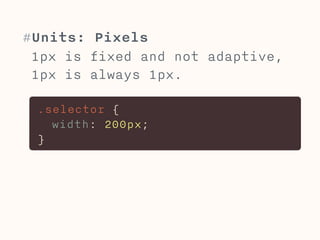
#Units: Pixels 
1px is fixed and not adaptive, 
1px is always 1px. 
.selector { 
width: 200px; 
}
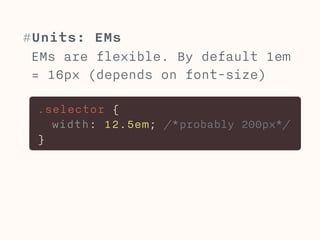
#Units: EMs 
EMs are flexible. By default 1em 
= 16px (depends on font-size) 
.selector { 
width: 12.5em; /*probably 200px*/ 
}
#EMs 
Name: EMs are named after the letter “M”, 
because they are defined as the with of the 
letter M. 
Note that a standard with at a given font-size 
is used and the font you choose does not effect 
the size of EMs. 
Size: EMs adjust with the font-size and the user 
font-size settings. 
If you set the font-size of an element “.parent” 
to 2em, an element inside “.parent” with font-size 
of 1em be as big as the 2em in parent. 
Because of the inheritance of the default font-size.
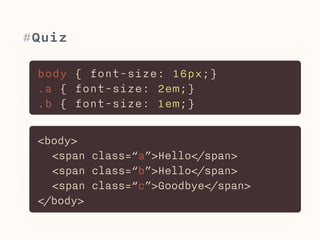
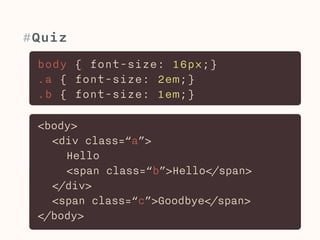
#Quiz 
body { font-size: 16px;} 
.a { font-size: 2em;} 
.b { font-size: 1em;} 
<body> 
<span class=“a”>Hello</span> 
<span class=“b”>Hello</span> 
<span class=“c”>Goodbye</span> 
</body>
#Quiz 
body { font-size: 16px;} 
.a { font-size: 2em;} 
.b { font-size: 1em;} 
<body> 
<div class=“a”> 
Hello 
<span class=“b”>Hello</span> 
</div> 
<span class=“c”>Goodbye</span> 
</body>
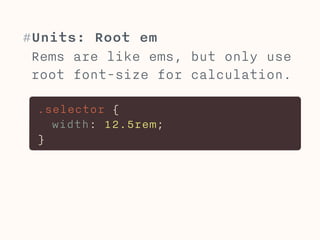
#Units: Root em 
Rems are like ems, but only use 
root font-size for calculation. 
.selector { 
width: 12.5rem; 
}
#Root ems 
Size: Ems rely on the font-size of their 
respective parent element to calculate their own 
font-size. Rems in contrast always use the font-size 
of the root (html-element) to calculate 
their size. 
This solves the typical nightmare of impossible 
to control font-size when using ems.
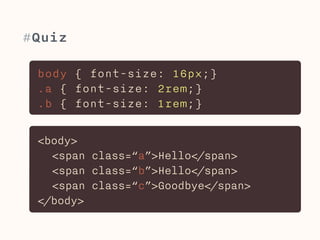
#Quiz 
body { font-size: 16px;} 
.a { font-size: 2rem;} 
.b { font-size: 1rem;} 
<body> 
<span class=“a”>Hello</span> 
<span class=“b”>Hello</span> 
<span class=“c”>Goodbye</span> 
</body>
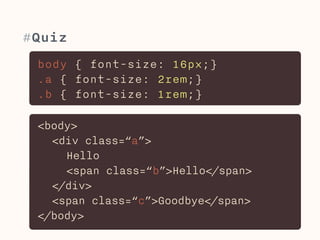
#Quiz 
body { font-size: 16px;} 
.a { font-size: 2rem;} 
.b { font-size: 1rem;} 
<body> 
<div class=“a”> 
Hello 
<span class=“b”>Hello</span> 
</div> 
<span class=“c”>Goodbye</span> 
</body>
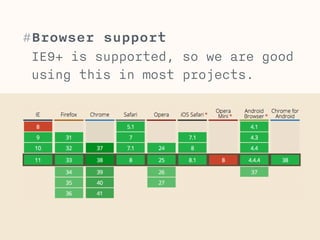
#Browser support 
IE9+ is supported, so we are good 
using this in most projects.
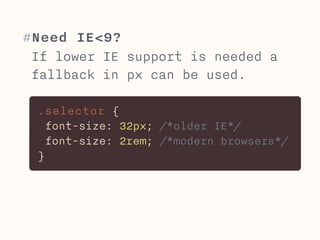
#Need IE<9? 
If lower IE support is needed a 
fallback in px can be used. 
.selector { 
font-size: 32px; /*older IE*/ 
font-size: 2rem; /*modern browsers*/ 
}
#Fallbacks 
Often times when browsers do not support new 
values, they will just ignore the declaration 
entirely. 
Consider that normally when you declare a 
property twice, the later one overwrites the 
earlier one. 
This is very helpful for fallbacks. You declare 
a property with a value that all browsers 
understand, like “px” and redeclare this 
property with a new value like “rem” afterwards. 
In supported browsers the new property 
overwrites the first declaration, while in older 
browsers the second declaration is ignored and 
only the supported value will be used.
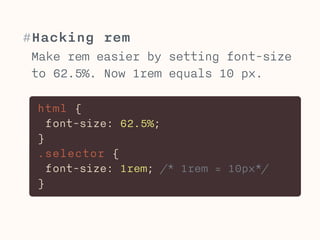
#Hacking rem 
Make rem easier by setting font-size 
to 62.5%. Now 1rem equals 10 px. 
html { 
font-size: 62.5%; 
} 
.selector { 
font-size: 1rem; /* 1rem = 10px*/ 
}
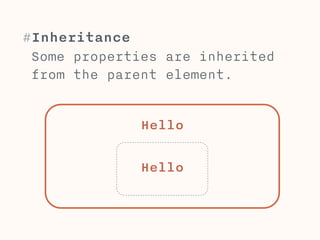
#Inheritance 
Some properties are inherited 
from the parent element. 
Hello 
! 
Hel!lo
#CSS inheritance 
Inheritance: Some properties like color or font-size 
are inherited from parent elements. Others, 
like border properties or floats are not. 
Visit https://developer.mozilla.org/en-US/docs/ 
Web/CSS/Reference to find out which properties 
are inherited. 
! 
You can always overwrite inheritance by 
redefining a property in a child element.
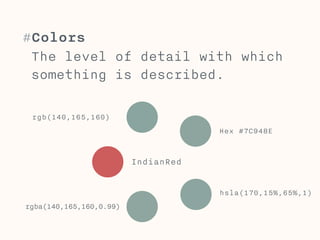
#Colors 
The level of detail with which 
something is described. 
IndianRed 
Hex #7C948E 
rgb(140,165,160) 
rgba(140,165,160,0.99) 
hsla(170,15%,65%,1)
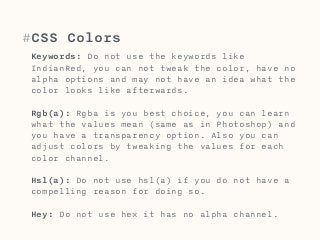
#CSS Colors 
Keywords: Do not use the keywords like 
IndianRed, you can not tweak the color, have no 
alpha options and may not have an idea what the 
color looks like afterwards. 
Rgb(a): Rgba is you best choice, you can learn 
what the values mean (same as in Photoshop) and 
you have a transparency option. Also you can 
adjust colors by tweaking the values for each 
color channel. 
Hsl(a): Do not use hsl(a) if you do not have a 
compelling reason for doing so. 
Hey: Do not use hex it has no alpha channel.
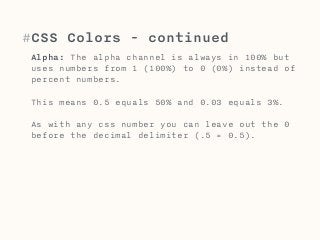
#CSS Colors - continued 
Alpha: The alpha channel is always in 100% but 
uses numbers from 1 (100%) to 0 (0%) instead of 
percent numbers. 
This means 0.5 equals 50% and 0.03 equals 3%. 
As with any css number you can leave out the 0 
before the decimal delimiter (.5 = 0.5).
#Resets & normalise 
Browsers have a default way of 
styling elements. This can make 
css tricky. 
Resets & normalisers rest the 
css to a standard.
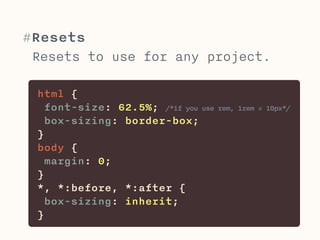
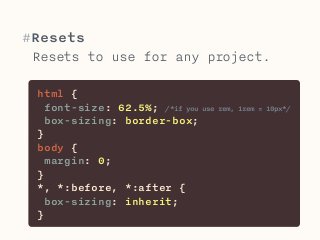
#Resets 
Resets to use for any project. 
html { 
font-size: 62.5%; /*if you use rem, 1rem = 10px*/ 
box-sizing: border-box; 
} 
body { 
margin: 0; 
} 
*, *:before, *:after { 
box-sizing: inherit; 
}
#Resets & normalise 
Resets add weight to you page. You should 
consider only using resets for elements that you 
use often and reset the default in a similar 
way. This small reset can live in the top 
section of your css file, no need for another 
css file. 
E.g. if you remove the “text-decoration:underline” 
from all your links, you can reset it, if you 
change the link color to different colors all the 
time, don’t reset it.
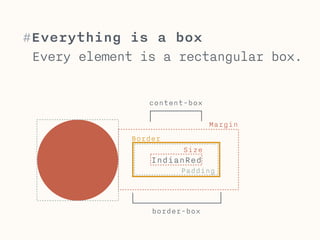
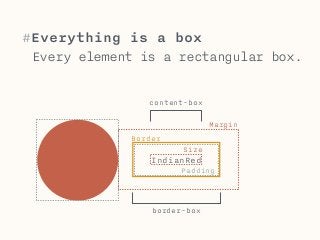
#Everything is a box 
Every element is a rectangular box. 
content-box 
Size 
IndianRed 
Margin 
Padding 
Border 
border-box
#Box model 
Every html-element is a rectangular box for the 
browser. The box model describes the rules for 
how the size of a box is calculated. 
content-box is the default for many elements. 
Only with and height are considered. This means 
a box with height of 20px and a padding-top of 
10px is 30px in height. 
border-box uses width/height as well as padding 
and border for the size. A box with 20px height, 
padding-top of 10px and border-top of 5px is 
20px high. padding and border are on the 
“inside” of the element.
#Lukas Oppermann 
lukas@vea.re

Btk creative-web-03

  • 1.
  • 2.
    #Units: Pixels 1pxis fixed and not adaptive, 1px is always 1px. .selector { width: 200px; }
  • 3.
    #Units: EMs EMsare flexible. By default 1em = 16px (depends on font-size) .selector { width: 12.5em; /*probably 200px*/ }
  • 4.
    #EMs Name: EMsare named after the letter “M”, because they are defined as the with of the letter M. Note that a standard with at a given font-size is used and the font you choose does not effect the size of EMs. Size: EMs adjust with the font-size and the user font-size settings. If you set the font-size of an element “.parent” to 2em, an element inside “.parent” with font-size of 1em be as big as the 2em in parent. Because of the inheritance of the default font-size.
  • 5.
    #Quiz body {font-size: 16px;} .a { font-size: 2em;} .b { font-size: 1em;} <body> <span class=“a”>Hello</span> <span class=“b”>Hello</span> <span class=“c”>Goodbye</span> </body>
  • 6.
    #Quiz body {font-size: 16px;} .a { font-size: 2em;} .b { font-size: 1em;} <body> <div class=“a”> Hello <span class=“b”>Hello</span> </div> <span class=“c”>Goodbye</span> </body>
  • 7.
    #Units: Root em Rems are like ems, but only use root font-size for calculation. .selector { width: 12.5rem; }
  • 8.
    #Root ems Size:Ems rely on the font-size of their respective parent element to calculate their own font-size. Rems in contrast always use the font-size of the root (html-element) to calculate their size. This solves the typical nightmare of impossible to control font-size when using ems.
  • 9.
    #Quiz body {font-size: 16px;} .a { font-size: 2rem;} .b { font-size: 1rem;} <body> <span class=“a”>Hello</span> <span class=“b”>Hello</span> <span class=“c”>Goodbye</span> </body>
  • 10.
    #Quiz body {font-size: 16px;} .a { font-size: 2rem;} .b { font-size: 1rem;} <body> <div class=“a”> Hello <span class=“b”>Hello</span> </div> <span class=“c”>Goodbye</span> </body>
  • 11.
    #Browser support IE9+is supported, so we are good using this in most projects.
  • 12.
    #Need IE<9? Iflower IE support is needed a fallback in px can be used. .selector { font-size: 32px; /*older IE*/ font-size: 2rem; /*modern browsers*/ }
  • 13.
    #Fallbacks Often timeswhen browsers do not support new values, they will just ignore the declaration entirely. Consider that normally when you declare a property twice, the later one overwrites the earlier one. This is very helpful for fallbacks. You declare a property with a value that all browsers understand, like “px” and redeclare this property with a new value like “rem” afterwards. In supported browsers the new property overwrites the first declaration, while in older browsers the second declaration is ignored and only the supported value will be used.
  • 14.
    #Hacking rem Makerem easier by setting font-size to 62.5%. Now 1rem equals 10 px. html { font-size: 62.5%; } .selector { font-size: 1rem; /* 1rem = 10px*/ }
  • 15.
    #Inheritance Some propertiesare inherited from the parent element. Hello ! Hel!lo
  • 16.
    #CSS inheritance Inheritance:Some properties like color or font-size are inherited from parent elements. Others, like border properties or floats are not. Visit https://developer.mozilla.org/en-US/docs/ Web/CSS/Reference to find out which properties are inherited. ! You can always overwrite inheritance by redefining a property in a child element.
  • 17.
    #Colors The levelof detail with which something is described. IndianRed Hex #7C948E rgb(140,165,160) rgba(140,165,160,0.99) hsla(170,15%,65%,1)
  • 18.
    #CSS Colors Keywords:Do not use the keywords like IndianRed, you can not tweak the color, have no alpha options and may not have an idea what the color looks like afterwards. Rgb(a): Rgba is you best choice, you can learn what the values mean (same as in Photoshop) and you have a transparency option. Also you can adjust colors by tweaking the values for each color channel. Hsl(a): Do not use hsl(a) if you do not have a compelling reason for doing so. Hey: Do not use hex it has no alpha channel.
  • 19.
    #CSS Colors -continued Alpha: The alpha channel is always in 100% but uses numbers from 1 (100%) to 0 (0%) instead of percent numbers. This means 0.5 equals 50% and 0.03 equals 3%. As with any css number you can leave out the 0 before the decimal delimiter (.5 = 0.5).
  • 20.
    #Resets & normalise Browsers have a default way of styling elements. This can make css tricky. Resets & normalisers rest the css to a standard.
  • 21.
    #Resets Resets touse for any project. html { font-size: 62.5%; /*if you use rem, 1rem = 10px*/ box-sizing: border-box; } body { margin: 0; } *, *:before, *:after { box-sizing: inherit; }
  • 22.
    #Resets & normalise Resets add weight to you page. You should consider only using resets for elements that you use often and reset the default in a similar way. This small reset can live in the top section of your css file, no need for another css file. E.g. if you remove the “text-decoration:underline” from all your links, you can reset it, if you change the link color to different colors all the time, don’t reset it.
  • 23.
    #Everything is abox Every element is a rectangular box. content-box Size IndianRed Margin Padding Border border-box
  • 24.
    #Box model Everyhtml-element is a rectangular box for the browser. The box model describes the rules for how the size of a box is calculated. content-box is the default for many elements. Only with and height are considered. This means a box with height of 20px and a padding-top of 10px is 30px in height. border-box uses width/height as well as padding and border for the size. A box with 20px height, padding-top of 10px and border-top of 5px is 20px high. padding and border are on the “inside” of the element.
  • 25.