The SAP GUI Scripting API
How to Automate User Interaction -
Technology, Examples and Integration
Christian Cohrs and Gisbert Loff
SAP AG
© SAP AG 2003, PA251, Christian Cohrs, Gisbert Loff / 2
Learning Objectives
As a result of this workshop, you will be able to:
n Benefit from using scripts in your daily work.
n Understand the security settings and
recommendations.
n Access the Scripting Object Model to collect and
modify data in SAP GUI.
n Use SAP sample applications that help you get
started with your own development.
n Name some prominent applications built using the
SAP GUI Scripting API.
© SAP AG 2003, PA251, Christian Cohrs, Gisbert Loff / 3
Introduction
SAP GUI Scripting…
n ...is an interface exposed by SAP GUI.
n …can make life easier for users by automating repeating
tasks.
n …is a basis for tools that test the SAP system.
n …allows client side applications to collaborate.
Availability:
n Shipped with SAP GUI 6.20 and future versions
n Compatible with:
u All R/3 versions currently supported by SAP
u Applications built on top of Web AS 6.10 to 6.40
n Non-Dynpro based applications (BSP, Web Dynpro, …) are
not supported. See note 587202 for known limitations.
© SAP AG 2003, PA251, Christian Cohrs, Gisbert Loff / 4
Agenda
SAP GUI Scripting for Users
n Recording and Playback
n The Scripting Wizard
SAP GUI Scripting Administration
n Client Side and Server Side
SAP GUI Scripting for Developers
n The Object Model
n Available Platforms
Existing Applications
n Focus
n Samples
n Certification Process
Summary
© SAP AG 2003, PA251, Christian Cohrs, Gisbert Loff / 5
Agenda
SAP GUI Scripting for Users
© SAP AG 2003, PA251, Christian Cohrs, Gisbert Loff / 6
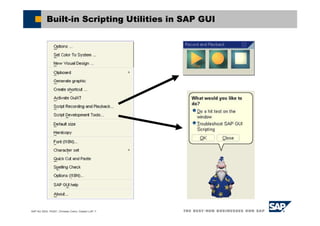
Built-in Scripting Utilities in SAP GUI
© SAP AG 2003, PA251, Christian Cohrs, Gisbert Loff / 7
Built-in Scripting Utilities in SAP GUI
© SAP AG 2003, PA251, Christian Cohrs, Gisbert Loff / 8
Built-in Scripting Utilities: Recording
1. Press the Record button to start recording
2. Execute the steps you want to record
© SAP AG 2003, PA251, Christian Cohrs, Gisbert Loff / 9
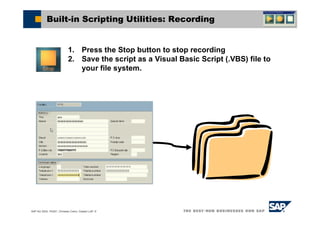
Built-in Scripting Utilities: Recording
1. Press the Stop button to stop recording
2. Save the script as a Visual Basic Script (.VBS) file to
your file system.
© SAP AG 2003, PA251, Christian Cohrs, Gisbert Loff / 10
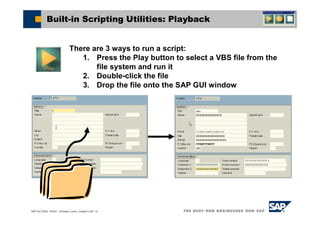
Built-in Scripting Utilities: Playback
There are 3 ways to run a script:
1. Press the Play button to select a VBS file from the
file system and run it
2. Double-click the file
3. Drop the file onto the SAP GUI window
© SAP AG 2003, PA251, Christian Cohrs, Gisbert Loff / 11
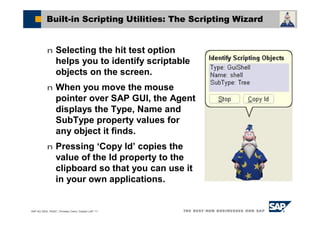
Built-in Scripting Utilities: The Scripting Wizard
n Selecting the hit test option
helps you to identify scriptable
objects on the screen.
n When you move the mouse
pointer over SAP GUI, the Agent
displays the Type, Name and
SubType property values for
any object it finds.
n Pressing ‘Copy Id’ copies the
value of the Id property to the
clipboard so that you can use it
in your own applications.
© SAP AG 2003, PA251, Christian Cohrs, Gisbert Loff / 12
Built-in Scripting Utilities: The Scripting Wizard
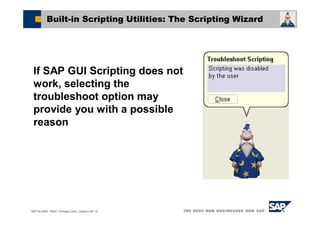
If SAP GUI Scripting does not
work, selecting the
troubleshoot option may
provide you with a possible
reason
© SAP AG 2003, PA251, Christian Cohrs, Gisbert Loff / 13
Troubleshooting Scripting
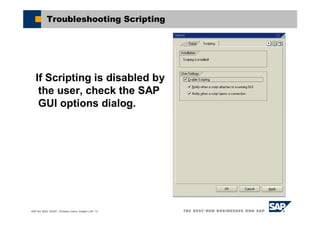
If Scripting is disabled by
the user, check the SAP
GUI options dialog.
© SAP AG 2003, PA251, Christian Cohrs, Gisbert Loff / 14
Troubleshooting Scripting
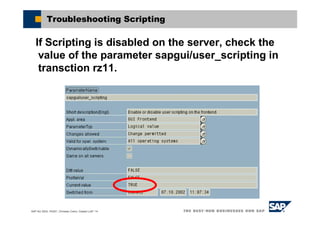
If Scripting is disabled on the server, check the
value of the parameter sapgui/user_scripting in
transction rz11.
© SAP AG 2003, PA251, Christian Cohrs, Gisbert Loff / 15
Troubleshooting Scripting
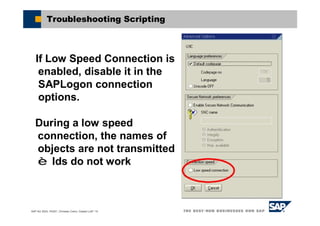
If Low Speed Connection is
enabled, disable it in the
SAPLogon connection
options.
During a low speed
connection, the names of
objects are not transmitted
è Ids do not work
© SAP AG 2003, PA251, Christian Cohrs, Gisbert Loff / 16
Agenda
SAP GUI Scripting Administration
© SAP AG 2003, PA251, Christian Cohrs, Gisbert Loff / 17
SAP GUI Scripting Administration
There may be reasons to disable SAP GUI Scripting:
n A script can execute much faster than a user, thereby
increasing the load on the system during its execution.
n A script may be used to ‚grab‘ data from SAP transactions even
in cases where a download of the data is disabled.
n Users might run scripts they received from somebody else,
without knowing what the script will do.
n An application that is installed on the client PC can record
whatever the user does in SAP GUI (no passwords, though).
© SAP AG 2003, PA251, Christian Cohrs, Gisbert Loff / 18
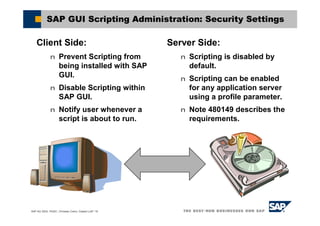
SAP GUI Scripting Administration: Security Settings
Client Side:
n Prevent Scripting from
being installed with SAP
GUI.
n Disable Scripting within
SAP GUI.
n Notify user whenever a
script is about to run.
Server Side:
n Scripting is disabled by
default.
n Scripting can be enabled
for any application server
using a profile parameter.
n Note 480149 describes the
requirements.
© SAP AG 2003, PA251, Christian Cohrs, Gisbert Loff / 19
SAP GUI Scripting Administration: Password Protection
n Password fields are not recorded.
n If you need to connect to SAP systems by setting the
username and password, you must store the
password in the script. If your script is a plain text
file, such as VBS, anybody having access to the file
can read your password.
n It is recommended that you connect manually to the
system, or use Single-Sign-On.
n Applications that do not rely on VBS may implement
their own encryption functionality when storing
password.
© SAP AG 2003, PA251, Christian Cohrs, Gisbert Loff / 20
Agenda
SAP GUI Scripting for Developers
© SAP AG 2003, PA251, Christian Cohrs, Gisbert Loff / 21
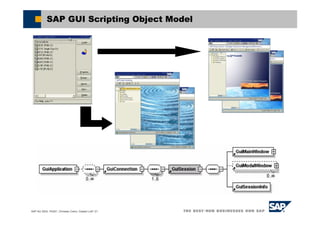
SAP GUI Scripting Object Model
© SAP AG 2003, PA251, Christian Cohrs, Gisbert Loff / 22
SAP GUI Scripting Object Model: One Session
© SAP AG 2003, PA251, Christian Cohrs, Gisbert Loff / 23
Identifying objects using unique Ids
1. Parent object id, followed by ‚/‘
2. The type prefix of the object (ctxt: combo text field)
3. The name of the object. For dynpro fields this is
taken from the data dictionary.
4. If the id up to here is not unique, then a one or two
dimensional index is added: „[1]“ or „[12, 7]“.
“/app/con[0]/ses[0]/wnd[0]/usr” + “/” + “ctxt” + “RS38M-PROGRAMM”
1 2 3 4
© SAP AG 2003, PA251, Christian Cohrs, Gisbert Loff / 24
Identifying Objects using Relative Ids
session.findById(“wnd[0]/usr/ctxtRS38M-PROGRAMM“).text =
"Hello World"
n Using a relative Id with findById
makes a script more readable.
n You may leave out the path
from the application object to the
object on which you call findById.
© SAP AG 2003, PA251, Christian Cohrs, Gisbert Loff / 25
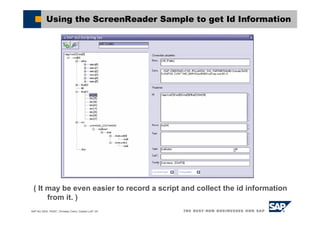
( It may be even easier to record a script and collect the id information
from it. )
Using the ScreenReader Sample to get Id Information
© SAP AG 2003, PA251, Christian Cohrs, Gisbert Loff / 26
Platform and Programming Language Independence
Common Object Model for SAP GUI for Windows and
SAP GUI for Java
n The same types of objects are exposed
n Same set of properties and methods
n The runtime hierarchy is identical
n Some differences in accessing the root object and
the lifetime of event handlers
Result: Identical JavaScript scripts may be executed
using either SAP GUI for Java or SAP GUI for Windows
© SAP AG 2003, PA251, Christian Cohrs, Gisbert Loff / 27
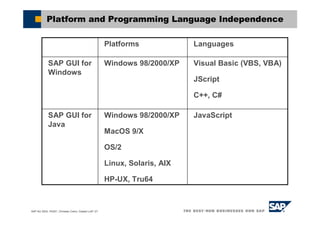
Platform and Programming Language Independence
JavaScriptWindows 98/2000/XP
MacOS 9/X
OS/2
Linux, Solaris, AIX
HP-UX, Tru64
SAP GUI for
Java
Visual Basic (VBS, VBA)
JScript
C++, C#
Windows 98/2000/XPSAP GUI for
Windows
LanguagesPlatforms
© SAP AG 2003, PA251, Christian Cohrs, Gisbert Loff / 28
Agenda
Existing Applications
© SAP AG 2003, PA251, Christian Cohrs, Gisbert Loff / 29
SAP GUI Scripting Applications: Focus
SAP GUI Scripting works on the User
Interface
n Only those actions are possible that are
available to the user (unlike GuiXT).
n Changes to the user interface can break
existing scripts.
n Scripts are usually only valid for a
given SAP System version.
n SAP GUI Scripting can not replace
more stable interfaces (BAPI, ...).
© SAP AG 2003, PA251, Christian Cohrs, Gisbert Loff / 30
SAP GUI Scripting Applications: Focus
Advantages of SAP GUI Scripting over other
interfaces:
n Many complex controls are supported: Tree,
Grid, Textedit,…
n The same rules of data validation and
aggregation apply for a script as for manual
input.
© SAP AG 2003, PA251, Christian Cohrs, Gisbert Loff / 31
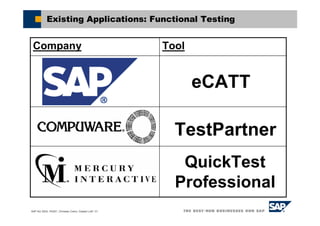
Existing Applications: Functional Testing
ToolCompany
TestPartner
eCATT
QuickTest
Professional
© SAP AG 2003, PA251, Christian Cohrs, Gisbert Loff / 32
Existing Applications: Load Testing
ToolCompany
QALoad
LoadRunner
© SAP AG 2003, PA251, Christian Cohrs, Gisbert Loff / 33
Existing Applications: Performance Monitoring
ToolCompany
IBM Tivoli
Monitoring for
Transaction
Performance
Topaz
© SAP AG 2003, PA251, Christian Cohrs, Gisbert Loff / 34
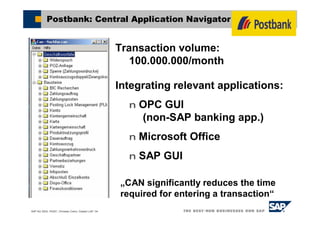
Postbank: Central Application Navigator
Integrating relevant applications:
n OPC GUI
(non-SAP banking app.)
n Microsoft Office
n SAP GUI
Transaction volume:
100.000.000/month
„CAN significantly reduces the time
required for entering a transaction“
© SAP AG 2003, PA251, Christian Cohrs, Gisbert Loff / 35
n To support successful integration and to ensure quality and
customer satisfaction, SAP offers an interface certification
program through the SAP Integration and Certification
Centers (ICCs) www.sap.com/icc
n The ICCs provide a rich set of well documented integration
scenarios that enable third-party vendors to integrate their
software with SAP solutions www.sap.com/icc/scenarios
n In addition to interface certification, ICCs support third-party
software vendors by offering integration consulting services
and access to SAP systems for integration testing
www.sap.com/icc/service.asp
Interface Software Certification at SAP
© SAP AG 2003, PA251, Christian Cohrs, Gisbert Loff / 36
n For customers, the advantages of SAP-certified
interface software include:
n Faster implementation time and lower integration costs
through the use of SAP-certified third-party software
n Protection of existing investments in SAP solutions as
well as data integrity through the use of SAP endorsed
integration technologies
www.sap.com/icc/scenarios/technology
n Quick and convenient search for all of certified interface
products via the online partner and product directory
www.sap.com/icc
Advantages for SAP Customers
© SAP AG 2003, PA251, Christian Cohrs, Gisbert Loff / 37
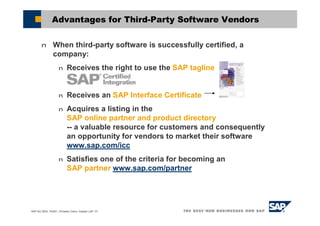
n When third-party software is successfully certified, a
company:
n Receives the right to use the SAP tagline
n Receives an SAP Interface Certificate
n Acquires a listing in the
SAP online partner and product directory
-- a valuable resource for customers and consequently
an opportunity for vendors to market their software
www.sap.com/icc
n Satisfies one of the criteria for becoming an
SAP partner www.sap.com/partner
Advantages for Third-Party Software Vendors
© SAP AG 2003, PA251, Christian Cohrs, Gisbert Loff / 38
Certification for SAP GUI Scripting based products
n Predefined certification scenarios:
n Computer aided test tools
(certification available, scenario: BC-eCATT)
n Monitoring tools (certification planned)
n Load test tools (certification planned)
n For other scenarios the ICC offers certification on
an individual basis.
© SAP AG 2003, PA251, Christian Cohrs, Gisbert Loff / 39
Summary
SAP GUI Scripting emulates user interaction with
SAP GUI.
SAP GUI Scripting may be used as a simple macro
recording and playback tool.
SAP GUI Scripting may also be used to enable
applications to collaborate on top of a powerful
object model.
The interface has proven its capabilities in many
productive environment scenarios.
© SAP AG 2003, PA251, Christian Cohrs, Gisbert Loff / 40
Demo
Demo
© SAP AG 2003, PA251, Christian Cohrs, Gisbert Loff / 41
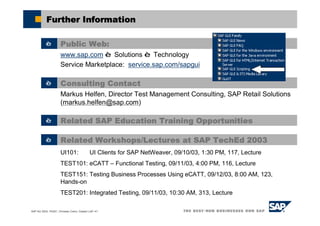
Further Information
è Public Web:
www.sap.com è Solutions è Technology
Service Marketplace: service.sap.com/sapgui
è Related Workshops/Lectures at SAP TechEd 2003
UI101: UI Clients for SAP NetWeaver, 09/10/03, 1:30 PM, 117, Lecture
TEST101: eCATT – Functional Testing, 09/11/03, 4:00 PM, 116, Lecture
TEST151: Testing Business Processes Using eCATT, 09/12/03, 8:00 AM, 123,
Hands-on
TEST201: Integrated Testing, 09/11/03, 10:30 AM, 313, Lecture
è Related SAP Education Training Opportunities
è Consulting Contact
Markus Helfen, Director Test Management Consulting, SAP Retail Solutions
(markus.helfen@sap.com)
© SAP AG 2003, PA251, Christian Cohrs, Gisbert Loff / 42
Q&A
Questions?
© SAP AG 2003, PA251, Christian Cohrs, Gisbert Loff / 43
Agenda
Hands-on Examples
© SAP AG 2003, PA251, Christian Cohrs, Gisbert Loff / 44
Hands on Examples
Logon Information (Windows)
n User : ***
n Password : ***
Logon Information (SAP System)
n System : ***
n Client : ***
n User : ***-xy
n Password : ***
Please replace xy by the number of the laptop
you are working on, e.g. ***-29
© SAP AG 2003, PA251, Christian Cohrs, Gisbert Loff / 45
Feedback
Please complete your session evaluation
and drop it in the box on your way out.
Be courteous — deposit your trash,
and do not take the handouts for the
following session.
The SAP TechEd ’03 Las Vegas Team

Sap gui scripting api with guixt

  • 1.
    The SAP GUIScripting API How to Automate User Interaction - Technology, Examples and Integration Christian Cohrs and Gisbert Loff SAP AG
  • 2.
    © SAP AG2003, PA251, Christian Cohrs, Gisbert Loff / 2 Learning Objectives As a result of this workshop, you will be able to: n Benefit from using scripts in your daily work. n Understand the security settings and recommendations. n Access the Scripting Object Model to collect and modify data in SAP GUI. n Use SAP sample applications that help you get started with your own development. n Name some prominent applications built using the SAP GUI Scripting API.
  • 3.
    © SAP AG2003, PA251, Christian Cohrs, Gisbert Loff / 3 Introduction SAP GUI Scripting… n ...is an interface exposed by SAP GUI. n …can make life easier for users by automating repeating tasks. n …is a basis for tools that test the SAP system. n …allows client side applications to collaborate. Availability: n Shipped with SAP GUI 6.20 and future versions n Compatible with: u All R/3 versions currently supported by SAP u Applications built on top of Web AS 6.10 to 6.40 n Non-Dynpro based applications (BSP, Web Dynpro, …) are not supported. See note 587202 for known limitations.
  • 4.
    © SAP AG2003, PA251, Christian Cohrs, Gisbert Loff / 4 Agenda SAP GUI Scripting for Users n Recording and Playback n The Scripting Wizard SAP GUI Scripting Administration n Client Side and Server Side SAP GUI Scripting for Developers n The Object Model n Available Platforms Existing Applications n Focus n Samples n Certification Process Summary
  • 5.
    © SAP AG2003, PA251, Christian Cohrs, Gisbert Loff / 5 Agenda SAP GUI Scripting for Users
  • 6.
    © SAP AG2003, PA251, Christian Cohrs, Gisbert Loff / 6 Built-in Scripting Utilities in SAP GUI
  • 7.
    © SAP AG2003, PA251, Christian Cohrs, Gisbert Loff / 7 Built-in Scripting Utilities in SAP GUI
  • 8.
    © SAP AG2003, PA251, Christian Cohrs, Gisbert Loff / 8 Built-in Scripting Utilities: Recording 1. Press the Record button to start recording 2. Execute the steps you want to record
  • 9.
    © SAP AG2003, PA251, Christian Cohrs, Gisbert Loff / 9 Built-in Scripting Utilities: Recording 1. Press the Stop button to stop recording 2. Save the script as a Visual Basic Script (.VBS) file to your file system.
  • 10.
    © SAP AG2003, PA251, Christian Cohrs, Gisbert Loff / 10 Built-in Scripting Utilities: Playback There are 3 ways to run a script: 1. Press the Play button to select a VBS file from the file system and run it 2. Double-click the file 3. Drop the file onto the SAP GUI window
  • 11.
    © SAP AG2003, PA251, Christian Cohrs, Gisbert Loff / 11 Built-in Scripting Utilities: The Scripting Wizard n Selecting the hit test option helps you to identify scriptable objects on the screen. n When you move the mouse pointer over SAP GUI, the Agent displays the Type, Name and SubType property values for any object it finds. n Pressing ‘Copy Id’ copies the value of the Id property to the clipboard so that you can use it in your own applications.
  • 12.
    © SAP AG2003, PA251, Christian Cohrs, Gisbert Loff / 12 Built-in Scripting Utilities: The Scripting Wizard If SAP GUI Scripting does not work, selecting the troubleshoot option may provide you with a possible reason
  • 13.
    © SAP AG2003, PA251, Christian Cohrs, Gisbert Loff / 13 Troubleshooting Scripting If Scripting is disabled by the user, check the SAP GUI options dialog.
  • 14.
    © SAP AG2003, PA251, Christian Cohrs, Gisbert Loff / 14 Troubleshooting Scripting If Scripting is disabled on the server, check the value of the parameter sapgui/user_scripting in transction rz11.
  • 15.
    © SAP AG2003, PA251, Christian Cohrs, Gisbert Loff / 15 Troubleshooting Scripting If Low Speed Connection is enabled, disable it in the SAPLogon connection options. During a low speed connection, the names of objects are not transmitted è Ids do not work
  • 16.
    © SAP AG2003, PA251, Christian Cohrs, Gisbert Loff / 16 Agenda SAP GUI Scripting Administration
  • 17.
    © SAP AG2003, PA251, Christian Cohrs, Gisbert Loff / 17 SAP GUI Scripting Administration There may be reasons to disable SAP GUI Scripting: n A script can execute much faster than a user, thereby increasing the load on the system during its execution. n A script may be used to ‚grab‘ data from SAP transactions even in cases where a download of the data is disabled. n Users might run scripts they received from somebody else, without knowing what the script will do. n An application that is installed on the client PC can record whatever the user does in SAP GUI (no passwords, though).
  • 18.
    © SAP AG2003, PA251, Christian Cohrs, Gisbert Loff / 18 SAP GUI Scripting Administration: Security Settings Client Side: n Prevent Scripting from being installed with SAP GUI. n Disable Scripting within SAP GUI. n Notify user whenever a script is about to run. Server Side: n Scripting is disabled by default. n Scripting can be enabled for any application server using a profile parameter. n Note 480149 describes the requirements.
  • 19.
    © SAP AG2003, PA251, Christian Cohrs, Gisbert Loff / 19 SAP GUI Scripting Administration: Password Protection n Password fields are not recorded. n If you need to connect to SAP systems by setting the username and password, you must store the password in the script. If your script is a plain text file, such as VBS, anybody having access to the file can read your password. n It is recommended that you connect manually to the system, or use Single-Sign-On. n Applications that do not rely on VBS may implement their own encryption functionality when storing password.
  • 20.
    © SAP AG2003, PA251, Christian Cohrs, Gisbert Loff / 20 Agenda SAP GUI Scripting for Developers
  • 21.
    © SAP AG2003, PA251, Christian Cohrs, Gisbert Loff / 21 SAP GUI Scripting Object Model
  • 22.
    © SAP AG2003, PA251, Christian Cohrs, Gisbert Loff / 22 SAP GUI Scripting Object Model: One Session
  • 23.
    © SAP AG2003, PA251, Christian Cohrs, Gisbert Loff / 23 Identifying objects using unique Ids 1. Parent object id, followed by ‚/‘ 2. The type prefix of the object (ctxt: combo text field) 3. The name of the object. For dynpro fields this is taken from the data dictionary. 4. If the id up to here is not unique, then a one or two dimensional index is added: „[1]“ or „[12, 7]“. “/app/con[0]/ses[0]/wnd[0]/usr” + “/” + “ctxt” + “RS38M-PROGRAMM” 1 2 3 4
  • 24.
    © SAP AG2003, PA251, Christian Cohrs, Gisbert Loff / 24 Identifying Objects using Relative Ids session.findById(“wnd[0]/usr/ctxtRS38M-PROGRAMM“).text = "Hello World" n Using a relative Id with findById makes a script more readable. n You may leave out the path from the application object to the object on which you call findById.
  • 25.
    © SAP AG2003, PA251, Christian Cohrs, Gisbert Loff / 25 ( It may be even easier to record a script and collect the id information from it. ) Using the ScreenReader Sample to get Id Information
  • 26.
    © SAP AG2003, PA251, Christian Cohrs, Gisbert Loff / 26 Platform and Programming Language Independence Common Object Model for SAP GUI for Windows and SAP GUI for Java n The same types of objects are exposed n Same set of properties and methods n The runtime hierarchy is identical n Some differences in accessing the root object and the lifetime of event handlers Result: Identical JavaScript scripts may be executed using either SAP GUI for Java or SAP GUI for Windows
  • 27.
    © SAP AG2003, PA251, Christian Cohrs, Gisbert Loff / 27 Platform and Programming Language Independence JavaScriptWindows 98/2000/XP MacOS 9/X OS/2 Linux, Solaris, AIX HP-UX, Tru64 SAP GUI for Java Visual Basic (VBS, VBA) JScript C++, C# Windows 98/2000/XPSAP GUI for Windows LanguagesPlatforms
  • 28.
    © SAP AG2003, PA251, Christian Cohrs, Gisbert Loff / 28 Agenda Existing Applications
  • 29.
    © SAP AG2003, PA251, Christian Cohrs, Gisbert Loff / 29 SAP GUI Scripting Applications: Focus SAP GUI Scripting works on the User Interface n Only those actions are possible that are available to the user (unlike GuiXT). n Changes to the user interface can break existing scripts. n Scripts are usually only valid for a given SAP System version. n SAP GUI Scripting can not replace more stable interfaces (BAPI, ...).
  • 30.
    © SAP AG2003, PA251, Christian Cohrs, Gisbert Loff / 30 SAP GUI Scripting Applications: Focus Advantages of SAP GUI Scripting over other interfaces: n Many complex controls are supported: Tree, Grid, Textedit,… n The same rules of data validation and aggregation apply for a script as for manual input.
  • 31.
    © SAP AG2003, PA251, Christian Cohrs, Gisbert Loff / 31 Existing Applications: Functional Testing ToolCompany TestPartner eCATT QuickTest Professional
  • 32.
    © SAP AG2003, PA251, Christian Cohrs, Gisbert Loff / 32 Existing Applications: Load Testing ToolCompany QALoad LoadRunner
  • 33.
    © SAP AG2003, PA251, Christian Cohrs, Gisbert Loff / 33 Existing Applications: Performance Monitoring ToolCompany IBM Tivoli Monitoring for Transaction Performance Topaz
  • 34.
    © SAP AG2003, PA251, Christian Cohrs, Gisbert Loff / 34 Postbank: Central Application Navigator Integrating relevant applications: n OPC GUI (non-SAP banking app.) n Microsoft Office n SAP GUI Transaction volume: 100.000.000/month „CAN significantly reduces the time required for entering a transaction“
  • 35.
    © SAP AG2003, PA251, Christian Cohrs, Gisbert Loff / 35 n To support successful integration and to ensure quality and customer satisfaction, SAP offers an interface certification program through the SAP Integration and Certification Centers (ICCs) www.sap.com/icc n The ICCs provide a rich set of well documented integration scenarios that enable third-party vendors to integrate their software with SAP solutions www.sap.com/icc/scenarios n In addition to interface certification, ICCs support third-party software vendors by offering integration consulting services and access to SAP systems for integration testing www.sap.com/icc/service.asp Interface Software Certification at SAP
  • 36.
    © SAP AG2003, PA251, Christian Cohrs, Gisbert Loff / 36 n For customers, the advantages of SAP-certified interface software include: n Faster implementation time and lower integration costs through the use of SAP-certified third-party software n Protection of existing investments in SAP solutions as well as data integrity through the use of SAP endorsed integration technologies www.sap.com/icc/scenarios/technology n Quick and convenient search for all of certified interface products via the online partner and product directory www.sap.com/icc Advantages for SAP Customers
  • 37.
    © SAP AG2003, PA251, Christian Cohrs, Gisbert Loff / 37 n When third-party software is successfully certified, a company: n Receives the right to use the SAP tagline n Receives an SAP Interface Certificate n Acquires a listing in the SAP online partner and product directory -- a valuable resource for customers and consequently an opportunity for vendors to market their software www.sap.com/icc n Satisfies one of the criteria for becoming an SAP partner www.sap.com/partner Advantages for Third-Party Software Vendors
  • 38.
    © SAP AG2003, PA251, Christian Cohrs, Gisbert Loff / 38 Certification for SAP GUI Scripting based products n Predefined certification scenarios: n Computer aided test tools (certification available, scenario: BC-eCATT) n Monitoring tools (certification planned) n Load test tools (certification planned) n For other scenarios the ICC offers certification on an individual basis.
  • 39.
    © SAP AG2003, PA251, Christian Cohrs, Gisbert Loff / 39 Summary SAP GUI Scripting emulates user interaction with SAP GUI. SAP GUI Scripting may be used as a simple macro recording and playback tool. SAP GUI Scripting may also be used to enable applications to collaborate on top of a powerful object model. The interface has proven its capabilities in many productive environment scenarios.
  • 40.
    © SAP AG2003, PA251, Christian Cohrs, Gisbert Loff / 40 Demo Demo
  • 41.
    © SAP AG2003, PA251, Christian Cohrs, Gisbert Loff / 41 Further Information è Public Web: www.sap.com è Solutions è Technology Service Marketplace: service.sap.com/sapgui è Related Workshops/Lectures at SAP TechEd 2003 UI101: UI Clients for SAP NetWeaver, 09/10/03, 1:30 PM, 117, Lecture TEST101: eCATT – Functional Testing, 09/11/03, 4:00 PM, 116, Lecture TEST151: Testing Business Processes Using eCATT, 09/12/03, 8:00 AM, 123, Hands-on TEST201: Integrated Testing, 09/11/03, 10:30 AM, 313, Lecture è Related SAP Education Training Opportunities è Consulting Contact Markus Helfen, Director Test Management Consulting, SAP Retail Solutions (markus.helfen@sap.com)
  • 42.
    © SAP AG2003, PA251, Christian Cohrs, Gisbert Loff / 42 Q&A Questions?
  • 43.
    © SAP AG2003, PA251, Christian Cohrs, Gisbert Loff / 43 Agenda Hands-on Examples
  • 44.
    © SAP AG2003, PA251, Christian Cohrs, Gisbert Loff / 44 Hands on Examples Logon Information (Windows) n User : *** n Password : *** Logon Information (SAP System) n System : *** n Client : *** n User : ***-xy n Password : *** Please replace xy by the number of the laptop you are working on, e.g. ***-29
  • 45.
    © SAP AG2003, PA251, Christian Cohrs, Gisbert Loff / 45 Feedback Please complete your session evaluation and drop it in the box on your way out. Be courteous — deposit your trash, and do not take the handouts for the following session. The SAP TechEd ’03 Las Vegas Team