Ankit Jain
Agenda
 Process overview
 Pitfalls in process
 Introduction to SAP Fiori Solutions
 SAP Fiori Apps
 Architecture
 Overview
 Service Scope
 Wrap Up and Q&A
Gatepass Process
 ZGATE02 -Create Gatepass entry
ZGPAPP- Approver
ZGATE05 - Report
ZGATE- Ztable to be updated
 Gatepass created for outgoing entries only
 One Level of Approval
 Gate Pass approvers are maintained in custom table against company
code & creator would assign the approver at the time of creation
Pain Points in Approval Process
 Delay in approval(need to intimate approver via e-mail/call)
 No Approval Notification
 Reject option not available
 In case of Rejection, need table entry deletion explicitly
 Difficult to keep gatepass records
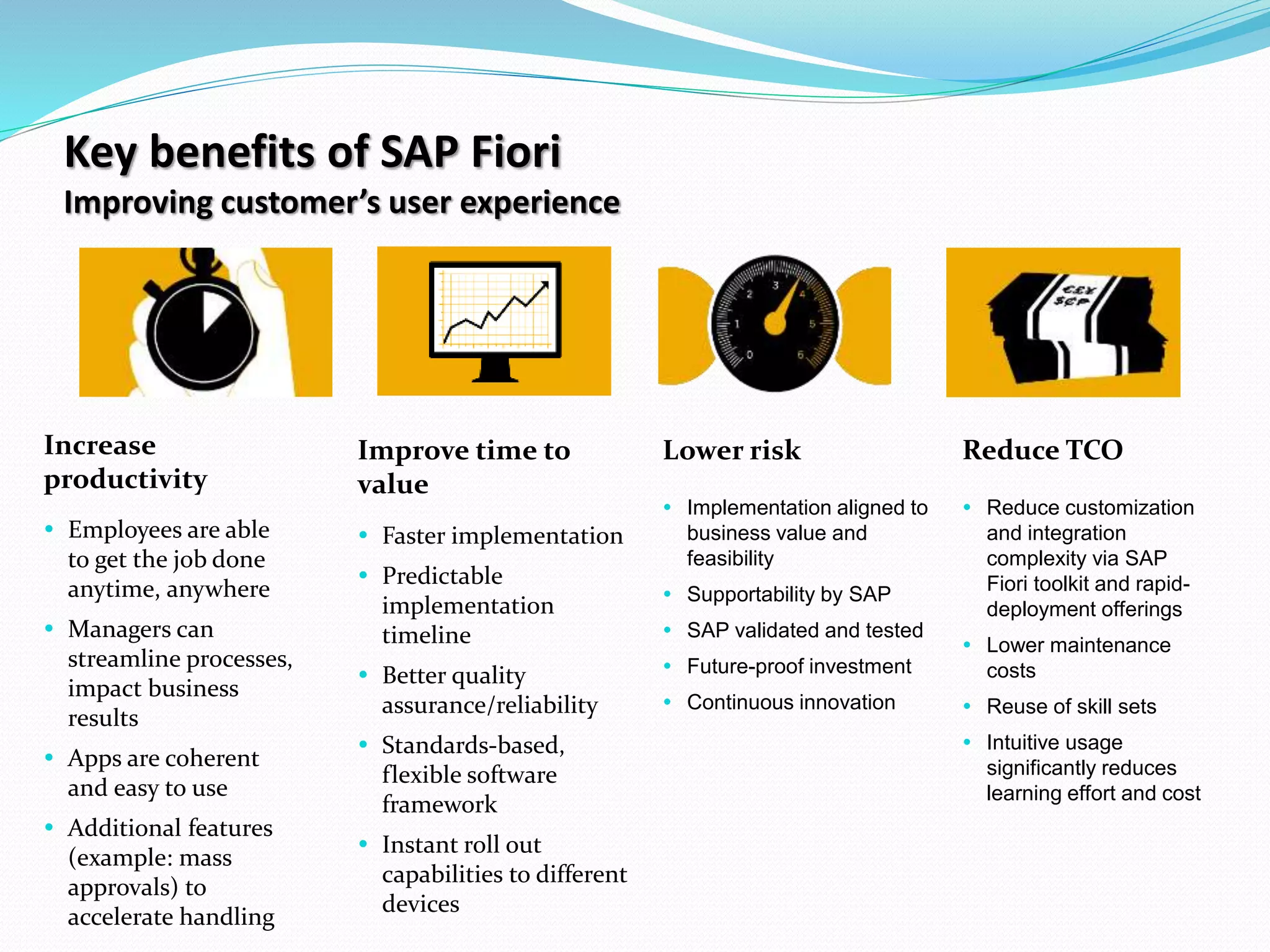
Key benefits of SAP Fiori
Improving customer’s user experience
Increase
productivity
 Employees are able
to get the job done
anytime, anywhere
 Managers can
streamline processes,
impact business
results
 Apps are coherent
and easy to use
 Additional features
(example: mass
approvals) to
accelerate handling
Lower risk Reduce TCO
 Implementation aligned to
business value and
feasibility
 Supportability by SAP
 SAP validated and tested
 Future-proof investment
 Continuous innovation
Improve time to
value
 Faster implementation
 Predictable
implementation
timeline
 Better quality
assurance/reliability
 Standards-based,
flexible software
framework
 Instant roll out
capabilities to different
devices
 Reduce customization
and integration
complexity via SAP
Fiori toolkit and rapid-
deployment offerings
 Lower maintenance
costs
 Reuse of skill sets
 Intuitive usage
significantly reduces
learning effort and cost
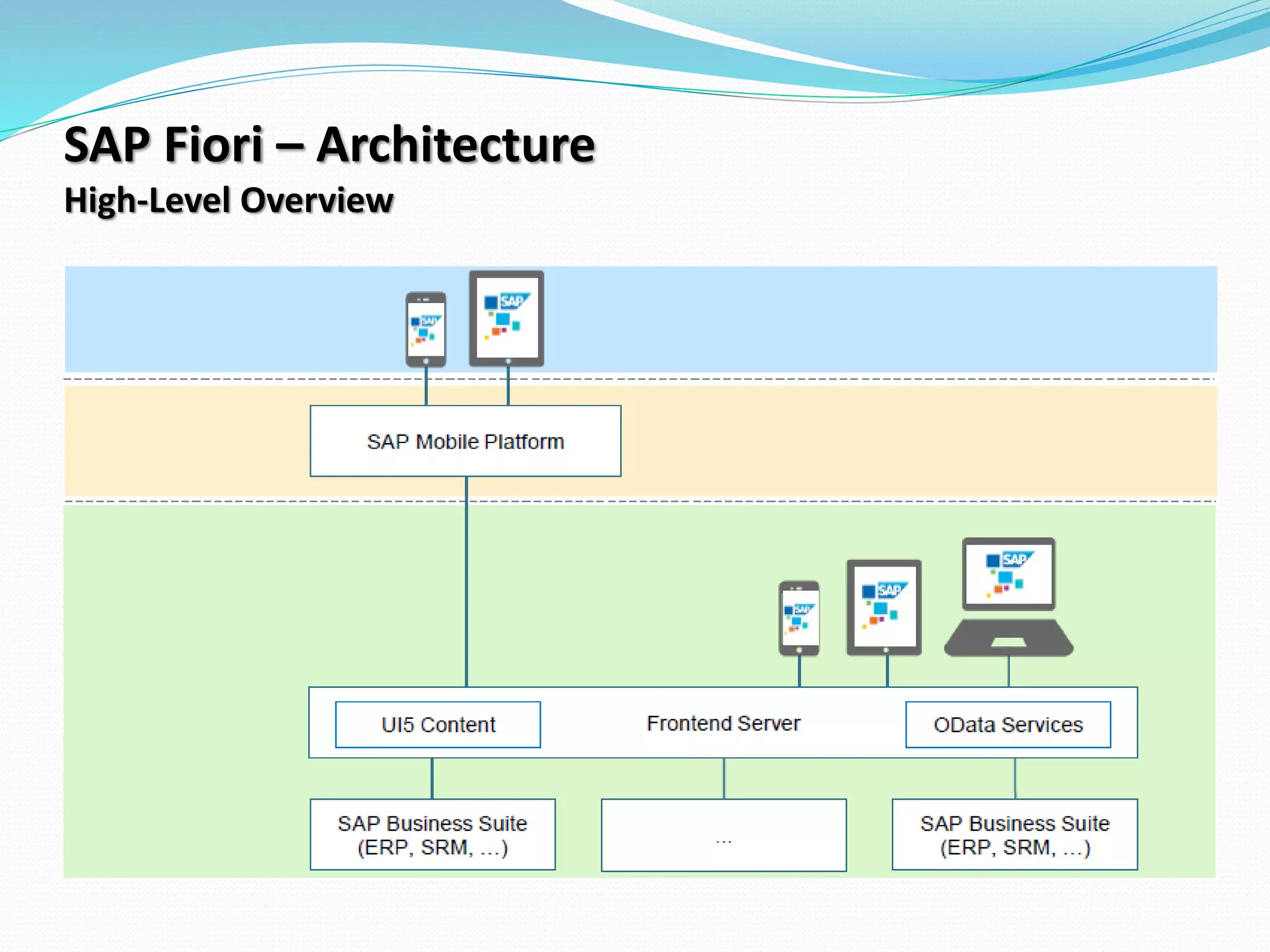
SAP Fiori – Architecture
High-Level Overview
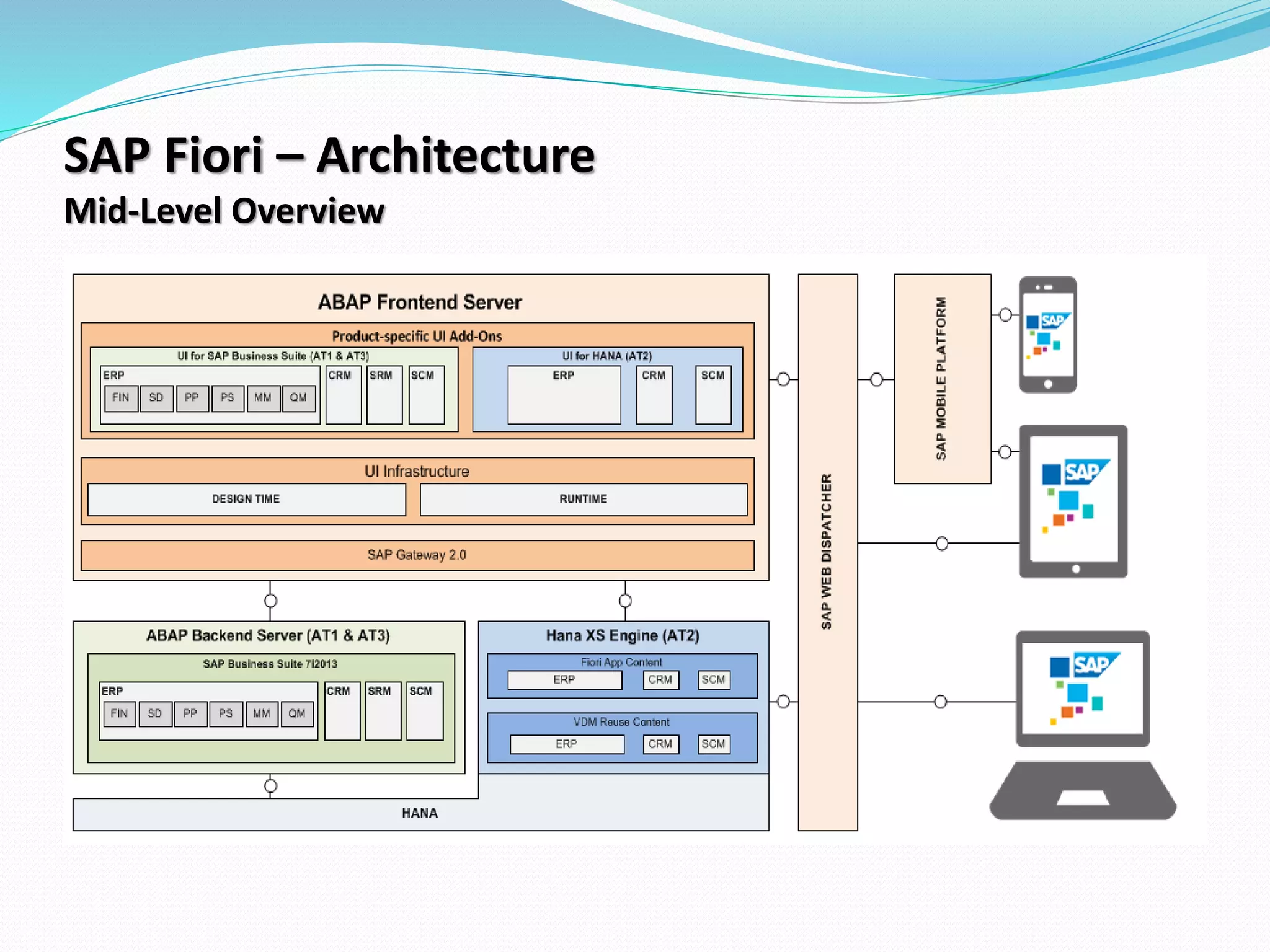
SAP Fiori – Architecture
Mid-Level Overview
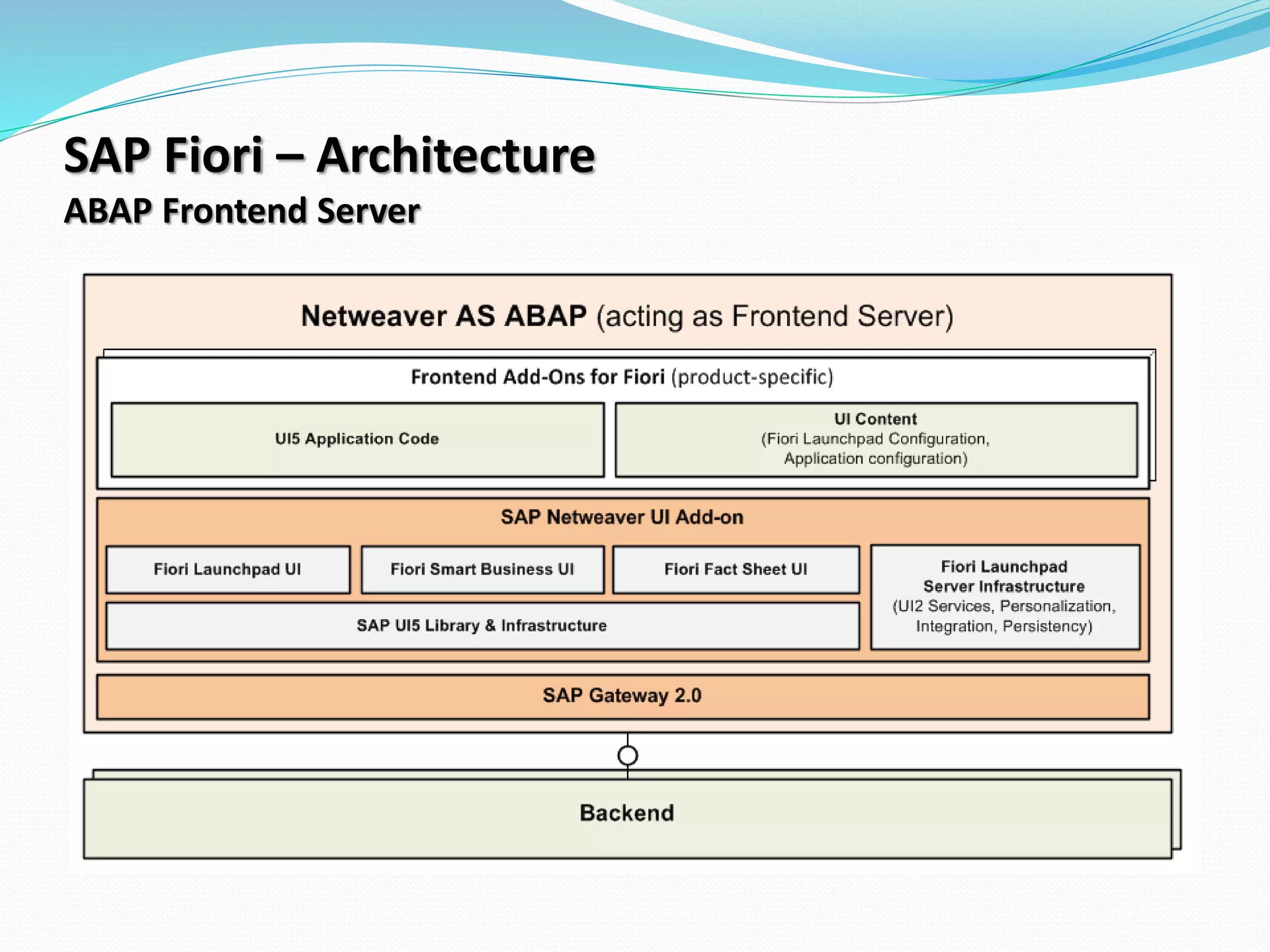
SAP Fiori – Architecture
ABAP Frontend Server
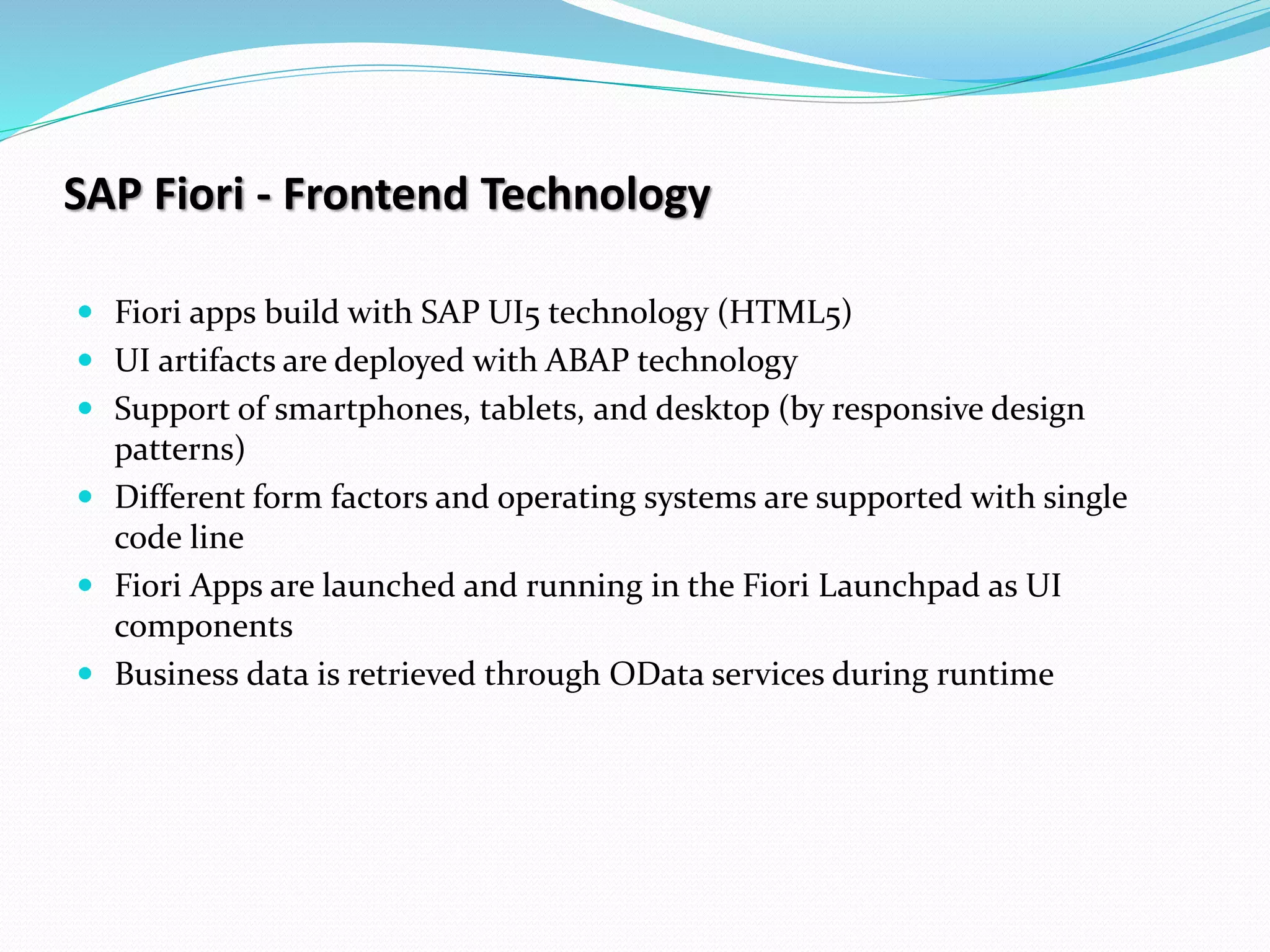
SAP Fiori - Frontend Technology
 Fiori apps build with SAP UI5 technology (HTML5)
 UI artifacts are deployed with ABAP technology
 Support of smartphones, tablets, and desktop (by responsive design
patterns)
 Different form factors and operating systems are supported with single
code line
 Fiori Apps are launched and running in the Fiori Launchpad as UI
components
 Business data is retrieved through OData services during runtime
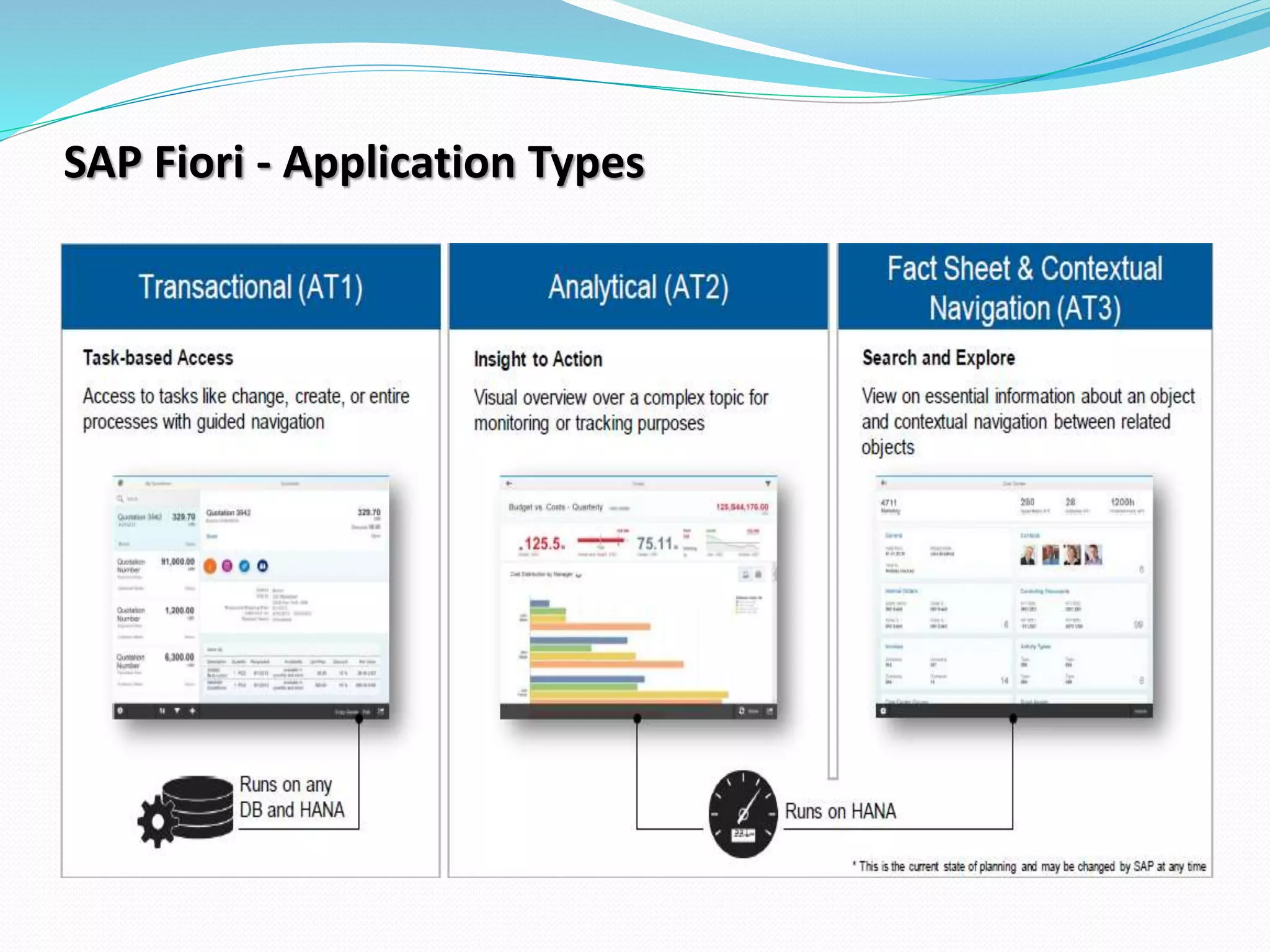
SAP Fiori - Application Types
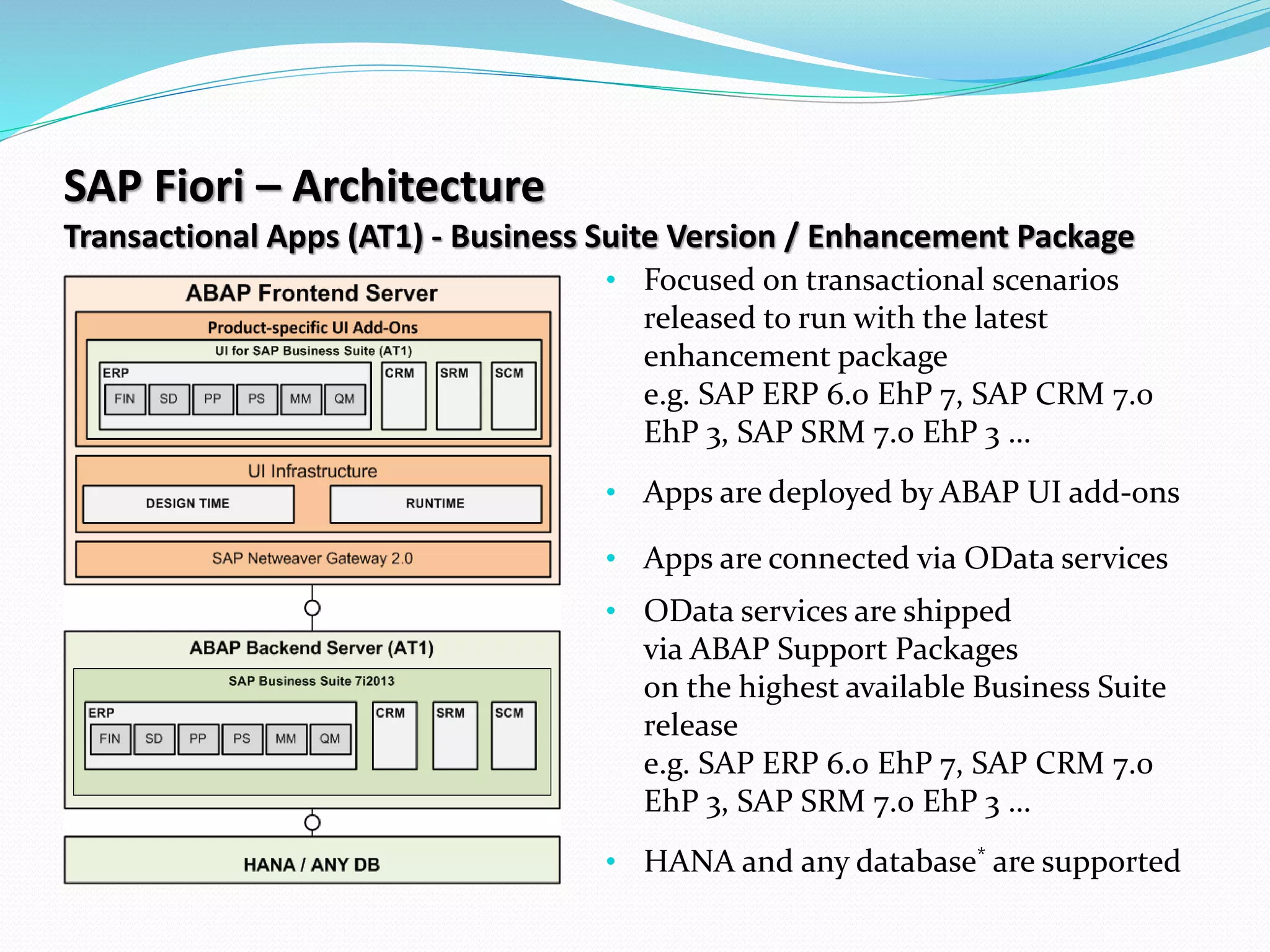
SAP Fiori – Architecture
Transactional Apps (AT1) - Business Suite Version / Enhancement Package
• Focused on transactional scenarios
released to run with the latest
enhancement package
e.g. SAP ERP 6.0 EhP 7, SAP CRM 7.0
EhP 3, SAP SRM 7.0 EhP 3 …
• Apps are deployed by ABAP UI add-ons
• Apps are connected via OData services
• OData services are shipped
via ABAP Support Packages
on the highest available Business Suite
release
e.g. SAP ERP 6.0 EhP 7, SAP CRM 7.0
EhP 3, SAP SRM 7.0 EhP 3 …
• HANA and any database* are supported
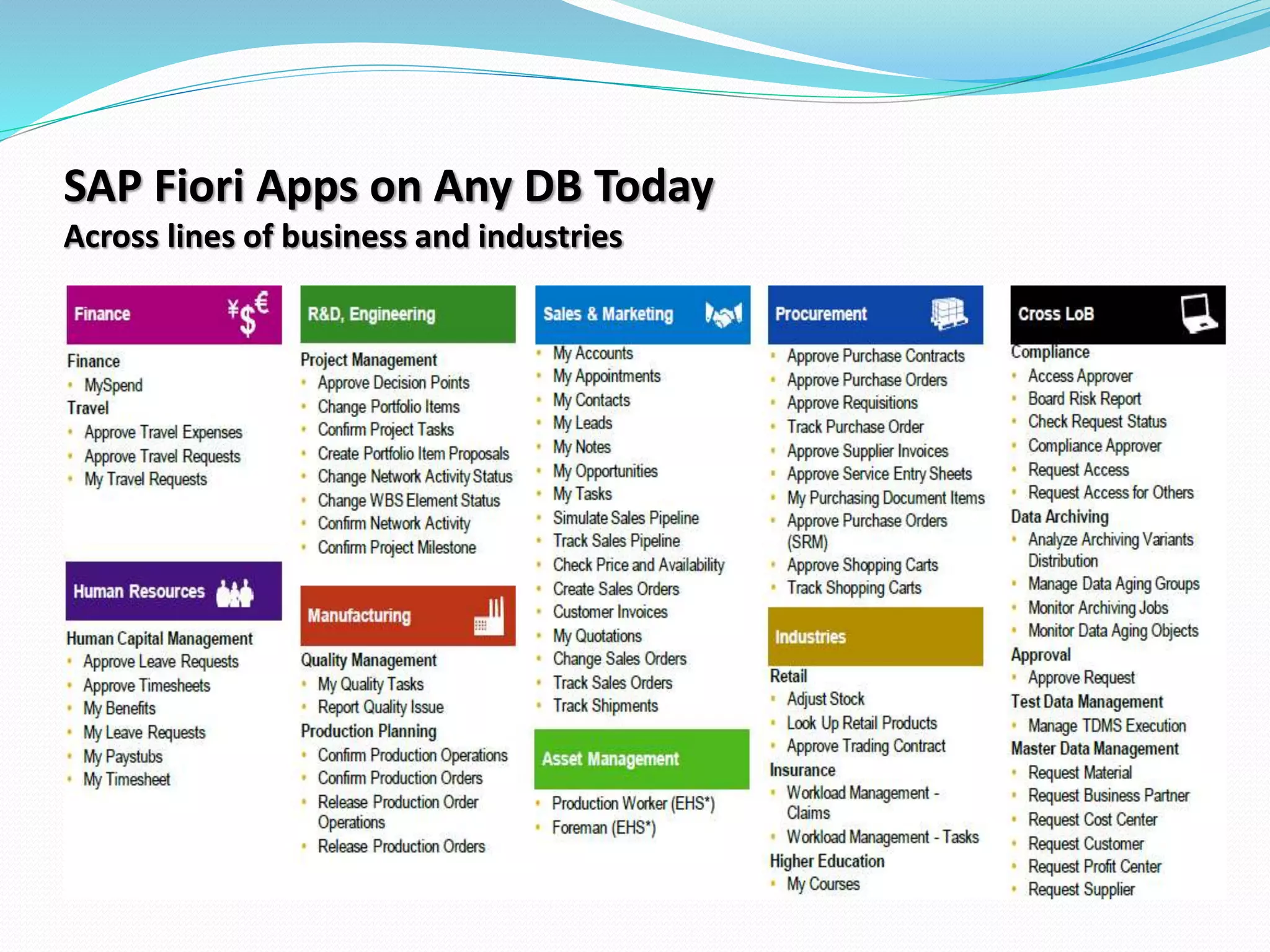
SAP Fiori Apps on Any DB Today
Across lines of business and industries
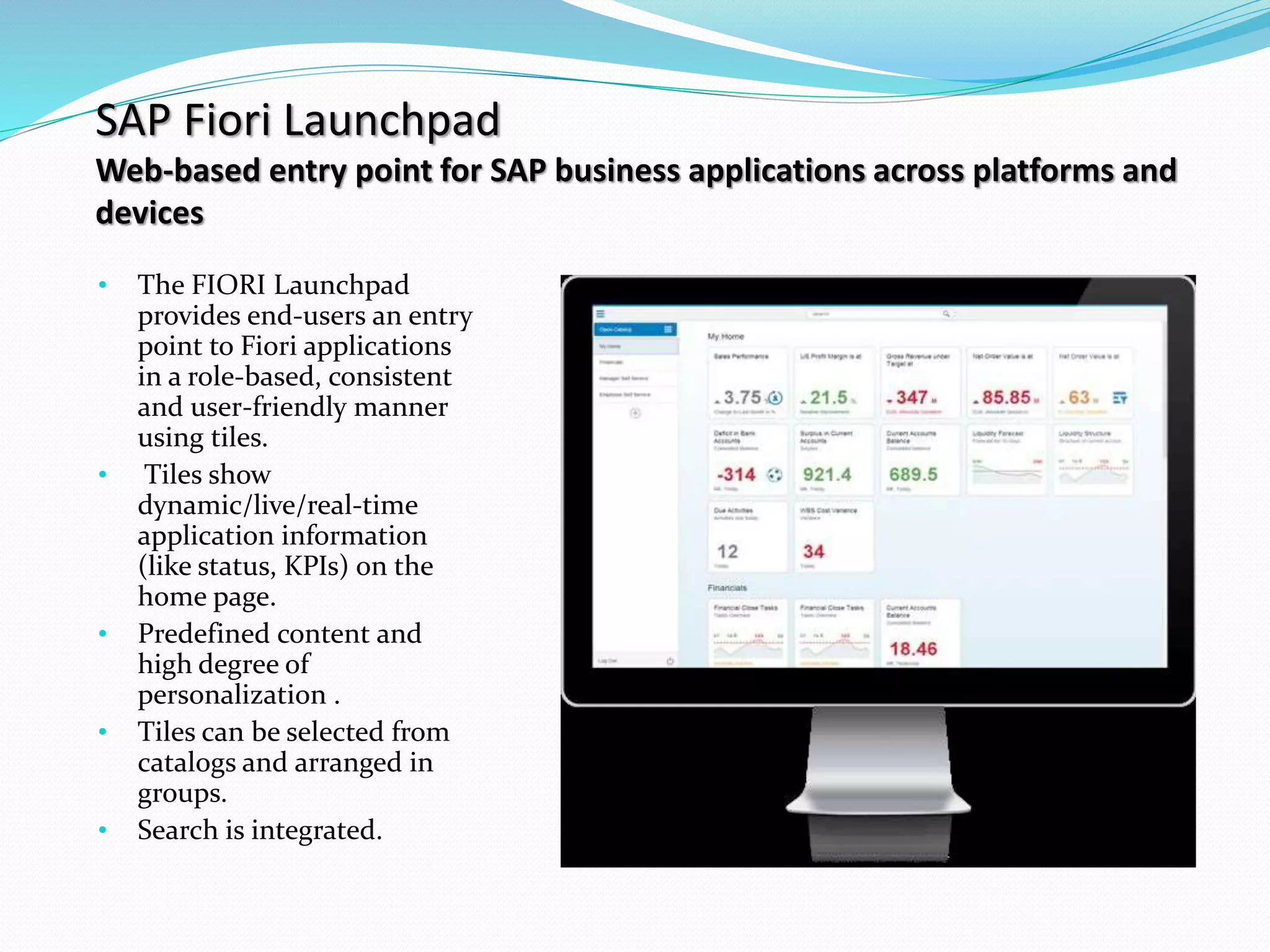
SAP Fiori Launchpad
Web-based entry point for SAP business applications across platforms and
devices
• The FIORI Launchpad
provides end-users an entry
point to Fiori applications
in a role-based, consistent
and user-friendly manner
using tiles.
• Tiles show
dynamic/live/real-time
application information
(like status, KPIs) on the
home page.
• Predefined content and
high degree of
personalization .
• Tiles can be selected from
catalogs and arranged in
groups.
• Search is integrated.
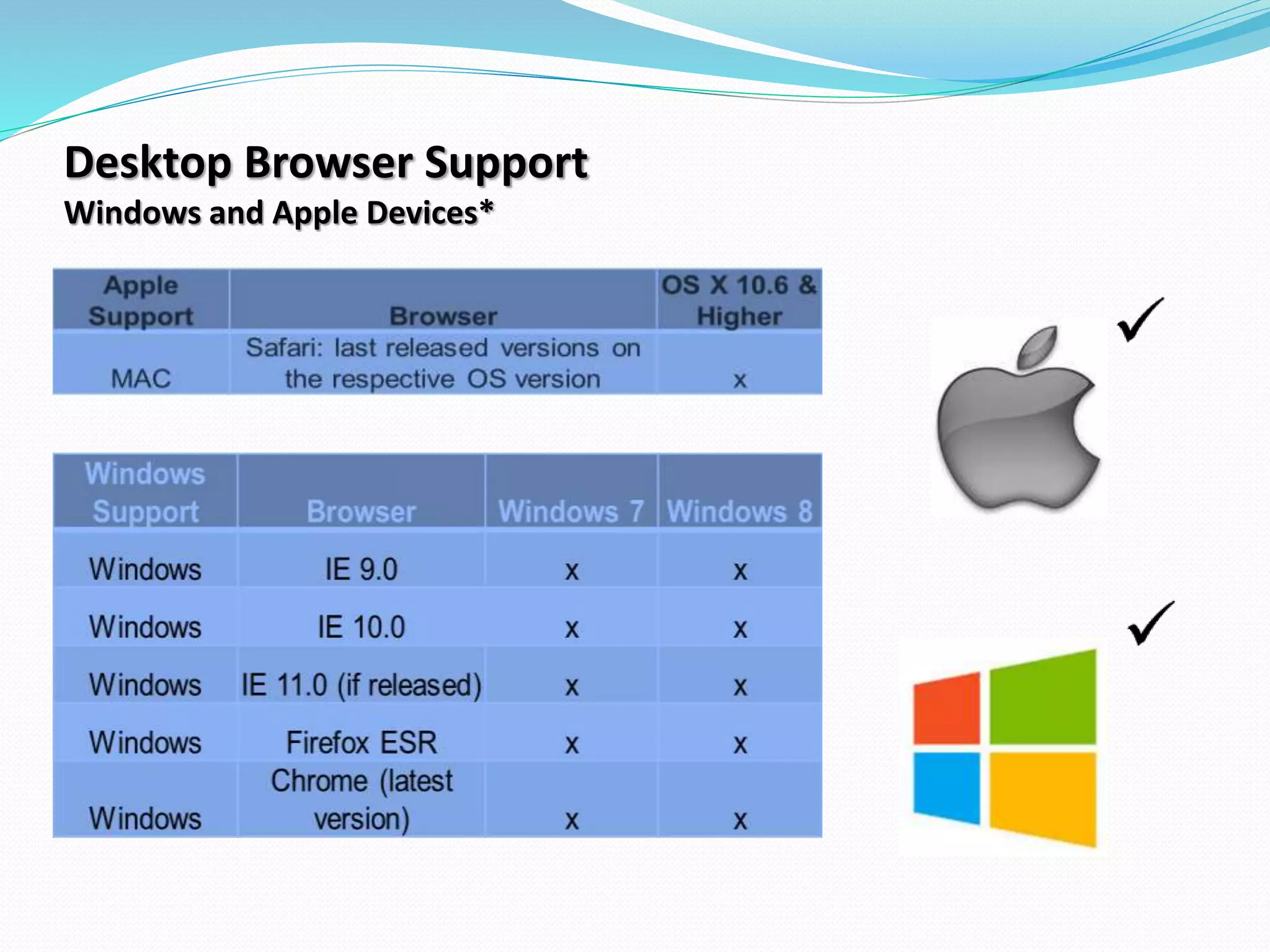
Desktop Browser Support
Windows and Apple Devices*
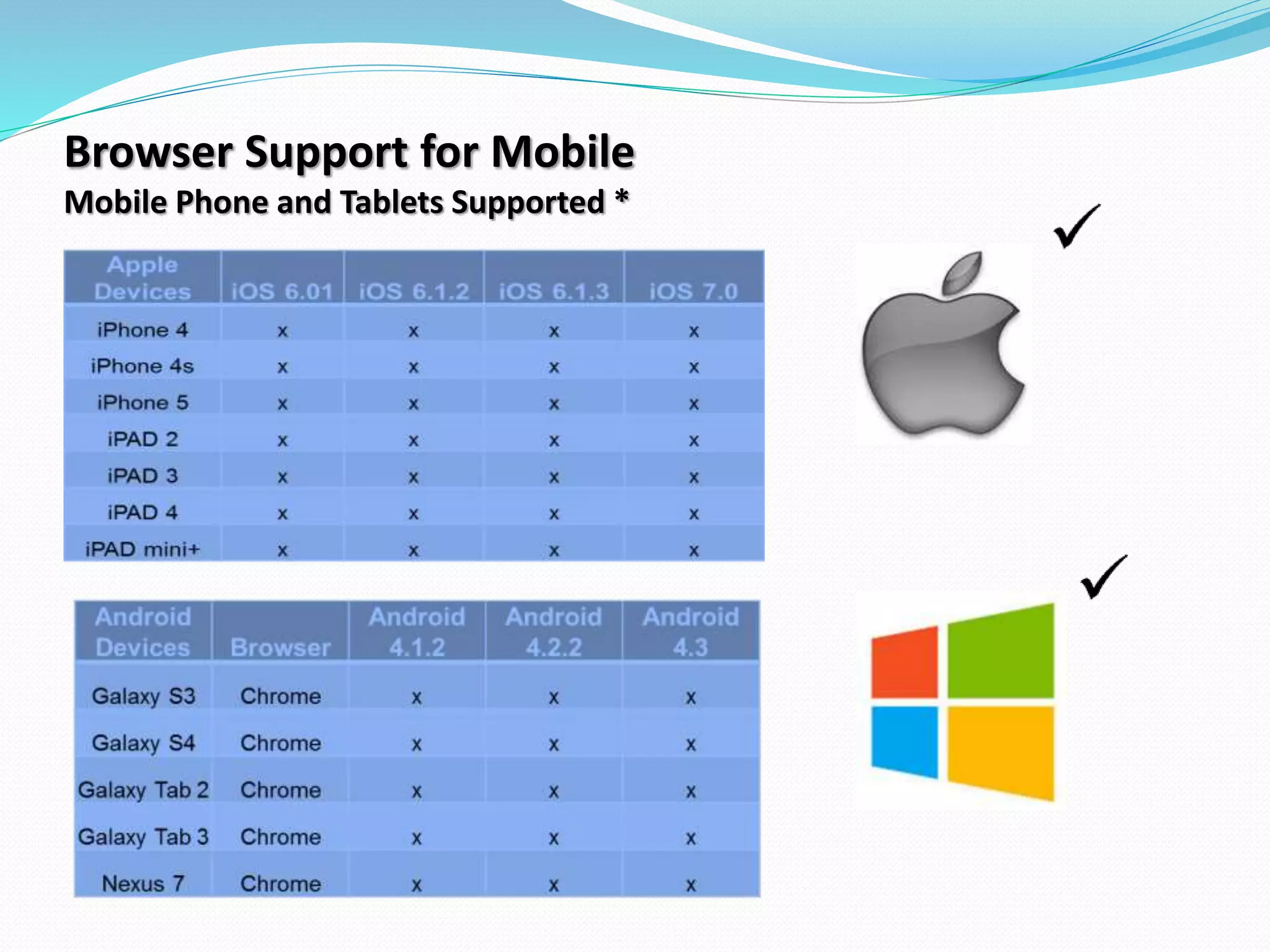
Browser Support for Mobile
Mobile Phone and Tablets Supported *
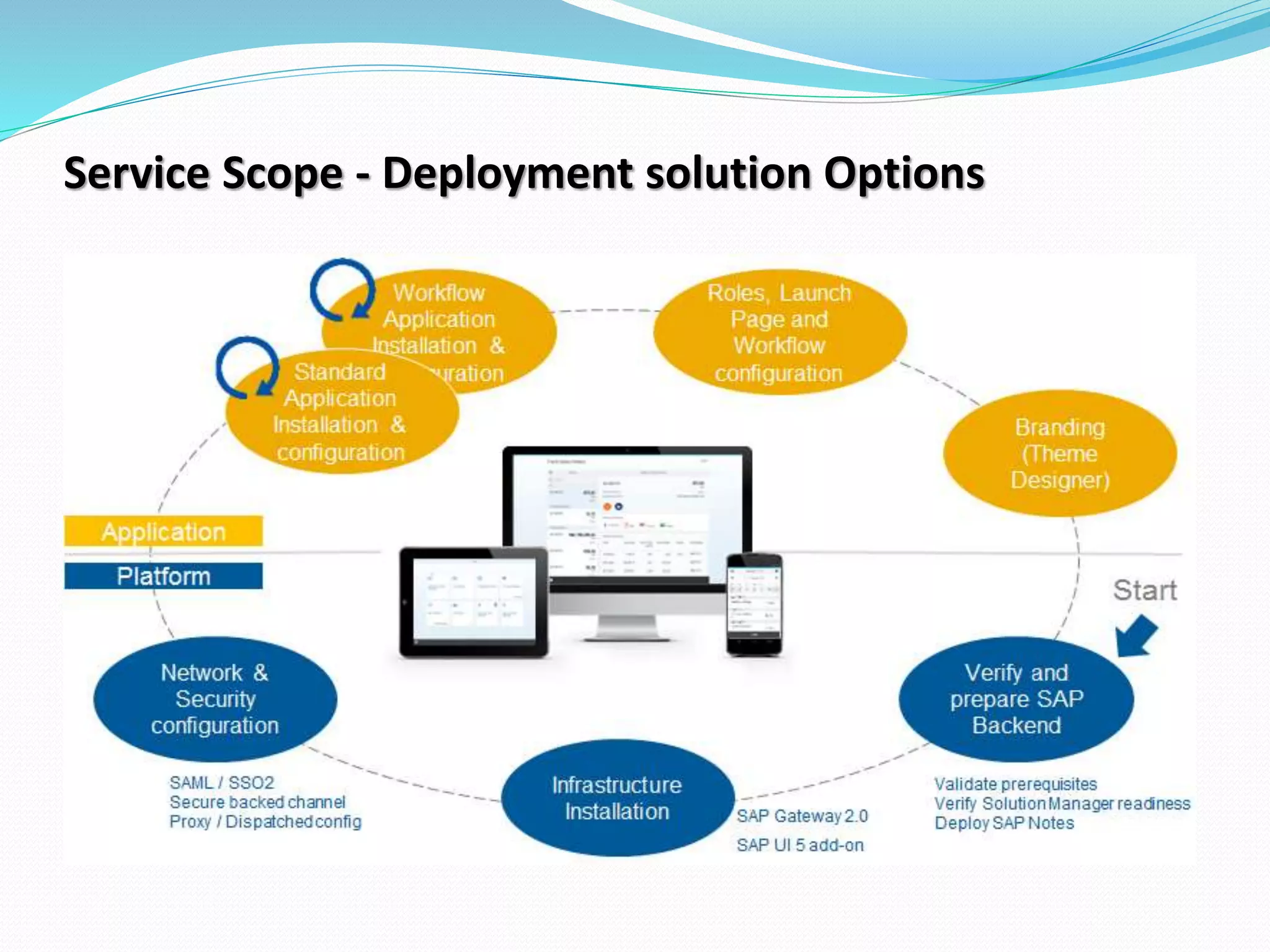
Service Scope - Deployment solution Options
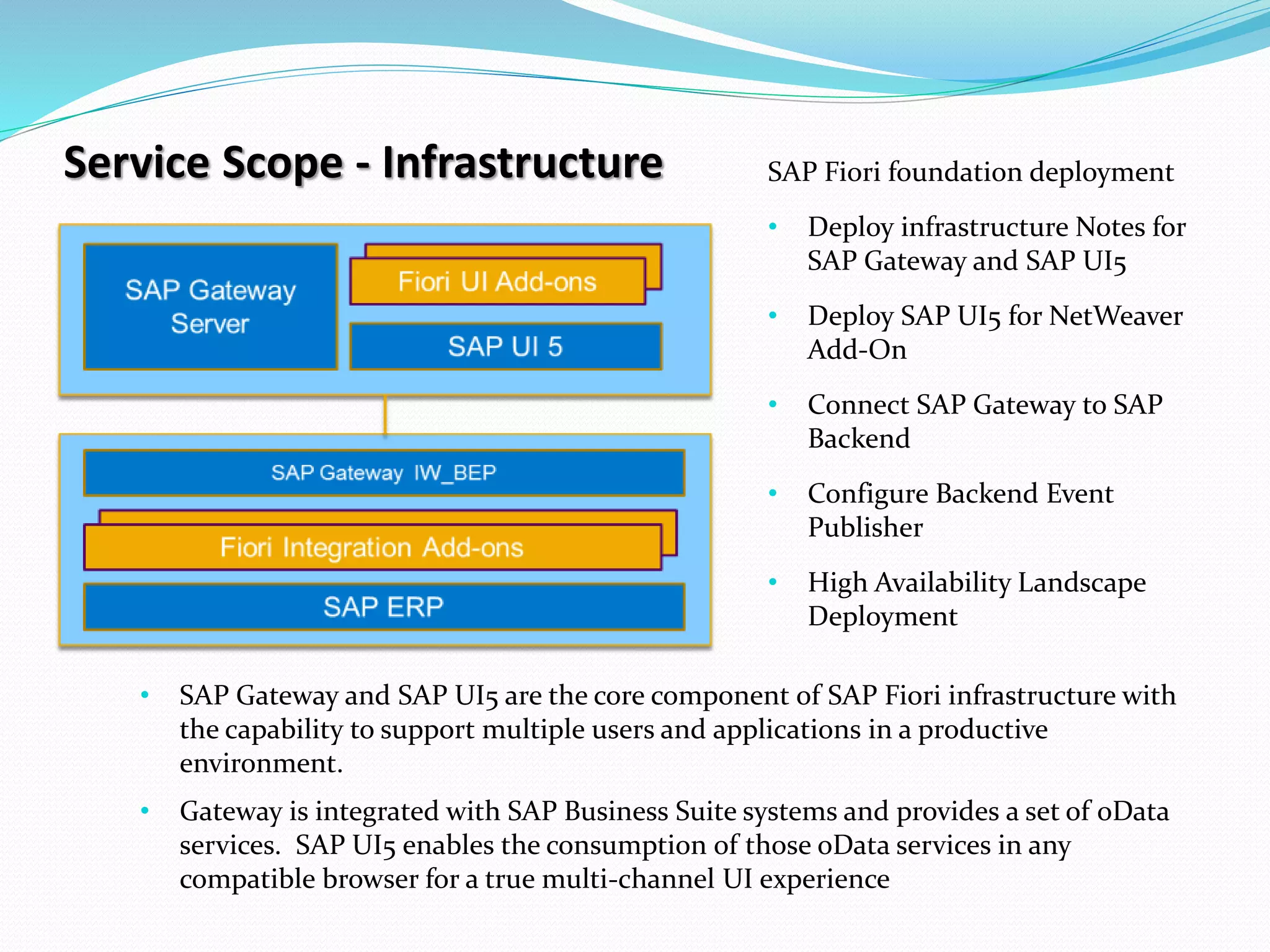
Service Scope - Infrastructure SAP Fiori foundation deployment
• Deploy infrastructure Notes for
SAP Gateway and SAP UI5
• Deploy SAP UI5 for NetWeaver
Add-On
• Connect SAP Gateway to SAP
Backend
• Configure Backend Event
Publisher
• High Availability Landscape
Deployment
• SAP Gateway and SAP UI5 are the core component of SAP Fiori infrastructure with
the capability to support multiple users and applications in a productive
environment.
• Gateway is integrated with SAP Business Suite systems and provides a set of oData
services. SAP UI5 enables the consumption of those oData services in any
compatible browser for a true multi-channel UI experience
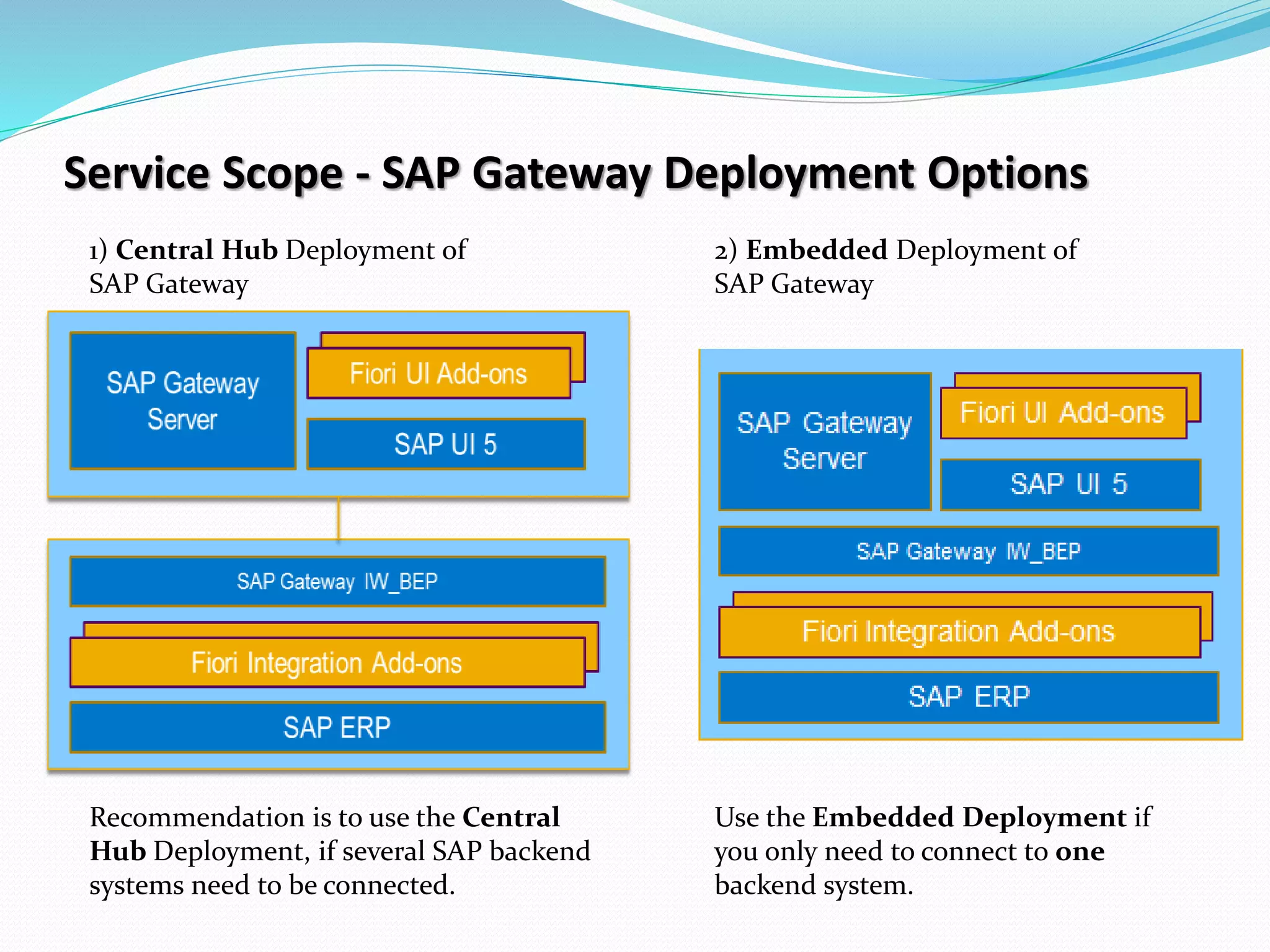
Service Scope - SAP Gateway Deployment Options
1) Central Hub Deployment of
SAP Gateway
2) Embedded Deployment of
SAP Gateway
Recommendation is to use the Central
Hub Deployment, if several SAP backend
systems need to be connected.
Use the Embedded Deployment if
you only need to connect to one
backend system.
Any open questions?

SAP Fiori UX/UI

  • 1.
  • 2.
    Agenda  Process overview Pitfalls in process  Introduction to SAP Fiori Solutions  SAP Fiori Apps  Architecture  Overview  Service Scope  Wrap Up and Q&A
  • 3.
    Gatepass Process  ZGATE02-Create Gatepass entry ZGPAPP- Approver ZGATE05 - Report ZGATE- Ztable to be updated  Gatepass created for outgoing entries only  One Level of Approval  Gate Pass approvers are maintained in custom table against company code & creator would assign the approver at the time of creation
  • 4.
    Pain Points inApproval Process  Delay in approval(need to intimate approver via e-mail/call)  No Approval Notification  Reject option not available  In case of Rejection, need table entry deletion explicitly  Difficult to keep gatepass records
  • 5.
    Key benefits ofSAP Fiori Improving customer’s user experience Increase productivity  Employees are able to get the job done anytime, anywhere  Managers can streamline processes, impact business results  Apps are coherent and easy to use  Additional features (example: mass approvals) to accelerate handling Lower risk Reduce TCO  Implementation aligned to business value and feasibility  Supportability by SAP  SAP validated and tested  Future-proof investment  Continuous innovation Improve time to value  Faster implementation  Predictable implementation timeline  Better quality assurance/reliability  Standards-based, flexible software framework  Instant roll out capabilities to different devices  Reduce customization and integration complexity via SAP Fiori toolkit and rapid- deployment offerings  Lower maintenance costs  Reuse of skill sets  Intuitive usage significantly reduces learning effort and cost
  • 6.
    SAP Fiori –Architecture High-Level Overview
  • 7.
    SAP Fiori –Architecture Mid-Level Overview
  • 8.
    SAP Fiori –Architecture ABAP Frontend Server
  • 9.
    SAP Fiori -Frontend Technology  Fiori apps build with SAP UI5 technology (HTML5)  UI artifacts are deployed with ABAP technology  Support of smartphones, tablets, and desktop (by responsive design patterns)  Different form factors and operating systems are supported with single code line  Fiori Apps are launched and running in the Fiori Launchpad as UI components  Business data is retrieved through OData services during runtime
  • 10.
    SAP Fiori -Application Types
  • 11.
    SAP Fiori –Architecture Transactional Apps (AT1) - Business Suite Version / Enhancement Package • Focused on transactional scenarios released to run with the latest enhancement package e.g. SAP ERP 6.0 EhP 7, SAP CRM 7.0 EhP 3, SAP SRM 7.0 EhP 3 … • Apps are deployed by ABAP UI add-ons • Apps are connected via OData services • OData services are shipped via ABAP Support Packages on the highest available Business Suite release e.g. SAP ERP 6.0 EhP 7, SAP CRM 7.0 EhP 3, SAP SRM 7.0 EhP 3 … • HANA and any database* are supported
  • 12.
    SAP Fiori Appson Any DB Today Across lines of business and industries
  • 13.
    SAP Fiori Launchpad Web-basedentry point for SAP business applications across platforms and devices • The FIORI Launchpad provides end-users an entry point to Fiori applications in a role-based, consistent and user-friendly manner using tiles. • Tiles show dynamic/live/real-time application information (like status, KPIs) on the home page. • Predefined content and high degree of personalization . • Tiles can be selected from catalogs and arranged in groups. • Search is integrated.
  • 14.
  • 15.
    Browser Support forMobile Mobile Phone and Tablets Supported *
  • 16.
    Service Scope -Deployment solution Options
  • 17.
    Service Scope -Infrastructure SAP Fiori foundation deployment • Deploy infrastructure Notes for SAP Gateway and SAP UI5 • Deploy SAP UI5 for NetWeaver Add-On • Connect SAP Gateway to SAP Backend • Configure Backend Event Publisher • High Availability Landscape Deployment • SAP Gateway and SAP UI5 are the core component of SAP Fiori infrastructure with the capability to support multiple users and applications in a productive environment. • Gateway is integrated with SAP Business Suite systems and provides a set of oData services. SAP UI5 enables the consumption of those oData services in any compatible browser for a true multi-channel UI experience
  • 18.
    Service Scope -SAP Gateway Deployment Options 1) Central Hub Deployment of SAP Gateway 2) Embedded Deployment of SAP Gateway Recommendation is to use the Central Hub Deployment, if several SAP backend systems need to be connected. Use the Embedded Deployment if you only need to connect to one backend system.
  • 19.