SYSTEM, APPLICATION,PRODUCTS
IN DATA PROCESSING
INTRODUCTION
SAP is a German multinational software company known for making
enterprise resource planning (ERP) software.
ERP software allows organizations to manage business operations, and
usually refers to suite of modular applications that collect and integrate
data from different aspects of the business. SAP is just one provider of
ERP Software.
HISTORY OF SAP
The product of five ex-IBM employees, SAP started in 1972 as a small software company in
Germany with just one customer. The company’s name stand for ‘System, Application,
Products. Its founders had a vision of producing software that could process data when a user
want it, rather than in overnight batches as earlier software did.
Their first product was a modification of IBM’s Punch-card data storage, which stored data
mechanically and required overnight processing. For their client, the Germán branch of
imperial chemical industries, SAP developed a real time payroll and punch card system in
1972.
SAP’s ERP started as R/2, named for its real-time architecture and two servers. In later years
it was called R/3, for three servers: the application server, Production server, and data base
server. In 2006, SAP released the latest version, ECC 6.0, and in 2013 an enhancement
package (EHP7) was released. And now introducing latest version of SAP that is S4HANA with
their own data base system called ACDOCA.
TYPES OF PROJECTS
 Implementation Projects: its start with scratch data of the project.
 Support Projects: Handled by subject matter experts
 Rollout Projects: 80% of Implementation and 20% of Copy of data
 Upgrade Projects: Upgrading the SAP version, example; ECC 6 to EHP 7
 Big Bang Projects: Global implementation (SAP in Different countries)
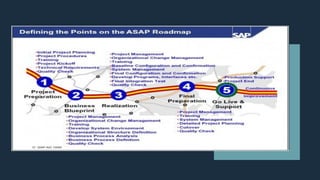
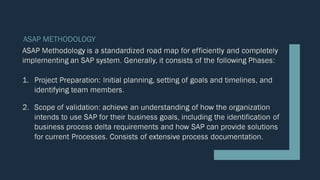
ASAP METHODOLOGY
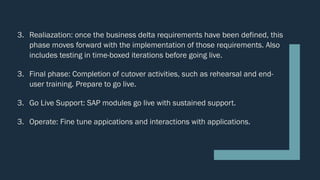
3. Realiazation: once the business delta requirements have been defined, this
phase moves forward with the implementation of those requirements. Also
includes testing in time-boxed iterations before going live.
3. Final phase: Completion of cutover activities, such as rehearsal and end-
user training. Prepare to go live.
3. Go Live Support: SAP modules go live with sustained support.
3. Operate: Fine tune appications and interactions with applications.
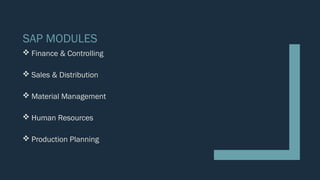
SAP MODULES
 Finance & Controlling
 Sales & Distribution
 Material Management
 Human Resources
 Production Planning
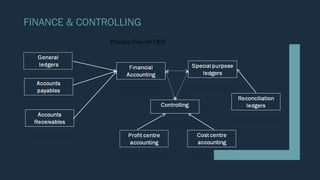
FINANCE & CONTROLLING
Process Flow for FICO
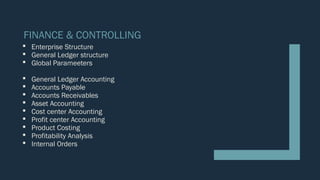
FINANCE & CONTROLLING
 Enterprise Structure
 General Ledger structure
 Global Parameeters
 General Ledger Accounting
 Accounts Payable
 Accounts Receivables
 Asset Accounting
 Cost center Accounting
 Profit center Accounting
 Product Costing
 Profitability Analysis
 Internal Orders
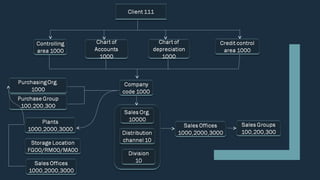
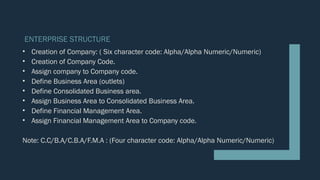
ENTERPRISE STRUCTURE
• Creation of Company: ( Six character code: Alpha/Alpha Numeric/Numeric)
• Creation of Company Code.
• Assign company to Company code.
• Define Business Area (outlets)
• Define Consolidated Business area.
• Assign Business Area to Consolidated Business Area.
• Define Financial Management Area.
• Assign Financial Management Area to Company code.
Note: C.C/B.A/C.B.A/F.M.A : (Four character code: Alpha/Alpha Numeric/Numeric)
GENERAL LEDGER STRUCTURE
• Creation of Chart of Accounts: [C.O.A = Company Code]
• Assign Chart of Accounts to Company Code
• Define Accounts Groups
• Define Retained earnings Account (Reserves & Surplus)
• Define Tolerance Group for General Ledger Account.
• Define Tolerance Group for Employees.
Note: C.O.A/A.G/: (Four character code: Alpha/Alpha Numeric/Numeric)
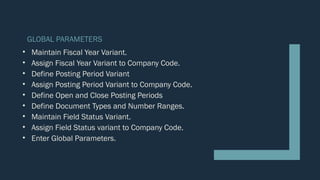
GLOBAL PARAMETERS
• Maintain Fiscal Year Variant.
• Assign Fiscal Year Variant to Company Code.
• Define Posting Period Variant
• Assign Posting Period Variant to Company Code.
• Define Open and Close Posting Periods
• Define Document Types and Number Ranges.
• Maintain Field Status Variant.
• Assign Field Status variant to Company Code.
• Enter Global Parameters.
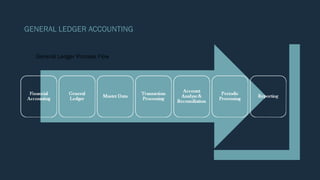
GENERAL LEDGER ACCOUNTING
General Ledger Process Flow
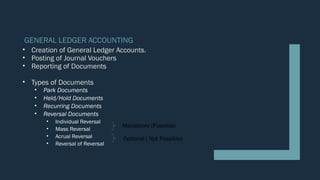
GENERAL LEDGER ACCOUNTING
• Creation of General Ledger Accounts.
• Posting of Journal Vouchers
• Reporting of Documents
• Types of Documents
• Park Documents
• Held/Hold Documents
• Recurring Documents
• Reversal Documents
• Individual Reversal
• Mass Reversal
• Acrual Reversal
• Reversal of Reversal
Mandatory (Possible)
Optional ( Not Possible)
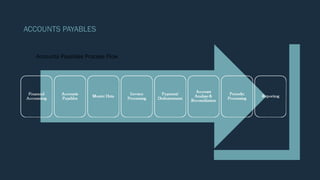
ACCOUNTS PAYABLES
Accounts Payables Process Flow
ACCOUNTS PAYABLES-(A)
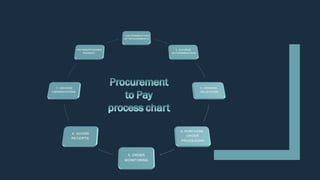
Procure to Pay process, Accounts Payable is 50% related to Material Management.
•Define Vendor Accounts Groups
•Define Number Ranges for Vendor Accounts Groups
•Assign Number Ranges to Vendor Accounts Groups
•Tolerance Group for Customer/Vendor
•Creation of Reconciliation Account.
•Creation of Vendor Masters.
•Define Document Types and Number Ranges.
•Posting of Vendor Invoice.
•Outgoing Payment
•Reports: Analysis of vendor Accounts
ACCOUNTS PAYABLES-(B)
Special General Ledger Transactions, Down Payment/Advance to Vendors
•Creation of Spl G/L Accounts (Advance to Vendors Account)
•Make link B/W Reconciliation and Spl G/L accounts.
•Creation of Down Payment.
•Posting Vendor Invoice
•Transfer of amount from spl G/L accounts to Reconciliation Accounts
•Outgoing Payment
•Reports: Analysis of vendor Accounts
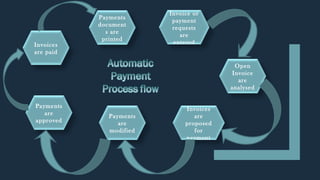
Payments
document
s are
printed
Payments
are
modified
Invoices
are
proposed
for
payment
Invoice or
payment
requests
are
entered
Open
Invoice
are
analysed
Payments
are
approved
Invoices
are paid
ACCOUNTS PAYABLES-(C)
Automatic Payment Program: Mass payments to vendors
•Setup all company codes for Payment transactions
•Set up paying company codes for payment transactions
•Set up payment methods per country for Payment transactions
•Set up payment methods per company code for payment transactions
•Set up bank determination for payment transactions.
•Assign payment method in vendor master
•Posting of an invoice
•Automatic Payments Program Run
•Print of Payments
•Reports: Analysis of Vendor Accounts
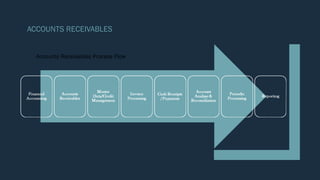
ACCOUNTS RECEIVABLES
Accounts Receivables Process Flow
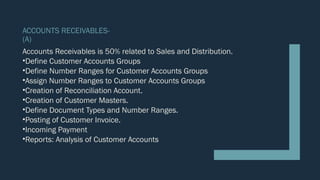
ACCOUNTS RECEIVABLES-
(A)
Accounts Receivables is 50% related to Sales and Distribution.
•Define Customer Accounts Groups
•Define Number Ranges for Customer Accounts Groups
•Assign Number Ranges to Customer Accounts Groups
•Creation of Reconciliation Account.
•Creation of Customer Masters.
•Define Document Types and Number Ranges.
•Posting of Customer Invoice.
•Incoming Payment
•Reports: Analysis of Customer Accounts
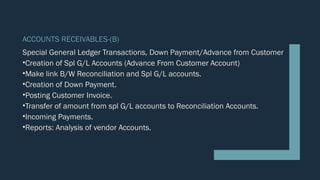
ACCOUNTS RECEIVABLES-(B)
Special General Ledger Transactions, Down Payment/Advance from Customer
•Creation of Spl G/L Accounts (Advance From Customer Account)
•Make link B/W Reconciliation and Spl G/L accounts.
•Creation of Down Payment.
•Posting Customer Invoice.
•Transfer of amount from spl G/L accounts to Reconciliation Accounts.
•Incoming Payments.
•Reports: Analysis of vendor Accounts.
Fixed
Assets
Process
Flow
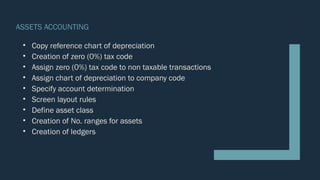
ASSETS ACCOUNTING
ASSETS ACCOUNTING
• Copy reference chart of depreciation
• Creation of zero (0%) tax code
• Assign zero (0%) tax code to non taxable transactions
• Assign chart of depreciation to company code
• Specify account determination
• Screen layout rules
• Define asset class
• Creation of No. ranges for assets
• Creation of ledgers
ASSETS ACCOUNTING
• Creation of Ledgers
• Depreciation account
• Accumulated depreciation account
• Fixed assets account
• Sale of assets account
• Profit on sale of asset account
• Loss on sale of asset account
• Loss on sale of scrap account
• Integration of general legers with asset accounts
• Determination of depreciation areas
• Specify/define posting rules
• Specify rounding/defined rounding specification
ASSETS ACCOUNTING
• Define document type and no. ranges
• Define screen layout for asset master data
• Define screen layout for asset depreciation area
• Determination of multi level methods
• Maintain period control
• Define depreciation key
• Creation of asset master
• Acquisition of assets
• Posting of depreciation
• Reports
SAP FICO

SAP FICO

  • 1.
  • 2.
    INTRODUCTION SAP is aGerman multinational software company known for making enterprise resource planning (ERP) software. ERP software allows organizations to manage business operations, and usually refers to suite of modular applications that collect and integrate data from different aspects of the business. SAP is just one provider of ERP Software.
  • 3.
    HISTORY OF SAP Theproduct of five ex-IBM employees, SAP started in 1972 as a small software company in Germany with just one customer. The company’s name stand for ‘System, Application, Products. Its founders had a vision of producing software that could process data when a user want it, rather than in overnight batches as earlier software did. Their first product was a modification of IBM’s Punch-card data storage, which stored data mechanically and required overnight processing. For their client, the Germán branch of imperial chemical industries, SAP developed a real time payroll and punch card system in 1972. SAP’s ERP started as R/2, named for its real-time architecture and two servers. In later years it was called R/3, for three servers: the application server, Production server, and data base server. In 2006, SAP released the latest version, ECC 6.0, and in 2013 an enhancement package (EHP7) was released. And now introducing latest version of SAP that is S4HANA with their own data base system called ACDOCA.
  • 4.
    TYPES OF PROJECTS Implementation Projects: its start with scratch data of the project.  Support Projects: Handled by subject matter experts  Rollout Projects: 80% of Implementation and 20% of Copy of data  Upgrade Projects: Upgrading the SAP version, example; ECC 6 to EHP 7  Big Bang Projects: Global implementation (SAP in Different countries)
  • 6.
  • 7.
    3. Realiazation: oncethe business delta requirements have been defined, this phase moves forward with the implementation of those requirements. Also includes testing in time-boxed iterations before going live. 3. Final phase: Completion of cutover activities, such as rehearsal and end- user training. Prepare to go live. 3. Go Live Support: SAP modules go live with sustained support. 3. Operate: Fine tune appications and interactions with applications.
  • 9.
    SAP MODULES  Finance& Controlling  Sales & Distribution  Material Management  Human Resources  Production Planning
  • 10.
  • 11.
    FINANCE & CONTROLLING Enterprise Structure  General Ledger structure  Global Parameeters  General Ledger Accounting  Accounts Payable  Accounts Receivables  Asset Accounting  Cost center Accounting  Profit center Accounting  Product Costing  Profitability Analysis  Internal Orders
  • 12.
    ENTERPRISE STRUCTURE • Creationof Company: ( Six character code: Alpha/Alpha Numeric/Numeric) • Creation of Company Code. • Assign company to Company code. • Define Business Area (outlets) • Define Consolidated Business area. • Assign Business Area to Consolidated Business Area. • Define Financial Management Area. • Assign Financial Management Area to Company code. Note: C.C/B.A/C.B.A/F.M.A : (Four character code: Alpha/Alpha Numeric/Numeric)
  • 13.
    GENERAL LEDGER STRUCTURE •Creation of Chart of Accounts: [C.O.A = Company Code] • Assign Chart of Accounts to Company Code • Define Accounts Groups • Define Retained earnings Account (Reserves & Surplus) • Define Tolerance Group for General Ledger Account. • Define Tolerance Group for Employees. Note: C.O.A/A.G/: (Four character code: Alpha/Alpha Numeric/Numeric)
  • 14.
    GLOBAL PARAMETERS • MaintainFiscal Year Variant. • Assign Fiscal Year Variant to Company Code. • Define Posting Period Variant • Assign Posting Period Variant to Company Code. • Define Open and Close Posting Periods • Define Document Types and Number Ranges. • Maintain Field Status Variant. • Assign Field Status variant to Company Code. • Enter Global Parameters.
  • 15.
  • 16.
    GENERAL LEDGER ACCOUNTING •Creation of General Ledger Accounts. • Posting of Journal Vouchers • Reporting of Documents • Types of Documents • Park Documents • Held/Hold Documents • Recurring Documents • Reversal Documents • Individual Reversal • Mass Reversal • Acrual Reversal • Reversal of Reversal Mandatory (Possible) Optional ( Not Possible)
  • 17.
  • 18.
    ACCOUNTS PAYABLES-(A) Procure toPay process, Accounts Payable is 50% related to Material Management. •Define Vendor Accounts Groups •Define Number Ranges for Vendor Accounts Groups •Assign Number Ranges to Vendor Accounts Groups •Tolerance Group for Customer/Vendor •Creation of Reconciliation Account. •Creation of Vendor Masters. •Define Document Types and Number Ranges. •Posting of Vendor Invoice. •Outgoing Payment •Reports: Analysis of vendor Accounts
  • 19.
    ACCOUNTS PAYABLES-(B) Special GeneralLedger Transactions, Down Payment/Advance to Vendors •Creation of Spl G/L Accounts (Advance to Vendors Account) •Make link B/W Reconciliation and Spl G/L accounts. •Creation of Down Payment. •Posting Vendor Invoice •Transfer of amount from spl G/L accounts to Reconciliation Accounts •Outgoing Payment •Reports: Analysis of vendor Accounts
  • 20.
  • 21.
    ACCOUNTS PAYABLES-(C) Automatic PaymentProgram: Mass payments to vendors •Setup all company codes for Payment transactions •Set up paying company codes for payment transactions •Set up payment methods per country for Payment transactions •Set up payment methods per company code for payment transactions •Set up bank determination for payment transactions. •Assign payment method in vendor master •Posting of an invoice •Automatic Payments Program Run •Print of Payments •Reports: Analysis of Vendor Accounts
  • 22.
  • 23.
    ACCOUNTS RECEIVABLES- (A) Accounts Receivablesis 50% related to Sales and Distribution. •Define Customer Accounts Groups •Define Number Ranges for Customer Accounts Groups •Assign Number Ranges to Customer Accounts Groups •Creation of Reconciliation Account. •Creation of Customer Masters. •Define Document Types and Number Ranges. •Posting of Customer Invoice. •Incoming Payment •Reports: Analysis of Customer Accounts
  • 24.
    ACCOUNTS RECEIVABLES-(B) Special GeneralLedger Transactions, Down Payment/Advance from Customer •Creation of Spl G/L Accounts (Advance From Customer Account) •Make link B/W Reconciliation and Spl G/L accounts. •Creation of Down Payment. •Posting Customer Invoice. •Transfer of amount from spl G/L accounts to Reconciliation Accounts. •Incoming Payments. •Reports: Analysis of vendor Accounts.
  • 25.
  • 26.
    ASSETS ACCOUNTING • Copyreference chart of depreciation • Creation of zero (0%) tax code • Assign zero (0%) tax code to non taxable transactions • Assign chart of depreciation to company code • Specify account determination • Screen layout rules • Define asset class • Creation of No. ranges for assets • Creation of ledgers
  • 27.
    ASSETS ACCOUNTING • Creationof Ledgers • Depreciation account • Accumulated depreciation account • Fixed assets account • Sale of assets account • Profit on sale of asset account • Loss on sale of asset account • Loss on sale of scrap account • Integration of general legers with asset accounts • Determination of depreciation areas • Specify/define posting rules • Specify rounding/defined rounding specification
  • 28.
    ASSETS ACCOUNTING • Definedocument type and no. ranges • Define screen layout for asset master data • Define screen layout for asset depreciation area • Determination of multi level methods • Maintain period control • Define depreciation key • Creation of asset master • Acquisition of assets • Posting of depreciation • Reports