IBM Lotus Sametime Integration Torino 2 Dicenbre 2010  Le comunicazioni unificate per collaborare IBM Lotus Sametime Integration
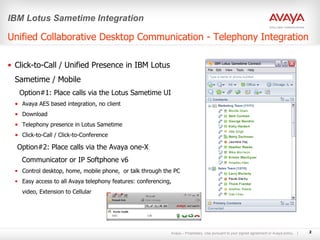
Unified Collaborative Desktop Communication - Telephony Integration Click-to-Call / Unified Presence in IBM Lotus Sametime / Mobile  Option#1: Place calls via the Lotus Sametime UI  Avaya AES based integration, no client  Download Telephony presence in Lotus Sametime Click-to-Call / Click-to-Conference Option#2: Place calls via the Avaya one-X Communicator or IP Softphone v6 Control desktop, home, mobile phone,  or talk through the PC Easy access to all Avaya telephony features: conferencing, video, Extension to Cellular IBM Lotus Sametime Integration
IBM Lotus Sametime Integration
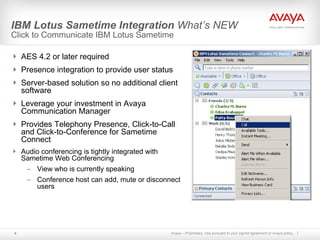
IBM Lotus Sametime Integration  What’s NEW Click to Communicate IBM Lotus Sametime AES 4.2 or later required Presence integration to provide user status Server-based solution so no additional client software Leverage your investment in Avaya Communication Manager Provides Telephony Presence, Click-to-Call and Click-to-Conference for Sametime Connect Audio conferencing is tightly integrated with Sametime Web Conferencing View who is currently speaking Conference host can add, mute or disconnect users
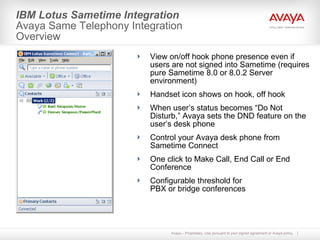
IBM Lotus Sametime Integration  Avaya Same Telephony Integration Overview View on/off hook phone presence even if users are not signed into Sametime (requires pure Sametime 8.0 or 8.0.2 Server environment) Handset icon shows on hook, off hook When user’s status becomes “Do Not Disturb,” Avaya sets the DND feature on the user’s desk phone Control your Avaya desk phone from Sametime Connect One click to Make Call, End Call or End Conference Configurable threshold for PBX or bridge conferences
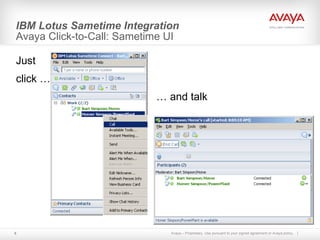
IBM Lotus Sametime Integration  Avaya Click-to-Call: Sametime UI Just  click … …  and talk

Sametime e Avaya

  • 1.
    IBM Lotus SametimeIntegration Torino 2 Dicenbre 2010 Le comunicazioni unificate per collaborare IBM Lotus Sametime Integration
  • 2.
    Unified Collaborative DesktopCommunication - Telephony Integration Click-to-Call / Unified Presence in IBM Lotus Sametime / Mobile Option#1: Place calls via the Lotus Sametime UI Avaya AES based integration, no client Download Telephony presence in Lotus Sametime Click-to-Call / Click-to-Conference Option#2: Place calls via the Avaya one-X Communicator or IP Softphone v6 Control desktop, home, mobile phone, or talk through the PC Easy access to all Avaya telephony features: conferencing, video, Extension to Cellular IBM Lotus Sametime Integration
  • 3.
    IBM Lotus SametimeIntegration
  • 4.
    IBM Lotus SametimeIntegration What’s NEW Click to Communicate IBM Lotus Sametime AES 4.2 or later required Presence integration to provide user status Server-based solution so no additional client software Leverage your investment in Avaya Communication Manager Provides Telephony Presence, Click-to-Call and Click-to-Conference for Sametime Connect Audio conferencing is tightly integrated with Sametime Web Conferencing View who is currently speaking Conference host can add, mute or disconnect users
  • 5.
    IBM Lotus SametimeIntegration Avaya Same Telephony Integration Overview View on/off hook phone presence even if users are not signed into Sametime (requires pure Sametime 8.0 or 8.0.2 Server environment) Handset icon shows on hook, off hook When user’s status becomes “Do Not Disturb,” Avaya sets the DND feature on the user’s desk phone Control your Avaya desk phone from Sametime Connect One click to Make Call, End Call or End Conference Configurable threshold for PBX or bridge conferences
  • 6.
    IBM Lotus SametimeIntegration Avaya Click-to-Call: Sametime UI Just click … … and talk

Editor's Notes

  • #3 © 2009 Avaya Inc. All rights reserved | Avaya-Proprietary & Confidential Under NDA © 2009 Avaya Inc. All rights reserved | Avaya-Proprietary & Confidential Under NDA Topic 3: Integration with IBM Lotus Instructor Notes: Let us now discuss how Avaya’s integration with IBM Lotus Sametime, both front end as well as back end, results in efficient UC. Avaya’s AES provides a server-based software solution that enables IBM Sametime to leverage the rich telephony capabilities of the Avaya CM IP telephony software. By integrating the AES platform in the enterprise network, end-users can now access the “click to communicate” features provided by Avaya with seamless integration into their Sametime desktop environment. Sametime users will be able to see who is on the phone through Avaya’s integrated telephony presence feature, even when that user is not logged into Sametime. Customer Value Easier to reach and connect with available colleagues Automatic search and phone number dialing Remote workers can place calls as though on the corporate phone network Lower phone bills