Samba ServerSetupPTS LAB PRESENTATION
SAMBA SERVERSETUP
SUBMITTED BY :- ROHIT MALAV
ENROLLMENT :- CP10101609979
SUBMITTED TO :-LAVISHA SAHU
Samba Service
Samba Server Setup
Fileand Printer Sharing from LINIX toWindows
Uses smbDaemon
service smb start/stop/restart
What isSamba??
Samba Server Setup
Sambais an Open SourceSuite, that provides seamlessfile and
print services to SMB/CIFSclients.
•
•
•
•
Sambais freely available.
With Samba,you can share aLinux files ystemwith
Windows and vice versa.
Youcan also share printers connected to either Linux ora
system with Windows.
Sambaenables aLinux or Unix server to function asafile
server for client PCsrunning Windows software.
What isSamba??
Samba Server Setup
What isSMB?
• SMBstands for – Server MessageBlock.
• It is a protocol by which a lot of PC-related machines
share files and printers and other information such as
lists of available files and printers.
• Operating systems that support this natively include
Windows, OS/2, and Linux.
What is CIFS?
• CIFS – Common Internet File System is a protocol
that is basically an updated SMB.
Components of SMB
Samba Server Setup
smbd daemon: Thisprovides the file and print services toSMB
clients suchasWindows NTor other Linux or Unixclients.
•
•
•
•
smb.conf: Thisis the configuration file forsmbd.
nmbd daemon: Thisdaemon provides NetBIOS
nameserving and browsing support.
smbclient: Thisis an smb client program that implementa
simple FTP-likeclient on aLinux or Unixbox.
smbmount: Thismounting program enables mounting of
server directories on aLinux or Unixbox.
Components of SMB
Samba Server Setup
•
•
•
•
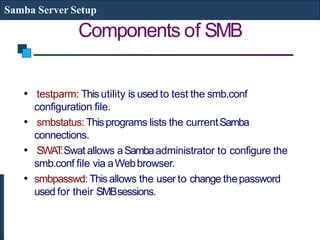
testparm: This utility is used to test the smb.conf
configuration file.
smbstatus: Thisprograms lists the currentSamba
connections.
SWAT:Swat allows aSambaadministrator to configure the
smb.conf file via aWebbrowser.
smbpasswd: Thisallows the user to change thepassword
used for their SMBsessions.
Installation andSetup
Samba Server Setup
TheSambaServer packagecan be downloaded from the
Sambawebsite.
• Thefile needs tobe untared and then configured using
a./configure command in the sourcedirectory.
• Then the smb.conf file should be created. Thesmb.conffile
hasthree separate sections:
[global] : This section controls parameters for the entire SMB
server. It also provides default values for the other sections.
Examples: workgroup =MYGROUP
server string =SambaServer
Installation andSetup
Samba Server Setup
Continued…
hosts allow =192.168.1 127.
printcap name =/etc/printcap
load printers =yes
guest account =pcguest
encrypt passwords =yes
smb passwd file =/etc/samba/smbpasswd
[homes]: This section allows network clients to connect to a
user’s home directory withouthaving an explicit entry in the
smb.conffile.
Examples:
[homes]
browseable =no
writeable =yes
Installation andSetup
Samba Server Setup
Continued…
[printers]: This section is used to specify whichprinters
are available.
Examples:
[printers]
print ok =yes
printer name =lp_mine
path =/home/everyone
Thetestparm program helps in testing thesmb.conf
file once it isconfigured.
Samba ServerConfiguration
Samba Server Setup
Use GUI Applications Server Settings Services
SMB Configuration File:/etc/samba/smb.conf
Configuring File and DirectorySharing
[share_name]
comment =Fred's HomeDirectory
path =/home/fred
valid users=fred
public =no
writable =yes
printable =no
Samba ServerConfiguration
Samba Server Setup
Configuring PrinterSharing
[printer_share_name]
comment =Fred's Printer
valid users =fred
path =/var/spool/samba
printer =freds_printer
public =no
writable =no
printable =yes
Authentication Methods
Samba Server Setup
Use local username/password (stored in
/etc/samba/smbpasswd)
To add a local user: smbpasswd –a fred (fred should be a
user in/etc/passwd)
HOW TO CONNECT LINUX TOWINDOW
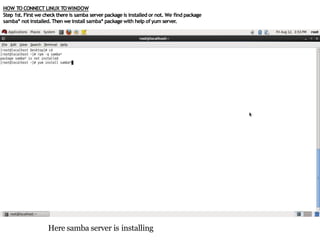
Step 1st. First we check there is samba server package is installed or not. We find package
samba* not installed.Then we install samba* package with help of yum server.
Here samba server is installing
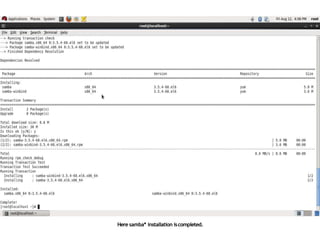
Here samba* installation iscompleted.
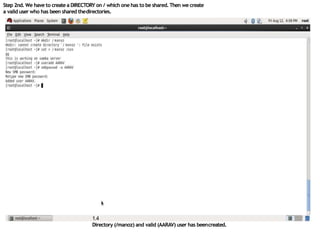
Step 2nd. We have to create a DIRECTORY on / which one has to be shared.Then we create
a valid user who has been shared thedirectories.
1.4
Directory (/manoz) and valid (AARAV) user has beencreated.
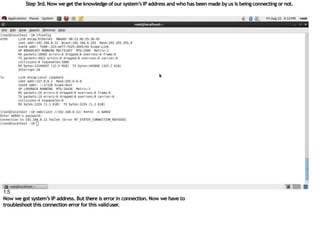
Step 3rd. Now we get the knowledge of our system’s IP address and who has been made by us is being connecting or not.
1.5
Now we got system’s IP address. But there is error in connection. Now we have to
troubleshoot this connection error for this validuser.
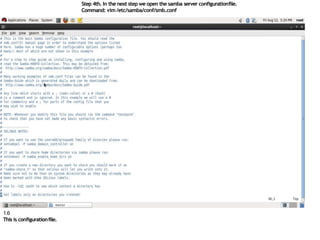
Step 4th. In the next step we open the samba server configurationfile.
Command: vim/etc/samba/conf/smb.conf
1.6
This is configurationfile.
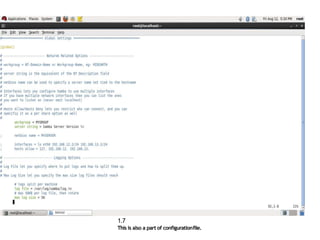
1.7
This is also a part of configurationfile.
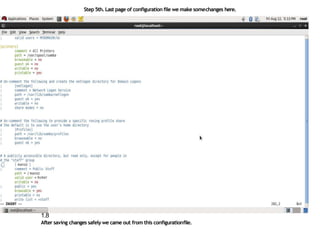
Step 5th. Last page of configuration file we make somechanges here.
1.8
After saving changes safely we came out from this configurationfile.
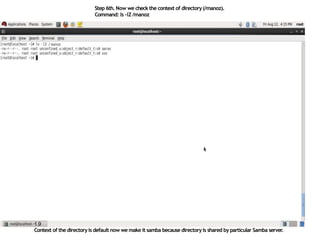
Step 6th. Now we check the context of directory(/manoz).
Command: ls –lZ /manoz
1.9
Context of the directoryis default now we make it samba because directoryis shared by particular Samba server.
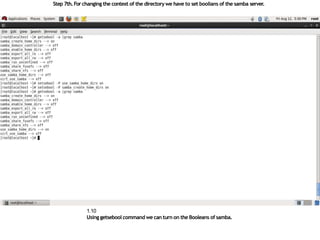
Step 7th.Forchanging the context of the directorywe have to set boolians of the samba server.
1.10
Using getsebool command we can turn on the Booleans of samba.
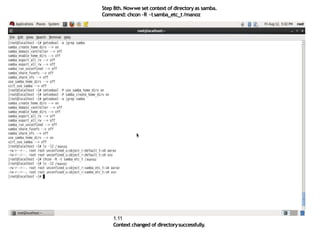
Step 8th. Nowwe set context of directoryas samba.
Command: chcon –R –tsamba_etc_t /manoz
1.11
Context changed of directorysuccessfully.
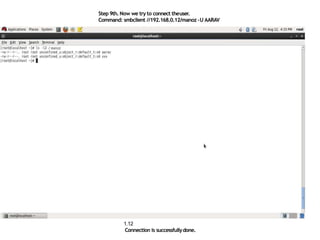
Step 9th. Now we try to connect theuser.
Command: smbclient //192.168.0.12/manoz –U AARAV
1.12
Connection is successfullydone.
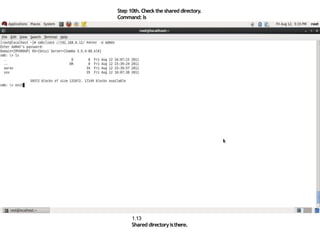
Step 10th. Check the shared directory.
Command: ls
1.13
Shared directoryisthere.
Samba ClientConfiguration
Samba Server Setup
Share the Samba Directory on Windows machine
Share the Samba Filesystem on Unix machine by
specifying in /etc/fstab
server1:/smbdata /users/smbdata smbfs defaults 00
or use
smbmount //server1/smbdata /users/smbdata–o
username=fred
Samba BasicConfiguration
Samba Server Setup
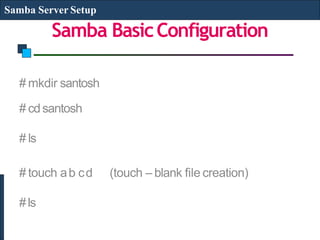
# mkdir santosh
# cdsantosh
# ls
# touch ab cd (touch – blank file creation)
#ls
Samba BasicConfiguration
Samba Server Setup
# nano /etc/samba/smb.conf
(Go to end of config file i.e from public and remove thecomments)
Make following ammendment
[santoshshare] (by replacing[public])
(only 3octets)
Comment =My sharefiles
Path =/santosh
Public =yes
Browseable =yes
Valid users =santosh
Writable =no
Hosts allow =192.168.1.
(save and exit)
Samba BasicConfiguration
Samba Server Setup
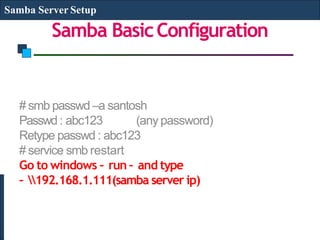
# smb passwd –a santosh
Passwd: abc123 (any password)
Retype passwd : abc123
# service smb restart
Go to windows – run – and type
– 192.168.1.111(samba server ip)
Samba BasicConfiguration
Samba Server Setup
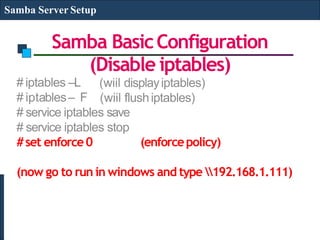
# iptables –L
# iptables– F
(Disable iptables)
(wiil displayiptables)
(wiil flushiptables)
# service iptables save
# service iptables stop
#set enforce0 (enforcepolicy)
(now go to run in windows and type 192.168.1.111)
THANKS
• Click to edit Master textstyles
– Secondlevel
• Third level
– Fourth level
» Fifth level

samba server setup Pts ppt (rohit malav)

  • 1.
    Samba ServerSetupPTS LABPRESENTATION SAMBA SERVERSETUP SUBMITTED BY :- ROHIT MALAV ENROLLMENT :- CP10101609979 SUBMITTED TO :-LAVISHA SAHU
  • 2.
    Samba Service Samba ServerSetup Fileand Printer Sharing from LINIX toWindows Uses smbDaemon service smb start/stop/restart
  • 3.
    What isSamba?? Samba ServerSetup Sambais an Open SourceSuite, that provides seamlessfile and print services to SMB/CIFSclients. • • • • Sambais freely available. With Samba,you can share aLinux files ystemwith Windows and vice versa. Youcan also share printers connected to either Linux ora system with Windows. Sambaenables aLinux or Unix server to function asafile server for client PCsrunning Windows software.
  • 4.
    What isSamba?? Samba ServerSetup What isSMB? • SMBstands for – Server MessageBlock. • It is a protocol by which a lot of PC-related machines share files and printers and other information such as lists of available files and printers. • Operating systems that support this natively include Windows, OS/2, and Linux. What is CIFS? • CIFS – Common Internet File System is a protocol that is basically an updated SMB.
  • 5.
    Components of SMB SambaServer Setup smbd daemon: Thisprovides the file and print services toSMB clients suchasWindows NTor other Linux or Unixclients. • • • • smb.conf: Thisis the configuration file forsmbd. nmbd daemon: Thisdaemon provides NetBIOS nameserving and browsing support. smbclient: Thisis an smb client program that implementa simple FTP-likeclient on aLinux or Unixbox. smbmount: Thismounting program enables mounting of server directories on aLinux or Unixbox.
  • 6.
    Components of SMB SambaServer Setup • • • • testparm: This utility is used to test the smb.conf configuration file. smbstatus: Thisprograms lists the currentSamba connections. SWAT:Swat allows aSambaadministrator to configure the smb.conf file via aWebbrowser. smbpasswd: Thisallows the user to change thepassword used for their SMBsessions.
  • 7.
    Installation andSetup Samba ServerSetup TheSambaServer packagecan be downloaded from the Sambawebsite. • Thefile needs tobe untared and then configured using a./configure command in the sourcedirectory. • Then the smb.conf file should be created. Thesmb.conffile hasthree separate sections: [global] : This section controls parameters for the entire SMB server. It also provides default values for the other sections. Examples: workgroup =MYGROUP server string =SambaServer
  • 8.
    Installation andSetup Samba ServerSetup Continued… hosts allow =192.168.1 127. printcap name =/etc/printcap load printers =yes guest account =pcguest encrypt passwords =yes smb passwd file =/etc/samba/smbpasswd [homes]: This section allows network clients to connect to a user’s home directory withouthaving an explicit entry in the smb.conffile. Examples: [homes] browseable =no writeable =yes
  • 9.
    Installation andSetup Samba ServerSetup Continued… [printers]: This section is used to specify whichprinters are available. Examples: [printers] print ok =yes printer name =lp_mine path =/home/everyone Thetestparm program helps in testing thesmb.conf file once it isconfigured.
  • 10.
    Samba ServerConfiguration Samba ServerSetup Use GUI Applications Server Settings Services SMB Configuration File:/etc/samba/smb.conf Configuring File and DirectorySharing [share_name] comment =Fred's HomeDirectory path =/home/fred valid users=fred public =no writable =yes printable =no
  • 11.
    Samba ServerConfiguration Samba ServerSetup Configuring PrinterSharing [printer_share_name] comment =Fred's Printer valid users =fred path =/var/spool/samba printer =freds_printer public =no writable =no printable =yes
  • 12.
    Authentication Methods Samba ServerSetup Use local username/password (stored in /etc/samba/smbpasswd) To add a local user: smbpasswd –a fred (fred should be a user in/etc/passwd)
  • 13.
    HOW TO CONNECTLINUX TOWINDOW Step 1st. First we check there is samba server package is installed or not. We find package samba* not installed.Then we install samba* package with help of yum server. Here samba server is installing
  • 14.
  • 15.
    Step 2nd. Wehave to create a DIRECTORY on / which one has to be shared.Then we create a valid user who has been shared thedirectories. 1.4 Directory (/manoz) and valid (AARAV) user has beencreated.
  • 16.
    Step 3rd. Nowwe get the knowledge of our system’s IP address and who has been made by us is being connecting or not. 1.5 Now we got system’s IP address. But there is error in connection. Now we have to troubleshoot this connection error for this validuser.
  • 17.
    Step 4th. Inthe next step we open the samba server configurationfile. Command: vim/etc/samba/conf/smb.conf 1.6 This is configurationfile.
  • 18.
    1.7 This is alsoa part of configurationfile.
  • 19.
    Step 5th. Lastpage of configuration file we make somechanges here. 1.8 After saving changes safely we came out from this configurationfile.
  • 20.
    Step 6th. Nowwe check the context of directory(/manoz). Command: ls –lZ /manoz 1.9 Context of the directoryis default now we make it samba because directoryis shared by particular Samba server.
  • 21.
    Step 7th.Forchanging thecontext of the directorywe have to set boolians of the samba server. 1.10 Using getsebool command we can turn on the Booleans of samba.
  • 22.
    Step 8th. Nowweset context of directoryas samba. Command: chcon –R –tsamba_etc_t /manoz 1.11 Context changed of directorysuccessfully.
  • 23.
    Step 9th. Nowwe try to connect theuser. Command: smbclient //192.168.0.12/manoz –U AARAV 1.12 Connection is successfullydone.
  • 24.
    Step 10th. Checkthe shared directory. Command: ls 1.13 Shared directoryisthere.
  • 25.
    Samba ClientConfiguration Samba ServerSetup Share the Samba Directory on Windows machine Share the Samba Filesystem on Unix machine by specifying in /etc/fstab server1:/smbdata /users/smbdata smbfs defaults 00 or use smbmount //server1/smbdata /users/smbdata–o username=fred
  • 26.
    Samba BasicConfiguration Samba ServerSetup # mkdir santosh # cdsantosh # ls # touch ab cd (touch – blank file creation) #ls
  • 27.
    Samba BasicConfiguration Samba ServerSetup # nano /etc/samba/smb.conf (Go to end of config file i.e from public and remove thecomments) Make following ammendment [santoshshare] (by replacing[public]) (only 3octets) Comment =My sharefiles Path =/santosh Public =yes Browseable =yes Valid users =santosh Writable =no Hosts allow =192.168.1. (save and exit)
  • 28.
    Samba BasicConfiguration Samba ServerSetup # smb passwd –a santosh Passwd: abc123 (any password) Retype passwd : abc123 # service smb restart Go to windows – run – and type – 192.168.1.111(samba server ip)
  • 29.
    Samba BasicConfiguration Samba ServerSetup # iptables –L # iptables– F (Disable iptables) (wiil displayiptables) (wiil flushiptables) # service iptables save # service iptables stop #set enforce0 (enforcepolicy) (now go to run in windows and type 192.168.1.111)
  • 30.
    THANKS • Click toedit Master textstyles – Secondlevel • Third level – Fourth level » Fifth level