Sage SalesLogix  Vision & Product Roadmap November, 2008 http:// customerfx.com
Agenda
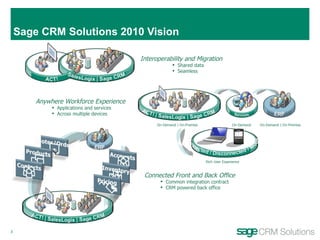
Sage CRM Solutions 2010 Vision Interoperability and Migration Shared data Seamless Anywhere Workforce Experience Applications and services Across multiple devices On-Demand | On-Premise On-Demand On-Demand | On-Premise Rich User Experience Connected Front and Back Office Common integration contract CRM powered back office
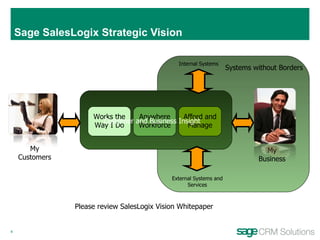
Sage SalesLogix Strategic Vision My Customers My Business Customer and Business Insight Systems without Borders Please review SalesLogix Vision Whitepaper Afford and Manage Works the Way I Do Anywhere Workforce External Systems and Services Internal Systems
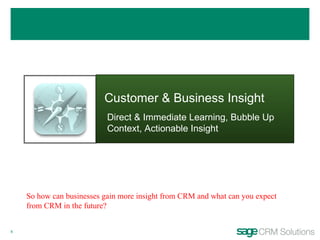
Customer & Business Insight Direct & Immediate Learning, Bubble Up Context, Actionable Insight So how can businesses gain more insight from CRM and what can you expect from CRM in the future?
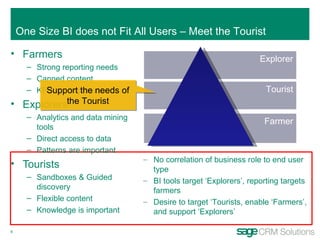
Farmers Strong reporting needs Canned content KPIs are important Explorers Analytics and data mining tools Direct access to data Patterns are important Tourists Sandboxes & Guided discovery Flexible content Knowledge is important Explorer Tourist Farmer No correlation of business role to end user type BI tools target ‘Explorers’, reporting targets farmers Desire to target ‘Tourists, enable ‘Farmers’, and support ‘Explorers’ One Size BI does not Fit All Users – Meet the Tourist Support the needs of the Tourist
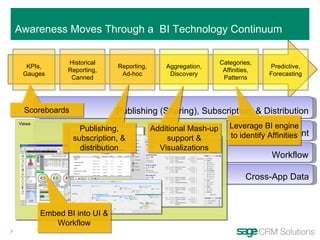
Cross-App Data Publishing (Sharing), Subscription, & Distribution KPIs, Gauges Historical Reporting, Canned Reporting, Ad-hoc Aggregation, Discovery Categories, Affinities, Patterns Predictive, Forecasting CRM Content Workflow Views Awareness Moves Through a  BI Technology Continuum Scoreboards Publishing, subscription, & distribution Additional Mash-up support & Visualizations Leverage BI engine to identify Affinities Embed BI into UI & Workflow
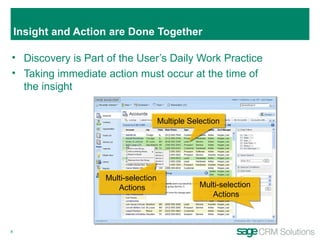
Insight and Action are Done Together  Discovery is Part of the User’s Daily Work Practice Taking immediate action must occur at the time of the insight Multiple Selection Multi-selection  Actions Multi-selection  Actions
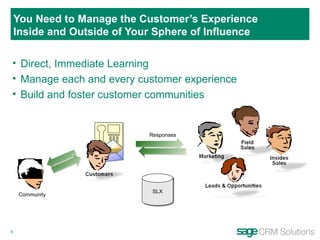
You Need to Manage the Customer’s Experience Inside and Outside of Your Sphere of Influence Direct, Immediate Learning Manage each and every customer experience Build and foster customer communities SLX Responses Community
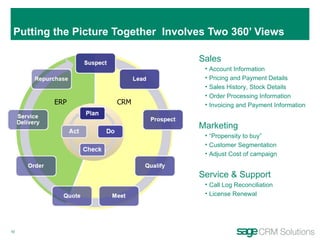
Putting the Picture Together  Involves Two 360’ Views CRM ERP Sales Account Information Pricing and Payment Details  Sales History, Stock Details  Order Processing Information Invoicing and Payment Information Marketing “ Propensity to buy” Customer Segmentation Adjust Cost of campaign Service & Support Call Log Reconciliation License Renewal
Work the Way I Do Be the Center of Work, Viral User Adoption, Add Value to Each Experience So, what can you expect from a “center of work”?
Task Oriented Workspaces Split-view format provides end-user with additional detail about selected activity
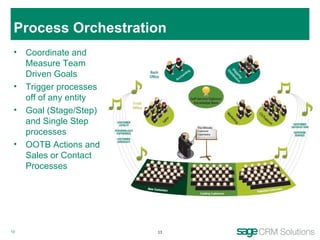
Process Orchestration Coordinate and Measure Team Driven Goals Trigger processes off of any entity Goal (Stage/Step)  and Single Step processes OOTB Actions and Sales or Contact Processes
Anywhere Workforce Awareness, Mobility, Alignment Its about rich, connected or disconnected, “centers of work” tailored for each device.
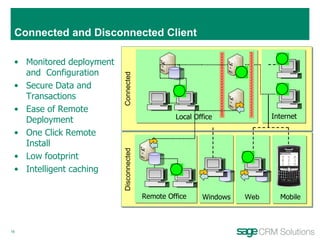
Connected and Disconnected Client Connected Disconnected Monitored deployment and  Configuration  Secure Data and Transactions Ease of Remote Deployment  One Click Remote Install Low footprint  Intelligent caching  Windows Remote Office Local Office Internet Web Mobile
SalesLogix Mobile 5.5 (Cabot) – RTM: March 09 Improved User Management Cradle-to-grave management of remote users running SLXM (Setup, deploy, monitor, resolve, upgrade) Improved User Experience Pause-and-Resume  - the experience of synchronizing large datasets over a thin wire Location Awareness  –Enabling mapping of contacts and accounts, proximity services Form Wizard  (Developer)   – simplifying the admin experience around common development tasks Mobile SData Support  - Improve and extend information access to external data sources AutoSync Support  for Windows Mobile
Afford and Manage Manage simply, Stay Current, & Reach Globally It is about getting the most out of what you have today and getting to where you need to go tomorrow
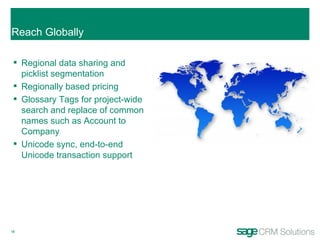
Reach Globally Regional data sharing and picklist segmentation Regionally based pricing Glossary Tags for project-wide search and replace of common names such as Account to Company Unicode sync, end-to-end Unicode transaction support
Systems Without Borders Cornerstone Apps, Integration Transparency, End-to-End Solutions So, what is cloud computing anyway?
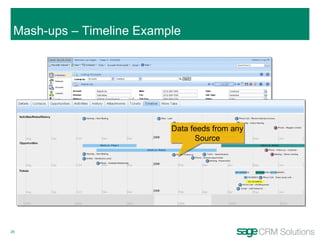
Mash-ups – Timeline Example Embedded Visualization Data feeds from any Source
SalesLogix Multi-Year Release Strategy  Gobi Mojave Summer 2007 Platform Customization Web/Mobility Usability Summer 2008 Visualization Restful Services Usability Feature Leadership SLX 7.5.1 Mobile 5.5 VA 3.0 Sahara
Sahara SP1 Features Activities Enhancements Task Oriented Activity Workspaces Application Architect Lookup Wizard Mashups: debugging and sparkline enhancements Run click deploy for round trip testing of forms Controls (Bevel Style Scheme, Lookup Wizard, Panel, Multi-tab, Sparkline) Bundle Password Support Filter editor Disconnected Web Client Account subscriptions Mail merge  Security Field level security for the Web Filters Dynamically update count next to filter label as criteria are selected Custom filters using calculated fields User Interface Improvements Consistent use of new grid control Create additional workspace tabs Ask to persist data on browser event Multi-entity delete and reassign owner for leads Office Integration/Compatibility Lotus Notes Firefox browser compatibility Platform Eliminate SendSLX dependency Reporting/Analytics Enable multiple Web reporting servers for remote offices Feedback Embedded Survey *** Subject to Change *** S S S S S S
Sage SalesLogix v7.5.1 - Activity Workspace Introduction of Activity dialog enables users to retain context of his or her work while leveraging familiar interface Call activity dialog from any entity
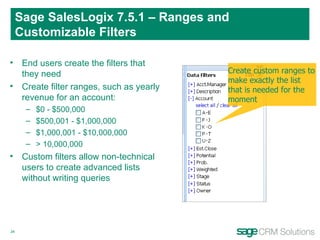
Sage SalesLogix 7.5.1 – Ranges and Customizable Filters End users create the filters that they need Create filter ranges, such as yearly revenue for an account: $0 - $500,000 $500,001 - $1,000,000 $1,000,001 - $10,000,000 > 10,000,000 Custom filters allow non-technical users to create advanced lists without writing queries Create custom ranges to make exactly the list that is needed for the moment
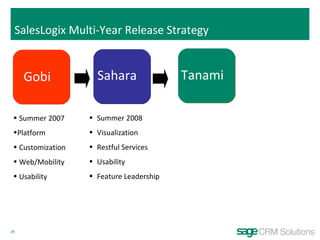
SalesLogix Multi-Year Release Strategy  Gobi Summer 2007 Platform Customization Web/Mobility Usability Summer 2008 Visualization Restful Services Usability Feature Leadership Sahara Tanami
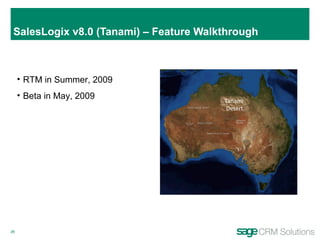
SalesLogix v8.0 (Tanami) – Feature Walkthrough RTM in Summer, 2009 Beta in May, 2009 Tanami  Desert
Tanami  (v8) - Release Stories End-to-End Business Solutions Partner  Adoption Foster Global  Reach No Touch Anywhere Client Customer Upgrades
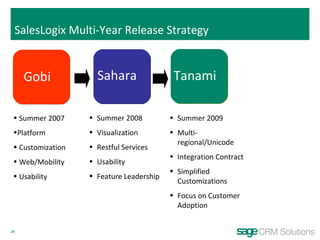
SalesLogix Multi-Year Release Strategy  Gobi Summer 2007 Platform Customization Web/Mobility Usability Summer 2008 Visualization Restful Services Usability Feature Leadership Summer 2009 Multi-regional/Unicode Integration Contract Simplified Customizations Focus on Customer Adoption Sahara Tanami
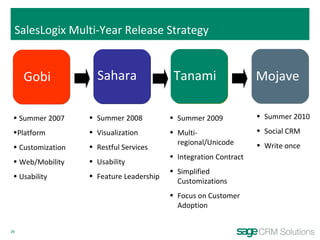
SalesLogix Multi-Year Release Strategy  Gobi Summer 2007 Platform Customization Web/Mobility Usability Summer 2008 Visualization Restful Services Usability Feature Leadership Summer 2010 Social CRM Write once Summer 2009 Multi-regional/Unicode Integration Contract Simplified Customizations Focus on Customer Adoption Sahara Tanami Mojave

SalesLogix Roadmap 2008 11 01

  • 1.
    Sage SalesLogix Vision & Product Roadmap November, 2008 http:// customerfx.com
  • 2.
  • 3.
    Sage CRM Solutions2010 Vision Interoperability and Migration Shared data Seamless Anywhere Workforce Experience Applications and services Across multiple devices On-Demand | On-Premise On-Demand On-Demand | On-Premise Rich User Experience Connected Front and Back Office Common integration contract CRM powered back office
  • 4.
    Sage SalesLogix StrategicVision My Customers My Business Customer and Business Insight Systems without Borders Please review SalesLogix Vision Whitepaper Afford and Manage Works the Way I Do Anywhere Workforce External Systems and Services Internal Systems
  • 5.
    Customer & BusinessInsight Direct & Immediate Learning, Bubble Up Context, Actionable Insight So how can businesses gain more insight from CRM and what can you expect from CRM in the future?
  • 6.
    Farmers Strong reportingneeds Canned content KPIs are important Explorers Analytics and data mining tools Direct access to data Patterns are important Tourists Sandboxes & Guided discovery Flexible content Knowledge is important Explorer Tourist Farmer No correlation of business role to end user type BI tools target ‘Explorers’, reporting targets farmers Desire to target ‘Tourists, enable ‘Farmers’, and support ‘Explorers’ One Size BI does not Fit All Users – Meet the Tourist Support the needs of the Tourist
  • 7.
    Cross-App Data Publishing(Sharing), Subscription, & Distribution KPIs, Gauges Historical Reporting, Canned Reporting, Ad-hoc Aggregation, Discovery Categories, Affinities, Patterns Predictive, Forecasting CRM Content Workflow Views Awareness Moves Through a BI Technology Continuum Scoreboards Publishing, subscription, & distribution Additional Mash-up support & Visualizations Leverage BI engine to identify Affinities Embed BI into UI & Workflow
  • 8.
    Insight and Actionare Done Together Discovery is Part of the User’s Daily Work Practice Taking immediate action must occur at the time of the insight Multiple Selection Multi-selection Actions Multi-selection Actions
  • 9.
    You Need toManage the Customer’s Experience Inside and Outside of Your Sphere of Influence Direct, Immediate Learning Manage each and every customer experience Build and foster customer communities SLX Responses Community
  • 10.
    Putting the PictureTogether Involves Two 360’ Views CRM ERP Sales Account Information Pricing and Payment Details Sales History, Stock Details Order Processing Information Invoicing and Payment Information Marketing “ Propensity to buy” Customer Segmentation Adjust Cost of campaign Service & Support Call Log Reconciliation License Renewal
  • 11.
    Work the WayI Do Be the Center of Work, Viral User Adoption, Add Value to Each Experience So, what can you expect from a “center of work”?
  • 12.
    Task Oriented WorkspacesSplit-view format provides end-user with additional detail about selected activity
  • 13.
    Process Orchestration Coordinateand Measure Team Driven Goals Trigger processes off of any entity Goal (Stage/Step) and Single Step processes OOTB Actions and Sales or Contact Processes
  • 14.
    Anywhere Workforce Awareness,Mobility, Alignment Its about rich, connected or disconnected, “centers of work” tailored for each device.
  • 15.
    Connected and DisconnectedClient Connected Disconnected Monitored deployment and Configuration Secure Data and Transactions Ease of Remote Deployment One Click Remote Install Low footprint Intelligent caching Windows Remote Office Local Office Internet Web Mobile
  • 16.
    SalesLogix Mobile 5.5(Cabot) – RTM: March 09 Improved User Management Cradle-to-grave management of remote users running SLXM (Setup, deploy, monitor, resolve, upgrade) Improved User Experience Pause-and-Resume - the experience of synchronizing large datasets over a thin wire Location Awareness –Enabling mapping of contacts and accounts, proximity services Form Wizard (Developer) – simplifying the admin experience around common development tasks Mobile SData Support - Improve and extend information access to external data sources AutoSync Support for Windows Mobile
  • 17.
    Afford and ManageManage simply, Stay Current, & Reach Globally It is about getting the most out of what you have today and getting to where you need to go tomorrow
  • 18.
    Reach Globally Regionaldata sharing and picklist segmentation Regionally based pricing Glossary Tags for project-wide search and replace of common names such as Account to Company Unicode sync, end-to-end Unicode transaction support
  • 19.
    Systems Without BordersCornerstone Apps, Integration Transparency, End-to-End Solutions So, what is cloud computing anyway?
  • 20.
    Mash-ups – TimelineExample Embedded Visualization Data feeds from any Source
  • 21.
    SalesLogix Multi-Year ReleaseStrategy Gobi Mojave Summer 2007 Platform Customization Web/Mobility Usability Summer 2008 Visualization Restful Services Usability Feature Leadership SLX 7.5.1 Mobile 5.5 VA 3.0 Sahara
  • 22.
    Sahara SP1 FeaturesActivities Enhancements Task Oriented Activity Workspaces Application Architect Lookup Wizard Mashups: debugging and sparkline enhancements Run click deploy for round trip testing of forms Controls (Bevel Style Scheme, Lookup Wizard, Panel, Multi-tab, Sparkline) Bundle Password Support Filter editor Disconnected Web Client Account subscriptions Mail merge Security Field level security for the Web Filters Dynamically update count next to filter label as criteria are selected Custom filters using calculated fields User Interface Improvements Consistent use of new grid control Create additional workspace tabs Ask to persist data on browser event Multi-entity delete and reassign owner for leads Office Integration/Compatibility Lotus Notes Firefox browser compatibility Platform Eliminate SendSLX dependency Reporting/Analytics Enable multiple Web reporting servers for remote offices Feedback Embedded Survey *** Subject to Change *** S S S S S S
  • 23.
    Sage SalesLogix v7.5.1- Activity Workspace Introduction of Activity dialog enables users to retain context of his or her work while leveraging familiar interface Call activity dialog from any entity
  • 24.
    Sage SalesLogix 7.5.1– Ranges and Customizable Filters End users create the filters that they need Create filter ranges, such as yearly revenue for an account: $0 - $500,000 $500,001 - $1,000,000 $1,000,001 - $10,000,000 > 10,000,000 Custom filters allow non-technical users to create advanced lists without writing queries Create custom ranges to make exactly the list that is needed for the moment
  • 25.
    SalesLogix Multi-Year ReleaseStrategy Gobi Summer 2007 Platform Customization Web/Mobility Usability Summer 2008 Visualization Restful Services Usability Feature Leadership Sahara Tanami
  • 26.
    SalesLogix v8.0 (Tanami)– Feature Walkthrough RTM in Summer, 2009 Beta in May, 2009 Tanami Desert
  • 27.
    Tanami (v8)- Release Stories End-to-End Business Solutions Partner Adoption Foster Global Reach No Touch Anywhere Client Customer Upgrades
  • 28.
    SalesLogix Multi-Year ReleaseStrategy Gobi Summer 2007 Platform Customization Web/Mobility Usability Summer 2008 Visualization Restful Services Usability Feature Leadership Summer 2009 Multi-regional/Unicode Integration Contract Simplified Customizations Focus on Customer Adoption Sahara Tanami
  • 29.
    SalesLogix Multi-Year ReleaseStrategy Gobi Summer 2007 Platform Customization Web/Mobility Usability Summer 2008 Visualization Restful Services Usability Feature Leadership Summer 2010 Social CRM Write once Summer 2009 Multi-regional/Unicode Integration Contract Simplified Customizations Focus on Customer Adoption Sahara Tanami Mojave