Salesforce External
Object Reports
Ralf Schundelmeier Director of Product
Management - Salesforce
Sumit Sarkar Chief Data Evangelist
Progress DataDirect
© 2016 Progress Software Corporation and/or its subsidiaries or affiliates. All rights reserved.2
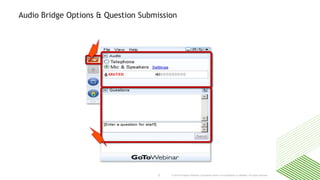
Audio Bridge Options & Question Submission
© 2016 Progress Software Corporation and/or its subsidiaries or affiliates. All rights reserved.3
Twitter @ProgressSW
Let’s Get Social #AskDataDirect
 Sumit Sarkar, Chief Data Evangelist
@SAsInSumit
 Ralf Schundelmeier, Director Product Management, Salesforce.com
linkedin.com/in/ralfschundelmeier
 Connect With Progress DataDirect
LinkedIn /company/progress-software
Facebook /progresssw
Salesforce External
Object Reports
Ralf Schundelmeier Director of Product
Management - Salesforce
Sumit Sarkar Chief Data Evangelist
Progress DataDirect
© 2016 Progress Software Corporation and/or its subsidiaries or affiliates. All rights reserved.5
Agenda
 Introduce Salesforce Connect External Objects and new capabilities
in Winter ’17
• Reporting
• Wave Analytics Trending
 Report considerations and limitations with Salesforce Connect
 How to create Salesforce reports with external data sources
 How to produce OData from common reporting data sources
© 2016 Progress Software Corporation and/or its subsidiaries or affiliates. All rights reserved.6
POLL
How familiar are you with Salesforce External Object
Reporting?
Salesforce Connect – Quick
Introduction
© 2016 Progress Software Corporation and/or its subsidiaries or affiliates. All rights reserved.8
Salesforce Connect – Virtual Data Integration
(formerly Lightning Connect)
Tightly connect any API-accessible
data source to Salesforce
Integrate in hours with point and
click tools and less code
Read/Write external data in real-time,
without copying data to Salesforce
Custom Report Types, Reports,
Dashboards and Wave Trending
Connect multiple Salesforce instances
across your enterprise
© 2016 Progress Software Corporation and/or its subsidiaries or affiliates. All rights reserved.9
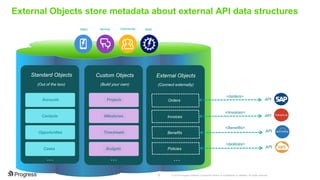
External Objects store metadata about external API data structures
Sales Service Community Apps
Standard Objects Custom Objects External Objects
(Out of the box) (Build your own) (Connect externally)
Accounts
Contacts
Opportunities
Cases
Projects
Milestones
Timesheets
Budgets
Orders
Invoices
Benefits
… … …
Policies
API
API
API
API
</orders>
</invoices>
</benefits>
</policies>
Salesforce Connect -
Reporting with External Data
© 2016 Progress Software Corporation and/or its subsidiaries or affiliates. All rights reserved.11
Winter ‘17 - Feature Overview
Reporting on External Objects
With the Winter ‘17 we enable to add External Objects into Custom Report Types (CRT) and to
include them in reports and dashboards. There are still some limitations and considerations to
keep in mind, but now you can run reports on all your data, regardless of where it’s stored.
© 2016 Progress Software Corporation and/or its subsidiaries or affiliates. All rights reserved.12
Custom Report Type with Standard, Custom and External Objects
Custom Report Type
linking Standard, Custom
and External Objects for
reporting.
© 2016 Progress Software Corporation and/or its subsidiaries or affiliates. All rights reserved.13
Report linking data from Standard, Custom and External Objects
© 2016 Progress Software Corporation and/or its subsidiaries or affiliates. All rights reserved.14
Salesforce Connect – Support for Dashboards
Reporting with External Data
- Wave Trending
© 2016 Progress Software Corporation and/or its subsidiaries or affiliates. All rights reserved.16
Feature Overview
Users can snapshot their Reports over time and discover new insights
Snap to Wave
Users will be able to use a
Salesforce Report with External
Data as a source when creating a
new dataset in Wave.
Wave Dashboard
Snap to Wave not only allows to
access snapshots of your Reports
from Wave but also gives access to
a new Dashboard automatically
created in Wave.
This Dashboard reflects the structure
the user has chosen for the report,
keeping the same Grouping and
Measures in the original Report, and
offers immediately a powerful data
visualization tool.
Explore trended data
The Wave dataset containing trended
data allows the user to generate new
lenses and explore data in complete
freedom
Your personal DataMart
User can access Snap to Wave from
their own favorite Reports with their
visibility, creating a personal
DataMart powered by Wave
Change over time
Snap to Wave generates new
snapshots of your Reports over time,
allowing users to see how the
business evolves without having to
export data to an external platform
Wave Trending on External Data requires Salesforce Connect and Wave licenses
© 2016 Progress Software Corporation and/or its subsidiaries or affiliates. All rights reserved.17
Key Capabilities
Users can activate a Salesforce Report as an input stream for Wave
Trend Salesforce Data is
a new option available
when creating a new
Dataset in Wave
Users just need to select a
Report to start creating new
weekly snapshots in Wave
© 2016 Progress Software Corporation and/or its subsidiaries or affiliates. All rights reserved.18
Key Capabilities
Immediate access to a Wave Dashboard generated after your report
Reporting with External Data
- Considerations
© 2016 Progress Software Corporation and/or its subsidiaries or affiliates. All rights reserved.20
Reporting Considerations
 Depending on network latency and the availability of the external system, reports that include an
external object can take a long time to run.
 When you run a report, your org performs a request callout for each external object in the report.
 When you run a report that’s in the joined format, your org performs separate request callouts for
each block.
 If the URL length of a report callout approaches or exceeds 2 KB, your org splits the request into
multiple HTTP calls, with each URL being less than 2 KB. However, with the cross-org adapter for
Salesforce Connect, report callouts that exceed 2 KB fail and are not split into multiple calls.
 When a report includes an external object, the report fetches up to 2,000 records for the primary
object. This limit applies regardless of whether the primary object is a standard, custom, or
external object.
• If the report has no child objects, the total number of rows is 2,000 or fewer.
• If the report has a child object, the total number of rows can be greater or less than 2,000,
depending on how many child records are fetched.
 As is true for all callouts for external objects, report callouts are limited by the
Salesforce Connect adapters in use.
© 2016 Progress Software Corporation and/or its subsidiaries or affiliates. All rights reserved.21
Reporting Considerations
 For large external data sets, report callouts typically access only a subset of the external data.
• If the report results in few or no rows, try customizing the report to obtain more relevant
external object rows.
• If the report includes summary fields and formulas, those aggregate values likely reflect only a
subset of your data. To improve the accuracy of the aggregate values, try customizing the
report to obtain more relevant data.
 The external objects’ associated external data sources must have the High Data Volume option
deselected. This requirement doesn’t apply to the cross-org adapter for Salesforce Connect.
 Cross filters don’t support external lookup relationships. An external lookup relationship links a
child standard, custom, or external object to a parent external object.
 These report features aren’t available for external objects.
• Buckets and bucket fields
• Historical trend reporting
 Reports can include or reference external objects via lookup, external lookup, and indirect lookup
relationship fields. If those relationship fields aren’t Salesforce IDs or the name fields of parent
objects, the report returns only empty values for those relationship fields.
How to create Salesforce
reports with external data
sources
© 2016 Progress Software Corporation and/or its subsidiaries or affiliates. All rights reserved.23
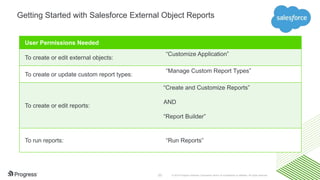
Getting Started with Salesforce External Object Reports
User Permissions Needed
To create or edit external objects:
“Customize Application”
To create or update custom report types:
“Manage Custom Report Types”
To create or edit reports:
“Create and Customize Reports”
AND
“Report Builder”
To run reports: “Run Reports”
© 2016 Progress Software Corporation and/or its subsidiaries or affiliates. All rights reserved.24
Getting Started with Salesforce External Object Reports
Enabling reports creates the following in the Other Reports report type category.
• A report type for the external object
• A report type for each lookup relationship in which both objects allow reports
Setup Home > External Objects > Edit
Select “Enable Reports” on the external object.
© 2016 Progress Software Corporation and/or its subsidiaries or affiliates. All rights reserved.25
Getting Started with Salesforce External Object Reports
Reports > Create New Report
© 2016 Progress Software Corporation and/or its subsidiaries or affiliates. All rights reserved.26
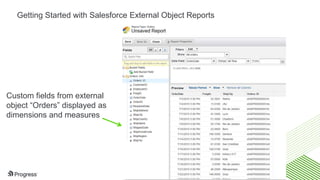
Getting Started with Salesforce External Object Reports
Custom fields from external
object “Orders” displayed as
dimensions and measures
How to create Salesforce
reports with external data
sources [blended
standard/external objects]
© 2016 Progress Software Corporation and/or its subsidiaries or affiliates. All rights reserved.28
Getting Started with Salesforce External Object Reports
Setup > Custom Report Types (Optional)
© 2016 Progress Software Corporation and/or its subsidiaries or affiliates. All rights reserved.29
Getting Started with Salesforce External Object Reports
Combine external objects with
standard objects and categorize for
easy access
© 2016 Progress Software Corporation and/or its subsidiaries or affiliates. All rights reserved.30
Getting Started with Salesforce External Object Reports
Orders has indirect relationship on
Customer ID with Accounts
© 2016 Progress Software Corporation and/or its subsidiaries or affiliates. All rights reserved.31
Getting Started with Salesforce External Object Reports
Report with data blended
from Standard and External
Objects (pulled on-demand
from on-premises SQL
Server Data Warehouse)
How to produce OData from
common reporting data
sources
© 2016 Progress Software Corporation and/or its subsidiaries or affiliates. All rights reserved.33
POLL
What are your data sources for reporting purposes?
© 2016 Progress Software Corporation and/or its subsidiaries or affiliates. All rights reserved.34
An open protocol to allow the creation and consumption of
queryable and interoperable RESTful APIs in a simple and standard way.
OASIS Standard REST API (“SQL for the web”)
Ratified as an OASIS standard February, 2014
Operations built on REST principles
Uniform URL conventions
Surface metadata in standard way
What is OData?
First member to join OData Technical Committee
© 2016 Progress Software Corporation and/or its subsidiaries or affiliates. All rights reserved.35
OData URL Query Conventions
$SELECT /Products?$select=*,Category/Name
/Suppliers?$filter=Address/City eq 'Redmond’
/Products?$orderby=ReleaseDate asc, Rating desc
/Products?$select=*,Category/Name&$expand=Categor
y
$FILTER
$ORDERBY
$EXPAND
/Products?$top=5&$skip=2$TOP $SKIP
http://services.odata.org/OData/OData.svc/Category(1)/Products?$top=2&$orderby=name
__________________________________/ ________________/ __________________/
service root URI resource path query options
© 2016 Progress Software Corporation and/or its subsidiaries or affiliates. All rights reserved.36
What are the common external reporting
databases?
 680 Global Companies participated in 2016 Data
Connectivity Outlook Survey
 7 of top 8 leaders of BI Magic Quadrant are DataDirect
OEM Partners
How to produce OData from
Reporting Data?
© 2016 Progress Software Corporation and/or its subsidiaries or affiliates. All rights reserved.38
Options to produce OData from Reporting Data Sources
Native: OData Report Services such as
SAP Universe or Microsoft SSRS
Commercial: DataDirect Hybrid OData
Reporting Services
Build: Apex Connector Framework
© 2016 Progress Software Corporation and/or its subsidiaries or affiliates. All rights reserved.39
External Reporting Objects via DataDirect Hybrid OData services
Corporate Firewall
Option 1. DataDirect Cloud:
We take care of firewall configuration
and cloud data sources
Option 2.DataDirect Hybrid Data Pipeline:
You take care of firewall configuration for on-
premises data sources
• Oracle
• Microsoft SQL Server
• Greenplum
• IBM DB2
• Postgres
• Hadoop Hive (including
Cloudera, Hortonworks, IBM
BigInsights, and MapR)
© 2016 Progress Software Corporation and/or its subsidiaries or affiliates. All rights reserved.40
Supported Data Sources via DataDirect Hybrid OData services
Apache Hadoop Hive 0.8.0 and higher
Amazon EMR 2.1.4 and higher
Amazon Redshift
Cloudera CDH update 4 and higher
Hortonworks 1.3 and higher
IBM BigInsights 3.0 and higher
MapR 1.2 and higher
Pivotal HD 2.0.1 and higher
DB2 V9.1, V9.5, V9.7, 9.8 for Linux, UNIX, Windows DB2 V8.x for LUW
DB2 11 for z/OS* DB2 V10 for z/OS DB2 V9.1 for z/OS
DB2 UDB V8.1 for z/OS
DB2 I 7.1, 7.2* (DB2 UDB V7R1, V7R2 for iSeries)
DB2 I 6.1 (DB2 UDB V6R1 for iSeries)
DB2 for I 5/OS (DB2 UDB V5R4 for iSeries)
Eloqua (Oracle Marketing Cloud)
Financial Force
Google Analytics
Greenplum 4, 4.1, 4.2, 4.3
Greenplum 3.3
Hubspot
Informix Dynamic Server 12.1*
Informix Dynamic Server 11.0, 11.5, 11.7
Informix Dynamic Server 10.0
Informix Dynamic Server 9.2, 9.3, 9.4
Informix Dynamic Server 11.0, 11.5, 11.7
Informix Dynamic Server 10.0
Informix Dynamic Server 9.2, 9.3, 9.4
Marketo
Microsoft Dynamics CRM 2011 Rollup 16, 2013, 2015
Microsoft SQL Server 2014*
Microsoft SQL Server 2012
Microsoft SQL Server 2008 R1, R2
Microsoft SQL Server 2005
Microsoft SQL Server 2000 Desktop Engine (MSDE 2000) Microsoft SQL Server
2000
Microsoft SQL Azure*
MySQL Enterprise Edition 5.0, 5.1, 5.5, 5.6*
Oracle 12c R1 (12.1)*
Oracle 11g R1, R2 (11.1, 11.2)
Oracle 10g R1, R2 (10.1, 10.2)
Oracle 9i R1, R2 (9.0.1, 9.2)
Oracle 8i R3 (8.1.7)
Oracle Service Cloud
Oracle Sales Cloud
Pivotal HAWQ 1.1*, 1.2*
PostgreSQL 9.0, 9.1, 9.2, 9.3, 9.4*
PostgreSQL 8.2, 8.3, 8.4
Progress OpenEdge 11.0, 11.1*, 11.2*, 11.3*, 11.4*
Progress OpenEdge 10.1.x, 10.2.x
Progress Rollbase 2.0 and higher*
SAP Adaptive Server Enterprise 16.0*
ServiceMax
SugarCRM 7.1.6 and higher*
Sybase Adaptive Server Enterprise 15.0, 15.5, 15.7
Sybase Adaptive Server Enterprise 12.0, 12.5, 12.5.x
Sybase Adaptive Server Enterprise 11.9
Veeva CRM
Blue text indicates cloud hosted
Blue text* indicates cloud hosted with on-premises option
© 2016 Progress Software Corporation and/or its subsidiaries or affiliates. All rights reserved.41
External Object Report Demo
© 2016 Progress Software Corporation and/or its subsidiaries or affiliates. All rights reserved.42
Learn More about Salesforce External Object Reports
Related Salesforce Winter ‘17 Release Notes
DataDirect Hybrid OData Services [https://prgress.co/hybrid]
Related tutorials from Salesforce Devs:
Salesforce Developers guide to hybrid connectivity
Trailhead for Salesforce Connect
Related webinars from Progress:
OData External Data Integration Strategies for SaaS [Guests: Microsoft
and Oracle]
Webinar: Integrate Oracle Data Sources with Salesforce Connect [Guest:
Appirio]
Firewall Friendly Pipeline for Secure Data Access
Salesforce Connect External Object Reports

Salesforce Connect External Object Reports

  • 1.
    Salesforce External Object Reports RalfSchundelmeier Director of Product Management - Salesforce Sumit Sarkar Chief Data Evangelist Progress DataDirect
  • 2.
    © 2016 ProgressSoftware Corporation and/or its subsidiaries or affiliates. All rights reserved.2 Audio Bridge Options & Question Submission
  • 3.
    © 2016 ProgressSoftware Corporation and/or its subsidiaries or affiliates. All rights reserved.3 Twitter @ProgressSW Let’s Get Social #AskDataDirect  Sumit Sarkar, Chief Data Evangelist @SAsInSumit  Ralf Schundelmeier, Director Product Management, Salesforce.com linkedin.com/in/ralfschundelmeier  Connect With Progress DataDirect LinkedIn /company/progress-software Facebook /progresssw
  • 4.
    Salesforce External Object Reports RalfSchundelmeier Director of Product Management - Salesforce Sumit Sarkar Chief Data Evangelist Progress DataDirect
  • 5.
    © 2016 ProgressSoftware Corporation and/or its subsidiaries or affiliates. All rights reserved.5 Agenda  Introduce Salesforce Connect External Objects and new capabilities in Winter ’17 • Reporting • Wave Analytics Trending  Report considerations and limitations with Salesforce Connect  How to create Salesforce reports with external data sources  How to produce OData from common reporting data sources
  • 6.
    © 2016 ProgressSoftware Corporation and/or its subsidiaries or affiliates. All rights reserved.6 POLL How familiar are you with Salesforce External Object Reporting?
  • 7.
    Salesforce Connect –Quick Introduction
  • 8.
    © 2016 ProgressSoftware Corporation and/or its subsidiaries or affiliates. All rights reserved.8 Salesforce Connect – Virtual Data Integration (formerly Lightning Connect) Tightly connect any API-accessible data source to Salesforce Integrate in hours with point and click tools and less code Read/Write external data in real-time, without copying data to Salesforce Custom Report Types, Reports, Dashboards and Wave Trending Connect multiple Salesforce instances across your enterprise
  • 9.
    © 2016 ProgressSoftware Corporation and/or its subsidiaries or affiliates. All rights reserved.9 External Objects store metadata about external API data structures Sales Service Community Apps Standard Objects Custom Objects External Objects (Out of the box) (Build your own) (Connect externally) Accounts Contacts Opportunities Cases Projects Milestones Timesheets Budgets Orders Invoices Benefits … … … Policies API API API API </orders> </invoices> </benefits> </policies>
  • 10.
  • 11.
    © 2016 ProgressSoftware Corporation and/or its subsidiaries or affiliates. All rights reserved.11 Winter ‘17 - Feature Overview Reporting on External Objects With the Winter ‘17 we enable to add External Objects into Custom Report Types (CRT) and to include them in reports and dashboards. There are still some limitations and considerations to keep in mind, but now you can run reports on all your data, regardless of where it’s stored.
  • 12.
    © 2016 ProgressSoftware Corporation and/or its subsidiaries or affiliates. All rights reserved.12 Custom Report Type with Standard, Custom and External Objects Custom Report Type linking Standard, Custom and External Objects for reporting.
  • 13.
    © 2016 ProgressSoftware Corporation and/or its subsidiaries or affiliates. All rights reserved.13 Report linking data from Standard, Custom and External Objects
  • 14.
    © 2016 ProgressSoftware Corporation and/or its subsidiaries or affiliates. All rights reserved.14 Salesforce Connect – Support for Dashboards
  • 15.
    Reporting with ExternalData - Wave Trending
  • 16.
    © 2016 ProgressSoftware Corporation and/or its subsidiaries or affiliates. All rights reserved.16 Feature Overview Users can snapshot their Reports over time and discover new insights Snap to Wave Users will be able to use a Salesforce Report with External Data as a source when creating a new dataset in Wave. Wave Dashboard Snap to Wave not only allows to access snapshots of your Reports from Wave but also gives access to a new Dashboard automatically created in Wave. This Dashboard reflects the structure the user has chosen for the report, keeping the same Grouping and Measures in the original Report, and offers immediately a powerful data visualization tool. Explore trended data The Wave dataset containing trended data allows the user to generate new lenses and explore data in complete freedom Your personal DataMart User can access Snap to Wave from their own favorite Reports with their visibility, creating a personal DataMart powered by Wave Change over time Snap to Wave generates new snapshots of your Reports over time, allowing users to see how the business evolves without having to export data to an external platform Wave Trending on External Data requires Salesforce Connect and Wave licenses
  • 17.
    © 2016 ProgressSoftware Corporation and/or its subsidiaries or affiliates. All rights reserved.17 Key Capabilities Users can activate a Salesforce Report as an input stream for Wave Trend Salesforce Data is a new option available when creating a new Dataset in Wave Users just need to select a Report to start creating new weekly snapshots in Wave
  • 18.
    © 2016 ProgressSoftware Corporation and/or its subsidiaries or affiliates. All rights reserved.18 Key Capabilities Immediate access to a Wave Dashboard generated after your report
  • 19.
    Reporting with ExternalData - Considerations
  • 20.
    © 2016 ProgressSoftware Corporation and/or its subsidiaries or affiliates. All rights reserved.20 Reporting Considerations  Depending on network latency and the availability of the external system, reports that include an external object can take a long time to run.  When you run a report, your org performs a request callout for each external object in the report.  When you run a report that’s in the joined format, your org performs separate request callouts for each block.  If the URL length of a report callout approaches or exceeds 2 KB, your org splits the request into multiple HTTP calls, with each URL being less than 2 KB. However, with the cross-org adapter for Salesforce Connect, report callouts that exceed 2 KB fail and are not split into multiple calls.  When a report includes an external object, the report fetches up to 2,000 records for the primary object. This limit applies regardless of whether the primary object is a standard, custom, or external object. • If the report has no child objects, the total number of rows is 2,000 or fewer. • If the report has a child object, the total number of rows can be greater or less than 2,000, depending on how many child records are fetched.  As is true for all callouts for external objects, report callouts are limited by the Salesforce Connect adapters in use.
  • 21.
    © 2016 ProgressSoftware Corporation and/or its subsidiaries or affiliates. All rights reserved.21 Reporting Considerations  For large external data sets, report callouts typically access only a subset of the external data. • If the report results in few or no rows, try customizing the report to obtain more relevant external object rows. • If the report includes summary fields and formulas, those aggregate values likely reflect only a subset of your data. To improve the accuracy of the aggregate values, try customizing the report to obtain more relevant data.  The external objects’ associated external data sources must have the High Data Volume option deselected. This requirement doesn’t apply to the cross-org adapter for Salesforce Connect.  Cross filters don’t support external lookup relationships. An external lookup relationship links a child standard, custom, or external object to a parent external object.  These report features aren’t available for external objects. • Buckets and bucket fields • Historical trend reporting  Reports can include or reference external objects via lookup, external lookup, and indirect lookup relationship fields. If those relationship fields aren’t Salesforce IDs or the name fields of parent objects, the report returns only empty values for those relationship fields.
  • 22.
    How to createSalesforce reports with external data sources
  • 23.
    © 2016 ProgressSoftware Corporation and/or its subsidiaries or affiliates. All rights reserved.23 Getting Started with Salesforce External Object Reports User Permissions Needed To create or edit external objects: “Customize Application” To create or update custom report types: “Manage Custom Report Types” To create or edit reports: “Create and Customize Reports” AND “Report Builder” To run reports: “Run Reports”
  • 24.
    © 2016 ProgressSoftware Corporation and/or its subsidiaries or affiliates. All rights reserved.24 Getting Started with Salesforce External Object Reports Enabling reports creates the following in the Other Reports report type category. • A report type for the external object • A report type for each lookup relationship in which both objects allow reports Setup Home > External Objects > Edit Select “Enable Reports” on the external object.
  • 25.
    © 2016 ProgressSoftware Corporation and/or its subsidiaries or affiliates. All rights reserved.25 Getting Started with Salesforce External Object Reports Reports > Create New Report
  • 26.
    © 2016 ProgressSoftware Corporation and/or its subsidiaries or affiliates. All rights reserved.26 Getting Started with Salesforce External Object Reports Custom fields from external object “Orders” displayed as dimensions and measures
  • 27.
    How to createSalesforce reports with external data sources [blended standard/external objects]
  • 28.
    © 2016 ProgressSoftware Corporation and/or its subsidiaries or affiliates. All rights reserved.28 Getting Started with Salesforce External Object Reports Setup > Custom Report Types (Optional)
  • 29.
    © 2016 ProgressSoftware Corporation and/or its subsidiaries or affiliates. All rights reserved.29 Getting Started with Salesforce External Object Reports Combine external objects with standard objects and categorize for easy access
  • 30.
    © 2016 ProgressSoftware Corporation and/or its subsidiaries or affiliates. All rights reserved.30 Getting Started with Salesforce External Object Reports Orders has indirect relationship on Customer ID with Accounts
  • 31.
    © 2016 ProgressSoftware Corporation and/or its subsidiaries or affiliates. All rights reserved.31 Getting Started with Salesforce External Object Reports Report with data blended from Standard and External Objects (pulled on-demand from on-premises SQL Server Data Warehouse)
  • 32.
    How to produceOData from common reporting data sources
  • 33.
    © 2016 ProgressSoftware Corporation and/or its subsidiaries or affiliates. All rights reserved.33 POLL What are your data sources for reporting purposes?
  • 34.
    © 2016 ProgressSoftware Corporation and/or its subsidiaries or affiliates. All rights reserved.34 An open protocol to allow the creation and consumption of queryable and interoperable RESTful APIs in a simple and standard way. OASIS Standard REST API (“SQL for the web”) Ratified as an OASIS standard February, 2014 Operations built on REST principles Uniform URL conventions Surface metadata in standard way What is OData? First member to join OData Technical Committee
  • 35.
    © 2016 ProgressSoftware Corporation and/or its subsidiaries or affiliates. All rights reserved.35 OData URL Query Conventions $SELECT /Products?$select=*,Category/Name /Suppliers?$filter=Address/City eq 'Redmond’ /Products?$orderby=ReleaseDate asc, Rating desc /Products?$select=*,Category/Name&$expand=Categor y $FILTER $ORDERBY $EXPAND /Products?$top=5&$skip=2$TOP $SKIP http://services.odata.org/OData/OData.svc/Category(1)/Products?$top=2&$orderby=name __________________________________/ ________________/ __________________/ service root URI resource path query options
  • 36.
    © 2016 ProgressSoftware Corporation and/or its subsidiaries or affiliates. All rights reserved.36 What are the common external reporting databases?  680 Global Companies participated in 2016 Data Connectivity Outlook Survey  7 of top 8 leaders of BI Magic Quadrant are DataDirect OEM Partners
  • 37.
    How to produceOData from Reporting Data?
  • 38.
    © 2016 ProgressSoftware Corporation and/or its subsidiaries or affiliates. All rights reserved.38 Options to produce OData from Reporting Data Sources Native: OData Report Services such as SAP Universe or Microsoft SSRS Commercial: DataDirect Hybrid OData Reporting Services Build: Apex Connector Framework
  • 39.
    © 2016 ProgressSoftware Corporation and/or its subsidiaries or affiliates. All rights reserved.39 External Reporting Objects via DataDirect Hybrid OData services Corporate Firewall Option 1. DataDirect Cloud: We take care of firewall configuration and cloud data sources Option 2.DataDirect Hybrid Data Pipeline: You take care of firewall configuration for on- premises data sources • Oracle • Microsoft SQL Server • Greenplum • IBM DB2 • Postgres • Hadoop Hive (including Cloudera, Hortonworks, IBM BigInsights, and MapR)
  • 40.
    © 2016 ProgressSoftware Corporation and/or its subsidiaries or affiliates. All rights reserved.40 Supported Data Sources via DataDirect Hybrid OData services Apache Hadoop Hive 0.8.0 and higher Amazon EMR 2.1.4 and higher Amazon Redshift Cloudera CDH update 4 and higher Hortonworks 1.3 and higher IBM BigInsights 3.0 and higher MapR 1.2 and higher Pivotal HD 2.0.1 and higher DB2 V9.1, V9.5, V9.7, 9.8 for Linux, UNIX, Windows DB2 V8.x for LUW DB2 11 for z/OS* DB2 V10 for z/OS DB2 V9.1 for z/OS DB2 UDB V8.1 for z/OS DB2 I 7.1, 7.2* (DB2 UDB V7R1, V7R2 for iSeries) DB2 I 6.1 (DB2 UDB V6R1 for iSeries) DB2 for I 5/OS (DB2 UDB V5R4 for iSeries) Eloqua (Oracle Marketing Cloud) Financial Force Google Analytics Greenplum 4, 4.1, 4.2, 4.3 Greenplum 3.3 Hubspot Informix Dynamic Server 12.1* Informix Dynamic Server 11.0, 11.5, 11.7 Informix Dynamic Server 10.0 Informix Dynamic Server 9.2, 9.3, 9.4 Informix Dynamic Server 11.0, 11.5, 11.7 Informix Dynamic Server 10.0 Informix Dynamic Server 9.2, 9.3, 9.4 Marketo Microsoft Dynamics CRM 2011 Rollup 16, 2013, 2015 Microsoft SQL Server 2014* Microsoft SQL Server 2012 Microsoft SQL Server 2008 R1, R2 Microsoft SQL Server 2005 Microsoft SQL Server 2000 Desktop Engine (MSDE 2000) Microsoft SQL Server 2000 Microsoft SQL Azure* MySQL Enterprise Edition 5.0, 5.1, 5.5, 5.6* Oracle 12c R1 (12.1)* Oracle 11g R1, R2 (11.1, 11.2) Oracle 10g R1, R2 (10.1, 10.2) Oracle 9i R1, R2 (9.0.1, 9.2) Oracle 8i R3 (8.1.7) Oracle Service Cloud Oracle Sales Cloud Pivotal HAWQ 1.1*, 1.2* PostgreSQL 9.0, 9.1, 9.2, 9.3, 9.4* PostgreSQL 8.2, 8.3, 8.4 Progress OpenEdge 11.0, 11.1*, 11.2*, 11.3*, 11.4* Progress OpenEdge 10.1.x, 10.2.x Progress Rollbase 2.0 and higher* SAP Adaptive Server Enterprise 16.0* ServiceMax SugarCRM 7.1.6 and higher* Sybase Adaptive Server Enterprise 15.0, 15.5, 15.7 Sybase Adaptive Server Enterprise 12.0, 12.5, 12.5.x Sybase Adaptive Server Enterprise 11.9 Veeva CRM Blue text indicates cloud hosted Blue text* indicates cloud hosted with on-premises option
  • 41.
    © 2016 ProgressSoftware Corporation and/or its subsidiaries or affiliates. All rights reserved.41 External Object Report Demo
  • 42.
    © 2016 ProgressSoftware Corporation and/or its subsidiaries or affiliates. All rights reserved.42 Learn More about Salesforce External Object Reports Related Salesforce Winter ‘17 Release Notes DataDirect Hybrid OData Services [https://prgress.co/hybrid] Related tutorials from Salesforce Devs: Salesforce Developers guide to hybrid connectivity Trailhead for Salesforce Connect Related webinars from Progress: OData External Data Integration Strategies for SaaS [Guests: Microsoft and Oracle] Webinar: Integrate Oracle Data Sources with Salesforce Connect [Guest: Appirio] Firewall Friendly Pipeline for Secure Data Access