LinkedIn 101
A guide to LinkedIn
April 2012


Compiled by @Etta_Howell for
@saidwotORM
LinkedIn: An Overview
What is LinkedIn?
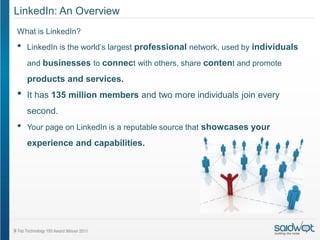
•   LinkedIn is the world’s largest professional network, used by individuals

    and businesses to connect with others, share content and promote

    products and services.
•   It has 135 million members and two more individuals join every
    second.
•   Your page on LinkedIn is a reputable source that showcases your
    experience and capabilities.
LinkedIn: An Overview
LinkedIn is used by businesses to:
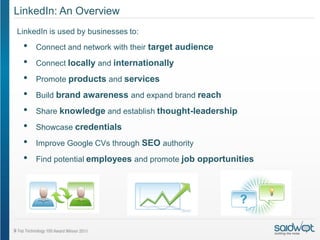
 •   Connect and network with their target audience

 •   Connect locally and internationally

 •   Promote products and services
 •   Build brand awareness and expand brand reach

 •   Share knowledge and establish thought-leadership

 •   Showcase credentials
 •   Improve Google CVs through SEO authority

 •   Find potential employees and promote job opportunities
LinkedIn: An Overview
LinkedIn is used by individuals to:
 •   Find jobs

 •   Prepare for interviews

 •   Connect with future and past business acquaintances
 •   Ask for advice

 •   Build their personal brand

 •   Keep informed about industry news and trends
LinkedIn as a HR tool.
Some brands or companies rely on LinkedIn as simply an HR tool, although
LinkedIn could be used effectively to:
 •   Generate leads
 •   Take advantage of speaking opportunities
 •   Build business connections
 •   Do market and competitor research
 •   Improve SERPs
 •    Keep informed about events and trends in your industry
 •   Establish your brand as a thought-leader.
 •   Promote and sell products and services


     Organisations that are using LinkedIn purely from an HR perspective are missing out
                       on other great opportunities and functionalities.
Packages
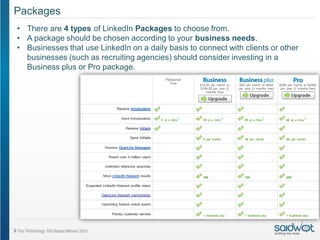
• There are 4 types of LinkedIn Packages to choose from.
• A package should be chosen according to your business needs.
• Businesses that use LinkedIn on a daily basis to connect with clients or other
  businesses (such as recruiting agencies) should consider investing in a
  Business plus or Pro package.
Setting up a profile/page

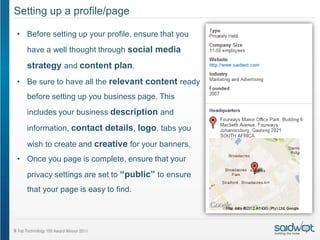
• Before setting up your profile, ensure that you
  have a well thought through social media
  strategy and content plan.
• Be sure to have all the relevant content ready
  before setting up you business page. This
  includes your business description and

  information, contact details, logo, tabs you

  wish to create and creative for your banners.
• Once you page is complete, ensure that your
  privacy settings are set to “public” to ensure
  that your page is easy to find.
Employees
•   Employees should be motivated to join LinkedIn (If they do not already have a profile),
    update their profiles with the relevant business information and follow your brand.
•   Employees are custodians for the brand and their personal profiles, achievements and
    interaction with the brand will also have an impact on the brand’s image on LinkedIn.
    Current and past employees and their profiles are a reflection of the strengths of your
    organisation.
•   Social media guidelines and an overall social media policy should be provided that
    will assist employees in completing and customising their profiles.
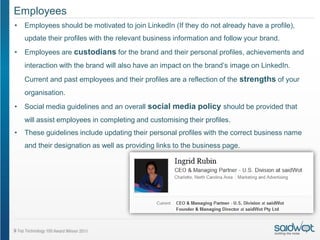
•   These guidelines include updating their personal profiles with the correct business name
    and their designation as well as providing links to the business page.
Employees and Spokespeople
The way that employees and spokespeople use LinkedIn have a direct impact on a
company’s LinkedIn success.
Employees should:
•   Be motivated to actively participate on LinkedIn: This will aid in building your company’s
    presence.
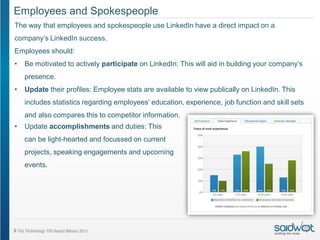
•   Update their profiles: Employee stats are available to view publically on LinkedIn. This
    includes statistics regarding employees’ education, experience, job function and skill sets
    and also compares this to competitor information.
•   Update accomplishments and duties: This
    can be light-hearted and focussed on current
    projects, speaking engagements and upcoming
    events.
Employees and Spokespeople
Employees should:
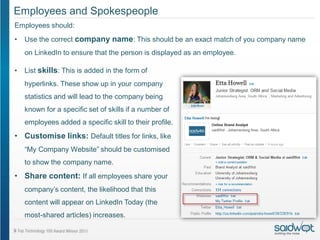
•   Use the correct company name: This should be an exact match of you company name
    on LinkedIn to ensure that the person is displayed as an employee.

•   List skills: This is added in the form of
    hyperlinks. These show up in your company
    statistics and will lead to the company being
    known for a specific set of skills if a number of
    employees added a specific skill to their profile.
• Customise links: Default titles for links, like
    “My Company Website” should be customised
    to show the company name.
• Share content: If all employees share your
    company’s content, the likelihood that this
    content will appear on LinkedIn Today (the
    most-shared articles) increases.
Ex-Employees
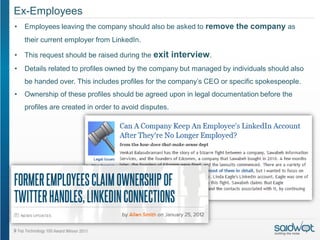
•   Employees leaving the company should also be asked to remove the company as
    their current employer from LinkedIn.

•   This request should be raised during the exit      interview.
•   Details related to profiles owned by the company but managed by individuals should also
    be handed over. This includes profiles for the company’s CEO or specific spokespeople.
•   Ownership of these profiles should be agreed upon in legal documentation before the
    profiles are created in order to avoid disputes.
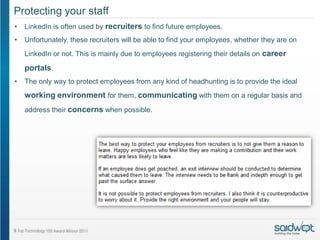
Protecting your staff
•   LinkedIn is often used by recruiters to find future employees.
•   Unfortunately, these recruiters will be able to find your employees, whether they are on
    LinkedIn or not. This is mainly due to employees registering their details on career

    portals.
•   The only way to protect employees from any kind of headhunting is to provide the ideal
    working environment for them, communicating with them on a regular basis and
    address their concerns when possible.
Building Connections

Building connections will allow your brand to connect with like-minded people, target
a specific audience, showcase your credentials and expand brand reach and
awareness.
Be proactive about making connections: Instead of waiting for others to connect with
you, rather invite them to become a contact. However, make sure the connection
adds value to them.


Build connections by:
• Including you profile on all communication, including your website, social
  media sites, business cards and email signatures
• Connect with current and potential clients
• Motivate employees to follow your brand
• Connect with industry experts and acquaintances
• Join relevant groups
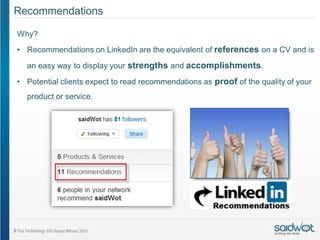
Recommendations

Why?
• Recommendations on LinkedIn are the equivalent of references on a CV and is
  an easy way to display your strengths and accomplishments.

• Potential clients expect to read recommendations as proof of the quality of your
  product or service.
Recommendations
How?

• Most recommendations are only written when asked for.
  Therefore, ask clients to write a LinkedIn recommendation
  when they compliment you on a job well done elsewhere.
• It is best to ask for a recommendation in a personal
  manner. Thus, rather contact the person telephonically or
  via email instead of sending out the generic LinkedIn
  message.
• It is important to only ask those who truly know your
  work for a recommendation in order to ensure that
  recommendations are true and obtained in an ethical
  manner.
• Explain clearly why you are looking for a recommendation.

Businesses should also write recommendations. This will
increase findability as it exposes your business to the
person you are recommending’s network and future network.
Best Practice: Do’s
•   Ensure that your page is up to date and complete: This will increase your
    findability. Remember to also create your business description and all content
    with the reader in mind and make your page public.
•   Update the content and creative on a regular basis.
•   Be consistent in the creative and content used across platforms.
•   Change you default URL: Set up your personalised URL. This will ensure that
    your page is easy to find and appear more friendly and professional.
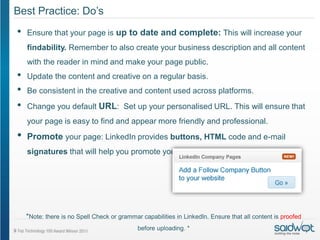
•   Promote your page: LinkedIn provides buttons, HTML code and e-mail
    signatures that will help you promote your presence on this platform.


    *Note: there is no Spell Check or grammar capabilities in LinkedIn. Ensure that all content is proofed
                                             before uploading. *
Best Practice: Do’s

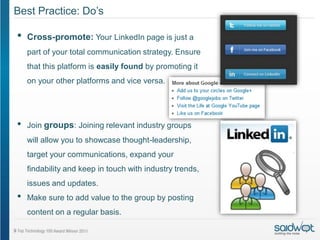
•   Cross-promote: Your LinkedIn page is just a
    part of your total communication strategy. Ensure
    that this platform is easily found by promoting it
    on your other platforms and vice versa.


•   Join groups: Joining relevant industry groups
    will allow you to showcase thought-leadership,
    target your communications, expand your
    findability and keep in touch with industry trends,
    issues and updates.
•   Make sure to add value to the group by posting
    content on a regular basis.
Best Practice: Do’s
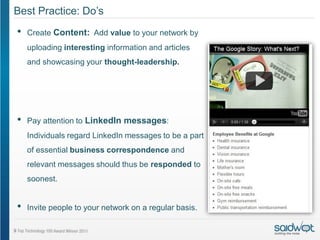
•   Create Content: Add value to your network by
    uploading interesting information and articles
    and showcasing your thought-leadership.


•   Pay attention to LinkedIn messages:
    Individuals regard LinkedIn messages to be a part
    of essential business correspondence and
    relevant messages should thus be responded to
    soonest.


•   Invite people to your network on a regular basis.
Best Practice: Do’s
•   Use keywords: Use keywords and tag
    content to increase your findability.
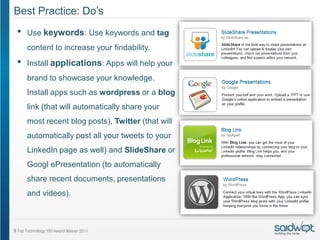
•   Install applications: Apps will help your
    brand to showcase your knowledge.
    Install apps such as wordpress or a blog
    link (that will automatically share your
    most recent blog posts), Twitter (that will
    automatically post all your tweets to your
    LinkedIn page as well) and SlideShare or
    Googl ePresentation (to automatically
    share recent documents, presentations
    and videos).
Best Practice: Don'ts
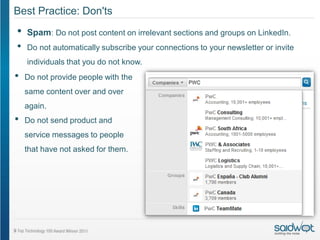
•   Spam: Do not post content on irrelevant sections and groups on LinkedIn.
•   Do not automatically subscribe your connections to your newsletter or invite
    individuals that you do not know.
•   Do not provide people with the
    same content over and over
    again.
•   Do not send product and
    service messages to people
    that have not asked for them.
Best Practice: Don’ts
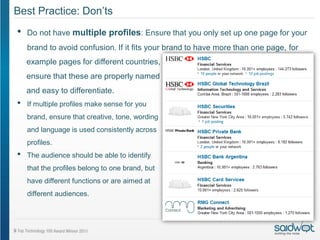
•   Do not have multiple profiles: Ensure that you only set up one page for your
    brand to avoid confusion. If it fits your brand to have more than one page, for
    example pages for different countries,
    ensure that these are properly named
    and easy to differentiate.
•   If multiple profiles make sense for you
    brand, ensure that creative, tone, wording
    and language is used consistently across
    profiles.
•   The audience should be able to identify
    that the profiles belong to one brand, but
    have different functions or are aimed at
    different audiences.
Best Practice: Don'ts
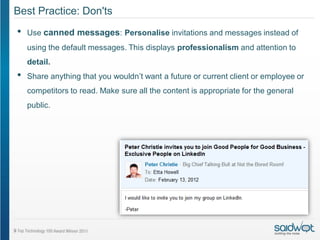
•   Use canned messages: Personalise invitations and messages instead of
    using the default messages. This displays professionalism and attention to
    detail.
•   Share anything that you wouldn’t want a future or current client or employee or
    competitors to read. Make sure all the content is appropriate for the general
    public.
Best Practice: Who is doing it right?

Deloitte
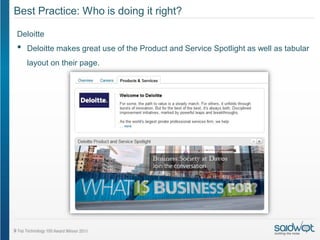
•   Deloitte makes great use of the Product and Service Spotlight as well as tabular
    layout on their page.
Best Practice: Who is doing it right?

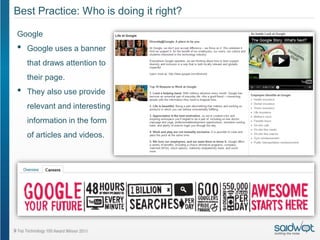
Google
•   Google uses a banner
    that draws attention to
    their page.
•   They also use provide
    relevant and interesting
    information in the form
    of articles and videos.
Best Practice: Who is doing it right?

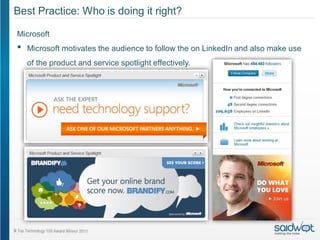
Microsoft
•   Microsoft motivates the audience to follow the on LinkedIn and also make use
    of the product and service spotlight effectively.
Measure
How do we measure success?
•   Do not measure your success using metrics such as number of followers or
    recommendations.
•   Success on LinkedIn should be measured by:
     •   Leads generated
     •   Clients won
     •   Qualified job candidates gained
     •   Speaking opportunities
     •   Quality relationships built
     •   Responses to content
     •   Credible connections
More Information
      If you require further information with regards to LinkedIn or need
     assistance in setting up your account, customising it and choosing the
             correct package, please do not hesitate to contact us.

    We are also eager to monitor and manage your online presence. Please
                 contact us to set up a demo account for you.


            South Africa:                   United States:
            Tel:    +27 11 021 8740         Tel:     +00 (1) 704 450 2403
            Email: infosa@saidwot.com       Email: infous@saidwot.com
            Web: www.saidwot.com

saidWot presents linkedin 101

  • 1.
    LinkedIn 101 A guideto LinkedIn April 2012 Compiled by @Etta_Howell for @saidwotORM
  • 2.
    LinkedIn: An Overview Whatis LinkedIn? • LinkedIn is the world’s largest professional network, used by individuals and businesses to connect with others, share content and promote products and services. • It has 135 million members and two more individuals join every second. • Your page on LinkedIn is a reputable source that showcases your experience and capabilities.
  • 3.
    LinkedIn: An Overview LinkedInis used by businesses to: • Connect and network with their target audience • Connect locally and internationally • Promote products and services • Build brand awareness and expand brand reach • Share knowledge and establish thought-leadership • Showcase credentials • Improve Google CVs through SEO authority • Find potential employees and promote job opportunities
  • 4.
    LinkedIn: An Overview LinkedInis used by individuals to: • Find jobs • Prepare for interviews • Connect with future and past business acquaintances • Ask for advice • Build their personal brand • Keep informed about industry news and trends
  • 5.
    LinkedIn as aHR tool. Some brands or companies rely on LinkedIn as simply an HR tool, although LinkedIn could be used effectively to: • Generate leads • Take advantage of speaking opportunities • Build business connections • Do market and competitor research • Improve SERPs • Keep informed about events and trends in your industry • Establish your brand as a thought-leader. • Promote and sell products and services Organisations that are using LinkedIn purely from an HR perspective are missing out on other great opportunities and functionalities.
  • 6.
    Packages • There are4 types of LinkedIn Packages to choose from. • A package should be chosen according to your business needs. • Businesses that use LinkedIn on a daily basis to connect with clients or other businesses (such as recruiting agencies) should consider investing in a Business plus or Pro package.
  • 7.
    Setting up aprofile/page • Before setting up your profile, ensure that you have a well thought through social media strategy and content plan. • Be sure to have all the relevant content ready before setting up you business page. This includes your business description and information, contact details, logo, tabs you wish to create and creative for your banners. • Once you page is complete, ensure that your privacy settings are set to “public” to ensure that your page is easy to find.
  • 8.
    Employees • Employees should be motivated to join LinkedIn (If they do not already have a profile), update their profiles with the relevant business information and follow your brand. • Employees are custodians for the brand and their personal profiles, achievements and interaction with the brand will also have an impact on the brand’s image on LinkedIn. Current and past employees and their profiles are a reflection of the strengths of your organisation. • Social media guidelines and an overall social media policy should be provided that will assist employees in completing and customising their profiles. • These guidelines include updating their personal profiles with the correct business name and their designation as well as providing links to the business page.
  • 9.
    Employees and Spokespeople Theway that employees and spokespeople use LinkedIn have a direct impact on a company’s LinkedIn success. Employees should: • Be motivated to actively participate on LinkedIn: This will aid in building your company’s presence. • Update their profiles: Employee stats are available to view publically on LinkedIn. This includes statistics regarding employees’ education, experience, job function and skill sets and also compares this to competitor information. • Update accomplishments and duties: This can be light-hearted and focussed on current projects, speaking engagements and upcoming events.
  • 10.
    Employees and Spokespeople Employeesshould: • Use the correct company name: This should be an exact match of you company name on LinkedIn to ensure that the person is displayed as an employee. • List skills: This is added in the form of hyperlinks. These show up in your company statistics and will lead to the company being known for a specific set of skills if a number of employees added a specific skill to their profile. • Customise links: Default titles for links, like “My Company Website” should be customised to show the company name. • Share content: If all employees share your company’s content, the likelihood that this content will appear on LinkedIn Today (the most-shared articles) increases.
  • 11.
    Ex-Employees • Employees leaving the company should also be asked to remove the company as their current employer from LinkedIn. • This request should be raised during the exit interview. • Details related to profiles owned by the company but managed by individuals should also be handed over. This includes profiles for the company’s CEO or specific spokespeople. • Ownership of these profiles should be agreed upon in legal documentation before the profiles are created in order to avoid disputes.
  • 12.
    Protecting your staff • LinkedIn is often used by recruiters to find future employees. • Unfortunately, these recruiters will be able to find your employees, whether they are on LinkedIn or not. This is mainly due to employees registering their details on career portals. • The only way to protect employees from any kind of headhunting is to provide the ideal working environment for them, communicating with them on a regular basis and address their concerns when possible.
  • 13.
    Building Connections Building connectionswill allow your brand to connect with like-minded people, target a specific audience, showcase your credentials and expand brand reach and awareness. Be proactive about making connections: Instead of waiting for others to connect with you, rather invite them to become a contact. However, make sure the connection adds value to them. Build connections by: • Including you profile on all communication, including your website, social media sites, business cards and email signatures • Connect with current and potential clients • Motivate employees to follow your brand • Connect with industry experts and acquaintances • Join relevant groups
  • 14.
    Recommendations Why? • Recommendations onLinkedIn are the equivalent of references on a CV and is an easy way to display your strengths and accomplishments. • Potential clients expect to read recommendations as proof of the quality of your product or service.
  • 15.
    Recommendations How? • Most recommendationsare only written when asked for. Therefore, ask clients to write a LinkedIn recommendation when they compliment you on a job well done elsewhere. • It is best to ask for a recommendation in a personal manner. Thus, rather contact the person telephonically or via email instead of sending out the generic LinkedIn message. • It is important to only ask those who truly know your work for a recommendation in order to ensure that recommendations are true and obtained in an ethical manner. • Explain clearly why you are looking for a recommendation. Businesses should also write recommendations. This will increase findability as it exposes your business to the person you are recommending’s network and future network.
  • 16.
    Best Practice: Do’s • Ensure that your page is up to date and complete: This will increase your findability. Remember to also create your business description and all content with the reader in mind and make your page public. • Update the content and creative on a regular basis. • Be consistent in the creative and content used across platforms. • Change you default URL: Set up your personalised URL. This will ensure that your page is easy to find and appear more friendly and professional. • Promote your page: LinkedIn provides buttons, HTML code and e-mail signatures that will help you promote your presence on this platform. *Note: there is no Spell Check or grammar capabilities in LinkedIn. Ensure that all content is proofed before uploading. *
  • 17.
    Best Practice: Do’s • Cross-promote: Your LinkedIn page is just a part of your total communication strategy. Ensure that this platform is easily found by promoting it on your other platforms and vice versa. • Join groups: Joining relevant industry groups will allow you to showcase thought-leadership, target your communications, expand your findability and keep in touch with industry trends, issues and updates. • Make sure to add value to the group by posting content on a regular basis.
  • 18.
    Best Practice: Do’s • Create Content: Add value to your network by uploading interesting information and articles and showcasing your thought-leadership. • Pay attention to LinkedIn messages: Individuals regard LinkedIn messages to be a part of essential business correspondence and relevant messages should thus be responded to soonest. • Invite people to your network on a regular basis.
  • 19.
    Best Practice: Do’s • Use keywords: Use keywords and tag content to increase your findability. • Install applications: Apps will help your brand to showcase your knowledge. Install apps such as wordpress or a blog link (that will automatically share your most recent blog posts), Twitter (that will automatically post all your tweets to your LinkedIn page as well) and SlideShare or Googl ePresentation (to automatically share recent documents, presentations and videos).
  • 20.
    Best Practice: Don'ts • Spam: Do not post content on irrelevant sections and groups on LinkedIn. • Do not automatically subscribe your connections to your newsletter or invite individuals that you do not know. • Do not provide people with the same content over and over again. • Do not send product and service messages to people that have not asked for them.
  • 21.
    Best Practice: Don’ts • Do not have multiple profiles: Ensure that you only set up one page for your brand to avoid confusion. If it fits your brand to have more than one page, for example pages for different countries, ensure that these are properly named and easy to differentiate. • If multiple profiles make sense for you brand, ensure that creative, tone, wording and language is used consistently across profiles. • The audience should be able to identify that the profiles belong to one brand, but have different functions or are aimed at different audiences.
  • 22.
    Best Practice: Don'ts • Use canned messages: Personalise invitations and messages instead of using the default messages. This displays professionalism and attention to detail. • Share anything that you wouldn’t want a future or current client or employee or competitors to read. Make sure all the content is appropriate for the general public.
  • 23.
    Best Practice: Whois doing it right? Deloitte • Deloitte makes great use of the Product and Service Spotlight as well as tabular layout on their page.
  • 24.
    Best Practice: Whois doing it right? Google • Google uses a banner that draws attention to their page. • They also use provide relevant and interesting information in the form of articles and videos.
  • 25.
    Best Practice: Whois doing it right? Microsoft • Microsoft motivates the audience to follow the on LinkedIn and also make use of the product and service spotlight effectively.
  • 26.
    Measure How do wemeasure success? • Do not measure your success using metrics such as number of followers or recommendations. • Success on LinkedIn should be measured by: • Leads generated • Clients won • Qualified job candidates gained • Speaking opportunities • Quality relationships built • Responses to content • Credible connections
  • 27.
    More Information If you require further information with regards to LinkedIn or need assistance in setting up your account, customising it and choosing the correct package, please do not hesitate to contact us. We are also eager to monitor and manage your online presence. Please contact us to set up a demo account for you. South Africa: United States: Tel: +27 11 021 8740 Tel: +00 (1) 704 450 2403 Email: infosa@saidwot.com Email: infous@saidwot.com Web: www.saidwot.com