© 2015 Oceaneering International, Inc. All rights reserved. Rev B 11.
Navneet Upneja
Role of Analytics in DBA’s Life
http://oceaneering.com/
➢ Navneet Upneja (Manager, Database & Applications)
➢ 10 Years of Experience in Oracle Databases, Business
Intelligence, APEX and Middleware Applications
➢ Oracle Certified Professional
➢ Hand on experience on OLTP, Datawarehouse, Oracle
BI, APEX…
➢Co-Founder of AIOUG - North India Chapter.
Email: navneetupneja@gmail.com
Blog: http://navneetupnejadba.wordpress.com/
Twitter: @navneetupneja
Presentations: http://www.slideshare.net/navneetupneja
Navneet Upneja
• What is Analytics?
• Why Analytics for DBA’s?
• Used Cases of Analytics and Historical Data
• Forecasting
• References
• Discussion….
Agenda
Analytics
• Discovery, interpretation, and
communication of meaningful patterns in
data.
• Systematic computational analysis of data
or statistics
• Analysis that “Drives you to Decision”.
• Analysis that “Drives you to
Conclusion”.
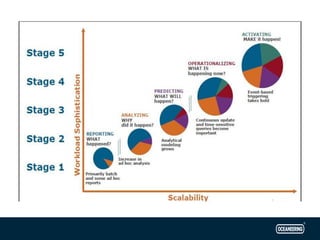
– What happened?
– How or why did it happen?
– What’s happening now?
– What is likely to happen next?
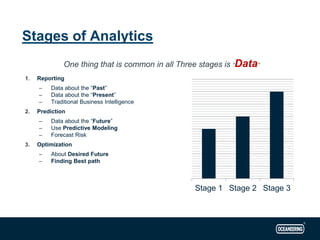
One thing that is common in all Three stages is “Data”
1. Reporting
– Data about the “Past”
– Data about the “Present”
– Traditional Business Intelligence
2. Prediction
– Data about the “Future”
– Use Predictive Modeling
– Forecast Risk
3. Optimization
– About Desired Future
– Finding Best path
Stages of Analytics
Stage 1 Stage 2 Stage 3
Why Analytics for DBA’s?
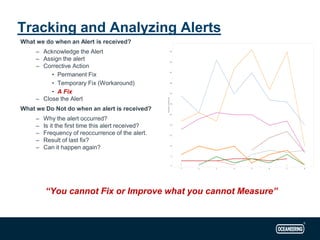
What we do when an Alert is received?
– Acknowledge the Alert
– Assign the alert
– Corrective Action
• Permanent Fix
• Temporary Fix (Workaround)
• A Fix
– Close the Alert
What we Do Not do when an alert is received?
– Why the alert occurred?
– Is it the first time this alert received?
– Frequency of reoccurrence of the alert.
– Result of last fix?
– Can it happen again?
“You cannot Fix or Improve what you cannot Measure”
Tracking and Analyzing Alerts
• IT Alerts Dashboard
Archive Logs Generation Analysis
• Analyzing excessive Archive
Logs Generation
• Analyzing the patterns and
trends of Logs Generation
• Finding the source of
excessive Redo.
• Planning and Scheduling
Archive Log Backup’s as per
the trends during the Day.
• Adequately sizing your
Archive log destination.
•
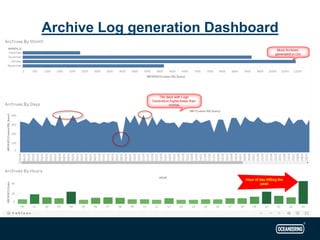
Archive Log generation Dashboard
• Archive logs Generation Dashboard Analysis:
– Archive Logs Generated each Month
– Archive Logs Generated each day
– Archive Logs Generated every hour of the day
– Helps in identifying some abnormal patterns in the Archive Generation
– May lead your investigation for some performance issues
– Can point to the exact time when you had high Log generations.
• Redo Log/Block Change Dashboard
– Take the time of high log generation from the Log Generation Dashboard
– Put the same values in Redo/Block Change Dashboard
– Will give details about top objects according to the Block changes.
– Use those details to check in the application, which module caused this
– Might want to go to Developer Team to check if something got changed with any module
related to these tables/objects
• Links to both of the dashboards:
Archive Log Generation
Object Block Change
Application Performance Data
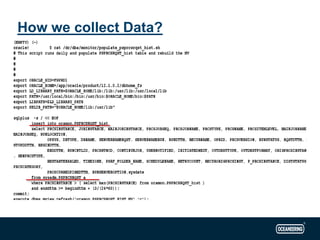
How we collect Data?
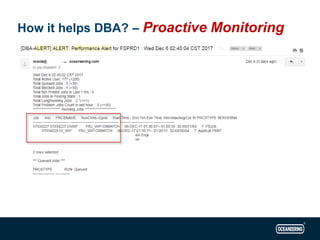
How it helps DBA? – Proactive Monitoring
Getting Insights…
• I need to know the size of my table 6 months
back…???
• What is growth of my certain application tables?
• What is an average growth of application data?
• is switch from Index scans to FTS is due to
increase in volume of data?
Some More Data….
Forecasting – Predicting Future
• Custom Made Warehouse tables
• Application’s (Peoplesoft) Repository
• Oracle Enterprise Manager’s Repository
• Oracle Database’s Active Session History
– dba_hist_snapshot
– dba_hist_active_sess_history
– gv$active_Session_history
• Tools that we use:
– BI Publisher
• Comes Free with OEM 12c license. To be used only with OEM.
– Tableau
• On premise Server comes with a license cost. Tableau public is a free version with some
limitations.
One can use any available BI/Visualization tools to accomplish this.
My Resources
Analytics is NOT just more data
Analytics is finding optimal path to the
desired future.
Questions?
Thanks!!

Role of-analytics-in-db as-life

  • 1.
    © 2015 OceaneeringInternational, Inc. All rights reserved. Rev B 11. Navneet Upneja Role of Analytics in DBA’s Life
  • 2.
  • 3.
    ➢ Navneet Upneja(Manager, Database & Applications) ➢ 10 Years of Experience in Oracle Databases, Business Intelligence, APEX and Middleware Applications ➢ Oracle Certified Professional ➢ Hand on experience on OLTP, Datawarehouse, Oracle BI, APEX… ➢Co-Founder of AIOUG - North India Chapter. Email: navneetupneja@gmail.com Blog: http://navneetupnejadba.wordpress.com/ Twitter: @navneetupneja Presentations: http://www.slideshare.net/navneetupneja Navneet Upneja
  • 4.
    • What isAnalytics? • Why Analytics for DBA’s? • Used Cases of Analytics and Historical Data • Forecasting • References • Discussion…. Agenda
  • 6.
    Analytics • Discovery, interpretation,and communication of meaningful patterns in data. • Systematic computational analysis of data or statistics • Analysis that “Drives you to Decision”. • Analysis that “Drives you to Conclusion”. – What happened? – How or why did it happen? – What’s happening now? – What is likely to happen next?
  • 7.
    One thing thatis common in all Three stages is “Data” 1. Reporting – Data about the “Past” – Data about the “Present” – Traditional Business Intelligence 2. Prediction – Data about the “Future” – Use Predictive Modeling – Forecast Risk 3. Optimization – About Desired Future – Finding Best path Stages of Analytics Stage 1 Stage 2 Stage 3
  • 9.
  • 10.
    What we dowhen an Alert is received? – Acknowledge the Alert – Assign the alert – Corrective Action • Permanent Fix • Temporary Fix (Workaround) • A Fix – Close the Alert What we Do Not do when an alert is received? – Why the alert occurred? – Is it the first time this alert received? – Frequency of reoccurrence of the alert. – Result of last fix? – Can it happen again? “You cannot Fix or Improve what you cannot Measure” Tracking and Analyzing Alerts
  • 11.
    • IT AlertsDashboard
  • 12.
    Archive Logs GenerationAnalysis • Analyzing excessive Archive Logs Generation • Analyzing the patterns and trends of Logs Generation • Finding the source of excessive Redo. • Planning and Scheduling Archive Log Backup’s as per the trends during the Day. • Adequately sizing your Archive log destination.
  • 13.
  • 14.
    • Archive logsGeneration Dashboard Analysis: – Archive Logs Generated each Month – Archive Logs Generated each day – Archive Logs Generated every hour of the day – Helps in identifying some abnormal patterns in the Archive Generation – May lead your investigation for some performance issues – Can point to the exact time when you had high Log generations. • Redo Log/Block Change Dashboard – Take the time of high log generation from the Log Generation Dashboard – Put the same values in Redo/Block Change Dashboard – Will give details about top objects according to the Block changes. – Use those details to check in the application, which module caused this – Might want to go to Developer Team to check if something got changed with any module related to these tables/objects • Links to both of the dashboards: Archive Log Generation Object Block Change
  • 15.
  • 16.
  • 17.
    How it helpsDBA? – Proactive Monitoring
  • 18.
  • 19.
    • I needto know the size of my table 6 months back…??? • What is growth of my certain application tables? • What is an average growth of application data? • is switch from Index scans to FTS is due to increase in volume of data? Some More Data….
  • 22.
  • 23.
    • Custom MadeWarehouse tables • Application’s (Peoplesoft) Repository • Oracle Enterprise Manager’s Repository • Oracle Database’s Active Session History – dba_hist_snapshot – dba_hist_active_sess_history – gv$active_Session_history • Tools that we use: – BI Publisher • Comes Free with OEM 12c license. To be used only with OEM. – Tableau • On premise Server comes with a license cost. Tableau public is a free version with some limitations. One can use any available BI/Visualization tools to accomplish this. My Resources
  • 24.
    Analytics is NOTjust more data
  • 25.
    Analytics is findingoptimal path to the desired future.
  • 26.
  • 27.