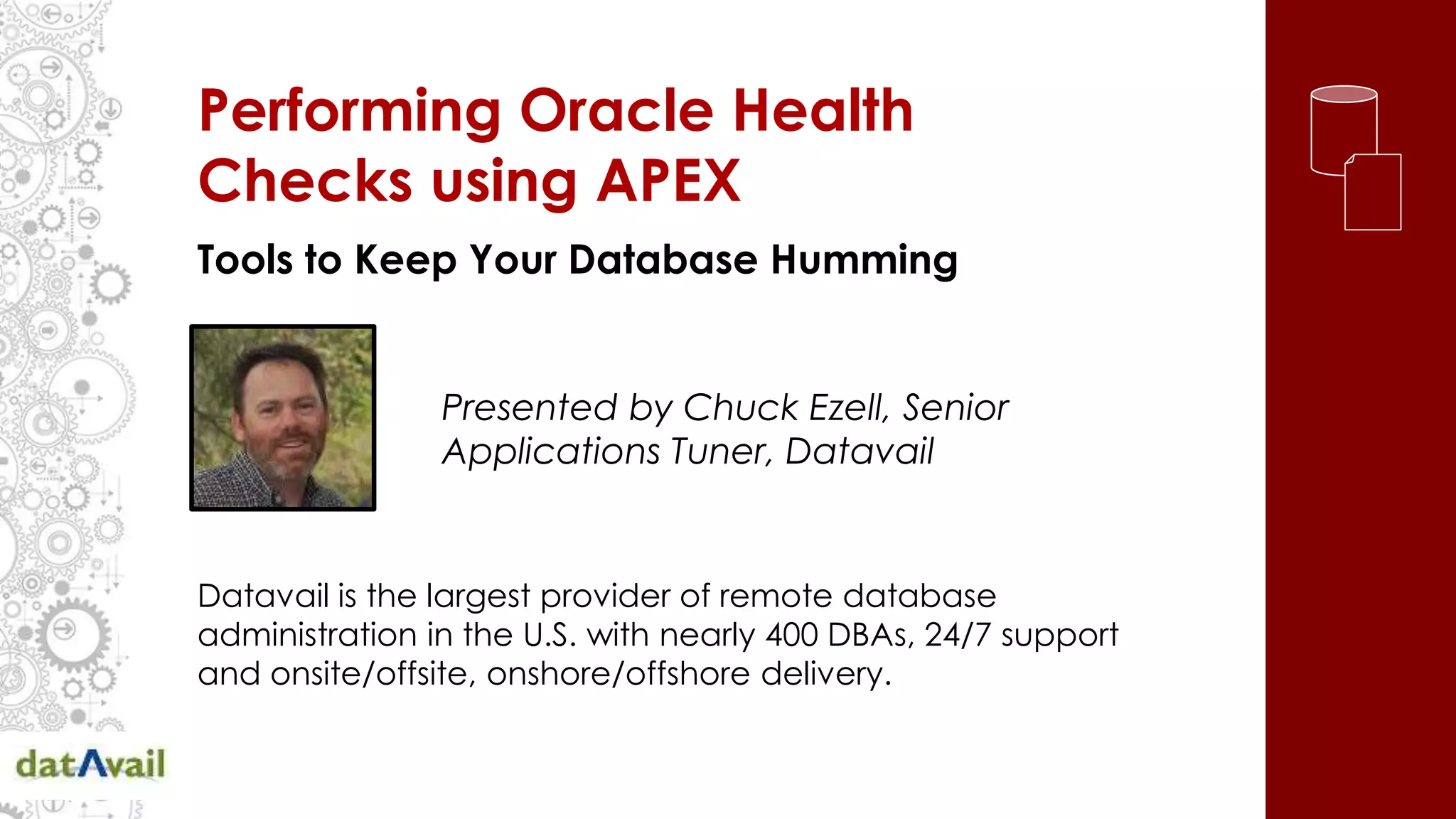
Performing Oracle Health
Checks using APEX
Tools to Keep Your Database Humming
Presented by Chuck Ezell, Senior
Applications Tuner, Datavail
Datavail is the largest provider of remote database
administration in the U.S. with nearly 400 DBAs, 24/7 support
and onsite/offsite, onshore/offshore delivery.
Agenda
• Long Live The Reactive
• Proactive Health Checking
• Common Performance Problems
• Finding An Approach That Works
• Frequency, Consistency &
Correlation: The Key
• APEX Applied To Solve The Problem
Long Live The Reactive
Source: Causes of Failure in Web Applications, Soila Pertet and Priya Narasimhan
December 2005, Parallel Data Laboratory Carnegie Mellon University, Pittsburgh, PA 15213-3890
• “…into 2015 and beyond 80% of outages
impacting mission critical services will be caused
by people and process issues.
• More than 50% will be caused by change,
configuration, release integration and hand-off
issues.”
• Although 75% of the overall system problems are
often caused by 25% of the activity, there are
rarely “silver bullets” that provide the solution to
problems. Ultimately, tuning is a people and
process problem as well as the solution.
Thinking Proactively
“Every defect is a treasure, if the company can
uncover its cause and work to prevent it across the
corporation.” -Kilchiro Toyoda, founder of Toyota
“In an emergency, you rarely get one consistent
piece of advice. You usually have two or three
people with two or three different ideas. So you want
to have your own set of thoughts.
-Rudy Giuliani, Former Mayor NYC
Reactive vs Proactive
• Many approaches are from hardware/
architecture perspective or deal with daily
peripheral issues and monitoring.
• Many tools/approaches are thoughtfully created
to help us deal with reactive situations.
• What works in reactive situations often applies
when proactively planning (both cases are
mitigating.)
• We should go beyond “preparedness” and
“emergency response.”
• Proactivity is more than just “having a plan.”
Getting Ahead Of The Curve
Proactivity is having a plan
with a consistent baseline approach
that is a documented, repeatable process
focusing on results
and reducing or preventing downtime.
Finding An Approach That Works
• Think comprehensively; not “spot check”
isolated areas.
• There are rarely “silver bullets” that can be
located and found at the high level (or low
level for that matter) that can, at the turn of a
knob, fix all the problems.
• Problems develop over time it follows that
fixing these problems require a measured
approach to tuning the system back to a
healthy state.
Best Practices
• Become familiar with Oracle Recommendations.
• Data is so inter-woven, making corrections in one place affects
performance in others.
• For Example: Adding indexes can speed select performance
but it can slow DML or tuning one SQL statement can fix a
portion of a Concurrent Request or a single report but slow stats
job.
• It’s a “spotty” approach to fixing one problem today and
tomorrow you’ll have 10 more like it.
• Go beyond single SQL statements and parameter tweaks.
Baseline Your
Environment First
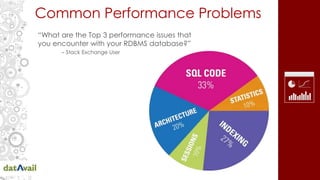
Common Performance Problems
“What are the Top 3 performance issues that
you encounter with your RDBMS database?”
– Stack Exchange User
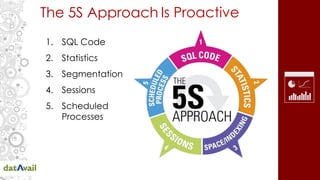
The 5S Approach
1. SQL Code
2. Statistics
3. Segmentation
4. Sessions
5. Scheduled
Processes
Is Proactive
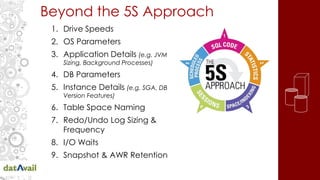
Beyond the 5S Approach
1. Drive Speeds
2. OS Parameters
3. Application Details (e.g. JVM
Sizing, Background Processes)
4. DB Parameters
5. Instance Details (e.g. SGA, DB
Version Features)
6. Table Space Naming
7. Redo/Undo Log Sizing &
Frequency
8. I/O Waits
9. Snapshot & AWR Retention
Tools for Insight: Bridging the Gap
• We need a tool that reflects the
proactive mindset and approach we
should take.
• The 5S Approach to Health Checks is a
great way to mitigate issues before they
occur.
The only “best practice” you
should be using all the time
is “Use Your Brain”. – Tom Kyte
Moving Beyond an Ideaology
Correlating details we’ve captured to proactively
manage the SQL execution and improve performance.
• Duplicate SQL Statements (reduce dups)
• Isolate bottlenecks in v$sql_plan table
(cardinality, full table scan, index skip scans)
• Blocking Session & Waits by Objects
• High Clustering Factor on indexes
• Row Chaining by table
• Package or Object change in -x days
• Review SQL History for multiple plan hashes
indicative of unstable plans.
Plan SQL Tuning Tasks for DBAs
Creating a Tool
• LAMP, Splunk, Nagios, Java/JSP/Oracle, BI,
Excel
• The solution doesn’t have to be elegant
• We need Consistency, Frequency &
Correlation
• Everyone has APEX
• APEX is a platform for developing ideas
• APEX provides the rapid development &
convenience for creating a repository
Apex 4.2.6
APEX as a Solution
• Development can be done by
broader team of capable
developers (don’t have to know
PLSQL)
• All the metadata and coding is
stored in the database
• Just need a web browser with
the Oracle DB (deployment,
development & runtime)
• Application like (EBS, SAP,
PeopleSoft, OEM etc) or
standalone
• Can have it’s own schema,
tables and can be tuned
accordingly
• Unlimited applications with
unlimited users can be built &
deployed at no cost
• All charting tools already
integrated
• Can be packaged & provided
as a one-click install
• APEX is a No Cost Feature: If you
have Oracle Maintenance
Agreement you can get APEX
support free at no additional
cost
Apex 4.2.6
Gathering Details
• An approach to capturing data into APEX
– Decide what needs to be captured
– Decide frequency for each item
– Build Repository Tables
– Create Select(s) across DBLink to APEX Project
– Collect Data from Source
– Additional Details to Capture
• dbname or hostname (both?)
• capture timestamp
Apex 4.2.6
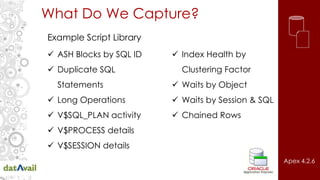
What Do We Capture?
 ASH Blocks by SQL ID
 Duplicate SQL
Statements
 Long Operations
 V$SQL_PLAN activity
 V$PROCESS details
 V$SESSION details
 Index Health by
Clustering Factor
 Waits by Object
 Waits by Session & SQL
 Chained Rows
Example Script Library
Apex 4.2.6
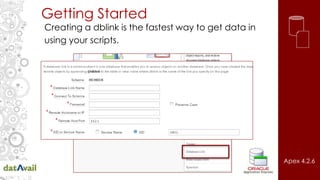
Getting Started
Creating a dblink is the fastest way to get data in
using your scripts.
Apex 4.2.6
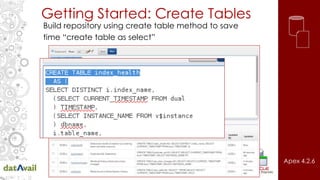
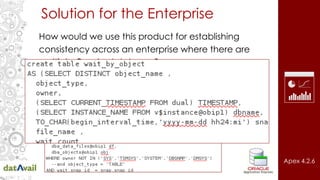
Getting Started: Create Tables
Build repository using create table method to save
time “create table as select”
Apex 4.2.6
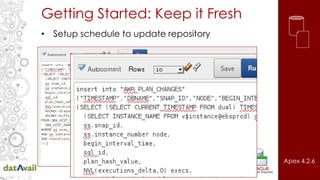
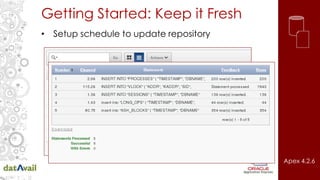
Getting Started: Keep it Fresh
• Setup schedule to update repository
Apex 4.2.6
Getting Started: Keep it Fresh
• Setup schedule to update repository
Apex 4.2.6
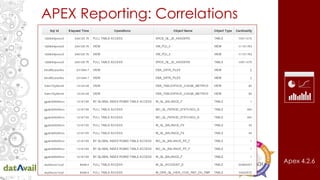
APEX Reporting: Correlations
Apex 4.2.6
Problem SQL from Object Perspective
• SQL from v$sql activity (long running)
• Look in v$plan table for FTS & High Cardinality
• Limit by SQL ID in Locks & Waits
• Limit further by Long Operations
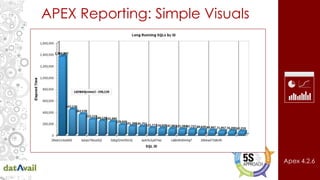
APEX Reporting: Simple Visuals
Apex 4.2.6
Problem SQL from Elapsed Time
• Long running SQL from v$sql activity
• Look in v$plan table for FTS & High Cardinality
• Limit by SQL ID in Locks & Waits
• Limit further by Long Operations
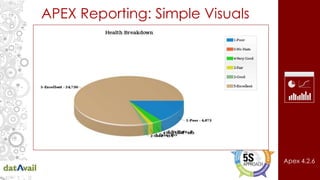
APEX Reporting: Simple Visuals
Apex 4.2.6
Problem Objects / Segmentation
• Start with table objects and index clustering
factors.
• Compare to Objects found in Locks
• Compare to Objects found in Row Chains
• Compare to high cardinality SQL in v$sql_plan
Solution for the Enterprise
How would we use this product for establishing
consistency across an enterprise where there are
multiple Oracle databases?
Apex 4.2.6
What, Why & How Often
Proactivity is having a plan with a consistent baseline
approach that is a documented, repeatable process,
focusing on results and reducing or preventing downtime.
• Full Assessments (130+ Points)
• Monthly Reviews
• Weekly/Daily/Hourly
Frequency &
Consistency
Thinking Proactively
“Every defect is a treasure, if the company can
uncover its cause and work to prevent it across the
corporation.” - Kilchiro Toyoda, founder of Toyota
“In an emergency, you rarely get one consistent
piece of advice. You usually have two or three
people with two or three different ideas. So you want
to have your own set of thoughts.
-Rudy Giuliani, Former Mayor NYC
Good Luck Treasure Hunting!
Questions & Resources
?
Download these resources at
www.Datavail.com
White Paper: The 5S Approach to Improving
Database Performance
Blog: Selecting Application Code Profiling
Tools
Webinar: Building a Database Monitoring
Tool Using Splunk.
Performance Monitoring & Profiling
Application Code
Chuck Ezell
Chuck.Ezell@datavail.com
Datavail.com
866-828-7843

Performing Oracle Health Checks Using APEX

  • 1.
    Performing Oracle Health Checksusing APEX Tools to Keep Your Database Humming Presented by Chuck Ezell, Senior Applications Tuner, Datavail Datavail is the largest provider of remote database administration in the U.S. with nearly 400 DBAs, 24/7 support and onsite/offsite, onshore/offshore delivery.
  • 2.
    Agenda • Long LiveThe Reactive • Proactive Health Checking • Common Performance Problems • Finding An Approach That Works • Frequency, Consistency & Correlation: The Key • APEX Applied To Solve The Problem
  • 3.
    Long Live TheReactive Source: Causes of Failure in Web Applications, Soila Pertet and Priya Narasimhan December 2005, Parallel Data Laboratory Carnegie Mellon University, Pittsburgh, PA 15213-3890 • “…into 2015 and beyond 80% of outages impacting mission critical services will be caused by people and process issues. • More than 50% will be caused by change, configuration, release integration and hand-off issues.” • Although 75% of the overall system problems are often caused by 25% of the activity, there are rarely “silver bullets” that provide the solution to problems. Ultimately, tuning is a people and process problem as well as the solution.
  • 4.
    Thinking Proactively “Every defectis a treasure, if the company can uncover its cause and work to prevent it across the corporation.” -Kilchiro Toyoda, founder of Toyota “In an emergency, you rarely get one consistent piece of advice. You usually have two or three people with two or three different ideas. So you want to have your own set of thoughts. -Rudy Giuliani, Former Mayor NYC
  • 5.
    Reactive vs Proactive •Many approaches are from hardware/ architecture perspective or deal with daily peripheral issues and monitoring. • Many tools/approaches are thoughtfully created to help us deal with reactive situations. • What works in reactive situations often applies when proactively planning (both cases are mitigating.) • We should go beyond “preparedness” and “emergency response.” • Proactivity is more than just “having a plan.”
  • 6.
    Getting Ahead OfThe Curve Proactivity is having a plan with a consistent baseline approach that is a documented, repeatable process focusing on results and reducing or preventing downtime.
  • 7.
    Finding An ApproachThat Works • Think comprehensively; not “spot check” isolated areas. • There are rarely “silver bullets” that can be located and found at the high level (or low level for that matter) that can, at the turn of a knob, fix all the problems. • Problems develop over time it follows that fixing these problems require a measured approach to tuning the system back to a healthy state.
  • 8.
    Best Practices • Becomefamiliar with Oracle Recommendations. • Data is so inter-woven, making corrections in one place affects performance in others. • For Example: Adding indexes can speed select performance but it can slow DML or tuning one SQL statement can fix a portion of a Concurrent Request or a single report but slow stats job. • It’s a “spotty” approach to fixing one problem today and tomorrow you’ll have 10 more like it. • Go beyond single SQL statements and parameter tweaks. Baseline Your Environment First
  • 9.
    Common Performance Problems “Whatare the Top 3 performance issues that you encounter with your RDBMS database?” – Stack Exchange User
  • 10.
    The 5S Approach 1.SQL Code 2. Statistics 3. Segmentation 4. Sessions 5. Scheduled Processes Is Proactive
  • 11.
    Beyond the 5SApproach 1. Drive Speeds 2. OS Parameters 3. Application Details (e.g. JVM Sizing, Background Processes) 4. DB Parameters 5. Instance Details (e.g. SGA, DB Version Features) 6. Table Space Naming 7. Redo/Undo Log Sizing & Frequency 8. I/O Waits 9. Snapshot & AWR Retention
  • 12.
    Tools for Insight:Bridging the Gap • We need a tool that reflects the proactive mindset and approach we should take. • The 5S Approach to Health Checks is a great way to mitigate issues before they occur. The only “best practice” you should be using all the time is “Use Your Brain”. – Tom Kyte
  • 13.
    Moving Beyond anIdeaology Correlating details we’ve captured to proactively manage the SQL execution and improve performance. • Duplicate SQL Statements (reduce dups) • Isolate bottlenecks in v$sql_plan table (cardinality, full table scan, index skip scans) • Blocking Session & Waits by Objects • High Clustering Factor on indexes • Row Chaining by table • Package or Object change in -x days • Review SQL History for multiple plan hashes indicative of unstable plans. Plan SQL Tuning Tasks for DBAs
  • 14.
    Creating a Tool •LAMP, Splunk, Nagios, Java/JSP/Oracle, BI, Excel • The solution doesn’t have to be elegant • We need Consistency, Frequency & Correlation • Everyone has APEX • APEX is a platform for developing ideas • APEX provides the rapid development & convenience for creating a repository Apex 4.2.6
  • 15.
    APEX as aSolution • Development can be done by broader team of capable developers (don’t have to know PLSQL) • All the metadata and coding is stored in the database • Just need a web browser with the Oracle DB (deployment, development & runtime) • Application like (EBS, SAP, PeopleSoft, OEM etc) or standalone • Can have it’s own schema, tables and can be tuned accordingly • Unlimited applications with unlimited users can be built & deployed at no cost • All charting tools already integrated • Can be packaged & provided as a one-click install • APEX is a No Cost Feature: If you have Oracle Maintenance Agreement you can get APEX support free at no additional cost Apex 4.2.6
  • 16.
    Gathering Details • Anapproach to capturing data into APEX – Decide what needs to be captured – Decide frequency for each item – Build Repository Tables – Create Select(s) across DBLink to APEX Project – Collect Data from Source – Additional Details to Capture • dbname or hostname (both?) • capture timestamp Apex 4.2.6
  • 17.
    What Do WeCapture?  ASH Blocks by SQL ID  Duplicate SQL Statements  Long Operations  V$SQL_PLAN activity  V$PROCESS details  V$SESSION details  Index Health by Clustering Factor  Waits by Object  Waits by Session & SQL  Chained Rows Example Script Library Apex 4.2.6
  • 18.
    Getting Started Creating adblink is the fastest way to get data in using your scripts. Apex 4.2.6
  • 19.
    Getting Started: CreateTables Build repository using create table method to save time “create table as select” Apex 4.2.6
  • 20.
    Getting Started: Keepit Fresh • Setup schedule to update repository Apex 4.2.6
  • 21.
    Getting Started: Keepit Fresh • Setup schedule to update repository Apex 4.2.6
  • 22.
    APEX Reporting: Correlations Apex4.2.6 Problem SQL from Object Perspective • SQL from v$sql activity (long running) • Look in v$plan table for FTS & High Cardinality • Limit by SQL ID in Locks & Waits • Limit further by Long Operations
  • 23.
    APEX Reporting: SimpleVisuals Apex 4.2.6 Problem SQL from Elapsed Time • Long running SQL from v$sql activity • Look in v$plan table for FTS & High Cardinality • Limit by SQL ID in Locks & Waits • Limit further by Long Operations
  • 24.
    APEX Reporting: SimpleVisuals Apex 4.2.6 Problem Objects / Segmentation • Start with table objects and index clustering factors. • Compare to Objects found in Locks • Compare to Objects found in Row Chains • Compare to high cardinality SQL in v$sql_plan
  • 25.
    Solution for theEnterprise How would we use this product for establishing consistency across an enterprise where there are multiple Oracle databases? Apex 4.2.6
  • 26.
    What, Why &How Often Proactivity is having a plan with a consistent baseline approach that is a documented, repeatable process, focusing on results and reducing or preventing downtime. • Full Assessments (130+ Points) • Monthly Reviews • Weekly/Daily/Hourly Frequency & Consistency
  • 27.
    Thinking Proactively “Every defectis a treasure, if the company can uncover its cause and work to prevent it across the corporation.” - Kilchiro Toyoda, founder of Toyota “In an emergency, you rarely get one consistent piece of advice. You usually have two or three people with two or three different ideas. So you want to have your own set of thoughts. -Rudy Giuliani, Former Mayor NYC Good Luck Treasure Hunting!
  • 28.
    Questions & Resources ? Downloadthese resources at www.Datavail.com White Paper: The 5S Approach to Improving Database Performance Blog: Selecting Application Code Profiling Tools Webinar: Building a Database Monitoring Tool Using Splunk. Performance Monitoring & Profiling Application Code Chuck Ezell Chuck.Ezell@datavail.com Datavail.com 866-828-7843

Editor's Notes

  • #3 Please mention the giveaway.
  • #5 First quote is more of a prepardness – emergency mindset. What will we do if the world ends preperation… The second quote is an offensive look at going out and looking for problems to fix.
  • #12 Drive Speeds are crucial to check. We want fast drive mounts not only for data tables but also for indexing and control files, redo logs, and system tables. Slow mounts on any of these points can be a tremendous bottleneck. Things change in the network all the time, cables go bad, drives go bad, network speeds degrade (sometimes depending on the time of day). Some simple scripted drive speed checks are tremendously helpful. Parameters: Some things never change: for some reason some things that shouldn’t change sometimes do. We should be watching the parameters for any change. Often we monitor the db but infrastructure maintains the server and os. We should be proactively checking that patches for example don’t break something. Application Details: this begins to look more like capacity planning but we should be proactive in our approach on sizing our java processes appropriately. It’s more about balancing the resources with demand. Background processes can block, break or kill system resources if we’re proactively reviewing for changes or need for changes we’re ahead of the game. DB Parameters: Table Space Naming: the future is now… if you’re distributing your table spaces across several different mount points then identical names for the table space will be a problem if (when) the table spaces are migrated to some new storage option (the names will conflict) plan better….