By Bilal Hanbali
Pre- Learning Preparation
• We will experience the interaction between the
physical world and software through learning the
course.
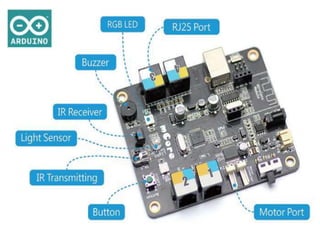
• The course consists of three parts: mBot robot, mCore
main board and mBlock (You could
• download them with following address:
http://mblock.cc/download). mBlock is a software
developed
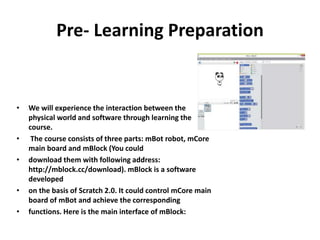
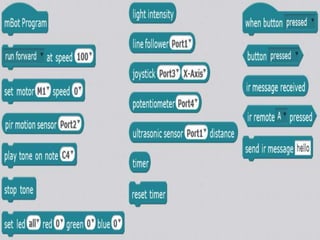
• on the basis of Scratch 2.0. It could control mCore main
board of mBot and achieve the corresponding
• functions. Here is the main interface of mBlock:
Programming Structure
Try it
Chapter 2 Pick Apples
• Little mouse Mice found a fruitful apple tree
today . Now is the ripe season. Apples on the
trees constantly fall when blowing in the wind.
Mice hopes to find a container to hold these
apples. Can you help Mice collect more
apples?
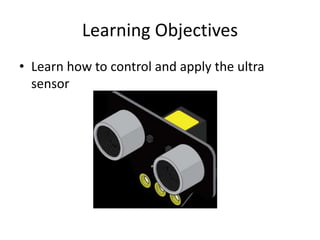
Learning Objectives
• Learn how to control and apply the ultra
sensor
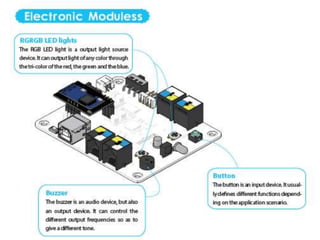
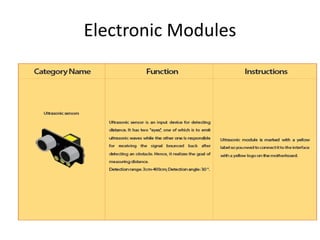
Electronic Modules
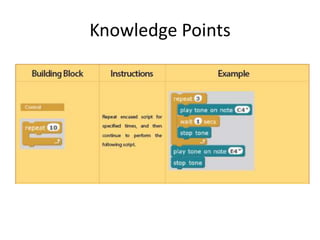
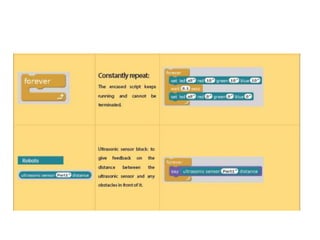
Knowledge Points
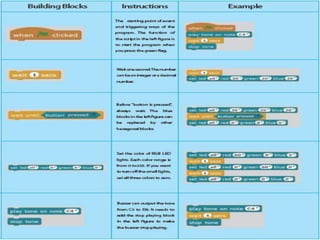
Programming Structure
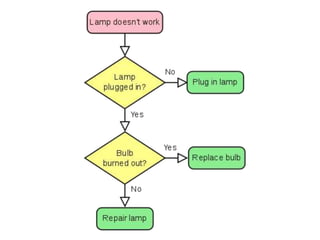
Flow chart
• A flow chart is a type of diagram, made of
boxes and arrows. It can be used to show:
• An algorithm, a step-by-step list of directions
that need to be followed to solve a problem
• A process, a series of stages in time where the
last stage is the product, result or goal.
• The planned stages of a project.
• The flow chart uses boxes, arrows and other
elements:
• Boxes show the process operations, the
various steps and actions.
• Arrows show the order of the steps, and/or
different options.
• Other elements
representing materials involved, decisions,
people, time or process measurements
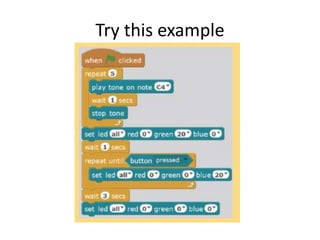
Try this example
Example Expansion
• Draw the Flow chart for this example
Chapter 3 The Arithmetic Challenge
• Learning Objectives
• 1 Use of mathematic operation
• 2 Use variables
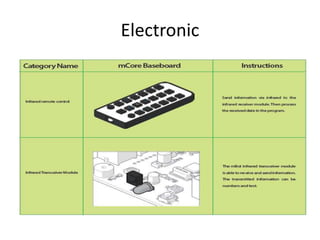
Electronic
Knowledge Points
Chapter 4 Guess
• Learning Objectives
• 1􀄓Learn the branch structure
• 2􀄓Usage and comparison of variables
Knowledge Points
Chapter 5
• Learning Objectives
– Learn logical operators
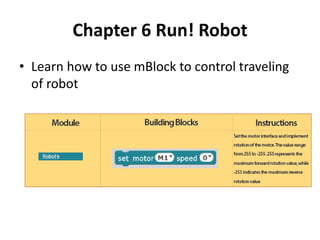
Chapter 6 Run! Robot
• Learn how to use mBlock to control traveling
of robot
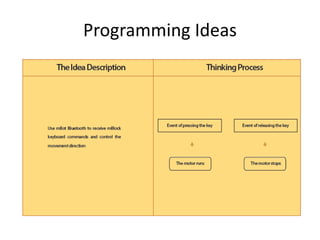
Programming Ideas

Robotics l2 final

  • 1.
  • 2.
    Pre- Learning Preparation •We will experience the interaction between the physical world and software through learning the course. • The course consists of three parts: mBot robot, mCore main board and mBlock (You could • download them with following address: http://mblock.cc/download). mBlock is a software developed • on the basis of Scratch 2.0. It could control mCore main board of mBot and achieve the corresponding • functions. Here is the main interface of mBlock:
  • 7.
  • 8.
  • 9.
    Chapter 2 PickApples • Little mouse Mice found a fruitful apple tree today . Now is the ripe season. Apples on the trees constantly fall when blowing in the wind. Mice hopes to find a container to hold these apples. Can you help Mice collect more apples?
  • 10.
    Learning Objectives • Learnhow to control and apply the ultra sensor
  • 11.
  • 12.
  • 15.
  • 16.
    Flow chart • Aflow chart is a type of diagram, made of boxes and arrows. It can be used to show: • An algorithm, a step-by-step list of directions that need to be followed to solve a problem • A process, a series of stages in time where the last stage is the product, result or goal. • The planned stages of a project.
  • 18.
    • The flowchart uses boxes, arrows and other elements: • Boxes show the process operations, the various steps and actions. • Arrows show the order of the steps, and/or different options. • Other elements representing materials involved, decisions, people, time or process measurements
  • 19.
  • 20.
    Example Expansion • Drawthe Flow chart for this example
  • 21.
    Chapter 3 TheArithmetic Challenge • Learning Objectives • 1 Use of mathematic operation • 2 Use variables
  • 22.
  • 23.
  • 25.
    Chapter 4 Guess •Learning Objectives • 1􀄓Learn the branch structure • 2􀄓Usage and comparison of variables
  • 26.
  • 27.
    Chapter 5 • LearningObjectives – Learn logical operators
  • 29.
    Chapter 6 Run!Robot • Learn how to use mBlock to control traveling of robot
  • 30.