From Researching to Writing 2:
Libraries, Databases, and Image Searches
Discussed this time:

✤   “Casual Research”

✤   The Suggested Course Blogs

✤   Finding Sources

✤   Google vs. Research Databases

✤   Finding Images to Research

✤   Saving and Documenting Images
“Casual Research:”


✤   A habit of reading and investigation

✤   Employs quick searches w/ Google, Wikipedia, and the dictionary

✤   Often not documented

✤   An excellent way to get started

✤   Furthered with casual reading of high-level material
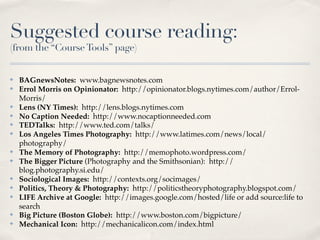
Suggested course reading:
(from the “Course Tools” page)


✤   BAGnewsNotes: www.bagnewsnotes.com
✤   Errol Morris on Opinionator: http://opinionator.blogs.nytimes.com/author/Errol-
    Morris/
✤   Lens (NY Times): http://lens.blogs.nytimes.com
✤   No Caption Needed: http://www.nocaptionneeded.com
✤   TEDTalks: http://www.ted.com/talks/
✤   Los Angeles Times Photography: http://www.latimes.com/news/local/
    photography/
✤   The Memory of Photography: http://memophoto.wordpress.com/
✤   The Bigger Picture (Photography and the Smithsonian): http://
    blog.photography.si.edu/
✤   Sociological Images: http://contexts.org/socimages/
✤   Politics, Theory & Photography: http://politicstheoryphotography.blogspot.com/
✤   LIFE Archive at Google: http://images.google.com/hosted/life or add source:life to
    search
✤   Big Picture (Boston Globe): http://www.boston.com/bigpicture/
✤   Mechanical Icon: http://mechanicalicon.com/index.html
Suggested course reading:
(from the “Course Tools” page)


✤   BAGnewsNotes: www.bagnewsnotes.com
✤   Errol Morris on Opinionator: http://opinionator.blogs.nytimes.com/author/Errol-
    Morris/
✤   Lens (NY Times): http://lens.blogs.nytimes.com
✤   No Caption Needed: http://www.nocaptionneeded.com
✤   TEDTalks: http://www.ted.com/talks/
✤   Los Angeles Times Photography: http://www.latimes.com/news/local/
    photography/
✤   The Memory of Photography: http://memophoto.wordpress.com/
✤   The Bigger Picture (Photography and the Smithsonian): http://
    blog.photography.si.edu/
✤   Sociological Images: http://contexts.org/socimages/
✤   Politics, Theory & Photography: http://politicstheoryphotography.blogspot.com/
✤   LIFE Archive at Google: http://images.google.com/hosted/life or add source:life to
    search
✤   Big Picture (Boston Globe): http://www.boston.com/bigpicture/
✤   Mechanical Icon: http://mechanicalicon.com/index.html
Suggested course reading:
(from the “Course Tools” page)


✤   BAGnewsNotes: www.bagnewsnotes.com
✤   Errol Morris on Opinionator: http://opinionator.blogs.nytimes.com/author/Errol-
    Morris/
✤   Lens (NY Times): http://lens.blogs.nytimes.com
✤   No Caption Needed: http://www.nocaptionneeded.com
✤   TEDTalks: http://www.ted.com/talks/
✤   Los Angeles Times Photography: http://www.latimes.com/news/local/
    photography/
✤   The Memory of Photography: http://memophoto.wordpress.com/
✤   The Bigger Picture (Photography and the Smithsonian): http://
    blog.photography.si.edu/
✤   Sociological Images: http://contexts.org/socimages/
✤   Politics, Theory & Photography: http://politicstheoryphotography.blogspot.com/
✤   LIFE Archive at Google: http://images.google.com/hosted/life or add source:life to
    search
✤   Big Picture (Boston Globe): http://www.boston.com/bigpicture/
✤   Mechanical Icon: http://mechanicalicon.com/index.html
Suggested course reading:
(from the “Course Tools” page)


✤   BAGnewsNotes: www.bagnewsnotes.com
✤   Errol Morris on Opinionator: http://opinionator.blogs.nytimes.com/author/Errol-
    Morris/
✤   Lens (NY Times): http://lens.blogs.nytimes.com
✤   No Caption Needed: http://www.nocaptionneeded.com
✤   TEDTalks: http://www.ted.com/talks/
✤   Los Angeles Times Photography: http://www.latimes.com/news/local/
    photography/
✤   The Memory of Photography: http://memophoto.wordpress.com/
✤   The Bigger Picture (Photography and the Smithsonian): http://
    blog.photography.si.edu/
✤   Sociological Images: http://contexts.org/socimages/
✤   Politics, Theory & Photography: http://politicstheoryphotography.blogspot.com/
✤   LIFE Archive at Google: http://images.google.com/hosted/life or add source:life to
    search
✤   Big Picture (Boston Globe): http://www.boston.com/bigpicture/
✤   Mechanical Icon: http://mechanicalicon.com/index.html
Finding Sources:


✤   Check the suggested course readings often.

✤   Don’t think you can Google your way to a paper.

✤   Get familiar with the OC Library--both the building and the webpage.

✤   Use article search databases like Proquest and EbscoHost

✤   Document, document, document
Proquest vs. Google:

✤   Credible sources

✤   Keywords chosen by humans

✤   Full text of articles
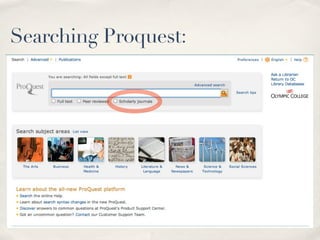
Searching Proquest:


✤   (Screen shot from OC homepage)
Document Everything:


✤   Immediately after you’re done with this video, make a “working
    bibliography.”

✤   Accessible—everywhere you work

✤   Thorough—all info needed to find the source again and to remember
    what it said

✤   Part of your research habit
Accessible:


✤   Inside of your Dropbox

✤   In your email account

✤   On your student “X” drive

✤   On another cloud storage space (Google, Amazon, Box.net, etc.)

✤   On a thumb drive
Thorough:

✤   Every time—honestly, every time—you find a potential source
✤   In the same document (probably a Microsoft Word or text file), record
    this stuff:
     ✤ The URL (if off the web)


     ✤ The author


     ✤ The title


     ✤ Why you like it


     ✤ Optional (though suggested): A quote or two you’re sure you want

       to use
✤   Keep it simple, keep it accessible. This is your system. Make sure it
    makes sense to you.
Your Research Habit:


✤   Keep it real.
✤   Make your work count.
✤   Don’t make yourself do it twice (or three times, or four times).
✤   Don’t go halfway just because you don’t know where to start.
✤   Consider keeping a working outline as you go.
Finding Images:

✤   Google Image Search is not very useful, especially if your topic is
    vague. It’s helpful when searching for a specific image.
✤   Be creative.
✤   Keep track of the course readings—they help in surprising ways.
✤   Dig for references to images in your other sources.
✤   When you save images, save reference info too:
    ✤ Source


    ✤ Photographer, if you can find it


    ✤ Year, if you can find it
Saving and Documenting Images:

 ✤   Keep image files together with your working bibliography and
     working outline
 ✤   Use detailed file names. I suggest this: “phototitle photosource
     datefound.jpg.” For example: afghangirltoday nocaptionneeded
     18oct11.jpg.” This ensures that I know where my images are from,
     so that I don’t have to try to find them again later.
 ✤   Don’t make yourself do the work twice.
 ✤   The basics: right-click on most photos to save them. Choose “Save
     As...” from the menu and save the file in your accessible research
     space. Give it a detailed name.
 ✤   Ask me for assistance.
These “Librarian” people?


 ✤   Librarians are amazingly well-educated, amazingly helpful, and
     mostly bored and lonely.
 ✤   OC librarians are available via phone, email, web chat, and (of
     course) in person.
 ✤   While we’re on the topic: “books” are amazing.
Final points:


 ✤   Get in the habit of “casual research.”
 ✤   Read the course blogs for ideas.
 ✤   Document, document, document.
 ✤   Don’t do the same work twice.
 ✤   Ask if you get stuck.

Researching to Writing 2: Databases and Image searches

  • 1.
    From Researching toWriting 2: Libraries, Databases, and Image Searches
  • 2.
    Discussed this time: ✤ “Casual Research” ✤ The Suggested Course Blogs ✤ Finding Sources ✤ Google vs. Research Databases ✤ Finding Images to Research ✤ Saving and Documenting Images
  • 3.
    “Casual Research:” ✤ A habit of reading and investigation ✤ Employs quick searches w/ Google, Wikipedia, and the dictionary ✤ Often not documented ✤ An excellent way to get started ✤ Furthered with casual reading of high-level material
  • 4.
    Suggested course reading: (fromthe “Course Tools” page) ✤ BAGnewsNotes: www.bagnewsnotes.com ✤ Errol Morris on Opinionator: http://opinionator.blogs.nytimes.com/author/Errol- Morris/ ✤ Lens (NY Times): http://lens.blogs.nytimes.com ✤ No Caption Needed: http://www.nocaptionneeded.com ✤ TEDTalks: http://www.ted.com/talks/ ✤ Los Angeles Times Photography: http://www.latimes.com/news/local/ photography/ ✤ The Memory of Photography: http://memophoto.wordpress.com/ ✤ The Bigger Picture (Photography and the Smithsonian): http:// blog.photography.si.edu/ ✤ Sociological Images: http://contexts.org/socimages/ ✤ Politics, Theory & Photography: http://politicstheoryphotography.blogspot.com/ ✤ LIFE Archive at Google: http://images.google.com/hosted/life or add source:life to search ✤ Big Picture (Boston Globe): http://www.boston.com/bigpicture/ ✤ Mechanical Icon: http://mechanicalicon.com/index.html
  • 5.
    Suggested course reading: (fromthe “Course Tools” page) ✤ BAGnewsNotes: www.bagnewsnotes.com ✤ Errol Morris on Opinionator: http://opinionator.blogs.nytimes.com/author/Errol- Morris/ ✤ Lens (NY Times): http://lens.blogs.nytimes.com ✤ No Caption Needed: http://www.nocaptionneeded.com ✤ TEDTalks: http://www.ted.com/talks/ ✤ Los Angeles Times Photography: http://www.latimes.com/news/local/ photography/ ✤ The Memory of Photography: http://memophoto.wordpress.com/ ✤ The Bigger Picture (Photography and the Smithsonian): http:// blog.photography.si.edu/ ✤ Sociological Images: http://contexts.org/socimages/ ✤ Politics, Theory & Photography: http://politicstheoryphotography.blogspot.com/ ✤ LIFE Archive at Google: http://images.google.com/hosted/life or add source:life to search ✤ Big Picture (Boston Globe): http://www.boston.com/bigpicture/ ✤ Mechanical Icon: http://mechanicalicon.com/index.html
  • 6.
    Suggested course reading: (fromthe “Course Tools” page) ✤ BAGnewsNotes: www.bagnewsnotes.com ✤ Errol Morris on Opinionator: http://opinionator.blogs.nytimes.com/author/Errol- Morris/ ✤ Lens (NY Times): http://lens.blogs.nytimes.com ✤ No Caption Needed: http://www.nocaptionneeded.com ✤ TEDTalks: http://www.ted.com/talks/ ✤ Los Angeles Times Photography: http://www.latimes.com/news/local/ photography/ ✤ The Memory of Photography: http://memophoto.wordpress.com/ ✤ The Bigger Picture (Photography and the Smithsonian): http:// blog.photography.si.edu/ ✤ Sociological Images: http://contexts.org/socimages/ ✤ Politics, Theory & Photography: http://politicstheoryphotography.blogspot.com/ ✤ LIFE Archive at Google: http://images.google.com/hosted/life or add source:life to search ✤ Big Picture (Boston Globe): http://www.boston.com/bigpicture/ ✤ Mechanical Icon: http://mechanicalicon.com/index.html
  • 7.
    Suggested course reading: (fromthe “Course Tools” page) ✤ BAGnewsNotes: www.bagnewsnotes.com ✤ Errol Morris on Opinionator: http://opinionator.blogs.nytimes.com/author/Errol- Morris/ ✤ Lens (NY Times): http://lens.blogs.nytimes.com ✤ No Caption Needed: http://www.nocaptionneeded.com ✤ TEDTalks: http://www.ted.com/talks/ ✤ Los Angeles Times Photography: http://www.latimes.com/news/local/ photography/ ✤ The Memory of Photography: http://memophoto.wordpress.com/ ✤ The Bigger Picture (Photography and the Smithsonian): http:// blog.photography.si.edu/ ✤ Sociological Images: http://contexts.org/socimages/ ✤ Politics, Theory & Photography: http://politicstheoryphotography.blogspot.com/ ✤ LIFE Archive at Google: http://images.google.com/hosted/life or add source:life to search ✤ Big Picture (Boston Globe): http://www.boston.com/bigpicture/ ✤ Mechanical Icon: http://mechanicalicon.com/index.html
  • 8.
    Finding Sources: ✤ Check the suggested course readings often. ✤ Don’t think you can Google your way to a paper. ✤ Get familiar with the OC Library--both the building and the webpage. ✤ Use article search databases like Proquest and EbscoHost ✤ Document, document, document
  • 9.
    Proquest vs. Google: ✤ Credible sources ✤ Keywords chosen by humans ✤ Full text of articles
  • 10.
    Searching Proquest: ✤ (Screen shot from OC homepage)
  • 11.
    Document Everything: ✤ Immediately after you’re done with this video, make a “working bibliography.” ✤ Accessible—everywhere you work ✤ Thorough—all info needed to find the source again and to remember what it said ✤ Part of your research habit
  • 12.
    Accessible: ✤ Inside of your Dropbox ✤ In your email account ✤ On your student “X” drive ✤ On another cloud storage space (Google, Amazon, Box.net, etc.) ✤ On a thumb drive
  • 13.
    Thorough: ✤ Every time—honestly, every time—you find a potential source ✤ In the same document (probably a Microsoft Word or text file), record this stuff: ✤ The URL (if off the web) ✤ The author ✤ The title ✤ Why you like it ✤ Optional (though suggested): A quote or two you’re sure you want to use ✤ Keep it simple, keep it accessible. This is your system. Make sure it makes sense to you.
  • 14.
    Your Research Habit: ✤ Keep it real. ✤ Make your work count. ✤ Don’t make yourself do it twice (or three times, or four times). ✤ Don’t go halfway just because you don’t know where to start. ✤ Consider keeping a working outline as you go.
  • 15.
    Finding Images: ✤ Google Image Search is not very useful, especially if your topic is vague. It’s helpful when searching for a specific image. ✤ Be creative. ✤ Keep track of the course readings—they help in surprising ways. ✤ Dig for references to images in your other sources. ✤ When you save images, save reference info too: ✤ Source ✤ Photographer, if you can find it ✤ Year, if you can find it
  • 16.
    Saving and DocumentingImages: ✤ Keep image files together with your working bibliography and working outline ✤ Use detailed file names. I suggest this: “phototitle photosource datefound.jpg.” For example: afghangirltoday nocaptionneeded 18oct11.jpg.” This ensures that I know where my images are from, so that I don’t have to try to find them again later. ✤ Don’t make yourself do the work twice. ✤ The basics: right-click on most photos to save them. Choose “Save As...” from the menu and save the file in your accessible research space. Give it a detailed name. ✤ Ask me for assistance.
  • 17.
    These “Librarian” people? ✤ Librarians are amazingly well-educated, amazingly helpful, and mostly bored and lonely. ✤ OC librarians are available via phone, email, web chat, and (of course) in person. ✤ While we’re on the topic: “books” are amazing.
  • 18.
    Final points: ✤ Get in the habit of “casual research.” ✤ Read the course blogs for ideas. ✤ Document, document, document. ✤ Don’t do the same work twice. ✤ Ask if you get stuck.