20/08/2015 Shared Services for Research Data
Management
Overview
Shared Services For Research Data Management July 2015 2
• RDM systems Architecture
• Institutional Scenarios
• Vision for shared service
• Concept for Jisc procured/provided shared service
• Benefits
• Timescales
3
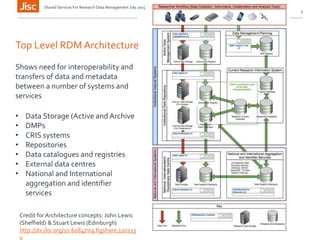
Top Level RDM Architecture
Shows need for interoperability and
transfers of data and metadata
between a number of systems and
services
• Data Storage (Active and Archive
• DMPs
• CRIS systems
• Repositories
• Data catalogues and registries
• External data centres
• National and International
aggregation and identifier
services
Credit for Architecture concepts: John Lewis
(Sheffield) & Stuart Lewis (Edinburgh)
http://dx.doi.org/10.6084/m9.figshare.120223
0
Shared Services For Research Data Management July 2015
Institutional Scenarios
• Scenarios range from Greenfield (no RDM
infrastructure in place) to various brownfield scenarios
• Brownfield scenarios based on gaps within
architecture. Examples include:
• Institutions who may have established central active
data storage, but are lacking a publication platform,
data registry and archive storage.
• Institutions with a data repository, who may be
lacking active data storage options for researchers
Shared Services For Research Data Management July 2015 4
Scenarios and requirements derived from architecture
Vision for Jisc provided shared service
Jisc could facilitate researchers cloud storage space
which can sync with their personal machines and
common workflows to store active research data and
allow sharing and collaboration between peers
Within this space allow easy functionality to publish and
archive research outputs fulfilling policy requirements
throughout the RDM lifecycle
Shared Services For Research Data Management July 2015 5
Researchers shouldn’t need to think (too much!) about
Research Data Management
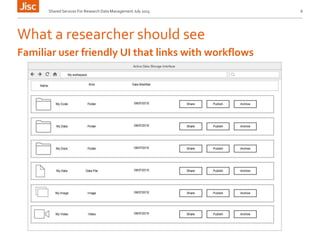
What a researcher should see
Shared Services For Research Data Management July 2015 6
Familiar user friendly UI that links with workflows
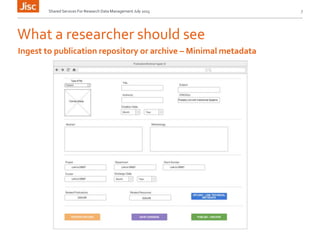
What a researcher should see
Shared Services For Research Data Management July 2015 7
Ingest to publication repository or archive – Minimal metadata
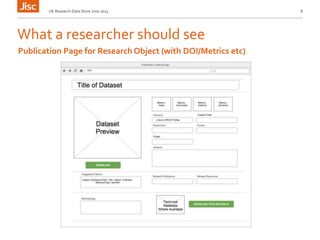
What a researcher should see
UK Research Data Store June 2015 8
Publication Page for ResearchObject (with DOI/Metrics etc)
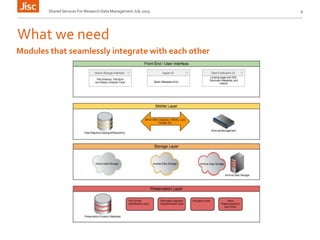
What we need
Shared Services For Research Data Management July 2015 9
Modules that seamlessly integrate with each other
Technology already exists
Active Data Storage and File syncing and sharing (OneDrive, Sharepoint
DropBox, Box, Owncloud, Institutional Storage etc.) Services that researchers
are used to as the base interface to store active data and use as access points
to publication/archival services
Publication/Archival Ingest UI (Figshare, Eprints, Zenodo other? In house?)
Repository Front End (Figshare, Eprints, UKRDDS etc.)
Archival Management / Long term Storage (Arkivum/Others)
Metadata Schema (From Research at Risk Metadata WP)
EEA based storage (AWS,Azure etc.)
Network (JANET)
LongTerm Preservation (Metadata and tools need specifying for RDM)
Shared Services For Research Data Management July 2015 10
Don’t re-invent the wheel, join up technology that
already exists
Benefits
Meets policy requirements An easy way to meet funder’s requirements with little
effort from the institution
Network connecting with Janet means that data egress costs will be reduced or
negligible
Storage shared storage could be procured at cheaper rates
User Friendly many researchers are already familiar with the types of UI’s mentioned
Discoverability and Access Allows easy open access to research outputs if required
Aggregation allows for easy aggregation of UK research outputs to share globally
LongTerm Storage archived research objects are safely stored with multiple copies
Integration These systems already exist and are starting to integrate
LocalView System could be institutionally branded
Research Data Problem Eases RDM issues for the institutions where there isn’t the
capacity or desire to implement their own system
Shared Services For Research Data Management July 2015 11
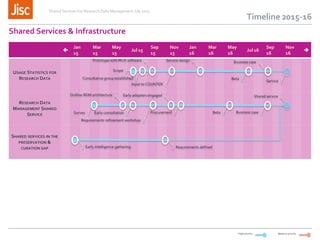
Timeline 2015-16

Jan
15
Mar
15
May
15
Jul 15
Sep
15
Nov
15
Jan
16
Mar
16
May
16
Jul 16
Sep
16
Nov
16

USAGE STATISTICS FOR
RESEARCH DATA
RESEARCH DATA
MANAGEMENT SHARED
SERVICE
SHARED SERVICES IN THE
PRESERVATION &
CURATION GAP
Shared Services & Infrastructure
Medium priorityHigh priority
Early consultation ProcurementSurvey
Requirements refinement workshop
Outline RDM architecture Early adopters engaged
Beta Business case
Shared service
Early intelligence gathering Requirements defined
Scope
Prototype with IRUS software Service design Business case
BetaConsultative group established
Input to COUNTER
Service
Shared Services For Research Data Management July 2015
Proposed Stages?
1st Stage: fully Jisc provided/procured/hosted system
2nd Stage: Jisc offer modules or national agreements to fill
architecture gaps in existing systems
• Jisc require feedback from the community and will consult
before and after an October event with preceeding
publication of shared services concepts
• If there is community agreement Jisc will begin
procurement/development
• To take these concepts forward volunteer pilot institutions
to work up detailed requirements and develop/test the
service in partnership will be needed.
Shared Services For Research Data Management July 2015 13
Find out more…
Thank you!
Email: rachel.bruce@jisc.ac.uk
John.kaye@jisc.ac.uk
Twitter:rachelbruce
Except where otherwise noted, this
work is licensed under CC-BY-NC-ND

Research Data Shared Services

  • 1.
    20/08/2015 Shared Servicesfor Research Data Management
  • 2.
    Overview Shared Services ForResearch Data Management July 2015 2 • RDM systems Architecture • Institutional Scenarios • Vision for shared service • Concept for Jisc procured/provided shared service • Benefits • Timescales
  • 3.
    3 Top Level RDMArchitecture Shows need for interoperability and transfers of data and metadata between a number of systems and services • Data Storage (Active and Archive • DMPs • CRIS systems • Repositories • Data catalogues and registries • External data centres • National and International aggregation and identifier services Credit for Architecture concepts: John Lewis (Sheffield) & Stuart Lewis (Edinburgh) http://dx.doi.org/10.6084/m9.figshare.120223 0 Shared Services For Research Data Management July 2015
  • 4.
    Institutional Scenarios • Scenariosrange from Greenfield (no RDM infrastructure in place) to various brownfield scenarios • Brownfield scenarios based on gaps within architecture. Examples include: • Institutions who may have established central active data storage, but are lacking a publication platform, data registry and archive storage. • Institutions with a data repository, who may be lacking active data storage options for researchers Shared Services For Research Data Management July 2015 4 Scenarios and requirements derived from architecture
  • 5.
    Vision for Jiscprovided shared service Jisc could facilitate researchers cloud storage space which can sync with their personal machines and common workflows to store active research data and allow sharing and collaboration between peers Within this space allow easy functionality to publish and archive research outputs fulfilling policy requirements throughout the RDM lifecycle Shared Services For Research Data Management July 2015 5 Researchers shouldn’t need to think (too much!) about Research Data Management
  • 6.
    What a researchershould see Shared Services For Research Data Management July 2015 6 Familiar user friendly UI that links with workflows
  • 7.
    What a researchershould see Shared Services For Research Data Management July 2015 7 Ingest to publication repository or archive – Minimal metadata
  • 8.
    What a researchershould see UK Research Data Store June 2015 8 Publication Page for ResearchObject (with DOI/Metrics etc)
  • 9.
    What we need SharedServices For Research Data Management July 2015 9 Modules that seamlessly integrate with each other
  • 10.
    Technology already exists ActiveData Storage and File syncing and sharing (OneDrive, Sharepoint DropBox, Box, Owncloud, Institutional Storage etc.) Services that researchers are used to as the base interface to store active data and use as access points to publication/archival services Publication/Archival Ingest UI (Figshare, Eprints, Zenodo other? In house?) Repository Front End (Figshare, Eprints, UKRDDS etc.) Archival Management / Long term Storage (Arkivum/Others) Metadata Schema (From Research at Risk Metadata WP) EEA based storage (AWS,Azure etc.) Network (JANET) LongTerm Preservation (Metadata and tools need specifying for RDM) Shared Services For Research Data Management July 2015 10 Don’t re-invent the wheel, join up technology that already exists
  • 11.
    Benefits Meets policy requirementsAn easy way to meet funder’s requirements with little effort from the institution Network connecting with Janet means that data egress costs will be reduced or negligible Storage shared storage could be procured at cheaper rates User Friendly many researchers are already familiar with the types of UI’s mentioned Discoverability and Access Allows easy open access to research outputs if required Aggregation allows for easy aggregation of UK research outputs to share globally LongTerm Storage archived research objects are safely stored with multiple copies Integration These systems already exist and are starting to integrate LocalView System could be institutionally branded Research Data Problem Eases RDM issues for the institutions where there isn’t the capacity or desire to implement their own system Shared Services For Research Data Management July 2015 11
  • 12.
    Timeline 2015-16  Jan 15 Mar 15 May 15 Jul 15 Sep 15 Nov 15 Jan 16 Mar 16 May 16 Jul16 Sep 16 Nov 16  USAGE STATISTICS FOR RESEARCH DATA RESEARCH DATA MANAGEMENT SHARED SERVICE SHARED SERVICES IN THE PRESERVATION & CURATION GAP Shared Services & Infrastructure Medium priorityHigh priority Early consultation ProcurementSurvey Requirements refinement workshop Outline RDM architecture Early adopters engaged Beta Business case Shared service Early intelligence gathering Requirements defined Scope Prototype with IRUS software Service design Business case BetaConsultative group established Input to COUNTER Service Shared Services For Research Data Management July 2015
  • 13.
    Proposed Stages? 1st Stage:fully Jisc provided/procured/hosted system 2nd Stage: Jisc offer modules or national agreements to fill architecture gaps in existing systems • Jisc require feedback from the community and will consult before and after an October event with preceeding publication of shared services concepts • If there is community agreement Jisc will begin procurement/development • To take these concepts forward volunteer pilot institutions to work up detailed requirements and develop/test the service in partnership will be needed. Shared Services For Research Data Management July 2015 13
  • 14.
    Find out more… Thankyou! Email: rachel.bruce@jisc.ac.uk John.kaye@jisc.ac.uk Twitter:rachelbruce Except where otherwise noted, this work is licensed under CC-BY-NC-ND

Editor's Notes

  • #2 Go to ‘View’ menu > ‘Header and Footer…’ to edit the footers on this slide (click ‘Apply’ to change only the currently selected slide, or ‘Apply to All’ to change the footers on all slides). To change the image on this slide: Click once on the image to select it, and then delete it Drag a replacement picture to the placeholder or click the icon in the centre of the placeholder to browse for & add another image Once you have added your replacement image, you may need to put it into the background so that it doesn’t cover other items on the slide. Do this by right-clicking on the new image and choosing ‘Arrange’ > ‘Send to Back’ from the contextual menu
  • #3 Go to ‘View’ menu > ‘Header and Footer…’ to edit the footers on this slide (click ‘Apply’ to change only the currently selected slide, or ‘Apply to All’ to change the footers on all slides).
  • #5 Go to ‘View’ menu > ‘Header and Footer…’ to edit the footers on this slide (click ‘Apply’ to change only the currently selected slide, or ‘Apply to All’ to change the footers on all slides).
  • #6 Go to ‘View’ menu > ‘Header and Footer…’ to edit the footers on this slide (click ‘Apply’ to change only the currently selected slide, or ‘Apply to All’ to change the footers on all slides).
  • #7 Go to ‘View’ menu > ‘Header and Footer…’ to edit the footers on this slide (click ‘Apply’ to change only the currently selected slide, or ‘Apply to All’ to change the footers on all slides).
  • #8 Go to ‘View’ menu > ‘Header and Footer…’ to edit the footers on this slide (click ‘Apply’ to change only the currently selected slide, or ‘Apply to All’ to change the footers on all slides).
  • #9 Go to ‘View’ menu > ‘Header and Footer…’ to edit the footers on this slide (click ‘Apply’ to change only the currently selected slide, or ‘Apply to All’ to change the footers on all slides).
  • #10 Go to ‘View’ menu > ‘Header and Footer…’ to edit the footers on this slide (click ‘Apply’ to change only the currently selected slide, or ‘Apply to All’ to change the footers on all slides).
  • #11 Go to ‘View’ menu > ‘Header and Footer…’ to edit the footers on this slide (click ‘Apply’ to change only the currently selected slide, or ‘Apply to All’ to change the footers on all slides). ----- Meeting Notes (23/06/15 11:23) ----- security and governance. encryption dropbox other devs UCL ask under the hood arkivum (appliance)
  • #12 Go to ‘View’ menu > ‘Header and Footer…’ to edit the footers on this slide (click ‘Apply’ to change only the currently selected slide, or ‘Apply to All’ to change the footers on all slides). ----- Meeting Notes (24/06/15 13:13) ----- data transfer costs reduce egress costs See ca role.
  • #14 Go to ‘View’ menu > ‘Header and Footer…’ to edit the footers on this slide (click ‘Apply’ to change only the currently selected slide, or ‘Apply to All’ to change the footers on all slides). ----- Meeting Notes (24/06/15 13:13) ----- data transfer costs reduce egress costs See ca role.