Intelligent Tutoring Systems
         Professor: Roger Nkambou


Smart Sudoku Tutor

        Students: Soroosh Ghorbani
                  Aboubacar Kande


              December 31, 2012
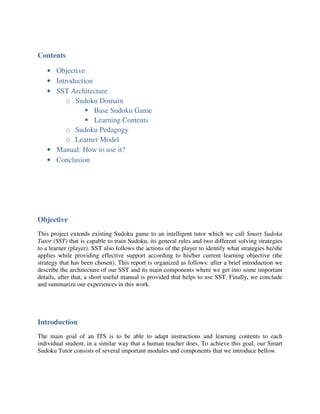
Contents

   • Objective
   • Introduction
   • SST Architecture
         o Sudoku Domain
                  Base Sudoku Game
                  Learning Contents
         o Sudoku Pedagogy
         o Learner Model
   • Manual: How to use it?
   • Conclusion


Objective
This project extends existing Sudoku game to an intelligent tutor which we call Smart Sudoku
Tutor (SST) that is capable to train Sudoku, its general rules and two different solving strategies
to a learner (player). SST also follows the actions of the player to identify what strategies he/she
applies while providing effective support according to his/her current learning objective (the
strategy that has been chosen). This report is organized as follows: after a brief introduction we
describe the architecture of our SST and its main components where we get into some important
details, after that, a short useful manual is provided that helps to use SST. Finally, we conclude
and summarize our experiences in this work.


Introduction
The main goal of an ITS is to be able to adapt instructions and learning contents to each
individual student, in a similar way that a human teacher does. To achieve this goal, our Smart
Sudoku Tutor consists of several important modules and components that we introduce bellow.
SST Architecture
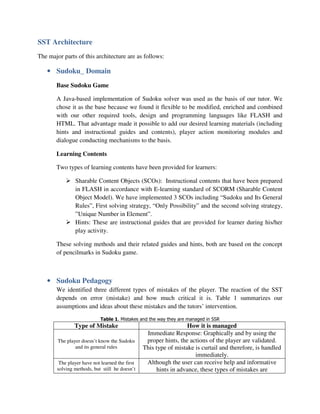
The major parts of this architecture are as follows:

   • Sudoku_ Domain
       Base Sudoku Game

       A Java-based implementation of Sudoku solver was used as the basis of our tutor. We
       chose it as the base because we found it flexible to be modified, enriched and combined
       with our other required tools, design and programming languages like FLASH and
       HTML. That advantage made it possible to add our desired learning materials (including
       hints and instructional guides and contents), player action monitoring modules and
       dialogue conducting mechanisms to the basis.

       Learning Contents

       Two types of learning contents have been provided for learners:

               Sharable Content Objects (SCOs): Instructional contents that have been prepared
               in FLASH in accordance with E-learning standard of SCORM (Sharable Content
               Object Model). We have implemented 3 SCOs including “Sudoku and Its General
               Rules”, First solving strategy, “Only Possibility” and the second solving strategy,
               ”Unique Number in Element”.
               Hints: These are instructional guides that are provided for learner during his/her
               play activity.

       These solving methods and their related guides and hints, both are based on the concept
       of pencilmarks in Sudoku game.


   • Sudoku Pedagogy
       We identified three different types of mistakes of the player. The reaction of the SST
       depends on error (mistake) and how much critical it is. Table 1 summarizes our
       assumptions and ideas about these mistakes and the tutors’ intervention.

                            Table 1. Mistakes and the way they are managed in SSR
               Type of Mistake                                    How it is managed
                                                 Immediate Response: Graphically and by using the
        The player doesn’t know the Sudoku       proper hints, the actions of the player are validated.
                and its general rules           This type of mistake is curtail and therefore, is handled
                                                                     immediately.
        The player have not learned the first    Although the user can receive help and informative
       solving methods, but still he doesn’t         hints in advance, these types of mistakes are
make a mistake that violates Sudoku      accumulated and the SST based on those information
                  rules.                     will propose an appropriate learning contents to the
                                            player. This will happen whenever the player starts to
                                            play again…Therefore, there’s no need to immediate
                                                                   reaction.
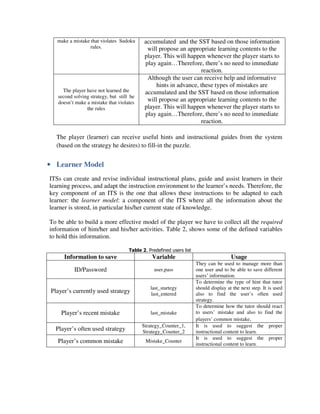
                                             Although the user can receive help and informative
                                                 hints in advance, these types of mistakes are
     The player have not learned the        accumulated and the SST based on those information
   second solving strategy, but still he
   doesn’t make a mistake that violates
                                             will propose an appropriate learning contents to the
                the rules                   player. This will happen whenever the player starts to
                                            play again…Therefore, there’s no need to immediate
                                                                   reaction.

   The player (learner) can receive useful hints and instructional guides from the system
   (based on the strategy he desires) to fill-in the puzzle.


• Learner Model
ITSs can create and revise individual instructional plans, guide and assist learners in their
learning process, and adapt the instruction environment to the learner’s needs. Therefore, the
key component of an ITS is the one that allows these instructions to be adapted to each
learner: the learner model: a component of the ITS where all the information about the
learner is stored, in particular his/her current state of knowledge.

To be able to build a more effective model of the player we have to collect all the required
information of him/her and his/her activities. Table 2, shows some of the defined variables
to hold this information.

                                     Table 2. Predefined users list
      Information to save                       Variable                               Usage
                                                                      They can be used to manage more than
          ID/Password                            user,pass            one user and to be able to save different
                                                                      users’ information.
                                                                      To determine the type of hint that tutor
                                               last_startegy          should display at the next step. It is used
 Player’s currently used strategy              last_entered           also to find the user’s often used
                                                                      strategy.
                                                                      To determine how the tutor should react
     Player’s recent mistake                   last_mistake           to users’ mistake and also to find the
                                                                      players’ common mistake.
                                           Strategy_Counter_1,        It is used to suggest the proper
  Player’s often used strategy             Strategy_Counter_2         instructional content to learn.
                                                                      It is used to suggest the proper
   Player’s common mistake                   Mistake_Counter
                                                                      instructional content to learn.
Manual
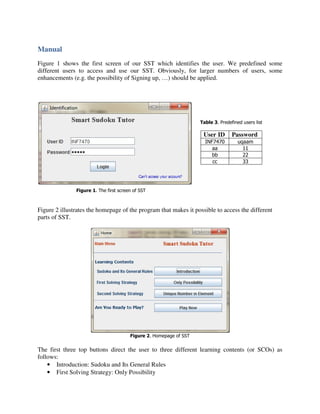
Figure 1 shows the first screen of our SST which identifies the user. We predefined some
different users to access and use our SST. Obviously, for larger numbers of users, some
enhancements (e.g. the possibility of Signing up, …) should be applied.


                                                                    Table 3. Predefined users list

                                                                     User ID       Password
                                                                      INF7470         uqaam
                                                                         aa             11
                                                                         bb             22
                                                                         cc             33


               Figure 1. The first screen of SST


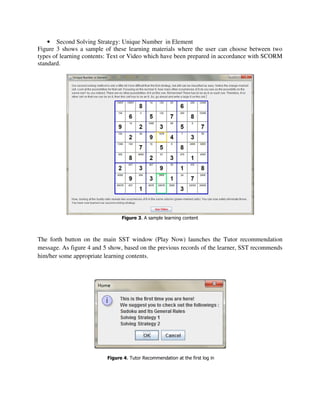
Figure 2 illustrates the homepage of the program that makes it possible to access the different
parts of SST.


                                        Figure 2. Homepage of SST


The first three top buttons direct the user to three different learning contents (or SCOs) as
follows:
    • Introduction: Sudoku and Its General Rules
    • First Solving Strategy: Only Possibility
• Second Solving Strategy: Unique Number in Element
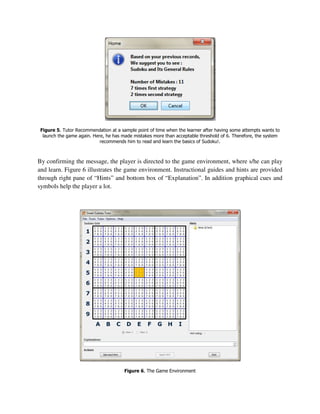
Figure 3 shows a sample of these learning materials where the user can choose between two
types of learning contents: Text or Video which have been prepared in accordance with SCORM
standard.


                                Figure 3. A sample learning content


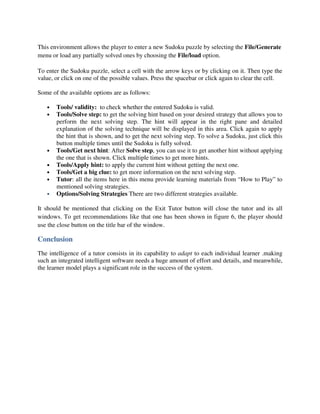
The forth button on the main SST window (Play Now) launches the Tutor recommendation
message. As figure 4 and 5 show, based on the previous records of the learner, SST recommends
him/her some appropriate learning contents.


                          Figure 4. Tutor Recommendation at the first log in
Figure 5. Tutor Recommendation at a sample point of time when the learner after having some attempts wants to
  launch the game again. Here, he has made mistakes more than acceptable threshold of 6. Therefore, the system
                            recommends him to read and learn the basics of Sudoku!.


By confirming the message, the player is directed to the game environment, where s/he can play
and learn. Figure 6 illustrates the game environment. Instructional guides and hints are provided
through right pane of “Hints” and bottom box of “Explanation”. In addition graphical cues and
symbols help the player a lot.


                                       Figure 6. The Game Environment
This environment allows the player to enter a new Sudoku puzzle by selecting the File/Generate
menu or load any partially solved ones by choosing the File/load option.

To enter the Sudoku puzzle, select a cell with the arrow keys or by clicking on it. Then type the
value, or click on one of the possible values. Press the spacebar or click again to clear the cell.

Some of the available options are as follows:

   •   Tools/ validity: to check whether the entered Sudoku is valid.
   •   Tools/Solve step: to get the solving hint based on your desired strategy that allows you to
       perform the next solving step. The hint will appear in the right pane and detailed
       explanation of the solving technique will be displayed in this area. Click again to apply
       the hint that is shown, and to get the next solving step. To solve a Sudoku, just click this
       button multiple times until the Sudoku is fully solved.
   •   Tools/Get next hint: After Solve step, you can use it to get another hint without applying
       the one that is shown. Click multiple times to get more hints.
   •   Tools/Apply hint: to apply the current hint without getting the next one.
   •   Tools/Get a big clue: to get more information on the next solving step.
   •   Tutor: all the items here in this menu provide learning materials from “How to Play” to
       mentioned solving strategies.
   •   Options/Solving Strategies There are two different strategies available.

It should be mentioned that clicking on the Exit Tutor button will close the tutor and its all
windows. To get recommendations like that one has been shown in figure 6, the player should
use the close button on the title bar of the window.

Conclusion
The intelligence of a tutor consists in its capability to adapt to each individual learner .making
such an integrated intelligent software needs a huge amount of effort and details, and meanwhile,
the learner model plays a significant role in the success of the system.

Report

  • 1.
    Intelligent Tutoring Systems Professor: Roger Nkambou Smart Sudoku Tutor Students: Soroosh Ghorbani Aboubacar Kande December 31, 2012
  • 2.
    Contents • Objective • Introduction • SST Architecture o Sudoku Domain Base Sudoku Game Learning Contents o Sudoku Pedagogy o Learner Model • Manual: How to use it? • Conclusion Objective This project extends existing Sudoku game to an intelligent tutor which we call Smart Sudoku Tutor (SST) that is capable to train Sudoku, its general rules and two different solving strategies to a learner (player). SST also follows the actions of the player to identify what strategies he/she applies while providing effective support according to his/her current learning objective (the strategy that has been chosen). This report is organized as follows: after a brief introduction we describe the architecture of our SST and its main components where we get into some important details, after that, a short useful manual is provided that helps to use SST. Finally, we conclude and summarize our experiences in this work. Introduction The main goal of an ITS is to be able to adapt instructions and learning contents to each individual student, in a similar way that a human teacher does. To achieve this goal, our Smart Sudoku Tutor consists of several important modules and components that we introduce bellow.
  • 3.
    SST Architecture The majorparts of this architecture are as follows: • Sudoku_ Domain Base Sudoku Game A Java-based implementation of Sudoku solver was used as the basis of our tutor. We chose it as the base because we found it flexible to be modified, enriched and combined with our other required tools, design and programming languages like FLASH and HTML. That advantage made it possible to add our desired learning materials (including hints and instructional guides and contents), player action monitoring modules and dialogue conducting mechanisms to the basis. Learning Contents Two types of learning contents have been provided for learners: Sharable Content Objects (SCOs): Instructional contents that have been prepared in FLASH in accordance with E-learning standard of SCORM (Sharable Content Object Model). We have implemented 3 SCOs including “Sudoku and Its General Rules”, First solving strategy, “Only Possibility” and the second solving strategy, ”Unique Number in Element”. Hints: These are instructional guides that are provided for learner during his/her play activity. These solving methods and their related guides and hints, both are based on the concept of pencilmarks in Sudoku game. • Sudoku Pedagogy We identified three different types of mistakes of the player. The reaction of the SST depends on error (mistake) and how much critical it is. Table 1 summarizes our assumptions and ideas about these mistakes and the tutors’ intervention. Table 1. Mistakes and the way they are managed in SSR Type of Mistake How it is managed Immediate Response: Graphically and by using the The player doesn’t know the Sudoku proper hints, the actions of the player are validated. and its general rules This type of mistake is curtail and therefore, is handled immediately. The player have not learned the first Although the user can receive help and informative solving methods, but still he doesn’t hints in advance, these types of mistakes are
  • 4.
    make a mistakethat violates Sudoku accumulated and the SST based on those information rules. will propose an appropriate learning contents to the player. This will happen whenever the player starts to play again…Therefore, there’s no need to immediate reaction. Although the user can receive help and informative hints in advance, these types of mistakes are The player have not learned the accumulated and the SST based on those information second solving strategy, but still he doesn’t make a mistake that violates will propose an appropriate learning contents to the the rules player. This will happen whenever the player starts to play again…Therefore, there’s no need to immediate reaction. The player (learner) can receive useful hints and instructional guides from the system (based on the strategy he desires) to fill-in the puzzle. • Learner Model ITSs can create and revise individual instructional plans, guide and assist learners in their learning process, and adapt the instruction environment to the learner’s needs. Therefore, the key component of an ITS is the one that allows these instructions to be adapted to each learner: the learner model: a component of the ITS where all the information about the learner is stored, in particular his/her current state of knowledge. To be able to build a more effective model of the player we have to collect all the required information of him/her and his/her activities. Table 2, shows some of the defined variables to hold this information. Table 2. Predefined users list Information to save Variable Usage They can be used to manage more than ID/Password user,pass one user and to be able to save different users’ information. To determine the type of hint that tutor last_startegy should display at the next step. It is used Player’s currently used strategy last_entered also to find the user’s often used strategy. To determine how the tutor should react Player’s recent mistake last_mistake to users’ mistake and also to find the players’ common mistake. Strategy_Counter_1, It is used to suggest the proper Player’s often used strategy Strategy_Counter_2 instructional content to learn. It is used to suggest the proper Player’s common mistake Mistake_Counter instructional content to learn.
  • 5.
    Manual Figure 1 showsthe first screen of our SST which identifies the user. We predefined some different users to access and use our SST. Obviously, for larger numbers of users, some enhancements (e.g. the possibility of Signing up, …) should be applied. Table 3. Predefined users list User ID Password INF7470 uqaam aa 11 bb 22 cc 33 Figure 1. The first screen of SST Figure 2 illustrates the homepage of the program that makes it possible to access the different parts of SST. Figure 2. Homepage of SST The first three top buttons direct the user to three different learning contents (or SCOs) as follows: • Introduction: Sudoku and Its General Rules • First Solving Strategy: Only Possibility
  • 6.
    • Second SolvingStrategy: Unique Number in Element Figure 3 shows a sample of these learning materials where the user can choose between two types of learning contents: Text or Video which have been prepared in accordance with SCORM standard. Figure 3. A sample learning content The forth button on the main SST window (Play Now) launches the Tutor recommendation message. As figure 4 and 5 show, based on the previous records of the learner, SST recommends him/her some appropriate learning contents. Figure 4. Tutor Recommendation at the first log in
  • 7.
    Figure 5. TutorRecommendation at a sample point of time when the learner after having some attempts wants to launch the game again. Here, he has made mistakes more than acceptable threshold of 6. Therefore, the system recommends him to read and learn the basics of Sudoku!. By confirming the message, the player is directed to the game environment, where s/he can play and learn. Figure 6 illustrates the game environment. Instructional guides and hints are provided through right pane of “Hints” and bottom box of “Explanation”. In addition graphical cues and symbols help the player a lot. Figure 6. The Game Environment
  • 8.
    This environment allowsthe player to enter a new Sudoku puzzle by selecting the File/Generate menu or load any partially solved ones by choosing the File/load option. To enter the Sudoku puzzle, select a cell with the arrow keys or by clicking on it. Then type the value, or click on one of the possible values. Press the spacebar or click again to clear the cell. Some of the available options are as follows: • Tools/ validity: to check whether the entered Sudoku is valid. • Tools/Solve step: to get the solving hint based on your desired strategy that allows you to perform the next solving step. The hint will appear in the right pane and detailed explanation of the solving technique will be displayed in this area. Click again to apply the hint that is shown, and to get the next solving step. To solve a Sudoku, just click this button multiple times until the Sudoku is fully solved. • Tools/Get next hint: After Solve step, you can use it to get another hint without applying the one that is shown. Click multiple times to get more hints. • Tools/Apply hint: to apply the current hint without getting the next one. • Tools/Get a big clue: to get more information on the next solving step. • Tutor: all the items here in this menu provide learning materials from “How to Play” to mentioned solving strategies. • Options/Solving Strategies There are two different strategies available. It should be mentioned that clicking on the Exit Tutor button will close the tutor and its all windows. To get recommendations like that one has been shown in figure 6, the player should use the close button on the title bar of the window. Conclusion The intelligence of a tutor consists in its capability to adapt to each individual learner .making such an integrated intelligent software needs a huge amount of effort and details, and meanwhile, the learner model plays a significant role in the success of the system.