BASIC RECORDS MANAGEMENT FOR SHAREPOINT
                      Strategies for Success
Basic Records Management with SharePoint
What are we going to cover?


• Records Management Overview

• SharePoint Overview

• SharePoint Records Management Features

• Implementation Strategies

• Gaps and Challenges

• Advanced Records Management
Collabware
SharePoint Records Management Experts


Software for:                           Boston

    – Electronic Records Management

    – Physical Records Management

    – Unified Portal Environments
                                        Vancouver


Focused on:
    – Compliance Control

    – Information Worker Productivity

    – User Experience
MICROSOFT SHAREPOINT
What is it?
Microsoft SharePoint
What is it?


• Collaboration and Document Management

• Web Content Management

• Centralized Content Types and Metadata

• Centralized Terms and Keywords

• Configurable Information Policy

• Integrated Workflow

• Enterprise Search
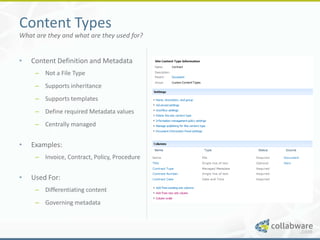
Content Types
What are they and what are they used for?


•   Content Definition and Metadata
     – Not a File Type
     – Supports inheritance
     – Supports templates
     – Define required Metadata values
     – Centrally managed


•   Examples:
     – Invoice, Contract, Policy, Procedure


•   Used For:
     – Differentiating content
     – Governing metadata
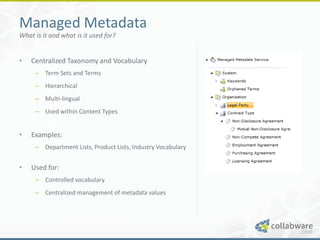
Managed Metadata
What is it and what is it used for?


•   Centralized Taxonomy and Vocabulary
     – Term Sets and Terms
     – Hierarchical
     – Multi-lingual
     – Used within Content Types


•   Examples:
     – Department Lists, Product Lists, Industry Vocabulary


•   Used for:
     – Controlled vocabulary
     – Centralized management of metadata values
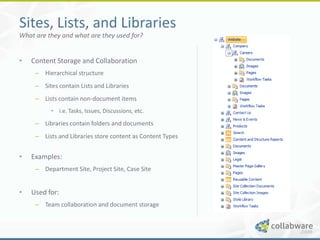
Sites, Lists, and Libraries
What are they and what are they used for?


•   Content Storage and Collaboration
     – Hierarchical structure
     – Sites contain Lists and Libraries
     – Lists contain non-document items
          • i.e. Tasks, Issues, Discussions, etc.

     – Libraries contain folders and documents
     – Lists and Libraries store content as Content Types


•   Examples:
     – Department Site, Project Site, Case Site


•   Used for:
     – Team collaboration and document storage
RECORDS MANAGEMENT
What is it?
Records Management
What is it?


It’s all about managing retention and disposition
of content.
Classification:
     – What is this content?


Retention:
     – How long should we keep the content?


Disposition:
     – What should we do with the content?
THE COMBINED PICTURE
What does SharePoint offer for Records Management?
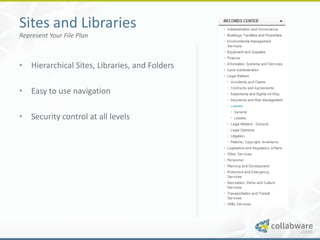
Sites and Libraries
Represent Your File Plan


• Hierarchical Sites, Libraries, and Folders

• Easy to use navigation

• Security control at all levels
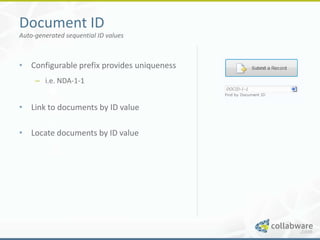
Document ID
Auto-generated sequential ID values


• Configurable prefix provides uniqueness
     – i.e. NDA-1-1


• Link to documents by ID value

• Locate documents by ID value
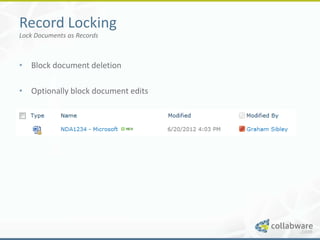
Record Locking
Lock Documents as Records


• Block document deletion

• Optionally block document edits
Content Organizer
Route Records to Centralized Repositories


• Route records based on Content Type and
  Metadata values

• Move the document and optionally leave a
  link behind
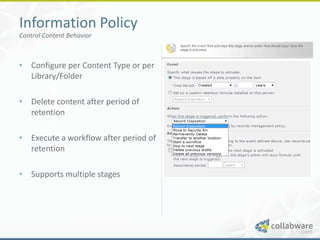
Information Policy
Control Content Behavior


• Configure per Content Type or per
  Library/Folder

• Delete content after period of
  retention

• Execute a workflow after period of
  retention

• Supports multiple stages
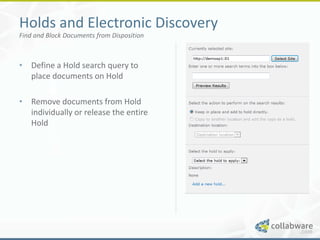
Holds and Electronic Discovery
Find and Block Documents from Disposition


• Define a Hold search query to
  place documents on Hold

• Remove documents from Hold
  individually or release the entire
  Hold
IMPLEMENTATION STRATEGIES
What approaches can you use to roll out a SharePoint solution?
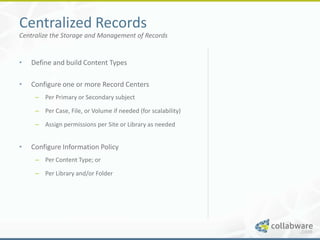
Centralized Records
Centralize the Storage and Management of Records


•   Define and build Content Types
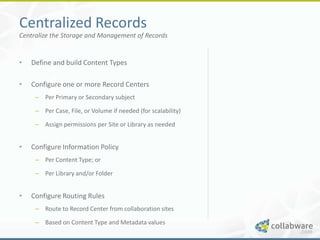
Centralized Records
Centralize the Storage and Management of Records


•   Define and build Content Types

•   Configure one or more Record Centers
     – Per Primary or Secondary subject

     – Per Case, File, or Volume if needed (for scalability)

     – Assign permissions per Site or Library as needed
Centralized Records
Centralize the Storage and Management of Records


•   Define and build Content Types

•   Configure one or more Record Centers
     – Per Primary or Secondary subject

     – Per Case, File, or Volume if needed (for scalability)

     – Assign permissions per Site or Library as needed


•   Configure Information Policy
     – Per Content Type; or

     – Per Library and/or Folder
Centralized Records
Centralize the Storage and Management of Records


•   Define and build Content Types

•   Configure one or more Record Centers
     – Per Primary or Secondary subject

     – Per Case, File, or Volume if needed (for scalability)

     – Assign permissions per Site or Library as needed


•   Configure Information Policy
     – Per Content Type; or

     – Per Library and/or Folder


•   Configure Routing Rules
     – Route to Record Center from collaboration sites

     – Based on Content Type and Metadata values
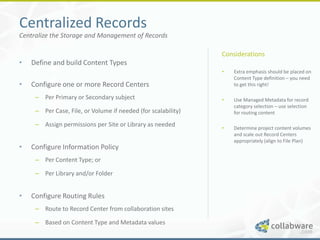
Centralized Records
Centralize the Storage and Management of Records

                                                               Considerations
•   Define and build Content Types
                                                               •   Extra emphasis should be placed on
                                                                   Content Type definition – you need
•   Configure one or more Record Centers                           to get this right!

     – Per Primary or Secondary subject                        •   Use Managed Metadata for record
                                                                   category selection – use selection
     – Per Case, File, or Volume if needed (for scalability)       for routing content

     – Assign permissions per Site or Library as needed        •   Determine project content volumes
                                                                   and scale out Record Centers
                                                                   appropriately (align to File Plan)
•   Configure Information Policy
     – Per Content Type; or

     – Per Library and/or Folder


•   Configure Routing Rules
     – Route to Record Center from collaboration sites

     – Based on Content Type and Metadata values
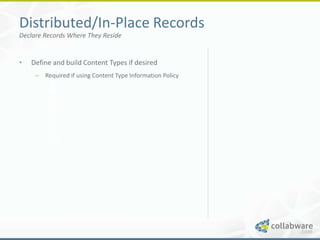
Distributed/In-Place Records
Declare Records Where They Reside


•   Define and build Content Types if desired
     – Required if using Content Type Information Policy
Distributed/In-Place Records
Declare Records Where They Reside


•   Define and build Content Types if desired
     – Required if using Content Type Information Policy


•   Configure In-Place Records
     – Per Collaboration Site

     – Per Library

     – Block Delete, or Delete and Edit

     – Routing not required
Distributed/In-Place Records
Declare Records Where They Reside


•   Define and build Content Types if desired
     – Required if using Content Type Information Policy


•   Configure In-Place Records
     – Per Collaboration Site

     – Per Library

     – Block Delete, or Delete and Edit

     – Routing not required


•   Configure Information Policy
     – Per Content Type; or

     – Per Library and/or Folder
Distributed/In-Place Records
Declare Records Where They Reside

                                                           Considerations
•   Define and build Content Types if desired
                                                           •   In-Place Records can provide a
     – Required if using Content Type Information Policy       great user experience – at the
                                                               expense of scalability and
                                                               manageability
•   Configure In-Place Records
                                                           •   Pay careful attention to security –
     – Per Collaboration Site                                  you records will be living side-by-
                                                               side with other draft, collaboration
     – Per Library                                             content

     – Block Delete, or Delete and Edit

     – Routing not required


•   Configure Information Policy
     – Per Content Type; or

     – Per Library and/or Folder
GAPS AND CHALLENGES
What gaps exist and what challenges will you face?
Capability Gaps
SharePoint Provides the Basics – Lacks Enterprise Capabilities


•   File Plan Management
     – SharePoint doesn’t understand a File Plan

     – You have to represent it with Sites and Libraries
Capability Gaps
SharePoint Provides the Basics – Lacks Enterprise Capabilities


•   File Plan Management
     – SharePoint doesn’t understand a File Plan

     – You have to represent it with Sites and Libraries


•   Advanced Retention
     – Does not provide support for Calendar or Fiscal year
         calculations

     – Does not provide support for event-based retention
Capability Gaps
SharePoint Provides the Basics – Lacks Enterprise Capabilities


•   File Plan Management
     – SharePoint doesn’t understand a File Plan

     – You have to represent it with Sites and Libraries


•   Advanced Retention
     – Does not provide support for Calendar or Fiscal year
         calculations

     – Does not provide support for event-based retention


•   Bulk Disposition
     – Only supports item-by-item disposition
Capability Gaps - Continued
SharePoint Provides the Basics – Lacks Enterprise Capabilities


•   Physical Records Management
     – Does not provide support for physical items
Capability Gaps - Continued
SharePoint Provides the Basics – Lacks Enterprise Capabilities


•   Physical Records Management
     – Does not provide support for physical items


•   Consolidated Auditing
     – Audit logs have to be configured individually for each
         Site
Implementation Challenges
Prepare Yourself for the Challenges Ahead


•   Customization *will* be required – start
    interviewing those SharePoint experts!
     – Deep knowledge required to build for scalability
Implementation Challenges
Prepare Yourself for the Challenges Ahead


•   Customization *will* be required – start
    interviewing those SharePoint experts!
     – Deep knowledge required to build for scalability


•   Long Term Manageability:
     – Lots of configuration to deal with

     – No integrated capabilities for global changes

     – Requires heavy IT intervention
Implementation Challenges
Prepare Yourself for the Challenges Ahead


•   Customization *will* be required – start
    interviewing those SharePoint experts!
     – Deep knowledge required to build for scalability


•   Long Term Manageability:
     – Lots of configuration to deal with

     – No integrated capabilities for global changes

     – Requires heavy IT intervention


•   User Experience:
     – Anything beyond a single Records Center can become
        confusing
ADVANCED RECORDS MANAGEMENT
How do you address the gaps and challenges?
SharePoint + Collabware CLM
Advanced Content Lifecycle Management and Records Management

                                                                     Why do you need it?
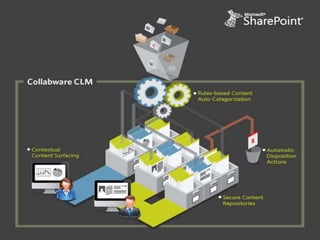
•   Collabware CLM
     –   Software runs as a native SharePoint Service                •   Put control in the hands of the
     –   Complete lifecycle management                                   Records Managers

                                                                     •   Automatically enforce proper
•   Capabilities:                                                        retention and disposition schedule

     –   Rules-based auto-categorization (even before
                                                                     •   Gain insight into what content you
         declaration)                                                    have and what state is it in

     –   Rules-based auto-declaration
                                                                     •   Automatically, and properly,
     –   Centralized File Plan management with auto-                     configure SharePoint
         configuration of SharePoint (no need for IT intervention)
                                                                     •   Decrease reliance on IT services
     –   Support for In-Place/Record Center hybrid                       and support
         implementations based on content lifecycle
     –   Bulk disposition approval workflow process
     –   Rich security controls and audit information
Next Webinar
Advanced Records Management with SharePoint + Collabware CLM


• Advanced Records Management Scenarios

• Collabware CLM Demonstration

• Tuesday, June 26th at 11:00 AM PST
For More Information

             Graham Sibley:
             gsibley@collabware.com

             Website:
             http://www.collabware.com

             Blog:
             http://blog.collabware.com


QUESTIONS?   Twitter:
             http://twitter.com/#!/collabware

Thank You!   LinkedIn:
             http://www.linkedin.com/company/collabware

Basic Records Management for SharePoint

  • 1.
    BASIC RECORDS MANAGEMENTFOR SHAREPOINT Strategies for Success
  • 2.
    Basic Records Managementwith SharePoint What are we going to cover? • Records Management Overview • SharePoint Overview • SharePoint Records Management Features • Implementation Strategies • Gaps and Challenges • Advanced Records Management
  • 3.
    Collabware SharePoint Records ManagementExperts Software for: Boston – Electronic Records Management – Physical Records Management – Unified Portal Environments Vancouver Focused on: – Compliance Control – Information Worker Productivity – User Experience
  • 4.
  • 5.
    Microsoft SharePoint What isit? • Collaboration and Document Management • Web Content Management • Centralized Content Types and Metadata • Centralized Terms and Keywords • Configurable Information Policy • Integrated Workflow • Enterprise Search
  • 6.
    Content Types What arethey and what are they used for? • Content Definition and Metadata – Not a File Type – Supports inheritance – Supports templates – Define required Metadata values – Centrally managed • Examples: – Invoice, Contract, Policy, Procedure • Used For: – Differentiating content – Governing metadata
  • 7.
    Managed Metadata What isit and what is it used for? • Centralized Taxonomy and Vocabulary – Term Sets and Terms – Hierarchical – Multi-lingual – Used within Content Types • Examples: – Department Lists, Product Lists, Industry Vocabulary • Used for: – Controlled vocabulary – Centralized management of metadata values
  • 8.
    Sites, Lists, andLibraries What are they and what are they used for? • Content Storage and Collaboration – Hierarchical structure – Sites contain Lists and Libraries – Lists contain non-document items • i.e. Tasks, Issues, Discussions, etc. – Libraries contain folders and documents – Lists and Libraries store content as Content Types • Examples: – Department Site, Project Site, Case Site • Used for: – Team collaboration and document storage
  • 9.
  • 10.
    Records Management What isit? It’s all about managing retention and disposition of content. Classification: – What is this content? Retention: – How long should we keep the content? Disposition: – What should we do with the content?
  • 11.
    THE COMBINED PICTURE Whatdoes SharePoint offer for Records Management?
  • 12.
    Sites and Libraries RepresentYour File Plan • Hierarchical Sites, Libraries, and Folders • Easy to use navigation • Security control at all levels
  • 13.
    Document ID Auto-generated sequentialID values • Configurable prefix provides uniqueness – i.e. NDA-1-1 • Link to documents by ID value • Locate documents by ID value
  • 14.
    Record Locking Lock Documentsas Records • Block document deletion • Optionally block document edits
  • 15.
    Content Organizer Route Recordsto Centralized Repositories • Route records based on Content Type and Metadata values • Move the document and optionally leave a link behind
  • 16.
    Information Policy Control ContentBehavior • Configure per Content Type or per Library/Folder • Delete content after period of retention • Execute a workflow after period of retention • Supports multiple stages
  • 17.
    Holds and ElectronicDiscovery Find and Block Documents from Disposition • Define a Hold search query to place documents on Hold • Remove documents from Hold individually or release the entire Hold
  • 18.
    IMPLEMENTATION STRATEGIES What approachescan you use to roll out a SharePoint solution?
  • 19.
    Centralized Records Centralize theStorage and Management of Records • Define and build Content Types
  • 20.
    Centralized Records Centralize theStorage and Management of Records • Define and build Content Types • Configure one or more Record Centers – Per Primary or Secondary subject – Per Case, File, or Volume if needed (for scalability) – Assign permissions per Site or Library as needed
  • 21.
    Centralized Records Centralize theStorage and Management of Records • Define and build Content Types • Configure one or more Record Centers – Per Primary or Secondary subject – Per Case, File, or Volume if needed (for scalability) – Assign permissions per Site or Library as needed • Configure Information Policy – Per Content Type; or – Per Library and/or Folder
  • 22.
    Centralized Records Centralize theStorage and Management of Records • Define and build Content Types • Configure one or more Record Centers – Per Primary or Secondary subject – Per Case, File, or Volume if needed (for scalability) – Assign permissions per Site or Library as needed • Configure Information Policy – Per Content Type; or – Per Library and/or Folder • Configure Routing Rules – Route to Record Center from collaboration sites – Based on Content Type and Metadata values
  • 23.
    Centralized Records Centralize theStorage and Management of Records Considerations • Define and build Content Types • Extra emphasis should be placed on Content Type definition – you need • Configure one or more Record Centers to get this right! – Per Primary or Secondary subject • Use Managed Metadata for record category selection – use selection – Per Case, File, or Volume if needed (for scalability) for routing content – Assign permissions per Site or Library as needed • Determine project content volumes and scale out Record Centers appropriately (align to File Plan) • Configure Information Policy – Per Content Type; or – Per Library and/or Folder • Configure Routing Rules – Route to Record Center from collaboration sites – Based on Content Type and Metadata values
  • 24.
    Distributed/In-Place Records Declare RecordsWhere They Reside • Define and build Content Types if desired – Required if using Content Type Information Policy
  • 25.
    Distributed/In-Place Records Declare RecordsWhere They Reside • Define and build Content Types if desired – Required if using Content Type Information Policy • Configure In-Place Records – Per Collaboration Site – Per Library – Block Delete, or Delete and Edit – Routing not required
  • 26.
    Distributed/In-Place Records Declare RecordsWhere They Reside • Define and build Content Types if desired – Required if using Content Type Information Policy • Configure In-Place Records – Per Collaboration Site – Per Library – Block Delete, or Delete and Edit – Routing not required • Configure Information Policy – Per Content Type; or – Per Library and/or Folder
  • 27.
    Distributed/In-Place Records Declare RecordsWhere They Reside Considerations • Define and build Content Types if desired • In-Place Records can provide a – Required if using Content Type Information Policy great user experience – at the expense of scalability and manageability • Configure In-Place Records • Pay careful attention to security – – Per Collaboration Site you records will be living side-by- side with other draft, collaboration – Per Library content – Block Delete, or Delete and Edit – Routing not required • Configure Information Policy – Per Content Type; or – Per Library and/or Folder
  • 28.
    GAPS AND CHALLENGES Whatgaps exist and what challenges will you face?
  • 29.
    Capability Gaps SharePoint Providesthe Basics – Lacks Enterprise Capabilities • File Plan Management – SharePoint doesn’t understand a File Plan – You have to represent it with Sites and Libraries
  • 30.
    Capability Gaps SharePoint Providesthe Basics – Lacks Enterprise Capabilities • File Plan Management – SharePoint doesn’t understand a File Plan – You have to represent it with Sites and Libraries • Advanced Retention – Does not provide support for Calendar or Fiscal year calculations – Does not provide support for event-based retention
  • 31.
    Capability Gaps SharePoint Providesthe Basics – Lacks Enterprise Capabilities • File Plan Management – SharePoint doesn’t understand a File Plan – You have to represent it with Sites and Libraries • Advanced Retention – Does not provide support for Calendar or Fiscal year calculations – Does not provide support for event-based retention • Bulk Disposition – Only supports item-by-item disposition
  • 32.
    Capability Gaps -Continued SharePoint Provides the Basics – Lacks Enterprise Capabilities • Physical Records Management – Does not provide support for physical items
  • 33.
    Capability Gaps -Continued SharePoint Provides the Basics – Lacks Enterprise Capabilities • Physical Records Management – Does not provide support for physical items • Consolidated Auditing – Audit logs have to be configured individually for each Site
  • 34.
    Implementation Challenges Prepare Yourselffor the Challenges Ahead • Customization *will* be required – start interviewing those SharePoint experts! – Deep knowledge required to build for scalability
  • 35.
    Implementation Challenges Prepare Yourselffor the Challenges Ahead • Customization *will* be required – start interviewing those SharePoint experts! – Deep knowledge required to build for scalability • Long Term Manageability: – Lots of configuration to deal with – No integrated capabilities for global changes – Requires heavy IT intervention
  • 36.
    Implementation Challenges Prepare Yourselffor the Challenges Ahead • Customization *will* be required – start interviewing those SharePoint experts! – Deep knowledge required to build for scalability • Long Term Manageability: – Lots of configuration to deal with – No integrated capabilities for global changes – Requires heavy IT intervention • User Experience: – Anything beyond a single Records Center can become confusing
  • 37.
    ADVANCED RECORDS MANAGEMENT Howdo you address the gaps and challenges?
  • 38.
    SharePoint + CollabwareCLM Advanced Content Lifecycle Management and Records Management Why do you need it? • Collabware CLM – Software runs as a native SharePoint Service • Put control in the hands of the – Complete lifecycle management Records Managers • Automatically enforce proper • Capabilities: retention and disposition schedule – Rules-based auto-categorization (even before • Gain insight into what content you declaration) have and what state is it in – Rules-based auto-declaration • Automatically, and properly, – Centralized File Plan management with auto- configure SharePoint configuration of SharePoint (no need for IT intervention) • Decrease reliance on IT services – Support for In-Place/Record Center hybrid and support implementations based on content lifecycle – Bulk disposition approval workflow process – Rich security controls and audit information
  • 40.
    Next Webinar Advanced RecordsManagement with SharePoint + Collabware CLM • Advanced Records Management Scenarios • Collabware CLM Demonstration • Tuesday, June 26th at 11:00 AM PST
  • 41.
    For More Information Graham Sibley: gsibley@collabware.com Website: http://www.collabware.com Blog: http://blog.collabware.com QUESTIONS? Twitter: http://twitter.com/#!/collabware Thank You! LinkedIn: http://www.linkedin.com/company/collabware

Editor's Notes

  • #4 Customers across North AmericaGovernment, Utilities, Energy, Pharma
  • #40 This vision can be a reality, with SharePoint and Collabware CLM.SharePoint provides:Unified system for content creation, collaboration, and managementSeamless user experience with Microsoft OfficeCollabware CLM provides:Records Management policy control and transparent enforcementStructured, secure content storageContextual content surfacing