





AzureWeb Apps
Chris Gomez
@SpaceShot
chris@chrisgomez.com
www.chrisgomez.com
What are AzureWeb Apps
Part of Azure App Service
Web Apps Mobile Apps API Apps Logic Apps
What are AzureWeb Apps?
•Platform as a Service
•Built-in scaling and load balancing
•Continuous Deployment
•Automatic patching
What’s supported?
•Languages and Frameworks: ASP.NET, Node.js,
Java, PHP, Python
•Run other applications, scripts, and executables
withWebJobs
•Limited support to install frameworks or other
support
Your First AzureWeb App
Data transfer rates do apply, among other add-on
services.This discussion is not a substitute for
checking pricing yourself.
•Free
•Shared
•Basic
•Standard
•Premium
PricingTiers
https://azure.microsoft.com/en-us/pricing/details/app-service/
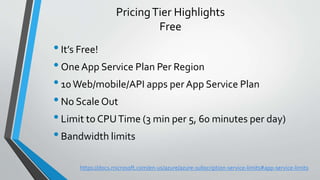
PricingTier Highlights
Free
•It’s Free!
•One App Service Plan Per Region
•10Web/mobile/API apps per App Service Plan
•No Scale Out
•Limit to CPUTime (3 min per 5, 60 minutes per day)
•Bandwidth limits
https://docs.microsoft.com/en-us/azure/azure-subscription-service-limits#app-service-limits
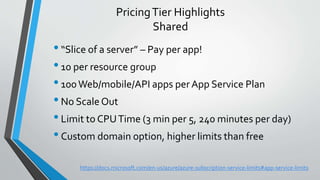
PricingTier Highlights
Shared
•“Slice of a server” – Pay per app!
•10 per resource group
•100Web/mobile/API apps per App Service Plan
•No Scale Out
•Limit to CPUTime (3 min per 5, 240 minutes per day)
•Custom domain option, higher limits than free
https://docs.microsoft.com/en-us/azure/azure-subscription-service-limits#app-service-limits
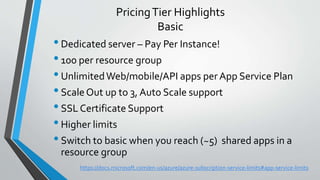
PricingTier Highlights
Basic
•Dedicated server – Pay Per Instance!
•100 per resource group
•UnlimitedWeb/mobile/API apps per App Service Plan
•ScaleOut up to 3, Auto Scale support
•SSL Certificate Support
•Higher limits
•Switch to basic when you reach (~5) shared apps in a
resource group
https://docs.microsoft.com/en-us/azure/azure-subscription-service-limits#app-service-limits
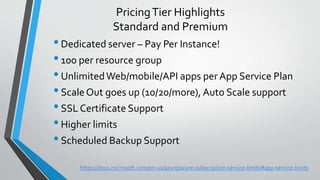
PricingTier Highlights
Standard and Premium
•Dedicated server – Pay Per Instance!
•100 per resource group
•UnlimitedWeb/mobile/API apps per App Service Plan
•ScaleOut goes up (10/20/more), Auto Scale support
•SSL Certificate Support
•Higher limits
•Scheduled Backup Support
https://docs.microsoft.com/en-us/azure/azure-subscription-service-limits#app-service-limits
What do these things mean?
• Resource Group
• A group of related Azure resources (things).
• Not Limited to App Service
• Think of it like aVirtual DataCenter
• AzureApp Service Plan
• A group of related App Services
• Operates under oneTier, one region
• Think of it like a Server Farm with a Load Balancer
https://docs.microsoft.com/en-us/azure/azure-subscription-service-limits#app-service-limits
Kudu Services
Kudu Services
•Deployment Services
•Detects project type and deploys code through
continuous deployment
•Diagnostic Services
•Built in console
(<yourapp>.scm.azurewebsites.net)
Continuous Deployment
•Variety of Providers
•GitHub
•Bitbucket
•Your own repos
•Diagnostic Services
•Built in console
(<yourapp>.scm.azurewebsites.net)
Debugging InThe Cloud
Debugging in the Cloud
•Visual Studio Debugger attaches toWeb App
•Compile and publish app in Debug
•Push to yourWeb App
•Server Explorer -> Attach
https://azure.microsoft.com/en-us/blog/introduction-to-remote-debugging-on-azure-web-sites/

Azure Web Apps - Introduction

  • 1.
  • 2.
    What are AzureWebApps Part of Azure App Service Web Apps Mobile Apps API Apps Logic Apps
  • 3.
    What are AzureWebApps? •Platform as a Service •Built-in scaling and load balancing •Continuous Deployment •Automatic patching
  • 4.
    What’s supported? •Languages andFrameworks: ASP.NET, Node.js, Java, PHP, Python •Run other applications, scripts, and executables withWebJobs •Limited support to install frameworks or other support
  • 5.
  • 6.
    Data transfer ratesdo apply, among other add-on services.This discussion is not a substitute for checking pricing yourself. •Free •Shared •Basic •Standard •Premium PricingTiers https://azure.microsoft.com/en-us/pricing/details/app-service/
  • 7.
    PricingTier Highlights Free •It’s Free! •OneApp Service Plan Per Region •10Web/mobile/API apps per App Service Plan •No Scale Out •Limit to CPUTime (3 min per 5, 60 minutes per day) •Bandwidth limits https://docs.microsoft.com/en-us/azure/azure-subscription-service-limits#app-service-limits
  • 8.
    PricingTier Highlights Shared •“Slice ofa server” – Pay per app! •10 per resource group •100Web/mobile/API apps per App Service Plan •No Scale Out •Limit to CPUTime (3 min per 5, 240 minutes per day) •Custom domain option, higher limits than free https://docs.microsoft.com/en-us/azure/azure-subscription-service-limits#app-service-limits
  • 9.
    PricingTier Highlights Basic •Dedicated server– Pay Per Instance! •100 per resource group •UnlimitedWeb/mobile/API apps per App Service Plan •ScaleOut up to 3, Auto Scale support •SSL Certificate Support •Higher limits •Switch to basic when you reach (~5) shared apps in a resource group https://docs.microsoft.com/en-us/azure/azure-subscription-service-limits#app-service-limits
  • 10.
    PricingTier Highlights Standard andPremium •Dedicated server – Pay Per Instance! •100 per resource group •UnlimitedWeb/mobile/API apps per App Service Plan •ScaleOut goes up (10/20/more), Auto Scale support •SSL Certificate Support •Higher limits •Scheduled Backup Support https://docs.microsoft.com/en-us/azure/azure-subscription-service-limits#app-service-limits
  • 11.
    What do thesethings mean? • Resource Group • A group of related Azure resources (things). • Not Limited to App Service • Think of it like aVirtual DataCenter • AzureApp Service Plan • A group of related App Services • Operates under oneTier, one region • Think of it like a Server Farm with a Load Balancer https://docs.microsoft.com/en-us/azure/azure-subscription-service-limits#app-service-limits
  • 12.
  • 13.
    Kudu Services •Deployment Services •Detectsproject type and deploys code through continuous deployment •Diagnostic Services •Built in console (<yourapp>.scm.azurewebsites.net)
  • 14.
  • 15.
    Continuous Deployment •Variety ofProviders •GitHub •Bitbucket •Your own repos •Diagnostic Services •Built in console (<yourapp>.scm.azurewebsites.net)
  • 16.
  • 17.
    Debugging in theCloud •Visual Studio Debugger attaches toWeb App •Compile and publish app in Debug •Push to yourWeb App •Server Explorer -> Attach https://azure.microsoft.com/en-us/blog/introduction-to-remote-debugging-on-azure-web-sites/