ReactPHP
Phil Norton
Phil Norton
Help run NWDUG
Blog at #! code (www.hashbangcode.com)
@philipnorton42 on Twitter
“Event-driven, non-blocking I/O with PHP”
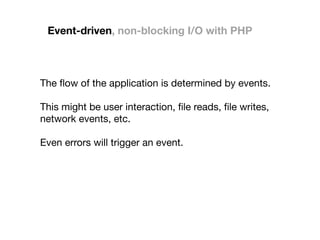
Event-driven, non-blocking I/O with PHP
The flow of the application is determined by events.

This might be user interaction, file reads, file writes,
network events, etc.

Even errors will trigger an event.
Event-driven, non-blocking I/O with PHP
The program runs without causing any blocking of
CPU runtime.

This is usually things like reading or writing to a file,
communicating with a network resource.

The idea is that any pure CPU interaction will be
many times faster than network requests.

In basic terms, a call to sleep() will block the program
from running.
Event-driven, non-blocking I/O with PHP
As in Input/Output.

Meaning that we are dealing with the input and
output of data.

In ReactPHP this is done via streams to prevent
blocking.

Streams can be read from or written to in a linear
fashion and don't need to be consumed in full.
Event-driven, non-blocking I/O with PHP
The system is written in pure PHP.

i.e. no third part libraries or other packages are
needed to run ReactPHP.
ReactPHP
• Forget the normal request > action > response
mechanisms that you are familiar with.

• ReactPHP acts around a central loop and acts more like a
desktop application than a web application.
ReactPHP
ReactPHP is good for:

• Servers

• Clients

• Long-running processes
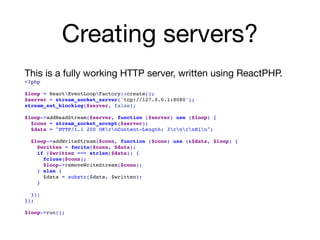
Creating servers?
This is a fully working HTTP server, written using ReactPHP.

<?php
$loop = ReactEventLoopFactory::create();

$server = stream_socket_server('tcp://127.0.0.1:8080');
stream_set_blocking($server, false);
$loop->addReadStream($server, function ($server) use ($loop) {
$conn = stream_socket_accept($server);
$data = "HTTP/1.1 200 OKrnContent-Length: 3rnrnHin";
$loop->addWriteStream($conn, function ($conn) use (&$data, $loop) {
$written = fwrite($conn, $data);
if ($written === strlen($data)) {
fclose($conn);

$loop->removeWriteStream($conn);
} else {

$data = substr($data, $written);
}

});
});

$loop->run();
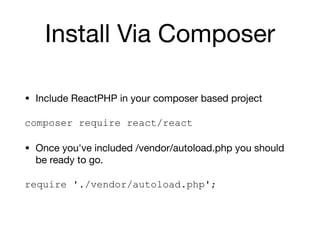
Install Via Composer
• Include ReactPHP in your composer based project

composer require react/react
• Once you've included /vendor/autoload.php you should
be ready to go.

require './vendor/autoload.php';
ReactPHP
ReactPHP heavily uses the following aspects of PHP

• Streams

• Closures

It makes sense to understand what these are.

So let's have a quick look at them.
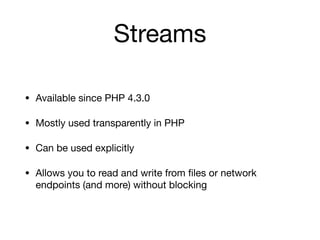
Streams
Streams
• Available since PHP 4.3.0

• Mostly used transparently in PHP

• Can be used explicitly

• Allows you to read and write from files or network
endpoints (and more) without blocking
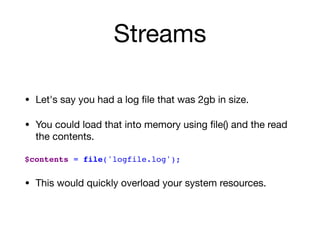
Streams
• Let's say you had a log file that was 2gb in size.

• You could load that into memory using file() and the read
the contents.

$contents = file('logfile.log');
• This would quickly overload your system resources.
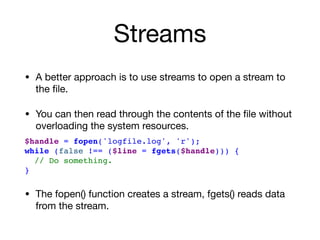
Streams
• A better approach is to use streams to open a stream to
the file.

• You can then read through the contents of the file without
overloading the system resources.

$handle = fopen('logfile.log', 'r');
while (false !== ($line = fgets($handle))) {
// Do something.
}
• The fopen() function creates a stream, fgets() reads data
from the stream.
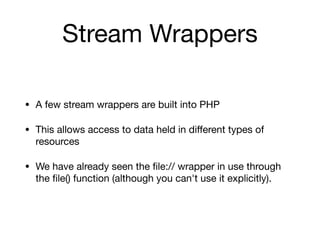
Stream Wrappers
• A few stream wrappers are built into PHP

• This allows access to data held in different types of
resources

• We have already seen the file:// wrapper in use through
the file() function (although you can't use it explicitly).
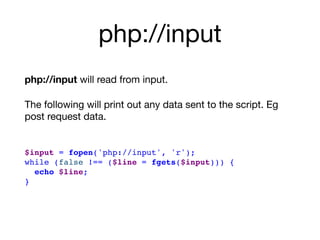
php://input
php://input will read from input.

The following will print out any data sent to the script. Eg
post request data.

$input = fopen('php://input', 'r');

while (false !== ($line = fgets($input))) {
echo $line;
}
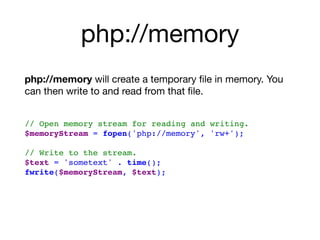
php://memory
php://memory will create a temporary file in memory. You
can then write to and read from that file.

// Open memory stream for reading and writing.
$memoryStream = fopen('php://memory', 'rw+');


// Write to the stream.
$text = 'sometext' . time();
fwrite($memoryStream, $text);

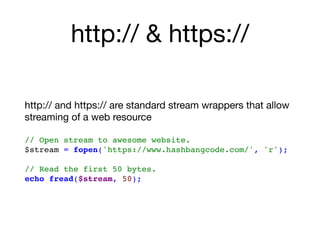
http:// & https://
http:// and https:// are standard stream wrappers that allow
streaming of a web resource

// Open stream to awesome website.

$stream = fopen('https://www.hashbangcode.com/', 'r');
// Read the first 50 bytes.
echo fread($stream, 50);
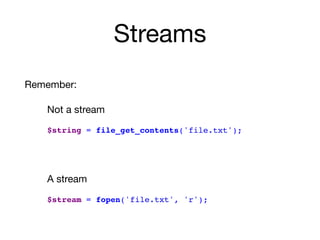
Streams
Remember:

Not a stream

$string = file_get_contents('file.txt');
A stream

$stream = fopen('file.txt', 'r');
Streams
Read more:

PHP Streams:

https://www.hashbangcode.com/article/php-streams

PHP Stream Wrappers

https://www.hashbangcode.com/article/php-custom-stream-wrappers
Closures
Closures
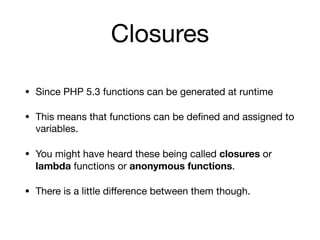
• Since PHP 5.3 functions can be generated at runtime

• This means that functions can be defined and assigned to
variables.

• You might have heard these being called closures or
lambda functions or anonymous functions.

• There is a little difference between them though.
Lambda Functions
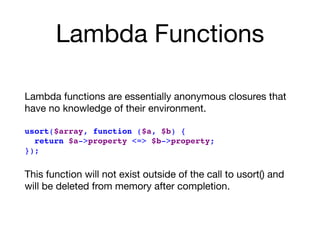
Lambda functions are essentially anonymous closures that
have no knowledge of their environment.

usort($array, function ($a, $b) {
return $a->property <=> $b->property;
});
This function will not exist outside of the call to usort() and
will be deleted from memory after completion.
Lambda Functions
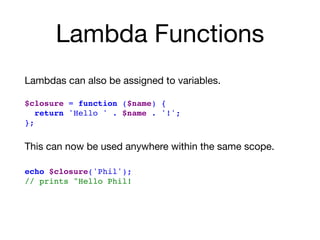
Lambdas can also be assigned to variables.

$closure = function ($name) {
return 'Hello ' . $name . '!';
};
This can now be used anywhere within the same scope.


echo $closure('Phil');
// prints "Hello Phil!
Closures
Closures inherit variables from the parent context via the use
statement.

$day = 'Wednesday';
$closure = function ($name) use ($day) {
return 'Hello ' . $name . '! It is ' . $day . ' today.';
};
echo $closure('Phil');
// Prints "Hello Phil! It is Wednesday."
Closures
In reality, the terms lambda and closures are often used
interchangeably.

Many languages swap their names around.

So, don’t worry about the name.
The Loop
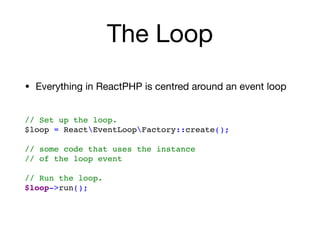
The Loop
• Everything in ReactPHP is centred around an event loop

// Set up the loop.
$loop = ReactEventLoopFactory::create();

// some code that uses the instance 

// of the loop event


// Run the loop.
$loop->run();
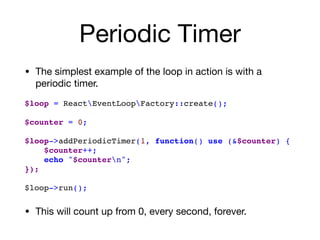
Periodic Timer
• The simplest example of the loop in action is with a
periodic timer.

$loop = ReactEventLoopFactory::create();

$counter = 0;

$loop->addPeriodicTimer(1, function() use (&$counter) {
$counter++;

echo "$countern";

});


$loop->run();
• This will count up from 0, every second, forever.
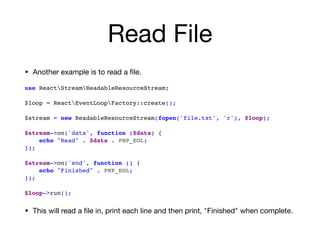
Read File
• Another example is to read a file.

use ReactStreamReadableResourceStream;


$loop = ReactEventLoopFactory::create();


$stream = new ReadableResourceStream(fopen('file.txt', 'r'), $loop);
$stream->on('data', function ($data) {
echo "Read" . $data . PHP_EOL;
});

$stream->on('end', function () {
echo "Finished" . PHP_EOL;

});

$loop->run();
• This will read a file in, print each line and then print, "Finished" when complete.
Create A Chat
Application In React
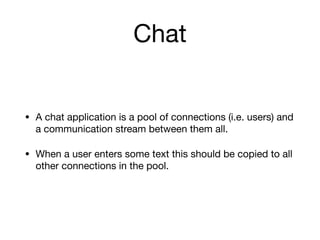
Chat
• A chat application is a pool of connections (i.e. users) and
a communication stream between them all.

• When a user enters some text this should be copied to all
other connections in the pool.
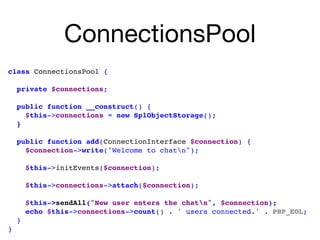
ConnectionsPool
class ConnectionsPool {

private $connections;
public function __construct() {

$this->connections = new SplObjectStorage();

}


public function add(ConnectionInterface $connection) {
$connection->write("Welcome to chatn");


$this->initEvents($connection);

$this->connections->attach($connection);

$this->sendAll("New user enters the chatn", $connection);
echo $this->connections->count() . ' users connected.' . PHP_EOL;
}
}
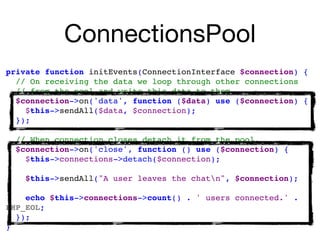
ConnectionsPool
private function initEvents(ConnectionInterface $connection) {
// On receiving the data we loop through other connections
// from the pool and write this data to them
$connection->on('data', function ($data) use ($connection) {

$this->sendAll($data, $connection);

});
// When connection closes detach it from the pool.
$connection->on('close', function () use ($connection) {

$this->connections->detach($connection);

$this->sendAll("A user leaves the chatn", $connection);

echo $this->connections->count() . ' users connected.' .
PHP_EOL;
});
}
ConnectionsPool
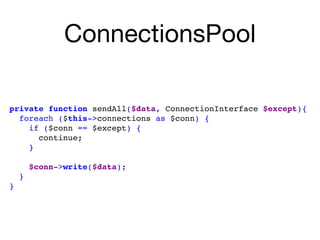
private function sendAll($data, ConnectionInterface $except){

foreach ($this->connections as $conn) {

if ($conn == $except) {

continue;

}


$conn->write($data);

}

}
ReactPHP
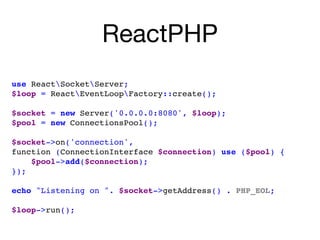
use ReactSocketServer;
$loop = ReactEventLoopFactory::create();

$socket = new Server('0.0.0.0:8080', $loop);
$pool = new ConnectionsPool();
$socket->on('connection', 

function (ConnectionInterface $connection) use ($pool) {
$pool->add($connection);
});

echo "Listening on ". $socket->getAddress() . PHP_EOL;

$loop->run();
Run the chat server
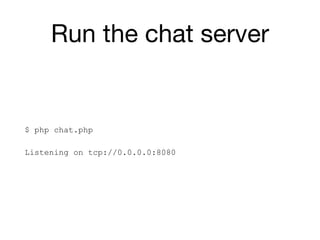
$ php chat.php
Listening on tcp://0.0.0.0:8080
Connect to chat
nc <ip address> 8080
telnet <ip address> 8080
Connect to chat
• Connecting to the chat server using telnet is fine. But it’s
also possible to create a chat client using ReactPHP.
Conclusion
• ReactPHP takes a bit of getting your head around.

• PHP's normal flow is "request > action > response" but
that no longer applies here.

• 'non-blocking' means you can't access files, databases
or anything like that without going through a streams.

• Thankfully a few ReactPHP libraries exist to wrap those
resources and turn them into streams.
Resources
• Official Website : https://reactphp.org/

• List of third party libraries using ReactPHP: 

https://github.com/reactphp/reactphp/wiki/Users

• Book: Event Driven PHP With React PHP - Sergey Zhuk
Thanks!
Help run NWDUG
Blog at #! code (www.hashbangcode.com)
@philipnorton42 on Twitter
Phil Norton

ReactPHP

  • 1.
  • 2.
    Phil Norton Help runNWDUG Blog at #! code (www.hashbangcode.com) @philipnorton42 on Twitter
  • 3.
  • 4.
    Event-driven, non-blocking I/Owith PHP The flow of the application is determined by events. This might be user interaction, file reads, file writes, network events, etc. Even errors will trigger an event.
  • 5.
    Event-driven, non-blocking I/Owith PHP The program runs without causing any blocking of CPU runtime. This is usually things like reading or writing to a file, communicating with a network resource. The idea is that any pure CPU interaction will be many times faster than network requests. In basic terms, a call to sleep() will block the program from running.
  • 6.
    Event-driven, non-blocking I/Owith PHP As in Input/Output. Meaning that we are dealing with the input and output of data. In ReactPHP this is done via streams to prevent blocking. Streams can be read from or written to in a linear fashion and don't need to be consumed in full.
  • 7.
    Event-driven, non-blocking I/Owith PHP The system is written in pure PHP. i.e. no third part libraries or other packages are needed to run ReactPHP.
  • 8.
    ReactPHP • Forget thenormal request > action > response mechanisms that you are familiar with. • ReactPHP acts around a central loop and acts more like a desktop application than a web application.
  • 9.
    ReactPHP ReactPHP is goodfor: • Servers • Clients • Long-running processes
  • 10.
    Creating servers? This isa fully working HTTP server, written using ReactPHP. <?php $loop = ReactEventLoopFactory::create();
 $server = stream_socket_server('tcp://127.0.0.1:8080'); stream_set_blocking($server, false); $loop->addReadStream($server, function ($server) use ($loop) { $conn = stream_socket_accept($server); $data = "HTTP/1.1 200 OKrnContent-Length: 3rnrnHin"; $loop->addWriteStream($conn, function ($conn) use (&$data, $loop) { $written = fwrite($conn, $data); if ($written === strlen($data)) { fclose($conn);
 $loop->removeWriteStream($conn); } else {
 $data = substr($data, $written); }
 }); });
 $loop->run();
  • 11.
    Install Via Composer •Include ReactPHP in your composer based project composer require react/react • Once you've included /vendor/autoload.php you should be ready to go. require './vendor/autoload.php';
  • 12.
    ReactPHP ReactPHP heavily usesthe following aspects of PHP • Streams • Closures It makes sense to understand what these are. So let's have a quick look at them.
  • 13.
  • 14.
    Streams • Available sincePHP 4.3.0 • Mostly used transparently in PHP • Can be used explicitly • Allows you to read and write from files or network endpoints (and more) without blocking
  • 15.
    Streams • Let's sayyou had a log file that was 2gb in size. • You could load that into memory using file() and the read the contents.
 $contents = file('logfile.log'); • This would quickly overload your system resources.
  • 16.
    Streams • A betterapproach is to use streams to open a stream to the file. • You can then read through the contents of the file without overloading the system resources. $handle = fopen('logfile.log', 'r'); while (false !== ($line = fgets($handle))) { // Do something. } • The fopen() function creates a stream, fgets() reads data from the stream.
  • 17.
    Stream Wrappers • Afew stream wrappers are built into PHP • This allows access to data held in different types of resources • We have already seen the file:// wrapper in use through the file() function (although you can't use it explicitly).
  • 18.
    php://input php://input will readfrom input. The following will print out any data sent to the script. Eg post request data. $input = fopen('php://input', 'r');
 while (false !== ($line = fgets($input))) { echo $line; }
  • 19.
    php://memory php://memory will createa temporary file in memory. You can then write to and read from that file.
 // Open memory stream for reading and writing. $memoryStream = fopen('php://memory', 'rw+'); 
 // Write to the stream. $text = 'sometext' . time(); fwrite($memoryStream, $text);

  • 20.
    http:// & https:// http://and https:// are standard stream wrappers that allow streaming of a web resource
 // Open stream to awesome website.
 $stream = fopen('https://www.hashbangcode.com/', 'r'); // Read the first 50 bytes. echo fread($stream, 50);
  • 21.
    Streams Remember: Not a stream $string= file_get_contents('file.txt'); A stream $stream = fopen('file.txt', 'r');
  • 22.
    Streams Read more: PHP Streams: https://www.hashbangcode.com/article/php-streams PHPStream Wrappers https://www.hashbangcode.com/article/php-custom-stream-wrappers
  • 23.
  • 24.
    Closures • Since PHP5.3 functions can be generated at runtime • This means that functions can be defined and assigned to variables. • You might have heard these being called closures or lambda functions or anonymous functions. • There is a little difference between them though.
  • 25.
    Lambda Functions Lambda functionsare essentially anonymous closures that have no knowledge of their environment.
 usort($array, function ($a, $b) { return $a->property <=> $b->property; }); This function will not exist outside of the call to usort() and will be deleted from memory after completion.
  • 26.
    Lambda Functions Lambdas canalso be assigned to variables.
 $closure = function ($name) { return 'Hello ' . $name . '!'; }; This can now be used anywhere within the same scope. 
 echo $closure('Phil'); // prints "Hello Phil!
  • 27.
    Closures Closures inherit variablesfrom the parent context via the use statement.
 $day = 'Wednesday'; $closure = function ($name) use ($day) { return 'Hello ' . $name . '! It is ' . $day . ' today.'; }; echo $closure('Phil'); // Prints "Hello Phil! It is Wednesday."
  • 28.
    Closures In reality, theterms lambda and closures are often used interchangeably. Many languages swap their names around. So, don’t worry about the name.
  • 29.
  • 30.
    The Loop • Everythingin ReactPHP is centred around an event loop // Set up the loop. $loop = ReactEventLoopFactory::create();
 // some code that uses the instance 
 // of the loop event 
 // Run the loop. $loop->run();
  • 31.
    Periodic Timer • Thesimplest example of the loop in action is with a periodic timer. $loop = ReactEventLoopFactory::create();
 $counter = 0;
 $loop->addPeriodicTimer(1, function() use (&$counter) { $counter++;
 echo "$countern";
 }); 
 $loop->run(); • This will count up from 0, every second, forever.
  • 32.
    Read File • Anotherexample is to read a file. use ReactStreamReadableResourceStream;
 
 $loop = ReactEventLoopFactory::create(); 
 $stream = new ReadableResourceStream(fopen('file.txt', 'r'), $loop); $stream->on('data', function ($data) { echo "Read" . $data . PHP_EOL; });
 $stream->on('end', function () { echo "Finished" . PHP_EOL;
 });
 $loop->run(); • This will read a file in, print each line and then print, "Finished" when complete.
  • 33.
  • 34.
    Chat • A chatapplication is a pool of connections (i.e. users) and a communication stream between them all. • When a user enters some text this should be copied to all other connections in the pool.
  • 35.
    ConnectionsPool class ConnectionsPool {
 private$connections; public function __construct() {
 $this->connections = new SplObjectStorage();
 } 
 public function add(ConnectionInterface $connection) { $connection->write("Welcome to chatn"); 
 $this->initEvents($connection);
 $this->connections->attach($connection);
 $this->sendAll("New user enters the chatn", $connection); echo $this->connections->count() . ' users connected.' . PHP_EOL; } }
  • 36.
    ConnectionsPool private function initEvents(ConnectionInterface$connection) { // On receiving the data we loop through other connections // from the pool and write this data to them $connection->on('data', function ($data) use ($connection) {
 $this->sendAll($data, $connection);
 }); // When connection closes detach it from the pool. $connection->on('close', function () use ($connection) {
 $this->connections->detach($connection);
 $this->sendAll("A user leaves the chatn", $connection);
 echo $this->connections->count() . ' users connected.' . PHP_EOL; }); }
  • 37.
    ConnectionsPool private function sendAll($data,ConnectionInterface $except){
 foreach ($this->connections as $conn) {
 if ($conn == $except) {
 continue;
 } 
 $conn->write($data);
 }
 }
  • 38.
    ReactPHP use ReactSocketServer; $loop =ReactEventLoopFactory::create();
 $socket = new Server('0.0.0.0:8080', $loop); $pool = new ConnectionsPool(); $socket->on('connection', 
 function (ConnectionInterface $connection) use ($pool) { $pool->add($connection); });
 echo "Listening on ". $socket->getAddress() . PHP_EOL;
 $loop->run();
  • 39.
    Run the chatserver $ php chat.php Listening on tcp://0.0.0.0:8080
  • 40.
    Connect to chat nc<ip address> 8080 telnet <ip address> 8080
  • 41.
    Connect to chat •Connecting to the chat server using telnet is fine. But it’s also possible to create a chat client using ReactPHP.
  • 42.
    Conclusion • ReactPHP takesa bit of getting your head around. • PHP's normal flow is "request > action > response" but that no longer applies here. • 'non-blocking' means you can't access files, databases or anything like that without going through a streams. • Thankfully a few ReactPHP libraries exist to wrap those resources and turn them into streams.
  • 43.
    Resources • Official Website: https://reactphp.org/ • List of third party libraries using ReactPHP: 
 https://github.com/reactphp/reactphp/wiki/Users • Book: Event Driven PHP With React PHP - Sergey Zhuk
  • 44.
  • 45.
    Help run NWDUG Blogat #! code (www.hashbangcode.com) @philipnorton42 on Twitter Phil Norton