Reactive Extensions 
classic observer in .NET 
presenter: Sergiy Grytsenko
About presenter 
 Senior Developer @ EPAM Systems 
 17 years of programing with Basic, Pascal, Assembler, C/C++, C# 
 12 years of professional development 
 Developed several projects using Rx
Target auditory 
 UI developers that deals with asynchronous code/want responsive UI 
 Back-end developers that wish to make server async and responsive 
 You just curious about the IObservable<T> and IObserver<T>
Agenda 
 Why use Rx when we have events? 
 Key types & methods 
 Lifetime management & flow control 
 Combining several streams 
 Scheduling and Threading 
 Tests, I need unit tests!
Why use Rx when we have events? 
“To be or not to be” ©
Why Rx? 
 You demand fire-and-forget messaging 
 You want to have the result pushed to you when it is ready 
 You do not want wait for entire set to be processed before you see first one 
 Developers have tools to push data 
 Developers need tools to react to push data 
 Rx enables developers to solve problems in an elegant, familiar and 
declarative style with less code 
 It is easily to manage events and subscriptions
Why Rx? 
 Integrated 
 Unitive 
 Extensible 
 Declarative 
 Composable 
 Transformative
Why Rx? 
Useful for 
 UI events 
 Domain events 
 Infrastructure events 
 Integration events
Key types & methods 
The key to the door that you want to open
Key types & methods 
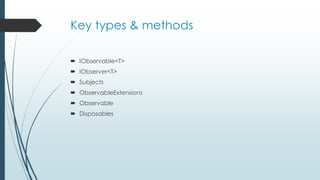
 IObservable<T> 
 IObserver<T> 
 Subjects 
 ObservableExtensions 
 Observable 
 Disposables
Key types & methods 
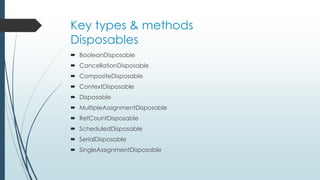
Disposables 
 BooleanDisposable 
 CancellationDisposable 
 CompositeDisposable 
 ContextDisposable 
 Disposable 
 MultipleAssignmentDisposable 
 RefCountDisposable 
 ScheduledDisposable 
 SerialDisposable 
 SingleAssignmentDisposable
Key types & methods 
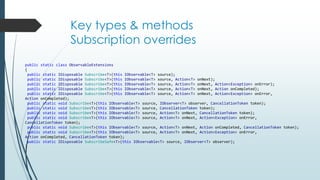
Subscription overrides 
public static class ObservableExtensions 
{ 
public static IDisposable Subscribe<T>(this IObservable<T> source); 
public static IDisposable Subscribe<T>(this IObservable<T> source, Action<T> onNext); 
public static IDisposable Subscribe<T>(this IObservable<T> source, Action<T> onNext, Action<Exception> onError); 
public static IDisposable Subscribe<T>(this IObservable<T> source, Action<T> onNext, Action onCompleted); 
public static IDisposable Subscribe<T>(this IObservable<T> source, Action<T> onNext, Action<Exception> onError, 
Action onCompleted); 
public static void Subscribe<T>(this IObservable<T> source, IObserver<T> observer, CancellationToken token); 
public static void Subscribe<T>(this IObservable<T> source, CancellationToken token); 
public static void Subscribe<T>(this IObservable<T> source, Action<T> onNext, CancellationToken token); 
public static void Subscribe<T>(this IObservable<T> source, Action<T> onNext, Action<Exception> onError, 
CancellationToken token); 
public static void Subscribe<T>(this IObservable<T> source, Action<T> onNext, Action onCompleted, CancellationToken token); 
public static void Subscribe<T>(this IObservable<T> source, Action<T> onNext, Action<Exception> onError, 
Action onCompleted, CancellationToken token); 
public static IDisposable SubscribeSafe<T>(this IObservable<T> source, IObserver<T> observer); 
}
Key types & methods 
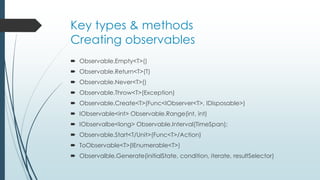
Creating observables 
 Observable.Empty<T>() 
 Observable.Return<T>(T) 
 Observable.Never<T>() 
 Observable.Throw<T>(Exception) 
 Observable.Create<T>(Func<IObserver<T>, IDisposable>) 
 IObservable<int> Observable.Range(int, int) 
 IObservalbe<long> Observable.Interval(TimeSpan); 
 Observable.Start<T/Unit>(Func<T>/Action) 
 ToObservable<T>(IEnumerable<T>) 
 Observalble.Generate(initialState, condition, iterate, resultSelector)
Key types & methods 
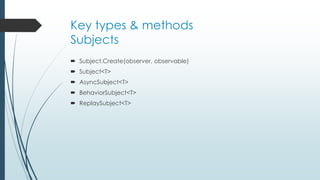
Subjects 
 Subject.Create(observer, observable) 
 Subject<T> 
 AsyncSubject<T> 
 BehaviorSubject<T> 
 ReplaySubject<T>
Lifetime management & flow 
control 
Build your own pipe & valve system
Lifetime management & flow control 
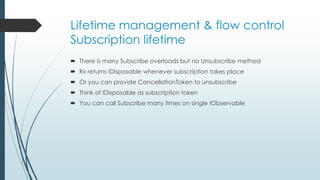
Subscription lifetime 
 There is many Subscribe overloads but no Unsubscribe method 
 Rx returns IDisposable whenever subscription takes place 
 Or you can provide CancellationToken to unsubscribe 
 Think of IDisposable as subscription token 
 You can call Subscribe many times on single IObservable
Lifetime management & flow control 
Observable lifetime 
 Both OnError & OnCompleted signify the completion of a stream 
 No futher calls to OnNext can be performed 
 When stream completes or errors, you should still dispose subscription
Lifetime management & flow control 
Flow control 
 OnError publishes exception, not thows 
 Subscribe w/o OnError handler causes exception to throw
Lifetime management & flow control 
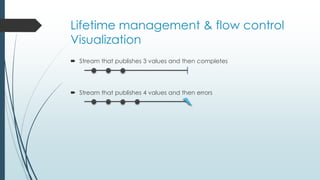
Visualization 
 Stream that publishes 3 values and then completes 
 Stream that publishes 4 values and then errors
Lifetime management & flow control 
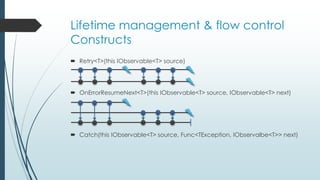
Constructs 
 Retry<T>(this IObservable<T> source) 
 OnErrorResumeNext<T>(this IObservable<T> source, IObservable<T> next) 
 Catch(this IObservable<T> source, Func<TException, IObservalbe<T>> next)
Lifetime management & flow control 
Constructs 
 Materialize/Dematerialize 
 Do/Run
Combining several streams 
So many combinations…
Combining several streams 
Transfer from one stream 
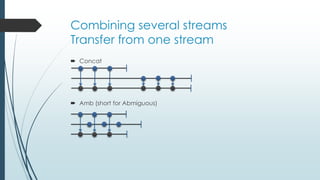
 Concat 
 Amb (short for Abmiguous)
Combining several streams 
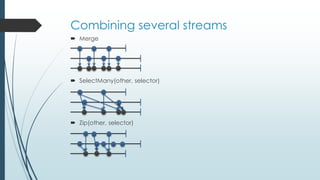
 Merge 
 SelectMany(other, selector) 
 Zip(other, selector)
Combining several streams 
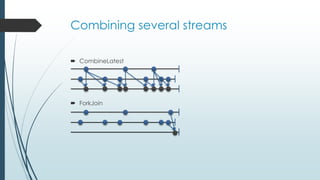
 CombineLatest 
 ForkJoin
Scheduling and Threading 
effectively remove the need for WaitHandles, and any explicit calls to 
using Threads, the ThreadPool and the new shiny Task type
Scheduling and Threading 
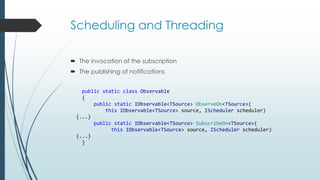
 The invocation of the subscription 
 The publishing of notifications 
public static class Observable 
{ 
public static IObservable<TSource> ObserveOn<TSource>( 
this IObservable<TSource> source, IScheduler scheduler) 
{...} 
public static IObservable<TSource> SubscribeOn<TSource>( 
this IObservable<TSource> source, IScheduler scheduler) 
{...} 
}
Scheduling and Threading 
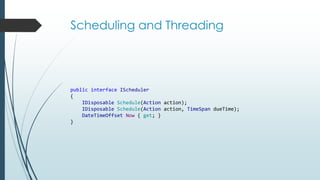
public interface IScheduler 
{ 
IDisposable Schedule(Action action); 
IDisposable Schedule(Action action, TimeSpan dueTime); 
DateTimeOffset Now { get; } 
}
Scheduling and Threading 
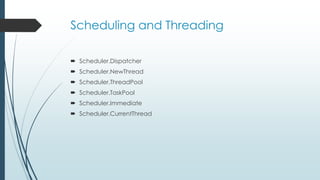
 Scheduler.Dispatcher 
 Scheduler.NewThread 
 Scheduler.ThreadPool 
 Scheduler.TaskPool 
 Scheduler.Immediate 
 Scheduler.CurrentThread
Tests, I need unit tests! 
Mastering time…
Tests, I need unit tests! 
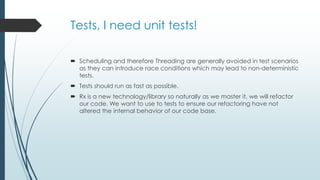
 Scheduling and therefore Threading are generally avoided in test scenarios 
as they can introduce race conditions which may lead to non-deterministic 
tests. 
 Tests should run as fast as possible. 
 Rx is a new technology/library so naturally as we master it, we will refactor 
our code. We want to use to tests to ensure our refactoring have not 
altered the internal behavior of our code base.
Tests, I need unit tests! 
TestScheduler 
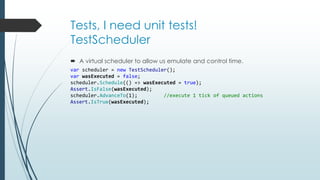
 A virtual scheduler to allow us emulate and control time. 
var scheduler = new TestScheduler(); 
var wasExecuted = false; 
scheduler.Schedule(() => wasExecuted = true); 
Assert.IsFalse(wasExecuted); 
scheduler.AdvanceTo(1); //execute 1 tick of queued actions 
Assert.IsTrue(wasExecuted);
Tests, I need unit tests! 
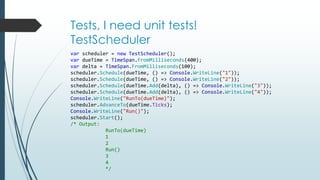
TestScheduler 
var scheduler = new TestScheduler(); 
var dueTime = TimeSpan.FromMilliseconds(400); 
var delta = TimeSpan.FromMilliseconds(100); 
scheduler.Schedule(dueTime, () => Console.WriteLine("1")); 
scheduler.Schedule(dueTime, () => Console.WriteLine("2")); 
scheduler.Schedule(dueTime.Add(delta), () => Console.WriteLine("3")); 
scheduler.Schedule(dueTime.Add(delta), () => Console.WriteLine("4")); 
Console.WriteLine("RunTo(dueTime)"); 
scheduler.AdvanceTo(dueTime.Ticks); 
Console.WriteLine("Run()"); 
scheduler.Start(); 
/* Output: 
RunTo(dueTime) 
1 
2 
Run() 
3 
4 
*/
Useful links 
 IObservable<T> interface – MSDN 
 IObserver<T> interface – MSDN 
 Observer Design pattern - MSDN 
 Rx Home http://msdn.microsoft.com/en-us/devlabs/gg577609 
 Exploring the Major Interfaces in Rx – MSDN 
 ObservableExtensions class - MSDN 
 Using Rx Subjects - MSDN 
 System.Reactive.Subjects Namespace - MSDN 
 Subject<T> - MSDN 
 AsyncSubject<T> - MSDN 
 BehaviorSubject<T> - MSDN 
 ReplaySubject<T> - MSDN 
 Subject static class - MSDN 
 ISubject<TSource, TResult> - MSDN 
 ISubject<T> - MSDN
Useful links 
 Observable class - MSDN 
 Observer class - MSDN 
 Qservable class - MSDN 
 The Rx Wiki site 101 Samples http://rxwiki.wikidot.com/101samples 
 http://channel9.msdn.com/shows/Going+Deep/Wes-Dyer-and-Jeffrey- 
Van-Gogh-Inside-Rx-Virtual-Time/ 
 http://channel9.msdn.com/posts/J.Van.Gogh/Rx-API-in-depth-Hot-and- 
Cold-observables/ 
 http://blogs.microsoft.co.il/blogs/bnaya/archive/2010/03/13/rx-for-beginners- 
part-9-hot-vs-cold-observable.aspx
Useful links 
 http://channel9.msdn.com/Shows/Going+Deep/Bart-De-Smet-MinLINQ-The- 
Essence-of-LINQ 
 http://leecampbell.blogspot.com/2010/08/reactive-extensions-for-net.html 
 http://channel9.msdn.com/Shows/This+Week+On+Channel+9/TWC9- 
August-17-2012 
 http://channel9.msdn.com/Series/Rx-Workshop 
 http://channel9.msdn.com/Blogs/J.Van.Gogh 
 http://channel9.msdn.com/Blogs/Charles/Erik-Meijer-Rx-in-15-Minutes 
 http://channel9.msdn.com/Blogs/Peli/Testing-Rx-with-Pex

Reactive Extensions: classic Observer in .NET

  • 1.
    Reactive Extensions classicobserver in .NET presenter: Sergiy Grytsenko
  • 2.
    About presenter Senior Developer @ EPAM Systems  17 years of programing with Basic, Pascal, Assembler, C/C++, C#  12 years of professional development  Developed several projects using Rx
  • 3.
    Target auditory UI developers that deals with asynchronous code/want responsive UI  Back-end developers that wish to make server async and responsive  You just curious about the IObservable<T> and IObserver<T>
  • 4.
    Agenda  Whyuse Rx when we have events?  Key types & methods  Lifetime management & flow control  Combining several streams  Scheduling and Threading  Tests, I need unit tests!
  • 5.
    Why use Rxwhen we have events? “To be or not to be” ©
  • 6.
    Why Rx? You demand fire-and-forget messaging  You want to have the result pushed to you when it is ready  You do not want wait for entire set to be processed before you see first one  Developers have tools to push data  Developers need tools to react to push data  Rx enables developers to solve problems in an elegant, familiar and declarative style with less code  It is easily to manage events and subscriptions
  • 7.
    Why Rx? Integrated  Unitive  Extensible  Declarative  Composable  Transformative
  • 8.
    Why Rx? Usefulfor  UI events  Domain events  Infrastructure events  Integration events
  • 9.
    Key types &methods The key to the door that you want to open
  • 10.
    Key types &methods  IObservable<T>  IObserver<T>  Subjects  ObservableExtensions  Observable  Disposables
  • 11.
    Key types &methods Disposables  BooleanDisposable  CancellationDisposable  CompositeDisposable  ContextDisposable  Disposable  MultipleAssignmentDisposable  RefCountDisposable  ScheduledDisposable  SerialDisposable  SingleAssignmentDisposable
  • 12.
    Key types &methods Subscription overrides public static class ObservableExtensions { public static IDisposable Subscribe<T>(this IObservable<T> source); public static IDisposable Subscribe<T>(this IObservable<T> source, Action<T> onNext); public static IDisposable Subscribe<T>(this IObservable<T> source, Action<T> onNext, Action<Exception> onError); public static IDisposable Subscribe<T>(this IObservable<T> source, Action<T> onNext, Action onCompleted); public static IDisposable Subscribe<T>(this IObservable<T> source, Action<T> onNext, Action<Exception> onError, Action onCompleted); public static void Subscribe<T>(this IObservable<T> source, IObserver<T> observer, CancellationToken token); public static void Subscribe<T>(this IObservable<T> source, CancellationToken token); public static void Subscribe<T>(this IObservable<T> source, Action<T> onNext, CancellationToken token); public static void Subscribe<T>(this IObservable<T> source, Action<T> onNext, Action<Exception> onError, CancellationToken token); public static void Subscribe<T>(this IObservable<T> source, Action<T> onNext, Action onCompleted, CancellationToken token); public static void Subscribe<T>(this IObservable<T> source, Action<T> onNext, Action<Exception> onError, Action onCompleted, CancellationToken token); public static IDisposable SubscribeSafe<T>(this IObservable<T> source, IObserver<T> observer); }
  • 13.
    Key types &methods Creating observables  Observable.Empty<T>()  Observable.Return<T>(T)  Observable.Never<T>()  Observable.Throw<T>(Exception)  Observable.Create<T>(Func<IObserver<T>, IDisposable>)  IObservable<int> Observable.Range(int, int)  IObservalbe<long> Observable.Interval(TimeSpan);  Observable.Start<T/Unit>(Func<T>/Action)  ToObservable<T>(IEnumerable<T>)  Observalble.Generate(initialState, condition, iterate, resultSelector)
  • 14.
    Key types &methods Subjects  Subject.Create(observer, observable)  Subject<T>  AsyncSubject<T>  BehaviorSubject<T>  ReplaySubject<T>
  • 15.
    Lifetime management &flow control Build your own pipe & valve system
  • 16.
    Lifetime management &flow control Subscription lifetime  There is many Subscribe overloads but no Unsubscribe method  Rx returns IDisposable whenever subscription takes place  Or you can provide CancellationToken to unsubscribe  Think of IDisposable as subscription token  You can call Subscribe many times on single IObservable
  • 17.
    Lifetime management &flow control Observable lifetime  Both OnError & OnCompleted signify the completion of a stream  No futher calls to OnNext can be performed  When stream completes or errors, you should still dispose subscription
  • 18.
    Lifetime management &flow control Flow control  OnError publishes exception, not thows  Subscribe w/o OnError handler causes exception to throw
  • 19.
    Lifetime management &flow control Visualization  Stream that publishes 3 values and then completes  Stream that publishes 4 values and then errors
  • 20.
    Lifetime management &flow control Constructs  Retry<T>(this IObservable<T> source)  OnErrorResumeNext<T>(this IObservable<T> source, IObservable<T> next)  Catch(this IObservable<T> source, Func<TException, IObservalbe<T>> next)
  • 21.
    Lifetime management &flow control Constructs  Materialize/Dematerialize  Do/Run
  • 22.
    Combining several streams So many combinations…
  • 23.
    Combining several streams Transfer from one stream  Concat  Amb (short for Abmiguous)
  • 24.
    Combining several streams  Merge  SelectMany(other, selector)  Zip(other, selector)
  • 25.
    Combining several streams  CombineLatest  ForkJoin
  • 26.
    Scheduling and Threading effectively remove the need for WaitHandles, and any explicit calls to using Threads, the ThreadPool and the new shiny Task type
  • 27.
    Scheduling and Threading  The invocation of the subscription  The publishing of notifications public static class Observable { public static IObservable<TSource> ObserveOn<TSource>( this IObservable<TSource> source, IScheduler scheduler) {...} public static IObservable<TSource> SubscribeOn<TSource>( this IObservable<TSource> source, IScheduler scheduler) {...} }
  • 28.
    Scheduling and Threading public interface IScheduler { IDisposable Schedule(Action action); IDisposable Schedule(Action action, TimeSpan dueTime); DateTimeOffset Now { get; } }
  • 29.
    Scheduling and Threading  Scheduler.Dispatcher  Scheduler.NewThread  Scheduler.ThreadPool  Scheduler.TaskPool  Scheduler.Immediate  Scheduler.CurrentThread
  • 30.
    Tests, I needunit tests! Mastering time…
  • 31.
    Tests, I needunit tests!  Scheduling and therefore Threading are generally avoided in test scenarios as they can introduce race conditions which may lead to non-deterministic tests.  Tests should run as fast as possible.  Rx is a new technology/library so naturally as we master it, we will refactor our code. We want to use to tests to ensure our refactoring have not altered the internal behavior of our code base.
  • 32.
    Tests, I needunit tests! TestScheduler  A virtual scheduler to allow us emulate and control time. var scheduler = new TestScheduler(); var wasExecuted = false; scheduler.Schedule(() => wasExecuted = true); Assert.IsFalse(wasExecuted); scheduler.AdvanceTo(1); //execute 1 tick of queued actions Assert.IsTrue(wasExecuted);
  • 33.
    Tests, I needunit tests! TestScheduler var scheduler = new TestScheduler(); var dueTime = TimeSpan.FromMilliseconds(400); var delta = TimeSpan.FromMilliseconds(100); scheduler.Schedule(dueTime, () => Console.WriteLine("1")); scheduler.Schedule(dueTime, () => Console.WriteLine("2")); scheduler.Schedule(dueTime.Add(delta), () => Console.WriteLine("3")); scheduler.Schedule(dueTime.Add(delta), () => Console.WriteLine("4")); Console.WriteLine("RunTo(dueTime)"); scheduler.AdvanceTo(dueTime.Ticks); Console.WriteLine("Run()"); scheduler.Start(); /* Output: RunTo(dueTime) 1 2 Run() 3 4 */
  • 34.
    Useful links IObservable<T> interface – MSDN  IObserver<T> interface – MSDN  Observer Design pattern - MSDN  Rx Home http://msdn.microsoft.com/en-us/devlabs/gg577609  Exploring the Major Interfaces in Rx – MSDN  ObservableExtensions class - MSDN  Using Rx Subjects - MSDN  System.Reactive.Subjects Namespace - MSDN  Subject<T> - MSDN  AsyncSubject<T> - MSDN  BehaviorSubject<T> - MSDN  ReplaySubject<T> - MSDN  Subject static class - MSDN  ISubject<TSource, TResult> - MSDN  ISubject<T> - MSDN
  • 35.
    Useful links Observable class - MSDN  Observer class - MSDN  Qservable class - MSDN  The Rx Wiki site 101 Samples http://rxwiki.wikidot.com/101samples  http://channel9.msdn.com/shows/Going+Deep/Wes-Dyer-and-Jeffrey- Van-Gogh-Inside-Rx-Virtual-Time/  http://channel9.msdn.com/posts/J.Van.Gogh/Rx-API-in-depth-Hot-and- Cold-observables/  http://blogs.microsoft.co.il/blogs/bnaya/archive/2010/03/13/rx-for-beginners- part-9-hot-vs-cold-observable.aspx
  • 36.
    Useful links http://channel9.msdn.com/Shows/Going+Deep/Bart-De-Smet-MinLINQ-The- Essence-of-LINQ  http://leecampbell.blogspot.com/2010/08/reactive-extensions-for-net.html  http://channel9.msdn.com/Shows/This+Week+On+Channel+9/TWC9- August-17-2012  http://channel9.msdn.com/Series/Rx-Workshop  http://channel9.msdn.com/Blogs/J.Van.Gogh  http://channel9.msdn.com/Blogs/Charles/Erik-Meijer-Rx-in-15-Minutes  http://channel9.msdn.com/Blogs/Peli/Testing-Rx-with-Pex

Editor's Notes

  • #8 LINQ integrated. You can unite .NET event, an async method call, a Task<T> or 3rd party API into single paradigm. You can write your own query operators/extension methods. Declaration of what your code does and leaves the how to the operators. Queries can be composed together to further produce composite queries. Query can transform from one type to another, translate one value to another, aggregate sequence or expand single value to a sequence of values.
  • #9 UI events like mouse move/click/down/up, button click or other control’s events Domain events like property change, collection update or business logic events Infrastructure events from FileWatcher, system or WMI Integration events: broadcast from bessage bus, push event from WebSockets API or other low latency middleware
  • #15 Create - Creates a subject from the specified observer and observable. Subject - Represents an object that is both an observable sequence as well as an observer. Each notification is broadcasted to all subscribed observers. AsyncSubject - Represents the result of an asynchronous operation. The last value before the OnCompleted notification, or the error received through OnError, is sent to all subscribed observers. BehaviorSubject - Represents a value that changes over time. Observers can subscribe to the subject to receive the last (or initial) value and all subsequent notifications. ReplaySubject - Each notification is broadcasted to all subscribed and future observers, subject to buffer trimming policies. (Remembers all publications)
  • #22 Materialize flatten 3 types of publications to stream of Notification<T> Dematerialize converts stream of notifications to IObservable<T> Do executes provided action and returns same observable Run returns void and it is a blocking call
  • #24 Concat – passes first then (when first completes) passes second Amb – passes values from stream that first produce value
  • #25 Merge – merges two or more streams passes by all values SelectMany – provides Cartesian product of two streams Zip – takes two values from both streams and returns one
  • #26 CombineLatest – combines latest two values from both streams in time ForkJoin – produces the one last combination of two values